Zeek Integration for Elastic
Elastic Cloud Serverless projects are autoscaled environments, fully managed by Elastic and available on Elastic Cloud. Availability This functionality is generally available and ready for production usage. Elastic Cloud Serverless projects are autoscaled environments, fully managed by Elastic and available on Elastic Cloud. Availability This functionality is generally available and ready for production usage. The Elastic Stack includes Elastic's core products such as Elasticsearch, Kibana, Logstash, and Beats. Availability This functionality is generally available and ready for production usage. Unless stated otherwise on the page, this functionality is available when your Elastic Stack is deployed on Elastic Cloud Hosted, Elastic Cloud Enterprise, Elastic Cloud on Kubernetes, and self-managed environments. This documentation corresponds to the latest patch available for each minor version. If you're not using the latest patch, check the release notes for changes.
Serverless Observability
Generally available
Serverless Security
Generally available
Stack
9.0+
Generally available since 9.0
| Version | 5.0.2 (View all) |
| Subscription level What's this? |
Basic |
| Developed by What's this? |
Elastic |
| Ingestion method(s) | File |
| Minimum Kibana version(s) | 9.0.0 8.12.0 |
The Zeek integration for Elastic enables you to collect and analyze high-fidelity network security monitoring logs generated by Zeek's passive traffic analysis. This integration transforms raw network metadata into actionable insights within the Elastic Stack, allowing you to monitor network activity, detect threats, and investigate security incidents.
This integration has been tested against Zeek version 2.6.1, which was the primary version used during development. However, it's expected to work with all later versions, including the latest LTS releases.
For the integration to parse data correctly, you must configure Zeek with the json-logs policy.
This integration works by collecting logs that Zeek generates after performing passive network traffic analysis. Zeek produces various log files—such as conn.log, dns.log, and http.log—which contain detailed metadata about the network traffic it observes. You deploy an Elastic Agent on the host where Zeek is running or where its logs are stored. The agent is configured to read these JSON-formatted log files from the Zeek log directory and forward the data to your Elastic deployment, where it's normalized into the Elastic Common Schema (ECS) for analysis.
The Zeek integration collects a comprehensive range of network metadata by ingesting log files generated by the Zeek network security monitor. Each data stream corresponds to a specific Zeek log file and provides detailed insights into various network protocols and system activities.
The Zeek integration collects log messages of the following types:
capture_loss: Monitor packet loss at the sensor level to ensure data integrity.connection: Metadata for TCP, UDP, and ICMP connections, including source and destination information, duration, and bytes transferred.dce_rpc: Activity related to Distributed Computing Environment / Remote Procedure Calls (DCE/RPC).dhcp: DHCP lease activity, including client identifiers and assigned IP addresses.dnp3: Metadata for the DNP3 protocol used in SCADA and industrial control systems.dns: Records of all DNS queries and responses observed on the network.dpd: Logs for Dynamic Protocol Detection failures, helping you identify misconfigured or non-standard traffic.files: Metadata for files transferred over the network, including hashes and file types.ftp: Information about FTP sessions, including commands, responses, and file transfers.http: Detailed HTTP request and response information, including URLs, methods, and headers.intel: Matches from the Zeek Intelligence Framework when traffic aligns with your provided indicators.irc: Activity from Internet Relay Chat (IRC) sessions.kerberos: Metadata for Kerberos authentication requests and ticket assignments.known_certs: Certificates observed on the network during TLS handshakes.known_hosts: Addresses of hosts observed participating in network traffic.known_services: Services identified as running on specific hosts and ports.modbus: Modbus protocol activity for industrial control system monitoring.mysql: Metadata for MySQL database queries and responses.notice: Significant or unusual network events identified by Zeek's notice framework.ntlm: Windows authentication activity using the NTLM protocol.ntp: Network Time Protocol synchronization events and metadata.ocsp: Online Certificate Status Protocol traffic for checking certificate revocation.pe: Metadata for Portable Executable (PE) files transferred over the network.radius: RADIUS authentication, authorization, and accounting activity.rdp: Remote Desktop Protocol session metadata, including keyboard layout and cookie information.rfb: Remote Frame Buffer (VNC) session activity.signature: Traffic matching defined Zeek signatures for threat detection.sip: Session Initiation Protocol (VoIP) traffic metadata.smb_cmd: Information about SMB commands executed over the network.smb_files: Metadata for files accessed or transferred using SMB.smb_mapping: SMB share mapping activity and tree connects.smtp: Email transaction metadata, including sender, receiver, and subject lines.snmp: Simple Network Management Protocol traffic and command metadata.socks: SOCKS proxy relay activity and destination information.software: Versions and types of software identified running on network hosts.ssh: Metadata for encrypted SSH sessions, including client and server versions.ssl: TLS and SSL handshake information, including cipher suites and certificate details.stats: Performance metrics for the Zeek process, such as memory usage and packet counts.syslog: Syslog messages captured directly from network traffic.traceroute: Detected traceroute attempts and network path information.tunnel: Metadata for encapsulated or tunneled traffic, such as Teredo or GRE.weird: Unexpected or malformed protocol behavior that might indicate network issues or attacks.x509: Detailed metadata for X.509 certificates observed in encrypted traffic.
Integrating Zeek logs with Elastic provides you with a powerful solution for enhancing network visibility and security posture. You can use this integration to support the following use cases:
- Real-time threat detection: You can use Elastic Security to alert on suspicious network patterns, such as data exfiltration using DNS or unauthorized SSH connections.
- Incident response and forensics: You'll have access to a rich repository of protocol-specific metadata to investigate the scope and timeline of a security breach.
- Network performance monitoring: You can analyze
capture_lossandstatsdata to ensure your network monitoring infrastructure is operating efficiently. - Compliance and auditing: You can maintain long-term, searchable archives of network transactions, including file transfers and authentication events, to meet regulatory requirements.
- Asset discovery: You can use
known_hosts,known_services, andsoftwaredata to automatically discover and inventory the devices and applications on your network.
Before you install the integration, you'll need to ensure your environment meets the following requirements.
You'll need to set up the following Elastic components:
- You must install the Elastic Agent on the host where the Zeek logs are located and enroll it in Fleet.
- You'll need a stable network connection between the Elastic Agent and the Elastic Stack (
ElasticsearchandKibana) to ship data and receive policy updates. - You must ensure the user account running the Elastic Agent has read permissions for the Zeek log directory, typically
/opt/zeek/logs/current.
Your Zeek environment must meet these conditions:
- The Elastic Agent must have read access to the directory where Zeek writes its logs, such as
/opt/zeek/logs/current.
Elastic Agent must be installed on the host where Zeek is running or where its logs are stored. For detailed installation instructions, refer to the Elastic Agent installation guide. You can install only one Elastic Agent per host.
Elastic Agent is required to stream data from the log files and ship the data to Elastic, where the events will then be processed using the integration's ingest pipelines.
Before you can collect data, you must configure your Zeek instance to output logs in JSON format. This integration relies on JSON-formatted logs for accurate parsing and ingestion.
Follow these steps to enable JSON logging:
- Locate the site configuration file. Identify the
local.zeekfile for your site-specific configuration. Common paths include:/opt/zeek/share/zeek/site/local.zeek(standard package install)/usr/local/zeek/share/zeek/site/local.zeek(source install)
- Edit the configuration. Open the file with root privileges using a text editor.
- Enable JSON logging. Append the following line to the end of the file to force all log streams into JSON format:
Text @load policy/tuning/json-logs.zeek - Save and exit. Save the changes to the file.
- Check the configuration. Use the Zeek control utility to verify that the scripts load correctly:
Shell sudo zeekctl check - Apply and restart. Deploy the new configuration and restart the Zeek processes:
Shell sudo zeekctl deploy - Verify JSON format. Check one of the current logs to ensure it's formatted as JSON. The output should start with a
{character. For example:Shell head -n 1 /opt/zeek/logs/current/conn.log
For more information on setting up Zeek, refer to the following resources:
To set up the integration in Kibana:
- In Kibana, navigate to Management > Integrations.
- Search for Zeek and select the integration.
- Click Add Zeek.
- Assign the integration to an Elastic Agent policy.
- Configure the Base Path where Zeek logs are stored. Typical paths include:
/var/log/bro/current/opt/zeek/logs/current/usr/local/var/spool/zeek
- Configure the filename variables for the data streams you wish to collect. By default, the integration is configured to collect the following:
- Filename of capture loss log file:
['capture_loss.log'] - Filename of connection log:
['conn.log'] - Filename of dce_rpc log file:
['dce_rpc.log'] - Filename of dhcp log file:
['dhcp.log'] - Filename of dnp3 log file:
['dnp3.log'] - Filename of dns log file:
['dns.log'] - Filename of the dpd log file:
['dpd.log'] - Filename of the files log file:
['files.log'] - Filename of ftp log file:
['ftp.log'] - Filename of http log file:
['http.log'] - Filename of intel log file:
['intel.log'] - Filename of irc log file:
['irc.log'] - Filename of kerberos log file:
['kerberos.log'] - Filename of modbus log file:
['modbus.log'] - Filename of mysql log file:
['mysql.log'] - Filename of notice log file:
['notice.log'] - Filename of ntlm log file:
['ntlm.log'] - Filename of ntp log:
['ntp.log'] - Filename of ocsp log file:
['ocsp.log'] - Filename of pe log file:
['pe.log'] - Filename of radius log file:
['radius.log'] - Filename of rdp log file:
['rdp.log'] - Filename of rfb log file:
['rfb.log'] - Filename of signature log:
['signature.log'] - Filename of sip log file:
['sip.log'] - Filename of smb_cmd log file:
['smb_cmd.log'] - Filename of smb_files log file:
['smb_files.log'] - Filename of smb_mapping log file:
['smb_mapping.log'] - Filename of smtp log file:
['smtp.log'] - Filename of snmp log file:
['snmp.log'] - Filename of socks log file:
['socks.log'] - Filename of software log:
['software.log'] - Filename of ssh log file:
['ssh.log'] - Filename of ssl log file:
['ssl.log'] - Filename of stats log file:
['stats.log'] - Filename of syslog log file:
['syslog.log'] - Filename of traceroute log file:
['traceroute.log'] - Filename of tunnel log file:
['tunnel.log'] - Filename of weird log file:
['weird.log'] - Filename of x509 log file:
['x509.log'] - Filename of Known Certs log:
['known_certs.log'] - Filename of Known Services log:
['known_services.log'] - Filename of Known Hosts log:
['known_hosts.log']
- Filename of capture loss log file:
- Configure optional advanced settings:
- Preserve original event: If enabled, this stores a raw copy of the original log in the
event.originalfield. Use this for auditing or legal compliance, but be aware it increases storage requirements. - Tags: Add custom tags to your events for easier filtering (e.g.,
['forwarded', 'zeek-sensor-1']). - Processors: Add Elastic Agent processors to filter or enhance data before ingestion.
- Preserve original event: If enabled, this stores a raw copy of the original log in the
- Click Save and continue or Add Integration.
Follow these steps to verify that the integration is working correctly and data is flowing into Elasticsearch:
- In Kibana, navigate to Fleet > Agents and verify that the Elastic Agent is online and has a healthy status.
- Generate network traffic or activity on the host monitored by Zeek to trigger log generation.
- Navigate to Discover.
- Select the
logs-*data view. - Filter the results using a KQL query such as
data_stream.dataset : "zeek.connection". - Verify that events are appearing with recent timestamps.
- Check that protocol-specific fields are populated correctly (for example,
source.ip,destination.ip,zeek.connection.id). - Navigate to Dashboards and search for "Zeek" to view the pre-built dashboards, such as the Network Traffic or Protocol Overview dashboards, and confirm they are populated with data.
For help with Elastic ingest tools, check Common problems.
You can resolve most issues by checking the following common configuration points:
- Logs are not visible in Kibana: Verify that Zeek is actively monitoring traffic and writing logs to the expected location. Check that the
Base Pathin the integration settings correctly points to your Zeek log directory, such as/opt/zeek/logs/current/or/var/log/bro/current/. - Zeek logs are not in JSON format: This integration requires logs to be in JSON format. If your logs are tab-separated, ensure you have added
@load policy/tuning/json-logs.zeekto yourlocal.zeekconfiguration file and applied the changes by runningsudo zeekctl deploy. - Permission denied: The user account running the Elastic Agent must have read permissions for the Zeek log directory. Check directory permissions with
ls -ld /opt/zeek/logs/current/to ensure the agent can access the files. - Incomplete data collection: If only some logs are appearing, check the specific filename settings for each data stream in the integration configuration. If you have customized your Zeek configuration to use non-standard filenames, you must update the corresponding data stream settings to match the actual files, such as
conn.logorhttp.log. - Data parsing errors: If you use custom Zeek scripts that modify standard log fields, the ingest pipeline might fail to parse the data correctly. Verify that your
local.zeekconfiguration does not conflict with standard JSON output schemas. - Zeek service state: Ensure that Zeek is running and that the
currentdirectory is being updated. You can check the status of your Zeek nodes using thesudo zeekctl statuscommand.
For more information and detailed configuration guides, refer to the official Zeek documentation:
- Official Zeek Website
- Zeek Quick Start Guide
- Zeek JSON Logs Policy Documentation
- Zeek Control (zeekctl) Documentation
For more information on architectures that can be used for scaling this integration, check the Ingest Architectures documentation.
In a high-volume environment, you may need to scale your Zeek deployment into a cluster. In this scenario, you can aggregate logs on a dedicated log collector host where the Elastic Agent is installed. This setup provides the following benefits:
- Centralizes log collection to a single point for easier management.
- Reduces the processing and resource load on your individual
Zeekworkers.
This integration supports the following inputs: These inputs can be used with this integration:
logfile
For more details about the logfile input settings, check the Filebeat documentation.
To collect logs via logfile, select Collect logs via the logfile input and configure the following parameter:
- Paths: List of glob-based paths to crawl and fetch log files from. Supports glob patterns like
/var/log/*.logor/var/log/*/*.logfor subfolder matching. Each file found starts a separate harvester.
You can find more information about Zeek logs and configuration in the following resources:
- Official Zeek Website
- Zeek JSON Logs Policy Documentation
- Zeek Known Certs and Software Documentation
The Zeek integration collects the following data streams:
The capture_loss data stream provides events from Zeek capture_loss logs, which track packet loss statistics during network traffic capture.
Exported fields
| Field | Description | Type |
|---|---|---|
| @timestamp | Date/time when the event originated. This is the date/time extracted from the event, typically representing when the event was generated by the source. If the event source has no original timestamp, this value is typically populated by the first time the event was received by the pipeline. Required field for all events. | date |
| cloud.account.id | The cloud account or organization id used to identify different entities in a multi-tenant environment. Examples: AWS account id, Google Cloud ORG Id, or other unique identifier. | keyword |
| cloud.availability_zone | Availability zone in which this host, resource, or service is located. | keyword |
| cloud.image.id | Image ID for the cloud instance. | keyword |
| cloud.instance.id | Instance ID of the host machine. | keyword |
| cloud.instance.name | Instance name of the host machine. | keyword |
| cloud.machine.type | Machine type of the host machine. | keyword |
| cloud.project.id | The cloud project identifier. Examples: Google Cloud Project id, Azure Project id. | keyword |
| cloud.provider | Name of the cloud provider. Example values are aws, azure, gcp, or digitalocean. | keyword |
| cloud.region | Region in which this host, resource, or service is located. | keyword |
| container.id | Unique container id. | keyword |
| container.image.name | Name of the image the container was built on. | keyword |
| container.labels | Image labels. | object |
| container.name | Container name. | keyword |
| data_stream.dataset | The field can contain anything that makes sense to signify the source of the data. Examples include nginx.access, prometheus, endpoint etc. For data streams that otherwise fit, but that do not have dataset set we use the value "generic" for the dataset value. event.dataset should have the same value as data_stream.dataset. Beyond the Elasticsearch data stream naming criteria noted above, the dataset value has additional restrictions: * Must not contain - * No longer than 100 characters |
constant_keyword |
| data_stream.namespace | A user defined namespace. Namespaces are useful to allow grouping of data. Many users already organize their indices this way, and the data stream naming scheme now provides this best practice as a default. Many users will populate this field with default. If no value is used, it falls back to default. Beyond the Elasticsearch index naming criteria noted above, namespace value has the additional restrictions: * Must not contain - * No longer than 100 characters |
constant_keyword |
| data_stream.type | An overarching type for the data stream. Currently allowed values are "logs" and "metrics". We expect to also add "traces" and "synthetics" in the near future. | constant_keyword |
| ecs.version | ECS version this event conforms to. ecs.version is a required field and must exist in all events. When querying across multiple indices -- which may conform to slightly different ECS versions -- this field lets integrations adjust to the schema version of the events. |
keyword |
| error.message | Error message. | match_only_text |
| event.created | event.created contains the date/time when the event was first read by an agent, or by your pipeline. This field is distinct from @timestamp in that @timestamp typically contain the time extracted from the original event. In most situations, these two timestamps will be slightly different. The difference can be used to calculate the delay between your source generating an event, and the time when your agent first processed it. This can be used to monitor your agent's or pipeline's ability to keep up with your event source. In case the two timestamps are identical, @timestamp should be used. |
date |
| event.dataset | Event dataset | constant_keyword |
| event.ingested | Timestamp when an event arrived in the central data store. This is different from @timestamp, which is when the event originally occurred. It's also different from event.created, which is meant to capture the first time an agent saw the event. In normal conditions, assuming no tampering, the timestamps should chronologically look like this: @timestamp < event.created < event.ingested. |
date |
| event.kind | This is one of four ECS Categorization Fields, and indicates the highest level in the ECS category hierarchy. event.kind gives high-level information about what type of information the event contains, without being specific to the contents of the event. For example, values of this field distinguish alert events from metric events. The value of this field can be used to inform how these kinds of events should be handled. They may warrant different retention, different access control, it may also help understand whether the data is coming in at a regular interval or not. |
keyword |
| event.module | Event module | constant_keyword |
| event.type | This is one of four ECS Categorization Fields, and indicates the third level in the ECS category hierarchy. event.type represents a categorization "sub-bucket" that, when used along with the event.category field values, enables filtering events down to a level appropriate for single visualization. This field is an array. This will allow proper categorization of some events that fall in multiple event types. |
keyword |
| host.architecture | Operating system architecture. | keyword |
| host.containerized | If the host is a container. | boolean |
| host.domain | Name of the domain of which the host is a member. For example, on Windows this could be the host's Active Directory domain or NetBIOS domain name. For Linux this could be the domain of the host's LDAP provider. | keyword |
| host.hostname | Hostname of the host. It normally contains what the hostname command returns on the host machine. |
keyword |
| host.id | Unique host id. As hostname is not always unique, use values that are meaningful in your environment. Example: The current usage of beat.name. |
keyword |
| host.ip | Host ip addresses. | ip |
| host.mac | Host MAC addresses. The notation format from RFC 7042 is suggested: Each octet (that is, 8-bit byte) is represented by two [uppercase] hexadecimal digits giving the value of the octet as an unsigned integer. Successive octets are separated by a hyphen. | keyword |
| host.name | Name of the host. It can contain what hostname returns on Unix systems, the fully qualified domain name (FQDN), or a name specified by the user. The recommended value is the lowercase FQDN of the host. | keyword |
| host.os.build | OS build information. | keyword |
| host.os.codename | OS codename, if any. | keyword |
| host.os.family | OS family (such as redhat, debian, freebsd, windows). | keyword |
| host.os.kernel | Operating system kernel version as a raw string. | keyword |
| host.os.name | Operating system name, without the version. | keyword |
| host.os.name.text | Multi-field of host.os.name. |
match_only_text |
| host.os.platform | Operating system platform (such centos, ubuntu, windows). | keyword |
| host.os.version | Operating system version as a raw string. | keyword |
| host.type | Type of host. For Cloud providers this can be the machine type like t2.medium. If vm, this could be the container, for example, or other information meaningful in your environment. |
keyword |
| input.type | Type of Filebeat input. | keyword |
| log.file.path | Full path to the log file this event came from, including the file name. It should include the drive letter, when appropriate. If the event wasn't read from a log file, do not populate this field. | keyword |
| log.flags | Flags for the log file. | keyword |
| log.offset | Offset of the entry in the log file. | long |
| tags | List of keywords used to tag each event. | keyword |
| zeek.capture_loss.acks | Total number of ACKs seen in the previous measurement interval. | integer |
| zeek.capture_loss.gaps | Number of missed ACKs from the previous measurement interval. | integer |
| zeek.capture_loss.peer | In the event that there are multiple Bro instances logging to the same host, this distinguishes each peer with its individual name. | keyword |
| zeek.capture_loss.percent_lost | Percentage of ACKs seen where the data being ACKed wasn't seen. | double |
| zeek.capture_loss.ts_delta | The time delay between this measurement and the last. | integer |
| zeek.session_id | A unique identifier of the session | keyword |
Example
{
    "@timestamp": "2019-09-10T16:19:28.465Z",
    "agent": {
        "ephemeral_id": "03b335bd-a3a4-46d6-9e28-409e912b33a1",
        "id": "9fb69190-14e5-47fd-bf29-410175dcf8e3",
        "name": "docker-fleet-agent",
        "type": "filebeat",
        "version": "8.7.1"
    },
    "data_stream": {
        "dataset": "zeek.capture_loss",
        "namespace": "ep",
        "type": "logs"
    },
    "ecs": {
        "version": "8.17.0"
    },
    "elastic_agent": {
        "id": "9fb69190-14e5-47fd-bf29-410175dcf8e3",
        "snapshot": false,
        "version": "8.7.1"
    },
    "event": {
        "agent_id_status": "verified",
        "created": "2023-09-03T22:00:07.863Z",
        "dataset": "zeek.capture_loss",
        "ingested": "2023-09-03T22:00:08Z",
        "kind": "metric",
        "original": "{\"ts\":1568132368.465338,\"ts_delta\":32.282249,\"peer\":\"bro\",\"gaps\":0,\"acks\":206,\"percent_lost\":0.0}",
        "type": [
            "info"
        ]
    },
    "host": {
        "name": "Lees-MBP.localdomain"
    },
    "input": {
        "type": "httpjson"
    },
    "log": {
        "file": {
            "path": "/usr/local/var/log/httpd/access_log"
        }
    },
    "tags": [
        "preserve_original_event",
        "forwarded",
        "zeek-capture-loss"
    ],
    "zeek": {
        "capture_loss": {
            "acks": 206,
            "gaps": 0,
            "peer": "bro",
            "percent_lost": 0,
            "ts_delta": 32.282249
        }
    }
}
The connection data stream provides events from Zeek connection logs, which contain details about IP connections including source and destination information, protocol, and duration.
Exported fields
| Field | Description | Type |
|---|---|---|
| @timestamp | Date/time when the event originated. This is the date/time extracted from the event, typically representing when the event was generated by the source. If the event source has no original timestamp, this value is typically populated by the first time the event was received by the pipeline. Required field for all events. | date |
| cloud.account.id | The cloud account or organization id used to identify different entities in a multi-tenant environment. Examples: AWS account id, Google Cloud ORG Id, or other unique identifier. | keyword |
| cloud.availability_zone | Availability zone in which this host, resource, or service is located. | keyword |
| cloud.image.id | Image ID for the cloud instance. | keyword |
| cloud.instance.id | Instance ID of the host machine. | keyword |
| cloud.instance.name | Instance name of the host machine. | keyword |
| cloud.machine.type | Machine type of the host machine. | keyword |
| cloud.project.id | The cloud project identifier. Examples: Google Cloud Project id, Azure Project id. | keyword |
| cloud.provider | Name of the cloud provider. Example values are aws, azure, gcp, or digitalocean. | keyword |
| cloud.region | Region in which this host, resource, or service is located. | keyword |
| container.id | Unique container id. | keyword |
| container.image.name | Name of the image the container was built on. | keyword |
| container.labels | Image labels. | object |
| container.name | Container name. | keyword |
| data_stream.dataset | The field can contain anything that makes sense to signify the source of the data. Examples include nginx.access, prometheus, endpoint etc. For data streams that otherwise fit, but that do not have dataset set we use the value "generic" for the dataset value. event.dataset should have the same value as data_stream.dataset. Beyond the Elasticsearch data stream naming criteria noted above, the dataset value has additional restrictions: * Must not contain - * No longer than 100 characters |
constant_keyword |
| data_stream.namespace | A user defined namespace. Namespaces are useful to allow grouping of data. Many users already organize their indices this way, and the data stream naming scheme now provides this best practice as a default. Many users will populate this field with default. If no value is used, it falls back to default. Beyond the Elasticsearch index naming criteria noted above, namespace value has the additional restrictions: * Must not contain - * No longer than 100 characters |
constant_keyword |
| data_stream.type | An overarching type for the data stream. Currently allowed values are "logs" and "metrics". We expect to also add "traces" and "synthetics" in the near future. | constant_keyword |
| destination.address | Some event destination addresses are defined ambiguously. The event will sometimes list an IP, a domain or a unix socket. You should always store the raw address in the .address field. Then it should be duplicated to .ip or .domain, depending on which one it is. |
keyword |
| destination.as.number | Unique number allocated to the autonomous system. The autonomous system number (ASN) uniquely identifies each network on the Internet. | long |
| destination.as.organization.name | Organization name. | keyword |
| destination.as.organization.name.text | Multi-field of destination.as.organization.name. |
match_only_text |
| destination.bytes | Bytes sent from the destination to the source. | long |
| destination.geo.city_name | City name. | keyword |
| destination.geo.continent_name | Name of the continent. | keyword |
| destination.geo.country_iso_code | Country ISO code. | keyword |
| destination.geo.country_name | Country name. | keyword |
| destination.geo.location | Longitude and latitude. | geo_point |
| destination.geo.name | User-defined description of a location, at the level of granularity they care about. Could be the name of their data centers, the floor number, if this describes a local physical entity, city names. Not typically used in automated geolocation. | keyword |
| destination.geo.region_iso_code | Region ISO code. | keyword |
| destination.geo.region_name | Region name. | keyword |
| destination.ip | IP address of the destination (IPv4 or IPv6). | ip |
| destination.mac | MAC address of the destination. The notation format from RFC 7042 is suggested: Each octet (that is, 8-bit byte) is represented by two [uppercase] hexadecimal digits giving the value of the octet as an unsigned integer. Successive octets are separated by a hyphen. | keyword |
| destination.packets | Packets sent from the destination to the source. | long |
| destination.port | Port of the destination. | long |
| ecs.version | ECS version this event conforms to. ecs.version is a required field and must exist in all events. When querying across multiple indices -- which may conform to slightly different ECS versions -- this field lets integrations adjust to the schema version of the events. |
keyword |
| error.message | Error message. | match_only_text |
| event.category | This is one of four ECS Categorization Fields, and indicates the second level in the ECS category hierarchy. event.category represents the "big buckets" of ECS categories. For example, filtering on event.category:process yields all events relating to process activity. This field is closely related to event.type, which is used as a subcategory. This field is an array. This will allow proper categorization of some events that fall in multiple categories. |
keyword |
| event.created | event.created contains the date/time when the event was first read by an agent, or by your pipeline. This field is distinct from @timestamp in that @timestamp typically contain the time extracted from the original event. In most situations, these two timestamps will be slightly different. The difference can be used to calculate the delay between your source generating an event, and the time when your agent first processed it. This can be used to monitor your agent's or pipeline's ability to keep up with your event source. In case the two timestamps are identical, @timestamp should be used. |
date |
| event.dataset | Event dataset | constant_keyword |
| event.duration | Duration of the event in nanoseconds. If event.start and event.end are known this value should be the difference between the end and start time. |
long |
| event.id | Unique ID to describe the event. | keyword |
| event.ingested | Timestamp when an event arrived in the central data store. This is different from @timestamp, which is when the event originally occurred. It's also different from event.created, which is meant to capture the first time an agent saw the event. In normal conditions, assuming no tampering, the timestamps should chronologically look like this: @timestamp < event.created < event.ingested. |
date |
| event.kind | This is one of four ECS Categorization Fields, and indicates the highest level in the ECS category hierarchy. event.kind gives high-level information about what type of information the event contains, without being specific to the contents of the event. For example, values of this field distinguish alert events from metric events. The value of this field can be used to inform how these kinds of events should be handled. They may warrant different retention, different access control, it may also help understand whether the data is coming in at a regular interval or not. |
keyword |
| event.module | Event module | constant_keyword |
| event.type | This is one of four ECS Categorization Fields, and indicates the third level in the ECS category hierarchy. event.type represents a categorization "sub-bucket" that, when used along with the event.category field values, enables filtering events down to a level appropriate for single visualization. This field is an array. This will allow proper categorization of some events that fall in multiple event types. |
keyword |
| host.architecture | Operating system architecture. | keyword |
| host.containerized | If the host is a container. | boolean |
| host.domain | Name of the domain of which the host is a member. For example, on Windows this could be the host's Active Directory domain or NetBIOS domain name. For Linux this could be the domain of the host's LDAP provider. | keyword |
| host.hostname | Hostname of the host. It normally contains what the hostname command returns on the host machine. |
keyword |
| host.id | Unique host id. As hostname is not always unique, use values that are meaningful in your environment. Example: The current usage of beat.name. |
keyword |
| host.ip | Host ip addresses. | ip |
| host.mac | Host MAC addresses. The notation format from RFC 7042 is suggested: Each octet (that is, 8-bit byte) is represented by two [uppercase] hexadecimal digits giving the value of the octet as an unsigned integer. Successive octets are separated by a hyphen. | keyword |
| host.name | Name of the host. It can contain what hostname returns on Unix systems, the fully qualified domain name (FQDN), or a name specified by the user. The recommended value is the lowercase FQDN of the host. | keyword |
| host.os.build | OS build information. | keyword |
| host.os.codename | OS codename, if any. | keyword |
| host.os.family | OS family (such as redhat, debian, freebsd, windows). | keyword |
| host.os.kernel | Operating system kernel version as a raw string. | keyword |
| host.os.name | Operating system name, without the version. | keyword |
| host.os.name.text | Multi-field of host.os.name. |
match_only_text |
| host.os.platform | Operating system platform (such centos, ubuntu, windows). | keyword |
| host.os.version | Operating system version as a raw string. | keyword |
| host.type | Type of host. For Cloud providers this can be the machine type like t2.medium. If vm, this could be the container, for example, or other information meaningful in your environment. |
keyword |
| input.type | Type of Filebeat input. | keyword |
| log.file.path | Full path to the log file this event came from, including the file name. It should include the drive letter, when appropriate. If the event wasn't read from a log file, do not populate this field. | keyword |
| log.flags | Flags for the log file. | keyword |
| log.offset | Offset of the entry in the log file. | long |
| network.bytes | Total bytes transferred in both directions. If source.bytes and destination.bytes are known, network.bytes is their sum. |
long |
| network.community_id | A hash of source and destination IPs and ports, as well as the protocol used in a communication. This is a tool-agnostic standard to identify flows. Learn more at https://github.com/corelight/community-id-spec. | keyword |
| network.direction | Direction of the network traffic. When mapping events from a host-based monitoring context, populate this field from the host's point of view, using the values "ingress" or "egress". When mapping events from a network or perimeter-based monitoring context, populate this field from the point of view of the network perimeter, using the values "inbound", "outbound", "internal" or "external". Note that "internal" is not crossing perimeter boundaries, and is meant to describe communication between two hosts within the perimeter. Note also that "external" is meant to describe traffic between two hosts that are external to the perimeter. This could for example be useful for ISPs or VPN service providers. | keyword |
| network.packets | Total packets transferred in both directions. If source.packets and destination.packets are known, network.packets is their sum. |
long |
| network.protocol | In the OSI Model this would be the Application Layer protocol. For example, http, dns, or ssh. The field value must be normalized to lowercase for querying. |
keyword |
| network.transport | Same as network.iana_number, but instead using the Keyword name of the transport layer (udp, tcp, ipv6-icmp, etc.) The field value must be normalized to lowercase for querying. | keyword |
| related.ip | All of the IPs seen on your event. | ip |
| source.address | Some event source addresses are defined ambiguously. The event will sometimes list an IP, a domain or a unix socket. You should always store the raw address in the .address field. Then it should be duplicated to .ip or .domain, depending on which one it is. |
keyword |
| source.as.number | Unique number allocated to the autonomous system. The autonomous system number (ASN) uniquely identifies each network on the Internet. | long |
| source.as.organization.name | Organization name. | keyword |
| source.as.organization.name.text | Multi-field of source.as.organization.name. |
match_only_text |
| source.bytes | Bytes sent from the source to the destination. | long |
| source.geo.city_name | City name. | keyword |
| source.geo.continent_name | Name of the continent. | keyword |
| source.geo.country_iso_code | Country ISO code. | keyword |
| source.geo.country_name | Country name. | keyword |
| source.geo.location | Longitude and latitude. | geo_point |
| source.geo.name | User-defined description of a location, at the level of granularity they care about. Could be the name of their data centers, the floor number, if this describes a local physical entity, city names. Not typically used in automated geolocation. | keyword |
| source.geo.region_iso_code | Region ISO code. | keyword |
| source.geo.region_name | Region name. | keyword |
| source.ip | IP address of the source (IPv4 or IPv6). | ip |
| source.mac | MAC address of the source. The notation format from RFC 7042 is suggested: Each octet (that is, 8-bit byte) is represented by two [uppercase] hexadecimal digits giving the value of the octet as an unsigned integer. Successive octets are separated by a hyphen. | keyword |
| source.packets | Packets sent from the source to the destination. | long |
| source.port | Port of the source. | long |
| tags | List of keywords used to tag each event. | keyword |
| zeek.connection.history | Flags indicating the history of the session. | keyword |
| zeek.connection.icmp.code | ICMP message code. | integer |
| zeek.connection.icmp.type | ICMP message type. | integer |
| zeek.connection.inner_vlan | VLAN identifier. | integer |
| zeek.connection.local_orig | Indicates whether the session is originated locally. | boolean |
| zeek.connection.local_resp | Indicates whether the session is responded locally. | boolean |
| zeek.connection.missed_bytes | Missed bytes for the session. | long |
| zeek.connection.state | Code indicating the state of the session. | keyword |
| zeek.connection.state_message | The state of the session. | keyword |
| zeek.connection.vlan | VLAN identifier. | integer |
| zeek.session_id | A unique identifier of the session | keyword |
Example
{
    "@timestamp": "2019-01-11T06:33:37.857Z",
    "agent": {
        "ephemeral_id": "b97a38d1-a197-41e9-a586-1e0ee73ea0d7",
        "id": "9fb69190-14e5-47fd-bf29-410175dcf8e3",
        "name": "docker-fleet-agent",
        "type": "filebeat",
        "version": "8.7.1"
    },
    "data_stream": {
        "dataset": "zeek.connection",
        "namespace": "ep",
        "type": "logs"
    },
    "destination": {
        "address": "8.8.8.8",
        "bytes": 206,
        "ip": "8.8.8.8",
        "packets": 1,
        "port": 53
    },
    "ecs": {
        "version": "8.17.0"
    },
    "elastic_agent": {
        "id": "9fb69190-14e5-47fd-bf29-410175dcf8e3",
        "snapshot": false,
        "version": "8.7.1"
    },
    "event": {
        "agent_id_status": "verified",
        "category": [
            "network"
        ],
        "created": "2023-09-03T22:01:30.181Z",
        "dataset": "zeek.connection",
        "duration": 76967000,
        "id": "CAcJw21BbVedgFnYH5",
        "ingested": "2023-09-03T22:01:31Z",
        "kind": "event",
        "original": "{\"ts\":1547188417.857497,\"uid\":\"CAcJw21BbVedgFnYH5\",\"id.orig_h\":\"4.4.2.2\",\"id.orig_p\":38334,\"id.resp_h\":\"8.8.8.8\",\"id.resp_p\":53,\"proto\":\"udp\",\"service\":\"dns\",\"duration\":0.076967,\"orig_bytes\":75,\"resp_bytes\":178,\"conn_state\":\"SF\",\"local_orig\":false,\"local_resp\":false,\"missed_bytes\":0,\"history\":\"Dd\",\"orig_pkts\":1,\"orig_ip_bytes\":103,\"resp_pkts\":1,\"resp_ip_bytes\":206,\"tunnel_parents\":[]}",
        "type": [
            "connection",
            "start",
            "end"
        ]
    },
    "host": {
        "name": "Lees-MBP.localdomain"
    },
    "input": {
        "type": "httpjson"
    },
    "log": {
        "file": {
            "path": "/usr/local/var/log/httpd/access_log"
        }
    },
    "network": {
        "bytes": 309,
        "community_id": "1:hWC6cnCoeyQehzquxJQU6Y3Wm3g=",
        "direction": "external",
        "packets": 2,
        "protocol": "dns",
        "transport": "udp"
    },
    "related": {
        "ip": [
            "4.4.2.2",
            "8.8.8.8"
        ]
    },
    "source": {
        "address": "4.4.2.2",
        "bytes": 103,
        "ip": "4.4.2.2",
        "packets": 1,
        "port": 38334
    },
    "tags": [
        "preserve_original_event",
        "forwarded",
        "zeek-connection",
        "local_orig",
        "local_resp"
    ],
    "zeek": {
        "connection": {
            "history": "Dd",
            "local_orig": false,
            "local_resp": false,
            "missed_bytes": 0,
            "state": "SF",
            "state_message": "Normal establishment and termination."
        },
        "session_id": "CAcJw21BbVedgFnYH5"
    }
}
The dce_rpc data stream provides events from Zeek dce_rpc logs, documenting Distributed Computing Environment/Remote Procedure Call activity.
Exported fields
| Field | Description | Type |
|---|---|---|
| @timestamp | Date/time when the event originated. This is the date/time extracted from the event, typically representing when the event was generated by the source. If the event source has no original timestamp, this value is typically populated by the first time the event was received by the pipeline. Required field for all events. | date |
| cloud.account.id | The cloud account or organization id used to identify different entities in a multi-tenant environment. Examples: AWS account id, Google Cloud ORG Id, or other unique identifier. | keyword |
| cloud.availability_zone | Availability zone in which this host, resource, or service is located. | keyword |
| cloud.image.id | Image ID for the cloud instance. | keyword |
| cloud.instance.id | Instance ID of the host machine. | keyword |
| cloud.instance.name | Instance name of the host machine. | keyword |
| cloud.machine.type | Machine type of the host machine. | keyword |
| cloud.project.id | The cloud project identifier. Examples: Google Cloud Project id, Azure Project id. | keyword |
| cloud.provider | Name of the cloud provider. Example values are aws, azure, gcp, or digitalocean. | keyword |
| cloud.region | Region in which this host, resource, or service is located. | keyword |
| container.id | Unique container id. | keyword |
| container.image.name | Name of the image the container was built on. | keyword |
| container.labels | Image labels. | object |
| container.name | Container name. | keyword |
| data_stream.dataset | The field can contain anything that makes sense to signify the source of the data. Examples include nginx.access, prometheus, endpoint etc. For data streams that otherwise fit, but that do not have dataset set we use the value "generic" for the dataset value. event.dataset should have the same value as data_stream.dataset. Beyond the Elasticsearch data stream naming criteria noted above, the dataset value has additional restrictions: * Must not contain - * No longer than 100 characters |
constant_keyword |
| data_stream.namespace | A user defined namespace. Namespaces are useful to allow grouping of data. Many users already organize their indices this way, and the data stream naming scheme now provides this best practice as a default. Many users will populate this field with default. If no value is used, it falls back to default. Beyond the Elasticsearch index naming criteria noted above, namespace value has the additional restrictions: * Must not contain - * No longer than 100 characters |
constant_keyword |
| data_stream.type | An overarching type for the data stream. Currently allowed values are "logs" and "metrics". We expect to also add "traces" and "synthetics" in the near future. | constant_keyword |
| destination.address | Some event destination addresses are defined ambiguously. The event will sometimes list an IP, a domain or a unix socket. You should always store the raw address in the .address field. Then it should be duplicated to .ip or .domain, depending on which one it is. |
keyword |
| destination.as.number | Unique number allocated to the autonomous system. The autonomous system number (ASN) uniquely identifies each network on the Internet. | long |
| destination.as.organization.name | Organization name. | keyword |
| destination.as.organization.name.text | Multi-field of destination.as.organization.name. |
match_only_text |
| destination.bytes | Bytes sent from the destination to the source. | long |
| destination.geo.city_name | City name. | keyword |
| destination.geo.continent_name | Name of the continent. | keyword |
| destination.geo.country_iso_code | Country ISO code. | keyword |
| destination.geo.country_name | Country name. | keyword |
| destination.geo.location | Longitude and latitude. | geo_point |
| destination.geo.name | User-defined description of a location, at the level of granularity they care about. Could be the name of their data centers, the floor number, if this describes a local physical entity, city names. Not typically used in automated geolocation. | keyword |
| destination.geo.region_iso_code | Region ISO code. | keyword |
| destination.geo.region_name | Region name. | keyword |
| destination.ip | IP address of the destination (IPv4 or IPv6). | ip |
| destination.port | Port of the destination. | long |
| ecs.version | ECS version this event conforms to. ecs.version is a required field and must exist in all events. When querying across multiple indices -- which may conform to slightly different ECS versions -- this field lets integrations adjust to the schema version of the events. |
keyword |
| error.message | Error message. | match_only_text |
| event.action | The action captured by the event. This describes the information in the event. It is more specific than event.category. Examples are group-add, process-started, file-created. The value is normally defined by the implementer. |
keyword |
| event.category | This is one of four ECS Categorization Fields, and indicates the second level in the ECS category hierarchy. event.category represents the "big buckets" of ECS categories. For example, filtering on event.category:process yields all events relating to process activity. This field is closely related to event.type, which is used as a subcategory. This field is an array. This will allow proper categorization of some events that fall in multiple categories. |
keyword |
| event.created | event.created contains the date/time when the event was first read by an agent, or by your pipeline. This field is distinct from @timestamp in that @timestamp typically contain the time extracted from the original event. In most situations, these two timestamps will be slightly different. The difference can be used to calculate the delay between your source generating an event, and the time when your agent first processed it. This can be used to monitor your agent's or pipeline's ability to keep up with your event source. In case the two timestamps are identical, @timestamp should be used. |
date |
| event.dataset | Event dataset | constant_keyword |
| event.id | Unique ID to describe the event. | keyword |
| event.ingested | Timestamp when an event arrived in the central data store. This is different from @timestamp, which is when the event originally occurred. It's also different from event.created, which is meant to capture the first time an agent saw the event. In normal conditions, assuming no tampering, the timestamps should chronologically look like this: @timestamp < event.created < event.ingested. |
date |
| event.kind | This is one of four ECS Categorization Fields, and indicates the highest level in the ECS category hierarchy. event.kind gives high-level information about what type of information the event contains, without being specific to the contents of the event. For example, values of this field distinguish alert events from metric events. The value of this field can be used to inform how these kinds of events should be handled. They may warrant different retention, different access control, it may also help understand whether the data is coming in at a regular interval or not. |
keyword |
| event.module | Event module | constant_keyword |
| event.type | This is one of four ECS Categorization Fields, and indicates the third level in the ECS category hierarchy. event.type represents a categorization "sub-bucket" that, when used along with the event.category field values, enables filtering events down to a level appropriate for single visualization. This field is an array. This will allow proper categorization of some events that fall in multiple event types. |
keyword |
| host.architecture | Operating system architecture. | keyword |
| host.containerized | If the host is a container. | boolean |
| host.domain | Name of the domain of which the host is a member. For example, on Windows this could be the host's Active Directory domain or NetBIOS domain name. For Linux this could be the domain of the host's LDAP provider. | keyword |
| host.hostname | Hostname of the host. It normally contains what the hostname command returns on the host machine. |
keyword |
| host.id | Unique host id. As hostname is not always unique, use values that are meaningful in your environment. Example: The current usage of beat.name. |
keyword |
| host.ip | Host ip addresses. | ip |
| host.mac | Host MAC addresses. The notation format from RFC 7042 is suggested: Each octet (that is, 8-bit byte) is represented by two [uppercase] hexadecimal digits giving the value of the octet as an unsigned integer. Successive octets are separated by a hyphen. | keyword |
| host.name | Name of the host. It can contain what hostname returns on Unix systems, the fully qualified domain name (FQDN), or a name specified by the user. The recommended value is the lowercase FQDN of the host. | keyword |
| host.os.build | OS build information. | keyword |
| host.os.codename | OS codename, if any. | keyword |
| host.os.family | OS family (such as redhat, debian, freebsd, windows). | keyword |
| host.os.kernel | Operating system kernel version as a raw string. | keyword |
| host.os.name | Operating system name, without the version. | keyword |
| host.os.name.text | Multi-field of host.os.name. |
match_only_text |
| host.os.platform | Operating system platform (such centos, ubuntu, windows). | keyword |
| host.os.version | Operating system version as a raw string. | keyword |
| host.type | Type of host. For Cloud providers this can be the machine type like t2.medium. If vm, this could be the container, for example, or other information meaningful in your environment. |
keyword |
| input.type | Type of Filebeat input. | keyword |
| log.file.path | Full path to the log file this event came from, including the file name. It should include the drive letter, when appropriate. If the event wasn't read from a log file, do not populate this field. | keyword |
| log.flags | Flags for the log file. | keyword |
| log.offset | Offset of the entry in the log file. | long |
| network.community_id | A hash of source and destination IPs and ports, as well as the protocol used in a communication. This is a tool-agnostic standard to identify flows. Learn more at https://github.com/corelight/community-id-spec. | keyword |
| network.protocol | In the OSI Model this would be the Application Layer protocol. For example, http, dns, or ssh. The field value must be normalized to lowercase for querying. |
keyword |
| network.transport | Same as network.iana_number, but instead using the Keyword name of the transport layer (udp, tcp, ipv6-icmp, etc.) The field value must be normalized to lowercase for querying. | keyword |
| related.ip | All of the IPs seen on your event. | ip |
| source.address | Some event source addresses are defined ambiguously. The event will sometimes list an IP, a domain or a unix socket. You should always store the raw address in the .address field. Then it should be duplicated to .ip or .domain, depending on which one it is. |
keyword |
| source.as.number | Unique number allocated to the autonomous system. The autonomous system number (ASN) uniquely identifies each network on the Internet. | long |
| source.as.organization.name | Organization name. | keyword |
| source.as.organization.name.text | Multi-field of source.as.organization.name. |
match_only_text |
| source.bytes | Bytes sent from the source to the destination. | long |
| source.geo.city_name | City name. | keyword |
| source.geo.continent_name | Name of the continent. | keyword |
| source.geo.country_iso_code | Country ISO code. | keyword |
| source.geo.country_name | Country name. | keyword |
| source.geo.location | Longitude and latitude. | geo_point |
| source.geo.name | User-defined description of a location, at the level of granularity they care about. Could be the name of their data centers, the floor number, if this describes a local physical entity, city names. Not typically used in automated geolocation. | keyword |
| source.geo.region_iso_code | Region ISO code. | keyword |
| source.geo.region_name | Region name. | keyword |
| source.ip | IP address of the source (IPv4 or IPv6). | ip |
| source.port | Port of the source. | long |
| tags | List of keywords used to tag each event. | keyword |
| zeek.dce_rpc.endpoint | Endpoint name looked up from the uuid. | keyword |
| zeek.dce_rpc.named_pipe | Remote pipe name. | keyword |
| zeek.dce_rpc.operation | Operation seen in the call. | keyword |
| zeek.dce_rpc.rtt | Round trip time from the request to the response. If either the request or response wasn't seen, this will be null. | integer |
| zeek.session_id | A unique identifier of the session | keyword |
Example
{
    "@timestamp": "2013-02-26T22:05:32.298Z",
    "agent": {
        "ephemeral_id": "c71e7e33-f338-4c49-aff0-996fa88653bb",
        "id": "9fb69190-14e5-47fd-bf29-410175dcf8e3",
        "name": "docker-fleet-agent",
        "type": "filebeat",
        "version": "8.7.1"
    },
    "data_stream": {
        "dataset": "zeek.dce_rpc",
        "namespace": "ep",
        "type": "logs"
    },
    "destination": {
        "address": "172.16.128.202",
        "ip": "172.16.128.202",
        "port": 445
    },
    "ecs": {
        "version": "8.17.0"
    },
    "elastic_agent": {
        "id": "9fb69190-14e5-47fd-bf29-410175dcf8e3",
        "snapshot": false,
        "version": "8.7.1"
    },
    "event": {
        "action": "BrowserrQueryOtherDomains",
        "agent_id_status": "verified",
        "category": [
            "network"
        ],
        "created": "2023-09-03T22:02:56.380Z",
        "dataset": "zeek.dce_rpc",
        "id": "CsNHVHa1lzFtvJzT8",
        "ingested": "2023-09-03T22:03:00Z",
        "kind": "event",
        "original": "{\"ts\":1361916332.298338,\"uid\":\"CsNHVHa1lzFtvJzT8\",\"id.orig_h\":\"172.16.133.6\",\"id.orig_p\":1728,\"id.resp_h\":\"172.16.128.202\",\"id.resp_p\":445,\"rtt\":0.09211,\"named_pipe\":\"\\u005cPIPE\\u005cbrowser\",\"endpoint\":\"browser\",\"operation\":\"BrowserrQueryOtherDomains\"}",
        "type": [
            "connection",
            "protocol",
            "info"
        ]
    },
    "host": {
        "name": "Lees-MBP.localdomain"
    },
    "input": {
        "type": "httpjson"
    },
    "log": {
        "file": {
            "path": "/usr/local/var/log/zeek/dce_rpc.log"
        }
    },
    "network": {
        "community_id": "1:SJNAD5vtzZuhQjGtfaI8svTnyuw=",
        "protocol": "dce_rpc",
        "transport": "tcp"
    },
    "related": {
        "ip": [
            "172.16.133.6",
            "172.16.128.202"
        ]
    },
    "source": {
        "address": "172.16.133.6",
        "ip": "172.16.133.6",
        "port": 1728
    },
    "tags": [
        "preserve_original_event",
        "forwarded",
        "zeek-dce-rpc"
    ],
    "zeek": {
        "dce_rpc": {
            "endpoint": "browser",
            "named_pipe": "\\PIPE\\browser",
            "operation": "BrowserrQueryOtherDomains",
            "rtt": 0.09211
        },
        "session_id": "CsNHVHa1lzFtvJzT8"
    }
}
The dhcp data stream provides events from Zeek dhcp logs, containing details about DHCP lease activity and client information.
Exported fields
| Field | Description | Type |
|---|---|---|
| @timestamp | Date/time when the event originated. This is the date/time extracted from the event, typically representing when the event was generated by the source. If the event source has no original timestamp, this value is typically populated by the first time the event was received by the pipeline. Required field for all events. | date |
| client.address | Some event client addresses are defined ambiguously. The event will sometimes list an IP, a domain or a unix socket. You should always store the raw address in the .address field. Then it should be duplicated to .ip or .domain, depending on which one it is. |
keyword |
| cloud.account.id | The cloud account or organization id used to identify different entities in a multi-tenant environment. Examples: AWS account id, Google Cloud ORG Id, or other unique identifier. | keyword |
| cloud.availability_zone | Availability zone in which this host, resource, or service is located. | keyword |
| cloud.image.id | Image ID for the cloud instance. | keyword |
| cloud.instance.id | Instance ID of the host machine. | keyword |
| cloud.instance.name | Instance name of the host machine. | keyword |
| cloud.machine.type | Machine type of the host machine. | keyword |
| cloud.project.id | The cloud project identifier. Examples: Google Cloud Project id, Azure Project id. | keyword |
| cloud.provider | Name of the cloud provider. Example values are aws, azure, gcp, or digitalocean. | keyword |
| cloud.region | Region in which this host, resource, or service is located. | keyword |
| container.id | Unique container id. | keyword |
| container.image.name | Name of the image the container was built on. | keyword |
| container.labels | Image labels. | object |
| container.name | Container name. | keyword |
| data_stream.dataset | The field can contain anything that makes sense to signify the source of the data. Examples include nginx.access, prometheus, endpoint etc. For data streams that otherwise fit, but that do not have dataset set we use the value "generic" for the dataset value. event.dataset should have the same value as data_stream.dataset. Beyond the Elasticsearch data stream naming criteria noted above, the dataset value has additional restrictions: * Must not contain - * No longer than 100 characters |
constant_keyword |
| data_stream.namespace | A user defined namespace. Namespaces are useful to allow grouping of data. Many users already organize their indices this way, and the data stream naming scheme now provides this best practice as a default. Many users will populate this field with default. If no value is used, it falls back to default. Beyond the Elasticsearch index naming criteria noted above, namespace value has the additional restrictions: * Must not contain - * No longer than 100 characters |
constant_keyword |
| data_stream.type | An overarching type for the data stream. Currently allowed values are "logs" and "metrics". We expect to also add "traces" and "synthetics" in the near future. | constant_keyword |
| destination.address | Some event destination addresses are defined ambiguously. The event will sometimes list an IP, a domain or a unix socket. You should always store the raw address in the .address field. Then it should be duplicated to .ip or .domain, depending on which one it is. |
keyword |
| destination.ip | IP address of the destination (IPv4 or IPv6). | ip |
| destination.port | Port of the destination. | long |
| ecs.version | ECS version this event conforms to. ecs.version is a required field and must exist in all events. When querying across multiple indices -- which may conform to slightly different ECS versions -- this field lets integrations adjust to the schema version of the events. |
keyword |
| error.message | Error message. | match_only_text |
| event.category | This is one of four ECS Categorization Fields, and indicates the second level in the ECS category hierarchy. event.category represents the "big buckets" of ECS categories. For example, filtering on event.category:process yields all events relating to process activity. This field is closely related to event.type, which is used as a subcategory. This field is an array. This will allow proper categorization of some events that fall in multiple categories. |
keyword |
| event.created | event.created contains the date/time when the event was first read by an agent, or by your pipeline. This field is distinct from @timestamp in that @timestamp typically contain the time extracted from the original event. In most situations, these two timestamps will be slightly different. The difference can be used to calculate the delay between your source generating an event, and the time when your agent first processed it. This can be used to monitor your agent's or pipeline's ability to keep up with your event source. In case the two timestamps are identical, @timestamp should be used. |
date |
| event.dataset | Event dataset | constant_keyword |
| event.id | Unique ID to describe the event. | keyword |
| event.ingested | Timestamp when an event arrived in the central data store. This is different from @timestamp, which is when the event originally occurred. It's also different from event.created, which is meant to capture the first time an agent saw the event. In normal conditions, assuming no tampering, the timestamps should chronologically look like this: @timestamp < event.created < event.ingested. |
date |
| event.kind | This is one of four ECS Categorization Fields, and indicates the highest level in the ECS category hierarchy. event.kind gives high-level information about what type of information the event contains, without being specific to the contents of the event. For example, values of this field distinguish alert events from metric events. The value of this field can be used to inform how these kinds of events should be handled. They may warrant different retention, different access control, it may also help understand whether the data is coming in at a regular interval or not. |
keyword |
| event.module | Event module | constant_keyword |
| event.type | This is one of four ECS Categorization Fields, and indicates the third level in the ECS category hierarchy. event.type represents a categorization "sub-bucket" that, when used along with the event.category field values, enables filtering events down to a level appropriate for single visualization. This field is an array. This will allow proper categorization of some events that fall in multiple event types. |
keyword |
| host.architecture | Operating system architecture. | keyword |
| host.containerized | If the host is a container. | boolean |
| host.domain | Name of the domain of which the host is a member. For example, on Windows this could be the host's Active Directory domain or NetBIOS domain name. For Linux this could be the domain of the host's LDAP provider. | keyword |
| host.hostname | Hostname of the host. It normally contains what the hostname command returns on the host machine. |
keyword |
| host.id | Unique host id. As hostname is not always unique, use values that are meaningful in your environment. Example: The current usage of beat.name. |
keyword |
| host.ip | Host ip addresses. | ip |
| host.mac | Host MAC addresses. The notation format from RFC 7042 is suggested: Each octet (that is, 8-bit byte) is represented by two [uppercase] hexadecimal digits giving the value of the octet as an unsigned integer. Successive octets are separated by a hyphen. | keyword |
| host.name | Name of the host. It can contain what hostname returns on Unix systems, the fully qualified domain name (FQDN), or a name specified by the user. The recommended value is the lowercase FQDN of the host. | keyword |
| host.os.build | OS build information. | keyword |
| host.os.codename | OS codename, if any. | keyword |
| host.os.family | OS family (such as redhat, debian, freebsd, windows). | keyword |
| host.os.kernel | Operating system kernel version as a raw string. | keyword |
| host.os.name | Operating system name, without the version. | keyword |
| host.os.name.text | Multi-field of host.os.name. |
match_only_text |
| host.os.platform | Operating system platform (such centos, ubuntu, windows). | keyword |
| host.os.version | Operating system version as a raw string. | keyword |
| host.type | Type of host. For Cloud providers this can be the machine type like t2.medium. If vm, this could be the container, for example, or other information meaningful in your environment. |
keyword |
| input.type | Type of Filebeat input. | keyword |
| log.file.path | Full path to the log file this event came from, including the file name. It should include the drive letter, when appropriate. If the event wasn't read from a log file, do not populate this field. | keyword |
| log.flags | Flags for the log file. | keyword |
| log.offset | Offset of the entry in the log file. | long |
| network.community_id | A hash of source and destination IPs and ports, as well as the protocol used in a communication. This is a tool-agnostic standard to identify flows. Learn more at https://github.com/corelight/community-id-spec. | keyword |
| network.name | Name given by operators to sections of their network. | keyword |
| network.protocol | In the OSI Model this would be the Application Layer protocol. For example, http, dns, or ssh. The field value must be normalized to lowercase for querying. |
keyword |
| network.transport | Same as network.iana_number, but instead using the Keyword name of the transport layer (udp, tcp, ipv6-icmp, etc.) The field value must be normalized to lowercase for querying. | keyword |
| related.ip | All of the IPs seen on your event. | ip |
| server.address | Some event server addresses are defined ambiguously. The event will sometimes list an IP, a domain or a unix socket. You should always store the raw address in the .address field. Then it should be duplicated to .ip or .domain, depending on which one it is. |
keyword |
| source.address | Some event source addresses are defined ambiguously. The event will sometimes list an IP, a domain or a unix socket. You should always store the raw address in the .address field. Then it should be duplicated to .ip or .domain, depending on which one it is. |
keyword |
| source.ip | IP address of the source (IPv4 or IPv6). | ip |
| source.port | Port of the source. | long |
| tags | List of keywords used to tag each event. | keyword |
| zeek.dhcp.address.assigned | IP address assigned by the server. | ip |
| zeek.dhcp.address.client | IP address of the client. If a transaction is only a client sending INFORM messages then there is no lease information exchanged so this is helpful to know who sent the messages. Getting an address in this field does require that the client sources at least one DHCP message using a non-broadcast address. | ip |
| zeek.dhcp.address.mac | Client's hardware address. | keyword |
| zeek.dhcp.address.requested | IP address requested by the client. | ip |
| zeek.dhcp.address.server | IP address of the DHCP server. | ip |
| zeek.dhcp.client_fqdn | FQDN given by client in Client FQDN option 81. | keyword |
| zeek.dhcp.domain | Domain given by the server in option 15. | keyword |
| zeek.dhcp.duration | Duration of the DHCP session representing the time from the first message to the last, in seconds. | double |
| zeek.dhcp.hostname | Name given by client in Hostname option 12. | keyword |
| zeek.dhcp.id.circuit | (present if policy/protocols/dhcp/sub-opts.bro is loaded) Added by DHCP relay agents which terminate switched or permanent circuits. It encodes an agent-local identifier of the circuit from which a DHCP client-to-server packet was received. Typically it should represent a router or switch interface number. | keyword |
| zeek.dhcp.id.remote_agent | (present if policy/protocols/dhcp/sub-opts.bro is loaded) A globally unique identifier added by relay agents to identify the remote host end of the circuit. | keyword |
| zeek.dhcp.id.subscriber | (present if policy/protocols/dhcp/sub-opts.bro is loaded) The subscriber ID is a value independent of the physical network configuration so that a customer's DHCP configuration can be given to them correctly no matter where they are physically connected. | keyword |
| zeek.dhcp.lease_time | IP address lease interval in seconds. | integer |
| zeek.dhcp.msg.client | Message typically accompanied with a DHCP_DECLINE so the client can tell the server why it rejected an address. | keyword |
| zeek.dhcp.msg.origin | (present if policy/protocols/dhcp/msg-orig.bro is loaded) The address that originated each message from the msg.types field. | ip |
| zeek.dhcp.msg.server | Message typically accompanied with a DHCP_NAK to let the client know why it rejected the request. | keyword |
| zeek.dhcp.msg.types | List of DHCP message types seen in this exchange. | keyword |
| zeek.dhcp.software.client | (present if policy/protocols/dhcp/software.bro is loaded) Software reported by the client in the vendor_class option. | keyword |
| zeek.dhcp.software.server | (present if policy/protocols/dhcp/software.bro is loaded) Software reported by the client in the vendor_class option. | keyword |
| zeek.session_id | A unique identifier of the session | keyword |
Example
{
    "@timestamp": "2016-10-16T08:11:38.771Z",
    "agent": {
        "ephemeral_id": "a88799dc-da51-47fd-b79a-016371a2bf6f",
        "id": "9fb69190-14e5-47fd-bf29-410175dcf8e3",
        "name": "docker-fleet-agent",
        "type": "filebeat",
        "version": "8.7.1"
    },
    "client": {
        "address": "192.168.199.132"
    },
    "data_stream": {
        "dataset": "zeek.dhcp",
        "namespace": "ep",
        "type": "logs"
    },
    "destination": {
        "address": "192.168.199.254",
        "ip": "192.168.199.254",
        "port": 67
    },
    "ecs": {
        "version": "8.17.0"
    },
    "elastic_agent": {
        "id": "9fb69190-14e5-47fd-bf29-410175dcf8e3",
        "snapshot": false,
        "version": "8.7.1"
    },
    "event": {
        "agent_id_status": "verified",
        "category": [
            "network"
        ],
        "created": "2023-09-03T22:04:22.449Z",
        "dataset": "zeek.dhcp",
        "id": [
            "CmWOt6VWaNGqXYcH6",
            "CLObLo4YHn0u23Tp8a"
        ],
        "ingested": "2023-09-03T22:04:26Z",
        "kind": "event",
        "type": [
            "connection",
            "protocol",
            "info"
        ]
    },
    "host": {
        "name": "Lees-MBP.localdomain"
    },
    "input": {
        "type": "httpjson"
    },
    "log": {
        "file": {
            "path": "/usr/local/var/log/zeek/dhcp.log"
        }
    },
    "network": {
        "community_id": "1:HsGjbon+HsK9xnMq+1A32BR9C4Y=",
        "name": "localdomain",
        "protocol": "dhcp",
        "transport": "udp"
    },
    "related": {
        "ip": [
            "192.168.199.132",
            "192.168.199.254"
        ]
    },
    "server": {
        "address": "192.168.199.254"
    },
    "source": {
        "address": "192.168.199.132",
        "ip": "192.168.199.132",
        "port": 68
    },
    "tags": [
        "forwarded",
        "zeek-dhcp"
    ],
    "zeek": {
        "dhcp": {
            "address": {
                "assigned": "192.168.199.132",
                "client": "192.168.199.132",
                "mac": "00:0c:29:03:df:ad",
                "requested": "192.168.199.132",
                "server": "192.168.199.254"
            },
            "client_fqdn": "DESKTOP-2AEFM7G",
            "domain": "localdomain",
            "duration": 0.000161,
            "hostname": "DESKTOP-2AEFM7G",
            "lease_time": 1800,
            "msg": {
                "types": [
                    "REQUEST",
                    "ACK"
                ]
            }
        },
        "session_id": [
            "CmWOt6VWaNGqXYcH6",
            "CLObLo4YHn0u23Tp8a"
        ]
    }
}
The dnp3 data stream provides events from Zeek dnp3 logs, documenting Distributed Network Protocol v3 traffic often used in SCADA systems.
Exported fields
| Field | Description | Type |
|---|---|---|
| @timestamp | Date/time when the event originated. This is the date/time extracted from the event, typically representing when the event was generated by the source. If the event source has no original timestamp, this value is typically populated by the first time the event was received by the pipeline. Required field for all events. | date |
| cloud.account.id | The cloud account or organization id used to identify different entities in a multi-tenant environment. Examples: AWS account id, Google Cloud ORG Id, or other unique identifier. | keyword |
| cloud.availability_zone | Availability zone in which this host, resource, or service is located. | keyword |
| cloud.image.id | Image ID for the cloud instance. | keyword |
| cloud.instance.id | Instance ID of the host machine. | keyword |
| cloud.instance.name | Instance name of the host machine. | keyword |
| cloud.machine.type | Machine type of the host machine. | keyword |
| cloud.project.id | The cloud project identifier. Examples: Google Cloud Project id, Azure Project id. | keyword |
| cloud.provider | Name of the cloud provider. Example values are aws, azure, gcp, or digitalocean. | keyword |
| cloud.region | Region in which this host, resource, or service is located. | keyword |
| container.id | Unique container id. | keyword |
| container.image.name | Name of the image the container was built on. | keyword |
| container.labels | Image labels. | object |
| container.name | Container name. | keyword |
| data_stream.dataset | The field can contain anything that makes sense to signify the source of the data. Examples include nginx.access, prometheus, endpoint etc. For data streams that otherwise fit, but that do not have dataset set we use the value "generic" for the dataset value. event.dataset should have the same value as data_stream.dataset. Beyond the Elasticsearch data stream naming criteria noted above, the dataset value has additional restrictions: * Must not contain - * No longer than 100 characters |
constant_keyword |
| data_stream.namespace | A user defined namespace. Namespaces are useful to allow grouping of data. Many users already organize their indices this way, and the data stream naming scheme now provides this best practice as a default. Many users will populate this field with default. If no value is used, it falls back to default. Beyond the Elasticsearch index naming criteria noted above, namespace value has the additional restrictions: * Must not contain - * No longer than 100 characters |
constant_keyword |
| data_stream.type | An overarching type for the data stream. Currently allowed values are "logs" and "metrics". We expect to also add "traces" and "synthetics" in the near future. | constant_keyword |
| destination.address | Some event destination addresses are defined ambiguously. The event will sometimes list an IP, a domain or a unix socket. You should always store the raw address in the .address field. Then it should be duplicated to .ip or .domain, depending on which one it is. |
keyword |
| destination.as.number | Unique number allocated to the autonomous system. The autonomous system number (ASN) uniquely identifies each network on the Internet. | long |
| destination.as.organization.name | Organization name. | keyword |
| destination.as.organization.name.text | Multi-field of destination.as.organization.name. |
match_only_text |
| destination.bytes | Bytes sent from the destination to the source. | long |
| destination.geo.city_name | City name. | keyword |
| destination.geo.continent_name | Name of the continent. | keyword |
| destination.geo.country_iso_code | Country ISO code. | keyword |
| destination.geo.country_name | Country name. | keyword |
| destination.geo.location | Longitude and latitude. | geo_point |
| destination.geo.name | User-defined description of a location, at the level of granularity they care about. Could be the name of their data centers, the floor number, if this describes a local physical entity, city names. Not typically used in automated geolocation. | keyword |
| destination.geo.region_iso_code | Region ISO code. | keyword |
| destination.geo.region_name | Region name. | keyword |
| destination.ip | IP address of the destination (IPv4 or IPv6). | ip |
| destination.port | Port of the destination. | long |
| ecs.version | ECS version this event conforms to. ecs.version is a required field and must exist in all events. When querying across multiple indices -- which may conform to slightly different ECS versions -- this field lets integrations adjust to the schema version of the events. |
keyword |
| error.message | Error message. | match_only_text |
| event.action | The action captured by the event. This describes the information in the event. It is more specific than event.category. Examples are group-add, process-started, file-created. The value is normally defined by the implementer. |
keyword |
| event.category | This is one of four ECS Categorization Fields, and indicates the second level in the ECS category hierarchy. event.category represents the "big buckets" of ECS categories. For example, filtering on event.category:process yields all events relating to process activity. This field is closely related to event.type, which is used as a subcategory. This field is an array. This will allow proper categorization of some events that fall in multiple categories. |
keyword |
| event.created | event.created contains the date/time when the event was first read by an agent, or by your pipeline. This field is distinct from @timestamp in that @timestamp typically contain the time extracted from the original event. In most situations, these two timestamps will be slightly different. The difference can be used to calculate the delay between your source generating an event, and the time when your agent first processed it. This can be used to monitor your agent's or pipeline's ability to keep up with your event source. In case the two timestamps are identical, @timestamp should be used. |
date |
| event.dataset | Event dataset | constant_keyword |
| event.id | Unique ID to describe the event. | keyword |
| event.ingested | Timestamp when an event arrived in the central data store. This is different from @timestamp, which is when the event originally occurred. It's also different from event.created, which is meant to capture the first time an agent saw the event. In normal conditions, assuming no tampering, the timestamps should chronologically look like this: @timestamp < event.created < event.ingested. |
date |
| event.kind | This is one of four ECS Categorization Fields, and indicates the highest level in the ECS category hierarchy. event.kind gives high-level information about what type of information the event contains, without being specific to the contents of the event. For example, values of this field distinguish alert events from metric events. The value of this field can be used to inform how these kinds of events should be handled. They may warrant different retention, different access control, it may also help understand whether the data is coming in at a regular interval or not. |
keyword |
| event.module | Event module | constant_keyword |
| event.type | This is one of four ECS Categorization Fields, and indicates the third level in the ECS category hierarchy. event.type represents a categorization "sub-bucket" that, when used along with the event.category field values, enables filtering events down to a level appropriate for single visualization. This field is an array. This will allow proper categorization of some events that fall in multiple event types. |
keyword |
| host.architecture | Operating system architecture. | keyword |
| host.containerized | If the host is a container. | boolean |
| host.domain | Name of the domain of which the host is a member. For example, on Windows this could be the host's Active Directory domain or NetBIOS domain name. For Linux this could be the domain of the host's LDAP provider. | keyword |
| host.hostname | Hostname of the host. It normally contains what the hostname command returns on the host machine. |
keyword |
| host.id | Unique host id. As hostname is not always unique, use values that are meaningful in your environment. Example: The current usage of beat.name. |
keyword |
| host.ip | Host ip addresses. | ip |
| host.mac | Host MAC addresses. The notation format from RFC 7042 is suggested: Each octet (that is, 8-bit byte) is represented by two [uppercase] hexadecimal digits giving the value of the octet as an unsigned integer. Successive octets are separated by a hyphen. | keyword |
| host.name | Name of the host. It can contain what hostname returns on Unix systems, the fully qualified domain name (FQDN), or a name specified by the user. The recommended value is the lowercase FQDN of the host. | keyword |
| host.os.build | OS build information. | keyword |
| host.os.codename | OS codename, if any. | keyword |
| host.os.family | OS family (such as redhat, debian, freebsd, windows). | keyword |
| host.os.kernel | Operating system kernel version as a raw string. | keyword |
| host.os.name | Operating system name, without the version. | keyword |
| host.os.name.text | Multi-field of host.os.name. |
match_only_text |
| host.os.platform | Operating system platform (such centos, ubuntu, windows). | keyword |
| host.os.version | Operating system version as a raw string. | keyword |
| host.type | Type of host. For Cloud providers this can be the machine type like t2.medium. If vm, this could be the container, for example, or other information meaningful in your environment. |
keyword |
| input.type | Type of Filebeat input. | keyword |
| log.file.path | Full path to the log file this event came from, including the file name. It should include the drive letter, when appropriate. If the event wasn't read from a log file, do not populate this field. | keyword |
| log.flags | Flags for the log file. | keyword |
| log.offset | Offset of the entry in the log file. | long |
| network.community_id | A hash of source and destination IPs and ports, as well as the protocol used in a communication. This is a tool-agnostic standard to identify flows. Learn more at https://github.com/corelight/community-id-spec. | keyword |
| network.protocol | In the OSI Model this would be the Application Layer protocol. For example, http, dns, or ssh. The field value must be normalized to lowercase for querying. |
keyword |
| network.transport | Same as network.iana_number, but instead using the Keyword name of the transport layer (udp, tcp, ipv6-icmp, etc.) The field value must be normalized to lowercase for querying. | keyword |
| related.ip | All of the IPs seen on your event. | ip |
| source.address | Some event source addresses are defined ambiguously. The event will sometimes list an IP, a domain or a unix socket. You should always store the raw address in the .address field. Then it should be duplicated to .ip or .domain, depending on which one it is. |
keyword |
| source.as.number | Unique number allocated to the autonomous system. The autonomous system number (ASN) uniquely identifies each network on the Internet. | long |
| source.as.organization.name | Organization name. | keyword |
| source.as.organization.name.text | Multi-field of source.as.organization.name. |
match_only_text |
| source.bytes | Bytes sent from the source to the destination. | long |
| source.geo.city_name | City name. | keyword |
| source.geo.continent_name | Name of the continent. | keyword |
| source.geo.country_iso_code | Country ISO code. | keyword |
| source.geo.country_name | Country name. | keyword |
| source.geo.location | Longitude and latitude. | geo_point |
| source.geo.name | User-defined description of a location, at the level of granularity they care about. Could be the name of their data centers, the floor number, if this describes a local physical entity, city names. Not typically used in automated geolocation. | keyword |
| source.geo.region_iso_code | Region ISO code. | keyword |
| source.geo.region_name | Region name. | keyword |
| source.ip | IP address of the source (IPv4 or IPv6). | ip |
| source.port | Port of the source. | long |
| tags | List of keywords used to tag each event. | keyword |
| zeek.dnp3.function.reply | The name of the function message in the reply. | keyword |
| zeek.dnp3.function.request | The name of the function message in the request. | keyword |
| zeek.dnp3.id | The response's internal indication number. | integer |
| zeek.session_id | A unique identifier of the session | keyword |
Example
{
    "@timestamp": "2008-11-26T20:05:08.705Z",
    "agent": {
        "ephemeral_id": "cdbb81a1-e260-48fe-bd86-c37fc7c644b3",
        "id": "9fb69190-14e5-47fd-bf29-410175dcf8e3",
        "name": "docker-fleet-agent",
        "type": "filebeat",
        "version": "8.7.1"
    },
    "data_stream": {
        "dataset": "zeek.dnp3",
        "namespace": "ep",
        "type": "logs"
    },
    "destination": {
        "address": "127.0.0.1",
        "ip": "127.0.0.1",
        "port": 20000
    },
    "ecs": {
        "version": "8.17.0"
    },
    "elastic_agent": {
        "id": "9fb69190-14e5-47fd-bf29-410175dcf8e3",
        "snapshot": false,
        "version": "8.7.1"
    },
    "event": {
        "action": "read",
        "agent_id_status": "verified",
        "category": [
            "network"
        ],
        "created": "2023-09-03T22:05:51.541Z",
        "dataset": "zeek.dnp3",
        "id": "CQV6tj1w1t4WzQpHoe",
        "ingested": "2023-09-03T22:05:55Z",
        "kind": "event",
        "original": "{\"ts\":1227729908.705944,\"uid\":\"CQV6tj1w1t4WzQpHoe\",\"id.orig_h\":\"127.0.0.1\",\"id.orig_p\":42942,\"id.resp_h\":\"127.0.0.1\",\"id.resp_p\":20000,\"fc_request\":\"READ\"}",
        "type": [
            "connection",
            "protocol",
            "info"
        ]
    },
    "host": {
        "name": "Lees-MBP.localdomain"
    },
    "input": {
        "type": "httpjson"
    },
    "log": {
        "file": {
            "path": "/usr/local/var/log/zeek/dhcp.log"
        }
    },
    "network": {
        "community_id": "1:E57Z1w3RrSdR+fi6rSZblbQVhzY=",
        "protocol": "dnp3",
        "transport": "tcp"
    },
    "related": {
        "ip": [
            "127.0.0.1"
        ]
    },
    "source": {
        "address": "127.0.0.1",
        "ip": "127.0.0.1",
        "port": 42942
    },
    "tags": [
        "preserve_original_event",
        "forwarded",
        "zeek-dnp3"
    ],
    "zeek": {
        "dnp3": {
            "function": {
                "request": "READ"
            }
        },
        "session_id": "CQV6tj1w1t4WzQpHoe"
    }
}
The dns data stream provides events from Zeek dns logs, capturing DNS queries and responses including lookups and error codes.
Exported fields
| Field | Description | Type |
|---|---|---|
| @timestamp | Date/time when the event originated. This is the date/time extracted from the event, typically representing when the event was generated by the source. If the event source has no original timestamp, this value is typically populated by the first time the event was received by the pipeline. Required field for all events. | date |
| cloud.account.id | The cloud account or organization id used to identify different entities in a multi-tenant environment. Examples: AWS account id, Google Cloud ORG Id, or other unique identifier. | keyword |
| cloud.availability_zone | Availability zone in which this host, resource, or service is located. | keyword |
| cloud.image.id | Image ID for the cloud instance. | keyword |
| cloud.instance.id | Instance ID of the host machine. | keyword |
| cloud.instance.name | Instance name of the host machine. | keyword |
| cloud.machine.type | Machine type of the host machine. | keyword |
| cloud.project.id | The cloud project identifier. Examples: Google Cloud Project id, Azure Project id. | keyword |
| cloud.provider | Name of the cloud provider. Example values are aws, azure, gcp, or digitalocean. | keyword |
| cloud.region | Region in which this host, resource, or service is located. | keyword |
| container.id | Unique container id. | keyword |
| container.image.name | Name of the image the container was built on. | keyword |
| container.labels | Image labels. | object |
| container.name | Container name. | keyword |
| data_stream.dataset | The field can contain anything that makes sense to signify the source of the data. Examples include nginx.access, prometheus, endpoint etc. For data streams that otherwise fit, but that do not have dataset set we use the value "generic" for the dataset value. event.dataset should have the same value as data_stream.dataset. Beyond the Elasticsearch data stream naming criteria noted above, the dataset value has additional restrictions: * Must not contain - * No longer than 100 characters |
constant_keyword |
| data_stream.namespace | A user defined namespace. Namespaces are useful to allow grouping of data. Many users already organize their indices this way, and the data stream naming scheme now provides this best practice as a default. Many users will populate this field with default. If no value is used, it falls back to default. Beyond the Elasticsearch index naming criteria noted above, namespace value has the additional restrictions: * Must not contain - * No longer than 100 characters |
constant_keyword |
| data_stream.type | An overarching type for the data stream. Currently allowed values are "logs" and "metrics". We expect to also add "traces" and "synthetics" in the near future. | constant_keyword |
| destination.address | Some event destination addresses are defined ambiguously. The event will sometimes list an IP, a domain or a unix socket. You should always store the raw address in the .address field. Then it should be duplicated to .ip or .domain, depending on which one it is. |
keyword |
| destination.as.number | Unique number allocated to the autonomous system. The autonomous system number (ASN) uniquely identifies each network on the Internet. | long |
| destination.as.organization.name | Organization name. | keyword |
| destination.as.organization.name.text | Multi-field of destination.as.organization.name. |
match_only_text |
| destination.geo.city_name | City name. | keyword |
| destination.geo.continent_name | Name of the continent. | keyword |
| destination.geo.country_iso_code | Country ISO code. | keyword |
| destination.geo.country_name | Country name. | keyword |
| destination.geo.location | Longitude and latitude. | geo_point |
| destination.geo.name | User-defined description of a location, at the level of granularity they care about. Could be the name of their data centers, the floor number, if this describes a local physical entity, city names. Not typically used in automated geolocation. | keyword |
| destination.geo.region_iso_code | Region ISO code. | keyword |
| destination.geo.region_name | Region name. | keyword |
| destination.ip | IP address of the destination (IPv4 or IPv6). | ip |
| destination.port | Port of the destination. | long |
| dns.answers | An array containing an object for each answer section returned by the server. The main keys that should be present in these objects are defined by ECS. Records that have more information may contain more keys than what ECS defines. Not all DNS data sources give all details about DNS answers. At minimum, answer objects must contain the data key. If more information is available, map as much of it to ECS as possible, and add any additional fields to the answer objects as custom fields. |
group |
| dns.answers.class | The class of DNS data contained in this resource record. | keyword |
| dns.answers.data | The data describing the resource. The meaning of this data depends on the type and class of the resource record. | keyword |
| dns.answers.name | The domain name to which this resource record pertains. If a chain of CNAME is being resolved, each answer's name should be the one that corresponds with the answer's data. It should not simply be the original question.name repeated. |
keyword |
| dns.answers.ttl | The time interval in seconds that this resource record may be cached before it should be discarded. Zero values mean that the data should not be cached. | long |
| dns.answers.type | The type of data contained in this resource record. | keyword |
| dns.header_flags | Array of 2 letter DNS header flags. | keyword |
| dns.id | The DNS packet identifier assigned by the program that generated the query. The identifier is copied to the response. | keyword |
| dns.question.class | The class of records being queried. | keyword |
| dns.question.name | The name being queried. If the name field contains non-printable characters (below 32 or above 126), those characters should be represented as escaped base 10 integers (\DDD). Back slashes and quotes should be escaped. Tabs, carriage returns, and line feeds should be converted to \t, \r, and \n respectively. | keyword |
| dns.question.registered_domain | The highest registered domain, stripped of the subdomain. For example, the registered domain for "foo.example.com" is "example.com". This value can be determined precisely with a list like the public suffix list (https://publicsuffix.org). Trying to approximate this by simply taking the last two labels will not work well for TLDs such as "co.uk". | keyword |
| dns.question.subdomain | The subdomain is all of the labels under the registered_domain. If the domain has multiple levels of subdomain, such as "sub2.sub1.example.com", the subdomain field should contain "sub2.sub1", with no trailing period. | keyword |
| dns.question.top_level_domain | The effective top level domain (eTLD), also known as the domain suffix, is the last part of the domain name. For example, the top level domain for example.com is "com". This value can be determined precisely with a list like the public suffix list (https://publicsuffix.org). Trying to approximate this by simply taking the last label will not work well for effective TLDs such as "co.uk". | keyword |
| dns.question.type | The type of record being queried. | keyword |
| dns.resolved_ip | Array containing all IPs seen in answers.data. The answers array can be difficult to use, because of the variety of data formats it can contain. Extracting all IP addresses seen in there to dns.resolved_ip makes it possible to index them as IP addresses, and makes them easier to visualize and query for. |
ip |
| dns.response_code | The DNS response code. | keyword |
| dns.type | The type of DNS event captured, query or answer. If your source of DNS events only gives you DNS queries, you should only create dns events of type dns.type:query. If your source of DNS events gives you answers as well, you should create one event per query (optionally as soon as the query is seen). And a second event containing all query details as well as an array of answers. |
keyword |
| ecs.version | ECS version this event conforms to. ecs.version is a required field and must exist in all events. When querying across multiple indices -- which may conform to slightly different ECS versions -- this field lets integrations adjust to the schema version of the events. |
keyword |
| error.message | Error message. | match_only_text |
| event.category | This is one of four ECS Categorization Fields, and indicates the second level in the ECS category hierarchy. event.category represents the "big buckets" of ECS categories. For example, filtering on event.category:process yields all events relating to process activity. This field is closely related to event.type, which is used as a subcategory. This field is an array. This will allow proper categorization of some events that fall in multiple categories. |
keyword |
| event.created | event.created contains the date/time when the event was first read by an agent, or by your pipeline. This field is distinct from @timestamp in that @timestamp typically contain the time extracted from the original event. In most situations, these two timestamps will be slightly different. The difference can be used to calculate the delay between your source generating an event, and the time when your agent first processed it. This can be used to monitor your agent's or pipeline's ability to keep up with your event source. In case the two timestamps are identical, @timestamp should be used. |
date |
| event.dataset | Event dataset | constant_keyword |
| event.duration | Duration of the event in nanoseconds. If event.start and event.end are known this value should be the difference between the end and start time. |
long |
| event.id | Unique ID to describe the event. | keyword |
| event.ingested | Timestamp when an event arrived in the central data store. This is different from @timestamp, which is when the event originally occurred. It's also different from event.created, which is meant to capture the first time an agent saw the event. In normal conditions, assuming no tampering, the timestamps should chronologically look like this: @timestamp < event.created < event.ingested. |
date |
| event.kind | This is one of four ECS Categorization Fields, and indicates the highest level in the ECS category hierarchy. event.kind gives high-level information about what type of information the event contains, without being specific to the contents of the event. For example, values of this field distinguish alert events from metric events. The value of this field can be used to inform how these kinds of events should be handled. They may warrant different retention, different access control, it may also help understand whether the data is coming in at a regular interval or not. |
keyword |
| event.module | Event module | constant_keyword |
| event.original | Raw text message of entire event. Used to demonstrate log integrity or where the full log message (before splitting it up in multiple parts) may be required, e.g. for reindex. This field is not indexed and doc_values are disabled. It cannot be searched, but it can be retrieved from _source. If users wish to override this and index this field, please see Field data types in the Elasticsearch Reference. |
keyword |
| event.outcome | This is one of four ECS Categorization Fields, and indicates the lowest level in the ECS category hierarchy. event.outcome simply denotes whether the event represents a success or a failure from the perspective of the entity that produced the event. Note that when a single transaction is described in multiple events, each event may populate different values of event.outcome, according to their perspective. Also note that in the case of a compound event (a single event that contains multiple logical events), this field should be populated with the value that best captures the overall success or failure from the perspective of the event producer. Further note that not all events will have an associated outcome. For example, this field is generally not populated for metric events, events with event.type:info, or any events for which an outcome does not make logical sense. |
keyword |
| event.type | This is one of four ECS Categorization Fields, and indicates the third level in the ECS category hierarchy. event.type represents a categorization "sub-bucket" that, when used along with the event.category field values, enables filtering events down to a level appropriate for single visualization. This field is an array. This will allow proper categorization of some events that fall in multiple event types. |
keyword |
| host.architecture | Operating system architecture. | keyword |
| host.containerized | If the host is a container. | boolean |
| host.domain | Name of the domain of which the host is a member. For example, on Windows this could be the host's Active Directory domain or NetBIOS domain name. For Linux this could be the domain of the host's LDAP provider. | keyword |
| host.hostname | Hostname of the host. It normally contains what the hostname command returns on the host machine. |
keyword |
| host.id | Unique host id. As hostname is not always unique, use values that are meaningful in your environment. Example: The current usage of beat.name. |
keyword |
| host.ip | Host ip addresses. | ip |
| host.mac | Host MAC addresses. The notation format from RFC 7042 is suggested: Each octet (that is, 8-bit byte) is represented by two [uppercase] hexadecimal digits giving the value of the octet as an unsigned integer. Successive octets are separated by a hyphen. | keyword |
| host.name | Name of the host. It can contain what hostname returns on Unix systems, the fully qualified domain name (FQDN), or a name specified by the user. The recommended value is the lowercase FQDN of the host. | keyword |
| host.os.build | OS build information. | keyword |
| host.os.codename | OS codename, if any. | keyword |
| host.os.family | OS family (such as redhat, debian, freebsd, windows). | keyword |
| host.os.kernel | Operating system kernel version as a raw string. | keyword |
| host.os.name | Operating system name, without the version. | keyword |
| host.os.name.text | Multi-field of host.os.name. |
match_only_text |
| host.os.platform | Operating system platform (such centos, ubuntu, windows). | keyword |
| host.os.version | Operating system version as a raw string. | keyword |
| host.type | Type of host. For Cloud providers this can be the machine type like t2.medium. If vm, this could be the container, for example, or other information meaningful in your environment. |
keyword |
| input.type | Type of Filebeat input. | keyword |
| log.file.path | Full path to the log file this event came from, including the file name. It should include the drive letter, when appropriate. If the event wasn't read from a log file, do not populate this field. | keyword |
| log.flags | Flags for the log file. | keyword |
| log.offset | Offset of the entry in the log file. | long |
| network.community_id | A hash of source and destination IPs and ports, as well as the protocol used in a communication. This is a tool-agnostic standard to identify flows. Learn more at https://github.com/corelight/community-id-spec. | keyword |
| network.protocol | In the OSI Model this would be the Application Layer protocol. For example, http, dns, or ssh. The field value must be normalized to lowercase for querying. |
keyword |
| network.transport | Same as network.iana_number, but instead using the Keyword name of the transport layer (udp, tcp, ipv6-icmp, etc.) The field value must be normalized to lowercase for querying. | keyword |
| related.ip | All of the IPs seen on your event. | ip |
| source.address | Some event source addresses are defined ambiguously. The event will sometimes list an IP, a domain or a unix socket. You should always store the raw address in the .address field. Then it should be duplicated to .ip or .domain, depending on which one it is. |
keyword |
| source.as.number | Unique number allocated to the autonomous system. The autonomous system number (ASN) uniquely identifies each network on the Internet. | long |
| source.as.organization.name | Organization name. | keyword |
| source.as.organization.name.text | Multi-field of source.as.organization.name. |
match_only_text |
| source.geo.city_name | City name. | keyword |
| source.geo.continent_name | Name of the continent. | keyword |
| source.geo.country_iso_code | Country ISO code. | keyword |
| source.geo.country_name | Country name. | keyword |
| source.geo.location | Longitude and latitude. | geo_point |
| source.geo.name | User-defined description of a location, at the level of granularity they care about. Could be the name of their data centers, the floor number, if this describes a local physical entity, city names. Not typically used in automated geolocation. | keyword |
| source.geo.region_iso_code | Region ISO code. | keyword |
| source.geo.region_name | Region name. | keyword |
| source.ip | IP address of the source (IPv4 or IPv6). | ip |
| source.port | Port of the source. | long |
| tags | List of keywords used to tag each event. | keyword |
| zeek.dns.AA | The Authoritative Answer bit for response messages specifies that the responding name server is an authority for the domain name in the question section. | boolean |
| zeek.dns.RA | The Recursion Available bit in a response message indicates that the name server supports recursive queries. | boolean |
| zeek.dns.RD | The Recursion Desired bit in a request message indicates that the client wants recursive service for this query. | boolean |
| zeek.dns.TC | The Truncation bit specifies that the message was truncated. | boolean |
| zeek.dns.TTLs | The caching intervals of the associated RRs described by the answers field. | double |
| zeek.dns.answers | The set of resource descriptions in the query answer. | keyword |
| zeek.dns.qclass | The QCLASS value specifying the class of the query. | long |
| zeek.dns.qclass_name | A descriptive name for the class of the query. | keyword |
| zeek.dns.qtype | A QTYPE value specifying the type of the query. | long |
| zeek.dns.qtype_name | A descriptive name for the type of the query. | keyword |
| zeek.dns.query | The domain name that is the subject of the DNS query. | keyword |
| zeek.dns.rcode | The response code value in DNS response messages. | long |
| zeek.dns.rcode_name | A descriptive name for the response code value. | keyword |
| zeek.dns.rejected | Indicates whether the DNS query was rejected by the server. | boolean |
| zeek.dns.rtt | Round trip time for the query and response. | double |
| zeek.dns.saw_query | Whether the full DNS query has been seen. | boolean |
| zeek.dns.saw_reply | Whether the full DNS reply has been seen. | boolean |
| zeek.dns.total_answers | The total number of resource records in the reply. | integer |
| zeek.dns.total_replies | The total number of resource records in the reply message. | integer |
| zeek.dns.trans_id | DNS transaction identifier. | keyword |
| zeek.session_id | A unique identifier of the session | keyword |
Example
{
    "@timestamp": "2019-08-29T16:23:50.734Z",
    "agent": {
        "ephemeral_id": "9e627c0e-1167-43e6-8305-c3fe0118599a",
        "id": "9fb69190-14e5-47fd-bf29-410175dcf8e3",
        "name": "docker-fleet-agent",
        "type": "filebeat",
        "version": "8.7.1"
    },
    "data_stream": {
        "dataset": "zeek.dns",
        "namespace": "ep",
        "type": "logs"
    },
    "destination": {
        "address": "224.0.0.251",
        "ip": "224.0.0.251",
        "port": 5353
    },
    "dns": {
        "answers": [
            {
                "data": "bravia-4k-gb-5c89f865c9d569ab338815b35e3acc56._googlecast._tcp.local",
                "ttl": 120
            }
        ],
        "header_flags": [
            "AA"
        ],
        "id": "0",
        "resolved_ip": [],
        "response_code": "NOERROR",
        "type": "answer"
    },
    "ecs": {
        "version": "8.17.0"
    },
    "elastic_agent": {
        "id": "9fb69190-14e5-47fd-bf29-410175dcf8e3",
        "snapshot": false,
        "version": "8.7.1"
    },
    "event": {
        "agent_id_status": "verified",
        "category": [
            "network"
        ],
        "created": "2023-09-03T22:07:16.749Z",
        "dataset": "zeek.dns",
        "id": "CdiVAw7jJw6gsX5H",
        "ingested": "2023-09-03T22:07:20Z",
        "kind": "event",
        "original": "{\"ts\":1567095830.734329,\"uid\":\"CdiVAw7jJw6gsX5H\",\"id.orig_h\":\"192.168.86.237\",\"id.orig_p\":5353,\"id.resp_h\":\"224.0.0.251\",\"id.resp_p\":5353,\"proto\":\"udp\",\"trans_id\":0,\"query\":\"_googlecast._tcp.local\",\"rcode\":0,\"rcode_name\":\"NOERROR\",\"AA\":true,\"TC\":false,\"RD\":false,\"RA\":false,\"Z\":0,\"answers\":[\"bravia-4k-gb-5c89f865c9d569ab338815b35e3acc56._googlecast._tcp.local\"],\"TTLs\":[120.0],\"rejected\":false}",
        "outcome": "success",
        "type": [
            "connection",
            "protocol",
            "info"
        ]
    },
    "host": {
        "name": "Lees-MBP.localdomain"
    },
    "input": {
        "type": "httpjson"
    },
    "log": {
        "file": {
            "path": "/usr/local/var/log/zeek/dns.log"
        }
    },
    "network": {
        "community_id": "1:QIR5YXlirWwWA18ZyY/RnvQoaic=",
        "protocol": "dns",
        "transport": "udp"
    },
    "related": {
        "ip": [
            "192.168.86.237",
            "224.0.0.251"
        ]
    },
    "source": {
        "address": "192.168.86.237",
        "ip": "192.168.86.237",
        "port": 5353
    },
    "tags": [
        "preserve_original_event",
        "forwarded",
        "zeek-dns"
    ],
    "zeek": {
        "dns": {
            "AA": true,
            "RA": false,
            "RD": false,
            "TC": false,
            "TTLs": [
                120
            ],
            "answers": [
                "bravia-4k-gb-5c89f865c9d569ab338815b35e3acc56._googlecast._tcp.local"
            ],
            "query": "_googlecast._tcp.local",
            "rcode": 0,
            "rcode_name": "NOERROR",
            "rejected": false,
            "trans_id": "0"
        },
        "session_id": "CdiVAw7jJw6gsX5H"
    }
}
The dpd data stream provides events from Zeek dpd logs, which track Dynamic Protocol Detection results and protocol mismatches.
Exported fields
| Field | Description | Type |
|---|---|---|
| @timestamp | Date/time when the event originated. This is the date/time extracted from the event, typically representing when the event was generated by the source. If the event source has no original timestamp, this value is typically populated by the first time the event was received by the pipeline. Required field for all events. | date |
| cloud.account.id | The cloud account or organization id used to identify different entities in a multi-tenant environment. Examples: AWS account id, Google Cloud ORG Id, or other unique identifier. | keyword |
| cloud.availability_zone | Availability zone in which this host, resource, or service is located. | keyword |
| cloud.image.id | Image ID for the cloud instance. | keyword |
| cloud.instance.id | Instance ID of the host machine. | keyword |
| cloud.instance.name | Instance name of the host machine. | keyword |
| cloud.machine.type | Machine type of the host machine. | keyword |
| cloud.project.id | The cloud project identifier. Examples: Google Cloud Project id, Azure Project id. | keyword |
| cloud.provider | Name of the cloud provider. Example values are aws, azure, gcp, or digitalocean. | keyword |
| cloud.region | Region in which this host, resource, or service is located. | keyword |
| container.id | Unique container id. | keyword |
| container.image.name | Name of the image the container was built on. | keyword |
| container.labels | Image labels. | object |
| container.name | Container name. | keyword |
| data_stream.dataset | The field can contain anything that makes sense to signify the source of the data. Examples include nginx.access, prometheus, endpoint etc. For data streams that otherwise fit, but that do not have dataset set we use the value "generic" for the dataset value. event.dataset should have the same value as data_stream.dataset. Beyond the Elasticsearch data stream naming criteria noted above, the dataset value has additional restrictions: * Must not contain - * No longer than 100 characters |
constant_keyword |
| data_stream.namespace | A user defined namespace. Namespaces are useful to allow grouping of data. Many users already organize their indices this way, and the data stream naming scheme now provides this best practice as a default. Many users will populate this field with default. If no value is used, it falls back to default. Beyond the Elasticsearch index naming criteria noted above, namespace value has the additional restrictions: * Must not contain - * No longer than 100 characters |
constant_keyword |
| data_stream.type | An overarching type for the data stream. Currently allowed values are "logs" and "metrics". We expect to also add "traces" and "synthetics" in the near future. | constant_keyword |
| destination.address | Some event destination addresses are defined ambiguously. The event will sometimes list an IP, a domain or a unix socket. You should always store the raw address in the .address field. Then it should be duplicated to .ip or .domain, depending on which one it is. |
keyword |
| destination.as.number | Unique number allocated to the autonomous system. The autonomous system number (ASN) uniquely identifies each network on the Internet. | long |
| destination.as.organization.name | Organization name. | keyword |
| destination.as.organization.name.text | Multi-field of destination.as.organization.name. |
match_only_text |
| destination.geo.city_name | City name. | keyword |
| destination.geo.continent_name | Name of the continent. | keyword |
| destination.geo.country_iso_code | Country ISO code. | keyword |
| destination.geo.country_name | Country name. | keyword |
| destination.geo.location | Longitude and latitude. | geo_point |
| destination.geo.name | User-defined description of a location, at the level of granularity they care about. Could be the name of their data centers, the floor number, if this describes a local physical entity, city names. Not typically used in automated geolocation. | keyword |
| destination.geo.region_iso_code | Region ISO code. | keyword |
| destination.geo.region_name | Region name. | keyword |
| destination.ip | IP address of the destination (IPv4 or IPv6). | ip |
| destination.port | Port of the destination. | long |
| ecs.version | ECS version this event conforms to. ecs.version is a required field and must exist in all events. When querying across multiple indices -- which may conform to slightly different ECS versions -- this field lets integrations adjust to the schema version of the events. |
keyword |
| error.message | Error message. | match_only_text |
| event.category | This is one of four ECS Categorization Fields, and indicates the second level in the ECS category hierarchy. event.category represents the "big buckets" of ECS categories. For example, filtering on event.category:process yields all events relating to process activity. This field is closely related to event.type, which is used as a subcategory. This field is an array. This will allow proper categorization of some events that fall in multiple categories. |
keyword |
| event.created | event.created contains the date/time when the event was first read by an agent, or by your pipeline. This field is distinct from @timestamp in that @timestamp typically contain the time extracted from the original event. In most situations, these two timestamps will be slightly different. The difference can be used to calculate the delay between your source generating an event, and the time when your agent first processed it. This can be used to monitor your agent's or pipeline's ability to keep up with your event source. In case the two timestamps are identical, @timestamp should be used. |
date |
| event.dataset | Event dataset | constant_keyword |
| event.id | Unique ID to describe the event. | keyword |
| event.ingested | Timestamp when an event arrived in the central data store. This is different from @timestamp, which is when the event originally occurred. It's also different from event.created, which is meant to capture the first time an agent saw the event. In normal conditions, assuming no tampering, the timestamps should chronologically look like this: @timestamp < event.created < event.ingested. |
date |
| event.kind | This is one of four ECS Categorization Fields, and indicates the highest level in the ECS category hierarchy. event.kind gives high-level information about what type of information the event contains, without being specific to the contents of the event. For example, values of this field distinguish alert events from metric events. The value of this field can be used to inform how these kinds of events should be handled. They may warrant different retention, different access control, it may also help understand whether the data is coming in at a regular interval or not. |
keyword |
| event.module | Event module | constant_keyword |
| event.type | This is one of four ECS Categorization Fields, and indicates the third level in the ECS category hierarchy. event.type represents a categorization "sub-bucket" that, when used along with the event.category field values, enables filtering events down to a level appropriate for single visualization. This field is an array. This will allow proper categorization of some events that fall in multiple event types. |
keyword |
| host.architecture | Operating system architecture. | keyword |
| host.containerized | If the host is a container. | boolean |
| host.domain | Name of the domain of which the host is a member. For example, on Windows this could be the host's Active Directory domain or NetBIOS domain name. For Linux this could be the domain of the host's LDAP provider. | keyword |
| host.hostname | Hostname of the host. It normally contains what the hostname command returns on the host machine. |
keyword |
| host.id | Unique host id. As hostname is not always unique, use values that are meaningful in your environment. Example: The current usage of beat.name. |
keyword |
| host.ip | Host ip addresses. | ip |
| host.mac | Host MAC addresses. The notation format from RFC 7042 is suggested: Each octet (that is, 8-bit byte) is represented by two [uppercase] hexadecimal digits giving the value of the octet as an unsigned integer. Successive octets are separated by a hyphen. | keyword |
| host.name | Name of the host. It can contain what hostname returns on Unix systems, the fully qualified domain name (FQDN), or a name specified by the user. The recommended value is the lowercase FQDN of the host. | keyword |
| host.os.build | OS build information. | keyword |
| host.os.codename | OS codename, if any. | keyword |
| host.os.family | OS family (such as redhat, debian, freebsd, windows). | keyword |
| host.os.kernel | Operating system kernel version as a raw string. | keyword |
| host.os.name | Operating system name, without the version. | keyword |
| host.os.name.text | Multi-field of host.os.name. |
match_only_text |
| host.os.platform | Operating system platform (such centos, ubuntu, windows). | keyword |
| host.os.version | Operating system version as a raw string. | keyword |
| host.type | Type of host. For Cloud providers this can be the machine type like t2.medium. If vm, this could be the container, for example, or other information meaningful in your environment. |
keyword |
| input.type | Type of Filebeat input. | keyword |
| log.file.path | Full path to the log file this event came from, including the file name. It should include the drive letter, when appropriate. If the event wasn't read from a log file, do not populate this field. | keyword |
| log.flags | Flags for the log file. | keyword |
| log.offset | Offset of the entry in the log file. | long |
| network.community_id | A hash of source and destination IPs and ports, as well as the protocol used in a communication. This is a tool-agnostic standard to identify flows. Learn more at https://github.com/corelight/community-id-spec. | keyword |
| network.transport | Same as network.iana_number, but instead using the Keyword name of the transport layer (udp, tcp, ipv6-icmp, etc.) The field value must be normalized to lowercase for querying. | keyword |
| related.ip | All of the IPs seen on your event. | ip |
| source.address | Some event source addresses are defined ambiguously. The event will sometimes list an IP, a domain or a unix socket. You should always store the raw address in the .address field. Then it should be duplicated to .ip or .domain, depending on which one it is. |
keyword |
| source.as.number | Unique number allocated to the autonomous system. The autonomous system number (ASN) uniquely identifies each network on the Internet. | long |
| source.as.organization.name | Organization name. | keyword |
| source.as.organization.name.text | Multi-field of source.as.organization.name. |
match_only_text |
| source.geo.city_name | City name. | keyword |
| source.geo.continent_name | Name of the continent. | keyword |
| source.geo.country_iso_code | Country ISO code. | keyword |
| source.geo.country_name | Country name. | keyword |
| source.geo.location | Longitude and latitude. | geo_point |
| source.geo.name | User-defined description of a location, at the level of granularity they care about. Could be the name of their data centers, the floor number, if this describes a local physical entity, city names. Not typically used in automated geolocation. | keyword |
| source.geo.region_iso_code | Region ISO code. | keyword |
| source.geo.region_name | Region name. | keyword |
| source.ip | IP address of the source (IPv4 or IPv6). | ip |
| source.port | Port of the source. | long |
| tags | List of keywords used to tag each event. | keyword |
| zeek.dpd.analyzer | The analyzer that generated the violation. | keyword |
| zeek.dpd.failure_reason | The textual reason for the analysis failure. | keyword |
| zeek.dpd.packet_segment | (present if policy/frameworks/dpd/packet-segment-logging.bro is loaded) A chunk of the payload that most likely resulted in the protocol violation. | keyword |
| zeek.session_id | A unique identifier of the session | keyword |
Example
{
    "@timestamp": "2017-10-09T16:45:00.423Z",
    "agent": {
        "ephemeral_id": "9eba59d5-b5c3-48ba-9b53-f09157785523",
        "id": "9fb69190-14e5-47fd-bf29-410175dcf8e3",
        "name": "docker-fleet-agent",
        "type": "filebeat",
        "version": "8.7.1"
    },
    "data_stream": {
        "dataset": "zeek.dpd",
        "namespace": "ep",
        "type": "logs"
    },
    "destination": {
        "address": "192.168.10.10",
        "ip": "192.168.10.10",
        "port": 445
    },
    "ecs": {
        "version": "8.17.0"
    },
    "elastic_agent": {
        "id": "9fb69190-14e5-47fd-bf29-410175dcf8e3",
        "snapshot": false,
        "version": "8.7.1"
    },
    "event": {
        "agent_id_status": "verified",
        "category": [
            "network"
        ],
        "created": "2023-09-03T22:08:39.774Z",
        "dataset": "zeek.dpd",
        "id": "CRrT7S1ccw9H6hzCR",
        "ingested": "2023-09-03T22:08:43Z",
        "kind": "event",
        "type": [
            "connection",
            "info"
        ]
    },
    "host": {
        "name": "Lees-MBP.localdomain"
    },
    "input": {
        "type": "httpjson"
    },
    "log": {
        "file": {
            "path": "/usr/local/var/log/zeek/dpd.log"
        }
    },
    "network": {
        "community_id": "1:b+Szw+ia464igf5e+MwW1WUzw9Y=",
        "transport": "tcp"
    },
    "related": {
        "ip": [
            "192.168.10.31",
            "192.168.10.10"
        ]
    },
    "source": {
        "address": "192.168.10.31",
        "ip": "192.168.10.31",
        "port": 49285
    },
    "tags": [
        "forwarded",
        "zeek-dpd"
    ],
    "zeek": {
        "dpd": {
            "analyzer": "DCE_RPC",
            "failure_reason": "Binpac exception: binpac exception: &enforce violation : DCE_RPC_Header:rpc_vers"
        },
        "session_id": "CRrT7S1ccw9H6hzCR"
    }
}
The files data stream provides events from Zeek files logs, tracking files transferred over the network including hashes and file metadata.
Exported fields
| Field | Description | Type |
|---|---|---|
| @timestamp | Date/time when the event originated. This is the date/time extracted from the event, typically representing when the event was generated by the source. If the event source has no original timestamp, this value is typically populated by the first time the event was received by the pipeline. Required field for all events. | date |
| client.ip | IP address of the client (IPv4 or IPv6). | ip |
| cloud.account.id | The cloud account or organization id used to identify different entities in a multi-tenant environment. Examples: AWS account id, Google Cloud ORG Id, or other unique identifier. | keyword |
| cloud.availability_zone | Availability zone in which this host, resource, or service is located. | keyword |
| cloud.image.id | Image ID for the cloud instance. | keyword |
| cloud.instance.id | Instance ID of the host machine. | keyword |
| cloud.instance.name | Instance name of the host machine. | keyword |
| cloud.machine.type | Machine type of the host machine. | keyword |
| cloud.project.id | The cloud project identifier. Examples: Google Cloud Project id, Azure Project id. | keyword |
| cloud.provider | Name of the cloud provider. Example values are aws, azure, gcp, or digitalocean. | keyword |
| cloud.region | Region in which this host, resource, or service is located. | keyword |
| container.id | Unique container id. | keyword |
| container.image.name | Name of the image the container was built on. | keyword |
| container.labels | Image labels. | object |
| container.name | Container name. | keyword |
| data_stream.dataset | The field can contain anything that makes sense to signify the source of the data. Examples include nginx.access, prometheus, endpoint etc. For data streams that otherwise fit, but that do not have dataset set we use the value "generic" for the dataset value. event.dataset should have the same value as data_stream.dataset. Beyond the Elasticsearch data stream naming criteria noted above, the dataset value has additional restrictions: * Must not contain - * No longer than 100 characters |
constant_keyword |
| data_stream.namespace | A user defined namespace. Namespaces are useful to allow grouping of data. Many users already organize their indices this way, and the data stream naming scheme now provides this best practice as a default. Many users will populate this field with default. If no value is used, it falls back to default. Beyond the Elasticsearch index naming criteria noted above, namespace value has the additional restrictions: * Must not contain - * No longer than 100 characters |
constant_keyword |
| data_stream.type | An overarching type for the data stream. Currently allowed values are "logs" and "metrics". We expect to also add "traces" and "synthetics" in the near future. | constant_keyword |
| ecs.version | ECS version this event conforms to. ecs.version is a required field and must exist in all events. When querying across multiple indices -- which may conform to slightly different ECS versions -- this field lets integrations adjust to the schema version of the events. |
keyword |
| error.message | Error message. | match_only_text |
| event.category | This is one of four ECS Categorization Fields, and indicates the second level in the ECS category hierarchy. event.category represents the "big buckets" of ECS categories. For example, filtering on event.category:process yields all events relating to process activity. This field is closely related to event.type, which is used as a subcategory. This field is an array. This will allow proper categorization of some events that fall in multiple categories. |
keyword |
| event.created | event.created contains the date/time when the event was first read by an agent, or by your pipeline. This field is distinct from @timestamp in that @timestamp typically contain the time extracted from the original event. In most situations, these two timestamps will be slightly different. The difference can be used to calculate the delay between your source generating an event, and the time when your agent first processed it. This can be used to monitor your agent's or pipeline's ability to keep up with your event source. In case the two timestamps are identical, @timestamp should be used. |
date |
| event.dataset | Event dataset | constant_keyword |
| event.id | Unique ID to describe the event. | keyword |
| event.ingested | Timestamp when an event arrived in the central data store. This is different from @timestamp, which is when the event originally occurred. It's also different from event.created, which is meant to capture the first time an agent saw the event. In normal conditions, assuming no tampering, the timestamps should chronologically look like this: @timestamp < event.created < event.ingested. |
date |
| event.kind | This is one of four ECS Categorization Fields, and indicates the highest level in the ECS category hierarchy. event.kind gives high-level information about what type of information the event contains, without being specific to the contents of the event. For example, values of this field distinguish alert events from metric events. The value of this field can be used to inform how these kinds of events should be handled. They may warrant different retention, different access control, it may also help understand whether the data is coming in at a regular interval or not. |
keyword |
| event.module | Event module | constant_keyword |
| event.type | This is one of four ECS Categorization Fields, and indicates the third level in the ECS category hierarchy. event.type represents a categorization "sub-bucket" that, when used along with the event.category field values, enables filtering events down to a level appropriate for single visualization. This field is an array. This will allow proper categorization of some events that fall in multiple event types. |
keyword |
| file.hash.md5 | MD5 hash. | keyword |
| file.hash.sha1 | SHA1 hash. | keyword |
| file.hash.sha256 | SHA256 hash. | keyword |
| file.mime_type | MIME type should identify the format of the file or stream of bytes using https://www.iana.org/assignments/media-types/media-types.xhtml[IANA official types], where possible. When more than one type is applicable, the most specific type should be used. | keyword |
| file.name | Name of the file including the extension, without the directory. | keyword |
| file.size | File size in bytes. Only relevant when file.type is "file". |
long |
| host.architecture | Operating system architecture. | keyword |
| host.containerized | If the host is a container. | boolean |
| host.domain | Name of the domain of which the host is a member. For example, on Windows this could be the host's Active Directory domain or NetBIOS domain name. For Linux this could be the domain of the host's LDAP provider. | keyword |
| host.hostname | Hostname of the host. It normally contains what the hostname command returns on the host machine. |
keyword |
| host.id | Unique host id. As hostname is not always unique, use values that are meaningful in your environment. Example: The current usage of beat.name. |
keyword |
| host.ip | Host ip addresses. | ip |
| host.mac | Host MAC addresses. The notation format from RFC 7042 is suggested: Each octet (that is, 8-bit byte) is represented by two [uppercase] hexadecimal digits giving the value of the octet as an unsigned integer. Successive octets are separated by a hyphen. | keyword |
| host.name | Name of the host. It can contain what hostname returns on Unix systems, the fully qualified domain name (FQDN), or a name specified by the user. The recommended value is the lowercase FQDN of the host. | keyword |
| host.os.build | OS build information. | keyword |
| host.os.codename | OS codename, if any. | keyword |
| host.os.family | OS family (such as redhat, debian, freebsd, windows). | keyword |
| host.os.kernel | Operating system kernel version as a raw string. | keyword |
| host.os.name | Operating system name, without the version. | keyword |
| host.os.name.text | Multi-field of host.os.name. |
match_only_text |
| host.os.platform | Operating system platform (such centos, ubuntu, windows). | keyword |
| host.os.version | Operating system version as a raw string. | keyword |
| host.type | Type of host. For Cloud providers this can be the machine type like t2.medium. If vm, this could be the container, for example, or other information meaningful in your environment. |
keyword |
| input.type | Type of Filebeat input. | keyword |
| log.file.path | Full path to the log file this event came from, including the file name. It should include the drive letter, when appropriate. If the event wasn't read from a log file, do not populate this field. | keyword |
| log.flags | Flags for the log file. | keyword |
| log.offset | Offset of the entry in the log file. | long |
| related.hash | All the hashes seen on your event. Populating this field, then using it to search for hashes can help in situations where you're unsure what the hash algorithm is (and therefore which key name to search). | keyword |
| related.ip | All of the IPs seen on your event. | ip |
| server.ip | IP address of the server (IPv4 or IPv6). | ip |
| tags | List of keywords used to tag each event. | keyword |
| zeek.files.analyzers | A set of analysis types done during the file analysis. | keyword |
| zeek.files.depth | A value to represent the depth of this file in relation to its source. In SMTP, it is the depth of the MIME attachment on the message. In HTTP, it is the depth of the request within the TCP connection. | long |
| zeek.files.duration | The duration the file was analyzed for. Not the duration of the session. | double |
| zeek.files.entropy | The information density of the contents of the file. | double |
| zeek.files.extracted | Local filename of extracted file. | keyword |
| zeek.files.extracted_cutoff | Indicate whether the file being extracted was cut off hence not extracted completely. | boolean |
| zeek.files.extracted_size | The number of bytes extracted to disk. | long |
| zeek.files.filename | Name of the file if available. | keyword |
| zeek.files.fuid | A file unique identifier. | keyword |
| zeek.files.is_orig | If the source of this file is a network connection, this field indicates if the file is being sent by the originator of the connection or the responder. | boolean |
| zeek.files.local_orig | If the source of this file is a network connection, this field indicates if the data originated from the local network or not. | boolean |
| zeek.files.md5 | An MD5 digest of the file contents. | keyword |
| zeek.files.mime_type | Mime type of the file. | keyword |
| zeek.files.missing_bytes | The number of bytes in the file stream that were completely missed during the process of analysis. | long |
| zeek.files.overflow_bytes | The number of bytes in the file stream that were not delivered to stream file analyzers. This could be overlapping bytes or bytes that couldn't be reassembled. | long |
| zeek.files.parent_fuid | Identifier associated with a container file from which this one was extracted as part of the file analysis. | keyword |
| zeek.files.rx_host | The host that received the file. | ip |
| zeek.files.seen_bytes | Number of bytes provided to the file analysis engine for the file. | long |
| zeek.files.session_ids | The sessions that have this file. | keyword |
| zeek.files.sha1 | A SHA1 digest of the file contents. | keyword |
| zeek.files.sha256 | A SHA256 digest of the file contents. | keyword |
| zeek.files.source | An identification of the source of the file data. E.g. it may be a network protocol over which it was transferred, or a local file path which was read, or some other input source. | keyword |
| zeek.files.timedout | Whether the file analysis timed out at least once for the file. | boolean |
| zeek.files.total_bytes | Total number of bytes that are supposed to comprise the full file. | long |
| zeek.files.tx_host | The host that transferred the file. | ip |
| zeek.session_id | A unique identifier of the session | keyword |
Example
{
    "@timestamp": "2019-01-17T01:33:21.566Z",
    "agent": {
        "ephemeral_id": "50a7535e-d016-4c2b-8231-428580a41ca3",
        "id": "9fb69190-14e5-47fd-bf29-410175dcf8e3",
        "name": "docker-fleet-agent",
        "type": "filebeat",
        "version": "8.7.1"
    },
    "client": {
        "ip": "10.178.98.102"
    },
    "data_stream": {
        "dataset": "zeek.files",
        "namespace": "ep",
        "type": "logs"
    },
    "ecs": {
        "version": "8.17.0"
    },
    "elastic_agent": {
        "id": "9fb69190-14e5-47fd-bf29-410175dcf8e3",
        "snapshot": false,
        "version": "8.7.1"
    },
    "event": {
        "agent_id_status": "verified",
        "category": [
            "file"
        ],
        "created": "2023-09-03T22:09:59.891Z",
        "dataset": "zeek.files",
        "id": "C6sjVo23iNApLnlAt6",
        "ingested": "2023-09-03T22:10:03Z",
        "kind": "event",
        "original": "{\"ts\":1547688801.566262,\"fuid\":\"F9ip9a3MDAq3XLBOn2\",\"tx_hosts\":[\"17.134.127.250\"],\"rx_hosts\":[\"10.178.98.102\"],\"conn_uids\":[\"C6sjVo23iNApLnlAt6\"],\"source\":\"SSL\",\"depth\":0,\"analyzers\":[\"X509\",\"MD5\",\"SHA1\"],\"mime_type\":\"application/pkix-cert\",\"duration\":0.0,\"local_orig\":false,\"is_orig\":false,\"seen_bytes\":1092,\"missing_bytes\":0,\"overflow_bytes\":0,\"timedout\":false,\"md5\":\"48f0e38385112eeca5fc9ffd402eaecd\",\"sha1\":\"8e8321ca08b08e3726fe1d82996884eeb5f0d655\"}",
        "type": [
            "info"
        ]
    },
    "file": {
        "hash": {
            "md5": "48f0e38385112eeca5fc9ffd402eaecd",
            "sha1": "8e8321ca08b08e3726fe1d82996884eeb5f0d655"
        },
        "mime_type": "application/pkix-cert"
    },
    "host": {
        "name": "Lees-MBP.localdomain"
    },
    "input": {
        "type": "httpjson"
    },
    "log": {
        "file": {
            "path": "/usr/local/var/log/zeek/dhcp.log"
        }
    },
    "related": {
        "hash": [
            "48f0e38385112eeca5fc9ffd402eaecd",
            "8e8321ca08b08e3726fe1d82996884eeb5f0d655"
        ],
        "ip": [
            "17.134.127.250",
            "10.178.98.102"
        ]
    },
    "server": {
        "ip": "17.134.127.250"
    },
    "tags": [
        "preserve_original_event",
        "forwarded",
        "zeek-files"
    ],
    "zeek": {
        "files": {
            "analyzers": [
                "X509",
                "MD5",
                "SHA1"
            ],
            "depth": 0,
            "duration": 0,
            "fuid": "F9ip9a3MDAq3XLBOn2",
            "is_orig": false,
            "local_orig": false,
            "md5": "48f0e38385112eeca5fc9ffd402eaecd",
            "mime_type": "application/pkix-cert",
            "missing_bytes": 0,
            "overflow_bytes": 0,
            "rx_host": "10.178.98.102",
            "seen_bytes": 1092,
            "session_ids": [
                "C6sjVo23iNApLnlAt6"
            ],
            "sha1": "8e8321ca08b08e3726fe1d82996884eeb5f0d655",
            "source": "SSL",
            "timedout": false,
            "tx_host": "17.134.127.250"
        },
        "session_id": "C6sjVo23iNApLnlAt6"
    }
}
The ftp data stream provides events from Zeek ftp logs, documenting FTP commands, responses, and file transfer metadata.
Exported fields
| Field | Description | Type |
|---|---|---|
| @timestamp | Date/time when the event originated. This is the date/time extracted from the event, typically representing when the event was generated by the source. If the event source has no original timestamp, this value is typically populated by the first time the event was received by the pipeline. Required field for all events. | date |
| cloud.account.id | The cloud account or organization id used to identify different entities in a multi-tenant environment. Examples: AWS account id, Google Cloud ORG Id, or other unique identifier. | keyword |
| cloud.availability_zone | Availability zone in which this host, resource, or service is located. | keyword |
| cloud.image.id | Image ID for the cloud instance. | keyword |
| cloud.instance.id | Instance ID of the host machine. | keyword |
| cloud.instance.name | Instance name of the host machine. | keyword |
| cloud.machine.type | Machine type of the host machine. | keyword |
| cloud.project.id | The cloud project identifier. Examples: Google Cloud Project id, Azure Project id. | keyword |
| cloud.provider | Name of the cloud provider. Example values are aws, azure, gcp, or digitalocean. | keyword |
| cloud.region | Region in which this host, resource, or service is located. | keyword |
| container.id | Unique container id. | keyword |
| container.image.name | Name of the image the container was built on. | keyword |
| container.labels | Image labels. | object |
| container.name | Container name. | keyword |
| data_stream.dataset | The field can contain anything that makes sense to signify the source of the data. Examples include nginx.access, prometheus, endpoint etc. For data streams that otherwise fit, but that do not have dataset set we use the value "generic" for the dataset value. event.dataset should have the same value as data_stream.dataset. Beyond the Elasticsearch data stream naming criteria noted above, the dataset value has additional restrictions: * Must not contain - * No longer than 100 characters |
constant_keyword |
| data_stream.namespace | A user defined namespace. Namespaces are useful to allow grouping of data. Many users already organize their indices this way, and the data stream naming scheme now provides this best practice as a default. Many users will populate this field with default. If no value is used, it falls back to default. Beyond the Elasticsearch index naming criteria noted above, namespace value has the additional restrictions: * Must not contain - * No longer than 100 characters |
constant_keyword |
| data_stream.type | An overarching type for the data stream. Currently allowed values are "logs" and "metrics". We expect to also add "traces" and "synthetics" in the near future. | constant_keyword |
| destination.address | Some event destination addresses are defined ambiguously. The event will sometimes list an IP, a domain or a unix socket. You should always store the raw address in the .address field. Then it should be duplicated to .ip or .domain, depending on which one it is. |
keyword |
| destination.as.number | Unique number allocated to the autonomous system. The autonomous system number (ASN) uniquely identifies each network on the Internet. | long |
| destination.as.organization.name | Organization name. | keyword |
| destination.as.organization.name.text | Multi-field of destination.as.organization.name. |
match_only_text |
| destination.geo.city_name | City name. | keyword |
| destination.geo.continent_name | Name of the continent. | keyword |
| destination.geo.country_iso_code | Country ISO code. | keyword |
| destination.geo.country_name | Country name. | keyword |
| destination.geo.location | Longitude and latitude. | geo_point |
| destination.geo.name | User-defined description of a location, at the level of granularity they care about. Could be the name of their data centers, the floor number, if this describes a local physical entity, city names. Not typically used in automated geolocation. | keyword |
| destination.geo.region_iso_code | Region ISO code. | keyword |
| destination.geo.region_name | Region name. | keyword |
| destination.ip | IP address of the destination (IPv4 or IPv6). | ip |
| destination.port | Port of the destination. | long |
| ecs.version | ECS version this event conforms to. ecs.version is a required field and must exist in all events. When querying across multiple indices -- which may conform to slightly different ECS versions -- this field lets integrations adjust to the schema version of the events. |
keyword |
| error.message | Error message. | match_only_text |
| event.action | The action captured by the event. This describes the information in the event. It is more specific than event.category. Examples are group-add, process-started, file-created. The value is normally defined by the implementer. |
keyword |
| event.category | This is one of four ECS Categorization Fields, and indicates the second level in the ECS category hierarchy. event.category represents the "big buckets" of ECS categories. For example, filtering on event.category:process yields all events relating to process activity. This field is closely related to event.type, which is used as a subcategory. This field is an array. This will allow proper categorization of some events that fall in multiple categories. |
keyword |
| event.created | event.created contains the date/time when the event was first read by an agent, or by your pipeline. This field is distinct from @timestamp in that @timestamp typically contain the time extracted from the original event. In most situations, these two timestamps will be slightly different. The difference can be used to calculate the delay between your source generating an event, and the time when your agent first processed it. This can be used to monitor your agent's or pipeline's ability to keep up with your event source. In case the two timestamps are identical, @timestamp should be used. |
date |
| event.dataset | Event dataset | constant_keyword |
| event.id | Unique ID to describe the event. | keyword |
| event.ingested | Timestamp when an event arrived in the central data store. This is different from @timestamp, which is when the event originally occurred. It's also different from event.created, which is meant to capture the first time an agent saw the event. In normal conditions, assuming no tampering, the timestamps should chronologically look like this: @timestamp < event.created < event.ingested. |
date |
| event.kind | This is one of four ECS Categorization Fields, and indicates the highest level in the ECS category hierarchy. event.kind gives high-level information about what type of information the event contains, without being specific to the contents of the event. For example, values of this field distinguish alert events from metric events. The value of this field can be used to inform how these kinds of events should be handled. They may warrant different retention, different access control, it may also help understand whether the data is coming in at a regular interval or not. |
keyword |
| event.module | Event module | constant_keyword |
| event.type | This is one of four ECS Categorization Fields, and indicates the third level in the ECS category hierarchy. event.type represents a categorization "sub-bucket" that, when used along with the event.category field values, enables filtering events down to a level appropriate for single visualization. This field is an array. This will allow proper categorization of some events that fall in multiple event types. |
keyword |
| file.mime_type | MIME type should identify the format of the file or stream of bytes using https://www.iana.org/assignments/media-types/media-types.xhtml[IANA official types], where possible. When more than one type is applicable, the most specific type should be used. | keyword |
| file.size | File size in bytes. Only relevant when file.type is "file". |
long |
| host.architecture | Operating system architecture. | keyword |
| host.containerized | If the host is a container. | boolean |
| host.domain | Name of the domain of which the host is a member. For example, on Windows this could be the host's Active Directory domain or NetBIOS domain name. For Linux this could be the domain of the host's LDAP provider. | keyword |
| host.hostname | Hostname of the host. It normally contains what the hostname command returns on the host machine. |
keyword |
| host.id | Unique host id. As hostname is not always unique, use values that are meaningful in your environment. Example: The current usage of beat.name. |
keyword |
| host.ip | Host ip addresses. | ip |
| host.mac | Host MAC addresses. The notation format from RFC 7042 is suggested: Each octet (that is, 8-bit byte) is represented by two [uppercase] hexadecimal digits giving the value of the octet as an unsigned integer. Successive octets are separated by a hyphen. | keyword |
| host.name | Name of the host. It can contain what hostname returns on Unix systems, the fully qualified domain name (FQDN), or a name specified by the user. The recommended value is the lowercase FQDN of the host. | keyword |
| host.os.build | OS build information. | keyword |
| host.os.codename | OS codename, if any. | keyword |
| host.os.family | OS family (such as redhat, debian, freebsd, windows). | keyword |
| host.os.kernel | Operating system kernel version as a raw string. | keyword |
| host.os.name | Operating system name, without the version. | keyword |
| host.os.name.text | Multi-field of host.os.name. |
match_only_text |
| host.os.platform | Operating system platform (such centos, ubuntu, windows). | keyword |
| host.os.version | Operating system version as a raw string. | keyword |
| host.type | Type of host. For Cloud providers this can be the machine type like t2.medium. If vm, this could be the container, for example, or other information meaningful in your environment. |
keyword |
| input.type | Type of Filebeat input. | keyword |
| log.file.path | Full path to the log file this event came from, including the file name. It should include the drive letter, when appropriate. If the event wasn't read from a log file, do not populate this field. | keyword |
| log.flags | Flags for the log file. | keyword |
| log.offset | Offset of the entry in the log file. | long |
| network.community_id | A hash of source and destination IPs and ports, as well as the protocol used in a communication. This is a tool-agnostic standard to identify flows. Learn more at https://github.com/corelight/community-id-spec. | keyword |
| network.protocol | In the OSI Model this would be the Application Layer protocol. For example, http, dns, or ssh. The field value must be normalized to lowercase for querying. |
keyword |
| network.transport | Same as network.iana_number, but instead using the Keyword name of the transport layer (udp, tcp, ipv6-icmp, etc.) The field value must be normalized to lowercase for querying. | keyword |
| related.ip | All of the IPs seen on your event. | ip |
| related.user | All the user names or other user identifiers seen on the event. | keyword |
| source.address | Some event source addresses are defined ambiguously. The event will sometimes list an IP, a domain or a unix socket. You should always store the raw address in the .address field. Then it should be duplicated to .ip or .domain, depending on which one it is. |
keyword |
| source.as.number | Unique number allocated to the autonomous system. The autonomous system number (ASN) uniquely identifies each network on the Internet. | long |
| source.as.organization.name | Organization name. | keyword |
| source.as.organization.name.text | Multi-field of source.as.organization.name. |
match_only_text |
| source.geo.city_name | City name. | keyword |
| source.geo.continent_name | Name of the continent. | keyword |
| source.geo.country_iso_code | Country ISO code. | keyword |
| source.geo.country_name | Country name. | keyword |
| source.geo.location | Longitude and latitude. | geo_point |
| source.geo.name | User-defined description of a location, at the level of granularity they care about. Could be the name of their data centers, the floor number, if this describes a local physical entity, city names. Not typically used in automated geolocation. | keyword |
| source.geo.region_iso_code | Region ISO code. | keyword |
| source.geo.region_name | Region name. | keyword |
| source.ip | IP address of the source (IPv4 or IPv6). | ip |
| source.port | Port of the source. | long |
| tags | List of keywords used to tag each event. | keyword |
| user.name | Short name or login of the user. | keyword |
| user.name.text | Multi-field of user.name. |
match_only_text |
| zeek.ftp.arg | Argument for the command if one is given. | keyword |
| zeek.ftp.capture_password | Determines if the password will be captured for this request. | boolean |
| zeek.ftp.cmdarg.arg | Argument for the command if one was given. | keyword |
| zeek.ftp.cmdarg.cmd | Command. | keyword |
| zeek.ftp.cmdarg.seq | Counter to track how many commands have been executed. | integer |
| zeek.ftp.command | Command given by the client. | keyword |
| zeek.ftp.cwd | Current working directory that this session is in. By making the default value '.', we can indicate that unless something more concrete is discovered that the existing but unknown directory is ok to use. | keyword |
| zeek.ftp.data_channel.originating_host | The host that will be initiating the data connection. | ip |
| zeek.ftp.data_channel.passive | Whether PASV mode is toggled for control channel. | boolean |
| zeek.ftp.data_channel.response_host | The host that will be accepting the data connection. | ip |
| zeek.ftp.data_channel.response_port | The port at which the acceptor is listening for the data connection. | integer |
| zeek.ftp.file.fuid | (present if base/protocols/ftp/files.bro is loaded) File unique ID. | keyword |
| zeek.ftp.file.mime_type | Sniffed mime type of file. | keyword |
| zeek.ftp.file.size | Size of the file if the command indicates a file transfer. | long |
| zeek.ftp.last_auth_requested | present if base/protocols/ftp/gridftp.bro is loaded. Last authentication/security mechanism that was used. | keyword |
| zeek.ftp.passive | Indicates if the session is in active or passive mode. | boolean |
| zeek.ftp.password | Password for the current FTP session if captured. | keyword |
| zeek.ftp.pending_commands | Queue for commands that have been sent but not yet responded to are tracked here. | integer |
| zeek.ftp.reply.code | Reply code from the server in response to the command. | integer |
| zeek.ftp.reply.msg | Reply message from the server in response to the command. | keyword |
| zeek.ftp.user | User name for the current FTP session. | keyword |
| zeek.session_id | A unique identifier of the session | keyword |
Example
{
    "@timestamp": "2007-08-17T19:31:57.579Z",
    "agent": {
        "ephemeral_id": "5718a64f-4ab6-4811-8a00-04c344498c31",
        "id": "9fb69190-14e5-47fd-bf29-410175dcf8e3",
        "name": "docker-fleet-agent",
        "type": "filebeat",
        "version": "8.7.1"
    },
    "data_stream": {
        "dataset": "zeek.ftp",
        "namespace": "ep",
        "type": "logs"
    },
    "destination": {
        "address": "192.168.1.231",
        "ip": "192.168.1.231",
        "port": 21
    },
    "ecs": {
        "version": "8.17.0"
    },
    "elastic_agent": {
        "id": "9fb69190-14e5-47fd-bf29-410175dcf8e3",
        "snapshot": false,
        "version": "8.7.1"
    },
    "event": {
        "action": "STOR",
        "agent_id_status": "verified",
        "category": [
            "network"
        ],
        "created": "2023-09-03T22:11:20.012Z",
        "dataset": "zeek.ftp",
        "id": "CpQoCn3o28tke89zv9",
        "ingested": "2023-09-03T22:11:23Z",
        "kind": "event",
        "original": "{\"ts\":1187379117.579203,\"uid\":\"CpQoCn3o28tke89zv9\",\"id.orig_h\":\"192.168.1.182\",\"id.orig_p\":62014,\"id.resp_h\":\"192.168.1.231\",\"id.resp_p\":21,\"user\":\"ftp\",\"password\":\"ftp\",\"command\":\"STOR\",\"arg\":\"ftp://192.168.1.231/uploads/README\",\"reply_code\":226,\"reply_msg\":\"Transfer complete.\"}",
        "type": [
            "connection",
            "protocol",
            "info"
        ]
    },
    "host": {
        "name": "Lees-MBP.localdomain"
    },
    "input": {
        "type": "httpjson"
    },
    "log": {
        "file": {
            "path": "/usr/local/var/log/zeek/dhcp.log"
        }
    },
    "network": {
        "community_id": "1:Szmpl33Czo3dQvU2V4/SrHfmBC0=",
        "protocol": "ftp",
        "transport": "tcp"
    },
    "related": {
        "ip": [
            "192.168.1.182",
            "192.168.1.231"
        ],
        "user": [
            "ftp"
        ]
    },
    "source": {
        "address": "192.168.1.182",
        "ip": "192.168.1.182",
        "port": 62014
    },
    "tags": [
        "preserve_original_event",
        "forwarded",
        "zeek-ftp"
    ],
    "user": {
        "name": "ftp"
    },
    "zeek": {
        "ftp": {
            "arg": "ftp://192.168.1.231/uploads/README",
            "command": "STOR",
            "password": "ftp",
            "reply": {
                "code": 226,
                "msg": "Transfer complete."
            },
            "user": "ftp"
        },
        "session_id": "CpQoCn3o28tke89zv9"
    }
}
The http data stream provides events from Zeek http logs, capturing HTTP requests, responses, headers, and related metadata.
Exported fields
| Field | Description | Type |
|---|---|---|
| @timestamp | Date/time when the event originated. This is the date/time extracted from the event, typically representing when the event was generated by the source. If the event source has no original timestamp, this value is typically populated by the first time the event was received by the pipeline. Required field for all events. | date |
| cloud.account.id | The cloud account or organization id used to identify different entities in a multi-tenant environment. Examples: AWS account id, Google Cloud ORG Id, or other unique identifier. | keyword |
| cloud.availability_zone | Availability zone in which this host, resource, or service is located. | keyword |
| cloud.image.id | Image ID for the cloud instance. | keyword |
| cloud.instance.id | Instance ID of the host machine. | keyword |
| cloud.instance.name | Instance name of the host machine. | keyword |
| cloud.machine.type | Machine type of the host machine. | keyword |
| cloud.project.id | The cloud project identifier. Examples: Google Cloud Project id, Azure Project id. | keyword |
| cloud.provider | Name of the cloud provider. Example values are aws, azure, gcp, or digitalocean. | keyword |
| cloud.region | Region in which this host, resource, or service is located. | keyword |
| container.id | Unique container id. | keyword |
| container.image.name | Name of the image the container was built on. | keyword |
| container.labels | Image labels. | object |
| container.name | Container name. | keyword |
| data_stream.dataset | The field can contain anything that makes sense to signify the source of the data. Examples include nginx.access, prometheus, endpoint etc. For data streams that otherwise fit, but that do not have dataset set we use the value "generic" for the dataset value. event.dataset should have the same value as data_stream.dataset. Beyond the Elasticsearch data stream naming criteria noted above, the dataset value has additional restrictions: * Must not contain - * No longer than 100 characters |
constant_keyword |
| data_stream.namespace | A user defined namespace. Namespaces are useful to allow grouping of data. Many users already organize their indices this way, and the data stream naming scheme now provides this best practice as a default. Many users will populate this field with default. If no value is used, it falls back to default. Beyond the Elasticsearch index naming criteria noted above, namespace value has the additional restrictions: * Must not contain - * No longer than 100 characters |
constant_keyword |
| data_stream.type | An overarching type for the data stream. Currently allowed values are "logs" and "metrics". We expect to also add "traces" and "synthetics" in the near future. | constant_keyword |
| destination.address | Some event destination addresses are defined ambiguously. The event will sometimes list an IP, a domain or a unix socket. You should always store the raw address in the .address field. Then it should be duplicated to .ip or .domain, depending on which one it is. |
keyword |
| destination.as.number | Unique number allocated to the autonomous system. The autonomous system number (ASN) uniquely identifies each network on the Internet. | long |
| destination.as.organization.name | Organization name. | keyword |
| destination.as.organization.name.text | Multi-field of destination.as.organization.name. |
match_only_text |
| destination.geo.city_name | City name. | keyword |
| destination.geo.continent_name | Name of the continent. | keyword |
| destination.geo.country_iso_code | Country ISO code. | keyword |
| destination.geo.country_name | Country name. | keyword |
| destination.geo.location | Longitude and latitude. | geo_point |
| destination.geo.name | User-defined description of a location, at the level of granularity they care about. Could be the name of their data centers, the floor number, if this describes a local physical entity, city names. Not typically used in automated geolocation. | keyword |
| destination.geo.region_iso_code | Region ISO code. | keyword |
| destination.geo.region_name | Region name. | keyword |
| destination.ip | IP address of the destination (IPv4 or IPv6). | ip |
| destination.port | Port of the destination. | long |
| ecs.version | ECS version this event conforms to. ecs.version is a required field and must exist in all events. When querying across multiple indices -- which may conform to slightly different ECS versions -- this field lets integrations adjust to the schema version of the events. |
keyword |
| error.message | Error message. | match_only_text |
| event.action | The action captured by the event. This describes the information in the event. It is more specific than event.category. Examples are group-add, process-started, file-created. The value is normally defined by the implementer. |
keyword |
| event.category | This is one of four ECS Categorization Fields, and indicates the second level in the ECS category hierarchy. event.category represents the "big buckets" of ECS categories. For example, filtering on event.category:process yields all events relating to process activity. This field is closely related to event.type, which is used as a subcategory. This field is an array. This will allow proper categorization of some events that fall in multiple categories. |
keyword |
| event.created | event.created contains the date/time when the event was first read by an agent, or by your pipeline. This field is distinct from @timestamp in that @timestamp typically contain the time extracted from the original event. In most situations, these two timestamps will be slightly different. The difference can be used to calculate the delay between your source generating an event, and the time when your agent first processed it. This can be used to monitor your agent's or pipeline's ability to keep up with your event source. In case the two timestamps are identical, @timestamp should be used. |
date |
| event.dataset | Event dataset | constant_keyword |
| event.id | Unique ID to describe the event. | keyword |
| event.ingested | Timestamp when an event arrived in the central data store. This is different from @timestamp, which is when the event originally occurred. It's also different from event.created, which is meant to capture the first time an agent saw the event. In normal conditions, assuming no tampering, the timestamps should chronologically look like this: @timestamp < event.created < event.ingested. |
date |
| event.kind | This is one of four ECS Categorization Fields, and indicates the highest level in the ECS category hierarchy. event.kind gives high-level information about what type of information the event contains, without being specific to the contents of the event. For example, values of this field distinguish alert events from metric events. The value of this field can be used to inform how these kinds of events should be handled. They may warrant different retention, different access control, it may also help understand whether the data is coming in at a regular interval or not. |
keyword |
| event.module | Event module | constant_keyword |
| event.outcome | This is one of four ECS Categorization Fields, and indicates the lowest level in the ECS category hierarchy. event.outcome simply denotes whether the event represents a success or a failure from the perspective of the entity that produced the event. Note that when a single transaction is described in multiple events, each event may populate different values of event.outcome, according to their perspective. Also note that in the case of a compound event (a single event that contains multiple logical events), this field should be populated with the value that best captures the overall success or failure from the perspective of the event producer. Further note that not all events will have an associated outcome. For example, this field is generally not populated for metric events, events with event.type:info, or any events for which an outcome does not make logical sense. |
keyword |
| event.type | This is one of four ECS Categorization Fields, and indicates the third level in the ECS category hierarchy. event.type represents a categorization "sub-bucket" that, when used along with the event.category field values, enables filtering events down to a level appropriate for single visualization. This field is an array. This will allow proper categorization of some events that fall in multiple event types. |
keyword |
| host.architecture | Operating system architecture. | keyword |
| host.containerized | If the host is a container. | boolean |
| host.domain | Name of the domain of which the host is a member. For example, on Windows this could be the host's Active Directory domain or NetBIOS domain name. For Linux this could be the domain of the host's LDAP provider. | keyword |
| host.hostname | Hostname of the host. It normally contains what the hostname command returns on the host machine. |
keyword |
| host.id | Unique host id. As hostname is not always unique, use values that are meaningful in your environment. Example: The current usage of beat.name. |
keyword |
| host.ip | Host ip addresses. | ip |
| host.mac | Host MAC addresses. The notation format from RFC 7042 is suggested: Each octet (that is, 8-bit byte) is represented by two [uppercase] hexadecimal digits giving the value of the octet as an unsigned integer. Successive octets are separated by a hyphen. | keyword |
| host.name | Name of the host. It can contain what hostname returns on Unix systems, the fully qualified domain name (FQDN), or a name specified by the user. The recommended value is the lowercase FQDN of the host. | keyword |
| host.os.build | OS build information. | keyword |
| host.os.codename | OS codename, if any. | keyword |
| host.os.family | OS family (such as redhat, debian, freebsd, windows). | keyword |
| host.os.kernel | Operating system kernel version as a raw string. | keyword |
| host.os.name | Operating system name, without the version. | keyword |
| host.os.name.text | Multi-field of host.os.name. |
match_only_text |
| host.os.platform | Operating system platform (such centos, ubuntu, windows). | keyword |
| host.os.version | Operating system version as a raw string. | keyword |
| host.type | Type of host. For Cloud providers this can be the machine type like t2.medium. If vm, this could be the container, for example, or other information meaningful in your environment. |
keyword |
| http.request.body.bytes | Size in bytes of the request body. | long |
| http.request.method | HTTP request method. The value should retain its casing from the original event. For example, GET, get, and GeT are all considered valid values for this field. |
keyword |
| http.request.referrer | Referrer for this HTTP request. | keyword |
| http.response.body.bytes | Size in bytes of the response body. | long |
| http.response.status_code | HTTP response status code. | long |
| http.version | HTTP version. | keyword |
| input.type | Type of Filebeat input. | keyword |
| log.file.path | Full path to the log file this event came from, including the file name. It should include the drive letter, when appropriate. If the event wasn't read from a log file, do not populate this field. | keyword |
| log.flags | Flags for the log file. | keyword |
| log.offset | Offset of the entry in the log file. | long |
| network.community_id | A hash of source and destination IPs and ports, as well as the protocol used in a communication. This is a tool-agnostic standard to identify flows. Learn more at https://github.com/corelight/community-id-spec. | keyword |
| network.transport | Same as network.iana_number, but instead using the Keyword name of the transport layer (udp, tcp, ipv6-icmp, etc.) The field value must be normalized to lowercase for querying. | keyword |
| related.ip | All of the IPs seen on your event. | ip |
| related.user | All the user names or other user identifiers seen on the event. | keyword |
| source.address | Some event source addresses are defined ambiguously. The event will sometimes list an IP, a domain or a unix socket. You should always store the raw address in the .address field. Then it should be duplicated to .ip or .domain, depending on which one it is. |
keyword |
| source.as.number | Unique number allocated to the autonomous system. The autonomous system number (ASN) uniquely identifies each network on the Internet. | long |
| source.as.organization.name | Organization name. | keyword |
| source.as.organization.name.text | Multi-field of source.as.organization.name. |
match_only_text |
| source.geo.city_name | City name. | keyword |
| source.geo.continent_name | Name of the continent. | keyword |
| source.geo.country_iso_code | Country ISO code. | keyword |
| source.geo.country_name | Country name. | keyword |
| source.geo.location | Longitude and latitude. | geo_point |
| source.geo.name | User-defined description of a location, at the level of granularity they care about. Could be the name of their data centers, the floor number, if this describes a local physical entity, city names. Not typically used in automated geolocation. | keyword |
| source.geo.region_iso_code | Region ISO code. | keyword |
| source.geo.region_name | Region name. | keyword |
| source.ip | IP address of the source (IPv4 or IPv6). | ip |
| source.port | Port of the source. | long |
| tags | List of keywords used to tag each event. | keyword |
| url.domain | Domain of the url, such as "www.elastic.co". In some cases a URL may refer to an IP and/or port directly, without a domain name. In this case, the IP address would go to the domain field. If the URL contains a literal IPv6 address enclosed by [ and ] (IETF RFC 2732), the [ and ] characters should also be captured in the domain field. |
keyword |
| url.original | Unmodified original url as seen in the event source. Note that in network monitoring, the observed URL may be a full URL, whereas in access logs, the URL is often just represented as a path. This field is meant to represent the URL as it was observed, complete or not. | wildcard |
| url.original.text | Multi-field of url.original. |
match_only_text |
| url.password | Password of the request. | keyword |
| url.path | Path of the request, such as "/search". | wildcard |
| url.port | Port of the request, such as 443. | long |
| url.scheme | Scheme of the request, such as "https". Note: The : is not part of the scheme. |
keyword |
| url.username | Username of the request. | keyword |
| user.name | Short name or login of the user. | keyword |
| user.name.text | Multi-field of user.name. |
match_only_text |
| user_agent.device.name | Name of the device. | keyword |
| user_agent.name | Name of the user agent. | keyword |
| user_agent.original | Unparsed user_agent string. | keyword |
| user_agent.original.text | Multi-field of user_agent.original. |
match_only_text |
| user_agent.os.family | OS family (such as redhat, debian, freebsd, windows). | keyword |
| user_agent.os.full | Operating system name, including the version or code name. | keyword |
| user_agent.os.full.text | Multi-field of user_agent.os.full. |
match_only_text |
| user_agent.os.kernel | Operating system kernel version as a raw string. | keyword |
| user_agent.os.name | Operating system name, without the version. | keyword |
| user_agent.os.name.text | Multi-field of user_agent.os.name. |
match_only_text |
| user_agent.os.platform | Operating system platform (such centos, ubuntu, windows). | keyword |
| user_agent.os.version | Operating system version as a raw string. | keyword |
| user_agent.version | Version of the user agent. | keyword |
| zeek.http.captured_password | Determines if the password will be captured for this request. | boolean |
| zeek.http.client_header_names | The vector of HTTP header names sent by the client. No header values are included here, just the header names. | keyword |
| zeek.http.host | The Zeek host if it differs from the domain extracted from the Zeek URI. | keyword |
| zeek.http.info_code | Last seen 1xx informational reply code returned by the server. | integer |
| zeek.http.info_msg | Last seen 1xx informational reply message returned by the server. | keyword |
| zeek.http.orig_filenames | An ordered vector of filenames from the originator. | keyword |
| zeek.http.orig_fuids | An ordered vector of file unique IDs from the originator. | keyword |
| zeek.http.orig_mime_depth | Current number of MIME entities in the HTTP request message body. | integer |
| zeek.http.orig_mime_types | An ordered vector of mime types from the originator. | keyword |
| zeek.http.password | Password if basic-auth is performed for the request. | keyword |
| zeek.http.proxied | All of the headers that may indicate if the HTTP request was proxied. | keyword |
| zeek.http.range_request | Indicates if this request can assume 206 partial content in response. | boolean |
| zeek.http.resp_filenames | An ordered vector of filenames from the responder. | keyword |
| zeek.http.resp_fuids | An ordered vector of file unique IDs from the responder. | keyword |
| zeek.http.resp_mime_depth | Current number of MIME entities in the HTTP response message body. | integer |
| zeek.http.resp_mime_types | An ordered vector of mime types from the responder. | keyword |
| zeek.http.server_header_names | The vector of HTTP header names sent by the server. No header values are included here, just the header names. | keyword |
| zeek.http.status_msg | Status message returned by the server. | keyword |
| zeek.http.tags | A set of indicators of various attributes discovered and related to a particular request/response pair. | keyword |
| zeek.http.trans_depth | Represents the pipelined depth into the connection of this request/response transaction. | integer |
| zeek.session_id | A unique identifier of the session | keyword |
Example
{
    "@timestamp": "2019-01-17T06:36:59.757Z",
    "agent": {
        "ephemeral_id": "4338289b-ba2c-4cb3-811a-e8a204542c11",
        "id": "9fb69190-14e5-47fd-bf29-410175dcf8e3",
        "name": "docker-fleet-agent",
        "type": "filebeat",
        "version": "8.7.1"
    },
    "data_stream": {
        "dataset": "zeek.http",
        "namespace": "ep",
        "type": "logs"
    },
    "destination": {
        "address": "34.206.130.40",
        "ip": "34.206.130.40",
        "port": 80
    },
    "ecs": {
        "version": "8.17.0"
    },
    "elastic_agent": {
        "id": "9fb69190-14e5-47fd-bf29-410175dcf8e3",
        "snapshot": false,
        "version": "8.7.1"
    },
    "event": {
        "action": "GET",
        "agent_id_status": "verified",
        "category": [
            "network",
            "web"
        ],
        "created": "2023-09-03T22:12:42.364Z",
        "dataset": "zeek.http",
        "id": "CMnIaR2V8VXyu7EPs",
        "ingested": "2023-09-03T22:12:46Z",
        "kind": "event",
        "original": "{\"ts\":1547707019.757479,\"uid\":\"CMnIaR2V8VXyu7EPs\",\"id.orig_h\":\"10.20.8.197\",\"id.orig_p\":35684,\"id.resp_h\":\"34.206.130.40\",\"id.resp_p\":80,\"trans_depth\":1,\"method\":\"GET\",\"host\":\"httpbin.org\",\"uri\":\"/ip\",\"version\":\"1.1\",\"user_agent\":\"curl/7.58.0\",\"request_body_len\":0,\"response_body_len\":32,\"status_code\":200,\"status_msg\":\"OK\",\"tags\":[],\"resp_fuids\":[\"FwGPlr1GcKUWWdkXoi\"],\"resp_mime_types\":[\"text/json\"]}",
        "outcome": "success",
        "type": [
            "connection",
            "protocol",
            "info"
        ]
    },
    "host": {
        "name": "Lees-MBP.localdomain"
    },
    "http": {
        "request": {
            "body": {
                "bytes": 0
            },
            "method": "GET"
        },
        "response": {
            "body": {
                "bytes": 32
            },
            "status_code": 200
        },
        "version": "1.1"
    },
    "input": {
        "type": "httpjson"
    },
    "log": {
        "file": {
            "path": "/usr/local/var/log/zeek/http.log"
        }
    },
    "network": {
        "community_id": "1:Ol0Btm49e1mxnu/BXm1GM8w5ixY=",
        "transport": "tcp"
    },
    "related": {
        "ip": [
            "10.20.8.197",
            "34.206.130.40"
        ]
    },
    "source": {
        "address": "10.20.8.197",
        "ip": "10.20.8.197",
        "port": 35684
    },
    "tags": [
        "preserve_original_event",
        "forwarded",
        "zeek-http"
    ],
    "url": {
        "domain": "httpbin.org",
        "original": "/ip",
        "path": "/ip"
    },
    "user_agent": {
        "device": {
            "name": "Other"
        },
        "name": "curl",
        "original": "curl/7.58.0",
        "version": "7.58.0"
    },
    "zeek": {
        "http": {
            "resp_fuids": [
                "FwGPlr1GcKUWWdkXoi"
            ],
            "resp_mime_types": [
                "text/json"
            ],
            "status_msg": "OK",
            "tags": [],
            "trans_depth": 1
        },
        "session_id": "CMnIaR2V8VXyu7EPs"
    }
}
The intel data stream provides events from Zeek intel logs, recording occurrences where network activity matches entries in the Zeek Intelligence Framework.
Exported fields
| Field | Description | Type |
|---|---|---|
| @timestamp | Date/time when the event originated. This is the date/time extracted from the event, typically representing when the event was generated by the source. If the event source has no original timestamp, this value is typically populated by the first time the event was received by the pipeline. Required field for all events. | date |
| cloud.account.id | The cloud account or organization id used to identify different entities in a multi-tenant environment. Examples: AWS account id, Google Cloud ORG Id, or other unique identifier. | keyword |
| cloud.availability_zone | Availability zone in which this host, resource, or service is located. | keyword |
| cloud.image.id | Image ID for the cloud instance. | keyword |
| cloud.instance.id | Instance ID of the host machine. | keyword |
| cloud.instance.name | Instance name of the host machine. | keyword |
| cloud.machine.type | Machine type of the host machine. | keyword |
| cloud.project.id | The cloud project identifier. Examples: Google Cloud Project id, Azure Project id. | keyword |
| cloud.provider | Name of the cloud provider. Example values are aws, azure, gcp, or digitalocean. | keyword |
| cloud.region | Region in which this host, resource, or service is located. | keyword |
| container.id | Unique container id. | keyword |
| container.image.name | Name of the image the container was built on. | keyword |
| container.labels | Image labels. | object |
| container.name | Container name. | keyword |
| data_stream.dataset | The field can contain anything that makes sense to signify the source of the data. Examples include nginx.access, prometheus, endpoint etc. For data streams that otherwise fit, but that do not have dataset set we use the value "generic" for the dataset value. event.dataset should have the same value as data_stream.dataset. Beyond the Elasticsearch data stream naming criteria noted above, the dataset value has additional restrictions: * Must not contain - * No longer than 100 characters |
constant_keyword |
| data_stream.namespace | A user defined namespace. Namespaces are useful to allow grouping of data. Many users already organize their indices this way, and the data stream naming scheme now provides this best practice as a default. Many users will populate this field with default. If no value is used, it falls back to default. Beyond the Elasticsearch index naming criteria noted above, namespace value has the additional restrictions: * Must not contain - * No longer than 100 characters |
constant_keyword |
| data_stream.type | An overarching type for the data stream. Currently allowed values are "logs" and "metrics". We expect to also add "traces" and "synthetics" in the near future. | constant_keyword |
| destination.address | Some event destination addresses are defined ambiguously. The event will sometimes list an IP, a domain or a unix socket. You should always store the raw address in the .address field. Then it should be duplicated to .ip or .domain, depending on which one it is. |
keyword |
| destination.as.number | Unique number allocated to the autonomous system. The autonomous system number (ASN) uniquely identifies each network on the Internet. | long |
| destination.as.organization.name | Organization name. | keyword |
| destination.as.organization.name.text | Multi-field of destination.as.organization.name. |
match_only_text |
| destination.geo.city_name | City name. | keyword |
| destination.geo.continent_name | Name of the continent. | keyword |
| destination.geo.country_iso_code | Country ISO code. | keyword |
| destination.geo.country_name | Country name. | keyword |
| destination.geo.location | Longitude and latitude. | geo_point |
| destination.geo.name | User-defined description of a location, at the level of granularity they care about. Could be the name of their data centers, the floor number, if this describes a local physical entity, city names. Not typically used in automated geolocation. | keyword |
| destination.geo.region_iso_code | Region ISO code. | keyword |
| destination.geo.region_name | Region name. | keyword |
| destination.ip | IP address of the destination (IPv4 or IPv6). | ip |
| destination.port | Port of the destination. | long |
| ecs.version | ECS version this event conforms to. ecs.version is a required field and must exist in all events. When querying across multiple indices -- which may conform to slightly different ECS versions -- this field lets integrations adjust to the schema version of the events. |
keyword |
| error.message | Error message. | match_only_text |
| event.created | event.created contains the date/time when the event was first read by an agent, or by your pipeline. This field is distinct from @timestamp in that @timestamp typically contain the time extracted from the original event. In most situations, these two timestamps will be slightly different. The difference can be used to calculate the delay between your source generating an event, and the time when your agent first processed it. This can be used to monitor your agent's or pipeline's ability to keep up with your event source. In case the two timestamps are identical, @timestamp should be used. |
date |
| event.dataset | Event dataset | constant_keyword |
| event.ingested | Timestamp when an event arrived in the central data store. This is different from @timestamp, which is when the event originally occurred. It's also different from event.created, which is meant to capture the first time an agent saw the event. In normal conditions, assuming no tampering, the timestamps should chronologically look like this: @timestamp < event.created < event.ingested. |
date |
| event.kind | This is one of four ECS Categorization Fields, and indicates the highest level in the ECS category hierarchy. event.kind gives high-level information about what type of information the event contains, without being specific to the contents of the event. For example, values of this field distinguish alert events from metric events. The value of this field can be used to inform how these kinds of events should be handled. They may warrant different retention, different access control, it may also help understand whether the data is coming in at a regular interval or not. |
keyword |
| event.module | Event module | constant_keyword |
| event.original | Raw text message of entire event. Used to demonstrate log integrity or where the full log message (before splitting it up in multiple parts) may be required, e.g. for reindex. This field is not indexed and doc_values are disabled. It cannot be searched, but it can be retrieved from _source. If users wish to override this and index this field, please see Field data types in the Elasticsearch Reference. |
keyword |
| event.type | This is one of four ECS Categorization Fields, and indicates the third level in the ECS category hierarchy. event.type represents a categorization "sub-bucket" that, when used along with the event.category field values, enables filtering events down to a level appropriate for single visualization. This field is an array. This will allow proper categorization of some events that fall in multiple event types. |
keyword |
| host.architecture | Operating system architecture. | keyword |
| host.containerized | If the host is a container. | boolean |
| host.domain | Name of the domain of which the host is a member. For example, on Windows this could be the host's Active Directory domain or NetBIOS domain name. For Linux this could be the domain of the host's LDAP provider. | keyword |
| host.hostname | Hostname of the host. It normally contains what the hostname command returns on the host machine. |
keyword |
| host.id | Unique host id. As hostname is not always unique, use values that are meaningful in your environment. Example: The current usage of beat.name. |
keyword |
| host.ip | Host ip addresses. | ip |
| host.mac | Host MAC addresses. The notation format from RFC 7042 is suggested: Each octet (that is, 8-bit byte) is represented by two [uppercase] hexadecimal digits giving the value of the octet as an unsigned integer. Successive octets are separated by a hyphen. | keyword |
| host.name | Name of the host. It can contain what hostname returns on Unix systems, the fully qualified domain name (FQDN), or a name specified by the user. The recommended value is the lowercase FQDN of the host. | keyword |
| host.os.build | OS build information. | keyword |
| host.os.codename | OS codename, if any. | keyword |
| host.os.family | OS family (such as redhat, debian, freebsd, windows). | keyword |
| host.os.kernel | Operating system kernel version as a raw string. | keyword |
| host.os.name | Operating system name, without the version. | keyword |
| host.os.name.text | Multi-field of host.os.name. |
match_only_text |
| host.os.platform | Operating system platform (such centos, ubuntu, windows). | keyword |
| host.os.version | Operating system version as a raw string. | keyword |
| host.type | Type of host. For Cloud providers this can be the machine type like t2.medium. If vm, this could be the container, for example, or other information meaningful in your environment. |
keyword |
| input.type | Type of Filebeat input. | keyword |
| log.file.path | Full path to the log file this event came from, including the file name. It should include the drive letter, when appropriate. If the event wasn't read from a log file, do not populate this field. | keyword |
| log.flags | Flags for the log file. | keyword |
| log.offset | Offset of the entry in the log file. | long |
| network.community_id | A hash of source and destination IPs and ports, as well as the protocol used in a communication. This is a tool-agnostic standard to identify flows. Learn more at https://github.com/corelight/community-id-spec. | keyword |
| related.ip | All of the IPs seen on your event. | ip |
| source.address | Some event source addresses are defined ambiguously. The event will sometimes list an IP, a domain or a unix socket. You should always store the raw address in the .address field. Then it should be duplicated to .ip or .domain, depending on which one it is. |
keyword |
| source.as.number | Unique number allocated to the autonomous system. The autonomous system number (ASN) uniquely identifies each network on the Internet. | long |
| source.as.organization.name | Organization name. | keyword |
| source.as.organization.name.text | Multi-field of source.as.organization.name. |
match_only_text |
| source.geo.city_name | City name. | keyword |
| source.geo.continent_name | Name of the continent. | keyword |
| source.geo.country_iso_code | Country ISO code. | keyword |
| source.geo.country_name | Country name. | keyword |
| source.geo.location | Longitude and latitude. | geo_point |
| source.geo.name | User-defined description of a location, at the level of granularity they care about. Could be the name of their data centers, the floor number, if this describes a local physical entity, city names. Not typically used in automated geolocation. | keyword |
| source.geo.region_iso_code | Region ISO code. | keyword |
| source.geo.region_name | Region name. | keyword |
| source.ip | IP address of the source (IPv4 or IPv6). | ip |
| source.port | Port of the source. | long |
| tags | List of keywords used to tag each event. | keyword |
| threat.enrichments | A list of associated indicators objects enriching the event, and the context of that association/enrichment. | nested |
| threat.indicator.as.number | Unique number allocated to the autonomous system. The autonomous system number (ASN) uniquely identifies each network on the Internet. | long |
| threat.indicator.as.organization.name | Organization name. | keyword |
| threat.indicator.as.organization.name.text | Multi-field of threat.indicator.as.organization.name. |
match_only_text |
| threat.indicator.email.address | Identifies a threat indicator as an email address (irrespective of direction). | keyword |
| threat.indicator.file.name | Name of the file including the extension, without the directory. | keyword |
| threat.indicator.geo.city_name | City name. | keyword |
| threat.indicator.geo.continent_name | Name of the continent. | keyword |
| threat.indicator.geo.country_iso_code | Country ISO code. | keyword |
| threat.indicator.geo.country_name | Country name. | keyword |
| threat.indicator.geo.location | Longitude and latitude. | geo_point |
| threat.indicator.geo.region_iso_code | Region ISO code. | keyword |
| threat.indicator.geo.region_name | Region name. | keyword |
| threat.indicator.geo.timezone | The time zone of the location, such as IANA time zone name. | keyword |
| threat.indicator.ip | Identifies a threat indicator as an IP address (irrespective of direction). | ip |
| threat.indicator.type | Type of indicator as represented by Cyber Observable in STIX 2.0. | keyword |
| threat.indicator.url.domain | Domain of the url, such as "www.elastic.co". In some cases a URL may refer to an IP and/or port directly, without a domain name. In this case, the IP address would go to the domain field. If the URL contains a literal IPv6 address enclosed by [ and ] (IETF RFC 2732), the [ and ] characters should also be captured in the domain field. |
keyword |
| threat.indicator.url.extension | The field contains the file extension from the original request url, excluding the leading dot. The file extension is only set if it exists, as not every url has a file extension. The leading period must not be included. For example, the value must be "png", not ".png". Note that when the file name has multiple extensions (example.tar.gz), only the last one should be captured ("gz", not "tar.gz"). | keyword |
| threat.indicator.url.fragment | Portion of the url after the #, such as "top". The # is not part of the fragment. |
keyword |
| threat.indicator.url.full | If full URLs are important to your use case, they should be stored in url.full, whether this field is reconstructed or present in the event source. |
wildcard |
| threat.indicator.url.full.text | Multi-field of threat.indicator.url.full. |
match_only_text |
| threat.indicator.url.original | Unmodified original url as seen in the event source. Note that in network monitoring, the observed URL may be a full URL, whereas in access logs, the URL is often just represented as a path. This field is meant to represent the URL as it was observed, complete or not. | wildcard |
| threat.indicator.url.original.text | Multi-field of threat.indicator.url.original. |
match_only_text |
| threat.indicator.url.password | Password of the request. | keyword |
| threat.indicator.url.path | Path of the request, such as "/search". | wildcard |
| threat.indicator.url.port | Port of the request, such as 443. | long |
| threat.indicator.url.query | The query field describes the query string of the request, such as "q=elasticsearch". The ? is excluded from the query string. If a URL contains no ?, there is no query field. If there is a ? but no query, the query field exists with an empty string. The exists query can be used to differentiate between the two cases. |
keyword |
| threat.indicator.url.registered_domain | The highest registered url domain, stripped of the subdomain. For example, the registered domain for "foo.example.com" is "example.com". This value can be determined precisely with a list like the public suffix list (https://publicsuffix.org). Trying to approximate this by simply taking the last two labels will not work well for TLDs such as "co.uk". | keyword |
| threat.indicator.url.scheme | Scheme of the request, such as "https". Note: The : is not part of the scheme. |
keyword |
| threat.indicator.url.subdomain | The subdomain portion of a fully qualified domain name includes all of the names except the host name under the registered_domain. In a partially qualified domain, or if the the qualification level of the full name cannot be determined, subdomain contains all of the names below the registered domain. For example the subdomain portion of "www.east.example.com" is "east". If the domain has multiple levels of subdomain, such as "sub2.sub1.example.com", the subdomain field should contain "sub2.sub1", with no trailing period. | keyword |
| threat.indicator.url.top_level_domain | The effective top level domain (eTLD), also known as the domain suffix, is the last part of the domain name. For example, the top level domain for example.com is "com". This value can be determined precisely with a list like the public suffix list (https://publicsuffix.org). Trying to approximate this by simply taking the last label will not work well for effective TLDs such as "co.uk". | keyword |
| threat.indicator.url.username | Username of the request. | keyword |
| zeek.intel.file_desc | Frequently files can be described to give a bit more context. If the $f field is provided this field will be automatically filled out. | keyword |
| zeek.intel.file_mime_type | A mime type if the intelligence hit is related to a file. If the $f field is provided this will be automatically filled out. | keyword |
| zeek.intel.fuid | If a file was associated with this intelligence hit, this is the uid for the file. | keyword |
| zeek.intel.matched | Event to represent a match in the intelligence data from data that was seen. | keyword |
| zeek.intel.seen.conn | If the data was discovered within a connection, the connection record should go here to give context to the data. | keyword |
| zeek.intel.seen.f.* | If the data was discovered within a file, the file record should go here to provide context to the data. | object |
| zeek.intel.seen.fuid | If the data was discovered within a file, the file uid should go here to provide context to the data. If the file record f is provided, this will be automatically filled out. | keyword |
| zeek.intel.seen.host | If the indicator type was Intel::ADDR, then this field will be present. | keyword |
| zeek.intel.seen.indicator | The intelligence indicator. | keyword |
| zeek.intel.seen.indicator_type | The type of data the indicator represents. | keyword |
| zeek.intel.seen.node | The name of the node where the match was discovered. | keyword |
| zeek.intel.seen.uid | If the data was discovered within a connection, the connection uid should go here to give context to the data. If the conn field is provided, this will be automatically filled out. | keyword |
| zeek.intel.seen.where | Where the data was discovered. | keyword |
| zeek.intel.sources | Sources which supplied data for this match. | keyword |
| zeek.session_id | A unique identifier of the session | keyword |
Example
{
    "@timestamp": "2019-11-06T09:03:00.989Z",
    "agent": {
        "ephemeral_id": "738ec419-e868-49b9-805c-eba5e48a9686",
        "id": "9fb69190-14e5-47fd-bf29-410175dcf8e3",
        "name": "docker-fleet-agent",
        "type": "filebeat",
        "version": "8.7.1"
    },
    "data_stream": {
        "dataset": "zeek.intel",
        "namespace": "ep",
        "type": "logs"
    },
    "destination": {
        "address": "198.41.0.4",
        "ip": "198.41.0.4",
        "port": 53
    },
    "ecs": {
        "version": "8.17.0"
    },
    "elastic_agent": {
        "id": "9fb69190-14e5-47fd-bf29-410175dcf8e3",
        "snapshot": false,
        "version": "8.7.1"
    },
    "event": {
        "agent_id_status": "verified",
        "category": [
            "threat"
        ],
        "created": "2023-09-03T22:14:05.254Z",
        "dataset": "zeek.intel",
        "id": "Ctefoj1tgOPt4D0EK2",
        "ingested": "2023-09-03T22:14:09Z",
        "kind": "enrichment",
        "original": "{\"ts\":1573030980.989353,\"uid\":\"Ctefoj1tgOPt4D0EK2\",\"id.orig_h\":\"192.168.1.1\",\"id.orig_p\":37598,\"id.resp_h\":\"198.41.0.4\",\"id.resp_p\":53,\"seen.indicator\":\"198.41.0.4\",\"seen.indicator_type\":\"Intel::ADDR\",\"seen.where\":\"Conn::IN_RESP\",\"seen.node\":\"worker-1-2\",\"matched\":[\"Intel::ADDR\"],\"sources\":[\"ETPRO Rep: AbusedTLD Score: 127\"]}",
        "type": [
            "indicator"
        ]
    },
    "host": {
        "name": "Lees-MBP.localdomain"
    },
    "input": {
        "type": "httpjson"
    },
    "log": {
        "file": {
            "path": "/usr/local/var/log/zeek/intel.log"
        }
    },
    "related": {
        "ip": [
            "192.168.1.1",
            "198.41.0.4"
        ]
    },
    "source": {
        "address": "192.168.1.1",
        "ip": "192.168.1.1",
        "port": 37598
    },
    "tags": [
        "preserve_original_event",
        "forwarded",
        "zeek-intel"
    ],
    "threat": {
        "indicator": {
            "ip": "198.41.0.4",
            "type": "ipv4-addr"
        }
    },
    "zeek": {
        "intel": {
            "matched": [
                "Intel::ADDR"
            ],
            "seen": {
                "indicator": "198.41.0.4",
                "indicator_type": "Intel::ADDR",
                "node": "worker-1-2",
                "where": "Conn::IN_RESP"
            },
            "sources": [
                "ETPRO Rep: AbusedTLD Score: 127"
            ]
        },
        "session_id": "Ctefoj1tgOPt4D0EK2"
    }
}
The irc data stream provides events from Zeek irc logs, documenting Internet Relay Chat activity including commands and messages.
Exported fields
| Field | Description | Type |
|---|---|---|
| @timestamp | Date/time when the event originated. This is the date/time extracted from the event, typically representing when the event was generated by the source. If the event source has no original timestamp, this value is typically populated by the first time the event was received by the pipeline. Required field for all events. | date |
| cloud.account.id | The cloud account or organization id used to identify different entities in a multi-tenant environment. Examples: AWS account id, Google Cloud ORG Id, or other unique identifier. | keyword |
| cloud.availability_zone | Availability zone in which this host, resource, or service is located. | keyword |
| cloud.image.id | Image ID for the cloud instance. | keyword |
| cloud.instance.id | Instance ID of the host machine. | keyword |
| cloud.instance.name | Instance name of the host machine. | keyword |
| cloud.machine.type | Machine type of the host machine. | keyword |
| cloud.project.id | The cloud project identifier. Examples: Google Cloud Project id, Azure Project id. | keyword |
| cloud.provider | Name of the cloud provider. Example values are aws, azure, gcp, or digitalocean. | keyword |
| cloud.region | Region in which this host, resource, or service is located. | keyword |
| container.id | Unique container id. | keyword |
| container.image.name | Name of the image the container was built on. | keyword |
| container.labels | Image labels. | object |
| container.name | Container name. | keyword |
| data_stream.dataset | The field can contain anything that makes sense to signify the source of the data. Examples include nginx.access, prometheus, endpoint etc. For data streams that otherwise fit, but that do not have dataset set we use the value "generic" for the dataset value. event.dataset should have the same value as data_stream.dataset. Beyond the Elasticsearch data stream naming criteria noted above, the dataset value has additional restrictions: * Must not contain - * No longer than 100 characters |
constant_keyword |
| data_stream.namespace | A user defined namespace. Namespaces are useful to allow grouping of data. Many users already organize their indices this way, and the data stream naming scheme now provides this best practice as a default. Many users will populate this field with default. If no value is used, it falls back to default. Beyond the Elasticsearch index naming criteria noted above, namespace value has the additional restrictions: * Must not contain - * No longer than 100 characters |
constant_keyword |
| data_stream.type | An overarching type for the data stream. Currently allowed values are "logs" and "metrics". We expect to also add "traces" and "synthetics" in the near future. | constant_keyword |
| destination.address | Some event destination addresses are defined ambiguously. The event will sometimes list an IP, a domain or a unix socket. You should always store the raw address in the .address field. Then it should be duplicated to .ip or .domain, depending on which one it is. |
keyword |
| destination.as.number | Unique number allocated to the autonomous system. The autonomous system number (ASN) uniquely identifies each network on the Internet. | long |
| destination.as.organization.name | Organization name. | keyword |
| destination.as.organization.name.text | Multi-field of destination.as.organization.name. |
match_only_text |
| destination.geo.city_name | City name. | keyword |
| destination.geo.continent_name | Name of the continent. | keyword |
| destination.geo.country_iso_code | Country ISO code. | keyword |
| destination.geo.country_name | Country name. | keyword |
| destination.geo.location | Longitude and latitude. | geo_point |
| destination.geo.name | User-defined description of a location, at the level of granularity they care about. Could be the name of their data centers, the floor number, if this describes a local physical entity, city names. Not typically used in automated geolocation. | keyword |
| destination.geo.region_iso_code | Region ISO code. | keyword |
| destination.geo.region_name | Region name. | keyword |
| destination.ip | IP address of the destination (IPv4 or IPv6). | ip |
| destination.port | Port of the destination. | long |
| ecs.version | ECS version this event conforms to. ecs.version is a required field and must exist in all events. When querying across multiple indices -- which may conform to slightly different ECS versions -- this field lets integrations adjust to the schema version of the events. |
keyword |
| error.message | Error message. | match_only_text |
| event.action | The action captured by the event. This describes the information in the event. It is more specific than event.category. Examples are group-add, process-started, file-created. The value is normally defined by the implementer. |
keyword |
| event.category | This is one of four ECS Categorization Fields, and indicates the second level in the ECS category hierarchy. event.category represents the "big buckets" of ECS categories. For example, filtering on event.category:process yields all events relating to process activity. This field is closely related to event.type, which is used as a subcategory. This field is an array. This will allow proper categorization of some events that fall in multiple categories. |
keyword |
| event.created | event.created contains the date/time when the event was first read by an agent, or by your pipeline. This field is distinct from @timestamp in that @timestamp typically contain the time extracted from the original event. In most situations, these two timestamps will be slightly different. The difference can be used to calculate the delay between your source generating an event, and the time when your agent first processed it. This can be used to monitor your agent's or pipeline's ability to keep up with your event source. In case the two timestamps are identical, @timestamp should be used. |
date |
| event.dataset | Event dataset | constant_keyword |
| event.id | Unique ID to describe the event. | keyword |
| event.ingested | Timestamp when an event arrived in the central data store. This is different from @timestamp, which is when the event originally occurred. It's also different from event.created, which is meant to capture the first time an agent saw the event. In normal conditions, assuming no tampering, the timestamps should chronologically look like this: @timestamp < event.created < event.ingested. |
date |
| event.kind | This is one of four ECS Categorization Fields, and indicates the highest level in the ECS category hierarchy. event.kind gives high-level information about what type of information the event contains, without being specific to the contents of the event. For example, values of this field distinguish alert events from metric events. The value of this field can be used to inform how these kinds of events should be handled. They may warrant different retention, different access control, it may also help understand whether the data is coming in at a regular interval or not. |
keyword |
| event.module | Event module | constant_keyword |
| event.type | This is one of four ECS Categorization Fields, and indicates the third level in the ECS category hierarchy. event.type represents a categorization "sub-bucket" that, when used along with the event.category field values, enables filtering events down to a level appropriate for single visualization. This field is an array. This will allow proper categorization of some events that fall in multiple event types. |
keyword |
| file.mime_type | MIME type should identify the format of the file or stream of bytes using https://www.iana.org/assignments/media-types/media-types.xhtml[IANA official types], where possible. When more than one type is applicable, the most specific type should be used. | keyword |
| file.name | Name of the file including the extension, without the directory. | keyword |
| file.size | File size in bytes. Only relevant when file.type is "file". |
long |
| host.architecture | Operating system architecture. | keyword |
| host.containerized | If the host is a container. | boolean |
| host.domain | Name of the domain of which the host is a member. For example, on Windows this could be the host's Active Directory domain or NetBIOS domain name. For Linux this could be the domain of the host's LDAP provider. | keyword |
| host.hostname | Hostname of the host. It normally contains what the hostname command returns on the host machine. |
keyword |
| host.id | Unique host id. As hostname is not always unique, use values that are meaningful in your environment. Example: The current usage of beat.name. |
keyword |
| host.ip | Host ip addresses. | ip |
| host.mac | Host MAC addresses. The notation format from RFC 7042 is suggested: Each octet (that is, 8-bit byte) is represented by two [uppercase] hexadecimal digits giving the value of the octet as an unsigned integer. Successive octets are separated by a hyphen. | keyword |
| host.name | Name of the host. It can contain what hostname returns on Unix systems, the fully qualified domain name (FQDN), or a name specified by the user. The recommended value is the lowercase FQDN of the host. | keyword |
| host.os.build | OS build information. | keyword |
| host.os.codename | OS codename, if any. | keyword |
| host.os.family | OS family (such as redhat, debian, freebsd, windows). | keyword |
| host.os.kernel | Operating system kernel version as a raw string. | keyword |
| host.os.name | Operating system name, without the version. | keyword |
| host.os.name.text | Multi-field of host.os.name. |
match_only_text |
| host.os.platform | Operating system platform (such centos, ubuntu, windows). | keyword |
| host.os.version | Operating system version as a raw string. | keyword |
| host.type | Type of host. For Cloud providers this can be the machine type like t2.medium. If vm, this could be the container, for example, or other information meaningful in your environment. |
keyword |
| input.type | Type of Filebeat input. | keyword |
| log.file.path | Full path to the log file this event came from, including the file name. It should include the drive letter, when appropriate. If the event wasn't read from a log file, do not populate this field. | keyword |
| log.flags | Flags for the log file. | keyword |
| log.offset | Offset of the entry in the log file. | long |
| network.community_id | A hash of source and destination IPs and ports, as well as the protocol used in a communication. This is a tool-agnostic standard to identify flows. Learn more at https://github.com/corelight/community-id-spec. | keyword |
| network.protocol | In the OSI Model this would be the Application Layer protocol. For example, http, dns, or ssh. The field value must be normalized to lowercase for querying. |
keyword |
| network.transport | Same as network.iana_number, but instead using the Keyword name of the transport layer (udp, tcp, ipv6-icmp, etc.) The field value must be normalized to lowercase for querying. | keyword |
| related.ip | All of the IPs seen on your event. | ip |
| related.user | All the user names or other user identifiers seen on the event. | keyword |
| source.address | Some event source addresses are defined ambiguously. The event will sometimes list an IP, a domain or a unix socket. You should always store the raw address in the .address field. Then it should be duplicated to .ip or .domain, depending on which one it is. |
keyword |
| source.as.number | Unique number allocated to the autonomous system. The autonomous system number (ASN) uniquely identifies each network on the Internet. | long |
| source.as.organization.name | Organization name. | keyword |
| source.as.organization.name.text | Multi-field of source.as.organization.name. |
match_only_text |
| source.geo.city_name | City name. | keyword |
| source.geo.continent_name | Name of the continent. | keyword |
| source.geo.country_iso_code | Country ISO code. | keyword |
| source.geo.country_name | Country name. | keyword |
| source.geo.location | Longitude and latitude. | geo_point |
| source.geo.name | User-defined description of a location, at the level of granularity they care about. Could be the name of their data centers, the floor number, if this describes a local physical entity, city names. Not typically used in automated geolocation. | keyword |
| source.geo.region_iso_code | Region ISO code. | keyword |
| source.geo.region_name | Region name. | keyword |
| source.ip | IP address of the source (IPv4 or IPv6). | ip |
| source.port | Port of the source. | long |
| tags | List of keywords used to tag each event. | keyword |
| user.name | Short name or login of the user. | keyword |
| user.name.text | Multi-field of user.name. |
match_only_text |
| zeek.irc.addl | Any additional data for the command. | keyword |
| zeek.irc.command | Command given by the client. | keyword |
| zeek.irc.dcc.file.name | Present if base/protocols/irc/dcc-send.bro is loaded. DCC filename requested. | keyword |
| zeek.irc.dcc.file.size | Present if base/protocols/irc/dcc-send.bro is loaded. Size of the DCC transfer as indicated by the sender. | long |
| zeek.irc.dcc.mime_type | present if base/protocols/irc/dcc-send.bro is loaded. Sniffed mime type of the file. | keyword |
| zeek.irc.fuid | present if base/protocols/irc/files.bro is loaded. File unique ID. | keyword |
| zeek.irc.nick | Nickname given for the connection. | keyword |
| zeek.irc.user | Username given for the connection. | keyword |
| zeek.irc.value | Value for the command given by the client. | keyword |
| zeek.session_id | A unique identifier of the session | keyword |
Example
{
    "@timestamp": "2013-12-20T15:44:10.706Z",
    "agent": {
        "ephemeral_id": "8dcf1461-d2e4-42cb-b790-eadaba6d5951",
        "id": "9fb69190-14e5-47fd-bf29-410175dcf8e3",
        "name": "docker-fleet-agent",
        "type": "filebeat",
        "version": "8.7.1"
    },
    "data_stream": {
        "dataset": "zeek.irc",
        "namespace": "ep",
        "type": "logs"
    },
    "destination": {
        "address": "38.229.70.20",
        "as": {
            "number": 174,
            "organization": {
                "name": "Cogent Communications"
            }
        },
        "ip": "38.229.70.20",
        "port": 8000
    },
    "ecs": {
        "version": "8.17.0"
    },
    "elastic_agent": {
        "id": "9fb69190-14e5-47fd-bf29-410175dcf8e3",
        "snapshot": false,
        "version": "8.7.1"
    },
    "event": {
        "action": "JOIN",
        "agent_id_status": "verified",
        "category": [
            "network"
        ],
        "created": "2023-09-03T22:15:30.328Z",
        "dataset": "zeek.irc",
        "id": "CNJBX5FQdL62VUUP1",
        "ingested": "2023-09-03T22:15:34Z",
        "kind": "event",
        "original": "{\"ts\":1387554250.706387,\"uid\":\"CNJBX5FQdL62VUUP1\",\"id.orig_h\":\"10.180.156.249\",\"id.orig_p\":45921,\"id.resp_h\":\"38.229.70.20\",\"id.resp_p\":8000,\"nick\":\"molochtest\",\"user\":\"xxxxx\",\"command\":\"JOIN\",\"value\":\"#moloch-fpc\",\"addl\":\" with channel key: \\u0027-\\u0027\"}",
        "type": [
            "connection",
            "protocol",
            "info"
        ]
    },
    "host": {
        "name": "Lees-MBP.localdomain"
    },
    "input": {
        "type": "httpjson"
    },
    "log": {
        "file": {
            "path": "/usr/local/var/log/zeek/irc.log"
        }
    },
    "network": {
        "community_id": "1:YdkGov/c+KLtmg7Cf5DLDB4+YdQ=",
        "protocol": "irc",
        "transport": "tcp"
    },
    "related": {
        "ip": [
            "10.180.156.249",
            "38.229.70.20"
        ],
        "user": [
            "xxxxx"
        ]
    },
    "source": {
        "address": "10.180.156.249",
        "ip": "10.180.156.249",
        "port": 45921
    },
    "tags": [
        "preserve_original_event",
        "forwarded",
        "zeek-irc"
    ],
    "user": {
        "name": "xxxxx"
    },
    "zeek": {
        "irc": {
            "addl": " with channel key: '-'",
            "command": "JOIN",
            "nick": "molochtest",
            "value": "#moloch-fpc"
        },
        "session_id": "CNJBX5FQdL62VUUP1"
    }
}
The kerberos data stream provides events from Zeek kerberos logs, capturing Kerberos authentication requests and ticket information.
Exported fields
| Field | Description | Type |
|---|---|---|
| @timestamp | Date/time when the event originated. This is the date/time extracted from the event, typically representing when the event was generated by the source. If the event source has no original timestamp, this value is typically populated by the first time the event was received by the pipeline. Required field for all events. | date |
| client.address | Some event client addresses are defined ambiguously. The event will sometimes list an IP, a domain or a unix socket. You should always store the raw address in the .address field. Then it should be duplicated to .ip or .domain, depending on which one it is. |
keyword |
| cloud.account.id | The cloud account or organization id used to identify different entities in a multi-tenant environment. Examples: AWS account id, Google Cloud ORG Id, or other unique identifier. | keyword |
| cloud.availability_zone | Availability zone in which this host, resource, or service is located. | keyword |
| cloud.image.id | Image ID for the cloud instance. | keyword |
| cloud.instance.id | Instance ID of the host machine. | keyword |
| cloud.instance.name | Instance name of the host machine. | keyword |
| cloud.machine.type | Machine type of the host machine. | keyword |
| cloud.project.id | The cloud project identifier. Examples: Google Cloud Project id, Azure Project id. | keyword |
| cloud.provider | Name of the cloud provider. Example values are aws, azure, gcp, or digitalocean. | keyword |
| cloud.region | Region in which this host, resource, or service is located. | keyword |
| container.id | Unique container id. | keyword |
| container.image.name | Name of the image the container was built on. | keyword |
| container.labels | Image labels. | object |
| container.name | Container name. | keyword |
| data_stream.dataset | The field can contain anything that makes sense to signify the source of the data. Examples include nginx.access, prometheus, endpoint etc. For data streams that otherwise fit, but that do not have dataset set we use the value "generic" for the dataset value. event.dataset should have the same value as data_stream.dataset. Beyond the Elasticsearch data stream naming criteria noted above, the dataset value has additional restrictions: * Must not contain - * No longer than 100 characters |
constant_keyword |
| data_stream.namespace | A user defined namespace. Namespaces are useful to allow grouping of data. Many users already organize their indices this way, and the data stream naming scheme now provides this best practice as a default. Many users will populate this field with default. If no value is used, it falls back to default. Beyond the Elasticsearch index naming criteria noted above, namespace value has the additional restrictions: * Must not contain - * No longer than 100 characters |
constant_keyword |
| data_stream.type | An overarching type for the data stream. Currently allowed values are "logs" and "metrics". We expect to also add "traces" and "synthetics" in the near future. | constant_keyword |
| destination.address | Some event destination addresses are defined ambiguously. The event will sometimes list an IP, a domain or a unix socket. You should always store the raw address in the .address field. Then it should be duplicated to .ip or .domain, depending on which one it is. |
keyword |
| destination.as.number | Unique number allocated to the autonomous system. The autonomous system number (ASN) uniquely identifies each network on the Internet. | long |
| destination.as.organization.name | Organization name. | keyword |
| destination.as.organization.name.text | Multi-field of destination.as.organization.name. |
match_only_text |
| destination.geo.city_name | City name. | keyword |
| destination.geo.continent_name | Name of the continent. | keyword |
| destination.geo.country_iso_code | Country ISO code. | keyword |
| destination.geo.country_name | Country name. | keyword |
| destination.geo.location | Longitude and latitude. | geo_point |
| destination.geo.name | User-defined description of a location, at the level of granularity they care about. Could be the name of their data centers, the floor number, if this describes a local physical entity, city names. Not typically used in automated geolocation. | keyword |
| destination.geo.region_iso_code | Region ISO code. | keyword |
| destination.geo.region_name | Region name. | keyword |
| destination.ip | IP address of the destination (IPv4 or IPv6). | ip |
| destination.port | Port of the destination. | long |
| ecs.version | ECS version this event conforms to. ecs.version is a required field and must exist in all events. When querying across multiple indices -- which may conform to slightly different ECS versions -- this field lets integrations adjust to the schema version of the events. |
keyword |
| error.message | Error message. | match_only_text |
| event.action | The action captured by the event. This describes the information in the event. It is more specific than event.category. Examples are group-add, process-started, file-created. The value is normally defined by the implementer. |
keyword |
| event.category | This is one of four ECS Categorization Fields, and indicates the second level in the ECS category hierarchy. event.category represents the "big buckets" of ECS categories. For example, filtering on event.category:process yields all events relating to process activity. This field is closely related to event.type, which is used as a subcategory. This field is an array. This will allow proper categorization of some events that fall in multiple categories. |
keyword |
| event.created | event.created contains the date/time when the event was first read by an agent, or by your pipeline. This field is distinct from @timestamp in that @timestamp typically contain the time extracted from the original event. In most situations, these two timestamps will be slightly different. The difference can be used to calculate the delay between your source generating an event, and the time when your agent first processed it. This can be used to monitor your agent's or pipeline's ability to keep up with your event source. In case the two timestamps are identical, @timestamp should be used. |
date |
| event.dataset | Event dataset | constant_keyword |
| event.id | Unique ID to describe the event. | keyword |
| event.ingested | Timestamp when an event arrived in the central data store. This is different from @timestamp, which is when the event originally occurred. It's also different from event.created, which is meant to capture the first time an agent saw the event. In normal conditions, assuming no tampering, the timestamps should chronologically look like this: @timestamp < event.created < event.ingested. |
date |
| event.kind | This is one of four ECS Categorization Fields, and indicates the highest level in the ECS category hierarchy. event.kind gives high-level information about what type of information the event contains, without being specific to the contents of the event. For example, values of this field distinguish alert events from metric events. The value of this field can be used to inform how these kinds of events should be handled. They may warrant different retention, different access control, it may also help understand whether the data is coming in at a regular interval or not. |
keyword |
| event.module | Event module | constant_keyword |
| event.outcome | This is one of four ECS Categorization Fields, and indicates the lowest level in the ECS category hierarchy. event.outcome simply denotes whether the event represents a success or a failure from the perspective of the entity that produced the event. Note that when a single transaction is described in multiple events, each event may populate different values of event.outcome, according to their perspective. Also note that in the case of a compound event (a single event that contains multiple logical events), this field should be populated with the value that best captures the overall success or failure from the perspective of the event producer. Further note that not all events will have an associated outcome. For example, this field is generally not populated for metric events, events with event.type:info, or any events for which an outcome does not make logical sense. |
keyword |
| event.type | This is one of four ECS Categorization Fields, and indicates the third level in the ECS category hierarchy. event.type represents a categorization "sub-bucket" that, when used along with the event.category field values, enables filtering events down to a level appropriate for single visualization. This field is an array. This will allow proper categorization of some events that fall in multiple event types. |
keyword |
| host.architecture | Operating system architecture. | keyword |
| host.containerized | If the host is a container. | boolean |
| host.domain | Name of the domain of which the host is a member. For example, on Windows this could be the host's Active Directory domain or NetBIOS domain name. For Linux this could be the domain of the host's LDAP provider. | keyword |
| host.hostname | Hostname of the host. It normally contains what the hostname command returns on the host machine. |
keyword |
| host.id | Unique host id. As hostname is not always unique, use values that are meaningful in your environment. Example: The current usage of beat.name. |
keyword |
| host.ip | Host ip addresses. | ip |
| host.mac | Host MAC addresses. The notation format from RFC 7042 is suggested: Each octet (that is, 8-bit byte) is represented by two [uppercase] hexadecimal digits giving the value of the octet as an unsigned integer. Successive octets are separated by a hyphen. | keyword |
| host.name | Name of the host. It can contain what hostname returns on Unix systems, the fully qualified domain name (FQDN), or a name specified by the user. The recommended value is the lowercase FQDN of the host. | keyword |
| host.os.build | OS build information. | keyword |
| host.os.codename | OS codename, if any. | keyword |
| host.os.family | OS family (such as redhat, debian, freebsd, windows). | keyword |
| host.os.kernel | Operating system kernel version as a raw string. | keyword |
| host.os.name | Operating system name, without the version. | keyword |
| host.os.name.text | Multi-field of host.os.name. |
match_only_text |
| host.os.platform | Operating system platform (such centos, ubuntu, windows). | keyword |
| host.os.version | Operating system version as a raw string. | keyword |
| host.type | Type of host. For Cloud providers this can be the machine type like t2.medium. If vm, this could be the container, for example, or other information meaningful in your environment. |
keyword |
| input.type | Type of Filebeat input. | keyword |
| log.file.path | Full path to the log file this event came from, including the file name. It should include the drive letter, when appropriate. If the event wasn't read from a log file, do not populate this field. | keyword |
| log.flags | Flags for the log file. | keyword |
| log.offset | Offset of the entry in the log file. | long |
| network.community_id | A hash of source and destination IPs and ports, as well as the protocol used in a communication. This is a tool-agnostic standard to identify flows. Learn more at https://github.com/corelight/community-id-spec. | keyword |
| network.protocol | In the OSI Model this would be the Application Layer protocol. For example, http, dns, or ssh. The field value must be normalized to lowercase for querying. |
keyword |
| network.transport | Same as network.iana_number, but instead using the Keyword name of the transport layer (udp, tcp, ipv6-icmp, etc.) The field value must be normalized to lowercase for querying. | keyword |
| related.ip | All of the IPs seen on your event. | ip |
| related.user | All the user names or other user identifiers seen on the event. | keyword |
| server.address | Some event server addresses are defined ambiguously. The event will sometimes list an IP, a domain or a unix socket. You should always store the raw address in the .address field. Then it should be duplicated to .ip or .domain, depending on which one it is. |
keyword |
| source.address | Some event source addresses are defined ambiguously. The event will sometimes list an IP, a domain or a unix socket. You should always store the raw address in the .address field. Then it should be duplicated to .ip or .domain, depending on which one it is. |
keyword |
| source.as.number | Unique number allocated to the autonomous system. The autonomous system number (ASN) uniquely identifies each network on the Internet. | long |
| source.as.organization.name | Organization name. | keyword |
| source.as.organization.name.text | Multi-field of source.as.organization.name. |
match_only_text |
| source.geo.city_name | City name. | keyword |
| source.geo.continent_name | Name of the continent. | keyword |
| source.geo.country_iso_code | Country ISO code. | keyword |
| source.geo.country_name | Country name. | keyword |
| source.geo.location | Longitude and latitude. | geo_point |
| source.geo.name | User-defined description of a location, at the level of granularity they care about. Could be the name of their data centers, the floor number, if this describes a local physical entity, city names. Not typically used in automated geolocation. | keyword |
| source.geo.region_iso_code | Region ISO code. | keyword |
| source.geo.region_name | Region name. | keyword |
| source.ip | IP address of the source (IPv4 or IPv6). | ip |
| source.port | Port of the source. | long |
| tags | List of keywords used to tag each event. | keyword |
| tls.client.x509.subject.common_name | List of common names (CN) of subject. | keyword |
| tls.client.x509.subject.country | List of country (C) code | keyword |
| tls.client.x509.subject.locality | List of locality names (L) | keyword |
| tls.client.x509.subject.organization | List of organizations (O) of subject. | keyword |
| tls.client.x509.subject.organizational_unit | List of organizational units (OU) of subject. | keyword |
| tls.client.x509.subject.state_or_province | List of state or province names (ST, S, or P) | keyword |
| tls.server.x509.subject.common_name | List of common names (CN) of subject. | keyword |
| tls.server.x509.subject.country | List of country (C) code | keyword |
| tls.server.x509.subject.locality | List of locality names (L) | keyword |
| tls.server.x509.subject.organization | List of organizations (O) of subject. | keyword |
| tls.server.x509.subject.organizational_unit | List of organizational units (OU) of subject. | keyword |
| tls.server.x509.subject.state_or_province | List of state or province names (ST, S, or P) | keyword |
| user.domain | Name of the directory the user is a member of. For example, an LDAP or Active Directory domain name. | keyword |
| user.name | Short name or login of the user. | keyword |
| user.name.text | Multi-field of user.name. |
match_only_text |
| zeek.kerberos.cert.client.fuid | File unique ID of client cert. | keyword |
| zeek.kerberos.cert.client.subject | Subject of client certificate. | keyword |
| zeek.kerberos.cert.client.value | Client certificate. | keyword |
| zeek.kerberos.cert.server.fuid | File unique ID of server certificate. | keyword |
| zeek.kerberos.cert.server.subject | Subject of server certificate. | keyword |
| zeek.kerberos.cert.server.value | Server certificate. | keyword |
| zeek.kerberos.cipher | Ticket encryption type. | keyword |
| zeek.kerberos.client | Client name. | keyword |
| zeek.kerberos.error.code | Error code. | integer |
| zeek.kerberos.error.msg | Error message. | keyword |
| zeek.kerberos.forwardable | Forwardable ticket requested. | boolean |
| zeek.kerberos.renewable | Renewable ticket requested. | boolean |
| zeek.kerberos.request_type | Request type - Authentication Service (AS) or Ticket Granting Service (TGS). | keyword |
| zeek.kerberos.service | Service name. | keyword |
| zeek.kerberos.success | Request result. | boolean |
| zeek.kerberos.ticket.auth | Hash of ticket used to authorize request/transaction. | keyword |
| zeek.kerberos.ticket.new | Hash of ticket returned by the KDC. | keyword |
| zeek.kerberos.valid.days | Number of days the ticket is valid for. | integer |
| zeek.kerberos.valid.from | Ticket valid from. | date |
| zeek.kerberos.valid.until | Ticket valid until. | date |
| zeek.session_id | A unique identifier of the session | keyword |
Example
{
    "@timestamp": "2017-10-09T16:13:19.590Z",
    "agent": {
        "ephemeral_id": "d2369829-5917-4316-8a78-24273bafa837",
        "id": "9fb69190-14e5-47fd-bf29-410175dcf8e3",
        "name": "docker-fleet-agent",
        "type": "filebeat",
        "version": "8.7.1"
    },
    "client": {
        "address": "192.168.10.31"
    },
    "data_stream": {
        "dataset": "zeek.kerberos",
        "namespace": "ep",
        "type": "logs"
    },
    "destination": {
        "address": "192.168.10.10",
        "ip": "192.168.10.10",
        "port": 88
    },
    "ecs": {
        "version": "8.17.0"
    },
    "elastic_agent": {
        "id": "9fb69190-14e5-47fd-bf29-410175dcf8e3",
        "snapshot": false,
        "version": "8.7.1"
    },
    "event": {
        "action": "TGS",
        "agent_id_status": "verified",
        "category": [
            "network",
            "authentication"
        ],
        "created": "2023-09-03T22:16:52.409Z",
        "dataset": "zeek.kerberos",
        "id": "C56Flhb4WQBNkfMOl",
        "ingested": "2023-09-03T22:16:56Z",
        "kind": "event",
        "original": "{\"ts\":1507565599.590346,\"uid\":\"C56Flhb4WQBNkfMOl\",\"id.orig_h\":\"192.168.10.31\",\"id.orig_p\":49242,\"id.resp_h\":\"192.168.10.10\",\"id.resp_p\":88,\"request_type\":\"TGS\",\"client\":\"RonHD/CONTOSO.LOCAL\",\"service\":\"HOST/admin-pc\",\"success\":true,\"till\":2136422885.0,\"cipher\":\"aes256-cts-hmac-sha1-96\",\"forwardable\":true,\"renewable\":true,\"cert.client_subject\":\"CN=*.gcp.cloud.es.io,O=Elasticsearch\\u005c, Inc.,L=Mountain View,ST=California,C=US\",\"cert.server_subject\":\"CN=*.gcp.cloud.es.io,O=Elasticsearch\\u005c, Inc.,L=Mountain View,ST=California,C=US\"}",
        "outcome": "success",
        "type": [
            "connection",
            "protocol",
            "access"
        ]
    },
    "host": {
        "name": "Lees-MBP.localdomain"
    },
    "input": {
        "type": "httpjson"
    },
    "log": {
        "file": {
            "path": "/usr/local/var/log/zeek/kerberos.log"
        }
    },
    "network": {
        "community_id": "1:DW/lSsosl8gZ8pqO9kKMm7cZheQ=",
        "protocol": "kerberos",
        "transport": "tcp"
    },
    "related": {
        "ip": [
            "192.168.10.31",
            "192.168.10.10"
        ],
        "user": [
            "RonHD"
        ]
    },
    "server": {
        "address": "192.168.10.10"
    },
    "source": {
        "address": "192.168.10.31",
        "ip": "192.168.10.31",
        "port": 49242
    },
    "tags": [
        "preserve_original_event",
        "forwarded",
        "zeek-kerberos"
    ],
    "tls": {
        "client": {
            "x509": {
                "subject": {
                    "common_name": [
                        "*.gcp.cloud.es.io"
                    ],
                    "country": [
                        "US"
                    ],
                    "locality": [
                        "Mountain View"
                    ],
                    "organization": [
                        "Elasticsearch Inc."
                    ],
                    "state_or_province": [
                        "California"
                    ]
                }
            }
        },
        "server": {
            "x509": {
                "subject": {
                    "common_name": [
                        "*.gcp.cloud.es.io"
                    ],
                    "country": [
                        "US"
                    ],
                    "locality": [
                        "Mountain View"
                    ],
                    "organization": [
                        "Elasticsearch Inc."
                    ],
                    "state_or_province": [
                        "California"
                    ]
                }
            }
        }
    },
    "user": {
        "domain": "CONTOSO.LOCAL",
        "name": "RonHD"
    },
    "zeek": {
        "kerberos": {
            "cert": {
                "client": {
                    "subject": "CN=*.gcp.cloud.es.io,O=Elasticsearch Inc.,L=Mountain View,ST=California,C=US"
                },
                "server": {
                    "subject": "CN=*.gcp.cloud.es.io,O=Elasticsearch Inc.,L=Mountain View,ST=California,C=US"
                }
            },
            "cipher": "aes256-cts-hmac-sha1-96",
            "client": "RonHD/CONTOSO.LOCAL",
            "forwardable": true,
            "renewable": true,
            "request_type": "TGS",
            "service": "HOST/admin-pc",
            "success": true,
            "valid": {
                "until": "2037-09-13T02:48:05.000Z"
            }
        },
        "session_id": "C56Flhb4WQBNkfMOl"
    }
}
The known_certs data stream provides events from Zeek Known Certs logs, which track SSL/TLS certificates observed on the network.
Exported fields
| Field | Description | Type |
|---|---|---|
| @timestamp | Date/time when the event originated. This is the date/time extracted from the event, typically representing when the event was generated by the source. If the event source has no original timestamp, this value is typically populated by the first time the event was received by the pipeline. Required field for all events. | date |
| cloud.account.id | The cloud account or organization id used to identify different entities in a multi-tenant environment. Examples: AWS account id, Google Cloud ORG Id, or other unique identifier. | keyword |
| cloud.availability_zone | Availability zone in which this host, resource, or service is located. | keyword |
| cloud.image.id | Image ID for the cloud instance. | keyword |
| cloud.instance.id | Instance ID of the host machine. | keyword |
| cloud.instance.name | Instance name of the host machine. | keyword |
| cloud.machine.type | Machine type of the host machine. | keyword |
| cloud.project.id | The cloud project identifier. Examples: Google Cloud Project id, Azure Project id. | keyword |
| cloud.provider | Name of the cloud provider. Example values are aws, azure, gcp, or digitalocean. | keyword |
| cloud.region | Region in which this host, resource, or service is located. | keyword |
| container.id | Unique container id. | keyword |
| container.image.name | Name of the image the container was built on. | keyword |
| container.labels | Image labels. | object |
| container.name | Container name. | keyword |
| data_stream.dataset | The field can contain anything that makes sense to signify the source of the data. Examples include nginx.access, prometheus, endpoint etc. For data streams that otherwise fit, but that do not have dataset set we use the value "generic" for the dataset value. event.dataset should have the same value as data_stream.dataset. Beyond the Elasticsearch data stream naming criteria noted above, the dataset value has additional restrictions: * Must not contain - * No longer than 100 characters |
constant_keyword |
| data_stream.namespace | A user defined namespace. Namespaces are useful to allow grouping of data. Many users already organize their indices this way, and the data stream naming scheme now provides this best practice as a default. Many users will populate this field with default. If no value is used, it falls back to default. Beyond the Elasticsearch index naming criteria noted above, namespace value has the additional restrictions: * Must not contain - * No longer than 100 characters |
constant_keyword |
| data_stream.type | An overarching type for the data stream. Currently allowed values are "logs" and "metrics". We expect to also add "traces" and "synthetics" in the near future. | constant_keyword |
| ecs.version | ECS version this event conforms to. ecs.version is a required field and must exist in all events. When querying across multiple indices -- which may conform to slightly different ECS versions -- this field lets integrations adjust to the schema version of the events. |
keyword |
| event.category | This is one of four ECS Categorization Fields, and indicates the second level in the ECS category hierarchy. event.category represents the "big buckets" of ECS categories. For example, filtering on event.category:process yields all events relating to process activity. This field is closely related to event.type, which is used as a subcategory. This field is an array. This will allow proper categorization of some events that fall in multiple categories. |
keyword |
| event.created | event.created contains the date/time when the event was first read by an agent, or by your pipeline. This field is distinct from @timestamp in that @timestamp typically contain the time extracted from the original event. In most situations, these two timestamps will be slightly different. The difference can be used to calculate the delay between your source generating an event, and the time when your agent first processed it. This can be used to monitor your agent's or pipeline's ability to keep up with your event source. In case the two timestamps are identical, @timestamp should be used. |
date |
| event.dataset | Event dataset | constant_keyword |
| event.ingested | Timestamp when an event arrived in the central data store. This is different from @timestamp, which is when the event originally occurred. It's also different from event.created, which is meant to capture the first time an agent saw the event. In normal conditions, assuming no tampering, the timestamps should chronologically look like this: @timestamp < event.created < event.ingested. |
date |
| event.kind | This is one of four ECS Categorization Fields, and indicates the highest level in the ECS category hierarchy. event.kind gives high-level information about what type of information the event contains, without being specific to the contents of the event. For example, values of this field distinguish alert events from metric events. The value of this field can be used to inform how these kinds of events should be handled. They may warrant different retention, different access control, it may also help understand whether the data is coming in at a regular interval or not. |
keyword |
| event.module | Event module | constant_keyword |
| event.type | This is one of four ECS Categorization Fields, and indicates the third level in the ECS category hierarchy. event.type represents a categorization "sub-bucket" that, when used along with the event.category field values, enables filtering events down to a level appropriate for single visualization. This field is an array. This will allow proper categorization of some events that fall in multiple event types. |
keyword |
| host.architecture | Operating system architecture. | keyword |
| host.containerized | If the host is a container. | boolean |
| host.domain | Name of the domain of which the host is a member. For example, on Windows this could be the host's Active Directory domain or NetBIOS domain name. For Linux this could be the domain of the host's LDAP provider. | keyword |
| host.geo.city_name | City name. | keyword |
| host.geo.continent_name | Name of the continent. | keyword |
| host.geo.country_iso_code | Country ISO code. | keyword |
| host.geo.country_name | Country name. | keyword |
| host.geo.location | Longitude and latitude. | geo_point |
| host.geo.name | User-defined description of a location, at the level of granularity they care about. Could be the name of their data centers, the floor number, if this describes a local physical entity, city names. Not typically used in automated geolocation. | keyword |
| host.geo.region_iso_code | Region ISO code. | keyword |
| host.geo.region_name | Region name. | keyword |
| host.hostname | Hostname of the host. It normally contains what the hostname command returns on the host machine. |
keyword |
| host.id | Unique host id. As hostname is not always unique, use values that are meaningful in your environment. Example: The current usage of beat.name. |
keyword |
| host.ip | Host ip addresses. | ip |
| host.mac | Host MAC addresses. The notation format from RFC 7042 is suggested: Each octet (that is, 8-bit byte) is represented by two [uppercase] hexadecimal digits giving the value of the octet as an unsigned integer. Successive octets are separated by a hyphen. | keyword |
| host.name | Name of the host. It can contain what hostname returns on Unix systems, the fully qualified domain name (FQDN), or a name specified by the user. The recommended value is the lowercase FQDN of the host. | keyword |
| host.os.build | OS build information. | keyword |
| host.os.codename | OS codename, if any. | keyword |
| host.os.family | OS family (such as redhat, debian, freebsd, windows). | keyword |
| host.os.kernel | Operating system kernel version as a raw string. | keyword |
| host.os.name | Operating system name, without the version. | keyword |
| host.os.name.text | Multi-field of host.os.name. |
match_only_text |
| host.os.platform | Operating system platform (such centos, ubuntu, windows). | keyword |
| host.os.version | Operating system version as a raw string. | keyword |
| host.type | Type of host. For Cloud providers this can be the machine type like t2.medium. If vm, this could be the container, for example, or other information meaningful in your environment. |
keyword |
| input.type | Type of Filebeat input. | keyword |
| log.file.path | Full path to the log file this event came from, including the file name. It should include the drive letter, when appropriate. If the event wasn't read from a log file, do not populate this field. | keyword |
| log.flags | Flags for the log file. | keyword |
| log.offset | Offset of the entry in the log file. | long |
| network.type | In the OSI Model this would be the Network Layer. ipv4, ipv6, ipsec, pim, etc The field value must be normalized to lowercase for querying. | keyword |
| related.ip | All of the IPs seen on your event. | ip |
| server.geo.city_name | City name. | keyword |
| server.geo.continent_name | Name of the continent. | keyword |
| server.geo.country_iso_code | Country ISO code. | keyword |
| server.geo.country_name | Country name. | keyword |
| server.geo.location | Longitude and latitude. | geo_point |
| server.geo.name | User-defined description of a location, at the level of granularity they care about. Could be the name of their data centers, the floor number, if this describes a local physical entity, city names. Not typically used in automated geolocation. | keyword |
| server.geo.region_iso_code | Region ISO code. | keyword |
| server.geo.region_name | Region name. | keyword |
| server.ip | IP address of the server (IPv4 or IPv6). | ip |
| server.port | Port of the server. | long |
| tags | List of keywords used to tag each event. | keyword |
| tls.server.issuer | Subject of the issuer of the x.509 certificate presented by the server. | keyword |
| tls.server.subject | Subject of the x.509 certificate presented by the server. | keyword |
| tls.server.x509.issuer.common_name | List of common name (CN) of issuing certificate authority. | keyword |
| tls.server.x509.issuer.distinguished_name | Distinguished name (DN) of issuing certificate authority. | keyword |
| tls.server.x509.serial_number | Unique serial number issued by the certificate authority. For consistency, this should be encoded in base 16 and formatted without colons and uppercase characters. | keyword |
| tls.server.x509.subject.common_name | List of common names (CN) of subject. | keyword |
| tls.server.x509.subject.distinguished_name | Distinguished name (DN) of the certificate subject entity. | keyword |
Example
{
    "@timestamp": "2020-12-31T15:15:53.690Z",
    "agent": {
        "ephemeral_id": "c21cc458-5601-46e5-a313-919c8fc9cabb",
        "id": "9fb69190-14e5-47fd-bf29-410175dcf8e3",
        "name": "docker-fleet-agent",
        "type": "filebeat",
        "version": "8.7.1"
    },
    "data_stream": {
        "dataset": "zeek.known_certs",
        "namespace": "ep",
        "type": "logs"
    },
    "ecs": {
        "version": "8.17.0"
    },
    "elastic_agent": {
        "id": "9fb69190-14e5-47fd-bf29-410175dcf8e3",
        "snapshot": false,
        "version": "8.7.1"
    },
    "event": {
        "agent_id_status": "verified",
        "category": [
            "network",
            "file"
        ],
        "created": "2023-09-03T22:17:39.147Z",
        "dataset": "zeek.known_certs",
        "ingested": "2023-09-03T22:17:40Z",
        "kind": "event",
        "type": [
            "info"
        ]
    },
    "host": {
        "ip": [
            "192.168.4.1"
        ]
    },
    "input": {
        "type": "log"
    },
    "log": {
        "file": {
            "path": "/tmp/service_logs/known_certs.log"
        },
        "offset": 0
    },
    "network": {
        "type": "ipv4"
    },
    "related": {
        "ip": [
            "192.168.4.1"
        ]
    },
    "server": {
        "ip": [
            "192.168.4.1"
        ],
        "port": 443
    },
    "tags": [
        "forwarded",
        "zeek-known_certs"
    ],
    "tls": {
        "server": {
            "issuer": "L=San Jose,ST=CA,O=Ubiquiti Networks,CN=UBNT Router UI,C=US",
            "subject": "L=San Jose,ST=CA,O=Ubiquiti Networks,CN=UBNT Router UI,C=US",
            "x509": {
                "issuer": {
                    "common_name": [
                        "UBNT Router UI"
                    ],
                    "distinguished_name": "L=San Jose,ST=CA,O=Ubiquiti Networks,CN=UBNT Router UI,C=US"
                },
                "serial_number": "98D0AD47D748CDD6",
                "subject": {
                    "common_name": [
                        "UBNT Router UI"
                    ],
                    "distinguished_name": "L=San Jose,ST=CA,O=Ubiquiti Networks,CN=UBNT Router UI,C=US"
                }
            }
        }
    }
}
The known_hosts data stream provides events from Zeek Known Hosts logs, tracking IP addresses that have been observed acting as hosts.
Exported fields
| Field | Description | Type |
|---|---|---|
| @timestamp | Date/time when the event originated. This is the date/time extracted from the event, typically representing when the event was generated by the source. If the event source has no original timestamp, this value is typically populated by the first time the event was received by the pipeline. Required field for all events. | date |
| cloud.account.id | The cloud account or organization id used to identify different entities in a multi-tenant environment. Examples: AWS account id, Google Cloud ORG Id, or other unique identifier. | keyword |
| cloud.availability_zone | Availability zone in which this host, resource, or service is located. | keyword |
| cloud.image.id | Image ID for the cloud instance. | keyword |
| cloud.instance.id | Instance ID of the host machine. | keyword |
| cloud.instance.name | Instance name of the host machine. | keyword |
| cloud.machine.type | Machine type of the host machine. | keyword |
| cloud.project.id | The cloud project identifier. Examples: Google Cloud Project id, Azure Project id. | keyword |
| cloud.provider | Name of the cloud provider. Example values are aws, azure, gcp, or digitalocean. | keyword |
| cloud.region | Region in which this host, resource, or service is located. | keyword |
| container.id | Unique container id. | keyword |
| container.image.name | Name of the image the container was built on. | keyword |
| container.labels | Image labels. | object |
| container.name | Container name. | keyword |
| data_stream.dataset | The field can contain anything that makes sense to signify the source of the data. Examples include nginx.access, prometheus, endpoint etc. For data streams that otherwise fit, but that do not have dataset set we use the value "generic" for the dataset value. event.dataset should have the same value as data_stream.dataset. Beyond the Elasticsearch data stream naming criteria noted above, the dataset value has additional restrictions: * Must not contain - * No longer than 100 characters |
constant_keyword |
| data_stream.namespace | A user defined namespace. Namespaces are useful to allow grouping of data. Many users already organize their indices this way, and the data stream naming scheme now provides this best practice as a default. Many users will populate this field with default. If no value is used, it falls back to default. Beyond the Elasticsearch index naming criteria noted above, namespace value has the additional restrictions: * Must not contain - * No longer than 100 characters |
constant_keyword |
| data_stream.type | An overarching type for the data stream. Currently allowed values are "logs" and "metrics". We expect to also add "traces" and "synthetics" in the near future. | constant_keyword |
| ecs.version | ECS version this event conforms to. ecs.version is a required field and must exist in all events. When querying across multiple indices -- which may conform to slightly different ECS versions -- this field lets integrations adjust to the schema version of the events. |
keyword |
| event.category | This is one of four ECS Categorization Fields, and indicates the second level in the ECS category hierarchy. event.category represents the "big buckets" of ECS categories. For example, filtering on event.category:process yields all events relating to process activity. This field is closely related to event.type, which is used as a subcategory. This field is an array. This will allow proper categorization of some events that fall in multiple categories. |
keyword |
| event.created | event.created contains the date/time when the event was first read by an agent, or by your pipeline. This field is distinct from @timestamp in that @timestamp typically contain the time extracted from the original event. In most situations, these two timestamps will be slightly different. The difference can be used to calculate the delay between your source generating an event, and the time when your agent first processed it. This can be used to monitor your agent's or pipeline's ability to keep up with your event source. In case the two timestamps are identical, @timestamp should be used. |
date |
| event.dataset | Event dataset | constant_keyword |
| event.ingested | Timestamp when an event arrived in the central data store. This is different from @timestamp, which is when the event originally occurred. It's also different from event.created, which is meant to capture the first time an agent saw the event. In normal conditions, assuming no tampering, the timestamps should chronologically look like this: @timestamp < event.created < event.ingested. |
date |
| event.kind | This is one of four ECS Categorization Fields, and indicates the highest level in the ECS category hierarchy. event.kind gives high-level information about what type of information the event contains, without being specific to the contents of the event. For example, values of this field distinguish alert events from metric events. The value of this field can be used to inform how these kinds of events should be handled. They may warrant different retention, different access control, it may also help understand whether the data is coming in at a regular interval or not. |
keyword |
| event.module | Event module | constant_keyword |
| event.type | This is one of four ECS Categorization Fields, and indicates the third level in the ECS category hierarchy. event.type represents a categorization "sub-bucket" that, when used along with the event.category field values, enables filtering events down to a level appropriate for single visualization. This field is an array. This will allow proper categorization of some events that fall in multiple event types. |
keyword |
| host.architecture | Operating system architecture. | keyword |
| host.containerized | If the host is a container. | boolean |
| host.domain | Name of the domain of which the host is a member. For example, on Windows this could be the host's Active Directory domain or NetBIOS domain name. For Linux this could be the domain of the host's LDAP provider. | keyword |
| host.geo.city_name | City name. | keyword |
| host.geo.continent_name | Name of the continent. | keyword |
| host.geo.country_iso_code | Country ISO code. | keyword |
| host.geo.country_name | Country name. | keyword |
| host.geo.location | Longitude and latitude. | geo_point |
| host.geo.name | User-defined description of a location, at the level of granularity they care about. Could be the name of their data centers, the floor number, if this describes a local physical entity, city names. Not typically used in automated geolocation. | keyword |
| host.geo.region_iso_code | Region ISO code. | keyword |
| host.geo.region_name | Region name. | keyword |
| host.hostname | Hostname of the host. It normally contains what the hostname command returns on the host machine. |
keyword |
| host.id | Unique host id. As hostname is not always unique, use values that are meaningful in your environment. Example: The current usage of beat.name. |
keyword |
| host.ip | Host ip addresses. | ip |
| host.mac | Host MAC addresses. The notation format from RFC 7042 is suggested: Each octet (that is, 8-bit byte) is represented by two [uppercase] hexadecimal digits giving the value of the octet as an unsigned integer. Successive octets are separated by a hyphen. | keyword |
| host.name | Name of the host. It can contain what hostname returns on Unix systems, the fully qualified domain name (FQDN), or a name specified by the user. The recommended value is the lowercase FQDN of the host. | keyword |
| host.os.build | OS build information. | keyword |
| host.os.codename | OS codename, if any. | keyword |
| host.os.family | OS family (such as redhat, debian, freebsd, windows). | keyword |
| host.os.kernel | Operating system kernel version as a raw string. | keyword |
| host.os.name | Operating system name, without the version. | keyword |
| host.os.name.text | Multi-field of host.os.name. |
match_only_text |
| host.os.platform | Operating system platform (such centos, ubuntu, windows). | keyword |
| host.os.version | Operating system version as a raw string. | keyword |
| host.type | Type of host. For Cloud providers this can be the machine type like t2.medium. If vm, this could be the container, for example, or other information meaningful in your environment. |
keyword |
| input.type | Type of Filebeat input. | keyword |
| log.file.path | Full path to the log file this event came from, including the file name. It should include the drive letter, when appropriate. If the event wasn't read from a log file, do not populate this field. | keyword |
| log.flags | Flags for the log file. | keyword |
| log.offset | Offset of the entry in the log file. | long |
| network.type | In the OSI Model this would be the Network Layer. ipv4, ipv6, ipsec, pim, etc The field value must be normalized to lowercase for querying. | keyword |
| related.ip | All of the IPs seen on your event. | ip |
| tags | List of keywords used to tag each event. | keyword |
Example
{
    "@timestamp": "2021-01-03T01:19:26.260Z",
    "agent": {
        "ephemeral_id": "c21cc458-5601-46e5-a313-919c8fc9cabb",
        "id": "9fb69190-14e5-47fd-bf29-410175dcf8e3",
        "name": "docker-fleet-agent",
        "type": "filebeat",
        "version": "8.7.1"
    },
    "data_stream": {
        "dataset": "zeek.known_hosts",
        "namespace": "ep",
        "type": "logs"
    },
    "ecs": {
        "version": "8.17.0"
    },
    "elastic_agent": {
        "id": "9fb69190-14e5-47fd-bf29-410175dcf8e3",
        "snapshot": false,
        "version": "8.7.1"
    },
    "event": {
        "agent_id_status": "verified",
        "category": [
            "network",
            "host"
        ],
        "created": "2023-09-03T22:18:23.220Z",
        "dataset": "zeek.known_hosts",
        "ingested": "2023-09-03T22:18:24Z",
        "kind": "event",
        "type": [
            "info"
        ]
    },
    "host": {
        "ip": [
            "192.168.4.25"
        ]
    },
    "input": {
        "type": "log"
    },
    "log": {
        "file": {
            "path": "/tmp/service_logs/known_hosts.log"
        },
        "offset": 0
    },
    "network": {
        "type": "ipv4"
    },
    "related": {
        "ip": [
            "192.168.4.25"
        ]
    },
    "tags": [
        "forwarded",
        "zeek-known_hosts"
    ]
}
The known_services data stream provides events from Zeek Known Services logs, documenting services (IP and port pairs) observed on the network.
Exported fields
| Field | Description | Type |
|---|---|---|
| @timestamp | Date/time when the event originated. This is the date/time extracted from the event, typically representing when the event was generated by the source. If the event source has no original timestamp, this value is typically populated by the first time the event was received by the pipeline. Required field for all events. | date |
| cloud.account.id | The cloud account or organization id used to identify different entities in a multi-tenant environment. Examples: AWS account id, Google Cloud ORG Id, or other unique identifier. | keyword |
| cloud.availability_zone | Availability zone in which this host, resource, or service is located. | keyword |
| cloud.image.id | Image ID for the cloud instance. | keyword |
| cloud.instance.id | Instance ID of the host machine. | keyword |
| cloud.instance.name | Instance name of the host machine. | keyword |
| cloud.machine.type | Machine type of the host machine. | keyword |
| cloud.project.id | The cloud project identifier. Examples: Google Cloud Project id, Azure Project id. | keyword |
| cloud.provider | Name of the cloud provider. Example values are aws, azure, gcp, or digitalocean. | keyword |
| cloud.region | Region in which this host, resource, or service is located. | keyword |
| container.id | Unique container id. | keyword |
| container.image.name | Name of the image the container was built on. | keyword |
| container.labels | Image labels. | object |
| container.name | Container name. | keyword |
| data_stream.dataset | The field can contain anything that makes sense to signify the source of the data. Examples include nginx.access, prometheus, endpoint etc. For data streams that otherwise fit, but that do not have dataset set we use the value "generic" for the dataset value. event.dataset should have the same value as data_stream.dataset. Beyond the Elasticsearch data stream naming criteria noted above, the dataset value has additional restrictions: * Must not contain - * No longer than 100 characters |
constant_keyword |
| data_stream.namespace | A user defined namespace. Namespaces are useful to allow grouping of data. Many users already organize their indices this way, and the data stream naming scheme now provides this best practice as a default. Many users will populate this field with default. If no value is used, it falls back to default. Beyond the Elasticsearch index naming criteria noted above, namespace value has the additional restrictions: * Must not contain - * No longer than 100 characters |
constant_keyword |
| data_stream.type | An overarching type for the data stream. Currently allowed values are "logs" and "metrics". We expect to also add "traces" and "synthetics" in the near future. | constant_keyword |
| ecs.version | ECS version this event conforms to. ecs.version is a required field and must exist in all events. When querying across multiple indices -- which may conform to slightly different ECS versions -- this field lets integrations adjust to the schema version of the events. |
keyword |
| event.category | This is one of four ECS Categorization Fields, and indicates the second level in the ECS category hierarchy. event.category represents the "big buckets" of ECS categories. For example, filtering on event.category:process yields all events relating to process activity. This field is closely related to event.type, which is used as a subcategory. This field is an array. This will allow proper categorization of some events that fall in multiple categories. |
keyword |
| event.created | event.created contains the date/time when the event was first read by an agent, or by your pipeline. This field is distinct from @timestamp in that @timestamp typically contain the time extracted from the original event. In most situations, these two timestamps will be slightly different. The difference can be used to calculate the delay between your source generating an event, and the time when your agent first processed it. This can be used to monitor your agent's or pipeline's ability to keep up with your event source. In case the two timestamps are identical, @timestamp should be used. |
date |
| event.dataset | Event dataset | constant_keyword |
| event.ingested | Timestamp when an event arrived in the central data store. This is different from @timestamp, which is when the event originally occurred. It's also different from event.created, which is meant to capture the first time an agent saw the event. In normal conditions, assuming no tampering, the timestamps should chronologically look like this: @timestamp < event.created < event.ingested. |
date |
| event.kind | This is one of four ECS Categorization Fields, and indicates the highest level in the ECS category hierarchy. event.kind gives high-level information about what type of information the event contains, without being specific to the contents of the event. For example, values of this field distinguish alert events from metric events. The value of this field can be used to inform how these kinds of events should be handled. They may warrant different retention, different access control, it may also help understand whether the data is coming in at a regular interval or not. |
keyword |
| event.module | Event module | constant_keyword |
| event.type | This is one of four ECS Categorization Fields, and indicates the third level in the ECS category hierarchy. event.type represents a categorization "sub-bucket" that, when used along with the event.category field values, enables filtering events down to a level appropriate for single visualization. This field is an array. This will allow proper categorization of some events that fall in multiple event types. |
keyword |
| host.architecture | Operating system architecture. | keyword |
| host.containerized | If the host is a container. | boolean |
| host.domain | Name of the domain of which the host is a member. For example, on Windows this could be the host's Active Directory domain or NetBIOS domain name. For Linux this could be the domain of the host's LDAP provider. | keyword |
| host.geo.city_name | City name. | keyword |
| host.geo.continent_name | Name of the continent. | keyword |
| host.geo.country_iso_code | Country ISO code. | keyword |
| host.geo.country_name | Country name. | keyword |
| host.geo.location | Longitude and latitude. | geo_point |
| host.geo.name | User-defined description of a location, at the level of granularity they care about. Could be the name of their data centers, the floor number, if this describes a local physical entity, city names. Not typically used in automated geolocation. | keyword |
| host.geo.region_iso_code | Region ISO code. | keyword |
| host.geo.region_name | Region name. | keyword |
| host.hostname | Hostname of the host. It normally contains what the hostname command returns on the host machine. |
keyword |
| host.id | Unique host id. As hostname is not always unique, use values that are meaningful in your environment. Example: The current usage of beat.name. |
keyword |
| host.ip | Host ip addresses. | ip |
| host.mac | Host MAC addresses. The notation format from RFC 7042 is suggested: Each octet (that is, 8-bit byte) is represented by two [uppercase] hexadecimal digits giving the value of the octet as an unsigned integer. Successive octets are separated by a hyphen. | keyword |
| host.name | Name of the host. It can contain what hostname returns on Unix systems, the fully qualified domain name (FQDN), or a name specified by the user. The recommended value is the lowercase FQDN of the host. | keyword |
| host.os.build | OS build information. | keyword |
| host.os.codename | OS codename, if any. | keyword |
| host.os.family | OS family (such as redhat, debian, freebsd, windows). | keyword |
| host.os.kernel | Operating system kernel version as a raw string. | keyword |
| host.os.name | Operating system name, without the version. | keyword |
| host.os.name.text | Multi-field of host.os.name. |
match_only_text |
| host.os.platform | Operating system platform (such centos, ubuntu, windows). | keyword |
| host.os.version | Operating system version as a raw string. | keyword |
| host.type | Type of host. For Cloud providers this can be the machine type like t2.medium. If vm, this could be the container, for example, or other information meaningful in your environment. |
keyword |
| input.type | Type of Filebeat input. | keyword |
| log.file.path | Full path to the log file this event came from, including the file name. It should include the drive letter, when appropriate. If the event wasn't read from a log file, do not populate this field. | keyword |
| log.flags | Flags for the log file. | keyword |
| log.offset | Offset of the entry in the log file. | long |
| network.application | When a specific application or service is identified from network connection details (source/dest IPs, ports, certificates, or wire format), this field captures the application's or service's name. For example, the original event identifies the network connection being from a specific web service in a https network connection, like facebook or twitter. The field value must be normalized to lowercase for querying. |
keyword |
| network.transport | Same as network.iana_number, but instead using the Keyword name of the transport layer (udp, tcp, ipv6-icmp, etc.) The field value must be normalized to lowercase for querying. | keyword |
| network.type | In the OSI Model this would be the Network Layer. ipv4, ipv6, ipsec, pim, etc The field value must be normalized to lowercase for querying. | keyword |
| related.ip | All of the IPs seen on your event. | ip |
| server.geo.city_name | City name. | keyword |
| server.geo.continent_name | Name of the continent. | keyword |
| server.geo.country_iso_code | Country ISO code. | keyword |
| server.geo.country_name | Country name. | keyword |
| server.geo.location | Longitude and latitude. | geo_point |
| server.geo.name | User-defined description of a location, at the level of granularity they care about. Could be the name of their data centers, the floor number, if this describes a local physical entity, city names. Not typically used in automated geolocation. | keyword |
| server.geo.region_iso_code | Region ISO code. | keyword |
| server.geo.region_name | Region name. | keyword |
| server.ip | IP address of the server (IPv4 or IPv6). | ip |
| server.port | Port of the server. | long |
| tags | List of keywords used to tag each event. | keyword |
Example
{
    "@timestamp": "2021-01-03T01:19:36.242Z",
    "agent": {
        "ephemeral_id": "c21cc458-5601-46e5-a313-919c8fc9cabb",
        "id": "9fb69190-14e5-47fd-bf29-410175dcf8e3",
        "name": "docker-fleet-agent",
        "type": "filebeat",
        "version": "8.7.1"
    },
    "data_stream": {
        "dataset": "zeek.known_services",
        "namespace": "ep",
        "type": "logs"
    },
    "ecs": {
        "version": "8.17.0"
    },
    "elastic_agent": {
        "id": "9fb69190-14e5-47fd-bf29-410175dcf8e3",
        "snapshot": false,
        "version": "8.7.1"
    },
    "event": {
        "agent_id_status": "verified",
        "category": [
            "network"
        ],
        "created": "2023-09-03T22:19:07.287Z",
        "dataset": "zeek.known_services",
        "ingested": "2023-09-03T22:19:08Z",
        "kind": "event",
        "type": [
            "info"
        ]
    },
    "host": {
        "ip": [
            "192.168.4.1"
        ]
    },
    "input": {
        "type": "log"
    },
    "log": {
        "file": {
            "path": "/tmp/service_logs/known_services.log"
        },
        "offset": 0
    },
    "network": {
        "application": [
            "DNS"
        ],
        "transport": "udp",
        "type": "ipv4"
    },
    "related": {
        "ip": [
            "192.168.4.1"
        ]
    },
    "server": {
        "ip": [
            "192.168.4.1"
        ],
        "port": 53
    },
    "tags": [
        "forwarded",
        "zeek-known_services"
    ]
}
The modbus data stream provides events from Zeek modbus logs, capturing Modbus protocol activity used in industrial control systems.
Exported fields
| Field | Description | Type |
|---|---|---|
| @timestamp | Date/time when the event originated. This is the date/time extracted from the event, typically representing when the event was generated by the source. If the event source has no original timestamp, this value is typically populated by the first time the event was received by the pipeline. Required field for all events. | date |
| cloud.account.id | The cloud account or organization id used to identify different entities in a multi-tenant environment. Examples: AWS account id, Google Cloud ORG Id, or other unique identifier. | keyword |
| cloud.availability_zone | Availability zone in which this host, resource, or service is located. | keyword |
| cloud.image.id | Image ID for the cloud instance. | keyword |
| cloud.instance.id | Instance ID of the host machine. | keyword |
| cloud.instance.name | Instance name of the host machine. | keyword |
| cloud.machine.type | Machine type of the host machine. | keyword |
| cloud.project.id | The cloud project identifier. Examples: Google Cloud Project id, Azure Project id. | keyword |
| cloud.provider | Name of the cloud provider. Example values are aws, azure, gcp, or digitalocean. | keyword |
| cloud.region | Region in which this host, resource, or service is located. | keyword |
| container.id | Unique container id. | keyword |
| container.image.name | Name of the image the container was built on. | keyword |
| container.labels | Image labels. | object |
| container.name | Container name. | keyword |
| data_stream.dataset | The field can contain anything that makes sense to signify the source of the data. Examples include nginx.access, prometheus, endpoint etc. For data streams that otherwise fit, but that do not have dataset set we use the value "generic" for the dataset value. event.dataset should have the same value as data_stream.dataset. Beyond the Elasticsearch data stream naming criteria noted above, the dataset value has additional restrictions: * Must not contain - * No longer than 100 characters |
constant_keyword |
| data_stream.namespace | A user defined namespace. Namespaces are useful to allow grouping of data. Many users already organize their indices this way, and the data stream naming scheme now provides this best practice as a default. Many users will populate this field with default. If no value is used, it falls back to default. Beyond the Elasticsearch index naming criteria noted above, namespace value has the additional restrictions: * Must not contain - * No longer than 100 characters |
constant_keyword |
| data_stream.type | An overarching type for the data stream. Currently allowed values are "logs" and "metrics". We expect to also add "traces" and "synthetics" in the near future. | constant_keyword |
| destination.address | Some event destination addresses are defined ambiguously. The event will sometimes list an IP, a domain or a unix socket. You should always store the raw address in the .address field. Then it should be duplicated to .ip or .domain, depending on which one it is. |
keyword |
| destination.as.number | Unique number allocated to the autonomous system. The autonomous system number (ASN) uniquely identifies each network on the Internet. | long |
| destination.as.organization.name | Organization name. | keyword |
| destination.as.organization.name.text | Multi-field of destination.as.organization.name. |
match_only_text |
| destination.geo.city_name | City name. | keyword |
| destination.geo.continent_name | Name of the continent. | keyword |
| destination.geo.country_iso_code | Country ISO code. | keyword |
| destination.geo.country_name | Country name. | keyword |
| destination.geo.location | Longitude and latitude. | geo_point |
| destination.geo.name | User-defined description of a location, at the level of granularity they care about. Could be the name of their data centers, the floor number, if this describes a local physical entity, city names. Not typically used in automated geolocation. | keyword |
| destination.geo.region_iso_code | Region ISO code. | keyword |
| destination.geo.region_name | Region name. | keyword |
| destination.ip | IP address of the destination (IPv4 or IPv6). | ip |
| destination.port | Port of the destination. | long |
| ecs.version | ECS version this event conforms to. ecs.version is a required field and must exist in all events. When querying across multiple indices -- which may conform to slightly different ECS versions -- this field lets integrations adjust to the schema version of the events. |
keyword |
| error.message | Error message. | match_only_text |
| event.action | The action captured by the event. This describes the information in the event. It is more specific than event.category. Examples are group-add, process-started, file-created. The value is normally defined by the implementer. |
keyword |
| event.category | This is one of four ECS Categorization Fields, and indicates the second level in the ECS category hierarchy. event.category represents the "big buckets" of ECS categories. For example, filtering on event.category:process yields all events relating to process activity. This field is closely related to event.type, which is used as a subcategory. This field is an array. This will allow proper categorization of some events that fall in multiple categories. |
keyword |
| event.created | event.created contains the date/time when the event was first read by an agent, or by your pipeline. This field is distinct from @timestamp in that @timestamp typically contain the time extracted from the original event. In most situations, these two timestamps will be slightly different. The difference can be used to calculate the delay between your source generating an event, and the time when your agent first processed it. This can be used to monitor your agent's or pipeline's ability to keep up with your event source. In case the two timestamps are identical, @timestamp should be used. |
date |
| event.dataset | Event dataset | constant_keyword |
| event.id | Unique ID to describe the event. | keyword |
| event.ingested | Timestamp when an event arrived in the central data store. This is different from @timestamp, which is when the event originally occurred. It's also different from event.created, which is meant to capture the first time an agent saw the event. In normal conditions, assuming no tampering, the timestamps should chronologically look like this: @timestamp < event.created < event.ingested. |
date |
| event.kind | This is one of four ECS Categorization Fields, and indicates the highest level in the ECS category hierarchy. event.kind gives high-level information about what type of information the event contains, without being specific to the contents of the event. For example, values of this field distinguish alert events from metric events. The value of this field can be used to inform how these kinds of events should be handled. They may warrant different retention, different access control, it may also help understand whether the data is coming in at a regular interval or not. |
keyword |
| event.module | Event module | constant_keyword |
| event.outcome | This is one of four ECS Categorization Fields, and indicates the lowest level in the ECS category hierarchy. event.outcome simply denotes whether the event represents a success or a failure from the perspective of the entity that produced the event. Note that when a single transaction is described in multiple events, each event may populate different values of event.outcome, according to their perspective. Also note that in the case of a compound event (a single event that contains multiple logical events), this field should be populated with the value that best captures the overall success or failure from the perspective of the event producer. Further note that not all events will have an associated outcome. For example, this field is generally not populated for metric events, events with event.type:info, or any events for which an outcome does not make logical sense. |
keyword |
| event.type | This is one of four ECS Categorization Fields, and indicates the third level in the ECS category hierarchy. event.type represents a categorization "sub-bucket" that, when used along with the event.category field values, enables filtering events down to a level appropriate for single visualization. This field is an array. This will allow proper categorization of some events that fall in multiple event types. |
keyword |
| host.architecture | Operating system architecture. | keyword |
| host.containerized | If the host is a container. | boolean |
| host.domain | Name of the domain of which the host is a member. For example, on Windows this could be the host's Active Directory domain or NetBIOS domain name. For Linux this could be the domain of the host's LDAP provider. | keyword |
| host.hostname | Hostname of the host. It normally contains what the hostname command returns on the host machine. |
keyword |
| host.id | Unique host id. As hostname is not always unique, use values that are meaningful in your environment. Example: The current usage of beat.name. |
keyword |
| host.ip | Host ip addresses. | ip |
| host.mac | Host MAC addresses. The notation format from RFC 7042 is suggested: Each octet (that is, 8-bit byte) is represented by two [uppercase] hexadecimal digits giving the value of the octet as an unsigned integer. Successive octets are separated by a hyphen. | keyword |
| host.name | Name of the host. It can contain what hostname returns on Unix systems, the fully qualified domain name (FQDN), or a name specified by the user. The recommended value is the lowercase FQDN of the host. | keyword |
| host.os.build | OS build information. | keyword |
| host.os.codename | OS codename, if any. | keyword |
| host.os.family | OS family (such as redhat, debian, freebsd, windows). | keyword |
| host.os.kernel | Operating system kernel version as a raw string. | keyword |
| host.os.name | Operating system name, without the version. | keyword |
| host.os.name.text | Multi-field of host.os.name. |
match_only_text |
| host.os.platform | Operating system platform (such centos, ubuntu, windows). | keyword |
| host.os.version | Operating system version as a raw string. | keyword |
| host.type | Type of host. For Cloud providers this can be the machine type like t2.medium. If vm, this could be the container, for example, or other information meaningful in your environment. |
keyword |
| input.type | Type of Filebeat input. | keyword |
| log.file.path | Full path to the log file this event came from, including the file name. It should include the drive letter, when appropriate. If the event wasn't read from a log file, do not populate this field. | keyword |
| log.flags | Flags for the log file. | keyword |
| log.offset | Offset of the entry in the log file. | long |
| network.community_id | A hash of source and destination IPs and ports, as well as the protocol used in a communication. This is a tool-agnostic standard to identify flows. Learn more at https://github.com/corelight/community-id-spec. | keyword |
| network.protocol | In the OSI Model this would be the Application Layer protocol. For example, http, dns, or ssh. The field value must be normalized to lowercase for querying. |
keyword |
| network.transport | Same as network.iana_number, but instead using the Keyword name of the transport layer (udp, tcp, ipv6-icmp, etc.) The field value must be normalized to lowercase for querying. | keyword |
| related.ip | All of the IPs seen on your event. | ip |
| source.address | Some event source addresses are defined ambiguously. The event will sometimes list an IP, a domain or a unix socket. You should always store the raw address in the .address field. Then it should be duplicated to .ip or .domain, depending on which one it is. |
keyword |
| source.as.number | Unique number allocated to the autonomous system. The autonomous system number (ASN) uniquely identifies each network on the Internet. | long |
| source.as.organization.name | Organization name. | keyword |
| source.as.organization.name.text | Multi-field of source.as.organization.name. |
match_only_text |
| source.geo.city_name | City name. | keyword |
| source.geo.continent_name | Name of the continent. | keyword |
| source.geo.country_iso_code | Country ISO code. | keyword |
| source.geo.country_name | Country name. | keyword |
| source.geo.location | Longitude and latitude. | geo_point |
| source.geo.name | User-defined description of a location, at the level of granularity they care about. Could be the name of their data centers, the floor number, if this describes a local physical entity, city names. Not typically used in automated geolocation. | keyword |
| source.geo.region_iso_code | Region ISO code. | keyword |
| source.geo.region_name | Region name. | keyword |
| source.ip | IP address of the source (IPv4 or IPv6). | ip |
| source.port | Port of the source. | long |
| tags | List of keywords used to tag each event. | keyword |
| zeek.modbus.exception | The exception if the response was a failure. | keyword |
| zeek.modbus.function | The name of the function message that was sent. | keyword |
| zeek.modbus.track_address | Present if policy/protocols/modbus/track-memmap.bro is loaded. Modbus track address. | integer |
| zeek.session_id | A unique identifier of the session | keyword |
Example
{
    "@timestamp": "2012-11-12T11:04:25.222Z",
    "agent": {
        "ephemeral_id": "f159ee90-e892-409a-a1a5-af75779c5044",
        "id": "9fb69190-14e5-47fd-bf29-410175dcf8e3",
        "name": "docker-fleet-agent",
        "type": "filebeat",
        "version": "8.7.1"
    },
    "data_stream": {
        "dataset": "zeek.modbus",
        "namespace": "ep",
        "type": "logs"
    },
    "destination": {
        "address": "192.168.1.164",
        "ip": "192.168.1.164",
        "port": 502
    },
    "ecs": {
        "version": "8.17.0"
    },
    "elastic_agent": {
        "id": "9fb69190-14e5-47fd-bf29-410175dcf8e3",
        "snapshot": false,
        "version": "8.7.1"
    },
    "event": {
        "action": "READ_COILS",
        "agent_id_status": "verified",
        "category": [
            "network"
        ],
        "created": "2023-09-03T22:20:31.793Z",
        "dataset": "zeek.modbus",
        "id": "CpIIXl4DFGswmjH2bl",
        "ingested": "2023-09-03T22:20:32Z",
        "kind": "event",
        "original": "{\"ts\":1352718265.222457,\"uid\":\"CpIIXl4DFGswmjH2bl\",\"id.orig_h\":\"192.168.1.10\",\"id.orig_p\":64342,\"id.resp_h\":\"192.168.1.164\",\"id.resp_p\":502,\"func\":\"READ_COILS\"}",
        "outcome": "success",
        "type": [
            "connection",
            "protocol"
        ]
    },
    "host": {
        "name": "Lees-MBP.localdomain"
    },
    "input": {
        "type": "httpjson"
    },
    "log": {
        "file": {
            "path": "/usr/local/var/log/zeek/modbus.log"
        }
    },
    "network": {
        "community_id": "1:jEXbR2FqHyMgLJgyYyFQN3yxbpc=",
        "protocol": "modbus",
        "transport": "tcp"
    },
    "related": {
        "ip": [
            "192.168.1.10",
            "192.168.1.164"
        ]
    },
    "source": {
        "address": "192.168.1.10",
        "ip": "192.168.1.10",
        "port": 64342
    },
    "tags": [
        "preserve_original_event",
        "forwarded",
        "zeek-modbus"
    ],
    "zeek": {
        "modbus": {
            "function": "READ_COILS"
        },
        "session_id": "CpIIXl4DFGswmjH2bl"
    }
}
The mysql data stream provides events from Zeek mysql logs, documenting MySQL database connection attempts and command execution.
Exported fields
| Field | Description | Type |
|---|---|---|
| @timestamp | Date/time when the event originated. This is the date/time extracted from the event, typically representing when the event was generated by the source. If the event source has no original timestamp, this value is typically populated by the first time the event was received by the pipeline. Required field for all events. | date |
| cloud.account.id | The cloud account or organization id used to identify different entities in a multi-tenant environment. Examples: AWS account id, Google Cloud ORG Id, or other unique identifier. | keyword |
| cloud.availability_zone | Availability zone in which this host, resource, or service is located. | keyword |
| cloud.image.id | Image ID for the cloud instance. | keyword |
| cloud.instance.id | Instance ID of the host machine. | keyword |
| cloud.instance.name | Instance name of the host machine. | keyword |
| cloud.machine.type | Machine type of the host machine. | keyword |
| cloud.project.id | The cloud project identifier. Examples: Google Cloud Project id, Azure Project id. | keyword |
| cloud.provider | Name of the cloud provider. Example values are aws, azure, gcp, or digitalocean. | keyword |
| cloud.region | Region in which this host, resource, or service is located. | keyword |
| container.id | Unique container id. | keyword |
| container.image.name | Name of the image the container was built on. | keyword |
| container.labels | Image labels. | object |
| container.name | Container name. | keyword |
| data_stream.dataset | The field can contain anything that makes sense to signify the source of the data. Examples include nginx.access, prometheus, endpoint etc. For data streams that otherwise fit, but that do not have dataset set we use the value "generic" for the dataset value. event.dataset should have the same value as data_stream.dataset. Beyond the Elasticsearch data stream naming criteria noted above, the dataset value has additional restrictions: * Must not contain - * No longer than 100 characters |
constant_keyword |
| data_stream.namespace | A user defined namespace. Namespaces are useful to allow grouping of data. Many users already organize their indices this way, and the data stream naming scheme now provides this best practice as a default. Many users will populate this field with default. If no value is used, it falls back to default. Beyond the Elasticsearch index naming criteria noted above, namespace value has the additional restrictions: * Must not contain - * No longer than 100 characters |
constant_keyword |
| data_stream.type | An overarching type for the data stream. Currently allowed values are "logs" and "metrics". We expect to also add "traces" and "synthetics" in the near future. | constant_keyword |
| destination.address | Some event destination addresses are defined ambiguously. The event will sometimes list an IP, a domain or a unix socket. You should always store the raw address in the .address field. Then it should be duplicated to .ip or .domain, depending on which one it is. |
keyword |
| destination.as.number | Unique number allocated to the autonomous system. The autonomous system number (ASN) uniquely identifies each network on the Internet. | long |
| destination.as.organization.name | Organization name. | keyword |
| destination.as.organization.name.text | Multi-field of destination.as.organization.name. |
match_only_text |
| destination.geo.city_name | City name. | keyword |
| destination.geo.continent_name | Name of the continent. | keyword |
| destination.geo.country_iso_code | Country ISO code. | keyword |
| destination.geo.country_name | Country name. | keyword |
| destination.geo.location | Longitude and latitude. | geo_point |
| destination.geo.name | User-defined description of a location, at the level of granularity they care about. Could be the name of their data centers, the floor number, if this describes a local physical entity, city names. Not typically used in automated geolocation. | keyword |
| destination.geo.region_iso_code | Region ISO code. | keyword |
| destination.geo.region_name | Region name. | keyword |
| destination.ip | IP address of the destination (IPv4 or IPv6). | ip |
| destination.port | Port of the destination. | long |
| ecs.version | ECS version this event conforms to. ecs.version is a required field and must exist in all events. When querying across multiple indices -- which may conform to slightly different ECS versions -- this field lets integrations adjust to the schema version of the events. |
keyword |
| error.message | Error message. | match_only_text |
| event.action | The action captured by the event. This describes the information in the event. It is more specific than event.category. Examples are group-add, process-started, file-created. The value is normally defined by the implementer. |
keyword |
| event.category | This is one of four ECS Categorization Fields, and indicates the second level in the ECS category hierarchy. event.category represents the "big buckets" of ECS categories. For example, filtering on event.category:process yields all events relating to process activity. This field is closely related to event.type, which is used as a subcategory. This field is an array. This will allow proper categorization of some events that fall in multiple categories. |
keyword |
| event.created | event.created contains the date/time when the event was first read by an agent, or by your pipeline. This field is distinct from @timestamp in that @timestamp typically contain the time extracted from the original event. In most situations, these two timestamps will be slightly different. The difference can be used to calculate the delay between your source generating an event, and the time when your agent first processed it. This can be used to monitor your agent's or pipeline's ability to keep up with your event source. In case the two timestamps are identical, @timestamp should be used. |
date |
| event.dataset | Event dataset | constant_keyword |
| event.id | Unique ID to describe the event. | keyword |
| event.ingested | Timestamp when an event arrived in the central data store. This is different from @timestamp, which is when the event originally occurred. It's also different from event.created, which is meant to capture the first time an agent saw the event. In normal conditions, assuming no tampering, the timestamps should chronologically look like this: @timestamp < event.created < event.ingested. |
date |
| event.kind | This is one of four ECS Categorization Fields, and indicates the highest level in the ECS category hierarchy. event.kind gives high-level information about what type of information the event contains, without being specific to the contents of the event. For example, values of this field distinguish alert events from metric events. The value of this field can be used to inform how these kinds of events should be handled. They may warrant different retention, different access control, it may also help understand whether the data is coming in at a regular interval or not. |
keyword |
| event.module | Event module | constant_keyword |
| event.outcome | This is one of four ECS Categorization Fields, and indicates the lowest level in the ECS category hierarchy. event.outcome simply denotes whether the event represents a success or a failure from the perspective of the entity that produced the event. Note that when a single transaction is described in multiple events, each event may populate different values of event.outcome, according to their perspective. Also note that in the case of a compound event (a single event that contains multiple logical events), this field should be populated with the value that best captures the overall success or failure from the perspective of the event producer. Further note that not all events will have an associated outcome. For example, this field is generally not populated for metric events, events with event.type:info, or any events for which an outcome does not make logical sense. |
keyword |
| event.type | This is one of four ECS Categorization Fields, and indicates the third level in the ECS category hierarchy. event.type represents a categorization "sub-bucket" that, when used along with the event.category field values, enables filtering events down to a level appropriate for single visualization. This field is an array. This will allow proper categorization of some events that fall in multiple event types. |
keyword |
| host.architecture | Operating system architecture. | keyword |
| host.containerized | If the host is a container. | boolean |
| host.domain | Name of the domain of which the host is a member. For example, on Windows this could be the host's Active Directory domain or NetBIOS domain name. For Linux this could be the domain of the host's LDAP provider. | keyword |
| host.hostname | Hostname of the host. It normally contains what the hostname command returns on the host machine. |
keyword |
| host.id | Unique host id. As hostname is not always unique, use values that are meaningful in your environment. Example: The current usage of beat.name. |
keyword |
| host.ip | Host ip addresses. | ip |
| host.mac | Host MAC addresses. The notation format from RFC 7042 is suggested: Each octet (that is, 8-bit byte) is represented by two [uppercase] hexadecimal digits giving the value of the octet as an unsigned integer. Successive octets are separated by a hyphen. | keyword |
| host.name | Name of the host. It can contain what hostname returns on Unix systems, the fully qualified domain name (FQDN), or a name specified by the user. The recommended value is the lowercase FQDN of the host. | keyword |
| host.os.build | OS build information. | keyword |
| host.os.codename | OS codename, if any. | keyword |
| host.os.family | OS family (such as redhat, debian, freebsd, windows). | keyword |
| host.os.kernel | Operating system kernel version as a raw string. | keyword |
| host.os.name | Operating system name, without the version. | keyword |
| host.os.name.text | Multi-field of host.os.name. |
match_only_text |
| host.os.platform | Operating system platform (such centos, ubuntu, windows). | keyword |
| host.os.version | Operating system version as a raw string. | keyword |
| host.type | Type of host. For Cloud providers this can be the machine type like t2.medium. If vm, this could be the container, for example, or other information meaningful in your environment. |
keyword |
| input.type | Type of Filebeat input. | keyword |
| log.file.path | Full path to the log file this event came from, including the file name. It should include the drive letter, when appropriate. If the event wasn't read from a log file, do not populate this field. | keyword |
| log.flags | Flags for the log file. | keyword |
| log.offset | Offset of the entry in the log file. | long |
| network.community_id | A hash of source and destination IPs and ports, as well as the protocol used in a communication. This is a tool-agnostic standard to identify flows. Learn more at https://github.com/corelight/community-id-spec. | keyword |
| network.protocol | In the OSI Model this would be the Application Layer protocol. For example, http, dns, or ssh. The field value must be normalized to lowercase for querying. |
keyword |
| network.transport | Same as network.iana_number, but instead using the Keyword name of the transport layer (udp, tcp, ipv6-icmp, etc.) The field value must be normalized to lowercase for querying. | keyword |
| related.ip | All of the IPs seen on your event. | ip |
| source.address | Some event source addresses are defined ambiguously. The event will sometimes list an IP, a domain or a unix socket. You should always store the raw address in the .address field. Then it should be duplicated to .ip or .domain, depending on which one it is. |
keyword |
| source.as.number | Unique number allocated to the autonomous system. The autonomous system number (ASN) uniquely identifies each network on the Internet. | long |
| source.as.organization.name | Organization name. | keyword |
| source.as.organization.name.text | Multi-field of source.as.organization.name. |
match_only_text |
| source.geo.city_name | City name. | keyword |
| source.geo.continent_name | Name of the continent. | keyword |
| source.geo.country_iso_code | Country ISO code. | keyword |
| source.geo.country_name | Country name. | keyword |
| source.geo.location | Longitude and latitude. | geo_point |
| source.geo.name | User-defined description of a location, at the level of granularity they care about. Could be the name of their data centers, the floor number, if this describes a local physical entity, city names. Not typically used in automated geolocation. | keyword |
| source.geo.region_iso_code | Region ISO code. | keyword |
| source.geo.region_name | Region name. | keyword |
| source.ip | IP address of the source (IPv4 or IPv6). | ip |
| source.port | Port of the source. | long |
| tags | List of keywords used to tag each event. | keyword |
| zeek.mysql.arg | The argument issued to the command. | keyword |
| zeek.mysql.cmd | The command that was issued. | keyword |
| zeek.mysql.response | Server message, if any. | keyword |
| zeek.mysql.rows | The number of affected rows, if any. | integer |
| zeek.mysql.success | Whether the command succeeded. | boolean |
| zeek.session_id | A unique identifier of the session | keyword |
Example
{
    "@timestamp": "2008-07-17T07:51:27.437Z",
    "agent": {
        "ephemeral_id": "b877f95e-2096-4ded-a613-21e18857b2d1",
        "id": "9fb69190-14e5-47fd-bf29-410175dcf8e3",
        "name": "docker-fleet-agent",
        "type": "filebeat",
        "version": "8.7.1"
    },
    "data_stream": {
        "dataset": "zeek.mysql",
        "namespace": "ep",
        "type": "logs"
    },
    "destination": {
        "address": "192.168.0.254",
        "ip": "192.168.0.254",
        "port": 3306
    },
    "ecs": {
        "version": "8.17.0"
    },
    "elastic_agent": {
        "id": "9fb69190-14e5-47fd-bf29-410175dcf8e3",
        "snapshot": false,
        "version": "8.7.1"
    },
    "event": {
        "action": "query",
        "agent_id_status": "verified",
        "category": [
            "network",
            "database"
        ],
        "created": "2023-09-03T22:21:56.016Z",
        "dataset": "zeek.mysql",
        "id": "C5Hol527kLMUw36hj3",
        "ingested": "2023-09-03T22:21:59Z",
        "kind": "event",
        "original": "{\"ts\":1216281087.437392,\"uid\":\"C5Hol527kLMUw36hj3\",\"id.orig_h\":\"192.168.0.254\",\"id.orig_p\":56162,\"id.resp_h\":\"192.168.0.254\",\"id.resp_p\":3306,\"cmd\":\"query\",\"arg\":\"select count(*) from foo\",\"success\":true,\"rows\":1}",
        "outcome": "success",
        "type": [
            "connection",
            "protocol",
            "info"
        ]
    },
    "host": {
        "name": "Lees-MBP.localdomain"
    },
    "input": {
        "type": "httpjson"
    },
    "log": {
        "file": {
            "path": "/usr/local/var/log/zeek/mysql.log"
        }
    },
    "network": {
        "community_id": "1:0HUQbshhYbATQXDHv/ysOs0DlZA=",
        "protocol": "mysql",
        "transport": "tcp"
    },
    "related": {
        "ip": [
            "192.168.0.254"
        ]
    },
    "source": {
        "address": "192.168.0.254",
        "ip": "192.168.0.254",
        "port": 56162
    },
    "tags": [
        "preserve_original_event",
        "forwarded",
        "zeek-mysql"
    ],
    "zeek": {
        "mysql": {
            "arg": "select count(*) from foo",
            "cmd": "query",
            "rows": 1,
            "success": true
        },
        "session_id": "C5Hol527kLMUw36hj3"
    }
}
The notice data stream provides events from Zeek notice logs, which record interesting or unusual activity identified by Zeek scripts.
Exported fields
| Field | Description | Type |
|---|---|---|
| @timestamp | Date/time when the event originated. This is the date/time extracted from the event, typically representing when the event was generated by the source. If the event source has no original timestamp, this value is typically populated by the first time the event was received by the pipeline. Required field for all events. | date |
| cloud.account.id | The cloud account or organization id used to identify different entities in a multi-tenant environment. Examples: AWS account id, Google Cloud ORG Id, or other unique identifier. | keyword |
| cloud.availability_zone | Availability zone in which this host, resource, or service is located. | keyword |
| cloud.image.id | Image ID for the cloud instance. | keyword |
| cloud.instance.id | Instance ID of the host machine. | keyword |
| cloud.instance.name | Instance name of the host machine. | keyword |
| cloud.machine.type | Machine type of the host machine. | keyword |
| cloud.project.id | The cloud project identifier. Examples: Google Cloud Project id, Azure Project id. | keyword |
| cloud.provider | Name of the cloud provider. Example values are aws, azure, gcp, or digitalocean. | keyword |
| cloud.region | Region in which this host, resource, or service is located. | keyword |
| container.id | Unique container id. | keyword |
| container.image.name | Name of the image the container was built on. | keyword |
| container.labels | Image labels. | object |
| container.name | Container name. | keyword |
| data_stream.dataset | The field can contain anything that makes sense to signify the source of the data. Examples include nginx.access, prometheus, endpoint etc. For data streams that otherwise fit, but that do not have dataset set we use the value "generic" for the dataset value. event.dataset should have the same value as data_stream.dataset. Beyond the Elasticsearch data stream naming criteria noted above, the dataset value has additional restrictions: * Must not contain - * No longer than 100 characters |
constant_keyword |
| data_stream.namespace | A user defined namespace. Namespaces are useful to allow grouping of data. Many users already organize their indices this way, and the data stream naming scheme now provides this best practice as a default. Many users will populate this field with default. If no value is used, it falls back to default. Beyond the Elasticsearch index naming criteria noted above, namespace value has the additional restrictions: * Must not contain - * No longer than 100 characters |
constant_keyword |
| data_stream.type | An overarching type for the data stream. Currently allowed values are "logs" and "metrics". We expect to also add "traces" and "synthetics" in the near future. | constant_keyword |
| destination.address | Some event destination addresses are defined ambiguously. The event will sometimes list an IP, a domain or a unix socket. You should always store the raw address in the .address field. Then it should be duplicated to .ip or .domain, depending on which one it is. |
keyword |
| destination.as.number | Unique number allocated to the autonomous system. The autonomous system number (ASN) uniquely identifies each network on the Internet. | long |
| destination.as.organization.name | Organization name. | keyword |
| destination.as.organization.name.text | Multi-field of destination.as.organization.name. |
match_only_text |
| destination.geo.city_name | City name. | keyword |
| destination.geo.continent_name | Name of the continent. | keyword |
| destination.geo.country_iso_code | Country ISO code. | keyword |
| destination.geo.country_name | Country name. | keyword |
| destination.geo.location | Longitude and latitude. | geo_point |
| destination.geo.name | User-defined description of a location, at the level of granularity they care about. Could be the name of their data centers, the floor number, if this describes a local physical entity, city names. Not typically used in automated geolocation. | keyword |
| destination.geo.region_iso_code | Region ISO code. | keyword |
| destination.geo.region_name | Region name. | keyword |
| destination.ip | IP address of the destination (IPv4 or IPv6). | ip |
| destination.port | Port of the destination. | long |
| ecs.version | ECS version this event conforms to. ecs.version is a required field and must exist in all events. When querying across multiple indices -- which may conform to slightly different ECS versions -- this field lets integrations adjust to the schema version of the events. |
keyword |
| error.message | Error message. | match_only_text |
| event.category | This is one of four ECS Categorization Fields, and indicates the second level in the ECS category hierarchy. event.category represents the "big buckets" of ECS categories. For example, filtering on event.category:process yields all events relating to process activity. This field is closely related to event.type, which is used as a subcategory. This field is an array. This will allow proper categorization of some events that fall in multiple categories. |
keyword |
| event.created | event.created contains the date/time when the event was first read by an agent, or by your pipeline. This field is distinct from @timestamp in that @timestamp typically contain the time extracted from the original event. In most situations, these two timestamps will be slightly different. The difference can be used to calculate the delay between your source generating an event, and the time when your agent first processed it. This can be used to monitor your agent's or pipeline's ability to keep up with your event source. In case the two timestamps are identical, @timestamp should be used. |
date |
| event.dataset | Event dataset | constant_keyword |
| event.id | Unique ID to describe the event. | keyword |
| event.ingested | Timestamp when an event arrived in the central data store. This is different from @timestamp, which is when the event originally occurred. It's also different from event.created, which is meant to capture the first time an agent saw the event. In normal conditions, assuming no tampering, the timestamps should chronologically look like this: @timestamp < event.created < event.ingested. |
date |
| event.kind | This is one of four ECS Categorization Fields, and indicates the highest level in the ECS category hierarchy. event.kind gives high-level information about what type of information the event contains, without being specific to the contents of the event. For example, values of this field distinguish alert events from metric events. The value of this field can be used to inform how these kinds of events should be handled. They may warrant different retention, different access control, it may also help understand whether the data is coming in at a regular interval or not. |
keyword |
| event.module | Event module | constant_keyword |
| event.type | This is one of four ECS Categorization Fields, and indicates the third level in the ECS category hierarchy. event.type represents a categorization "sub-bucket" that, when used along with the event.category field values, enables filtering events down to a level appropriate for single visualization. This field is an array. This will allow proper categorization of some events that fall in multiple event types. |
keyword |
| file.mime_type | MIME type should identify the format of the file or stream of bytes using https://www.iana.org/assignments/media-types/media-types.xhtml[IANA official types], where possible. When more than one type is applicable, the most specific type should be used. | keyword |
| file.size | File size in bytes. Only relevant when file.type is "file". |
long |
| host.architecture | Operating system architecture. | keyword |
| host.containerized | If the host is a container. | boolean |
| host.domain | Name of the domain of which the host is a member. For example, on Windows this could be the host's Active Directory domain or NetBIOS domain name. For Linux this could be the domain of the host's LDAP provider. | keyword |
| host.hostname | Hostname of the host. It normally contains what the hostname command returns on the host machine. |
keyword |
| host.id | Unique host id. As hostname is not always unique, use values that are meaningful in your environment. Example: The current usage of beat.name. |
keyword |
| host.ip | Host ip addresses. | ip |
| host.mac | Host MAC addresses. The notation format from RFC 7042 is suggested: Each octet (that is, 8-bit byte) is represented by two [uppercase] hexadecimal digits giving the value of the octet as an unsigned integer. Successive octets are separated by a hyphen. | keyword |
| host.name | Name of the host. It can contain what hostname returns on Unix systems, the fully qualified domain name (FQDN), or a name specified by the user. The recommended value is the lowercase FQDN of the host. | keyword |
| host.os.build | OS build information. | keyword |
| host.os.codename | OS codename, if any. | keyword |
| host.os.family | OS family (such as redhat, debian, freebsd, windows). | keyword |
| host.os.kernel | Operating system kernel version as a raw string. | keyword |
| host.os.name | Operating system name, without the version. | keyword |
| host.os.name.text | Multi-field of host.os.name. |
match_only_text |
| host.os.platform | Operating system platform (such centos, ubuntu, windows). | keyword |
| host.os.version | Operating system version as a raw string. | keyword |
| host.type | Type of host. For Cloud providers this can be the machine type like t2.medium. If vm, this could be the container, for example, or other information meaningful in your environment. |
keyword |
| input.type | Type of Filebeat input. | keyword |
| log.file.path | Full path to the log file this event came from, including the file name. It should include the drive letter, when appropriate. If the event wasn't read from a log file, do not populate this field. | keyword |
| log.flags | Flags for the log file. | keyword |
| log.offset | Offset of the entry in the log file. | long |
| network.community_id | A hash of source and destination IPs and ports, as well as the protocol used in a communication. This is a tool-agnostic standard to identify flows. Learn more at https://github.com/corelight/community-id-spec. | keyword |
| network.transport | Same as network.iana_number, but instead using the Keyword name of the transport layer (udp, tcp, ipv6-icmp, etc.) The field value must be normalized to lowercase for querying. | keyword |
| related.ip | All of the IPs seen on your event. | ip |
| rule.description | The description of the rule generating the event. | keyword |
| rule.name | The name of the rule or signature generating the event. | keyword |
| source.address | Some event source addresses are defined ambiguously. The event will sometimes list an IP, a domain or a unix socket. You should always store the raw address in the .address field. Then it should be duplicated to .ip or .domain, depending on which one it is. |
keyword |
| source.as.number | Unique number allocated to the autonomous system. The autonomous system number (ASN) uniquely identifies each network on the Internet. | long |
| source.as.organization.name | Organization name. | keyword |
| source.as.organization.name.text | Multi-field of source.as.organization.name. |
match_only_text |
| source.geo.city_name | City name. | keyword |
| source.geo.continent_name | Name of the continent. | keyword |
| source.geo.country_iso_code | Country ISO code. | keyword |
| source.geo.country_name | Country name. | keyword |
| source.geo.location | Longitude and latitude. | geo_point |
| source.geo.name | User-defined description of a location, at the level of granularity they care about. Could be the name of their data centers, the floor number, if this describes a local physical entity, city names. Not typically used in automated geolocation. | keyword |
| source.geo.region_iso_code | Region ISO code. | keyword |
| source.geo.region_name | Region name. | keyword |
| source.ip | IP address of the source (IPv4 or IPv6). | ip |
| source.port | Port of the source. | long |
| tags | List of keywords used to tag each event. | keyword |
| zeek.notice.actions | The actions which have been applied to this notice. | keyword |
| zeek.notice.connection_id | Identifier of the related connection session. | keyword |
| zeek.notice.dropped | Indicate if the source IP address was dropped and denied network access. | boolean |
| zeek.notice.email_body_sections | By adding chunks of text into this element, other scripts can expand on notices that are being emailed. | text |
| zeek.notice.email_delay_tokens | Adding a string token to this set will cause the built-in emailing functionality to delay sending the email either the token has been removed or the email has been delayed for the specified time duration. | keyword |
| zeek.notice.ffile.total_bytes | Total number of bytes that are supposed to comprise the full file. | long |
| zeek.notice.file.id | An identifier associated with a single file that is related to this notice. | keyword |
| zeek.notice.file.is_orig | If the source of this file is a network connection, this field indicates if the file is being sent by the originator of the connection or the responder. | boolean |
| zeek.notice.file.mime_type | A mime type if the notice is related to a file. | keyword |
| zeek.notice.file.missing_bytes | The number of bytes in the file stream that were completely missed during the process of analysis. | long |
| zeek.notice.file.overflow_bytes | The number of bytes in the file stream that were not delivered to stream file analyzers. This could be overlapping bytes or bytes that couldn't be reassembled. | long |
| zeek.notice.file.parent_id | Identifier associated with a container file from which this one was extracted. | keyword |
| zeek.notice.file.seen_bytes | Number of bytes provided to the file analysis engine for the file. | long |
| zeek.notice.file.source | An identification of the source of the file data. E.g. it may be a network protocol over which it was transferred, or a local file path which was read, or some other input source. | keyword |
| zeek.notice.fuid | A file unique ID if this notice is related to a file. | keyword |
| zeek.notice.icmp_id | Identifier of the related ICMP session. | keyword |
| zeek.notice.identifier | This field is provided when a notice is generated for the purpose of deduplicating notices. | keyword |
| zeek.notice.msg | The human readable message for the notice. | keyword |
| zeek.notice.n | Associated count, or a status code. | long |
| zeek.notice.note | The type of the notice. | keyword |
| zeek.notice.peer_descr | Textual description for the peer that raised this notice. | text |
| zeek.notice.peer_name | Name of remote peer that raised this notice. | keyword |
| zeek.notice.sub | The human readable sub-message. | keyword |
| zeek.notice.suppress_for | This field indicates the length of time that this unique notice should be suppressed. | double |
| zeek.session_id | A unique identifier of the session | keyword |
Example
{
    "@timestamp": "2019-02-28T22:36:28.426Z",
    "agent": {
        "ephemeral_id": "53c3c815-81d1-4cf0-9531-a8bc34a9bf72",
        "id": "9fb69190-14e5-47fd-bf29-410175dcf8e3",
        "name": "docker-fleet-agent",
        "type": "filebeat",
        "version": "8.7.1"
    },
    "data_stream": {
        "dataset": "zeek.notice",
        "namespace": "ep",
        "type": "logs"
    },
    "destination": {
        "address": "207.154.238.205",
        "ip": "207.154.238.205"
    },
    "ecs": {
        "version": "8.17.0"
    },
    "elastic_agent": {
        "id": "9fb69190-14e5-47fd-bf29-410175dcf8e3",
        "snapshot": false,
        "version": "8.7.1"
    },
    "event": {
        "agent_id_status": "verified",
        "category": [
            "intrusion_detection"
        ],
        "created": "2023-09-03T22:23:22.143Z",
        "dataset": "zeek.notice",
        "ingested": "2023-09-03T22:23:26Z",
        "kind": "alert",
        "original": "{\"ts\":1551393388.426472,\"note\":\"Scan::Port_Scan\",\"msg\":\"8.42.77.171 scanned at least 15 unique ports of host 207.154.238.205 in 0m0s\",\"sub\":\"remote\",\"src\":\"8.42.77.171\",\"dst\":\"207.154.238.205\",\"peer_descr\":\"bro\",\"actions\":[\"Notice::ACTION_LOG\"],\"suppress_for\":3600.0,\"dropped\":false}",
        "type": [
            "info",
            "allowed"
        ]
    },
    "host": {
        "name": "Lees-MBP.localdomain"
    },
    "input": {
        "type": "httpjson"
    },
    "log": {
        "file": {
            "path": "/usr/local/var/log/zeek/notice.log"
        }
    },
    "related": {
        "ip": [
            "8.42.77.171",
            "207.154.238.205"
        ]
    },
    "rule": {
        "description": "8.42.77.171 scanned at least 15 unique ports of host 207.154.238.205 in 0m0s",
        "name": "Scan::Port_Scan"
    },
    "source": {
        "address": "8.42.77.171",
        "ip": "8.42.77.171"
    },
    "tags": [
        "preserve_original_event",
        "forwarded",
        "zeek-notice"
    ],
    "zeek": {
        "notice": {
            "actions": [
                "Notice::ACTION_LOG"
            ],
            "dropped": false,
            "msg": "8.42.77.171 scanned at least 15 unique ports of host 207.154.238.205 in 0m0s",
            "note": "Scan::Port_Scan",
            "peer_descr": "bro",
            "sub": "remote",
            "suppress_for": 3600
        }
    }
}
The ntlm data stream provides events from Zeek ntlm logs, documenting Windows NTLM authentication activity.
Exported fields
| Field | Description | Type |
|---|---|---|
| @timestamp | Date/time when the event originated. This is the date/time extracted from the event, typically representing when the event was generated by the source. If the event source has no original timestamp, this value is typically populated by the first time the event was received by the pipeline. Required field for all events. | date |
| cloud.account.id | The cloud account or organization id used to identify different entities in a multi-tenant environment. Examples: AWS account id, Google Cloud ORG Id, or other unique identifier. | keyword |
| cloud.availability_zone | Availability zone in which this host, resource, or service is located. | keyword |
| cloud.image.id | Image ID for the cloud instance. | keyword |
| cloud.instance.id | Instance ID of the host machine. | keyword |
| cloud.instance.name | Instance name of the host machine. | keyword |
| cloud.machine.type | Machine type of the host machine. | keyword |
| cloud.project.id | The cloud project identifier. Examples: Google Cloud Project id, Azure Project id. | keyword |
| cloud.provider | Name of the cloud provider. Example values are aws, azure, gcp, or digitalocean. | keyword |
| cloud.region | Region in which this host, resource, or service is located. | keyword |
| container.id | Unique container id. | keyword |
| container.image.name | Name of the image the container was built on. | keyword |
| container.labels | Image labels. | object |
| container.name | Container name. | keyword |
| data_stream.dataset | The field can contain anything that makes sense to signify the source of the data. Examples include nginx.access, prometheus, endpoint etc. For data streams that otherwise fit, but that do not have dataset set we use the value "generic" for the dataset value. event.dataset should have the same value as data_stream.dataset. Beyond the Elasticsearch data stream naming criteria noted above, the dataset value has additional restrictions: * Must not contain - * No longer than 100 characters |
constant_keyword |
| data_stream.namespace | A user defined namespace. Namespaces are useful to allow grouping of data. Many users already organize their indices this way, and the data stream naming scheme now provides this best practice as a default. Many users will populate this field with default. If no value is used, it falls back to default. Beyond the Elasticsearch index naming criteria noted above, namespace value has the additional restrictions: * Must not contain - * No longer than 100 characters |
constant_keyword |
| data_stream.type | An overarching type for the data stream. Currently allowed values are "logs" and "metrics". We expect to also add "traces" and "synthetics" in the near future. | constant_keyword |
| destination.address | Some event destination addresses are defined ambiguously. The event will sometimes list an IP, a domain or a unix socket. You should always store the raw address in the .address field. Then it should be duplicated to .ip or .domain, depending on which one it is. |
keyword |
| destination.as.number | Unique number allocated to the autonomous system. The autonomous system number (ASN) uniquely identifies each network on the Internet. | long |
| destination.as.organization.name | Organization name. | keyword |
| destination.as.organization.name.text | Multi-field of destination.as.organization.name. |
match_only_text |
| destination.geo.city_name | City name. | keyword |
| destination.geo.continent_name | Name of the continent. | keyword |
| destination.geo.country_iso_code | Country ISO code. | keyword |
| destination.geo.country_name | Country name. | keyword |
| destination.geo.location | Longitude and latitude. | geo_point |
| destination.geo.name | User-defined description of a location, at the level of granularity they care about. Could be the name of their data centers, the floor number, if this describes a local physical entity, city names. Not typically used in automated geolocation. | keyword |
| destination.geo.region_iso_code | Region ISO code. | keyword |
| destination.geo.region_name | Region name. | keyword |
| destination.ip | IP address of the destination (IPv4 or IPv6). | ip |
| destination.port | Port of the destination. | long |
| ecs.version | ECS version this event conforms to. ecs.version is a required field and must exist in all events. When querying across multiple indices -- which may conform to slightly different ECS versions -- this field lets integrations adjust to the schema version of the events. |
keyword |
| error.message | Error message. | match_only_text |
| event.category | This is one of four ECS Categorization Fields, and indicates the second level in the ECS category hierarchy. event.category represents the "big buckets" of ECS categories. For example, filtering on event.category:process yields all events relating to process activity. This field is closely related to event.type, which is used as a subcategory. This field is an array. This will allow proper categorization of some events that fall in multiple categories. |
keyword |
| event.created | event.created contains the date/time when the event was first read by an agent, or by your pipeline. This field is distinct from @timestamp in that @timestamp typically contain the time extracted from the original event. In most situations, these two timestamps will be slightly different. The difference can be used to calculate the delay between your source generating an event, and the time when your agent first processed it. This can be used to monitor your agent's or pipeline's ability to keep up with your event source. In case the two timestamps are identical, @timestamp should be used. |
date |
| event.dataset | Event dataset | constant_keyword |
| event.id | Unique ID to describe the event. | keyword |
| event.ingested | Timestamp when an event arrived in the central data store. This is different from @timestamp, which is when the event originally occurred. It's also different from event.created, which is meant to capture the first time an agent saw the event. In normal conditions, assuming no tampering, the timestamps should chronologically look like this: @timestamp < event.created < event.ingested. |
date |
| event.kind | This is one of four ECS Categorization Fields, and indicates the highest level in the ECS category hierarchy. event.kind gives high-level information about what type of information the event contains, without being specific to the contents of the event. For example, values of this field distinguish alert events from metric events. The value of this field can be used to inform how these kinds of events should be handled. They may warrant different retention, different access control, it may also help understand whether the data is coming in at a regular interval or not. |
keyword |
| event.module | Event module | constant_keyword |
| event.outcome | This is one of four ECS Categorization Fields, and indicates the lowest level in the ECS category hierarchy. event.outcome simply denotes whether the event represents a success or a failure from the perspective of the entity that produced the event. Note that when a single transaction is described in multiple events, each event may populate different values of event.outcome, according to their perspective. Also note that in the case of a compound event (a single event that contains multiple logical events), this field should be populated with the value that best captures the overall success or failure from the perspective of the event producer. Further note that not all events will have an associated outcome. For example, this field is generally not populated for metric events, events with event.type:info, or any events for which an outcome does not make logical sense. |
keyword |
| event.type | This is one of four ECS Categorization Fields, and indicates the third level in the ECS category hierarchy. event.type represents a categorization "sub-bucket" that, when used along with the event.category field values, enables filtering events down to a level appropriate for single visualization. This field is an array. This will allow proper categorization of some events that fall in multiple event types. |
keyword |
| file.path | Full path to the file, including the file name. It should include the drive letter, when appropriate. | keyword |
| file.path.text | Multi-field of file.path. |
match_only_text |
| host.architecture | Operating system architecture. | keyword |
| host.containerized | If the host is a container. | boolean |
| host.domain | Name of the domain of which the host is a member. For example, on Windows this could be the host's Active Directory domain or NetBIOS domain name. For Linux this could be the domain of the host's LDAP provider. | keyword |
| host.hostname | Hostname of the host. It normally contains what the hostname command returns on the host machine. |
keyword |
| host.id | Unique host id. As hostname is not always unique, use values that are meaningful in your environment. Example: The current usage of beat.name. |
keyword |
| host.ip | Host ip addresses. | ip |
| host.mac | Host MAC addresses. The notation format from RFC 7042 is suggested: Each octet (that is, 8-bit byte) is represented by two [uppercase] hexadecimal digits giving the value of the octet as an unsigned integer. Successive octets are separated by a hyphen. | keyword |
| host.name | Name of the host. It can contain what hostname returns on Unix systems, the fully qualified domain name (FQDN), or a name specified by the user. The recommended value is the lowercase FQDN of the host. | keyword |
| host.os.build | OS build information. | keyword |
| host.os.codename | OS codename, if any. | keyword |
| host.os.family | OS family (such as redhat, debian, freebsd, windows). | keyword |
| host.os.kernel | Operating system kernel version as a raw string. | keyword |
| host.os.name | Operating system name, without the version. | keyword |
| host.os.name.text | Multi-field of host.os.name. |
match_only_text |
| host.os.platform | Operating system platform (such centos, ubuntu, windows). | keyword |
| host.os.version | Operating system version as a raw string. | keyword |
| host.type | Type of host. For Cloud providers this can be the machine type like t2.medium. If vm, this could be the container, for example, or other information meaningful in your environment. |
keyword |
| input.type | Type of Filebeat input. | keyword |
| log.file.path | Full path to the log file this event came from, including the file name. It should include the drive letter, when appropriate. If the event wasn't read from a log file, do not populate this field. | keyword |
| log.flags | Flags for the log file. | keyword |
| log.offset | Offset of the entry in the log file. | long |
| network.community_id | A hash of source and destination IPs and ports, as well as the protocol used in a communication. This is a tool-agnostic standard to identify flows. Learn more at https://github.com/corelight/community-id-spec. | keyword |
| network.protocol | In the OSI Model this would be the Application Layer protocol. For example, http, dns, or ssh. The field value must be normalized to lowercase for querying. |
keyword |
| network.transport | Same as network.iana_number, but instead using the Keyword name of the transport layer (udp, tcp, ipv6-icmp, etc.) The field value must be normalized to lowercase for querying. | keyword |
| related.ip | All of the IPs seen on your event. | ip |
| related.user | All the user names or other user identifiers seen on the event. | keyword |
| source.address | Some event source addresses are defined ambiguously. The event will sometimes list an IP, a domain or a unix socket. You should always store the raw address in the .address field. Then it should be duplicated to .ip or .domain, depending on which one it is. |
keyword |
| source.as.number | Unique number allocated to the autonomous system. The autonomous system number (ASN) uniquely identifies each network on the Internet. | long |
| source.as.organization.name | Organization name. | keyword |
| source.as.organization.name.text | Multi-field of source.as.organization.name. |
match_only_text |
| source.geo.city_name | City name. | keyword |
| source.geo.continent_name | Name of the continent. | keyword |
| source.geo.country_iso_code | Country ISO code. | keyword |
| source.geo.country_name | Country name. | keyword |
| source.geo.location | Longitude and latitude. | geo_point |
| source.geo.name | User-defined description of a location, at the level of granularity they care about. Could be the name of their data centers, the floor number, if this describes a local physical entity, city names. Not typically used in automated geolocation. | keyword |
| source.geo.region_iso_code | Region ISO code. | keyword |
| source.geo.region_name | Region name. | keyword |
| source.ip | IP address of the source (IPv4 or IPv6). | ip |
| source.port | Port of the source. | long |
| tags | List of keywords used to tag each event. | keyword |
| user.domain | Name of the directory the user is a member of. For example, an LDAP or Active Directory domain name. | keyword |
| user.name | Short name or login of the user. | keyword |
| user.name.text | Multi-field of user.name. |
match_only_text |
| zeek.ntlm.domain | Domain name given by the client. | keyword |
| zeek.ntlm.hostname | Hostname given by the client. | keyword |
| zeek.ntlm.server.name.dns | DNS name given by the server in a CHALLENGE. | keyword |
| zeek.ntlm.server.name.netbios | NetBIOS name given by the server in a CHALLENGE. | keyword |
| zeek.ntlm.server.name.tree | Tree name given by the server in a CHALLENGE. | keyword |
| zeek.ntlm.success | Indicate whether or not the authentication was successful. | boolean |
| zeek.ntlm.username | Username given by the client. | keyword |
| zeek.session_id | A unique identifier of the session | keyword |
Example
{
    "@timestamp": "2017-10-25T19:18:37.814Z",
    "agent": {
        "ephemeral_id": "bfd7cee8-0f7b-4a6b-b876-bd6232411657",
        "id": "9fb69190-14e5-47fd-bf29-410175dcf8e3",
        "name": "docker-fleet-agent",
        "type": "filebeat",
        "version": "8.7.1"
    },
    "data_stream": {
        "dataset": "zeek.ntlm",
        "namespace": "ep",
        "type": "logs"
    },
    "destination": {
        "address": "192.168.10.31",
        "ip": "192.168.10.31",
        "port": 445
    },
    "ecs": {
        "version": "8.17.0"
    },
    "elastic_agent": {
        "id": "9fb69190-14e5-47fd-bf29-410175dcf8e3",
        "snapshot": false,
        "version": "8.7.1"
    },
    "event": {
        "agent_id_status": "verified",
        "category": [
            "network",
            "authentication"
        ],
        "created": "2023-09-03T22:24:49.513Z",
        "dataset": "zeek.ntlm",
        "id": "CHphiNUKDC20fsy09",
        "ingested": "2023-09-03T22:24:53Z",
        "kind": "event",
        "original": "{\"ts\":1508959117.814467,\"uid\":\"CHphiNUKDC20fsy09\",\"id.orig_h\":\"192.168.10.50\",\"id.orig_p\":46785,\"id.resp_h\":\"192.168.10.31\",\"id.resp_p\":445,\"username\":\"JeffV\",\"hostname\":\"ybaARon55QykXrgu\",\"domainname\":\"contoso.local\",\"server_nb_computer_name\":\"VICTIM-PC\",\"server_dns_computer_name\":\"Victim-PC.contoso.local\",\"server_tree_name\":\"contoso.local\"}",
        "type": [
            "connection",
            "info"
        ]
    },
    "host": {
        "name": "Lees-MBP.localdomain"
    },
    "input": {
        "type": "httpjson"
    },
    "log": {
        "file": {
            "path": "/usr/local/var/log/zeek/ntlm.log"
        }
    },
    "network": {
        "community_id": "1:zxnXAE/Cme5fQhh6sJLs7GItc08=",
        "protocol": "ntlm",
        "transport": "tcp"
    },
    "related": {
        "ip": [
            "192.168.10.50",
            "192.168.10.31"
        ],
        "user": [
            "JeffV"
        ]
    },
    "source": {
        "address": "192.168.10.50",
        "ip": "192.168.10.50",
        "port": 46785
    },
    "tags": [
        "preserve_original_event",
        "forwarded",
        "zeek-ntlm"
    ],
    "user": {
        "domain": "contoso.local",
        "name": "JeffV"
    },
    "zeek": {
        "ntlm": {
            "domain": "contoso.local",
            "hostname": "ybaARon55QykXrgu",
            "server": {
                "name": {
                    "dns": "Victim-PC.contoso.local",
                    "netbios": "VICTIM-PC",
                    "tree": "contoso.local"
                }
            },
            "username": "JeffV"
        },
        "session_id": "CHphiNUKDC20fsy09"
    }
}
The ntp data stream provides events from Zeek ntp logs, capturing Network Time Protocol queries and responses.
Exported fields
| Field | Description | Type |
|---|---|---|
| @timestamp | Date/time when the event originated. This is the date/time extracted from the event, typically representing when the event was generated by the source. If the event source has no original timestamp, this value is typically populated by the first time the event was received by the pipeline. Required field for all events. | date |
| cloud.account.id | The cloud account or organization id used to identify different entities in a multi-tenant environment. Examples: AWS account id, Google Cloud ORG Id, or other unique identifier. | keyword |
| cloud.availability_zone | Availability zone in which this host, resource, or service is located. | keyword |
| cloud.image.id | Image ID for the cloud instance. | keyword |
| cloud.instance.id | Instance ID of the host machine. | keyword |
| cloud.instance.name | Instance name of the host machine. | keyword |
| cloud.machine.type | Machine type of the host machine. | keyword |
| cloud.project.id | The cloud project identifier. Examples: Google Cloud Project id, Azure Project id. | keyword |
| cloud.provider | Name of the cloud provider. Example values are aws, azure, gcp, or digitalocean. | keyword |
| cloud.region | Region in which this host, resource, or service is located. | keyword |
| container.id | Unique container id. | keyword |
| container.image.name | Name of the image the container was built on. | keyword |
| container.labels | Image labels. | object |
| container.name | Container name. | keyword |
| data_stream.dataset | The field can contain anything that makes sense to signify the source of the data. Examples include nginx.access, prometheus, endpoint etc. For data streams that otherwise fit, but that do not have dataset set we use the value "generic" for the dataset value. event.dataset should have the same value as data_stream.dataset. Beyond the Elasticsearch data stream naming criteria noted above, the dataset value has additional restrictions: * Must not contain - * No longer than 100 characters |
constant_keyword |
| data_stream.namespace | A user defined namespace. Namespaces are useful to allow grouping of data. Many users already organize their indices this way, and the data stream naming scheme now provides this best practice as a default. Many users will populate this field with default. If no value is used, it falls back to default. Beyond the Elasticsearch index naming criteria noted above, namespace value has the additional restrictions: * Must not contain - * No longer than 100 characters |
constant_keyword |
| data_stream.type | An overarching type for the data stream. Currently allowed values are "logs" and "metrics". We expect to also add "traces" and "synthetics" in the near future. | constant_keyword |
| destination.address | Some event destination addresses are defined ambiguously. The event will sometimes list an IP, a domain or a unix socket. You should always store the raw address in the .address field. Then it should be duplicated to .ip or .domain, depending on which one it is. |
keyword |
| destination.as.number | Unique number allocated to the autonomous system. The autonomous system number (ASN) uniquely identifies each network on the Internet. | long |
| destination.as.organization.name | Organization name. | keyword |
| destination.as.organization.name.text | Multi-field of destination.as.organization.name. |
match_only_text |
| destination.bytes | Bytes sent from the destination to the source. | long |
| destination.geo.city_name | City name. | keyword |
| destination.geo.continent_name | Name of the continent. | keyword |
| destination.geo.country_iso_code | Country ISO code. | keyword |
| destination.geo.country_name | Country name. | keyword |
| destination.geo.location | Longitude and latitude. | geo_point |
| destination.geo.name | User-defined description of a location, at the level of granularity they care about. Could be the name of their data centers, the floor number, if this describes a local physical entity, city names. Not typically used in automated geolocation. | keyword |
| destination.geo.region_iso_code | Region ISO code. | keyword |
| destination.geo.region_name | Region name. | keyword |
| destination.ip | IP address of the destination (IPv4 or IPv6). | ip |
| destination.mac | MAC address of the destination. The notation format from RFC 7042 is suggested: Each octet (that is, 8-bit byte) is represented by two [uppercase] hexadecimal digits giving the value of the octet as an unsigned integer. Successive octets are separated by a hyphen. | keyword |
| destination.packets | Packets sent from the destination to the source. | long |
| destination.port | Port of the destination. | long |
| ecs.version | ECS version this event conforms to. ecs.version is a required field and must exist in all events. When querying across multiple indices -- which may conform to slightly different ECS versions -- this field lets integrations adjust to the schema version of the events. |
keyword |
| error.message | Error message. | match_only_text |
| event.category | This is one of four ECS Categorization Fields, and indicates the second level in the ECS category hierarchy. event.category represents the "big buckets" of ECS categories. For example, filtering on event.category:process yields all events relating to process activity. This field is closely related to event.type, which is used as a subcategory. This field is an array. This will allow proper categorization of some events that fall in multiple categories. |
keyword |
| event.created | event.created contains the date/time when the event was first read by an agent, or by your pipeline. This field is distinct from @timestamp in that @timestamp typically contain the time extracted from the original event. In most situations, these two timestamps will be slightly different. The difference can be used to calculate the delay between your source generating an event, and the time when your agent first processed it. This can be used to monitor your agent's or pipeline's ability to keep up with your event source. In case the two timestamps are identical, @timestamp should be used. |
date |
| event.dataset | Event dataset | constant_keyword |
| event.duration | Duration of the event in nanoseconds. If event.start and event.end are known this value should be the difference between the end and start time. |
long |
| event.id | Unique ID to describe the event. | keyword |
| event.ingested | Timestamp when an event arrived in the central data store. This is different from @timestamp, which is when the event originally occurred. It's also different from event.created, which is meant to capture the first time an agent saw the event. In normal conditions, assuming no tampering, the timestamps should chronologically look like this: @timestamp < event.created < event.ingested. |
date |
| event.kind | This is one of four ECS Categorization Fields, and indicates the highest level in the ECS category hierarchy. event.kind gives high-level information about what type of information the event contains, without being specific to the contents of the event. For example, values of this field distinguish alert events from metric events. The value of this field can be used to inform how these kinds of events should be handled. They may warrant different retention, different access control, it may also help understand whether the data is coming in at a regular interval or not. |
keyword |
| event.module | Event module | constant_keyword |
| event.type | This is one of four ECS Categorization Fields, and indicates the third level in the ECS category hierarchy. event.type represents a categorization "sub-bucket" that, when used along with the event.category field values, enables filtering events down to a level appropriate for single visualization. This field is an array. This will allow proper categorization of some events that fall in multiple event types. |
keyword |
| host.architecture | Operating system architecture. | keyword |
| host.containerized | If the host is a container. | boolean |
| host.domain | Name of the domain of which the host is a member. For example, on Windows this could be the host's Active Directory domain or NetBIOS domain name. For Linux this could be the domain of the host's LDAP provider. | keyword |
| host.hostname | Hostname of the host. It normally contains what the hostname command returns on the host machine. |
keyword |
| host.id | Unique host id. As hostname is not always unique, use values that are meaningful in your environment. Example: The current usage of beat.name. |
keyword |
| host.ip | Host ip addresses. | ip |
| host.mac | Host MAC addresses. The notation format from RFC 7042 is suggested: Each octet (that is, 8-bit byte) is represented by two [uppercase] hexadecimal digits giving the value of the octet as an unsigned integer. Successive octets are separated by a hyphen. | keyword |
| host.name | Name of the host. It can contain what hostname returns on Unix systems, the fully qualified domain name (FQDN), or a name specified by the user. The recommended value is the lowercase FQDN of the host. | keyword |
| host.os.build | OS build information. | keyword |
| host.os.codename | OS codename, if any. | keyword |
| host.os.family | OS family (such as redhat, debian, freebsd, windows). | keyword |
| host.os.kernel | Operating system kernel version as a raw string. | keyword |
| host.os.name | Operating system name, without the version. | keyword |
| host.os.name.text | Multi-field of host.os.name. |
match_only_text |
| host.os.platform | Operating system platform (such centos, ubuntu, windows). | keyword |
| host.os.version | Operating system version as a raw string. | keyword |
| host.type | Type of host. For Cloud providers this can be the machine type like t2.medium. If vm, this could be the container, for example, or other information meaningful in your environment. |
keyword |
| input.type | Type of Filebeat input. | keyword |
| log.file.path | Full path to the log file this event came from, including the file name. It should include the drive letter, when appropriate. If the event wasn't read from a log file, do not populate this field. | keyword |
| log.flags | Flags for the log file. | keyword |
| log.offset | Offset of the entry in the log file. | long |
| network.bytes | Total bytes transferred in both directions. If source.bytes and destination.bytes are known, network.bytes is their sum. |
long |
| network.community_id | A hash of source and destination IPs and ports, as well as the protocol used in a communication. This is a tool-agnostic standard to identify flows. Learn more at https://github.com/corelight/community-id-spec. | keyword |
| network.direction | Direction of the network traffic. When mapping events from a host-based monitoring context, populate this field from the host's point of view, using the values "ingress" or "egress". When mapping events from a network or perimeter-based monitoring context, populate this field from the point of view of the network perimeter, using the values "inbound", "outbound", "internal" or "external". Note that "internal" is not crossing perimeter boundaries, and is meant to describe communication between two hosts within the perimeter. Note also that "external" is meant to describe traffic between two hosts that are external to the perimeter. This could for example be useful for ISPs or VPN service providers. | keyword |
| network.packets | Total packets transferred in both directions. If source.packets and destination.packets are known, network.packets is their sum. |
long |
| network.protocol | In the OSI Model this would be the Application Layer protocol. For example, http, dns, or ssh. The field value must be normalized to lowercase for querying. |
keyword |
| network.transport | Same as network.iana_number, but instead using the Keyword name of the transport layer (udp, tcp, ipv6-icmp, etc.) The field value must be normalized to lowercase for querying. | keyword |
| network.type | In the OSI Model this would be the Network Layer. ipv4, ipv6, ipsec, pim, etc The field value must be normalized to lowercase for querying. | keyword |
| related.ip | All of the IPs seen on your event. | ip |
| source.address | Some event source addresses are defined ambiguously. The event will sometimes list an IP, a domain or a unix socket. You should always store the raw address in the .address field. Then it should be duplicated to .ip or .domain, depending on which one it is. |
keyword |
| source.as.number | Unique number allocated to the autonomous system. The autonomous system number (ASN) uniquely identifies each network on the Internet. | long |
| source.as.organization.name | Organization name. | keyword |
| source.as.organization.name.text | Multi-field of source.as.organization.name. |
match_only_text |
| source.bytes | Bytes sent from the source to the destination. | long |
| source.geo.city_name | City name. | keyword |
| source.geo.continent_name | Name of the continent. | keyword |
| source.geo.country_iso_code | Country ISO code. | keyword |
| source.geo.country_name | Country name. | keyword |
| source.geo.location | Longitude and latitude. | geo_point |
| source.geo.name | User-defined description of a location, at the level of granularity they care about. Could be the name of their data centers, the floor number, if this describes a local physical entity, city names. Not typically used in automated geolocation. | keyword |
| source.geo.region_iso_code | Region ISO code. | keyword |
| source.geo.region_name | Region name. | keyword |
| source.ip | IP address of the source (IPv4 or IPv6). | ip |
| source.mac | MAC address of the source. The notation format from RFC 7042 is suggested: Each octet (that is, 8-bit byte) is represented by two [uppercase] hexadecimal digits giving the value of the octet as an unsigned integer. Successive octets are separated by a hyphen. | keyword |
| source.packets | Packets sent from the source to the destination. | long |
| source.port | Port of the source. | long |
| tags | List of keywords used to tag each event. | keyword |
| zeek.ntp.mode | The NTP mode being used. | integer |
| zeek.ntp.num_exts | Number of extension fields (which are not currently parsed). | integer |
| zeek.ntp.org_time | Time at the client when the request departed for the NTP server. | date |
| zeek.ntp.poll | The maximum interval between successive messages in seconds. | double |
| zeek.ntp.precision | The precision of the system clock in seconds. | double |
| zeek.ntp.rec_time | Time at the server when the request arrived from the NTP client. | date |
| zeek.ntp.ref_id | For stratum 0, 4 character string used for debugging. For stratum 1, ID assigned to the reference clock by IANA. Above stratum 1, when using IPv4, the IP address of the reference clock. Note that the NTP protocol did not originally specify a large enough field to represent IPv6 addresses, so they use the first four bytes of the MD5 hash of the reference clock’s IPv6 address (i.e. an IPv4 address here is not necessarily IPv4). | keyword |
| zeek.ntp.ref_time | Time when the system clock was last set or correct. | date |
| zeek.ntp.root_delay | Total round-trip delay to the reference clock in seconds. | double |
| zeek.ntp.root_disp | Total dispersion to the reference clock in seconds. | double |
| zeek.ntp.stratum | The stratum (primary server, secondary server, etc.). | integer |
| zeek.ntp.version | The NTP version number (1, 2, 3, 4). | integer |
| zeek.ntp.xmt_time | Time at the server when the response departed for the NTP client. | date |
| zeek.session_id | A unique identifier of the session | keyword |
Example
{
    "@timestamp": "2020-10-08T00:29:07.977Z",
    "agent": {
        "ephemeral_id": "714c8749-4327-4e23-8492-927399fbe4fd",
        "id": "9fb69190-14e5-47fd-bf29-410175dcf8e3",
        "name": "docker-fleet-agent",
        "type": "filebeat",
        "version": "8.7.1"
    },
    "data_stream": {
        "dataset": "zeek.ntp",
        "namespace": "ep",
        "type": "logs"
    },
    "destination": {
        "address": "208.79.89.249",
        "ip": "208.79.89.249",
        "port": 123
    },
    "ecs": {
        "version": "8.17.0"
    },
    "elastic_agent": {
        "id": "9fb69190-14e5-47fd-bf29-410175dcf8e3",
        "snapshot": false,
        "version": "8.7.1"
    },
    "event": {
        "agent_id_status": "verified",
        "category": [
            "network"
        ],
        "created": "2023-09-03T22:26:15.481Z",
        "dataset": "zeek.ntp",
        "id": "CqlPpF1AQVLMPgGiL5",
        "ingested": "2023-09-03T22:26:19Z",
        "kind": "event",
        "original": "{\"ts\":1602116947.977,\"uid\":\"CqlPpF1AQVLMPgGiL5\",\"id.orig_h\":\"130.118.205.62\",\"id.orig_p\":38461,\"id.resp_h\":\"208.79.89.249\",\"id.resp_p\":123,\"version\":4,\"mode\":3,\"stratum\":0,\"poll\":1,\"precision\":1,\"root_delay\":0,\"root_disp\":0,\"ref_id\":\"\\\\x00\\\\x00\\\\x00\\\\x00\",\"ref_time\":0,\"org_time\":0,\"rec_time\":0,\"xmt_time\":1602116947.215,\"num_exts\":0}",
        "type": [
            "connection",
            "protocol",
            "info"
        ]
    },
    "host": {
        "name": "Lees-MBP.localdomain"
    },
    "input": {
        "type": "httpjson"
    },
    "log": {
        "file": {
            "path": "/usr/local/var/log/zeek/ntp.log"
        }
    },
    "network": {
        "community_id": "1:IDiKR+C1G8mk7LQhFpp+4p1tHrk=",
        "protocol": "ntp",
        "transport": "udp",
        "type": "ipv4"
    },
    "related": {
        "ip": [
            "130.118.205.62",
            "208.79.89.249"
        ]
    },
    "source": {
        "address": "130.118.205.62",
        "ip": "130.118.205.62",
        "port": 38461
    },
    "tags": [
        "preserve_original_event",
        "forwarded",
        "zeek-ntp"
    ],
    "zeek": {
        "ntp": {
            "mode": 3,
            "num_exts": 0,
            "org_time": "1970-01-01T00:00:00.000Z",
            "poll": 1,
            "precision": 1,
            "rec_time": "1970-01-01T00:00:00.000Z",
            "ref_id": "\\x00\\x00\\x00\\x00",
            "ref_time": "1970-01-01T00:00:00.000Z",
            "root_delay": 0,
            "root_disp": 0,
            "stratum": 0,
            "version": 4,
            "xmt_time": "2020-10-08T00:29:07.215Z"
        },
        "session_id": "CqlPpF1AQVLMPgGiL5"
    }
}
The ocsp data stream provides events from Zeek ocsp logs, documenting Online Certificate Status Protocol requests and responses.
Exported fields
| Field | Description | Type |
|---|---|---|
| @timestamp | Date/time when the event originated. This is the date/time extracted from the event, typically representing when the event was generated by the source. If the event source has no original timestamp, this value is typically populated by the first time the event was received by the pipeline. Required field for all events. | date |
| cloud.account.id | The cloud account or organization id used to identify different entities in a multi-tenant environment. Examples: AWS account id, Google Cloud ORG Id, or other unique identifier. | keyword |
| cloud.availability_zone | Availability zone in which this host, resource, or service is located. | keyword |
| cloud.image.id | Image ID for the cloud instance. | keyword |
| cloud.instance.id | Instance ID of the host machine. | keyword |
| cloud.instance.name | Instance name of the host machine. | keyword |
| cloud.machine.type | Machine type of the host machine. | keyword |
| cloud.project.id | The cloud project identifier. Examples: Google Cloud Project id, Azure Project id. | keyword |
| cloud.provider | Name of the cloud provider. Example values are aws, azure, gcp, or digitalocean. | keyword |
| cloud.region | Region in which this host, resource, or service is located. | keyword |
| container.id | Unique container id. | keyword |
| container.image.name | Name of the image the container was built on. | keyword |
| container.labels | Image labels. | object |
| container.name | Container name. | keyword |
| data_stream.dataset | The field can contain anything that makes sense to signify the source of the data. Examples include nginx.access, prometheus, endpoint etc. For data streams that otherwise fit, but that do not have dataset set we use the value "generic" for the dataset value. event.dataset should have the same value as data_stream.dataset. Beyond the Elasticsearch data stream naming criteria noted above, the dataset value has additional restrictions: * Must not contain - * No longer than 100 characters |
constant_keyword |
| data_stream.namespace | A user defined namespace. Namespaces are useful to allow grouping of data. Many users already organize their indices this way, and the data stream naming scheme now provides this best practice as a default. Many users will populate this field with default. If no value is used, it falls back to default. Beyond the Elasticsearch index naming criteria noted above, namespace value has the additional restrictions: * Must not contain - * No longer than 100 characters |
constant_keyword |
| data_stream.type | An overarching type for the data stream. Currently allowed values are "logs" and "metrics". We expect to also add "traces" and "synthetics" in the near future. | constant_keyword |
| ecs.version | ECS version this event conforms to. ecs.version is a required field and must exist in all events. When querying across multiple indices -- which may conform to slightly different ECS versions -- this field lets integrations adjust to the schema version of the events. |
keyword |
| error.message | Error message. | match_only_text |
| event.created | event.created contains the date/time when the event was first read by an agent, or by your pipeline. This field is distinct from @timestamp in that @timestamp typically contain the time extracted from the original event. In most situations, these two timestamps will be slightly different. The difference can be used to calculate the delay between your source generating an event, and the time when your agent first processed it. This can be used to monitor your agent's or pipeline's ability to keep up with your event source. In case the two timestamps are identical, @timestamp should be used. |
date |
| event.dataset | Event dataset | constant_keyword |
| event.ingested | Timestamp when an event arrived in the central data store. This is different from @timestamp, which is when the event originally occurred. It's also different from event.created, which is meant to capture the first time an agent saw the event. In normal conditions, assuming no tampering, the timestamps should chronologically look like this: @timestamp < event.created < event.ingested. |
date |
| event.kind | This is one of four ECS Categorization Fields, and indicates the highest level in the ECS category hierarchy. event.kind gives high-level information about what type of information the event contains, without being specific to the contents of the event. For example, values of this field distinguish alert events from metric events. The value of this field can be used to inform how these kinds of events should be handled. They may warrant different retention, different access control, it may also help understand whether the data is coming in at a regular interval or not. |
keyword |
| event.module | Event module | constant_keyword |
| file.path | Full path to the file, including the file name. It should include the drive letter, when appropriate. | keyword |
| file.path.text | Multi-field of file.path. |
match_only_text |
| host.architecture | Operating system architecture. | keyword |
| host.containerized | If the host is a container. | boolean |
| host.domain | Name of the domain of which the host is a member. For example, on Windows this could be the host's Active Directory domain or NetBIOS domain name. For Linux this could be the domain of the host's LDAP provider. | keyword |
| host.hostname | Hostname of the host. It normally contains what the hostname command returns on the host machine. |
keyword |
| host.id | Unique host id. As hostname is not always unique, use values that are meaningful in your environment. Example: The current usage of beat.name. |
keyword |
| host.ip | Host ip addresses. | ip |
| host.mac | Host MAC addresses. The notation format from RFC 7042 is suggested: Each octet (that is, 8-bit byte) is represented by two [uppercase] hexadecimal digits giving the value of the octet as an unsigned integer. Successive octets are separated by a hyphen. | keyword |
| host.name | Name of the host. It can contain what hostname returns on Unix systems, the fully qualified domain name (FQDN), or a name specified by the user. The recommended value is the lowercase FQDN of the host. | keyword |
| host.os.build | OS build information. | keyword |
| host.os.codename | OS codename, if any. | keyword |
| host.os.family | OS family (such as redhat, debian, freebsd, windows). | keyword |
| host.os.kernel | Operating system kernel version as a raw string. | keyword |
| host.os.name | Operating system name, without the version. | keyword |
| host.os.name.text | Multi-field of host.os.name. |
match_only_text |
| host.os.platform | Operating system platform (such centos, ubuntu, windows). | keyword |
| host.os.version | Operating system version as a raw string. | keyword |
| host.type | Type of host. For Cloud providers this can be the machine type like t2.medium. If vm, this could be the container, for example, or other information meaningful in your environment. |
keyword |
| input.type | Type of Filebeat input. | keyword |
| log.file.path | Full path to the log file this event came from, including the file name. It should include the drive letter, when appropriate. If the event wasn't read from a log file, do not populate this field. | keyword |
| log.flags | Flags for the log file. | keyword |
| log.offset | Offset of the entry in the log file. | long |
| network.transport | Same as network.iana_number, but instead using the Keyword name of the transport layer (udp, tcp, ipv6-icmp, etc.) The field value must be normalized to lowercase for querying. | keyword |
| related.hash | All the hashes seen on your event. Populating this field, then using it to search for hashes can help in situations where you're unsure what the hash algorithm is (and therefore which key name to search). | keyword |
| tags | List of keywords used to tag each event. | keyword |
| zeek.ocsp.file_id | File id of the OCSP reply. | keyword |
| zeek.ocsp.hash.algorithm | Hash algorithm used to generate issuerNameHash and issuerKeyHash. | keyword |
| zeek.ocsp.hash.issuer.key | Hash of the issuer's public key. | keyword |
| zeek.ocsp.hash.issuer.name | Hash of the issuer's distingueshed name. | keyword |
| zeek.ocsp.revoke.date | Time at which the certificate was revoked. | date |
| zeek.ocsp.revoke.reason | Reason for which the certificate was revoked. | keyword |
| zeek.ocsp.serial_number | Serial number of the affected certificate. | keyword |
| zeek.ocsp.status | Status of the affected certificate. | keyword |
| zeek.ocsp.update.next | The latest time at which new information about the status of the certificate will be available. | date |
| zeek.ocsp.update.this | The time at which the status being shows is known to have been correct. | date |
| zeek.session_id | A unique identifier of the session | keyword |
Example
{
    "@timestamp": "2011-06-08T19:46:56.100Z",
    "agent": {
        "ephemeral_id": "cf50673d-9b8c-4748-8b74-73d63c68fdb9",
        "id": "9fb69190-14e5-47fd-bf29-410175dcf8e3",
        "name": "docker-fleet-agent",
        "type": "filebeat",
        "version": "8.7.1"
    },
    "data_stream": {
        "dataset": "zeek.ocsp",
        "namespace": "ep",
        "type": "logs"
    },
    "ecs": {
        "version": "8.17.0"
    },
    "elastic_agent": {
        "id": "9fb69190-14e5-47fd-bf29-410175dcf8e3",
        "snapshot": false,
        "version": "8.7.1"
    },
    "event": {
        "agent_id_status": "verified",
        "created": "2023-09-03T22:27:41.540Z",
        "dataset": "zeek.ocsp",
        "ingested": "2023-09-03T22:27:45Z",
        "kind": "event",
        "original": "{\"ts\":1307562416.100084,\"id\":\"FdZBFMEYgAErVhoC8\",\"hashAlgorithm\":\"sha1\",\"issuerNameHash\":\"6C2BC55AAF8D96BF60ADF81D023F23B48A0059C2\",\"issuerKeyHash\":\"A5EF0B11CEC04103A34A659048B21CE0572D7D47\",\"serialNumber\":\"30119E6EF41BDBA3FEFE711DBE8F6191\",\"certStatus\":\"good\",\"thisUpdate\":1307549998.0,\"nextUpdate\":1308154798.0}"
    },
    "host": {
        "name": "Lees-MBP.localdomain"
    },
    "input": {
        "type": "httpjson"
    },
    "log": {
        "file": {
            "path": "/usr/local/var/log/zeek/oscp.log"
        }
    },
    "network": {
        "transport": "tcp"
    },
    "tags": [
        "preserve_original_event",
        "forwarded",
        "zeek-ocsp"
    ],
    "zeek": {
        "ocsp": {
            "file_id": "FdZBFMEYgAErVhoC8",
            "hash": {
                "algorithm": "sha1",
                "issuer": {
                    "key": "A5EF0B11CEC04103A34A659048B21CE0572D7D47",
                    "name": "6C2BC55AAF8D96BF60ADF81D023F23B48A0059C2"
                }
            },
            "serial_number": "30119E6EF41BDBA3FEFE711DBE8F6191",
            "status": "good",
            "update": {
                "next": "2011-06-15T16:19:58.000Z",
                "this": "2011-06-08T16:19:58.000Z"
            }
        }
    }
}
The pe data stream provides events from Zeek pe logs, documenting metadata for Portable Executable files observed on the network.
Exported fields
| Field | Description | Type |
|---|---|---|
| @timestamp | Date/time when the event originated. This is the date/time extracted from the event, typically representing when the event was generated by the source. If the event source has no original timestamp, this value is typically populated by the first time the event was received by the pipeline. Required field for all events. | date |
| cloud.account.id | The cloud account or organization id used to identify different entities in a multi-tenant environment. Examples: AWS account id, Google Cloud ORG Id, or other unique identifier. | keyword |
| cloud.availability_zone | Availability zone in which this host, resource, or service is located. | keyword |
| cloud.image.id | Image ID for the cloud instance. | keyword |
| cloud.instance.id | Instance ID of the host machine. | keyword |
| cloud.instance.name | Instance name of the host machine. | keyword |
| cloud.machine.type | Machine type of the host machine. | keyword |
| cloud.project.id | The cloud project identifier. Examples: Google Cloud Project id, Azure Project id. | keyword |
| cloud.provider | Name of the cloud provider. Example values are aws, azure, gcp, or digitalocean. | keyword |
| cloud.region | Region in which this host, resource, or service is located. | keyword |
| container.id | Unique container id. | keyword |
| container.image.name | Name of the image the container was built on. | keyword |
| container.labels | Image labels. | object |
| container.name | Container name. | keyword |
| data_stream.dataset | The field can contain anything that makes sense to signify the source of the data. Examples include nginx.access, prometheus, endpoint etc. For data streams that otherwise fit, but that do not have dataset set we use the value "generic" for the dataset value. event.dataset should have the same value as data_stream.dataset. Beyond the Elasticsearch data stream naming criteria noted above, the dataset value has additional restrictions: * Must not contain - * No longer than 100 characters |
constant_keyword |
| data_stream.namespace | A user defined namespace. Namespaces are useful to allow grouping of data. Many users already organize their indices this way, and the data stream naming scheme now provides this best practice as a default. Many users will populate this field with default. If no value is used, it falls back to default. Beyond the Elasticsearch index naming criteria noted above, namespace value has the additional restrictions: * Must not contain - * No longer than 100 characters |
constant_keyword |
| data_stream.type | An overarching type for the data stream. Currently allowed values are "logs" and "metrics". We expect to also add "traces" and "synthetics" in the near future. | constant_keyword |
| ecs.version | ECS version this event conforms to. ecs.version is a required field and must exist in all events. When querying across multiple indices -- which may conform to slightly different ECS versions -- this field lets integrations adjust to the schema version of the events. |
keyword |
| error.message | Error message. | match_only_text |
| event.category | This is one of four ECS Categorization Fields, and indicates the second level in the ECS category hierarchy. event.category represents the "big buckets" of ECS categories. For example, filtering on event.category:process yields all events relating to process activity. This field is closely related to event.type, which is used as a subcategory. This field is an array. This will allow proper categorization of some events that fall in multiple categories. |
keyword |
| event.created | event.created contains the date/time when the event was first read by an agent, or by your pipeline. This field is distinct from @timestamp in that @timestamp typically contain the time extracted from the original event. In most situations, these two timestamps will be slightly different. The difference can be used to calculate the delay between your source generating an event, and the time when your agent first processed it. This can be used to monitor your agent's or pipeline's ability to keep up with your event source. In case the two timestamps are identical, @timestamp should be used. |
date |
| event.dataset | Event dataset | constant_keyword |
| event.ingested | Timestamp when an event arrived in the central data store. This is different from @timestamp, which is when the event originally occurred. It's also different from event.created, which is meant to capture the first time an agent saw the event. In normal conditions, assuming no tampering, the timestamps should chronologically look like this: @timestamp < event.created < event.ingested. |
date |
| event.kind | This is one of four ECS Categorization Fields, and indicates the highest level in the ECS category hierarchy. event.kind gives high-level information about what type of information the event contains, without being specific to the contents of the event. For example, values of this field distinguish alert events from metric events. The value of this field can be used to inform how these kinds of events should be handled. They may warrant different retention, different access control, it may also help understand whether the data is coming in at a regular interval or not. |
keyword |
| event.module | Event module | constant_keyword |
| event.type | This is one of four ECS Categorization Fields, and indicates the third level in the ECS category hierarchy. event.type represents a categorization "sub-bucket" that, when used along with the event.category field values, enables filtering events down to a level appropriate for single visualization. This field is an array. This will allow proper categorization of some events that fall in multiple event types. |
keyword |
| host.architecture | Operating system architecture. | keyword |
| host.containerized | If the host is a container. | boolean |
| host.domain | Name of the domain of which the host is a member. For example, on Windows this could be the host's Active Directory domain or NetBIOS domain name. For Linux this could be the domain of the host's LDAP provider. | keyword |
| host.hostname | Hostname of the host. It normally contains what the hostname command returns on the host machine. |
keyword |
| host.id | Unique host id. As hostname is not always unique, use values that are meaningful in your environment. Example: The current usage of beat.name. |
keyword |
| host.ip | Host ip addresses. | ip |
| host.mac | Host MAC addresses. The notation format from RFC 7042 is suggested: Each octet (that is, 8-bit byte) is represented by two [uppercase] hexadecimal digits giving the value of the octet as an unsigned integer. Successive octets are separated by a hyphen. | keyword |
| host.name | Name of the host. It can contain what hostname returns on Unix systems, the fully qualified domain name (FQDN), or a name specified by the user. The recommended value is the lowercase FQDN of the host. | keyword |
| host.os.build | OS build information. | keyword |
| host.os.codename | OS codename, if any. | keyword |
| host.os.family | OS family (such as redhat, debian, freebsd, windows). | keyword |
| host.os.kernel | Operating system kernel version as a raw string. | keyword |
| host.os.name | Operating system name, without the version. | keyword |
| host.os.name.text | Multi-field of host.os.name. |
match_only_text |
| host.os.platform | Operating system platform (such centos, ubuntu, windows). | keyword |
| host.os.version | Operating system version as a raw string. | keyword |
| host.type | Type of host. For Cloud providers this can be the machine type like t2.medium. If vm, this could be the container, for example, or other information meaningful in your environment. |
keyword |
| input.type | Type of Filebeat input. | keyword |
| log.file.path | Full path to the log file this event came from, including the file name. It should include the drive letter, when appropriate. If the event wasn't read from a log file, do not populate this field. | keyword |
| log.flags | Flags for the log file. | keyword |
| log.offset | Offset of the entry in the log file. | long |
| tags | List of keywords used to tag each event. | keyword |
| zeek.pe.client | The client's version string. | keyword |
| zeek.pe.compile_time | The time that the file was created at. | date |
| zeek.pe.has_cert_table | Does the file have an attribute certificate table? | boolean |
| zeek.pe.has_debug_data | Does the file have a debug table? | boolean |
| zeek.pe.has_export_table | Does the file have an export table? | boolean |
| zeek.pe.has_import_table | Does the file have an import table? | boolean |
| zeek.pe.id | File id of this portable executable file. | keyword |
| zeek.pe.is_64bit | Is the file a 64-bit executable? | boolean |
| zeek.pe.is_exe | Is the file an executable, or just an object file? | boolean |
| zeek.pe.machine | The target machine that the file was compiled for. | keyword |
| zeek.pe.os | The required operating system. | keyword |
| zeek.pe.section_names | The names of the sections, in order. | keyword |
| zeek.pe.subsystem | The subsystem that is required to run this file. | keyword |
| zeek.pe.uses_aslr | Does the file support Address Space Layout Randomization? | boolean |
| zeek.pe.uses_code_integrity | Does the file enforce code integrity checks? | boolean |
| zeek.pe.uses_dep | Does the file support Data Execution Prevention? | boolean |
| zeek.pe.uses_seh | Does the file use structured exception handing? | boolean |
| zeek.session_id | A unique identifier of the session | keyword |
Example
{
    "@timestamp": "2017-10-09T16:13:19.578Z",
    "agent": {
        "ephemeral_id": "4b3ea0f7-24ce-481f-9d13-68410a01c685",
        "id": "9fb69190-14e5-47fd-bf29-410175dcf8e3",
        "name": "docker-fleet-agent",
        "type": "filebeat",
        "version": "8.7.1"
    },
    "data_stream": {
        "dataset": "zeek.pe",
        "namespace": "ep",
        "type": "logs"
    },
    "ecs": {
        "version": "8.17.0"
    },
    "elastic_agent": {
        "id": "9fb69190-14e5-47fd-bf29-410175dcf8e3",
        "snapshot": false,
        "version": "8.7.1"
    },
    "event": {
        "agent_id_status": "verified",
        "category": [
            "file"
        ],
        "created": "2023-09-03T22:29:05.666Z",
        "dataset": "zeek.pe",
        "ingested": "2023-09-03T22:29:09Z",
        "kind": "event",
        "original": "{\"ts\":1507565599.578328,\"id\":\"FtIFnm3ZqI1s96P74l\",\"machine\":\"I386\",\"compile_ts\":1467139314.0,\"os\":\"Windows XP\",\"subsystem\":\"WINDOWS_CUI\",\"is_exe\":true,\"is_64bit\":false,\"uses_aslr\":true,\"uses_dep\":true,\"uses_code_integrity\":false,\"uses_seh\":true,\"has_import_table\":true,\"has_export_table\":false,\"has_cert_table\":true,\"has_debug_data\":false,\"section_names\":[\".text\",\".rdata\",\".data\",\".rsrc\",\".reloc\"]}",
        "type": [
            "info"
        ]
    },
    "host": {
        "name": "Lees-MBP.localdomain"
    },
    "input": {
        "type": "httpjson"
    },
    "log": {
        "file": {
            "path": "/usr/local/var/log/zeek/pe.log"
        }
    },
    "tags": [
        "preserve_original_event",
        "forwarded",
        "zeek-pe"
    ],
    "zeek": {
        "pe": {
            "compile_time": "2016-06-28T18:41:54.000Z",
            "has_cert_table": true,
            "has_debug_data": false,
            "has_export_table": false,
            "has_import_table": true,
            "id": "FtIFnm3ZqI1s96P74l",
            "is_64bit": false,
            "is_exe": true,
            "machine": "I386",
            "os": "Windows XP",
            "section_names": [
                ".text",
                ".rdata",
                ".data",
                ".rsrc",
                ".reloc"
            ],
            "subsystem": "WINDOWS_CUI",
            "uses_aslr": true,
            "uses_code_integrity": false,
            "uses_dep": true,
            "uses_seh": true
        }
    }
}
The radius data stream provides events from Zeek radius logs, capturing RADIUS authentication and accounting activity.
Exported fields
| Field | Description | Type |
|---|---|---|
| @timestamp | Date/time when the event originated. This is the date/time extracted from the event, typically representing when the event was generated by the source. If the event source has no original timestamp, this value is typically populated by the first time the event was received by the pipeline. Required field for all events. | date |
| cloud.account.id | The cloud account or organization id used to identify different entities in a multi-tenant environment. Examples: AWS account id, Google Cloud ORG Id, or other unique identifier. | keyword |
| cloud.availability_zone | Availability zone in which this host, resource, or service is located. | keyword |
| cloud.image.id | Image ID for the cloud instance. | keyword |
| cloud.instance.id | Instance ID of the host machine. | keyword |
| cloud.instance.name | Instance name of the host machine. | keyword |
| cloud.machine.type | Machine type of the host machine. | keyword |
| cloud.project.id | The cloud project identifier. Examples: Google Cloud Project id, Azure Project id. | keyword |
| cloud.provider | Name of the cloud provider. Example values are aws, azure, gcp, or digitalocean. | keyword |
| cloud.region | Region in which this host, resource, or service is located. | keyword |
| container.id | Unique container id. | keyword |
| container.image.name | Name of the image the container was built on. | keyword |
| container.labels | Image labels. | object |
| container.name | Container name. | keyword |
| data_stream.dataset | The field can contain anything that makes sense to signify the source of the data. Examples include nginx.access, prometheus, endpoint etc. For data streams that otherwise fit, but that do not have dataset set we use the value "generic" for the dataset value. event.dataset should have the same value as data_stream.dataset. Beyond the Elasticsearch data stream naming criteria noted above, the dataset value has additional restrictions: * Must not contain - * No longer than 100 characters |
constant_keyword |
| data_stream.namespace | A user defined namespace. Namespaces are useful to allow grouping of data. Many users already organize their indices this way, and the data stream naming scheme now provides this best practice as a default. Many users will populate this field with default. If no value is used, it falls back to default. Beyond the Elasticsearch index naming criteria noted above, namespace value has the additional restrictions: * Must not contain - * No longer than 100 characters |
constant_keyword |
| data_stream.type | An overarching type for the data stream. Currently allowed values are "logs" and "metrics". We expect to also add "traces" and "synthetics" in the near future. | constant_keyword |
| destination.address | Some event destination addresses are defined ambiguously. The event will sometimes list an IP, a domain or a unix socket. You should always store the raw address in the .address field. Then it should be duplicated to .ip or .domain, depending on which one it is. |
keyword |
| destination.as.number | Unique number allocated to the autonomous system. The autonomous system number (ASN) uniquely identifies each network on the Internet. | long |
| destination.as.organization.name | Organization name. | keyword |
| destination.as.organization.name.text | Multi-field of destination.as.organization.name. |
match_only_text |
| destination.geo.city_name | City name. | keyword |
| destination.geo.continent_name | Name of the continent. | keyword |
| destination.geo.country_iso_code | Country ISO code. | keyword |
| destination.geo.country_name | Country name. | keyword |
| destination.geo.location | Longitude and latitude. | geo_point |
| destination.geo.name | User-defined description of a location, at the level of granularity they care about. Could be the name of their data centers, the floor number, if this describes a local physical entity, city names. Not typically used in automated geolocation. | keyword |
| destination.geo.region_iso_code | Region ISO code. | keyword |
| destination.geo.region_name | Region name. | keyword |
| destination.ip | IP address of the destination (IPv4 or IPv6). | ip |
| destination.port | Port of the destination. | long |
| ecs.version | ECS version this event conforms to. ecs.version is a required field and must exist in all events. When querying across multiple indices -- which may conform to slightly different ECS versions -- this field lets integrations adjust to the schema version of the events. |
keyword |
| error.message | Error message. | match_only_text |
| event.category | This is one of four ECS Categorization Fields, and indicates the second level in the ECS category hierarchy. event.category represents the "big buckets" of ECS categories. For example, filtering on event.category:process yields all events relating to process activity. This field is closely related to event.type, which is used as a subcategory. This field is an array. This will allow proper categorization of some events that fall in multiple categories. |
keyword |
| event.created | event.created contains the date/time when the event was first read by an agent, or by your pipeline. This field is distinct from @timestamp in that @timestamp typically contain the time extracted from the original event. In most situations, these two timestamps will be slightly different. The difference can be used to calculate the delay between your source generating an event, and the time when your agent first processed it. This can be used to monitor your agent's or pipeline's ability to keep up with your event source. In case the two timestamps are identical, @timestamp should be used. |
date |
| event.dataset | Event dataset | constant_keyword |
| event.id | Unique ID to describe the event. | keyword |
| event.ingested | Timestamp when an event arrived in the central data store. This is different from @timestamp, which is when the event originally occurred. It's also different from event.created, which is meant to capture the first time an agent saw the event. In normal conditions, assuming no tampering, the timestamps should chronologically look like this: @timestamp < event.created < event.ingested. |
date |
| event.kind | This is one of four ECS Categorization Fields, and indicates the highest level in the ECS category hierarchy. event.kind gives high-level information about what type of information the event contains, without being specific to the contents of the event. For example, values of this field distinguish alert events from metric events. The value of this field can be used to inform how these kinds of events should be handled. They may warrant different retention, different access control, it may also help understand whether the data is coming in at a regular interval or not. |
keyword |
| event.module | Event module | constant_keyword |
| event.outcome | This is one of four ECS Categorization Fields, and indicates the lowest level in the ECS category hierarchy. event.outcome simply denotes whether the event represents a success or a failure from the perspective of the entity that produced the event. Note that when a single transaction is described in multiple events, each event may populate different values of event.outcome, according to their perspective. Also note that in the case of a compound event (a single event that contains multiple logical events), this field should be populated with the value that best captures the overall success or failure from the perspective of the event producer. Further note that not all events will have an associated outcome. For example, this field is generally not populated for metric events, events with event.type:info, or any events for which an outcome does not make logical sense. |
keyword |
| event.type | This is one of four ECS Categorization Fields, and indicates the third level in the ECS category hierarchy. event.type represents a categorization "sub-bucket" that, when used along with the event.category field values, enables filtering events down to a level appropriate for single visualization. This field is an array. This will allow proper categorization of some events that fall in multiple event types. |
keyword |
| host.architecture | Operating system architecture. | keyword |
| host.containerized | If the host is a container. | boolean |
| host.domain | Name of the domain of which the host is a member. For example, on Windows this could be the host's Active Directory domain or NetBIOS domain name. For Linux this could be the domain of the host's LDAP provider. | keyword |
| host.hostname | Hostname of the host. It normally contains what the hostname command returns on the host machine. |
keyword |
| host.id | Unique host id. As hostname is not always unique, use values that are meaningful in your environment. Example: The current usage of beat.name. |
keyword |
| host.ip | Host ip addresses. | ip |
| host.mac | Host MAC addresses. The notation format from RFC 7042 is suggested: Each octet (that is, 8-bit byte) is represented by two [uppercase] hexadecimal digits giving the value of the octet as an unsigned integer. Successive octets are separated by a hyphen. | keyword |
| host.name | Name of the host. It can contain what hostname returns on Unix systems, the fully qualified domain name (FQDN), or a name specified by the user. The recommended value is the lowercase FQDN of the host. | keyword |
| host.os.build | OS build information. | keyword |
| host.os.codename | OS codename, if any. | keyword |
| host.os.family | OS family (such as redhat, debian, freebsd, windows). | keyword |
| host.os.kernel | Operating system kernel version as a raw string. | keyword |
| host.os.name | Operating system name, without the version. | keyword |
| host.os.name.text | Multi-field of host.os.name. |
match_only_text |
| host.os.platform | Operating system platform (such centos, ubuntu, windows). | keyword |
| host.os.version | Operating system version as a raw string. | keyword |
| host.type | Type of host. For Cloud providers this can be the machine type like t2.medium. If vm, this could be the container, for example, or other information meaningful in your environment. |
keyword |
| input.type | Type of Filebeat input. | keyword |
| log.file.path | Full path to the log file this event came from, including the file name. It should include the drive letter, when appropriate. If the event wasn't read from a log file, do not populate this field. | keyword |
| log.flags | Flags for the log file. | keyword |
| log.offset | Offset of the entry in the log file. | long |
| network.community_id | A hash of source and destination IPs and ports, as well as the protocol used in a communication. This is a tool-agnostic standard to identify flows. Learn more at https://github.com/corelight/community-id-spec. | keyword |
| network.protocol | In the OSI Model this would be the Application Layer protocol. For example, http, dns, or ssh. The field value must be normalized to lowercase for querying. |
keyword |
| network.transport | Same as network.iana_number, but instead using the Keyword name of the transport layer (udp, tcp, ipv6-icmp, etc.) The field value must be normalized to lowercase for querying. | keyword |
| related.ip | All of the IPs seen on your event. | ip |
| related.user | All the user names or other user identifiers seen on the event. | keyword |
| source.address | Some event source addresses are defined ambiguously. The event will sometimes list an IP, a domain or a unix socket. You should always store the raw address in the .address field. Then it should be duplicated to .ip or .domain, depending on which one it is. |
keyword |
| source.as.number | Unique number allocated to the autonomous system. The autonomous system number (ASN) uniquely identifies each network on the Internet. | long |
| source.as.organization.name | Organization name. | keyword |
| source.as.organization.name.text | Multi-field of source.as.organization.name. |
match_only_text |
| source.geo.city_name | City name. | keyword |
| source.geo.continent_name | Name of the continent. | keyword |
| source.geo.country_iso_code | Country ISO code. | keyword |
| source.geo.country_name | Country name. | keyword |
| source.geo.location | Longitude and latitude. | geo_point |
| source.geo.name | User-defined description of a location, at the level of granularity they care about. Could be the name of their data centers, the floor number, if this describes a local physical entity, city names. Not typically used in automated geolocation. | keyword |
| source.geo.region_iso_code | Region ISO code. | keyword |
| source.geo.region_name | Region name. | keyword |
| source.ip | IP address of the source (IPv4 or IPv6). | ip |
| source.port | Port of the source. | long |
| tags | List of keywords used to tag each event. | keyword |
| user.name | Short name or login of the user. | keyword |
| user.name.text | Multi-field of user.name. |
match_only_text |
| zeek.radius.connect_info | Connect info, if present. | keyword |
| zeek.radius.framed_addr | The address given to the network access server, if present. This is only a hint from the RADIUS server and the network access server is not required to honor the address. | ip |
| zeek.radius.logged | Whether this has already been logged and can be ignored. | boolean |
| zeek.radius.mac | MAC address, if present. | keyword |
| zeek.radius.remote_ip | Remote IP address, if present. This is collected from the Tunnel-Client-Endpoint attribute. | ip |
| zeek.radius.reply_msg | Reply message from the server challenge. This is frequently shown to the user authenticating. | keyword |
| zeek.radius.result | Successful or failed authentication. | keyword |
| zeek.radius.ttl | The duration between the first request and either the "Access-Accept" message or an error. If the field is empty, it means that either the request or response was not seen. | integer |
| zeek.radius.tunnel_client | Address (IPv4, IPv6, or FQDN) of the initiator end of the tunnel, if present. This is collected from the Tunnel-Client-Endpoint attribute. | keyword |
| zeek.radius.username | The username, if present. | keyword |
| zeek.session_id | A unique identifier of the session | keyword |
Example
{
    "@timestamp": "2008-08-01T22:52:17.916Z",
    "agent": {
        "ephemeral_id": "a2b06ca0-1e63-4e83-b34b-b4ac3c6eb425",
        "id": "9fb69190-14e5-47fd-bf29-410175dcf8e3",
        "name": "docker-fleet-agent",
        "type": "filebeat",
        "version": "8.7.1"
    },
    "data_stream": {
        "dataset": "zeek.radius",
        "namespace": "ep",
        "type": "logs"
    },
    "destination": {
        "address": "10.0.0.100",
        "ip": "10.0.0.100",
        "port": 1812
    },
    "ecs": {
        "version": "8.17.0"
    },
    "elastic_agent": {
        "id": "9fb69190-14e5-47fd-bf29-410175dcf8e3",
        "snapshot": false,
        "version": "8.7.1"
    },
    "event": {
        "agent_id_status": "verified",
        "category": [
            "network",
            "authentication"
        ],
        "created": "2023-09-03T22:30:30.746Z",
        "dataset": "zeek.radius",
        "id": "CRe9VD3flCDWbPmpIh",
        "ingested": "2023-09-03T22:30:34Z",
        "kind": "event",
        "original": "{\"ts\":1217631137.916736,\"uid\":\"CRe9VD3flCDWbPmpIh\",\"id.orig_h\":\"10.0.0.1\",\"id.orig_p\":1645,\"id.resp_h\":\"10.0.0.100\",\"id.resp_p\":1812,\"username\":\"John.McGuirk\",\"mac\":\"00:14:22:e9:54:5e\",\"result\":\"success\"}",
        "outcome": "success",
        "type": [
            "connection",
            "info"
        ]
    },
    "host": {
        "name": "Lees-MBP.localdomain"
    },
    "input": {
        "type": "httpjson"
    },
    "log": {
        "file": {
            "path": "/usr/local/var/log/zeek/radius.log"
        }
    },
    "network": {
        "community_id": "1:3SdDgWXPnheV2oGfVmxQjfwtr8E=",
        "protocol": "radius",
        "transport": "udp"
    },
    "related": {
        "ip": [
            "10.0.0.1",
            "10.0.0.100"
        ],
        "user": [
            "John.McGuirk"
        ]
    },
    "source": {
        "address": "10.0.0.1",
        "ip": "10.0.0.1",
        "port": 1645
    },
    "tags": [
        "preserve_original_event",
        "forwarded",
        "zeek-radius"
    ],
    "user": {
        "name": "John.McGuirk"
    },
    "zeek": {
        "radius": {
            "mac": "00:14:22:e9:54:5e",
            "result": "success",
            "username": "John.McGuirk"
        },
        "session_id": "CRe9VD3flCDWbPmpIh"
    }
}
The rdp data stream provides events from Zeek rdp logs, documenting Remote Desktop Protocol connection details and capabilities.
Exported fields
| Field | Description | Type |
|---|---|---|
| @timestamp | Date/time when the event originated. This is the date/time extracted from the event, typically representing when the event was generated by the source. If the event source has no original timestamp, this value is typically populated by the first time the event was received by the pipeline. Required field for all events. | date |
| cloud.account.id | The cloud account or organization id used to identify different entities in a multi-tenant environment. Examples: AWS account id, Google Cloud ORG Id, or other unique identifier. | keyword |
| cloud.availability_zone | Availability zone in which this host, resource, or service is located. | keyword |
| cloud.image.id | Image ID for the cloud instance. | keyword |
| cloud.instance.id | Instance ID of the host machine. | keyword |
| cloud.instance.name | Instance name of the host machine. | keyword |
| cloud.machine.type | Machine type of the host machine. | keyword |
| cloud.project.id | The cloud project identifier. Examples: Google Cloud Project id, Azure Project id. | keyword |
| cloud.provider | Name of the cloud provider. Example values are aws, azure, gcp, or digitalocean. | keyword |
| cloud.region | Region in which this host, resource, or service is located. | keyword |
| container.id | Unique container id. | keyword |
| container.image.name | Name of the image the container was built on. | keyword |
| container.labels | Image labels. | object |
| container.name | Container name. | keyword |
| data_stream.dataset | The field can contain anything that makes sense to signify the source of the data. Examples include nginx.access, prometheus, endpoint etc. For data streams that otherwise fit, but that do not have dataset set we use the value "generic" for the dataset value. event.dataset should have the same value as data_stream.dataset. Beyond the Elasticsearch data stream naming criteria noted above, the dataset value has additional restrictions: * Must not contain - * No longer than 100 characters |
constant_keyword |
| data_stream.namespace | A user defined namespace. Namespaces are useful to allow grouping of data. Many users already organize their indices this way, and the data stream naming scheme now provides this best practice as a default. Many users will populate this field with default. If no value is used, it falls back to default. Beyond the Elasticsearch index naming criteria noted above, namespace value has the additional restrictions: * Must not contain - * No longer than 100 characters |
constant_keyword |
| data_stream.type | An overarching type for the data stream. Currently allowed values are "logs" and "metrics". We expect to also add "traces" and "synthetics" in the near future. | constant_keyword |
| destination.address | Some event destination addresses are defined ambiguously. The event will sometimes list an IP, a domain or a unix socket. You should always store the raw address in the .address field. Then it should be duplicated to .ip or .domain, depending on which one it is. |
keyword |
| destination.as.number | Unique number allocated to the autonomous system. The autonomous system number (ASN) uniquely identifies each network on the Internet. | long |
| destination.as.organization.name | Organization name. | keyword |
| destination.as.organization.name.text | Multi-field of destination.as.organization.name. |
match_only_text |
| destination.geo.city_name | City name. | keyword |
| destination.geo.continent_name | Name of the continent. | keyword |
| destination.geo.country_iso_code | Country ISO code. | keyword |
| destination.geo.country_name | Country name. | keyword |
| destination.geo.location | Longitude and latitude. | geo_point |
| destination.geo.name | User-defined description of a location, at the level of granularity they care about. Could be the name of their data centers, the floor number, if this describes a local physical entity, city names. Not typically used in automated geolocation. | keyword |
| destination.geo.region_iso_code | Region ISO code. | keyword |
| destination.geo.region_name | Region name. | keyword |
| destination.ip | IP address of the destination (IPv4 or IPv6). | ip |
| destination.port | Port of the destination. | long |
| ecs.version | ECS version this event conforms to. ecs.version is a required field and must exist in all events. When querying across multiple indices -- which may conform to slightly different ECS versions -- this field lets integrations adjust to the schema version of the events. |
keyword |
| error.message | Error message. | match_only_text |
| event.category | This is one of four ECS Categorization Fields, and indicates the second level in the ECS category hierarchy. event.category represents the "big buckets" of ECS categories. For example, filtering on event.category:process yields all events relating to process activity. This field is closely related to event.type, which is used as a subcategory. This field is an array. This will allow proper categorization of some events that fall in multiple categories. |
keyword |
| event.created | event.created contains the date/time when the event was first read by an agent, or by your pipeline. This field is distinct from @timestamp in that @timestamp typically contain the time extracted from the original event. In most situations, these two timestamps will be slightly different. The difference can be used to calculate the delay between your source generating an event, and the time when your agent first processed it. This can be used to monitor your agent's or pipeline's ability to keep up with your event source. In case the two timestamps are identical, @timestamp should be used. |
date |
| event.dataset | Event dataset | constant_keyword |
| event.id | Unique ID to describe the event. | keyword |
| event.ingested | Timestamp when an event arrived in the central data store. This is different from @timestamp, which is when the event originally occurred. It's also different from event.created, which is meant to capture the first time an agent saw the event. In normal conditions, assuming no tampering, the timestamps should chronologically look like this: @timestamp < event.created < event.ingested. |
date |
| event.kind | This is one of four ECS Categorization Fields, and indicates the highest level in the ECS category hierarchy. event.kind gives high-level information about what type of information the event contains, without being specific to the contents of the event. For example, values of this field distinguish alert events from metric events. The value of this field can be used to inform how these kinds of events should be handled. They may warrant different retention, different access control, it may also help understand whether the data is coming in at a regular interval or not. |
keyword |
| event.module | Event module | constant_keyword |
| event.type | This is one of four ECS Categorization Fields, and indicates the third level in the ECS category hierarchy. event.type represents a categorization "sub-bucket" that, when used along with the event.category field values, enables filtering events down to a level appropriate for single visualization. This field is an array. This will allow proper categorization of some events that fall in multiple event types. |
keyword |
| host.architecture | Operating system architecture. | keyword |
| host.containerized | If the host is a container. | boolean |
| host.domain | Name of the domain of which the host is a member. For example, on Windows this could be the host's Active Directory domain or NetBIOS domain name. For Linux this could be the domain of the host's LDAP provider. | keyword |
| host.hostname | Hostname of the host. It normally contains what the hostname command returns on the host machine. |
keyword |
| host.id | Unique host id. As hostname is not always unique, use values that are meaningful in your environment. Example: The current usage of beat.name. |
keyword |
| host.ip | Host ip addresses. | ip |
| host.mac | Host MAC addresses. The notation format from RFC 7042 is suggested: Each octet (that is, 8-bit byte) is represented by two [uppercase] hexadecimal digits giving the value of the octet as an unsigned integer. Successive octets are separated by a hyphen. | keyword |
| host.name | Name of the host. It can contain what hostname returns on Unix systems, the fully qualified domain name (FQDN), or a name specified by the user. The recommended value is the lowercase FQDN of the host. | keyword |
| host.os.build | OS build information. | keyword |
| host.os.codename | OS codename, if any. | keyword |
| host.os.family | OS family (such as redhat, debian, freebsd, windows). | keyword |
| host.os.kernel | Operating system kernel version as a raw string. | keyword |
| host.os.name | Operating system name, without the version. | keyword |
| host.os.name.text | Multi-field of host.os.name. |
match_only_text |
| host.os.platform | Operating system platform (such centos, ubuntu, windows). | keyword |
| host.os.version | Operating system version as a raw string. | keyword |
| host.type | Type of host. For Cloud providers this can be the machine type like t2.medium. If vm, this could be the container, for example, or other information meaningful in your environment. |
keyword |
| input.type | Type of Filebeat input. | keyword |
| log.file.path | Full path to the log file this event came from, including the file name. It should include the drive letter, when appropriate. If the event wasn't read from a log file, do not populate this field. | keyword |
| log.flags | Flags for the log file. | keyword |
| log.offset | Offset of the entry in the log file. | long |
| network.community_id | A hash of source and destination IPs and ports, as well as the protocol used in a communication. This is a tool-agnostic standard to identify flows. Learn more at https://github.com/corelight/community-id-spec. | keyword |
| network.protocol | In the OSI Model this would be the Application Layer protocol. For example, http, dns, or ssh. The field value must be normalized to lowercase for querying. |
keyword |
| network.transport | Same as network.iana_number, but instead using the Keyword name of the transport layer (udp, tcp, ipv6-icmp, etc.) The field value must be normalized to lowercase for querying. | keyword |
| related.ip | All of the IPs seen on your event. | ip |
| source.address | Some event source addresses are defined ambiguously. The event will sometimes list an IP, a domain or a unix socket. You should always store the raw address in the .address field. Then it should be duplicated to .ip or .domain, depending on which one it is. |
keyword |
| source.as.number | Unique number allocated to the autonomous system. The autonomous system number (ASN) uniquely identifies each network on the Internet. | long |
| source.as.organization.name | Organization name. | keyword |
| source.as.organization.name.text | Multi-field of source.as.organization.name. |
match_only_text |
| source.geo.city_name | City name. | keyword |
| source.geo.continent_name | Name of the continent. | keyword |
| source.geo.country_iso_code | Country ISO code. | keyword |
| source.geo.country_name | Country name. | keyword |
| source.geo.location | Longitude and latitude. | geo_point |
| source.geo.name | User-defined description of a location, at the level of granularity they care about. Could be the name of their data centers, the floor number, if this describes a local physical entity, city names. Not typically used in automated geolocation. | keyword |
| source.geo.region_iso_code | Region ISO code. | keyword |
| source.geo.region_name | Region name. | keyword |
| source.ip | IP address of the source (IPv4 or IPv6). | ip |
| source.port | Port of the source. | long |
| tags | List of keywords used to tag each event. | keyword |
| tls.established | Boolean flag indicating if the TLS negotiation was successful and transitioned to an encrypted tunnel. | boolean |
| zeek.rdp.cert.count | The number of certs seen. X.509 can transfer an entire certificate chain. | integer |
| zeek.rdp.cert.permanent | Indicates if the provided certificate or certificate chain is permanent or temporary. | boolean |
| zeek.rdp.cert.type | If the connection is being encrypted with native RDP encryption, this is the type of cert being used. | keyword |
| zeek.rdp.client.build | RDP client version used by the client machine. | keyword |
| zeek.rdp.client.client_name | Name of the client machine. | keyword |
| zeek.rdp.client.product_id | Product ID of the client machine. | keyword |
| zeek.rdp.cookie | Cookie value used by the client machine. This is typically a username. | keyword |
| zeek.rdp.desktop.color_depth | The color depth requested by the client in the high_color_depth field. | keyword |
| zeek.rdp.desktop.height | Desktop height of the client machine. | integer |
| zeek.rdp.desktop.width | Desktop width of the client machine. | integer |
| zeek.rdp.done | Track status of logging RDP connections. | boolean |
| zeek.rdp.encryption.level | Encryption level of the connection. | keyword |
| zeek.rdp.encryption.method | Encryption method of the connection. | keyword |
| zeek.rdp.keyboard_layout | Keyboard layout (language) of the client machine. | keyword |
| zeek.rdp.result | Status result for the connection. It's a mix between RDP negotation failure messages and GCC server create response messages. | keyword |
| zeek.rdp.security_protocol | Security protocol chosen by the server. | keyword |
| zeek.rdp.ssl | (present if policy/protocols/rdp/indicate_ssl.bro is loaded) Flag the connection if it was seen over SSL. | boolean |
| zeek.session_id | A unique identifier of the session | keyword |
Example
{
    "@timestamp": "2019-09-10T16:18:59.668Z",
    "agent": {
        "ephemeral_id": "e61d9b9c-0eb8-42d9-8712-87cd426a6f53",
        "id": "9fb69190-14e5-47fd-bf29-410175dcf8e3",
        "name": "docker-fleet-agent",
        "type": "filebeat",
        "version": "8.7.1"
    },
    "data_stream": {
        "dataset": "zeek.rdp",
        "namespace": "ep",
        "type": "logs"
    },
    "destination": {
        "address": "192.168.131.131",
        "ip": "192.168.131.131",
        "port": 3389
    },
    "ecs": {
        "version": "8.17.0"
    },
    "elastic_agent": {
        "id": "9fb69190-14e5-47fd-bf29-410175dcf8e3",
        "snapshot": false,
        "version": "8.7.1"
    },
    "event": {
        "agent_id_status": "verified",
        "category": [
            "network"
        ],
        "created": "2023-09-03T22:31:57.037Z",
        "dataset": "zeek.rdp",
        "id": "C2PcYV7D3ntaHm056",
        "ingested": "2023-09-03T22:32:00Z",
        "kind": "event",
        "original": "{\"ts\":1568132339.668952,\"uid\":\"C2PcYV7D3ntaHm056\",\"id.orig_h\":\"192.168.131.1\",\"id.orig_p\":33872,\"id.resp_h\":\"192.168.131.131\",\"id.resp_p\":3389,\"result\":\"encrypted\",\"security_protocol\":\"HYBRID\",\"cert_count\":0,\"ssl\":true}",
        "type": [
            "protocol",
            "info"
        ]
    },
    "host": {
        "name": "Lees-MBP.localdomain"
    },
    "input": {
        "type": "httpjson"
    },
    "log": {
        "file": {
            "path": "/usr/local/var/log/zeek/rdp.log"
        }
    },
    "network": {
        "community_id": "1:PsQu6lSZioPVi0A5K7UaeGsVqS0=",
        "protocol": "rdp",
        "transport": "tcp"
    },
    "related": {
        "ip": [
            "192.168.131.1",
            "192.168.131.131"
        ]
    },
    "source": {
        "address": "192.168.131.1",
        "ip": "192.168.131.1",
        "port": 33872
    },
    "tags": [
        "preserve_original_event",
        "forwarded",
        "zeek-rdp"
    ],
    "tls": {
        "established": true
    },
    "zeek": {
        "rdp": {
            "cert": {
                "count": 0
            },
            "result": "encrypted",
            "security_protocol": "HYBRID",
            "ssl": true
        },
        "session_id": "C2PcYV7D3ntaHm056"
    }
}
The rfb data stream provides events from Zeek rfb logs, capturing Remote Frame Buffer activity often used by VNC.
Exported fields
| Field | Description | Type |
|---|---|---|
| @timestamp | Date/time when the event originated. This is the date/time extracted from the event, typically representing when the event was generated by the source. If the event source has no original timestamp, this value is typically populated by the first time the event was received by the pipeline. Required field for all events. | date |
| cloud.account.id | The cloud account or organization id used to identify different entities in a multi-tenant environment. Examples: AWS account id, Google Cloud ORG Id, or other unique identifier. | keyword |
| cloud.availability_zone | Availability zone in which this host, resource, or service is located. | keyword |
| cloud.image.id | Image ID for the cloud instance. | keyword |
| cloud.instance.id | Instance ID of the host machine. | keyword |
| cloud.instance.name | Instance name of the host machine. | keyword |
| cloud.machine.type | Machine type of the host machine. | keyword |
| cloud.project.id | The cloud project identifier. Examples: Google Cloud Project id, Azure Project id. | keyword |
| cloud.provider | Name of the cloud provider. Example values are aws, azure, gcp, or digitalocean. | keyword |
| cloud.region | Region in which this host, resource, or service is located. | keyword |
| container.id | Unique container id. | keyword |
| container.image.name | Name of the image the container was built on. | keyword |
| container.labels | Image labels. | object |
| container.name | Container name. | keyword |
| data_stream.dataset | The field can contain anything that makes sense to signify the source of the data. Examples include nginx.access, prometheus, endpoint etc. For data streams that otherwise fit, but that do not have dataset set we use the value "generic" for the dataset value. event.dataset should have the same value as data_stream.dataset. Beyond the Elasticsearch data stream naming criteria noted above, the dataset value has additional restrictions: * Must not contain - * No longer than 100 characters |
constant_keyword |
| data_stream.namespace | A user defined namespace. Namespaces are useful to allow grouping of data. Many users already organize their indices this way, and the data stream naming scheme now provides this best practice as a default. Many users will populate this field with default. If no value is used, it falls back to default. Beyond the Elasticsearch index naming criteria noted above, namespace value has the additional restrictions: * Must not contain - * No longer than 100 characters |
constant_keyword |
| data_stream.type | An overarching type for the data stream. Currently allowed values are "logs" and "metrics". We expect to also add "traces" and "synthetics" in the near future. | constant_keyword |
| destination.address | Some event destination addresses are defined ambiguously. The event will sometimes list an IP, a domain or a unix socket. You should always store the raw address in the .address field. Then it should be duplicated to .ip or .domain, depending on which one it is. |
keyword |
| destination.as.number | Unique number allocated to the autonomous system. The autonomous system number (ASN) uniquely identifies each network on the Internet. | long |
| destination.as.organization.name | Organization name. | keyword |
| destination.as.organization.name.text | Multi-field of destination.as.organization.name. |
match_only_text |
| destination.geo.city_name | City name. | keyword |
| destination.geo.continent_name | Name of the continent. | keyword |
| destination.geo.country_iso_code | Country ISO code. | keyword |
| destination.geo.country_name | Country name. | keyword |
| destination.geo.location | Longitude and latitude. | geo_point |
| destination.geo.name | User-defined description of a location, at the level of granularity they care about. Could be the name of their data centers, the floor number, if this describes a local physical entity, city names. Not typically used in automated geolocation. | keyword |
| destination.geo.region_iso_code | Region ISO code. | keyword |
| destination.geo.region_name | Region name. | keyword |
| destination.ip | IP address of the destination (IPv4 or IPv6). | ip |
| destination.port | Port of the destination. | long |
| ecs.version | ECS version this event conforms to. ecs.version is a required field and must exist in all events. When querying across multiple indices -- which may conform to slightly different ECS versions -- this field lets integrations adjust to the schema version of the events. |
keyword |
| error.message | Error message. | match_only_text |
| event.category | This is one of four ECS Categorization Fields, and indicates the second level in the ECS category hierarchy. event.category represents the "big buckets" of ECS categories. For example, filtering on event.category:process yields all events relating to process activity. This field is closely related to event.type, which is used as a subcategory. This field is an array. This will allow proper categorization of some events that fall in multiple categories. |
keyword |
| event.created | event.created contains the date/time when the event was first read by an agent, or by your pipeline. This field is distinct from @timestamp in that @timestamp typically contain the time extracted from the original event. In most situations, these two timestamps will be slightly different. The difference can be used to calculate the delay between your source generating an event, and the time when your agent first processed it. This can be used to monitor your agent's or pipeline's ability to keep up with your event source. In case the two timestamps are identical, @timestamp should be used. |
date |
| event.dataset | Event dataset | constant_keyword |
| event.id | Unique ID to describe the event. | keyword |
| event.ingested | Timestamp when an event arrived in the central data store. This is different from @timestamp, which is when the event originally occurred. It's also different from event.created, which is meant to capture the first time an agent saw the event. In normal conditions, assuming no tampering, the timestamps should chronologically look like this: @timestamp < event.created < event.ingested. |
date |
| event.kind | This is one of four ECS Categorization Fields, and indicates the highest level in the ECS category hierarchy. event.kind gives high-level information about what type of information the event contains, without being specific to the contents of the event. For example, values of this field distinguish alert events from metric events. The value of this field can be used to inform how these kinds of events should be handled. They may warrant different retention, different access control, it may also help understand whether the data is coming in at a regular interval or not. |
keyword |
| event.module | Event module | constant_keyword |
| event.type | This is one of four ECS Categorization Fields, and indicates the third level in the ECS category hierarchy. event.type represents a categorization "sub-bucket" that, when used along with the event.category field values, enables filtering events down to a level appropriate for single visualization. This field is an array. This will allow proper categorization of some events that fall in multiple event types. |
keyword |
| host.architecture | Operating system architecture. | keyword |
| host.containerized | If the host is a container. | boolean |
| host.domain | Name of the domain of which the host is a member. For example, on Windows this could be the host's Active Directory domain or NetBIOS domain name. For Linux this could be the domain of the host's LDAP provider. | keyword |
| host.hostname | Hostname of the host. It normally contains what the hostname command returns on the host machine. |
keyword |
| host.id | Unique host id. As hostname is not always unique, use values that are meaningful in your environment. Example: The current usage of beat.name. |
keyword |
| host.ip | Host ip addresses. | ip |
| host.mac | Host MAC addresses. The notation format from RFC 7042 is suggested: Each octet (that is, 8-bit byte) is represented by two [uppercase] hexadecimal digits giving the value of the octet as an unsigned integer. Successive octets are separated by a hyphen. | keyword |
| host.name | Name of the host. It can contain what hostname returns on Unix systems, the fully qualified domain name (FQDN), or a name specified by the user. The recommended value is the lowercase FQDN of the host. | keyword |
| host.os.build | OS build information. | keyword |
| host.os.codename | OS codename, if any. | keyword |
| host.os.family | OS family (such as redhat, debian, freebsd, windows). | keyword |
| host.os.kernel | Operating system kernel version as a raw string. | keyword |
| host.os.name | Operating system name, without the version. | keyword |
| host.os.name.text | Multi-field of host.os.name. |
match_only_text |
| host.os.platform | Operating system platform (such centos, ubuntu, windows). | keyword |
| host.os.version | Operating system version as a raw string. | keyword |
| host.type | Type of host. For Cloud providers this can be the machine type like t2.medium. If vm, this could be the container, for example, or other information meaningful in your environment. |
keyword |
| input.type | Type of Filebeat input. | keyword |
| log.file.path | Full path to the log file this event came from, including the file name. It should include the drive letter, when appropriate. If the event wasn't read from a log file, do not populate this field. | keyword |
| log.flags | Flags for the log file. | keyword |
| log.offset | Offset of the entry in the log file. | long |
| network.community_id | A hash of source and destination IPs and ports, as well as the protocol used in a communication. This is a tool-agnostic standard to identify flows. Learn more at https://github.com/corelight/community-id-spec. | keyword |
| network.protocol | In the OSI Model this would be the Application Layer protocol. For example, http, dns, or ssh. The field value must be normalized to lowercase for querying. |
keyword |
| network.transport | Same as network.iana_number, but instead using the Keyword name of the transport layer (udp, tcp, ipv6-icmp, etc.) The field value must be normalized to lowercase for querying. | keyword |
| related.ip | All of the IPs seen on your event. | ip |
| source.address | Some event source addresses are defined ambiguously. The event will sometimes list an IP, a domain or a unix socket. You should always store the raw address in the .address field. Then it should be duplicated to .ip or .domain, depending on which one it is. |
keyword |
| source.as.number | Unique number allocated to the autonomous system. The autonomous system number (ASN) uniquely identifies each network on the Internet. | long |
| source.as.organization.name | Organization name. | keyword |
| source.as.organization.name.text | Multi-field of source.as.organization.name. |
match_only_text |
| source.geo.city_name | City name. | keyword |
| source.geo.continent_name | Name of the continent. | keyword |
| source.geo.country_iso_code | Country ISO code. | keyword |
| source.geo.country_name | Country name. | keyword |
| source.geo.location | Longitude and latitude. | geo_point |
| source.geo.name | User-defined description of a location, at the level of granularity they care about. Could be the name of their data centers, the floor number, if this describes a local physical entity, city names. Not typically used in automated geolocation. | keyword |
| source.geo.region_iso_code | Region ISO code. | keyword |
| source.geo.region_name | Region name. | keyword |
| source.ip | IP address of the source (IPv4 or IPv6). | ip |
| source.port | Port of the source. | long |
| tags | List of keywords used to tag each event. | keyword |
| zeek.rfb.auth.method | Identifier of authentication method used. | keyword |
| zeek.rfb.auth.success | Whether or not authentication was successful. | boolean |
| zeek.rfb.desktop_name | Name of the screen that is being shared. | keyword |
| zeek.rfb.height | Height of the screen that is being shared. | integer |
| zeek.rfb.share_flag | Whether the client has an exclusive or a shared session. | boolean |
| zeek.rfb.version.client.major | Major version of the client. | keyword |
| zeek.rfb.version.client.minor | Minor version of the client. | keyword |
| zeek.rfb.version.server.major | Major version of the server. | keyword |
| zeek.rfb.version.server.minor | Minor version of the server. | keyword |
| zeek.rfb.width | Width of the screen that is being shared. | integer |
| zeek.session_id | A unique identifier of the session | keyword |
Example
{
    "@timestamp": "2012-02-07T16:35:34.517Z",
    "agent": {
        "ephemeral_id": "5fc13010-f06a-46e5-acba-6dfb69102664",
        "id": "9fb69190-14e5-47fd-bf29-410175dcf8e3",
        "name": "docker-fleet-agent",
        "type": "filebeat",
        "version": "8.7.1"
    },
    "data_stream": {
        "dataset": "zeek.rfb",
        "namespace": "ep",
        "type": "logs"
    },
    "destination": {
        "address": "192.168.1.10",
        "ip": "192.168.1.10",
        "port": 5900
    },
    "ecs": {
        "version": "8.17.0"
    },
    "elastic_agent": {
        "id": "9fb69190-14e5-47fd-bf29-410175dcf8e3",
        "snapshot": false,
        "version": "8.7.1"
    },
    "event": {
        "agent_id_status": "verified",
        "category": [
            "network"
        ],
        "created": "2023-09-03T22:33:24.069Z",
        "dataset": "zeek.rfb",
        "id": "CXoIzM3wH3fUwXtKN1",
        "ingested": "2023-09-03T22:33:27Z",
        "kind": "event",
        "original": "{\"ts\":1328632534.517208,\"uid\":\"CXoIzM3wH3fUwXtKN1\",\"id.orig_h\":\"192.168.1.123\",\"id.orig_p\":58102,\"id.resp_h\":\"192.168.1.10\",\"id.resp_p\":5900,\"client_major_version\":\"003\",\"client_minor_version\":\"008\",\"server_major_version\":\"003\",\"server_minor_version\":\"008\",\"authentication_method\":\"VNC\",\"auth\":true,\"share_flag\":false,\"desktop_name\":\"\\u00a0\",\"width\":800,\"height\":600}",
        "type": [
            "connection",
            "info"
        ]
    },
    "host": {
        "name": "Lees-MBP.localdomain"
    },
    "input": {
        "type": "httpjson"
    },
    "log": {
        "file": {
            "path": "/usr/local/var/log/zeek/rfb.log"
        }
    },
    "network": {
        "community_id": "1:AtPVA5phuztnwqMfO/2142WXVdY=",
        "protocol": "rfb",
        "transport": "tcp"
    },
    "related": {
        "ip": [
            "192.168.1.123",
            "192.168.1.10"
        ]
    },
    "source": {
        "address": "192.168.1.123",
        "ip": "192.168.1.123",
        "port": 58102
    },
    "tags": [
        "preserve_original_event",
        "forwarded",
        "zeek-rfb"
    ],
    "zeek": {
        "rfb": {
            "auth": {
                "method": "VNC",
                "success": true
            },
            "desktop_name": " ",
            "height": 600,
            "share_flag": false,
            "version": {
                "client": {
                    "major": "003",
                    "minor": "008"
                },
                "server": {
                    "major": "003",
                    "minor": "008"
                }
            },
            "width": 800
        },
        "session_id": "CXoIzM3wH3fUwXtKN1"
    }
}
The signature data stream provides events from Zeek signature logs, recording matches against Zeek's signature-based detection engine.
Exported fields
| Field | Description | Type |
|---|---|---|
| @timestamp | Date/time when the event originated. This is the date/time extracted from the event, typically representing when the event was generated by the source. If the event source has no original timestamp, this value is typically populated by the first time the event was received by the pipeline. Required field for all events. | date |
| cloud.account.id | The cloud account or organization id used to identify different entities in a multi-tenant environment. Examples: AWS account id, Google Cloud ORG Id, or other unique identifier. | keyword |
| cloud.availability_zone | Availability zone in which this host, resource, or service is located. | keyword |
| cloud.image.id | Image ID for the cloud instance. | keyword |
| cloud.instance.id | Instance ID of the host machine. | keyword |
| cloud.instance.name | Instance name of the host machine. | keyword |
| cloud.machine.type | Machine type of the host machine. | keyword |
| cloud.project.id | The cloud project identifier. Examples: Google Cloud Project id, Azure Project id. | keyword |
| cloud.provider | Name of the cloud provider. Example values are aws, azure, gcp, or digitalocean. | keyword |
| cloud.region | Region in which this host, resource, or service is located. | keyword |
| container.id | Unique container id. | keyword |
| container.image.name | Name of the image the container was built on. | keyword |
| container.labels | Image labels. | object |
| container.name | Container name. | keyword |
| data_stream.dataset | The field can contain anything that makes sense to signify the source of the data. Examples include nginx.access, prometheus, endpoint etc. For data streams that otherwise fit, but that do not have dataset set we use the value "generic" for the dataset value. event.dataset should have the same value as data_stream.dataset. Beyond the Elasticsearch data stream naming criteria noted above, the dataset value has additional restrictions: * Must not contain - * No longer than 100 characters |
constant_keyword |
| data_stream.namespace | A user defined namespace. Namespaces are useful to allow grouping of data. Many users already organize their indices this way, and the data stream naming scheme now provides this best practice as a default. Many users will populate this field with default. If no value is used, it falls back to default. Beyond the Elasticsearch index naming criteria noted above, namespace value has the additional restrictions: * Must not contain - * No longer than 100 characters |
constant_keyword |
| data_stream.type | An overarching type for the data stream. Currently allowed values are "logs" and "metrics". We expect to also add "traces" and "synthetics" in the near future. | constant_keyword |
| destination.address | Some event destination addresses are defined ambiguously. The event will sometimes list an IP, a domain or a unix socket. You should always store the raw address in the .address field. Then it should be duplicated to .ip or .domain, depending on which one it is. |
keyword |
| destination.as.number | Unique number allocated to the autonomous system. The autonomous system number (ASN) uniquely identifies each network on the Internet. | long |
| destination.as.organization.name | Organization name. | keyword |
| destination.as.organization.name.text | Multi-field of destination.as.organization.name. |
match_only_text |
| destination.bytes | Bytes sent from the destination to the source. | long |
| destination.geo.city_name | City name. | keyword |
| destination.geo.continent_name | Name of the continent. | keyword |
| destination.geo.country_iso_code | Country ISO code. | keyword |
| destination.geo.country_name | Country name. | keyword |
| destination.geo.location | Longitude and latitude. | geo_point |
| destination.geo.name | User-defined description of a location, at the level of granularity they care about. Could be the name of their data centers, the floor number, if this describes a local physical entity, city names. Not typically used in automated geolocation. | keyword |
| destination.geo.region_iso_code | Region ISO code. | keyword |
| destination.geo.region_name | Region name. | keyword |
| destination.ip | IP address of the destination (IPv4 or IPv6). | ip |
| destination.mac | MAC address of the destination. The notation format from RFC 7042 is suggested: Each octet (that is, 8-bit byte) is represented by two [uppercase] hexadecimal digits giving the value of the octet as an unsigned integer. Successive octets are separated by a hyphen. | keyword |
| destination.packets | Packets sent from the destination to the source. | long |
| destination.port | Port of the destination. | long |
| ecs.version | ECS version this event conforms to. ecs.version is a required field and must exist in all events. When querying across multiple indices -- which may conform to slightly different ECS versions -- this field lets integrations adjust to the schema version of the events. |
keyword |
| error.message | Error message. | match_only_text |
| event.category | This is one of four ECS Categorization Fields, and indicates the second level in the ECS category hierarchy. event.category represents the "big buckets" of ECS categories. For example, filtering on event.category:process yields all events relating to process activity. This field is closely related to event.type, which is used as a subcategory. This field is an array. This will allow proper categorization of some events that fall in multiple categories. |
keyword |
| event.created | event.created contains the date/time when the event was first read by an agent, or by your pipeline. This field is distinct from @timestamp in that @timestamp typically contain the time extracted from the original event. In most situations, these two timestamps will be slightly different. The difference can be used to calculate the delay between your source generating an event, and the time when your agent first processed it. This can be used to monitor your agent's or pipeline's ability to keep up with your event source. In case the two timestamps are identical, @timestamp should be used. |
date |
| event.dataset | Event dataset | constant_keyword |
| event.duration | Duration of the event in nanoseconds. If event.start and event.end are known this value should be the difference between the end and start time. |
long |
| event.id | Unique ID to describe the event. | keyword |
| event.ingested | Timestamp when an event arrived in the central data store. This is different from @timestamp, which is when the event originally occurred. It's also different from event.created, which is meant to capture the first time an agent saw the event. In normal conditions, assuming no tampering, the timestamps should chronologically look like this: @timestamp < event.created < event.ingested. |
date |
| event.kind | This is one of four ECS Categorization Fields, and indicates the highest level in the ECS category hierarchy. event.kind gives high-level information about what type of information the event contains, without being specific to the contents of the event. For example, values of this field distinguish alert events from metric events. The value of this field can be used to inform how these kinds of events should be handled. They may warrant different retention, different access control, it may also help understand whether the data is coming in at a regular interval or not. |
keyword |
| event.module | Event module | constant_keyword |
| event.type | This is one of four ECS Categorization Fields, and indicates the third level in the ECS category hierarchy. event.type represents a categorization "sub-bucket" that, when used along with the event.category field values, enables filtering events down to a level appropriate for single visualization. This field is an array. This will allow proper categorization of some events that fall in multiple event types. |
keyword |
| host.architecture | Operating system architecture. | keyword |
| host.containerized | If the host is a container. | boolean |
| host.domain | Name of the domain of which the host is a member. For example, on Windows this could be the host's Active Directory domain or NetBIOS domain name. For Linux this could be the domain of the host's LDAP provider. | keyword |
| host.hostname | Hostname of the host. It normally contains what the hostname command returns on the host machine. |
keyword |
| host.id | Unique host id. As hostname is not always unique, use values that are meaningful in your environment. Example: The current usage of beat.name. |
keyword |
| host.ip | Host ip addresses. | ip |
| host.mac | Host MAC addresses. The notation format from RFC 7042 is suggested: Each octet (that is, 8-bit byte) is represented by two [uppercase] hexadecimal digits giving the value of the octet as an unsigned integer. Successive octets are separated by a hyphen. | keyword |
| host.name | Name of the host. It can contain what hostname returns on Unix systems, the fully qualified domain name (FQDN), or a name specified by the user. The recommended value is the lowercase FQDN of the host. | keyword |
| host.os.build | OS build information. | keyword |
| host.os.codename | OS codename, if any. | keyword |
| host.os.family | OS family (such as redhat, debian, freebsd, windows). | keyword |
| host.os.kernel | Operating system kernel version as a raw string. | keyword |
| host.os.name | Operating system name, without the version. | keyword |
| host.os.name.text | Multi-field of host.os.name. |
match_only_text |
| host.os.platform | Operating system platform (such centos, ubuntu, windows). | keyword |
| host.os.version | Operating system version as a raw string. | keyword |
| host.type | Type of host. For Cloud providers this can be the machine type like t2.medium. If vm, this could be the container, for example, or other information meaningful in your environment. |
keyword |
| input.type | Type of Filebeat input. | keyword |
| log.file.path | Full path to the log file this event came from, including the file name. It should include the drive letter, when appropriate. If the event wasn't read from a log file, do not populate this field. | keyword |
| log.flags | Flags for the log file. | keyword |
| log.offset | Offset of the entry in the log file. | long |
| network.bytes | Total bytes transferred in both directions. If source.bytes and destination.bytes are known, network.bytes is their sum. |
long |
| network.community_id | A hash of source and destination IPs and ports, as well as the protocol used in a communication. This is a tool-agnostic standard to identify flows. Learn more at https://github.com/corelight/community-id-spec. | keyword |
| network.direction | Direction of the network traffic. When mapping events from a host-based monitoring context, populate this field from the host's point of view, using the values "ingress" or "egress". When mapping events from a network or perimeter-based monitoring context, populate this field from the point of view of the network perimeter, using the values "inbound", "outbound", "internal" or "external". Note that "internal" is not crossing perimeter boundaries, and is meant to describe communication between two hosts within the perimeter. Note also that "external" is meant to describe traffic between two hosts that are external to the perimeter. This could for example be useful for ISPs or VPN service providers. | keyword |
| network.packets | Total packets transferred in both directions. If source.packets and destination.packets are known, network.packets is their sum. |
long |
| network.protocol | In the OSI Model this would be the Application Layer protocol. For example, http, dns, or ssh. The field value must be normalized to lowercase for querying. |
keyword |
| network.transport | Same as network.iana_number, but instead using the Keyword name of the transport layer (udp, tcp, ipv6-icmp, etc.) The field value must be normalized to lowercase for querying. | keyword |
| network.type | In the OSI Model this would be the Network Layer. ipv4, ipv6, ipsec, pim, etc The field value must be normalized to lowercase for querying. | keyword |
| related.ip | All of the IPs seen on your event. | ip |
| rule.description | The description of the rule generating the event. | keyword |
| rule.id | A rule ID that is unique within the scope of an agent, observer, or other entity using the rule for detection of this event. | keyword |
| source.address | Some event source addresses are defined ambiguously. The event will sometimes list an IP, a domain or a unix socket. You should always store the raw address in the .address field. Then it should be duplicated to .ip or .domain, depending on which one it is. |
keyword |
| source.as.number | Unique number allocated to the autonomous system. The autonomous system number (ASN) uniquely identifies each network on the Internet. | long |
| source.as.organization.name | Organization name. | keyword |
| source.as.organization.name.text | Multi-field of source.as.organization.name. |
match_only_text |
| source.bytes | Bytes sent from the source to the destination. | long |
| source.geo.city_name | City name. | keyword |
| source.geo.continent_name | Name of the continent. | keyword |
| source.geo.country_iso_code | Country ISO code. | keyword |
| source.geo.country_name | Country name. | keyword |
| source.geo.location | Longitude and latitude. | geo_point |
| source.geo.name | User-defined description of a location, at the level of granularity they care about. Could be the name of their data centers, the floor number, if this describes a local physical entity, city names. Not typically used in automated geolocation. | keyword |
| source.geo.region_iso_code | Region ISO code. | keyword |
| source.geo.region_name | Region name. | keyword |
| source.ip | IP address of the source (IPv4 or IPv6). | ip |
| source.mac | MAC address of the source. The notation format from RFC 7042 is suggested: Each octet (that is, 8-bit byte) is represented by two [uppercase] hexadecimal digits giving the value of the octet as an unsigned integer. Successive octets are separated by a hyphen. | keyword |
| source.packets | Packets sent from the source to the destination. | long |
| source.port | Port of the source. | long |
| tags | List of keywords used to tag each event. | keyword |
| zeek.session_id | A unique identifier of the session | keyword |
| zeek.signature.event_msg | A more descriptive message of the signature-matching event. | keyword |
| zeek.signature.host_count | Number of hosts, from a summary count. | integer |
| zeek.signature.note | Notice associated with signature event. | keyword |
| zeek.signature.sig_count | Number of sigs, usually from summary count. | integer |
| zeek.signature.sig_id | The name of the signature that matched. | keyword |
| zeek.signature.sub_msg | Extracted payload data or extra message. | keyword |
Example
{
    "@timestamp": "2021-01-28T16:53:29.869Z",
    "agent": {
        "ephemeral_id": "4f1481a1-013e-4e2a-8835-9c7d6a519ac5",
        "id": "9fb69190-14e5-47fd-bf29-410175dcf8e3",
        "name": "docker-fleet-agent",
        "type": "filebeat",
        "version": "8.7.1"
    },
    "data_stream": {
        "dataset": "zeek.signature",
        "namespace": "ep",
        "type": "logs"
    },
    "destination": {
        "address": "160.218.27.63",
        "ip": "160.218.27.63",
        "port": 445
    },
    "ecs": {
        "version": "8.17.0"
    },
    "elastic_agent": {
        "id": "9fb69190-14e5-47fd-bf29-410175dcf8e3",
        "snapshot": false,
        "version": "8.7.1"
    },
    "event": {
        "agent_id_status": "verified",
        "category": [
            "network"
        ],
        "created": "2023-09-03T22:34:49.633Z",
        "dataset": "zeek.signature",
        "id": "CbjAXE4CBxJ8W7VoJg",
        "ingested": "2023-09-03T22:34:53Z",
        "kind": "alert",
        "original": "{\"ts\":1611852809.869245,\"uid\":\"CbjAXE4CBxJ8W7VoJg\",\"src_addr\":\"124.51.137.154\",\"src_port\":51617,\"dst_addr\":\"160.218.27.63\",\"dst_port\":445,\"note\":\"Signatures::Sensitive_Signature\",\"sig_id\":\"my-second-sig\",\"event_msg\":\"124.51.137.154:TCP traffic\",\"sub_msg\":\"\"}"
    },
    "host": {
        "name": "Lees-MBP.localdomain"
    },
    "input": {
        "type": "httpjson"
    },
    "log": {
        "file": {
            "path": "/usr/local/var/log/zeek/signature.log"
        }
    },
    "network": {
        "type": "ipv4"
    },
    "related": {
        "ip": [
            "124.51.137.154",
            "160.218.27.63"
        ]
    },
    "rule": {
        "description": "124.51.137.154:TCP traffic",
        "id": "my-second-sig"
    },
    "source": {
        "address": "124.51.137.154",
        "ip": "124.51.137.154",
        "port": 51617
    },
    "tags": [
        "preserve_original_event",
        "forwarded",
        "zeek-signature"
    ],
    "zeek": {
        "session_id": "CbjAXE4CBxJ8W7VoJg",
        "signature": {
            "note": "Signatures::Sensitive_Signature",
            "sub_msg": ""
        }
    }
}
The sip data stream provides events from Zeek sip logs, capturing Session Initiation Protocol activity for VoIP and multimedia sessions.
Exported fields
| Field | Description | Type |
|---|---|---|
| @timestamp | Date/time when the event originated. This is the date/time extracted from the event, typically representing when the event was generated by the source. If the event source has no original timestamp, this value is typically populated by the first time the event was received by the pipeline. Required field for all events. | date |
| cloud.account.id | The cloud account or organization id used to identify different entities in a multi-tenant environment. Examples: AWS account id, Google Cloud ORG Id, or other unique identifier. | keyword |
| cloud.availability_zone | Availability zone in which this host, resource, or service is located. | keyword |
| cloud.image.id | Image ID for the cloud instance. | keyword |
| cloud.instance.id | Instance ID of the host machine. | keyword |
| cloud.instance.name | Instance name of the host machine. | keyword |
| cloud.machine.type | Machine type of the host machine. | keyword |
| cloud.project.id | The cloud project identifier. Examples: Google Cloud Project id, Azure Project id. | keyword |
| cloud.provider | Name of the cloud provider. Example values are aws, azure, gcp, or digitalocean. | keyword |
| cloud.region | Region in which this host, resource, or service is located. | keyword |
| container.id | Unique container id. | keyword |
| container.image.name | Name of the image the container was built on. | keyword |
| container.labels | Image labels. | object |
| container.name | Container name. | keyword |
| data_stream.dataset | The field can contain anything that makes sense to signify the source of the data. Examples include nginx.access, prometheus, endpoint etc. For data streams that otherwise fit, but that do not have dataset set we use the value "generic" for the dataset value. event.dataset should have the same value as data_stream.dataset. Beyond the Elasticsearch data stream naming criteria noted above, the dataset value has additional restrictions: * Must not contain - * No longer than 100 characters |
constant_keyword |
| data_stream.namespace | A user defined namespace. Namespaces are useful to allow grouping of data. Many users already organize their indices this way, and the data stream naming scheme now provides this best practice as a default. Many users will populate this field with default. If no value is used, it falls back to default. Beyond the Elasticsearch index naming criteria noted above, namespace value has the additional restrictions: * Must not contain - * No longer than 100 characters |
constant_keyword |
| data_stream.type | An overarching type for the data stream. Currently allowed values are "logs" and "metrics". We expect to also add "traces" and "synthetics" in the near future. | constant_keyword |
| destination.address | Some event destination addresses are defined ambiguously. The event will sometimes list an IP, a domain or a unix socket. You should always store the raw address in the .address field. Then it should be duplicated to .ip or .domain, depending on which one it is. |
keyword |
| destination.as.number | Unique number allocated to the autonomous system. The autonomous system number (ASN) uniquely identifies each network on the Internet. | long |
| destination.as.organization.name | Organization name. | keyword |
| destination.as.organization.name.text | Multi-field of destination.as.organization.name. |
match_only_text |
| destination.geo.city_name | City name. | keyword |
| destination.geo.continent_name | Name of the continent. | keyword |
| destination.geo.country_iso_code | Country ISO code. | keyword |
| destination.geo.country_name | Country name. | keyword |
| destination.geo.location | Longitude and latitude. | geo_point |
| destination.geo.name | User-defined description of a location, at the level of granularity they care about. Could be the name of their data centers, the floor number, if this describes a local physical entity, city names. Not typically used in automated geolocation. | keyword |
| destination.geo.region_iso_code | Region ISO code. | keyword |
| destination.geo.region_name | Region name. | keyword |
| destination.ip | IP address of the destination (IPv4 or IPv6). | ip |
| destination.port | Port of the destination. | long |
| ecs.version | ECS version this event conforms to. ecs.version is a required field and must exist in all events. When querying across multiple indices -- which may conform to slightly different ECS versions -- this field lets integrations adjust to the schema version of the events. |
keyword |
| error.message | Error message. | match_only_text |
| event.action | The action captured by the event. This describes the information in the event. It is more specific than event.category. Examples are group-add, process-started, file-created. The value is normally defined by the implementer. |
keyword |
| event.category | This is one of four ECS Categorization Fields, and indicates the second level in the ECS category hierarchy. event.category represents the "big buckets" of ECS categories. For example, filtering on event.category:process yields all events relating to process activity. This field is closely related to event.type, which is used as a subcategory. This field is an array. This will allow proper categorization of some events that fall in multiple categories. |
keyword |
| event.created | event.created contains the date/time when the event was first read by an agent, or by your pipeline. This field is distinct from @timestamp in that @timestamp typically contain the time extracted from the original event. In most situations, these two timestamps will be slightly different. The difference can be used to calculate the delay between your source generating an event, and the time when your agent first processed it. This can be used to monitor your agent's or pipeline's ability to keep up with your event source. In case the two timestamps are identical, @timestamp should be used. |
date |
| event.dataset | Event dataset | constant_keyword |
| event.id | Unique ID to describe the event. | keyword |
| event.ingested | Timestamp when an event arrived in the central data store. This is different from @timestamp, which is when the event originally occurred. It's also different from event.created, which is meant to capture the first time an agent saw the event. In normal conditions, assuming no tampering, the timestamps should chronologically look like this: @timestamp < event.created < event.ingested. |
date |
| event.kind | This is one of four ECS Categorization Fields, and indicates the highest level in the ECS category hierarchy. event.kind gives high-level information about what type of information the event contains, without being specific to the contents of the event. For example, values of this field distinguish alert events from metric events. The value of this field can be used to inform how these kinds of events should be handled. They may warrant different retention, different access control, it may also help understand whether the data is coming in at a regular interval or not. |
keyword |
| event.module | Event module | constant_keyword |
| event.outcome | This is one of four ECS Categorization Fields, and indicates the lowest level in the ECS category hierarchy. event.outcome simply denotes whether the event represents a success or a failure from the perspective of the entity that produced the event. Note that when a single transaction is described in multiple events, each event may populate different values of event.outcome, according to their perspective. Also note that in the case of a compound event (a single event that contains multiple logical events), this field should be populated with the value that best captures the overall success or failure from the perspective of the event producer. Further note that not all events will have an associated outcome. For example, this field is generally not populated for metric events, events with event.type:info, or any events for which an outcome does not make logical sense. |
keyword |
| event.type | This is one of four ECS Categorization Fields, and indicates the third level in the ECS category hierarchy. event.type represents a categorization "sub-bucket" that, when used along with the event.category field values, enables filtering events down to a level appropriate for single visualization. This field is an array. This will allow proper categorization of some events that fall in multiple event types. |
keyword |
| host.architecture | Operating system architecture. | keyword |
| host.containerized | If the host is a container. | boolean |
| host.domain | Name of the domain of which the host is a member. For example, on Windows this could be the host's Active Directory domain or NetBIOS domain name. For Linux this could be the domain of the host's LDAP provider. | keyword |
| host.hostname | Hostname of the host. It normally contains what the hostname command returns on the host machine. |
keyword |
| host.id | Unique host id. As hostname is not always unique, use values that are meaningful in your environment. Example: The current usage of beat.name. |
keyword |
| host.ip | Host ip addresses. | ip |
| host.mac | Host MAC addresses. The notation format from RFC 7042 is suggested: Each octet (that is, 8-bit byte) is represented by two [uppercase] hexadecimal digits giving the value of the octet as an unsigned integer. Successive octets are separated by a hyphen. | keyword |
| host.name | Name of the host. It can contain what hostname returns on Unix systems, the fully qualified domain name (FQDN), or a name specified by the user. The recommended value is the lowercase FQDN of the host. | keyword |
| host.os.build | OS build information. | keyword |
| host.os.codename | OS codename, if any. | keyword |
| host.os.family | OS family (such as redhat, debian, freebsd, windows). | keyword |
| host.os.kernel | Operating system kernel version as a raw string. | keyword |
| host.os.name | Operating system name, without the version. | keyword |
| host.os.name.text | Multi-field of host.os.name. |
match_only_text |
| host.os.platform | Operating system platform (such centos, ubuntu, windows). | keyword |
| host.os.version | Operating system version as a raw string. | keyword |
| host.type | Type of host. For Cloud providers this can be the machine type like t2.medium. If vm, this could be the container, for example, or other information meaningful in your environment. |
keyword |
| input.type | Type of Filebeat input. | keyword |
| log.file.path | Full path to the log file this event came from, including the file name. It should include the drive letter, when appropriate. If the event wasn't read from a log file, do not populate this field. | keyword |
| log.flags | Flags for the log file. | keyword |
| log.offset | Offset of the entry in the log file. | long |
| network.community_id | A hash of source and destination IPs and ports, as well as the protocol used in a communication. This is a tool-agnostic standard to identify flows. Learn more at https://github.com/corelight/community-id-spec. | keyword |
| network.protocol | In the OSI Model this would be the Application Layer protocol. For example, http, dns, or ssh. The field value must be normalized to lowercase for querying. |
keyword |
| network.transport | Same as network.iana_number, but instead using the Keyword name of the transport layer (udp, tcp, ipv6-icmp, etc.) The field value must be normalized to lowercase for querying. | keyword |
| related.ip | All of the IPs seen on your event. | ip |
| source.address | Some event source addresses are defined ambiguously. The event will sometimes list an IP, a domain or a unix socket. You should always store the raw address in the .address field. Then it should be duplicated to .ip or .domain, depending on which one it is. |
keyword |
| source.as.number | Unique number allocated to the autonomous system. The autonomous system number (ASN) uniquely identifies each network on the Internet. | long |
| source.as.organization.name | Organization name. | keyword |
| source.as.organization.name.text | Multi-field of source.as.organization.name. |
match_only_text |
| source.geo.city_name | City name. | keyword |
| source.geo.continent_name | Name of the continent. | keyword |
| source.geo.country_iso_code | Country ISO code. | keyword |
| source.geo.country_name | Country name. | keyword |
| source.geo.location | Longitude and latitude. | geo_point |
| source.geo.name | User-defined description of a location, at the level of granularity they care about. Could be the name of their data centers, the floor number, if this describes a local physical entity, city names. Not typically used in automated geolocation. | keyword |
| source.geo.region_iso_code | Region ISO code. | keyword |
| source.geo.region_name | Region name. | keyword |
| source.ip | IP address of the source (IPv4 or IPv6). | ip |
| source.port | Port of the source. | long |
| tags | List of keywords used to tag each event. | keyword |
| url.full | If full URLs are important to your use case, they should be stored in url.full, whether this field is reconstructed or present in the event source. |
wildcard |
| url.full.text | Multi-field of url.full. |
match_only_text |
| zeek.session_id | A unique identifier of the session | keyword |
| zeek.sip.call_id | Contents of the Call-ID: header from the client. | keyword |
| zeek.sip.content_type | Contents of the Content-Type: header from the server. | keyword |
| zeek.sip.date | Contents of the Date: header from the client. | keyword |
| zeek.sip.reply_to | Contents of the Reply-To: header. | keyword |
| zeek.sip.request.body_length | Contents of the Content-Length: header from the client. | long |
| zeek.sip.request.from | Contents of the request From: header Note: The tag= value that's usually appended to the sender is stripped off and not logged. | keyword |
| zeek.sip.request.path | The client message transmission path, as extracted from the headers. | keyword |
| zeek.sip.request.to | Contents of the To: header. | keyword |
| zeek.sip.response.body_length | Contents of the Content-Length: header from the server. | long |
| zeek.sip.response.from | Contents of the response From: header Note: The tag= value that's usually appended to the sender is stripped off and not logged. | keyword |
| zeek.sip.response.path | The server message transmission path, as extracted from the headers. | keyword |
| zeek.sip.response.to | Contents of the response To: header. | keyword |
| zeek.sip.sequence.method | Verb used in the SIP request (INVITE, REGISTER etc.). | keyword |
| zeek.sip.sequence.number | Contents of the CSeq: header from the client. | keyword |
| zeek.sip.status.code | Status code returned by the server. | integer |
| zeek.sip.status.msg | Status message returned by the server. | keyword |
| zeek.sip.subject | Contents of the Subject: header from the client. | keyword |
| zeek.sip.transaction_depth | Represents the pipelined depth into the connection of this request/response transaction. | integer |
| zeek.sip.uri | URI used in the request. | keyword |
| zeek.sip.user_agent | Contents of the User-Agent: header from the client. | keyword |
| zeek.sip.warning | Contents of the Warning: header. | keyword |
Example
{
    "@timestamp": "2005-01-14T17:58:07.022Z",
    "agent": {
        "ephemeral_id": "af1b1242-fd01-41b3-8f34-c1bce9519893",
        "id": "9fb69190-14e5-47fd-bf29-410175dcf8e3",
        "name": "docker-fleet-agent",
        "type": "filebeat",
        "version": "8.7.1"
    },
    "data_stream": {
        "dataset": "zeek.sip",
        "namespace": "ep",
        "type": "logs"
    },
    "destination": {
        "address": "200.57.7.195",
        "ip": "200.57.7.195",
        "port": 5060
    },
    "ecs": {
        "version": "8.17.0"
    },
    "elastic_agent": {
        "id": "9fb69190-14e5-47fd-bf29-410175dcf8e3",
        "snapshot": false,
        "version": "8.7.1"
    },
    "event": {
        "action": "REGISTER",
        "agent_id_status": "verified",
        "category": [
            "network"
        ],
        "created": "2023-09-03T22:36:09.257Z",
        "dataset": "zeek.sip",
        "id": "CJZDWgixtwqXctWEg",
        "ingested": "2023-09-03T22:36:13Z",
        "kind": "event",
        "original": "{\"ts\":1105725487.022577,\"uid\":\"CJZDWgixtwqXctWEg\",\"id.orig_h\":\"200.57.7.205\",\"id.orig_p\":5061,\"id.resp_h\":\"200.57.7.195\",\"id.resp_p\":5060,\"trans_depth\":0,\"method\":\"REGISTER\",\"uri\":\"sip:Verso.com\",\"request_from\":\"Ivan <sip:Ivan@Verso.com>\",\"request_to\":\"Ivan <sip:Ivan@Verso.com>\",\"response_from\":\"\\u0022Ivan\\u0022 <sip:Ivan@Verso.com>\",\"response_to\":\"\\u0022Ivan\\u0022 <sip:Ivan@Verso.com>\",\"call_id\":\"46E1C3CB36304F84A020CF6DD3F96461@Verso.com\",\"seq\":\"37764 REGISTER\",\"request_path\":[\"SIP/2.0/UDP 200.57.7.205:5061;rport\"],\"response_path\":[\"SIP/2.0/UDP 200.57.7.205:5061;received=200.57.7.205;rport=5061\"],\"user_agent\":\"Verso Softphone release 1104w\",\"status_code\":200,\"status_msg\":\"OK\",\"request_body_len\":0,\"response_body_len\":0}",
        "outcome": "success",
        "type": [
            "connection",
            "protocol"
        ]
    },
    "host": {
        "name": "Lees-MBP.localdomain"
    },
    "input": {
        "type": "httpjson"
    },
    "log": {
        "file": {
            "path": "/usr/local/var/log/zeek/sip.log"
        }
    },
    "network": {
        "community_id": "1:0hvHF/bh5wFKg7nfRXxsno4F198=",
        "protocol": "sip",
        "transport": "udp"
    },
    "related": {
        "ip": [
            "200.57.7.205",
            "200.57.7.195"
        ]
    },
    "source": {
        "address": "200.57.7.205",
        "ip": "200.57.7.205",
        "port": 5061
    },
    "tags": [
        "preserve_original_event",
        "forwarded",
        "zeek-sip"
    ],
    "url": {
        "full": "sip:Verso.com"
    },
    "zeek": {
        "session_id": "CJZDWgixtwqXctWEg",
        "sip": {
            "call_id": "46E1C3CB36304F84A020CF6DD3F96461@Verso.com",
            "request": {
                "body_length": 0,
                "from": "Ivan <sip:Ivan@Verso.com>",
                "path": [
                    "SIP/2.0/UDP 200.57.7.205:5061;rport"
                ],
                "to": "Ivan <sip:Ivan@Verso.com>"
            },
            "response": {
                "body_length": 0,
                "from": "\"Ivan\" <sip:Ivan@Verso.com>",
                "path": [
                    "SIP/2.0/UDP 200.57.7.205:5061;received=200.57.7.205;rport=5061"
                ],
                "to": "\"Ivan\" <sip:Ivan@Verso.com>"
            },
            "sequence": {
                "method": "REGISTER",
                "number": "37764"
            },
            "status": {
                "code": 200,
                "msg": "OK"
            },
            "transaction_depth": 0,
            "uri": "sip:Verso.com",
            "user_agent": "Verso Softphone release 1104w"
        }
    }
}
The smb_cmd data stream provides events from Zeek smb_cmd logs, documenting individual commands within SMB sessions.
Exported fields
| Field | Description | Type |
|---|---|---|
| @timestamp | Date/time when the event originated. This is the date/time extracted from the event, typically representing when the event was generated by the source. If the event source has no original timestamp, this value is typically populated by the first time the event was received by the pipeline. Required field for all events. | date |
| cloud.account.id | The cloud account or organization id used to identify different entities in a multi-tenant environment. Examples: AWS account id, Google Cloud ORG Id, or other unique identifier. | keyword |
| cloud.availability_zone | Availability zone in which this host, resource, or service is located. | keyword |
| cloud.image.id | Image ID for the cloud instance. | keyword |
| cloud.instance.id | Instance ID of the host machine. | keyword |
| cloud.instance.name | Instance name of the host machine. | keyword |
| cloud.machine.type | Machine type of the host machine. | keyword |
| cloud.project.id | The cloud project identifier. Examples: Google Cloud Project id, Azure Project id. | keyword |
| cloud.provider | Name of the cloud provider. Example values are aws, azure, gcp, or digitalocean. | keyword |
| cloud.region | Region in which this host, resource, or service is located. | keyword |
| container.id | Unique container id. | keyword |
| container.image.name | Name of the image the container was built on. | keyword |
| container.labels | Image labels. | object |
| container.name | Container name. | keyword |
| data_stream.dataset | The field can contain anything that makes sense to signify the source of the data. Examples include nginx.access, prometheus, endpoint etc. For data streams that otherwise fit, but that do not have dataset set we use the value "generic" for the dataset value. event.dataset should have the same value as data_stream.dataset. Beyond the Elasticsearch data stream naming criteria noted above, the dataset value has additional restrictions: * Must not contain - * No longer than 100 characters |
constant_keyword |
| data_stream.namespace | A user defined namespace. Namespaces are useful to allow grouping of data. Many users already organize their indices this way, and the data stream naming scheme now provides this best practice as a default. Many users will populate this field with default. If no value is used, it falls back to default. Beyond the Elasticsearch index naming criteria noted above, namespace value has the additional restrictions: * Must not contain - * No longer than 100 characters |
constant_keyword |
| data_stream.type | An overarching type for the data stream. Currently allowed values are "logs" and "metrics". We expect to also add "traces" and "synthetics" in the near future. | constant_keyword |
| destination.address | Some event destination addresses are defined ambiguously. The event will sometimes list an IP, a domain or a unix socket. You should always store the raw address in the .address field. Then it should be duplicated to .ip or .domain, depending on which one it is. |
keyword |
| destination.as.number | Unique number allocated to the autonomous system. The autonomous system number (ASN) uniquely identifies each network on the Internet. | long |
| destination.as.organization.name | Organization name. | keyword |
| destination.as.organization.name.text | Multi-field of destination.as.organization.name. |
match_only_text |
| destination.geo.city_name | City name. | keyword |
| destination.geo.continent_name | Name of the continent. | keyword |
| destination.geo.country_iso_code | Country ISO code. | keyword |
| destination.geo.country_name | Country name. | keyword |
| destination.geo.location | Longitude and latitude. | geo_point |
| destination.geo.name | User-defined description of a location, at the level of granularity they care about. Could be the name of their data centers, the floor number, if this describes a local physical entity, city names. Not typically used in automated geolocation. | keyword |
| destination.geo.region_iso_code | Region ISO code. | keyword |
| destination.geo.region_name | Region name. | keyword |
| destination.ip | IP address of the destination (IPv4 or IPv6). | ip |
| destination.port | Port of the destination. | long |
| ecs.version | ECS version this event conforms to. ecs.version is a required field and must exist in all events. When querying across multiple indices -- which may conform to slightly different ECS versions -- this field lets integrations adjust to the schema version of the events. |
keyword |
| error.message | Error message. | match_only_text |
| event.action | The action captured by the event. This describes the information in the event. It is more specific than event.category. Examples are group-add, process-started, file-created. The value is normally defined by the implementer. |
keyword |
| event.category | This is one of four ECS Categorization Fields, and indicates the second level in the ECS category hierarchy. event.category represents the "big buckets" of ECS categories. For example, filtering on event.category:process yields all events relating to process activity. This field is closely related to event.type, which is used as a subcategory. This field is an array. This will allow proper categorization of some events that fall in multiple categories. |
keyword |
| event.created | event.created contains the date/time when the event was first read by an agent, or by your pipeline. This field is distinct from @timestamp in that @timestamp typically contain the time extracted from the original event. In most situations, these two timestamps will be slightly different. The difference can be used to calculate the delay between your source generating an event, and the time when your agent first processed it. This can be used to monitor your agent's or pipeline's ability to keep up with your event source. In case the two timestamps are identical, @timestamp should be used. |
date |
| event.dataset | Event dataset | constant_keyword |
| event.id | Unique ID to describe the event. | keyword |
| event.ingested | Timestamp when an event arrived in the central data store. This is different from @timestamp, which is when the event originally occurred. It's also different from event.created, which is meant to capture the first time an agent saw the event. In normal conditions, assuming no tampering, the timestamps should chronologically look like this: @timestamp < event.created < event.ingested. |
date |
| event.kind | This is one of four ECS Categorization Fields, and indicates the highest level in the ECS category hierarchy. event.kind gives high-level information about what type of information the event contains, without being specific to the contents of the event. For example, values of this field distinguish alert events from metric events. The value of this field can be used to inform how these kinds of events should be handled. They may warrant different retention, different access control, it may also help understand whether the data is coming in at a regular interval or not. |
keyword |
| event.module | Event module | constant_keyword |
| event.outcome | This is one of four ECS Categorization Fields, and indicates the lowest level in the ECS category hierarchy. event.outcome simply denotes whether the event represents a success or a failure from the perspective of the entity that produced the event. Note that when a single transaction is described in multiple events, each event may populate different values of event.outcome, according to their perspective. Also note that in the case of a compound event (a single event that contains multiple logical events), this field should be populated with the value that best captures the overall success or failure from the perspective of the event producer. Further note that not all events will have an associated outcome. For example, this field is generally not populated for metric events, events with event.type:info, or any events for which an outcome does not make logical sense. |
keyword |
| event.type | This is one of four ECS Categorization Fields, and indicates the third level in the ECS category hierarchy. event.type represents a categorization "sub-bucket" that, when used along with the event.category field values, enables filtering events down to a level appropriate for single visualization. This field is an array. This will allow proper categorization of some events that fall in multiple event types. |
keyword |
| host.architecture | Operating system architecture. | keyword |
| host.containerized | If the host is a container. | boolean |
| host.domain | Name of the domain of which the host is a member. For example, on Windows this could be the host's Active Directory domain or NetBIOS domain name. For Linux this could be the domain of the host's LDAP provider. | keyword |
| host.hostname | Hostname of the host. It normally contains what the hostname command returns on the host machine. |
keyword |
| host.id | Unique host id. As hostname is not always unique, use values that are meaningful in your environment. Example: The current usage of beat.name. |
keyword |
| host.ip | Host ip addresses. | ip |
| host.mac | Host MAC addresses. The notation format from RFC 7042 is suggested: Each octet (that is, 8-bit byte) is represented by two [uppercase] hexadecimal digits giving the value of the octet as an unsigned integer. Successive octets are separated by a hyphen. | keyword |
| host.name | Name of the host. It can contain what hostname returns on Unix systems, the fully qualified domain name (FQDN), or a name specified by the user. The recommended value is the lowercase FQDN of the host. | keyword |
| host.os.build | OS build information. | keyword |
| host.os.codename | OS codename, if any. | keyword |
| host.os.family | OS family (such as redhat, debian, freebsd, windows). | keyword |
| host.os.kernel | Operating system kernel version as a raw string. | keyword |
| host.os.name | Operating system name, without the version. | keyword |
| host.os.name.text | Multi-field of host.os.name. |
match_only_text |
| host.os.platform | Operating system platform (such centos, ubuntu, windows). | keyword |
| host.os.version | Operating system version as a raw string. | keyword |
| host.type | Type of host. For Cloud providers this can be the machine type like t2.medium. If vm, this could be the container, for example, or other information meaningful in your environment. |
keyword |
| input.type | Type of Filebeat input. | keyword |
| log.file.path | Full path to the log file this event came from, including the file name. It should include the drive letter, when appropriate. If the event wasn't read from a log file, do not populate this field. | keyword |
| log.flags | Flags for the log file. | keyword |
| log.offset | Offset of the entry in the log file. | long |
| network.community_id | A hash of source and destination IPs and ports, as well as the protocol used in a communication. This is a tool-agnostic standard to identify flows. Learn more at https://github.com/corelight/community-id-spec. | keyword |
| network.protocol | In the OSI Model this would be the Application Layer protocol. For example, http, dns, or ssh. The field value must be normalized to lowercase for querying. |
keyword |
| network.transport | Same as network.iana_number, but instead using the Keyword name of the transport layer (udp, tcp, ipv6-icmp, etc.) The field value must be normalized to lowercase for querying. | keyword |
| related.ip | All of the IPs seen on your event. | ip |
| related.user | All the user names or other user identifiers seen on the event. | keyword |
| source.address | Some event source addresses are defined ambiguously. The event will sometimes list an IP, a domain or a unix socket. You should always store the raw address in the .address field. Then it should be duplicated to .ip or .domain, depending on which one it is. |
keyword |
| source.as.number | Unique number allocated to the autonomous system. The autonomous system number (ASN) uniquely identifies each network on the Internet. | long |
| source.as.organization.name | Organization name. | keyword |
| source.as.organization.name.text | Multi-field of source.as.organization.name. |
match_only_text |
| source.geo.city_name | City name. | keyword |
| source.geo.continent_name | Name of the continent. | keyword |
| source.geo.country_iso_code | Country ISO code. | keyword |
| source.geo.country_name | Country name. | keyword |
| source.geo.location | Longitude and latitude. | geo_point |
| source.geo.name | User-defined description of a location, at the level of granularity they care about. Could be the name of their data centers, the floor number, if this describes a local physical entity, city names. Not typically used in automated geolocation. | keyword |
| source.geo.region_iso_code | Region ISO code. | keyword |
| source.geo.region_name | Region name. | keyword |
| source.ip | IP address of the source (IPv4 or IPv6). | ip |
| source.port | Port of the source. | long |
| tags | List of keywords used to tag each event. | keyword |
| user.name | Short name or login of the user. | keyword |
| user.name.text | Multi-field of user.name. |
match_only_text |
| zeek.session_id | A unique identifier of the session | keyword |
| zeek.smb_cmd.argument | Command argument sent by the client, if any. | keyword |
| zeek.smb_cmd.command | The command sent by the client. | keyword |
| zeek.smb_cmd.file.action | Action this log record represents. | keyword |
| zeek.smb_cmd.file.host.rx | Address of the receiving host. | ip |
| zeek.smb_cmd.file.host.tx | Address of the transmitting host. | ip |
| zeek.smb_cmd.file.name | Filename if one was seen. | keyword |
| zeek.smb_cmd.file.uid | UID of the referenced file. | keyword |
| zeek.smb_cmd.rtt | Round trip time from the request to the response. | double |
| zeek.smb_cmd.smb1_offered_dialects | Present if base/protocols/smb/smb1-main.bro is loaded. Dialects offered by the client. | keyword |
| zeek.smb_cmd.smb2_offered_dialects | Present if base/protocols/smb/smb2-main.bro is loaded. Dialects offered by the client. | integer |
| zeek.smb_cmd.status | Server reply to the client's command. | keyword |
| zeek.smb_cmd.sub_command | The subcommand sent by the client, if present. | keyword |
| zeek.smb_cmd.tree | If this is related to a tree, this is the tree that was used for the current command. | keyword |
| zeek.smb_cmd.tree_service | The type of tree (disk share, printer share, named pipe, etc.). | keyword |
| zeek.smb_cmd.username | Authenticated username, if available. | keyword |
| zeek.smb_cmd.version | Version of SMB for the command. | keyword |
Example
{
    "@timestamp": "2013-02-26T22:05:32.020Z",
    "agent": {
        "ephemeral_id": "83b6373a-db3f-4a41-9fa5-4692c6dfbb9b",
        "id": "9fb69190-14e5-47fd-bf29-410175dcf8e3",
        "name": "docker-fleet-agent",
        "type": "filebeat",
        "version": "8.7.1"
    },
    "data_stream": {
        "dataset": "zeek.smb_cmd",
        "namespace": "ep",
        "type": "logs"
    },
    "destination": {
        "address": "172.16.128.202",
        "ip": "172.16.128.202",
        "port": 445
    },
    "ecs": {
        "version": "8.17.0"
    },
    "elastic_agent": {
        "id": "9fb69190-14e5-47fd-bf29-410175dcf8e3",
        "snapshot": false,
        "version": "8.7.1"
    },
    "event": {
        "action": "NT_CREATE_ANDX",
        "agent_id_status": "verified",
        "category": [
            "network"
        ],
        "created": "2023-09-03T22:37:37.597Z",
        "dataset": "zeek.smb_cmd",
        "id": "CbT8mpAXseu6Pt4R7",
        "ingested": "2023-09-03T22:37:41Z",
        "kind": "event",
        "original": "{\"ts\":1361916332.020006,\"uid\":\"CbT8mpAXseu6Pt4R7\",\"id.orig_h\":\"172.16.133.6\",\"id.orig_p\":1728,\"id.resp_h\":\"172.16.128.202\",\"id.resp_p\":445,\"command\":\"NT_CREATE_ANDX\",\"argument\":\"\\u005cbrowser\",\"status\":\"SUCCESS\",\"rtt\":0.091141,\"version\":\"SMB1\",\"tree\":\"\\u005c\\u005cJSRVR20\\u005cIPC$\",\"tree_service\":\"IPC\",\"referenced_file.ts\":1361916332.020006,\"referenced_file.uid\":\"CbT8mpAXseu6Pt4R7\",\"referenced_file.id.orig_h\":\"172.16.133.6\",\"referenced_file.id.orig_p\":1728,\"referenced_file.id.resp_h\":\"172.16.128.202\",\"referenced_file.id.resp_p\":445,\"referenced_file.action\":\"SMB::FILE_OPEN\",\"referenced_file.name\":\"\\u005cbrowser\",\"referenced_file.size\":0}",
        "outcome": "success",
        "type": [
            "connection",
            "protocol"
        ]
    },
    "host": {
        "name": "Lees-MBP.localdomain"
    },
    "input": {
        "type": "httpjson"
    },
    "log": {
        "file": {
            "path": "/usr/local/var/log/zeek/smb_cmd.log"
        }
    },
    "network": {
        "community_id": "1:SJNAD5vtzZuhQjGtfaI8svTnyuw=",
        "protocol": "smb",
        "transport": "tcp"
    },
    "related": {
        "ip": [
            "172.16.133.6",
            "172.16.128.202"
        ]
    },
    "source": {
        "address": "172.16.133.6",
        "ip": "172.16.133.6",
        "port": 1728
    },
    "tags": [
        "preserve_original_event",
        "forwarded",
        "zeek-smb-cmd"
    ],
    "zeek": {
        "session_id": "CbT8mpAXseu6Pt4R7",
        "smb_cmd": {
            "argument": "\\browser",
            "command": "NT_CREATE_ANDX",
            "file": {
                "action": "SMB::FILE_OPEN",
                "host": {
                    "rx": "172.16.128.202",
                    "tx": "172.16.133.6"
                },
                "name": "\\browser",
                "uid": "CbT8mpAXseu6Pt4R7"
            },
            "rtt": 0.091141,
            "status": "SUCCESS",
            "tree": "\\\\JSRVR20\\IPC$",
            "tree_service": "IPC",
            "version": "SMB1"
        }
    }
}
The smb_files data stream provides events from Zeek smb_files logs, tracking files accessed or transferred using SMB.
Exported fields
| Field | Description | Type |
|---|---|---|
| @timestamp | Date/time when the event originated. This is the date/time extracted from the event, typically representing when the event was generated by the source. If the event source has no original timestamp, this value is typically populated by the first time the event was received by the pipeline. Required field for all events. | date |
| cloud.account.id | The cloud account or organization id used to identify different entities in a multi-tenant environment. Examples: AWS account id, Google Cloud ORG Id, or other unique identifier. | keyword |
| cloud.availability_zone | Availability zone in which this host, resource, or service is located. | keyword |
| cloud.image.id | Image ID for the cloud instance. | keyword |
| cloud.instance.id | Instance ID of the host machine. | keyword |
| cloud.instance.name | Instance name of the host machine. | keyword |
| cloud.machine.type | Machine type of the host machine. | keyword |
| cloud.project.id | The cloud project identifier. Examples: Google Cloud Project id, Azure Project id. | keyword |
| cloud.provider | Name of the cloud provider. Example values are aws, azure, gcp, or digitalocean. | keyword |
| cloud.region | Region in which this host, resource, or service is located. | keyword |
| container.id | Unique container id. | keyword |
| container.image.name | Name of the image the container was built on. | keyword |
| container.labels | Image labels. | object |
| container.name | Container name. | keyword |
| data_stream.dataset | The field can contain anything that makes sense to signify the source of the data. Examples include nginx.access, prometheus, endpoint etc. For data streams that otherwise fit, but that do not have dataset set we use the value "generic" for the dataset value. event.dataset should have the same value as data_stream.dataset. Beyond the Elasticsearch data stream naming criteria noted above, the dataset value has additional restrictions: * Must not contain - * No longer than 100 characters |
constant_keyword |
| data_stream.namespace | A user defined namespace. Namespaces are useful to allow grouping of data. Many users already organize their indices this way, and the data stream naming scheme now provides this best practice as a default. Many users will populate this field with default. If no value is used, it falls back to default. Beyond the Elasticsearch index naming criteria noted above, namespace value has the additional restrictions: * Must not contain - * No longer than 100 characters |
constant_keyword |
| data_stream.type | An overarching type for the data stream. Currently allowed values are "logs" and "metrics". We expect to also add "traces" and "synthetics" in the near future. | constant_keyword |
| destination.address | Some event destination addresses are defined ambiguously. The event will sometimes list an IP, a domain or a unix socket. You should always store the raw address in the .address field. Then it should be duplicated to .ip or .domain, depending on which one it is. |
keyword |
| destination.as.number | Unique number allocated to the autonomous system. The autonomous system number (ASN) uniquely identifies each network on the Internet. | long |
| destination.as.organization.name | Organization name. | keyword |
| destination.as.organization.name.text | Multi-field of destination.as.organization.name. |
match_only_text |
| destination.geo.city_name | City name. | keyword |
| destination.geo.continent_name | Name of the continent. | keyword |
| destination.geo.country_iso_code | Country ISO code. | keyword |
| destination.geo.country_name | Country name. | keyword |
| destination.geo.location | Longitude and latitude. | geo_point |
| destination.geo.name | User-defined description of a location, at the level of granularity they care about. Could be the name of their data centers, the floor number, if this describes a local physical entity, city names. Not typically used in automated geolocation. | keyword |
| destination.geo.region_iso_code | Region ISO code. | keyword |
| destination.geo.region_name | Region name. | keyword |
| destination.ip | IP address of the destination (IPv4 or IPv6). | ip |
| destination.port | Port of the destination. | long |
| ecs.version | ECS version this event conforms to. ecs.version is a required field and must exist in all events. When querying across multiple indices -- which may conform to slightly different ECS versions -- this field lets integrations adjust to the schema version of the events. |
keyword |
| error.message | Error message. | match_only_text |
| event.action | The action captured by the event. This describes the information in the event. It is more specific than event.category. Examples are group-add, process-started, file-created. The value is normally defined by the implementer. |
keyword |
| event.category | This is one of four ECS Categorization Fields, and indicates the second level in the ECS category hierarchy. event.category represents the "big buckets" of ECS categories. For example, filtering on event.category:process yields all events relating to process activity. This field is closely related to event.type, which is used as a subcategory. This field is an array. This will allow proper categorization of some events that fall in multiple categories. |
keyword |
| event.created | event.created contains the date/time when the event was first read by an agent, or by your pipeline. This field is distinct from @timestamp in that @timestamp typically contain the time extracted from the original event. In most situations, these two timestamps will be slightly different. The difference can be used to calculate the delay between your source generating an event, and the time when your agent first processed it. This can be used to monitor your agent's or pipeline's ability to keep up with your event source. In case the two timestamps are identical, @timestamp should be used. |
date |
| event.dataset | Event dataset | constant_keyword |
| event.id | Unique ID to describe the event. | keyword |
| event.ingested | Timestamp when an event arrived in the central data store. This is different from @timestamp, which is when the event originally occurred. It's also different from event.created, which is meant to capture the first time an agent saw the event. In normal conditions, assuming no tampering, the timestamps should chronologically look like this: @timestamp < event.created < event.ingested. |
date |
| event.kind | This is one of four ECS Categorization Fields, and indicates the highest level in the ECS category hierarchy. event.kind gives high-level information about what type of information the event contains, without being specific to the contents of the event. For example, values of this field distinguish alert events from metric events. The value of this field can be used to inform how these kinds of events should be handled. They may warrant different retention, different access control, it may also help understand whether the data is coming in at a regular interval or not. |
keyword |
| event.module | Event module | constant_keyword |
| event.type | This is one of four ECS Categorization Fields, and indicates the third level in the ECS category hierarchy. event.type represents a categorization "sub-bucket" that, when used along with the event.category field values, enables filtering events down to a level appropriate for single visualization. This field is an array. This will allow proper categorization of some events that fall in multiple event types. |
keyword |
| file.accessed | Last time the file was accessed. Note that not all filesystems keep track of access time. | date |
| file.created | File creation time. Note that not all filesystems store the creation time. | date |
| file.ctime | Last time the file attributes or metadata changed. Note that changes to the file content will update mtime. This implies ctime will be adjusted at the same time, since mtime is an attribute of the file. |
date |
| file.mtime | Last time the file content was modified. | date |
| file.name | Name of the file including the extension, without the directory. | keyword |
| file.path | Full path to the file, including the file name. It should include the drive letter, when appropriate. | keyword |
| file.path.text | Multi-field of file.path. |
match_only_text |
| file.size | File size in bytes. Only relevant when file.type is "file". |
long |
| host.architecture | Operating system architecture. | keyword |
| host.containerized | If the host is a container. | boolean |
| host.domain | Name of the domain of which the host is a member. For example, on Windows this could be the host's Active Directory domain or NetBIOS domain name. For Linux this could be the domain of the host's LDAP provider. | keyword |
| host.hostname | Hostname of the host. It normally contains what the hostname command returns on the host machine. |
keyword |
| host.id | Unique host id. As hostname is not always unique, use values that are meaningful in your environment. Example: The current usage of beat.name. |
keyword |
| host.ip | Host ip addresses. | ip |
| host.mac | Host MAC addresses. The notation format from RFC 7042 is suggested: Each octet (that is, 8-bit byte) is represented by two [uppercase] hexadecimal digits giving the value of the octet as an unsigned integer. Successive octets are separated by a hyphen. | keyword |
| host.name | Name of the host. It can contain what hostname returns on Unix systems, the fully qualified domain name (FQDN), or a name specified by the user. The recommended value is the lowercase FQDN of the host. | keyword |
| host.os.build | OS build information. | keyword |
| host.os.codename | OS codename, if any. | keyword |
| host.os.family | OS family (such as redhat, debian, freebsd, windows). | keyword |
| host.os.kernel | Operating system kernel version as a raw string. | keyword |
| host.os.name | Operating system name, without the version. | keyword |
| host.os.name.text | Multi-field of host.os.name. |
match_only_text |
| host.os.platform | Operating system platform (such centos, ubuntu, windows). | keyword |
| host.os.version | Operating system version as a raw string. | keyword |
| host.type | Type of host. For Cloud providers this can be the machine type like t2.medium. If vm, this could be the container, for example, or other information meaningful in your environment. |
keyword |
| input.type | Type of Filebeat input. | keyword |
| log.file.path | Full path to the log file this event came from, including the file name. It should include the drive letter, when appropriate. If the event wasn't read from a log file, do not populate this field. | keyword |
| log.flags | Flags for the log file. | keyword |
| log.offset | Offset of the entry in the log file. | long |
| network.community_id | A hash of source and destination IPs and ports, as well as the protocol used in a communication. This is a tool-agnostic standard to identify flows. Learn more at https://github.com/corelight/community-id-spec. | keyword |
| network.protocol | In the OSI Model this would be the Application Layer protocol. For example, http, dns, or ssh. The field value must be normalized to lowercase for querying. |
keyword |
| network.transport | Same as network.iana_number, but instead using the Keyword name of the transport layer (udp, tcp, ipv6-icmp, etc.) The field value must be normalized to lowercase for querying. | keyword |
| related.ip | All of the IPs seen on your event. | ip |
| related.user | All the user names or other user identifiers seen on the event. | keyword |
| source.address | Some event source addresses are defined ambiguously. The event will sometimes list an IP, a domain or a unix socket. You should always store the raw address in the .address field. Then it should be duplicated to .ip or .domain, depending on which one it is. |
keyword |
| source.as.number | Unique number allocated to the autonomous system. The autonomous system number (ASN) uniquely identifies each network on the Internet. | long |
| source.as.organization.name | Organization name. | keyword |
| source.as.organization.name.text | Multi-field of source.as.organization.name. |
match_only_text |
| source.geo.city_name | City name. | keyword |
| source.geo.continent_name | Name of the continent. | keyword |
| source.geo.country_iso_code | Country ISO code. | keyword |
| source.geo.country_name | Country name. | keyword |
| source.geo.location | Longitude and latitude. | geo_point |
| source.geo.name | User-defined description of a location, at the level of granularity they care about. Could be the name of their data centers, the floor number, if this describes a local physical entity, city names. Not typically used in automated geolocation. | keyword |
| source.geo.region_iso_code | Region ISO code. | keyword |
| source.geo.region_name | Region name. | keyword |
| source.ip | IP address of the source (IPv4 or IPv6). | ip |
| source.port | Port of the source. | long |
| tags | List of keywords used to tag each event. | keyword |
| zeek.session_id | A unique identifier of the session | keyword |
| zeek.smb_files.action | Action this log record represents. | keyword |
| zeek.smb_files.fid | ID referencing this file. | integer |
| zeek.smb_files.name | Filename if one was seen. | keyword |
| zeek.smb_files.path | Path pulled from the tree this file was transferred to or from. | keyword |
| zeek.smb_files.previous_name | If the rename action was seen, this will be the file's previous name. | keyword |
| zeek.smb_files.size | Byte size of the file. | long |
| zeek.smb_files.times.accessed | The file's access time. | date |
| zeek.smb_files.times.changed | The file's change time. | date |
| zeek.smb_files.times.created | The file's create time. | date |
| zeek.smb_files.times.modified | The file's modify time. | date |
| zeek.smb_files.uuid | UUID referencing this file if DCE/RPC. | keyword |
Example
{
    "@timestamp": "2017-10-09T16:13:19.576Z",
    "agent": {
        "ephemeral_id": "dec4dd7f-801d-4809-a58d-c21f894af209",
        "id": "9fb69190-14e5-47fd-bf29-410175dcf8e3",
        "name": "docker-fleet-agent",
        "type": "filebeat",
        "version": "8.7.1"
    },
    "data_stream": {
        "dataset": "zeek.smb_files",
        "namespace": "ep",
        "type": "logs"
    },
    "destination": {
        "address": "192.168.10.30",
        "ip": "192.168.10.30",
        "port": 445
    },
    "ecs": {
        "version": "8.17.0"
    },
    "elastic_agent": {
        "id": "9fb69190-14e5-47fd-bf29-410175dcf8e3",
        "snapshot": false,
        "version": "8.7.1"
    },
    "event": {
        "action": "SMB::FILE_OPEN",
        "agent_id_status": "verified",
        "category": [
            "network",
            "file"
        ],
        "created": "2023-09-03T22:39:05.679Z",
        "dataset": "zeek.smb_files",
        "id": "C9YAaEzWLL62yWMn5",
        "ingested": "2023-09-03T22:39:09Z",
        "kind": "event",
        "original": "{\"ts\":1507565599.576942,\"uid\":\"C9YAaEzWLL62yWMn5\",\"id.orig_h\":\"192.168.10.31\",\"id.orig_p\":49239,\"id.resp_h\":\"192.168.10.30\",\"id.resp_p\":445,\"action\":\"SMB::FILE_OPEN\",\"path\":\"\\u005c\\u005cadmin-pc\\u005cADMIN$\",\"name\":\"PSEXESVC.exe\",\"size\":0,\"times.modified\":1507565599.607777,\"times.accessed\":1507565599.607777,\"times.created\":1507565599.607777,\"times.changed\":1507565599.607777}",
        "type": [
            "connection",
            "protocol",
            "info"
        ]
    },
    "file": {
        "accessed": "2017-10-09T16:13:19.607Z",
        "created": "2017-10-09T16:13:19.607Z",
        "ctime": "2017-10-09T16:13:19.607Z",
        "mtime": "2017-10-09T16:13:19.607Z",
        "name": "PSEXESVC.exe",
        "path": "\\\\admin-pc\\ADMIN$\\PSEXESVC.exe",
        "size": 0
    },
    "host": {
        "name": "Lees-MBP.localdomain"
    },
    "input": {
        "type": "httpjson"
    },
    "log": {
        "file": {
            "path": "/usr/local/var/log/zeek/smb_file.log"
        }
    },
    "network": {
        "community_id": "1:k308wDxRMx/FIEzeh+YwD86zgoA=",
        "protocol": "smb",
        "transport": "tcp"
    },
    "related": {
        "ip": [
            "192.168.10.31",
            "192.168.10.30"
        ]
    },
    "source": {
        "address": "192.168.10.31",
        "ip": "192.168.10.31",
        "port": 49239
    },
    "tags": [
        "preserve_original_event",
        "forwarded",
        "zeek-smb-files"
    ],
    "zeek": {
        "session_id": "C9YAaEzWLL62yWMn5",
        "smb_files": {
            "action": "SMB::FILE_OPEN",
            "name": "PSEXESVC.exe",
            "path": "\\\\admin-pc\\ADMIN$",
            "size": 0,
            "times": {
                "accessed": "2017-10-09T16:13:19.607Z",
                "changed": "2017-10-09T16:13:19.607Z",
                "created": "2017-10-09T16:13:19.607Z",
                "modified": "2017-10-09T16:13:19.607Z"
            }
        }
    }
}
The smb_mapping data stream provides events from Zeek smb_mapping logs, documenting share mapping and tree connects in SMB.
Exported fields
| Field | Description | Type |
|---|---|---|
| @timestamp | Date/time when the event originated. This is the date/time extracted from the event, typically representing when the event was generated by the source. If the event source has no original timestamp, this value is typically populated by the first time the event was received by the pipeline. Required field for all events. | date |
| cloud.account.id | The cloud account or organization id used to identify different entities in a multi-tenant environment. Examples: AWS account id, Google Cloud ORG Id, or other unique identifier. | keyword |
| cloud.availability_zone | Availability zone in which this host, resource, or service is located. | keyword |
| cloud.image.id | Image ID for the cloud instance. | keyword |
| cloud.instance.id | Instance ID of the host machine. | keyword |
| cloud.instance.name | Instance name of the host machine. | keyword |
| cloud.machine.type | Machine type of the host machine. | keyword |
| cloud.project.id | The cloud project identifier. Examples: Google Cloud Project id, Azure Project id. | keyword |
| cloud.provider | Name of the cloud provider. Example values are aws, azure, gcp, or digitalocean. | keyword |
| cloud.region | Region in which this host, resource, or service is located. | keyword |
| container.id | Unique container id. | keyword |
| container.image.name | Name of the image the container was built on. | keyword |
| container.labels | Image labels. | object |
| container.name | Container name. | keyword |
| data_stream.dataset | The field can contain anything that makes sense to signify the source of the data. Examples include nginx.access, prometheus, endpoint etc. For data streams that otherwise fit, but that do not have dataset set we use the value "generic" for the dataset value. event.dataset should have the same value as data_stream.dataset. Beyond the Elasticsearch data stream naming criteria noted above, the dataset value has additional restrictions: * Must not contain - * No longer than 100 characters |
constant_keyword |
| data_stream.namespace | A user defined namespace. Namespaces are useful to allow grouping of data. Many users already organize their indices this way, and the data stream naming scheme now provides this best practice as a default. Many users will populate this field with default. If no value is used, it falls back to default. Beyond the Elasticsearch index naming criteria noted above, namespace value has the additional restrictions: * Must not contain - * No longer than 100 characters |
constant_keyword |
| data_stream.type | An overarching type for the data stream. Currently allowed values are "logs" and "metrics". We expect to also add "traces" and "synthetics" in the near future. | constant_keyword |
| destination.address | Some event destination addresses are defined ambiguously. The event will sometimes list an IP, a domain or a unix socket. You should always store the raw address in the .address field. Then it should be duplicated to .ip or .domain, depending on which one it is. |
keyword |
| destination.as.number | Unique number allocated to the autonomous system. The autonomous system number (ASN) uniquely identifies each network on the Internet. | long |
| destination.as.organization.name | Organization name. | keyword |
| destination.as.organization.name.text | Multi-field of destination.as.organization.name. |
match_only_text |
| destination.geo.city_name | City name. | keyword |
| destination.geo.continent_name | Name of the continent. | keyword |
| destination.geo.country_iso_code | Country ISO code. | keyword |
| destination.geo.country_name | Country name. | keyword |
| destination.geo.location | Longitude and latitude. | geo_point |
| destination.geo.name | User-defined description of a location, at the level of granularity they care about. Could be the name of their data centers, the floor number, if this describes a local physical entity, city names. Not typically used in automated geolocation. | keyword |
| destination.geo.region_iso_code | Region ISO code. | keyword |
| destination.geo.region_name | Region name. | keyword |
| destination.ip | IP address of the destination (IPv4 or IPv6). | ip |
| destination.port | Port of the destination. | long |
| ecs.version | ECS version this event conforms to. ecs.version is a required field and must exist in all events. When querying across multiple indices -- which may conform to slightly different ECS versions -- this field lets integrations adjust to the schema version of the events. |
keyword |
| error.message | Error message. | match_only_text |
| event.category | This is one of four ECS Categorization Fields, and indicates the second level in the ECS category hierarchy. event.category represents the "big buckets" of ECS categories. For example, filtering on event.category:process yields all events relating to process activity. This field is closely related to event.type, which is used as a subcategory. This field is an array. This will allow proper categorization of some events that fall in multiple categories. |
keyword |
| event.created | event.created contains the date/time when the event was first read by an agent, or by your pipeline. This field is distinct from @timestamp in that @timestamp typically contain the time extracted from the original event. In most situations, these two timestamps will be slightly different. The difference can be used to calculate the delay between your source generating an event, and the time when your agent first processed it. This can be used to monitor your agent's or pipeline's ability to keep up with your event source. In case the two timestamps are identical, @timestamp should be used. |
date |
| event.dataset | Event dataset | constant_keyword |
| event.id | Unique ID to describe the event. | keyword |
| event.ingested | Timestamp when an event arrived in the central data store. This is different from @timestamp, which is when the event originally occurred. It's also different from event.created, which is meant to capture the first time an agent saw the event. In normal conditions, assuming no tampering, the timestamps should chronologically look like this: @timestamp < event.created < event.ingested. |
date |
| event.kind | This is one of four ECS Categorization Fields, and indicates the highest level in the ECS category hierarchy. event.kind gives high-level information about what type of information the event contains, without being specific to the contents of the event. For example, values of this field distinguish alert events from metric events. The value of this field can be used to inform how these kinds of events should be handled. They may warrant different retention, different access control, it may also help understand whether the data is coming in at a regular interval or not. |
keyword |
| event.module | Event module | constant_keyword |
| event.type | This is one of four ECS Categorization Fields, and indicates the third level in the ECS category hierarchy. event.type represents a categorization "sub-bucket" that, when used along with the event.category field values, enables filtering events down to a level appropriate for single visualization. This field is an array. This will allow proper categorization of some events that fall in multiple event types. |
keyword |
| file.path | Full path to the file, including the file name. It should include the drive letter, when appropriate. | keyword |
| file.path.text | Multi-field of file.path. |
match_only_text |
| host.architecture | Operating system architecture. | keyword |
| host.containerized | If the host is a container. | boolean |
| host.domain | Name of the domain of which the host is a member. For example, on Windows this could be the host's Active Directory domain or NetBIOS domain name. For Linux this could be the domain of the host's LDAP provider. | keyword |
| host.hostname | Hostname of the host. It normally contains what the hostname command returns on the host machine. |
keyword |
| host.id | Unique host id. As hostname is not always unique, use values that are meaningful in your environment. Example: The current usage of beat.name. |
keyword |
| host.ip | Host ip addresses. | ip |
| host.mac | Host MAC addresses. The notation format from RFC 7042 is suggested: Each octet (that is, 8-bit byte) is represented by two [uppercase] hexadecimal digits giving the value of the octet as an unsigned integer. Successive octets are separated by a hyphen. | keyword |
| host.name | Name of the host. It can contain what hostname returns on Unix systems, the fully qualified domain name (FQDN), or a name specified by the user. The recommended value is the lowercase FQDN of the host. | keyword |
| host.os.build | OS build information. | keyword |
| host.os.codename | OS codename, if any. | keyword |
| host.os.family | OS family (such as redhat, debian, freebsd, windows). | keyword |
| host.os.kernel | Operating system kernel version as a raw string. | keyword |
| host.os.name | Operating system name, without the version. | keyword |
| host.os.name.text | Multi-field of host.os.name. |
match_only_text |
| host.os.platform | Operating system platform (such centos, ubuntu, windows). | keyword |
| host.os.version | Operating system version as a raw string. | keyword |
| host.type | Type of host. For Cloud providers this can be the machine type like t2.medium. If vm, this could be the container, for example, or other information meaningful in your environment. |
keyword |
| input.type | Type of Filebeat input. | keyword |
| log.file.path | Full path to the log file this event came from, including the file name. It should include the drive letter, when appropriate. If the event wasn't read from a log file, do not populate this field. | keyword |
| log.flags | Flags for the log file. | keyword |
| log.offset | Offset of the entry in the log file. | long |
| network.community_id | A hash of source and destination IPs and ports, as well as the protocol used in a communication. This is a tool-agnostic standard to identify flows. Learn more at https://github.com/corelight/community-id-spec. | keyword |
| network.protocol | In the OSI Model this would be the Application Layer protocol. For example, http, dns, or ssh. The field value must be normalized to lowercase for querying. |
keyword |
| network.transport | Same as network.iana_number, but instead using the Keyword name of the transport layer (udp, tcp, ipv6-icmp, etc.) The field value must be normalized to lowercase for querying. | keyword |
| related.ip | All of the IPs seen on your event. | ip |
| source.address | Some event source addresses are defined ambiguously. The event will sometimes list an IP, a domain or a unix socket. You should always store the raw address in the .address field. Then it should be duplicated to .ip or .domain, depending on which one it is. |
keyword |
| source.as.number | Unique number allocated to the autonomous system. The autonomous system number (ASN) uniquely identifies each network on the Internet. | long |
| source.as.organization.name | Organization name. | keyword |
| source.as.organization.name.text | Multi-field of source.as.organization.name. |
match_only_text |
| source.geo.city_name | City name. | keyword |
| source.geo.continent_name | Name of the continent. | keyword |
| source.geo.country_iso_code | Country ISO code. | keyword |
| source.geo.country_name | Country name. | keyword |
| source.geo.location | Longitude and latitude. | geo_point |
| source.geo.name | User-defined description of a location, at the level of granularity they care about. Could be the name of their data centers, the floor number, if this describes a local physical entity, city names. Not typically used in automated geolocation. | keyword |
| source.geo.region_iso_code | Region ISO code. | keyword |
| source.geo.region_name | Region name. | keyword |
| source.ip | IP address of the source (IPv4 or IPv6). | ip |
| source.port | Port of the source. | long |
| tags | List of keywords used to tag each event. | keyword |
| zeek.session_id | A unique identifier of the session | keyword |
| zeek.smb_mapping.native_file_system | File system of the tree. | keyword |
| zeek.smb_mapping.path | Name of the tree path. | keyword |
| zeek.smb_mapping.service | The type of resource of the tree (disk share, printer share, named pipe, etc.). | keyword |
| zeek.smb_mapping.share_type | If this is SMB2, a share type will be included. For SMB1, the type of share will be deduced and included as well. | keyword |
Example
{
    "@timestamp": "2017-10-09T16:13:19.576Z",
    "agent": {
        "ephemeral_id": "2bfa090e-86da-436c-9b43-fdf4eb584711",
        "id": "9fb69190-14e5-47fd-bf29-410175dcf8e3",
        "name": "docker-fleet-agent",
        "type": "filebeat",
        "version": "8.7.1"
    },
    "data_stream": {
        "dataset": "zeek.smb_mapping",
        "namespace": "ep",
        "type": "logs"
    },
    "destination": {
        "address": "192.168.10.30",
        "ip": "192.168.10.30",
        "port": 445
    },
    "ecs": {
        "version": "8.17.0"
    },
    "elastic_agent": {
        "id": "9fb69190-14e5-47fd-bf29-410175dcf8e3",
        "snapshot": false,
        "version": "8.7.1"
    },
    "event": {
        "agent_id_status": "verified",
        "category": [
            "network"
        ],
        "created": "2023-09-03T22:40:29.805Z",
        "dataset": "zeek.smb_mapping",
        "id": "C9YAaEzWLL62yWMn5",
        "ingested": "2023-09-03T22:40:33Z",
        "kind": "event",
        "type": [
            "connection",
            "protocol"
        ]
    },
    "host": {
        "name": "Lees-MBP.localdomain"
    },
    "input": {
        "type": "httpjson"
    },
    "log": {
        "file": {
            "path": "/usr/local/var/log/zeek/smb_file.log"
        }
    },
    "network": {
        "community_id": "1:k308wDxRMx/FIEzeh+YwD86zgoA=",
        "protocol": "smb",
        "transport": "tcp"
    },
    "related": {
        "ip": [
            "192.168.10.31",
            "192.168.10.30"
        ]
    },
    "source": {
        "address": "192.168.10.31",
        "ip": "192.168.10.31",
        "port": 49239
    },
    "tags": [
        "forwarded"
    ],
    "zeek": {
        "session_id": "C9YAaEzWLL62yWMn5",
        "smb_mapping": {
            "path": "\\\\admin-pc\\ADMIN$",
            "share_type": "DISK"
        }
    }
}
The smtp data stream provides events from Zeek smtp logs, capturing email transaction details including sender, recipient, and path.
Exported fields
| Field | Description | Type |
|---|---|---|
| @timestamp | Date/time when the event originated. This is the date/time extracted from the event, typically representing when the event was generated by the source. If the event source has no original timestamp, this value is typically populated by the first time the event was received by the pipeline. Required field for all events. | date |
| cloud.account.id | The cloud account or organization id used to identify different entities in a multi-tenant environment. Examples: AWS account id, Google Cloud ORG Id, or other unique identifier. | keyword |
| cloud.availability_zone | Availability zone in which this host, resource, or service is located. | keyword |
| cloud.image.id | Image ID for the cloud instance. | keyword |
| cloud.instance.id | Instance ID of the host machine. | keyword |
| cloud.instance.name | Instance name of the host machine. | keyword |
| cloud.machine.type | Machine type of the host machine. | keyword |
| cloud.project.id | The cloud project identifier. Examples: Google Cloud Project id, Azure Project id. | keyword |
| cloud.provider | Name of the cloud provider. Example values are aws, azure, gcp, or digitalocean. | keyword |
| cloud.region | Region in which this host, resource, or service is located. | keyword |
| container.id | Unique container id. | keyword |
| container.image.name | Name of the image the container was built on. | keyword |
| container.labels | Image labels. | object |
| container.name | Container name. | keyword |
| data_stream.dataset | The field can contain anything that makes sense to signify the source of the data. Examples include nginx.access, prometheus, endpoint etc. For data streams that otherwise fit, but that do not have dataset set we use the value "generic" for the dataset value. event.dataset should have the same value as data_stream.dataset. Beyond the Elasticsearch data stream naming criteria noted above, the dataset value has additional restrictions: * Must not contain - * No longer than 100 characters |
constant_keyword |
| data_stream.namespace | A user defined namespace. Namespaces are useful to allow grouping of data. Many users already organize their indices this way, and the data stream naming scheme now provides this best practice as a default. Many users will populate this field with default. If no value is used, it falls back to default. Beyond the Elasticsearch index naming criteria noted above, namespace value has the additional restrictions: * Must not contain - * No longer than 100 characters |
constant_keyword |
| data_stream.type | An overarching type for the data stream. Currently allowed values are "logs" and "metrics". We expect to also add "traces" and "synthetics" in the near future. | constant_keyword |
| destination.address | Some event destination addresses are defined ambiguously. The event will sometimes list an IP, a domain or a unix socket. You should always store the raw address in the .address field. Then it should be duplicated to .ip or .domain, depending on which one it is. |
keyword |
| destination.as.number | Unique number allocated to the autonomous system. The autonomous system number (ASN) uniquely identifies each network on the Internet. | long |
| destination.as.organization.name | Organization name. | keyword |
| destination.as.organization.name.text | Multi-field of destination.as.organization.name. |
match_only_text |
| destination.geo.city_name | City name. | keyword |
| destination.geo.continent_name | Name of the continent. | keyword |
| destination.geo.country_iso_code | Country ISO code. | keyword |
| destination.geo.country_name | Country name. | keyword |
| destination.geo.location | Longitude and latitude. | geo_point |
| destination.geo.name | User-defined description of a location, at the level of granularity they care about. Could be the name of their data centers, the floor number, if this describes a local physical entity, city names. Not typically used in automated geolocation. | keyword |
| destination.geo.region_iso_code | Region ISO code. | keyword |
| destination.geo.region_name | Region name. | keyword |
| destination.ip | IP address of the destination (IPv4 or IPv6). | ip |
| destination.port | Port of the destination. | long |
| ecs.version | ECS version this event conforms to. ecs.version is a required field and must exist in all events. When querying across multiple indices -- which may conform to slightly different ECS versions -- this field lets integrations adjust to the schema version of the events. |
keyword |
| error.message | Error message. | match_only_text |
| event.category | This is one of four ECS Categorization Fields, and indicates the second level in the ECS category hierarchy. event.category represents the "big buckets" of ECS categories. For example, filtering on event.category:process yields all events relating to process activity. This field is closely related to event.type, which is used as a subcategory. This field is an array. This will allow proper categorization of some events that fall in multiple categories. |
keyword |
| event.created | event.created contains the date/time when the event was first read by an agent, or by your pipeline. This field is distinct from @timestamp in that @timestamp typically contain the time extracted from the original event. In most situations, these two timestamps will be slightly different. The difference can be used to calculate the delay between your source generating an event, and the time when your agent first processed it. This can be used to monitor your agent's or pipeline's ability to keep up with your event source. In case the two timestamps are identical, @timestamp should be used. |
date |
| event.dataset | Event dataset | constant_keyword |
| event.id | Unique ID to describe the event. | keyword |
| event.ingested | Timestamp when an event arrived in the central data store. This is different from @timestamp, which is when the event originally occurred. It's also different from event.created, which is meant to capture the first time an agent saw the event. In normal conditions, assuming no tampering, the timestamps should chronologically look like this: @timestamp < event.created < event.ingested. |
date |
| event.kind | This is one of four ECS Categorization Fields, and indicates the highest level in the ECS category hierarchy. event.kind gives high-level information about what type of information the event contains, without being specific to the contents of the event. For example, values of this field distinguish alert events from metric events. The value of this field can be used to inform how these kinds of events should be handled. They may warrant different retention, different access control, it may also help understand whether the data is coming in at a regular interval or not. |
keyword |
| event.module | Event module | constant_keyword |
| event.type | This is one of four ECS Categorization Fields, and indicates the third level in the ECS category hierarchy. event.type represents a categorization "sub-bucket" that, when used along with the event.category field values, enables filtering events down to a level appropriate for single visualization. This field is an array. This will allow proper categorization of some events that fall in multiple event types. |
keyword |
| host.architecture | Operating system architecture. | keyword |
| host.containerized | If the host is a container. | boolean |
| host.domain | Name of the domain of which the host is a member. For example, on Windows this could be the host's Active Directory domain or NetBIOS domain name. For Linux this could be the domain of the host's LDAP provider. | keyword |
| host.hostname | Hostname of the host. It normally contains what the hostname command returns on the host machine. |
keyword |
| host.id | Unique host id. As hostname is not always unique, use values that are meaningful in your environment. Example: The current usage of beat.name. |
keyword |
| host.ip | Host ip addresses. | ip |
| host.mac | Host MAC addresses. The notation format from RFC 7042 is suggested: Each octet (that is, 8-bit byte) is represented by two [uppercase] hexadecimal digits giving the value of the octet as an unsigned integer. Successive octets are separated by a hyphen. | keyword |
| host.name | Name of the host. It can contain what hostname returns on Unix systems, the fully qualified domain name (FQDN), or a name specified by the user. The recommended value is the lowercase FQDN of the host. | keyword |
| host.os.build | OS build information. | keyword |
| host.os.codename | OS codename, if any. | keyword |
| host.os.family | OS family (such as redhat, debian, freebsd, windows). | keyword |
| host.os.kernel | Operating system kernel version as a raw string. | keyword |
| host.os.name | Operating system name, without the version. | keyword |
| host.os.name.text | Multi-field of host.os.name. |
match_only_text |
| host.os.platform | Operating system platform (such centos, ubuntu, windows). | keyword |
| host.os.version | Operating system version as a raw string. | keyword |
| host.type | Type of host. For Cloud providers this can be the machine type like t2.medium. If vm, this could be the container, for example, or other information meaningful in your environment. |
keyword |
| input.type | Type of Filebeat input. | keyword |
| log.file.path | Full path to the log file this event came from, including the file name. It should include the drive letter, when appropriate. If the event wasn't read from a log file, do not populate this field. | keyword |
| log.flags | Flags for the log file. | keyword |
| log.offset | Offset of the entry in the log file. | long |
| network.community_id | A hash of source and destination IPs and ports, as well as the protocol used in a communication. This is a tool-agnostic standard to identify flows. Learn more at https://github.com/corelight/community-id-spec. | keyword |
| network.protocol | In the OSI Model this would be the Application Layer protocol. For example, http, dns, or ssh. The field value must be normalized to lowercase for querying. |
keyword |
| network.transport | Same as network.iana_number, but instead using the Keyword name of the transport layer (udp, tcp, ipv6-icmp, etc.) The field value must be normalized to lowercase for querying. | keyword |
| related.ip | All of the IPs seen on your event. | ip |
| source.address | Some event source addresses are defined ambiguously. The event will sometimes list an IP, a domain or a unix socket. You should always store the raw address in the .address field. Then it should be duplicated to .ip or .domain, depending on which one it is. |
keyword |
| source.as.number | Unique number allocated to the autonomous system. The autonomous system number (ASN) uniquely identifies each network on the Internet. | long |
| source.as.organization.name | Organization name. | keyword |
| source.as.organization.name.text | Multi-field of source.as.organization.name. |
match_only_text |
| source.geo.city_name | City name. | keyword |
| source.geo.continent_name | Name of the continent. | keyword |
| source.geo.country_iso_code | Country ISO code. | keyword |
| source.geo.country_name | Country name. | keyword |
| source.geo.location | Longitude and latitude. | geo_point |
| source.geo.name | User-defined description of a location, at the level of granularity they care about. Could be the name of their data centers, the floor number, if this describes a local physical entity, city names. Not typically used in automated geolocation. | keyword |
| source.geo.region_iso_code | Region ISO code. | keyword |
| source.geo.region_name | Region name. | keyword |
| source.ip | IP address of the source (IPv4 or IPv6). | ip |
| source.port | Port of the source. | long |
| tags | List of keywords used to tag each event. | keyword |
| tls.established | Boolean flag indicating if the TLS negotiation was successful and transitioned to an encrypted tunnel. | boolean |
| zeek.session_id | A unique identifier of the session | keyword |
| zeek.smtp.cc | Contents of the CC header. | keyword |
| zeek.smtp.date | Contents of the Date header. | date |
| zeek.smtp.first_received | Contents of the first Received header. | keyword |
| zeek.smtp.from | Contents of the From header. | keyword |
| zeek.smtp.fuids | (present if base/protocols/smtp/files.bro is loaded) An ordered vector of file unique IDs seen attached to the message. | keyword |
| zeek.smtp.has_client_activity | Indicates if client activity has been seen, but not yet logged. | boolean |
| zeek.smtp.helo | Contents of the Helo header. | keyword |
| zeek.smtp.in_reply_to | Contents of the In-Reply-To header. | keyword |
| zeek.smtp.is_webmail | Indicates if the message was sent through a webmail interface. | boolean |
| zeek.smtp.last_reply | The last message that the server sent to the client. | keyword |
| zeek.smtp.mail_from | Email addresses found in the MAIL FROM header. | keyword |
| zeek.smtp.msg_id | Contents of the MsgID header. | keyword |
| zeek.smtp.path | The message transmission path, as extracted from the headers. | ip |
| zeek.smtp.process_received_from | Indicates if the "Received: from" headers should still be processed. | boolean |
| zeek.smtp.rcpt_to | Email addresses found in the RCPT TO header. | keyword |
| zeek.smtp.reply_to | Contents of the ReplyTo header. | keyword |
| zeek.smtp.second_received | Contents of the second Received header. | keyword |
| zeek.smtp.subject | Contents of the Subject header. | keyword |
| zeek.smtp.tls | Indicates that the connection has switched to using TLS. | boolean |
| zeek.smtp.to | Contents of the To header. | keyword |
| zeek.smtp.transaction_depth | A count to represent the depth of this message transaction in a single connection where multiple messages were transferred. | integer |
| zeek.smtp.user_agent | Value of the User-Agent header from the client. | keyword |
| zeek.smtp.x_originating_ip | Contents of the X-Originating-IP header. | keyword |
Example
{
    "@timestamp": "2018-12-03T22:59:47.381Z",
    "agent": {
        "ephemeral_id": "14f9e1e9-512c-47f5-b72f-25539a2925bf",
        "id": "9fb69190-14e5-47fd-bf29-410175dcf8e3",
        "name": "docker-fleet-agent",
        "type": "filebeat",
        "version": "8.7.1"
    },
    "data_stream": {
        "dataset": "zeek.smtp",
        "namespace": "ep",
        "type": "logs"
    },
    "destination": {
        "address": "192.168.1.9",
        "ip": "192.168.1.9",
        "port": 25
    },
    "ecs": {
        "version": "8.17.0"
    },
    "elastic_agent": {
        "id": "9fb69190-14e5-47fd-bf29-410175dcf8e3",
        "snapshot": false,
        "version": "8.7.1"
    },
    "event": {
        "agent_id_status": "verified",
        "category": [
            "network"
        ],
        "created": "2023-09-03T22:41:56.047Z",
        "dataset": "zeek.smtp",
        "id": "CWWzPB3RjqhFf528c",
        "ingested": "2023-09-03T22:41:59Z",
        "kind": "event",
        "original": "{\"ts\":1543877987.381899,\"uid\":\"CWWzPB3RjqhFf528c\",\"id.orig_h\":\"192.168.1.10\",\"id.orig_p\":33782,\"id.resp_h\":\"192.168.1.9\",\"id.resp_p\":25,\"trans_depth\":1,\"helo\":\"EXAMPLE.COM\",\"last_reply\":\"220 2.0.0 SMTP server ready\",\"path\":[\"192.168.1.9\"],\"tls\":true,\"fuids\":[],\"is_webmail\":false}",
        "type": [
            "connection",
            "protocol"
        ]
    },
    "host": {
        "name": "Lees-MBP.localdomain"
    },
    "input": {
        "type": "httpjson"
    },
    "log": {
        "file": {
            "path": "/usr/local/var/log/zeek/smtp.log"
        }
    },
    "network": {
        "community_id": "1:38H0puTqOoHT/5r2bKFUVSXifQw=",
        "protocol": "smtp",
        "transport": "tcp"
    },
    "related": {
        "ip": [
            "192.168.1.10",
            "192.168.1.9"
        ]
    },
    "source": {
        "address": "192.168.1.10",
        "ip": "192.168.1.10",
        "port": 33782
    },
    "tags": [
        "preserve_original_event",
        "forwarded",
        "zeek-smtp"
    ],
    "tls": {
        "established": true
    },
    "zeek": {
        "session_id": "CWWzPB3RjqhFf528c",
        "smtp": {
            "fuids": [],
            "helo": "EXAMPLE.COM",
            "is_webmail": false,
            "last_reply": "220 2.0.0 SMTP server ready",
            "path": [
                "192.168.1.9"
            ],
            "tls": true,
            "transaction_depth": 1
        }
    }
}
The snmp data stream provides events from Zeek snmp logs, documenting Simple Network Management Protocol activity.
Exported fields
| Field | Description | Type |
|---|---|---|
| @timestamp | Date/time when the event originated. This is the date/time extracted from the event, typically representing when the event was generated by the source. If the event source has no original timestamp, this value is typically populated by the first time the event was received by the pipeline. Required field for all events. | date |
| cloud.account.id | The cloud account or organization id used to identify different entities in a multi-tenant environment. Examples: AWS account id, Google Cloud ORG Id, or other unique identifier. | keyword |
| cloud.availability_zone | Availability zone in which this host, resource, or service is located. | keyword |
| cloud.image.id | Image ID for the cloud instance. | keyword |
| cloud.instance.id | Instance ID of the host machine. | keyword |
| cloud.instance.name | Instance name of the host machine. | keyword |
| cloud.machine.type | Machine type of the host machine. | keyword |
| cloud.project.id | The cloud project identifier. Examples: Google Cloud Project id, Azure Project id. | keyword |
| cloud.provider | Name of the cloud provider. Example values are aws, azure, gcp, or digitalocean. | keyword |
| cloud.region | Region in which this host, resource, or service is located. | keyword |
| container.id | Unique container id. | keyword |
| container.image.name | Name of the image the container was built on. | keyword |
| container.labels | Image labels. | object |
| container.name | Container name. | keyword |
| data_stream.dataset | The field can contain anything that makes sense to signify the source of the data. Examples include nginx.access, prometheus, endpoint etc. For data streams that otherwise fit, but that do not have dataset set we use the value "generic" for the dataset value. event.dataset should have the same value as data_stream.dataset. Beyond the Elasticsearch data stream naming criteria noted above, the dataset value has additional restrictions: * Must not contain - * No longer than 100 characters |
constant_keyword |
| data_stream.namespace | A user defined namespace. Namespaces are useful to allow grouping of data. Many users already organize their indices this way, and the data stream naming scheme now provides this best practice as a default. Many users will populate this field with default. If no value is used, it falls back to default. Beyond the Elasticsearch index naming criteria noted above, namespace value has the additional restrictions: * Must not contain - * No longer than 100 characters |
constant_keyword |
| data_stream.type | An overarching type for the data stream. Currently allowed values are "logs" and "metrics". We expect to also add "traces" and "synthetics" in the near future. | constant_keyword |
| destination.address | Some event destination addresses are defined ambiguously. The event will sometimes list an IP, a domain or a unix socket. You should always store the raw address in the .address field. Then it should be duplicated to .ip or .domain, depending on which one it is. |
keyword |
| destination.as.number | Unique number allocated to the autonomous system. The autonomous system number (ASN) uniquely identifies each network on the Internet. | long |
| destination.as.organization.name | Organization name. | keyword |
| destination.as.organization.name.text | Multi-field of destination.as.organization.name. |
match_only_text |
| destination.geo.city_name | City name. | keyword |
| destination.geo.continent_name | Name of the continent. | keyword |
| destination.geo.country_iso_code | Country ISO code. | keyword |
| destination.geo.country_name | Country name. | keyword |
| destination.geo.location | Longitude and latitude. | geo_point |
| destination.geo.name | User-defined description of a location, at the level of granularity they care about. Could be the name of their data centers, the floor number, if this describes a local physical entity, city names. Not typically used in automated geolocation. | keyword |
| destination.geo.region_iso_code | Region ISO code. | keyword |
| destination.geo.region_name | Region name. | keyword |
| destination.ip | IP address of the destination (IPv4 or IPv6). | ip |
| destination.port | Port of the destination. | long |
| ecs.version | ECS version this event conforms to. ecs.version is a required field and must exist in all events. When querying across multiple indices -- which may conform to slightly different ECS versions -- this field lets integrations adjust to the schema version of the events. |
keyword |
| error.message | Error message. | match_only_text |
| event.category | This is one of four ECS Categorization Fields, and indicates the second level in the ECS category hierarchy. event.category represents the "big buckets" of ECS categories. For example, filtering on event.category:process yields all events relating to process activity. This field is closely related to event.type, which is used as a subcategory. This field is an array. This will allow proper categorization of some events that fall in multiple categories. |
keyword |
| event.created | event.created contains the date/time when the event was first read by an agent, or by your pipeline. This field is distinct from @timestamp in that @timestamp typically contain the time extracted from the original event. In most situations, these two timestamps will be slightly different. The difference can be used to calculate the delay between your source generating an event, and the time when your agent first processed it. This can be used to monitor your agent's or pipeline's ability to keep up with your event source. In case the two timestamps are identical, @timestamp should be used. |
date |
| event.dataset | Event dataset | constant_keyword |
| event.id | Unique ID to describe the event. | keyword |
| event.ingested | Timestamp when an event arrived in the central data store. This is different from @timestamp, which is when the event originally occurred. It's also different from event.created, which is meant to capture the first time an agent saw the event. In normal conditions, assuming no tampering, the timestamps should chronologically look like this: @timestamp < event.created < event.ingested. |
date |
| event.kind | This is one of four ECS Categorization Fields, and indicates the highest level in the ECS category hierarchy. event.kind gives high-level information about what type of information the event contains, without being specific to the contents of the event. For example, values of this field distinguish alert events from metric events. The value of this field can be used to inform how these kinds of events should be handled. They may warrant different retention, different access control, it may also help understand whether the data is coming in at a regular interval or not. |
keyword |
| event.module | Event module | constant_keyword |
| event.type | This is one of four ECS Categorization Fields, and indicates the third level in the ECS category hierarchy. event.type represents a categorization "sub-bucket" that, when used along with the event.category field values, enables filtering events down to a level appropriate for single visualization. This field is an array. This will allow proper categorization of some events that fall in multiple event types. |
keyword |
| host.architecture | Operating system architecture. | keyword |
| host.containerized | If the host is a container. | boolean |
| host.domain | Name of the domain of which the host is a member. For example, on Windows this could be the host's Active Directory domain or NetBIOS domain name. For Linux this could be the domain of the host's LDAP provider. | keyword |
| host.hostname | Hostname of the host. It normally contains what the hostname command returns on the host machine. |
keyword |
| host.id | Unique host id. As hostname is not always unique, use values that are meaningful in your environment. Example: The current usage of beat.name. |
keyword |
| host.ip | Host ip addresses. | ip |
| host.mac | Host MAC addresses. The notation format from RFC 7042 is suggested: Each octet (that is, 8-bit byte) is represented by two [uppercase] hexadecimal digits giving the value of the octet as an unsigned integer. Successive octets are separated by a hyphen. | keyword |
| host.name | Name of the host. It can contain what hostname returns on Unix systems, the fully qualified domain name (FQDN), or a name specified by the user. The recommended value is the lowercase FQDN of the host. | keyword |
| host.os.build | OS build information. | keyword |
| host.os.codename | OS codename, if any. | keyword |
| host.os.family | OS family (such as redhat, debian, freebsd, windows). | keyword |
| host.os.kernel | Operating system kernel version as a raw string. | keyword |
| host.os.name | Operating system name, without the version. | keyword |
| host.os.name.text | Multi-field of host.os.name. |
match_only_text |
| host.os.platform | Operating system platform (such centos, ubuntu, windows). | keyword |
| host.os.version | Operating system version as a raw string. | keyword |
| host.type | Type of host. For Cloud providers this can be the machine type like t2.medium. If vm, this could be the container, for example, or other information meaningful in your environment. |
keyword |
| input.type | Type of Filebeat input. | keyword |
| log.file.path | Full path to the log file this event came from, including the file name. It should include the drive letter, when appropriate. If the event wasn't read from a log file, do not populate this field. | keyword |
| log.flags | Flags for the log file. | keyword |
| log.offset | Offset of the entry in the log file. | long |
| network.community_id | A hash of source and destination IPs and ports, as well as the protocol used in a communication. This is a tool-agnostic standard to identify flows. Learn more at https://github.com/corelight/community-id-spec. | keyword |
| network.protocol | In the OSI Model this would be the Application Layer protocol. For example, http, dns, or ssh. The field value must be normalized to lowercase for querying. |
keyword |
| network.transport | Same as network.iana_number, but instead using the Keyword name of the transport layer (udp, tcp, ipv6-icmp, etc.) The field value must be normalized to lowercase for querying. | keyword |
| related.ip | All of the IPs seen on your event. | ip |
| source.address | Some event source addresses are defined ambiguously. The event will sometimes list an IP, a domain or a unix socket. You should always store the raw address in the .address field. Then it should be duplicated to .ip or .domain, depending on which one it is. |
keyword |
| source.as.number | Unique number allocated to the autonomous system. The autonomous system number (ASN) uniquely identifies each network on the Internet. | long |
| source.as.organization.name | Organization name. | keyword |
| source.as.organization.name.text | Multi-field of source.as.organization.name. |
match_only_text |
| source.geo.city_name | City name. | keyword |
| source.geo.continent_name | Name of the continent. | keyword |
| source.geo.country_iso_code | Country ISO code. | keyword |
| source.geo.country_name | Country name. | keyword |
| source.geo.location | Longitude and latitude. | geo_point |
| source.geo.name | User-defined description of a location, at the level of granularity they care about. Could be the name of their data centers, the floor number, if this describes a local physical entity, city names. Not typically used in automated geolocation. | keyword |
| source.geo.region_iso_code | Region ISO code. | keyword |
| source.geo.region_name | Region name. | keyword |
| source.ip | IP address of the source (IPv4 or IPv6). | ip |
| source.port | Port of the source. | long |
| tags | List of keywords used to tag each event. | keyword |
| zeek.session_id | A unique identifier of the session | keyword |
| zeek.snmp.community | The community string of the first SNMP packet associated with the session. This is used as part of SNMP's (v1 and v2c) administrative/security framework. See RFC 1157 or RFC 1901. | keyword |
| zeek.snmp.display_string | A system description of the SNMP responder endpoint. | keyword |
| zeek.snmp.duration | The amount of time between the first packet beloning to the SNMP session and the latest one seen. | double |
| zeek.snmp.get.bulk_requests | The number of variable bindings in GetBulkRequest PDUs seen for the session. | integer |
| zeek.snmp.get.requests | The number of variable bindings in GetRequest/GetNextRequest PDUs seen for the session. | integer |
| zeek.snmp.get.responses | The number of variable bindings in GetResponse/Response PDUs seen for the session. | integer |
| zeek.snmp.set.requests | The number of variable bindings in SetRequest PDUs seen for the session. | integer |
| zeek.snmp.up_since | The time at which the SNMP responder endpoint claims it's been up since. | date |
| zeek.snmp.version | The version of SNMP being used. | keyword |
Example
{
    "@timestamp": "2018-12-03T22:59:08.916Z",
    "agent": {
        "ephemeral_id": "70535934-b340-43d6-ab6a-4e497e5d1ca4",
        "id": "9fb69190-14e5-47fd-bf29-410175dcf8e3",
        "name": "docker-fleet-agent",
        "type": "filebeat",
        "version": "8.7.1"
    },
    "data_stream": {
        "dataset": "zeek.snmp",
        "namespace": "ep",
        "type": "logs"
    },
    "destination": {
        "address": "192.168.1.1",
        "ip": "192.168.1.1",
        "port": 161
    },
    "ecs": {
        "version": "8.17.0"
    },
    "elastic_agent": {
        "id": "9fb69190-14e5-47fd-bf29-410175dcf8e3",
        "snapshot": false,
        "version": "8.7.1"
    },
    "event": {
        "agent_id_status": "verified",
        "category": [
            "network"
        ],
        "created": "2023-09-03T22:43:22.920Z",
        "dataset": "zeek.snmp",
        "id": "CnKW1B4w9fpRa6Nkf2",
        "ingested": "2023-09-03T22:43:26Z",
        "kind": "event",
        "original": "{\"ts\":1543877948.916584,\"uid\":\"CnKW1B4w9fpRa6Nkf2\",\"id.orig_h\":\"192.168.1.2\",\"id.orig_p\":59696,\"id.resp_h\":\"192.168.1.1\",\"id.resp_p\":161,\"duration\":7.849924,\"version\":\"2c\",\"community\":\"public\",\"get_requests\":0,\"get_bulk_requests\":0,\"get_responses\":8,\"set_requests\":0,\"up_since\":1543631204.766508}",
        "type": [
            "connection",
            "protocol"
        ]
    },
    "host": {
        "name": "Lees-MBP.localdomain"
    },
    "input": {
        "type": "httpjson"
    },
    "log": {
        "file": {
            "path": "/usr/local/var/log/zeek/snmp.log"
        }
    },
    "network": {
        "community_id": "1:X15ey/8/tEH+tlelK6P+GfgwBPc=",
        "protocol": "snmp",
        "transport": "udp"
    },
    "related": {
        "ip": [
            "192.168.1.2",
            "192.168.1.1"
        ]
    },
    "source": {
        "address": "192.168.1.2",
        "ip": "192.168.1.2",
        "port": 59696
    },
    "tags": [
        "preserve_original_event",
        "forwarded",
        "zeek-snmp"
    ],
    "zeek": {
        "session_id": "CnKW1B4w9fpRa6Nkf2",
        "snmp": {
            "community": "public",
            "duration": 7.849924,
            "get": {
                "bulk_requests": 0,
                "requests": 0,
                "responses": 8
            },
            "set": {
                "requests": 0
            },
            "up_since": "2018-12-01T02:26:44.766Z",
            "version": "2c"
        }
    }
}
The socks data stream provides events from Zeek socks logs, capturing SOCKS proxy connection details.
Exported fields
| Field | Description | Type |
|---|---|---|
| @timestamp | Date/time when the event originated. This is the date/time extracted from the event, typically representing when the event was generated by the source. If the event source has no original timestamp, this value is typically populated by the first time the event was received by the pipeline. Required field for all events. | date |
| cloud.account.id | The cloud account or organization id used to identify different entities in a multi-tenant environment. Examples: AWS account id, Google Cloud ORG Id, or other unique identifier. | keyword |
| cloud.availability_zone | Availability zone in which this host, resource, or service is located. | keyword |
| cloud.image.id | Image ID for the cloud instance. | keyword |
| cloud.instance.id | Instance ID of the host machine. | keyword |
| cloud.instance.name | Instance name of the host machine. | keyword |
| cloud.machine.type | Machine type of the host machine. | keyword |
| cloud.project.id | The cloud project identifier. Examples: Google Cloud Project id, Azure Project id. | keyword |
| cloud.provider | Name of the cloud provider. Example values are aws, azure, gcp, or digitalocean. | keyword |
| cloud.region | Region in which this host, resource, or service is located. | keyword |
| container.id | Unique container id. | keyword |
| container.image.name | Name of the image the container was built on. | keyword |
| container.labels | Image labels. | object |
| container.name | Container name. | keyword |
| data_stream.dataset | The field can contain anything that makes sense to signify the source of the data. Examples include nginx.access, prometheus, endpoint etc. For data streams that otherwise fit, but that do not have dataset set we use the value "generic" for the dataset value. event.dataset should have the same value as data_stream.dataset. Beyond the Elasticsearch data stream naming criteria noted above, the dataset value has additional restrictions: * Must not contain - * No longer than 100 characters |
constant_keyword |
| data_stream.namespace | A user defined namespace. Namespaces are useful to allow grouping of data. Many users already organize their indices this way, and the data stream naming scheme now provides this best practice as a default. Many users will populate this field with default. If no value is used, it falls back to default. Beyond the Elasticsearch index naming criteria noted above, namespace value has the additional restrictions: * Must not contain - * No longer than 100 characters |
constant_keyword |
| data_stream.type | An overarching type for the data stream. Currently allowed values are "logs" and "metrics". We expect to also add "traces" and "synthetics" in the near future. | constant_keyword |
| destination.address | Some event destination addresses are defined ambiguously. The event will sometimes list an IP, a domain or a unix socket. You should always store the raw address in the .address field. Then it should be duplicated to .ip or .domain, depending on which one it is. |
keyword |
| destination.as.number | Unique number allocated to the autonomous system. The autonomous system number (ASN) uniquely identifies each network on the Internet. | long |
| destination.as.organization.name | Organization name. | keyword |
| destination.as.organization.name.text | Multi-field of destination.as.organization.name. |
match_only_text |
| destination.geo.city_name | City name. | keyword |
| destination.geo.continent_name | Name of the continent. | keyword |
| destination.geo.country_iso_code | Country ISO code. | keyword |
| destination.geo.country_name | Country name. | keyword |
| destination.geo.location | Longitude and latitude. | geo_point |
| destination.geo.name | User-defined description of a location, at the level of granularity they care about. Could be the name of their data centers, the floor number, if this describes a local physical entity, city names. Not typically used in automated geolocation. | keyword |
| destination.geo.region_iso_code | Region ISO code. | keyword |
| destination.geo.region_name | Region name. | keyword |
| destination.ip | IP address of the destination (IPv4 or IPv6). | ip |
| destination.port | Port of the destination. | long |
| ecs.version | ECS version this event conforms to. ecs.version is a required field and must exist in all events. When querying across multiple indices -- which may conform to slightly different ECS versions -- this field lets integrations adjust to the schema version of the events. |
keyword |
| event.category | This is one of four ECS Categorization Fields, and indicates the second level in the ECS category hierarchy. event.category represents the "big buckets" of ECS categories. For example, filtering on event.category:process yields all events relating to process activity. This field is closely related to event.type, which is used as a subcategory. This field is an array. This will allow proper categorization of some events that fall in multiple categories. |
keyword |
| event.created | event.created contains the date/time when the event was first read by an agent, or by your pipeline. This field is distinct from @timestamp in that @timestamp typically contain the time extracted from the original event. In most situations, these two timestamps will be slightly different. The difference can be used to calculate the delay between your source generating an event, and the time when your agent first processed it. This can be used to monitor your agent's or pipeline's ability to keep up with your event source. In case the two timestamps are identical, @timestamp should be used. |
date |
| event.dataset | Event dataset | constant_keyword |
| event.id | Unique ID to describe the event. | keyword |
| event.ingested | Timestamp when an event arrived in the central data store. This is different from @timestamp, which is when the event originally occurred. It's also different from event.created, which is meant to capture the first time an agent saw the event. In normal conditions, assuming no tampering, the timestamps should chronologically look like this: @timestamp < event.created < event.ingested. |
date |
| event.kind | This is one of four ECS Categorization Fields, and indicates the highest level in the ECS category hierarchy. event.kind gives high-level information about what type of information the event contains, without being specific to the contents of the event. For example, values of this field distinguish alert events from metric events. The value of this field can be used to inform how these kinds of events should be handled. They may warrant different retention, different access control, it may also help understand whether the data is coming in at a regular interval or not. |
keyword |
| event.module | Event module | constant_keyword |
| event.outcome | This is one of four ECS Categorization Fields, and indicates the lowest level in the ECS category hierarchy. event.outcome simply denotes whether the event represents a success or a failure from the perspective of the entity that produced the event. Note that when a single transaction is described in multiple events, each event may populate different values of event.outcome, according to their perspective. Also note that in the case of a compound event (a single event that contains multiple logical events), this field should be populated with the value that best captures the overall success or failure from the perspective of the event producer. Further note that not all events will have an associated outcome. For example, this field is generally not populated for metric events, events with event.type:info, or any events for which an outcome does not make logical sense. |
keyword |
| event.type | This is one of four ECS Categorization Fields, and indicates the third level in the ECS category hierarchy. event.type represents a categorization "sub-bucket" that, when used along with the event.category field values, enables filtering events down to a level appropriate for single visualization. This field is an array. This will allow proper categorization of some events that fall in multiple event types. |
keyword |
| host.architecture | Operating system architecture. | keyword |
| host.containerized | If the host is a container. | boolean |
| host.domain | Name of the domain of which the host is a member. For example, on Windows this could be the host's Active Directory domain or NetBIOS domain name. For Linux this could be the domain of the host's LDAP provider. | keyword |
| host.hostname | Hostname of the host. It normally contains what the hostname command returns on the host machine. |
keyword |
| host.id | Unique host id. As hostname is not always unique, use values that are meaningful in your environment. Example: The current usage of beat.name. |
keyword |
| host.ip | Host ip addresses. | ip |
| host.mac | Host MAC addresses. The notation format from RFC 7042 is suggested: Each octet (that is, 8-bit byte) is represented by two [uppercase] hexadecimal digits giving the value of the octet as an unsigned integer. Successive octets are separated by a hyphen. | keyword |
| host.name | Name of the host. It can contain what hostname returns on Unix systems, the fully qualified domain name (FQDN), or a name specified by the user. The recommended value is the lowercase FQDN of the host. | keyword |
| host.os.build | OS build information. | keyword |
| host.os.codename | OS codename, if any. | keyword |
| host.os.family | OS family (such as redhat, debian, freebsd, windows). | keyword |
| host.os.kernel | Operating system kernel version as a raw string. | keyword |
| host.os.name | Operating system name, without the version. | keyword |
| host.os.name.text | Multi-field of host.os.name. |
match_only_text |
| host.os.platform | Operating system platform (such centos, ubuntu, windows). | keyword |
| host.os.version | Operating system version as a raw string. | keyword |
| host.type | Type of host. For Cloud providers this can be the machine type like t2.medium. If vm, this could be the container, for example, or other information meaningful in your environment. |
keyword |
| input.type | Type of Filebeat input. | keyword |
| log.file.path | Full path to the log file this event came from, including the file name. It should include the drive letter, when appropriate. If the event wasn't read from a log file, do not populate this field. | keyword |
| log.flags | Flags for the log file. | keyword |
| log.offset | Offset of the entry in the log file. | long |
| network.community_id | A hash of source and destination IPs and ports, as well as the protocol used in a communication. This is a tool-agnostic standard to identify flows. Learn more at https://github.com/corelight/community-id-spec. | keyword |
| network.protocol | In the OSI Model this would be the Application Layer protocol. For example, http, dns, or ssh. The field value must be normalized to lowercase for querying. |
keyword |
| network.transport | Same as network.iana_number, but instead using the Keyword name of the transport layer (udp, tcp, ipv6-icmp, etc.) The field value must be normalized to lowercase for querying. | keyword |
| related.ip | All of the IPs seen on your event. | ip |
| related.user | All the user names or other user identifiers seen on the event. | keyword |
| source.address | Some event source addresses are defined ambiguously. The event will sometimes list an IP, a domain or a unix socket. You should always store the raw address in the .address field. Then it should be duplicated to .ip or .domain, depending on which one it is. |
keyword |
| source.as.number | Unique number allocated to the autonomous system. The autonomous system number (ASN) uniquely identifies each network on the Internet. | long |
| source.as.organization.name | Organization name. | keyword |
| source.as.organization.name.text | Multi-field of source.as.organization.name. |
match_only_text |
| source.geo.city_name | City name. | keyword |
| source.geo.continent_name | Name of the continent. | keyword |
| source.geo.country_iso_code | Country ISO code. | keyword |
| source.geo.country_name | Country name. | keyword |
| source.geo.location | Longitude and latitude. | geo_point |
| source.geo.name | User-defined description of a location, at the level of granularity they care about. Could be the name of their data centers, the floor number, if this describes a local physical entity, city names. Not typically used in automated geolocation. | keyword |
| source.geo.region_iso_code | Region ISO code. | keyword |
| source.geo.region_name | Region name. | keyword |
| source.ip | IP address of the source (IPv4 or IPv6). | ip |
| source.port | Port of the source. | long |
| tags | List of keywords used to tag each event. | keyword |
| user.name | Short name or login of the user. | keyword |
| user.name.text | Multi-field of user.name. |
match_only_text |
| zeek.session_id | A unique identifier of the session | keyword |
| zeek.socks.bound.host | Server bound address. Could be an address, a name or both. | keyword |
| zeek.socks.bound.port | Server bound port. | integer |
| zeek.socks.capture_password | Determines if the password will be captured for this request. | boolean |
| zeek.socks.password | Password used to request a login to the proxy. | keyword |
| zeek.socks.request.host | Client requested SOCKS address. Could be an address, a name or both. | keyword |
| zeek.socks.request.port | Client requested port. | integer |
| zeek.socks.status | Server status for the attempt at using the proxy. | keyword |
| zeek.socks.user | Username used to request a login to the proxy. | keyword |
| zeek.socks.version | Protocol version of SOCKS. | integer |
Example
{
    "@timestamp": "2019-08-22T21:08:13.094Z",
    "agent": {
        "ephemeral_id": "6c8b8d11-7929-4a29-a2f2-d1537f536562",
        "id": "9fb69190-14e5-47fd-bf29-410175dcf8e3",
        "name": "docker-fleet-agent",
        "type": "filebeat",
        "version": "8.7.1"
    },
    "data_stream": {
        "dataset": "zeek.socks",
        "namespace": "ep",
        "type": "logs"
    },
    "destination": {
        "address": "127.0.0.1",
        "ip": "127.0.0.1",
        "port": 8080
    },
    "ecs": {
        "version": "8.17.0"
    },
    "elastic_agent": {
        "id": "9fb69190-14e5-47fd-bf29-410175dcf8e3",
        "snapshot": false,
        "version": "8.7.1"
    },
    "event": {
        "agent_id_status": "verified",
        "category": [
            "network"
        ],
        "created": "2023-09-03T22:44:54.132Z",
        "dataset": "zeek.socks",
        "id": "Cmz4Cb4qCw1hGqYw1c",
        "ingested": "2023-09-03T22:44:58Z",
        "kind": "event",
        "original": "{\"ts\":1566508093.09494,\"uid\":\"Cmz4Cb4qCw1hGqYw1c\",\"id.orig_h\":\"127.0.0.1\",\"id.orig_p\":35368,\"id.resp_h\":\"127.0.0.1\",\"id.resp_p\":8080,\"version\":5,\"status\":\"succeeded\",\"request.name\":\"www.google.com\",\"request_p\":443,\"bound.host\":\"0.0.0.0\",\"bound_p\":0}",
        "outcome": "success",
        "type": [
            "connection",
            "protocol"
        ]
    },
    "host": {
        "name": "Lees-MBP.localdomain"
    },
    "input": {
        "type": "httpjson"
    },
    "log": {
        "file": {
            "path": "/usr/local/var/log/zeek/socks.log"
        }
    },
    "network": {
        "community_id": "1:1Hp/o0hOC62lAwrV+a0ZKDE3rrs=",
        "protocol": "socks",
        "transport": "tcp"
    },
    "related": {
        "ip": [
            "127.0.0.1"
        ]
    },
    "source": {
        "address": "127.0.0.1",
        "ip": "127.0.0.1",
        "port": 35368
    },
    "tags": [
        "preserve_original_event",
        "forwarded",
        "zeek-socks"
    ],
    "zeek": {
        "session_id": "Cmz4Cb4qCw1hGqYw1c",
        "socks": {
            "bound": {
                "host": "0.0.0.0",
                "port": 0
            },
            "request": {
                "host": "www.google.com",
                "port": 443
            },
            "status": "succeeded",
            "version": 5
        }
    }
}
The software data stream provides events from Zeek software logs, documenting software versions and applications identified in network traffic.
Exported fields
| Field | Description | Type |
|---|---|---|
| @timestamp | Date/time when the event originated. This is the date/time extracted from the event, typically representing when the event was generated by the source. If the event source has no original timestamp, this value is typically populated by the first time the event was received by the pipeline. Required field for all events. | date |
| cloud.account.id | The cloud account or organization id used to identify different entities in a multi-tenant environment. Examples: AWS account id, Google Cloud ORG Id, or other unique identifier. | keyword |
| cloud.availability_zone | Availability zone in which this host, resource, or service is located. | keyword |
| cloud.image.id | Image ID for the cloud instance. | keyword |
| cloud.instance.id | Instance ID of the host machine. | keyword |
| cloud.instance.name | Instance name of the host machine. | keyword |
| cloud.machine.type | Machine type of the host machine. | keyword |
| cloud.project.id | The cloud project identifier. Examples: Google Cloud Project id, Azure Project id. | keyword |
| cloud.provider | Name of the cloud provider. Example values are aws, azure, gcp, or digitalocean. | keyword |
| cloud.region | Region in which this host, resource, or service is located. | keyword |
| container.id | Unique container id. | keyword |
| container.image.name | Name of the image the container was built on. | keyword |
| container.labels | Image labels. | object |
| container.name | Container name. | keyword |
| data_stream.dataset | The field can contain anything that makes sense to signify the source of the data. Examples include nginx.access, prometheus, endpoint etc. For data streams that otherwise fit, but that do not have dataset set we use the value "generic" for the dataset value. event.dataset should have the same value as data_stream.dataset. Beyond the Elasticsearch data stream naming criteria noted above, the dataset value has additional restrictions: * Must not contain - * No longer than 100 characters |
constant_keyword |
| data_stream.namespace | A user defined namespace. Namespaces are useful to allow grouping of data. Many users already organize their indices this way, and the data stream naming scheme now provides this best practice as a default. Many users will populate this field with default. If no value is used, it falls back to default. Beyond the Elasticsearch index naming criteria noted above, namespace value has the additional restrictions: * Must not contain - * No longer than 100 characters |
constant_keyword |
| data_stream.type | An overarching type for the data stream. Currently allowed values are "logs" and "metrics". We expect to also add "traces" and "synthetics" in the near future. | constant_keyword |
| ecs.version | ECS version this event conforms to. ecs.version is a required field and must exist in all events. When querying across multiple indices -- which may conform to slightly different ECS versions -- this field lets integrations adjust to the schema version of the events. |
keyword |
| event.category | This is one of four ECS Categorization Fields, and indicates the second level in the ECS category hierarchy. event.category represents the "big buckets" of ECS categories. For example, filtering on event.category:process yields all events relating to process activity. This field is closely related to event.type, which is used as a subcategory. This field is an array. This will allow proper categorization of some events that fall in multiple categories. |
keyword |
| event.created | event.created contains the date/time when the event was first read by an agent, or by your pipeline. This field is distinct from @timestamp in that @timestamp typically contain the time extracted from the original event. In most situations, these two timestamps will be slightly different. The difference can be used to calculate the delay between your source generating an event, and the time when your agent first processed it. This can be used to monitor your agent's or pipeline's ability to keep up with your event source. In case the two timestamps are identical, @timestamp should be used. |
date |
| event.dataset | Event dataset | constant_keyword |
| event.ingested | Timestamp when an event arrived in the central data store. This is different from @timestamp, which is when the event originally occurred. It's also different from event.created, which is meant to capture the first time an agent saw the event. In normal conditions, assuming no tampering, the timestamps should chronologically look like this: @timestamp < event.created < event.ingested. |
date |
| event.kind | This is one of four ECS Categorization Fields, and indicates the highest level in the ECS category hierarchy. event.kind gives high-level information about what type of information the event contains, without being specific to the contents of the event. For example, values of this field distinguish alert events from metric events. The value of this field can be used to inform how these kinds of events should be handled. They may warrant different retention, different access control, it may also help understand whether the data is coming in at a regular interval or not. |
keyword |
| event.module | Event module | constant_keyword |
| event.type | This is one of four ECS Categorization Fields, and indicates the third level in the ECS category hierarchy. event.type represents a categorization "sub-bucket" that, when used along with the event.category field values, enables filtering events down to a level appropriate for single visualization. This field is an array. This will allow proper categorization of some events that fall in multiple event types. |
keyword |
| host.architecture | Operating system architecture. | keyword |
| host.containerized | If the host is a container. | boolean |
| host.domain | Name of the domain of which the host is a member. For example, on Windows this could be the host's Active Directory domain or NetBIOS domain name. For Linux this could be the domain of the host's LDAP provider. | keyword |
| host.geo.city_name | City name. | keyword |
| host.geo.continent_name | Name of the continent. | keyword |
| host.geo.country_iso_code | Country ISO code. | keyword |
| host.geo.country_name | Country name. | keyword |
| host.geo.location | Longitude and latitude. | geo_point |
| host.geo.name | User-defined description of a location, at the level of granularity they care about. Could be the name of their data centers, the floor number, if this describes a local physical entity, city names. Not typically used in automated geolocation. | keyword |
| host.geo.region_iso_code | Region ISO code. | keyword |
| host.geo.region_name | Region name. | keyword |
| host.hostname | Hostname of the host. It normally contains what the hostname command returns on the host machine. |
keyword |
| host.id | Unique host id. As hostname is not always unique, use values that are meaningful in your environment. Example: The current usage of beat.name. |
keyword |
| host.ip | Host ip addresses. | ip |
| host.mac | Host MAC addresses. The notation format from RFC 7042 is suggested: Each octet (that is, 8-bit byte) is represented by two [uppercase] hexadecimal digits giving the value of the octet as an unsigned integer. Successive octets are separated by a hyphen. | keyword |
| host.name | Name of the host. It can contain what hostname returns on Unix systems, the fully qualified domain name (FQDN), or a name specified by the user. The recommended value is the lowercase FQDN of the host. | keyword |
| host.os.build | OS build information. | keyword |
| host.os.codename | OS codename, if any. | keyword |
| host.os.family | OS family (such as redhat, debian, freebsd, windows). | keyword |
| host.os.kernel | Operating system kernel version as a raw string. | keyword |
| host.os.name | Operating system name, without the version. | keyword |
| host.os.name.text | Multi-field of host.os.name. |
match_only_text |
| host.os.platform | Operating system platform (such centos, ubuntu, windows). | keyword |
| host.os.version | Operating system version as a raw string. | keyword |
| host.type | Type of host. For Cloud providers this can be the machine type like t2.medium. If vm, this could be the container, for example, or other information meaningful in your environment. |
keyword |
| input.type | Type of Filebeat input. | keyword |
| log.file.path | Full path to the log file this event came from, including the file name. It should include the drive letter, when appropriate. If the event wasn't read from a log file, do not populate this field. | keyword |
| log.flags | Flags for the log file. | keyword |
| log.offset | Offset of the entry in the log file. | long |
| network.type | In the OSI Model this would be the Network Layer. ipv4, ipv6, ipsec, pim, etc The field value must be normalized to lowercase for querying. | keyword |
| related.ip | All of the IPs seen on your event. | ip |
| tags | List of keywords used to tag each event. | keyword |
| zeek.software.name | Name of the software (e.g. Apache). | keyword |
| zeek.software.type | The type of software detected | keyword |
| zeek.software.version.additional | Additional version information | keyword |
| zeek.software.version.full | Full unparsed version of the software. | keyword |
| zeek.software.version.major | Major version of software. | long |
| zeek.software.version.minor | minor version of software. | long |
| zeek.software.version.minor2 | 2nd minor version of software. | long |
| zeek.software.version.minor3 | 3rd minor version of software. | long |
Example
{
    "@timestamp": "2021-01-03T00:16:22.694Z",
    "agent": {
        "ephemeral_id": "7d00f52a-a56f-4097-9220-8345ff905c20",
        "id": "9fb69190-14e5-47fd-bf29-410175dcf8e3",
        "name": "docker-fleet-agent",
        "type": "filebeat",
        "version": "8.7.1"
    },
    "data_stream": {
        "dataset": "zeek.software",
        "namespace": "ep",
        "type": "logs"
    },
    "ecs": {
        "version": "8.17.0"
    },
    "elastic_agent": {
        "id": "9fb69190-14e5-47fd-bf29-410175dcf8e3",
        "snapshot": false,
        "version": "8.7.1"
    },
    "event": {
        "agent_id_status": "verified",
        "category": [
            "network",
            "file"
        ],
        "created": "2023-09-03T22:45:42.754Z",
        "dataset": "zeek.software",
        "ingested": "2023-09-03T22:45:43Z",
        "kind": "event",
        "type": [
            "info"
        ]
    },
    "host": {
        "ip": [
            "192.168.4.25"
        ]
    },
    "input": {
        "type": "log"
    },
    "log": {
        "file": {
            "path": "/tmp/service_logs/software.log"
        },
        "offset": 0
    },
    "network": {
        "type": "ipv4"
    },
    "related": {
        "ip": [
            "192.168.4.25"
        ]
    },
    "tags": [
        "forwarded",
        "zeek-software"
    ],
    "zeek": {
        "software": {
            "name": "Windows-Update-Agent",
            "type": "HTTP::BROWSER",
            "version": {
                "additional": "Client",
                "full": "Windows-Update-Agent/10.0.10011.16384 Client-Protocol/2.0",
                "major": 10,
                "minor": 0,
                "minor2": 10011,
                "minor3": 16384
            }
        }
    }
}
The ssh data stream provides events from Zeek ssh logs, capturing SSH connection metadata including client/server strings and authentication status.
Exported fields
| Field | Description | Type |
|---|---|---|
| @timestamp | Date/time when the event originated. This is the date/time extracted from the event, typically representing when the event was generated by the source. If the event source has no original timestamp, this value is typically populated by the first time the event was received by the pipeline. Required field for all events. | date |
| cloud.account.id | The cloud account or organization id used to identify different entities in a multi-tenant environment. Examples: AWS account id, Google Cloud ORG Id, or other unique identifier. | keyword |
| cloud.availability_zone | Availability zone in which this host, resource, or service is located. | keyword |
| cloud.image.id | Image ID for the cloud instance. | keyword |
| cloud.instance.id | Instance ID of the host machine. | keyword |
| cloud.instance.name | Instance name of the host machine. | keyword |
| cloud.machine.type | Machine type of the host machine. | keyword |
| cloud.project.id | The cloud project identifier. Examples: Google Cloud Project id, Azure Project id. | keyword |
| cloud.provider | Name of the cloud provider. Example values are aws, azure, gcp, or digitalocean. | keyword |
| cloud.region | Region in which this host, resource, or service is located. | keyword |
| container.id | Unique container id. | keyword |
| container.image.name | Name of the image the container was built on. | keyword |
| container.labels | Image labels. | object |
| container.name | Container name. | keyword |
| data_stream.dataset | The field can contain anything that makes sense to signify the source of the data. Examples include nginx.access, prometheus, endpoint etc. For data streams that otherwise fit, but that do not have dataset set we use the value "generic" for the dataset value. event.dataset should have the same value as data_stream.dataset. Beyond the Elasticsearch data stream naming criteria noted above, the dataset value has additional restrictions: * Must not contain - * No longer than 100 characters |
constant_keyword |
| data_stream.namespace | A user defined namespace. Namespaces are useful to allow grouping of data. Many users already organize their indices this way, and the data stream naming scheme now provides this best practice as a default. Many users will populate this field with default. If no value is used, it falls back to default. Beyond the Elasticsearch index naming criteria noted above, namespace value has the additional restrictions: * Must not contain - * No longer than 100 characters |
constant_keyword |
| data_stream.type | An overarching type for the data stream. Currently allowed values are "logs" and "metrics". We expect to also add "traces" and "synthetics" in the near future. | constant_keyword |
| destination.address | Some event destination addresses are defined ambiguously. The event will sometimes list an IP, a domain or a unix socket. You should always store the raw address in the .address field. Then it should be duplicated to .ip or .domain, depending on which one it is. |
keyword |
| destination.as.number | Unique number allocated to the autonomous system. The autonomous system number (ASN) uniquely identifies each network on the Internet. | long |
| destination.as.organization.name | Organization name. | keyword |
| destination.as.organization.name.text | Multi-field of destination.as.organization.name. |
match_only_text |
| destination.geo.city_name | City name. | keyword |
| destination.geo.continent_name | Name of the continent. | keyword |
| destination.geo.country_iso_code | Country ISO code. | keyword |
| destination.geo.country_name | Country name. | keyword |
| destination.geo.location | Longitude and latitude. | geo_point |
| destination.geo.name | User-defined description of a location, at the level of granularity they care about. Could be the name of their data centers, the floor number, if this describes a local physical entity, city names. Not typically used in automated geolocation. | keyword |
| destination.geo.region_iso_code | Region ISO code. | keyword |
| destination.geo.region_name | Region name. | keyword |
| destination.ip | IP address of the destination (IPv4 or IPv6). | ip |
| destination.port | Port of the destination. | long |
| ecs.version | ECS version this event conforms to. ecs.version is a required field and must exist in all events. When querying across multiple indices -- which may conform to slightly different ECS versions -- this field lets integrations adjust to the schema version of the events. |
keyword |
| error.message | Error message. | match_only_text |
| event.category | This is one of four ECS Categorization Fields, and indicates the second level in the ECS category hierarchy. event.category represents the "big buckets" of ECS categories. For example, filtering on event.category:process yields all events relating to process activity. This field is closely related to event.type, which is used as a subcategory. This field is an array. This will allow proper categorization of some events that fall in multiple categories. |
keyword |
| event.created | event.created contains the date/time when the event was first read by an agent, or by your pipeline. This field is distinct from @timestamp in that @timestamp typically contain the time extracted from the original event. In most situations, these two timestamps will be slightly different. The difference can be used to calculate the delay between your source generating an event, and the time when your agent first processed it. This can be used to monitor your agent's or pipeline's ability to keep up with your event source. In case the two timestamps are identical, @timestamp should be used. |
date |
| event.dataset | Event dataset | constant_keyword |
| event.id | Unique ID to describe the event. | keyword |
| event.ingested | Timestamp when an event arrived in the central data store. This is different from @timestamp, which is when the event originally occurred. It's also different from event.created, which is meant to capture the first time an agent saw the event. In normal conditions, assuming no tampering, the timestamps should chronologically look like this: @timestamp < event.created < event.ingested. |
date |
| event.kind | This is one of four ECS Categorization Fields, and indicates the highest level in the ECS category hierarchy. event.kind gives high-level information about what type of information the event contains, without being specific to the contents of the event. For example, values of this field distinguish alert events from metric events. The value of this field can be used to inform how these kinds of events should be handled. They may warrant different retention, different access control, it may also help understand whether the data is coming in at a regular interval or not. |
keyword |
| event.module | Event module | constant_keyword |
| event.outcome | This is one of four ECS Categorization Fields, and indicates the lowest level in the ECS category hierarchy. event.outcome simply denotes whether the event represents a success or a failure from the perspective of the entity that produced the event. Note that when a single transaction is described in multiple events, each event may populate different values of event.outcome, according to their perspective. Also note that in the case of a compound event (a single event that contains multiple logical events), this field should be populated with the value that best captures the overall success or failure from the perspective of the event producer. Further note that not all events will have an associated outcome. For example, this field is generally not populated for metric events, events with event.type:info, or any events for which an outcome does not make logical sense. |
keyword |
| event.type | This is one of four ECS Categorization Fields, and indicates the third level in the ECS category hierarchy. event.type represents a categorization "sub-bucket" that, when used along with the event.category field values, enables filtering events down to a level appropriate for single visualization. This field is an array. This will allow proper categorization of some events that fall in multiple event types. |
keyword |
| host.architecture | Operating system architecture. | keyword |
| host.containerized | If the host is a container. | boolean |
| host.domain | Name of the domain of which the host is a member. For example, on Windows this could be the host's Active Directory domain or NetBIOS domain name. For Linux this could be the domain of the host's LDAP provider. | keyword |
| host.hostname | Hostname of the host. It normally contains what the hostname command returns on the host machine. |
keyword |
| host.id | Unique host id. As hostname is not always unique, use values that are meaningful in your environment. Example: The current usage of beat.name. |
keyword |
| host.ip | Host ip addresses. | ip |
| host.mac | Host MAC addresses. The notation format from RFC 7042 is suggested: Each octet (that is, 8-bit byte) is represented by two [uppercase] hexadecimal digits giving the value of the octet as an unsigned integer. Successive octets are separated by a hyphen. | keyword |
| host.name | Name of the host. It can contain what hostname returns on Unix systems, the fully qualified domain name (FQDN), or a name specified by the user. The recommended value is the lowercase FQDN of the host. | keyword |
| host.os.build | OS build information. | keyword |
| host.os.codename | OS codename, if any. | keyword |
| host.os.family | OS family (such as redhat, debian, freebsd, windows). | keyword |
| host.os.kernel | Operating system kernel version as a raw string. | keyword |
| host.os.name | Operating system name, without the version. | keyword |
| host.os.name.text | Multi-field of host.os.name. |
match_only_text |
| host.os.platform | Operating system platform (such centos, ubuntu, windows). | keyword |
| host.os.version | Operating system version as a raw string. | keyword |
| host.type | Type of host. For Cloud providers this can be the machine type like t2.medium. If vm, this could be the container, for example, or other information meaningful in your environment. |
keyword |
| input.type | Type of Filebeat input. | keyword |
| log.file.path | Full path to the log file this event came from, including the file name. It should include the drive letter, when appropriate. If the event wasn't read from a log file, do not populate this field. | keyword |
| log.flags | Flags for the log file. | keyword |
| log.offset | Offset of the entry in the log file. | long |
| network.community_id | A hash of source and destination IPs and ports, as well as the protocol used in a communication. This is a tool-agnostic standard to identify flows. Learn more at https://github.com/corelight/community-id-spec. | keyword |
| network.protocol | In the OSI Model this would be the Application Layer protocol. For example, http, dns, or ssh. The field value must be normalized to lowercase for querying. |
keyword |
| network.transport | Same as network.iana_number, but instead using the Keyword name of the transport layer (udp, tcp, ipv6-icmp, etc.) The field value must be normalized to lowercase for querying. | keyword |
| related.ip | All of the IPs seen on your event. | ip |
| source.address | Some event source addresses are defined ambiguously. The event will sometimes list an IP, a domain or a unix socket. You should always store the raw address in the .address field. Then it should be duplicated to .ip or .domain, depending on which one it is. |
keyword |
| source.as.number | Unique number allocated to the autonomous system. The autonomous system number (ASN) uniquely identifies each network on the Internet. | long |
| source.as.organization.name | Organization name. | keyword |
| source.as.organization.name.text | Multi-field of source.as.organization.name. |
match_only_text |
| source.geo.city_name | City name. | keyword |
| source.geo.continent_name | Name of the continent. | keyword |
| source.geo.country_iso_code | Country ISO code. | keyword |
| source.geo.country_name | Country name. | keyword |
| source.geo.location | Longitude and latitude. | geo_point |
| source.geo.name | User-defined description of a location, at the level of granularity they care about. Could be the name of their data centers, the floor number, if this describes a local physical entity, city names. Not typically used in automated geolocation. | keyword |
| source.geo.region_iso_code | Region ISO code. | keyword |
| source.geo.region_name | Region name. | keyword |
| source.ip | IP address of the source (IPv4 or IPv6). | ip |
| source.port | Port of the source. | long |
| tags | List of keywords used to tag each event. | keyword |
| zeek.session_id | A unique identifier of the session | keyword |
| zeek.ssh.algorithm.cipher | The encryption algorithm in use. | keyword |
| zeek.ssh.algorithm.compression | The compression algorithm in use. | keyword |
| zeek.ssh.algorithm.host_key | The server host key's algorithm. | keyword |
| zeek.ssh.algorithm.key_exchange | The key exchange algorithm in use. | keyword |
| zeek.ssh.algorithm.mac | The signing (MAC) algorithm in use. | keyword |
| zeek.ssh.auth.attempts | The number of authentication attemps we observed. There's always at least one, since some servers might support no authentication at all. It's important to note that not all of these are failures, since some servers require two-factor auth (e.g. password AND pubkey). | integer |
| zeek.ssh.auth.success | Authentication result. | boolean |
| zeek.ssh.client | The client's version string. | keyword |
| zeek.ssh.direction | Direction of the connection. If the client was a local host logging into an external host, this would be OUTBOUND. INBOUND would be set for the opposite situation. | keyword |
| zeek.ssh.host_key | The server's key thumbprint. | keyword |
| zeek.ssh.server | The server's version string. | keyword |
| zeek.ssh.version | SSH major version (1 or 2). | integer |
Example
{
    "@timestamp": "2019-07-07T19:25:32.904Z",
    "agent": {
        "ephemeral_id": "93df2adb-d61c-480d-b2f7-e68e312b192d",
        "id": "9fb69190-14e5-47fd-bf29-410175dcf8e3",
        "name": "docker-fleet-agent",
        "type": "filebeat",
        "version": "8.7.1"
    },
    "data_stream": {
        "dataset": "zeek.ssh",
        "namespace": "ep",
        "type": "logs"
    },
    "destination": {
        "address": "192.168.1.1",
        "ip": "192.168.1.1",
        "port": 22
    },
    "ecs": {
        "version": "8.17.0"
    },
    "elastic_agent": {
        "id": "9fb69190-14e5-47fd-bf29-410175dcf8e3",
        "snapshot": false,
        "version": "8.7.1"
    },
    "event": {
        "agent_id_status": "verified",
        "category": [
            "network"
        ],
        "created": "2023-09-03T22:47:12.466Z",
        "dataset": "zeek.ssh",
        "id": "CajWfz1b3qnnWT0BU9",
        "ingested": "2023-09-03T22:47:16Z",
        "kind": "event",
        "original": "{\"ts\":1562527532.904291,\"uid\":\"CajWfz1b3qnnWT0BU9\",\"id.orig_h\":\"192.168.1.2\",\"id.orig_p\":48380,\"id.resp_h\":\"192.168.1.1\",\"id.resp_p\":22,\"version\":2,\"auth_success\":false,\"auth_attempts\":2,\"client\":\"SSH-2.0-OpenSSH_7.9p1 Ubuntu-10\",\"server\":\"SSH-2.0-OpenSSH_6.6.1p1 Debian-4~bpo70+1\",\"cipher_alg\":\"chacha20-poly1305@openssh.com\",\"mac_alg\":\"umac-64-etm@openssh.com\",\"compression_alg\":\"none\",\"kex_alg\":\"curve25519-sha256@libssh.org\",\"host_key_alg\":\"ecdsa-sha2-nistp256\",\"host_key\":\"86:71:ac:9c:35:1c:28:29:05:81:48:ec:66:67:de:bd\"}",
        "outcome": "failure",
        "type": [
            "connection",
            "protocol"
        ]
    },
    "host": {
        "name": "Lees-MBP.localdomain"
    },
    "input": {
        "type": "httpjson"
    },
    "log": {
        "file": {
            "path": "/usr/local/var/log/zeek/ssh.log"
        }
    },
    "network": {
        "community_id": "1:42tg9bemt74qgrdvJOy2n5Veg4A=",
        "protocol": "ssh",
        "transport": "tcp"
    },
    "related": {
        "ip": [
            "192.168.1.2",
            "192.168.1.1"
        ]
    },
    "source": {
        "address": "192.168.1.2",
        "ip": "192.168.1.2",
        "port": 48380
    },
    "tags": [
        "preserve_original_event",
        "forwarded",
        "zeek-ssh"
    ],
    "zeek": {
        "session_id": "CajWfz1b3qnnWT0BU9",
        "ssh": {
            "algorithm": {
                "cipher": "chacha20-poly1305@openssh.com",
                "compression": "none",
                "host_key": "ecdsa-sha2-nistp256",
                "key_exchange": "curve25519-sha256@libssh.org",
                "mac": "umac-64-etm@openssh.com"
            },
            "auth": {
                "attempts": 2,
                "success": false
            },
            "client": "SSH-2.0-OpenSSH_7.9p1 Ubuntu-10",
            "host_key": "86:71:ac:9c:35:1c:28:29:05:81:48:ec:66:67:de:bd",
            "server": "SSH-2.0-OpenSSH_6.6.1p1 Debian-4~bpo70+1",
            "version": 2
        }
    }
}
The ssl data stream provides events from Zeek ssl logs, documenting SSL/TLS handshake details, cipher suites, and certificate information.
Exported fields
| Field | Description | Type |
|---|---|---|
| @timestamp | Date/time when the event originated. This is the date/time extracted from the event, typically representing when the event was generated by the source. If the event source has no original timestamp, this value is typically populated by the first time the event was received by the pipeline. Required field for all events. | date |
| client.address | Some event client addresses are defined ambiguously. The event will sometimes list an IP, a domain or a unix socket. You should always store the raw address in the .address field. Then it should be duplicated to .ip or .domain, depending on which one it is. |
keyword |
| cloud.account.id | The cloud account or organization id used to identify different entities in a multi-tenant environment. Examples: AWS account id, Google Cloud ORG Id, or other unique identifier. | keyword |
| cloud.availability_zone | Availability zone in which this host, resource, or service is located. | keyword |
| cloud.image.id | Image ID for the cloud instance. | keyword |
| cloud.instance.id | Instance ID of the host machine. | keyword |
| cloud.instance.name | Instance name of the host machine. | keyword |
| cloud.machine.type | Machine type of the host machine. | keyword |
| cloud.project.id | The cloud project identifier. Examples: Google Cloud Project id, Azure Project id. | keyword |
| cloud.provider | Name of the cloud provider. Example values are aws, azure, gcp, or digitalocean. | keyword |
| cloud.region | Region in which this host, resource, or service is located. | keyword |
| container.id | Unique container id. | keyword |
| container.image.name | Name of the image the container was built on. | keyword |
| container.labels | Image labels. | object |
| container.name | Container name. | keyword |
| data_stream.dataset | The field can contain anything that makes sense to signify the source of the data. Examples include nginx.access, prometheus, endpoint etc. For data streams that otherwise fit, but that do not have dataset set we use the value "generic" for the dataset value. event.dataset should have the same value as data_stream.dataset. Beyond the Elasticsearch data stream naming criteria noted above, the dataset value has additional restrictions: * Must not contain - * No longer than 100 characters |
constant_keyword |
| data_stream.namespace | A user defined namespace. Namespaces are useful to allow grouping of data. Many users already organize their indices this way, and the data stream naming scheme now provides this best practice as a default. Many users will populate this field with default. If no value is used, it falls back to default. Beyond the Elasticsearch index naming criteria noted above, namespace value has the additional restrictions: * Must not contain - * No longer than 100 characters |
constant_keyword |
| data_stream.type | An overarching type for the data stream. Currently allowed values are "logs" and "metrics". We expect to also add "traces" and "synthetics" in the near future. | constant_keyword |
| destination.address | Some event destination addresses are defined ambiguously. The event will sometimes list an IP, a domain or a unix socket. You should always store the raw address in the .address field. Then it should be duplicated to .ip or .domain, depending on which one it is. |
keyword |
| destination.as.number | Unique number allocated to the autonomous system. The autonomous system number (ASN) uniquely identifies each network on the Internet. | long |
| destination.as.organization.name | Organization name. | keyword |
| destination.as.organization.name.text | Multi-field of destination.as.organization.name. |
match_only_text |
| destination.geo.city_name | City name. | keyword |
| destination.geo.continent_name | Name of the continent. | keyword |
| destination.geo.country_iso_code | Country ISO code. | keyword |
| destination.geo.country_name | Country name. | keyword |
| destination.geo.location | Longitude and latitude. | geo_point |
| destination.geo.name | User-defined description of a location, at the level of granularity they care about. Could be the name of their data centers, the floor number, if this describes a local physical entity, city names. Not typically used in automated geolocation. | keyword |
| destination.geo.region_iso_code | Region ISO code. | keyword |
| destination.geo.region_name | Region name. | keyword |
| destination.ip | IP address of the destination (IPv4 or IPv6). | ip |
| destination.port | Port of the destination. | long |
| ecs.version | ECS version this event conforms to. ecs.version is a required field and must exist in all events. When querying across multiple indices -- which may conform to slightly different ECS versions -- this field lets integrations adjust to the schema version of the events. |
keyword |
| error.message | Error message. | match_only_text |
| event.category | This is one of four ECS Categorization Fields, and indicates the second level in the ECS category hierarchy. event.category represents the "big buckets" of ECS categories. For example, filtering on event.category:process yields all events relating to process activity. This field is closely related to event.type, which is used as a subcategory. This field is an array. This will allow proper categorization of some events that fall in multiple categories. |
keyword |
| event.created | event.created contains the date/time when the event was first read by an agent, or by your pipeline. This field is distinct from @timestamp in that @timestamp typically contain the time extracted from the original event. In most situations, these two timestamps will be slightly different. The difference can be used to calculate the delay between your source generating an event, and the time when your agent first processed it. This can be used to monitor your agent's or pipeline's ability to keep up with your event source. In case the two timestamps are identical, @timestamp should be used. |
date |
| event.dataset | Event dataset | constant_keyword |
| event.id | Unique ID to describe the event. | keyword |
| event.ingested | Timestamp when an event arrived in the central data store. This is different from @timestamp, which is when the event originally occurred. It's also different from event.created, which is meant to capture the first time an agent saw the event. In normal conditions, assuming no tampering, the timestamps should chronologically look like this: @timestamp < event.created < event.ingested. |
date |
| event.kind | This is one of four ECS Categorization Fields, and indicates the highest level in the ECS category hierarchy. event.kind gives high-level information about what type of information the event contains, without being specific to the contents of the event. For example, values of this field distinguish alert events from metric events. The value of this field can be used to inform how these kinds of events should be handled. They may warrant different retention, different access control, it may also help understand whether the data is coming in at a regular interval or not. |
keyword |
| event.module | Event module | constant_keyword |
| event.type | This is one of four ECS Categorization Fields, and indicates the third level in the ECS category hierarchy. event.type represents a categorization "sub-bucket" that, when used along with the event.category field values, enables filtering events down to a level appropriate for single visualization. This field is an array. This will allow proper categorization of some events that fall in multiple event types. |
keyword |
| host.architecture | Operating system architecture. | keyword |
| host.containerized | If the host is a container. | boolean |
| host.domain | Name of the domain of which the host is a member. For example, on Windows this could be the host's Active Directory domain or NetBIOS domain name. For Linux this could be the domain of the host's LDAP provider. | keyword |
| host.hostname | Hostname of the host. It normally contains what the hostname command returns on the host machine. |
keyword |
| host.id | Unique host id. As hostname is not always unique, use values that are meaningful in your environment. Example: The current usage of beat.name. |
keyword |
| host.ip | Host ip addresses. | ip |
| host.mac | Host MAC addresses. The notation format from RFC 7042 is suggested: Each octet (that is, 8-bit byte) is represented by two [uppercase] hexadecimal digits giving the value of the octet as an unsigned integer. Successive octets are separated by a hyphen. | keyword |
| host.name | Name of the host. It can contain what hostname returns on Unix systems, the fully qualified domain name (FQDN), or a name specified by the user. The recommended value is the lowercase FQDN of the host. | keyword |
| host.os.build | OS build information. | keyword |
| host.os.codename | OS codename, if any. | keyword |
| host.os.family | OS family (such as redhat, debian, freebsd, windows). | keyword |
| host.os.kernel | Operating system kernel version as a raw string. | keyword |
| host.os.name | Operating system name, without the version. | keyword |
| host.os.name.text | Multi-field of host.os.name. |
match_only_text |
| host.os.platform | Operating system platform (such centos, ubuntu, windows). | keyword |
| host.os.version | Operating system version as a raw string. | keyword |
| host.type | Type of host. For Cloud providers this can be the machine type like t2.medium. If vm, this could be the container, for example, or other information meaningful in your environment. |
keyword |
| input.type | Type of Filebeat input. | keyword |
| log.file.path | Full path to the log file this event came from, including the file name. It should include the drive letter, when appropriate. If the event wasn't read from a log file, do not populate this field. | keyword |
| log.flags | Flags for the log file. | keyword |
| log.offset | Offset of the entry in the log file. | long |
| network.community_id | A hash of source and destination IPs and ports, as well as the protocol used in a communication. This is a tool-agnostic standard to identify flows. Learn more at https://github.com/corelight/community-id-spec. | keyword |
| network.transport | Same as network.iana_number, but instead using the Keyword name of the transport layer (udp, tcp, ipv6-icmp, etc.) The field value must be normalized to lowercase for querying. | keyword |
| related.hash | All the hashes seen on your event. Populating this field, then using it to search for hashes can help in situations where you're unsure what the hash algorithm is (and therefore which key name to search). | keyword |
| related.ip | All of the IPs seen on your event. | ip |
| server.address | Some event server addresses are defined ambiguously. The event will sometimes list an IP, a domain or a unix socket. You should always store the raw address in the .address field. Then it should be duplicated to .ip or .domain, depending on which one it is. |
keyword |
| source.address | Some event source addresses are defined ambiguously. The event will sometimes list an IP, a domain or a unix socket. You should always store the raw address in the .address field. Then it should be duplicated to .ip or .domain, depending on which one it is. |
keyword |
| source.as.number | Unique number allocated to the autonomous system. The autonomous system number (ASN) uniquely identifies each network on the Internet. | long |
| source.as.organization.name | Organization name. | keyword |
| source.as.organization.name.text | Multi-field of source.as.organization.name. |
match_only_text |
| source.geo.city_name | City name. | keyword |
| source.geo.continent_name | Name of the continent. | keyword |
| source.geo.country_iso_code | Country ISO code. | keyword |
| source.geo.country_name | Country name. | keyword |
| source.geo.location | Longitude and latitude. | geo_point |
| source.geo.name | User-defined description of a location, at the level of granularity they care about. Could be the name of their data centers, the floor number, if this describes a local physical entity, city names. Not typically used in automated geolocation. | keyword |
| source.geo.region_iso_code | Region ISO code. | keyword |
| source.geo.region_name | Region name. | keyword |
| source.ip | IP address of the source (IPv4 or IPv6). | ip |
| source.port | Port of the source. | long |
| tags | List of keywords used to tag each event. | keyword |
| tls.cipher | String indicating the cipher used during the current connection. | keyword |
| tls.client.issuer | Distinguished name of subject of the issuer of the x.509 certificate presented by the client. | keyword |
| tls.client.ja3 | A hash that identifies clients based on how they perform an SSL/TLS handshake. | keyword |
| tls.client.x509.subject.common_name | List of common names (CN) of subject. | keyword |
| tls.client.x509.subject.country | List of country (C) code | keyword |
| tls.client.x509.subject.locality | List of locality names (L) | keyword |
| tls.client.x509.subject.organization | List of organizations (O) of subject. | keyword |
| tls.client.x509.subject.organizational_unit | List of organizational units (OU) of subject. | keyword |
| tls.client.x509.subject.state_or_province | List of state or province names (ST, S, or P) | keyword |
| tls.curve | String indicating the curve used for the given cipher, when applicable. | keyword |
| tls.established | Boolean flag indicating if the TLS negotiation was successful and transitioned to an encrypted tunnel. | boolean |
| tls.resumed | Boolean flag indicating if this TLS connection was resumed from an existing TLS negotiation. | boolean |
| tls.server.hash.sha1 | Certificate fingerprint using the SHA1 digest of DER-encoded version of certificate offered by the server. For consistency with other hash values, this value should be formatted as an uppercase hash. | keyword |
| tls.server.issuer | Subject of the issuer of the x.509 certificate presented by the server. | keyword |
| tls.server.ja3s | A hash that identifies servers based on how they perform an SSL/TLS handshake. | keyword |
| tls.server.not_after | Timestamp indicating when server certificate is no longer considered valid. | date |
| tls.server.not_before | Timestamp indicating when server certificate is first considered valid. | date |
| tls.server.subject | Subject of the x.509 certificate presented by the server. | keyword |
| tls.server.x509.issuer.common_name | List of common name (CN) of issuing certificate authority. | keyword |
| tls.server.x509.issuer.country | List of country (C) codes | keyword |
| tls.server.x509.issuer.distinguished_name | Distinguished name (DN) of issuing certificate authority. | keyword |
| tls.server.x509.issuer.locality | List of locality names (L) | keyword |
| tls.server.x509.issuer.organization | List of organizations (O) of issuing certificate authority. | keyword |
| tls.server.x509.issuer.organizational_unit | List of organizational units (OU) of issuing certificate authority. | keyword |
| tls.server.x509.issuer.state_or_province | List of state or province names (ST, S, or P) | keyword |
| tls.server.x509.subject.common_name | List of common names (CN) of subject. | keyword |
| tls.server.x509.subject.country | List of country (C) code | keyword |
| tls.server.x509.subject.locality | List of locality names (L) | keyword |
| tls.server.x509.subject.organization | List of organizations (O) of subject. | keyword |
| tls.server.x509.subject.organizational_unit | List of organizational units (OU) of subject. | keyword |
| tls.server.x509.subject.state_or_province | List of state or province names (ST, S, or P) | keyword |
| tls.version | Numeric part of the version parsed from the original string. | keyword |
| tls.version_protocol | Normalized lowercase protocol name parsed from original string. | keyword |
| zeek.session_id | A unique identifier of the session | keyword |
| zeek.ssl.cipher | SSL/TLS cipher suite that was logged. | keyword |
| zeek.ssl.client.cert_chain | Chain of certificates offered by the client to validate its complete signing chain. | keyword |
| zeek.ssl.client.cert_chain_fuids | An ordered vector of certificate file identifiers for the certificates offered by the client. | keyword |
| zeek.ssl.client.issuer.common_name | Common name of the signer of the X.509 certificate offered by the client. | keyword |
| zeek.ssl.client.issuer.country | Country code of the signer of the X.509 certificate offered by the client. | keyword |
| zeek.ssl.client.issuer.locality | Locality of the signer of the X.509 certificate offered by the client. | keyword |
| zeek.ssl.client.issuer.organization | Organization of the signer of the X.509 certificate offered by the client. | keyword |
| zeek.ssl.client.issuer.organizational_unit | Organizational unit of the signer of the X.509 certificate offered by the client. | keyword |
| zeek.ssl.client.issuer.state | State or province name of the signer of the X.509 certificate offered by the client. | keyword |
| zeek.ssl.client.subject.common_name | Common name of the X.509 certificate offered by the client. | keyword |
| zeek.ssl.client.subject.country | Country code of the X.509 certificate offered by the client. | keyword |
| zeek.ssl.client.subject.locality | Locality of the X.509 certificate offered by the client. | keyword |
| zeek.ssl.client.subject.organization | Organization of the X.509 certificate offered by the client. | keyword |
| zeek.ssl.client.subject.organizational_unit | Organizational unit of the X.509 certificate offered by the client. | keyword |
| zeek.ssl.client.subject.state | State or province name of the X.509 certificate offered by the client. | keyword |
| zeek.ssl.curve | Elliptic curve that was logged when using ECDH/ECDHE. | keyword |
| zeek.ssl.established | Flag to indicate if this ssl session has been established successfully. | boolean |
| zeek.ssl.last_alert | Last alert that was seen during the connection. | keyword |
| zeek.ssl.next_protocol | Next protocol the server chose using the application layer next protocol extension. | keyword |
| zeek.ssl.resumed | Flag to indicate if the session was resumed reusing the key material exchanged in an earlier connection. | boolean |
| zeek.ssl.server.cert_chain | Chain of certificates offered by the server to validate its complete signing chain. | keyword |
| zeek.ssl.server.cert_chain_fuids | An ordered vector of certificate file identifiers for the certificates offered by the server. | keyword |
| zeek.ssl.server.issuer.common_name | Common name of the signer of the X.509 certificate offered by the server. | keyword |
| zeek.ssl.server.issuer.country | Country code of the signer of the X.509 certificate offered by the server. | keyword |
| zeek.ssl.server.issuer.locality | Locality of the signer of the X.509 certificate offered by the server. | keyword |
| zeek.ssl.server.issuer.organization | Organization of the signer of the X.509 certificate offered by the server. | keyword |
| zeek.ssl.server.issuer.organizational_unit | Organizational unit of the signer of the X.509 certificate offered by the server. | keyword |
| zeek.ssl.server.issuer.state | State or province name of the signer of the X.509 certificate offered by the server. | keyword |
| zeek.ssl.server.name | Value of the Server Name Indicator SSL/TLS extension. It indicates the server name that the client was requesting. | keyword |
| zeek.ssl.server.subject.common_name | Common name of the X.509 certificate offered by the server. | keyword |
| zeek.ssl.server.subject.country | Country code of the X.509 certificate offered by the server. | keyword |
| zeek.ssl.server.subject.locality | Locality of the X.509 certificate offered by the server. | keyword |
| zeek.ssl.server.subject.organization | Organization of the X.509 certificate offered by the server. | keyword |
| zeek.ssl.server.subject.organizational_unit | Organizational unit of the X.509 certificate offered by the server. | keyword |
| zeek.ssl.server.subject.state | State or province name of the X.509 certificate offered by the server. | keyword |
| zeek.ssl.validation.code | Result of certificate validation for this connection, given as OpenSSL validation code. | keyword |
| zeek.ssl.validation.status | Result of certificate validation for this connection. | keyword |
| zeek.ssl.version | SSL/TLS version that was logged. | keyword |
Example
{
    "@timestamp": "2019-01-17T01:32:16.805Z",
    "agent": {
        "ephemeral_id": "3ad07a5e-51ab-49ad-a4c4-e0f00ab483e8",
        "id": "9fb69190-14e5-47fd-bf29-410175dcf8e3",
        "name": "docker-fleet-agent",
        "type": "filebeat",
        "version": "8.7.1"
    },
    "client": {
        "address": "10.178.98.102"
    },
    "data_stream": {
        "dataset": "zeek.ssl",
        "namespace": "ep",
        "type": "logs"
    },
    "destination": {
        "address": "35.199.178.4",
        "ip": "35.199.178.4",
        "port": 9243
    },
    "ecs": {
        "version": "8.17.0"
    },
    "elastic_agent": {
        "id": "9fb69190-14e5-47fd-bf29-410175dcf8e3",
        "snapshot": false,
        "version": "8.7.1"
    },
    "event": {
        "agent_id_status": "verified",
        "category": [
            "network"
        ],
        "created": "2023-09-03T22:48:45.543Z",
        "dataset": "zeek.ssl",
        "id": "CfGBt82PzCXzHa0iek",
        "ingested": "2023-09-03T22:48:49Z",
        "kind": "event",
        "original": "{\"ts\":1547688736.805527,\"uid\":\"CfGBt82PzCXzHa0iek\",\"id.orig_h\":\"10.178.98.102\",\"id.orig_p\":63197,\"id.resp_h\":\"35.199.178.4\",\"id.resp_p\":9243,\"version\":\"TLSv12\",\"cipher\":\"TLS_ECDHE_RSA_WITH_AES_256_GCM_SHA384\",\"curve\":\"secp256r1\",\"server_name\":\"dd625ffb4fc54735b281862aa1cd6cd4.us-west1.gcp.cloud.es.io\",\"resumed\":false,\"established\":true,\"cert_chain_fuids\":[\"FiFLYv3UjeWyv2gcW\",\"FvSsiB1Xi816EMagI9\",\"FWpPS4mjGaAhTRXLf\"],\"client_cert_chain_fuids\":[],\"subject\":\"CN=*.gcp.cloud.es.io,O=Elasticsearch\\u005c, Inc.,L=Mountain View,ST=California,C=US\",\"issuer\":\"CN=DigiCert SHA2 Secure Server CA,O=DigiCert Inc,C=US\",\"validation_status\":\"ok\"}",
        "type": [
            "connection",
            "protocol"
        ]
    },
    "host": {
        "name": "Lees-MBP.localdomain"
    },
    "input": {
        "type": "httpjson"
    },
    "log": {
        "file": {
            "path": "/usr/local/var/log/zeek/ssl.log"
        }
    },
    "network": {
        "community_id": "1:uvtDP+7asGjibinsGcMqvj9yAoc=",
        "transport": "tcp"
    },
    "related": {
        "ip": [
            "10.178.98.102",
            "35.199.178.4"
        ]
    },
    "server": {
        "address": "35.199.178.4"
    },
    "source": {
        "address": "10.178.98.102",
        "ip": "10.178.98.102",
        "port": 63197
    },
    "tags": [
        "preserve_original_event",
        "forwarded",
        "zeek-ssl"
    ],
    "tls": {
        "cipher": "TLS_ECDHE_RSA_WITH_AES_256_GCM_SHA384",
        "curve": "secp256r1",
        "established": true,
        "resumed": false,
        "server": {
            "issuer": "CN=DigiCert SHA2 Secure Server CA,O=DigiCert Inc,C=US",
            "subject": "CN=*.gcp.cloud.es.io,O=Elasticsearch Inc.,L=Mountain View,ST=California,C=US",
            "x509": {
                "issuer": {
                    "common_name": [
                        "DigiCert SHA2 Secure Server CA"
                    ],
                    "country": [
                        "US"
                    ],
                    "organization": [
                        "DigiCert Inc"
                    ]
                },
                "subject": {
                    "common_name": [
                        "*.gcp.cloud.es.io"
                    ],
                    "country": [
                        "US"
                    ],
                    "locality": [
                        "Mountain View"
                    ],
                    "organization": [
                        "Elasticsearch Inc."
                    ],
                    "state_or_province": [
                        "California"
                    ]
                }
            }
        },
        "version": "1.2",
        "version_protocol": "tls"
    },
    "zeek": {
        "session_id": "CfGBt82PzCXzHa0iek",
        "ssl": {
            "cipher": "TLS_ECDHE_RSA_WITH_AES_256_GCM_SHA384",
            "curve": "secp256r1",
            "established": true,
            "resumed": false,
            "server": {
                "cert_chain_fuids": [
                    "FiFLYv3UjeWyv2gcW",
                    "FvSsiB1Xi816EMagI9",
                    "FWpPS4mjGaAhTRXLf"
                ],
                "issuer": {
                    "common_name": "DigiCert SHA2 Secure Server CA",
                    "country": "US",
                    "organization": "DigiCert Inc"
                },
                "name": "dd625ffb4fc54735b281862aa1cd6cd4.us-west1.gcp.cloud.es.io",
                "subject": {
                    "common_name": "*.gcp.cloud.es.io",
                    "country": "US",
                    "locality": "Mountain View",
                    "organization": "Elasticsearch Inc.",
                    "state": "California"
                }
            },
            "validation": {
                "status": "ok"
            },
            "version": "TLSv12"
        }
    }
}
The stats data stream provides events from Zeek stats logs, which record periodic memory and packet processing statistics for the Zeek process.
Exported fields
| Field | Description | Type |
|---|---|---|
| @timestamp | Date/time when the event originated. This is the date/time extracted from the event, typically representing when the event was generated by the source. If the event source has no original timestamp, this value is typically populated by the first time the event was received by the pipeline. Required field for all events. | date |
| cloud.account.id | The cloud account or organization id used to identify different entities in a multi-tenant environment. Examples: AWS account id, Google Cloud ORG Id, or other unique identifier. | keyword |
| cloud.availability_zone | Availability zone in which this host, resource, or service is located. | keyword |
| cloud.image.id | Image ID for the cloud instance. | keyword |
| cloud.instance.id | Instance ID of the host machine. | keyword |
| cloud.instance.name | Instance name of the host machine. | keyword |
| cloud.machine.type | Machine type of the host machine. | keyword |
| cloud.project.id | The cloud project identifier. Examples: Google Cloud Project id, Azure Project id. | keyword |
| cloud.provider | Name of the cloud provider. Example values are aws, azure, gcp, or digitalocean. | keyword |
| cloud.region | Region in which this host, resource, or service is located. | keyword |
| container.id | Unique container id. | keyword |
| container.image.name | Name of the image the container was built on. | keyword |
| container.labels | Image labels. | object |
| container.name | Container name. | keyword |
| data_stream.dataset | The field can contain anything that makes sense to signify the source of the data. Examples include nginx.access, prometheus, endpoint etc. For data streams that otherwise fit, but that do not have dataset set we use the value "generic" for the dataset value. event.dataset should have the same value as data_stream.dataset. Beyond the Elasticsearch data stream naming criteria noted above, the dataset value has additional restrictions: * Must not contain - * No longer than 100 characters |
constant_keyword |
| data_stream.namespace | A user defined namespace. Namespaces are useful to allow grouping of data. Many users already organize their indices this way, and the data stream naming scheme now provides this best practice as a default. Many users will populate this field with default. If no value is used, it falls back to default. Beyond the Elasticsearch index naming criteria noted above, namespace value has the additional restrictions: * Must not contain - * No longer than 100 characters |
constant_keyword |
| data_stream.type | An overarching type for the data stream. Currently allowed values are "logs" and "metrics". We expect to also add "traces" and "synthetics" in the near future. | constant_keyword |
| ecs.version | ECS version this event conforms to. ecs.version is a required field and must exist in all events. When querying across multiple indices -- which may conform to slightly different ECS versions -- this field lets integrations adjust to the schema version of the events. |
keyword |
| error.message | Error message. | match_only_text |
| event.created | event.created contains the date/time when the event was first read by an agent, or by your pipeline. This field is distinct from @timestamp in that @timestamp typically contain the time extracted from the original event. In most situations, these two timestamps will be slightly different. The difference can be used to calculate the delay between your source generating an event, and the time when your agent first processed it. This can be used to monitor your agent's or pipeline's ability to keep up with your event source. In case the two timestamps are identical, @timestamp should be used. |
date |
| event.dataset | Event dataset | constant_keyword |
| event.ingested | Timestamp when an event arrived in the central data store. This is different from @timestamp, which is when the event originally occurred. It's also different from event.created, which is meant to capture the first time an agent saw the event. In normal conditions, assuming no tampering, the timestamps should chronologically look like this: @timestamp < event.created < event.ingested. |
date |
| event.kind | This is one of four ECS Categorization Fields, and indicates the highest level in the ECS category hierarchy. event.kind gives high-level information about what type of information the event contains, without being specific to the contents of the event. For example, values of this field distinguish alert events from metric events. The value of this field can be used to inform how these kinds of events should be handled. They may warrant different retention, different access control, it may also help understand whether the data is coming in at a regular interval or not. |
keyword |
| event.module | Event module | constant_keyword |
| host.architecture | Operating system architecture. | keyword |
| host.containerized | If the host is a container. | boolean |
| host.domain | Name of the domain of which the host is a member. For example, on Windows this could be the host's Active Directory domain or NetBIOS domain name. For Linux this could be the domain of the host's LDAP provider. | keyword |
| host.hostname | Hostname of the host. It normally contains what the hostname command returns on the host machine. |
keyword |
| host.id | Unique host id. As hostname is not always unique, use values that are meaningful in your environment. Example: The current usage of beat.name. |
keyword |
| host.ip | Host ip addresses. | ip |
| host.mac | Host MAC addresses. The notation format from RFC 7042 is suggested: Each octet (that is, 8-bit byte) is represented by two [uppercase] hexadecimal digits giving the value of the octet as an unsigned integer. Successive octets are separated by a hyphen. | keyword |
| host.name | Name of the host. It can contain what hostname returns on Unix systems, the fully qualified domain name (FQDN), or a name specified by the user. The recommended value is the lowercase FQDN of the host. | keyword |
| host.os.build | OS build information. | keyword |
| host.os.codename | OS codename, if any. | keyword |
| host.os.family | OS family (such as redhat, debian, freebsd, windows). | keyword |
| host.os.kernel | Operating system kernel version as a raw string. | keyword |
| host.os.name | Operating system name, without the version. | keyword |
| host.os.name.text | Multi-field of host.os.name. |
match_only_text |
| host.os.platform | Operating system platform (such centos, ubuntu, windows). | keyword |
| host.os.version | Operating system version as a raw string. | keyword |
| host.type | Type of host. For Cloud providers this can be the machine type like t2.medium. If vm, this could be the container, for example, or other information meaningful in your environment. |
keyword |
| input.type | Type of Filebeat input. | keyword |
| log.file.path | Full path to the log file this event came from, including the file name. It should include the drive letter, when appropriate. If the event wasn't read from a log file, do not populate this field. | keyword |
| log.flags | Flags for the log file. | keyword |
| log.offset | Offset of the entry in the log file. | long |
| tags | List of keywords used to tag each event. | keyword |
| zeek.session_id | A unique identifier of the session | keyword |
| zeek.stats.bytes.received | Number of bytes received since the last stats interval if reading live traffic. | long |
| zeek.stats.connections.icmp.active | ICMP connections currently in memory. | integer |
| zeek.stats.connections.icmp.count | ICMP connections seen since last stats interval. | integer |
| zeek.stats.connections.tcp.active | TCP connections currently in memory. | integer |
| zeek.stats.connections.tcp.count | TCP connections seen since last stats interval. | integer |
| zeek.stats.connections.udp.active | UDP connections currently in memory. | integer |
| zeek.stats.connections.udp.count | UDP connections seen since last stats interval. | integer |
| zeek.stats.dns_requests.active | Current number of DNS requests awaiting a reply. | integer |
| zeek.stats.dns_requests.count | Number of DNS requests seen since last stats interval. | integer |
| zeek.stats.events.processed | Number of events processed since the last stats interval. | integer |
| zeek.stats.events.queued | Number of events that have been queued since the last stats interval. | integer |
| zeek.stats.files.active | Current number of files actively being seen. | integer |
| zeek.stats.files.count | Number of files seen since last stats interval. | integer |
| zeek.stats.memory | Amount of memory currently in use in MB. | integer |
| zeek.stats.packets.dropped | Number of packets dropped since the last stats interval if reading live traffic. | long |
| zeek.stats.packets.processed | Number of packets processed since the last stats interval. | long |
| zeek.stats.packets.received | Number of packets seen on the link since the last stats interval if reading live traffic. | long |
| zeek.stats.peer | Peer that generated this log. Mostly for clusters. | keyword |
| zeek.stats.reassembly_size.file | Current size of File data in reassembly. | integer |
| zeek.stats.reassembly_size.frag | Current size of packet fragment data in reassembly. | integer |
| zeek.stats.reassembly_size.tcp | Current size of TCP data in reassembly. | integer |
| zeek.stats.reassembly_size.unknown | Current size of unknown data in reassembly (this is only PIA buffer right now). | integer |
| zeek.stats.timers.active | Current number of scheduled timers. | integer |
| zeek.stats.timers.count | Number of timers scheduled since last stats interval. | integer |
| zeek.stats.timestamp_lag | Lag between the wall clock and packet timestamps if reading live traffic. | integer |
Example
{
    "@timestamp": "2016-10-16T08:17:58.714Z",
    "agent": {
        "ephemeral_id": "cd4c70bf-a9c6-46d6-9fe4-0743ae739b49",
        "id": "9fb69190-14e5-47fd-bf29-410175dcf8e3",
        "name": "docker-fleet-agent",
        "type": "filebeat",
        "version": "8.7.1"
    },
    "data_stream": {
        "dataset": "zeek.stats",
        "namespace": "ep",
        "type": "logs"
    },
    "ecs": {
        "version": "8.17.0"
    },
    "elastic_agent": {
        "id": "9fb69190-14e5-47fd-bf29-410175dcf8e3",
        "snapshot": false,
        "version": "8.7.1"
    },
    "event": {
        "agent_id_status": "verified",
        "created": "2023-09-03T22:50:17.621Z",
        "dataset": "zeek.stats",
        "ingested": "2023-09-03T22:50:21Z",
        "kind": "metric",
        "original": "{\"ts\":1476605878.714844,\"peer\":\"bro\",\"mem\":94,\"pkts_proc\":296,\"bytes_recv\":39674,\"events_proc\":723,\"events_queued\":728,\"active_tcp_conns\":1,\"active_udp_conns\":3,\"active_icmp_conns\":0,\"tcp_conns\":6,\"udp_conns\":36,\"icmp_conns\":2,\"timers\":797,\"active_timers\":38,\"files\":0,\"active_files\":0,\"dns_requests\":0,\"active_dns_requests\":0,\"reassem_tcp_size\":0,\"reassem_file_size\":0,\"reassem_frag_size\":0,\"reassem_unknown_size\":0}"
    },
    "host": {
        "name": "Lees-MBP.localdomain"
    },
    "input": {
        "type": "httpjson"
    },
    "log": {
        "file": {
            "path": "/usr/local/var/log/zeek/stats.log"
        }
    },
    "tags": [
        "preserve_original_event",
        "forwarded",
        "zeek-stats"
    ],
    "zeek": {
        "stats": {
            "bytes": {
                "received": 39674
            },
            "connections": {
                "icmp": {
                    "active": 0,
                    "count": 2
                },
                "tcp": {
                    "active": 1,
                    "count": 6
                },
                "udp": {
                    "active": 3,
                    "count": 36
                }
            },
            "dns_requests": {
                "active": 0,
                "count": 0
            },
            "events": {
                "processed": 723,
                "queued": 728
            },
            "files": {
                "active": 0,
                "count": 0
            },
            "memory": 94,
            "packets": {
                "processed": 296
            },
            "peer": "bro",
            "reassembly_size": {
                "file": 0,
                "frag": 0,
                "tcp": 0,
                "unknown": 0
            },
            "timers": {
                "active": 38,
                "count": 797
            }
        }
    }
}
The syslog data stream provides events from Zeek syslog logs, capturing syslog messages observed over the network.
Exported fields
| Field | Description | Type |
|---|---|---|
| @timestamp | Date/time when the event originated. This is the date/time extracted from the event, typically representing when the event was generated by the source. If the event source has no original timestamp, this value is typically populated by the first time the event was received by the pipeline. Required field for all events. | date |
| cloud.account.id | The cloud account or organization id used to identify different entities in a multi-tenant environment. Examples: AWS account id, Google Cloud ORG Id, or other unique identifier. | keyword |
| cloud.availability_zone | Availability zone in which this host, resource, or service is located. | keyword |
| cloud.image.id | Image ID for the cloud instance. | keyword |
| cloud.instance.id | Instance ID of the host machine. | keyword |
| cloud.instance.name | Instance name of the host machine. | keyword |
| cloud.machine.type | Machine type of the host machine. | keyword |
| cloud.project.id | The cloud project identifier. Examples: Google Cloud Project id, Azure Project id. | keyword |
| cloud.provider | Name of the cloud provider. Example values are aws, azure, gcp, or digitalocean. | keyword |
| cloud.region | Region in which this host, resource, or service is located. | keyword |
| container.id | Unique container id. | keyword |
| container.image.name | Name of the image the container was built on. | keyword |
| container.labels | Image labels. | object |
| container.name | Container name. | keyword |
| data_stream.dataset | The field can contain anything that makes sense to signify the source of the data. Examples include nginx.access, prometheus, endpoint etc. For data streams that otherwise fit, but that do not have dataset set we use the value "generic" for the dataset value. event.dataset should have the same value as data_stream.dataset. Beyond the Elasticsearch data stream naming criteria noted above, the dataset value has additional restrictions: * Must not contain - * No longer than 100 characters |
constant_keyword |
| data_stream.namespace | A user defined namespace. Namespaces are useful to allow grouping of data. Many users already organize their indices this way, and the data stream naming scheme now provides this best practice as a default. Many users will populate this field with default. If no value is used, it falls back to default. Beyond the Elasticsearch index naming criteria noted above, namespace value has the additional restrictions: * Must not contain - * No longer than 100 characters |
constant_keyword |
| data_stream.type | An overarching type for the data stream. Currently allowed values are "logs" and "metrics". We expect to also add "traces" and "synthetics" in the near future. | constant_keyword |
| destination.address | Some event destination addresses are defined ambiguously. The event will sometimes list an IP, a domain or a unix socket. You should always store the raw address in the .address field. Then it should be duplicated to .ip or .domain, depending on which one it is. |
keyword |
| destination.as.number | Unique number allocated to the autonomous system. The autonomous system number (ASN) uniquely identifies each network on the Internet. | long |
| destination.as.organization.name | Organization name. | keyword |
| destination.as.organization.name.text | Multi-field of destination.as.organization.name. |
match_only_text |
| destination.geo.city_name | City name. | keyword |
| destination.geo.continent_name | Name of the continent. | keyword |
| destination.geo.country_iso_code | Country ISO code. | keyword |
| destination.geo.country_name | Country name. | keyword |
| destination.geo.location | Longitude and latitude. | geo_point |
| destination.geo.name | User-defined description of a location, at the level of granularity they care about. Could be the name of their data centers, the floor number, if this describes a local physical entity, city names. Not typically used in automated geolocation. | keyword |
| destination.geo.region_iso_code | Region ISO code. | keyword |
| destination.geo.region_name | Region name. | keyword |
| destination.ip | IP address of the destination (IPv4 or IPv6). | ip |
| destination.port | Port of the destination. | long |
| ecs.version | ECS version this event conforms to. ecs.version is a required field and must exist in all events. When querying across multiple indices -- which may conform to slightly different ECS versions -- this field lets integrations adjust to the schema version of the events. |
keyword |
| error.message | Error message. | match_only_text |
| event.created | event.created contains the date/time when the event was first read by an agent, or by your pipeline. This field is distinct from @timestamp in that @timestamp typically contain the time extracted from the original event. In most situations, these two timestamps will be slightly different. The difference can be used to calculate the delay between your source generating an event, and the time when your agent first processed it. This can be used to monitor your agent's or pipeline's ability to keep up with your event source. In case the two timestamps are identical, @timestamp should be used. |
date |
| event.dataset | Event dataset | constant_keyword |
| event.id | Unique ID to describe the event. | keyword |
| event.ingested | Timestamp when an event arrived in the central data store. This is different from @timestamp, which is when the event originally occurred. It's also different from event.created, which is meant to capture the first time an agent saw the event. In normal conditions, assuming no tampering, the timestamps should chronologically look like this: @timestamp < event.created < event.ingested. |
date |
| event.kind | This is one of four ECS Categorization Fields, and indicates the highest level in the ECS category hierarchy. event.kind gives high-level information about what type of information the event contains, without being specific to the contents of the event. For example, values of this field distinguish alert events from metric events. The value of this field can be used to inform how these kinds of events should be handled. They may warrant different retention, different access control, it may also help understand whether the data is coming in at a regular interval or not. |
keyword |
| event.module | Event module | constant_keyword |
| host.architecture | Operating system architecture. | keyword |
| host.containerized | If the host is a container. | boolean |
| host.domain | Name of the domain of which the host is a member. For example, on Windows this could be the host's Active Directory domain or NetBIOS domain name. For Linux this could be the domain of the host's LDAP provider. | keyword |
| host.hostname | Hostname of the host. It normally contains what the hostname command returns on the host machine. |
keyword |
| host.id | Unique host id. As hostname is not always unique, use values that are meaningful in your environment. Example: The current usage of beat.name. |
keyword |
| host.ip | Host ip addresses. | ip |
| host.mac | Host MAC addresses. The notation format from RFC 7042 is suggested: Each octet (that is, 8-bit byte) is represented by two [uppercase] hexadecimal digits giving the value of the octet as an unsigned integer. Successive octets are separated by a hyphen. | keyword |
| host.name | Name of the host. It can contain what hostname returns on Unix systems, the fully qualified domain name (FQDN), or a name specified by the user. The recommended value is the lowercase FQDN of the host. | keyword |
| host.os.build | OS build information. | keyword |
| host.os.codename | OS codename, if any. | keyword |
| host.os.family | OS family (such as redhat, debian, freebsd, windows). | keyword |
| host.os.kernel | Operating system kernel version as a raw string. | keyword |
| host.os.name | Operating system name, without the version. | keyword |
| host.os.name.text | Multi-field of host.os.name. |
match_only_text |
| host.os.platform | Operating system platform (such centos, ubuntu, windows). | keyword |
| host.os.version | Operating system version as a raw string. | keyword |
| host.type | Type of host. For Cloud providers this can be the machine type like t2.medium. If vm, this could be the container, for example, or other information meaningful in your environment. |
keyword |
| input.type | Type of Filebeat input. | keyword |
| log.file.path | Full path to the log file this event came from, including the file name. It should include the drive letter, when appropriate. If the event wasn't read from a log file, do not populate this field. | keyword |
| log.flags | Flags for the log file. | keyword |
| log.offset | Offset of the entry in the log file. | long |
| log.syslog.facility.name | The Syslog text-based facility of the log event, if available. | keyword |
| log.syslog.severity.name | The Syslog numeric severity of the log event, if available. If the event source publishing via Syslog provides a different severity value (e.g. firewall, IDS), your source's text severity should go to log.level. If the event source does not specify a distinct severity, you can optionally copy the Syslog severity to log.level. |
keyword |
| message | For log events the message field contains the log message, optimized for viewing in a log viewer. For structured logs without an original message field, other fields can be concatenated to form a human-readable summary of the event. If multiple messages exist, they can be combined into one message. | match_only_text |
| network.community_id | A hash of source and destination IPs and ports, as well as the protocol used in a communication. This is a tool-agnostic standard to identify flows. Learn more at https://github.com/corelight/community-id-spec. | keyword |
| network.protocol | In the OSI Model this would be the Application Layer protocol. For example, http, dns, or ssh. The field value must be normalized to lowercase for querying. |
keyword |
| network.transport | Same as network.iana_number, but instead using the Keyword name of the transport layer (udp, tcp, ipv6-icmp, etc.) The field value must be normalized to lowercase for querying. | keyword |
| related.ip | All of the IPs seen on your event. | ip |
| source.address | Some event source addresses are defined ambiguously. The event will sometimes list an IP, a domain or a unix socket. You should always store the raw address in the .address field. Then it should be duplicated to .ip or .domain, depending on which one it is. |
keyword |
| source.as.number | Unique number allocated to the autonomous system. The autonomous system number (ASN) uniquely identifies each network on the Internet. | long |
| source.as.organization.name | Organization name. | keyword |
| source.as.organization.name.text | Multi-field of source.as.organization.name. |
match_only_text |
| source.geo.city_name | City name. | keyword |
| source.geo.continent_name | Name of the continent. | keyword |
| source.geo.country_iso_code | Country ISO code. | keyword |
| source.geo.country_name | Country name. | keyword |
| source.geo.location | Longitude and latitude. | geo_point |
| source.geo.name | User-defined description of a location, at the level of granularity they care about. Could be the name of their data centers, the floor number, if this describes a local physical entity, city names. Not typically used in automated geolocation. | keyword |
| source.geo.region_iso_code | Region ISO code. | keyword |
| source.geo.region_name | Region name. | keyword |
| source.ip | IP address of the source (IPv4 or IPv6). | ip |
| source.port | Port of the source. | long |
| tags | List of keywords used to tag each event. | keyword |
| zeek.session_id | A unique identifier of the session | keyword |
| zeek.syslog.facility | Syslog facility for the message. | keyword |
| zeek.syslog.msg | The plain text message. | keyword |
| zeek.syslog.severity | Syslog severity for the message. | keyword |
Example
{
    "@timestamp": "2018-03-24T17:15:47.733Z",
    "agent": {
        "ephemeral_id": "8b39e5c6-1f3d-45e2-a4ec-78640e99889f",
        "id": "9fb69190-14e5-47fd-bf29-410175dcf8e3",
        "name": "docker-fleet-agent",
        "type": "filebeat",
        "version": "8.7.1"
    },
    "data_stream": {
        "dataset": "zeek.syslog",
        "namespace": "ep",
        "type": "logs"
    },
    "destination": {
        "address": "10.47.2.153",
        "ip": "10.47.2.153",
        "port": 514
    },
    "ecs": {
        "version": "8.17.0"
    },
    "elastic_agent": {
        "id": "9fb69190-14e5-47fd-bf29-410175dcf8e3",
        "snapshot": false,
        "version": "8.7.1"
    },
    "event": {
        "agent_id_status": "verified",
        "created": "2023-09-03T22:51:07.248Z",
        "dataset": "zeek.syslog",
        "id": "CWdgwHv7Hax2fhQQ2",
        "ingested": "2023-09-03T22:51:08Z",
        "kind": "event"
    },
    "input": {
        "type": "log"
    },
    "log": {
        "file": {
            "path": "/tmp/service_logs/syslog.log"
        },
        "offset": 0,
        "syslog": {
            "facility": {
                "name": "LOCAL0"
            },
            "severity": {
                "name": "INFO"
            }
        }
    },
    "message": "1 2018-03-24T08:59:37-07:00 PC-helen.jerry.land EvntSLog - - - @cee: {\"source\": \"PC-helen.jerry.land\", \"msg\": \"The Multimedia Class Scheduler service entered the stopped state.\", \"nteventlogtype\": \"System\", \"sourceproc\": \"Service Control Manager\", \"id\": \"7036\", \"categoryid\": \"0\", \"category\": \"0\", \"keywordid\": \"0x8080000000000000\", \"user\": \"N\\\\A\", \"param1\": \"Multimedia Class Scheduler\", \"param2\": \"stopped\", \"catname\": \"\", \"keyword\": \"Classic\", \"level\": \"Information\"}",
    "network": {
        "community_id": "1:QlVp8tW6D1oAzAlVVEw4syQYfDU=",
        "protocol": "syslog",
        "transport": "udp"
    },
    "related": {
        "ip": [
            "10.47.22.82",
            "10.47.2.153"
        ]
    },
    "source": {
        "address": "10.47.22.82",
        "ip": "10.47.22.82",
        "port": 62695
    },
    "tags": [
        "forwarded",
        "zeek-syslog"
    ],
    "zeek": {
        "session_id": "CWdgwHv7Hax2fhQQ2",
        "syslog": {
            "facility": "LOCAL0",
            "id": {},
            "msg": "1 2018-03-24T08:59:37-07:00 PC-helen.jerry.land EvntSLog - - - @cee: {\"source\": \"PC-helen.jerry.land\", \"msg\": \"The Multimedia Class Scheduler service entered the stopped state.\", \"nteventlogtype\": \"System\", \"sourceproc\": \"Service Control Manager\", \"id\": \"7036\", \"categoryid\": \"0\", \"category\": \"0\", \"keywordid\": \"0x8080000000000000\", \"user\": \"N\\\\A\", \"param1\": \"Multimedia Class Scheduler\", \"param2\": \"stopped\", \"catname\": \"\", \"keyword\": \"Classic\", \"level\": \"Information\"}",
            "severity": "INFO"
        }
    }
}
The traceroute data stream provides events from Zeek traceroute logs, documenting traceroute attempts identified in ICMP or UDP traffic.
Exported fields
| Field | Description | Type |
|---|---|---|
| @timestamp | Date/time when the event originated. This is the date/time extracted from the event, typically representing when the event was generated by the source. If the event source has no original timestamp, this value is typically populated by the first time the event was received by the pipeline. Required field for all events. | date |
| cloud.account.id | The cloud account or organization id used to identify different entities in a multi-tenant environment. Examples: AWS account id, Google Cloud ORG Id, or other unique identifier. | keyword |
| cloud.availability_zone | Availability zone in which this host, resource, or service is located. | keyword |
| cloud.image.id | Image ID for the cloud instance. | keyword |
| cloud.instance.id | Instance ID of the host machine. | keyword |
| cloud.instance.name | Instance name of the host machine. | keyword |
| cloud.machine.type | Machine type of the host machine. | keyword |
| cloud.project.id | The cloud project identifier. Examples: Google Cloud Project id, Azure Project id. | keyword |
| cloud.provider | Name of the cloud provider. Example values are aws, azure, gcp, or digitalocean. | keyword |
| cloud.region | Region in which this host, resource, or service is located. | keyword |
| container.id | Unique container id. | keyword |
| container.image.name | Name of the image the container was built on. | keyword |
| container.labels | Image labels. | object |
| container.name | Container name. | keyword |
| data_stream.dataset | The field can contain anything that makes sense to signify the source of the data. Examples include nginx.access, prometheus, endpoint etc. For data streams that otherwise fit, but that do not have dataset set we use the value "generic" for the dataset value. event.dataset should have the same value as data_stream.dataset. Beyond the Elasticsearch data stream naming criteria noted above, the dataset value has additional restrictions: * Must not contain - * No longer than 100 characters |
constant_keyword |
| data_stream.namespace | A user defined namespace. Namespaces are useful to allow grouping of data. Many users already organize their indices this way, and the data stream naming scheme now provides this best practice as a default. Many users will populate this field with default. If no value is used, it falls back to default. Beyond the Elasticsearch index naming criteria noted above, namespace value has the additional restrictions: * Must not contain - * No longer than 100 characters |
constant_keyword |
| data_stream.type | An overarching type for the data stream. Currently allowed values are "logs" and "metrics". We expect to also add "traces" and "synthetics" in the near future. | constant_keyword |
| destination.address | Some event destination addresses are defined ambiguously. The event will sometimes list an IP, a domain or a unix socket. You should always store the raw address in the .address field. Then it should be duplicated to .ip or .domain, depending on which one it is. |
keyword |
| destination.as.number | Unique number allocated to the autonomous system. The autonomous system number (ASN) uniquely identifies each network on the Internet. | long |
| destination.as.organization.name | Organization name. | keyword |
| destination.as.organization.name.text | Multi-field of destination.as.organization.name. |
match_only_text |
| destination.geo.city_name | City name. | keyword |
| destination.geo.continent_name | Name of the continent. | keyword |
| destination.geo.country_iso_code | Country ISO code. | keyword |
| destination.geo.country_name | Country name. | keyword |
| destination.geo.location | Longitude and latitude. | geo_point |
| destination.geo.name | User-defined description of a location, at the level of granularity they care about. Could be the name of their data centers, the floor number, if this describes a local physical entity, city names. Not typically used in automated geolocation. | keyword |
| destination.geo.region_iso_code | Region ISO code. | keyword |
| destination.geo.region_name | Region name. | keyword |
| destination.ip | IP address of the destination (IPv4 or IPv6). | ip |
| ecs.version | ECS version this event conforms to. ecs.version is a required field and must exist in all events. When querying across multiple indices -- which may conform to slightly different ECS versions -- this field lets integrations adjust to the schema version of the events. |
keyword |
| error.message | Error message. | match_only_text |
| event.category | This is one of four ECS Categorization Fields, and indicates the second level in the ECS category hierarchy. event.category represents the "big buckets" of ECS categories. For example, filtering on event.category:process yields all events relating to process activity. This field is closely related to event.type, which is used as a subcategory. This field is an array. This will allow proper categorization of some events that fall in multiple categories. |
keyword |
| event.created | event.created contains the date/time when the event was first read by an agent, or by your pipeline. This field is distinct from @timestamp in that @timestamp typically contain the time extracted from the original event. In most situations, these two timestamps will be slightly different. The difference can be used to calculate the delay between your source generating an event, and the time when your agent first processed it. This can be used to monitor your agent's or pipeline's ability to keep up with your event source. In case the two timestamps are identical, @timestamp should be used. |
date |
| event.dataset | Event dataset | constant_keyword |
| event.ingested | Timestamp when an event arrived in the central data store. This is different from @timestamp, which is when the event originally occurred. It's also different from event.created, which is meant to capture the first time an agent saw the event. In normal conditions, assuming no tampering, the timestamps should chronologically look like this: @timestamp < event.created < event.ingested. |
date |
| event.kind | This is one of four ECS Categorization Fields, and indicates the highest level in the ECS category hierarchy. event.kind gives high-level information about what type of information the event contains, without being specific to the contents of the event. For example, values of this field distinguish alert events from metric events. The value of this field can be used to inform how these kinds of events should be handled. They may warrant different retention, different access control, it may also help understand whether the data is coming in at a regular interval or not. |
keyword |
| event.module | Event module | constant_keyword |
| event.type | This is one of four ECS Categorization Fields, and indicates the third level in the ECS category hierarchy. event.type represents a categorization "sub-bucket" that, when used along with the event.category field values, enables filtering events down to a level appropriate for single visualization. This field is an array. This will allow proper categorization of some events that fall in multiple event types. |
keyword |
| host.architecture | Operating system architecture. | keyword |
| host.containerized | If the host is a container. | boolean |
| host.domain | Name of the domain of which the host is a member. For example, on Windows this could be the host's Active Directory domain or NetBIOS domain name. For Linux this could be the domain of the host's LDAP provider. | keyword |
| host.hostname | Hostname of the host. It normally contains what the hostname command returns on the host machine. |
keyword |
| host.id | Unique host id. As hostname is not always unique, use values that are meaningful in your environment. Example: The current usage of beat.name. |
keyword |
| host.ip | Host ip addresses. | ip |
| host.mac | Host MAC addresses. The notation format from RFC 7042 is suggested: Each octet (that is, 8-bit byte) is represented by two [uppercase] hexadecimal digits giving the value of the octet as an unsigned integer. Successive octets are separated by a hyphen. | keyword |
| host.name | Name of the host. It can contain what hostname returns on Unix systems, the fully qualified domain name (FQDN), or a name specified by the user. The recommended value is the lowercase FQDN of the host. | keyword |
| host.os.build | OS build information. | keyword |
| host.os.codename | OS codename, if any. | keyword |
| host.os.family | OS family (such as redhat, debian, freebsd, windows). | keyword |
| host.os.kernel | Operating system kernel version as a raw string. | keyword |
| host.os.name | Operating system name, without the version. | keyword |
| host.os.name.text | Multi-field of host.os.name. |
match_only_text |
| host.os.platform | Operating system platform (such centos, ubuntu, windows). | keyword |
| host.os.version | Operating system version as a raw string. | keyword |
| host.type | Type of host. For Cloud providers this can be the machine type like t2.medium. If vm, this could be the container, for example, or other information meaningful in your environment. |
keyword |
| input.type | Type of Filebeat input. | keyword |
| log.file.path | Full path to the log file this event came from, including the file name. It should include the drive letter, when appropriate. If the event wasn't read from a log file, do not populate this field. | keyword |
| log.flags | Flags for the log file. | keyword |
| log.offset | Offset of the entry in the log file. | long |
| network.transport | Same as network.iana_number, but instead using the Keyword name of the transport layer (udp, tcp, ipv6-icmp, etc.) The field value must be normalized to lowercase for querying. | keyword |
| related.ip | All of the IPs seen on your event. | ip |
| source.address | Some event source addresses are defined ambiguously. The event will sometimes list an IP, a domain or a unix socket. You should always store the raw address in the .address field. Then it should be duplicated to .ip or .domain, depending on which one it is. |
keyword |
| source.as.number | Unique number allocated to the autonomous system. The autonomous system number (ASN) uniquely identifies each network on the Internet. | long |
| source.as.organization.name | Organization name. | keyword |
| source.as.organization.name.text | Multi-field of source.as.organization.name. |
match_only_text |
| source.geo.city_name | City name. | keyword |
| source.geo.continent_name | Name of the continent. | keyword |
| source.geo.country_iso_code | Country ISO code. | keyword |
| source.geo.country_name | Country name. | keyword |
| source.geo.location | Longitude and latitude. | geo_point |
| source.geo.name | User-defined description of a location, at the level of granularity they care about. Could be the name of their data centers, the floor number, if this describes a local physical entity, city names. Not typically used in automated geolocation. | keyword |
| source.geo.region_iso_code | Region ISO code. | keyword |
| source.geo.region_name | Region name. | keyword |
| source.ip | IP address of the source (IPv4 or IPv6). | ip |
| tags | List of keywords used to tag each event. | keyword |
| zeek.session_id | A unique identifier of the session | keyword |
Example
{
    "@timestamp": "2013-02-26T22:02:38.650Z",
    "agent": {
        "ephemeral_id": "570096c2-7aff-4350-b959-8a882c507b3b",
        "id": "9fb69190-14e5-47fd-bf29-410175dcf8e3",
        "name": "docker-fleet-agent",
        "type": "filebeat",
        "version": "8.7.1"
    },
    "data_stream": {
        "dataset": "zeek.traceroute",
        "namespace": "ep",
        "type": "logs"
    },
    "destination": {
        "address": "8.8.8.8",
        "ip": "8.8.8.8"
    },
    "ecs": {
        "version": "8.17.0"
    },
    "elastic_agent": {
        "id": "9fb69190-14e5-47fd-bf29-410175dcf8e3",
        "snapshot": false,
        "version": "8.7.1"
    },
    "event": {
        "agent_id_status": "verified",
        "category": [
            "network"
        ],
        "created": "2023-09-03T22:52:34.024Z",
        "dataset": "zeek.traceroute",
        "ingested": "2023-09-03T22:52:37Z",
        "kind": "event",
        "original": "{\"ts\":1361916158.650605,\"src\":\"192.168.1.1\",\"dst\":\"8.8.8.8\",\"proto\":\"udp\"}",
        "type": [
            "info"
        ]
    },
    "host": {
        "name": "Lees-MBP.localdomain"
    },
    "input": {
        "type": "httpjson"
    },
    "log": {
        "file": {
            "path": "/usr/local/var/log/zeek/traceroute.log"
        }
    },
    "network": {
        "transport": "udp"
    },
    "related": {
        "ip": [
            "192.168.1.1",
            "8.8.8.8"
        ]
    },
    "source": {
        "address": "192.168.1.1",
        "ip": "192.168.1.1"
    },
    "tags": [
        "preserve_original_event",
        "forwarded",
        "zeek-traceroute"
    ],
    "zeek": {}
}
The tunnel data stream provides events from Zeek tunnel logs, documenting encapsulated traffic such as Teredo, GTP, or GRE.
Exported fields
| Field | Description | Type |
|---|---|---|
| @timestamp | Date/time when the event originated. This is the date/time extracted from the event, typically representing when the event was generated by the source. If the event source has no original timestamp, this value is typically populated by the first time the event was received by the pipeline. Required field for all events. | date |
| cloud.account.id | The cloud account or organization id used to identify different entities in a multi-tenant environment. Examples: AWS account id, Google Cloud ORG Id, or other unique identifier. | keyword |
| cloud.availability_zone | Availability zone in which this host, resource, or service is located. | keyword |
| cloud.image.id | Image ID for the cloud instance. | keyword |
| cloud.instance.id | Instance ID of the host machine. | keyword |
| cloud.instance.name | Instance name of the host machine. | keyword |
| cloud.machine.type | Machine type of the host machine. | keyword |
| cloud.project.id | The cloud project identifier. Examples: Google Cloud Project id, Azure Project id. | keyword |
| cloud.provider | Name of the cloud provider. Example values are aws, azure, gcp, or digitalocean. | keyword |
| cloud.region | Region in which this host, resource, or service is located. | keyword |
| container.id | Unique container id. | keyword |
| container.image.name | Name of the image the container was built on. | keyword |
| container.labels | Image labels. | object |
| container.name | Container name. | keyword |
| data_stream.dataset | The field can contain anything that makes sense to signify the source of the data. Examples include nginx.access, prometheus, endpoint etc. For data streams that otherwise fit, but that do not have dataset set we use the value "generic" for the dataset value. event.dataset should have the same value as data_stream.dataset. Beyond the Elasticsearch data stream naming criteria noted above, the dataset value has additional restrictions: * Must not contain - * No longer than 100 characters |
constant_keyword |
| data_stream.namespace | A user defined namespace. Namespaces are useful to allow grouping of data. Many users already organize their indices this way, and the data stream naming scheme now provides this best practice as a default. Many users will populate this field with default. If no value is used, it falls back to default. Beyond the Elasticsearch index naming criteria noted above, namespace value has the additional restrictions: * Must not contain - * No longer than 100 characters |
constant_keyword |
| data_stream.type | An overarching type for the data stream. Currently allowed values are "logs" and "metrics". We expect to also add "traces" and "synthetics" in the near future. | constant_keyword |
| destination.address | Some event destination addresses are defined ambiguously. The event will sometimes list an IP, a domain or a unix socket. You should always store the raw address in the .address field. Then it should be duplicated to .ip or .domain, depending on which one it is. |
keyword |
| destination.as.number | Unique number allocated to the autonomous system. The autonomous system number (ASN) uniquely identifies each network on the Internet. | long |
| destination.as.organization.name | Organization name. | keyword |
| destination.as.organization.name.text | Multi-field of destination.as.organization.name. |
match_only_text |
| destination.geo.city_name | City name. | keyword |
| destination.geo.continent_name | Name of the continent. | keyword |
| destination.geo.country_iso_code | Country ISO code. | keyword |
| destination.geo.country_name | Country name. | keyword |
| destination.geo.location | Longitude and latitude. | geo_point |
| destination.geo.name | User-defined description of a location, at the level of granularity they care about. Could be the name of their data centers, the floor number, if this describes a local physical entity, city names. Not typically used in automated geolocation. | keyword |
| destination.geo.region_iso_code | Region ISO code. | keyword |
| destination.geo.region_name | Region name. | keyword |
| destination.ip | IP address of the destination (IPv4 or IPv6). | ip |
| destination.port | Port of the destination. | long |
| ecs.version | ECS version this event conforms to. ecs.version is a required field and must exist in all events. When querying across multiple indices -- which may conform to slightly different ECS versions -- this field lets integrations adjust to the schema version of the events. |
keyword |
| error.message | Error message. | match_only_text |
| event.action | The action captured by the event. This describes the information in the event. It is more specific than event.category. Examples are group-add, process-started, file-created. The value is normally defined by the implementer. |
keyword |
| event.category | This is one of four ECS Categorization Fields, and indicates the second level in the ECS category hierarchy. event.category represents the "big buckets" of ECS categories. For example, filtering on event.category:process yields all events relating to process activity. This field is closely related to event.type, which is used as a subcategory. This field is an array. This will allow proper categorization of some events that fall in multiple categories. |
keyword |
| event.created | event.created contains the date/time when the event was first read by an agent, or by your pipeline. This field is distinct from @timestamp in that @timestamp typically contain the time extracted from the original event. In most situations, these two timestamps will be slightly different. The difference can be used to calculate the delay between your source generating an event, and the time when your agent first processed it. This can be used to monitor your agent's or pipeline's ability to keep up with your event source. In case the two timestamps are identical, @timestamp should be used. |
date |
| event.dataset | Event dataset | constant_keyword |
| event.id | Unique ID to describe the event. | keyword |
| event.ingested | Timestamp when an event arrived in the central data store. This is different from @timestamp, which is when the event originally occurred. It's also different from event.created, which is meant to capture the first time an agent saw the event. In normal conditions, assuming no tampering, the timestamps should chronologically look like this: @timestamp < event.created < event.ingested. |
date |
| event.kind | This is one of four ECS Categorization Fields, and indicates the highest level in the ECS category hierarchy. event.kind gives high-level information about what type of information the event contains, without being specific to the contents of the event. For example, values of this field distinguish alert events from metric events. The value of this field can be used to inform how these kinds of events should be handled. They may warrant different retention, different access control, it may also help understand whether the data is coming in at a regular interval or not. |
keyword |
| event.module | Event module | constant_keyword |
| event.type | This is one of four ECS Categorization Fields, and indicates the third level in the ECS category hierarchy. event.type represents a categorization "sub-bucket" that, when used along with the event.category field values, enables filtering events down to a level appropriate for single visualization. This field is an array. This will allow proper categorization of some events that fall in multiple event types. |
keyword |
| host.architecture | Operating system architecture. | keyword |
| host.containerized | If the host is a container. | boolean |
| host.domain | Name of the domain of which the host is a member. For example, on Windows this could be the host's Active Directory domain or NetBIOS domain name. For Linux this could be the domain of the host's LDAP provider. | keyword |
| host.hostname | Hostname of the host. It normally contains what the hostname command returns on the host machine. |
keyword |
| host.id | Unique host id. As hostname is not always unique, use values that are meaningful in your environment. Example: The current usage of beat.name. |
keyword |
| host.ip | Host ip addresses. | ip |
| host.mac | Host MAC addresses. The notation format from RFC 7042 is suggested: Each octet (that is, 8-bit byte) is represented by two [uppercase] hexadecimal digits giving the value of the octet as an unsigned integer. Successive octets are separated by a hyphen. | keyword |
| host.name | Name of the host. It can contain what hostname returns on Unix systems, the fully qualified domain name (FQDN), or a name specified by the user. The recommended value is the lowercase FQDN of the host. | keyword |
| host.os.build | OS build information. | keyword |
| host.os.codename | OS codename, if any. | keyword |
| host.os.family | OS family (such as redhat, debian, freebsd, windows). | keyword |
| host.os.kernel | Operating system kernel version as a raw string. | keyword |
| host.os.name | Operating system name, without the version. | keyword |
| host.os.name.text | Multi-field of host.os.name. |
match_only_text |
| host.os.platform | Operating system platform (such centos, ubuntu, windows). | keyword |
| host.os.version | Operating system version as a raw string. | keyword |
| host.type | Type of host. For Cloud providers this can be the machine type like t2.medium. If vm, this could be the container, for example, or other information meaningful in your environment. |
keyword |
| input.type | Type of Filebeat input. | keyword |
| log.file.path | Full path to the log file this event came from, including the file name. It should include the drive letter, when appropriate. If the event wasn't read from a log file, do not populate this field. | keyword |
| log.flags | Flags for the log file. | keyword |
| log.offset | Offset of the entry in the log file. | long |
| related.ip | All of the IPs seen on your event. | ip |
| source.address | Some event source addresses are defined ambiguously. The event will sometimes list an IP, a domain or a unix socket. You should always store the raw address in the .address field. Then it should be duplicated to .ip or .domain, depending on which one it is. |
keyword |
| source.as.number | Unique number allocated to the autonomous system. The autonomous system number (ASN) uniquely identifies each network on the Internet. | long |
| source.as.organization.name | Organization name. | keyword |
| source.as.organization.name.text | Multi-field of source.as.organization.name. |
match_only_text |
| source.geo.city_name | City name. | keyword |
| source.geo.continent_name | Name of the continent. | keyword |
| source.geo.country_iso_code | Country ISO code. | keyword |
| source.geo.country_name | Country name. | keyword |
| source.geo.location | Longitude and latitude. | geo_point |
| source.geo.name | User-defined description of a location, at the level of granularity they care about. Could be the name of their data centers, the floor number, if this describes a local physical entity, city names. Not typically used in automated geolocation. | keyword |
| source.geo.region_iso_code | Region ISO code. | keyword |
| source.geo.region_name | Region name. | keyword |
| source.ip | IP address of the source (IPv4 or IPv6). | ip |
| source.port | Port of the source. | long |
| tags | List of keywords used to tag each event. | keyword |
| zeek.session_id | A unique identifier of the session | keyword |
| zeek.tunnel.action | The type of activity that occurred. | keyword |
| zeek.tunnel.type | The type of tunnel. | keyword |
Example
{
    "@timestamp": "2018-12-10T01:34:26.743Z",
    "agent": {
        "ephemeral_id": "d611ee0f-b3be-4c22-beb1-eedab6b7c2fc",
        "id": "9fb69190-14e5-47fd-bf29-410175dcf8e3",
        "name": "docker-fleet-agent",
        "type": "filebeat",
        "version": "8.7.1"
    },
    "data_stream": {
        "dataset": "zeek.tunnel",
        "namespace": "ep",
        "type": "logs"
    },
    "destination": {
        "address": "132.16.110.133",
        "as": {
            "number": 721,
            "organization": {
                "name": "DoD Network Information Center"
            }
        },
        "ip": "132.16.110.133",
        "port": 8080
    },
    "ecs": {
        "version": "8.17.0"
    },
    "elastic_agent": {
        "id": "9fb69190-14e5-47fd-bf29-410175dcf8e3",
        "snapshot": false,
        "version": "8.7.1"
    },
    "event": {
        "action": "Tunnel::DISCOVER",
        "agent_id_status": "verified",
        "category": [
            "network"
        ],
        "created": "2023-09-03T22:54:03.984Z",
        "dataset": "zeek.tunnel",
        "ingested": "2023-09-03T22:54:07Z",
        "kind": "event",
        "original": "{\"ts\":1544405666.743509,\"id.orig_h\":\"132.16.146.79\",\"id.orig_p\":0,\"id.resp_h\":\"132.16.110.133\",\"id.resp_p\":8080,\"tunnel_type\":\"Tunnel::HTTP\",\"action\":\"Tunnel::DISCOVER\"}",
        "type": [
            "connection"
        ]
    },
    "host": {
        "name": "Lees-MBP.localdomain"
    },
    "input": {
        "type": "httpjson"
    },
    "log": {
        "file": {
            "path": "/usr/local/var/log/zeek/tunnel.log"
        }
    },
    "related": {
        "ip": [
            "132.16.146.79",
            "132.16.110.133"
        ]
    },
    "source": {
        "address": "132.16.146.79",
        "as": {
            "number": 721,
            "organization": {
                "name": "DoD Network Information Center"
            }
        },
        "ip": "132.16.146.79",
        "port": 0
    },
    "tags": [
        "preserve_original_event",
        "forwarded",
        "zeek-tunnel"
    ],
    "zeek": {
        "tunnel": {
            "action": "Tunnel::DISCOVER",
            "type": "Tunnel::HTTP"
        }
    }
}
The weird data stream provides events from Zeek weird logs, recording protocol violations and other abnormal network behavior.
Exported fields
| Field | Description | Type |
|---|---|---|
| @timestamp | Date/time when the event originated. This is the date/time extracted from the event, typically representing when the event was generated by the source. If the event source has no original timestamp, this value is typically populated by the first time the event was received by the pipeline. Required field for all events. | date |
| cloud.account.id | The cloud account or organization id used to identify different entities in a multi-tenant environment. Examples: AWS account id, Google Cloud ORG Id, or other unique identifier. | keyword |
| cloud.availability_zone | Availability zone in which this host, resource, or service is located. | keyword |
| cloud.image.id | Image ID for the cloud instance. | keyword |
| cloud.instance.id | Instance ID of the host machine. | keyword |
| cloud.instance.name | Instance name of the host machine. | keyword |
| cloud.machine.type | Machine type of the host machine. | keyword |
| cloud.project.id | The cloud project identifier. Examples: Google Cloud Project id, Azure Project id. | keyword |
| cloud.provider | Name of the cloud provider. Example values are aws, azure, gcp, or digitalocean. | keyword |
| cloud.region | Region in which this host, resource, or service is located. | keyword |
| container.id | Unique container id. | keyword |
| container.image.name | Name of the image the container was built on. | keyword |
| container.labels | Image labels. | object |
| container.name | Container name. | keyword |
| data_stream.dataset | The field can contain anything that makes sense to signify the source of the data. Examples include nginx.access, prometheus, endpoint etc. For data streams that otherwise fit, but that do not have dataset set we use the value "generic" for the dataset value. event.dataset should have the same value as data_stream.dataset. Beyond the Elasticsearch data stream naming criteria noted above, the dataset value has additional restrictions: * Must not contain - * No longer than 100 characters |
constant_keyword |
| data_stream.namespace | A user defined namespace. Namespaces are useful to allow grouping of data. Many users already organize their indices this way, and the data stream naming scheme now provides this best practice as a default. Many users will populate this field with default. If no value is used, it falls back to default. Beyond the Elasticsearch index naming criteria noted above, namespace value has the additional restrictions: * Must not contain - * No longer than 100 characters |
constant_keyword |
| data_stream.type | An overarching type for the data stream. Currently allowed values are "logs" and "metrics". We expect to also add "traces" and "synthetics" in the near future. | constant_keyword |
| destination.address | Some event destination addresses are defined ambiguously. The event will sometimes list an IP, a domain or a unix socket. You should always store the raw address in the .address field. Then it should be duplicated to .ip or .domain, depending on which one it is. |
keyword |
| destination.as.number | Unique number allocated to the autonomous system. The autonomous system number (ASN) uniquely identifies each network on the Internet. | long |
| destination.as.organization.name | Organization name. | keyword |
| destination.as.organization.name.text | Multi-field of destination.as.organization.name. |
match_only_text |
| destination.geo.city_name | City name. | keyword |
| destination.geo.continent_name | Name of the continent. | keyword |
| destination.geo.country_iso_code | Country ISO code. | keyword |
| destination.geo.country_name | Country name. | keyword |
| destination.geo.location | Longitude and latitude. | geo_point |
| destination.geo.name | User-defined description of a location, at the level of granularity they care about. Could be the name of their data centers, the floor number, if this describes a local physical entity, city names. Not typically used in automated geolocation. | keyword |
| destination.geo.region_iso_code | Region ISO code. | keyword |
| destination.geo.region_name | Region name. | keyword |
| destination.ip | IP address of the destination (IPv4 or IPv6). | ip |
| destination.port | Port of the destination. | long |
| ecs.version | ECS version this event conforms to. ecs.version is a required field and must exist in all events. When querying across multiple indices -- which may conform to slightly different ECS versions -- this field lets integrations adjust to the schema version of the events. |
keyword |
| event.category | This is one of four ECS Categorization Fields, and indicates the second level in the ECS category hierarchy. event.category represents the "big buckets" of ECS categories. For example, filtering on event.category:process yields all events relating to process activity. This field is closely related to event.type, which is used as a subcategory. This field is an array. This will allow proper categorization of some events that fall in multiple categories. |
keyword |
| event.created | event.created contains the date/time when the event was first read by an agent, or by your pipeline. This field is distinct from @timestamp in that @timestamp typically contain the time extracted from the original event. In most situations, these two timestamps will be slightly different. The difference can be used to calculate the delay between your source generating an event, and the time when your agent first processed it. This can be used to monitor your agent's or pipeline's ability to keep up with your event source. In case the two timestamps are identical, @timestamp should be used. |
date |
| event.dataset | Event dataset | constant_keyword |
| event.id | Unique ID to describe the event. | keyword |
| event.ingested | Timestamp when an event arrived in the central data store. This is different from @timestamp, which is when the event originally occurred. It's also different from event.created, which is meant to capture the first time an agent saw the event. In normal conditions, assuming no tampering, the timestamps should chronologically look like this: @timestamp < event.created < event.ingested. |
date |
| event.kind | This is one of four ECS Categorization Fields, and indicates the highest level in the ECS category hierarchy. event.kind gives high-level information about what type of information the event contains, without being specific to the contents of the event. For example, values of this field distinguish alert events from metric events. The value of this field can be used to inform how these kinds of events should be handled. They may warrant different retention, different access control, it may also help understand whether the data is coming in at a regular interval or not. |
keyword |
| event.module | Event module | constant_keyword |
| event.type | This is one of four ECS Categorization Fields, and indicates the third level in the ECS category hierarchy. event.type represents a categorization "sub-bucket" that, when used along with the event.category field values, enables filtering events down to a level appropriate for single visualization. This field is an array. This will allow proper categorization of some events that fall in multiple event types. |
keyword |
| host.architecture | Operating system architecture. | keyword |
| host.containerized | If the host is a container. | boolean |
| host.domain | Name of the domain of which the host is a member. For example, on Windows this could be the host's Active Directory domain or NetBIOS domain name. For Linux this could be the domain of the host's LDAP provider. | keyword |
| host.hostname | Hostname of the host. It normally contains what the hostname command returns on the host machine. |
keyword |
| host.id | Unique host id. As hostname is not always unique, use values that are meaningful in your environment. Example: The current usage of beat.name. |
keyword |
| host.ip | Host ip addresses. | ip |
| host.mac | Host MAC addresses. The notation format from RFC 7042 is suggested: Each octet (that is, 8-bit byte) is represented by two [uppercase] hexadecimal digits giving the value of the octet as an unsigned integer. Successive octets are separated by a hyphen. | keyword |
| host.name | Name of the host. It can contain what hostname returns on Unix systems, the fully qualified domain name (FQDN), or a name specified by the user. The recommended value is the lowercase FQDN of the host. | keyword |
| host.os.build | OS build information. | keyword |
| host.os.codename | OS codename, if any. | keyword |
| host.os.family | OS family (such as redhat, debian, freebsd, windows). | keyword |
| host.os.kernel | Operating system kernel version as a raw string. | keyword |
| host.os.name | Operating system name, without the version. | keyword |
| host.os.name.text | Multi-field of host.os.name. |
match_only_text |
| host.os.platform | Operating system platform (such centos, ubuntu, windows). | keyword |
| host.os.version | Operating system version as a raw string. | keyword |
| host.type | Type of host. For Cloud providers this can be the machine type like t2.medium. If vm, this could be the container, for example, or other information meaningful in your environment. |
keyword |
| input.type | Type of Filebeat input. | keyword |
| log.file.path | Full path to the log file this event came from, including the file name. It should include the drive letter, when appropriate. If the event wasn't read from a log file, do not populate this field. | keyword |
| log.flags | Flags for the log file. | keyword |
| log.offset | Offset of the entry in the log file. | long |
| related.ip | All of the IPs seen on your event. | ip |
| rule.name | The name of the rule or signature generating the event. | keyword |
| source.address | Some event source addresses are defined ambiguously. The event will sometimes list an IP, a domain or a unix socket. You should always store the raw address in the .address field. Then it should be duplicated to .ip or .domain, depending on which one it is. |
keyword |
| source.as.number | Unique number allocated to the autonomous system. The autonomous system number (ASN) uniquely identifies each network on the Internet. | long |
| source.as.organization.name | Organization name. | keyword |
| source.as.organization.name.text | Multi-field of source.as.organization.name. |
match_only_text |
| source.geo.city_name | City name. | keyword |
| source.geo.continent_name | Name of the continent. | keyword |
| source.geo.country_iso_code | Country ISO code. | keyword |
| source.geo.country_name | Country name. | keyword |
| source.geo.location | Longitude and latitude. | geo_point |
| source.geo.name | User-defined description of a location, at the level of granularity they care about. Could be the name of their data centers, the floor number, if this describes a local physical entity, city names. Not typically used in automated geolocation. | keyword |
| source.geo.region_iso_code | Region ISO code. | keyword |
| source.geo.region_name | Region name. | keyword |
| source.ip | IP address of the source (IPv4 or IPv6). | ip |
| source.port | Port of the source. | long |
| tags | List of keywords used to tag each event. | keyword |
| zeek.session_id | A unique identifier of the session | keyword |
| zeek.weird.additional_info | Additional information accompanying the weird if any. | keyword |
| zeek.weird.identifier | This field is to be provided when a weird is generated for the purpose of deduplicating weirds. The identifier string should be unique for a single instance of the weird. This field is used to define when a weird is conceptually a duplicate of a previous weird. | keyword |
| zeek.weird.name | The name of the weird that occurred. | keyword |
| zeek.weird.notice | Indicate if this weird was also turned into a notice. | boolean |
| zeek.weird.peer | The peer that originated this weird. This is helpful in cluster deployments if a particular cluster node is having trouble to help identify which node is having trouble. | keyword |
Example
{
    "@timestamp": "2018-12-03T22:59:59.993Z",
    "agent": {
        "ephemeral_id": "5dfba74d-879e-4a58-a13c-7fdf9f30c53f",
        "id": "9fb69190-14e5-47fd-bf29-410175dcf8e3",
        "name": "docker-fleet-agent",
        "type": "filebeat",
        "version": "8.7.1"
    },
    "data_stream": {
        "dataset": "zeek.weird",
        "namespace": "ep",
        "type": "logs"
    },
    "destination": {
        "address": "192.168.1.2",
        "ip": "192.168.1.2",
        "port": 53
    },
    "ecs": {
        "version": "8.17.0"
    },
    "elastic_agent": {
        "id": "9fb69190-14e5-47fd-bf29-410175dcf8e3",
        "snapshot": false,
        "version": "8.7.1"
    },
    "event": {
        "agent_id_status": "verified",
        "category": [
            "network"
        ],
        "created": "2023-09-03T22:55:37.108Z",
        "dataset": "zeek.weird",
        "id": "C1ralPp062bkwWt4e",
        "ingested": "2023-09-03T22:55:40Z",
        "kind": "event",
        "original": "{\"ts\":1543877999.99354,\"uid\":\"C1ralPp062bkwWt4e\",\"id.orig_h\":\"192.168.1.1\",\"id.orig_p\":64521,\"id.resp_h\":\"192.168.1.2\",\"id.resp_p\":53,\"name\":\"dns_unmatched_reply\",\"notice\":false,\"peer\":\"worker-6\"}",
        "type": [
            "info"
        ]
    },
    "host": {
        "name": "Lees-MBP.localdomain"
    },
    "input": {
        "type": "httpjson"
    },
    "log": {
        "file": {
            "path": "/usr/local/var/log/zeek/weird.log"
        }
    },
    "related": {
        "ip": [
            "192.168.1.1",
            "192.168.1.2"
        ]
    },
    "source": {
        "address": "192.168.1.1",
        "ip": "192.168.1.1",
        "port": 64521
    },
    "tags": [
        "preserve_original_event",
        "forwarded",
        "zeek-weird"
    ],
    "zeek": {
        "session_id": "C1ralPp062bkwWt4e",
        "weird": {
            "name": "dns_unmatched_reply",
            "notice": false,
            "peer": "worker-6"
        }
    }
}
The x509 data stream provides events from Zeek x509 logs, containing detailed information about X.509 certificates seen in network traffic.
Exported fields
| Field | Description | Type |
|---|---|---|
| @timestamp | Date/time when the event originated. This is the date/time extracted from the event, typically representing when the event was generated by the source. If the event source has no original timestamp, this value is typically populated by the first time the event was received by the pipeline. Required field for all events. | date |
| cloud.account.id | The cloud account or organization id used to identify different entities in a multi-tenant environment. Examples: AWS account id, Google Cloud ORG Id, or other unique identifier. | keyword |
| cloud.availability_zone | Availability zone in which this host, resource, or service is located. | keyword |
| cloud.image.id | Image ID for the cloud instance. | keyword |
| cloud.instance.id | Instance ID of the host machine. | keyword |
| cloud.instance.name | Instance name of the host machine. | keyword |
| cloud.machine.type | Machine type of the host machine. | keyword |
| cloud.project.id | The cloud project identifier. Examples: Google Cloud Project id, Azure Project id. | keyword |
| cloud.provider | Name of the cloud provider. Example values are aws, azure, gcp, or digitalocean. | keyword |
| cloud.region | Region in which this host, resource, or service is located. | keyword |
| container.id | Unique container id. | keyword |
| container.image.name | Name of the image the container was built on. | keyword |
| container.labels | Image labels. | object |
| container.name | Container name. | keyword |
| data_stream.dataset | The field can contain anything that makes sense to signify the source of the data. Examples include nginx.access, prometheus, endpoint etc. For data streams that otherwise fit, but that do not have dataset set we use the value "generic" for the dataset value. event.dataset should have the same value as data_stream.dataset. Beyond the Elasticsearch data stream naming criteria noted above, the dataset value has additional restrictions: * Must not contain - * No longer than 100 characters |
constant_keyword |
| data_stream.namespace | A user defined namespace. Namespaces are useful to allow grouping of data. Many users already organize their indices this way, and the data stream naming scheme now provides this best practice as a default. Many users will populate this field with default. If no value is used, it falls back to default. Beyond the Elasticsearch index naming criteria noted above, namespace value has the additional restrictions: * Must not contain - * No longer than 100 characters |
constant_keyword |
| data_stream.type | An overarching type for the data stream. Currently allowed values are "logs" and "metrics". We expect to also add "traces" and "synthetics" in the near future. | constant_keyword |
| ecs.version | ECS version this event conforms to. ecs.version is a required field and must exist in all events. When querying across multiple indices -- which may conform to slightly different ECS versions -- this field lets integrations adjust to the schema version of the events. |
keyword |
| error.message | Error message. | match_only_text |
| event.created | event.created contains the date/time when the event was first read by an agent, or by your pipeline. This field is distinct from @timestamp in that @timestamp typically contain the time extracted from the original event. In most situations, these two timestamps will be slightly different. The difference can be used to calculate the delay between your source generating an event, and the time when your agent first processed it. This can be used to monitor your agent's or pipeline's ability to keep up with your event source. In case the two timestamps are identical, @timestamp should be used. |
date |
| event.dataset | Event dataset | constant_keyword |
| event.id | Unique ID to describe the event. | keyword |
| event.ingested | Timestamp when an event arrived in the central data store. This is different from @timestamp, which is when the event originally occurred. It's also different from event.created, which is meant to capture the first time an agent saw the event. In normal conditions, assuming no tampering, the timestamps should chronologically look like this: @timestamp < event.created < event.ingested. |
date |
| event.kind | This is one of four ECS Categorization Fields, and indicates the highest level in the ECS category hierarchy. event.kind gives high-level information about what type of information the event contains, without being specific to the contents of the event. For example, values of this field distinguish alert events from metric events. The value of this field can be used to inform how these kinds of events should be handled. They may warrant different retention, different access control, it may also help understand whether the data is coming in at a regular interval or not. |
keyword |
| event.module | Event module | constant_keyword |
| event.type | This is one of four ECS Categorization Fields, and indicates the third level in the ECS category hierarchy. event.type represents a categorization "sub-bucket" that, when used along with the event.category field values, enables filtering events down to a level appropriate for single visualization. This field is an array. This will allow proper categorization of some events that fall in multiple event types. |
keyword |
| file.x509.alternative_names | List of subject alternative names (SAN). Name types vary by certificate authority and certificate type but commonly contain IP addresses, DNS names (and wildcards), and email addresses. | keyword |
| file.x509.issuer.common_name | List of common name (CN) of issuing certificate authority. | keyword |
| file.x509.issuer.country | List of country (C) codes | keyword |
| file.x509.issuer.distinguished_name | Distinguished name (DN) of issuing certificate authority. | keyword |
| file.x509.issuer.locality | List of locality names (L) | keyword |
| file.x509.issuer.organization | List of organizations (O) of issuing certificate authority. | keyword |
| file.x509.issuer.organizational_unit | List of organizational units (OU) of issuing certificate authority. | keyword |
| file.x509.issuer.state_or_province | List of state or province names (ST, S, or P) | keyword |
| file.x509.not_after | Time at which the certificate is no longer considered valid. | date |
| file.x509.not_before | Time at which the certificate is first considered valid. | date |
| file.x509.public_key_algorithm | Algorithm used to generate the public key. | keyword |
| file.x509.public_key_curve | The curve used by the elliptic curve public key algorithm. This is algorithm specific. | keyword |
| file.x509.public_key_exponent | Exponent used to derive the public key. This is algorithm specific. | long |
| file.x509.public_key_size | The size of the public key space in bits. | long |
| file.x509.serial_number | Unique serial number issued by the certificate authority. For consistency, this should be encoded in base 16 and formatted without colons and uppercase characters. | keyword |
| file.x509.signature_algorithm | Identifier for certificate signature algorithm. We recommend using names found in Go Lang Crypto library. See https://github.com/golang/go/blob/go1.14/src/crypto/x509/x509.go#L337-L353. | keyword |
| file.x509.subject.common_name | List of common names (CN) of subject. | keyword |
| file.x509.subject.country | List of country (C) code | keyword |
| file.x509.subject.distinguished_name | Distinguished name (DN) of the certificate subject entity. | keyword |
| file.x509.subject.locality | List of locality names (L) | keyword |
| file.x509.subject.organization | List of organizations (O) of subject. | keyword |
| file.x509.subject.organizational_unit | List of organizational units (OU) of subject. | keyword |
| file.x509.subject.state_or_province | List of state or province names (ST, S, or P) | keyword |
| file.x509.version_number | Version of x509 format. | keyword |
| host.architecture | Operating system architecture. | keyword |
| host.containerized | If the host is a container. | boolean |
| host.domain | Name of the domain of which the host is a member. For example, on Windows this could be the host's Active Directory domain or NetBIOS domain name. For Linux this could be the domain of the host's LDAP provider. | keyword |
| host.hostname | Hostname of the host. It normally contains what the hostname command returns on the host machine. |
keyword |
| host.id | Unique host id. As hostname is not always unique, use values that are meaningful in your environment. Example: The current usage of beat.name. |
keyword |
| host.ip | Host ip addresses. | ip |
| host.mac | Host MAC addresses. The notation format from RFC 7042 is suggested: Each octet (that is, 8-bit byte) is represented by two [uppercase] hexadecimal digits giving the value of the octet as an unsigned integer. Successive octets are separated by a hyphen. | keyword |
| host.name | Name of the host. It can contain what hostname returns on Unix systems, the fully qualified domain name (FQDN), or a name specified by the user. The recommended value is the lowercase FQDN of the host. | keyword |
| host.os.build | OS build information. | keyword |
| host.os.codename | OS codename, if any. | keyword |
| host.os.family | OS family (such as redhat, debian, freebsd, windows). | keyword |
| host.os.kernel | Operating system kernel version as a raw string. | keyword |
| host.os.name | Operating system name, without the version. | keyword |
| host.os.name.text | Multi-field of host.os.name. |
match_only_text |
| host.os.platform | Operating system platform (such centos, ubuntu, windows). | keyword |
| host.os.version | Operating system version as a raw string. | keyword |
| host.type | Type of host. For Cloud providers this can be the machine type like t2.medium. If vm, this could be the container, for example, or other information meaningful in your environment. |
keyword |
| input.type | Type of Filebeat input. | keyword |
| log.file.path | Full path to the log file this event came from, including the file name. It should include the drive letter, when appropriate. If the event wasn't read from a log file, do not populate this field. | keyword |
| log.flags | Flags for the log file. | keyword |
| log.offset | Offset of the entry in the log file. | long |
| tags | List of keywords used to tag each event. | keyword |
| zeek.session_id | A unique identifier of the session | keyword |
| zeek.x509.basic_constraints.certificate_authority | CA flag set or not. | boolean |
| zeek.x509.basic_constraints.path_length | Maximum path length. | integer |
| zeek.x509.certificate.common_name | Last (most specific) common name. | keyword |
| zeek.x509.certificate.curve | Curve, if EC-certificate. | keyword |
| zeek.x509.certificate.exponent | Exponent, if RSA-certificate. | keyword |
| zeek.x509.certificate.issuer.common_name | Common name provided in the certificate issuer field. | keyword |
| zeek.x509.certificate.issuer.country | Country provided in the certificate issuer field. | keyword |
| zeek.x509.certificate.issuer.locality | Locality provided in the certificate issuer field. | keyword |
| zeek.x509.certificate.issuer.organization | Organization provided in the certificate issuer field. | keyword |
| zeek.x509.certificate.issuer.organizational_unit | Organizational unit provided in the certificate issuer field. | keyword |
| zeek.x509.certificate.issuer.state | State or province provided in the certificate issuer field. | keyword |
| zeek.x509.certificate.key.algorithm | Name of the key algorithm. | keyword |
| zeek.x509.certificate.key.length | Key length in bits. | integer |
| zeek.x509.certificate.key.type | Key type, if key parseable by openssl (either rsa, dsa or ec). | keyword |
| zeek.x509.certificate.serial | Serial number. | keyword |
| zeek.x509.certificate.signature_algorithm | Name of the signature algorithm. | keyword |
| zeek.x509.certificate.subject.common_name | Common name provided in the certificate subject. | keyword |
| zeek.x509.certificate.subject.country | Country provided in the certificate subject. | keyword |
| zeek.x509.certificate.subject.locality | Locality provided in the certificate subject. | keyword |
| zeek.x509.certificate.subject.organization | Organization provided in the certificate subject. | keyword |
| zeek.x509.certificate.subject.organizational_unit | Organizational unit provided in the certificate subject. | keyword |
| zeek.x509.certificate.subject.state | State or province provided in the certificate subject. | keyword |
| zeek.x509.certificate.valid.from | Timestamp before when certificate is not valid. | date |
| zeek.x509.certificate.valid.until | Timestamp after when certificate is not valid. | date |
| zeek.x509.certificate.version | Version number. | integer |
| zeek.x509.id | File id of this certificate. | keyword |
| zeek.x509.log_cert | Present if policy/protocols/ssl/log-hostcerts-only.bro is loaded Logging of certificate is suppressed if set to F. | boolean |
| zeek.x509.san.dns | List of DNS entries in SAN. | keyword |
| zeek.x509.san.email | List of email entries in SAN. | keyword |
| zeek.x509.san.ip | List of IP entries in SAN. | ip |
| zeek.x509.san.other_fields | True if the certificate contained other, not recognized or parsed name fields. | boolean |
| zeek.x509.san.uri | List of URI entries in SAN. | keyword |
Example
{
    "@timestamp": "2018-12-03T20:00:00.143Z",
    "agent": {
        "ephemeral_id": "63091ee9-ce6c-4321-b2be-3bc406bfe4c1",
        "id": "9fb69190-14e5-47fd-bf29-410175dcf8e3",
        "name": "docker-fleet-agent",
        "type": "filebeat",
        "version": "8.7.1"
    },
    "data_stream": {
        "dataset": "zeek.x509",
        "namespace": "ep",
        "type": "logs"
    },
    "ecs": {
        "version": "8.17.0"
    },
    "elastic_agent": {
        "id": "9fb69190-14e5-47fd-bf29-410175dcf8e3",
        "snapshot": false,
        "version": "8.7.1"
    },
    "event": {
        "agent_id_status": "verified",
        "created": "2023-09-03T22:57:08.737Z",
        "dataset": "zeek.x509",
        "id": "FxZ6gZ3YR6vFlIocq3",
        "ingested": "2023-09-03T22:57:12Z",
        "kind": "event",
        "original": "{\"ts\":1543867200.143484,\"id\":\"FxZ6gZ3YR6vFlIocq3\",\"certificate.version\":3,\"certificate.serial\":\"2D00003299D7071DB7D1708A42000000003299\",\"certificate.subject\":\"CN=www.bing.com\",\"certificate.issuer\":\"CN=Microsoft IT TLS CA 5,OU=Microsoft IT,O=Microsoft Corporation,L=Redmond,ST=Washington,C=US\",\"certificate.not_valid_before\":1500572828.0,\"certificate.not_valid_after\":1562780828.0,\"certificate.key_alg\":\"rsaEncryption\",\"certificate.sig_alg\":\"sha256WithRSAEncryption\",\"certificate.key_type\":\"rsa\",\"certificate.key_length\":2048,\"certificate.exponent\":\"65537\",\"san.dns\":[\"www.bing.com\",\"dict.bing.com.cn\",\"*.platform.bing.com\",\"*.bing.com\",\"bing.com\",\"ieonline.microsoft.com\",\"*.windowssearch.com\",\"cn.ieonline.microsoft.com\",\"*.origin.bing.com\",\"*.mm.bing.net\",\"*.api.bing.com\",\"ecn.dev.virtualearth.net\",\"*.cn.bing.net\",\"*.cn.bing.com\",\"ssl-api.bing.com\",\"ssl-api.bing.net\",\"*.api.bing.net\",\"*.bingapis.com\",\"bingsandbox.com\",\"feedback.microsoft.com\",\"insertmedia.bing.office.net\",\"r.bat.bing.com\",\"*.r.bat.bing.com\",\"*.dict.bing.com.cn\",\"*.dict.bing.com\",\"*.ssl.bing.com\",\"*.appex.bing.com\",\"*.platform.cn.bing.com\",\"wp.m.bing.com\",\"*.m.bing.com\",\"global.bing.com\",\"windowssearch.com\",\"search.msn.com\",\"*.bingsandbox.com\",\"*.api.tiles.ditu.live.com\",\"*.ditu.live.com\",\"*.t0.tiles.ditu.live.com\",\"*.t1.tiles.ditu.live.com\",\"*.t2.tiles.ditu.live.com\",\"*.t3.tiles.ditu.live.com\",\"*.tiles.ditu.live.com\",\"3d.live.com\",\"api.search.live.com\",\"beta.search.live.com\",\"cnweb.search.live.com\",\"dev.live.com\",\"ditu.live.com\",\"farecast.live.com\",\"image.live.com\",\"images.live.com\",\"local.live.com.au\",\"localsearch.live.com\",\"ls4d.search.live.com\",\"mail.live.com\",\"mapindia.live.com\",\"local.live.com\",\"maps.live.com\",\"maps.live.com.au\",\"mindia.live.com\",\"news.live.com\",\"origin.cnweb.search.live.com\",\"preview.local.live.com\",\"search.live.com\",\"test.maps.live.com\",\"video.live.com\",\"videos.live.com\",\"virtualearth.live.com\",\"wap.live.com\",\"webmaster.live.com\",\"webmasters.live.com\",\"www.local.live.com.au\",\"www.maps.live.com.au\"]}",
        "type": [
            "info"
        ]
    },
    "file": {
        "x509": {
            "alternative_names": [
                "www.bing.com",
                "dict.bing.com.cn",
                "*.platform.bing.com",
                "*.bing.com",
                "bing.com",
                "ieonline.microsoft.com",
                "*.windowssearch.com",
                "cn.ieonline.microsoft.com",
                "*.origin.bing.com",
                "*.mm.bing.net",
                "*.api.bing.com",
                "ecn.dev.virtualearth.net",
                "*.cn.bing.net",
                "*.cn.bing.com",
                "ssl-api.bing.com",
                "ssl-api.bing.net",
                "*.api.bing.net",
                "*.bingapis.com",
                "bingsandbox.com",
                "feedback.microsoft.com",
                "insertmedia.bing.office.net",
                "r.bat.bing.com",
                "*.r.bat.bing.com",
                "*.dict.bing.com.cn",
                "*.dict.bing.com",
                "*.ssl.bing.com",
                "*.appex.bing.com",
                "*.platform.cn.bing.com",
                "wp.m.bing.com",
                "*.m.bing.com",
                "global.bing.com",
                "windowssearch.com",
                "search.msn.com",
                "*.bingsandbox.com",
                "*.api.tiles.ditu.live.com",
                "*.ditu.live.com",
                "*.t0.tiles.ditu.live.com",
                "*.t1.tiles.ditu.live.com",
                "*.t2.tiles.ditu.live.com",
                "*.t3.tiles.ditu.live.com",
                "*.tiles.ditu.live.com",
                "3d.live.com",
                "api.search.live.com",
                "beta.search.live.com",
                "cnweb.search.live.com",
                "dev.live.com",
                "ditu.live.com",
                "farecast.live.com",
                "image.live.com",
                "images.live.com",
                "local.live.com.au",
                "localsearch.live.com",
                "ls4d.search.live.com",
                "mail.live.com",
                "mapindia.live.com",
                "local.live.com",
                "maps.live.com",
                "maps.live.com.au",
                "mindia.live.com",
                "news.live.com",
                "origin.cnweb.search.live.com",
                "preview.local.live.com",
                "search.live.com",
                "test.maps.live.com",
                "video.live.com",
                "videos.live.com",
                "virtualearth.live.com",
                "wap.live.com",
                "webmaster.live.com",
                "webmasters.live.com",
                "www.local.live.com.au",
                "www.maps.live.com.au"
            ],
            "issuer": {
                "common_name": [
                    "Microsoft IT TLS CA 5"
                ],
                "country": [
                    "US"
                ],
                "locality": [
                    "Redmond"
                ],
                "organization": [
                    "Microsoft Corporation"
                ],
                "organizational_unit": [
                    "Microsoft IT"
                ],
                "state_or_province": [
                    "Washington"
                ]
            },
            "not_after": "2019-07-10T17:47:08.000Z",
            "not_before": "2017-07-20T17:47:08.000Z",
            "public_key_algorithm": "rsaEncryption",
            "public_key_exponent": 65537,
            "public_key_size": 2048,
            "serial_number": "2D00003299D7071DB7D1708A42000000003299",
            "signature_algorithm": "SHA256-RSA",
            "subject": {
                "common_name": [
                    "www.bing.com"
                ]
            },
            "version_number": "3"
        }
    },
    "host": {
        "name": "Lees-MBP.localdomain"
    },
    "input": {
        "type": "httpjson"
    },
    "log": {
        "file": {
            "path": "/usr/local/var/log/zeek/x509.log"
        }
    },
    "tags": [
        "preserve_original_event",
        "forwarded",
        "zeek-x509"
    ],
    "zeek": {
        "session_id": "FxZ6gZ3YR6vFlIocq3",
        "x509": {
            "certificate": {
                "exponent": "65537",
                "issuer": {
                    "common_name": "Microsoft IT TLS CA 5",
                    "country": "US",
                    "locality": "Redmond",
                    "organization": "Microsoft Corporation",
                    "organizational_unit": "Microsoft IT",
                    "state": "Washington"
                },
                "key": {
                    "algorithm": "rsaEncryption",
                    "length": 2048,
                    "type": "rsa"
                },
                "serial": "2D00003299D7071DB7D1708A42000000003299",
                "signature_algorithm": "sha256WithRSAEncryption",
                "subject": {
                    "common_name": "www.bing.com"
                },
                "valid": {
                    "from": "2017-07-20T17:47:08.000Z",
                    "until": "2019-07-10T17:47:08.000Z"
                },
                "version": 3
            },
            "san": {
                "dns": [
                    "www.bing.com",
                    "dict.bing.com.cn",
                    "*.platform.bing.com",
                    "*.bing.com",
                    "bing.com",
                    "ieonline.microsoft.com",
                    "*.windowssearch.com",
                    "cn.ieonline.microsoft.com",
                    "*.origin.bing.com",
                    "*.mm.bing.net",
                    "*.api.bing.com",
                    "ecn.dev.virtualearth.net",
                    "*.cn.bing.net",
                    "*.cn.bing.com",
                    "ssl-api.bing.com",
                    "ssl-api.bing.net",
                    "*.api.bing.net",
                    "*.bingapis.com",
                    "bingsandbox.com",
                    "feedback.microsoft.com",
                    "insertmedia.bing.office.net",
                    "r.bat.bing.com",
                    "*.r.bat.bing.com",
                    "*.dict.bing.com.cn",
                    "*.dict.bing.com",
                    "*.ssl.bing.com",
                    "*.appex.bing.com",
                    "*.platform.cn.bing.com",
                    "wp.m.bing.com",
                    "*.m.bing.com",
                    "global.bing.com",
                    "windowssearch.com",
                    "search.msn.com",
                    "*.bingsandbox.com",
                    "*.api.tiles.ditu.live.com",
                    "*.ditu.live.com",
                    "*.t0.tiles.ditu.live.com",
                    "*.t1.tiles.ditu.live.com",
                    "*.t2.tiles.ditu.live.com",
                    "*.t3.tiles.ditu.live.com",
                    "*.tiles.ditu.live.com",
                    "3d.live.com",
                    "api.search.live.com",
                    "beta.search.live.com",
                    "cnweb.search.live.com",
                    "dev.live.com",
                    "ditu.live.com",
                    "farecast.live.com",
                    "image.live.com",
                    "images.live.com",
                    "local.live.com.au",
                    "localsearch.live.com",
                    "ls4d.search.live.com",
                    "mail.live.com",
                    "mapindia.live.com",
                    "local.live.com",
                    "maps.live.com",
                    "maps.live.com.au",
                    "mindia.live.com",
                    "news.live.com",
                    "origin.cnweb.search.live.com",
                    "preview.local.live.com",
                    "search.live.com",
                    "test.maps.live.com",
                    "video.live.com",
                    "videos.live.com",
                    "virtualearth.live.com",
                    "wap.live.com",
                    "webmaster.live.com",
                    "webmasters.live.com",
                    "www.local.live.com.au",
                    "www.maps.live.com.au"
                ]
            }
        }
    }
}
This integration includes one or more Kibana dashboards that visualizes the data collected by the integration. The screenshots below illustrate how the ingested data is displayed.
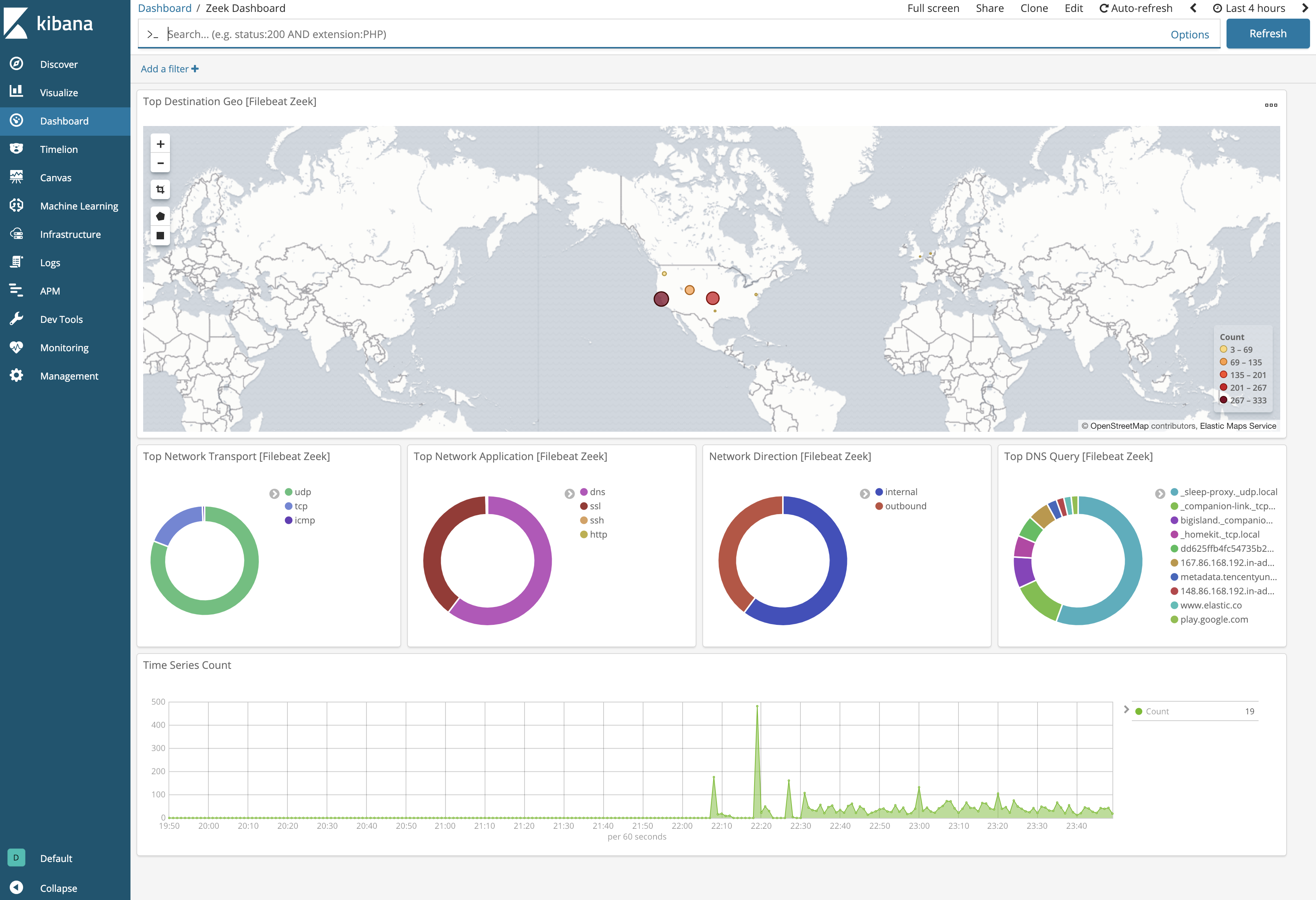
Changelog
| Version | Details | Minimum Kibana version |
|---|---|---|
| 5.0.2 | Bug fix (View pull request) Fix dnp3 pipeline failing on replies with an internal indication number. |
9.0.0 8.12.0 |
| 5.0.1 | Bug fix (View pull request) Remove top level note from docs |
9.0.0 8.12.0 |
| 5.0.0 | Breaking change (View pull request) Add ECS compliance for event.outcome field in RADIUS data stream and add tunnel_client field support. |
9.0.0 8.12.0 |
| 4.1.0 | Enhancement (View pull request) Improve integration documentation |
9.0.0 8.12.0 |
| 4.0.0 | Breaking change (View pull request) Remove third-party pipeline for previously removed 'third-party REST API' input. |
9.0.0 8.12.0 |
| 3.1.0 | Enhancement (View pull request) Preserve event.original on pipeline error. |
9.0.0 8.12.0 |
| 3.0.3 | Enhancement (View pull request) Generate processor tags and normalize error handler. |
9.0.0 8.12.0 |
| 3.0.2 | Bug fix (View pull request) Remove unused agent files. |
9.0.0 8.12.0 |
| 3.0.1 | Enhancement (View pull request) Changed owners. |
9.0.0 8.12.0 |
| 3.0.0 | Enhancement (View pull request) Remove deprecated httpjson input. |
9.0.0 8.12.0 |
| 2.29.1 | Bug fix (View pull request) Fix date parsing error for smtp logs. |
9.0.0 8.12.0 |
| 2.29.0 | Enhancement (View pull request) Allow @custom pipeline access to event.original without setting preserve_original_event. |
9.0.0 8.12.0 |
| 2.28.1 | Bug fix (View pull request) Updated SSL description in package manifest.yml to be uniform and to include links to documentation. |
9.0.0 8.12.0 |
| 2.28.0 | Enhancement (View pull request) Support stack version 9.0. |
9.0.0 8.12.0 |
| 2.27.0 | Enhancement (View pull request) Allow the usage of deprecated log input and support for stack 9.0 |
8.12.0 |
| 2.26.0 | Enhancement (View pull request) ECS version updated to 8.17.0. |
8.12.0 |
| 2.25.0 | Enhancement (View pull request) Deprecate third-party REST API import option. |
8.12.0 |
| 2.24.4 | Bug fix (View pull request) Use triple-brace Mustache templating when referencing variables in ingest pipelines. |
8.12.0 |
| 2.24.3 | Bug fix (View pull request) Add conditional check to grok processors in known_certs pipeline to prevent failures. |
8.12.0 |
| 2.24.2 | Bug fix (View pull request) Add source/destination port = 0 check to community_id processor. |
8.12.0 |
| 2.24.1 | Bug fix (View pull request) Add null checks to date processors in ntp pipeline. |
8.12.0 |
| 2.24.0 | Enhancement (View pull request) Update package-spec to 3.0.3. |
8.12.0 |
| 2.23.0 | Enhancement (View pull request) Set sensitive values as secret. |
8.12.0 |
| 2.22.4 | Bug fix (View pull request) Prevent null dereference exceptions for missing fields. Bug fix (View pull request) Improve case-insensitive string comparisons. Bug fix (View pull request) Clean up multi-line syntax in ingest pipelines. |
8.7.1 |
| 2.22.3 | Bug fix (View pull request) Fix ingest pipeline conditional field handling. |
8.7.1 |
| 2.22.2 | Enhancement (View pull request) Changed owners |
8.7.1 |
| 2.22.1 | Bug fix (View pull request) Fix exclude_files pattern. |
8.7.1 |
| 2.22.0 | Enhancement (View pull request) Limit request tracer log count to five. |
8.7.1 |
| 2.21.0 | Enhancement (View pull request) ECS version updated to 8.11.0. |
8.7.1 |
| 2.20.0 | Enhancement (View pull request) Improve 'event.original' check to avoid errors if set. |
8.7.1 |
| 2.19.1 | Bug fix (View pull request) Fix mapping of dns.answers |
8.7.1 |
| 2.19.0 | Enhancement (View pull request) Use dynamic mappings for object fields. |
8.7.1 |
| 2.18.0 | Enhancement (View pull request) Modified the field definitions to reference ECS where possible and remove invalid field attributes. |
8.7.1 |
| 2.17.0 | Enhancement (View pull request) ECS version updated to 8.10.0. |
8.7.1 |
| 2.16.0 | Enhancement (View pull request) The format_version in the package manifest changed from 2.11.0 to 3.0.0. Removed dotted YAML keys from package manifest. Added 'owner.type: elastic' to package manifest. |
8.7.1 |
| 2.15.0 | Enhancement (View pull request) Add tags.yml file so that integration's dashboards and saved searches are tagged with "Security Solution" and displayed in the Security Solution UI. |
8.7.1 |
| 2.14.1 | Bug fix (View pull request) Fix template snippet escaping. Bug fix (View pull request) Fix event.type for error in sip data stream. |
8.7.1 |
| 2.14.0 | Enhancement (View pull request) Update package-spec to 2.10.0. |
8.7.1 |
| 2.13.0 | Enhancement (View pull request) Add support for HTTP request tracing. |
8.7.1 |
| 2.12.0 | Enhancement (View pull request) Update package to ECS 8.9.0. |
8.7.1 |
| 2.11.2 | Bug fix (View pull request) Add missing processors support for dhcp and smb_mapping logs. Bug fix (View pull request) Fix documentation link for processors. |
8.7.1 |
| 2.11.1 | Bug fix (View pull request) Fix handling of zeek HTTP host when the URI contains a domain. |
8.7.1 |
| 2.11.0 | Enhancement (View pull request) Convert visualizations to lens. |
8.7.1 |
| 2.10.0 | Enhancement (View pull request) Ensure event.kind is correctly set for pipeline errors. |
8.1.0 |
| 2.9.0 | Enhancement (View pull request) Update package to ECS 8.8.0. |
8.1.0 |
| 2.8.0 | Enhancement (View pull request) Update package to ECS 8.7.0. |
8.1.0 |
| 2.7.1 | Enhancement (View pull request) Added categories and/or subcategories. |
8.1.0 |
| 2.7.0 | Enhancement (View pull request) Update package to ECS 8.6.0. |
8.1.0 |
| 2.6.1 | Enhancement (View pull request) Migrate the visualizations to by value in dashboards to minimize the saved object clutter and reduce time to load |
8.1.0 |
| 2.6.0 | Enhancement (View pull request) Update package to ECS 8.5.0. |
8.0.0 |
| 2.5.2 | Enhancement (View pull request) Remove duplicate field. |
8.0.0 |
| 2.5.1 | Enhancement (View pull request) Use ECS geo.location definition. |
8.0.0 |
| 2.5.0 | Enhancement (View pull request) Add threat.indicator handling |
8.0.0 |
| 2.4.1 | Enhancement (View pull request) Remove unused visualizations |
8.0.0 |
| 2.4.0 | Enhancement (View pull request) Update package to ECS 8.4.0 |
8.0.0 |
| 2.3.1 | Enhancement (View pull request) Update package name and description to align with standard wording |
8.0.0 |
| 2.3.0 | Enhancement (View pull request) Update package to ECS 8.3.0. |
8.0.0 |
| 2.2.0 | Enhancement (View pull request) Add new data sets for known_hosts, known_certs, known_services, & software logs files. |
— |
| 2.1.0 | Enhancement (View pull request) Add JA3/JA3S parsing & fix certificate data parsing; hash, not valid before/after timestamps |
8.0.0 |
| 2.0.0 | Bug fix (View pull request) Migrate map visualisation from tile_map to map object |
8.0.0 |
| 1.9.0 | Enhancement (View pull request) Add message field to zeek.syslog datastreamBug fix (View pull request) Fix field definition for zeek.syslog.msg |
— |
| 1.8.0 | Bug fix (View pull request) Make sure field values are valid for ECS |
8.0.0 7.14.0 |
| 1.7.0 | Enhancement (View pull request) Update to ECS 8.2 |
— |
| 1.6.1 | Enhancement (View pull request) Add documentation for multi-fields |
8.0.0 7.14.0 |
| 1.6.0 | Enhancement (View pull request) Update to ECS 8.0 |
8.0.0 7.14.0 |
| 1.5.4 | Bug fix (View pull request) Remove redundant event.ingested from Zeek pipelines. |
8.0.0 7.14.0 |
| 1.5.3 | Bug fix (View pull request) Ignore URI parse failures in zeek.http data. |
— |
| 1.5.2 | Bug fix (View pull request) Regenerate test files using the new GeoIP database |
8.0.0 7.14.0 |
| 1.5.1 | Bug fix (View pull request) Change test public IPs to the supported subset |
— |
| 1.5.0 | Enhancement (View pull request) Add 8.0.0 version constraint |
8.0.0 7.14.0 |
| 1.4.3 | Enhancement (View pull request) Uniform with guidelines |
7.14.0 |
| 1.4.2 | Enhancement (View pull request) Update Title and Description. |
— |
| 1.4.1 | Bug fix (View pull request) Fix logic that checks for the 'forwarded' tag |
— |
| 1.4.0 | Enhancement (View pull request) Update to ECS 1.12.0 |
— |
| 1.3.0 | Enhancement (View pull request) Add Sigature and NTP data streams |
7.14.0 |
| 1.2.2 | Enhancement (View pull request) Convert to generated ECS fields |
— |
| 1.2.1 | Enhancement (View pull request) update to ECS 1.11.0 |
— |
| 1.2.0 | Enhancement (View pull request) Update documentation to fit mdx spec |
— |
| 1.1.0 | Enhancement (View pull request) Update integration description |
— |
| 1.0.0 | Enhancement (View pull request) make GA Enhancement (View pull request) Set "event.module" and "event.dataset" |
7.14.0 |
| 0.8.4 | Enhancement (View pull request) Add support for Splunk authorization tokens |
— |
| 0.8.3 | Bug fix (View pull request) Fix Third Party Api ingest pipeline |
— |
| 0.8.2 | Enhancement (View pull request) Use wildcard field type. |
— |
| 0.8.1 | Enhancement (View pull request) Add support for ISO8601 timestamps |
— |
| 0.8.0 | Enhancement (View pull request) Update to ECS 1.10.0, adding processor fields and replacing default tags from . to - between words. |
— |
| 0.7.4 | Enhancement (View pull request) Add system test for httpjson Splunk input. |
— |
| 0.7.3 | Enhancement (View pull request) Make event.original optional |
— |
| 0.7.2 | Bug fix (View pull request) adding back 0.7.0 changes |
7.13.0 |
| 0.7.1 | Bug fix (View pull request) rolling back to 0.6.0 changes for compatibility with 7.12 |
7.12.0 |
| 0.7.0 | Enhancement (View pull request) moving edge processing to ingest pipeline |
7.12.0 |
| 0.6.1 | Enhancement (View pull request) update to ECS 1.9.0 |
— |
| 0.1.0 | Enhancement (View pull request) initial release |
— |