Elasticsearch Service Billing
Elastic Cloud Serverless projects are autoscaled environments, fully managed by Elastic and available on Elastic Cloud. Availability This functionality is generally available and ready for production usage. Elastic Cloud Serverless projects are autoscaled environments, fully managed by Elastic and available on Elastic Cloud. Availability This functionality is generally available and ready for production usage. The Elastic Stack includes Elastic's core products such as Elasticsearch, Kibana, Logstash, and Beats. Availability This functionality is generally available and ready for production usage. Unless stated otherwise on the page, this functionality is available when your Elastic Stack is deployed on Elastic Cloud Hosted, Elastic Cloud Enterprise, Elastic Cloud on Kubernetes, and self-managed environments. This documentation corresponds to the latest patch available for each minor version. If you're not using the latest patch, check the release notes for changes.
Serverless Observability
Generally available
Serverless Security
Generally available
Stack
9.3+
Generally available since 9.3
| Version | 1.10.1 (View all) |
| Managed integration release status | Availability Beta This functionality is in beta and is not ready for production usage. For beta features, the design and code is less mature than official GA features and is being provided as-is with no warranties. Beta features are not subject to the support SLA of official GA features. Specific Support terms apply. |
| Subscription level What's this? |
Basic |
| Developed by What's this? |
Elastic |
| Ingestion method(s) | API |
| Minimum Kibana version(s) | 9.3.0 |
You can use this integration as an Elastic Managed integration on Elastic Cloud Hosted deployments running this version or later.
The Elasticsearch Service Billing integration (also known as the Elastic Cloud billing integration) lets you monitor usage and costs for your entire Elastic Cloud organization. It collects billing data from the Elastic Cloud Billing API and sends it to your target Elasticsearch cluster. Dashboards are provided out-of-the-box to help you visualize spending across your organization.
Using this integration, you could for instance create alerts whenever a new deployment or project is created, or when your baseline spending exceeds a certain threshold.
This integration reports organization-level billing data. Any usage billed to your Elastic Cloud organization appears in the collected data, regardless of deployment model.
| Product | What is billed | How it appears in billing data |
|---|---|---|
| Elastic Cloud Hosted | Deployments (Elasticsearch, Kibana, and add-on capacity), data transfer, snapshot storage, and related services | Instances with deployment_type: deployment |
| Elastic Cloud Serverless | Serverless projects (Elasticsearch, Observability, and Security), including usage-based dimensions such as ingest, retention, and search power | Instances with project types such as elasticsearch, observability, or security |
| Cloud connected usage | Elastic Cloud services consumed through Cloud Connect on self-managed, ECE, or ECK clusters (for example, Elastic Inference Service token usage) | Organization-level line items for connected services |
| Other Elastic Cloud services | Add-on services billed to the organization (for example, Synthetics monitors) | Service-specific line items alongside deployments and projects |
All usage is metered in Elastic Consumption Units (ECUs). The integration does not distinguish between billing models (pay-as-you-go, marketplace, or prepaid consumption)—it reflects the ECU consumption recorded for your organization.
The Elasticsearch Service Billing integration collects the following data streams:
- Your daily spending in the
metrics-ess_billing.billingdata stream. - For customers with a yearly commitment with Elastic, your credit status in the
metrics-ess_billing.creditdata stream.
By default, the last year of data of billing data is collected upon first execution of the integration. The data is then collected daily, the integration will automatically collect the latest data every day.
You need Elasticsearch for storing and searching your data and Kibana for visualizing and managing it. This integration collects data at the organization level, so no need to target individual deployments or projects.
You will need the identifier of your Elastic Cloud organization (not a single deployment or project), which can be seen on the cloud organization page.
You will also need to provision an API key with the Billing admin role on the API keys page. This key must have access to the organization whose billing data you want to collect.
For private cloud, or admin users, the cloud endpoint can be altered to match your requirements. You can change this in the "advanced settings" section of the integration configuration.
For step-by-step instructions on how to set up an integration, see the Getting started guide.
If you run on Elastic Cloud (Hosted or Serverless), this integration is available as an Elastic Managed integration. When an Elastic Managed integration is available, you don't need to install an Elastic Agent to gather these metrics. This functionality is in beta and is subject to change. Beta features are not subject to the support SLA of official GA features.
The metrics-ess_billing.billing data stream collects billing data from the Elastic Cloud Billing API. Each event represents ECU consumption for a billing line item. Line items are grouped by instance—an instance may be an Elastic Cloud Hosted deployment, a Serverless project, a cloud connected service, or another organization-level service (for example, Synthetics monitors).
Field names such as ess.billing.deployment_id and ess.billing.deployment_name are used for all instance types for backward compatibility. For Serverless projects, ess.billing.deployment_type reflects the project type (for example, observability or security). For Hosted deployments, it is deployment.
Example
{
    "@timestamp": "2024-01-10T00:00:00.000Z",
    "agent": {
        "ephemeral_id": "fb0f134f-4261-49f2-922c-6f2785960a4e",
        "id": "6c2fb3e5-8b0c-4044-a920-bc47cd3ac9a3",
        "name": "docker-fleet-agent",
        "type": "filebeat",
        "version": "8.15.1"
    },
    "cloud": {
        "account": {
            "id": "3166899605"
        },
        "geo": {
            "location": {
                "lat": 53.34979997947812,
                "lon": -6.260300064459443
            },
            "name": "gcp-europe-west1"
        },
        "instance": {
            "id": "eb4bdbcfca05493bb72aa0b65cc1a2d3",
            "name": "monitoring"
        },
        "machine": {
            "type": "es.ml.n2.68x32x45"
        },
        "provider": "gcp",
        "region": "gcp-europe-west1"
    },
    "data_stream": {
        "dataset": "ess_billing.billing",
        "namespace": "default",
        "type": "metrics"
    },
    "ecs": {
        "version": "8.0.0"
    },
    "elastic_agent": {
        "id": "6c2fb3e5-8b0c-4044-a920-bc47cd3ac9a3",
        "snapshot": false,
        "version": "8.15.1"
    },
    "ess": {
        "billing": {
            "deployment_id": "eb4bdbcfca05493bb72aa0b65cc1a2d3",
            "deployment_name": "monitoring",
            "display_quantity": {
                "formatted_value": "24 hours",
                "type": "default",
                "value": 24
            },
            "from": "2024-01-10T00:00:00.000Z",
            "kind": "elasticsearch",
            "name": "Cloud Standard, GCP europe-west1 (Belgium), gcp.es.ml.n2.68x32x45, 8GB, 1AZ",
            "organization_id": "3166899605",
            "quantity": {
                "formatted_value": "24 hours",
                "value": 24
            },
            "ram_per_zone": 8192,
            "rate": {
                "formatted_value": "0.3528 per hour",
                "value": 0.3528
            },
            "sku": "gcp.es.ml.n2.68x32x45_gcp-europe-west1_8192_1",
            "to": "2024-01-11T00:00:00.000Z",
            "total_ecu": 8.4672,
            "type": "capacity",
            "unit": "hour",
            "zone_count": 1
        }
    },
    "event": {
        "agent_id_status": "verified",
        "created": "2024-10-28T08:41:53.653Z",
        "dataset": "ess_billing.billing",
        "ingested": "2024-10-28T08:41:53Z",
        "module": "ess_billing"
    },
    "input": {
        "type": "cel"
    },
    "tags": [
        "billing",
        "forwarded"
    ]
}
Exported fields
| Field | Description | Type |
|---|---|---|
| @timestamp | Event timestamp. | date |
| cloud.account.id | keyword | |
| data_stream.dataset | Data stream dataset. | constant_keyword |
| data_stream.namespace | Data stream namespace. | constant_keyword |
| data_stream.type | Data stream type. | constant_keyword |
| ess.billing.cloud.machine.type | The machine type of the instance (e.g., n2.68x16x45). | keyword |
| ess.billing.cloud.service.type | The service type of the serverless project. | keyword |
| ess.billing.deployment_id | ID of the billed instance (Hosted deployment, Serverless project, or other Elastic Cloud service). | keyword |
| ess.billing.deployment_name | Name of the billed instance. | keyword |
| ess.billing.deployment_tags | Tags associated with the billed Hosted deployment (when available). | keyword |
| ess.billing.deployment_type | Instance type—for Hosted deployments this is deployment; for Serverless projects this is the project type (for example, elasticsearch, observability, or security). |
keyword |
| ess.billing.display_quantity.formatted_value | Human-readable representation of the quantity used (e.g., "24 hours"). | keyword |
| ess.billing.display_quantity.type | Type of quantity displayed (default or custom). | keyword |
| ess.billing.display_quantity.value | Actual quantity used (e.g., 24). | float |
| ess.billing.from | Start time of the billing period. | date |
| ess.billing.kind | Type of service being billed (e.g., elasticsearch, kibana). | keyword |
| ess.billing.name | Description of the SKU or resource being billed. | keyword |
| ess.billing.organization_id | ID of the organization in Elastic Cloud. | keyword |
| ess.billing.quantity.formatted_value | Human-readable representation of the billed quantity (e.g., "24 hours"). | keyword |
| ess.billing.quantity.value | Billed quantity. | float |
| ess.billing.ram_per_zone | RAM size per zone in megabytes. | integer |
| ess.billing.rate.formatted_value | Human-readable representation of the rate (e.g., "0.7992 per hour"). | keyword |
| ess.billing.rate.value | Billed rate per unit of usage. | float |
| ess.billing.sku | Unique identifier for the service or product (SKU). | keyword |
| ess.billing.to | End time of the billing period. | date |
| ess.billing.total_ecu | Total Elasticsearch Compute Units (ECU) used. | float |
| ess.billing.type | Type of billing (e.g., capacity, usage). | keyword |
| ess.billing.unit | Unit of the resource being billed (e.g., hour, GB). | keyword |
| ess.billing.zone_count | Number of availability zones. | integer |
| event.module | Event module | constant_keyword |
| input.type | keyword |
The metrics-ess_billing.credit data stream collects credit data from the Elastic Cloud Billing API. This is only available for customers with a direct yearly or multi-year contract with Elastic (not marketplace or monthly subscriptions). ECU credits apply to all Elastic Cloud usage in the organization, including Hosted, Serverless, and cloud connected services.
Example
{
    "@timestamp": "2025-01-29T15:57:57.368Z",
    "agent": {
        "ephemeral_id": "3fefd74f-7a64-4bad-82e8-6c226de5d333",
        "id": "bb84ef9e-6cd6-4177-822a-b3a0f05644f3",
        "name": "docker-fleet-agent",
        "type": "filebeat",
        "version": "8.17.0"
    },
    "cloud": {
        "account": {
            "id": "12345678"
        }
    },
    "data_stream": {
        "dataset": "ess_billing.credits",
        "namespace": "default",
        "type": "metrics"
    },
    "ecs": {
        "version": "8.0.0"
    },
    "elastic_agent": {
        "id": "bb84ef9e-6cd6-4177-822a-b3a0f05644f3",
        "snapshot": false,
        "version": "8.17.0"
    },
    "ess": {
        "billing": {
            "active": false,
            "ecu_balance": 1463000,
            "ecu_quantity": 1463000,
            "start": "2025-07-01T00:00:00.000Z",
            "end": "2026-06-30T23:59:59.999Z",
            "organization_id": "12345678",
            "type": "prepaid_consumption"
        }
    },
    "event": {
        "agent_id_status": "verified",
        "dataset": "ess_billing.credits",
        "ingested": "2025-01-29T15:57:58Z"
    },
    "input": {
        "type": "cel"
    },
    "tags": [
        "billing",
        "forwarded"
    ]
}
Exported fields
| Field | Description | Type |
|---|---|---|
| @timestamp | Event timestamp. | date |
| cloud.account.id | keyword | |
| data_stream.dataset | Data stream dataset. | constant_keyword |
| data_stream.namespace | Data stream namespace. | constant_keyword |
| data_stream.type | Data stream type. | constant_keyword |
| ess.billing.active | Whether the credit line is active. | boolean |
| ess.billing.ecu_balance | Balance of Elastic Consumption Units (ECUs) in the credit line. | long |
| ess.billing.ecu_quantity | Initially purchased quantity of Elastic Consumption Units (ECUs) in the credit line. | long |
| ess.billing.end | End date of the credit line. | date |
| ess.billing.organization_id | ID of the organization in Elastic Cloud. | keyword |
| ess.billing.start | Start date of the credit line. | date |
| ess.billing.type | Type of the credit line. | keyword |
| input.type | keyword |
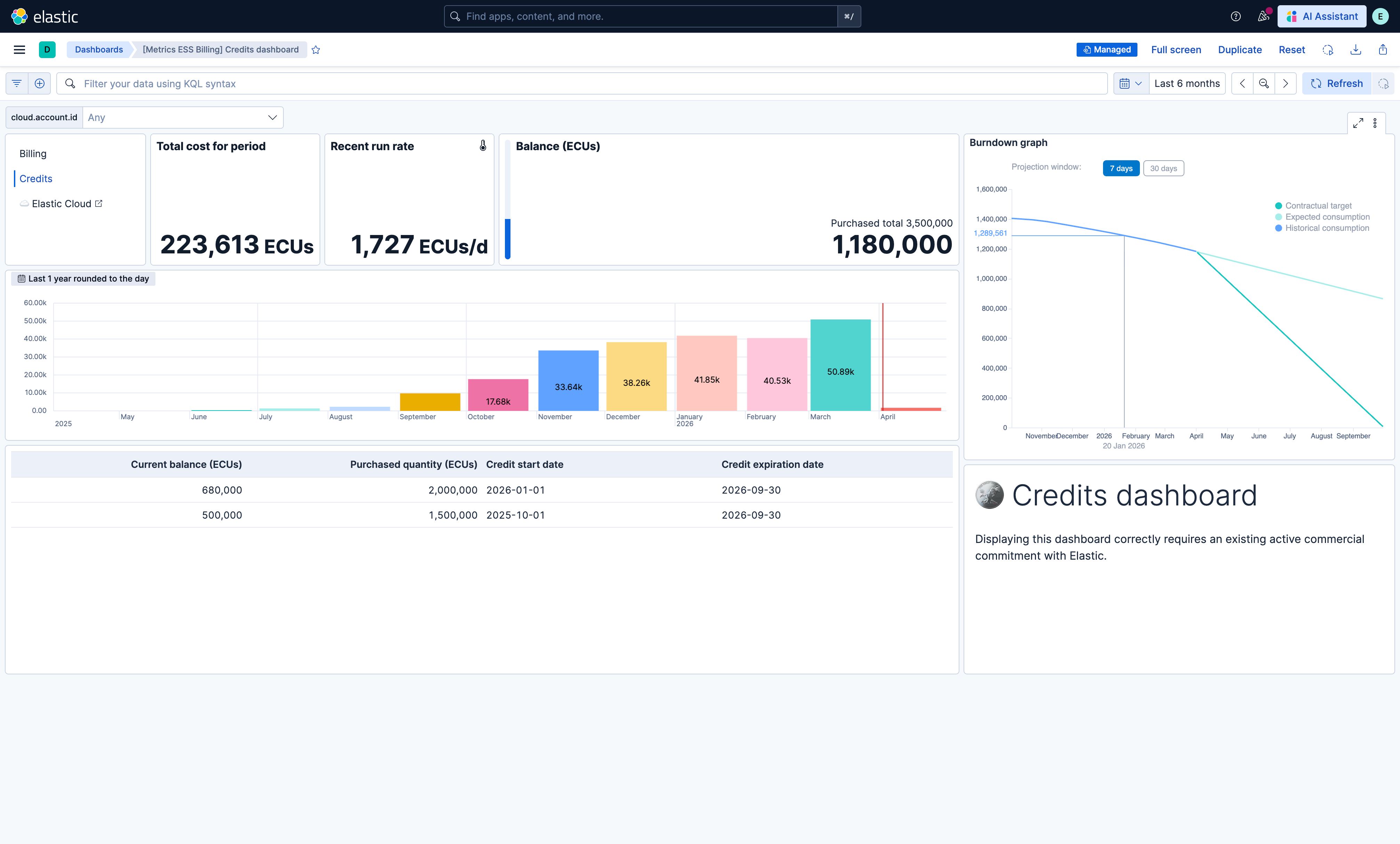
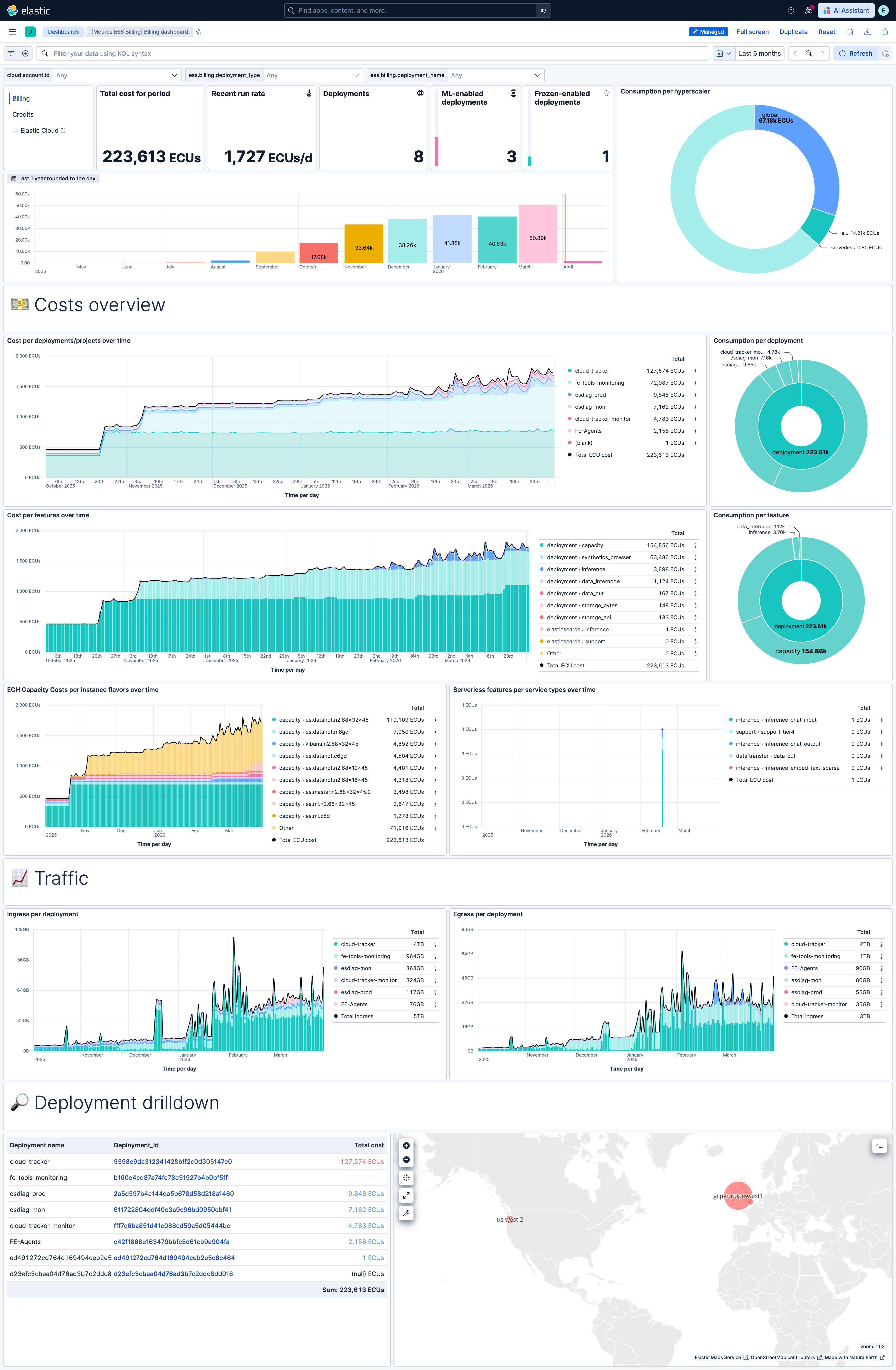
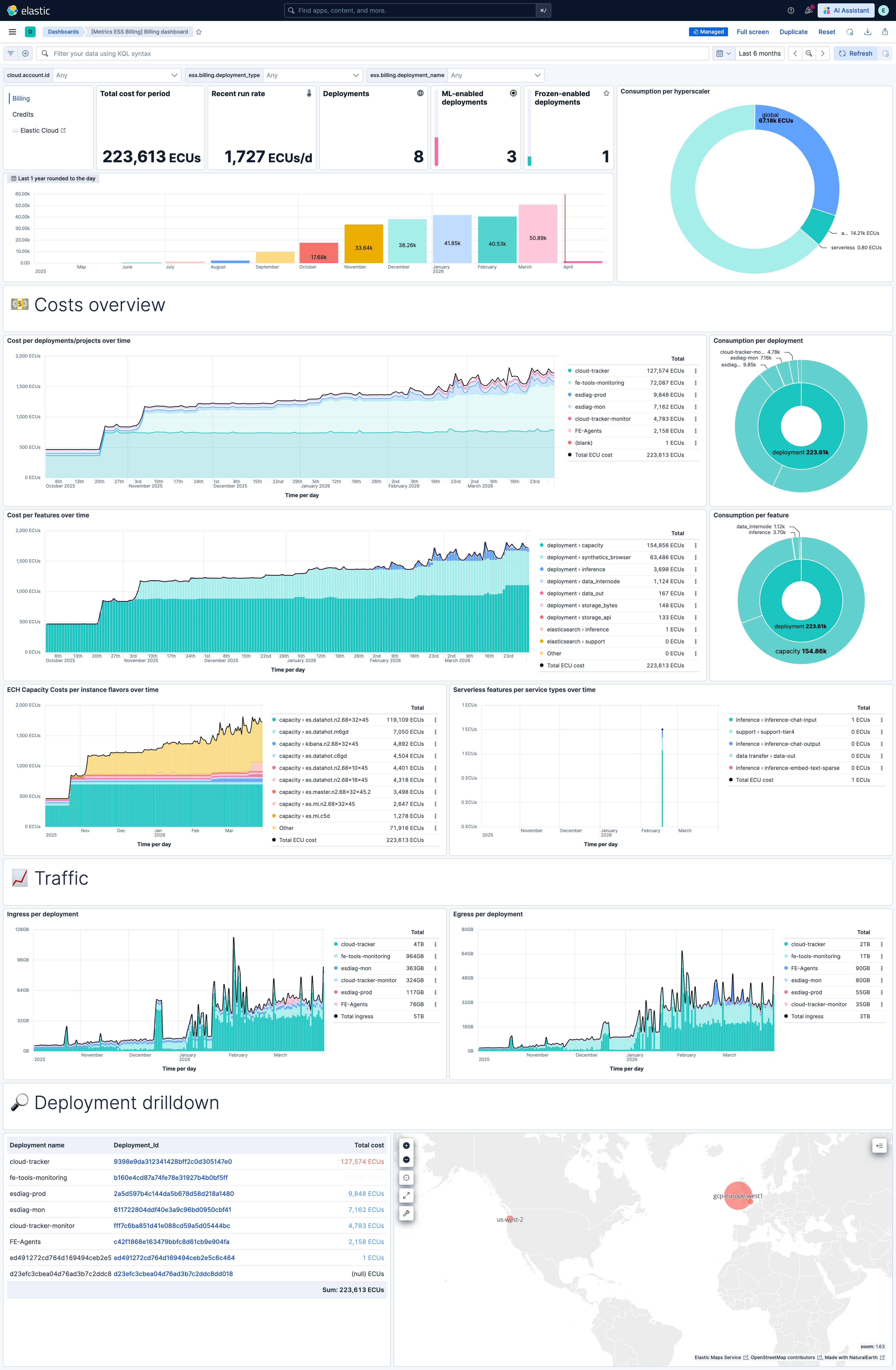
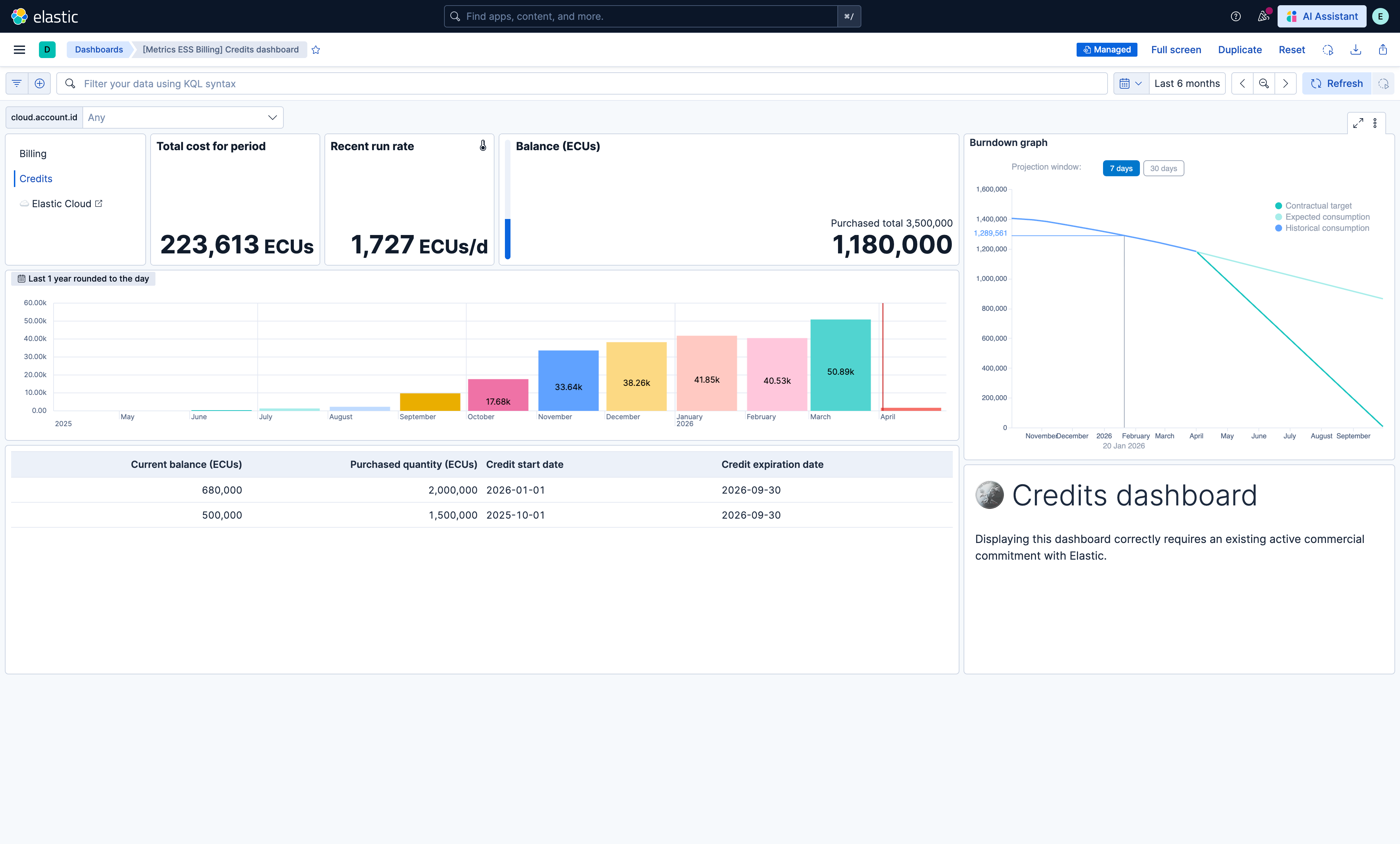
This integration includes one or more Kibana dashboards that visualizes the data collected by the integration. The screenshots below illustrate how the ingested data is displayed.
Changelog
| Version | Details | Minimum Kibana version |
|---|---|---|
| 1.10.1 | Bug fix (View pull request) Fix the credits dashboard burndown graph failing with "Cannot convert undefined or null to object" when there is no active credit line or no billing data in the selected time range. |
9.3.0 |
| 1.10.0 | Enhancement (View pull request) Update Elastic Managed integration documentation to the current wording and docs links. |
9.3.0 |
| 1.9.2 | Bug fix (View pull request) Prevent the billing data stream from stalling by not advancing the cursor when the current day's window has not yet elapsed. |
9.3.0 |
| 1.9.1 | Enhancement (View pull request) Clarify that billing data covers all Elastic Cloud products—Hosted, Serverless, and cloud connected usage. |
9.3.0 |
| 1.9.0 | Enhancement (View pull request) Add projection window selector (1d/7d/30d) to burndown graph for more accurate runout estimates |
9.3.0 |
| 1.8.0 | Enhancement (View pull request) Use new release field for agentless deployment mode to establish as beta. |
9.3.0 |
| 1.7.2 | Bug fix (View pull request) Handle null instances in billing data. |
9.3.0 |
| 1.7.1 | Bug fix (View pull request) Fix incorrect handling of credit data |
9.3.0 |
| 1.7.0 | Enhancement (View pull request) Added deployment tags for ECH |
9.0.0 8.18.0 |
| 1.6.0 | Enhancement (View pull request) Update codeowners |
9.0.0 8.18.0 |
| 1.5.2 | Bug fix (View pull request) Fix legacy documentation links in the package README. |
9.0.0 8.18.0 |
| 1.5.1 | Bug fix (View pull request) Clear dashboard filters values |
9.0.0 8.18.0 |
| 1.5.0 | Enhancement (View pull request) Add Serverless compatibility |
9.0.0 8.18.0 |
| 1.4.4 | Bug fix (View pull request) Removed empty ess.billing.quantities field from billing data output. |
9.0.0 8.18.0 |
| 1.4.3 | Bug fix (View pull request) Fixed minimum date validation for ESS Billing API to prevent errors with dates prior to 2021-01-01. This change requires Elastic Agent 8.18 or greater. Bug fix (View pull request) Fixed excessive retries by stopping repeated API requests after non-200 HTTP errors. |
9.0.0 8.18.0 |
| 1.4.2 | Bug fix (View pull request) Add temporary processor to remove the fields added by the Agentless policy. |
9.0.0 8.15.0 |
| 1.4.1 | Enhancement (View pull request) Fix organization ID scientific notation issue |
9.0.0 8.15.0 |
| 1.4.0 | Enhancement (View pull request) 9.x integration compatibility |
9.0.0 8.15.0 |
| 1.3.0 | Enhancement (View pull request) Aligned billing data pulls to calendar days |
8.15.0 |
| 1.2.0 | Enhancement (View pull request) Added Agentless deployment mode |
8.15.0 |
| 1.1.0 | Enhancement (View pull request) Changed credits collection mechanism, fixed stalling issue and fixed duplicate credit count issue |
8.15.0 |
| 1.0.1 | Bug fix (View pull request) Updated SSL description to be uniform and to include links to documentation. |
8.15.0 |
| 1.0.0 | Enhancement (View pull request) GA release of the integration, addition of credit endpoint |
8.15.0 |
| 0.1.1 | Bug fix (View pull request) Update links to getting started docs |
8.15.0 |
| 0.1.0 | Enhancement (View pull request) Initial draft of the package |
8.15.0 |