Check Point Harmony Endpoint
Elastic Cloud Serverless projects are autoscaled environments, fully managed by Elastic and available on Elastic Cloud. Availability This functionality is generally available and ready for production usage. Elastic Cloud Serverless projects are autoscaled environments, fully managed by Elastic and available on Elastic Cloud. Availability This functionality is generally available and ready for production usage. The Elastic Stack includes Elastic's core products such as Elasticsearch, Kibana, Logstash, and Beats. Availability This functionality is generally available and ready for production usage. Unless stated otherwise on the page, this functionality is available when your Elastic Stack is deployed on Elastic Cloud Hosted, Elastic Cloud Enterprise, Elastic Cloud on Kubernetes, and self-managed environments. This documentation corresponds to the latest patch available for each minor version. If you're not using the latest patch, check the release notes for changes.
Serverless Observability
Generally available
Serverless Security
Generally available
Stack
9.0+
Generally available since 9.0
| Version | 1.6.0 (View all) |
| Managed integration release status | GA |
| Subscription level What's this? |
Basic |
| Developed by What's this? |
Elastic |
| Ingestion method(s) | API |
| Minimum Kibana version(s) | 9.0.0 8.18.0 |
You can use this integration as an Elastic Managed integration on Elastic Cloud Hosted deployments running this version or later.
The Check Point Harmony Endpoint integration allows you to ingest data from Harmony Endpoint management service(https://www.checkpoint.com/harmony/endpoint/).
Harmony Endpoint EPMaaS (Endpoint Management as a Service) is the cloud service to manage policies and deployments for Endpoint Security. It provides advanced threat prevention and detection capabilities to safeguard endpoints from malware, ransomware, and other sophisticated attacks. The solution offers real-time protection through behavioral analysis, machine learning, and threat intelligence.
For details please refer to the Harmony Endpoint Admin guide
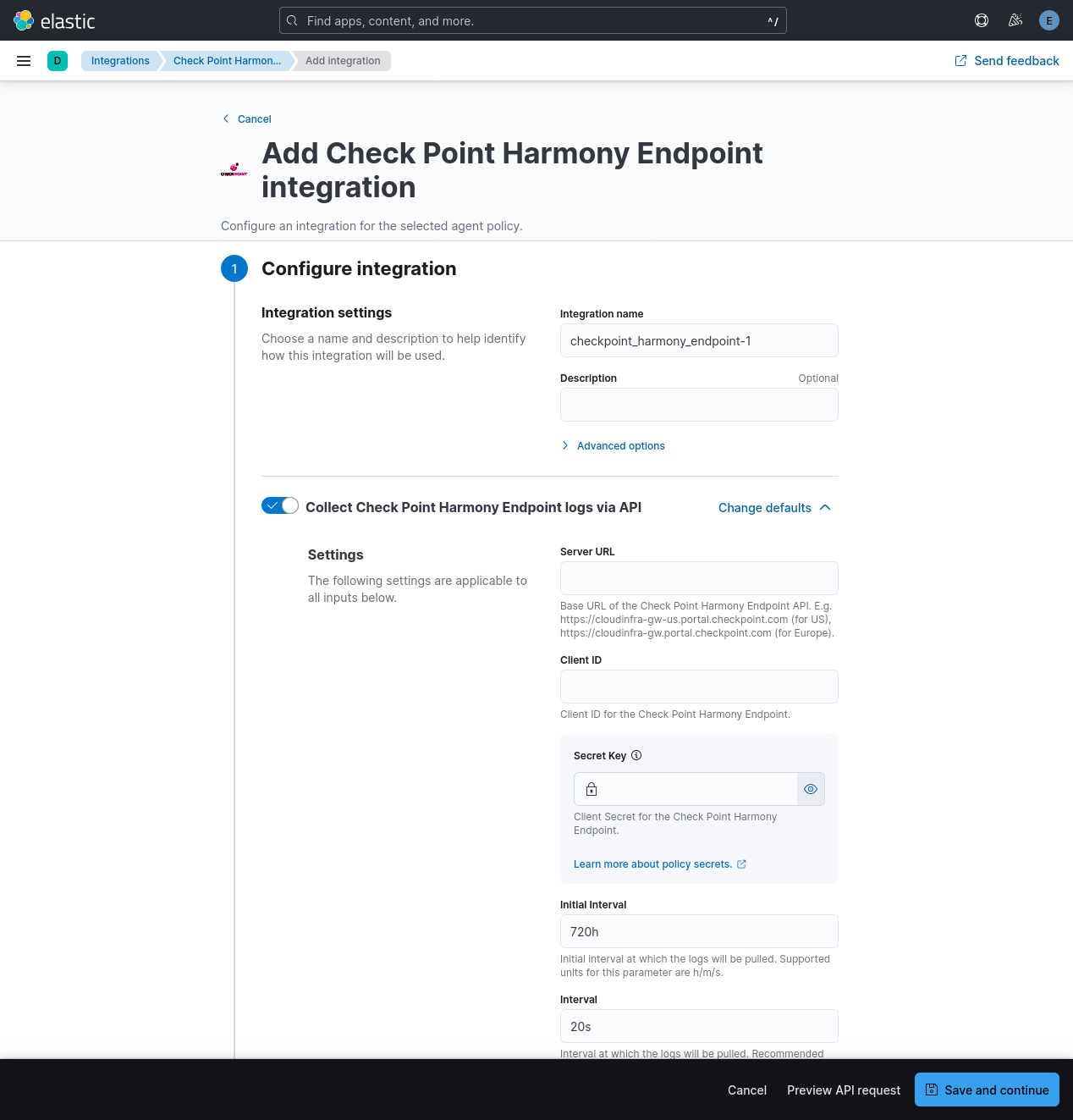
- Server URL
- Client ID
- Secret key
To use this integration generate an API Key. API key consists of Client ID and Secret Key. Users can create API Keys by browsing to Infinity Portal at GLOBAL SETTINGS > API Keys. When creating an API Key, make sure that Service is set to Logs as a Service.
To create an API key please refer to Check Point's Infinity API Guide. A list of servers can also be found there.
- Initial Interval: Initial interval for which existing logs will be pulled.
- Interval: Interval at which new logs will be pulled.
- Limit: Sets the number of results to return per API search query.
- Page Limit: Sets the number of results to return per page, in API search query.
- In Kibana go to Management > Integrations
- In "Search for integrations" search bar, type Check Point Harmony Endpoint
- Click on the "Check Point Harmony Endpoint" integration from the search results.
- Click on the "Add Check Point Harmony Endpoint" button to add the integration.
- Add all the required integration configuration parameters, such as Server URL, Client ID, Secret Key. For all data streams, these parameters must be provided in order to retrieve logs.
- Save the integration.
Elastic Managed integrations are only supported on Elastic Cloud Serverless and Elastic Cloud Hosted deployments. An Elastic Managed integration lets you ingest data from a cloud source while avoiding the orchestration, management, and maintenance associated with standard ingest infrastructure. Elastic runs the collector for you, so you can focus on your data instead of the infrastructure that collects it.
For more information, refer to Elastic Managed integrations and the Elastic Managed integrations FAQ.
- Anti-bot: This is behavioral protection against bots. A single bot can create multiple threats. Cybercriminals often use bots in Advanced Persistent Threat (APT) attacks to target specific individuals or organizations.
- Anti-Malware: Protects computers from viruses, spyware, and other malicious software. It uses real-time and scheduled scans to detect and neutralize threats before they can harm your computer.
- Forensics: This component monitors file operations, processes, and network activity for suspicious behavior. It analyzes attacks detected by other client components or the Check Point Security Gateway and applies remediation to malicious files.
- Threat Emulation: Detects zero-day and unknown attacks. Files on the endpoint computer are sent to a sandbox for emulation to uncover evasive zero-day attacks.
- Threat Extraction: Proactively protects users from downloaded malicious files. It quickly delivers safe files while inspecting the originals for potential threats.
- URL Filtering: Defines which websites are accessible within your organization. The URL Filtering policy consists of selected sites and the mode of operation applied to them.
- Zero-phishing: Examines various website characteristics to ensure a site isn't impersonating another to maliciously collect personal information. It generates alerts for potential phishing sites.
This is Anti-bot dataset.
Example
{
    "@timestamp": "2024-09-02T08:53:44.000Z",
    "agent": {
        "ephemeral_id": "395d0bda-166c-4800-9c38-ec1455f30548",
        "id": "9e02b661-1ee6-4686-9926-edc63a7f4b02",
        "name": "elastic-agent-27616",
        "type": "filebeat",
        "version": "8.14.0"
    },
    "checkpoint_harmony_endpoint": {
        "antibot": {
            "advanced_info": "\"exclusions\":[{\"exclusion_engine_type\":\"Anti Bot exclusions\",\"exclusion_type\":\"URL\",\"exclusion_value\":{\"default_value\":\"http://www.threat-cloud.com/test/files/MediumConfidenceBot.html\",\"md5\":\"\",\"original_name\":\"\",\"signer\":\"\",\"process\":\"\",\"protection\":\"\",\"comment\":\"\"}}]",
            "client": {
                "name": "Check Point Endpoint Security Client",
                "version": "88.50.0213"
            },
            "confidence_level": "Medium",
            "description": "Detected bot activity [Anti-Bot test.TC.e]. To exclude: On the Harmony Endpoint Management add an exclusion of type \"URL\" with value: \"http://www.threat-cloud.com/test/files/MediumConfidenceBot.html\"",
            "event_type": "Anti Bot Event",
            "installed_products": "Full Disk Encryption; Media Encryption & Port Protection; Firewall; Compliance; Application Control; Anti-Malware; VPN; Anti-Bot; Forensics; Threat Emulation",
            "malware": {
                "action": "Communication with C&C"
            },
            "packet_capture": "Packet Capture",
            "packet_capture_unique_id": "6c239c74-89a9-4797-ab6b-75a2b2a6afd7",
            "policy": {
                "date": "2024-08-29T13:12:51.0000000Z",
                "name": "Default Anti-Bot settings",
                "number": 2
            },
            "product": {
                "family": "Endpoint",
                "name": "Anti-Bot"
            },
            "protection_type": "URL Reputation",
            "proxy_src_ip": "89.160.20.128",
            "sequencenum": 16777215,
            "severity": "Critical",
            "tenant_id": "3e15ed24-89ff-4986-a204-c425cee4ba48",
            "type": "Log"
        }
    },
    "data_stream": {
        "dataset": "checkpoint_harmony_endpoint.antibot",
        "namespace": "18419",
        "type": "logs"
    },
    "destination": {
        "geo": {
            "country_name": "UnitedStates"
        },
        "ip": "89.160.20.128"
    },
    "ecs": {
        "version": "8.17.0"
    },
    "elastic_agent": {
        "id": "9e02b661-1ee6-4686-9926-edc63a7f4b02",
        "snapshot": false,
        "version": "8.14.0"
    },
    "event": {
        "action": "Detect",
        "agent_id_status": "verified",
        "category": [
            "malware"
        ],
        "dataset": "checkpoint_harmony_endpoint.antibot",
        "id": "a4640108-91b1-0f19-66d5-7d9d00000003",
        "ingested": "2025-12-16T11:56:39Z",
        "kind": "event",
        "module": "checkpoint_harmony_endpoint",
        "type": [
            "info"
        ]
    },
    "file": {
        "hash": {
            "md5": "bd075be9d011daaa82c3f9ff2572076e"
        },
        "name": "chrome.exe",
        "size": 2742376,
        "type": "exe"
    },
    "host": {
        "hostname": "DESKTOP-E2P4OL0",
        "ip": [
            "10.35.38.102"
        ],
        "name": "DESKTOP-E2P4OL0",
        "os": {
            "name": "Microsoft Windows 10 Pro",
            "version": "10.0-19045-SP0.0-SMP"
        },
        "type": [
            "Desktop"
        ]
    },
    "input": {
        "type": "cel"
    },
    "process": {
        "user": {
            "name": "admin"
        }
    },
    "related": {
        "hash": [
            "bd075be9d011daaa82c3f9ff2572076e"
        ],
        "hosts": [
            "DESKTOP-E2P4OL0"
        ],
        "ip": [
            "10.35.38.102",
            "89.160.20.128"
        ],
        "user": [
            "admin"
        ]
    },
    "rule": {
        "name": "Anti-Bot test.TC.e"
    },
    "tags": [
        "forwarded"
    ],
    "url": {
        "original": "www.threat-cloud.com"
    },
    "user": {
        "domain": "SMC User",
        "id": "S-1-5-21-3766288932-3295778425-2939962592-1001",
        "name": [
            "admin"
        ]
    }
}
Exported fields
| Field | Description | Type |
|---|---|---|
| @timestamp | Event timestamp. | date |
| checkpoint_harmony_endpoint.antibot.advanced_info | Internal field used for configuring exclusions | keyword |
| checkpoint_harmony_endpoint.antibot.attack_status | Status of attack | keyword |
| checkpoint_harmony_endpoint.antibot.client.name | Can be either Check Point Endpoint Security Client or Check Point Capsule Docs Client | keyword |
| checkpoint_harmony_endpoint.antibot.client.version | Build version of Harmony Endpoint client installed on the computer | version |
| checkpoint_harmony_endpoint.antibot.confidence_level | Confidence level | keyword |
| checkpoint_harmony_endpoint.antibot.description | Details of the event | text |
| checkpoint_harmony_endpoint.antibot.detected_by | Component which detected Event | keyword |
| checkpoint_harmony_endpoint.antibot.dst_country | Destination Country | keyword |
| checkpoint_harmony_endpoint.antibot.event_type | Name of the event | keyword |
| checkpoint_harmony_endpoint.antibot.installed_products | List of installed Endpoint Software Blades | keyword |
| checkpoint_harmony_endpoint.antibot.malware.action | Malware action | keyword |
| checkpoint_harmony_endpoint.antibot.packet_capture | Link to the PCAP traffic capture file with the recorded malicious connection. | keyword |
| checkpoint_harmony_endpoint.antibot.packet_capture_unique_id | Unique Packet Capture ID | keyword |
| checkpoint_harmony_endpoint.antibot.policy.date | Date of policy | date |
| checkpoint_harmony_endpoint.antibot.policy.name | Name of policy | keyword |
| checkpoint_harmony_endpoint.antibot.policy.number | Version number of policy | integer |
| checkpoint_harmony_endpoint.antibot.product.family | The product family the blade/product belongs to possible values (0 - Network, 1 - Endpoint, 2 - Access, 3 - Threat, 4 - Mobile) | keyword |
| checkpoint_harmony_endpoint.antibot.product.name | Product Name | keyword |
| checkpoint_harmony_endpoint.antibot.protection_type | Source of detection - can be IOC when manually configured, or URL/IP/CMI Reputation | keyword |
| checkpoint_harmony_endpoint.antibot.proxy_src_ip | Address where traffic was sent | ip |
| checkpoint_harmony_endpoint.antibot.resource | Resource from the HTTP request | keyword |
| checkpoint_harmony_endpoint.antibot.sequencenum | Number added to order logs with the same Linux timestamp and origin (Security Gateway that generated these logs) | integer |
| checkpoint_harmony_endpoint.antibot.service_domain | Service Domain Name | keyword |
| checkpoint_harmony_endpoint.antibot.severity | Event severity | keyword |
| checkpoint_harmony_endpoint.antibot.src | Client source IP address | ip |
| checkpoint_harmony_endpoint.antibot.suspicious_events | ID of EFR report, if relevant/exists | text |
| checkpoint_harmony_endpoint.antibot.tenant_id | Tenant ID | keyword |
| checkpoint_harmony_endpoint.antibot.type | Log type | keyword |
| data_stream.dataset | Data stream dataset. | constant_keyword |
| data_stream.namespace | Data stream namespace. | constant_keyword |
| data_stream.type | Data stream type. | constant_keyword |
| input.type | Input type | keyword |
A range of ECS fields are also exported. They are described in the ECS documentation.
This is Anti-Malware dataset.
Example
{
    "@timestamp": "2024-09-02T09:09:07.000Z",
    "agent": {
        "ephemeral_id": "ce69a1cc-2624-4c1b-abea-4c65c408b88c",
        "id": "59648861-728d-4e8a-9109-5d16c682af18",
        "name": "elastic-agent-75194",
        "type": "filebeat",
        "version": "8.14.0"
    },
    "checkpoint_harmony_endpoint": {
        "antimalware": {
            "action_details": "Infected",
            "advanced_info": "\"exclusions\":[{\"exclusion_engine_type\":\"File & Folder exclusions (system, scheduled and on-demand)\",\"exclusion_type\":\"Path\",\"exclusion_value\":{\"default_value\":\"md5:\",\"md5\":\"\",\"original_name\":\"\",\"signer\":\"\",\"process\":\"\",\"protection\":\"\",\"comment\":\"md5 taken from file C:\\\\Users\\\\admin\\\\AppData\\\\Local\\\\Temp\\\\9e68140d-22bb-4e96-8aaa-70ec80eb2dc4.tmp\"}}]",
            "client": {
                "name": "Check Point Endpoint Security Client",
                "version": "88.50.0213"
            },
            "confidence_level": "High",
            "connectivity_state": "Connected",
            "engine_version": "3.90",
            "event_type": "Infection",
            "installed_products": "Full Disk Encryption; Media Encryption & Port Protection; Firewall; Compliance; Application Control; Anti-Malware; VPN; Anti-Bot; Forensics; Threat Emulation",
            "malware": {
                "category": "Malware"
            },
            "packet_capture": "Packet Capture",
            "packet_capture_unique_id": "31dc576b-7192-49bf-b2fc-b40c93f84b7c",
            "policy": {
                "date": "2024-08-29T13:12:46.0000000Z",
                "name": "Default Anti-Malware settings for the entire organization",
                "number": 3
            },
            "product": {
                "family": "Endpoint",
                "name": "Anti-Malware"
            },
            "protection_type": "Protection",
            "sequencenum": 16777215,
            "severity": "High",
            "signature_version": "202409011444",
            "src": "10.35.38.102",
            "tenant_id": "3e15ed24-89ff-4986-a204-c425cee4ba48",
            "type": "Log"
        }
    },
    "data_stream": {
        "dataset": "checkpoint_harmony_endpoint.antimalware",
        "namespace": "52446",
        "type": "logs"
    },
    "ecs": {
        "version": "8.17.0"
    },
    "elastic_agent": {
        "id": "59648861-728d-4e8a-9109-5d16c682af18",
        "snapshot": false,
        "version": "8.14.0"
    },
    "event": {
        "action": "Detect",
        "agent_id_status": "verified",
        "category": [
            "malware"
        ],
        "dataset": "checkpoint_harmony_endpoint.antimalware",
        "id": "a4640108-91b1-0f19-66d5-815d0000000f",
        "ingested": "2025-12-16T11:57:31Z",
        "kind": "alert",
        "module": "checkpoint_harmony_endpoint",
        "type": [
            "info"
        ]
    },
    "file": {
        "name": "9e68140d-22bb-4e96-8aaa-70ec80eb2dc4.tmp"
    },
    "host": {
        "hostname": "DESKTOP-E2P4OL0",
        "ip": [
            "10.35.38.102"
        ],
        "name": "DESKTOP-E2P4OL0",
        "os": {
            "name": "Microsoft Windows 10 Pro",
            "version": "10.0-19045-SP0.0-SMP"
        },
        "type": [
            "Desktop"
        ]
    },
    "input": {
        "type": "cel"
    },
    "related": {
        "hosts": [
            "DESKTOP-E2P4OL0"
        ],
        "ip": [
            "10.35.38.102"
        ],
        "user": [
            "admin"
        ]
    },
    "rule": {
        "name": "Mal/ShellDl-A"
    },
    "source": {
        "ip": [
            "10.35.38.102"
        ]
    },
    "tags": [
        "forwarded"
    ],
    "user": {
        "domain": "SMC User",
        "id": "S-1-5-21-3766288932-3295778425-2939962592-1001",
        "name": [
            "admin"
        ]
    }
}
Exported fields
| Field | Description | Type |
|---|---|---|
| @timestamp | Event timestamp. | date |
| checkpoint_harmony_endpoint.antimalware.Number_of_items.detected | Number of detected items | integer |
| checkpoint_harmony_endpoint.antimalware.Number_of_items.scanned | Number of scan items | integer |
| checkpoint_harmony_endpoint.antimalware.Number_of_items.treated | Number of treated items | integer |
| checkpoint_harmony_endpoint.antimalware.action_details | Malware action details | keyword |
| checkpoint_harmony_endpoint.antimalware.advanced_info | Internal field used for configuring exclusions | text |
| checkpoint_harmony_endpoint.antimalware.attack_status | Status of attack | keyword |
| checkpoint_harmony_endpoint.antimalware.client.name | Can be either Check Point Endpoint Security Client or Check Point Capsule Docs Client | keyword |
| checkpoint_harmony_endpoint.antimalware.client.version | Build version of Harmony Endpoint client installed on the computer | version |
| checkpoint_harmony_endpoint.antimalware.confidence_level | Confidence level | keyword |
| checkpoint_harmony_endpoint.antimalware.connectivity_state | Type of currently applied AM policy (Connected/Disconnected/Restricted) | keyword |
| checkpoint_harmony_endpoint.antimalware.description | Details of the event | text |
| checkpoint_harmony_endpoint.antimalware.detected_by | Component which detected Event | keyword |
| checkpoint_harmony_endpoint.antimalware.duration | Scan duration | long |
| checkpoint_harmony_endpoint.antimalware.engine_version | Engine Version | keyword |
| checkpoint_harmony_endpoint.antimalware.event_type | Name of the event | keyword |
| checkpoint_harmony_endpoint.antimalware.installed_products | List of installed Endpoint Software Blades | keyword |
| checkpoint_harmony_endpoint.antimalware.integrity_av_invoke_type | Type of scan | keyword |
| checkpoint_harmony_endpoint.antimalware.malware.category | Malware category | keyword |
| checkpoint_harmony_endpoint.antimalware.orig | ip | |
| checkpoint_harmony_endpoint.antimalware.os_name | Name of the OS installed on the source endpoint computer | keyword |
| checkpoint_harmony_endpoint.antimalware.os_version | Build version of the OS installed on the source endpoint computer | keyword |
| checkpoint_harmony_endpoint.antimalware.packet_capture | Link to the PCAP traffic capture file with the recorded malicious connection. | keyword |
| checkpoint_harmony_endpoint.antimalware.packet_capture_unique_id | Unique Packet Capture ID | keyword |
| checkpoint_harmony_endpoint.antimalware.policy.date | Date of policy | date |
| checkpoint_harmony_endpoint.antimalware.policy.name | Name of policy | keyword |
| checkpoint_harmony_endpoint.antimalware.policy.number | Version number of policy | integer |
| checkpoint_harmony_endpoint.antimalware.product.family | The product family the blade/product belongs to possible values (0 - Network, 1 - Endpoint, 2 - Access, 3 - Threat, 4 - Mobile) | keyword |
| checkpoint_harmony_endpoint.antimalware.product.name | Product Name | keyword |
| checkpoint_harmony_endpoint.antimalware.protection_type | Source of detection - can be IOC when manually configured, or URL/IP/CMI Reputation | keyword |
| checkpoint_harmony_endpoint.antimalware.proxy_src_ip | Address where traffic was sent | ip |
| checkpoint_harmony_endpoint.antimalware.result | Update result | keyword |
| checkpoint_harmony_endpoint.antimalware.sequencenum | Number added to order logs with the same Linux timestamp and origin (Security Gateway that generated these logs) | integer |
| checkpoint_harmony_endpoint.antimalware.service_domain | Service Domain Name | keyword |
| checkpoint_harmony_endpoint.antimalware.severity | Event severity | keyword |
| checkpoint_harmony_endpoint.antimalware.signature_version | signarure version | keyword |
| checkpoint_harmony_endpoint.antimalware.src | Client source IP address | ip |
| checkpoint_harmony_endpoint.antimalware.suspicious_events | Identified suspicious events | text |
| checkpoint_harmony_endpoint.antimalware.tenant_id | Tenant ID | keyword |
| checkpoint_harmony_endpoint.antimalware.type | Log type | keyword |
| data_stream.dataset | Data stream dataset. | constant_keyword |
| data_stream.namespace | Data stream namespace. | constant_keyword |
| data_stream.type | Data stream type. | constant_keyword |
| input.type | Input type | keyword |
A range of ECS fields are also exported. They are described in the ECS documentation.
This is Forensics dataset.
Example
{
    "@timestamp": "2024-09-02T08:58:05.000Z",
    "agent": {
        "ephemeral_id": "4d32ca32-d2fd-4e13-84dc-5c69ba84bd1e",
        "id": "10e7cd33-c414-404f-800a-5878962095d8",
        "name": "elastic-agent-75832",
        "type": "filebeat",
        "version": "8.14.0"
    },
    "checkpoint_harmony_endpoint": {
        "forensics": {
            "attack_status": "Dormant",
            "client": {
                "name": "Check Point Endpoint Security Client",
                "version": "88.50.0213"
            },
            "confidence_level": "Medium",
            "description": "Endpoint Anti-Bot has detected :http://www.threat-cloud.com/test/files/MediumConfidenceBot.html. Attack status: Dormant.",
            "detected_by": "Endpoint Anti-Bot",
            "event_type": "Forensics Case Analysis",
            "installed_products": "Full Disk Encryption; Media Encryption & Port Protection; Firewall; Compliance; Application Control; Anti-Malware; VPN; Anti-Bot; Forensics; Threat Emulation",
            "malware": {
                "action": "Communication with C&C"
            },
            "packet_capture": "Packet Capture",
            "packet_capture_unique_id": "ef93cc38-215a-4fba-b571-d71ccdace123",
            "policy": {
                "date": "2024-09-02T06:23:25.0000000Z",
                "name": "Default Forensics settings",
                "number": 3
            },
            "product": {
                "family": "Endpoint",
                "name": "Forensics"
            },
            "protection_type": "URL Reputation",
            "sequencenum": 1,
            "service_domain": "ep-demo",
            "severity": "Critical",
            "src": "10.35.38.102",
            "tenant_id": "3e15ed24-89ff-4986-a204-c425cee4ba48",
            "type": "Log"
        }
    },
    "data_stream": {
        "dataset": "checkpoint_harmony_endpoint.forensics",
        "namespace": "79277",
        "type": "logs"
    },
    "ecs": {
        "version": "8.17.0"
    },
    "elastic_agent": {
        "id": "10e7cd33-c414-404f-800a-5878962095d8",
        "snapshot": false,
        "version": "8.14.0"
    },
    "event": {
        "action": "Detect",
        "agent_id_status": "verified",
        "category": [
            "malware"
        ],
        "dataset": "checkpoint_harmony_endpoint.forensics",
        "id": "a4640108-91b1-0f19-66d5-7e5100000001",
        "ingested": "2025-12-16T11:59:48Z",
        "kind": "alert",
        "module": "checkpoint_harmony_endpoint",
        "type": [
            "info"
        ]
    },
    "file": {
        "name": "chrome.exe",
        "size": 0,
        "type": "exe"
    },
    "host": {
        "hostname": "DESKTOP-E2P4OL0",
        "ip": [
            "10.35.38.102"
        ],
        "name": "DESKTOP-E2P4OL0",
        "os": {
            "name": "Microsoft Windows 10 Pro",
            "version": "10.0-19045-SP0.0-SMP"
        },
        "type": [
            "Desktop"
        ]
    },
    "input": {
        "type": "cel"
    },
    "related": {
        "hosts": [
            "DESKTOP-E2P4OL0"
        ],
        "ip": [
            "10.35.38.102"
        ],
        "user": [
            "admin"
        ]
    },
    "rule": {
        "name": "Anti-Bot test.TC.e"
    },
    "tags": [
        "forwarded"
    ],
    "url": {
        "original": "http://www.threat-cloud.com/test/files/MediumConfidenceBot.html"
    },
    "user": {
        "domain": "SMC User",
        "id": "S-1-5-21-3766288932-3295778425-2939962592-1001",
        "name": [
            "admin"
        ]
    }
}
Exported fields
| Field | Description | Type |
|---|---|---|
| @timestamp | Event timestamp. | date |
| checkpoint_harmony_endpoint.forensics.action_details | Malware action details | keyword |
| checkpoint_harmony_endpoint.forensics.attack_status | Status of attack | keyword |
| checkpoint_harmony_endpoint.forensics.client.name | Can be either Check Point Endpoint Security Client or Check Point Capsule Docs Client | keyword |
| checkpoint_harmony_endpoint.forensics.client.version | Build version of Harmony Endpoint client installed on the computer | version |
| checkpoint_harmony_endpoint.forensics.confidence_level | Confidence level | keyword |
| checkpoint_harmony_endpoint.forensics.description | Details of the event | text |
| checkpoint_harmony_endpoint.forensics.detected_by | Component which detected Event | keyword |
| checkpoint_harmony_endpoint.forensics.event_type | Name of the event | keyword |
| checkpoint_harmony_endpoint.forensics.installed_products | List of installed Endpoint Software Blades | keyword |
| checkpoint_harmony_endpoint.forensics.malware.action | Malware action | keyword |
| checkpoint_harmony_endpoint.forensics.packet_capture | Link to the PCAP traffic capture file with the recorded malicious connection. | keyword |
| checkpoint_harmony_endpoint.forensics.packet_capture_unique_id | ID of EFR report | keyword |
| checkpoint_harmony_endpoint.forensics.policy.date | Date of policy | date |
| checkpoint_harmony_endpoint.forensics.policy.name | Name of policy | keyword |
| checkpoint_harmony_endpoint.forensics.policy.number | Version number of policy | integer |
| checkpoint_harmony_endpoint.forensics.product.family | The product family the blade/product belongs to possible values (0 - Network, 1 - Endpoint, 2 - Access, 3 - Threat, 4 - Mobile) | keyword |
| checkpoint_harmony_endpoint.forensics.product.name | Product Name | keyword |
| checkpoint_harmony_endpoint.forensics.protection_type | Source of detection - can be IOC when manually configured, or URL/IP/CMI Reputation | keyword |
| checkpoint_harmony_endpoint.forensics.remediated_files | Remediated files | keyword |
| checkpoint_harmony_endpoint.forensics.sequencenum | Number added to order logs with the same Linux timestamp and origin (Security Gateway that generated these logs) | integer |
| checkpoint_harmony_endpoint.forensics.service_domain | Service Domain Name | keyword |
| checkpoint_harmony_endpoint.forensics.severity | Event severity | keyword |
| checkpoint_harmony_endpoint.forensics.src | Client source IP address | ip |
| checkpoint_harmony_endpoint.forensics.suspicious_events | Events that lead to the trigger | text |
| checkpoint_harmony_endpoint.forensics.tenant_id | Tenant ID | keyword |
| checkpoint_harmony_endpoint.forensics.type | Log type | keyword |
| data_stream.dataset | Data stream dataset. | constant_keyword |
| data_stream.namespace | Data stream namespace. | constant_keyword |
| data_stream.type | Data stream type. | constant_keyword |
| input.type | Input type | keyword |
A range of ECS fields are also exported. They are described in the ECS documentation.(https://www.elastic.co/guide/en/ecs/current/ecs-field-reference.html)
This is Threat Emulation dataset.
Example
{
    "@timestamp": "2024-09-02T09:04:54.000Z",
    "agent": {
        "ephemeral_id": "11d05133-3249-4c3d-99c4-e8b1453536ce",
        "id": "dfd3982d-22a8-4682-99f7-a8c6820fcccd",
        "name": "elastic-agent-46934",
        "type": "filebeat",
        "version": "8.14.0"
    },
    "checkpoint_harmony_endpoint": {
        "threatemulation": {
            "advanced_info": "\"exclusions\":[{\"exclusion_engine_type\":\"Threat Emulation, Extraction and Zero Phishing Exclusions\",\"exclusion_type\":\"SHA1\",\"exclusion_value\":{\"default_value\":\"9d3395d94c6bbba52abf0e6afcbf4ca312597c21\",\"md5\":\"\",\"original_name\":\"\",\"signer\":\"\",\"process\":\"\",\"protection\":\"\",\"comment\":\"\"}}]",
            "analyzed_on": "Check Point Threat Emulation Cloud",
            "client": {
                "name": "Check Point Endpoint Security Client",
                "version": "88.50.0213"
            },
            "confidence_level": "High",
            "description": "Endpoint TE detected malicious file (681573a2-414a-4f7d-9683-177df4f8ca7f.tmp) . To exclude the file: On the Harmony Endpoint Management add this sha1 exclusion: 9d3395d9-4c6bbba5-2abf0e6a-fcbf4ca3-12597c21",
            "event_type": "TE Event",
            "incident_uid": "74a33ecb-1b91-4c25-a136-1989eb175638",
            "installed_products": "Full Disk Encryption; Media Encryption & Port Protection; Firewall; Compliance; Application Control; Anti-Malware; VPN; Anti-Bot; Forensics; Threat Emulation",
            "malware": {
                "action": "Adware\",\"Solimba\",\"Trojan\",\"behavior"
            },
            "packet_capture": "Packet Capture",
            "packet_capture_unique_id": "5e3302e5-3f73-4b77-beec-2849003e9d47",
            "policy": {
                "date": "2024-08-29T13:12:50.0000000Z",
                "name": "Default Threat Extraction, Emulation and Anti-Exploit settings for the entire organization",
                "number": 3
            },
            "product": {
                "family": "Endpoint",
                "name": "Threat Emulation"
            },
            "protection_type": "File System Emulation",
            "sequencenum": 16777215,
            "severity": "Critical",
            "src": "10.35.38.102",
            "tenant_id": "3e15ed24-89ff-4986-a204-c425cee4ba48",
            "type": "Log",
            "verdict": "Malicious"
        }
    },
    "data_stream": {
        "dataset": "checkpoint_harmony_endpoint.threatemulation",
        "namespace": "20772",
        "type": "logs"
    },
    "ecs": {
        "version": "8.17.0"
    },
    "elastic_agent": {
        "id": "dfd3982d-22a8-4682-99f7-a8c6820fcccd",
        "snapshot": false,
        "version": "8.14.0"
    },
    "event": {
        "action": "Detect",
        "agent_id_status": "verified",
        "category": [
            "malware"
        ],
        "dataset": "checkpoint_harmony_endpoint.threatemulation",
        "id": "a4640108-91b1-0f19-66d5-803100000012",
        "ingested": "2025-12-16T12:00:39Z",
        "kind": "alert",
        "module": "checkpoint_harmony_endpoint",
        "type": [
            "info"
        ]
    },
    "file": {
        "hash": {
            "md5": "ebe8b633d231bbfee9543d744a2ab59d",
            "sha1": "9d3395d94c6bbba52abf0e6afcbf4ca312597c21"
        },
        "name": "681573a2-414a-4f7d-9683-177df4f8ca7f.tmp",
        "path": "C:\\Users\\admin\\Downloads\\681573a2-414a-4f7d-9683-177df4f8ca7f.tmp",
        "size": 139648,
        "type": "zip"
    },
    "host": {
        "hostname": "DESKTOP-E2P4OL0",
        "ip": [
            "10.35.38.102"
        ],
        "name": "DESKTOP-E2P4OL0",
        "os": {
            "name": "Microsoft Windows 10 Pro",
            "version": "10.0-19045-SP0.0-SMP"
        },
        "type": [
            "Desktop"
        ]
    },
    "input": {
        "type": "cel"
    },
    "related": {
        "hash": [
            "ebe8b633d231bbfee9543d744a2ab59d",
            "9d3395d94c6bbba52abf0e6afcbf4ca312597c21"
        ],
        "hosts": [
            "DESKTOP-E2P4OL0"
        ],
        "ip": [
            "10.35.38.102"
        ],
        "user": [
            "admin"
        ]
    },
    "rule": {
        "name": "Gen.SB.zip"
    },
    "tags": [
        "forwarded"
    ],
    "user": {
        "domain": "SMC User",
        "id": "S-1-5-21-3766288932-3295778425-2939962592-1001",
        "name": [
            "admin"
        ]
    }
}
Exported fields
| Field | Description | Type |
|---|---|---|
| @timestamp | Event timestamp. | date |
| checkpoint_harmony_endpoint.threatemulation.advanced_info | Internal field used for configuring exclusions | text |
| checkpoint_harmony_endpoint.threatemulation.analyzed_on | Asset used for emulation - can be "Check Point Threat Emulation Cloud", "Check Point Appliance", or "Harmony Local Cache" | keyword |
| checkpoint_harmony_endpoint.threatemulation.client.name | Can be either Check Point Endpoint Security Client or Check Point Capsule Docs Client | keyword |
| checkpoint_harmony_endpoint.threatemulation.client.version | Build version of Harmony Endpoint client installed on the computer | version |
| checkpoint_harmony_endpoint.threatemulation.confidence_level | Can be Low/Medium/High/N-A | keyword |
| checkpoint_harmony_endpoint.threatemulation.description | Details of the event | text |
| checkpoint_harmony_endpoint.threatemulation.event_type | Name of the event | keyword |
| checkpoint_harmony_endpoint.threatemulation.incident_uid | ID of EFR report, if relevant/exists | keyword |
| checkpoint_harmony_endpoint.threatemulation.installed_products | List of installed Endpoint Software Blades | keyword |
| checkpoint_harmony_endpoint.threatemulation.malware.action | Additional info about malware category or actions that led to detection | keyword |
| checkpoint_harmony_endpoint.threatemulation.orig | ip | |
| checkpoint_harmony_endpoint.threatemulation.packet_capture | Link to the PCAP traffic capture file with the recorded malicious connection. | keyword |
| checkpoint_harmony_endpoint.threatemulation.packet_capture_unique_id | ID of EFR report, if relevant/exists | keyword |
| checkpoint_harmony_endpoint.threatemulation.policy.date | Date of policy | date |
| checkpoint_harmony_endpoint.threatemulation.policy.name | Name of policy | keyword |
| checkpoint_harmony_endpoint.threatemulation.policy.number | Version number of policy | integer |
| checkpoint_harmony_endpoint.threatemulation.product.family | The product family the blade/product belongs to possible values (0 - Network, 1 - Endpoint, 2 - Access, 3 - Threat, 4 - Mobile) | keyword |
| checkpoint_harmony_endpoint.threatemulation.product.name | Product Name | keyword |
| checkpoint_harmony_endpoint.threatemulation.protection_type | Type of detection | keyword |
| checkpoint_harmony_endpoint.threatemulation.reason | Information on the error occured | keyword |
| checkpoint_harmony_endpoint.threatemulation.resource | Resource from the HTTP request | keyword |
| checkpoint_harmony_endpoint.threatemulation.sequencenum | Number added to order logs with the same Linux timestamp and origin (Security Gateway that generated these logs) | integer |
| checkpoint_harmony_endpoint.threatemulation.severity | Event severity | keyword |
| checkpoint_harmony_endpoint.threatemulation.src | Client source IP address | ip |
| checkpoint_harmony_endpoint.threatemulation.tenant_id | Tenant ID | keyword |
| checkpoint_harmony_endpoint.threatemulation.type | Log type | keyword |
| checkpoint_harmony_endpoint.threatemulation.verdict | Can be Malicious/Benign | keyword |
| checkpoint_harmony_endpoint.threatemulation.web_client_type | When relevant, name of the browser (Chrome, Edge, …) | keyword |
| data_stream.dataset | Data stream dataset. | constant_keyword |
| data_stream.namespace | Data stream namespace. | constant_keyword |
| data_stream.type | Data stream type. | constant_keyword |
| input.type | Input type | keyword |
A range of ECS fields are also exported. They are described in the ECS documentation.(https://www.elastic.co/guide/en/ecs/current/ecs-field-reference.html)
This is Threat Extraction dataset.
Example
{
    "@timestamp": "2024-09-04T09:08:30.000Z",
    "agent": {
        "ephemeral_id": "6d89d8b4-3779-422b-855b-1d4d67b59ea9",
        "id": "3c976c78-8b22-4eec-88ff-353c39411304",
        "name": "elastic-agent-22411",
        "type": "filebeat",
        "version": "8.14.0"
    },
    "checkpoint_harmony_endpoint": {
        "threatextraction": {
            "advanced_info": " \"disable_exclusion\": true ",
            "client": {
                "name": "Check Point Endpoint Security Client",
                "version": "88.50.0213"
            },
            "confidence_level": "High",
            "description": "File is not supported for extraction",
            "event_type": "TEX Event",
            "installed_products": "Full Disk Encryption; Media Encryption & Port Protection; Firewall; Compliance; Application Control; Anti-Malware; VPN; Anti-Bot; Forensics; Threat Emulation",
            "malware": {
                "action": "Not Supported"
            },
            "policy": {
                "date": "2024-09-03T10:46:13.0000000Z",
                "name": "Default Threat Extraction, Emulation and Anti-Exploit settings for the entire organization",
                "number": 4
            },
            "product": {
                "family": "Endpoint",
                "name": "Threat Extraction"
            },
            "protection_type": "Content Removal",
            "sequencenum": 16777215,
            "severity": "Informational",
            "src": "10.35.38.102",
            "tenant_id": "3e15ed24-89ff-4986-a204-c425cee4ba48",
            "type": "Log",
            "web_client_type": "Chrome"
        }
    },
    "data_stream": {
        "dataset": "checkpoint_harmony_endpoint.threatextraction",
        "namespace": "12108",
        "type": "logs"
    },
    "ecs": {
        "version": "8.17.0"
    },
    "elastic_agent": {
        "id": "3c976c78-8b22-4eec-88ff-353c39411304",
        "snapshot": false,
        "version": "8.14.0"
    },
    "event": {
        "action": "Extract",
        "agent_id_status": "verified",
        "category": [
            "malware"
        ],
        "dataset": "checkpoint_harmony_endpoint.threatextraction",
        "id": "a4640108-91b1-0f19-66d8-247c00000100",
        "ingested": "2025-12-16T12:02:59Z",
        "kind": "alert",
        "module": "checkpoint_harmony_endpoint",
        "type": [
            "info"
        ]
    },
    "file": {
        "hash": {
            "sha1": "no-sha1"
        },
        "name": "ransomware.go",
        "path": "blob:https://github.com/9d747e42-c19c-43d8-b77d-7258ab12a233",
        "size": 0,
        "type": "go"
    },
    "host": {
        "hostname": "DESKTOP-E2P4OL0",
        "ip": [
            "10.35.38.102"
        ],
        "name": "DESKTOP-E2P4OL0",
        "os": {
            "name": "Microsoft Windows 10 Pro",
            "version": "10.0-19045-SP0.0-SMP"
        },
        "type": [
            "Desktop"
        ]
    },
    "input": {
        "type": "cel"
    },
    "related": {
        "hash": [
            "no-sha1"
        ],
        "hosts": [
            "DESKTOP-E2P4OL0"
        ],
        "ip": [
            "10.35.38.102"
        ],
        "user": [
            "admin"
        ]
    },
    "rule": {
        "name": "Extract potentially malicious content"
    },
    "tags": [
        "forwarded"
    ],
    "user": {
        "domain": "SMC User",
        "id": "S-1-5-21-3766288932-3295778425-2939962592-1001",
        "name": [
            "admin"
        ]
    }
}
Exported fields
| Field | Description | Type |
|---|---|---|
| @timestamp | Event timestamp. | date |
| checkpoint_harmony_endpoint.threatextraction.advanced_info | Internal field used for configuring exclusions | text |
| checkpoint_harmony_endpoint.threatextraction.analyzed_on | Describes location where threat is analyzed. | keyword |
| checkpoint_harmony_endpoint.threatextraction.client.name | Can be either Check Point Endpoint Security Client or Check Point Capsule Docs Client | keyword |
| checkpoint_harmony_endpoint.threatextraction.client.version | Build version of Harmony Endpoint client installed on the computer | version |
| checkpoint_harmony_endpoint.threatextraction.confidence_level | Can be Low/Medim/High/N-A | keyword |
| checkpoint_harmony_endpoint.threatextraction.description | Details of the event | text |
| checkpoint_harmony_endpoint.threatextraction.event_type | Name of the event | keyword |
| checkpoint_harmony_endpoint.threatextraction.incident_uid | ID of EFR report, if relevant/exists | keyword |
| checkpoint_harmony_endpoint.threatextraction.installed_products | List of installed Endpoint Software Blades | keyword |
| checkpoint_harmony_endpoint.threatextraction.malware.action | Additional info about the extraction - can be Extracted, Verified, Oversized, Not Supported, Corrupted file | keyword |
| checkpoint_harmony_endpoint.threatextraction.orig | ip | |
| checkpoint_harmony_endpoint.threatextraction.packet_capture | Link to the PCAP traffic capture file with the recorded malicious connection. | keyword |
| checkpoint_harmony_endpoint.threatextraction.policy.date | Date of policy | date |
| checkpoint_harmony_endpoint.threatextraction.policy.name | Name of policy | keyword |
| checkpoint_harmony_endpoint.threatextraction.policy.number | Version number of policy | integer |
| checkpoint_harmony_endpoint.threatextraction.product.family | The product family the blade/product belongs to possible values (0 - Network, 1 - Endpoint, 2 - Access, 3 - Threat, 4 - Mobile) | keyword |
| checkpoint_harmony_endpoint.threatextraction.product.name | Product Name | keyword |
| checkpoint_harmony_endpoint.threatextraction.protection_type | Type of detection | keyword |
| checkpoint_harmony_endpoint.threatextraction.resource | Resource from the HTTP request | keyword |
| checkpoint_harmony_endpoint.threatextraction.sequencenum | Number added to order logs with the same Linux timestamp and origin (Security Gateway that generated these logs) | integer |
| checkpoint_harmony_endpoint.threatextraction.severity | Event severity | keyword |
| checkpoint_harmony_endpoint.threatextraction.src | Client source IP address | ip |
| checkpoint_harmony_endpoint.threatextraction.tenant_id | Tenant ID | keyword |
| checkpoint_harmony_endpoint.threatextraction.type | Log type | keyword |
| checkpoint_harmony_endpoint.threatextraction.web_client_type | When relevant, name of the browser (Chrome, Edge, …) | keyword |
| data_stream.dataset | Data stream dataset. | constant_keyword |
| data_stream.namespace | Data stream namespace. | constant_keyword |
| data_stream.type | Data stream type. | constant_keyword |
| input.type | Input type | keyword |
A range of ECS fields are also exported. They are described in the ECS documentation.(https://www.elastic.co/guide/en/ecs/current/ecs-field-reference.html)
This is URL Filtering dataset.
Example
{
    "@timestamp": "2024-09-06T10:07:43.000Z",
    "agent": {
        "ephemeral_id": "a6d1e92c-d3fd-44f3-a3fb-a54f236373a4",
        "id": "f24c437b-50f2-4092-9b39-e2fb95287852",
        "name": "elastic-agent-96253",
        "type": "filebeat",
        "version": "8.14.0"
    },
    "checkpoint_harmony_endpoint": {
        "urlfiltering": {
            "advanced_info": "\"exclusions\":[{\"exclusion_engine_type\":\"URL Filtering exclusions\",\"exclusion_type\":\"Domain\",\"exclusion_value\":{\"default_value\":\"secure.indeed.com\",\"md5\":\"\",\"original_name\":\"\",\"signer\":\"\",\"process\":\"\",\"protection\":\"\",\"comment\":\"\"}}]",
            "app": {
                "id": "0",
                "properties": "Job Search / Careers, Business / Economy"
            },
            "appi_name": "secure.indeed.com",
            "client": {
                "name": "Check Point Endpoint Security Client",
                "version": "88.50.0213"
            },
            "description": "URLF Info Event",
            "event_type": "URLF Info Event",
            "installed_products": "Full Disk Encryption; Media Encryption & Port Protection; Firewall; Compliance; Application Control; Anti-Malware; VPN; Anti-Bot; Forensics; Threat Emulation",
            "matched_category": "Job Search / Careers",
            "policy": {
                "date": "2024-09-06T09:57:28.0000000Z",
                "name": "Default Anti-Bot settings",
                "number": 4
            },
            "process_exe_path": "C:\\Program Files\\Google\\Chrome\\Application\\chrome.exe",
            "product": {
                "family": "Endpoint",
                "name": "URL Filtering"
            },
            "protection_type": "URL Filtering",
            "sequencenum": 16777215,
            "severity": "Informational",
            "src": "10.35.38.102",
            "tenant_id": "3e15ed24-89ff-4986-a204-c425cee4ba48",
            "type": "Log",
            "usercheck_incident_uid": "b04d8940",
            "web_client_type": "Chrome"
        }
    },
    "data_stream": {
        "dataset": "checkpoint_harmony_endpoint.urlfiltering",
        "namespace": "85769",
        "type": "logs"
    },
    "ecs": {
        "version": "8.17.0"
    },
    "elastic_agent": {
        "id": "f24c437b-50f2-4092-9b39-e2fb95287852",
        "snapshot": false,
        "version": "8.14.0"
    },
    "event": {
        "action": "Detect",
        "agent_id_status": "verified",
        "category": [
            "malware"
        ],
        "dataset": "checkpoint_harmony_endpoint.urlfiltering",
        "id": "a4640108-91b1-0f19-66da-d62100000013",
        "ingested": "2025-12-16T12:03:49Z",
        "kind": "alert",
        "module": "checkpoint_harmony_endpoint",
        "type": [
            "info"
        ]
    },
    "host": {
        "hostname": "DESKTOP-E2P4OL0",
        "ip": [
            "10.35.38.102"
        ],
        "name": "DESKTOP-E2P4OL0",
        "os": {
            "name": "Microsoft Windows 10 Pro",
            "version": "10.0-19045-SP0.0-SMP"
        },
        "type": [
            "Desktop"
        ]
    },
    "input": {
        "type": "cel"
    },
    "related": {
        "hosts": [
            "DESKTOP-E2P4OL0"
        ],
        "ip": [
            "10.35.38.102"
        ],
        "user": [
            "admin"
        ]
    },
    "rule": {
        "name": "gen.urlf"
    },
    "tags": [
        "forwarded"
    ],
    "url": {
        "domain": "secure.indeed.com",
        "original": "https://secure.indeed.com/auth?branding=save-profile-modal&tmpl=inline&from=act_zeroauth_profile_tst&iframe_tk=9a019527-a6f1-4b3d-b803-2b25bb46b1db&hl=en_IN&co=IN",
        "path": "/auth",
        "query": "branding=save-profile-modal&tmpl=inline&from=act_zeroauth_profile_tst&iframe_tk=9a019527-a6f1-4b3d-b803-2b25bb46b1db&hl=en_IN&co=IN",
        "scheme": "https"
    },
    "user": {
        "domain": "SMC User",
        "id": "S-1-5-21-3766288932-3295778425-2939962592-1001",
        "name": [
            "admin"
        ]
    }
}
Exported fields
| Field | Description | Type |
|---|---|---|
| @timestamp | Event timestamp. | date |
| checkpoint_harmony_endpoint.urlfiltering.advanced_info | Internal field used for configuring exclusions | text |
| checkpoint_harmony_endpoint.urlfiltering.analyzed_on | Describes location where threat is analyzed. | keyword |
| checkpoint_harmony_endpoint.urlfiltering.app.id | Application ID | keyword |
| checkpoint_harmony_endpoint.urlfiltering.app.properties | All categories application belongs to | text |
| checkpoint_harmony_endpoint.urlfiltering.app_properties | Application categories | keyword |
| checkpoint_harmony_endpoint.urlfiltering.appi_name | Requested website (domain only, without path) | text |
| checkpoint_harmony_endpoint.urlfiltering.client.name | Can be either Check Point Endpoint Security Client or Check Point Capsule Docs Client | keyword |
| checkpoint_harmony_endpoint.urlfiltering.client.version | Build version of Harmony Endpoint client installed on the computer | version |
| checkpoint_harmony_endpoint.urlfiltering.confidence_level | Can be Low/Medim/High/N-A | keyword |
| checkpoint_harmony_endpoint.urlfiltering.description | Details of the event | text |
| checkpoint_harmony_endpoint.urlfiltering.dst | Destination IP address | ip |
| checkpoint_harmony_endpoint.urlfiltering.event_type | Name of the event | keyword |
| checkpoint_harmony_endpoint.urlfiltering.installed_products | List of installed Endpoint Software Blades | keyword |
| checkpoint_harmony_endpoint.urlfiltering.matched_category | Matched category | keyword |
| checkpoint_harmony_endpoint.urlfiltering.orig | ip | |
| checkpoint_harmony_endpoint.urlfiltering.packet_capture | Link to the PCAP traffic capture file with the recorded malicious connection. | keyword |
| checkpoint_harmony_endpoint.urlfiltering.policy.date | Date of policy | date |
| checkpoint_harmony_endpoint.urlfiltering.policy.name | Name of policy | keyword |
| checkpoint_harmony_endpoint.urlfiltering.policy.number | Version number of policy | integer |
| checkpoint_harmony_endpoint.urlfiltering.process_exe_path | Path to Process's executable | keyword |
| checkpoint_harmony_endpoint.urlfiltering.product.family | The product family the blade/product belongs to possible values (0 - Network, 1 - Endpoint, 2 - Access, 3 - Threat, 4 - Mobile) | keyword |
| checkpoint_harmony_endpoint.urlfiltering.product.name | Product Name | keyword |
| checkpoint_harmony_endpoint.urlfiltering.protection_type | Type of detection | keyword |
| checkpoint_harmony_endpoint.urlfiltering.resource | Resource from the HTTP request | keyword |
| checkpoint_harmony_endpoint.urlfiltering.sequencenum | Number added to order logs with the same Linux timestamp and origin (Security Gateway that generated these logs) | integer |
| checkpoint_harmony_endpoint.urlfiltering.severity | Event severity | keyword |
| checkpoint_harmony_endpoint.urlfiltering.src | Client source IP address | ip |
| checkpoint_harmony_endpoint.urlfiltering.tenant_id | Tenant ID | keyword |
| checkpoint_harmony_endpoint.urlfiltering.type | Log type | keyword |
| checkpoint_harmony_endpoint.urlfiltering.usercheck_incident_uid | Internal ID of user confirmation | keyword |
| checkpoint_harmony_endpoint.urlfiltering.web_client_type | When relevant, name of the browser (Chrome, Edge, …) | keyword |
| data_stream.dataset | Data stream dataset. | constant_keyword |
| data_stream.namespace | Data stream namespace. | constant_keyword |
| data_stream.type | Data stream type. | constant_keyword |
| input.type | Input type | keyword |
A range of ECS fields are also exported. They are described in the ECS documentation.(https://www.elastic.co/guide/en/ecs/current/ecs-field-reference.html)
This is Zero-Phishing dataset.
Example
{
    "@timestamp": "2024-09-02T08:51:08.000Z",
    "agent": {
        "ephemeral_id": "0e399915-3c5d-46f4-8be7-8e28468123ca",
        "id": "aa0b9c7f-94f4-4a81-95cc-acb7f805d24f",
        "name": "elastic-agent-30654",
        "type": "filebeat",
        "version": "8.14.0"
    },
    "checkpoint_harmony_endpoint": {
        "zerophishing": {
            "advanced_info": "\"exclusions\":[{\"exclusion_engine_type\":\"Threat Emulation, Extraction and Zero Phishing Exclusions\",\"exclusion_type\":\"Domain\",\"exclusion_value\":{\"default_value\":\"main.sbm-demo.xyz\",\"md5\":\"\",\"original_name\":\"\",\"signer\":\"\",\"process\":\"\",\"protection\":\"\",\"comment\":\"\"}}]",
            "client": {
                "name": "Check Point Endpoint Security Client",
                "version": "88.50.0213"
            },
            "confidence_level": "High",
            "description": "Deceptive site (https://main.sbm-demo.xyz/zero-phishing) was detected.",
            "event_type": "Phishing Event",
            "extension_version": "Check Point Endpoint Security Client",
            "installed_products": "Full Disk Encryption; Media Encryption & Port Protection; Firewall; Compliance; Application Control; Anti-Malware; VPN; Anti-Bot; Forensics; Threat Emulation",
            "policy": {
                "date": "2024-08-29T13:12:50.0000000Z",
                "name": "Default Threat Extraction, Emulation and Anti-Exploit settings for the entire organization",
                "number": 3
            },
            "product": {
                "family": "Endpoint",
                "name": "Zero Phishing"
            },
            "protection_type": "Phishing",
            "sequencenum": 16777215,
            "severity": "High",
            "src": "10.35.38.102",
            "tenant_id": "3e15ed24-89ff-4986-a204-c425cee4ba48",
            "type": "Log",
            "web_client_type": "Chrome"
        }
    },
    "data_stream": {
        "dataset": "checkpoint_harmony_endpoint.zerophishing",
        "namespace": "93890",
        "type": "logs"
    },
    "ecs": {
        "version": "8.17.0"
    },
    "elastic_agent": {
        "id": "aa0b9c7f-94f4-4a81-95cc-acb7f805d24f",
        "snapshot": false,
        "version": "8.14.0"
    },
    "event": {
        "action": "Detect",
        "agent_id_status": "verified",
        "category": [
            "malware"
        ],
        "dataset": "checkpoint_harmony_endpoint.zerophishing",
        "id": "a4640108-91b1-0f19-66d5-7d6100000114",
        "ingested": "2025-12-16T12:04:39Z",
        "kind": "alert",
        "module": "checkpoint_harmony_endpoint",
        "type": [
            "info"
        ]
    },
    "host": {
        "hostname": "DESKTOP-E2P4OL0",
        "ip": [
            "10.35.38.102"
        ],
        "name": "DESKTOP-E2P4OL0",
        "os": {
            "name": "Microsoft Windows 10 Pro",
            "version": "10.0-19045-SP0.0-SMP"
        },
        "type": [
            "Desktop"
        ]
    },
    "input": {
        "type": "cel"
    },
    "related": {
        "hosts": [
            "DESKTOP-E2P4OL0"
        ],
        "ip": [
            "10.35.38.102"
        ],
        "user": [
            "admin"
        ]
    },
    "rule": {
        "name": "gen.ba.phishing"
    },
    "tags": [
        "forwarded"
    ],
    "url": {
        "domain": "main.sbm-demo.xyz",
        "original": "https://main.sbm-demo.xyz/zero-phishing",
        "path": "/zero-phishing",
        "scheme": "https"
    },
    "user": {
        "domain": "SMC User",
        "id": "S-1-5-21-3766288932-3295778425-2939962592-1001",
        "name": [
            "admin"
        ]
    }
}
Exported fields
| Field | Description | Type |
|---|---|---|
| @timestamp | Event timestamp. | date |
| checkpoint_harmony_endpoint.zerophishing.advanced_info | Internal field used for configuring exclusions | text |
| checkpoint_harmony_endpoint.zerophishing.client.name | Can be either Check Point Endpoint Security Client or Check Point Capsule Docs Client | keyword |
| checkpoint_harmony_endpoint.zerophishing.client.version | Build version of Harmony Endpoint client installed on the computer | version |
| checkpoint_harmony_endpoint.zerophishing.confidence_level | Can be Low/Medim/High/N-A | keyword |
| checkpoint_harmony_endpoint.zerophishing.description | Details of the event | text |
| checkpoint_harmony_endpoint.zerophishing.event_type | Name of the event | keyword |
| checkpoint_harmony_endpoint.zerophishing.extension_version | Browser Extention version | keyword |
| checkpoint_harmony_endpoint.zerophishing.installed_products | List of installed Endpoint Software Blades | keyword |
| checkpoint_harmony_endpoint.zerophishing.malware.action | Additional information about detection, for example "User reused corporate credentials" | keyword |
| checkpoint_harmony_endpoint.zerophishing.orig | ip | |
| checkpoint_harmony_endpoint.zerophishing.policy.date | Date of policy | date |
| checkpoint_harmony_endpoint.zerophishing.policy.name | Name of policy | keyword |
| checkpoint_harmony_endpoint.zerophishing.policy.number | Version number of policy | integer |
| checkpoint_harmony_endpoint.zerophishing.product.family | The product family the blade/product belongs to possible values (0 - Network, 1 - Endpoint, 2 - Access, 3 - Threat, 4 - Mobile) | keyword |
| checkpoint_harmony_endpoint.zerophishing.product.name | Product Name | keyword |
| checkpoint_harmony_endpoint.zerophishing.protection_type | Type of detection | keyword |
| checkpoint_harmony_endpoint.zerophishing.resource | Resource from the HTTP request | keyword |
| checkpoint_harmony_endpoint.zerophishing.sequencenum | Number added to order logs with the same Linux timestamp and origin (Security Gateway that generated these logs) | integer |
| checkpoint_harmony_endpoint.zerophishing.severity | Event severity | keyword |
| checkpoint_harmony_endpoint.zerophishing.src | Client source IP address | ip |
| checkpoint_harmony_endpoint.zerophishing.tenant_id | Tenant ID | keyword |
| checkpoint_harmony_endpoint.zerophishing.type | Log type | keyword |
| checkpoint_harmony_endpoint.zerophishing.web_client_type | When relevant, name of the browser (Chrome, Edge, …) | keyword |
| data_stream.dataset | Data stream dataset. | constant_keyword |
| data_stream.namespace | Data stream namespace. | constant_keyword |
| data_stream.type | Data stream type. | constant_keyword |
| input.type | Input type | keyword |
A range of ECS fields are also exported. They are described in the ECS documentation.(https://www.elastic.co/guide/en/ecs/current/ecs-field-reference.html)
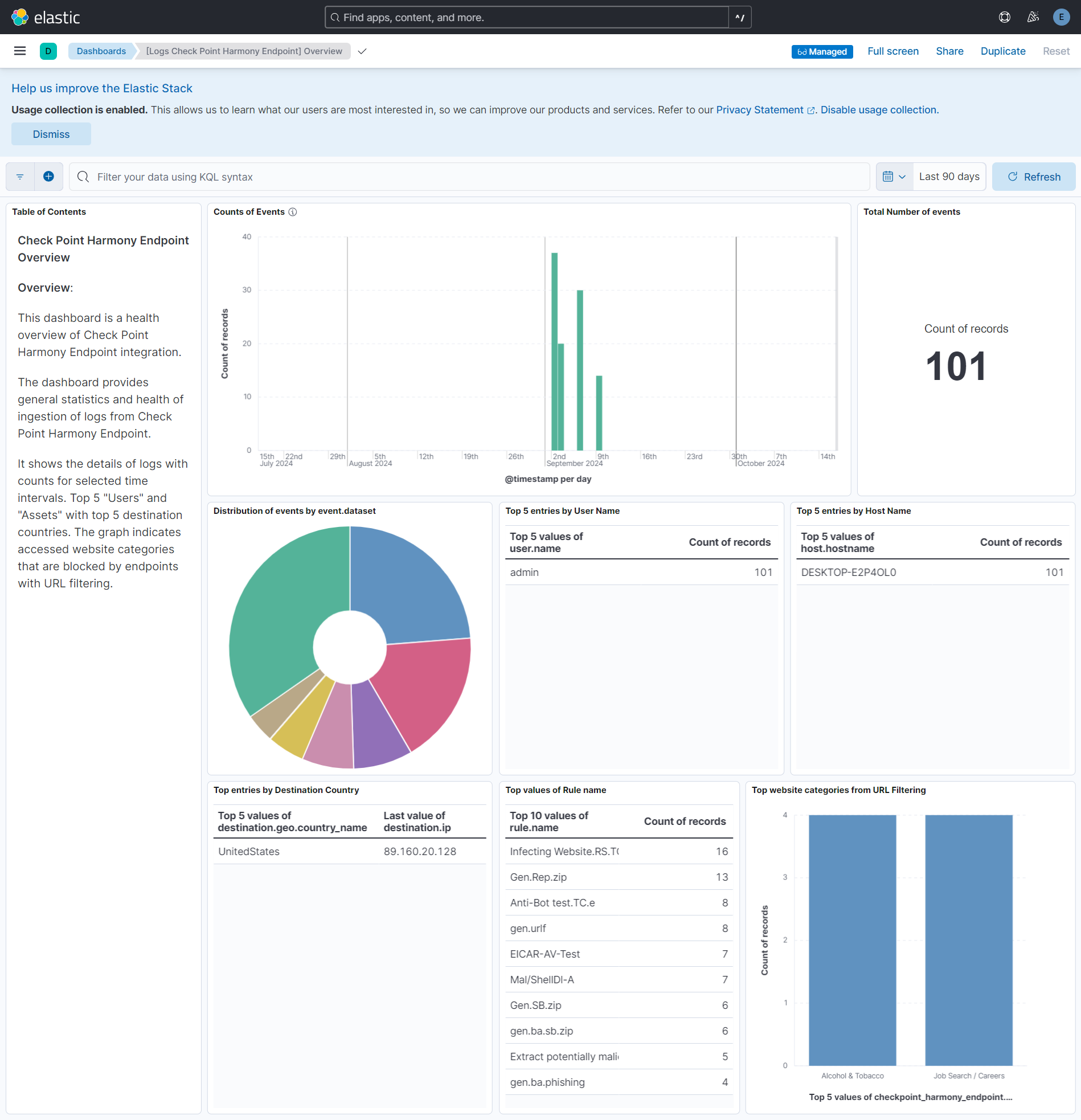
This integration includes one or more Kibana dashboards that visualizes the data collected by the integration. The screenshots below illustrate how the ingested data is displayed.
Changelog
| Version | Details | Minimum Kibana version |
|---|---|---|
| 1.6.0 | Enhancement (View pull request) Update Elastic Managed integration documentation to the current wording and docs links. |
9.0.0 8.18.0 |
| 1.5.0 | Enhancement (View pull request) Add tags to ingest pipeline processors. |
9.0.0 8.18.0 |
| 1.4.1 | Enhancement (View pull request) Set agentless deployment mode release field to ga. |
9.0.0 8.18.0 |
| 1.4.0 | Enhancement (View pull request) Publish Agentless to Elastic Managed integrations name change. |
9.0.0 8.18.0 |
| 1.3.0 | Enhancement (View pull request) Use new release field for agentless deployment mode to establish as beta. |
9.0.0 8.18.0 |
| 1.2.0 | Enhancement (View pull request) Enable request trace log removal. |
9.0.0 8.18.0 |
| 1.1.0 | Enhancement (View pull request) Enable Agentless deployment. |
9.0.0 8.18.0 |
| 1.0.1 | Bug fix (View pull request) Fix cursor data not updating. |
9.0.0 8.14.0 |
| 1.0.0 | Enhancement (View pull request) Release package as GA. Enhancement (View pull request) ECS version updated to 8.17.0. |
9.0.0 8.14.0 |
| 0.7.1 | Bug fix (View pull request) Fix typo when retrieving last timestamp from records. |
9.0.0 8.14.0 |
| 0.7.0 | Enhancement (View pull request) Base subsequent request ranges on the latest data received. Enhancement (View pull request) Adjust default request limits to avoid API timeouts. Enhancement (View pull request) Gratefully handle Canceled state responses. |
9.0.0 8.14.0 |
| 0.6.0 | Enhancement (View pull request) Improve cleaning of query parameters on errors. |
9.0.0 8.14.0 |
| 0.5.1 | Bug fix (View pull request) Fix endTime query parameter assignment. |
9.0.0 8.14.0 |
| 0.5.0 | Enhancement (View pull request) Improve handling of 404 and 503 API responses. Enhancement (View pull request) Propagate forensics CEL fixes to all data streams. |
9.0.0 8.14.0 |
| 0.4.0 | Enhancement (View pull request) Update Kibana constraint to support 9.0.0. |
9.0.0 8.14.0 |
| 0.3.1 | Bug fix (View pull request) Fix indentation forensics CEL program. |
8.14.0 |
| 0.3.0 | Enhancement (View pull request) Improve error reporting for API requests. |
8.14.0 |
| 0.2.1 | Bug fix (View pull request) Auth and pagination fixes. |
8.14.0 |
| 0.2.0 | Enhancement (View pull request) Add "preserve_original_event" tag to documents with event.kind set to "pipeline_error". |
8.14.0 |
| 0.1.1 | Bug fix (View pull request) Put the dashboard screenshot first, update base_url var. |
8.14.0 |
| 0.1.0 | Enhancement (View pull request) Initial release of the Check Point Harmony Endpoint package |
8.14.0 |