Auditd Logs Integration
Elastic Cloud Serverless projects are autoscaled environments, fully managed by Elastic and available on Elastic Cloud. Availability This functionality is generally available and ready for production usage. Elastic Cloud Serverless projects are autoscaled environments, fully managed by Elastic and available on Elastic Cloud. Availability This functionality is generally available and ready for production usage. The Elastic Stack includes Elastic's core products such as Elasticsearch, Kibana, Logstash, and Beats. Availability This functionality is generally available and ready for production usage. Unless stated otherwise on the page, this functionality is available when your Elastic Stack is deployed on Elastic Cloud Hosted, Elastic Cloud Enterprise, Elastic Cloud on Kubernetes, and self-managed environments. This documentation corresponds to the latest patch available for each minor version. If you're not using the latest patch, check the release notes for changes.
Serverless Observability
Generally available
Serverless Security
Generally available
Stack
9.0+
Generally available since 9.0
| Version | 3.25.1 (View all) |
| Subscription level What's this? |
Basic |
| Developed by What's this? |
Elastic |
| Ingestion method(s) | File |
| Minimum Kibana version(s) | 9.0.0 8.11.0 |
The Auditd Logs integration collects and parses logs from the audit daemon (auditd).
The integration was tested with logs from auditd on OSes like CentOS 6 and CentOS 7.
This integration is not available for Windows.
Example
{
    "@timestamp": "2016-01-03T00:37:51.394Z",
    "agent": {
        "ephemeral_id": "53541396-a320-4477-b6d9-a2a7d072269b",
        "id": "2b104c8f-2997-496b-ae72-508caa53046e",
        "name": "elastic-agent-28605",
        "type": "filebeat",
        "version": "8.17.3"
    },
    "auditd": {
        "log": {
            "proctitle": "bash",
            "record_type": "PROCTITLE",
            "sequence": 194438
        }
    },
    "data_stream": {
        "dataset": "auditd.log",
        "namespace": "69581",
        "type": "logs"
    },
    "ecs": {
        "version": "8.17.0"
    },
    "elastic_agent": {
        "id": "2b104c8f-2997-496b-ae72-508caa53046e",
        "snapshot": false,
        "version": "8.17.3"
    },
    "event": {
        "action": "proctitle",
        "agent_id_status": "verified",
        "dataset": "auditd.log",
        "ingested": "2025-03-13T12:15:48Z",
        "kind": "event"
    },
    "host": {
        "architecture": "x86_64",
        "containerized": true,
        "hostname": "elastic-agent-28605",
        "ip": [
            "172.20.0.2",
            "172.18.0.7"
        ],
        "mac": [
            "02-42-AC-12-00-07",
            "02-42-AC-14-00-02"
        ],
        "name": "elastic-agent-28605",
        "os": {
            "family": "",
            "kernel": "5.15.153.1-microsoft-standard-WSL2",
            "name": "Wolfi",
            "platform": "wolfi",
            "type": "linux",
            "version": "20230201"
        }
    },
    "input": {
        "type": "log"
    },
    "log": {
        "file": {
            "path": "/tmp/service_logs/audit.log"
        },
        "offset": 1706
    },
    "tags": [
        "auditd-log"
    ]
}
Exported fields
| Field | Description | Type |
|---|---|---|
| @timestamp | Event timestamp. | date |
| auditd.log.ARCH | keyword | |
| auditd.log.AUID | keyword | |
| auditd.log.EGID | keyword | |
| auditd.log.EUID | keyword | |
| auditd.log.FSGID | keyword | |
| auditd.log.FSUID | keyword | |
| auditd.log.GID | keyword | |
| auditd.log.ID | keyword | |
| auditd.log.SGID | keyword | |
| auditd.log.SUID | keyword | |
| auditd.log.SYSCALL | keyword | |
| auditd.log.UID | keyword | |
| auditd.log.a0 | The first argument to the system call. | keyword |
| auditd.log.a1 | The second argument to the system call. | keyword |
| auditd.log.a2 | The third argument to the system call. | keyword |
| auditd.log.a3 | The fourth argument to the system call. | keyword |
| auditd.log.addr | ip | |
| auditd.log.apparmor | keyword | |
| auditd.log.audit_backlog_limit | keyword | |
| auditd.log.audit_failure | keyword | |
| auditd.log.avc.action | keyword | |
| auditd.log.avc.request | keyword | |
| auditd.log.capability | keyword | |
| auditd.log.cipher | keyword | |
| auditd.log.context | keyword | |
| auditd.log.data | keyword | |
| auditd.log.default-context | keyword | |
| auditd.log.denied_mask | keyword | |
| auditd.log.dev | keyword | |
| auditd.log.direction | keyword | |
| auditd.log.dst_prefixlen | long | |
| auditd.log.entries | long | |
| auditd.log.family | keyword | |
| auditd.log.fe | keyword | |
| auditd.log.fi | keyword | |
| auditd.log.format | keyword | |
| auditd.log.fp | keyword | |
| auditd.log.fver | keyword | |
| auditd.log.gpg_res | keyword | |
| auditd.log.hostname | keyword | |
| auditd.log.id | keyword | |
| auditd.log.img-ctx | keyword | |
| auditd.log.info | keyword | |
| auditd.log.ino | keyword | |
| auditd.log.inode | keyword | |
| auditd.log.item | The item field indicates which item out of the total number of items. This number is zero-based; a value of 0 means it is the first item. | keyword |
| auditd.log.items | The number of items in an event. | keyword |
| auditd.log.kernel | keyword | |
| auditd.log.key | Records the user defined string associated with a rule that generated a particular event in the Audit log. | keyword |
| auditd.log.key_enforce | boolean | |
| auditd.log.kind | keyword | |
| auditd.log.ksize | long | |
| auditd.log.laddr | ip | |
| auditd.log.list | keyword | |
| auditd.log.lport | long | |
| auditd.log.major | keyword | |
| auditd.log.minor | keyword | |
| auditd.log.mode | keyword | |
| auditd.log.model | keyword | |
| auditd.log.name | keyword | |
| auditd.log.new-level | keyword | |
| auditd.log.new_auid | For login events this is the new audit ID. The audit ID can be used to trace future events to the user even if their identity changes (like becoming root). | keyword |
| auditd.log.new_pe | keyword | |
| auditd.log.new_pi | keyword | |
| auditd.log.new_pp | keyword | |
| auditd.log.new_ses | For login events this is the new session ID. It can be used to tie a user to future events by session ID. | keyword |
| auditd.log.node | keyword | |
| auditd.log.obj | keyword | |
| auditd.log.objtype | keyword | |
| auditd.log.old | keyword | |
| auditd.log.old-level | keyword | |
| auditd.log.old_auid | For login events this is the old audit ID used for the user prior to this login. | keyword |
| auditd.log.old_pe | keyword | |
| auditd.log.old_pi | keyword | |
| auditd.log.old_pp | keyword | |
| auditd.log.old_ses | For login events this is the old session ID used for the user prior to this login. | keyword |
| auditd.log.op | keyword | |
| auditd.log.operation | keyword | |
| auditd.log.original_field | The original field name if the event was parsed from an enriched format auditd log. | keyword |
| auditd.log.path | keyword | |
| auditd.log.peer | keyword | |
| auditd.log.permissive | keyword | |
| auditd.log.pfs | keyword | |
| auditd.log.proctitle | keyword | |
| auditd.log.profile | keyword | |
| auditd.log.rdev | keyword | |
| auditd.log.reason | keyword | |
| auditd.log.record_type | keyword | |
| auditd.log.request | keyword | |
| auditd.log.requested_mask | keyword | |
| auditd.log.reset | keyword | |
| auditd.log.root_dir | keyword | |
| auditd.log.rport | long | |
| auditd.log.saddr | keyword | |
| auditd.log.saddr_fam | keyword | |
| auditd.log.sauid | keyword | |
| auditd.log.scontext | keyword | |
| auditd.log.selected-context | keyword | |
| auditd.log.sequence | The audit event sequence number. | long |
| auditd.log.seresult | keyword | |
| auditd.log.ses | keyword | |
| auditd.log.sig | keyword | |
| auditd.log.spid | keyword | |
| auditd.log.src_prefixlen | long | |
| auditd.log.subj | keyword | |
| auditd.log.success | boolean | |
| auditd.log.sw | keyword | |
| auditd.log.sw_type | keyword | |
| auditd.log.syscall | keyword | |
| auditd.log.table | keyword | |
| auditd.log.tclass | keyword | |
| auditd.log.tcontext | keyword | |
| auditd.log.tty | keyword | |
| auditd.log.uid | keyword | |
| auditd.log.unit | keyword | |
| auditd.log.uuid | keyword | |
| auditd.log.ver | keyword | |
| auditd.log.virt | keyword | |
| auditd.log.vm | keyword | |
| auditd.log.vm-ctx | keyword | |
| auditd.log.xdevice | keyword | |
| cloud.account.id | The cloud account or organization id used to identify different entities in a multi-tenant environment. Examples: AWS account id, Google Cloud ORG Id, or other unique identifier. | keyword |
| cloud.availability_zone | Availability zone in which this host is running. | keyword |
| cloud.image.id | Image ID for the cloud instance. | keyword |
| cloud.instance.id | Instance ID of the host machine. | keyword |
| cloud.instance.name | Instance name of the host machine. | keyword |
| cloud.machine.type | Machine type of the host machine. | keyword |
| cloud.project.id | Name of the project in Google Cloud. | keyword |
| cloud.provider | Name of the cloud provider. Example values are aws, azure, gcp, or digitalocean. | keyword |
| cloud.region | Region in which this host is running. | keyword |
| container.id | Unique container id. | keyword |
| container.image.name | Name of the image the container was built on. | keyword |
| container.labels | Image labels. | object |
| container.name | Container name. | keyword |
| container.runtime | Runtime managing this container. | keyword |
| data_stream.dataset | Data stream dataset. | constant_keyword |
| data_stream.namespace | Data stream namespace. | constant_keyword |
| data_stream.type | Data stream type. | constant_keyword |
| destination.address | Some event destination addresses are defined ambiguously. The event will sometimes list an IP, a domain or a unix socket. You should always store the raw address in the .address field. Then it should be duplicated to .ip or .domain, depending on which one it is. |
keyword |
| ecs.version | ECS version this event conforms to. ecs.version is a required field and must exist in all events. When querying across multiple indices -- which may conform to slightly different ECS versions -- this field lets integrations adjust to the schema version of the events. |
keyword |
| error.message | Error message. | match_only_text |
| event.action | The action captured by the event. This describes the information in the event. It is more specific than event.category. Examples are group-add, process-started, file-created. The value is normally defined by the implementer. |
keyword |
| event.dataset | Event dataset | constant_keyword |
| event.ingested | Timestamp when an event arrived in the central data store. This is different from @timestamp, which is when the event originally occurred. It's also different from event.created, which is meant to capture the first time an agent saw the event. In normal conditions, assuming no tampering, the timestamps should chronologically look like this: @timestamp < event.created < event.ingested. |
date |
| event.module | Event module | constant_keyword |
| event.original | Raw text message of entire event. Used to demonstrate log integrity or where the full log message (before splitting it up in multiple parts) may be required, e.g. for reindex. This field is not indexed and doc_values are disabled. It cannot be searched, but it can be retrieved from _source. If users wish to override this and index this field, please see Field data types in the Elasticsearch Reference. |
keyword |
| event.outcome | This is one of four ECS Categorization Fields, and indicates the lowest level in the ECS category hierarchy. event.outcome simply denotes whether the event represents a success or a failure from the perspective of the entity that produced the event. Note that when a single transaction is described in multiple events, each event may populate different values of event.outcome, according to their perspective. Also note that in the case of a compound event (a single event that contains multiple logical events), this field should be populated with the value that best captures the overall success or failure from the perspective of the event producer. Further note that not all events will have an associated outcome. For example, this field is generally not populated for metric events, events with event.type:info, or any events for which an outcome does not make logical sense. |
keyword |
| group.id | Unique identifier for the group on the system/platform. | keyword |
| group.name | Name of the group. | keyword |
| host.architecture | Operating system architecture. | keyword |
| host.containerized | If the host is a container. | boolean |
| host.domain | Name of the domain of which the host is a member. For example, on Windows this could be the host's Active Directory domain or NetBIOS domain name. For Linux this could be the domain of the host's LDAP provider. | keyword |
| host.hostname | Hostname of the host. It normally contains what the hostname command returns on the host machine. |
keyword |
| host.id | Unique host id. As hostname is not always unique, use values that are meaningful in your environment. Example: The current usage of beat.name. |
keyword |
| host.ip | Host ip addresses. | ip |
| host.mac | Host mac addresses. | keyword |
| host.name | Name of the host. It can contain what hostname returns on Unix systems, the fully qualified domain name, or a name specified by the user. The sender decides which value to use. |
keyword |
| host.os.build | OS build information. | keyword |
| host.os.codename | OS codename, if any. | keyword |
| host.os.family | OS family (such as redhat, debian, freebsd, windows). | keyword |
| host.os.kernel | Operating system kernel version as a raw string. | keyword |
| host.os.name | Operating system name, without the version. | keyword |
| host.os.name.text | Multi-field of host.os.name. |
text |
| host.os.platform | Operating system platform (such centos, ubuntu, windows). | keyword |
| host.os.version | Operating system version as a raw string. | keyword |
| host.type | Type of host. For Cloud providers this can be the machine type like t2.medium. If vm, this could be the container, for example, or other information meaningful in your environment. |
keyword |
| input.type | Input type | keyword |
| log.file.path | Full path to the log file this event came from, including the file name. It should include the drive letter, when appropriate. If the event wasn't read from a log file, do not populate this field. | keyword |
| log.offset | Log offset | long |
| message | For log events the message field contains the log message, optimized for viewing in a log viewer. For structured logs without an original message field, other fields can be concatenated to form a human-readable summary of the event. If multiple messages exist, they can be combined into one message. | match_only_text |
| network.direction | Direction of the network traffic. When mapping events from a host-based monitoring context, populate this field from the host's point of view, using the values "ingress" or "egress". When mapping events from a network or perimeter-based monitoring context, populate this field from the point of view of the network perimeter, using the values "inbound", "outbound", "internal" or "external". Note that "internal" is not crossing perimeter boundaries, and is meant to describe communication between two hosts within the perimeter. Note also that "external" is meant to describe traffic between two hosts that are external to the perimeter. This could for example be useful for ISPs or VPN service providers. | keyword |
| process.args | Array of process arguments, starting with the absolute path to the executable. May be filtered to protect sensitive information. | keyword |
| process.args_count | Length of the process.args array. This field can be useful for querying or performing bucket analysis on how many arguments were provided to start a process. More arguments may be an indication of suspicious activity. | long |
| process.executable | Absolute path to the process executable. | keyword |
| process.executable.text | Multi-field of process.executable. |
match_only_text |
| process.exit_code | The exit code of the process, if this is a termination event. The field should be absent if there is no exit code for the event (e.g. process start). | long |
| process.name | Process name. Sometimes called program name or similar. | keyword |
| process.name.text | Multi-field of process.name. |
match_only_text |
| process.parent.pid | Process id. | long |
| process.pid | Process id. | long |
| process.working_directory | The working directory of the process. | keyword |
| process.working_directory.text | Multi-field of process.working_directory. |
match_only_text |
| related.user | All the user names or other user identifiers seen on the event. | keyword |
| source.address | Some event source addresses are defined ambiguously. The event will sometimes list an IP, a domain or a unix socket. You should always store the raw address in the .address field. Then it should be duplicated to .ip or .domain, depending on which one it is. |
keyword |
| source.as.number | Unique number allocated to the autonomous system. The autonomous system number (ASN) uniquely identifies each network on the Internet. | long |
| source.as.organization.name | Organization name. | keyword |
| source.as.organization.name.text | Multi-field of source.as.organization.name. |
match_only_text |
| source.geo.city_name | City name. | keyword |
| source.geo.continent_name | Name of the continent. | keyword |
| source.geo.country_iso_code | Country ISO code. | keyword |
| source.geo.country_name | Country name. | keyword |
| source.geo.location | Longitude and latitude. | geo_point |
| source.geo.region_iso_code | Region ISO code. | keyword |
| source.geo.region_name | Region name. | keyword |
| source.ip | IP address of the source (IPv4 or IPv6). | ip |
| tags | List of keywords used to tag each event. | keyword |
| user.audit.group.id | Unique identifier for the group on the system/platform. | keyword |
| user.audit.group.name | Name of the group. | keyword |
| user.audit.id | One or multiple unique identifiers of the user. | keyword |
| user.audit.name | Short name or login of the user. | keyword |
| user.effective.group.id | Unique identifier for the group on the system/platform. | keyword |
| user.effective.group.name | Name of the group. | keyword |
| user.effective.id | Unique identifier of the user. | keyword |
| user.effective.name | Short name or login of the user. | keyword |
| user.effective.name.text | Multi-field of user.effective.name. |
match_only_text |
| user.filesystem.group.id | Unique identifier for the group on the system/platform. | keyword |
| user.filesystem.group.name | Name of the group. | keyword |
| user.filesystem.id | One or multiple unique identifiers of the user. | keyword |
| user.filesystem.name | Short name or login of the user. | keyword |
| user.group.id | Unique identifier for the group on the system/platform. | keyword |
| user.group.name | Name of the group. | keyword |
| user.id | Unique identifier of the user. | keyword |
| user.name | Short name or login of the user. | keyword |
| user.name.text | Multi-field of user.name. |
match_only_text |
| user.owner.group.id | Unique identifier for the group on the system/platform. | keyword |
| user.owner.group.name | Name of the group. | keyword |
| user.owner.id | One or multiple unique identifiers of the user. | keyword |
| user.owner.name | Short name or login of the user. | keyword |
| user.saved.group.id | Unique identifier for the group on the system/platform. | keyword |
| user.saved.group.name | Name of the group. | keyword |
| user.saved.id | One or multiple unique identifiers of the user. | keyword |
| user.saved.name | Short name or login of the user. | keyword |
| user.target.group.id | Unique identifier for the group on the system/platform. | keyword |
| user.target.group.name | Name of the group. | keyword |
| user.target.id | Unique identifier of the user. | keyword |
| user.target.name | Short name or login of the user. | keyword |
| user.target.name.text | Multi-field of user.target.name. |
match_only_text |
| user.terminal | Terminal or tty device on which the user is performing the observed activity. | keyword |
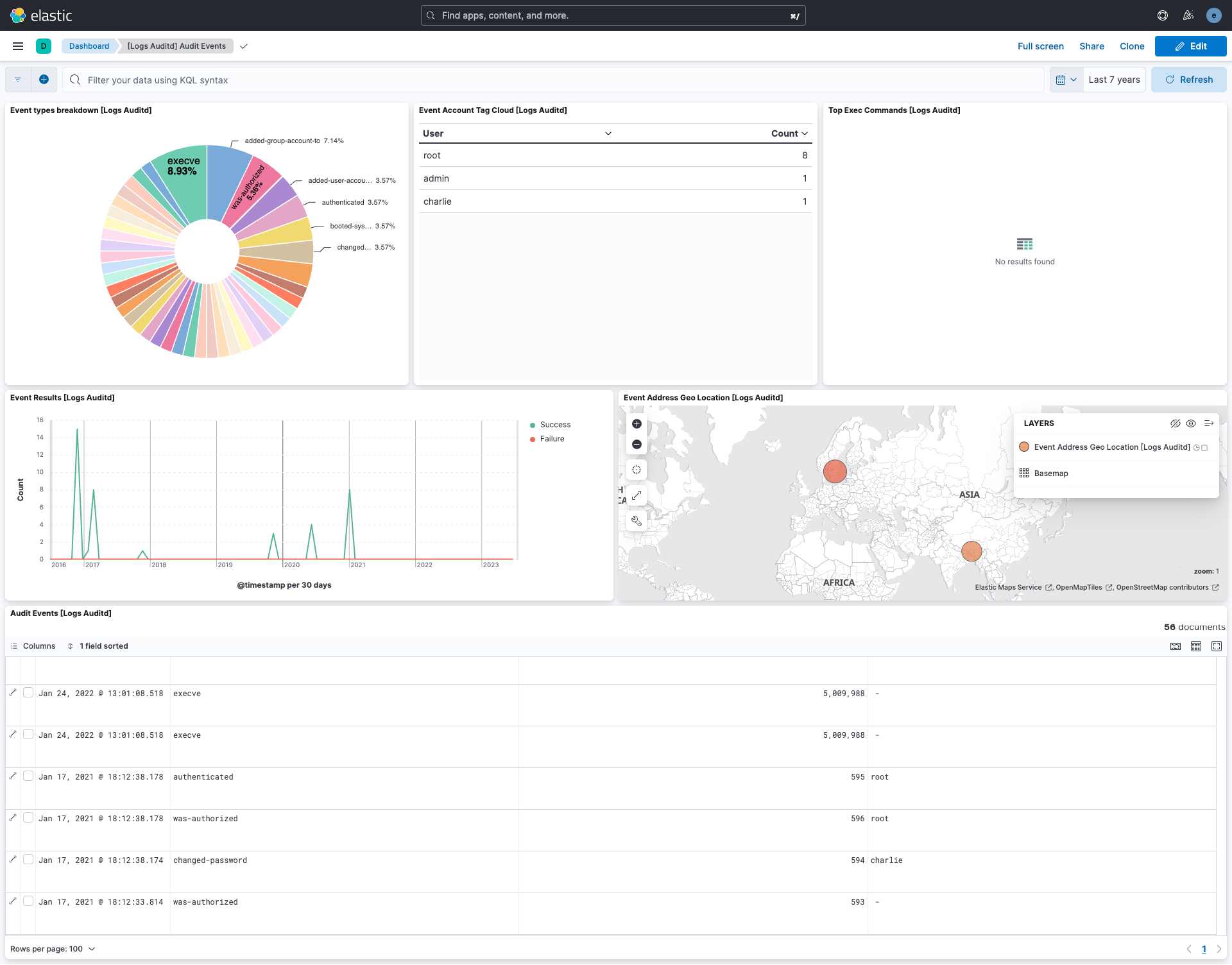
This integration includes one or more Kibana dashboards that visualizes the data collected by the integration. The screenshots below illustrate how the ingested data is displayed.
Changelog
| Version | Details | Minimum Kibana version |
|---|---|---|
| 3.25.1 | Bug fix (View pull request) Fix user.name being incorrectly set to the target account name (acct field) for ACCT_LOCK, ACCT_UNLOCK, ADD_USER, DEL_USER, USER_CHAUTHTOK, and USER_MGMT records when UID/AUID enrichment strings are absent from the log line. |
9.0.0 8.11.0 |
| 3.25.0 | Enhancement (View pull request) Faster parsing for common kernel record types. |
9.0.0 8.11.0 |
| 3.24.4 | Bug fix (View pull request) Remove leftover auditd.log.acct from ENRICHED IAM records. |
9.0.0 8.11.0 |
| 3.24.3 | Bug fix (View pull request) Handle non-password USER_CHAUTHTOK ops by setting event.action to modified-user-account. |
9.0.0 8.11.0 |
| 3.24.2 | Bug fix (View pull request) Fix quadratic grok backtracking in the raw pipeline on EXECVE records with oversized split arguments (aN[0], aN[1], ...), which could exceed the grok watchdog timeout and consume excessive ingest CPU. Bracket-suffixed argument chunk keys are now also captured instead of being dropped. |
9.0.0 8.11.0 |
| 3.24.1 | Enhancement (View pull request) Transfer package ownership to elastic/security-service-integrations. |
9.0.0 8.11.0 |
| 3.24.0 | Enhancement (View pull request) Add ignore_older option to the auditd log data stream. |
9.0.0 8.11.0 |
| 3.23.2 | Bug fix (View pull request) Map enriched username fields to ECS for IAM event types (ADD_USER, DEL_USER, ADD_GROUP, DEL_GROUP, USER_CHAUTHTOK, ACCT_LOCK, ACCT_UNLOCK, USER_LOGOUT, USER_START). Fixes missing user.name, user.effective.name, user.target.name, and group.name when log lines use the Unit Separator (U+001D) delimiter. |
9.0.0 8.11.0 |
| 3.23.1 | Bug fix (View pull request) Map enriched auditd username fields (UID, EUID, AUID, etc.) to ECS user name fields and related.user. |
9.0.0 8.11.0 |
| 3.23.0 | Enhancement (View pull request) Enable the auditd filestream parser when supported by Elastic Agent. |
9.0.0 8.11.0 |
| 3.22.2 | Bug fix (View pull request) Reduce auditd grok backtracking by splitting conditional patterns and tightening key-value extraction boundaries. |
9.0.0 8.11.0 |
| 3.22.1 | Bug fix (View pull request) Bug fix to better parse key-value pairs |
9.0.0 8.11.0 |
| 3.22.0 | Enhancement (View pull request) Add 9.0.0 constraint and update to ECS 8.17.0 |
9.0.0 8.11.0 |
| 3.21.0 | Enhancement (View pull request) Allow the usage of deprecated log input and support for stack 9.0 |
8.11.0 |
| 3.20.3 | Bug fix (View pull request) Allow enriched fields on more auditd log messages |
8.11.0 |
| 3.20.2 | Bug fix (View pull request) Use triple-brace Mustache templating when referencing variables in ingest pipelines. |
8.11.0 |
| 3.20.1 | Bug fix (View pull request) Preserve auditd.log.record_type and fallback to auditd.log.SYSCALL |
8.11.0 |
| 3.20.0 | Enhancement (View pull request) Allow @custom pipeline access to event.original without setting preserve_original_event. |
8.11.0 |
| 3.19.2 | Bug fix (View pull request) Fix invalid event type. |
8.7.1 |
| 3.19.1 | Enhancement (View pull request) Changed owners |
8.7.1 |
| 3.19.0 | Enhancement (View pull request) Handle variable spaces in structured data. Enhancement (View pull request) Handle AVC header. |
8.7.1 |
| 3.18.0 | Enhancement (View pull request) Handle ENRICHED audit format. |
8.7.1 |
| 3.17.2 | Bug fix (View pull request) Fix exclude_files pattern. |
8.7.1 |
| 3.17.1 | Bug fix (View pull request) Fix handling of cases where fields are present in duplicate. |
8.7.1 |
| 3.17.0 | Enhancement (View pull request) ECS version updated to 8.11.0. |
8.7.1 |
| 3.16.0 | Enhancement (View pull request) Improve 'event.original' check to avoid errors if set. |
8.7.1 |
| 3.15.0 | Enhancement (View pull request) ECS version updated to 8.10.0. |
8.7.1 |
| 3.14.0 | Enhancement (View pull request) The format_version in the package manifest changed from 2.11.0 to 3.0.0. Removed dotted YAML keys from package manifest. Added 'owner.type: elastic' to package manifest. |
8.7.1 |
| 3.13.1 | Bug fix (View pull request) Remove the unnecessary permission for the package to write to arbitrary logs-* data streams. |
8.7.1 |
| 3.13.0 | Enhancement (View pull request) Add tags.yml file so that integration's dashboards and saved searches are tagged with "Security Solution" and displayed in the Security Solution UI. |
8.7.1 |
| 3.12.0 | Enhancement (View pull request) Update package to ECS 8.9.0. |
8.7.1 |
| 3.11.0 | Enhancement (View pull request) Convert dashboards to Lens. |
8.7.1 |
| 3.10.0 | Enhancement (View pull request) Ensure event.kind is correctly set for pipeline errors. |
8.1.0 |
| 3.9.0 | Enhancement (View pull request) Add permissions to reroute events to logs-- for log datastream. |
8.1.0 |
| 3.8.0 | Enhancement (View pull request) Update package to ECS 8.8.0. |
8.1.0 |
| 3.7.0 | Enhancement (View pull request) Update package-spec version to 2.7.0. |
8.1.0 |
| 3.6.0 | Enhancement (View pull request) Update package to ECS 8.7.0. |
8.1.0 |
| 3.5.1 | Enhancement (View pull request) Added categories and/or subcategories. |
8.1.0 |
| 3.5.0 | Enhancement (View pull request) Update package to ECS 8.6.0. |
8.1.0 |
| 3.4.2 | Bug fix (View pull request) Allow processing of messages with quoted spaces. |
8.1.0 |
| 3.4.1 | Enhancement (View pull request) Migrate the visualizations to by value in dashboards to minimize the saved object clutter and reduce time to load |
8.1.0 |
| 3.4.0 | Enhancement (View pull request) Update package to ECS 8.5.0. |
8.0.0 |
| 3.3.4 | Bug fix (View pull request) Remove duplicate fields. |
8.0.0 |
| 3.3.3 | Enhancement (View pull request) Use ECS geo.location definition. |
8.0.0 |
| 3.3.2 | Enhancement (View pull request) Remove unused visualizations |
8.0.0 |
| 3.3.1 | Bug fix (View pull request) Add mapping for event.original. |
8.0.0 |
| 3.3.0 | Enhancement (View pull request) Update package to ECS 8.4.0 |
8.0.0 |
| 3.2.0 | Enhancement (View pull request) Update package to ECS 8.3.0. |
8.0.0 |
| 3.1.0 | Enhancement (View pull request) Change title to Auditd Logs |
8.0.0 |
| 3.0.0 | Enhancement (View pull request) Migrate map visualisation from tile_map to map object |
8.0.0 |
| 2.2.0 | Enhancement (View pull request) Update to ECS 8.2 |
8.0.0 7.17.0 |
| 2.1.2 | Bug fix (View pull request) Set event.outcome value according ECS specification |
8.0.0 7.17.0 |
| 2.1.1 | Enhancement (View pull request) Add documentation for multi-fields |
8.0.0 7.17.0 |
| 2.1.0 | Enhancement (View pull request) Store EXECVE arguments in process.args array. |
8.0.0 7.17.0 |
| 2.0.0 | Enhancement (View pull request) Update to ECS 8.0 Enhancement (View pull request) process.ppid is replaced with process.parent.pid (breaking change) |
8.0.0 7.17.0 |
| 1.3.1 | Bug fix (View pull request) Regenerate test files using the new GeoIP database |
8.0.0 7.14.0 |
| 1.3.0 | Enhancement (View pull request) Change test IPs to the supported set for GeoIP Enhancement (View pull request) Add 8.0.0 version constraint |
8.0.0 7.14.0 |
| 1.2.4 | Enhancement (View pull request) Uniform with guidelines |
7.14.0 |
| 1.2.3 | Enhancement (View pull request) Update Title and Description. |
— |
| 1.2.2 | Bug fix (View pull request) Ensure boolean fields are true/false |
7.14.0 |
| 1.2.1 | Bug fix (View pull request) Fix logic that checks for the 'forwarded' tag |
— |
| 1.2.0 | Enhancement (View pull request) Update to ECS 1.12.0 |
7.14.0 |
| 1.1.3 | Enhancement (View pull request) Convert to generated ECS fields |
— |
| 1.1.2 | Enhancement (View pull request) update to ECS 1.11.0 |
— |
| 1.1.1 | Enhancement (View pull request) Escape special characters in docs |
— |
| 1.1.0 | Enhancement (View pull request) Update integration description |
— |
| 1.0.0 | Enhancement (View pull request) make GA Enhancement (View pull request) Set "event.module" and "event.dataset" |
7.14.0 |
| 0.2.0 | Enhancement (View pull request) update to ECS 1.10.0 and apply changes to prepare for package GA |
— |
| 0.1.2 | Enhancement (View pull request) set version in the ingest pipeline and make event.original optional |
— |
| 0.1.1 | Enhancement (View pull request) update to ECS 1.9.0 |
— |
| 0.1.0 | Enhancement (View pull request) Add changes to use ECS 1.8 fields. |
— |
| 0.0.1 | Enhancement (View pull request) initial release |
— |