Jamf Protect
Elastic Cloud Serverless projects are autoscaled environments, fully managed by Elastic and available on Elastic Cloud. Availability This functionality is generally available and ready for production usage. Elastic Cloud Serverless projects are autoscaled environments, fully managed by Elastic and available on Elastic Cloud. Availability This functionality is generally available and ready for production usage. The Elastic Stack includes Elastic's core products such as Elasticsearch, Kibana, Logstash, and Beats. Availability This functionality is generally available and ready for production usage. Unless stated otherwise on the page, this functionality is available when your Elastic Stack is deployed on Elastic Cloud Hosted, Elastic Cloud Enterprise, Elastic Cloud on Kubernetes, and self-managed environments. This documentation corresponds to the latest patch available for each minor version. If you're not using the latest patch, check the release notes for changes.
Serverless Observability
Generally available
Serverless Security
Generally available
Stack
9.0+
Generally available since 9.0
| Version | 3.5.1 (View all) |
| Subscription level What's this? |
Basic |
| Developed by What's this? |
Elastic |
| Ingestion method(s) | AWS S3, Webhook |
| Minimum Kibana version(s) | 9.0.0 8.16.5 |
The Jamf Protect integration collects and parses data received from Jamf Protect using the following methods.
- HTTP Endpoint mode - Jamf Protect streams logs directly to an HTTP endpoint hosted by your Elastic Agent.
- AWS S3 polling mode - Jamf Protect forwards data to S3 and Elastic Agent polls the S3 bucket by listing its contents and reading new files.
- AWS S3 SQS mode - Jamf Protect writes data to S3, S3 pushes a new object notification to SQS, Elastic Agent receives the notification from SQS, and then reads the S3 object. Multiple Agents can be used in this mode.
Use the Jamf Protect integration to collect logs from your machines. Then visualize that data in Kibana, create alerts to notify you if something goes wrong, and reference data when troubleshooting an issue.
The Jamf Protect integration collects 4 types of events: alerts, telemetry, web threat events, and web traffic events.
Alerts help you keep a record of Alerts and Unified Logs happening on endpoints using Jamf Protect.
Telemetry help you keep a record of audit events happening on endpoints using Jamf Protect.
Web threat events help you keep a record of web threat events happening on endpoints using Jamf Protect.
Web traffic events help you keep a record of content filtering and network requests happening on endpoints using Jamf Protect.
You need Elasticsearch for storing and searching your data and Kibana for visualizing and managing it. You can use our hosted Elasticsearch Service on Elastic Cloud, which is recommended, or self-manage the Elastic Stack on your own hardware.
To use this integration, you will also need to:
- Enable the integration in Elastic
- Configure Jamf Protect (macOS Security) to send logs to AWS S3 or the Elastic Agent (HTTP Endpoint)
- Alerts
- Unified Logs
- Telemetry
- Configure Jamf Protect (Jamf Security Cloud) to send logs to AWS S3 or the Elastic Agent (HTTP Endpoint)
- Threat Event Stream
- Network Traffic Stream
For step-by-step instructions on how to set up an new integration in Elastic, see the Getting started guide. When setting up the integration, you will choose to collect logs via either S3 or HTTP Endpoint.
After validating settings, you can configure Jamf Protect to send events to Elastic. For more information on configuring Jamf Protect, see
Then, depending on which events you want to send to Elastic, configure one or multiple HTTP endpoints:
Remote Alert Collection Endpoints:
- In the URL field, enter the full URL with port using this format:
http[s]://{ELASTICAGENT_ADDRESS}:{AGENT_PORT}.
Unified Logs Collection Endpoints:
- In the URL field, enter the full URL with port using this format:
http[s]://{ELASTICAGENT_ADDRESS}:{AGENT_PORT}.
Telemetry Collection Endpoints:
- In the URL field, enter the full URL with port using this format:
http[s]://{ELASTICAGENT_ADDRESS}:{AGENT_PORT}.
Threats Event Stream:
- In the Server hostname or IP field, enter the full URL with port using this format:
http[s]://{ELASTICAGENT_ADDRESS}:{AGENT_PORT}.
Network Traffic Stream:
- In the Server hostname or IP field, enter the full URL with port using this format:
http[s]://{ELASTICAGENT_ADDRESS}:{AGENT_PORT}.
After validating settings, you can configure Jamf Protect to send events to AWS S3. For more information on configuring Jamf Protect, see
- If data forwarding to an AWS S3 Bucket hasn't been configured, then first setup an AWS S3 Bucket as mentioned in the above documentation.
- Follow the steps below for each data stream that has been enabled:
- Create an SQS queue
- To setup an SQS queue, follow "Step 1: Create an Amazon SQS queue" mentioned in the Amazon documentation.
- While creating an SQS Queue, please provide the same bucket ARN that has been generated after creating an AWS S3 Bucket.
- Setup event notification from the S3 bucket using the instructions here. Use the following settings:
- Event type:
All object create events(s3:ObjectCreated:*) - Destination: SQS Queue
- Prefix (filter): enter the prefix for this data stream, e.g.
protect-/alerts/ - Select the SQS queue that has been created for this data stream
- Event type:
- Create an SQS queue
Note:
- A separate SQS queue and S3 bucket notification is required for each enabled data stream.
- Permissions for the above AWS S3 bucket and SQS queues should be configured according to the Filebeat S3 input documentation
- Credentials for the above AWS S3 and SQS input types should be configured using the link.
- Data collection via AWS S3 Bucket and AWS SQS are mutually exclusive in this case.
- When collecting data from non-AWS S3-compatible storage, the
Bucket Regionparameter is required for Elastic Agent version 8.19.12 or later.
Copyright (c) 2024, Jamf Software, LLC. All rights reserved.
This is the Alerts dataset.
Example
{
    "@timestamp": "2025-10-28T06:40:44.009Z",
    "agent": {
        "ephemeral_id": "1e2893fd-6cd2-4457-9d11-76db04aa40fe",
        "id": "42d9c674-11c5-4683-8f79-8632a8dc911a",
        "name": "elastic-agent-61406",
        "type": "filebeat",
        "version": "8.16.5"
    },
    "aws": {
        "s3": {
            "bucket": {
                "arn": "arn:aws:s3:::elastic-package-jamf-protect-alerts-bucket-67017",
                "name": "elastic-package-jamf-protect-alerts-bucket-67017"
            },
            "object": {
                "key": "test-alerts.log"
            }
        }
    },
    "cloud": {
        "region": "us-east-1"
    },
    "data_stream": {
        "dataset": "jamf_protect.alerts",
        "namespace": "71797",
        "type": "logs"
    },
    "ecs": {
        "version": "8.17.0"
    },
    "elastic_agent": {
        "id": "42d9c674-11c5-4683-8f79-8632a8dc911a",
        "snapshot": false,
        "version": "8.16.5"
    },
    "event": {
        "action": "CustomURLHandlerCreation",
        "agent_id_status": "verified",
        "category": [
            "host",
            "file"
        ],
        "dataset": "jamf_protect.alerts",
        "id": "6bdb0697-6d07-47bc-a37d-6c3348a5d953",
        "ingested": "2025-10-28T06:40:45Z",
        "kind": "alert",
        "original": "{\"caid\":\"9344154b2323cbfdca098e408354212d4331ac3e9e538497aba0f766723661f7\",\"certid\":\"312301bd32f3fc8f82c7d6e57814764ae751f171f37496407d8998a32892bcea\",\"input\":{\"host\":{\"os\":\"Version 14.2 (Build 23C5030f)\",\"ips\":[\"175.16.199.1\"],\"serial\":\"C02ZW0GTLVDL\",\"hostname\":\"LMAC-ZW0GTLVDL\",\"protectVersion\":\"5.1.1.2\",\"provisioningUDID\":\"32EC79C5-26DC-535A-85F7-986F063297E2\"},\"match\":{\"tags\":[\"Visibility\"],\"uuid\":\"6bdb0697-6d07-47bc-a37d-6c3348a5d953\",\"event\":{\"dev\":16777225,\"gid\":0,\"pid\":15910,\"uid\":0,\"path\":\"/Applications/.Microsoft Teams (work or school).app.installBackup\",\"type\":3,\"uuid\":\"391104e6-ca86-4afb-82c0-7453595624a6\",\"iNode\":19478271,\"eventID\":154840,\"prevFile\":\"/Applications/Microsoft Teams (work or school).app\",\"timestamp\":1700566364.184953},\"facts\":[{\"name\":\"CustomURLHandlerCreation\",\"tags\":[\"Visibility\"],\"uuid\":\"25a295ca-f4b3-4f78-8faa-80e9182645f1\",\"human\":\"Application that uses custom url handler created\",\"actions\":[{\"name\":\"CacheFile\"},{\"name\":\"Report\"}],\"context\":[{\"name\":\"Signer\",\"value\":\"4\",\"valueType\":\"String\"},{\"name\":\"BundleURLTypes\",\"value\":\"{\\n    CFBundleTypeRole = Editor;\\n    CFBundleURLName = \\\"com.microsoft.teams2\\\";\\n    CFBundleURLSchemes =     (\\n        msteams\\n    );\\n}\",\"valueType\":\"String\"}],\"version\":1,\"severity\":0}],\"custom\":false,\"actions\":[{\"name\":\"CacheFile\"},{\"name\":\"Report\"}],\"context\":[{\"name\":\"Signer\",\"value\":\"4\",\"valueType\":\"String\"},{\"name\":\"BundleURLTypes\",\"value\":\"{\\n    CFBundleTypeRole = Editor;\\n    CFBundleURLName = \\\"com.microsoft.teams2\\\";\\n    CFBundleURLSchemes =     (\\n        msteams\\n    );\\n}\",\"valueType\":\"String\"}],\"severity\":0},\"related\":{\"files\":[{\"gid\":0,\"uid\":0,\"fsid\":16777225,\"mode\":16804,\"path\":\"/Applications/.Microsoft Teams (work or school).app.installBackup\",\"size\":96,\"inode\":19478271,\"xattrs\":[\"com.apple.macl\"],\"changed\":1700566364,\"created\":0,\"sha1hex\":\"\",\"accessed\":1698762823,\"modified\":1698762823,\"sha256hex\":\"\",\"isDownload\":false,\"objectType\":\"GPSystemObject\",\"isAppBundle\":true,\"isDirectory\":true,\"signingInfo\":{\"appid\":\"\",\"status\":-67062,\"teamid\":\"\",\"signerType\":4,\"authorities\":[],\"entitlements\":[],\"statusMessage\":\"code object is not signed at all\",\"informationStage\":\"extended\"},\"isScreenShot\":false}],\"users\":[{\"uid\":0,\"name\":\"root\",\"uuid\":\"C02ZW0GTLVDL0\"}],\"groups\":[{\"gid\":0,\"name\":\"wheel\",\"uuid\":\"C02ZW0GTLVDL0\"}],\"binaries\":[{\"gid\":0,\"uid\":0,\"fsid\":16777225,\"mode\":33261,\"path\":\"/Library/PrivilegedHelperTools/com.microsoft.autoupdate.helper\",\"size\":293200,\"inode\":19877984,\"xattrs\":[],\"changed\":1700045896,\"created\":1700045896,\"sha1hex\":\"5ddcd49004e66cead79ca82991f1b4d4a8ba52d9\",\"accessed\":1700045896,\"modified\":1700045896,\"sha256hex\":\"8fd91d9d1ca53ef93921c8072e12ec082c9eba62bf93f0f900e71b6aa4fa0ed8\",\"isDownload\":false,\"objectType\":\"GPSystemObject\",\"isAppBundle\":false,\"isDirectory\":false,\"signingInfo\":{\"appid\":\"com.microsoft.autoupdate.helper\",\"cdhash\":\"Ji34X0RVyhgstFZxr7Jsmtnf8Ts=\",\"status\":0,\"teamid\":\"UBF8T346G9\",\"signerType\":2,\"authorities\":[\"Developer ID Application: Microsoft Corporation (UBF8T346G9)\",\"Developer ID Certification Authority\",\"Apple Root CA\"],\"entitlements\":[],\"statusMessage\":\"No error.\",\"informationStage\":\"extended\"},\"isScreenShot\":false}],\"processes\":[{\"gid\":0,\"pid\":15910,\"uid\":0,\"args\":[\"/Library/PrivilegedHelperTools/com.microsoft.autoupdate.helper\",\"XPC_SERVICE_NAME=com.microsoft.autoupdate.helper\",\"PATH=/usr/bin:/bin:/usr/sbin:/sbin\",\"XPC_FLAGS=1\",\"pfz=0x7ffffff12000\",\"stack_guard=0x94bec1a9eb9800ea\",\"malloc_entropy=0x7777a3bc060946c0,0x6f95455435250cbc\",\"ptr_munge=0x749c1515ccadfca\",\"main_stack=0x7ff7bf6da000,0x800000,0x7ff7bb6da000,0x4000000\",\"executable_file=0x1a01000009,0x12f5060\",\"dyld_file=0x1a01000009,0xfffffff000982f7\",\"executable_cdhash=262df85f4455ca182cb45671afb26c9ad9dff13b\",\"executable_boothash=1fc9ca7065a4d7a9c299cc51414c052e5d7025d7\",\"th_port=0x103\"],\"name\":\"com.microsoft.autoupdate.helper\",\"path\":\"/Library/PrivilegedHelperTools/com.microsoft.autoupdate.helper\",\"pgid\":15910,\"ppid\":1,\"rgid\":0,\"ruid\":0,\"uuid\":\"b8cd6fa5-e8c3-4f05-88a0-68469d04806c\",\"flags\":[],\"processType\":\"GPSystemObject\",\"signingInfo\":{\"appid\":\"com.microsoft.autoupdate.helper\",\"cdhash\":\"Ji34X0RVyhgstFZxr7Jsmtnf8Ts=\",\"status\":0,\"teamid\":\"UBF8T346G9\",\"signerType\":2,\"authorities\":[\"Developer ID Application: Microsoft Corporation (UBF8T346G9)\",\"Developer ID Certification Authority\",\"Apple Root CA\"],\"entitlements\":[],\"statusMessage\":\"No error.\",\"informationStage\":\"extended\"},\"inheritedFlags\":[],\"responsiblePID\":15910,\"startTimestamp\":1700566364,\"originalParentPID\":1,\"processIdentifier\":266122}]},\"eventType\":\"GPFSEvent\"}}",
        "provider": "Jamf Protect",
        "reason": "Application that uses custom url handler created",
        "severity": 0,
        "start": "2023-11-21T11:32:44.184Z",
        "type": [
            "change"
        ]
    },
    "file": {
        "code_signature": {
            "status": "code object is not signed at all"
        },
        "gid": "0",
        "inode": "19478271",
        "mode": "16804",
        "path": "/Applications/.Microsoft Teams (work or school).app.installBackup",
        "size": 96,
        "uid": "0"
    },
    "group": {
        "id": "0",
        "name": "wheel"
    },
    "host": {
        "hostname": "LMAC-ZW0GTLVDL",
        "id": "32EC79C5-26DC-535A-85F7-986F063297E2",
        "ip": [
            "175.16.199.1"
        ],
        "os": {
            "family": "macos",
            "full": "Version 14.2 (Build 23C5030f)"
        }
    },
    "input": {
        "type": "aws-s3"
    },
    "log": {
        "file": {
            "path": "https://elastic-package-jamf-protect-alerts-bucket-67017.s3.us-east-1.amazonaws.com/test-alerts.log"
        },
        "offset": 0
    },
    "process": {
        "args": [
            "/Library/PrivilegedHelperTools/com.microsoft.autoupdate.helper",
            "XPC_SERVICE_NAME=com.microsoft.autoupdate.helper",
            "PATH=/usr/bin:/bin:/usr/sbin:/sbin",
            "XPC_FLAGS=1",
            "pfz=0x7ffffff12000",
            "stack_guard=0x94bec1a9eb9800ea",
            "malloc_entropy=0x7777a3bc060946c0,0x6f95455435250cbc",
            "ptr_munge=0x749c1515ccadfca",
            "main_stack=0x7ff7bf6da000,0x800000,0x7ff7bb6da000,0x4000000",
            "executable_file=0x1a01000009,0x12f5060",
            "dyld_file=0x1a01000009,0xfffffff000982f7",
            "executable_cdhash=262df85f4455ca182cb45671afb26c9ad9dff13b",
            "executable_boothash=1fc9ca7065a4d7a9c299cc51414c052e5d7025d7",
            "th_port=0x103"
        ],
        "code_signature": {
            "signing_id": "com.microsoft.autoupdate.helper",
            "status": "No error.",
            "team_id": "UBF8T346G9"
        },
        "entity_id": "b8cd6fa5-e8c3-4f05-88a0-68469d04806c",
        "executable": "/Library/PrivilegedHelperTools/com.microsoft.autoupdate.helper",
        "group_leader": {
            "executable": "/Library/PrivilegedHelperTools/com.microsoft.autoupdate.helper",
            "name": "com.microsoft.autoupdate.helper",
            "pid": 15910,
            "real_group": {
                "id": "0"
            },
            "real_user": {
                "id": "0"
            },
            "start": "2023-11-21T11:32:44Z",
            "user": {
                "id": "0"
            }
        },
        "hash": {
            "sha1": "5ddcd49004e66cead79ca82991f1b4d4a8ba52d9",
            "sha256": "8fd91d9d1ca53ef93921c8072e12ec082c9eba62bf93f0f900e71b6aa4fa0ed8"
        },
        "name": "com.microsoft.autoupdate.helper",
        "parent": {
            "pid": 15910
        },
        "pid": 15910,
        "real_group": {
            "id": "0"
        },
        "real_user": {
            "id": "0"
        },
        "start": "2023-11-21T11:32:44Z",
        "user": {
            "id": "0"
        }
    },
    "related": {
        "hash": [
            "5ddcd49004e66cead79ca82991f1b4d4a8ba52d9",
            "8fd91d9d1ca53ef93921c8072e12ec082c9eba62bf93f0f900e71b6aa4fa0ed8"
        ],
        "ip": [
            "175.16.199.1"
        ],
        "user": [
            "root"
        ]
    },
    "rule": {
        "description": "Application that uses custom url handler created",
        "name": "CustomURLHandlerCreation"
    },
    "tags": [
        "collect_sqs_logs",
        "Visibility",
        "jamf_protect.alerts",
        "preserve_original_event",
        "forwarded"
    ]
}
Exported fields
| Field | Description | Type |
|---|---|---|
| @timestamp | Event timestamp. | date |
| aws.s3.bucket.arn | The AWS S3 bucket ARN. | keyword |
| aws.s3.bucket.name | The AWS S3 bucket name. | keyword |
| aws.s3.object.key | The AWS S3 Object key. | keyword |
| cloud.image.id | Image ID for the cloud instance. | keyword |
| data_stream.dataset | Data stream dataset. | constant_keyword |
| data_stream.namespace | Data stream namespace. | constant_keyword |
| data_stream.type | Data stream type. | constant_keyword |
| event.dataset | Name of the dataset. | constant_keyword |
| event.module | Event module. | constant_keyword |
| host.containerized | If the host is a container. | boolean |
| host.os.build | OS build information. | keyword |
| host.os.codename | OS codename, if any. | keyword |
| input.type | Input type | keyword |
| jamf_protect.alerts.timestamp_nanoseconds | The timestamp in Epoch nanoseconds. | date |
| log.offset | Log offset | long |
| observer.product | The product name of the observer. | constant_keyword |
| observer.vendor | Vendor name of the observer. | constant_keyword |
| volume.bus_type | keyword | |
| volume.file_system_type | keyword | |
| volume.nt_name | keyword | |
| volume.product_id | keyword | |
| volume.product_name | keyword | |
| volume.removable | boolean | |
| volume.serial_number | keyword | |
| volume.size | long | |
| volume.vendor_id | keyword | |
| volume.vendor_name | keyword | |
| volume.writable | boolean |
This is the Telemetry dataset.
Example
{
    "@timestamp": "2025-10-28T06:44:28.855Z",
    "agent": {
        "ephemeral_id": "eb7e72ca-f3e6-436a-8ce6-440f47da52de",
        "id": "7c612b6f-6e6b-46ef-9e04-52f9aabba22a",
        "name": "elastic-agent-58522",
        "type": "filebeat",
        "version": "8.16.5"
    },
    "aws": {
        "s3": {
            "bucket": {
                "arn": "arn:aws:s3:::elastic-package-jamf-protect-telemetry-bucket-47328",
                "name": "elastic-package-jamf-protect-telemetry-bucket-47328"
            },
            "object": {
                "key": "test-telemetry.log"
            }
        }
    },
    "cloud": {
        "region": "us-east-1"
    },
    "data_stream": {
        "dataset": "jamf_protect.telemetry",
        "namespace": "94247",
        "type": "logs"
    },
    "device": {
        "id": "123ABC456DJ",
        "manufacturer": "Apple",
        "serial_number": "123ABC456DJ"
    },
    "ecs": {
        "version": "8.17.0"
    },
    "elastic_agent": {
        "id": "7c612b6f-6e6b-46ef-9e04-52f9aabba22a",
        "snapshot": false,
        "version": "8.16.5"
    },
    "event": {
        "action": "exec",
        "agent_id_status": "verified",
        "category": [
            "process"
        ],
        "code": "9",
        "dataset": "jamf_protect.telemetry",
        "id": "CDB31202-8CB4-4C72-A9C6-7F494CD5F598",
        "ingested": "2025-10-28T06:44:29Z",
        "kind": "event",
        "provider": "Jamf Protect",
        "reason": "A new process has been executed",
        "sequence": 202,
        "start": "2024-05-31T09:47:12.436Z",
        "type": [
            "info",
            "start"
        ]
    },
    "host": {
        "hostname": "MacBookPro",
        "id": "00006030-001E301C0228001C",
        "ip": [
            "192.168.11.251",
            "192.168.64.1",
            "192.168.11.232"
        ],
        "name": "macbookpro",
        "os": {
            "family": "macos",
            "full": "14.5 (Build 23F79)",
            "name": "macOS",
            "type": "macos",
            "version": "14.5"
        }
    },
    "input": {
        "type": "aws-s3"
    },
    "jamf_protect": {
        "telemetry": {
            "event_allowed_by_esclient": false
        }
    },
    "log": {
        "file": {
            "path": "https://elastic-package-jamf-protect-telemetry-bucket-47328.s3.us-east-1.amazonaws.com/test-telemetry.log"
        },
        "offset": 0
    },
    "observer": {
        "product": "Jamf Protect",
        "type": "Endpoint Security",
        "vendor": "Jamf",
        "version": "5.5.0.6"
    },
    "process": {
        "args": [
            "/bin/zsh",
            "-c",
            "/var/folders/fm/j970swbn73dfnkjgsqjxxvj40000gp/T/eicar"
        ],
        "args_count": 3,
        "code_signature": {
            "flags": "570493697",
            "signing_id": "com.apple.zsh"
        },
        "endpoint_security_client": false,
        "entity_id": "1278137C-15D6-53CE-AB0A-FC9499BC8E05",
        "env_vars": [
            "USER=jappleseed",
            "COMMAND_MODE=unix2003",
            "__CFBundleIdentifier=com.txhaflaire.JamfCheck",
            "PATH=/usr/bin:/bin:/usr/sbin:/sbin",
            "LOGNAME=jappleseed",
            "SSH_AUTH_SOCK=/private/tmp/com.apple.launchd.Ah3WvMOC65/Listeners",
            "HOME=/Users/jappleseed",
            "SHELL=/bin/zsh",
            "TMPDIR=/var/folders/fm/j970swbn73dfnkjgsqjxxvj40000gp/T/",
            "__CF_USER_TEXT_ENCODING=0x1F6:0x0:0x0",
            "XPC_SERVICE_NAME=application.com.txhaflaire.JamfCheck.30852344.30852350",
            "XPC_FLAGS=0x0"
        ],
        "executable": "/bin/zsh",
        "hash": {
            "cdhash": "23c70bd9b41017f9878af49bc2c46f7c8a70680b"
        },
        "interactive": false,
        "name": "zsh",
        "parent": {
            "entity_id": "A7EDC884-C034-50E7-A3AA-2E281B3E0777",
            "pid": 64632,
            "real_group": {
                "id": "20"
            },
            "real_user": {
                "id": "502"
            },
            "user": {
                "id": "502"
            }
        },
        "pid": 91306,
        "platform_binary": true,
        "responsible": {
            "entity_id": "A7EDC884-C034-50E7-A3AA-2E281B3E0777",
            "pid": 64632,
            "real_group": {
                "id": "20"
            },
            "real_user": {
                "id": "502"
            },
            "user": {
                "id": "502"
            }
        },
        "start": "2024-05-31T09:47:12.000Z",
        "thread": {
            "id": 5215860
        },
        "working_directory": "/"
    },
    "related": {
        "hash": [
            "23c70bd9b41017f9878af49bc2c46f7c8a70680b"
        ],
        "hosts": [
            "MacBookPro"
        ],
        "ip": [
            "192.168.11.251",
            "192.168.64.1",
            "192.168.11.232"
        ]
    },
    "tags": [
        "collect_sqs_logs",
        "preserve_original_event",
        "forwarded",
        "jamf_protect-telemetry",
        "jamf_protect.telemetry"
    ],
    "user": {
        "effective": {
            "id": [
                "502"
            ]
        }
    }
}
Exported fields
| Field | Description | Type |
|---|---|---|
| @timestamp | Event timestamp. | date |
| aws.s3.bucket.arn | The AWS S3 bucket ARN. | keyword |
| aws.s3.bucket.name | The AWS S3 bucket name. | keyword |
| aws.s3.object.key | The AWS S3 Object key. | keyword |
| cloud.image.id | Image ID for the cloud instance. | keyword |
| data_stream.dataset | Data stream dataset. | constant_keyword |
| data_stream.namespace | Data stream namespace. | constant_keyword |
| data_stream.type | Data stream type. | constant_keyword |
| device.serial_number | keyword | |
| event.dataset | Name of the dataset. | constant_keyword |
| event.module | Event module. | constant_keyword |
| file.hash.cdhash | keyword | |
| host.containerized | If the host is a container. | boolean |
| host.os.build | OS build information. | keyword |
| host.os.codename | OS codename, if any. | keyword |
| input.type | Input type | keyword |
| jamf_protect.telemetry.account_type | Defines if it's a user or group | keyword |
| jamf_protect.telemetry.attribute_name | The name of the attribute that got set | keyword |
| jamf_protect.telemetry.attribute_value | The value of the attribute that got set | keyword |
| jamf_protect.telemetry.authentication_auto_unlock_type | Defines if Apple Watch is used to unlock the machine or approve an authorization prompt | keyword |
| jamf_protect.telemetry.authentication_method | Method used to authenticate | keyword |
| jamf_protect.telemetry.authentication_result_type | Defines the source address type | keyword |
| jamf_protect.telemetry.authentication_token_kerberos_principal | The associated kerberos principal username with the authentication event | keyword |
| jamf_protect.telemetry.authentication_touchid_mode | Defines if TouchID is used for verifying the user on the Lock Screen or Application or used for identification to peform a privileged action | keyword |
| jamf_protect.telemetry.authentication_type | Type of authentication used to authenticate the user | keyword |
| jamf_protect.telemetry.authorization_judgement_results | Results of the authorization judgement | object |
| jamf_protect.telemetry.authorization_petition_flags | Flags associated with the authorization petition | integer |
| jamf_protect.telemetry.authorization_petition_right_count | The count of rights in the authorization petition | integer |
| jamf_protect.telemetry.authorization_petition_rights | Rights associated with the authorization petition | keyword |
| jamf_protect.telemetry.bios_firmware_version | Version of the BIOS firmware | keyword |
| jamf_protect.telemetry.bios_system_firmware_version | Version of the system firmware in BIOS | keyword |
| jamf_protect.telemetry.btm_executable_path | Path to the executable in BTM | keyword |
| jamf_protect.telemetry.btm_item_app_url | URL of the app in BTM item | keyword |
| jamf_protect.telemetry.btm_item_is_legacy | Indicates if the BTM item is legacy | boolean |
| jamf_protect.telemetry.btm_item_is_managed | Indicates if the BTM item is managed | boolean |
| jamf_protect.telemetry.btm_item_type | Type of the BTM item | keyword |
| jamf_protect.telemetry.btm_item_url | URL of the BTM item | keyword |
| jamf_protect.telemetry.btm_item_user_uid | UID of the user associated with the BTM item | keyword |
| jamf_protect.telemetry.code_directory_hash | Code directory hash of a application bundle | keyword |
| jamf_protect.telemetry.dev | The major and minor numbers of the device | integer |
| jamf_protect.telemetry.env_count | Count of environment variables | integer |
| jamf_protect.telemetry.error_message | Contains the event specific error message | keyword |
| jamf_protect.telemetry.es_client | Set to true if the process is an Endpoint Security client | boolean |
| jamf_protect.telemetry.event_allowed_by_esclient | Value to indicate if the event was allowed or denied | boolean |
| jamf_protect.telemetry.existing_session | If an existing user session was attached to, this is true | boolean |
| jamf_protect.telemetry.failure_reason | The reason that contains why the outcome of the event failed | keyword |
| jamf_protect.telemetry.from_username | Username from which an action originated | keyword |
| jamf_protect.telemetry.graphical_authentication_username | The username used for authentication | keyword |
| jamf_protect.telemetry.graphical_session_id | ID of the graphical session | keyword |
| jamf_protect.telemetry.identifier | Identifier for an entity or action | keyword |
| jamf_protect.telemetry.log_entries | Log entries being collected in an event | object |
| jamf_protect.telemetry.network_socket_family | The family type of a network socket | keyword |
| jamf_protect.telemetry.network_socket_type | The type of a network socket | keyword |
| jamf_protect.telemetry.platform_binary | This is set to true for all binaries that are shipped with macOS | boolean |
| jamf_protect.telemetry.profile_display_name | Display name of the profile | keyword |
| jamf_protect.telemetry.profile_identifier | Identifier of the profile | keyword |
| jamf_protect.telemetry.profile_install_source | Source from which the profile was installed | keyword |
| jamf_protect.telemetry.profile_is_updated | Indicates if the profile is updated | boolean |
| jamf_protect.telemetry.profile_organization | Organization associated with the profile | keyword |
| jamf_protect.telemetry.profile_scope | Scope of the profile | keyword |
| jamf_protect.telemetry.profile_uuid | UUID of the profile | keyword |
| jamf_protect.telemetry.record_name | Name of the record | keyword |
| jamf_protect.telemetry.record_type | Type of the record | keyword |
| jamf_protect.telemetry.session_username | Username of the loginwindow session | keyword |
| jamf_protect.telemetry.shell | Shell associated with the user or process | keyword |
| jamf_protect.telemetry.source_address_type | Defines the source address type | keyword |
| jamf_protect.telemetry.system_performance.bytes_received | Bytes received by the task | long |
| jamf_protect.telemetry.system_performance.bytes_received_per_s | Bytes received per second by the task | double |
| jamf_protect.telemetry.system_performance.bytes_sent | Bytes sent by the task | long |
| jamf_protect.telemetry.system_performance.bytes_sent_per_s | Bytes sent per second by the task | double |
| jamf_protect.telemetry.system_performance.cputime_ms_per_s | CPU time in milliseconds per second for the task | double |
| jamf_protect.telemetry.system_performance.cputime_ns | CPU time in nanoseconds for the task | long |
| jamf_protect.telemetry.system_performance.cputime_sample_ms_per_s | CPU sample time in milliseconds per second for the task | double |
| jamf_protect.telemetry.system_performance.cputime_userland_ratio | Userland CPU time ratio for the task | double |
| jamf_protect.telemetry.system_performance.diskio_bytesread | Bytes read by disk I/O for the task | long |
| jamf_protect.telemetry.system_performance.diskio_bytesread_per_s | Bytes read per second by disk I/O for the task | double |
| jamf_protect.telemetry.system_performance.diskio_byteswritten | Bytes written by disk I/O for the task | long |
| jamf_protect.telemetry.system_performance.diskio_byteswritten_per_s | Bytes written per second by disk I/O for the task | double |
| jamf_protect.telemetry.system_performance.energy_impact | Energy impact of the task | double |
| jamf_protect.telemetry.system_performance.energy_impact_per_s | Energy impact per second of the task | double |
| jamf_protect.telemetry.system_performance.idle_wakeups | Number of idle wakeups for the task | long |
| jamf_protect.telemetry.system_performance.interval_ns | Interval in nanoseconds | long |
| jamf_protect.telemetry.system_performance.intr_wakeups_per_s | Interrupt wakeups per second for the task | double |
| jamf_protect.telemetry.system_performance.name | Name of the task | keyword |
| jamf_protect.telemetry.system_performance.packets_received | Packets received by the task | long |
| jamf_protect.telemetry.system_performance.packets_received_per_s | Packets received per second by the task | double |
| jamf_protect.telemetry.system_performance.packets_sent | Packets sent by the task | long |
| jamf_protect.telemetry.system_performance.packets_sent_per_s | Packets sent per second by the task | double |
| jamf_protect.telemetry.system_performance.pageins | Page-ins by the task | long |
| jamf_protect.telemetry.system_performance.pageins_per_s | Page-ins per second by the task | double |
| jamf_protect.telemetry.system_performance.pid | Process ID of the task | long |
| jamf_protect.telemetry.system_performance.qos_background_ms_per_s | QoS background time in milliseconds per second for the task | double |
| jamf_protect.telemetry.system_performance.qos_background_ns | QoS background time in nanoseconds for the task | long |
| jamf_protect.telemetry.system_performance.qos_default_ms_per_s | QoS default time in milliseconds per second for the task | double |
| jamf_protect.telemetry.system_performance.qos_default_ns | QoS default time in nanoseconds for the task | long |
| jamf_protect.telemetry.system_performance.qos_disabled_ms_per_s | QoS disabled time in milliseconds per second for the task | double |
| jamf_protect.telemetry.system_performance.qos_disabled_ns | QoS disabled time in nanoseconds for the task | long |
| jamf_protect.telemetry.system_performance.qos_maintenance_ms_per_s | QoS maintenance time in milliseconds per second for the task | double |
| jamf_protect.telemetry.system_performance.qos_maintenance_ns | QoS maintenance time in nanoseconds for the task | long |
| jamf_protect.telemetry.system_performance.qos_user_initiated_ms_per_s | QoS user-initiated time in milliseconds per second for the task | double |
| jamf_protect.telemetry.system_performance.qos_user_initiated_ns | QoS user-initiated time in nanoseconds for the task | long |
| jamf_protect.telemetry.system_performance.qos_user_interactive_ms_per_s | QoS user-interactive time in milliseconds per second for the task | double |
| jamf_protect.telemetry.system_performance.qos_user_interactive_ns | QoS user-interactive time in nanoseconds for the task | long |
| jamf_protect.telemetry.system_performance.qos_utility_ms_per_s | QoS utility time in milliseconds per second for the task | double |
| jamf_protect.telemetry.system_performance.qos_utility_ns | QoS utility time in nanoseconds for the task | long |
| jamf_protect.telemetry.system_performance.started_abstime_ns | Absolute start time in nanoseconds for the task | long |
| jamf_protect.telemetry.system_performance.timer_wakeups | Timer wakeups for the task | nested |
| jamf_protect.telemetry.system_performance.timer_wakeups.wakeups | Number of wakeups | long |
| jamf_protect.telemetry.tcc_identity | The identity of the application that is the subject of the permission | keyword |
| jamf_protect.telemetry.tcc_identity_type | The identity type of the application string | integer |
| jamf_protect.telemetry.tcc_reason | The reason the TCC permissions were updated | keyword |
| jamf_protect.telemetry.tcc_right | The resulting TCC permission of the operation/modification | keyword |
| jamf_protect.telemetry.tcc_service | The TCC service for which permissions are being modified | keyword |
| jamf_protect.telemetry.tcc_update_type | The type of TCC modification event | keyword |
| jamf_protect.telemetry.to_username | Username to which an action is directed | keyword |
| jamf_protect.telemetry.tty | Software terminal device file that the process is associated with | keyword |
| log.offset | Log offset | long |
| process.code_signature.flags | keyword | |
| process.code_signature.signing_id | keyword | |
| process.endpoint_security_client | boolean | |
| process.hash.cdhash | keyword | |
| process.parent.code_signature.flags | keyword | |
| process.parent.code_signature.signing_id | keyword | |
| process.platform_binary | boolean | |
| process.responsible.code_signature.flags | keyword | |
| process.responsible.code_signature.signing_id | keyword | |
| process.responsible.entity_id | keyword | |
| process.responsible.executable | keyword | |
| process.responsible.pid | long | |
| process.responsible.real_group.id | keyword | |
| process.responsible.real_user.id | keyword | |
| process.responsible.user.id | keyword | |
| process.responsible.user.name | keyword | |
| volume.bus_type | keyword | |
| volume.device_name | keyword | |
| volume.device_type | keyword | |
| volume.file_system_type | keyword | |
| volume.mount_name | keyword | |
| volume.nt_name | keyword | |
| volume.product_id | keyword | |
| volume.product_name | keyword | |
| volume.removable | boolean | |
| volume.serial_number | keyword | |
| volume.size | long | |
| volume.vendor_id | keyword | |
| volume.vendor_name | keyword | |
| volume.writable | boolean |
This is the Threats Event Stream dataset.
Example
{
    "@timestamp": "2025-10-28T07:00:53.248Z",
    "agent": {
        "ephemeral_id": "9eab9582-cf9c-475d-8863-e5b04e2f1a6a",
        "id": "8c1c5a4a-d426-4847-8f4f-33bcb9c10ee1",
        "name": "elastic-agent-60299",
        "type": "filebeat",
        "version": "8.16.5"
    },
    "aws": {
        "s3": {
            "bucket": {
                "arn": "arn:aws:s3:::elastic-package-jamf-protect-web-threat-events-bucket-87144",
                "name": "elastic-package-jamf-protect-web-threat-events-bucket-87144"
            },
            "object": {
                "key": "test-web-threat-events.log"
            }
        }
    },
    "cloud": {
        "region": "us-east-1"
    },
    "data_stream": {
        "dataset": "jamf_protect.web_threat_events",
        "namespace": "23600",
        "type": "logs"
    },
    "destination": {
        "address": "ip",
        "domain": "host",
        "port": 80
    },
    "ecs": {
        "version": "8.17.0"
    },
    "elastic_agent": {
        "id": "8c1c5a4a-d426-4847-8f4f-33bcb9c10ee1",
        "snapshot": false,
        "version": "8.16.5"
    },
    "event": {
        "action": "Detected",
        "agent_id_status": "verified",
        "category": [
            "host"
        ],
        "dataset": "jamf_protect.web_threat_events",
        "id": "013b15c9-8f62-4bf1-948a-d82367af2a10",
        "ingested": "2025-10-28T07:00:54Z",
        "kind": "alert",
        "provider": "Jamf Protect",
        "reason": "Sideloaded App",
        "severity": 6,
        "start": "2020-01-30T17:47:41.767Z",
        "url": "https://radar.wandera.com/security/events/detail/013b15c9-8f62-4bf1-948a-d82367af2a10.SIDE_LOADED_APP_IN_INVENTORY?createdUtcMs=1580406461767"
    },
    "file": {
        "hash": {
            "sha1": "16336078972773bc6c8cef69d722c8c093ba727ddc5bb31eb2",
            "sha256": "16336078978a306dc23b67dae9df18bc2a0205e3ff0cbf97c46e76fd670f93fd142d7042"
        },
        "name": "Books"
    },
    "host": {
        "architecture": "x86_64",
        "containerized": true,
        "geo": {
            "country_iso_code": "gb"
        },
        "hostname": "elastic-agent-60299",
        "id": "09f81436-de17-441e-a631-0461252c629b",
        "ip": [
            "192.168.245.2",
            "192.168.240.8"
        ],
        "mac": [
            "02-42-C0-A8-F0-08",
            "02-42-C0-A8-F5-02"
        ],
        "name": "elastic-agent-60299",
        "os": {
            "full": "IOS 11.2.5",
            "kernel": "3.10.0-1160.92.1.el7.x86_64",
            "name": "Wolfi",
            "platform": "wolfi",
            "type": "linux",
            "version": "20230201"
        }
    },
    "input": {
        "type": "aws-s3"
    },
    "log": {
        "file": {
            "path": "https://elastic-package-jamf-protect-web-threat-events-bucket-87144.s3.us-east-1.amazonaws.com/test-web-threat-events.log"
        },
        "offset": 0
    },
    "observer": {
        "product": "Jamf Protect",
        "type": "Endpoint Security",
        "vendor": "Jamf"
    },
    "organization": {
        "id": "fb4567b6-4ee2-3c4c-abb9-4c78ec463b25"
    },
    "rule": {
        "description": "Sideloaded App",
        "name": "SIDE_LOADED_APP_IN_INVENTORY"
    },
    "source": {
        "port": 3025
    },
    "tags": [
        "collect_sqs_logs"
    ],
    "user": {
        "email": "user@mail.com",
        "name": "John Doe"
    }
}
Exported fields
| Field | Description | Type |
|---|---|---|
| @timestamp | Event timestamp. | date |
| aws.s3.bucket.arn | The AWS S3 bucket ARN. | keyword |
| aws.s3.bucket.name | The AWS S3 bucket name. | keyword |
| aws.s3.object.key | The AWS S3 Object key. | keyword |
| cloud.image.id | Image ID for the cloud instance. | keyword |
| data_stream.dataset | Data stream dataset. | constant_keyword |
| data_stream.namespace | Data stream namespace. | constant_keyword |
| data_stream.type | Data stream type. | constant_keyword |
| event.dataset | Name of the dataset. | constant_keyword |
| event.module | Event module. | constant_keyword |
| host.containerized | If the host is a container. | boolean |
| host.os.build | OS build information. | keyword |
| host.os.codename | OS codename, if any. | keyword |
| input.type | Input type | keyword |
| log.offset | Log offset | long |
| volume.bus_type | keyword | |
| volume.file_system_type | keyword | |
| volume.nt_name | keyword | |
| volume.product_id | keyword | |
| volume.product_name | keyword | |
| volume.removable | boolean | |
| volume.serial_number | keyword | |
| volume.size | long | |
| volume.vendor_id | keyword | |
| volume.vendor_name | keyword | |
| volume.writable | boolean |
This is the Network Traffic Stream dataset.
Example
{
    "@timestamp": "2025-11-13T07:12:39.481Z",
    "agent": {
        "ephemeral_id": "dbaf5cab-c8c0-46dd-a5bd-90d5c27e4ac7",
        "id": "7c805f55-db38-4dc5-8e57-9420f6bcb965",
        "name": "elastic-agent-92836",
        "type": "filebeat",
        "version": "8.16.5"
    },
    "data_stream": {
        "dataset": "jamf_protect.web_traffic_events",
        "namespace": "18393",
        "type": "logs"
    },
    "dns": {
        "answers": {
            "ttl": 101,
            "type": "HTTPS"
        },
        "question": {
            "name": "s.youtube.com",
            "registered_domain": "youtube",
            "top_level_domain": "com"
        },
        "response_code": "NOERROR"
    },
    "ecs": {
        "version": "8.17.0"
    },
    "elastic_agent": {
        "id": "7c805f55-db38-4dc5-8e57-9420f6bcb965",
        "snapshot": false,
        "version": "8.16.5"
    },
    "event": {
        "action": "DNS Lookup",
        "agent_id_status": "verified",
        "category": [
            "host",
            "network"
        ],
        "dataset": "jamf_protect.web_traffic_events",
        "ingested": "2025-11-13T07:12:40Z",
        "kind": "event",
        "outcome": [
            "success"
        ],
        "provider": "Jamf Protect",
        "reason": "CLEAN",
        "start": "2024-02-02T06:26:04.273Z",
        "type": [
            "connection"
        ]
    },
    "host": {
        "id": "3453be41-0f2d-4d43-9ec2-a53f39fff93c",
        "os": {
            "type": [
                "ios"
            ]
        }
    },
    "input": {
        "type": "http_endpoint"
    },
    "observer": {
        "product": "Jamf Protect",
        "type": "Endpoint Security",
        "vendor": "Jamf"
    },
    "organization": {
        "id": "9608556b-0c3a-4a9c-9b4a-d714d8a028a1"
    },
    "rule": {
        "name": "DNS Lookup"
    },
    "tags": [
        "forwarded",
        "jamf_protect-web-traffic-events"
    ],
    "user": {
        "email": "hjilling@icloud.com",
        "name": "07a5a2ae-16de-4767-831e-0ea8b7c3abe4"
    }
}
Exported fields
| Field | Description | Type |
|---|---|---|
| @timestamp | Event timestamp. | date |
| aws.s3.bucket.arn | The AWS S3 bucket ARN. | keyword |
| aws.s3.bucket.name | The AWS S3 bucket name. | keyword |
| aws.s3.object.key | The AWS S3 Object key. | keyword |
| cloud.image.id | Image ID for the cloud instance. | keyword |
| data_stream.dataset | Data stream dataset. | constant_keyword |
| data_stream.namespace | Data stream namespace. | constant_keyword |
| data_stream.type | Data stream type. | constant_keyword |
| event.dataset | Name of the dataset. | constant_keyword |
| event.module | Event module. | constant_keyword |
| host.containerized | If the host is a container. | boolean |
| host.os.build | OS build information. | keyword |
| host.os.codename | OS codename, if any. | keyword |
| input.type | Input type | keyword |
| log.offset | Log offset | long |
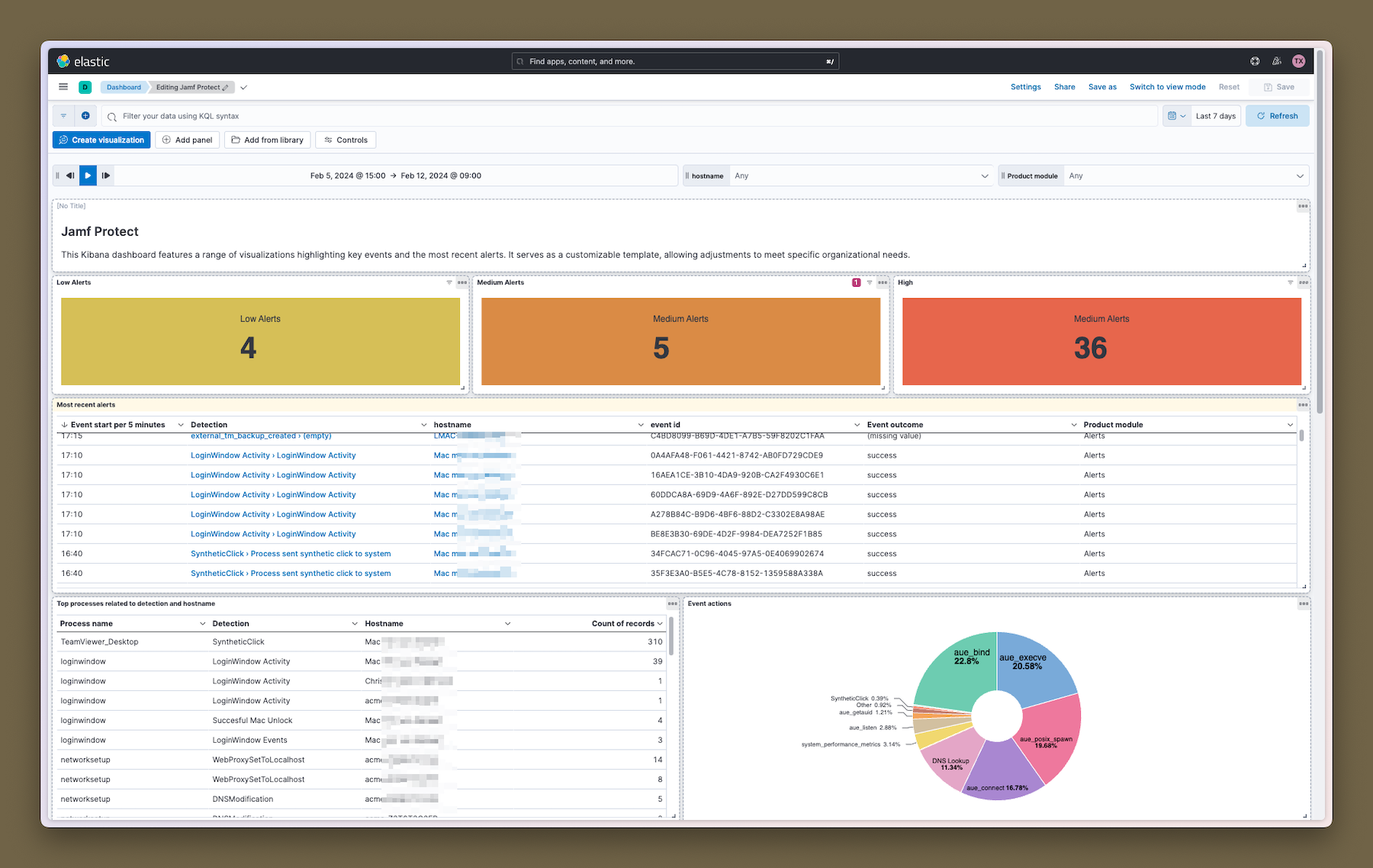
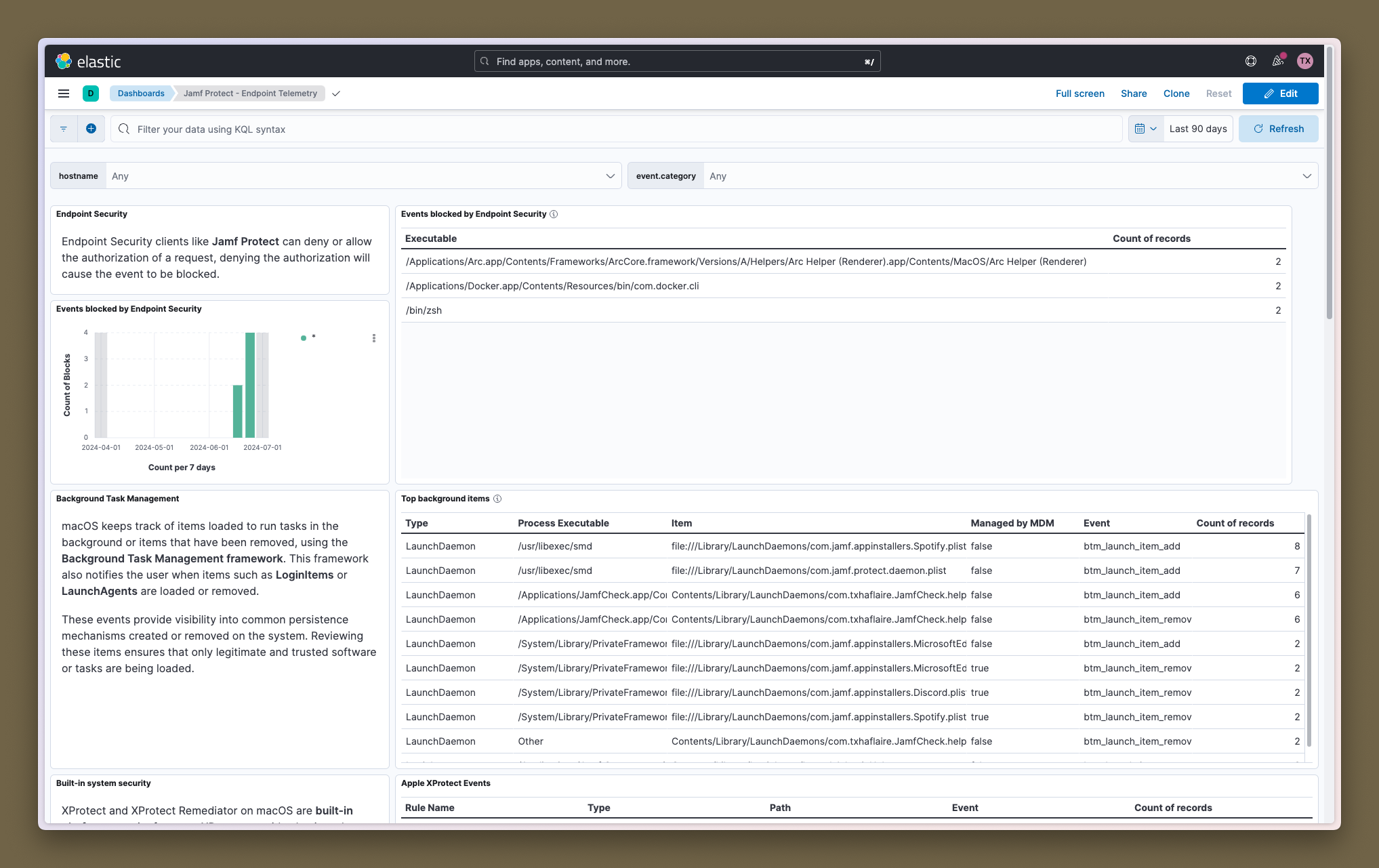
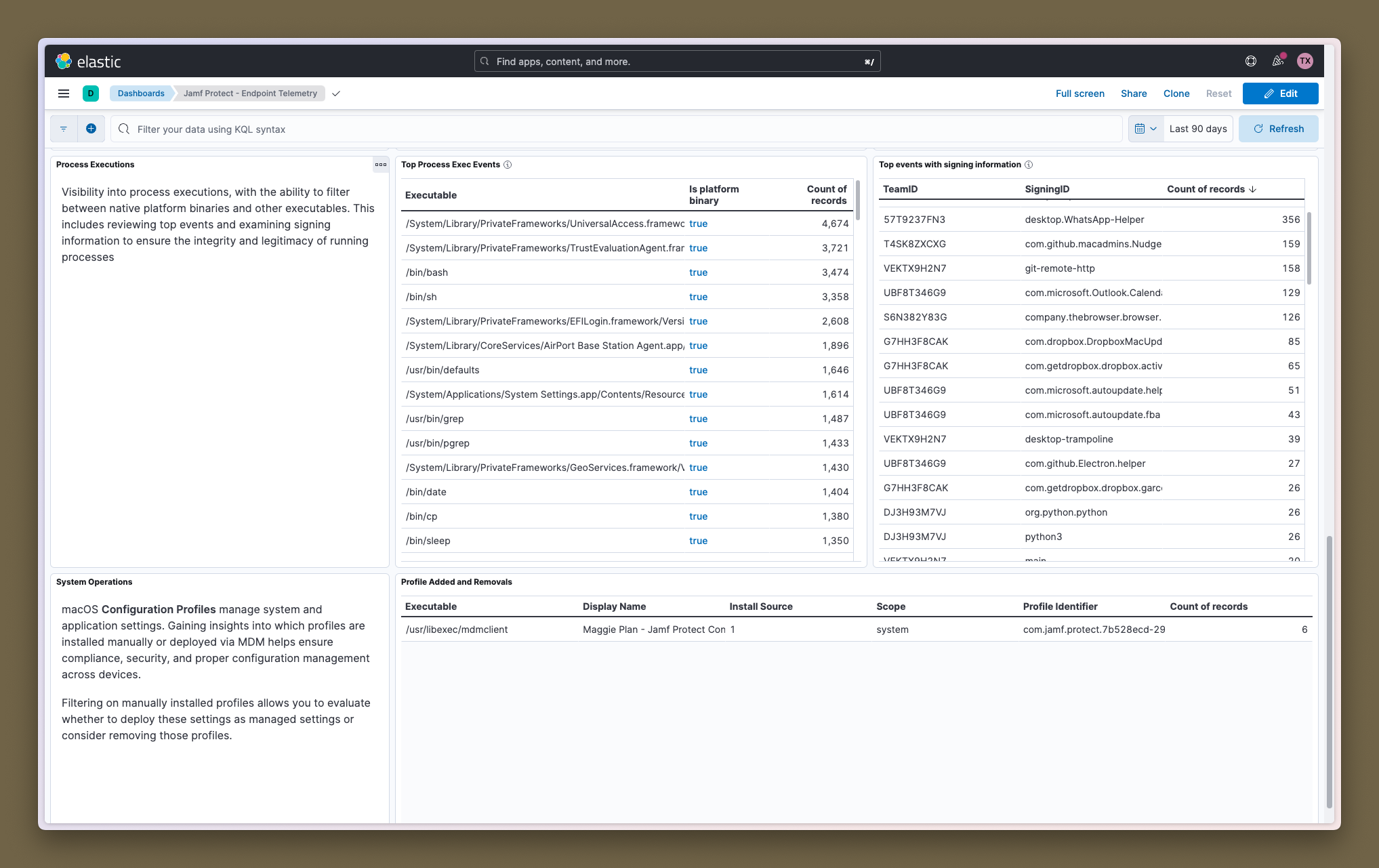
This integration includes one or more Kibana dashboards that visualizes the data collected by the integration. The screenshots below illustrate how the ingested data is displayed.
Changelog
| Version | Details | Minimum Kibana version |
|---|---|---|
| 3.5.1 | Bug fix (View pull request) Prefer app process fields over instigator fields in BTM telemetry pipelines so events that contain both objects no longer fail ingest. |
9.0.0 8.16.5 |
| 3.5.0 | Enhancement (View pull request) Add tags to ingest pipeline processors and add preserve_original_event to pipeline-level on_failure handlers.Bug fix (View pull request) Remove three redundant no-op processors in the telemetry data stream.Bug fix (View pull request) Append to error.message in the telemetry_legacy pipeline-level on_failure handlers instead of overwriting messages recorded by processor-level handlers. error.message is now an array on failed documents. |
9.0.0 8.16.5 |
| 3.4.0 | Enhancement (View pull request) Set 'elastic' owner type. |
9.0.0 8.16.5 |
| 3.3.1 | Bug fix (View pull request) Add region variable to the aws-s3 input to fix compatibility with Elastic Agent 8.19.12+ when using non-AWS S3-compatible buckets. |
9.0.0 8.16.5 |
| 3.3.0 | Enhancement (View pull request) Add edr_xdr category. |
9.0.0 8.16.5 |
| 3.2.2 | Bug fix (View pull request) Ensure that the alerts data stream respects preserve_original_event tags. |
9.0.0 8.16.5 |
| 3.2.1 | Bug fix (View pull request) Fix handling of tags in alerts data stream. |
9.0.0 8.16.5 |
| 3.2.0 | Enhancement (View pull request) Adding new fields to extract executable path and user information from audit tokens. |
9.0.0 8.16.5 |
| 3.1.0 | Enhancement (View pull request) Adding new Network Connect event for telemetry data streams. Enhancement (View pull request) Adding new TCC Modify event for telemetry data streams. Enhancement (View pull request) Adding new PTY Grant event for telemetry data streams. Enhancement (View pull request) Adding new PTY Close event for telemetry data streams. Enhancement (View pull request) Enhancements to the mount, remount and unmount events for telemetry data streams. |
9.0.0 8.16.5 |
| 3.0.2 | Bug fix (View pull request) Fix field type from long to keyword for process.code_signature.flags, process.parent.code_signature.flags fields to resolve conflicts with ECS. |
9.0.0 8.16.5 |
| 3.0.1 | Bug fix (View pull request) Fix handling of SQS worker count configuration. |
9.0.0 8.16.5 |
| 3.0.0 | Enhancement (View pull request) Adding new Gatekeeper Override event for telemetry data streams. Enhancement (View pull request) Handle ECS mapping for Apple platform fields. |
9.0.0 8.16.5 |
| 2.11.0 | Enhancement (View pull request) Add support to configure start_timestamp and ignore_older configurations for AWS S3 backed inputs. |
9.0.0 8.16.5 |
| 2.10.0 | Enhancement (View pull request) Update Kibana constraint to support 9.0.0. |
9.0.0 8.16.2 |
| 2.9.2 | Bug fix (View pull request) Updated SSL description in package manifest.yml to be uniform and to include links to documentation. |
8.16.2 |
| 2.9.1 | Bug fix (View pull request) Update links to getting started docs |
8.16.2 |
| 2.9.0 | Enhancement (View pull request) Add support for Access Point ARN when collecting logs via the AWS S3 Bucket. |
8.16.2 |
| 2.8.0 | Enhancement (View pull request) Add "preserve_original_event" tag to documents with event.kind set to "pipeline_error". |
8.13.0 |
| 2.7.0 | Enhancement (View pull request) Do not remove event.original in main ingest pipeline. |
8.13.0 |
| 2.6.4 | Bug fix (View pull request) Fix string literals in painless scripts. |
8.13.0 |
| 2.6.3 | Bug fix (View pull request) Fixed itemMap for pipeline_event_authentication in Telemetry. Wrong integer values were mapped. |
8.13.0 |
| 2.6.2 | Bug fix (View pull request) Use triple-brace Mustache templating when referencing variables in ingest pipelines. |
8.13.0 |
| 2.6.1 | Bug fix (View pull request) Fix definition of subfields of nested objects |
8.13.0 |
| 2.6.0 | Enhancement (View pull request) Added a lowercased host.name field to the telemetry data stream. Enhancement (View pull request) Added a "Security Solution" tag to the Telemetry dashboard. Enhancement (View pull request) Modified the Jamf Protect Alerts dashboard to include additional filters and exclude Telemetry data. Bug fix (View pull request) Fixed handling of process.start in the telemetry data stream pipeline. |
8.13.0 |
| 2.5.0 | Bug fix (View pull request) Fix dashboard filters. Bug fix (View pull request) Fix handling of alert facts. Enhancement (View pull request) Use constant keyword for observer.product and observer.vendor. |
8.13.0 |
| 2.4.0 | Enhancement (View pull request) Added process.name and some minor enhancements to some events |
8.13.0 |
| 2.3.0 | Bug fix (View pull request) Deprecate global SQS Queue URL to avoid data loss. |
8.13.0 |
| 2.2.0 | Enhancement (View pull request) Resolved issues for "authentication" and "btm_launch_item_add" events related to start_time renaming. Added new Dashboard for Telemetry data stream. |
8.13.0 |
| 2.1.0 | Enhancement (View pull request) Update the kibana constraint to ^8.13.0. Modified the field definitions to remove ECS fields made redundant by the ecs@mappings component template. |
8.13.0 |
| 2.0.0 | Enhancement (View pull request) Adding support for new Telemetry stream. |
8.12.0 |
| 1.0.0 | Enhancement (View pull request) Release package as GA. |
8.12.0 |
| 0.6.0 | Enhancement (View pull request) Update manifest format version to v3.0.3. |
8.12.0 |
| 0.5.0 | Enhancement (View pull request) Adding System Tests. |
8.12.0 |
| 0.4.0 | Enhancement (View pull request) Adding AWS S3 as input type. |
8.12.0 |
| 0.3.0 | Enhancement (View pull request) Fixing json renaming. |
8.12.0 |
| 0.2.0 | Enhancement (View pull request) Adding parent.process_entity_id. |
8.12.0 |
| 0.1.0 | Enhancement (View pull request) Initial release of Jamf Protect integration for Elastic. |
8.12.0 |