GitHub Integration
Elastic Cloud Serverless projects are autoscaled environments, fully managed by Elastic and available on Elastic Cloud. Availability This functionality is generally available and ready for production usage. Elastic Cloud Serverless projects are autoscaled environments, fully managed by Elastic and available on Elastic Cloud. Availability This functionality is generally available and ready for production usage. The Elastic Stack includes Elastic's core products such as Elasticsearch, Kibana, Logstash, and Beats. Availability This functionality is generally available and ready for production usage. Unless stated otherwise on the page, this functionality is available when your Elastic Stack is deployed on Elastic Cloud Hosted, Elastic Cloud Enterprise, Elastic Cloud on Kubernetes, and self-managed environments. This documentation corresponds to the latest patch available for each minor version. If you're not using the latest patch, check the release notes for changes.
Serverless Observability
Generally available
Serverless Security
Generally available
Stack
9.3+
Generally available since 9.3
| Version | 3.1.0 (View all) |
| Managed integration release status | Availability Beta This functionality is in beta and is not ready for production usage. For beta features, the design and code is less mature than official GA features and is being provided as-is with no warranties. Beta features are not subject to the support SLA of official GA features. Specific Support terms apply. |
| Subscription level What's this? |
Basic |
| Developed by What's this? |
Elastic |
| Ingestion method(s) | API, AWS S3, Azure Blob Storage, Azure Event Hub, Google Cloud Storage |
| Minimum Kibana version(s) | 9.3.0 9.2.4 9.1.10 8.19.10 |
You can use this integration as an Elastic Managed integration on Elastic Cloud Hosted deployments running this version or later.
The GitHub integration collects events from the GitHub API and Azure Eventhub. It can also retrieve global advisories (reviewed or unreviewed) from the GitHub Security Advisories database, and collect an inventory of organization members and teams for entity analytics.
Elastic Managed integrations are only supported on Elastic Cloud Serverless and Elastic Cloud Hosted deployments. An Elastic Managed integration lets you ingest data from a cloud source while avoiding the orchestration, management, and maintenance associated with standard ingest infrastructure. Elastic runs the collector for you, so you can focus on your data instead of the infrastructure that collects it. This functionality is in beta and is subject to change. Beta features are not subject to the support SLA of official GA features.
For more information, refer to Elastic Managed integrations and the Elastic Managed integrations FAQ.
To use this integration, the following prerequisites must be met:
For GitHub Enterprise Cloud:
- You must be an enterprise owner.
- Your enterprise account must be on a GitHub Enterprise Cloud plan that includes audit log access.
For GitHub Enterprise Server:
- You need to be a site administrator to access the audit log for the entire instance.
- The audit log is part of the server deployment. Ensure audit logging is enabled in the server configuration.
For Organizations:
- You must be an organization owner.
- You must be using GitHub Enterprise Cloud.
- The organization must be part of an enterprise plan that includes audit log functionality.
The GitHub audit log records all events related to the GitHub organization/enterprise. See Organization audit log actions and Enterprise audit log actions for more details.
The GitHub integration can collect audit logs from the following sources: GitHub API, Azure Event Hubs, Azure Blob Storage, AWS S3 or AWS SQS and Google Cloud Storage.
When using GitHub API to collect audit log events, below requirements must be met for Personal Access Token (PAT):
- You must use a Personal Access Token with
read:audit_logscope. This applies to both organization and enterprise admins. - If you're an enterprise admin, ensure your token also includes
admin:enterprisescope to access enterprise-wide logs.
To collect audit log events from Azure Event Hubs, follow the guide to setup audit log streaming.
Authentication (Azure Event Hub): The Event Hub input supports two authentication methods: connection string (default) and client secret (Microsoft Entra ID). For setup steps, required RBAC roles (Azure Event Hubs Data Receiver, Storage Blob Data Contributor), and configuration options, see the Azure Logs integration or Filebeat azure-eventhub input documentation.
To collect audit log events from Azure Blob Storage, follow the guide to setup audit log streaming. To collect audit log events from AWS S3 or AWS SQS, follow the guide to setup audit log streaming. For more details, refer to this documentation. To collect audit log events from Google Cloud Storage, follow the guide to setup audit log streaming.
For Filebeat input documentation, refer to the following pages:
This integration is not compatible with GitHub Enterprise server.
When GitHub audit log streaming has API Request Events enabled, api.request events are typically much higher in volume than regular audit records. To manage their retention and index lifecycle independently, enable the Route API request events to a separate data stream setting on the audit data stream. When enabled, events with event.action set to api.request are routed to the github.api_requests data stream (logs-github.api_requests-*) instead of github.audit.
Notes:
- The setting is available on the streaming inputs only (AWS S3/SQS, Azure Blob Storage, Azure Event Hub and Google Cloud Storage). GitHub does not return
api.requestevents through the REST audit log API, so the setting does not apply to the API input. - Enabling the setting only affects new data; existing documents remain in
logs-github.audit-*. Queries that must span old and new data should target both data streams. - The rerouted documents keep the
github.*field names, and carry aroute_api_request_eventstag. - Routing on its own does not change retention. To apply a different retention, customize the
logs-github.api_requests@customcomponent template (for example, setindex.lifecycle.nameto an ILM policy, or set a data stream lifecycledata_retention).
Exported fields
| Field | Description | Type |
|---|---|---|
| @timestamp | Event timestamp. | date |
| aws.s3.bucket.arn | The AWS S3 bucket ARN. | keyword |
| aws.s3.bucket.name | The AWS S3 bucket name. | keyword |
| aws.s3.object.key | The AWS S3 Object key. | keyword |
| azure.storage.blob.content_type | The content type of the Azure Blob Storage blob object | keyword |
| azure.storage.blob.name | The name of the Azure Blob Storage blob object | keyword |
| azure.storage.container.name | The name of the Azure Blob Storage container | keyword |
| data_stream.dataset | Data stream dataset name. | constant_keyword |
| data_stream.namespace | Data stream namespace. | constant_keyword |
| data_stream.type | Data stream type. | constant_keyword |
| event.dataset | Event dataset | constant_keyword |
| event.module | Event module | constant_keyword |
| gcs.storage.bucket.name | The name of the Google Cloud Storage Bucket. | keyword |
| gcs.storage.object.content_type | The content type of the Google Cloud Storage object. | keyword |
| gcs.storage.object.name | The content type of the Google Cloud Storage object. | keyword |
| github.active | boolean | |
| github.actor_id | The id of the actor who performed the action. | keyword |
| github.actor_ip | The IP address of the entity performing the action. | ip |
| github.actor_is_bot | boolean | |
| github.actor_location.country_name | keyword | |
| github.actor_location.ip | ip | |
| github.audit_log_stream_enabled | boolean | |
| github.audit_log_stream_id | keyword | |
| github.audit_log_stream_sink | keyword | |
| github.audit_log_stream_sink_details | keyword | |
| github.blocked_user | The username of the account being blocked. | keyword |
| github.business | keyword | |
| github.business_id | keyword | |
| github.category | GitHub action category. | keyword |
| github.changes.billing_plan | keyword | |
| github.changes.roles | keyword | |
| github.commit_id | keyword | |
| github.data.event | keyword | |
| github.data.head_branch | keyword | |
| github.data.head_sha | keyword | |
| github.data.started_at | date | |
| github.data.trigger_id | keyword | |
| github.data.workflow_id | keyword | |
| github.data.workflow_run_id | keyword | |
| github.device | keyword | |
| github.events | keyword | |
| github.events_object | object | |
| github.forked_repository | keyword | |
| github.hashed_token | SHA-256 hash of the token used for authentication. | keyword |
| github.hook_id | keyword | |
| github.integration | The GitHub App that triggered the event. | keyword |
| github.login_method | keyword | |
| github.logout_reason | keyword | |
| github.message | keyword | |
| github.multi_repo | boolean | |
| github.name | keyword | |
| github.new_role | keyword | |
| github.number | long | |
| github.old_role | keyword | |
| github.operation_type | keyword | |
| github.org | GitHub organization name. | keyword |
| github.org_id | keyword | |
| github.permission | GitHub user permissions for the event. | keyword |
| github.programmatic_access_type | Type of authentication used. | keyword |
| github.public_repo | boolean | |
| github.publicly_leaked | boolean | |
| github.pull_request_id | keyword | |
| github.pull_request_title | keyword | |
| github.pull_request_url | keyword | |
| github.query_string | The query string of the API request. GraphQL API request queries regularly exceed the default ignore_above limit of 1024, which leaves them unindexed. |
keyword |
| github.query_string.text | Multi-field of github.query_string. |
match_only_text |
| github.reason | keyword | |
| github.repo | GitHub repository name. | keyword |
| github.repo_id | keyword | |
| github.repositories_added | keyword | |
| github.repositories_added_names | The name of the repository added to a GitHub App installation. | keyword |
| github.repositories_removed | keyword | |
| github.repositories_removed_names | The name of the repository removed from a GitHub App installation. | keyword |
| github.repository | The name of the repository. | keyword |
| github.repository_public | Whether the GitHub repository is publicly visible. | boolean |
| github.repository_selection | Whether all repositories have been selected or there's a selection involved. | keyword |
| github.request_body | The request body of the API request. GraphQL API request queries regularly exceed the default ignore_above limit of 1024, which leaves them unindexed. |
keyword |
| github.request_body.text | Multi-field of github.request_body. |
match_only_text |
| github.request_category | keyword | |
| github.request_method | The HTTP method of the API request. | keyword |
| github.route | The API route template of the API request. | keyword |
| github.ruleset_bypass_actors.actor_id | long | |
| github.ruleset_bypass_actors.actor_type | keyword | |
| github.ruleset_bypass_actors.bypass_mode | keyword | |
| github.ruleset_bypass_actors.id | long | |
| github.ruleset_bypass_actors_added.actor_id | long | |
| github.ruleset_bypass_actors_added.actor_type | keyword | |
| github.ruleset_bypass_actors_added.bypass_mode | keyword | |
| github.ruleset_bypass_actors_added.id | long | |
| github.ruleset_bypass_actors_deleted.actor_id | long | |
| github.ruleset_bypass_actors_deleted.actor_type | keyword | |
| github.ruleset_bypass_actors_deleted.bypass_mode | keyword | |
| github.ruleset_bypass_actors_deleted.id | long | |
| github.ruleset_bypass_actors_updated.actor_id | long | |
| github.ruleset_bypass_actors_updated.actor_type | keyword | |
| github.ruleset_bypass_actors_updated.bypass_mode | keyword | |
| github.ruleset_bypass_actors_updated.id | long | |
| github.ruleset_conditions.id | long | |
| github.ruleset_conditions.old_parameters | object | |
| github.ruleset_conditions.old_parameters.exclude | keyword | |
| github.ruleset_conditions.old_parameters.include | keyword | |
| github.ruleset_conditions.old_parameters.repository_ids | keyword | |
| github.ruleset_conditions.parameters | object | |
| github.ruleset_conditions.parameters.exclude | keyword | |
| github.ruleset_conditions.parameters.include | keyword | |
| github.ruleset_conditions.parameters.repository_ids | keyword | |
| github.ruleset_conditions.target | keyword | |
| github.ruleset_conditions_added.id | long | |
| github.ruleset_conditions_added.old_parameters | object | |
| github.ruleset_conditions_added.old_parameters.exclude | keyword | |
| github.ruleset_conditions_added.old_parameters.include | keyword | |
| github.ruleset_conditions_added.old_parameters.repository_ids | keyword | |
| github.ruleset_conditions_added.parameters | object | |
| github.ruleset_conditions_added.parameters.exclude | keyword | |
| github.ruleset_conditions_added.parameters.include | keyword | |
| github.ruleset_conditions_added.parameters.repository_ids | keyword | |
| github.ruleset_conditions_added.target | keyword | |
| github.ruleset_conditions_deleted.id | long | |
| github.ruleset_conditions_deleted.old_parameters | object | |
| github.ruleset_conditions_deleted.old_parameters.exclude | keyword | |
| github.ruleset_conditions_deleted.old_parameters.include | keyword | |
| github.ruleset_conditions_deleted.old_parameters.repository_ids | keyword | |
| github.ruleset_conditions_deleted.parameters | object | |
| github.ruleset_conditions_deleted.parameters.exclude | keyword | |
| github.ruleset_conditions_deleted.parameters.include | keyword | |
| github.ruleset_conditions_deleted.parameters.repository_ids | keyword | |
| github.ruleset_conditions_deleted.target | keyword | |
| github.ruleset_conditions_updated.id | long | |
| github.ruleset_conditions_updated.old_parameters | object | |
| github.ruleset_conditions_updated.old_parameters.exclude | keyword | |
| github.ruleset_conditions_updated.old_parameters.include | keyword | |
| github.ruleset_conditions_updated.old_parameters.repository_ids | keyword | |
| github.ruleset_conditions_updated.parameters | object | |
| github.ruleset_conditions_updated.parameters.exclude | keyword | |
| github.ruleset_conditions_updated.parameters.include | keyword | |
| github.ruleset_conditions_updated.parameters.repository_ids | keyword | |
| github.ruleset_conditions_updated.target | keyword | |
| github.ruleset_enforcement | Enforcement state of the ruleset (active, disabled, evaluate). | keyword |
| github.ruleset_id | Unique identifier of the ruleset. | keyword |
| github.ruleset_name | Name of the ruleset. | keyword |
| github.ruleset_old_enforcement | Previous enforcement state of the ruleset on update (active, disabled, evaluate). | keyword |
| github.ruleset_old_name | Previous name of the ruleset, emitted on rename. | keyword |
| github.ruleset_source_type | Source type of the ruleset (Organization, Repository). | keyword |
| github.secret_type | keyword | |
| github.secret_type_display_name | keyword | |
| github.secrets_updated | keyword | |
| github.source_branch | keyword | |
| github.status_code | The HTTP response status code of the API request. | long |
| github.target_branch | keyword | |
| github.team | GitHub team name. | keyword |
| github.token_id | keyword | |
| github.token_scopes | Scopes associated with the token used to perform the action. | keyword |
| github.topic | keyword | |
| github.transport_protocol | The type of protocol (for example, HTTP or SSH) used to transfer Git data. | long |
| github.transport_protocol_name | A human readable name for the protocol (for example, HTTP or SSH) used to transfer Git data. | keyword |
| github.user_agent | The user agent of the entity performing the action. | keyword |
| github.user_id | keyword | |
| github.version | keyword | |
| github.visibility | The repository visibility, for example public or private. |
keyword |
| host.containerized | If the host is a container. | boolean |
| host.os.build | OS build information. | keyword |
| host.os.codename | OS codename, if any. | keyword |
| input.type | Type of Filebeat input. | keyword |
| log.offset | Log offset. | long |
Example
{
    "@timestamp": "2020-11-18T17:05:48.837Z",
    "agent": {
        "ephemeral_id": "df3107a1-9f4a-4336-ae3a-ecad098902d4",
        "id": "5630df5f-562b-4c5a-bcc1-b151fbca02c4",
        "name": "elastic-agent-43214",
        "type": "filebeat",
        "version": "9.4.4"
    },
    "data_stream": {
        "dataset": "github.audit",
        "namespace": "74498",
        "type": "logs"
    },
    "ecs": {
        "version": "8.11.0"
    },
    "elastic_agent": {
        "id": "5630df5f-562b-4c5a-bcc1-b151fbca02c4",
        "snapshot": false,
        "version": "9.4.4"
    },
    "event": {
        "action": "repo.destroy",
        "agent_id_status": "verified",
        "category": [
            "configuration",
            "web"
        ],
        "created": "2026-08-26T18:19:24.835Z",
        "dataset": "github.audit",
        "id": "LwW2vpJZCDS-WUmo9Z-ifw",
        "ingested": "2026-08-26T18:19:25Z",
        "kind": "event",
        "module": "github",
        "original": "{\"_document_id\":\"LwW2vpJZCDS-WUmo9Z-ifw\",\"action\":\"repo.destroy\",\"actor\":\"monalisa\",\"created_at\":1605719148837,\"org\":\"mona-org\",\"repo\":\"mona-org/mona-test-repo\",\"visibility\":\"private\"}",
        "type": [
            "change"
        ]
    },
    "github": {
        "category": "repo",
        "org": "mona-org",
        "repo": "mona-org/mona-test-repo",
        "visibility": "private"
    },
    "input": {
        "type": "httpjson"
    },
    "related": {
        "user": [
            "monalisa"
        ]
    },
    "tags": [
        "forwarded",
        "github-audit",
        "preserve_original_event"
    ],
    "user": {
        "name": "monalisa"
    }
}
The API Request data stream receives GitHub api.request audit log events rerouted from the audit data stream when the Route API request events to a separate data stream setting is enabled on a streaming audit input. It has no inputs of its own.
Exported fields
| Field | Description | Type |
|---|---|---|
| @timestamp | Event timestamp. | date |
| aws.s3.bucket.arn | The AWS S3 bucket ARN. | keyword |
| aws.s3.bucket.name | The AWS S3 bucket name. | keyword |
| aws.s3.object.key | The AWS S3 Object key. | keyword |
| azure.storage.blob.content_type | The content type of the Azure Blob Storage blob object | keyword |
| azure.storage.blob.name | The name of the Azure Blob Storage blob object | keyword |
| azure.storage.container.name | The name of the Azure Blob Storage container | keyword |
| data_stream.dataset | Data stream dataset name. | constant_keyword |
| data_stream.namespace | Data stream namespace. | constant_keyword |
| data_stream.type | Data stream type. | constant_keyword |
| event.dataset | Event dataset | constant_keyword |
| event.module | Event module | constant_keyword |
| gcs.storage.bucket.name | The name of the Google Cloud Storage Bucket. | keyword |
| gcs.storage.object.content_type | The content type of the Google Cloud Storage object. | keyword |
| gcs.storage.object.name | The content type of the Google Cloud Storage object. | keyword |
| github.active | boolean | |
| github.actor_id | The id of the actor who performed the action. | keyword |
| github.actor_ip | The IP address of the entity performing the action. | ip |
| github.actor_is_bot | boolean | |
| github.actor_location.country_name | keyword | |
| github.actor_location.ip | ip | |
| github.audit_log_stream_enabled | boolean | |
| github.audit_log_stream_id | keyword | |
| github.audit_log_stream_sink | keyword | |
| github.audit_log_stream_sink_details | keyword | |
| github.blocked_user | The username of the account being blocked. | keyword |
| github.business | keyword | |
| github.business_id | keyword | |
| github.category | GitHub action category. | keyword |
| github.changes.billing_plan | keyword | |
| github.changes.roles | keyword | |
| github.commit_id | keyword | |
| github.data.event | keyword | |
| github.data.head_branch | keyword | |
| github.data.head_sha | keyword | |
| github.data.started_at | date | |
| github.data.trigger_id | keyword | |
| github.data.workflow_id | keyword | |
| github.data.workflow_run_id | keyword | |
| github.device | keyword | |
| github.events | keyword | |
| github.events_object | object | |
| github.forked_repository | keyword | |
| github.hashed_token | SHA-256 hash of the token used for authentication. | keyword |
| github.hook_id | keyword | |
| github.integration | The GitHub App that triggered the event. | keyword |
| github.login_method | keyword | |
| github.logout_reason | keyword | |
| github.message | keyword | |
| github.multi_repo | boolean | |
| github.name | keyword | |
| github.new_role | keyword | |
| github.number | long | |
| github.old_role | keyword | |
| github.operation_type | keyword | |
| github.org | GitHub organization name. | keyword |
| github.org_id | keyword | |
| github.permission | GitHub user permissions for the event. | keyword |
| github.programmatic_access_type | Type of authentication used. | keyword |
| github.public_repo | boolean | |
| github.publicly_leaked | boolean | |
| github.pull_request_id | keyword | |
| github.pull_request_title | keyword | |
| github.pull_request_url | keyword | |
| github.query_string | The query string of the API request. GraphQL API request queries regularly exceed the default ignore_above limit of 1024, which leaves them unindexed. |
keyword |
| github.query_string.text | Multi-field of github.query_string. |
match_only_text |
| github.reason | keyword | |
| github.repo | GitHub repository name. | keyword |
| github.repo_id | keyword | |
| github.repositories_added | keyword | |
| github.repositories_added_names | The name of the repository added to a GitHub App installation. | keyword |
| github.repositories_removed | keyword | |
| github.repositories_removed_names | The name of the repository removed from a GitHub App installation. | keyword |
| github.repository | The name of the repository. | keyword |
| github.repository_public | Whether the GitHub repository is publicly visible. | boolean |
| github.repository_selection | Whether all repositories have been selected or there's a selection involved. | keyword |
| github.request_body | The request body of the API request. GraphQL API request queries regularly exceed the default ignore_above limit of 1024, which leaves them unindexed. |
keyword |
| github.request_body.text | Multi-field of github.request_body. |
match_only_text |
| github.request_category | keyword | |
| github.request_method | The HTTP method of the API request. | keyword |
| github.route | The API route template of the API request. | keyword |
| github.ruleset_bypass_actors.actor_id | long | |
| github.ruleset_bypass_actors.actor_type | keyword | |
| github.ruleset_bypass_actors.bypass_mode | keyword | |
| github.ruleset_bypass_actors.id | long | |
| github.ruleset_bypass_actors_added.actor_id | long | |
| github.ruleset_bypass_actors_added.actor_type | keyword | |
| github.ruleset_bypass_actors_added.bypass_mode | keyword | |
| github.ruleset_bypass_actors_added.id | long | |
| github.ruleset_bypass_actors_deleted.actor_id | long | |
| github.ruleset_bypass_actors_deleted.actor_type | keyword | |
| github.ruleset_bypass_actors_deleted.bypass_mode | keyword | |
| github.ruleset_bypass_actors_deleted.id | long | |
| github.ruleset_bypass_actors_updated.actor_id | long | |
| github.ruleset_bypass_actors_updated.actor_type | keyword | |
| github.ruleset_bypass_actors_updated.bypass_mode | keyword | |
| github.ruleset_bypass_actors_updated.id | long | |
| github.ruleset_conditions.id | long | |
| github.ruleset_conditions.old_parameters | object | |
| github.ruleset_conditions.old_parameters.exclude | keyword | |
| github.ruleset_conditions.old_parameters.include | keyword | |
| github.ruleset_conditions.old_parameters.repository_ids | keyword | |
| github.ruleset_conditions.parameters | object | |
| github.ruleset_conditions.parameters.exclude | keyword | |
| github.ruleset_conditions.parameters.include | keyword | |
| github.ruleset_conditions.parameters.repository_ids | keyword | |
| github.ruleset_conditions.target | keyword | |
| github.ruleset_conditions_added.id | long | |
| github.ruleset_conditions_added.old_parameters | object | |
| github.ruleset_conditions_added.old_parameters.exclude | keyword | |
| github.ruleset_conditions_added.old_parameters.include | keyword | |
| github.ruleset_conditions_added.old_parameters.repository_ids | keyword | |
| github.ruleset_conditions_added.parameters | object | |
| github.ruleset_conditions_added.parameters.exclude | keyword | |
| github.ruleset_conditions_added.parameters.include | keyword | |
| github.ruleset_conditions_added.parameters.repository_ids | keyword | |
| github.ruleset_conditions_added.target | keyword | |
| github.ruleset_conditions_deleted.id | long | |
| github.ruleset_conditions_deleted.old_parameters | object | |
| github.ruleset_conditions_deleted.old_parameters.exclude | keyword | |
| github.ruleset_conditions_deleted.old_parameters.include | keyword | |
| github.ruleset_conditions_deleted.old_parameters.repository_ids | keyword | |
| github.ruleset_conditions_deleted.parameters | object | |
| github.ruleset_conditions_deleted.parameters.exclude | keyword | |
| github.ruleset_conditions_deleted.parameters.include | keyword | |
| github.ruleset_conditions_deleted.parameters.repository_ids | keyword | |
| github.ruleset_conditions_deleted.target | keyword | |
| github.ruleset_conditions_updated.id | long | |
| github.ruleset_conditions_updated.old_parameters | object | |
| github.ruleset_conditions_updated.old_parameters.exclude | keyword | |
| github.ruleset_conditions_updated.old_parameters.include | keyword | |
| github.ruleset_conditions_updated.old_parameters.repository_ids | keyword | |
| github.ruleset_conditions_updated.parameters | object | |
| github.ruleset_conditions_updated.parameters.exclude | keyword | |
| github.ruleset_conditions_updated.parameters.include | keyword | |
| github.ruleset_conditions_updated.parameters.repository_ids | keyword | |
| github.ruleset_conditions_updated.target | keyword | |
| github.ruleset_enforcement | Enforcement state of the ruleset (active, disabled, evaluate). | keyword |
| github.ruleset_id | Unique identifier of the ruleset. | keyword |
| github.ruleset_name | Name of the ruleset. | keyword |
| github.ruleset_old_enforcement | Previous enforcement state of the ruleset on update (active, disabled, evaluate). | keyword |
| github.ruleset_old_name | Previous name of the ruleset, emitted on rename. | keyword |
| github.ruleset_source_type | Source type of the ruleset (Organization, Repository). | keyword |
| github.secret_type | keyword | |
| github.secret_type_display_name | keyword | |
| github.secrets_updated | keyword | |
| github.source_branch | keyword | |
| github.status_code | The HTTP response status code of the API request. | long |
| github.target_branch | keyword | |
| github.team | GitHub team name. | keyword |
| github.token_id | keyword | |
| github.token_scopes | Scopes associated with the token used to perform the action. | keyword |
| github.topic | keyword | |
| github.transport_protocol | The type of protocol (for example, HTTP or SSH) used to transfer Git data. | long |
| github.transport_protocol_name | A human readable name for the protocol (for example, HTTP or SSH) used to transfer Git data. | keyword |
| github.user_agent | The user agent of the entity performing the action. | keyword |
| github.user_id | keyword | |
| github.version | keyword | |
| github.visibility | The repository visibility, for example public or private. |
keyword |
| host.containerized | If the host is a container. | boolean |
| host.os.build | OS build information. | keyword |
| host.os.codename | OS codename, if any. | keyword |
| input.type | Type of Filebeat input. | keyword |
| log.offset | Log offset. | long |
The Code Scanning lets you retrieve all security vulnerabilities and coding errors from a repository setup using GitHub Advanced Security Code Scanning feature. Refer to About code scanning for more details.
To use this integration, GitHub Apps must have the security_events read permission.
Or use a personal access token with the security_events scope for private repos or public_repo scope for public repos. Refer to List code scanning alerts.
Exported fields
| Field | Description | Type | Unit | Metric Type |
|---|---|---|---|---|
| @timestamp | Date/time when the event originated. This is the date/time extracted from the event, typically representing when the event was generated by the source. If the event source has no original timestamp, this value is typically populated by the first time the event was received by the pipeline. Required field for all events. | date | ||
| data_stream.dataset | The field can contain anything that makes sense to signify the source of the data. Examples include nginx.access, prometheus, endpoint etc. For data streams that otherwise fit, but that do not have dataset set we use the value "generic" for the dataset value. event.dataset should have the same value as data_stream.dataset. Beyond the Elasticsearch data stream naming criteria noted above, the dataset value has additional restrictions: * Must not contain - * No longer than 100 characters |
constant_keyword | ||
| data_stream.namespace | A user defined namespace. Namespaces are useful to allow grouping of data. Many users already organize their indices this way, and the data stream naming scheme now provides this best practice as a default. Many users will populate this field with default. If no value is used, it falls back to default. Beyond the Elasticsearch index naming criteria noted above, namespace value has the additional restrictions: * Must not contain - * No longer than 100 characters |
constant_keyword | ||
| data_stream.type | An overarching type for the data stream. Currently allowed values are "logs" and "metrics". We expect to also add "traces" and "synthetics" in the near future. | constant_keyword | ||
| event.dataset | Name of the dataset. If an event source publishes more than one type of log or events (e.g. access log, error log), the dataset is used to specify which one the event comes from. It's recommended but not required to start the dataset name with the module name, followed by a dot, then the dataset name. | constant_keyword | ||
| event.kind | This is one of four ECS Categorization Fields, and indicates the highest level in the ECS category hierarchy. event.kind gives high-level information about what type of information the event contains, without being specific to the contents of the event. For example, values of this field distinguish alert events from metric events. The value of this field can be used to inform how these kinds of events should be handled. They may warrant different retention, different access control, it may also help understand whether the data is coming in at a regular interval or not. |
keyword | ||
| event.module | Name of the module this data is coming from. If your monitoring agent supports the concept of modules or plugins to process events of a given source (e.g. Apache logs), event.module should contain the name of this module. |
constant_keyword | ||
| github.code_scanning.created_at | The time that the alert was created in ISO 8601 format - YYYY-MM-DDTHH:MM:SSZ. |
date | ||
| github.code_scanning.dismissed_at | The time that the alert was dismissed in ISO 8601 format - YYYY-MM-DDTHH:MM:SSZ. |
date | ||
| github.code_scanning.dismissed_by.email | keyword | |||
| github.code_scanning.dismissed_by.html_url | keyword | |||
| github.code_scanning.dismissed_by.id | integer | |||
| github.code_scanning.dismissed_by.login | keyword | |||
| github.code_scanning.dismissed_by.name | keyword | |||
| github.code_scanning.dismissed_by.site_admin | boolean | |||
| github.code_scanning.dismissed_by.type | keyword | |||
| github.code_scanning.dismissed_by.url | keyword | |||
| github.code_scanning.dismissed_comment | The dismissal comment associated with the dismissal of the alert. | keyword | ||
| github.code_scanning.dismissed_reason | The reason for dismissing or closing the alert. | keyword | ||
| github.code_scanning.fixed_at | The time that the alert was no longer detected and was considered fixed in ISO 8601 format - YYYY-MM-DDTHH:MM:SSZ. |
date | ||
| github.code_scanning.html_url | The GitHub URL of the alert resource. | keyword | ||
| github.code_scanning.instances_url | The REST API URL for fetching the list of instances for an alert. | keyword | ||
| github.code_scanning.most_recent_instance.analysis_key | Identifies the configuration under which the analysis was executed. For example, in GitHub Actions this includes the workflow filename and job name. | keyword | ||
| github.code_scanning.most_recent_instance.category | Identifies the configuration under which the analysis was executed. Used to distinguish between multiple analyses for the same tool and commit, but performed on different languages or different parts of the code. | keyword | ||
| github.code_scanning.most_recent_instance.classifications | Classifications that have been applied to the file that triggered the alert.\nFor example identifying it as documentation, or a generated file. | keyword | ||
| github.code_scanning.most_recent_instance.commit_sha | GitHub commit sha. | keyword | ||
| github.code_scanning.most_recent_instance.environment | Identifies the variable values associated with the environment in which the analysis that generated this alert instance was performed, such as the language that was analyzed. | keyword | ||
| github.code_scanning.most_recent_instance.html_url | keyword | |||
| github.code_scanning.most_recent_instance.location.end_column | integer | |||
| github.code_scanning.most_recent_instance.location.end_line | integer | |||
| github.code_scanning.most_recent_instance.location.path | keyword | |||
| github.code_scanning.most_recent_instance.location.start_column | integer | |||
| github.code_scanning.most_recent_instance.location.start_line | integer | |||
| github.code_scanning.most_recent_instance.ref | The full Git reference, formatted as refs/heads/\<branch name\>,\nrefs/pull/\<number\>/merge, or refs/pull/\<number\>/head. |
keyword | ||
| github.code_scanning.most_recent_instance.state | State of a code scanning alert. | keyword | ||
| github.code_scanning.number | The security alert number. | integer | ||
| github.code_scanning.rule.full_description | Description of the rule used to detect the alert. | text | ||
| github.code_scanning.rule.help | Detailed documentation for the rule as GitHub Flavored Markdown. | text | ||
| github.code_scanning.rule.security_severity_level | The security severity of the alert. | keyword | ||
| github.code_scanning.rule.severity | The severity of the alert. | keyword | ||
| github.code_scanning.state | State of a code scanning alert. | keyword | ||
| github.code_scanning.time_to_resolution.sec | The time taken to either dismiss or fix the alert in seconds. | long | s | gauge |
| github.code_scanning.tool.guid | The GUID of the tool used to generate the code scanning analysis, if provided in the uploaded SARIF data. | keyword | ||
| github.code_scanning.tool.name | The name of the tool used to generate the code scanning analysis. | keyword | ||
| github.code_scanning.tool.version | The version of the tool used to generate the code scanning analysis. | keyword | ||
| github.code_scanning.updated_at | The time that the alert was last updated in ISO 8601 format - YYYY-MM-DDTHH:MM:SSZ. |
date | ||
| github.code_scanning.url | The REST API URL of the alert resource. | keyword | ||
| github.repository.description | The repository description. | text | ||
| github.repository.fork | Whether the repository is a fork. | boolean | ||
| github.repository.full_name | The full, globally unique, name of the repository. | keyword | ||
| github.repository.html_url | The URL to view the repository on GitHub.com. | keyword | ||
| github.repository.id | A unique identifier of the repository. | integer | ||
| github.repository.is_in_organization | Indicates if a repository is either owned by an organization, or is a private fork of an organization repository. | boolean | ||
| github.repository.name | The name of the repository. | keyword | ||
| github.repository.owner.email | The public email of repository owner. | keyword | ||
| github.repository.owner.html_url | The HTTP URL for the repository owner. | keyword | ||
| github.repository.owner.id | ID of the repository owner. | integer | ||
| github.repository.owner.login | Login username of repository owner. | keyword | ||
| github.repository.owner.name | Name of repository owner. | keyword | ||
| github.repository.owner.site_admin | Whether the owner is a site administrator. | boolean | ||
| github.repository.owner.type | The type of the repository owner. Example - User. | keyword | ||
| github.repository.owner.url | The URL to get more information about the repository owner from the GitHub API. | keyword | ||
| github.repository.private | Whether the repository is private. | boolean | ||
| github.repository.url | The URL to get more information about the repository from the GitHub API. | keyword | ||
| host.containerized | If the host is a container. | boolean | ||
| host.os.build | OS build information. | keyword | ||
| host.os.codename | OS codename, if any. | keyword | ||
| input.type | Input Type. | keyword | ||
| labels.is_transform_source | Distinguishes between documents that are a source for a transform and documents that are an output of a transform, to facilitate easier filtering. | constant_keyword | ||
| log.offset | Log Offset. | long |
Example
{
    "@timestamp": "2022-06-29T18:03:27.000Z",
    "agent": {
        "ephemeral_id": "6c65668b-dc0b-4fd3-b079-a6958c108f1a",
        "id": "657dc0a8-dc87-4d1c-ac21-88ae15f78303",
        "name": "elastic-agent-99972",
        "type": "filebeat",
        "version": "8.19.10"
    },
    "data_stream": {
        "dataset": "github.code_scanning",
        "namespace": "46826",
        "type": "logs"
    },
    "ecs": {
        "version": "8.11.0"
    },
    "elastic_agent": {
        "id": "657dc0a8-dc87-4d1c-ac21-88ae15f78303",
        "snapshot": false,
        "version": "8.19.10"
    },
    "event": {
        "agent_id_status": "verified",
        "created": "2022-06-29T18:03:27.000Z",
        "dataset": "github.code_scanning",
        "ingested": "2026-03-31T09:09:30Z",
        "kind": "alert",
        "original": "{\"created_at\":\"2022-06-29T18:03:27Z\",\"html_url\":\"https://github.com/sample_owner/sample_repo/security/code-scanning/91\",\"most_recent_instance\":{\"analysis_key\":\".github/workflows/codeql-analysis.yml:analyze\",\"category\":\".github/workflows/codeql-analysis.yml:analyze/language:javascript\",\"classifications\":[],\"commit_sha\":\"3244e8b15cc1b8f2732eecd69fc1890b737f0dda\",\"location\":{\"end_column\":50,\"end_line\":67,\"path\":\"routes/chatbot.ts\",\"start_column\":23,\"start_line\":67},\"message\":{\"text\":\"(Experimental) This may be a database query that depends on a user-provided value. Identified using machine learning.(Experimental) This may be a database query that depends on a user-provided value. Identified using machine learning.\"},\"ref\":\"refs/heads/master\",\"state\":\"open\"},\"number\":90,\"rule\":{\"description\":\"SQL database query built from user-controlled sources (experimental)\",\"id\":\"js/ml-powered/sql-injection\",\"security_severity_level\":\"high\",\"severity\":\"error\",\"tags\":[\"experimental\",\"external/cwe/cwe-089\",\"security\"]},\"state\":\"open\",\"tool\":{\"name\":\"CodeQL\",\"version\":\"2.9.4\"},\"updated_at\":\"2022-06-29T18:03:27Z\",\"url\":\"https://api.github.com/repos/sample_owner/sample_repo/code-scanning/alerts/91\"}",
        "type": [
            "creation"
        ]
    },
    "github": {
        "code_scanning": {
            "created_at": "2022-06-29T18:03:27Z",
            "html_url": "https://github.com/sample_owner/sample_repo/security/code-scanning/91",
            "most_recent_instance": {
                "analysis_key": ".github/workflows/codeql-analysis.yml:analyze",
                "category": ".github/workflows/codeql-analysis.yml:analyze/language:javascript",
                "commit_sha": "3244e8b15cc1b8f2732eecd69fc1890b737f0dda",
                "location": {
                    "end_column": 50,
                    "end_line": 67,
                    "path": "routes/chatbot.ts",
                    "start_column": 23,
                    "start_line": 67
                },
                "ref": "refs/heads/master",
                "state": "open"
            },
            "number": 90,
            "rule": {
                "security_severity_level": "high",
                "severity": "error"
            },
            "state": "open",
            "tool": {
                "name": "CodeQL",
                "version": "2.9.4"
            },
            "updated_at": "2022-06-29T18:03:27Z",
            "url": "https://api.github.com/repos/sample_owner/sample_repo/code-scanning/alerts/91"
        },
        "repository": {
            "html_url": "https://github.com/sample_owner/sample_repo",
            "name": "sample_repo",
            "owner": {
                "login": "sample_owner"
            },
            "url": "https://api.github.com/repos/sample_owner/sample_repo"
        }
    },
    "input": {
        "type": "httpjson"
    },
    "message": "(Experimental) This may be a database query that depends on a user-provided value. Identified using machine learning.(Experimental) This may be a database query that depends on a user-provided value. Identified using machine learning.",
    "rule": {
        "description": "SQL database query built from user-controlled sources (experimental)",
        "id": "js/ml-powered/sql-injection"
    },
    "tags": [
        "forwarded",
        "github-code-scanning",
        "preserve_original_event",
        "experimental",
        "external/cwe/cwe-089",
        "security"
    ]
}
The GitHub Secret Scanning lets you retrieve secret scanning for advanced security alerts from a repository setup using GitHub Advanced Security Secret Scanning feature. Refer to About Secret scanning for more details.
To use this integration, GitHub Apps must have the secret_scanning_alerts read permission.
Or you must be an administrator for the repository or for the organization that owns the repository, and you must use a personal access token with the repo scope or security_events scope. For public repositories, you may instead use the public_repo scope. Refer to List secret scanning alerts
Exported fields
| Field | Description | Type | Unit | Metric Type |
|---|---|---|---|---|
| @timestamp | Date/time when the event originated. This is the date/time extracted from the event, typically representing when the event was generated by the source. If the event source has no original timestamp, this value is typically populated by the first time the event was received by the pipeline. Required field for all events. | date | ||
| data_stream.dataset | The field can contain anything that makes sense to signify the source of the data. Examples include nginx.access, prometheus, endpoint etc. For data streams that otherwise fit, but that do not have dataset set we use the value "generic" for the dataset value. event.dataset should have the same value as data_stream.dataset. Beyond the Elasticsearch data stream naming criteria noted above, the dataset value has additional restrictions: * Must not contain - * No longer than 100 characters |
constant_keyword | ||
| data_stream.namespace | A user defined namespace. Namespaces are useful to allow grouping of data. Many users already organize their indices this way, and the data stream naming scheme now provides this best practice as a default. Many users will populate this field with default. If no value is used, it falls back to default. Beyond the Elasticsearch index naming criteria noted above, namespace value has the additional restrictions: * Must not contain - * No longer than 100 characters |
constant_keyword | ||
| data_stream.type | An overarching type for the data stream. Currently allowed values are "logs" and "metrics". We expect to also add "traces" and "synthetics" in the near future. | constant_keyword | ||
| event.dataset | Name of the dataset. If an event source publishes more than one type of log or events (e.g. access log, error log), the dataset is used to specify which one the event comes from. It's recommended but not required to start the dataset name with the module name, followed by a dot, then the dataset name. | constant_keyword | ||
| event.kind | This is one of four ECS Categorization Fields, and indicates the highest level in the ECS category hierarchy. event.kind gives high-level information about what type of information the event contains, without being specific to the contents of the event. For example, values of this field distinguish alert events from metric events. The value of this field can be used to inform how these kinds of events should be handled. They may warrant different retention, different access control, it may also help understand whether the data is coming in at a regular interval or not. |
keyword | ||
| event.module | Name of the module this data is coming from. If your monitoring agent supports the concept of modules or plugins to process events of a given source (e.g. Apache logs), event.module should contain the name of this module. |
constant_keyword | ||
| github.repository.description | The repository description. | text | ||
| github.repository.fork | Whether the repository is a fork. | boolean | ||
| github.repository.full_name | The full, globally unique, name of the repository. | keyword | ||
| github.repository.html_url | The URL to view the repository on GitHub.com. | keyword | ||
| github.repository.id | A unique identifier of the repository. | integer | ||
| github.repository.is_in_organization | Indicates if a repository is either owned by an organization, or is a private fork of an organization repository. | boolean | ||
| github.repository.name | The name of the repository. | keyword | ||
| github.repository.owner.email | The public email of repository owner. | keyword | ||
| github.repository.owner.html_url | The HTTP URL for the repository owner. | keyword | ||
| github.repository.owner.id | ID of the repository owner. | integer | ||
| github.repository.owner.login | Login username of repository owner. | keyword | ||
| github.repository.owner.name | Name of repository owner. | keyword | ||
| github.repository.owner.site_admin | Whether the owner is a site administrator. | boolean | ||
| github.repository.owner.type | The type of the repository owner. Example - User. | keyword | ||
| github.repository.owner.url | The URL to get more information about the repository owner from the GitHub API. | keyword | ||
| github.repository.private | Whether the repository is private. | boolean | ||
| github.repository.url | The URL to get more information about the repository from the GitHub API. | keyword | ||
| github.secret_scanning.created_at | The time that the alert was created in ISO 8601 format - YYYY-MM-DDTHH:MM:SSZ. |
date | ||
| github.secret_scanning.html_url | The GitHub URL of the alert resource. | keyword | ||
| github.secret_scanning.locations_url | The REST API URL of the code locations for this alert. | keyword | ||
| github.secret_scanning.number | The security alert number. | integer | ||
| github.secret_scanning.push_protection_bypassed | Whether push protection was bypassed for the detected secret. | boolean | ||
| github.secret_scanning.push_protection_bypassed_at | The time that push protection was bypassed in ISO 8601 format - YYYY-MM-DDTHH:MM:SSZ. |
date | ||
| github.secret_scanning.push_protection_bypassed_by.email | keyword | |||
| github.secret_scanning.push_protection_bypassed_by.html_url | keyword | |||
| github.secret_scanning.push_protection_bypassed_by.id | integer | |||
| github.secret_scanning.push_protection_bypassed_by.login | keyword | |||
| github.secret_scanning.push_protection_bypassed_by.name | keyword | |||
| github.secret_scanning.push_protection_bypassed_by.node_id | keyword | |||
| github.secret_scanning.push_protection_bypassed_by.site_admin | boolean | |||
| github.secret_scanning.push_protection_bypassed_by.type | keyword | |||
| github.secret_scanning.push_protection_bypassed_by.url | keyword | |||
| github.secret_scanning.resolution | Required when the state is resolved. The reason for resolving the alert. |
keyword | ||
| github.secret_scanning.resolved_at | The time that the alert was resolved in ISO 8601 format - YYYY-MM-DDTHH:MM:SSZ. |
date | ||
| github.secret_scanning.resolved_by.email | keyword | |||
| github.secret_scanning.resolved_by.html_url | keyword | |||
| github.secret_scanning.resolved_by.id | integer | |||
| github.secret_scanning.resolved_by.login | keyword | |||
| github.secret_scanning.resolved_by.name | keyword | |||
| github.secret_scanning.resolved_by.node_id | keyword | |||
| github.secret_scanning.resolved_by.site_admin | boolean | |||
| github.secret_scanning.resolved_by.type | keyword | |||
| github.secret_scanning.resolved_by.url | keyword | |||
| github.secret_scanning.secret | The secret that was detected. | keyword | ||
| github.secret_scanning.secret_type | The type of secret that secret scanning detected. | keyword | ||
| github.secret_scanning.secret_type_display_name | User-friendly name for the detected secret, matching the secret_type. |
keyword | ||
| github.secret_scanning.state | State of the secret scanning alert. | keyword | ||
| github.secret_scanning.time_to_resolution.sec | The time taken to either fix the secret in seconds. | long | s | gauge |
| github.secret_scanning.updated_at | The time that the alert was last updated in ISO 8601 format - YYYY-MM-DDTHH:MM:SSZ. |
date | ||
| github.secret_scanning.url | The REST API URL of the alert resource | keyword | ||
| host.containerized | If the host is a container. | boolean | ||
| host.os.build | OS build information. | keyword | ||
| host.os.codename | OS codename, if any. | keyword | ||
| input.type | Input Type. | keyword | ||
| labels.is_transform_source | Distinguishes between documents that are a source for a transform and documents that are an output of a transform, to facilitate easier filtering. | constant_keyword | ||
| log.offset | Log Offset. | long |
Example
{
    "@timestamp": "2022-06-30T18:07:27.000Z",
    "agent": {
        "ephemeral_id": "76bf950f-eb95-421a-9235-c05bdecf22ae",
        "id": "6535f117-003b-4bbf-9e9e-634e9b499bc8",
        "name": "elastic-agent-33203",
        "type": "filebeat",
        "version": "8.19.10"
    },
    "data_stream": {
        "dataset": "github.secret_scanning",
        "namespace": "78803",
        "type": "logs"
    },
    "ecs": {
        "version": "8.11.0"
    },
    "elastic_agent": {
        "id": "6535f117-003b-4bbf-9e9e-634e9b499bc8",
        "snapshot": false,
        "version": "8.19.10"
    },
    "event": {
        "agent_id_status": "verified",
        "created": "2022-06-30T18:07:27Z",
        "dataset": "github.secret_scanning",
        "ingested": "2026-03-31T09:14:05Z",
        "kind": "alert",
        "original": "{\"created_at\":\"2022-06-30T18:07:27Z\",\"html_url\":\"https://github.com/sample_owner/sample_repo/security/secret-scanning/3\",\"number\":3,\"push_protection_bypassed\":true,\"push_protection_bypassed_by\":{\"html_url\":\"https://github.com/sample_owner\",\"login\":\"sample_owner\",\"type\":\"User\",\"url\":\"https://api.github.com/users/sample_owner\"},\"resolution\":\"revoked\",\"resolved_by\":{\"login\":\"sample_owner\",\"type\":\"User\",\"url\":\"https://api.github.com/users/sample_owner\"},\"secret\":\"npm_2vYJ3QzGXoGbEgMYduYS1k2M4D0wDu2opJbl\",\"secret_type\":\"npm_access_token\",\"secret_type_display_name\":\"npm Access Token\",\"state\":\"open\",\"url\":\"https://api.github.com/repos/sample_owner/sample_repo/secret-scanning/alerts/3\"}",
        "type": [
            "creation"
        ]
    },
    "github": {
        "repository": {
            "html_url": "https://github.com/sample_owner/sample_repo",
            "name": "sample_repo",
            "owner": {
                "login": "sample_owner"
            },
            "url": "https://api.github.com/repos/sample_owner/sample_repo"
        },
        "secret_scanning": {
            "created_at": "2022-06-30T18:07:27Z",
            "html_url": "https://github.com/sample_owner/sample_repo/security/secret-scanning/3",
            "number": 3,
            "push_protection_bypassed": true,
            "push_protection_bypassed_by": {
                "html_url": "https://github.com/sample_owner",
                "login": "sample_owner",
                "type": "User",
                "url": "https://api.github.com/users/sample_owner"
            },
            "resolution": "revoked",
            "resolved_by": {
                "login": "sample_owner",
                "type": "User",
                "url": "https://api.github.com/users/sample_owner"
            },
            "secret": "npXXXXXXXXXXXXXXXXXXXXXXXXXXXXXXXXXXXXbl",
            "secret_type": "npm_access_token",
            "secret_type_display_name": "npm Access Token",
            "state": "open",
            "url": "https://api.github.com/repos/sample_owner/sample_repo/secret-scanning/alerts/3"
        }
    },
    "input": {
        "type": "httpjson"
    },
    "tags": [
        "forwarded",
        "github-secret-scanning",
        "preserve_original_event",
        "hide_secret"
    ]
}
The GitHub Dependabot lets you retrieve known vulnerabilites in dependencies from a repository setup using GitHub Advanced Security Dependabot feature. Check About Dependabot for more details.
To use this integration, you must be an administrator for the repository or for the organization that owns the repository, and you must use a personal access token with the repo scope or security_events scope. For public repositories, you may instead use the public_repo scope. Check Authenticating with GraphQL and Token Issue
Exported fields
| Field | Description | Type |
|---|---|---|
| @timestamp | Date/time when the event originated. This is the date/time extracted from the event, typically representing when the event was generated by the source. If the event source has no original timestamp, this value is typically populated by the first time the event was received by the pipeline. Required field for all events. | date |
| data_stream.dataset | The field can contain anything that makes sense to signify the source of the data. Examples include nginx.access, prometheus, endpoint etc. For data streams that otherwise fit, but that do not have dataset set we use the value "generic" for the dataset value. event.dataset should have the same value as data_stream.dataset. Beyond the Elasticsearch data stream naming criteria noted above, the dataset value has additional restrictions: * Must not contain - * No longer than 100 characters |
constant_keyword |
| data_stream.namespace | A user defined namespace. Namespaces are useful to allow grouping of data. Many users already organize their indices this way, and the data stream naming scheme now provides this best practice as a default. Many users will populate this field with default. If no value is used, it falls back to default. Beyond the Elasticsearch index naming criteria noted above, namespace value has the additional restrictions: * Must not contain - * No longer than 100 characters |
constant_keyword |
| data_stream.type | An overarching type for the data stream. Currently allowed values are "logs" and "metrics". We expect to also add "traces" and "synthetics" in the near future. | constant_keyword |
| event.dataset | Name of the dataset. If an event source publishes more than one type of log or events (e.g. access log, error log), the dataset is used to specify which one the event comes from. It's recommended but not required to start the dataset name with the module name, followed by a dot, then the dataset name. | constant_keyword |
| event.kind | This is one of four ECS Categorization Fields, and indicates the highest level in the ECS category hierarchy. event.kind gives high-level information about what type of information the event contains, without being specific to the contents of the event. For example, values of this field distinguish alert events from metric events. The value of this field can be used to inform how these kinds of events should be handled. They may warrant different retention, different access control, it may also help understand whether the data is coming in at a regular interval or not. |
keyword |
| event.module | Name of the module this data is coming from. If your monitoring agent supports the concept of modules or plugins to process events of a given source (e.g. Apache logs), event.module should contain the name of this module. |
constant_keyword |
| github.dependabot.created_at | When was the alert created. | date |
| github.dependabot.dependabot_update.error.body | The body of the error. | text |
| github.dependabot.dependabot_update.error.error_type | The error code. | keyword |
| github.dependabot.dependabot_update.error.title | The title of the error. | keyword |
| github.dependabot.dependabot_update.pull_request.closed | If the pull request is closed. | boolean |
| github.dependabot.dependabot_update.pull_request.closed_at | Identifies the date and time when the pull request was closed. | date |
| github.dependabot.dependabot_update.pull_request.created_at | Identifies the date and time when the pull request was created. | date |
| github.dependabot.dependabot_update.pull_request.merged | Whether or not the pull request was merged. | boolean |
| github.dependabot.dependabot_update.pull_request.merged_at | The date and time that the pull request was merged. | date |
| github.dependabot.dependabot_update.pull_request.number | Identifies the pull request number. | integer |
| github.dependabot.dependabot_update.pull_request.title | Identifies the pull request title. | keyword |
| github.dependabot.dependabot_update.pull_request.url | The HTTP URL for this pull request. | keyword |
| github.dependabot.dependency_scope | The scope of an alert's dependency. | keyword |
| github.dependabot.dismiss_reason | The reason the alert was dismissed. | keyword |
| github.dependabot.dismissed_at | When was the alert dismissed. | date |
| github.dependabot.dismisser.login | The username of the dismisser. | keyword |
| github.dependabot.dismisser.url | The HTTP URL for this user. | keyword |
| github.dependabot.fixed_at | When was the alert fixed. | date |
| github.dependabot.number | Identifies the alert number. | integer |
| github.dependabot.security_advisory.classification | The classification of the advisory. | keyword |
| github.dependabot.security_advisory.cvss.vector_string | The CVSS vector string associated with this advisory. | keyword |
| github.dependabot.security_advisory.cwes | CWEs associated with this Advisory. | nested |
| github.dependabot.security_advisory.cwes.cwe_id | The id of the CWE. | keyword |
| github.dependabot.security_advisory.cwes.description | The name of this CWE. | keyword |
| github.dependabot.security_advisory.cwes.name | A detailed description of this CWE. | keyword |
| github.dependabot.security_advisory.ghsa_id | The GitHub Security Advisory ID. | keyword |
| github.dependabot.security_advisory.identifiers | A list of identifiers for this advisory. | nested |
| github.dependabot.security_advisory.identifiers.type | The identifier type, e.g. GHSA, CVE. | keyword |
| github.dependabot.security_advisory.identifiers.value | The identifier. | keyword |
| github.dependabot.security_advisory.origin | The organization that originated the advisory. | keyword |
| github.dependabot.security_advisory.permalink | The permalink for the advisory. | keyword |
| github.dependabot.security_advisory.published_at | When the advisory was published. | date |
| github.dependabot.security_advisory.severity | The severity of the advisory. | keyword |
| github.dependabot.security_advisory.summary | A short plaintext summary of the advisory. | keyword |
| github.dependabot.security_advisory.updated_at | When the advisory was last updated. | date |
| github.dependabot.security_advisory.withdrawn_at | When the advisory was withdrawn, if it has been withdrawn. | date |
| github.dependabot.security_vulnerability.first_patched_version.identifier | The first version containing a fix for the vulnerability. | keyword |
| github.dependabot.security_vulnerability.package.ecosystem | The ecosystem the package belongs to, e.g. RUBYGEMS, NPM. | keyword |
| github.dependabot.security_vulnerability.package.name | The package name. | keyword |
| github.dependabot.security_vulnerability.updated_at | When the vulnerability was last updated. | date |
| github.dependabot.security_vulnerability.vulnerable_version_range | A string that describes the vulnerable package versions. | keyword |
| github.dependabot.state | Identifies the state of the alert. | keyword |
| github.dependabot.vulnerable_manifest_filename | The vulnerable manifest filename. | keyword |
| github.dependabot.vulnerable_manifest_path | The vulnerable manifest path. | keyword |
| github.dependabot.vulnerable_requirements | The vulnerable requirements. | keyword |
| github.repository.description | The repository description. | text |
| github.repository.fork | Whether the repository is a fork. | boolean |
| github.repository.full_name | The full, globally unique, name of the repository. | keyword |
| github.repository.html_url | The URL to view the repository on GitHub.com. | keyword |
| github.repository.id | A unique identifier of the repository. | integer |
| github.repository.is_in_organization | Indicates if a repository is either owned by an organization, or is a private fork of an organization repository. | boolean |
| github.repository.name | The name of the repository. | keyword |
| github.repository.owner.email | The public email of repository owner. | keyword |
| github.repository.owner.html_url | The HTTP URL for the repository owner. | keyword |
| github.repository.owner.id | ID of the repository owner. | integer |
| github.repository.owner.login | Login username of repository owner. | keyword |
| github.repository.owner.name | Name of repository owner. | keyword |
| github.repository.owner.site_admin | Whether the owner is a site administrator. | boolean |
| github.repository.owner.type | The type of the repository owner. Example - User. | keyword |
| github.repository.owner.url | The URL to get more information about the repository owner from the GitHub API. | keyword |
| github.repository.private | Whether the repository is private. | boolean |
| github.repository.url | The URL to get more information about the repository from the GitHub API. | keyword |
| host.containerized | If the host is a container. | boolean |
| host.os.build | OS build information. | keyword |
| host.os.codename | OS codename, if any. | keyword |
| input.type | Input Type. | keyword |
| labels.is_transform_source | Distinguishes between documents that are a source for a transform and documents that are an output of a transform, to facilitate easier filtering. | constant_keyword |
| log.offset | Log Offset. | long |
Example
{
    "@timestamp": "2022-07-11T11:39:07.000Z",
    "agent": {
        "ephemeral_id": "5214cf35-8a66-4be7-96da-1dc6661e0593",
        "id": "366a1ed3-6bef-438c-8e7c-703c36a6fda8",
        "name": "elastic-agent-60939",
        "type": "filebeat",
        "version": "8.19.10"
    },
    "data_stream": {
        "dataset": "github.dependabot",
        "namespace": "95927",
        "type": "logs"
    },
    "ecs": {
        "version": "8.11.0"
    },
    "elastic_agent": {
        "id": "366a1ed3-6bef-438c-8e7c-703c36a6fda8",
        "snapshot": false,
        "version": "8.19.10"
    },
    "event": {
        "agent_id_status": "verified",
        "created": "2022-07-11T11:39:07.000Z",
        "dataset": "github.dependabot",
        "ingested": "2026-03-31T09:11:17Z",
        "kind": "alert",
        "original": "{\"createdAt\":\"2022-07-11T11:39:07Z\",\"dependabotUpdate\":{\"error\":{\"body\":\"The currently installed version can't be determined.\\n\\nTo resolve the issue add a supported lockfile (package-lock.json or yarn.lock).\",\"errorType\":\"dependency_file_not_supported\",\"title\":\"Dependabot can't update vulnerable dependencies without a lockfile\"},\"pullRequest\":null},\"dependencyScope\":\"RUNTIME\",\"dismissReason\":null,\"dismissedAt\":null,\"dismisser\":null,\"fixedAt\":null,\"number\":1,\"repository\":{\"description\":\"OWASP Juice Shop: Probably the most modern and sophisticated insecure web application\",\"isInOrganization\":false,\"isPrivate\":false,\"name\":\"sample_repo\",\"owner\":{\"login\":\"sample_owner\",\"url\":\"https://github.com/sample_owner\"},\"url\":\"https://github.com/sample_owner/sample_repo\"},\"securityAdvisory\":{\"classification\":\"GENERAL\",\"cvss\":{\"score\":0,\"vectorString\":null},\"cwes\":{\"nodes\":[{\"cweId\":\"CWE-20\",\"description\":\"The product receives input or data, but it does not validate or incorrectly validates that the input has the properties that are required to process the data safely and correctly.\",\"name\":\"Improper Input Validation\"}]},\"description\":\"Versions 4.2.1 and earlier of `jsonwebtoken` are affected by a verification bypass vulnerability. This is a result of weak validation of the JWT algorithm type, occuring when an attacker is allowed to arbitrarily specify the JWT algorithm.\\n\\n\\n\\n\\n## Recommendation\\n\\nUpdate to version 4.2.2 or later.\",\"ghsaId\":\"GHSA-c7hr-j4mj-j2w6\",\"identifiers\":[{\"type\":\"GHSA\",\"value\":\"GHSA-c7hr-j4mj-j2w6\"},{\"type\":\"CVE\",\"value\":\"CVE-2015-9235\"}],\"origin\":\"UNSPECIFIED\",\"permalink\":\"https://github.com/advisories/GHSA-c7hr-j4mj-j2w6\",\"publishedAt\":\"2018-10-09T00:38:30Z\",\"references\":[{\"url\":\"https://nvd.nist.gov/vuln/detail/CVE-2015-9235\"},{\"url\":\"https://github.com/auth0/node-jsonwebtoken/commit/1bb584bc382295eeb7ee8c4452a673a77a68b687\"},{\"url\":\"https://auth0.com/blog/2015/03/31/critical-vulnerabilities-in-json-web-token-libraries/\"},{\"url\":\"https://github.com/advisories/GHSA-c7hr-j4mj-j2w6\"},{\"url\":\"https://www.npmjs.com/advisories/17\"},{\"url\":\"https://www.timmclean.net/2015/02/25/jwt-alg-none.html\"},{\"url\":\"https://nodesecurity.io/advisories/17\"}],\"severity\":\"CRITICAL\",\"summary\":\"Verification Bypass in jsonwebtoken\",\"updatedAt\":\"2021-01-08T19:00:39Z\",\"withdrawnAt\":null},\"securityVulnerability\":{\"firstPatchedVersion\":{\"identifier\":\"4.2.2\"},\"package\":{\"ecosystem\":\"NPM\",\"name\":\"jsonwebtoken\"},\"severity\":\"CRITICAL\",\"updatedAt\":\"2018-11-30T19:54:28Z\",\"vulnerableVersionRange\":\"\\u003c 4.2.2\"},\"state\":\"OPEN\",\"vulnerableManifestFilename\":\"package.json\",\"vulnerableManifestPath\":\"package.json\",\"vulnerableRequirements\":\"= 0.4.0\"}",
        "start": "2022-07-11T11:39:07Z",
        "type": [
            "creation"
        ]
    },
    "github": {
        "dependabot": {
            "created_at": "2022-07-11T11:39:07Z",
            "dependabot_update": {
                "error": {
                    "body": "The currently installed version can't be determined.\n\nTo resolve the issue add a supported lockfile (package-lock.json or yarn.lock).",
                    "error_type": "dependency_file_not_supported",
                    "title": "Dependabot can't update vulnerable dependencies without a lockfile"
                }
            },
            "dependency_scope": "RUNTIME",
            "number": 1,
            "security_advisory": {
                "classification": "GENERAL",
                "cwes": [
                    {
                        "cwe_id": "CWE-20",
                        "description": "The product receives input or data, but it does not validate or incorrectly validates that the input has the properties that are required to process the data safely and correctly.",
                        "name": "Improper Input Validation"
                    }
                ],
                "ghsa_id": "GHSA-c7hr-j4mj-j2w6",
                "identifiers": [
                    {
                        "type": "GHSA",
                        "value": "GHSA-c7hr-j4mj-j2w6"
                    },
                    {
                        "type": "CVE",
                        "value": "CVE-2015-9235"
                    }
                ],
                "origin": "UNSPECIFIED",
                "permalink": "https://github.com/advisories/GHSA-c7hr-j4mj-j2w6",
                "published_at": "2018-10-09T00:38:30Z",
                "severity": "CRITICAL",
                "summary": "Verification Bypass in jsonwebtoken",
                "updated_at": "2021-01-08T19:00:39Z"
            },
            "security_vulnerability": {
                "first_patched_version": {
                    "identifier": "4.2.2"
                },
                "package": {
                    "ecosystem": "NPM",
                    "name": "jsonwebtoken"
                },
                "updated_at": "2018-11-30T19:54:28Z",
                "vulnerable_version_range": "< 4.2.2"
            },
            "state": "open",
            "vulnerable_manifest_filename": "package.json",
            "vulnerable_manifest_path": "package.json",
            "vulnerable_requirements": "= 0.4.0"
        },
        "repository": {
            "description": "OWASP Juice Shop: Probably the most modern and sophisticated insecure web application",
            "is_in_organization": false,
            "name": "sample_repo",
            "owner": {
                "login": "sample_owner",
                "url": "https://github.com/sample_owner"
            },
            "private": false,
            "url": "https://github.com/sample_owner/sample_repo"
        }
    },
    "input": {
        "type": "httpjson"
    },
    "tags": [
        "forwarded",
        "github-dependabot",
        "preserve_original_event"
    ],
    "vulnerability": {
        "classification": "CVSS",
        "description": "Versions 4.2.1 and earlier of `jsonwebtoken` are affected by a verification bypass vulnerability. This is a result of weak validation of the JWT algorithm type, occuring when an attacker is allowed to arbitrarily specify the JWT algorithm.\n\n\n\n\n## Recommendation\n\nUpdate to version 4.2.2 or later.",
        "enumeration": "CVE",
        "id": "CVE-2015-9235",
        "reference": [
            "https://nvd.nist.gov/vuln/detail/CVE-2015-9235",
            "https://github.com/auth0/node-jsonwebtoken/commit/1bb584bc382295eeb7ee8c4452a673a77a68b687",
            "https://auth0.com/blog/2015/03/31/critical-vulnerabilities-in-json-web-token-libraries/",
            "https://github.com/advisories/GHSA-c7hr-j4mj-j2w6",
            "https://www.npmjs.com/advisories/17",
            "https://www.timmclean.net/2015/02/25/jwt-alg-none.html",
            "https://nodesecurity.io/advisories/17"
        ],
        "scanner": {
            "vendor": "Github"
        },
        "score": {
            "base": 0
        },
        "severity": "critical"
    }
}
The GitHub Issues datastream lets you retrieve github issues, including pull requests, issue assignees, comments, labels, and milestones. Check About Issues for more details. You can retrieve issues for specific repository or for entire organization. Since GitHub API considers pull requests as issues, users can use github.issues.is_pr field to filter for only pull requests.
All issues including closed are retrieved by default. If users want to retrieve only open requests, you need to change State parameter to open.
To use this integration, users must use GitHub Apps or Personal Access Token with read permission to repositories or organization. Refer to GitHub Apps Permissions Required and Personal Access Token Permissions Required for more details.
The Issues API can fetch a maximum of 30,000 issues when querying at the organization level. No limitation exists when querying for the repository level.
Ensure the GitHub Personal Access Token includes following fine-grained permission for the repository:
- At least
Read-onlypermission on Issues - At least
Read-onlypermission on Metadata If misconfigured, the integration could run successfully without any data being processed. Alternatively, you might encounter an error likeGET: server returned a 404 (Not Found).
Version 2.32.0 recreates the latest-issues transform with destination index logs-github_latest.dest_issues-2 so the additional Issues API field mappings can take effect. The logs-github_latest.issues alias moves to the new index when it is created. The transform rebuilds the latest issue state from retained documents in logs-github.issues-*; source documents that have expired cannot be recovered this way.
The previous destination index, logs-github_latest.dest_issues-1, is not deleted automatically. After upgrading, verify that the transform has caught up and the alias points to the new index. Before removing the old index, preserve any issue records that are no longer available in the source data stream and take a snapshot if needed. Once the new index contains the records you need, delete only logs-github_latest.dest_issues-1. Keeping both destination indices can produce duplicate results and field type conflicts in wildcard queries.
Exported fields
| Field | Description | Type | Unit | Metric Type |
|---|---|---|---|---|
| @timestamp | Date/time when the event originated. This is the date/time extracted from the event, typically representing when the event was generated by the source. If the event source has no original timestamp, this value is typically populated by the first time the event was received by the pipeline. Required field for all events. | date | ||
| data_stream.dataset | The field can contain anything that makes sense to signify the source of the data. Examples include nginx.access, prometheus, endpoint etc. For data streams that otherwise fit, but that do not have dataset set we use the value "generic" for the dataset value. event.dataset should have the same value as data_stream.dataset. Beyond the Elasticsearch data stream naming criteria noted above, the dataset value has additional restrictions: * Must not contain - * No longer than 100 characters |
constant_keyword | ||
| data_stream.namespace | A user defined namespace. Namespaces are useful to allow grouping of data. Many users already organize their indices this way, and the data stream naming scheme now provides this best practice as a default. Many users will populate this field with default. If no value is used, it falls back to default. Beyond the Elasticsearch index naming criteria noted above, namespace value has the additional restrictions: * Must not contain - * No longer than 100 characters |
constant_keyword | ||
| data_stream.type | An overarching type for the data stream. Currently allowed values are "logs" and "metrics". We expect to also add "traces" and "synthetics" in the near future. | constant_keyword | ||
| event.dataset | Name of the dataset. If an event source publishes more than one type of log or events (e.g. access log, error log), the dataset is used to specify which one the event comes from. It's recommended but not required to start the dataset name with the module name, followed by a dot, then the dataset name. | constant_keyword | ||
| event.kind | This is one of four ECS Categorization Fields, and indicates the highest level in the ECS category hierarchy. event.kind gives high-level information about what type of information the event contains, without being specific to the contents of the event. For example, values of this field distinguish alert events from metric events. The value of this field can be used to inform how these kinds of events should be handled. They may warrant different retention, different access control, it may also help understand whether the data is coming in at a regular interval or not. |
keyword | ||
| event.module | Name of the module this data is coming from. If your monitoring agent supports the concept of modules or plugins to process events of a given source (e.g. Apache logs), event.module should contain the name of this module. |
constant_keyword | ||
| github.issues.active_lock_reason | keyword | |||
| github.issues.assignee.email | keyword | |||
| github.issues.assignee.html_url | keyword | |||
| github.issues.assignee.id | integer | |||
| github.issues.assignee.login | keyword | |||
| github.issues.assignee.name | keyword | |||
| github.issues.assignee.site_admin | boolean | |||
| github.issues.assignee.type | keyword | |||
| github.issues.assignee.url | keyword | |||
| github.issues.assignee.user_view_type | keyword | |||
| github.issues.assignees | Information of users who were assigned the issue. | flattened | ||
| github.issues.author_association | keyword | |||
| github.issues.body | text | |||
| github.issues.closed_at | The time that the issue was closed in ISO 8601 format - YYYY-MM-DDTHH:MM:SSZ. |
date | ||
| github.issues.closed_by.email | keyword | |||
| github.issues.closed_by.html_url | keyword | |||
| github.issues.closed_by.id | integer | |||
| github.issues.closed_by.login | keyword | |||
| github.issues.closed_by.name | keyword | |||
| github.issues.closed_by.site_admin | boolean | |||
| github.issues.closed_by.type | keyword | |||
| github.issues.closed_by.url | keyword | |||
| github.issues.closed_by.user_view_type | keyword | |||
| github.issues.comments | integer | |||
| github.issues.comments_url | keyword | |||
| github.issues.created_at | The time that the issue was created in ISO 8601 format - YYYY-MM-DDTHH:MM:SSZ. |
date | ||
| github.issues.draft | boolean | |||
| github.issues.events_url | keyword | |||
| github.issues.html_url | keyword | |||
| github.issues.id | The id of GitHub issue. | integer | ||
| github.issues.is_pr | boolean | |||
| github.issues.issue_dependencies_summary.blocked_by | integer | |||
| github.issues.issue_dependencies_summary.blocking | integer | |||
| github.issues.issue_dependencies_summary.total_blocked_by | integer | |||
| github.issues.issue_dependencies_summary.total_blocking | integer | |||
| github.issues.issue_field_values.value | keyword | |||
| github.issues.labels.description | keyword | |||
| github.issues.labels.integration | keyword | |||
| github.issues.labels.name | keyword | |||
| github.issues.labels.team | keyword | |||
| github.issues.labels_url | keyword | |||
| github.issues.locked | boolean | |||
| github.issues.node_id | The node_id of GitHub issue. | keyword | ||
| github.issues.number | integer | |||
| github.issues.pinned_comment.body | match_only_text | |||
| github.issues.pull_request.diff_url | keyword | |||
| github.issues.pull_request.html_url | keyword | |||
| github.issues.pull_request.patch_url | keyword | |||
| github.issues.pull_request.url | keyword | |||
| github.issues.repository_url | The repository containing the GitHub issue. | keyword | ||
| github.issues.state | keyword | |||
| github.issues.state_reason | keyword | |||
| github.issues.sub_issues_summary.completed | integer | |||
| github.issues.sub_issues_summary.percent_completed | integer | |||
| github.issues.sub_issues_summary.total | integer | |||
| github.issues.time_to_close.sec | The time taken to close an issue in seconds. | long | s | gauge |
| github.issues.timeline_url | keyword | |||
| github.issues.title | keyword | |||
| github.issues.updated_at | The time that the issue was last updated in ISO 8601 format - YYYY-MM-DDTHH:MM:SSZ. |
date | ||
| github.issues.url | The url of GitHub issue. | keyword | ||
| github.issues.user.email | keyword | |||
| github.issues.user.html_url | keyword | |||
| github.issues.user.id | integer | |||
| github.issues.user.login | keyword | |||
| github.issues.user.name | keyword | |||
| github.issues.user.site_admin | boolean | |||
| github.issues.user.type | keyword | |||
| github.issues.user.url | keyword | |||
| github.issues.user.user_view_type | keyword | |||
| github.repository.description | The repository description. | text | ||
| github.repository.fork | Whether the repository is a fork. | boolean | ||
| github.repository.full_name | The full, globally unique, name of the repository. | keyword | ||
| github.repository.html_url | The URL to view the repository on GitHub.com. | keyword | ||
| github.repository.id | A unique identifier of the repository. | integer | ||
| github.repository.is_in_organization | Indicates if a repository is either owned by an organization, or is a private fork of an organization repository. | boolean | ||
| github.repository.name | The name of the repository. | keyword | ||
| github.repository.owner.email | The public email of repository owner. | keyword | ||
| github.repository.owner.html_url | The HTTP URL for the repository owner. | keyword | ||
| github.repository.owner.id | ID of the repository owner. | integer | ||
| github.repository.owner.login | Login username of repository owner. | keyword | ||
| github.repository.owner.name | Name of repository owner. | keyword | ||
| github.repository.owner.site_admin | Whether the owner is a site administrator. | boolean | ||
| github.repository.owner.type | The type of the repository owner. Example - User. | keyword | ||
| github.repository.owner.url | The URL to get more information about the repository owner from the GitHub API. | keyword | ||
| github.repository.private | Whether the repository is private. | boolean | ||
| github.repository.url | The URL to get more information about the repository from the GitHub API. | keyword | ||
| host.containerized | If the host is a container. | boolean | ||
| host.os.build | OS build information. | keyword | ||
| host.os.codename | OS codename, if any. | keyword | ||
| input.type | Input Type. | keyword | ||
| labels.is_transform_source | Distinguishes between documents that are a source for a transform and documents that are an output of a transform, to facilitate easier filtering. | constant_keyword | ||
| log.offset | Log Offset. | long |
Example
{
    "@timestamp": "2011-04-22T13:33:48.000Z",
    "agent": {
        "ephemeral_id": "0b2e9d17-5d3a-47aa-af61-77c9a8a9f3c1",
        "id": "5fa7bb32-e0b8-4f48-be83-56cdb5575267",
        "name": "elastic-agent-75889",
        "type": "filebeat",
        "version": "9.5.5"
    },
    "data_stream": {
        "dataset": "github.issues",
        "namespace": "78706",
        "type": "logs"
    },
    "ecs": {
        "version": "8.11.0"
    },
    "elastic_agent": {
        "id": "5fa7bb32-e0b8-4f48-be83-56cdb5575267",
        "snapshot": false,
        "version": "9.5.5"
    },
    "event": {
        "action": "opened",
        "agent_id_status": "verified",
        "created": "2011-04-22T13:33:48.000Z",
        "dataset": "github.issues",
        "ingested": "2026-10-23T08:16:36Z",
        "kind": "event",
        "module": "github",
        "original": "{\"active_lock_reason\":\"too heated\",\"assignee\":{\"avatar_url\":\"https://github.com/images/error/octocat_happy.gif\",\"events_url\":\"https://api.github.com/users/octocat/events{/privacy}\",\"followers_url\":\"https://api.github.com/users/octocat/followers\",\"following_url\":\"https://api.github.com/users/octocat/following{/other_user}\",\"gists_url\":\"https://api.github.com/users/octocat/gists{/gist_id}\",\"gravatar_id\":\"\",\"html_url\":\"https://github.com/octocat\",\"id\":1,\"login\":\"octocat\",\"node_id\":\"MDQ6VXNlcjE=\",\"organizations_url\":\"https://api.github.com/users/octocat/orgs\",\"received_events_url\":\"https://api.github.com/users/octocat/received_events\",\"repos_url\":\"https://api.github.com/users/octocat/repos\",\"site_admin\":false,\"starred_url\":\"https://api.github.com/users/octocat/starred{/owner}{/repo}\",\"subscriptions_url\":\"https://api.github.com/users/octocat/subscriptions\",\"type\":\"User\",\"url\":\"https://api.github.com/users/octocat\"},\"assignees\":[{\"avatar_url\":\"https://github.com/images/error/octocat_happy.gif\",\"events_url\":\"https://api.github.com/users/octocat/events{/privacy}\",\"followers_url\":\"https://api.github.com/users/octocat/followers\",\"following_url\":\"https://api.github.com/users/octocat/following{/other_user}\",\"gists_url\":\"https://api.github.com/users/octocat/gists{/gist_id}\",\"gravatar_id\":\"\",\"html_url\":\"https://github.com/octocat\",\"id\":1,\"login\":\"octocat\",\"node_id\":\"MDQ6VXNlcjE=\",\"organizations_url\":\"https://api.github.com/users/octocat/orgs\",\"received_events_url\":\"https://api.github.com/users/octocat/received_events\",\"repos_url\":\"https://api.github.com/users/octocat/repos\",\"site_admin\":false,\"starred_url\":\"https://api.github.com/users/octocat/starred{/owner}{/repo}\",\"subscriptions_url\":\"https://api.github.com/users/octocat/subscriptions\",\"type\":\"User\",\"url\":\"https://api.github.com/users/octocat\"}],\"author_association\":\"COLLABORATOR\",\"body\":\"I'm having a problem with this.\",\"closed_at\":null,\"closed_by\":{\"avatar_url\":\"https://github.com/images/error/octocat_happy.gif\",\"events_url\":\"https://api.github.com/users/octocat/events{/privacy}\",\"followers_url\":\"https://api.github.com/users/octocat/followers\",\"following_url\":\"https://api.github.com/users/octocat/following{/other_user}\",\"gists_url\":\"https://api.github.com/users/octocat/gists{/gist_id}\",\"gravatar_id\":\"\",\"html_url\":\"https://github.com/octocat\",\"id\":1,\"login\":\"octocat\",\"node_id\":\"MDQ6VXNlcjE=\",\"organizations_url\":\"https://api.github.com/users/octocat/orgs\",\"received_events_url\":\"https://api.github.com/users/octocat/received_events\",\"repos_url\":\"https://api.github.com/users/octocat/repos\",\"site_admin\":false,\"starred_url\":\"https://api.github.com/users/octocat/starred{/owner}{/repo}\",\"subscriptions_url\":\"https://api.github.com/users/octocat/subscriptions\",\"type\":\"User\",\"url\":\"https://api.github.com/users/octocat\"},\"comments\":0,\"comments_url\":\"https://api.github.com/repos/octocat/Hello-World/issues/1347/comments\",\"created_at\":\"2011-04-22T13:33:48Z\",\"events_url\":\"https://api.github.com/repos/octocat/Hello-World/issues/1347/events\",\"html_url\":\"https://github.com/octocat/Hello-World/issues/1347\",\"id\":1,\"labels\":[{\"color\":\"f29513\",\"default\":true,\"description\":\"Something isn't working\",\"id\":208045946,\"name\":\"bug\",\"node_id\":\"MDU6TGFiZWwyMDgwNDU5NDY=\",\"url\":\"https://api.github.com/repos/octocat/Hello-World/labels/bug\"}],\"labels_url\":\"https://api.github.com/repos/octocat/Hello-World/issues/1347/labels{/name}\",\"locked\":true,\"milestone\":{\"closed_at\":\"2013-02-12T13:22:01Z\",\"closed_issues\":8,\"created_at\":\"2011-04-10T20:09:31Z\",\"creator\":{\"avatar_url\":\"https://github.com/images/error/octocat_happy.gif\",\"events_url\":\"https://api.github.com/users/octocat/events{/privacy}\",\"followers_url\":\"https://api.github.com/users/octocat/followers\",\"following_url\":\"https://api.github.com/users/octocat/following{/other_user}\",\"gists_url\":\"https://api.github.com/users/octocat/gists{/gist_id}\",\"gravatar_id\":\"\",\"html_url\":\"https://github.com/octocat\",\"id\":1,\"login\":\"octocat\",\"node_id\":\"MDQ6VXNlcjE=\",\"organizations_url\":\"https://api.github.com/users/octocat/orgs\",\"received_events_url\":\"https://api.github.com/users/octocat/received_events\",\"repos_url\":\"https://api.github.com/users/octocat/repos\",\"site_admin\":false,\"starred_url\":\"https://api.github.com/users/octocat/starred{/owner}{/repo}\",\"subscriptions_url\":\"https://api.github.com/users/octocat/subscriptions\",\"type\":\"User\",\"url\":\"https://api.github.com/users/octocat\"},\"description\":\"Tracking milestone for version 1.0\",\"due_on\":\"2012-10-09T23:39:01Z\",\"html_url\":\"https://github.com/octocat/Hello-World/milestones/v1.0\",\"id\":1002604,\"labels_url\":\"https://api.github.com/repos/octocat/Hello-World/milestones/1/labels\",\"node_id\":\"MDk6TWlsZXN0b25lMTAwMjYwNA==\",\"number\":1,\"open_issues\":4,\"state\":\"open\",\"title\":\"v1.0\",\"updated_at\":\"2014-03-03T18:58:10Z\",\"url\":\"https://api.github.com/repos/octocat/Hello-World/milestones/1\"},\"node_id\":\"MDU6SXNzdWUx\",\"number\":1347,\"pull_request\":{\"diff_url\":\"https://github.com/octocat/Hello-World/pull/1347.diff\",\"html_url\":\"https://github.com/octocat/Hello-World/pull/1347\",\"patch_url\":\"https://github.com/octocat/Hello-World/pull/1347.patch\",\"url\":\"https://api.github.com/repos/octocat/Hello-World/pulls/1347\"},\"repository_url\":\"https://api.github.com/repos/octocat/Hello-World\",\"state\":\"open\",\"state_reason\":\"completed\",\"title\":\"Found a bug\",\"updated_at\":\"2011-04-22T13:33:48Z\",\"url\":\"https://api.github.com/repos/octocat/Hello-World/issues/1347\",\"user\":{\"avatar_url\":\"https://github.com/images/error/octocat_happy.gif\",\"events_url\":\"https://api.github.com/users/octocat/events{/privacy}\",\"followers_url\":\"https://api.github.com/users/octocat/followers\",\"following_url\":\"https://api.github.com/users/octocat/following{/other_user}\",\"gists_url\":\"https://api.github.com/users/octocat/gists{/gist_id}\",\"gravatar_id\":\"\",\"html_url\":\"https://github.com/octocat\",\"id\":1,\"login\":\"octocat\",\"node_id\":\"MDQ6VXNlcjE=\",\"organizations_url\":\"https://api.github.com/users/octocat/orgs\",\"received_events_url\":\"https://api.github.com/users/octocat/received_events\",\"repos_url\":\"https://api.github.com/users/octocat/repos\",\"site_admin\":false,\"starred_url\":\"https://api.github.com/users/octocat/starred{/owner}{/repo}\",\"subscriptions_url\":\"https://api.github.com/users/octocat/subscriptions\",\"type\":\"User\",\"url\":\"https://api.github.com/users/octocat\"}}",
        "reason": "completed",
        "type": [
            "creation"
        ]
    },
    "github": {
        "issues": {
            "active_lock_reason": "too heated",
            "assignee": {
                "html_url": "https://github.com/octocat",
                "id": 1,
                "login": "octocat",
                "site_admin": false,
                "type": "User",
                "url": "https://api.github.com/users/octocat"
            },
            "assignees": {
                "html_url": "https://github.com/octocat",
                "id": 1,
                "login": "octocat",
                "site_admin": false,
                "type": "User",
                "url": "https://api.github.com/users/octocat"
            },
            "author_association": "COLLABORATOR",
            "body": "I'm having a problem with this.",
            "closed_by": {
                "html_url": "https://github.com/octocat",
                "id": 1,
                "login": "octocat",
                "site_admin": false,
                "type": "User",
                "url": "https://api.github.com/users/octocat"
            },
            "comments": 0,
            "comments_url": "https://api.github.com/repos/octocat/Hello-World/issues/1347/comments",
            "created_at": "2011-04-22T13:33:48.000Z",
            "events_url": "https://api.github.com/repos/octocat/Hello-World/issues/1347/events",
            "html_url": "https://github.com/octocat/Hello-World/issues/1347",
            "id": 1,
            "is_pr": true,
            "labels": {
                "description": "Something isn't working",
                "name": "bug"
            },
            "labels_url": "https://api.github.com/repos/octocat/Hello-World/issues/1347/labels{/name}",
            "locked": true,
            "node_id": "MDU6SXNzdWUx",
            "number": 1347,
            "pull_request": {
                "diff_url": "https://github.com/octocat/Hello-World/pull/1347.diff",
                "html_url": "https://github.com/octocat/Hello-World/pull/1347",
                "patch_url": "https://github.com/octocat/Hello-World/pull/1347.patch",
                "url": "https://api.github.com/repos/octocat/Hello-World/pulls/1347"
            },
            "repository_url": "https://api.github.com/repos/octocat/Hello-World",
            "state": "open",
            "state_reason": "completed",
            "title": "Found a bug",
            "updated_at": "2011-04-22T13:33:48.000Z",
            "url": "https://api.github.com/repos/octocat/Hello-World/issues/1347",
            "user": {
                "html_url": "https://github.com/octocat",
                "id": 1,
                "login": "octocat",
                "site_admin": false,
                "type": "User",
                "url": "https://api.github.com/users/octocat"
            }
        },
        "repository": {
            "html_url": "https://github.com/octocat/Hello-World",
            "name": "Hello-World",
            "owner": {
                "login": "octocat"
            },
            "url": "https://api.github.com/repos/octocat/Hello-World"
        }
    },
    "input": {
        "type": "httpjson"
    },
    "labels": {
        "is_transform_source": "true"
    },
    "related": {
        "user": [
            "octocat"
        ]
    },
    "tags": [
        "forwarded",
        "github-issues",
        "preserve_original_event"
    ],
    "user": {
        "id": "1",
        "name": "octocat"
    }
}
The GitHub Security Advisories datastream lets you retrieve reviewed and unreviewed global security advisories from the GitHub advisory database. Check Working with security advisories for more details.
To use this integration, you may create a fine-grained personal access token (GitHub App user access tokens, GitHub App installation access tokens, Fine-grained personal access tokens). This fine-grained token does not require any permissions. Authentication is not required when accessing data from public repositories, so you can leave the API key field blank in that case.
Exported fields
| Field | Description | Type |
|---|---|---|
| @timestamp | Event timestamp. | date |
| data_stream.dataset | Data stream dataset. | constant_keyword |
| data_stream.namespace | Data stream namespace. | constant_keyword |
| data_stream.type | Data stream type. | constant_keyword |
| github.security_advisory.credits.avatar_url | keyword | |
| github.security_advisory.credits.events_url | keyword | |
| github.security_advisory.credits.followers_url | keyword | |
| github.security_advisory.credits.following_url | keyword | |
| github.security_advisory.credits.gists_url | keyword | |
| github.security_advisory.credits.html_url | keyword | |
| github.security_advisory.credits.id | long | |
| github.security_advisory.credits.login | keyword | |
| github.security_advisory.credits.node_id | keyword | |
| github.security_advisory.credits.organizations_url | keyword | |
| github.security_advisory.credits.received_events_url | keyword | |
| github.security_advisory.credits.repos_url | keyword | |
| github.security_advisory.credits.site_admin | boolean | |
| github.security_advisory.credits.starred_url | keyword | |
| github.security_advisory.credits.subscriptions_url | keyword | |
| github.security_advisory.credits.type | keyword | |
| github.security_advisory.credits.url | keyword | |
| github.security_advisory.credits.user.avatar_url | keyword | |
| github.security_advisory.credits.user.events_url | keyword | |
| github.security_advisory.credits.user.followers_url | keyword | |
| github.security_advisory.credits.user.following_url | keyword | |
| github.security_advisory.credits.user.gists_url | keyword | |
| github.security_advisory.credits.user.gravatar_id | keyword | |
| github.security_advisory.credits.user.html_url | keyword | |
| github.security_advisory.credits.user.id | long | |
| github.security_advisory.credits.user.login | keyword | |
| github.security_advisory.credits.user.node_id | keyword | |
| github.security_advisory.credits.user.organizations_url | keyword | |
| github.security_advisory.credits.user.received_events_url | keyword | |
| github.security_advisory.credits.user.repos_url | keyword | |
| github.security_advisory.credits.user.site_admin | boolean | |
| github.security_advisory.credits.user.starred_url | keyword | |
| github.security_advisory.credits.user.subscriptions_url | keyword | |
| github.security_advisory.credits.user.type | keyword | |
| github.security_advisory.credits.user.url | keyword | |
| github.security_advisory.credits.user.user_view_type | keyword | |
| github.security_advisory.credits.user_view_type | keyword | |
| github.security_advisory.cve_id | keyword | |
| github.security_advisory.cvss.score | float | |
| github.security_advisory.cvss.vector_string | keyword | |
| github.security_advisory.cvss_severities.cvss_v3.score | float | |
| github.security_advisory.cvss_severities.cvss_v3.vector_string | keyword | |
| github.security_advisory.cvss_severities.cvss_v4.score | float | |
| github.security_advisory.cvss_severities.cvss_v4.vector_string | keyword | |
| github.security_advisory.cwes.cwe_id | keyword | |
| github.security_advisory.cwes.name | keyword | |
| github.security_advisory.description | match_only_text | |
| github.security_advisory.epss.percentage | float | |
| github.security_advisory.epss.percentile | float | |
| github.security_advisory.ghsa_id | keyword | |
| github.security_advisory.github_reviewed_at | date | |
| github.security_advisory.html_url | keyword | |
| github.security_advisory.identifiers.type | keyword | |
| github.security_advisory.identifiers.value | keyword | |
| github.security_advisory.nvd_published_at | date | |
| github.security_advisory.published_at | date | |
| github.security_advisory.references | keyword | |
| github.security_advisory.repository_advisory_url | keyword | |
| github.security_advisory.severity | keyword | |
| github.security_advisory.source_code_location | keyword | |
| github.security_advisory.summary | keyword | |
| github.security_advisory.type | keyword | |
| github.security_advisory.updated_at | date | |
| github.security_advisory.url | keyword | |
| github.security_advisory.vulnerabilities.first_patched_version | keyword | |
| github.security_advisory.vulnerabilities.package.ecosystem | keyword | |
| github.security_advisory.vulnerabilities.package.name | keyword | |
| github.security_advisory.vulnerabilities.vulnerable_version_range | keyword | |
| github.security_advisory.withdrawn_at | date | |
| input.type | Type of filebeat input. | keyword |
Example
{
    "@timestamp": "2026-04-24T05:57:27.225Z",
    "agent": {
        "ephemeral_id": "31ed0e78-957c-462b-b201-4068ee3c76a8",
        "id": "015adde9-572c-425b-b861-e378d104de20",
        "name": "elastic-agent-17838",
        "type": "filebeat",
        "version": "8.19.10"
    },
    "data_stream": {
        "dataset": "github.security_advisories",
        "namespace": "70395",
        "type": "logs"
    },
    "ecs": {
        "version": "8.11.0"
    },
    "elastic_agent": {
        "id": "015adde9-572c-425b-b861-e378d104de20",
        "snapshot": false,
        "version": "8.19.10"
    },
    "event": {
        "agent_id_status": "verified",
        "category": [
            "vulnerability"
        ],
        "dataset": "github.security_advisories",
        "ingested": "2026-04-24T05:57:30Z",
        "kind": "enrichment",
        "type": [
            "info"
        ]
    },
    "github": {
        "security_advisory": {
            "cve_id": "CVE-2025-23096",
            "cvss_severities": {
                "cvss_v3": {
                    "score": 0
                },
                "cvss_v4": {
                    "score": 0
                }
            },
            "description": "An issue was discovered in Samsung Mobile Processor Exynos 1280, 2200, 1380, 1480, 2400. A Double Free in the mobile processor leads to privilege escalation.",
            "ghsa_id": "GHSA-vpq6-j9hp-2h3w",
            "html_url": "https://github.com/advisories/GHSA-vpq6-j9hp-2h3w",
            "identifiers": [
                {
                    "type": "GHSA",
                    "value": "GHSA-vpq6-j9hp-2h3w"
                },
                {
                    "type": "CVE",
                    "value": "CVE-2025-23096"
                }
            ],
            "nvd_published_at": "2025-06-04T15:15:23.000Z",
            "published_at": "2025-06-04T15:30:41.000Z",
            "references": [
                "https://nvd.nist.gov/vuln/detail/CVE-2025-23096",
                "https://semiconductor.samsung.com/support/quality-support/product-security-updates",
                "https://semiconductor.samsung.com/support/quality-support/product-security-updates/cve-2025-23096",
                "https://github.com/advisories/GHSA-vpq6-j9hp-2h3w"
            ],
            "severity": "unknown",
            "summary": "An issue was discovered in Samsung Mobile Processor Exynos 1280, 2200, 1380, 1480, 2400. A Double...",
            "type": "unreviewed",
            "updated_at": "2025-06-04T15:30:46.000Z",
            "url": "https://api.github.com/advisories/GHSA-vpq6-j9hp-2h3w"
        }
    },
    "input": {
        "type": "cel"
    },
    "tags": [
        "forwarded",
        "github-security-advisories"
    ],
    "url": {
        "domain": "github.com",
        "full": "https://github.com/advisories/GHSA-vpq6-j9hp-2h3w",
        "original": "https://github.com/advisories/GHSA-vpq6-j9hp-2h3w",
        "path": "/advisories/GHSA-vpq6-j9hp-2h3w",
        "scheme": "https"
    },
    "vulnerability": {
        "classification": "CVSS",
        "description": "An issue was discovered in Samsung Mobile Processor Exynos 1280, 2200, 1380, 1480, 2400. A Double Free in the mobile processor leads to privilege escalation.",
        "enumeration": "CVE",
        "id": "CVE-2025-23096",
        "severity": "unknown"
    }
}
The GitHub Members data stream collects a snapshot of all organization members and their security-relevant attributes using the GitHub GraphQL API. Each collection cycle produces one document per member, making this an entity inventory stream suited for identity analytics, entity risk scoring, and SIEM identity graphs.
Data collected per member includes: organization role (MEMBER or ADMIN), two-factor authentication enrollment status (optional, see below), full profile attributes (name, email, company, location, bio), and team memberships including the member's role within each team (MAINTAINER or MEMBER).
The data stream issues two GraphQL queries per collection cycle against POST https://api.github.com/graphql:
organization.membersWithRole— paginated list of all org members with their role and 2FA status.organization.teams(with nestedteam.members) — paginated list of all teams and their members, used to populate team membership. For each team where the member is aMAINTAINER, the pipeline setsuser.entity.relationships.administers.entity.idto that team's GitHub node id. The same id isentity.idon the teams data stream.
Authentication: This data stream requires a Classic Personal Access Token (PAT). Fine-grained PATs do not support the admin:org scope or the membersWithRole GraphQL query reliably and cannot be used.
The required scopes depend on which fields you want to collect:
| Scope | Required? | Data unlocked |
|---|---|---|
read:org |
Required | Member roster (role, member list) and team memberships |
read:user |
Required | Profile fields: name, email, company, location, bio, pronouns, avatarUrl, websiteUrl, twitterUsername, createdAt, updatedAt, and boolean flags (isSiteAdmin, isEmployee, isHireable, etc.) |
admin:org |
Optional | hasTwoFactorEnabled MFA status. The token holder must also be an organization owner. Without this scope the field is omitted rather than set to false. Enable the Collect MFA Status option in the integration config alongside this scope. |
To generate a Classic PAT: navigate to GitHub → Settings → Developer settings → Personal access tokens → Tokens (classic), select the scopes above, then paste the generated token into the Personal Access Token field of the integration.
SAML SSO organizations: If the organization enforces SAML single sign-on, the token must be explicitly authorized for the organization after creation. On the token list page, click Configure SSO next to the token, then click Authorize next to the organization name. Without this step the API returns a SAML enforcement error regardless of which scopes are selected.
Refer to Creating a personal access token (classic) and Scopes for OAuth apps for more details.
GitHub App bot accounts (login ending in [bot]) are excluded by default. Enable the Include Bot Accounts option to include them.
The billing_manager organization role is only available via the REST API (GET /orgs/{org}/memberships/{username}) and is not returned by the GraphQL membersWithRole query. Members with this role appear with role MEMBER in this data stream.
For GitHub Enterprise Server, override the API URL setting to point to your GHES instance (e.g. https://github.example.com/api). This data stream appends /graphql to the API URL, and GHES serves GraphQL at <HOSTNAME>/api/graphql — the /api/v3 prefix used by the REST-based data streams does not apply here.
Exported fields
| Field | Description | Type |
|---|---|---|
| @timestamp | Date/time when the event originated. This is the date/time extracted from the event, typically representing when the event was generated by the source. If the event source has no original timestamp, this value is typically populated by the first time the event was received by the pipeline. Required field for all events. | date |
| data_stream.dataset | The field can contain anything that makes sense to signify the source of the data. Examples include nginx.access, prometheus, endpoint etc. For data streams that otherwise fit, but that do not have dataset set we use the value "generic" for the dataset value. event.dataset should have the same value as data_stream.dataset. Beyond the Elasticsearch data stream naming criteria noted above, the dataset value has additional restrictions: * Must not contain - * No longer than 100 characters |
constant_keyword |
| data_stream.namespace | A user defined namespace. Namespaces are useful to allow grouping of data. Many users already organize their indices this way, and the data stream naming scheme now provides this best practice as a default. Many users will populate this field with default. If no value is used, it falls back to default. Beyond the Elasticsearch index naming criteria noted above, namespace value has the additional restrictions: * Must not contain - * No longer than 100 characters |
constant_keyword |
| data_stream.type | An overarching type for the data stream. Currently allowed values are "logs" and "metrics". We expect to also add "traces" and "synthetics" in the near future. | constant_keyword |
| ecs.version | ECS version this event conforms to. ecs.version is a required field and must exist in all events. When querying across multiple indices -- which may conform to slightly different ECS versions -- this field lets integrations adjust to the schema version of the events. |
keyword |
| event.category | This is one of four ECS Categorization Fields, and indicates the second level in the ECS category hierarchy. event.category represents the "big buckets" of ECS categories. For example, filtering on event.category:process yields all events relating to process activity. This field is closely related to event.type, which is used as a subcategory. This field is an array. This will allow proper categorization of some events that fall in multiple categories. |
keyword |
| event.dataset | Name of the dataset. If an event source publishes more than one type of log or events (e.g. access log, error log), the dataset is used to specify which one the event comes from. It's recommended but not required to start the dataset name with the module name, followed by a dot, then the dataset name. | constant_keyword |
| event.kind | This is one of four ECS Categorization Fields, and indicates the highest level in the ECS category hierarchy. event.kind gives high-level information about what type of information the event contains, without being specific to the contents of the event. For example, values of this field distinguish alert events from metric events. The value of this field can be used to inform how these kinds of events should be handled. They may warrant different retention, different access control, it may also help understand whether the data is coming in at a regular interval or not. |
keyword |
| event.module | Name of the module this data is coming from. If your monitoring agent supports the concept of modules or plugins to process events of a given source (e.g. Apache logs), event.module should contain the name of this module. |
constant_keyword |
| event.original | Raw text message of entire event. Used to demonstrate log integrity or where the full log message (before splitting it up in multiple parts) may be required, e.g. for reindex. This field is not indexed and doc_values are disabled. It cannot be searched, but it can be retrieved from _source. If users wish to override this and index this field, please see Field data types in the Elasticsearch Reference. |
keyword |
| event.type | This is one of four ECS Categorization Fields, and indicates the third level in the ECS category hierarchy. event.type represents a categorization "sub-bucket" that, when used along with the event.category field values, enables filtering events down to a level appropriate for single visualization. This field is an array. This will allow proper categorization of some events that fall in multiple event types. |
keyword |
| github.members.avatar_url | URL to the member's GitHub avatar image. | keyword |
| github.members.bio | Short biography from the member's GitHub profile. | keyword |
| github.members.company | Company listed on the member's GitHub profile. | keyword |
| github.members.created_at | Timestamp when the GitHub account was created. | date |
| github.members.database_id | Database (REST API) integer ID of the GitHub user. | long |
| github.members.has_two_factor_enabled | Whether two-factor authentication is enabled for this member. Only present when collect_mfa_status is enabled and the token has admin:org scope. | boolean |
| github.members.is_bounty_hunter | True if the user has participated in the GitHub Bug Bounty program. | boolean |
| github.members.is_campus_expert | True if the user is a GitHub Campus Expert. | boolean |
| github.members.is_developer_program_member | True if the user is a member of the GitHub Developer Program. | boolean |
| github.members.is_employee | True if the user is a GitHub employee. | boolean |
| github.members.is_github_star | True if the user is a GitHub Star. | boolean |
| github.members.is_hireable | True if the user has indicated they are available for hire. | boolean |
| github.members.is_site_admin | True if the user is a GitHub site administrator. | boolean |
| github.members.location | Location listed on the member's GitHub profile. | keyword |
| github.members.maintained_team_names | Display names of teams where the member is a MAINTAINER. | keyword |
| github.members.pronouns | Pronouns set on the member's GitHub profile. | keyword |
| github.members.role | Organization membership role (ADMIN or MEMBER). | keyword |
| github.members.teams.combined_slug | Combined slug in the form org/team-slug. | keyword |
| github.members.teams.database_id | Database integer ID of the team. | long |
| github.members.teams.id | GraphQL node ID of the team. | keyword |
| github.members.teams.name | Display name of the team. | keyword |
| github.members.teams.parent_team_id | GraphQL node ID of the parent team, if any. | keyword |
| github.members.teams.parent_team_slug | Slug of the parent team, if any. | keyword |
| github.members.teams.privacy | Team visibility: SECRET or VISIBLE. | keyword |
| github.members.teams.role | The member's role in this team: MEMBER or MAINTAINER. | keyword |
| github.members.teams.slug | URL-safe slug of the team name. | keyword |
| github.members.twitter_username | Twitter/X username from the member's GitHub profile. | keyword |
| github.members.updated_at | Timestamp of the most recent GitHub profile update. | date |
| github.members.url | GitHub profile URL of the member. | keyword |
| github.members.website_url | Personal website URL from the member's GitHub profile. | keyword |
| host.containerized | If the host is a container. | boolean |
| host.os.build | OS build information. | keyword |
| host.os.codename | OS codename, if any. | keyword |
| input.type | Input Type. | keyword |
| log.offset | Log Offset. | long |
| related.user | All the user names or other user identifiers seen on the event. | keyword |
| user.email | User email address. | keyword |
| user.entity.attributes.mfa_enabled | Indicates whether multi-factor authentication is enabled for this entity. Typically applicable to User entities. | boolean |
| user.entity.id | A unique identifier for the entity. When multiple identifiers exist, this should be the most stable and commonly used identifier that: 1) persists across the entity's lifecycle, 2) ensures uniqueness within its scope, 3) is commonly used for queries and correlation, and 4) is readily available in most observations (logs/events). For entities with dedicated field sets (for example, host, user), this value should match the corresponding *.id field. Alternative identifiers (for example, ARNs values in AWS, URLs) can be preserved in the raw field. | keyword |
| user.entity.last_seen_timestamp | Indicates the date/time when this entity was last "seen," usually based upon the last event/log that is initiated by this entity. | date |
| user.entity.name | The name of the entity. The keyword field enables exact matches for filtering and aggregations, while the text field enables full-text search. For entities with dedicated field sets (for example, host), this field should mirrors the corresponding *.name value. |
keyword |
| user.entity.name.text | Multi-field of user.entity.name. |
match_only_text |
| user.entity.relationships.administers.entity.id | Identifiers of referenced entities, using the same meaning as root entity.id (stable id for correlation within scope). |
keyword |
| user.entity.source | The module or integration that provided this entity data (similar to event.module). | keyword |
| user.entity.type | A standardized high-level classification of the entity. This provides a normalized way to group similar entities across different providers or systems. Example values: bucket, database, container, function, queue, host, user, application, session, cloud, orchestrator, etc. If an entity is nested under a top-level namespace like host or cloud, or similar, its type array should include the matching value — for example, host or cloud. |
keyword |
| user.full_name | User's full name, if available. | keyword |
| user.full_name.text | Multi-field of user.full_name. |
match_only_text |
| user.id | Unique identifier of the user. | keyword |
| user.name | Short name or login of the user. | keyword |
| user.name.text | Multi-field of user.name. |
match_only_text |
| user.roles | Array of user roles at the time of the event. | keyword |
Example
{
    "@timestamp": "2026-10-26T10:55:38.850Z",
    "agent": {
        "ephemeral_id": "bbfe7bfa-8df0-4795-86c0-4d99af33689f",
        "id": "380e6368-940a-4529-8e8e-52c62443e06f",
        "name": "elastic-agent-27574",
        "type": "filebeat",
        "version": "8.19.10"
    },
    "data_stream": {
        "dataset": "github.members",
        "namespace": "12419",
        "type": "logs"
    },
    "ecs": {
        "version": "9.5.0"
    },
    "elastic_agent": {
        "id": "380e6368-940a-4529-8e8e-52c62443e06f",
        "snapshot": false,
        "version": "8.19.10"
    },
    "event": {
        "agent_id_status": "verified",
        "category": [
            "iam"
        ],
        "dataset": "github.members",
        "ingested": "2026-10-26T10:55:41Z",
        "kind": "asset",
        "type": [
            "user",
            "info"
        ]
    },
    "github": {
        "members": {
            "avatar_url": "https://avatars.githubusercontent.com/u/00000000?v=4",
            "bio": "Software engineer",
            "company": "Example Corp",
            "created_at": "2018-03-15T09:00:00.000Z",
            "database_id": 12345678,
            "is_bounty_hunter": false,
            "is_campus_expert": false,
            "is_developer_program_member": false,
            "is_employee": false,
            "is_github_star": false,
            "is_hireable": true,
            "is_site_admin": false,
            "location": "San Francisco, CA",
            "maintained_team_names": [
                "Backend Team"
            ],
            "pronouns": "she/her",
            "role": "ADMIN",
            "teams": [
                {
                    "combined_slug": "example-org/backend-team",
                    "database_id": 1001,
                    "id": "T_kgDOAABBCC",
                    "name": "Backend Team",
                    "parent_team_id": "",
                    "parent_team_slug": "",
                    "privacy": "VISIBLE",
                    "role": "MAINTAINER",
                    "slug": "backend-team"
                },
                {
                    "combined_slug": "example-org/frontend-team",
                    "database_id": 1002,
                    "id": "T_kgDOAADDEE",
                    "name": "Frontend Team",
                    "parent_team_id": "",
                    "parent_team_slug": "",
                    "privacy": "SECRET",
                    "role": "MEMBER",
                    "slug": "frontend-team"
                }
            ],
            "twitter_username": "aliceexample",
            "updated_at": "2026-01-01T12:00:00.000Z",
            "url": "https://github.com/alice-example",
            "website_url": "https://alice.example.com"
        }
    },
    "input": {
        "type": "cel"
    },
    "related": {
        "user": [
            "alice-example",
            "Alice Example",
            "alice@example.com",
            "U_kgDOABCDEF"
        ]
    },
    "tags": [
        "forwarded",
        "github-members"
    ],
    "user": {
        "email": "alice@example.com",
        "entity": {
            "id": "U_kgDOABCDEF",
            "last_seen_timestamp": "2026-10-26T10:55:38.850Z",
            "name": "alice-example",
            "relationships": {
                "administers": {
                    "entity": {
                        "id": [
                            "T_kgDOAABBCC"
                        ]
                    }
                }
            },
            "source": "github",
            "type": [
                "user"
            ]
        },
        "full_name": "Alice Example",
        "id": "U_kgDOABCDEF",
        "name": "alice-example",
        "roles": [
            "ADMIN"
        ]
    }
}
The GitHub Teams data stream collects one document per organization team using the GitHub GraphQL API organization.teams query. Each document is a generic entity (event.kind: asset). It does not set user.* fields, so team documents do not create user entities.
entity.id is the team's GitHub node id (for example T_kgDOAABBCC). That value is the same id written to user.entity.relationships.administers.entity.id on the member document of each maintainer of the team. github.teams.combined_slug keeps the org/team-slug value, which can change on rename.
Authentication: Classic personal access token with the read:org scope. Fine-grained PATs are not supported. For GitHub Enterprise Server, set API URL to the instance API root (for example https://github.example.com/api). This data stream calls <API URL>/graphql.
Exported fields
| Field | Description | Type |
|---|---|---|
| @timestamp | Date/time when the event originated. This is the date/time extracted from the event, typically representing when the event was generated by the source. If the event source has no original timestamp, this value is typically populated by the first time the event was received by the pipeline. Required field for all events. | date |
| data_stream.dataset | The field can contain anything that makes sense to signify the source of the data. Examples include nginx.access, prometheus, endpoint etc. For data streams that otherwise fit, but that do not have dataset set we use the value "generic" for the dataset value. event.dataset should have the same value as data_stream.dataset. Beyond the Elasticsearch data stream naming criteria noted above, the dataset value has additional restrictions: * Must not contain - * No longer than 100 characters |
constant_keyword |
| data_stream.namespace | A user defined namespace. Namespaces are useful to allow grouping of data. Many users already organize their indices this way, and the data stream naming scheme now provides this best practice as a default. Many users will populate this field with default. If no value is used, it falls back to default. Beyond the Elasticsearch index naming criteria noted above, namespace value has the additional restrictions: * Must not contain - * No longer than 100 characters |
constant_keyword |
| data_stream.type | An overarching type for the data stream. Currently allowed values are "logs" and "metrics". We expect to also add "traces" and "synthetics" in the near future. | constant_keyword |
| ecs.version | ECS version this event conforms to. ecs.version is a required field and must exist in all events. When querying across multiple indices -- which may conform to slightly different ECS versions -- this field lets integrations adjust to the schema version of the events. |
keyword |
| entity.id | A unique identifier for the entity. When multiple identifiers exist, this should be the most stable and commonly used identifier that: 1) persists across the entity's lifecycle, 2) ensures uniqueness within its scope, 3) is commonly used for queries and correlation, and 4) is readily available in most observations (logs/events). For entities with dedicated field sets (for example, host, user), this value should match the corresponding *.id field. Alternative identifiers (for example, ARNs values in AWS, URLs) can be preserved in the raw field. | keyword |
| entity.last_seen_timestamp | Indicates the date/time when this entity was last "seen," usually based upon the last event/log that is initiated by this entity. | date |
| entity.name | The name of the entity. The keyword field enables exact matches for filtering and aggregations, while the text field enables full-text search. For entities with dedicated field sets (for example, host), this field should mirrors the corresponding *.name value. |
keyword |
| entity.name.text | Multi-field of entity.name. |
match_only_text |
| entity.reference | A URI, URL, or other direct reference to access or locate the entity in its source system. This could be an API endpoint, web console URL, or other addressable location. Format can vary by entity type and source system. | keyword |
| entity.source | The module or integration that provided this entity data (similar to event.module). | keyword |
| entity.sub_type | The specific type designation for the entity as defined by its provider or system. This field provides more granular classification than the type field. Examples: aws_s3_bucket, gcp_cloud_storage_bucket, azure_blob_container would all map to entity type bucket. hardware , virtual , container , node , cloud_instance would all map to entity type host. |
keyword |
| event.category | This is one of four ECS Categorization Fields, and indicates the second level in the ECS category hierarchy. event.category represents the "big buckets" of ECS categories. For example, filtering on event.category:process yields all events relating to process activity. This field is closely related to event.type, which is used as a subcategory. This field is an array. This will allow proper categorization of some events that fall in multiple categories. |
keyword |
| event.dataset | Name of the dataset. If an event source publishes more than one type of log or events (e.g. access log, error log), the dataset is used to specify which one the event comes from. It's recommended but not required to start the dataset name with the module name, followed by a dot, then the dataset name. | constant_keyword |
| event.kind | This is one of four ECS Categorization Fields, and indicates the highest level in the ECS category hierarchy. event.kind gives high-level information about what type of information the event contains, without being specific to the contents of the event. For example, values of this field distinguish alert events from metric events. The value of this field can be used to inform how these kinds of events should be handled. They may warrant different retention, different access control, it may also help understand whether the data is coming in at a regular interval or not. |
keyword |
| event.module | Name of the module this data is coming from. If your monitoring agent supports the concept of modules or plugins to process events of a given source (e.g. Apache logs), event.module should contain the name of this module. |
constant_keyword |
| event.original | Raw text message of entire event. Used to demonstrate log integrity or where the full log message (before splitting it up in multiple parts) may be required, e.g. for reindex. This field is not indexed and doc_values are disabled. It cannot be searched, but it can be retrieved from _source. If users wish to override this and index this field, please see Field data types in the Elasticsearch Reference. |
keyword |
| event.type | This is one of four ECS Categorization Fields, and indicates the third level in the ECS category hierarchy. event.type represents a categorization "sub-bucket" that, when used along with the event.category field values, enables filtering events down to a level appropriate for single visualization. This field is an array. This will allow proper categorization of some events that fall in multiple event types. |
keyword |
| github.teams.combined_slug | Organization and team slug, org/team-slug (combinedSlug in the raw event). |
keyword |
| github.teams.created_at | Timestamp when the GitHub team was created (createdAt in the raw event). |
date |
| github.teams.database_id | GitHub database ID of the team (databaseId in the raw event). |
long |
| github.teams.description | Team description. Omitted when the team has no description. | keyword |
| github.teams.id | GitHub GraphQL node ID of the team (for example, T_kgDOAABBCC). Stable across renames. The ingest pipeline copies this value to entity.id. |
keyword |
| github.teams.name | Display name of the team. | keyword |
| github.teams.parent_team_id | GraphQL node ID of the parent team, when the team is nested. | keyword |
| github.teams.parent_team_slug | Slug of the parent team, when the team is nested. | keyword |
| github.teams.privacy | Team visibility, SECRET or VISIBLE. |
keyword |
| github.teams.slug | URL slug of the team. | keyword |
| github.teams.updated_at | Timestamp when the GitHub team was last updated (updatedAt in the raw event). |
date |
| host.containerized | If the host is a container. | boolean |
| host.os.build | OS build information. | keyword |
| host.os.codename | OS codename, if any. | keyword |
| input.type | Input Type. | keyword |
| log.offset | Log Offset. | long |
Example
{
    "@timestamp": "2026-10-22T11:27:32.951Z",
    "agent": {
        "ephemeral_id": "39786a36-342a-4e90-bb4e-9aa0fbb1a7fe",
        "id": "ae847fa7-4c9a-489e-b85b-8155d1a146af",
        "name": "elastic-agent-32951",
        "type": "filebeat",
        "version": "8.19.10"
    },
    "data_stream": {
        "dataset": "github.teams",
        "namespace": "70987",
        "type": "logs"
    },
    "ecs": {
        "version": "9.5.0"
    },
    "elastic_agent": {
        "id": "ae847fa7-4c9a-489e-b85b-8155d1a146af",
        "snapshot": false,
        "version": "8.19.10"
    },
    "entity": {
        "id": "T_kgDOAABBCC",
        "last_seen_timestamp": "2026-10-22T11:27:32.951Z",
        "name": "Backend Team",
        "reference": "https://github.com/orgs/example-org/teams/backend-team",
        "source": "github",
        "sub_type": "GitHub Team"
    },
    "event": {
        "agent_id_status": "verified",
        "category": [
            "iam"
        ],
        "dataset": "github.teams",
        "ingested": "2026-10-22T11:27:35Z",
        "kind": "asset",
        "type": [
            "group",
            "info"
        ]
    },
    "github": {
        "teams": {
            "combined_slug": "example-org/backend-team",
            "created_at": "2020-01-15T10:00:00.000Z",
            "database_id": 1001,
            "description": "Backend services",
            "id": "T_kgDOAABBCC",
            "name": "Backend Team",
            "privacy": "VISIBLE",
            "slug": "backend-team",
            "updated_at": "2026-08-01T12:00:00.000Z"
        }
    },
    "input": {
        "type": "cel"
    },
    "tags": [
        "forwarded",
        "github-teams"
    ]
}
This integration includes one or more Kibana dashboards that visualizes the data collected by the integration. The screenshots below illustrate how the ingested data is displayed.
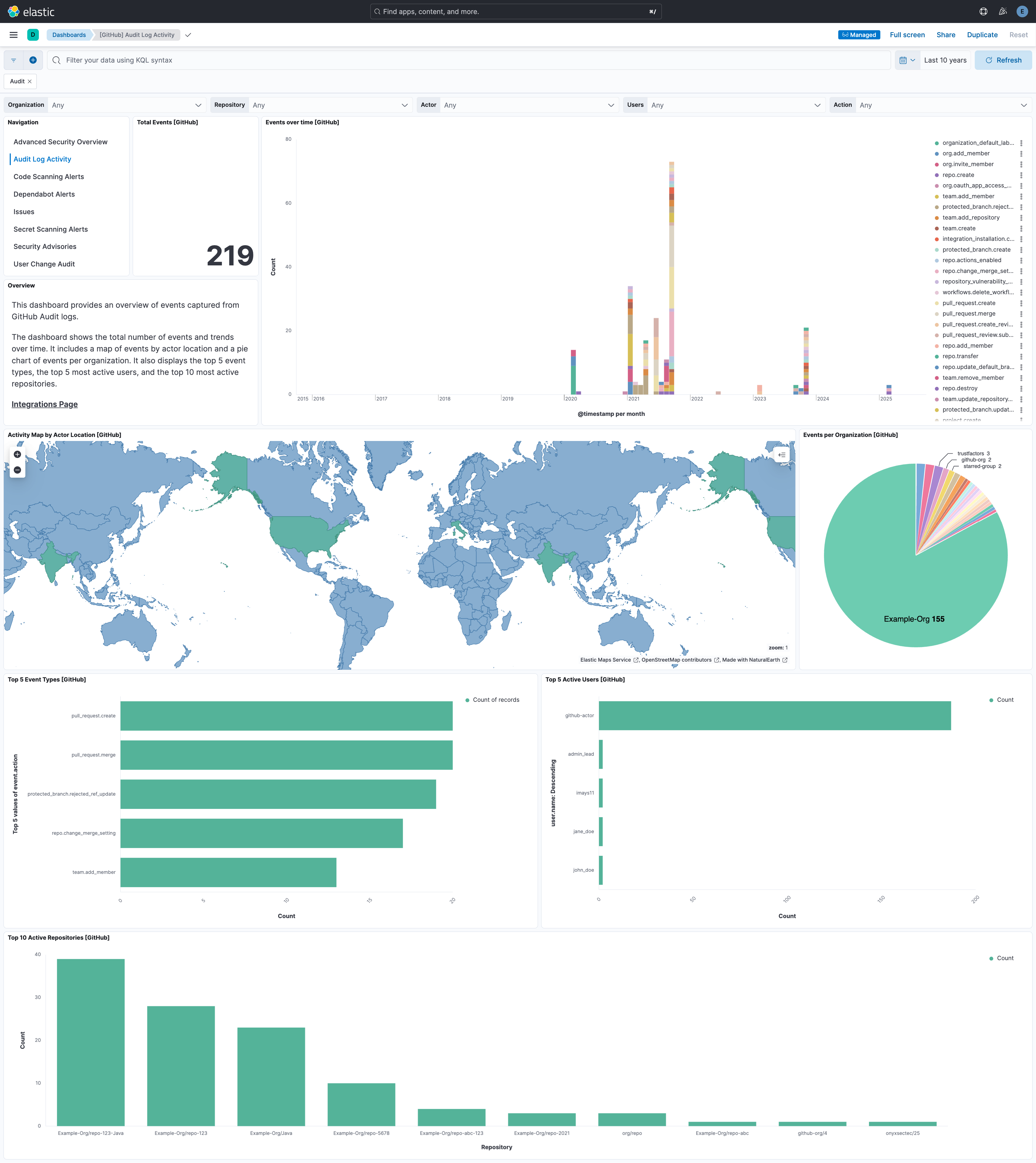
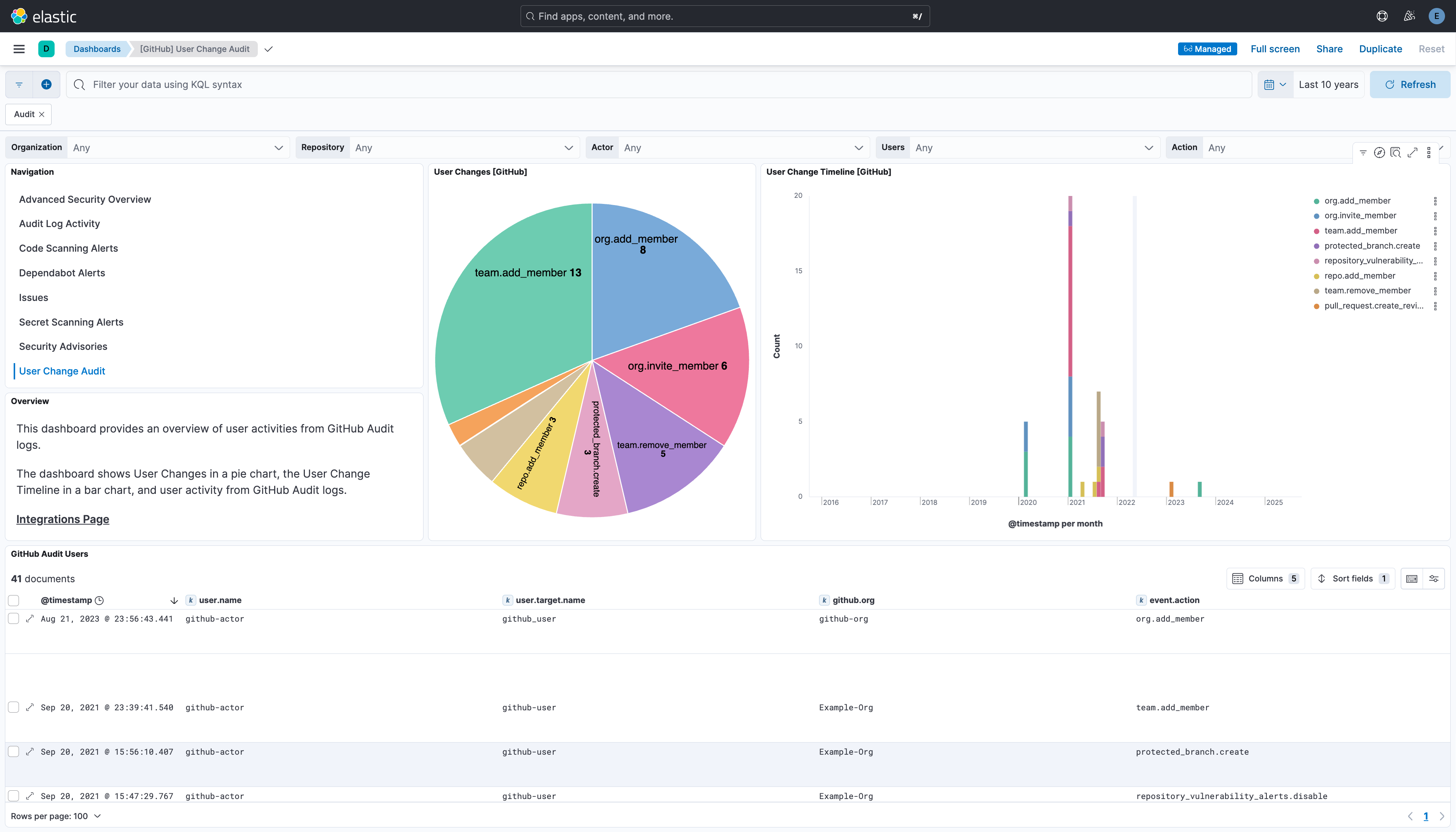
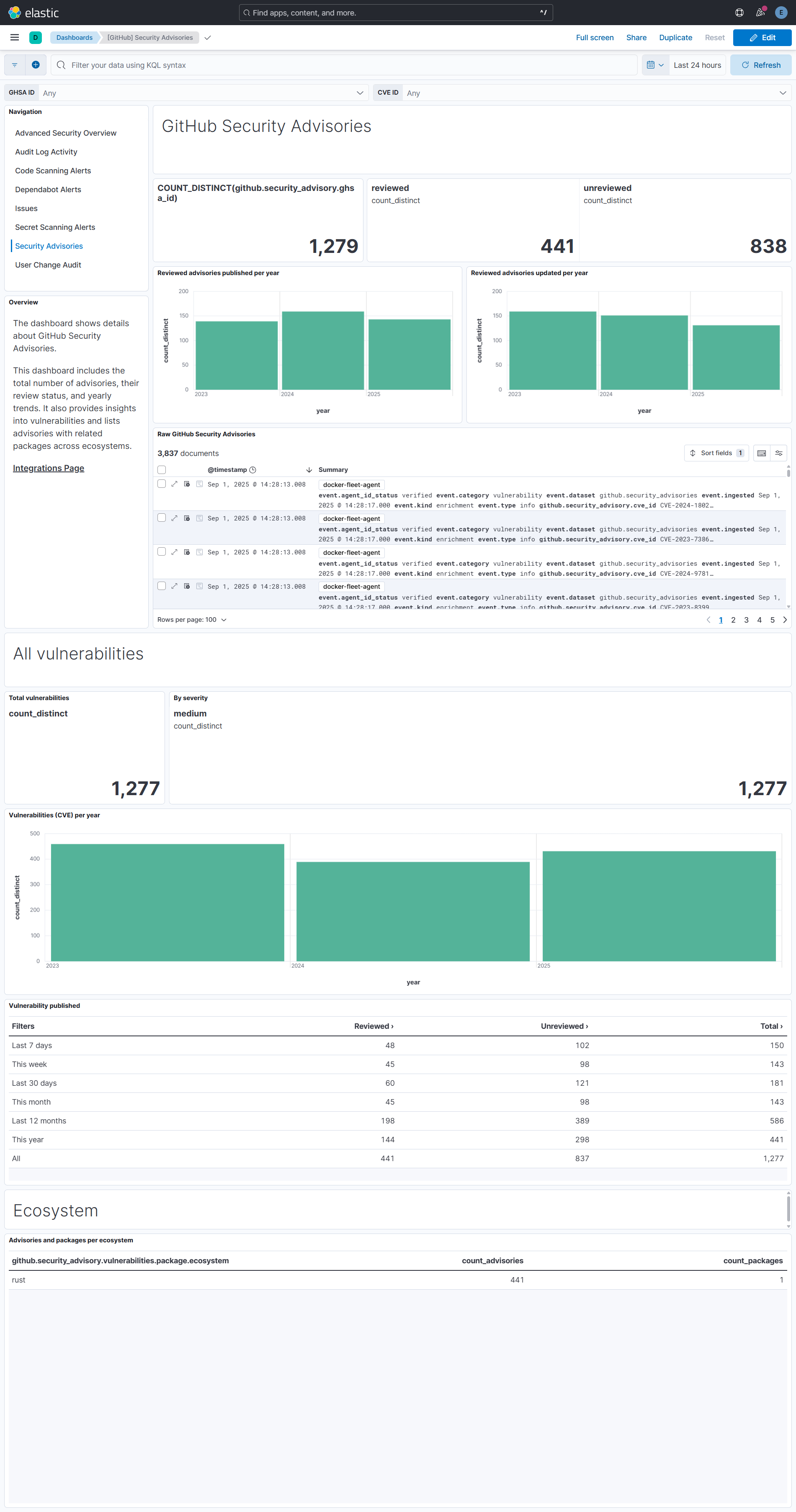
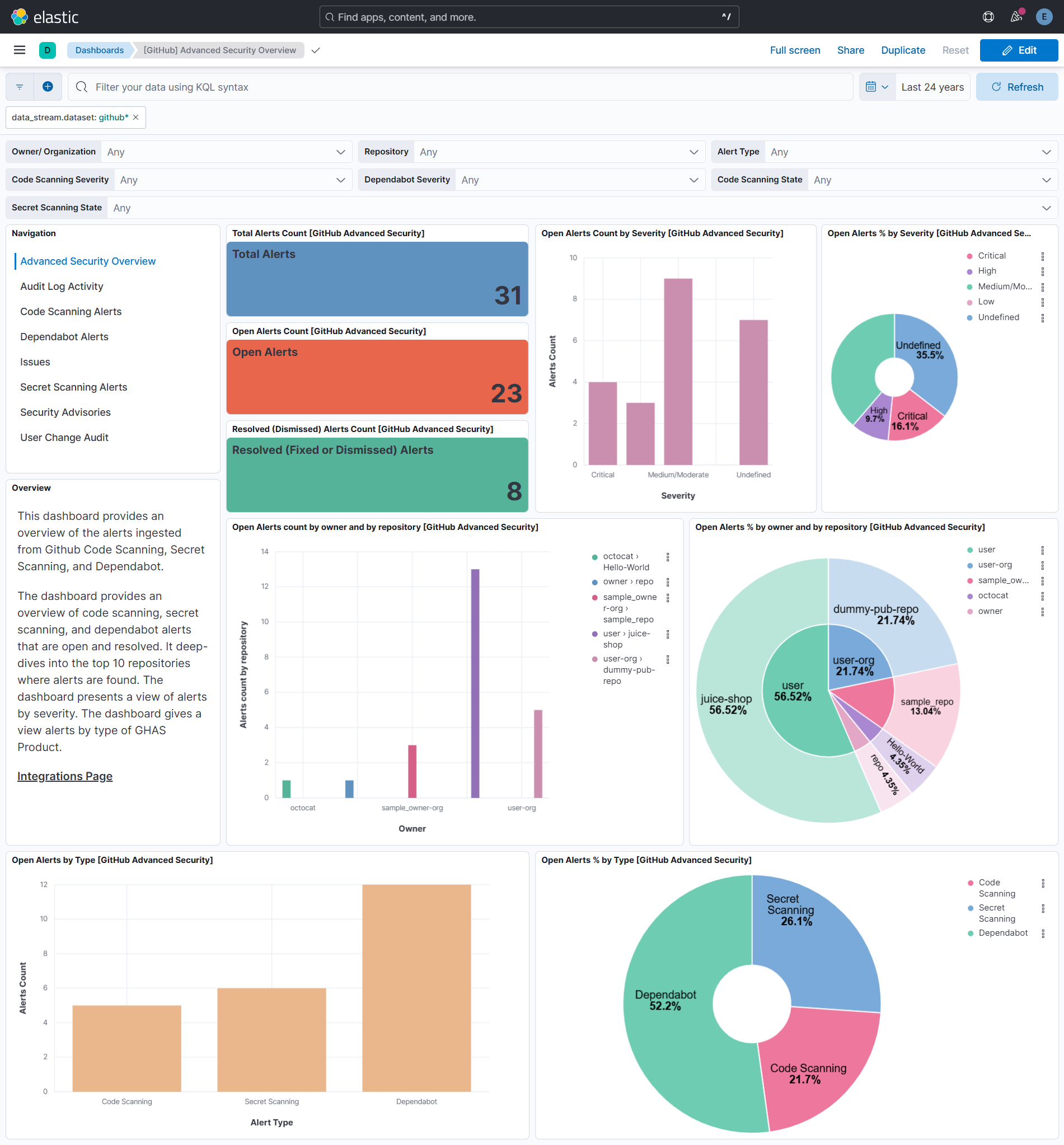
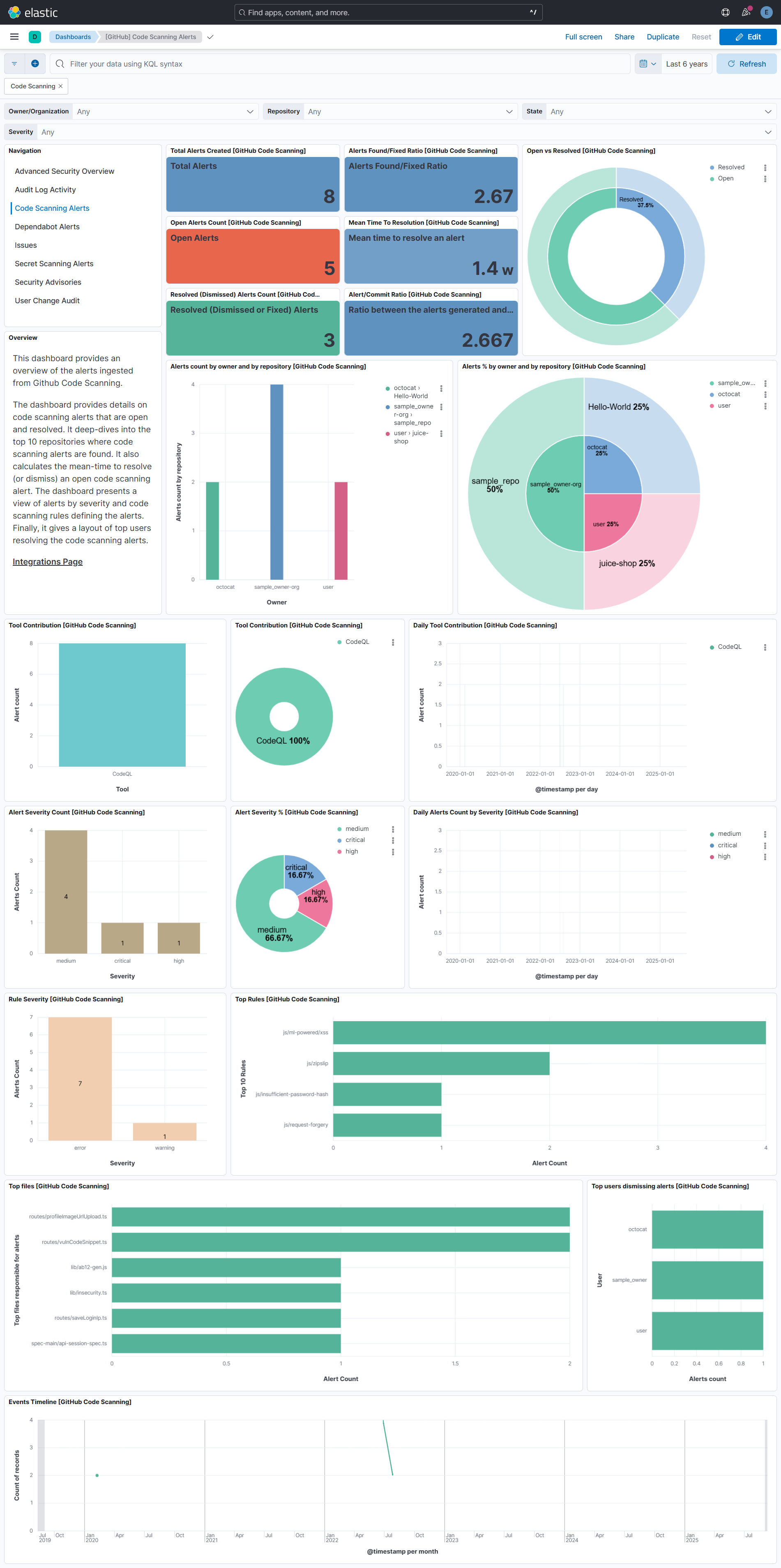
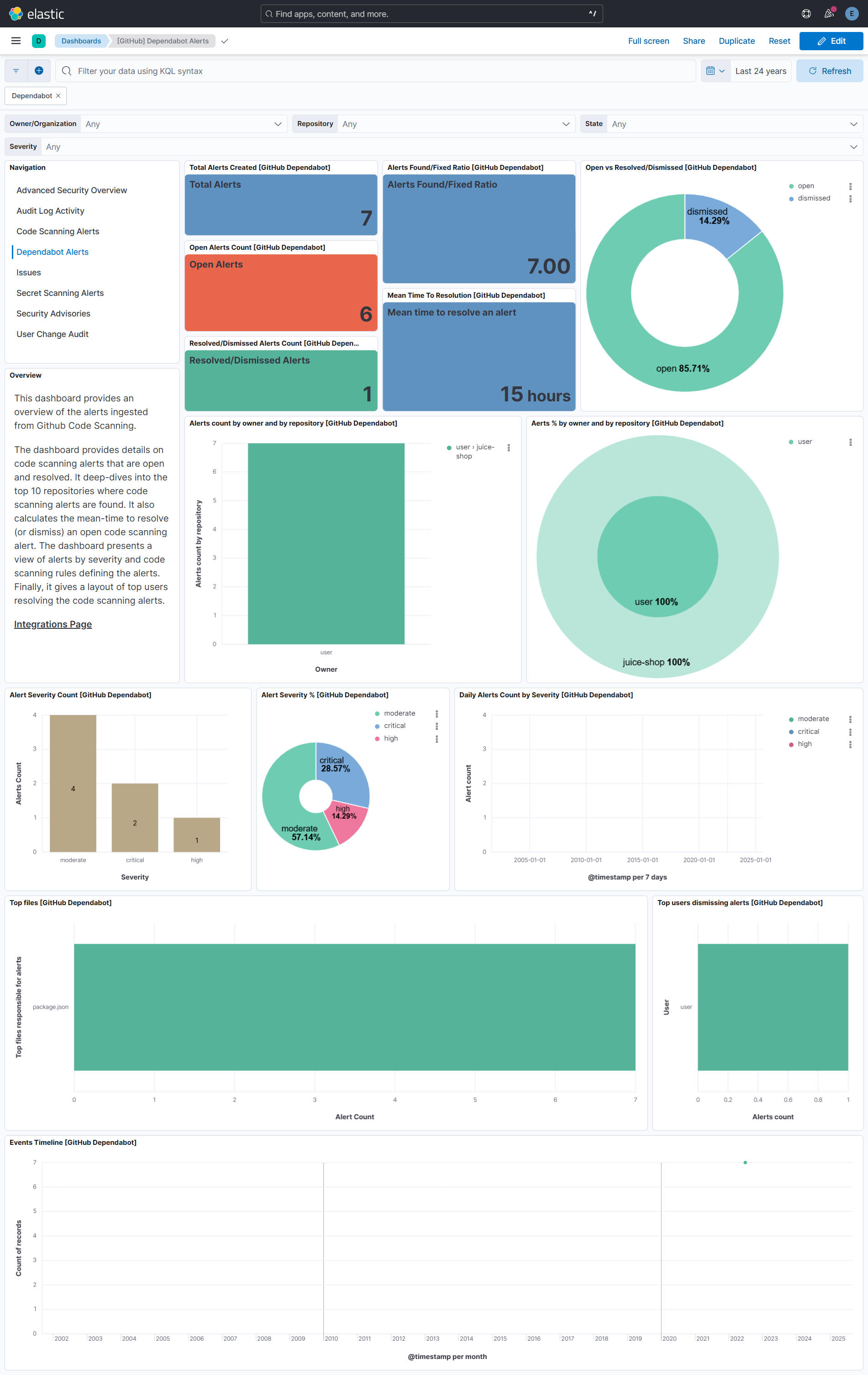
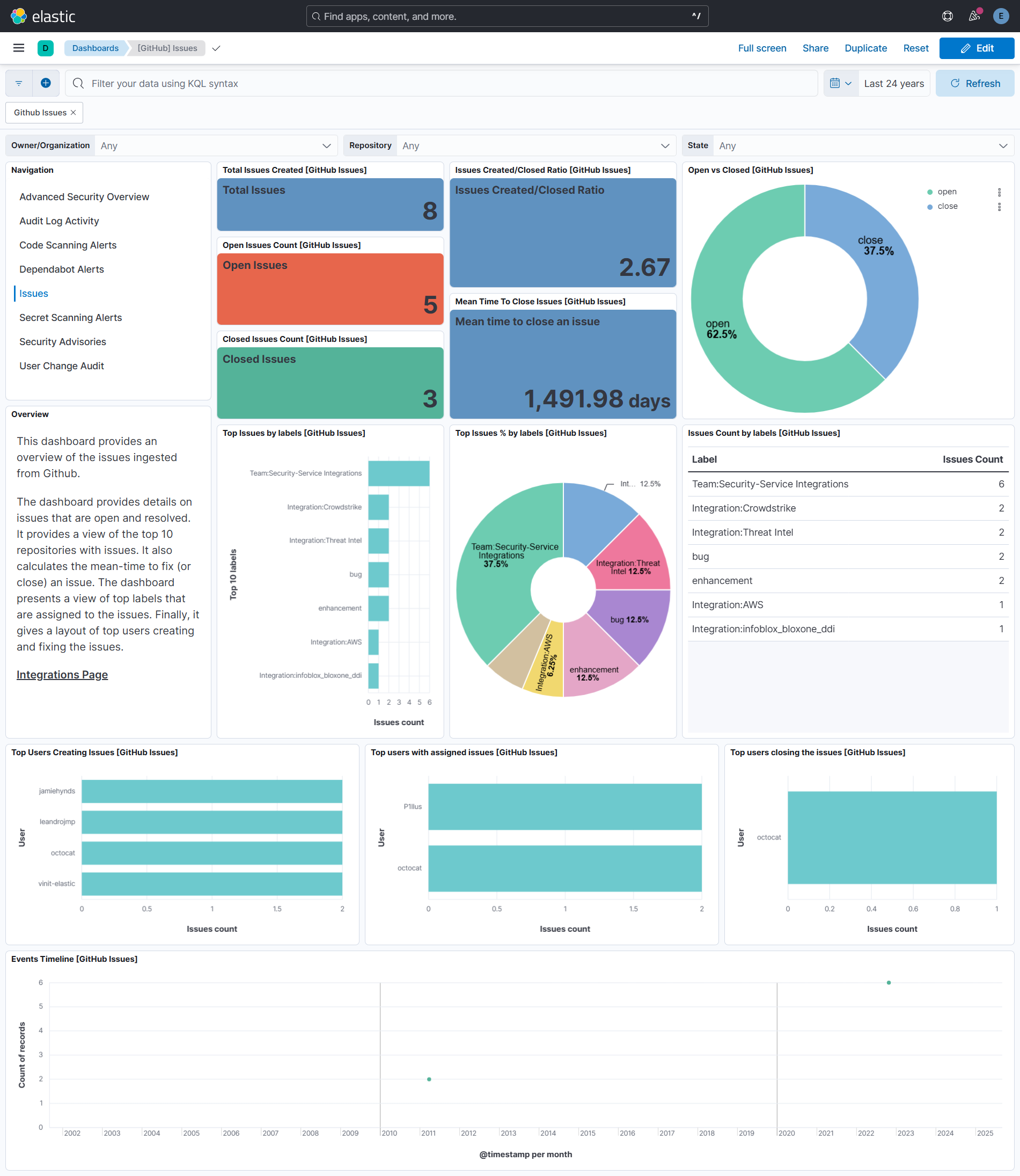
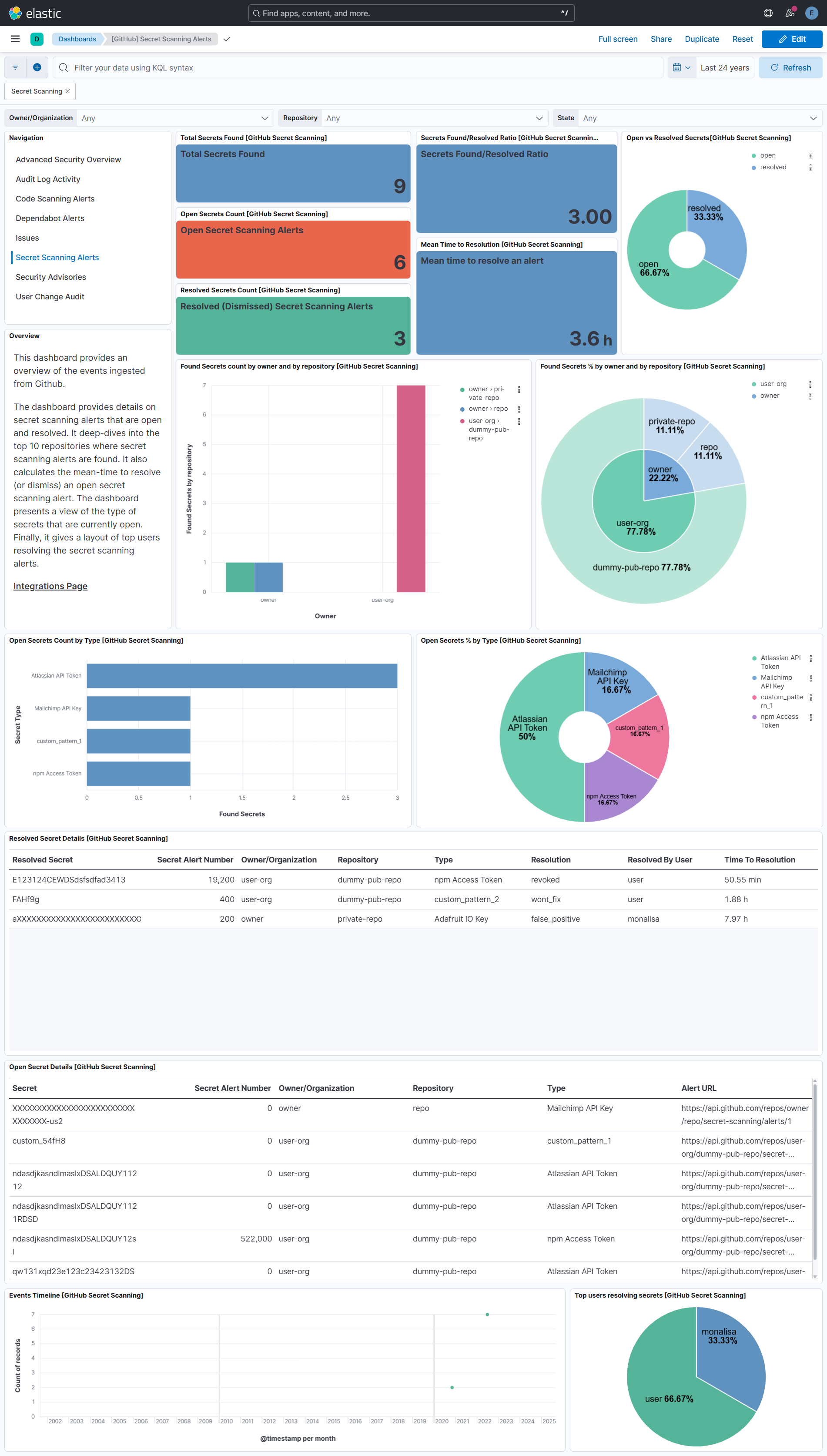
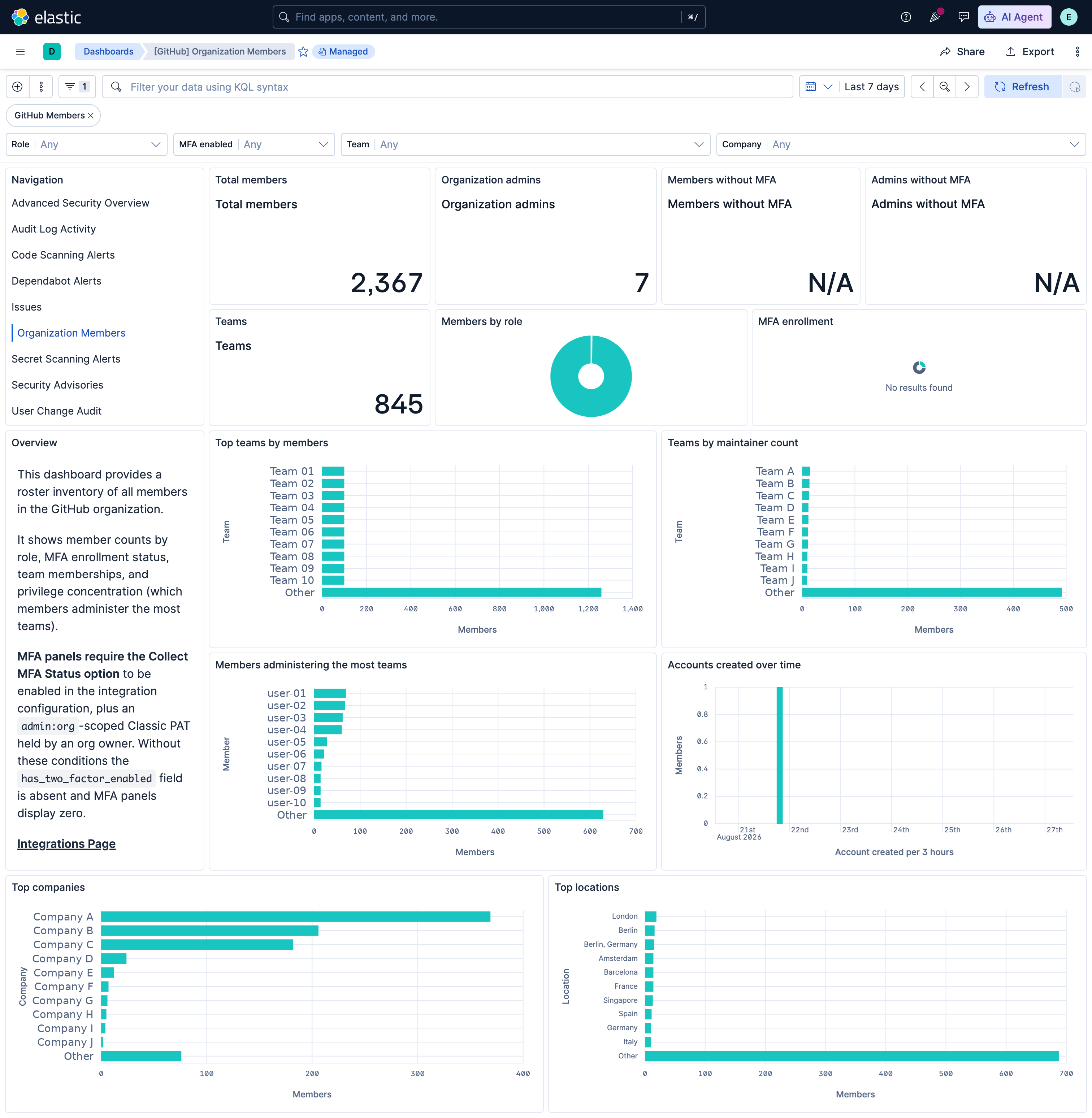
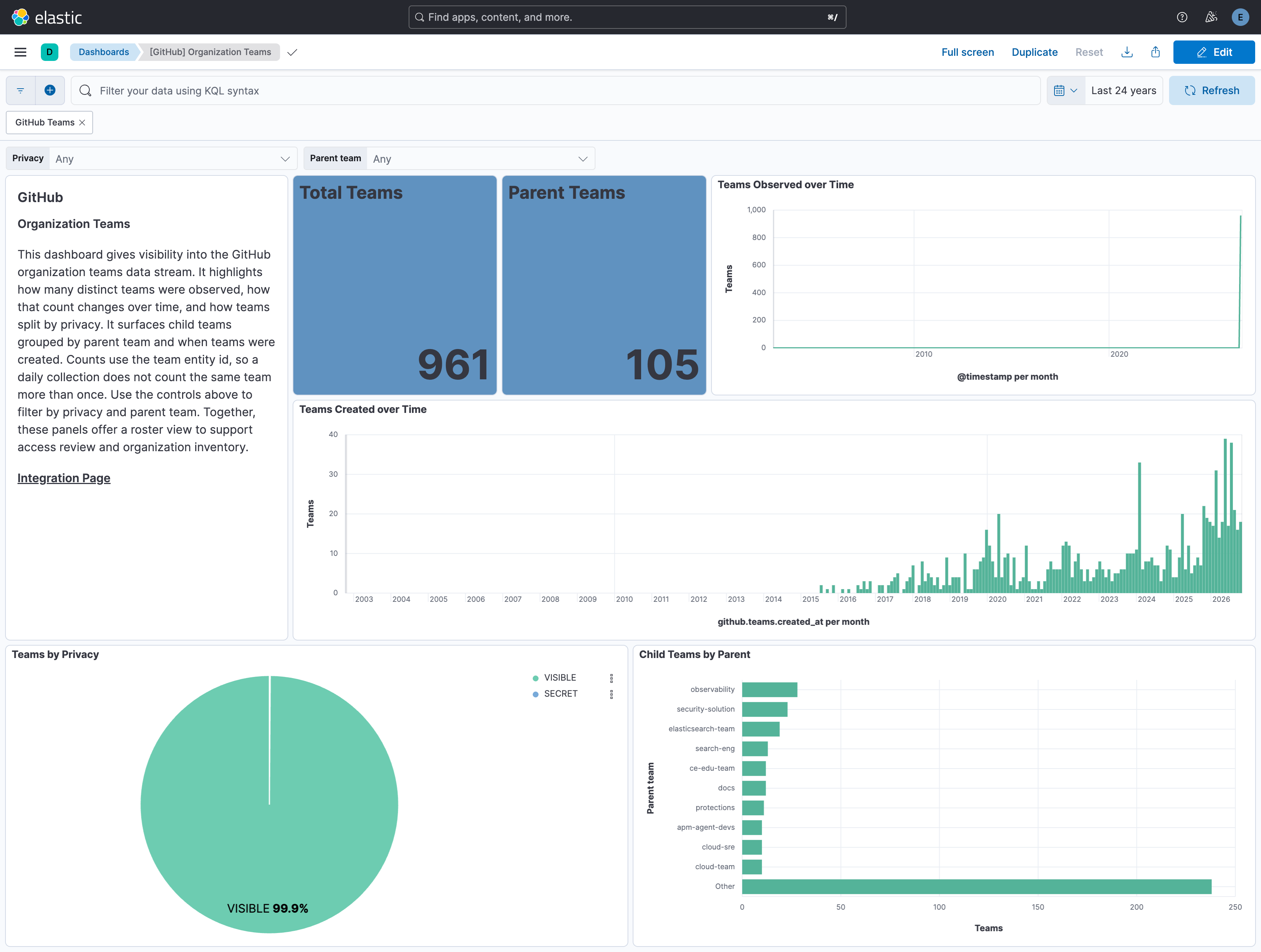
Changelog
| Version | Details | Minimum Kibana version |
|---|---|---|
| 3.1.0 | Enhancement (View pull request) Update Elastic Managed integration documentation to the current wording and docs links. |
9.3.0 9.2.4 9.1.10 8.19.10 |
| 3.0.0 | Breaking change (View pull request) Remove user.entity.relationships.administers.service.id and user.entity.relationships.administers.service.name from the members data stream.Maintainers now set user.entity.relationships.administers.entity.id to the GitHub team node id.The field removal is the breaking change; the teams data stream added in this version is the entity those ids join to. The member document id changes once in this version so an unchanged member is indexed again with those new fields. Enhancement (View pull request) Add a teams data stream that emits one generic entity document per GitHub organization team. Each collection stores a new document so entity.last_seen_timestamp advances. Shipped in the same version as the members breaking change because maintainer entity ids join to these team documents. |
9.3.0 9.2.4 9.1.10 8.19.10 |
| 2.32.0 | Enhancement (View pull request) Declare additional GitHub Issues API fields, including user visibility types, issue dependency counts, and sub-issue summaries, so they are mapped and queryable. Enhancement (View pull request) Recreate the latest issues transform with destination index logs-github_latest.dest_issues-2. The previous logs-github_latest.dest_issues-1 index is not removed automatically; see the README upgrade notes. |
9.3.0 9.2.4 9.1.10 8.19.10 |
| 2.31.0 | Enhancement (View pull request) Add opt-in routing of GitHub api.request audit events to the new github.api_requests data stream. |
9.3.0 9.2.4 9.1.10 8.19.10 |
| 2.30.0 | Enhancement (View pull request) Clarify which logs each input collects (audit logs for the cloud storage inputs, the specific data streams for the API input), and list the API inputs first. |
9.3.0 9.2.4 9.1.10 8.19.10 |
| 2.29.0 | Enhancement (View pull request) Split github.token_scopes in the audit data stream into an array so individual token scopes can be filtered.Enhancement (View pull request) Map github.query_string and github.request_body in the audit data stream as keyword with ignore_above raised to 8192 and a match_only_text multi-field.Enhancement (View pull request) Remove github.filtered_request_body.query from the audit data stream; it duplicates github.query_string on GraphQL API requests. |
9.3.0 9.2.4 9.1.10 8.19.10 |
| 2.28.0 | Enhancement (View pull request) Add members data stream for GitHub organization member entity inventory. |
9.3.0 9.2.4 9.1.10 8.19.10 |
| 2.27.1 | Bug fix (View pull request) Preserve state fields in the security advisories error path to prevent advisory_type, batch size and API key being lost across interval restarts. |
9.3.0 9.2.4 9.1.10 8.19.10 |
| 2.27.0 | Enhancement (View pull request) Enable request trace log removal. |
9.3.0 9.2.4 9.1.10 8.19.10 |
| 2.26.0 | Enhancement (View pull request) Add tags to ingest pipeline processors. |
9.3.0 9.2.4 9.1.10 8.19.10 |
| 2.25.2 | Bug fix (View pull request) Add event.action and event.reason to the issues data stream. |
9.3.0 9.2.4 9.1.10 8.19.10 |
| 2.25.1 | Bug fix (View pull request) Set subobjects to false on the audit ruleset_conditions* parameters/old_parameters objects. For repository_property targets GitHub sends include/exclude as {name, source, property_values} objects instead of repository-name strings; the object shape collided with the keyword mapping and was rejected to the failure store. Disabling subobjects keeps the existing include/exclude/repository_ids keyword fields for the string form while letting object-form attributes map as dotted keyword leaves (include.name, and so on). |
9.3.0 9.2.4 9.1.10 8.19.10 |
| 2.25.0 | Enhancement (View pull request) Use new release field for agentless deployment mode to establish as beta. |
9.3.0 9.2.4 9.1.10 8.19.10 |
| 2.24.0 | Enhancement (View pull request) Declare github.ruleset_* fields in the audit data stream so ES|QL detections referencing lifecycle variants (_added, _deleted, _updated) or old-state pairs (ruleset_old_name, ruleset_old_enforcement) resolve consistently across backing-index rollovers. |
9.3.0 9.2.4 9.1.10 8.19.10 |
| 2.23.1 | Bug fix (View pull request) Change API key variable to optional for security advisories data stream, as authentication is not required for public repositories. |
9.3.0 9.2.4 9.1.10 8.19.10 |
| 2.23.0 | Enhancement (View pull request) Enable Agentless deployment. |
9.3.0 9.2.4 9.1.10 8.19.10 |
| 2.22.1 | Bug fix (View pull request) Change event.kind to keyword and set it in the ingest pipeline for issues, code_scanning, dependabot, and secret_scanning datasets so pipeline_error on failure does not conflict with constant_keyword mapping. |
9.3.0 9.2.4 9.1.10 8.19.10 |
| 2.22.0 | Enhancement (View pull request) Add client secret authentication support for Azure Event Hub with RBAC. |
9.3.0 9.2.4 9.1.10 8.19.10 |
| 2.21.1 | Bug fix (View pull request) Remove duplicate security-solution-default tag references |
9.1.4 9.0.7 8.19.4 |
| 2.21.0 | Enhancement (View pull request) Clarify GitHub PAT permissions required for Issues data stream. |
9.1.4 9.0.7 8.19.4 |
| 2.20.0 | Enhancement (View pull request) Update event.kind to "alert" for code_scanning.alert_created and secret_scanning_alert.create actions. |
9.1.4 9.0.7 8.19.4 |
| 2.19.0 | Enhancement (View pull request) Document the limitation of Issues API for organization-level queries. |
9.1.4 9.0.7 8.19.4 |
| 2.18.0 | Enhancement (View pull request) Prevent updating the fleet health status to degraded when the link is not present in the header. |
9.1.4 9.0.7 8.19.4 |
| 2.17.3 | Bug fix (View pull request) Fix HTTPJSON cursor logic for audit data stream. |
9.0.0 8.17.1 |
| 2.17.2 | Bug fix (View pull request) Remove updated_at field from latest issues transform unique keys. |
9.0.0 8.17.1 |
| 2.17.1 | Bug fix (View pull request) Update the latest issues by transforming unique keys to utilize the id and updated_at fields. |
9.0.0 8.17.1 |
| 2.17.0 | Enhancement (View pull request) Add malware advisory type to GitHub security advisories data stream. |
9.0.0 8.17.1 |
| 2.16.0 | Enhancement (View pull request) Update deprecated controls and filters in Audit dashboards. |
9.0.0 8.17.1 |
| 2.15.1 | Bug fix (View pull request) Added missing oauth2 toggle in audit data stream. |
9.0.0 8.17.1 |
| 2.15.0 | Enhancement (View pull request) Added support for abs and gcs inputs in audit data stream. |
9.0.0 8.17.1 |
| 2.14.0 | Enhancement (View pull request) Add links panel widget in dashboards. |
9.0.0 8.16.0 |
| 2.13.0 | Enhancement (View pull request) Improve documentation |
9.0.0 8.16.0 |
| 2.12.0 | Enhancement (View pull request) Harmonise appearance of dashboards. Add dashboard link for security advisories dashboard. Add table of content in audit, security advisories and user dashboards. Bug fix (View pull request) Fix data view in security advisories dashboard. |
9.0.0 8.16.0 |
| 2.11.0 | Enhancement (View pull request) Add support for AWS S3 and AWS SQS input in audit dataset. |
9.0.0 8.16.0 |
| 2.10.1 | Bug fix (View pull request) Fix "Top users with assigned issues [GitHub Issues]" lens visual |
9.0.0 8.16.0 |
| 2.10.0 | Enhancement (View pull request) Use terminate processor instead of fail processor to handle agent errors. |
9.0.0 8.16.0 |
| 2.9.0 | Enhancement (View pull request) Add security advisories dashboard. |
9.0.0 8.15.0 |
| 2.8.2 | Bug fix (View pull request) Fix minor spelling mistakes. |
9.0.0 8.15.0 |
| 2.8.1 | Bug fix (View pull request) Fix state's advisory_type for next interval in security advisories datastream. |
9.0.0 8.15.0 |
| 2.8.0 | Enhancement (View pull request) Add security advisories datastream. |
9.0.0 8.15.0 |
| 2.7.0 | Enhancement (View pull request) Improve handling of pagination end. |
9.0.0 8.15.0 |
| 2.6.1 | Bug fix (View pull request) Fix audit log URL for enterprises. |
9.0.0 8.13.0 |
| 2.6.0 | Enhancement (View pull request) Update audit ingest pipeline to cover all fields. |
9.0.0 8.13.0 |
| 2.5.0 | Enhancement (View pull request) Add Azure Eventhub support for audit logs. |
9.0.0 8.13.0 |
| 2.4.1 | Bug fix (View pull request) Add missing ECS field in latest_code_scanning transform. |
9.0.0 8.13.0 |
| 2.4.0 | Enhancement (View pull request) Update Kibana constraint to support 9.0.0. |
9.0.0 8.13.0 |
| 2.3.1 | Bug fix (View pull request) Updated SSL description to be uniform and to include links to documentation. |
8.13.0 |
| 2.3.0 | Enhancement (View pull request) Do not remove event.original in main ingest pipeline. |
8.13.0 |
| 2.2.0 | Enhancement (View pull request) Add "preserve_original_event" tag to documents with event.kind set to "pipeline_error". |
8.13.0 |
| 2.1.1 | Bug fix (View pull request) Addressed some missing documentation issues and fixed timestamp values in sample enterprise audit logs. |
8.13.0 |
| 2.1.0 | Enhancement (View pull request) Added support for enterprise audit logs in the audit data stream. |
8.13.0 |
| 2.0.0 | Enhancement (View pull request) Update fields inside fingerprint processor in code_scanning, secret_scanning, and dependabot to ingest all event updates. Enhancement (View pull request) Reformat fields to add package-fields.yml across all datastreams. Breaking change (View pull request) Remove github.state, github.severity due to inconsistency across datastreams. Update dashboards to use corresponding datastream-level fields instead. Breaking change (View pull request) Remove event.action field from code_scanning, secret_scanning, dependabot, and issues as it is redundant. Update dashboards to use data_stream.dataset instead. Enhancement (View pull request) Add latest transforms for github issues, dependabot, code_scanning, and secret_scanning alerts. Enhancement (View pull request) Add navigation to all dashboards. Enhancement (View pull request) Upgrade legacy visualization to latest for code_scanning and secret_scanning. Enhancement (View pull request) Change dashboards to point to destination index for issues, dependabot, code_scanning, and secret_scanning alerts. |
8.13.0 |
| 1.29.3 | Bug fix (View pull request) Use triple-brace Mustache templating when referencing variables in ingest pipelines. |
8.13.0 |
| 1.29.2 | Bug fix (View pull request) Use triple-brace Mustache templating when referencing variables in ingest pipelines. |
8.13.0 |
| 1.29.1 | Bug fix (View pull request) Fix definition of nested subfields |
8.13.0 |
| 1.29.0 | Enhancement (View pull request) Update the kibana constraint to ^8.13.0. Modified the field definitions to remove ECS fields made redundant by the ecs@mappings component template. |
8.13.0 |
| 1.28.0 | Enhancement (View pull request) Set sensitive values as secret and fix incorrect mappings. |
8.12.0 |
| 1.27.3 | Bug fix (View pull request) Clean up null handling, formatting |
8.7.1 |
| 1.27.2 | Enhancement (View pull request) Changed owners |
8.7.1 |
| 1.27.1 | Bug fix (View pull request) Event duration was in seconds, not nanoseconds. |
8.7.1 |
| 1.27.0 | Enhancement (View pull request) Limit request tracer log count to five. |
8.7.1 |
| 1.26.0 | Enhancement (View pull request) ECS version updated to 8.11.0. |
8.7.1 |
| 1.25.0 | Enhancement (View pull request) Improve 'event.original' check to avoid errors if set. |
8.7.1 |
| 1.24.0 | Enhancement (View pull request) Add support for additional audit log fields. |
8.7.1 |
| 1.23.1 | Bug fix (View pull request) Fix docs for GitHub Audit log permissions. |
8.7.1 |
| 1.23.0 | Enhancement (View pull request) ECS version updated to 8.10.0. |
8.7.1 |
| 1.22.0 | Enhancement (View pull request) The format_version in the package manifest changed from 2.11.0 to 3.0.0. Removed dotted YAML keys from package manifest. Added 'owner.type: elastic' to package manifest. |
8.7.1 |
| 1.21.0 | Enhancement (View pull request) Add tags.yml file so that integration's dashboards and saved searches are tagged with "Security Solution" and displayed in the Security Solution UI. |
8.7.1 |
| 1.20.1 | Bug fix (View pull request) Make datastreams agree on type of github.repository.description. |
8.7.1 |
| 1.20.0 | Enhancement (View pull request) Add support for github.permission and github.repository_public fields. |
8.7.1 |
| 1.19.0 | Enhancement (View pull request) Update package to ECS 8.9.0. |
8.7.1 |
| 1.18.0 | Enhancement (View pull request) Document duration units. |
8.7.1 |
| 1.17.0 | Enhancement (View pull request) Update package-spec to 2.9.0. |
8.7.1 |
| 1.16.0 | Enhancement (View pull request) Convert dashboard visualizations to lens. |
8.7.1 |
| 1.15.0 | Enhancement (View pull request) Document valid duration units. |
8.7.1 |
| 1.14.0 | Enhancement (View pull request) Document valid duration units. |
— |
| 1.13.0 | Enhancement (View pull request) Ensure event.kind is correctly set for pipeline errors. |
8.7.1 |
| 1.12.2 | Bug fix (View pull request) Fix documentation for audit log prerequisites |
8.7.1 |
| 1.12.1 | Bug fix (View pull request) Remove additional repository fields github.issues. |
8.7.1 |
| 1.12.0 | Enhancement (View pull request) Update package to ECS 8.8.0. |
8.7.1 |
| 1.11.0 | Enhancement (View pull request) Add a new flag to enable request tracing |
8.7.1 |
| 1.10.2 | Bug fix (View pull request) Removed fixReason from Dependabot request |
8.4.1 |
| 1.10.1 | Bug fix (View pull request) Add issues datastream into README. |
8.4.1 |
| 1.10.0 | Enhancement (View pull request) Update package to ECS 8.7.0. |
8.4.1 |
| 1.9.0 | Enhancement (View pull request) Release GitHub datastreams as GA. |
8.4.1 |
| 1.8.2 | Enhancement (View pull request) Added categories and/or subcategories. |
8.4.1 |
| 1.8.1 | Bug fix (View pull request) Fix pagination in GitHub audit |
8.4.1 |
| 1.8.0 | Enhancement (View pull request) Add GitHub Issues datastream |
8.4.1 |
| 1.7.0 | Enhancement (View pull request) Update package to ECS 8.6.0. |
8.4.1 |
| 1.6.0 | Enhancement (View pull request) Update package to ECS 8.5.0. |
8.4.1 |
| 1.5.0 | Enhancement (View pull request) Add org endpoints for code_scanning and secret_scanning along with dashboards |
8.4.1 |
| 1.4.0 | Enhancement (View pull request) Add Dependabot alerts |
8.3.0 |
| 1.3.0 | Enhancement (View pull request) Update package to ECS 8.4.0 |
8.0.0 7.16.0 |
| 1.2.3 | Bug fix (View pull request) Fix proxy URL documentation rendering. |
8.0.0 7.16.0 |
| 1.2.2 | Bug fix (View pull request) Update GitHub Secret Scanning fingerprint with resolved_at |
8.0.0 7.16.0 |
| 1.2.1 | Enhancement (View pull request) Update package name and description to align with standard wording |
8.0.0 7.16.0 |
| 1.2.0 | Enhancement (View pull request) Add GitHub Advanced Security integration |
8.0.0 7.16.0 |
| 1.1.0 | Enhancement (View pull request) Update package to ECS 8.3.0. |
8.0.0 7.16.0 |
| 1.0.3 | Bug fix (View pull request) Add support for @timestamp and missing created_at fields |
— |
| 1.0.2 | Bug fix (View pull request) Add correct field mapping for event.created |
8.0.0 7.16.0 |
| 1.0.1 | Enhancement (View pull request) Update readme |
8.0.0 7.16.0 |
| 1.0.0 | Enhancement (View pull request) Make GA |
8.0.0 7.16.0 |
| 0.4.0 | Enhancement (View pull request) Update to ECS 8.2 |
— |
| 0.3.4 | Bug fix (View pull request) Fix typo in config template for ignoring host enrichment |
— |
| 0.3.3 | Enhancement (View pull request) Add documentation for multi-fields |
— |
| 0.3.2 | Bug fix (View pull request) Fix date format used in queries. |
— |
| 0.3.1 | Bug fix (View pull request) Resolve invalid query operator |
— |
| 0.3.0 | Enhancement (View pull request) Update to ECS 8.0 |
— |
| 0.2.2 | Bug fix (View pull request) Removes saved search used for testing |
— |
| 0.2.1 | Bug fix (View pull request) Regenerate test files using the new GeoIP database |
— |
| 0.2.0 | Enhancement (View pull request) Add 8.0.0 version constraint |
— |
| 0.1.1 | Bug fix (View pull request) Update Title and Description. |
— |
| 0.1.0 | Enhancement (View pull request) initial release |
— |