Cisco Meraki Metrics Integration
Elastic Cloud Serverless projects are autoscaled environments, fully managed by Elastic and available on Elastic Cloud. Availability This functionality is in technical preview and is ready for evaluation. Use with caution in production; it is not recommended for mission-critical workloads. Elastic will work to fix any issues, but features in technical preview are not subject to the support SLA of official GA features. Specific Support terms apply. Elastic Cloud Serverless projects are autoscaled environments, fully managed by Elastic and available on Elastic Cloud. Availability This functionality is in technical preview and is ready for evaluation. Use with caution in production; it is not recommended for mission-critical workloads. Elastic will work to fix any issues, but features in technical preview are not subject to the support SLA of official GA features. Specific Support terms apply. The Elastic Stack includes Elastic's core products such as Elasticsearch, Kibana, Logstash, and Beats. Availability This functionality is in technical preview and is ready for evaluation. Use with caution in production; it is not recommended for mission-critical workloads. Elastic will work to fix any issues, but features in technical preview are not subject to the support SLA of official GA features. Specific Support terms apply. Unless stated otherwise on the page, this functionality is available when your Elastic Stack is deployed on Elastic Cloud Hosted, Elastic Cloud Enterprise, Elastic Cloud on Kubernetes, and self-managed environments. This documentation corresponds to the latest patch available for each minor version. If you're not using the latest patch, check the release notes for changes.
Serverless Observability
Preview
Preview
Serverless Security
Preview
Preview
Stack
Preview
9.0+
Preview since 9.0
| Version | 0.4.3 Availability Preview This functionality is in technical preview and is ready for evaluation. Use with caution in production; it is not recommended for mission-critical workloads. Elastic will work to fix any issues, but features in technical preview are not subject to the support SLA of official GA features. Specific Support terms apply. (View all) |
| Subscription level What's this? |
Basic |
| Developed by What's this? |
Elastic |
| Ingestion method(s) | API |
| Minimum Kibana version(s) | 9.0.0 8.15.2 |
To use pre-release integrations, go to the Integrations page in Kibana, scroll down, and toggle on the Display beta integrations option.
This integration periodically fetches metrics from Cisco Meraki networks. It collects a wide range of metrics including device details and status, network performance measurements, switch port information, wireless channel utilization, and uplink performance.
These metrics help you understand how well your Meraki network is working and make it easier to monitor and manage your network setup.
The integration uses the Meraki Dashboard RESTFul APIs library to collect metrics from Cisco Meraki networks.
You need Elasticsearch for storing and searching your data and Kibana for visualizing and managing it. You can use our hosted Elasticsearch Service on Elastic Cloud, which is recommended, or self-manage the Elastic Stack on your own hardware.
To configure this integration in Elastic, you need the following information from Cisco Meraki:
- API Key
- Organization IDs
- API Base URL (optional)
For more details on these settings, refer to the Meraki Dashboard API documentation.
- In Kibana, navigate to Management > Integrations
- In the "Search for integrations" search bar, type Meraki
- Click on "Cisco Meraki Metrics" integration from the search results
- Click on the Add Cisco Meraki Metrics Integration button to add the integration
The device_health dataset provides metrics related to the health and status of Meraki devices. All Cisco Meraki specific fields are available in the meraki field group.
ECS Field Reference
Please refer to the following document for detailed information on ECS fields.
Exported fields
| Field | Description | Type | Unit | Metric Type |
|---|---|---|---|---|
| @timestamp | Event timestamp. | date | ||
| data_stream.dataset | Data stream dataset. | constant_keyword | ||
| data_stream.namespace | Data stream namespace. | constant_keyword | ||
| data_stream.type | Data stream type. | constant_keyword | ||
| host.ip | Host ip addresses. | ip | ||
| host.mac | Host mac addresses. | keyword | ||
| host.name | Name of the host. It can contain what hostname returns on Unix systems, the fully qualified domain name, or a name specified by the user. The sender decides which value to use. |
keyword | ||
| meraki.device.address | Physical address of the device. | text | ||
| meraki.device.channel_utilization.wifi0.utilization_80211 | Percentage of wifi channel utiliation for the given radio. | double | percent | gauge |
| meraki.device.channel_utilization.wifi0.utilization_non_80211 | Percentage of non-wifi channel utiliation for the given radio. | double | percent | gauge |
| meraki.device.channel_utilization.wifi0.utilization_total | Percentage of total channel utiliation for the given radio. | double | percent | gauge |
| meraki.device.channel_utilization.wifi1.utilization_80211 | Percentage of wifi channel utiliation for the given radio. | double | percent | gauge |
| meraki.device.channel_utilization.wifi1.utilization_non_80211 | Percentage of non-wifi channel utiliation for the given radio. | double | percent | gauge |
| meraki.device.channel_utilization.wifi1.utilization_total | Percentage of total channel utiliation for the given radio. | double | percent | gauge |
| meraki.device.firmware | Firmware version of the device. | keyword | ||
| meraki.device.high_availability.enabled | Indicates whether High Availability is enabled for the device. For devices that do not support HA, this will be 'false'. | boolean | ||
| meraki.device.high_availability.role | The HA role of the device on the network. For devices that do not support HA, this will be 'primary'. | keyword | ||
| meraki.device.imei | IMEI of the device, if applicable. | keyword | ||
| meraki.device.lan_ip | LAN IP address of the device. | ip | ||
| meraki.device.license.activation_date | The date the license started burning. | date | ||
| meraki.device.license.claim_date | The date the license was claimed into the organization. | date | ||
| meraki.device.license.duration_in_days | The duration of the individual license. | long | ||
| meraki.device.license.expiration_date | The date the license will expire. | date | ||
| meraki.device.license.head_license_id | The id of the head license this license is queued behind. If there is no head license, it returns nil. | keyword | ||
| meraki.device.license.id | License ID. | keyword | ||
| meraki.device.license.license_type | License type. | keyword | ||
| meraki.device.license.order_number | Order number. | keyword | ||
| meraki.device.license.seat_count | The number of seats of the license. Only applicable to SM licenses. | long | ||
| meraki.device.license.state | The state of the license. All queued licenses have a status of recentlyQueued. |
keyword | ||
| meraki.device.license.total_duration_in_days | The duration of the license plus all permanently queued licenses associated with it. | long | ||
| meraki.device.location | Longitude and Latitude of the device. | geo_point | ||
| meraki.device.mac | MAC address of the device. | keyword | ||
| meraki.device.model | Model of the device. | keyword | ||
| meraki.device.name | Name of the device. | keyword | ||
| meraki.device.network_id | ID of the network the device belongs to. | keyword | ||
| meraki.device.notes | Notes for the device, limited to 255 characters. | text | ||
| meraki.device.performance_score | double | gauge | ||
| meraki.device.product_type | Product type of the device. | keyword | ||
| meraki.device.serial | Serial number of the device. | keyword | ||
| meraki.device.status.gateway | IP Gateway. | ip | ||
| meraki.device.status.ip_type | IP Type. | keyword | ||
| meraki.device.status.last_reported_at | Device Last Reported Date. | date | ||
| meraki.device.status.primary_dns | Primary DNS. | ip | ||
| meraki.device.status.public_ip | Public IP Address. | ip | ||
| meraki.device.status.secondary_dns | Secondary DNS. | keyword | ||
| meraki.device.status.value | Device Status. | keyword | ||
| meraki.device.tags | List of tags assigned to the device. | keyword | ||
| meraki.organization_id | keyword | |||
| meraki.switch.port.access_policy_type | The type of the access policy of the switch port. Only applicable to access ports. Can be one of 'Open', 'Custom access policy', 'MAC allow list' or 'Sticky MAC allow list'. | keyword | ||
| meraki.switch.port.allowed_vlans | The VLANs allowed on the switch port. Only applicable to trunk ports. | keyword | ||
| meraki.switch.port.enabled | The status of the switch port. | boolean | ||
| meraki.switch.port.id | The identifier of the switch port. | keyword | ||
| meraki.switch.port.link_negotiation | The link speed for the switch port. | keyword | ||
| meraki.switch.port.name | The name of the switch port. | keyword | ||
| meraki.switch.port.poe_enabled | The PoE status of the switch port. | boolean | ||
| meraki.switch.port.rstp_enabled | The rapid spanning tree protocol status. | boolean | ||
| meraki.switch.port.status.cdp.address | Contains network addresses of both receiving and sending devices. | keyword | ||
| meraki.switch.port.status.cdp.capabilities | Identifies the device type, which indicates the functional capabilities of the device. | keyword | ||
| meraki.switch.port.status.cdp.device_id | Identifies the device name. | keyword | ||
| meraki.switch.port.status.cdp.management_address | The device's management IP. | ip | ||
| meraki.switch.port.status.cdp.native_vlan | Indicates, per interface, the assumed VLAN for untagged packets on the interface. | long | ||
| meraki.switch.port.status.cdp.platform | Identifies the hardware platform of the device. | keyword | ||
| meraki.switch.port.status.cdp.port_id | Identifies the port from which the CDP packet was sent. | keyword | ||
| meraki.switch.port.status.cdp.system_name | The system name. | keyword | ||
| meraki.switch.port.status.cdp.version | Contains the device software release information. | keyword | ||
| meraki.switch.port.status.cdp.vtp_management_domain | Advertises the configured VLAN Trunking Protocl (VTP)-management-domain name of the system. | keyword | ||
| meraki.switch.port.status.client_count | The number of clients connected through this port. | long | gauge | |
| meraki.switch.port.status.duplex | The current duplex of a connected port. | keyword | ||
| meraki.switch.port.status.enabled | Whether the port is configured to be enabled. | boolean | ||
| meraki.switch.port.status.errors | All errors present on the port. | keyword | ||
| meraki.switch.port.status.is_uplink | Whether the port is the switch's uplink. | boolean | ||
| meraki.switch.port.status.lldp.chassis_id | The device's chassis ID. | keyword | ||
| meraki.switch.port.status.lldp.management_address | The device's management IP. | keyword | ||
| meraki.switch.port.status.lldp.management_vlan | The device's management VLAN. | long | ||
| meraki.switch.port.status.lldp.port_description | Description of the port from which the LLDP packet was sent. | keyword | ||
| meraki.switch.port.status.lldp.port_id | Identifies the port from which the LLDP packet was sent. | keyword | ||
| meraki.switch.port.status.lldp.port_vlan | The port's VLAN. | long | ||
| meraki.switch.port.status.lldp.system_capabilities | Identifies the device type, which indicates the functional capabilities of the device. | keyword | ||
| meraki.switch.port.status.lldp.system_description | The device's system description. | keyword | ||
| meraki.switch.port.status.lldp.system_name | The device's system name. | keyword | ||
| meraki.switch.port.status.power_usage_in_wh | How much power (in watt-hours) has been delivered by this port during the timespan. | double | gauge | |
| meraki.switch.port.status.secure_port.active | Whether Secure Port is currently active for this port. | boolean | ||
| meraki.switch.port.status.secure_port.authentication_status | The current Secure Port status. | keyword | ||
| meraki.switch.port.status.secure_port.config_overrides.allowed_vlans | The VLANs allowed on the . Only applicable to trunk ports. | keyword | ||
| meraki.switch.port.status.secure_port.config_overrides.type | The type of the ('trunk' or 'access'). | keyword | ||
| meraki.switch.port.status.secure_port.config_overrides.vlan | The VLAN of the . For a trunk port, this is the native VLAN. A null value will clear the value set for trunk ports. | long | ||
| meraki.switch.port.status.secure_port.config_overrides.voice_vlan | The voice VLAN of the . Only applicable to access ports. | long | ||
| meraki.switch.port.status.secure_port.enabled | Whether Secure Port is turned on for this port. | boolean | ||
| meraki.switch.port.status.speed | The current data transfer rate which the port is operating at. | keyword | ||
| meraki.switch.port.status.status | The current connection status of the port. | keyword | ||
| meraki.switch.port.status.stp_statuses | The current Spanning Tree Protocol statuses of the port. | keyword | ||
| meraki.switch.port.status.throughput.recv | The average speed of the data received (in kilobits-per-second). | double | gauge | |
| meraki.switch.port.status.throughput.sent | The average speed of the data sent (in kilobits-per-second). | double | gauge | |
| meraki.switch.port.status.throughput.total | The average speed of the data sent and received (in kilobits-per-second). | double | gauge | |
| meraki.switch.port.status.usage.recv | The amount of data received (in kilobytes). | long | gauge | |
| meraki.switch.port.status.usage.sent | The amount of data sent (in kilobytes). | long | gauge | |
| meraki.switch.port.status.usage.total | The total amount of data sent and received (in kilobytes). | long | gauge | |
| meraki.switch.port.status.warnings | All warnings present on the port. | keyword | ||
| meraki.switch.port.sticky_mac_allow_list | The initial list of MAC addresses for sticky Mac allow list. Only applicable when 'accessPolicyType' is 'Sticky MAC allow list'. | keyword | ||
| meraki.switch.port.sticky_mac_allow_list_limit | The maximum number of MAC addresses for sticky MAC allow list. Only applicable when 'accessPolicyType' is 'Sticky MAC allow list'. | long | ||
| meraki.switch.port.stp_guard | The state of the STP guard ('disabled', 'root guard', 'bpdu guard' or 'loop guard'). | keyword | ||
| meraki.switch.port.tags | The list of tags of the switch port. | keyword | ||
| meraki.switch.port.type | The type of the switch port ('trunk' or 'access'). | keyword | ||
| meraki.switch.port.vlan | The VLAN of the switch port. For a trunk port, this is the native VLAN. A null value will clear the value set for trunk ports. | long | ||
| meraki.switch.port.voice_vlan | The voice VLAN of the switch port. Only applicable to access ports. | long | ||
| meraki.uplink.apn | Access Point Name. | keyword | ||
| meraki.uplink.connection_type | Connection Type. | keyword | ||
| meraki.uplink.gateway | Gateway IP. | ip | ||
| meraki.uplink.iccid | Integrated Circuit Card Identification Number. | keyword | ||
| meraki.uplink.interface | Uplink interface. | keyword | ||
| meraki.uplink.ip | Uplink IP. | ip | ||
| meraki.uplink.ip_assigned_by | The way in which the IP is assigned. | keyword | ||
| meraki.uplink.last_reported_at | Uplink Last Reported Date. | date | ||
| meraki.uplink.latency.ms | Latency in milliseconds. | double | ms | gauge |
| meraki.uplink.loss.pct | Loss percentage. | double | percent | gauge |
| meraki.uplink.model | Uplink model. | keyword | ||
| meraki.uplink.primary_dns | Primary DNS IP. | ip | ||
| meraki.uplink.provider | Network Provider. | keyword | ||
| meraki.uplink.public_ip | Public IP. | ip | ||
| meraki.uplink.rsrp | Reference Signal Received Power. | float | ||
| meraki.uplink.rsrq | Reference Signal Received Quality. | float | ||
| meraki.uplink.secondary_dns | Secondary DNS IP. | ip | ||
| meraki.uplink.signal_type | Signal Type. | keyword | ||
| meraki.uplink.status | Uplink status. | keyword |
Example
{
    "@timestamp": "2024-09-30T16:55:38.202Z",
    "agent": {
        "ephemeral_id": "11855dde-6a4a-48ce-ac32-087b1c7999a3",
        "id": "f06c246c-8375-47a9-b0f1-d0fc6c050e4e",
        "name": "docker-fleet-agent",
        "type": "metricbeat",
        "version": "8.15.2"
    },
    "data_stream": {
        "dataset": "cisco_meraki_metrics.device_health",
        "namespace": "default",
        "type": "metrics"
    },
    "ecs": {
        "version": "8.0.0"
    },
    "elastic_agent": {
        "id": "f06c246c-8375-47a9-b0f1-d0fc6c050e4e",
        "snapshot": true,
        "version": "8.15.2"
    },
    "event": {
        "agent_id_status": "verified",
        "dataset": "cisco_meraki_metrics.device_health",
        "duration": 12982553765,
        "ingested": "2024-09-30T16:56:01Z",
        "module": "meraki"
    },
    "host": {
        "architecture": "x86_64",
        "containerized": false,
        "hostname": "docker-fleet-agent",
        "id": "c7f0ac74f5e24f78942164132c2c8ead",
        "ip": "172.21.0.4",
        "mac": "02-42-AC-15-00-04",
        "name": "docker-fleet-agent",
        "os": {
            "codename": "focal",
            "family": "debian",
            "kernel": "6.8.0-45-generic",
            "name": "Ubuntu",
            "platform": "ubuntu",
            "type": "linux",
            "version": "20.04.6 LTS (Focal Fossa)"
        }
    },
    "meraki": {
        "device": {
            "firmware": "switch-17-2",
            "lan_ip": "10.0.15.78",
            "location": {
                "lat": 40.7128,
                "lon": -74.0060
            },
            "mac": "00:1a:2b:3c:4d:5e",
            "model": "MS225-24P",
            "name": "Office Switch 1",
            "network_id": "N_123456789012345678",
            "product_type": "switch",
            "serial": "Q2XY-5N6M-7VK9"
        },
        "organization_id": "987654",
        "switch": {
            "port": {
                "access_policy_type": "Open",
                "allowed_vlans": "all",
                "enabled": true,
                "id": "7",
                "link_negotiation": "Auto negotiate",
                "poe_enabled": true,
                "rstp_enabled": true,
                "status": {
                    "cdp": {
                        "address": "10.0.15.100",
                        "capabilities": "Host",
                        "device_id": "0A:1B:2C:3D:4E:5F",
                        "platform": "CIVS-IPC-7070",
                        "port_id": "eth0",
                        "version": "2.12.2-5"
                    },
                    "client_count": 3,
                    "duplex": "full",
                    "enabled": true,
                    "is_uplink": false,
                    "lldp": {
                        "chassis_id": "0a:1b:2c:3d:4e:5f",
                        "port_description": "eth0",
                        "port_id": "0a:1b:2c:3d:4e:5f",
                        "system_capabilities": "S-VLAN Component of a VLAN Bridge, Two-port MAC Relay",
                        "system_description": "Cisco Network Camera",
                        "system_name": "(none)"
                    },
                    "power_usage_in_wh": 2.5,
                    "secure_port": {
                        "active": false,
                        "authentication_status": "Disabled",
                        "enabled": false
                    },
                    "speed": "1 Gbps",
                    "status": "Connected",
                    "stp_statuses": [
                        "Forwarding",
                        "Is edge",
                        "Is peer-to-peer"
                    ],
                    "throughput": {
                        "recv": 15.6,
                        "sent": 8.2,
                        "total": 23.8
                    },
                    "usage": {
                        "recv": 1024,
                        "sent": 512,
                        "total": 1536
                    }
                },
                "stp_guard": "disabled",
                "type": "trunk",
                "vlan": 10
            }
        }
    },
    "metricset": {
        "name": "device_health",
        "period": 60000
    },
    "service": {
        "type": "meraki"
    }
}
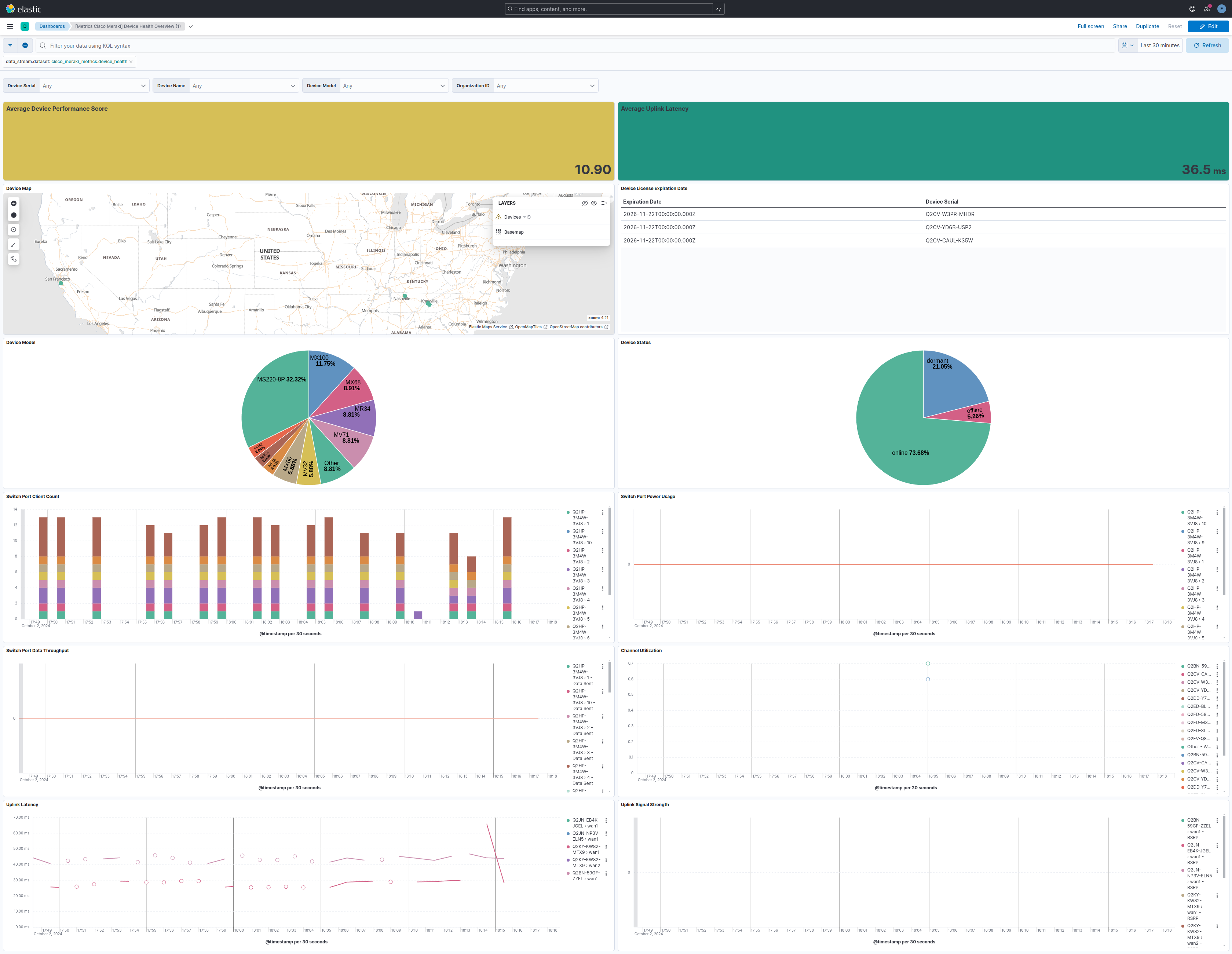
This integration includes one or more Kibana dashboards that visualizes the data collected by the integration. The screenshots below illustrate how the ingested data is displayed.
Changelog
| Version | Details | Minimum Kibana version |
|---|---|---|
| 0.4.3 | Bug fix (View pull request) Remove rsrp and rsrq if metrics are missing. |
9.0.0 8.15.2 |
| 0.4.2 | Bug fix (View pull request) Fix API base URL config parameter |
9.0.0 8.15.2 |
| 0.4.1 | Bug fix (View pull request) scale values in device channel utilization so they display correctly as percentages. |
9.0.0 8.15.2 |
| 0.4.0 | Enhancement (View pull request) Rename channel utilization bands 2.5 and 5 to wifi0 and wifi1 for backwards compatibility. |
9.0.0 8.15.2 |
| 0.3.1 | Bug fix (View pull request) Wrap organization ids in quotes to avoid parsing errors. |
9.0.0 8.15.2 |
| 0.3.0 | Enhancement (View pull request) Add support for Kibana 9.0.0. |
9.0.0 8.15.2 |
| 0.2.1 | Enhancement (View pull request) Add observability category |
8.15.2 |
| 0.2.0 | Enhancement (View pull request) Make 'address' and 'notes' fields of type 'text' instead of 'keyword' to enable full-text search capabilities. |
8.15.2 |
| 0.1.0 | Enhancement (View pull request) Initial draft of the package |
8.15.2 |