Claroty CTD
Elastic Cloud Serverless projects are autoscaled environments, fully managed by Elastic and available on Elastic Cloud. Availability This functionality is generally available and ready for production usage. Elastic Cloud Serverless projects are autoscaled environments, fully managed by Elastic and available on Elastic Cloud. Availability This functionality is generally available and ready for production usage. The Elastic Stack includes Elastic's core products such as Elasticsearch, Kibana, Logstash, and Beats. Availability This functionality is generally available and ready for production usage. Unless stated otherwise on the page, this functionality is available when your Elastic Stack is deployed on Elastic Cloud Hosted, Elastic Cloud Enterprise, Elastic Cloud on Kubernetes, and self-managed environments. This documentation corresponds to the latest patch available for each minor version. If you're not using the latest patch, check the release notes for changes.
Serverless Observability
Generally available
Serverless Security
Generally available
Stack
9.0+
Generally available since 9.0
| Version | 1.7.0 (View all) |
| Managed integration release status | GA |
| Subscription level What's this? |
Basic |
| Developed by What's this? |
Elastic |
| Ingestion method(s) | API, Network Protocol |
| Minimum Kibana version(s) | 9.0.5 8.19.2 |
You can use this integration as an Elastic Managed integration on Elastic Cloud Hosted deployments running this version or later.
Claroty CTD is a robust solution that delivers comprehensive cybersecurity controls for industrial and government environments. The company’s comprehensive platform connects seamlessly with customers' existing infrastructure and programs while providing a full range of industrial cybersecurity controls for visibility, threat detection, risk and vulnerability management, and secure remote access all with a significantly reduced total cost of ownership.
Claroty CTD integration collects and parses data using a Syslog server and REST API, then visualizes it in Kibana.
Elastic Managed integrations are only supported on Elastic Cloud Serverless and Elastic Cloud Hosted deployments. An Elastic Managed integration lets you ingest data from a cloud source while avoiding the orchestration, management, and maintenance associated with standard ingest infrastructure. Elastic runs the collector for you, so you can focus on your data instead of the infrastructure that collects it.
When using this integration as an Elastic Managed integration, only the following data streams are available: Asset logs and Baseline logs. These data streams use inputs compatible with the Elastic Managed deployment mode. Other data streams (Event logs) require TCP or UDP inputs, which are not supported in the Elastic Managed deployment mode. To collect data from these data streams, use Elastic Agent.
For more information, refer to Elastic Managed integrations and the Elastic Managed integrations FAQ.
This module has been tested against the latest Claroty CTD version 4.10.0.
The Claroty CTD integration collects 7 types of message:
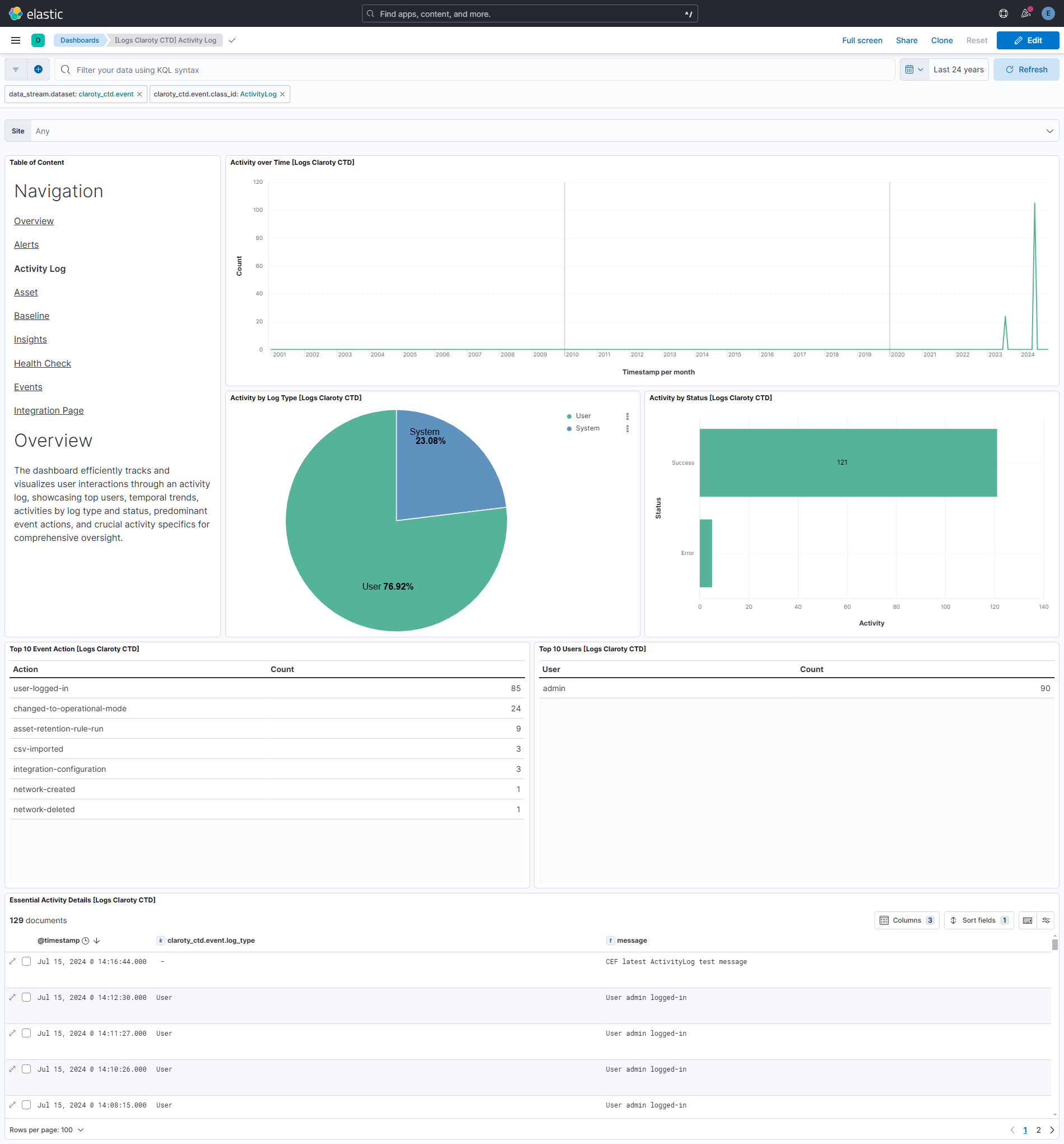
[Activity Log] - The Activity Log records activities performed in CTD in the last year by users and by the system.
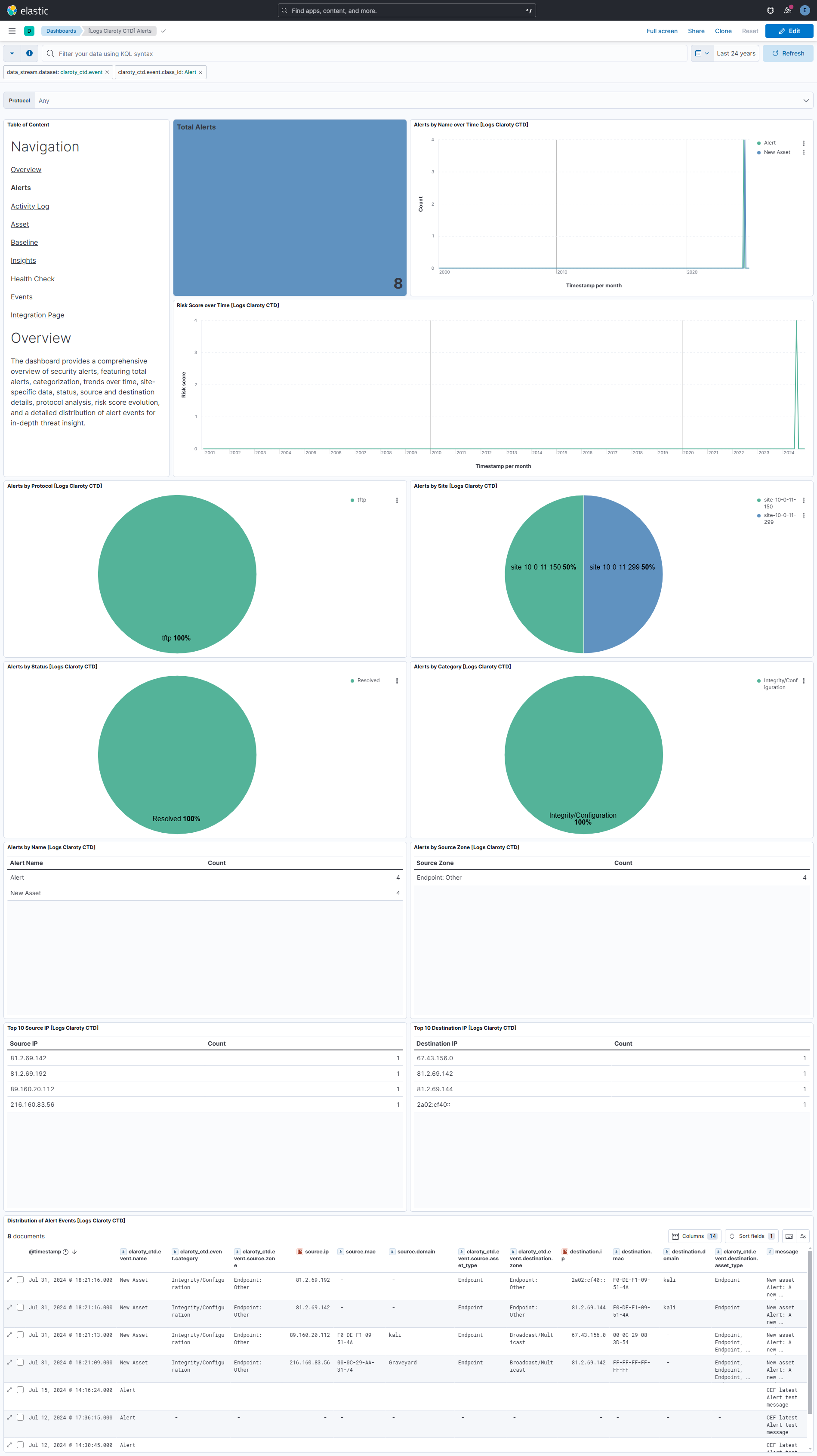
[Alerts] - Qualified and quantified event or chain of events which are based on various risk factors. Further categorized as either Security Alerts or Integrity Alerts depending on the nature of the alert.
[Events] - Events are the foundation of the CTD’s threat detection module. They are conversations or activities logged by various engines in CTD, which are then categorized as either risky (Alert or OT Alert) or non-risky (Non-Risky Change or an OT Operation) events.
[Health Monitoring] - Scheduled periodic system Health Monitoring information can be sent via Syslog messages.This can be used for forwarding real-time system health status information to external monitoring tools and for alert generation.
[Insights] - The CTD system identifies assets affected by potential security risks, based on a variety of out-of-the-box use cases, and groups them together into insights. The purpose of the insights is to provide knowledge regarding these security risks and indicate mitigation measures, which will improve the overall security posture of the organization.
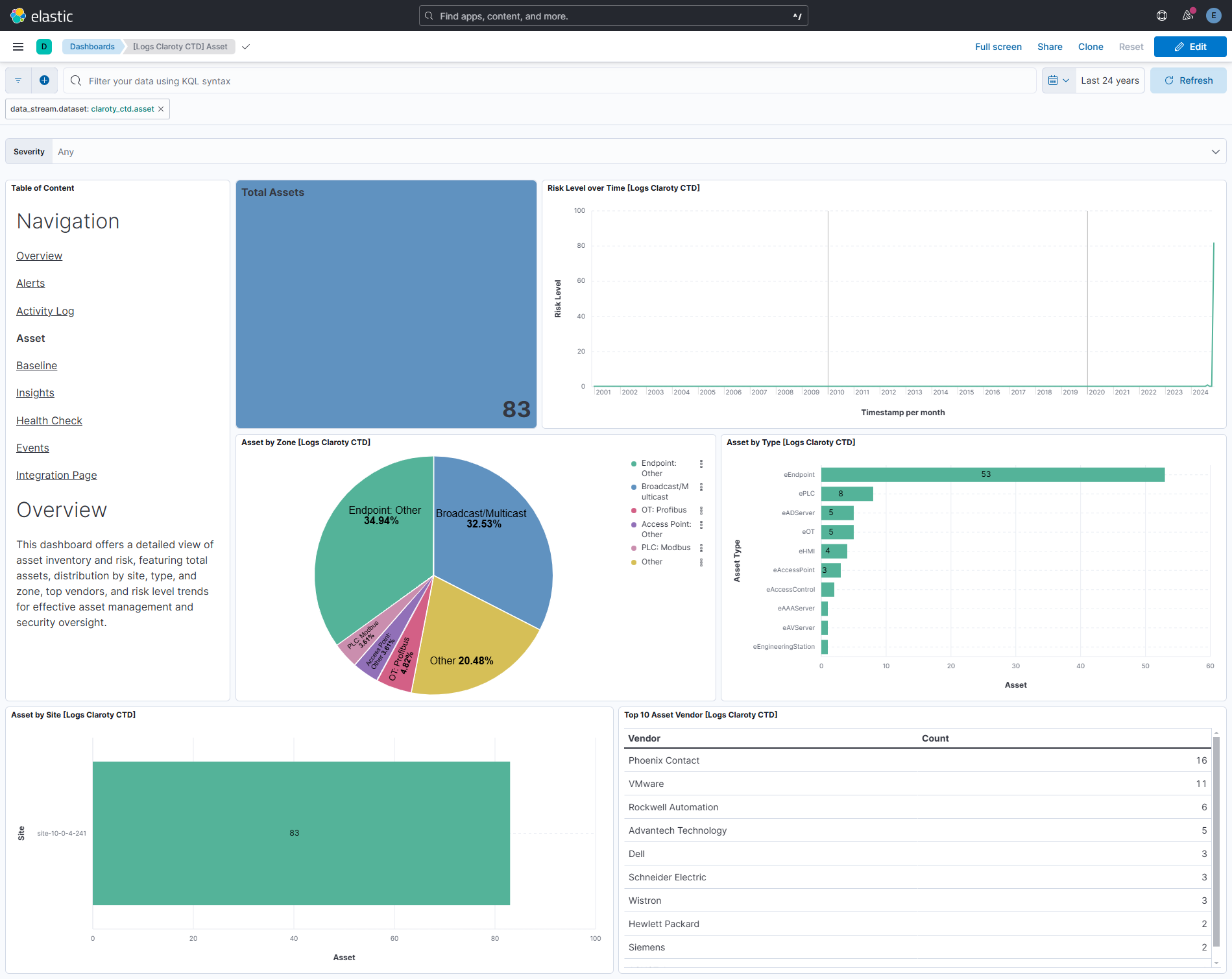
[Assets] - Asset is any distinguishable network entity. CTD can discover an extensive range of assets in three classes - OT, IT, and IoT.
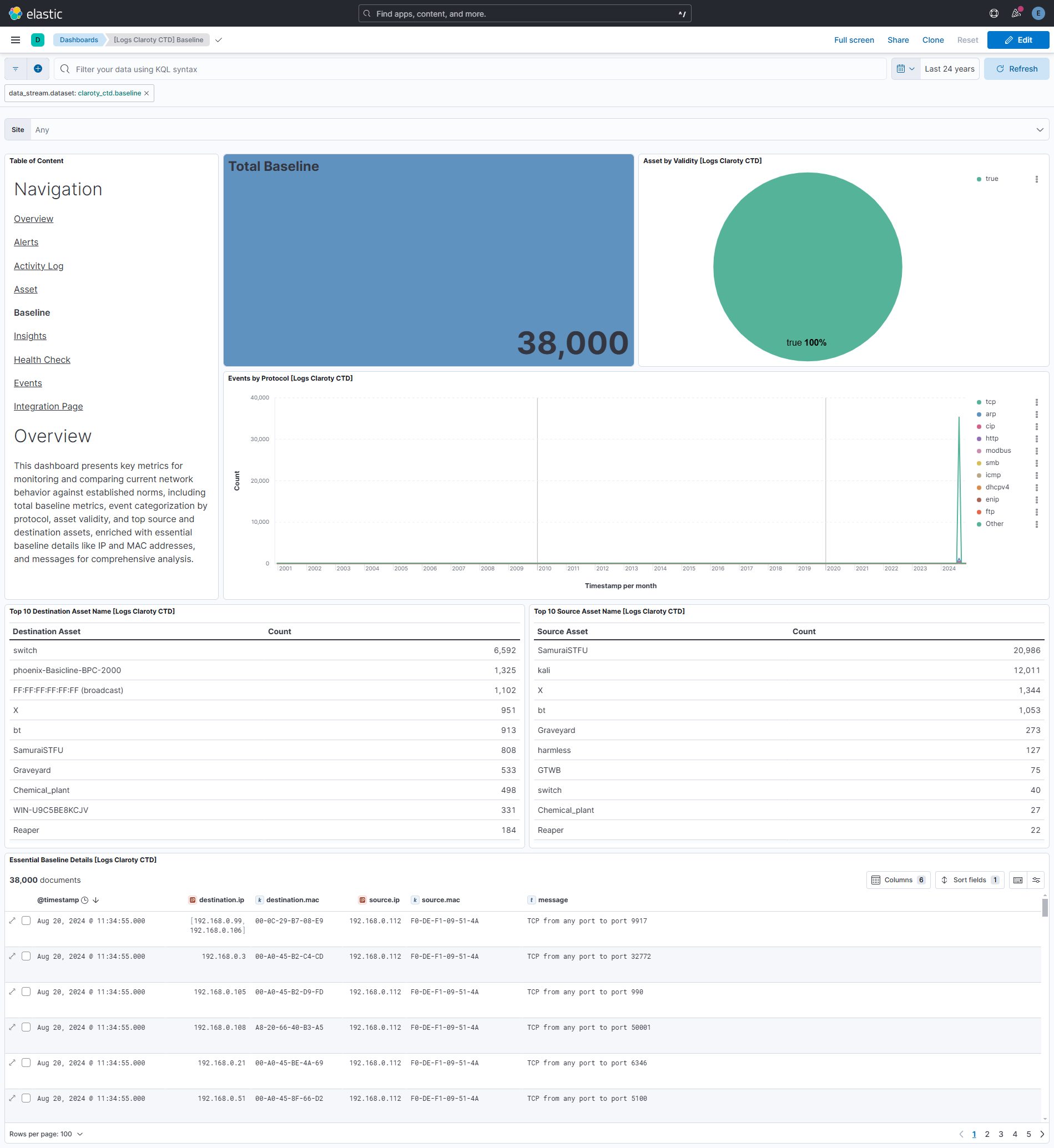
[Baseline] - Baseline is a collection of valid network behaviors. An individual baseline represents a command or an instance of communication between two assets.
The Claroty CTD integration collects logs for different events, but for syslog input we have combined all of those in one data stream named event.
Elastic Agent must be installed. For more details, check the Elastic Agent installation instructions. You can install only one Elastic Agent per host. Elastic Agent is required to stream data through the Syslog server and ship the data to Elastic, where the events will then be processed via the integration's ingest pipelines.
- To set up Claroty CTD, refer to the Installation Guide.
- To configure the syslog message types in Claroty CTD, refer to the Administration Guide.
- Claroty CTD supports multiple message formats, including RFC5424, CEF, and CEF(Latest). Currently, we recommend using the CEF(Latest) message format for optimal integration with Elastic.
- To set up Claroty CTD, refer to the Installation Guide.
- Obtain the credentials (username, password, and URL) that are generated during the setup process.
In Kibana navigate to Management > Integrations.
In the search bar, type Claroty CTD.
Select the Claroty CTD integration and add it.
To collect logs via TCP or UDP, enter the following details:
- Listen Address
- Listen Port
To collect logs via REST API, enter the following details:
- Username
- Password
- URL
This is the event dataset.
Example
{
"@timestamp": "2023-08-13T01:00:00.000Z",
"agent": {
"ephemeral_id": "dd0f88ed-3643-4c24-b2e5-b6ac693c12ea",
"id": "4c43ff7a-b186-4386-8f6c-ccea4bb3beb3",
"name": "elastic-agent-74704",
"type": "filebeat",
"version": "8.19.2"
},
"claroty_ctd": {
"event": {
"busy": {
"dm": {
"a_value": 0.77,
"value": 0.66
},
"fd": 0.11,
"sda": {
"a_value": 0.33,
"b_value": 0.44,
"value": 0.22
},
"sr": 0.55
},
"capsaver": {
"folder_cleanup": true
},
"class_id": "HealthCheck",
"conclude_time": 50,
"cpu": 12.21,
"ctrl_site": 48,
"dissection": {
"coverage": 44,
"efficiency": {
"dcerpc": 4.2345,
"factory_talk_rna": 6.2345,
"ge_ifix": 15.2345,
"http": 11.2345,
"jrmi": 14.2345,
"ldap": 13.2345,
"llc": 16.2345,
"matrikon_nopc": 17.2345,
"modbus": 2.2345,
"rdp": 9.2345,
"smb": 3.2345,
"ssh": 10.2345,
"ssl": 7.2345,
"tcp_http": 12.2345,
"vnc": 18.2345,
"vrrp_protocol_matcher": 8.2345,
"zabbix": 5.2345
}
},
"dissector_ng_packet_drops": 35,
"dropped_entities": 51,
"exceptions": 31,
"full_output_packet_drops": 34,
"input_packet_drops": 32,
"loop_call_duration": {
"baseline_tracker_wrker_handle_network_statistics": 1.2345,
"cloud_client_wrkr_base_run_cloud_connected": 22.2345,
"poll_objects": 21.2345
},
"memory": 13.31,
"message": "Successfully ran health monitoring",
"mysql_query": 19.2345,
"name": "Health",
"output_packet_drops": 33,
"postgres_query": 20.2345,
"psql_idle": {
"in_transaction_sessions": 53,
"sessions": 52
},
"queue": {
"baseline_tracker": 1,
"bridge": 2,
"central_bridge": 3,
"concluding": 4,
"diode_feeder": 5,
"dissector": {
"a_value": 7,
"ng": 8,
"value": 6
},
"indicator_service": 9,
"leecher": 10,
"monitor": 11,
"network_statistics": 12,
"packets": {
"count": 13,
"errors": 14
},
"preprocessing": {
"count": 15,
"ng": 16
},
"priority_processing": 17,
"processing": {
"count": 18,
"high": 19
},
"purge": 22,
"statistics_ng": 20,
"syslog": {
"alerts": 23,
"events": 24,
"insights": 25
},
"zordon_updates": 21
},
"read_count": {
"dissector": {
"a_value": 27,
"count": 26,
"ng": 28
},
"preprocessing": {
"count": 29,
"ng": 30
}
},
"real_time": "2023-08-14T01:00:00.000Z",
"sensor_name": "Sensor-1",
"service": {
"docker": "Down",
"firewalld": "Down",
"icsranger": "Down",
"jwthenticator": "Down",
"mariadb": "Down",
"netunnel": "Down",
"postgres": "Down",
"rabbit_mq": "Down",
"redis": "Down",
"watchdog": "Down"
},
"severity": 0,
"site": "Default",
"sniffer_status": {
"site": 23.2345
},
"tag_artifacts_drops": {
"dissector_pypy": {
"sum": 43,
"value": 42
},
"preprocessor": {
"sum": 37,
"value": 36
},
"processor": {
"sum": 39,
"value": 38
},
"sniffer": {
"sum": 41,
"value": 40
}
},
"time": "2023-08-13T01:00:00.000Z",
"unhandled_events": 49,
"used": {
"etc": 17.71,
"opt_icsranger": 14.41,
"tmp": 16.61,
"var": 15.51
},
"version": "0",
"worker": {
"active": {
"executer": {
"api": "Not Available",
"last_restart": "19316 days, 15 hrs, 56 min, 43 sec"
},
"value": {
"api": "Not Available",
"last_restart": "19316 days, 15 hrs, 56 min, 43 sec"
}
},
"authentication": {
"api": "Not Available",
"last_restart": "21 min, 18 sec"
},
"baseline_tracker": {
"api": "Not Available",
"last_restart": "19316 days, 15 hrs, 56 min, 43 sec"
},
"bridge": {
"api": "Not Available",
"last_restart": "19316 days, 15 hrs, 56 min, 43 sec"
},
"cacher": {
"api": "Not Available",
"last_restart": "19316 days, 15 hrs, 56 min, 43 sec"
},
"capsaver": {
"api": "Not Available",
"last_restart": "19 min, 17 sec"
},
"cloud": {
"agent": {
"api": "Not Available",
"last_restart": "19316 days, 15 hrs, 56 min, 43 sec"
},
"client": {
"api": "Not Available",
"last_restart": "19316 days, 15 hrs, 56 min, 43 sec"
}
},
"concluder": {
"api": "Not Available",
"last_restart": "19316 days, 15 hrs, 56 min, 43 sec"
},
"configurator": {
"nginx": {
"api": "Not Available",
"last_restart": "19 min, 17 sec"
},
"value": {
"api": "Available",
"last_restart": "21 min, 18 sec"
}
},
"dissector": {
"a_value": {
"api": "Available",
"last_restart": "18 min, 34 sec"
},
"value": {
"api": "Available",
"last_restart": "18 min, 34 sec"
}
},
"enricher": {
"api": "Not Available",
"last_restart": "19316 days, 15 hrs, 56 min, 43 sec"
},
"indicators": {
"api": {
"api": "Not Available",
"last_restart": "19316 days, 15 hrs, 56 min, 43 sec"
},
"value": {
"api": "Not Available",
"last_restart": "19316 days, 15 hrs, 56 min, 43 sec"
}
},
"insights": {
"api": "Not Available",
"last_restart": "19316 days, 15 hrs, 56 min, 43 sec"
},
"known_threats": {
"api": "Available",
"last_restart": "18 min, 58 sec"
},
"leecher": {
"api": "Not Available",
"last_restart": "19316 days, 15 hrs, 56 min, 43 sec"
},
"mailer": {
"api": "Not Available",
"last_restart": "19316 days, 15 hrs, 56 min, 43 sec"
},
"mitre": {
"api": "Not Available",
"last_restart": "19316 days, 15 hrs, 56 min, 43 sec"
},
"notifications": {
"api": "Not Available",
"last_restart": "19316 days, 15 hrs, 56 min, 43 sec"
},
"preprocessor": {
"api": "Not Available",
"last_restart": "19316 days, 15 hrs, 56 min, 43 sec"
},
"processor": {
"api": "Not Available",
"last_restart": "19316 days, 15 hrs, 56 min, 43 sec"
},
"scheduler": {
"api": "Available",
"last_restart": "21 min, 19 sec"
},
"sensor": {
"api": "Available",
"last_restart": "18 min, 34 sec"
},
"sync_manager": {
"api": "Not Available",
"last_restart": "19316 days, 15 hrs, 56 min, 43 sec"
},
"web": {
"auth": {
"api": "Not Available",
"last_restart": "21 min, 1 sec"
},
"nginx": {
"api": "Not Available",
"last_restart": "21 min, 1 sec"
},
"ranger": {
"api": "Not Available",
"last_restart": "21 min, 6 sec"
},
"ws": {
"api": "Not Available",
"last_restart": "21 min, 1 sec"
}
},
"workers": {
"restart": 47,
"stop": 46
}
},
"yara_scanner_test": 45
}
},
"data_stream": {
"dataset": "claroty_ctd.event",
"namespace": "85446",
"type": "logs"
},
"ecs": {
"version": "8.17.0"
},
"elastic_agent": {
"id": "4c43ff7a-b186-4386-8f6c-ccea4bb3beb3",
"snapshot": false,
"version": "8.19.2"
},
"event": {
"agent_id_status": "verified",
"dataset": "claroty_ctd.event",
"ingested": "2026-07-01T10:47:29Z",
"kind": "event",
"original": "<134>1 2023-08-15T01:00:00Z Site syslog-HealthCheck-Default - - - CEF:0|Claroty|CTD|4.10.0|HealthCheck|Health|0|CtdRealTime=Aug 14 2023 01:00:00 CtdTimeGenerated=Aug 13 2023 01:00:00 CtdMessage=Successfully ran health monitoring CtdSite=Default CtdCpu=12.21 CtdMem=13.31 CtdUsedOptIcsranger=14.41 CtdUsedVar=15.51 CtdUsedTmp=16.61 CtdUsedEtc=17.71 CtdBusyFd=0.11 CtdBusySda=0.22 CtdBusySdaA=0.33 CtdBusySdaB=0.44 CtdBusySr=0.55 CtdBusyDm=0.66 CtdBusyDmA=0.77 CtdQuBaselineTracker=1 CtdQuBridge=2 CtdQuCentralBridge=3 CtdQuConcluding=4 CtdQuDiodeFeeder=5 CtdQuDissector=6 CtdQuDissectorA=7 CtdQuDissectorNg=8 CtdQuIndicatorService=9 CtdQuLeecher=10 CtdQuMonitor=11 CtdQuNetworkStatistics=12 CtdQuPackets=13 CtdQuPacketsErrors=14 CtdQuPreprocessing=15 CtdQuPreprocessingNg=16 CtdQuPriorityProcessing=17 CtdQuProcessing=18 CtdQuProcessingHigh=19 CtdQuStatisticsNg=20 CtdQuZordonUpdates=21 CtdQueuePurge=22 CtdQuSyslogAlerts=23 CtdQuSyslogEvents=24 CtdQuSyslogInsights=25 CtdRdDissector=26 CtdRdDissectorA=27 CtdRdDissectorNg=28 CtdRdPreprocessing=29 CtdRdPreprocessingNg=30 CtdSvcMariaDb=Down CtdSvcPostgres=Down CtdSvcRedis=Down CtdSvcRabbitMq=Down CtdSvcIcsranger=Down CtdSvcWatchdog=Down CtdSvcFirewalld=Down CtdSvcNetunnel=Down CtdSvcJwthenticator=Down CtdSvcDocker=Down CtdExceptions=31 CtdInputPacketDrops=32 CtdOutputPacketDrops=33 CtdFullOutputPacketDrops=34 CtdDissectorNgPacketDrops=35 CtdTagArtifactsDropsPreprocessor=36 CtdTagArtifactsDropsPreprocessorSum=37 CtdTagArtifactsDropsProcessor=38 CtdTagArtifactsDropsProcessorSum=39 CtdTagArtifactsDropsSniffer=40 CtdTagArtifactsDropsSnifferSum=41 CtdTagArtifactsDropsDissectorPypy=42 CtdTagArtifactsDropsDissectorPypySum=43 CtdCapsaverFolderCleanup=TRUE CtdDissectionCoverage=44 CtdCapsaverUtilzationTest=N/A CtdYaraScannerTest=45 CtdWrkrWorkersStop=46 CtdWrkrWorkersRestart=47 CtdWrkrActiveExecuter={'api': 'Not Available', 'last_restart': '19316 days, 15 hrs, 56 min, 43 sec'} CtdWrkrSensor={'api': 'Available', 'last_restart': '18 min, 34 sec'} CtdWrkrAuthentication={'api': 'Not Available', 'last_restart': '21 min, 18 sec'} CtdWrkrMailer={'api': 'Not Available', 'last_restart': '19316 days, 15 hrs, 56 min, 43 sec'} CtdWrkrMitre={'api': 'Not Available', 'last_restart': '19316 days, 15 hrs, 56 min, 43 sec'} CtdWrkrNotifications={'api': 'Not Available', 'last_restart': '19316 days, 15 hrs, 56 min, 43 sec'} CtdWrkrProcessor={'api': 'Not Available', 'last_restart': '19316 days, 15 hrs, 56 min, 43 sec'} CtdWrkrCloudAgent={'api': 'Not Available', 'last_restart': '19316 days, 15 hrs, 56 min, 43 sec'} CtdWrkrCloudClient={'api': 'Not Available', 'last_restart': '19316 days, 15 hrs, 56 min, 43 sec'} CtdWrkrScheduler={'api': 'Available', 'last_restart': '21 min, 19 sec'} CtdWrkrknownThreats={'api': 'Available', 'last_restart': '18 min, 58 sec'} CtdWrkrCacher={'api': 'Not Available', 'last_restart': '19316 days, 15 hrs, 56 min, 43 sec'} CtdWrkrInsights={'api': 'Not Available', 'last_restart': '19316 days, 15 hrs, 56 min, 43 sec'} CtdWrkrActive={'api': 'Not Available', 'last_restart': '19316 days, 15 hrs, 56 min, 43 sec'} CtdWrkrEnricher={'api': 'Not Available', 'last_restart': '19316 days, 15 hrs, 56 min, 43 sec'} CtdWrkrIndicators={'api': 'Not Available', 'last_restart': '19316 days, 15 hrs, 56 min, 43 sec'} CtdWrkrIndicatorsApi={'api': 'Not Available', 'last_restart': '19316 days, 15 hrs, 56 min, 43 sec'} CtdWrkrConcluder={'api': 'Not Available', 'last_restart': '19316 days, 15 hrs, 56 min, 43 sec'} CtdWrkrPreprocessor={'api': 'Not Available', 'last_restart': '19316 days, 15 hrs, 56 min, 43 sec'} CtdWrkrLeecher={'api': 'Not Available', 'last_restart': '19316 days, 15 hrs, 56 min, 43 sec'} CtdWrkrSyncManager={'api': 'Not Available', 'last_restart': '19316 days, 15 hrs, 56 min, 43 sec'} CtdWrkrBridge={'api': 'Not Available', 'last_restart': '19316 days, 15 hrs, 56 min, 43 sec'} CtdWrkrWebRanger={'api': 'Not Available', 'last_restart': '21 min, 6 sec'} CtdWrkrWebWs={'api': 'Not Available', 'last_restart': '21 min, 1 sec'} CtdWrkrWebAuth={'api': 'Not Available', 'last_restart': '21 min, 1 sec'} CtdWrkrWebNginx={'api': 'Not Available', 'last_restart': '21 min, 1 sec'} CtdWrkrConfigurator={'api': 'Available', 'last_restart': '21 min, 18 sec'} CtdWrkrConfiguratorNginx={'api': 'Not Available', 'last_restart': '19 min, 17 sec'} CtdWrkrCapsaver={'api': 'Not Available', 'last_restart': '19 min, 17 sec'} CtdWrkrBaselineTracker={'api': 'Not Available', 'last_restart': '19316 days, 15 hrs, 56 min, 43 sec'} CtdWrkrDissector={'api': 'Available', 'last_restart': '18 min, 34 sec'} CtdWrkrDissectorA={'api': 'Available', 'last_restart': '18 min, 34 sec'} CtdSensorName=Sensor-1 CtdCtrlSite=48 CtdLoopCallDurationBaselineTrackerWrkerHandleNetworkStatistics=1.2345 CtdDissectionEfficiencyModbus=2.2345 CtdDissectionEfficiencySmb=3.2345 CtdDissectionEfficiencyDcerpc=4.2345 CtdDissectionEfficiencyZabbix=5.2345 CtdDissectionEfficiencyFactorytalkRna=6.2345 CtdDissectionEfficiencySsl=7.2345 CtdDissectionEfficiencyVrrpProtocolMatcher=8.2345 CtdDissectionEfficiencyRdp=9.2345 CtdDissectionEfficiencySsh=10.2345 CtdDissectionEfficiencyHttp=11.2345 CtdDissectionEfficiencyTcpHttp=12.2345 CtdDissectionEfficiencyLdap=13.2345 CtdDissectionEfficiencyJrmi=14.2345 CtdDissectionEfficiencyGeIfix=15.2345 CtdDissectionEfficiencyLlc=16.2345 CtdDissectionEfficiencyMatrikonNopc=17.2345 CtdDissectionEfficiencyVnc=18.2345 CtdUnhandledEvents=49 CtdConcludeTime=50 CtdMysqlQuery=19.2345 CtdPostgresQuery=20.2345 CtdDroppedEntities=51 CtdPsqlIdleSessions=52 CtdPsqlIdleInTransactionSessions=53 CtdSnifferStatus=N/A CtdLoopCallDurationPollObjects=21.2345 CtdLoopCallDurationCloudClientWrkrBaseRunCloudConnected=22.2345 CtdSnifferStatusCentral=N/A CtdSnifferStatusSite=23.2345"
},
"host": {
"cpu": {
"usage": 12.21
}
},
"input": {
"type": "udp"
},
"log": {
"source": {
"address": "172.19.0.3:36529"
}
},
"message": "Successfully ran health monitoring",
"observer": {
"hostname": "Default",
"product": "CTD",
"vendor": "Claroty",
"version": "4.10.0"
},
"tags": [
"preserve_original_event",
"preserve_duplicate_custom_fields",
"forwarded",
"claroty_ctd-event"
]
}
Exported fields
| Field | Description | Type |
|---|---|---|
| @timestamp | Event timestamp. | date |
| claroty_ctd.event.action.status | Describes the final Status for the Activity Log (e.g. Info, Failure, Success, etc.). | keyword |
| claroty_ctd.event.action.value | Action of the Activity Log (e.g. Added, Removed, Updated, Created, etc.). | keyword |
| claroty_ctd.event.alert.id | The ID of the Alert. | keyword |
| claroty_ctd.event.alert.link | URL for viewing the event in CTD. | keyword |
| claroty_ctd.event.alert.score | Alerts are scored from a scale of 0 through 100. Actual alert score can be higher than 100 depending on the sum of various indicator scores, however it is capped at max 100. | long |
| claroty_ctd.event.alert.status | Used to differentiate alerts with an Unresolved vs. Resolved status. Because resolved alerts are not sent by default, this field is empty. To enable receiving resolved alerts in Syslog, use this CLI command: lm set_config report_resolved_alerts True lm rw notifications. | keyword |
| claroty_ctd.event.alert.type_id | The Class ID of the Alert (As it is in CTD's Back-end). | keyword |
| claroty_ctd.event.application | Application used in this Insight. | keyword |
| claroty_ctd.event.assigned_to | Name of the user who was assigned to this Alert. | keyword |
| claroty_ctd.event.busy.dm.a_value | How frequently the particular disk partition is in use (as a percentage between 0 and 1. | double |
| claroty_ctd.event.busy.dm.value | How frequently the particular disk partition is in use (as a percentage between 0 and 1. | double |
| claroty_ctd.event.busy.fd | How frequently the particular disk partition is in use (as a percentage between 0 and 1. | double |
| claroty_ctd.event.busy.sda.a_value | How frequently the particular disk partition is in use (as a percentage between 0 and 1. | double |
| claroty_ctd.event.busy.sda.b_value | How frequently the particular disk partition is in use (as a percentage between 0 and 1. | double |
| claroty_ctd.event.busy.sda.value | How frequently the particular disk partition is in use (as a percentage between 0 and 1. | double |
| claroty_ctd.event.busy.sr | How frequently the particular disk partition is in use (as a percentage between 0 and 1. | double |
| claroty_ctd.event.capsaver.folder_cleanup | boolean | |
| claroty_ctd.event.capsaver.utilzation_test | keyword | |
| claroty_ctd.event.category | Category/Type of the Alert. | keyword |
| claroty_ctd.event.class_id | CEF Event Class ID. | keyword |
| claroty_ctd.event.class_type | CEF Event Class type for alert and event. | keyword |
| claroty_ctd.event.community | In Insights involving SNMP queries this will mention the community type used during the authentication. | keyword |
| claroty_ctd.event.conclude_time | long | |
| claroty_ctd.event.cpu | CPU Utilization: CPU load average as a percentage of the total available CPU capacity (including all available cores). | double |
| claroty_ctd.event.ctrl_site | double | |
| claroty_ctd.event.cve.id | Unique identifier of the CVE. | keyword |
| claroty_ctd.event.cve.modified_date | The date and time the CVE was modified by global security community. | date |
| claroty_ctd.event.cve.pipe_service | In Insights involving SMB access, this will list the pipe service that was accessed. | keyword |
| claroty_ctd.event.cve.publish_date | The date and time the CVE was found by global security community. | date |
| claroty_ctd.event.cve.score | CVSS - Common Vulnerability Scoring System score (0-10). | double |
| claroty_ctd.event.default_password | Checks if the Asset uses a default password. | boolean |
| claroty_ctd.event.destination.asset_type | The asset type of the secondary asset, e.g. Engineering Station If multiple destinations exist, they won't be presented. | keyword |
| claroty_ctd.event.destination.host | The host name of the secondary asset involved in the Alert. May be FQDN or hostname. | keyword |
| claroty_ctd.event.destination.ip | The IPv4 address of the secondary asset involved in the Alert. | ip |
| claroty_ctd.event.destination.mac | The MAC address of the secondary asset involved in the Alert. | keyword |
| claroty_ctd.event.destination.zone | Destination Zone Name If multiple destinations exist, they won't be presented. | keyword |
| claroty_ctd.event.device_external_id | Name of the site generating the message. | keyword |
| claroty_ctd.event.dissection.coverage | long | |
| claroty_ctd.event.dissection.efficiency.dcerpc | double | |
| claroty_ctd.event.dissection.efficiency.factory_talk_rna | double | |
| claroty_ctd.event.dissection.efficiency.ge_ifix | double | |
| claroty_ctd.event.dissection.efficiency.http | double | |
| claroty_ctd.event.dissection.efficiency.jrmi | double | |
| claroty_ctd.event.dissection.efficiency.ldap | double | |
| claroty_ctd.event.dissection.efficiency.llc | double | |
| claroty_ctd.event.dissection.efficiency.matrikon_nopc | double | |
| claroty_ctd.event.dissection.efficiency.modbus | double | |
| claroty_ctd.event.dissection.efficiency.rdp | double | |
| claroty_ctd.event.dissection.efficiency.smb | double | |
| claroty_ctd.event.dissection.efficiency.ssh | double | |
| claroty_ctd.event.dissection.efficiency.ssl | double | |
| claroty_ctd.event.dissection.efficiency.tcp_http | double | |
| claroty_ctd.event.dissection.efficiency.vnc | double | |
| claroty_ctd.event.dissection.efficiency.vrrp_protocol_matcher | double | |
| claroty_ctd.event.dissection.efficiency.zabbix | double | |
| claroty_ctd.event.dissector_ng_packet_drops | long | |
| claroty_ctd.event.dropped_entities | The number of entities dropped by the system due to reaching the limit of number of entities. | long |
| claroty_ctd.event.end_of_life_date | In Unsupported OS Insights, this presented the End of Life date for the primary asset of this insight. | date |
| claroty_ctd.event.event_type_id | The Class ID of the Event (As it is in CTD's Back-end). | keyword |
| claroty_ctd.event.exceptions | The number of new logged exceptions. | long |
| claroty_ctd.event.external.id | The ID of the Alert. | keyword |
| claroty_ctd.event.external.links | More information about publicly available signatures. | keyword |
| claroty_ctd.event.file_path | The filepath or file share envolved in the Insight. | keyword |
| claroty_ctd.event.full_output_packet_drops | long | |
| claroty_ctd.event.input_packet_drops | long | |
| claroty_ctd.event.insight.password_plaintext | Checks if the Asset implements a protocol that transfers data in plain-text. | boolean |
| claroty_ctd.event.insight.state | Describes the PLC’s state. | keyword |
| claroty_ctd.event.insight.user | The User name involved in the Insight. | keyword |
| claroty_ctd.event.insights.protocol | The Protocol envolved in the Insight. | keyword |
| claroty_ctd.event.insights.protocol_version | The Version of the Protocol envolved in the Insight. | keyword |
| claroty_ctd.event.insights.severity | Indicates the Insight Severity (Low, Medium, and High). | keyword |
| claroty_ctd.event.is_ghost | In Insights involving communication with other IP’s this will describe if the external IP’s are Ghost assets or real assets. | boolean |
| claroty_ctd.event.last_managed | In Insights involving managed PLC’s this will present the date when it was last managed. | date |
| claroty_ctd.event.log_type | Describes the level type that created the Activity Log (e.g. System or User.). | keyword |
| claroty_ctd.event.loop_call_duration.baseline_tracker_wrker_handle_network_statistics | double | |
| claroty_ctd.event.loop_call_duration.cloud_client_wrkr_base_run_cloud_connected | double | |
| claroty_ctd.event.loop_call_duration.poll_objects | double | |
| claroty_ctd.event.memory | Memory Usage: The percent of current memory consumption.The value is a number between 0 and 100. | double |
| claroty_ctd.event.message | Full description of the message. | keyword |
| claroty_ctd.event.method | The query method used in the Insight. | keyword |
| claroty_ctd.event.mitre_attack.tactic_names | The MITRE ATT&CK® for ICS framework Tactic that are mapped to this Alert. | keyword |
| claroty_ctd.event.mitre_attack.technique_ids | The MITRE ATT&CK® for ICS framework Techniques that are mapped to this Alert. | keyword |
| claroty_ctd.event.model | This presented the model of the primary asset of this insight. | keyword |
| claroty_ctd.event.mysql_query | MySQL Query time, in seconds. | double |
| claroty_ctd.event.name | CEF Event Name. | keyword |
| claroty_ctd.event.no_password | Checks if the Asset has no password. | boolean |
| claroty_ctd.event.number_of.accesed_client | For Insights presenting assets that are identified as web servers, this field will show the clients connecting to this web server. | long |
| claroty_ctd.event.number_of.interface | For Insights presenting assets with multiple interfaces, this field will show the number of interfaces on the specific asset. | long |
| claroty_ctd.event.number_of.neighbours | In Insights presenting the highly Connected Assets, this field will show the number of connected assets. | long |
| claroty_ctd.event.operating_system | This presented the Operating System of the primary asset of this insight. | keyword |
| claroty_ctd.event.output_packet_drops | long | |
| claroty_ctd.event.postgres_query | Postgres Query time, in seconds. | double |
| claroty_ctd.event.protocol | Protocol used within the Alert. | keyword |
| claroty_ctd.event.psql_idle.in_transaction_sessions | long | |
| claroty_ctd.event.psql_idle.sessions | long | |
| claroty_ctd.event.queue.baseline_tracker | Baseline Tracker queue message count. | long |
| claroty_ctd.event.queue.bridge | Bridge queue message count. | long |
| claroty_ctd.event.queue.central_bridge | CentralBridge queue message count. | long |
| claroty_ctd.event.queue.concluding | Concluding queue message count. | long |
| claroty_ctd.event.queue.diode_feeder | DiodeFeeder queue message count. | long |
| claroty_ctd.event.queue.dissector.a_value | DissectorA queue message count. | long |
| claroty_ctd.event.queue.dissector.ng | DissectorNg queue message count. | long |
| claroty_ctd.event.queue.dissector.value | Dissector queue message count. | long |
| claroty_ctd.event.queue.indicator_service | IndicatorService queue message count. | long |
| claroty_ctd.event.queue.leecher | Leecher queue message count. | long |
| claroty_ctd.event.queue.monitor | Monitor queue message count. | long |
| claroty_ctd.event.queue.network_statistics | NetworkStatistics queue message count. | long |
| claroty_ctd.event.queue.packets.count | Packets queue message count. | long |
| claroty_ctd.event.queue.packets.errors | PacketsErrors queue message count. | long |
| claroty_ctd.event.queue.preprocessing.count | Preprocessing queue message count. | long |
| claroty_ctd.event.queue.preprocessing.ng | PreprocessingNg queue message count. | long |
| claroty_ctd.event.queue.priority_processing | PriorityProcessing queue message count. | long |
| claroty_ctd.event.queue.processing.count | Processing queue message count. | long |
| claroty_ctd.event.queue.processing.high | ProcessingHigh queue message count. | long |
| claroty_ctd.event.queue.purge | Purge queue message count. | long |
| claroty_ctd.event.queue.statistics_ng | StatisticsNg queue message count. | long |
| claroty_ctd.event.queue.syslog.alerts | SyslogSlerts queue message count. | long |
| claroty_ctd.event.queue.syslog.events | SyslogEvents queue message count. | long |
| claroty_ctd.event.queue.syslog.insights | SyslogInsights queue message count. | long |
| claroty_ctd.event.queue.zordon_updates | ZordonUpdates queue message count. | long |
| claroty_ctd.event.read_count.dissector.a_value | The queue read count for each component. | long |
| claroty_ctd.event.read_count.dissector.count | The queue read count for each component. | long |
| claroty_ctd.event.read_count.dissector.ng | The queue read count for each component. | long |
| claroty_ctd.event.read_count.preprocessing.count | The queue read count for each component. | long |
| claroty_ctd.event.read_count.preprocessing.ng | The queue read count for each component. | long |
| claroty_ctd.event.real_time | Timestamp of HealthCheck creation. | date |
| claroty_ctd.event.resolved.as | Type of resolution. (Unresolved, Valid, Incident, Training, User Alert Rules, Unqualified, Ignore, Acknowledge, Auto Approved With No Expiration, Auto Approved With Expiration, Auto Archived With No Expiration, Auto Archived With Expiration). Because resolved alerts are not sent by default, this field is empty. To enable receiving resolved alerts in Syslog, use this CLI command: lm set_config report_resolved_alerts True lm rw notifications. | keyword |
| claroty_ctd.event.resolved.by | Name of the user (or System) who resolved the Alert. Because resolved alerts are not sent by default, this field is empty. To enable receiving resolved alerts in Syslog, use this CLI command: lm set_config report_resolved_alerts True lm rw notifications. | keyword |
| claroty_ctd.event.risk_score | In Insights presenting the top risky assets, this will present the risk for the specific asset. | long |
| claroty_ctd.event.sensor_name | keyword | |
| claroty_ctd.event.series | This presented the series of the primary asset of this insight. | keyword |
| claroty_ctd.event.service.docker | Whether the service is running (Up or Down). | keyword |
| claroty_ctd.event.service.firewalld | Whether the service is running (Up or Down). | keyword |
| claroty_ctd.event.service.icsranger | Whether the service is running (Up or Down). | keyword |
| claroty_ctd.event.service.jwthenticator | Whether the service is running (Up or Down). | keyword |
| claroty_ctd.event.service.mariadb | Whether the service is running (Up or Down). | keyword |
| claroty_ctd.event.service.netunnel | Whether the service is running (Up or Down). | keyword |
| claroty_ctd.event.service.postgres | Whether the service is running (Up or Down). | keyword |
| claroty_ctd.event.service.rabbit_mq | Whether the service is running (Up or Down). | keyword |
| claroty_ctd.event.service.redis | Whether the service is running (Up or Down). | keyword |
| claroty_ctd.event.service.watchdog | Whether the service is running (Up or Down). | keyword |
| claroty_ctd.event.severity | CEF Event Severity. | long |
| claroty_ctd.event.signature.confidence | A score representing the probability that a communication event that triggers the signature is a network threat. Expressed on a scale of 1% to 100%, It is calculated using a combination of signature parameters and Claroty research, and does not apply to user-powered signatures. | keyword |
| claroty_ctd.event.signature.criticality | A score calculated using a combination of signature parameters and Claroty research. Possible values include Low, Medium, High, and Critical. This score is not calculated for user-powered signatures. | keyword |
| claroty_ctd.event.signature.id | ID number assigned to the signature by its creator. | keyword |
| claroty_ctd.event.signature.last_updated | Date this revision was last updated by its creator. | date |
| claroty_ctd.event.signature.name | Name assigned to the signature by its creator. | keyword |
| claroty_ctd.event.signature.powered_by | Creator and maintainer of the signature. Options include: Claroty - Signatures created by Team82 or by Claroty's data team Emerging Threats, Other - Publicly available signatures Username of the user who uploaded the signature User - User-powered signatures created in a version earlier than v4.8.0. | keyword |
| claroty_ctd.event.signature.tags | Attack types and other enriched signature information. | keyword |
| claroty_ctd.event.site | The ID of the site. | keyword |
| claroty_ctd.event.sniffer_status.central | keyword | |
| claroty_ctd.event.sniffer_status.site | double | |
| claroty_ctd.event.sniffer_status.value | keyword | |
| claroty_ctd.event.source.asset_type | The asset type of the primary asset, e.g. Engineering Station. | keyword |
| claroty_ctd.event.source.host | The host name of the Primary asset involved in the Alert. May be FQDN or hostname. | keyword |
| claroty_ctd.event.source.ip | The IPv4 address of the primary asset involved in the Alert. | ip |
| claroty_ctd.event.source.mac | The MAC address of the primary asset involved in the Alert. | keyword |
| claroty_ctd.event.source.zone | Source Zone Name. | keyword |
| claroty_ctd.event.story_id | The Story ID for which this Alert is correlated. | keyword |
| claroty_ctd.event.tag_artifacts_drops.dissector_pypy.sum | long | |
| claroty_ctd.event.tag_artifacts_drops.dissector_pypy.value | long | |
| claroty_ctd.event.tag_artifacts_drops.preprocessor.sum | long | |
| claroty_ctd.event.tag_artifacts_drops.preprocessor.value | long | |
| claroty_ctd.event.tag_artifacts_drops.processor.sum | long | |
| claroty_ctd.event.tag_artifacts_drops.processor.value | long | |
| claroty_ctd.event.tag_artifacts_drops.sniffer.sum | long | |
| claroty_ctd.event.tag_artifacts_drops.sniffer.value | long | |
| claroty_ctd.event.time | Timestamp of Alert creation Format is: MMM dd yyyy HH:mm:ss Timezone should be UTC. | date |
| claroty_ctd.event.unhandled_events | The number of events that have not been handled by the system. | long |
| claroty_ctd.event.used.etc | The percent of disk space currently used in this particular directory. | double |
| claroty_ctd.event.used.opt_icsranger | The percent of disk space currently used in this particular directory. | double |
| claroty_ctd.event.used.tmp | The percent of disk space currently used in this particular directory. | double |
| claroty_ctd.event.used.var | The percent of disk space currently used in this particular directory. | double |
| claroty_ctd.event.user | The User name involved in the Activity Log. | keyword |
| claroty_ctd.event.version | CEF Event Version. | keyword |
| claroty_ctd.event.worker.active.executer.api | keyword | |
| claroty_ctd.event.worker.active.executer.last_restart | keyword | |
| claroty_ctd.event.worker.active.value.api | keyword | |
| claroty_ctd.event.worker.active.value.last_restart | keyword | |
| claroty_ctd.event.worker.authentication.api | keyword | |
| claroty_ctd.event.worker.authentication.last_restart | keyword | |
| claroty_ctd.event.worker.baseline_tracker.api | keyword | |
| claroty_ctd.event.worker.baseline_tracker.last_restart | keyword | |
| claroty_ctd.event.worker.bridge.api | keyword | |
| claroty_ctd.event.worker.bridge.last_restart | keyword | |
| claroty_ctd.event.worker.cacher.api | keyword | |
| claroty_ctd.event.worker.cacher.last_restart | keyword | |
| claroty_ctd.event.worker.capsaver.api | keyword | |
| claroty_ctd.event.worker.capsaver.last_restart | keyword | |
| claroty_ctd.event.worker.cloud.agent.api | keyword | |
| claroty_ctd.event.worker.cloud.agent.last_restart | keyword | |
| claroty_ctd.event.worker.cloud.client.api | keyword | |
| claroty_ctd.event.worker.cloud.client.last_restart | keyword | |
| claroty_ctd.event.worker.concluder.api | keyword | |
| claroty_ctd.event.worker.concluder.last_restart | keyword | |
| claroty_ctd.event.worker.configurator.nginx.api | keyword | |
| claroty_ctd.event.worker.configurator.nginx.last_restart | keyword | |
| claroty_ctd.event.worker.configurator.value.api | keyword | |
| claroty_ctd.event.worker.configurator.value.last_restart | keyword | |
| claroty_ctd.event.worker.dissector.a_value.api | keyword | |
| claroty_ctd.event.worker.dissector.a_value.last_restart | keyword | |
| claroty_ctd.event.worker.dissector.value.api | keyword | |
| claroty_ctd.event.worker.dissector.value.last_restart | keyword | |
| claroty_ctd.event.worker.enricher.api | keyword | |
| claroty_ctd.event.worker.enricher.last_restart | keyword | |
| claroty_ctd.event.worker.indicators.api.api | keyword | |
| claroty_ctd.event.worker.indicators.api.last_restart | keyword | |
| claroty_ctd.event.worker.indicators.value.api | keyword | |
| claroty_ctd.event.worker.indicators.value.last_restart | keyword | |
| claroty_ctd.event.worker.insights.api | keyword | |
| claroty_ctd.event.worker.insights.last_restart | keyword | |
| claroty_ctd.event.worker.known_threats.api | keyword | |
| claroty_ctd.event.worker.known_threats.last_restart | keyword | |
| claroty_ctd.event.worker.leecher.api | keyword | |
| claroty_ctd.event.worker.leecher.last_restart | keyword | |
| claroty_ctd.event.worker.mailer.api | keyword | |
| claroty_ctd.event.worker.mailer.last_restart | keyword | |
| claroty_ctd.event.worker.mitre.api | keyword | |
| claroty_ctd.event.worker.mitre.last_restart | keyword | |
| claroty_ctd.event.worker.notifications.api | keyword | |
| claroty_ctd.event.worker.notifications.last_restart | keyword | |
| claroty_ctd.event.worker.preprocessor.api | keyword | |
| claroty_ctd.event.worker.preprocessor.last_restart | keyword | |
| claroty_ctd.event.worker.processor.api | keyword | |
| claroty_ctd.event.worker.processor.last_restart | keyword | |
| claroty_ctd.event.worker.scheduler.api | keyword | |
| claroty_ctd.event.worker.scheduler.last_restart | keyword | |
| claroty_ctd.event.worker.sensor.api | keyword | |
| claroty_ctd.event.worker.sensor.last_restart | keyword | |
| claroty_ctd.event.worker.sync_manager.api | keyword | |
| claroty_ctd.event.worker.sync_manager.last_restart | keyword | |
| claroty_ctd.event.worker.web.auth.api | keyword | |
| claroty_ctd.event.worker.web.auth.last_restart | keyword | |
| claroty_ctd.event.worker.web.nginx.api | keyword | |
| claroty_ctd.event.worker.web.nginx.last_restart | keyword | |
| claroty_ctd.event.worker.web.ranger.api | keyword | |
| claroty_ctd.event.worker.web.ranger.last_restart | keyword | |
| claroty_ctd.event.worker.web.ws.api | keyword | |
| claroty_ctd.event.worker.web.ws.last_restart | keyword | |
| claroty_ctd.event.worker.workers.restart | The total number of workers restarted. | long |
| claroty_ctd.event.worker.workers.stop | The total number of stopped workers. | long |
| claroty_ctd.event.yara_scanner_test | long | |
| data_stream.dataset | Data stream dataset. | constant_keyword |
| data_stream.namespace | Data stream namespace. | constant_keyword |
| data_stream.type | Data stream type. | constant_keyword |
| event.dataset | Event dataset. | constant_keyword |
| event.module | Event module. | constant_keyword |
| input.type | Type of filebeat input. | keyword |
| log.offset | Log offset. | long |
| log.source.address | Source address from which the log event read/sent. | keyword |
| tags | User defined tags. | keyword |
| threat.indicator.modified_at | The date and time when intelligence source last modified information for this indicator. | date |
This is the asset dataset.
Example
{
    "@timestamp": "2024-07-24T15:09:48.000Z",
    "agent": {
        "ephemeral_id": "d199e337-7b77-42d1-a048-a611dcf19fb1",
        "id": "671d5add-3e0f-4f27-8026-edead5ed2347",
        "name": "elastic-agent-75776",
        "type": "filebeat",
        "version": "8.16.0"
    },
    "claroty_ctd": {
        "asset": {
            "approved": true,
            "asset_types": {
                "name": "eHMI",
                "number": 1
            },
            "class_type": "OT",
            "criticalities": {
                "name": "eLow",
                "value": 0
            },
            "custom_attributes": {
                "asset_id": "1",
                "category": {
                    "description": "sdfas",
                    "id": "1",
                    "name": "Some Asset",
                    "resource_id": "1-1",
                    "site_id": "1"
                },
                "id": "1",
                "resource_id": "1-1",
                "site_id": "1",
                "value": "some value"
            },
            "first_seen": "2023-04-17T07:30:15.000Z",
            "ghost": false,
            "id": "1",
            "insight_names": [
                "Managed PLCs (by Rockwell users)",
                "Privileged Operations (Operated PLCs)"
            ],
            "installed_programs_count": 0,
            "ipv4": "1.128.0.0",
            "last_entity_seen": "2023-04-17T07:36:30.000Z",
            "last_seen": "2023-04-17T07:36:30.000Z",
            "last_updated": "2024-07-24T15:09:48.000Z",
            "name": "1.128.0.0",
            "network": {
                "id": "1",
                "name": "Default",
                "resource_id": "1-1",
                "site_id": "1"
            },
            "network_id": "1",
            "num_alerts": 0,
            "parsed": false,
            "patch_count": 0,
            "protocol": [
                "CIP",
                "ENIP",
                "PCCC",
                "TCP"
            ],
            "purdue_level": 2,
            "resource_id": "1-1",
            "risk_level": 0,
            "site_id": "1",
            "site_name": "site-10-0-11-136",
            "special_hints": {
                "name": "eUnicast",
                "value": 0
            },
            "subnet_id": "1",
            "timestamp": "2023-04-17T07:30:15.000Z",
            "usb_devices_count": 0,
            "valid": true,
            "virtual_zone": {
                "id": "2",
                "name": "HMI: Rockwell"
            }
        }
    },
    "data_stream": {
        "dataset": "claroty_ctd.asset",
        "namespace": "80333",
        "type": "logs"
    },
    "ecs": {
        "version": "8.17.0"
    },
    "elastic_agent": {
        "id": "671d5add-3e0f-4f27-8026-edead5ed2347",
        "snapshot": false,
        "version": "8.16.0"
    },
    "event": {
        "agent_id_status": "verified",
        "category": [
            "host"
        ],
        "dataset": "claroty_ctd.asset",
        "ingested": "2025-07-08T10:54:46Z",
        "kind": "event",
        "module": "claroty_ctd",
        "original": "{\"active_queries_names\":[],\"active_tasks_names\":[],\"approved\":true,\"asset_type\":1,\"asset_type__\":\"eHMI\",\"children\":[],\"class_type\":\"OT\",\"code_sections\":[],\"criticality\":0,\"criticality__\":\"eLow\",\"custom_attributes\":[{\"asset_id\":1,\"category\":{\"description\":\"sdfas\",\"id\":1,\"name\":\"Some Asset\",\"resource_id\":\"1-1\",\"site_id\":1},\"id\":1,\"resource_id\":\"1-1\",\"site_id\":1,\"value\":\"some value\"}],\"custom_informations\":[],\"default_gateway\":null,\"display_name\":null,\"domain_workgroup\":null,\"edge_id\":null,\"edge_last_run\":null,\"first_seen\":\"2023-04-17T07:30:15+00:00\",\"ghost\":false,\"id\":1,\"insight_names\":[\"Managed PLCs (by Rockwell users)\",\"Privileged Operations (Operated PLCs)\"],\"installed_antivirus\":null,\"installed_programs_count\":0,\"ipv4\":[\"1.128.0.0\"],\"last_entity_seen\":\"2023-04-17T07:36:30+00:00\",\"last_seen\":\"2023-04-17T07:36:30+00:00\",\"last_updated\":\"2024-07-24T15:09:48+00:00\",\"name\":\"1.128.0.0\",\"network\":{\"id\":1,\"name\":\"Default\",\"resource_id\":\"1-1\",\"site_id\":1},\"network_id\":1,\"num_alerts\":0,\"os_architecture\":null,\"os_build\":null,\"os_revision\":null,\"os_service_pack\":null,\"parsed\":false,\"patch_count\":0,\"project_parsed\":null,\"protocol\":[\"CIP\",\"ENIP\",\"PCCC\",\"TCP\"],\"purdue_level\":2,\"resource_id\":\"1-1\",\"risk_level\":0,\"site_id\":1,\"site_name\":\"site-10-0-11-136\",\"special_hint\":0,\"special_hint__\":\"eUnicast\",\"state\":null,\"subnet\":{\"name\":\"1.128.0.0\"},\"subnet_id\":1,\"subnet_type\":0,\"timestamp\":\"2023-04-17T07:30:15+00:00\",\"usb_devices_count\":0,\"valid\":true,\"virtual_zone_id\":2,\"virtual_zone_name\":\"HMI: Rockwell\"}",
        "severity": 0,
        "type": [
            "info"
        ]
    },
    "host": {
        "id": "1",
        "name": "1.128.0.0"
    },
    "input": {
        "type": "cel"
    },
    "network": {
        "name": "Default",
        "protocol": [
            "cip",
            "enip",
            "pccc",
            "tcp"
        ]
    },
    "related": {
        "ip": [
            "1.128.0.0"
        ]
    },
    "tags": [
        "preserve_original_event",
        "preserve_duplicate_custom_fields",
        "forwarded",
        "claroty_ctd-asset"
    ]
}
Exported fields
| Field | Description | Type |
|---|---|---|
| @timestamp | Event timestamp. | date |
| claroty_ctd.asset.active.queries_names | keyword | |
| claroty_ctd.asset.active.scans_names | keyword | |
| claroty_ctd.asset.active.tasks_names | keyword | |
| claroty_ctd.asset.approved | boolean | |
| claroty_ctd.asset.asset_types.name | keyword | |
| claroty_ctd.asset.asset_types.number | long | |
| claroty_ctd.asset.children.active_queries_names | keyword | |
| claroty_ctd.asset.children.active_tasks_names | keyword | |
| claroty_ctd.asset.children.address | keyword | |
| claroty_ctd.asset.children.approved | boolean | |
| claroty_ctd.asset.children.asset_types.name | keyword | |
| claroty_ctd.asset.children.asset_types.number | long | |
| claroty_ctd.asset.children.class_type | keyword | |
| claroty_ctd.asset.children.criticalities.name | keyword | |
| claroty_ctd.asset.children.criticalities.value | long | |
| claroty_ctd.asset.children.custom_informations.category | long | |
| claroty_ctd.asset.children.custom_informations.display_key | keyword | |
| claroty_ctd.asset.children.custom_informations.key | keyword | |
| claroty_ctd.asset.children.custom_informations.priority | long | |
| claroty_ctd.asset.children.custom_informations.type | long | |
| claroty_ctd.asset.children.custom_informations.val | keyword | |
| claroty_ctd.asset.children.default_gateway | keyword | |
| claroty_ctd.asset.children.display_name | keyword | |
| claroty_ctd.asset.children.domain_workgroup | keyword | |
| claroty_ctd.asset.children.edge_id | keyword | |
| claroty_ctd.asset.children.edge_last_run | keyword | |
| claroty_ctd.asset.children.firmware | keyword | |
| claroty_ctd.asset.children.first_seen | date | |
| claroty_ctd.asset.children.ghost | boolean | |
| claroty_ctd.asset.children.id | keyword | |
| claroty_ctd.asset.children.installed_antivirus | keyword | |
| claroty_ctd.asset.children.last_entity_seen | date | |
| claroty_ctd.asset.children.last_seen | date | |
| claroty_ctd.asset.children.last_updated | date | |
| claroty_ctd.asset.children.model | keyword | |
| claroty_ctd.asset.children.name | keyword | |
| claroty_ctd.asset.children.network.id | keyword | |
| claroty_ctd.asset.children.network.name | keyword | |
| claroty_ctd.asset.children.network.resource_id | keyword | |
| claroty_ctd.asset.children.network.site_id | keyword | |
| claroty_ctd.asset.children.network_id | keyword | |
| claroty_ctd.asset.children.os.architecture | keyword | |
| claroty_ctd.asset.children.os.build | keyword | |
| claroty_ctd.asset.children.os.revision | keyword | |
| claroty_ctd.asset.children.os.service_pack | keyword | |
| claroty_ctd.asset.children.parsed | boolean | |
| claroty_ctd.asset.children.project_parsed.builder_hostname | keyword | |
| claroty_ctd.asset.children.project_parsed.creation_time | long | |
| claroty_ctd.asset.children.project_parsed.creation_ver | keyword | |
| claroty_ctd.asset.children.project_parsed.description | keyword | |
| claroty_ctd.asset.children.project_parsed.information_type | long | |
| claroty_ctd.asset.children.project_parsed.modification_time | long | |
| claroty_ctd.asset.children.project_parsed.modification_ver | keyword | |
| claroty_ctd.asset.children.project_parsed.name | keyword | |
| claroty_ctd.asset.children.project_parsed.priority | long | |
| claroty_ctd.asset.children.project_parsed.project_ver | keyword | |
| claroty_ctd.asset.children.resource_id | keyword | |
| claroty_ctd.asset.children.risk_level | long | |
| claroty_ctd.asset.children.serial_number | keyword | |
| claroty_ctd.asset.children.site_id | keyword | |
| claroty_ctd.asset.children.site_name | keyword | |
| claroty_ctd.asset.children.special_hints.name | keyword | |
| claroty_ctd.asset.children.special_hints.value | long | |
| claroty_ctd.asset.children.state | keyword | |
| claroty_ctd.asset.children.subnet.name | keyword | |
| claroty_ctd.asset.children.subnet_id | keyword | |
| claroty_ctd.asset.children.subnet_type | long | |
| claroty_ctd.asset.children.timestamp | date | |
| claroty_ctd.asset.children.vendor | keyword | |
| claroty_ctd.asset.children.virtual_zone.id | keyword | |
| claroty_ctd.asset.children.virtual_zone.name | keyword | |
| claroty_ctd.asset.class_type | keyword | |
| claroty_ctd.asset.code_sections.filename | keyword | |
| claroty_ctd.asset.code_sections.rid | keyword | |
| claroty_ctd.asset.code_sections.type | keyword | |
| claroty_ctd.asset.criticalities.name | keyword | |
| claroty_ctd.asset.criticalities.value | long | |
| claroty_ctd.asset.custom_attributes.asset_id | keyword | |
| claroty_ctd.asset.custom_attributes.category.description | keyword | |
| claroty_ctd.asset.custom_attributes.category.id | keyword | |
| claroty_ctd.asset.custom_attributes.category.name | keyword | |
| claroty_ctd.asset.custom_attributes.category.resource_id | keyword | |
| claroty_ctd.asset.custom_attributes.category.site_id | keyword | |
| claroty_ctd.asset.custom_attributes.id | keyword | |
| claroty_ctd.asset.custom_attributes.resource_id | keyword | |
| claroty_ctd.asset.custom_attributes.site_id | keyword | |
| claroty_ctd.asset.custom_attributes.value | keyword | |
| claroty_ctd.asset.custom_informations.category | long | |
| claroty_ctd.asset.custom_informations.display_key | keyword | |
| claroty_ctd.asset.custom_informations.key | keyword | |
| claroty_ctd.asset.custom_informations.priority | long | |
| claroty_ctd.asset.custom_informations.type | long | |
| claroty_ctd.asset.custom_informations.val | keyword | |
| claroty_ctd.asset.default_gateway | keyword | |
| claroty_ctd.asset.display_name | keyword | |
| claroty_ctd.asset.domain_workgroup | keyword | |
| claroty_ctd.asset.edge_id | keyword | |
| claroty_ctd.asset.edge_last_run | keyword | |
| claroty_ctd.asset.firmware | keyword | |
| claroty_ctd.asset.first_seen | date | |
| claroty_ctd.asset.ghost | boolean | |
| claroty_ctd.asset.hostname | keyword | |
| claroty_ctd.asset.id | keyword | |
| claroty_ctd.asset.insight_names | keyword | |
| claroty_ctd.asset.installed_antivirus | keyword | |
| claroty_ctd.asset.installed_programs_count | long | |
| claroty_ctd.asset.ipv4 | ip | |
| claroty_ctd.asset.last_entity_seen | date | |
| claroty_ctd.asset.last_seen | date | |
| claroty_ctd.asset.last_updated | date | |
| claroty_ctd.asset.mac | keyword | |
| claroty_ctd.asset.model | keyword | |
| claroty_ctd.asset.name | keyword | |
| claroty_ctd.asset.network.id | keyword | |
| claroty_ctd.asset.network.name | keyword | |
| claroty_ctd.asset.network.resource_id | keyword | |
| claroty_ctd.asset.network.site_id | keyword | |
| claroty_ctd.asset.network_id | keyword | |
| claroty_ctd.asset.num_alerts | long | |
| claroty_ctd.asset.os.architecture | keyword | |
| claroty_ctd.asset.os.build | keyword | |
| claroty_ctd.asset.os.revision | keyword | |
| claroty_ctd.asset.os.service_pack | keyword | |
| claroty_ctd.asset.parsed | boolean | |
| claroty_ctd.asset.patch_count | long | |
| claroty_ctd.asset.plc_slots.plcslotinformations.description | keyword | |
| claroty_ctd.asset.plc_slots.plcslotinformations.information_type | long | |
| claroty_ctd.asset.plc_slots.plcslotinformations.priority | long | |
| claroty_ctd.asset.plc_slots.plcslotinformations.slot | long | |
| claroty_ctd.asset.plc_slots.plcslotinformations.value.plcinformation.address | keyword | |
| claroty_ctd.asset.plc_slots.plcslotinformations.value.plcinformation.description | keyword | |
| claroty_ctd.asset.plc_slots.plcslotinformations.value.plcinformation.firmware_version | keyword | |
| claroty_ctd.asset.plc_slots.plcslotinformations.value.plcinformation.information_type | long | |
| claroty_ctd.asset.plc_slots.plcslotinformations.value.plcinformation.name | keyword | |
| claroty_ctd.asset.plc_slots.plcslotinformations.value.plcinformation.order_number | keyword | |
| claroty_ctd.asset.plc_slots.plcslotinformations.value.plcinformation.priority | long | |
| claroty_ctd.asset.plc_slots.plcslotinformations.value.plcinformation.product | keyword | |
| claroty_ctd.asset.plc_slots.plcslotinformations.value.plcinformation.serial_number | keyword | |
| claroty_ctd.asset.plc_slots.plcslotinformations.value.plcinformation.vendor | keyword | |
| claroty_ctd.asset.project_parsed.builder_hostname | keyword | |
| claroty_ctd.asset.project_parsed.creation_time | long | |
| claroty_ctd.asset.project_parsed.creation_ver | keyword | |
| claroty_ctd.asset.project_parsed.description | keyword | |
| claroty_ctd.asset.project_parsed.information_type | long | |
| claroty_ctd.asset.project_parsed.modification_time | long | |
| claroty_ctd.asset.project_parsed.modification_ver | keyword | |
| claroty_ctd.asset.project_parsed.name | keyword | |
| claroty_ctd.asset.project_parsed.priority | long | |
| claroty_ctd.asset.project_parsed.project_ver | keyword | |
| claroty_ctd.asset.protocol | keyword | |
| claroty_ctd.asset.purdue_level | double | |
| claroty_ctd.asset.resource_id | keyword | |
| claroty_ctd.asset.risk_level | long | |
| claroty_ctd.asset.serial_number | keyword | |
| claroty_ctd.asset.site_id | keyword | |
| claroty_ctd.asset.site_name | keyword | |
| claroty_ctd.asset.special_hints.name | keyword | |
| claroty_ctd.asset.special_hints.value | long | |
| claroty_ctd.asset.state | keyword | |
| claroty_ctd.asset.subnet_id | keyword | |
| claroty_ctd.asset.timestamp | date | |
| claroty_ctd.asset.usb_devices_count | long | |
| claroty_ctd.asset.valid | boolean | |
| claroty_ctd.asset.vendor | keyword | |
| claroty_ctd.asset.virtual_zone.id | keyword | |
| claroty_ctd.asset.virtual_zone.name | keyword | |
| claroty_ctd.asset.vlan | keyword | |
| data_stream.dataset | Data stream dataset. | constant_keyword |
| data_stream.namespace | Data stream namespace. | constant_keyword |
| data_stream.type | Data stream type. | constant_keyword |
| event.dataset | Event dataset. | constant_keyword |
| event.module | Event module. | constant_keyword |
| input.type | Type of filebeat input. | keyword |
| log.offset | Log offset. | long |
| tags | User defined tags. | keyword |
This is the baseline dataset.
Example
{
    "@timestamp": "2024-07-09T12:03:12.000Z",
    "agent": {
        "ephemeral_id": "ad519873-6d63-420b-a268-6630b023d6ec",
        "id": "0c3df80a-342b-40f2-a198-c340430b670e",
        "name": "elastic-agent-58160",
        "type": "filebeat",
        "version": "8.16.0"
    },
    "claroty_ctd": {
        "baseline": {
            "approved": true,
            "category": 3,
            "category_access": 1,
            "description": "CIP : Read attribute 'Minor Events Reported' of object FaultLog",
            "destination": {
                "asset_id": "51",
                "entity": {
                    "asset_name": "Chemical_plant",
                    "id": "2",
                    "ipv4": "1.128.0.0",
                    "mac": "00:00:BC:C7:8F:06",
                    "resource_id": "2-1",
                    "virtual_zone_id": "3",
                    "virtual_zone_name": "PLC: Rockwell"
                }
            },
            "frequency": 0,
            "has_values": false,
            "hash": "513826395598251000",
            "id": "1",
            "last_seen": "2023-04-17T07:30:09.000Z",
            "last_updated": "2024-07-09T12:03:12.000Z",
            "protocol": "CIP",
            "resource_id": "1-1",
            "session_state": 3,
            "site_id": "1",
            "source": {
                "asset_id": "1",
                "entity": {
                    "id": "1",
                    "ipv4": "1.128.0.0",
                    "resource_id": "1-1",
                    "virtual_zone": {
                        "id": "2",
                        "name": "HMI: Rockwell"
                    }
                }
            },
            "time": "2023-04-17T07:30:09.000Z",
            "type": 0,
            "valid": true
        }
    },
    "data_stream": {
        "dataset": "claroty_ctd.baseline",
        "namespace": "76003",
        "type": "logs"
    },
    "destination": {
        "ip": "1.128.0.0",
        "mac": "00-00-BC-C7-8F-06"
    },
    "ecs": {
        "version": "8.17.0"
    },
    "elastic_agent": {
        "id": "0c3df80a-342b-40f2-a198-c340430b670e",
        "snapshot": false,
        "version": "8.16.0"
    },
    "event": {
        "agent_id_status": "verified",
        "category": [
            "network"
        ],
        "dataset": "claroty_ctd.baseline",
        "hash": "513826395598251000",
        "id": "1",
        "ingested": "2025-07-08T10:55:35Z",
        "kind": "event",
        "module": "claroty_ctd",
        "original": "{\"approved\":true,\"category\":3,\"category_access\":1,\"description\":\"CIP : Read attribute 'Minor Events Reported' of object FaultLog\",\"destination_asset_id\":51,\"destination_entity\":{\"asset_name\":\"Chemical_plant\",\"id\":2,\"ipv4\":\"1.128.0.0\",\"mac\":\"00:00:BC:C7:8F:06\",\"resource_id\":\"2-1\",\"virtual_zone_id\":3,\"virtual_zone_name\":\"PLC: Rockwell\"},\"dst_port\":null,\"frequency\":0,\"has_values\":false,\"hash\":513826395598251000,\"id\":1,\"interval\":null,\"last_seen\":\"2023-04-17T07:30:09+00:00\",\"last_updated\":\"2024-07-09T12:03:12+00:00\",\"protocol\":\"CIP\",\"resource_id\":\"1-1\",\"session_state\":3,\"site_id\":1,\"source_asset_id\":1,\"source_entity\":{\"asset_name\":\"1.128.0.0\",\"id\":1,\"ipv4\":\"1.128.0.0\",\"resource_id\":\"1-1\",\"virtual_zone_id\":2,\"virtual_zone_name\":\"HMI: Rockwell\"},\"src_port\":null,\"timestamp\":\"2023-04-17T07:30:09+00:00\",\"transmission\":null,\"type\":0,\"valid\":true}",
        "type": [
            "info"
        ]
    },
    "input": {
        "type": "cel"
    },
    "message": "CIP : Read attribute 'Minor Events Reported' of object FaultLog",
    "network": {
        "protocol": "cip"
    },
    "related": {
        "hash": [
            "513826395598251000"
        ],
        "ip": [
            "1.128.0.0"
        ]
    },
    "source": {
        "ip": "1.128.0.0"
    },
    "tags": [
        "preserve_original_event",
        "preserve_duplicate_custom_fields",
        "forwarded",
        "claroty_ctd-baseline"
    ]
}
Exported fields
| Field | Description | Type |
|---|---|---|
| @timestamp | Event timestamp. | date |
| claroty_ctd.baseline.approved | boolean | |
| claroty_ctd.baseline.category | long | |
| claroty_ctd.baseline.category_access | long | |
| claroty_ctd.baseline.description | keyword | |
| claroty_ctd.baseline.destination.asset_id | keyword | |
| claroty_ctd.baseline.destination.entity.asset_name | keyword | |
| claroty_ctd.baseline.destination.entity.id | keyword | |
| claroty_ctd.baseline.destination.entity.ipv4 | ip | |
| claroty_ctd.baseline.destination.entity.mac | keyword | |
| claroty_ctd.baseline.destination.entity.resource_id | keyword | |
| claroty_ctd.baseline.destination.entity.virtual_zone_id | keyword | |
| claroty_ctd.baseline.destination.entity.virtual_zone_name | keyword | |
| claroty_ctd.baseline.destination.port | long | |
| claroty_ctd.baseline.frequency | long | |
| claroty_ctd.baseline.has_values | boolean | |
| claroty_ctd.baseline.hash | keyword | |
| claroty_ctd.baseline.id | keyword | |
| claroty_ctd.baseline.interval | long | |
| claroty_ctd.baseline.last_seen | date | |
| claroty_ctd.baseline.last_updated | date | |
| claroty_ctd.baseline.protocol | keyword | |
| claroty_ctd.baseline.resource_id | keyword | |
| claroty_ctd.baseline.session_state | long | |
| claroty_ctd.baseline.site_id | keyword | |
| claroty_ctd.baseline.source.asset_id | keyword | |
| claroty_ctd.baseline.source.entity.asset_name | keyword | |
| claroty_ctd.baseline.source.entity.id | keyword | |
| claroty_ctd.baseline.source.entity.ipv4 | ip | |
| claroty_ctd.baseline.source.entity.mac | keyword | |
| claroty_ctd.baseline.source.entity.resource_id | keyword | |
| claroty_ctd.baseline.source.entity.virtual_zone.id | keyword | |
| claroty_ctd.baseline.source.entity.virtual_zone.name | keyword | |
| claroty_ctd.baseline.source.port | long | |
| claroty_ctd.baseline.time | date | |
| claroty_ctd.baseline.transmission | keyword | |
| claroty_ctd.baseline.type | long | |
| claroty_ctd.baseline.valid | boolean | |
| data_stream.dataset | Data stream dataset. | constant_keyword |
| data_stream.namespace | Data stream namespace. | constant_keyword |
| data_stream.type | Data stream type. | constant_keyword |
| event.dataset | Event dataset. | constant_keyword |
| event.module | Event module. | constant_keyword |
| input.type | Type of filebeat input. | keyword |
| log.offset | Log offset. | long |
| tags | User defined tags. | keyword |
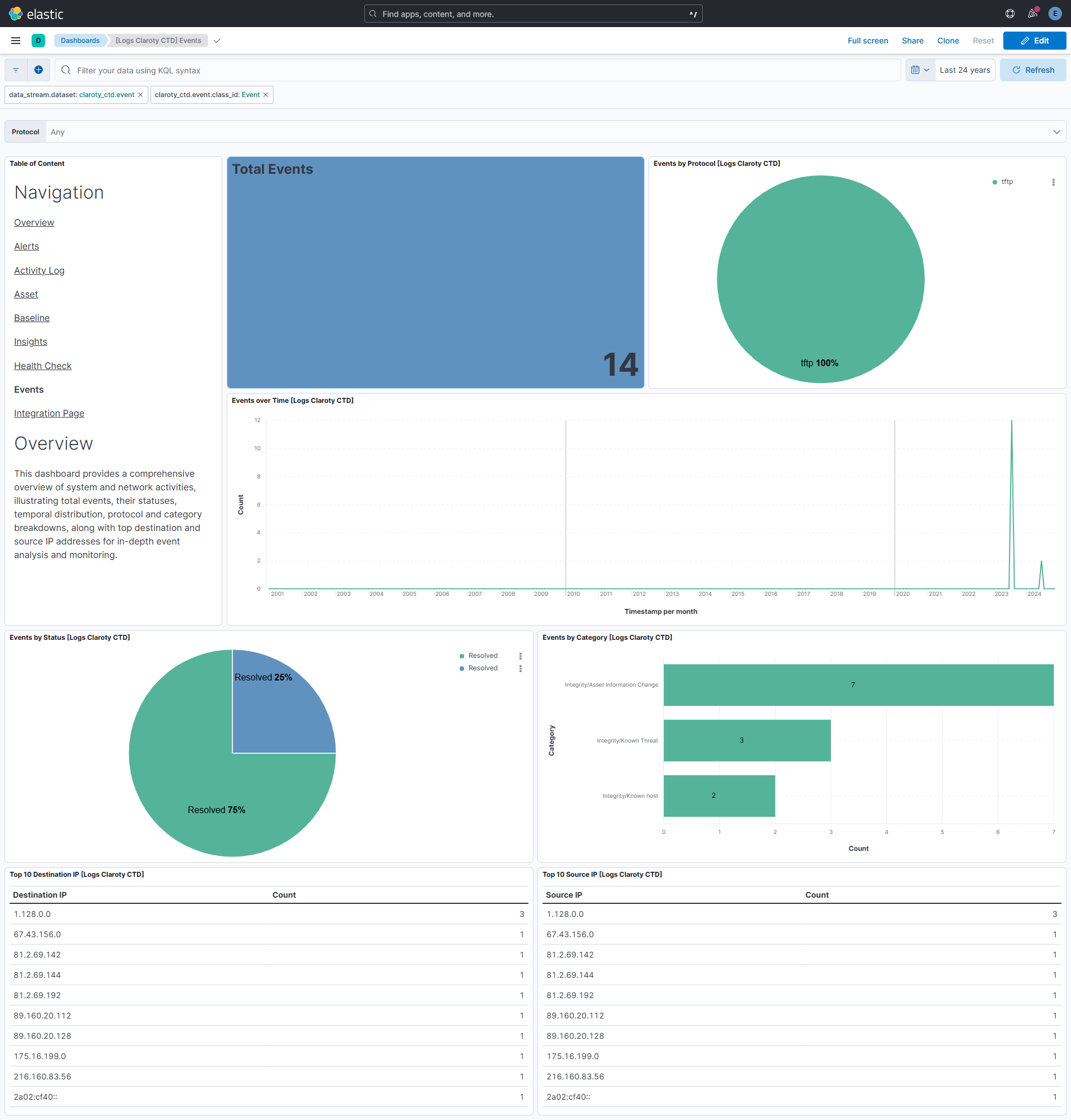
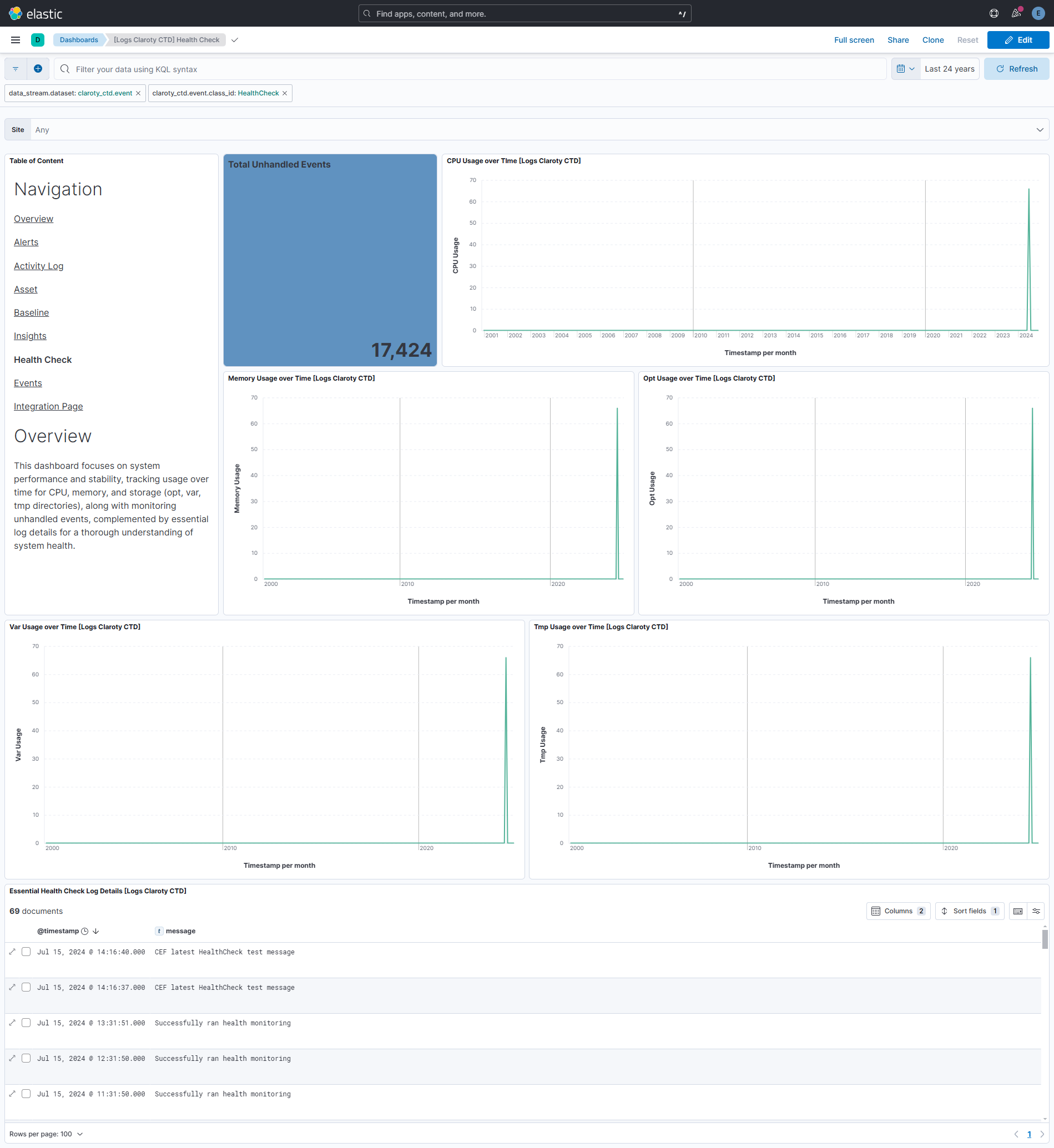
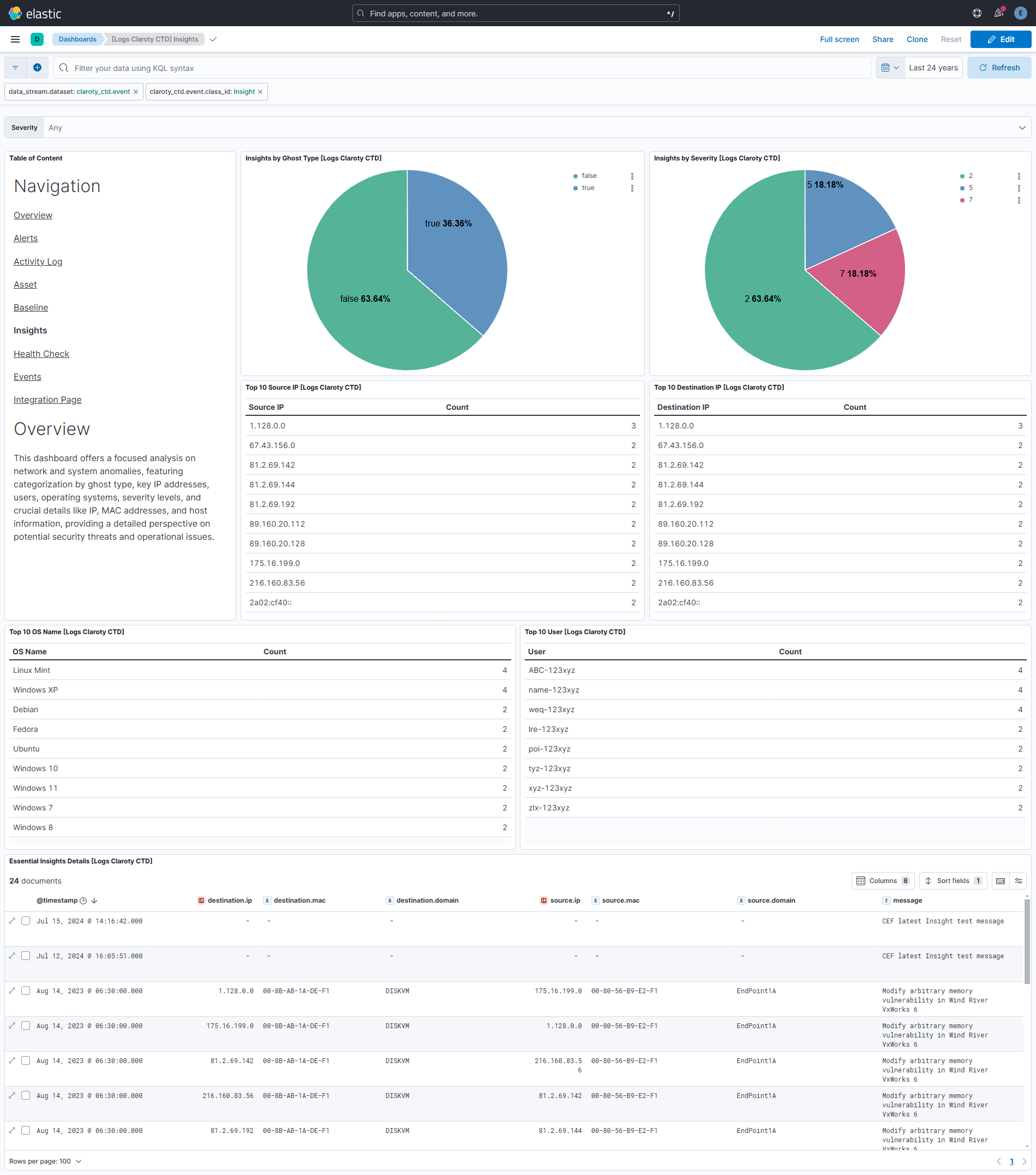
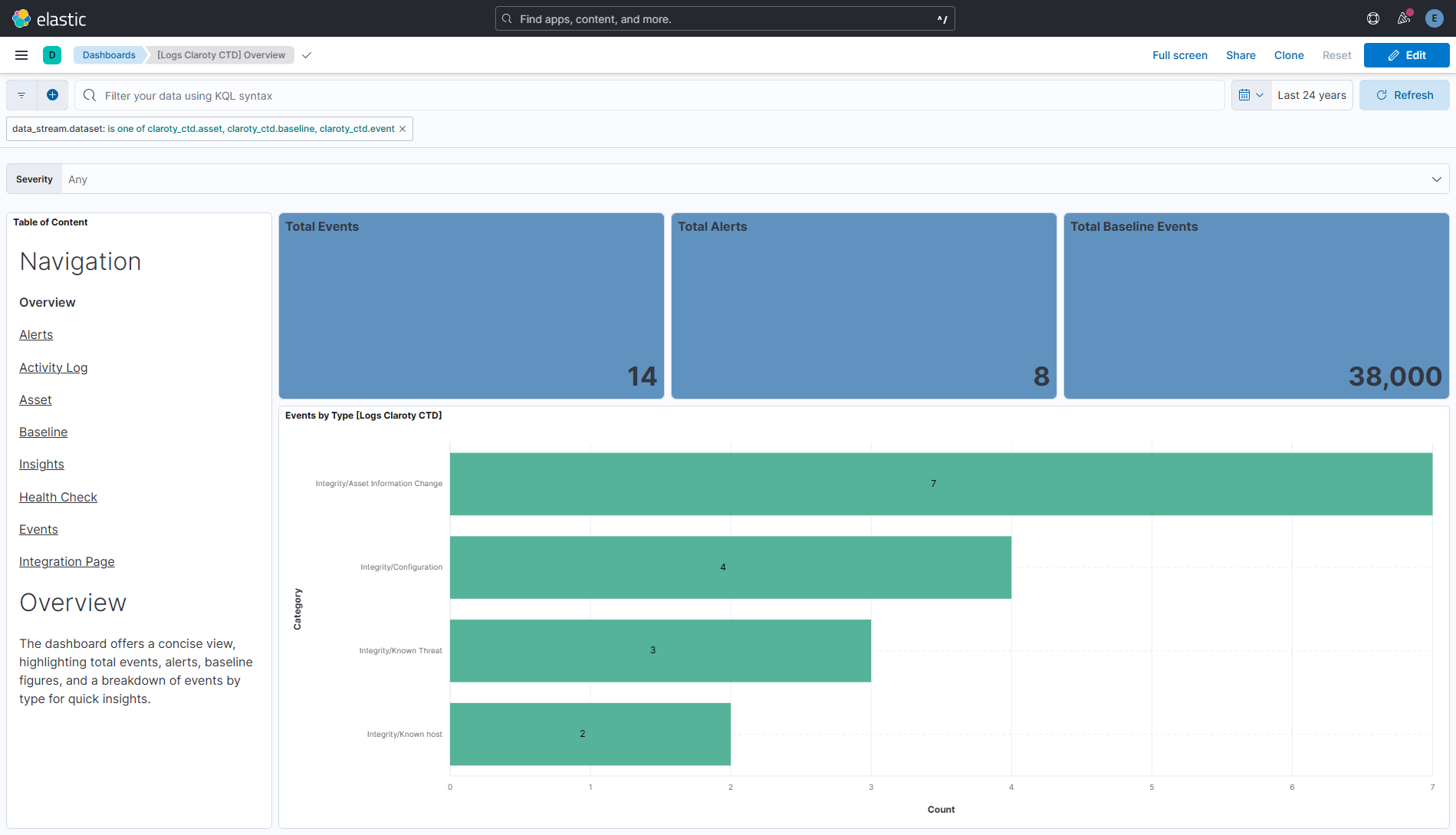
This integration includes one or more Kibana dashboards that visualizes the data collected by the integration. The screenshots below illustrate how the ingested data is displayed.
Changelog
| Version | Details | Minimum Kibana version |
|---|---|---|
| 1.7.0 | Enhancement (View pull request) Update Elastic Managed integration documentation to the current wording and docs links. |
9.0.5 8.19.2 |
| 1.6.0 | Enhancement (View pull request) Add tags to ingest pipeline processors. |
9.0.5 8.19.2 |
| 1.5.1 | Enhancement (View pull request) Set agentless deployment mode release field to ga. |
9.0.5 8.19.2 |
| 1.5.0 | Enhancement (View pull request) Publish Agentless to Elastic Managed integrations name change. |
9.0.5 8.19.2 |
| 1.4.1 | Bug fix (View pull request) Fix issue of multiple values coming in CtdSource* and CtdDestination* fields. |
9.0.5 8.19.2 |
| 1.4.0 | Enhancement (View pull request) Use new release field for agentless deployment mode to establish as beta. |
9.0.5 8.19.2 |
| 1.3.0 | Enhancement (View pull request) Enable Agentless deployment. |
9.0.5 8.19.2 |
| 1.2.0 | Enhancement (View pull request) Enable request trace log removal. |
9.0.0 8.16.0 |
| 1.1.2 | Bug fix (View pull request) Remove duplicate security-solution-default tag references |
9.0.0 8.16.0 |
| 1.1.1 | Bug fix (View pull request) Downgrade the format_version to the minimum version that supports all the necessary features for the package. |
9.0.0 8.16.0 |
| 1.1.0 | Enhancement (View pull request) Use terminate processor instead of fail processor to handle agent errors. |
9.0.0 8.16.0 |
| 1.0.0 | Enhancement (View pull request) Release package as GA. |
9.0.0 8.13.0 |
| 0.7.0 | Enhancement (View pull request) ECS version updated to 8.17.0. |
9.0.0 8.13.0 |
| 0.6.0 | Enhancement (View pull request) Remove redundant installation instructions. |
9.0.0 8.13.0 |
| 0.5.0 | Enhancement (View pull request) Update Kibana constraint to support 9.0.0. |
9.0.0 8.13.0 |
| 0.4.3 | Bug fix (View pull request) Add missing ECS mappings. |
8.13.0 |
| 0.4.2 | Bug fix (View pull request) Updated SSL description in package manifest.yml to be uniform and to include links to documentation. |
8.13.0 |
| 0.4.1 | Bug fix (View pull request) Updated SSL description to be uniform and to include links to documentation. |
8.13.0 |
| 0.4.0 | Enhancement (View pull request) Add "preserve_original_event" tag to documents with event.kind manually set to "pipeline_error". |
8.13.0 |
| 0.3.0 | Enhancement (View pull request) Add "preserve_original_event" tag to documents with event.kind set to "pipeline_error". |
8.13.0 |
| 0.2.0 | Enhancement (View pull request) Added double new lines between the navigation links on the dashboard. |
8.13.0 |
| 0.1.2 | Bug fix (View pull request) Fixed batch size issue in data collection for asset and baseline data-streams. |
8.13.0 |
| 0.1.1 | Bug fix (View pull request) Ensure empty replacement is included in configuration. |
8.13.0 |
| 0.1.0 | Enhancement (View pull request) Initial release. |
8.13.0 |