Cisco Meraki Integration
Elastic Cloud Serverless projects are autoscaled environments, fully managed by Elastic and available on Elastic Cloud. Availability This functionality is generally available and ready for production usage. Elastic Cloud Serverless projects are autoscaled environments, fully managed by Elastic and available on Elastic Cloud. Availability This functionality is generally available and ready for production usage. The Elastic Stack includes Elastic's core products such as Elasticsearch, Kibana, Logstash, and Beats. Availability This functionality is generally available and ready for production usage. Unless stated otherwise on the page, this functionality is available when your Elastic Stack is deployed on Elastic Cloud Hosted, Elastic Cloud Enterprise, Elastic Cloud on Kubernetes, and self-managed environments. This documentation corresponds to the latest patch available for each minor version. If you're not using the latest patch, check the release notes for changes.
Serverless Observability
Generally available
Serverless Security
Generally available
Stack
9.0+
Generally available since 9.0
| Version | 1.32.0 (View all) |
| Subscription level What's this? |
Basic |
| Developed by What's this? |
Elastic |
| Ingestion method(s) | File, Network Protocol, Webhook |
| Minimum Kibana version(s) | 9.0.0 8.13.0 |
Cisco Meraki offers a centralized cloud management platform for all Meraki devices such as MX Security Appliances, MR Access Points and so on. Its out-of-band cloud architecture creates secure, scalable and easy-to-deploy networks that can be managed from anywhere. This can be done from almost any device using web-based Meraki Dashboard and Meraki Mobile App. Each Meraki network generates its own events.
Cisco Meraki offers several methods for device reporting. This integration supports gathering events via the Cisco Meraki syslog and via API reporting webhooks. The integration package allows you to search, observe, and visualize the events through Elasticsearch.
A syslog server can be configured to store messages for reporting purposes from MX Security Appliances, MR Access Points, and MS switches. This package collects events from the configured syslog server. The integration supports collection of events from "MX Security Appliances" and "MR Access Points". The "MS Switch" events are not recognized.
- In Kibana go to Management > Integrations
- In "Search for integrations" search bar type Meraki
- Click on "Cisco Meraki" integration from the search results.
- Click on Add Cisco Meraki Integration button to add the integration.
Cisco Meraki dashboard can be used to configure one or more syslog servers and Meraki message types to be sent to the syslog servers. Refer to Syslog Server Overview and Configuration page for more information on how to configure syslog server on Cisco Meraki.
Cisco Meraki dashboard can be used to configure Meraki webhooks. Refer to the Webhooks Dashboard Setup section.
Depending on the syslog server setup in your environment check one/more of the following options "Collect syslog from Cisco Meraki via UDP", "Collect syslog from Cisco Meraki via TCP", "Collect syslog from Cisco Meraki via file".
Enter the values for syslog host and port OR file path based on the chosen configuration options.
Check the option "Collect events from Cisco Meraki via Webhooks" option.
- Enter values for "Listen Address", "Listen Port" and "Webhook path" to form the endpoint URL. Make note of the Endpoint URL
https://{AGENT_ADDRESS}:8686/meraki/events. - Enter value for "Secret value". This must match the "Shared Secret" value entered when configuring the webhook from Meraki cloud.
- Enter values for "TLS". Cisco Meraki requires that the webhook accept requests over HTTPS. So you must either configure the integration with a valid TLS certificate or use a reverse proxy in front of the integration.
Enable to collect Cisco Meraki log events for all the applications configured for the chosen log stream.
The cisco_meraki.log dataset provides events from the configured syslog server. All Cisco Meraki syslog specific fields are available in the cisco_meraki.log field group.
Exported fields
| Field | Description | Type |
|---|---|---|
| @timestamp | Date/time when the event originated. This is the date/time extracted from the event, typically representing when the event was generated by the source. If the event source has no original timestamp, this value is typically populated by the first time the event was received by the pipeline. Required field for all events. | date |
| cisco_meraki.8021x_auth | flattened | |
| cisco_meraki.8021x_client_deauth | flattened | |
| cisco_meraki.8021x_deauth | flattened | |
| cisco_meraki.8021x_eap_failure | flattened | |
| cisco_meraki.8021x_eap_success | flattened | |
| cisco_meraki.anyconnect_vpn_session_manager.action | keyword | |
| cisco_meraki.anyconnect_vpn_session_manager.bytes_in | keyword | |
| cisco_meraki.anyconnect_vpn_session_manager.bytes_out | keyword | |
| cisco_meraki.anyconnect_vpn_session_manager.conn_id | keyword | |
| cisco_meraki.anyconnect_vpn_session_manager.duration | keyword | |
| cisco_meraki.anyconnect_vpn_session_manager.filter | keyword | |
| cisco_meraki.anyconnect_vpn_session_manager.ip | keyword | |
| cisco_meraki.anyconnect_vpn_session_manager.peer_ip | keyword | |
| cisco_meraki.anyconnect_vpn_session_manager.reason | keyword | |
| cisco_meraki.anyconnect_vpn_session_manager.session_id | keyword | |
| cisco_meraki.anyconnect_vpn_session_manager.session_type | keyword | |
| cisco_meraki.anyconnect_vpn_session_manager.tunnel_id | keyword | |
| cisco_meraki.anyconnect_vpn_session_manager.tunnel_type | keyword | |
| cisco_meraki.anyconnect_vpn_session_manager.user_name | keyword | |
| cisco_meraki.aps_association_reject | flattened | |
| cisco_meraki.association | flattened | |
| cisco_meraki.bssid | keyword | |
| cisco_meraki.channel | keyword | |
| cisco_meraki.device_packet_flood | flattened | |
| cisco_meraki.dfs_event | flattened | |
| cisco_meraki.disassociation | flattened | |
| cisco_meraki.disposition | keyword | |
| cisco_meraki.event_subtype | keyword | |
| cisco_meraki.event_type | keyword | |
| cisco_meraki.fc_subtype | keyword | |
| cisco_meraki.fc_type | keyword | |
| cisco_meraki.firewall.action | keyword | |
| cisco_meraki.firewall.pattern | keyword | |
| cisco_meraki.firewall.rule | keyword | |
| cisco_meraki.flows | flattened | |
| cisco_meraki.martian_vlan.Client | keyword | |
| cisco_meraki.martian_vlan.MAC | keyword | |
| cisco_meraki.martian_vlan.VLAN | keyword | |
| cisco_meraki.martian_vlan.details | text | |
| cisco_meraki.martian_vlan.summary | text | |
| cisco_meraki.multiple_dhcp_servers_detected | flattened | |
| cisco_meraki.mxport | keyword | |
| cisco_meraki.new_port_status | keyword | |
| cisco_meraki.old_port_status | keyword | |
| cisco_meraki.port | keyword | |
| cisco_meraki.security.action | keyword | |
| cisco_meraki.security.decision | keyword | |
| cisco_meraki.security.dhost | keyword | |
| cisco_meraki.security.mac | keyword | |
| cisco_meraki.security.priority | keyword | |
| cisco_meraki.security.signature | keyword | |
| cisco_meraki.site_to_site_vpn.connectivity_change | flattened | |
| cisco_meraki.site_to_site_vpn.raw | text | |
| cisco_meraki.splash_auth | flattened | |
| cisco_meraki.urls.mac | keyword | |
| cisco_meraki.vap | keyword | |
| cisco_meraki.wpa_auth | flattened | |
| cisco_meraki.wpa_deauth | flattened | |
| cloud.image.id | Image ID for the cloud instance. | keyword |
| data_stream.dataset | Data stream dataset. | constant_keyword |
| data_stream.namespace | Data stream namespace. | constant_keyword |
| data_stream.type | Data stream type. | constant_keyword |
| event.dataset | Event dataset | constant_keyword |
| event.module | Event module | constant_keyword |
| host.containerized | If the host is a container. | boolean |
| host.os.build | OS build information. | keyword |
| host.os.codename | OS codename, if any. | keyword |
| input.type | Input type. | keyword |
| log.offset | Offset of the entry in the log file. | long |
| log.source.address | Source address from which the log event was read / sent from. | keyword |
Example
{
    "@timestamp": "2021-11-23T18:13:18.348Z",
    "agent": {
        "ephemeral_id": "ff255c22-106e-4a69-a558-fc9cd28dd9f7",
        "id": "04234bad-8787-4099-99b9-c7ff2640cddb",
        "name": "elastic-agent-38562",
        "type": "filebeat",
        "version": "8.18.0"
    },
    "cisco_meraki": {
        "event_subtype": "ids_alerted",
        "event_type": "security_event",
        "security": {
            "decision": "allowed",
            "dhost": "D0-AB-D5-7B-43-73",
            "priority": "1",
            "signature": "1:29708:4"
        }
    },
    "data_stream": {
        "dataset": "cisco_meraki.log",
        "namespace": "17105",
        "type": "logs"
    },
    "destination": {
        "ip": "10.0.3.162",
        "port": 56391
    },
    "ecs": {
        "version": "8.11.0"
    },
    "elastic_agent": {
        "id": "04234bad-8787-4099-99b9-c7ff2640cddb",
        "snapshot": true,
        "version": "8.18.0"
    },
    "event": {
        "action": "ids-signature-matched",
        "agent_id_status": "verified",
        "category": [
            "network",
            "intrusion_detection"
        ],
        "dataset": "cisco_meraki.log",
        "ingested": "2025-03-28T12:18:23Z",
        "original": "<134>1 1637691198.348361125 MX84 security_event ids_alerted signature=1:29708:4 priority=1 timestamp=1637691198.330873 dhost=D0:AB:D5:7B:43:73 direction=ingress protocol=tcp/ip src=67.43.156.12:80 dst=10.0.3.162:56391 decision=allowed message: BROWSER-IE Microsoft Internet Explorer CSS uninitialized object access attempt detected",
        "type": [
            "info"
        ]
    },
    "input": {
        "type": "udp"
    },
    "log": {
        "source": {
            "address": "192.168.252.3:46890"
        }
    },
    "message": "BROWSER-IE Microsoft Internet Explorer CSS uninitialized object access attempt detected",
    "network": {
        "direction": "ingress",
        "protocol": "tcp/ip"
    },
    "observer": {
        "hostname": "MX84"
    },
    "source": {
        "as": {
            "number": 35908
        },
        "geo": {
            "continent_name": "Asia",
            "country_iso_code": "BT",
            "country_name": "Bhutan",
            "location": {
                "lat": 27.5,
                "lon": 90.5
            }
        },
        "ip": "67.43.156.12",
        "port": 80
    },
    "tags": [
        "preserve_original_event",
        "cisco-meraki",
        "forwarded"
    ]
}
Exported fields
| Field | Description | Type |
|---|---|---|
| @timestamp | Date/time when the event originated. This is the date/time extracted from the event, typically representing when the event was generated by the source. If the event source has no original timestamp, this value is typically populated by the first time the event was received by the pipeline. Required field for all events. | date |
| cisco_meraki.event.alertData | Additional alert data (differs based on alert type) | flattened |
| cisco_meraki.event.alertId | ID for this alert message | keyword |
| cisco_meraki.event.alertLevel | Alert level (informational, critical etc.) | keyword |
| cisco_meraki.event.alertType | Type of alert (“Network usage alert”, “Settings changed”, etc.) | keyword |
| cisco_meraki.event.alertTypeId | Unique ID for the type of alert | keyword |
| cisco_meraki.event.deviceMac | MAC address of the Meraki device | keyword |
| cisco_meraki.event.deviceModel | Meraki device model | keyword |
| cisco_meraki.event.deviceName | Name assigned to the Meraki device | keyword |
| cisco_meraki.event.deviceSerial | Serial number of the Meraki device | keyword |
| cisco_meraki.event.deviceTags | Tags assigned to the Meraki device | keyword |
| cisco_meraki.event.deviceUrl | URL of the Meraki device | keyword |
| cisco_meraki.event.networkId | ID for the Meraki network | keyword |
| cisco_meraki.event.networkName | Name for the Meraki network | keyword |
| cisco_meraki.event.networkTags | Tags assigned to the Meraki network | keyword |
| cisco_meraki.event.networkUrl | URL of the Meraki Dashboard network | keyword |
| cisco_meraki.event.occurredAt | Timestamp of the alert (UTC) | date |
| cisco_meraki.event.organizationId | ID of the Meraki organization | keyword |
| cisco_meraki.event.organizationName | Name of the Meraki organization | keyword |
| cisco_meraki.event.organizationUrl | URL of the Meraki Dashboard organization | keyword |
| cisco_meraki.event.sentAt | Timestamp of the sent message (UTC) | date |
| cisco_meraki.event.sharedSecret | User defined secret to be validated by the webhook receiver (optional) | keyword |
| cisco_meraki.event.version | Current version of webhook format | keyword |
| cloud.image.id | Image ID for the cloud instance. | keyword |
| data_stream.dataset | Data stream dataset. | constant_keyword |
| data_stream.namespace | Data stream namespace. | constant_keyword |
| data_stream.type | Data stream type. | constant_keyword |
| event.dataset | Event dataset | constant_keyword |
| event.module | Event module | constant_keyword |
| host.containerized | If the host is a container. | boolean |
| host.os.build | OS build information. | keyword |
| host.os.codename | OS codename, if any. | keyword |
| input.type | Input type. | keyword |
| log.offset | Offset of the entry in the log file. | long |
| log.source.address | Source address from which the log event was read / sent from. | keyword |
Example
{
    "@timestamp": "2018-02-11T00:00:00.123Z",
    "agent": {
        "ephemeral_id": "6cd48951-0fb4-46b5-b6b0-0fde65471d4e",
        "id": "9e41b562-675f-4880-85b6-03569b372c67",
        "name": "elastic-agent-46314",
        "type": "filebeat",
        "version": "8.18.0"
    },
    "cisco_meraki": {
        "event": {
            "alertData": {
                "connection": "LTE",
                "local": "192.168.1.2",
                "model": "UML290VW",
                "provider": "Purview Wireless",
                "remote": "1.2.3.5"
            },
            "alertId": "0000000000000000",
            "alertTypeId": "cellular_up",
            "deviceTags": [
                "tag1",
                "tag2"
            ],
            "deviceUrl": "https://n1.meraki.com//n//manage/nodes/new_list/000000000000",
            "networkId": "N_24329156",
            "networkUrl": "https://n1.meraki.com//n//manage/nodes/list",
            "organizationUrl": "https://dashboard.meraki.com/o/VjjsAd/manage/organization/overview",
            "sentAt": "2021-10-07T08:42:00.926325Z",
            "sharedSecret": "abc123",
            "version": "0.1"
        }
    },
    "data_stream": {
        "dataset": "cisco_meraki.events",
        "namespace": "12458",
        "type": "logs"
    },
    "ecs": {
        "version": "8.11.0"
    },
    "elastic_agent": {
        "id": "9e41b562-675f-4880-85b6-03569b372c67",
        "snapshot": true,
        "version": "8.18.0"
    },
    "event": {
        "action": "Cellular came up",
        "agent_id_status": "verified",
        "category": [
            "network"
        ],
        "dataset": "cisco_meraki.events",
        "ingested": "2025-03-28T12:15:23Z",
        "original": "{\"alertData\":{\"connection\":\"LTE\",\"local\":\"192.168.1.2\",\"model\":\"UML290VW\",\"provider\":\"Purview Wireless\",\"remote\":\"1.2.3.5\"},\"alertId\":\"0000000000000000\",\"alertLevel\":\"informational\",\"alertType\":\"Cellular came up\",\"alertTypeId\":\"cellular_up\",\"deviceMac\":\"00:11:22:33:44:55\",\"deviceModel\":\"MX\",\"deviceName\":\"My appliance\",\"deviceSerial\":\"Q234-ABCD-5678\",\"deviceTags\":[\"tag1\",\"tag2\"],\"deviceUrl\":\"https://n1.meraki.com//n//manage/nodes/new_list/000000000000\",\"networkId\":\"N_24329156\",\"networkName\":\"Main Office\",\"networkTags\":[],\"networkUrl\":\"https://n1.meraki.com//n//manage/nodes/list\",\"occurredAt\":\"2018-02-11T00:00:00.123450Z\",\"organizationId\":\"2930418\",\"organizationName\":\"My organization\",\"organizationUrl\":\"https://dashboard.meraki.com/o/VjjsAd/manage/organization/overview\",\"sentAt\":\"2021-10-07T08:42:00.926325Z\",\"sharedSecret\":\"abc123\",\"version\":\"0.1\"}",
        "type": [
            "info",
            "start"
        ]
    },
    "input": {
        "type": "http_endpoint"
    },
    "log": {
        "level": "informational"
    },
    "network": {
        "name": "Main Office"
    },
    "observer": {
        "mac": [
            "00-11-22-33-44-55"
        ],
        "name": "My appliance",
        "product": "MX",
        "serial_number": "Q234-ABCD-5678",
        "vendor": "Cisco"
    },
    "organization": {
        "id": "2930418",
        "name": "My organization"
    },
    "tags": [
        "preserve_original_event",
        "forwarded",
        "meraki-events"
    ]
}
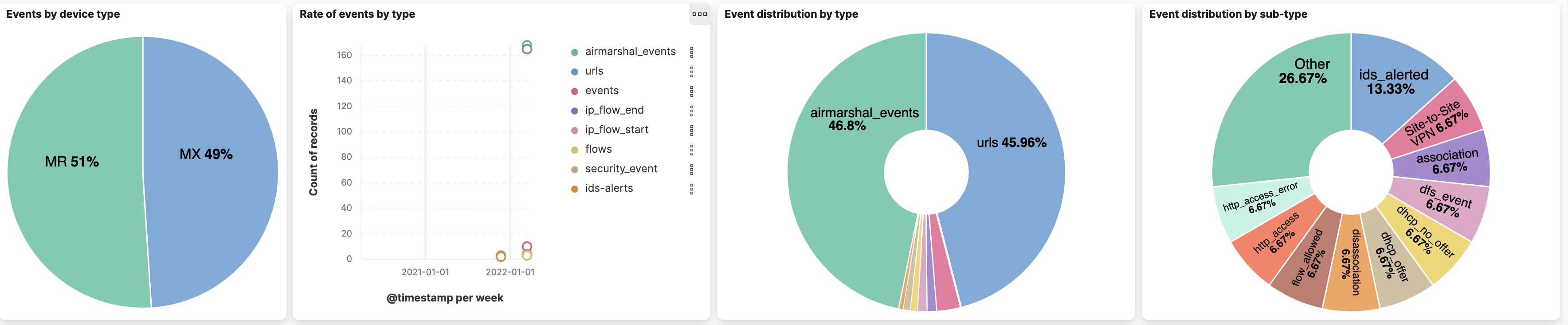
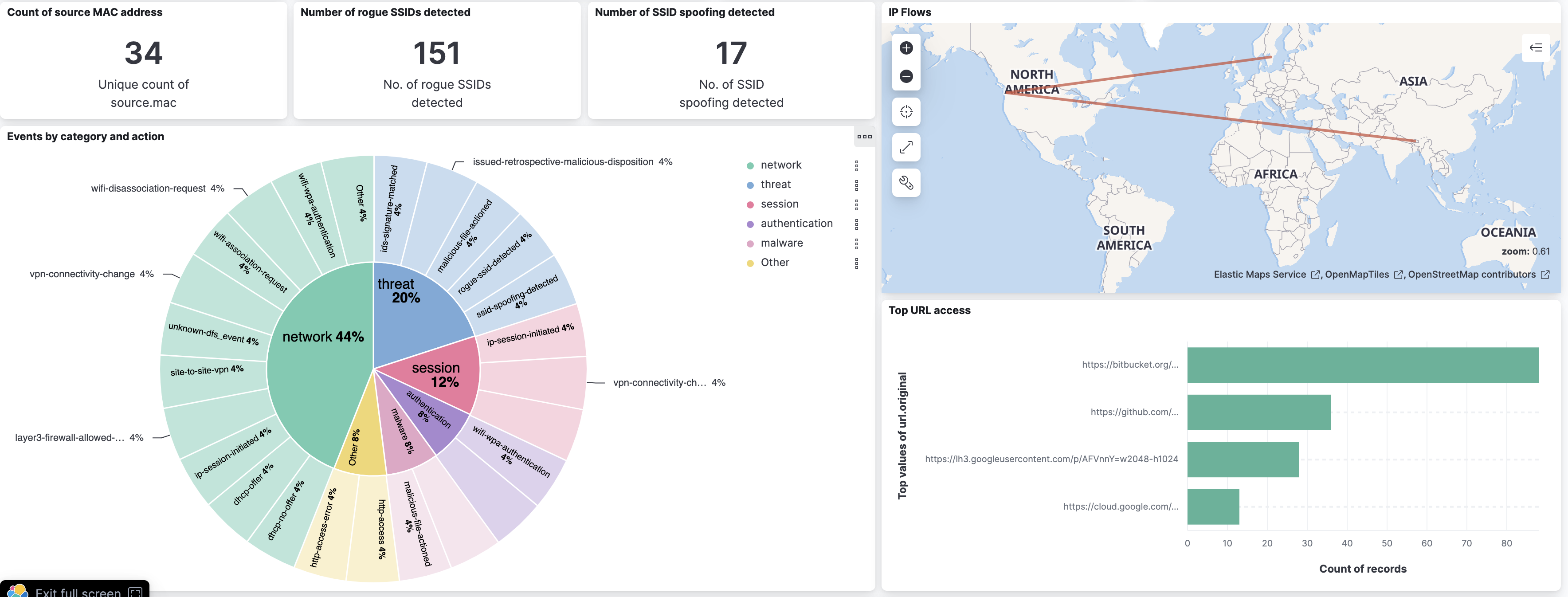
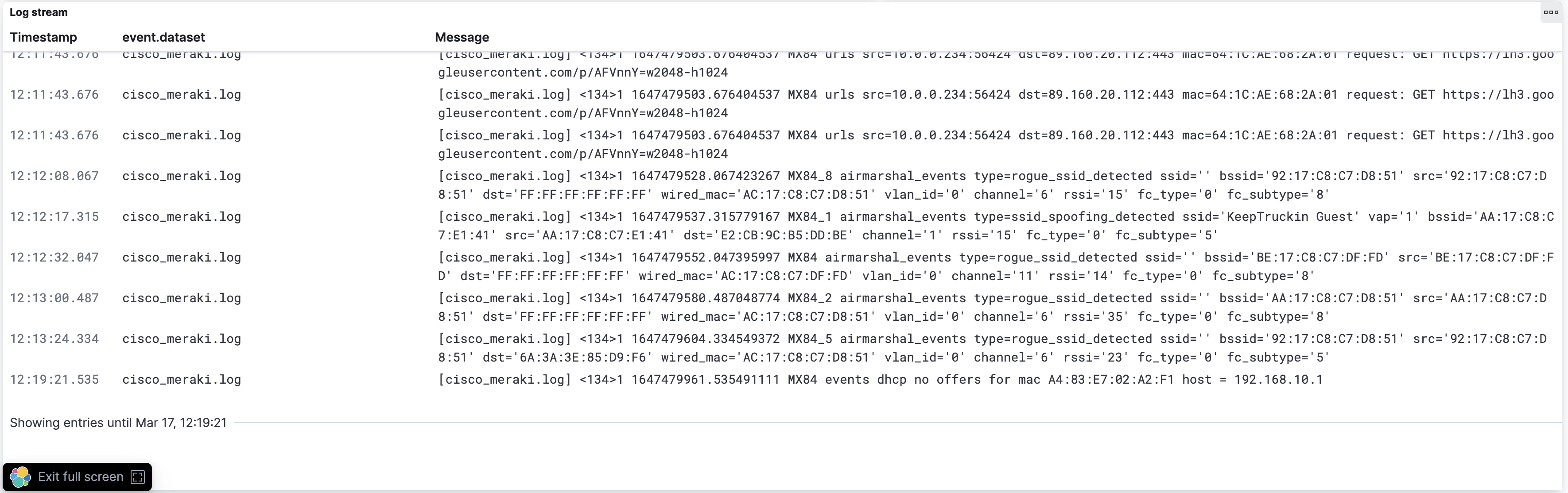
This integration includes one or more Kibana dashboards that visualizes the data collected by the integration. The screenshots below illustrate how the ingested data is displayed.
Changelog
| Version | Details | Minimum Kibana version |
|---|---|---|
| 1.32.0 | Enhancement (View pull request) Changed owners. |
9.0.0 8.13.0 |
| 1.31.3 | Bug fix (View pull request) Fix SSL settings not being rendered in the TCP stream template. |
9.0.0 8.13.0 |
| 1.31.2 | Bug fix (View pull request) Fix grok pattern to support Blocked RA Packet and Blocked DHCP Packet events in addition to Blocked ARP Packet events. |
9.0.0 8.13.0 |
| 1.31.1 | Bug fix (View pull request) Remove duplicate security-solution-default tag references |
9.0.0 8.13.0 |
| 1.31.0 | Enhancement Handle 8021x_client_deauth events, identity field and fill related.ip |
9.0.0 8.13.0 |
| 1.30.0 | Enhancement (View pull request) Update event.type and event.category of anyconnect_vpn_connect. |
9.0.0 8.13.0 |
| 1.29.2 | Bug fix (View pull request) Map translated source and destination IP and port to correct ECS fields. |
9.0.0 8.13.0 |
| 1.29.1 | Bug fix (View pull request) Fix the parsing of connecting and reconnecting events for anyconnect_vpn_connect and client_vpn_connect. |
9.0.0 8.13.0 |
| 1.29.0 | Enhancement (View pull request) Standardize user fields processing across integrations. |
9.0.0 8.13.0 |
| 1.28.2 | Bug fix (View pull request) Limit Grok parsing for port events to logs with actionable phrases to prevent benign error messages. |
9.0.0 8.13.0 |
| 1.28.1 | Bug fix (View pull request) Extend the event pipeline with some ECS fields and a Grok pattern to improve DHCP event parsing. |
9.0.0 8.13.0 |
| 1.28.0 | Enhancement (View pull request) Update Kibana constraint to support 9.0.0. |
9.0.0 8.13.0 |
| 1.27.1 | Bug fix (View pull request) Updated SSL description to be uniform and to include links to documentation. |
8.13.0 |
| 1.27.0 | Enhancement (View pull request) Migrate log stream to saved search. |
8.13.0 |
| 1.26.0 | Enhancement (View pull request) Do not remove event.original in main ingest pipeline. |
8.13.0 |
| 1.25.0 | Enhancement (View pull request) Add "preserve_original_event" tag to documents with event.kind set to "pipeline_error". |
8.13.0 |
| 1.24.0 | Enhancement (View pull request) Allow @custom pipeline access to event.original without setting preserve_original_event. |
8.13.0 |
| 1.23.0 | Enhancement (View pull request) Update the kibana constraint to ^8.13.0. Modified the field definitions to remove ECS fields made redundant by the ecs@mappings component template. |
8.13.0 |
| 1.22.0 | Enhancement (View pull request) Retain message for all events. Enhancement (View pull request) Improve event type handling. |
8.12.0 |
| 1.21.2 | Bug fix (View pull request) Fix webhook shared secret configuration and behavior. |
8.12.0 |
| 1.21.1 | Bug fix (View pull request) Fix url processing. |
8.12.0 |
| 1.21.0 | Enhancement (View pull request) Set sensitive values as secret. |
8.12.0 |
| 1.20.3 | Enhancement (View pull request) Changed owners |
8.0.0 7.17.0 |
| 1.20.2 | Bug fix (View pull request) Fix exclude_files pattern. |
8.0.0 7.17.0 |
| 1.20.1 | Bug fix (View pull request) Remove incorrect event.category:threat and event.type:indicator values. |
8.0.0 7.17.0 |
| 1.20.0 | Enhancement (View pull request) Record port state changes. |
8.0.0 7.17.0 |
| 1.19.0 | Enhancement (View pull request) ECS version updated to 8.11.0. |
8.0.0 7.17.0 |
| 1.18.1 | Bug fix (View pull request) Fix handling of security events without dhost and with action. |
8.0.0 7.17.0 |
| 1.18.0 | Enhancement (View pull request) Simplify IPflows pipeline to cover ICMP events. |
8.0.0 7.17.0 |
| 1.17.1 | Bug fix (View pull request) Add missing client.as.* field definitions. |
8.0.0 7.17.0 |
| 1.17.0 | Enhancement (View pull request) Improve event.original check to avoid errors if set. |
8.0.0 7.17.0 |
| 1.16.1 | Bug fix (View pull request) Removed experimental release tags from data streams. |
8.0.0 7.17.0 |
| 1.16.0 | Enhancement (View pull request) Update the package format_version to 3.0.0. |
8.0.0 7.17.0 |
| 1.15.1 | Bug fix (View pull request) Removing unused ECS field declarations. |
8.0.0 7.17.0 |
| 1.15.0 | Enhancement (View pull request) Add event.action and message to specific events. |
8.0.0 7.17.0 |
| 1.14.0 | Enhancement (View pull request) ECS version updated to 8.10.0. |
8.0.0 7.17.0 |
| 1.13.0 | Enhancement (View pull request) Handle blocked ARP packet messages. Enhancement (View pull request) Handle auth event subtype. Enhancement (View pull request) Handle port event subtype. |
8.0.0 7.17.0 |
| 1.12.0 | Enhancement (View pull request) Add tags.yml file so that integration's dashboards and saved searches are tagged with "Security Solution" and displayed in the Security Solution UI. |
8.0.0 7.17.0 |
| 1.11.1 | Bug fix (View pull request) Fix flows pipeline according to new Firmware MX18.101. |
8.0.0 7.17.0 |
| 1.11.0 | Enhancement (View pull request) Update package to ECS 8.9.0. |
8.0.0 7.17.0 |
| 1.10.0 | Enhancement (View pull request) Ensure event.kind is correctly set for pipeline errors. |
8.0.0 7.17.0 |
| 1.9.0 | Enhancement (View pull request) Update package-spec version to 2.7.0. |
8.0.0 7.17.0 |
| 1.8.0 | Enhancement (View pull request) Update package to ECS 8.8.0. |
8.0.0 7.17.0 |
| 1.7.0 | Enhancement (View pull request) Update package to ECS 8.7.0. |
8.0.0 7.17.0 |
| 1.6.0 | Enhancement (View pull request) Capture firewall rules from flows. |
8.0.0 7.17.0 |
| 1.5.1 | Enhancement (View pull request) Handle user-agent when present in urls logs |
8.0.0 7.17.0 |
| 1.5.0 | Enhancement (View pull request) Update package to ECS 8.6.0. |
8.0.0 7.17.0 |
| 1.4.1 | Enhancement (View pull request) Improved timezone offset error handling. |
8.0.0 7.17.0 |
| 1.4.0 | Enhancement (View pull request) Add udp_options to the UDP input. |
8.0.0 7.17.0 |
| 1.3.1 | Enhancement (View pull request) Enhanced error handling for timezone field |
8.0.0 7.17.0 |
| 1.3.0 | Enhancement (View pull request) Update package to ECS 8.5.0. |
8.0.0 7.17.0 |
| 1.2.3 | Bug fix (View pull request) Improve handling of flows events. |
8.0.0 7.17.0 |
| 1.2.2 | Bug fix (View pull request) Remove duplicate fields. |
8.0.0 7.17.0 |
| 1.2.1 | Bug fix (View pull request) Remove duplicate field. |
8.0.0 7.17.0 |
| 1.2.0 | Enhancement (View pull request) Add preserve_original_event function to default pipeline |
8.0.0 7.17.0 |
| 1.1.2 | Bug fix (View pull request) Fix MAC address formatting. |
8.0.0 7.17.0 |
| 1.1.1 | Enhancement (View pull request) Use ECS geo.location definition. |
8.0.0 7.17.0 |
| 1.1.0 | Enhancement (View pull request) Update package to ECS 8.4.0 |
8.0.0 7.17.0 |
| 1.0.1 | Bug fix (View pull request) Fix client.geo.location mapping |
8.0.0 7.17.0 |
| 1.0.0 | Enhancement (View pull request) Make GA |
8.0.0 7.17.0 |
| 0.6.1 | Enhancement (View pull request) Update package name and description to align with standard wording |
— |
| 0.6.0 | Enhancement (View pull request) Update package to ECS 8.3.0. |
— |
| 0.5.1 | Enhancement (View pull request) Fix doc build |
— |
| 0.5.0 | Enhancement (View pull request) Replace RSA2ELK with Syslog and Webhook integration |
— |
| 0.4.1 | Enhancement (View pull request) Add documentation for multi-fields |
— |
| 0.4.0 | Enhancement (View pull request) Update to ECS 8.0.0 |
— |
| 0.3.1 | Bug fix (View pull request) Regenerate test files using the new GeoIP database |
— |
| 0.3.0 | Enhancement (View pull request) Add 8.0.0 version constraint |
— |
| 0.2.3 | Enhancement (View pull request) Update Title and Description. |
— |
| 0.2.2 | Bug fix (View pull request) Fixed a bug that prevents the package from working in 7.16. |
— |
| 0.2.1 | Bug fix (View pull request) Fix logic that checks for the 'forwarded' tag |
— |
| 0.2.0 | Enhancement (View pull request) Update to ECS 1.12.0 |
— |
| 0.1.0 | Enhancement (View pull request) Initial commit splitting Cisco meraki from general Cisco package |
— |