BeyondTrust PRA
Elastic Cloud Serverless projects are autoscaled environments, fully managed by Elastic and available on Elastic Cloud. Availability This functionality is generally available and ready for production usage. Elastic Cloud Serverless projects are autoscaled environments, fully managed by Elastic and available on Elastic Cloud. Availability This functionality is generally available and ready for production usage. The Elastic Stack includes Elastic's core products such as Elasticsearch, Kibana, Logstash, and Beats. Availability This functionality is generally available and ready for production usage. Unless stated otherwise on the page, this functionality is available when your Elastic Stack is deployed on Elastic Cloud Hosted, Elastic Cloud Enterprise, Elastic Cloud on Kubernetes, and self-managed environments. This documentation corresponds to the latest patch available for each minor version. If you're not using the latest patch, check the release notes for changes.
Serverless Observability
Generally available
Serverless Security
Generally available
Stack
9.0+
Generally available since 9.0
| Version | 1.4.0 (View all) |
| Managed integration release status | GA |
| Subscription level What's this? |
Basic |
| Developed by What's this? |
Elastic |
| Ingestion method(s) | API |
| Minimum Kibana version(s) | 9.0.0 8.18.0 |
You can use this integration as an Elastic Managed integration on Elastic Cloud Hosted deployments running this version or later.
BeyondTrust Privileged Remote Access (PRA) is a solution designed to securely manage and control remote access to critical systems for privileged users, such as administrators, IT personnel, and third-party vendors. PRA is part of our broader suite of Privileged Access Management (PAM) solutions. It provides real-time session monitoring, auditing, and recording, which helps you maintain compliance and detect any unauthorized or risky activities. By enforcing least-privilege access and supporting third-party vendor management, it reduces the attack surface and enhances overall security for remote operations.
This integration is compatible with BeyondTrust PRA 24.1.x and has been tested against the API Version 1.24.1 for REST API support.
This integration collects the following logs:
- Access Session - Enables users to collect event logs occurred during each AccessSession using the REST API.
Elastic Managed integrations are only supported on Elastic Cloud Serverless and Elastic Cloud Hosted deployments. An Elastic Managed integration lets you ingest data from a cloud source while avoiding the orchestration, management, and maintenance associated with standard ingest infrastructure. Elastic runs the collector for you, so you can focus on your data instead of the infrastructure that collects it.
For more information, refer to Elastic Managed integrations and the Elastic Managed integrations FAQ.
Elastic Agent must be installed. For more details, check the Elastic Agent installation instructions. You can install only one Elastic Agent per host. Elastic Agent is required to stream data from the REST API and ship the data to Elastic, where the events will then be processed via the integration's ingest pipelines.
- If the integration client is not installed follow this doc to setup integration client and add database as guided.
- After having installed integration client & created the settings database, you are prompted to enter information for one or more BeyondTrust PRA sites from which the integration client extracts session data. Click OK to continue.
- If you wish to update or add a site, select Site Configuration from the integration client Setup dropdown.
- When the Site Configuration dialog appears, click the New button to input your BeyondTrust PRA site information.
- Enter a name for this site configuration and the URL of the site (note that https:// should NOT be included)
- For BeyondTrust PRA sites on version 16.1 and above, you must provide the Client ID and Client Secret for an API account with permission to view reports and recordings. If you plan to pull site backups, backup API permissions must also be enabled for the API account. Click Edit on the API user account to identify the OAuth Client ID, and click Generate New Client Secret and record the secret.
- Optionally, you may apply a password to any backups created. If you do choose to set a password, you must provide this password to revert to the backup.
- Test the supplied credentials and then click Save.
- When you have finished entering your BeyondTrust site information, click Next.
- Note: For BeyondTrust PRA sites running version 16.1 and above, if the account's password is reset, the integration client stops pulling data until the site configuration is updated. To prevent this break, it is recommended that you create a special account for the integration client with only permissions needed to retrieve the desired data and with a password set to never expire.
- Integration client supports more than one site. If session data from additional sites needs to be extracted, click the New button again and repeat the configuration process. The host_name in the session table distinguishes the data.
- In Kibana navigate to Management > Integrations.
- In the search bar, type BeyondTrust PRA.
- Select the BeyondTrust PRA integration and add it.
- Add all the required integration configuration parameters, including the URL, Client ID, Client Secret, Session Timeout, Interval, and Initial Interval, to enable data collection.
- Select "Save and continue" to save the integration.
This is the Access Session dataset.
Exported fields
| Field | Description | Type |
|---|---|---|
| @timestamp | Event timestamp. | date |
| beyondtrust_pra.access_session.body | The text of the message as displayed in the chat log area. | keyword |
| beyondtrust_pra.access_session.data.value.name | The name of these elements varies based on event_type. | keyword |
| beyondtrust_pra.access_session.data.value.value | The value of these elements varies based on event_type. | keyword |
| beyondtrust_pra.access_session.destination.display_name | The display name assigned to the user. . | keyword |
| beyondtrust_pra.access_session.destination.gsnumber | Uniquely identifies the user in regards to their current connection to the BeyondTrust Appliance B Series. | keyword |
| beyondtrust_pra.access_session.destination.hostname | The hostname of the user's computer. | keyword |
| beyondtrust_pra.access_session.destination.id | Unique ID assigned to the user. | keyword |
| beyondtrust_pra.access_session.destination.invited | True when the user is an invited user. | boolean |
| beyondtrust_pra.access_session.destination.os | The operating system of the user's computer. | keyword |
| beyondtrust_pra.access_session.destination.private_ip | The user's private IP address. | ip |
| beyondtrust_pra.access_session.destination.private_port | The user's private port. | long |
| beyondtrust_pra.access_session.destination.public_ip | The user's public IP address. | ip |
| beyondtrust_pra.access_session.destination.public_port | The user's public port. | long |
| beyondtrust_pra.access_session.destination.seconds_involved | Integer value indicating the number of seconds the user was involved in this session. | long |
| beyondtrust_pra.access_session.destination.session_owner | Boolean value indicating whether the user was the owner of the session or was merely a conference member. | boolean |
| beyondtrust_pra.access_session.destination.type | Indicating whether this action was directed to the system, a customer, or a user. | keyword |
| beyondtrust_pra.access_session.destination.username | The username assigned to the user. | keyword |
| beyondtrust_pra.access_session.encoded_body | Contains the base64 (RFC 2045 section 6.8) encoded value of what would have been shown in the <body> element, and is shown ONLY if the <body> text contains characters that are invalid according to XML specification. . | keyword |
| beyondtrust_pra.access_session.event_type | The type of event which occurred. | keyword |
| beyondtrust_pra.access_session.filename | The name of the transferred file. | keyword |
| beyondtrust_pra.access_session.files.file.filename | The name of the transferred file. | keyword |
| beyondtrust_pra.access_session.files.file.filesize | The size of the transferred file. | long |
| beyondtrust_pra.access_session.filesize | The size of the transferred file. | long |
| beyondtrust_pra.access_session.performed_by.display_name | The display name assigned to the user. . | keyword |
| beyondtrust_pra.access_session.performed_by.gsnumber | Uniquely identifies the user in regards to their current connection to the BeyondTrust Appliance B Series. | keyword |
| beyondtrust_pra.access_session.performed_by.hostname | The hostname of the user's computer. | keyword |
| beyondtrust_pra.access_session.performed_by.id | Unique ID assigned to the user. | keyword |
| beyondtrust_pra.access_session.performed_by.invited | True when the user is an invited user. | boolean |
| beyondtrust_pra.access_session.performed_by.os | The operating system of the user's computer. | keyword |
| beyondtrust_pra.access_session.performed_by.private_ip | The user's private IP address. | ip |
| beyondtrust_pra.access_session.performed_by.private_port | The user's private port. | long |
| beyondtrust_pra.access_session.performed_by.public_ip | The user's public IP address. | ip |
| beyondtrust_pra.access_session.performed_by.public_port | The user's public port. | long |
| beyondtrust_pra.access_session.performed_by.seconds_involved | Integer value indicating the number of seconds the user was involved in this session. | long |
| beyondtrust_pra.access_session.performed_by.session_owner | Boolean value indicating whether the user was the owner of the session or was merely a conference member. | boolean |
| beyondtrust_pra.access_session.performed_by.type | Indicates whether this action was performed by the system, a endpoint, or a representative. | keyword |
| beyondtrust_pra.access_session.performed_by.username | The username assigned to the user. | keyword |
| beyondtrust_pra.access_session.session.command_shell_recordings.command_shell_recording.download_url | The URL at which the video of the command shell session may be downloaded. | keyword |
| beyondtrust_pra.access_session.session.command_shell_recordings.command_shell_recording.instance | The instance of the command shell session, starting with 0. | keyword |
| beyondtrust_pra.access_session.session.command_shell_recordings.command_shell_recording.view_url | The URL at which the video of the command shell session may be viewed in a web browser. | keyword |
| beyondtrust_pra.access_session.session.custom_attributes.custom_attribute.code_name | keyword | |
| beyondtrust_pra.access_session.session.custom_attributes.custom_attribute.display_name | The display name assigned to the custom attribute. | keyword |
| beyondtrust_pra.access_session.session.custom_attributes.custom_attribute.text | The code name assigned to the custom attribute. | keyword |
| beyondtrust_pra.access_session.session.duration | Session length in HH:MM:SS format. | keyword |
| beyondtrust_pra.access_session.session.end_time.text | The date and time the session was ended. | date |
| beyondtrust_pra.access_session.session.end_time.timestamp | Displays the end time in UNIX timestamp (UTC). | date |
| beyondtrust_pra.access_session.session.file_delete_count | The number of files deleted via the File Transfer interface during the session. | long |
| beyondtrust_pra.access_session.session.file_move_count | The number of files renamed via the File Transfer interface during the session. | long |
| beyondtrust_pra.access_session.session.file_transfer_count | The number of file transfers which occurred during the session. | long |
| beyondtrust_pra.access_session.session.jump_group.id | This is the Jump Group's unique ID for its type. Jump Groups of different types can have the same ID. . | keyword |
| beyondtrust_pra.access_session.session.jump_group.text | The element's content is the name of the Jump Group. For Personal Jump Groups, the name of the Jump Group is the Private Display Name of the representative who owns the Jump Group. | keyword |
| beyondtrust_pra.access_session.session.jump_group.type | This is the Jump Group's type, which can be "shared" or "personal". | keyword |
| beyondtrust_pra.access_session.session.jumpoint.id | Displays the unique ID assigned to the Jumpoint. | keyword |
| beyondtrust_pra.access_session.session.jumpoint.text | The name of the Jumpoint through which this session was initiated, if any. . | keyword |
| beyondtrust_pra.access_session.session.lseq | An incrementing number used to represent sessions in a non-string format. | keyword |
| beyondtrust_pra.access_session.session.lsid | A string which uniquely identifies this session. | keyword |
| beyondtrust_pra.access_session.session.primary_customer.gsnumber | Uniquely identifies the user in regards to their current connection to the BeyondTrust Appliance B Series. | keyword |
| beyondtrust_pra.access_session.session.primary_customer.text | The name of the remote endpoint accessed by the user. | keyword |
| beyondtrust_pra.access_session.session.primary_rep.gsnumber | Uniquely identifies the user in regards to their current connection to the BeyondTrust Appliance B Series. | keyword |
| beyondtrust_pra.access_session.session.primary_rep.id | Unique ID assigned to the user. | keyword |
| beyondtrust_pra.access_session.session.primary_rep.text | keyword | |
| beyondtrust_pra.access_session.session.session_chat_download_url | The URL at which this session's chat transcript can be downloaded. This element is displayed only for sessions that have successfully ended. | keyword |
| beyondtrust_pra.access_session.session.session_chat_view_url | The URL at which this session's chat transcript can be viewed in a web browser. This element is displayed only for sessions that have successfully ended. | keyword |
| beyondtrust_pra.access_session.session.session_recording_download_url | The URL at which the video of the session may be downloaded. This element is displayed only if screen sharing recording was enabled at the time of the session and only if the user initiated screen sharing during the session. It is available only for sessions that have successfully ended. | keyword |
| beyondtrust_pra.access_session.session.session_recording_view_url | The URL at which the video of the session may be viewed in a web browser. This element is displayed only if screen sharing recording was enabled at the time of the session and only if the user initiated screen sharing during the session. It is available only for sessions that have successfully ended. | keyword |
| beyondtrust_pra.access_session.session.session_type | Indicates the type of session for which the report was run. The value will always be support in the current BeyondTrust API version. | keyword |
| beyondtrust_pra.access_session.session.start_time.text | The date and time the session was begun. | date |
| beyondtrust_pra.access_session.session.start_time.timestamp | Displays the start time as a UNIX timestamp (UTC). | date |
| beyondtrust_pra.access_session.system_information.category.data.row.field.name | keyword | |
| beyondtrust_pra.access_session.system_information.category.data.row.field.text | keyword | |
| beyondtrust_pra.access_session.system_information.category.description.field.name | keyword | |
| beyondtrust_pra.access_session.system_information.category.description.field.text | keyword | |
| beyondtrust_pra.access_session.system_information.category.name | keyword | |
| beyondtrust_pra.access_session.timestamp | The system time at which the event occurred. | date |
| data_stream.dataset | Data stream dataset. | constant_keyword |
| data_stream.namespace | Data stream namespace. | constant_keyword |
| data_stream.type | Data stream type. | constant_keyword |
| event.dataset | Event dataset. | constant_keyword |
| event.module | Event module. | constant_keyword |
| input.type | Type of filebeat input. | keyword |
Example
{
    "@timestamp": "2024-04-04T13:30:00.000Z",
    "agent": {
        "ephemeral_id": "efa67a44-cb94-45ec-ae65-e5aa04cfaeed",
        "id": "6d3a1abe-7f1c-4196-8c8f-57ba4f0b94e1",
        "name": "elastic-agent-11622",
        "type": "filebeat",
        "version": "8.18.0"
    },
    "beyondtrust_pra": {
        "access_session": {
            "body": "Session started by Admin",
            "destination": {
                "gsnumber": "C12345",
                "hostname": "remote-host",
                "os": "Windows 10",
                "private_ip": "1.128.0.1",
                "public_ip": "81.2.69.192",
                "type": "customer",
                "username": "remote_user"
            },
            "encoded_body": "U2Vzc2lvbiBzdGFydGVkIGJ5IEFkbWlu",
            "event_type": "Session Start",
            "filename": "logfile.txt",
            "files": {
                "file": [
                    {
                        "filename": "logfile.txt",
                        "filesize": 1024
                    }
                ]
            },
            "filesize": 1024,
            "performed_by": {
                "display_name": "Admin",
                "gsnumber": "R56789",
                "hostname": "admin-host",
                "id": "112233",
                "invited": true,
                "os": "Windows 11",
                "private_ip": "1.128.0.2",
                "public_ip": "175.16.199.0",
                "seconds_involved": 3600,
                "session_owner": true,
                "type": "representative",
                "username": "admin_user"
            },
            "session": {
                "command_shell_recordings": {
                    "command_shell_recording": [
                        {
                            "download_url": "https://example.com/shell_download/12345",
                            "instance": "0",
                            "view_url": "https://example.com/shell_view/12345"
                        }
                    ]
                },
                "custom_attributes": {
                    "custom_attribute": [
                        {
                            "code_name": "priority",
                            "display_name": "priority",
                            "text": "High"
                        },
                        {
                            "code_name": "priority",
                            "display_name": "priority",
                            "text": "High"
                        }
                    ]
                },
                "duration": "01:00:00",
                "end_time": {
                    "text": "2024-04-04T14:00:00Z",
                    "timestamp": "2024-04-04T14:00:00.000Z"
                },
                "file_move_count": 1,
                "file_transfer_count": 3,
                "file_delete_count": 0,
                "jump_group": {
                    "id": "56789",
                    "text": "Support Team",
                    "type": "shared"
                },
                "jumpoint": {
                    "id": "98765",
                    "text": "Main Jumpoint"
                },
                "lseq": "12345",
                "primary_customer": {
                    "gsnumber": "C12345",
                    "text": "Remote PC"
                },
                "primary_rep": {
                    "gsnumber": "R56789",
                    "id": "112233",
                    "text": "John Doe"
                },
                "session_chat_download_url": "https://example.com/chat_download/12345",
                "session_chat_view_url": "https://example.com/chat_view/12345",
                "session_recording_download_url": "https://example.com/recording_download/12345",
                "session_recording_view_url": "https://example.com/recording_view/12345",
                "session_type": "support2",
                "start_time": {
                    "text": "2024-04-04T13:00:00Z",
                    "timestamp": "2024-04-04T13:00:00.000Z"
                }
            },
            "system_information": {
                "category": [
                    {
                        "data": {
                            "row": [
                                {
                                    "field": [
                                        {
                                            "name": "hostname",
                                            "text": "remote-host1"
                                        },
                                        {
                                            "name": "hostname",
                                            "text": "h1234"
                                        }
                                    ]
                                },
                                {
                                    "field": [
                                        {
                                            "name": "hostname",
                                            "text": "remote-host2"
                                        },
                                        {
                                            "name": "hostname",
                                            "text": "h5647"
                                        }
                                    ]
                                }
                            ]
                        },
                        "description": {
                            "field": [
                                {
                                    "name": "hostname",
                                    "text": "Hostname"
                                },
                                {
                                    "name": "hostid",
                                    "text": "Hostid"
                                }
                            ]
                        },
                        "name": "OS Information"
                    }
                ]
            },
            "timestamp": "2024-04-04T13:30:00.000Z"
        }
    },
    "data_stream": {
        "dataset": "beyondtrust_pra.access_session",
        "namespace": "99596",
        "type": "logs"
    },
    "destination": {
        "domain": "remote-host",
        "geo": {
            "city_name": "London",
            "continent_name": "Europe",
            "country_iso_code": "GB",
            "country_name": "United Kingdom",
            "location": {
                "lat": 51.5142,
                "lon": -0.0931
            },
            "region_iso_code": "GB-ENG",
            "region_name": "England"
        },
        "ip": "81.2.69.192",
        "nat": {
            "ip": "1.128.0.1"
        },
        "user": {
            "name": "remote_user"
        }
    },
    "ecs": {
        "version": "8.17.0"
    },
    "elastic_agent": {
        "id": "6d3a1abe-7f1c-4196-8c8f-57ba4f0b94e1",
        "snapshot": false,
        "version": "8.18.0"
    },
    "event": {
        "action": "session-start",
        "agent_id_status": "verified",
        "category": [
            "session"
        ],
        "dataset": "beyondtrust_pra.access_session",
        "ingested": "2026-04-21T11:59:30Z",
        "kind": "event",
        "original": "{\"body\":\"Session started by Admin\",\"destination\":{\"gsnumber\":\"C12345\",\"hostname\":\"remote-host\",\"os\":\"Windows 10\",\"private_ip\":\"1.128.0.1\",\"public_ip\":\"81.2.69.192\",\"type\":\"customer\",\"username\":\"remote_user\"},\"encoded_body\":\"U2Vzc2lvbiBzdGFydGVkIGJ5IEFkbWlu\",\"event_type\":\"Session Start\",\"filename\":\"logfile.txt\",\"files\":{\"file\":[{\"filename\":\"logfile.txt\",\"filesize\":\"1024\"}]},\"filesize\":1024,\"performed_by\":{\"display_name\":\"Admin\",\"gsnumber\":\"R56789\",\"hostname\":\"admin-host\",\"id\":\"112233\",\"invited\":1,\"os\":\"Windows 11\",\"private_ip\":\"1.128.0.2\",\"public_ip\":\"175.16.199.0\",\"seconds_involved\":3600,\"session_owner\":1,\"type\":\"representative\",\"username\":\"admin_user\"},\"session\":{\"command_shell_recordings\":{\"command_shell_recording\":[{\"download_url\":\"https://example.com/shell_download/12345\",\"instance\":\"0\",\"view_url\":\"https://example.com/shell_view/12345\"}]},\"custom_attributes\":{\"custom_attribute\":[{\"#text\":\"High\",\"code_name\":\"priority\",\"display_name\":\"priority\"},{\"#text\":\"High\",\"code_name\":\"priority\",\"display_name\":\"priority\"}]},\"duration\":\"01:00:00\",\"end_time\":{\"#text\":\"2024-04-04T14:00:00Z\",\"timestamp\":\"1712239200\"},\"file_delete_count\":0,\"file_move_count\":1,\"file_transfer_count\":3,\"jump_group\":{\"#text\":\"Support Team\",\"id\":\"56789\",\"type\":\"shared\"},\"jumpoint\":{\"#text\":\"Main Jumpoint\",\"id\":\"98765\"},\"lseq\":\"12345\",\"primary_customer\":{\"#text\":\"Remote PC\",\"gsnumber\":\"C12345\"},\"primary_rep\":{\"#text\":\"John Doe\",\"gsnumber\":\"R56789\",\"id\":\"112233\"},\"session_chat_download_url\":\"https://example.com/chat_download/12345\",\"session_chat_view_url\":\"https://example.com/chat_view/12345\",\"session_recording_download_url\":\"https://example.com/recording_download/12345\",\"session_recording_view_url\":\"https://example.com/recording_view/12345\",\"session_type\":\"support2\",\"start_time\":{\"#text\":\"2024-04-04T13:00:00Z\",\"timestamp\":\"1712235600\"}},\"system_information\":{\"category\":[{\"data\":{\"row\":[{\"field\":[{\"#text\":\"remote-host1\",\"name\":\"hostname\"},{\"#text\":\"h1234\",\"name\":\"hostname\"}]},{\"field\":[{\"#text\":\"remote-host2\",\"name\":\"hostname\"},{\"#text\":\"h5647\",\"name\":\"hostname\"}]}]},\"description\":{\"field\":[{\"#text\":\"Hostname\",\"name\":\"hostname\"},{\"#text\":\"Hostid\",\"name\":\"hostid\"}]},\"name\":\"OS Information\"}]},\"timestamp\":\"2024-04-04T13:30:00Z\"}",
        "type": [
            "start"
        ]
    },
    "file": {
        "name": "logfile.txt",
        "size": 1024
    },
    "host": {
        "geo": {
            "city_name": "Changchun",
            "continent_name": "Asia",
            "country_iso_code": "CN",
            "country_name": "China",
            "location": {
                "lat": 43.88,
                "lon": 125.3228
            },
            "region_iso_code": "CN-22",
            "region_name": "Jilin Sheng"
        },
        "ip": [
            "175.16.199.0"
        ]
    },
    "input": {
        "type": "cel"
    },
    "message": "Session started by Admin",
    "observer": {
        "product": "Privileged Remote Access",
        "type": "Proxy",
        "vendor": "BeyondTrust"
    },
    "related": {
        "hosts": [
            "remote-host",
            "admin-host"
        ],
        "ip": [
            "81.2.69.192",
            "1.128.0.1",
            "1.128.0.2",
            "175.16.199.0"
        ],
        "user": [
            "remote_user",
            "Admin",
            "112233",
            "admin_user"
        ]
    },
    "source": {
        "domain": "admin-host",
        "geo": {
            "city_name": "Changchun",
            "continent_name": "Asia",
            "country_iso_code": "CN",
            "country_name": "China",
            "location": {
                "lat": 43.88,
                "lon": 125.3228
            },
            "region_iso_code": "CN-22",
            "region_name": "Jilin Sheng"
        },
        "ip": "175.16.199.0",
        "nat": {
            "ip": "1.128.0.2"
        },
        "user": {
            "id": "112233",
            "name": "admin_user"
        }
    },
    "tags": [
        "preserve_original_event",
        "preserve_duplicate_custom_fields",
        "forwarded",
        "beyondtrust_pra-access_session"
    ]
}
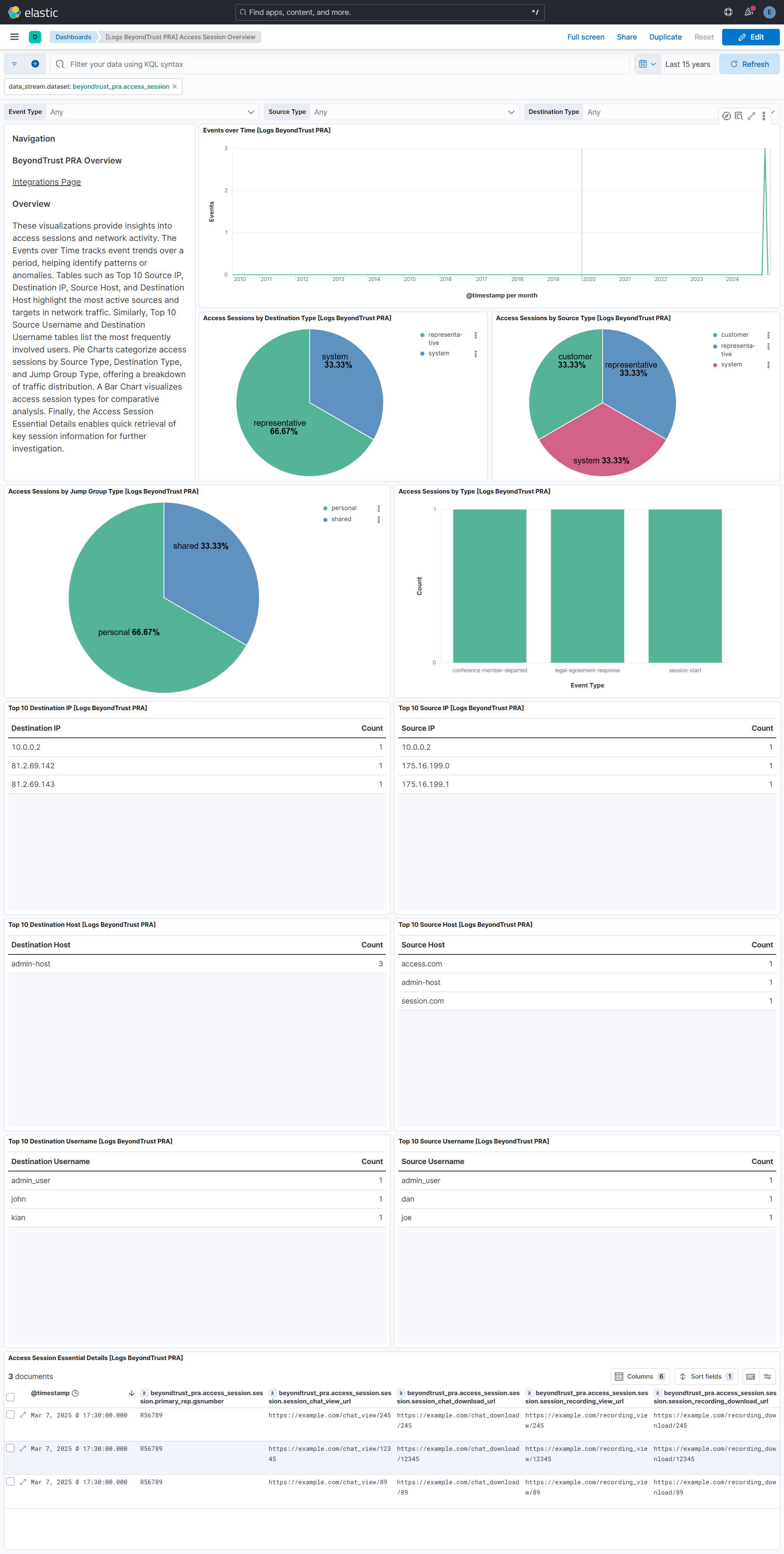
This integration includes one or more Kibana dashboards that visualizes the data collected by the integration. The screenshots below illustrate how the ingested data is displayed.
Changelog
| Version | Details | Minimum Kibana version |
|---|---|---|
| 1.4.0 | Enhancement (View pull request) Update Elastic Managed integration documentation to the current wording and docs links. |
9.0.0 8.18.0 |
| 1.3.0 | Enhancement (View pull request) Add tags to ingest pipeline processors. |
9.0.0 8.18.0 |
| 1.2.1 | Enhancement (View pull request) Set agentless deployment mode release field to ga. |
9.0.0 8.18.0 |
| 1.2.0 | Enhancement (View pull request) Publish Agentless to Elastic Managed integrations name change. |
9.0.0 8.18.0 |
| 1.1.0 | Enhancement (View pull request) Use new release field for agentless deployment mode to establish as beta. |
9.0.0 8.18.0 |
| 1.0.0 | Enhancement (View pull request) Release BeyondTrust PRA as GA. Enhancement (View pull request) Add field descriptions for primary_rep.* and system_information.* fields.Add support for file_delete_count field. |
9.0.0 8.18.0 |
| 0.4.0 | Breaking change (View pull request) Change session_owner type from keyword to boolean. Bug fix (View pull request) Remove gcp from documentation. |
9.0.0 8.18.0 |
| 0.3.3 | Bug fix (View pull request) Improve custom_attribute handling and correctly parse IP addresses that include ports. |
9.0.0 8.18.0 |
| 0.3.2 | Bug fix (View pull request) Downgrade the format_version to the minimum version that supports all the necessary features for the package. |
9.0.0 8.18.0 |
| 0.3.1 | Bug fix (View pull request) Fixed the API request format by updating the start_time query parameter to use Unix epoch time in seconds.Bug fix (View pull request) Fixed handling of session_details events to account for elements that are not mandatory. |
9.0.0 8.18.0 |
| 0.3.0 | Enhancement (View pull request) Use terminate processor instead of fail processor to handle agent errors. |
9.0.0 8.18.0 |
| 0.2.1 | Bug fix (View pull request) Add temporary processor to remove the fields added by the Agentless policy. |
9.0.0 8.18.0 |
| 0.2.0 | Enhancement (View pull request) Remove redundant installation instructions. |
9.0.0 8.18.0 |
| 0.1.1 | Bug fix (View pull request) Fix default request trace enabled behavior. |
9.0.0 8.18.0 |
| 0.1.0 | Enhancement (View pull request) Initial release. |
9.0.0 8.18.0 |