Auditd Manager Integration
Elastic Cloud Serverless projects are autoscaled environments, fully managed by Elastic and available on Elastic Cloud. Availability This functionality is generally available and ready for production usage. Elastic Cloud Serverless projects are autoscaled environments, fully managed by Elastic and available on Elastic Cloud. Availability This functionality is generally available and ready for production usage. The Elastic Stack includes Elastic's core products such as Elasticsearch, Kibana, Logstash, and Beats. Availability This functionality is generally available and ready for production usage. Unless stated otherwise on the page, this functionality is available when your Elastic Stack is deployed on Elastic Cloud Hosted, Elastic Cloud Enterprise, Elastic Cloud on Kubernetes, and self-managed environments. This documentation corresponds to the latest patch available for each minor version. If you're not using the latest patch, check the release notes for changes.
Serverless Observability
Generally available
Serverless Security
Generally available
Stack
9.0+
Generally available since 9.0
| Version | 1.21.0 (View all) |
| Subscription level What's this? |
Basic |
| Developed by What's this? |
Elastic |
| Required permissions | Root privileges |
| Minimum Kibana version(s) | 9.0.0 8.16.0 |
The Auditd Manager Integration receives audit events from the Linux Audit Framework that is a part of the Linux kernel.
This integration is available only for Linux.
The Auditd Manager is one of the integrations that can power the Session View utility for the Elastic Security Platform. This feature provides a visual representation of session and process execution data, organized according to the Linux process model to help you investigate process, user, and service activity on your Linux infrastructure.
There are two ways to enable session data capture for the Session View feature:
- Navigate to the Auditd Manager integration configuration in Kibana.
- Locate the "Session data" toggle switch.
- Turn the switch on to enable session data capture.
- Navigate to the Auditd Manager integration configuration in Kibana.
- Add the
add_session_metadataprocessor configuration under the Processors section of Advanced options.
- add_session_metadata:
   backend: "auto"
- Add these rules to the Audit Rules section of the configuration:
-a always,exit -F arch=b64 -S execve,execveat -k exec
-a always,exit -F arch=b64 -S exit_group
-a always,exit -F arch=b64 -S setsid
Changes are applied automatically, and you do not have to restart the service.
- Using the toggle switch (Method 1) automatically applies these configurations, making it the simpler option for most users.
- When enabling session data capture, be aware that it will collect extended process data, which may have privacy and storage implications.
- You can disable session data capture at any time by turning off the toggle switch or removing the manual configurations.
- If you switch between methods or disable the feature, ensure that any conflicting configurations are removed to avoid unexpected behaviour.
This integration establishes a subscription to the kernel to receive the events as they occur.
The Linux Audit Framework can send multiple messages for a single auditable
event. For example, a rename syscall causes the kernel to send eight separate
messages. Each message describes a different aspect of the activity that is
occurring (the syscall itself, file paths, current working directory, process
title). This integration will combine all of the data from each of the messages
into a single event.
Messages for one event can be interleaved with messages from another event. This module will buffer the messages in order to combine related messages into a single event even if they arrive interleaved or out of order.
When running this integration, you might find that other monitoring tools interfere with it.
For example, you might encounter errors if another process, such as auditd, is
registered to receive data from the Linux Audit Framework. You can use these
commands to see if the auditd service is running and stop it:
See if
auditdis running:Shell service auditd statusStop the
auditdservice:Shell service auditd stopDisable
auditdfrom starting on boot:Shell `chkconfig auditd off`Stop
journaldfrom listening to audit messages (to save CPU usage and disk space):Shell systemctl mask systemd-journald-audit.socket
The audit rules are where you configure the activities that are audited. These
rules are configured as either syscalls or files that should be monitored. For
example you can track all connect syscalls or file system writes to
/etc/passwd.
Auditing a large number of syscalls can place a heavy load on the system so consider carefully the rules you define and try to apply filters in the rules themselves to be as selective as possible.
The kernel evaluates the rules in the order in which they were defined so place the most active rules first in order to speed up evaluation.
You can assign keys to each rule for better identification of the rule that triggered an event and easier filtering later in Elasticsearch.
Defining any audit rules in the config causes elastic-agent to purge all
existing audit rules prior to adding the rules specified in the config.
Therefore it is unnecessary and unsupported to include a -D (delete all) rule.
Examples:
## If you are on a 64 bit platform, everything should be running
## in 64 bit mode. This rule will detect any use of the 32 bit syscalls
## because this might be a sign of someone exploiting a hole in the 32
## bit API.
-a always,exit -F arch=b32 -S all -F key=32bit-abi

## Executions.
-a always,exit -F arch=b64 -S execve,execveat -k exec

## External access (warning: these can be expensive to audit).
-a always,exit -F arch=b64 -S accept,bind,connect -F key=external-access

## Unauthorized access attempts.
-a always,exit -F arch=b64 -S open,creat,truncate,ftruncate,openat,open_by_handle_at -F exit=-EACCES -k access
-a always,exit -F arch=b64 -S open,creat,truncate,ftruncate,openat,open_by_handle_at -F exit=-EPERM -k access

# Things that affect identity.
-w /etc/group -p wa -k identity
-w /etc/passwd -p wa -k identity
-w /etc/gshadow -p wa -k identity
-w /etc/shadow -p wa -k identity

# Unauthorized access attempts to files (unsuccessful).
-a always,exit -F arch=b32 -S open,creat,truncate,ftruncate,openat,open_by_handle_at -F exit=-EACCES -F auid>=1000 -F auid!=4294967295 -F key=access
-a always,exit -F arch=b32 -S open,creat,truncate,ftruncate,openat,open_by_handle_at -F exit=-EPERM -F auid>=1000 -F auid!=4294967295 -F key=access
-a always,exit -F arch=b64 -S open,truncate,ftruncate,creat,openat,open_by_handle_at -F exit=-EACCES -F auid>=1000 -F auid!=4294967295 -F key=access
-a always,exit -F arch=b64 -S open,truncate,ftruncate,creat,openat,open_by_handle_at -F exit=-EPERM -F auid>=1000 -F auid!=4294967295 -F key=access
Example
{
    "@timestamp": "2025-01-14T18:00:56.117Z",
    "agent": {
        "ephemeral_id": "df24f825-df17-4f54-b3c4-3048edbdf123",
        "id": "da084743-3b4d-43eb-a6c9-f26c44204375",
        "name": "elastic-agent-90019",
        "type": "auditbeat",
        "version": "8.16.0"
    },
    "auditd": {
        "data": {
            "a0": "10",
            "a1": "c001144140",
            "a2": "3c",
            "a3": "0",
            "arch": "x86_64",
            "audit_pid": 2532842,
            "auid": "unset",
            "exit": "60",
            "old": "0",
            "op": "set",
            "result": "success",
            "ses": "unset",
            "socket": {
                "family": "netlink",
                "saddr": "100000000000000000000000"
            },
            "subj_user": "docker-default",
            "syscall": "sendto",
            "tty": "(none)"
        },
        "message_type": "config_change",
        "messages": [
            "type=CONFIG_CHANGE msg=audit(1736877656.117:1197107): op=set audit_pid=2532842 old=0 auid=4294967295 ses=4294967295 subj=docker-default res=1",
            "type=SYSCALL msg=audit(1736877656.117:1197107): arch=c000003e syscall=44 success=yes exit=60 a0=10 a1=c001144140 a2=3c a3=0 items=0 ppid=2531521 pid=2532842 auid=4294967295 uid=0 gid=0 euid=0 suid=0 fsuid=0 egid=0 sgid=0 fsgid=0 tty=(none) ses=4294967295 comm=\"agentbeat\" exe=\"/usr/share/elastic-agent/data/elastic-agent-3f07f2/components/agentbeat\" subj=docker-default key=(null)",
            "type=SOCKADDR msg=audit(1736877656.117:1197107): saddr=100000000000000000000000",
            "type=PROCTITLE msg=audit(1736877656.117:1197107): proctitle=2F7573722F73686172652F656C61737469632D6167656E742F646174612F656C61737469632D6167656E742D3366303766322F636F6D706F6E656E74732F6167656E746265617400617564697462656174002D450073657475702E696C6D2E656E61626C65643D66616C7365002D450073657475702E74656D706C6174652E65"
        ],
        "result": "success",
        "summary": {
            "actor": {
                "primary": "unset",
                "secondary": "root"
            },
            "how": "/usr/share/elastic-agent/data/elastic-agent-3f07f2/components/agentbeat",
            "object": {
                "primary": "set",
                "type": "audit-config"
            }
        },
        "user": {
            "filesystem": {
                "group": {
                    "id": "0",
                    "name": "root"
                },
                "id": "0",
                "name": "root"
            },
            "saved": {
                "group": {
                    "id": "0",
                    "name": "root"
                },
                "id": "0",
                "name": "root"
            },
            "selinux": {
                "user": "docker-default"
            }
        }
    },
    "data_stream": {
        "dataset": "auditd_manager.auditd",
        "namespace": "73800",
        "type": "logs"
    },
    "ecs": {
        "version": "8.11.0"
    },
    "elastic_agent": {
        "id": "da084743-3b4d-43eb-a6c9-f26c44204375",
        "snapshot": false,
        "version": "8.16.0"
    },
    "event": {
        "action": "changed-audit-configuration",
        "agent_id_status": "verified",
        "category": [
            "process",
            "configuration",
            "network"
        ],
        "dataset": "auditd_manager.auditd",
        "ingested": "2025-01-14T18:00:59Z",
        "kind": "event",
        "module": "auditd",
        "original": "type=CONFIG_CHANGE msg=audit(1736877656.117:1197107): op=set audit_pid=2532842 old=0 auid=4294967295 ses=4294967295 subj=docker-default res=1\ntype=SYSCALL msg=audit(1736877656.117:1197107): arch=c000003e syscall=44 success=yes exit=60 a0=10 a1=c001144140 a2=3c a3=0 items=0 ppid=2531521 pid=2532842 auid=4294967295 uid=0 gid=0 euid=0 suid=0 fsuid=0 egid=0 sgid=0 fsgid=0 tty=(none) ses=4294967295 comm=\"agentbeat\" exe=\"/usr/share/elastic-agent/data/elastic-agent-3f07f2/components/agentbeat\" subj=docker-default key=(null)\ntype=SOCKADDR msg=audit(1736877656.117:1197107): saddr=100000000000000000000000\ntype=PROCTITLE msg=audit(1736877656.117:1197107): proctitle=2F7573722F73686172652F656C61737469632D6167656E742F646174612F656C61737469632D6167656E742D3366303766322F636F6D706F6E656E74732F6167656E746265617400617564697462656174002D450073657475702E696C6D2E656E61626C65643D66616C7365002D450073657475702E74656D706C6174652E65",
        "outcome": "success",
        "sequence": 1197107,
        "type": [
            "change",
            "connection",
            "info"
        ]
    },
    "host": {
        "architecture": "x86_64",
        "containerized": false,
        "hostname": "elastic-agent-90019",
        "ip": [
            "192.168.176.2",
            "192.168.144.5"
        ],
        "mac": [
            "02-42-C0-A8-90-05",
            "02-42-C0-A8-B0-02"
        ],
        "name": "elastic-agent-90019",
        "os": {
            "kernel": "6.8.0-51-generic",
            "name": "Wolfi",
            "platform": "wolfi",
            "type": "linux",
            "version": "20230201"
        }
    },
    "network": {
        "direction": "egress"
    },
    "process": {
        "executable": "/usr/share/elastic-agent/data/elastic-agent-3f07f2/components/agentbeat",
        "name": "agentbeat",
        "parent": {
            "pid": 2531521
        },
        "pid": 2532842,
        "title": "/usr/share/elastic-agent/data/elastic-agent-3f07f2/components/agentbeat auditbeat -E setup.ilm.enabled=false -E setup.template.e"
    },
    "service": {
        "type": "auditd"
    },
    "tags": [
        "preserve_original_event",
        "auditd_manager-auditd"
    ],
    "user": {
        "group": {
            "id": "0",
            "name": "root"
        },
        "id": "0",
        "name": "root"
    }
}
Exported fields
| Field | Description | Type |
|---|---|---|
| @timestamp | Date/time when the event originated. This is the date/time extracted from the event, typically representing when the event was generated by the source. If the event source has no original timestamp, this value is typically populated by the first time the event was received by the pipeline. Required field for all events. | date |
| auditd.data.a* | the arguments to a syscall | keyword |
| auditd.data.acct | a user's account name | keyword |
| auditd.data.acl | access mode of resource assigned to vm | keyword |
| auditd.data.action | netfilter packet disposition | keyword |
| auditd.data.added | number of new files detected | long |
| auditd.data.addr | the remote address that the user is connecting from | keyword |
| auditd.data.apparmor | apparmor event information | keyword |
| auditd.data.arch | the elf architecture flags | keyword |
| auditd.data.argc | the number of arguments to an execve syscall | long |
| auditd.data.audit_backlog_limit | audit system's backlog queue size | keyword |
| auditd.data.audit_backlog_wait_time | audit system's backlog wait time | keyword |
| auditd.data.audit_enabled | audit systems's enable/disable status | keyword |
| auditd.data.audit_failure | audit system's failure mode | keyword |
| auditd.data.audit_pid | long | |
| auditd.data.auid | keyword | |
| auditd.data.banners | banners used on printed page | keyword |
| auditd.data.bool | name of SELinux boolean | keyword |
| auditd.data.bus | name of subsystem bus a vm resource belongs to | keyword |
| auditd.data.cap_fe | file assigned effective capability map | keyword |
| auditd.data.cap_fi | file inherited capability map | keyword |
| auditd.data.cap_fp | file permitted capability map | keyword |
| auditd.data.cap_fver | file system capabilities version number | keyword |
| auditd.data.cap_pe | process effective capability map | keyword |
| auditd.data.cap_pi | process inherited capability map | keyword |
| auditd.data.cap_pp | process permitted capability map | keyword |
| auditd.data.capability | posix capabilities | keyword |
| auditd.data.cgroup | path to cgroup in sysfs | keyword |
| auditd.data.changed | number of changed files | long |
| auditd.data.cipher | name of crypto cipher selected | keyword |
| auditd.data.class | resource class assigned to vm | keyword |
| auditd.data.cmd | command being executed | keyword |
| auditd.data.code | seccomp action code | keyword |
| auditd.data.compat | is_compat_task result | keyword |
| auditd.data.daddr | remote IP address | ip |
| auditd.data.data | TTY text | keyword |
| auditd.data.default_context | default MAC context | keyword |
| auditd.data.device | device name | keyword |
| auditd.data.dir | directory name | keyword |
| auditd.data.direction | direction of crypto operation | keyword |
| auditd.data.dmac | remote MAC address | keyword |
| auditd.data.dport | remote port number | long |
| auditd.data.enforcing | new MAC enforcement status | keyword |
| auditd.data.entries | number of entries in the netfilter table | long |
| auditd.data.exit | syscall exit code | keyword |
| auditd.data.fam | socket address family | keyword |
| auditd.data.family | netfilter protocol | keyword |
| auditd.data.fd | file descriptor number | keyword |
| auditd.data.fe | file assigned effective capability map | keyword |
| auditd.data.feature | kernel feature being changed | keyword |
| auditd.data.fi | file assigned inherited capability map | keyword |
| auditd.data.file | file name | keyword |
| auditd.data.flags | mmap syscall flags | keyword |
| auditd.data.format | audit log's format | keyword |
| auditd.data.fp | crypto key finger print | keyword |
| auditd.data.frootid | keyword | |
| auditd.data.fver | file system capabilities version number | keyword |
| auditd.data.grantors | pam modules approving the action | keyword |
| auditd.data.grp | group name | keyword |
| auditd.data.hook | netfilter hook that packet came from | keyword |
| auditd.data.hostname | the hostname that the user is connecting from | keyword |
| auditd.data.icmp_type | type of icmp message | keyword |
| auditd.data.id | during account changes | keyword |
| auditd.data.igid | ipc object's group ID | keyword |
| auditd.data.img_ctx | the vm's disk image context string | keyword |
| auditd.data.inif | in interface number | keyword |
| auditd.data.ino | inode number | keyword |
| auditd.data.inode_gid | group ID of the inode's owner | keyword |
| auditd.data.inode_uid | user ID of the inode's owner | keyword |
| auditd.data.invalid_context | SELinux context | keyword |
| auditd.data.ioctlcmd | The request argument to the ioctl syscall | keyword |
| auditd.data.ip | network address of a printer | ip |
| auditd.data.ipid | IP datagram fragment identifier | keyword |
| auditd.data.ipx_net | IPX network number | keyword |
| auditd.data.items | the number of path records in the event | long |
| auditd.data.iuid | ipc object's user ID | keyword |
| auditd.data.kernel | kernel's version number | keyword |
| auditd.data.kind | server or client in crypto operation | keyword |
| auditd.data.ksize | key size for crypto operation | keyword |
| auditd.data.laddr | local network address | keyword |
| auditd.data.len | length | keyword |
| auditd.data.list | the audit system's filter list number | keyword |
| auditd.data.lport | local network port | long |
| auditd.data.mac | crypto MAC algorithm selected | keyword |
| auditd.data.macproto | ethernet packet type ID field | keyword |
| auditd.data.maj | device major number | keyword |
| auditd.data.major | device major number | keyword |
| auditd.data.minor | device minor number | keyword |
| auditd.data.model | security model being used for virt | keyword |
| auditd.data.msg | the payload of the audit record | keyword |
| auditd.data.nargs | the number of arguments to a socket call | long |
| auditd.data.net | network MAC address | keyword |
| auditd.data.new | value being set in feature | keyword |
| auditd.data.new_chardev | new character device being assigned to vm | keyword |
| auditd.data.new_disk | disk being added to vm | keyword |
| auditd.data.new_enabled | new TTY audit enabled setting | keyword |
| auditd.data.new_fs | file system being added to vm | keyword |
| auditd.data.new_gid | new group ID being assigned | keyword |
| auditd.data.new_level | new run level | keyword |
| auditd.data.new_lock | new value of feature lock | keyword |
| auditd.data.new_log_passwd | new value for TTY password logging | keyword |
| auditd.data.new_mem | new amount of memory in KB | keyword |
| auditd.data.new_net | MAC address being assigned to vm | keyword |
| auditd.data.new_pe | new process effective capability map | keyword |
| auditd.data.new_pi | new process inherited capability map | keyword |
| auditd.data.new_pp | new process permitted capability map | keyword |
| auditd.data.new_range | new SELinux range | keyword |
| auditd.data.new_rng | device name of rng being added from a vm | keyword |
| auditd.data.new_role | new SELinux role | keyword |
| auditd.data.new_ses | ses value | keyword |
| auditd.data.new_seuser | new SELinux user | keyword |
| auditd.data.new_vcpu | new number of CPU cores | long |
| auditd.data.nlnk_fam | netlink protocol number | keyword |
| auditd.data.nlnk_grp | netlink group number | keyword |
| auditd.data.nlnk_pid | pid of netlink packet sender | long |
| auditd.data.oauid | object's login user ID | keyword |
| auditd.data.obj | lspp object context string | keyword |
| auditd.data.obj_gid | group ID of object | keyword |
| auditd.data.obj_uid | user ID of object | keyword |
| auditd.data.ocomm | object's command line name | keyword |
| auditd.data.oflag | open syscall flags | keyword |
| auditd.data.old | old value | keyword |
| auditd.data.old_auid | previous auid value | keyword |
| auditd.data.old_chardev | present character device assigned to vm | keyword |
| auditd.data.old_disk | disk being removed from vm | keyword |
| auditd.data.old_enabled | present TTY audit enabled setting | keyword |
| auditd.data.old_enforcing | old MAC enforcement status | keyword |
| auditd.data.old_fs | file system being removed from vm | keyword |
| auditd.data.old_level | old run level | keyword |
| auditd.data.old_lock | present value of feature lock | keyword |
| auditd.data.old_log_passwd | present value for TTY password logging | keyword |
| auditd.data.old_mem | present amount of memory in KB | keyword |
| auditd.data.old_net | present MAC address assigned to vm | keyword |
| auditd.data.old_pa | keyword | |
| auditd.data.old_pe | old process effective capability map | keyword |
| auditd.data.old_pi | old process inherited capability map | keyword |
| auditd.data.old_pp | old process permitted capability map | keyword |
| auditd.data.old_prom | network promiscuity flag | keyword |
| auditd.data.old_range | present SELinux range | keyword |
| auditd.data.old_rng | device name of rng being removed from a vm | keyword |
| auditd.data.old_role | present SELinux role | keyword |
| auditd.data.old_ses | previous ses value | keyword |
| auditd.data.old_seuser | present SELinux user | keyword |
| auditd.data.old_val | current value of SELinux boolean | keyword |
| auditd.data.old_vcpu | present number of CPU cores | long |
| auditd.data.op | the operation being performed that is audited | keyword |
| auditd.data.opid | object's process ID | long |
| auditd.data.oses | object's session ID | keyword |
| auditd.data.outif | out interface number | keyword |
| auditd.data.pa | keyword | |
| auditd.data.parent | the inode number of the parent file | keyword |
| auditd.data.pe | keyword | |
| auditd.data.per | linux personality | keyword |
| auditd.data.perm | the file permission being used | keyword |
| auditd.data.perm_mask | file permission mask that triggered a watch event | keyword |
| auditd.data.permissive | SELinux is in permissive mode | keyword |
| auditd.data.pfs | perfect forward secrecy method | keyword |
| auditd.data.pi | keyword | |
| auditd.data.pp | keyword | |
| auditd.data.printer | printer name | keyword |
| auditd.data.prog_id | The numeric kernel-assigned ID of the eBPF program associated with the event. | keyword |
| auditd.data.prom | network promiscuity flag | keyword |
| auditd.data.proto | network protocol | keyword |
| auditd.data.qbytes | ipc objects quantity of bytes | keyword |
| auditd.data.range | user's SE Linux range | keyword |
| auditd.data.reason | text string denoting a reason for the action | keyword |
| auditd.data.removed | number of deleted files | long |
| auditd.data.res | result of the audited operation(success/fail) | keyword |
| auditd.data.reset | keyword | |
| auditd.data.resrc | resource being assigned | keyword |
| auditd.data.result | keyword | |
| auditd.data.rport | remote port number | long |
| auditd.data.sauid | sent login user ID | keyword |
| auditd.data.scontext | the subject's context string | keyword |
| auditd.data.selected_context | new MAC context assigned to session | keyword |
| auditd.data.seperm | SELinux permission being decided on | keyword |
| auditd.data.seperms | SELinux permissions being used | keyword |
| auditd.data.seqno | sequence number | long |
| auditd.data.seresult | SELinux AVC decision granted/denied | keyword |
| auditd.data.ses | login session ID | keyword |
| auditd.data.seuser | user's SE Linux user acct | keyword |
| auditd.data.sig | signal number | keyword |
| auditd.data.sigev_signo | signal number | keyword |
| auditd.data.smac | local MAC address | keyword |
| auditd.data.socket.addr | The remote address. | keyword |
| auditd.data.socket.family | The socket family (unix, ipv4, ipv6, netlink). | keyword |
| auditd.data.socket.path | This is the path associated with a unix socket. | keyword |
| auditd.data.socket.port | The port number. | long |
| auditd.data.socket.saddr | The raw socket address structure. | keyword |
| auditd.data.spid | sent process ID | long |
| auditd.data.sport | local port number | long |
| auditd.data.state | audit daemon configuration resulting state | keyword |
| auditd.data.subj | lspp subject's context string | keyword |
| auditd.data.subj_category | The SELinux category associated with the subject. It helps further refine the level of access by classifying subjects into categories for multi-level security (MLS). Categories are often used to label data with additional attributes, like "high" or "low," enhancing granularity. | keyword |
| auditd.data.subj_domain | The SELinux domain or type assigned to the subject. The domain specifies the type of resource or process the subject is interacting with, helping enforce domain-based access controls, which are crucial in limiting resource access. | keyword |
| auditd.data.subj_level | The SELinux sensitivity level for the subject. It indicates the security classification level, like s0 or s2, that defines how data or processes are handled based on confidentiality and integrity levels within the system. |
keyword |
| auditd.data.subj_role | The SELinux role associated with the subject. The role determines the capabilities a subject has within a given SELinux policy. Roles are used to define higher-level security attributes in the context of the system's security policies. | keyword |
| auditd.data.subj_user | The SELinux user identity. This represents the SELinux user role that is assigned to the subject (user or process) performing an action. It's part of the SELinux security context and is used to enforce policies that restrict what actions a subject can perform. | keyword |
| auditd.data.success | whether the syscall was successful or not | keyword |
| auditd.data.syscall | syscall number in effect when the event occurred | keyword |
| auditd.data.table | netfilter table name | keyword |
| auditd.data.tclass | target's object classification | keyword |
| auditd.data.tcontext | the target's or object's context string | keyword |
| auditd.data.terminal | terminal name the user is running programs on | keyword |
| auditd.data.tty | tty udevice the user is running programs on | keyword |
| auditd.data.unit | systemd unit | keyword |
| auditd.data.uri | URI pointing to a printer | keyword |
| auditd.data.uuid | a UUID | keyword |
| auditd.data.val | generic value associated with the operation | keyword |
| auditd.data.ver | audit daemon's version number | keyword |
| auditd.data.virt | kind of virtualization being referenced | keyword |
| auditd.data.vm | virtual machine name | keyword |
| auditd.data.vm_ctx | the vm's context string | keyword |
| auditd.data.vm_pid | vm's process ID | long |
| auditd.data.watch | file name in a watch record | keyword |
| auditd.file.selinux.domain | The actor's SELinux domain or type. | keyword |
| auditd.file.selinux.level | The actor's SELinux level. | keyword |
| auditd.file.selinux.role | User's SELinux role | keyword |
| auditd.file.selinux.user | Account submitted for authentication | keyword |
| auditd.message_type | The audit message type (e.g. syscall or apparmor_denied). | keyword |
| auditd.messages | An ordered list of the raw messages received from the kernel that were used to construct this document. This field is present if an error occurred processing the data or if include_raw_message is set in the config. | keyword |
| auditd.paths | flattened | |
| auditd.paths.dev | Device name as found in /dev | keyword |
| auditd.paths.inode | inode number | keyword |
| auditd.paths.item | Which item is being recorded | keyword |
| auditd.paths.mode | Mode flags on a file | keyword |
| auditd.paths.name | File name in avcs | keyword |
| auditd.paths.nametype | Kind of file operation being referenced | keyword |
| auditd.paths.obj_domain | keyword | |
| auditd.paths.obj_level | keyword | |
| auditd.paths.obj_role | keyword | |
| auditd.paths.obj_type | keyword | |
| auditd.paths.obj_user | keyword | |
| auditd.paths.ogid | File owner group ID | keyword |
| auditd.paths.ouid | File owner user ID | keyword |
| auditd.paths.rdev | The device identifier (special files only) | keyword |
| auditd.result | The result of the audited operation (success/fail). | keyword |
| auditd.session | The session ID assigned to a login. All events related to a login session will have the same value. | keyword |
| auditd.summary.actor.primary | The primary identity of the actor. This is the actor's original login ID. It will not change even if the user changes to another account. | keyword |
| auditd.summary.actor.secondary | The secondary identity of the actor. This is typically the same as the primary, except for when the user has used su. | keyword |
| auditd.summary.how | This describes how the action was performed. Usually this is the exe or command that was being executed that triggered the event. | keyword |
| auditd.summary.object.primary | keyword | |
| auditd.summary.object.secondary | keyword | |
| auditd.summary.object.type | A description of the what the "thing" is (e.g. file, socket, user-session). | keyword |
| auditd.user.audit.id | keyword | |
| auditd.user.audit.name | keyword | |
| auditd.user.filesystem.group.id | keyword | |
| auditd.user.filesystem.group.name | keyword | |
| auditd.user.filesystem.id | keyword | |
| auditd.user.filesystem.name | keyword | |
| auditd.user.new_auid.id | keyword | |
| auditd.user.new_auid.name | keyword | |
| auditd.user.old_auid.id | keyword | |
| auditd.user.old_auid.name | keyword | |
| auditd.user.saved.group.id | keyword | |
| auditd.user.saved.group.name | keyword | |
| auditd.user.saved.id | keyword | |
| auditd.user.saved.name | keyword | |
| auditd.user.selinux.category | The actor's SELinux category or compartments. | keyword |
| auditd.user.selinux.domain | The actor's SELinux domain or type. | keyword |
| auditd.user.selinux.level | The actor's SELinux level. | keyword |
| auditd.user.selinux.role | User's SELinux role | keyword |
| auditd.user.selinux.user | Account submitted for authentication | keyword |
| auditd.warnings | The warnings generated by the Beat during the construction of the event. These are disabled by default and are used for development and debug purposes only. | keyword |
| data_stream.dataset | Data stream dataset. | constant_keyword |
| data_stream.namespace | Data stream namespace. | constant_keyword |
| data_stream.type | Data stream type. | constant_keyword |
| destination.address | Some event destination addresses are defined ambiguously. The event will sometimes list an IP, a domain or a unix socket. You should always store the raw address in the .address field. Then it should be duplicated to .ip or .domain, depending on which one it is. |
keyword |
| destination.ip | IP address of the destination (IPv4 or IPv6). | ip |
| destination.port | Port of the destination. | long |
| ecs.version | ECS version this event conforms to. ecs.version is a required field and must exist in all events. When querying across multiple indices -- which may conform to slightly different ECS versions -- this field lets integrations adjust to the schema version of the events. |
keyword |
| event.dataset | Event dataset | constant_keyword |
| event.id | Unique ID to describe the event. | keyword |
| event.module | Event module | constant_keyword |
| event.outcome | This is one of four ECS Categorization Fields, and indicates the lowest level in the ECS category hierarchy. event.outcome simply denotes whether the event represents a success or a failure from the perspective of the entity that produced the event. Note that when a single transaction is described in multiple events, each event may populate different values of event.outcome, according to their perspective. Also note that in the case of a compound event (a single event that contains multiple logical events), this field should be populated with the value that best captures the overall success or failure from the perspective of the event producer. Further note that not all events will have an associated outcome. For example, this field is generally not populated for metric events, events with event.type:info, or any events for which an outcome does not make logical sense. |
keyword |
| file.device | Device that is the source of the file. | keyword |
| file.gid | Primary group ID (GID) of the file. | keyword |
| file.group | Primary group name of the file. | keyword |
| file.inode | Inode representing the file in the filesystem. | keyword |
| file.mode | Mode of the file in octal representation. | keyword |
| file.owner | File owner's username. | keyword |
| file.path | Full path to the file, including the file name. It should include the drive letter, when appropriate. | keyword |
| file.path.text | Multi-field of file.path. |
match_only_text |
| file.uid | The user ID (UID) or security identifier (SID) of the file owner. | keyword |
| group.id | Unique identifier for the group on the system/platform. | keyword |
| group.name | Name of the group. | keyword |
| network.direction | Direction of the network traffic. When mapping events from a host-based monitoring context, populate this field from the host's point of view, using the values "ingress" or "egress". When mapping events from a network or perimeter-based monitoring context, populate this field from the point of view of the network perimeter, using the values "inbound", "outbound", "internal" or "external". Note that "internal" is not crossing perimeter boundaries, and is meant to describe communication between two hosts within the perimeter. Note also that "external" is meant to describe traffic between two hosts that are external to the perimeter. This could for example be useful for ISPs or VPN service providers. | keyword |
| process.args | Array of process arguments, starting with the absolute path to the executable. May be filtered to protect sensitive information. | keyword |
| process.executable | Absolute path to the process executable. | keyword |
| process.executable.text | Multi-field of process.executable. |
match_only_text |
| process.exit_code | The exit code of the process, if this is a termination event. The field should be absent if there is no exit code for the event (e.g. process start). | long |
| process.name | Process name. Sometimes called program name or similar. | keyword |
| process.name.text | Multi-field of process.name. |
match_only_text |
| process.parent.pid | Process id. | long |
| process.pid | Process id. | long |
| process.title | Process title. The proctitle, some times the same as process name. Can also be different: for example a browser setting its title to the web page currently opened. | keyword |
| process.title.text | Multi-field of process.title. |
match_only_text |
| process.working_directory | The working directory of the process. | keyword |
| process.working_directory.text | Multi-field of process.working_directory. |
match_only_text |
| related.user | All the user names or other user identifiers seen on the event. | keyword |
| service.type | The type of the service data is collected from. The type can be used to group and correlate logs and metrics from one service type. Example: If logs or metrics are collected from Elasticsearch, service.type would be elasticsearch. |
keyword |
| source.address | Some event source addresses are defined ambiguously. The event will sometimes list an IP, a domain or a unix socket. You should always store the raw address in the .address field. Then it should be duplicated to .ip or .domain, depending on which one it is. |
keyword |
| source.ip | IP address of the source (IPv4 or IPv6). | ip |
| source.port | Port of the source. | long |
| tags | List of keywords used to tag each event. | keyword |
| user.effective.group.id | Unique identifier for the group on the system/platform. | keyword |
| user.effective.group.name | Name of the group. | keyword |
| user.effective.id | Unique identifier of the user. | keyword |
| user.effective.name | Short name or login of the user. | keyword |
| user.effective.name.text | Multi-field of user.effective.name. |
match_only_text |
| user.group.id | Unique identifier for the group on the system/platform. | keyword |
| user.group.name | Name of the group. | keyword |
| user.id | Unique identifier of the user. | keyword |
| user.name | Short name or login of the user. | keyword |
| user.name.text | Multi-field of user.name. |
match_only_text |
| user.target.group.id | Unique identifier for the group on the system/platform. | keyword |
| user.target.group.name | Name of the group. | keyword |
| user.target.id | Unique identifier of the user. | keyword |
| user.target.name | Short name or login of the user. | keyword |
| user.target.name.text | Multi-field of user.target.name. |
match_only_text |
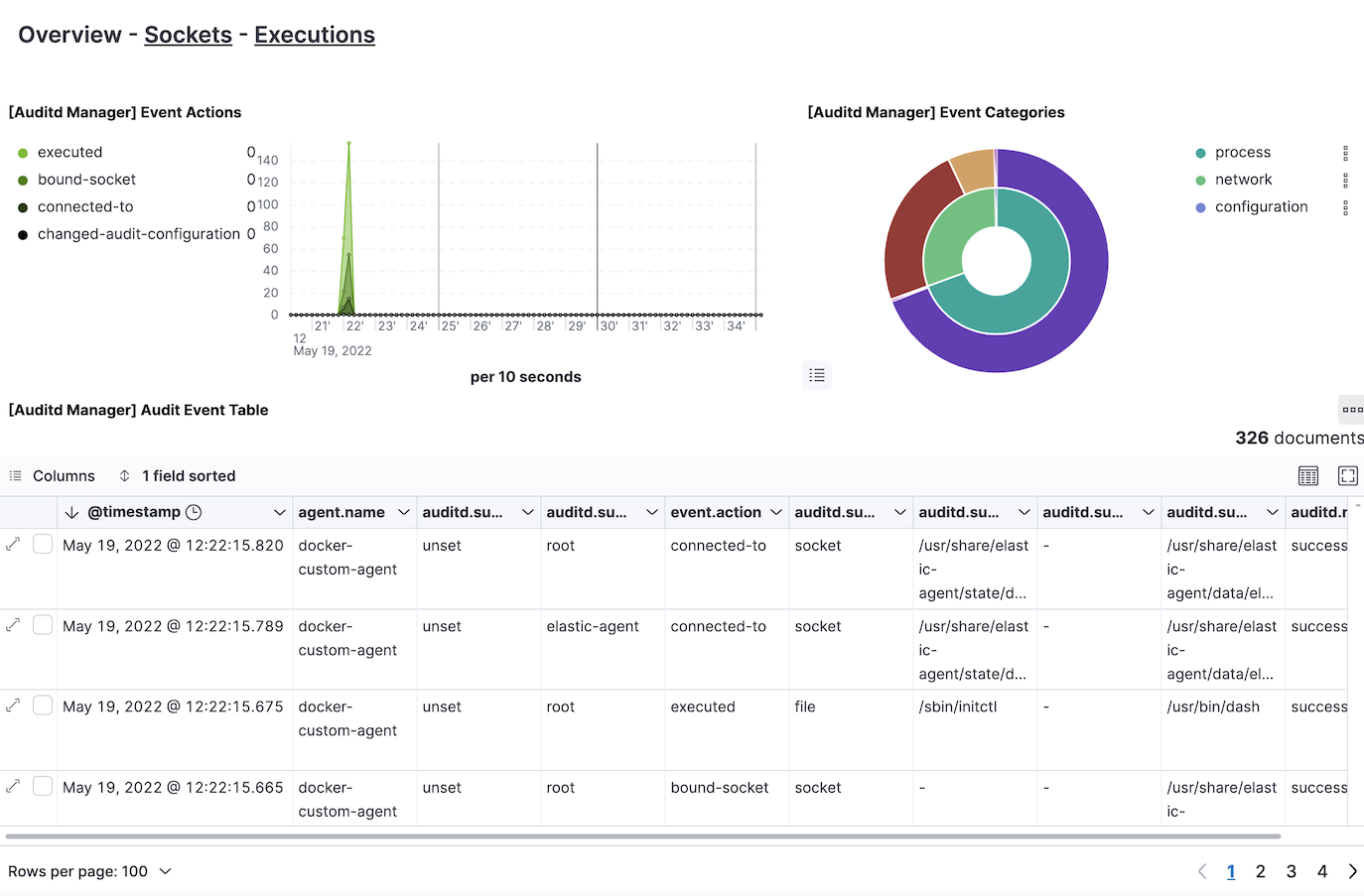
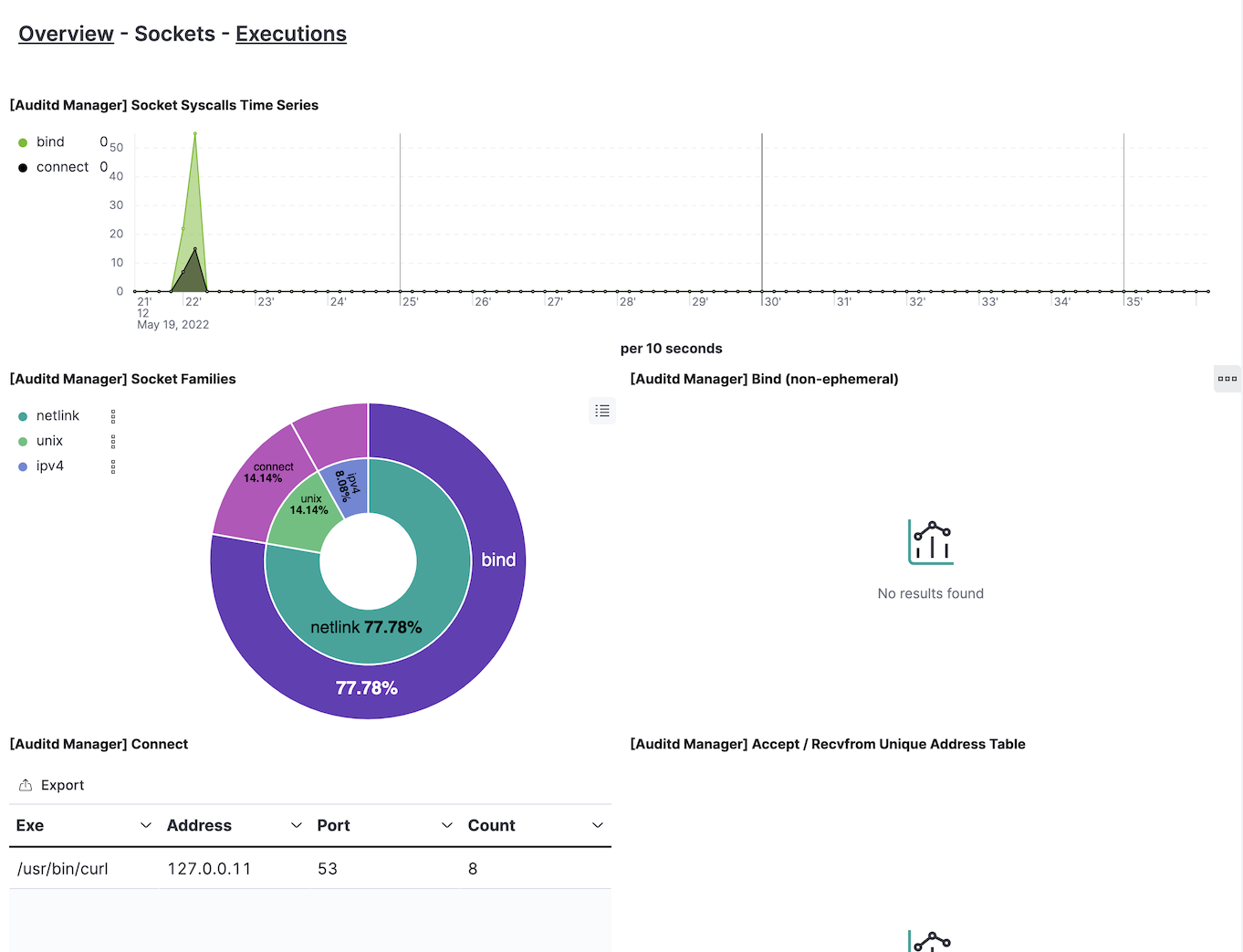
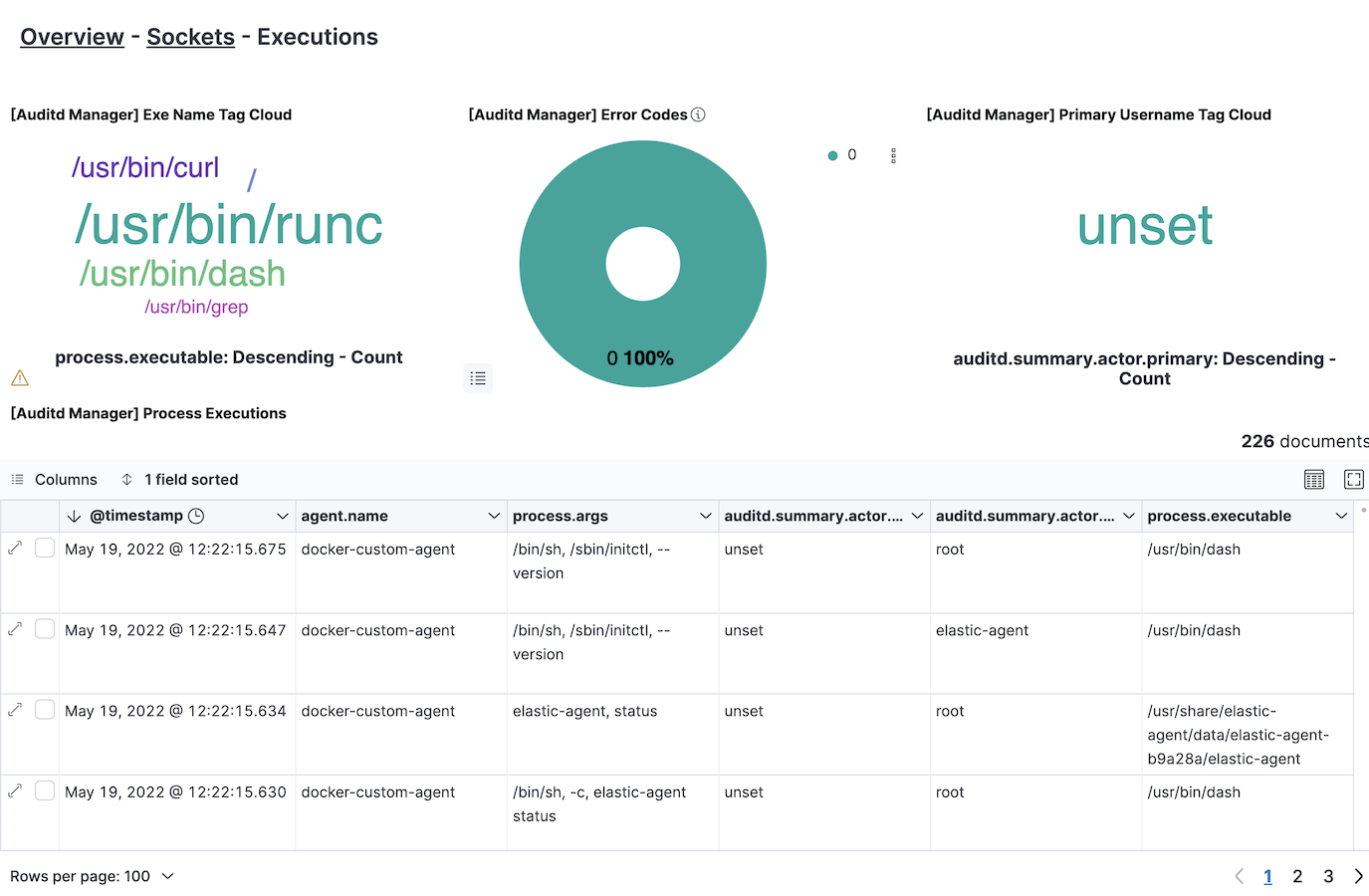
This integration includes one or more Kibana dashboards that visualizes the data collected by the integration. The screenshots below illustrate how the ingested data is displayed.
Changelog
| Version | Details | Minimum Kibana version |
|---|---|---|
| 1.21.0 | Enhancement (View pull request) Add auditd.data.prog_id field definition. |
9.0.0 8.16.0 |
| 1.20.1 | Enhancement (View pull request) Transfer package ownership to elastic/security-service-integrations. |
9.0.0 8.16.0 |
| 1.20.0 | Enhancement (View pull request) Replace markdown navigation links with Links panels for space-aware dashboard navigation |
9.0.0 8.16.0 |
| 1.19.1 | Bug fix (View pull request) Fix hbs format in the ingest pipeline for auditd data stream. |
9.0.0 8.16.0 |
| 1.19.0 | Enhancement (View pull request) Update Kibana constraint to 9.0 |
9.0.0 8.16.0 |
| 1.18.3 | Bug fix (View pull request) Updated field definitions for auditd.data.* fields |
8.16.0 |
| 1.18.2 | Enhancement (View pull request) Added Session data option |
8.16.0 |
| 1.18.1 | Bug fix (View pull request) Reverting Session data option |
8.16.0 |
| 1.18.0 | Enhancement (View pull request) Added Session data option |
9.0.0 8.16.0 |
| 1.17.1 | Enhancement (View pull request) Doc: Add doc for configuring Auditd Manager for Session View |
8.12.0 |
| 1.17.0 | Enhancement (View pull request) Allow @custom pipeline access to event.original without setting preserve_original_event. |
8.12.0 |
| 1.16.4 | Bug fix (View pull request) Fix audit_rule_files |
8.7.1 |
| 1.16.3 | Enhancement (View pull request) capture root requirement |
8.7.1 |
| 1.16.2 | Enhancement (View pull request) Changed owners |
8.7.1 |
| 1.16.1 | Bug fix (View pull request) Fix socket type selection and documentation. |
8.7.1 |
| 1.16.0 | Enhancement (View pull request) ECS version updated to 8.11.0. |
8.7.1 |
| 1.15.0 | Enhancement (View pull request) ECS version updated to 8.10.0. |
8.7.1 |
| 1.14.0 | Enhancement (View pull request) The format_version in the package manifest changed from 2.11.0 to 3.0.0. Removed dotted YAML keys from package manifest. Added 'owner.type: elastic' to package manifest. |
8.7.1 |
| 1.13.0 | Enhancement (View pull request) Add tags.yml file so that integration's dashboards and saved searches are tagged with "Security Solution" and displayed in the Security Solution UI. |
8.7.1 |
| 1.12.0 | Enhancement (View pull request) Update package to ECS 8.9.0. |
8.7.1 |
| 1.11.0 | Enhancement (View pull request) Convert visualizations to lens. |
8.7.1 |
| 1.10.0 | Enhancement (View pull request) Ensure event.kind is correctly set for pipeline errors. |
8.4.0 |
| 1.9.0 | Enhancement (View pull request) Update package to ECS 8.8.0. |
8.4.0 |
| 1.8.0 | Enhancement (View pull request) Update package-spec version to 2.7.0. |
8.4.0 |
| 1.7.1 | Bug fix (View pull request) Fix wrong field type for auditd.data.exit |
8.4.0 |
| 1.7.0 | Enhancement (View pull request) Update package to ECS 8.7.0. |
8.4.0 |
| 1.6.1 | Enhancement (View pull request) Added categories and/or subcategories. |
8.4.0 |
| 1.6.0 | Enhancement (View pull request) Update package to ECS 8.6.0. |
8.4.0 |
| 1.5.0 | Enhancement (View pull request) Add audit rule files option. |
8.4.0 |
| 1.4.0 | Enhancement (View pull request) Update package to ECS 8.5.0. |
8.4.0 |
| 1.3.0 | Enhancement (View pull request) Update package to ECS 8.4.0 |
8.4.0 |
| 1.2.0 | Enhancement (View pull request) Expose immutable option.Enhancement (View pull request) Change audit rules to be a textarea instead of a list. |
8.4.0 |
| 1.1.0 | Enhancement (View pull request) Update package to ECS 8.3.0. |
8.2.0 |
| 1.0.0 | Enhancement (View pull request) Initial release |
8.2.0 |