GCP Vertex AI
Elastic Cloud Serverless projects are autoscaled environments, fully managed by Elastic and available on Elastic Cloud. Availability This functionality is generally available and ready for production usage. Elastic Cloud Serverless projects are autoscaled environments, fully managed by Elastic and available on Elastic Cloud. Availability This functionality is generally available and ready for production usage. The Elastic Stack includes Elastic's core products such as Elasticsearch, Kibana, Logstash, and Beats. Availability This functionality is generally available and ready for production usage. Unless stated otherwise on the page, this functionality is available when your Elastic Stack is deployed on Elastic Cloud Hosted, Elastic Cloud Enterprise, Elastic Cloud on Kubernetes, and self-managed environments. This documentation corresponds to the latest patch available for each minor version. If you're not using the latest patch, check the release notes for changes.
Serverless Observability
Generally available
Serverless Security
Generally available
Stack
9.2+
Generally available since 9.2
| Version | 1.5.1 (View all) |
| Subscription level What's this? |
Basic |
| Developed by What's this? |
Elastic |
| Ingestion method(s) | API, GCP Pub/Sub |
| Minimum Kibana version(s) | 9.2.0 |
Vertex AI is a platform that enables the training and deployment of machine learning models and AI applications. It aims to streamline and expedite the development and deployment process for ML models, offering a variety of features and integrations tailored for enterprise-level workflows.
The integration with Google Cloud Platform (GCP) Vertex AI allows you to gather metrics such as token usage, latency, overall invocations, and error rates for deployed models. Additionally, it tracks resource utilization metrics for the model replicas as well as prediction metrics of endpoints.
The Vertex AI integration collects metrics and logs data.
The GCP Vertex AI includes Vertex AI Model Garden Publisher Model metrics under the publisher category, and the Vertex AI Endpoint metrics under the prediction category and audit logs under the logs.
You need Elasticsearch to store and search your data and Kibana to visualize and manage it. You can use our hosted Elasticsearch Service on Elastic Cloud, which is recommended or self-manage the Elastic Stack on your hardware.
Before using any GCP integration you will need:
First, you need to create a Service Account. Service Accounts (SAs) are principals in Google Cloud, enabling you to grant them access to resources through IAM policies.
The Elastic Agent uses the SA to access data on Google Cloud Platform using the Google APIs.
With your Service Account (SA) with access to Google Cloud Platform (GCP) resources, you need the credentials to associate with it: a Service Account Key.
From the list of SA:
- Click the Service Account you just created to open the detailed view.
- From the Keys section, click Add key > Create new key and select JSON as the type.
- Download and store the generated private key securely. Note that the private key can't be recovered from GCP if lost.
There isn't a single, specific role required to view metrics for Vertex AI. Access depends on how the models are deployed and the permissions granted to your Google Cloud project and user account.
However, to summarize the necessary permissions and implied roles, you'll generally need a role that includes the following permissions:
- monitoring.metricDescriptor.list: Allows you to list available metric descriptors.
- monitoring.timeSeries.list: Allows you to list time series data for the metrics.
These permissions are included in many roles, but these are some of the most common ones:
- roles/monitoring.viewer: This role provides read-only access to Cloud Monitoring metrics.
- roles/aiplatform.user: This role grants broader access to Vertex AI, including model viewing and potentially metric access.
- More granular roles: For fine-grained control (recommended for security best practices), consider using a custom role built with the specific permissions needed. This would only include the necessary permissions to view model metrics, rather than broader access to all Vertex AI or Cloud Monitoring resources. This requires expertise in IAM (Identity and Access Management).
- Predefined roles with broader access: These roles provide extensive permissions within the Google Cloud project, giving access to metrics but granting much broader abilities than necessary for just viewing metrics. These are generally too permissive unless necessary for other tasks. Examples are
roles/aiplatform.user orroles/editor.
For step-by-step instructions on how to set up an integration, refer to the Getting Started guide.
The next step is to configure the general integration settings used for logs and metrics from the supported services.
When you add the Google Cloud Platform VertexAI integration, you need to provide the Project ID and either the Credentials File or Credentials JSON.
The Project Id is the Google Cloud project ID where your resources exist.
Based on your preference, specify the information in either the Credentials File or the Credentials JSON field.
Save the JSON file with the private key in a secure location of the file system, and make sure that the Elastic Agent has at least read-only privileges to this file.
Specify the file path in the Elastic Agent integration UI in the "Credentials File" field. For example: /home/ubuntu/credentials.json.
Specify the content of the JSON file you downloaded from Google Cloud Platform directly in the Credentials JSON field in the Elastic Agent integration.
With a properly configured Service Account and the integration setting in place, it's time to start collecting the monitoring metrics.
No additional requirements to collect metrics.
Vertex AI offers two primary deployment types:
- Provisioned Throughput: Suitable for high-usage applications with predictable workloads and a premium on guaranteed performance.
- Pay-as-you-go: Ideal for low-usage applications, batch processing, and applications with unpredictable traffic patterns.
Now, you can track and monitor different deployment types (provisioned throughput and pay-as-you-go) in Vertex AI using the Model Garden Publisher resource.
With a properly configured Service Account and the integration setting in place, you can start collecting the logs.
Before you start, you need to create the following Google Cloud resources:
- Log Sink
- Pub/Sub Topic
- Subscription
Here's an example of collecting Vertex AI audit logs using a Pub/Sub topic, a subscription, and a Log Router. We will create the resources in the Google Cloud Console and then configure the Google Cloud Platform integration.
On the Google Cloud Console follow these steps:
At a high level, the steps required are:
- Visit "Logging" > "Log Router" > "Create Sink" and provide a sink name and description.
- In "Sink destination", select "Cloud Pub/Sub topic" as the sink service. Select an existing topic or "Create a topic". Note the topic name, as it will be provided in the Topic field in the Elastic agent configuration.
- If you created a new topic, you must remember to go to that topic and create a subscription for it. A subscription directs messages on a topic to subscribers. Note the "Subscription ID", as it will need to be entered in the "Subscription name" field in the integration settings.
- Under "Choose logs to include in sink", for example add
resource.labels.service=aiplatform.googleapis.comandresource.type="audited_resource"in the "Inclusion filter" to include all audit logs.
This is just an example to create your filter expression to select the Vertex AI audit logs you want to export to the Pub/Sub topic.
The prompt_response_logs data stream is designed to collect Vertex AI prompt-response logs from GCP BigQuery. BigQuery is a fully-managed, serverless data warehouse that stores detailed logs of interactions with Vertex AI models.
Vertex AI logs export to BigQuery enables you to export detailed Google Cloud Vertex AI interaction data (such as prompts, responses, model usage, and metadata) automatically to a BigQuery dataset that you specify. Then you can access your Vertex AI logs from BigQuery for detailed analysis and monitoring using this integration. This enables comprehensive tracking of AI model usage, performance monitoring, and cost analysis.
Before configuring this integration, you must export Vertex AI logs to a BigQuery table. Follow the official guide here: Exporting Vertex AI logs to BigQuery
Configuration: When setting up the prompt_response_logs data stream, configure the following parameters:
Table ID: (Required) Full table identifier in the format
project_id.dataset_id.table_namethat contains the Vertex AI logs data. You can copy this from the "Details" tab when viewing your table in the BigQuery web console, under the "Table ID" field.Time Lookback Hours: (Optional) Specifies how many hours back from the current time to query for new log entries in the format
time_lookback_hours. The default value for this is 1hr.
Refer to Google Cloud Platform troubleshooting for more information about troubleshooting.
Example
{
    "cloud": {
        "provider": "gcp",
        "account": {
            "name": "elastic-sa",
            "id": "elastic-sa"
        }
    },
    "agent": {
        "name": "docker-fleet-agent",
        "id": "f9c4beb9-c0c0-47ca-963a-a9dc00e2df5e",
        "ephemeral_id": "6c42a949-d522-44bf-818b-12c4a5908b90",
        "type": "metricbeat",
        "version": "8.15.2"
    },
    "@timestamp": "2024-11-07T05:50:40.000Z",
    "ecs": {
        "version": "8.0.0"
    },
    "gcp": {
        "vertexai": {
            "publisher": {
                "online_serving": {
                    "token_count": 13
                }
            }
        },
        "labels": {
            "resource": {
                "model_user_id": "gemini-1.5-flash-002",
                "model_version_id": "",
                "publisher": "google",
                "location": "us-central1"
            },
            "metrics": {
                "request_type": "shared",
                "type": "input"
            }
        }
    },
    "service": {
        "type": "gcp"
    },
    "data_stream": {
        "namespace": "default",
        "type": "metrics",
        "dataset": "gcp_vertexai.metrics"
    },
    "elastic_agent": {
        "id": "f9c4beb9-c0c0-47ca-963a-a9dc00e2df5e",
        "version": "8.15.2",
        "snapshot": false
    },
    "host": {
        "hostname": "docker-fleet-agent",
        "ip": [
            "172.25.0.7"
        ]
    },
    "metricset": {
        "period": 60000,
        "name": "metrics"
    },
    "event": {
        "duration": 913154084,
        "agent_id_status": "verified",
        "ingested": "2024-11-07T05:57:17Z",
        "module": "gcp",
        "dataset": "gcp_vertexai.metrics"
    }
}
ECS Field Reference
Check the ECS Field Reference for detailed information on ECS fields.
Exported fields
| Field | Description | Type | Unit | Metric Type |
|---|---|---|---|---|
| @timestamp | Event timestamp. | date | ||
| data_stream.dataset | Data stream dataset. | constant_keyword | ||
| data_stream.namespace | Data stream namespace. | constant_keyword | ||
| data_stream.type | Data stream type. | constant_keyword | ||
| gcp.labels.metrics.deployed_model_id | The ID of the DeployedModel which serves the prediction request. | keyword | ||
| gcp.labels.metrics.error_category | Response error category of the request (user/system/capacity). | keyword | ||
| gcp.labels.metrics.input_token_size | The bucketized size of number of tokens in the prediction request. | keyword | ||
| gcp.labels.metrics.latency_type | The type of latency for the prediction request (either model or overhead). | keyword | ||
| gcp.labels.metrics.max_token_size | The bucketized max size of number of tokens in the prediction request/response. | keyword | ||
| gcp.labels.metrics.method | The type of method of the request (RawPredict/StreamRawPredict/ChatCompletions/etc). | keyword | ||
| gcp.labels.metrics.output_token_size | The bucketized size of number of tokens in the prediction response. | keyword | ||
| gcp.labels.metrics.replica_id | Unique ID corresponding to the model replica. | keyword | ||
| gcp.labels.metrics.request_type | The type of traffic of the request (dedicated/shared). | keyword | ||
| gcp.labels.metrics.response_code | Response code of prediction request. | keyword | ||
| gcp.labels.metrics.spot | Whether this deployment is on Spot VMs. Has values of True or False. | keyword | ||
| gcp.labels.metrics.type | Type of token (input/output). | keyword | ||
| gcp.labels.resource.endpoint_id | The ID of the Endpoint. | keyword | ||
| gcp.labels.resource.location | The region in which the service is running. | keyword | ||
| gcp.labels.resource.model_user_id | The resource ID of the PublisherModel. | keyword | ||
| gcp.labels.resource.model_version_id | The version ID of the PublisherModel. | keyword | ||
| gcp.labels.resource.publisher | The publisher of the model. | keyword | ||
| gcp.labels.resource.resource_container | The identifier of the GCP Project owning the Endpoint. | keyword | ||
| gcp.vertexai.prediction.online.cpu.utilization | Fraction of CPU allocated by the deployed model replica and currently in use. May exceed 100% if the machine type has multiple CPUs. Sampled every 60 seconds. After sampling data is not visible for up to 360 seconds. | double | percent | gauge |
| gcp.vertexai.prediction.online.error_count | Number of online prediction errors. | long | gauge | |
| gcp.vertexai.prediction.online.memory.bytes_used | Amount of memory allocated by the deployed model replica and currently in use. Sampled every 60 seconds. After sampling data is not visible for up to 360 seconds. | long | byte | gauge |
| gcp.vertexai.prediction.online.network.received_bytes_count | Number of bytes received over the network by the deployed model replica. Sampled every 60 seconds. After sampling data is not visible for up to 360 seconds. | long | byte | gauge |
| gcp.vertexai.prediction.online.network.sent_bytes_count | Number of bytes sent over the network by the deployed model replica. Sampled every 60 seconds. After sampling data is not visible for up to 360 seconds. | long | byte | gauge |
| gcp.vertexai.prediction.online.prediction_count | Number of online predictions. | long | gauge | |
| gcp.vertexai.prediction.online.prediction_latencies | Online prediction latency of the deployed model. | histogram | ||
| gcp.vertexai.prediction.online.replicas | Number of active replicas used by the deployed model. | long | gauge | |
| gcp.vertexai.prediction.online.response_count | Number of different online prediction response codes. | long | gauge | |
| gcp.vertexai.prediction.online.target_replicas | Target number of active replicas needed for the deployed model. | long | gauge | |
| gcp.vertexai.publisher.online_serving.character_count | Accumulated input/output character count. | long | gauge | |
| gcp.vertexai.publisher.online_serving.consumed_throughput | Overall throughput used (accounting for burndown rate) in terms of characters. | long | gauge | |
| gcp.vertexai.publisher.online_serving.first_token_latencies | Duration from request received to first token sent back to the client | histogram | ||
| gcp.vertexai.publisher.online_serving.model_invocation_count | Number of model invocations (prediction requests). | long | gauge | |
| gcp.vertexai.publisher.online_serving.model_invocation_latencies | Model invocation latencies (prediction latencies). | histogram | ||
| gcp.vertexai.publisher.online_serving.token_count | Accumulated input/output token count. | long | gauge |
Example
{
    "cloud": {
        "project": {
            "id": "elastic-abs"
        },
        "provider": "gcp"
    },
    "ecs": {
        "version": "8.11.0"
    },
    "event": {
        "action": "google.cloud.aiplatform.internal.PredictionService.CountTokens",
        "id": "1tif4epd6kb0",
        "kind": "event"
    },
    "gcp": {
        "vertexai": {
            "audit": {
                "authentication_info": {
                    "principal_email": "pc.cf@elastic.co"
                },
                "authorization_info": [
                    {
                        "granted": true,
                        "permission": "aiplatform.endpoints.predict",
                        "permission_type": "DATA_READ",
                        "resource": "projects/elastic-abs/locations/us-central1/publishers/google/models/gemini-2.0-flash-exp"
                    }
                ],
                "request": {
                    "@type": "type.googleapis.com/google.cloud.aiplatform.internal.CountTokensRequest",
                    "endpoint": "projects/elastic-abs/locations/us-central1/publishers/google/models/gemini-2.0-flash-exp"
                },
                "resource_name": "projects/elastic-abs/locations/us-central1/publishers/google/models/gemini-2.0-flash-exp",
                "resource_type": "audited_resource",
                "response": {
                    "@type": "type.googleapis.com/google.cloud.aiplatform.internal.CountTokensResponse"
                },
                "service_name": "aiplatform.googleapis.com",
                "type": "type.googleapis.com/google.cloud.audit.AuditLog"
            }
        }
    },
    "log": {
        "level": "INFO",
        "logger": "projects/elastic-abs/logs/cloudaudit.googleapis.com%2Fdata_access"
    },
    "source": {
        "ip": "175.16.199.0"
    },
    "user_agent": {
        "device": {
            "name": "Mac"
        },
        "name": "Chrome",
        "original": "Mozilla/5.0 (Macintosh; Intel Mac OS X 10_15_7) AppleWebKit/537.36 (KHTML, like Gecko) Chrome/135.0.0.0 Safari/537.36,gzip(gfe),gzip(gfe)",
        "os": {
            "full": "Mac OS X 10.15.7",
            "name": "Mac OS X",
            "version": "10.15.7"
        },
        "version": "135.0.0.0"
    }
}
ECS Field Reference
Check the ECS Field Reference for detailed information on ECS fields.
Exported fields
| Field | Description | Type |
|---|---|---|
| @timestamp | Event timestamp. | date |
| data_stream.dataset | Data stream dataset. | constant_keyword |
| data_stream.namespace | Data stream namespace. | constant_keyword |
| data_stream.type | Data stream type. | constant_keyword |
| gcp.vertexai.audit.authentication_info.authority_selector | The authority selector specified by the requestor, if any. It is not guaranteed that the principal was allowed to use this authority. | keyword |
| gcp.vertexai.audit.authentication_info.principal_email | The email address of the authenticated user making the request. | keyword |
| gcp.vertexai.audit.authentication_info.principal_subject | String representation of identity of requesting party. Populated for both first and third party identities. Only present for APIs that support third-party identities. | keyword |
| gcp.vertexai.audit.authentication_info.service_account_delegation_info | Identity delegation history of an authenticated service account that makes the request. It contains information on the real authorities that try to access GCP resources by delegating on a service account. When multiple authorities present, they are guaranteed to be sorted based on the original ordering of the identity delegation events. | flattened |
| gcp.vertexai.audit.authentication_info.service_account_key_name | The service account key that was used to request the OAuth 2.0 access token. This field identifies the service account key by its full resource name. | keyword |
| gcp.vertexai.audit.authentication_info.third_party_principal | The third party identification (if any) of the authenticated user making the request. When the JSON object represented here has a proto equivalent, the proto name will be indicated in the @type property. | flattened |
| gcp.vertexai.audit.authorization_info | Authorization information for the operation. | nested |
| gcp.vertexai.audit.authorization_info.granted | Whether or not authorization for resource and permission was granted. | boolean |
| gcp.vertexai.audit.authorization_info.permission | The required IAM permission. | keyword |
| gcp.vertexai.audit.authorization_info.permission_type | The type of the permission, for example, DATA_READ . | keyword |
| gcp.vertexai.audit.authorization_info.resource | The resource being accessed, as a REST-style string. | keyword |
| gcp.vertexai.audit.authorization_info.resource_attributes.name | The name of the resource. | keyword |
| gcp.vertexai.audit.authorization_info.resource_attributes.service | The name of the service. | keyword |
| gcp.vertexai.audit.authorization_info.resource_attributes.type | The type of the resource. | keyword |
| gcp.vertexai.audit.metadata | Service-specific data about the request, response, and other information associated with the current audited event. | flattened |
| gcp.vertexai.audit.num_response_items | The number of items returned from a List or Query API method, if applicable. | long |
| gcp.vertexai.audit.policy_violation_info.payload | Resource payload that is currently in scope and is subjected to orgpolicy conditions. | flattened |
| gcp.vertexai.audit.policy_violation_info.resource_tags | Tags referenced on the resource at the time of evaluation. | flattened |
| gcp.vertexai.audit.policy_violation_info.resource_type | Resource type that the orgpolicy is checked against. | keyword |
| gcp.vertexai.audit.policy_violation_info.violations | Provides information about the Policy violation info for the request. | nested |
| gcp.vertexai.audit.policy_violation_info.violations.checked_value | Value that is being checked for the policy. | keyword |
| gcp.vertexai.audit.policy_violation_info.violations.constraint | Constraint name. | keyword |
| gcp.vertexai.audit.policy_violation_info.violations.error_message | Error message that policy is indicating. | keyword |
| gcp.vertexai.audit.policy_violation_info.violations.policy_type | Indicates the type of the policy. | keyword |
| gcp.vertexai.audit.request | The operation request. This may not include all request elements, such as those that are too large, privacy-sensitive, or duplicated elsewhere in the log record. When the JSON object represented here has a proto equivalent, the proto name will be indicated in the @type property | flattened |
| gcp.vertexai.audit.resource_location.current_locations | Current locations of the resource. | keyword |
| gcp.vertexai.audit.resource_name | The resource or collection that is the target of the operation. The name is a scheme-less URI, not including the API service name. For example, 'projects/PROJECT_ID/datasets/DATASET_ID'. | keyword |
| gcp.vertexai.audit.resource_type | Type of resource | keyword |
| gcp.vertexai.audit.response | The operation response. This may not include all response elements, such as those that are too large, privacy-sensitive, or duplicated elsewhere in the log record. When the JSON object represented here has a proto equivalent, the proto name will be indicated in the @type property. | flattened |
| gcp.vertexai.audit.service_name | The name of the API service performing the operation. | keyword |
| gcp.vertexai.audit.status.code | The status code, which should be an enum value of google.rpc.Code. | integer |
| gcp.vertexai.audit.status.details | A list of messages that carry the error details. | flattened |
| gcp.vertexai.audit.status.message | A developer-facing error message, which should be in English. Any user-facing error message should be localized and sent in the google.rpc.Status.details field, or localized by the client. | keyword |
| gcp.vertexai.audit.type | Type of the logs. | keyword |
Example
{
    "@timestamp": "2025-09-08T21:04:22.248Z",
    "agent": {
        "ephemeral_id": "c3546c8d-19b4-4c44-89b5-4978b94d7973",
        "id": "34197d89-3b28-4bcf-9fe9-19336bab3a33",
        "name": "docker-fleet-agent",
        "type": "metricbeat",
        "version": "9.2.0"
    },
    "cloud": {
        "project": {
            "id": "elastic-sa"
        },
        "provider": "gcp",
        "service": {
            "name": "vertex-ai"
        }
    },
    "data_stream": {
        "dataset": "gcp_vertexai.prompt_response_logs",
        "namespace": "default",
        "type": "logs"
    },
    "ecs": {
        "version": "8.17.0"
    },
    "elastic_agent": {
        "id": "34197d89-3b28-4bcf-9fe9-19336bab3a33",
        "version": "9.2.0"
    },
    "event": {
        "action": "GenerateContent",
        "agent_id_status": "verified",
        "dataset": "gcp_vertexai.prompt_response_logs",
        "duration": 18983446299,
        "ingested": "2025-09-21T12:59:23Z",
        "kind": "event",
        "module": "gcp",
        "type": [
            "info"
        ]
    },
    "gcp": {
        "vertexai": {
            "prompt_response_logs": {
                "api_method": "GenerateContent",
                "full_request": {
                    "contents": [
                        {
                            "role": "user",
                            "parts": [
                                {
                                    "text": "Hello world!"
                                }
                            ]
                        }
                    ],
                    "generation_config": {
                        "max_output_tokens": 8192,
                        "temperature": 0
                    },
                    "model": "projects/elastic-sa/locations/us-central1/publishers/google/models/gemini-2.5-pro"
                },
                "full_response": {
                    "candidates": [
                        {
                            "score": -105.80919647216797,
                            "avg_logprobs": -3.6485929817988954,
                            "finish_reason": "STOP",
                            "content": {
                                "role": "model",
                                "parts": [
                                    {
                                        "text": "Hello there! The classic programmer's greeting.\n\nIt's a good sign that everything is working. How can I help you today?"
                                    }
                                ]
                            }
                        }
                    ],
                    "create_time": "2025-09-08T21:04:11.034753Z",
                    "model_version": "gemini-2.5-pro",
                    "response_id": "y0S_aMGPArCYqsMPntGNyA4",
                    "usage_metadata": {
                        "billable_prompt_usage": {
                            "text_count": 11
                        },
                        "candidates_token_count": 29,
                        "candidates_tokens_details": [
                            {
                                "modality": "TEXT",
                                "token_count": 29
                            }
                        ],
                        "prompt_token_count": 3,
                        "prompt_tokens_details": [
                            {
                                "modality": "TEXT",
                                "token_count": 3
                            }
                        ],
                        "thoughts_token_count": 901,
                        "total_token_count": 933,
                        "traffic_type": "ON_DEMAND"
                    }
                },
                "logging_time": "2025-09-08T21:04:22.248Z",
                "metadata": {
                    "request_latency": 11225.994
                },
                "model": "publishers/google/models/gemini-2.5-pro",
                "model_version": "default",
                "request_id": "5374205265901353984"
            }
        }
    },
    "host": {
        "architecture": "aarch64",
        "containerized": false,
        "hostname": "docker-fleet-agent",
        "ip": [
            "172.18.0.7"
        ],
        "mac": [
            "5E-6B-5E-A6-7C-6E"
        ],
        "name": "docker-fleet-agent",
        "os": {
            "kernel": "6.10.14-linuxkit",
            "name": "Wolfi",
            "platform": "wolfi",
            "type": "linux",
            "version": "20230201"
        }
    }
}
ECS Field Reference
Check the ECS Field Reference for detailed information on ECS fields.
Exported fields
| Field | Description | Type |
|---|---|---|
| @timestamp | Event timestamp. | date |
| data_stream.dataset | Data stream dataset. | constant_keyword |
| data_stream.namespace | Data stream namespace. | constant_keyword |
| data_stream.type | Data stream type. | constant_keyword |
| gcp.vertexai.prompt_response_logs.api_method | The API method called (e.g., generateContent, predict). | keyword |
| gcp.vertexai.prompt_response_logs.deployed_model_id | The ID of the deployed model that processed the request. | keyword |
| gcp.vertexai.prompt_response_logs.endpoint | The Vertex AI API endpoint URL used for the request. | keyword |
| gcp.vertexai.prompt_response_logs.full_request.contents.parts.text | Text content of the prompt or message. | text |
| gcp.vertexai.prompt_response_logs.full_request.contents.role | Role of the content sender (e.g., user, model, assistant). | keyword |
| gcp.vertexai.prompt_response_logs.full_request.endpoint | The Vertex AI API endpoint URL used for the request. | keyword |
| gcp.vertexai.prompt_response_logs.full_request.generation_config.max_output_tokens | Maximum number of output tokens to generate. | long |
| gcp.vertexai.prompt_response_logs.full_request.generation_config.temperature | Temperature setting for response randomness (0.0 to 1.0). | float |
| gcp.vertexai.prompt_response_logs.full_request.model | Full model path including project, location, and model name. | keyword |
| gcp.vertexai.prompt_response_logs.full_request.safety_settings.category | Safety category (e.g., HARM_CATEGORY_DANGEROUS_CONTENT). | keyword |
| gcp.vertexai.prompt_response_logs.full_request.safety_settings.threshold | Safety threshold level (e.g., BLOCK_ONLY_HIGH). | keyword |
| gcp.vertexai.prompt_response_logs.full_request.system_instruction.parts.text | Text content of the system instruction. | text |
| gcp.vertexai.prompt_response_logs.full_response.candidates.avg_logprobs | Average log probabilities for the candidate. | float |
| gcp.vertexai.prompt_response_logs.full_response.candidates.content.parts.text | Text content of the response. | text |
| gcp.vertexai.prompt_response_logs.full_response.candidates.content.role | Role of the response sender (e.g., model). | keyword |
| gcp.vertexai.prompt_response_logs.full_response.candidates.finish_reason | Reason why the generation finished (e.g., STOP). | keyword |
| gcp.vertexai.prompt_response_logs.full_response.candidates.safety_ratings.category | Safety category (e.g., HARM_CATEGORY_HATE_SPEECH). | keyword |
| gcp.vertexai.prompt_response_logs.full_response.candidates.safety_ratings.probability | Probability level (e.g., NEGLIGIBLE). | keyword |
| gcp.vertexai.prompt_response_logs.full_response.candidates.safety_ratings.probability_score | Probability score for the safety rating. | float |
| gcp.vertexai.prompt_response_logs.full_response.candidates.safety_ratings.severity | Severity level of potential harm (e.g., HARM_SEVERITY_NEGLIGIBLE). | keyword |
| gcp.vertexai.prompt_response_logs.full_response.candidates.safety_ratings.severity_score | Numerical severity score. | float |
| gcp.vertexai.prompt_response_logs.full_response.candidates.score | Score assigned to the candidate response. | float |
| gcp.vertexai.prompt_response_logs.full_response.create_time | Timestamp when the response was created. | date |
| gcp.vertexai.prompt_response_logs.full_response.model_version | Version of the model that generated the response. | keyword |
| gcp.vertexai.prompt_response_logs.full_response.response_id | Unique identifier for the response. | keyword |
| gcp.vertexai.prompt_response_logs.full_response.usage_metadata.billable_prompt_usage.text_count | Count of text characters in billable prompt usage. | long |
| gcp.vertexai.prompt_response_logs.full_response.usage_metadata.candidates_token_count | Total number of tokens in response candidates. | long |
| gcp.vertexai.prompt_response_logs.full_response.usage_metadata.candidates_tokens_details.modality | Type of content modality (e.g., TEXT). | keyword |
| gcp.vertexai.prompt_response_logs.full_response.usage_metadata.candidates_tokens_details.token_count | Number of tokens for this modality. | long |
| gcp.vertexai.prompt_response_logs.full_response.usage_metadata.prompt_token_count | Total number of tokens in the prompt. | long |
| gcp.vertexai.prompt_response_logs.full_response.usage_metadata.prompt_tokens_details.modality | Type of content modality (e.g., TEXT). | keyword |
| gcp.vertexai.prompt_response_logs.full_response.usage_metadata.prompt_tokens_details.token_count | Number of tokens for this modality. | long |
| gcp.vertexai.prompt_response_logs.full_response.usage_metadata.thoughts_token_count | Number of tokens used for internal thoughts/reasoning. | long |
| gcp.vertexai.prompt_response_logs.full_response.usage_metadata.total_token_count | Total number of tokens used in the entire interaction. | long |
| gcp.vertexai.prompt_response_logs.full_response.usage_metadata.traffic_type | Type of traffic (e.g., ON_DEMAND). | keyword |
| gcp.vertexai.prompt_response_logs.logging_time | Timestamp when the AI interaction was logged. | date |
| gcp.vertexai.prompt_response_logs.metadata.request_latency | Request latency in milliseconds. | float |
| gcp.vertexai.prompt_response_logs.model | Name of the AI model used. | keyword |
| gcp.vertexai.prompt_response_logs.model_version | Version of the AI model used. | keyword |
| gcp.vertexai.prompt_response_logs.request_id | Unique identifier for the AI request. | keyword |
| gcp.vertexai.prompt_response_logs.request_payload | Array of request payload strings containing user prompts and inputs. | text |
| gcp.vertexai.prompt_response_logs.response_payload | Array of response payload strings containing AI model outputs. | text |
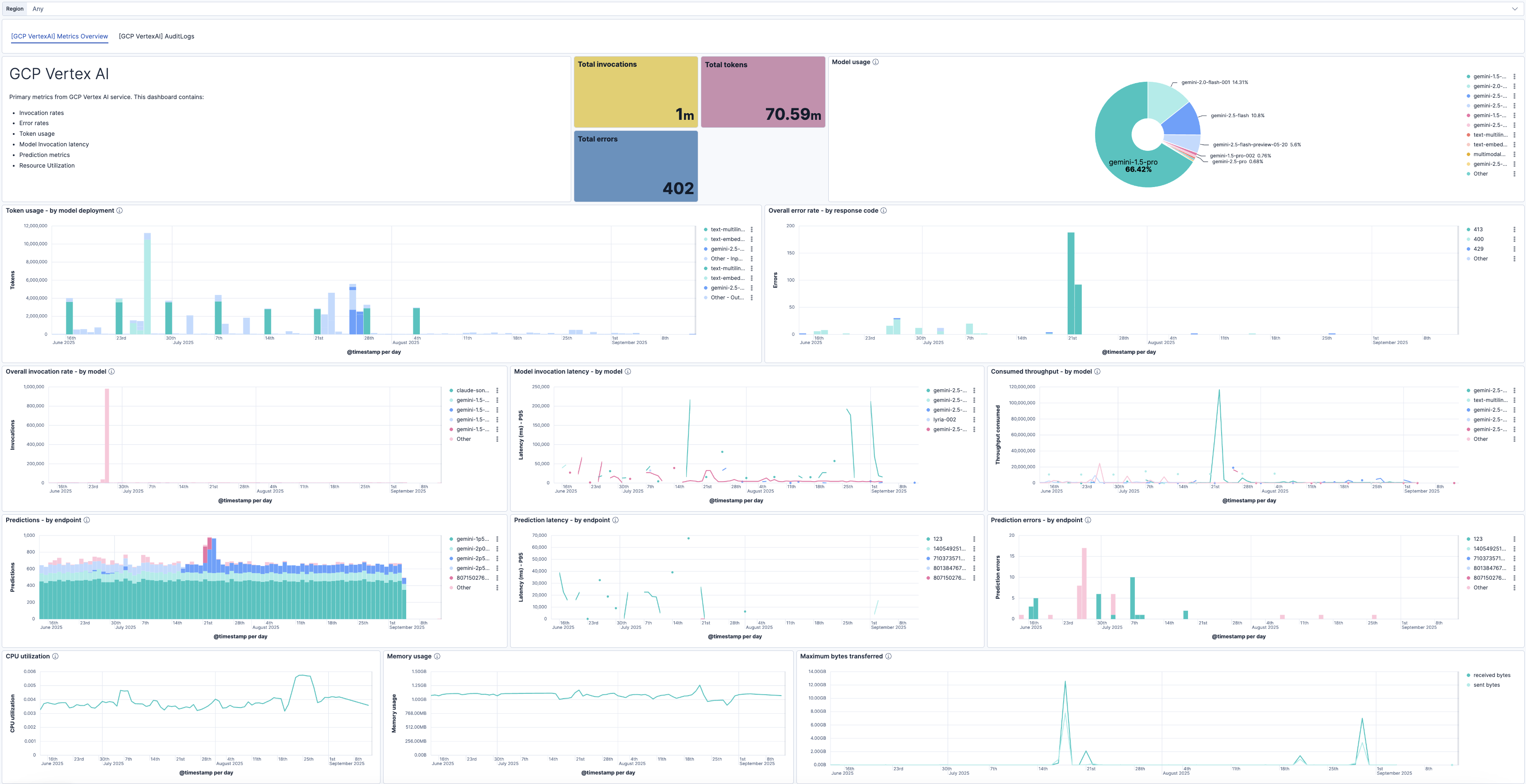
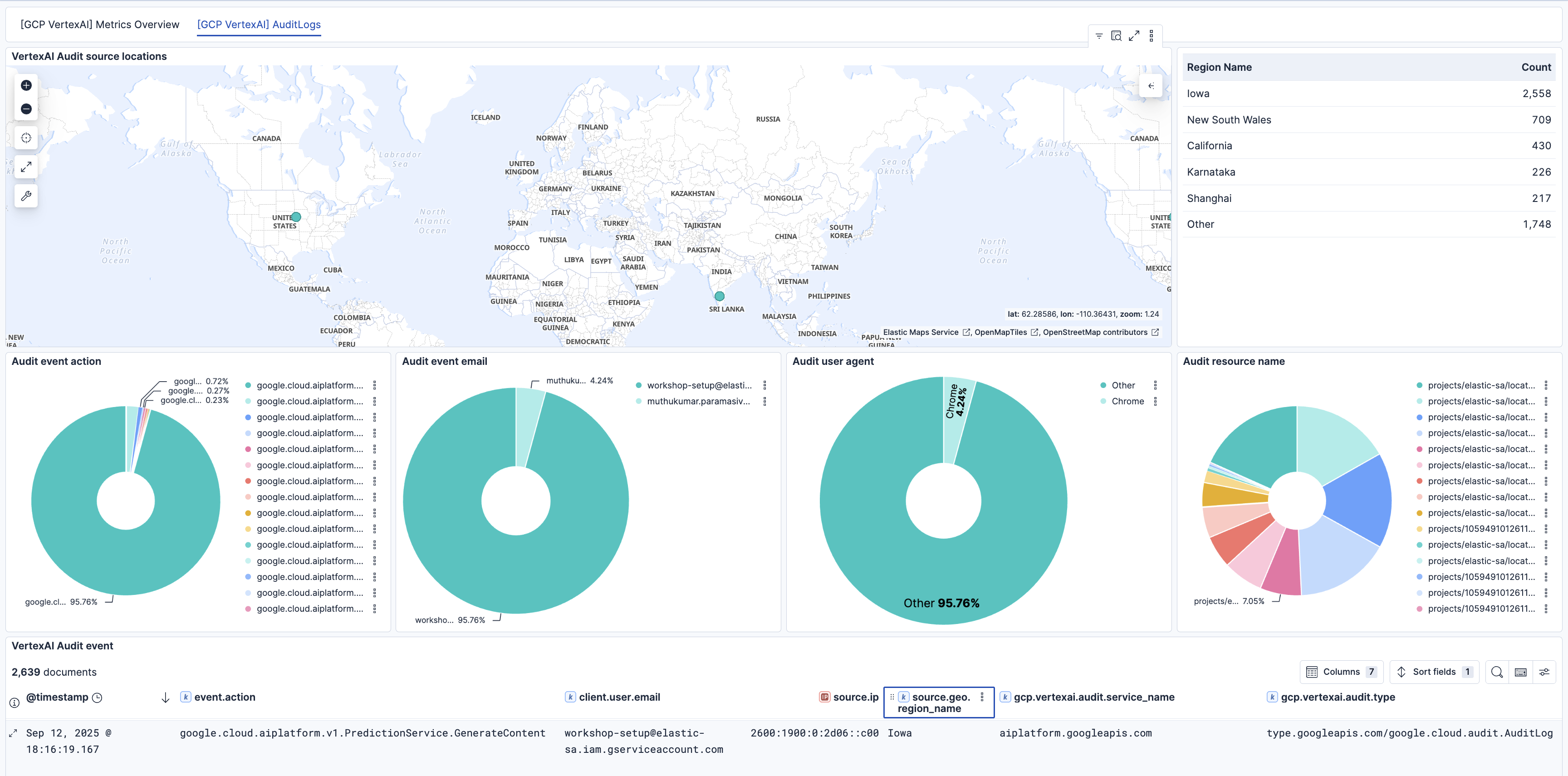
This integration includes one or more Kibana dashboards that visualizes the data collected by the integration. The screenshots below illustrate how the ingested data is displayed.
Changelog
| Version | Details | Minimum Kibana version |
|---|---|---|
| 1.5.1 | Bug fix (View pull request) Fix audit logs failing with field [cloud.project.id] already exists when the Agent runs on GCP. |
9.2.0 |
| 1.5.0 | Enhancement (View pull request) Enable secrets for sensitive fields. For more details, refer https://www.elastic.co/guide/en/fleet/current/agent-policy.html#agent-policy-secret-values |
9.2.0 |
| 1.4.0 | Enhancement (View pull request) Release new integration version for Vertex prompt response support. Enhancement (View pull request) Update the mapping to snake case in pipeline. Enhancement (View pull request) Add support for Vertex AI Prompt Response Logs datastream. |
9.2.0 |
| 1.3.2 | Bug fix (View pull request) Add missing links and update dashboard screenshot. |
9.0.0 8.17.0 |
| 1.3.1 | Bug fix (View pull request) Fixed GCP project ID handling to prevent numeric parsing issues by enforcing string type casting in YAML configuration templates. |
9.0.0 8.17.0 |
| 1.3.0 | Enhancement (View pull request) Add dashboard for Vertex AI Audit Logs. |
9.0.0 8.17.0 |
| 1.2.0 | Enhancement (View pull request) Add support for Vertex AI Audit Logs. |
9.0.0 8.17.0 |
| 1.1.0 | Enhancement (View pull request) Add support for Kibana 9.0.0. |
9.0.0 8.17.0 |
| 1.0.0 | Enhancement (View pull request) Make Vertex AI Integration GA. |
8.17.0 |
| 0.4.1 | Enhancement (View pull request) Review the Vertex AI integration page. |
8.17.0 |
| 0.4.0 | Enhancement (View pull request) Enhancements to the Vertex AI dashboard. |
8.17.0 |
| 0.3.1 | Bug fix (View pull request) Remove zone and fix default value in regions filter. |
8.17.0 |
| 0.3.0 | Enhancement (View pull request) Add support for regions and zone. |
8.17.0 |
| 0.2.1 | Enhancement (View pull request) Add observability category. |
8.14.0 |
| 0.2.0 | Enhancement (View pull request) Add PT deployment metrics to dashboard and update documentation. |
8.14.0 |
| 0.1.0 | Enhancement (View pull request) Update documentation with roles and permissions. |
8.14.0 |
| 0.0.2 | Enhancement (View pull request) Enhancements to dashboards, configuration, documentation. |
8.14.0 |
| 0.0.1 | Enhancement (View pull request) Initial draft of the GCP Vertex AI package. |
8.14.0 |