Google Cloud Platform Integration
Elastic Cloud Serverless projects are autoscaled environments, fully managed by Elastic and available on Elastic Cloud. Availability This functionality is generally available and ready for production usage. Elastic Cloud Serverless projects are autoscaled environments, fully managed by Elastic and available on Elastic Cloud. Availability This functionality is generally available and ready for production usage. The Elastic Stack includes Elastic's core products such as Elasticsearch, Kibana, Logstash, and Beats. Availability This functionality is generally available and ready for production usage. Unless stated otherwise on the page, this functionality is available when your Elastic Stack is deployed on Elastic Cloud Hosted, Elastic Cloud Enterprise, Elastic Cloud on Kubernetes, and self-managed environments. This documentation corresponds to the latest patch available for each minor version. If you're not using the latest patch, check the release notes for changes.
Serverless Observability
Generally available
Serverless Security
Generally available
Stack
9.0+
Generally available since 9.0
| Version | 2.52.0 (View all) |
| Subscription level What's this? |
Basic |
| Developed by What's this? |
Elastic |
| Ingestion method(s) | API, GCP Pub/Sub |
| Minimum Kibana version(s) | 9.0.0 8.18.0 |
The Google Cloud integration collects and parses Google Cloud Audit Logs, VPC Flow Logs, Firewall Rules Logs and Cloud DNS Logs that have been exported from Cloud Logging to a Google Pub/Sub topic sink and collects Google Cloud metrics and metadata from Google Cloud Monitoring.
To use this Google Cloud Platform (GCP) integration, you need to set up a Service Account with a Role and a Service Account Key to access data on your GCP project.
First, you need to create a Service Account. A Service Account (SA) is a particular type of Google account intended to represent a non-human user who needs to access the GCP resources.
The Elastic Agent uses the SA to access data on Google Cloud Platform using the Google APIs.
If you haven't already, this might be a good moment to check out the best practices for securing service accounts guide.
You need to grant your Service Account (SA) access to Google Cloud Platform resources by assigning a role to the account. In order to assign minimal privileges, create a custom role that has only the privileges required by Agent. Those privileges are:
compute.instances.list(required for GCP Compute instance metadata collection) **monitoring.metricDescriptors.listmonitoring.timeSeries.listpubsub.subscriptions.consumepubsub.subscriptions.create*pubsub.subscriptions.getpubsub.topics.attachSubscription*
* Only required if Agent is expected to create a new subscription. If you create the subscriptions yourself you may omit these privileges. ** Only required if corresponding collection will be enabled.
After you have created the custom role, assign the role to your service account.
Now, with your brand new Service Account (SA) with access to Google Cloud Platform (GCP) resources, you need some credentials to associate with it: a Service Account Key.
From the list of SA:
- Click the one you just created to open the detailed view.
- From the Keys section, click "Add key" > "Create new key" and select JSON as the type.
- Download and store the generated private key securely (remember, the private key can't be recovered from GCP if lost).
The next step is to configure the general integration settings used for all logs from the supported services (Audit, DNS, Firewall, and VPC Flow).
The "Project Id" and either the "Credentials File" or "Credentials JSON" will need to be provided in the integration UI when adding the Google Cloud Platform integration.
The Project Id is the Google Cloud project ID where your resources exist.
Based on your preference, specify the information in either the Credentials File OR the Credentials JSON field.
Save the JSON file with the private key in a secure location of the file system, and make sure that the Elastic Agent has at least read-only privileges to this file.
Specify the file path in the Elastic Agent integration UI in the "Credentials File" field. For example: /home/ubuntu/credentials.json.
Specify the content of the JSON file you downloaded from Google Cloud Platform directly in the Credentials JSON field in the Elastic Agent integration.
Elastic recommends using Credentials File, as in this method the credential information doesn’t leave your Google Cloud Platform environment. When using Credentials JSON, the integration stores the info in Elasticsearch, and the access is controlled based on policy permissions or access to underlying Elasticsearch data.
With a properly configured Service Account and the integration setting in place, it's time to start collecting some logs.
You need to create a few dedicated Google Cloud resources before starting, in detail:
- Log Sink
- Pub/Sub Topic
- Subscription
Elastic recommends separate Pub/Sub topics for each of the log types so that they can be parsed and stored in a specific data stream.
Here's an example of collecting Audit Logs using a Pub/Sub topic, a subscription, and a Log Router. We will create the resources in the Google Cloud Console and then configure the Google Cloud Platform integration.
At a high level, the steps required are:
- Visit "Logging" > "Log Router" > "Create Sink" and provide a sink name and description.
- In "Sink destination", select "Cloud Pub/Sub topic" as the sink service. Select an existing topic or "Create a topic". Note the topic name, as it will be provided in the Topic field in the Elastic agent configuration.
- If you created a new topic, you must remember to go to that topic and create a subscription for it. A subscription directs messages on a topic to subscribers. Note the "Subscription ID", as it will need to be entered in the "Subscription name" field in the integration settings.
- Under "Choose logs to include in sink", for example add
logName:"cloudaudit.googleapis.com"in the "Inclusion filter" to include all audit logs.
This is just an example; you will need to create your filter expression to select the log types you want to export to the Pub/Sub topic.
More example filters for different log types:
#
# VPC Flow: logs for specific subnet
#
resource.type="gce_subnetwork" AND
log_id("compute.googleapis.com/vpc_flows") AND
resource.labels.subnetwork_name"=[SUBNET_NAME]"
#
# Audit: Google Compute Engine firewall rule deletion
#
resource.type="gce_firewall_rule" AND
log_id("cloudaudit.googleapis.com/activity") AND
protoPayload.methodName:"firewalls.delete"
#
# DNS: all DNS queries
#
resource.type="dns_query"
#
# Firewall: logs for a given country
#
resource.type="gce_subnetwork" AND
log_id("compute.googleapis.com/firewall") AND
jsonPayload.remote_location.country=[COUNTRY_ISO_ALPHA_3]
Start working on your query using the Google Cloud Logs Explorer, so you can preview and pinpoint the exact log types you want to forward to your Elastic Stack.
To learn more, please read how to Build queries in the Logs Explorer, and take a look at the Sample queries using the Logs Explorer page in the Google Cloud docs.
Visit "Management" > "Integrations" > "Installed Integrations" > "Google Cloud Platform" and select the "Integration Policies" tab. Select the integration policy you previously created.
From the list of services, select "Google Cloud Platform (GCP) audit logs (gcp-pubsub)" and:
- On the "Topic" field, specify the "topic name" you noted before on the Google Cloud Console.
- On the "Subscription Name", specify the short subscription name you noted before on the Google Cloud Console (note: do NOT use the full-blown subscription name made of project/PROJECT_ID/subscriptions/SUBSCRIPTION_ID). Just pick the Subscription ID from the Google Cloud Console).
- Click on "Save Integration", and make sure the Elastic Agent gets the updated policy.
If you don't see Audit logs showing up, check the Agent logs to see if there are errors.
Common error types:
- Missing roles in the Service Account
- Misconfigured settings, like "Project Id", "Topic" or "Subscription Name" fields
If your Service Account (SA) does not have the required roles, you might find errors like this one in the elastic_agent.filebeat dataset:
failed to subscribe to pub/sub topic: failed to check if subscription exists: rpc error: code = PermissionDenied desc = User not authorized to perform this action.
Solution: make sure your SA has all the required roles.
If you specify the wrong "Topic field" or "Subscription Name", you might find errors like this one in the elastic_agent.filebeat dataset:
[elastic_agent.filebeat][error] failed to subscribe to pub/sub topic: failed to check if subscription exists: rpc error: code = InvalidArgument desc = Invalid resource name given (name=projects/project/subscriptions/projects/project/subscriptions/non-existent-sub). Refer to https://cloud.google.com/pubsub/docs/admin#resource_names for more information.
Solution: double check the integration settings.
With a properly configured Service Account and the integration setting in place, it's time to start collecting some metrics.
No additional requirement is needed to collect metrics.
If you don't see metrics showing up, check the Agent logs to see if there are errors.
Common error types:
- Period is lower than 60 seconds
- Missing roles in the Service Account
- Misconfigured settings, like "Project Id"
Usual minimum collection period for GCP metrics is 60 seconds. Any value lower than that cause an error when retrieving the metric metadata. If an error happens, the affected metric is skipped at the metric collection stage, resulting in no data being sent.
If your Service Account (SA) does not have required roles, you might find errors related to accessing GCP resources.
To check you may add Monitoring Viewer and Compute Viewer roles (built-in GCP roles) to your SA. These roles contain the permission added in the previous step and expand them with additional permissions. You can analyze additional missing permissions from the GCP Console > IAM > clicking on the down arrow near the roles on the same line of your SA > View analyzed permissions. From the shown table you can check which permissions from the role the SA is actively using. They should match what you configured in your custom role.
If you specify a wrong setting you will probably find errors related to missing GCP resources.
Make sure the settings are correct and the SA has proper permissions for the given "Project Id".
The audit dataset collects audit logs of administrative activities and accesses within your Google Cloud resources.
ECS Field Reference
Please refer to the following document for detailed information on ECS fields.
Exported fields
| Field | Description | Type |
|---|---|---|
| @timestamp | Event timestamp. | date |
| actor.entity.id | [Deprecated] This field is maintained for backward compatibility. Use type-specific fields instead: user.entity.id for user accounts, service.entity.id for service accounts and GCP services, host.entity.id for compute instances, or entity.id for other types. | keyword |
| cloud.image.id | Image ID for the cloud instance. | keyword |
| data_stream.dataset | Data stream dataset. | constant_keyword |
| data_stream.namespace | Data stream namespace. | constant_keyword |
| data_stream.type | Data stream type. | constant_keyword |
| entity.id | Generic entity identifier for principals that don't fit into specific categories (user, service, host). Used as a fallback for unknown or miscellaneous entity types like GitHub repo references. | keyword |
| entity.target.id | Generic entity identifier for targets. For concrete resources that Cloud Asset Inventory collects (Compute Engine instances, networks, firewalls, subnetworks and regional forwarding rules, Resource Manager projects, organizations and folders, and Cloud Storage buckets), it is the full resource name (//\<service\>/\<resourceName\>) the inventory uses. Instance targets are carried in host.target.id instead when the instance ID is known. Other targets keep the resource name from the audit log. |
keyword |
| event.dataset | Event dataset | constant_keyword |
| event.module | Event module | constant_keyword |
| gcp.audit.access.caller_ip_geo.region_code | keyword | |
| gcp.audit.access.method_name | keyword | |
| gcp.audit.access.principal_email | keyword | |
| gcp.audit.access.principal_subject | keyword | |
| gcp.audit.access.service_name | keyword | |
| gcp.audit.access.user_agent | keyword | |
| gcp.audit.action_time | date | |
| gcp.audit.action_type | keyword | |
| gcp.audit.affected_resources | keyword | |
| gcp.audit.authentication_info.authority_selector | The authority selector specified by the requestor, if any. It is not guaranteed that the principal was allowed to use this authority. | keyword |
| gcp.audit.authentication_info.principal_email | The email address of the authenticated user making the request. | keyword |
| gcp.audit.authentication_info.principal_subject | String representation of identity of requesting party. Populated for both first and third party identities. Only present for APIs that support third-party identities. | keyword |
| gcp.audit.authentication_info.service_account_delegation_info | Identity delegation history of an authenticated service account that makes the request. It contains information on the real authorities that try to access GCP resources by delegating on a service account. When multiple authorities present, they are guaranteed to be sorted based on the original ordering of the identity delegation events. | flattened |
| gcp.audit.authentication_info.service_account_key_name | The service account key that was used to request the OAuth 2.0 access token. This field identifies the service account key by its full resource name. | keyword |
| gcp.audit.authentication_info.third_party_principal | The third party identification (if any) of the authenticated user making the request. When the JSON object represented here has a proto equivalent, the proto name will be indicated in the @type property. | flattened |
| gcp.audit.authorization_info | Authorization information for the operation. | nested |
| gcp.audit.authorization_info.granted | Whether or not authorization for resource and permission was granted. | boolean |
| gcp.audit.authorization_info.permission | The required IAM permission. | keyword |
| gcp.audit.authorization_info.resource | The resource being accessed, as a REST-style string. | keyword |
| gcp.audit.authorization_info.resource_attributes.name | The name of the resource. | keyword |
| gcp.audit.authorization_info.resource_attributes.service | The name of the service. | keyword |
| gcp.audit.authorization_info.resource_attributes.type | The type of the resource. | keyword |
| gcp.audit.flattened | Contains the full audit document as sent by GCP. | flattened |
| gcp.audit.labels | A map of key, value pairs that provides additional information about the log entry. The labels can be user-defined or system-defined. | flattened |
| gcp.audit.learn_more_uri | keyword | |
| gcp.audit.logentry_operation.first | Optional. Set this to True if this is the first log entry in the operation. | boolean |
| gcp.audit.logentry_operation.id | Optional. An arbitrary operation identifier. Log entries with the same identifier are assumed to be part of the same operation. | keyword |
| gcp.audit.logentry_operation.last | Optional. Set this to True if this is the last log entry in the operation. | boolean |
| gcp.audit.logentry_operation.producer | Optional. An arbitrary producer identifier. The combination of id and producer must be globally unique. | keyword |
| gcp.audit.metadata | Service-specific data about the request, response, and other information associated with the current audited event. | flattened |
| gcp.audit.method_name | The name of the service method or operation. For API calls, this should be the name of the API method. For example, 'google.datastore.v1.Datastore.RunQuery'. | keyword |
| gcp.audit.notification | Plain-text GKE cluster notification message (for example, upgrade notifications). | keyword |
| gcp.audit.num_response_items | The number of items returned from a List or Query API method, if applicable. | long |
| gcp.audit.policy_violation_info.payload | Resource payload that is currently in scope and is subjected to orgpolicy conditions. | flattened |
| gcp.audit.policy_violation_info.resource_tags | Tags referenced on the resource at the time of evaluation. | flattened |
| gcp.audit.policy_violation_info.resource_type | Resource type that the orgpolicy is checked against. | keyword |
| gcp.audit.policy_violation_info.violations.checkedValue | Value that is being checked for the policy. | keyword |
| gcp.audit.policy_violation_info.violations.constraint | Constraint name. | keyword |
| gcp.audit.policy_violation_info.violations.errorMessage | Error message that policy is indicating. | keyword |
| gcp.audit.policy_violation_info.violations.policyType | Indicates the type of the policy. | keyword |
| gcp.audit.receive_timestamp | date | |
| gcp.audit.request | flattened | |
| gcp.audit.request_metadata.caller_ip | The IP address of the caller. | ip |
| gcp.audit.request_metadata.caller_supplied_user_agent | The user agent of the caller. This information is not authenticated and should be treated accordingly. | keyword |
| gcp.audit.request_metadata.raw.caller_ip | The raw IP address of the caller. | keyword |
| gcp.audit.resource.labels.resource_container | keyword | |
| gcp.audit.resource.type | keyword | |
| gcp.audit.resource_location.current_locations | Current locations of the resource. | keyword |
| gcp.audit.resource_name | The resource or collection that is the target of the operation. The name is a scheme-less URI, not including the API service name. For example, 'shelves/SHELF_ID/books'. | keyword |
| gcp.audit.response | flattened | |
| gcp.audit.service_data.policy_delta.binding_deltas.action | The action that was performed on a Binding. Allowed values are ADD, REMOVE and ACTION_UNSPECIFIED |
keyword |
| gcp.audit.service_data.policy_delta.binding_deltas.condition.description | Optional. Description of the expression. This is a longer text which describes the expression, e.g. when hovered over it in a UI. | text |
| gcp.audit.service_data.policy_delta.binding_deltas.condition.expression | Textual representation of an expression in Common Expression Language syntax. | text |
| gcp.audit.service_data.policy_delta.binding_deltas.condition.location | Optional. String indicating the location of the expression for error reporting, e.g. a file name and a position in the file. | keyword |
| gcp.audit.service_data.policy_delta.binding_deltas.condition.title | Optional. Title for the expression, i.e. a short string describing its purpose. This can be used e.g. in UIs which allow to enter the expression. | keyword |
| gcp.audit.service_data.policy_delta.binding_deltas.member | A single identity requesting access for a Google Cloud resource. Follows the same format of Binding.members. | keyword |
| gcp.audit.service_data.policy_delta.binding_deltas.role | Role that is assigned to members. For example, roles/viewer, roles/editor, or roles/owner. | keyword |
| gcp.audit.service_name | The name of the API service performing the operation. For example, datastore.googleapis.com. | keyword |
| gcp.audit.source_log_ids.insert_id | keyword | |
| gcp.audit.source_log_ids.log_time | date | |
| gcp.audit.source_log_ids.query_uri | keyword | |
| gcp.audit.source_log_ids.resource_container | keyword | |
| gcp.audit.status.code | The status code, which should be an enum value of google.rpc.Code. | integer |
| gcp.audit.status.details | A list of messages that carry the error details. | flattened |
| gcp.audit.status.message | A developer-facing error message, which should be in English. Any user-facing error message should be localized and sent in the google.rpc.Status.details field, or localized by the client. | keyword |
| gcp.audit.type | Type property. | keyword |
| gcp.destination.instance.project_id | ID of the project containing the VM. | keyword |
| gcp.destination.instance.region | Region of the VM. | keyword |
| gcp.destination.instance.zone | Zone of the VM. | keyword |
| gcp.destination.vpc.project_id | ID of the project containing the VM. | keyword |
| gcp.destination.vpc.subnetwork_name | Subnetwork on which the VM is operating. | keyword |
| gcp.destination.vpc.vpc_name | VPC on which the VM is operating. | keyword |
| gcp.source.instance.project_id | ID of the project containing the VM. | keyword |
| gcp.source.instance.region | Region of the VM. | keyword |
| gcp.source.instance.zone | Zone of the VM. | keyword |
| gcp.source.vpc.project_id | ID of the project containing the VM. | keyword |
| gcp.source.vpc.subnetwork_name | Subnetwork on which the VM is operating. | keyword |
| gcp.source.vpc.vpc_name | VPC on which the VM is operating. | keyword |
| host.containerized | If the host is a container. | boolean |
| host.entity.id | Unique identifier for Compute Engine instances acting as principals in GCP audit events. Contains instance resource paths. | keyword |
| host.os.build | OS build information. | keyword |
| host.os.codename | OS codename, if any. | keyword |
| host.target.entity.id | Unique identifier for compute resources targeted by GCP audit events. Includes Compute Engine instance IDs and resource paths. | keyword |
| host.target.id | Numeric Compute Engine instance ID of the instance targeted by the event, matching the host id used by Cloud Asset Inventory. | keyword |
| input.type | Input type | keyword |
| labels.cluster_location | keyword | |
| labels.cluster_name | keyword | |
| labels.payload.currentVersion | keyword | |
| labels.payload.operation | keyword | |
| labels.payload.resource | keyword | |
| labels.payload.resourceType | keyword | |
| labels.payload.targetVersion | keyword | |
| labels.project_id | keyword | |
| labels.type_url | keyword | |
| log.offset | Log offset | long |
| related.entity | A collection of all entity identifiers associated with the document. If the document contains multiple entities, identifiers for each will be included. Example identifiers include (but not limited to) cloud resource IDs, email addresses, and hostnames. | keyword |
| service.entity.id | Unique identifier for service accounts and GCP services acting as principals. Contains serviceAccount: prefixed values, *.iam.gserviceaccount.com addresses, and *.googleapis.com services. | keyword |
| service.target.entity.id | Unique identifier for GCP service resources targeted by audit events. Includes Cloud Storage buckets, Cloud Functions, BigQuery datasets, Compute Engine resources, networking components, and other GCP services. | keyword |
| target.entity.id | [Deprecated] This field is maintained for backward compatibility. Use type-specific fields instead: user.target.entity.id for IAM principals, service.target.entity.id for GCP service resources, host.target.entity.id for compute instances, or entity.target.id for other types. | keyword |
| user.entity.id | Unique identifier for user accounts acting as principals in GCP audit events. Contains email addresses and user: prefixed identifiers. | keyword |
| user.target.entity.id | Unique identifier for IAM principals targeted by GCP audit events. Includes service accounts, users, and groups. | keyword |
Example
{
    "@timestamp": "2019-12-19T00:44:25.051Z",
    "actor": {
        "entity": {
            "id": [
                "xxx@xxx.xxx"
            ]
        }
    },
    "agent": {
        "ephemeral_id": "d3d085d3-8938-4909-9bcb-9a9ec8bc1665",
        "id": "7fc8d2fb-f718-4f96-9c78-1118e4203336",
        "name": "elastic-agent-81621",
        "type": "filebeat",
        "version": "8.18.0"
    },
    "client": {
        "user": {
            "email": "xxx@xxx.xxx"
        }
    },
    "cloud": {
        "availability_zone": "global",
        "project": {
            "id": "elastic-beats"
        },
        "provider": "gcp"
    },
    "data_stream": {
        "dataset": "gcp.audit",
        "namespace": "55990",
        "type": "logs"
    },
    "ecs": {
        "version": "8.11.0"
    },
    "elastic_agent": {
        "id": "7fc8d2fb-f718-4f96-9c78-1118e4203336",
        "snapshot": false,
        "version": "8.18.0"
    },
    "event": {
        "action": "beta.compute.instances.aggregatedList",
        "agent_id_status": "verified",
        "category": [
            "network",
            "configuration"
        ],
        "created": "2026-03-19T05:40:34.897Z",
        "dataset": "gcp.audit",
        "id": "yonau2dg2zi",
        "ingested": "2026-03-19T05:40:37Z",
        "kind": "event",
        "outcome": "success",
        "provider": "data_access",
        "type": [
            "access",
            "allowed"
        ]
    },
    "gcp": {
        "audit": {
            "authorization_info": [
                {
                    "granted": true,
                    "permission": "compute.instances.list",
                    "resource_attributes": {
                        "name": "projects/elastic-beats",
                        "service": "resourcemanager",
                        "type": "resourcemanager.projects"
                    }
                }
            ],
            "num_response_items": 61,
            "receive_timestamp": "2019-12-19T00:44:25.262Z",
            "request": {
                "@type": "type.googleapis.com/compute.instances.aggregatedList"
            },
            "resource": {
                "type": "api"
            },
            "resource_location": {
                "current_locations": [
                    "global"
                ]
            },
            "resource_name": "projects/elastic-beats/global/instances",
            "response": {
                "@type": "core.k8s.io/v1.Status",
                "apiVersion": "v1",
                "details": {
                    "group": "batch",
                    "kind": "jobs",
                    "name": "gsuite-exporter-1589294700",
                    "uid": "2beff34a-945f-11ea-bacf-42010a80007f"
                },
                "kind": "Status",
                "status_value": "Success"
            },
            "type": "type.googleapis.com/google.cloud.audit.AuditLog"
        }
    },
    "host": {
        "target": {
            "entity": {
                "id": [
                    "projects/elastic-beats/global/instances"
                ]
            }
        }
    },
    "input": {
        "type": "gcp-pubsub"
    },
    "log": {
        "level": "INFO",
        "logger": "projects/elastic-beats/logs/cloudaudit.googleapis.com%2Fdata_access"
    },
    "related": {
        "entity": [
            "projects/elastic-beats/global/instances",
            "xxx@xxx.xxx"
        ],
        "ip": [
            "192.168.1.1"
        ],
        "user": [
            "xxx@xxx.xxx"
        ]
    },
    "service": {
        "name": "compute.googleapis.com"
    },
    "source": {
        "ip": "192.168.1.1"
    },
    "tags": [
        "forwarded",
        "gcp-audit"
    ],
    "target": {
        "entity": {
            "id": [
                "projects/elastic-beats/global/instances"
            ]
        }
    },
    "user": {
        "email": "xxx@xxx.xxx",
        "entity": {
            "id": [
                "xxx@xxx.xxx"
            ]
        }
    },
    "user_agent": {
        "device": {
            "name": "Mac"
        },
        "name": "Firefox",
        "original": "Mozilla/5.0 (Macintosh; Intel Mac OS X 10.15; rv:71.0) Gecko/20100101 Firefox/71.0,gzip(gfe),gzip(gfe)",
        "os": {
            "full": "Mac OS X 10.15",
            "name": "Mac OS X",
            "version": "10.15"
        },
        "version": "71.0"
    }
}
The firewall dataset collects logs from Firewall Rules in your Virtual Private Cloud (VPC) networks.
ECS Field Reference
Please refer to the following document for detailed information on ECS fields.
Exported fields
| Field | Description | Type |
|---|---|---|
| @timestamp | Event timestamp. | date |
| cloud.image.id | Image ID for the cloud instance. | keyword |
| data_stream.dataset | Data stream dataset. | constant_keyword |
| data_stream.namespace | Data stream namespace. | constant_keyword |
| data_stream.type | Data stream type. | constant_keyword |
| event.dataset | Event dataset | constant_keyword |
| event.module | Event module | constant_keyword |
| gcp.destination.instance.project_id | ID of the project containing the VM. | keyword |
| gcp.destination.instance.region | Region of the VM. | keyword |
| gcp.destination.instance.zone | Zone of the VM. | keyword |
| gcp.destination.vpc.project_id | ID of the project containing the VM. | keyword |
| gcp.destination.vpc.subnetwork_name | Subnetwork on which the VM is operating. | keyword |
| gcp.destination.vpc.vpc_name | VPC on which the VM is operating. | keyword |
| gcp.firewall.flattened | Contains the full firewall document as sent by GCP. | flattened |
| gcp.firewall.rule_details.action | Action that the rule performs on match. | keyword |
| gcp.firewall.rule_details.destination_range | List of destination ranges that the firewall applies to. | keyword |
| gcp.firewall.rule_details.direction | Direction of traffic that matches this rule. | keyword |
| gcp.firewall.rule_details.ip_port_info | List of ip protocols and applicable port ranges for rules. | nested |
| gcp.firewall.rule_details.priority | The priority for the firewall rule. | long |
| gcp.firewall.rule_details.reference | Reference to the firewall rule. | keyword |
| gcp.firewall.rule_details.source_range | List of source ranges that the firewall rule applies to. | keyword |
| gcp.firewall.rule_details.source_service_account | List of all the source service accounts that the firewall rule applies to. | keyword |
| gcp.firewall.rule_details.source_tag | List of all the source tags that the firewall rule applies to. | keyword |
| gcp.firewall.rule_details.target_service_account | List of all the target service accounts that the firewall rule applies to. | keyword |
| gcp.firewall.rule_details.target_tag | List of all the target tags that the firewall rule applies to. | keyword |
| gcp.source.instance.project_id | ID of the project containing the VM. | keyword |
| gcp.source.instance.region | Region of the VM. | keyword |
| gcp.source.instance.zone | Zone of the VM. | keyword |
| gcp.source.vpc.project_id | ID of the project containing the VM. | keyword |
| gcp.source.vpc.subnetwork_name | Subnetwork on which the VM is operating. | keyword |
| gcp.source.vpc.vpc_name | VPC on which the VM is operating. | keyword |
| host.containerized | If the host is a container. | boolean |
| host.os.build | OS build information. | keyword |
| host.os.codename | OS codename, if any. | keyword |
| input.type | Input type | keyword |
| log.offset | Log offset | long |
Example
{
    "@timestamp": "2019-10-30T13:52:42.191Z",
    "agent": {
        "ephemeral_id": "cd1c89d8-2d1f-4675-8db5-21f626346e8c",
        "id": "c99413b7-5945-4236-afee-9db819890b2e",
        "name": "elastic-agent-71045",
        "type": "filebeat",
        "version": "8.18.0"
    },
    "cloud": {
        "availability_zone": "us-east1-b",
        "project": {
            "id": "test-beats"
        },
        "provider": "gcp",
        "region": "us-east1"
    },
    "data_stream": {
        "dataset": "gcp.firewall",
        "namespace": "72710",
        "type": "logs"
    },
    "destination": {
        "address": "10.42.0.2",
        "domain": "test-windows",
        "ip": "10.42.0.2",
        "port": 3389
    },
    "ecs": {
        "version": "8.11.0"
    },
    "elastic_agent": {
        "id": "c99413b7-5945-4236-afee-9db819890b2e",
        "snapshot": false,
        "version": "8.18.0"
    },
    "event": {
        "action": "firewall-rule",
        "agent_id_status": "verified",
        "category": [
            "network"
        ],
        "created": "2026-03-18T10:19:42.129Z",
        "dataset": "gcp.firewall",
        "id": "1f21ciqfpfssuo",
        "ingested": "2026-03-18T10:19:45Z",
        "kind": "event",
        "type": [
            "allowed",
            "connection"
        ]
    },
    "gcp": {
        "destination": {
            "instance": {
                "project_id": "test-beats",
                "region": "us-east1",
                "zone": "us-east1-b"
            },
            "vpc": {
                "project_id": "test-beats",
                "subnetwork_name": "windows-isolated",
                "vpc_name": "windows-isolated"
            }
        },
        "firewall": {
            "rule_details": {
                "action": "ALLOW",
                "direction": "INGRESS",
                "ip_port_info": [
                    {
                        "ip_protocol": "TCP",
                        "port_range": [
                            "3389"
                        ]
                    }
                ],
                "priority": 1000,
                "source_range": [
                    "0.0.0.0/0"
                ],
                "target_tag": [
                    "allow-rdp"
                ]
            }
        }
    },
    "input": {
        "type": "gcp-pubsub"
    },
    "log": {
        "logger": "projects/test-beats/logs/compute.googleapis.com%2Ffirewall"
    },
    "network": {
        "community_id": "1:OdLB9eXsBDLz8m97ao4LepX6q+4=",
        "direction": "inbound",
        "iana_number": "6",
        "name": "windows-isolated",
        "transport": "tcp",
        "type": "ipv4"
    },
    "related": {
        "ip": [
            "192.168.2.126",
            "10.42.0.2"
        ]
    },
    "rule": {
        "name": "network:windows-isolated/firewall:windows-isolated-allow-rdp"
    },
    "source": {
        "address": "192.168.2.126",
        "geo": {
            "continent_name": "Asia",
            "country_name": "omn"
        },
        "ip": "192.168.2.126",
        "port": 64853
    },
    "tags": [
        "forwarded",
        "gcp-firewall"
    ]
}
The vpcflow dataset collects logs sent from and received by VM instances, including instances used as GKE nodes.
ECS Field Reference
Please refer to the following document for detailed information on ECS fields.
Exported fields
| Field | Description | Type |
|---|---|---|
| @timestamp | Event timestamp. | date |
| cloud.image.id | Image ID for the cloud instance. | keyword |
| data_stream.dataset | Data stream dataset. | constant_keyword |
| data_stream.namespace | Data stream namespace. | constant_keyword |
| data_stream.type | Data stream type. | constant_keyword |
| event.dataset | Event dataset | constant_keyword |
| event.module | Event module | constant_keyword |
| gcp.destination.instance.project_id | ID of the project containing the VM. | keyword |
| gcp.destination.instance.region | Region of the VM. | keyword |
| gcp.destination.instance.zone | Zone of the VM. | keyword |
| gcp.destination.vpc.project_id | ID of the project containing the VM. | keyword |
| gcp.destination.vpc.subnetwork_name | Subnetwork on which the VM is operating. | keyword |
| gcp.destination.vpc.vpc_name | VPC on which the VM is operating. | keyword |
| gcp.source.instance.project_id | ID of the project containing the VM. | keyword |
| gcp.source.instance.region | Region of the VM. | keyword |
| gcp.source.instance.zone | Zone of the VM. | keyword |
| gcp.source.vpc.project_id | ID of the project containing the VM. | keyword |
| gcp.source.vpc.subnetwork_name | Subnetwork on which the VM is operating. | keyword |
| gcp.source.vpc.vpc_name | VPC on which the VM is operating. | keyword |
| gcp.vpcflow.flattened | Contains the full vpcflow document as sent by GCP. | flattened |
| gcp.vpcflow.reporter | The side which reported the flow. Can be either 'SRC' or 'DEST'. | keyword |
| gcp.vpcflow.rtt.ms | Latency as measured (for TCP flows only) during the time interval. This is the time elapsed between sending a SEQ and receiving a corresponding ACK and it contains the network RTT as well as the application related delay. | long |
| host.containerized | If the host is a container. | boolean |
| host.os.build | OS build information. | keyword |
| host.os.codename | OS codename, if any. | keyword |
| input.type | Input type | keyword |
| log.offset | Log offset | long |
Example
{
    "@timestamp": "2019-06-14T03:50:10.845Z",
    "agent": {
        "ephemeral_id": "0cd9c2ae-9bc2-4b4b-89ee-a9c84cf58543",
        "id": "85d6d011-dc32-421f-88b4-d5a601e0b4d9",
        "name": "elastic-agent-30695",
        "type": "filebeat",
        "version": "8.18.0"
    },
    "cloud": {
        "provider": "gcp"
    },
    "data_stream": {
        "dataset": "gcp.vpcflow",
        "namespace": "70287",
        "type": "logs"
    },
    "destination": {
        "address": "67.43.156.13",
        "as": {
            "number": 35908
        },
        "geo": {
            "continent_name": "Asia",
            "country_iso_code": "BT",
            "country_name": "Bhutan",
            "location": {
                "lat": 27.5,
                "lon": 90.5
            }
        },
        "ip": "67.43.156.13",
        "port": 65320
    },
    "ecs": {
        "version": "8.11.0"
    },
    "elastic_agent": {
        "id": "85d6d011-dc32-421f-88b4-d5a601e0b4d9",
        "snapshot": false,
        "version": "8.18.0"
    },
    "event": {
        "agent_id_status": "verified",
        "category": [
            "network"
        ],
        "created": "2026-03-18T10:21:18.456Z",
        "dataset": "gcp.vpcflow",
        "end": "2019-06-14T03:49:56.220714119Z",
        "id": "ut8lbrffooxyv",
        "ingested": "2026-03-18T10:21:20Z",
        "kind": "event",
        "start": "2019-06-14T03:40:00.560917237Z",
        "type": [
            "connection"
        ]
    },
    "gcp": {
        "source": {
            "instance": {
                "project_id": "my-sample-project",
                "region": "us-east1",
                "zone": "us-east1-b"
            },
            "vpc": {
                "project_id": "my-sample-project",
                "subnetwork_name": "default",
                "vpc_name": "default"
            }
        },
        "vpcflow": {
            "reporter": "SRC",
            "rtt": {
                "ms": 220
            }
        }
    },
    "input": {
        "type": "gcp-pubsub"
    },
    "log": {
        "logger": "projects/my-sample-project/logs/compute.googleapis.com%2Fvpc_flows"
    },
    "network": {
        "bytes": 51075,
        "community_id": "1:35LvCkME5lZSqhiM4O+MxjttWtA=",
        "direction": "outbound",
        "iana_number": "6",
        "packets": 608,
        "transport": "tcp",
        "type": "ipv4"
    },
    "related": {
        "ip": [
            "10.139.99.242",
            "67.43.156.13"
        ]
    },
    "source": {
        "address": "10.139.99.242",
        "bytes": 51075,
        "domain": "elasticsearch",
        "ip": "10.139.99.242",
        "packets": 608,
        "port": 9200
    },
    "tags": [
        "forwarded",
        "gcp-vpcflow"
    ]
}
The dns dataset collects queries that name servers resolve for your Virtual Private Cloud (VPC) networks, as well as queries from an external entity directly to a public zone.
ECS Field Reference
Please refer to the following document for detailed information on ECS fields.
Exported fields
| Field | Description | Type |
|---|---|---|
| @timestamp | Event timestamp. | date |
| cloud.image.id | Image ID for the cloud instance. | keyword |
| data_stream.dataset | Data stream dataset. | constant_keyword |
| data_stream.namespace | Data stream namespace. | constant_keyword |
| data_stream.type | Data stream type. | constant_keyword |
| event.dataset | Event dataset | constant_keyword |
| event.module | Event module | constant_keyword |
| gcp.dns.auth_answer | Authoritative answer. | boolean |
| gcp.dns.destination_ip | Destination IP address, only applicable for forwarding cases. | ip |
| gcp.dns.egress_error | Egress proxy error. | keyword |
| gcp.dns.flattened | Contains the full dns document as sent by GCP. | flattened |
| gcp.dns.protocol | Protocol TCP or UDP. | keyword |
| gcp.dns.query_name | DNS query name. | keyword |
| gcp.dns.query_type | DNS query type. | keyword |
| gcp.dns.rdata | DNS answer in presentation format, truncated to 260 bytes. | keyword |
| gcp.dns.response_code | Response code. | keyword |
| gcp.dns.server_latency | Server latency. | integer |
| gcp.dns.source_ip | Source IP address of the query. | ip |
| gcp.dns.source_network | Source network of the query. | keyword |
| gcp.dns.source_type | Type of source generating the DNS query: private-zone, public-zone, forwarding-zone, forwarding-policy, peering-zone, internal, external, internet | keyword |
| gcp.dns.target_type | Type of target resolving the DNS query: private-zone, public-zone, forwarding-zone, forwarding-policy, peering-zone, internal, external, internet | keyword |
| gcp.dns.vm_instance_id | Compute Engine VM instance ID, only applicable to queries initiated by Compute Engine VMs. | keyword |
| gcp.dns.vm_instance_name | Compute Engine VM instance name, only applicable to queries initiated by Compute Engine VMs. | keyword |
| gcp.dns.vm_project_id | Google Cloud project ID, only applicable to queries initiated by Compute Engine VMs. | keyword |
| gcp.dns.vm_zone_name | Google Cloud VM zone, only applicable to queries initiated by Compute Engine VMs. | keyword |
| host.containerized | If the host is a container. | boolean |
| host.os.build | OS build information. | keyword |
| host.os.codename | OS codename, if any. | keyword |
| input.type | Input type | keyword |
| log.offset | Log offset | long |
Example
{
    "@timestamp": "2021-12-12T15:59:40.446Z",
    "agent": {
        "ephemeral_id": "9d33c655-9785-483e-b6bc-cb22ba116cea",
        "id": "625702bb-3e9e-48b3-825a-5c6b6c33f75b",
        "name": "elastic-agent-42938",
        "type": "filebeat",
        "version": "8.18.0"
    },
    "cloud": {
        "project": {
            "id": "key-reference-123456"
        },
        "provider": "gcp",
        "region": "global"
    },
    "data_stream": {
        "dataset": "gcp.dns",
        "namespace": "49808",
        "type": "logs"
    },
    "destination": {
        "address": "216.239.32.106",
        "ip": "216.239.32.106"
    },
    "dns": {
        "answers": [
            {
                "class": "IN",
                "data": "67.43.156.13",
                "name": "asdf.gcp.example.com.",
                "ttl": 300,
                "type": "A"
            }
        ],
        "question": {
            "name": "asdf.gcp.example.com",
            "registered_domain": "example.com",
            "subdomain": "asdf.gcp",
            "top_level_domain": "com",
            "type": "A"
        },
        "resolved_ip": [
            "67.43.156.13"
        ],
        "response_code": "NOERROR"
    },
    "ecs": {
        "version": "8.11.0"
    },
    "elastic_agent": {
        "id": "625702bb-3e9e-48b3-825a-5c6b6c33f75b",
        "snapshot": false,
        "version": "8.18.0"
    },
    "event": {
        "action": "dns-query",
        "agent_id_status": "verified",
        "category": [
            "network"
        ],
        "created": "2026-03-18T10:19:00.183Z",
        "dataset": "gcp.dns",
        "id": "zir4wud11tm",
        "ingested": "2026-03-18T10:19:03Z",
        "kind": "event",
        "outcome": "success"
    },
    "gcp": {
        "dns": {
            "auth_answer": true,
            "destination_ip": "216.239.32.106",
            "protocol": "UDP",
            "query_name": "asdf.gcp.example.com.",
            "query_type": "A",
            "response_code": "NOERROR",
            "server_latency": 0,
            "source_type": "internet",
            "target_type": "public-zone"
        }
    },
    "input": {
        "type": "gcp-pubsub"
    },
    "log": {
        "level": "INFO",
        "logger": "projects/key-reference-123456/logs/dns.googleapis.com%2Fdns_queries"
    },
    "network": {
        "iana_number": "17",
        "protocol": "dns",
        "transport": "udp"
    },
    "related": {
        "hosts": [
            "asdf.gcp.example.com"
        ],
        "ip": [
            "67.43.156.13",
            "216.239.32.106"
        ]
    },
    "tags": [
        "forwarded",
        "gcp-dns"
    ]
}
The loadbalancing_logs dataset collects logs of the requests sent to and handled by GCP Load Balancers.
ECS Field Reference
Please refer to the following document for detailed information on ECS fields.
Exported fields
| Field | Description | Type |
|---|---|---|
| @timestamp | Event timestamp. | date |
| cloud.image.id | Image ID for the cloud instance. | keyword |
| data_stream.dataset | Data stream dataset. | constant_keyword |
| data_stream.namespace | Data stream namespace. | constant_keyword |
| data_stream.type | Data stream type. | constant_keyword |
| event.dataset | Event dataset | constant_keyword |
| event.module | Event module | constant_keyword |
| gcp.load_balancer.backend_service_name | The backend service to which the load balancer is sending traffic | keyword |
| gcp.load_balancer.cache_hit | Whether or not an entity was served from cache (with or without validation). | boolean |
| gcp.load_balancer.cache_id | Indicates the location and cache instance that the cache response was served from. For example, a cache response served from a cache in Amsterdam would have a cacheId value of AMS-85e2bd4b, where AMS is the IATA code, and 85e2bd4b is an opaque identifier of the cache instance (because some Cloud CDN locations have multiple discrete caches). | keyword |
| gcp.load_balancer.cache_lookup | Whether or not a cache lookup was attempted. | boolean |
| gcp.load_balancer.forwarding_rule_name | The name of the forwarding rule | keyword |
| gcp.load_balancer.status_details | Explains why the load balancer returned the HTTP status that it did. See https://cloud.google.com/cdn/docs/cdn-logging-monitoring#statusdetail_http_success_messages for specific messages. | keyword |
| gcp.load_balancer.target_proxy_name | The target proxy name | keyword |
| gcp.load_balancer.url_map_name | The URL map name | keyword |
| host.containerized | If the host is a container. | boolean |
| host.os.build | OS build information. | keyword |
| host.os.codename | OS codename, if any. | keyword |
| input.type | Input type | keyword |
| log.offset | Log offset | long |
Example
{
    "@timestamp": "2020-06-08T23:41:30.078Z",
    "agent": {
        "ephemeral_id": "33aed168-6d97-4912-ab3b-1a396ca824bf",
        "id": "969be203-c3f2-46e4-a107-78e7b3810687",
        "name": "elastic-agent-10908",
        "type": "filebeat",
        "version": "8.18.0"
    },
    "cloud": {
        "project": {
            "id": "PROJECT_ID"
        },
        "region": "global"
    },
    "data_stream": {
        "dataset": "gcp.loadbalancing_logs",
        "namespace": "28532",
        "type": "logs"
    },
    "destination": {
        "address": "81.2.69.193",
        "ip": "81.2.69.193",
        "nat": {
            "ip": "10.5.3.1",
            "port": 9090
        },
        "port": 8080
    },
    "ecs": {
        "version": "8.11.0"
    },
    "elastic_agent": {
        "id": "969be203-c3f2-46e4-a107-78e7b3810687",
        "snapshot": false,
        "version": "8.18.0"
    },
    "event": {
        "agent_id_status": "verified",
        "category": [
            "network"
        ],
        "created": "2020-06-08T23:41:30.588Z",
        "dataset": "gcp.loadbalancing_logs",
        "id": "1oek5rg3l3fxj7",
        "ingested": "2026-03-18T10:20:32Z",
        "kind": "event",
        "type": [
            "info"
        ]
    },
    "gcp": {
        "load_balancer": {
            "backend_service_name": "",
            "cache_hit": true,
            "cache_id": "SFO-fbae48ad",
            "cache_lookup": true,
            "forwarding_rule_name": "FORWARDING_RULE_NAME",
            "status_details": "response_from_cache",
            "target_proxy_name": "TARGET_PROXY_NAME",
            "url_map_name": "URL_MAP_NAME"
        }
    },
    "http": {
        "request": {
            "bytes": 577,
            "method": "GET",
            "referrer": "https://developer.mozilla.org/en-US/docs/Web/JavaScript"
        },
        "response": {
            "bytes": 157,
            "status_code": 304
        },
        "version": "2.0"
    },
    "input": {
        "type": "gcp-pubsub"
    },
    "log": {
        "level": "INFO",
        "logger": "projects/PROJECT_ID/logs/requests"
    },
    "network": {
        "protocol": "http"
    },
    "related": {
        "ip": [
            "89.160.20.156",
            "81.2.69.193",
            "10.5.3.1"
        ]
    },
    "source": {
        "address": "89.160.20.156",
        "as": {
            "number": 29518,
            "organization": {
                "name": "Bredband2 AB"
            }
        },
        "geo": {
            "city_name": "Linköping",
            "continent_name": "Europe",
            "country_iso_code": "SE",
            "country_name": "Sweden",
            "location": {
                "lat": 58.4167,
                "lon": 15.6167
            },
            "region_iso_code": "SE-E",
            "region_name": "Östergötland County"
        },
        "ip": "89.160.20.156",
        "port": 9989
    },
    "tags": [
        "forwarded",
        "gcp-loadbalancing_logs"
    ],
    "url": {
        "domain": "81.2.69.193",
        "extension": "jpg",
        "original": "http://81.2.69.193:8080/static/us/three-cats.jpg",
        "path": "/static/us/three-cats.jpg",
        "port": 8080,
        "scheme": "http"
    },
    "user_agent": {
        "device": {
            "name": "Mac"
        },
        "name": "Chrome",
        "original": "Mozilla/5.0 (Macintosh; Intel Mac OS X 10_14_6) AppleWebKit/537.36 (KHTML, like Gecko) Chrome/83.0.4103.61 Safari/537.36",
        "os": {
            "full": "Mac OS X 10.14.6",
            "name": "Mac OS X",
            "version": "10.14.6"
        },
        "version": "83.0.4103.61"
    }
}
The billing dataset collects GCP Billing information from Google Cloud BigQuery daily cost detail table.
ECS Field Reference
Please refer to the following document for detailed information on ECS fields.
Exported fields
| Field | Description | Type |
|---|---|---|
| @timestamp | Event timestamp. | date |
| cloud.image.id | Image ID for the cloud instance. | keyword |
| data_stream.dataset | Data stream dataset. | constant_keyword |
| data_stream.namespace | Data stream namespace. | constant_keyword |
| data_stream.type | Data stream type. | constant_keyword |
| event.dataset | Event dataset | constant_keyword |
| event.module | Event module | constant_keyword |
| gcp.billing.billing_account_id | Project Billing Account ID. | keyword |
| gcp.billing.cost_type | Cost types include regular, tax, adjustment, and rounding_error. | keyword |
| gcp.billing.effective_price | The charged price for usage of the Google Cloud SKUs and SKU tiers. Reflects contract pricing if applicable, otherwise, it's the list price. | float |
| gcp.billing.invoice_month | Billing report month. | keyword |
| gcp.billing.labels | Resource labels as key-value pairs. Labels are user-defined metadata that can be attached to GCP resources. | object |
| gcp.billing.location.country | The country code for the resource location (e.g., US, GB). | keyword |
| gcp.billing.location.region | The geographic region where the resource was used (e.g., us-central1, europe-west1). | keyword |
| gcp.billing.location.zone | The specific zone within the region (e.g., us-central1-a). | keyword |
| gcp.billing.project_id | Project ID of the billing report belongs to. | keyword |
| gcp.billing.project_name | Project Name of the billing report belongs to. | keyword |
| gcp.billing.service_description | The Google Cloud service that reported the Cloud Billing data. | keyword |
| gcp.billing.service_id | The ID of the service that the usage is associated with. | keyword |
| gcp.billing.sku_description | A description of the resource type used by the service. For example, a resource type for Cloud Storage is Standard Storage US. | keyword |
| gcp.billing.sku_id | The ID of the resource used by the service. | keyword |
| gcp.billing.tags | A collection of key-value pairs that provide additional metadata. | nested |
| gcp.billing.tags.key | keyword | |
| gcp.billing.tags.value | keyword | |
| gcp.billing.total | Total billing amount. | float |
| gcp.billing.usage_end_time | The end time of the usage period for this billing record. | date |
| gcp.billing.usage_start_time | The start time of the usage period for this billing record. | date |
| host.containerized | If the host is a container. | boolean |
| host.os.build | OS build information. | keyword |
| host.os.codename | OS codename, if any. | keyword |
Example
{
    "@timestamp": "2017-10-12T08:05:34.853Z",
    "cloud": {
        "account": {
            "id": "01475F-5B1080-1137E7"
        },
        "project": {
            "id": "elastic-bi",
            "name": "elastic-containerlib-prod"
        },
        "provider": "gcp"
    },
    "event": {
        "dataset": "gcp.billing",
        "duration": 115000,
        "module": "gcp"
    },
    "gcp": {
        "billing": {
            "billing_account_id": "01475F-5B1080-1137E7",
            "cost_type": "regular",
            "invoice_month": "202106",
            "project_id": "containerlib-prod-12763",
            "project_name": "elastic-containerlib-prod",
            "total": 4717.170681,
            "sku_id": "0D56-2F80-52A5",
            "service_id": "6F81-5844-456A",
            "sku_description": "Network Inter Region Ingress from Jakarta to Americas",
            "service_description": "Compute Engine",
            "effective_price": 0.00292353,
            "tags": [
                {
                    "key": "stage",
                    "value": "prod"
                },
                {
                    "key": "size",
                    "value": "standard"
                }
            ],
            "labels": {
                "test_label": "value"
            },
            "location": {
                "region": "us-central1",
                "country": "US"
            },
            "usage_start_time": "2023-10-22T22:00:00.000Z",
            "usage_end_time": "2023-10-22T23:00:00.000Z"
        }
    },
    "metricset": {
        "name": "billing",
        "period": 10000
    },
    "service": {
        "type": "gcp"
    }
}
The compute dataset is designed to fetch metrics for Compute Engine Virtual Machines in Google Cloud Platform.
ECS Field Reference
Please refer to the following document for detailed information on ECS fields.
Exported fields
| Field | Description | Type | Metric Type |
|---|---|---|---|
| @timestamp | Event timestamp. | date | |
| agent.id | Unique identifier of this agent (if one exists). Example: For Beats this would be beat.id. | keyword | |
| cloud.account.id | The cloud account or organization id used to identify different entities in a multi-tenant environment. Examples: AWS account id, Google Cloud ORG Id, or other unique identifier. | keyword | |
| cloud.availability_zone | Availability zone in which this host, resource, or service is located. | keyword | |
| cloud.image.id | Image ID for the cloud instance. | keyword | |
| cloud.instance.id | Instance ID of the host machine. | keyword | |
| cloud.machine.type | Machine type of the host machine. | keyword | |
| cloud.region | Region in which this host, resource, or service is located. | keyword | |
| data_stream.dataset | Data stream dataset. | constant_keyword | |
| data_stream.namespace | Data stream namespace. | constant_keyword | |
| data_stream.type | Data stream type. | constant_keyword | |
| event.dataset | Event dataset | constant_keyword | |
| event.module | Event module | constant_keyword | |
| gcp.compute.firewall.dropped.bytes | Delta of incoming bytes dropped by the firewall | long | gauge |
| gcp.compute.firewall.dropped_packets_count.value | Delta of incoming packets dropped by the firewall | long | gauge |
| gcp.compute.instance.cpu.reserved_cores.value | Number of cores reserved on the host of the instance | double | gauge |
| gcp.compute.instance.cpu.usage.pct | The fraction of the allocated CPU that is currently in use on the instance | double | gauge |
| gcp.compute.instance.cpu.usage_time.sec | Delta of usage for all cores in seconds | double | gauge |
| gcp.compute.instance.disk.read.bytes | Delta of count of bytes read from disk | long | gauge |
| gcp.compute.instance.disk.read_ops_count.value | Delta of count of disk read IO operations | long | gauge |
| gcp.compute.instance.disk.write.bytes | Delta of count of bytes written to disk | long | gauge |
| gcp.compute.instance.disk.write_ops_count.value | Delta of count of disk write IO operations | long | gauge |
| gcp.compute.instance.memory.balloon.ram_size.value | The total amount of memory in the VM. This metric is only available for VMs that belong to the e2 family. | long | gauge |
| gcp.compute.instance.memory.balloon.ram_used.value | Memory currently used in the VM. This metric is only available for VMs that belong to the e2 family. | long | gauge |
| gcp.compute.instance.memory.balloon.swap_in.bytes | Delta of the amount of memory read into the guest from its own swap space. This metric is only available for VMs that belong to the e2 family. | long | gauge |
| gcp.compute.instance.memory.balloon.swap_out.bytes | Delta of the amount of memory written from the guest to its own swap space. This metric is only available for VMs that belong to the e2 family. | long | gauge |
| gcp.compute.instance.network.egress.bytes | Delta of count of bytes sent over the network | long | gauge |
| gcp.compute.instance.network.egress.packets.count | Delta of count of packets sent over the network | long | gauge |
| gcp.compute.instance.network.ingress.bytes | Delta of count of bytes received from the network | long | gauge |
| gcp.compute.instance.network.ingress.packets.count | Delta of count of packets received from the network | long | gauge |
| gcp.compute.instance.uptime.sec | Delta of number of seconds the VM has been running. | long | gauge |
| gcp.compute.instance.uptime_total.sec | Elapsed time since the VM was started, in seconds. Sampled every 60 seconds. After sampling, data is not visible for up to 120 seconds. | long | gauge |
| gcp.labels.metadata.* | object | ||
| gcp.labels.metrics.* | object | ||
| gcp.labels.resource.* | object | ||
| gcp.labels.system.* | object | ||
| gcp.labels.user.* | object | ||
| gcp.labels_fingerprint | Hashed value of the labels field. | keyword | |
| gcp.metrics.*.*.*.* | Metrics that returned from Google Cloud API query. | object | |
| host.containerized | If the host is a container. | boolean | |
| host.os.build | OS build information. | keyword | |
| host.os.codename | OS codename, if any. | keyword |
Example
{
    "@timestamp": "2017-10-12T08:05:34.853Z",
    "cloud": {
        "account": {
            "id": "elastic-obs-integrations-dev",
            "name": "elastic-obs-integrations-dev"
        },
        "instance": {
            "id": "4751091017865185079",
            "name": "gke-cluster-1-default-pool-6617a8aa-5clh"
        },
        "machine": {
            "type": "e2-medium"
        },
        "provider": "gcp",
        "availability_zone": "us-central1-c",
        "region": "us-central1"
    },
    "event": {
        "dataset": "gcp.compute",
        "duration": 115000,
        "module": "gcp"
    },
    "gcp": {
        "compute": {
            "firewall": {
                "dropped": {
                    "bytes": 421
                },
                "dropped_packets_count": {
                    "value": 4
                }
            },
            "instance": {
                "cpu": {
                    "reserved_cores": {
                        "value": 1
                    },
                    "usage": {
                        "pct": 0.07259952346383708
                    },
                    "usage_time": {
                        "sec": 4.355971407830225
                    }
                },
                "memory": {
                    "balloon": {
                        "ram_size": {
                            "value": 4128378880
                        },
                        "ram_used": {
                            "value": 2190848000
                        },
                        "swap_in": {
                            "bytes": 0
                        },
                        "swap_out": {
                            "bytes": 0
                        }
                    }
                },
                "uptime": {
                    "sec": 60.00000000000091
                }
            }
        },
        "labels": {
            "user": {
                "goog-gke-node": ""
            }
        }
    },
    "host": {
        "id": "4751091017865185079",
        "name": "gke-cluster-1-default-pool-6617a8aa-5clh"
    },
    "metricset": {
        "name": "compute",
        "period": 10000
    },
    "service": {
        "type": "gcp"
    }
}
The dataproc dataset is designed to fetch metrics from Dataproc in Google Cloud Platform.
ECS Field Reference
Please refer to the following document for detailed information on ECS fields.
Exported fields
| Field | Description | Type | Metric Type |
|---|---|---|---|
| @timestamp | Event timestamp. | date | |
| agent.id | Unique identifier of this agent (if one exists). Example: For Beats this would be beat.id. | keyword | |
| cloud.account.id | The cloud account or organization id used to identify different entities in a multi-tenant environment. Examples: AWS account id, Google Cloud ORG Id, or other unique identifier. | keyword | |
| cloud.image.id | Image ID for the cloud instance. | keyword | |
| data_stream.dataset | Data stream dataset. | constant_keyword | |
| data_stream.namespace | Data stream namespace. | constant_keyword | |
| data_stream.type | Data stream type. | constant_keyword | |
| event.dataset | Event dataset | constant_keyword | |
| event.module | Event module | constant_keyword | |
| gcp.dataproc.batch.spark.executors.count | Indicates the number of Batch Spark executors. | long | gauge |
| gcp.dataproc.cluster.hdfs.datanodes.count | Indicates the number of HDFS DataNodes that are running inside a cluster. | long | gauge |
| gcp.dataproc.cluster.hdfs.storage_capacity.value | Indicates capacity of HDFS system running on cluster in GB. | double | gauge |
| gcp.dataproc.cluster.hdfs.storage_utilization.value | The percentage of HDFS storage currently used. | double | gauge |
| gcp.dataproc.cluster.hdfs.unhealthy_blocks.count | Indicates the number of unhealthy blocks inside the cluster. | long | gauge |
| gcp.dataproc.cluster.job.completion_time.value | The time jobs took to complete from the time the user submits a job to the time Dataproc reports it is completed. | object | |
| gcp.dataproc.cluster.job.duration.value | The time jobs have spent in a given state. | object | |
| gcp.dataproc.cluster.job.failed.count | Indicates the delta of the number of jobs that have failed on a cluster. | long | gauge |
| gcp.dataproc.cluster.job.running.count | Indicates the number of jobs that are running on a cluster. | long | gauge |
| gcp.dataproc.cluster.job.submitted.count | Indicates the delta of the number of jobs that have been submitted to a cluster. | long | gauge |
| gcp.dataproc.cluster.operation.completion_time.value | The time operations took to complete from the time the user submits a operation to the time Dataproc reports it is completed. | object | |
| gcp.dataproc.cluster.operation.duration.value | The time operations have spent in a given state. | object | |
| gcp.dataproc.cluster.operation.failed.count | Indicates the delta of the number of operations that have failed on a cluster. | long | gauge |
| gcp.dataproc.cluster.operation.running.count | Indicates the number of operations that are running on a cluster. | long | gauge |
| gcp.dataproc.cluster.operation.submitted.count | Indicates the delta of the number of operations that have been submitted to a cluster. | long | gauge |
| gcp.dataproc.cluster.yarn.allocated_memory_percentage.value | The percentage of YARN memory is allocated. | double | gauge |
| gcp.dataproc.cluster.yarn.apps.count | Indicates the number of active YARN applications. | long | gauge |
| gcp.dataproc.cluster.yarn.containers.count | Indicates the number of YARN containers. | long | gauge |
| gcp.dataproc.cluster.yarn.memory_size.value | Indicates the YARN memory size in GB. | double | gauge |
| gcp.dataproc.cluster.yarn.nodemanagers.count | Indicates the number of YARN NodeManagers running inside cluster. | long | gauge |
| gcp.dataproc.cluster.yarn.pending_memory_size.value | The current memory request, in GB, that is pending to be fulfilled by the scheduler. | double | gauge |
| gcp.dataproc.cluster.yarn.virtual_cores.count | Indicates the number of virtual cores in YARN. | long | gauge |
| gcp.labels.metadata.* | object | ||
| gcp.labels.metrics.* | object | ||
| gcp.labels.resource.* | object | ||
| gcp.labels.system.* | object | ||
| gcp.labels.user.* | object | ||
| gcp.labels_fingerprint | Hashed value of the labels field. | keyword | |
| gcp.metrics.*.*.*.* | Metrics that returned from Google Cloud API query. | object | |
| host.containerized | If the host is a container. | boolean | |
| host.os.build | OS build information. | keyword | |
| host.os.codename | OS codename, if any. | keyword |
Example
{
    "@timestamp": "2017-10-12T08:05:34.853Z",
    "cloud": {
        "account": {
            "id": "elastic-obs-integrations-dev",
            "name": "elastic-obs-integrations-dev"
        },
        "instance": {
            "id": "4751091017865185079",
            "name": "gke-cluster-1-default-pool-6617a8aa-5clh"
        },
        "machine": {
            "type": "e2-medium"
        },
        "provider": "gcp",
        "availability_zone": "us-central1-c",
        "region": "us-central1"
    },
    "event": {
        "dataset": "gcp.dataproc",
        "duration": 115000,
        "module": "gcp"
    },
    "gcp": {
        "dataproc": {
            "cluster": {
                "hdfs": {
                    "datanodes": {
                        "count": 15
                    }
                }
            }
        },
        "labels": {
            "user": {
                "goog-gke-node": ""
            }
        }
    },
    "host": {
        "id": "4751091017865185079",
        "name": "gke-cluster-1-default-pool-6617a8aa-5clh"
    },
    "metricset": {
        "name": "dataproc",
        "period": 10000
    },
    "service": {
        "type": "gcp"
    }
}
The firestore dataset fetches metrics from Firestore in Google Cloud Platform.
ECS Field Reference
Please refer to the following document for detailed information on ECS fields.
Exported fields
| Field | Description | Type | Metric Type |
|---|---|---|---|
| @timestamp | Event timestamp. | date | |
| cloud.image.id | Image ID for the cloud instance. | keyword | |
| data_stream.dataset | Data stream dataset. | constant_keyword | |
| data_stream.namespace | Data stream namespace. | constant_keyword | |
| data_stream.type | Data stream type. | constant_keyword | |
| event.dataset | Event dataset | constant_keyword | |
| event.module | Event module | constant_keyword | |
| gcp.firestore.document.delete.count | Delta of the number of successful document deletes. | long | gauge |
| gcp.firestore.document.read.count | Delta of the number of successful document reads from queries or lookups. | long | gauge |
| gcp.firestore.document.write.count | Delta of the number of successful document writes. | long | gauge |
| gcp.labels.metadata.* | object | ||
| gcp.labels.metrics.* | object | ||
| gcp.labels.resource.* | object | ||
| gcp.labels.system.* | object | ||
| gcp.labels.user.* | object | ||
| gcp.metrics.*.*.*.* | Metrics that returned from Google Cloud API query. | object | |
| host.containerized | If the host is a container. | boolean | |
| host.os.build | OS build information. | keyword | |
| host.os.codename | OS codename, if any. | keyword |
Example
{
    "@timestamp": "2017-10-12T08:05:34.853Z",
    "cloud": {
        "account": {
            "id": "elastic-obs-integrations-dev",
            "name": "elastic-obs-integrations-dev"
        },
        "instance": {
            "id": "4751091017865185079",
            "name": "gke-cluster-1-default-pool-6617a8aa-5clh"
        },
        "machine": {
            "type": "e2-medium"
        },
        "provider": "gcp",
        "availability_zone": "us-central1-c",
        "region": "us-central1"
    },
    "event": {
        "dataset": "gcp.firestore",
        "duration": 115000,
        "module": "gcp"
    },
    "gcp": {
        "firestore": {
            "document": {
                "delete": {
                    "count": 3
                },
                "read": {
                    "count": 10
                },
                "write": {
                    "count": 1
                }
            }
        },
        "labels": {
            "user": {
                "goog-gke-node": ""
            }
        }
    },
    "host": {
        "id": "4751091017865185079",
        "name": "gke-cluster-1-default-pool-6617a8aa-5clh"
    },
    "metricset": {
        "name": "firestore",
        "period": 10000
    },
    "service": {
        "type": "gcp"
    }
}
The gke dataset is designed to fetch metrics from GKE in Google Cloud Platform.
ECS Field Reference
Please refer to the following document for detailed information on ECS fields.
Exported fields
| Field | Description | Type | Metric Type |
|---|---|---|---|
| @timestamp | Event timestamp. | date | |
| agent.id | Unique identifier of this agent (if one exists). Example: For Beats this would be beat.id. | keyword | |
| cloud.account.id | The cloud account or organization id used to identify different entities in a multi-tenant environment. Examples: AWS account id, Google Cloud ORG Id, or other unique identifier. | keyword | |
| cloud.image.id | Image ID for the cloud instance. | keyword | |
| data_stream.dataset | Data stream dataset. | constant_keyword | |
| data_stream.namespace | Data stream namespace. | constant_keyword | |
| data_stream.type | Data stream type. | constant_keyword | |
| event.dataset | Event dataset | constant_keyword | |
| event.module | Event module | constant_keyword | |
| gcp.gke.container.cpu.core_usage_time.sec | Cumulative CPU usage on all cores used by the container in seconds. Sampled every 60 seconds. | double | counter |
| gcp.gke.container.cpu.limit_cores.value | CPU cores limit of the container. Sampled every 60 seconds. | double | gauge |
| gcp.gke.container.cpu.limit_utilization.pct | The fraction of the CPU limit that is currently in use on the instance. This value cannot exceed 1 as usage cannot exceed the limit. Sampled every 60 seconds. After sampling, data is not visible for up to 240 seconds. | double | gauge |
| gcp.gke.container.cpu.request_cores.value | Number of CPU cores requested by the container. Sampled every 60 seconds. After sampling, data is not visible for up to 120 seconds. | double | gauge |
| gcp.gke.container.cpu.request_utilization.pct | The fraction of the requested CPU that is currently in use on the instance. This value can be greater than 1 as usage can exceed the request. Sampled every 60 seconds. After sampling, data is not visible for up to 240 seconds. | double | gauge |
| gcp.gke.container.ephemeral_storage.limit.bytes | Local ephemeral storage limit in bytes. Sampled every 60 seconds. | long | gauge |
| gcp.gke.container.ephemeral_storage.request.bytes | Local ephemeral storage request in bytes. Sampled every 60 seconds. | long | gauge |
| gcp.gke.container.ephemeral_storage.used.bytes | Local ephemeral storage usage in bytes. Sampled every 60 seconds. | long | gauge |
| gcp.gke.container.memory.limit.bytes | Memory limit of the container in bytes. Sampled every 60 seconds. | long | gauge |
| gcp.gke.container.memory.limit_utilization.pct | The fraction of the memory limit that is currently in use on the instance. This value cannot exceed 1 as usage cannot exceed the limit. Sampled every 60 seconds. After sampling, data is not visible for up to 120 seconds. | double | gauge |
| gcp.gke.container.memory.page_fault.count | Number of page faults, broken down by type, major and minor. | long | counter |
| gcp.gke.container.memory.request.bytes | Memory request of the container in bytes. Sampled every 60 seconds. After sampling, data is not visible for up to 120 seconds. | long | gauge |
| gcp.gke.container.memory.request_utilization.pct | The fraction of the requested memory that is currently in use on the instance. This value can be greater than 1 as usage can exceed the request. Sampled every 60 seconds. After sampling, data is not visible for up to 240 seconds. | double | gauge |
| gcp.gke.container.memory.used.bytes | Memory usage in bytes. Sampled every 60 seconds. | long | gauge |
| gcp.gke.container.restart.count | Number of times the container has restarted. Sampled every 60 seconds. After sampling, data is not visible for up to 120 seconds. | long | counter |
| gcp.gke.container.uptime.sec | Time in seconds that the container has been running. Sampled every 60 seconds. | double | gauge |
| gcp.gke.node.cpu.allocatable_cores.value | Number of allocatable CPU cores on the node. Sampled every 60 seconds. | double | gauge |
| gcp.gke.node.cpu.allocatable_utilization.pct | The fraction of the allocatable CPU that is currently in use on the instance. Sampled every 60 seconds. After sampling, data is not visible for up to 240 seconds. | double | gauge |
| gcp.gke.node.cpu.core_usage_time.sec | Cumulative CPU usage on all cores used on the node in seconds. Sampled every 60 seconds. | double | counter |
| gcp.gke.node.cpu.total_cores.value | Total number of CPU cores on the node. Sampled every 60 seconds. | double | gauge |
| gcp.gke.node.ephemeral_storage.allocatable.bytes | Local ephemeral storage bytes allocatable on the node. Sampled every 60 seconds. | long | gauge |
| gcp.gke.node.ephemeral_storage.inodes_free.value | Free number of inodes on local ephemeral storage. Sampled every 60 seconds. | long | gauge |
| gcp.gke.node.ephemeral_storage.inodes_total.value | Total number of inodes on local ephemeral storage. Sampled every 60 seconds. | long | gauge |
| gcp.gke.node.ephemeral_storage.total.bytes | Total ephemeral storage bytes on the node. Sampled every 60 seconds. | long | gauge |
| gcp.gke.node.ephemeral_storage.used.bytes | Local ephemeral storage bytes used by the node. Sampled every 60 seconds. | long | gauge |
| gcp.gke.node.memory.allocatable.bytes | Cumulative memory bytes used by the node. Sampled every 60 seconds. | long | gauge |
| gcp.gke.node.memory.allocatable_utilization.pct | The fraction of the allocatable memory that is currently in use on the instance. This value cannot exceed 1 as usage cannot exceed allocatable memory bytes. Sampled every 60 seconds. After sampling, data is not visible for up to 120 seconds. | double | gauge |
| gcp.gke.node.memory.total.bytes | Number of bytes of memory allocatable on the node. Sampled every 60 seconds. | long | gauge |
| gcp.gke.node.memory.used.bytes | Cumulative memory bytes used by the node. Sampled every 60 seconds. | long | gauge |
| gcp.gke.node.network.received.bytes | Cumulative number of bytes received by the node over the network. Sampled every 60 seconds. | long | counter |
| gcp.gke.node.network.sent.bytes | Cumulative number of bytes transmitted by the node over the network. Sampled every 60 seconds. | long | counter |
| gcp.gke.node.pid_limit.value | The max PID of OS on the node. Sampled every 60 seconds. | long | gauge |
| gcp.gke.node.pid_used.value | The number of running process in the OS on the node. Sampled every 60 seconds. | long | gauge |
| gcp.gke.node_daemon.cpu.core_usage_time.sec | Cumulative CPU usage on all cores used by the node level system daemon in seconds. Sampled every 60 seconds. | double | counter |
| gcp.gke.node_daemon.memory.used.bytes | Memory usage by the system daemon in bytes. Sampled every 60 seconds. | long | gauge |
| gcp.gke.pod.network.received.bytes | Cumulative number of bytes received by the pod over the network. Sampled every 60 seconds. | long | counter |
| gcp.gke.pod.network.sent.bytes | Cumulative number of bytes transmitted by the pod over the network. Sampled every 60 seconds. | long | counter |
| gcp.gke.pod.volume.total.bytes | Total number of disk bytes available to the pod. Sampled every 60 seconds. After sampling, data is not visible for up to 120 seconds. | long | gauge |
| gcp.gke.pod.volume.used.bytes | Number of disk bytes used by the pod. Sampled every 60 seconds. | long | gauge |
| gcp.gke.pod.volume.utilization.pct | The fraction of the volume that is currently being used by the instance. This value cannot be greater than 1 as usage cannot exceed the total available volume space. Sampled every 60 seconds. After sampling, data is not visible for up to 120 seconds. | double | gauge |
| gcp.labels.metadata.* | object | ||
| gcp.labels.metrics.* | object | ||
| gcp.labels.resource.* | object | ||
| gcp.labels.system.* | object | ||
| gcp.labels.user.* | object | ||
| gcp.labels_fingerprint | Hashed value of the labels field. | keyword | |
| gcp.metrics.*.*.*.* | Metrics that returned from Google Cloud API query. | object | |
| host.containerized | If the host is a container. | boolean | |
| host.os.build | OS build information. | keyword | |
| host.os.codename | OS codename, if any. | keyword |
Example
{
    "@timestamp": "2017-10-12T08:05:34.853Z",
    "cloud": {
        "account": {
            "id": "elastic-obs-integrations-dev",
            "name": "elastic-obs-integrations-dev"
        },
        "instance": {
            "id": "4751091017865185079",
            "name": "gke-cluster-1-default-pool-6617a8aa-5clh"
        },
        "machine": {
            "type": "e2-medium"
        },
        "provider": "gcp",
        "availability_zone": "us-central1-c",
        "region": "us-central1"
    },
    "event": {
        "dataset": "gcp.gke",
        "duration": 115000,
        "module": "gcp"
    },
    "gcp": {
        "gke": {
            "container": {
                "cpu": {
                    "core_usage_time": {
                        "sec": 15
                    }
                }
            }
        },
        "labels": {
            "user": {
                "goog-gke-node": ""
            }
        }
    },
    "host": {
        "id": "4751091017865185079",
        "name": "gke-cluster-1-default-pool-6617a8aa-5clh"
    },
    "metricset": {
        "name": "gke",
        "period": 10000
    },
    "service": {
        "type": "gcp"
    }
}
The loadbalancing_metrics dataset is designed to fetch HTTPS, HTTP, and Layer 3 metrics from Load Balancing in Google Cloud Platform.
ECS Field Reference
Please refer to the following document for detailed information on ECS fields.
Exported fields
| Field | Description | Type | Metric Type |
|---|---|---|---|
| @timestamp | Event timestamp. | date | |
| agent.id | Unique identifier of this agent (if one exists). Example: For Beats this would be beat.id. | keyword | |
| cloud.account.id | The cloud account or organization id used to identify different entities in a multi-tenant environment. Examples: AWS account id, Google Cloud ORG Id, or other unique identifier. | keyword | |
| cloud.image.id | Image ID for the cloud instance. | keyword | |
| data_stream.dataset | Data stream dataset. | constant_keyword | |
| data_stream.namespace | Data stream namespace. | constant_keyword | |
| data_stream.type | Data stream type. | constant_keyword | |
| event.dataset | Event dataset | constant_keyword | |
| event.module | Event module | constant_keyword | |
| gcp.labels.metadata.* | object | ||
| gcp.labels.metrics.* | object | ||
| gcp.labels.resource.* | object | ||
| gcp.labels.system.* | object | ||
| gcp.labels.user.* | object | ||
| gcp.labels_fingerprint | Hashed value of the labels field. | keyword | |
| gcp.loadbalancing_metrics.https.backend_latencies.value | A distribution of the latency calculated from when the request was sent by the proxy to the backend until the proxy received from the backend the last byte of response. | object | |
| gcp.loadbalancing_metrics.https.backend_request.bytes | Delta of the number of bytes sent as requests from HTTP/S load balancer to backends. | long | gauge |
| gcp.loadbalancing_metrics.https.backend_request.count | Delta of the number of requests served by backends of HTTP/S load balancer. | long | gauge |
| gcp.loadbalancing_metrics.https.backend_response.bytes | Delta of the number of bytes sent as responses from backends (or cache) to external HTTP(S) load balancer. | long | gauge |
| gcp.loadbalancing_metrics.https.external.regional.backend_latencies.value | A distribution of the latency calculated from when the request was sent by the proxy to the backend until the proxy received from the backend the last byte of response. | object | |
| gcp.loadbalancing_metrics.https.external.regional.total_latencies.value | A distribution of the latency calculated from when the request was received by the proxy until the proxy got ACK from client on last response byte. | object | |
| gcp.loadbalancing_metrics.https.frontend_tcp_rtt.value | A distribution of the RTT measured for each connection between client and proxy. | object | |
| gcp.loadbalancing_metrics.https.internal.backend_latencies.value | A distribution of the latency calculated from when the request was sent by the internal HTTP/S load balancer proxy to the backend until the proxy received from the backend the last byte of response. | object | |
| gcp.loadbalancing_metrics.https.internal.total_latencies.value | A distribution of the latency calculated from when the request was received by the internal HTTP/S load balancer proxy until the proxy got ACK from client on last response byte. | object | |
| gcp.loadbalancing_metrics.https.request.bytes | Delta of the number of bytes sent as requests from clients to HTTP/S load balancer. | long | gauge |
| gcp.loadbalancing_metrics.https.request.count | Delta of the number of requests served by HTTP/S load balancer. | long | gauge |
| gcp.loadbalancing_metrics.https.response.bytes | Delta of the number of bytes sent as responses from HTTP/S load balancer to clients. | long | gauge |
| gcp.loadbalancing_metrics.https.total_latencies.value | A distribution of the latency calculated from when the request was received by the external HTTP/S load balancer proxy until the proxy got ACK from client on last response byte. | object | |
| gcp.loadbalancing_metrics.l3.external.egress.bytes | Delta of the number of bytes sent from external TCP/UDP network load balancer backend to client of the flow. For TCP flows it's counting bytes on application stream only. | long | gauge |
| gcp.loadbalancing_metrics.l3.external.egress_packets.count | Delta of the number of packets sent from external TCP/UDP network load balancer backend to client of the flow. | long | gauge |
| gcp.loadbalancing_metrics.l3.external.ingress.bytes | Delta of the number of bytes sent from client to external TCP/UDP network load balancer backend. For TCP flows it's counting bytes on application stream only. | long | gauge |
| gcp.loadbalancing_metrics.l3.external.ingress_packets.count | Delta of the number of packets sent from client to external TCP/UDP network load balancer backend. | long | gauge |
| gcp.loadbalancing_metrics.l3.external.rtt_latencies.value | A distribution of the round trip time latency, measured over TCP connections for the external network load balancer. | object | |
| gcp.loadbalancing_metrics.l3.internal.egress.bytes | Delta of the number of bytes sent from ILB backend to client (for TCP flows it's counting bytes on application stream only). | long | gauge |
| gcp.loadbalancing_metrics.l3.internal.egress_packets.count | Delta of the number of packets sent from ILB backend to client of the flow. | long | gauge |
| gcp.loadbalancing_metrics.l3.internal.ingress.bytes | Delta of the number of bytes sent from client to ILB backend (for TCP flows it's counting bytes on application stream only). | long | gauge |
| gcp.loadbalancing_metrics.l3.internal.ingress_packets.count | Delta of the number of packets sent from client to ILB backend. | long | gauge |
| gcp.loadbalancing_metrics.l3.internal.rtt_latencies.value | A distribution of RTT measured over TCP connections for internal TCP/UDP load balancer flows. | object | |
| gcp.loadbalancing_metrics.tcp_ssl_proxy.closed_connections.value | Delta of the number of connections that were terminated over TCP/SSL proxy. | long | gauge |
| gcp.loadbalancing_metrics.tcp_ssl_proxy.egress.bytes | Delta of the number of bytes sent from VM to client using proxy. | long | gauge |
| gcp.loadbalancing_metrics.tcp_ssl_proxy.frontend_tcp_rtt.value | A distribution of the smoothed RTT (in ms) measured by the proxy's TCP stack, each minute application layer bytes pass from proxy to client. | object | |
| gcp.loadbalancing_metrics.tcp_ssl_proxy.ingress.bytes | Delta of the number of bytes sent from client to VM using proxy. | long | gauge |
| gcp.loadbalancing_metrics.tcp_ssl_proxy.new_connections.value | Delta of the number of connections that were created over TCP/SSL proxy. | long | gauge |
| gcp.loadbalancing_metrics.tcp_ssl_proxy.open_connections.value | Current number of outstanding connections through the TCP/SSL proxy. | long | gauge |
| gcp.metrics.*.*.*.* | Metrics that returned from Google Cloud API query. | object | |
| host.containerized | If the host is a container. | boolean | |
| host.os.build | OS build information. | keyword | |
| host.os.codename | OS codename, if any. | keyword |
Example
{
    "@timestamp": "2017-10-12T08:05:34.853Z",
    "cloud": {
        "account": {
            "id": "elastic-observability"
        },
        "provider": "gcp",
        "region": "us-central1",
        "availability_zone": "us-central1-a"
    },
    "event": {
        "dataset": "gcp.loadbalancing_metrics",
        "duration": 115000,
        "module": "gcp"
    },
    "gcp": {
        "labels": {
            "metrics": {
                "client_network": "ocp-be-c5kjr-network",
                "client_subnetwork": "ocp-be-c5kjr-worker-subnet",
                "client_zone": "us-central1-a"
            },
            "resource": {
                "backend_name": "ocp-be-c5kjr-master-us-central1-a",
                "backend_scope": "us-central1-a",
                "backend_scope_type": "ZONE",
                "backend_subnetwork_name": "ocp-be-c5kjr-master-subnet",
                "backend_target_name": "ocp-be-c5kjr-api-internal",
                "backend_target_type": "BACKEND_SERVICE",
                "backend_type": "INSTANCE_GROUP",
                "forwarding_rule_name": "ocp-be-c5kjr-api-internal",
                "load_balancer_name": "ocp-be-c5kjr-api-internal",
                "network_name": "ocp-be-c5kjr-network",
                "region": "us-central1"
            }
        },
        "loadbalancing_metrics": {
            "l3": {
                "internal": {
                    "egress_packets": {
                        "count": 100
                    },
                    "egress": {
                        "bytes": 1247589
                    }
                }
            }
        }
    },
    "metricset": {
        "name": "loadbalancing",
        "period": 10000
    },
    "service": {
        "type": "gcp"
    }
}
The redis dataset is designed to fetch metrics from GCP Memorystore for Redis in Google Cloud Platform.
ECS Field Reference
Please refer to the following document for detailed information on ECS fields.
Exported fields
| Field | Description | Type | Unit | Metric Type |
|---|---|---|---|---|
| @timestamp | Event timestamp. | date | ||
| agent.id | Unique identifier of this agent (if one exists). Example: For Beats this would be beat.id. | keyword | ||
| cloud.account.id | The cloud account or organization id used to identify different entities in a multi-tenant environment. Examples: AWS account id, Google Cloud ORG Id, or other unique identifier. | keyword | ||
| cloud.image.id | Image ID for the cloud instance. | keyword | ||
| cloud.instance.id | Instance ID of the host machine. | keyword | ||
| cloud.instance.name | Instance name of the host machine. | keyword | ||
| cloud.machine.type | Machine type of the host machine. | keyword | ||
| data_stream.dataset | Data stream dataset. | constant_keyword | ||
| data_stream.namespace | Data stream namespace. | constant_keyword | ||
| data_stream.type | Data stream type. | constant_keyword | ||
| event.dataset | Event dataset | constant_keyword | ||
| event.module | Event module | constant_keyword | ||
| gcp.labels.metadata.* | object | |||
| gcp.labels.metrics.* | object | |||
| gcp.labels.resource.* | object | |||
| gcp.labels.system.* | object | |||
| gcp.labels.user.* | object | |||
| gcp.labels_fingerprint | Hashed value of the labels field. | keyword | ||
| gcp.metrics.*.*.*.* | Metrics that returned from Google Cloud API query. | object | ||
| gcp.redis.clients.blocked.count | Number of blocked clients. | long | gauge | |
| gcp.redis.clients.connected.count | Number of client connections. | long | gauge | |
| gcp.redis.commands.calls.count | Delta of the number of calls for this command in one minute. | long | gauge | |
| gcp.redis.commands.total_time.us | Delta of the amount of time in microseconds that this command took in the last second. | long | micros | gauge |
| gcp.redis.commands.usec_per_call.sec | Average time per call over 1 minute by command. | double | s | gauge |
| gcp.redis.keyspace.avg_ttl.sec | Average TTL for keys in this database. | double | s | gauge |
| gcp.redis.keyspace.keys.count | Number of keys stored in this database. | long | gauge | |
| gcp.redis.keyspace.keys_with_expiration.count | Number of keys with an expiration in this database. | long | gauge | |
| gcp.redis.persistence.rdb.bgsave_in_progress | Flag indicating a RDB save is on-going. | boolean | ||
| gcp.redis.replication.master.slaves.lag.sec | The number of seconds that replica is lagging behind primary. | long | s | gauge |
| gcp.redis.replication.master.slaves.offset.bytes | The number of bytes that have been acknowledged by replicas. | long | byte | gauge |
| gcp.redis.replication.master_repl_offset.bytes | The number of bytes that master has produced and sent to replicas. | long | byte | gauge |
| gcp.redis.replication.offset_diff.bytes | The largest number of bytes that have not been replicated across all replicas. This is the biggest difference between replication byte offset (master) and replication byte offset (replica) of all replicas. | long | byte | gauge |
| gcp.redis.replication.role | Returns a value indicating the node role. 1 indicates primary and 0 indicates replica. | long | gauge | |
| gcp.redis.server.uptime.sec | Uptime in seconds. | long | s | gauge |
| gcp.redis.stats.cache_hit_ratio | Cache Hit ratio as a fraction. | double | gauge | |
| gcp.redis.stats.connections.total.count | Delta of the total number of connections accepted by the server. | long | gauge | |
| gcp.redis.stats.cpu_utilization.sec | CPU-seconds consumed by the Redis server, broken down by system/user space and parent/child relationship. | double | s | gauge |
| gcp.redis.stats.evicted_keys.count | Delta of the number of evicted keys due to maxmemory limit. | long | gauge | |
| gcp.redis.stats.expired_keys.count | Delta of the total number of key expiration events. | long | gauge | |
| gcp.redis.stats.keyspace_hits.count | Delta of the number of successful lookup of keys in the main dictionary. | long | gauge | |
| gcp.redis.stats.keyspace_misses.count | Delta of the number of failed lookup of keys in the main dictionary. | long | gauge | |
| gcp.redis.stats.memory.maxmemory.mb | Maximum amount of memory Redis can consume. | long | m | gauge |
| gcp.redis.stats.memory.system_memory_overload_duration.us | The amount of time in microseconds the instance is in system memory overload mode. | long | micros | gauge |
| gcp.redis.stats.memory.system_memory_usage_ratio | Memory usage as a ratio of maximum system memory. | double | gauge | |
| gcp.redis.stats.memory.usage.bytes | Total number of bytes allocated by Redis. | long | byte | gauge |
| gcp.redis.stats.memory.usage_ratio | Memory usage as a ratio of maximum memory. | double | gauge | |
| gcp.redis.stats.network_traffic.bytes | Delta of the total number of bytes sent to/from redis (includes bytes from commands themselves, payload data, and delimiters). | long | byte | gauge |
| gcp.redis.stats.pubsub.channels.count | Global number of pub/sub channels with client subscriptions. | long | gauge | |
| gcp.redis.stats.pubsub.patterns.count | Global number of pub/sub pattern with client subscriptions. | long | gauge | |
| gcp.redis.stats.reject_connections.count | Number of connections rejected because of maxclients limit. | long | gauge | |
| host.containerized | If the host is a container. | boolean | ||
| host.os.build | OS build information. | keyword | ||
| host.os.codename | OS codename, if any. | keyword |
Example
{
    "@timestamp": "2017-10-12T08:05:34.853Z",
    "cloud": {
        "account": {
            "id": "elastic-obs-integrations-dev",
            "name": "elastic-obs-integrations-dev"
        },
        "instance": {
            "id": "4751091017865185079",
            "name": "gke-cluster-1-default-pool-6617a8aa-5clh"
        },
        "machine": {
            "type": "e2-medium"
        },
        "provider": "gcp",
        "availability_zone": "us-central1-c",
        "region": "us-central1"
    },
    "event": {
        "dataset": "gcp.redis",
        "duration": 115000,
        "module": "gcp"
    },
    "gcp": {
        "redis": {
            "clients": {
                "blocked": {
                    "count": 4
                }
            }
        },
        "labels": {
            "user": {
                "goog-gke-node": ""
            }
        }
    },
    "host": {
        "id": "4751091017865185079",
        "name": "gke-cluster-1-default-pool-6617a8aa-5clh"
    },
    "metricset": {
        "name": "metrics",
        "period": 10000
    },
    "service": {
        "type": "gcp"
    }
}
The storage dataset fetches metrics from Storage in Google Cloud Platform.
ECS Field Reference
Please refer to the following document for detailed information on ECS fields.
Exported fields
| Field | Description | Type | Metric Type |
|---|---|---|---|
| @timestamp | Event timestamp. | date | |
| agent.id | Unique identifier of this agent (if one exists). Example: For Beats this would be beat.id. | keyword | |
| cloud.account.id | The cloud account or organization id used to identify different entities in a multi-tenant environment. Examples: AWS account id, Google Cloud ORG Id, or other unique identifier. | keyword | |
| cloud.image.id | Image ID for the cloud instance. | keyword | |
| data_stream.dataset | Data stream dataset. | constant_keyword | |
| data_stream.namespace | Data stream namespace. | constant_keyword | |
| data_stream.type | Data stream type. | constant_keyword | |
| event.dataset | Event dataset | constant_keyword | |
| event.module | Event module | constant_keyword | |
| gcp.labels.metadata.* | object | ||
| gcp.labels.metrics.* | object | ||
| gcp.labels.resource.* | object | ||
| gcp.labels.system.* | object | ||
| gcp.labels.user.* | object | ||
| gcp.labels_fingerprint | Hashed value of the labels field. | keyword | |
| gcp.metrics.*.*.*.* | Metrics that returned from Google Cloud API query. | object | |
| gcp.storage.api.request.count | Delta count of API calls, grouped by the API method name and response code. | long | gauge |
| gcp.storage.authz.acl_based_object_access.count | Delta count of requests that result in an object being granted access solely due to object ACLs. | long | gauge |
| gcp.storage.authz.acl_operations.count | Usage of ACL operations broken down by type. | long | gauge |
| gcp.storage.authz.object_specific_acl_mutation.count | Delta count of changes made to object specific ACLs. | long | gauge |
| gcp.storage.network.received.bytes | Delta count of bytes received over the network, grouped by the API method name and response code. | long | gauge |
| gcp.storage.network.sent.bytes | Delta count of bytes sent over the network, grouped by the API method name and response code. | long | gauge |
| gcp.storage.storage.object.count | Total number of objects per bucket, grouped by storage class. This value is measured once per day, and the value is repeated at each sampling interval throughout the day. | long | gauge |
| gcp.storage.storage.total.bytes | Total size of all objects in the bucket, grouped by storage class. This value is measured once per day, and the value is repeated at each sampling interval throughout the day. | long | gauge |
| gcp.storage.storage.total_byte_seconds.bytes | Delta count of bytes received over the network, grouped by the API method name and response code. | long | gauge |
| host.containerized | If the host is a container. | boolean | |
| host.os.build | OS build information. | keyword | |
| host.os.codename | OS codename, if any. | keyword |
Example
{
    "@timestamp": "2017-10-12T08:05:34.853Z",
    "cloud": {
        "account": {
            "id": "elastic-obs-integrations-dev",
            "name": "elastic-obs-integrations-dev"
        },
        "instance": {
            "id": "4751091017865185079",
            "name": "gke-cluster-1-default-pool-6617a8aa-5clh"
        },
        "machine": {
            "type": "e2-medium"
        },
        "provider": "gcp",
        "availability_zone": "us-central1-c",
        "region": "us-central1"
    },
    "event": {
        "dataset": "gcp.storage",
        "duration": 115000,
        "module": "gcp"
    },
    "gcp": {
        "storage": {
            "storage": {
                "total": {
                    "bytes": 4472520191
                }
            },
            "network": {
                "received": {
                    "bytes": 4472520191
                }
            }
        },
        "labels": {
            "user": {
                "goog-gke-node": ""
            }
        }
    },
    "host": {
        "id": "4751091017865185079",
        "name": "gke-cluster-1-default-pool-6617a8aa-5clh"
    },
    "metricset": {
        "name": "storage",
        "period": 10000
    },
    "service": {
        "type": "gcp"
    }
}
This integration includes one or more Kibana dashboards that visualizes the data collected by the integration. The screenshots below illustrate how the ingested data is displayed.
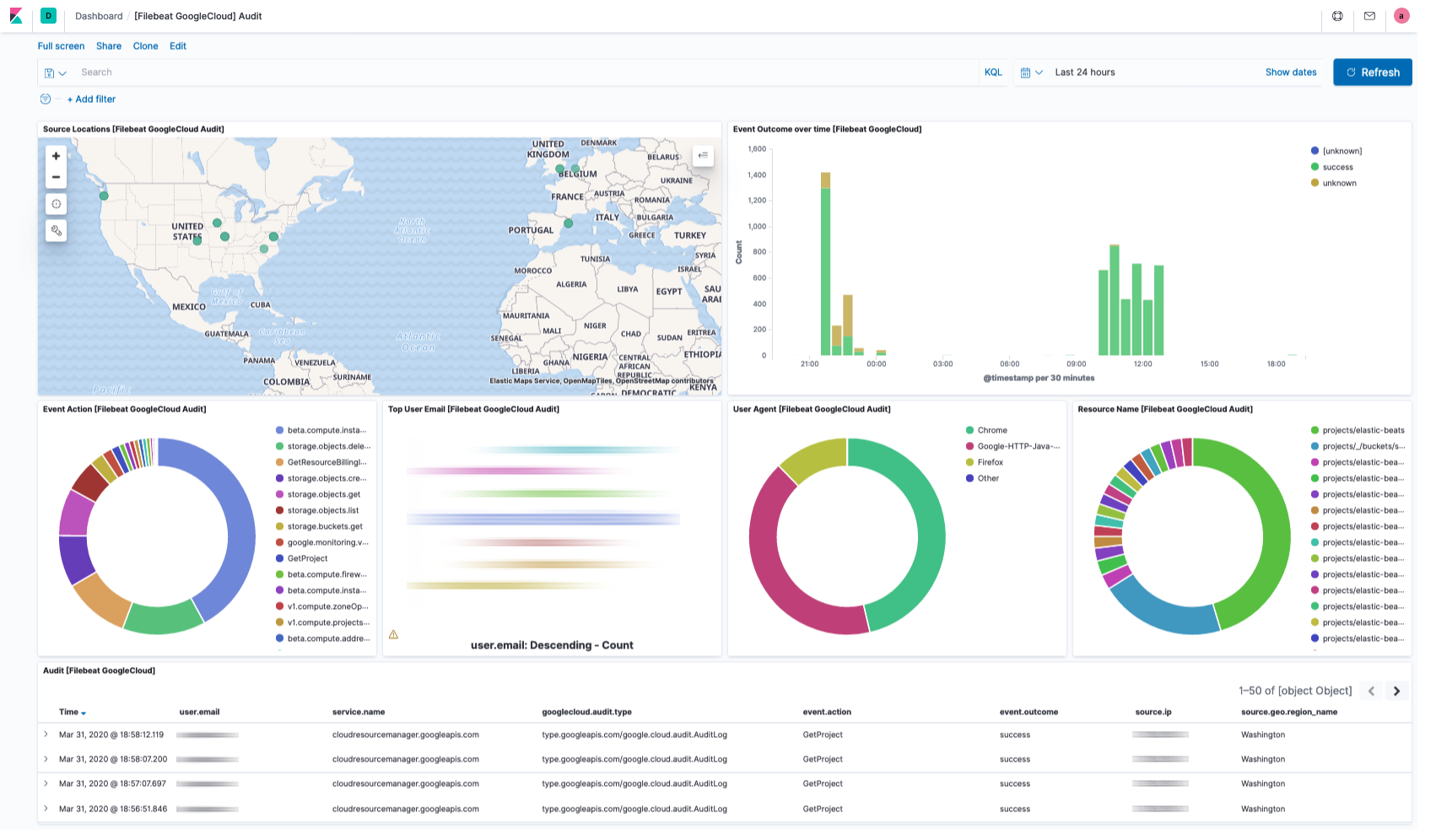
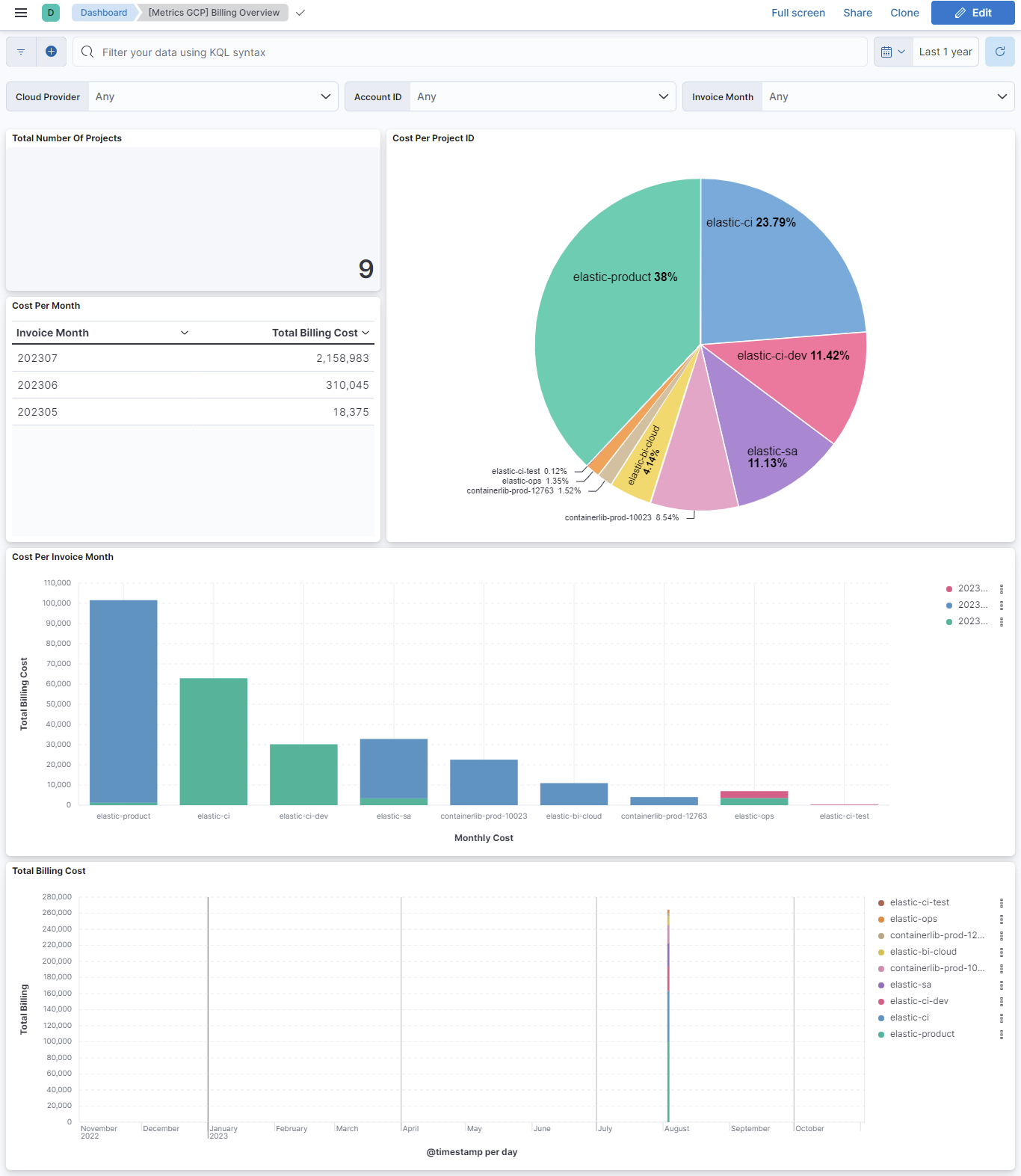
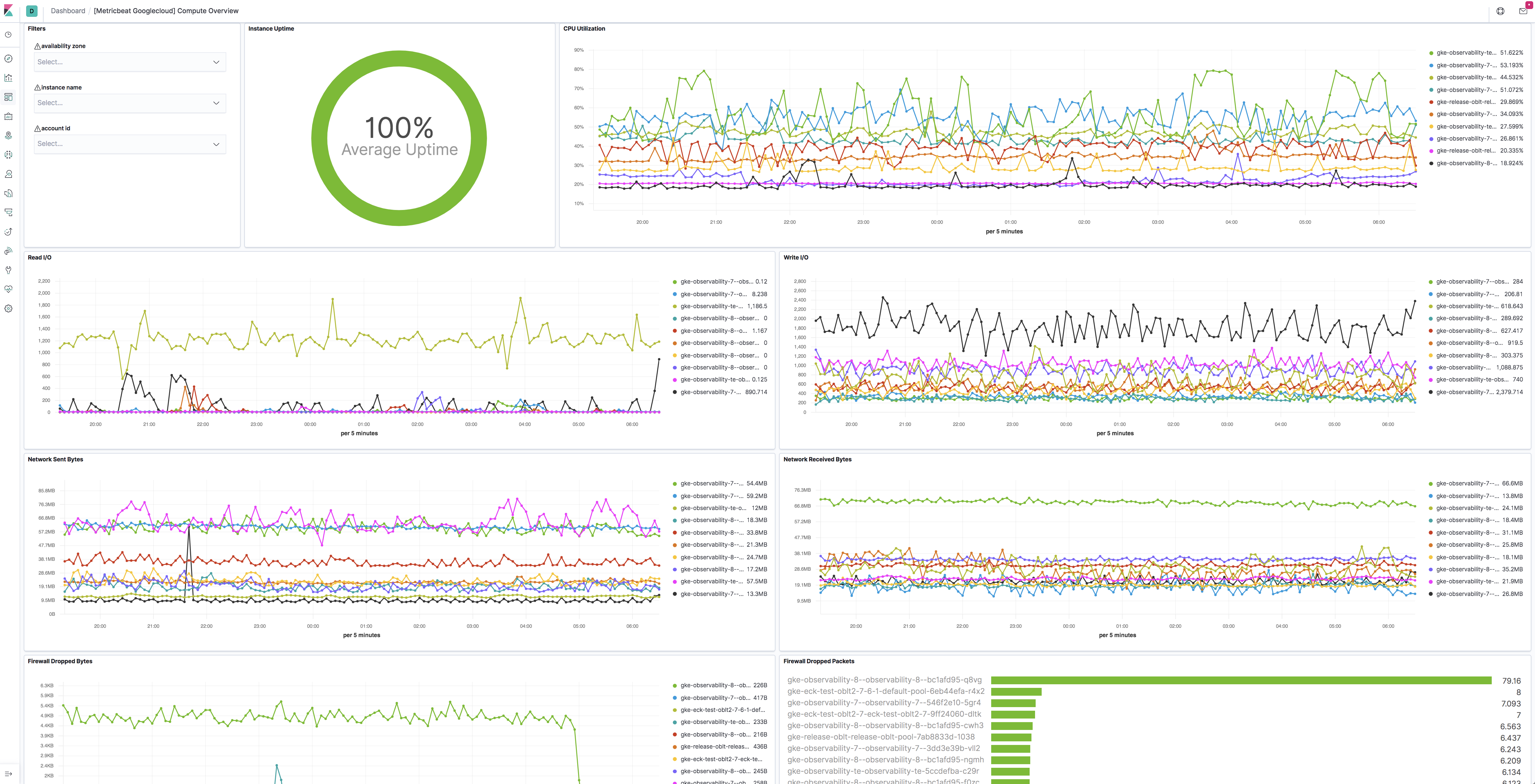
Changelog
| Version | Details | Minimum Kibana version |
|---|---|---|
| 2.52.0 | Enhancement (View pull request) Add host.target.id and full resource names in entity.target.id to the audit data stream, so targets resolve to Cloud Asset Inventory entities. |
9.0.0 8.18.0 |
| 2.51.1 | Bug fix (View pull request) Mark the audit data stream orchestrator resource-path grok as ignore_failure so audit events whose protoPayload.resourceName is not a standard Kubernetes resource path (for example non-resource API server requests) no longer abort the ingest pipeline. |
9.0.0 8.18.0 |
| 2.51.0 | Enhancement (View pull request) Add tags to ingest pipeline processors and add preserve_original_event to pipeline-level on_failure handlers.Bug fix (View pull request) Remove a redundant no-op script processor populating related.entity in the audit data stream.Bug fix (View pull request) Append to error.message in the billing and cloudsql_* pipeline-level on_failure handlers instead of overwriting, so multiple failures are retained. error.message is now an array on failed documents. |
9.0.0 8.18.0 |
| 2.50.2 | Bug fix (View pull request) Add security category to the Load Balancing and VPC Flow data streams to match their policy template categories. |
9.0.0 8.18.0 |
| 2.50.1 | Bug fix (View pull request) Fix JSON credentials escaping. |
9.0.0 8.18.0 |
| 2.50.0 | Enhancement (View pull request) Enable secrets for sensitive fields. For more details, refer https://www.elastic.co/guide/en/fleet/current/agent-policy.html#agent-policy-secret-values |
9.0.0 8.18.0 |
| 2.49.0 | Enhancement (View pull request) Keep ServiceData with binding deltas fields for Cloud Resource Manager events. |
9.0.0 8.18.0 |
| 2.48.0 | Enhancement (View pull request) Add support of parsing cluster notifications in audit data stream. |
9.0.0 8.18.0 |
| 2.47.2 | Enhancement (View pull request) Set user.email and user.id from client.user in GCP Audit pipeline. |
9.0.0 8.13.0 |
| 2.47.1 | Enhancement (View pull request) Fix gke network metrics fields and dashboard. |
9.0.0 8.13.0 |
| 2.47.0 | Enhancement (View pull request) Enhance GCP billing data stream with additional fields. |
9.0.0 8.13.0 |
| 2.46.0 | Enhancement (View pull request) Add type-specific entity fields to data stream. This enables better entity classification while maintaining backward compatibility with existing actor.entity.id and target.entity.id fields. |
9.0.0 8.13.0 |
| 2.45.0 | Enhancement (View pull request) Prefer set with copy_from. |
9.0.0 8.13.0 |
| 2.44.0 | Enhancement (View pull request) Add support for parsing sensitive action notifications event in the audit dataset. |
9.0.0 8.13.0 |
| 2.43.0 | Enhancement (View pull request) Add tags and processors to GCP Billing, Cloudrun, CloudSQL, Dataproc, GKE, Loadbalancing, Pubsub and Redis. |
9.0.0 8.13.0 |
| 2.42.2 | Bug fix (View pull request) Fixed GCP project ID handling to prevent numeric parsing issues by enforcing string type casting in YAML configuration templates. |
9.0.0 8.13.0 |
| 2.42.1 | Bug fix (View pull request) Remove redundant audit violation field renames. |
9.0.0 8.13.0 |
| 2.42.0 | Enhancement (View pull request) Allow @custom pipeline access to event.original without setting preserve_original_event. |
9.0.0 8.13.0 |
| 2.41.1 | Bug fix (View pull request) Preserve original value of resource name. |
9.0.0 8.13.0 |
| 2.41.0 | Enhancement (View pull request) Add support for Kibana 9.0.0. |
9.0.0 8.13.0 |
| 2.40.1 | Enhancement (View pull request) Add missing category. |
8.13.0 |
| 2.40.0 | Enhancement (View pull request) Add actor.entity.id and target.entity.id fields to audit logs. |
8.13.0 |
| 2.39.0 | Enhancement (View pull request) Add related.entity field to audit logs. |
8.13.0 |
| 2.38.0 | Enhancement (View pull request) Add policy_violation_info, metadata and related fields to audit logs.Bug fix (View pull request) Update GCP audit log dashboard to use correct email field. |
8.13.0 |
| 2.37.2 | Bug fix (View pull request) Fix definition of subfields of nested objects |
8.13.0 |
| 2.37.1 | Enhancement (View pull request) Improve GCP Billing documentation. |
8.13.0 |
| 2.37.0 | Enhancement (View pull request) Retain authenticationInfo.serviceAccountKeyName data. |
8.13.0 |
| 2.36.0 | Enhancement (View pull request) Add global dataset filter for dashboards to improve performance. |
8.13.0 |
| 2.35.0 | Enhancement (View pull request) ECS version updated to 8.11.0. Update the kibana constraint to ^8.13.0. Modified the field definitions to remove ECS fields made redundant by the ecs@mappings component template. |
8.13.0 |
| 2.34.1 | Bug fix (View pull request) Fix Redis metric type for 'persistence.rdb.bgsave_in_progress'. Metric type should be boolean instead of long. |
8.12.0 |
| 2.34.0 | Enhancement (View pull request) Add tags and processors to GCP Compute, Firestore, PostgreSQL. |
8.12.0 |
| 2.33.2 | Enhancement (View pull request) Add tags and processors to GCP Storage |
8.12.0 |
| 2.33.1 | Enhancement (View pull request) Update Legacy metric visualization to new metric in GCP Billing overview dashboard. |
8.12.0 |
| 2.33.0 | Enhancement (View pull request) Enable time series data for metrics data streams. This dramatically reduces storage for metrics and is expected to progressively improve query performance. For more details, see https://www.elastic.co/guide/en/elasticsearch/reference/current/tsds.html. |
8.12.0 |
| 2.32.1 | Enhancement (View pull request) Add dimensions mappings and the metrics_fingerprint field across all metrics data streams. |
8.12.0 |
| 2.32.0 | Enhancement (View pull request) Add new billing data stream fields. |
8.12.0 |
| 2.31.2 | Bug fix (View pull request) Fix pipeline error parsing DNS logs with empty rdata field. |
8.7.1 |
| 2.31.1 | Enhancement (View pull request) Add Cloud Run docs and fix policy template name to allow adding Cloud Run logs to the policy. |
8.7.1 |
| 2.31.0 | Enhancement (View pull request) Allow users to retain otherwised discarded fields. |
8.7.1 |
| 2.30.1 | Bug fix (View pull request) Fix mappings of group fields |
8.7.1 |
| 2.30.0 | Enhancement (View pull request) Add tags.yml file so that integration's dashboards and saved searches are tagged with "Security Solution" and displayed in the Security Solution UI. Enhancement (View pull request) Upgrade package spec to 3.0.0. Bug fix (View pull request) Fix orphan dashboard references. Bug fix (View pull request) Add missing dashboard filters. |
8.7.1 |
| 2.29.1 | Bug fix (View pull request) Add null checks and ignore_missing checks to the rename processor |
8.7.1 |
| 2.29.0 | Bug fix (View pull request) Remove GCP CloudSQL deprecated, alpha or beta metrics and fix field types. |
8.7.1 |
| 2.28.5 | Enhancement (View pull request) Set metric type for GKE, Load Balancing, PubSub, Redis and Storage data streams. |
8.7.1 |
| 2.28.4 | Enhancement (View pull request) Migrate GCP Load Balancing HTTPS Overview dashboard to lens. |
8.7.1 |
| 2.28.3 | Enhancement (View pull request) Set metric type for Cloud Run, Compute, Dataproc and Firestore data streams. |
8.7.1 |
| 2.28.2 | Enhancement (View pull request) Migrate GCP Load Balancing TCP SSL Proxy Overview dashboard to lens. |
8.7.1 |
| 2.28.1 | Enhancement (View pull request) Set metric type for CloudSQL data streams. |
8.7.1 |
| 2.28.0 | Enhancement (View pull request) Migrate GCP Load Balancing L3 Overview dashboard to lens. |
8.7.1 |
| 2.27.0 | Enhancement (View pull request) Add GCP CloudSQL MySQL, SQL Server and PostgreSQL dashboards. |
8.7.1 |
| 2.26.0 | Bug fix (View pull request) Fix GCP loadbalancing_metrics fields prefix. |
8.7.1 |
| 2.25.1 | Bug fix (View pull request) Fix check on gcp.audit.authorization_info[].granted. |
8.7.1 |
| 2.25.0 | Enhancement (View pull request) Migrate GCP Billing input control to new control panel. |
8.7.1 |
| 2.24.0 | Enhancement (View pull request) Add GCP CloudSQL MySQL, Postgres, SQLServer data streams |
8.7.1 |
| 2.23.0 | Enhancement (View pull request) Convert security dashboards to lens. |
8.7.1 |
| 2.22.1 | Enhancement (View pull request) Change ownership in manifest. |
8.6.0 |
| 2.22.0 | Enhancement (View pull request) Ensure event.kind is correctly set for pipeline errors. |
8.6.0 |
| 2.21.0 | Enhancement (View pull request) Update package to ECS 8.8.0. |
8.6.0 |
| 2.20.1 | Bug fix (View pull request) Fix invalid TSDS metric type for persistence.rdb.bgsave_in_progress field |
8.6.0 |
| 2.20.0 | Enhancement (View pull request) Update package to ECS 8.7.0. |
8.6.0 |
| 2.19.1 | Enhancement (View pull request) Migrate compute dashboard to lens and add datastream filter. |
8.6.0 |
| 2.19.0 | Enhancement (View pull request) Add Cloud Run metrics datastream. |
8.6.0 |
| 2.18.0 | Enhancement (View pull request) Support subscription_num_goroutines and subscription_max_outstanding_messages for GCP PubSub input |
8.6.0 |
| 2.17.2 | Bug fix (View pull request) Fix IP Convert processor in Audit ingest pipeline. |
8.6.0 |
| 2.17.1 | Enhancement (View pull request) Added categories and/or subcategories. |
8.6.0 |
| 2.17.0 | Enhancement (View pull request) Add Audit Log Overview dashboard Enhancement (View pull request) Add GKE Overview dashboard Enhancement (View pull request) Add PubSub Overview dashboard Enhancement (View pull request) Add Storage Overview dashboard |
8.6.0 |
| 2.16.2 | Bug fix (View pull request) Add logic to handle scalar request.policy values on audit |
8.5.0 |
| 2.16.1 | Bug fix (View pull request) Replace missing input control panel with new-style control. |
8.5.0 |
| 2.16.0 | Enhancement (View pull request) Update package to ECS 8.6.0. |
8.5.0 |
| 2.15.2 | Enhancement (View pull request) Update documentation. |
8.5.0 |
| 2.15.1 | Enhancement (View pull request) Add GCP Compute pipeline test. |
8.5.0 |
| 2.15.0 | Enhancement (View pull request) Remove support for Kibana 7.17.x Enhancement (View pull request) Support multiple regions for metrics data streams |
8.5.0 |
| 2.14.0 | Enhancement (View pull request) Update package to ECS 8.5.0. |
8.3.0 |
| 2.13.0 | Enhancement (View pull request) Migrate dashboard by values |
8.3.0 |
| 2.12.1 | Bug fix (View pull request) Remove duplicate fields. |
8.3.0 7.17.6 |
| 2.12.0 | Enhancement (View pull request) Add GCP Redis |
8.3.0 7.17.6 |
| 2.11.12 | Bug fix (View pull request) Add GKE ingest pipeline. |
8.3.0 7.17.6 |
| 2.11.11 | Bug fix (View pull request) Fix type of dns.answers.ttl. |
8.3.0 7.17.6 |
| 2.11.10 | Enhancement (View pull request) Add ingest pipeline for dataproc. Enhancement (View pull request) Add GCP loadbalancing ingest pipeline Enhancement (View pull request) Add GCP PubSub ingest pipeline Enhancement (View pull request) Add GCP Storage ingest pipeline Enhancement (View pull request) Add GCP Firestore ingest pipeline Enhancement (View pull request) Add GCP Compute ingest pipeline |
8.3.0 7.17.6 |
| 2.11.10-beta.6 | Enhancement (View pull request) Add ingest pipeline for dataproc. |
— |
| 2.11.10-beta.5 | Enhancement (View pull request) Add GCP loadbalancing ingest pipeline |
— |
| 2.11.10-beta.4 | Enhancement (View pull request) Add GCP PubSub ingest pipeline |
— |
| 2.11.10-beta.3 | Enhancement (View pull request) Add GCP Storage ingest pipeline |
— |
| 2.11.10-beta.2 | Enhancement (View pull request) Add GCP Firestore ingest pipeline |
— |
| 2.11.10-beta.1 | Enhancement (View pull request) Add GCP Compute ingest pipeline |
— |
| 2.11.9 | Bug fix (View pull request) Fix GKE kubernetes.io indentation. |
8.3.0 7.17.6 |
| 2.11.8 | Enhancement (View pull request) Remove duplicate fields. |
8.3.0 7.17.6 |
| 2.11.7 | Enhancement (View pull request) Move Dataproc lightweight module config into integration |
8.3.0 7.17.6 |
| 2.11.6 | Enhancement (View pull request) Move LoadBalancing lightweight module config into integration |
8.3.0 7.17.6 |
| 2.11.5 | Enhancement (View pull request) Move Storage lightweight module config into integration |
8.3.0 7.17.6 |
| 2.11.4 | Enhancement (View pull request) Move PubSub lightweight module config into integration |
8.3.0 7.17.6 |
| 2.11.3 | Enhancement (View pull request) Move GKE lightweight module config into integration |
8.3.0 7.17.6 |
| 2.11.2 | Enhancement (View pull request) Move Firestore lightweight module config into integration |
8.3.0 7.17.6 |
| 2.11.1 | Enhancement (View pull request) Use ECS geo.location definition. |
8.3.0 7.17.6 |
| 2.11.0 | Enhancement (View pull request) Move Compute lightweight module config into integration |
8.3.0 7.17.6 |
| 2.10.0 | Enhancement (View pull request) Add GCP PubSub Data stream |
8.3.0 7.17.6 |
| 2.9.0 | Enhancement (View pull request) Add GCP Dataproc Data stream |
8.3.0 7.17.6 |
| 2.8.0 | Enhancement (View pull request) Add GCP GKE Data Stream |
8.3.0 7.17.6 |
| 2.7.0 | Enhancement (View pull request) Add GCP Storage Data Stream |
8.3.0 7.17.6 |
| 2.6.0 | Enhancement (View pull request) Add Load Balancing logs datastream |
8.3.0 7.17.6 |
| 2.5.0 | Enhancement (View pull request) Add GCP Load Balancing Metricset Bug fix (View pull request) Fix credentials_json escaping in loadbalancing_metrics Bug fix (View pull request) Update loadbalancing_metrics default period to 60s Bug fix (View pull request) Fix event.dataset for loadbalancing_metrics Enhancement (View pull request) Add loadbalancing_metrics distribution fields |
8.3.0 7.17.6 |
| 2.4.0 | Enhancement (View pull request) Update package to ECS 8.4.0 |
8.3.0 7.17.6 |
| 2.3.0 | Enhancement (View pull request) Add additional parsing for DNS Public Zone Query Logs |
8.3.0 7.17.6 |
| 2.2.1 | Enhancement (View pull request) Fix Billing policy template title and default period for gcp.compute |
8.3.0 7.17.6 |
| 2.2.0 | Enhancement (View pull request) Remove fields duplicated in ECS fields |
8.3.0 7.17.6 |
| 2.1.0 | Enhancement restore compatibility with 7.17 release track |
8.3.0 7.17.6 |
| 2.0.0 | Breaking change (View pull request) Move configurations to support metrics. This change is breaking, as it moves some configuration from the top level variables to data stream variables. This change involves project_id, credentials_file and credentials_jsonvariables that are moved from input level configuration to package level configuration (as those variables are reused across all inputs/data streams). Users with GCP integration enabled will need to input values for these variables again when upgrading the policies to this version. Enhancement (View pull request) Add GCP Billing Data Stream Enhancement (View pull request) Add GCP Compute Data Stream Enhancement (View pull request) Add GCP Firestore Data stream |
8.3.0 |
| 1.10.0 | Enhancement (View pull request) Update package to ECS 8.3.0. |
8.0.0 7.17.0 |
| 1.9.2 | Bug fix (View pull request) Fix GCP auditlog parsing issue on response status |
8.0.0 7.17.0 |
| 1.9.1 | Enhancement (View pull request) Update readme |
8.0.0 7.17.0 |
| 1.9.0 | Enhancement (View pull request) Preserve request and response in flattened fields. |
8.0.0 7.17.0 |
| 1.8.0 | Enhancement (View pull request) Add missing cloud.provider field. |
8.0.0 7.17.0 |
| 1.7.0 | Enhancement (View pull request) Add dashboards for firewall and vpc flow logs. Bug fix (View pull request) Add missing mappings for several event.* fields. |
— |
| 1.6.1 | Enhancement (View pull request) Clarify the GCP privileges required by the Pub/Sub input. |
8.0.0 7.16.3 |
| 1.6.0 | Enhancement (View pull request) Update to ECS 8.2 |
— |
| 1.5.1 | Enhancement (View pull request) Add documentation for multi-fields |
8.0.0 7.16.3 |
| 1.5.0 | Enhancement (View pull request) Improve Google Cloud Platform docs. |
8.0.0 7.16.3 |
| 1.4.2 | Bug fix (View pull request) Remove emtpy values, names with only dots, and invalid client IPs. |
8.0.0 7.16.3 |
| 1.4.1 | Bug fix (View pull request) Fix quoting of the credentials_json value in policy templates. |
8.0.0 7.16.3 |
| 1.4.0 | Enhancement (View pull request) Add gcp.dns integration |
— |
| 1.3.1 | Bug fix (View pull request) Add Ingest Pipeline script to map IANA Protocol Numbers |
8.0.0 7.15.0 |
| 1.3.0 | Enhancement (View pull request) Update to ECS 8.0 |
8.0.0 7.15.0 |
| 1.2.2 | Bug fix (View pull request) Regenerate test files using the new GeoIP database |
8.0.0 7.15.0 |
| 1.2.1 | Bug fix (View pull request) Change test public IPs to the supported subset |
— |
| 1.2.0 | Enhancement (View pull request) Add 8.0.0 version constraint |
8.0.0 7.15.0 |
| 1.1.2 | Enhancement (View pull request) Update Title and Description. |
7.15.0 |
| 1.1.1 | Bug fix (View pull request) Fix logic that checks for the 'forwarded' tag |
— |
| 1.1.0 | Enhancement (View pull request) Update to ECS 1.12.0 |
7.15.0 |
| 1.0.0 | Enhancement (View pull request) Move from experimental to GA Enhancement (View pull request) remove experimental from data_sets |
— |
| 0.3.3 | Enhancement (View pull request) Convert to generated ECS fields |
— |
| 0.3.2 | Enhancement (View pull request) update to ECS 1.11.0 |
— |
| 0.3.1 | Enhancement (View pull request) Escape special characters in docs |
— |
| 0.3.0 | Enhancement (View pull request) Update integration description |
— |
| 0.2.0 | Enhancement (View pull request) Set "event.module" and "event.dataset" |
— |
| 0.1.0 | Enhancement (View pull request) update to ECS 1.10.0 and adding event.original options |
— |
| 0.0.2 | Enhancement (View pull request) update to ECS 1.9.0 |
— |
| 0.0.1 | Enhancement (View pull request) initial release |
— |