blacklens.io
Elastic Cloud Serverless projects are autoscaled environments, fully managed by Elastic and available on Elastic Cloud. Availability This functionality is generally available and ready for production usage. Elastic Cloud Serverless projects are autoscaled environments, fully managed by Elastic and available on Elastic Cloud. Availability This functionality is generally available and ready for production usage. The Elastic Stack includes Elastic's core products such as Elasticsearch, Kibana, Logstash, and Beats. Availability This functionality is generally available and ready for production usage. Unless stated otherwise on the page, this functionality is available when your Elastic Stack is deployed on Elastic Cloud Hosted, Elastic Cloud Enterprise, Elastic Cloud on Kubernetes, and self-managed environments. This documentation corresponds to the latest patch available for each minor version. If you're not using the latest patch, check the release notes for changes.
Serverless Observability
Generally available
Serverless Security
Generally available
Stack
9.1+
Generally available since 9.1
| Version | 1.5.0 (View all) |
| Managed integration release status | GA |
| Subscription level What's this? |
Basic |
| Developed by What's this? |
Community |
| Ingestion method(s) | API |
| Minimum Kibana version(s) | 9.1.4 9.0.7 8.19.4 |
You can use this integration as an Elastic Managed integration on Elastic Cloud Hosted deployments running this version or later.
The blacklens.io integration allows you to monitor alerts. blacklens.io is a comprehensive Attack Surface Management platform that helps businesses understand and secure their external attack surface. By combining automated security analysis, continuous monitoring, and penetration testing, it identifies and addresses vulnerabilities early. With features like Darknet Monitoring, Vulnerability Scanning, and XDR Response, blacklens.io provides a proactive defense strategy to protect companies from cyber threats while offering a clear view of their security posture at all times.
Use the blacklens.io integration to fetch all related alerts about your Attack Surface. Then visualize that data in Kibana and create further alerts or enrich the data with other security solutions.
Elastic Managed integrations are only supported on Elastic Cloud Serverless and Elastic Cloud Hosted deployments. An Elastic Managed integration lets you ingest data from a cloud source while avoiding the orchestration, management, and maintenance associated with standard ingest infrastructure. Elastic runs the collector for you, so you can focus on your data instead of the infrastructure that collects it.
For more information, refer to Elastic Managed integrations and the Elastic Managed integrations FAQ.
The blacklens.io integration collects one type of data streams: logs
Alerts returns a list of blacklens.io alerts (The API Docs are referenced within the portal)
You need Elasticsearch for storing and searching your data and Kibana for visualizing and managing it.
You can use our hosted Elasticsearch Service on Elastic Cloud, which is recommended, or self-manage the Elastic Stack on your own hardware.
You will require the alerts:read permission in order to fetch the Alerts via the API.
You need an active blacklens.io subscription and a user with the alerts:read permission to retrieve alerts via the API.
- Login to your blacklens.io Portal (This URL will be used for the Instance URL: 'https://portal-(ID).blacklens.io')
- Go to Profile → Generate API Key and copy it.
- Go to Settings → Company.
- Copy ws_id and tenant_id.
- In Kibana go to Management > Integrations.
- In "Search for integrations" search bar, type blacklens.io.
- Click on the "blacklens.io" integration from the search results.
- Click on the "Add blacklens.io" button to add the integration.
- Configure all required integration parameters.
- Alert data requires following parameters:
URLTenant ID (tenant_id)Workspace ID (ws_id)API Key
- Alert data requires following parameters:
- Save the integration.
For detailed setup instructions, please refer to the blacklens.io Knowledge Base (The link is referenced within the portal).
This is the alerts dataset
Example
{
    "@timestamp": "2026-02-03T06:17:57.260Z",
    "agent": {
        "ephemeral_id": "23a29ca3-cffa-4f55-9ef4-536308f22c95",
        "id": "6bcec12d-6281-4434-99e0-eb2f7c014fbf",
        "name": "elastic-agent-84667",
        "type": "filebeat",
        "version": "8.19.10"
    },
    "blacklens": {
        "alert": {
            "activities": [
                {
                    "category": "threat",
                    "created_date": "2026-02-03T06:17:57.260Z",
                    "description": "A Critical severity external vulnerability 'Blind SQL Injection via HTTP Header' has been detected on asset 'demo.example.com'",
                    "id": "3fa85f64-5717-4562-b3fc-2c963f66afa5",
                    "trace_id": "3fa85f64-5717-4562-b3fc-2c963f66afa6",
                    "type": "ExternalVulnerabilityCreated",
                    "updated_date": "2026-02-03T06:17:57.260Z"
                }
            ],
            "analysis": "ongoing",
            "category": "vulnerability",
            "id": "3fa85f64-5717-4562-b3fc-2c963f66afa6",
            "name": "External Vulnerability",
            "severity": "medium",
            "status": "new",
            "updated_date": "2026-02-03T06:17:57.260Z"
        }
    },
    "data_stream": {
        "dataset": "blacklens.alerts",
        "namespace": "43517",
        "type": "logs"
    },
    "ecs": {
        "version": "8.11.0"
    },
    "elastic_agent": {
        "id": "6bcec12d-6281-4434-99e0-eb2f7c014fbf",
        "snapshot": false,
        "version": "8.19.10"
    },
    "event": {
        "agent_id_status": "verified",
        "category": [
            "threat"
        ],
        "created": "2026-03-31T08:58:43.557Z",
        "dataset": "blacklens.alerts",
        "id": "3fa85f64-5717-4562-b3fc-2c963f66afa6",
        "ingested": "2026-03-31T08:58:46Z",
        "kind": "alert",
        "type": [
            "indicator"
        ]
    },
    "input": {
        "type": "httpjson"
    },
    "tags": [
        "forwarded",
        "blacklens-alert"
    ]
}
Exported fields
| Field | Description | Type |
|---|---|---|
| @timestamp | Event timestamp. | date |
| blacklens.alert.activities.category | keyword | |
| blacklens.alert.activities.created_date | date | |
| blacklens.alert.activities.data | nested | |
| blacklens.alert.activities.description | keyword | |
| blacklens.alert.activities.id | keyword | |
| blacklens.alert.activities.trace_id | keyword | |
| blacklens.alert.activities.type | keyword | |
| blacklens.alert.activities.updated_date | date | |
| blacklens.alert.analysis | Determines whether the current alert triggers further events | keyword |
| blacklens.alert.category | Alert category | keyword |
| blacklens.alert.id | Unique Alert ID | keyword |
| blacklens.alert.name | Name of the given Alert | keyword |
| blacklens.alert.severity | Alert Severity | keyword |
| blacklens.alert.status | Current Status of the Alert | keyword |
| blacklens.alert.updated_date | Activity last updated time (UTC). | date |
| data_stream.dataset | Data stream dataset. | constant_keyword |
| data_stream.namespace | Data stream namespace. | constant_keyword |
| data_stream.type | Data stream type. | constant_keyword |
| event.dataset | Event dataset. | constant_keyword |
| event.kind | This is one of four ECS Categorization Fields, and indicates the highest level in the ECS category hierarchy. event.kind gives high-level information about what type of information the event contains, without being specific to the contents of the event. For example, values of this field distinguish alert events from metric events. The value of this field can be used to inform how these kinds of events should be handled. They may warrant different retention, different access control, it may also help understand whether the data is coming in at a regular interval or not. |
keyword |
| event.module | Event module. | constant_keyword |
| input.type | Type of filebeat input. | keyword |
| observer.product | constant_keyword | |
| observer.vendor | constant_keyword |
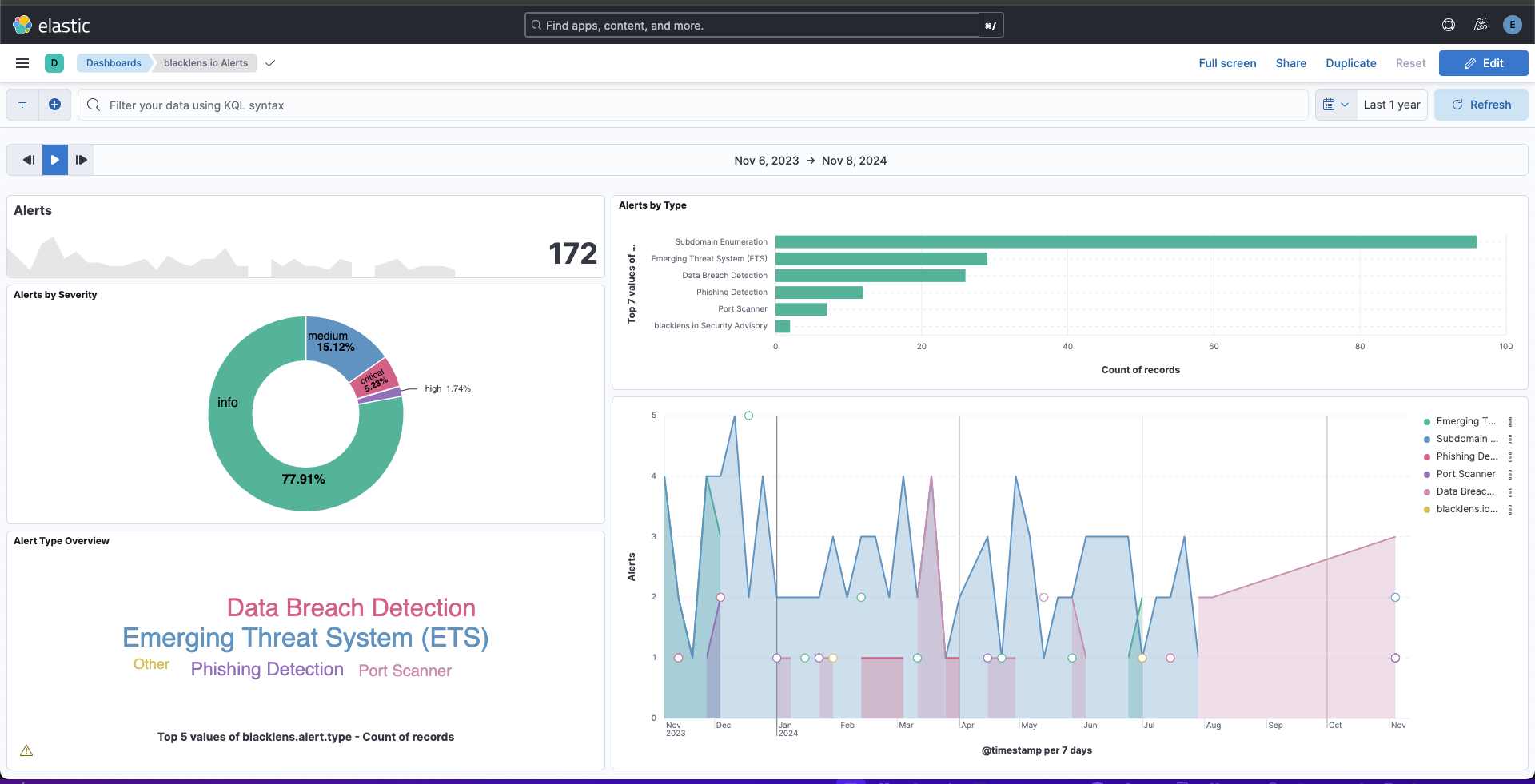
This integration includes one or more Kibana dashboards that visualizes the data collected by the integration. The screenshots below illustrate how the ingested data is displayed.
Changelog
| Version | Details | Minimum Kibana version |
|---|---|---|
| 1.5.0 | Enhancement (View pull request) Update Elastic Managed integration documentation to the current wording and docs links. |
9.1.4 9.0.7 8.19.4 |
| 1.4.0 | Enhancement (View pull request) Add tags to ingest pipeline processors. |
9.1.4 9.0.7 8.19.4 |
| 1.3.1 | Enhancement (View pull request) Set agentless deployment mode release field to ga. |
9.1.4 9.0.7 8.19.4 |
| 1.3.0 | Enhancement (View pull request) Publish Agentless to Elastic Managed integrations name change. |
9.1.4 9.0.7 8.19.4 |
| 1.2.0 | Enhancement (View pull request) Use new release field for agentless deployment mode to establish as beta. |
9.1.4 9.0.7 8.19.4 |
| 1.1.0 | Enhancement (View pull request) Enable Agentless deployment. |
9.1.4 9.0.7 8.19.4 |
| 1.0.1 | Bug fix (View pull request) Change event.kind to keyword and set alert in the ingest pipeline so pipeline_error on failure does not conflict with constant_keyword mapping. |
9.1.4 9.0.7 8.19.4 |
| 1.0.0 | Enhancement (View pull request) Make integration GA. Breaking change (View pull request) Update fields to match new JSON schema. |
9.1.4 9.0.7 8.19.4 |
| 0.5.0 | Enhancement (View pull request) Prevent updating fleet health status to degraded when pagination completes. |
9.1.4 9.0.7 8.19.4 |
| 0.4.1 | Bug fix (View pull request) Fix default request trace enabled behavior. |
9.0.0 8.15.2 |
| 0.4.0 | Enhancement (View pull request) Enable request trace log removal. |
9.0.0 8.15.2 |
| 0.3.0 | Enhancement (View pull request) Update Kibana constraint to support 9.0.0. |
9.0.0 8.15.2 |
| 0.2.1 | Bug fix (View pull request) Updated SSL description in package manifest.yml to be uniform and to include links to documentation. |
8.15.2 |
| 0.2.0 | Enhancement (View pull request) Add "preserve_original_event" tag to documents with event.kind set to "pipeline_error". |
8.15.2 |
| 0.1.0 | Enhancement (View pull request) Initial draft of the package |
8.15.2 |