Trellix EDR Cloud
Elastic Cloud Serverless projects are autoscaled environments, fully managed by Elastic and available on Elastic Cloud. Availability This functionality is generally available and ready for production usage. Elastic Cloud Serverless projects are autoscaled environments, fully managed by Elastic and available on Elastic Cloud. Availability This functionality is generally available and ready for production usage. The Elastic Stack includes Elastic's core products such as Elasticsearch, Kibana, Logstash, and Beats. Availability This functionality is generally available and ready for production usage. Unless stated otherwise on the page, this functionality is available when your Elastic Stack is deployed on Elastic Cloud Hosted, Elastic Cloud Enterprise, Elastic Cloud on Kubernetes, and self-managed environments. This documentation corresponds to the latest patch available for each minor version. If you're not using the latest patch, check the release notes for changes.
Serverless Observability
Generally available
Serverless Security
Generally available
Stack
9.0+
Generally available since 9.0
| Version | 1.10.0 (View all) |
| Subscription level What's this? |
Basic |
| Developed by What's this? |
Elastic |
| Ingestion method(s) | AWS S3 |
| Minimum Kibana version(s) | 9.0.0 8.16.5 |
This Trellix EDR Cloud integration enables your detected threats and suspicious network data to be sent to Elastic Security via Amazon S3. When integrated with Elastic Security, this valuable data can be leveraged within Elastic for threat protection, detection, and incident response.
The Trellix EDR Cloud integration can be used in two different modes to collect data:
- AWS S3 polling mode: Trellix EDR Cloud writes data to S3, and Elastic Agent polls the S3 bucket by listing its contents and reading new files.
- AWS S3 SQS mode: Trellix EDR Cloud writes data to S3, S3 sends a notification of a new object to SQS, the Elastic Agent receives the notification from SQS, and then reads the S3 object. Multiple agents can be used in this mode.
This module has been tested against the latest (June 05, 2023) Trellix EDR Cloud version.
The Trellix EDR Cloud integration collects logs for the following seventeen events:
| Event Type |
|---|
| API |
| Context Changed |
| DNS Query |
| EPP |
| File |
| Image Loaded |
| Named Pipe |
| Network |
| Process |
| RegKey |
| RegValue |
| Scheduled Task |
| Script Executed |
| Service |
| SysInfo |
| User |
| WMI |
The Trellix EDR Cloud integration collects logs for the above mentioned events, but we have combined all of those in one data stream named event.
Elastic Agent must be installed. For more details, check the Elastic Agent installation instructions.
The minimum kibana.version required is 8.9.0.
If you already have an AWS S3 bucket setup, configure it with Trellix EDR Cloud by following these steps:
- Login to your Trellix Admin Account, select Trellix ePO.
- Go to Policy Catalog -> Trellix EDR.
- Create a new policy by filling the required details and click OK.
- After creating a policy, click on edit for the policy you want to edit.
- Go to the Trace, fill in the details of the trace scanner and AWS S3 settings, and click on save.
- Now go to the system tree and click on the system to which you want to assign the policy.
- Go to Actions -> Agent -> Set Policy and Inheritance
- Select the product under policy as MVISION EDR, and select the policy that you want to assign to this system, and click save.
- Policy is assigned to the system, and the system trace logs will be sent to the AWS S3 bucket.
The default value of the field Bucket List Prefix is event/.
- Assuming you've already set up a connection to push data into the AWS bucket; if not, see the section above.
- To set up an SQS queue, follow "Step 1: Create an Amazon SQS Queue" as described in the AWS documentation.
- While creating an access policy, use the bucket name configured to create a connection for AWS S3 in Trellix EDR Cloud.
- To configure event notifications for an S3 bucket refer to the AWS documentation.
- While creating
event notificationselect the event type ass3:ObjectCreated:*, destination type SQS Queue, and select the queue name created in Step 2.
- While creating
In Kibana navigate to Management > Integrations.
In the search top bar, type Trellix EDR Cloud.
Select the Trellix EDR Cloud integration and add it.
While adding the integration, if you want to collect logs via AWS S3, enter the following details:
- access key id
- secret access key
- bucket arn or access point arn
- collect logs via S3 Bucket toggled on
or if you want to collect logs via AWS SQS, then you have to put the following details:
- access key id
- secret access key
- queue url
- region
- collect logs via S3 Bucket toggled off
Save the integration.
For more input combination options, check the AWS documentation.
This is the Event dataset.
Example
{
    "@timestamp": "2023-04-05T07:05:21.186Z",
    "destination": {
        "ip": "81.2.69.192",
        "port": 443
    },
    "device": {
        "id": "D435435b0-BB33-4625-891E-XXXXXXX"
    },
    "ecs": {
        "version": "8.11.0"
    },
    "event": {
        "action": "added",
        "category": [
            "file"
        ],
        "id": "675XXXX-054c-48e8-9549-468dbb5ae5bc",
        "kind": "event",
        "original": "{\"_ver\":2107,\"_serverId\":\"5B0539BF-0932-4BEA-BD12-EA52687E58BD\",\"_eventType\":\"File Deleted\",\"accessType\":\"connection_opened\",\"_deviceId\":\"D435435b0-BB33-4625-891E-XXXXXXX\",\"_parentEventId\":\"1XXXXX-8566-404c-87a3-a4c46017b87d\",\"_eventId\":\"675XXXX-054c-48e8-9549-468dbb5ae5bc\",\"_time\":\"2023-04-05T07:05:21.186Z\",\"name\":\"Write Process Memory\",\"authorName\":\"Example\",\"data\":\"AAA9UFgBAAA=\",\"arguments\":[\"0x220a50d0000\",\"0x1000\",\"0x2\"],\"cmdLine\":\"\\\"C:\\\\Users\\\\XXXX\\\\AppData\\\\Local\\\\Microsoft\\\\OneDrive\\\\Update\\\\setup.exe\\\"/update\",\"result\":\"2085503003216\",\"fileModificationDate\":\"2023-04-04T12:38:42.821Z\",\"fileType\":\"PE\",\"fileCreationDate\":\"2023-04-04T12:38:40.984Z\",\"fileMd5\":\"A7F7A4EEC248E6C1841EC6D5B735357B\",\"fileSha1\":\"B8F93C2963CF1415A3D1C49668BF56665E3DC334\",\"fileSha256\":\"F36CD7BAD72D6B6144234DBA8A101A529DABEDC07D48056126A1356A4EECA418\",\"filePath\":\"C:\\\\ProgramFiles\\\\WindowsApps\\\\Deleted\\\\XXX.PowerAutomateDesktop_1.0.414.0_x64__8wekyb3d8e7483ce5b-4hhh-4a05-a9d8-a3e99e12498d\\\\kk-KZ\\\\PPP.Console.XX.YY.dll\",\"fileSize\":5632,\"fileAttributes\":32,\"subsystem\":3,\"fileMagicBytes\":\"d0cf11e0a1b11ae1\",\"direction\":\"outbound\",\"dnsName\":\"content-autofill.example.com\",\"pipeName\":\"\\\\\\\\.\\\\pipe\\\\Sessions\\\\3\\\\AppContainerNamedObjects\\\\S-1-15-2-3573721485-3817616455-324955835-1810672402-3651098853-3568380600-1295794929\",\"destAddress\":\"81.2.69.192\",\"destPort\":443,\"sourceAddress\":\"81.2.69.144\",\"sourcePort\":52376,\"protocol\":\"tcp\",\"taskName\":\"example ReportingTask-S-1-5-21-1323470238-68471550-93548180-1001\",\"taskDescription\":null,\"dnsType\":65,\"dnsClass\":1,\"targetPid\":1964,\"pid\": \"2280\",\"dnsNames\":[\"XXX.YYY.cdn.live.net\",\"ttt-XXX.YYY.net\",\"SSS.YYY.cdn.live.net.XXX.net\",\"aaa.dscd.XXX.net\"],\"action\":\"added\",\"serviceName\":\"WD FILTER\",\"serviceDescription\":\"Example Antivirus On-Access Malware Protection Mini-Filter Driver\",\"serviceLoadOrderGroup\":\"FS FilterAnti-Virus\",\"userName\":\"example user\",\"userDomain\":\"DESKTOP-66XXX\",\"userSid\":\"S-1-5-21-1323470238-68471550-93548180-1001\",\"tagId\":0,\"commands\":[\"%localappdata%\\\\XXXXXX\\\\OneDrive\\\\updater.exe\"],\"httpUrl\":\"https://xxxx-win.xxx.example.com:443settings/v2.0/compat/appraiser?os=windows&osver=0.0.0.1.example.ni_release.220506-1250&appver=0.0.0.1\",\"httpRequestHeaders\":\"GETsettings/v2.0/compat/appraiser?os=windows&osver=0.0.0.1.amd64fre.ni_release.220506-1250&appver=0.0.0.2600HTTP/1.1\\r\\nUser-Agent:MSDW\\r\\n\",\"serviceType\":2,\"integrityLevel\":4,\"versionInfoFilename\":\"example.EXE\",\"versionInfoFileVersion\":\"0.0.0.1(WinBuild.160101.0800)\",\"versionInfoProductName\":\"XXXX®Windows®OperatingSystem\",\"versionInfoProductVersion\":\"0.0.0.1194\",\"versionInfoVendorName\":\"Example Corporation\",\"serviceStartType\":0,\"keyName\":\"HKLM\\\\SYSTEM\\\\CONTROLSET001\\\\SERVICES\\\\XXXX\\\\SECURITY\",\"keyValueName\":\"SECURITY\",\"keyValueType\":\"REG_BINARY\",\"keyValue\":\"01001480CC000000D8000000140000003000000002001C000100000002801400FF010F0001010000000000010000000002009C0006000000000018009D01020001020000000000052000000021020000000014009D010200010100000000000512000000000018009D01020001020000000000052000000020020000000014009D010200010100000000000504000000000014009D01020001010000000000050600000000002800FF010F00010600000000000550000000BF5508723BE028D089794BF891896E7C4025ECF4010100000000000512000000010100000000000512000000\",\"keyOldValue\":\"01001480F400000000010000140000003000000002001C000100000002801400FF010F00010100000000000100000\",\"certs\":[[{\"type\":\"signing\",\"issuerName\":\"US,\\\"example,Inc.\\\",ZZZZZ TrustedG4CodeSigningRSAXXXXXXXA3842021CA1\",\"publicKeyHash\":\"47A58D30595525187338F85B7F8235FC919CE3FC\"},{\"type\":\"parent\",\"issuerName\":\"US,example,www.example.com,ROOTCAA\",\"publicKeyHash\":\"6837E0EBB63BF85F1186FBFE617B088865F44E42\"},{\"type\":\"parent\",\"issuerName\":\"US,DigiCertInc,www.example.com,ROOTCA\",\"publicKeyHash\":\"ECD7E382D2715D644CDF2E673FE7BA98AE1C0F4F\"},{\"type\":\"parent\",\"issuerName\":\"US,DigiCertInc,www.example.com,ROOTCA\",\"publicKeyHash\":\"45EBA2AFF492CB82312D518BA7A7219DF36DC80F\"}]]}",
        "type": [
            "deletion"
        ]
    },
    "file": {
        "created": "2023-04-04T12:38:40.984Z",
        "hash": {
            "md5": "A7F7A4EEC248E6C1841EC6D5B735357B",
            "sha1": "B8F93C2963CF1415A3D1C49668BF56665E3DC334",
            "sha256": "F36CD7BAD72D6B6144234DBA8A101A529DABEDC07D48056126A1356A4EECA418"
        },
        "mtime": "2023-04-04T12:38:42.821Z",
        "path": "C:\\ProgramFiles\\WindowsApps\\Deleted\\XXX.PowerAutomateDesktop_1.0.414.0_x64__8wekyb3d8e7483ce5b-4hhh-4a05-a9d8-a3e99e12498d\\kk-KZ\\PPP.Console.XX.YY.dll",
        "size": 5632,
        "type": "PE"
    },
    "network": {
        "direction": "outbound",
        "protocol": "tcp"
    },
    "process": {
        "command_line": [
            "\"C:\\Users\\XXXX\\AppData\\Local\\Microsoft\\OneDrive\\Update\\setup.exe\"/update",
            "%localappdata%\\XXXXXX\\OneDrive\\updater.exe"
        ],
        "pid": 2280
    },
    "registry": {
        "data": {
            "type": "REG_BINARY"
        }
    },
    "related": {
        "hash": [
            "A7F7A4EEC248E6C1841EC6D5B735357B",
            "B8F93C2963CF1415A3D1C49668BF56665E3DC334",
            "F36CD7BAD72D6B6144234DBA8A101A529DABEDC07D48056126A1356A4EECA418",
            "47A58D30595525187338F85B7F8235FC919CE3FC",
            "6837E0EBB63BF85F1186FBFE617B088865F44E42",
            "ECD7E382D2715D644CDF2E673FE7BA98AE1C0F4F",
            "45EBA2AFF492CB82312D518BA7A7219DF36DC80F"
        ],
        "ip": [
            "81.2.69.192",
            "81.2.69.144"
        ],
        "user": [
            "DESKTOP-66XXX",
            "example user",
            "S-1-5-21-1323470238-68471550-93548180-1001"
        ]
    },
    "service": {
        "name": "WD FILTER"
    },
    "source": {
        "ip": "81.2.69.144",
        "port": 52376
    },
    "tags": [
        "preserve_original_event",
        "preserve_duplicate_custom_fields"
    ],
    "trellix_edr_cloud": {
        "event": {
            "access_type": "connection_opened",
            "action": "added",
            "arguments": [
                "0x220a50d0000",
                "0x1000",
                "0x2"
            ],
            "author_name": "Example",
            "certs": [
                [
                    {
                        "issuer_name": "US,\"example,Inc.\",ZZZZZ TrustedG4CodeSigningRSAXXXXXXXA3842021CA1",
                        "public_key_hash": "47A58D30595525187338F85B7F8235FC919CE3FC",
                        "type": "signing"
                    },
                    {
                        "issuer_name": "US,example,www.example.com,ROOTCAA",
                        "public_key_hash": "6837E0EBB63BF85F1186FBFE617B088865F44E42",
                        "type": "parent"
                    },
                    {
                        "issuer_name": "US,DigiCertInc,www.example.com,ROOTCA",
                        "public_key_hash": "ECD7E382D2715D644CDF2E673FE7BA98AE1C0F4F",
                        "type": "parent"
                    },
                    {
                        "issuer_name": "US,DigiCertInc,www.example.com,ROOTCA",
                        "public_key_hash": "45EBA2AFF492CB82312D518BA7A7219DF36DC80F",
                        "type": "parent"
                    }
                ]
            ],
            "cmd_line": "\"C:\\Users\\XXXX\\AppData\\Local\\Microsoft\\OneDrive\\Update\\setup.exe\"/update",
            "commands": [
                "%localappdata%\\XXXXXX\\OneDrive\\updater.exe"
            ],
            "data": "AAA9UFgBAAA=",
            "dest": {
                "address": "81.2.69.192",
                "port": 443
            },
            "device_id": "D435435b0-BB33-4625-891E-XXXXXXX",
            "direction": "outbound",
            "dns": {
                "class": 1,
                "name": "content-autofill.example.com",
                "names": [
                    "XXX.YYY.cdn.live.net",
                    "ttt-XXX.YYY.net",
                    "SSS.YYY.cdn.live.net.XXX.net",
                    "aaa.dscd.XXX.net"
                ],
                "type": 65
            },
            "file": {
                "attributes": 32,
                "creation_date": "2023-04-04T12:38:40.984Z",
                "magic_bytes": "d0cf11e0a1b11ae1",
                "md5": "A7F7A4EEC248E6C1841EC6D5B735357B",
                "modification_date": "2023-04-04T12:38:42.821Z",
                "path": "C:\\ProgramFiles\\WindowsApps\\Deleted\\XXX.PowerAutomateDesktop_1.0.414.0_x64__8wekyb3d8e7483ce5b-4hhh-4a05-a9d8-a3e99e12498d\\kk-KZ\\PPP.Console.XX.YY.dll",
                "sha1": "B8F93C2963CF1415A3D1C49668BF56665E3DC334",
                "sha256": "F36CD7BAD72D6B6144234DBA8A101A529DABEDC07D48056126A1356A4EECA418",
                "size": 5632,
                "type": "PE"
            },
            "http": {
                "request_headers": "GETsettings/v2.0/compat/appraiser?os=windows&osver=0.0.0.1.amd64fre.ni_release.220506-1250&appver=0.0.0.2600HTTP/1.1\r\nUser-Agent:MSDW\r\n",
                "url": "https://xxxx-win.xxx.example.com:443settings/v2.0/compat/appraiser?os=windows&osver=0.0.0.1.example.ni_release.220506-1250&appver=0.0.0.1"
            },
            "id": "675XXXX-054c-48e8-9549-468dbb5ae5bc",
            "integrity_level": 4,
            "key": {
                "name": "HKLM\\SYSTEM\\CONTROLSET001\\SERVICES\\XXXX\\SECURITY",
                "old_value": "01001480F400000000010000140000003000000002001C000100000002801400FF010F00010100000000000100000",
                "val": "01001480CC000000D8000000140000003000000002001C000100000002801400FF010F0001010000000000010000000002009C0006000000000018009D01020001020000000000052000000021020000000014009D010200010100000000000512000000000018009D01020001020000000000052000000020020000000014009D010200010100000000000504000000000014009D01020001010000000000050600000000002800FF010F00010600000000000550000000BF5508723BE028D089794BF891896E7C4025ECF4010100000000000512000000010100000000000512000000"
            },
            "name": "Write Process Memory",
            "parent_event_id": "1XXXXX-8566-404c-87a3-a4c46017b87d",
            "pid": 2280,
            "pipe_name": "\\\\.\\pipe\\Sessions\\3\\AppContainerNamedObjects\\S-1-15-2-3573721485-3817616455-324955835-1810672402-3651098853-3568380600-1295794929",
            "protocol": "tcp",
            "result": 2085503003216,
            "server_id": "5B0539BF-0932-4BEA-BD12-EA52687E58BD",
            "service": {
                "description": "Example Antivirus On-Access Malware Protection Mini-Filter Driver",
                "load_order_group": "FS FilterAnti-Virus",
                "name": "WD FILTER",
                "start_type": 0,
                "type": 2
            },
            "source": {
                "address": "81.2.69.144",
                "port": 52376
            },
            "subsystem": 3,
            "tag_id": "0",
            "target_pid": "1964",
            "task": {
                "name": "example ReportingTask-S-1-5-21-1323470238-68471550-93548180-1001"
            },
            "time": "2023-04-05T07:05:21.186Z",
            "type": "File Deleted",
            "user": {
                "domain": "DESKTOP-66XXX",
                "name": "example user",
                "sid": "S-1-5-21-1323470238-68471550-93548180-1001"
            },
            "value": {
                "name": "SECURITY",
                "type": "REG_BINARY"
            },
            "ver": "2107",
            "version_info": {
                "file": {
                    "name": "example.EXE",
                    "version": "0.0.0.1(WinBuild.160101.0800)"
                },
                "product": {
                    "name": "XXXX®Windows®OperatingSystem",
                    "version": "0.0.0.1194"
                },
                "vendor_name": "Example Corporation"
            }
        }
    },
    "url": {
        "full": "https://xxxx-win.xxx.example.com:443settings/v2.0/compat/appraiser?os=windows&osver=0.0.0.1.example.ni_release.220506-1250&appver=0.0.0.1"
    },
    "user": {
        "domain": "DESKTOP-66XXX",
        "id": "S-1-5-21-1323470238-68471550-93548180-1001",
        "name": "example user"
    }
}
Exported fields
| Field | Description | Type |
|---|---|---|
| @timestamp | Event timestamp. | date |
| aws.s3.bucket.arn | The AWS S3 bucket ARN. | keyword |
| aws.s3.bucket.name | The AWS S3 bucket name. | keyword |
| aws.s3.object.key | The AWS S3 Object key. | keyword |
| data_stream.dataset | Data stream dataset. | constant_keyword |
| data_stream.namespace | Data stream namespace. | constant_keyword |
| data_stream.type | Data stream type. | constant_keyword |
| event.dataset | Event dataset. | constant_keyword |
| event.module | Event module. | constant_keyword |
| input.type | Type of filebeat input. | keyword |
| log.offset | Log offset. | long |
| trellix_edr_cloud.event.access_type | keyword | |
| trellix_edr_cloud.event.action | keyword | |
| trellix_edr_cloud.event.arguments | keyword | |
| trellix_edr_cloud.event.author_name | keyword | |
| trellix_edr_cloud.event.bytes_received | long | |
| trellix_edr_cloud.event.certs | nested | |
| trellix_edr_cloud.event.certs.issuer_name | keyword | |
| trellix_edr_cloud.event.certs.public_key_hash | keyword | |
| trellix_edr_cloud.event.certs.type | keyword | |
| trellix_edr_cloud.event.cmd_line | keyword | |
| trellix_edr_cloud.event.commands | keyword | |
| trellix_edr_cloud.event.data | keyword | |
| trellix_edr_cloud.event.dest.address | ip | |
| trellix_edr_cloud.event.dest.port | long | |
| trellix_edr_cloud.event.destination_address | keyword | |
| trellix_edr_cloud.event.device_id | keyword | |
| trellix_edr_cloud.event.direction | keyword | |
| trellix_edr_cloud.event.dns.class | long | |
| trellix_edr_cloud.event.dns.name | keyword | |
| trellix_edr_cloud.event.dns.names | keyword | |
| trellix_edr_cloud.event.dns.type | long | |
| trellix_edr_cloud.event.evid | keyword | |
| trellix_edr_cloud.event.file.attributes | long | |
| trellix_edr_cloud.event.file.creation_date | date | |
| trellix_edr_cloud.event.file.magic_bytes | keyword | |
| trellix_edr_cloud.event.file.md5 | keyword | |
| trellix_edr_cloud.event.file.modification_date | date | |
| trellix_edr_cloud.event.file.path | keyword | |
| trellix_edr_cloud.event.file.sha1 | keyword | |
| trellix_edr_cloud.event.file.sha256 | keyword | |
| trellix_edr_cloud.event.file.size | long | |
| trellix_edr_cloud.event.file.type | keyword | |
| trellix_edr_cloud.event.fqdn | keyword | |
| trellix_edr_cloud.event.http.request_headers | keyword | |
| trellix_edr_cloud.event.http.response_headers | keyword | |
| trellix_edr_cloud.event.http.url | keyword | |
| trellix_edr_cloud.event.id | keyword | |
| trellix_edr_cloud.event.integrity_level | long | |
| trellix_edr_cloud.event.key.name | keyword | |
| trellix_edr_cloud.event.key.old_value | keyword | |
| trellix_edr_cloud.event.key.val | keyword | |
| trellix_edr_cloud.event.module_name | keyword | |
| trellix_edr_cloud.event.name | keyword | |
| trellix_edr_cloud.event.operation_name | keyword | |
| trellix_edr_cloud.event.parent_event_id | keyword | |
| trellix_edr_cloud.event.pid | long | |
| trellix_edr_cloud.event.pipe_name | keyword | |
| trellix_edr_cloud.event.protocol | keyword | |
| trellix_edr_cloud.event.result | long | |
| trellix_edr_cloud.event.server_id | keyword | |
| trellix_edr_cloud.event.service.description | keyword | |
| trellix_edr_cloud.event.service.load_order_group | keyword | |
| trellix_edr_cloud.event.service.name | keyword | |
| trellix_edr_cloud.event.service.start_type | long | |
| trellix_edr_cloud.event.service.type | long | |
| trellix_edr_cloud.event.source.address | ip | |
| trellix_edr_cloud.event.source.port | long | |
| trellix_edr_cloud.event.subsystem | long | |
| trellix_edr_cloud.event.tag_id | keyword | |
| trellix_edr_cloud.event.target_pid | keyword | |
| trellix_edr_cloud.event.task.description | keyword | |
| trellix_edr_cloud.event.task.name | keyword | |
| trellix_edr_cloud.event.time | date | |
| trellix_edr_cloud.event.type | keyword | |
| trellix_edr_cloud.event.user.cid | keyword | |
| trellix_edr_cloud.event.user.domain | keyword | |
| trellix_edr_cloud.event.user.groups | keyword | |
| trellix_edr_cloud.event.user.name | keyword | |
| trellix_edr_cloud.event.user.names | keyword | |
| trellix_edr_cloud.event.user.sid | keyword | |
| trellix_edr_cloud.event.value.name | keyword | |
| trellix_edr_cloud.event.value.type | keyword | |
| trellix_edr_cloud.event.ver | keyword | |
| trellix_edr_cloud.event.version_info.file.name | keyword | |
| trellix_edr_cloud.event.version_info.file.version | keyword | |
| trellix_edr_cloud.event.version_info.product.name | keyword | |
| trellix_edr_cloud.event.version_info.product.version | keyword | |
| trellix_edr_cloud.event.version_info.vendor_name | keyword | |
| trellix_edr_cloud.event.wmi.local | boolean | |
| trellix_edr_cloud.event.wmi.ns | keyword |
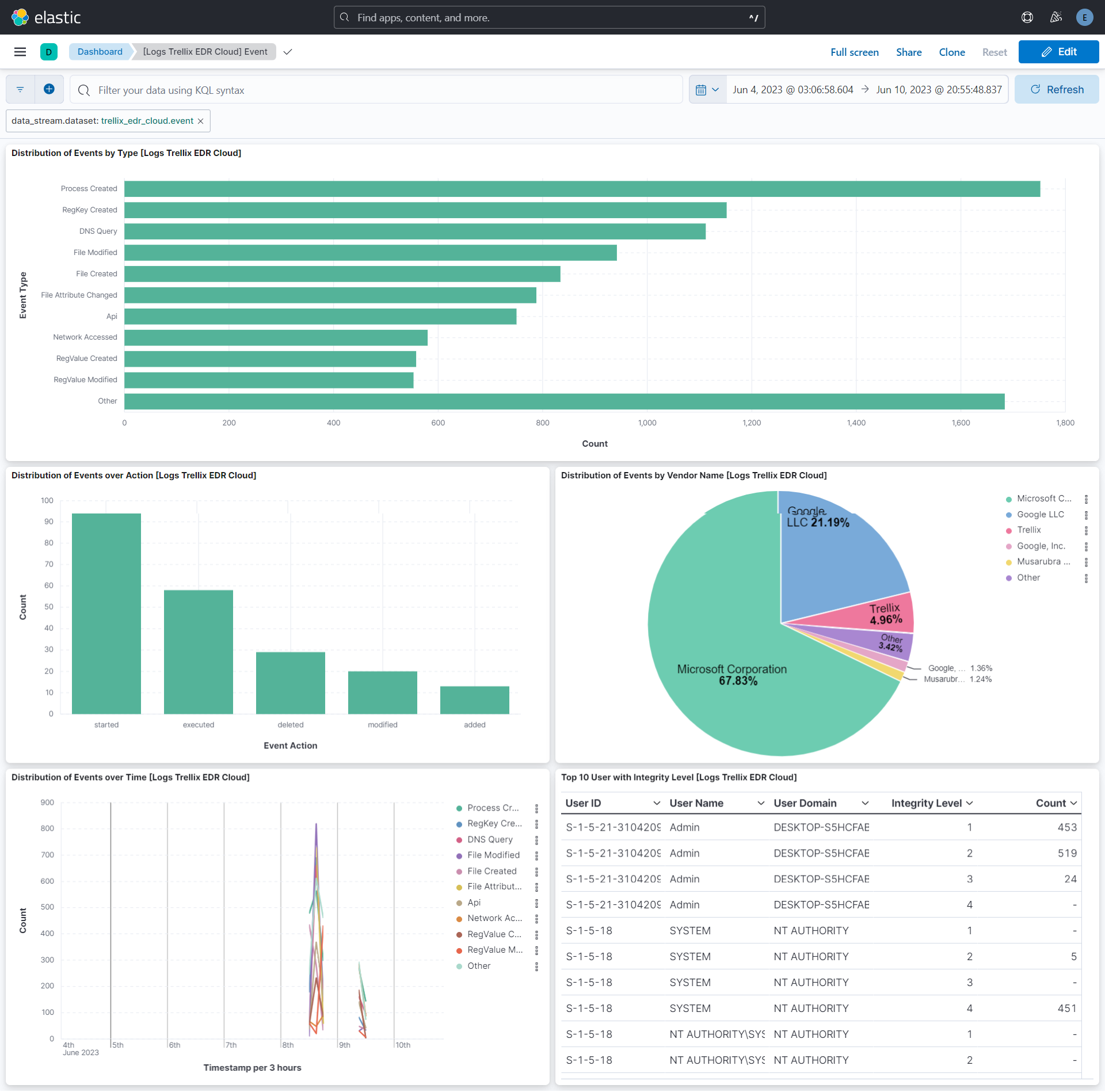
This integration includes one or more Kibana dashboards that visualizes the data collected by the integration. The screenshots below illustrate how the ingested data is displayed.
Changelog
| Version | Details | Minimum Kibana version |
|---|---|---|
| 1.10.0 | Enhancement (View pull request) Add tags to ingest pipeline processors and add preserve_original_event to pipeline-level on_failure handlers. |
9.0.0 8.16.5 |
| 1.9.0 | Enhancement (View pull request) Remove duplicated installation instructions from the documentation |
9.0.0 8.16.5 |
| 1.8.1 | Bug fix (View pull request) Fix handling of SQS worker count configuration. |
9.0.0 8.16.5 |
| 1.8.0 | Enhancement (View pull request) Add support to configure start_timestamp and ignore_older configurations for AWS S3 backed inputs. |
9.0.0 8.16.5 |
| 1.7.0 | Enhancement (View pull request) Update Kibana constraint to support 9.0.0. |
9.0.0 8.16.2 |
| 1.6.1 | Bug fix (View pull request) Updated SSL description in package manifest.yml to be uniform and to include links to documentation. |
8.16.2 |
| 1.6.0 | Enhancement (View pull request) Add support for Access Point ARN when collecting logs via the AWS S3 Bucket. |
8.16.2 |
| 1.5.0 | Enhancement (View pull request) Add "preserve_original_event" tag to documents with event.kind manually set to "pipeline_error". |
8.13.0 |
| 1.4.0 | Enhancement (View pull request) Do not remove event.original in main ingest pipeline. |
8.13.0 |
| 1.3.0 | Enhancement (View pull request) Add "preserve_original_event" tag to documents with event.kind set to "pipeline_error". |
8.13.0 |
| 1.2.1 | Bug fix (View pull request) Fix definition of subfields of nested objects |
8.13.0 |
| 1.2.0 | Enhancement (View pull request) Removed import_mappings. Update the kibana constraint to ^8.13.0. Modified the field definitions to remove ECS fields made redundant by the ecs@mappings component template. |
8.13.0 |
| 1.1.0 | Enhancement (View pull request) Set sensitive values as secret. |
8.12.0 |
| 1.0.1 | Enhancement (View pull request) Changed owners |
8.9.0 |
| 1.0.0 | Enhancement (View pull request) Release package as GA. |
8.9.0 |
| 0.6.0 | Enhancement (View pull request) ECS version updated to 8.11.0. |
8.9.0 |
| 0.5.1 | Bug fix (View pull request) Add missing fields from beats input |
8.9.0 |
| 0.5.0 | Enhancement (View pull request) Improve 'event.original' check to avoid errors if set. |
8.9.0 |
| 0.4.0 | Enhancement (View pull request) ECS version updated to 8.10.0. |
8.9.0 |
| 0.3.0 | Enhancement (View pull request) The format_version in the package manifest changed from 2.11.0 to 3.0.0. Removed dotted YAML keys from package manifest. Added 'owner.type: elastic' to package manifest. |
8.9.0 |
| 0.2.0 | Enhancement (View pull request) Add tags.yml file so that integration's dashboards and saved searches are tagged with "Security Solution" and displayed in the Security Solution UI. |
8.9.0 |
| 0.1.0 | Enhancement (View pull request) Initial release. |
8.9.0 |