Cisco Duo
Elastic Cloud Serverless projects are autoscaled environments, fully managed by Elastic and available on Elastic Cloud. Availability This functionality is generally available and ready for production usage. Elastic Cloud Serverless projects are autoscaled environments, fully managed by Elastic and available on Elastic Cloud. Availability This functionality is generally available and ready for production usage. The Elastic Stack includes Elastic's core products such as Elasticsearch, Kibana, Logstash, and Beats. Availability This functionality is generally available and ready for production usage. Unless stated otherwise on the page, this functionality is available when your Elastic Stack is deployed on Elastic Cloud Hosted, Elastic Cloud Enterprise, Elastic Cloud on Kubernetes, and self-managed environments. This documentation corresponds to the latest patch available for each minor version. If you're not using the latest patch, check the release notes for changes.
Serverless Observability
Generally available
Serverless Security
Generally available
Stack
9.0+
Generally available since 9.0
| Version | 2.15.0 (View all) |
| Managed integration release status | GA |
| Subscription level What's this? |
Basic |
| Developed by What's this? |
Elastic |
| Ingestion method(s) | API |
| Minimum Kibana version(s) | 9.0.0 8.18.0 |
You can use this integration as an Elastic Managed integration on Elastic Cloud Hosted deployments running this version or later.
The Cisco Duo integration collects and parses data from the Cisco Duo Admin APIs. The Duo Admin API provides programmatic access to the administrative functionality of Duo Security's two-factor authentication platform.
Elastic Managed integrations are only supported on Elastic Cloud Serverless and Elastic Cloud Hosted deployments. An Elastic Managed integration lets you ingest data from a cloud source while avoiding the orchestration, management, and maintenance associated with standard ingest infrastructure. Elastic runs the collector for you, so you can focus on your data instead of the infrastructure that collects it.
For more information, refer to Elastic Managed integrations and the Elastic Managed integrations FAQ.
This module has been tested against Cisco Duo Core Authentication Service: D224.13 and Admin Panel: D224.18
In order to ingest data from the Cisco Duo Admin API you must:
- Have a the Cisco Duo administrator account with Owner role Sign up
- Sign in to Duo Admin Panel
- Go through following tabs Application > Protect an Application > Admin API > Protect
- Now you will find your Hostname, Integration key and Secret key which will be required while configuring the integration package.
- For this integration you will require Grant read information and Grant read log permissions.
- The Users data stream also requires the Grant resource - Read permission.
- Make sure you have whitelisted your IP Address.
More details for each step can be found at First steps.
The Cisco Duo integration collects logs for the following types of events.
- Activity Logs
- Administrator Logs
- Authentication Logs
- Offline Enrollment Logs
- Summary
- Telephony Logs
- Telephony Logs (v1) - DEPRECATED, use Telephony Logs instead
- Trust Monitor
- Users
Cisco Duo has implemented v2 handlers for some endpoints. In these cases, the API v1 handler remains supported, but will be limited or deprecated in the future.
From data streams listed above, v2 handlers are supported for Activity, Authentication and Telephony Logs at the moment. It is recommended to migrate data streams to the v2 endpoints when they become available.
The Telephony (v1) data stream, which collects Telephony logs from the v1 API endpoint, is DEPRECATED and will be removed in a future release. Deactivate it and instead enable Telephony v2 in the Collect Cisco Duo logs via API v2 input.
The following considerations should be taken into account when configuring the integration.
- Interval has to be greater or equal than
1m. - The Duo Admin API retrieves records from the last 180 days up to as recently as two minutes before the API request. Consider this when configuring the
Initial intervalparameter for the v2 API endpoints, as it doesn't supportdas a suffix, its maximum value is4320hwhich corresponds to that 180 days. - For v2 API endpoints, a new parameter
limithas been added to control the number of records per response. Default value is 100 and can be incresead until 1000. - Larger values of interval might cause delay in data ingestion.
This integration installs an Elastic latest transform for the Users data stream to maintain a current view of each user. For more details, see Transform setup and requirements.
The transform writes only the most recent record per user to a destination index, accessible via the logs-cisco_duo_latest.user alias.
| Source index | Destination index | Alias |
|---|---|---|
logs-cisco_duo.user-* |
logs-cisco_duo_latest.dest_user-1 |
logs-cisco_duo_latest.user |
The transform requires the built-in transform_admin role or equivalent privileges. See Elastic documentation for details.
This is the activity dataset.
Example
{
    "@timestamp": "2023-03-21T15:51:22.591Z",
    "agent": {
        "ephemeral_id": "a04443dc-0f75-4c19-87b0-c1c2b6325eae",
        "id": "87f5b0df-c981-4785-8d74-44932a323935",
        "name": "elastic-agent-22181",
        "type": "filebeat",
        "version": "8.13.0"
    },
    "cisco_duo": {
        "activity": {
            "access_device": {
                "browser": "Chrome",
                "browser_version": "111.0.0.0",
                "epkey": "EP123456789012345678",
                "ip": {
                    "address": "172.34.40.116"
                },
                "location": {
                    "city": "Ann Arbor",
                    "country": "United States",
                    "state": "Michigan"
                },
                "os": "Mac OS X",
                "os_version": "10.15.7"
            },
            "action": {
                "name": "webauthncredential_create"
            },
            "actor": {
                "details": {
                    "created": "2015-09-25T23:17:40.000000+00:00",
                    "groups": [
                        {
                            "key": "DGAZ172QBWDM26AK8ITK",
                            "name": "CorpHQ_Users"
                        },
                        {
                            "key": "DGK3B7XTSIP00LKHK1RD",
                            "name": "ITAdmins"
                        },
                        {
                            "key": "DGKZWSBCDADEVFGFK5NR",
                            "name": "yee"
                        }
                    ],
                    "last_login": "2023-03-21T19:51:09.000000+00:00",
                    "status": "Active"
                },
                "key": "DU64TKJPJ0SHFWKO2LNBC",
                "name": "sogilby",
                "type": "user"
            },
            "akey": "DAAR5FO0OZ4VYZA0WOB2",
            "application": {
                "key": "DILSVDEYH66TBHKIXGR9",
                "name": "Acme Corp",
                "type": "websdk"
            },
            "id": "720b8360-078b-47c4-adc7-7968df1caef0",
            "outcome": "FAILURE",
            "target": {
                "details": {
                    "authenticator_type": "Security key",
                    "browser": "Chrome",
                    "browser_version": "111.0.0.0",
                    "credential_name": "Security key",
                    "os": "Mac OS X",
                    "os_version": "10.15.7",
                    "passwordless_authorized": false,
                    "transport_types": "usb",
                    "user_agent": "Mozilla/5.0 (Macintosh; Intel Mac OS X 10_15_7) AppleWebKit/537.36 (KHTML, like Gecko) Chrome/111.0.0.0 Safari/537.36"
                },
                "key": "WAUKH0IMTGP00L90LT4KM",
                "name": "WAUKH0IMTG3EDD4DT4KM",
                "type": "webauthn_credential"
            }
        }
    },
    "data_stream": {
        "dataset": "cisco_duo.activity",
        "namespace": "62263",
        "type": "logs"
    },
    "ecs": {
        "version": "8.11.0"
    },
    "elastic_agent": {
        "id": "87f5b0df-c981-4785-8d74-44932a323935",
        "snapshot": false,
        "version": "8.13.0"
    },
    "event": {
        "action": "webauthncredential_create",
        "agent_id_status": "verified",
        "dataset": "cisco_duo.activity",
        "id": "720b8360-078b-47c4-adc7-7968df1caef0",
        "ingested": "2024-11-14T15:12:27Z",
        "kind": "event",
        "original": "{\"access_device\":{\"browser\":\"Chrome\",\"browser_version\":\"111.0.0.0\",\"epkey\":\"EP123456789012345678\",\"ip\":{\"address\":\"172.34.40.116\"},\"location\":{\"city\":\"Ann Arbor\",\"country\":\"United States\",\"state\":\"Michigan\"},\"os\":\"Mac OS X\",\"os_version\":\"10.15.7\"},\"action\":{\"details\":null,\"name\":\"webauthncredential_create\"},\"activity_id\":\"720b8360-078b-47c4-adc7-7968df1caef0\",\"actor\":{\"details\":\"{\\\"created\\\": \\\"2015-09-25T23:17:40.000000+00:00\\\",\\\"last_login\\\": \\\"2023-03-21T19:51:09.000000+00:00\\\",\\\"status\\\": \\\"Active\\\",\\\"groups\\\": [{\\\"name\\\": \\\"CorpHQ_Users\\\",\\\"key\\\": \\\"DGAZ172QBWDM26AK8ITK\\\"},{\\\"name\\\": \\\"ITAdmins\\\",\\\"key\\\": \\\"DGK3B7XTSIP00LKHK1RD\\\"},{\\\"name\\\": \\\"yee\\\",\\\"key\\\": \\\"DGKZWSBCDADEVFGFK5NR\\\"}]}\",\"key\":\"DU64TKJPJ0SHFWKO2LNBC\",\"name\":\"sogilby\",\"type\":\"user\"},\"akey\":\"DAAR5FO0OZ4VYZA0WOB2\",\"application\":{\"key\":\"DILSVDEYH66TBHKIXGR9\",\"name\":\"Acme Corp\",\"type\":\"websdk\"},\"old_target\":null,\"outcome\":{\"result\":\"FAILURE\"},\"target\":{\"details\":\"{\\\"authenticator_type\\\": \\\"Security key\\\",\\\"transport_types\\\": \\\"usb\\\",\\\"passwordless_authorized\\\": false,\\\"browser\\\": \\\"Chrome\\\",\\\"browser_version\\\": \\\"111.0.0.0\\\",\\\"os\\\": \\\"Mac OS X\\\",\\\"os_version\\\": \\\"10.15.7\\\",\\\"user_agent\\\": \\\"Mozilla/5.0 (Macintosh; Intel Mac OS X 10_15_7) AppleWebKit/537.36 (KHTML, like Gecko) Chrome/111.0.0.0 Safari/537.36\\\",\\\"credential_name\\\": \\\"Security key\\\"}\",\"key\":\"WAUKH0IMTGP00L90LT4KM\",\"name\":\"WAUKH0IMTG3EDD4DT4KM\",\"type\":\"webauthn_credential\"},\"ts\":\"2023-03-21T15:51:22.591015+00:00\"}",
        "outcome": "failure"
    },
    "input": {
        "type": "cel"
    },
    "related": {
        "ip": [
            "172.34.40.116"
        ],
        "user": [
            "sogilby"
        ]
    },
    "source": {
        "ip": "172.34.40.116"
    },
    "tags": [
        "preserve_original_event",
        "forwarded",
        "cisco_duo-activity"
    ],
    "user": {
        "name": "sogilby"
    },
    "user_agent": {
        "name": "Chrome",
        "os": {
            "name": "Mac OS X",
            "version": "10.15.7"
        },
        "version": "111.0.0.0"
    }
}
Exported fields
| Field | Description | Type |
|---|---|---|
| @timestamp | Event timestamp. | date |
| cisco_duo.activity.access_device.as.number | Unique number allocated to the autonomous system. The autonomous system number (ASN) uniquely identifies each network on the Internet. | long |
| cisco_duo.activity.access_device.as.organization.name | Organization name. | keyword |
| cisco_duo.activity.access_device.browser | The web browser used for access. | keyword |
| cisco_duo.activity.access_device.browser_version | The web browser version. | keyword |
| cisco_duo.activity.access_device.epkey | The device's unique identifier or epkey. | keyword |
| cisco_duo.activity.access_device.geo.city_name | City name (geo enrichment based on the IP address). | keyword |
| cisco_duo.activity.access_device.geo.continent_name | Name of the continent (geo enrichment based on the IP address). | keyword |
| cisco_duo.activity.access_device.geo.country_iso_code | Country ISO code (geo enrichment based on the IP address). | keyword |
| cisco_duo.activity.access_device.geo.country_name | Country name (geo enrichment based on the IP address). | keyword |
| cisco_duo.activity.access_device.geo.location | Longitude and latitude (geo enrichment based on the IP address). | geo_point |
| cisco_duo.activity.access_device.geo.region_iso_code | Region ISO code (geo enrichment based on the IP address). | keyword |
| cisco_duo.activity.access_device.geo.region_name | Region name (geo enrichment based on the IP address). | keyword |
| cisco_duo.activity.access_device.ip.address | IP address of access device. | ip |
| cisco_duo.activity.access_device.location.city | The city name provided by Cisco Duo. | keyword |
| cisco_duo.activity.access_device.location.country | The country code provided by Cisco Duo. Refer to ISO 3166 for a list of possible countries. | keyword |
| cisco_duo.activity.access_device.location.state | The state, county, province, or prefecture provided by Cisco Duo. | keyword |
| cisco_duo.activity.access_device.os | The device operating system name. | keyword |
| cisco_duo.activity.access_device.os_version | The device operating system version. | keyword |
| cisco_duo.activity.action.details | Provides additional information about the action. Details is optional. | keyword |
| cisco_duo.activity.action.name | The name is a string representing the action the actor performed. If a target is present, the action was performed on that target. | keyword |
| cisco_duo.activity.actor.details | Details about the actor. | flattened |
| cisco_duo.activity.actor.key | Identifier of the actor. | keyword |
| cisco_duo.activity.actor.name | Name of the actor. | keyword |
| cisco_duo.activity.actor.type | Type of actor. One of: admin, adminapi, admin_sync, azure_sync, deviceapi, ldapsync, system, or user. | keyword |
| cisco_duo.activity.akey | Unique identifier of entity associated with the activity log. | keyword |
| cisco_duo.activity.application.key | The application's integration key. | keyword |
| cisco_duo.activity.application.name | The application's name. | keyword |
| cisco_duo.activity.application.type | The application's type. | keyword |
| cisco_duo.activity.id | Transaction ID of the event. | keyword |
| cisco_duo.activity.old_target.details | Key-value pair of properties about the target. The properties for a given target may vary by target type, but should be consistent for the same type. | flattened |
| cisco_duo.activity.old_target.key | Key of the target that corresponds to the target type. | keyword |
| cisco_duo.activity.old_target.name | Name of the target. | keyword |
| cisco_duo.activity.old_target.type | The target type. One of: admin, adminap_integrations, authproxy, computer_registration, device_registration, enroll_code, group, log_export, login_settings, hardtoken, integration, phone, policy, trusted_endpoints_integration, u2f_token, user, user_bypass, or webauthn_credentials. | keyword |
| cisco_duo.activity.outcome | Result of the ADMIN_ACTION_ADMIN_LOGIN action. By default, the outcome field is "SUCCESS". On failure, the outcome field is "FAILURE". | keyword |
| cisco_duo.activity.target.details | Key-value pair of properties about the target. The properties for a given target may vary by target type, but should be consistent for the same type. | flattened |
| cisco_duo.activity.target.key | Key of the target that corresponds to the target type. | keyword |
| cisco_duo.activity.target.name | Name of the target. | keyword |
| cisco_duo.activity.target.type | The target type. One of: admin, adminap_integrations, authproxy, computer_registration, device_registration, enroll_code, group, log_export, login_settings, hardtoken, integration, phone, policy, trusted_endpoints_integration, u2f_token, user, user_bypass, or webauthn_credentials. | keyword |
| cloud.image.id | Image ID for the cloud instance. | keyword |
| data_stream.dataset | Data stream dataset. | constant_keyword |
| data_stream.namespace | Data stream namespace. | constant_keyword |
| data_stream.type | Data stream type. | constant_keyword |
| event.dataset | Event dataset | constant_keyword |
| event.module | Event module | constant_keyword |
| host.containerized | If the host is a container. | boolean |
| host.os.build | OS build information. | keyword |
| host.os.codename | OS codename, if any. | keyword |
| input.type | Input type | keyword |
| log.offset | Log offset | long |
This is the admin dataset.
Example
{
    "@timestamp": "2021-07-20T11:41:31.000Z",
    "agent": {
        "ephemeral_id": "2785cbfe-5f49-4cf2-b1c4-7dbc52b0f1fa",
        "id": "cdda426a-7e47-48c4-b2f5-b9f1ad5bf08a",
        "name": "docker-fleet-agent",
        "type": "filebeat",
        "version": "8.8.0"
    },
    "cisco_duo": {
        "admin": {
            "action": "activation_begin",
            "user": {
                "name": "narroway"
            }
        }
    },
    "data_stream": {
        "dataset": "cisco_duo.admin",
        "namespace": "ep",
        "type": "logs"
    },
    "ecs": {
        "version": "8.11.0"
    },
    "elastic_agent": {
        "id": "cdda426a-7e47-48c4-b2f5-b9f1ad5bf08a",
        "snapshot": true,
        "version": "8.8.0"
    },
    "event": {
        "action": "activation_begin",
        "agent_id_status": "verified",
        "created": "2023-05-10T14:54:46.085Z",
        "dataset": "cisco_duo.admin",
        "ingested": "2023-05-10T14:54:47Z",
        "kind": "event",
        "original": "{\"action\":\"activation_begin\",\"description\":\"Starting activation process\",\"isotimestamp\":\"2021-07-20T11: 41: 31+00: 00\",\"object\":null,\"timestamp\":1626781291,\"username\":\"narroway\"}",
        "outcome": "success",
        "reason": "Starting activation process"
    },
    "input": {
        "type": "httpjson"
    },
    "message": "Starting activation process",
    "related": {
        "user": [
            "narroway"
        ]
    },
    "tags": [
        "preserve_original_event",
        "forwarded",
        "cisco_duo-admin"
    ],
    "user": {
        "name": "narroway"
    }
}
Exported fields
| Field | Description | Type |
|---|---|---|
| @timestamp | Event timestamp. | date |
| cisco_duo.admin.action | The type of change that was performed | keyword |
| cisco_duo.admin.action_performed_on | The object that was acted on. | keyword |
| cisco_duo.admin.errors | The set of error reported for the event. | match_only_text |
| cisco_duo.admin.flattened | ES flattened datatype for objects where the subfields aren't known in advance. | flattened |
| cisco_duo.admin.status | The status of the event. | keyword |
| cisco_duo.admin.user.name | The full name of the administrator who performed the action in the Duo Admin Panel. | keyword |
| cloud.image.id | Image ID for the cloud instance. | keyword |
| data_stream.dataset | Data stream dataset. | constant_keyword |
| data_stream.namespace | Data stream namespace. | constant_keyword |
| data_stream.type | Data stream type. | constant_keyword |
| event.dataset | Event dataset | constant_keyword |
| event.module | Event module | constant_keyword |
| host.containerized | If the host is a container. | boolean |
| host.os.build | OS build information. | keyword |
| host.os.codename | OS codename, if any. | keyword |
| input.type | Input type | keyword |
| log.offset | Log offset | long |
This is the auth dataset.
Example
{
    "@timestamp": "2020-02-13T18:56:20.000Z",
    "agent": {
        "ephemeral_id": "6a85c119-8d8c-4fe1-98c1-31193dc31397",
        "id": "709821d5-6aaa-476f-9d38-6157a4e4efb6",
        "name": "elastic-agent-85377",
        "type": "filebeat",
        "version": "8.18.0"
    },
    "cisco_duo": {
        "auth": {
            "access_device": {
                "as": {
                    "number": 29518,
                    "organization": {
                        "name": "Bredband2 AB"
                    }
                },
                "flash_version": "uninstalled",
                "geo": {
                    "city_name": "Linköping",
                    "continent_name": "Europe",
                    "country_iso_code": "SE",
                    "country_name": "Sweden",
                    "location": {
                        "lat": 58.4167,
                        "lon": 15.6167
                    },
                    "region_iso_code": "SE-E",
                    "region_name": "Östergötland County"
                },
                "ip": "89.160.20.156",
                "is_encryption_enabled": "true",
                "is_firewall_enabled": "true",
                "is_password_set": "true",
                "java_version": "uninstalled",
                "location": {
                    "city": "Ann Arbor",
                    "country": "United States",
                    "state": "Michigan"
                }
            },
            "application": {
                "key": "DIY231J8BR23QK4UKBY8",
                "name": "Microsoft Azure Active Directory"
            },
            "auth_device": {
                "ip": "192.168.225.254",
                "location": {
                    "city": "Ann Arbor",
                    "country": "United States",
                    "state": "Michigan"
                },
                "name": "My iPhone X (734-555-2342)"
            },
            "email": "narroway@example.com",
            "event_type": "authentication",
            "factor": "duo_push",
            "isotimestamp": "2020-02-13T18:56:20.351Z",
            "reason": "user_approved",
            "result": "success",
            "trusted_endpoint_status": "not trusted",
            "txid": "340a23e3-23f3-23c1-87dc-1491a23dfdbb"
        }
    },
    "data_stream": {
        "dataset": "cisco_duo.auth",
        "namespace": "97558",
        "type": "logs"
    },
    "ecs": {
        "version": "8.11.0"
    },
    "elastic_agent": {
        "id": "709821d5-6aaa-476f-9d38-6157a4e4efb6",
        "snapshot": false,
        "version": "8.18.0"
    },
    "event": {
        "agent_id_status": "verified",
        "category": [
            "authentication"
        ],
        "dataset": "cisco_duo.auth",
        "ingested": "2025-12-10T07:09:25Z",
        "kind": "event",
        "original": "{\"access_device\":{\"browser\":\"Chrome\",\"browser_version\":\"67.0.3396.99\",\"flash_version\":\"uninstalled\",\"hostname\":null,\"ip\":\"89.160.20.156\",\"is_encryption_enabled\":true,\"is_firewall_enabled\":true,\"is_password_set\":true,\"java_version\":\"uninstalled\",\"location\":{\"city\":\"Ann Arbor\",\"country\":\"United States\",\"state\":\"Michigan\"},\"os\":\"Mac OS X\",\"os_version\":\"10.14.1\",\"security_agents\":null},\"alias\":\"\",\"application\":{\"key\":\"DIY231J8BR23QK4UKBY8\",\"name\":\"Microsoft Azure Active Directory\"},\"auth_device\":{\"ip\":\"192.168.225.254\",\"location\":{\"city\":\"Ann Arbor\",\"country\":\"United States\",\"state\":\"Michigan\"},\"name\":\"My iPhone X (734-555-2342)\"},\"email\":\"narroway@example.com\",\"event_type\":\"authentication\",\"factor\":\"duo_push\",\"isotimestamp\":\"2020-02-13T18:56:20.351346+00:00\",\"ood_software\":null,\"reason\":\"user_approved\",\"result\":\"success\",\"timestamp\":1581620180,\"trusted_endpoint_status\":\"not trusted\",\"txid\":\"340a23e3-23f3-23c1-87dc-1491a23dfdbb\",\"user\":{\"groups\":[\"Duo Users\",\"CorpHQ Users\"],\"key\":\"DU3KC77WJ06Y5HIV7XKQ\",\"name\":\"narroway@example.com\"}}",
        "outcome": "success",
        "reason": "user_approved",
        "type": [
            "info"
        ]
    },
    "input": {
        "type": "cel"
    },
    "related": {
        "ip": [
            "89.160.20.156",
            "192.168.225.254"
        ],
        "user": [
            "narroway@example.com"
        ]
    },
    "source": {
        "as": {
            "number": 29518,
            "organization": {
                "name": "Bredband2 AB"
            }
        },
        "geo": {
            "city_name": "Linköping",
            "continent_name": "Europe",
            "country_iso_code": "SE",
            "country_name": "Sweden",
            "location": {
                "lat": 58.4167,
                "lon": 15.6167
            },
            "region_iso_code": "SE-E",
            "region_name": "Östergötland County"
        },
        "ip": "89.160.20.156",
        "user": {
            "email": "narroway@example.com",
            "group": {
                "name": [
                    "Duo Users",
                    "CorpHQ Users"
                ]
            },
            "id": "DU3KC77WJ06Y5HIV7XKQ",
            "name": "narroway@example.com"
        }
    },
    "tags": [
        "preserve_original_event",
        "forwarded",
        "cisco_duo-auth"
    ],
    "user": {
        "email": "narroway@example.com",
        "id": "DU3KC77WJ06Y5HIV7XKQ",
        "name": "narroway@example.com"
    },
    "user_agent": {
        "name": "Chrome",
        "os": {
            "name": "Mac OS X",
            "version": "10.14.1"
        },
        "version": "67.0.3396.99"
    }
}
Exported fields
| Field | Description | Type |
|---|---|---|
| @timestamp | Event timestamp. | date |
| cisco_duo.auth.access_device.as.number | Unique number allocated to the autonomous system. The autonomous system number (ASN) uniquely identifies each network on the Internet. | long |
| cisco_duo.auth.access_device.as.organization.name | Organization name. | keyword |
| cisco_duo.auth.access_device.epkey | The endpoint's unique identifier. Collected during authentication events. | keyword |
| cisco_duo.auth.access_device.flash_version | The Flash plugin version used, if present. | keyword |
| cisco_duo.auth.access_device.geo.city_name | City name (geo enrichment based on the IP address). | keyword |
| cisco_duo.auth.access_device.geo.continent_name | Name of the continent (geo enrichment based on the IP address). | keyword |
| cisco_duo.auth.access_device.geo.country_iso_code | Country ISO code (geo enrichment based on the IP address). | keyword |
| cisco_duo.auth.access_device.geo.country_name | Country name (geo enrichment based on the IP address). | keyword |
| cisco_duo.auth.access_device.geo.location | Longitude and latitude (geo enrichment based on the IP address). | geo_point |
| cisco_duo.auth.access_device.geo.region_iso_code | Region ISO code (geo enrichment based on the IP address). | keyword |
| cisco_duo.auth.access_device.geo.region_name | Region name (geo enrichment based on the IP address). | keyword |
| cisco_duo.auth.access_device.hostname | The hostname, if present. | keyword |
| cisco_duo.auth.access_device.ip | The access device's IP address. | ip |
| cisco_duo.auth.access_device.is_encryption_enabled | Reports the disk encryption state as detected by the Duo Device Health app. | keyword |
| cisco_duo.auth.access_device.is_firewall_enabled | Reports the firewall state as detected by the Duo Device Health app. | keyword |
| cisco_duo.auth.access_device.is_password_set | Reports the system password state as detected by the Duo Device Health app | keyword |
| cisco_duo.auth.access_device.java_version | The Java plugin version used. | keyword |
| cisco_duo.auth.access_device.location.city | The city name of the access device provided by Cisco Duo. | keyword |
| cisco_duo.auth.access_device.location.country | The country of the access device provided by Cisco Duo. | keyword |
| cisco_duo.auth.access_device.location.state | The state name of the access device provided by Cisco Duo. | keyword |
| cisco_duo.auth.access_device.port | The access device's port number. | long |
| cisco_duo.auth.access_device.security_agents | Reports the security agents present on the endpoint as detected by the Duo Device Health app. | flattened |
| cisco_duo.auth.adaptive_trust_assessments.more_secure_auth.detected_attack_detectors | List of the risk-based authentication detections found during or after an authentication attempt. | keyword |
| cisco_duo.auth.adaptive_trust_assessments.more_secure_auth.features_version | The feature version for the risk-based authentication trust assessment. | keyword |
| cisco_duo.auth.adaptive_trust_assessments.more_secure_auth.model_version | The model version for the risk-based authentication trust assessment. | keyword |
| cisco_duo.auth.adaptive_trust_assessments.more_secure_auth.policy_enabled | Denotes if risk-based authentication was enabled by the policy under which the trust assessment was evaluated. | boolean |
| cisco_duo.auth.adaptive_trust_assessments.more_secure_auth.preview_mode_enabled | boolean | |
| cisco_duo.auth.adaptive_trust_assessments.more_secure_auth.reason | The reason behind the trust assessment level. | keyword |
| cisco_duo.auth.adaptive_trust_assessments.more_secure_auth.trust_level | The trust assessment level. One of: ERROR, LOW, NORMAL, UNKNOWN, or UNSET. | keyword |
| cisco_duo.auth.adaptive_trust_assessments.remember_me.features_version | The feature version for the risk-based authentication trust assessment. | keyword |
| cisco_duo.auth.adaptive_trust_assessments.remember_me.model_version | The model version for the risk-based authentication trust assessment. | keyword |
| cisco_duo.auth.adaptive_trust_assessments.remember_me.policy_enabled | Denotes if risk-based authentication was enabled by the policy under which the trust assessment was evaluated. | boolean |
| cisco_duo.auth.adaptive_trust_assessments.remember_me.preview_mode_enabled | boolean | |
| cisco_duo.auth.adaptive_trust_assessments.remember_me.reason | The reason behind the trust assessment level. | keyword |
| cisco_duo.auth.adaptive_trust_assessments.remember_me.trust_level | The trust assessment level. One of: ERROR, LOW, NORMAL, UNKNOWN, or UNSET. | keyword |
| cisco_duo.auth.alias | The username alias used to log in. | keyword |
| cisco_duo.auth.application.destination_name | The dest_app_name value passed in by an OIDC Auth API application. | keyword |
| cisco_duo.auth.application.key | The application's integration_key. | keyword |
| cisco_duo.auth.application.name | The application's name. | keyword |
| cisco_duo.auth.auth_device.as.number | Unique number allocated to the autonomous system. The autonomous system number (ASN) uniquely identifies each network on the Internet. | long |
| cisco_duo.auth.auth_device.as.organization.name | Organization name. | keyword |
| cisco_duo.auth.auth_device.geo.city_name | City name (geo enrichment based on the IP address). | keyword |
| cisco_duo.auth.auth_device.geo.continent_name | Name of the continent (geo enrichment based on the IP address). | keyword |
| cisco_duo.auth.auth_device.geo.country_iso_code | Country ISO code (geo enrichment based on the IP address). | keyword |
| cisco_duo.auth.auth_device.geo.country_name | Country name (geo enrichment based on the IP address). | keyword |
| cisco_duo.auth.auth_device.geo.location | Longitude and latitude (geo enrichment based on the IP address). | geo_point |
| cisco_duo.auth.auth_device.geo.region_iso_code | Region ISO code (geo enrichment based on the IP address). | keyword |
| cisco_duo.auth.auth_device.geo.region_name | Region name (geo enrichment based on the IP address). | keyword |
| cisco_duo.auth.auth_device.ip | The IP address of the authentication device. | ip |
| cisco_duo.auth.auth_device.key | The Duo identifier of the authentication device. | keyword |
| cisco_duo.auth.auth_device.location.city | The city name of the authentication device provided by Cisco Duo. | keyword |
| cisco_duo.auth.auth_device.location.country | The country of the authentication device provided by Cisco Duo. | keyword |
| cisco_duo.auth.auth_device.location.state | The state name of the authentication device provided by Cisco Duo. | keyword |
| cisco_duo.auth.auth_device.name | The name of the authentication device. | keyword |
| cisco_duo.auth.auth_device.port | The network port of the authentication device. | long |
| cisco_duo.auth.email | The email address of the user, if known to Duo, otherwise none. | keyword |
| cisco_duo.auth.event_type | The type of activity logged. | keyword |
| cisco_duo.auth.factor | The authentication factor. | keyword |
| cisco_duo.auth.isotimestamp | ISO8601 timestamp of the event. | date |
| cisco_duo.auth.ood_software | If authentication was denied due to out-of-date software, shows the name of the software. | keyword |
| cisco_duo.auth.passport_assessment.is_supported | If true, the authentication supported Duo Passport. If false, the authentication did not support Duo Passport. | boolean |
| cisco_duo.auth.passport_assessment.reason | Returns 'supported' if is_supported is true. Otherwise, returns a reason on why Duo Passport could not be used for that authentication. | keyword |
| cisco_duo.auth.rbfs_triggered_attacks.country_code_access | keyword | |
| cisco_duo.auth.rbfs_triggered_attacks.country_code_auth | keyword | |
| cisco_duo.auth.rbfs_triggered_attacks.detected_occurrences | long | |
| cisco_duo.auth.rbfs_triggered_attacks.detector | keyword | |
| cisco_duo.auth.rbfs_triggered_attacks.shadow_mode | boolean | |
| cisco_duo.auth.rbfs_triggered_attacks.suppressed | keyword | |
| cisco_duo.auth.rbfs_triggered_attacks.threshold_occurrences | long | |
| cisco_duo.auth.rbfs_triggered_attacks.threshold_time_frame | long | |
| cisco_duo.auth.rbfs_triggered_attacks.unrealistic_travel_velocity | long | |
| cisco_duo.auth.reason | Provide the reason for the authentication attempt result. | keyword |
| cisco_duo.auth.result | The result of the authentication attempt. | keyword |
| cisco_duo.auth.trusted_endpoint_status | Status of Trusted Endpoint. | keyword |
| cisco_duo.auth.trusted_session_info.trusted_session_uuid | Unique identifier for tracking a trusted session. | keyword |
| cisco_duo.auth.txid | The transaction ID of the event. | keyword |
| cloud.image.id | Image ID for the cloud instance. | keyword |
| data_stream.dataset | Data stream dataset. | constant_keyword |
| data_stream.namespace | Data stream namespace. | constant_keyword |
| data_stream.type | Data stream type. | constant_keyword |
| event.dataset | Event dataset | constant_keyword |
| event.module | Event module | constant_keyword |
| host.containerized | If the host is a container. | boolean |
| host.os.build | OS build information. | keyword |
| host.os.codename | OS codename, if any. | keyword |
| input.type | Input type | keyword |
| log.offset | Log offset | long |
This is the offline_enrollment dataset.
Example
{
    "@timestamp": "2019-08-30T16:10:05.000Z",
    "agent": {
        "ephemeral_id": "24599b3c-1dd1-45c6-802a-ec30f6e720cc",
        "id": "cdda426a-7e47-48c4-b2f5-b9f1ad5bf08a",
        "name": "docker-fleet-agent",
        "type": "filebeat",
        "version": "8.8.0"
    },
    "cisco_duo": {
        "offline_enrollment": {
            "action": "o2fa_user_provisioned",
            "description": {
                "factor": "duo_otp",
                "hostname": "WKSW10x64",
                "user_agent": "DuoCredProv/4.0.6.413 (Windows NT 6.3.9600; x64; Server)"
            },
            "object": "Acme Laptop Windows Logon",
            "user": {
                "name": "narroway"
            }
        }
    },
    "data_stream": {
        "dataset": "cisco_duo.offline_enrollment",
        "namespace": "ep",
        "type": "logs"
    },
    "ecs": {
        "version": "8.11.0"
    },
    "elastic_agent": {
        "id": "cdda426a-7e47-48c4-b2f5-b9f1ad5bf08a",
        "snapshot": true,
        "version": "8.8.0"
    },
    "event": {
        "agent_id_status": "verified",
        "created": "2023-05-10T14:56:00.686Z",
        "dataset": "cisco_duo.offline_enrollment",
        "ingested": "2023-05-10T14:56:04Z",
        "original": "{\"action\":\"o2fa_user_provisioned\",\"description\":\"{\\\"user_agent\\\": \\\"DuoCredProv/4.0.6.413 (Windows NT 6.3.9600; x64; Server)\\\", \\\"hostname\\\": \\\"WKSW10x64\\\", \\\"factor\\\": \\\"duo_otp\\\"}\",\"isotimestamp\":\"2019-08-30T16:10:05+00:00\",\"object\":\"Acme Laptop Windows Logon\",\"timestamp\":1567181405,\"username\":\"narroway\"}"
    },
    "input": {
        "type": "httpjson"
    },
    "related": {
        "hosts": [
            "WKSW10x64"
        ],
        "user": [
            "narroway"
        ]
    },
    "tags": [
        "preserve_original_event",
        "forwarded",
        "cisco_duo-offline_enrollment"
    ],
    "user": {
        "name": "narroway"
    }
}
Exported fields
| Field | Description | Type |
|---|---|---|
| @timestamp | Event timestamp. | date |
| cisco_duo.offline_enrollment.action | The offline enrollment operation | keyword |
| cisco_duo.offline_enrollment.description.factor | The type of authenticator used for offline access. | keyword |
| cisco_duo.offline_enrollment.description.hostname | The host name of the system where Duo Windows Logon is installed. | keyword |
| cisco_duo.offline_enrollment.description.user_agent | The Duo Windows Logon application version information and the Windows OS version and platform information. | keyword |
| cisco_duo.offline_enrollment.object | The Duo Windows Logon integration's name. | keyword |
| cisco_duo.offline_enrollment.user.name | The Duo username | keyword |
| cloud.image.id | Image ID for the cloud instance. | keyword |
| data_stream.dataset | Data stream dataset. | constant_keyword |
| data_stream.namespace | Data stream namespace. | constant_keyword |
| data_stream.type | Data stream type. | constant_keyword |
| event.dataset | Event dataset | constant_keyword |
| event.module | Event module | constant_keyword |
| host.containerized | If the host is a container. | boolean |
| host.os.build | OS build information. | keyword |
| host.os.codename | OS codename, if any. | keyword |
| input.type | Input type | keyword |
| log.offset | Log offset | long |
This is the summary dataset.
Example
{
    "@timestamp": "2023-05-10T14:56:41.873942700Z",
    "agent": {
        "ephemeral_id": "e03bb3c3-0d99-45e9-bd9d-a30e435ed069",
        "id": "cdda426a-7e47-48c4-b2f5-b9f1ad5bf08a",
        "name": "docker-fleet-agent",
        "type": "filebeat",
        "version": "8.8.0"
    },
    "cisco_duo": {
        "summary": {
            "admin_count": 3,
            "integration_count": 9,
            "telephony_credits_remaining": 960,
            "user_count": 8
        }
    },
    "data_stream": {
        "dataset": "cisco_duo.summary",
        "namespace": "ep",
        "type": "logs"
    },
    "ecs": {
        "version": "8.11.0"
    },
    "elastic_agent": {
        "id": "cdda426a-7e47-48c4-b2f5-b9f1ad5bf08a",
        "snapshot": true,
        "version": "8.8.0"
    },
    "event": {
        "agent_id_status": "verified",
        "created": "2023-05-10T14:56:40.862Z",
        "dataset": "cisco_duo.summary",
        "ingested": "2023-05-10T14:56:41Z",
        "original": "{\"response\":{\"admin_count\":3,\"integration_count\":9,\"telephony_credits_remaining\":960,\"user_count\":8},\"stat\":\"OK\"}"
    },
    "input": {
        "type": "httpjson"
    },
    "tags": [
        "preserve_original_event",
        "forwarded",
        "cisco_duo-summary"
    ]
}
Exported fields
| Field | Description | Type |
|---|---|---|
| @timestamp | Event timestamp. | date |
| cisco_duo.summary.admin_count | Current number of admins in the account. | integer |
| cisco_duo.summary.integration_count | Current number of integrations in the account. | integer |
| cisco_duo.summary.telephony_credits_remaining | Current total number of telephony credits available in the account. This is the sum of all types of telephony credits. | integer |
| cisco_duo.summary.user_count | Current number of users in the account. | integer |
| cloud.image.id | Image ID for the cloud instance. | keyword |
| data_stream.dataset | Data stream dataset. | constant_keyword |
| data_stream.namespace | Data stream namespace. | constant_keyword |
| data_stream.type | Data stream type. | constant_keyword |
| event.dataset | Event dataset | constant_keyword |
| event.module | Event module | constant_keyword |
| host.containerized | If the host is a container. | boolean |
| host.os.build | OS build information. | keyword |
| host.os.codename | OS codename, if any. | keyword |
| input.type | Input type | keyword |
| log.offset | Log offset | long |
This is the telephony dataset. It is deprecated in favour of the telephony_v2 dataset below.
Example
{
    "@timestamp": "2020-03-20T15:38:12.000Z",
    "agent": {
        "ephemeral_id": "e8ad4b18-fbaa-4216-91a3-4607968d61f3",
        "id": "0e034435-4ea5-4a95-9f07-151a1467f7d9",
        "name": "elastic-agent-20659",
        "type": "filebeat",
        "version": "8.13.0"
    },
    "cisco_duo": {
        "telephony": {
            "credits": 1,
            "event_type": "authentication",
            "phone_number": "+121234512345",
            "type": "sms"
        }
    },
    "data_stream": {
        "dataset": "cisco_duo.telephony",
        "namespace": "52653",
        "type": "logs"
    },
    "ecs": {
        "version": "8.11.0"
    },
    "elastic_agent": {
        "id": "0e034435-4ea5-4a95-9f07-151a1467f7d9",
        "snapshot": false,
        "version": "8.13.0"
    },
    "event": {
        "agent_id_status": "verified",
        "created": "2024-09-30T16:13:10.700Z",
        "dataset": "cisco_duo.telephony",
        "ingested": "2024-09-30T16:13:11Z",
        "kind": "event",
        "original": "{\"context\":\"authentication\",\"credits\":1,\"isotimestamp\":\"2020-03-20T15:38:12+00:00\",\"phone\":\"+121234512345\",\"timestamp\":1584718692,\"type\":\"sms\"}"
    },
    "input": {
        "type": "httpjson"
    },
    "tags": [
        "preserve_original_event",
        "forwarded",
        "cisco_duo-telephony"
    ]
}
Exported fields
| Field | Description | Type |
|---|---|---|
| @timestamp | Event timestamp. | date |
| cisco_duo.telephony.credits | How many telephony credits this event cost. | integer |
| cisco_duo.telephony.event_type | How this telephony event was initiated. | keyword |
| cisco_duo.telephony.phone_number | The phone number that initiated this event. | keyword |
| cisco_duo.telephony.type | This type of telephony Event. | keyword |
| cloud.image.id | Image ID for the cloud instance. | keyword |
| data_stream.dataset | Data stream dataset. | constant_keyword |
| data_stream.namespace | Data stream namespace. | constant_keyword |
| data_stream.type | Data stream type. | constant_keyword |
| event.dataset | Event dataset | constant_keyword |
| event.module | Event module | constant_keyword |
| host.containerized | If the host is a container. | boolean |
| host.os.build | OS build information. | keyword |
| host.os.codename | OS codename, if any. | keyword |
| input.type | Input type | keyword |
| log.offset | Log offset | long |
This is the telephony_v2 dataset.
Example
{
    "@timestamp": "2022-10-25T16:07:45.304Z",
    "agent": {
        "ephemeral_id": "cfc63710-9c78-4d83-acc6-cc1f17ea61ae",
        "id": "04bc48e2-1bc2-4745-baec-658738d836f3",
        "name": "elastic-agent-56970",
        "type": "filebeat",
        "version": "8.13.0"
    },
    "cisco_duo": {
        "telephony_v2": {
            "credits": 0,
            "event_type": "administrator login",
            "id": "5bf1a860-fe39-49e3-be29-217659663a74",
            "phone_number": "+13135559542",
            "txid": "fb0c129b-f994-4d3d-953b-c3e764272eb7",
            "type": "sms"
        }
    },
    "data_stream": {
        "dataset": "cisco_duo.telephony_v2",
        "namespace": "98588",
        "type": "logs"
    },
    "ecs": {
        "version": "8.11.0"
    },
    "elastic_agent": {
        "id": "04bc48e2-1bc2-4745-baec-658738d836f3",
        "snapshot": false,
        "version": "8.13.0"
    },
    "event": {
        "agent_id_status": "verified",
        "dataset": "cisco_duo.telephony_v2",
        "id": "5bf1a860-fe39-49e3-be29-217659663a74",
        "ingested": "2024-09-30T16:14:08Z",
        "kind": "event",
        "original": "{\"context\":\"administrator login\",\"credits\":0,\"phone\":\"+13135559542\",\"telephony_id\":\"5bf1a860-fe39-49e3-be29-217659663a74\",\"ts\":\"2022-10-25T16:07:45.304526+00:00\",\"txid\":\"fb0c129b-f994-4d3d-953b-c3e764272eb7\",\"type\":\"sms\"}"
    },
    "input": {
        "type": "cel"
    },
    "tags": [
        "preserve_original_event",
        "forwarded",
        "cisco_duo-telephony_v2"
    ]
}
Exported fields
| Field | Description | Type |
|---|---|---|
| @timestamp | Event timestamp. | date |
| cisco_duo.telephony_v2.credits | How many telephony credits this event used. | integer |
| cisco_duo.telephony_v2.event_type | The context under which this telephony event was used (e.g. Administrator Login). | keyword |
| cisco_duo.telephony_v2.id | A unique identifier for the telephony event. | keyword |
| cisco_duo.telephony_v2.phone_number | The phone number that initiated this event. | keyword |
| cisco_duo.telephony_v2.txid | A unique identifier that relates to the successful authentication attempt using this telephony event. | keyword |
| cisco_duo.telephony_v2.type | The event type. Either "sms" or "phone". | keyword |
| cloud.image.id | Image ID for the cloud instance. | keyword |
| data_stream.dataset | Data stream dataset. | constant_keyword |
| data_stream.namespace | Data stream namespace. | constant_keyword |
| data_stream.type | Data stream type. | constant_keyword |
| event.dataset | Event dataset | constant_keyword |
| event.module | Event module | constant_keyword |
| host.containerized | If the host is a container. | boolean |
| host.os.build | OS build information. | keyword |
| host.os.codename | OS codename, if any. | keyword |
| input.type | Input type | keyword |
| log.offset | Log offset | long |
This is the trust_monitor dataset.
Example
{
    "@timestamp": "2020-11-17T08:48:31.680Z",
    "agent": {
        "ephemeral_id": "6425e1a1-6171-4b20-ba87-65bf63231ef4",
        "id": "a2c45cbf-69cf-4bf5-93e2-df91aa0f8eae",
        "name": "elastic-agent-51366",
        "type": "filebeat",
        "version": "8.13.0"
    },
    "cisco_duo": {
        "trust_monitor": {
            "explanations": [
                {
                    "summary": "amanda_tucker has not logged in from this location recently.",
                    "type": "NEW_COUNTRY_CODE"
                },
                {
                    "summary": "amanda_tucker has not logged in from this IP recently.",
                    "type": "NEW_NETBLOCK"
                },
                {
                    "summary": "amanda_tucker has not accessed this application recently.",
                    "type": "NEW_IKEY"
                }
            ],
            "from_common_netblock": true,
            "from_new_user": false,
            "low_risk_ip": false,
            "priority_event": true,
            "priority_reasons": [
                {
                    "label": "CN",
                    "type": "country"
                }
            ],
            "sekey": "SEDOR9BP00L23C6YUH5",
            "state": "new",
            "surfaced_auth": {
                "access_device": {
                    "browser": "Chrome",
                    "browser_version": "86.0.4240.198",
                    "epkey": "EP18JX1A10AB102M2T2X",
                    "ip": "17.88.232.83",
                    "is_encryption_enabled": "unknown",
                    "is_firewall_enabled": "unknown",
                    "is_password_set": "unknown",
                    "location": {
                        "city": "Shanghai",
                        "country": "China",
                        "state": "Shanghai"
                    },
                    "os": "Windows",
                    "os_version": "10",
                    "security_agents": "unknown"
                },
                "alias": "unknown",
                "application": {
                    "key": "DIUD2X62LHMPDP00LXS3",
                    "name": "Microsoft Azure Active Directory"
                },
                "factor": "not_available",
                "isotimestamp": "2020-11-17T03:19:13.092+00:00",
                "reason": "location_restricted",
                "result": "denied",
                "timestamp": 1605583153,
                "txid": "436694ad-467c-4aed-b048-8ad--f58e04c",
                "user": {
                    "groups": [
                        "crazy"
                    ],
                    "key": "DUN73JE5M92DP00L4ZYS",
                    "name": "amanda_tucker"
                }
            },
            "triage_event_uri": "https://admin-xxxxxxxx.duosecurity.com/trust-monitor?sekey=SEDOR9BP00L23C6YUH5",
            "triaged_as_interesting": false,
            "type": "auth"
        }
    },
    "data_stream": {
        "dataset": "cisco_duo.trust_monitor",
        "namespace": "54506",
        "type": "logs"
    },
    "ecs": {
        "version": "8.11.0"
    },
    "elastic_agent": {
        "id": "a2c45cbf-69cf-4bf5-93e2-df91aa0f8eae",
        "snapshot": false,
        "version": "8.13.0"
    },
    "event": {
        "agent_id_status": "verified",
        "dataset": "cisco_duo.trust_monitor",
        "id": "SEDOR9BP00L23C6YUH5",
        "ingested": "2024-10-04T07:55:31Z",
        "kind": "event",
        "original": "{\"explanations\":[{\"summary\":\"amanda_tucker has not logged in from this location recently.\",\"type\":\"NEW_COUNTRY_CODE\"},{\"summary\":\"amanda_tucker has not logged in from this IP recently.\",\"type\":\"NEW_NETBLOCK\"},{\"summary\":\"amanda_tucker has not accessed this application recently.\",\"type\":\"NEW_IKEY\"}],\"from_common_netblock\":true,\"from_new_user\":false,\"low_risk_ip\":false,\"priority_event\":true,\"priority_reasons\":[{\"label\":\"CN\",\"type\":\"country\"}],\"sekey\":\"SEDOR9BP00L23C6YUH5\",\"state\":\"new\",\"state_updated_timestamp\":null,\"surfaced_auth\":{\"access_device\":{\"browser\":\"Chrome\",\"browser_version\":\"86.0.4240.198\",\"epkey\":\"EP18JX1A10AB102M2T2X\",\"flash_version\":null,\"hostname\":null,\"ip\":\"17.88.232.83\",\"is_encryption_enabled\":\"unknown\",\"is_firewall_enabled\":\"unknown\",\"is_password_set\":\"unknown\",\"java_version\":null,\"location\":{\"city\":\"Shanghai\",\"country\":\"China\",\"state\":\"Shanghai\"},\"os\":\"Windows\",\"os_version\":\"10\",\"security_agents\":\"unknown\"},\"alias\":\"unknown\",\"application\":{\"key\":\"DIUD2X62LHMPDP00LXS3\",\"name\":\"Microsoft Azure Active Directory\"},\"auth_device\":{\"ip\":null,\"key\":null,\"location\":{\"city\":null,\"country\":null,\"state\":null},\"name\":null},\"email\":\"\",\"event_type\":null,\"factor\":\"not_available\",\"isotimestamp\":\"2020-11-17T03:19:13.092+00:00\",\"ood_software\":\"\",\"reason\":\"location_restricted\",\"result\":\"denied\",\"timestamp\":1605583153,\"trusted_endpoint_status\":null,\"txid\":\"436694ad-467c-4aed-b048-8ad--f58e04c\",\"user\":{\"groups\":[\"crazy\"],\"key\":\"DUN73JE5M92DP00L4ZYS\",\"name\":\"amanda_tucker\"}},\"surfaced_timestamp\":1605602911680,\"triage_event_uri\":\"https://admin-xxxxxxxx.duosecurity.com/trust-monitor?sekey=SEDOR9BP00L23C6YUH5\",\"triaged_as_interesting\":false,\"type\":\"auth\"}"
    },
    "input": {
        "type": "cel"
    },
    "tags": [
        "preserve_original_event",
        "forwarded",
        "cisco_duo-trust_monitor"
    ],
    "url": {
        "domain": "admin-xxxxxxxx.duosecurity.com",
        "original": "https://admin-xxxxxxxx.duosecurity.com/trust-monitor?sekey=SEDOR9BP00L23C6YUH5",
        "path": "/trust-monitor",
        "query": "sekey=SEDOR9BP00L23C6YUH5",
        "scheme": "https"
    }
}
Exported fields
| Field | Description | Type |
|---|---|---|
| @timestamp | Event timestamp. | date |
| cisco_duo.trust_monitor.bypass_status_enabled | The Unix timestamp in milliseconds when bypass status was enabled for the user or group. Returned for events with type=bypass_status. | long |
| cisco_duo.trust_monitor.enabled_by.key | Key of the application or the administrator that enabled bypass status. Returned for events with type=bypass_status. | keyword |
| cisco_duo.trust_monitor.enabled_by.name | Name of the application or the administrator that enabled bypass status. Returned for events with type=bypass_status. | keyword |
| cisco_duo.trust_monitor.enabled_for.key | Key of the user or group with bypass status. Returned for events with type=bypass_status. | keyword |
| cisco_duo.trust_monitor.enabled_for.name | Name of the user or group with bypass status. Returned for events with type=bypass_status. | keyword |
| cisco_duo.trust_monitor.explanations.summary | Description of why Trust Monitor surfaced the event. | keyword |
| cisco_duo.trust_monitor.explanations.type | Type of reason why Trust Monitor surfaced the event. | keyword |
| cisco_duo.trust_monitor.from_common_netblock | A boolean describing if this event was created from a common IP netblock. Returned for events with type=auth. | boolean |
| cisco_duo.trust_monitor.from_new_user | A boolean describing if this event was created for a new user. Returned for events with type=auth or type=device_registration. | boolean |
| cisco_duo.trust_monitor.low_risk_ip | A boolean describing if this event was created from an IP address identified in the Risk Profile configuration as a low risk IP address. Returned for events with type=auth. | boolean |
| cisco_duo.trust_monitor.priority_event | A boolean describing if the event matches the Risk Profile configuration. | boolean |
| cisco_duo.trust_monitor.priority_reasons.label | The label of the priority reason describing how the event matches the Trust Monitor Risk Profile configuration for the event's match. Returned for events with type=auth or type=device_registration. | keyword |
| cisco_duo.trust_monitor.priority_reasons.type | The type of priority reason describing how the event matches the Trust Monitor Risk Profile configuration for the event's match. Returned for events with type=auth or type=device_registration. | keyword |
| cisco_duo.trust_monitor.sekey | The unique identifier for this event as a 20 character string. This is unique across all different event types. | keyword |
| cisco_duo.trust_monitor.state | A string describing the state of the event. One of statenew or stateprocessed. | keyword |
| cisco_duo.trust_monitor.state_updated_timestamp | The Unix timestamp in milliseconds of the last change to the state of the event. | long |
| cisco_duo.trust_monitor.surfaced_auth | An object which represents the actual authentication. Returned for events with type=auth. | flattened |
| cisco_duo.trust_monitor.triage_event_uri | A string representing the URI of the security event, which a Duo administrator can use to view and process the surfaced event in the Duo Admin Panel. Returned for events with type=auth. | keyword |
| cisco_duo.trust_monitor.triaged_as_interesting | A boolean describing if this event was triaged as being interesting or not interesting. | boolean |
| cisco_duo.trust_monitor.type | The type of event, as a string. One of auth, bypass_status, or device_registration. | keyword |
| cloud.image.id | Image ID for the cloud instance. | keyword |
| data_stream.dataset | Data stream dataset. | constant_keyword |
| data_stream.namespace | Data stream namespace. | constant_keyword |
| data_stream.type | Data stream type. | constant_keyword |
| event.dataset | Event dataset | constant_keyword |
| event.module | Event module | constant_keyword |
| host.containerized | If the host is a container. | boolean |
| host.os.build | OS build information. | keyword |
| host.os.codename | OS codename, if any. | keyword |
| input.type | Input type | keyword |
| log.offset | Log offset | long |
This is the user dataset.
Example
{
    "@timestamp": "2026-08-19T21:26:25.181Z",
    "agent": {
        "ephemeral_id": "9249ba10-5374-4477-8c0b-5149662bb392",
        "id": "7d8cbbbc-f476-4ce7-be65-7955e6c4bcaf",
        "name": "elastic-agent-52708",
        "type": "filebeat",
        "version": "9.5.0"
    },
    "cisco_duo": {
        "user": {
            "created": "2021-07-15T12:27:34.000Z",
            "email": "narroway@example.com",
            "firstname": "Narrow",
            "groups": {
                "group_id": "DGXXXXXXXXXXXXXXXXXX",
                "name": "Employees",
                "status": "Active"
            },
            "id": "DUJXXXXXXXXXXXXXXXXX",
            "is_enrolled": true,
            "last_login": "2021-07-22T11:26:40.000Z",
            "lastname": "Way",
            "phones": {
                "activated": true,
                "number": "+15555551234",
                "phone_id": "DPXXXXXXXXXXXXXXXXXX",
                "platform": "Apple iOS",
                "type": "mobile"
            },
            "realname": "Narrow Way",
            "status": "active",
            "username": "narroway"
        }
    },
    "data_stream": {
        "dataset": "cisco_duo.user",
        "namespace": "10469",
        "type": "logs"
    },
    "ecs": {
        "version": "8.11.0"
    },
    "elastic_agent": {
        "id": "7d8cbbbc-f476-4ce7-be65-7955e6c4bcaf",
        "snapshot": false,
        "version": "9.5.1"
    },
    "event": {
        "agent_id_status": "verified",
        "category": [
            "iam"
        ],
        "dataset": "cisco_duo.user",
        "id": "DUJXXXXXXXXXXXXXXXXX",
        "ingested": "2026-08-19T21:26:29Z",
        "kind": "asset",
        "module": "cisco_duo",
        "original": "{\"aliases\":{},\"created\":1626352054,\"custom_attributes\":{},\"email\":\"narroway@example.com\",\"firstname\":\"Narrow\",\"groups\":[{\"desc\":\"\",\"group_id\":\"DGXXXXXXXXXXXXXXXXXX\",\"name\":\"Employees\",\"status\":\"Active\"}],\"is_enrolled\":true,\"last_login\":1626953200,\"lastname\":\"Way\",\"notes\":\"\",\"phones\":[{\"activated\":true,\"number\":\"+15555551234\",\"phone_id\":\"DPXXXXXXXXXXXXXXXXXX\",\"platform\":\"Apple iOS\",\"type\":\"mobile\"}],\"realname\":\"Narrow Way\",\"status\":\"active\",\"tokens\":[],\"user_id\":\"DUJXXXXXXXXXXXXXXXXX\",\"username\":\"narroway\",\"webauthncredentials\":[]}",
        "type": [
            "user",
            "info"
        ]
    },
    "input": {
        "type": "cel"
    },
    "labels": {
        "is_transform_source": "true"
    },
    "related": {
        "user": [
            "narroway",
            "narroway@example.com"
        ]
    },
    "tags": [
        "preserve_original_event",
        "forwarded",
        "cisco_duo-user"
    ],
    "user": {
        "email": "narroway@example.com",
        "full_name": "Narrow Way",
        "id": "DUJXXXXXXXXXXXXXXXXX",
        "name": "narroway"
    }
}
Exported fields
| Field | Description | Type |
|---|---|---|
| @timestamp | Event timestamp. | date |
| cisco_duo.user.aliases | Map of alias usernames for the user. | flattened |
| cisco_duo.user.created | The date and time the user was created in Duo Security. | date |
| cisco_duo.user.custom_attributes | Custom attributes for the user. | flattened |
| cisco_duo.user.email | The user's email address. | keyword |
| cisco_duo.user.external_id | The user's external ID from a directory service, if applicable. | keyword |
| cisco_duo.user.firstname | The user's given name. | keyword |
| cisco_duo.user.groups | List of groups the user belongs to. | flattened |
| cisco_duo.user.id | The user's ID. | keyword |
| cisco_duo.user.is_enrolled | Whether the user has completed Duo enrollment. | boolean |
| cisco_duo.user.last_directory_sync | The date and time of the user's last directory sync. | date |
| cisco_duo.user.last_login | The date and time of the user's last successful login. | date |
| cisco_duo.user.lastname | The user's surname. | keyword |
| cisco_duo.user.lockout_reason | The reason the user was locked out. Present when status is locked_out. | keyword |
| cisco_duo.user.notes | Notes about the user. | match_only_text |
| cisco_duo.user.phones | List of phones associated with the user. | flattened |
| cisco_duo.user.realname | The user's real name (or full name). | keyword |
| cisco_duo.user.status | The user's status. One of: active, bypass, disabled, or locked out. | keyword |
| cisco_duo.user.tokens | List of hardware tokens associated with the user. | flattened |
| cisco_duo.user.u2ftokens | List of U2F tokens associated with the user. | flattened |
| cisco_duo.user.username | The user's username. | keyword |
| cisco_duo.user.webauthncredentials | List of WebAuthn credentials associated with the user. | flattened |
| cloud.image.id | Image ID for the cloud instance. | keyword |
| data_stream.dataset | Data stream dataset. | constant_keyword |
| data_stream.namespace | Data stream namespace. | constant_keyword |
| data_stream.type | Data stream type. | constant_keyword |
| event.dataset | Event dataset | constant_keyword |
| event.module | Event module | constant_keyword |
| host.containerized | If the host is a container. | boolean |
| host.os.build | OS build information. | keyword |
| host.os.codename | OS codename, if any. | keyword |
| input.type | Input type | keyword |
| labels.is_transform_source | Distinguishes between documents that are a source for a transform and documents that are an output of a transform, to facilitate easier filtering. | constant_keyword |
| log.offset | Log offset | long |
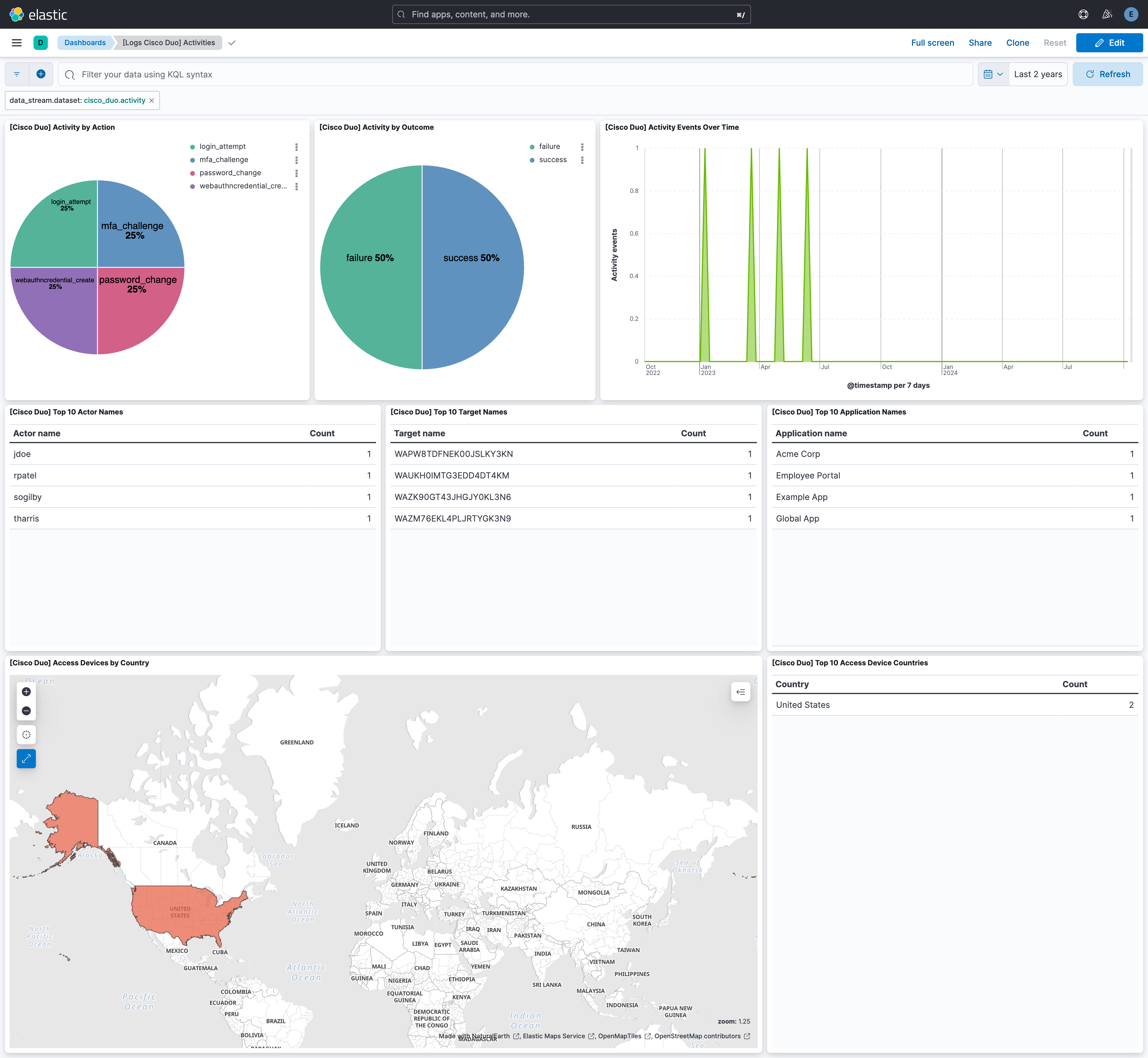
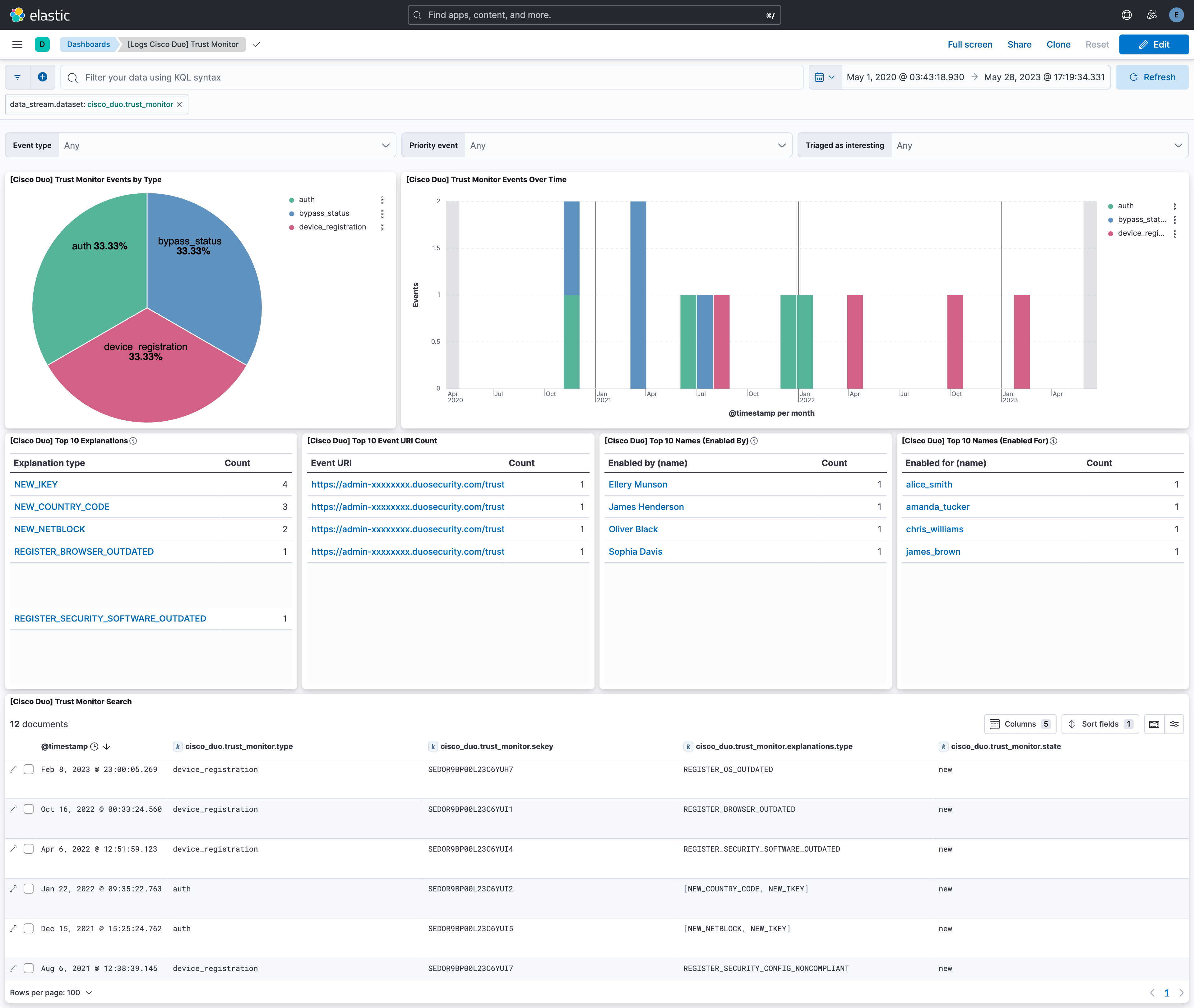
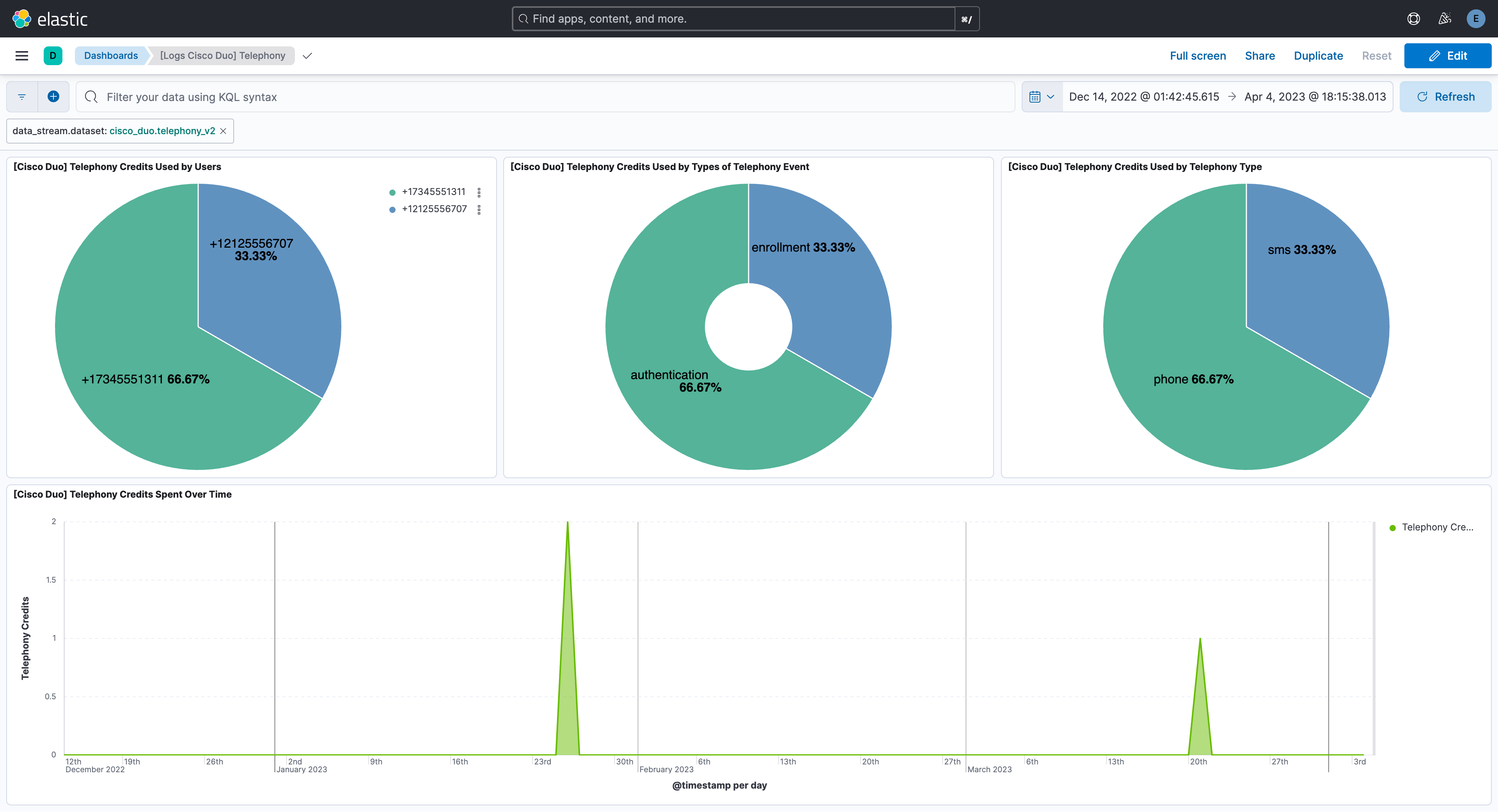
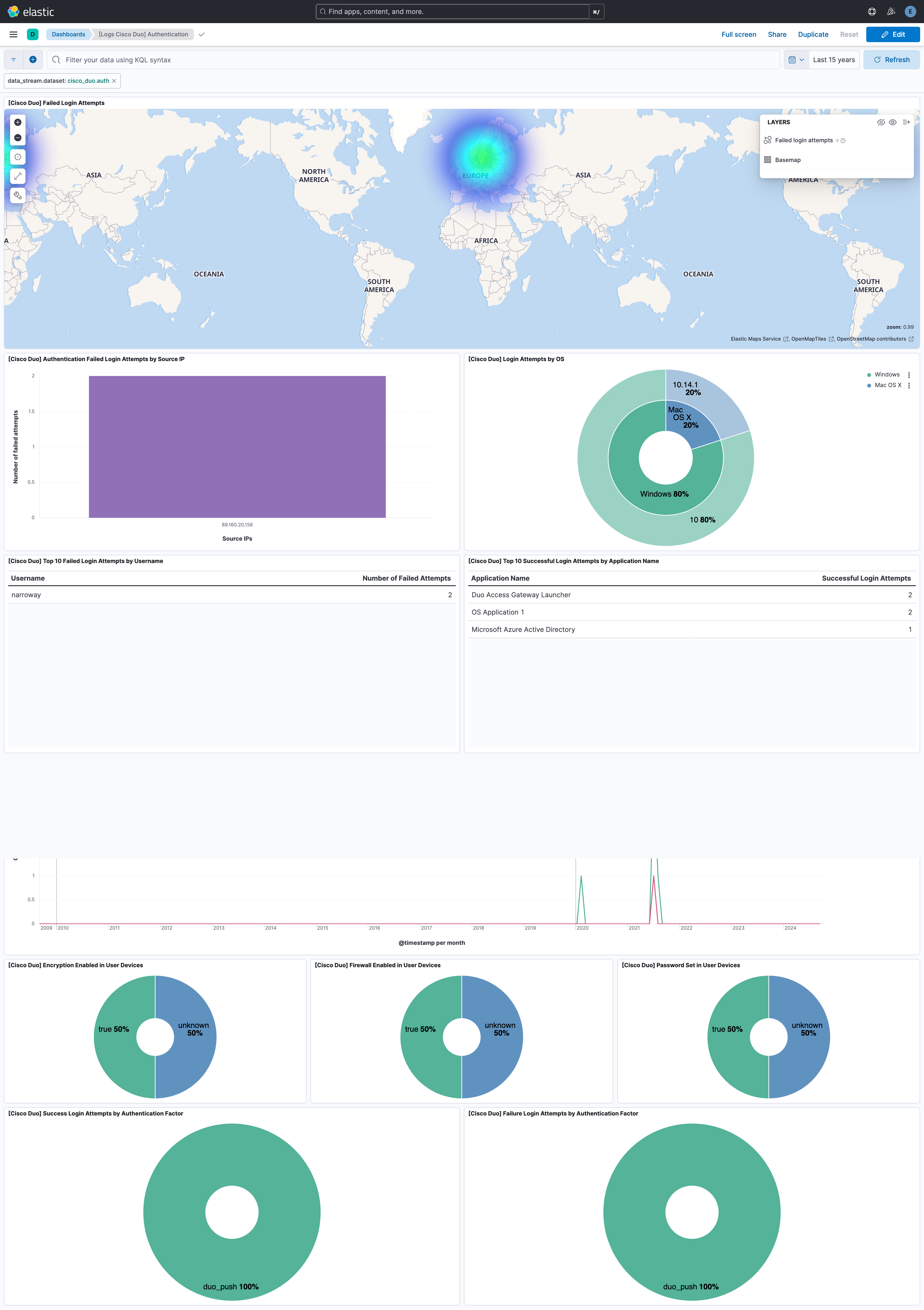
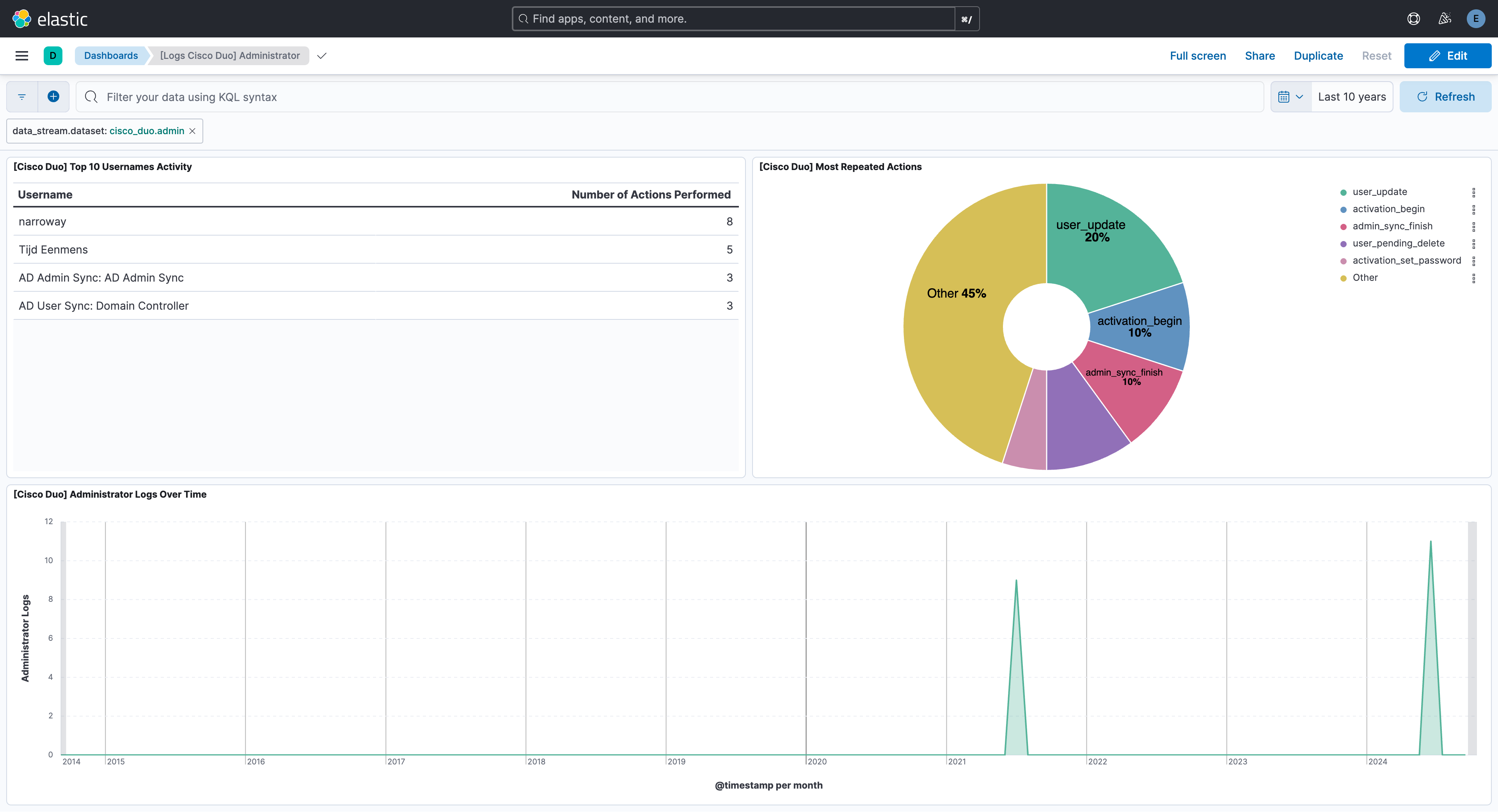
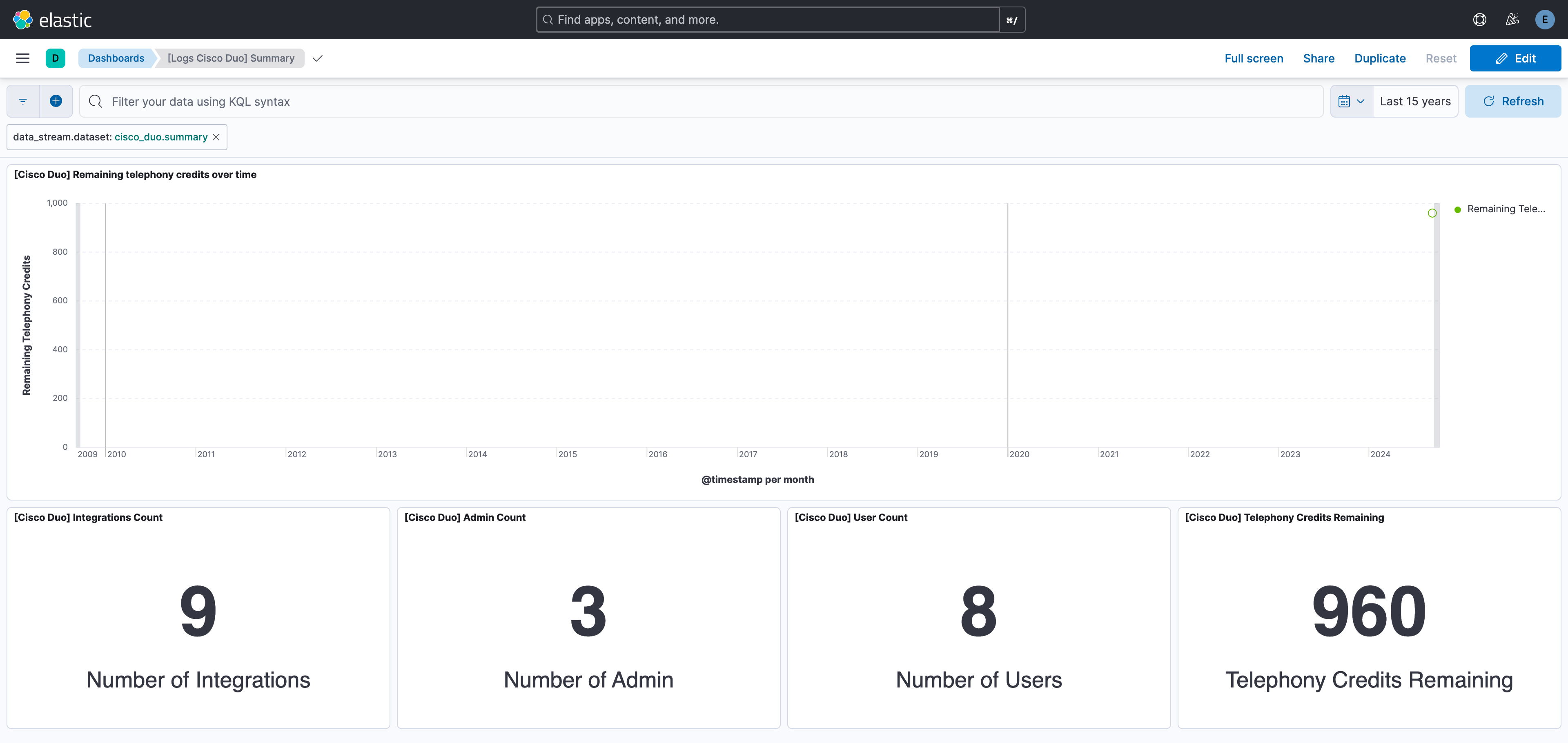
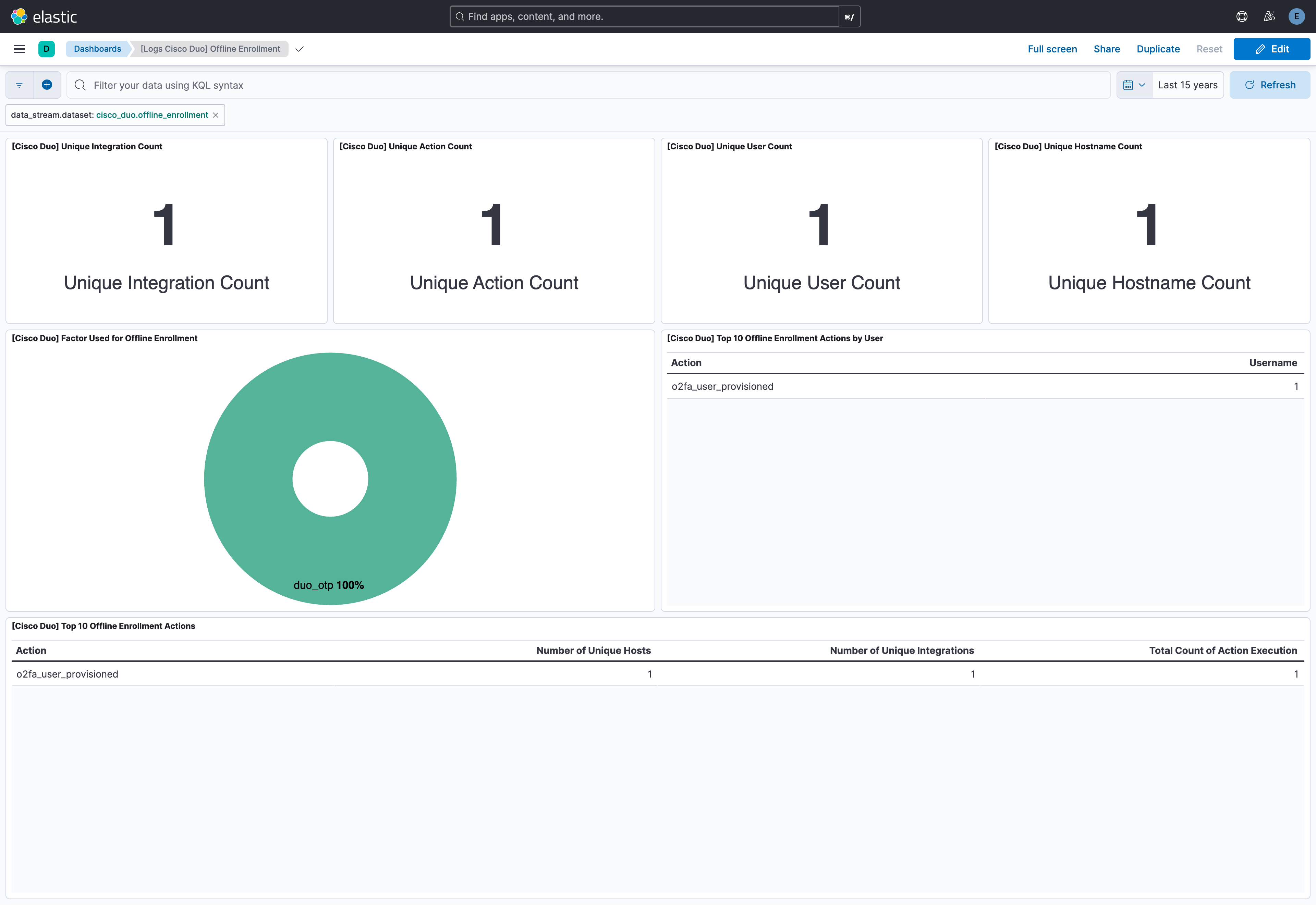
This integration includes one or more Kibana dashboards that visualizes the data collected by the integration. The screenshots below illustrate how the ingested data is displayed.
Changelog
| Version | Details | Minimum Kibana version |
|---|---|---|
| 2.15.0 | Enhancement (View pull request) Update Elastic Managed integration documentation to the current wording and docs links. |
9.0.0 8.18.0 |
| 2.14.0 | Enhancement (View pull request) Re-order integration inputs to show the API v2 (CEL) input before the API v1 (HTTPJSON) input, and mark the v1 telephony data stream as deprecated in favour of telephony_v2, disabling it by default for new policies. |
9.0.0 8.18.0 |
| 2.13.0 | Enhancement (View pull request) Add tags to ingest pipeline processors. |
9.0.0 8.18.0 |
| 2.12.0 | Enhancement (View pull request) Add user data stream to collect Duo user inventory via GET /admin/v1/users, with a latest transform for up-to-date user state. |
9.0.0 8.18.0 |
| 2.11.1 | Enhancement (View pull request) Set agentless deployment mode release field to ga. |
9.0.0 8.18.0 |
| 2.11.0 | Enhancement (View pull request) Publish Agentless to Elastic Managed integrations name change. |
9.0.0 8.18.0 |
| 2.10.0 | Enhancement (View pull request) Use new release field for agentless deployment mode to establish as beta. |
9.0.0 8.18.0 |
| 2.9.0 | Enhancement (View pull request) Enable request trace log removal. |
9.0.0 8.18.0 |
| 2.8.0 | Enhancement (View pull request) Parse the adaptive_trust_assessments and rbfs_triggered_attacks fields for the auth data stream. |
9.0.0 8.18.0 |
| 2.7.0 | Enhancement (View pull request) Enable Agentless deployment. |
9.0.0 8.18.0 |
| 2.6.0 | Enhancement (View pull request) Add support for HTTP proxy configuration. |
9.0.0 8.13.0 |
| 2.5.0 | Enhancement (View pull request) Update Kibana constraint to support 9.0.0. |
9.0.0 8.13.0 |
| 2.4.0 | Enhancement (View pull request) Provide option to ignore ingesting API Errors. |
8.13.0 |
| 2.3.2 | Bug fix (View pull request) Avoid obsolete cursor data in activity, telephony_v2. |
8.13.0 |
| 2.3.1 | Bug fix (View pull request) Fix broken links in Security Service integrations packages. |
8.13.0 |
| 2.3.0 | Enhancement (View pull request) Add "preserve_original_event" tag to documents with event.kind set to "pipeline_error". |
8.13.0 |
| 2.2.6 | Bug fix (View pull request) Make retry options configurable in CEL-based datastreams. |
8.13.0 |
| 2.2.5 | Bug fix (View pull request) Fix the parsing of last_published timestamp in Activity and Telephony data streams. |
8.13.0 |
| 2.2.4 | Bug fix (View pull request) Fix the handling of details fields for Activity logs. |
8.13.0 |
| 2.2.3 | Bug fix (View pull request) Fix for 40103 & 400 errors in auth and activity data streams. |
8.13.0 |
| 2.2.2 | Bug fix (View pull request) Fix for 40103 & 400 errors in the telephony_v2 data stream. |
8.13.0 |
| 2.2.1 | Bug fix (View pull request) Fix errors in Trust Monitor CEL. |
8.13.0 |
| 2.2.0 | Enhancement (View pull request) Add support for Activity logs. |
8.13.0 |
| 2.1.0 | Enhancement (View pull request) Add support for Trust Monitor logs. |
8.13.0 |
| 2.0.5 | Bug fix (View pull request) Make the rate limit configurable. |
8.13.0 |
| 2.0.4 | Bug fix (View pull request) Fix auth CEL cursor handling. |
8.13.0 |
| 2.0.3 | Bug fix (View pull request) Set request rate limits. |
8.13.0 |
| 2.0.2 | Bug fix (View pull request) Return response body when a non-200 HTTP status is returned by the API. Bug fix (View pull request) Fix handling of next_offset fields in pagination and cursor retention. |
8.13.0 |
| 2.0.1 | Bug fix (View pull request) Use triple-brace Mustache templating when referencing variables in ingest pipelines. |
8.13.0 |
| 2.0.0 | Enhancement (View pull request) Migrate to CEL input for data streams that use v2 API. Enhancement (View pull request) Add Telephony v2 data stream. Enhancement (View pull request) Update dashboards and documentation. |
8.13.0 |
| 1.26.0 | Enhancement (View pull request) Allow @custom pipeline access to event.original without setting preserve_original_event. |
8.13.0 |
| 1.25.0 | Enhancement (View pull request) Extract useful fields from cisco_duo.admin.flattened. |
8.13.0 |
| 1.24.0 | Enhancement (View pull request) Update the kibana constraint to ^8.13.0. Modified the field definitions to remove ECS fields made redundant by the ecs@mappings component template. |
8.13.0 |
| 1.23.0 | Enhancement (View pull request) Improve error handling. |
8.12.0 |
| 1.22.0 | Enhancement (View pull request) Set sensitive values as secret. |
8.12.0 |
| 1.21.1 | Enhancement (View pull request) Changed owners |
8.7.1 |
| 1.21.0 | Enhancement (View pull request) Limit request tracer log count to five. |
8.7.1 |
| 1.20.0 | Enhancement (View pull request) ECS version updated to 8.11.0. |
8.7.1 |
| 1.19.0 | Enhancement (View pull request) Improve 'event.original' check to avoid errors if set. |
8.7.1 |
| 1.18.0 | Enhancement (View pull request) ECS version updated to 8.10.0. |
8.7.1 |
| 1.17.0 | Enhancement (View pull request) The format_version in the package manifest changed from 2.11.0 to 3.0.0. Removed dotted YAML keys from package manifest. Added 'owner.type: elastic' to package manifest. |
8.7.1 |
| 1.16.0 | Enhancement (View pull request) Add tags.yml file so that integration's dashboards and saved searches are tagged with "Security Solution" and displayed in the Security Solution UI. |
8.7.1 |
| 1.15.0 | Enhancement (View pull request) Update package to ECS 8.9.0. |
8.7.1 |
| 1.14.0 | Enhancement (View pull request) Convert to lens. |
8.7.1 |
| 1.13.0 | Enhancement (View pull request) Ensure event.kind is correctly set for pipeline errors. |
8.7.1 |
| 1.12.0 | Enhancement (View pull request) Update package to ECS 8.8.0. |
8.7.1 |
| 1.11.0 | Enhancement (View pull request) Update package-spec version to 2.7.0. |
8.7.1 |
| 1.10.0 | Enhancement (View pull request) Add a new flag to enable request tracing |
8.7.1 |
| 1.9.0 | Enhancement (View pull request) Update package to ECS 8.7.0. |
8.0.0 7.17.2 |
| 1.8.1 | Enhancement (View pull request) Added categories and/or subcategories. |
8.0.0 7.17.2 |
| 1.8.0 | Enhancement (View pull request) Update package to ECS 8.6.0. |
8.0.0 7.17.2 |
| 1.7.0 | Enhancement (View pull request) Remove saved library visualizations and add an on_failure processor to the date and convert processors. |
8.0.0 7.17.2 |
| 1.6.0 | Enhancement (View pull request) Update package to ECS 8.5.0. |
8.0.0 7.17.2 |
| 1.5.2 | Bug fix (View pull request) Fix handling of empty event lists. |
8.0.0 7.17.2 |
| 1.5.1 | Enhancement (View pull request) Use ECS geo.location definition. |
8.0.0 7.17.2 |
| 1.5.0 | Enhancement (View pull request) Update package to ECS 8.4.0 |
8.0.0 7.17.2 |
| 1.4.0 | Enhancement (View pull request) Added support to handle bad values in ip and date fields. |
8.0.0 7.17.2 |
| 1.3.0 | Enhancement (View pull request) Update package to ECS 8.3.0. |
8.0.0 7.17.2 |
| 1.2.4 | Bug fix (View pull request) Handle non-spec compliant cisco_duo.auth.access_device.security_agents |
8.0.0 7.17.2 |
| 1.2.3 | Bug fix (View pull request) Fix type for cisco_duo.auth.access_device.security_agents |
— |
| 1.2.2 | Bug fix (View pull request) Fix invalid value for event.outcome in auth data set |
8.0.0 7.17.2 |
| 1.2.1 | Enhancement (View pull request) Added link to Duo documentation |
8.0.0 7.17.2 |
| 1.2.0 | Enhancement (View pull request) Update to ECS 8.2 |
— |
| 1.1.6 | Enhancement (View pull request) Simplify IP grok patterns. |
— |
| 1.1.5 | Bug fix (View pull request) Fix handling of IP addresses with port numbers. |
— |
| 1.1.4 | Bug fix (View pull request) Fix dashboard issues. |
8.0.0 7.17.2 |
| 1.1.3 | Bug fix (View pull request) Add mapping for event.created. |
— |
| 1.1.2 | Bug fix (View pull request) Make fields agree with ECS |
— |
| 1.1.1 | Enhancement (View pull request) Add documentation for multi-fields |
8.0.0 7.16.0 |
| 1.1.0 | Enhancement (View pull request) Update to ECS 8.0 |
8.0.0 7.16.0 |
| 1.0.0 | Enhancement (View pull request) GA integration |
8.0.0 7.16.0 |
| 0.2.1 | Bug fix (View pull request) Regenerate test files using the new GeoIP database |
— |
| 0.2.0 | Enhancement (View pull request) Add 8.0.0 version constraint |
8.0.0 7.16.0 |
| 0.1.1 | Enhancement (View pull request) Update Title and Description. |
7.16.0 |
| 0.1.0 | Enhancement (View pull request) initial release |
7.16.0 |