Digital Guardian
Elastic Cloud Serverless projects are autoscaled environments, fully managed by Elastic and available on Elastic Cloud. Availability This functionality is generally available and ready for production usage. Elastic Cloud Serverless projects are autoscaled environments, fully managed by Elastic and available on Elastic Cloud. Availability This functionality is generally available and ready for production usage. The Elastic Stack includes Elastic's core products such as Elasticsearch, Kibana, Logstash, and Beats. Availability This functionality is generally available and ready for production usage. Unless stated otherwise on the page, this functionality is available when your Elastic Stack is deployed on Elastic Cloud Hosted, Elastic Cloud Enterprise, Elastic Cloud on Kubernetes, and self-managed environments. This documentation corresponds to the latest patch available for each minor version. If you're not using the latest patch, check the release notes for changes.
Serverless Observability
Generally available
Serverless Security
Generally available
Stack
9.4+
Generally available since 9.4
| Version | 1.13.0 (View all) |
| Managed integration release status | GA |
| Subscription level What's this? |
Basic |
| Developed by What's this? |
Elastic |
| Ingestion method(s) | API |
| Minimum Kibana version(s) | 9.4.1 9.3.5 8.19.16 |
You can use this integration as an Elastic Managed integration on Elastic Cloud Hosted deployments running this version or later.
This integration is for ingesting events and alerts from Fortra's Digital Guardian. Fortra’s Digital Guardian helps organizations protect data, performing across the corporate network, traditional endpoints, and cloud applications. Digital Guardian's data loss prevention, available as a software-as-a-service or managed service, helps to see that data, support compliance initiatives, and protect against serious risk.
The integration allows collection of events and alerts from Digital Guardian Analytics & Reporting Cloud (ARC) via the REST API.
Elastic Managed integrations are only supported on Elastic Cloud Serverless and Elastic Cloud Hosted deployments. An Elastic Managed integration lets you ingest data from a cloud source while avoiding the orchestration, management, and maintenance associated with standard ingest infrastructure. Elastic runs the collector for you, so you can focus on your data instead of the infrastructure that collects it.
For more information, refer to Elastic Managed integrations and the Elastic Managed integrations FAQ.
The Digital Guardian integration collects events to populate the following data stream:
- digital_guardian.arc: Collects all events and alerts from
Digital Guardian Analytics & Reporting Cloud (ARC)via the REST API.
Elastic Agent must be installed. For more details, check the Elastic Agent installation instructions.
- Copy
Client ID: From ARC Tenant Settings, copy the Tenant ID. - Copy
Client Secret: From ARC Tenant Settings, copy the Authentication Token. - Copy
ARC Server URL: From Digital Guardian Management Console (DGMC), copy the Access Gateway Base URL. - Copy
Authorization Server URL: From Digital Guardian Management Console (DGMC), copy the Authorization server URL. - Copy
ARC Export Profile ID:- Navigate to
Admin > reports > export profiles - Copy only the GUID part from the export profile.
- Navigate to
- In Kibana navigate to Management > Integrations.
- In the search bar, type Digital Guardian.
- Select the Digital Guardian integration and add it.
- Configure the following parameters:
-
Client ID-Client Secret-ARC Server URL-Authorization Server URL-ARC Export Profile ID - Save the integration.
This is the arc dataset.
The @timestamp field will be assigned one of several values, in the following order of precedence:
digital_guardian.arc.dg_timedigital_guardian.arc.dg_processed_timedigital_guardian.arc.inc_mtime- The time received by the pipeline (if none of the above are available).
Example
{
    "@timestamp": "2025-07-08T11:02:12.969Z",
    "agent": {
        "ephemeral_id": "cacce94e-e845-4abb-ba59-8c85e942aef0",
        "id": "e0bc3db6-0f7e-4c26-8f69-ed0a55a4c163",
        "name": "elastic-agent-62431",
        "type": "filebeat",
        "version": "8.16.0"
    },
    "data_stream": {
        "dataset": "digital_guardian.arc",
        "namespace": "94181",
        "type": "logs"
    },
    "digital_guardian": {
        "arc": {
            "dg_description": "This file outlook.exe was going to [demo.digitalg@gmail.com]",
            "dg_guid": "1dc3c1fa-5474-4fc0-a7c3-74ff42d28e5e",
            "dg_name": "test has attached a Salesforce data to an email",
            "dg_tenant": "279b59f3-02f3-44ea-a7c3-9bac2eb0224d",
            "dg_utype": "Incident",
            "export_profile": "abc123",
            "inc_assign": "test@dgdemo",
            "inc_creator": "dg",
            "inc_id": "230523-WIQHA",
            "inc_mtime": "2023-05-23T06:56:39.000Z",
            "inc_sev": "Critical",
            "inc_state": "Created"
        }
    },
    "ecs": {
        "version": "8.11.0"
    },
    "elastic_agent": {
        "id": "e0bc3db6-0f7e-4c26-8f69-ed0a55a4c163",
        "snapshot": false,
        "version": "8.16.0"
    },
    "event": {
        "action": "incident-created",
        "agent_id_status": "verified",
        "dataset": "digital_guardian.arc",
        "id": "1dc3c1fa-5474-4fc0-a7c3-74ff42d28e5e",
        "ingested": "2025-07-08T11:02:15Z",
        "kind": "alert",
        "module": "digital_guardian",
        "original": "{\"dg_comment\":\"-\",\"dg_description\":\"This file outlook.exe was going to [demo.digitalg@gmail.com]\",\"dg_guid\":\"1dc3c1fa-5474-4fc0-a7c3-74ff42d28e5e\",\"dg_name\":\"test has attached a Salesforce data to an email\",\"dg_tenant\":\"279b59f3-02f3-44ea-a7c3-9bac2eb0224d\",\"dg_utype\":\"Incident\",\"export_profile\":\"abc123\",\"inc_assign\":\"test@dgdemo\",\"inc_creator\":\"dg\",\"inc_id\":\"230523-WIQHA\",\"inc_mtime\":\"2023-05-23 06:56:39\",\"inc_sev\":\"Critical\",\"inc_state\":\"Created\"}",
        "severity": 1
    },
    "input": {
        "type": "cel"
    },
    "related": {
        "user": [
            "dg",
            "test@dgdemo"
        ]
    },
    "rule": {
        "name": "test has attached a Salesforce data to an email"
    },
    "tags": [
        "preserve_original_event",
        "preserve_duplicate_custom_fields",
        "forwarded",
        "digital_guardian-arc"
    ],
    "user": {
        "name": "dg"
    }
}
Exported fields
| Field | Description | Type |
|---|---|---|
| @timestamp | Event timestamp. | date |
| data_stream.dataset | Data stream dataset. | constant_keyword |
| data_stream.namespace | Data stream namespace. | constant_keyword |
| data_stream.type | Data stream type. | constant_keyword |
| digital_guardian.arc.dg_alert.alert_al | Alert AL | keyword |
| digital_guardian.arc.dg_alert.alert_at | Alert AT | keyword |
| digital_guardian.arc.dg_alert.alert_bc | Alert BC | keyword |
| digital_guardian.arc.dg_alert.alert_did | Alert DID | keyword |
| digital_guardian.arc.dg_alert.alert_etl | Alert ETL | date |
| digital_guardian.arc.dg_alert.alert_etu | Alert ETU | date |
| digital_guardian.arc.dg_alert.alert_ur | Alert UR | keyword |
| digital_guardian.arc.dg_alert.alert_wb | Alert WB | keyword |
| digital_guardian.arc.dg_alert.dg_category_name | Alert Category Name | keyword |
| digital_guardian.arc.dg_alert.dg_detection_source | Alert Detection Source | keyword |
| digital_guardian.arc.dg_alert.dg_name | Alert Name | keyword |
| digital_guardian.arc.dg_alert.dg_policy.dg_category_name | Alert Policy Category Name | keyword |
| digital_guardian.arc.dg_alert.dg_policy.dg_name | Alert Policy Name | keyword |
| digital_guardian.arc.dg_alert.dg_rule_action_type | Alert Rule Action Type | keyword |
| digital_guardian.arc.dg_attachments.dg_file_size | File Size | keyword |
| digital_guardian.arc.dg_attachments.dg_file_size_bytes | File Size in Bytes | long |
| digital_guardian.arc.dg_comment | Comment | keyword |
| digital_guardian.arc.dg_description | Description | keyword |
| digital_guardian.arc.dg_display | Event Display Name | keyword |
| digital_guardian.arc.dg_file_path | File Path | keyword |
| digital_guardian.arc.dg_file_size | File Size | keyword |
| digital_guardian.arc.dg_file_size_bytes | File Size in Bytes | long |
| digital_guardian.arc.dg_guid | Unique ID | keyword |
| digital_guardian.arc.dg_local_timestamp | Local Time | date |
| digital_guardian.arc.dg_mac_address | MAC Address | keyword |
| digital_guardian.arc.dg_machine_name | Computer Name | keyword |
| digital_guardian.arc.dg_machine_type | Machine Type | integer |
| digital_guardian.arc.dg_name | Name. | keyword |
| digital_guardian.arc.dg_processed_time | Server Process Time | date |
| digital_guardian.arc.dg_src_file_ext | Source File Extension | keyword |
| digital_guardian.arc.dg_src_file_name | Source File Name | keyword |
| digital_guardian.arc.dg_tenant | Tenant ID | keyword |
| digital_guardian.arc.dg_time | Event Time | date |
| digital_guardian.arc.dg_utype | Operation Type | keyword |
| digital_guardian.arc.export_profile | Export Profile GUID for the Event | keyword |
| digital_guardian.arc.inc_assign | Incident Assignee | keyword |
| digital_guardian.arc.inc_creator | Incident Creator | keyword |
| digital_guardian.arc.inc_id | Incident ID | keyword |
| digital_guardian.arc.inc_mtime | Incident Modified Time | date |
| digital_guardian.arc.inc_sev | Incident Severity | keyword |
| digital_guardian.arc.inc_state | Incident State | keyword |
| digital_guardian.arc.pi_fal | Time | date |
| digital_guardian.arc.pi_fcl | Time | date |
| digital_guardian.arc.pi_fml | Time | date |
| digital_guardian.arc.ua_sci | Scan Instance | integer |
| digital_guardian.arc.ua_scn | Appliance Scan Name | keyword |
| digital_guardian.arc.ua_sn | Scan Server Name | keyword |
| digital_guardian.arc.uad_sp | Source File Path | keyword |
| event.dataset | Event dataset. | constant_keyword |
| event.module | Event module. | constant_keyword |
| input.type | Type of Filebeat input. | keyword |
| log.offset | Log offset. | long |
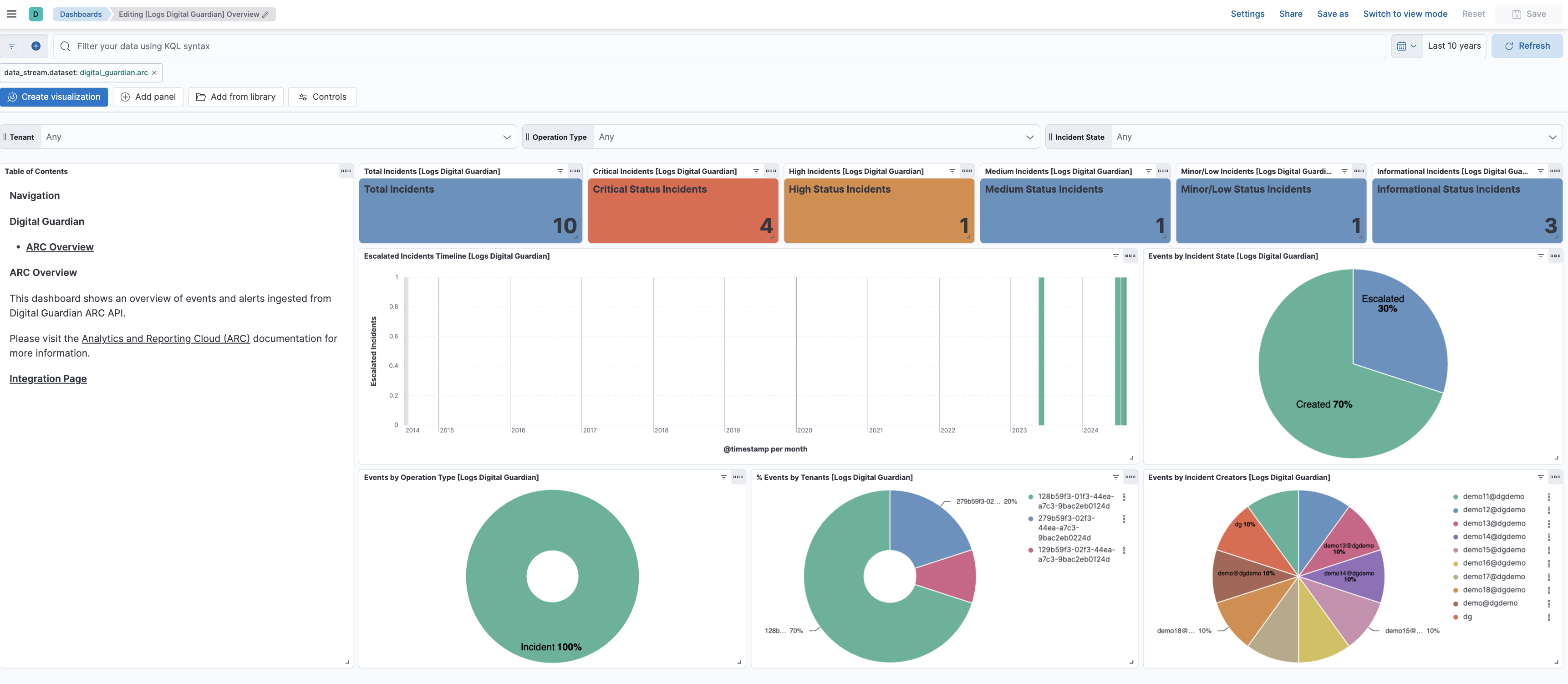
This integration includes one or more Kibana dashboards that visualizes the data collected by the integration. The screenshots below illustrate how the ingested data is displayed.
Changelog
| Version | Details | Minimum Kibana version |
|---|---|---|
| 1.13.0 | Enhancement (View pull request) Update Elastic Managed integration documentation to the current wording and docs links. |
9.4.1 9.3.5 8.19.16 |
| 1.12.0 | Enhancement (View pull request) Add tags to ingest pipeline processors. |
9.4.1 9.3.5 8.19.16 |
| 1.11.1 | Enhancement (View pull request) Set agentless deployment mode release field to ga. |
9.4.1 9.3.5 8.19.16 |
| 1.11.0 | Enhancement (View pull request) Publish Agentless to Elastic Managed integrations name change. |
9.4.1 9.3.5 8.19.16 |
| 1.10.0 | Enhancement (View pull request) Use new release field for agentless deployment mode to establish as beta. |
9.4.1 9.3.5 8.19.16 |
| 1.9.0 | Enhancement (View pull request) Enable Agentless deployment. |
9.4.1 9.3.5 8.19.16 |
| 1.8.0 | Enhancement (View pull request) Enable request trace log removal. |
9.0.0 8.16.0 |
| 1.7.1 | Bug fix (View pull request) Remove duplicate security-solution-default tag references |
9.0.0 8.16.0 |
| 1.7.0 | Enhancement (View pull request) Use terminate processor instead of fail processor to handle agent errors. |
9.0.0 8.16.0 |
| 1.6.0 | Enhancement (View pull request) Remove redundant installation instructions. |
9.0.0 8.13.0 |
| 1.5.0 | Enhancement (View pull request) Update Kibana constraint to support 9.0.0. |
9.0.0 8.13.0 |
| 1.4.0 | Enhancement (View pull request) Add export profile GUID to documents. Bug fix (View pull request) Fix mapping type of dg_alert.alert_wb.Bug fix (View pull request) Fix dot expansion. |
8.13.0 |
| 1.3.2 | Bug fix (View pull request) Updated SSL description to be uniform and to include links to documentation. |
8.13.0 |
| 1.3.1 | Bug fix (View pull request) Correct time formats, data size parsing |
8.13.0 |
| 1.3.0 | Enhancement (View pull request) Add "preserve_original_event" tag to documents with event.kind manually set to "pipeline_error". |
8.13.0 |
| 1.2.0 | Enhancement (View pull request) Add "preserve_original_event" tag to documents with event.kind set to "pipeline_error". |
8.13.0 |
| 1.1.0 | Enhancement (View pull request) Map extra timestamps and other fields. |
8.13.0 |
| 1.0.0 | Enhancement (View pull request) Release package as GA. |
8.13.0 |
| 0.1.0 | Enhancement (View pull request) Initial release of the package. |
8.13.0 |