TrendAI Integration
Elastic Cloud Serverless projects are autoscaled environments, fully managed by Elastic and available on Elastic Cloud. Availability This functionality is generally available and ready for production usage. Elastic Cloud Serverless projects are autoscaled environments, fully managed by Elastic and available on Elastic Cloud. Availability This functionality is generally available and ready for production usage. The Elastic Stack includes Elastic's core products such as Elasticsearch, Kibana, Logstash, and Beats. Availability This functionality is generally available and ready for production usage. Unless stated otherwise on the page, this functionality is available when your Elastic Stack is deployed on Elastic Cloud Hosted, Elastic Cloud Enterprise, Elastic Cloud on Kubernetes, and self-managed environments. This documentation corresponds to the latest patch available for each minor version. If you're not using the latest patch, check the release notes for changes.
Serverless Observability
Generally available
Serverless Security
Generally available
Stack
9.0+
Generally available since 9.0
| Version | 2.10.1 (View all) |
| Subscription level What's this? |
Basic |
| Developed by What's this? |
Elastic |
| Ingestion method(s) | File, Network Protocol |
| Minimum Kibana version(s) | 9.0.0 8.13.0 |
TrendAI Deep Security provides advanced server security for physical, virtual, and cloud servers. It protects enterprise applications and data from breaches and business disruptions without requiring emergency patching. The TrendAI Deep Security integration collects and parses data received from Deep Security via syslog server.
This integration supports deep_security data stream. For more details, check the Deep Security logging documentation.
This integration has been tested against Deep Security 20. If you have a TrendAI Vision One XDR license, we recommend using the Vision One integration to ingest Deep Security events. For more information on how to configure Deep Security events with Vision One, check the Deep Security documentation.
Elastic Agent must be installed. For more details, check the Elastic Agent installation instructions.
The minimum kibana.version required is 8.11.0.
Follow the Deep Security setup guide to forward Deep Security events to a syslog server.
- In Kibana navigate to Management > Integrations.
- In the search top bar, type Trend Micro.
- Select the Trend Micro integration and add it.
- Add all the required integration configuration parameters according to the enabled input type.
- Save the integration.
Deep Security logs collect the TrendAI deep security logs.
Example
{
    "@timestamp": "2020-09-21T07:21:11.000Z",
    "agent": {
        "ephemeral_id": "2ea89e49-a391-4415-a8c4-c0ad743e691b",
        "id": "e87ecfdf-7336-4275-96c5-a4ab24a8facc",
        "name": "docker-fleet-agent",
        "type": "filebeat",
        "version": "8.11.0"
    },
    "data_stream": {
        "dataset": "trendmicro.deep_security",
        "namespace": "ep",
        "type": "logs"
    },
    "ecs": {
        "version": "8.11.0"
    },
    "elastic_agent": {
        "id": "e87ecfdf-7336-4275-96c5-a4ab24a8facc",
        "snapshot": false,
        "version": "8.11.0"
    },
    "event": {
        "agent_id_status": "verified",
        "category": [
            "network"
        ],
        "code": "5000000",
        "dataset": "trendmicro.deep_security",
        "ingested": "2024-03-20T09:48:02Z",
        "kind": "event",
        "original": "194 <86>2020-09-21T13:51:11+06:30 DeepSec Logs CEF:0|Trend Micro|Deep Security Agent|10.2.229|5000000|WebReputation|5|cn1=1 cn1Label=Host ID dvchost=hostname request=example.com msg=Blocked By Admin",
        "severity": 5,
        "timezone": "UTC",
        "type": [
            "info"
        ]
    },
    "host": {
        "id": "1"
    },
    "input": {
        "type": "udp"
    },
    "log": {
        "source": {
            "address": "192.168.224.7:54066"
        },
        "syslog": {
            "priority": 86
        }
    },
    "message": "Blocked By Admin",
    "observer": {
        "hostname": "hostname",
        "product": "Deep Security Agent",
        "vendor": "Trend Micro",
        "version": "10.2.229"
    },
    "related": {
        "hosts": [
            "1"
        ]
    },
    "tags": [
        "preserve_original_event",
        "forwarded",
        "trendmicro.deep_security"
    ],
    "trendmicro": {
        "deep_security": {
            "device": {
                "custom_number1": {
                    "label": "Host ID"
                }
            },
            "event_category": "web-reputation-event",
            "signature_id": 5000000,
            "version": "0"
        }
    },
    "url": {
        "original": "example.com"
    }
}
Exported fields
| Field | Description | Type |
|---|---|---|
| @timestamp | Event timestamp. | date |
| data_stream.dataset | Data stream dataset. | constant_keyword |
| data_stream.namespace | Data stream namespace. | constant_keyword |
| data_stream.type | Data stream type. | constant_keyword |
| event.dataset | Event dataset. | constant_keyword |
| event.module | Event module. | constant_keyword |
| input.type | Type of filebeat input. | keyword |
| log.file.device_id | ID of the device containing the filesystem where the file resides. | keyword |
| log.file.fingerprint | The sha256 fingerprint identity of the file when fingerprinting is enabled. | keyword |
| log.file.idxhi | The high-order part of a unique identifier that is associated with a file. (Windows-only) | keyword |
| log.file.idxlo | The low-order part of a unique identifier that is associated with a file. (Windows-only) | keyword |
| log.file.inode | Inode number of the log file. | keyword |
| log.file.vol | The serial number of the volume that contains a file. (Windows-only) | keyword |
| log.offset | Log offset. | long |
| log.source.address | Source address from which the log event was read / sent from. | keyword |
| source.process.name | Source process name. | keyword |
| trendmicro.deep_security.action | The action detected by the integrity rule. | keyword |
| trendmicro.deep_security.aggregation_type | An integer that indicates how the event is aggregated:. | keyword |
| trendmicro.deep_security.base_event_count | Base event count. | long |
| trendmicro.deep_security.bytes_in | Number of inbound bytes read. | long |
| trendmicro.deep_security.computer_name | The computer name. | keyword |
| trendmicro.deep_security.destination.address | IP address of the destination computer. | ip |
| trendmicro.deep_security.destination.mac_address | Destination MAC Address. | keyword |
| trendmicro.deep_security.destination.port | Port number of the destination computer's connection or session. | long |
| trendmicro.deep_security.destination.user_name | Destination user name. | keyword |
| trendmicro.deep_security.device.custom_number1.label | The name label for the field cn1. | keyword |
| trendmicro.deep_security.device.custom_number1.value | The value for the field cn1. | keyword |
| trendmicro.deep_security.device.custom_number2.label | The name label for the field cn2. | keyword |
| trendmicro.deep_security.device.custom_number2.value | The value for the field cn2. | long |
| trendmicro.deep_security.device.custom_number3.label | The name label for the field cn3. | keyword |
| trendmicro.deep_security.device.custom_number3.value | The value for the field cn3. | long |
| trendmicro.deep_security.device.custom_string1.label | The name label for the field cs1. | keyword |
| trendmicro.deep_security.device.custom_string1.value | The value for the field cs1. | keyword |
| trendmicro.deep_security.device.custom_string2.label | The name label for the field cs2. | keyword |
| trendmicro.deep_security.device.custom_string2.value | The value for the field cs2. | keyword |
| trendmicro.deep_security.device.custom_string3.label | The name label for the field cs3. | keyword |
| trendmicro.deep_security.device.custom_string3.value | The value for the field cs3. | keyword |
| trendmicro.deep_security.device.custom_string4.label | The name label for the field cs4. | keyword |
| trendmicro.deep_security.device.custom_string4.value | The value for the field cs4. | keyword |
| trendmicro.deep_security.device.custom_string5.label | The name label for the field cs5. | keyword |
| trendmicro.deep_security.device.custom_string5.value | The value for the field cs5. | keyword |
| trendmicro.deep_security.device.custom_string6.label | The name label for the field cs6. | keyword |
| trendmicro.deep_security.device.custom_string6.value | The value for the field cs6. | keyword |
| trendmicro.deep_security.device.custom_string7.label | The name label for the field cs7. | keyword |
| trendmicro.deep_security.device.custom_string7.value | The value for the field cs7. | keyword |
| trendmicro.deep_security.device.product | Product name. | keyword |
| trendmicro.deep_security.device.vendor | Vendor name. | keyword |
| trendmicro.deep_security.device.version | Product version. | keyword |
| trendmicro.deep_security.deviceHostName | The hostname for cn1. | keyword |
| trendmicro.deep_security.domain_name | The domain name. | keyword |
| trendmicro.deep_security.event_category | Event category of deep security event. | keyword |
| trendmicro.deep_security.event_class_id | Event Class ID. | keyword |
| trendmicro.deep_security.file.hash | The SHA 256 hash that identifies the software file. | keyword |
| trendmicro.deep_security.file.size | The file size in bytes. | long |
| trendmicro.deep_security.file_path | The location of the malware file. | keyword |
| trendmicro.deep_security.filename | The file name that was accessed. | keyword |
| trendmicro.deep_security.malware.name | The name of the malware that was found. | keyword |
| trendmicro.deep_security.message | A list of changed attribute names. | keyword |
| trendmicro.deep_security.model | The product name of the device. | keyword |
| trendmicro.deep_security.name | CEF event containing message. | keyword |
| trendmicro.deep_security.permission | The block reason of the access. | keyword |
| trendmicro.deep_security.process.name | The process name. | keyword |
| trendmicro.deep_security.repeat_count | The number of occurrences of the event. | keyword |
| trendmicro.deep_security.request_url | The URL of the request. | keyword |
| trendmicro.deep_security.result | The result of the failed Anti-Malware action. | keyword |
| trendmicro.deep_security.serial | The serial number of the device. | keyword |
| trendmicro.deep_security.severity | Severity of the Event. | long |
| trendmicro.deep_security.signature_id | Signature ID of event. | long |
| trendmicro.deep_security.source.address | Source computer IP address. | ip |
| trendmicro.deep_security.source.host_name | Source computer hostname. | keyword |
| trendmicro.deep_security.source.mac_address | MAC address of the source computer's network interface. | keyword |
| trendmicro.deep_security.source.port | Port number of the source computer's connection or session. | long |
| trendmicro.deep_security.source.process_name | The name of the event's source process. | keyword |
| trendmicro.deep_security.source.user_id | Source user ID. | keyword |
| trendmicro.deep_security.source.user_name | Account of the user who changed the file being monitored. | keyword |
| trendmicro.deep_security.target.id | The identifier added in the manager. | keyword |
| trendmicro.deep_security.target.value | The subject of the event. It can be the administrator account logged into Deep Security Manager, or a computer. | keyword |
| trendmicro.deep_security.transport_protocol | Name of the transport protocol used. | keyword |
| trendmicro.deep_security.trendmicro.ds_behavior.rule_id | The behavior monitoring rule ID for internal malware case tracking. | keyword |
| trendmicro.deep_security.trendmicro.ds_behavior.type | The type of behavior monitoring event detected. | keyword |
| trendmicro.deep_security.trendmicro.ds_command_line | The commands that the subject process executes. | keyword |
| trendmicro.deep_security.trendmicro.ds_cve | The CVE information, if the process behavior is identified in one of Common Vulnerabilities and Exposures. | keyword |
| trendmicro.deep_security.trendmicro.ds_detection_confidence | Indicates how closely the file matched the malware model. | long |
| trendmicro.deep_security.trendmicro.ds_file.md5 | The MD5 hash of the file. | keyword |
| trendmicro.deep_security.trendmicro.ds_file.sha1 | The SHA1 hash of the file. | keyword |
| trendmicro.deep_security.trendmicro.ds_file.sha256 | The SHA256 hash of the file. | keyword |
| trendmicro.deep_security.trendmicro.ds_frame_type | Connection ethernet frame type. | keyword |
| trendmicro.deep_security.trendmicro.ds_malware_target.count | The number of target files. | long |
| trendmicro.deep_security.trendmicro.ds_malware_target.type | The type of system resource that this malware was trying to affect. | keyword |
| trendmicro.deep_security.trendmicro.ds_malware_target.value | The file, process, or registry key (if any) that the malware was trying to affect. | keyword |
| trendmicro.deep_security.trendmicro.ds_mitre | The MITRE information, if the process behavior is identified in one of MITRE attack scenarios. | keyword |
| trendmicro.deep_security.trendmicro.ds_packet_data | The packet data, represented in Base64. | keyword |
| trendmicro.deep_security.trendmicro.ds_process | Name of ds process. | keyword |
| trendmicro.deep_security.trendmicro.ds_relevant_detection_names | Probable Threat Type. | keyword |
| trendmicro.deep_security.trendmicro.ds_tenant | Deep Security tenant. | keyword |
| trendmicro.deep_security.trendmicro.ds_tenant_id | Deep Security tenant ID. | keyword |
| trendmicro.deep_security.type | The device type of the device. | keyword |
| trendmicro.deep_security.version | Deep Security version. | keyword |
| trendmicro.deep_security.xff | The IP address of the last hub in the X-Forwarded-For header. | ip |
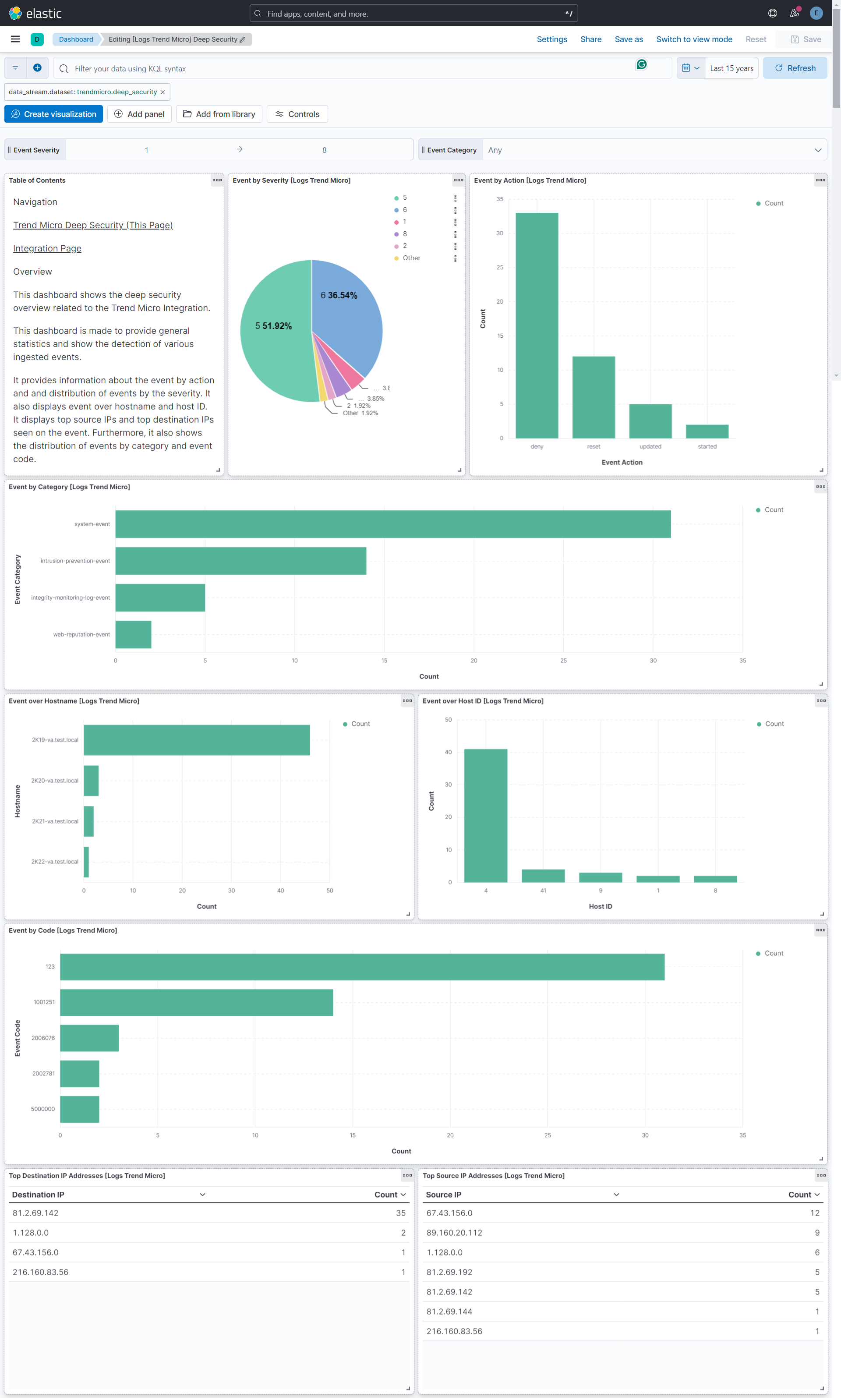
This integration includes one or more Kibana dashboards that visualizes the data collected by the integration. The screenshots below illustrate how the ingested data is displayed.
Changelog
| Version | Details | Minimum Kibana version |
|---|---|---|
| 2.10.1 | Bug fix (View pull request) Fix agent policy compilation failure when both Timezone Offset and custom processors are configured. |
9.0.0 8.13.0 |
| 2.10.0 | Enhancement (View pull request) Add tags to ingest pipeline processors and add preserve_original_event to pipeline-level on_failure handlers. |
9.0.0 8.13.0 |
| 2.9.0 | Enhancement (View pull request) Map CEF Name to trendmicro.deep_security.malware.name for anti-malware events. |
9.0.0 8.13.0 |
| 2.8.2 | Enhancement (View pull request) Update product name to TrendAI in documentation |
9.0.0 8.13.0 |
| 2.8.1 | Bug fix (View pull request) Remove duplicate security-solution-default tag references |
9.0.0 8.13.0 |
| 2.8.0 | Enhancement (View pull request) Remove duplicated installation instructions from the documentation |
9.0.0 8.13.0 |
| 2.7.0 | Enhancement (View pull request) Update Kibana constraint to support 9.0.0. |
9.0.0 8.13.0 |
| 2.6.1 | Bug fix (View pull request) Updated SSL description to be uniform and to include links to documentation. |
8.13.0 |
| 2.6.0 | Enhancement (View pull request) Add "preserve_original_event" tag to documents with event.kind manually set to "pipeline_error". |
8.13.0 |
| 2.5.0 | Enhancement (View pull request) Do not remove event.original in main ingest pipeline. |
8.13.0 |
| 2.4.0 | Enhancement (View pull request) Add "preserve_original_event" tag to documents with event.kind set to "pipeline_error". |
8.13.0 |
| 2.3.0 | Enhancement (View pull request) Removed import_mappings. Update the kibana constraint to ^8.13.0. Modified the field definitions to remove ECS fields made redundant by the ecs@mappings component template. |
8.13.0 |
| 2.2.0 | Enhancement (View pull request) Add ECS categorizations for anti-malware events. |
8.11.0 |
| 2.1.0 | Enhancement (View pull request) Use CEF name as event.action if no action is specified. |
8.11.0 |
| 2.0.0 | Enhancement (View pull request) Breaking changes for improved ECS mappings, new dashboards and compatibility with Deep Security v20. Enhancement (View pull request) Update the minimum kibana version to 8.11.0. |
8.11.0 |
| 1.8.4 | Enhancement (View pull request) Changed owners |
8.6.0 |
| 1.8.3 | Bug fix (View pull request) Update ECS categorization field mappings. |
8.6.0 |
| 1.8.2 | Bug fix (View pull request) Fix exclude_files pattern. |
8.6.0 |
| 1.8.1 | Bug fix (View pull request) Handle length prefix in octet counted TCP messages. |
8.6.0 |
| 1.8.0 | Enhancement (View pull request) Add support for TLS. |
8.6.0 |
| 1.7.0 | Enhancement (View pull request) ECS version updated to 8.11.0. |
8.6.0 |
| 1.6.0 | Enhancement (View pull request) Adapt fields for changes in file system info |
8.6.0 |
| 1.5.0 | Enhancement (View pull request) Set 'community' owner type. |
8.6.0 |
| 1.4.0 | Enhancement (View pull request) ECS version updated to 8.10.0. |
8.6.0 |
| 1.3.0 | Enhancement (View pull request) The format_version in the package manifest changed from 2.11.0 to 3.0.0. Removed dotted YAML keys from package manifest. Added 'owner.type: elastic' to package manifest. |
8.6.0 |
| 1.2.0 | Enhancement (View pull request) Add tags.yml file so that integration's dashboards and saved searches are tagged with "Security Solution" and displayed in the Security Solution UI. |
8.6.0 |
| 1.1.0 | Enhancement (View pull request) Update package to ECS 8.9.0. |
8.6.0 |
| 1.0.0 | Enhancement (View pull request) Release Trend Micro Deep Security as GA. |
8.6.0 |
| 0.5.0 | Enhancement (View pull request) Ensure event.kind is correctly set for pipeline errors. |
8.6.0 |
| 0.4.0 | Enhancement (View pull request) Update package to ECS 8.8.0. |
8.6.0 |
| 0.3.0 | Enhancement (View pull request) Update package-spec version to 2.7.0. |
8.6.0 |
| 0.2.0 | Enhancement (View pull request) Update package to ECS 8.7.0. |
8.6.0 |
| 0.1.0 | Enhancement (View pull request) Initial draft of the package |
8.6.0 |