Hadoop
Elastic Cloud Serverless projects are autoscaled environments, fully managed by Elastic and available on Elastic Cloud. Availability This functionality is generally available and ready for production usage. Elastic Cloud Serverless projects are autoscaled environments, fully managed by Elastic and available on Elastic Cloud. Availability This functionality is generally available and ready for production usage. The Elastic Stack includes Elastic's core products such as Elasticsearch, Kibana, Logstash, and Beats. Availability This functionality is generally available and ready for production usage. Unless stated otherwise on the page, this functionality is available when your Elastic Stack is deployed on Elastic Cloud Hosted, Elastic Cloud Enterprise, Elastic Cloud on Kubernetes, and self-managed environments. This documentation corresponds to the latest patch available for each minor version. If you're not using the latest patch, check the release notes for changes.
Serverless Observability
Generally available
Serverless Security
Generally available
Stack
9.0+
Generally available since 9.0
| Version | 1.9.0 (View all) |
| Subscription level What's this? |
Basic |
| Developed by What's this? |
Elastic |
| Ingestion method(s) | API |
| Minimum Kibana version(s) | 9.0.0 8.13.0 |
This integration is used to collect Hadoop metrics as follows:
- Application Metrics
- Cluster Metrics
- DataNode Metrics
- NameNode Metrics
- NodeManager Metrics
This integration uses Resource Manager API and JMX API to collect above metrics.
This integration has been tested against Hadoop version 3.3.6.
If host.ip is shown conflicted under logs-* data view, then this issue can be solved by reindexing the Application data stream's indices.
If host.ip is shown conflicted under metrics-* data view, then this issue can be solved by reindexing the Cluster, Datanode, Namenode and Node Manager data stream's indices.
This data stream collects Application metrics.
Example
{
    "@timestamp": "2023-02-02T12:03:41.178Z",
    "agent": {
        "ephemeral_id": "71297f22-c3ed-49b3-a8a9-a9d2086f8df2",
        "id": "2d054344-10a6-40d9-90c1-ea017fecfda3",
        "name": "docker-fleet-agent",
        "type": "filebeat",
        "version": "8.5.1"
    },
    "data_stream": {
        "dataset": "hadoop.application",
        "namespace": "ep",
        "type": "logs"
    },
    "ecs": {
        "version": "8.11.0"
    },
    "elastic_agent": {
        "id": "2d054344-10a6-40d9-90c1-ea017fecfda3",
        "snapshot": false,
        "version": "8.5.1"
    },
    "event": {
        "agent_id_status": "verified",
        "category": [
            "database"
        ],
        "created": "2023-02-02T12:03:41.178Z",
        "dataset": "hadoop.application",
        "ingested": "2023-02-02T12:03:42Z",
        "kind": "metric",
        "module": "httpjson",
        "type": [
            "info"
        ]
    },
    "hadoop": {
        "application": {
            "allocated": {
                "mb": 2048,
                "v_cores": 1
            },
            "id": "application_1675339401983_0001",
            "memory_seconds": 12185,
            "progress": 0,
            "running_containers": 1,
            "time": {
                "elapsed": 7453,
                "finished": "1970-01-01T00:00:00.000Z",
                "started": "2023-02-02T12:03:33.662Z"
            },
            "vcore_seconds": 5
        }
    },
    "input": {
        "type": "httpjson"
    },
    "tags": [
        "forwarded"
    ]
}
ECS Field Reference
Please refer to the following document for detailed information on ECS fields.
Exported fields
| Field | Description | Type |
|---|---|---|
| @timestamp | Event timestamp. | date |
| data_stream.dataset | Data stream dataset. | constant_keyword |
| data_stream.namespace | Data stream namespace. | constant_keyword |
| data_stream.type | Data stream type. | constant_keyword |
| hadoop.application.allocated.mb | Total memory allocated to the application's running containers (Mb) | long |
| hadoop.application.allocated.v_cores | The total number of virtual cores allocated to the application's running containers | long |
| hadoop.application.id | Application ID | keyword |
| hadoop.application.memory_seconds | The amount of memory the application has allocated | long |
| hadoop.application.progress | Application progress (%) | long |
| hadoop.application.running_containers | Number of containers currently running for the application | long |
| hadoop.application.time.elapsed | The elapsed time since application started (ms) | long |
| hadoop.application.time.finished | Application finished time | date |
| hadoop.application.time.started | Application start time | date |
| hadoop.application.vcore_seconds | The amount of CPU resources the application has allocated | long |
| input.type | Type of Filebeat input. | keyword |
This data stream collects Cluster metrics.
Example
{
    "@timestamp": "2022-04-04T17:22:22.255Z",
    "agent": {
        "ephemeral_id": "a8157f06-f6b6-4eae-b67f-4ad08fa7c170",
        "id": "abf8f8c1-f293-4e16-a8f8-8cf48014d040",
        "name": "docker-fleet-agent",
        "type": "metricbeat",
        "version": "8.1.0"
    },
    "data_stream": {
        "dataset": "hadoop.cluster",
        "namespace": "ep",
        "type": "metrics"
    },
    "ecs": {
        "version": "8.11.0"
    },
    "elastic_agent": {
        "id": "abf8f8c1-f293-4e16-a8f8-8cf48014d040",
        "snapshot": false,
        "version": "8.1.0"
    },
    "event": {
        "agent_id_status": "verified",
        "category": [
            "database"
        ],
        "dataset": "hadoop.cluster",
        "duration": 50350559,
        "ingested": "2022-04-04T17:22:25Z",
        "kind": "metric",
        "module": "http",
        "type": [
            "info"
        ]
    },
    "hadoop": {
        "cluster": {
            "application_main": {
                "launch_delay_avg_time": 2115,
                "launch_delay_num_ops": 1,
                "register_delay_avg_time": 0,
                "register_delay_num_ops": 0
            },
            "node_managers": {
                "num_active": 1,
                "num_decommissioned": 0,
                "num_lost": 0,
                "num_rebooted": 0,
                "num_unhealthy": 0
            }
        }
    },
    "host": {
        "architecture": "x86_64",
        "containerized": true,
        "hostname": "docker-fleet-agent",
        "ip": [
            "172.27.0.7"
        ],
        "mac": [
            "02-42-AC-1F-00-07"
        ],
        "name": "docker-fleet-agent",
        "os": {
            "codename": "focal",
            "family": "debian",
            "kernel": "3.10.0-1160.53.1.el7.x86_64",
            "name": "Ubuntu",
            "platform": "ubuntu",
            "type": "linux",
            "version": "20.04.3 LTS (Focal Fossa)"
        }
    },
    "metricset": {
        "name": "json",
        "period": 60000
    },
    "service": {
        "address": "http://elastic-package-service_hadoop_1:8088/jmx?qry=Hadoop%3Aservice%3DResourceManager%2Cname%3DClusterMetrics",
        "type": "http"
    },
    "tags": [
        "hadoop-cluster"
    ]
}
ECS Field Reference
Please refer to the following document for detailed information on ECS fields.
Exported fields
| Field | Description | Type | Metric Type |
|---|---|---|---|
| @timestamp | Event timestamp. | date | |
| agent.id | Unique identifier of this agent (if one exists). Example: For Beats this would be beat.id. | keyword | |
| cloud.account.id | The cloud account or organization id used to identify different entities in a multi-tenant environment. Examples: AWS account id, Google Cloud ORG Id, or other unique identifier. | keyword | |
| cloud.availability_zone | Availability zone in which this host, resource, or service is located. | keyword | |
| cloud.instance.id | Instance ID of the host machine. | keyword | |
| cloud.provider | Name of the cloud provider. Example values are aws, azure, gcp, or digitalocean. | keyword | |
| cloud.region | Region in which this host, resource, or service is located. | keyword | |
| container.id | Unique container id. | keyword | |
| data_stream.dataset | Data stream dataset. | constant_keyword | |
| data_stream.namespace | Data stream namespace. | constant_keyword | |
| data_stream.type | Data stream type. | constant_keyword | |
| hadoop.cluster.application_main.launch_delay_avg_time | Application Main Launch Delay Average Time (Milliseconds) | long | gauge |
| hadoop.cluster.application_main.launch_delay_num_ops | Application Main Launch Delay Operations (Number of Operations) | long | gauge |
| hadoop.cluster.application_main.register_delay_avg_time | Application Main Register Delay Average Time (Milliseconds) | long | gauge |
| hadoop.cluster.application_main.register_delay_num_ops | Application Main Register Delay Operations (Number of Operations) | long | gauge |
| hadoop.cluster.applications.completed | The number of applications completed | long | counter |
| hadoop.cluster.applications.failed | The number of applications failed | long | counter |
| hadoop.cluster.applications.killed | The number of applications killed | long | counter |
| hadoop.cluster.applications.pending | The number of applications pending | long | gauge |
| hadoop.cluster.applications.running | The number of applications running | long | gauge |
| hadoop.cluster.applications.submitted | The number of applications submitted | long | counter |
| hadoop.cluster.containers.allocated | The number of containers allocated | long | gauge |
| hadoop.cluster.containers.pending | The number of containers pending | long | gauge |
| hadoop.cluster.containers.reserved | The number of containers reserved | long | gauge |
| hadoop.cluster.memory.allocated | The amount of memory allocated in MB | long | gauge |
| hadoop.cluster.memory.available | The amount of memory available in MB | long | gauge |
| hadoop.cluster.memory.reserved | The amount of memory reserved in MB | long | gauge |
| hadoop.cluster.memory.total | The amount of total memory in MB | long | gauge |
| hadoop.cluster.node_managers.num_active | Number of Node Managers Active | long | gauge |
| hadoop.cluster.node_managers.num_decommissioned | Number of Node Managers Decommissioned | long | gauge |
| hadoop.cluster.node_managers.num_lost | Number of Node Managers Lost | long | gauge |
| hadoop.cluster.node_managers.num_rebooted | Number of Node Managers Rebooted | long | gauge |
| hadoop.cluster.node_managers.num_unhealthy | Number of Node Managers Unhealthy | long | gauge |
| hadoop.cluster.nodes.active | The number of active nodes | long | gauge |
| hadoop.cluster.nodes.decommissioned | The number of nodes decommissioned | long | gauge |
| hadoop.cluster.nodes.decommissioning | The number of nodes being decommissioned | long | gauge |
| hadoop.cluster.nodes.lost | The number of lost nodes | long | gauge |
| hadoop.cluster.nodes.rebooted | The number of nodes rebooted | long | gauge |
| hadoop.cluster.nodes.shutdown | The number of nodes shut down | long | gauge |
| hadoop.cluster.nodes.total | The total number of nodes | long | gauge |
| hadoop.cluster.nodes.unhealthy | The number of unhealthy nodes | long | gauge |
| hadoop.cluster.virtual_cores.allocated | The number of allocated virtual cores | long | gauge |
| hadoop.cluster.virtual_cores.available | The number of available virtual cores | long | gauge |
| hadoop.cluster.virtual_cores.reserved | The number of reserved virtual cores | long | gauge |
| hadoop.cluster.virtual_cores.total | The total number of virtual cores | long | gauge |
| host.name | Name of the host. It can contain what hostname returns on Unix systems, the fully qualified domain name (FQDN), or a name specified by the user. The recommended value is the lowercase FQDN of the host. | keyword | |
| service.address | Address where data about this service was collected from. This should be a URI, network address (ipv4:port or [ipv6]:port) or a resource path (sockets). | keyword |
This data stream collects Datanode metrics.
Example
{
    "@timestamp": "2023-02-02T12:05:04.266Z",
    "agent": {
        "ephemeral_id": "2f5c3354-b1d6-4f1b-b12e-2824ae65dd02",
        "id": "2d054344-10a6-40d9-90c1-ea017fecfda3",
        "name": "docker-fleet-agent",
        "type": "metricbeat",
        "version": "8.5.1"
    },
    "data_stream": {
        "dataset": "hadoop.datanode",
        "namespace": "ep",
        "type": "metrics"
    },
    "ecs": {
        "version": "8.11.0"
    },
    "elastic_agent": {
        "id": "2d054344-10a6-40d9-90c1-ea017fecfda3",
        "snapshot": false,
        "version": "8.5.1"
    },
    "event": {
        "agent_id_status": "verified",
        "category": [
            "database"
        ],
        "dataset": "hadoop.datanode",
        "duration": 241651987,
        "ingested": "2023-02-02T12:05:05Z",
        "kind": "metric",
        "module": "http",
        "type": [
            "info"
        ]
    },
    "hadoop": {
        "datanode": {
            "blocks": {
                "cached": 0,
                "failed": {
                    "to_cache": 0,
                    "to_uncache": 0
                }
            },
            "cache": {
                "capacity": 0,
                "used": 0
            },
            "dfs_used": 804585,
            "disk_space": {
                "capacity": 80637005824,
                "remaining": 56384421888
            },
            "estimated_capacity_lost_total": 0,
            "last_volume_failure_date": "1970-01-01T00:00:00.000Z",
            "volumes": {
                "failed": 0
            }
        }
    },
    "host": {
        "architecture": "x86_64",
        "containerized": true,
        "hostname": "docker-fleet-agent",
        "id": "75e38940166b4dbc90b6f5610e8e9c39",
        "ip": [
            "172.28.0.5"
        ],
        "mac": [
            "02-42-AC-1C-00-05"
        ],
        "name": "docker-fleet-agent",
        "os": {
            "codename": "focal",
            "family": "debian",
            "kernel": "3.10.0-1160.80.1.el7.x86_64",
            "name": "Ubuntu",
            "platform": "ubuntu",
            "type": "linux",
            "version": "20.04.5 LTS (Focal Fossa)"
        }
    },
    "metricset": {
        "name": "json",
        "period": 60000
    },
    "service": {
        "address": "http://elastic-package-service_hadoop_1:9864/jmx?qry=Hadoop%3Aname%3DDataNodeActivity%2A%2Cservice%3DDataNode",
        "type": "http"
    },
    "tags": [
        "hadoop-datanode"
    ]
}
ECS Field Reference
Please refer to the following document for detailed information on ECS fields.
Exported fields
| Field | Description | Type | Metric Type |
|---|---|---|---|
| @timestamp | Event timestamp. | date | |
| agent.id | Unique identifier of this agent (if one exists). Example: For Beats this would be beat.id. | keyword | |
| cloud.account.id | The cloud account or organization id used to identify different entities in a multi-tenant environment. Examples: AWS account id, Google Cloud ORG Id, or other unique identifier. | keyword | |
| cloud.availability_zone | Availability zone in which this host, resource, or service is located. | keyword | |
| cloud.instance.id | Instance ID of the host machine. | keyword | |
| cloud.provider | Name of the cloud provider. Example values are aws, azure, gcp, or digitalocean. | keyword | |
| cloud.region | Region in which this host, resource, or service is located. | keyword | |
| container.id | Unique container id. | keyword | |
| data_stream.dataset | Data stream dataset. | constant_keyword | |
| data_stream.namespace | Data stream namespace. | constant_keyword | |
| data_stream.type | Data stream type. | constant_keyword | |
| hadoop.datanode.blocks.cached | The number of blocks cached | long | gauge |
| hadoop.datanode.blocks.failed.to_cache | The number of blocks that failed to cache | long | gauge |
| hadoop.datanode.blocks.failed.to_uncache | The number of failed blocks to remove from cache | long | gauge |
| hadoop.datanode.bytes.read | Data read | long | counter |
| hadoop.datanode.bytes.written | Data written | long | counter |
| hadoop.datanode.cache.capacity | Cache capacity in bytes | long | gauge |
| hadoop.datanode.cache.used | Cache used in bytes | long | gauge |
| hadoop.datanode.dfs_used | Distributed File System Used | long | gauge |
| hadoop.datanode.disk_space.capacity | Disk capacity in bytes | long | gauge |
| hadoop.datanode.disk_space.remaining | The remaining disk space left in bytes | long | gauge |
| hadoop.datanode.estimated_capacity_lost_total | The estimated capacity lost in bytes | long | gauge |
| hadoop.datanode.last_volume_failure_date | The date/time of the last volume failure in milliseconds since epoch | date | |
| hadoop.datanode.volumes.failed | Number of failed volumes | long | gauge |
| host.name | Name of the host. It can contain what hostname returns on Unix systems, the fully qualified domain name (FQDN), or a name specified by the user. The recommended value is the lowercase FQDN of the host. | keyword | |
| service.address | Address where data about this service was collected from. This should be a URI, network address (ipv4:port or [ipv6]:port) or a resource path (sockets). | keyword |
This data stream collects Namenode metrics.
Example
{
    "@timestamp": "2022-03-28T11:36:07.166Z",
    "agent": {
        "ephemeral_id": "1304d85b-b3ba-45a5-ad59-c9ec7df3a49f",
        "id": "adf6847a-3726-4fe6-a202-147021ff3cbc",
        "name": "docker-fleet-agent",
        "type": "metricbeat",
        "version": "8.1.0"
    },
    "data_stream": {
        "dataset": "hadoop.namenode",
        "namespace": "ep",
        "type": "metrics"
    },
    "ecs": {
        "version": "8.11.0"
    },
    "elastic_agent": {
        "id": "adf6847a-3726-4fe6-a202-147021ff3cbc",
        "snapshot": false,
        "version": "8.1.0"
    },
    "event": {
        "agent_id_status": "verified",
        "category": [
            "database"
        ],
        "dataset": "hadoop.namenode",
        "duration": 341259289,
        "ingested": "2022-03-28T11:36:09Z",
        "kind": "metric",
        "module": "http",
        "type": [
            "info"
        ]
    },
    "hadoop": {
        "namenode": {
            "blocks": {
                "corrupt": 0,
                "missing_repl_one": 0,
                "pending_deletion": 0,
                "pending_replication": 0,
                "scheduled_replication": 0,
                "total": 0,
                "under_replicated": 0
            },
            "capacity": {
                "remaining": 11986817024,
                "total": 48420556800,
                "used": 4096
            },
            "estimated_capacity_lost_total": 0,
            "files_total": 9,
            "lock_queue_length": 0,
            "nodes": {
                "num_dead_data": 0,
                "num_decom_dead_data": 0,
                "num_decom_live_data": 0,
                "num_decommissioning_data": 0,
                "num_live_data": 1
            },
            "num_stale_storages": 0,
            "stale_data_nodes": 0,
            "total_load": 0,
            "volume_failures_total": 0
        }
    },
    "host": {
        "architecture": "x86_64",
        "containerized": true,
        "hostname": "docker-fleet-agent",
        "ip": [
            "192.168.160.7"
        ],
        "mac": [
            "02-42-AC-1F-00-07"
        ],
        "name": "docker-fleet-agent",
        "os": {
            "codename": "focal",
            "family": "debian",
            "kernel": "3.10.0-1160.45.1.el7.x86_64",
            "name": "Ubuntu",
            "platform": "ubuntu",
            "type": "linux",
            "version": "20.04.3 LTS (Focal Fossa)"
        }
    },
    "metricset": {
        "name": "json",
        "period": 60000
    },
    "service": {
        "address": "http://elastic-package-service_hadoop_1:9870/jmx?qry=Hadoop%3Aname%3DFSNamesystem%2Cservice%3DNameNode",
        "type": "http"
    },
    "tags": [
        "hadoop-namenode"
    ]
}
ECS Field Reference
Please refer to the following document for detailed information on ECS fields.
Exported fields
| Field | Description | Type | Metric Type |
|---|---|---|---|
| @timestamp | Event timestamp. | date | |
| agent.id | Unique identifier of this agent (if one exists). Example: For Beats this would be beat.id. | keyword | |
| cloud.account.id | The cloud account or organization id used to identify different entities in a multi-tenant environment. Examples: AWS account id, Google Cloud ORG Id, or other unique identifier. | keyword | |
| cloud.availability_zone | Availability zone in which this host, resource, or service is located. | keyword | |
| cloud.instance.id | Instance ID of the host machine. | keyword | |
| cloud.provider | Name of the cloud provider. Example values are aws, azure, gcp, or digitalocean. | keyword | |
| cloud.region | Region in which this host, resource, or service is located. | keyword | |
| container.id | Unique container id. | keyword | |
| data_stream.dataset | Data stream dataset. | constant_keyword | |
| data_stream.namespace | Data stream namespace. | constant_keyword | |
| data_stream.type | Data stream type. | constant_keyword | |
| hadoop.namenode.blocks.corrupt | Current number of blocks with corrupt replicas. | long | gauge |
| hadoop.namenode.blocks.missing_repl_one | Current number of missing blocks with replication factor 1 | long | gauge |
| hadoop.namenode.blocks.pending_deletion | Current number of blocks pending deletion | long | gauge |
| hadoop.namenode.blocks.pending_replication | Current number of blocks pending to be replicated | long | gauge |
| hadoop.namenode.blocks.scheduled_replication | Current number of blocks scheduled for replications | long | gauge |
| hadoop.namenode.blocks.total | Current number of allocated blocks in the system | long | gauge |
| hadoop.namenode.blocks.under_replicated | Current number of blocks under replicated | long | gauge |
| hadoop.namenode.capacity.remaining | Current remaining capacity in bytes | long | gauge |
| hadoop.namenode.capacity.total | Current raw capacity of DataNodes in bytes | long | gauge |
| hadoop.namenode.capacity.used | Current used capacity across all DataNodes in bytes | long | gauge |
| hadoop.namenode.estimated_capacity_lost_total | An estimate of the total capacity lost due to volume failures | long | gauge |
| hadoop.namenode.files_total | Current number of files and directories | long | gauge |
| hadoop.namenode.lock_queue_length | Number of threads waiting to acquire FSNameSystem lock | long | gauge |
| hadoop.namenode.nodes.num_dead_data | Number of datanodes which are currently dead | long | gauge |
| hadoop.namenode.nodes.num_decom_dead_data | Number of datanodes which have been decommissioned and are now dead | long | gauge |
| hadoop.namenode.nodes.num_decom_live_data | Number of datanodes which have been decommissioned and are now live | long | gauge |
| hadoop.namenode.nodes.num_decommissioning_data | Number of datanodes in decommissioning state | long | gauge |
| hadoop.namenode.nodes.num_live_data | Number of datanodes which are currently live | long | gauge |
| hadoop.namenode.num_stale_storages | Number of storages marked as content stale | long | gauge |
| hadoop.namenode.stale_data_nodes | Current number of DataNodes marked stale due to delayed heartbeat | long | gauge |
| hadoop.namenode.total_load | Current number of connections | long | gauge |
| hadoop.namenode.volume_failures_total | Total number of volume failures across all Datanodes | long | gauge |
| host.name | Name of the host. It can contain what hostname returns on Unix systems, the fully qualified domain name (FQDN), or a name specified by the user. The recommended value is the lowercase FQDN of the host. | keyword | |
| service.address | Address where data about this service was collected from. This should be a URI, network address (ipv4:port or [ipv6]:port) or a resource path (sockets). | keyword |
This data stream collects Node Manager metrics.
Example
{
    "@timestamp": "2022-03-28T11:54:32.506Z",
    "agent": {
        "ephemeral_id": "9948a37a-5732-4d7d-9218-0e9cf30c035a",
        "id": "adf6847a-3726-4fe6-a202-147021ff3cbc",
        "name": "docker-fleet-agent",
        "type": "metricbeat",
        "version": "8.1.0"
    },
    "data_stream": {
        "dataset": "hadoop.node_manager",
        "namespace": "ep",
        "type": "metrics"
    },
    "ecs": {
        "version": "8.11.0"
    },
    "elastic_agent": {
        "id": "adf6847a-3726-4fe6-a202-147021ff3cbc",
        "snapshot": false,
        "version": "8.1.0"
    },
    "event": {
        "agent_id_status": "verified",
        "category": [
            "database"
        ],
        "dataset": "hadoop.node_manager",
        "duration": 12930711,
        "ingested": "2022-03-28T11:54:35Z",
        "kind": "metric",
        "module": "http",
        "type": [
            "info"
        ]
    },
    "hadoop": {
        "node_manager": {
            "allocated_containers": 0,
            "container_launch_duration_avg_time": 169,
            "container_launch_duration_num_ops": 2,
            "containers": {
                "completed": 0,
                "failed": 2,
                "initing": 0,
                "killed": 0,
                "launched": 2,
                "running": 0
            }
        }
    },
    "host": {
        "architecture": "x86_64",
        "containerized": true,
        "hostname": "docker-fleet-agent",
        "ip": [
            "192.168.160.7"
        ],
        "mac": [
            "02-42-AC-1F-00-07"
        ],
        "name": "docker-fleet-agent",
        "os": {
            "codename": "focal",
            "family": "debian",
            "kernel": "3.10.0-1160.45.1.el7.x86_64",
            "name": "Ubuntu",
            "platform": "ubuntu",
            "type": "linux",
            "version": "20.04.3 LTS (Focal Fossa)"
        }
    },
    "metricset": {
        "name": "json",
        "period": 60000
    },
    "service": {
        "address": "http://elastic-package-service_hadoop_1:8042/jmx?qry=Hadoop%3Aservice%3DNodeManager%2Cname%3DNodeManagerMetrics",
        "type": "http"
    },
    "tags": [
        "hadoop-node_manager"
    ]
}
ECS Field Reference
Please refer to the following document for detailed information on ECS fields.
Exported fields
| Field | Description | Type | Metric Type |
|---|---|---|---|
| @timestamp | Event timestamp. | date | |
| agent.id | Unique identifier of this agent (if one exists). Example: For Beats this would be beat.id. | keyword | |
| cloud.account.id | The cloud account or organization id used to identify different entities in a multi-tenant environment. Examples: AWS account id, Google Cloud ORG Id, or other unique identifier. | keyword | |
| cloud.availability_zone | Availability zone in which this host, resource, or service is located. | keyword | |
| cloud.instance.id | Instance ID of the host machine. | keyword | |
| cloud.provider | Name of the cloud provider. Example values are aws, azure, gcp, or digitalocean. | keyword | |
| cloud.region | Region in which this host, resource, or service is located. | keyword | |
| container.id | Unique container id. | keyword | |
| data_stream.dataset | Data stream dataset. | constant_keyword | |
| data_stream.namespace | Data stream namespace. | constant_keyword | |
| data_stream.type | Data stream type. | constant_keyword | |
| hadoop.node_manager.allocated_containers | Containers Allocated | long | gauge |
| hadoop.node_manager.container_launch_duration_avg_time | Container Launch Duration Average Time (Seconds) | long | gauge |
| hadoop.node_manager.container_launch_duration_num_ops | Container Launch Duration Operations (Operations) | long | counter |
| hadoop.node_manager.containers.completed | Containers Completed | long | counter |
| hadoop.node_manager.containers.failed | Containers Failed | long | counter |
| hadoop.node_manager.containers.initing | Containers Initializing | long | gauge |
| hadoop.node_manager.containers.killed | Containers Killed | long | counter |
| hadoop.node_manager.containers.launched | Containers Launched | long | counter |
| hadoop.node_manager.containers.running | Containers Running | long | gauge |
| host.name | Name of the host. It can contain what hostname returns on Unix systems, the fully qualified domain name (FQDN), or a name specified by the user. The recommended value is the lowercase FQDN of the host. | keyword | |
| service.address | Address where data about this service was collected from. This should be a URI, network address (ipv4:port or [ipv6]:port) or a resource path (sockets). | keyword |
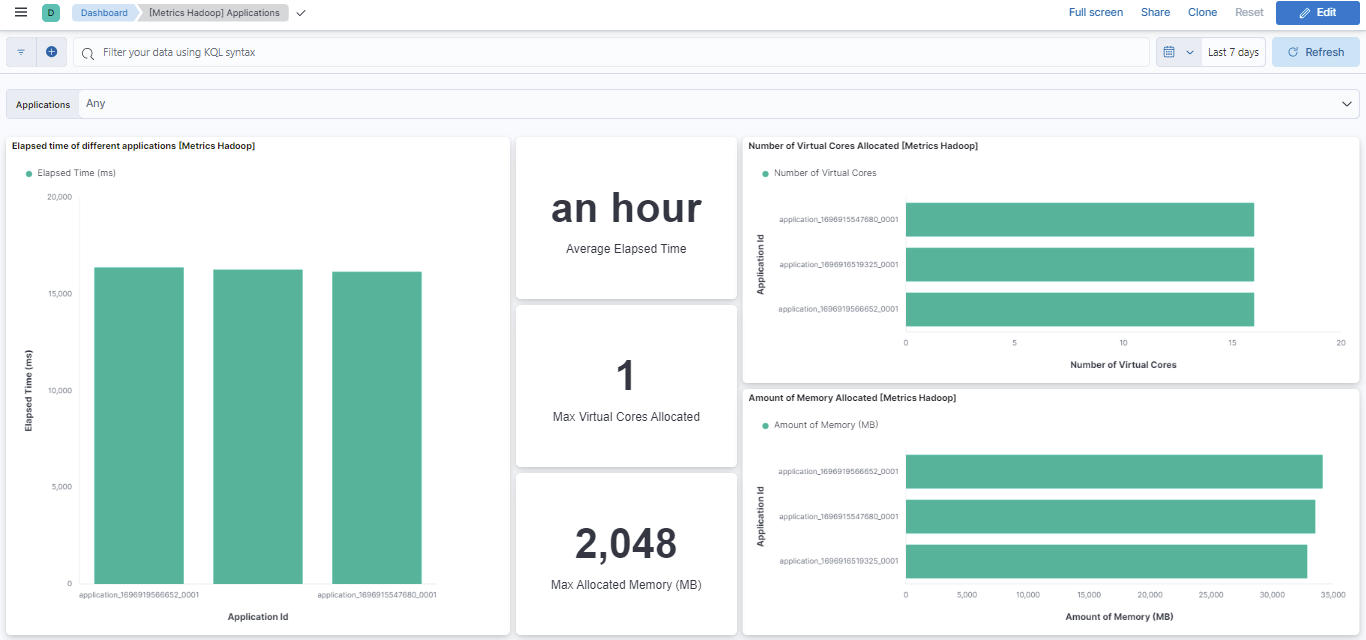
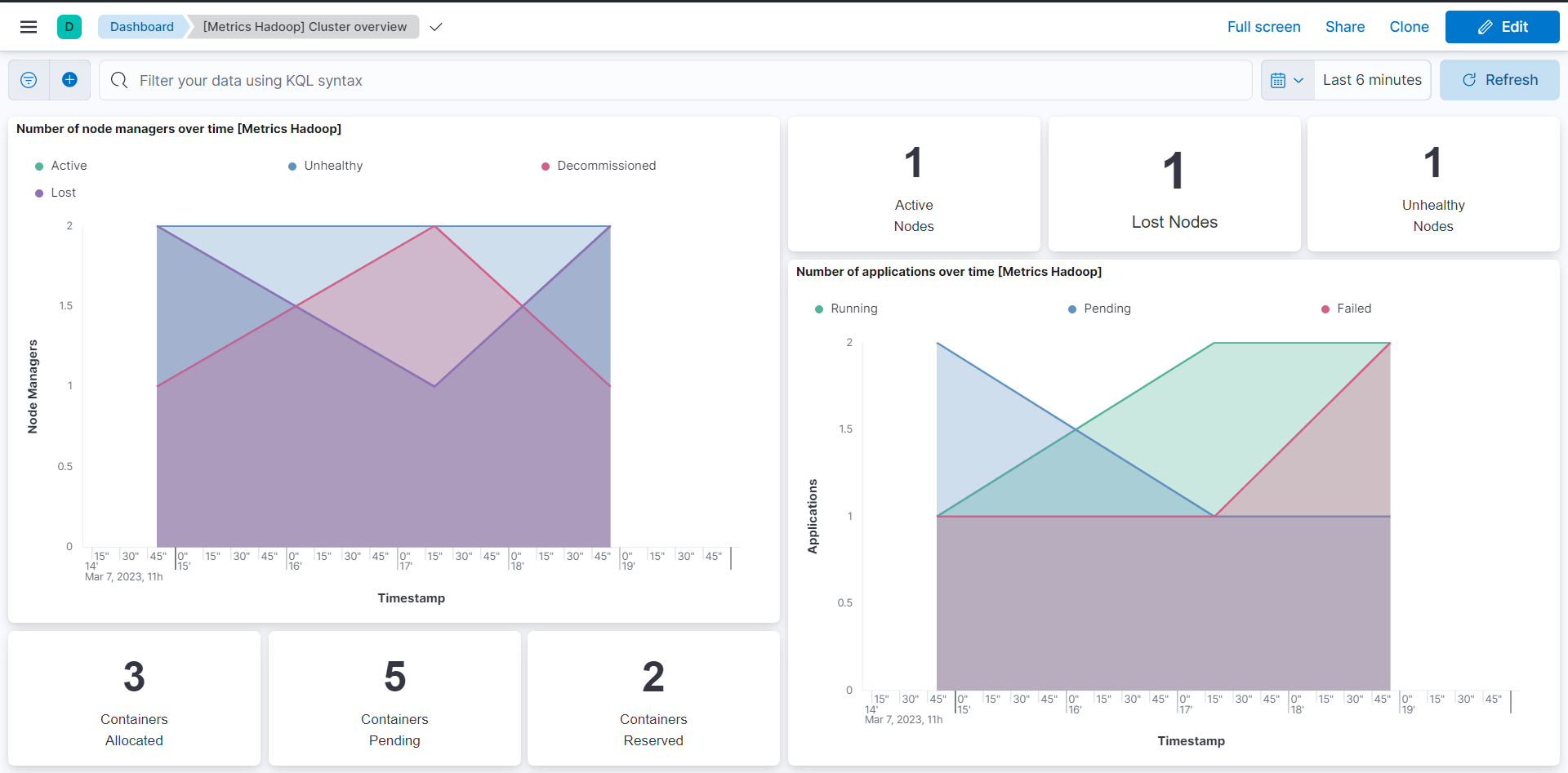
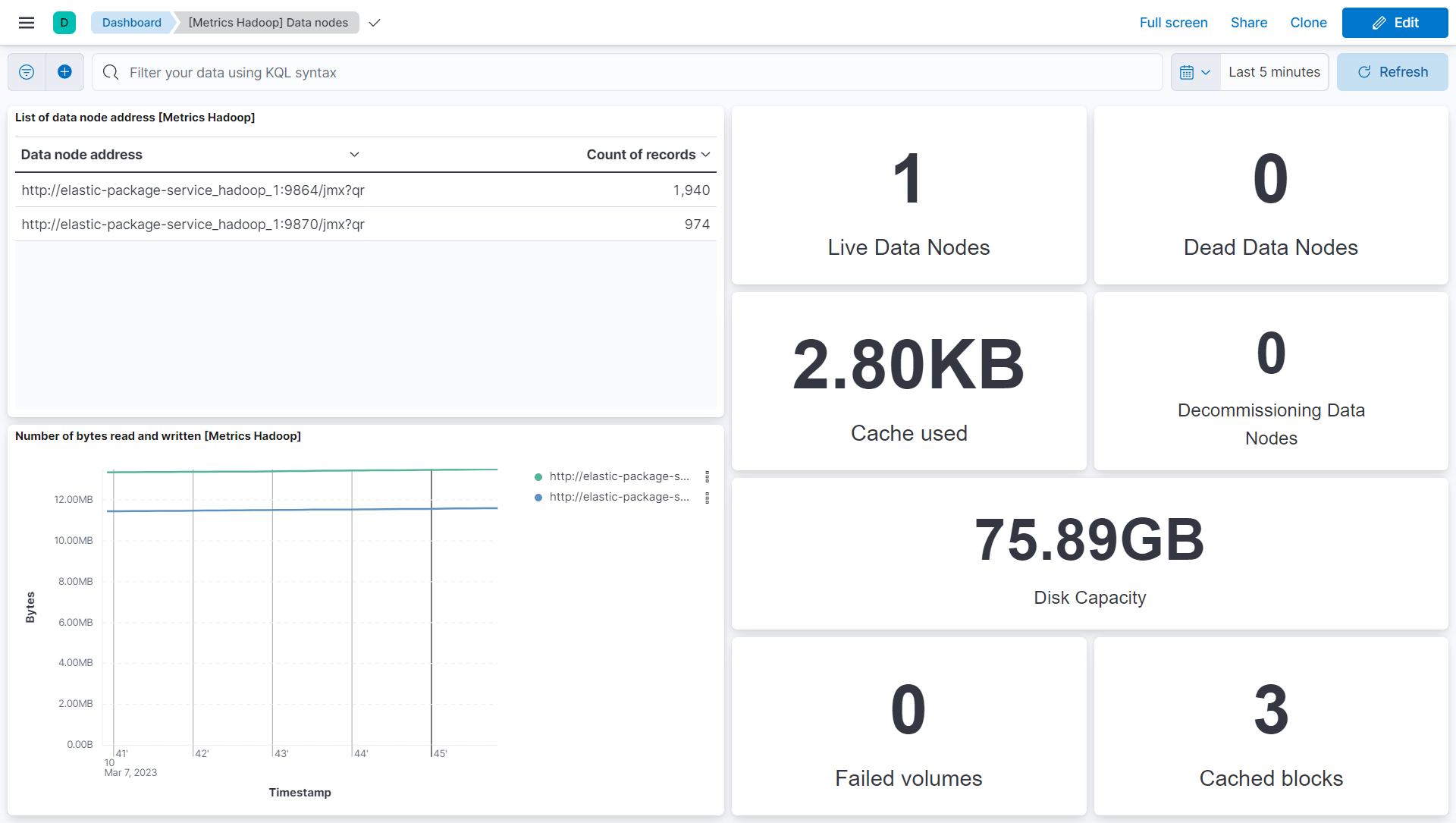
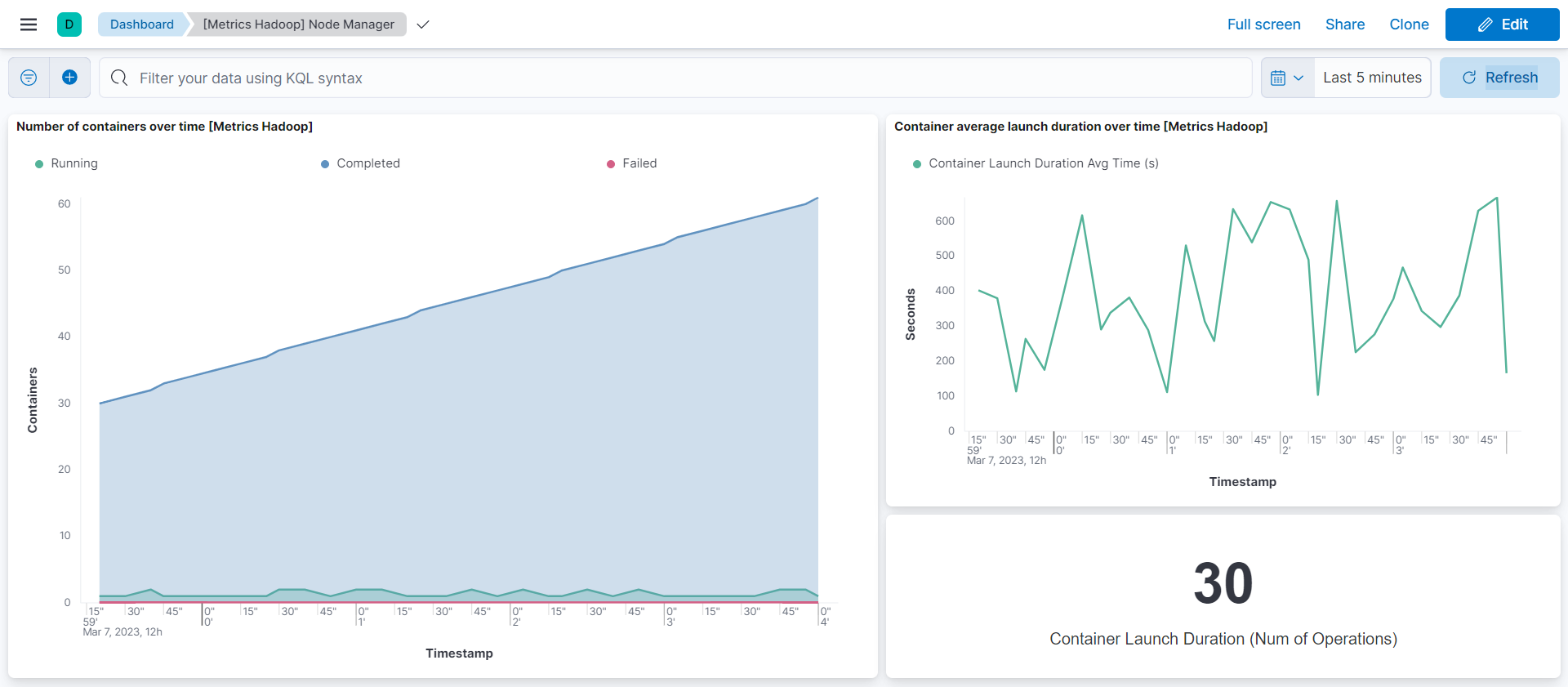
This integration includes one or more Kibana dashboards that visualizes the data collected by the integration. The screenshots below illustrate how the ingested data is displayed.
Changelog
| Version | Details | Minimum Kibana version |
|---|---|---|
| 1.9.0 | Enhancement (View pull request) Allow @custom pipeline access to event.original without setting preserve_original_event. |
9.0.0 8.13.0 |
| 1.8.1 | Bug fix (View pull request) Updated SSL description to be uniform and to include links to documentation. |
9.0.0 8.13.0 |
| 1.8.0 | Enhancement (View pull request) Add support for Kibana 9.0.0. |
9.0.0 8.13.0 |
| 1.7.0 | Enhancement (View pull request) ECS version updated to 8.11.0. Update the kibana constraint to ^8.13.0. Modified the field definitions to remove ECS fields made redundant by the ecs@mappings component template. |
8.13.0 |
| 1.6.0 | Enhancement (View pull request) Add global filter on data_stream.dataset to improve performance. |
8.10.2 |
| 1.5.2 | Enhancement (View pull request) Inline "by reference" visualizations |
8.10.2 |
| 1.5.1 | Bug fix (View pull request) Update the link to the correct reindexing procedure. |
8.10.2 |
| 1.5.0 | Enhancement (View pull request) Limit request tracer log count to five. |
8.10.2 |
| 1.4.0 | Enhancement (View pull request) Update value format of "Average elapsed time" metric visualization. |
8.10.2 |
| 1.3.0 | Enhancement (View pull request) Update the package format_version to 3.0.0. |
8.8.0 |
| 1.2.1 | Bug fix (View pull request) Remove forwarded tag from metrics data streams. |
8.8.0 |
| 1.2.0 | Enhancement (View pull request) Enable time series data streams for the service metrics dataset. This dramatically reduces storage for metrics and is expected to progressively improve query performance. For more details, see here. |
8.8.0 |
| 1.1.8 | Bug fix (View pull request) Add null check and ignore_missing check to the rename processor |
8.3.0 |
| 1.1.7 | Enhancement (View pull request) Add metric_type mapping for namenode datastream. |
8.3.0 |
| 1.1.6 | Enhancement (View pull request) Add dimension mapping for namenode datastream. |
8.3.0 |
| 1.1.5 | Enhancement (View pull request) Add metric_type mapping for datanode datastream. |
8.3.0 |
| 1.1.4 | Enhancement (View pull request) Add dimension mapping for datanode datastream. |
8.3.0 |
| 1.1.3 | Enhancement (View pull request) Add metric_type mapping for node_manager datastream. |
8.3.0 |
| 1.1.2 | Enhancement (View pull request) Add dimension mapping for node_manager datastream. |
8.3.0 |
| 1.1.1 | Enhancement (View pull request) Add metric_type mapping for cluster datastream. |
8.3.0 |
| 1.1.0 | Enhancement (View pull request) Add dimension mapping for cluster datastream. |
8.3.0 |
| 1.0.0 | Enhancement (View pull request) Make Hadoop GA. |
8.3.0 |
| 0.9.1 | Bug fix (View pull request) Resolve host.ip field conflict. |
8.3.0 |
| 0.9.0 | Enhancement (View pull request) Add support for HTTP request trace logging in application data stream. |
8.3.0 |
| 0.8.0 | Enhancement (View pull request) Rename ownership from obs-service-integrations to obs-infraobs-integrations |
8.3.0 |
| 0.7.1 | Bug fix (View pull request) Remove (s) from the Applications dashboard visualizations. |
8.3.0 |
| 0.7.0 | Enhancement (View pull request) Migrate Cluster overview dashboard visualizations to lens. |
8.3.0 |
| 0.6.0 | Enhancement (View pull request) Migrate Applications dashboard visualizations to lens. |
8.3.0 |
| 0.5.0 | Enhancement (View pull request) Migrate Data nodes and Node Manager dashboard visualizations to lens. |
8.3.0 |
| 0.4.2 | Enhancement (View pull request) Added categories and/or subcategories. |
8.1.0 |
| 0.4.1 | Bug fix (View pull request) Replace format of date processor from epoch_millis to UNIX_MS |
8.1.0 |
| 0.4.0 | Enhancement (View pull request) Update ECS version to 8.5.1 |
8.1.0 |
| 0.3.0 | Enhancement (View pull request) Added infrastructure category. |
8.1.0 |
| 0.2.0 | Enhancement (View pull request) Add dashboard and visualizations for Hadoop. |
8.1.0 |
| 0.1.1 | Enhancement (View pull request) Update SSL and proxy configuration for application data stream. |
— |
| 0.1.0 | Enhancement (View pull request) Add namenode data stream for Hadoop. Enhancement (View pull request) Add node_manager data stream, visualizations and Dashboards for Hadoop. Enhancement (View pull request) Add datanode data stream for Hadoop. Enhancement (View pull request) Add cluster metrics data stream for Hadoop. Enhancement (View pull request) Add Hadoop integration with application data stream. |
— |