Linux Integration
Elastic Cloud Serverless projects are autoscaled environments, fully managed by Elastic and available on Elastic Cloud. Availability This functionality is generally available and ready for production usage. Elastic Cloud Serverless projects are autoscaled environments, fully managed by Elastic and available on Elastic Cloud. Availability This functionality is generally available and ready for production usage. The Elastic Stack includes Elastic's core products such as Elasticsearch, Kibana, Logstash, and Beats. Availability This functionality is generally available and ready for production usage. Unless stated otherwise on the page, this functionality is available when your Elastic Stack is deployed on Elastic Cloud Hosted, Elastic Cloud Enterprise, Elastic Cloud on Kubernetes, and self-managed environments. This documentation corresponds to the latest patch available for each minor version. If you're not using the latest patch, check the release notes for changes.
Serverless Observability
Generally available
Serverless Security
Generally available
Stack
9.0+
Generally available since 9.0
| Version | 1.1.0 (View all) |
| Subscription level What's this? |
Basic |
| Developed by What's this? |
Elastic |
| Ingestion method(s) | File |
| Minimum Kibana version(s) | 9.0.0 8.17.0 |
The Linux Metrics integration allows you to monitor Linux servers.
Use the Linux Metrics integration to collect low-level metrics. Then visualize that data in Kibana, create alerts to notify you if something goes wrong, and reference data when troubleshooting an issue.
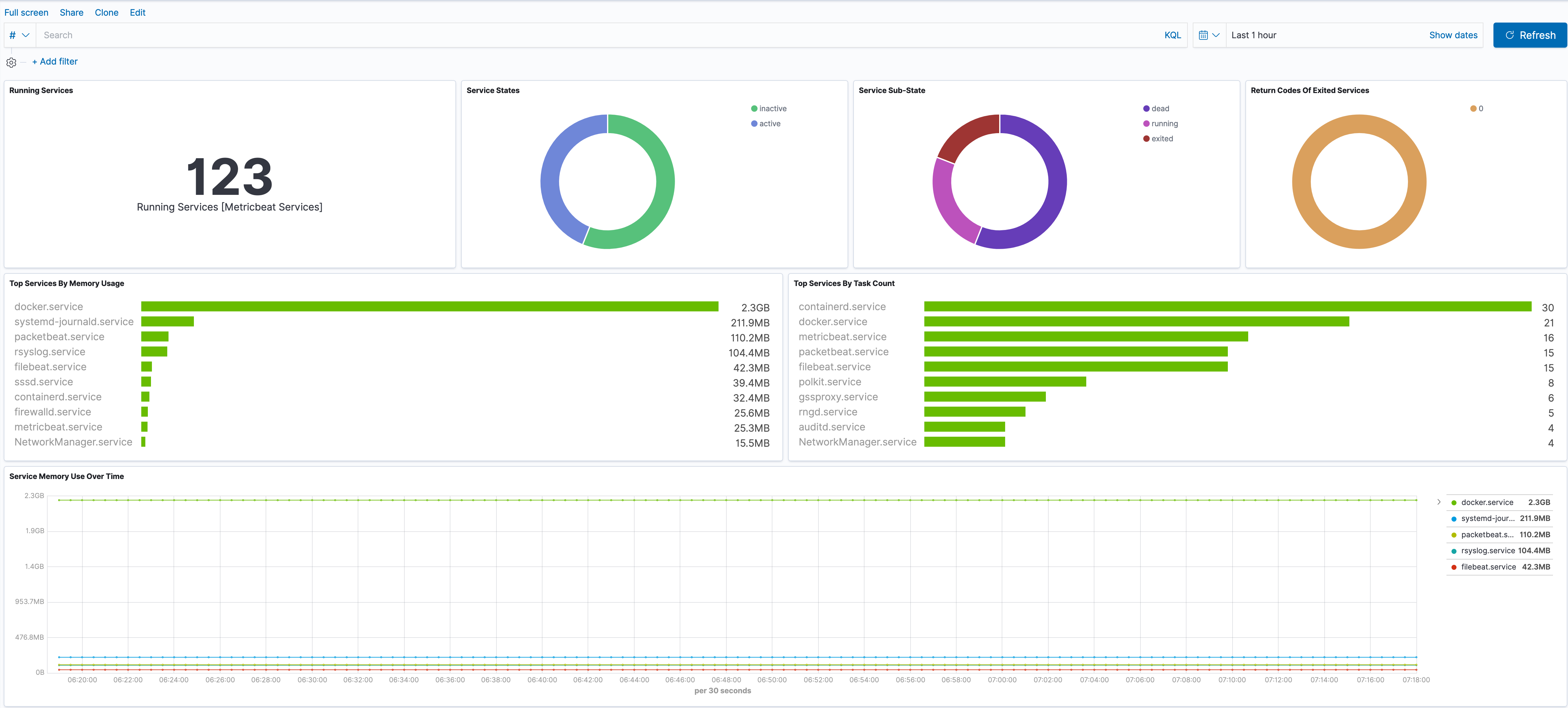
For example, you could install the Linux Metrics integration to send metrics to Elastic. Then, you could view real-time changes to service status in Kibana's [Metrics Linux] Host Services Overview dashboard.
The Linux Metrics integration collects one type of data: metrics.
Metrics give you insight into the state of the machine. Metric data streams collected by the Linux Metrics integration include performance counter values, memory usage, entropy availability, and more. See more details in the Metrics reference.
You need Elasticsearch for storing and searching your data and Kibana for visualizing and managing it. You can use our hosted Elasticsearch Service on Elastic Cloud, which is recommended, or self-manage the Elastic Stack on your own hardware.
Certain data streams may access /proc to gather process information, and the resulting ptrace_may_access()
call by the kernel to check for permissions can be blocked by AppArmor and other LSM software,
even though the System module doesn't use ptrace directly.
For step-by-step instructions on how to set up an integration, see the Getting started guide.
Because the Linux Metrics integration always applies to the local server, the hosts config option is not needed.
When running inside a container the proc filesystem directory of the host
should be set using system.hostfs setting to /hostfs.
The conntrack module reports on performance counters for the Linux connection tracking component of netfilter.
Conntrack uses a hash table to track the state of network connections.
The iostat module reports per-disk IO statistics that emulate iostat -x on Linux.
The KSM module reports data from Kernel Samepage Merging.
To take advantage of KSM, applications must use the madvise system call to mark memory regions for merging. KSM is not enabled on all distros, and KSM status is set with the CONFIG_KSM kernel flag.
The memory data stream extends system/memory and adds Linux-specific memory metrics, including Huge Pages and overall paging statistics.
The pageinfo data stream reports on paging statistics as found in /proc/pagetypeinfo.
Reported metrics are broken down by page type: DMA, DMA32, Normal, and Highmem. These types are further broken down by order, which represents zones of 2^ORDER*PAGE_SIZE. These metrics are divided into two reporting types:
buddyinfois summarized by page type (as in/proc/buddyinfo)nodesreports information broken down by memory migration type
This information can be used to determine memory fragmentation. The kernel buddy algorithm will always search for the smallest page order to allocate, and if none is available, a larger page order will be split into two "buddies." When memory is freed, the kernel will attempt to merge the "buddies." If the only available pages are at lower orders, this indicates fragmentation, as buddy pages cannot be merged.
This is the entropy data stream of the module system.
It collects the amount of available entropy in bits. On kernel versions greater than 2.6,
entropy will be out of a total pool size of 4096.
Exported fields
| Field | Description | Type | Unit | Metric Type |
|---|---|---|---|---|
| @timestamp | Event timestamp. | date | ||
| agent.id | Unique identifier of this agent (if one exists). Example: For Beats this would be beat.id. | keyword | ||
| agent.name | Custom name of the agent. This is a name that can be given to an agent. This can be helpful if for example two Filebeat instances are running on the same host but a human readable separation is needed on which Filebeat instance data is coming from. If no name is given, the name is often left empty. | keyword | ||
| cloud.account.id | The cloud account or organization id used to identify different entities in a multi-tenant environment. Examples: AWS account id, Google Cloud ORG Id, or other unique identifier. | keyword | ||
| cloud.availability_zone | Availability zone in which this host is running. | keyword | ||
| cloud.image.id | Image ID for the cloud instance. | keyword | ||
| cloud.instance.id | Instance ID of the host machine. | keyword | ||
| cloud.instance.name | Instance name of the host machine. | keyword | ||
| cloud.machine.type | Machine type of the host machine. | keyword | ||
| cloud.project.id | Name of the project in Google Cloud. | keyword | ||
| cloud.provider | Name of the cloud provider. Example values are aws, azure, gcp, or digitalocean. | keyword | ||
| cloud.region | Region in which this host is running. | keyword | ||
| container.id | Unique container id. | keyword | ||
| container.image.name | Name of the image the container was built on. | keyword | ||
| container.labels | Image labels. | object | ||
| container.name | Container name. | keyword | ||
| data_stream.dataset | Data stream dataset. | constant_keyword | ||
| data_stream.namespace | Data stream namespace. | constant_keyword | ||
| data_stream.type | Data stream type. | constant_keyword | ||
| ecs.version | ECS version this event conforms to. ecs.version is a required field and must exist in all events. When querying across multiple indices -- which may conform to slightly different ECS versions -- this field lets integrations adjust to the schema version of the events. |
keyword | ||
| event.dataset | Event dataset | constant_keyword | ||
| event.duration | Duration of the event in nanoseconds. If event.start and event.end are known this value should be the difference between the end and start time. | long | ||
| event.module | Event module | constant_keyword | ||
| host.architecture | Operating system architecture. | keyword | ||
| host.containerized | If the host is a container. | boolean | ||
| host.domain | Name of the domain of which the host is a member. For example, on Windows this could be the host's Active Directory domain or NetBIOS domain name. For Linux this could be the domain of the host's LDAP provider. | keyword | ||
| host.hostname | Hostname of the host. It normally contains what the hostname command returns on the host machine. |
keyword | ||
| host.id | Unique host id. As hostname is not always unique, use values that are meaningful in your environment. Example: The current usage of beat.name. |
keyword | ||
| host.ip | Host ip addresses. | ip | ||
| host.mac | Host mac addresses. | keyword | ||
| host.name | Name of the host. It can contain what hostname returns on Unix systems, the fully qualified domain name, or a name specified by the user. The sender decides which value to use. |
keyword | ||
| host.os.build | OS build information. | keyword | ||
| host.os.codename | OS codename, if any. | keyword | ||
| host.os.family | OS family (such as redhat, debian, freebsd, windows). | keyword | ||
| host.os.kernel | Operating system kernel version as a raw string. | keyword | ||
| host.os.name | Operating system name, without the version. | keyword | ||
| host.os.name.text | Multi-field of host.os.name. |
text | ||
| host.os.platform | Operating system platform (such centos, ubuntu, windows). | keyword | ||
| host.os.version | Operating system version as a raw string. | keyword | ||
| host.type | Type of host. For Cloud providers this can be the machine type like t2.medium. If vm, this could be the container, for example, or other information meaningful in your environment. |
keyword | ||
| service.address | Address where data about this service was collected from. This should be a URI, network address (ipv4:port or [ipv6]:port) or a resource path (sockets). | keyword | ||
| service.type | The type of the service data is collected from. The type can be used to group and correlate logs and metrics from one service type. Example: If logs or metrics are collected from Elasticsearch, service.type would be elasticsearch. |
keyword | ||
| system.entropy.available_bits | The available bits of entropy | long | gauge | |
| system.entropy.pct | The percentage of available entropy, relative to the pool size of 4096 | scaled_float | percent | gauge |
The Linux network_summary data stream provides network IO metrics collected from the
operating system. These events are global and sorted by protocol.
Exported fields
| Field | Description | Type |
|---|---|---|
| @timestamp | Event timestamp. | date |
| cloud.account.id | The cloud account or organization id used to identify different entities in a multi-tenant environment. Examples: AWS account id, Google Cloud ORG Id, or other unique identifier. | keyword |
| cloud.availability_zone | Availability zone in which this host is running. | keyword |
| cloud.image.id | Image ID for the cloud instance. | keyword |
| cloud.instance.id | Instance ID of the host machine. | keyword |
| cloud.instance.name | Instance name of the host machine. | keyword |
| cloud.machine.type | Machine type of the host machine. | keyword |
| cloud.project.id | Name of the project in Google Cloud. | keyword |
| cloud.provider | Name of the cloud provider. Example values are aws, azure, gcp, or digitalocean. | keyword |
| cloud.region | Region in which this host is running. | keyword |
| container.id | Unique container id. | keyword |
| container.image.name | Name of the image the container was built on. | keyword |
| container.labels | Image labels. | object |
| container.name | Container name. | keyword |
| data_stream.dataset | Data stream dataset. | constant_keyword |
| data_stream.namespace | Data stream namespace. | constant_keyword |
| data_stream.type | Data stream type. | constant_keyword |
| ecs.version | ECS version this event conforms to. ecs.version is a required field and must exist in all events. When querying across multiple indices -- which may conform to slightly different ECS versions -- this field lets integrations adjust to the schema version of the events. |
keyword |
| event.dataset | Event dataset | constant_keyword |
| event.duration | Duration of the event in nanoseconds. If event.start and event.end are known this value should be the difference between the end and start time. | long |
| event.module | Event module | constant_keyword |
| host.architecture | Operating system architecture. | keyword |
| host.containerized | If the host is a container. | boolean |
| host.domain | Name of the domain of which the host is a member. For example, on Windows this could be the host's Active Directory domain or NetBIOS domain name. For Linux this could be the domain of the host's LDAP provider. | keyword |
| host.hostname | Hostname of the host. It normally contains what the hostname command returns on the host machine. |
keyword |
| host.id | Unique host id. As hostname is not always unique, use values that are meaningful in your environment. Example: The current usage of beat.name. |
keyword |
| host.ip | Host ip addresses. | ip |
| host.mac | Host mac addresses. | keyword |
| host.name | Name of the host. It can contain what hostname returns on Unix systems, the fully qualified domain name, or a name specified by the user. The sender decides which value to use. |
keyword |
| host.os.build | OS build information. | keyword |
| host.os.codename | OS codename, if any. | keyword |
| host.os.family | OS family (such as redhat, debian, freebsd, windows). | keyword |
| host.os.kernel | Operating system kernel version as a raw string. | keyword |
| host.os.name | Operating system name, without the version. | keyword |
| host.os.name.text | Multi-field of host.os.name. |
text |
| host.os.platform | Operating system platform (such centos, ubuntu, windows). | keyword |
| host.os.version | Operating system version as a raw string. | keyword |
| host.type | Type of host. For Cloud providers this can be the machine type like t2.medium. If vm, this could be the container, for example, or other information meaningful in your environment. |
keyword |
| service.address | Address where data about this service was collected from. This should be a URI, network address (ipv4:port or [ipv6]:port) or a resource path (sockets). | keyword |
| service.type | The type of the service data is collected from. The type can be used to group and correlate logs and metrics from one service type. Example: If logs or metrics are collected from Elasticsearch, service.type would be elasticsearch. |
keyword |
| system.network_summary.icmp.* | ICMP counters | object |
| system.network_summary.ip.* | IP counters | object |
| system.network_summary.tcp.* | TCP counters | object |
| system.network_summary.udp.* | UDP counters | object |
| system.network_summary.udp_lite.* | UDP Lite counters | object |
This is the raid data stream of the module system. It collects stats about the raid.
This data stream is available on:
- Linux
Exported fields
| Field | Description | Type | Metric Type |
|---|---|---|---|
| @timestamp | Event timestamp. | date | |
| agent.id | Unique identifier of this agent (if one exists). Example: For Beats this would be beat.id. | keyword | |
| agent.name | Custom name of the agent. This is a name that can be given to an agent. This can be helpful if for example two Filebeat instances are running on the same host but a human readable separation is needed on which Filebeat instance data is coming from. If no name is given, the name is often left empty. | keyword | |
| cloud.account.id | The cloud account or organization id used to identify different entities in a multi-tenant environment. Examples: AWS account id, Google Cloud ORG Id, or other unique identifier. | keyword | |
| cloud.availability_zone | Availability zone in which this host is running. | keyword | |
| cloud.image.id | Image ID for the cloud instance. | keyword | |
| cloud.instance.id | Instance ID of the host machine. | keyword | |
| cloud.instance.name | Instance name of the host machine. | keyword | |
| cloud.machine.type | Machine type of the host machine. | keyword | |
| cloud.project.id | Name of the project in Google Cloud. | keyword | |
| cloud.provider | Name of the cloud provider. Example values are aws, azure, gcp, or digitalocean. | keyword | |
| cloud.region | Region in which this host is running. | keyword | |
| container.id | Unique container id. | keyword | |
| container.image.name | Name of the image the container was built on. | keyword | |
| container.labels | Image labels. | object | |
| container.name | Container name. | keyword | |
| data_stream.dataset | Data stream dataset. | constant_keyword | |
| data_stream.namespace | Data stream namespace. | constant_keyword | |
| data_stream.type | Data stream type. | constant_keyword | |
| ecs.version | ECS version this event conforms to. ecs.version is a required field and must exist in all events. When querying across multiple indices -- which may conform to slightly different ECS versions -- this field lets integrations adjust to the schema version of the events. |
keyword | |
| event.dataset | Event dataset | constant_keyword | |
| event.duration | Duration of the event in nanoseconds. If event.start and event.end are known this value should be the difference between the end and start time. | long | |
| event.module | Event module | constant_keyword | |
| host.architecture | Operating system architecture. | keyword | |
| host.containerized | If the host is a container. | boolean | |
| host.domain | Name of the domain of which the host is a member. For example, on Windows this could be the host's Active Directory domain or NetBIOS domain name. For Linux this could be the domain of the host's LDAP provider. | keyword | |
| host.hostname | Hostname of the host. It normally contains what the hostname command returns on the host machine. |
keyword | |
| host.id | Unique host id. As hostname is not always unique, use values that are meaningful in your environment. Example: The current usage of beat.name. |
keyword | |
| host.ip | Host ip addresses. | ip | |
| host.mac | Host mac addresses. | keyword | |
| host.name | Name of the host. It can contain what hostname returns on Unix systems, the fully qualified domain name, or a name specified by the user. The sender decides which value to use. |
keyword | |
| host.os.build | OS build information. | keyword | |
| host.os.codename | OS codename, if any. | keyword | |
| host.os.family | OS family (such as redhat, debian, freebsd, windows). | keyword | |
| host.os.kernel | Operating system kernel version as a raw string. | keyword | |
| host.os.name | Operating system name, without the version. | keyword | |
| host.os.name.text | Multi-field of host.os.name. |
text | |
| host.os.platform | Operating system platform (such centos, ubuntu, windows). | keyword | |
| host.os.version | Operating system version as a raw string. | keyword | |
| host.type | Type of host. For Cloud providers this can be the machine type like t2.medium. If vm, this could be the container, for example, or other information meaningful in your environment. |
keyword | |
| service.address | Address where data about this service was collected from. This should be a URI, network address (ipv4:port or [ipv6]:port) or a resource path (sockets). | keyword | |
| service.type | The type of the service data is collected from. The type can be used to group and correlate logs and metrics from one service type. Example: If logs or metrics are collected from Elasticsearch, service.type would be elasticsearch. |
keyword | |
| system.raid.blocks.synced | Number of blocks on the device that are in sync, in 1024-byte blocks. | long | gauge |
| system.raid.blocks.total | Number of blocks the device holds, in 1024-byte blocks. | long | gauge |
| system.raid.disks.active | Number of active disks. | long | gauge |
| system.raid.disks.failed | Number of failed disks. | long | gauge |
| system.raid.disks.spare | Number of spared disks. | long | gauge |
| system.raid.disks.states.* | map of raw disk states | object | |
| system.raid.disks.total | Total number of disks the device consists of. | long | gauge |
| system.raid.level | The raid level of the device | keyword | |
| system.raid.name | Name of the device. | keyword | |
| system.raid.status | activity-state of the device. | keyword | |
| system.raid.sync_action | Current sync action, if the RAID array is redundant | keyword |
The service data stream reports on the status of systemd services.
This data stream is available on:
- Linux
Exported fields
| Field | Description | Type | Unit | Metric Type |
|---|---|---|---|---|
| @timestamp | Event timestamp. | date | ||
| agent.id | Unique identifier of this agent (if one exists). Example: For Beats this would be beat.id. | keyword | ||
| agent.name | Custom name of the agent. This is a name that can be given to an agent. This can be helpful if for example two Filebeat instances are running on the same host but a human readable separation is needed on which Filebeat instance data is coming from. If no name is given, the name is often left empty. | keyword | ||
| cloud.account.id | The cloud account or organization id used to identify different entities in a multi-tenant environment. Examples: AWS account id, Google Cloud ORG Id, or other unique identifier. | keyword | ||
| cloud.availability_zone | Availability zone in which this host is running. | keyword | ||
| cloud.image.id | Image ID for the cloud instance. | keyword | ||
| cloud.instance.id | Instance ID of the host machine. | keyword | ||
| cloud.instance.name | Instance name of the host machine. | keyword | ||
| cloud.machine.type | Machine type of the host machine. | keyword | ||
| cloud.project.id | Name of the project in Google Cloud. | keyword | ||
| cloud.provider | Name of the cloud provider. Example values are aws, azure, gcp, or digitalocean. | keyword | ||
| cloud.region | Region in which this host is running. | keyword | ||
| container.id | Unique container id. | keyword | ||
| container.image.name | Name of the image the container was built on. | keyword | ||
| container.labels | Image labels. | object | ||
| container.name | Container name. | keyword | ||
| data_stream.dataset | Data stream dataset. | constant_keyword | ||
| data_stream.namespace | Data stream namespace. | constant_keyword | ||
| data_stream.type | Data stream type. | constant_keyword | ||
| ecs.version | ECS version this event conforms to. ecs.version is a required field and must exist in all events. When querying across multiple indices -- which may conform to slightly different ECS versions -- this field lets integrations adjust to the schema version of the events. |
keyword | ||
| event.dataset | Event dataset | constant_keyword | ||
| event.duration | Duration of the event in nanoseconds. If event.start and event.end are known this value should be the difference between the end and start time. | long | ||
| event.module | Event module | constant_keyword | ||
| host | A host is defined as a general computing instance. ECS host.* fields should be populated with details about the host on which the event happened, or from which the measurement was taken. Host types include hardware, virtual machines, Docker containers, and Kubernetes nodes. | group | ||
| host.architecture | Operating system architecture. | keyword | ||
| host.containerized | If the host is a container. | boolean | ||
| host.domain | Name of the domain of which the host is a member. For example, on Windows this could be the host's Active Directory domain or NetBIOS domain name. For Linux this could be the domain of the host's LDAP provider. | keyword | ||
| host.hostname | Hostname of the host. It normally contains what the hostname command returns on the host machine. |
keyword | ||
| host.id | Unique host id. As hostname is not always unique, use values that are meaningful in your environment. Example: The current usage of beat.name. |
keyword | ||
| host.ip | Host ip addresses. | ip | ||
| host.mac | Host MAC addresses. The notation format from RFC 7042 is suggested: Each octet (that is, 8-bit byte) is represented by two [uppercase] hexadecimal digits giving the value of the octet as an unsigned integer. Successive octets are separated by a hyphen. | keyword | ||
| host.name | Name of the host. It can contain what hostname returns on Unix systems, the fully qualified domain name, or a name specified by the user. The sender decides which value to use. |
keyword | ||
| host.os.build | OS build information. | keyword | ||
| host.os.codename | OS codename, if any. | keyword | ||
| host.os.family | OS family (such as redhat, debian, freebsd, windows). | keyword | ||
| host.os.full | Operating system name, including the version or code name. | keyword | ||
| host.os.full.text | Multi-field of host.os.full. |
match_only_text | ||
| host.os.kernel | Operating system kernel version as a raw string. | keyword | ||
| host.os.name | Operating system name, without the version. | keyword | ||
| host.os.name.text | Multi-field of host.os.name. |
match_only_text | ||
| host.os.platform | Operating system platform (such centos, ubuntu, windows). | keyword | ||
| host.os.version | Operating system version as a raw string. | keyword | ||
| host.type | Type of host. For Cloud providers this can be the machine type like t2.medium. If vm, this could be the container, for example, or other information meaningful in your environment. |
keyword | ||
| process | These fields contain information about a process. These fields can help you correlate metrics information with a process id/name from a log message. The process.pid often stays in the metric itself and is copied to the global field for correlation. |
group | ||
| process.exit_code | The exit code of the process, if this is a termination event. The field should be absent if there is no exit code for the event (e.g. process start). | long | ||
| process.name | Process name. Sometimes called program name or similar. | keyword | ||
| process.name.text | Multi-field of process.name. |
match_only_text | ||
| process.pgid | Identifier of the group of processes the process belongs to. | long | ||
| process.pid | Process id. | long | ||
| process.ppid | Parent process' pid. | long | ||
| process.working_directory | The working directory of the process. | keyword | ||
| process.working_directory.text | Multi-field of process.working_directory. |
match_only_text | ||
| service.address | Address where data about this service was collected from. This should be a URI, network address (ipv4:port or [ipv6]:port) or a resource path (sockets). | keyword | ||
| service.type | The type of the service data is collected from. The type can be used to group and correlate logs and metrics from one service type. Example: If logs or metrics are collected from Elasticsearch, service.type would be elasticsearch. |
keyword | ||
| system.service.exec_code | The SIGCHLD code from the service's main process | keyword | ||
| system.service.load_state | The load state of the service | keyword | ||
| system.service.name | The name of the service | keyword | ||
| system.service.resources.cpu.usage.ns | CPU usage in nanoseconds | long | nanos | counter |
| system.service.resources.memory.usage.bytes | memory usage in bytes | long | byte | gauge |
| system.service.resources.network.in.bytes | bytes in | long | byte | counter |
| system.service.resources.network.in.packets | packets in | long | counter | |
| system.service.resources.network.out.bytes | bytes out | long | byte | counter |
| system.service.resources.network.out.packets | packets out | long | counter | |
| system.service.resources.tasks.count | number of tasks associated with the service | long | gauge | |
| system.service.state | The activity state of the service | keyword | ||
| system.service.state_since | The timestamp of the last state change. If the service is active and running, this is its uptime. | date | ||
| system.service.sub_state | The sub-state of the service | keyword | ||
| systemd.fragment_path | Service file location | keyword | ||
| systemd.unit | Service unit name | keyword | ||
| user | The user fields describe information about the user that is relevant to the event. Fields can have one entry or multiple entries. If a user has more than one id, provide an array that includes all of them. | group | ||
| user.name | Short name or login of the user. | keyword | ||
| user.name.text | Multi-field of user.name. |
match_only_text |
This data stream requires kernel 2.6.14 or newer.
The Linux socket data stream reports an event for each new TCP socket that it
sees. It does this by polling the kernel periodically to get a dump of all
sockets. You set the polling interval by configuring the period option.
Specifying a short polling interval with this data stream is important to avoid
missing short-lived connections.
Exported fields
| Field | Description | Type |
|---|---|---|
| @timestamp | Event timestamp. | date |
| cloud.account.id | The cloud account or organization id used to identify different entities in a multi-tenant environment. Examples: AWS account id, Google Cloud ORG Id, or other unique identifier. | keyword |
| cloud.availability_zone | Availability zone in which this host is running. | keyword |
| cloud.image.id | Image ID for the cloud instance. | keyword |
| cloud.instance.id | Instance ID of the host machine. | keyword |
| cloud.instance.name | Instance name of the host machine. | keyword |
| cloud.machine.type | Machine type of the host machine. | keyword |
| cloud.project.id | Name of the project in Google Cloud. | keyword |
| cloud.provider | Name of the cloud provider. Example values are aws, azure, gcp, or digitalocean. | keyword |
| cloud.region | Region in which this host is running. | keyword |
| container.id | Unique container id. | keyword |
| container.image.name | Name of the image the container was built on. | keyword |
| container.labels | Image labels. | object |
| container.name | Container name. | keyword |
| data_stream.dataset | Data stream dataset. | constant_keyword |
| data_stream.namespace | Data stream namespace. | constant_keyword |
| data_stream.type | Data stream type. | constant_keyword |
| ecs.version | ECS version this event conforms to. ecs.version is a required field and must exist in all events. When querying across multiple indices -- which may conform to slightly different ECS versions -- this field lets integrations adjust to the schema version of the events. |
keyword |
| event.dataset | Event dataset | constant_keyword |
| event.duration | Duration of the event in nanoseconds. If event.start and event.end are known this value should be the difference between the end and start time. | long |
| event.module | Event module | constant_keyword |
| host.architecture | Operating system architecture. | keyword |
| host.containerized | If the host is a container. | boolean |
| host.domain | Name of the domain of which the host is a member. For example, on Windows this could be the host's Active Directory domain or NetBIOS domain name. For Linux this could be the domain of the host's LDAP provider. | keyword |
| host.hostname | Hostname of the host. It normally contains what the hostname command returns on the host machine. |
keyword |
| host.id | Unique host id. As hostname is not always unique, use values that are meaningful in your environment. Example: The current usage of beat.name. |
keyword |
| host.ip | Host ip addresses. | ip |
| host.mac | Host mac addresses. | keyword |
| host.name | Name of the host. It can contain what hostname returns on Unix systems, the fully qualified domain name, or a name specified by the user. The sender decides which value to use. |
keyword |
| host.os.build | OS build information. | keyword |
| host.os.codename | OS codename, if any. | keyword |
| host.os.family | OS family (such as redhat, debian, freebsd, windows). | keyword |
| host.os.kernel | Operating system kernel version as a raw string. | keyword |
| host.os.name | Operating system name, without the version. | keyword |
| host.os.name.text | Multi-field of host.os.name. |
text |
| host.os.platform | Operating system platform (such centos, ubuntu, windows). | keyword |
| host.os.version | Operating system version as a raw string. | keyword |
| host.type | Type of host. For Cloud providers this can be the machine type like t2.medium. If vm, this could be the container, for example, or other information meaningful in your environment. |
keyword |
| network | The network is defined as the communication path over which a host or network event happens. The network.* fields should be populated with details about the network activity associated with an event. | group |
| network.direction | Direction of the network traffic. Recommended values are: * ingress * egress * inbound * outbound * internal * external * unknown When mapping events from a host-based monitoring context, populate this field from the host's point of view, using the values "ingress" or "egress". When mapping events from a network or perimeter-based monitoring context, populate this field from the point of view of the network perimeter, using the values "inbound", "outbound", "internal" or "external". Note that "internal" is not crossing perimeter boundaries, and is meant to describe communication between two hosts within the perimeter. Note also that "external" is meant to describe traffic between two hosts that are external to the perimeter. This could for example be useful for ISPs or VPN service providers. | keyword |
| network.type | In the OSI Model this would be the Network Layer. ipv4, ipv6, ipsec, pim, etc The field value must be normalized to lowercase for querying. See the documentation section "Implementing ECS". | keyword |
| process | These fields contain information about a process. These fields can help you correlate metrics information with a process id/name from a log message. The process.pid often stays in the metric itself and is copied to the global field for correlation. |
group |
| process.executable | Absolute path to the process executable. | keyword |
| process.executable.text | Multi-field of process.executable. |
match_only_text |
| process.name | Process name. Sometimes called program name or similar. | keyword |
| process.name.text | Multi-field of process.name. |
match_only_text |
| process.pid | Process id. | long |
| service.address | Address where data about this service was collected from. This should be a URI, network address (ipv4:port or [ipv6]:port) or a resource path (sockets). | keyword |
| service.type | The type of the service data is collected from. The type can be used to group and correlate logs and metrics from one service type. Example: If logs or metrics are collected from Elasticsearch, service.type would be elasticsearch. |
keyword |
| system.socket.local.ip | Local IP address. This can be an IPv4 or IPv6 address. | ip |
| system.socket.local.port | Local port. | long |
| system.socket.process.cmdline | Full command line | keyword |
| system.socket.remote.etld_plus_one | The effective top-level domain (eTLD) of the remote host plus one more label. For example, the eTLD+1 for "foo.bar.golang.org." is "golang.org.". The data for determining the eTLD comes from an embedded copy of the data from http://publicsuffix.org. | keyword |
| system.socket.remote.host | PTR record associated with the remote IP. It is obtained via reverse IP lookup. | keyword |
| system.socket.remote.host_error | Error describing the cause of the reverse lookup failure. | keyword |
| system.socket.remote.ip | Remote IP address. This can be an IPv4 or IPv6 address. | ip |
| system.socket.remote.port | Remote port. | long |
| user | The user fields describe information about the user that is relevant to the event. Fields can have one entry or multiple entries. If a user has more than one id, provide an array that includes all of them. | group |
| user.full_name | User's full name, if available. | keyword |
| user.full_name.text | Multi-field of user.full_name. |
match_only_text |
| user.id | Unique identifier of the user. | keyword |
The users data stream reports logged in users and associated sessions via dbus and logind, which is a systemd component. By default, the data stream will look in /var/run/dbus/ for a system socket, although a new path can be selected with DBUS_SYSTEM_BUS_ADDRESS.
Exported fields
| Field | Description | Type |
|---|---|---|
| @timestamp | Event timestamp. | date |
| cloud.account.id | The cloud account or organization id used to identify different entities in a multi-tenant environment. Examples: AWS account id, Google Cloud ORG Id, or other unique identifier. | keyword |
| cloud.availability_zone | Availability zone in which this host is running. | keyword |
| cloud.image.id | Image ID for the cloud instance. | keyword |
| cloud.instance.id | Instance ID of the host machine. | keyword |
| cloud.instance.name | Instance name of the host machine. | keyword |
| cloud.machine.type | Machine type of the host machine. | keyword |
| cloud.project.id | Name of the project in Google Cloud. | keyword |
| cloud.provider | Name of the cloud provider. Example values are aws, azure, gcp, or digitalocean. | keyword |
| cloud.region | Region in which this host is running. | keyword |
| container.id | Unique container id. | keyword |
| container.image.name | Name of the image the container was built on. | keyword |
| container.labels | Image labels. | object |
| container.name | Container name. | keyword |
| data_stream.dataset | Data stream dataset. | constant_keyword |
| data_stream.namespace | Data stream namespace. | constant_keyword |
| data_stream.type | Data stream type. | constant_keyword |
| ecs.version | ECS version this event conforms to. ecs.version is a required field and must exist in all events. When querying across multiple indices -- which may conform to slightly different ECS versions -- this field lets integrations adjust to the schema version of the events. |
keyword |
| event.dataset | Event dataset | constant_keyword |
| event.duration | Duration of the event in nanoseconds. If event.start and event.end are known this value should be the difference between the end and start time. | long |
| event.module | Event module | constant_keyword |
| host.architecture | Operating system architecture. | keyword |
| host.containerized | If the host is a container. | boolean |
| host.domain | Name of the domain of which the host is a member. For example, on Windows this could be the host's Active Directory domain or NetBIOS domain name. For Linux this could be the domain of the host's LDAP provider. | keyword |
| host.hostname | Hostname of the host. It normally contains what the hostname command returns on the host machine. |
keyword |
| host.id | Unique host id. As hostname is not always unique, use values that are meaningful in your environment. Example: The current usage of beat.name. |
keyword |
| host.ip | Host ip addresses. | ip |
| host.mac | Host mac addresses. | keyword |
| host.name | Name of the host. It can contain what hostname returns on Unix systems, the fully qualified domain name, or a name specified by the user. The sender decides which value to use. |
keyword |
| host.os.build | OS build information. | keyword |
| host.os.codename | OS codename, if any. | keyword |
| host.os.family | OS family (such as redhat, debian, freebsd, windows). | keyword |
| host.os.kernel | Operating system kernel version as a raw string. | keyword |
| host.os.name | Operating system name, without the version. | keyword |
| host.os.name.text | Multi-field of host.os.name. |
text |
| host.os.platform | Operating system platform (such centos, ubuntu, windows). | keyword |
| host.os.version | Operating system version as a raw string. | keyword |
| host.type | Type of host. For Cloud providers this can be the machine type like t2.medium. If vm, this could be the container, for example, or other information meaningful in your environment. |
keyword |
| service.address | Address where data about this service was collected from. This should be a URI, network address (ipv4:port or [ipv6]:port) or a resource path (sockets). | keyword |
| service.type | The type of the service data is collected from. The type can be used to group and correlate logs and metrics from one service type. Example: If logs or metrics are collected from Elasticsearch, service.type would be elasticsearch. |
keyword |
| source | Source fields capture details about the sender of a network exchange/packet. These fields are populated from a network event, packet, or other event containing details of a network transaction. Source fields are usually populated in conjunction with destination fields. The source and destination fields are considered the baseline and should always be filled if an event contains source and destination details from a network transaction. If the event also contains identification of the client and server roles, then the client and server fields should also be populated. | group |
| source.ip | IP address of the source (IPv4 or IPv6). | ip |
| source.port | Port of the source. | long |
| system.users.id | The ID of the session | keyword |
| system.users.leader | The root PID of the session | long |
| system.users.path | The DBus object path of the session | keyword |
| system.users.remote | A bool indicating a remote session | boolean |
| system.users.remote_host | A remote host address for the session | keyword |
| system.users.scope | The associated systemd scope | keyword |
| system.users.seat | An associated logind seat | keyword |
| system.users.service | A session associated with the service | keyword |
| system.users.state | The current state of the session | keyword |
| system.users.type | The type of the user session | keyword |
This integration includes one or more Kibana dashboards that visualizes the data collected by the integration. The screenshots below illustrate how the ingested data is displayed.
Changelog
| Version | Details | Minimum Kibana version |
|---|---|---|
| 1.1.0 | Enhancement (View pull request) Metrics data streams now use time series data streams. The data streams migrated are conntrack, entropy, iostat, ksm, memory, pageinfo, raid, and service. This improves storage usage and query performance. For more details, see https://www.elastic.co/docs/manage-data/data-store/data-streams/time-series-data-stream-tsds.html. |
9.0.0 8.17.0 |
| 1.0.0 | Enhancement (View pull request) Release package as GA |
9.0.0 8.17.0 |
| 0.7.4 | Bug fix (View pull request) Use service.name in system dashboard. |
9.0.0 8.17.0 |
| 0.7.3 | Bug fix (View pull request) Require root privileges for pageinfo |
9.0.0 8.17.0 |
| 0.7.2 | Bug fix (View pull request) Fix mapping for pageinfo |
9.0.0 8.17.0 |
| 0.7.1 | Bug fix (View pull request) Avoid using dynamic template for flattened fields |
9.0.0 8.17.0 |
| 0.7.0 | Enhancement (View pull request) Convert legacy visualizations to Lens Bug fix (View pull request) Update links to getting started docs |
9.0.0 8.17.0 |
| 0.6.11 | Bug fix (View pull request) Fix Service processors. |
8.0.0 7.14.0 |
| 0.6.10 | Enhancement (View pull request) Add processors capability to Linux Metrics. |
8.0.0 7.14.0 |
| 0.6.9 | Bug fix (View pull request) Fix list type for filters |
8.0.0 7.14.0 |
| 0.6.8 | Enhancement (View pull request) Fix typo in docs. |
8.0.0 7.14.0 |
| 0.6.7 | Enhancement (View pull request) Update documentation with additional context for new users. |
8.0.0 7.14.0 |
| 0.6.6 | Bug fix (View pull request) Fix mapping in vmstat memory |
— |
| 0.6.5 | Bug fix (View pull request) Add more fields for memory mapping |
— |
| 0.6.4 | Bug fix (View pull request) Add fields for memory mapping |
— |
| 0.6.3 | Enhancement (View pull request) Add documentation for multi-fields |
— |
| 0.6.2 | Bug fix (View pull request) More consistent use of Proc Filesystem Directory settings Enhancement (View pull request) Support Kibana 8 |
8.0.0 7.14.0 |
| 0.6.1 | Enhancement (View pull request) Uniform with guidelines |
— |
| 0.6.0 | Enhancement (View pull request) Update to ECS 1.12.0 |
— |
| 0.5.1 | Enhancement (View pull request) Escape special characters in docs |
— |
| 0.5.0 | Enhancement (View pull request) Update integration description |
— |
| 0.4.2 | Enhancement (View pull request) Add system tests |
— |
| 0.4.1 | Enhancement (View pull request) Fix event.module in network_summary |
7.14.0 |
| 0.4.0 | Enhancement (View pull request) Set "event.module" and "event.dataset |
7.14.0 |
| 0.3.10 | Bug fix (View pull request) Enable some Linux datastreams by default |
— |
| 0.3.9 | Bug fix (View pull request) Fix mapping of IP fields in linux/users Enhancement (View pull request) Updating package owner |
— |
| 0.3.8 | Bug fix (View pull request) Add Guards |
7.9.0 |
| 0.1.0 | Enhancement (View pull request) initial release |
— |