Azure Application Insights Integration
Elastic Cloud Serverless projects are autoscaled environments, fully managed by Elastic and available on Elastic Cloud. Availability This functionality is generally available and ready for production usage. Elastic Cloud Serverless projects are autoscaled environments, fully managed by Elastic and available on Elastic Cloud. Availability This functionality is generally available and ready for production usage. The Elastic Stack includes Elastic's core products such as Elasticsearch, Kibana, Logstash, and Beats. Availability This functionality is generally available and ready for production usage. Unless stated otherwise on the page, this functionality is available when your Elastic Stack is deployed on Elastic Cloud Hosted, Elastic Cloud Enterprise, Elastic Cloud on Kubernetes, and self-managed environments. This documentation corresponds to the latest patch available for each minor version. If you're not using the latest patch, check the release notes for changes.
Serverless Observability
Generally available
Serverless Security
Generally available
Stack
9.3+
Generally available since 9.3
| Version | 1.14.0 (View all) |
| Subscription level What's this? |
Basic |
| Developed by What's this? |
Elastic |
| Ingestion method(s) | API |
| Minimum Kibana version(s) | 9.3.3 9.2.8 8.19.14 |
The Application Insights Integration allows users to retrieve application insights metrics from specified applications.
Elastic Agent must be installed. For more details, check the Elastic Agent installation instructions. You can install only one Elastic Agent per host.
Elastic Agent is required to collect data from Azure and ship the data to Elastic, where the events will then be processed via the integration's ingest pipelines.
Elastic Managed integrations are only supported on Elastic Cloud Serverless and Elastic Cloud Hosted deployments. An Elastic Managed integration lets you ingest data from a cloud source while avoiding the orchestration, management, and maintenance associated with standard ingest infrastructure. Elastic runs the collector for you, so you can focus on your data instead of the infrastructure that collects it. This functionality is in beta and is subject to change. Beta features are not subject to the support SLA of official GA features.
For more information, refer to Elastic Managed integrations and the Elastic Managed integrations FAQ.
Application ID:: ([]string) ID of the application. This is Application ID from the API Access settings blade in the Azure portal.
Authentication Type:: (string) Optional. The authentication method to use. Accepted values: api_key or client_secret. Defaults to client_secret if not set.
API Key authentication is deprecated. Users currently authenticating via API Key are encouraged to migrate to Client Secret authentication. Client Secret authentication uses Microsoft Entra ID and provides more robust security through short-lived tokens.
Api Key:: (string) Optional. The API key used for authentication when auth_type is set to api_key. See Azure Monitor Log Analytics API Overview for more information.
Client ID:: (string) Optional. The client (application) ID of the Entra ID application. Required when auth_type is client_secret.
Client Secret:: (string) Optional. The client secret of the Entra ID application. Required when auth_type is client_secret.
Tenant ID:: (string) Optional. The tenant (directory) ID of the Entra ID tenant. Required when auth_type is client_secret.
The integration contains the following data streams:
Users can retrieve any application insights metrics and make use of the filters below in order to concentrate on the type of data they want to collect.
Metrics:: List of different metrics to collect information
id:: ([]string) IDs of the metrics that's being reported. Usually, the id is descriptive enough to help identify what's measured.
A list of metric names can be entered as well.
Default metrics include a curated selection of requests counters, performance, and service availability. See the Microsoft Azure Metrics web page for a list of the available options.
interval:: (string) The time interval to use when retrieving metric values. This is an ISO8601 duration.
If interval is omitted, the metric value is aggregated across the entire timespan.
If interval is supplied, the result may adjust the interval to a more appropriate size based on the timespan used for the query.
aggregation:: ([]string) The aggregation to use when computing the metric values.
To retrieve more than one aggregation at a time, separate them with a comma.
If no aggregation is specified, then the default aggregation for the metric is used.
segment:: ([]string) The name of the dimension to segment the metric values by.
This dimension must be applicable to the metric you are retrieving.
In this case, the metric data will be segmented in the order the dimensions are listed in the parameter.
top:: (int) The number of segments to return. This value is only valid when segment is specified.
order_by:: (string) The aggregation function and direction to sort the segments by.
This value is only valid when segment is specified.
filter:: (string) An expression used to filter the results.
This value should be a valid OData filter expression where the keys of each clause should be applicable dimensions for the metric you are retrieving.
Example configuration:
- id: ["requests/count", "requests/failed"]
  segment: "request/name"
  aggregation: ["sum"]
Will retrieve application related state metrics.
Costs: Metric queries are charged based on the number of standard API calls. See Azure Monitor pricing for more information.
Example
{
    "@timestamp": "2021-08-23T14:37:42.268Z",
    "agent": {
        "ephemeral_id": "4162d5df-ab00-4c1b-b4f3-7db2e3b599d4",
        "hostname": "docker-fleet-agent",
        "id": "d979a8cf-ddeb-458f-9019-389414e0ab47",
        "name": "docker-fleet-agent",
        "type": "metricbeat",
        "version": "7.15.0"
    },
    "azure": {
        "app_insights": {
            "end_date": "2021-08-23T14:37:42.268Z",
            "start_date": "2021-08-23T14:32:42.268Z"
        },
        "application_id": "42cb59a9-d5be-400b-a5c4-69b0a0026ac6",
        "dimensions": {
            "request_name": "GET Home/Index",
            "request_url_host": "demoappobs.azurewebsites.net"
        },
        "metrics": {
            "requests_count": {
                "sum": 4
            }
        }
    },
    "cloud": {
        "provider": "azure"
    },
    "data_stream": {
        "dataset": "azure.app_insights",
        "namespace": "default",
        "type": "metrics"
    },
    "ecs": {
        "version": "8.11.0"
    },
    "elastic_agent": {
        "id": "d979a8cf-ddeb-458f-9019-389414e0ab47",
        "snapshot": true,
        "version": "7.15.0"
    },
    "event": {
        "agent_id_status": "verified",
        "dataset": "azure.app_insights",
        "duration": 503187300,
        "ingested": "2021-08-23T14:37:41Z",
        "module": "azure"
    },
    "host": {
        "architecture": "x86_64",
        "containerized": true,
        "hostname": "docker-fleet-agent",
        "id": "1642d255f9a32fc6926cddf21bb0d5d3",
        "ip": [
            "192.168.96.7"
        ],
        "mac": [
            "02-42-AC-1F-00-07"
        ],
        "name": "docker-fleet-agent",
        "os": {
            "codename": "Core",
            "family": "redhat",
            "kernel": "4.19.128-microsoft-standard",
            "name": "CentOS Linux",
            "platform": "centos",
            "type": "linux",
            "version": "7 (Core)"
        }
    },
    "metricset": {
        "name": "app_insights",
        "period": 300000
    },
    "service": {
        "type": "azure"
    }
}
ECS Field Reference
Please refer to the following document for detailed information on ECS fields.
Exported fields
| Field | Description | Type | Metric Type |
|---|---|---|---|
| @timestamp | Event timestamp. | date | |
| agent.id | Unique identifier of this agent (if one exists). Example: For Beats this would be beat.id. | keyword | |
| azure.app_state.browser_timings_network_duration.avg | Browser timings network duration | float | gauge |
| azure.app_state.browser_timings_processing_duration.avg | Browser timings processing duration | float | gauge |
| azure.app_state.browser_timings_receive_duration.avg | Browser timings receive duration | float | gauge |
| azure.app_state.browser_timings_send_duration.avg | Browser timings send duration | float | gauge |
| azure.app_state.browser_timings_total_duration.avg | Browser timings total duration | float | gauge |
| azure.app_state.end_date | The end date | date | |
| azure.app_state.exceptions_browser.sum | Exception count at browser level | float | gauge |
| azure.app_state.exceptions_count.sum | Exception count | float | gauge |
| azure.app_state.exceptions_server.sum | Exception count at server level | float | gauge |
| azure.app_state.performance_counters_memory_available_bytes.avg | Performance counters memory available bytes | float | gauge |
| azure.app_state.performance_counters_process_cpu_percentage.avg | Performance counters process cpu percentage | float | gauge |
| azure.app_state.performance_counters_process_cpu_percentage_total.avg | Performance counters process cpu percentage total | float | gauge |
| azure.app_state.performance_counters_process_private_bytes.avg | Performance counters process private bytes | float | gauge |
| azure.app_state.performance_counters_processiobytes_per_second.avg | Performance counters process IO bytes per second | float | gauge |
| azure.app_state.requests_count.sum | Request count | float | gauge |
| azure.app_state.requests_failed.sum | Request failed count | float | gauge |
| azure.app_state.sessions_count.unique | Session count | float | gauge |
| azure.app_state.start_date | The start date | date | |
| azure.app_state.users_authenticated.unique | Authenticated users count | float | gauge |
| azure.app_state.users_count.unique | User count | float | gauge |
| azure.application_id | The application ID | keyword | |
| azure.dimensions.browser_timing_url_host | The host part of the URL that the browser was accessing when timings were captured. | keyword | |
| azure.dimensions.browser_timing_url_path | The path part of the URL that the browser was accessing when timings were captured. | keyword | |
| azure.dimensions.cloud_role_instance | The unique identifier of the cloud instance where the application is running. | keyword | |
| azure.dimensions.cloud_role_name | The name of the role that the cloud instance is performing. | keyword | |
| azure.dimensions.exception_type | The type of exception that was thrown. | keyword | |
| azure.dimensions.request_name | The name of the request that was made. | keyword | |
| azure.dimensions.request_url_host | The host part of the URL that was requested. | keyword | |
| azure.namespace | The namespace selected | keyword | |
| azure.resource.group | The resource group | keyword | |
| azure.resource.id | The id of the resource | keyword | |
| azure.resource.name | The name of the resource | keyword | |
| azure.resource.tags | Azure resource tags. | flattened | |
| azure.resource.type | The type of the resource | keyword | |
| azure.subscription_id | The subscription ID | keyword | |
| azure.timegrain | The Azure metric timegrain | keyword | |
| cloud.image.id | Image ID for the cloud instance. | keyword | |
| cloud.region | Region in which this host is running. | keyword | |
| data_stream.dataset | Data stream dataset name. | constant_keyword | |
| data_stream.namespace | Data stream namespace. | constant_keyword | |
| data_stream.type | Data stream type. | constant_keyword | |
| dataset.name | Dataset name. | constant_keyword | |
| dataset.namespace | Dataset namespace. | constant_keyword | |
| dataset.type | Dataset type. | constant_keyword | |
| host.containerized | If the host is a container. | boolean | |
| host.os.build | OS build information. | keyword | |
| host.os.codename | OS codename, if any. | keyword |
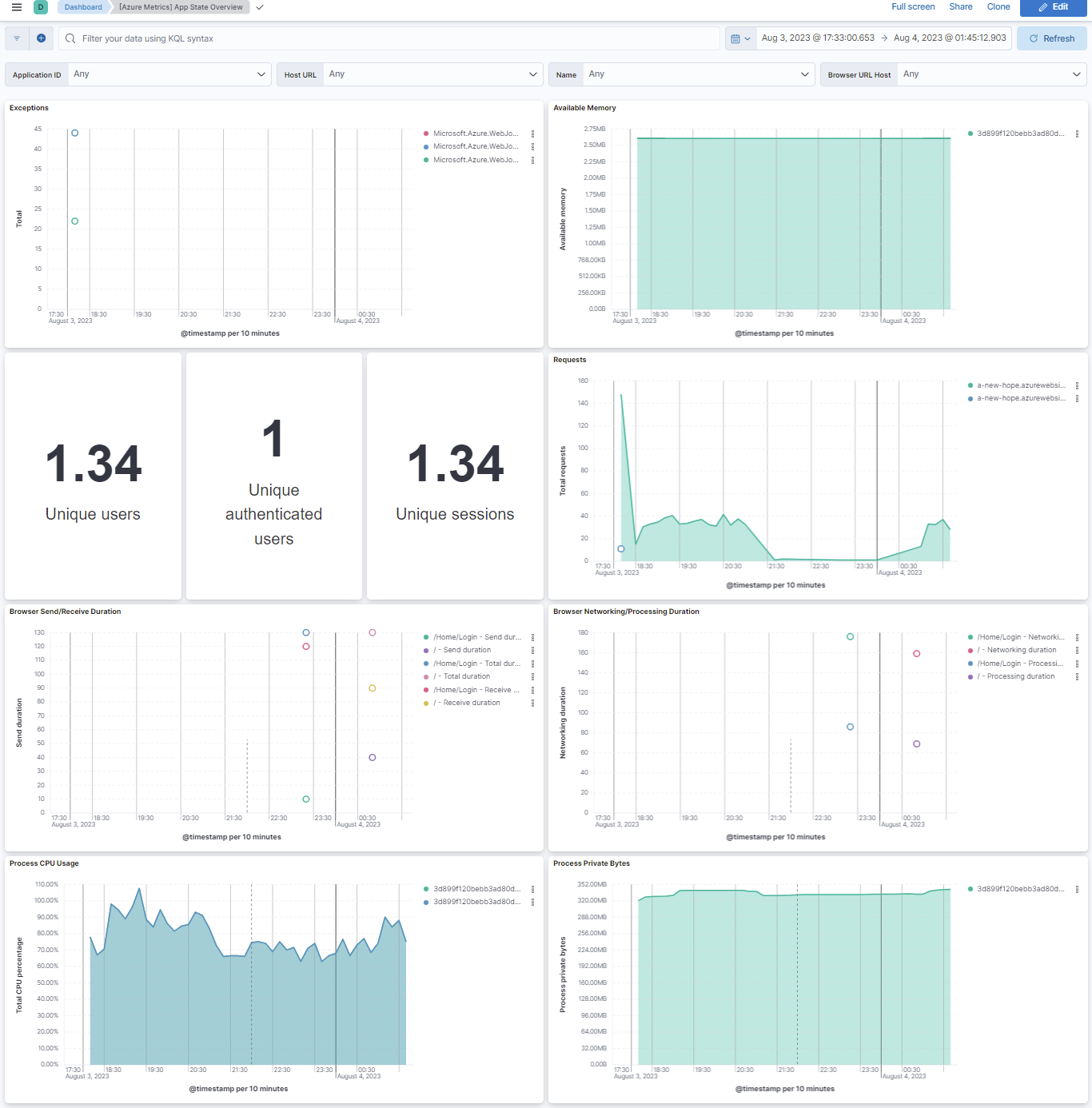
This integration includes one or more Kibana dashboards that visualizes the data collected by the integration. The screenshots below illustrate how the ingested data is displayed.
Changelog
| Version | Details | Minimum Kibana version |
|---|---|---|
| 1.14.0 | Enhancement (View pull request) Update Elastic Managed integration documentation to the current wording and docs links. |
9.3.3 9.2.8 8.19.14 |
| 1.13.0 | Enhancement (View pull request) Publish Agentless to Elastic Managed integrations name change. |
9.3.3 9.2.8 8.19.14 |
| 1.12.0 | Enhancement (View pull request) Use new release field for agentless deployment mode to establish as beta. |
9.3.3 9.2.8 8.19.14 |
| 1.11.0 | Enhancement (View pull request) Add support for agentless deployment. |
9.3.3 9.2.8 8.19.14 |
| 1.10.0 | Enhancement (View pull request) Add support for Entra ID client secret authentication. New optional parameters auth_type, client_id, client_secret, and tenant_id have been added. api_key is now optional. |
9.3.3 9.2.8 8.19.14 |
| 1.9.1 | Enhancement (View pull request) Fix the H1 for SEO purpose. |
9.0.0 8.13.0 |
| 1.9.0 | Enhancement (View pull request) Add a flag fips_compatible to control whether the package is allowed in the ECH FedRAMP High environment. |
9.0.0 8.13.0 |
| 1.8.0 | Enhancement (View pull request) Add support for Kibana 9.0.0. |
9.0.0 8.13.0 |
| 1.7.1 | Enhancement (View pull request) Add missing category. |
8.13.0 |
| 1.7.0 | Enhancement (View pull request) Add processor support for app_insights and app_state data streams. |
8.13.0 |
| 1.6.0 | Enhancement (View pull request) ECS version updated to 8.11.0. Update the kibana constraint to ^8.13.0. Modified the field definitions to remove ECS fields made redundant by the ecs@mappings component template. |
8.13.0 |
| 1.5.0 | Enhancement (View pull request) Add global filter for dashboards to improve performance. |
8.12.0 |
| 1.4.0 | Enhancement (View pull request) Enable 'secret' for the sensitive fields. |
8.12.0 |
| 1.3.0 | Enhancement (View pull request) Enable time series data for metrics data streams. This dramatically reduces storage for metrics and is expected to progressively improve query performance. For more details, see https://www.elastic.co/guide/en/elasticsearch/reference/current/tsds.html. |
8.12.0 |
| 1.2.3 | Bug fix (View pull request) Rename the app insights dimensions fingerprint field to prevent it from being nested within azure.dimensions. |
8.9.0 |
| 1.2.2 | Enhancement (View pull request) Migrate App State Overview dashboard visualizations to lens. |
8.9.0 |
| 1.2.1 | Enhancement (View pull request) Add dimension and metric_type mappings to the app_state datastream |
8.9.0 |
| 1.2.0 | Enhancement (View pull request) Update the package format_version to 3.0.0. |
8.9.0 |
| 1.1.0 | Enhancement (View pull request) Add app_insights dimensions and metric_type for metrics field. |
8.9.0 |
| 1.0.6 | Enhancement (View pull request) Fix mappings of tags and dimensions |
8.0.0 7.14.0 |
| 1.0.5 | Enhancement (View pull request) Added categories and/or subcategories. |
8.0.0 7.14.0 |
| 1.0.4 | Bug fix (View pull request) Fix misspelled field name in the app_state data stream. |
8.0.0 7.14.0 |
| 1.0.3 | Enhancement (View pull request) Updated Readme |
8.0.0 7.14.0 |
| 1.0.2 | Enhancement (View pull request) Add documentation for multi-fields |
— |
| 1.0.1 | Enhancement (View pull request) Remove beta release tag from data streams |
8.0.0 7.14.0 |
| 1.0.0 | Enhancement (View pull request) Move azure_application_insights package to GA |
8.0.0 7.14.0 |
| 0.3.1 | Enhancement (View pull request) Update to ECS 8.0 |
— |
| 0.3.0 | Enhancement (View pull request) Support Kibana 8.0 |
8.0.0 7.14.0 |
| 0.2.1 | Enhancement (View pull request) Uniform with guidelines |
— |
| 0.2.0 | Enhancement (View pull request) Update to ECS 1.12.0 |
— |
| 0.1.0 | Enhancement (View pull request) initial release |
7.14.0 |