Nginx Ingress Controller (Kubernetes)
Elastic Cloud Serverless projects are autoscaled environments, fully managed by Elastic and available on Elastic Cloud. Availability This functionality is generally available and ready for production usage. Elastic Cloud Serverless projects are autoscaled environments, fully managed by Elastic and available on Elastic Cloud. Availability This functionality is generally available and ready for production usage. The Elastic Stack includes Elastic's core products such as Elasticsearch, Kibana, Logstash, and Beats. Availability This functionality is generally available and ready for production usage. Unless stated otherwise on the page, this functionality is available when your Elastic Stack is deployed on Elastic Cloud Hosted, Elastic Cloud Enterprise, Elastic Cloud on Kubernetes, and self-managed environments. This documentation corresponds to the latest patch available for each minor version. If you're not using the latest patch, check the release notes for changes.
Serverless Observability
Generally available
Serverless Security
Generally available
Stack
9.0+
Generally available since 9.0
| Version | 1.14.3 (View all) |
| Subscription level What's this? |
Basic |
| Developed by What's this? |
Elastic |
| Ingestion method(s) | File |
| Minimum Kibana version(s) | 9.0.0 8.14.0 |
This integration periodically fetches logs from Nginx Ingress Controller instances. It can parse access and error logs created by the ingress.
The integration was tested with the Nginx Ingress Controller v0.30.0 and v0.40.2. The log format is described here.
The access data stream collects the Nginx Ingress Controller access logs.
Example
{
    "@timestamp": "2020-02-07T11:48:51.000Z",
    "agent": {
        "ephemeral_id": "e54e6f78-d64d-4f55-ae90-25511c38de57",
        "id": "9878d192-22ad-49b6-a6c2-9959b0815d04",
        "name": "docker-fleet-agent",
        "type": "filebeat",
        "version": "8.0.0-beta1"
    },
    "data_stream": {
        "dataset": "nginx_ingress_controller.access",
        "namespace": "ep",
        "type": "logs"
    },
    "ecs": {
        "version": "8.0.0"
    },
    "elastic_agent": {
        "id": "9878d192-22ad-49b6-a6c2-9959b0815d04",
        "snapshot": false,
        "version": "8.0.0-beta1"
    },
    "event": {
        "agent_id_status": "verified",
        "category": [
            "web"
        ],
        "created": "2022-01-12T03:28:00.188Z",
        "dataset": "nginx_ingress_controller.access",
        "ingested": "2022-01-12T03:28:06Z",
        "kind": "event",
        "outcome": "success",
        "timezone": "+00:00",
        "type": [
            "info"
        ]
    },
    "host": {
        "architecture": "x86_64",
        "containerized": true,
        "hostname": "docker-fleet-agent",
        "id": "4ccba669f0df47fa3f57a9e4169ae7f1",
        "ip": [
            "172.18.0.4"
        ],
        "mac": [
            "02:42:ac:12:00:04"
        ],
        "name": "docker-fleet-agent",
        "os": {
            "codename": "Core",
            "family": "redhat",
            "kernel": "5.11.0-44-generic",
            "name": "CentOS Linux",
            "platform": "centos",
            "type": "linux",
            "version": "7 (Core)"
        }
    },
    "http": {
        "request": {
            "method": "POST"
        },
        "response": {
            "body": {
                "bytes": 59
            },
            "status_code": 200
        },
        "version": "1.1"
    },
    "input": {
        "type": "log"
    },
    "log": {
        "file": {
            "path": "/tmp/service_logs/ingress.log"
        },
        "offset": 0
    },
    "nginx_ingress_controller": {
        "access": {
            "http": {
                "request": {
                    "id": "529a007902362a5f51385a5fa7049884",
                    "length": 89,
                    "time": 0.001
                }
            },
            "remote_ip_list": [
                "192.168.64.1"
            ],
            "upstream": {
                "alternative_name": "",
                "ip": "172.17.0.5",
                "name": "default-web-8080",
                "port": 8080,
                "response": {
                    "length": 59,
                    "status_code": 200,
                    "time": 0
                }
            }
        }
    },
    "related": {
        "ip": [
            "192.168.64.1"
        ]
    },
    "source": {
        "address": "192.168.64.1",
        "ip": "192.168.64.1"
    },
    "tags": [
        "nginx-ingress-controller-access"
    ],
    "url": {
        "original": "/products"
    },
    "user_agent": {
        "device": {
            "name": "Other"
        },
        "name": "curl",
        "original": "curl/7.54.0",
        "version": "7.54.0"
    }
}
Exported fields
| Field | Description | Type |
|---|---|---|
| @timestamp | Event timestamp. | date |
| cloud.account.id | The cloud account or organization id used to identify different entities in a multi-tenant environment. Examples: AWS account id, Google Cloud ORG Id, or other unique identifier. | keyword |
| cloud.availability_zone | Availability zone in which this host is running. | keyword |
| cloud.image.id | Image ID for the cloud instance. | keyword |
| cloud.instance.id | Instance ID of the host machine. | keyword |
| cloud.instance.name | Instance name of the host machine. | keyword |
| cloud.machine.type | Machine type of the host machine. | keyword |
| cloud.project.id | Name of the project in Google Cloud. | keyword |
| cloud.provider | Name of the cloud provider. Example values are aws, azure, gcp, or digitalocean. | keyword |
| cloud.region | Region in which this host is running. | keyword |
| container.id | Unique container id. | keyword |
| container.image.name | Name of the image the container was built on. | keyword |
| container.labels | Image labels. | object |
| container.name | Container name. | keyword |
| data_stream.dataset | Data stream dataset. | constant_keyword |
| data_stream.namespace | Data stream namespace. | constant_keyword |
| data_stream.type | Data stream type. | constant_keyword |
| ecs.version | ECS version this event conforms to. ecs.version is a required field and must exist in all events. When querying across multiple indices -- which may conform to slightly different ECS versions -- this field lets integrations adjust to the schema version of the events. |
keyword |
| event.created | event.created contains the date/time when the event was first read by an agent, or by your pipeline. This field is distinct from @timestamp in that @timestamp typically contain the time extracted from the original event. In most situations, these two timestamps will be slightly different. The difference can be used to calculate the delay between your source generating an event, and the time when your agent first processed it. This can be used to monitor your agent's or pipeline's ability to keep up with your event source. In case the two timestamps are identical, @timestamp should be used. | date |
| event.dataset | Event dataset | constant_keyword |
| event.module | Event module | constant_keyword |
| host.architecture | Operating system architecture. | keyword |
| host.containerized | If the host is a container. | boolean |
| host.domain | Name of the domain of which the host is a member. For example, on Windows this could be the host's Active Directory domain or NetBIOS domain name. For Linux this could be the domain of the host's LDAP provider. | keyword |
| host.hostname | Hostname of the host. It normally contains what the hostname command returns on the host machine. |
keyword |
| host.id | Unique host id. As hostname is not always unique, use values that are meaningful in your environment. Example: The current usage of beat.name. |
keyword |
| host.ip | Host ip addresses. | ip |
| host.mac | Host mac addresses. | keyword |
| host.name | Name of the host. It can contain what hostname returns on Unix systems, the fully qualified domain name, or a name specified by the user. The sender decides which value to use. |
keyword |
| host.os.build | OS build information. | keyword |
| host.os.codename | OS codename, if any. | keyword |
| host.os.family | OS family (such as redhat, debian, freebsd, windows). | keyword |
| host.os.kernel | Operating system kernel version as a raw string. | keyword |
| host.os.name | Operating system name, without the version. | keyword |
| host.os.name.text | Multi-field of host.os.name. |
text |
| host.os.platform | Operating system platform (such centos, ubuntu, windows). | keyword |
| host.os.version | Operating system version as a raw string. | keyword |
| host.type | Type of host. For Cloud providers this can be the machine type like t2.medium. If vm, this could be the container, for example, or other information meaningful in your environment. |
keyword |
| http.request.bytes | Total size in bytes of the request (body and headers). | long |
| http.request.id | A unique identifier for each HTTP request to correlate logs between clients and servers in transactions. The id may be contained in a non-standard HTTP header, such as X-Request-ID or X-Correlation-ID. |
keyword |
| http.request.method | HTTP request method. The value should retain its casing from the original event. For example, GET, get, and GeT are all considered valid values for this field. |
keyword |
| http.request.referrer | Referrer for this HTTP request. | keyword |
| http.response.body.bytes | Size in bytes of the response body. | long |
| http.response.status_code | HTTP response status code. | long |
| http.version | HTTP version. | keyword |
| input.type | Input type | keyword |
| log.file.device_id | ID of the device containing the filesystem where the file resides. | keyword |
| log.file.fingerprint | The sha256 fingerprint identity of the file when fingerprinting is enabled. | keyword |
| log.file.idxhi | The high-order part of a unique identifier that is associated with a file. (Windows-only) | keyword |
| log.file.idxlo | The low-order part of a unique identifier that is associated with a file. (Windows-only) | keyword |
| log.file.inode | Inode number of the log file. | keyword |
| log.file.path | Full path to the log file this event came from, including the file name. It should include the drive letter, when appropriate. If the event wasn't read from a log file, do not populate this field. | keyword |
| log.file.vol | The serial number of the volume that contains a file. (Windows-only) | keyword |
| log.offset | Log offset | long |
| nginx_ingress_controller.access.http.request.id | The randomly generated ID of the request | text |
| nginx_ingress_controller.access.http.request.length | The request length (including request line, header, and request body) | long |
| nginx_ingress_controller.access.http.request.time | Time elapsed since the first bytes were read from the client | double |
| nginx_ingress_controller.access.remote_ip_list | An array of remote IP addresses. It is a list because it is common to include, besides the client IP address, IP addresses from headers like X-Forwarded-For. Real source IP is restored to source.ip. |
keyword |
| nginx_ingress_controller.access.upstream.alternative_name | The name of the alternative upstream. | text |
| nginx_ingress_controller.access.upstream.ip | The IP address of the upstream server. If several servers were contacted during request processing, their addresses are separated by commas. | ip |
| nginx_ingress_controller.access.upstream.name | The name of the upstream. | keyword |
| nginx_ingress_controller.access.upstream.port | The port of the upstream server. | long |
| nginx_ingress_controller.access.upstream.response.length | The length of the response obtained from the upstream server | long |
| nginx_ingress_controller.access.upstream.response.length_list | An array of upstream response lengths. It is a list because it is common that several upstream servers were contacted during request processing. | keyword |
| nginx_ingress_controller.access.upstream.response.status_code | The status code of the response obtained from the upstream server | long |
| nginx_ingress_controller.access.upstream.response.status_code_list | An array of upstream response status codes. It is a list because it is common that several upstream servers were contacted during request processing. | keyword |
| nginx_ingress_controller.access.upstream.response.time | The time spent on receiving the response from the upstream server as seconds with millisecond resolution | double |
| nginx_ingress_controller.access.upstream.response.time_list | An array of upstream response durations. It is a list because it is common that several upstream servers were contacted during request processing. | keyword |
| nginx_ingress_controller.access.upstream_address_list | An array of the upstream addresses. It is a list because it is common that several upstream servers were contacted during request processing. | keyword |
| related.ip | All of the IPs seen on your event. | ip |
| related.user | All the user names or other user identifiers seen on the event. | keyword |
| source.address | Some event source addresses are defined ambiguously. The event will sometimes list an IP, a domain or a unix socket. You should always store the raw address in the .address field. Then it should be duplicated to .ip or .domain, depending on which one it is. |
keyword |
| source.as.number | Unique number allocated to the autonomous system. The autonomous system number (ASN) uniquely identifies each network on the Internet. | long |
| source.as.organization.name | Organization name. | keyword |
| source.as.organization.name.text | Multi-field of source.as.organization.name. |
match_only_text |
| source.geo.city_name | City name. | keyword |
| source.geo.continent_name | Name of the continent. | keyword |
| source.geo.country_iso_code | Country ISO code. | keyword |
| source.geo.country_name | Country name. | keyword |
| source.geo.location | Longitude and latitude. | geo_point |
| source.geo.region_iso_code | Region ISO code. | keyword |
| source.geo.region_name | Region name. | keyword |
| source.ip | IP address of the source (IPv4 or IPv6). | ip |
| tags | List of keywords used to tag each event. | keyword |
| url.domain | Domain of the url, such as "www.elastic.co". In some cases a URL may refer to an IP and/or port directly, without a domain name. In this case, the IP address would go to the domain field. If the URL contains a literal IPv6 address enclosed by [ and ] (IETF RFC 2732), the [ and ] characters should also be captured in the domain field. |
keyword |
| url.extension | The field contains the file extension from the original request url, excluding the leading dot. The file extension is only set if it exists, as not every url has a file extension. The leading period must not be included. For example, the value must be "png", not ".png". Note that when the file name has multiple extensions (example.tar.gz), only the last one should be captured ("gz", not "tar.gz"). | keyword |
| url.full | If full URLs are important to your use case, they should be stored in url.full, whether this field is reconstructed or present in the event source. |
wildcard |
| url.full.text | Multi-field of url.full. |
match_only_text |
| url.original | Unmodified original url as seen in the event source. Note that in network monitoring, the observed URL may be a full URL, whereas in access logs, the URL is often just represented as a path. This field is meant to represent the URL as it was observed, complete or not. | wildcard |
| url.original.text | Multi-field of url.original. |
match_only_text |
| url.path | Path of the request, such as "/search". | wildcard |
| url.query | The query field describes the query string of the request, such as "q=elasticsearch". The ? is excluded from the query string. If a URL contains no ?, there is no query field. If there is a ? but no query, the query field exists with an empty string. The exists query can be used to differentiate between the two cases. |
keyword |
| url.scheme | Scheme of the request, such as "https". Note: The : is not part of the scheme. |
keyword |
| user.name | Short name or login of the user. | keyword |
| user.name.text | Multi-field of user.name. |
match_only_text |
| user_agent.device.name | Name of the device. | keyword |
| user_agent.name | Name of the user agent. | keyword |
| user_agent.original | Unparsed user_agent string. | keyword |
| user_agent.original.text | Multi-field of user_agent.original. |
match_only_text |
| user_agent.os.full | Operating system name, including the version or code name. | keyword |
| user_agent.os.full.text | Multi-field of user_agent.os.full. |
match_only_text |
| user_agent.os.name | Operating system name, without the version. | keyword |
| user_agent.os.name.text | Multi-field of user_agent.os.name. |
match_only_text |
| user_agent.os.version | Operating system version as a raw string. | keyword |
| user_agent.version | Version of the user agent. | keyword |
The error data stream collects the Nginx Ingress Controller error logs.
Example
{
    "@timestamp": "2022-01-12T03:31:51.309672Z",
    "agent": {
        "ephemeral_id": "fb7ef32a-6061-4dfa-a2c0-d885b7470e0d",
        "id": "9878d192-22ad-49b6-a6c2-9959b0815d04",
        "name": "docker-fleet-agent",
        "type": "filebeat",
        "version": "8.0.0-beta1"
    },
    "data_stream": {
        "dataset": "nginx_ingress_controller.error",
        "namespace": "ep",
        "type": "logs"
    },
    "ecs": {
        "version": "8.0.0"
    },
    "elastic_agent": {
        "id": "9878d192-22ad-49b6-a6c2-9959b0815d04",
        "snapshot": false,
        "version": "8.0.0-beta1"
    },
    "event": {
        "agent_id_status": "verified",
        "category": [
            "web"
        ],
        "created": "2022-01-12T03:32:09.037Z",
        "dataset": "nginx_ingress_controller.error",
        "ingested": "2022-01-12T03:32:10Z",
        "kind": "event",
        "timezone": "+00:00",
        "type": [
            "info"
        ]
    },
    "host": {
        "architecture": "x86_64",
        "containerized": true,
        "hostname": "docker-fleet-agent",
        "id": "4ccba669f0df47fa3f57a9e4169ae7f1",
        "ip": [
            "172.18.0.4"
        ],
        "mac": [
            "02:42:ac:12:00:04"
        ],
        "name": "docker-fleet-agent",
        "os": {
            "codename": "Core",
            "family": "redhat",
            "kernel": "5.11.0-44-generic",
            "name": "CentOS Linux",
            "platform": "centos",
            "type": "linux",
            "version": "7 (Core)"
        }
    },
    "input": {
        "type": "log"
    },
    "log": {
        "file": {
            "path": "/tmp/service_logs/error.log"
        },
        "level": "W",
        "offset": 361
    },
    "message": "Neither --kubeconfig nor --master was specified.  Using the inClusterConfig.  This might not work.",
    "nginx_ingress_controller": {
        "error": {
            "source": {
                "file": "client_config.go",
                "line_number": 608
            },
            "thread_id": 8
        }
    },
    "tags": [
        "nginx-ingress-controller-error"
    ]
}
Exported fields
| Field | Description | Type |
|---|---|---|
| @timestamp | Event timestamp. | date |
| cloud.account.id | The cloud account or organization id used to identify different entities in a multi-tenant environment. Examples: AWS account id, Google Cloud ORG Id, or other unique identifier. | keyword |
| cloud.availability_zone | Availability zone in which this host is running. | keyword |
| cloud.image.id | Image ID for the cloud instance. | keyword |
| cloud.instance.id | Instance ID of the host machine. | keyword |
| cloud.instance.name | Instance name of the host machine. | keyword |
| cloud.machine.type | Machine type of the host machine. | keyword |
| cloud.project.id | Name of the project in Google Cloud. | keyword |
| cloud.provider | Name of the cloud provider. Example values are aws, azure, gcp, or digitalocean. | keyword |
| cloud.region | Region in which this host is running. | keyword |
| container.id | Unique container id. | keyword |
| container.image.name | Name of the image the container was built on. | keyword |
| container.labels | Image labels. | object |
| container.name | Container name. | keyword |
| data_stream.dataset | Data stream dataset. | constant_keyword |
| data_stream.namespace | Data stream namespace. | constant_keyword |
| data_stream.type | Data stream type. | constant_keyword |
| ecs.version | ECS version this event conforms to. ecs.version is a required field and must exist in all events. When querying across multiple indices -- which may conform to slightly different ECS versions -- this field lets integrations adjust to the schema version of the events. |
keyword |
| event.dataset | Event dataset | constant_keyword |
| event.module | Event module | constant_keyword |
| host.architecture | Operating system architecture. | keyword |
| host.containerized | If the host is a container. | boolean |
| host.domain | Name of the domain of which the host is a member. For example, on Windows this could be the host's Active Directory domain or NetBIOS domain name. For Linux this could be the domain of the host's LDAP provider. | keyword |
| host.hostname | Hostname of the host. It normally contains what the hostname command returns on the host machine. |
keyword |
| host.id | Unique host id. As hostname is not always unique, use values that are meaningful in your environment. Example: The current usage of beat.name. |
keyword |
| host.ip | Host ip addresses. | ip |
| host.mac | Host mac addresses. | keyword |
| host.name | Name of the host. It can contain what hostname returns on Unix systems, the fully qualified domain name, or a name specified by the user. The sender decides which value to use. |
keyword |
| host.os.build | OS build information. | keyword |
| host.os.codename | OS codename, if any. | keyword |
| host.os.family | OS family (such as redhat, debian, freebsd, windows). | keyword |
| host.os.kernel | Operating system kernel version as a raw string. | keyword |
| host.os.name | Operating system name, without the version. | keyword |
| host.os.name.text | Multi-field of host.os.name. |
text |
| host.os.platform | Operating system platform (such centos, ubuntu, windows). | keyword |
| host.os.version | Operating system version as a raw string. | keyword |
| host.type | Type of host. For Cloud providers this can be the machine type like t2.medium. If vm, this could be the container, for example, or other information meaningful in your environment. |
keyword |
| input.type | Input type | keyword |
| log.file.device_id | ID of the device containing the filesystem where the file resides. | keyword |
| log.file.fingerprint | The sha256 fingerprint identity of the file when fingerprinting is enabled. | keyword |
| log.file.idxhi | The high-order part of a unique identifier that is associated with a file. (Windows-only) | keyword |
| log.file.idxlo | The low-order part of a unique identifier that is associated with a file. (Windows-only) | keyword |
| log.file.inode | Inode number of the log file. | keyword |
| log.file.path | Full path to the log file this event came from, including the file name. It should include the drive letter, when appropriate. If the event wasn't read from a log file, do not populate this field. | keyword |
| log.file.vol | The serial number of the volume that contains a file. (Windows-only) | keyword |
| log.flags | Flags for the log file. | keyword |
| log.level | Original log level of the log event. If the source of the event provides a log level or textual severity, this is the one that goes in log.level. If your source doesn't specify one, you may put your event transport's severity here (e.g. Syslog severity). Some examples are warn, err, i, informational. |
keyword |
| log.offset | Log offset | long |
| message | For log events the message field contains the log message, optimized for viewing in a log viewer. For structured logs without an original message field, other fields can be concatenated to form a human-readable summary of the event. If multiple messages exist, they can be combined into one message. | match_only_text |
| nginx_ingress_controller.error.source.file | Source file | keyword |
| nginx_ingress_controller.error.source.line_number | Source line number | long |
| nginx_ingress_controller.error.thread_id | Thread ID | long |
| tags | List of keywords used to tag each event. | keyword |
Ingress Controller is built around the Kubernetes Ingress resource, using a ConfigMap to store the NGINX configuration. Hence a k8s cluster is required before having Ingress Controller up and runnning. Docs: https://kubernetes.github.io/ingress-nginx/
- Setup a k8s cluster.
- Setup ingress controller following https://kubernetes.io/docs/tasks/access-application-cluster/ingress-minikube/
- Redirect pods' logs to a temporary file:
kubectl -n kube-system logs -f nginx-ingress-controller-6fc5bcc8c9-zm8zv >> /tmp/ingresspod - Configure Beats module:
- module: nginx
  # Ingress-nginx controller logs. This is disabled by default. It could be used in Kubernetes environments to parse ingress-nginx logs
  ingress_controller:
    enabled: true

    # Set custom paths for the log files. If left empty,
    # Filebeat will choose the paths depending on your OS.
    var.paths: ["/tmp/ingresspod"]
- Setup pipelines and dashboards in ES
- Start Filebeat
- Produce traffic:
# visit `http://hello-world.info/v2` and `http://hello-world.info` from different browser engines
# use curl and wget to access the pages with different http words ie: curl -d "param1=value1¶m2=value2" -X GET hello-world.info
- Use the
Quick startguide under https://kubernetes.github.io/ingress-nginx/deploy/ and then local testing example
kubectl apply -f https://raw.githubusercontent.com/kubernetes/ingress-nginx/controller-v1.3.1/deploy/static/provider/cloud/deploy.yaml

kubectl create deployment demo --image=httpd --port=80
kubectl expose deployment demo

kubectl create ingress demo-localhost --class=nginx \
  --rule="demo.localdev.me/*=demo:80"

kubectl port-forward --namespace=ingress-nginx service/ingress-nginx-controller 8080:80
Produce Traffic by visiting: http://demo.localdev.me:8080/
demo.localdev.meis DNS defaulting to localhost reserved by AWS
If you want to configure ingress-nginx to output to json format use the following configuration in the ingress-nginx-controller
- Download manifest
wget https://raw.githubusercontent.com/kubernetes/ingress-nginx/controller-v1.3.1/deploy/static/provider/cloud/deploy.yaml
- Edit deploy.yaml
apiVersion: v1
data:
allow-snippet-annotations: "true"
log-format-escape-json: "true"
log-format-upstream: '{"timestamp": "$time_iso8601", "requestID": "$req_id", "proxyUpstreamName":
  "$proxy_upstream_name", "proxyAlternativeUpstreamName": "$proxy_alternative_upstream_name","upstreamStatus":
  "$upstream_status", "upstreamAddr": "$upstream_addr","httpRequest":{"requestMethod":
  "$request_method", "requestUrl": "$host$request_uri", "status": $status,"requestSize":
  "$request_length", "responseSize": "$upstream_response_length", "userAgent": "$http_user_agent",
  "remoteIp": "$remote_addr", "referer": "$http_referer", "latency": "$upstream_response_time s",
  "protocol":"$server_protocol"}}'
kind: ConfigMap
metadata:
labels:
  app.kubernetes.io/component: controller
  app.kubernetes.io/instance: ingress-nginx
  app.kubernetes.io/name: ingress-nginx
  app.kubernetes.io/part-of: ingress-nginx
  app.kubernetes.io/version: 1.3.1
name: ingress-nginx-controller
namespace: ingress-nginx
- Re apply manifest:
kubectl apply -f deploy.yaml
- Inspect logs
kubectl logs -n ingress-nginx ingress-nginx-controller-7bf78659d-2th2m -f

{"timestamp": "2022-09-07T09:36:15+00:00", "requestID": "92eea20d4058f5ee2b33f9366141101c", "proxyUpstreamName": "default-demo-80", "proxyAlternativeUpstreamName": "","upstreamStatus": "304", "upstreamAddr": "10.244.0.8:80","httpRequest":{"requestMethod": "GET", "requestUrl": "demo.localdev.me/", "status": 304,"requestSize": "565", "responseSize": "0", "userAgent": "Mozilla/5.0 (Macintosh; Intel Mac OS X 10_15_7) AppleWebKit/537.36 (KHTML, like Gecko) Chrome/105.0.0.0 Safari/537.36", "remoteIp": "127.0.0.1", "referer": "", "latency": "0.002 s", "protocol":"HTTP/1.1"}}
 {"timestamp": "2022-09-07T09:36:37+00:00", "requestID": "b5a49957c5b0861b7c55b069cef7248f", "proxyUpstreamName": "default-demo-80", "proxyAlternativeUpstreamName": "","upstreamStatus": "404", "upstreamAddr": "10.244.0.8:80","httpRequest":{"requestMethod": "GET", "requestUrl": "demo.localdev.me/fdsfdsfads", "status": 404,"requestSize": "464", "responseSize": "196", "userAgent": "Mozilla/5.0 (Macintosh; Intel Mac OS X 10_15_7) AppleWebKit/537.36 (KHTML, like Gecko) Chrome/105.0.0.0 Safari/537.36", "remoteIp": "127.0.0.1", "referer": "", "latency": "0.001 s", "protocol":"HTTP/1.1"}}
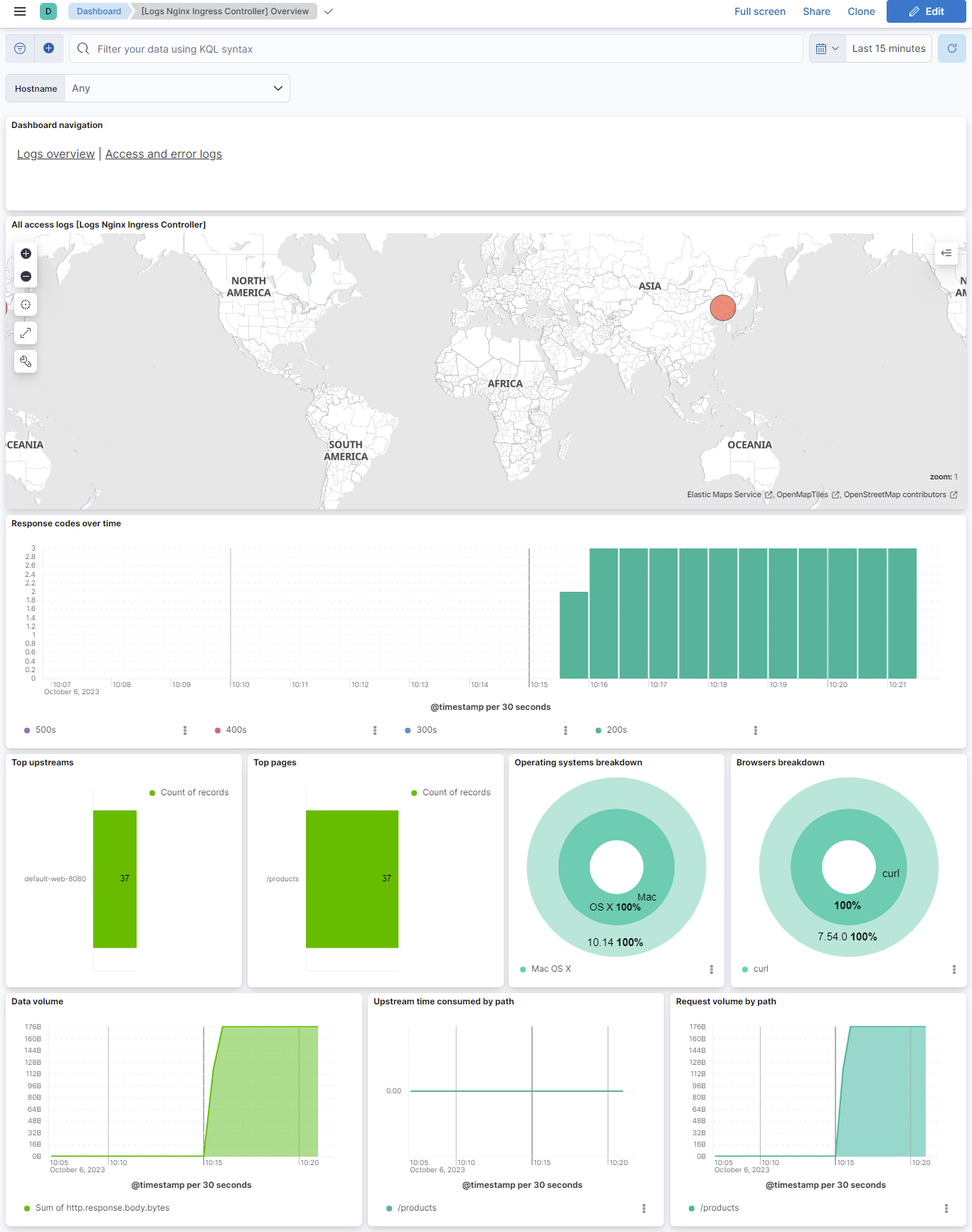
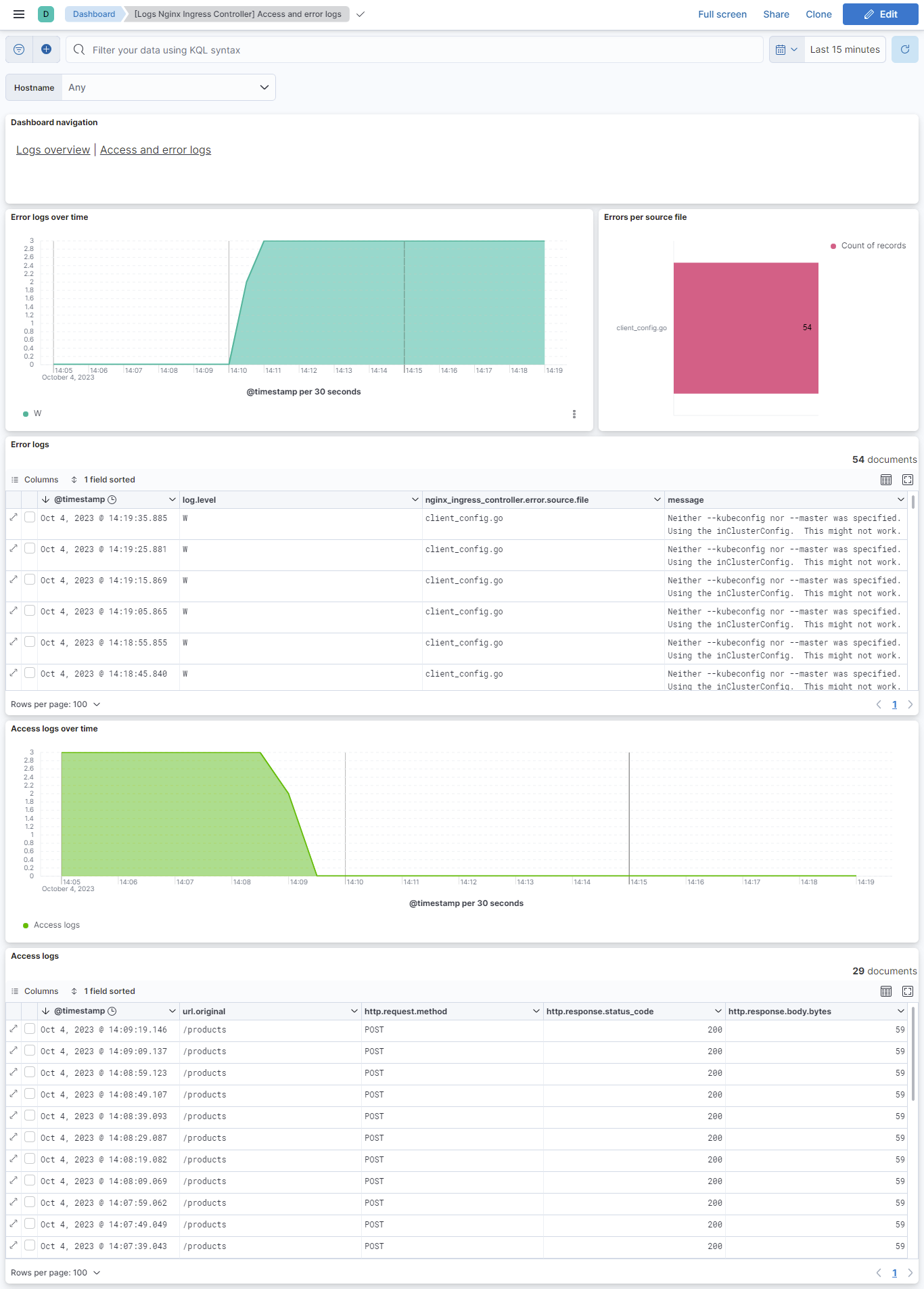
This integration includes one or more Kibana dashboards that visualizes the data collected by the integration. The screenshots below illustrate how the ingested data is displayed.
Changelog
| Version | Details | Minimum Kibana version |
|---|---|---|
| 1.14.3 | Enhancement (View pull request) Remove the nginx group so Nginx Ingress Controller shows as its own integration tile. |
9.0.0 8.14.0 |
| 1.14.2 | Enhancement (View pull request) Add group field to package manifest. |
9.0.0 8.14.0 |
| 1.14.1 | Enhancement (View pull request) Update package title and description to improve clarity of use. |
9.0.0 8.14.0 |
| 1.14.0 | Enhancement (View pull request) Add fingerprint settings for container-logs being scraped after containerd rotating logs. |
9.0.0 8.14.0 |
| 1.13.0 | Enhancement (View pull request) Add filestream input ids in the data streams. WARNING Updating to this version will cause logs to be re-ingested! |
9.0.0 8.14.0 |
| 1.12.0 | Enhancement (View pull request) Allow @custom pipeline access to event.original without setting preserve_original_event. |
9.0.0 8.14.0 |
| 1.11.0 | Enhancement (View pull request) Add support for Kibana 9.0.0 |
9.0.0 8.14.0 |
| 1.10.1 | Bug fix (View pull request) Fix nginx_ingress_controller.access.remote_ip_list field mapping. |
8.14.0 |
| 1.10.0 | Enhancement (View pull request) Migrate to format_version v3. |
8.14.0 |
| 1.9.0 | Enhancement (View pull request) Add global filter on data_stream.dataset to improve performance. |
8.6.0 |
| 1.8.3 | Bug fix (View pull request) Fix ingest pipeline warnings |
8.6.0 |
| 1.8.2 | Enhancement (View pull request) Migrate Access and error logs dashboard visualizations to lens. |
8.6.0 |
| 1.8.1 | Enhancement (View pull request) Migrate Overview dashboard visualizations to lens. |
8.6.0 |
| 1.8.0 | Enhancement (View pull request) Adapt fields for changes in file system info |
8.6.0 |
| 1.7.3 | Bug fix (View pull request) Add null check to the rename processor |
8.6.0 |
| 1.7.2 | Bug fix (View pull request) Fix dashboard by replacing type for nginx_ingress_controller.access.upstream.name from text to keyword. |
8.6.0 |
| 1.7.1 | Enhancement (View pull request) Added categories and/or subcategories. |
8.6.0 |
| 1.7.0 | Enhancement (View pull request) Update ingress-nginx pod matching condition |
8.6.0 |
| 1.6.0 | Enhancement (View pull request) Work with logs from /var/log/containers |
8.0.0 |
| 1.5.0 | Enhancement (View pull request) Sync with Beats module & update to ECS 8.4.0 |
8.0.0 |
| 1.4.1 | Enhancement (View pull request) Handle multiple upstream servers and IPv6 addresses |
8.0.0 |
| 1.4.0 | Enhancement (View pull request) Migration of tile map to map object in dashboards |
8.0.0 |
| 1.3.1 | Enhancement (View pull request) Add documentation for multi-fields |
— |
| 1.3.0 | Enhancement (View pull request) Update to ECS 8.0 |
— |
| 1.2.2 | Bug fix (View pull request) Regenerate test files using the new GeoIP database |
— |
| 1.2.1 | Bug fix (View pull request) Change test public IPs to the supported subset |
— |
| 1.2.0 | Enhancement (View pull request) Release nginx_ingress_controller package for v8.0.0 |
8.0.0 7.14.0 |
| 1.1.2 | Enhancement (View pull request) Uniform with guidelines |
— |
| 1.1.1 | Bug fix (View pull request) Fix logic that checks for the 'forwarded' tag |
— |
| 1.1.0 | Enhancement (View pull request) Update to ECS 1.12.0 |
— |
| 1.0.0 | Enhancement (View pull request) Release Nginx Ingress Controller as GA |
7.14.0 |
| 0.3.2 | Enhancement (View pull request) Convert to generated ECS fields |
— |
| 0.3.1 | Enhancement (View pull request) update to ECS 1.11.0 |
— |
| 0.3.0 | Enhancement (View pull request) Update integration description |
— |
| 0.2.0 | Enhancement (View pull request) Set "event.module" and "event.dataset" |
— |
| 0.1.1 | Enhancement (View pull request) Update ECS version to 1.10.0 and add event.original options |
— |
| 0.1.0 | Bug fix (View pull request) Fix stack compatability |
— |
| 0.0.3 | Enhancement (View pull request) Updating package owner |
— |
| 0.0.1 | Enhancement (View pull request) initial release |
— |