Sysdig Integration
Elastic Cloud Serverless projects are autoscaled environments, fully managed by Elastic and available on Elastic Cloud. Availability This functionality is generally available and ready for production usage. Elastic Cloud Serverless projects are autoscaled environments, fully managed by Elastic and available on Elastic Cloud. Availability This functionality is generally available and ready for production usage. The Elastic Stack includes Elastic's core products such as Elasticsearch, Kibana, Logstash, and Beats. Availability This functionality is generally available and ready for production usage. Unless stated otherwise on the page, this functionality is available when your Elastic Stack is deployed on Elastic Cloud Hosted, Elastic Cloud Enterprise, Elastic Cloud on Kubernetes, and self-managed environments. This documentation corresponds to the latest patch available for each minor version. If you're not using the latest patch, check the release notes for changes.
Serverless Observability
Generally available
Serverless Security
Generally available
Stack
9.3+
Generally available since 9.3
| Version | 2.8.0 (View all) |
| Managed integration release status | GA |
| Subscription level What's this? |
Basic |
| Developed by What's this? |
Elastic |
| Ingestion method(s) | API, Webhook |
| Minimum Kibana version(s) | 9.3.5 8.19.16 |
You can use this integration as an Elastic Managed integration on Elastic Cloud Hosted deployments running this version or later.
This integration allows for the shipping of Sysdig logs to Elastic for security, observability and organizational awareness. Logs can then be analyzed by using either the dashboard included with the integration or via the creation of custom dashboards within Kibana.
The Sysdig integration collects four types of logs:
Alerts The Alerts data stream collected by the Sysdig integration is comprised of Sysdig Alerts. See more details about Sysdig Alerts in Sysdig's Alerts Documentation. A complete list of potential fields used by this integration can be found in the Logs reference
Event The event data stream collected through the Sysdig integration consists of Sysdig Security Events. See more details about Security Events in Sysdig's Events Feed Documentation. It uses Sysdig's Next Gen API (standardized). You can access your regional documentation through the links here.
CSPM The CSPM data stream collected through the Sysdig integration consists of Sysdig compliance results. See more details about compliance results in Sysdig's Compliance documentation. It uses Sysdig's Current API (non-standardised). You can access your regional documentation through the links here.
Vulnerability The vulnerability data stream collected through the Sysdig integration consists of Sysdig vulnerability scan results. See more details about vulnerabilities in Sysdig's Vulnerability Management documentation. It uses Sysdig's Next Gen API (standardized). You can access your regional documentation through the links here.
For vulnerability data, Each interval fetches all available scan results from the configured stage. Currently, only one stage can be configured at a time. Users wishing to collect scan results from different stages must configure additional integrations for each desired stage.
Scan results are broken down into separate events for each package-vulnerability pair. If no vulnerability is found for a package, then only the package details will be included in the published event. If the scans contain no package information, then only the scan details will be included in the published event.
In detail, a package is included in one layer, which can be built upon several base images. Furthermore, a package can have multiple vulnerabilities, each of which can have multiple risk accepts.
Elastic Agent must be installed. For more details, check the Elastic Agent installation instructions.
Sysdig must be configured to output alerts to a supported output channel as defined in Setup. The system will only receive common fields output by Sysdig's rules, meaning that if a rule does not include a desired field the rule must be edited in Sysdig to add the field.
Elastic Managed integrations are only supported on Elastic Cloud Serverless and Elastic Cloud Hosted deployments. An Elastic Managed integration lets you ingest data from a cloud source while avoiding the orchestration, management, and maintenance associated with standard ingest infrastructure. Elastic runs the collector for you, so you can focus on your data instead of the infrastructure that collects it.
When using this integration as an Elastic Managed integration, only the following data streams are available: CSPM Compliance Results, Security Event, and Vulnerability. These data streams use inputs compatible with the Elastic Managed deployment mode. Other data streams (Sysdig) require the HTTP Endpoint input, which is not supported in the Elastic Managed deployment mode. To collect data from these data streams, use Elastic Agent.
For more information, refer to Elastic Managed integrations and the Elastic Managed integrations FAQ.
For step-by-step instructions on how to set up an integration, see the Getting started guide.
In order to capture alerts from Sysdig you must configure Sysdig to output Alerts as JSON via HTTP.
The HTTP input allows the Elastic Agent to receive Sysdig Alerts via HTTP webhook.
Required: To configure Sysdig to output JSON, you must set up as webhook notification channel as outlined in the Sysdig Documentation.
- Retrieve the API Token by following the Sysdig API Token Guide.
- The API URL varies by region. To determine the correct URL for your region, use the following guides:
- For Sysdig's Next Gen API, refer to the regional endpoints guide.
- For Sysdig's Current API, refer to the SaaS regions and IP ranges guide.
- In Kibana navigate to Management > Integrations.
- In "Search for integrations" top bar, search for
Sysdig. - Select the "Sysdig" integration from the search results.
- Select "Add Sysdig" to add the integration.
- Add all the required integration configuration parameters, including the URL, API Token, Interval, and Initial Interval, to enable data collection.
- Select "Save and continue" to save the integration.
Note:
- If you see an error saying
exceeded maximum number of CEL executionsduring data ingestion, it usually means a large volume of data is being processed for the selected time interval. To fix this, try increasing theMaximum Pages Per Intervalsetting in the configuration. - Users wishing to collect vulnerability scan results from multiple stages must configure individual integrations for each desired stage.
Sysdig alerts can contain a multitude of various fields pertaining to the type of activity on the host machine.
Example
{
    "@timestamp": "2025-09-05T09:52:47.801Z",
    "agent": {
        "ephemeral_id": "d928cbd8-51c9-4c02-b62f-f8d90890d9a9",
        "id": "58014837",
        "name": "elastic-agent-29811",
        "type": "filebeat",
        "version": "8.16.0"
    },
    "cloud": {
        "account": {
            "id": "289645096542"
        },
        "availability_zone": "us-central1-c",
        "instance": {
            "id": "648229130641697246",
            "name": "gke-cluster-gcp-demo-san-default-pool-66250c41-vd1o"
        },
        "machine": {
            "type": "e2-standard-4"
        },
        "project": {
            "id": "289645096542",
            "name": "alliances-chronicle"
        },
        "provider": "gcp",
        "region": "us-central1"
    },
    "container": {
        "id": "6949e5f10829"
    },
    "data_stream": {
        "dataset": "sysdig.alerts",
        "namespace": "25671",
        "type": "logs"
    },
    "ecs": {
        "version": "8.0.0"
    },
    "elastic_agent": {
        "id": "3f30e8c1-9a76-4e37-b8b8-aba6fc8ede5f",
        "snapshot": false,
        "version": "8.16.0"
    },
    "event": {
        "agent_id_status": "mismatch",
        "dataset": "sysdig.alerts",
        "id": "17dec715376910362c8c3f62a4ceda2e",
        "ingested": "2025-09-05T09:52:48Z",
        "kind": "alert",
        "provider": "syscall",
        "severity": 7,
        "timezone": "+00:00"
    },
    "host": {
        "id": "42:01:0a:80:00:05",
        "mac": [
            "42-01-0A-80-00-05"
        ],
        "name": "gke-cluster-gcp-demo-san-default-pool-66250c41-vd1o"
    },
    "input": {
        "type": "http_endpoint"
    },
    "log": {
        "syslog": {
            "severity": {
                "code": 7,
                "name": "debug"
            }
        }
    },
    "message": "Users management command userdel tmp_suid_user launched by pwsh on threatgen under user root (proc.name=userdel proc.args=tmp_suid_user fd.name=<NA> proc.cmdline=pwsh -c (./RunTests.ps1 STDIN.NETWORK DEV.SHM.EXEC T1048 RECON.FIND.SUID T1611.002 CONTAINER.ESCAPE.NSENTER CREDS.DUMP.MEMORY KILL.MALICIOUS.PROC LOAD.BPF.PROG Base64.PYTHON BASE64.CLI CONNECT.UNEXPECTED RECON.GPG SUBTERFUGE.LASTLOG LD.LINUX.EXEC LD.SO.PRELOAD USERFAULTFD.HANDLER RECON.LINPEAS PROOT.EXEC) proc.pname=pwsh gparent=containerd-shim ggparent=<NA> gggparent=<NA> container=container_id=6949e5f10829 container_name=threatgen evt.type=execve evt.arg.request=<NA> proc.pid=2140169 proc.cwd=/tmp/ proc.ppid=2140088 proc.pcmdline=pwsh -c (./RunTests.ps1 STDIN.NETWORK DEV.SHM.EXEC T1048 RECON.FIND.SUID T1611.002 CONTAINER.ESCAPE.NSENTER CREDS.DUMP.MEMORY KILL.MALICIOUS.PROC LOAD.BPF.PROG Base64.PYTHON BASE64.CLI CONNECT.UNEXPECTED RECON.GPG SUBTERFUGE.LASTLOG LD.LINUX.EXEC LD.SO.PRELOAD USERFAULTFD.HANDLER RECON.LINPEAS PROOT.EXEC) proc.sid=1 proc.exepath=/usr/sbin/userdel user.uid=0 user.loginuid=-1 user.loginname=<NA> user.name=root group.gid=0 group.name=root container.id=6949e5f10829 container.name=threatgen image=docker.io/dockerbadboy/art)",
    "orchestrator": {
        "cluster": {
            "name": "gke-alliances-demo-6"
        },
        "namespace": "default",
        "resource": {
            "name": "threatgen-c65cf6446-5s8kk",
            "parent": {
                "type": "deployment"
            }
        },
        "type": "kubernetes"
    },
    "rule": {
        "author": [
            "Sysdig"
        ],
        "category": "RULE_TYPE_FALCO",
        "name": "User Management Event Detected",
        "ruleset": "Sysdig Runtime Activity Logs",
        "version": "35"
    },
    "sysdig": {
        "agentId": 58014837,
        "category": "runtime",
        "containerId": "6949e5f10829",
        "content": {
            "fields": {
                "container.name": "threatgen",
                "proc.cmdline": "userdel tmp_suid_user",
                "proc.cwd": "/tmp/",
                "proc.exepath": "/usr/sbin/userdel",
                "proc.name": "userdel",
                "proc.pcmdline": "pwsh -c (./RunTests.ps1 STDIN.NETWORK DEV.SHM.EXEC T1048 RECON.FIND.SUID T1611.002 CONTAINER.ESCAPE.NSENTER CREDS.DUMP.MEMORY KILL.MALICIOUS.PROC LOAD.BPF.PROG Base64.PYTHON BASE64.CLI CONNECT.UNEXPECTED RECON.GPG SUBTERFUGE.LASTLOG LD.LINUX.EXEC LD.SO.PRELOAD USERFAULTFD.HANDLER RECON.LINPEAS PROOT.EXEC)",
                "proc.pid": "2140169",
                "proc.pname": "pwsh",
                "proc.ppid": "2140088",
                "user.name": "root",
                "user.uid": "0"
            },
            "output": "Users management command userdel tmp_suid_user launched by pwsh on threatgen under user root (proc.name=userdel proc.args=tmp_suid_user fd.name=<NA> proc.cmdline=pwsh -c (./RunTests.ps1 STDIN.NETWORK DEV.SHM.EXEC T1048 RECON.FIND.SUID T1611.002 CONTAINER.ESCAPE.NSENTER CREDS.DUMP.MEMORY KILL.MALICIOUS.PROC LOAD.BPF.PROG Base64.PYTHON BASE64.CLI CONNECT.UNEXPECTED RECON.GPG SUBTERFUGE.LASTLOG LD.LINUX.EXEC LD.SO.PRELOAD USERFAULTFD.HANDLER RECON.LINPEAS PROOT.EXEC) proc.pname=pwsh gparent=containerd-shim ggparent=<NA> gggparent=<NA> container=container_id=6949e5f10829 container_name=threatgen evt.type=execve evt.arg.request=<NA> proc.pid=2140169 proc.cwd=/tmp/ proc.ppid=2140088 proc.pcmdline=pwsh -c (./RunTests.ps1 STDIN.NETWORK DEV.SHM.EXEC T1048 RECON.FIND.SUID T1611.002 CONTAINER.ESCAPE.NSENTER CREDS.DUMP.MEMORY KILL.MALICIOUS.PROC LOAD.BPF.PROG Base64.PYTHON BASE64.CLI CONNECT.UNEXPECTED RECON.GPG SUBTERFUGE.LASTLOG LD.LINUX.EXEC LD.SO.PRELOAD USERFAULTFD.HANDLER RECON.LINPEAS PROOT.EXEC) proc.sid=1 proc.exepath=/usr/sbin/userdel user.uid=0 user.loginuid=-1 user.loginname=<NA> user.name=root group.gid=0 group.name=root container.id=6949e5f10829 container.name=threatgen image=docker.io/dockerbadboy/art)",
            "policyOrigin": "Sysdig",
            "policyVersion": 35,
            "ruleName": "User Management Event Detected",
            "ruleTags": [
                "host",
                "container",
                "MITRE",
                "MITRE_TA0003_persistence",
                "MITRE_T1136_create_account",
                "MITRE_T1136.001_create_account_local_account",
                "MITRE_T1070_indicator_removal",
                "MITRE_TA0005_defense_evasion",
                "MITRE_TA0040_impact",
                "MITRE_T1531_account_access_removal",
                "MITRE_T1098_account_manipulation"
            ],
            "ruleType": "RULE_TYPE_FALCO"
        },
        "description": "This policy contains rules which provide a greater insight into general activities occuring on the system. They are very noisy, but useful in threat hunting situations if you are looking for specific actions being taken during runtime. It is not recommended to use this policy for detection purposes unless tuning is enabled.  Additional manual tuning will likely be required.",
        "event": {
            "category": "runtime",
            "description": "This policy contains rules which provide a greater insight into general activities occuring on the system. They are very noisy, but useful in threat hunting situations if you are looking for specific actions being taken during runtime. It is not recommended to use this policy for detection purposes unless tuning is enabled.  Additional manual tuning will likely be required.",
            "type": "policy"
        },
        "hostMac": "42:01:0a:80:00:05",
        "id": "17dec715376910362c8c3f62a4ceda2e",
        "labels": {
            "cloudProvider": {
                "account": {
                    "id": "289645096542"
                },
                "name": "gcp",
                "region": "us-central1"
            },
            "gcp": {
                "availabilityZone": "us-central1-c",
                "instanceId": "648229130641697246",
                "instanceName": "gke-cluster-gcp-demo-san-default-pool-66250c41-vd1o",
                "machineType": "e2-standard-4",
                "projectId": "289645096542",
                "projectName": "alliances-chronicle"
            },
            "host": {
                "hostName": "gke-cluster-gcp-demo-san-default-pool-66250c41-vd1o"
            },
            "kubernetes": {
                "cluster": {
                    "name": "gke-alliances-demo-6"
                },
                "namespace": {
                    "name": "default"
                },
                "pod": {
                    "name": "threatgen-c65cf6446-5s8kk"
                },
                "workload": {
                    "type": "deployment"
                }
            }
        },
        "machineId": "42:01:0a:80:00:05",
        "name": "Sysdig Runtime Activity Logs",
        "originator": "policy",
        "severity": 7,
        "source": "syscall",
        "timestamp": 1720031001639981000,
        "timestampRFC3339Nano": "2024-07-03T18:23:21.63998111Z",
        "type": "policy"
    },
    "tags": [
        "host",
        "container",
        "MITRE",
        "MITRE_TA0003_persistence",
        "MITRE_T1136_create_account",
        "MITRE_T1136.001_create_account_local_account",
        "MITRE_T1070_indicator_removal",
        "MITRE_TA0005_defense_evasion",
        "MITRE_TA0040_impact",
        "MITRE_T1531_account_access_removal",
        "MITRE_T1098_account_manipulation"
    ],
    "threat.technique.id": [
        "T1136"
    ]
}
Exported fields
| Field | Description | Type |
|---|---|---|
| @timestamp | Date/time when the event originated. This is the date/time extracted from the event, typically representing when the event was generated by the source. If the event source has no original timestamp, this value is typically populated by the first time the event was received by the pipeline. Required field for all events. | date |
| data_stream.dataset | The field can contain anything that makes sense to signify the source of the data. Examples include nginx.access, prometheus, endpoint etc. For data streams that otherwise fit, but that do not have dataset set we use the value "generic" for the dataset value. event.dataset should have the same value as data_stream.dataset. Beyond the Elasticsearch data stream naming criteria noted above, the dataset value has additional restrictions: * Must not contain - * No longer than 100 characters |
constant_keyword |
| data_stream.namespace | A user defined namespace. Namespaces are useful to allow grouping of data. Many users already organize their indices this way, and the data stream naming scheme now provides this best practice as a default. Many users will populate this field with default. If no value is used, it falls back to default. Beyond the Elasticsearch index naming criteria noted above, namespace value has the additional restrictions: * Must not contain - * No longer than 100 characters |
constant_keyword |
| data_stream.type | An overarching type for the data stream. Currently allowed values are "logs" and "metrics". We expect to also add "traces" and "synthetics" in the near future. | constant_keyword |
| event.dataset | Name of the dataset. If an event source publishes more than one type of log or events (e.g. access log, error log), the dataset is used to specify which one the event comes from. It's recommended but not required to start the dataset name with the module name, followed by a dot, then the dataset name. | constant_keyword |
| event.module | Name of the module this data is coming from. If your monitoring agent supports the concept of modules or plugins to process events of a given source (e.g. Apache logs), event.module should contain the name of this module. |
constant_keyword |
| input.type | constant_keyword | |
| sysdig.actions | flattened | |
| sysdig.agentId | Agent identifier | integer |
| sysdig.category | Event category from Sysdig | keyword |
| sysdig.containerId | Identifier of the container | text |
| sysdig.content.fields.container.image.tag | Tag for the container image | text |
| sysdig.content.fields.container.name | Name of the container | text |
| sysdig.content.fields.proc.cmdline | Command line args for the process | text |
| sysdig.content.fields.proc.cwd | Current working directory for the current process | text |
| sysdig.content.fields.proc.exepath | Path for the current process | text |
| sysdig.content.fields.proc.name | Name of the process | text |
| sysdig.content.fields.proc.pcmdline | Command line args for the parent process | text |
| sysdig.content.fields.proc.pid | Identifier for the process | text |
| sysdig.content.fields.proc.pname | Name of the parent process | text |
| sysdig.content.fields.proc.ppid | Identifier for the parent process | text |
| sysdig.content.fields.user.name | Name of the user | text |
| sysdig.content.fields.user.uid | Identifier for the user | text |
| sysdig.content.output | The raw event output | text |
| sysdig.content.policyOrigin | Originator of the rule associated with an event | text |
| sysdig.content.policyVersion | Version of the rule associated with an event | integer |
| sysdig.content.ruleName | Name of the rule associated with an event | text |
| sysdig.content.ruleTags | Tags associated with an event rule | text |
| sysdig.content.ruleType | Category of the rule associated with an event | text |
| sysdig.description | Description of the event policy | text |
| sysdig.event.category | keyword | |
| sysdig.event.description | text | |
| sysdig.event.type | text | |
| sysdig.hostMac | MAC address of the host machine | text |
| sysdig.id | Event identifier | text |
| sysdig.labels.azure.instanceId | Instance identifier for the azure instance | text |
| sysdig.labels.azure.instanceName | Instance name for the azure instance | text |
| sysdig.labels.azure.instanceSize | Size for the azure instance | text |
| sysdig.labels.cloudProvider.account.id | Account identifier for the cloud provider | text |
| sysdig.labels.cloudProvider.name | Name for the cloud provider | text |
| sysdig.labels.cloudProvider.region | Region for the cloud provider | text |
| sysdig.labels.gcp.availabilityZone | AZ for the gcp instance | text |
| sysdig.labels.gcp.instanceId | Instance identifier for the gcp instance | text |
| sysdig.labels.gcp.instanceName | Instance name for the gcp instance | text |
| sysdig.labels.gcp.machineType | Machine type for the gcp instance | text |
| sysdig.labels.gcp.projectId | Project identifier for the gcp instance | text |
| sysdig.labels.gcp.projectName | Project name for the gcp instance | text |
| sysdig.labels.host.hostName | Name of the current host | keyword |
| sysdig.labels.kubernetes.cluster.name | Name of the k8s cluster | text |
| sysdig.labels.kubernetes.namespace.name | Namespace of the k8s cluster | text |
| sysdig.labels.kubernetes.pod.name | Name of the k8s pod | text |
| sysdig.labels.kubernetes.workload.type | Type of k8s resource | text |
| sysdig.machineId | Identifier of the host machine | text |
| sysdig.name | Name of the event policy | text |
| sysdig.originator | text | |
| sysdig.severity | Numerical severity value associated with an event | integer |
| sysdig.source | Event source | text |
| sysdig.timestamp | Timestamp of the event | date |
| sysdig.timestampRFC3339Nano | date | |
| sysdig.type | In the case of policies, value should come through as "policy" | text |
This is the event dataset.
Example
{
    "@timestamp": "2025-04-05T03:00:01.1159286Z",
    "agent": {
        "ephemeral_id": "08b527c7-851d-418e-a8a6-198aa959a63f",
        "id": "3ae249b5-6efb-4c9c-9eac-11e0bb19de0b",
        "name": "elastic-agent-49287",
        "type": "filebeat",
        "version": "8.16.0"
    },
    "cloud": {
        "account": {
            "id": "012345678912"
        },
        "project": {
            "id": "012345678912"
        },
        "provider": "gcp",
        "region": "us-central1"
    },
    "container": {
        "image": {
            "hash": {
                "all": [
                    "sha256:aa7b73608abcfb021247bbb4c111435234a0459298a6da610681097a54ca2c2a"
                ]
            },
            "name": "docker.io/library/python"
        },
        "name": "shell-scripting"
    },
    "data_stream": {
        "dataset": "sysdig.event",
        "namespace": "34680",
        "type": "logs"
    },
    "ecs": {
        "version": "8.17.0"
    },
    "elastic_agent": {
        "id": "3ae249b5-6efb-4c9c-9eac-11e0bb19de0b",
        "snapshot": false,
        "version": "8.16.0"
    },
    "event": {
        "agent_id_status": "verified",
        "category": [
            "process"
        ],
        "dataset": "sysdig.event",
        "id": "1a334cdef0060123456789abcdef64a9",
        "ingested": "2025-09-05T09:44:08Z",
        "kind": "event",
        "original": "{\"category\":\"runtime\",\"content\":{\"fields\":{\"container.image.repository\":\"docker.io/library/python\",\"container.name\":\"shell-scripting\",\"evt.res\":\"SUCCESS\",\"evt.type\":\"execve\",\"group.gid\":\"0\",\"group.name\":\"root\",\"proc.args\":\"\",\"proc.cmdline\":\"sh\",\"proc.cwd\":\"/\",\"proc.exepath\":\"/usr/bin/dash\",\"proc.hash.sha256\":\"f5adb8bf0100ed0f8c7782ca5f92814e9229525a4b4e0d401cf3bea09ac960a6\",\"proc.name\":\"sh\",\"proc.pcmdline\":\"bash -c echo IyEvYmluL2Jhc2gKYXB0IHVwZGF0ZSAteTsgYXB0IGluc3RhbGwgLXkgbmNhdApuYyAtbHYgMTMzNyAmCg== | base64 -d | sh; echo cHl0aG9uMyAtYyAnaW1wb3J0IG9zLHB0eSxzb2NrZXQ7cz1zb2NrZXQuc29ja2V0KCk7cy5jb25uZWN0KCgiMC4wLjAuMCIsMTMzNykpO1tvcy5kdXAyKHMuZmlsZW5vKCksZilmb3IgZiBpbigwLDEsMildO3B0eS5zcGF3bihbInNoIiwgIi1jIiwgInNsZWVwIDU7bHMgLWE7IGV4aXQgMCJdKScK | base64 -d | sh\",\"proc.pid\":\"1372469\",\"proc.pid.ts\":\"1743822001115100312\",\"proc.pname\":\"bash\",\"proc.ppid\":\"1372453\",\"proc.ppid.ts\":\"1743822000952432134\",\"proc.sid\":\"1\",\"user.loginname\":\"\\u003cNA\\u003e\",\"user.loginuid\":\"-1\",\"user.name\":\"root\",\"user.uid\":\"0\"},\"origin\":\"Secure UI\",\"output\":\"Custom rule. The shell-scripting with image docker.io/library/python by parent bash under user root (proc.name=sh proc.exepath-custom=/usr/bin/dash proc.pname=bash gparent=runc ggparent=containerd-shim gggparent=systemd image=docker.io/library/python user.uid=0 proc.cmdline=sh proc.pcmdline=bash -c echo IyEvYmluL2Jhc2gKYXB0IHVwZGF0ZSAteTsgYXB0IGluc3RhbGwgLXkgbmNhdApuYyAtbHYgMTMzNyAmCg== | base64 -d | sh; echo cHl0aG9uMyAtYyAnaW1wb3J0IG9zLHB0eSxzb2NrZXQ7cz1zb2NrZXQuc29ja2V0KCk7cy5jb25uZWN0KCgiMC4wLjAuMCIsMTMzNykpO1tvcy5kdXAyKHMuZmlsZW5vKCksZilmb3IgZiBpbigwLDEsMildO3B0eS5zcGF3bihbInNoIiwgIi1jIiwgInNsZWVwIDU7bHMgLWE7IGV4aXQgMCJdKScK | base64 -d | sh user.name=root user.loginuid=-1 proc.args= container.name=shell-scripting evt.type=execve evt.res=SUCCESS proc.pid=1372469 proc.cwd=/ proc.ppid=1372453 proc.sid=1 proc.exepath=/usr/bin/dash user.loginname=\\u003cNA\\u003e group.gid=0 group.name=root proc.pid.ts=1743822001115100312 proc.ppid.ts=1743822000952432134 proc.hash.sha256=f5adb8bf0100ed0f8c7782ca5f92814e9229525a4b4e0d401cf3bea09ac960a6)\",\"policyId\":10569534,\"ruleName\":\"My test rule custom\",\"ruleSubType\":0,\"ruleTags\":[\"My-tag-custom-1-hello-world\",\"MITTRE-WHATEVER\"],\"ruleType\":6,\"type\":\"workloadRuntimeDetection\"},\"description\":\"This is just a dumb policy to test custom policies\",\"engine\":\"falco\",\"id\":\"1a334cdef0060123456789abcdef64a9\",\"labels\":{\"cloudProvider.account.id\":\"012345678912\",\"cloudProvider.name\":\"gcp\",\"cloudProvider.region\":\"us-central1\",\"container.image.digest\":\"sha256:aa7b73608abcfb021247bbb4c111435234a0459298a6da610681097a54ca2c2a\",\"container.image.id\":\"ef0f72a55bd2\",\"container.image.repo\":\"docker.io/library/python\",\"container.image.tag\":\"3.9.18-slim\",\"container.label.io.kubernetes.container.name\":\"shell-scripting\",\"container.label.io.kubernetes.pod.name\":\"shell-scripting-29063700-123ab\",\"container.label.io.kubernetes.pod.namespace\":\"default\",\"container.name\":\"shell-scripting\",\"gcp.location\":\"us-central1\",\"gcp.projectId\":\"012345678912\",\"host.hostName\":\"gke-cluster-gcp-demo-san-default-pool-11234abc-abcd\",\"host.mac\":\"01:00:5e:90:10:00\",\"kubernetes.cluster.name\":\"gke-alliances-demo-6\",\"kubernetes.cronJob.name\":\"shell-scripting\",\"kubernetes.job.name\":\"shell-scripting-29063700\",\"kubernetes.namespace.name\":\"default\",\"kubernetes.node.name\":\"gke-cluster-gcp-demo-san-default-pool-12345678-abcd\",\"kubernetes.pod.name\":\"shell-scripting-12345678-123ab\",\"kubernetes.workload.name\":\"shell-scripting\",\"kubernetes.workload.type\":\"cronjob\"},\"name\":\"Manuel test policy\",\"originator\":\"policy\",\"rawEventCategory\":\"runtime\",\"rawEventOriginator\":\"linuxAgent\",\"severity\":4,\"source\":\"syscall\",\"sourceDetails\":{\"subType\":\"container\",\"type\":\"workload\"},\"timestamp\":1743822001115928600}",
        "outcome": "success",
        "provider": "syscall",
        "severity": 4,
        "type": [
            "info"
        ]
    },
    "host": {
        "hostname": "gke-cluster-gcp-demo-san-default-pool-11234abc-abcd",
        "mac": [
            "01-00-5E-90-10-00"
        ],
        "name": "gke-cluster-gcp-demo-san-default-pool-11234abc-abcd"
    },
    "input": {
        "type": "cel"
    },
    "message": "Custom rule. The shell-scripting with image docker.io/library/python by parent bash under user root (proc.name=sh proc.exepath-custom=/usr/bin/dash proc.pname=bash gparent=runc ggparent=containerd-shim gggparent=systemd image=docker.io/library/python user.uid=0 proc.cmdline=sh proc.pcmdline=bash -c echo IyEvYmluL2Jhc2gKYXB0IHVwZGF0ZSAteTsgYXB0IGluc3RhbGwgLXkgbmNhdApuYyAtbHYgMTMzNyAmCg== | base64 -d | sh; echo cHl0aG9uMyAtYyAnaW1wb3J0IG9zLHB0eSxzb2NrZXQ7cz1zb2NrZXQuc29ja2V0KCk7cy5jb25uZWN0KCgiMC4wLjAuMCIsMTMzNykpO1tvcy5kdXAyKHMuZmlsZW5vKCksZilmb3IgZiBpbigwLDEsMildO3B0eS5zcGF3bihbInNoIiwgIi1jIiwgInNsZWVwIDU7bHMgLWE7IGV4aXQgMCJdKScK | base64 -d | sh user.name=root user.loginuid=-1 proc.args= container.name=shell-scripting evt.type=execve evt.res=SUCCESS proc.pid=1372469 proc.cwd=/ proc.ppid=1372453 proc.sid=1 proc.exepath=/usr/bin/dash user.loginname=<NA> group.gid=0 group.name=root proc.pid.ts=1743822001115100312 proc.ppid.ts=1743822000952432134 proc.hash.sha256=f5adb8bf0100ed0f8c7782ca5f92814e9229525a4b4e0d401cf3bea09ac960a6)",
    "observer": {
        "product": "Sysdig Secure",
        "vendor": "Sysdig"
    },
    "orchestrator": {
        "cluster": {
            "name": "gke-alliances-demo-6"
        },
        "namespace": "default",
        "resource": {
            "name": "shell-scripting-12345678-123ab",
            "parent": {
                "type": "cronjob"
            }
        }
    },
    "process": {
        "command_line": "sh",
        "executable": "/usr/bin/dash",
        "hash": {
            "sha256": "f5adb8bf0100ed0f8c7782ca5f92814e9229525a4b4e0d401cf3bea09ac960a6"
        },
        "name": "sh",
        "parent": {
            "command_line": "bash -c echo IyEvYmluL2Jhc2gKYXB0IHVwZGF0ZSAteTsgYXB0IGluc3RhbGwgLXkgbmNhdApuYyAtbHYgMTMzNyAmCg== | base64 -d | sh; echo cHl0aG9uMyAtYyAnaW1wb3J0IG9zLHB0eSxzb2NrZXQ7cz1zb2NrZXQuc29ja2V0KCk7cy5jb25uZWN0KCgiMC4wLjAuMCIsMTMzNykpO1tvcy5kdXAyKHMuZmlsZW5vKCksZilmb3IgZiBpbigwLDEsMildO3B0eS5zcGF3bihbInNoIiwgIi1jIiwgInNsZWVwIDU7bHMgLWE7IGV4aXQgMCJdKScK | base64 -d | sh",
            "name": "bash",
            "pid": 1372453,
            "start": "2025-04-05T03:00:00.952432134Z"
        },
        "pid": 1372469,
        "start": "2025-04-05T03:00:01.115100312Z",
        "working_directory": "/"
    },
    "related": {
        "hash": [
            "f5adb8bf0100ed0f8c7782ca5f92814e9229525a4b4e0d401cf3bea09ac960a6",
            "aa7b73608abcfb021247bbb4c111435234a0459298a6da610681097a54ca2c2a"
        ],
        "hosts": [
            "gke-cluster-gcp-demo-san-default-pool-11234abc-abcd"
        ],
        "user": [
            "root",
            "0"
        ]
    },
    "rule": {
        "description": "This is just a dumb policy to test custom policies",
        "name": "My test rule custom",
        "ruleset": "Manuel test policy"
    },
    "sysdig": {
        "event": {
            "category": "runtime",
            "content": {
                "fields": {
                    "evt": {
                        "res": "SUCCESS",
                        "type": "execve"
                    },
                    "proc": {
                        "sid": "1"
                    }
                },
                "origin": "Secure UI",
                "policy_id": "10569534",
                "rule_sub_type": 0,
                "rule_tags": [
                    "My-tag-custom-1-hello-world",
                    "MITTRE-WHATEVER"
                ],
                "rule_type": 6,
                "type": "workloadRuntimeDetection"
            },
            "engine": "falco",
            "labels": {
                "container": {
                    "image": {
                        "id": "ef0f72a55bd2",
                        "repo": "docker.io/library/python",
                        "tag": "3.9.18-slim"
                    },
                    "label": {
                        "io": {
                            "kubernetes": {
                                "container": {
                                    "name": "shell-scripting"
                                },
                                "pod": {
                                    "name": "shell-scripting-29063700-123ab",
                                    "namespace": "default"
                                }
                            }
                        }
                    },
                    "name": "shell-scripting"
                },
                "gcp": {
                    "location": "us-central1",
                    "project_id": "012345678912"
                },
                "kubernetes": {
                    "cron_job": {
                        "name": "shell-scripting"
                    },
                    "job": {
                        "name": "shell-scripting-29063700"
                    },
                    "node": {
                        "name": "gke-cluster-gcp-demo-san-default-pool-12345678-abcd"
                    },
                    "workload": {
                        "name": "shell-scripting"
                    }
                }
            },
            "originator": "policy",
            "raw_event_category": "runtime",
            "raw_event_originator": "linuxAgent",
            "severity_value": "Medium",
            "source_details": {
                "sub_type": "container",
                "type": "workload"
            }
        }
    },
    "tags": [
        "preserve_original_event",
        "forwarded",
        "sysdig-event"
    ],
    "user": {
        "group": {
            "id": "0",
            "name": "root"
        },
        "id": "0",
        "name": "root"
    }
}
Exported fields
| Field | Description | Type |
|---|---|---|
| @timestamp | Date/time when the event originated. This is the date/time extracted from the event, typically representing when the event was generated by the source. If the event source has no original timestamp, this value is typically populated by the first time the event was received by the pipeline. Required field for all events. | date |
| data_stream.dataset | The field can contain anything that makes sense to signify the source of the data. Examples include nginx.access, prometheus, endpoint etc. For data streams that otherwise fit, but that do not have dataset set we use the value "generic" for the dataset value. event.dataset should have the same value as data_stream.dataset. Beyond the Elasticsearch data stream naming criteria noted above, the dataset value has additional restrictions: * Must not contain - * No longer than 100 characters |
constant_keyword |
| data_stream.namespace | A user defined namespace. Namespaces are useful to allow grouping of data. Many users already organize their indices this way, and the data stream naming scheme now provides this best practice as a default. Many users will populate this field with default. If no value is used, it falls back to default. Beyond the Elasticsearch index naming criteria noted above, namespace value has the additional restrictions: * Must not contain - * No longer than 100 characters |
constant_keyword |
| data_stream.type | An overarching type for the data stream. Currently allowed values are "logs" and "metrics". We expect to also add "traces" and "synthetics" in the near future. | constant_keyword |
| event.dataset | Name of the dataset. If an event source publishes more than one type of log or events (e.g. access log, error log), the dataset is used to specify which one the event comes from. It's recommended but not required to start the dataset name with the module name, followed by a dot, then the dataset name. | constant_keyword |
| event.module | Name of the module this data is coming from. If your monitoring agent supports the concept of modules or plugins to process events of a given source (e.g. Apache logs), event.module should contain the name of this module. |
constant_keyword |
| input.type | Type of filebeat input. | keyword |
| log.offset | Log offset. | long |
| sysdig.event.actions.after_event_ns | Duration after the event that the capture spans in nanoseconds. | long |
| sysdig.event.actions.before_event_ns | Duration before the event that the capture spans in nanoseconds. | long |
| sysdig.event.actions.err_msg | When isSuccessful is false, details on why the action failed. | keyword |
| sysdig.event.actions.is_successful | Whether or not the Capture was taken successfully. | boolean |
| sysdig.event.actions.token | Token to retrieve the related capture. | keyword |
| sysdig.event.actions.type | Action type. | keyword |
| sysdig.event.category | The event category. Possible values are runtime, remote, admissionController, cloudtrail, okta, github, falcocloud, miner. | keyword |
| sysdig.event.content.cluster_name | Kubernetes cluster name. | keyword |
| sysdig.event.content.command | The command name. | keyword |
| sysdig.event.content.detected_class_probability | The detected class probability (confidence score). | double |
| sysdig.event.content.exe | The command path. | keyword |
| sysdig.event.content.fields.aws.account_id | keyword | |
| sysdig.event.content.fields.aws.event_name | keyword | |
| sysdig.event.content.fields.aws.region | keyword | |
| sysdig.event.content.fields.aws.source_ip | ip | |
| sysdig.event.content.fields.aws.user | keyword | |
| sysdig.event.content.fields.container.id | keyword | |
| sysdig.event.content.fields.container.image.repository | keyword | |
| sysdig.event.content.fields.container.image.tag | keyword | |
| sysdig.event.content.fields.container.label.io.kubernetes.container.name | keyword | |
| sysdig.event.content.fields.container.label.io.kubernetes.pod.name | keyword | |
| sysdig.event.content.fields.container.label.io.kubernetes.pod.namespace | keyword | |
| sysdig.event.content.fields.container.mounts | keyword | |
| sysdig.event.content.fields.container.name | keyword | |
| sysdig.event.content.fields.container.name.text | Multi-field of sysdig.event.content.fields.container.name. |
match_only_text |
| sysdig.event.content.fields.container.privileged | boolean | |
| sysdig.event.content.fields.ct.id | keyword | |
| sysdig.event.content.fields.ct.name | keyword | |
| sysdig.event.content.fields.ct.region | keyword | |
| sysdig.event.content.fields.ct.request.functionname | keyword | |
| sysdig.event.content.fields.ct.request.host | keyword | |
| sysdig.event.content.fields.ct.shortsrc | keyword | |
| sysdig.event.content.fields.ct.srcdomain | keyword | |
| sysdig.event.content.fields.ct.srcip | ip | |
| sysdig.event.content.fields.ct.user.accountid | keyword | |
| sysdig.event.content.fields.ct.user.arn | keyword | |
| sysdig.event.content.fields.ct.user.identitytype | keyword | |
| sysdig.event.content.fields.ct.user.principalid | keyword | |
| sysdig.event.content.fields.ct.user.value | keyword | |
| sysdig.event.content.fields.ct.useragent | keyword | |
| sysdig.event.content.fields.evt.arg.request | keyword | |
| sysdig.event.content.fields.evt.dir | keyword | |
| sysdig.event.content.fields.evt.res | keyword | |
| sysdig.event.content.fields.evt.type | keyword | |
| sysdig.event.content.fields.fd.directory | keyword | |
| sysdig.event.content.fields.fd.name | keyword | |
| sysdig.event.content.fields.fd.sip | ip | |
| sysdig.event.content.fields.fd.sport | long | |
| sysdig.event.content.fields.fd.type | keyword | |
| sysdig.event.content.fields.group.gid | keyword | |
| sysdig.event.content.fields.group.name | keyword | |
| sysdig.event.content.fields.jevt.obj | Original JSON-serialized Kubernetes audit event (retained for backwards compatibility). | keyword |
| sysdig.event.content.fields.jevt.obj_parsed | Parsed JSON-serialized Kubernetes audit event. | flattened |
| sysdig.event.content.fields.ka.auth.decision | keyword | |
| sysdig.event.content.fields.ka.response.code | keyword | |
| sysdig.event.content.fields.ka.target.name | keyword | |
| sysdig.event.content.fields.ka.target.namespace | keyword | |
| sysdig.event.content.fields.ka.target.subresource | keyword | |
| sysdig.event.content.fields.ka.uri | keyword | |
| sysdig.event.content.fields.ka.uri_params | Kubernetes audit URI query parameters. | flattened |
| sysdig.event.content.fields.ka.user.name | keyword | |
| sysdig.event.content.fields.ka.verb | keyword | |
| sysdig.event.content.fields.proc.acmdline_2 | wildcard | |
| sysdig.event.content.fields.proc.acmdline_2.text | Multi-field of sysdig.event.content.fields.proc.acmdline_2. |
match_only_text |
| sysdig.event.content.fields.proc.acmdline_3 | wildcard | |
| sysdig.event.content.fields.proc.acmdline_3.text | Multi-field of sysdig.event.content.fields.proc.acmdline_3. |
match_only_text |
| sysdig.event.content.fields.proc.acmdline_4 | wildcard | |
| sysdig.event.content.fields.proc.acmdline_4.text | Multi-field of sysdig.event.content.fields.proc.acmdline_4. |
match_only_text |
| sysdig.event.content.fields.proc.aexepath_2 | keyword | |
| sysdig.event.content.fields.proc.aexepath_2.text | Multi-field of sysdig.event.content.fields.proc.aexepath_2. |
match_only_text |
| sysdig.event.content.fields.proc.aexepath_3 | keyword | |
| sysdig.event.content.fields.proc.aexepath_3.text | Multi-field of sysdig.event.content.fields.proc.aexepath_3. |
match_only_text |
| sysdig.event.content.fields.proc.aexepath_4 | keyword | |
| sysdig.event.content.fields.proc.aexepath_4.text | Multi-field of sysdig.event.content.fields.proc.aexepath_4. |
match_only_text |
| sysdig.event.content.fields.proc.aname_2 | keyword | |
| sysdig.event.content.fields.proc.aname_2.text | Multi-field of sysdig.event.content.fields.proc.aname_2. |
match_only_text |
| sysdig.event.content.fields.proc.aname_3 | keyword | |
| sysdig.event.content.fields.proc.aname_3.text | Multi-field of sysdig.event.content.fields.proc.aname_3. |
match_only_text |
| sysdig.event.content.fields.proc.aname_4 | keyword | |
| sysdig.event.content.fields.proc.aname_4.text | Multi-field of sysdig.event.content.fields.proc.aname_4. |
match_only_text |
| sysdig.event.content.fields.proc.args | keyword | |
| sysdig.event.content.fields.proc.cmdline | wildcard | |
| sysdig.event.content.fields.proc.cmdline.text | Multi-field of sysdig.event.content.fields.proc.cmdline. |
match_only_text |
| sysdig.event.content.fields.proc.cwd | keyword | |
| sysdig.event.content.fields.proc.cwd.text | Multi-field of sysdig.event.content.fields.proc.cwd. |
match_only_text |
| sysdig.event.content.fields.proc.exepath | keyword | |
| sysdig.event.content.fields.proc.exepath.text | Multi-field of sysdig.event.content.fields.proc.exepath. |
match_only_text |
| sysdig.event.content.fields.proc.hash.sha256 | keyword | |
| sysdig.event.content.fields.proc.name | keyword | |
| sysdig.event.content.fields.proc.name.text | Multi-field of sysdig.event.content.fields.proc.name. |
match_only_text |
| sysdig.event.content.fields.proc.pcmdline | wildcard | |
| sysdig.event.content.fields.proc.pcmdline.text | Multi-field of sysdig.event.content.fields.proc.pcmdline. |
match_only_text |
| sysdig.event.content.fields.proc.pexepath | keyword | |
| sysdig.event.content.fields.proc.pexepath.text | Multi-field of sysdig.event.content.fields.proc.pexepath. |
match_only_text |
| sysdig.event.content.fields.proc.pid | long | |
| sysdig.event.content.fields.proc.pid_ts | date | |
| sysdig.event.content.fields.proc.pname | keyword | |
| sysdig.event.content.fields.proc.pname.text | Multi-field of sysdig.event.content.fields.proc.pname. |
match_only_text |
| sysdig.event.content.fields.proc.ppid | long | |
| sysdig.event.content.fields.proc.ppid_ts | date | |
| sysdig.event.content.fields.proc.sid | keyword | |
| sysdig.event.content.fields.proc.stderr.name | keyword | |
| sysdig.event.content.fields.proc.stdin.name | keyword | |
| sysdig.event.content.fields.proc.stdout.name | keyword | |
| sysdig.event.content.fields.user.loginname | keyword | |
| sysdig.event.content.fields.user.loginuid | keyword | |
| sysdig.event.content.fields.user.name | keyword | |
| sysdig.event.content.fields.user.uid | keyword | |
| sysdig.event.content.integration_id | The unique identifier of the integration that generated the event. | keyword |
| sysdig.event.content.integration_type | The type of integration that generated the event. Possible values are cloudtrail, okta, github, gcp, azure. | keyword |
| sysdig.event.content.namespace | Kubernetes namespace. | keyword |
| sysdig.event.content.origin | keyword | |
| sysdig.event.content.output | Event output, generated after the configured rule. | match_only_text |
| sysdig.event.content.policy_id | ID of the policy that generated the event. | keyword |
| sysdig.event.content.policy_notification_channel_ids | The list of notification channels where an alert is sent after event is generated. Doesn't account for aggregations and eventual thresholds. | keyword |
| sysdig.event.content.policy_origin | The policy author. Possible values are Sysdig, Sysdig UI, Tuner. | keyword |
| sysdig.event.content.policy_version | keyword | |
| sysdig.event.content.priority | Rule priority. Possible values are emergency, alert, critical, error, warning, informational, notice, debug. | keyword |
| sysdig.event.content.resource_kind | Kubernetes resource kind | keyword |
| sysdig.event.content.resource_name | Kubernetes resource name. | keyword |
| sysdig.event.content.rule_name | Name of the rule the event is generated after. | keyword |
| sysdig.event.content.rule_sub_type | long | |
| sysdig.event.content.rule_tags | The tags attached to the rule. | keyword |
| sysdig.event.content.rule_type | Rule type. | long |
| sysdig.event.content.run_book | The runbook URL as configured in the policy. | keyword |
| sysdig.event.content.scan_result | object | |
| sysdig.event.content.sequence.event_id | The unique identifier of the log event. | keyword |
| sysdig.event.content.sequence.event_name | The name of the event. | keyword |
| sysdig.event.content.sequence.event_time | The time when the event occurred. | date |
| sysdig.event.content.sequence.ingestion_id | The unique identifier of the ingestion. | keyword |
| sysdig.event.content.sequence.region | The region where the event occurred. | keyword |
| sysdig.event.content.sequence.source | The source of the event. | keyword |
| sysdig.event.content.sequence.source_ip_address | The IP address of the source. | ip |
| sysdig.event.content.sequence.sub_ingestion_id | The unique identifier of the sub ingestion. | keyword |
| sysdig.event.content.stats.api | keyword | |
| sysdig.event.content.stats.count | long | |
| sysdig.event.content.type | The type of the event content. | keyword |
| sysdig.event.content.zones.id | Zone ID. | keyword |
| sysdig.event.content.zones.name | Zone name. | keyword |
| sysdig.event.description | Description of the policy the event is generated after. | match_only_text |
| sysdig.event.engine | The engine used to generate the event out of the raw signal. Possible values are drift, falco, list, machineLearning, malware. | keyword |
| sysdig.event.id | The event id. | keyword |
| sysdig.event.labels.agent.variant | keyword | |
| sysdig.event.labels.agent.version | keyword | |
| sysdig.event.labels.aws.account_id | keyword | |
| sysdig.event.labels.aws.region | keyword | |
| sysdig.event.labels.aws.user | keyword | |
| sysdig.event.labels.azure.instance_id | keyword | |
| sysdig.event.labels.azure.instance_name | keyword | |
| sysdig.event.labels.azure.instance_size | keyword | |
| sysdig.event.labels.azure.location | keyword | |
| sysdig.event.labels.azure.subscription_id | keyword | |
| sysdig.event.labels.cloud_provider.account.id | keyword | |
| sysdig.event.labels.cloud_provider.name | keyword | |
| sysdig.event.labels.cloud_provider.region | keyword | |
| sysdig.event.labels.cloud_provider.user | keyword | |
| sysdig.event.labels.container.id | keyword | |
| sysdig.event.labels.container.image.digest | keyword | |
| sysdig.event.labels.container.image.id | keyword | |
| sysdig.event.labels.container.image.name | keyword | |
| sysdig.event.labels.container.image.repo | keyword | |
| sysdig.event.labels.container.image.tag | keyword | |
| sysdig.event.labels.container.label.io.kubernetes.container.name | keyword | |
| sysdig.event.labels.container.label.io.kubernetes.pod.name | keyword | |
| sysdig.event.labels.container.label.io.kubernetes.pod.namespace | keyword | |
| sysdig.event.labels.container.name | keyword | |
| sysdig.event.labels.gcp.availability_zone | keyword | |
| sysdig.event.labels.gcp.instance_id | keyword | |
| sysdig.event.labels.gcp.instance_name | keyword | |
| sysdig.event.labels.gcp.location | keyword | |
| sysdig.event.labels.gcp.machine_type | keyword | |
| sysdig.event.labels.gcp.project_id | keyword | |
| sysdig.event.labels.gcp.project_name | keyword | |
| sysdig.event.labels.host.host_name | keyword | |
| sysdig.event.labels.host.id | keyword | |
| sysdig.event.labels.host.mac | keyword | |
| sysdig.event.labels.kubernetes.cluster.distribution | keyword | |
| sysdig.event.labels.kubernetes.cluster.name | keyword | |
| sysdig.event.labels.kubernetes.cron_job.name | keyword | |
| sysdig.event.labels.kubernetes.daemon_set.name | keyword | |
| sysdig.event.labels.kubernetes.deployment.name | keyword | |
| sysdig.event.labels.kubernetes.job.name | keyword | |
| sysdig.event.labels.kubernetes.namespace.name | keyword | |
| sysdig.event.labels.kubernetes.node.name | keyword | |
| sysdig.event.labels.kubernetes.pod.name | keyword | |
| sysdig.event.labels.kubernetes.replica_set.name | keyword | |
| sysdig.event.labels.kubernetes.service.name | keyword | |
| sysdig.event.labels.kubernetes.workload.name | keyword | |
| sysdig.event.labels.kubernetes.workload.type | keyword | |
| sysdig.event.labels.orchestrator.type | keyword | |
| sysdig.event.labels.source.ip | ip | |
| sysdig.event.name | Name of the policy the event is generated after. | keyword |
| sysdig.event.originator | Type of event. Possible values are policy, profilingDetection, falcocloud, admissionController. | keyword |
| sysdig.event.raw_event_category | The semantic category (area) of the event in the Sysdig product. Possible values are kspm, runtime. | keyword |
| sysdig.event.raw_event_originator | The agent type, hosting the engine, that generated the event after the raw event. Possilble values are admissionController, agentless, cloudConnector, linuxAgent, serverlessAgent, windowsAgent. | keyword |
| sysdig.event.severity | The policy severity. | long |
| sysdig.event.severity_value | The policy severity. | keyword |
| sysdig.event.source | Source of the event. Possible values are syscall, windows, profiling, K8SAdmissionController, k8s_audit, aws_cloudtrail, awscloudtrail, agentless-aws-ml, gcp_auditlog, azure_platformlogs, okta, agentless-okta-ml, github. | keyword |
| sysdig.event.source_details.sub_type | A deeper particularization for the type of component that generated the raw event. Possible values are auditlogs, auditWebhooks, caas, dynamicAdmissionControl, host, container, workforce. | keyword |
| sysdig.event.source_details.type | The type of component that generated the raw event. Possible values are cloud, git, iam, kubernetes, workload. | keyword |
| sysdig.event.timestamp | The event timestamp in nanoseconds. | date |
This is the CSPM dataset.
Example
{
    "@timestamp": "2025-09-16T07:09:22.352Z",
    "agent": {
        "ephemeral_id": "44ca4103-4c73-4286-9a0c-4b20ac6bdb81",
        "id": "af37b9a4-71dd-4ebb-964e-85832bb68218",
        "name": "elastic-agent-32566",
        "type": "filebeat",
        "version": "8.16.0"
    },
    "data_stream": {
        "dataset": "sysdig.cspm",
        "namespace": "30841",
        "type": "logs"
    },
    "ecs": {
        "version": "8.17.0"
    },
    "elastic_agent": {
        "id": "af37b9a4-71dd-4ebb-964e-85832bb68218",
        "snapshot": false,
        "version": "8.16.0"
    },
    "event": {
        "agent_id_status": "verified",
        "category": [
            "configuration"
        ],
        "dataset": "sysdig.cspm",
        "id": "21344",
        "ingested": "2025-09-16T07:09:25Z",
        "kind": "state",
        "original": "{\"acceptedCount\":0,\"control\":{\"acceptedCount\":0,\"authors\":\"Sysdig\",\"description\":\"Ensure that your Amazon Lambda environment variables are using customer-managed Customer Master Keys (CMKs) instead of AWS managed-keys (i.e. default keys used when there are no customer keys defined) in order to benefit from a more granular control over the data encryption and decryption process. The environment variables defined for your Amazon Lambda functions are key-value pairs that are used to store configuration settings without the need to change function code.\",\"id\":\"21344\",\"isManual\":false,\"lastUpdate\":\"1752149383\",\"name\":\"Lambda - Enable Encryption at Rest for Environment Variables using Customer Master Keys\",\"objectsCount\":2879,\"pass\":false,\"passingCount\":0,\"platform\":\"\",\"remediationId\":\"21344\",\"resourceApiEndpoint\":\"/api/cspm/v1/cloud/resources?controlId=21344\\u0026providerType=AWS\\u0026resourceKind=AWS_LAMBDA_FUNCTION\\u0026filter=policyId=52 and zones.id=119\",\"resourceKind\":\"AWS_LAMBDA_FUNCTION\",\"severity\":\"High\",\"supportedDistributions\":[{\"maxVersion\":0,\"minVersion\":0,\"name\":\"AWS\"}],\"target\":\"AWS\",\"type\":8},\"description\":\"All Amazon Web Services Controls.\",\"failedControls\":136,\"highSeverityCount\":3147,\"lowSeverityCount\":2926,\"mediumSeverityCount\":20805,\"name\":\"AWS Controls\",\"pass\":false,\"passingCount\":23735,\"policyId\":\"52\",\"policyName\":\"All Posture Findings\",\"requirementId\":\"637489\",\"severity\":\"High\",\"zone\":{\"id\":\"119\",\"name\":\"Entire Infrastructure\"}}",
        "outcome": "failure",
        "severity": 73,
        "type": [
            "info"
        ]
    },
    "input": {
        "type": "cel"
    },
    "message": "AWS Controls",
    "observer": {
        "product": "Sysdig Secure",
        "vendor": "Sysdig"
    },
    "result": {
        "evaluation": "failed"
    },
    "rule": {
        "benchmark": {
            "name": "All Posture Findings",
            "rule_number": "52"
        },
        "description": "Ensure that your Amazon Lambda environment variables are using customer-managed Customer Master Keys (CMKs) instead of AWS managed-keys (i.e. default keys used when there are no customer keys defined) in order to benefit from a more granular control over the data encryption and decryption process. The environment variables defined for your Amazon Lambda functions are key-value pairs that are used to store configuration settings without the need to change function code.",
        "id": "21344",
        "name": "Lambda - Enable Encryption at Rest for Environment Variables using Customer Master Keys",
        "uuid": "oa/CQUKtlb6YkI7MHaPyXvYQoss="
    },
    "sysdig": {
        "cspm": {
            "accepted_count": 0,
            "control": {
                "accepted_count": 0,
                "authors": "Sysdig",
                "is_manual": false,
                "last_update": "2025-07-10T12:09:43.000Z",
                "objects_count": 2879,
                "pass": false,
                "passing_count": 0,
                "remediation_id": "21344",
                "resource_api_endpoint": "/api/cspm/v1/cloud/resources?controlId=21344&providerType=AWS&resourceKind=AWS_LAMBDA_FUNCTION&filter=policyId=52 and zones.id=119",
                "resource_kind": "AWS_LAMBDA_FUNCTION",
                "severity": "High",
                "supported_distributions": [
                    {
                        "max_version": "0",
                        "min_version": "0",
                        "name": "AWS"
                    }
                ],
                "target": "AWS",
                "type": 8
            },
            "description": "All Amazon Web Services Controls.",
            "failed_controls": 136,
            "high_severity_count": 3147,
            "low_severity_count": 2926,
            "medium_severity_count": 20805,
            "name": "AWS Controls",
            "pass": false,
            "passing_count": 23735,
            "requirement_id": "637489",
            "severity": "High",
            "zone": {
                "id": "119",
                "name": "Entire Infrastructure"
            }
        }
    },
    "tags": [
        "preserve_original_event",
        "forwarded",
        "sysdig-cspm"
    ]
}
Exported fields
| Field | Description | Type |
|---|---|---|
| @timestamp | Date/time when the event originated. This is the date/time extracted from the event, typically representing when the event was generated by the source. If the event source has no original timestamp, this value is typically populated by the first time the event was received by the pipeline. Required field for all events. | date |
| data_stream.dataset | The field can contain anything that makes sense to signify the source of the data. Examples include nginx.access, prometheus, endpoint etc. For data streams that otherwise fit, but that do not have dataset set we use the value "generic" for the dataset value. event.dataset should have the same value as data_stream.dataset. Beyond the Elasticsearch data stream naming criteria noted above, the dataset value has additional restrictions: * Must not contain - * No longer than 100 characters |
constant_keyword |
| data_stream.namespace | A user defined namespace. Namespaces are useful to allow grouping of data. Many users already organize their indices this way, and the data stream naming scheme now provides this best practice as a default. Many users will populate this field with default. If no value is used, it falls back to default. Beyond the Elasticsearch index naming criteria noted above, namespace value has the additional restrictions: * Must not contain - * No longer than 100 characters |
constant_keyword |
| data_stream.type | An overarching type for the data stream. Currently allowed values are "logs" and "metrics". We expect to also add "traces" and "synthetics" in the near future. | constant_keyword |
| event.dataset | Name of the dataset. If an event source publishes more than one type of log or events (e.g. access log, error log), the dataset is used to specify which one the event comes from. It's recommended but not required to start the dataset name with the module name, followed by a dot, then the dataset name. | constant_keyword |
| event.module | Name of the module this data is coming from. If your monitoring agent supports the concept of modules or plugins to process events of a given source (e.g. Apache logs), event.module should contain the name of this module. |
constant_keyword |
| input.type | Type of filebeat input. | keyword |
| log.offset | Log offset. | long |
| observer.product | The product name of the observer. | constant_keyword |
| observer.vendor | Vendor name of the observer. | constant_keyword |
| result.evaluation | The result of the evaluation. | keyword |
| rule.benchmark.name | The pretty name of the benchmark. | keyword |
| rule.benchmark.rule_number | The rule number in a given benchmark. | keyword |
| sysdig.cspm.accepted_count | Number of accepted resources. | long |
| sysdig.cspm.control.accepted_count | Number of accepted resources. | long |
| sysdig.cspm.control.authors | keyword | |
| sysdig.cspm.control.description | Control description. | keyword |
| sysdig.cspm.control.id | Control ID. | keyword |
| sysdig.cspm.control.is_manual | Does control need to be checked manually. | boolean |
| sysdig.cspm.control.last_update | date | |
| sysdig.cspm.control.name | Control name. | keyword |
| sysdig.cspm.control.objects_count | Number of failing resources. | long |
| sysdig.cspm.control.pass | Is control passing. | boolean |
| sysdig.cspm.control.passing_count | long | |
| sysdig.cspm.control.platform | keyword | |
| sysdig.cspm.control.remediation_id | keyword | |
| sysdig.cspm.control.resource_api_endpoint | API endpoint for listing the evaluated resources for this control. | keyword |
| sysdig.cspm.control.resource_kind | Kind of resource evaluated by the control. | keyword |
| sysdig.cspm.control.severity | Control severity. | keyword |
| sysdig.cspm.control.supported_distributions.max_version | Distribution max version. | keyword |
| sysdig.cspm.control.supported_distributions.min_version | Distribution min version. | keyword |
| sysdig.cspm.control.supported_distributions.name | Distribution name. | keyword |
| sysdig.cspm.control.target | keyword | |
| sysdig.cspm.control.type | long | |
| sysdig.cspm.description | Requirement description. | keyword |
| sysdig.cspm.failed_controls | Number of failing controls. | long |
| sysdig.cspm.high_severity_count | Number of failing resources for high-severity controls. | long |
| sysdig.cspm.low_severity_count | Number of failing resources for low-severity controls. | long |
| sysdig.cspm.medium_severity_count | Number of failing resources for medium-severity controls. | long |
| sysdig.cspm.name | Requirement name. | keyword |
| sysdig.cspm.pass | Is requirement passing. | boolean |
| sysdig.cspm.passing_count | long | |
| sysdig.cspm.policy_id | Policy ID. | keyword |
| sysdig.cspm.policy_name | Policy name. | keyword |
| sysdig.cspm.requirement_id | Requirement ID. | keyword |
| sysdig.cspm.severity | Highest control severity. | keyword |
| sysdig.cspm.zone.id | Zone ID. | keyword |
| sysdig.cspm.zone.name | Zone name. | keyword |
This is the vulnerability dataset.
Example
{
    "@timestamp": "2025-04-12T06:00:56.541Z",
    "agent": {
        "ephemeral_id": "fa88d3d6-b166-4d39-9a15-bca58a97dbb3",
        "id": "c95f876e-6281-4d70-b16d-9acaead2a262",
        "name": "elastic-agent-90355",
        "type": "filebeat",
        "version": "8.16.0"
    },
    "container": {
        "image": {
            "hash": {
                "all": [
                    "sha256:02571cc661a41d4f341ca335fe6a0471c4be4ca177c0dbe5e8bb350f7c42118b"
                ]
            }
        }
    },
    "data_stream": {
        "dataset": "sysdig.vulnerability",
        "namespace": "74231",
        "type": "logs"
    },
    "ecs": {
        "version": "8.17.0"
    },
    "elastic_agent": {
        "id": "c95f876e-6281-4d70-b16d-9acaead2a262",
        "snapshot": false,
        "version": "8.16.0"
    },
    "event": {
        "agent_id_status": "verified",
        "category": [
            "vulnerability"
        ],
        "created": "2025-04-12T06:00:56.541Z",
        "dataset": "sysdig.vulnerability",
        "ingested": "2025-09-12T14:19:00Z",
        "kind": "event",
        "original": "{\"assetType\":\"containerImage\",\"createdAt\":\"2025-04-12T06:00:56Z\",\"imageId\":\"sha256:678546cdd20cd5baaea6f534dbb7482fc9f2f8d24c1f3c53c0e747b699b849da\",\"metadata\":{\"architecture\":\"arm64\",\"baseOs\":\"debian 12.9\",\"createdAt\":\"2025-02-05T21:27:16Z\",\"digest\":\"sha256:02571cc661a41d4f341ca335fe6a0471c4be4ca177c0dbe5e8bb350f7c42118b\",\"imageId\":\"sha256:678546cdd20cd5baaea6f534dbb7482fc9f2f8d24c1f3c53c0e747b699b849da\",\"labels\":{\"maintainer\":\"NGINX Docker Maintainers \\u003cdocker-maint@nginx.com\\u003e\"},\"os\":\"linux\",\"pullString\":\"docker.cloudsmith.io/secure/sysdig/new_nginx:v1\",\"size\":201371136},\"producer\":{\"producedAt\":\"2025-04-12T06:00:56.541163Z\"},\"pullString\":\"docker.cloudsmith.io/secure/sysdig/new_nginx:v1\",\"resultId\":\"18357cce62f36e3c914a3708a1224483\",\"stage\":\"registry\",\"vendor\":\"dockerv2\",\"vulnTotalBySeverity\":{\"critical\":9,\"high\":18,\"low\":7,\"medium\":35,\"negligible\":86}}",
        "type": [
            "info"
        ]
    },
    "host": {
        "architecture": "arm64",
        "os": {
            "family": "debian",
            "full": "debian 12.9",
            "name": "linux",
            "type": "linux",
            "version": "12.9"
        }
    },
    "input": {
        "type": "cel"
    },
    "observer": {
        "product": "Sysdig Secure",
        "vendor": "Sysdig"
    },
    "related": {
        "hash": [
            "02571cc661a41d4f341ca335fe6a0471c4be4ca177c0dbe5e8bb350f7c42118b",
            "678546cdd20cd5baaea6f534dbb7482fc9f2f8d24c1f3c53c0e747b699b849da"
        ]
    },
    "sysdig": {
        "vulnerability": {
            "asset_type": "containerImage",
            "created_at": "2025-04-12T06:00:56.000Z",
            "image_id": "sha256:678546cdd20cd5baaea6f534dbb7482fc9f2f8d24c1f3c53c0e747b699b849da",
            "image_id_algorithm": "sha256",
            "image_id_hash": "678546cdd20cd5baaea6f534dbb7482fc9f2f8d24c1f3c53c0e747b699b849da",
            "metadata": {
                "created_at": "2025-02-05T21:27:16.000Z",
                "image_id": "sha256:678546cdd20cd5baaea6f534dbb7482fc9f2f8d24c1f3c53c0e747b699b849da",
                "labels": {
                    "maintainer": "NGINX Docker Maintainers <docker-maint@nginx.com>"
                },
                "pull_string": "docker.cloudsmith.io/secure/sysdig/new_nginx:v1",
                "size": 201371136
            },
            "pull_string": "docker.cloudsmith.io/secure/sysdig/new_nginx:v1",
            "stage": "registry",
            "vendor": "dockerv2",
            "vuln_total_by_severity": {
                "critical": 9,
                "high": 18,
                "low": 7,
                "medium": 35,
                "negligible": 86
            }
        }
    },
    "tags": [
        "preserve_original_event",
        "forwarded",
        "sysdig-vulnerability"
    ],
    "user": {
        "domain": "docker-maint@nginx.com",
        "name": "NGINX Docker Maintainers"
    },
    "vulnerability": {
        "report_id": "18357cce62f36e3c914a3708a1224483",
        "scanner": {
            "vendor": "Sysdig Secure"
        }
    }
}
Exported fields
| Field | Description | Type |
|---|---|---|
| @timestamp | Date/time when the event originated. This is the date/time extracted from the event, typically representing when the event was generated by the source. If the event source has no original timestamp, this value is typically populated by the first time the event was received by the pipeline. Required field for all events. | date |
| data_stream.dataset | The field can contain anything that makes sense to signify the source of the data. Examples include nginx.access, prometheus, endpoint etc. For data streams that otherwise fit, but that do not have dataset set we use the value "generic" for the dataset value. event.dataset should have the same value as data_stream.dataset. Beyond the Elasticsearch data stream naming criteria noted above, the dataset value has additional restrictions: * Must not contain - * No longer than 100 characters |
constant_keyword |
| data_stream.namespace | A user defined namespace. Namespaces are useful to allow grouping of data. Many users already organize their indices this way, and the data stream naming scheme now provides this best practice as a default. Many users will populate this field with default. If no value is used, it falls back to default. Beyond the Elasticsearch index naming criteria noted above, namespace value has the additional restrictions: * Must not contain - * No longer than 100 characters |
constant_keyword |
| data_stream.type | An overarching type for the data stream. Currently allowed values are "logs" and "metrics". We expect to also add "traces" and "synthetics" in the near future. | constant_keyword |
| event.dataset | Name of the dataset. If an event source publishes more than one type of log or events (e.g. access log, error log), the dataset is used to specify which one the event comes from. It's recommended but not required to start the dataset name with the module name, followed by a dot, then the dataset name. | constant_keyword |
| event.module | Name of the module this data is coming from. If your monitoring agent supports the concept of modules or plugins to process events of a given source (e.g. Apache logs), event.module should contain the name of this module. |
constant_keyword |
| input.type | Type of Filebeat input. | keyword |
| log.offset | Log offset. | long |
| package.fixed_version | In which version of the package the vulnerability was fixed. | keyword |
| resource.id | The ID of the vulnerable resource. | keyword |
| resource.name | The name of the vulnerable resource. | keyword |
| sysdig.vulnerability.asset_type | scan result asset type. | keyword |
| sysdig.vulnerability.created_at | datetime of creation. | date |
| sysdig.vulnerability.image_id | Identifier of the image. | keyword |
| sysdig.vulnerability.image_id_algorithm | algorithm of the image hash. | keyword |
| sysdig.vulnerability.image_id_hash | Identifier of the image (hash). | keyword |
| sysdig.vulnerability.is_risk_spotlight_enabled | Whether risk spotlight is enabled or not. | boolean |
| sysdig.vulnerability.main_asset_name | Name of the scanned asset. | keyword |
| sysdig.vulnerability.metadata.architecture | image or host architecture. | keyword |
| sysdig.vulnerability.metadata.author | image author. | keyword |
| sysdig.vulnerability.metadata.base_os | image base os. | keyword |
| sysdig.vulnerability.metadata.created_at | datetime of creation. | date |
| sysdig.vulnerability.metadata.digest | image digest. | keyword |
| sysdig.vulnerability.metadata.host_id | host id. | keyword |
| sysdig.vulnerability.metadata.host_name | host name. | keyword |
| sysdig.vulnerability.metadata.image_id | image id. | keyword |
| sysdig.vulnerability.metadata.labels.homepage | keyword | |
| sysdig.vulnerability.metadata.labels.io.mend.image.dockerfile.path | keyword | |
| sysdig.vulnerability.metadata.labels.maintainer | keyword | |
| sysdig.vulnerability.metadata.labels.org.label_schema.build_date | date | |
| sysdig.vulnerability.metadata.labels.org.label_schema.name | keyword | |
| sysdig.vulnerability.metadata.labels.org.label_schema.vcs_ref | keyword | |
| sysdig.vulnerability.metadata.labels.org.label_schema.vcs_url | keyword | |
| sysdig.vulnerability.metadata.labels.org.opencontainers.image.description | keyword | |
| sysdig.vulnerability.metadata.labels.org.opencontainers.image.source | keyword | |
| sysdig.vulnerability.metadata.labels.repository | keyword | |
| sysdig.vulnerability.metadata.os | image os. | keyword |
| sysdig.vulnerability.metadata.pull_string | image pull string. | keyword |
| sysdig.vulnerability.metadata.size | image size in bytes. | long |
| sysdig.vulnerability.package.is_removed | whether the package has been removed. | boolean |
| sysdig.vulnerability.package.is_running | whether the package is used by a running process. | boolean |
| sysdig.vulnerability.package.layers.base_images.base_images_ref | base images refs. | keyword |
| sysdig.vulnerability.package.layers.base_images.pull_strings | keyword | |
| sysdig.vulnerability.package.layers.command | layer command. | keyword |
| sysdig.vulnerability.package.layers.digest | sha256 digest of the layer. | keyword |
| sysdig.vulnerability.package.layers.digest_algorithm | algorithm of the layer digest hash. | keyword |
| sysdig.vulnerability.package.layers.digest_hash | sha256 digest of the layer. | keyword |
| sysdig.vulnerability.package.layers.index | layer's index. | long |
| sysdig.vulnerability.package.layers.layer_ref | reference to layer. | keyword |
| sysdig.vulnerability.package.layers.size | size of the layer in bytes. | long |
| sysdig.vulnerability.package.license | license of the package. | keyword |
| sysdig.vulnerability.package.name | name of the package. | keyword |
| sysdig.vulnerability.package.package_ref | reference to package. | keyword |
| sysdig.vulnerability.package.path | path of the package. | keyword |
| sysdig.vulnerability.package.suggested_fix | suggested fix for the package. | keyword |
| sysdig.vulnerability.package.type | scan result package type, example values are: os, rust, java, ruby, javascript, python, php, golang, C#. | keyword |
| sysdig.vulnerability.package.version | version of the affected package. | keyword |
| sysdig.vulnerability.package.vulnerability.cvss_score.score | CVSS score. | double |
| sysdig.vulnerability.package.vulnerability.cvss_score.vector | attack vector. | keyword |
| sysdig.vulnerability.package.vulnerability.cvss_score.version | keyword | |
| sysdig.vulnerability.package.vulnerability.disclosure_date | date | |
| sysdig.vulnerability.package.vulnerability.exploit.links | keyword | |
| sysdig.vulnerability.package.vulnerability.exploit.publication_date | exploit publication date. | date |
| sysdig.vulnerability.package.vulnerability.exploitable | boolean | |
| sysdig.vulnerability.package.vulnerability.fix_version | keyword | |
| sysdig.vulnerability.package.vulnerability.main_provider | keyword | |
| sysdig.vulnerability.package.vulnerability.name | keyword | |
| sysdig.vulnerability.package.vulnerability.package_ref | reference to the affected package. | keyword |
| sysdig.vulnerability.package.vulnerability.providers_metadata.almalinux.publish_date | date | |
| sysdig.vulnerability.package.vulnerability.providers_metadata.amazon.publish_date | date | |
| sysdig.vulnerability.package.vulnerability.providers_metadata.cisakev.publish_date | date | |
| sysdig.vulnerability.package.vulnerability.providers_metadata.euleros.publish_date | date | |
| sysdig.vulnerability.package.vulnerability.providers_metadata.first.org.epss_score.percentile | double | |
| sysdig.vulnerability.package.vulnerability.providers_metadata.first.org.epss_score.score | double | |
| sysdig.vulnerability.package.vulnerability.providers_metadata.first.org.epss_score.timestamp | date | |
| sysdig.vulnerability.package.vulnerability.providers_metadata.gentoo.publish_date | date | |
| sysdig.vulnerability.package.vulnerability.providers_metadata.github.publish_date | date | |
| sysdig.vulnerability.package.vulnerability.providers_metadata.gitlab.publish_date | date | |
| sysdig.vulnerability.package.vulnerability.providers_metadata.nvd.cvss_score.score | double | |
| sysdig.vulnerability.package.vulnerability.providers_metadata.nvd.cvss_score.vector | keyword | |
| sysdig.vulnerability.package.vulnerability.providers_metadata.nvd.cvss_score.version | keyword | |
| sysdig.vulnerability.package.vulnerability.providers_metadata.nvd.publish_date | date | |
| sysdig.vulnerability.package.vulnerability.providers_metadata.nvd.severity | keyword | |
| sysdig.vulnerability.package.vulnerability.providers_metadata.pypiadvisory.publish-date | date | |
| sysdig.vulnerability.package.vulnerability.providers_metadata.rhel.cvss_score.score | double | |
| sysdig.vulnerability.package.vulnerability.providers_metadata.rhel.cvss_score.vector | keyword | |
| sysdig.vulnerability.package.vulnerability.providers_metadata.rhel.cvss_score.version | keyword | |
| sysdig.vulnerability.package.vulnerability.providers_metadata.rhel.publish_date | date | |
| sysdig.vulnerability.package.vulnerability.providers_metadata.rhel.severity | keyword | |
| sysdig.vulnerability.package.vulnerability.providers_metadata.rocky.publish_date | date | |
| sysdig.vulnerability.package.vulnerability.providers_metadata.rubyadvisory.publish_date | date | |
| sysdig.vulnerability.package.vulnerability.providers_metadata.ubuntu.publish_date | date | |
| sysdig.vulnerability.package.vulnerability.providers_metadata.vulndb.publish_date | date | |
| sysdig.vulnerability.package.vulnerability.risk_accepts.context.type | Enum: "packageName" "packageVersion" "imageName" "imagePrefix" "imageSuffix" "imageAssetToken" "hostName" "hostAssetToken". | keyword |
| sysdig.vulnerability.package.vulnerability.risk_accepts.context.value | Value for the context entry. | keyword |
| sysdig.vulnerability.package.vulnerability.risk_accepts.created_at | datetime of creation. | date |
| sysdig.vulnerability.package.vulnerability.risk_accepts.description | risk acceptance description. | keyword |
| sysdig.vulnerability.package.vulnerability.risk_accepts.entity_type | entity type for the risk. | keyword |
| sysdig.vulnerability.package.vulnerability.risk_accepts.entity_value | entity value relative to the the entity type. | keyword |
| sysdig.vulnerability.package.vulnerability.risk_accepts.expiration_date | date | |
| sysdig.vulnerability.package.vulnerability.risk_accepts.id | id of the risk acceptance. | keyword |
| sysdig.vulnerability.package.vulnerability.risk_accepts.reason | risk acceptance reason. | keyword |
| sysdig.vulnerability.package.vulnerability.risk_accepts.risk_accept_refs | reference to risk acceptance. | keyword |
| sysdig.vulnerability.package.vulnerability.risk_accepts.status | Enum: "active" "expired". | keyword |
| sysdig.vulnerability.package.vulnerability.risk_accepts.updated_at | datetime of last update. | date |
| sysdig.vulnerability.package.vulnerability.severity | Enum: "critical" "high" "medium" "low" "negligible". | keyword |
| sysdig.vulnerability.package.vulnerability.solution_date | date | |
| sysdig.vulnerability.package.vulnerability.vulnerabilities_ref | keyword | |
| sysdig.vulnerability.policies.evaluations.bundles.identifier | Identifier of the bundle. | keyword |
| sysdig.vulnerability.policies.evaluations.bundles.name | Name of the bundle. | keyword |
| sysdig.vulnerability.policies.evaluations.bundles.rules.description | rule description. | keyword |
| sysdig.vulnerability.policies.evaluations.bundles.rules.evaluation_result | Enum: "passed" "failed" "notApplicable" "accepted" | keyword |
| sysdig.vulnerability.policies.evaluations.bundles.rules.failure_type | Enum: "pkgVulnFailure" "imageConfigFailure" rule failure type. | keyword |
| sysdig.vulnerability.policies.evaluations.bundles.rules.predicates.type | predicate type. | keyword |
| sysdig.vulnerability.policies.evaluations.bundles.rules.rule_id | rule's id. | keyword |
| sysdig.vulnerability.policies.evaluations.bundles.rules.rule_type | rule type. | keyword |
| sysdig.vulnerability.policies.evaluations.bundles.type | Enum: "predefined" "custom" | keyword |
| sysdig.vulnerability.policies.evaluations.created_at | datetime of creation. | date |
| sysdig.vulnerability.policies.evaluations.description | policy evaluation description. | keyword |
| sysdig.vulnerability.policies.evaluations.evaluation | Enum: "passed" "failed" "accepted" "noPolicy" | keyword |
| sysdig.vulnerability.policies.evaluations.identifier | policy evaluation id. | keyword |
| sysdig.vulnerability.policies.evaluations.name | policy evaluation name. | keyword |
| sysdig.vulnerability.policies.evaluations.updated_at | datetime of last update. | date |
| sysdig.vulnerability.policies.global_evaluation | Enum: "passed" "failed" "accepted" "noPolicy" | keyword |
| sysdig.vulnerability.policy_evaluation_result | Enum: "passed" "failed" "accepted" "noPolicy" "notApplicable" Policy evaluation result. | keyword |
| sysdig.vulnerability.producer.produced_at | date | |
| sysdig.vulnerability.pull_string | image pull string. | keyword |
| sysdig.vulnerability.resource_id | Identifier of the scanned resource: it will be the image ID for container images or the host ID for hosts. | keyword |
| sysdig.vulnerability.result_id | Identifier of the scan result. | keyword |
| sysdig.vulnerability.running_vuln_total_by_severity.critical | number of critical vulnerabilities. | long |
| sysdig.vulnerability.running_vuln_total_by_severity.high | number of high vulnerabilities. | long |
| sysdig.vulnerability.running_vuln_total_by_severity.low | number of low vulnerabilities. | long |
| sysdig.vulnerability.running_vuln_total_by_severity.medium | number of medium vulnerabilities. | long |
| sysdig.vulnerability.running_vuln_total_by_severity.negligible | number of negligible vulnerabilities. | long |
| sysdig.vulnerability.sbom_id | Identifier of the sbom. | keyword |
| sysdig.vulnerability.scope.asset.type | keyword | |
| sysdig.vulnerability.scope.aws.account.id | keyword | |
| sysdig.vulnerability.scope.aws.host.name | keyword | |
| sysdig.vulnerability.scope.aws.region | keyword | |
| sysdig.vulnerability.scope.azure.instance.id | keyword | |
| sysdig.vulnerability.scope.azure.instance.name | keyword | |
| sysdig.vulnerability.scope.azure.resource_group | keyword | |
| sysdig.vulnerability.scope.azure.subscription.id | keyword | |
| sysdig.vulnerability.scope.cloud_provider.account.id | keyword | |
| sysdig.vulnerability.scope.cloud_provider.name | keyword | |
| sysdig.vulnerability.scope.cloud_provider.region | keyword | |
| sysdig.vulnerability.scope.gcp.instance.id | keyword | |
| sysdig.vulnerability.scope.gcp.instance.zone | keyword | |
| sysdig.vulnerability.scope.gcp.project.id | keyword | |
| sysdig.vulnerability.scope.gcp.project.numeric_id | keyword | |
| sysdig.vulnerability.scope.host.host_name | keyword | |
| sysdig.vulnerability.scope.kubernetes.cluster.name | keyword | |
| sysdig.vulnerability.scope.kubernetes.namespace.name | keyword | |
| sysdig.vulnerability.scope.kubernetes.node.name | keyword | |
| sysdig.vulnerability.scope.kubernetes.pod.container.name | keyword | |
| sysdig.vulnerability.scope.kubernetes.workload.name | keyword | |
| sysdig.vulnerability.scope.kubernetes.workload.type | keyword | |
| sysdig.vulnerability.scope.registry.name | keyword | |
| sysdig.vulnerability.scope.registry.vendor | Identifier the vendor of the image. | keyword |
| sysdig.vulnerability.scope.workload.name | keyword | |
| sysdig.vulnerability.scope.workload.orchestrator | keyword | |
| sysdig.vulnerability.stage | Enum: "pipeline" "runtime" "registry" scan result stage. | keyword |
| sysdig.vulnerability.vendor | Identifier the vendor of the image. | keyword |
| sysdig.vulnerability.vuln_total_by_severity.critical | number of critical vulnerabilities. | long |
| sysdig.vulnerability.vuln_total_by_severity.high | number of high vulnerabilities. | long |
| sysdig.vulnerability.vuln_total_by_severity.low | number of low vulnerabilities. | long |
| sysdig.vulnerability.vuln_total_by_severity.medium | number of medium vulnerabilities. | long |
| sysdig.vulnerability.vuln_total_by_severity.negligible | number of negligible vulnerabilities. | long |
| vulnerability.cve | The CVE id of the vulnerability. | keyword |
| vulnerability.published_date | When the vulnerability was published. | date |
| vulnerability.title | The human readeable title of the vulnerability. | keyword |
This integration includes one or more Kibana dashboards that visualizes the data collected by the integration. The screenshots below illustrate how the ingested data is displayed.
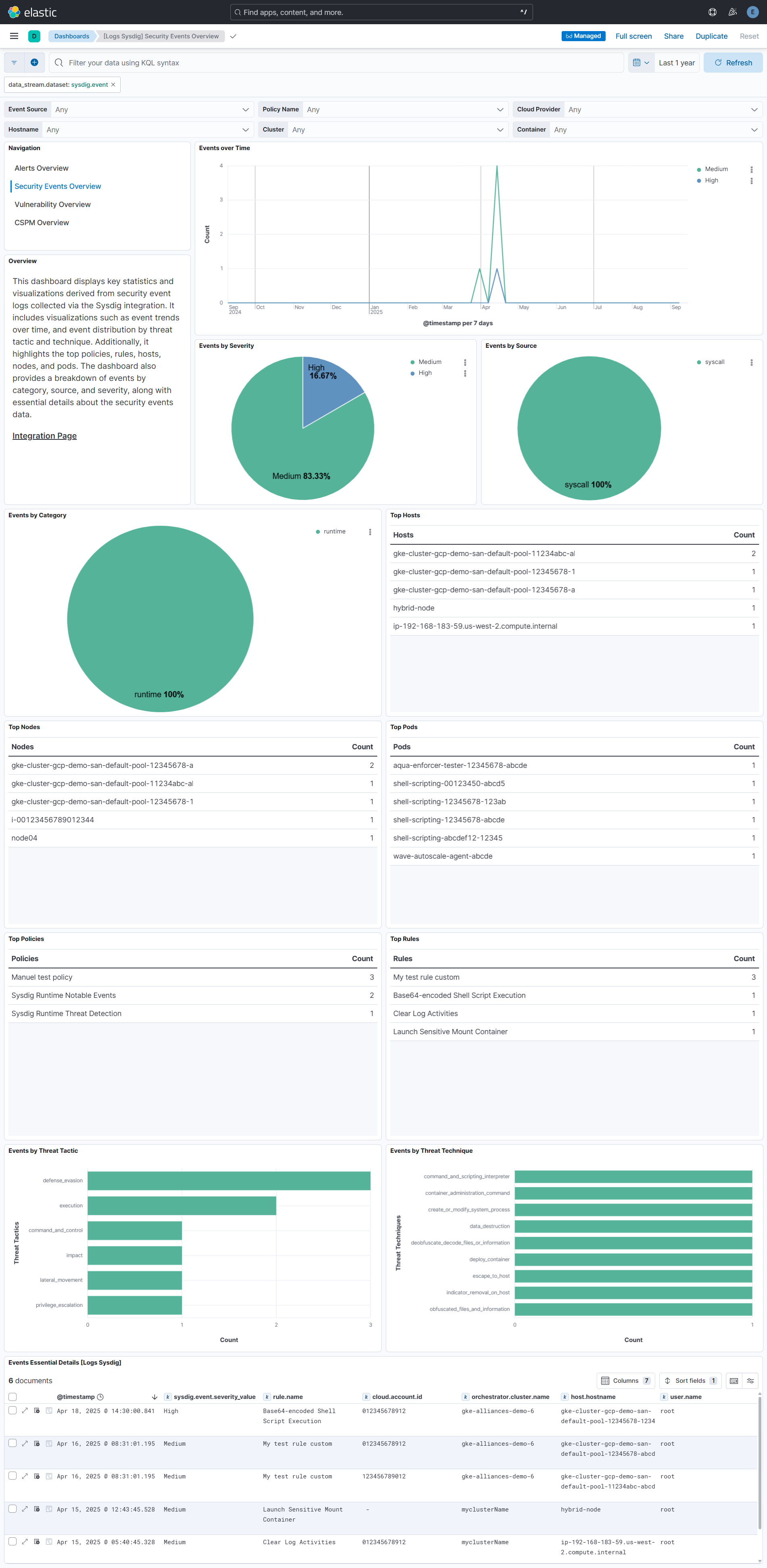
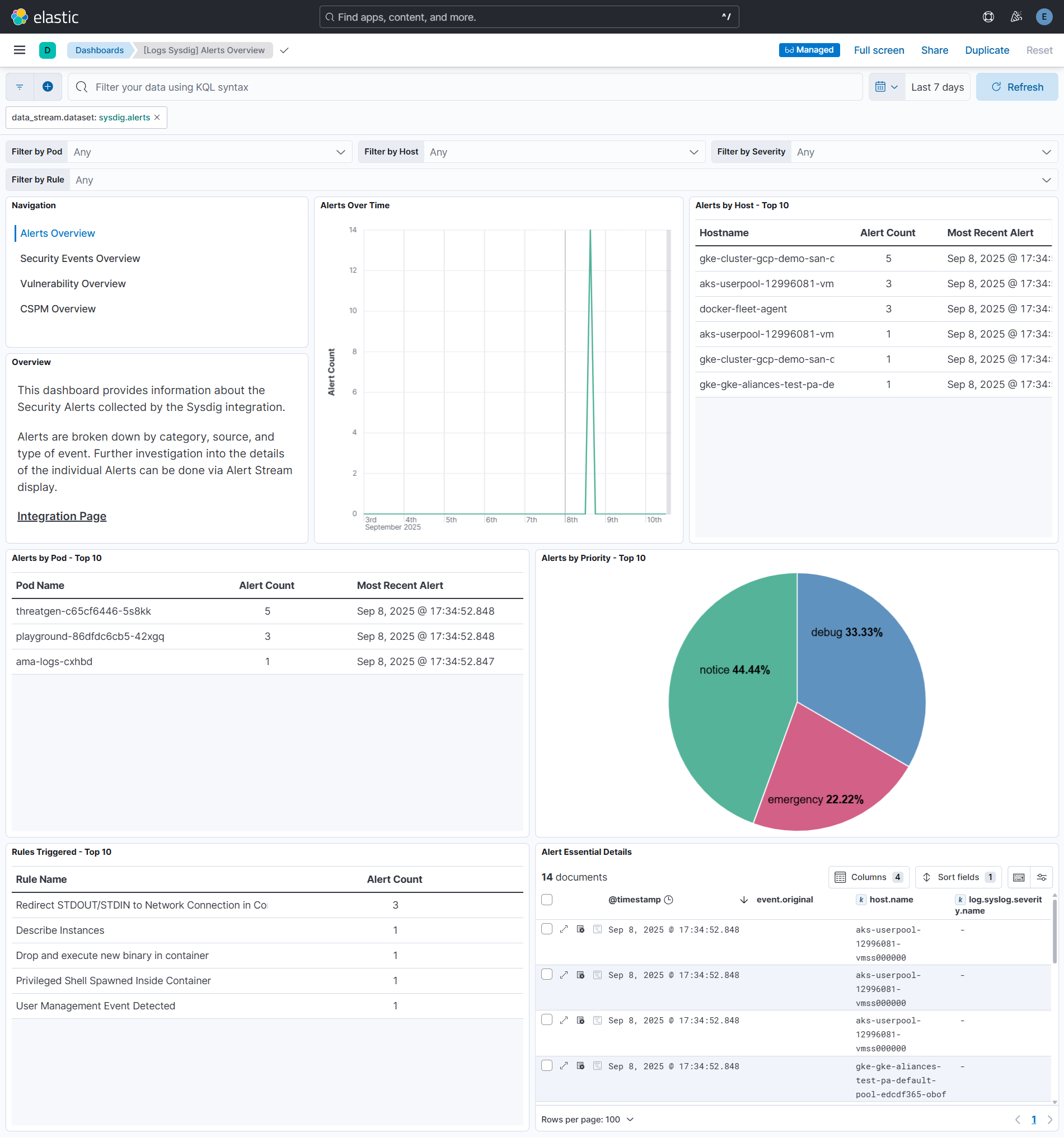
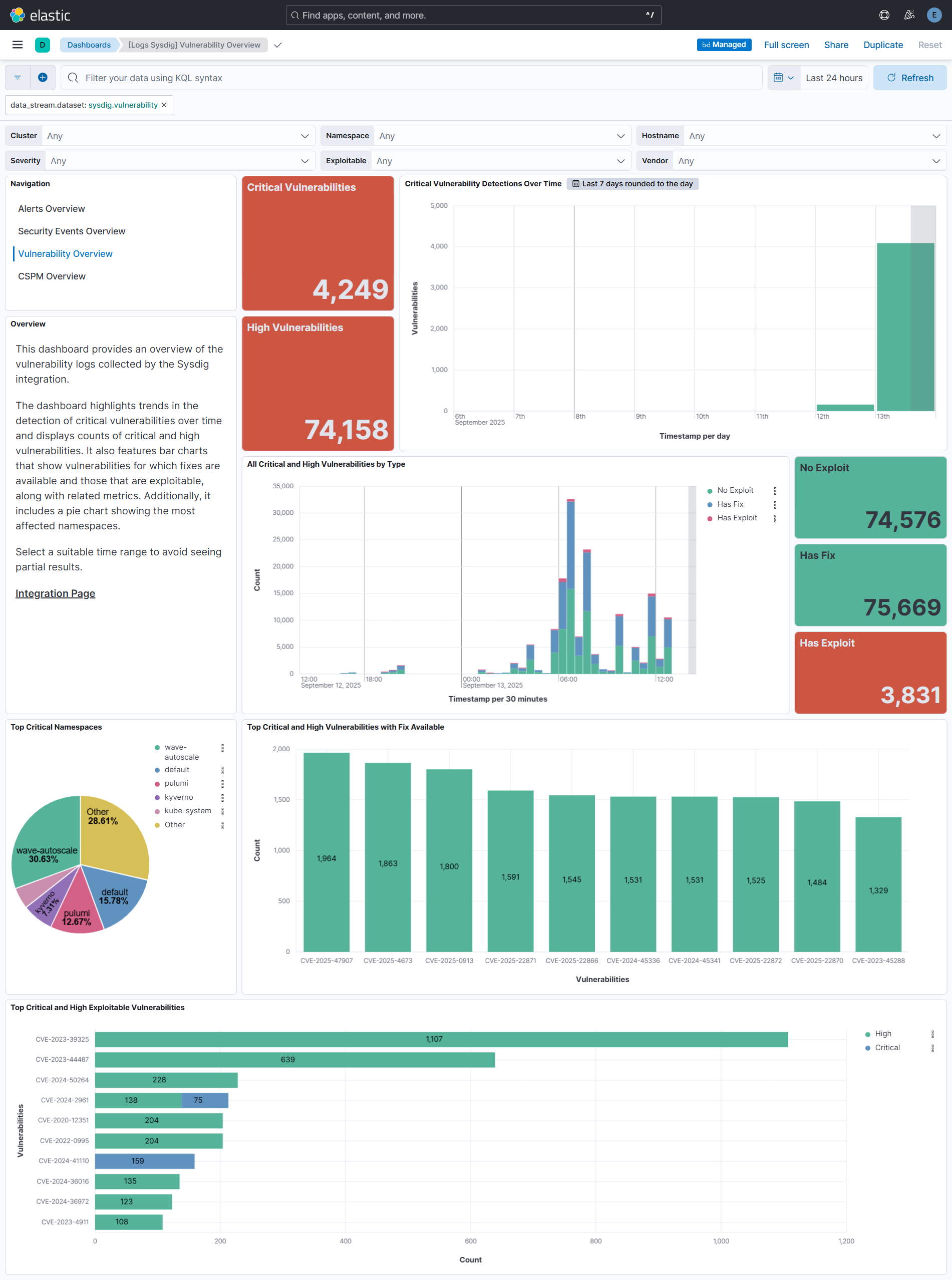
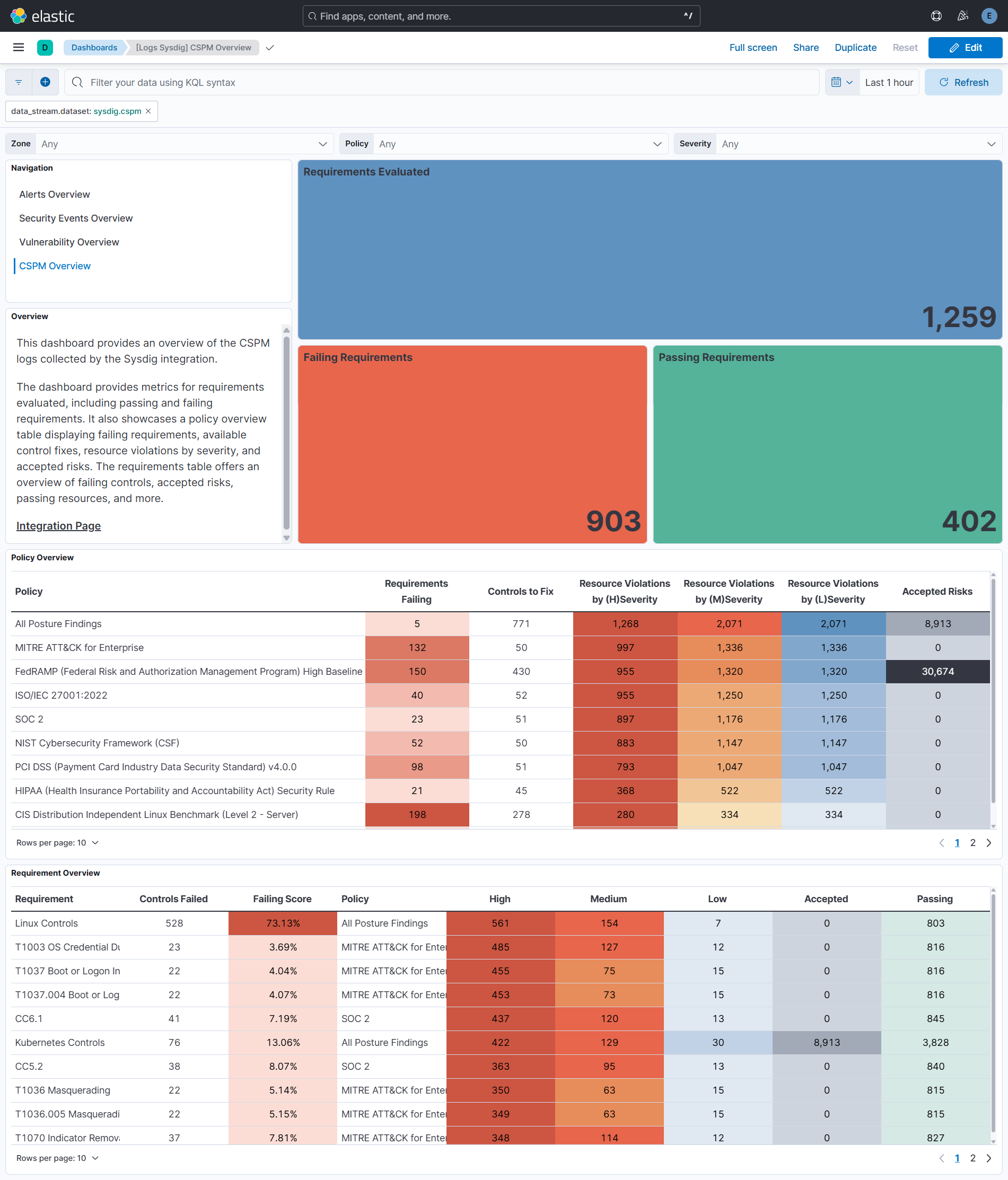
Changelog
| Version | Details | Minimum Kibana version |
|---|---|---|
| 2.8.0 | Enhancement (View pull request) Add a configurable lookback to the event data stream to collect events that become available after their polling window has been queried. Bug fix (View pull request) Deduplicate event data stream documents by Sysdig event ID. |
9.3.5 8.19.16 |
| 2.7.0 | Enhancement (View pull request) Update Elastic Managed integration documentation to the current wording and docs links. |
9.3.5 8.19.16 |
| 2.6.0 | Bug fix (View pull request) Fix conflicting container.image and container.image.* labels in the event datastream.Bug fix (View pull request) Fix mapping conflicts between ka.uri and ka.uri.param[*] by normalizing Kubernetes audit URI parameters.Enhancement (View pull request) Parse sysdig.event.content.fields.jevt.obj into a flattened field while preserving the original value for backwards compatibility. |
9.3.5 8.19.16 |
| 2.5.2 | Bug fix (View pull request) Fix maximum window length expression and cursor handling in event data stream. |
9.3.5 8.19.16 |
| 2.5.1 | Bug fix (View pull request) Fix permanent HTTP 400 stall in the event data stream caused by an unbounded request window, cursor rollback on error, and an off-by-one window in the success-path cursor. |
9.3.5 8.19.16 |
| 2.5.0 | Enhancement (View pull request) Add tags to ingest pipeline processors and add preserve_original_event to pipeline-level on_failure handlers.Bug fix (View pull request) Remove a redundant no-op set processor for rule.ruleset in the alerts data stream. |
9.3.5 8.19.16 |
| 2.4.1 | Enhancement (View pull request) Set agentless deployment mode release field to ga. |
9.3.5 8.19.16 |
| 2.4.0 | Enhancement (View pull request) Enable Agentless deployment. Bug fix (View pull request) Fix handling of null values in string for event data stream. |
9.3.5 8.19.16 |
| 2.3.0 | Enhancement (View pull request) Enable request trace log removal. |
9.0.0 8.16.0 |
| 2.2.0 | Enhancement (View pull request) Add support for CSPM data stream. |
9.0.0 8.16.0 |
| 2.1.1 | Bug fix (View pull request) Fix the OOM kill issue for vulnerability data stream by dropping policies.evaluations[].bundles[].rules[].failures[] object. |
9.0.0 8.16.0 |
| 2.1.0 | Enhancement (View pull request) Add support for vulnerability datastream. |
9.0.0 8.16.0 |
| 2.0.0 | Breaking change (View pull request) Fix the conflicting data types for sysdig.event.category by changing the alerts data stream from text to keyword.Enhancement (View pull request) Import the descriptions of fields defined in ECS. |
9.0.0 8.16.0 |
| 1.1.0 | Enhancement (View pull request) Use terminate processor instead of fail processor to handle agent errors. |
9.0.0 8.16.0 |
| 1.0.0 | Enhancement (View pull request) Release package as GA. |
9.0.0 8.14.1 |
| 0.5.0 | Enhancement (View pull request) ECS version updated to 8.17.0. |
9.0.0 8.14.1 |
| 0.4.0 | Enhancement (View pull request) Add support for security event datastream. |
9.0.0 8.14.1 |
| 0.3.0 | Enhancement (View pull request) Update Kibana constraint to support 9.0.0. |
9.0.0 8.14.1 |
| 0.2.2 | Bug fix (View pull request) Updated SSL description to be uniform and to include links to documentation. |
8.14.1 |
| 0.2.1 | Bug fix (View pull request) Update links to getting started docs |
8.14.1 |
| 0.2.0 | Enhancement (View pull request) Add "preserve_original_event" tag to documents with event.kind set to "pipeline_error". |
8.14.1 |
| 0.1.1 | Bug fix (View pull request) Use triple-brace Mustache templating when referencing variables in ingest pipelines. |
8.14.1 |
| 0.1.0 | Enhancement (View pull request) Initial release of the Sysdig integration |
8.14.1 |