Microsoft Office 365 Metrics Integration
Elastic Cloud Serverless projects are autoscaled environments, fully managed by Elastic and available on Elastic Cloud. Availability This functionality is generally available and ready for production usage. Elastic Cloud Serverless projects are autoscaled environments, fully managed by Elastic and available on Elastic Cloud. Availability This functionality is generally available and ready for production usage. The Elastic Stack includes Elastic's core products such as Elasticsearch, Kibana, Logstash, and Beats. Availability This functionality is generally available and ready for production usage. Unless stated otherwise on the page, this functionality is available when your Elastic Stack is deployed on Elastic Cloud Hosted, Elastic Cloud Enterprise, Elastic Cloud on Kubernetes, and self-managed environments. This documentation corresponds to the latest patch available for each minor version. If you're not using the latest patch, check the release notes for changes.
Serverless Observability
Generally available
Serverless Security
Generally available
Stack
9.0+
Generally available since 9.0
| Version | 1.4.0 (View all) |
| Managed integration release status | Availability Beta This functionality is in beta and is not ready for production usage. For beta features, the design and code is less mature than official GA features and is being provided as-is with no warranties. Beta features are not subject to the support SLA of official GA features. Specific Support terms apply. |
| Subscription level What's this? |
Basic |
| Developed by What's this? |
Elastic |
| Ingestion method(s) | API |
| Minimum Kibana version(s) | 9.0.0 8.16.0 |
You can use this integration as an Elastic Managed integration on Elastic Cloud Hosted deployments running this version or later.
This integration uses the Microsoft Graph API and Microsoft Management API to collect essential metrics from Microsoft Office 365, offering detailed insights into user activity, application usage, and service health.
The following data can be collected with the Microsoft Office 365 Metrics integration:
| Report | API | Data-stream Name | Aggregation Level | Required permissions |
|---|---|---|---|---|
| Microsoft 365 Active Users Service User Counts | reportRoot: getOffice365ServicesUserCounts | Microsoft 365 Active Users metrics | Period-based |
Reports.Read.All |
| Microsoft 365 Groups Activity Group Detail | reportRoot: getOffice365GroupsActivityDetail | Microsoft 365 Groups Activity Group Detail | Day-based |
Reports.Read.All |
| OneDrive Usage Account Detail | reportRoot: getOneDriveUsageAccountDetail | Microsoft 365 OneDrive Usage Account Detail | Day-based |
Reports.Read.All |
| OneDrive Usage Account Counts | reportRoot: getOneDriveUsageAccountCounts | Microsoft 365 One Drive Usage metrics | Period-based |
Reports.Read.All |
| OneDrive Usage File Counts | reportRoot: getOneDriveUsageFileCounts | Microsoft 365 One Drive Usage metrics | Period-based |
Reports.Read.All |
| OneDrive Usage Storage | reportRoot: getOneDriveUsageStorage | Microsoft 365 One Drive Usage metrics | Period-based |
Reports.Read.All |
| Outlook Activity Counts | reportRoot: getEmailActivityCounts | Microsoft 365 Outlook Activity metrics | Period-based |
Reports.Read.All |
| Outlook App Usage Version Counts | reportRoot: getEmailAppUsageVersionsUserCounts | Microsoft 365 Outlook App Usage Version Counts metrics | Period-based |
Reports.Read.All |
| Outlook Mailbox Usage Quota Status Mailbox Counts | reportRoot: getMailboxUsageQuotaStatusMailboxCounts | Microsoft 365 mailbox usage quota status metrics | Period-based |
Reports.Read.All |
| Outlook Mailbox Usage Detail | reportRoot: getMailboxUsageDetail | Microsoft 365 mailbox usage detail metrics | Period-based |
Reports.Read.All |
| SharePoint Site Usage Storage | reportRoot: getSharePointSiteUsageStorage | Microsoft 365 Sharepoint Site Usage metrics | Period-based |
Reports.Read.All |
| SharePoint Site Usage Detail | reportRoot: getSharePointSiteUsageDetail | Microsoft 365 Sharepoint Site Usage metrics | Period-based |
Reports.Read.All |
| Teams Device Usage User Counts | reportRoot: getTeamsDeviceUsageUserCounts | Microsoft 365 Teams Device Usage User Counts metrics | Period-based |
Reports.Read.All |
| Teams User Activity User Counts | reportRoot: getTeamsUserActivityUserCounts | Microsoft 365 Teams User Activity User Counts metrics | Period-based |
Reports.Read.All |
| Teams User Activity User Detail | reportRoot: getTeamsUserActivityUserDetail | Microsoft 365 Teams User Activity User Detail | Day-based |
Reports.Read.All |
| Viva Engage Groups Activity Group Detail | reportRoot: getYammerGroupsActivityDetail | Microsoft 365 Viva Engage Groups Activity | Day-based |
Reports.Read.All |
| Viva Engage Device Usage User Counts | reportRoot: getYammerDeviceUsageUserCounts | Microsoft 365 Viva Engage Device Usage User Counts metrics | Period-based |
Reports.Read.All |
| Service Health | List healthOverviews | Microsoft 365 Service Health metrics | No aggregation | ServiceHealth.Read.All |
| Subscriptions | subscribedSkus, subscriptions | Microsoft 365 Subscriptions metrics | No aggregation | LicenseAssignment.Read.All |
| Teams Call Quality | reportRoot: callRecords | Microsoft 365 Teams Call Quality metrics | No aggregation | CallRecords.Read.All |
| Tenant Settings | organization, adminReportSettings | Microsoft 365 Tenant Settings | No aggregation | Organization.Read.All, ReportSettings.Read.All, Directory.Read.All |
| App Registrations | List Applications | Microsoft 365 App Registrations | No aggregation | Application.Read.All, User.Read(delegated) |
| Entra Features | Organization, PremisesSync | Microsoft 365 Entra Connect | No aggregation | Organization.Read.All, User.Read(delegated) |
| Entra ID users | user, riskDetection | Microsoft 365 Entra Connect User metrics | No aggregation | User.Read.All, IdentityRiskEvent.Read.All |
| Entra Agent | agent | Microsoft 365 Entra Agent metrics | No aggregation | RBAC role |
| Entra Alerts | alerts | Microsoft 365 Entra Alerts metrics | No aggregation | RBAC role |
Elastic Agent must be installed. For more details, check the Elastic Agent installation instructions. You can install only one Elastic Agent per host.
Elastic Agent is required to collect data from Microsoft O365 and ship the data to Elastic, where the events will then be processed via the integration's ingest pipelines.
Elastic Managed integrations are only supported on Elastic Cloud Serverless and Elastic Cloud Hosted deployments. An Elastic Managed integration lets you ingest data from a cloud source while avoiding the orchestration, management, and maintenance associated with standard ingest infrastructure. Elastic runs the collector for you, so you can focus on your data instead of the infrastructure that collects it. This functionality is in beta and is subject to change. Beta features are not subject to the support SLA of official GA features.
For more information, refer to Elastic Managed integrations and the Elastic Managed integrations FAQ.
To use this package you need to enable datastreams you want to collect metrics for and register an application in Microsoft Entra ID (formerly known as Azure Active Directory).
Please make sure that the services for the enabled data streams are set up in Azure prior to using the integration.
Once the application is registered, configure or note the following to setup O365 metrics Elastic integration:
- Note
Application (client) IDand theDirectory (tenant) IDin the registered application's Overview page. - Create a new secret to configure the authentication of your application.
- Navigate to the Certificates & Secrets section.
- Click New client secret and provide some description to create new secret.
- Note the value which is required for the integration setup.
- Add permissions to your registered application.
- Select and add the appropriate permissions from the available tiles.
- For this package, we primarily use Graph APIs, so you can choose
Microsoft Graph, which will display the Delegated and Application permission sections. - Refer to the Required Permissions column in the table under What data does this integration collect? section to identify the permissions required for each data stream and select accordingly. You can also refer to the Permissions section in the API documentation for each data stream to determine the necessary permissions.
- Make sure Reports.Read.All from Microsoft Graph is added, as most APIs are report-based.
- After the permissions are added, the admin will need to grant consent for a few permissions.
Once the secret is created and permissions are granted by admin, setup Elastic Agent's Microsoft O365 integration:
- Click
Add Microsoft Office 365. - Enable
Collect Office 365 metrics via Graph API using CEL Input. - Add
Directory (tenant) IDnoted in Step 1 intoDirectory (tenant) IDparameter. This is required field. - Add
Application (client) IDnoted in Step 1 intoApplication (client) IDparameter. This is required field. - Add the secret
Valuenoted in Step 2 intoClient Secretparameter. This is required field. - Oauth2 Token URL can be added to generate the tokens during the oauth2 flow. If not provided, above
Directory (tenant) IDwill be used for oauth2 token generation. - Modify any other parameters as necessary.
Some data streams ingest data aggregated by a period, while other data streams ingest data aggregated by day, that is, daily.
For Period-based data streams, you have to configure the option Period during the setup. The supported values are: D7, D30, D90, and D180.
As Day-based data streams ingest aggregated data per day, you have to configure the option Initial Interval to indicate how many days back you want to fetch the data. The supported values are from 1 to 28.
Microsoft 365 reports are typically available within 48 hours, but sometimes might take several days. As stated in the MS documentation, data quality is ensured by performing daily validation checks. During this process, you might notice differences in historical data in Microsoft 365 Reports in admin center.
To make sure there are no gaps and historical data is ingested into Elastic, the Microsoft Office 365 Metrics integration allows you to set the Sync Days in the past parameter for Day-based data streams. You can use this parameter to re-fetch the Microsoft 365 reports starting from N days in the past. By default, this paramater is 3. You can gradually increase this value if you see any discrepancies between Microsoft Reports and Elastic data (maximum value allowed is 28).
When data is re-fetched on same dates, the ingested data may be duplicated because Elastic data streams work in append-only design. For example, you may see duplicated documents in Elastic on the source data stream backed indices per resource (user/group/site) per report date. To maintain only the latest copy of the document, the Microsoft Office 365 Metrics integration installs Latest Transforms, one per report. These latest transform periodically pulls the data from the source data-stream-backed indices into a destination non-data-stream backed index. Therefore, the destination index only contains a single (latest) document per resource (user/group/site) per report date. Inside the reports dataset, you can distinguish between source and destination indices using the field labels.is_transform_source. This is set to true for source data-stream-backed indices and false for destination (latest) indices.
When searching for data, use a filter labels.is_transform_source: false to avoid getting duplicates. The Microsoft Office 365 Metrics integration dashboards has also this filter to show only the latest datapoints.
As the latest data is available in the destination indices, the source data-stream-backed indices are purged based on the ILM policy metrics-o365_metrics.<data_stream>-default_policy.
| o365.metrics.report.name | Source filter | Source indices | Destination filter | Destination indices | Destination alias |
|---|---|---|---|---|---|
| Microsoft 365 Groups Activity Group Detail | labels.is_transform_source: true |
metrics-o365_metrics.groups_activity_group_detail-* |
labels.is_transform_source: false |
metrics-o365_metrics.groups_activity_group_detail_latest-* |
metrics-o365_metrics.groups_activity_group_detail_latest |
| OneDrive Usage Account Detail | labels.is_transform_source: true |
metrics-o365_metrics.onedrive_usage_account_detail-* |
labels.is_transform_source: false |
metrics-o365_metrics.onedrive_usage_account_detail_latest-* |
metrics-o365_metrics.onedrive_usage_account_detail_latest |
| Teams User Activity User Detail | labels.is_transform_source: true |
metrics-o365_metrics.teams_user_activity_user_detail-* |
labels.is_transform_source: false |
metrics-o365_metrics.teams_user_activity_user_detail_latest-* |
metrics-o365_metrics.teams_user_activity_user_detail_latest |
| Viva Engage Groups Activity Group Detail | labels.is_transform_source: true |
metrics-o365_metrics.viva_engage_groups_activity_group_detail-* |
labels.is_transform_source: false |
metrics-o365_metrics.viva_engage_groups_activity_group_detail_latest-* |
metrics-o365_metrics.viva_engage_groups_activity_group_detail_latest |
Note: Sync Days in the past and Latest Transforms are only used in Day-based data streams, that is, for data streams aggregated per day.
By default, for all Microsoft 365 usage reports, the user names, emails, group, or site information are anonymized by Microsoft using MD5 hashes. You can revert this change for a tenant and show identifiable user, group, and site information if your organization allows it. To do this, follow these steps:
- Login to Microsoft 365 admin center
- Navigate to Settings -> Org Settings -> Services.
- Select Reports.
- Deselect the option
Display concealed user, group, and site names in all reports, and save your changes.
Uses the Microsoft 365 Graph API to retrieve metrics from Microsoft 365.
Get details about Active Users Services User Count from Microsoft Graph API.
Example
{
    "o365": {
        "metrics": {
            "active": {
                "users": {
                    "services": {
                        "user": {
                            "counts": {
                                "exchange": {
                                    "active": {
                                        "count": "0"
                                    },
                                    "inactive": {
                                        "count": "22"
                                    }
                                },
                                "office365": {
                                    "active": {
                                        "count": "0"
                                    },
                                    "inactive": {
                                        "count": "25"
                                    }
                                },
                                "onedrive": {
                                    "active": {
                                        "count": "0"
                                    },
                                    "inactive": {
                                        "count": "20"
                                    }
                                },
                                "report": {
                                    "period": {
                                        "day": "7"
                                    },
                                    "refresh_date": "2024-11-29"
                                },
                                "sharepoint": {
                                    "active": {
                                        "count": "0"
                                    },
                                    "inactive": {
                                        "count": "20"
                                    }
                                },
                                "teams": {
                                    "active": {
                                        "count": "0"
                                    },
                                    "inactive": {
                                        "count": "20"
                                    }
                                },
                                "yammer": {
                                    "active": {
                                        "count": "0"
                                    },
                                    "inactive": {
                                        "count": "25"
                                    }
                                }
                            }
                        }
                    }
                }
            }
        }
    },
    "agent": {
        "name": "docker-fleet-agent",
        "id": "1bd16076-38b3-44b9-980b-eab55ebe95b9",
        "ephemeral_id": "b21b52df-710e-4014-bb1c-d9e60091e1e7",
        "type": "filebeat",
        "version": "8.16.0"
    },
    "@timestamp": "2024-12-24T10:36:47.702Z",
    "ecs": {
        "version": "8.16.0"
    },
    "data_stream": {
        "namespace": "default",
        "type": "metrics",
        "dataset": "o365_metrics.active_users_services_user_counts"
    },
    "elastic_agent": {
        "id": "1bd16076-38b3-44b9-980b-eab55ebe95b9",
        "version": "8.16.0",
        "snapshot": false
    },
    "host": {
        "hostname": "docker-fleet-agent",
        "os": {
            "kernel": "5.15.153.1-microsoft-standard-WSL2",
            "codename": "noble",
            "name": "Ubuntu",
            "type": "linux",
            "family": "debian",
            "version": "24.04.1 LTS (Noble Numbat)",
            "platform": "ubuntu"
        },
        "containerized": true,
        "ip": [
            "172.18.0.7"
        ],
        "name": "docker-fleet-agent",
        "mac": [
            "02-42-AC-12-00-07"
        ],
        "architecture": "x86_64"
    },
    "event": {
        "agent_id_status": "verified",
        "ingested": "2024-12-24T10:36:57Z",
        "dataset": "o365_metrics.active_users_services_user_counts"
    },
    "tags": [
        "o365.metrics.active.users.services.user.counts",
        "preserve_original_event"
    ]
}
ECS Field Reference
Refer to the following document for detailed information on ECS fields.
Exported fields
| Field | Description | Type | Unit | Metric Type |
|---|---|---|---|---|
| @timestamp | Event timestamp. | date | ||
| cloud.image.id | Image ID for the cloud instance. | keyword | ||
| data_stream.dataset | Data stream dataset. | constant_keyword | ||
| data_stream.namespace | Data stream namespace. | constant_keyword | ||
| data_stream.type | Data stream type. | constant_keyword | ||
| host.containerized | If the host is a container. | boolean | ||
| host.os.build | OS build information. | keyword | ||
| host.os.codename | OS codename, if any. | keyword | ||
| input.type | Input type. | keyword | ||
| o365.metrics.active.users.services.user.counts.exchange.active.count | Number of Exchange active users. | integer | gauge | |
| o365.metrics.active.users.services.user.counts.exchange.inactive.count | Number of Exchange inactive users. | integer | gauge | |
| o365.metrics.active.users.services.user.counts.office365.active.count | Number of Office 365 active users. | integer | gauge | |
| o365.metrics.active.users.services.user.counts.office365.inactive.count | Number of Office 365 inactive users. | integer | gauge | |
| o365.metrics.active.users.services.user.counts.onedrive.active.count | Number of OneDrive active users. | integer | gauge | |
| o365.metrics.active.users.services.user.counts.onedrive.inactive.count | Number of OneDrive inactive users. | integer | gauge | |
| o365.metrics.active.users.services.user.counts.report.period.day | The reporting period over which the data is aggregated (in days). | integer | d | |
| o365.metrics.active.users.services.user.counts.report.refresh_date | The date when the report data was last updated. | date | ||
| o365.metrics.active.users.services.user.counts.sharepoint.active.count | Number of SharePoint active users. | integer | gauge | |
| o365.metrics.active.users.services.user.counts.sharepoint.inactive.count | Number of SharePoint inactive users. | integer | gauge | |
| o365.metrics.active.users.services.user.counts.teams.active.count | Number of Teams active users. | integer | gauge | |
| o365.metrics.active.users.services.user.counts.teams.inactive.count | Number of Teams inactive users. | integer | gauge | |
| o365.metrics.active.users.services.user.counts.yammer.active.count | Number of Yammer active users. | integer | gauge | |
| o365.metrics.active.users.services.user.counts.yammer.inactive.count | Number of Yammer inactive users. | integer | gauge |
Get details about users in Microsoft Entra ID.
Example
{
    "o365": {
        "metrics": {
            "entra_id_users": {
                "on_premises_sync_enabled": true,
                "on_premises_provisioning_errors": [
                    {
                        "occurred_date_time": "2025-03-25T14:33:19Z",
                        "category": "PropertyConflict",
                        "property_causing_error": "UserPrincipalName",
                        "value": "alex@contoso.com"
                    }
                ],
                "risk": {
                    "event_type": "passwordSpray",
                    "level": "high",
                    "detail": "userPerformedSecuredPasswordReset",
                    "state": "remediated"
                },
                "user": {
                    "upn": "AlexW@M365x214355.onmicrosoft.com",
                    "id": "4782e723-f4f4-4af3-a76e-25e3bab0d896",
                    "type": "Member"
                }
            }
        }
    },
    "input": {
        "type": "cel"
    },
    "agent": {
        "name": "elastic-agent-74940",
        "id": "4dba66ec-f72a-41f6-bdac-69c44c9323d8",
        "ephemeral_id": "a41ad417-aa53-441c-a549-da581020df08",
        "type": "filebeat",
        "version": "8.17.3"
    },
    "@timestamp": "2025-03-26T09:41:36.166Z",
    "ecs": {
        "version": "8.17.0"
    },
    "data_stream": {
        "namespace": "72200",
        "type": "metrics",
        "dataset": "o365_metrics.entra_id_users"
    },
    "host": {
        "hostname": "elastic-agent-74940",
        "os": {
            "kernel": "6.12.5-linuxkit",
            "name": "Wolfi",
            "type": "linux",
            "family": "",
            "version": "20230201",
            "platform": "wolfi"
        },
        "containerized": false,
        "ip": [
            "172.29.0.2",
            "172.18.0.9"
        ],
        "name": "elastic-agent-74940",
        "mac": [
            "02-42-AC-12-00-09",
            "02-42-AC-1D-00-02"
        ],
        "architecture": "aarch64"
    },
    "elastic_agent": {
        "id": "4dba66ec-f72a-41f6-bdac-69c44c9323d8",
        "version": "8.17.3",
        "snapshot": false
    },
    "event": {
        "agent_id_status": "verified",
        "ingested": "2025-03-26T09:41:37Z",
        "dataset": "o365_metrics.entra_id_users"
    },
    "tags": [
        "o365.metrics.entra_id_users"
    ]
}
Exported fields
| Field | Description | Type |
|---|---|---|
| @timestamp | Event timestamp. | date |
| data_stream.dataset | Data stream dataset. | constant_keyword |
| data_stream.namespace | Data stream namespace. | constant_keyword |
| data_stream.type | Data stream type. | constant_keyword |
| input.type | Input type. | keyword |
| o365.metrics.entra_id_users.on_premises_provisioning_errors.category | Category of the provisioning error. | keyword |
| o365.metrics.entra_id_users.on_premises_provisioning_errors.occurred_date_time | The date and time at which the error occurred. | date |
| o365.metrics.entra_id_users.on_premises_provisioning_errors.property_causing_error | Name of the directory property causing the error. | keyword |
| o365.metrics.entra_id_users.on_premises_provisioning_errors.value | Value of the property causing the error. | keyword |
| o365.metrics.entra_id_users.on_premises_sync_enabled | true if this user object is currently being synced from an on-premises Active Directory (AD); otherwise the user isn't being synced and can be managed in Microsoft Entra ID. | boolean |
| o365.metrics.entra_id_users.risk.detail | The possible values are none, adminGeneratedTemporaryPassword, userPerformedSecuredPasswordChange, userPerformedSecuredPasswordReset, adminConfirmedSigninSafe, aiConfirmedSigninSafe, userPassedMFADrivenByRiskBasedPolicy, adminDismissedAllRiskForUser, adminConfirmedSigninCompromised, hidden, adminConfirmedUserCompromised, unknownFutureValue, adminConfirmedServicePrincipalCompromised, adminDismissedAllRiskForServicePrincipal, m365DAdminDismissedDetection, userChangedPasswordOnPremises, adminDismissedRiskForSignIn, adminConfirmedAccountSafe. | keyword |
| o365.metrics.entra_id_users.risk.error | An error if the risk data is unavailable for this user. | text |
| o365.metrics.entra_id_users.risk.event_type | The type of risk event detected. The possible values are adminConfirmedUserCompromised, anomalousToken, anomalousUserActivity, anonymizedIPAddress, generic, impossibleTravel, investigationsThreatIntelligence, suspiciousSendingPatterns, leakedCredentials, maliciousIPAddress,malwareInfectedIPAddress, mcasSuspiciousInboxManipulationRules, newCountry, passwordSpray,riskyIPAddress, suspiciousAPITraffic, suspiciousBrowser,suspiciousInboxForwarding, suspiciousIPAddress, tokenIssuerAnomaly, unfamiliarFeatures, unlikelyTravel. If the risk detection is a premium detection, will show generic. | keyword |
| o365.metrics.entra_id_users.risk.level | Level of the detected risky user. Possible values are: low, medium, high, hidden, none, unknownFutureValue. | keyword |
| o365.metrics.entra_id_users.risk.state | State of the user's risk. Possible values are: none, confirmedSafe, remediated, dismissed, atRisk, confirmedCompromised, unknownFutureValue. | keyword |
| o365.metrics.entra_id_users.user.id | The unique identifier for the user. Should be treated as an opaque identifier. | keyword |
| o365.metrics.entra_id_users.user.type | A string value that can be used to classify user types in your directory. The possible values are Member and Guest. | keyword |
| o365.metrics.entra_id_users.user.upn | The user principal name (UPN) of the user. The UPN is an Internet-style sign-in name for the user based on the Internet standard RFC 822. By convention, this value should map to the user's email name. The general format is alias@domain, where the domain must be present in the tenant's collection of verified domains. | keyword |
Get details about Mailbox Usage Quota Status from Microsoft Graph API.
Example
{
    "@timestamp": "2025-06-16",
    "agent": {
        "ephemeral_id": "5ba0488b-5972-422e-9dcf-acffc252d4ad",
        "id": "9832a43d-9b1e-4d80-8a4c-78c07b204c27",
        "name": "elastic-agent-96043",
        "type": "filebeat",
        "version": "8.16.0"
    },
    "data_stream": {
        "dataset": "o365_metrics.mailbox_usage_quota_status",
        "namespace": "63785",
        "type": "metrics"
    },
    "ecs": {
        "version": "8.16.0"
    },
    "elastic_agent": {
        "id": "9832a43d-9b1e-4d80-8a4c-78c07b204c27",
        "snapshot": false,
        "version": "8.16.0"
    },
    "event": {
        "agent_id_status": "verified",
        "dataset": "o365_metrics.mailbox_usage_quota_status",
        "ingested": "2025-06-26T10:26:19Z"
    },
    "host": {
        "architecture": "x86_64",
        "containerized": true,
        "hostname": "elastic-agent-96043",
        "ip": [
            "192.168.32.2",
            "172.18.0.4"
        ],
        "mac": [
            "56-38-50-9D-7B-4E",
            "F2-ED-DF-6A-08-7F"
        ],
        "name": "elastic-agent-96043",
        "os": {
            "kernel": "5.15.153.1-microsoft-standard-WSL2",
            "name": "Wolfi",
            "platform": "wolfi",
            "type": "linux",
            "version": "20230201"
        }
    },
    "input": {
        "type": "cel"
    },
    "o365": {
        "metrics": {
            "mailbox": {
                "usage": {
                    "quota": {
                        "status": {
                            "indeterminate": {
                                "count": 0
                            },
                            "report": {
                                "date": "2025-06-16",
                                "period": {
                                    "day": "7"
                                },
                                "refresh_date": "2025-06-17"
                            },
                            "send_prohibited": {
                                "count": 0
                            },
                            "send_receive_prohibited": {
                                "count": 0
                            },
                            "under_limit": {
                                "count": 19
                            },
                            "warning_issued": {
                                "count": 0
                            }
                        }
                    }
                }
            }
        }
    },
    "tags": [
        "o365.metrics.mailbox.usage"
    ]
}
ECS Field Reference
Refer to the following document for detailed information on ECS fields.
Exported fields
| Field | Description | Type | Unit | Metric Type |
|---|---|---|---|---|
| @timestamp | Event timestamp. | date | ||
| cloud.image.id | Image ID for the cloud instance. | keyword | ||
| data_stream.dataset | Data stream dataset. | constant_keyword | ||
| data_stream.namespace | Data stream namespace. | constant_keyword | ||
| data_stream.type | Data stream type. | constant_keyword | ||
| host.containerized | If the host is a container. | boolean | ||
| host.os.build | OS build information. | keyword | ||
| host.os.codename | OS codename, if any. | keyword | ||
| input.type | Input type. | keyword | ||
| o365.metrics.mailbox.usage.quota.status.indeterminate.count | The number of mailboxes where the quota status could not be determined. | long | gauge | |
| o365.metrics.mailbox.usage.quota.status.report.date | The specific date for which the report data applies. | date | ||
| o365.metrics.mailbox.usage.quota.status.report.period.day | The duration (e.g., 7 days) over which the quota status data is aggregated. | integer | d | |
| o365.metrics.mailbox.usage.quota.status.report.refresh_date | The date when the report data was last updated. | date | ||
| o365.metrics.mailbox.usage.quota.status.send_prohibited.count | The number of mailboxes restricted from sending emails due to exceeding their send quota during the reporting period. | long | gauge | |
| o365.metrics.mailbox.usage.quota.status.send_receive_prohibited.count | The number of mailboxes restricted from both sending and receiving emails due to exceeding their total quota during the reporting period. | long | gauge | |
| o365.metrics.mailbox.usage.quota.status.under_limit.count | The number of mailboxes operating within their assigned quota limits during the reporting period. | long | gauge | |
| o365.metrics.mailbox.usage.quota.status.warning_issued.count | The number of mailboxes that have exceeded their warning threshold quota during the reporting period. | long | gauge |
Get details about Mailbox Usage Detail from Microsoft Graph API.
Example
{
    "@timestamp": "2025-01-22",
    "agent": {
        "ephemeral_id": "e0c9daaf-ed19-40a7-8eb5-a11d7e85054d",
        "id": "7643ee80-69c2-4ae1-b978-0e0c567cb471",
        "name": "elastic-agent-53630",
        "type": "filebeat",
        "version": "8.16.0"
    },
    "data_stream": {
        "dataset": "o365_metrics.mailbox_usage_detail",
        "namespace": "63780",
        "type": "metrics"
    },
    "ecs": {
        "version": "8.16.0"
    },
    "elastic_agent": {
        "id": "7643ee80-69c2-4ae1-b978-0e0c567cb471",
        "snapshot": false,
        "version": "8.16.0"
    },
    "event": {
        "agent_id_status": "verified",
        "dataset": "o365_metrics.mailbox_usage_detail",
        "ingested": "2025-06-26T10:23:57Z",
        "original": "{\"Created Date\":\"2024-10-11\",\"Deleted Date\":\"\",\"Deleted Item Count\":\"286\",\"Deleted Item Quota (Byte)\":\"32212254720\",\"Deleted Item Size (Byte)\":\"2053156\",\"Display Name\":\"MOD Administrator\",\"Has Archive\":\"False\",\"Is Deleted\":\"False\",\"Issue Warning Quota (Byte)\":\"105226698752\",\"Item Count\":\"385\",\"Last Activity Date\":\"2024-12-10\",\"Prohibit Send Quota (Byte)\":\"106300440576\",\"Prohibit Send/Receive Quota (Byte)\":\"107374182400\",\"Report Period\":\"7\",\"Storage Used (Byte)\":\"22991073\",\"User Principal Name\":\"admin@example.com\",\"Report Refresh Date\":\"2025-01-22\"}"
    },
    "host": {
        "architecture": "x86_64",
        "containerized": true,
        "hostname": "elastic-agent-53630",
        "ip": [
            "192.168.32.2",
            "172.18.0.4"
        ],
        "mac": [
            "52-54-64-52-35-BF",
            "9A-53-D1-74-09-9E"
        ],
        "name": "elastic-agent-53630",
        "os": {
            "kernel": "5.15.153.1-microsoft-standard-WSL2",
            "name": "Wolfi",
            "platform": "wolfi",
            "type": "linux",
            "version": "20230201"
        }
    },
    "input": {
        "type": "cel"
    },
    "o365": {
        "metrics": {
            "mailbox": {
                "usage": {
                    "detail": {
                        "created_date": "2024-10-11",
                        "deleted_item": {
                            "count": 286
                        },
                        "deleted_item_quota": {
                            "byte": 32212254720
                        },
                        "deleted_item_size": {
                            "byte": 2053156
                        },
                        "display_name": "MOD Administrator",
                        "has_archive": false,
                        "is_deleted": false,
                        "issue_warning_quota": {
                            "byte": 105226698752
                        },
                        "item": {
                            "count": 385
                        },
                        "last_activity_date": "2024-12-10",
                        "prohibit_send_quota": {
                            "byte": 106300440576
                        },
                        "prohibit_send_receive_quota": {
                            "byte": 107374182400
                        },
                        "report": {
                            "period": {
                                "day": "7"
                            },
                            "refresh_date": "2025-01-22"
                        },
                        "storage_used": {
                            "byte": 22991073
                        },
                        "user_principal_name": "admin@example.com"
                    }
                }
            }
        }
    },
    "tags": [
        "preserve_original_event",
        "o365.metrics.mailbox.usage"
    ]
}
ECS Field Reference
Refer to the following document for detailed information on ECS fields.
Exported fields
| Field | Description | Type | Unit | Metric Type |
|---|---|---|---|---|
| @timestamp | Event timestamp. | date | ||
| cloud.image.id | Image ID for the cloud instance. | keyword | ||
| data_stream.dataset | Data stream dataset. | constant_keyword | ||
| data_stream.namespace | Data stream namespace. | constant_keyword | ||
| data_stream.type | Data stream type. | constant_keyword | ||
| host.containerized | If the host is a container. | boolean | ||
| host.os.build | OS build information. | keyword | ||
| host.os.codename | OS codename, if any. | keyword | ||
| input.type | Input type. | keyword | ||
| o365.metrics.mailbox.usage.detail.created_date | The date the mailbox was created. | date | ||
| o365.metrics.mailbox.usage.detail.deleted_date | The date the mailbox was deleted. | date | ||
| o365.metrics.mailbox.usage.detail.deleted_item.count | The number of items in the deleted items folder. | long | gauge | |
| o365.metrics.mailbox.usage.detail.deleted_item_quota.byte | The quota limit for the deleted items folder (in bytes). | long | byte | gauge |
| o365.metrics.mailbox.usage.detail.deleted_item_size.byte | The total size of items in the deleted items folder (in bytes). | long | byte | gauge |
| o365.metrics.mailbox.usage.detail.display_name | The full name of the user. | keyword | ||
| o365.metrics.mailbox.usage.detail.has_archive | Indicates if the user has an archive mailbox. | boolean | ||
| o365.metrics.mailbox.usage.detail.is_deleted | Indicates if the mailbox is deleted. | boolean | ||
| o365.metrics.mailbox.usage.detail.issue_warning_quota.byte | The mailbox size limit at which a warning is issued (in bytes). | long | byte | gauge |
| o365.metrics.mailbox.usage.detail.item.count | The total number of items in the mailbox. | long | gauge | |
| o365.metrics.mailbox.usage.detail.last_activity_date | The most recent activity date for the mailbox. | date | ||
| o365.metrics.mailbox.usage.detail.prohibit_send_quota.byte | The mailbox size limit at which sending messages is prohibited (in bytes). | long | byte | gauge |
| o365.metrics.mailbox.usage.detail.prohibit_send_receive_quota.byte | The mailbox size limit at which sending and receiving messages is prohibited (in bytes). | long | byte | gauge |
| o365.metrics.mailbox.usage.detail.report.period.day | The reporting period over which the data is aggregated (in days). | integer | d | |
| o365.metrics.mailbox.usage.detail.report.refresh_date | The date when the report data was last updated. | date | ||
| o365.metrics.mailbox.usage.detail.storage_used.byte | The total storage used in the mailbox (in bytes). | long | byte | gauge |
| o365.metrics.mailbox.usage.detail.user_principal_name | The email or principal username of the user. | keyword |
Get details about Microsoft 365 groups activity by group from Microsoft Graph API.
Example
{
    "@timestamp": "2024-12-24",
    "ecs": {
        "version": "8.16.0"
    },
    "event": {
        "original": "{\"Exchange Mailbox Storage Used (Byte)\":\"698640\",\"Exchange Mailbox Total Item Count\":\"9\",\"Exchange Received Email Count\":\"\",\"External Member Count\":\"0\",\"Group Display Name\":\"delete-1\",\"Group Id\":\"faa1ff4a-4677-4d4c-842a-dc63eb8b2ae3\",\"Group Type\":\"Private\",\"Is Deleted\":\"False\",\"Last Activity Date\":\"\",\"Member Count\":\"2\",\"Owner Principal Name\":\"AV@abc.onmicrosoft.com\",\"Report Period\":\"1\",\"SharePoint Active File Count\":\"\",\"SharePoint Site Storage Used (Byte)\":\"2029128\",\"SharePoint Total File Count\":\"6\",\"Yammer Liked Message Count\":\"\",\"Yammer Posted Message Count\":\"\",\"Yammer Read Message Count\":\"\",\"report\":{\"api_path\":\"/reports/getOffice365GroupsActivityDetail\",\"name\":\"Microsoft 365 Groups Activity Group Detail\"},\"Report Refresh Date\":\"2024-12-24\"}"
    },
    "group": {
        "id": "faa1ff4a-4677-4d4c-842a-dc63eb8b2ae3",
        "name": "delete-1"
    },
    "o365": {
        "metrics": {
            "groups": {
                "activity": {
                    "group": {
                        "detail": {
                            "exchange_mailbox_storage_used": {
                                "byte": 698640
                            },
                            "exchange_mailbox_total_item": {
                                "count": 9
                            },
                            "external_member": {
                                "count": 0
                            },
                            "group_display_name": "delete-1",
                            "group_id": "faa1ff4a-4677-4d4c-842a-dc63eb8b2ae3",
                            "group_type": "Private",
                            "is_deleted": false,
                            "member": {
                                "count": 2
                            },
                            "owner_principal_name": "AV@abc.onmicrosoft.com",
                            "report": {
                                "period": {
                                    "day": "1"
                                },
                                "refresh_date": "2024-12-24"
                            },
                            "sharepoint_site_storage_used": {
                                "byte": 2029128
                            },
                            "sharepoint_total_file": {
                                "count": 6
                            }
                        }
                    }
                }
            },
            "report": {
                "api_path": "/reports/getOffice365GroupsActivityDetail",
                "name": "Microsoft 365 Groups Activity Group Detail"
            }
        }
    },
    "related": {
        "user": [
            "AV",
            "AV@abc.onmicrosoft.com"
        ]
    },
    "tags": [
        "preserve_duplicate_custom_fields",
        "preserve_original_event"
    ],
    "user": {
        "domain": "abc.onmicrosoft.com",
        "email": "AV@abc.onmicrosoft.com",
        "group": {
            "id": "faa1ff4a-4677-4d4c-842a-dc63eb8b2ae3",
            "name": "delete-1"
        },
        "name": "AV"
    }
}
ECS Field Reference
Refer to the following document for detailed information on ECS fields.
Exported fields
| Field | Description | Type | Unit | Metric Type |
|---|---|---|---|---|
| @timestamp | Date/time when the event originated. This is the date/time extracted from the event, typically representing when the event was generated by the source. If the event source has no original timestamp, this value is typically populated by the first time the event was received by the pipeline. Required field for all events. | date | ||
| data_stream.dataset | The field can contain anything that makes sense to signify the source of the data. Examples include nginx.access, prometheus, endpoint etc. For data streams that otherwise fit, but that do not have dataset set we use the value "generic" for the dataset value. event.dataset should have the same value as data_stream.dataset. Beyond the Elasticsearch data stream naming criteria noted above, the dataset value has additional restrictions: * Must not contain - * No longer than 100 characters |
constant_keyword | ||
| data_stream.namespace | A user defined namespace. Namespaces are useful to allow grouping of data. Many users already organize their indices this way, and the data stream naming scheme now provides this best practice as a default. Many users will populate this field with default. If no value is used, it falls back to default. Beyond the Elasticsearch index naming criteria noted above, namespace value has the additional restrictions: * Must not contain - * No longer than 100 characters |
constant_keyword | ||
| data_stream.type | An overarching type for the data stream. Currently allowed values are "logs" and "metrics". We expect to also add "traces" and "synthetics" in the near future. | constant_keyword | ||
| event.dataset | Name of the dataset. If an event source publishes more than one type of log or events (e.g. access log, error log), the dataset is used to specify which one the event comes from. It's recommended but not required to start the dataset name with the module name, followed by a dot, then the dataset name. | constant_keyword | ||
| event.module | Name of the module this data is coming from. If your monitoring agent supports the concept of modules or plugins to process events of a given source (e.g. Apache logs), event.module should contain the name of this module. |
constant_keyword | ||
| labels.is_transform_source | Distinguishes between documents that are a source for a transform and documents that are an output of a transform, to facilitate easier filtering. | constant_keyword | ||
| o365.metrics.groups.activity.group.detail.exchange_mailbox_storage_used.byte | The storage used by the group's mailbox. | long | gauge | |
| o365.metrics.groups.activity.group.detail.exchange_mailbox_total_item.count | The total number of items in the group's mailbox. | long | gauge | |
| o365.metrics.groups.activity.group.detail.exchange_received_email.count | The number of messages received by the group. | long | gauge | |
| o365.metrics.groups.activity.group.detail.external_member.count | The number of external users in the group. | long | gauge | |
| o365.metrics.groups.activity.group.detail.group_display_name | The name of the group. | keyword | ||
| o365.metrics.groups.activity.group.detail.group_id | The id of the group. | keyword | ||
| o365.metrics.groups.activity.group.detail.group_type | The type of group. This can be private or public group. | keyword | ||
| o365.metrics.groups.activity.group.detail.is_deleted | If the group is deleted, but had activity in the reporting period it will show up in the grid with this flag set to true. | boolean | ||
| o365.metrics.groups.activity.group.detail.last_activity_date | The latest date a message was received by the group. This is the latest date an activity happened in an email conversation, Viva Engage, or the Site. | date | ||
| o365.metrics.groups.activity.group.detail.member.count | The number of members in the group. | long | gauge | |
| o365.metrics.groups.activity.group.detail.owner_principal_name | The name of the group owner. | keyword | ||
| o365.metrics.groups.activity.group.detail.report.period.day | The reporting period over which the data is aggregated (in days). | integer | d | |
| o365.metrics.groups.activity.group.detail.report.refresh_date | The date when the report data was last updated. | date | ||
| o365.metrics.groups.activity.group.detail.sharepoint_active_file.count | The number of files in the SharePoint group site that were acted on (viewed or modified, synched, shared internally or externally) during the reporting period. | long | gauge | |
| o365.metrics.groups.activity.group.detail.sharepoint_site_storage_used.byte | The amount of storage in MB used during the reporting period. | long | gauge | |
| o365.metrics.groups.activity.group.detail.sharepoint_total_file.count | The number of files stored in SharePoint group sites. | long | gauge | |
| o365.metrics.groups.activity.group.detail.yammer_liked_message.count | The number of messages liked in the Viva Engage group over the reporting period. | long | gauge | |
| o365.metrics.groups.activity.group.detail.yammer_posted_message.count | The number of messages posted in the Viva Engage group over the reporting period. | long | gauge | |
| o365.metrics.groups.activity.group.detail.yammer_read_message.count | The number of conversations read in the Viva Engage group over the reporting period. | long | gauge | |
| o365.metrics.report.api_path | Microsoft Graph API path used to pull the report. | keyword | ||
| o365.metrics.report.name | Name of the report. | keyword |
Get details about OneDrive usage by account from Microsoft Graph API.
Example
{
    "@timestamp": "2024-12-23",
    "ecs": {
        "version": "8.16.0"
    },
    "event": {
        "original": "{\"Active File Count\":\"1\",\"File Count\":\"7\",\"Is Deleted\":\"False\",\"Last Activity Date\":\"2024-12-23\",\"Owner Display Name\":\"ABC\",\"Owner Principal Name\":\"KR@abc.onmicrosoft.com\",\"Report Period\":\"1\",\"Site Id\":\"e1f0f31e-ba42-46a1-9f41-ef4849978cd8\",\"Site URL\":\"\",\"Storage Allocated (Byte)\":\"1099511627776\",\"Storage Used (Byte)\":\"1305970\",\"report\":{\"api_path\":\"/reports/getOneDriveUsageAccountDetail\",\"name\":\"OneDrive Usage Account Detail\"},\"Report Refresh Date\":\"2024-12-23\"}"
    },
    "o365": {
        "metrics": {
            "onedrive": {
                "usage": {
                    "account": {
                        "detail": {
                            "active_file": {
                                "count": 1
                            },
                            "file": {
                                "count": 7
                            },
                            "is_deleted": false,
                            "last_activity_date": "2024-12-23T00:00:00.000Z",
                            "owner_display_name": "ABC",
                            "owner_principal_name": "KR@abc.onmicrosoft.com",
                            "report": {
                                "period": {
                                    "day": "1"
                                },
                                "refresh_date": "2024-12-23"
                            },
                            "site_id": "e1f0f31e-ba42-46a1-9f41-ef4849978cd8",
                            "storage_allocated": {
                                "byte": 1099511627776
                            },
                            "storage_used": {
                                "byte": 1305970
                            }
                        }
                    }
                }
            },
            "report": {
                "api_path": "/reports/getOneDriveUsageAccountDetail",
                "name": "OneDrive Usage Account Detail"
            }
        }
    },
    "related": {
        "user": [
            "KR",
            "KR@abc.onmicrosoft.com"
        ]
    },
    "tags": [
        "preserve_duplicate_custom_fields",
        "preserve_original_event"
    ],
    "user": {
        "domain": "abc.onmicrosoft.com",
        "email": "KR@abc.onmicrosoft.com",
        "name": "KR"
    }
}
ECS Field Reference
Refer to the following document for detailed information on ECS fields.
Exported fields
| Field | Description | Type | Unit | Metric Type |
|---|---|---|---|---|
| @timestamp | Date/time when the event originated. This is the date/time extracted from the event, typically representing when the event was generated by the source. If the event source has no original timestamp, this value is typically populated by the first time the event was received by the pipeline. Required field for all events. | date | ||
| data_stream.dataset | The field can contain anything that makes sense to signify the source of the data. Examples include nginx.access, prometheus, endpoint etc. For data streams that otherwise fit, but that do not have dataset set we use the value "generic" for the dataset value. event.dataset should have the same value as data_stream.dataset. Beyond the Elasticsearch data stream naming criteria noted above, the dataset value has additional restrictions: * Must not contain - * No longer than 100 characters |
constant_keyword | ||
| data_stream.namespace | A user defined namespace. Namespaces are useful to allow grouping of data. Many users already organize their indices this way, and the data stream naming scheme now provides this best practice as a default. Many users will populate this field with default. If no value is used, it falls back to default. Beyond the Elasticsearch index naming criteria noted above, namespace value has the additional restrictions: * Must not contain - * No longer than 100 characters |
constant_keyword | ||
| data_stream.type | An overarching type for the data stream. Currently allowed values are "logs" and "metrics". We expect to also add "traces" and "synthetics" in the near future. | constant_keyword | ||
| event.dataset | Name of the dataset. If an event source publishes more than one type of log or events (e.g. access log, error log), the dataset is used to specify which one the event comes from. It's recommended but not required to start the dataset name with the module name, followed by a dot, then the dataset name. | constant_keyword | ||
| event.module | Name of the module this data is coming from. If your monitoring agent supports the concept of modules or plugins to process events of a given source (e.g. Apache logs), event.module should contain the name of this module. |
constant_keyword | ||
| labels.is_transform_source | Distinguishes between documents that are a source for a transform and documents that are an output of a transform, to facilitate easier filtering. | constant_keyword | ||
| o365.metrics.onedrive.usage.account.detail.active_file.count | The number of active files within the time period. | long | gauge | |
| o365.metrics.onedrive.usage.account.detail.file.count | The number of files in the OneDrive. | long | gauge | |
| o365.metrics.onedrive.usage.account.detail.is_deleted | The deletion status of the OneDrive. It takes at least seven days for accounts to be marked as deleted. | boolean | ||
| o365.metrics.onedrive.usage.account.detail.last_activity_date | The latest date a file activity was performed in the OneDrive. If the OneDrive has had no file activity, the value will be blank. | date | ||
| o365.metrics.onedrive.usage.account.detail.owner_display_name | The username of the primary administrator of the OneDrive. | keyword | ||
| o365.metrics.onedrive.usage.account.detail.owner_principal_name | The email address of the owner of the OneDrive. | keyword | ||
| o365.metrics.onedrive.usage.account.detail.report.period.day | The reporting period over which the data is aggregated (in days). | integer | d | |
| o365.metrics.onedrive.usage.account.detail.report.refresh_date | The date when the report data was last updated. | date | ||
| o365.metrics.onedrive.usage.account.detail.site_id | The site ID of the site. | keyword | ||
| o365.metrics.onedrive.usage.account.detail.site_url | The web address for the user's OneDrive. Note: URL will be empty temporarily. | keyword | ||
| o365.metrics.onedrive.usage.account.detail.storage_allocated.byte | The amount of storage the OneDrive is allocated. | long | gauge | |
| o365.metrics.onedrive.usage.account.detail.storage_used.byte | The amount of storage the OneDrive uses. | long | gauge | |
| o365.metrics.report.api_path | Microsoft Graph API path used to pull the report. | keyword | ||
| o365.metrics.report.name | Name of the report. | keyword |
Get details about OneDrive usage by account counts from Microsoft Graph API.
Example
{
    "@timestamp": "2024-12-24T09:33:50.076Z",
    "agent": {
        "name": "docker-fleet-agent",
        "id": "abf38fab-f7b6-4e1c-a3b3-a70a64f9e5db",
        "ephemeral_id": "08417a8d-9698-4c62-b7dc-e1b048647626",
        "type": "filebeat",
        "version": "8.16.0"
    },
    "data_stream": {
        "namespace": "default",
        "type": "metrics",
        "dataset": "o365_metrics.onedrive_usage_account_counts"
    },
    "ecs": {
        "version": "8.16.0"
    },
    "elastic_agent": {
        "id": "abf38fab-f7b6-4e1c-a3b3-a70a64f9e5db",
        "version": "8.16.0",
        "snapshot": false
    },
    "event": {
        "agent_id_status": "verified",
        "ingested": "2024-12-24T09:33:51Z",
        "dataset": "o365_metrics.onedrive_usage_account_counts",
        "original": "{\"Active\":\"16\",\"Report Date\":\"2024-11-23\",\"Report Period\":\"7\",\"Site Type\":\"All\",\"Total\":\"18\",\"Report Refresh Date\":\"2024-11-29\"}"
    },
    "host": {
        "hostname": "docker-fleet-agent",
        "os": {
            "kernel": "5.10.104-linuxkit",
            "name": "Wolfi",
            "type": "linux",
            "family": "",
            "version": "20230201",
            "platform": "wolfi"
        },
        "containerized": false,
        "ip": [
            "192.168.48.7"
        ],
        "name": "docker-fleet-agent",
        "mac": [
            "02-42-C0-A8-30-07"
        ],
        "architecture": "aarch64"
    },
    "o365": {
        "metrics": {
            "onedrive": {
                "usage": {
                    "account": {
                        "counts": {
                            "active": {
                                "count": 14
                            },
                            "site_type": "All",
                            "report": {
                                "date": "2024-11-23",
                                "period": {
                                    "day": "1"
                                },
                                "refresh_date": "2024-11-29"
                            },
                            "total": {
                                "count": 18
                            }
                        }
                    }
                }
            }
        }
    },
    "tags": [
        "o365.metrics.onedrive_usage_account_counts",
        "preserve_original_event"
    ]
}
ECS Field Reference
Refer to the following document for detailed information on ECS fields.
Exported fields
| Field | Description | Type | Unit | Metric Type |
|---|---|---|---|---|
| @timestamp | Event timestamp. | date | ||
| cloud.image.id | Image ID for the cloud instance. | keyword | ||
| data_stream.dataset | Data stream dataset. | constant_keyword | ||
| data_stream.namespace | Data stream namespace. | constant_keyword | ||
| data_stream.type | Data stream type. | constant_keyword | ||
| host.containerized | If the host is a container. | boolean | ||
| host.os.build | OS build information. | keyword | ||
| host.os.codename | OS codename, if any. | keyword | ||
| input.type | Input type. | keyword | ||
| o365.metrics.onedrive.usage.account.counts.active.count | The number of OneDrive accounts that were active during the reporting period. | long | gauge | |
| o365.metrics.onedrive.usage.account.counts.report.date | The date the report was generated. | date | ||
| o365.metrics.onedrive.usage.account.counts.report.period.day | The reporting period over which the data is aggregated (in days). | integer | d | |
| o365.metrics.onedrive.usage.account.counts.report.refresh_date | The date when the report data was last updated. | date | ||
| o365.metrics.onedrive.usage.account.counts.site_type | The type of the site. | keyword | ||
| o365.metrics.onedrive.usage.account.counts.total.count | The total number of OneDrive accounts evaluated in the report. | long | gauge |
Get details about OneDrive usage by file counts from Microsoft Graph API.
Example
{
    "@timestamp": "2024-12-24T09:33:50.076Z",
    "agent": {
        "name": "docker-fleet-agent",
        "id": "abf38fab-f7b6-4e1c-a3b3-a70a64f9e5db",
        "ephemeral_id": "08417a8d-9698-4c62-b7dc-e1b048647626",
        "type": "filebeat",
        "version": "8.16.0"
    },
    "data_stream": {
        "namespace": "default",
        "type": "metrics",
        "dataset": "o365_metrics.onedrive_usage_file_counts"
    },
    "ecs": {
        "version": "8.16.0"
    },
    "elastic_agent": {
        "id": "abf38fab-f7b6-4e1c-a3b3-a70a64f9e5db",
        "version": "8.16.0",
        "snapshot": false
    },
    "event": {
        "agent_id_status": "verified",
        "ingested": "2024-12-24T09:33:51Z",
        "dataset": "o365_metrics.onedrive_usage_file_counts",
        "original": "{\"Active\":\"16\",\"Report Date\":\"2024-11-23\",\"Report Period\":\"7\",\"Site Type\":\"All\",\"Total\":\"164\",\"Report Refresh Date\":\"2024-11-29\"}"
    },
    "host": {
        "hostname": "docker-fleet-agent",
        "os": {
            "kernel": "5.10.104-linuxkit",
            "name": "Wolfi",
            "type": "linux",
            "family": "",
            "version": "20230201",
            "platform": "wolfi"
        },
        "containerized": false,
        "ip": [
            "192.168.48.7"
        ],
        "name": "docker-fleet-agent",
        "mac": [
            "02-42-C0-A8-30-07"
        ],
        "architecture": "aarch64"
    },
    "o365": {
        "metrics": {
            "onedrive": {
                "usage": {
                    "file": {
                        "counts": {
                            "active": {
                                "count": 14
                            },
                            "site_type": "All",
                            "report": {
                                "date": "2024-11-23",
                                "period": {
                                    "day": "7"
                                },
                                "refresh_date": "2024-11-29"
                            },
                            "total": {
                                "count": 164
                            }
                        }
                    }
                }
            }
        }
    },
    "tags": [
        "o365.metrics.onedrive_usage_file_counts",
        "preserve_original_event"
    ]
}
ECS Field Reference
Refer to the following document for detailed information on ECS fields.
Exported fields
| Field | Description | Type | Unit | Metric Type |
|---|---|---|---|---|
| @timestamp | Event timestamp. | date | ||
| cloud.image.id | Image ID for the cloud instance. | keyword | ||
| data_stream.dataset | Data stream dataset. | constant_keyword | ||
| data_stream.namespace | Data stream namespace. | constant_keyword | ||
| data_stream.type | Data stream type. | constant_keyword | ||
| host.containerized | If the host is a container. | boolean | ||
| host.os.build | OS build information. | keyword | ||
| host.os.codename | OS codename, if any. | keyword | ||
| input.type | Input type. | keyword | ||
| o365.metrics.onedrive.usage.file.counts.active.count | The number of OneDrive accounts with active file usage during the reporting period. | long | gauge | |
| o365.metrics.onedrive.usage.file.counts.report.date | The date the report was generated. | date | ||
| o365.metrics.onedrive.usage.file.counts.report.period.day | The reporting period over which the data is aggregated (in days). | integer | d | |
| o365.metrics.onedrive.usage.file.counts.report.refresh_date | The date when the report data was last updated. | date | ||
| o365.metrics.onedrive.usage.file.counts.site_type | The type of the site. | keyword | ||
| o365.metrics.onedrive.usage.file.counts.total.count | The total number of OneDrive accounts evaluated in the report. | long | gauge |
Get details about OneDrive usage by storage from Microsoft Graph API.
Example
{
    "@timestamp": "2024-12-24T09:33:50.076Z",
    "agent": {
        "name": "docker-fleet-agent",
        "id": "abf38fab-f7b6-4e1c-a3b3-a70a64f9e5db",
        "ephemeral_id": "08417a8d-9698-4c62-b7dc-e1b048647626",
        "type": "filebeat",
        "version": "8.16.0"
    },
    "data_stream": {
        "namespace": "default",
        "type": "metrics",
        "dataset": "o365_metrics.onedrive_usage_storage"
    },
    "ecs": {
        "version": "8.16.0"
    },
    "elastic_agent": {
        "id": "abf38fab-f7b6-4e1c-a3b3-a70a64f9e5db",
        "version": "8.16.0",
        "snapshot": false
    },
    "event": {
        "agent_id_status": "verified",
        "ingested": "2024-12-24T09:33:51Z",
        "dataset": "o365_metrics.onedrive_usage_storage",
        "original": "{\"Report Date\":\"2024-11-23\",\"Report Period\":\"7\",\"Site Type\":\"All\",\"Storage Used (Byte)\":\"91659303\",\"Report Refresh Date\":\"2024-11-29\"}"
    },
    "host": {
        "hostname": "docker-fleet-agent",
        "os": {
            "kernel": "5.10.104-linuxkit",
            "name": "Wolfi",
            "type": "linux",
            "family": "",
            "version": "20230201",
            "platform": "wolfi"
        },
        "containerized": false,
        "ip": [
            "192.168.48.7"
        ],
        "name": "docker-fleet-agent",
        "mac": [
            "02-42-C0-A8-30-07"
        ],
        "architecture": "aarch64"
    },
    "o365": {
        "metrics": {
            "onedrive": {
                "usage": {
                    "storage": {
                        "site_type": "OneDrive",
                        "report": {
                            "date": "2024-12-16",
                            "period": {
                                "day": "7"
                            },
                            "refresh_date": "2024-12-22"
                        },
                        "used": {
                            "byte": 91659303
                        }
                    }
                }
            }
        }
    },
    "tags": [
        "preserve_original_event",
        "o365.metrics.onedrive_usage_storage"
    ]
}
ECS Field Reference
Refer to the following document for detailed information on ECS fields.
Exported fields
| Field | Description | Type | Unit | Metric Type |
|---|---|---|---|---|
| @timestamp | Event timestamp. | date | ||
| cloud.image.id | Image ID for the cloud instance. | keyword | ||
| data_stream.dataset | Data stream dataset. | constant_keyword | ||
| data_stream.namespace | Data stream namespace. | constant_keyword | ||
| data_stream.type | Data stream type. | constant_keyword | ||
| host.containerized | If the host is a container. | boolean | ||
| host.os.build | OS build information. | keyword | ||
| host.os.codename | OS codename, if any. | keyword | ||
| input.type | Input type. | keyword | ||
| o365.metrics.onedrive.usage.storage.report.date | The date the report was generated. | date | ||
| o365.metrics.onedrive.usage.storage.report.period.day | The reporting period over which the data is aggregated (in days). | integer | d | |
| o365.metrics.onedrive.usage.storage.report.refresh_date | The date when the report data was last updated. | date | ||
| o365.metrics.onedrive.usage.storage.site_type | The type of the site. | keyword | ||
| o365.metrics.onedrive.usage.storage.used.byte | The total storage used across OneDrive accounts during the reporting period, in bytes. | long | byte | gauge |
Get details about Outlook Activity from Microsoft Graph API.
Example
{
    "@timestamp": "2025-06-17",
    "agent": {
        "ephemeral_id": "d8ece44b-4857-4d7f-9f60-4f5a9f24ee8f",
        "id": "fdfa13bf-f290-441b-a202-e042f963d8cd",
        "name": "elastic-agent-25720",
        "type": "filebeat",
        "version": "8.16.0"
    },
    "data_stream": {
        "dataset": "o365_metrics.outlook_activity",
        "namespace": "32108",
        "type": "metrics"
    },
    "ecs": {
        "version": "8.16.0"
    },
    "elastic_agent": {
        "id": "fdfa13bf-f290-441b-a202-e042f963d8cd",
        "snapshot": false,
        "version": "8.16.0"
    },
    "event": {
        "agent_id_status": "verified",
        "dataset": "o365_metrics.outlook_activity",
        "ingested": "2025-06-26T10:27:53Z"
    },
    "host": {
        "architecture": "x86_64",
        "containerized": true,
        "hostname": "elastic-agent-25720",
        "ip": [
            "192.168.32.2",
            "172.18.0.4"
        ],
        "mac": [
            "0E-B1-2D-F6-A9-30",
            "2E-B1-57-84-1C-E9"
        ],
        "name": "elastic-agent-25720",
        "os": {
            "kernel": "5.15.153.1-microsoft-standard-WSL2",
            "name": "Wolfi",
            "platform": "wolfi",
            "type": "linux",
            "version": "20230201"
        }
    },
    "input": {
        "type": "cel"
    },
    "o365": {
        "metrics": {
            "outlook": {
                "activity": {
                    "emails_received": {
                        "count": 22
                    },
                    "meeting_created": {
                        "count": 0
                    },
                    "report": {
                        "date": "2025-06-17",
                        "period": {
                            "day": "7"
                        },
                        "refresh_date": "2025-06-18"
                    }
                }
            }
        }
    },
    "tags": [
        "o365.metrics.outlook.activity"
    ]
}
ECS Field Reference
Refer to the following document for detailed information on ECS fields.
Exported fields
| Field | Description | Type | Unit | Metric Type |
|---|---|---|---|---|
| @timestamp | Event timestamp. | date | ||
| cloud.image.id | Image ID for the cloud instance. | keyword | ||
| data_stream.dataset | Data stream dataset. | constant_keyword | ||
| data_stream.namespace | Data stream namespace. | constant_keyword | ||
| data_stream.type | Data stream type. | constant_keyword | ||
| host.containerized | If the host is a container. | boolean | ||
| host.os.build | OS build information. | keyword | ||
| host.os.codename | OS codename, if any. | keyword | ||
| input.type | Input type. | keyword | ||
| o365.metrics.outlook.activity.emails_read.count | The count of email messages read by users during the reporting period. | long | gauge | |
| o365.metrics.outlook.activity.emails_received.count | The count of email messages received by users during the reporting period. | long | gauge | |
| o365.metrics.outlook.activity.emails_sent.count | The count of email messages sent by users during the reporting period. | long | gauge | |
| o365.metrics.outlook.activity.meeting_created.count | The count of calendar meetings created by users during the reporting period. | long | gauge | |
| o365.metrics.outlook.activity.meeting_interacted.count | The count of meetings where users interacted (e.g., accepted, declined, or modified) during the reporting period. | long | gauge | |
| o365.metrics.outlook.activity.report.date | The specific date for which the report data applies. | date | ||
| o365.metrics.outlook.activity.report.period.day | The duration (e.g., 7 days) over which the report data is aggregated. | integer | d | |
| o365.metrics.outlook.activity.report.refresh_date | The date when the report data was last updated. | date |
Get details about Microsoft Outlook App Usage Version Counts from Microsoft Graph API.
Example
{
    "@timestamp": "2025-06-22",
    "agent": {
        "ephemeral_id": "7b30c678-22ff-4994-805a-c342a2b5e137",
        "id": "d4492aa6-fa0d-479a-a0b9-6fc7405cd885",
        "name": "elastic-agent-77159",
        "type": "filebeat",
        "version": "8.16.0"
    },
    "data_stream": {
        "dataset": "o365_metrics.outlook_app_usage_version_counts",
        "namespace": "91015",
        "type": "metrics"
    },
    "ecs": {
        "version": "8.16.0"
    },
    "elastic_agent": {
        "id": "d4492aa6-fa0d-479a-a0b9-6fc7405cd885",
        "snapshot": false,
        "version": "8.16.0"
    },
    "event": {
        "agent_id_status": "verified",
        "dataset": "o365_metrics.outlook_app_usage_version_counts",
        "ingested": "2025-06-26T10:38:31Z"
    },
    "host": {
        "architecture": "x86_64",
        "containerized": true,
        "hostname": "elastic-agent-77159",
        "ip": [
            "192.168.32.2",
            "172.18.0.4"
        ],
        "mac": [
            "46-9A-66-10-61-82",
            "E2-09-C0-CE-33-E0"
        ],
        "name": "elastic-agent-77159",
        "os": {
            "kernel": "5.15.153.1-microsoft-standard-WSL2",
            "name": "Wolfi",
            "platform": "wolfi",
            "type": "linux",
            "version": "20230201"
        }
    },
    "input": {
        "type": "cel"
    },
    "o365": {
        "metrics": {
            "outlook": {
                "app": {
                    "usage": {
                        "version": {
                            "counts": {
                                "report": {
                                    "period": {
                                        "day": "7"
                                    },
                                    "refresh_date": "2025-06-22"
                                }
                            }
                        }
                    }
                }
            }
        }
    },
    "tags": [
        "o365metrics-outlook_app_usage_version_counts"
    ]
}
ECS Field Reference
Refer to the following document for detailed information on ECS fields.
Exported fields
| Field | Description | Type | Unit | Metric Type |
|---|---|---|---|---|
| @timestamp | Event timestamp. | date | ||
| cloud.image.id | Image ID for the cloud instance. | keyword | ||
| data_stream.dataset | Data stream dataset. | constant_keyword | ||
| data_stream.namespace | Data stream namespace. | constant_keyword | ||
| data_stream.type | Data stream type. | constant_keyword | ||
| host.containerized | If the host is a container. | boolean | ||
| host.os.build | OS build information. | keyword | ||
| host.os.codename | OS codename, if any. | keyword | ||
| input.type | Input type. | keyword | ||
| o365.metrics.outlook.app.usage.version.counts.outlook_2007.count | The count of unique users using Outlook 2007 during the reporting period. | long | gauge | |
| o365.metrics.outlook.app.usage.version.counts.outlook_2010.count | The count of unique users using Outlook 2010 during the reporting period. | long | gauge | |
| o365.metrics.outlook.app.usage.version.counts.outlook_2013.count | The count of unique users using Outlook 2013 during the reporting period. | long | gauge | |
| o365.metrics.outlook.app.usage.version.counts.outlook_2016.count | The count of unique users using Outlook 2016 during the reporting period. | long | gauge | |
| o365.metrics.outlook.app.usage.version.counts.outlook_2019.count | The count of unique users using Outlook 2019 during the reporting period. | long | gauge | |
| o365.metrics.outlook.app.usage.version.counts.outlook_m365.count | The count of unique users using the Outlook Microsoft 365 version during the reporting period. | long | gauge | |
| o365.metrics.outlook.app.usage.version.counts.report.period.day | The duration (e.g., 7 days) over which the report data is aggregated. | integer | d | |
| o365.metrics.outlook.app.usage.version.counts.report.refresh_date | The date when the report data was last updated. | date | ||
| o365.metrics.outlook.app.usage.version.counts.undetermined.count | The count of unique users whose Outlook version could not be identified. | long | gauge |
Get details about SharePoint Site Usage Detail from Microsoft Graph API.
Example
{
    "@timestamp": "2024-12-22",
    "agent": {
        "ephemeral_id": "3b0563b5-54d3-4397-85a1-391e15536111",
        "id": "69a80965-c1c3-4f11-9921-95f05c97e6f3",
        "name": "elastic-agent-69184",
        "type": "filebeat",
        "version": "8.16.0"
    },
    "data_stream": {
        "dataset": "o365_metrics.sharepoint_site_usage_detail",
        "namespace": "64933",
        "type": "metrics"
    },
    "ecs": {
        "version": "8.16.0"
    },
    "elastic_agent": {
        "id": "69a80965-c1c3-4f11-9921-95f05c97e6f3",
        "snapshot": false,
        "version": "8.16.0"
    },
    "event": {
        "agent_id_status": "verified",
        "dataset": "o365_metrics.sharepoint_site_usage_detail",
        "ingested": "2025-06-27T23:16:48Z"
    },
    "host": {
        "architecture": "x86_64",
        "containerized": true,
        "hostname": "elastic-agent-69184",
        "ip": [
            "172.29.0.2",
            "172.18.0.7"
        ],
        "mac": [
            "02-42-AC-12-00-07",
            "02-42-AC-1D-00-02"
        ],
        "name": "elastic-agent-69184",
        "os": {
            "kernel": "5.15.153.1-microsoft-standard-WSL2",
            "name": "Wolfi",
            "platform": "wolfi",
            "type": "linux",
            "version": "20230201"
        }
    },
    "input": {
        "type": "cel"
    },
    "o365": {
        "metrics": {
            "sharepoint": {
                "site": {
                    "usage": {
                        "detail": {
                            "active_file": {
                                "count": 16
                            },
                            "file": {
                                "count": 14
                            },
                            "is_deleted": false,
                            "last_activity_date": "2024-12-19",
                            "owner_display_name": "Alice Johnson",
                            "owner_principal_name": "alice.j@contoso.com",
                            "page_view": {
                                "count": 12
                            },
                            "report": {
                                "period": {
                                    "day": "7"
                                },
                                "refresh_date": "2024-12-22"
                            },
                            "root_web_template": "Team Site",
                            "site_id": "00000000-0000-0000-0000-000000000000",
                            "site_url": "https://contoso.sharepoint.com/sites/MarketingCampaigns",
                            "storage_allocated": {
                                "byte": 27487790694400
                            },
                            "storage_used": {
                                "byte": 1586077
                            },
                            "visited_page": {
                                "count": 14
                            }
                        }
                    }
                }
            }
        }
    },
    "tags": [
        "o365.metrics.sharepoint_site_usage_detail"
    ]
}
ECS Field Reference
Refer to the following document for detailed information on ECS fields.
Exported fields
| Field | Description | Type | Unit | Metric Type |
|---|---|---|---|---|
| @timestamp | Event timestamp. | date | ||
| cloud.image.id | Image ID for the cloud instance. | keyword | ||
| data_stream.dataset | Data stream dataset. | constant_keyword | ||
| data_stream.namespace | Data stream namespace. | constant_keyword | ||
| data_stream.type | Data stream type. | constant_keyword | ||
| host.containerized | If the host is a container. | boolean | ||
| host.os.build | OS build information. | keyword | ||
| host.os.codename | OS codename, if any. | keyword | ||
| input.type | Input type. | keyword | ||
| o365.metrics.sharepoint.site.usage.detail.active_file.count | The number of active files in the SharePoint site during the reporting period. | long | gauge | |
| o365.metrics.sharepoint.site.usage.detail.file.count | The total number of files in the SharePoint site. | long | gauge | |
| o365.metrics.sharepoint.site.usage.detail.is_deleted | Indicates whether the SharePoint site is deleted. | boolean | ||
| o365.metrics.sharepoint.site.usage.detail.last_activity_date | The last date of activity in the SharePoint site. | date | ||
| o365.metrics.sharepoint.site.usage.detail.owner_display_name | The display name of the SharePoint site owner. | keyword | ||
| o365.metrics.sharepoint.site.usage.detail.owner_principal_name | The principal name of the SharePoint site owner. | keyword | ||
| o365.metrics.sharepoint.site.usage.detail.page_view.count | The number of page views in the SharePoint site during the reporting period. | long | gauge | |
| o365.metrics.sharepoint.site.usage.detail.report.period.day | The reporting period over which the data is aggregated (in days). | integer | d | |
| o365.metrics.sharepoint.site.usage.detail.report.refresh_date | The date when the report data was last updated. | date | ||
| o365.metrics.sharepoint.site.usage.detail.root_web_template | The template used for the root web of the SharePoint site. | keyword | ||
| o365.metrics.sharepoint.site.usage.detail.site_id | The unique identifier of the SharePoint site. | keyword | ||
| o365.metrics.sharepoint.site.usage.detail.site_url | The URL of the SharePoint site. | keyword | ||
| o365.metrics.sharepoint.site.usage.detail.storage_allocated.byte | The amount of storage allocated to the SharePoint site, in bytes. | long | byte | gauge |
| o365.metrics.sharepoint.site.usage.detail.storage_used.byte | The amount of storage used in the SharePoint site, in bytes. | long | byte | gauge |
| o365.metrics.sharepoint.site.usage.detail.visited_page.count | The number of visited pages in the SharePoint site during the reporting period. | long | gauge |
Get details about SharePoint Site Usage Storage from Microsoft Graph API.
Example
{
    "@timestamp": "2024-11-23",
    "agent": {
        "ephemeral_id": "dcb64714-9b51-4882-8500-e18e0f0191f1",
        "id": "01496f0a-4072-49a3-a215-eacc33e24e84",
        "name": "elastic-agent-61558",
        "type": "filebeat",
        "version": "8.16.0"
    },
    "data_stream": {
        "dataset": "o365_metrics.sharepoint_site_usage_storage",
        "namespace": "29930",
        "type": "metrics"
    },
    "ecs": {
        "version": "8.16.0"
    },
    "elastic_agent": {
        "id": "01496f0a-4072-49a3-a215-eacc33e24e84",
        "snapshot": false,
        "version": "8.16.0"
    },
    "event": {
        "agent_id_status": "verified",
        "dataset": "o365_metrics.sharepoint_site_usage_storage",
        "ingested": "2025-06-26T06:58:53Z"
    },
    "host": {
        "architecture": "x86_64",
        "containerized": true,
        "hostname": "elastic-agent-61558",
        "ip": [
            "172.28.0.2",
            "172.18.0.8"
        ],
        "mac": [
            "02-42-AC-12-00-08",
            "02-42-AC-1C-00-02"
        ],
        "name": "elastic-agent-61558",
        "os": {
            "kernel": "5.15.153.1-microsoft-standard-WSL2",
            "name": "Wolfi",
            "platform": "wolfi",
            "type": "linux",
            "version": "20230201"
        }
    },
    "input": {
        "type": "cel"
    },
    "o365": {
        "metrics": {
            "sharepoint": {
                "site": {
                    "usage": {
                        "storage": {
                            "report": {
                                "date": "2024-11-23",
                                "period": {
                                    "day": "7"
                                },
                                "refresh_date": "2024-11-29"
                            },
                            "site_type": "All",
                            "storage_used": {
                                "byte": 1933176386
                            }
                        }
                    }
                }
            }
        }
    },
    "tags": [
        "o365.metrics.sharepoint_site_usage_storage"
    ]
}
ECS Field Reference
Refer to the following document for detailed information on ECS fields.
Exported fields
| Field | Description | Type | Unit | Metric Type |
|---|---|---|---|---|
| @timestamp | Event timestamp. | date | ||
| cloud.image.id | Image ID for the cloud instance. | keyword | ||
| data_stream.dataset | Data stream dataset. | constant_keyword | ||
| data_stream.namespace | Data stream namespace. | constant_keyword | ||
| data_stream.type | Data stream type. | constant_keyword | ||
| host.containerized | If the host is a container. | boolean | ||
| host.os.build | OS build information. | keyword | ||
| host.os.codename | OS codename, if any. | keyword | ||
| input.type | Input type. | keyword | ||
| o365.metrics.sharepoint.site.usage.storage.report.date | The date the report was generated. | date | ||
| o365.metrics.sharepoint.site.usage.storage.report.period.day | The reporting period over which the data is aggregated (in days). | integer | d | |
| o365.metrics.sharepoint.site.usage.storage.report.refresh_date | The date when the report data was last updated. | date | ||
| o365.metrics.sharepoint.site.usage.storage.site_type | The type of the site. | keyword | ||
| o365.metrics.sharepoint.site.usage.storage.storage_used.byte | The total storage used across SharePoint sites during the reporting period, in bytes. | long | byte | gauge |
Get details about Teams User Activity User Counts from Microsoft Graph API.
Example
{
    "@timestamp": "2025-06-13",
    "agent": {
        "ephemeral_id": "3e7fb723-b40d-4f9f-9db8-4db6254f94da",
        "id": "ad84daf9-7d96-4495-8894-c5c5570022ab",
        "name": "elastic-agent-68004",
        "type": "filebeat",
        "version": "8.16.0"
    },
    "data_stream": {
        "dataset": "o365_metrics.teams_user_activity_user_counts",
        "namespace": "88429",
        "type": "metrics"
    },
    "ecs": {
        "version": "8.16.0"
    },
    "elastic_agent": {
        "id": "ad84daf9-7d96-4495-8894-c5c5570022ab",
        "snapshot": false,
        "version": "8.16.0"
    },
    "event": {
        "agent_id_status": "verified",
        "dataset": "o365_metrics.teams_user_activity_user_counts",
        "ingested": "2025-06-26T10:45:59Z"
    },
    "host": {
        "architecture": "x86_64",
        "containerized": true,
        "hostname": "elastic-agent-68004",
        "ip": [
            "192.168.32.2",
            "172.18.0.4"
        ],
        "mac": [
            "16-EC-53-D0-85-C9",
            "8A-63-50-08-82-B5"
        ],
        "name": "elastic-agent-68004",
        "os": {
            "kernel": "5.15.153.1-microsoft-standard-WSL2",
            "name": "Wolfi",
            "platform": "wolfi",
            "type": "linux",
            "version": "20230201"
        }
    },
    "input": {
        "type": "cel"
    },
    "o365": {
        "metrics": {
            "teams": {
                "user": {
                    "activity": {
                        "user": {
                            "counts": {
                                "calls": {
                                    "count": 0
                                },
                                "meetings": {
                                    "count": 0
                                },
                                "other_actions": {
                                    "count": 0
                                },
                                "private_chat_messages": {
                                    "count": 0
                                },
                                "report": {
                                    "date": "2025-06-13",
                                    "period": {
                                        "day": "7"
                                    },
                                    "refresh_date": "2025-06-19"
                                },
                                "team_chat_messages": {
                                    "count": 0
                                }
                            }
                        }
                    }
                }
            }
        }
    },
    "tags": [
        "o365.metrics.teams.user.activity.user.counts"
    ]
}
ECS Field Reference
Refer to the following document for detailed information on ECS fields.
Exported fields
| Field | Description | Type | Unit | Metric Type |
|---|---|---|---|---|
| @timestamp | Event timestamp. | date | ||
| cloud.image.id | Image ID for the cloud instance. | keyword | ||
| data_stream.dataset | Data stream dataset. | constant_keyword | ||
| data_stream.namespace | Data stream namespace. | constant_keyword | ||
| data_stream.type | Data stream type. | constant_keyword | ||
| host.containerized | If the host is a container. | boolean | ||
| host.os.build | OS build information. | keyword | ||
| host.os.codename | OS codename, if any. | keyword | ||
| input.type | Input type. | keyword | ||
| o365.metrics.teams.user.activity.user.counts.calls.count | The number of calls made by Teams users. | long | gauge | |
| o365.metrics.teams.user.activity.user.counts.meetings.count | The number of meetings attended or organized by Teams users. | long | gauge | |
| o365.metrics.teams.user.activity.user.counts.other_actions.count | The count of other user actions within Teams. | long | gauge | |
| o365.metrics.teams.user.activity.user.counts.private_chat_messages.count | The number of messages sent in private 1:1 or group chats. | long | gauge | |
| o365.metrics.teams.user.activity.user.counts.report.date | The specific date for which the report data applies. | date | ||
| o365.metrics.teams.user.activity.user.counts.report.period.day | The duration (e.g., 7 days) over which the report data is aggregated. | integer | d | |
| o365.metrics.teams.user.activity.user.counts.report.refresh_date | The date when the report data was last updated. | date | ||
| o365.metrics.teams.user.activity.user.counts.team_chat_messages.count | The number of messages sent in Teams channels. | long | gauge |
Get details about Teams User Activity User Detail from Microsoft Graph API.
Example
{
    "@timestamp": "2024-12-15",
    "ecs": {
        "version": "8.16.0"
    },
    "event": {
        "original": "{\"Ad Hoc Meetings Attended Count\":\"1\",\"Ad Hoc Meetings Organized Count\":\"2\",\"Assigned Products\":\"MICROSOFT 365 E5 DEVELOPER (WITHOUT WINDOWS AND AUDIO CONFERENCING)\",\"Audio Duration\":\"PT10S\",\"Audio Duration In Seconds\":\"10\",\"Call Count\":\"10\",\"Deleted Date\":\"\",\"Has Other Action\":\"No\",\"Is Deleted\":\"False\",\"Is Licensed\":\"Yes\",\"Last Activity Date\":\"\",\"Meeting Count\":\"10\",\"Meetings Attended Count\":\"1\",\"Meetings Organized Count\":\"2\",\"Post Messages\":\"100\",\"Private Chat Message Count\":\"1000\",\"Reply Messages\":\"123\",\"Report Period\":\"7\",\"Scheduled One-time Meetings Attended Count\":\"0\",\"Scheduled One-time Meetings Organized Count\":\"2\",\"Scheduled Recurring Meetings Attended Count\":\"3\",\"Scheduled Recurring Meetings Organized Count\":\"1\",\"Screen Share Duration\":\"PT5S\",\"Screen Share Duration In Seconds\":\"5\",\"Shared Channel Tenant Display Names\":\"Channel1\",\"Team Chat Message Count\":\"10\",\"Tenant Display Name\":\"MSFT\",\"Urgent Messages\":\"10\",\"User Id\":\"1345424e-c619-41d3-ab66-948ed302c504\",\"User Principal Name\":\"LH@abc.onmicrosoft.com\",\"Video Duration\":\"PT10S\",\"Video Duration In Seconds\":\"10\",\"Report Refresh Date\":\"2024-12-15\",\"report\": {\"api_path\":\"/reports/getTeamsUserActivityUserDetail\",\"name\":\"Microsoft Teams User Activity User Detail\"}}"
    },
    "o365": {
        "metrics": {
            "report": {
                "api_path": "/reports/getTeamsUserActivityUserDetail",
                "name": "Microsoft Teams User Activity User Detail"
            },
            "teams": {
                "user": {
                    "activity": {
                        "user": {
                            "detail": {
                                "ad_hoc_meetings_attended": {
                                    "count": 1
                                },
                                "ad_hoc_meetings_organized": {
                                    "count": 2
                                },
                                "assigned_products": "MICROSOFT 365 E5 DEVELOPER (WITHOUT WINDOWS AND AUDIO CONFERENCING)",
                                "audio_duration": {
                                    "formatted": "PT10S",
                                    "seconds": 10
                                },
                                "call": {
                                    "count": 10
                                },
                                "has_other_action": "No",
                                "is_deleted": false,
                                "is_licensed": true,
                                "meeting": {
                                    "count": 10
                                },
                                "meetings_attended": {
                                    "count": 1
                                },
                                "meetings_organized": {
                                    "count": 2
                                },
                                "post_messages": {
                                    "count": 100
                                },
                                "private_chat_message": {
                                    "count": 1000
                                },
                                "reply_messages": {
                                    "count": 123
                                },
                                "report": {
                                    "period": {
                                        "day": "7"
                                    },
                                    "refresh_date": "2024-12-15"
                                },
                                "scheduled_one_time_meetings_attended": {
                                    "count": 0
                                },
                                "scheduled_one_time_meetings_organized": {
                                    "count": 2
                                },
                                "scheduled_recurring_meetings_attended": {
                                    "count": 3
                                },
                                "scheduled_recurring_meetings_organized": {
                                    "count": 1
                                },
                                "screen_share_duration": {
                                    "formatted": "PT5S",
                                    "seconds": 5
                                },
                                "shared_channel_tenant_display_names": "Channel1",
                                "team_chat_message": {
                                    "count": 10
                                },
                                "tenant_display_name": "MSFT",
                                "urgent_messages": {
                                    "count": 10
                                },
                                "user_id": "1345424e-c619-41d3-ab66-948ed302c504",
                                "user_principal_name": "LH@abc.onmicrosoft.com",
                                "video_duration": {
                                    "formatted": "PT10S",
                                    "seconds": 10
                                }
                            }
                        }
                    }
                }
            }
        }
    },
    "related": {
        "user": [
            "1345424e-c619-41d3-ab66-948ed302c504",
            "LH",
            "LH@abc.onmicrosoft.com"
        ]
    },
    "tags": [
        "preserve_duplicate_custom_fields",
        "preserve_original_event"
    ],
    "user": {
        "domain": "abc.onmicrosoft.com",
        "email": "LH@abc.onmicrosoft.com",
        "id": "1345424e-c619-41d3-ab66-948ed302c504",
        "name": "LH"
    }
}
ECS Field Reference
Refer to the following document for detailed information on ECS fields.
Exported fields
| Field | Description | Type | Unit | Metric Type |
|---|---|---|---|---|
| @timestamp | Date/time when the event originated. This is the date/time extracted from the event, typically representing when the event was generated by the source. If the event source has no original timestamp, this value is typically populated by the first time the event was received by the pipeline. Required field for all events. | date | ||
| data_stream.dataset | The field can contain anything that makes sense to signify the source of the data. Examples include nginx.access, prometheus, endpoint etc. For data streams that otherwise fit, but that do not have dataset set we use the value "generic" for the dataset value. event.dataset should have the same value as data_stream.dataset. Beyond the Elasticsearch data stream naming criteria noted above, the dataset value has additional restrictions: * Must not contain - * No longer than 100 characters |
constant_keyword | ||
| data_stream.namespace | A user defined namespace. Namespaces are useful to allow grouping of data. Many users already organize their indices this way, and the data stream naming scheme now provides this best practice as a default. Many users will populate this field with default. If no value is used, it falls back to default. Beyond the Elasticsearch index naming criteria noted above, namespace value has the additional restrictions: * Must not contain - * No longer than 100 characters |
constant_keyword | ||
| data_stream.type | An overarching type for the data stream. Currently allowed values are "logs" and "metrics". We expect to also add "traces" and "synthetics" in the near future. | constant_keyword | ||
| event.dataset | Name of the dataset. If an event source publishes more than one type of log or events (e.g. access log, error log), the dataset is used to specify which one the event comes from. It's recommended but not required to start the dataset name with the module name, followed by a dot, then the dataset name. | constant_keyword | ||
| event.module | Name of the module this data is coming from. If your monitoring agent supports the concept of modules or plugins to process events of a given source (e.g. Apache logs), event.module should contain the name of this module. |
constant_keyword | ||
| labels.is_transform_source | Distinguishes between documents that are a source for a transform and documents that are an output of a transform, to facilitate easier filtering. | constant_keyword | ||
| o365.metrics.report.api_path | Microsoft Graph API path used to pull the report. | keyword | ||
| o365.metrics.report.name | Name of the report. | keyword | ||
| o365.metrics.teams.user.activity.user.detail.ad_hoc_meetings_attended.count | The number of ad hoc meetings a user participated in during the specified time period. | long | gauge | |
| o365.metrics.teams.user.activity.user.detail.ad_hoc_meetings_organized.count | The number of ad hoc meetings a user organized during the specified time period. | long | gauge | |
| o365.metrics.teams.user.activity.user.detail.assigned_products | Microsoft products the user is assigned to. | keyword | ||
| o365.metrics.teams.user.activity.user.detail.audio_duration.formatted | The sum of the audio duration of a user used during the specified time period and formatted by ISO 8601. | keyword | ||
| o365.metrics.teams.user.activity.user.detail.audio_duration.seconds | The sum of the audio duration of a user used during the specified time period. | long | gauge | |
| o365.metrics.teams.user.activity.user.detail.call.count | The number of 1:1 calls that the user participated in during the specified time period. | long | gauge | |
| o365.metrics.teams.user.activity.user.detail.deleted_date | The deleted date of the user. | date | ||
| o365.metrics.teams.user.activity.user.detail.has_other_action | The User is active but has performed other activities than exposed action types offered in the report. | keyword | ||
| o365.metrics.teams.user.activity.user.detail.is_deleted | The deletion status of the user. | boolean | ||
| o365.metrics.teams.user.activity.user.detail.is_licensed | Selected if the user is licensed to use Teams. | boolean | ||
| o365.metrics.teams.user.activity.user.detail.last_activity_date | The last date that the user participated in a Microsoft Teams activity. | date | ||
| o365.metrics.teams.user.activity.user.detail.meeting.count | Refer to the 'meetings_attended.count' metric as defined below, as the current metric and 'meetings_attended.count' share the same definition. Microsoft intends to gradually phase out the current metric with 'meetings_attended.count'. | long | gauge | |
| o365.metrics.teams.user.activity.user.detail.meetings_attended.count | The sum of the one-time scheduled, recurring, ad hoc and unclassified meetings a user participated in during the specified time period. | long | gauge | |
| o365.metrics.teams.user.activity.user.detail.meetings_organized.count | The sum of one-time scheduled, Recurring, ad hoc and unclassified meetings a user organized during the specified time period. | long | gauge | |
| o365.metrics.teams.user.activity.user.detail.post_messages.count | The number of post messages in all channels during the specified time period. A post is the original message in a teams chat. | long | gauge | |
| o365.metrics.teams.user.activity.user.detail.private_chat_message.count | The number of unique messages that the user posted in a private chat during the specified time period. | long | gauge | |
| o365.metrics.teams.user.activity.user.detail.reply_messages.count | The number of replied messages in all channels during the specified time period. | long | gauge | |
| o365.metrics.teams.user.activity.user.detail.report.period.day | The reporting period over which the data is aggregated (in days). | integer | d | |
| o365.metrics.teams.user.activity.user.detail.report.refresh_date | The date when the report data was last updated. | date | ||
| o365.metrics.teams.user.activity.user.detail.scheduled_one_time_meetings_attended.count | The number of the one-time scheduled meetings a user participated in during the specified time period. | long | gauge | |
| o365.metrics.teams.user.activity.user.detail.scheduled_one_time_meetings_organized.count | The number of one-time scheduled meetings a user organized during the specified time period. | long | gauge | |
| o365.metrics.teams.user.activity.user.detail.scheduled_recurring_meetings_attended.count | The number of the recurring meetings a user participated in during the specified time period. | long | gauge | |
| o365.metrics.teams.user.activity.user.detail.scheduled_recurring_meetings_organized.count | The number of recurring meetings a user organized during the specified time period. | long | gauge | |
| o365.metrics.teams.user.activity.user.detail.screen_share_duration.formatted | The sum of the screen share duration of a user used during the specified time period and formatted by ISO 8601. | keyword | ||
| o365.metrics.teams.user.activity.user.detail.screen_share_duration.seconds | The sum of the screen share duration of a user used during the specified time period. | long | gauge | |
| o365.metrics.teams.user.activity.user.detail.shared_channel_tenant_display_names | The names of internal or external tenants of shared channels where the user participated. | keyword | ||
| o365.metrics.teams.user.activity.user.detail.team_chat_message.count | The number of unique messages that the user posted in a team chat during the specified time period. This includes original posts and replies. | long | gauge | |
| o365.metrics.teams.user.activity.user.detail.tenant_display_name | The name of an internal or external tenant where a user belongs. | keyword | ||
| o365.metrics.teams.user.activity.user.detail.urgent_messages.count | The number of urgent messages during the specified time period. | long | gauge | |
| o365.metrics.teams.user.activity.user.detail.user_id | The ID of the user. | keyword | ||
| o365.metrics.teams.user.activity.user.detail.user_principal_name | The email address of the user. You can display the actual email address or make this field anonymous. See https://learn.microsoft.com/en-us/microsoft-365/admin/activity-reports/microsoft-teams-user-activity-preview?view=o365-worldwide#make-the-user-specific-data-anonymous for more details. | keyword | ||
| o365.metrics.teams.user.activity.user.detail.video_duration.formatted | The sum of the video duration of a user used during the specified time period and formatted by ISO 8601. | keyword | ||
| o365.metrics.teams.user.activity.user.detail.video_duration.seconds | The sum of the video duration of a user used during the specified time period. | long | gauge |
Get details about Yammer Groups Activity Group Detail by group from Microsoft Graph API.
Example
{
    "@timestamp": "2024-12-23",
    "ecs": {
        "version": "8.16.0"
    },
    "event": {
        "original": "{\"Group Display Name\":\"All Company\",\"Group Type\":\"public\",\"Is Deleted\":\"False\",\"Last Activity Date\":\"2024-12-23\",\"Liked Count\":\"1\",\"Member Count\":\"2\",\"Office 365 Connected\":\"Yes\",\"Owner Principal Name\":\"\",\"Posted Count\":\"\",\"Read Count\":\"\",\"Report Period\":\"1\",\"report\":{\"api_path\":\"/reports/getYammerGroupsActivityDetail\",\"name\":\"Viva Engage Groups Activity Group Detail\"},\"Report Refresh Date\":\"2024-12-23\"}"
    },
    "group": {
        "name": "All Company"
    },
    "o365": {
        "metrics": {
            "report": {
                "api_path": "/reports/getYammerGroupsActivityDetail",
                "name": "Viva Engage Groups Activity Group Detail"
            },
            "viva_engage": {
                "groups": {
                    "activity": {
                        "group": {
                            "detail": {
                                "group_display_name": "All Company",
                                "group_type": "public",
                                "is_deleted": false,
                                "last_activity_date": "2024-12-23T00:00:00.000Z",
                                "liked": {
                                    "count": 1
                                },
                                "member": {
                                    "count": 2
                                },
                                "office_365_connected": true,
                                "report": {
                                    "period": {
                                        "day": "1"
                                    },
                                    "refresh_date": "2024-12-23"
                                }
                            }
                        }
                    }
                }
            }
        }
    },
    "tags": [
        "preserve_duplicate_custom_fields",
        "preserve_original_event"
    ],
    "user": {
        "group": {
            "name": "All Company"
        }
    }
}
ECS Field Reference
Refer to the following document for detailed information on ECS fields.
Exported fields
| Field | Description | Type | Unit | Metric Type |
|---|---|---|---|---|
| @timestamp | Date/time when the event originated. This is the date/time extracted from the event, typically representing when the event was generated by the source. If the event source has no original timestamp, this value is typically populated by the first time the event was received by the pipeline. Required field for all events. | date | ||
| data_stream.dataset | The field can contain anything that makes sense to signify the source of the data. Examples include nginx.access, prometheus, endpoint etc. For data streams that otherwise fit, but that do not have dataset set we use the value "generic" for the dataset value. event.dataset should have the same value as data_stream.dataset. Beyond the Elasticsearch data stream naming criteria noted above, the dataset value has additional restrictions: * Must not contain - * No longer than 100 characters |
constant_keyword | ||
| data_stream.namespace | A user defined namespace. Namespaces are useful to allow grouping of data. Many users already organize their indices this way, and the data stream naming scheme now provides this best practice as a default. Many users will populate this field with default. If no value is used, it falls back to default. Beyond the Elasticsearch index naming criteria noted above, namespace value has the additional restrictions: * Must not contain - * No longer than 100 characters |
constant_keyword | ||
| data_stream.type | An overarching type for the data stream. Currently allowed values are "logs" and "metrics". We expect to also add "traces" and "synthetics" in the near future. | constant_keyword | ||
| event.dataset | Name of the dataset. If an event source publishes more than one type of log or events (e.g. access log, error log), the dataset is used to specify which one the event comes from. It's recommended but not required to start the dataset name with the module name, followed by a dot, then the dataset name. | constant_keyword | ||
| event.module | Name of the module this data is coming from. If your monitoring agent supports the concept of modules or plugins to process events of a given source (e.g. Apache logs), event.module should contain the name of this module. |
constant_keyword | ||
| labels.is_transform_source | Distinguishes between documents that are a source for a transform and documents that are an output of a transform, to facilitate easier filtering. | constant_keyword | ||
| o365.metrics.report.api_path | Microsoft Graph API path used to pull the report. | keyword | ||
| o365.metrics.report.name | Name of the report. | keyword | ||
| o365.metrics.viva_engage.groups.activity.group.detail.group_display_name | The name of the group. | keyword | ||
| o365.metrics.viva_engage.groups.activity.group.detail.group_type | The type of group, public or private. | keyword | ||
| o365.metrics.viva_engage.groups.activity.group.detail.is_deleted | If the group is deleted, but had activity in the reporting period it will show up in the grid with this flag set to true. | boolean | ||
| o365.metrics.viva_engage.groups.activity.group.detail.last_activity_date | The latest date a message was read, posted or liked by the group. | date | ||
| o365.metrics.viva_engage.groups.activity.group.detail.liked.count | The number of messages liked in the Viva Engage group over the reporting period. | long | gauge | |
| o365.metrics.viva_engage.groups.activity.group.detail.member.count | The number of members in the group. | long | gauge | |
| o365.metrics.viva_engage.groups.activity.group.detail.office_365_connected | Indicates whether the Viva Engage group is also a Microsoft 365 group. | boolean | ||
| o365.metrics.viva_engage.groups.activity.group.detail.owner_principal_name | The name of the group administrator, or owner. | keyword | ||
| o365.metrics.viva_engage.groups.activity.group.detail.posted.count | The number of messages posted in the Viva Engage group over the reporting period. | long | gauge | |
| o365.metrics.viva_engage.groups.activity.group.detail.read.count | The number of conversations read in the Viva Engage group over the reporting period. | long | gauge | |
| o365.metrics.viva_engage.groups.activity.group.detail.report.period.day | The reporting period over which the data is aggregated (in days). | integer | d | |
| o365.metrics.viva_engage.groups.activity.group.detail.report.refresh_date | The date when the report data was last updated. | date |
Get details about Yammer Device Usage User Counts from Microsoft Graph API.
Example
{
    "@timestamp": "2025-06-19",
    "agent": {
        "ephemeral_id": "0b866f69-1dec-43fb-a266-ad349a410384",
        "id": "fd269b47-b5fb-46a8-9590-0ac5630a6e88",
        "name": "elastic-agent-28582",
        "type": "filebeat",
        "version": "8.16.0"
    },
    "data_stream": {
        "dataset": "o365_metrics.viva_engage_device_usage_user_counts",
        "namespace": "89389",
        "type": "metrics"
    },
    "ecs": {
        "version": "8.16.0"
    },
    "elastic_agent": {
        "id": "fd269b47-b5fb-46a8-9590-0ac5630a6e88",
        "snapshot": false,
        "version": "8.16.0"
    },
    "event": {
        "agent_id_status": "verified",
        "dataset": "o365_metrics.viva_engage_device_usage_user_counts",
        "ingested": "2025-06-26T10:19:59Z"
    },
    "host": {
        "architecture": "x86_64",
        "containerized": true,
        "hostname": "elastic-agent-28582",
        "ip": [
            "192.168.32.2",
            "172.18.0.4"
        ],
        "mac": [
            "46-F1-AF-8D-C8-9D",
            "EE-81-8A-1B-9C-92"
        ],
        "name": "elastic-agent-28582",
        "os": {
            "kernel": "5.15.153.1-microsoft-standard-WSL2",
            "name": "Wolfi",
            "platform": "wolfi",
            "type": "linux",
            "version": "20230201"
        }
    },
    "input": {
        "type": "cel"
    },
    "o365": {
        "metrics": {
            "viva": {
                "engage": {
                    "device": {
                        "usage": {
                            "user": {
                                "counts": {
                                    "android_phone": {
                                        "count": 6
                                    },
                                    "ipad": {
                                        "count": 2
                                    },
                                    "iphone": {
                                        "count": 4
                                    },
                                    "other": {
                                        "count": 3
                                    },
                                    "report": {
                                        "date": "2025-06-19",
                                        "period": {
                                            "day": "7"
                                        },
                                        "refresh_date": "2025-06-19"
                                    },
                                    "web": {
                                        "count": 3
                                    },
                                    "windows_phone": {
                                        "count": 12
                                    }
                                }
                            }
                        }
                    }
                }
            }
        }
    },
    "tags": [
        "o365metrics-viva_engage_device_usage_user_counts"
    ]
}
ECS Field Reference
Refer to the following document for detailed information on ECS fields.
Exported fields
| Field | Description | Type | Unit | Metric Type |
|---|---|---|---|---|
| @timestamp | Event timestamp. | date | ||
| cloud.image.id | Image ID for the cloud instance. | keyword | ||
| data_stream.dataset | Data stream dataset. | constant_keyword | ||
| data_stream.namespace | Data stream namespace. | constant_keyword | ||
| data_stream.type | Data stream type. | constant_keyword | ||
| host.containerized | If the host is a container. | boolean | ||
| host.os.build | OS build information. | keyword | ||
| host.os.codename | OS codename, if any. | keyword | ||
| input.type | Input type. | keyword | ||
| o365.metrics.viva.engage.device.usage.user.counts.android_phone.count | The count of users accessing Yammer on Android phones. | long | gauge | |
| o365.metrics.viva.engage.device.usage.user.counts.ipad.count | The count of users accessing Yammer on iPads. | long | gauge | |
| o365.metrics.viva.engage.device.usage.user.counts.iphone.count | The count of users accessing Yammer on iPhones. | long | gauge | |
| o365.metrics.viva.engage.device.usage.user.counts.other.count | The count of users accessing Yammer on devices not listed. | long | gauge | |
| o365.metrics.viva.engage.device.usage.user.counts.report.date | The specific date for which the report data applies. | date | ||
| o365.metrics.viva.engage.device.usage.user.counts.report.period.day | The duration (e.g., 7 days) over which the quota status data is aggregated. | integer | d | |
| o365.metrics.viva.engage.device.usage.user.counts.report.refresh_date | The date when the report data was last updated. | date | ||
| o365.metrics.viva.engage.device.usage.user.counts.web.count | The count of users accessing Yammer via web browsers. | long | gauge | |
| o365.metrics.viva.engage.device.usage.user.counts.windows_phone.count | The count of users accessing Yammer on Windows Phone devices. | long | gauge |
Get details about Teams Device Usage User Counts from Microsoft Graph API.
Example
{
    "@timestamp": "2025-06-13",
    "agent": {
        "ephemeral_id": "eae1737f-def4-4fc4-9ce8-486949e9a4b4",
        "id": "c82618c0-f5db-49a7-a066-fcafaa3788b8",
        "name": "elastic-agent-33477",
        "type": "filebeat",
        "version": "8.16.0"
    },
    "data_stream": {
        "dataset": "o365_metrics.teams_device_usage_user_counts",
        "namespace": "74296",
        "type": "metrics"
    },
    "ecs": {
        "version": "8.16.0"
    },
    "elastic_agent": {
        "id": "c82618c0-f5db-49a7-a066-fcafaa3788b8",
        "snapshot": false,
        "version": "8.16.0"
    },
    "event": {
        "agent_id_status": "verified",
        "dataset": "o365_metrics.teams_device_usage_user_counts",
        "ingested": "2025-06-26T10:43:00Z"
    },
    "host": {
        "architecture": "x86_64",
        "containerized": true,
        "hostname": "elastic-agent-33477",
        "ip": [
            "192.168.32.2",
            "172.18.0.4"
        ],
        "mac": [
            "56-3C-AB-3D-E2-D8",
            "5A-51-EE-80-60-4B"
        ],
        "name": "elastic-agent-33477",
        "os": {
            "kernel": "5.15.153.1-microsoft-standard-WSL2",
            "name": "Wolfi",
            "platform": "wolfi",
            "type": "linux",
            "version": "20230201"
        }
    },
    "input": {
        "type": "cel"
    },
    "o365": {
        "metrics": {
            "teams": {
                "device": {
                    "usage": {
                        "user": {
                            "counts": {
                                "android_phone": {
                                    "count": 0
                                },
                                "chrome_os": {
                                    "count": 0
                                },
                                "ios": {
                                    "count": 0
                                },
                                "linux": {
                                    "count": 0
                                },
                                "mac": {
                                    "count": 0
                                },
                                "report": {
                                    "date": "2025-06-13",
                                    "period": {
                                        "day": "7"
                                    },
                                    "refresh_date": "2025-06-19"
                                },
                                "web": {
                                    "count": 0
                                },
                                "windows": {
                                    "count": 0
                                },
                                "windows_phone": {
                                    "count": 0
                                }
                            }
                        }
                    }
                }
            }
        }
    },
    "tags": [
        "o365.metrics.teams.device.usage.user.counts"
    ]
}
ECS Field Reference
Refer to the following document for detailed information on ECS fields.
Exported fields
| Field | Description | Type | Unit | Metric Type |
|---|---|---|---|---|
| @timestamp | Event timestamp. | date | ||
| cloud.image.id | Image ID for the cloud instance. | keyword | ||
| data_stream.dataset | Data stream dataset. | constant_keyword | ||
| data_stream.namespace | Data stream namespace. | constant_keyword | ||
| data_stream.type | Data stream type. | constant_keyword | ||
| host.containerized | If the host is a container. | boolean | ||
| host.os.build | OS build information. | keyword | ||
| host.os.codename | OS codename, if any. | keyword | ||
| input.type | Input type. | keyword | ||
| o365.metrics.teams.device.usage.user.counts.android_phone.count | The number of active Teams users on Android devices. | long | gauge | |
| o365.metrics.teams.device.usage.user.counts.chrome_os.count | The number of active Teams users on Chrome OS devices. | long | gauge | |
| o365.metrics.teams.device.usage.user.counts.ios.count | The number of active Teams users on iOS devices (iPhone and iPad). | long | gauge | |
| o365.metrics.teams.device.usage.user.counts.linux.count | The number of active Teams users on Linux devices. | long | gauge | |
| o365.metrics.teams.device.usage.user.counts.mac.count | The number of active Teams users on macOS devices. | long | gauge | |
| o365.metrics.teams.device.usage.user.counts.report.date | The specific date for which the report data applies. | date | ||
| o365.metrics.teams.device.usage.user.counts.report.period.day | The duration (e.g., 7 days) over which the report data is aggregated. | integer | d | |
| o365.metrics.teams.device.usage.user.counts.report.refresh_date | The date when the report data was last updated. | date | ||
| o365.metrics.teams.device.usage.user.counts.web.count | The number of active Teams users accessing via web browsers. | long | gauge | |
| o365.metrics.teams.device.usage.user.counts.windows.count | The number of active Teams users on Windows devices. | long | gauge | |
| o365.metrics.teams.device.usage.user.counts.windows_phone.count | The number of active Teams users on Windows Phone devices. | long | gauge |
List service health overviews for all subscribed Microsoft 365 services from Microsoft Graph API.
Example
{
    "@timestamp": "2026-01-21T07:20:41.187Z",
    "agent": {
        "ephemeral_id": "513b1e60-3be7-4c19-b6a9-8feb8d3b768a",
        "id": "6e3e2a23-4c05-4d50-b1a0-2884b23593a5",
        "name": "elastic-agent-59713",
        "type": "filebeat",
        "version": "9.2.0"
    },
    "data_stream": {
        "dataset": "o365_metrics.service_health",
        "namespace": "52940",
        "type": "metrics"
    },
    "ecs": {
        "version": "8.16.0"
    },
    "elastic_agent": {
        "id": "6e3e2a23-4c05-4d50-b1a0-2884b23593a5",
        "snapshot": false,
        "version": "9.2.0"
    },
    "event": {
        "agent_id_status": "verified",
        "dataset": "o365_metrics.service_health",
        "ingested": "2026-01-21T07:20:44Z"
    },
    "host": {
        "architecture": "x86_64",
        "containerized": false,
        "hostname": "elastic-agent-59713",
        "ip": [
            "172.19.0.2",
            "172.18.0.4"
        ],
        "mac": [
            "3E-47-CD-5F-93-2D",
            "D2-FE-90-58-0E-33"
        ],
        "name": "elastic-agent-59713",
        "os": {
            "kernel": "6.6.87.2-microsoft-standard-WSL2",
            "name": "Wolfi",
            "platform": "wolfi",
            "type": "linux",
            "version": "20230201"
        }
    },
    "input": {
        "type": "cel"
    },
    "o365": {
        "metrics": {
            "service": {
                "health": {
                    "services": [
                        {
                            "id": "OrgLiveID",
                            "name": "Microsoft Entra",
                            "status": "serviceOperational"
                        },
                        {
                            "id": "OSDPPlatform",
                            "name": "Microsoft 365 suite",
                            "status": "serviceDegradation"
                        },
                        {
                            "id": "CopilotChat",
                            "name": "Microsoft 365 Copilot Chat",
                            "status": "serviceOperational"
                        }
                    ]
                }
            }
        }
    },
    "tags": [
        "o365.metrics.service.health"
    ]
}
ECS Field Reference
Refer to the following document for detailed information on ECS fields.
Exported fields
| Field | Description | Type |
|---|---|---|
| @timestamp | Event timestamp. | date |
| cloud.image.id | Image ID for the cloud instance. | keyword |
| data_stream.dataset | Data stream dataset. | constant_keyword |
| data_stream.namespace | Data stream namespace. | constant_keyword |
| data_stream.type | Data stream type. | constant_keyword |
| host.containerized | If the host is a container. | boolean |
| host.os.build | OS build information. | keyword |
| host.os.codename | OS codename, if any. | keyword |
| input.type | Input type. | keyword |
| o365.metrics.service.health.services.id | The service id. | keyword |
| o365.metrics.service.health.services.name | The service name. | keyword |
| o365.metrics.service.health.services.status | The overall service health status (Eg. serviceOperational, serviceDegraded etc.). | keyword |
Get details about Subscriptions from Microsoft Graph API.
Example
{
    "@timestamp": "2025-04-08T05:48:01.432Z",
    "agent": {
        "ephemeral_id": "f4b88049-f56b-47e7-8ab6-35c3aca09766",
        "id": "3dfd1b6b-ee1c-45ea-93a7-e4da0436f40f",
        "name": "elastic-agent-93924",
        "type": "filebeat",
        "version": "8.16.0"
    },
    "data_stream": {
        "dataset": "o365_metrics.subscriptions",
        "namespace": "90845",
        "type": "metrics"
    },
    "ecs": {
        "version": "8.17.0"
    },
    "elastic_agent": {
        "id": "3dfd1b6b-ee1c-45ea-93a7-e4da0436f40f",
        "snapshot": false,
        "version": "8.16.0"
    },
    "event": {
        "agent_id_status": "verified",
        "dataset": "o365_metrics.subscriptions",
        "ingested": "2025-04-08T05:48:04Z"
    },
    "host": {
        "architecture": "aarch64",
        "containerized": false,
        "hostname": "elastic-agent-93924",
        "ip": [
            "172.31.0.2",
            "172.26.0.4"
        ],
        "mac": [
            "02-42-AC-1A-00-04",
            "02-42-AC-1F-00-02"
        ],
        "name": "elastic-agent-93924",
        "os": {
            "family": "",
            "kernel": "5.10.104-linuxkit",
            "name": "Wolfi",
            "platform": "wolfi",
            "type": "linux",
            "version": "20230201"
        }
    },
    "input": {
        "type": "cel"
    },
    "o365": {
        "metrics": {
            "subscriptions": {
                "account_id": "3f2c-bce5-42b7-8a68-1438af",
                "account_name": "M365x00716596",
                "applies_to": "User",
                "capability_status": "Enabled",
                "consumed_units": {
                    "count": 1
                },
                "id": "3f2c-bce5-42b7-8a68-1438af_f392-07e9-47e9-837c-803d",
                "prepaid_units": {
                    "enabled": {
                        "count": 10000
                    },
                    "locked_out": {
                        "count": 0
                    },
                    "suspended": {
                        "count": 0
                    },
                    "warning": {
                        "count": 0
                    }
                },
                "service_plans": [
                    {
                        "applies_to": "Company",
                        "provisioning_status": "Success",
                        "service_plan_id": "113feb6c-3fe4-4440-bddc-54d774bf0318",
                        "service_plan_name": "EXCHANGE_S_FOUNDATION"
                    },
                    {
                        "applies_to": "User",
                        "provisioning_status": "Success",
                        "service_plan_id": "17ab22cd-a0b3-4536-910a-cb6eb12696c0",
                        "service_plan_name": "DYN365_CDS_VIRAL"
                    },
                    {
                        "applies_to": "User",
                        "provisioning_status": "Success",
                        "service_plan_id": "50e68c76-46c6-4674-81f9-75456511b170",
                        "service_plan_name": "FLOW_P2_VIRAL"
                    }
                ],
                "sku_id": "f392-07e9-47e9-837c-803d",
                "sku_part_number": "Microsoft_Teams_Enterprise_New",
                "subscription_details": [
                    {
                        "created_date_time": "2025-03-16T00:00:00Z",
                        "id": "81209dcb-3bc7-475a-93c0-12b6db4e1429",
                        "is_trial": false,
                        "owner_tenant_id": "xyz",
                        "status": "Enabled",
                        "total_licenses": 10000
                    },
                    {
                        "created_date_time": "2025-03-17T00:00:00Z",
                        "id": "6a5cbbfd-b725-43f8-aae5-7999abf275d1",
                        "is_trial": true,
                        "next_lifecycle_date_time": "2025-07-17T00:00:00Z",
                        "owner_tenant_id": "abc",
                        "status": "Enabled",
                        "total_licenses": 20
                    }
                ],
                "subscription_ids": [
                    "81209dcb-3bc7-475a-93c0-12b6db4e1429",
                    "6a5cbbfd-b725-43f8-aae5-7999abf275d1"
                ],
                "surplus_units": {
                    "count": 9999
                }
            }
        }
    },
    "tags": [
        "o365.metrics.subscriptions"
    ]
}
ECS Field Reference
Refer to the following document for detailed information on ECS fields.
Exported fields
| Field | Description | Type | Metric Type |
|---|---|---|---|
| @timestamp | Event timestamp. | date | |
| cloud.image.id | Image ID for the cloud instance. | keyword | |
| data_stream.dataset | Data stream dataset. | constant_keyword | |
| data_stream.namespace | Data stream namespace. | constant_keyword | |
| data_stream.type | Data stream type. | constant_keyword | |
| host.containerized | If the host is a container. | boolean | |
| host.os.build | OS build information. | keyword | |
| host.os.codename | OS codename, if any. | keyword | |
| input.type | Input type. | keyword | |
| o365.metrics.subscriptions.account_id | The unique ID of the account this SKU belongs to. | keyword | |
| o365.metrics.subscriptions.account_name | The name of the account this SKU belongs to. | text | |
| o365.metrics.subscriptions.applies_to | The target class for this SKU. Only SKUs with target class User are assignable. Possible values are (User, Company). | keyword | |
| o365.metrics.subscriptions.capability_status | Status of the capability (e.g. Enabled, Suspended). | keyword | |
| o365.metrics.subscriptions.consumed_units.count | The number of licenses that have been assigned. | long | gauge |
| o365.metrics.subscriptions.id | The unique identifier for the subscribed sku object. | keyword | |
| o365.metrics.subscriptions.prepaid_units.enabled.count | The number of units that are enabled for the active subscription of the service SKU. | long | gauge |
| o365.metrics.subscriptions.prepaid_units.locked_out.count | The number of units that are locked out because the customer canceled their subscription of the service SKU. | long | gauge |
| o365.metrics.subscriptions.prepaid_units.suspended.count | The number of units that are suspended because the subscription of the service SKU has been canceled. The units can't be assigned but can still be reactivated before they're deleted. | long | gauge |
| o365.metrics.subscriptions.prepaid_units.warning.count | The number of units that are in warning status. When the subscription of the service SKU has expired, the customer has a grace period to renew their subscription before it's canceled (moved to a suspended state). | long | gauge |
| o365.metrics.subscriptions.service_plans.applies_to | The object the service plan can be assigned to. | keyword | |
| o365.metrics.subscriptions.service_plans.provisioning_status | The provisioning status of the service plan. | keyword | |
| o365.metrics.subscriptions.service_plans.service_plan_id | Unique identifier for the service plan. | keyword | |
| o365.metrics.subscriptions.service_plans.service_plan_name | Name of the service plan. | keyword | |
| o365.metrics.subscriptions.sku_id | Unique identifier for the SKU. | keyword | |
| o365.metrics.subscriptions.sku_part_number | The SKU part number; for example, AAD_PREMIUM or RMSBASIC. | keyword | |
| o365.metrics.subscriptions.subscription_details.created_date_time | The date and time when this subscription was created. | date | |
| o365.metrics.subscriptions.subscription_details.id | The unique ID for the subscription. | keyword | |
| o365.metrics.subscriptions.subscription_details.is_trial | Whether the subscription is a free trial or purchased. | boolean | |
| o365.metrics.subscriptions.subscription_details.next_lifecycle_date_time | The date and time when the subscription will move to the next state (as defined by the status property) if not renewed by the tenant. | date | |
| o365.metrics.subscriptions.subscription_details.owner_tenant_id | The unique identifier for the Microsoft partner tenant that created the subscription on a customer tenant. | keyword | |
| o365.metrics.subscriptions.subscription_details.status | The status of this subscription. Possible values are, Enabled, Deleted, Suspended, Warning, LockedOut. | keyword | |
| o365.metrics.subscriptions.subscription_details.subscription_error | An error if the subscription data is not available. | text | |
| o365.metrics.subscriptions.subscription_details.total_licenses | The number of licenses included in this subscription. | long | |
| o365.metrics.subscriptions.subscription_ids | A list of all subscription IDs associated with the SKU. | keyword | |
| o365.metrics.subscriptions.surplus_units.count | Number of unused units which indicates if you oversubscribed to any SKUs. | long |
Get details about Teams Call Quality from Microsoft Graph API.
Example
{
"@timestamp": "2023-09-25T09:28:38Z",
"agent": {
"ephemeral_id": "0c5e831b-fee4-457b-9b87-5aa5989c7fa1",
"id": "15a764d5-42ae-47c2-83eb-dedee62ab5d1",
"name": "elastic-agent-91061",
"type": "filebeat",
"version": "8.16.0"
},
"data_stream": {
"dataset": "o365_metrics.teams_call_quality",
"namespace": "20747",
"type": "metrics"
},
"ecs": {
"version": "8.17.0"
},
"elastic_agent": {
"id": "15a764d5-42ae-47c2-83eb-dedee62ab5d1",
"snapshot": false,
"version": "8.16.0"
},
"event": {
"agent_id_status": "verified",
"dataset": "o365_metrics.teams_call_quality",
"ingested": "2025-05-02T07:11:10Z"
},
"host": {
"architecture": "aarch64",
"containerized": false,
"hostname": "elastic-agent-91061",
"ip": [
"192.168.192.2",
"192.168.0.4"
],
"mac": [
"02-42-C0-A8-00-04",
"02-42-C0-A8-C0-02"
],
"name": "elastic-agent-91061",
"os": {
"family": "",
"kernel": "5.10.104-linuxkit",
"name": "Wolfi",
"platform": "wolfi",
"type": "linux",
"version": "20230201"
}
},
"input": {
"type": "cel"
},
"o365": {
"metrics": {
"teams": {
"call": {
"quality": {
"call_record_id": "6ce-b8fa-4d44-a613-7f81",
"end_date_time": "2023-09-25T09:28:41Z",
"sessions": [
{
"modalities": [
"video"
],
"segments": [
{
"callee": {
"associated_identity": {
"display_name": "Kung fu",
"id": "75b-a8-80-8fb-ee5a77",
"tenant_id": "3f392c-bce5-42b7-8a68-14f",
"user_principal_name": "kung.fu@m3696.onmicrosoft.com"
}
},
"caller": {
"associated_identity": {
"display_name": "Dev Desan",
"id": "efb8-ad86-4de2-9357-01184e8",
"tenant_id": "3f2c-e5-b7-8a68-14af",
"user_principal_name": "dev.desan@m365x96.onmicrosoft.com"
}
},
"end_date_time": "2025-03-26T13:06:31.4228153Z",
"failure_info": {
"reason": "",
"stage": "midcall"
},
"media": [
{
"callee_network": {
"connection_type": "wired",
"ip_address": "10.0.146.255",
"link_speed": 0,
"network_transport_protocol": "udp",
"port": 3480,
"reflexive_ip_address": "52.112.234.86"
},
"caller_network": {
"connection_type": "wired",
"ip_address": "10.0.146.255",
"link_speed": 0,
"network_transport_protocol": "udp",
"port": 3492,
"reflexive_ip_address": "52.113.244.89"
},
"label": "main-video",
"streams": [
{
"audio_codec": "unknown",
"packet_utilization": 0,
"stream_direction": "callerToCallee",
"stream_id": "2386820939",
"video_codec": "unknown"
},
{
"audio_codec": "unknown",
"packet_utilization": 0,
"stream_direction": "calleeToCaller",
"stream_id": "8322863909",
"video_codec": "unknown"
}
]
}
],
"segment_id": "2e569-b0db-40ad-b5d8-dcb2c1",
"start_date_time": "2025-03-26T13:04:57.232483Z"
}
],
"session_id": "2e89-b0db-40ad-b5d8-dcbc1"
},
{
"modalities": [
"audio"
],
"segments": [
{
"callee": {
"associated_identity": {
"display_name": "Lu ias",
"id": "75b-6ba8-4a80-8ffb-eeda7",
"tenant_id": "3f3de92c-bce5-42b7-8a68-1438785455af",
"user_principal_name": "lu.ias@m3596.onmicrosoft.com"
}
},
"caller": {
"associated_identity": {
"display_name": "oma Mrs",
"id": "d1941-76c2-45fc-b6ee-2c38dd3",
"tenant_id": "3f3de92c-bce5-42b7-8a68-1438785455af",
"user_principal_name": "oma.mrs@m365596.onmoft.com"
}
},
"end_date_time": "2025-03-26T13:05:14.2824132Z",
"failure_info": {
"reason": "",
"stage": "midcall"
},
"media": [
{
"callee_network": {
"connection_type": "wired",
"ip_address": "10.0.146.255",
"link_speed": 0,
"network_transport_protocol": "udp",
"port": 3480,
"reflexive_ip_address": "52.112.234.86"
},
"caller_network": {
"connection_type": "wired",
"ip_address": "10.0.146.255",
"link_speed": 0,
"network_transport_protocol": "udp",
"port": 3492,
"reflexive_ip_address": "52.113.244.89"
},
"label": "main-audio",
"streams": [
{
"audio_codec": "unknown",
"packet_utilization": 0,
"stream_direction": "callerToCallee",
"stream_id": "2386820939",
"video_codec": "unknown"
},
{
"audio_codec": "unknown",
"packet_utilization": 0,
"stream_direction": "calleeToCaller",
"stream_id": "8322863909",
"video_codec": "unknown"
}
]
}
],
"segment_id": "a66d-b6f2-443-b12e-5aa1b6",
"start_date_time": "2025-03-26T13:04:57.232483Z"
}
],
"session_id": "a66d-b6f2-443-b12e-5aa1b6"
},
{
"modalities": [
"audio"
],
"segments": [
{
"callee": {
"associated_identity": {
"display_name": "Lui Eia",
"id": "72cec15b-6ba8-4a80-8ffb-eeda50425a77",
"tenant_id": "3f2c-b5-47-88-1435af",
"user_principal_name": "lui.eia@m365596.onmicrosoft.com"
}
},
"caller": {
"associated_identity": {
"display_name": "Tia mia",
"id": "d1945381-76c2-45fc-b6ee-2c36c5128dd3",
"tenant_id": "3f92c-be5-47-88-14355af",
"user_principal_name": "tia.mia@m3596.onmicrosoft.com"
}
},
"end_date_time": "2025-03-26T13:05:14.2824132Z",
"failure_info": {
"reason": "",
"stage": "midcall"
},
"media": [
{
"callee_network": {
"connection_type": "wired",
"ip_address": "10.0.146.255",
"link_speed": 0,
"network_transport_protocol": "udp",
"port": 3480,
"reflexive_ip_address": "52.112.234.86"
},
"caller_network": {
"connection_type": "wired",
"ip_address": "10.0.146.255",
"link_speed": 0,
"network_transport_protocol": "udp",
"port": 3492,
"reflexive_ip_address": "52.113.244.89"
},
"label": "main-audio",
"streams": [
{
"audio_codec": "unknown",
"packet_utilization": 0,
"stream_direction": "callerToCallee",
"stream_id": "2386820939",
"video_codec": "unknown"
},
{
"audio_codec": "unknown",
"packet_utilization": 0,
"stream_direction": "calleeToCaller",
"stream_id": "8322863909",
"video_codec": "unknown"
}
]
}
],
"segment_id": "a66d-b6f2-443-b12e-5aa1b6",
"start_date_time": "2025-03-26T13:04:57.232483Z"
}
],
"session_id": "test1"
}
],
"start_date_time": "2023-09-25T09:28:38Z"
}
}
}
}
},
"tags": [
"o365.metrics.teams.call.quality"
]
}
ECS Field Reference
Refer to the following document for detailed information on ECS fields.
Exported fields
| Field | Description | Type |
|---|---|---|
| @timestamp | Event timestamp. | date |
| data_stream.dataset | Data stream dataset. | constant_keyword |
| data_stream.namespace | Data stream namespace. | constant_keyword |
| data_stream.type | Data stream type. | constant_keyword |
| input.type | Type of Filebeat input. | keyword |
| o365.metrics.teams.call.quality.call_record_id | Unique identifier for the call record. | keyword |
| o365.metrics.teams.call.quality.end_date_time | UTC time when the last user left the call. | date |
| o365.metrics.teams.call.quality.sessions.modalities | List of modalities present in the session. Possible values are- unknown, audio, video, videoBasedScreenSharing, data, screenSharing, unknownFutureValue. | keyword |
| o365.metrics.teams.call.quality.sessions.segments.callee.associated_identity.display_name | The display name of the callee. | keyword |
| o365.metrics.teams.call.quality.sessions.segments.callee.associated_identity.id | The unique user ID for the callee. | keyword |
| o365.metrics.teams.call.quality.sessions.segments.callee.associated_identity.tenant_id | The tenant ID of the callee's organization. | keyword |
| o365.metrics.teams.call.quality.sessions.segments.callee.associated_identity.user_principal_name | The user principal name of the callee. | keyword |
| o365.metrics.teams.call.quality.sessions.segments.caller.associated_identity.display_name | The display name of the caller. | keyword |
| o365.metrics.teams.call.quality.sessions.segments.caller.associated_identity.id | The unique user ID for the caller. | keyword |
| o365.metrics.teams.call.quality.sessions.segments.caller.associated_identity.tenant_id | The tenant ID of the caller's organization. | keyword |
| o365.metrics.teams.call.quality.sessions.segments.caller.associated_identity.user_principal_name | The user principal name of the caller. | keyword |
| o365.metrics.teams.call.quality.sessions.segments.end_date_time | UTC time when the segment ended. | date |
| o365.metrics.teams.call.quality.sessions.segments.failure_info.reason | Classification of why a call or portion of a call failed. | keyword |
| o365.metrics.teams.call.quality.sessions.segments.failure_info.stage | The stage when the failure occurred. Possible values are- unknown, callSetup, midcall, unknownFutureValue. | keyword |
| o365.metrics.teams.call.quality.sessions.segments.media.callee_network.bandwidth_low_event_ratio | Fraction of the call that the media endpoint detected the available bandwidth or bandwidth policy was low enough to cause poor quality of the audio sent. | double |
| o365.metrics.teams.call.quality.sessions.segments.media.callee_network.basic_service_set_identifier | The wireless LAN basic service set identifier of the media endpoint used to connect to the network. This property isn't available if the user disables precise location sharing in their operating system or Microsoft Teams app settings. | keyword |
| o365.metrics.teams.call.quality.sessions.segments.media.callee_network.connection_type | Type of network used by the media endpoint. Possible values are- unknown, wired, wifi, mobile, tunnel, unknownFutureValue. | keyword |
| o365.metrics.teams.call.quality.sessions.segments.media.callee_network.delay_event_ratio | Fraction of the call that the media endpoint detected the network delay was significant enough to impact the ability to have real-time two-way communication. | double |
| o365.metrics.teams.call.quality.sessions.segments.media.callee_network.dns_suffix | DNS suffix associated with the network adapter of the media endpoint. | keyword |
| o365.metrics.teams.call.quality.sessions.segments.media.callee_network.ip_address | IP address of the media endpoint. | ip |
| o365.metrics.teams.call.quality.sessions.segments.media.callee_network.link_speed | Link speed in bits per second reported by the network adapter used by the media endpoint. | long |
| o365.metrics.teams.call.quality.sessions.segments.media.callee_network.mac_address | The media access control (MAC) address of the media endpoint's network device. | keyword |
| o365.metrics.teams.call.quality.sessions.segments.media.callee_network.network_transport_protocol | Network protocol used for the transmission of stream. Possible values are- unknown, udp, tcp, unknownFutureValue. | keyword |
| o365.metrics.teams.call.quality.sessions.segments.media.callee_network.port | Network port number used by media endpoint. | long |
| o365.metrics.teams.call.quality.sessions.segments.media.callee_network.received_quality_event_ratio | Fraction of the call that the media endpoint detected the network was causing poor quality of the audio received. | double |
| o365.metrics.teams.call.quality.sessions.segments.media.callee_network.reflexive_ip_address | IP address of the media endpoint as seen by the media relay server. This is typically the public internet IP address associated to the endpoint. | ip |
| o365.metrics.teams.call.quality.sessions.segments.media.callee_network.relay_ip_address | IP address of the media relay server allocated by the media endpoint. | ip |
| o365.metrics.teams.call.quality.sessions.segments.media.callee_network.relay_port | Network port number allocated on the media relay server by the media endpoint. | long |
| o365.metrics.teams.call.quality.sessions.segments.media.callee_network.sent_quality_event_ratio | Fraction of the call that the media endpoint detected the network was causing poor quality of the audio sent. | double |
| o365.metrics.teams.call.quality.sessions.segments.media.callee_network.subnet | Subnet used for media stream by the media endpoint. | keyword |
| o365.metrics.teams.call.quality.sessions.segments.media.caller_network.bandwidth_low_event_ratio | Fraction of the call that the media endpoint detected the available bandwidth or bandwidth policy was low enough to cause poor quality of the audio sent. | double |
| o365.metrics.teams.call.quality.sessions.segments.media.caller_network.basic_service_set_identifier | The wireless LAN basic service set identifier of the media endpoint used to connect to the network. This property isn't available if the user disables precise location sharing in their operating system or Microsoft Teams app settings. | keyword |
| o365.metrics.teams.call.quality.sessions.segments.media.caller_network.connection_type | Type of network used by the media endpoint. Possible values are- unknown, wired, wifi, mobile, tunnel, unknownFutureValue. | keyword |
| o365.metrics.teams.call.quality.sessions.segments.media.caller_network.delay_event_ratio | Fraction of the call that the media endpoint detected the network delay was significant enough to impact the ability to have real-time two-way communication. | double |
| o365.metrics.teams.call.quality.sessions.segments.media.caller_network.dns_suffix | DNS suffix associated with the network adapter of the media endpoint. | keyword |
| o365.metrics.teams.call.quality.sessions.segments.media.caller_network.ip_address | IP address of the media endpoint. | ip |
| o365.metrics.teams.call.quality.sessions.segments.media.caller_network.link_speed | Link speed in bits per second reported by the network adapter used by the media endpoint. | long |
| o365.metrics.teams.call.quality.sessions.segments.media.caller_network.mac_address | The media access control (MAC) address of the media endpoint's network device. | keyword |
| o365.metrics.teams.call.quality.sessions.segments.media.caller_network.network_transport_protocol | Network protocol used for the transmission of stream. Possible values are- unknown, udp, tcp, unknownFutureValue. | keyword |
| o365.metrics.teams.call.quality.sessions.segments.media.caller_network.port | Network port number used by media endpoint. | long |
| o365.metrics.teams.call.quality.sessions.segments.media.caller_network.received_quality_event_ratio | Fraction of the call that the media endpoint detected the network was causing poor quality of the audio received. | double |
| o365.metrics.teams.call.quality.sessions.segments.media.caller_network.reflexive_ip_address | IP address of the media endpoint as seen by the media relay server. This is typically the public internet IP address associated to the endpoint. | ip |
| o365.metrics.teams.call.quality.sessions.segments.media.caller_network.relay_ip_address | IP address of the media relay server allocated by the media endpoint. | ip |
| o365.metrics.teams.call.quality.sessions.segments.media.caller_network.relay_port | Network port number allocated on the media relay server by the media endpoint. | long |
| o365.metrics.teams.call.quality.sessions.segments.media.caller_network.sent_quality_event_ratio | Fraction of the call that the media endpoint detected the network was causing poor quality of the audio sent. | double |
| o365.metrics.teams.call.quality.sessions.segments.media.caller_network.subnet | Subnet used for media stream by the media endpoint. | keyword |
| o365.metrics.teams.call.quality.sessions.segments.media.label | How the media was identified during media negotiation stage. (e.g., "main-audio"). | keyword |
| o365.metrics.teams.call.quality.sessions.segments.media.streams.audio_codec | Codec name used to encode audio for transmission on the network. Possible values are- unknown, invalid, cn, pcma, pcmu, amrWide, g722, g7221, g7221c, g729, multiChannelAudio, muchv2, opus, satin, satinFullband, rtAudio8, rtAudio16, silk, silkNarrow, silkWide, siren, xmsRta, unknownFutureValue. | keyword |
| o365.metrics.teams.call.quality.sessions.segments.media.streams.average_audio_degradation | Average Network Mean Opinion Score degradation for stream. Represents how much the network loss and jitter has impacted the quality of received audio. | double |
| o365.metrics.teams.call.quality.sessions.segments.media.streams.average_audio_network_jitter | Average jitter for the stream computed as specified in RFC 3550, denoted in ISO 8601 format. For example, 1 second is denoted as 'PT1S', where 'P' is the duration designator, 'T' is the time designator, and 'S' is the second designator. | keyword |
| o365.metrics.teams.call.quality.sessions.segments.media.streams.average_bandwidth_estimate | Average estimated bandwidth available between two endpoints in bits per second. | long |
| o365.metrics.teams.call.quality.sessions.segments.media.streams.average_freeze_duration | Average duration of the received freezing time in the video stream. | keyword |
| o365.metrics.teams.call.quality.sessions.segments.media.streams.average_jitter | Average jitter for the stream computed as specified in RFC 3550, denoted in ISO 8601 format. For example, 1 second is denoted as 'PT1S', where 'P' is the duration designator, 'T' is the time designator, and 'S' is the second designator. | keyword |
| o365.metrics.teams.call.quality.sessions.segments.media.streams.average_packet_loss_rate | Average packet loss rate for stream. | double |
| o365.metrics.teams.call.quality.sessions.segments.media.streams.average_ratio_of_concealed_samples | Ratio of the number of audio frames with samples generated by packet loss concealment to the total number of audio frames. | double |
| o365.metrics.teams.call.quality.sessions.segments.media.streams.average_received_frame_rate | Average frames per second received for all video streams computed over the duration of the session. | double |
| o365.metrics.teams.call.quality.sessions.segments.media.streams.average_round_trip_time | Average network propagation round-trip time computed as specified in RFC 3550, denoted in ISO 8601 format. For example, 1 second is denoted as 'PT1S', where 'P' is the duration designator, 'T' is the time designator, and 'S' is the second designator. | keyword |
| o365.metrics.teams.call.quality.sessions.segments.media.streams.average_video_frame_loss_percentage | Average percentage of video frames lost as displayed to the user. | double |
| o365.metrics.teams.call.quality.sessions.segments.media.streams.average_video_frame_rate | Average frames per second received for a video stream, computed over the duration of the session. | double |
| o365.metrics.teams.call.quality.sessions.segments.media.streams.average_video_packet_loss_rate | Average fraction of packets lost. | double |
| o365.metrics.teams.call.quality.sessions.segments.media.streams.end_date_time | UTC time when the stream ended. | date |
| o365.metrics.teams.call.quality.sessions.segments.media.streams.is_audio_forward_error_correction_used | Indicates whether the forward error correction (FEC) was used at some point during the session. The default value is null. | boolean |
| o365.metrics.teams.call.quality.sessions.segments.media.streams.low_frame_rate_ratio | Fraction of the call where frame rate is less than 7.5 frames per second. | double |
| o365.metrics.teams.call.quality.sessions.segments.media.streams.low_video_processing_capability_ratio | Fraction of the call that the client is running less than 70% expected video processing capability. | double |
| o365.metrics.teams.call.quality.sessions.segments.media.streams.max_audio_network_jitter | Maximum of audio network jitter computed over each of the 20 second windows during the session, denoted in ISO 8601 format. For example, 1 second is denoted as 'PT1S', where 'P' is the duration designator, 'T' is the time designator, and 'S' is the second designator. | keyword |
| o365.metrics.teams.call.quality.sessions.segments.media.streams.max_jitter | Maximum jitter for the stream computed as specified in RFC 3550, denoted in ISO 8601 format. For example, 1 second is denoted as 'PT1S', where 'P' is the duration designator, 'T' is the time designator, and 'S' is the second designator. | keyword |
| o365.metrics.teams.call.quality.sessions.segments.media.streams.max_packet_loss_rate | Maximum packet loss rate for the stream. | double |
| o365.metrics.teams.call.quality.sessions.segments.media.streams.max_ratio_of_concealed_samples | Maximum ratio of packets concealed by the healer. | double |
| o365.metrics.teams.call.quality.sessions.segments.media.streams.max_round_trip_time | Maximum network propagation round-trip time computed as specified in RFC 3550, denoted in ISO 8601 format. For example, 1 second is denoted as 'PT1S', where 'P' is the duration designator, 'T' is the time designator, and 'S' is the second designator. | keyword |
| o365.metrics.teams.call.quality.sessions.segments.media.streams.packet_utilization | Packet count for the stream. | long |
| o365.metrics.teams.call.quality.sessions.segments.media.streams.post_forward_error_correction_packet_loss_rate | Packet loss rate after FEC has been applied aggregated across all video streams and codecs. | double |
| o365.metrics.teams.call.quality.sessions.segments.media.streams.rms_freeze_duration | Average duration of the received freezing time in the video stream represented in root mean square. | keyword |
| o365.metrics.teams.call.quality.sessions.segments.media.streams.start_date_time | UTC time when the stream started. | date |
| o365.metrics.teams.call.quality.sessions.segments.media.streams.stream_direction | Indicates the direction of the media stream. Possible values are- callerToCallee, calleeToCaller. | keyword |
| o365.metrics.teams.call.quality.sessions.segments.media.streams.stream_id | Unique identifier for the stream. | keyword |
| o365.metrics.teams.call.quality.sessions.segments.media.streams.video_codec | Codec name used to encode video for transmission on the network. Possible values are- unknown, invalid, av1, h263, h264, h264s, h264uc, h265, rtvc1, rtVideo, xrtvc1, unknownFutureValue. | keyword |
| o365.metrics.teams.call.quality.sessions.segments.media.streams.was_media_bypassed | True if the media stream bypassed the Mediation Server and went straight between client and PSTN Gateway/PBX, false otherwise. | boolean |
| o365.metrics.teams.call.quality.sessions.segments.segment_id | Unique identifier for the segment. | keyword |
| o365.metrics.teams.call.quality.sessions.segments.start_date_time | UTC time when the segment started. | date |
| o365.metrics.teams.call.quality.sessions.session_id | Unique identifier for the session. | keyword |
| o365.metrics.teams.call.quality.start_date_time | UTC time when the first user joined the call. | date |
Get details about tenant settings in Microsoft Entra ID.
Example
{
    "o365": {
        "metrics": {
            "tenant_settings": {
                "display_concealed_names": true,
                "tenant": {
                    "id": "f99cbd5a-95d6-4767-9372-0d41ca2ead9d",
                    "type": "AAD",
                    "display_name": "azure2"
                }
            }
        }
    },
    "input": {
        "type": "cel"
    },
    "agent": {
        "name": "elastic-agent-19515",
        "id": "37f1ae71-1a03-4d62-82e0-59e440f35824",
        "ephemeral_id": "b19c8d15-4089-4209-ad9e-fab4e4491827",
        "type": "filebeat",
        "version": "8.17.3"
    },
    "@timestamp": "2025-03-24T14:49:05.173Z",
    "ecs": {
        "version": "8.17.0"
    },
    "data_stream": {
        "namespace": "62584",
        "type": "metrics",
        "dataset": "o365_metrics.tenant_settings"
    },
    "elastic_agent": {
        "id": "37f1ae71-1a03-4d62-82e0-59e440f35824",
        "version": "8.17.3",
        "snapshot": false
    },
    "host": {
        "hostname": "elastic-agent-19515",
        "os": {
            "kernel": "6.12.5-linuxkit",
            "name": "Wolfi",
            "family": "",
            "type": "linux",
            "version": "20230201",
            "platform": "wolfi"
        },
        "containerized": false,
        "ip": [
            "172.20.0.2",
            "172.18.0.5"
        ],
        "name": "elastic-agent-19515",
        "mac": [
            "02-42-AC-12-00-05",
            "02-42-AC-14-00-02"
        ],
        "architecture": "aarch64"
    },
    "event": {
        "agent_id_status": "verified",
        "ingested": "2025-03-24T14:49:06Z",
        "dataset": "o365_metrics.tenant_settings"
    },
    "tags": [
        "o365.metrics.tenant_settings"
    ]
}
ECS Field Reference
Refer to the following document for detailed information on ECS fields.
Exported fields
| Field | Description | Type |
|---|---|---|
| @timestamp | Event timestamp. | date |
| data_stream.dataset | Data stream dataset. | constant_keyword |
| data_stream.namespace | Data stream namespace. | constant_keyword |
| data_stream.type | Data stream type. | constant_keyword |
| input.type | Input type. | keyword |
| o365.metrics.tenant_settings.display_concealed_names | If set to true, all reports conceal user information such as usernames, groups, and sites. If false, all reports show identifiable information. This property represents a setting in the Microsoft 365 admin center. | boolean |
| o365.metrics.tenant_settings.tenant.display_name | The display name for the tenant. | keyword |
| o365.metrics.tenant_settings.tenant.id | The tenant ID, a unique identifier representing the organization (or tenant). | keyword |
| o365.metrics.tenant_settings.tenant.type | Can be one of the following types: * AAD - An enterprise identity access management (IAM) service that serves business-to-employee and business-to-business (B2B) scenarios. * AAD B2C An identity access management (IAM) service that serves business-to-consumer (B2C) scenarios. * CIAM - A customer identity & access management (CIAM) solution that provides an integrated platform to serve consumers, partners, and citizen scenarios. | keyword |
Get details about apps registered in Microsoft Entra ID. Microsoft API.
Example
{
    "@timestamp": "2025-04-03T07:01:21.020Z",
    "agent": {
        "ephemeral_id": "a2de3e9c-7fd2-4cb1-8ce5-9bb66e5a4670",
        "id": "ee4e3654-ca4a-42f5-bd62-e493fc339455",
        "name": "elastic-agent-67281",
        "type": "filebeat",
        "version": "8.16.0"
    },
    "data_stream": {
        "dataset": "o365_metrics.app_registrations",
        "namespace": "75903",
        "type": "metrics"
    },
    "ecs": {
        "version": "8.17.0"
    },
    "elastic_agent": {
        "id": "ee4e3654-ca4a-42f5-bd62-e493fc339455",
        "snapshot": false,
        "version": "8.16.0"
    },
    "event": {
        "agent_id_status": "verified",
        "dataset": "o365_metrics.app_registrations",
        "ingested": "2025-04-03T07:01:24Z",
        "kind": "metric"
    },
    "host": {
        "architecture": "aarch64",
        "containerized": false,
        "hostname": "elastic-agent-67281",
        "ip": [
            "172.31.0.2",
            "172.26.0.4"
        ],
        "mac": [
            "02-42-AC-1A-00-04",
            "02-42-AC-1F-00-02"
        ],
        "name": "elastic-agent-67281",
        "os": {
            "family": "",
            "kernel": "5.10.104-linuxkit",
            "name": "Wolfi",
            "platform": "wolfi",
            "type": "linux",
            "version": "20230201"
        }
    },
    "input": {
        "type": "cel"
    },
    "o365": {
        "metrics": {
            "app_registrations": {
                "app_id": "166f-4179-44-aeb-801cf53a",
                "display_name": "App1",
                "key_credentials": [],
                "object_id": "7eaf2-b2f6-4fb0-b9f-f171aa69",
                "password_credentials": [
                    {
                        "display_name": "test token",
                        "end_date_time": "2025-08-08T16:46:54.729Z",
                        "key_id": "3468e-f34c-485f-9754-b47161a"
                    },
                    {
                        "display_name": "token",
                        "end_date_time": "2025-08-06T09:23:49.935Z",
                        "key_id": "7b1c7-4aea-421e-abd4-1c48188"
                    },
                    {
                        "display_name": "1234",
                        "end_date_time": "2025-07-30T05:10:48.334Z",
                        "key_id": "cb7b-ab9c-4aa2-9ad4-6fda517"
                    },
                    {
                        "display_name": "123",
                        "end_date_time": "2025-07-29T13:31:41.601Z",
                        "key_id": "d413b-c6db-4cb3-967e-793d1"
                    }
                ]
            }
        }
    },
    "tags": [
        "o365.metrics.app_registrations"
    ]
}
ECS Field Reference
Refer to the following document for detailed information on ECS fields.
Exported fields
| Field | Description | Type |
|---|---|---|
| @timestamp | Event timestamp. | date |
| data_stream.dataset | Data stream dataset. | constant_keyword |
| data_stream.namespace | Data stream namespace. | constant_keyword |
| data_stream.type | Data stream type. | constant_keyword |
| input.type | Input type. | keyword |
| o365.metrics.app_registrations.app_id | The unique identifier for the application that is assigned to an application by Microsoft Entra ID. | keyword |
| o365.metrics.app_registrations.display_name | The display name for the application. | keyword |
| o365.metrics.app_registrations.key_credentials.display_name | The friendly name for the key. | keyword |
| o365.metrics.app_registrations.key_credentials.end_date_time | The date and time at which the credential expires. | date |
| o365.metrics.app_registrations.key_credentials.key_id | The unique identifier for the key. | keyword |
| o365.metrics.app_registrations.key_credentials.type | The type of key credential; for example, Symmetric, AsymmetricX509Cert. | keyword |
| o365.metrics.app_registrations.key_credentials.usage | A string that describes the purpose for which the key can be used; for example, Verify. | keyword |
| o365.metrics.app_registrations.object_id | Unique identifier for the application object. | keyword |
| o365.metrics.app_registrations.password_credentials.display_name | Friendly name for the password. | keyword |
| o365.metrics.app_registrations.password_credentials.end_date_time | The date and time at which the password expires. | date |
| o365.metrics.app_registrations.password_credentials.key_id | The unique identifier for the password. | keyword |
Get details about Entra Features. Microsoft API.
Example
{
    "@timestamp": "2025-04-10T10:40:03.447Z",
    "agent": {
        "ephemeral_id": "7852790c-2a34-413e-a94c-74c05f82e5f9",
        "id": "f3fc8c0f-bd46-481e-bf2c-764831ee324c",
        "name": "elastic-agent-67757",
        "type": "filebeat",
        "version": "8.16.0"
    },
    "data_stream": {
        "dataset": "o365_metrics.entra_features",
        "namespace": "21154",
        "type": "metrics"
    },
    "ecs": {
        "version": "8.17.0"
    },
    "elastic_agent": {
        "id": "f3fc8c0f-bd46-481e-bf2c-764831ee324c",
        "snapshot": false,
        "version": "8.16.0"
    },
    "event": {
        "agent_id_status": "verified",
        "dataset": "o365_metrics.entra_features",
        "ingested": "2025-04-10T10:40:06Z"
    },
    "host": {
        "architecture": "x86_64",
        "containerized": true,
        "hostname": "elastic-agent-67757",
        "ip": [
            "172.20.0.2",
            "172.18.0.7"
        ],
        "mac": [
            "02-42-AC-12-00-07",
            "02-42-AC-14-00-02"
        ],
        "name": "elastic-agent-67757",
        "os": {
            "family": "",
            "kernel": "5.15.153.1-microsoft-standard-WSL2",
            "name": "Wolfi",
            "platform": "wolfi",
            "type": "linux",
            "version": "20230201"
        }
    },
    "input": {
        "type": "cel"
    },
    "o365": {
        "metrics": {
            "entra": {
                "features": {
                    "block_cloud_object_takeover_through_hard_match_enabled": true,
                    "block_soft_match_enabled": true,
                    "bypass_dir_sync_overrides_enabled": true,
                    "cloud_password_policy_for_password_synced_users_enabled": true,
                    "concurrent_credential_update_enabled": true,
                    "concurrent_org_id_provisioning_enabled": true,
                    "device_writeback_enabled": true,
                    "directory_extensions_enabled": true,
                    "fope_conflict_resolution_enabled": true,
                    "group_write_back_enabled": true,
                    "on_premises_sync_enabled": true,
                    "password_sync_enabled": true,
                    "password_writeback_enabled": true,
                    "quarantine_upon_proxy_addresses_conflict_enabled": true,
                    "quarantine_upon_upn_conflict_enabled": true,
                    "soft_match_on_upn_enabled": true,
                    "synchronize_upn_for_managed_users_enabled": true,
                    "unified_group_writeback_enabled": true,
                    "user_force_password_change_on_logon_enabled": true,
                    "user_writeback_enabled": true
                }
            }
        }
    },
    "tags": [
        "o365.metrics.entra_features"
    ]
}
Refer to the following document for detailed information on ECS fields.
Exported fields
| Field | Description | Type |
|---|---|---|
| @timestamp | Event timestamp. | date |
| data_stream.dataset | Data stream dataset. | constant_keyword |
| data_stream.namespace | Data stream namespace. | constant_keyword |
| data_stream.type | Data stream type. | constant_keyword |
| input.type | Input type. | keyword |
| o365.metrics.entra.features.block_cloud_object_takeover_through_hard_match_enabled | Indicates whether cloud object takeover through hard match is blocked. | boolean |
| o365.metrics.entra.features.block_soft_match_enabled | Indicates whether soft match is blocked. | boolean |
| o365.metrics.entra.features.bypass_dir_sync_overrides_enabled | Indicates whether directory sync overrides are bypassed. | boolean |
| o365.metrics.entra.features.cloud_password_policy_for_password_synced_users_enabled | Indicates if cloud password policy is enabled for password-synced users. | boolean |
| o365.metrics.entra.features.concurrent_credential_update_enabled | Indicates if concurrent credential updates are allowed. | boolean |
| o365.metrics.entra.features.concurrent_org_id_provisioning_enabled | Indicates if concurrent Org ID provisioning is enabled. | boolean |
| o365.metrics.entra.features.device_writeback_enabled | Indicates if device writeback is enabled. | boolean |
| o365.metrics.entra.features.directory_extensions_enabled | Indicates if directory extensions are enabled. | boolean |
| o365.metrics.entra.features.fope_conflict_resolution_enabled | Indicates if FOPE conflict resolution is enabled. | boolean |
| o365.metrics.entra.features.group_write_back_enabled | Indicates if group write-back is enabled. | boolean |
| o365.metrics.entra.features.on_premises_last_sync_datetime | Indicates the last on premises sync date. | date |
| o365.metrics.entra.features.on_premises_sync_enabled | Indicates if the on premises sync is enabled. | boolean |
| o365.metrics.entra.features.password_sync_enabled | Indicates if password sync is enabled. | boolean |
| o365.metrics.entra.features.password_writeback_enabled | Indicates if password writeback is enabled. | boolean |
| o365.metrics.entra.features.quarantine_upon_proxy_addresses_conflict_enabled | Indicates if quarantine is applied upon proxy address conflict. | boolean |
| o365.metrics.entra.features.quarantine_upon_upn_conflict_enabled | Indicates if quarantine is applied upon UPN conflict. | boolean |
| o365.metrics.entra.features.soft_match_on_upn_enabled | Indicates if soft match on UPN is enabled. | boolean |
| o365.metrics.entra.features.synchronize_upn_for_managed_users_enabled | Indicates if UPN synchronization for managed users is enabled. | boolean |
| o365.metrics.entra.features.tenant_id | The ID of the tenant. | keyword |
| o365.metrics.entra.features.unified_group_writeback_enabled | Indicates if unified group write-back is enabled. | boolean |
| o365.metrics.entra.features.user_force_password_change_on_logon_enabled | Indicates if users are forced to change passwords on logon. | boolean |
| o365.metrics.entra.features.user_writeback_enabled | Indicates if user writeback is enabled. | boolean |
Get details about Entra Agent. Microsoft Docs.
Example
{
    "@timestamp": "2025-04-25T14:49:35.318Z",
    "agent": {
        "ephemeral_id": "c2144670-7b4f-418e-8253-26c7b168736c",
        "id": "3ee42338-94af-4493-8f7b-ebc153516067",
        "name": "elastic-agent-24296",
        "type": "filebeat",
        "version": "8.16.0"
    },
    "data_stream": {
        "dataset": "o365_metrics.entra_agent",
        "namespace": "66367",
        "type": "metrics"
    },
    "ecs": {
        "version": "8.17.0"
    },
    "elastic_agent": {
        "id": "3ee42338-94af-4493-8f7b-ebc153516067",
        "snapshot": false,
        "version": "8.16.0"
    },
    "event": {
        "agent_id_status": "verified",
        "dataset": "o365_metrics.entra_agent",
        "ingested": "2025-04-25T14:49:38Z"
    },
    "host": {
        "architecture": "x86_64",
        "containerized": true,
        "hostname": "elastic-agent-24296",
        "ip": [
            "192.168.0.2",
            "172.18.0.4"
        ],
        "mac": [
            "02-42-AC-12-00-04",
            "02-42-C0-A8-00-02"
        ],
        "name": "elastic-agent-24296",
        "os": {
            "family": "",
            "kernel": "5.15.153.1-microsoft-standard-WSL2",
            "name": "Wolfi",
            "platform": "wolfi",
            "type": "linux",
            "version": "20230201"
        }
    },
    "input": {
        "type": "cel"
    },
    "o365": {
        "metrics": {
            "entra": {
                "agent": {
                    "service_members": [
                        {
                            "active_alerts": 1,
                            "created_date": "2024-02-18T09:12:45.273Z",
                            "disabled": false,
                            "last_disabled": "2024-03-12T23:17:00.511864Z",
                            "last_reboot": "2024-03-12T11:33:07.484Z",
                            "last_updated": "2024-03-12T00:15:32.547649Z",
                            "machine_id": "e4c1b8f2-9f1e-4f55-911e-3cddc0e9d331",
                            "machine_name": "ENTRA-ID-NODE-03",
                            "os_name": "Windows Server 2019 Datacenter",
                            "os_version": "10.0.17763.3650",
                            "resolved_alerts": 5,
                            "role": "AdfsServer_30",
                            "service_id": "aad-identityprotection",
                            "service_member_id": "aad-ip-node-3012",
                            "status": "Healthy"
                        }
                    ],
                    "service_name": "MicrosoftEntraIDIdentityProtection"
                }
            }
        }
    },
    "tags": [
        "o365.metrics.entra_agent"
    ]
}
Refer to the following document for detailed information on ECS fields.
Exported fields
| Field | Description | Type |
|---|---|---|
| @timestamp | Event timestamp. | date |
| data_stream.dataset | Data stream dataset. | constant_keyword |
| data_stream.namespace | Data stream namespace. | constant_keyword |
| data_stream.type | Data stream type. | constant_keyword |
| input.type | Input type. | keyword |
| o365.metrics.entra.agent.service_members.active_alerts | The number of active alerts. | integer |
| o365.metrics.entra.agent.service_members.created_date | The date the service was created. | date |
| o365.metrics.entra.agent.service_members.disabled | Indicates whether the service is disabled. | boolean |
| o365.metrics.entra.agent.service_members.error | An error if the agent data is not available. | text |
| o365.metrics.entra.agent.service_members.last_disabled | The last time the service was disabled. | date |
| o365.metrics.entra.agent.service_members.last_reboot | The last reboot date and time. | date |
| o365.metrics.entra.agent.service_members.last_updated | The last time the service was updated. | date |
| o365.metrics.entra.agent.service_members.machine_id | The ID of the machine. | keyword |
| o365.metrics.entra.agent.service_members.machine_name | The name of the machine. | keyword |
| o365.metrics.entra.agent.service_members.os_name | The name of the operating system. | keyword |
| o365.metrics.entra.agent.service_members.os_version | The version of the operating system. | keyword |
| o365.metrics.entra.agent.service_members.resolved_alerts | The number of resolved alerts. | integer |
| o365.metrics.entra.agent.service_members.role | The role of the machine or service. | keyword |
| o365.metrics.entra.agent.service_members.service_id | The ID of the service. | keyword |
| o365.metrics.entra.agent.service_members.service_member_id | The ID of the service member. | keyword |
| o365.metrics.entra.agent.service_members.status | The current status of the service. | keyword |
| o365.metrics.entra.agent.service_name | The name of the service. | keyword |
Get details about Entra Alerts. Microsoft Docs.
Example
{
    "@timestamp": "2025-04-25T15:06:44.416Z",
    "agent": {
        "ephemeral_id": "139c1dc1-e1ac-4b4e-91b2-9304b86c5289",
        "id": "645c6cf0-7869-48b8-8e24-5fe571ef1ac1",
        "name": "elastic-agent-59283",
        "type": "filebeat",
        "version": "8.16.0"
    },
    "data_stream": {
        "dataset": "o365_metrics.entra_alerts",
        "namespace": "71030",
        "type": "metrics"
    },
    "ecs": {
        "version": "8.17.0"
    },
    "elastic_agent": {
        "id": "645c6cf0-7869-48b8-8e24-5fe571ef1ac1",
        "snapshot": false,
        "version": "8.16.0"
    },
    "event": {
        "agent_id_status": "verified",
        "dataset": "o365_metrics.entra_alerts",
        "ingested": "2025-04-25T15:06:47Z"
    },
    "host": {
        "architecture": "x86_64",
        "containerized": true,
        "hostname": "elastic-agent-59283",
        "ip": [
            "192.168.16.2",
            "172.18.0.4"
        ],
        "mac": [
            "02-42-AC-12-00-04",
            "02-42-C0-A8-10-02"
        ],
        "name": "elastic-agent-59283",
        "os": {
            "family": "",
            "kernel": "5.15.153.1-microsoft-standard-WSL2",
            "name": "Wolfi",
            "platform": "wolfi",
            "type": "linux",
            "version": "20230201"
        }
    },
    "input": {
        "type": "cel"
    },
    "o365": {
        "metrics": {
            "entra": {
                "alerts": {
                    "records": [
                        {
                            "alert_id": "b5f2d6c1-3c44-4a2b-934a-a0e3e21d8e27",
                            "created_date": "2025-04-14T00:00:00Z",
                            "description": "Unfamiliar sign-in properties detected for a user account.",
                            "display_name": "Unfamiliar Sign-in Properties",
                            "last_updated": "2025-04-14T00:00:00Z",
                            "level": "Error",
                            "monitor_role_type": "IdentityProtection",
                            "remediation": "Review user risk in Microsoft Entra ID and confirm if sign-in was legitimate. Take remediation actions such as password reset or MFA enforcement.",
                            "resolved_date": "2025-04-14T00:00:00Z",
                            "scope": "Directory",
                            "service_id": "aad-identityprotection",
                            "service_member_id": "aad-ip-alert-0042",
                            "short_name": "UnfamiliarSignin",
                            "state": "Active",
                            "tenant_id": "f8cdef31-a31e-4b4a-93e4-5f571e91255a"
                        }
                    ],
                    "service_name": "MicrosoftEntraIDIdentityProtection"
                }
            }
        }
    },
    "tags": [
        "o365.metrics.entra_alerts"
    ]
}
Refer to the following document for detailed information on ECS fields.
Exported fields
| Field | Description | Type |
|---|---|---|
| @timestamp | Event timestamp. | date |
| data_stream.dataset | Data stream dataset. | constant_keyword |
| data_stream.namespace | Data stream namespace. | constant_keyword |
| data_stream.type | Data stream type. | constant_keyword |
| input.type | Input type. | keyword |
| o365.metrics.entra.alerts.records.alert_id | Unique identifier for the alert. | keyword |
| o365.metrics.entra.alerts.records.created_date | The date the alert was created. | date |
| o365.metrics.entra.alerts.records.description | Description of the alert. | text |
| o365.metrics.entra.alerts.records.display_name | Display name of the alert. | text |
| o365.metrics.entra.alerts.records.error | An error if the alerts data is not available. | text |
| o365.metrics.entra.alerts.records.last_updated | The date the alert was last updated. | date |
| o365.metrics.entra.alerts.records.level | Severity level of the alert. | keyword |
| o365.metrics.entra.alerts.records.monitor_role_type | Role type associated with the monitoring alert. | keyword |
| o365.metrics.entra.alerts.records.remediation | Suggested remediation steps for the alert. | text |
| o365.metrics.entra.alerts.records.resolved_date | The date the alert was resolved. | date |
| o365.metrics.entra.alerts.records.scope | Scope of the alert. | text |
| o365.metrics.entra.alerts.records.service_id | The ID of the service. | keyword |
| o365.metrics.entra.alerts.records.service_member_id | The ID of the service member. | keyword |
| o365.metrics.entra.alerts.records.short_name | Short name for the alert. | keyword |
| o365.metrics.entra.alerts.records.state | Current state of the alert. | keyword |
| o365.metrics.entra.alerts.records.tenant_id | The ID of the tenant. | keyword |
| o365.metrics.entra.alerts.service_name | The name of the service. | keyword |
This integration includes one or more Kibana dashboards that visualizes the data collected by the integration. The screenshots below illustrate how the ingested data is displayed.
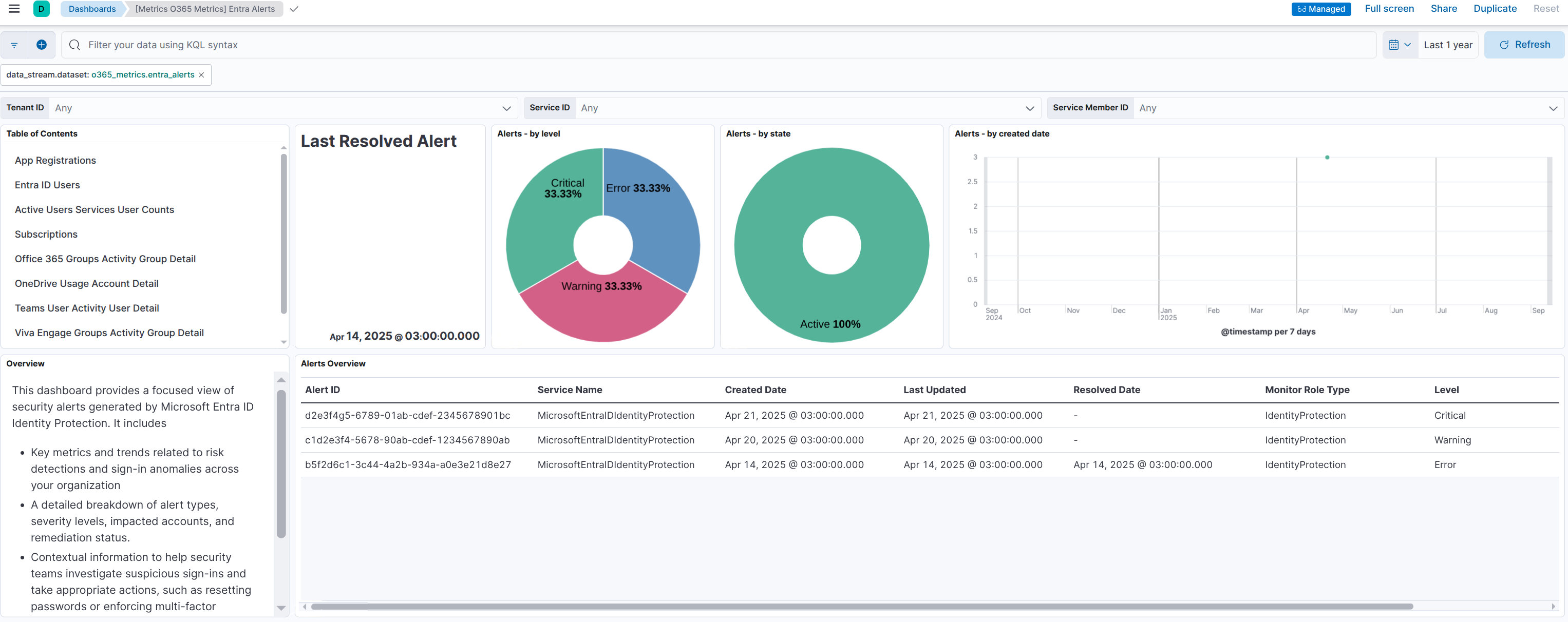
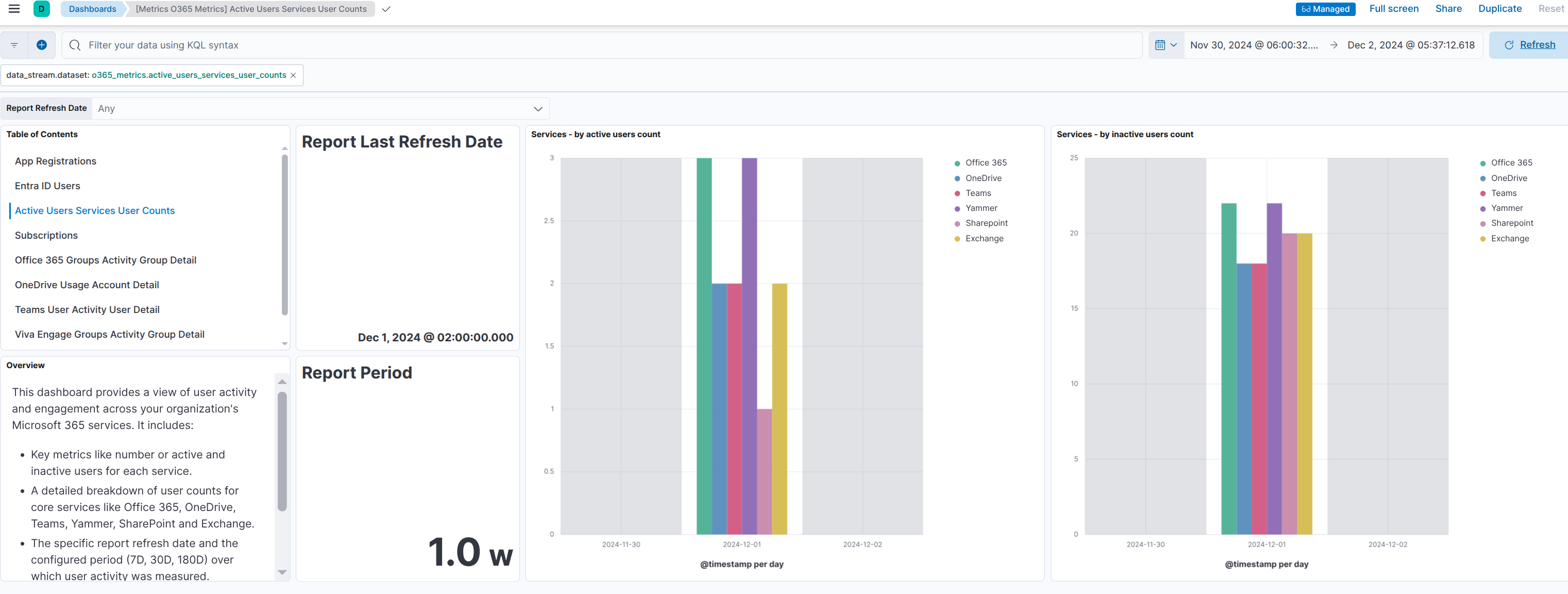
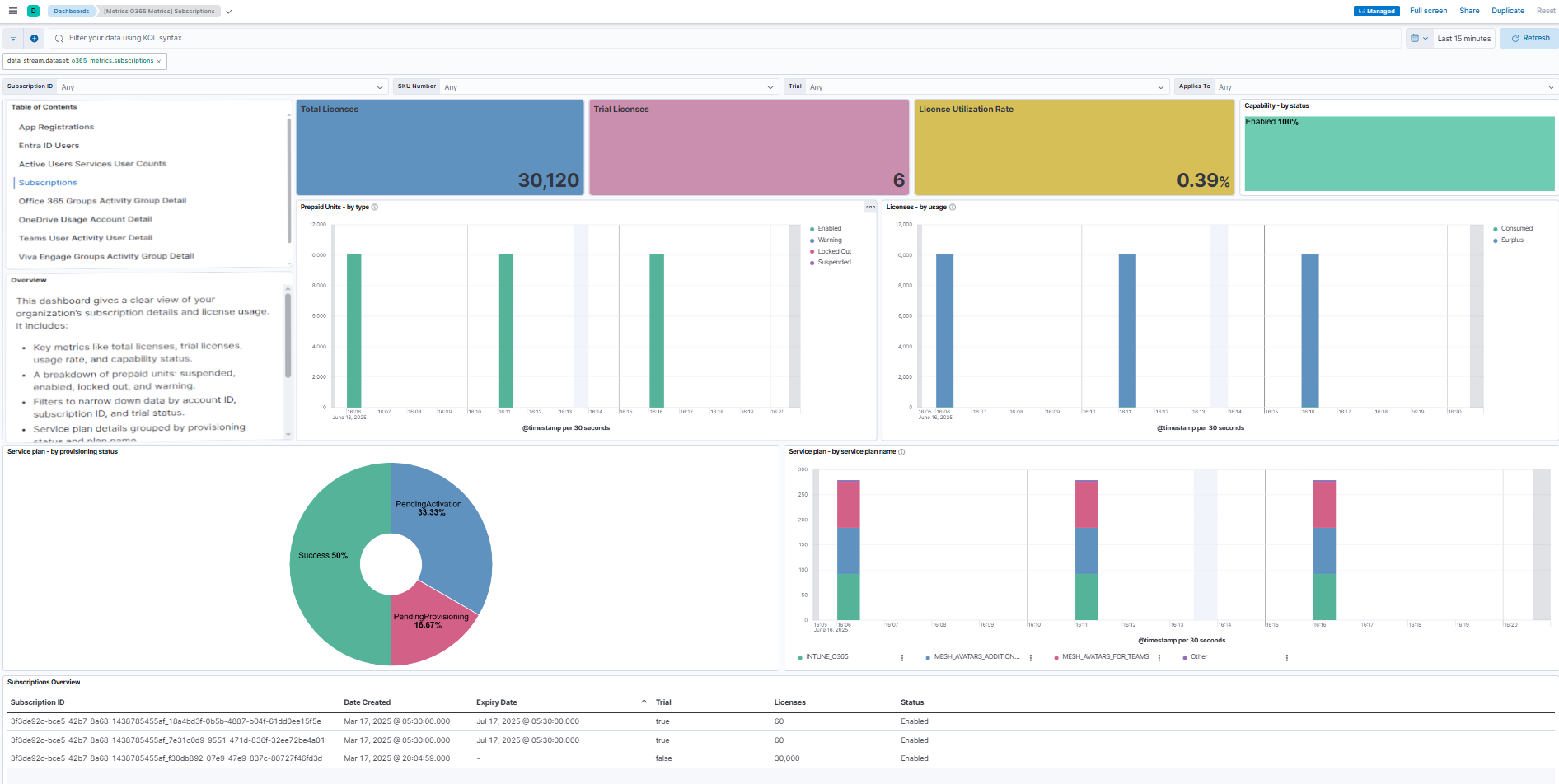
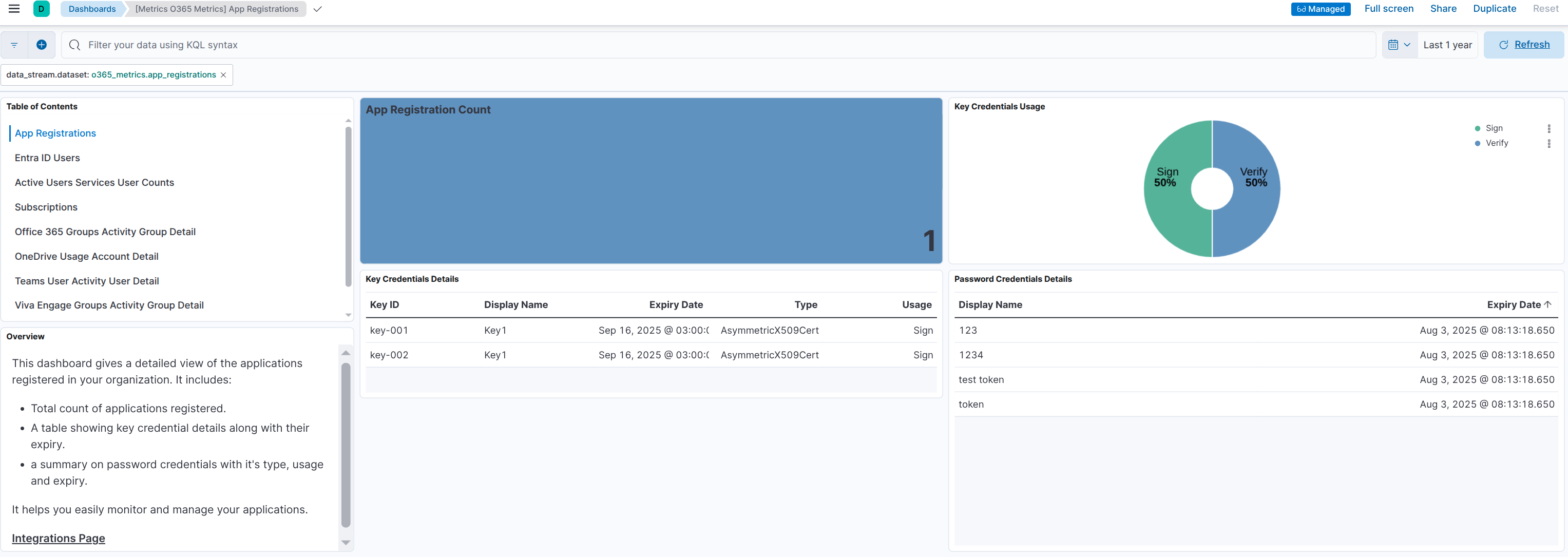
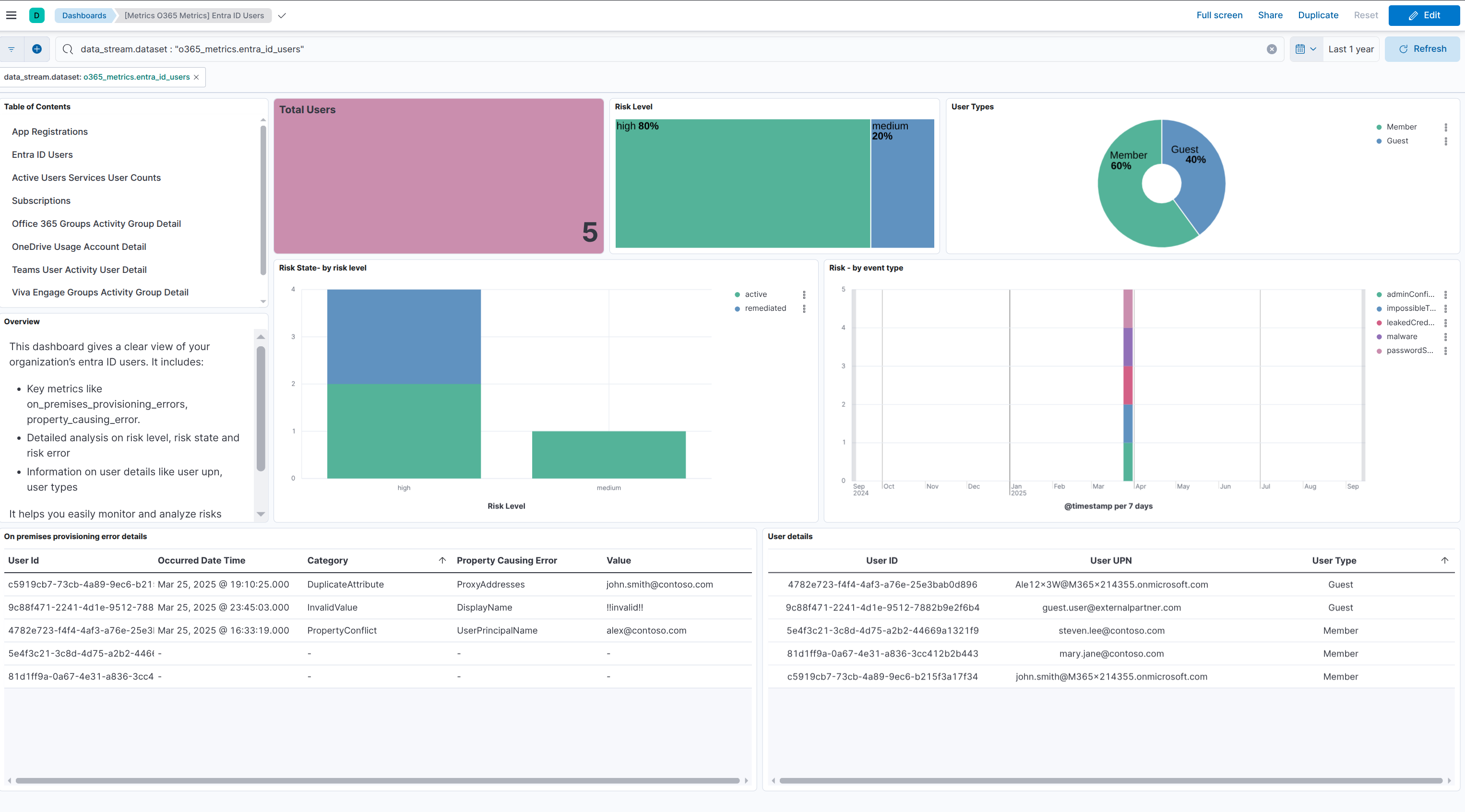
Changelog
| Version | Details | Minimum Kibana version |
|---|---|---|
| 1.4.0 | Enhancement (View pull request) Update Elastic Managed integration documentation to the current wording and docs links. |
9.0.0 8.16.0 |
| 1.3.0 | Enhancement (View pull request) Use new release field for agentless deployment mode to establish as beta. |
9.0.0 8.16.0 |
| 1.2.1 | Bug fix (View pull request) Guard against null value for call records in teams_call_quality response. |
9.0.0 8.16.0 |
| 1.2.0 | Enhancement (View pull request) Enable Agentless deployment. |
9.0.0 8.16.0 |
| 1.1.1 | Bug fix (View pull request) Remove duplicate security-solution-default tag references |
9.0.0 8.16.0 |
| 1.1.0 | Enhancement (View pull request) Update service_health endpoint to fetch health status for all subscribed Microsoft 365 services. |
9.0.0 8.16.0 |
| 1.0.2 | Bug fix (View pull request) Update dashboards to follow best practices. |
9.0.0 8.16.0 |
| 1.0.1 | Bug fix (View pull request) Fix Readme. |
9.0.0 8.16.0 |
| 1.0.0 | Enhancement (View pull request) Make O365 Metrics integration GA. |
9.0.0 8.16.0 |
| 0.23.0 | Enhancement (View pull request) Add dashboard for entra_alerts data stream and update pie chart to donut for entra_id_users data stream. |
9.0.0 8.16.0 |
| 0.22.4 | Bug fix (View pull request) Fix supported value range for initial_interval and sync_days inputs. |
9.0.0 8.16.0 |
| 0.22.3 | Enhancement (View pull request) Update dashboard screenshots and toggle off filters from origin dashboard in navigation. |
9.0.0 8.16.0 |
| 0.22.2 | Enhancement (View pull request) Review the Microsoft Office 365 Metrics Integration documentation. |
9.0.0 8.16.0 |
| 0.22.1 | Enhancement (View pull request) Fix documentation and update PR link. |
9.0.0 8.16.0 |
| 0.22.0 | Enhancement (View pull request) Use Links panel for the dashboards. |
9.0.0 8.16.0 |
| 0.21.0 | Enhancement (View pull request) Add dashboard for app_registrations data stream. |
9.0.0 8.16.0 |
| 0.20.0 | Enhancement (View pull request) Add dashboard for entra_id_users data stream. |
9.0.0 8.16.0 |
| 0.19.0 | Enhancement (View pull request) Add system tests. |
9.0.0 8.16.0 |
| 0.18.0 | Enhancement (View pull request) Add additional system tests. |
9.0.0 8.16.0 |
| 0.17.0 | Enhancement (View pull request) Add dashboard for active_users_services_user_counts data stream. |
9.0.0 8.16.0 |
| 0.16.0 | Enhancement (View pull request) Add support for configuring max_executions parameter. |
9.0.0 8.16.0 |
| 0.15.1 | Bug fix (View pull request) Fix CEL evaluation error for groups_activity_group_detail,onedrive_usage_account_detail,teams_user_activity_user_detail,viva_engage_groups_activity_group_detail data streams. |
9.0.0 8.16.0 |
| 0.15.0 | Enhancement (View pull request) Add dashboard for subscriptions data stream. |
9.0.0 8.16.0 |
| 0.14.0 | Enhancement (View pull request) Standardize user fields processing across integrations. |
9.0.0 8.16.0 |
| 0.13.2 | Bug fix (View pull request) Fix CEL evaluation error in teams_call_quality data stream. |
9.0.0 8.16.0 |
| 0.13.1 | Bug fix (View pull request) Enhances teams_call_quality data stream with improved pagination, configurable initial fetch, updated field mappings, and revised response structure with supporting tests. |
9.0.0 8.16.0 |
| 0.13.0 | Enhancement (View pull request) Add entra_agent data stream and rename fields for entra_alerts data stream. |
9.0.0 8.16.0 |
| 0.12.0 | Enhancement (View pull request) Add entra_alerts data stream. |
9.0.0 8.16.0 |
| 0.11.1 | Enhancement (View pull request) Add site_type field for onedrive_usage_account_counts, onedrive_usage_file_counts and onedrive_usage_storage data streams. |
9.0.0 8.16.0 |
| 0.11.0 | Enhancement (View pull request) Add entra_features data stream. |
9.0.0 8.16.0 |
| 0.10.1 | Enhancement (View pull request) Update documentation for tenant_settings data stream. |
9.0.0 8.16.0 |
| 0.10.0 | Enhancement (View pull request) Update the 'subscriptions' data stream to include both subscribed SKUs and subscription details. |
9.0.0 8.16.0 |
| 0.9.0 | Enhancement (View pull request) Add 'entra ID users' data stream. |
9.0.0 8.16.0 |
| 0.8.2 | Bug fix (View pull request) Fix cel code for tenant_settings data stream. |
9.0.0 8.16.0 |
| 0.8.1 | Enhancement (View pull request) Add Required Permisions Column |
9.0.0 8.16.0 |
| 0.8.0 | Enhancement (View pull request) Add 'app_registrations' data stream. |
9.0.0 8.16.0 |
| 0.7.0 | Enhancement (View pull request) Add 'tenant settings' data stream. |
9.0.0 8.16.0 |
| 0.6.6 | Enhancement (View pull request) Add support for configuring resource parameters, such as rate_limit, retry, and others. |
9.0.0 8.16.0 |
| 0.6.5 | Enhancement (View pull request) Convert nested fields to group for teams_call_quality and subscriptions data streams. |
9.0.0 8.16.0 |
| 0.6.4 | Enhancement (View pull request) Add metric types for all data streams. |
9.0.0 8.16.0 |
| 0.6.3 | Bug fix (View pull request) Fix pipeline for sharepoint_site_usage_detail data stream. |
9.0.0 8.16.0 |
| 0.6.2 | Bug fix (View pull request) Fix cel code for onedrive_usage_storage data stream. |
9.0.0 8.16.0 |
| 0.6.1 | Enhancement (View pull request) Add cel failure check to all data streams. |
9.0.0 8.16.0 |
| 0.6.0 | Enhancement (View pull request) Add support for Kibana 9.0.0. |
9.0.0 8.16.0 |
| 0.5.0 | Enhancement (View pull request) Add subscriptions data stream.Enhancement (View pull request) Add teams_call_quality data stream. |
8.16.0 |
| 0.4.0 | Enhancement (View pull request) Add teams_device_usage_user_counts data stream.Enhancement (View pull request) Add service_health data stream.Bug fix (View pull request) Split data stream mailbox_usage into mailbox_usage_detail and mailbox_usage_quota_status_mailbox_counts, and refactor other datastreams.Bug fix (View pull request) Split sharepoint_site_usage and onedrive_usage by data stream and quality check. |
8.16.0 |
| 0.3.0 | Enhancement (View pull request) Add groups_activity_group_detail, onedrive_usage_account_detail, teams_user_activity_user_detail, and viva_engage_groups_activity_group_detail data streams. |
8.16.0 |
| 0.2.0 | Enhancement (View pull request) Add teams_user_activity_user_counts data stream.Enhancement (View pull request) Add yammer_device_usage data stream.Enhancement (View pull request) Add active_users data stream.Enhancement (View pull request) Add mailbox_quota_staus and outlook_app_usage data streams.Enhancement (View pull request) Add sharepoint_site_usage data stream. |
8.16.0 |
| 0.1.2 | Enhancement (View pull request) Add onedrive_usage data stream. |
8.16.0 |
| 0.1.0 | Enhancement (View pull request) Initial draft of the o365_metrics package with the outlook_activity data stream. |
8.16.0 |