Splunk
Elastic Cloud Serverless projects are autoscaled environments, fully managed by Elastic and available on Elastic Cloud. Availability This functionality is generally available and ready for production usage. Elastic Cloud Serverless projects are autoscaled environments, fully managed by Elastic and available on Elastic Cloud. Availability This functionality is generally available and ready for production usage. The Elastic Stack includes Elastic's core products such as Elasticsearch, Kibana, Logstash, and Beats. Availability This functionality is generally available and ready for production usage. Unless stated otherwise on the page, this functionality is available when your Elastic Stack is deployed on Elastic Cloud Hosted, Elastic Cloud Enterprise, Elastic Cloud on Kubernetes, and self-managed environments. This documentation corresponds to the latest patch available for each minor version. If you're not using the latest patch, check the release notes for changes.
Serverless Observability
Generally available
Serverless Security
Generally available
Stack
9.1+
Generally available since 9.1
| Version | 1.3.0 (View all) |
| Managed integration release status | GA |
| Subscription level What's this? |
Basic |
| Developed by What's this? |
Elastic |
| Ingestion method(s) | API |
| Minimum Kibana version(s) | 9.1.0 8.19.0 |
You can use this integration as an Elastic Managed integration on Elastic Cloud Hosted deployments running this version or later.
Splunk is a powerful platform that enables organizations to search, monitor, and analyze machine-generated data from various systems, applications, and security devices. It provides real-time insights to improve operations and detect issues quickly. Splunk Alerts are automated notifications triggered when specific conditions or thresholds are met within the data, such as performance anomalies or security threats. These alerts help organizations respond proactively by notifying users via email, webhooks, or other channels. Overall, Splunk enhances visibility and supports efficient troubleshooting and monitoring.
This module has been tested against the Splunk API version v2 and instance version 9.4.0.
This integration collects the following logs:
- Alerts - Retrieve alerts from Splunk.
Elastic Managed integrations are only supported on Elastic Cloud Serverless and Elastic Cloud Hosted deployments. An Elastic Managed integration lets you ingest data from a cloud source while avoiding the orchestration, management, and maintenance associated with standard ingest infrastructure. Elastic runs the collector for you, so you can focus on your data instead of the infrastructure that collects it.
For more information, refer to Elastic Managed integrations and the Elastic Managed integrations FAQ.
Elastic Agent must be installed. For more details, check the Elastic Agent installation instructions. You can install only one Elastic Agent per host.
To collect data from the Splunk API, you need the following information:
- The username and password for the Splunk instance.
- The name of the search index from which you want to retrieve alerts, and the user should have permission to access that index.
- In the top search bar in Kibana, search for Integrations.
- In the search top bar, type Splunk.
- Select the Splunk integration and add it.
- Add all the required integration configuration parameters, including the URL, username, password, and Splunk Search String, to enable data collection.
- Save the integration.
NOTE:
- Fetching alerts is only supported from the Splunk 'notable' index, which stores security findings.
- Enable SSL for the Splunk REST API to ensure secure communication when interacting with the API.
This is the alert dataset.
Example
{
    "@timestamp": "2025-02-10T06:20:16.000Z",
    "agent": {
        "ephemeral_id": "03b5b12c-bdc1-4771-995a-e661b2fce477",
        "id": "971b8243-30b3-48b5-ad95-c64b40daf24f",
        "name": "elastic-agent-17375",
        "type": "filebeat",
        "version": "8.18.0"
    },
    "data_stream": {
        "dataset": "splunk.alert",
        "namespace": "93730",
        "type": "logs"
    },
    "destination": {
        "ip": [
            "127.0.0.1"
        ]
    },
    "ecs": {
        "version": "8.17.0"
    },
    "elastic_agent": {
        "id": "971b8243-30b3-48b5-ad95-c64b40daf24f",
        "snapshot": true,
        "version": "8.18.0"
    },
    "event": {
        "agent_id_status": "verified",
        "dataset": "splunk.alert",
        "ingested": "2025-04-10T12:39:50Z",
        "kind": "alert",
        "original": "{\"_bkt\":\"notable~70~E10E99CE-2B29-4D28-B797-57BEABF6E876\",\"_cd\":\"70:13771\",\"_indextime\":\"1739168416\",\"_raw\":\"1739168412, search_name=\\\"Access - Excessive Failed Logins - Rule\\\", app=\\\"ssl-web\\\", count=\\\"5\\\", ip=\\\"127.0.0.1\\\", dest_count=\\\"1\\\", info_max_time=\\\"1739168100.000000000\\\", info_min_time=\\\"1739164500.000000000\\\", info_search_time=\\\"1739168403.176027000\\\", src=\\\"89.160.20.112\\\", orig_tag=\\\"authentication\\\", orig_tag=\\\"default\\\", orig_tag=\\\"error\\\", orig_tag=\\\"failure\\\", user_count=\\\"1\\\"\",\"_serial\":\"476\",\"_si\":[\"89.160.20.156\",\"notable\"],\"_sourcetype\":\"stash\",\"_time\":\"2025-02-10T11:50:16.000+05:30\",\"host\":\"89.160.20.156\",\"index\":\"notable\",\"linecount\":\"1\",\"source\":\"Access - Excessive Failed Logins - Rule\",\"sourcetype\":\"stash\",\"splunk_server\":\"89.160.20.156\"}",
        "type": [
            "info"
        ]
    },
    "host": {
        "geo": {
            "city_name": "Linköping",
            "continent_name": "Europe",
            "country_iso_code": "SE",
            "country_name": "Sweden",
            "location": {
                "lat": 58.4167,
                "lon": 15.6167
            },
            "region_iso_code": "SE-E",
            "region_name": "Östergötland County"
        },
        "ip": [
            "89.160.20.156"
        ]
    },
    "input": {
        "type": "cel"
    },
    "message": "1739168412, search_name=\"Access - Excessive Failed Logins - Rule\", app=\"ssl-web\", count=\"5\", ip=\"127.0.0.1\", dest_count=\"1\", info_max_time=\"1739168100.000000000\", info_min_time=\"1739164500.000000000\", info_search_time=\"1739168403.176027000\", src=\"89.160.20.112\", orig_tag=\"authentication\", orig_tag=\"default\", orig_tag=\"error\", orig_tag=\"failure\", user_count=\"1\"",
    "related": {
        "ip": [
            "89.160.20.156",
            "89.160.20.112"
        ]
    },
    "rule": {
        "name": "Access - Excessive Failed Logins - Rule"
    },
    "source": {
        "address": "89.160.20.112",
        "as": {
            "number": 29518,
            "organization": {
                "name": "Bredband2 AB"
            }
        },
        "geo": {
            "city_name": "Linköping",
            "continent_name": "Europe",
            "country_iso_code": "SE",
            "country_name": "Sweden",
            "location": {
                "lat": 58.4167,
                "lon": 15.6167
            },
            "region_iso_code": "SE-E",
            "region_name": "Östergötland County"
        },
        "ip": [
            "89.160.20.112"
        ]
    },
    "splunk": {
        "alert": {
            "_bkt": "notable~70~E10E99CE-2B29-4D28-B797-57BEABF6E876",
            "_cd": "70:13771",
            "_indextime": "2025-02-10T06:20:16.000Z",
            "_raw": "1739168412, search_name=\"Access - Excessive Failed Logins - Rule\", app=\"ssl-web\", count=\"5\", ip=\"127.0.0.1\", dest_count=\"1\", info_max_time=\"1739168100.000000000\", info_min_time=\"1739164500.000000000\", info_search_time=\"1739168403.176027000\", src=\"89.160.20.112\", orig_tag=\"authentication\", orig_tag=\"default\", orig_tag=\"error\", orig_tag=\"failure\", user_count=\"1\"",
            "_serial": "476",
            "_si": [
                "89.160.20.156",
                "notable"
            ],
            "_sourcetype": "stash",
            "_time": "2025-02-10T06:20:16.000Z",
            "app": "ssl-web",
            "count": 5,
            "dest_count": 1,
            "friendly_name": "Access - Excessive Failed Logins - Rule",
            "host": "89.160.20.156",
            "index": "notable",
            "info_max_time": "2025-02-10T06:15:00.000Z",
            "info_min_time": "2025-02-10T05:15:00.000Z",
            "info_search_time": "2025-02-10T06:20:03.176Z",
            "ip": "127.0.0.1",
            "linecount": 1,
            "orig_tag": [
                "authentication",
                "default",
                "error",
                "failure"
            ],
            "raw_timestamp": "2025-02-10T06:20:12.000Z",
            "search_name": "Access - Excessive Failed Logins - Rule",
            "source": "Access - Excessive Failed Logins - Rule",
            "sourcetype": "stash",
            "splunk_server": "89.160.20.156",
            "src": "89.160.20.112",
            "user_count": 1
        }
    },
    "tags": [
        "preserve_original_event",
        "preserve_duplicate_custom_fields",
        "forwarded",
        "splunk-alert"
    ]
}
Exported fields
| Field | Description | Type |
|---|---|---|
| @timestamp | Date/time when the event originated. This is the date/time extracted from the event, typically representing when the event was generated by the source. If the event source has no original timestamp, this value is typically populated by the first time the event was received by the pipeline. Required field for all events. | date |
| data_stream.dataset | The field can contain anything that makes sense to signify the source of the data. Examples include nginx.access, prometheus, endpoint etc. For data streams that otherwise fit, but that do not have dataset set we use the value "generic" for the dataset value. event.dataset should have the same value as data_stream.dataset. Beyond the Elasticsearch data stream naming criteria noted above, the dataset value has additional restrictions: * Must not contain - * No longer than 100 characters |
constant_keyword |
| data_stream.namespace | A user defined namespace. Namespaces are useful to allow grouping of data. Many users already organize their indices this way, and the data stream naming scheme now provides this best practice as a default. Many users will populate this field with default. If no value is used, it falls back to default. Beyond the Elasticsearch index naming criteria noted above, namespace value has the additional restrictions: * Must not contain - * No longer than 100 characters |
constant_keyword |
| data_stream.type | An overarching type for the data stream. Currently allowed values are "logs" and "metrics". We expect to also add "traces" and "synthetics" in the near future. | constant_keyword |
| event.dataset | Name of the dataset. If an event source publishes more than one type of log or events (e.g. access log, error log), the dataset is used to specify which one the event comes from. It's recommended but not required to start the dataset name with the module name, followed by a dot, then the dataset name. | constant_keyword |
| event.module | Name of the module this data is coming from. If your monitoring agent supports the concept of modules or plugins to process events of a given source (e.g. Apache logs), event.module should contain the name of this module. |
constant_keyword |
| input.type | Type of filebeat input. | keyword |
| log.offset | Log offset. | long |
| splunk.alert.EventCode | long | |
| splunk.alert.Files | keyword | |
| splunk.alert.Last_Login_Time | date | |
| splunk.alert.Logon_Type | long | |
| splunk.alert.Member_Security_ID | keyword | |
| splunk.alert.Recipient | keyword | |
| splunk.alert.Sender | keyword | |
| splunk.alert.Subject_Account_Name | keyword | |
| splunk.alert.Target_Account_Name | keyword | |
| splunk.alert.Time | date | |
| splunk.alert._bkt | keyword | |
| splunk.alert._cd | keyword | |
| splunk.alert._indextime | date | |
| splunk.alert._raw | keyword | |
| splunk.alert._serial | keyword | |
| splunk.alert._si | keyword | |
| splunk.alert._sourcetype | keyword | |
| splunk.alert._subsecond | keyword | |
| splunk.alert._time | date | |
| splunk.alert.access_method | keyword | |
| splunk.alert.acked | keyword | |
| splunk.alert.action | keyword | |
| splunk.alert.activity | keyword | |
| splunk.alert.activity_timestamp | date | |
| splunk.alert.agent | keyword | |
| splunk.alert.alert | keyword | |
| splunk.alert.alert_type | keyword | |
| splunk.alert.alias | keyword | |
| splunk.alert.annotations.mitre_attack.mitre_tactic | keyword | |
| splunk.alert.annotations.mitre_attack.mitre_tactic_id | keyword | |
| splunk.alert.annotations.mitre_attack.mitre_technique | keyword | |
| splunk.alert.annotations.mitre_attack.mitre_technique_id | keyword | |
| splunk.alert.annotations.mitre_attack.value | keyword | |
| splunk.alert.app | keyword | |
| splunk.alert.app_session_id | keyword | |
| splunk.alert.app_session_key | keyword | |
| splunk.alert.app_tags | keyword | |
| splunk.alert.appcategory | keyword | |
| splunk.alert.appsuite | keyword | |
| splunk.alert.asset | keyword | |
| splunk.alert.attack | keyword | |
| splunk.alert.attackid | keyword | |
| splunk.alert.body | keyword | |
| splunk.alert.breach_date | date | |
| splunk.alert.breach_description | keyword | |
| splunk.alert.breach_id | keyword | |
| splunk.alert.breach_media_references | keyword | |
| splunk.alert.breach_score | keyword | |
| splunk.alert.breach_target_references | keyword | |
| splunk.alert.browser | keyword | |
| splunk.alert.browser_session_id | keyword | |
| splunk.alert.browser_version | keyword | |
| splunk.alert.category | keyword | |
| splunk.alert.category_id | keyword | |
| splunk.alert.cci | long | |
| splunk.alert.ccl | keyword | |
| splunk.alert.city | keyword | |
| splunk.alert.connection_id | keyword | |
| splunk.alert.const_dedup_id | keyword | |
| splunk.alert.correlation_id | keyword | |
| splunk.alert.count | double | |
| splunk.alert.craction | long | |
| splunk.alert.creation_timestamp | date | |
| splunk.alert.crlevel | keyword | |
| splunk.alert.crscore | long | |
| splunk.alert.ctime | date | |
| splunk.alert.date | keyword | |
| splunk.alert.date_hour | long | |
| splunk.alert.date_mday | long | |
| splunk.alert.date_minute | long | |
| splunk.alert.date_month | keyword | |
| splunk.alert.date_second | long | |
| splunk.alert.date_wday | keyword | |
| splunk.alert.date_year | long | |
| splunk.alert.date_zone | long | |
| splunk.alert.dayDiff | double | |
| splunk.alert.day_count | long | |
| splunk.alert.delta | long | |
| splunk.alert.dest | ip | |
| splunk.alert.dest_bunit | keyword | |
| splunk.alert.dest_category | keyword | |
| splunk.alert.dest_count | long | |
| splunk.alert.dest_interface | keyword | |
| splunk.alert.dest_ip | ip | |
| splunk.alert.dest_port | long | |
| splunk.alert.dest_priority | keyword | |
| splunk.alert.dest_zone | keyword | |
| splunk.alert.device | keyword | |
| splunk.alert.device_classification | keyword | |
| splunk.alert.devid | keyword | |
| splunk.alert.devname | keyword | |
| splunk.alert.direction | keyword | |
| splunk.alert.dlp_file | keyword | |
| splunk.alert.dlp_incident_id | keyword | |
| splunk.alert.dlp_is_unique_count | keyword | |
| splunk.alert.dlp_parent_id | keyword | |
| splunk.alert.dlp_profile | keyword | |
| splunk.alert.dlp_rule | keyword | |
| splunk.alert.dlp_rule_count | long | |
| splunk.alert.dlp_rule_severity | keyword | |
| splunk.alert.dom | keyword | |
| splunk.alert.domain | keyword | |
| splunk.alert.dst_country | keyword | |
| splunk.alert.dst_latitude | double | |
| splunk.alert.dst_location | keyword | |
| splunk.alert.dst_longitude | double | |
| splunk.alert.dst_region | keyword | |
| splunk.alert.dst_timezone | keyword | |
| splunk.alert.dst_zipcode | keyword | |
| splunk.alert.dstcountry | keyword | |
| splunk.alert.dstintf | keyword | |
| splunk.alert.dstintfrole | keyword | |
| splunk.alert.dstip | ip | |
| splunk.alert.dstport | long | |
| splunk.alert.dvc | keyword | |
| splunk.alert.ef_received_at | date | |
| splunk.alert.email | keyword | |
| splunk.alert.email_source | keyword | |
| splunk.alert.enriched | keyword | |
| splunk.alert.event.ComputerName | keyword | |
| splunk.alert.event.SeverityName | keyword | |
| splunk.alert.event.UserName | keyword | |
| splunk.alert.eventtime | date | |
| splunk.alert.eventtype | keyword | |
| splunk.alert.external_email | long | |
| splunk.alert.extracted_eventtype | keyword | |
| splunk.alert.extracted_host | keyword | |
| splunk.alert.factor | keyword | |
| splunk.alert.file_hash | keyword | |
| splunk.alert.file_lang | keyword | |
| splunk.alert.file_name | keyword | |
| splunk.alert.file_password_protected | keyword | |
| splunk.alert.file_path | keyword | |
| splunk.alert.file_size | long | |
| splunk.alert.file_type | keyword | |
| splunk.alert.firstTime | date | |
| splunk.alert.forwarded_by | keyword | |
| splunk.alert.friendly_name | keyword | |
| splunk.alert.from_user | keyword | |
| splunk.alert.ftnt_action | keyword | |
| splunk.alert.gef_meta._event_id | keyword | |
| splunk.alert.gef_meta._home_pop | keyword | |
| splunk.alert.gef_meta._service_id | keyword | |
| splunk.alert.gef_meta._tenant_id | keyword | |
| splunk.alert.gef_meta.schema_version | long | |
| splunk.alert.gef_meta.timestamp | date | |
| splunk.alert.gef_src_dp | keyword | |
| splunk.alert.host | keyword | |
| splunk.alert.hostname | keyword | |
| splunk.alert.http_user_agent | keyword | |
| splunk.alert.httpmethod | keyword | |
| splunk.alert.id | keyword | |
| splunk.alert.ids_type | keyword | |
| splunk.alert.incident_id | keyword | |
| splunk.alert.incidentserialno | long | |
| splunk.alert.index | keyword | |
| splunk.alert.infected_hosts | long | |
| splunk.alert.infection_count | long | |
| splunk.alert.info_max_time | date | |
| splunk.alert.info_min_time | date | |
| splunk.alert.info_search_time | date | |
| splunk.alert.insertion_epoch_timestamp | date | |
| splunk.alert.instance_id | keyword | |
| splunk.alert.integration | keyword | |
| splunk.alert.internal_id | keyword | |
| splunk.alert.ip | ip | |
| splunk.alert.isotimestamp | date | |
| splunk.alert.killchain | keyword | |
| splunk.alert.lastTime | date | |
| splunk.alert.last_seen | date | |
| splunk.alert.level | keyword | |
| splunk.alert.linecount | long | |
| splunk.alert.location.city | keyword | |
| splunk.alert.location.country | keyword | |
| splunk.alert.location.state | keyword | |
| splunk.alert.logid | keyword | |
| splunk.alert.mac | keyword | |
| splunk.alert.managed_app | keyword | |
| splunk.alert.matched_username | keyword | |
| splunk.alert.md5 | keyword | |
| splunk.alert.mitre_sub_technique | keyword | |
| splunk.alert.mitre_technique_description | keyword | |
| splunk.alert.msg | keyword | |
| splunk.alert.name | keyword | |
| splunk.alert.netskope_pop | keyword | |
| splunk.alert.new_enrollment | keyword | |
| splunk.alert.nt_host | keyword | |
| splunk.alert.object | keyword | |
| splunk.alert.object_category | keyword | |
| splunk.alert.object_id | keyword | |
| splunk.alert.object_path | keyword | |
| splunk.alert.object_type | keyword | |
| splunk.alert.ood_software | keyword | |
| splunk.alert.organization_unit | keyword | |
| splunk.alert.orig_action_name | keyword | |
| splunk.alert.orig_bkt | keyword | |
| splunk.alert.orig_cd | keyword | |
| splunk.alert.orig_event_id | keyword | |
| splunk.alert.orig_eventtype | keyword | |
| splunk.alert.orig_host | keyword | |
| splunk.alert.orig_index | keyword | |
| splunk.alert.orig_linecount | long | |
| splunk.alert.orig_raw | keyword | |
| splunk.alert.orig_rid | keyword | |
| splunk.alert.orig_rule_id | keyword | |
| splunk.alert.orig_sid | keyword | |
| splunk.alert.orig_source | keyword | |
| splunk.alert.orig_sourcetype | keyword | |
| splunk.alert.orig_splunk_server | keyword | |
| splunk.alert.orig_tag | keyword | |
| splunk.alert.orig_time | date | |
| splunk.alert.orig_timeendpos | long | |
| splunk.alert.orig_timestartpos | long | |
| splunk.alert.os | keyword | |
| splunk.alert.os_family | keyword | |
| splunk.alert.os_version | keyword | |
| splunk.alert.outer_doc_type | long | |
| splunk.alert.page | keyword | |
| splunk.alert.page_site | keyword | |
| splunk.alert.parent_id | keyword | |
| splunk.alert.password_type | keyword | |
| splunk.alert.phone | keyword | |
| splunk.alert.policy | keyword | |
| splunk.alert.policy_id | keyword | |
| splunk.alert.policyid | keyword | |
| splunk.alert.policytype | keyword | |
| splunk.alert.poluuid | keyword | |
| splunk.alert.port | long | |
| splunk.alert.ppf_cell | keyword | |
| splunk.alert.priority | keyword | |
| splunk.alert.product | keyword | |
| splunk.alert.product_version | keyword | |
| splunk.alert.profile | keyword | |
| splunk.alert.protection_keyword | keyword | |
| splunk.alert.proto | long | |
| splunk.alert.protocol | keyword | |
| splunk.alert.protocol_version | keyword | |
| splunk.alert.raw_event_inserted_at | date | |
| splunk.alert.raw_timestamp | date | |
| splunk.alert.reason | keyword | |
| splunk.alert.ref | keyword | |
| splunk.alert.referer | keyword | |
| splunk.alert.request_id | keyword | |
| splunk.alert.result | keyword | |
| splunk.alert.risk_other | keyword | |
| splunk.alert.risk_score | float | |
| splunk.alert.search_name | keyword | |
| splunk.alert.search_title | keyword | |
| splunk.alert.service | keyword | |
| splunk.alert.service_identifier | keyword | |
| splunk.alert.session_id | keyword | |
| splunk.alert.sessionid | keyword | |
| splunk.alert.severity | keyword | |
| splunk.alert.severity_id | keyword | |
| splunk.alert.sha256 | keyword | |
| splunk.alert.signature | keyword | |
| splunk.alert.signature_id | keyword | |
| splunk.alert.site | keyword | |
| splunk.alert.skip_geoip_lookup | keyword | |
| splunk.alert.source | keyword | |
| splunk.alert.sourcetype | keyword | |
| splunk.alert.splunk_server | keyword | |
| splunk.alert.splunk_server_group | keyword | |
| splunk.alert.src | keyword | |
| splunk.alert.src_asset | keyword | |
| splunk.alert.src_asset_id | keyword | |
| splunk.alert.src_asset_tag | keyword | |
| splunk.alert.src_bunit | keyword | |
| splunk.alert.src_category | keyword | |
| splunk.alert.src_city | keyword | |
| splunk.alert.src_country | keyword | |
| splunk.alert.src_employee_no | long | |
| splunk.alert.src_interface | keyword | |
| splunk.alert.src_ip | ip | |
| splunk.alert.src_is_expected | keyword | |
| splunk.alert.src_latitude | double | |
| splunk.alert.src_location | keyword | |
| splunk.alert.src_longitude | double | |
| splunk.alert.src_mac | keyword | |
| splunk.alert.src_nt_host | keyword | |
| splunk.alert.src_owner | keyword | |
| splunk.alert.src_pci_domain | keyword | |
| splunk.alert.src_port | long | |
| splunk.alert.src_priority | keyword | |
| splunk.alert.src_region | keyword | |
| splunk.alert.src_serial_no | keyword | |
| splunk.alert.src_time | date | |
| splunk.alert.src_timezone | keyword | |
| splunk.alert.src_user | keyword | |
| splunk.alert.src_user_category | keyword | |
| splunk.alert.src_user_email | keyword | |
| splunk.alert.src_user_first | keyword | |
| splunk.alert.src_user_identity | keyword | |
| splunk.alert.src_user_identity_id | keyword | |
| splunk.alert.src_user_identity_tag | keyword | |
| splunk.alert.src_user_last | keyword | |
| splunk.alert.src_user_nick | keyword | |
| splunk.alert.src_user_phone | keyword | |
| splunk.alert.src_user_priority | keyword | |
| splunk.alert.src_user_startDate | keyword | |
| splunk.alert.src_user_watchlist | keyword | |
| splunk.alert.src_zipcode | keyword | |
| splunk.alert.src_zone | keyword | |
| splunk.alert.srccountry | keyword | |
| splunk.alert.srcintf | keyword | |
| splunk.alert.srcintfrole | keyword | |
| splunk.alert.srcip | ip | |
| splunk.alert.srcport | long | |
| splunk.alert.stanza | keyword | |
| splunk.alert.subject | keyword | |
| splunk.alert.subtype | keyword | |
| splunk.alert.suppression_key | keyword | |
| splunk.alert.tag | keyword | |
| splunk.alert.threat_category | keyword | |
| splunk.alert.threat_collection | keyword | |
| splunk.alert.threat_collection_key | keyword | |
| splunk.alert.threat_description | keyword | |
| splunk.alert.threat_group | keyword | |
| splunk.alert.threat_key | keyword | |
| splunk.alert.threat_match_field | keyword | |
| splunk.alert.threat_match_value | keyword | |
| splunk.alert.threat_source_digest | keyword | |
| splunk.alert.threat_source_id | keyword | |
| splunk.alert.threat_source_path | keyword | |
| splunk.alert.threat_source_type | keyword | |
| splunk.alert.time | date | |
| splunk.alert.timeendpos | long | |
| splunk.alert.timestamp | keyword | |
| splunk.alert.timestartpos | long | |
| splunk.alert.timestr | keyword | |
| splunk.alert.title | keyword | |
| splunk.alert.traffic_type | keyword | |
| splunk.alert.transaction_id | keyword | |
| splunk.alert.transport | keyword | |
| splunk.alert.true_obj_category | keyword | |
| splunk.alert.true_obj_type | keyword | |
| splunk.alert.true_type_id | keyword | |
| splunk.alert.tss_mode | keyword | |
| splunk.alert.type | keyword | |
| splunk.alert.tz | long | |
| splunk.alert.ur_normalized | keyword | |
| splunk.alert.url | keyword | |
| splunk.alert.user | keyword | |
| splunk.alert.user_category | keyword | |
| splunk.alert.user_count | long | |
| splunk.alert.user_email | keyword | |
| splunk.alert.user_first | keyword | |
| splunk.alert.user_identity | keyword | |
| splunk.alert.user_identity_id | keyword | |
| splunk.alert.user_identity_tag | keyword | |
| splunk.alert.user_last | keyword | |
| splunk.alert.user_managedBy | keyword | |
| splunk.alert.user_nick | keyword | |
| splunk.alert.user_phone | keyword | |
| splunk.alert.user_priority | keyword | |
| splunk.alert.user_startDate | keyword | |
| splunk.alert.user_watchlist | keyword | |
| splunk.alert.useragent | keyword | |
| splunk.alert.userip | ip | |
| splunk.alert.userkey | keyword | |
| splunk.alert.username | keyword | |
| splunk.alert.values | keyword | |
| splunk.alert.vd | keyword | |
| splunk.alert.vendor | keyword | |
| splunk.alert.vendor_action | keyword | |
| splunk.alert.vendor_eventtype | keyword | |
| splunk.alert.vendor_product | keyword | |
| splunk.alert.vendor_url | keyword | |
| splunk.alert.weight | long | |
| tags | User defined tags. | keyword |
This is the search dataset.
Example
{
    "@timestamp": "2025-02-21T14:26:56.000+00:00",
    "agent": {
        "ephemeral_id": "bee267d7-2bc0-4bf7-baa9-b52128d9d52d",
        "id": "3f7e31dc-0c9c-4976-8c83-96d370f2de7b",
        "name": "elastic-agent-17049",
        "type": "filebeat",
        "version": "8.19.0"
    },
    "data_stream": {
        "dataset": "splunk.search",
        "namespace": "99066",
        "type": "logs"
    },
    "ecs": {
        "version": "8.17.0"
    },
    "elastic_agent": {
        "id": "3f7e31dc-0c9c-4976-8c83-96d370f2de7b",
        "snapshot": false,
        "version": "8.19.0"
    },
    "event": {
        "agent_id_status": "verified",
        "dataset": "splunk.search",
        "ingested": "2025-08-27T23:07:53Z",
        "module": "splunk",
        "original": "{\"author\":\"search_user\",\"ecs_result\":{\"event\":{\"module\":\"splunk\"},\"host.name\":\"ip-186-86-82-48\",\"splunk.search.result.important_user_field\":\"test\"},\"mapping\":{\"field1\":\"splunk.search.result.important_user_field\",\"host\":\"host.name\"},\"query\":\"search *\",\"result\":{\"_bkt\":\"main~0~266C23A8-75B5-4A00-8732-4A6065281018\",\"_cd\":\"0:10\",\"_indextime\":\"1740148016\",\"_raw\":\"02/21/2025 14:26:56 +0000, info_min_time=1740060000.000, info_max_time=1740148015.000, info_search_time=1740148015.943, field1=test\",\"_serial\":\"0\",\"_si\":[\"ip-186-86-82-48\",\"main\"],\"_sourcetype\":\"stash\",\"_time\":\"2025-02-21T14:26:56.000+00:00\",\"index\":\"main\",\"linecount\":\"1\",\"source\":\"/opt/splunk/var/spool/splunk/cafc46ad8c914957_a9876ea14cfe7ac8_events.stash_new\",\"sourcetype\":\"stash\",\"splunk_server\":\"ip-186-86-82-49\"}}"
    },
    "host": {
        "name": "ip-186-86-82-48"
    },
    "input": {
        "type": "cel"
    },
    "message": "info_min_time=1740060000.000, info_max_time=1740148015.000, info_search_time=1740148015.943, field1=test",
    "related": {
        "hosts": [
            "ip-186-86-82-48",
            "ip-186-86-82-49"
        ],
        "user": [
            "search_user"
        ]
    },
    "splunk": {
        "search": {
            "author": "search_user",
            "mapping": {
                "field1": "splunk.search.result.important_user_field",
                "host": "host.name"
            },
            "query": "search *",
            "result": {
                "_bkt": "main~0~266C23A8-75B5-4A00-8732-4A6065281018",
                "_cd": "0:10",
                "_indextime": "1740148016",
                "_raw": "02/21/2025 14:26:56 +0000, info_min_time=1740060000.000, info_max_time=1740148015.000, info_search_time=1740148015.943, field1=test",
                "_serial": "0",
                "_si": [
                    "ip-186-86-82-48",
                    "main"
                ],
                "_sourcetype": "stash",
                "_time": "2025-02-21T14:26:56.000+00:00",
                "important_user_field": "test",
                "index": "main",
                "linecount": "1",
                "source": "/opt/splunk/var/spool/splunk/cafc46ad8c914957_a9876ea14cfe7ac8_events.stash_new",
                "sourcetype": "stash",
                "splunk_server": "ip-186-86-82-49"
            }
        }
    },
    "tags": [
        "preserve_original_event",
        "preserve_duplicate_custom_fields",
        "forwarded",
        "splunk-search"
    ]
}
Exported fields
| Field | Description | Type |
|---|---|---|
| @timestamp | Date/time when the event originated. This is the date/time extracted from the event, typically representing when the event was generated by the source. If the event source has no original timestamp, this value is typically populated by the first time the event was received by the pipeline. Required field for all events. | date |
| data_stream.dataset | The field can contain anything that makes sense to signify the source of the data. Examples include nginx.access, prometheus, endpoint etc. For data streams that otherwise fit, but that do not have dataset set we use the value "generic" for the dataset value. event.dataset should have the same value as data_stream.dataset. Beyond the Elasticsearch data stream naming criteria noted above, the dataset value has additional restrictions: * Must not contain - * No longer than 100 characters |
constant_keyword |
| data_stream.namespace | A user defined namespace. Namespaces are useful to allow grouping of data. Many users already organize their indices this way, and the data stream naming scheme now provides this best practice as a default. Many users will populate this field with default. If no value is used, it falls back to default. Beyond the Elasticsearch index naming criteria noted above, namespace value has the additional restrictions: * Must not contain - * No longer than 100 characters |
constant_keyword |
| data_stream.type | An overarching type for the data stream. Currently allowed values are "logs" and "metrics". We expect to also add "traces" and "synthetics" in the near future. | constant_keyword |
| event.dataset | Name of the dataset. If an event source publishes more than one type of log or events (e.g. access log, error log), the dataset is used to specify which one the event comes from. It's recommended but not required to start the dataset name with the module name, followed by a dot, then the dataset name. | constant_keyword |
| event.module | Name of the module this data is coming from. If your monitoring agent supports the concept of modules or plugins to process events of a given source (e.g. Apache logs), event.module should contain the name of this module. |
constant_keyword |
| input.type | Type of filebeat input. | keyword |
| log.offset | Log offset. | long |
| splunk.search.author | The username of the search author. | keyword |
| splunk.search.mapping.* | Mappings used to convert from CIM to ECS. | object |
| splunk.search.query | The search query. | keyword |
| splunk.search.result.* | The search result. | object |
| splunk.search.timestamp | The search timestamp as a keyword. | keyword |
| tags | User defined tags. | keyword |
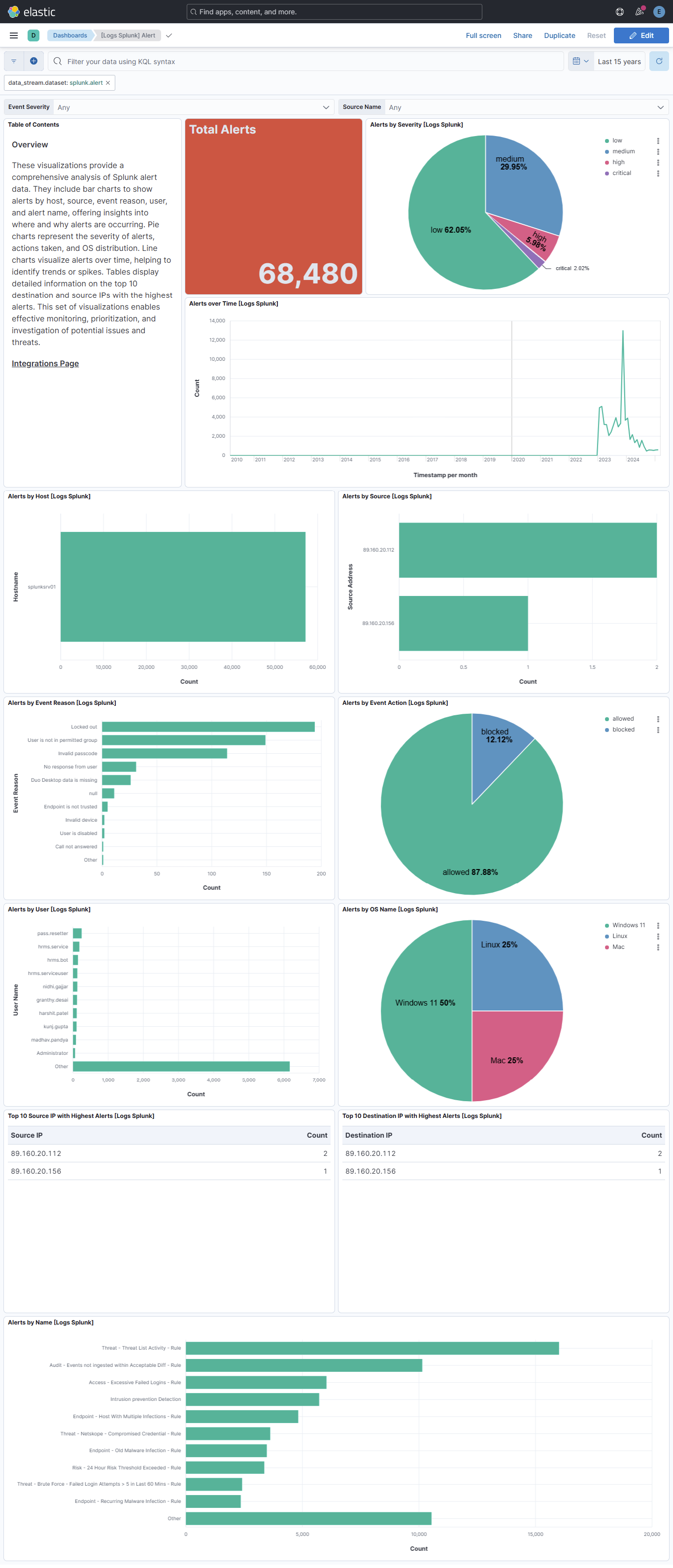
This integration includes one or more Kibana dashboards that visualizes the data collected by the integration. The screenshots below illustrate how the ingested data is displayed.
Changelog
| Version | Details | Minimum Kibana version |
|---|---|---|
| 1.3.0 | Enhancement (View pull request) Update Elastic Managed integration documentation to the current wording and docs links. |
9.1.0 8.19.0 |
| 1.2.0 | Enhancement (View pull request) Add tags to ingest pipeline processors and add preserve_original_event to pipeline-level on_failure handlers.Bug fix (View pull request) Remove a redundant no-op append processor for preserve_original_event in the alert data stream. |
9.1.0 8.19.0 |
| 1.1.3 | Enhancement (View pull request) Set agentless deployment mode release field to ga. |
9.1.0 8.19.0 |
| 1.1.2 | Bug fix (View pull request) Map alert proto to ECS network.transport and network.iana_number instead of failing on protocol names. |
9.1.0 8.19.0 |
| 1.1.1 | Bug fix (View pull request) Prevent @timestamp from becoming an array when a _time key embedded in _raw collides with the top-level _time in the alert data stream. |
9.1.0 8.19.0 |
| 1.1.0 | Enhancement (View pull request) Use new release field for agentless deployment mode to establish as beta. |
9.1.0 8.19.0 |
| 1.0.2 | Bug fix (View pull request) Change page_size/batch_size variable type from text to integer for Fleet input validation. |
9.1.0 8.19.0 |
| 1.0.1 | Bug fix (View pull request) Downgrade the format_version to the minimum version that supports all the necessary features for the package. |
9.1.0 8.19.0 |
| 1.0.0 | Enhancement (View pull request) Release package as GA. |
9.1.0 8.19.0 |
| 0.7.0 | Enhancement (View pull request) Add search data stream. |
9.1.0 8.19.0 |
| 0.6.0 | Enhancement (View pull request) Use more secure Basic Authentication mechanism in agent collector. |
9.0.0 8.18.0 |
| 0.5.1 | Bug fix (View pull request) Generalize install instructions. |
9.0.0 8.18.0 |
| 0.5.0 | Enhancement (View pull request) Use terminate processor instead of fail processor to handle agent errors. |
9.0.0 8.18.0 |
| 0.4.0 | Enhancement (View pull request) Remove duplicated installation instructions from the documentation |
9.0.0 8.18.0 |
| 0.3.2 | Bug fix (View pull request) Add temporary processor to remove the fields added by the Agentless policy. |
9.0.0 8.18.0 |
| 0.3.1 | Bug fix (View pull request) Fix default request trace enabled behavior. |
9.0.0 8.18.0 |
| 0.3.0 | Enhancement (View pull request) Updated logo. |
9.0.0 8.18.0 |
| 0.2.0 | Enhancement (View pull request) Updated SIEM categorization. |
9.0.0 8.18.0 |
| 0.1.0 | Enhancement (View pull request) Initial release. |
9.0.0 8.18.0 |