Oracle WebLogic integration
Elastic Cloud Serverless projects are autoscaled environments, fully managed by Elastic and available on Elastic Cloud. Availability This functionality is generally available and ready for production usage. Elastic Cloud Serverless projects are autoscaled environments, fully managed by Elastic and available on Elastic Cloud. Availability This functionality is generally available and ready for production usage. The Elastic Stack includes Elastic's core products such as Elasticsearch, Kibana, Logstash, and Beats. Availability This functionality is generally available and ready for production usage. Unless stated otherwise on the page, this functionality is available when your Elastic Stack is deployed on Elastic Cloud Hosted, Elastic Cloud Enterprise, Elastic Cloud on Kubernetes, and self-managed environments. This documentation corresponds to the latest patch available for each minor version. If you're not using the latest patch, check the release notes for changes.
Serverless Observability
Generally available
Serverless Security
Generally available
Stack
9.0+
Generally available since 9.0
| Version | 1.9.1 (View all) |
| Subscription level What's this? |
Basic |
| Developed by What's this? |
Elastic |
| Ingestion method(s) | File, Jolokia |
| Minimum Kibana version(s) | 9.0.0 8.13.0 |
The Oracle WebLogic Integration is used to fetch observability data from Oracle WebLogic web endpoints and ingest it into Elasticsearch.
This integration has been tested against Oracle WebLogic v12.2.1.3.
In order to ingest data from Oracle WebLogic:
User must add the path where the Jolokia agent is downloaded (For example,
/home/oracle/jolokia-jvm-1.6.0-agent.jar).Configuring Jolokia for WebLogic
User needs to download and add the JAR file and set environment variables for Jolokia.
Text -javaagent:<path-to-jolokia-agent>=port=<port>,host=<hostname>Example configuration:
Text -javaagent:/home/oracle/jolokia-jvm-1.6.0-agent.jar=port=8005,host=localhost(Optional) User can run Jolokia on https by configuring the following parameters.
Text -javaagent:<path-to-jolokia-agent>=port=<port>,host=<hostname>,protocol=<http/https>,keystore=<path-to-keystore>,keystorePassword=<kestore-password>,keyStoreType=<keystore-type>Example configuration:
Text -javaagent:/home/oracle/jolokia-jvm-1.6.0-agent.jar=port=8005,host=localhost,protocol=https,keystore=/u01/oracle/weblogic.jks,keystorePassword=host@123,keyStoreType=JKS
- If
host.ipappears conflicted under thelogs-*data view, this issue can be resolved by reindexing theAdmin Serverdata stream. - If
host.ipappears conflicted under themetrics-*data view, this issue can be resolved by reindexing theDeployed ApplicationandThreadpooldata streams.
This integration collects Oracle WebLogic Admin Server, Managed Server, Domain and Access logs. It includes the following datasets for receiving logs from a file:
The access data stream collects Access logs form Access.log.
Example
{
    "@timestamp": "2024-06-18T06:57:37.000Z",
    "agent": {
        "ephemeral_id": "98e5ffe5-df03-43bc-bb8e-bfb3de694ee6",
        "id": "97400795-188c-4140-a1ee-0002078c785d",
        "name": "docker-fleet-agent",
        "type": "filebeat",
        "version": "8.13.0"
    },
    "data_stream": {
        "dataset": "oracle_weblogic.access",
        "namespace": "ep",
        "type": "logs"
    },
    "ecs": {
        "version": "8.11.0"
    },
    "elastic_agent": {
        "id": "97400795-188c-4140-a1ee-0002078c785d",
        "snapshot": false,
        "version": "8.13.0"
    },
    "event": {
        "agent_id_status": "verified",
        "category": [
            "network"
        ],
        "dataset": "oracle_weblogic.access",
        "ingested": "2024-06-18T06:58:44Z",
        "kind": "event",
        "module": "oracle_weblogic",
        "type": [
            "access"
        ]
    },
    "host": {
        "architecture": "x86_64",
        "containerized": true,
        "hostname": "docker-fleet-agent",
        "id": "8259e024976a406e8a54cdbffeb84fec",
        "ip": [
            "127.0.0.1"
        ],
        "mac": [
            "02-42-C0-A8-F5-07"
        ],
        "name": "docker-fleet-agent",
        "os": {
            "codename": "focal",
            "family": "debian",
            "kernel": "3.10.0-1160.102.1.el7.x86_64",
            "name": "Ubuntu",
            "platform": "ubuntu",
            "type": "linux",
            "version": "20.04.6 LTS (Focal Fossa)"
        }
    },
    "http": {
        "request": {
            "method": "GET",
            "referrer": "/sample/index.jsp"
        },
        "response": {
            "bytes": 750,
            "status_code": 200
        },
        "version": "1.1"
    },
    "input": {
        "type": "log"
    },
    "log": {
        "file": {
            "path": "/tmp/service_logs/adminserver/logs/access.log"
        },
        "offset": 0
    },
    "oracle_weblogic": {
        "access": {
            "authuser": "-",
            "host_address": "127.0.0.1"
        }
    },
    "tags": [
        "oracle_weblogic-access"
    ]
}
ECS Field Reference
Please refer to the following document for detailed information on ECS fields.
Exported fields
| Field | Description | Type |
|---|---|---|
| @timestamp | Event timestamp. | date |
| data_stream.dataset | Data stream dataset. | constant_keyword |
| data_stream.namespace | Data stream namespace. | constant_keyword |
| data_stream.type | Data stream type. | constant_keyword |
| input.type | Input type. | keyword |
| log.flags | Flags for the log file. | keyword |
| log.offset | Log offset. | long |
| oracle_weblogic.access.authuser | The User identity allowing them access to an online service, connected device, or other resource. | keyword |
| oracle_weblogic.access.host_address | The physical address of a computer in a network. | keyword |
The admin_server data stream collects Admin Server logs from Adminserver.log.
Example
{
    "@timestamp": "2024-06-18T06:59:47.388Z",
    "agent": {
        "ephemeral_id": "eb27a024-3ff2-4d79-a4c1-86ffd80db450",
        "id": "97400795-188c-4140-a1ee-0002078c785d",
        "name": "docker-fleet-agent",
        "type": "filebeat",
        "version": "8.13.0"
    },
    "data_stream": {
        "dataset": "oracle_weblogic.admin_server",
        "namespace": "ep",
        "type": "logs"
    },
    "ecs": {
        "version": "8.11.0"
    },
    "elastic_agent": {
        "id": "97400795-188c-4140-a1ee-0002078c785d",
        "snapshot": false,
        "version": "8.13.0"
    },
    "event": {
        "agent_id_status": "verified",
        "category": [
            "iam"
        ],
        "dataset": "oracle_weblogic.admin_server",
        "ingested": "2024-06-18T07:01:48Z",
        "kind": "event",
        "module": "oracle_weblogic",
        "type": [
            "admin"
        ]
    },
    "host": {
        "architecture": "x86_64",
        "containerized": true,
        "hostname": "docker-fleet-agent",
        "id": "8259e024976a406e8a54cdbffeb84fec",
        "ip": [
            "192.168.245.7"
        ],
        "mac": [
            "02-42-C0-A8-F5-07"
        ],
        "name": "docker-fleet-agent",
        "os": {
            "codename": "focal",
            "family": "debian",
            "kernel": "3.10.0-1160.102.1.el7.x86_64",
            "name": "Ubuntu",
            "platform": "ubuntu",
            "type": "linux",
            "version": "20.04.6 LTS (Focal Fossa)"
        }
    },
    "input": {
        "type": "log"
    },
    "log": {
        "file": {
            "path": "/tmp/service_logs/adminserver/logs/admin-server.log"
        },
        "level": "Info",
        "offset": 0
    },
    "message": "Disabling the CryptoJ JCE Provider self-integrity check for better startup performance. To enable this check, specify -Dweblogic.security.allowCryptoJDefaultJCEVerification=true.",
    "oracle_weblogic": {
        "admin_server": {
            "diagnostic_context_id": "1718693987388",
            "machine_name": "wlsadmin",
            "message_id": "BEA-090905",
            "meta": "[severity-value: 64] [partition-id: 0] [partition-name: DOMAIN] ",
            "subsystem": "Security",
            "thread_id": "main"
        }
    },
    "tags": [
        "oracle_weblogic-admin_server"
    ]
}
ECS Field Reference
Please refer to the following document for detailed information on ECS fields.
Exported fields
| Field | Description | Type |
|---|---|---|
| @timestamp | Event timestamp. | date |
| data_stream.dataset | Data stream dataset. | constant_keyword |
| data_stream.namespace | Data stream namespace. | constant_keyword |
| data_stream.type | Data stream type. | constant_keyword |
| input.type | Input type. | keyword |
| log.flags | Flags for the log file. | keyword |
| log.offset | Log offset. | long |
| oracle_weblogic.admin_server.diagnostic_context_id | Context information to correlate messages coming from a specific request or application. | keyword |
| oracle_weblogic.admin_server.machine_name | Machine Name is the DNS name of the computer that hosts the server instance. | keyword |
| oracle_weblogic.admin_server.message_id | A unique identifier for the message. | keyword |
| oracle_weblogic.admin_server.meta | Meta information for the event. | keyword |
| oracle_weblogic.admin_server.server_name | Server Name is the name of the WebLogic Server instance on which the message was generated. | keyword |
| oracle_weblogic.admin_server.subsystem | Indicates the subsystem of WebLogic Server that was the source of the message; for example, Enterprise Java Bean (EJB) container or Java Messaging Service (JMS). | keyword |
| oracle_weblogic.admin_server.thread_id | Thread ID is the ID that the JVM assigns to the thread in which the message originated. | keyword |
The domain data stream collects Domain logs from Domain.log.
Example
{
    "@timestamp": "2024-06-18T07:04:50.877Z",
    "agent": {
        "ephemeral_id": "8593b7b5-07f0-4ec3-bdc4-06ff40098f2e",
        "id": "97400795-188c-4140-a1ee-0002078c785d",
        "name": "docker-fleet-agent",
        "type": "filebeat",
        "version": "8.13.0"
    },
    "data_stream": {
        "dataset": "oracle_weblogic.domain",
        "namespace": "ep",
        "type": "logs"
    },
    "ecs": {
        "version": "8.11.0"
    },
    "elastic_agent": {
        "id": "97400795-188c-4140-a1ee-0002078c785d",
        "snapshot": false,
        "version": "8.13.0"
    },
    "event": {
        "agent_id_status": "verified",
        "category": [
            "network"
        ],
        "dataset": "oracle_weblogic.domain",
        "ingested": "2024-06-18T07:07:06Z",
        "kind": "event",
        "module": "oracle_weblogic",
        "type": [
            "info"
        ]
    },
    "host": {
        "architecture": "x86_64",
        "containerized": true,
        "hostname": "docker-fleet-agent",
        "id": "8259e024976a406e8a54cdbffeb84fec",
        "ip": [
            "192.168.245.7"
        ],
        "mac": [
            "02-42-C0-A8-F5-07"
        ],
        "name": "docker-fleet-agent",
        "os": {
            "codename": "focal",
            "family": "debian",
            "kernel": "3.10.0-1160.102.1.el7.x86_64",
            "name": "Ubuntu",
            "platform": "ubuntu",
            "type": "linux",
            "version": "20.04.6 LTS (Focal Fossa)"
        }
    },
    "input": {
        "type": "log"
    },
    "log": {
        "file": {
            "path": "/tmp/service_logs/adminserver/domain1.log"
        },
        "level": "Notice",
        "offset": 0
    },
    "message": "Security pre-initializing using security realm: myrealm",
    "oracle_weblogic": {
        "domain": {
            "diagnostic_context_id": "1718694290877",
            "machine_name": "wlsadmin",
            "message_id": "BEA-090946",
            "meta": "[severity-value: 32] [partition-id: 0] [partition-name: DOMAIN] ",
            "server_name": "admin-server",
            "subsystem": "Security",
            "thread_id": "[STANDBY] ExecuteThread: '1' for queue: 'weblogic.kernel.Default (self-tuning)'"
        }
    },
    "tags": [
        "oracle_weblogic-domain"
    ]
}
ECS Field Reference
Please refer to the following document for detailed information on ECS fields.
Exported fields
| Field | Description | Type |
|---|---|---|
| @timestamp | Event timestamp. | date |
| data_stream.dataset | Data stream dataset. | constant_keyword |
| data_stream.namespace | Data stream namespace. | constant_keyword |
| data_stream.type | Data stream type. | constant_keyword |
| input.type | Input type. | keyword |
| log.flags | Flags for the log file. | keyword |
| log.offset | Log offset. | long |
| oracle_weblogic.domain.diagnostic_context_id | Context information to correlate messages coming from a specific request or application. | keyword |
| oracle_weblogic.domain.machine_name | Machine Name is the DNS name of the computer that hosts the server instance. | keyword |
| oracle_weblogic.domain.message_id | A unique identifier for the message. | keyword |
| oracle_weblogic.domain.meta | Meta information for the event. | keyword |
| oracle_weblogic.domain.server_name | Server Name is the name of the WebLogic Server instance on which the message was generated. | keyword |
| oracle_weblogic.domain.subsystem | Indicates the subsystem of WebLogic Server that was the source of the message; for example, Enterprise Java Bean (EJB) container or Java Messaging Service (JMS). | keyword |
| oracle_weblogic.domain.thread_id | Thread ID is the ID that the JVM assigns to the thread in which the message originated. | keyword |
The managed_server data stream collects Managed Server logs from Managedserver.log.
Example
{
    "@timestamp": "2024-06-18T07:08:39.933Z",
    "agent": {
        "ephemeral_id": "8852cf23-5f53-4fcc-aed6-75d584b4e479",
        "id": "97400795-188c-4140-a1ee-0002078c785d",
        "name": "docker-fleet-agent",
        "type": "filebeat",
        "version": "8.13.0"
    },
    "data_stream": {
        "dataset": "oracle_weblogic.managed_server",
        "namespace": "ep",
        "type": "logs"
    },
    "ecs": {
        "version": "8.11.0"
    },
    "elastic_agent": {
        "id": "97400795-188c-4140-a1ee-0002078c785d",
        "snapshot": false,
        "version": "8.13.0"
    },
    "event": {
        "agent_id_status": "verified",
        "category": [
            "iam"
        ],
        "dataset": "oracle_weblogic.managed_server",
        "ingested": "2024-06-18T07:09:56Z",
        "kind": "event",
        "module": "oracle_weblogic",
        "type": [
            "info"
        ]
    },
    "host": {
        "architecture": "x86_64",
        "containerized": true,
        "hostname": "docker-fleet-agent",
        "id": "8259e024976a406e8a54cdbffeb84fec",
        "ip": [
            "192.168.245.7"
        ],
        "mac": [
            "02-42-C0-A8-F5-07"
        ],
        "name": "docker-fleet-agent",
        "os": {
            "codename": "focal",
            "family": "debian",
            "kernel": "3.10.0-1160.102.1.el7.x86_64",
            "name": "Ubuntu",
            "platform": "ubuntu",
            "type": "linux",
            "version": "20.04.6 LTS (Focal Fossa)"
        }
    },
    "input": {
        "type": "log"
    },
    "log": {
        "file": {
            "path": "/tmp/service_logs/managedserver/managed-server1.log"
        },
        "level": "Info",
        "offset": 0
    },
    "message": "Disabling the CryptoJ JCE Provider self-integrity check for better startup performance. To enable this check, specify -Dweblogic.security.allowCryptoJDefaultJCEVerification=true.",
    "oracle_weblogic": {
        "managed_server": {
            "diagnostic_context_id": "1718694519933",
            "machine_name": "a22d5129529e",
            "message_id": "BEA-090905",
            "meta": "[severity-value: 64] [partition-id: 0] [partition-name: DOMAIN] ",
            "subsystem": "Security",
            "thread_id": "main"
        }
    },
    "tags": [
        "oracle_weblogic-managed_server"
    ]
}
ECS Field Reference
Please refer to the following document for detailed information on ECS fields.
Exported fields
| Field | Description | Type |
|---|---|---|
| @timestamp | Event timestamp. | date |
| data_stream.dataset | Data stream dataset. | constant_keyword |
| data_stream.namespace | Data stream namespace. | constant_keyword |
| data_stream.type | Data stream type. | constant_keyword |
| input.type | Input type. | keyword |
| log.flags | Flags for the log file. | keyword |
| log.offset | Log offset. | long |
| oracle_weblogic.managed_server.diagnostic_context_id | Context information to correlate messages coming from a specific request or application. | keyword |
| oracle_weblogic.managed_server.machine_name | Machine Name is the DNS name of the computer that hosts the server instance. | keyword |
| oracle_weblogic.managed_server.message_id | A unique identifier for the message. | keyword |
| oracle_weblogic.managed_server.meta | Meta information for the event. | keyword |
| oracle_weblogic.managed_server.server_name | Server Name is the name of the WebLogic Server instance on which the message was generated. | keyword |
| oracle_weblogic.managed_server.subsystem | Indicates the subsystem of WebLogic Server that was the source of the message; for example, Enterprise Java Bean (EJB) container or Java Messaging Service (JMS). | keyword |
| oracle_weblogic.managed_server.thread_id | Thread ID is the ID that the JVM assigns to the thread in which the message originated. | keyword |
The deployed_application data stream collects metrics of Deployed Application.
Example
{
    "@timestamp": "2024-06-18T07:03:43.008Z",
    "agent": {
        "ephemeral_id": "dc9d4e03-d8bf-428d-b21a-630a38824bcc",
        "id": "97400795-188c-4140-a1ee-0002078c785d",
        "name": "docker-fleet-agent",
        "type": "metricbeat",
        "version": "8.13.0"
    },
    "data_stream": {
        "dataset": "oracle_weblogic.deployed_application",
        "namespace": "ep",
        "type": "metrics"
    },
    "ecs": {
        "version": "8.11.0"
    },
    "elastic_agent": {
        "id": "97400795-188c-4140-a1ee-0002078c785d",
        "snapshot": false,
        "version": "8.13.0"
    },
    "event": {
        "agent_id_status": "verified",
        "category": [
            "web"
        ],
        "dataset": "oracle_weblogic.deployed_application",
        "duration": 1954627464,
        "ingested": "2024-06-18T07:03:54Z",
        "kind": "metric",
        "module": "oracle_weblogic",
        "type": [
            "info"
        ]
    },
    "host": {
        "architecture": "x86_64",
        "containerized": true,
        "hostname": "docker-fleet-agent",
        "id": "8259e024976a406e8a54cdbffeb84fec",
        "ip": [
            "192.168.245.7"
        ],
        "mac": [
            "02-42-C0-A8-F5-07"
        ],
        "name": "docker-fleet-agent",
        "os": {
            "codename": "focal",
            "family": "debian",
            "kernel": "3.10.0-1160.102.1.el7.x86_64",
            "name": "Ubuntu",
            "platform": "ubuntu",
            "type": "linux",
            "version": "20.04.6 LTS (Focal Fossa)"
        }
    },
    "metricset": {
        "name": "jmx",
        "period": 60000
    },
    "oracle_weblogic": {
        "deployed_application": {
            "deployment": {
                "state": {
                    "name": "Running",
                    "value": 2
                }
            },
            "session_timeout": 3600,
            "sessions": {
                "open": {
                    "current": 0,
                    "high": 0,
                    "total": 0
                }
            },
            "single_threaded_servlet_pool_size": 5,
            "source_info": "bea_wls_deployment_internal.war",
            "status": "DEPLOYED"
        }
    },
    "service": {
        "address": "http://elastic-package-service-wlsadmin-1:8005/jolokia",
        "type": "jolokia"
    },
    "tags": [
        "oracle_weblogic-deployed_application"
    ]
}
ECS Field Reference
Please refer to the following document for detailed information on ECS fields.
Exported fields
| Field | Description | Type | Metric Type |
|---|---|---|---|
| @timestamp | Event timestamp. | date | |
| agent.id | Unique identifier of this agent (if one exists). Example: For Beats this would be beat.id. | keyword | |
| cloud.account.id | The cloud account or organization id used to identify different entities in a multi-tenant environment. Examples: AWS account id, Google Cloud ORG Id, or other unique identifier. | keyword | |
| cloud.availability_zone | Availability zone in which this host, resource, or service is located. | keyword | |
| cloud.instance.id | Instance ID of the host machine. | keyword | |
| cloud.provider | Name of the cloud provider. Example values are aws, azure, gcp, or digitalocean. | keyword | |
| cloud.region | Region in which this host, resource, or service is located. | keyword | |
| container.id | Unique container id. | keyword | |
| data_stream.dataset | Data stream dataset. | constant_keyword | |
| data_stream.namespace | Data stream namespace. | constant_keyword | |
| data_stream.type | Data stream type. | constant_keyword | |
| host.name | Name of the host. It can contain what hostname returns on Unix systems, the fully qualified domain name (FQDN), or a name specified by the user. The recommended value is the lowercase FQDN of the host. | keyword | |
| oracle_weblogic.deployed_application.deployment.state.name | Current state of the deployment as an keyword. | keyword | |
| oracle_weblogic.deployed_application.deployment.state.value | Current state of the deployment as an integer. | long | gauge |
| oracle_weblogic.deployed_application.session_timeout | Session timeout in integer. | long | gauge |
| oracle_weblogic.deployed_application.sessions.open.current | Current number of open sessions in this module. | long | gauge |
| oracle_weblogic.deployed_application.sessions.open.high | Highest number of open sessions on this server at any one time. | long | counter |
| oracle_weblogic.deployed_application.sessions.open.total | Total number of sessions that were opened. | long | counter |
| oracle_weblogic.deployed_application.single_threaded_servlet_pool_size | Displays the size of this servlet for single thread model servlets. | long | gauge |
| oracle_weblogic.deployed_application.source_info | Source info of the deployment as a keyword. | keyword | |
| oracle_weblogic.deployed_application.status | Status of the deployment. | keyword | |
| service.address | Address where data about this service was collected from. This should be a URI, network address (ipv4:port or [ipv6]:port) or a resource path (sockets). | keyword |
This threadpool data stream collects metrics of ThreadPool.
Example
{
    "@timestamp": "2024-06-18T07:12:00.351Z",
    "agent": {
        "ephemeral_id": "837f7bab-f401-4069-a15b-31ad7f230beb",
        "id": "97400795-188c-4140-a1ee-0002078c785d",
        "name": "docker-fleet-agent",
        "type": "metricbeat",
        "version": "8.13.0"
    },
    "data_stream": {
        "dataset": "oracle_weblogic.threadpool",
        "namespace": "ep",
        "type": "metrics"
    },
    "ecs": {
        "version": "8.11.0"
    },
    "elastic_agent": {
        "id": "97400795-188c-4140-a1ee-0002078c785d",
        "snapshot": false,
        "version": "8.13.0"
    },
    "event": {
        "agent_id_status": "verified",
        "category": [
            "web"
        ],
        "dataset": "oracle_weblogic.threadpool",
        "duration": 448877395,
        "ingested": "2024-06-18T07:12:12Z",
        "kind": "metric",
        "module": "oracle_weblogic",
        "type": [
            "info"
        ]
    },
    "host": {
        "architecture": "x86_64",
        "containerized": true,
        "hostname": "docker-fleet-agent",
        "id": "8259e024976a406e8a54cdbffeb84fec",
        "ip": [
            "192.168.245.7"
        ],
        "mac": [
            "02-42-C0-A8-F5-07"
        ],
        "name": "docker-fleet-agent",
        "os": {
            "codename": "focal",
            "family": "debian",
            "kernel": "3.10.0-1160.102.1.el7.x86_64",
            "name": "Ubuntu",
            "platform": "ubuntu",
            "type": "linux",
            "version": "20.04.6 LTS (Focal Fossa)"
        }
    },
    "metricset": {
        "name": "jmx",
        "period": 60000
    },
    "oracle_weblogic": {
        "threadpool": {
            "mbean": "java.lang:type=Threading",
            "threads": {
                "daemon": 39,
                "total": 42
            }
        }
    },
    "service": {
        "address": "http://elastic-package-service-wlsadmin-1:8005/jolokia",
        "type": "jolokia"
    },
    "tags": [
        "oracle_weblogic-threadpool"
    ]
}
ECS Field Reference
Please refer to the following document for detailed information on ECS fields.
Exported fields
| Field | Description | Type | Metric Type |
|---|---|---|---|
| @timestamp | Event timestamp. | date | |
| agent.id | Unique identifier of this agent (if one exists). Example: For Beats this would be beat.id. | keyword | |
| cloud.account.id | The cloud account or organization id used to identify different entities in a multi-tenant environment. Examples: AWS account id, Google Cloud ORG Id, or other unique identifier. | keyword | |
| cloud.availability_zone | Availability zone in which this host, resource, or service is located. | keyword | |
| cloud.instance.id | Instance ID of the host machine. | keyword | |
| cloud.provider | Name of the cloud provider. Example values are aws, azure, gcp, or digitalocean. | keyword | |
| cloud.region | Region in which this host, resource, or service is located. | keyword | |
| container.id | Unique container id. | keyword | |
| data_stream.dataset | Data stream dataset. | constant_keyword | |
| data_stream.namespace | Data stream namespace. | constant_keyword | |
| data_stream.type | Data stream type. | constant_keyword | |
| host.name | Name of the host. It can contain what hostname returns on Unix systems, the fully qualified domain name (FQDN), or a name specified by the user. The recommended value is the lowercase FQDN of the host. | keyword | |
| oracle_weblogic.threadpool.mbean | The name of the jolokia mbean. | keyword | |
| oracle_weblogic.threadpool.queue.length | The number of pending requests in the priority queue. This is the total of internal system requests and user requests. | long | gauge |
| oracle_weblogic.threadpool.requests.completed | The number of completed requests in the priority queue. | long | counter |
| oracle_weblogic.threadpool.requests.overload.rejected | Number of requests rejected due to configured Shared Capacity for work managers have been reached. | long | counter |
| oracle_weblogic.threadpool.requests.pending | The number of pending user requests in the priority queue. The priority queue contains requests from internal subsystems and users. This is just the count of all user requests. | long | gauge |
| oracle_weblogic.threadpool.threads.daemon | Current number of live daemon threads. | long | gauge |
| oracle_weblogic.threadpool.threads.execute.idle | The number of idle threads in the pool. This count does not include standby threads and stuck threads. The count indicates threads that are ready to pick up new work when it arrives. | long | gauge |
| oracle_weblogic.threadpool.threads.execute.total | The total number of threads in the pool. | long | gauge |
| oracle_weblogic.threadpool.threads.hogging | The threads that are being held by a request right now. These threads will either be declared as stuck after the configured timeout or will return to the pool before that. The self-tuning mechanism will backfill if necessary. | long | gauge |
| oracle_weblogic.threadpool.threads.standby | The number of threads in the standby pool. Threads that are not needed to handle the present work load are designated as standby and added to the standby pool. These threads are activated when more threads are needed. | long | gauge |
| oracle_weblogic.threadpool.threads.stuck | Number of stuck threads in the thread pool. | long | gauge |
| oracle_weblogic.threadpool.threads.total | Current number of live threads including both daemon and non-daemon threads. | long | gauge |
| oracle_weblogic.threadpool.throughput | The mean number of requests completed per second. | double | gauge |
| oracle_weblogic.threadpool.work_manager.capacity.shared | Maximum amount of requests that can be accepted in the priority queue. Note that a request with higher priority will be accepted in place of a lower priority request already in the queue even after the threshold is reached. The lower priority request is kept waiting in the queue till all high priority requests are executed. Also note that further enqueues of the low priority requests are rejected right away. | long | gauge |
| service.address | Address where data about this service was collected from. This should be a URI, network address (ipv4:port or [ipv6]:port) or a resource path (sockets). | keyword |
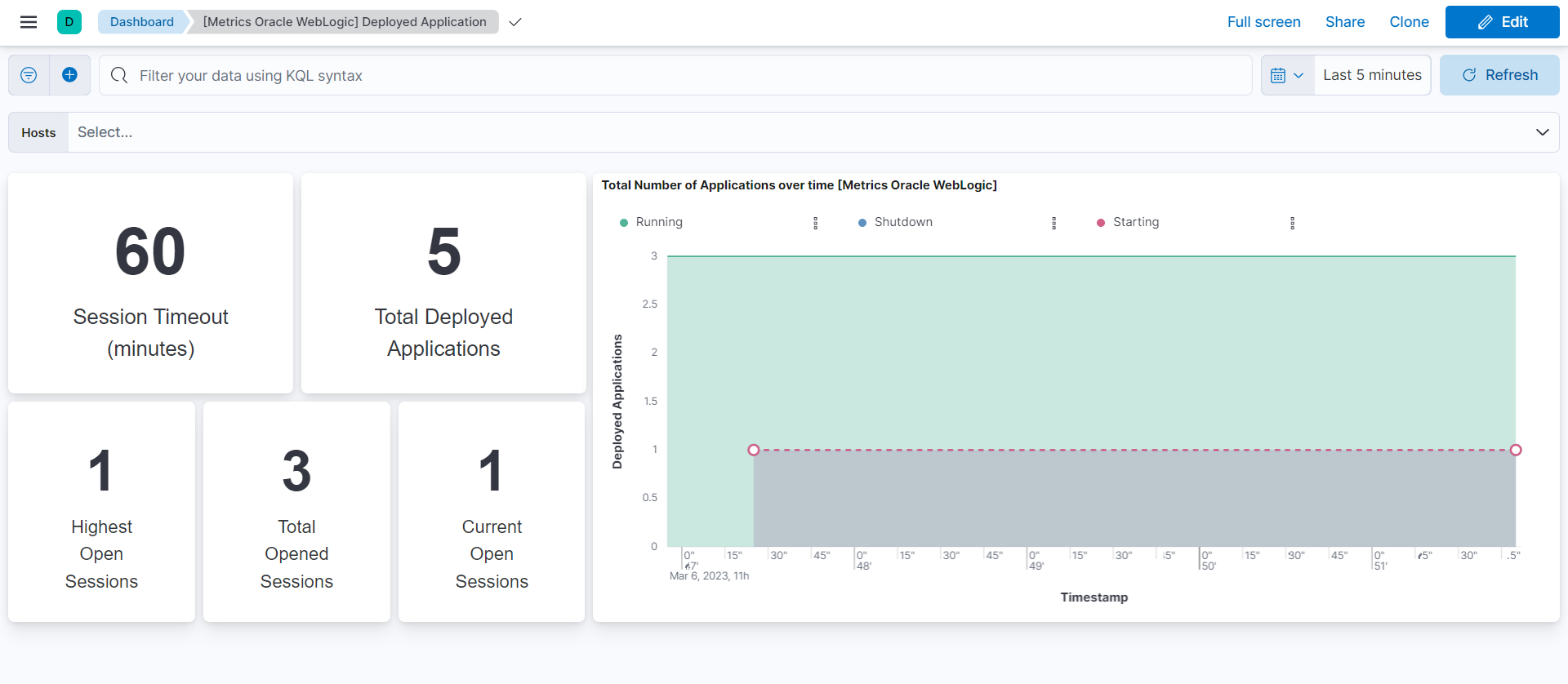
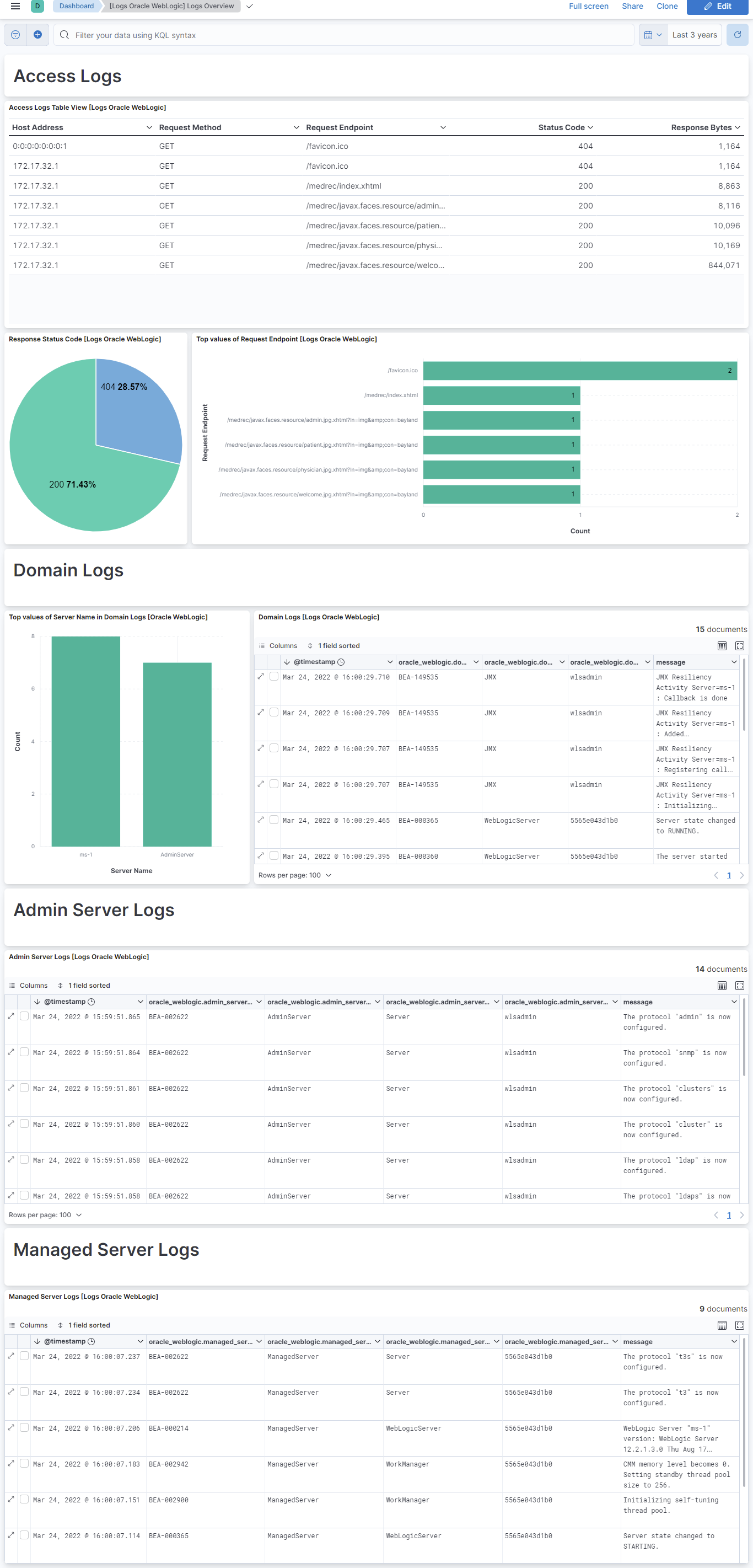
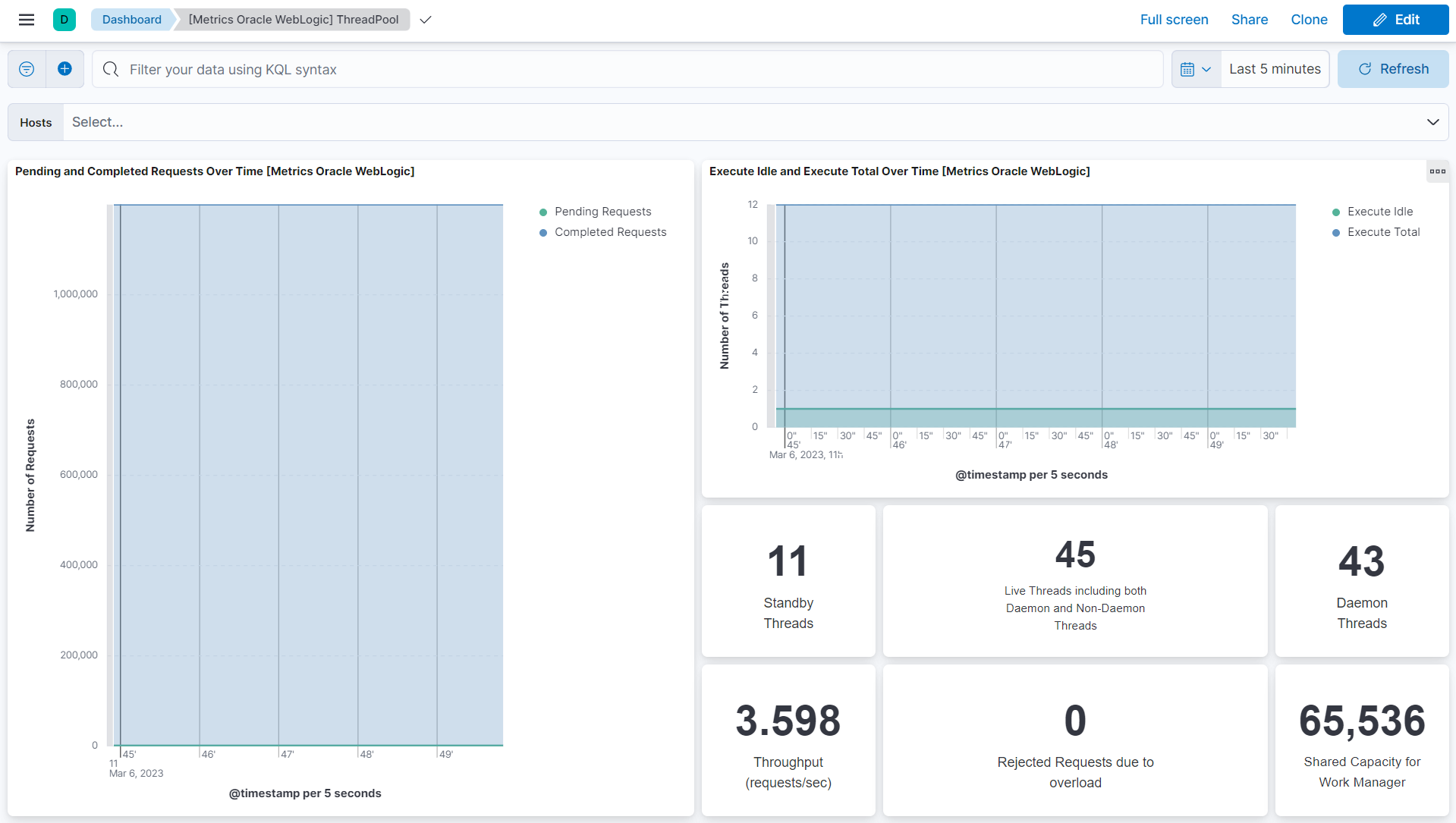
This integration includes one or more Kibana dashboards that visualizes the data collected by the integration. The screenshots below illustrate how the ingested data is displayed.
Changelog
| Version | Details | Minimum Kibana version |
|---|---|---|
| 1.9.1 | Bug fix (View pull request) Added description to ssl nodes including links to documentation. |
9.0.0 8.13.0 |
| 1.9.0 | Enhancement (View pull request) Add support for Kibana 9.0.0. |
9.0.0 8.13.0 |
| 1.8.0 | Enhancement (View pull request) Add processor support for deployed_application and threadpool data streams. |
8.13.0 |
| 1.7.0 | Enhancement (View pull request) ECS version updated to 8.11.0. Update the kibana constraint to ^8.13.0. Modified the field definitions to remove ECS fields made redundant by the ecs@mappings component template. |
8.13.0 |
| 1.6.0 | Enhancement (View pull request) Add global filter on data_stream.dataset to improve performance. |
8.12.0 |
| 1.5.1 | Enhancement (View pull request) Update README with reindexing steps. |
8.12.0 |
| 1.5.0 | Enhancement (View pull request) Enable secrets for sensitive fields. For more details, refer https://www.elastic.co/guide/en/fleet/current/agent-policy.html#agent-policy-secret-values |
8.12.0 |
| 1.4.1 | Bug fix (View pull request) Disable secrets for older stack versions due to errors. |
8.8.0 |
| 1.4.0 | Enhancement (View pull request) Enable 'secret' for the sensitive fields, supported from 8.12. |
8.8.0 |
| 1.3.1 | Bug fix (View pull request) Fixed Admin Server, Managed Server and Domain Logs visualization. |
8.8.0 |
| 1.3.0 | Enhancement (View pull request) Update the package format_version to 3.0.0. |
8.8.0 |
| 1.2.0 | Enhancement (View pull request) Enable time series data streams for the metrics datasets. This dramatically reduces storage for metrics and is expected to progressively improve query performance. For more details, see https://www.elastic.co/guide/en/elasticsearch/reference/current/tsds.html. |
8.8.0 |
| 1.1.3 | Enhancement (View pull request) Add metric_type for threadpool datastream. |
8.4.0 |
| 1.1.2 | Enhancement (View pull request) Add dimension fields for threadpool datastream. |
8.4.0 |
| 1.1.1 | Enhancement (View pull request) Add metric_type for deployed_application datastream. |
8.4.0 |
| 1.1.0 | Enhancement (View pull request) Add dimension fields for deployed_application datastream. |
8.4.0 |
| 1.0.2 | Bug fix (View pull request) Change the message field type to follow the ECS definition. |
8.4.0 |
| 1.0.1 | Bug fix (View pull request) Add null check and ignore_missing check to the rename processor |
8.4.0 |
| 1.0.0 | Enhancement (View pull request) Make Oracle Weblogic GA |
8.4.0 |
| 0.6.1 | Bug fix (View pull request) Fix descriptions in README.md. |
8.4.0 |
| 0.6.0 | Enhancement (View pull request) Rename ownership from obs-service-integrations to obs-infraobs-integrations |
8.4.0 |
| 0.5.1 | Bug fix (View pull request) Resolve the conflict in host.ip field. |
8.4.0 |
| 0.5.0 | Enhancement (View pull request) Migrate visualizations to lens. |
8.4.0 |
| 0.4.0 | Enhancement (View pull request) Update ECS version to 8.5.1 |
8.1.0 |
| 0.3.0 | Enhancement (View pull request) Added infrastructure category. |
8.1.0 |
| 0.2.0 | Enhancement (View pull request) Remove unused visualizations |
8.1.0 |
| 0.1.1 | Enhancement (View pull request) Oracle WebLogic integration package with Deployed Application data stream Enhancement (View pull request) Oracle WebLogic integration package with ThreadPool data stream Enhancement (View pull request) Oracle WebLogic integration package with Access logs data stream Enhancement (View pull request) Oracle WebLogic integration package with Domain Logs data stream Enhancement (View pull request) Oracle WebLogic integration package with Managed Server Logs data stream |
8.1.0 |
| 0.1.0 | Enhancement (View pull request) Oracle WebLogic integration package with Admin Server Logs data stream |
8.1.0 |