CoreDNS Integration
Elastic Cloud Serverless projects are autoscaled environments, fully managed by Elastic and available on Elastic Cloud. Availability This functionality is in technical preview and is ready for evaluation. Use with caution in production; it is not recommended for mission-critical workloads. Elastic will work to fix any issues, but features in technical preview are not subject to the support SLA of official GA features. Specific Support terms apply. Elastic Cloud Serverless projects are autoscaled environments, fully managed by Elastic and available on Elastic Cloud. Availability This functionality is in technical preview and is ready for evaluation. Use with caution in production; it is not recommended for mission-critical workloads. Elastic will work to fix any issues, but features in technical preview are not subject to the support SLA of official GA features. Specific Support terms apply. The Elastic Stack includes Elastic's core products such as Elasticsearch, Kibana, Logstash, and Beats. Availability This functionality is in technical preview and is ready for evaluation. Use with caution in production; it is not recommended for mission-critical workloads. Elastic will work to fix any issues, but features in technical preview are not subject to the support SLA of official GA features. Specific Support terms apply. Unless stated otherwise on the page, this functionality is available when your Elastic Stack is deployed on Elastic Cloud Hosted, Elastic Cloud Enterprise, Elastic Cloud on Kubernetes, and self-managed environments. This documentation corresponds to the latest patch available for each minor version. If you're not using the latest patch, check the release notes for changes.
Serverless Observability
Preview
Preview
Serverless Security
Preview
Preview
Stack
Preview
9.0+
Preview since 9.0
| Version | 0.10.0 Availability Preview This functionality is in technical preview and is ready for evaluation. Use with caution in production; it is not recommended for mission-critical workloads. Elastic will work to fix any issues, but features in technical preview are not subject to the support SLA of official GA features. Specific Support terms apply. (View all) |
| Subscription level What's this? |
Basic |
| Developed by What's this? |
Elastic |
| Ingestion method(s) | File, journald |
| Minimum Kibana version(s) | 9.0.0 8.13.0 |
To use pre-release integrations, go to the Integrations page in Kibana, scroll down, and toggle on the Display beta integrations option.
This integration parses logs from CoreDNS instances.
This integration is designed to read CoreDNS logs running within a Kubernetes cluster or via systemd with logs output to journald. The CoreDNS datasets were tested with version 1.9.3 and 1.10.0.
The log data stream expects logs from the CoreDNS errors plugin and the log plugin. Query logs from the log plugin can be in either the common or combined format (see log format for details).
An example configuration with logging enabled is:
. {
  forward . 8.8.8.8
  errors
  log
}
ECS Field Reference
Please refer to the following document for detailed information on ECS fields.
Exported fields
| Field | Description | Type |
|---|---|---|
| @timestamp | Event timestamp. | date |
| cloud.image.id | Image ID for the cloud instance. | keyword |
| coredns.log.buffer_size | The EDNS0 buffer size advertised in the query | long |
| coredns.log.dnssec_ok | The DO bit is included in a DNS query and is an abbreviation for "DNSSEC OK". If the DO bit is set (DO=1), then the client is DNSSEC-aware, and it is OK for the DNS server to return DNSSEC data in a response. If the DO bit is not set (DO=0), then the client is not DNSSEC-aware, and the DNS server must not include any DNSSEC data in a DNS response. | boolean |
| coredns.log.error.message | The error message | text |
| data_stream.dataset | Data stream dataset. | constant_keyword |
| data_stream.namespace | Data stream namespace. | constant_keyword |
| data_stream.type | Data stream type. | constant_keyword |
| event.dataset | Event dataset | constant_keyword |
| event.module | Event module | constant_keyword |
| host.containerized | If the host is a container. | boolean |
| host.os.build | OS build information. | keyword |
| host.os.codename | OS codename, if any. | keyword |
| input.type | Input type | keyword |
| kubernetes.container.name | Kubernetes container name | keyword |
| kubernetes.labels.* | Kubernetes labels map | object |
| kubernetes.namespace | Kubernetes namespace | keyword |
| kubernetes.node.name | Kubernetes node name | keyword |
| kubernetes.pod.name | Kubernetes pod name | keyword |
| kubernetes.pod.uid | Kubernetes pod UID | keyword |
| kubernetes.replicaset.name | Kubernetes replicaset name | keyword |
| log.file.device_id | ID of the device containing the filesystem where the file resides. | keyword |
| log.file.fingerprint | The sha256 fingerprint identity of the file when fingerprinting is enabled. | keyword |
| log.file.idxhi | The high-order part of a unique identifier that is associated with a file. (Windows-only) | keyword |
| log.file.idxlo | The low-order part of a unique identifier that is associated with a file. (Windows-only) | keyword |
| log.file.inode | Inode number of the log file. | keyword |
| log.file.vol | The serial number of the volume that contains a file. (Windows-only) | keyword |
| log.offset | Log offset | long |
Example
{
    "@timestamp": "2025-02-11T12:35:51.176Z",
    "agent": {
        "ephemeral_id": "a75480a0-76e2-405c-8d22-f94565290605",
        "id": "350e4955-b5fc-4e5f-aec3-3fd91ae31e8c",
        "name": "elastic-agent-60157",
        "type": "filebeat",
        "version": "9.0.0"
    },
    "coredns": {
        "log": {
            "buffer_size": 1232,
            "dnssec_ok": false
        }
    },
    "data_stream": {
        "dataset": "coredns.log",
        "namespace": "52129",
        "type": "logs"
    },
    "destination": {
        "bytes": 65
    },
    "dns": {
        "header_flags": [
            "RD",
            "RA"
        ],
        "id": "18320",
        "question": {
            "class": "IN",
            "name": "google.com",
            "registered_domain": "google.com",
            "top_level_domain": "com",
            "type": "A"
        },
        "response_code": "NOERROR"
    },
    "ecs": {
        "version": "8.11.0"
    },
    "elastic_agent": {
        "id": "350e4955-b5fc-4e5f-aec3-3fd91ae31e8c",
        "snapshot": true,
        "version": "9.0.0"
    },
    "event": {
        "agent_id_status": "verified",
        "category": [
            "network"
        ],
        "created": "2025-02-11T12:35:51.176Z",
        "dataset": "coredns.log",
        "duration": 13501371,
        "ingested": "2025-02-11T12:35:52Z",
        "kind": "event",
        "module": "coredns",
        "original": "[INFO] 192.168.254.3:54031 - 18320 \"A IN google.com. udp 51 false 1232\" NOERROR qr,rd,ra 65 0.013501371s",
        "outcome": "success",
        "type": [
            "protocol"
        ]
    },
    "host": {
        "architecture": "x86_64",
        "containerized": true,
        "hostname": "elastic-agent-60157",
        "ip": [
            "192.168.253.2",
            "192.168.245.6"
        ],
        "mac": [
            "02-42-C0-A8-F5-06",
            "02-42-C0-A8-FD-02"
        ],
        "name": "elastic-agent-60157",
        "os": {
            "family": "",
            "kernel": "3.10.0-1160.118.1.el7.x86_64",
            "name": "Wolfi",
            "platform": "wolfi",
            "type": "linux",
            "version": "20230201"
        }
    },
    "input": {
        "type": "filestream"
    },
    "log": {
        "file": {
            "device_id": "64768",
            "fingerprint": "e0fe3490d4af287771c9a48344064d30bc9da48cdf1c20296fd81b614118f16a",
            "inode": "35527099",
            "path": "/tmp/service_logs/coredns.log"
        },
        "level": "info",
        "offset": 67
    },
    "network": {
        "bytes": 116,
        "iana_number": "17",
        "protocol": "dns",
        "transport": "udp"
    },
    "related": {
        "hosts": [
            "google.com"
        ],
        "ip": [
            "192.168.254.3"
        ]
    },
    "source": {
        "address": "192.168.254.3",
        "bytes": 51,
        "ip": "192.168.254.3",
        "port": 54031
    },
    "tags": [
        "preserve_original_event",
        "coredns-log"
    ]
}
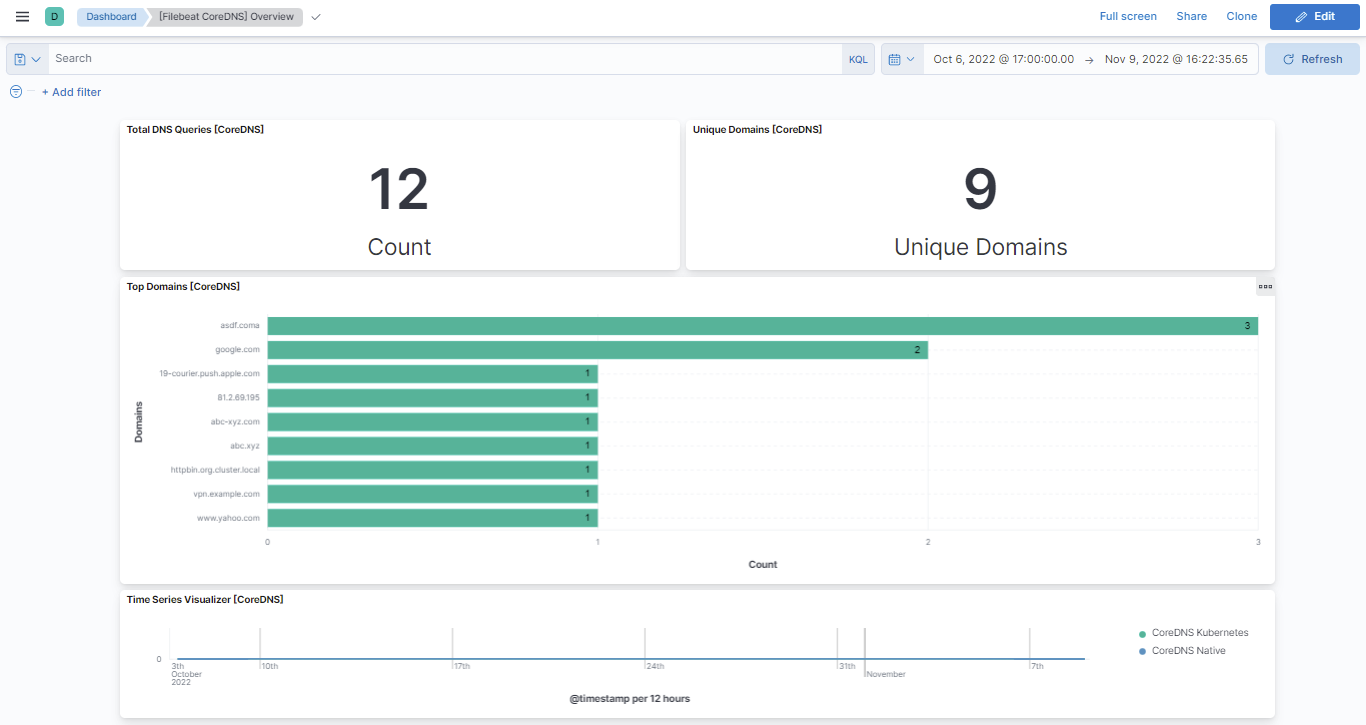
This integration includes one or more Kibana dashboards that visualizes the data collected by the integration. The screenshots below illustrate how the ingested data is displayed.
Changelog
| Version | Details | Minimum Kibana version |
|---|---|---|
| 0.10.0 | Enhancement (View pull request) Add support for Kibana 9.0.0. |
9.0.0 8.13.0 |
| 0.9.0 | Enhancement (View pull request) Allow @custom pipeline access to event.original without setting preserve_original_event. |
8.13.0 |
| 0.8.0 | Enhancement (View pull request) ECS version updated to 8.11.0. Update the kibana constraint to ^8.13.0. Modified the field definitions to remove ECS fields made redundant by the ecs@mappings component template. |
8.13.0 |
| 0.7.0 | Enhancement (View pull request) Add global filter on data_stream.dataset to improve performance. |
8.0.0 |
| 0.6.1 | Bug fix (View pull request) Add null and ignore_missing check to handle event.original field. |
8.0.0 |
| 0.6.0 | Enhancement (View pull request) Update the package format_version to 3.0.0. |
8.0.0 |
| 0.5.0 | Enhancement (View pull request) Adapt fields for changes in file system info |
8.0.0 |
| 0.4.0 | Enhancement (View pull request) Rename ownership from obs-service-integrations to obs-infraobs-integrations |
8.0.0 |
| 0.3.0 | Enhancement (View pull request) Migrate Overview dashboard visualizations to lens. |
8.0.0 |
| 0.2.2 | Bug fix (View pull request) Fix reference error in Overview dashboard. |
— |
| 0.2.1 | Enhancement (View pull request) Added categories and/or subcategories. |
8.0.0 |
| 0.2.0 | Enhancement (View pull request) Update ECS version to 8.5.1 |
8.0.0 |
| 0.1.0 | Enhancement (View pull request) Initial draft of the package |
8.0.0 |