Lyve Cloud
Elastic Cloud Serverless projects are autoscaled environments, fully managed by Elastic and available on Elastic Cloud. Availability This functionality is generally available and ready for production usage. Elastic Cloud Serverless projects are autoscaled environments, fully managed by Elastic and available on Elastic Cloud. Availability This functionality is generally available and ready for production usage. The Elastic Stack includes Elastic's core products such as Elasticsearch, Kibana, Logstash, and Beats. Availability This functionality is generally available and ready for production usage. Unless stated otherwise on the page, this functionality is available when your Elastic Stack is deployed on Elastic Cloud Hosted, Elastic Cloud Enterprise, Elastic Cloud on Kubernetes, and self-managed environments. This documentation corresponds to the latest patch available for each minor version. If you're not using the latest patch, check the release notes for changes.
Serverless Observability
Generally available
Serverless Security
Generally available
Stack
9.0+
Generally available since 9.0
| Version | 1.18.0 (View all) |
| Subscription level What's this? |
Basic |
| Developed by What's this? |
Partner |
| Ingestion method(s) | AWS S3 |
| Minimum Kibana version(s) | 9.0.0 8.13.0 |
Lyve Cloud is your simple, trusted, and efficient on-demand solution for mass-capacity storage.Lyve Cloud is designed to be compatible with Amazon S3.
The Lyve Cloud Log Integration offers users a way to collect logs from Lyve Cloud's audit log bucket
When setting up the Lyve Cloud Integration you will need the target bucket name and the secret credentials to access the bucket. You can then visualize that data in Kibana and reference data when troubleshooting an issue.
Using the s3 API audit log information you can identify which events have occurred, when they have occurred and the user who performed the actions.
Before adding the integration, you must complete the following tasks in the Lyve Cloud console to read the logs that are available in Lyve Cloud bucket:
- Login with an administrator account.
- Create a target bucket to save logs.
- Enable S3 API audit logs.
- Click on "Add Lyve Cloud" button on the upper right side of the agent configuration screen to create a policy for an elastic agent.
- Turn on the switch for Collecting logs from lyve cloud, under "Change defaults" fill in the reqired information for ingesting the correct logs access key, secret key, bucket name and endpoint .
- Give A "New agent policy name", click on "Save and continue" and click on "Add to hosts".
- Follow Elastic's instructions to add an agent and you're set to go.
Note:
- The
Bucket Regionparameter is required for non-AWS S3-compatible storage (such as Lyve Cloud’s Managed S3) when using Elastic Agent version 8.19.12 or later.
Filter out the Lyve Cloud logs using -
data_stream.dataset:"lyve_cloud.audit"
when creating new dashboard or in other Analytics search fields inside the filter box.
Exported fields
| Field | Description | Type |
|---|---|---|
| @timestamp | Date/time when the event originated. This is the date/time extracted from the event, typically representing when the event was generated by the source. If the event source has no original timestamp, this value is typically populated by the first time the event was received by the pipeline. Required field for all events. | date |
| client.geo.location.lat | Longitude and latitude. | geo_point |
| client.geo.location.lon | Longitude and latitude. | geo_point |
| cloud.image.id | Image ID for the cloud instance. | keyword |
| data_stream.dataset | Data stream dataset. | constant_keyword |
| data_stream.namespace | Data stream namespace. | constant_keyword |
| data_stream.type | Data stream type. | constant_keyword |
| event.dataset | Event dataset | constant_keyword |
| event.module | Event module | constant_keyword |
| host.containerized | If the host is a container. | boolean |
| host.os.build | OS build information. | keyword |
| host.os.codename | OS codename, if any. | keyword |
| input.type | Type of Filebeat input. | keyword |
| lyve_cloud.audit.auditEntry.api.bucket | Bucket for which the opearion was taken upon. | keyword |
| lyve_cloud.audit.auditEntry.api.name | Represents name of the operation. | keyword |
| lyve_cloud.audit.auditEntry.api.object | Objects name | keyword |
| lyve_cloud.audit.auditEntry.api.status | Represents http status explicitly by string instead of code. | keyword |
| lyve_cloud.audit.auditEntry.api.timeToFirstByte | Represents time to first packet to arrive in Nano seconds. | long |
| lyve_cloud.audit.auditEntry.api.timeToResponse | Represents time of the response in Nano seconds. | long |
| lyve_cloud.audit.auditEntry.requestHeader.X-Forwarded-For | Identifying the originating IP address of a client connecting to a web server through a proxy server. | keyword |
| lyve_cloud.audit.auditEntry.requestHeader.X-Forwarded-Host | Identifying the original host requested by the client in the Host HTTP request heade | keyword |
| lyve_cloud.audit.auditEntry.requestHeader.X-Forwarded-Port | helps you identify the destination port that the client used to connect to the load balancer | long |
| lyve_cloud.audit.auditEntry.requestHeader.X-Real-Ip | Represents http request user's ip. | keyword |
| lyve_cloud.audit.auditEntry.responseHeader.Accept-Ranges | Marker used by the server to advertise its support for partial requests from the client for file downloads. | keyword |
| lyve_cloud.audit.auditEntry.responseHeader.Last-Modified | Contains a date and time when the resource was last modified | keyword |
| lyve_cloud.audit.auditEntry.responseHeader.X-Amz-Bucket-Region | Region of which the operation of the log was taken upon. | keyword |
| lyve_cloud.audit.auditEntry.responseHeader.X-Amz-Object-Lock-Mode | Object retention mode | keyword |
| lyve_cloud.audit.auditEntry.responseHeader.X-Amz-Server-Side-Encryption | Identifier for the server-side encryption | keyword |
| lyve_cloud.audit.auditEntry.responseHeader.object_lock_retain_until_date | Object retention duration | date |
| lyve_cloud.audit.auditEntry.responseHeader.x-amz-version-id | The version of the object. When versioning is enabled. | keyword |
| lyve_cloud.audit.auditEntry.version | Represents the current version of Audit Log structure. | keyword |
| source.geo.location.lat | Longitude and latitude. | geo_point |
| source.geo.location.lon | Longitude and latitude. | geo_point |
Example
{
    "@timestamp": "2022-10-20T12:52:42.974Z",
    "cloud": {
        "provider": "lyvecloud"
    },
    "ecs": {
        "version": "8.11.0"
    },
    "event": {
        "original": "{\"auditEntry\": {\"api\": {\"name\": \"GetBucketLocation\", \"bucket\": \"user-name-t10\", \"status\": \"OK\", \"statusCode\": 200, \"timeToResponse\": \"27121602ns\", \"timeToFirstByte\": \"27072750ns\"}, \"time\": \"2022-10-20T12:52:42.974686686Z\", \"version\": \"1\", \"requestID\": \"171FC8111B3F560B\", \"userAgent\": \"MinIO (linux; amd64) minio-go/v7.0.15\", \"deploymentid\": \"8fe8887f-d1e2-4918-9e33-52bfba3b0de8\", \"requestQuery\": {\"location\": \"\"}, \"requestHeader\": {\"X-Real-Ip\": \"10.213.135.144:28911\", \"User-Agent\": \"aws-cli/2.7.7 Python/3.9.11 Linux/5.15.0-52-generic exe/x86_64.ubuntu.20 prompt/off command/s3api.head-object\", \"X-Amz-Date\": \"20221024T083808Z\", \"Authorization\": \"AWS4-HMAC-SHA256 Credential=<redacted>/20221024/us-east-1/s3/aws4_request, SignedHeaders=host;x-amz-content-sha256;x-amz-date, Signature=<redacted>\", \"Accept-Encoding\": \"identity\", \"X-Forwarded-For\": \"1.128.0.0, 10.213.135.144\", \"X-Forwarded-Host\": \"s3.us-east-1.lyvecloud.seagate.com\", \"X-Forwarded-Proto\": \"https\", \"X-Amz-Content-Sha256\": \"e3b0c44298fc1c149afbf4c8996fb92427ae41e4649b934ca495991b7852b855\"}, \"responseHeader\": {\"ETag\": \"b1946ac92492d2347c6235b4d2611184\", \"Vary\": \"Origin\", \"Content-Type\": \"application/octet-stream\", \"Accept-Ranges\": \"bytes\", \"Last-Modified\": \"Sun, 23 Oct 2022 12:51:23 GMT\", \"Content-Length\": \"6\", \"X-Amz-Request-Id\": \"1720F4788755136D\", \"X-Xss-Protection\": \"1; mode=block\", \"x-amz-version-id\": \"ab44978d-0929-4c3a-8d52-17157c1fb6ad\", \"X-Amz-Bucket-Region\": \"us-east-1\", \"X-Amz-Object-Lock-Mode\": \"COMPLIANCE\", \"Content-Security-Policy\": \"block-all-mixed-content\", \"X-Amz-Server-Side-Encryption\": \"AES256\", \"X-Amz-Object-Lock-Retain-Until-Date\": \"2022-10-27T12:51:23.250Z\"}}, \"serviceAccountName\": \"user-name-terraform\", \"serviceAccountCreatorId\": \"name.last@example.com\"}"
    },
    "http": {
        "response": {
            "body": {
                "bytes": 6
            },
            "mime_type": "application/octet-stream",
            "status_code": 200
        }
    },
    "log": {
        "file": {
            "path": "https://s3.us-east-1.lyvecloud.seagate.com/logss001/October-2022/S3-2022-20-10-14-09-31.gz"
        }
    },
    "lyve_cloud": {
        "audit": {
            "auditEntry": {
                "api": {
                    "bucket": "user-name-t10",
                    "name": "GetBucketLocation",
                    "status": "OK",
                    "timeToFirstByte": 27072750,
                    "timeToResponse": 27121602
                },
                "requestHeader": {
                    "X-Forwarded-For": "1.128.0.0, 10.213.135.144",
                    "X-Forwarded-Host": "s3.us-east-1.lyvecloud.seagate.com",
                    "X-Real-Ip": "10.213.135.144:28911"
                },
                "responseHeader": {
                    "Accept-Ranges": "bytes",
                    "Last-Modified": "Sun, 23 Oct 2022 12:51:23 GMT",
                    "X-Amz-Bucket-Region": "us-east-1",
                    "X-Amz-Object-Lock-Mode": "COMPLIANCE",
                    "X-Amz-Server-Side-Encryption": "AES256",
                    "object_lock_retain_until_date": "2022-10-27T12:51:23.250Z",
                    "x-amz-version-id": "ab44978d-0929-4c3a-8d52-17157c1fb6ad"
                },
                "version": "1"
            }
        }
    },
    "related": {
        "ip": [
            "1.128.0.0",
            "10.213.135.144"
        ],
        "user": [
            "user-name-terraform"
        ]
    },
    "tags": [
        "preserve_original_event"
    ],
    "user": {
        "email": "name.last@example.com",
        "id": "name.last@example.com",
        "name": "user-name-terraform"
    },
    "user_agent": {
        "device": {
            "name": "Other"
        },
        "name": "Other",
        "original": "MinIO (linux; amd64) minio-go/v7.0.15"
    }
}
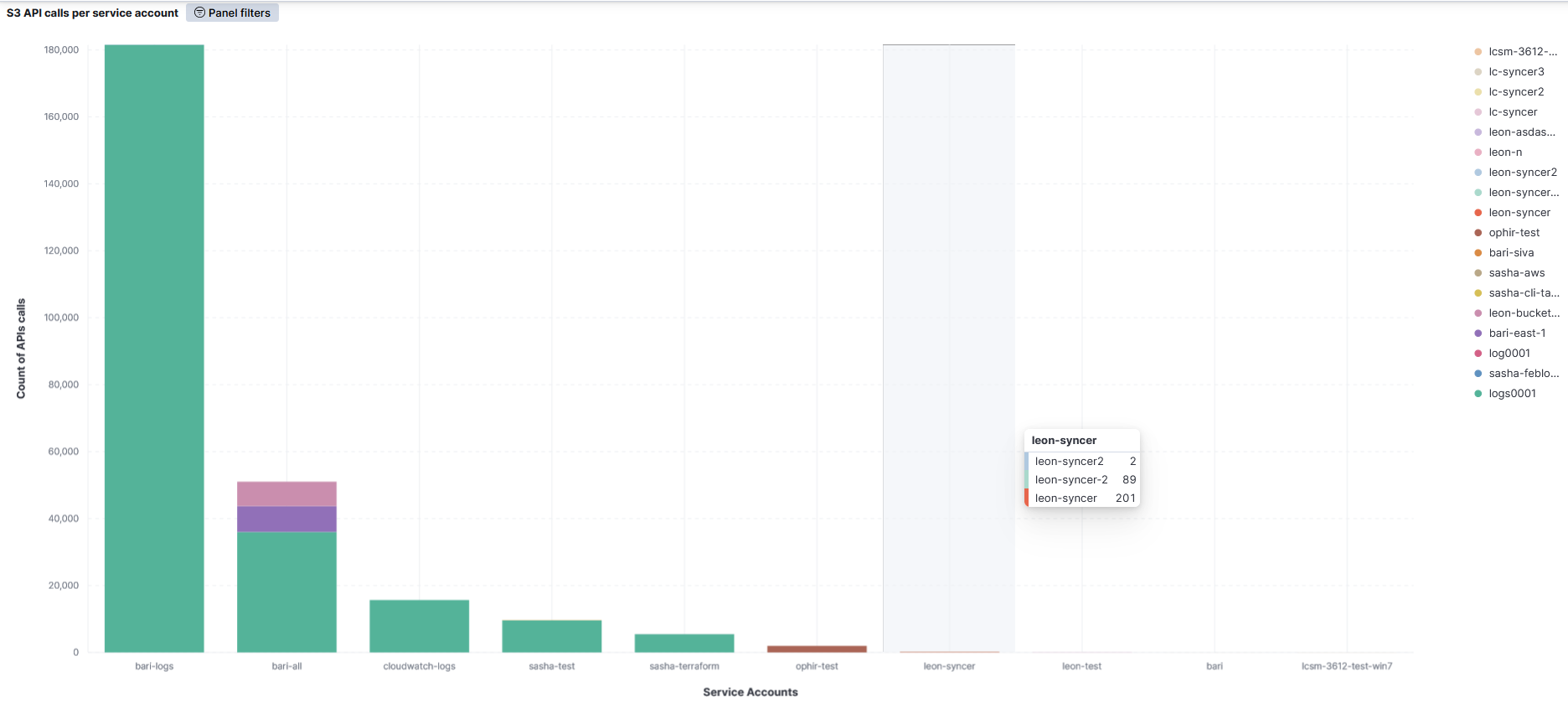
This integration includes one or more Kibana dashboards that visualizes the data collected by the integration. The screenshots below illustrate how the ingested data is displayed.
Changelog
| Version | Details | Minimum Kibana version |
|---|---|---|
| 1.18.0 | Enhancement (View pull request) Add tags to ingest pipeline processors and add preserve_original_event to pipeline-level on_failure handlers. |
9.0.0 8.13.0 |
| 1.17.1 | Bug fix (View pull request) Add region variable in the aws-s3 input to fix compatibility with Elastic Agent 8.19.12+ when using non-AWS S3-compatible buckets. |
9.0.0 8.13.0 |
| 1.17.0 | Enhancement (View pull request) Update Kibana constraint to support 9.0.0. |
9.0.0 8.13.0 |
| 1.16.0 | Enhancement (View pull request) Do not remove event.original in main ingest pipeline. |
8.13.0 |
| 1.15.0 | Enhancement (View pull request) Add "preserve_original_event" tag to documents with event.kind set to "pipeline_error". |
8.13.0 |
| 1.14.1 | Bug fix (View pull request) Use triple-brace Mustache templating when referencing variables in ingest pipelines. |
8.13.0 |
| 1.14.0 | Enhancement (View pull request) Update the kibana constraint to ^8.13.0. Modified the field definitions to remove ECS fields made redundant by the ecs@mappings component template. |
8.13.0 |
| 1.13.0 | Enhancement (View pull request) Set sensitive values as secret. |
8.12.0 |
| 1.12.1 | Enhancement (View pull request) Changed owners |
8.5.0 |
| 1.12.0 | Enhancement (View pull request) ECS version updated to 8.11.0. |
8.5.0 |
| 1.11.0 | Enhancement (View pull request) Improve 'event.original' check to avoid errors if set. |
8.5.0 |
| 1.10.0 | Enhancement (View pull request) Set 'partner' owner type. |
8.5.0 |
| 1.9.0 | Enhancement (View pull request) Update the package format_version to 3.0.0. |
8.5.0 |
| 1.8.0 | Bug fix (View pull request) Correct invalid ECS field usages at root-level. |
8.5.0 |
| 1.7.0 | Enhancement (View pull request) ECS version updated to 8.10.0. |
8.5.0 |
| 1.6.0 | Enhancement (View pull request) Add tags.yml file so that integration's dashboards and saved searches are tagged with "Security Solution" and displayed in the Security Solution UI. |
8.5.0 |
| 1.5.0 | Enhancement (View pull request) Update package to ECS 8.9.0. |
8.5.0 |
| 1.4.0 | Enhancement (View pull request) Update package-spec to 2.9.0. |
8.5.0 |
| 1.3.0 | Enhancement (View pull request) Ensure event.kind is correctly set for pipeline errors. |
8.5.0 |
| 1.2.0 | Enhancement (View pull request) Update package to ECS 8.8.0. |
8.5.0 |
| 1.1.0 | Enhancement (View pull request) Update package to ECS 8.7.0. |
8.5.0 |
| 1.0.2 | Enhancement (View pull request) Added categories and/or subcategories. |
8.5.0 |
| 1.0.1 | Enhancement (View pull request) Fix changelog link |
8.5.0 |
| 1.0.0 | Enhancement (View pull request) Initial implementation |
8.5.0 |