PostgreSQL Integration
Elastic Cloud Serverless projects are autoscaled environments, fully managed by Elastic and available on Elastic Cloud. Availability This functionality is generally available and ready for production usage. Elastic Cloud Serverless projects are autoscaled environments, fully managed by Elastic and available on Elastic Cloud. Availability This functionality is generally available and ready for production usage. The Elastic Stack includes Elastic's core products such as Elasticsearch, Kibana, Logstash, and Beats. Availability This functionality is generally available and ready for production usage. Unless stated otherwise on the page, this functionality is available when your Elastic Stack is deployed on Elastic Cloud Hosted, Elastic Cloud Enterprise, Elastic Cloud on Kubernetes, and self-managed environments. This documentation corresponds to the latest patch available for each minor version. If you're not using the latest patch, check the release notes for changes.
Serverless Observability
Generally available
Serverless Security
Generally available
Stack
9.2+
Generally available since 9.2
| Version | 1.32.2 (View all) |
| Subscription level What's this? |
Basic |
| Developed by What's this? |
Elastic |
| Ingestion method(s) | Database, File |
| Minimum Kibana version(s) | 9.2.1 8.19.0 |
This integration periodically fetches logs and metrics from PostgreSQL servers.
The log integration was tested with logs from versions 9.5 on Ubuntu, 9.6 on Debian, and finally 10.11, 11.4 and 12.2 on Arch Linux 9.3. CSV format was tested using versions 11 and 13 (distro is not relevant here).
The activity, bgwriter, database and statement integrations were tested with PostgreSQL 9.5.3 and is expected to work with all versions >= 9.
The log integration collects the PostgreSQL logs in plain text format or CSV.
AWS RDS PostgresSQL standard logs can also be collected by this integration.
Since the PostgreSQL CSV log file is a well-defined format, there is almost no configuration to be done in Fleet, just the filepath.
On the other hand, it's necessary to configure PostgreSQL to emit .csv logs.
The recommended parameters are:
logging_collector = 'on';
log_destination = 'csvlog';
log_statement = 'none';
log_checkpoints = on;
log_connections = on;
log_disconnections = on;
log_lock_waits = on;
log_min_duration_statement = 0;
In busy servers, log_min_duration_statement can cause contention, so you can assign
a value greater than 0.
Both log_connections and log_disconnections can cause a lot of events if you don't have
persistent connections, so enable with care.
User can specify a timezone when logging messages by using the tz_map parameter. This feature is particularly useful for ensuring logs are recorded in the specified timezone, making it easier to troubleshoot issues based on the time of occurrence in different time zones.
If the tz_map parameter is not specified, it will be default to the timezone of the logs and map it with timestamp accordingly.
User can set the tz_map to any valid timezone identifier. Here are a few examples of supported timezones:
tz_short: 'EDT'tz_long: 'America/New_York'tz_short: 'IST'tz_long: 'Asia/Kolkata'
When logging an event, user can pass the timezone parameter to ensure the time is recorded in the desired timezone. Here's an example of how you can use this parameter:
tz_map:
  - tz_short: 'IST'
  - tz_long: 'Asia/Kolkata'
ECS Field Reference
Please refer to the following document for detailed information on ECS fields.
Exported fields
| Field | Description | Type |
|---|---|---|
| @timestamp | Event timestamp. | date |
| cloud.image.id | Image ID for the cloud instance. | keyword |
| data_stream.dataset | Data stream dataset. | constant_keyword |
| data_stream.namespace | Data stream namespace. | constant_keyword |
| data_stream.type | Data stream type. | constant_keyword |
| event.code | Identification code for the event. | keyword |
| event.dataset | Event dataset | constant_keyword |
| event.module | Event module | constant_keyword |
| event.type | Severity of the event (info, error, etc.). | keyword |
| host.containerized | If the host is a container. | boolean |
| host.os.build | OS build information. | keyword |
| host.os.codename | OS codename, if any. | keyword |
| input.type | Input type. | keyword |
| log.flags | Flags for the log file. | keyword |
| log.offset | Log offset. | long |
| postgresql.log.application_name | Name of the application of this event. It is defined by the client. | keyword |
| postgresql.log.backend_type | Type of backend of this event. Possible types are autovacuum launcher, autovacuum worker, logical replication launcher, logical replication worker, parallel worker, background writer, client backend, checkpointer, startup, walreceiver, walsender and walwriter. In addition, background workers registered by extensions may have additional types. | keyword |
| postgresql.log.client_addr | Host where the connection originated from. | keyword |
| postgresql.log.client_port | Port where the connection originated from. | long |
| postgresql.log.command_tag | Type of session's current command. The complete list can be found at: src/include/tcop/cmdtaglist.h | keyword |
| postgresql.log.context | Error context. | keyword |
| postgresql.log.database | Name of database. | keyword |
| postgresql.log.detail | More information about the message, parameters in case of a parametrized query. e.g. 'Role "user" does not exist.', 'parameters: $1 = 42', etc. | keyword |
| postgresql.log.hint | A possible solution to solve an error. | keyword |
| postgresql.log.internal_query | Internal query that led to the error (if any). | keyword |
| postgresql.log.internal_query_pos | Character count of the internal query (if any). | long |
| postgresql.log.location | Location of the error in the PostgreSQL source code (if log_error_verbosity is set to verbose). | keyword |
| postgresql.log.query | Query statement. In the case of CSV parse, look at command_tag to get more context. | keyword |
| postgresql.log.query_name | Name given to a query when using extended query protocol. If it is "\<unnamed\>", or not present, this field is ignored. |
keyword |
| postgresql.log.query_pos | Character count of the error position (if any). | long |
| postgresql.log.query_step | Statement step when using extended query protocol (one of statement, parse, bind or execute). | keyword |
| postgresql.log.sequence_number | Sequence number circumvents that the last message was repeated N times. | long |
| postgresql.log.session_id | PostgreSQL session. | keyword |
| postgresql.log.session_line_number | Line number inside a session. (%l in log_line_prefix). |
long |
| postgresql.log.session_start_time | Time when this session started. | date |
| postgresql.log.sql_state_code | State code returned by Postgres (if any). See also https://www.postgresql.org/docs/current/errcodes-appendix.html | keyword |
| postgresql.log.timestamp | The timestamp from the log line. | keyword |
| postgresql.log.transaction_id | The id of current transaction. | long |
| postgresql.log.virtual_transaction_id | Backend local transaction id. | keyword |
Assigning pg_monitor or pg_read_all_stats rights to the database user might not be enough for fetching the metric data from PostgreSQL servers.
Apart from CONNECT permission, the database user must be granted SELECT accesss on underlying tables / views pg_stat_bgwriter, pg_stat_activity, pg_stat_database, pg_stat_statements.
grant select on table pg_stat_bgwriter to user;
grant select on table pg_stat_activity to user;
grant select on table pg_stat_database to user;
grant select on table pg_stat_statements to user;
Run the below command if the pg_stat_statements view is unavailable
CREATE EXTENSION pg_stat_statements;
The activity dataset periodically fetches metrics from PostgreSQL servers.
Example
{
    "@timestamp": "2024-04-30T09:14:50.873Z",
    "agent": {
        "ephemeral_id": "f065ed3c-78fb-41da-9fe6-88ab3ff0f088",
        "id": "69c77328-4412-45c4-8f98-cc7e7b1fc216",
        "name": "docker-fleet-agent",
        "type": "metricbeat",
        "version": "8.13.0"
    },
    "data_stream": {
        "dataset": "postgresql.activity",
        "namespace": "ep",
        "type": "metrics"
    },
    "database": {
        "oid": 12379
    },
    "ecs": {
        "version": "8.11.0"
    },
    "elastic_agent": {
        "id": "69c77328-4412-45c4-8f98-cc7e7b1fc216",
        "snapshot": false,
        "version": "8.13.0"
    },
    "event": {
        "agent_id_status": "verified",
        "dataset": "postgresql.activity",
        "duration": 6165334,
        "ingested": "2024-04-30T09:15:02Z",
        "module": "postgresql"
    },
    "host": {
        "architecture": "x86_64",
        "containerized": true,
        "hostname": "docker-fleet-agent",
        "id": "8259e024976a406e8a54cdbffeb84fec",
        "ip": [
            "192.168.251.4"
        ],
        "mac": [
            "02-42-C0-A8-FB-04"
        ],
        "name": "docker-fleet-agent",
        "os": {
            "codename": "focal",
            "family": "debian",
            "kernel": "3.10.0-1160.99.1.el7.x86_64",
            "name": "Ubuntu",
            "platform": "ubuntu",
            "type": "linux",
            "version": "20.04.6 LTS (Focal Fossa)"
        }
    },
    "metricset": {
        "name": "activity",
        "period": 10000
    },
    "postgresql": {
        "activity": {
            "application_name": "",
            "backend_start": "2024-04-30T09:14:50.875Z",
            "client": {
                "address": "192.168.251.4",
                "hostname": "",
                "port": 49266
            },
            "database": {
                "name": "postgres",
                "oid": 12379
            },
            "pid": 113,
            "query": "SELECT * FROM pg_stat_activity",
            "query_id": "W/d3kCHhA8b/M4YpzDBJHlJM7xU=",
            "query_start": "2024-04-30T09:14:50.877Z",
            "state": "active",
            "state_change": "2024-04-30T09:14:50.877Z",
            "transaction_start": "2024-04-30T09:14:50.877Z",
            "user": {
                "id": 10,
                "name": "postgres"
            },
            "waiting": false
        }
    },
    "service": {
        "address": "postgres://elastic-package-service-postgresql-1:5432?connect_timeout=10&sslmode=disable",
        "type": "postgresql"
    }
}
ECS Field Reference
Please refer to the following document for detailed information on ECS fields.
Exported fields
| Field | Description | Type |
|---|---|---|
| @timestamp | Event timestamp. | date |
| agent.id | keyword | |
| cloud.account.id | The cloud account or organization id used to identify different entities in a multi-tenant environment. Examples: AWS account id, Google Cloud ORG Id, or other unique identifier. | keyword |
| cloud.availability_zone | Availability zone in which this host is running. | keyword |
| cloud.image.id | Image ID for the cloud instance. | keyword |
| cloud.instance.id | Instance ID of the host machine. | keyword |
| cloud.provider | Name of the cloud provider. Example values are aws, azure, gcp, or digitalocean. | keyword |
| cloud.region | Region in which this host is running. | keyword |
| container.id | Unique container id. | keyword |
| data_stream.dataset | Data stream dataset. | constant_keyword |
| data_stream.namespace | Data stream namespace. | constant_keyword |
| data_stream.type | Data stream type. | constant_keyword |
| database.oid | OID of the database that this event is related to. | alias |
| event.dataset | Event dataset | constant_keyword |
| event.module | Event module | constant_keyword |
| host.containerized | If the host is a container. | boolean |
| host.name | Name of the host. It can contain what hostname returns on Unix systems, the fully qualified domain name, or a name specified by the user. The sender decides which value to use. |
keyword |
| host.os.build | OS build information. | keyword |
| host.os.codename | OS codename, if any. | keyword |
| postgresql.activity.application_name | Name of the application that is connected to this backend. | keyword |
| postgresql.activity.backend_start | Time when this process was started, i.e., when the client connected to the server. | date |
| postgresql.activity.backend_type | Type of backend | keyword |
| postgresql.activity.client.address | IP address of the client connected to this backend. | keyword |
| postgresql.activity.client.hostname | Host name of the connected client, as reported by a reverse DNS lookup of client_addr. | keyword |
| postgresql.activity.client.port | TCP port number that the client is using for communication with this backend, or -1 if a Unix socket is used. | long |
| postgresql.activity.database.name | Name of the database this backend is connected to. | keyword |
| postgresql.activity.database.oid | OID of the database this backend is connected to. | long |
| postgresql.activity.pid | Process ID of this backend. | long |
| postgresql.activity.query | Text of this backend's most recent query. If state is active this field shows the currently executing query. In all other states, it shows the last query that was executed. | keyword |
| postgresql.activity.query_id | Unique ID representing the query executed | keyword |
| postgresql.activity.query_start | Time when the currently active query was started, or if state is not active, when the last query was started. | date |
| postgresql.activity.state | Current overall state of this backend. Possible values are: * active: The backend is executing a query. * idle: The backend is waiting for a new client command. * idle in transaction: The backend is in a transaction, but is not currently executing a query. * idle in transaction (aborted): This state is similar to idle in transaction, except one of the statements in the transaction caused an error. * fastpath function call: The backend is executing a fast-path function. * disabled: This state is reported if track_activities is disabled in this backend. | keyword |
| postgresql.activity.state_change | Time when the state was last changed. | date |
| postgresql.activity.transaction_start | Time when this process' current transaction was started. | date |
| postgresql.activity.user.id | OID of the user logged into this backend. | long |
| postgresql.activity.user.name | Name of the user logged into this backend. | keyword |
| postgresql.activity.wait_event | Wait event name if backend is currently waiting, otherwise NULL | keyword |
| postgresql.activity.wait_event_type | The type of event for which the backend is waiting, if any; otherwise NULL. | keyword |
| postgresql.activity.waiting | True if this backend is currently waiting on a lock. | boolean |
| service.address | Address where data about this service was collected from. This should be a URI, network address (ipv4:port or [ipv6]:port) or a resource path (sockets). | keyword |
The PostgreSQL bgwriter dataset collects data from PostgreSQL by running a SELECT * FROM pg_stat_bgwriter; SQL query.
Example
{
    "@timestamp": "2022-01-12T03:38:29.389Z",
    "agent": {
        "ephemeral_id": "24686799-f7eb-4c30-b72d-8936c5c0546a",
        "id": "9878d192-22ad-49b6-a6c2-9959b0815d04",
        "name": "docker-fleet-agent",
        "type": "metricbeat",
        "version": "8.0.0-beta1"
    },
    "data_stream": {
        "dataset": "postgresql.bgwriter",
        "namespace": "ep",
        "type": "metrics"
    },
    "ecs": {
        "version": "8.11.0"
    },
    "elastic_agent": {
        "id": "9878d192-22ad-49b6-a6c2-9959b0815d04",
        "snapshot": false,
        "version": "8.0.0-beta1"
    },
    "event": {
        "agent_id_status": "verified",
        "dataset": "postgresql.bgwriter",
        "duration": 16119001,
        "ingested": "2022-01-12T03:38:30Z",
        "module": "postgresql"
    },
    "host": {
        "architecture": "x86_64",
        "containerized": true,
        "hostname": "docker-fleet-agent",
        "id": "4ccba669f0df47fa3f57a9e4169ae7f1",
        "ip": [
            "172.18.0.4"
        ],
        "mac": [
            "02-42-C0-A8-FB-04"
        ],
        "name": "docker-fleet-agent",
        "os": {
            "codename": "Core",
            "family": "redhat",
            "kernel": "5.11.0-44-generic",
            "name": "CentOS Linux",
            "platform": "centos",
            "type": "linux",
            "version": "7 (Core)"
        }
    },
    "metricset": {
        "name": "bgwriter",
        "period": 10000
    },
    "postgresql": {
        "bgwriter": {
            "buffers": {
                "allocated": 187,
                "backend": 0,
                "backend_fsync": 0,
                "checkpoints": 0,
                "clean": 0,
                "clean_full": 0
            },
            "checkpoints": {
                "requested": 0,
                "scheduled": 0,
                "times": {
                    "sync": {
                        "ms": 0
                    },
                    "write": {
                        "ms": 0
                    }
                }
            },
            "stats_reset": "2022-01-12T03:38:06.524Z"
        }
    },
    "service": {
        "address": "postgres://elastic-package-service-postgresql-1:5432?connect_timeout=10&sslmode=disable",
        "type": "postgresql"
    }
}
ECS Field Reference
Please refer to the following document for detailed information on ECS fields.
Exported fields
| Field | Description | Type | Metric Type |
|---|---|---|---|
| @timestamp | Event timestamp. | date | |
| agent.id | keyword | ||
| cloud.account.id | The cloud account or organization id used to identify different entities in a multi-tenant environment. Examples: AWS account id, Google Cloud ORG Id, or other unique identifier. | keyword | |
| cloud.availability_zone | Availability zone in which this host is running. | keyword | |
| cloud.image.id | Image ID for the cloud instance. | keyword | |
| cloud.instance.id | Instance ID of the host machine. | keyword | |
| cloud.provider | Name of the cloud provider. Example values are aws, azure, gcp, or digitalocean. | keyword | |
| cloud.region | Region in which this host is running. | keyword | |
| container.id | Unique container id. | keyword | |
| data_stream.dataset | Data stream dataset. | constant_keyword | |
| data_stream.namespace | Data stream namespace. | constant_keyword | |
| data_stream.type | Data stream type. | constant_keyword | |
| event.dataset | Event dataset | constant_keyword | |
| event.module | Event module | constant_keyword | |
| host.containerized | If the host is a container. | boolean | |
| host.name | Name of the host. It can contain what hostname returns on Unix systems, the fully qualified domain name, or a name specified by the user. The sender decides which value to use. |
keyword | |
| host.os.build | OS build information. | keyword | |
| host.os.codename | OS codename, if any. | keyword | |
| postgresql.bgwriter.buffers.allocated | Number of buffers allocated. | long | counter |
| postgresql.bgwriter.buffers.backend | Number of buffers written directly by a backend. | long | counter |
| postgresql.bgwriter.buffers.backend_fsync | Number of times a backend had to execute its own fsync call (normally the background writer handles those even when the backend does its own write) | long | counter |
| postgresql.bgwriter.buffers.checkpoints | Number of buffers written during checkpoints. | long | counter |
| postgresql.bgwriter.buffers.clean | Number of buffers written by the background writer. | long | counter |
| postgresql.bgwriter.buffers.clean_full | Number of times the background writer stopped a cleaning scan because it had written too many buffers. | long | counter |
| postgresql.bgwriter.checkpoints.requested | Number of requested checkpoints that have been performed. | long | counter |
| postgresql.bgwriter.checkpoints.scheduled | Number of scheduled checkpoints that have been performed. | long | counter |
| postgresql.bgwriter.checkpoints.times.sync.ms | Total amount of time that has been spent in the portion of checkpoint processing where files are synchronized to disk, in milliseconds. | float | counter |
| postgresql.bgwriter.checkpoints.times.write.ms | Total amount of time that has been spent in the portion of checkpoint processing where files are written to disk, in milliseconds. | float | counter |
| postgresql.bgwriter.stats_reset | Time at which these statistics were last reset. | date | |
| service.address | Address where data about this service was collected from. This should be a URI, network address (ipv4:port or [ipv6]:port) or a resource path (sockets). | keyword |
The database dataset periodically fetches metrics from PostgreSQL servers.
Example
{
    "@timestamp": "2024-05-01T09:58:10.541Z",
    "agent": {
        "ephemeral_id": "f01bc762-745d-4991-8e9e-72d8b06d0460",
        "id": "de455097-cace-48cd-b1db-e2dda1bf1ecd",
        "name": "docker-fleet-agent",
        "type": "metricbeat",
        "version": "8.13.0"
    },
    "data_stream": {
        "dataset": "postgresql.database",
        "namespace": "ep",
        "type": "metrics"
    },
    "database": {
        "oid": 12379
    },
    "ecs": {
        "version": "8.11.0"
    },
    "elastic_agent": {
        "id": "de455097-cace-48cd-b1db-e2dda1bf1ecd",
        "snapshot": false,
        "version": "8.13.0"
    },
    "event": {
        "agent_id_status": "verified",
        "dataset": "postgresql.database",
        "duration": 17453448,
        "ingested": "2024-05-01T09:58:22Z",
        "module": "postgresql"
    },
    "host": {
        "architecture": "x86_64",
        "containerized": true,
        "hostname": "docker-fleet-agent",
        "id": "8259e024976a406e8a54cdbffeb84fec",
        "ip": [
            "192.168.241.7"
        ],
        "mac": [
            "02-42-C0-A8-F1-07"
        ],
        "name": "docker-fleet-agent",
        "os": {
            "codename": "focal",
            "family": "debian",
            "kernel": "3.10.0-1160.99.1.el7.x86_64",
            "name": "Ubuntu",
            "platform": "ubuntu",
            "type": "linux",
            "version": "20.04.6 LTS (Focal Fossa)"
        }
    },
    "metricset": {
        "name": "database",
        "period": 10000
    },
    "postgresql": {
        "database": {
            "blocks": {
                "hit": 2604,
                "read": 256,
                "time": {
                    "read": {
                        "ms": 0
                    },
                    "write": {
                        "ms": 0
                    }
                }
            },
            "conflicts": 0,
            "deadlocks": 0,
            "name": "postgres",
            "number_of_backends": 1,
            "oid": 12379,
            "rows": {
                "deleted": 0,
                "fetched": 1514,
                "inserted": 43,
                "returned": 1719,
                "updated": 3
            },
            "stats_reset": "2024-05-01T09:57:46.179Z",
            "temporary": {
                "bytes": 0,
                "files": 0
            },
            "transactions": {
                "commit": 10,
                "rollback": 0
            }
        }
    },
    "service": {
        "address": "postgres://elastic-package-service-postgresql-1:5432?connect_timeout=10&sslmode=disable",
        "type": "postgresql"
    }
}
ECS Field Reference
Please refer to the following document for detailed information on ECS fields.
Exported fields
| Field | Description | Type | Metric Type |
|---|---|---|---|
| @timestamp | Event timestamp. | date | |
| agent.id | keyword | ||
| cloud.account.id | The cloud account or organization id used to identify different entities in a multi-tenant environment. Examples: AWS account id, Google Cloud ORG Id, or other unique identifier. | keyword | |
| cloud.availability_zone | Availability zone in which this host is running. | keyword | |
| cloud.image.id | Image ID for the cloud instance. | keyword | |
| cloud.instance.id | Instance ID of the host machine. | keyword | |
| cloud.provider | Name of the cloud provider. Example values are aws, azure, gcp, or digitalocean. | keyword | |
| cloud.region | Region in which this host is running. | keyword | |
| container.id | Unique container id. | keyword | |
| data_stream.dataset | Data stream dataset. | constant_keyword | |
| data_stream.namespace | Data stream namespace. | constant_keyword | |
| data_stream.type | Data stream type. | constant_keyword | |
| database.oid | OID of the database that this event is related to. | alias | |
| event.dataset | Event dataset | constant_keyword | |
| event.module | Event module | constant_keyword | |
| host.containerized | If the host is a container. | boolean | |
| host.name | Name of the host. It can contain what hostname returns on Unix systems, the fully qualified domain name, or a name specified by the user. The sender decides which value to use. |
keyword | |
| host.os.build | OS build information. | keyword | |
| host.os.codename | OS codename, if any. | keyword | |
| postgresql.database.blocks.hit | Number of times disk blocks were found already in the buffer cache, so that a read was not necessary (this only includes hits in the PostgreSQL buffer cache, not the operating system's file system cache). | long | gauge |
| postgresql.database.blocks.read | Number of disk blocks read in this database. | long | gauge |
| postgresql.database.blocks.time.read.ms | Time spent reading data file blocks by backends in this database, in milliseconds. | long | counter |
| postgresql.database.blocks.time.write.ms | Time spent writing data file blocks by backends in this database, in milliseconds. | long | counter |
| postgresql.database.conflicts | Number of queries canceled due to conflicts with recovery in this database. | long | counter |
| postgresql.database.deadlocks | Number of deadlocks detected in this database. | long | gauge |
| postgresql.database.name | Name of the database this backend is connected to. | keyword | |
| postgresql.database.number_of_backends | Number of backends currently connected to this database. | long | gauge |
| postgresql.database.oid | OID of the database this backend is connected to. | long | |
| postgresql.database.rows.deleted | Number of rows deleted by queries in this database. | long | gauge |
| postgresql.database.rows.fetched | Number of rows fetched by queries in this database. | long | gauge |
| postgresql.database.rows.inserted | Number of rows inserted by queries in this database. | long | gauge |
| postgresql.database.rows.returned | Number of rows returned by queries in this database. | long | gauge |
| postgresql.database.rows.updated | Number of rows updated by queries in this database. | long | gauge |
| postgresql.database.stats_reset | Time at which these statistics were last reset. | date | |
| postgresql.database.temporary.bytes | Total amount of data written to temporary files by queries in this database. All temporary files are counted, regardless of why the temporary file was created, and regardless of the log_temp_files setting. | long | gauge |
| postgresql.database.temporary.files | Number of temporary files created by queries in this database. All temporary files are counted, regardless of why the temporary file was created (e.g., sorting or hashing), and regardless of the log_temp_files setting. | long | gauge |
| postgresql.database.transactions.commit | Number of transactions in this database that have been committed. | long | gauge |
| postgresql.database.transactions.rollback | Number of transactions in this database that have been rolled back. | long | gauge |
| service.address | Address where data about this service was collected from. This should be a URI, network address (ipv4:port or [ipv6]:port) or a resource path (sockets). | keyword |
The statement dataset periodically fetches metrics from PostgreSQL servers.
Example
{
    "@timestamp": "2024-04-30T09:17:42.181Z",
    "agent": {
        "ephemeral_id": "0bad7d4e-66f6-408c-9ae4-f6f4daddb7ab",
        "id": "69c77328-4412-45c4-8f98-cc7e7b1fc216",
        "name": "docker-fleet-agent",
        "type": "metricbeat",
        "version": "8.13.0"
    },
    "data_stream": {
        "dataset": "postgresql.statement",
        "namespace": "ep",
        "type": "metrics"
    },
    "database": {
        "oid": 12379
    },
    "ecs": {
        "version": "8.11.0"
    },
    "elastic_agent": {
        "id": "69c77328-4412-45c4-8f98-cc7e7b1fc216",
        "snapshot": false,
        "version": "8.13.0"
    },
    "event": {
        "agent_id_status": "verified",
        "dataset": "postgresql.statement",
        "duration": 5544043,
        "ingested": "2024-04-30T09:17:54Z",
        "module": "postgresql"
    },
    "host": {
        "architecture": "x86_64",
        "containerized": true,
        "hostname": "docker-fleet-agent",
        "id": "8259e024976a406e8a54cdbffeb84fec",
        "ip": [
            "192.168.251.4"
        ],
        "mac": [
            "02-42-C0-A8-FB-04"
        ],
        "name": "docker-fleet-agent",
        "os": {
            "codename": "focal",
            "family": "debian",
            "kernel": "3.10.0-1160.99.1.el7.x86_64",
            "name": "Ubuntu",
            "platform": "ubuntu",
            "type": "linux",
            "version": "20.04.6 LTS (Focal Fossa)"
        }
    },
    "metricset": {
        "name": "statement",
        "period": 10000
    },
    "postgresql": {
        "statement": {
            "database": {
                "oid": 12379
            },
            "query": {
                "calls": 2,
                "id": 1691311383,
                "memory": {
                    "local": {
                        "dirtied": 0,
                        "hit": 0,
                        "read": 0,
                        "written": 0
                    },
                    "shared": {
                        "dirtied": 0,
                        "hit": 12,
                        "read": 0,
                        "written": 0
                    },
                    "temp": {
                        "read": 0,
                        "written": 0
                    }
                },
                "rows": 6,
                "text": "SELECT d.datname as \"Name\",\n       pg_catalog.pg_get_userbyid(d.datdba) as \"Owner\",\n       pg_catalog.pg_encoding_to_char(d.encoding) as \"Encoding\",\n       d.datcollate as \"Collate\",\n       d.datctype as \"Ctype\",\n       pg_catalog.array_to_string(d.datacl, ?) AS \"Access privileges\"\nFROM pg_catalog.pg_database d\nORDER BY 1;",
                "time": {
                    "max": {
                        "ms": 0.107
                    },
                    "mean": {
                        "ms": 0
                    },
                    "min": {
                        "ms": 0.096
                    },
                    "stddev": {
                        "ms": 0
                    },
                    "total": {
                        "ms": 0.203
                    }
                }
            },
            "user": {
                "id": 10
            }
        }
    },
    "service": {
        "address": "postgres://elastic-package-service-postgresql-1:5432?connect_timeout=10&sslmode=disable",
        "type": "postgresql"
    }
}
ECS Field Reference
Please refer to the following document for detailed information on ECS fields.
Exported fields
| Field | Description | Type | Metric Type |
|---|---|---|---|
| @timestamp | Event timestamp. | date | |
| agent.id | keyword | ||
| cloud.account.id | The cloud account or organization id used to identify different entities in a multi-tenant environment. Examples: AWS account id, Google Cloud ORG Id, or other unique identifier. | keyword | |
| cloud.availability_zone | Availability zone in which this host is running. | keyword | |
| cloud.image.id | Image ID for the cloud instance. | keyword | |
| cloud.instance.id | Instance ID of the host machine. | keyword | |
| cloud.provider | Name of the cloud provider. Example values are aws, azure, gcp, or digitalocean. | keyword | |
| cloud.region | Region in which this host is running. | keyword | |
| container.id | Unique container id. | keyword | |
| data_stream.dataset | Data stream dataset. | constant_keyword | |
| data_stream.namespace | Data stream namespace. | constant_keyword | |
| data_stream.type | Data stream type. | constant_keyword | |
| database.oid | OID of the database that this event is related to. | alias | |
| event.dataset | Event dataset | constant_keyword | |
| event.module | Event module | constant_keyword | |
| host.containerized | If the host is a container. | boolean | |
| host.name | Name of the host. It can contain what hostname returns on Unix systems, the fully qualified domain name, or a name specified by the user. The sender decides which value to use. |
keyword | |
| host.os.build | OS build information. | keyword | |
| host.os.codename | OS codename, if any. | keyword | |
| postgresql.statement.database.oid | OID of the database the query was run on. | long | |
| postgresql.statement.query.calls | Number of times the query has been run. | long | counter |
| postgresql.statement.query.id | ID of the statement. | long | |
| postgresql.statement.query.memory.local.dirtied | Total number of local block cache dirtied by the query. | long | counter |
| postgresql.statement.query.memory.local.hit | Total number of local block cache hits by the query. | long | counter |
| postgresql.statement.query.memory.local.read | Total number of local block cache read by the query. | long | counter |
| postgresql.statement.query.memory.local.written | Total number of local block cache written by the query. | long | counter |
| postgresql.statement.query.memory.shared.dirtied | Total number of shared block cache dirtied by the query. | long | counter |
| postgresql.statement.query.memory.shared.hit | Total number of shared block cache hits by the query. | long | counter |
| postgresql.statement.query.memory.shared.read | Total number of shared block cache read by the query. | long | counter |
| postgresql.statement.query.memory.shared.written | Total number of shared block cache written by the query. | long | counter |
| postgresql.statement.query.memory.temp.read | Total number of temp block cache read by the query. | long | counter |
| postgresql.statement.query.memory.temp.written | Total number of temp block cache written by the query. | long | counter |
| postgresql.statement.query.rows | Total number of rows returned by query. | long | counter |
| postgresql.statement.query.text | Query text | keyword | |
| postgresql.statement.query.time.max.ms | Maximum amount of time in milliseconds spent running query. | float | gauge |
| postgresql.statement.query.time.mean.ms | Mean amount of time in milliseconds spent running query. | long | gauge |
| postgresql.statement.query.time.min.ms | Minimum amount of time in milliseconds spent running query. | float | gauge |
| postgresql.statement.query.time.stddev.ms | Population standard deviation of time spent running query, in milliseconds. | long | gauge |
| postgresql.statement.query.time.total.ms | The total amount of time in milliseconds spent running query. | float | gauge |
| postgresql.statement.user.id | OID of the user logged into the backend that ran the query. | long | |
| service.address | Address where data about this service was collected from. This should be a URI, network address (ipv4:port or [ipv6]:port) or a resource path (sockets). | keyword |
Alert rule templates provide pre-defined configurations for creating alert rules in Kibana.
For more information, refer to the Elastic documentation.
Alert rule templates require Elastic Stack version 9.2.0 or later.
The following alert rule templates are available:
[PostgreSQL] Buffer Cache Hit Ratio above threshold
[PostgreSQL] Latency high
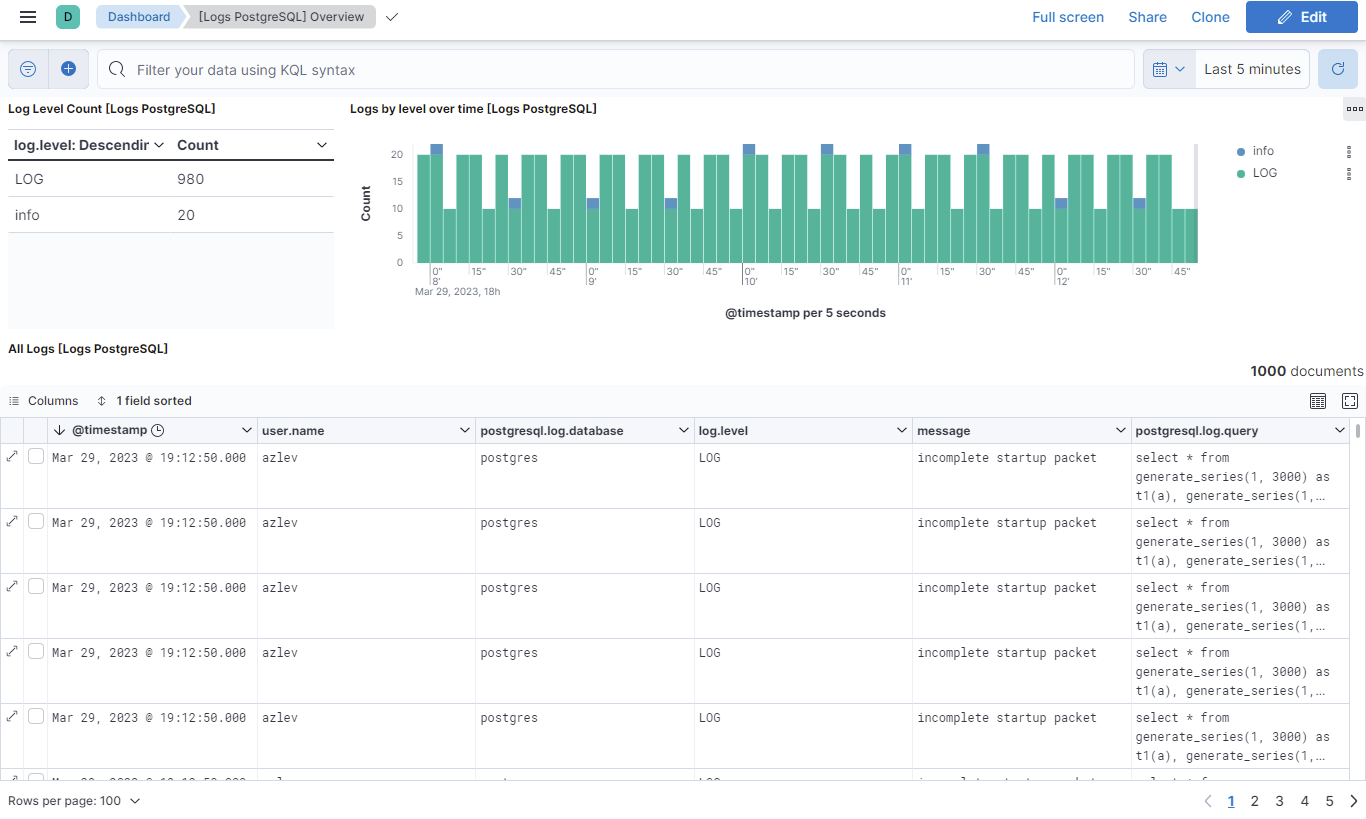
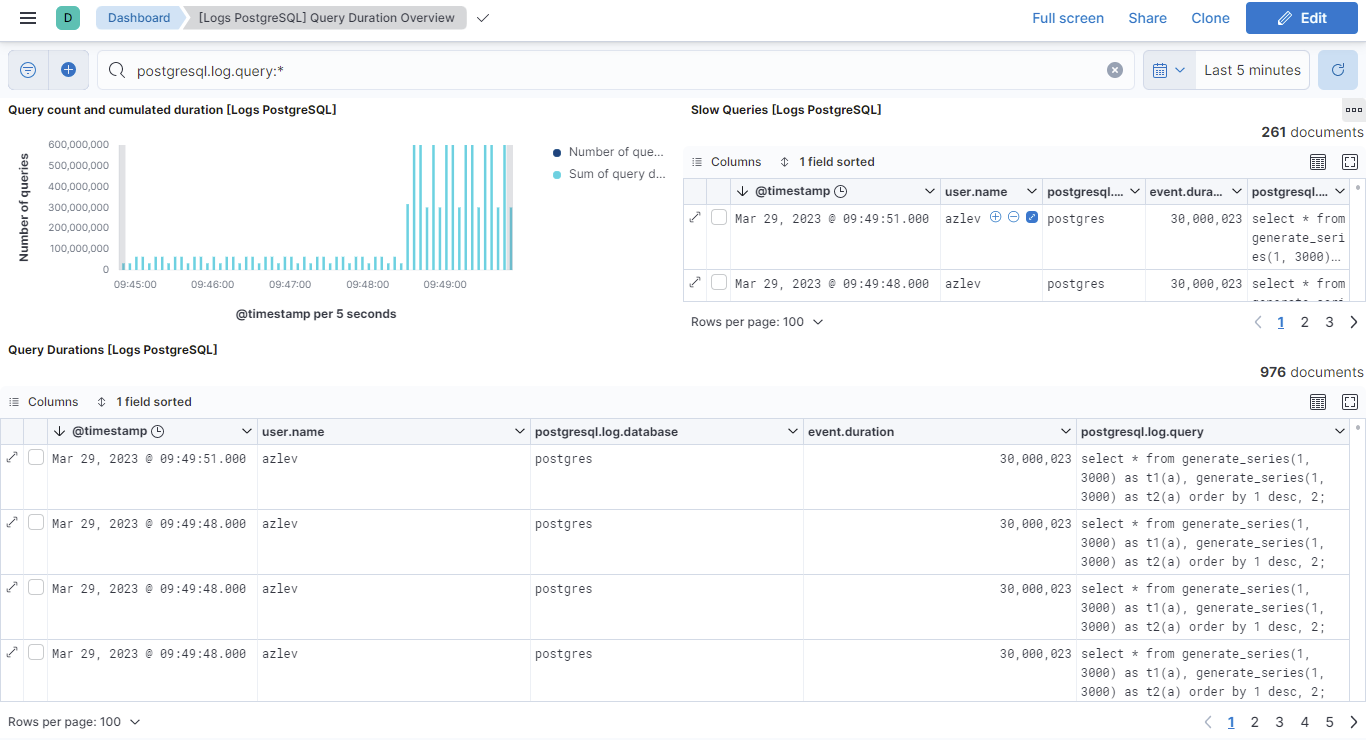
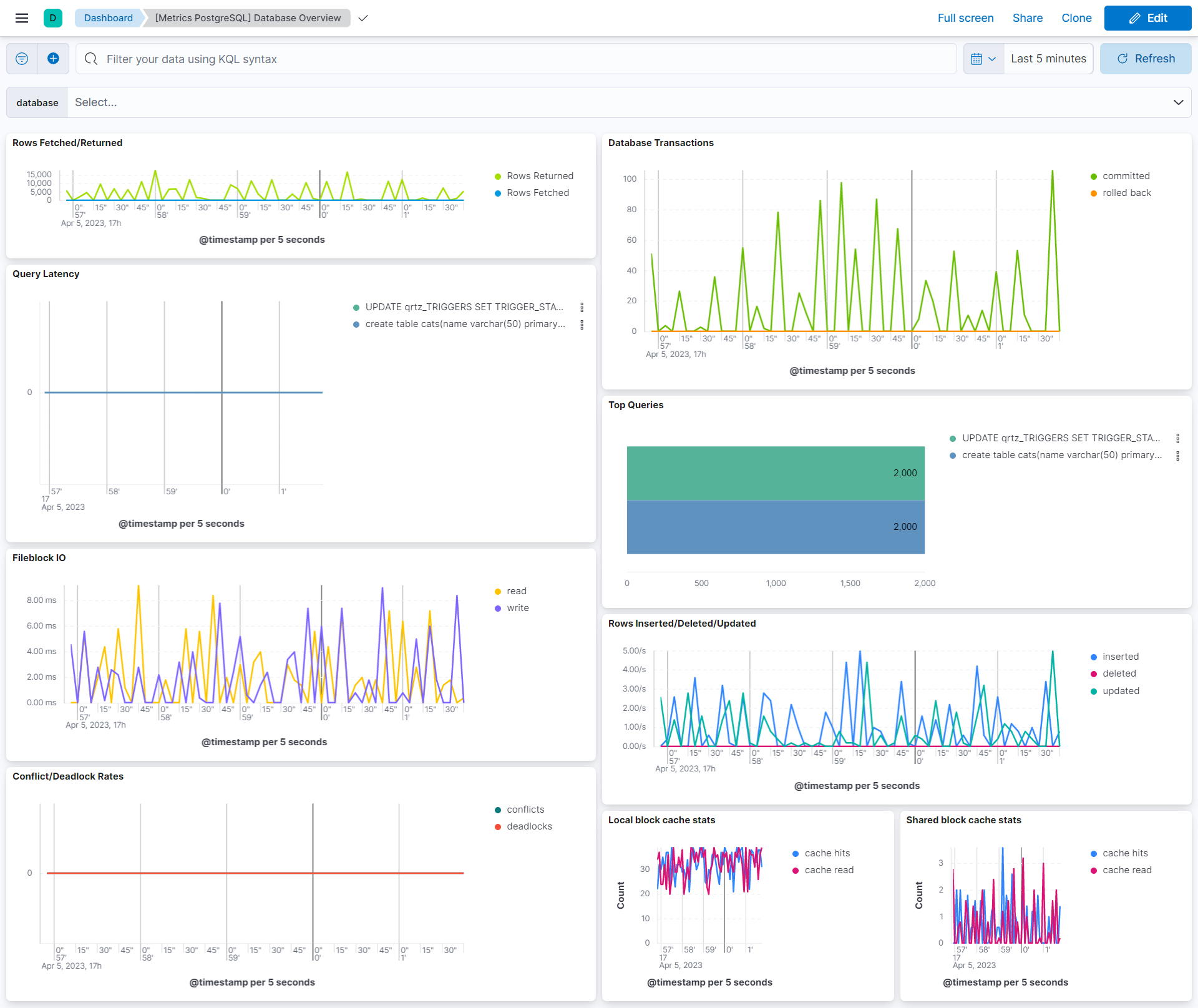
This integration includes one or more Kibana dashboards that visualizes the data collected by the integration. The screenshots below illustrate how the ingested data is displayed.
Changelog
| Version | Details | Minimum Kibana version |
|---|---|---|
| 1.32.2 | Bug fix (View pull request) Apply the existing condition setting to the statement data stream. |
9.2.1 8.19.0 |
| 1.32.1 | Enhancement (View pull request) Update README with Alerting Rule Templates. |
9.2.1 8.19.0 |
| 1.32.0 | Enhancement (View pull request) Add Alerting Rule Templates. |
9.2.1 8.19.0 |
| 1.31.0 | Enhancement (View pull request) Allow @custom pipeline access to event.original without setting preserve_original_event. |
9.0.0 8.13.0 |
| 1.30.0 | Enhancement (View pull request) Add a flag fips_compatible to control whether the package is allowed in the ECH FedRAMP High environment. |
9.0.0 8.13.0 |
| 1.29.0 | Enhancement (View pull request) Add support for user specific timezone map. |
9.0.0 8.13.0 |
| 1.28.0 | Enhancement (View pull request) Add support for EDT timezone. |
9.0.0 8.13.0 |
| 1.27.0 | Enhancement (View pull request) Add support for Kibana 9.0.0. |
9.0.0 8.13.0 |
| 1.26.0 | Enhancement (View pull request) Allow the usage of deprecated log input and support for stack 9.0 |
8.13.0 |
| 1.25.0 | Enhancement (View pull request) Add ability to set condition for logs and metrics. |
8.13.0 |
| 1.24.0 | Bug fix (View pull request) Fix log datastream grok pattern to support standard logs. |
8.13.0 |
| 1.23.0 | Enhancement (View pull request) Add processor support for activity, bgwriter, database and statement data streams. |
8.13.0 |
| 1.22.0 | Enhancement (View pull request) ECS version updated to 8.11.0. Update the kibana constraint to ^8.13.0. Modified the field definitions to remove ECS fields made redundant by the ecs@mappings component template. |
8.13.0 |
| 1.21.0 | Enhancement (View pull request) Add global filter on data_stream.dataset to improve performance. |
8.12.0 |
| 1.20.0 | Enhancement (View pull request) Add alias field for database oid fields. |
8.12.0 |
| 1.19.0 | Enhancement (View pull request) Enable secrets for sensitive fields. For more details, refer https://www.elastic.co/guide/en/fleet/current/agent-policy.html#agent-policy-secret-values |
8.12.0 |
| 1.18.1 | Bug fix (View pull request) Disable secrets for older stack versions due to errors. |
8.8.0 |
| 1.18.0 | Enhancement (View pull request) Enable 'secret' for the sensitive fields, supported from 8.12. |
8.8.0 |
| 1.17.2 | Enhancement (View pull request) Improve wording on milliseconds. |
8.8.0 |
| 1.17.1 | Bug fix (View pull request) Replaced postgresql.activity.query with postgresql.activity.query_id as TSDS dimension field to support query length greater than 1024. |
8.8.0 |
| 1.17.0 | Enhancement (View pull request) Update the package format_version to 3.0.0. |
8.8.0 |
| 1.16.1 | Bug fix (View pull request) Add null check and ignore_missing check to the rename processor |
8.8.0 |
| 1.16.0 | Enhancement (View pull request) Enable time series data streams for the metrics datasets. This dramatically reduces storage for metrics and is expected to progressively improve query performance. For more details, see https://www.elastic.co/guide/en/elasticsearch/reference/current/tsds.html. |
8.8.0 |
| 1.15.2 | Enhancement (View pull request) Added changes to support TSDB Enablement for the activity datastream. |
8.4.0 |
| 1.15.1 | Enhancement (View pull request) Add new dimension fields to the database and bgwriter datastreams. |
8.4.0 |
| 1.15.0 | Enhancement (View pull request) Add dimensions mapping for the statement datastream for TSDB enablement. |
8.4.0 |
| 1.14.0 | Enhancement (View pull request) Rename ownership from obs-service-integrations to obs-infraobs-integrations |
8.4.0 |
| 1.13.0 | Enhancement (View pull request) Migrate Query Duration Overview dashboard visualizations to lens. |
8.4.0 |
| 1.12.0 | Enhancement (View pull request) Migrate Database Overview dashboard visualizations to lens. |
8.4.0 |
| 1.11.0 | Enhancement (View pull request) Migrate Overview dashboard visualizations to lens. |
8.4.0 |
| 1.10.0 | Enhancement (View pull request) Added changes to support TSDB Enablement for the bgwriter datastream. |
8.0.0 7.14.0 |
| 1.9.0 | Enhancement (View pull request) Added dimensions mapping for database datastream for TSDB enablement. |
8.0.0 7.14.0 |
| 1.8.0 | Enhancement (View pull request) Added metric type mapping for database datastream. |
8.0.0 7.14.0 |
| 1.7.0 | Enhancement (View pull request) Added metric type mapping for statement datastream. |
8.0.0 7.14.0 |
| 1.6.1 | Enhancement (View pull request) Added categories and/or subcategories. |
8.0.0 7.14.0 |
| 1.6.0 | Enhancement (View pull request) Update ECS version to 8.5.1 |
8.0.0 7.14.0 |
| 1.5.0 | Enhancement (View pull request) Added infrastructure category. |
8.0.0 7.14.0 |
| 1.4.2 | Enhancement (View pull request) Remove unused visualizations |
8.0.0 7.14.0 |
| 1.4.1 | Bug fix (View pull request) Fix pipeline when user.name and postgresql.log.database with brackets |
8.0.0 7.14.0 |
| 1.4.0 | Enhancement (View pull request) Add support for AWS postgresql standard log format |
8.0.0 7.14.0 |
| 1.3.1 | Enhancement (View pull request) Add documentation for multi-fields |
8.0.0 7.14.0 |
| 1.3.0 | Enhancement (View pull request) Update to ECS 8.0 |
— |
| 1.2.0 | Enhancement (View pull request) Release postgresql package for v8.0.0 |
8.0.0 7.14.0 |
| 1.1.2 | Enhancement (View pull request) Uniform with guidelines |
— |
| 1.1.1 | Bug fix (View pull request) Fix logic that checks for the 'forwarded' tag |
— |
| 1.1.0 | Enhancement (View pull request) Update to ECS 1.12.0 |
7.14.0 |
| 1.0.0 | Enhancement (View pull request) Release PostreSQL as GA |
— |
| 0.7.3 | Enhancement (View pull request) Convert to generated ECS fields |
— |
| 0.7.2 | Enhancement (View pull request) update to ECS 1.11.0 |
— |
| 0.7.1 | Enhancement (View pull request) Escape special characters in docs |
— |
| 0.7.0 | Enhancement (View pull request) Update documentation to fit mdx spec |
— |
| 0.6.0 | Enhancement (View pull request) Update integration description |
— |
| 0.5.0 | Enhancement (View pull request) Set "event.module" and "event.dataset" Enhancement (View pull request) Enable ECS dependency |
— |
| 0.4.0 | Enhancement (View pull request) update to ECS 1.10.0 and adding event.original options |
— |
| 0.3.1 | Enhancement (View pull request) update to ECS 1.9.0 |
— |
| 0.3.0 | Enhancement (View pull request) Add support for logs in CSV format |
— |
| 0.2.7 | Enhancement (View pull request) Updating package owner |
— |
| 0.2.6 | Bug fix (View pull request) Correct sample event file. |
— |
| 0.1.0 | Enhancement (View pull request) initial release |
— |