Greenhouse Integration
Elastic Cloud Serverless projects are autoscaled environments, fully managed by Elastic and available on Elastic Cloud. Availability This functionality is in technical preview and is ready for evaluation. Use with caution in production; it is not recommended for mission-critical workloads. Elastic will work to fix any issues, but features in technical preview are not subject to the support SLA of official GA features. Specific Support terms apply. Elastic Cloud Serverless projects are autoscaled environments, fully managed by Elastic and available on Elastic Cloud. Availability This functionality is in technical preview and is ready for evaluation. Use with caution in production; it is not recommended for mission-critical workloads. Elastic will work to fix any issues, but features in technical preview are not subject to the support SLA of official GA features. Specific Support terms apply. The Elastic Stack includes Elastic's core products such as Elasticsearch, Kibana, Logstash, and Beats. Availability This functionality is in technical preview and is ready for evaluation. Use with caution in production; it is not recommended for mission-critical workloads. Elastic will work to fix any issues, but features in technical preview are not subject to the support SLA of official GA features. Specific Support terms apply. Unless stated otherwise on the page, this functionality is available when your Elastic Stack is deployed on Elastic Cloud Hosted, Elastic Cloud Enterprise, Elastic Cloud on Kubernetes, and self-managed environments. This documentation corresponds to the latest patch available for each minor version. If you're not using the latest patch, check the release notes for changes.
Serverless Observability
Preview
Preview
Serverless Security
Preview
Preview
Stack
Preview
9.1+
Preview since 9.1
| Version | 0.3.0 Availability Preview This functionality is in technical preview and is ready for evaluation. Use with caution in production; it is not recommended for mission-critical workloads. Elastic will work to fix any issues, but features in technical preview are not subject to the support SLA of official GA features. Specific Support terms apply. (View all) |
| Subscription level What's this? |
Basic |
| Developed by What's this? |
Community |
| Ingestion method(s) | API |
| Minimum Kibana version(s) | 9.1.0 8.19.0 |
To use pre-release integrations, go to the Integrations page in Kibana, scroll down, and toggle on the Display beta integrations option.
The Greenhouse integration allows you to collect audit logs from Greenhouse, a popular Applicant Tracking System (ATS). Audit logs provide a record of important events from the previous 30 days, tracking who accessed or edited information in Greenhouse Recruiting.
This integration collects the following data:
- Audit Logs: Records of events including data changes, user actions, and API access.
- Greenhouse Expert subscription tier with the Audit Log add-on
- Harvest V3 (OAuth) API credentials with audit log permissions
- Optionally, a Site Admin user ID for API authorization (if not configured as a default in your OAuth credentials)
This integration uses the Greenhouse Audit Log API with Harvest V3 OAuth 2.0 Client Credentials authentication.
- Data retention: Greenhouse retains audit log data for 30 days only. Events older than 30 days are no longer available from the API. To maintain a longer history, ensure this integration is collecting data continuously.
- Rate limits: The Greenhouse Audit Log API allows 50 general requests per 10 seconds and 3 paginated requests per 30 seconds. The integration handles rate limiting automatically by respecting
HTTP 429responses and backing off before retrying.
- Log in to Greenhouse as a user with Developer permissions
- Navigate to Configure > Dev Center > API Credentials
- Click Create new API credentials
- Select Harvest V3 (OAuth) as the credential type
- Save the credential and configure the scopes your integration needs (ensure Audit Log access is enabled)
- Copy the Client ID and Client Secret - you will need these for the integration
The OAuth 2.0 Client Credentials flow can use a user_id to identify the authorizing user. This user must be a Site Admin to access audit log endpoints. If your OAuth credentials are configured with a default authorizing user, this field can be left empty.
To find a user's ID:
- In Greenhouse, navigate to Configure > Users
- Click on the Site Admin user you want to use for authorization
- Look at the URL in your browser - it will contain the numeric user ID (for example,
https://app.greenhouse.io/configure/users/12345) - Use this numeric ID in the integration configuration
- In Kibana, navigate to Integrations and search for "Greenhouse"
- Click Add Greenhouse
- Enter your OAuth credentials:
- OAuth Client ID: The Client ID from your Harvest V3 credentials
- OAuth Client Secret: The Client Secret from your Harvest V3 credentials
- Configure optional settings:
- Authorizing User ID: The numeric user ID of a Site Admin (optional if your OAuth credentials have a default user configured)
- Initial Interval: How far back to collect logs on first run (default: 24h, maximum: 30d)
- Interval: How often to poll for new events (default: 5m)
- Batch Size: Number of events per API request (100-500, default: 500)
- Performer IDs Filter: Filter by specific user IDs
- Event Types Filter: Filter by event type (data_change_update, data_change_create, data_change_destroy, harvest_access, action)
- Enrich rejected application events: When enabled, look up the rejection reason and rejection notes/comments from the Harvest API and add them to the event (default: disabled)
When a candidate or prospect is rejected, Greenhouse records a Candidate or Prospect rejected audit event that contains no application ID, rejection reason, or notes. Enabling Enrich rejected application events looks these up from the Harvest API and adds them to the event under greenhouse.audit.event.rejection.
- On the same Harvest V3 (OAuth) API credential used for audit log access, grant the following read permissions (under Configure → Dev Center → API Credentials):
- Rejection details → List rejection details (
harvest:rejection_details:list) - Rejection reasons → Show rejection reason (
harvest:rejection_reasons:show) - Notes → List notes (
harvest:notes:list)
- Rejection details → List rejection details (
- Enable the Enrich rejected application events setting on the integration.
- If you use the Event Types Filter, make sure it includes both
actionanddata_change_create. The correlation depends on theRejectionDetailsevents, which aredata_change_createevents.
When enrichment succeeds, greenhouse.audit.event.rejection is populated with application_id, reason.id/reason.name/reason.type, notes, and rejected_at. The reason name is also copied to event.reason.
If correlation fails (no matching RejectionDetails event found, or an ambiguous bulk-reject), the event is still indexed with greenhouse.audit.event.rejection.error and the greenhouse-rejection-enrichment-failed tag rather than being dropped.
Audit logs capture the following types of events:
| Event Type | Description |
|---|---|
action |
General actions taken in Greenhouse Recruiting |
data_change_create |
New data created |
data_change_update |
Existing data modified |
data_change_destroy |
Data deleted |
harvest_access |
Data accessed using Harvest API |
If you receive "Failed to obtain OAuth access token" errors:
- Verify your Client ID and Client Secret are correct
- Ensure the OAuth credentials have audit log permissions enabled
- If using a user ID, check that it is a valid Site Admin user
If you receive 403 errors:
- Verify the authorizing user (specified by user_id) is a Site Admin
- Check that your OAuth credentials have the necessary scopes for audit log access
If no events are being collected:
- Verify your Greenhouse subscription includes the Audit Log add-on
- Check that there have been events in the last 30 days
- Review any filter settings that might be excluding events
If rejection events are tagged with greenhouse-rejection-enrichment-failed, check one or more of the following fields for details on what failed:
greenhouse.audit.event.rejection.error— full enrichment failure (e.g. correlation could not be established, or the rejection_details API call failed)greenhouse.audit.event.rejection.reason.error— the rejection reason lookup (/v3/rejection_reasons/{id}) returned a non-200 responsegreenhouse.audit.event.rejection.notes_error— the rejection notes batch fetch (/v3/notes) returned a non-200 response
Common causes and remedies:
- Verify the OAuth credential has been granted all three required read permissions: Rejection details (List rejection details), Rejection reasons (Show rejection reason), and Notes (List notes)
- Check that the authorizing user has permission to view the affected application
- If the error mentions no matching
RejectionDetailsevent was found, the rejection was recorded without aRejectionDetailsaudit event (correlation already looks across every page of a collection window and the following poll). Check the application in Greenhouse directly - If the error mentions an ambiguous match, the rejection was likely part of a bulk-reject action.
greenhouse.audit.event.rejection.ambiguous_application_idslists the candidates involved for manual follow-up
Exported fields
| Field | Description | Type |
|---|---|---|
| @timestamp | Event timestamp. | date |
| data_stream.dataset | Data stream dataset name. | constant_keyword |
| data_stream.namespace | Data stream namespace. | constant_keyword |
| data_stream.type | Data stream type. | constant_keyword |
| event.dataset | Event dataset | constant_keyword |
| event.module | Event module | constant_keyword |
| greenhouse.audit.event.meta | The before and after values from data change events, or other relevant data for the event. | flattened |
| greenhouse.audit.event.rejection.ambiguous_application_ids | When more than one "RejectionDetails" audit event shares the rejection event's request.id (for example, a bulk rejection), the Application IDs of all the matching "RejectionDetails" events. No reason or notes are attached in this case, since it is impossible to tell which one corresponds to this rejection event. | keyword |
| greenhouse.audit.event.rejection.application_id | The ID of the Application matched to this rejection event via its sibling "RejectionDetails" audit event. | keyword |
| greenhouse.audit.event.rejection.error | Error message if the rejection enrichment lookup against the Harvest API failed. | keyword |
| greenhouse.audit.event.rejection.notes | The rejection notes/comments entered when the application was rejected, sourced from the Harvest v3 Notes API via the rejection_note_id on the rejection detail record. | match_only_text |
| greenhouse.audit.event.rejection.notes_error | Error message when the Harvest API /v3/notes batch call returned a non-200 response and rejection notes could not be retrieved. | keyword |
| greenhouse.audit.event.rejection.reason.error | Error message when the Harvest API /v3/rejection_reasons/{id} call returned a non-200 response for this rejection reason ID. | keyword |
| greenhouse.audit.event.rejection.reason.id | The ID of the rejection reason. | keyword |
| greenhouse.audit.event.rejection.reason.name | The name of the rejection reason. | keyword |
| greenhouse.audit.event.rejection.reason.type | The category of the rejection reason, for example "We rejected them" or "They rejected us." | keyword |
| greenhouse.audit.event.rejection.rejected_at | The timestamp when the application was rejected, as reported by the Harvest API. | date |
| greenhouse.audit.event.target_id | The ID of the element that was edited or accessed. | keyword |
| greenhouse.audit.event.target_type | The resource name for data changes, Harvest access, or the event action type for other actions. | keyword |
| greenhouse.audit.event.type | The type of event: data_change_update, data_change_create, data_change_destroy, harvest_access, or action. | keyword |
| greenhouse.audit.performer.id | The Greenhouse Recruiting user ID of the person who performed the change or the API key if performed using Greenhouse API. | keyword |
| greenhouse.audit.performer.ip_address | The IP address of the person or integration that performed the change. | ip |
| greenhouse.audit.performer.meta.api_key_type | The type of API key used when performer is an API key. | keyword |
| greenhouse.audit.performer.meta.name | The name of the performer. | keyword |
| greenhouse.audit.performer.meta.username | The email address of the performer or the API key type. | keyword |
| greenhouse.audit.performer.type | The type of performer: user, api_key, or greenhouse_internal. | keyword |
| greenhouse.audit.request.id | The ID of the request. | keyword |
| greenhouse.audit.request.type | The name of the action taken in Greenhouse Recruiting, or the request URL if from Harvest API. | keyword |
| input.type | Type of Filebeat input. | keyword |
Example
{
    "@timestamp": "2023-06-02T16:06:19.217Z",
    "agent": {
        "ephemeral_id": "a1b2c3d4-e5f6-7890-abcd-ef1234567890",
        "id": "a1b2c3d4-e5f6-7890-abcd-ef1234567890",
        "name": "elastic-agent",
        "type": "filebeat",
        "version": "8.18.0"
    },
    "data_stream": {
        "dataset": "greenhouse.audit",
        "namespace": "default",
        "type": "logs"
    },
    "ecs": {
        "version": "8.11.0"
    },
    "elastic_agent": {
        "id": "a1b2c3d4-e5f6-7890-abcd-ef1234567890",
        "snapshot": false,
        "version": "8.18.0"
    },
    "event": {
        "action": "action",
        "category": [
            "configuration",
            "iam"
        ],
        "dataset": "greenhouse.audit",
        "id": "1234zID",
        "kind": "event",
        "module": "greenhouse",
        "original": "{\"request\":{\"id\":\"1234zID\",\"type\":\"email_settings#create_organization_email\"},\"performer\":{\"meta\":{\"name\":\"Allison Jamie\",\"username\":\"allison.j@omniva-corp.com\"},\"id\":12345,\"ip_address\":\"192.168.0.1\",\"type\":\"user\"},\"organization_id\":123,\"event\":{\"meta\":null,\"target_type\":\"Global Email Added\",\"type\":\"action\"},\"event_time\":\"2023-06-02T16:06:19.217Z\"}",
        "type": [
            "info"
        ]
    },
    "greenhouse": {
        "audit": {
            "event": {
                "target_type": "Global Email Added",
                "type": "action"
            },
            "performer": {
                "type": "user"
            },
            "request": {
                "id": "1234zID",
                "type": "email_settings#create_organization_email"
            }
        }
    },
    "organization": {
        "id": "123"
    },
    "related": {
        "ip": [
            "192.168.0.1"
        ],
        "user": [
            "12345",
            "allison.j@omniva-corp.com"
        ]
    },
    "source": {
        "ip": "192.168.0.1"
    },
    "tags": [
        "preserve_original_event",
        "forwarded",
        "greenhouse-audit"
    ],
    "user": {
        "email": "allison.j@omniva-corp.com",
        "full_name": "Allison Jamie",
        "id": "12345"
    }
}
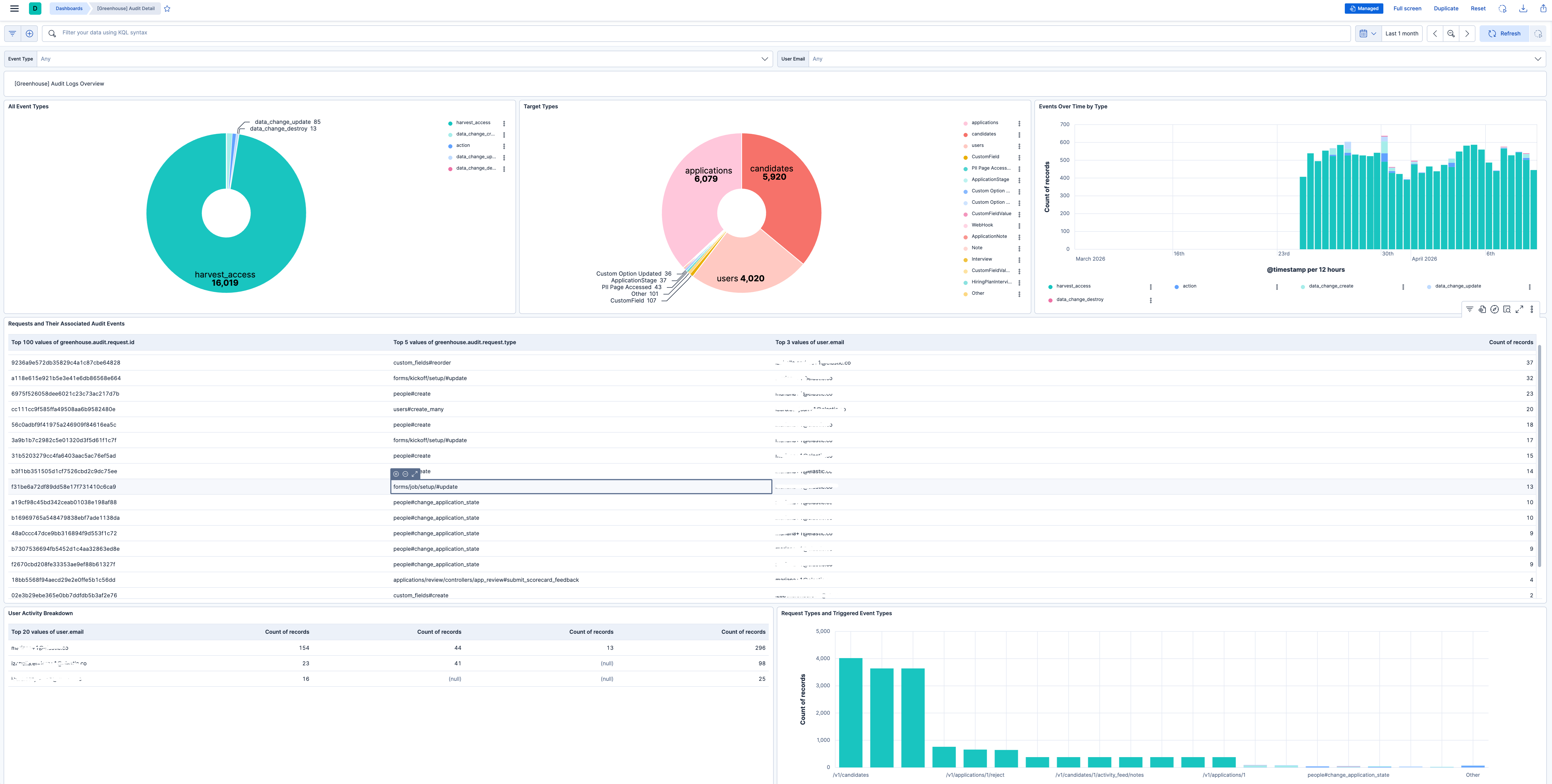
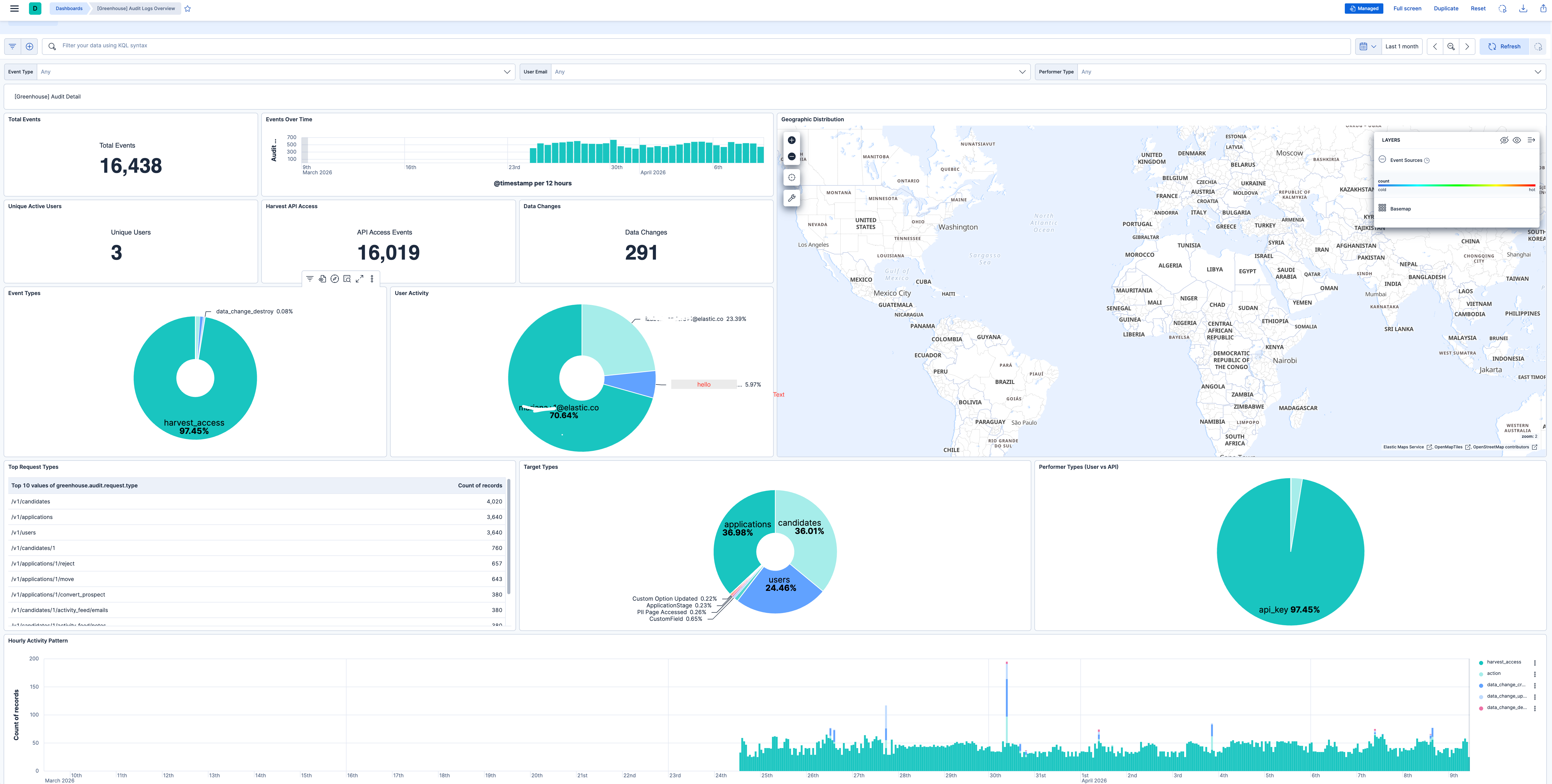
This integration includes one or more Kibana dashboards that visualizes the data collected by the integration. The screenshots below illustrate how the ingested data is displayed.
Changelog
| Version | Details | Minimum Kibana version |
|---|---|---|
| 0.3.0 | Enhancement (View pull request) Add optional rejection enrichment for "Candidate or Prospect rejected" audit events. When enabled, the integration correlates the rejection event to its accompanying RejectionDetails audit event via request.id, then fetches the rejection reason and notes from the Harvest API and adds them to the event under greenhouse.audit.event.rejection. Bug fix (View pull request) Fix inverted OAuth token expiry check that caused the token to be reused up to 30 seconds after it expired, leading to avoidable 401 errors. |
9.1.0 8.19.0 |
| 0.2.1 | Bug fix (View pull request) Drop scalar performer.meta values that conflict with the object mapping. |
9.0.0 8.18.0 |
| 0.2.0 | Enhancement (View pull request) Add tags to ingest pipeline processors. |
9.0.0 8.18.0 |
| 0.1.0 | Enhancement (View pull request) Initial release. |
9.0.0 8.18.0 |