Traefik Integration
Elastic Cloud Serverless projects are autoscaled environments, fully managed by Elastic and available on Elastic Cloud. Availability This functionality is generally available and ready for production usage. Elastic Cloud Serverless projects are autoscaled environments, fully managed by Elastic and available on Elastic Cloud. Availability This functionality is generally available and ready for production usage. The Elastic Stack includes Elastic's core products such as Elasticsearch, Kibana, Logstash, and Beats. Availability This functionality is generally available and ready for production usage. Unless stated otherwise on the page, this functionality is available when your Elastic Stack is deployed on Elastic Cloud Hosted, Elastic Cloud Enterprise, Elastic Cloud on Kubernetes, and self-managed environments. This documentation corresponds to the latest patch available for each minor version. If you're not using the latest patch, check the release notes for changes.
Serverless Observability
Generally available
Serverless Security
Generally available
Stack
9.0+
Generally available since 9.0
| Version | 2.7.0 (View all) |
| Subscription level What's this? |
Basic |
| Developed by What's this? |
Elastic |
| Ingestion method(s) | File |
| Minimum Kibana version(s) | 9.0.0 8.13.0 |
Traefik is a modern reverse proxy and load balancer that helps to manage and route incoming web traffic to the user's applications. It is designed to dynamically adjust to the changes in user's infrastructure, making it easy to deploy and scale user's services. Traefik integrates well with containerized environments and provides features like automatic SSL certificate management and support for multiple backends.
Use the Traefik integration to:
- Collect logs related to access.
- Create informative visualizations to track usage trends, measure key logs, and derive actionable business insights.
- Set up alerts to minimize Mean Time to Detect (MTTD) and Mean Time to Resolve (MTTR) by quickly referencing relevant logs during troubleshooting.
The Traefik integration collects logs data.
Logs help User keep a record of events that happen on user's machine. Users can monitor and troubleshoot the performance of their Traefik instance by accessing the Log data stream, which includes client IP, host, username, request address, duration, and content.
Data streams:
access: Collects information related to the client IP, host, username, request address, duration, and content.
Note:
- Users can monitor and see the log inside the ingested documents for Traefik in the
logs-*index pattern fromDiscover.
The Traefik datasets were tested with Traefik 1.6, 1.7 and 2.9 versions.
User need Elasticsearch for storing and searching user's data and Kibana for visualizing and managing it. User can use our hosted Elasticsearch Service on Elastic Cloud, which is recommended or self-manage the Elastic Stack on user's own hardware.
For step-by-step instructions on how to set up an integration, see the Getting started guide.
After the integration is successfully configured, clicking on the Assets tab of the Traefik Integration should display a list of available dashboards. Click on the dashboard available for user's configured data stream. It should be populated with the required data.
Note:
- The
/healthAPI endpoint which is used to collect the metrics is removed from Traefikv2version. Please refer this issue for more information. - We are currently working on the metrics collection using the suggested alternative. Keep a watch on this issue for more updates.
The access data stream collects Traefik access logs. This data stream collects logs related to client IP, host, username, request address, duration, and content.
An example event for access looks as following:
Example
{
    "@timestamp": "2024-02-09T11:53:32.609696286Z",
    "destination": {
        "address": "10.1.25.243",
        "ip": "10.1.25.243",
        "port": 80
    },
    "ecs": {
        "version": "8.11.0"
    },
    "event": {
        "category": [
            "web"
        ],
        "created": "2020-04-28T11:07:58.223Z",
        "duration": 59518533,
        "ingested": "2024-02-13T16:08:40.190327617Z",
        "kind": "event",
        "original": "{\"ClientAddr\": \"10.10.8.105:48376\",\"ClientHost\": \"175.16.199.10\",\"ClientPort\": \"48376\",\"ClientUsername\": \"-\",\"DownstreamContentSize\": 88,\"DownstreamStatus\": 200,\"Duration\": 59518533,\"OriginContentSize\": 88,\"OriginDuration\": 59428568,\"OriginStatus\": 200,\"Overhead\": 89965,\"RequestAddr\": \"api-students.unpad.ac.id\",\"RequestContentSize\": 0,\"RequestCount\": 75,\"RequestHost\": \"api-students.unpad.ac.id\",\"RequestMethod\": \"GET\",\"RequestPath\": \"/api/v1/study/140410210038/card/comment\",\"RequestPort\": \"-\",\"RequestProtocol\": \"HTTP/1.0\",\"RequestScheme\": \"http\",\"RetryAttempts\": 0,\"RouterName\": \"app-unpad-students-api-prod-app-unpad-students-api-api-students-unpad-ac-id-api@kubernetes\",\"ServiceAddr\": \"10.1.25.243:80\",\"ServiceName\": \"app-unpad-students-api-prod-app-unpad-students-api-80@kubernetes\",\"ServiceURL\": {\"Scheme\": \"http\",\"Opaque\": \"\",\"User\": null,\"Host\": \"10.1.25.243:80\",\"Path\": \"\",\"RawPath\": \"\",\"OmitHost\": false,\"ForceQuery\": false,\"RawQuery\": \"\",\"Fragment\": \"\",\"RawFragment\": \"\"},\"StartLocal\": \"2024-02-09T11:53:32.609696286Z\",\"StartUTC\": \"2024-02-09T11:53:32.609696286Z\",\"entryPointName\": \"web\",\"level\": \"info\",\"msg\": \"\",\"time\": \"2024-02-09T11:53:32Z\"}",
        "outcome": "success",
        "type": [
            "access"
        ]
    },
    "http": {
        "request": {
            "body": {
                "bytes": 0
            },
            "method": "GET"
        },
        "response": {
            "body": {
                "bytes": 88
            },
            "status_code": 200
        },
        "version": "1.0"
    },
    "log": {
        "level": "info"
    },
    "network": {
        "community_id": "1:Mgo2d5qbyedZ2JnxvcBh0BuPcWk=",
        "transport": "tcp"
    },
    "observer": {
        "egress": {
            "interface": {
                "name": "app-unpad-students-api-prod-app-unpad-students-api-80@kubernetes"
            }
        },
        "ingress": {
            "interface": {
                "name": "web"
            }
        },
        "product": "traefik",
        "type": "proxy",
        "vendor": "traefik"
    },
    "related": {
        "ip": [
            "10.10.8.105",
            "10.1.25.243"
        ]
    },
    "source": {
        "address": "10.10.8.105:48376",
        "ip": "10.10.8.105",
        "port": 48376
    },
    "tags": [
        "preserve_original_event"
    ],
    "traefik": {
        "access": {
            "origin": {
                "content_size": 88,
                "duration": 59428568,
                "status_code": 200
            },
            "overhead": 89965,
            "request_count": 75,
            "retry_attempts": 0,
            "router": {
                "name": "app-unpad-students-api-prod-app-unpad-students-api-api-students-unpad-ac-id-api@kubernetes"
            },
            "service": {
                "url": {
                    "domain": "10.1.25.243:80",
                    "force_query": false,
                    "fragment": "",
                    "opaque": "",
                    "path": "",
                    "raw_path": "",
                    "raw_query": "",
                    "user": null
                }
            }
        }
    },
    "url": {
        "domain": "api-students.unpad.ac.id",
        "original": "/api/v1/study/140410210038/card/comment",
        "scheme": "http"
    },
    "user": {
        "name": "-"
    }
}
ECS Field Reference
Please refer to the following document for detailed information on ECS fields.
Exported fields
| Field | Description | Type |
|---|---|---|
| @timestamp | Event timestamp. | date |
| data_stream.dataset | Data stream dataset. | constant_keyword |
| data_stream.namespace | Data stream namespace. | constant_keyword |
| data_stream.type | Data stream type. | constant_keyword |
| event.dataset | Event dataset | constant_keyword |
| event.module | Event module | constant_keyword |
| http.request.headers.* | The canonical headers of the monitored HTTP request. | object |
| http.response.headers.* | The canonical headers of the monitored HTTP response. | object |
| input.type | Input type | keyword |
| log.offset | Log offset | long |
| traefik.access.origin.content_size | The content length specified by the origin server, or 0 if unspecified. | long |
| traefik.access.origin.duration | The time taken (in nanoseconds) by the origin server ('upstream') to return its response. | long |
| traefik.access.origin.headers.* | The canonical headers of the monitored HTTP request. | object |
| traefik.access.origin.status_code | The HTTP status code returned by the origin server. If the request was handled by this Traefik instance (e.g. with a redirect), then this value will be absent (0). | long |
| traefik.access.origin.status_line | OriginStatus + Status code explanation | keyword |
| traefik.access.overhead | The processing time overhead (in nanoseconds) caused by Traefik | long |
| traefik.access.request_count | The number of requests received since the Traefik instance started. | long |
| traefik.access.retry_attempts | The amount of attempts the request was retried | long |
| traefik.access.router.name | The name of the Traefik router | keyword |
| traefik.access.service.address | The IP:port of the Traefik backend (extracted from ServiceURL) | keyword |
| traefik.access.service.duration | The time taken (in nanoseconds) by the origin server ('upstream') to return its response. | long |
| traefik.access.service.url.domain | Domain of the url | keyword |
| traefik.access.service.url.force_query | Traefik specific url field | boolean |
| traefik.access.service.url.fragment | The fragment of the url | keyword |
| traefik.access.service.url.opaque | Traefik specific url field | keyword |
| traefik.access.service.url.original | Traefik url as used in common log format | keyword |
| traefik.access.service.url.path | The path of the url | keyword |
| traefik.access.service.url.query | The query string of the url | keyword |
| traefik.access.service.url.raw_path | Traefik specific url field | keyword |
| traefik.access.service.url.raw_query | Traefik specific url field | keyword |
| traefik.access.service.url.scheme | The scheme of the url | keyword |
| traefik.access.service.url.username | The username of the url | keyword |
| traefik.access.user_identifier | Is the RFC 1413 identity of the client | keyword |
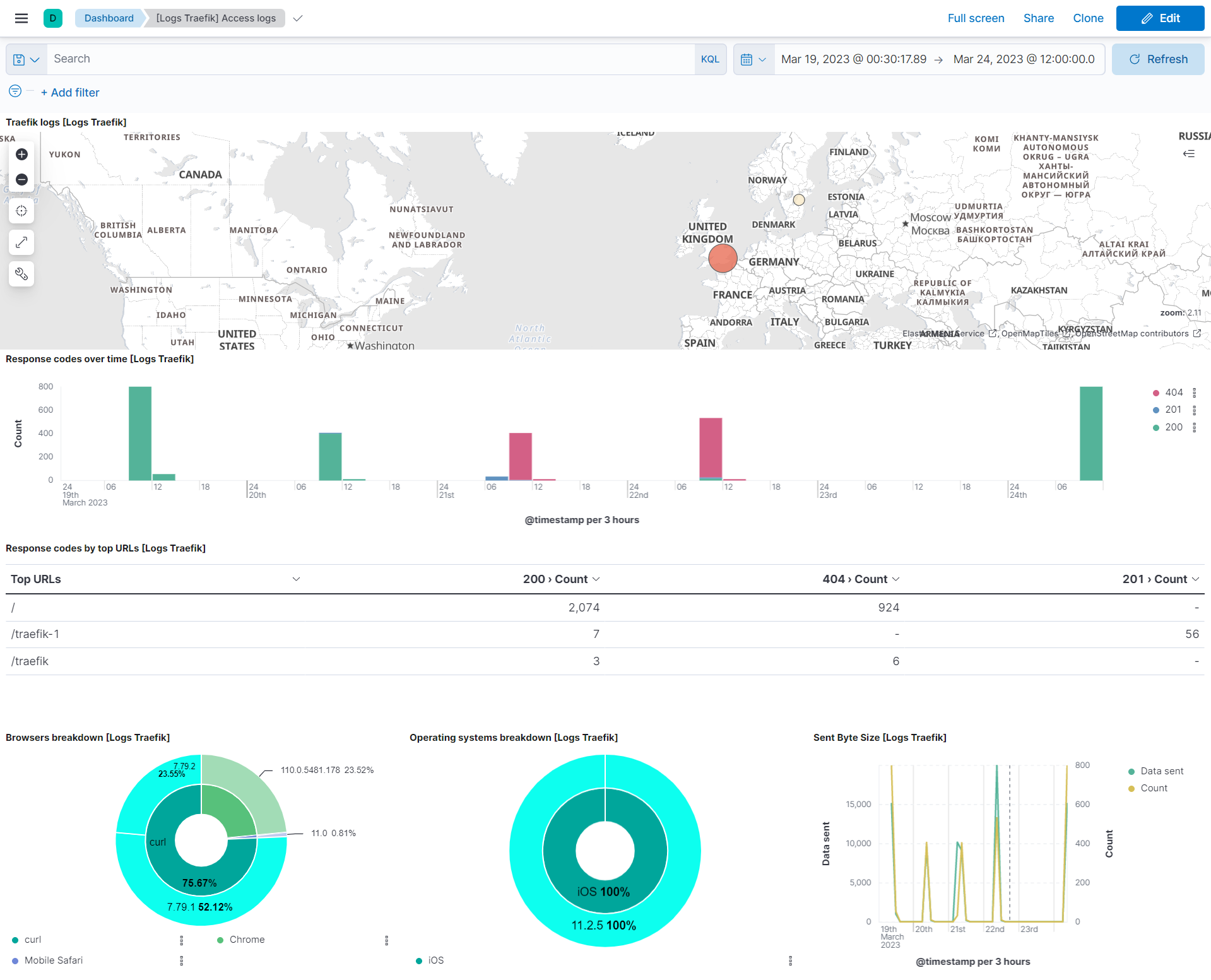
This integration includes one or more Kibana dashboards that visualizes the data collected by the integration. The screenshots below illustrate how the ingested data is displayed.
Changelog
| Version | Details | Minimum Kibana version |
|---|---|---|
| 2.7.0 | Enhancement (View pull request) Improve documentation |
9.0.0 8.13.0 |
| 2.6.0 | Enhancement (View pull request) Allow @custom pipeline access to event.original without setting preserve_original_event. |
9.0.0 8.13.0 |
| 2.5.0 | Enhancement (View pull request) Add support for Kibana 9.0.0. |
9.0.0 8.13.0 |
| 2.4.0 | Enhancement (View pull request) Allow the usage of deprecated log input and support for stack 9.0 |
8.13.0 |
| 2.3.1 | Bug fix (View pull request) Update links to getting started docs |
8.13.0 |
| 2.3.0 | Enhancement (View pull request) Add processor support for health data stream. |
8.13.0 |
| 2.2.0 | Enhancement (View pull request) ECS version updated to 8.11.0. Removed import_mappings. Update the kibana constraint to ^8.13.0. Modified the field definitions to remove ECS fields made redundant by the ecs@mappings component template. |
8.13.0 |
| 2.1.0 | Enhancement (View pull request) Add global filter on data_stream.dataset to improve performance. |
8.9.0 |
| 2.0.0 | Enhancement (View pull request) Support traefik v2.x access-logs. |
8.9.0 |
| 1.11.1 | Enhancement (View pull request) Inline "by reference" visualizations. |
8.9.0 |
| 1.11.0 | Enhancement (View pull request) Update the package format_version to 3.0.0. |
8.9.0 |
| 1.10.0 | Enhancement (View pull request) Enable time series data streams for the metrics datasets. This dramatically reduces storage for metrics and is expected to progressively improve query performance. For more details, see https://www.elastic.co/guide/en/elasticsearch/reference/current/tsds.html. |
8.9.0 |
| 1.9.1 | Enhancement (View pull request) Add metric_type mapping for health datastream. |
8.9.0 |
| 1.9.0 | Enhancement (View pull request) Add dimension mapping for health datastream. |
8.0.0 |
| 1.8.1 | Bug fix (View pull request) Add null check and ignore_missing check to the rename processor. |
8.0.0 |
| 1.8.0 | Enhancement (View pull request) Rename ownership from obs-service-integrations to obs-infraobs-integrations. |
8.0.0 |
| 1.7.0 | Enhancement (View pull request) Migrate visualizations to lens. |
8.0.0 |
| 1.6.1 | Enhancement (View pull request) Added categories and/or subcategories. |
8.0.0 |
| 1.6.0 | Enhancement (View pull request) Update ECS version to 8.5.1. |
8.0.0 |
| 1.5.0 | Enhancement (View pull request) Added infrastructure category. |
8.0.0 |
| 1.4.2 | Bug fix (View pull request) Fix the if condition on the community_id processor in the ingest pipeline. |
8.0.0 |
| 1.4.1 | Enhancement (View pull request) Remove unused visualizations. |
8.0.0 |
| 1.4.0 | Enhancement (View pull request) Migrate tile map to map in logs dashboard. |
8.0.0 |
| 1.3.1 | Enhancement (View pull request) Add documentation for multi-fields. |
8.0.0 7.14.0 |
| 1.3.0 | Enhancement (View pull request) Update to ECS 8.0 |
8.0.0 7.14.0 |
| 1.2.2 | Bug fix (View pull request) Regenerate test files using the new GeoIP database. |
8.0.0 7.14.0 |
| 1.2.1 | Bug fix (View pull request) Change test public IPs to the supported subset. |
8.0.0 7.14.0 |
| 1.2.0 | Enhancement (View pull request) Release traefik package for v8.0.0. |
8.0.0 7.14.0 |
| 1.1.2 | Enhancement (View pull request) Uniform with guidelines. |
7.14.0 |
| 1.1.1 | Bug fix (View pull request) Fix logic that checks for the 'forwarded' tag. |
— |
| 1.1.0 | Enhancement (View pull request) Update to ECS 1.12.0. |
7.14.0 |
| 1.0.0 | Enhancement (View pull request) Release Traefik as GA. |
— |
| 0.4.3 | Enhancement (View pull request) Convert to generated ECS fields. |
— |
| 0.4.2 | Enhancement (View pull request) update to ECS 1.11.0. |
— |
| 0.4.1 | Enhancement (View pull request) Escape special characters in docs. |
— |
| 0.4.0 | Enhancement (View pull request) Update integration description. |
— |
| 0.3.0 | Enhancement (View pull request) Set "event.module" and "event.dataset". |
— |
| 0.2.0 | Enhancement (View pull request) update to ECS 1.10.0 and adding event.original options. |
— |
| 0.1.2 | Bug fix (View pull request) setting minimum Kibana version required to 7.13.0. |
— |
| 0.1.1 | Enhancement (View pull request) parse either commonlog- or json-formatted logs. Enhancement (View pull request) update to ECS 1.9.0. |
— |
| 0.1.0 | Enhancement (View pull request) initial release. |
— |