BeyondInsight and Password Safe Integration
Elastic Cloud Serverless projects are autoscaled environments, fully managed by Elastic and available on Elastic Cloud. Availability This functionality is generally available and ready for production usage. Elastic Cloud Serverless projects are autoscaled environments, fully managed by Elastic and available on Elastic Cloud. Availability This functionality is generally available and ready for production usage. The Elastic Stack includes Elastic's core products such as Elasticsearch, Kibana, Logstash, and Beats. Availability This functionality is generally available and ready for production usage. Unless stated otherwise on the page, this functionality is available when your Elastic Stack is deployed on Elastic Cloud Hosted, Elastic Cloud Enterprise, Elastic Cloud on Kubernetes, and self-managed environments. This documentation corresponds to the latest patch available for each minor version. If you're not using the latest patch, check the release notes for changes.
Serverless Observability
Generally available
Serverless Security
Generally available
Stack
9.0+
Generally available since 9.0
| Version | 1.5.0 (View all) |
| Managed integration release status | GA |
| Subscription level What's this? |
Basic |
| Developed by What's this? |
Elastic |
| Ingestion method(s) | API |
| Minimum Kibana version(s) | 9.0.5 8.19.2 |
You can use this integration as an Elastic Managed integration on Elastic Cloud Hosted deployments running this version or later.
The BeyondInsight and Password Safe integration enables real-time monitoring of privileged account access, session recordings, and password checkout patterns to help security teams maintain compliance and quickly identify potential privilege abuse through BeyondTrust's Just-in-Time privileged access management capabilities.
- BeyondInsight/Password Safe 25.x
The integration uses BeyondTrust's REST APIs to collect data through authenticated API calls. It establishes sessions using API key authentication and retrieves data from multiple API endpoints:
- Authentication: Uses the PS-Auth header with an API key, username, and optional password
- Data Collection: Polls multiple API endpoints at configurable intervals:
/ManagedAccounts- Managed account information/ManagedSystems- Managed system configurations/Sessions- Active and historical session data/UserAudits- User audit logs and activity tracking/Workgroups- List available workgroups/Workgroups/{id}/Assets- Asset inventory from workgroups
- Processing: Transforms the data using ingest pipelines for ECS field mappings
The BeyondInsight and Password Safe integration collects log messages of the following types:
assetProvides asset inventory data from BeyondInsight workgroups, including servers, workstations, and network devices with their system details, IP addresses, and organizational metadata.managedaccountProvides managed account information including local and Active Directory accounts with their security policies, password change schedules, access permissions, and application associations.managedsystemProvides a list of systems managed by Password Safe.sessionProvides session monitoring data including active and completed privileged access sessions with status tracking, duration metrics, protocol information, and archive status for compliance auditing.userauditProvides user audit activity tracking including user actions, authentication events, system access, and administrative operations with context about usernames, IP addresses, and timestamps for security monitoring and compliance.
This integration enables several security and compliance use cases:
Asset Management and Visibility
- Maintain inventory of all managed assets across workgroups
- Track asset configurations, IP addresses, and system specifications
- Monitor asset lifecycle from creation to updates
Privileged Access Monitoring
- Real-time monitoring of privileged account activities and session recordings
- Track password checkouts, session durations, and access patterns
- Identify potential privilege abuse or unauthorized access attempts
Compliance and Auditing
- Generate detailed audit trails for privileged access activities
- Track user actions, login patterns, and system changes
Security Operations
- Correlate privileged access events with security incidents
- Detect anomalous session behaviors or access patterns
- Monitor managed system and account configurations for unauthorized changes
- In the top search bar in Kibana, search for Dashboards.
- In the search bar, type BeyondInsight and Password Safe.
- Select a dashboard for the dataset you are collecting, and verify the dashboard information is populated.
You must install Elastic Agent. For more details, check the Elastic Agent installation instructions. You can install only one Elastic Agent per host.
The Elastic Agent uses the CEL (Common Expression Language) input to collect data from BeyondTrust's REST APIs and ships the data to Elastic, where the events will then be processed via the integration's ingest pipelines.
This integration supports both Elastic Managed and Agent-based installations.
Elastic Managed integrations are only supported on Elastic Cloud Serverless and Elastic Cloud Hosted deployments. An Elastic Managed integration lets you ingest data from a cloud source while avoiding the orchestration, management, and maintenance associated with standard ingest infrastructure. Elastic runs the collector for you, so you can focus on your data instead of the infrastructure that collects it.
For more information, refer to Elastic Managed integrations and the Elastic Managed integrations FAQ.
Elastic Agent must be installed. For more details, check the Elastic Agent installation instructions. You can install only one Elastic Agent per host.
In the top search bar in Kibana, search for Integrations.
In the search bar, type BeyondInsight and Password Safe.
Select the BeyondInsight and Password Safe integration from the search results.
Click Add BeyondInsight and Password Safe.
Enable and configure the collection method:
To Collect events from the BeyondInsight and Password Safe API, you'll need to:
- Configure Base URL, Username, and API Key. Configure User Password (required only if the user password is required on the application API registration).
Select Save and continue to save the integration.
To configure the BeyondInsight and Password Safe integration, a BeyondInsight administrator must create an API registration and provide an API key, username, and (optionally) a password for authentication.
Steps to create an API registration:
- Log in to BeyondInsight with administrator privileges
- Navigate to
Configuration > General > API Registrations - Enter a name for the registration
- Click
Create New API Registration - Configure authentication options:
- User Password Required: Enable if you want to require a password in the authorization header
- Client Certificate Required: Leave disabled for this integration
- Add authentication rules with the IP address(es) of your Elastic Agent host(s)
- Click
Create Rule
BeyondInsight generates a unique API key for the registration. Use this API key along with a valid username (and password if required) to configure the integration. The integration does not use OAuth authentication.
- Open the Discover page in Kibana.
- Query for
event.module:beyondinsight_password_safe. - Expand the time range to view data from the last 90 days.
- Click on the
data_stream.datasetfield from the "Available fields" on the left hand panel. - This will display a list of the datasets from this integration that have reported data.
For help with Elastic ingest tools, check Common problems.
For more information on architectures that can be used for scaling this integration, check the Ingest Architectures documentation.
Provides asset inventory data collected from BeyondInsight workgroups using the Workgroups Assets API. This data stream retrieves asset information from all workgroups, including servers, workstations, databases, and network devices.
Data Collection Process:
- Authenticates using the SignAppin API
- Retrieves all available workgroups
- Iterates through each workgroup to collect asset inventories
- Handles pagination automatically to ensure complete data collection
- Stores the asset documents that have changed in any way since the last poll.
Filter asset documents using data_stream.dataset:"beyondinsight_password_safe.asset".
Exported fields
| Field | Description | Type |
|---|---|---|
| @timestamp | Date/time when the event originated. This is the date/time extracted from the event, typically representing when the event was generated by the source. If the event source has no original timestamp, this value is typically populated by the first time the event was received by the pipeline. Required field for all events. | date |
| beyondinsight_password_safe.asset.asset_id | Unique identifier for the asset. | keyword |
| beyondinsight_password_safe.asset.asset_name | Name of the asset. | keyword |
| beyondinsight_password_safe.asset.asset_type | Type of the asset. | keyword |
| beyondinsight_password_safe.asset.create_date | Date the asset was created. | date |
| beyondinsight_password_safe.asset.dns_name | DNS name of the asset. | keyword |
| beyondinsight_password_safe.asset.domain_name | Domain name of the asset. | keyword |
| beyondinsight_password_safe.asset.ip_address | IP address of the asset. | ip |
| beyondinsight_password_safe.asset.last_update_date | Date the asset was last updated. | date |
| beyondinsight_password_safe.asset.mac_address | MAC address of the asset. | keyword |
| beyondinsight_password_safe.asset.operating_system | Operating system of the asset. | keyword |
| beyondinsight_password_safe.asset.workgroup_id | Unique identifier for the workgroup. | keyword |
| data_stream.dataset | The field can contain anything that makes sense to signify the source of the data. Examples include nginx.access, prometheus, endpoint etc. For data streams that otherwise fit, but that do not have dataset set we use the value "generic" for the dataset value. event.dataset should have the same value as data_stream.dataset. Beyond the Elasticsearch data stream naming criteria noted above, the dataset value has additional restrictions: * Must not contain - * No longer than 100 characters |
constant_keyword |
| data_stream.namespace | A user defined namespace. Namespaces are useful to allow grouping of data. Many users already organize their indices this way, and the data stream naming scheme now provides this best practice as a default. Many users will populate this field with default. If no value is used, it falls back to default. Beyond the Elasticsearch index naming criteria noted above, namespace value has the additional restrictions: * Must not contain - * No longer than 100 characters |
constant_keyword |
| data_stream.type | An overarching type for the data stream. Currently allowed values are "logs" and "metrics". We expect to also add "traces" and "synthetics" in the near future. | constant_keyword |
| event.dataset | Name of the dataset. If an event source publishes more than one type of log or events (e.g. access log, error log), the dataset is used to specify which one the event comes from. It's recommended but not required to start the dataset name with the module name, followed by a dot, then the dataset name. | constant_keyword |
| event.module | Name of the module this data is coming from. If your monitoring agent supports the concept of modules or plugins to process events of a given source (e.g. Apache logs), event.module should contain the name of this module. |
constant_keyword |
| input.type | Input type. | keyword |
Sample event
Example
{
    "@timestamp": "2023-06-20T14:45:00.000Z",
    "agent": {
        "ephemeral_id": "ab8bf717-8595-45da-b4da-abf52b88ec95",
        "id": "88f34c64-f736-496f-b988-3e17eca87055",
        "name": "elastic-agent-94001",
        "type": "filebeat",
        "version": "8.18.0"
    },
    "beyondinsight_password_safe": {
        "asset": {
            "asset_id": "101",
            "asset_name": "TestServer01",
            "asset_type": "Server",
            "create_date": "2023-01-15T10:30:00Z",
            "dns_name": "testserver01.example.com",
            "domain_name": "example.com",
            "ip_address": "192.0.2.10",
            "last_update_date": "2023-06-20T14:45:00Z",
            "mac_address": "00-1B-44-11-3A-B7",
            "operating_system": "Ubuntu 20.04",
            "workgroup_id": "1"
        }
    },
    "data_stream": {
        "dataset": "beyondinsight_password_safe.asset",
        "namespace": "56817",
        "type": "logs"
    },
    "ecs": {
        "version": "9.1.0"
    },
    "elastic_agent": {
        "id": "88f34c64-f736-496f-b988-3e17eca87055",
        "snapshot": false,
        "version": "8.18.0"
    },
    "event": {
        "agent_id_status": "verified",
        "category": [
            "host"
        ],
        "dataset": "beyondinsight_password_safe.asset",
        "ingested": "2025-09-12T15:01:45Z",
        "kind": "asset",
        "original": "{\"AssetID\":101,\"AssetName\":\"TestServer01\",\"AssetType\":\"Server\",\"CreateDate\":\"2023-01-15T10:30:00Z\",\"DnsName\":\"testserver01.example.com\",\"DomainName\":\"example.com\",\"IPAddress\":\"192.0.2.10\",\"LastUpdateDate\":\"2023-06-20T14:45:00Z\",\"MacAddress\":\"00:1B:44:11:3A:B7\",\"OperatingSystem\":\"Ubuntu 20.04\",\"WorkgroupID\":1}",
        "type": [
            "info"
        ]
    },
    "host": {
        "domain": "example.com",
        "geo": {
            "city_name": "Las Vegas",
            "continent_name": "North America",
            "country_iso_code": "US",
            "country_name": "United States",
            "location": {
                "lat": 36.17497,
                "lon": -115.13722
            },
            "region_iso_code": "US-NV",
            "region_name": "Nevada"
        },
        "ip": [
            "192.0.2.10"
        ],
        "mac": [
            "00-1B-44-11-3A-B7"
        ],
        "name": "TestServer01",
        "os": {
            "full": "Ubuntu 20.04"
        }
    },
    "input": {
        "type": "cel"
    },
    "related": {
        "hosts": [
            "192.0.2.10",
            "TestServer01",
            "testserver01.example.com"
        ],
        "ip": [
            "192.0.2.10"
        ]
    },
    "tags": [
        "preserve_original_event",
        "forwarded",
        "beyondinsight_password_safe.asset"
    ]
}
Provides managed account information collected from BeyondTrust using the ManagedAccounts API. This data stream retrieves detailed information about user accounts managed by Password Safe, including local accounts, Active Directory accounts, database accounts, and application accounts.
Data Collection Process:
- Authenticates using the SignAppin API
- Retrieves managed account configurations with pagination support
- Stores the managed account documents that have changed in any way since the last poll.
Filter managed account documents using data_stream.dataset:"beyondinsight_password_safe.managedaccount".
Exported fields
| Field | Description | Type |
|---|---|---|
| @timestamp | Date/time when the event originated. This is the date/time extracted from the event, typically representing when the event was generated by the source. If the event source has no original timestamp, this value is typically populated by the first time the event was received by the pipeline. Required field for all events. | date |
| beyondinsight_password_safe.managedaccount.account_description | The Managed Account description. | keyword |
| beyondinsight_password_safe.managedaccount.account_id | ID of the managed account. | keyword |
| beyondinsight_password_safe.managedaccount.account_name | Name of the managed account. | keyword |
| beyondinsight_password_safe.managedaccount.application_display_name | Display name of the application for application-based access. | keyword |
| beyondinsight_password_safe.managedaccount.application_id | ID of the application for application-based access. | keyword |
| beyondinsight_password_safe.managedaccount.change_state | The change state of the account credentials in human-readable format (idle, changing, queued). | keyword |
| beyondinsight_password_safe.managedaccount.default_release_duration | Default release duration (minutes). | integer |
| beyondinsight_password_safe.managedaccount.domain_name | The domain name for a domain-type account. | keyword |
| beyondinsight_password_safe.managedaccount.instance_name | Database instance name of a database-type managed system, or empty for the default instance. | keyword |
| beyondinsight_password_safe.managedaccount.is_changing | True if the account credentials are in the process of changing, otherwise false. | boolean |
| beyondinsight_password_safe.managedaccount.is_isa_access | True if the account is for Information Systems Administrator (ISA) access, otherwise false. | boolean |
| beyondinsight_password_safe.managedaccount.last_change_date | The date and time of the last password change. | date |
| beyondinsight_password_safe.managedaccount.maximum_release_duration | Maximum release duration (minutes). | integer |
| beyondinsight_password_safe.managedaccount.next_change_date | The date and time of the next password change. | date |
| beyondinsight_password_safe.managedaccount.platform_id | ID of the managed system platform. | keyword |
| beyondinsight_password_safe.managedaccount.preferred_node_id | ID of the node that is preferred for establishing sessions. If no node is preferred, returns the local node ID. | keyword |
| beyondinsight_password_safe.managedaccount.system_id | ID of the managed system. | keyword |
| beyondinsight_password_safe.managedaccount.system_name | Name of the managed system. | keyword |
| beyondinsight_password_safe.managedaccount.user_principal_name | User Principal Name of the managed account. | keyword |
| data_stream.dataset | The field can contain anything that makes sense to signify the source of the data. Examples include nginx.access, prometheus, endpoint etc. For data streams that otherwise fit, but that do not have dataset set we use the value "generic" for the dataset value. event.dataset should have the same value as data_stream.dataset. Beyond the Elasticsearch data stream naming criteria noted above, the dataset value has additional restrictions: * Must not contain - * No longer than 100 characters |
constant_keyword |
| data_stream.namespace | A user defined namespace. Namespaces are useful to allow grouping of data. Many users already organize their indices this way, and the data stream naming scheme now provides this best practice as a default. Many users will populate this field with default. If no value is used, it falls back to default. Beyond the Elasticsearch index naming criteria noted above, namespace value has the additional restrictions: * Must not contain - * No longer than 100 characters |
constant_keyword |
| data_stream.type | An overarching type for the data stream. Currently allowed values are "logs" and "metrics". We expect to also add "traces" and "synthetics" in the near future. | constant_keyword |
| event.dataset | Name of the dataset. If an event source publishes more than one type of log or events (e.g. access log, error log), the dataset is used to specify which one the event comes from. It's recommended but not required to start the dataset name with the module name, followed by a dot, then the dataset name. | constant_keyword |
| event.module | Name of the module this data is coming from. If your monitoring agent supports the concept of modules or plugins to process events of a given source (e.g. Apache logs), event.module should contain the name of this module. |
constant_keyword |
| input.type | Input type. | keyword |
Sample event
Example
{
    "@timestamp": "2024-12-10T08:57:45.900Z",
    "agent": {
        "ephemeral_id": "13485d3b-415b-474c-a674-2c2f0fd7b247",
        "id": "8429ee5a-d3f6-41ad-87ad-c6a35397b64e",
        "name": "elastic-agent-29194",
        "type": "filebeat",
        "version": "8.18.0"
    },
    "beyondinsight_password_safe": {
        "managedaccount": {
            "account_description": "Primary managed account for KittenGrowth system",
            "account_id": "5",
            "account_name": "MacdonaldP.Irene",
            "application_display_name": "AccountingApp",
            "application_id": "123",
            "change_state": "queued",
            "default_release_duration": 120,
            "domain_name": "example.com",
            "instance_name": "Primary",
            "is_changing": false,
            "is_isa_access": true,
            "last_change_date": "2024-12-10T08:57:45.900Z",
            "maximum_release_duration": 525600,
            "next_change_date": "2024-12-12T00:00:00.000Z",
            "platform_id": "4",
            "preferred_node_id": "2ca45774-d4e0-4b8f-9b52-3f52b78ae2ca",
            "system_id": "5",
            "system_name": "KittenGrowth",
            "user_principal_name": "irene@example.com"
        }
    },
    "data_stream": {
        "dataset": "beyondinsight_password_safe.managedaccount",
        "namespace": "59569",
        "type": "logs"
    },
    "ecs": {
        "version": "9.1.0"
    },
    "elastic_agent": {
        "id": "8429ee5a-d3f6-41ad-87ad-c6a35397b64e",
        "snapshot": false,
        "version": "8.18.0"
    },
    "event": {
        "agent_id_status": "verified",
        "category": [
            "iam"
        ],
        "dataset": "beyondinsight_password_safe.managedaccount",
        "ingested": "2025-09-12T15:02:45Z",
        "kind": "event",
        "type": [
            "info"
        ]
    },
    "host": {
        "domain": "example.com",
        "hostname": "KittenGrowth",
        "id": "5"
    },
    "input": {
        "type": "cel"
    },
    "related": {
        "hosts": [
            "5",
            "KittenGrowth"
        ],
        "user": [
            "5",
            "MacdonaldP.Irene",
            "irene@example.com"
        ]
    },
    "tags": [
        "forwarded",
        "beyondinsight_password_safe.managedaccount"
    ],
    "user": {
        "email": "irene@example.com",
        "id": "5",
        "name": "MacdonaldP.Irene"
    }
}
Provides managed system configurations collected from BeyondTrust using the ManagedSystems API. This data stream retrieves information about all systems managed by Password Safe, including assets, databases, directories, and cloud platforms.
Data Collection Process:
- Authenticates using the SignAppin API
- Retrieves managed system configurations with pagination support
- Stores the managed system documents that have changed in any way since the last poll.
Filter managed system documents using data_stream.dataset:"beyondinsight_password_safe.managedsystem".
Exported fields
| Field | Description | Type |
|---|---|---|
| @timestamp | Date/time when the event originated. This is the date/time extracted from the event, typically representing when the event was generated by the source. If the event source has no original timestamp, this value is typically populated by the first time the event was received by the pipeline. Required field for all events. | date |
| beyondinsight_password_safe.managedsystem.access_url | URL used for cloud access. | keyword |
| beyondinsight_password_safe.managedsystem.account_name_format | Format of the account name. | integer |
| beyondinsight_password_safe.managedsystem.application_host_id | Managed system ID of the target application host. | integer |
| beyondinsight_password_safe.managedsystem.asset_id | Asset ID; set if the managed system is an asset or a database. | integer |
| beyondinsight_password_safe.managedsystem.auto_management_flag | True if password auto-management is enabled, otherwise false. | boolean |
| beyondinsight_password_safe.managedsystem.change_frequency_days | Number of days for scheduled password changes when ChangeFrequencyType is xdays. | integer |
| beyondinsight_password_safe.managedsystem.change_frequency_type | The change frequency for scheduled password changes. | keyword |
| beyondinsight_password_safe.managedsystem.change_password_after_any_release_flag | True to change passwords on release of a request, otherwise false. | boolean |
| beyondinsight_password_safe.managedsystem.change_time | UTC time of day for scheduled password changes in 24hr format. | keyword |
| beyondinsight_password_safe.managedsystem.check_password_flag | True to enable password testing, otherwise false. | boolean |
| beyondinsight_password_safe.managedsystem.cloud_id | Cloud system ID; set if the managed system is a cloud system. | integer |
| beyondinsight_password_safe.managedsystem.contact_email | Contact email for the managed system. | keyword |
| beyondinsight_password_safe.managedsystem.database_id | Database ID; set if the managed system is a database. | integer |
| beyondinsight_password_safe.managedsystem.description | Description of the managed system. | keyword |
| beyondinsight_password_safe.managedsystem.directory_id | Directory ID; set if the managed system is a directory. | integer |
| beyondinsight_password_safe.managedsystem.dns_name | DNS name of the managed system. | keyword |
| beyondinsight_password_safe.managedsystem.dss_key_rule_id | ID of the default DSS key rule assigned to managed accounts. | integer |
| beyondinsight_password_safe.managedsystem.elevation_command | Elevation command to use (sudo, pbrun, pmrun). | keyword |
| beyondinsight_password_safe.managedsystem.entity_type_id | ID of the entity type. | integer |
| beyondinsight_password_safe.managedsystem.forest_name | Forest name of the managed system. | keyword |
| beyondinsight_password_safe.managedsystem.functional_account_id | ID of the functional account used for local managed account password changes. | integer |
| beyondinsight_password_safe.managedsystem.host_name | Host name of the managed system. | keyword |
| beyondinsight_password_safe.managedsystem.instance_name | Instance name of the managed system. | keyword |
| beyondinsight_password_safe.managedsystem.ip_address | IP address of the managed system. | ip |
| beyondinsight_password_safe.managedsystem.is_application_host | True if the managed system can be used as an application host, otherwise false. | boolean |
| beyondinsight_password_safe.managedsystem.is_default_instance | True if this is the default instance, otherwise false. | boolean |
| beyondinsight_password_safe.managedsystem.isa_release_duration | Default Information Systems Administrator (ISA) release duration in minutes. | integer |
| beyondinsight_password_safe.managedsystem.login_account_id | ID of the functional account used for SSH session logins. | integer |
| beyondinsight_password_safe.managedsystem.managed_system_id | ID of the managed system. | integer |
| beyondinsight_password_safe.managedsystem.max_release_duration | Default maximum release duration in minutes. | integer |
| beyondinsight_password_safe.managedsystem.net_bios_name | Domain NetBIOS name for managed domains. | keyword |
| beyondinsight_password_safe.managedsystem.oracle_internet_directory_id | ID of the Oracle Internet Directory. | integer |
| beyondinsight_password_safe.managedsystem.oracle_internet_directory_service_name | Service name of the Oracle Internet Directory. | keyword |
| beyondinsight_password_safe.managedsystem.password_rule_id | ID of the default password rule assigned to managed accounts. | integer |
| beyondinsight_password_safe.managedsystem.platform_id | ID of the managed system platform. | integer |
| beyondinsight_password_safe.managedsystem.port | Port used to connect to the host. | integer |
| beyondinsight_password_safe.managedsystem.release_duration | Default release duration in minutes. | integer |
| beyondinsight_password_safe.managedsystem.remote_client_type | Type of remote client to use. | keyword |
| beyondinsight_password_safe.managedsystem.reset_password_on_mismatch_flag | True to queue a password change when scheduled password test fails, otherwise false. | boolean |
| beyondinsight_password_safe.managedsystem.ssh_key_enforcement_mode | Enforcement mode for SSH host keys. | integer |
| beyondinsight_password_safe.managedsystem.system_name | Name of the related entity (asset, directory, database, or cloud). | keyword |
| beyondinsight_password_safe.managedsystem.template | Template used for the managed system. | keyword |
| beyondinsight_password_safe.managedsystem.timeout | Connection timeout in seconds. | integer |
| beyondinsight_password_safe.managedsystem.use_ssl | True if SSL is used, otherwise false. | boolean |
| beyondinsight_password_safe.managedsystem.workgroup_id | ID of the workgroup. | integer |
| data_stream.dataset | The field can contain anything that makes sense to signify the source of the data. Examples include nginx.access, prometheus, endpoint etc. For data streams that otherwise fit, but that do not have dataset set we use the value "generic" for the dataset value. event.dataset should have the same value as data_stream.dataset. Beyond the Elasticsearch data stream naming criteria noted above, the dataset value has additional restrictions: * Must not contain - * No longer than 100 characters |
constant_keyword |
| data_stream.namespace | A user defined namespace. Namespaces are useful to allow grouping of data. Many users already organize their indices this way, and the data stream naming scheme now provides this best practice as a default. Many users will populate this field with default. If no value is used, it falls back to default. Beyond the Elasticsearch index naming criteria noted above, namespace value has the additional restrictions: * Must not contain - * No longer than 100 characters |
constant_keyword |
| data_stream.type | An overarching type for the data stream. Currently allowed values are "logs" and "metrics". We expect to also add "traces" and "synthetics" in the near future. | constant_keyword |
| event.dataset | Name of the dataset. If an event source publishes more than one type of log or events (e.g. access log, error log), the dataset is used to specify which one the event comes from. It's recommended but not required to start the dataset name with the module name, followed by a dot, then the dataset name. | constant_keyword |
| event.module | Name of the module this data is coming from. If your monitoring agent supports the concept of modules or plugins to process events of a given source (e.g. Apache logs), event.module should contain the name of this module. |
constant_keyword |
| input.type | Input type. | keyword |
Sample event
Example
{
    "@timestamp": "2025-09-12T15:03:32.393Z",
    "agent": {
        "ephemeral_id": "97ef9370-d7bd-4721-be6c-b2ce77a254e9",
        "id": "34f51b07-adf7-49e2-9abd-e0dbc4d6fcd0",
        "name": "elastic-agent-19588",
        "type": "filebeat",
        "version": "8.18.0"
    },
    "beyondinsight_password_safe": {
        "managedsystem": {
            "access_url": "http://aardvarkagreement.com/manage",
            "account_name_format": 0,
            "application_host_id": "2",
            "asset_id": "13",
            "auto_management_flag": true,
            "change_frequency_days": 30,
            "change_frequency_type": "first",
            "change_password_after_any_release_flag": false,
            "change_time": "23:30",
            "check_password_flag": false,
            "cloud_id": "1",
            "contact_email": "admin@aardvarkagreement.com",
            "database_id": "5",
            "description": "Primary Managed System for AardvarkAgreement",
            "directory_id": "3",
            "dns_name": "AardvarkAgreement.example.com",
            "dss_key_rule_id": "0",
            "elevation_command": "sudo",
            "entity_type_id": "1",
            "forest_name": "PrimaryForest",
            "functional_account_id": "14",
            "host_name": "AardvarkAgreement",
            "instance_name": "InstanceOne",
            "ip_address": "198.51.100.10",
            "is_application_host": false,
            "is_default_instance": true,
            "isa_release_duration": 120,
            "login_account_id": "20",
            "managed_system_id": "13",
            "max_release_duration": 525600,
            "net_bios_name": "AardvarkNet",
            "oracle_internet_directory_id": "550e8400-e29b-41d4-a716-446655440000",
            "oracle_internet_directory_service_name": "OiDService",
            "password_rule_id": "0",
            "platform_id": "4",
            "port": 8080,
            "release_duration": 120,
            "remote_client_type": "None",
            "reset_password_on_mismatch_flag": false,
            "ssh_key_enforcement_mode": "Auto",
            "system_name": "AardvarkAgreement",
            "template": "ServerTemplate",
            "timeout": 30,
            "use_ssl": true,
            "workgroup_id": "1"
        }
    },
    "data_stream": {
        "dataset": "beyondinsight_password_safe.managedsystem",
        "namespace": "51641",
        "type": "logs"
    },
    "ecs": {
        "version": "9.1.0"
    },
    "elastic_agent": {
        "id": "34f51b07-adf7-49e2-9abd-e0dbc4d6fcd0",
        "snapshot": false,
        "version": "8.18.0"
    },
    "event": {
        "agent_id_status": "verified",
        "category": [
            "iam"
        ],
        "dataset": "beyondinsight_password_safe.managedsystem",
        "ingested": "2025-09-12T15:03:35Z",
        "kind": "asset",
        "type": [
            "info"
        ]
    },
    "host": {
        "domain": "example.com",
        "geo": {
            "city_name": "Amsterdam",
            "continent_name": "Europe",
            "country_iso_code": "NL",
            "country_name": "Netherlands",
            "location": {
                "lat": 52.37404,
                "lon": 4.88969
            },
            "region_iso_code": "NL-NH",
            "region_name": "North Holland"
        },
        "hostname": "AardvarkAgreement",
        "ip": [
            "198.51.100.10"
        ],
        "name": "AardvarkAgreement.example.com"
    },
    "input": {
        "type": "cel"
    },
    "related": {
        "hosts": [
            "AardvarkAgreement",
            "AardvarkAgreement.example.com"
        ],
        "ip": [
            "198.51.100.10"
        ],
        "user": [
            "admin@aardvarkagreement.com"
        ]
    },
    "tags": [
        "forwarded",
        "beyondinsight_password_safe.managedsystem"
    ],
    "url": {
        "full": "http://aardvarkagreement.com/manage"
    },
    "user": {
        "email": "admin@aardvarkagreement.com"
    }
}
Provides session monitoring data collected from BeyondTrust using the Sessions API. This data stream captures information about all privileged access sessions, including both active and completed sessions for security monitoring and compliance auditing.
Data Collection Process:
- Authenticates using the SignAppin API
- Retrieves session data for monitored systems (API returns up to 100,000 sessions)
- Stores the session documents that have changed in any way since the last poll.
Filter session documents using data_stream.dataset:"beyondinsight_password_safe.session".
Exported fields
| Field | Description | Type |
|---|---|---|
| @timestamp | Date/time when the event originated. This is the date/time extracted from the event, typically representing when the event was generated by the source. If the event source has no original timestamp, this value is typically populated by the first time the event was received by the pipeline. Required field for all events. | date |
| beyondinsight_password_safe.session.application_id | The related application ID (if applicable, can be null). | keyword |
| beyondinsight_password_safe.session.archive_status | Session archive status: not_archived, archived, restoring, archiving, session_not_found, repository_offline, unknown | keyword |
| beyondinsight_password_safe.session.asset_name | Name of the target managed system. | keyword |
| beyondinsight_password_safe.session.duration | Session duration (seconds.) | long |
| beyondinsight_password_safe.session.end_time | End date/time of the session. | date |
| beyondinsight_password_safe.session.managed_account_id | ID of the target managed account. | keyword |
| beyondinsight_password_safe.session.managed_account_name | Name of the target managed account. | keyword |
| beyondinsight_password_safe.session.managed_system_id | ID of the target managed system (can be null). | keyword |
| beyondinsight_password_safe.session.node_id | ID of the session node. | keyword |
| beyondinsight_password_safe.session.protocol | Session protocol: rdp, ssh | keyword |
| beyondinsight_password_safe.session.record_key | The record key used for session replay. | keyword |
| beyondinsight_password_safe.session.request_id | The related request ID (if applicable, can be null). | keyword |
| beyondinsight_password_safe.session.session_id | ID of the session. | keyword |
| beyondinsight_password_safe.session.session_type | Session type: regular, isa, admin | keyword |
| beyondinsight_password_safe.session.start_time | Start date/time of the session. | date |
| beyondinsight_password_safe.session.status | Session status: not_started, in_progress, completed, locked, terminated, logged_off, disconnected | keyword |
| beyondinsight_password_safe.session.token | The token used for session replay. | keyword |
| beyondinsight_password_safe.session.user_id | ID of the user. | keyword |
| data_stream.dataset | The field can contain anything that makes sense to signify the source of the data. Examples include nginx.access, prometheus, endpoint etc. For data streams that otherwise fit, but that do not have dataset set we use the value "generic" for the dataset value. event.dataset should have the same value as data_stream.dataset. Beyond the Elasticsearch data stream naming criteria noted above, the dataset value has additional restrictions: * Must not contain - * No longer than 100 characters |
constant_keyword |
| data_stream.namespace | A user defined namespace. Namespaces are useful to allow grouping of data. Many users already organize their indices this way, and the data stream naming scheme now provides this best practice as a default. Many users will populate this field with default. If no value is used, it falls back to default. Beyond the Elasticsearch index naming criteria noted above, namespace value has the additional restrictions: * Must not contain - * No longer than 100 characters |
constant_keyword |
| data_stream.type | An overarching type for the data stream. Currently allowed values are "logs" and "metrics". We expect to also add "traces" and "synthetics" in the near future. | constant_keyword |
| event.dataset | Name of the dataset. If an event source publishes more than one type of log or events (e.g. access log, error log), the dataset is used to specify which one the event comes from. It's recommended but not required to start the dataset name with the module name, followed by a dot, then the dataset name. | constant_keyword |
| event.module | Name of the module this data is coming from. If your monitoring agent supports the concept of modules or plugins to process events of a given source (e.g. Apache logs), event.module should contain the name of this module. |
constant_keyword |
| input.type | Input type. | keyword |
Sample event
Example
{
    "@timestamp": "2025-01-15T10:45:00.000Z",
    "agent": {
        "ephemeral_id": "0ec4e96b-9b86-4f19-a2d2-b07d06efddaf",
        "id": "217cf62f-7384-4be2-a2e1-056839a4d821",
        "name": "elastic-agent-46617",
        "type": "filebeat",
        "version": "8.18.0"
    },
    "beyondinsight_password_safe": {
        "session": {
            "application_id": "101",
            "archive_status": "archived",
            "asset_name": "web-server-01",
            "duration": 8100,
            "end_time": "2025-01-15T10:45:00.000Z",
            "managed_account_id": "789",
            "managed_account_name": "admin_user",
            "managed_system_id": "456",
            "node_id": "node-001",
            "protocol": "rdp",
            "record_key": "rec_key_abc123",
            "request_id": "201",
            "session_id": "1001",
            "session_type": "regular",
            "start_time": "2025-01-15T08:30:00.000Z",
            "status": "in_progress",
            "token": "token_xyz789",
            "user_id": "123"
        }
    },
    "data_stream": {
        "dataset": "beyondinsight_password_safe.session",
        "namespace": "86539",
        "type": "logs"
    },
    "ecs": {
        "version": "9.1.0"
    },
    "elastic_agent": {
        "id": "217cf62f-7384-4be2-a2e1-056839a4d821",
        "snapshot": false,
        "version": "8.18.0"
    },
    "event": {
        "agent_id_status": "verified",
        "category": [
            "session"
        ],
        "dataset": "beyondinsight_password_safe.session",
        "duration": 8100000000000,
        "end": "2025-01-15T10:45:00.000Z",
        "id": "1001",
        "ingested": "2025-09-12T15:04:25Z",
        "kind": "event",
        "original": "{\"ApplicationID\":101,\"ArchiveStatus\":1,\"AssetName\":\"web-server-01\",\"Duration\":8100,\"EndTime\":\"2025-01-15T10:45:00Z\",\"ManagedAccountID\":789,\"ManagedAccountName\":\"admin_user\",\"ManagedSystemID\":456,\"NodeID\":\"node-001\",\"Protocol\":0,\"RecordKey\":\"rec_key_abc123\",\"RequestID\":201,\"SessionID\":1001,\"SessionType\":1,\"StartTime\":\"2025-01-15T08:30:00Z\",\"Status\":1,\"Token\":\"token_xyz789\",\"UserID\":123}",
        "start": "2025-01-15T08:30:00.000Z",
        "type": [
            "info"
        ]
    },
    "input": {
        "type": "cel"
    },
    "network": {
        "protocol": "rdp"
    },
    "related": {
        "hosts": [
            "web-server-01"
        ],
        "user": [
            "admin_user",
            "123"
        ]
    },
    "tags": [
        "preserve_original_event",
        "forwarded",
        "beyondinsight_password_safe.session"
    ],
    "user": {
        "id": "123",
        "name": "admin_user"
    }
}
Provides user audit activity tracking collected from BeyondTrust using the UserAudits API. This data stream captures information about user activities within the BeyondInsight and Password Safe environment, providing critical visibility for security monitoring, compliance auditing, and incident investigation.
Data Collection Process:
- Authenticates using the SignAppin API
- Uses time-window based queries to efficiently collect only new audit events since the last poll
- Maintains a high-water mark timestamp to prevent data duplication
- Handles pagination automatically to ensure complete audit trail collection
Filter user audit documents using data_stream.dataset:"beyondinsight_password_safe.useraudit".
Exported fields
| Field | Description | Type |
|---|---|---|
| @timestamp | Date/time when the event originated. This is the date/time extracted from the event, typically representing when the event was generated by the source. If the event source has no original timestamp, this value is typically populated by the first time the event was received by the pipeline. Required field for all events. | date |
| beyondinsight_password_safe.useraudit.action_type | Action performed by the user. | keyword |
| beyondinsight_password_safe.useraudit.audit_id | Unique identifier for the audit event. | keyword |
| beyondinsight_password_safe.useraudit.create_date | Timestamp of when the user action was created. | date |
| beyondinsight_password_safe.useraudit.ip_address | IP address from which the user action originated. | ip |
| beyondinsight_password_safe.useraudit.section | Section or feature where the action took place. | keyword |
| beyondinsight_password_safe.useraudit.user_id | Unique identifier for the user. | keyword |
| beyondinsight_password_safe.useraudit.user_name | Username of the user performing the action. | keyword |
| data_stream.dataset | The field can contain anything that makes sense to signify the source of the data. Examples include nginx.access, prometheus, endpoint etc. For data streams that otherwise fit, but that do not have dataset set we use the value "generic" for the dataset value. event.dataset should have the same value as data_stream.dataset. Beyond the Elasticsearch data stream naming criteria noted above, the dataset value has additional restrictions: * Must not contain - * No longer than 100 characters |
constant_keyword |
| data_stream.namespace | A user defined namespace. Namespaces are useful to allow grouping of data. Many users already organize their indices this way, and the data stream naming scheme now provides this best practice as a default. Many users will populate this field with default. If no value is used, it falls back to default. Beyond the Elasticsearch index naming criteria noted above, namespace value has the additional restrictions: * Must not contain - * No longer than 100 characters |
constant_keyword |
| data_stream.type | An overarching type for the data stream. Currently allowed values are "logs" and "metrics". We expect to also add "traces" and "synthetics" in the near future. | constant_keyword |
| event.dataset | Name of the dataset. If an event source publishes more than one type of log or events (e.g. access log, error log), the dataset is used to specify which one the event comes from. It's recommended but not required to start the dataset name with the module name, followed by a dot, then the dataset name. | constant_keyword |
| event.module | Name of the module this data is coming from. If your monitoring agent supports the concept of modules or plugins to process events of a given source (e.g. Apache logs), event.module should contain the name of this module. |
constant_keyword |
| input.type | Input type. | keyword |
Sample event
Example
{
    "@timestamp": "2025-08-22T10:10:00.000Z",
    "agent": {
        "ephemeral_id": "3758adeb-3280-49be-b12b-9f6a59e4bbc3",
        "id": "ca8aec7c-bb1b-4a17-bcfb-a435ed4b3aec",
        "name": "elastic-agent-58050",
        "type": "filebeat",
        "version": "8.18.0"
    },
    "beyondinsight_password_safe": {
        "useraudit": {
            "action_type": "AccessDenied",
            "audit_id": "1",
            "create_date": "2025-08-22T10:10:00.000Z",
            "ip_address": "203.0.113.100",
            "section": "Authorization",
            "user_id": "105",
            "user_name": "guest.user"
        }
    },
    "data_stream": {
        "dataset": "beyondinsight_password_safe.useraudit",
        "namespace": "35398",
        "type": "logs"
    },
    "ecs": {
        "version": "9.1.0"
    },
    "elastic_agent": {
        "id": "ca8aec7c-bb1b-4a17-bcfb-a435ed4b3aec",
        "snapshot": false,
        "version": "8.18.0"
    },
    "event": {
        "agent_id_status": "verified",
        "category": [
            "iam"
        ],
        "dataset": "beyondinsight_password_safe.useraudit",
        "ingested": "2025-09-12T15:05:26Z",
        "kind": "event",
        "type": [
            "info"
        ]
    },
    "host": {
        "geo": {
            "city_name": "Madrid",
            "continent_name": "Europe",
            "country_iso_code": "ES",
            "country_name": "Spain",
            "location": {
                "lat": 40.41639,
                "lon": -3.7025
            },
            "region_iso_code": "ES-M",
            "region_name": "Madrid"
        },
        "ip": [
            "203.0.113.100"
        ]
    },
    "input": {
        "type": "cel"
    },
    "related": {
        "ip": [
            "203.0.113.100"
        ],
        "user": [
            "guest.user"
        ]
    },
    "tags": [
        "forwarded",
        "beyondinsight_password_safe.useraudit"
    ],
    "user": {
        "id": "105",
        "name": "guest.user"
    }
}
This integration uses the following APIs:
/BeyondTrust/api/public/v3/Auth/SignAppin/BeyondTrust/api/public/v3/ManagedAccounts/BeyondTrust/api/public/v3/ManagedSystems/BeyondTrust/api/public/v3/Sessions/BeyondTrust/api/public/v3/UserAudits/BeyondTrust/api/public/v3/Workgroups/BeyondTrust/api/public/v3/Workgroups/{id}/Assets
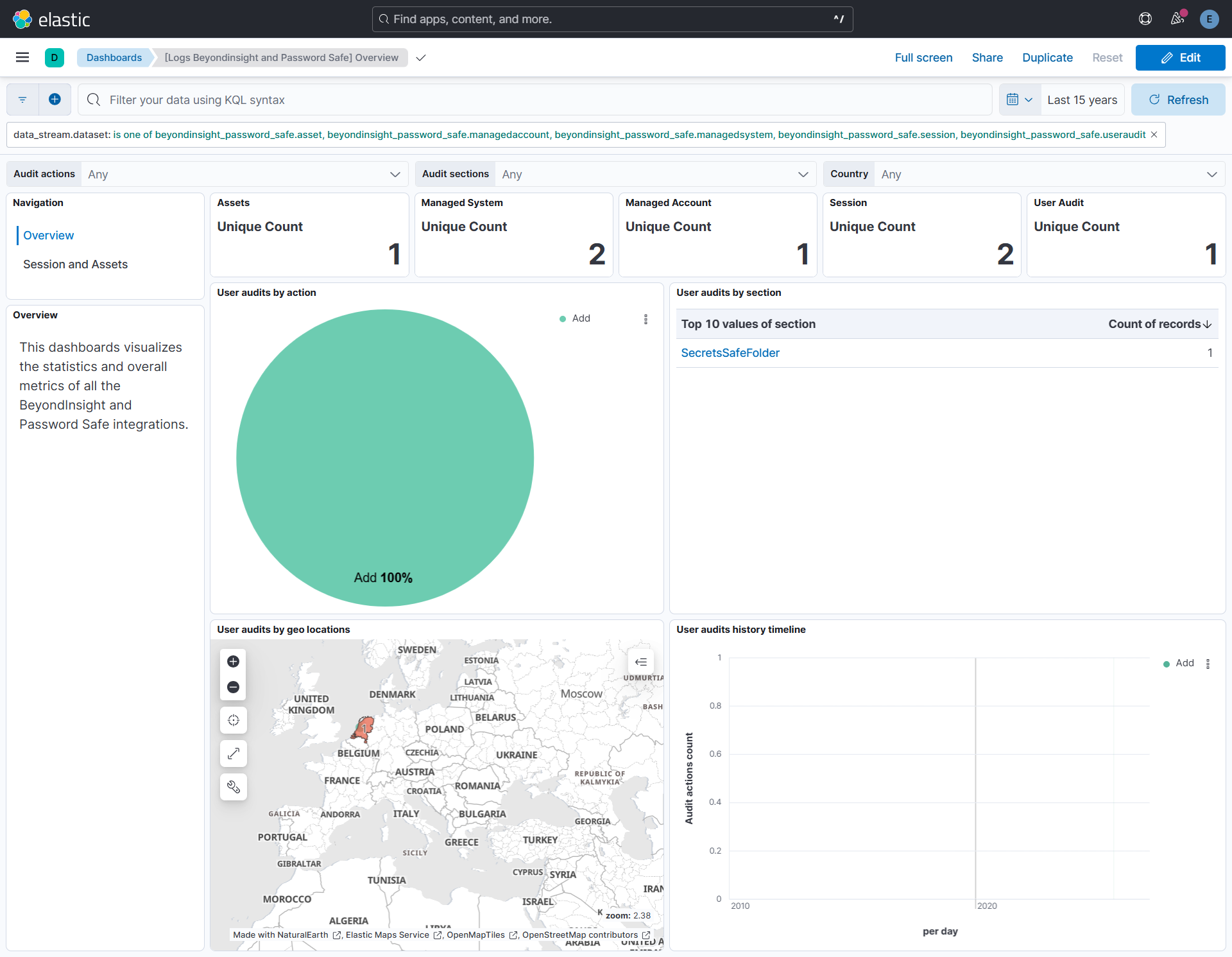
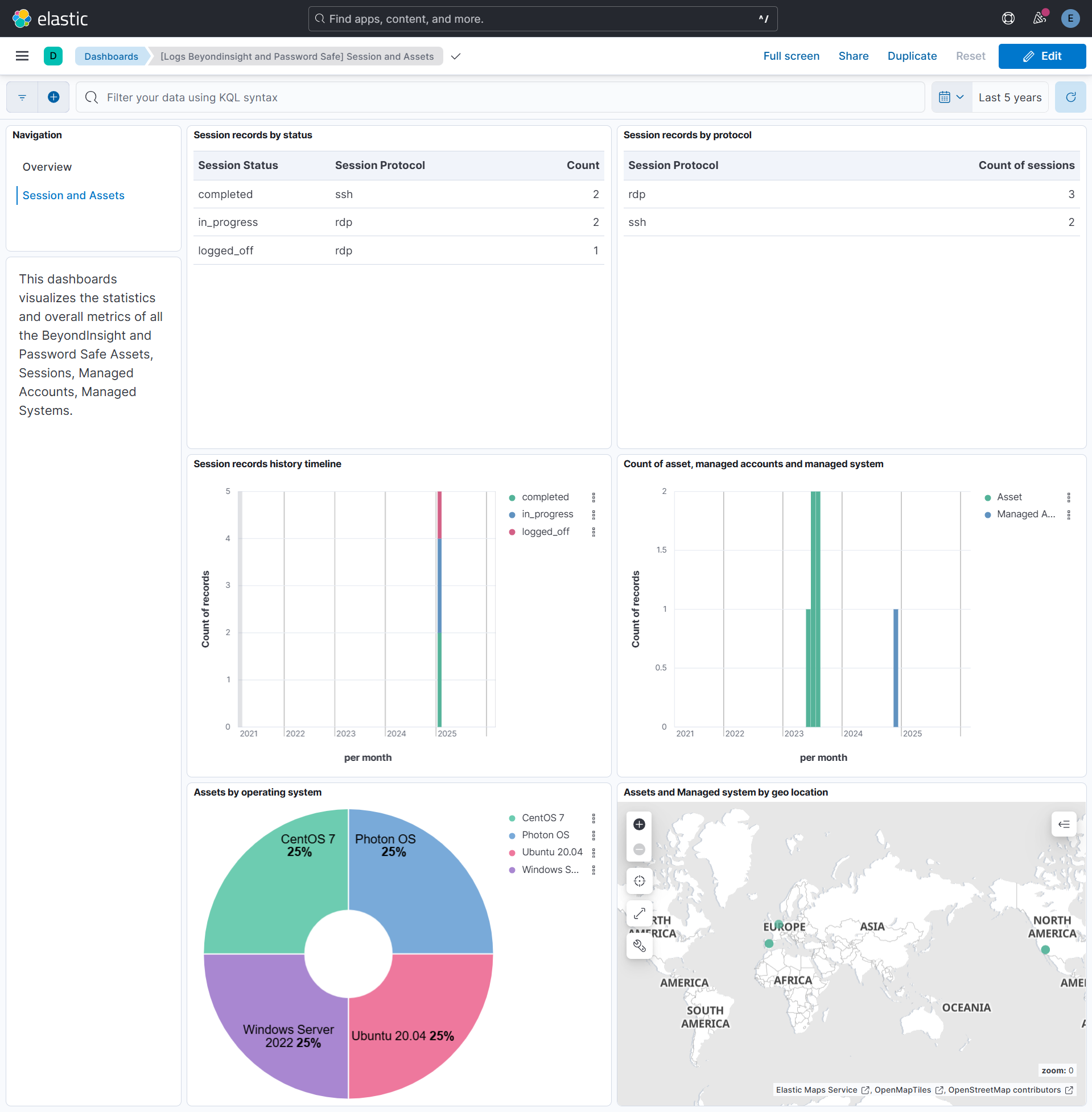
This integration includes one or more Kibana dashboards that visualizes the data collected by the integration. The screenshots below illustrate how the ingested data is displayed.
Changelog
| Version | Details | Minimum Kibana version |
|---|---|---|
| 1.5.0 | Enhancement (View pull request) Update Elastic Managed integration documentation to the current wording and docs links. |
9.0.5 8.19.2 |
| 1.4.1 | Bug fix (View pull request) Fix Cookie request header construction. Raw Set-Cookie response values (including path, HttpOnly, and SameSite attributes) were stored in the cursor and replayed verbatim, causing attributes to be sent as bogus cookie pairs and multiple Cookie header lines to be emitted. RFC 6265 §5.4 forbids multiple Cookie header lines; ASP.NET commonly reads only the first. Attributes are now stripped and all cookies joined into a single header value. Bug fix (View pull request) Add session management. The integration previously never called POST /Auth/Signout, leaving server sessions open indefinitely. Each poll now reuses an existing session if it is within the TTL (15 minutes); otherwise the old session is signed out before a fresh sign-in. |
9.0.5 8.19.2 |
| 1.4.0 | Enhancement (View pull request) Add tags to ingest pipeline processors and add preserve_original_event to pipeline-level on_failure handlers. |
9.0.5 8.19.2 |
| 1.3.2 | Enhancement (View pull request) Set agentless deployment mode release field to ga. |
9.0.5 8.19.2 |
| 1.3.1 | Bug fix (View pull request) Send the PS-Auth Authorization header on all data collection requests instead of only on sign-in, so collection works against API registrations that validate authentication on every call. |
9.0.5 8.19.2 |
| 1.3.0 | Enhancement (View pull request) Publish Agentless to Elastic Managed integrations name change. |
9.0.5 8.19.2 |
| 1.2.0 | Enhancement (View pull request) Use new release field for agentless deployment mode to establish as beta. |
9.0.5 8.19.2 |
| 1.1.0 | Enhancement (View pull request) Add Agentless deployment support. |
9.0.5 8.19.2 |
| 1.0.0 | Enhancement (View pull request) Release BeyondInsight and Password Safe package as GA. Enhancement (View pull request) Add kibana steps in documentation. |
9.0.0 8.18.0 |
| 0.12.4 | Bug fix (View pull request) Add data_stream dataset filter in overview dashboard. Enhancement (View pull request) Add links panel widget in dashboards. |
9.0.0 8.18.0 |
| 0.12.3 | Bug fix (View pull request) Use triple-brace Mustache templating when referencing variables in ingest pipelines. |
9.0.0 8.18.0 |
| 0.12.2 | Bug fix (View pull request) Do not set password if it is null or empty. Do not use password in authorization if it is not set. |
9.0.0 8.18.0 |
| 0.12.1 | Bug fix (View pull request) Downgrade the format_version to the minimum version that supports all the necessary features for the package. |
9.0.0 8.18.0 |
| 0.12.0 | Enhancement (View pull request) Enhanced documentation with API information, use cases, and improved data stream descriptions for better user understanding. Breaking change (View pull request) Move the enable_request_tracer variable to the individual data streams for more granular control over tracing in each data stream. |
9.0.0 8.18.0 |
| 0.11.0 | Breaking change (View pull request) Renamed dsskey_rule_id field to dss_key_rule_id in managedsystem data stream to follow snake-case naming convention.Breaking change (View pull request) Renamed os.full field to host.os.full in asset data stream to comply with ECS.Enhancement (View pull request) Updated ECS version to 9.1.0 and standardized pipeline processing with improved ECS field mappings. Enhancement (View pull request) Disabled dynamic mappings to prevent unknown fields from receiving automatic mappings, improving data consistency and safety. |
9.0.0 8.18.0 |
| 0.10.0 | Bug fix (View pull request) For the asset data stream, fixed session management to automatically re-authenticate when sessions expire.Breaking change (View pull request) For the asset data stream, renamed fields to match proper snake_case naming - ipaddress to ip_address. And apply RFC 7042 formatting to MAC addresses as per ECS. |
9.0.0 8.18.0 |
| 0.9.0 | Enhancement (View pull request) For the session data stream, enhanced CEL program with proper session management, automatic re-authentication, and improved error handling.Breaking change (View pull request) For the session data stream, converted session_type enum field value to human-readable string instead of numeric code. Change managed_system_id and managed_system_id to a keyword data type. |
9.0.0 8.18.0 |
| 0.8.0 | Bug fix (View pull request) For the useraudit data stream, fixed pagination to avoid duplicate collection.Breaking change (View pull request) For the useraudit data stream, renamed fields to match proper snake_case naming - ipaddress to ip_address. |
9.0.0 8.18.0 |
| 0.7.0 | Bug fix (View pull request) For the managedsystem data stream, fixed session management to automatically re-authenticate when sessions expire.Breaking change (View pull request) For the managedsystem data stream, renamed fields to match proper snake_case naming - ipaddress to ip_address and isarelease_duration to isa_release_duration. |
9.0.0 8.18.0 |
| 0.6.0 | Bug fix (View pull request) For the managedaccount data stream, fixed session management to automatically re-authenticate when sessions expire.Breaking change (View pull request) For the managedaccount data stream, renamed is_isaaccess to is_isa_access for proper snake_case naming. Modified change_state from integer to keyword with human-readable values (idle, changing, queued). |
9.0.0 8.18.0 |
| 0.5.1 | Bug fix (View pull request) Fixed authentication retry logic to properly clear expired cookies and re-authenticate when receiving 401 responses. |
9.0.0 8.15.3 |
| 0.5.0 | Enhancement (View pull request) Standardize user fields processing across integrations. |
9.0.0 8.15.3 |
| 0.4.0 | Enhancement (View pull request) Improve agent error reporting for failed API requests. |
9.0.0 8.15.3 |
| 0.3.1 | Bug fix (View pull request) Fix default request trace enabled behavior. |
9.0.0 8.15.3 |
| 0.3.0 | Enhancement (View pull request) Enable request trace log removal. |
9.0.0 8.15.3 |
| 0.2.1 | Bug fix (View pull request) Added description to ssl nodes in package level manifest.yml file to including links to documentation. |
9.0.0 8.15.3 |
| 0.2.0 | Enhancement (View pull request) Update Kibana constraint to support 9.0.0. |
9.0.0 8.15.3 |
| 0.1.0 | Enhancement (View pull request) Initial release. |
8.15.3 |