Elastic Cloud Serverless projects are autoscaled environments, fully managed by Elastic and available on Elastic Cloud.
Availability
Generally available
This functionality is generally available and ready for production usage.
Serverless Security
Elastic Cloud Serverless projects are autoscaled environments, fully managed by Elastic and available on Elastic Cloud.
Availability
Generally available
This functionality is generally available and ready for production usage.
Stack9.0+
The Elastic Stack includes Elastic's core products such as Elasticsearch, Kibana, Logstash, and Beats.
Availability
Generally available since 9.0
This functionality is generally available and ready for production usage.
Unless stated otherwise on the page, this functionality is available when your Elastic Stack is deployed on Elastic Cloud Hosted, Elastic Cloud Enterprise, Elastic Cloud on Kubernetes, and self-managed environments.
This documentation corresponds to the latest patch available for each minor version. If you're not using the latest patch, check the release notes for changes.
The Cisco ASA integration for Elastic enables you to collect logs from Cisco Adaptive Security Appliance (ASA) hardware and virtual appliances. By ingesting these logs into the Elastic Stack, you can gain visibility into network traffic, monitor security events, and audit administrative actions.
This integration is compatible with Cisco ASA hardware and virtual appliances. It supports logs delivered using syslog (RFC 3164 or RFC 5424) or read from local files. It works with standard Cisco ASA syslog formats as documented in the 9.x configuration guides.
This integration is compatible with Elastic Stack version 8.11.0 or higher.
This integration collects data from Cisco ASA devices by receiving syslog messages over the network using tcp or udp, or by reading from local log files. You deploy an Elastic Agent on a host that is configured as a syslog receiver or has access to the log files. The agent processes the incoming logs, parses them into ECS-compatible fields using the log data stream, and sends them to your Elastic deployment where you can monitor or analyze them.
The Cisco ASA integration collects several categories of security and operational data from Cisco ASA devices through the log data stream. You can collect these logs using network protocols like TCP or UDP, or by reading them from local files.
The integration collects the following types of logs:
Firewall logs: Connection establishment and teardown events, access-list (ACL) hits, and protocol-specific inspection logs.
Security events: Threat detection events as well as authentication successes and failures.
System logs: Resource utilization, configuration changes, and hardware health status.
VPN logs: Remote access and site-to-site VPN connection details, including user authentication and tunnel duration.
Integrating Cisco ASA logs with Elastic provides enhanced visibility into your network security posture and operational health. You can use this integration for several key use cases:
Security monitoring: Monitor firewall activity to detect unauthorized access attempts or suspicious traffic patterns.
Threat detection: Leverage Elastic Security to identify potential threats based on Cisco ASA security events and threat detection logs.
VPN auditing: Analyze VPN logs to track user access and session duration, and to troubleshoot connectivity issues for remote workers.
Compliance and auditing: Maintain a searchable, long-term archive of firewall logs to meet regulatory compliance requirements and support security audits.
Operational health: Track system resources and hardware status to proactively manage your Cisco ASA infrastructure.
Elastic Agent must be installed. For more details, check the Elastic Agent installation instructions. You can install only one Elastic Agent per host.
Elastic Agent is required to stream data from the syslog or log file receiver and ship the data to Elastic, where the events will then be processed using the integration's ingest pipelines.
Select the Collecting logs from Cisco ASA via TCP input type.
Configure the following fields:
Listen Address (tcp_host): The bind address to listen for TCP connections. Set to 0.0.0.0 (replace with your actual value) to bind to all available interfaces. Default: localhost.
Listen Port (tcp_port): The TCP port number to listen on. Default: 9001.
Preserve original event (preserve_original_event): Preserves a raw copy of the original event, added to the field event.original. Default: false.
Preserve searchable message text (keep_message): Preserves the log message in a searchable field, cisco.asa.full_message. Default: false.
Tags (tags): Custom tags for the events. Default: ['cisco-asa', 'forwarded'].
Internal Zones (internal_zones): Define internal network zones.
External Zones (external_zones): Define external network zones.
Processors (processors): Add custom processors to enhance or reduce event fields. This executes in the agent before the logs are parsed.
SSL Configuration (ssl): Configure SSL options for encrypted communication. See the SSL documentation for details.
Custom TCP Options (tcp_options): Specify custom configuration options like max_connections or line_delimiter.
Default Time Zone (tz_offset): IANA time zone or time offset (for example +0200) (replace with your actual value) to use when interpreting syslog timestamps without a time zone. Default: UTC.
Time Zone Map (tz_map): A mapping of time zones as they appear in the Cisco ASA log mapped to a proper IANA time zone or offset.
Save the integration and add it to an agent policy.
Select the Collecting logs from Cisco ASA via UDP input type.
Configure the following fields:
Listen Address (udp_host): The bind address to listen for UDP connections. Set to 0.0.0.0 (replace with your actual value) to bind to all available interfaces. Default: localhost.
Listen Port (udp_port): The UDP port number to listen on. Default: 9001.
Preserve original event (preserve_original_event): Preserves a raw copy of the original event in the field event.original. Default: false.
Preserve searchable message text (keep_message): Preserves the log message in a searchable field, cisco.asa.full_message. Default: false.
Tags (tags): Custom tags for filtering. Default: ['cisco-asa', 'forwarded'].
Internal Zones (internal_zones): Specify internal interface names.
External Zones (external_zones): Specify external interface names.
Custom UDP Options (udp_options): Specify custom configuration options like read_buffer, max_message_size, or timeout.
Processors (processors): Metadata enhancement options that execute in the agent before parsing.
Default Time Zone (tz_offset): IANA time zone for timestamp interpretation. Default: UTC.
Time Zone Map (tz_map): Mapping for custom time zone strings as they appear in the ASA log.
Save the integration and add it to an agent policy.
You can resolve common configuration and ingestion issues by checking the following:
Port binding conflicts: If the Elastic Agent fails to start the input, check if another process is already using the configured port, such as 9001 (replace with your actual port). You can identify port usage on Linux by running netstat -tulpn.
Network firewalls: Ensure that any intermediate firewalls or host-based firewalls, like iptables or firewalld, are configured to allow traffic from the Cisco ASA's IP to the Elastic Agent's port and protocol.
Incorrect interface routing: On the Cisco ASA, verify that the logging host command specifies the correct interface that has a route to the Elastic Agent. The ASA can't send logs if it can't reach the destination IP via the specified interface.
Logging level too low: If you aren't seeing expected events, verify that logging trap is set to at least informational (level 6). If it's set to emergencies or critical, most traffic logs will be ignored.
Timestamp parsing failures: If logs appear with the wrong time, verify the tz_offset and tz_map settings in the integration. Cisco ASA logs often omit time zone offsets, leading to UTC interpretation by default.
Message format mismatches: Ensure you've enabled logging timestamp on the ASA. Without timestamps, the integration may struggle to parse the start of the syslog header correctly.
Field mapping issues: Check the error.message field in Discover. If the ASA is sending non-standard or highly customized syslog formats, the agent might fail to map specific fields, resulting in tags like _grokparsefailure.
For more information on architectures that can be used for scaling this integration, check the Ingest Architectures documentation.
To ensure you get the best performance in high-volume environments, consider the following:
Transport considerations: For high-volume environments, you'll want to use TCP to ensure reliable delivery of log events. UDP offers lower overhead and is suitable for environments where occasional log loss is acceptable in exchange for higher performance and reduced state tracking on the firewall.
Data volume management: To manage the volume of data sent to the Elastic Agent, you'll configure the logging trap level on the Cisco ASA. Setting the level to informational (level 6) captures most relevant connection data, while setting it to notice or warning can significantly reduce volume by filtering out routine connection build/teardown events.
Elastic Agent scaling: For high-throughput environments, you can deploy multiple Elastic Agents behind a network load balancer to distribute traffic evenly. You'll want to place agents close to the data source to minimize latency. A single Elastic Agent can handle several thousand events per second depending on your hardware.
To collect logs via logfile, select Collect logs via the logfile input and configure the following parameter:
Paths: List of glob-based paths to crawl and fetch log files from. Supports glob patterns like
/var/log/*.log or /var/log/*/*.log for subfolder matching. Each file found starts a
separate harvester.
Date/time when the event originated. This is the date/time extracted from the event, typically representing when the event was generated by the source. If the event source has no original timestamp, this value is typically populated by the first time the event was received by the pipeline. Required field for all events.
date
cisco.asa.aaa_type
The AAA operation type. One of authentication, authorization, or accounting.
keyword
cisco.asa.assigned_ip
The IP address assigned to a VPN client successfully connecting
ip
cisco.asa.assigned_ipv6
The IPv6 address assigned to a VPN client successfully connecting
ip
cisco.asa.burst.avg_rate
The current average burst rate seen
keyword
cisco.asa.burst.configured_avg_rate
The current configured average burst rate allowed
keyword
cisco.asa.burst.configured_rate
The current configured burst rate
keyword
cisco.asa.burst.cumulative_count
The total count of burst rate hits since the object was created or cleared
keyword
cisco.asa.burst.current_rate
The current burst rate seen
keyword
cisco.asa.burst.id
The related rate ID for burst warnings
keyword
cisco.asa.burst.object
The related object for burst warnings
keyword
cisco.asa.command_line_arguments
The command line arguments logged by the local audit log
keyword
cisco.asa.connection_id
Unique identifier for a flow.
keyword
cisco.asa.connection_type
The VPN connection type
keyword
cisco.asa.connections_in_use
The number of connections in use.
long
cisco.asa.connections_most_used
The number of most used connections.
long
cisco.asa.dap_records
The assigned DAP records
keyword
cisco.asa.destination_interface
Destination interface for the flow or event.
keyword
cisco.asa.destination_user_security_group_tag
The Security Group Tag for the destination user. Security Group Tag are 16-bit identifiers used to represent logical group privilege.
The name of Security Group Tag for the destination user.
keyword
cisco.asa.destination_username
Name of the user that is the destination for this event.
keyword
cisco.asa.device_type
The device type.
keyword
cisco.asa.full_message
The Cisco log message text.
keyword
cisco.asa.group_policy
The group policy name.
keyword
cisco.asa.icmp_code
ICMP code.
short
cisco.asa.icmp_type
ICMP type.
short
cisco.asa.interface_name
The interface name.
keyword
cisco.asa.mapped_destination_host
keyword
cisco.asa.mapped_destination_ip
The translated destination IP address.
ip
cisco.asa.mapped_destination_port
The translated destination port.
long
cisco.asa.mapped_source_host
keyword
cisco.asa.mapped_source_ip
The translated source IP address.
ip
cisco.asa.mapped_source_port
The translated source port.
long
cisco.asa.message
The message associated with SIP and Skinny VoIP events
keyword
cisco.asa.message_id
The Cisco ASA message identifier.
keyword
cisco.asa.message_repeats
The number of times the message has been repeated.
short
cisco.asa.original_iana_number
IANA Protocol Number of the original IP payload.
short
cisco.asa.peer_type
The peer type.
keyword
cisco.asa.pool_address
The pool address.
ip
cisco.asa.pool_name
The pool name.
keyword
cisco.asa.privilege.new
When a users privilege is changed this is the new value
keyword
cisco.asa.privilege.old
When a users privilege is changed this is the old value
keyword
cisco.asa.redundant_interface_name
The redundant interface name.
keyword
cisco.asa.rejection_reason
Reason for an AAA authentication rejection.
keyword
cisco.asa.rule_name
Name of the Access Control List rule that matched this event.
keyword
cisco.asa.security
Cisco FTD security event fields.
flattened
cisco.asa.session_id
The session id.
keyword
cisco.asa.session_type
Session type (for example, IPsec or UDP).
keyword
cisco.asa.source_interface
Source interface for the flow or event.
keyword
cisco.asa.source_user_security_group_tag
The Security Group Tag for the source user. Security Group Tag are 16-bit identifiers used to represent logical group privilege.
long
cisco.asa.source_user_security_group_tag_name
The name of Security Group Tag for the source user.
keyword
cisco.asa.source_username
Name of the user that is the source for this event.
keyword
cisco.asa.suffix
Optional suffix after %ASA identifier.
keyword
cisco.asa.termination_initiator
Interface name of the side that initiated the teardown
keyword
cisco.asa.termination_user
AAA name of user requesting termination
keyword
cisco.asa.threat_category
Category for the malware / botnet traffic. For example: virus, botnet, trojan, etc.
keyword
cisco.asa.threat_level
Threat level for malware / botnet traffic. One of very-low, low, moderate, high or very-high.
keyword
cisco.asa.trustpoint
The trustpoint name.
keyword
cisco.asa.tunnel_group
The tunnel group name.
keyword
cisco.asa.tunnel_type
SA type (remote access or L2L)
keyword
cisco.asa.username
keyword
cisco.asa.webvpn.group_name
The WebVPN group name the user belongs to
keyword
client.address
Some event client addresses are defined ambiguously. The event will sometimes list an IP, a domain or a unix socket. You should always store the raw address in the .address field. Then it should be duplicated to .ip or .domain, depending on which one it is.
keyword
client.domain
The domain name of the client system. This value may be a host name, a fully qualified domain name, or another host naming format. The value may derive from the original event or be added from enrichment.
keyword
client.ip
IP address of the client (IPv4 or IPv6).
ip
client.port
Port of the client.
long
client.user.name
Short name or login of the user.
keyword
client.user.name.text
Multi-field of client.user.name.
match_only_text
cloud.account.id
The cloud account or organization id used to identify different entities in a multi-tenant environment. Examples: AWS account id, Google Cloud ORG Id, or other unique identifier.
keyword
cloud.availability_zone
Availability zone in which this host is running.
keyword
cloud.image.id
Image ID for the cloud instance.
keyword
cloud.instance.id
Instance ID of the host machine.
keyword
cloud.instance.name
Instance name of the host machine.
keyword
cloud.machine.type
Machine type of the host machine.
keyword
cloud.project.id
Name of the project in Google Cloud.
keyword
cloud.provider
Name of the cloud provider. Example values are aws, azure, gcp, or digitalocean.
keyword
cloud.region
Region in which this host is running.
keyword
container.id
Unique container id.
keyword
container.image.name
Name of the image the container was built on.
keyword
container.labels
Image labels.
object
container.name
Container name.
keyword
data_stream.dataset
Data stream dataset.
constant_keyword
data_stream.namespace
Data stream namespace.
constant_keyword
data_stream.type
Data stream type.
constant_keyword
destination.address
Some event destination addresses are defined ambiguously. The event will sometimes list an IP, a domain or a unix socket. You should always store the raw address in the .address field. Then it should be duplicated to .ip or .domain, depending on which one it is.
keyword
destination.as.number
Unique number allocated to the autonomous system. The autonomous system number (ASN) uniquely identifies each network on the Internet.
long
destination.as.organization.name
Organization name.
keyword
destination.as.organization.name.text
Multi-field of destination.as.organization.name.
match_only_text
destination.bytes
Bytes sent from the destination to the source.
long
destination.domain
The domain name of the destination system. This value may be a host name, a fully qualified domain name, or another host naming format. The value may derive from the original event or be added from enrichment.
keyword
destination.geo.city_name
City name.
keyword
destination.geo.continent_code
Two-letter code representing continent's name.
keyword
destination.geo.continent_name
Name of the continent.
keyword
destination.geo.country_iso_code
Country ISO code.
keyword
destination.geo.country_name
Country name.
keyword
destination.geo.location
Longitude and latitude.
geo_point
destination.geo.name
User-defined description of a location, at the level of granularity they care about. Could be the name of their data centers, the floor number, if this describes a local physical entity, city names. Not typically used in automated geolocation.
keyword
destination.geo.postal_code
Postal code associated with the location. Values appropriate for this field may also be known as a postcode or ZIP code and will vary widely from country to country.
keyword
destination.geo.region_iso_code
Region ISO code.
keyword
destination.geo.region_name
Region name.
keyword
destination.geo.timezone
The time zone of the location, such as IANA time zone name.
keyword
destination.ip
IP address of the destination (IPv4 or IPv6).
ip
destination.nat.ip
Translated ip of destination based NAT sessions (e.g. internet to private DMZ) Typically used with load balancers, firewalls, or routers.
ip
destination.nat.port
Port the source session is translated to by NAT Device. Typically used with load balancers, firewalls, or routers.
long
destination.port
Port of the destination.
long
destination.user.domain
Name of the directory the user is a member of. For example, an LDAP or Active Directory domain name.
keyword
destination.user.email
User email address.
keyword
destination.user.name
Short name or login of the user.
keyword
destination.user.name.text
Multi-field of destination.user.name.
match_only_text
ecs.version
ECS version this event conforms to. ecs.version is a required field and must exist in all events. When querying across multiple indices -- which may conform to slightly different ECS versions -- this field lets integrations adjust to the schema version of the events.
keyword
error.message
Error message.
match_only_text
event.category
This is one of four ECS Categorization Fields, and indicates the second level in the ECS category hierarchy. event.category represents the "big buckets" of ECS categories. For example, filtering on event.category:process yields all events relating to process activity. This field is closely related to event.type, which is used as a subcategory. This field is an array. This will allow proper categorization of some events that fall in multiple categories.
keyword
event.code
Identification code for this event, if one exists. Some event sources use event codes to identify messages unambiguously, regardless of message language or wording adjustments over time. An example of this is the Windows Event ID.
keyword
event.created
event.created contains the date/time when the event was first read by an agent, or by your pipeline. This field is distinct from @timestamp in that @timestamp typically contain the time extracted from the original event. In most situations, these two timestamps will be slightly different. The difference can be used to calculate the delay between your source generating an event, and the time when your agent first processed it. This can be used to monitor your agent's or pipeline's ability to keep up with your event source. In case the two timestamps are identical, @timestamp should be used.
date
event.dataset
Event dataset
constant_keyword
event.duration
Duration of the event in nanoseconds. If event.start and event.end are known this value should be the difference between the end and start time.
long
event.end
event.end contains the date when the event ended or when the activity was last observed.
date
event.ingested
Timestamp when an event arrived in the central data store. This is different from @timestamp, which is when the event originally occurred. It's also different from event.created, which is meant to capture the first time an agent saw the event. In normal conditions, assuming no tampering, the timestamps should chronologically look like this: @timestamp < event.created < event.ingested.
date
event.kind
This is one of four ECS Categorization Fields, and indicates the highest level in the ECS category hierarchy. event.kind gives high-level information about what type of information the event contains, without being specific to the contents of the event. For example, values of this field distinguish alert events from metric events. The value of this field can be used to inform how these kinds of events should be handled. They may warrant different retention, different access control, it may also help understand whether the data is coming in at a regular interval or not.
keyword
event.module
Event module
constant_keyword
event.provider
Source of the event. Event transports such as Syslog or the Windows Event Log typically mention the source of an event. It can be the name of the software that generated the event (e.g. Sysmon, httpd), or of a subsystem of the operating system (kernel, Microsoft-Windows-Security-Auditing).
keyword
event.severity
The numeric severity of the event according to your event source. What the different severity values mean can be different between sources and use cases. It's up to the implementer to make sure severities are consistent across events from the same source. The Syslog severity belongs in log.syslog.severity.code. event.severity is meant to represent the severity according to the event source (e.g. firewall, IDS). If the event source does not publish its own severity, you may optionally copy the log.syslog.severity.code to event.severity.
long
event.start
event.start contains the date when the event started or when the activity was first observed.
date
event.timezone
This field should be populated when the event's timestamp does not include timezone information already (e.g. default Syslog timestamps). It's optional otherwise. Acceptable timezone formats are: a canonical ID (e.g. "Europe/Amsterdam"), abbreviated (e.g. "EST") or an HH:mm differential (e.g. "-05:00").
keyword
event.type
This is one of four ECS Categorization Fields, and indicates the third level in the ECS category hierarchy. event.type represents a categorization "sub-bucket" that, when used along with the event.category field values, enables filtering events down to a level appropriate for single visualization. This field is an array. This will allow proper categorization of some events that fall in multiple event types.
keyword
file.path
Full path to the file, including the file name. It should include the drive letter, when appropriate.
keyword
file.path.text
Multi-field of file.path.
match_only_text
host.architecture
Operating system architecture.
keyword
host.containerized
If the host is a container.
boolean
host.domain
Name of the domain of which the host is a member. For example, on Windows this could be the host's Active Directory domain or NetBIOS domain name. For Linux this could be the domain of the host's LDAP provider.
keyword
host.hostname
Hostname of the host. It normally contains what the hostname command returns on the host machine.
keyword
host.id
Unique host id. As hostname is not always unique, use values that are meaningful in your environment. Example: The current usage of beat.name.
keyword
host.ip
Host ip addresses.
ip
host.mac
Host mac addresses.
keyword
host.name
Name of the host. It can contain what hostname returns on Unix systems, the fully qualified domain name, or a name specified by the user. The sender decides which value to use.
keyword
host.os.build
OS build information.
keyword
host.os.codename
OS codename, if any.
keyword
host.os.family
OS family (such as redhat, debian, freebsd, windows).
keyword
host.os.kernel
Operating system kernel version as a raw string.
keyword
host.os.name
Operating system name, without the version.
keyword
host.os.name.text
Multi-field of host.os.name.
text
host.os.platform
Operating system platform (such centos, ubuntu, windows).
keyword
host.os.version
Operating system version as a raw string.
keyword
host.type
Type of host. For Cloud providers this can be the machine type like t2.medium. If vm, this could be the container, for example, or other information meaningful in your environment.
keyword
input.type
Input type.
keyword
labels
Custom key/value pairs. Can be used to add meta information to events. Should not contain nested objects. All values are stored as keyword. Example: docker and k8s labels.
object
log.file.path
Full path to the log file this event came from, including the file name. It should include the drive letter, when appropriate. If the event wasn't read from a log file, do not populate this field.
keyword
log.level
Original log level of the log event. If the source of the event provides a log level or textual severity, this is the one that goes in log.level. If your source doesn't specify one, you may put your event transport's severity here (e.g. Syslog severity). Some examples are warn, err, i, informational.
keyword
log.offset
Offset of the entry in the log file.
long
log.source.address
Source address from which the log event was read / sent from.
keyword
log.syslog.facility.code
The Syslog numeric facility of the log event, if available. According to RFCs 5424 and 3164, this value should be an integer between 0 and 23.
long
log.syslog.priority
Syslog numeric priority of the event, if available. According to RFCs 5424 and 3164, the priority is 8 * facility + severity. This number is therefore expected to contain a value between 0 and 191.
long
log.syslog.severity.code
The Syslog numeric severity of the log event, if available. If the event source publishing via Syslog provides a different numeric severity value (e.g. firewall, IDS), your source's numeric severity should go to event.severity. If the event source does not specify a distinct severity, you can optionally copy the Syslog severity to event.severity.
long
message
For log events the message field contains the log message, optimized for viewing in a log viewer. For structured logs without an original message field, other fields can be concatenated to form a human-readable summary of the event. If multiple messages exist, they can be combined into one message.
match_only_text
network.bytes
Total bytes transferred in both directions. If source.bytes and destination.bytes are known, network.bytes is their sum.
long
network.community_id
A hash of source and destination IPs and ports, as well as the protocol used in a communication. This is a tool-agnostic standard to identify flows. Learn more at https://github.com/corelight/community-id-spec.
keyword
network.direction
Direction of the network traffic. When mapping events from a host-based monitoring context, populate this field from the host's point of view, using the values "ingress" or "egress". When mapping events from a network or perimeter-based monitoring context, populate this field from the point of view of the network perimeter, using the values "inbound", "outbound", "internal" or "external". Note that "internal" is not crossing perimeter boundaries, and is meant to describe communication between two hosts within the perimeter. Note also that "external" is meant to describe traffic between two hosts that are external to the perimeter. This could for example be useful for ISPs or VPN service providers.
Network.inner fields are added in addition to network.vlan fields to describe the innermost VLAN when q-in-q VLAN tagging is present. Allowed fields include vlan.id and vlan.name. Inner vlan fields are typically used when sending traffic with multiple 802.1q encapsulations to a network sensor (e.g. Zeek, Wireshark.)
object
network.inner.vlan.id
VLAN ID as reported by the observer.
keyword
network.inner.vlan.name
Optional VLAN name as reported by the observer.
keyword
network.protocol
In the OSI Model this would be the Application Layer protocol. For example, http, dns, or ssh. The field value must be normalized to lowercase for querying.
keyword
network.transport
Same as network.iana_number, but instead using the Keyword name of the transport layer (udp, tcp, ipv6-icmp, etc.) The field value must be normalized to lowercase for querying.
keyword
network.type
In the OSI Model this would be the Network Layer. ipv4, ipv6, ipsec, pim, etc The field value must be normalized to lowercase for querying.
keyword
observer.egress.interface.name
Interface name as reported by the system.
keyword
observer.egress.zone
Network zone of outbound traffic as reported by the observer to categorize the destination area of egress traffic, e.g. Internal, External, DMZ, HR, Legal, etc.
keyword
observer.geo.city_name
City name.
keyword
observer.geo.continent_code
Two-letter code representing continent's name.
keyword
observer.geo.continent_name
Name of the continent.
keyword
observer.geo.country_iso_code
Country ISO code.
keyword
observer.geo.country_name
Country name.
keyword
observer.geo.location
Longitude and latitude.
geo_point
observer.geo.name
User-defined description of a location, at the level of granularity they care about. Could be the name of their data centers, the floor number, if this describes a local physical entity, city names. Not typically used in automated geolocation.
keyword
observer.geo.postal_code
Postal code associated with the location. Values appropriate for this field may also be known as a postcode or ZIP code and will vary widely from country to country.
keyword
observer.geo.region_iso_code
Region ISO code.
keyword
observer.geo.region_name
Region name.
keyword
observer.geo.timezone
The time zone of the location, such as IANA time zone name.
keyword
observer.hostname
Hostname of the observer.
keyword
observer.ingress.interface.name
Interface name as reported by the system.
keyword
observer.ingress.zone
Network zone of incoming traffic as reported by the observer to categorize the source area of ingress traffic. e.g. internal, External, DMZ, HR, Legal, etc.
keyword
observer.ip
IP addresses of the observer.
ip
observer.name
Custom name of the observer. This is a name that can be given to an observer. This can be helpful for example if multiple firewalls of the same model are used in an organization. If no custom name is needed, the field can be left empty.
keyword
observer.product
The product name of the observer.
keyword
observer.type
The type of the observer the data is coming from. There is no predefined list of observer types. Some examples are forwarder, firewall, ids, ips, proxy, poller, sensor, APM server.
keyword
observer.vendor
Vendor name of the observer.
keyword
observer.version
Observer version.
keyword
process.name
Process name. Sometimes called program name or similar.
keyword
process.name.text
Multi-field of process.name.
match_only_text
process.pid
Process id.
long
related.hosts
All hostnames or other host identifiers seen on your event. Example identifiers include FQDNs, domain names, workstation names, or aliases.
keyword
related.ip
All of the IPs seen on your event.
ip
related.user
All the user names or other user identifiers seen on the event.
keyword
server.address
Some event server addresses are defined ambiguously. The event will sometimes list an IP, a domain or a unix socket. You should always store the raw address in the .address field. Then it should be duplicated to .ip or .domain, depending on which one it is.
keyword
server.domain
The domain name of the server system. This value may be a host name, a fully qualified domain name, or another host naming format. The value may derive from the original event or be added from enrichment.
keyword
server.ip
IP address of the server (IPv4 or IPv6).
ip
server.port
Port of the server.
long
server.user.name
Short name or login of the user.
keyword
server.user.name.text
Multi-field of server.user.name.
match_only_text
source.address
Some event source addresses are defined ambiguously. The event will sometimes list an IP, a domain or a unix socket. You should always store the raw address in the .address field. Then it should be duplicated to .ip or .domain, depending on which one it is.
keyword
source.as.number
Unique number allocated to the autonomous system. The autonomous system number (ASN) uniquely identifies each network on the Internet.
long
source.as.organization.name
Organization name.
keyword
source.as.organization.name.text
Multi-field of source.as.organization.name.
match_only_text
source.bytes
Bytes sent from the source to the destination.
long
source.domain
The domain name of the source system. This value may be a host name, a fully qualified domain name, or another host naming format. The value may derive from the original event or be added from enrichment.
keyword
source.geo.city_name
City name.
keyword
source.geo.continent_code
Two-letter code representing continent's name.
keyword
source.geo.continent_name
Name of the continent.
keyword
source.geo.country_iso_code
Country ISO code.
keyword
source.geo.country_name
Country name.
keyword
source.geo.location
Longitude and latitude.
geo_point
source.geo.name
User-defined description of a location, at the level of granularity they care about. Could be the name of their data centers, the floor number, if this describes a local physical entity, city names. Not typically used in automated geolocation.
keyword
source.geo.postal_code
Postal code associated with the location. Values appropriate for this field may also be known as a postcode or ZIP code and will vary widely from country to country.
keyword
source.geo.region_iso_code
Region ISO code.
keyword
source.geo.region_name
Region name.
keyword
source.geo.timezone
The time zone of the location, such as IANA time zone name.
keyword
source.ip
IP address of the source (IPv4 or IPv6).
ip
source.nat.ip
Translated ip of source based NAT sessions (e.g. internal client to internet) Typically connections traversing load balancers, firewalls, or routers.
ip
source.nat.port
Translated port of source based NAT sessions. (e.g. internal client to internet) Typically used with load balancers, firewalls, or routers.
long
source.port
Port of the source.
long
source.user.domain
Name of the directory the user is a member of. For example, an LDAP or Active Directory domain name.
keyword
source.user.email
User email address.
keyword
source.user.group.name
Name of the group.
keyword
source.user.name
Short name or login of the user.
keyword
source.user.name.text
Multi-field of source.user.name.
match_only_text
tags
List of keywords used to tag each event.
keyword
tls.client.x509.serial_number
Unique serial number issued by the certificate authority. For consistency, this should be encoded in base 16 and formatted without colons and uppercase characters.
keyword
tls.client.x509.subject.common_name
List of common names (CN) of subject.
keyword
tls.client.x509.subject.country
List of country (C) code
keyword
tls.client.x509.subject.distinguished_name
Distinguished name (DN) of the certificate subject entity.
keyword
tls.client.x509.subject.locality
List of locality names (L)
keyword
tls.client.x509.subject.organization
List of organizations (O) of subject.
keyword
tls.client.x509.subject.organizational_unit
List of organizational units (OU) of subject.
keyword
tls.client.x509.subject.state_or_province
List of state or province names (ST, S, or P)
keyword
tls.server.x509.serial_number
Unique serial number issued by the certificate authority. For consistency, this should be encoded in base 16 and formatted without colons and uppercase characters.
keyword
tls.server.x509.subject.common_name
List of common names (CN) of subject.
keyword
tls.server.x509.subject.country
List of country (C) code
keyword
tls.server.x509.subject.distinguished_name
Distinguished name (DN) of the certificate subject entity.
keyword
tls.server.x509.subject.locality
List of locality names (L)
keyword
tls.server.x509.subject.organization
List of organizations (O) of subject.
keyword
tls.server.x509.subject.organizational_unit
List of organizational units (OU) of subject.
keyword
tls.server.x509.subject.state_or_province
List of state or province names (ST, S, or P)
keyword
tls.version
Numeric part of the version parsed from the original string.
keyword
tls.version_protocol
Normalized lowercase protocol name parsed from original string.
keyword
url.domain
Domain of the url, such as "www.elastic.co". In some cases a URL may refer to an IP and/or port directly, without a domain name. In this case, the IP address would go to the domain field. If the URL contains a literal IPv6 address enclosed by [ and ] (IETF RFC 2732), the [ and ] characters should also be captured in the domain field.
keyword
url.extension
The field contains the file extension from the original request url, excluding the leading dot. The file extension is only set if it exists, as not every url has a file extension. The leading period must not be included. For example, the value must be "png", not ".png". Note that when the file name has multiple extensions (example.tar.gz), only the last one should be captured ("gz", not "tar.gz").
keyword
url.fragment
Portion of the url after the #, such as "top". The # is not part of the fragment.
keyword
url.full
If full URLs are important to your use case, they should be stored in url.full, whether this field is reconstructed or present in the event source.
wildcard
url.full.text
Multi-field of url.full.
match_only_text
url.original
Unmodified original url as seen in the event source. Note that in network monitoring, the observed URL may be a full URL, whereas in access logs, the URL is often just represented as a path. This field is meant to represent the URL as it was observed, complete or not.
wildcard
url.original.text
Multi-field of url.original.
match_only_text
url.password
Password of the request.
keyword
url.path
Path of the request, such as "/search".
wildcard
url.port
Port of the request, such as 443.
long
url.query
The query field describes the query string of the request, such as "q=elasticsearch". The ? is excluded from the query string. If a URL contains no ?, there is no query field. If there is a ? but no query, the query field exists with an empty string. The exists query can be used to differentiate between the two cases.
keyword
url.registered_domain
The highest registered url domain, stripped of the subdomain. For example, the registered domain for "foo.example.com" is "example.com". This value can be determined precisely with a list like the public suffix list (https://publicsuffix.org). Trying to approximate this by simply taking the last two labels will not work well for TLDs such as "co.uk".
keyword
url.scheme
Scheme of the request, such as "https". Note: The : is not part of the scheme.
keyword
url.subdomain
The subdomain portion of a fully qualified domain name includes all of the names except the host name under the registered_domain. In a partially qualified domain, or if the the qualification level of the full name cannot be determined, subdomain contains all of the names below the registered domain. For example the subdomain portion of "www.east.example.com" is "east". If the domain has multiple levels of subdomain, such as "sub2.sub1.example.com", the subdomain field should contain "sub2.sub1", with no trailing period.
keyword
url.top_level_domain
The effective top level domain (eTLD), also known as the domain suffix, is the last part of the domain name. For example, the top level domain for example.com is "com". This value can be determined precisely with a list like the public suffix list (https://publicsuffix.org). Trying to approximate this by simply taking the last label will not work well for effective TLDs such as "co.uk".
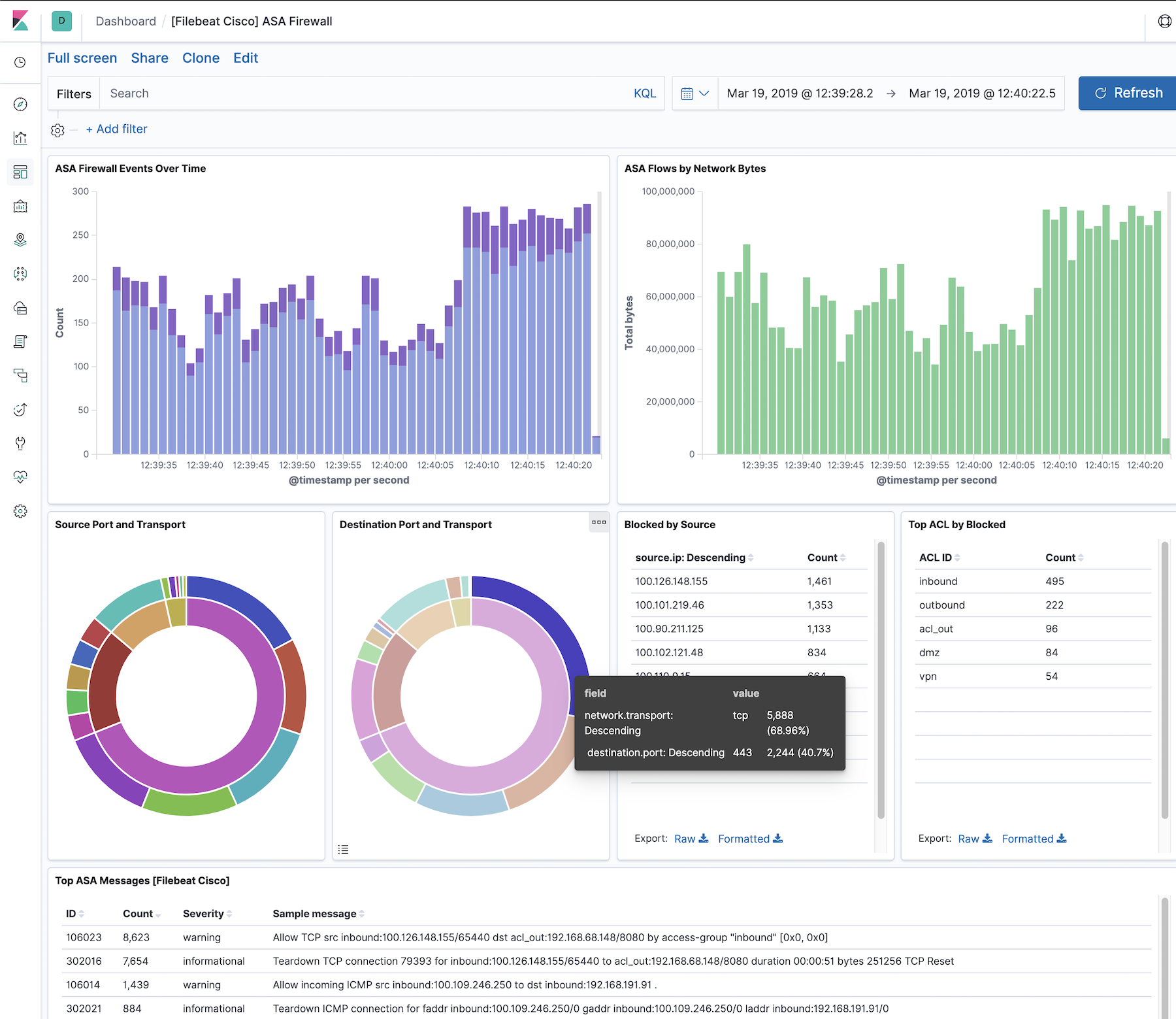
This integration includes one or more Kibana dashboards that visualizes the data collected by the integration. The screenshots below illustrate how the ingested data is displayed.
Bug fix (View pull request) Correct the client and server port field types for Cisco ASA 338301 DNS-intercept messages.
9.0.0 8.11.0
2.47.2
Bug fix (View pull request) Fix teardown connection parsing when the duration value is padded with extra spaces, including 302304 state-bypass messages.
Bug fix (View pull request) Parse 302303 built TCP state-bypass connections, including interfaces, addresses, ports, mapped addresses, and user.
9.0.0 8.11.0
2.47.1
Bug fix (View pull request) Tolerate optional comma-delimited metadata following the 751025 session assignment clause.
Bug fix (View pull request) Fix parse_751025 grok pattern to support UPN usernames and extract the tunnel endpoints, group policy and assigned addresses.
Enhancement (View pull request) Add cisco.asa.assigned_ipv6 and append the addresses assigned to a VPN client to related.ip.
9.0.0 8.11.0
2.45.16
Bug fix (View pull request) Fix swapped source and destination fields for inbound ICMP connection message 302020.
9.0.0 8.11.0
2.45.15
Bug fix (View pull request) Fix parse_315011 grok pattern to support double-quoted SSH usernames containing spaces and apostrophes.
9.0.0 8.11.0
2.45.14
Bug fix (View pull request) Fix 106015 grok pattern to match ASA NAT alias names containing underscores.
9.0.0 8.11.0
2.45.13
Bug fix (View pull request) Fix grok pattern for message 113015 to handle the no-IP variant where user IP is absent.
9.0.0 8.11.0
2.45.12
Bug fix (View pull request) Fix 611101/611102 parse failure when IP address is absent by converting dissect to an anchored grok pattern with an optional IP segment.
9.0.0 8.11.0
2.45.11
Bug fix (View pull request) Add 'User was not found' as a valid rejection reason for ASA 113005 messages.
9.0.0 8.11.0
2.45.10
Enhancement (View pull request) Add grok pattern to parse_737016 to handle IPAA pool-freeing events with Session ID but without pool name.
9.0.0 8.11.0
2.45.9
Enhancement (View pull request) Add 'Users account has expired' to AAA rejection reasons in parse_113005 grok pattern.
9.0.0 8.11.0
2.45.8
Bug fix (View pull request) Fix parse_315011 grok patterns to handle missing source IP address in SSH session messages.
9.0.0 8.11.0
2.45.7
Bug fix (View pull request) Fix parse_750002 and parse_750003 grok pattern to handle source and destination adresses as IPs and domains.
9.0.0 8.11.0
2.45.6
Enhancement (View pull request) Fix parse_113015 grok pattern to handle usernames with special characters.
9.0.0 8.11.0
2.45.5
Enhancement (View pull request) Fix parsing of 737026 messages where pool name is absent.
Enhancement (View pull request) Update the package format_version to 3.0.0.
8.7.1
2.24.0
Enhancement (View pull request) Extend authenticaton rejection reasons that are accepted.
Enhancement (View pull request) Retain the authenticaton rejection reason.
8.7.1
2.23.0
Enhancement (View pull request) Update package to ECS 8.10.0 and align ECS categorization fields.
8.7.1
2.22.0
Enhancement (View pull request) Add tags.yml file so that integration's dashboards and saved searches are tagged with "Security Solution" and displayed in the Security Solution UI.