Airlock Digital Integration for Elastic
Elastic Cloud Serverless projects are autoscaled environments, fully managed by Elastic and available on Elastic Cloud. Availability This functionality is in technical preview and is ready for evaluation. Use with caution in production; it is not recommended for mission-critical workloads. Elastic will work to fix any issues, but features in technical preview are not subject to the support SLA of official GA features. Specific Support terms apply. Elastic Cloud Serverless projects are autoscaled environments, fully managed by Elastic and available on Elastic Cloud. Availability This functionality is in technical preview and is ready for evaluation. Use with caution in production; it is not recommended for mission-critical workloads. Elastic will work to fix any issues, but features in technical preview are not subject to the support SLA of official GA features. Specific Support terms apply. The Elastic Stack includes Elastic's core products such as Elasticsearch, Kibana, Logstash, and Beats. Availability This functionality is in technical preview and is ready for evaluation. Use with caution in production; it is not recommended for mission-critical workloads. Elastic will work to fix any issues, but features in technical preview are not subject to the support SLA of official GA features. Specific Support terms apply. Unless stated otherwise on the page, this functionality is available when your Elastic Stack is deployed on Elastic Cloud Hosted, Elastic Cloud Enterprise, Elastic Cloud on Kubernetes, and self-managed environments. This documentation corresponds to the latest patch available for each minor version. If you're not using the latest patch, check the release notes for changes.
Serverless Observability
Preview
Preview
Serverless Security
Preview
Preview
Stack
Preview
9.1+
Preview since 9.1
| Version | 0.7.0 Availability Preview This functionality is in technical preview and is ready for evaluation. Use with caution in production; it is not recommended for mission-critical workloads. Elastic will work to fix any issues, but features in technical preview are not subject to the support SLA of official GA features. Specific Support terms apply. (View all) |
| Managed integration release status | GA |
| Subscription level What's this? |
Basic |
| Developed by What's this? |
Elastic |
| Ingestion method(s) | API |
| Minimum Kibana version(s) | 9.1.0 8.19.0 |
You can use this integration as an Elastic Managed integration on Elastic Cloud Hosted deployments running this version or later.
To use pre-release integrations, go to the Integrations page in Kibana, scroll down, and toggle on the Display beta integrations option.
Airlock Digital delivers an easy-to-manage and scalable application control solution to protect endpoints with confidence. Built by cybersecurity professionals and trusted by organizations worldwide, Airlock Digital enforces a Deny by Default security posture to block all untrusted code, including unknown applications, unwanted scripts, malware, and ransomware.
The Airlock Digital integration for Elastic allows you to collect logs from, Airlock Digital REST API, then visualise the data in Kibana.
The Airlock Digital integration is compatible with version v6.1.x of Airlock Digital and v1 of the REST API.
This integration periodically queries the Airlock Digital REST API to retrieve Agent, Execution Histories and Server Activities logs.
This integration collects log messages of the following types:
Agent: Collects agent logs via Airlock Digital REST API.Execution Histories: Collects executions history logs via Airlock Digital REST API.Server Activities: Collects server activity logs via Airlock Digital REST API.
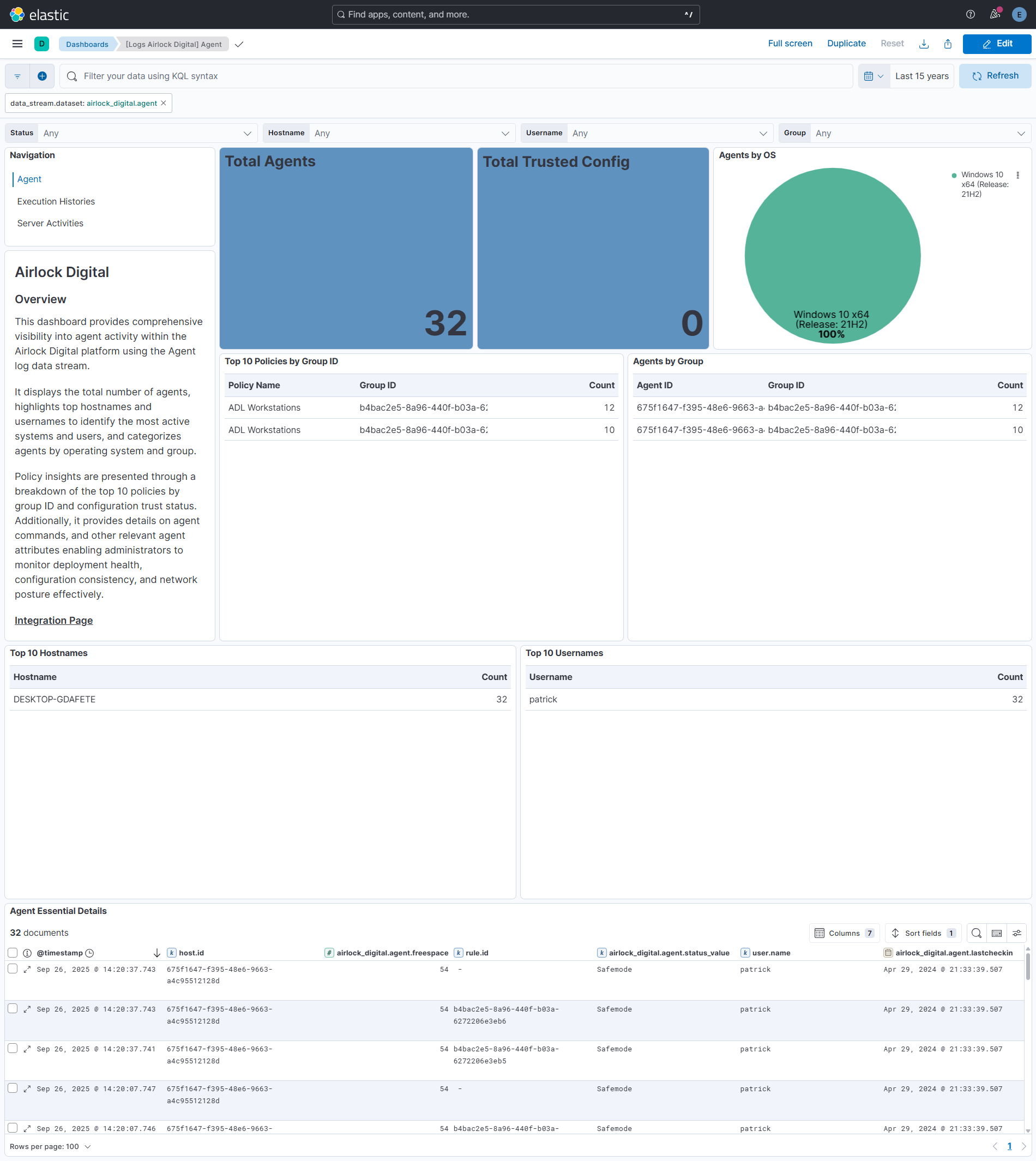
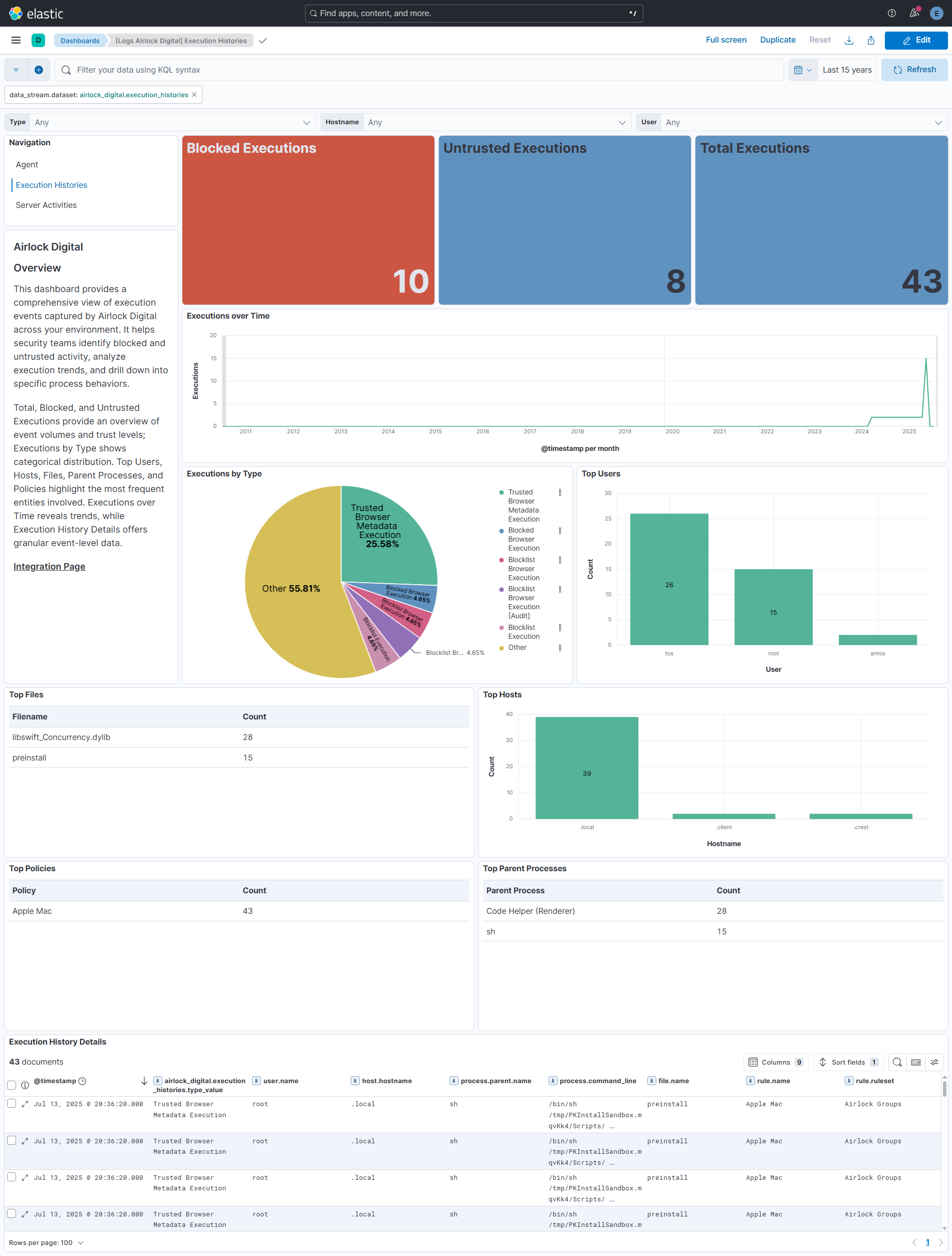
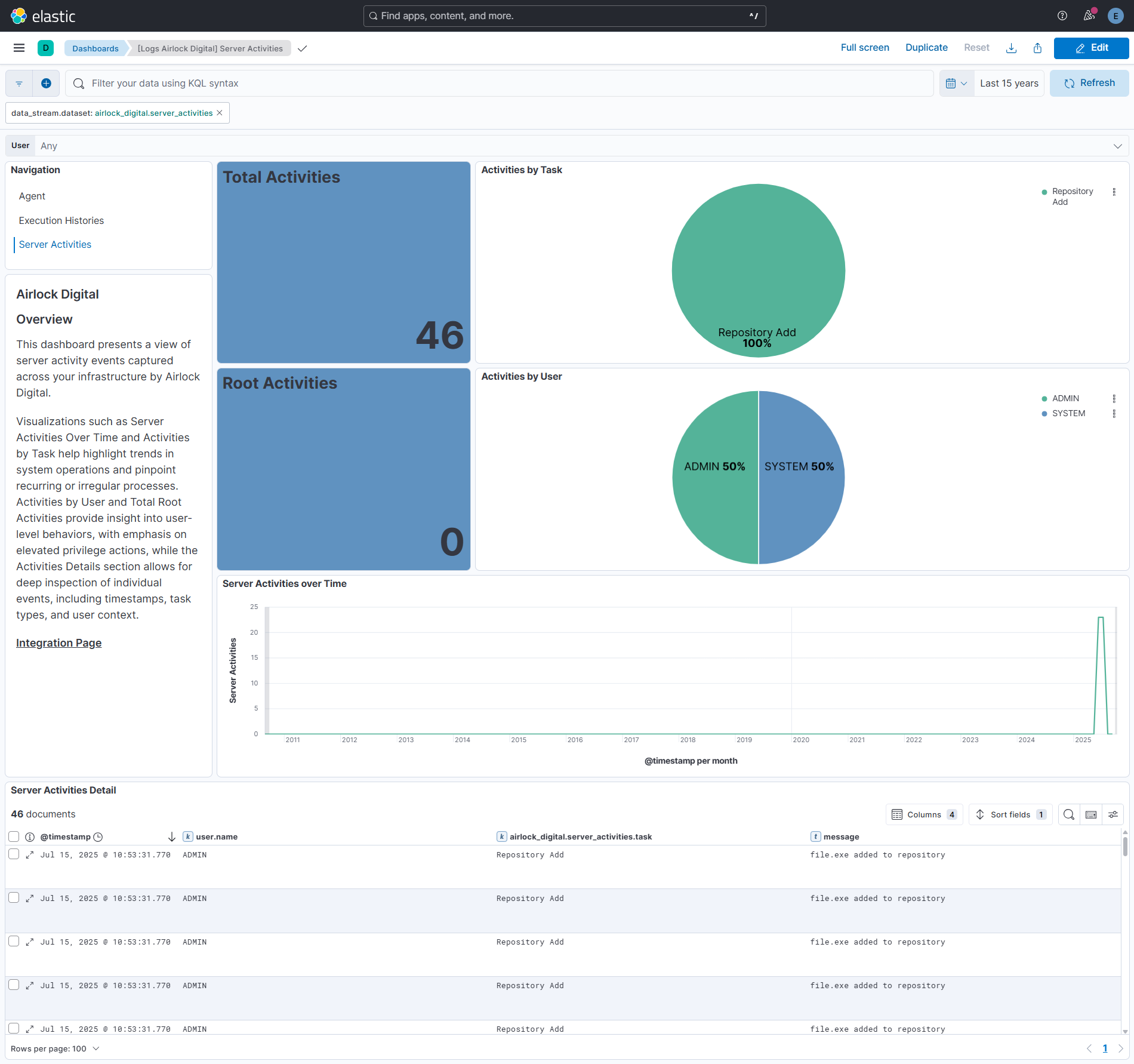
Integrating Airlock Digital agent, execution history, and server activity logs with Elastic SIEM delivers comprehensive visibility into endpoint and system operations. Dashboards highlight agent health, user and host activity, OS distribution, policy enforcement, storage status, trusted configurations, and execution behaviors such as blocked or untrusted runs and policy violations. At the same time, monitoring server-side activities across tasks, users, and root actions enables quick identification of unauthorized changes, policy misuse, and suspicious behavior. Together, these insights empower SOC teams to accelerate investigations, strengthen compliance, optimize resource management, and maintain stronger endpoint and system security.
- In order to make the API calls, the User Group to which a user belongs should contain required permissions. You can follow the below steps for that:
- Go to the Settings and navigate to Users tab.
- Under User Group Management for the respective user group provide agent/find, group/policies, logging/exechistories and logging/svractivities roles in the REST API Roles section and click on save.
- Log in to your Airlock console.
- On the right side of the navigation bar, click on the dropdown with the user’s name and navigate to My profile section.
- Click on the Generate API Key button.
- Copy the displayed API key — it will be required later for configuration.
For more details, check Documentation.
This integration supports both Elastic Managed and Agent-based installations.
Elastic Managed integrations are only supported on Elastic Cloud Serverless and Elastic Cloud Hosted deployments. An Elastic Managed integration lets you ingest data from a cloud source while avoiding the orchestration, management, and maintenance associated with standard ingest infrastructure. Elastic runs the collector for you, so you can focus on your data instead of the infrastructure that collects it.
For more information, refer to Elastic Managed integrations and the Elastic Managed integrations FAQ.
Elastic Agent must be installed. For more details, check the Elastic Agent installation instructions. You can install only one Elastic Agent per host.
In the top search bar in Kibana, search for Integrations.
In the search bar, type Airlock Digital.
Select the Airlock Digital integration from the search results.
Select Add Airlock Digital to add the integration.
Enable and configure only the collection methods which you will use.
To Collect Airlock Digital logs via API, you'll need to:
- Configure URL and API Key.
- Enable/Disable the required datasets.
- For each dataset, adjust the integration configuration parameters if required, including the Interval, Preserve original event etc. to enable data collection.
Select Save and continue to save the integration.
- In the top search bar in Kibana, search for Dashboards.
- In the search bar, type Airlock Digital.
- Select a dashboard for the dataset you are collecting, and verify the dashboard information is populated.
For more information on architectures that can be used for scaling this integration, check the Ingest Architectures documentation.
Exported fields
| Field | Description | Type |
|---|---|---|
| @timestamp | Date/time when the event originated. This is the date/time extracted from the event, typically representing when the event was generated by the source. If the event source has no original timestamp, this value is typically populated by the first time the event was received by the pipeline. Required field for all events. | date |
| airlock_digital.agent.agentid | keyword | |
| airlock_digital.agent.clientversion | keyword | |
| airlock_digital.agent.domain | keyword | |
| airlock_digital.agent.freespace | long | |
| airlock_digital.agent.groupid | keyword | |
| airlock_digital.agent.hostname | keyword | |
| airlock_digital.agent.ip | ip | |
| airlock_digital.agent.lastcheckin | date | |
| airlock_digital.agent.localip | ip | |
| airlock_digital.agent.os | keyword | |
| airlock_digital.agent.poilcy_details.agentstopcode | keyword | |
| airlock_digital.agent.poilcy_details.applications.applicationid | keyword | |
| airlock_digital.agent.poilcy_details.applications.name | keyword | |
| airlock_digital.agent.poilcy_details.applications.version | keyword | |
| airlock_digital.agent.poilcy_details.auditmode | keyword | |
| airlock_digital.agent.poilcy_details.autoupdate | keyword | |
| airlock_digital.agent.poilcy_details.baselines.baselineid | keyword | |
| airlock_digital.agent.poilcy_details.baselines.name | keyword | |
| airlock_digital.agent.poilcy_details.batch | keyword | |
| airlock_digital.agent.poilcy_details.blocklists | flattened | |
| airlock_digital.agent.poilcy_details.check_ea | keyword | |
| airlock_digital.agent.poilcy_details.command | keyword | |
| airlock_digital.agent.poilcy_details.commlist.ip | ip | |
| airlock_digital.agent.poilcy_details.commlist.name | keyword | |
| airlock_digital.agent.poilcy_details.commlistid | keyword | |
| airlock_digital.agent.poilcy_details.compiledhtml | keyword | |
| airlock_digital.agent.poilcy_details.dylib | keyword | |
| airlock_digital.agent.poilcy_details.enable_notifications | keyword | |
| airlock_digital.agent.poilcy_details.extensions_enabled | keyword | |
| airlock_digital.agent.poilcy_details.generalisation | keyword | |
| airlock_digital.agent.poilcy_details.gprocesses | keyword | |
| airlock_digital.agent.poilcy_details.hashdb_ver | keyword | |
| airlock_digital.agent.poilcy_details.htmlapplication | keyword | |
| airlock_digital.agent.poilcy_details.javaapplication | keyword | |
| airlock_digital.agent.poilcy_details.javascript | keyword | |
| airlock_digital.agent.poilcy_details.modreload | keyword | |
| airlock_digital.agent.poilcy_details.name | keyword | |
| airlock_digital.agent.poilcy_details.notification_message | match_only_text | |
| airlock_digital.agent.poilcy_details.parent | keyword | |
| airlock_digital.agent.poilcy_details.paths.comment | keyword | |
| airlock_digital.agent.poilcy_details.paths.name | keyword | |
| airlock_digital.agent.poilcy_details.policyver | keyword | |
| airlock_digital.agent.poilcy_details.poll_time | keyword | |
| airlock_digital.agent.poilcy_details.powershell | keyword | |
| airlock_digital.agent.poilcy_details.pprocesses.comment | keyword | |
| airlock_digital.agent.poilcy_details.pprocesses.name | keyword | |
| airlock_digital.agent.poilcy_details.proxyauth | keyword | |
| airlock_digital.agent.poilcy_details.proxyenabled | keyword | |
| airlock_digital.agent.poilcy_details.proxypass | keyword | |
| airlock_digital.agent.poilcy_details.proxyport | long | |
| airlock_digital.agent.poilcy_details.proxyserver | keyword | |
| airlock_digital.agent.poilcy_details.proxyuser | keyword | |
| airlock_digital.agent.poilcy_details.pslockdown | keyword | |
| airlock_digital.agent.poilcy_details.publishers.comment | keyword | |
| airlock_digital.agent.poilcy_details.publishers.name | keyword | |
| airlock_digital.agent.poilcy_details.python | keyword | |
| airlock_digital.agent.poilcy_details.reflection | keyword | |
| airlock_digital.agent.poilcy_details.script_custom | keyword | |
| airlock_digital.agent.poilcy_details.script_enabled | keyword | |
| airlock_digital.agent.poilcy_details.selfservice | keyword | |
| airlock_digital.agent.poilcy_details.selfupgrade | keyword | |
| airlock_digital.agent.poilcy_details.shellscript | keyword | |
| airlock_digital.agent.poilcy_details.targetvers | flattened | |
| airlock_digital.agent.poilcy_details.trusted_config | boolean | |
| airlock_digital.agent.poilcy_details.trusted_upload | keyword | |
| airlock_digital.agent.poilcy_details.vbscript | keyword | |
| airlock_digital.agent.poilcy_details.windowsinstaller | keyword | |
| airlock_digital.agent.poilcy_details.windowsscriptcomponent | keyword | |
| airlock_digital.agent.policyversion | keyword | |
| airlock_digital.agent.status | keyword | |
| airlock_digital.agent.status_value | keyword | |
| airlock_digital.agent.username | keyword | |
| data_stream.dataset | The field can contain anything that makes sense to signify the source of the data. Examples include nginx.access, prometheus, endpoint etc. For data streams that otherwise fit, but that do not have dataset set we use the value "generic" for the dataset value. event.dataset should have the same value as data_stream.dataset. Beyond the Elasticsearch data stream naming criteria noted above, the dataset value has additional restrictions: * Must not contain - * No longer than 100 characters |
constant_keyword |
| data_stream.namespace | A user defined namespace. Namespaces are useful to allow grouping of data. Many users already organize their indices this way, and the data stream naming scheme now provides this best practice as a default. Many users will populate this field with default. If no value is used, it falls back to default. Beyond the Elasticsearch index naming criteria noted above, namespace value has the additional restrictions: * Must not contain - * No longer than 100 characters |
constant_keyword |
| data_stream.type | An overarching type for the data stream. Currently allowed values are "logs" and "metrics". We expect to also add "traces" and "synthetics" in the near future. | constant_keyword |
| event.dataset | Name of the dataset. If an event source publishes more than one type of log or events (e.g. access log, error log), the dataset is used to specify which one the event comes from. It's recommended but not required to start the dataset name with the module name, followed by a dot, then the dataset name. | constant_keyword |
| event.module | Name of the module this data is coming from. If your monitoring agent supports the concept of modules or plugins to process events of a given source (e.g. Apache logs), event.module should contain the name of this module. |
constant_keyword |
| input.type | Type of filebeat input. | keyword |
| log.offset | Log offset. | long |
Exported fields
| Field | Description | Type |
|---|---|---|
| @timestamp | Date/time when the event originated. This is the date/time extracted from the event, typically representing when the event was generated by the source. If the event source has no original timestamp, this value is typically populated by the first time the event was received by the pipeline. Required field for all events. | date |
| airlock_digital.execution_histories.checkpoint | keyword | |
| airlock_digital.execution_histories.commandline | wildcard | |
| airlock_digital.execution_histories.datetime | date | |
| airlock_digital.execution_histories.filename | keyword | |
| airlock_digital.execution_histories.hostname | keyword | |
| airlock_digital.execution_histories.md5 | keyword | |
| airlock_digital.execution_histories.netdomain | keyword | |
| airlock_digital.execution_histories.policyname | keyword | |
| airlock_digital.execution_histories.policyver | keyword | |
| airlock_digital.execution_histories.ppolicy | keyword | |
| airlock_digital.execution_histories.pprocess | keyword | |
| airlock_digital.execution_histories.publisher | keyword | |
| airlock_digital.execution_histories.sha128 | keyword | |
| airlock_digital.execution_histories.sha256 | keyword | |
| airlock_digital.execution_histories.sha384 | keyword | |
| airlock_digital.execution_histories.sha512 | keyword | |
| airlock_digital.execution_histories.type | long | |
| airlock_digital.execution_histories.type_value | keyword | |
| airlock_digital.execution_histories.username | keyword | |
| data_stream.dataset | The field can contain anything that makes sense to signify the source of the data. Examples include nginx.access, prometheus, endpoint etc. For data streams that otherwise fit, but that do not have dataset set we use the value "generic" for the dataset value. event.dataset should have the same value as data_stream.dataset. Beyond the Elasticsearch data stream naming criteria noted above, the dataset value has additional restrictions: * Must not contain - * No longer than 100 characters |
constant_keyword |
| data_stream.namespace | A user defined namespace. Namespaces are useful to allow grouping of data. Many users already organize their indices this way, and the data stream naming scheme now provides this best practice as a default. Many users will populate this field with default. If no value is used, it falls back to default. Beyond the Elasticsearch index naming criteria noted above, namespace value has the additional restrictions: * Must not contain - * No longer than 100 characters |
constant_keyword |
| data_stream.type | An overarching type for the data stream. Currently allowed values are "logs" and "metrics". We expect to also add "traces" and "synthetics" in the near future. | constant_keyword |
| event.dataset | Name of the dataset. If an event source publishes more than one type of log or events (e.g. access log, error log), the dataset is used to specify which one the event comes from. It's recommended but not required to start the dataset name with the module name, followed by a dot, then the dataset name. | constant_keyword |
| event.module | Name of the module this data is coming from. If your monitoring agent supports the concept of modules or plugins to process events of a given source (e.g. Apache logs), event.module should contain the name of this module. |
constant_keyword |
| input.type | Type of filebeat input. | keyword |
| log.offset | Log offset. | long |
| observer.vendor | constant_keyword |
Exported fields
| Field | Description | Type |
|---|---|---|
| @timestamp | Date/time when the event originated. This is the date/time extracted from the event, typically representing when the event was generated by the source. If the event source has no original timestamp, this value is typically populated by the first time the event was received by the pipeline. Required field for all events. | date |
| airlock_digital.server_activities.checkpoint | keyword | |
| airlock_digital.server_activities.datetime | date | |
| airlock_digital.server_activities.description | match_only_text | |
| airlock_digital.server_activities.task | keyword | |
| airlock_digital.server_activities.user | keyword | |
| data_stream.dataset | The field can contain anything that makes sense to signify the source of the data. Examples include nginx.access, prometheus, endpoint etc. For data streams that otherwise fit, but that do not have dataset set we use the value "generic" for the dataset value. event.dataset should have the same value as data_stream.dataset. Beyond the Elasticsearch data stream naming criteria noted above, the dataset value has additional restrictions: * Must not contain - * No longer than 100 characters |
constant_keyword |
| data_stream.namespace | A user defined namespace. Namespaces are useful to allow grouping of data. Many users already organize their indices this way, and the data stream naming scheme now provides this best practice as a default. Many users will populate this field with default. If no value is used, it falls back to default. Beyond the Elasticsearch index naming criteria noted above, namespace value has the additional restrictions: * Must not contain - * No longer than 100 characters |
constant_keyword |
| data_stream.type | An overarching type for the data stream. Currently allowed values are "logs" and "metrics". We expect to also add "traces" and "synthetics" in the near future. | constant_keyword |
| event.dataset | Name of the dataset. If an event source publishes more than one type of log or events (e.g. access log, error log), the dataset is used to specify which one the event comes from. It's recommended but not required to start the dataset name with the module name, followed by a dot, then the dataset name. | constant_keyword |
| event.module | Name of the module this data is coming from. If your monitoring agent supports the concept of modules or plugins to process events of a given source (e.g. Apache logs), event.module should contain the name of this module. |
constant_keyword |
| input.type | Type of filebeat input. | keyword |
| log.offset | Log offset. | long |
| observer.vendor | Vendor name of the observer. | constant_keyword |
Example
{
    "@timestamp": "2025-07-18T11:36:13.765Z",
    "agent": {
        "ephemeral_id": "a40ebbf9-2532-4acc-804a-fdcc504b24a1",
        "id": "0bf78263-441b-45d7-a41d-9c1fccbdbe71",
        "name": "elastic-agent-31314",
        "type": "filebeat",
        "version": "8.18.0"
    },
    "airlock_digital": {
        "agent": {
            "agentid": "b12a9d5f-d3fc-4893-8dc3-9e2982e732f1",
            "clientversion": "5.3.0.0",
            "domain": "CORP-WORKSTATION",
            "freespace": 61,
            "groupid": "f5c9a3b4-09df-4eae-bf7d-72ab9850138d",
            "hostname": "CORP-WORKSTATION",
            "ip": "175.16.199.1",
            "lastcheckin": "2024-04-29T15:12:17.001Z",
            "localip": "175.16.199.254",
            "os": "Windows 11 x64 (Release: 23H2)",
            "poilcy_details": {
                "applications": [
                    {
                        "applicationid": "1570641682",
                        "name": "Airlock Enforcement Agents"
                    }
                ],
                "auditmode": "0",
                "autoupdate": "0",
                "baselines": [
                    {
                        "baselineid": "1567253648",
                        "name": "Windows 10 1903 x64 May 2019 (Reference)"
                    },
                    {
                        "baselineid": "1569941628",
                        "name": "Windows 10 1803 x64 May 2019 (Reference)"
                    },
                    {
                        "baselineid": "1597574944",
                        "name": "Windows 10 2004 x86 RTM (Reference)"
                    }
                ],
                "batch": "1",
                "check_ea": "0",
                "command": "1",
                "commlist": [
                    {
                        "ip": "81.2.69.143",
                        "name": "test.server.com"
                    }
                ],
                "commlistid": "airlock-default-communication-list",
                "compiledhtml": "1",
                "dylib": "0",
                "enable_notifications": "1",
                "extensions_enabled": "0",
                "generalisation": "0",
                "hashdb_ver": "215",
                "htmlapplication": "1",
                "javaapplication": "1",
                "javascript": "1",
                "modreload": "0",
                "name": "ADL Workstations",
                "notification_message": "%filename% has been prevented from executing as a result of Application Whitelisting. If this event caused unexpected system behaviour please contact your Administrator",
                "parent": "Airlock Groups",
                "paths": [
                    {
                        "name": "C:\\\\Windows\\\\assembly\\\\GAC*\\\\*\\\\*.*.*_*\\\\*.dll"
                    },
                    {
                        "name": "C:\\\\Windows\\\\Temp\\\\__PSScriptPolicyTest_????????.???.ps1"
                    },
                    {
                        "name": "C:\\\\Users\\\\*\\\\AppData\\\\Local\\\\Temp\\\\__PSScriptPolicyTest_????????.???.ps1"
                    }
                ],
                "policyver": "316",
                "poll_time": "600",
                "powershell": "1",
                "pprocesses": [
                    {
                        "comment": "comment on inherited proc",
                        "name": "testprocInherited.exe"
                    }
                ],
                "proxyauth": "0",
                "proxyenabled": "0",
                "pslockdown": "0",
                "publishers": [
                    {
                        "name": "Microsoft Corporation"
                    },
                    {
                        "name": "Microsoft Dynamic Code Publisher"
                    },
                    {
                        "name": "Microsoft Windows"
                    }
                ],
                "python": "1",
                "reflection": "0",
                "script_custom": "0",
                "script_enabled": "2",
                "selfservice": "0",
                "selfupgrade": "0",
                "shellscript": "0",
                "targetvers": [
                    {
                        "macos": "6.1.0.8047"
                    }
                ],
                "trusted_config": false,
                "trusted_upload": "0",
                "vbscript": "1",
                "windowsinstaller": "1",
                "windowsscriptcomponent": "1"
            },
            "policyversion": "9.1",
            "status": "3",
            "status_value": "Safemode",
            "username": "jane.doe"
        }
    },
    "data_stream": {
        "dataset": "airlock_digital.agent",
        "namespace": "98907",
        "type": "logs"
    },
    "ecs": {
        "version": "8.17.0"
    },
    "elastic_agent": {
        "id": "0bf78263-441b-45d7-a41d-9c1fccbdbe71",
        "snapshot": false,
        "version": "8.18.0"
    },
    "event": {
        "agent_id_status": "verified",
        "category": [
            "host"
        ],
        "dataset": "airlock_digital.agent",
        "ingested": "2025-07-18T11:36:16Z",
        "kind": "event",
        "original": "{\"agentid\":\"b12a9d5f-d3fc-4893-8dc3-9e2982e732f1\",\"clientversion\":\"5.3.0.0\",\"domain\":\"CORP-WORKSTATION\",\"freespace\":\"61\",\"groupid\":\"f5c9a3b4-09df-4eae-bf7d-72ab9850138d\",\"hostname\":\"CORP-WORKSTATION\",\"ip\":\"175.16.199.1\",\"lastcheckin\":\"2024-04-29T15:12:17.001Z\",\"localip\":\"175.16.199.254\",\"os\":\"Windows 11 x64 (Release: 23H2)\",\"policy_details\":{\"agentstopcode\":\"\",\"applications\":[{\"applicationid\":\"1570641682\",\"name\":\"Airlock Enforcement Agents\",\"version\":\"\"}],\"auditmode\":0,\"autoupdate\":0,\"baselines\":[{\"baselineid\":\"1567253648\",\"name\":\"Windows 10 1903 x64 May 2019 (Reference)\"},{\"baselineid\":\"1569941628\",\"name\":\"Windows 10 1803 x64 May 2019 (Reference)\"},{\"baselineid\":\"1597574944\",\"name\":\"Windows 10 2004 x86 RTM (Reference)\"}],\"batch\":1,\"blocklists\":null,\"check_ea\":0,\"command\":1,\"commlist\":[{\"ip\":\"81.2.69.143\",\"name\":\"test.server.com\"}],\"commlistid\":\"airlock-default-communication-list\",\"compiledhtml\":1,\"dylib\":0,\"enable_notifications\":1,\"extensions_enabled\":0,\"generalisation\":0,\"gprocesses\":null,\"groupid\":\"f5c9a3b4-09df-4eae-bf7d-72ab9850138d\",\"hashdb_ver\":\"215\",\"htmlapplication\":1,\"javaapplication\":1,\"javascript\":1,\"modreload\":0,\"name\":\"ADL Workstations\",\"notification_message\":\"%filename% has been prevented from executing as a result of Application Whitelisting. If this event caused unexpected system behaviour please contact your Administrator\",\"parent\":\"Airlock Groups\",\"paths\":[{\"comment\":\"\",\"name\":\"C:\\\\\\\\Windows\\\\\\\\assembly\\\\\\\\GAC*\\\\\\\\*\\\\\\\\*.*.*_*\\\\\\\\*.dll\"},{\"comment\":\"\",\"name\":\"C:\\\\\\\\Windows\\\\\\\\Temp\\\\\\\\__PSScriptPolicyTest_????????.???.ps1\"},{\"comment\":\"\",\"name\":\"C:\\\\\\\\Users\\\\\\\\*\\\\\\\\AppData\\\\\\\\Local\\\\\\\\Temp\\\\\\\\__PSScriptPolicyTest_????????.???.ps1\"}],\"policyver\":\"316\",\"poll_time\":600,\"powershell\":1,\"pprocesses\":[{\"comment\":\"comment on inherited proc\",\"name\":\"testprocInherited.exe\"}],\"proxyauth\":0,\"proxyenabled\":0,\"proxypass\":\"\",\"proxyport\":\"\",\"proxyserver\":\"\",\"proxyuser\":\"\",\"pslockdown\":0,\"publishers\":[{\"comment\":\"\",\"name\":\"Microsoft Corporation\"},{\"comment\":\"\",\"name\":\"Microsoft Dynamic Code Publisher\"},{\"comment\":\"\",\"name\":\"Microsoft Windows\"}],\"python\":1,\"reflection\":0,\"script_custom\":0,\"script_enabled\":2,\"selfservice\":0,\"selfupgrade\":0,\"shellscript\":0,\"targetvers\":[{\"linux\":\"\",\"macos\":\"6.1.0.8047\",\"windows\":\"\"}],\"trusted_config\":false,\"trusted_upload\":0,\"vbscript\":1,\"windowsinstaller\":1,\"windowsscriptcomponent\":1},\"policyversion\":\"9.1\",\"status\":3,\"username\":\"jane.doe\"}",
        "type": [
            "info"
        ]
    },
    "file": {
        "path": [
            "C:\\\\Windows\\\\assembly\\\\GAC*\\\\*\\\\*.*.*_*\\\\*.dll",
            "C:\\\\Windows\\\\Temp\\\\__PSScriptPolicyTest_????????.???.ps1",
            "C:\\\\Users\\\\*\\\\AppData\\\\Local\\\\Temp\\\\__PSScriptPolicyTest_????????.???.ps1"
        ]
    },
    "host": {
        "domain": "CORP-WORKSTATION",
        "hostname": "CORP-WORKSTATION",
        "id": "b12a9d5f-d3fc-4893-8dc3-9e2982e732f1",
        "ip": [
            "175.16.199.1"
        ],
        "os": {
            "full": "Windows 11 x64 (Release: 23H2)",
            "name": "Windows",
            "type": "windows"
        }
    },
    "input": {
        "type": "cel"
    },
    "message": "%filename% has been prevented from executing as a result of Application Whitelisting. If this event caused unexpected system behaviour please contact your Administrator",
    "observer": {
        "vendor": "Airlock Digital"
    },
    "process": {
        "parent": {
            "name": [
                "testprocInherited.exe"
            ]
        }
    },
    "related": {
        "hosts": [
            "CORP-WORKSTATION"
        ],
        "ip": [
            "175.16.199.1",
            "175.16.199.254",
            "81.2.69.143"
        ],
        "user": [
            "jane.doe"
        ]
    },
    "rule": {
        "id": "f5c9a3b4-09df-4eae-bf7d-72ab9850138d",
        "name": "ADL Workstations",
        "version": "9.1"
    },
    "tags": [
        "preserve_original_event",
        "preserve_duplicate_custom_fields",
        "forwarded",
        "airlock_digital-agent"
    ],
    "user": {
        "name": "jane.doe"
    }
}
Example
{
    "@timestamp": "2024-04-26T14:50:56.000Z",
    "agent": {
        "ephemeral_id": "ae2126f1-1a8f-4383-baab-7ecbc8364038",
        "id": "a027ef38-2388-4bae-8674-f9fb7d1b3f4f",
        "name": "elastic-agent-18000",
        "type": "filebeat",
        "version": "8.18.0"
    },
    "airlock_digital": {
        "execution_histories": {
            "checkpoint": "firstcheckpoint",
            "commandline": "/bin/sh /tmp/PKInstallSandbox.mqvKk4/Scripts/ /Library/Airlock Digital / /",
            "datetime": "2024-04-26T14:50:56.000Z",
            "filename": "/tmp/PKInstallSandbox.mqvKk4/preinstall",
            "hostname": ".local",
            "netdomain": ".local",
            "policyname": "Apple Mac",
            "policyver": "v485",
            "ppolicy": "Airlock Groups",
            "pprocess": "sh",
            "publisher": "Airlock Digital Pty Ltd (MXRN6N7XFL) (Mac)",
            "sha256": "a3f791dec1f2a40bd623a9b37604e7f2dee84eab3f6a513c6882231d89037c40",
            "type": 1,
            "type_value": "Blocked Execution",
            "username": "root"
        }
    },
    "data_stream": {
        "dataset": "airlock_digital.execution_histories",
        "namespace": "47590",
        "type": "logs"
    },
    "ecs": {
        "version": "8.17.0"
    },
    "elastic_agent": {
        "id": "a027ef38-2388-4bae-8674-f9fb7d1b3f4f",
        "snapshot": false,
        "version": "8.18.0"
    },
    "event": {
        "agent_id_status": "verified",
        "category": [
            "host"
        ],
        "dataset": "airlock_digital.execution_histories",
        "id": "firstcheckpoint",
        "ingested": "2025-09-09T09:00:34Z",
        "kind": "event",
        "original": "{\"checkpoint\":\"firstcheckpoint\",\"commandline\":\"/bin/sh /tmp/PKInstallSandbox.mqvKk4/Scripts/ /Library/Airlock Digital / /\",\"datetime\":\"2024-04-26T14:50:56Z\",\"filename\":\"/tmp/PKInstallSandbox.mqvKk4/preinstall\",\"hostname\":\".local\",\"md5\":\"\",\"netdomain\":\".local\",\"policyname\":\"Apple Mac\",\"policyver\":\"v485\",\"ppolicy\":\"Airlock Groups\",\"pprocess\":\"sh\",\"publisher\":\"Airlock Digital Pty Ltd (MXRN6N7XFL) (Mac)\",\"sha128\":\"\",\"sha256\":\"a3f791dec1f2a40bd623a9b37604e7f2dee84eab3f6a513c6882231d89037c40\",\"sha384\":\"\",\"sha512\":\"\",\"type\":1,\"username\":\"root\"}",
        "type": [
            "info"
        ]
    },
    "file": {
        "name": "preinstall",
        "path": "/tmp/PKInstallSandbox.mqvKk4/preinstall"
    },
    "host": {
        "hostname": ".local"
    },
    "input": {
        "type": "cel"
    },
    "process": {
        "command_line": "/bin/sh /tmp/PKInstallSandbox.mqvKk4/Scripts/ /Library/Airlock Digital / /",
        "hash": {
            "sha256": "a3f791dec1f2a40bd623a9b37604e7f2dee84eab3f6a513c6882231d89037c40"
        },
        "parent": {
            "name": "sh"
        }
    },
    "related": {
        "hash": [
            "a3f791dec1f2a40bd623a9b37604e7f2dee84eab3f6a513c6882231d89037c40"
        ],
        "hosts": [
            ".local"
        ],
        "user": [
            "root"
        ]
    },
    "rule": {
        "name": "Apple Mac",
        "ruleset": "Airlock Groups",
        "version": "v485"
    },
    "tags": [
        "preserve_original_event",
        "preserve_duplicate_custom_fields",
        "forwarded",
        "airlock_digital-execution_histories"
    ],
    "user": {
        "name": "root"
    }
}
Example
{
    "@timestamp": "2024-01-25T05:23:30.880Z",
    "agent": {
        "ephemeral_id": "3b5328f7-d71f-4e8e-ada8-a29cc4086ba6",
        "id": "2dac65cf-837f-4ccf-b441-1ff021ba8529",
        "name": "elastic-agent-48732",
        "type": "filebeat",
        "version": "8.18.0"
    },
    "airlock_digital": {
        "server_activities": {
            "checkpoint": "thirdcheckpoint",
            "datetime": "2024-01-25T05:23:30.880Z",
            "description": "DESKTOP-GG4CEJM checks in",
            "task": "Client Checkin",
            "user": "SYSTEM"
        }
    },
    "data_stream": {
        "dataset": "airlock_digital.server_activities",
        "namespace": "79666",
        "type": "logs"
    },
    "ecs": {
        "version": "8.17.0"
    },
    "elastic_agent": {
        "id": "2dac65cf-837f-4ccf-b441-1ff021ba8529",
        "snapshot": false,
        "version": "8.18.0"
    },
    "event": {
        "action": "client-checkin",
        "agent_id_status": "verified",
        "category": [
            "host"
        ],
        "dataset": "airlock_digital.server_activities",
        "id": "thirdcheckpoint",
        "ingested": "2025-07-16T09:50:13Z",
        "kind": "event",
        "original": "{\"checkpoint\":\"thirdcheckpoint\",\"datetime\":\"2024-01-25T05:23:30.88Z\",\"description\":\"DESKTOP-GG4CEJM checks in\",\"task\":\"Client Checkin\",\"user\":\"SYSTEM\"}",
        "type": [
            "info"
        ]
    },
    "input": {
        "type": "cel"
    },
    "message": "DESKTOP-GG4CEJM checks in",
    "related": {
        "user": [
            "SYSTEM"
        ]
    },
    "tags": [
        "preserve_original_event",
        "preserve_duplicate_custom_fields",
        "forwarded",
        "airlock_digital-server_activities"
    ],
    "user": {
        "name": "SYSTEM"
    }
}
These inputs can be used in this integration:
These integration datasets use the following APIs:
Agent: Airlock Digital REST API.Execution Histories: Airlock Digital REST API. Supported execution types are:- Trusted Execution
- Blocked Execution
- Untrusted Execution [Audit]
- Untrusted Execution [OTP]
- Trusted Path Execution
- Trusted Publisher Execution
- Blocklist Execution
- Blocklist Execution [Audit]
- Trusted Process Execution
- Constrained Execution
- Trusted Metadata Execution
- Trusted Browser Execution
- Blocked Browser Execution
- Untrusted Browser Execution [Audit]
- Untrusted Browser Execution [OTP]
- Blocklist Browser Execution [Audit]
- Blocklist Browser Execution
- Trusted Installer Execution
- Trusted Browser Metadata Execution
Server Activities: Airlock Digital REST API.
This integration includes one or more Kibana dashboards that visualizes the data collected by the integration. The screenshots below illustrate how the ingested data is displayed.
Changelog
| Version | Details | Minimum Kibana version |
|---|---|---|
| 0.7.0 | Enhancement (View pull request) Update Elastic Managed integration documentation to the current wording and docs links. |
9.1.0 8.19.0 |
| 0.6.0 | Enhancement (View pull request) Add tags to ingest pipeline processors and add preserve_original_event to pipeline-level on_failure handlers. |
9.1.0 8.19.0 |
| 0.5.1 | Enhancement (View pull request) Set agentless deployment mode release field to ga. |
9.1.0 8.19.0 |
| 0.5.0 | Enhancement (View pull request) Publish Agentless to Elastic Managed integrations name change. |
9.1.0 8.19.0 |
| 0.4.0 | Enhancement (View pull request) Use new release field for agentless deployment mode to establish as beta. |
9.1.0 8.19.0 |
| 0.3.0 | Enhancement (View pull request) Add server activities data stream. |
9.1.0 8.19.0 |
| 0.2.0 | Enhancement (View pull request) Add execution histories data stream. |
9.1.0 8.19.0 |
| 0.1.0 | Enhancement (View pull request) Initial release. |
9.0.0 8.18.0 |