Cisco ISE Integration for Elastic
Elastic Cloud Serverless projects are autoscaled environments, fully managed by Elastic and available on Elastic Cloud. Availability This functionality is generally available and ready for production usage. Elastic Cloud Serverless projects are autoscaled environments, fully managed by Elastic and available on Elastic Cloud. Availability This functionality is generally available and ready for production usage. The Elastic Stack includes Elastic's core products such as Elasticsearch, Kibana, Logstash, and Beats. Availability This functionality is generally available and ready for production usage. Unless stated otherwise on the page, this functionality is available when your Elastic Stack is deployed on Elastic Cloud Hosted, Elastic Cloud Enterprise, Elastic Cloud on Kubernetes, and self-managed environments. This documentation corresponds to the latest patch available for each minor version. If you're not using the latest patch, check the release notes for changes.
Serverless Observability
Generally available
Serverless Security
Generally available
Stack
9.0+
Generally available since 9.0
| Version | 1.34.0 (View all) |
| Subscription level What's this? |
Basic |
| Developed by What's this? |
Elastic |
| Ingestion method(s) | File, Network Protocol |
| Minimum Kibana version(s) | 9.0.0 8.11.0 |
The Cisco ISE integration for Elastic lets you collect and parse security and operational data from Cisco Identity Services Engine. It provides comprehensive visibility into network access, authentication events, and system health within the Elastic Stack. By ingesting these logs, you'll gain insights into network activity, monitor for security threats, audit policy compliance, and troubleshoot connectivity issues.
This integration facilitates:
- Security monitoring and threat detection: You can track successful and failed authentication attempts, authorization policies applied, and user access details to identify potential security breaches or policy violations.
- Network access behavior analysis: You'll gain insights into who is accessing the network, from where, and with what devices by collecting detailed accounting data.
- Compliance and auditability: You can maintain a comprehensive audit trail of all network access activities, user authentications, and policy changes to meet regulatory compliance requirements.
- System health monitoring and troubleshooting: You can use detailed system and operational logs to diagnose problems related to network access, policy enforcement, or RADIUS server communication.
This integration has been tested against Cisco Identity Services Engine (ISE) version 3.1.0.518 and later. For full compatibility, you should use ISE version 3.1.0.518 or later.
It is compatible with Elastic Stack version 8.11.0 or later.
This integration collects logs from Cisco ISE by receiving syslog data over tcp or udp inputs. You can also configure it to read directly from local log files using the filestream input if the Elastic Agent has access to the host system.
When you use syslog, you'll configure Cisco ISE as a "Remote Logging Target" to send data to the Elastic Agent's listening port. The agent then processes these logs into Elastic Common Schema (ECS) fields and forwards them to your Elastic deployment, where they can be monitored and analyzed. For high-volume environments, you can deploy multiple Elastic Agents behind a load balancer to handle the incoming syslog stream.
The Cisco ISE integration collects log messages including authentication, authorization, accounting (AAA) events, system messages, and policy-related logs. You can ingest these logs through TCP, UDP, or by reading from files using the filestream input. For more details, you can refer to the Cisco ISE product page and the official Cisco ISE syslog documentation. Additional resources include the Cisco ISE administrator guide and the external syslog server configuration guide.
The Cisco ISE integration collects log messages of the following types:
- Passed authentications: Records of successful user and device authentication attempts.
- Failed attempts: Detailed information on unsuccessful authentication attempts, which you'll find useful for identifying brute-force attacks or unauthorized access.
- RADIUS accounting: Logs detailing session start, stop, and interim updates for tracking user activity and session duration.
- Administrative actions: Audit logs of configuration changes and access to the Cisco ISE administrator portal.
- System events: General system-level messages, service status, and diagnostic logs from the ISE appliance.
- Policy-related logs: Records of policy evaluation and decisions made by the ISE policy engine.
Integrating Cisco ISE logs with the Elastic Stack provides comprehensive visibility into your network access control and security posture. You can use this integration for the following:
- Real-time security monitoring: You can detect and respond to suspicious authentication patterns or unauthorized access attempts as they happen.
- Network visibility and auditing: You'll gain a clear view of who's connecting to your network, what devices they're using, and their session durations.
- Compliance and reporting: You can maintain a long-term, searchable archive of authentication and accounting logs to meet regulatory requirements and internal security audits.
- Incident investigation: You can accelerate your response to security incidents by correlating ISE logs with other security and network data within Elastic.
To use this integration, you'll need the following:
- Administrative access to the Cisco ISE Administrator Portal to configure remote logging targets and logging categories.
- Network connectivity between your Cisco ISE deployment and the server hosting the Elastic Agent. The agent's listening port, such as
9025for TCP or9026for UDP, must be reachable from the ISE appliance, and any firewalls must allow the specified protocol and port. - A maximum message length of
8192bytes configured for your Cisco ISE remote logging target. This is critical to prevent log segmentation, which can lead to field mapping and parsing errors. - Familiarity with Cisco ISE logging categories, like passed authentications or failed attempts, to select and forward the relevant log types.
- An Elastic Agent deployed and enrolled in Fleet.
- The TCP or UDP input enabled on the Elastic Agent with a listening port that matches the remote logging target settings in Cisco ISE.
- Elastic Stack version 8.0 or later.
When you use the TCP input, you should configure SSL/TLS to secure the communication between Cisco ISE and the Elastic Agent. You use the ssl setting to provide the necessary certificate information:
ssl:
  certificate_authorities: ["/path/to/ca.crt"]
  certificate: "/path/to/server.crt"
  key: "/path/to/server.key"
If you provide incorrect file paths or invalid certificates, the Elastic Agent won't be able to start the listener, and you won't receive any logs. Ensure the agent has the correct file permissions to read the certificate and key files.
Elastic Agent must be installed on a host that can receive syslog data or has access to the log files from the Cisco ISE appliance. For detailed installation instructions, refer to the Elastic Agent installation guide. You only need to install one Elastic Agent per host.
Elastic Agent is required to stream data from the syslog or log file receiver and ship the data to Elastic, where the events are processed using the integration's ingest pipelines.
You can configure Cisco ISE to send logs to the Elastic Agent using syslog or by monitoring local log files.
Cisco ISE sends logs to external syslog servers by defining a "Remote Logging Target". This target specifies the destination server and the protocol. Use the following steps to configure the target:
- Log in to your Cisco ISE Administration Interface.
- Navigate to Administration > System > Logging > Remote Logging Targets.
- Click Add to create a new logging destination.
- Configure the remote logging target with these parameters:
- Name: Provide a descriptive name, such as
elastic-agent-syslog. - Target Type: Select
TCP SyslogorUDP Syslog. This protocol must match your configuration in Kibana. - Status: Ensure this is set to
Enabled. - Host / IP Address: Enter the IP address of the server where the Elastic Agent is running (replace with your actual value).
- Port: Enter the port number the Elastic Agent is configured to listen on. Recommended defaults are
9025for TCP or9026for UDP. - Facility Code: Choose a syslog facility code, such as
Local6orLocal7. - Maximum Length: Set this value to
8192bytes. This is critical to prevent log messages from being truncated, which can lead to parsing errors.
- Name: Provide a descriptive name, such as
- Click Save to create the target. Acknowledge any warning about creating an unsecure connection if it appears.
- Navigate to Administration > System > Logging > Logging Categories to assign the target to log categories.
- For each category you want to forward (for example,
Passed Authentications,Failed Attempts, orRadius Accounting), select it from the list. - In the edit view for the category, find the Targets section.
- Move your newly created target from the Available list to the Selected list using the arrow icon.
- Click Save for that category and repeat for all other desired categories.
If direct syslog forwarding is not feasible, you can collect logs from local files on the Cisco ISE system:
- Identify the log file paths on your Cisco ISE deployment that contain the desired events, such as
/var/log/cisco_ise*. - Ensure that the Elastic Agent has sufficient read permissions to access these log files.
- Configure log rotation on Cisco ISE to manage disk usage and ensure new data is written to files monitored by the agent.
The following resources provide more information about Cisco ISE logging:
- Configure External Syslog Server On ISE
- Cisco Identity Services Engine Administrator Guide, Release 3.1
- In Kibana, navigate to Management > Integrations.
- Search for Cisco ISE and select the integration.
- Click Add Cisco ISE.
- Configure the integration by selecting an input type that matches your Cisco ISE setup.
Choose the setup instructions below that correspond to your Cisco ISE configuration.
This input collects logs over a TCP socket.
| Setting | Description |
|---|---|
| Listen Address | The bind address for the TCP listener (for example, 0.0.0.0 (replace with your actual value)). |
| Listen Port | The TCP port number to listen on. Default: 9025. |
| Preserve original event | If enabled, a raw copy of the original log is stored in the event.original field. |
Under Advanced options, you can configure the following:
| Setting | Description |
|---|---|
| Timezone Offset | Specify a canonical ID (for example, Europe/Amsterdam) or offset (for example, -05:00) to adjust timestamps for logs without timezone information. |
| Tags | Custom tags to add to the events. Default: ['forwarded', 'cisco_ise-log']. |
| Processors | Add custom processors to filter or enhance data before it is parsed. |
This input collects logs over a UDP socket.
| Setting | Description |
|---|---|
| Listen Address | The bind address for the UDP listener (for example, 0.0.0.0 (replace with your actual value)). |
| Listen Port | The UDP port number to listen on. Default: 9026. |
| Preserve original event | If enabled, a raw copy of the original log is stored in the event.original field. |
Under Advanced options, you can configure the following:
| Setting | Description |
|---|---|
| Custom UDP Options | Specify settings like read_buffer, max_message_size, or timeout. |
| Timezone Offset | Specify a canonical ID (for example, Europe/Amsterdam) or offset (for example, -05:00) for timestamp adjustment. |
| Tags | Custom tags to add to the events. Default: ['forwarded', 'cisco_ise-log']. |
| Processors | Add custom processors to filter or enhance data before it is parsed. |
This input collects logs directly from files on the host where the Elastic Agent is running.
| Setting | Description |
|---|---|
| Paths | A list of file paths to monitor (for example, /var/log/cisco_ise* (replace with your actual value)). |
| Preserve original event | If enabled, a raw copy of the original log is stored in the event.original field. |
Under Advanced options, you can configure the following:
| Setting | Description |
|---|---|
| Timezone Offset | Specify a canonical ID (for example, Europe/Amsterdam) or offset (for example, -05:00) for timestamp adjustment. |
| Tags | Custom tags to add to the events. Default: ['forwarded', 'cisco_ise-log']. |
| Processors | Add custom processors to filter or enhance data before it is parsed. |
After you have completed the configuration, follow these steps to verify that data is flowing correctly:
- Navigate to Management > Fleet > Agents and verify that the Elastic Agent status is Healthy and Online.
- Trigger data flow on Cisco ISE by performing a test authentication or an administrative action, such as logging into the ISE portal or updating a configuration setting.
- In Kibana, navigate to Analytics > Discover.
- Select the
logs-*data view and enter the following KQL filter:data_stream.dataset : "cisco_ise.log" - Verify that logs appear with populated fields such as
event.dataset,source.ip,event.action, anduser.name. - Navigate to Analytics > Dashboards and search for "Cisco ISE" to view the pre-built visualizations and confirm they are being populated with data.
For help with Elastic ingest tools, check Common problems.
You might encounter these issues when configuring the Cisco ISE integration:
- Maximum message length not set to
8192: If the Maximum Length isn't set to8192in the Cisco ISE remote logging target configuration, syslog messages might be truncated before being sent to the Elastic Agent. This leads to incomplete log entries and parsing failures, resulting in missing fields or malformed events in Kibana. To fix this, navigate to Administration > System > Logging > Remote Logging Targets, edit the target, and set the Maximum Length to8192. - Port or protocol mismatch: Your Elastic Agent might be configured to listen on a different port or protocol than what Cisco ISE is sending. Verify that the Target Type (
TCP SyslogorUDP Syslog) and Port configured in the Cisco ISE remote logging target match the input type and port configured for the integration in Kibana. - Network connectivity issues: Firewalls, routing issues, or incorrect IP address configuration can prevent Cisco ISE from reaching the Elastic Agent host. Check firewall rules on both the Cisco ISE server and the Elastic Agent host to ensure the configured syslog port (for example,
9025for TCP or9026for UDP) is open and accessible. - Logging categories not enabled: Cisco ISE won't send logs unless specific logging categories are explicitly assigned to a remote logging target. Ensure your target is selected in the Remote Logging Targets list for each desired category under Administration > System > Logging > Logging Categories.
- SSL/TLS configuration issues: When you're using the
sslsettings for TCP, ensure that certificate and key file paths are correct and that the Elastic Agent has sufficient permissions to access them. Mismatched certificates or incorrectYAMLconfiguration will prevent the agent from establishing a secure connection. - Parsing failures due to malformed logs: Cisco ISE logs that are segmented or contain unexpected formats can cause parsing errors. Review the raw logs in Kibana by checking the
messageorevent.originalfield for_grokparsefailuretags. Ensure the Maximum Length in Cisco ISE is set to8192. - UDP buffer limitations: In high-volume environments using the UDP input, you might need to increase the
read_buffersize in the advanced settings to prevent packet loss during bursts of activity. The default is100MiB.
For more information about Cisco ISE and syslog configuration, refer to these resources:
- Configure External Syslog Server On ISE
- Cisco ISE 3.1 Administration Guide - Deployment
- Cisco ISE Syslog Documentation
- Cisco ISE Product Page
For more information on architectures that can be used for scaling this integration, check the Ingest Architectures documentation.
When you're configuring syslog, choosing between TCP and UDP involves a trade-off:
- TCP (port
9025) offers guaranteed delivery, ensuring you don't lose logs, which is critical for security and compliance data. - UDP (port
9026) offers higher speed and lower overhead but doesn't guarantee delivery, making it suitable for less critical, high-volume log streams where some loss is acceptable. - It's critical to set the Maximum Message Length in Cisco ISE to
8192bytes to prevent log segmentation, which can lead to parsing issues and incorrect field mappings in the Elastic Agent. - If you're using UDP, you should increase the
read_bufferin the UDP options to prevent packet loss during traffic spikes.
Cisco ISE can generate a significant volume of logs depending on your network activity and configured policies. To manage data volume efficiently, you should carefully select which logging categories in Cisco ISE are forwarded to the Elastic Agent:
- Prioritize critical categories such as
Passed Authentications,Failed Attempts, andRadius Accounting. - Filtering at the source reduces the load on both the Cisco ISE system and the Elastic Agent.
- Configure log rotation settings on Cisco ISE to ensure that the agent handles new log data without processing excessively large individual files.
For environments with high log volumes, a single Elastic Agent might reach its capacity limits. In these scenarios, you should consider the following strategies:
- Deploy multiple Elastic Agents, each configured to receive logs from different Cisco ISE logging targets or specific log categories.
- Use a load balancer to distribute incoming TCP or UDP traffic across multiple Elastic Agent instances to prevent any single agent from becoming a bottleneck.
- Place Elastic Agents strategically, ideally close to the Cisco ISE instances, to minimize network latency.
- Ensure the Elastic Agent host has adequate CPU, memory, and disk I/O resources, such as SSD-backed storage, to handle the anticipated log ingestion rate.
While encryption adds some computational overhead, it's necessary for protecting sensitive authentication data. You can configure SSL/TLS settings for TCP inputs:
enabled: Set totrueto enable SSL.certificate: The path to the certificate file.key: The path to the certificate key file.
Here's an example of a secure configuration for the TCP input:
ssl:
  enabled: true
  certificate: "/etc/pki/client/cert.pem"
  key: "/etc/pki/client/cert.key"
  certificate_authorities: ["/etc/pki/ca/ca.pem"]
  verification_mode: "full"
Using verification_mode: "none" is insecure because it doesn't verify the server's identity. Don't use this in production environments.
These inputs can be used with this integration:
filestream
For more details about the Filestream input settings, check the Filebeat documentation.
To collect logs via Filestream, select Collect logs via Filestream and configure the following parameters:
- Filestream paths: The full path to the related log file.
tcp
For more details about the TCP input settings, check the Filebeat documentation.
To collect logs via TCP, select Collect logs via TCP and configure the following parameters:
Required Settings:
- Host
- Port
Common Optional Settings:
- Max Message Size - Maximum size of incoming messages
- Max Connections - Maximum number of concurrent connections
- Timeout - How long to wait for data before closing idle connections
- Line Delimiter - Character(s) that separate log messages
To enable encrypted connections, configure the following SSL settings:
SSL Settings:
- Enable SSL - Toggle to enable SSL/TLS encryption
- Certificate - Path to the SSL certificate file (
.crtor.pem) - Certificate Key - Path to the private key file (
.key) - Certificate Authorities - Path to CA certificate file for client certificate validation (optional)
- Client Authentication - Require client certificates (
none,optional, orrequired) - Supported Protocols - TLS versions to support (e.g.,
TLSv1.2,TLSv1.3)
Example SSL Configuration:
ssl.enabled: true
ssl.certificate: "/path/to/server.crt"
ssl.key: "/path/to/server.key"
ssl.certificate_authorities: ["/path/to/ca.crt"]
ssl.client_authentication: "optional"
udp
For more details about the UDP input settings, check the Filebeat documentation.
To collect logs via UDP, select Collect logs via UDP and configure the following parameters:
Required Settings:
- Host
- Port
Common Optional Settings:
- Max Message Size - Maximum size of UDP packets to accept (default: 10KB, max: 64KB)
- Read Buffer - UDP socket read buffer size for handling bursts of messages
- Read Timeout - How long to wait for incoming packets before checking for shutdown
The Cisco ISE integration includes the following data stream:
log
The log data stream provides events from Cisco ISE of the following types: authentication, accounting, and system events. This includes logs for passed authentications, failed attempts, and RADIUS accounting.
The following table lists the exported fields for this data stream:
Exported fields
| Field | Description | Type |
|---|---|---|
| @timestamp | Event timestamp. | date |
| cisco_ise.log.acct.authentic | keyword | |
| cisco_ise.log.acct.delay_time | long | |
| cisco_ise.log.acct.input.octets | long | |
| cisco_ise.log.acct.input.packets | long | |
| cisco_ise.log.acct.output.octets | long | |
| cisco_ise.log.acct.output.packets | long | |
| cisco_ise.log.acct.request.flags | keyword | |
| cisco_ise.log.acct.session.id | keyword | |
| cisco_ise.log.acct.session.time | long | |
| cisco_ise.log.acct.status.type | keyword | |
| cisco_ise.log.acct.terminate_cause | keyword | |
| cisco_ise.log.acme-av-pair.audit-session-id | keyword | |
| cisco_ise.log.acme-av-pair.service-type | keyword | |
| cisco_ise.log.acs.instance | keyword | |
| cisco_ise.log.acs.session.id | keyword | |
| cisco_ise.log.active_session.count | long | |
| cisco_ise.log.ad.admin | keyword | |
| cisco_ise.log.ad.domain.controller | keyword | |
| cisco_ise.log.ad.domain.name | keyword | |
| cisco_ise.log.ad.error.details | keyword | |
| cisco_ise.log.ad.forest | keyword | |
| cisco_ise.log.ad.hostname | keyword | |
| cisco_ise.log.ad.ip | ip | |
| cisco_ise.log.ad.log | keyword | |
| cisco_ise.log.ad.log_id | keyword | |
| cisco_ise.log.ad.organization_unit | text | |
| cisco_ise.log.ad.site | keyword | |
| cisco_ise.log.ad.srv.query | keyword | |
| cisco_ise.log.ad.srv.record | keyword | |
| cisco_ise.log.adapter_instance.name | keyword | |
| cisco_ise.log.adapter_instance.uuid | keyword | |
| cisco_ise.log.admin.interface | keyword | |
| cisco_ise.log.admin.session | keyword | |
| cisco_ise.log.airespace.wlan.id | long | |
| cisco_ise.log.allow.easy.wired.session | keyword | |
| cisco_ise.log.allowed_protocol.matched.rule | keyword | |
| cisco_ise.log.assigned_targets | keyword | |
| cisco_ise.log.auth.policy.matched.rule | keyword | |
| cisco_ise.log.authen_method | keyword | |
| cisco_ise.log.authentication.identity_store | keyword | |
| cisco_ise.log.authentication.method | keyword | |
| cisco_ise.log.authentication.status | keyword | |
| cisco_ise.log.average.radius.request.latency | long | |
| cisco_ise.log.average.tacacs.request.latency | long | |
| cisco_ise.log.avpair.disc.cause | long | |
| cisco_ise.log.avpair.disc.cause_ext | long | |
| cisco_ise.log.avpair.elapsed_time | long | |
| cisco_ise.log.avpair.pre_session_time | long | |
| cisco_ise.log.avpair.priv_lvl | long | |
| cisco_ise.log.avpair.start_time | date | |
| cisco_ise.log.avpair.stop_time | date | |
| cisco_ise.log.avpair.task_id | keyword | |
| cisco_ise.log.avpair.timezone | keyword | |
| cisco_ise.log.called_station.id | keyword | |
| cisco_ise.log.calling_station.id | keyword | |
| cisco_ise.log.calling_station_id | keyword | |
| cisco_ise.log.category.name | keyword | |
| cisco_ise.log.cause | keyword | |
| cisco_ise.log.cisco_av_pair.AuthenticationIdentityStore | keyword | |
| cisco_ise.log.cisco_av_pair.FQSubjectName | keyword | |
| cisco_ise.log.cisco_av_pair.audit-session-id | keyword | |
| cisco_ise.log.cisco_av_pair.client-iif-id | keyword | |
| cisco_ise.log.cisco_av_pair.coa-push | boolean | |
| cisco_ise.log.cisco_av_pair.cts-device-capability | keyword | |
| cisco_ise.log.cisco_av_pair.cts-environment-data | keyword | |
| cisco_ise.log.cisco_av_pair.cts-environment-version | keyword | |
| cisco_ise.log.cisco_av_pair.cts-pac-opaque | keyword | |
| cisco_ise.log.cisco_av_pair.dc-certainty-metric | keyword | |
| cisco_ise.log.cisco_av_pair.dc-device-class-tag | keyword | |
| cisco_ise.log.cisco_av_pair.dc-device-name | keyword | |
| cisco_ise.log.cisco_av_pair.dc-profile-name | keyword | |
| cisco_ise.log.cisco_av_pair.dc-protocol-map | keyword | |
| cisco_ise.log.cisco_av_pair.device-uid-global | keyword | |
| cisco_ise.log.cisco_av_pair.mdm-tlv.ac-user-agent | keyword | |
| cisco_ise.log.cisco_av_pair.mdm-tlv.computer-name | keyword | |
| cisco_ise.log.cisco_av_pair.mdm-tlv.device-mac | keyword | |
| cisco_ise.log.cisco_av_pair.mdm-tlv.device-platform | keyword | |
| cisco_ise.log.cisco_av_pair.mdm-tlv.device-platform-version | keyword | |
| cisco_ise.log.cisco_av_pair.mdm-tlv.device-public-mac | keyword | |
| cisco_ise.log.cisco_av_pair.mdm-tlv.device-type | keyword | |
| cisco_ise.log.cisco_av_pair.mdm-tlv.device-uid | keyword | |
| cisco_ise.log.cisco_av_pair.mdm-tlv.device-uid-global | keyword | |
| cisco_ise.log.cisco_av_pair.method | keyword | |
| cisco_ise.log.cisco_av_pair.service-type | keyword | |
| cisco_ise.log.class | keyword | |
| cisco_ise.log.client.latency | long | |
| cisco_ise.log.cmdset | keyword | |
| cisco_ise.log.component | keyword | |
| cisco_ise.log.config_change.attributes | Endpoint attributes carried in the configuration change, when it renders them. Absent for changes that do not. Stored as a list of name/value pairs because attribute names are unbounded. | nested |
| cisco_ise.log.config_change.attributes.name | Attribute name. | keyword |
| cisco_ise.log.config_change.attributes.value | Attribute value. | keyword |
| cisco_ise.log.config_change.data | Free-form description of the configuration change, as rendered by Cisco ISE. | keyword |
| cisco_ise.log.config_version.id | long | |
| cisco_ise.log.connectivity | keyword | |
| cisco_ise.log.cpm.session.id | keyword | |
| cisco_ise.log.currentid.store_name | keyword | |
| cisco_ise.log.delta.radius.request.count | long | |
| cisco_ise.log.delta.tacacs.request.count | long | |
| cisco_ise.log.detailed_info | text | |
| cisco_ise.log.details | keyword | |
| cisco_ise.log.device.name | keyword | |
| cisco_ise.log.device.registration_status | keyword | |
| cisco_ise.log.device.type | keyword | |
| cisco_ise.log.dtls_support | keyword | |
| cisco_ise.log.eap.authentication | keyword | |
| cisco_ise.log.eap.chaining_result | keyword | |
| cisco_ise.log.eap.tunnel | keyword | |
| cisco_ise.log.eap_key.name | keyword | |
| cisco_ise.log.enable.flag | keyword | |
| cisco_ise.log.endpoint.coa | keyword | |
| cisco_ise.log.endpoint.mac.address | keyword | |
| cisco_ise.log.endpoint.policy | keyword | |
| cisco_ise.log.endpoint.profiler | keyword | |
| cisco_ise.log.endpoint.purge.id | keyword | |
| cisco_ise.log.endpoint.purge.rule | keyword | |
| cisco_ise.log.endpoint.purge.scheduletype | keyword | |
| cisco_ise.log.ep.identity_group | keyword | |
| cisco_ise.log.ep.mac.address | keyword | |
| cisco_ise.log.error.message | keyword | |
| cisco_ise.log.error_message | keyword | |
| cisco_ise.log.event.timestamp | date | |
| cisco_ise.log.failure.flag | boolean | |
| cisco_ise.log.failure.reason | keyword | |
| cisco_ise.log.failure_reason | keyword | |
| cisco_ise.log.feed_service.feed.name | keyword | |
| cisco_ise.log.feed_service.feed.version | keyword | |
| cisco_ise.log.feed_service.host | keyword | |
| cisco_ise.log.feed_service.port | keyword | |
| cisco_ise.log.feed_service.query.from_time | date | |
| cisco_ise.log.feed_service.query.to_time | date | |
| cisco_ise.log.file.name | keyword | |
| cisco_ise.log.first_name | keyword | |
| cisco_ise.log.framed.ip | ip | |
| cisco_ise.log.framed.mtu | long | |
| cisco_ise.log.groups.process_failure | boolean | |
| cisco_ise.log.guest.user.name | keyword | |
| cisco_ise.log.identity.group | keyword | |
| cisco_ise.log.identity.policy.matched.rule | keyword | |
| cisco_ise.log.identity.selection.matched.rule | keyword | |
| cisco_ise.log.ipsec | keyword | |
| cisco_ise.log.is_third_party_device_flow | boolean | |
| cisco_ise.log.ise.policy.set_name | keyword | |
| cisco_ise.log.last_name | keyword | |
| cisco_ise.log.local_logging | keyword | |
| cisco_ise.log.location | keyword | |
| cisco_ise.log.log_details | flattened | |
| cisco_ise.log.log_error.message | keyword | |
| cisco_ise.log.log_severity_level | keyword | |
| cisco_ise.log.logger.name | keyword | |
| cisco_ise.log.message.code | keyword | |
| cisco_ise.log.message.description | text | |
| cisco_ise.log.message.id | keyword | |
| cisco_ise.log.message.text | keyword | |
| cisco_ise.log.misconfigured.client.fix.reason | keyword | |
| cisco_ise.log.model.name | keyword | |
| cisco_ise.log.nas.identifier | keyword | |
| cisco_ise.log.nas.ip | ip | |
| cisco_ise.log.nas.port.id | keyword | |
| cisco_ise.log.nas.port.number | long | |
| cisco_ise.log.nas.port.type | keyword | |
| cisco_ise.log.nas_identifier | keyword | |
| cisco_ise.log.nas_ip_address | keyword | |
| cisco_ise.log.network.device.groups | keyword | |
| cisco_ise.log.network.device.name | keyword | |
| cisco_ise.log.network.device.profile | keyword | |
| cisco_ise.log.network.device.profile_id | keyword | |
| cisco_ise.log.network.device.profile_name | keyword | |
| cisco_ise.log.network_device_ip | ip | |
| cisco_ise.log.network_device_name | keyword | |
| cisco_ise.log.object.internal.id | keyword | |
| cisco_ise.log.object.name | keyword | |
| cisco_ise.log.object.type | keyword | |
| cisco_ise.log.objects.purged | keyword | |
| cisco_ise.log.openssl.error.message | keyword | |
| cisco_ise.log.openssl.error.stack | keyword | |
| cisco_ise.log.operation.id | keyword | |
| cisco_ise.log.operation.status | keyword | |
| cisco_ise.log.operation.type | keyword | |
| cisco_ise.log.operation_counters.counters | flattened | |
| cisco_ise.log.operation_counters.original | text | |
| cisco_ise.log.operation_message.text | keyword | |
| cisco_ise.log.original.user.name | keyword | |
| cisco_ise.log.policy.type | keyword | |
| cisco_ise.log.port | keyword | |
| cisco_ise.log.portal.name | keyword | |
| cisco_ise.log.posture.assessment.status | keyword | |
| cisco_ise.log.privilege.level | long | |
| cisco_ise.log.probe | keyword | |
| cisco_ise.log.profiler.server | keyword | |
| cisco_ise.log.protocol | keyword | |
| cisco_ise.log.psn.hostname | keyword | |
| cisco_ise.log.radius.flow.type | keyword | |
| cisco_ise.log.radius.packet.type | keyword | |
| cisco_ise.log.radius_identifier | long | |
| cisco_ise.log.radius_packet.type | keyword | |
| cisco_ise.log.remote_address | keyword | |
| cisco_ise.log.request.latency | long | |
| cisco_ise.log.request.received_time | date | |
| cisco_ise.log.request_response.type | keyword | |
| cisco_ise.log.response | flattened | |
| cisco_ise.log.segment.number | long | |
| cisco_ise.log.segment.total | long | |
| cisco_ise.log.selected.access.service | keyword | |
| cisco_ise.log.selected.authentication.identity_stores | keyword | |
| cisco_ise.log.selected.authorization.profiles | keyword | |
| cisco_ise.log.sequence.number | long | |
| cisco_ise.log.server.name | keyword | |
| cisco_ise.log.server.type | keyword | |
| cisco_ise.log.service.argument | keyword | |
| cisco_ise.log.service.name | keyword | |
| cisco_ise.log.service.type | keyword | |
| cisco_ise.log.session.timeout | long | |
| cisco_ise.log.severity.level | long | |
| cisco_ise.log.software.version | keyword | |
| cisco_ise.log.state | text | |
| cisco_ise.log.static.assignment | boolean | |
| cisco_ise.log.status | keyword | |
| cisco_ise.log.step | keyword | |
| cisco_ise.log.step_data | keyword | |
| cisco_ise.log.step_latency | keyword | |
| cisco_ise.log.sysstats.acs.process.health | flattened | |
| cisco_ise.log.sysstats.cpu.count | long | |
| cisco_ise.log.sysstats.process_memory_mb | long | |
| cisco_ise.log.sysstats.utilization.cpu | double | |
| cisco_ise.log.sysstats.utilization.disk.io | double | |
| cisco_ise.log.sysstats.utilization.disk.space | keyword | |
| cisco_ise.log.sysstats.utilization.load_avg | double | |
| cisco_ise.log.sysstats.utilization.memory | double | |
| cisco_ise.log.sysstats.utilization.network | keyword | |
| cisco_ise.log.tls.cipher | keyword | |
| cisco_ise.log.tls.version | keyword | |
| cisco_ise.log.total.authen.latency | long | |
| cisco_ise.log.total.failed_attempts | long | |
| cisco_ise.log.total.failed_time | long | |
| cisco_ise.log.tunnel.medium.type | keyword | |
| cisco_ise.log.tunnel.private.group_id | keyword | |
| cisco_ise.log.tunnel.type | keyword | |
| cisco_ise.log.type | keyword | |
| cisco_ise.log.undefined_52 | keyword | |
| cisco_ise.log.usecase | keyword | |
| cisco_ise.log.user.type | keyword | |
| cisco_ise.log.workflow | flattened | |
| client.geo.city_name | City name. | keyword |
| client.geo.continent_code | Two-letter code representing continent's name. | keyword |
| client.geo.continent_name | Name of the continent. | keyword |
| client.geo.country_iso_code | Country ISO code. | keyword |
| client.geo.country_name | Country name. | keyword |
| client.geo.location | Longitude and latitude. | geo_point |
| client.geo.name | User-defined description of a location, at the level of granularity they care about. Could be the name of their data centers, the floor number, if this describes a local physical entity, city names. Not typically used in automated geolocation. | keyword |
| client.geo.postal_code | Postal code associated with the location. Values appropriate for this field may also be known as a postcode or ZIP code and will vary widely from country to country. | keyword |
| client.geo.region_iso_code | Region ISO code. | keyword |
| client.geo.region_name | Region name. | keyword |
| client.geo.timezone | The time zone of the location, such as IANA time zone name. | keyword |
| client.ip | IP address of the client (IPv4 or IPv6). | ip |
| client.mac | MAC address of the client. The notation format from RFC 7042 is suggested: Each octet (that is, 8-bit byte) is represented by two [uppercase] hexadecimal digits giving the value of the octet as an unsigned integer. Successive octets are separated by a hyphen. | keyword |
| client.port | Port of the client. | long |
| client.user.domain | Name of the directory the user is a member of. For example, an LDAP or Active Directory domain name. | keyword |
| client.user.email | User email address. | keyword |
| client.user.name | Short name or login of the user. | keyword |
| client.user.name.text | Multi-field of client.user.name. |
match_only_text |
| cloud.account.id | The cloud account or organization id used to identify different entities in a multi-tenant environment. Examples: AWS account id, Google Cloud ORG Id, or other unique identifier. | keyword |
| cloud.availability_zone | Availability zone in which this host is running. | keyword |
| cloud.image.id | Image ID for the cloud instance. | keyword |
| cloud.instance.id | Instance ID of the host machine. | keyword |
| cloud.instance.name | Instance name of the host machine. | keyword |
| cloud.machine.type | Machine type of the host machine. | keyword |
| cloud.project.id | Name of the project in Google Cloud. | keyword |
| cloud.provider | Name of the cloud provider. Example values are aws, azure, gcp, or digitalocean. | keyword |
| cloud.region | Region in which this host is running. | keyword |
| container.id | Unique container id. | keyword |
| container.image.name | Name of the image the container was built on. | keyword |
| container.labels | Image labels. | object |
| container.name | Container name. | keyword |
| data_stream.dataset | Data stream dataset. | constant_keyword |
| data_stream.namespace | Data stream namespace. | constant_keyword |
| data_stream.type | Data stream type. | constant_keyword |
| destination.address | Some event destination addresses are defined ambiguously. The event will sometimes list an IP, a domain or a unix socket. You should always store the raw address in the .address field. Then it should be duplicated to .ip or .domain, depending on which one it is. |
keyword |
| destination.as.number | Unique number allocated to the autonomous system. The autonomous system number (ASN) uniquely identifies each network on the Internet. | long |
| destination.as.organization.name | Organization name. | keyword |
| destination.as.organization.name.text | Multi-field of destination.as.organization.name. |
match_only_text |
| destination.bytes | Bytes sent from the destination to the source. | long |
| destination.domain | The domain name of the destination system. This value may be a host name, a fully qualified domain name, or another host naming format. The value may derive from the original event or be added from enrichment. | keyword |
| destination.geo.city_name | City name. | keyword |
| destination.geo.continent_code | Two-letter code representing continent's name. | keyword |
| destination.geo.continent_name | Name of the continent. | keyword |
| destination.geo.country_iso_code | Country ISO code. | keyword |
| destination.geo.country_name | Country name. | keyword |
| destination.geo.location | Longitude and latitude. | geo_point |
| destination.geo.name | User-defined description of a location, at the level of granularity they care about. Could be the name of their data centers, the floor number, if this describes a local physical entity, city names. Not typically used in automated geolocation. | keyword |
| destination.geo.postal_code | Postal code associated with the location. Values appropriate for this field may also be known as a postcode or ZIP code and will vary widely from country to country. | keyword |
| destination.geo.region_iso_code | Region ISO code. | keyword |
| destination.geo.region_name | Region name. | keyword |
| destination.geo.timezone | The time zone of the location, such as IANA time zone name. | keyword |
| destination.ip | IP address of the destination (IPv4 or IPv6). | ip |
| destination.nat.ip | Translated ip of destination based NAT sessions (e.g. internet to private DMZ) Typically used with load balancers, firewalls, or routers. | ip |
| destination.nat.port | Port the source session is translated to by NAT Device. Typically used with load balancers, firewalls, or routers. | long |
| destination.packets | Packets sent from the destination to the source. | long |
| destination.port | Port of the destination. | long |
| destination.user.name | Short name or login of the user. | keyword |
| destination.user.name.text | Multi-field of destination.user.name. |
match_only_text |
| ecs.version | ECS version this event conforms to. ecs.version is a required field and must exist in all events. When querying across multiple indices -- which may conform to slightly different ECS versions -- this field lets integrations adjust to the schema version of the events. |
keyword |
| error.message | Error message. | match_only_text |
| event.category | This is one of four ECS Categorization Fields, and indicates the second level in the ECS category hierarchy. event.category represents the "big buckets" of ECS categories. For example, filtering on event.category:process yields all events relating to process activity. This field is closely related to event.type, which is used as a subcategory. This field is an array. This will allow proper categorization of some events that fall in multiple categories. |
keyword |
| event.code | Identification code for this event, if one exists. Some event sources use event codes to identify messages unambiguously, regardless of message language or wording adjustments over time. An example of this is the Windows Event ID. | keyword |
| event.created | event.created contains the date/time when the event was first read by an agent, or by your pipeline. This field is distinct from @timestamp in that @timestamp typically contain the time extracted from the original event. In most situations, these two timestamps will be slightly different. The difference can be used to calculate the delay between your source generating an event, and the time when your agent first processed it. This can be used to monitor your agent's or pipeline's ability to keep up with your event source. In case the two timestamps are identical, @timestamp should be used. |
date |
| event.dataset | Event dataset. | constant_keyword |
| event.kind | This is one of four ECS Categorization Fields, and indicates the highest level in the ECS category hierarchy. event.kind gives high-level information about what type of information the event contains, without being specific to the contents of the event. For example, values of this field distinguish alert events from metric events. The value of this field can be used to inform how these kinds of events should be handled. They may warrant different retention, different access control, it may also help understand whether the data is coming in at a regular interval or not. |
keyword |
| event.module | Event module. | constant_keyword |
| event.original | Raw text message of entire event. Used to demonstrate log integrity or where the full log message (before splitting it up in multiple parts) may be required, e.g. for reindex. This field is not indexed and doc_values are disabled. It cannot be searched, but it can be retrieved from _source. If users wish to override this and index this field, please see Field data types in the Elasticsearch Reference. |
keyword |
| event.outcome | This is one of four ECS Categorization Fields, and indicates the lowest level in the ECS category hierarchy. event.outcome simply denotes whether the event represents a success or a failure from the perspective of the entity that produced the event. Note that when a single transaction is described in multiple events, each event may populate different values of event.outcome, according to their perspective. Also note that in the case of a compound event (a single event that contains multiple logical events), this field should be populated with the value that best captures the overall success or failure from the perspective of the event producer. Further note that not all events will have an associated outcome. For example, this field is generally not populated for metric events, events with event.type:info, or any events for which an outcome does not make logical sense. |
keyword |
| event.sequence | Sequence number of the event. The sequence number is a value published by some event sources, to make the exact ordering of events unambiguous, regardless of the timestamp precision. | long |
| event.type | This is one of four ECS Categorization Fields, and indicates the third level in the ECS category hierarchy. event.type represents a categorization "sub-bucket" that, when used along with the event.category field values, enables filtering events down to a level appropriate for single visualization. This field is an array. This will allow proper categorization of some events that fall in multiple event types. |
keyword |
| host.architecture | Operating system architecture. | keyword |
| host.containerized | If the host is a container. | boolean |
| host.domain | Name of the domain of which the host is a member. For example, on Windows this could be the host's Active Directory domain or NetBIOS domain name. For Linux this could be the domain of the host's LDAP provider. | keyword |
| host.geo.city_name | City name. | keyword |
| host.geo.continent_code | Two-letter code representing continent's name. | keyword |
| host.geo.continent_name | Name of the continent. | keyword |
| host.geo.country_iso_code | Country ISO code. | keyword |
| host.geo.country_name | Country name. | keyword |
| host.geo.location | Longitude and latitude. | geo_point |
| host.geo.name | User-defined description of a location, at the level of granularity they care about. Could be the name of their data centers, the floor number, if this describes a local physical entity, city names. Not typically used in automated geolocation. | keyword |
| host.geo.postal_code | Postal code associated with the location. Values appropriate for this field may also be known as a postcode or ZIP code and will vary widely from country to country. | keyword |
| host.geo.region_iso_code | Region ISO code. | keyword |
| host.geo.region_name | Region name. | keyword |
| host.geo.timezone | The time zone of the location, such as IANA time zone name. | keyword |
| host.hostname | Hostname of the host. It normally contains what the hostname command returns on the host machine. |
keyword |
| host.id | Unique host id. As hostname is not always unique, use values that are meaningful in your environment. Example: The current usage of beat.name. |
keyword |
| host.ip | Host ip addresses. | ip |
| host.mac | Host mac addresses. | keyword |
| host.name | Name of the host. It can contain what hostname returns on Unix systems, the fully qualified domain name, or a name specified by the user. The sender decides which value to use. |
keyword |
| host.os.build | OS build information. | keyword |
| host.os.codename | OS codename, if any. | keyword |
| host.os.family | OS family (such as redhat, debian, freebsd, windows). | keyword |
| host.os.kernel | Operating system kernel version as a raw string. | keyword |
| host.os.name | Operating system name, without the version. | keyword |
| host.os.name.text | Multi-field of host.os.name. |
text |
| host.os.platform | Operating system platform (such centos, ubuntu, windows). | keyword |
| host.os.version | Operating system version as a raw string. | keyword |
| host.type | Type of host. For Cloud providers this can be the machine type like t2.medium. If vm, this could be the container, for example, or other information meaningful in your environment. |
keyword |
| input.type | Input type | keyword |
| log.file.device_id | ID of the device containing the filesystem where the file resides. | keyword |
| log.file.fingerprint | The sha256 fingerprint identity of the file when fingerprinting is enabled. | keyword |
| log.file.idxhi | The high-order part of a unique identifier that is associated with a file. (Windows-only) | keyword |
| log.file.idxlo | The low-order part of a unique identifier that is associated with a file. (Windows-only) | keyword |
| log.file.inode | Inode number of the log file. | keyword |
| log.file.path | Full path to the log file this event came from, including the file name. It should include the drive letter, when appropriate. If the event wasn't read from a log file, do not populate this field. | keyword |
| log.file.vol | The serial number of the volume that contains a file. (Windows-only) | keyword |
| log.level | Original log level of the log event. If the source of the event provides a log level or textual severity, this is the one that goes in log.level. If your source doesn't specify one, you may put your event transport's severity here (e.g. Syslog severity). Some examples are warn, err, i, informational. |
keyword |
| log.logger | The name of the logger inside an application. This is usually the name of the class which initialized the logger, or can be a custom name. | keyword |
| log.offset | Log offset | long |
| log.source.address | Source address from which the log event was read / sent from. | keyword |
| log.syslog.priority | Syslog numeric priority of the event, if available. According to RFCs 5424 and 3164, the priority is 8 * facility + severity. This number is therefore expected to contain a value between 0 and 191. | long |
| log.syslog.severity.name | The Syslog numeric severity of the log event, if available. If the event source publishing via Syslog provides a different severity value (e.g. firewall, IDS), your source's text severity should go to log.level. If the event source does not specify a distinct severity, you can optionally copy the Syslog severity to log.level. |
keyword |
| message | For log events the message field contains the log message, optimized for viewing in a log viewer. For structured logs without an original message field, other fields can be concatenated to form a human-readable summary of the event. If multiple messages exist, they can be combined into one message. | match_only_text |
| network.protocol | In the OSI Model this would be the Application Layer protocol. For example, http, dns, or ssh. The field value must be normalized to lowercase for querying. |
keyword |
| related.hosts | All hostnames or other host identifiers seen on your event. Example identifiers include FQDNs, domain names, workstation names, or aliases. | keyword |
| related.ip | All of the IPs seen on your event. | ip |
| related.user | All the user names or other user identifiers seen on the event. | keyword |
| server.address | Some event server addresses are defined ambiguously. The event will sometimes list an IP, a domain or a unix socket. You should always store the raw address in the .address field. Then it should be duplicated to .ip or .domain, depending on which one it is. |
keyword |
| server.mac | MAC address of the server. The notation format from RFC 7042 is suggested: Each octet (that is, 8-bit byte) is represented by two [uppercase] hexadecimal digits giving the value of the octet as an unsigned integer. Successive octets are separated by a hyphen. | keyword |
| service.type | The type of the service data is collected from. The type can be used to group and correlate logs and metrics from one service type. Example: If logs or metrics are collected from Elasticsearch, service.type would be elasticsearch. |
keyword |
| source.address | Some event source addresses are defined ambiguously. The event will sometimes list an IP, a domain or a unix socket. You should always store the raw address in the .address field. Then it should be duplicated to .ip or .domain, depending on which one it is. |
keyword |
| source.as.number | Unique number allocated to the autonomous system. The autonomous system number (ASN) uniquely identifies each network on the Internet. | long |
| source.as.organization.name | Organization name. | keyword |
| source.as.organization.name.text | Multi-field of source.as.organization.name. |
match_only_text |
| source.bytes | Bytes sent from the source to the destination. | long |
| source.domain | The domain name of the source system. This value may be a host name, a fully qualified domain name, or another host naming format. The value may derive from the original event or be added from enrichment. | keyword |
| source.geo.city_name | City name. | keyword |
| source.geo.continent_code | Two-letter code representing continent's name. | keyword |
| source.geo.continent_name | Name of the continent. | keyword |
| source.geo.country_iso_code | Country ISO code. | keyword |
| source.geo.country_name | Country name. | keyword |
| source.geo.location | Longitude and latitude. | geo_point |
| source.geo.name | User-defined description of a location, at the level of granularity they care about. Could be the name of their data centers, the floor number, if this describes a local physical entity, city names. Not typically used in automated geolocation. | keyword |
| source.geo.postal_code | Postal code associated with the location. Values appropriate for this field may also be known as a postcode or ZIP code and will vary widely from country to country. | keyword |
| source.geo.region_iso_code | Region ISO code. | keyword |
| source.geo.region_name | Region name. | keyword |
| source.geo.timezone | The time zone of the location, such as IANA time zone name. | keyword |
| source.ip | IP address of the source (IPv4 or IPv6). | ip |
| source.nat.ip | Translated ip of source based NAT sessions (e.g. internal client to internet) Typically connections traversing load balancers, firewalls, or routers. | ip |
| source.nat.port | Translated port of source based NAT sessions. (e.g. internal client to internet) Typically used with load balancers, firewalls, or routers. | long |
| source.packets | Packets sent from the source to the destination. | long |
| source.port | Port of the source. | long |
| source.user.group.name | Name of the group. | keyword |
| source.user.name | Short name or login of the user. | keyword |
| source.user.name.text | Multi-field of source.user.name. |
match_only_text |
| tags | List of keywords used to tag each event. | keyword |
| user.full_name | User's full name, if available. | keyword |
| user.full_name.text | Multi-field of user.full_name. |
match_only_text |
| user.name | Short name or login of the user. | keyword |
| user.name.text | Multi-field of user.name. |
match_only_text |
It's an example of what a sample event looks like for this data stream:
Example
{
    "@timestamp": "2020-04-27T11:11:47.028-08:00",
    "agent": {
        "ephemeral_id": "6c81402f-0755-47b6-bc90-21791e9df481",
        "id": "7d678a1a-bd1e-4279-b210-634e520569c3",
        "name": "elastic-agent-25731",
        "type": "filebeat",
        "version": "8.18.0"
    },
    "cisco_ise": {
        "log": {
            "acct": {
                "authentic": "RADIUS",
                "session": {
                    "id": "00000000/d4:ca:6d:14:87:3b/20879"
                },
                "status": {
                    "type": "Start"
                }
            },
            "acs": {
                "session": {
                    "id": "hijk.example.com/176956368/1092777"
                }
            },
            "airespace": {
                "wlan": {
                    "id": 1
                }
            },
            "allowed_protocol": {
                "matched": {
                    "rule": "Default"
                }
            },
            "called_station": {
                "id": "00-24-97-69-7a-c0"
            },
            "calling_station": {
                "id": "d4-ca-6d-14-87-3b"
            },
            "category": {
                "name": "CISE_RADIUS_Accounting"
            },
            "class": "CACS:0a2025060001794f52cfa877:hijk.example.com/176956368/1092772",
            "config_version": {
                "id": 33
            },
            "cpm": {
                "session": {
                    "id": "0a222bc0000000d123e111f0"
                }
            },
            "event": {
                "timestamp": "2014-01-10T07:59:55.000Z"
            },
            "framed": {
                "ip": "81.2.69.145"
            },
            "location": "Location#All Locations#SJC#WNBU",
            "message": {
                "code": "3000",
                "description": "Radius-Accounting: RADIUS Accounting start request",
                "id": "0000070618"
            },
            "nas": {
                "identifier": "Acme_fe:56:00",
                "ip": "81.2.69.145",
                "port": {
                    "number": 13,
                    "type": "Wireless - IEEE 802.11"
                }
            },
            "network": {
                "device": {
                    "groups": [
                        "Location#All Locations#SJC#WNBU",
                        "Device Type#All Device Types#Wireless#WLC"
                    ],
                    "name": "WNBU-WLC1"
                }
            },
            "request": {
                "latency": 6
            },
            "segment": {
                "number": 0,
                "total": 1
            },
            "selected": {
                "access": {
                    "service": "Default Network Access"
                }
            },
            "step": [
                "11004",
                "11017",
                "15049",
                "15008",
                "15048",
                "15048",
                "15048",
                "15004",
                "15006",
                "11005"
            ],
            "tunnel": {
                "medium": {
                    "type": "(tag=0) 802"
                },
                "private": {
                    "group_id": "(tag=0) 70"
                },
                "type": "(tag=0) VLAN"
            }
        }
    },
    "client": {
        "ip": "81.2.69.145"
    },
    "data_stream": {
        "dataset": "cisco_ise.log",
        "namespace": "46135",
        "type": "logs"
    },
    "ecs": {
        "version": "8.17.0"
    },
    "elastic_agent": {
        "id": "7d678a1a-bd1e-4279-b210-634e520569c3",
        "snapshot": true,
        "version": "8.18.0"
    },
    "event": {
        "action": "radius-accounting",
        "agent_id_status": "verified",
        "category": [
            "configuration"
        ],
        "code": "3000",
        "dataset": "cisco_ise.log",
        "ingested": "2025-04-23T06:54:05Z",
        "kind": "event",
        "sequence": 91827141,
        "timezone": "-08:00",
        "type": [
            "info"
        ]
    },
    "host": {
        "hostname": "hijk.example.com"
    },
    "input": {
        "type": "udp"
    },
    "log": {
        "level": "notice",
        "source": {
            "address": "192.168.253.1:51868"
        },
        "syslog": {
            "priority": 182,
            "severity": {
                "name": "notice"
            }
        }
    },
    "message": "2020-04-27 11:11:47.028075 -08:00 0091827141 3000 NOTICE Radius-Accounting: RADIUS Accounting start request, ConfigVersionId=33, Device IP Address=81.2.69.145, RequestLatency=6, NetworkDeviceName=WNBU-WLC1, User-Name=nisehorrrrn, NAS-IP-Address=81.2.69.145, NAS-Port=13, Framed-IP-Address=81.2.69.145, Class=CACS:0a2025060001794f52cfa877:hijk.example.com/176956368/1092772, Called-Station-ID=00-24-97-69-7a-c0, Calling-Station-ID=d4-ca-6d-14-87-3b, NAS-Identifier=Acme_fe:56:00, Acct-Status-Type=Start, Acct-Session-Id=00000000/d4:ca:6d:14:87:3b/20879, Acct-Authentic=RADIUS, Event-Timestamp=1389340795, NAS-Port-Type=Wireless - IEEE 802.11, Tunnel-Type=(tag=0) VLAN, Tunnel-Medium-Type=(tag=0) 802, Tunnel-Private-Group-ID=(tag=0) 70, Airespace-Wlan-Id=1, AcsSessionID=hijk.example.com/176956368/1092777, SelectedAccessService=Default Network Access, Step=11004, Step=11017, Step=15049, Step=15008, Step=15048, Step=15048, Step=15048, Step=15004, Step=15006, Step=11005, NetworkDeviceGroups=Location#All Locations#SJC#WNBU, NetworkDeviceGroups=Device Type#All Device Types#Wireless#WLC, CPMSessionID=0a222bc0000000d123e111f0, AllowedProtocolMatchedRule=Default, Location=Location#All Locations#SJC#WNBU, Device Type=Device Type#All Device Types#Wireless#WLC",
    "related": {
        "hosts": [
            "hijk.example.com"
        ],
        "ip": [
            "81.2.69.145"
        ],
        "user": [
            "nisehorrrrn"
        ]
    },
    "tags": [
        "forwarded",
        "cisco_ise-log"
    ],
    "user": {
        "name": "nisehorrrrn"
    }
}
You can refer to the following official resources for more information about Cisco ISE and its syslog implementation:
- Configure external syslog server on ISE
- Cisco ISE administration guide: Deployment
- Official Cisco ISE syslog documentation
- Official Cisco ISE product page
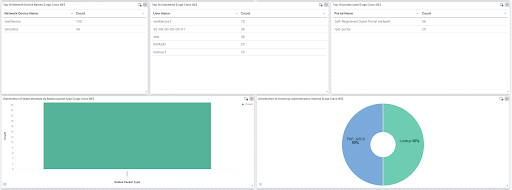
This integration includes one or more Kibana dashboards that visualizes the data collected by the integration. The screenshots below illustrate how the ingested data is displayed.
Changelog
| Version | Details | Minimum Kibana version |
|---|---|---|
| 1.34.0 | Enhancement (View pull request) Changed owners. |
9.0.0 8.11.0 |
| 1.33.1 | Bug fix (View pull request) Add missing event.category, event.type, and event.outcome for Administrative & Operational Audit events. Message codes 51000, 51008, 51023, 51025, 51100, 51101-51105, 51106, 51107, 51115, and 51116 now carry the correct ECS categorisation and outcome. Configuration-change events (52000, 52001, 52002) now expose event.outcome, using FailureFlag when present in 52001 events and defaulting to success otherwise. |
9.0.0 8.11.0 |
| 1.33.0 | Bug fix (View pull request) Parse Configuration-Changes (52001) audit records whose ConfigChangeData contains commas that are not field separators. Such records were previously discarded entirely; ConfigChangeData is now captured in full. Enhancement (View pull request) Add cisco_ise.log.config_change.attributes, a nested name/value list of the endpoint attributes carried in ConfigChangeData. Existing fields are unchanged.Bug fix (View pull request) Handle empty continuation segments in all remaining category pipelines. |
9.0.0 8.11.0 |
| 1.32.15 | Bug fix (View pull request) Remove broken convert processor for cisco_av_pair.cts-environment-version in Passed Authentications pipeline. The processor referenced a stale hyphenated field path and was a silent no-op since the Nov 2024 av-pair refactor; the field remains a keyword string per mapping. |
9.0.0 8.11.0 |
| 1.32.14 | Bug fix (View pull request) Add null check for script_parse_av_pairs processor. |
9.0.0 8.11.0 |
| 1.32.13 | Bug fix (View pull request) Fix NOTCOLON grok pattern in default pipeline to exclude spaces, preventing RADIUS Accounting KV fields from being misidentified as log severity level. |
9.0.0 8.11.0 |
| 1.32.12 | Bug fix (View pull request) Handle empty continuation segments in CISE_Administrative_and_Operational_Audit logs. |
9.0.0 8.11.0 |
| 1.32.11 | Bug fix (View pull request) Fix NullPointerException when evaluating bracket access on absent cisco_ise.log.log_details (Failed_Attempts foreach/User-Name appends, Authentication Flow Diagnostics NAS-IP-Address convert, and RADIUS Accounting Event-Timestamp date). |
9.0.0 8.11.0 |
| 1.32.10 | Bug fix (View pull request) Set event.outcome for Administrative and Operational Audit login, logoff and configuration message codes (51000, 51001, 51002, 51020, 51021, 60077, 60078, 60080, 60081, 60084, 60115, 60116, 60188, 61077). Extract user.name and source.ip from OperationMessageText for SSH CLI login events (60080, 60081). Populate user.name from AdminName for all admin audit events. |
9.0.0 8.11.0 |
| 1.32.9 | Bug fix (View pull request) Handle events without a parseable date as to stop the date processors from throwing a "field [_tmp] not present" error. Also default @timestamp to the ingest time so the event stays queryable instead of being routed to the failure store. |
9.0.0 8.11.0 |
| 1.32.8 | Bug fix (View pull request) Parse TACACS accounting start_time and stop_time with second, millisecond, or higher-precision epoch values instead of dropping them as out-of-range dates. |
9.0.0 8.11.0 |
| 1.32.7 | Bug fix (View pull request) Correctly parse key-value pairs where the value contains commas. |
9.0.0 8.11.0 |
| 1.32.6 | Enhancement (View pull request) Add missing event.category, event.type, and event.outcome for existing and new message codes to CISE_Passed_Authentications and CISE_Failed_Attempts pipelines. |
9.0.0 8.11.0 |
| 1.32.5 | Bug fix (View pull request) Remove top level note from docs |
9.0.0 8.11.0 |
| 1.32.4 | Bug fix (View pull request) Handle the values of top-level keys under cisco-av-pair as a scalar mapped to a keyword field. Maintain separate process for mdm-tlv as it can contain sub-keys. |
9.0.0 8.11.0 |
| 1.32.3 | Bug fix (View pull request) Handle non-IP Remote-Address values in TACACS accounting logs without pipeline errors. |
9.0.0 8.11.0 |
| 1.32.2 | Bug fix (View pull request) Fixed processing issue in guest pipeline for guest user name. |
9.0.0 8.11.0 |
| 1.32.1 | Enhancement (View pull request) Update documentation. |
9.0.0 8.11.0 |
| 1.32.0 | Enhancement (View pull request) Update documentation and knowledge base |
— |
| 1.31.3 | Bug fix (View pull request) Removed orphaned tag json file for security-solution-default. |
9.0.0 8.11.0 |
| 1.31.2 | Bug fix (View pull request) Fix Timezone detection in Purge subpipeline |
9.0.0 8.11.0 |
| 1.31.1 | Bug fix (View pull request) Remove duplicate security-solution-default tag references |
9.0.0 8.11.0 |
| 1.31.0 | Enhancement (View pull request) Extract nested subkeys from cisco_av_pairs attributes in Passed Authentications pipeline. |
9.0.0 8.11.0 |
| 1.30.2 | Bug fix (View pull request) Updated dissect processor to grok to address pipeline_error. |
9.0.0 8.11.0 |
| 1.30.1 | Bug fix (View pull request) Fixed typo in ingest pipeline processors. |
9.0.0 8.11.0 |
| 1.30.0 | Enhancement (View pull request) Preserve event.original on pipeline error. |
9.0.0 8.11.0 |
| 1.29.1 | Enhancement (View pull request) Generate processor tags and normalize error handler. |
9.0.0 8.11.0 |
| 1.29.0 | Enhancement (View pull request) Replace navigation with links panels. |
9.0.0 8.11.0 |
| 1.28.1 | Enhancement (View pull request) Changed owners. |
9.0.0 8.11.0 |
| 1.28.0 | Enhancement (View pull request) Standardize user fields processing across integrations. |
9.0.0 8.11.0 |
| 1.27.0 | Enhancement (View pull request) Add support of timezone in configuration parameter. |
9.0.0 8.11.0 |
| 1.26.2 | Bug fix (View pull request) Support milliseconds in timestamps |
9.0.0 8.11.0 |
| 1.26.1 | Bug fix (View pull request) Updated SSL description in package manifest.yml to be uniform and to include links to documentation. |
9.0.0 8.11.0 |
| 1.26.0 | Enhancement (View pull request) Support stack version 9.0. |
9.0.0 8.11.0 |
| 1.25.0 | Enhancement (View pull request) ECS version updated to 8.17.0. |
8.11.0 |
| 1.24.2 | Bug fix (View pull request) Revert mapping change for cisco_av_pair that was introduced with 1.24.1. |
8.11.0 |
| 1.24.1 | Bug fix (View pull request) Fix multiple pipeline processing issues. |
8.11.0 |
| 1.24.0 | Enhancement (View pull request) Improve ECS mappings by setting client.mac and event.outcome. |
8.11.0 |
| 1.23.2 | Bug fix (View pull request) Use triple-brace Mustache templating when referencing variables in ingest pipelines. |
8.11.0 |
| 1.23.1 | Bug fix (View pull request) Use triple-brace Mustache templating when referencing variables in ingest pipelines. |
8.11.0 |
| 1.23.0 | Enhancement (View pull request) Allow @custom pipeline access to event.original without setting preserve_original_event. |
8.11.0 |
| 1.22.4 | Bug fix (View pull request) Improve handling of empty data fields |
8.7.1 |
| 1.22.3 | Enhancement (View pull request) Fix the Cisco_ISE toggle description for filestream input |
8.7.1 |
| 1.22.2 | Enhancement (View pull request) Handle logs that start with ISO8601 timestamp |
8.7.1 |
| 1.22.1 | Enhancement (View pull request) Make Cisco ISE syslog priority field optional |
8.7.1 |
| 1.22.0 | Enhancement (View pull request) Update package spec to 3.0.3. |
8.7.1 |
| 1.21.4 | Bug fix (View pull request) Remove duplicate 'event.code' 60077 from list for category mapping. |
8.7.1 |
| 1.21.3 | Bug fix (View pull request) Fix ingest pipeline conditional field handling. |
8.7.1 |
| 1.21.2 | Enhancement (View pull request) Changed owners |
8.7.1 |
| 1.21.1 | Bug fix (View pull request) Fix exclude_files pattern. |
8.7.1 |
| 1.21.0 | Enhancement (View pull request) Handle CISE-Alarm events. |
8.7.1 |
| 1.20.0 | Enhancement (View pull request) ECS version updated to 8.11.0. |
8.7.1 |
| 1.19.0 | Enhancement (View pull request) Improve 'event.original' check to avoid errors if set. |
8.7.1 |
| 1.18.0 | Enhancement (View pull request) Add field event.code to capture the cisco_ise.log.message.code. |
8.7.1 |
| 1.17.0 | Enhancement (View pull request) Adapt fields for changes in file system info |
8.7.1 |
| 1.16.0 | Enhancement (View pull request) ECS version updated to 8.10.0. |
8.7.1 |
| 1.15.0 | Enhancement (View pull request) The format_version in the package manifest changed from 2.11.0 to 3.0.0. Removed dotted YAML keys from package manifest. Added 'owner.type: elastic' to package manifest. |
8.7.1 |
| 1.14.0 | Enhancement (View pull request) Add tags.yml file so that integration's dashboards and saved searches are tagged with "Security Solution" and displayed in the Security Solution UI. |
8.7.1 |
| 1.13.0 | Enhancement (View pull request) Update package-spec to 2.10.0. |
8.7.1 |
| 1.12.0 | Enhancement (View pull request) Add support for filestream input. |
8.7.1 |
| 1.11.1 | Bug fix (View pull request) Add missing ECS field mappings |
8.7.1 |
| 1.11.0 | Enhancement (View pull request) Update package to ECS 8.9.0. |
8.7.1 |
| 1.10.0 | Enhancement (View pull request) Convert dashboard to lens. |
8.7.1 |
| 1.9.0 | Enhancement (View pull request) Ensure event.kind is correctly set for pipeline errors. |
8.0.0 7.17.0 |
| 1.8.0 | Enhancement (View pull request) Update package to ECS 8.8.0. |
8.0.0 7.17.0 |
| 1.7.0 | Enhancement (View pull request) Update package to ECS 8.7.0. |
8.0.0 7.17.0 |
| 1.6.1 | Enhancement (View pull request) Added categories and/or subcategories. |
8.0.0 7.17.0 |
| 1.6.0 | Enhancement (View pull request) Update package to ECS 8.6.0. |
8.0.0 7.17.0 |
| 1.5.0 | Enhancement (View pull request) Add udp_options to the UDP input. |
8.0.0 7.17.0 |
| 1.4.0 | Enhancement (View pull request) Update Aggregation visualizations to Lens, Add an on_failure processor to the convert and date processors, remove unnecessary white spaces, and convert double quotes to single quotes. |
8.0.0 7.17.0 |
| 1.3.0 | Enhancement (View pull request) Enhancements, refacturing and bugfixes |
8.0.0 7.17.0 |
| 1.2.0 | Enhancement (View pull request) Update package to ECS 8.5.0. |
8.0.0 7.17.0 |
| 1.1.2 | Bug fix (View pull request) Fix handling of IdentityPolicyMatchedRule and IdentitySelectionMatchedRule. |
8.0.0 7.17.0 |
| 1.1.1 | Bug fix (View pull request) Remove duplicate fields. |
8.0.0 7.17.0 |
| 1.1.0 | Enhancement (View pull request) Allow non-numeric task ID fields to be ingested |
8.0.0 7.17.0 |
| 1.0.0 | Enhancement (View pull request) Make GA |
8.0.0 7.17.0 |
| 0.3.0 | Enhancement (View pull request) Update package to ECS 8.4.0. |
8.0.0 7.17.0 |
| 0.2.0 | Enhancement (View pull request) Update package to ECS 8.3.0. |
8.0.0 7.17.0 |
| 0.1.0 | Enhancement (View pull request) Initial draft of the package. |
8.0.0 7.17.0 |