Okta Entity Analytics
Elastic Cloud Serverless projects are autoscaled environments, fully managed by Elastic and available on Elastic Cloud. Availability This functionality is generally available and ready for production usage. Elastic Cloud Serverless projects are autoscaled environments, fully managed by Elastic and available on Elastic Cloud. Availability This functionality is generally available and ready for production usage. The Elastic Stack includes Elastic's core products such as Elasticsearch, Kibana, Logstash, and Beats. Availability This functionality is generally available and ready for production usage. Unless stated otherwise on the page, this functionality is available when your Elastic Stack is deployed on Elastic Cloud Hosted, Elastic Cloud Enterprise, Elastic Cloud on Kubernetes, and self-managed environments. This documentation corresponds to the latest patch available for each minor version. If you're not using the latest patch, check the release notes for changes.
Serverless Observability
Generally available
Serverless Security
Generally available
Stack
9.5+
Generally available since 9.5
| Version | 3.7.0 (View all) |
| Managed integration release status | Availability Beta This functionality is in beta and is not ready for production usage. For beta features, the design and code is less mature than official GA features and is being provided as-is with no warranties. Beta features are not subject to the support SLA of official GA features. Specific Support terms apply. |
| Subscription level What's this? |
Basic |
| Developed by What's this? |
Elastic |
| Ingestion method(s) | API |
| Minimum Kibana version(s) | 9.5.0 |
You can use this integration as an Elastic Managed integration on Elastic Cloud Hosted deployments running this version or later.
This Okta Entity Analytics integration allows users to securely stream User and Device Entity data to Elastic Security via the REST API. When integrated with Elastic Security, this valuable data can be leveraged within Elastic for risk-scoring scenarios (e.g., context enrichments) and detecting advanced analytics (UBA) use cases.
This module has been tested against the Core Okta API version v1.
In v2 of the integration the user and device data was split into separate data streams. The data ingested into your index will be the same but you may need to update device searches if you were using them.
When you upgrade from v1 you will need to reconfigure the integration and enable it due to internal changes in the package. See Resolve conflicts in the Fleet documentation for details.
The Okta Entity Analytics integration collects two types of data: user and device.
User is used to retrieve all user logs available in an organization. See more details in the API documentation here. Device is used to retrieve all device logs available in an organization. See more details in the API documentation here.
Elastic Agent must be installed for standard deployments. For more details, check the Elastic Agent installation instructions.
The minimum kibana.version required is 9.5.0.
Elastic Managed integrations are only supported on Elastic Cloud Serverless and Elastic Cloud Hosted deployments. An Elastic Managed integration lets you ingest data from a cloud source while avoiding the orchestration, management, and maintenance associated with standard ingest infrastructure. Elastic runs the collector for you, so you can focus on your data instead of the infrastructure that collects it. This functionality is in beta and is subject to change. Beta features are not subject to the support SLA of official GA features.
For more information, refer to Elastic Managed integrations and the Elastic Managed integrations FAQ.
The Okta API is a public HTTPS endpoint, so no special connectivity configuration is required.
When using an Elastic Managed integration, the JWK file authentication option is not available because it relies on a file on the agent's local filesystem. Use API token or JWK JSON (inline key) authentication instead.
- Get the required domain namespace, which should be preceded by an organization's subdomain (tenant) or configured custom domain.
- Gather credentials for the authentication method you will use. For API token authentication, create an Okta API token following this guide. For OAuth2, create an API Services application and keys as described under OAuth2 in the Types of authentication section.
- In Kibana, navigate to Management > Integrations.
- In the search bar, type Okta Entity Analytics.
- Select the Okta Entity Analytics integration and add it.
- While adding the integration, enter your Okta domain and the fields for your authentication method. Use your domain without
https://(for example:dev-123456.okta.com). Refer to Types of authentication for API token and OAuth2 fields. - Save the integration.
- In the administration dashboard for your Okta account, go to Security > API.
- Open the Tokens tab and click Create token to create a new token.
- Copy the token value and retain it for configuration. The token is only shown once—copy it before you leave the page.
- Paste the token into the
Okta API Tokenconfiguration option to start collecting entity analytics logs.
In this type of authentication, the following information is required:
- Your Okta domain URL. [ Example: https://dev-123456.okta.com ]
- Your Okta service app Client ID.
- Your Okta service app JWK Private Key.
- The Okta scopes that are required for OAuth2. By default they are set to
okta.users.readandokta.devices.readwhich are the ones required to read user and device logs.
Steps to acquire Okta OAuth2 credentials:
- Acquire an Okta dev or user account with privileges to mint tokens with the
okta.*scopes. - Log into your Okta account, navigate to
Applicationson the left-hand side, click on theCreate App Integrationbutton and create an API Services application. - Click on the created app, note down the
Client IDand select the option forPublic key/Private key. - Generate your own
Private/Public keypair in theJWKformat and save it in one of the available formats.
The Okta provider periodically contacts the Okta API, retrieving updates for users and devices, updates its internal cache of user/device metadata, and ships the updated metadata to Elasticsearch.
Fetching and shipping updates occurs in one of two processes: full synchronizations and incremental updates. Full synchronizations send the entire list of users and devices in state. Incremental updates send only records that changed since the last sync. Changes include metadata updates, additions, and deletions. By default, full synchronizations occur every 24 hours and incremental updates occur every 15 minutes. These intervals may be customized to suit your use case.
By default this integration uses minimal-state sync, which routes user and device documents directly to the user and device data streams. Existing policies are updated to use minimal-state sync on upgrade. Minimal-state sync requires Elastic Agent 9.5.0 or later; older agents use the legacy sync.
This integration provides an asset inventory, a point-in-time snapshot of which users and devices exist and their current properties. It does not provide an audit trail of who changed what, or when. If you need to track administrative changes to Okta objects, use the Okta integration's system log data stream, which collects the Okta System Log.
User documents map the Okta user to the ECS user fields as follows: user.id is the Okta user id (for example 00ub0oNGTSWTBKOLGLNR), user.name is the login (profile.login) and user.email is the primary email (profile.email). The Okta integration's System Log uses the same values for user.id and user.name. Its user.email holds the actor's login instead, because the System Log does not include the primary email. To correlate System Log events with these user documents, use user.id.
Users should ensure that full synchronization and incremental updates are not performed so frequently that they are impossible to complete within the Okta rate limits for the endpoints that are being used — for user entity analytics: /api/v1/users; and for device entity analytics: /api/v1/devices — and the volume of data that is expected from the API endpoints. Currently, Okta limits requests to /api/v1/users and /api/v1/devices to fetch at most 200 entities per request. Rate limit usage can be monitored via the Okta rate limit dashboard, and general information about Okta management rate limits is available from the Okta documentation here.
A user document:
{
  "@timestamp": "2023-07-04T09:57:19.786056-05:00",
  "okta": {
    "id": "userid",
    "status": "RECOVERY",
    "created": "2023-06-02T09:33:00.189752+09:30",
    "activated": "0001-01-01T00:00:00Z",
    "statusChanged": "2023-06-02T09:33:00.189752+09:30",
    "lastLogin": "2023-06-02T09:33:00.189752+09:30",
    "lastUpdated": "2023-06-02T09:33:00.189753+09:30",
    "passwordChanged": "2023-06-02T09:33:00.189753+09:30",
    "type": {
      "id": "typeid"
    },
    "profile": {
      "login": "name.surname@example.com",
      "email": "name.surname@example.com",
      "firstName": "name",
      "lastName": "surname"
    },
    "credentials": {
      "password": {},
      "provider": {
        "type": "OKTA",
        "name": "OKTA"
      }
    },
    "_links": {
      "self": {
        "href": "http://example.com/api/v1/users/userid"
      }
    }
  },
  "user": {
    "id": "userid"
  },
  "labels": {
    "identity_source": "okta-1"
  }
}
A device document:
{
    "@timestamp": "2023-07-04T09:57:19.786056-05:00",
    "okta": {
        "created": "2019-10-02T18:03:07Z",
        "id": "deviceid",
        "lastUpdated": "2019-10-02T18:03:07Z",
        "profile": {
            "diskEncryptionType": "ALL_INTERNAL_VOLUMES",
            "displayName": "Example Device name 1",
            "platform": "WINDOWS",
            "registered": true,
            "secureHardwarePresent": false,
            "serialNumber": "XXDDRFCFRGF3M8MD6D",
            "sid": "S-1-11-111"
        },
        "resourceAlternateID": "",
        "resourceDisplayName": {
            "sensitive": false,
            "value": "Example Device name 1"
        },
        "resourceID": "deviceid",
        "resourceType": "UDDevice",
        "status": "ACTIVE",
        "_links": {
            "activate": {
                "hints": {
                    "allow": [
                        "POST"
                    ]
                },
                "href": "http://example.com/api/v1/devices/deviceid/lifecycle/activate"
            },
            "self": {
                "hints": {
                    "allow": [
                        "GET",
                        "PATCH",
                        "PUT"
                    ]
                },
                "href": "http://example.com/api/v1/devices/deviceid"
            },
            "users": {
                "hints": {
                    "allow": [
                        "GET"
                    ]
                },
                "href": "http://example.com/api/v1/devices/deviceid/users"
            }
        },
        "users": [
            {
                "id": "userid",
                "status": "RECOVERY",
                "created": "2023-05-14T13:37:20Z",
                "activated": "0001-01-01T00:00:00Z",
                "statusChanged": "2023-05-15T01:50:30Z",
                "lastLogin": "2023-05-15T01:59:20Z",
                "lastUpdated": "2023-05-15T01:50:32Z",
                "passwordChanged": "2023-05-15T01:50:32Z",
                "type": {
                    "id": "typeid"
                },
                "profile": {
                    "login": "name.surname@example.com",
                    "email": "name.surname@example.com",
                    "firstName": "name",
                    "lastName": "surname"
                },
                "credentials": {
                    "password": {},
                    "provider": {
                        "type": "OKTA",
                        "name": "OKTA"
                    }
                },
                "_links": {
                    "self": {
                        "href": "http://example.com/api/v1/users/userid"
                    }
                }
            }
        ]
    },
    "device": {
        "id": "deviceid",
    },
    "labels": {
        "identity_source": "okta-1"
    }
}
This is the Device dataset.
Exported fields
| Field | Description | Type |
|---|---|---|
| @timestamp | Event timestamp. | date |
| asset.category | keyword | |
| asset.costCenter | keyword | |
| asset.create_date | date | |
| asset.id | keyword | |
| asset.last_seen | date | |
| asset.last_status_change_date | date | |
| asset.last_updated | date | |
| asset.name | keyword | |
| asset.status | keyword | |
| asset.type | keyword | |
| asset.vendor | keyword | |
| data_stream.dataset | Data stream dataset. | constant_keyword |
| data_stream.namespace | Data stream namespace. | constant_keyword |
| data_stream.type | Data stream type. | constant_keyword |
| device.serial_number | The unique serial number serves as a distinct identifier for each device, aiding in inventory management and device authentication. | keyword |
| entityanalytics_okta.device._embedded | embedded resources related to the device. | flattened |
| entityanalytics_okta.device._links | link relations for the device's current status. | flattened |
| entityanalytics_okta.device.activated | timestamp when transition to ACTIVE status completed. | date |
| entityanalytics_okta.device.created | timestamp when device was created. | date |
| entityanalytics_okta.device.id | unique key for device. | keyword |
| entityanalytics_okta.device.last_login | timestamp of last login. | date |
| entityanalytics_okta.device.last_updated | timestamp when device was last updated. | date |
| entityanalytics_okta.device.password_changed | timestamp when password last changed. | date |
| entityanalytics_okta.device.profile.* | keyword | |
| entityanalytics_okta.device.profile.registered | Whether the device is registered. | boolean |
| entityanalytics_okta.device.profile.secure_hardware_present | Whether the device is using secure hardware. | boolean |
| entityanalytics_okta.device.status | current status of device. | keyword |
| entityanalytics_okta.device.status_changed | timestamp when status last changed. | date |
| entityanalytics_okta.device.transitioning_to_status | target status of an in-progress asynchronous status transition. | keyword |
| entityanalytics_okta.device.type | device type that determines the schema for the device's profile. | flattened |
| entityanalytics_okta.device.users | Users associated with the device. | flattened |
| event.dataset | Event dataset. | constant_keyword |
| event.module | Event module. | constant_keyword |
| host.entity.attributes.managed | Indicates whether the entity is managed by an external administration or control system. Typically applicable to Host and Service entities. | boolean |
| input.type | Type of filebeat input. | keyword |
| labels.identity_source | keyword | |
| log.offset | Log offset. | long |
| user.account.activated_date | date | |
| user.account.change_date | date | |
| user.account.create_date | date | |
| user.account.password_change_date | date | |
| user.account.status.deprovisioned | boolean | |
| user.account.status.locked_out | boolean | |
| user.account.status.password_expired | boolean | |
| user.account.status.recovery | boolean | |
| user.account.status.suspended | boolean | |
| user.geo.city_name | keyword | |
| user.geo.country_iso_code | keyword | |
| user.geo.name | keyword | |
| user.geo.postal_code | keyword | |
| user.geo.region_name | keyword | |
| user.geo.timezone | keyword | |
| user.organization.name | keyword | |
| user.profile.department | keyword | |
| user.profile.first_name | keyword | |
| user.profile.id | keyword | |
| user.profile.job_title | keyword | |
| user.profile.last_name | keyword | |
| user.profile.manager | keyword | |
| user.profile.mobile_phone | keyword | |
| user.profile.other_identities | keyword | |
| user.profile.primaryPhone | keyword | |
| user.profile.secondEmail | keyword | |
| user.profile.status | keyword | |
| user.profile.type | keyword |
This is the User dataset.
Exported fields
| Field | Description | Type |
|---|---|---|
| @timestamp | Event timestamp. | date |
| asset.category | keyword | |
| asset.costCenter | keyword | |
| asset.create_date | date | |
| asset.id | keyword | |
| asset.last_seen | date | |
| asset.last_status_change_date | date | |
| asset.last_updated | date | |
| asset.name | keyword | |
| asset.status | keyword | |
| asset.type | keyword | |
| asset.vendor | keyword | |
| data_stream.dataset | Data stream dataset. | constant_keyword |
| data_stream.namespace | Data stream namespace. | constant_keyword |
| data_stream.type | Data stream type. | constant_keyword |
| entityanalytics_okta.groups.id | The ID for the group. | keyword |
| entityanalytics_okta.groups.profile.* | Group profile details. | object |
| entityanalytics_okta.roles.assignment_type | The Okta type the role is assigned to. | keyword |
| entityanalytics_okta.roles.created | When the role was created. | date |
| entityanalytics_okta.roles.id | The ID for the role. | keyword |
| entityanalytics_okta.roles.label | Name of the role. | keyword |
| entityanalytics_okta.roles.last_updated | When the role was last updated. | date |
| entityanalytics_okta.roles.permissions.created | When the permission was created. | date |
| entityanalytics_okta.roles.permissions.label | Permission label. | keyword |
| entityanalytics_okta.roles.permissions.last_updated | When the permission was last updated. | date |
| entityanalytics_okta.roles.role | The role definition ID for custom roles. | keyword |
| entityanalytics_okta.roles.status | Role status. | keyword |
| entityanalytics_okta.roles.type | Okta role type. | keyword |
| entityanalytics_okta.user._embedded | embedded resources related to the user. | flattened |
| entityanalytics_okta.user._links | link relations for the user's current status. | flattened |
| entityanalytics_okta.user.activated | timestamp when transition to ACTIVE status completed. | date |
| entityanalytics_okta.user.created | timestamp when user was created. | date |
| entityanalytics_okta.user.credentials.provider.name | keyword | |
| entityanalytics_okta.user.credentials.provider.type | keyword | |
| entityanalytics_okta.user.credentials.recovery_question.is_set | boolean | |
| entityanalytics_okta.user.devices | Devices enrolled for the user. | flattened |
| entityanalytics_okta.user.id | unique key for user. | keyword |
| entityanalytics_okta.user.last_login | timestamp of last login. | date |
| entityanalytics_okta.user.last_updated | timestamp when user was last updated. | date |
| entityanalytics_okta.user.password_changed | timestamp when password last changed. | date |
| entityanalytics_okta.user.profile.city | City or locality component of user's address (locality). | keyword |
| entityanalytics_okta.user.profile.cost_center | Name of a cost center assigned to user. | keyword |
| entityanalytics_okta.user.profile.country_code | Country name component of user's address (country). | keyword |
| entityanalytics_okta.user.profile.department | Name of user's department. | keyword |
| entityanalytics_okta.user.profile.display_name | Name of the user, suitable for display to end users. | keyword |
| entityanalytics_okta.user.profile.division | Name of user's division. | keyword |
| entityanalytics_okta.user.profile.email | Primary email address of user. | keyword |
| entityanalytics_okta.user.profile.employee_number | Organization or company assigned unique identifier for the user. | keyword |
| entityanalytics_okta.user.profile.external_id | External identifier of the user, often an AD objectGUID when provisioned from Active Directory. | keyword |
| entityanalytics_okta.user.profile.first_name | Given name of the user (givenName). | keyword |
| entityanalytics_okta.user.profile.honorific.prefix | Honorific prefix(es) of the user, or title in most Western languages. | keyword |
| entityanalytics_okta.user.profile.honorific.suffix | Honorific suffix(es) of the user. | keyword |
| entityanalytics_okta.user.profile.last_name | Family name of the user (familyName). | keyword |
| entityanalytics_okta.user.profile.locale | User's default location for purposes of localizing items such as currency, date time format, numerical representations, and so on. | keyword |
| entityanalytics_okta.user.profile.login | Unique identifier for the user (username). | keyword |
| entityanalytics_okta.user.profile.manager.id | id of a user's manager. | keyword |
| entityanalytics_okta.user.profile.manager.name | displayName of the user's manager. | keyword |
| entityanalytics_okta.user.profile.middle_name | Middle name(s) of the user. | keyword |
| entityanalytics_okta.user.profile.mobile_phone | Mobile phone number of user. | keyword |
| entityanalytics_okta.user.profile.nick_name | Casual way to address the user in real life. | keyword |
| entityanalytics_okta.user.profile.organization | Name of user's organization. | keyword |
| entityanalytics_okta.user.profile.postal_address | Mailing address component of user's address. | keyword |
| entityanalytics_okta.user.profile.preferred_language | User's preferred written or spoken languages. | keyword |
| entityanalytics_okta.user.profile.primary_phone | Primary phone number of user such as home number. | keyword |
| entityanalytics_okta.user.profile.second_email | Secondary email address of user typically used for account recovery. | keyword |
| entityanalytics_okta.user.profile.state | State or region component of user's address (region). | keyword |
| entityanalytics_okta.user.profile.street_address | Full street address component of user's address. | keyword |
| entityanalytics_okta.user.profile.timezone | User's time zone. | keyword |
| entityanalytics_okta.user.profile.title | User's title, such as "Vice President". | keyword |
| entityanalytics_okta.user.profile.url | URL of user's online profile (for example: a web page). | keyword |
| entityanalytics_okta.user.profile.user_type | Used to describe the organization to user relationship such as "Employee" or "Contractor". | keyword |
| entityanalytics_okta.user.profile.zip_code | ZIP code or postal code component of user's address (postalCode). | keyword |
| entityanalytics_okta.user.status | current status of user. | keyword |
| entityanalytics_okta.user.status_changed | timestamp when status last changed. | date |
| entityanalytics_okta.user.supervises.user.email | The supervised user's email address. | keyword |
| entityanalytics_okta.user.supervises.user.id | The supervised user's ID. | keyword |
| entityanalytics_okta.user.supervises.user.name | The supervised user's login name. | keyword |
| entityanalytics_okta.user.transitioning_to_status | target status of an in-progress asynchronous status transition. | keyword |
| entityanalytics_okta.user.type | user type that determines the schema for the user's profile. | flattened |
| event.dataset | Event dataset. | constant_keyword |
| event.module | Event module. | constant_keyword |
| input.type | Type of filebeat input. | keyword |
| labels.identity_source | keyword | |
| log.offset | Log offset. | long |
| user.account.activated_date | date | |
| user.account.change_date | date | |
| user.account.create_date | date | |
| user.account.password_change_date | date | |
| user.account.status.deprovisioned | boolean | |
| user.account.status.locked_out | boolean | |
| user.account.status.password_expired | boolean | |
| user.account.status.recovery | boolean | |
| user.account.status.suspended | boolean | |
| user.entity.attributes.mfa_enabled | Indicates whether multi-factor authentication is enabled for this entity. Typically applicable to User entities. | boolean |
| user.entity.attributes.permissions | Action-level permissions associated with this entity (not roles or groups). Typically applicable to User, Host, and Service entities. | keyword |
| user.entity.lifecycle.last_activity | Timestamp of the most recent action performed by or attributed to this entity (active use). Distinct from entity.last_seen_timestamp, which records when the entity was last observed in data; last_activity implies the entity was active, not only seen. Typically applicable to User, Host, and Service entities. |
date |
| user.entity.relationships.owns.host.id | Referenced host ids. | keyword |
| user.entity.relationships.owns.host.name | Referenced host names. | keyword |
| user.entity.relationships.supervises.user.email | Referenced user email addresses. | keyword |
| user.entity.relationships.supervises.user.id | Referenced user ids. | keyword |
| user.entity.relationships.supervises.user.name | Referenced user short names or logins. | keyword |
| user.geo.city_name | keyword | |
| user.geo.country_iso_code | keyword | |
| user.geo.name | keyword | |
| user.geo.postal_code | keyword | |
| user.geo.region_name | keyword | |
| user.geo.timezone | keyword | |
| user.organization.name | keyword | |
| user.profile.department | keyword | |
| user.profile.first_name | keyword | |
| user.profile.id | keyword | |
| user.profile.job_title | keyword | |
| user.profile.last_name | keyword | |
| user.profile.manager | keyword | |
| user.profile.mobile_phone | keyword | |
| user.profile.other_identities | keyword | |
| user.profile.primaryPhone | keyword | |
| user.profile.secondEmail | keyword | |
| user.profile.status | keyword | |
| user.profile.type | keyword |
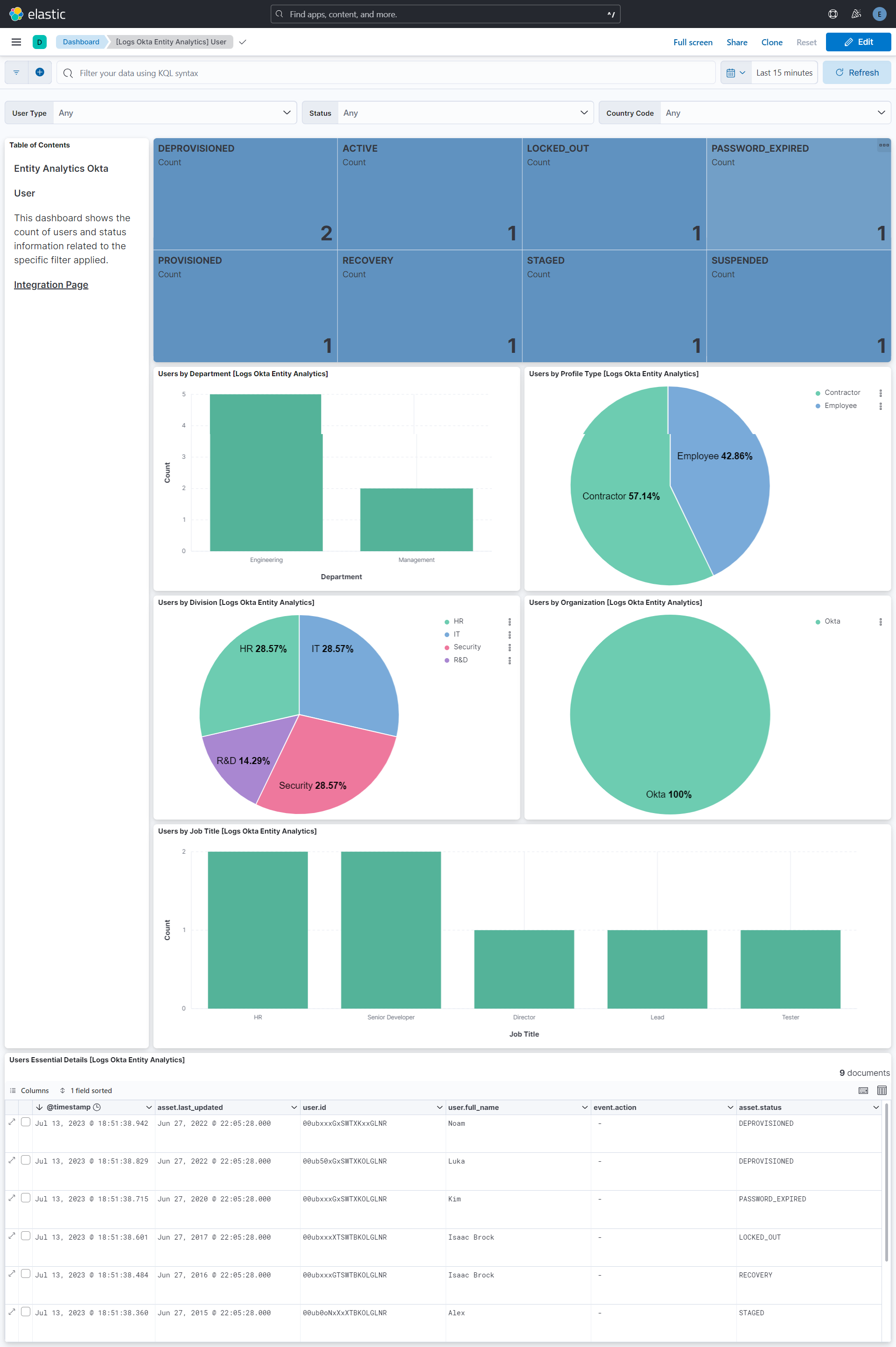
This integration includes one or more Kibana dashboards that visualizes the data collected by the integration. The screenshots below illustrate how the ingested data is displayed.
Changelog
| Version | Details | Minimum Kibana version |
|---|---|---|
| 3.7.0 | Enhancement (View pull request) Document the meaning of the user.id, user.name and user.email fields. |
9.5.0 |
| 3.6.1 | Bug fix (View pull request) Remove the package-level conditions.agent.version condition, which made Fleet silently drop this integration's inputs from agents older than the condition. Minimal-state sync (use_minimal_state) is now gated in the input template on Elastic Agent 9.5.0 or later; older agents use the legacy sync with the perms enrichment. |
9.5.0 |
| 3.6.0 | Enhancement (View pull request) Update Elastic Managed integration documentation to the current wording and docs links. |
9.5.0 |
| 3.5.1 | Bug fix (View pull request) Fix bugs triggered by setting user permissions enrichment with (the default) minimal-state sync. |
9.5.0 |
| 3.5.0 | Enhancement (View pull request) Add agentless deployment mode and minimal-state sync support. Existing policies switch to the minimal-state sync implementation on upgrade. |
9.5.0 |
| 3.4.0 | Enhancement (View pull request) Add the Advanced Analytics (UEBA) subcategory |
9.4.0 |
| 3.3.0 | Enhancement (View pull request) Set host.id from the Okta device id so device entities are keyed consistently |
9.4.0 |
| 3.2.1 | Bug fix (View pull request) Remove misleading event.action values from sample events in documentation and clarify that this integration provides asset inventory, not an audit trail. |
9.4.0 |
| 3.2.0 | Enhancement (View pull request) Add support for ECS entity fields. |
9.4.0 |
| 3.1.0 | Enhancement (View pull request) Removes non-existent reference to Entity Analytics app section. |
9.3.1 9.2.6 |
| 3.0.0 | Enhancement (View pull request) Add support for Okta OIN and OAuth2 authentication. Breaking change (View pull request) The Okta API token is now an optional parameter, as OAuth2 is included as an alternative authentication method. |
9.3.1 9.2.6 |
| 2.7.0 | Enhancement (View pull request) Add externalId profile field to support AD-to-Okta entity matching. |
9.0.2 8.18.3 |
| 2.6.0 | Enhancement (View pull request) Improve the clarity of the domain configuration option by adding an example. |
9.0.2 8.18.3 |
| 2.5.1 | Bug fix (View pull request) Map roles data to ECS. |
9.0.2 8.18.3 |
| 2.5.0 | Enhancement (View pull request) Add user roles collection feature. |
9.0.0 8.17.0 |
| 2.4.0 | Enhancement (View pull request) Remove redundant installation instructions. |
9.0.0 8.15.0 |
| 2.3.0 | Enhancement (View pull request) Retain Okta Domain value in host.name where possible. |
9.0.0 8.15.0 |
| 2.2.1 | Bug fix (View pull request) Fix default request trace enabled behavior. |
9.0.0 8.15.0 |
| 2.2.0 | Enhancement (View pull request) Improve rate limit documentation for integration. |
9.0.0 8.15.0 |
| 2.1.0 | Enhancement (View pull request) Update Kibana constraint to support 9.0.0. |
9.0.0 8.15.0 |
| 2.0.0 | Enhancement (View pull request) Split user and device data into their own data streams. |
8.15.0 |
| 1.8.1 | Bug fix (View pull request) Updated SSL description to be uniform and to include links to documentation. |
8.15.0 |
| 1.8.0 | Enhancement (View pull request) Add "event.original" field when "preserve_original_event" is set. |
8.15.0 |
| 1.7.0 | Enhancement (View pull request) Add "preserve_original_event" tag to documents with event.kind manually set to "pipeline_error". |
8.15.0 |
| 1.6.0 | Enhancement (View pull request) Add "preserve_original_event" tag to documents with event.kind set to "pipeline_error". |
8.15.0 |
| 1.5.1 | Bug fix (View pull request) Don't leak collection implementation details. |
8.15.0 |
| 1.5.0 | Enhancement (View pull request) Add support for group membership mapping. Enhancement (View pull request) Add system testing support for group membership. |
8.15.0 |
| 1.4.0 | Enhancement (View pull request) Add support for request trace logging. |
8.15.0 |
| 1.3.0 | Enhancement (View pull request) Record whether a user's credentials include a recovery question. |
8.13.0 |
| 1.2.0 | Enhancement (View pull request) Removed import_mappings. Update the kibana constraint to ^8.13.0. Modified the field definitions to remove ECS fields made redundant by the ecs@mappings component template. |
8.13.0 |
| 1.1.0 | Enhancement (View pull request) Set sensitive values as secret. |
8.12.0 |
| 1.0.1 | Enhancement (View pull request) Changed owners |
8.9.0 |
| 1.0.0 | Enhancement (View pull request) Release package as GA. |
8.9.0 |
| 0.8.0 | Enhancement (View pull request) Allow dataset selection. |
8.9.0 |
| 0.7.0 | Enhancement (View pull request) ECS version updated to 8.11.0. |
8.9.0 |
| 0.6.1 | Bug fix (View pull request) Fix mapping of group fields |
8.9.0 |
| 0.6.0 | Enhancement (View pull request) ECS version updated to 8.10.0. |
8.9.0 |
| 0.5.0 | Enhancement (View pull request) The format_version in the package manifest changed from 2.11.0 to 3.0.0. Removed dotted YAML keys from package manifest. Added 'owner.type: elastic' to package manifest. |
8.9.0 |
| 0.4.0 | Enhancement (View pull request) Add tags.yml file so that integration's dashboards and saved searches are tagged with "Security Solution" and displayed in the Security Solution UI. |
8.9.0 |
| 0.3.0 | Enhancement (View pull request) Add user.geo., user.organization., and asset categorization mappings. |
8.9.0 |
| 0.2.0 | Enhancement (View pull request) Update package to ECS 8.9.0. |
8.9.0 |
| 0.1.0 | Enhancement (View pull request) Initial Release. |
8.9.0 |