Windows Integration
Elastic Cloud Serverless projects are autoscaled environments, fully managed by Elastic and available on Elastic Cloud. Availability This functionality is generally available and ready for production usage. Elastic Cloud Serverless projects are autoscaled environments, fully managed by Elastic and available on Elastic Cloud. Availability This functionality is generally available and ready for production usage. The Elastic Stack includes Elastic's core products such as Elasticsearch, Kibana, Logstash, and Beats. Availability This functionality is generally available and ready for production usage. Unless stated otherwise on the page, this functionality is available when your Elastic Stack is deployed on Elastic Cloud Hosted, Elastic Cloud Enterprise, Elastic Cloud on Kubernetes, and self-managed environments. This documentation corresponds to the latest patch available for each minor version. If you're not using the latest patch, check the release notes for changes.
Serverless Observability
Generally available
Serverless Security
Generally available
Stack
9.0+
Generally available since 9.0
| Version | 3.13.1 (View all) |
| Subscription level What's this? |
Basic |
| Developed by What's this? |
Elastic |
| Ingestion method(s) | API |
| Minimum Kibana version(s) | 9.0.0 8.14.0 |
The Windows integration allows you to monitor the Windows OS, services, applications, and more.
Use the Windows integration to collect metrics and logs from your machine. Then visualize that data in Kibana, create alerts to notify you if something goes wrong, and reference data when troubleshooting an issue.
For example, if you wanted to know if a Windows service unexpectedly stops running, you could install the Windows integration to send service metrics to Elastic. Then, you could view real-time changes to service status in Kibana's [Metrics Windows] Services dashboard.
If you're collecting Windows event logs, note that there are three related integrations:
- System integration: Collects logs from the Windows
Application,System, andSecuritychannels with specialized ingest pipelines optimized for observability use cases. - Windows integration (this integration): Collects logs from Windows-specific channels like PowerShell, Sysmon, Windows Defender, and AppLocker with specialized security-focused ingest pipelines. Use this for security monitoring and advanced Windows telemetry.
- Custom Windows event log package: Collects logs from any user-defined Windows event log channel without specialized pipelines.
The Windows integration collects two types of data: logs and metrics.
Logs help you keep a record of events that happen on your machine. Log data streams collected by the Windows integration include forwarded events, PowerShell events, and Sysmon events. Log collection for the Security, Application, and System event logs is handled by the System integration. See more details in the Logs reference.
Metrics give you insight into the state of the machine. Metric data streams collected by the Windows integration include service details and performance counter values. See more details in the Metrics reference.
For 7.11, security, application and system logs have been moved to the system package.
You need Elasticsearch for storing and searching your data and Kibana for visualizing and managing it. You can use our hosted Elasticsearch Service on Elastic Cloud, which is recommended, or self-manage the Elastic Stack on your own hardware.
Each data stream collects different kinds of metric data, which may require dedicated permissions to be fetched and which may vary across operating systems.
For step-by-step instructions on how to set up an integration, see the Getting started guide.
Because the Windows integration always applies to the local server, the hosts config option is not needed.
If you specify more than 22 query conditions (event IDs or event ID ranges), some versions of Windows will prevent the integration from reading the event log due to limits in the query system. If this occurs, a similar warning as shown below:
The specified query is invalid.
In some cases, the limit may be lower than 22 conditions. For instance, using a
mixture of ranges and single event IDs, along with an additional parameter such
as ignore older, results in a limit of 21 conditions.
If you have more than 22 conditions, you can work around this Windows limitation
by using a drop_event processor to do the filtering after filebeat has received
the events from Windows. The filter shown below is equivalent to
event_id: 903, 1024, 2000-2004, 4624 but can be expanded beyond 22 event IDs.
- drop_event.when.not.or:
  - equals.winlog.event_id: "903"
  - equals.winlog.event_id: "1024"
  - equals.winlog.event_id: "4624"
  - range:
      winlog.event_id.gte: 2000
      winlog.event_id.lte: 2004
The Windows applocker_exe_and_dll data stream provides events from the Windows
Microsoft-Windows-AppLocker/EXE and DLL event log.
Example
{
    "@timestamp": "2023-07-20T15:05:03.882Z",
    "agent": {
        "ephemeral_id": "026312ee-e6f4-4086-92cc-0e7c56bdbb5a",
        "id": "49658d66-b405-4c92-8e7c-5c2646556bf2",
        "name": "docker-fleet-agent",
        "type": "filebeat",
        "version": "8.14.1"
    },
    "data_stream": {
        "dataset": "windows.applocker_exe_and_dll",
        "namespace": "ep",
        "type": "logs"
    },
    "ecs": {
        "version": "8.0.0"
    },
    "elastic_agent": {
        "id": "49658d66-b405-4c92-8e7c-5c2646556bf2",
        "snapshot": false,
        "version": "8.14.1"
    },
    "event": {
        "action": "None",
        "agent_id_status": "verified",
        "category": [
            "process"
        ],
        "code": "8003",
        "created": "2024-06-21T01:53:30.508Z",
        "dataset": "windows.applocker_exe_and_dll",
        "ingested": "2024-06-21T01:53:42Z",
        "kind": "event",
        "original": "\u003cEvent xmlns='http://schemas.microsoft.com/win/2004/08/events/event'\u003e\u003cSystem\u003e\u003cProvider Name='Microsoft-Windows-AppLocker' Guid='{cbda4dbf-8d5d-4f69-9578-be14aa540d22}' /\u003e\u003cEventID\u003e8003\u003c/EventID\u003e\u003cVersion\u003e0\u003c/Version\u003e\u003cLevel\u003e3\u003c/Level\u003e\u003cTask\u003e0\u003c/Task\u003e\u003cOpcode\u003e0\u003c/Opcode\u003e\u003cKeywords\u003e0x8000000000000000\u003c/Keywords\u003e\u003cTimeCreated SystemTime='2023-07-20T15:05:03.8826518Z' /\u003e\u003cEventRecordID\u003e154247\u003c/EventRecordID\u003e\u003cCorrelation /\u003e\u003cExecution ProcessID='33848' ThreadID='12040' /\u003e\u003cChannel\u003eMicrosoft-Windows-AppLocker/EXE and DLL\u003c/Channel\u003e\u003cComputer\u003eTOPSYLL.local\u003c/Computer\u003e\u003cSecurity UserID='S-1-5-21-1133191089-1850170202-1535859923-200319' /\u003e\u003c/System\u003e\u003cUserData\u003e\u003cRuleAndFileData xmlns='http://schemas.microsoft.com/schemas/event/Microsoft.Windows/1.0.0.0'\u003e\u003cPolicyNameLength\u003e3\u003c/PolicyNameLength\u003e\u003cPolicyName\u003eEXE\u003c/PolicyName\u003e\u003cRuleId\u003e{00000000-0000-0000-0000-000000000000}\u003c/RuleId\u003e\u003cRuleNameLength\u003e1\u003c/RuleNameLength\u003e\u003cRuleName\u003e-\u003c/RuleName\u003e\u003cRuleSddlLength\u003e1\u003c/RuleSddlLength\u003e\u003cRuleSddl\u003e-\u003c/RuleSddl\u003e\u003cTargetUser\u003eS-1-5-21-1133191089-1850170202-1535859923-200319\u003c/TargetUser\u003e\u003cTargetProcessId\u003e27116\u003c/TargetProcessId\u003e\u003cFilePathLength\u003e101\u003c/FilePathLength\u003e\u003cFilePath\u003e%OSDRIVE%\\USERS\\TOPSY\\APPDATA\\LOCAL\\GITHUBDESKTOP\\APP-3.1.2\\RESOURCES\\APP\\GIT\\MINGW64\\BIN\\GIT.EXE\u003c/FilePath\u003e\u003cFileHashLength\u003e32\u003c/FileHashLength\u003e\u003cFileHash\u003e11D3940DE41D28E044CE45AB76A6D824E617D99B62C5FB44E37BE5CD7B0545F5\u003c/FileHash\u003e\u003cFqbnLength\u003e72\u003c/FqbnLength\u003e\u003cFqbn\u003eO=JOHANNES SCHINDELIN, S=NORDRHEIN-WESTFALEN, C=DE\\GIT\\GIT.EXE\\2.35.5.01\u003c/Fqbn\u003e\u003cTargetLogonId\u003e0x14fcb7\u003c/TargetLogonId\u003e\u003cFullFilePathLength\u003e94\u003c/FullFilePathLength\u003e\u003cFullFilePath\u003eC:\\Users\\TOPSY\\AppData\\Local\\GitHubDesktop\\app-3.1.2\\resources\\app\\git\\mingw64\\bin\\git.exe\u003c/FullFilePath\u003e\u003c/RuleAndFileData\u003e\u003c/UserData\u003e\u003c/Event\u003e",
        "provider": "Microsoft-Windows-AppLocker",
        "type": [
            "start"
        ]
    },
    "file": {
        "hash": {
            "sha256": "11D3940DE41D28E044CE45AB76A6D824E617D99B62C5FB44E37BE5CD7B0545F5"
        },
        "name": "git.exe",
        "pe": {
            "file_version": "2.35.5.01",
            "original_file_name": "GIT.EXE",
            "product": "GIT"
        },
        "x509": {
            "subject": {
                "country": [
                    "DE"
                ],
                "organization": [
                    "JOHANNES SCHINDELIN"
                ],
                "state_or_province": [
                    "NORDRHEIN-WESTFALEN"
                ]
            }
        }
    },
    "host": {
        "name": "TOPSYLL.local"
    },
    "input": {
        "type": "httpjson"
    },
    "log": {
        "level": "warning"
    },
    "tags": [
        "forwarded",
        "preserve_original_event"
    ],
    "user": {
        "id": "S-1-5-21-1133191089-1850170202-1535859923-200319"
    },
    "winlog": {
        "channel": "Microsoft-Windows-AppLocker/EXE and DLL",
        "computer_name": "TOPSYLL.local",
        "event_id": "8003",
        "level": "warning",
        "opcode": "Info",
        "process": {
            "pid": 33848,
            "thread": {
                "id": 12040
            }
        },
        "provider_guid": "{cbda4dbf-8d5d-4f69-9578-be14aa540d22}",
        "provider_name": "Microsoft-Windows-AppLocker",
        "record_id": "154247",
        "task": "None",
        "time_created": "2023-07-20T15:05:03.882Z",
        "user": {
            "identifier": "S-1-5-21-1133191089-1850170202-1535859923-200319"
        },
        "user_data": {
            "FileHash": "11D3940DE41D28E044CE45AB76A6D824E617D99B62C5FB44E37BE5CD7B0545F5",
            "FileHashLength": 32,
            "FilePath": "%OSDRIVE%\\USERS\\TOPSY\\APPDATA\\LOCAL\\GITHUBDESKTOP\\APP-3.1.2\\RESOURCES\\APP\\GIT\\MINGW64\\BIN\\GIT.EXE",
            "FilePathLength": 101,
            "Fqbn": "O=JOHANNES SCHINDELIN, S=NORDRHEIN-WESTFALEN, C=DE\\GIT\\GIT.EXE\\2.35.5.01",
            "FqbnLength": 72,
            "FullFilePath": "C:\\Users\\TOPSY\\AppData\\Local\\GitHubDesktop\\app-3.1.2\\resources\\app\\git\\mingw64\\bin\\git.exe",
            "FullFilePathLength": 94,
            "PolicyName": "EXE",
            "PolicyNameLength": 3,
            "RuleId": "{00000000-0000-0000-0000-000000000000}",
            "RuleName": "-",
            "RuleNameLength": 1,
            "RuleSddl": "-",
            "RuleSddlLength": 1,
            "TargetLogonId": "0x14fcb7",
            "TargetProcessId": 27116,
            "TargetUser": "S-1-5-21-1133191089-1850170202-1535859923-200319",
            "xml_name": "RuleAndFileData"
        }
    }
}
Exported fields
| Field | Description | Type |
|---|---|---|
| @timestamp | Date/time when the event originated. This is the date/time extracted from the event, typically representing when the event was generated by the source. If the event source has no original timestamp, this value is typically populated by the first time the event was received by the pipeline. Required field for all events. | date |
| cloud.account.id | The cloud account or organization id used to identify different entities in a multi-tenant environment. Examples: AWS account id, Google Cloud ORG Id, or other unique identifier. | keyword |
| cloud.availability_zone | Availability zone in which this host, resource, or service is located. | keyword |
| cloud.image.id | Image ID for the cloud instance. | keyword |
| cloud.instance.id | Instance ID of the host machine. | keyword |
| cloud.instance.name | Instance name of the host machine. | keyword |
| cloud.machine.type | Machine type of the host machine. | keyword |
| cloud.project.id | The cloud project identifier. Examples: Google Cloud Project id, Azure Project id. | keyword |
| cloud.provider | Name of the cloud provider. Example values are aws, azure, gcp, or digitalocean. | keyword |
| cloud.region | Region in which this host, resource, or service is located. | keyword |
| container.id | Unique container id. | keyword |
| container.image.name | Name of the image the container was built on. | keyword |
| container.labels | Image labels. | object |
| container.name | Container name. | keyword |
| data_stream.dataset | The field can contain anything that makes sense to signify the source of the data. Examples include nginx.access, prometheus, endpoint etc. For data streams that otherwise fit, but that do not have dataset set we use the value "generic" for the dataset value. event.dataset should have the same value as data_stream.dataset. Beyond the Elasticsearch data stream naming criteria noted above, the dataset value has additional restrictions: * Must not contain - * No longer than 100 characters |
constant_keyword |
| data_stream.namespace | A user defined namespace. Namespaces are useful to allow grouping of data. Many users already organize their indices this way, and the data stream naming scheme now provides this best practice as a default. Many users will populate this field with default. If no value is used, it falls back to default. Beyond the Elasticsearch index naming criteria noted above, namespace value has the additional restrictions: * Must not contain - * No longer than 100 characters |
constant_keyword |
| data_stream.type | An overarching type for the data stream. Currently allowed values are "logs" and "metrics". We expect to also add "traces" and "synthetics" in the near future. | constant_keyword |
| dataset.name | Dataset name. | constant_keyword |
| dataset.namespace | Dataset namespace. | constant_keyword |
| dataset.type | Dataset type. | constant_keyword |
| destination.user.domain | Name of the directory the user is a member of. For example, an LDAP or Active Directory domain name. | keyword |
| destination.user.id | Unique identifier of the user. | keyword |
| destination.user.name | Short name or login of the user. | keyword |
| destination.user.name.text | Multi-field of destination.user.name. |
match_only_text |
| ecs.version | ECS version this event conforms to. ecs.version is a required field and must exist in all events. When querying across multiple indices -- which may conform to slightly different ECS versions -- this field lets integrations adjust to the schema version of the events. |
keyword |
| error.code | Error code describing the error. | keyword |
| event.action | The action captured by the event. This describes the information in the event. It is more specific than event.category. Examples are group-add, process-started, file-created. The value is normally defined by the implementer. |
keyword |
| event.category | This is one of four ECS Categorization Fields, and indicates the second level in the ECS category hierarchy. event.category represents the "big buckets" of ECS categories. For example, filtering on event.category:process yields all events relating to process activity. This field is closely related to event.type, which is used as a subcategory. This field is an array. This will allow proper categorization of some events that fall in multiple categories. |
keyword |
| event.code | Identification code for this event, if one exists. Some event sources use event codes to identify messages unambiguously, regardless of message language or wording adjustments over time. An example of this is the Windows Event ID. | keyword |
| event.created | event.created contains the date/time when the event was first read by an agent, or by your pipeline. This field is distinct from @timestamp in that @timestamp typically contain the time extracted from the original event. In most situations, these two timestamps will be slightly different. The difference can be used to calculate the delay between your source generating an event, and the time when your agent first processed it. This can be used to monitor your agent's or pipeline's ability to keep up with your event source. In case the two timestamps are identical, @timestamp should be used. |
date |
| event.dataset | Name of the dataset. If an event source publishes more than one type of log or events (e.g. access log, error log), the dataset is used to specify which one the event comes from. It's recommended but not required to start the dataset name with the module name, followed by a dot, then the dataset name. | constant_keyword |
| event.ingested | Timestamp when an event arrived in the central data store. This is different from @timestamp, which is when the event originally occurred. It's also different from event.created, which is meant to capture the first time an agent saw the event. In normal conditions, assuming no tampering, the timestamps should chronologically look like this: @timestamp < event.created < event.ingested. |
date |
| event.kind | This is one of four ECS Categorization Fields, and indicates the highest level in the ECS category hierarchy. event.kind gives high-level information about what type of information the event contains, without being specific to the contents of the event. For example, values of this field distinguish alert events from metric events. The value of this field can be used to inform how these kinds of events should be handled. They may warrant different retention, different access control, it may also help understand whether the data is coming in at a regular interval or not. |
keyword |
| event.module | Name of the module this data is coming from. If your monitoring agent supports the concept of modules or plugins to process events of a given source (e.g. Apache logs), event.module should contain the name of this module. |
constant_keyword |
| event.outcome | This is one of four ECS Categorization Fields, and indicates the lowest level in the ECS category hierarchy. event.outcome simply denotes whether the event represents a success or a failure from the perspective of the entity that produced the event. Note that when a single transaction is described in multiple events, each event may populate different values of event.outcome, according to their perspective. Also note that in the case of a compound event (a single event that contains multiple logical events), this field should be populated with the value that best captures the overall success or failure from the perspective of the event producer. Further note that not all events will have an associated outcome. For example, this field is generally not populated for metric events, events with event.type:info, or any events for which an outcome does not make logical sense. |
keyword |
| event.provider | Source of the event. Event transports such as Syslog or the Windows Event Log typically mention the source of an event. It can be the name of the software that generated the event (e.g. Sysmon, httpd), or of a subsystem of the operating system (kernel, Microsoft-Windows-Security-Auditing). | keyword |
| event.sequence | Sequence number of the event. The sequence number is a value published by some event sources, to make the exact ordering of events unambiguous, regardless of the timestamp precision. | long |
| event.type | This is one of four ECS Categorization Fields, and indicates the third level in the ECS category hierarchy. event.type represents a categorization "sub-bucket" that, when used along with the event.category field values, enables filtering events down to a level appropriate for single visualization. This field is an array. This will allow proper categorization of some events that fall in multiple event types. |
keyword |
| file.directory | Directory where the file is located. It should include the drive letter, when appropriate. | keyword |
| file.extension | File extension, excluding the leading dot. Note that when the file name has multiple extensions (example.tar.gz), only the last one should be captured ("gz", not "tar.gz"). | keyword |
| file.hash.sha256 | SHA256 hash. | keyword |
| file.name | Name of the file including the extension, without the directory. | keyword |
| file.path | Full path to the file, including the file name. It should include the drive letter, when appropriate. | keyword |
| file.path.text | Multi-field of file.path. |
match_only_text |
| file.pe.file_version | Internal version of the file, provided at compile-time. | keyword |
| file.pe.original_file_name | Internal name of the file, provided at compile-time. | keyword |
| file.pe.product | Internal product name of the file, provided at compile-time. | keyword |
| file.x509.subject.common_name | List of common names (CN) of subject. | keyword |
| file.x509.subject.country | List of country (C) code | keyword |
| file.x509.subject.locality | List of locality names (L) | keyword |
| file.x509.subject.organization | List of organizations (O) of subject. | keyword |
| file.x509.subject.state_or_province | List of state or province names (ST, S, or P) | keyword |
| host.architecture | Operating system architecture. | keyword |
| host.containerized | If the host is a container. | boolean |
| host.domain | Name of the domain of which the host is a member. For example, on Windows this could be the host's Active Directory domain or NetBIOS domain name. For Linux this could be the domain of the host's LDAP provider. | keyword |
| host.hostname | Hostname of the host. It normally contains what the hostname command returns on the host machine. |
keyword |
| host.id | Unique host id. As hostname is not always unique, use values that are meaningful in your environment. Example: The current usage of beat.name. |
keyword |
| host.ip | Host ip addresses. | ip |
| host.mac | Host MAC addresses. The notation format from RFC 7042 is suggested: Each octet (that is, 8-bit byte) is represented by two [uppercase] hexadecimal digits giving the value of the octet as an unsigned integer. Successive octets are separated by a hyphen. | keyword |
| host.name | Name of the host. It can contain what hostname returns on Unix systems, the fully qualified domain name (FQDN), or a name specified by the user. The recommended value is the lowercase FQDN of the host. | keyword |
| host.os.build | OS build information. | keyword |
| host.os.codename | OS codename, if any. | keyword |
| host.os.family | OS family (such as redhat, debian, freebsd, windows). | keyword |
| host.os.kernel | Operating system kernel version as a raw string. | keyword |
| host.os.name | Operating system name, without the version. | keyword |
| host.os.name.text | Multi-field of host.os.name. |
match_only_text |
| host.os.platform | Operating system platform (such centos, ubuntu, windows). | keyword |
| host.os.type | Use the os.type field to categorize the operating system into one of the broad commercial families. If the OS you're dealing with is not listed as an expected value, the field should not be populated. Please let us know by opening an issue with ECS, to propose its addition. |
keyword |
| host.os.version | Operating system version as a raw string. | keyword |
| host.type | Type of host. For Cloud providers this can be the machine type like t2.medium. If vm, this could be the container, for example, or other information meaningful in your environment. |
keyword |
| input.type | Type of Filebeat input. | keyword |
| log.level | Original log level of the log event. If the source of the event provides a log level or textual severity, this is the one that goes in log.level. If your source doesn't specify one, you may put your event transport's severity here (e.g. Syslog severity). Some examples are warn, err, i, informational. |
keyword |
| message | For log events the message field contains the log message, optimized for viewing in a log viewer. For structured logs without an original message field, other fields can be concatenated to form a human-readable summary of the event. If multiple messages exist, they can be combined into one message. | match_only_text |
| process.args | Array of process arguments, starting with the absolute path to the executable. May be filtered to protect sensitive information. | keyword |
| process.args_count | Length of the process.args array. This field can be useful for querying or performing bucket analysis on how many arguments were provided to start a process. More arguments may be an indication of suspicious activity. | long |
| process.command_line | Full command line that started the process, including the absolute path to the executable, and all arguments. Some arguments may be filtered to protect sensitive information. | wildcard |
| process.command_line.text | Multi-field of process.command_line. |
match_only_text |
| process.entity_id | Unique identifier for the process. The implementation of this is specified by the data source, but some examples of what could be used here are a process-generated UUID, Sysmon Process GUIDs, or a hash of some uniquely identifying components of a process. Constructing a globally unique identifier is a common practice to mitigate PID reuse as well as to identify a specific process over time, across multiple monitored hosts. | keyword |
| process.executable | Absolute path to the process executable. | keyword |
| process.executable.text | Multi-field of process.executable. |
match_only_text |
| process.name | Process name. Sometimes called program name or similar. | keyword |
| process.name.text | Multi-field of process.name. |
match_only_text |
| process.pid | Process id. | long |
| process.title | Process title. The proctitle, some times the same as process name. Can also be different: for example a browser setting its title to the web page currently opened. | keyword |
| process.title.text | Multi-field of process.title. |
match_only_text |
| related.hash | All the hashes seen on your event. Populating this field, then using it to search for hashes can help in situations where you're unsure what the hash algorithm is (and therefore which key name to search). | keyword |
| related.hosts | All hostnames or other host identifiers seen on your event. Example identifiers include FQDNs, domain names, workstation names, or aliases. | keyword |
| related.ip | All of the IPs seen on your event. | ip |
| related.user | All the user names or other user identifiers seen on the event. | keyword |
| source.user.domain | Name of the directory the user is a member of. For example, an LDAP or Active Directory domain name. | keyword |
| source.user.id | Unique identifier of the user. | keyword |
| source.user.name | Short name or login of the user. | keyword |
| source.user.name.text | Multi-field of source.user.name. |
match_only_text |
| tags | List of keywords used to tag each event. | keyword |
| user.domain | Name of the directory the user is a member of. For example, an LDAP or Active Directory domain name. | keyword |
| user.id | Unique identifier of the user. | keyword |
| user.name | Short name or login of the user. | keyword |
| user.name.text | Multi-field of user.name. |
match_only_text |
| winlog.activity_id | A globally unique identifier that identifies the current activity. The events that are published with this identifier are part of the same activity. | keyword |
| winlog.api | The event log API type used to read the record. The possible values are "wineventlog" for the Windows Event Log API or "eventlogging" for the Event Logging API. The Event Logging API was designed for Windows Server 2003 or Windows 2000 operating systems. In Windows Vista, the event logging infrastructure was redesigned. On Windows Vista or later operating systems, the Windows Event Log API is used. Winlogbeat automatically detects which API to use for reading event logs. | keyword |
| winlog.channel | The name of the channel from which this record was read. This value is one of the names from the event_logs collection in the configuration. |
keyword |
| winlog.computer_name | The name of the computer that generated the record. When using Windows event forwarding, this name can differ from agent.hostname. |
keyword |
| winlog.event_data | The event-specific data. This field is mutually exclusive with user_data. If you are capturing event data on versions prior to Windows Vista, the parameters in event_data are named param1, param2, and so on, because event log parameters are unnamed in earlier versions of Windows. |
object |
| winlog.event_data.AuthenticationPackageName | keyword | |
| winlog.event_data.Binary | keyword | |
| winlog.event_data.BitlockerUserInputTime | keyword | |
| winlog.event_data.BootMode | keyword | |
| winlog.event_data.BootType | keyword | |
| winlog.event_data.BuildVersion | keyword | |
| winlog.event_data.Company | keyword | |
| winlog.event_data.CorruptionActionState | keyword | |
| winlog.event_data.CreationUtcTime | keyword | |
| winlog.event_data.Description | keyword | |
| winlog.event_data.Detail | keyword | |
| winlog.event_data.DeviceName | keyword | |
| winlog.event_data.DeviceNameLength | keyword | |
| winlog.event_data.DeviceTime | keyword | |
| winlog.event_data.DeviceVersionMajor | keyword | |
| winlog.event_data.DeviceVersionMinor | keyword | |
| winlog.event_data.DriveName | keyword | |
| winlog.event_data.DriverName | keyword | |
| winlog.event_data.DriverNameLength | keyword | |
| winlog.event_data.DwordVal | keyword | |
| winlog.event_data.EntryCount | keyword | |
| winlog.event_data.ExtraInfo | keyword | |
| winlog.event_data.FailureName | keyword | |
| winlog.event_data.FailureNameLength | keyword | |
| winlog.event_data.FileVersion | keyword | |
| winlog.event_data.FinalStatus | keyword | |
| winlog.event_data.Group | keyword | |
| winlog.event_data.IdleImplementation | keyword | |
| winlog.event_data.IdleStateCount | keyword | |
| winlog.event_data.ImpersonationLevel | keyword | |
| winlog.event_data.IntegrityLevel | keyword | |
| winlog.event_data.IpAddress | keyword | |
| winlog.event_data.IpPort | keyword | |
| winlog.event_data.KeyLength | keyword | |
| winlog.event_data.LastBootGood | keyword | |
| winlog.event_data.LastShutdownGood | keyword | |
| winlog.event_data.LmPackageName | keyword | |
| winlog.event_data.LogonGuid | keyword | |
| winlog.event_data.LogonId | keyword | |
| winlog.event_data.LogonProcessName | keyword | |
| winlog.event_data.LogonType | keyword | |
| winlog.event_data.MajorVersion | keyword | |
| winlog.event_data.MaximumPerformancePercent | keyword | |
| winlog.event_data.MemberName | keyword | |
| winlog.event_data.MemberSid | keyword | |
| winlog.event_data.MinimumPerformancePercent | keyword | |
| winlog.event_data.MinimumThrottlePercent | keyword | |
| winlog.event_data.MinorVersion | keyword | |
| winlog.event_data.NewProcessId | keyword | |
| winlog.event_data.NewProcessName | keyword | |
| winlog.event_data.NewSchemeGuid | keyword | |
| winlog.event_data.NewTime | keyword | |
| winlog.event_data.NominalFrequency | keyword | |
| winlog.event_data.Number | keyword | |
| winlog.event_data.OldSchemeGuid | keyword | |
| winlog.event_data.OldTime | keyword | |
| winlog.event_data.OriginalFileName | keyword | |
| winlog.event_data.Path | keyword | |
| winlog.event_data.PerformanceImplementation | keyword | |
| winlog.event_data.PreviousCreationUtcTime | keyword | |
| winlog.event_data.PreviousTime | keyword | |
| winlog.event_data.PrivilegeList | keyword | |
| winlog.event_data.ProcessId | keyword | |
| winlog.event_data.ProcessName | keyword | |
| winlog.event_data.ProcessPath | keyword | |
| winlog.event_data.ProcessPid | keyword | |
| winlog.event_data.Product | keyword | |
| winlog.event_data.PuaCount | keyword | |
| winlog.event_data.PuaPolicyId | keyword | |
| winlog.event_data.QfeVersion | keyword | |
| winlog.event_data.Reason | keyword | |
| winlog.event_data.SchemaVersion | keyword | |
| winlog.event_data.ScriptBlockText | keyword | |
| winlog.event_data.ServiceName | keyword | |
| winlog.event_data.ServiceVersion | keyword | |
| winlog.event_data.ShutdownActionType | keyword | |
| winlog.event_data.ShutdownEventCode | keyword | |
| winlog.event_data.ShutdownReason | keyword | |
| winlog.event_data.Signature | keyword | |
| winlog.event_data.SignatureStatus | keyword | |
| winlog.event_data.Signed | keyword | |
| winlog.event_data.StartTime | keyword | |
| winlog.event_data.State | keyword | |
| winlog.event_data.Status | keyword | |
| winlog.event_data.StopTime | keyword | |
| winlog.event_data.SubjectDomainName | keyword | |
| winlog.event_data.SubjectLogonId | keyword | |
| winlog.event_data.SubjectUserName | keyword | |
| winlog.event_data.SubjectUserSid | keyword | |
| winlog.event_data.TSId | keyword | |
| winlog.event_data.TargetDomainName | keyword | |
| winlog.event_data.TargetInfo | keyword | |
| winlog.event_data.TargetLogonGuid | keyword | |
| winlog.event_data.TargetLogonId | keyword | |
| winlog.event_data.TargetServerName | keyword | |
| winlog.event_data.TargetUserName | keyword | |
| winlog.event_data.TargetUserSid | keyword | |
| winlog.event_data.TerminalSessionId | keyword | |
| winlog.event_data.TokenElevationType | keyword | |
| winlog.event_data.TransmittedServices | keyword | |
| winlog.event_data.UserSid | keyword | |
| winlog.event_data.Version | keyword | |
| winlog.event_data.Workstation | keyword | |
| winlog.event_data.param1 | keyword | |
| winlog.event_data.param2 | keyword | |
| winlog.event_data.param3 | keyword | |
| winlog.event_data.param4 | keyword | |
| winlog.event_data.param5 | keyword | |
| winlog.event_data.param6 | keyword | |
| winlog.event_data.param7 | keyword | |
| winlog.event_data.param8 | keyword | |
| winlog.event_id | The event identifier. The value is specific to the source of the event. | keyword |
| winlog.keywords | The keywords are used to classify an event. | keyword |
| winlog.level | The level assigned to the event such as Information, Warning, or Critical. | keyword |
| winlog.opcode | The opcode defined in the event. Task and opcode are typically used to identify the location in the application from where the event was logged. | keyword |
| winlog.process.pid | The process ID (PID) of the process that generated/logged the event. This is often the event collector process and not necessarily the process that the event is about. | long |
| winlog.process.thread.id | long | |
| winlog.provider_guid | A globally unique identifier that identifies the provider that logged the event. | keyword |
| winlog.provider_name | The source of the event log record (the application or service that logged the record). | keyword |
| winlog.record_id | The record ID of the event log record. The first record written to an event log is record number 1, and other records are numbered sequentially. If the record number reaches the maximum value (232 for the Event Logging API and 264 for the Windows Event Log API), the next record number will be 0. | keyword |
| winlog.related_activity_id | A globally unique identifier that identifies the activity to which control was transferred to. The related events would then have this identifier as their activity_id identifier. |
keyword |
| winlog.task | The task defined in the event. Task and opcode are typically used to identify the location in the application from where the event was logged. The category used by the Event Logging API (on pre Windows Vista operating systems) is written to this field. | keyword |
| winlog.time_created | The time the event was created. | date |
| winlog.user.domain | The domain that the account associated with this event is a member of. | keyword |
| winlog.user.identifier | The Windows security identifier (SID) of the account associated with this event. If Winlogbeat cannot resolve the SID to a name, then the user.name, user.domain, and user.type fields will be omitted from the event. If you discover Winlogbeat not resolving SIDs, review the log for clues as to what the problem may be. |
keyword |
| winlog.user.name | Name of the user associated with this event. | keyword |
| winlog.user.type | The type of account associated with this event. | keyword |
| winlog.user_data | The event specific data. This field is mutually exclusive with event_data. |
object |
| winlog.user_data.FileHash | keyword | |
| winlog.user_data.FileHashLength | long | |
| winlog.user_data.FilePath | keyword | |
| winlog.user_data.FilePathLength | long | |
| winlog.user_data.Fqbn | keyword | |
| winlog.user_data.FqbnLength | long | |
| winlog.user_data.FullFilePath | keyword | |
| winlog.user_data.FullFilePathLength | long | |
| winlog.user_data.PolicyName | keyword | |
| winlog.user_data.PolicyNameLength | long | |
| winlog.user_data.RuleId | keyword | |
| winlog.user_data.RuleName | keyword | |
| winlog.user_data.RuleNameLength | long | |
| winlog.user_data.RuleSddl | keyword | |
| winlog.user_data.RuleSddlLength | long | |
| winlog.user_data.TargetLogonId | keyword | |
| winlog.user_data.TargetProcessId | long | |
| winlog.user_data.TargetUser | keyword | |
| winlog.user_data.xml_name | keyword | |
| winlog.version | The version number of the event's definition. | long |
The Windows applocker_msi_and_script data stream provides events from the Windows
Microsoft-Windows-AppLocker/MSI and Script event log.
Example
{
    "@timestamp": "2023-08-04T21:26:32.757Z",
    "agent": {
        "ephemeral_id": "17b8f200-259d-4f9f-898e-ccfd2f82705a",
        "id": "15b01abd-cefe-4ddd-8359-617acef7bf30",
        "name": "docker-fleet-agent",
        "type": "filebeat",
        "version": "8.7.1"
    },
    "data_stream": {
        "dataset": "windows.applocker_msi_and_script",
        "namespace": "ep",
        "type": "logs"
    },
    "ecs": {
        "version": "8.0.0"
    },
    "elastic_agent": {
        "id": "15b01abd-cefe-4ddd-8359-617acef7bf30",
        "snapshot": false,
        "version": "8.7.1"
    },
    "event": {
        "action": "None",
        "agent_id_status": "verified",
        "category": [
            "process"
        ],
        "code": "8006",
        "created": "2023-08-05T12:31:30.395Z",
        "dataset": "windows.applocker_msi_and_script",
        "ingested": "2023-08-05T12:31:34Z",
        "kind": "event",
        "original": "\u003cEvent xmlns='http://schemas.microsoft.com/win/2004/08/events/event'\u003e\u003cSystem\u003e\u003cProvider Name='Microsoft-Windows-AppLocker' Guid='{cbda4dbf-8d5d-4f69-9578-be14aa540d22}' /\u003e\u003cEventID\u003e8006\u003c/EventID\u003e\u003cVersion\u003e0\u003c/Version\u003e\u003cLevel\u003e3\u003c/Level\u003e\u003cTask\u003e0\u003c/Task\u003e\u003cOpcode\u003e0\u003c/Opcode\u003e\u003cKeywords\u003e0x4000000000000000\u003c/Keywords\u003e\u003cTimeCreated SystemTime='2023-08-04T21:26:32.7572144Z' /\u003e\u003cEventRecordID\u003e239\u003c/EventRecordID\u003e\u003cCorrelation ActivityID='{f64315e2-bea0-0000-6d01-d5f6a0bed901}' /\u003e\u003cExecution ProcessID='25192' ThreadID='7740' /\u003e\u003cChannel\u003eMicrosoft-Windows-AppLocker/MSI and Script\u003c/Channel\u003e\u003cComputer\u003eel33t-b00k-1\u003c/Computer\u003e\u003cSecurity UserID='S-1-5-21-2707992022-4034939591-3454028951-1001' /\u003e\u003c/System\u003e\u003cUserData\u003e\u003cRuleAndFileData xmlns='http://schemas.microsoft.com/schemas/event/Microsoft.Windows/1.0.0.0'\u003e\u003cPolicyNameLength\u003e6\u003c/PolicyNameLength\u003e\u003cPolicyName\u003eSCRIPT\u003c/PolicyName\u003e\u003cRuleId\u003e{00000000-0000-0000-0000-000000000000}\u003c/RuleId\u003e\u003cRuleNameLength\u003e1\u003c/RuleNameLength\u003e\u003cRuleName\u003e-\u003c/RuleName\u003e\u003cRuleSddlLength\u003e1\u003c/RuleSddlLength\u003e\u003cRuleSddl\u003e-\u003c/RuleSddl\u003e\u003cTargetUser\u003eS-1-5-21-2707992022-4034939591-3454028951-1001\u003c/TargetUser\u003e\u003cTargetProcessId\u003e25192\u003c/TargetProcessId\u003e\u003cFilePathLength\u003e124\u003c/FilePathLength\u003e\u003cFilePath\u003e%OSDRIVE%\\USERS\\NICPE\\.VSCODE\\EXTENSIONS\\MS-VSCODE.POWERSHELL-2023.6.0\\MODULES\\PSSCRIPTANALYZER\\1.21.0\\PSSCRIPTANALYZER.PSM1\u003c/FilePath\u003e\u003cFileHashLength\u003e32\u003c/FileHashLength\u003e\u003cFileHash\u003eD2A09AC074F8D326B4DCC8B8BE5BC003C41CCB6EB5FC35E13B73F834F2946B01\u003c/FileHash\u003e\u003cFqbnLength\u003e65\u003c/FqbnLength\u003e\u003cFqbn\u003eO=MICROSOFT CORPORATION, L=REDMOND, S=WASHINGTON, C=US\\\\\\0.0.0.00\u003c/Fqbn\u003e\u003cTargetLogonId\u003e0x4c18f\u003c/TargetLogonId\u003e\u003cFullFilePathLength\u003e117\u003c/FullFilePathLength\u003e\u003cFullFilePath\u003eC:\\Users\\nicpe\\.vscode\\extensions\\ms-vscode.powershell-2023.6.0\\modules\\PSScriptAnalyzer\\1.21.0\\PSScriptAnalyzer.psm1\u003c/FullFilePath\u003e\u003c/RuleAndFileData\u003e\u003c/UserData\u003e\u003c/Event\u003e",
        "provider": "Microsoft-Windows-AppLocker",
        "type": [
            "start"
        ]
    },
    "file": {
        "hash": {
            "sha256": "D2A09AC074F8D326B4DCC8B8BE5BC003C41CCB6EB5FC35E13B73F834F2946B01"
        },
        "name": "PSScriptAnalyzer.psm1",
        "pe": {
            "file_version": "0.0.0.00",
            "original_file_name": "",
            "product": ""
        },
        "x509": {
            "subject": {
                "country": [
                    "US"
                ],
                "locality": [
                    "REDMOND"
                ],
                "organization": [
                    "MICROSOFT CORPORATION"
                ],
                "state_or_province": [
                    "WASHINGTON"
                ]
            }
        }
    },
    "host": {
        "name": "el33t-b00k-1"
    },
    "input": {
        "type": "httpjson"
    },
    "log": {
        "level": "warning"
    },
    "tags": [
        "forwarded",
        "preserve_original_event"
    ],
    "user": {
        "id": "S-1-5-21-2707992022-4034939591-3454028951-1001"
    },
    "winlog": {
        "activity_id": "{f64315e2-bea0-0000-6d01-d5f6a0bed901}",
        "channel": "Microsoft-Windows-AppLocker/MSI and Script",
        "computer_name": "el33t-b00k-1",
        "event_id": "8006",
        "level": "warning",
        "opcode": "Info",
        "process": {
            "pid": 25192,
            "thread": {
                "id": 7740
            }
        },
        "provider_guid": "{cbda4dbf-8d5d-4f69-9578-be14aa540d22}",
        "provider_name": "Microsoft-Windows-AppLocker",
        "record_id": "239",
        "task": "None",
        "time_created": "2023-08-04T21:26:32.757Z",
        "user": {
            "identifier": "S-1-5-21-2707992022-4034939591-3454028951-1001"
        },
        "user_data": {
            "FileHash": "D2A09AC074F8D326B4DCC8B8BE5BC003C41CCB6EB5FC35E13B73F834F2946B01",
            "FileHashLength": 32,
            "FilePath": "%OSDRIVE%\\USERS\\NICPE\\.VSCODE\\EXTENSIONS\\MS-VSCODE.POWERSHELL-2023.6.0\\MODULES\\PSSCRIPTANALYZER\\1.21.0\\PSSCRIPTANALYZER.PSM1",
            "FilePathLength": 124,
            "Fqbn": "O=MICROSOFT CORPORATION, L=REDMOND, S=WASHINGTON, C=US\\\\\\0.0.0.00",
            "FqbnLength": 65,
            "FullFilePath": "C:\\Users\\nicpe\\.vscode\\extensions\\ms-vscode.powershell-2023.6.0\\modules\\PSScriptAnalyzer\\1.21.0\\PSScriptAnalyzer.psm1",
            "FullFilePathLength": 117,
            "PolicyName": "SCRIPT",
            "PolicyNameLength": 6,
            "RuleId": "{00000000-0000-0000-0000-000000000000}",
            "RuleName": "-",
            "RuleNameLength": 1,
            "RuleSddl": "-",
            "RuleSddlLength": 1,
            "TargetLogonId": "0x4c18f",
            "TargetProcessId": 25192,
            "TargetUser": "S-1-5-21-2707992022-4034939591-3454028951-1001",
            "xml_name": "RuleAndFileData"
        }
    }
}
Exported fields
| Field | Description | Type |
|---|---|---|
| @timestamp | Date/time when the event originated. This is the date/time extracted from the event, typically representing when the event was generated by the source. If the event source has no original timestamp, this value is typically populated by the first time the event was received by the pipeline. Required field for all events. | date |
| cloud.account.id | The cloud account or organization id used to identify different entities in a multi-tenant environment. Examples: AWS account id, Google Cloud ORG Id, or other unique identifier. | keyword |
| cloud.availability_zone | Availability zone in which this host, resource, or service is located. | keyword |
| cloud.image.id | Image ID for the cloud instance. | keyword |
| cloud.instance.id | Instance ID of the host machine. | keyword |
| cloud.instance.name | Instance name of the host machine. | keyword |
| cloud.machine.type | Machine type of the host machine. | keyword |
| cloud.project.id | The cloud project identifier. Examples: Google Cloud Project id, Azure Project id. | keyword |
| cloud.provider | Name of the cloud provider. Example values are aws, azure, gcp, or digitalocean. | keyword |
| cloud.region | Region in which this host, resource, or service is located. | keyword |
| container.id | Unique container id. | keyword |
| container.image.name | Name of the image the container was built on. | keyword |
| container.labels | Image labels. | object |
| container.name | Container name. | keyword |
| data_stream.dataset | The field can contain anything that makes sense to signify the source of the data. Examples include nginx.access, prometheus, endpoint etc. For data streams that otherwise fit, but that do not have dataset set we use the value "generic" for the dataset value. event.dataset should have the same value as data_stream.dataset. Beyond the Elasticsearch data stream naming criteria noted above, the dataset value has additional restrictions: * Must not contain - * No longer than 100 characters |
constant_keyword |
| data_stream.namespace | A user defined namespace. Namespaces are useful to allow grouping of data. Many users already organize their indices this way, and the data stream naming scheme now provides this best practice as a default. Many users will populate this field with default. If no value is used, it falls back to default. Beyond the Elasticsearch index naming criteria noted above, namespace value has the additional restrictions: * Must not contain - * No longer than 100 characters |
constant_keyword |
| data_stream.type | An overarching type for the data stream. Currently allowed values are "logs" and "metrics". We expect to also add "traces" and "synthetics" in the near future. | constant_keyword |
| dataset.name | Dataset name. | constant_keyword |
| dataset.namespace | Dataset namespace. | constant_keyword |
| dataset.type | Dataset type. | constant_keyword |
| destination.user.domain | Name of the directory the user is a member of. For example, an LDAP or Active Directory domain name. | keyword |
| destination.user.id | Unique identifier of the user. | keyword |
| destination.user.name | Short name or login of the user. | keyword |
| destination.user.name.text | Multi-field of destination.user.name. |
match_only_text |
| ecs.version | ECS version this event conforms to. ecs.version is a required field and must exist in all events. When querying across multiple indices -- which may conform to slightly different ECS versions -- this field lets integrations adjust to the schema version of the events. |
keyword |
| error.code | Error code describing the error. | keyword |
| event.action | The action captured by the event. This describes the information in the event. It is more specific than event.category. Examples are group-add, process-started, file-created. The value is normally defined by the implementer. |
keyword |
| event.category | This is one of four ECS Categorization Fields, and indicates the second level in the ECS category hierarchy. event.category represents the "big buckets" of ECS categories. For example, filtering on event.category:process yields all events relating to process activity. This field is closely related to event.type, which is used as a subcategory. This field is an array. This will allow proper categorization of some events that fall in multiple categories. |
keyword |
| event.code | Identification code for this event, if one exists. Some event sources use event codes to identify messages unambiguously, regardless of message language or wording adjustments over time. An example of this is the Windows Event ID. | keyword |
| event.created | event.created contains the date/time when the event was first read by an agent, or by your pipeline. This field is distinct from @timestamp in that @timestamp typically contain the time extracted from the original event. In most situations, these two timestamps will be slightly different. The difference can be used to calculate the delay between your source generating an event, and the time when your agent first processed it. This can be used to monitor your agent's or pipeline's ability to keep up with your event source. In case the two timestamps are identical, @timestamp should be used. |
date |
| event.dataset | Name of the dataset. If an event source publishes more than one type of log or events (e.g. access log, error log), the dataset is used to specify which one the event comes from. It's recommended but not required to start the dataset name with the module name, followed by a dot, then the dataset name. | constant_keyword |
| event.ingested | Timestamp when an event arrived in the central data store. This is different from @timestamp, which is when the event originally occurred. It's also different from event.created, which is meant to capture the first time an agent saw the event. In normal conditions, assuming no tampering, the timestamps should chronologically look like this: @timestamp < event.created < event.ingested. |
date |
| event.kind | This is one of four ECS Categorization Fields, and indicates the highest level in the ECS category hierarchy. event.kind gives high-level information about what type of information the event contains, without being specific to the contents of the event. For example, values of this field distinguish alert events from metric events. The value of this field can be used to inform how these kinds of events should be handled. They may warrant different retention, different access control, it may also help understand whether the data is coming in at a regular interval or not. |
keyword |
| event.module | Name of the module this data is coming from. If your monitoring agent supports the concept of modules or plugins to process events of a given source (e.g. Apache logs), event.module should contain the name of this module. |
constant_keyword |
| event.outcome | This is one of four ECS Categorization Fields, and indicates the lowest level in the ECS category hierarchy. event.outcome simply denotes whether the event represents a success or a failure from the perspective of the entity that produced the event. Note that when a single transaction is described in multiple events, each event may populate different values of event.outcome, according to their perspective. Also note that in the case of a compound event (a single event that contains multiple logical events), this field should be populated with the value that best captures the overall success or failure from the perspective of the event producer. Further note that not all events will have an associated outcome. For example, this field is generally not populated for metric events, events with event.type:info, or any events for which an outcome does not make logical sense. |
keyword |
| event.provider | Source of the event. Event transports such as Syslog or the Windows Event Log typically mention the source of an event. It can be the name of the software that generated the event (e.g. Sysmon, httpd), or of a subsystem of the operating system (kernel, Microsoft-Windows-Security-Auditing). | keyword |
| event.sequence | Sequence number of the event. The sequence number is a value published by some event sources, to make the exact ordering of events unambiguous, regardless of the timestamp precision. | long |
| event.type | This is one of four ECS Categorization Fields, and indicates the third level in the ECS category hierarchy. event.type represents a categorization "sub-bucket" that, when used along with the event.category field values, enables filtering events down to a level appropriate for single visualization. This field is an array. This will allow proper categorization of some events that fall in multiple event types. |
keyword |
| file.directory | Directory where the file is located. It should include the drive letter, when appropriate. | keyword |
| file.extension | File extension, excluding the leading dot. Note that when the file name has multiple extensions (example.tar.gz), only the last one should be captured ("gz", not "tar.gz"). | keyword |
| file.hash.sha256 | SHA256 hash. | keyword |
| file.name | Name of the file including the extension, without the directory. | keyword |
| file.path | Full path to the file, including the file name. It should include the drive letter, when appropriate. | keyword |
| file.path.text | Multi-field of file.path. |
match_only_text |
| file.pe.file_version | Internal version of the file, provided at compile-time. | keyword |
| file.pe.original_file_name | Internal name of the file, provided at compile-time. | keyword |
| file.pe.product | Internal product name of the file, provided at compile-time. | keyword |
| file.x509.subject.common_name | List of common names (CN) of subject. | keyword |
| file.x509.subject.country | List of country (C) code | keyword |
| file.x509.subject.locality | List of locality names (L) | keyword |
| file.x509.subject.organization | List of organizations (O) of subject. | keyword |
| file.x509.subject.state_or_province | List of state or province names (ST, S, or P) | keyword |
| host.architecture | Operating system architecture. | keyword |
| host.containerized | If the host is a container. | boolean |
| host.domain | Name of the domain of which the host is a member. For example, on Windows this could be the host's Active Directory domain or NetBIOS domain name. For Linux this could be the domain of the host's LDAP provider. | keyword |
| host.hostname | Hostname of the host. It normally contains what the hostname command returns on the host machine. |
keyword |
| host.id | Unique host id. As hostname is not always unique, use values that are meaningful in your environment. Example: The current usage of beat.name. |
keyword |
| host.ip | Host ip addresses. | ip |
| host.mac | Host MAC addresses. The notation format from RFC 7042 is suggested: Each octet (that is, 8-bit byte) is represented by two [uppercase] hexadecimal digits giving the value of the octet as an unsigned integer. Successive octets are separated by a hyphen. | keyword |
| host.name | Name of the host. It can contain what hostname returns on Unix systems, the fully qualified domain name (FQDN), or a name specified by the user. The recommended value is the lowercase FQDN of the host. | keyword |
| host.os.build | OS build information. | keyword |
| host.os.codename | OS codename, if any. | keyword |
| host.os.family | OS family (such as redhat, debian, freebsd, windows). | keyword |
| host.os.kernel | Operating system kernel version as a raw string. | keyword |
| host.os.name | Operating system name, without the version. | keyword |
| host.os.name.text | Multi-field of host.os.name. |
match_only_text |
| host.os.platform | Operating system platform (such centos, ubuntu, windows). | keyword |
| host.os.type | Use the os.type field to categorize the operating system into one of the broad commercial families. If the OS you're dealing with is not listed as an expected value, the field should not be populated. Please let us know by opening an issue with ECS, to propose its addition. |
keyword |
| host.os.version | Operating system version as a raw string. | keyword |
| host.type | Type of host. For Cloud providers this can be the machine type like t2.medium. If vm, this could be the container, for example, or other information meaningful in your environment. |
keyword |
| input.type | Type of Filebeat input. | keyword |
| log.level | Original log level of the log event. If the source of the event provides a log level or textual severity, this is the one that goes in log.level. If your source doesn't specify one, you may put your event transport's severity here (e.g. Syslog severity). Some examples are warn, err, i, informational. |
keyword |
| message | For log events the message field contains the log message, optimized for viewing in a log viewer. For structured logs without an original message field, other fields can be concatenated to form a human-readable summary of the event. If multiple messages exist, they can be combined into one message. | match_only_text |
| process.args | Array of process arguments, starting with the absolute path to the executable. May be filtered to protect sensitive information. | keyword |
| process.args_count | Length of the process.args array. This field can be useful for querying or performing bucket analysis on how many arguments were provided to start a process. More arguments may be an indication of suspicious activity. | long |
| process.command_line | Full command line that started the process, including the absolute path to the executable, and all arguments. Some arguments may be filtered to protect sensitive information. | wildcard |
| process.command_line.text | Multi-field of process.command_line. |
match_only_text |
| process.entity_id | Unique identifier for the process. The implementation of this is specified by the data source, but some examples of what could be used here are a process-generated UUID, Sysmon Process GUIDs, or a hash of some uniquely identifying components of a process. Constructing a globally unique identifier is a common practice to mitigate PID reuse as well as to identify a specific process over time, across multiple monitored hosts. | keyword |
| process.executable | Absolute path to the process executable. | keyword |
| process.executable.text | Multi-field of process.executable. |
match_only_text |
| process.name | Process name. Sometimes called program name or similar. | keyword |
| process.name.text | Multi-field of process.name. |
match_only_text |
| process.pid | Process id. | long |
| process.title | Process title. The proctitle, some times the same as process name. Can also be different: for example a browser setting its title to the web page currently opened. | keyword |
| process.title.text | Multi-field of process.title. |
match_only_text |
| related.hash | All the hashes seen on your event. Populating this field, then using it to search for hashes can help in situations where you're unsure what the hash algorithm is (and therefore which key name to search). | keyword |
| related.hosts | All hostnames or other host identifiers seen on your event. Example identifiers include FQDNs, domain names, workstation names, or aliases. | keyword |
| related.ip | All of the IPs seen on your event. | ip |
| related.user | All the user names or other user identifiers seen on the event. | keyword |
| source.user.domain | Name of the directory the user is a member of. For example, an LDAP or Active Directory domain name. | keyword |
| source.user.id | Unique identifier of the user. | keyword |
| source.user.name | Short name or login of the user. | keyword |
| source.user.name.text | Multi-field of source.user.name. |
match_only_text |
| tags | List of keywords used to tag each event. | keyword |
| user.domain | Name of the directory the user is a member of. For example, an LDAP or Active Directory domain name. | keyword |
| user.id | Unique identifier of the user. | keyword |
| user.name | Short name or login of the user. | keyword |
| user.name.text | Multi-field of user.name. |
match_only_text |
| winlog.activity_id | A globally unique identifier that identifies the current activity. The events that are published with this identifier are part of the same activity. | keyword |
| winlog.api | The event log API type used to read the record. The possible values are "wineventlog" for the Windows Event Log API or "eventlogging" for the Event Logging API. The Event Logging API was designed for Windows Server 2003 or Windows 2000 operating systems. In Windows Vista, the event logging infrastructure was redesigned. On Windows Vista or later operating systems, the Windows Event Log API is used. Winlogbeat automatically detects which API to use for reading event logs. | keyword |
| winlog.channel | The name of the channel from which this record was read. This value is one of the names from the event_logs collection in the configuration. |
keyword |
| winlog.computer_name | The name of the computer that generated the record. When using Windows event forwarding, this name can differ from agent.hostname. |
keyword |
| winlog.event_data | The event-specific data. This field is mutually exclusive with user_data. If you are capturing event data on versions prior to Windows Vista, the parameters in event_data are named param1, param2, and so on, because event log parameters are unnamed in earlier versions of Windows. |
object |
| winlog.event_data.AuthenticationPackageName | keyword | |
| winlog.event_data.Binary | keyword | |
| winlog.event_data.BitlockerUserInputTime | keyword | |
| winlog.event_data.BootMode | keyword | |
| winlog.event_data.BootType | keyword | |
| winlog.event_data.BuildVersion | keyword | |
| winlog.event_data.Company | keyword | |
| winlog.event_data.CorruptionActionState | keyword | |
| winlog.event_data.CreationUtcTime | keyword | |
| winlog.event_data.Description | keyword | |
| winlog.event_data.Detail | keyword | |
| winlog.event_data.DeviceName | keyword | |
| winlog.event_data.DeviceNameLength | keyword | |
| winlog.event_data.DeviceTime | keyword | |
| winlog.event_data.DeviceVersionMajor | keyword | |
| winlog.event_data.DeviceVersionMinor | keyword | |
| winlog.event_data.DriveName | keyword | |
| winlog.event_data.DriverName | keyword | |
| winlog.event_data.DriverNameLength | keyword | |
| winlog.event_data.DwordVal | keyword | |
| winlog.event_data.EntryCount | keyword | |
| winlog.event_data.ExtraInfo | keyword | |
| winlog.event_data.FailureName | keyword | |
| winlog.event_data.FailureNameLength | keyword | |
| winlog.event_data.FileVersion | keyword | |
| winlog.event_data.FinalStatus | keyword | |
| winlog.event_data.Group | keyword | |
| winlog.event_data.IdleImplementation | keyword | |
| winlog.event_data.IdleStateCount | keyword | |
| winlog.event_data.ImpersonationLevel | keyword | |
| winlog.event_data.IntegrityLevel | keyword | |
| winlog.event_data.IpAddress | keyword | |
| winlog.event_data.IpPort | keyword | |
| winlog.event_data.KeyLength | keyword | |
| winlog.event_data.LastBootGood | keyword | |
| winlog.event_data.LastShutdownGood | keyword | |
| winlog.event_data.LmPackageName | keyword | |
| winlog.event_data.LogonGuid | keyword | |
| winlog.event_data.LogonId | keyword | |
| winlog.event_data.LogonProcessName | keyword | |
| winlog.event_data.LogonType | keyword | |
| winlog.event_data.MajorVersion | keyword | |
| winlog.event_data.MaximumPerformancePercent | keyword | |
| winlog.event_data.MemberName | keyword | |
| winlog.event_data.MemberSid | keyword | |
| winlog.event_data.MinimumPerformancePercent | keyword | |
| winlog.event_data.MinimumThrottlePercent | keyword | |
| winlog.event_data.MinorVersion | keyword | |
| winlog.event_data.NewProcessId | keyword | |
| winlog.event_data.NewProcessName | keyword | |
| winlog.event_data.NewSchemeGuid | keyword | |
| winlog.event_data.NewTime | keyword | |
| winlog.event_data.NominalFrequency | keyword | |
| winlog.event_data.Number | keyword | |
| winlog.event_data.OldSchemeGuid | keyword | |
| winlog.event_data.OldTime | keyword | |
| winlog.event_data.OriginalFileName | keyword | |
| winlog.event_data.Path | keyword | |
| winlog.event_data.PerformanceImplementation | keyword | |
| winlog.event_data.PreviousCreationUtcTime | keyword | |
| winlog.event_data.PreviousTime | keyword | |
| winlog.event_data.PrivilegeList | keyword | |
| winlog.event_data.ProcessId | keyword | |
| winlog.event_data.ProcessName | keyword | |
| winlog.event_data.ProcessPath | keyword | |
| winlog.event_data.ProcessPid | keyword | |
| winlog.event_data.Product | keyword | |
| winlog.event_data.PuaCount | keyword | |
| winlog.event_data.PuaPolicyId | keyword | |
| winlog.event_data.QfeVersion | keyword | |
| winlog.event_data.Reason | keyword | |
| winlog.event_data.SchemaVersion | keyword | |
| winlog.event_data.ScriptBlockText | keyword | |
| winlog.event_data.ServiceName | keyword | |
| winlog.event_data.ServiceVersion | keyword | |
| winlog.event_data.ShutdownActionType | keyword | |
| winlog.event_data.ShutdownEventCode | keyword | |
| winlog.event_data.ShutdownReason | keyword | |
| winlog.event_data.Signature | keyword | |
| winlog.event_data.SignatureStatus | keyword | |
| winlog.event_data.Signed | keyword | |
| winlog.event_data.StartTime | keyword | |
| winlog.event_data.State | keyword | |
| winlog.event_data.Status | keyword | |
| winlog.event_data.StopTime | keyword | |
| winlog.event_data.SubjectDomainName | keyword | |
| winlog.event_data.SubjectLogonId | keyword | |
| winlog.event_data.SubjectUserName | keyword | |
| winlog.event_data.SubjectUserSid | keyword | |
| winlog.event_data.TSId | keyword | |
| winlog.event_data.TargetDomainName | keyword | |
| winlog.event_data.TargetInfo | keyword | |
| winlog.event_data.TargetLogonGuid | keyword | |
| winlog.event_data.TargetLogonId | keyword | |
| winlog.event_data.TargetServerName | keyword | |
| winlog.event_data.TargetUserName | keyword | |
| winlog.event_data.TargetUserSid | keyword | |
| winlog.event_data.TerminalSessionId | keyword | |
| winlog.event_data.TokenElevationType | keyword | |
| winlog.event_data.TransmittedServices | keyword | |
| winlog.event_data.UserSid | keyword | |
| winlog.event_data.Version | keyword | |
| winlog.event_data.Workstation | keyword | |
| winlog.event_data.param1 | keyword | |
| winlog.event_data.param2 | keyword | |
| winlog.event_data.param3 | keyword | |
| winlog.event_data.param4 | keyword | |
| winlog.event_data.param5 | keyword | |
| winlog.event_data.param6 | keyword | |
| winlog.event_data.param7 | keyword | |
| winlog.event_data.param8 | keyword | |
| winlog.event_id | The event identifier. The value is specific to the source of the event. | keyword |
| winlog.keywords | The keywords are used to classify an event. | keyword |
| winlog.level | The level assigned to the event such as Information, Warning, or Critical. | keyword |
| winlog.opcode | The opcode defined in the event. Task and opcode are typically used to identify the location in the application from where the event was logged. | keyword |
| winlog.process.pid | The process ID (PID) of the process that generated/logged the event. This is often the event collector process and not necessarily the process that the event is about. | long |
| winlog.process.thread.id | long | |
| winlog.provider_guid | A globally unique identifier that identifies the provider that logged the event. | keyword |
| winlog.provider_name | The source of the event log record (the application or service that logged the record). | keyword |
| winlog.record_id | The record ID of the event log record. The first record written to an event log is record number 1, and other records are numbered sequentially. If the record number reaches the maximum value (232 for the Event Logging API and 264 for the Windows Event Log API), the next record number will be 0. | keyword |
| winlog.related_activity_id | A globally unique identifier that identifies the activity to which control was transferred to. The related events would then have this identifier as their activity_id identifier. |
keyword |
| winlog.task | The task defined in the event. Task and opcode are typically used to identify the location in the application from where the event was logged. The category used by the Event Logging API (on pre Windows Vista operating systems) is written to this field. | keyword |
| winlog.time_created | The time the event was created. | date |
| winlog.user.domain | The domain that the account associated with this event is a member of. | keyword |
| winlog.user.identifier | The Windows security identifier (SID) of the account associated with this event. If Winlogbeat cannot resolve the SID to a name, then the user.name, user.domain, and user.type fields will be omitted from the event. If you discover Winlogbeat not resolving SIDs, review the log for clues as to what the problem may be. |
keyword |
| winlog.user.name | Name of the user associated with this event. | keyword |
| winlog.user.type | The type of account associated with this event. | keyword |
| winlog.user_data | The event specific data. This field is mutually exclusive with event_data. |
object |
| winlog.user_data.FileHash | keyword | |
| winlog.user_data.FileHashLength | long | |
| winlog.user_data.FilePath | keyword | |
| winlog.user_data.FilePathLength | long | |
| winlog.user_data.Fqbn | keyword | |
| winlog.user_data.FqbnLength | long | |
| winlog.user_data.FullFilePath | keyword | |
| winlog.user_data.FullFilePathLength | long | |
| winlog.user_data.PolicyName | keyword | |
| winlog.user_data.PolicyNameLength | long | |
| winlog.user_data.RuleId | keyword | |
| winlog.user_data.RuleName | keyword | |
| winlog.user_data.RuleNameLength | long | |
| winlog.user_data.RuleSddl | keyword | |
| winlog.user_data.RuleSddlLength | long | |
| winlog.user_data.TargetLogonId | keyword | |
| winlog.user_data.TargetProcessId | long | |
| winlog.user_data.TargetUser | keyword | |
| winlog.user_data.xml_name | keyword | |
| winlog.version | The version number of the event's definition. | long |
The Windows applocker_packaged_app_deployment data stream provides events from the Windows
Microsoft-Windows-AppLocker/Packaged app-Deployment event log.
Example
{
    "@timestamp": "2023-08-15T14:12:32.680Z",
    "agent": {
        "ephemeral_id": "03a46cd5-bd39-49b3-b8cf-493dcd361920",
        "id": "4c6333d2-c654-4cac-be07-248d79340ee5",
        "name": "docker-fleet-agent",
        "type": "filebeat",
        "version": "8.7.1"
    },
    "data_stream": {
        "dataset": "windows.applocker_packaged_app_deployment",
        "namespace": "ep",
        "type": "logs"
    },
    "ecs": {
        "version": "8.9.0"
    },
    "elastic_agent": {
        "id": "4c6333d2-c654-4cac-be07-248d79340ee5",
        "snapshot": false,
        "version": "8.7.1"
    },
    "event": {
        "action": "None",
        "agent_id_status": "verified",
        "category": [
            "process"
        ],
        "code": "8023",
        "created": "2023-08-15T22:51:13.753Z",
        "dataset": "windows.applocker_packaged_app_deployment",
        "ingested": "2023-08-15T22:51:17Z",
        "kind": "event",
        "original": "\u003cEvent xmlns='http://schemas.microsoft.com/win/2004/08/events/event'\u003e\u003cSystem\u003e\u003cProvider Name='Microsoft-Windows-AppLocker' Guid='{cbda4dbf-8d5d-4f69-9578-be14aa540d22}'/\u003e\u003cEventID\u003e8023\u003c/EventID\u003e\u003cVersion\u003e0\u003c/Version\u003e\u003cLevel\u003e4\u003c/Level\u003e\u003cTask\u003e0\u003c/Task\u003e\u003cOpcode\u003e0\u003c/Opcode\u003e\u003cKeywords\u003e0x1000000000000000\u003c/Keywords\u003e\u003cTimeCreated SystemTime='2023-08-15T14:12:32.6801945Z'/\u003e\u003cEventRecordID\u003e6269\u003c/EventRecordID\u003e\u003cCorrelation ActivityID='{eac4f4ed-cf73-0001-a741-c5ea73cfd901}'/\u003e\u003cExecution ProcessID='4584' ThreadID='26688'/\u003e\u003cChannel\u003eMicrosoft-Windows-AppLocker/Packaged app-Deployment\u003c/Channel\u003e\u003cComputer\u003eWIN1012009LL.local\u003c/Computer\u003e\u003cSecurity UserID='S-1-5-21-1133191089-1850170202-1535859923-200319'/\u003e\u003c/System\u003e\u003cUserData\u003e\u003cRuleAndFileData xmlns='http://schemas.microsoft.com/schemas/event/Microsoft.Windows/1.0.0.0'\u003e\u003cPolicyNameLength\u003e4\u003c/PolicyNameLength\u003e\u003cPolicyName\u003eAPPX\u003c/PolicyName\u003e\u003cRuleId\u003e{a9e18c21-ff8f-43cf-b9fc-db40eed693ba}\u003c/RuleId\u003e\u003cRuleNameLength\u003e39\u003c/RuleNameLength\u003e\u003cRuleName\u003e(Default Rule) All signed packaged apps\u003c/RuleName\u003e\u003cRuleSddlLength\u003e81\u003c/RuleSddlLength\u003e\u003cRuleSddl\u003eyams\u003c/RuleSddl\u003e\u003cTargetUser\u003eS-1-5-21-1133191089-1850170202-1535859923-200319\u003c/TargetUser\u003e\u003cTargetProcessId\u003e4584\u003c/TargetProcessId\u003e\u003cPackageLength\u003e18\u003c/PackageLength\u003e\u003cPackage\u003eMicrosoft.BingNews\u003c/Package\u003e\u003cFqbnLength\u003e118\u003c/FqbnLength\u003e\u003cFqbn\u003eCN=MICROSOFT CORPORATION, O=MICROSOFT CORPORATION, L=REDMOND, S=WASHINGTON, C=US\\MICROSOFT.BINGNEWS\\APPX\\4.55.62231.00\u003c/Fqbn\u003e\u003c/RuleAndFileData\u003e\u003c/UserData\u003e\u003c/Event\u003e",
        "provider": "Microsoft-Windows-AppLocker",
        "type": [
            "start"
        ]
    },
    "file": {
        "pe": {
            "file_version": "4.55.62231.00",
            "original_file_name": "APPX",
            "product": "MICROSOFT.BINGNEWS"
        },
        "x509": {
            "subject": {
                "common_name": [
                    "MICROSOFT CORPORATION"
                ],
                "country": [
                    "US"
                ],
                "locality": [
                    "REDMOND"
                ],
                "organization": [
                    "MICROSOFT CORPORATION"
                ],
                "state_or_province": [
                    "WASHINGTON"
                ]
            }
        }
    },
    "host": {
        "name": "WIN1012009LL.local"
    },
    "input": {
        "type": "httpjson"
    },
    "log": {
        "level": "information"
    },
    "tags": [
        "forwarded",
        "preserve_original_event"
    ],
    "user": {
        "id": "S-1-5-21-1133191089-1850170202-1535859923-200319"
    },
    "winlog": {
        "activity_id": "{eac4f4ed-cf73-0001-a741-c5ea73cfd901}",
        "channel": "Microsoft-Windows-AppLocker/Packaged app-Deployment",
        "computer_name": "WIN1012009LL.local",
        "event_id": "8023",
        "level": "information",
        "opcode": "Info",
        "process": {
            "pid": 4584,
            "thread": {
                "id": 26688
            }
        },
        "provider_guid": "{cbda4dbf-8d5d-4f69-9578-be14aa540d22}",
        "provider_name": "Microsoft-Windows-AppLocker",
        "record_id": "6269",
        "task": "None",
        "time_created": "2023-08-15T14:12:32.680Z",
        "user": {
            "identifier": "S-1-5-21-1133191089-1850170202-1535859923-200319"
        },
        "user_data": {
            "Fqbn": "CN=MICROSOFT CORPORATION, O=MICROSOFT CORPORATION, L=REDMOND, S=WASHINGTON, C=US\\MICROSOFT.BINGNEWS\\APPX\\4.55.62231.00",
            "FqbnLength": 118,
            "Package": "Microsoft.BingNews",
            "PackageLength": "18",
            "PolicyName": "APPX",
            "PolicyNameLength": 4,
            "RuleId": "{a9e18c21-ff8f-43cf-b9fc-db40eed693ba}",
            "RuleName": "(Default Rule) All signed packaged apps",
            "RuleNameLength": 39,
            "RuleSddl": "yams",
            "RuleSddlLength": 81,
            "TargetProcessId": 4584,
            "TargetUser": "S-1-5-21-1133191089-1850170202-1535859923-200319",
            "xml_name": "RuleAndFileData"
        }
    }
}
Exported fields
| Field | Description | Type |
|---|---|---|
| @timestamp | Date/time when the event originated. This is the date/time extracted from the event, typically representing when the event was generated by the source. If the event source has no original timestamp, this value is typically populated by the first time the event was received by the pipeline. Required field for all events. | date |
| cloud.account.id | The cloud account or organization id used to identify different entities in a multi-tenant environment. Examples: AWS account id, Google Cloud ORG Id, or other unique identifier. | keyword |
| cloud.availability_zone | Availability zone in which this host, resource, or service is located. | keyword |
| cloud.image.id | Image ID for the cloud instance. | keyword |
| cloud.instance.id | Instance ID of the host machine. | keyword |
| cloud.instance.name | Instance name of the host machine. | keyword |
| cloud.machine.type | Machine type of the host machine. | keyword |
| cloud.project.id | The cloud project identifier. Examples: Google Cloud Project id, Azure Project id. | keyword |
| cloud.provider | Name of the cloud provider. Example values are aws, azure, gcp, or digitalocean. | keyword |
| cloud.region | Region in which this host, resource, or service is located. | keyword |
| container.id | Unique container id. | keyword |
| container.image.name | Name of the image the container was built on. | keyword |
| container.labels | Image labels. | object |
| container.name | Container name. | keyword |
| data_stream.dataset | The field can contain anything that makes sense to signify the source of the data. Examples include nginx.access, prometheus, endpoint etc. For data streams that otherwise fit, but that do not have dataset set we use the value "generic" for the dataset value. event.dataset should have the same value as data_stream.dataset. Beyond the Elasticsearch data stream naming criteria noted above, the dataset value has additional restrictions: * Must not contain - * No longer than 100 characters |
constant_keyword |
| data_stream.namespace | A user defined namespace. Namespaces are useful to allow grouping of data. Many users already organize their indices this way, and the data stream naming scheme now provides this best practice as a default. Many users will populate this field with default. If no value is used, it falls back to default. Beyond the Elasticsearch index naming criteria noted above, namespace value has the additional restrictions: * Must not contain - * No longer than 100 characters |
constant_keyword |
| data_stream.type | An overarching type for the data stream. Currently allowed values are "logs" and "metrics". We expect to also add "traces" and "synthetics" in the near future. | constant_keyword |
| dataset.name | Dataset name. | constant_keyword |
| dataset.namespace | Dataset namespace. | constant_keyword |
| dataset.type | Dataset type. | constant_keyword |
| destination.user.domain | Name of the directory the user is a member of. For example, an LDAP or Active Directory domain name. | keyword |
| destination.user.id | Unique identifier of the user. | keyword |
| destination.user.name | Short name or login of the user. | keyword |
| destination.user.name.text | Multi-field of destination.user.name. |
match_only_text |
| ecs.version | ECS version this event conforms to. ecs.version is a required field and must exist in all events. When querying across multiple indices -- which may conform to slightly different ECS versions -- this field lets integrations adjust to the schema version of the events. |
keyword |
| error.code | Error code describing the error. | keyword |
| event.action | The action captured by the event. This describes the information in the event. It is more specific than event.category. Examples are group-add, process-started, file-created. The value is normally defined by the implementer. |
keyword |
| event.category | This is one of four ECS Categorization Fields, and indicates the second level in the ECS category hierarchy. event.category represents the "big buckets" of ECS categories. For example, filtering on event.category:process yields all events relating to process activity. This field is closely related to event.type, which is used as a subcategory. This field is an array. This will allow proper categorization of some events that fall in multiple categories. |
keyword |
| event.code | Identification code for this event, if one exists. Some event sources use event codes to identify messages unambiguously, regardless of message language or wording adjustments over time. An example of this is the Windows Event ID. | keyword |
| event.created | event.created contains the date/time when the event was first read by an agent, or by your pipeline. This field is distinct from @timestamp in that @timestamp typically contain the time extracted from the original event. In most situations, these two timestamps will be slightly different. The difference can be used to calculate the delay between your source generating an event, and the time when your agent first processed it. This can be used to monitor your agent's or pipeline's ability to keep up with your event source. In case the two timestamps are identical, @timestamp should be used. |
date |
| event.dataset | Name of the dataset. If an event source publishes more than one type of log or events (e.g. access log, error log), the dataset is used to specify which one the event comes from. It's recommended but not required to start the dataset name with the module name, followed by a dot, then the dataset name. | constant_keyword |
| event.ingested | Timestamp when an event arrived in the central data store. This is different from @timestamp, which is when the event originally occurred. It's also different from event.created, which is meant to capture the first time an agent saw the event. In normal conditions, assuming no tampering, the timestamps should chronologically look like this: @timestamp < event.created < event.ingested. |
date |
| event.kind | This is one of four ECS Categorization Fields, and indicates the highest level in the ECS category hierarchy. event.kind gives high-level information about what type of information the event contains, without being specific to the contents of the event. For example, values of this field distinguish alert events from metric events. The value of this field can be used to inform how these kinds of events should be handled. They may warrant different retention, different access control, it may also help understand whether the data is coming in at a regular interval or not. |
keyword |
| event.module | Name of the module this data is coming from. If your monitoring agent supports the concept of modules or plugins to process events of a given source (e.g. Apache logs), event.module should contain the name of this module. |
constant_keyword |
| event.outcome | This is one of four ECS Categorization Fields, and indicates the lowest level in the ECS category hierarchy. event.outcome simply denotes whether the event represents a success or a failure from the perspective of the entity that produced the event. Note that when a single transaction is described in multiple events, each event may populate different values of event.outcome, according to their perspective. Also note that in the case of a compound event (a single event that contains multiple logical events), this field should be populated with the value that best captures the overall success or failure from the perspective of the event producer. Further note that not all events will have an associated outcome. For example, this field is generally not populated for metric events, events with event.type:info, or any events for which an outcome does not make logical sense. |
keyword |
| event.provider | Source of the event. Event transports such as Syslog or the Windows Event Log typically mention the source of an event. It can be the name of the software that generated the event (e.g. Sysmon, httpd), or of a subsystem of the operating system (kernel, Microsoft-Windows-Security-Auditing). | keyword |
| event.sequence | Sequence number of the event. The sequence number is a value published by some event sources, to make the exact ordering of events unambiguous, regardless of the timestamp precision. | long |
| event.type | This is one of four ECS Categorization Fields, and indicates the third level in the ECS category hierarchy. event.type represents a categorization "sub-bucket" that, when used along with the event.category field values, enables filtering events down to a level appropriate for single visualization. This field is an array. This will allow proper categorization of some events that fall in multiple event types. |
keyword |
| file.directory | Directory where the file is located. It should include the drive letter, when appropriate. | keyword |
| file.extension | File extension, excluding the leading dot. Note that when the file name has multiple extensions (example.tar.gz), only the last one should be captured ("gz", not "tar.gz"). | keyword |
| file.hash.sha256 | SHA256 hash. | keyword |
| file.name | Name of the file including the extension, without the directory. | keyword |
| file.path | Full path to the file, including the file name. It should include the drive letter, when appropriate. | keyword |
| file.path.text | Multi-field of file.path. |
match_only_text |
| file.pe.file_version | Internal version of the file, provided at compile-time. | keyword |
| file.pe.original_file_name | Internal name of the file, provided at compile-time. | keyword |
| file.pe.product | Internal product name of the file, provided at compile-time. | keyword |
| file.x509.subject.common_name | List of common names (CN) of subject. | keyword |
| file.x509.subject.country | List of country (C) code | keyword |
| file.x509.subject.locality | List of locality names (L) | keyword |
| file.x509.subject.organization | List of organizations (O) of subject. | keyword |
| file.x509.subject.state_or_province | List of state or province names (ST, S, or P) | keyword |
| host.architecture | Operating system architecture. | keyword |
| host.containerized | If the host is a container. | boolean |
| host.domain | Name of the domain of which the host is a member. For example, on Windows this could be the host's Active Directory domain or NetBIOS domain name. For Linux this could be the domain of the host's LDAP provider. | keyword |
| host.hostname | Hostname of the host. It normally contains what the hostname command returns on the host machine. |
keyword |
| host.id | Unique host id. As hostname is not always unique, use values that are meaningful in your environment. Example: The current usage of beat.name. |
keyword |
| host.ip | Host ip addresses. | ip |
| host.mac | Host MAC addresses. The notation format from RFC 7042 is suggested: Each octet (that is, 8-bit byte) is represented by two [uppercase] hexadecimal digits giving the value of the octet as an unsigned integer. Successive octets are separated by a hyphen. | keyword |
| host.name | Name of the host. It can contain what hostname returns on Unix systems, the fully qualified domain name (FQDN), or a name specified by the user. The recommended value is the lowercase FQDN of the host. | keyword |
| host.os.build | OS build information. | keyword |
| host.os.codename | OS codename, if any. | keyword |
| host.os.family | OS family (such as redhat, debian, freebsd, windows). | keyword |
| host.os.kernel | Operating system kernel version as a raw string. | keyword |
| host.os.name | Operating system name, without the version. | keyword |
| host.os.name.text | Multi-field of host.os.name. |
match_only_text |
| host.os.platform | Operating system platform (such centos, ubuntu, windows). | keyword |
| host.os.type | Use the os.type field to categorize the operating system into one of the broad commercial families. If the OS you're dealing with is not listed as an expected value, the field should not be populated. Please let us know by opening an issue with ECS, to propose its addition. |
keyword |
| host.os.version | Operating system version as a raw string. | keyword |
| host.type | Type of host. For Cloud providers this can be the machine type like t2.medium. If vm, this could be the container, for example, or other information meaningful in your environment. |
keyword |
| input.type | Type of Filebeat input. | keyword |
| log.level | Original log level of the log event. If the source of the event provides a log level or textual severity, this is the one that goes in log.level. If your source doesn't specify one, you may put your event transport's severity here (e.g. Syslog severity). Some examples are warn, err, i, informational. |
keyword |
| message | For log events the message field contains the log message, optimized for viewing in a log viewer. For structured logs without an original message field, other fields can be concatenated to form a human-readable summary of the event. If multiple messages exist, they can be combined into one message. | match_only_text |
| process.args | Array of process arguments, starting with the absolute path to the executable. May be filtered to protect sensitive information. | keyword |
| process.args_count | Length of the process.args array. This field can be useful for querying or performing bucket analysis on how many arguments were provided to start a process. More arguments may be an indication of suspicious activity. | long |
| process.command_line | Full command line that started the process, including the absolute path to the executable, and all arguments. Some arguments may be filtered to protect sensitive information. | wildcard |
| process.command_line.text | Multi-field of process.command_line. |
match_only_text |
| process.entity_id | Unique identifier for the process. The implementation of this is specified by the data source, but some examples of what could be used here are a process-generated UUID, Sysmon Process GUIDs, or a hash of some uniquely identifying components of a process. Constructing a globally unique identifier is a common practice to mitigate PID reuse as well as to identify a specific process over time, across multiple monitored hosts. | keyword |
| process.executable | Absolute path to the process executable. | keyword |
| process.executable.text | Multi-field of process.executable. |
match_only_text |
| process.name | Process name. Sometimes called program name or similar. | keyword |
| process.name.text | Multi-field of process.name. |
match_only_text |
| process.pid | Process id. | long |
| process.title | Process title. The proctitle, some times the same as process name. Can also be different: for example a browser setting its title to the web page currently opened. | keyword |
| process.title.text | Multi-field of process.title. |
match_only_text |
| related.hash | All the hashes seen on your event. Populating this field, then using it to search for hashes can help in situations where you're unsure what the hash algorithm is (and therefore which key name to search). | keyword |
| related.hosts | All hostnames or other host identifiers seen on your event. Example identifiers include FQDNs, domain names, workstation names, or aliases. | keyword |
| related.ip | All of the IPs seen on your event. | ip |
| related.user | All the user names or other user identifiers seen on the event. | keyword |
| source.user.domain | Name of the directory the user is a member of. For example, an LDAP or Active Directory domain name. | keyword |
| source.user.id | Unique identifier of the user. | keyword |
| source.user.name | Short name or login of the user. | keyword |
| source.user.name.text | Multi-field of source.user.name. |
match_only_text |
| tags | List of keywords used to tag each event. | keyword |
| user.domain | Name of the directory the user is a member of. For example, an LDAP or Active Directory domain name. | keyword |
| user.id | Unique identifier of the user. | keyword |
| user.name | Short name or login of the user. | keyword |
| user.name.text | Multi-field of user.name. |
match_only_text |
| winlog.activity_id | A globally unique identifier that identifies the current activity. The events that are published with this identifier are part of the same activity. | keyword |
| winlog.api | The event log API type used to read the record. The possible values are "wineventlog" for the Windows Event Log API or "eventlogging" for the Event Logging API. The Event Logging API was designed for Windows Server 2003 or Windows 2000 operating systems. In Windows Vista, the event logging infrastructure was redesigned. On Windows Vista or later operating systems, the Windows Event Log API is used. Winlogbeat automatically detects which API to use for reading event logs. | keyword |
| winlog.channel | The name of the channel from which this record was read. This value is one of the names from the event_logs collection in the configuration. |
keyword |
| winlog.computer_name | The name of the computer that generated the record. When using Windows event forwarding, this name can differ from agent.hostname. |
keyword |
| winlog.event_data | The event-specific data. This field is mutually exclusive with user_data. If you are capturing event data on versions prior to Windows Vista, the parameters in event_data are named param1, param2, and so on, because event log parameters are unnamed in earlier versions of Windows. |
object |
| winlog.event_data.AuthenticationPackageName | keyword | |
| winlog.event_data.Binary | keyword | |
| winlog.event_data.BitlockerUserInputTime | keyword | |
| winlog.event_data.BootMode | keyword | |
| winlog.event_data.BootType | keyword | |
| winlog.event_data.BuildVersion | keyword | |
| winlog.event_data.Company | keyword | |
| winlog.event_data.CorruptionActionState | keyword | |
| winlog.event_data.CreationUtcTime | keyword | |
| winlog.event_data.Description | keyword | |
| winlog.event_data.Detail | keyword | |
| winlog.event_data.DeviceName | keyword | |
| winlog.event_data.DeviceNameLength | keyword | |
| winlog.event_data.DeviceTime | keyword | |
| winlog.event_data.DeviceVersionMajor | keyword | |
| winlog.event_data.DeviceVersionMinor | keyword | |
| winlog.event_data.DriveName | keyword | |
| winlog.event_data.DriverName | keyword | |
| winlog.event_data.DriverNameLength | keyword | |
| winlog.event_data.DwordVal | keyword | |
| winlog.event_data.EntryCount | keyword | |
| winlog.event_data.ExtraInfo | keyword | |
| winlog.event_data.FailureName | keyword | |
| winlog.event_data.FailureNameLength | keyword | |
| winlog.event_data.FileVersion | keyword | |
| winlog.event_data.FinalStatus | keyword | |
| winlog.event_data.Group | keyword | |
| winlog.event_data.IdleImplementation | keyword | |
| winlog.event_data.IdleStateCount | keyword | |
| winlog.event_data.ImpersonationLevel | keyword | |
| winlog.event_data.IntegrityLevel | keyword | |
| winlog.event_data.IpAddress | keyword | |
| winlog.event_data.IpPort | keyword | |
| winlog.event_data.KeyLength | keyword | |
| winlog.event_data.LastBootGood | keyword | |
| winlog.event_data.LastShutdownGood | keyword | |
| winlog.event_data.LmPackageName | keyword | |
| winlog.event_data.LogonGuid | keyword | |
| winlog.event_data.LogonId | keyword | |
| winlog.event_data.LogonProcessName | keyword | |
| winlog.event_data.LogonType | keyword | |
| winlog.event_data.MajorVersion | keyword | |
| winlog.event_data.MaximumPerformancePercent | keyword | |
| winlog.event_data.MemberName | keyword | |
| winlog.event_data.MemberSid | keyword | |
| winlog.event_data.MinimumPerformancePercent | keyword | |
| winlog.event_data.MinimumThrottlePercent | keyword | |
| winlog.event_data.MinorVersion | keyword | |
| winlog.event_data.NewProcessId | keyword | |
| winlog.event_data.NewProcessName | keyword | |
| winlog.event_data.NewSchemeGuid | keyword | |
| winlog.event_data.NewTime | keyword | |
| winlog.event_data.NominalFrequency | keyword | |
| winlog.event_data.Number | keyword | |
| winlog.event_data.OldSchemeGuid | keyword | |
| winlog.event_data.OldTime | keyword | |
| winlog.event_data.OriginalFileName | keyword | |
| winlog.event_data.Path | keyword | |
| winlog.event_data.PerformanceImplementation | keyword | |
| winlog.event_data.PreviousCreationUtcTime | keyword | |
| winlog.event_data.PreviousTime | keyword | |
| winlog.event_data.PrivilegeList | keyword | |
| winlog.event_data.ProcessId | keyword | |
| winlog.event_data.ProcessName | keyword | |
| winlog.event_data.ProcessPath | keyword | |
| winlog.event_data.ProcessPid | keyword | |
| winlog.event_data.Product | keyword | |
| winlog.event_data.PuaCount | keyword | |
| winlog.event_data.PuaPolicyId | keyword | |
| winlog.event_data.QfeVersion | keyword | |
| winlog.event_data.Reason | keyword | |
| winlog.event_data.SchemaVersion | keyword | |
| winlog.event_data.ScriptBlockText | keyword | |
| winlog.event_data.ServiceName | keyword | |
| winlog.event_data.ServiceVersion | keyword | |
| winlog.event_data.ShutdownActionType | keyword | |
| winlog.event_data.ShutdownEventCode | keyword | |
| winlog.event_data.ShutdownReason | keyword | |
| winlog.event_data.Signature | keyword | |
| winlog.event_data.SignatureStatus | keyword | |
| winlog.event_data.Signed | keyword | |
| winlog.event_data.StartTime | keyword | |
| winlog.event_data.State | keyword | |
| winlog.event_data.Status | keyword | |
| winlog.event_data.StopTime | keyword | |
| winlog.event_data.SubjectDomainName | keyword | |
| winlog.event_data.SubjectLogonId | keyword | |
| winlog.event_data.SubjectUserName | keyword | |
| winlog.event_data.SubjectUserSid | keyword | |
| winlog.event_data.TSId | keyword | |
| winlog.event_data.TargetDomainName | keyword | |
| winlog.event_data.TargetInfo | keyword | |
| winlog.event_data.TargetLogonGuid | keyword | |
| winlog.event_data.TargetLogonId | keyword | |
| winlog.event_data.TargetServerName | keyword | |
| winlog.event_data.TargetUserName | keyword | |
| winlog.event_data.TargetUserSid | keyword | |
| winlog.event_data.TerminalSessionId | keyword | |
| winlog.event_data.TokenElevationType | keyword | |
| winlog.event_data.TransmittedServices | keyword | |
| winlog.event_data.UserSid | keyword | |
| winlog.event_data.Version | keyword | |
| winlog.event_data.Workstation | keyword | |
| winlog.event_data.param1 | keyword | |
| winlog.event_data.param2 | keyword | |
| winlog.event_data.param3 | keyword | |
| winlog.event_data.param4 | keyword | |
| winlog.event_data.param5 | keyword | |
| winlog.event_data.param6 | keyword | |
| winlog.event_data.param7 | keyword | |
| winlog.event_data.param8 | keyword | |
| winlog.event_id | The event identifier. The value is specific to the source of the event. | keyword |
| winlog.keywords | The keywords are used to classify an event. | keyword |
| winlog.level | The level assigned to the event such as Information, Warning, or Critical. | keyword |
| winlog.opcode | The opcode defined in the event. Task and opcode are typically used to identify the location in the application from where the event was logged. | keyword |
| winlog.process.pid | The process ID (PID) of the process that generated/logged the event. This is often the event collector process and not necessarily the process that the event is about. | long |
| winlog.process.thread.id | long | |
| winlog.provider_guid | A globally unique identifier that identifies the provider that logged the event. | keyword |
| winlog.provider_name | The source of the event log record (the application or service that logged the record). | keyword |
| winlog.record_id | The record ID of the event log record. The first record written to an event log is record number 1, and other records are numbered sequentially. If the record number reaches the maximum value (232 for the Event Logging API and 264 for the Windows Event Log API), the next record number will be 0. | keyword |
| winlog.related_activity_id | A globally unique identifier that identifies the activity to which control was transferred to. The related events would then have this identifier as their activity_id identifier. |
keyword |
| winlog.task | The task defined in the event. Task and opcode are typically used to identify the location in the application from where the event was logged. The category used by the Event Logging API (on pre Windows Vista operating systems) is written to this field. | keyword |
| winlog.time_created | The time the event was created. | date |
| winlog.user.domain | The domain that the account associated with this event is a member of. | keyword |
| winlog.user.identifier | The Windows security identifier (SID) of the account associated with this event. If Winlogbeat cannot resolve the SID to a name, then the user.name, user.domain, and user.type fields will be omitted from the event. If you discover Winlogbeat not resolving SIDs, review the log for clues as to what the problem may be. |
keyword |
| winlog.user.name | Name of the user associated with this event. | keyword |
| winlog.user.type | The type of account associated with this event. | keyword |
| winlog.user_data | The event specific data. This field is mutually exclusive with event_data. |
object |
| winlog.user_data.FileHash | keyword | |
| winlog.user_data.FileHashLength | long | |
| winlog.user_data.FilePath | keyword | |
| winlog.user_data.FilePathLength | long | |
| winlog.user_data.Fqbn | keyword | |
| winlog.user_data.FqbnLength | long | |
| winlog.user_data.FullFilePath | keyword | |
| winlog.user_data.FullFilePathLength | long | |
| winlog.user_data.Package | keyword | |
| winlog.user_data.PackageLength | keyword | |
| winlog.user_data.PolicyName | keyword | |
| winlog.user_data.PolicyNameLength | long | |
| winlog.user_data.RuleId | keyword | |
| winlog.user_data.RuleName | keyword | |
| winlog.user_data.RuleNameLength | long | |
| winlog.user_data.RuleSddl | keyword | |
| winlog.user_data.RuleSddlLength | long | |
| winlog.user_data.TargetLogonId | keyword | |
| winlog.user_data.TargetProcessId | long | |
| winlog.user_data.TargetUser | keyword | |
| winlog.user_data.xml_name | keyword | |
| winlog.version | The version number of the event's definition. | long |
The Windows applocker_packaged_app_execution data stream provides events from the Windows
Microsoft-Windows-AppLocker/Packaged app-Execution event log.
Example
{
    "@timestamp": "2023-08-13T13:53:33.706Z",
    "agent": {
        "ephemeral_id": "b26295a5-6dd5-4ff4-9102-98ebdf4f097c",
        "id": "a2f04e82-dbc6-4eae-b003-e7cd21a975ef",
        "name": "docker-fleet-agent",
        "type": "filebeat",
        "version": "8.7.1"
    },
    "data_stream": {
        "dataset": "windows.applocker_packaged_app_execution",
        "namespace": "ep",
        "type": "logs"
    },
    "ecs": {
        "version": "8.9.0"
    },
    "elastic_agent": {
        "id": "a2f04e82-dbc6-4eae-b003-e7cd21a975ef",
        "snapshot": false,
        "version": "8.7.1"
    },
    "event": {
        "action": "None",
        "agent_id_status": "verified",
        "category": [
            "process"
        ],
        "code": "8020",
        "created": "2023-08-17T14:13:22.965Z",
        "dataset": "windows.applocker_packaged_app_execution",
        "ingested": "2023-08-17T14:13:26Z",
        "kind": "event",
        "original": "\u003cEvent xmlns='http://schemas.microsoft.com/win/2004/08/events/event'\u003e\u003cSystem\u003e\u003cProvider Name='Microsoft-Windows-AppLocker' Guid='{cbda4dbf-8d5d-4f69-9578-be14aa540d22}'/\u003e\u003cEventID\u003e8020\u003c/EventID\u003e\u003cVersion\u003e0\u003c/Version\u003e\u003cLevel\u003e4\u003c/Level\u003e\u003cTask\u003e0\u003c/Task\u003e\u003cOpcode\u003e0\u003c/Opcode\u003e\u003cKeywords\u003e0x2000000000000000\u003c/Keywords\u003e\u003cTimeCreated SystemTime='2023-08-13T13:53:33.7067781Z'/\u003e\u003cEventRecordID\u003e2986\u003c/EventRecordID\u003e\u003cCorrelation/\u003e\u003cExecution ProcessID='1672' ThreadID='8384'/\u003e\u003cChannel\u003eMicrosoft-Windows-AppLocker/Packaged app-Execution\u003c/Channel\u003e\u003cComputer\u003eel33t-b00k-1\u003c/Computer\u003e\u003cSecurity UserID='S-1-5-21-2707992022-4034939591-3454028951-1001'/\u003e\u003c/System\u003e\u003cUserData\u003e\u003cRuleAndFileData xmlns='http://schemas.microsoft.com/schemas/event/Microsoft.Windows/1.0.0.0'\u003e\u003cPolicyNameLength\u003e4\u003c/PolicyNameLength\u003e\u003cPolicyName\u003eAPPX\u003c/PolicyName\u003e\u003cRuleId\u003e{a9e18c21-ff8f-43cf-b9fc-db40eed693ba}\u003c/RuleId\u003e\u003cRuleNameLength\u003e39\u003c/RuleNameLength\u003e\u003cRuleName\u003e(Default Rule) All signed packaged apps\u003c/RuleName\u003e\u003cRuleSddlLength\u003e81\u003c/RuleSddlLength\u003e\u003cRuleSddl\u003eD:(XA;;FX;;;S-1-1-0;((Exists APPID://FQBN) \u0026amp;\u0026amp; ((APPID://FQBN) \u0026gt;= ({\"*\\*\\*\",0}))))\u003c/RuleSddl\u003e\u003cTargetUser\u003eS-1-5-21-2707992022-4034939591-3454028951-1001\u003c/TargetUser\u003e\u003cTargetProcessId\u003e41864\u003c/TargetProcessId\u003e\u003cPackageLength\u003e15\u003c/PackageLength\u003e\u003cPackage\u003eMICROSOFT.TODOS\u003c/Package\u003e\u003cFqbnLength\u003e116\u003c/FqbnLength\u003e\u003cFqbn\u003eCN=MICROSOFT CORPORATION, O=MICROSOFT CORPORATION, L=REDMOND, S=WASHINGTON, C=US\\MICROSOFT.TODOS\\APPX\\2.100.61791.00\u003c/Fqbn\u003e\u003c/RuleAndFileData\u003e\u003c/UserData\u003e\u003c/Event\u003e",
        "provider": "Microsoft-Windows-AppLocker",
        "type": [
            "start"
        ]
    },
    "file": {
        "pe": {
            "file_version": "2.100.61791.00",
            "original_file_name": "APPX",
            "product": "MICROSOFT.TODOS"
        },
        "x509": {
            "subject": {
                "common_name": [
                    "MICROSOFT CORPORATION"
                ],
                "country": [
                    "US"
                ],
                "locality": [
                    "REDMOND"
                ],
                "organization": [
                    "MICROSOFT CORPORATION"
                ],
                "state_or_province": [
                    "WASHINGTON"
                ]
            }
        }
    },
    "host": {
        "name": "el33t-b00k-1"
    },
    "input": {
        "type": "httpjson"
    },
    "log": {
        "level": "information"
    },
    "tags": [
        "forwarded",
        "preserve_original_event"
    ],
    "user": {
        "id": "S-1-5-21-2707992022-4034939591-3454028951-1001"
    },
    "winlog": {
        "channel": "Microsoft-Windows-AppLocker/Packaged app-Execution",
        "computer_name": "el33t-b00k-1",
        "event_id": "8020",
        "level": "information",
        "opcode": "Info",
        "process": {
            "pid": 1672,
            "thread": {
                "id": 8384
            }
        },
        "provider_guid": "{cbda4dbf-8d5d-4f69-9578-be14aa540d22}",
        "provider_name": "Microsoft-Windows-AppLocker",
        "record_id": "2986",
        "task": "None",
        "time_created": "2023-08-13T13:53:33.706Z",
        "user": {
            "identifier": "S-1-5-21-2707992022-4034939591-3454028951-1001"
        },
        "user_data": {
            "Fqbn": "CN=MICROSOFT CORPORATION, O=MICROSOFT CORPORATION, L=REDMOND, S=WASHINGTON, C=US\\MICROSOFT.TODOS\\APPX\\2.100.61791.00",
            "FqbnLength": 116,
            "Package": "MICROSOFT.TODOS",
            "PackageLength": "15",
            "PolicyName": "APPX",
            "PolicyNameLength": 4,
            "RuleId": "{a9e18c21-ff8f-43cf-b9fc-db40eed693ba}",
            "RuleName": "(Default Rule) All signed packaged apps",
            "RuleNameLength": 39,
            "RuleSddl": "D:(XA;;FX;;;S-1-1-0;((Exists APPID://FQBN) \u0026\u0026 ((APPID://FQBN) \u003e= ({\"*\\*\\*\",0}))))",
            "RuleSddlLength": 81,
            "TargetProcessId": 41864,
            "TargetUser": "S-1-5-21-2707992022-4034939591-3454028951-1001",
            "xml_name": "RuleAndFileData"
        }
    }
}
Exported fields
| Field | Description | Type |
|---|---|---|
| @timestamp | Date/time when the event originated. This is the date/time extracted from the event, typically representing when the event was generated by the source. If the event source has no original timestamp, this value is typically populated by the first time the event was received by the pipeline. Required field for all events. | date |
| cloud.account.id | The cloud account or organization id used to identify different entities in a multi-tenant environment. Examples: AWS account id, Google Cloud ORG Id, or other unique identifier. | keyword |
| cloud.availability_zone | Availability zone in which this host, resource, or service is located. | keyword |
| cloud.image.id | Image ID for the cloud instance. | keyword |
| cloud.instance.id | Instance ID of the host machine. | keyword |
| cloud.instance.name | Instance name of the host machine. | keyword |
| cloud.machine.type | Machine type of the host machine. | keyword |
| cloud.project.id | The cloud project identifier. Examples: Google Cloud Project id, Azure Project id. | keyword |
| cloud.provider | Name of the cloud provider. Example values are aws, azure, gcp, or digitalocean. | keyword |
| cloud.region | Region in which this host, resource, or service is located. | keyword |
| container.id | Unique container id. | keyword |
| container.image.name | Name of the image the container was built on. | keyword |
| container.labels | Image labels. | object |
| container.name | Container name. | keyword |
| data_stream.dataset | The field can contain anything that makes sense to signify the source of the data. Examples include nginx.access, prometheus, endpoint etc. For data streams that otherwise fit, but that do not have dataset set we use the value "generic" for the dataset value. event.dataset should have the same value as data_stream.dataset. Beyond the Elasticsearch data stream naming criteria noted above, the dataset value has additional restrictions: * Must not contain - * No longer than 100 characters |
constant_keyword |
| data_stream.namespace | A user defined namespace. Namespaces are useful to allow grouping of data. Many users already organize their indices this way, and the data stream naming scheme now provides this best practice as a default. Many users will populate this field with default. If no value is used, it falls back to default. Beyond the Elasticsearch index naming criteria noted above, namespace value has the additional restrictions: * Must not contain - * No longer than 100 characters |
constant_keyword |
| data_stream.type | An overarching type for the data stream. Currently allowed values are "logs" and "metrics". We expect to also add "traces" and "synthetics" in the near future. | constant_keyword |
| dataset.name | Dataset name. | constant_keyword |
| dataset.namespace | Dataset namespace. | constant_keyword |
| dataset.type | Dataset type. | constant_keyword |
| destination.user.domain | Name of the directory the user is a member of. For example, an LDAP or Active Directory domain name. | keyword |
| destination.user.id | Unique identifier of the user. | keyword |
| destination.user.name | Short name or login of the user. | keyword |
| destination.user.name.text | Multi-field of destination.user.name. |
match_only_text |
| ecs.version | ECS version this event conforms to. ecs.version is a required field and must exist in all events. When querying across multiple indices -- which may conform to slightly different ECS versions -- this field lets integrations adjust to the schema version of the events. |
keyword |
| error.code | Error code describing the error. | keyword |
| event.action | The action captured by the event. This describes the information in the event. It is more specific than event.category. Examples are group-add, process-started, file-created. The value is normally defined by the implementer. |
keyword |
| event.category | This is one of four ECS Categorization Fields, and indicates the second level in the ECS category hierarchy. event.category represents the "big buckets" of ECS categories. For example, filtering on event.category:process yields all events relating to process activity. This field is closely related to event.type, which is used as a subcategory. This field is an array. This will allow proper categorization of some events that fall in multiple categories. |
keyword |
| event.code | Identification code for this event, if one exists. Some event sources use event codes to identify messages unambiguously, regardless of message language or wording adjustments over time. An example of this is the Windows Event ID. | keyword |
| event.created | event.created contains the date/time when the event was first read by an agent, or by your pipeline. This field is distinct from @timestamp in that @timestamp typically contain the time extracted from the original event. In most situations, these two timestamps will be slightly different. The difference can be used to calculate the delay between your source generating an event, and the time when your agent first processed it. This can be used to monitor your agent's or pipeline's ability to keep up with your event source. In case the two timestamps are identical, @timestamp should be used. |
date |
| event.dataset | Name of the dataset. If an event source publishes more than one type of log or events (e.g. access log, error log), the dataset is used to specify which one the event comes from. It's recommended but not required to start the dataset name with the module name, followed by a dot, then the dataset name. | constant_keyword |
| event.ingested | Timestamp when an event arrived in the central data store. This is different from @timestamp, which is when the event originally occurred. It's also different from event.created, which is meant to capture the first time an agent saw the event. In normal conditions, assuming no tampering, the timestamps should chronologically look like this: @timestamp < event.created < event.ingested. |
date |
| event.kind | This is one of four ECS Categorization Fields, and indicates the highest level in the ECS category hierarchy. event.kind gives high-level information about what type of information the event contains, without being specific to the contents of the event. For example, values of this field distinguish alert events from metric events. The value of this field can be used to inform how these kinds of events should be handled. They may warrant different retention, different access control, it may also help understand whether the data is coming in at a regular interval or not. |
keyword |
| event.module | Name of the module this data is coming from. If your monitoring agent supports the concept of modules or plugins to process events of a given source (e.g. Apache logs), event.module should contain the name of this module. |
constant_keyword |
| event.outcome | This is one of four ECS Categorization Fields, and indicates the lowest level in the ECS category hierarchy. event.outcome simply denotes whether the event represents a success or a failure from the perspective of the entity that produced the event. Note that when a single transaction is described in multiple events, each event may populate different values of event.outcome, according to their perspective. Also note that in the case of a compound event (a single event that contains multiple logical events), this field should be populated with the value that best captures the overall success or failure from the perspective of the event producer. Further note that not all events will have an associated outcome. For example, this field is generally not populated for metric events, events with event.type:info, or any events for which an outcome does not make logical sense. |
keyword |
| event.provider | Source of the event. Event transports such as Syslog or the Windows Event Log typically mention the source of an event. It can be the name of the software that generated the event (e.g. Sysmon, httpd), or of a subsystem of the operating system (kernel, Microsoft-Windows-Security-Auditing). | keyword |
| event.sequence | Sequence number of the event. The sequence number is a value published by some event sources, to make the exact ordering of events unambiguous, regardless of the timestamp precision. | long |
| event.type | This is one of four ECS Categorization Fields, and indicates the third level in the ECS category hierarchy. event.type represents a categorization "sub-bucket" that, when used along with the event.category field values, enables filtering events down to a level appropriate for single visualization. This field is an array. This will allow proper categorization of some events that fall in multiple event types. |
keyword |
| file.directory | Directory where the file is located. It should include the drive letter, when appropriate. | keyword |
| file.extension | File extension, excluding the leading dot. Note that when the file name has multiple extensions (example.tar.gz), only the last one should be captured ("gz", not "tar.gz"). | keyword |
| file.hash.sha256 | SHA256 hash. | keyword |
| file.name | Name of the file including the extension, without the directory. | keyword |
| file.path | Full path to the file, including the file name. It should include the drive letter, when appropriate. | keyword |
| file.path.text | Multi-field of file.path. |
match_only_text |
| file.pe.file_version | Internal version of the file, provided at compile-time. | keyword |
| file.pe.original_file_name | Internal name of the file, provided at compile-time. | keyword |
| file.pe.product | Internal product name of the file, provided at compile-time. | keyword |
| file.x509.subject.common_name | List of common names (CN) of subject. | keyword |
| file.x509.subject.country | List of country (C) code | keyword |
| file.x509.subject.locality | List of locality names (L) | keyword |
| file.x509.subject.organization | List of organizations (O) of subject. | keyword |
| file.x509.subject.state_or_province | List of state or province names (ST, S, or P) | keyword |
| host.architecture | Operating system architecture. | keyword |
| host.containerized | If the host is a container. | boolean |
| host.domain | Name of the domain of which the host is a member. For example, on Windows this could be the host's Active Directory domain or NetBIOS domain name. For Linux this could be the domain of the host's LDAP provider. | keyword |
| host.hostname | Hostname of the host. It normally contains what the hostname command returns on the host machine. |
keyword |
| host.id | Unique host id. As hostname is not always unique, use values that are meaningful in your environment. Example: The current usage of beat.name. |
keyword |
| host.ip | Host ip addresses. | ip |
| host.mac | Host MAC addresses. The notation format from RFC 7042 is suggested: Each octet (that is, 8-bit byte) is represented by two [uppercase] hexadecimal digits giving the value of the octet as an unsigned integer. Successive octets are separated by a hyphen. | keyword |
| host.name | Name of the host. It can contain what hostname returns on Unix systems, the fully qualified domain name (FQDN), or a name specified by the user. The recommended value is the lowercase FQDN of the host. | keyword |
| host.os.build | OS build information. | keyword |
| host.os.codename | OS codename, if any. | keyword |
| host.os.family | OS family (such as redhat, debian, freebsd, windows). | keyword |
| host.os.kernel | Operating system kernel version as a raw string. | keyword |
| host.os.name | Operating system name, without the version. | keyword |
| host.os.name.text | Multi-field of host.os.name. |
match_only_text |
| host.os.platform | Operating system platform (such centos, ubuntu, windows). | keyword |
| host.os.type | Use the os.type field to categorize the operating system into one of the broad commercial families. If the OS you're dealing with is not listed as an expected value, the field should not be populated. Please let us know by opening an issue with ECS, to propose its addition. |
keyword |
| host.os.version | Operating system version as a raw string. | keyword |
| host.type | Type of host. For Cloud providers this can be the machine type like t2.medium. If vm, this could be the container, for example, or other information meaningful in your environment. |
keyword |
| input.type | Type of Filebeat input. | keyword |
| log.level | Original log level of the log event. If the source of the event provides a log level or textual severity, this is the one that goes in log.level. If your source doesn't specify one, you may put your event transport's severity here (e.g. Syslog severity). Some examples are warn, err, i, informational. |
keyword |
| message | For log events the message field contains the log message, optimized for viewing in a log viewer. For structured logs without an original message field, other fields can be concatenated to form a human-readable summary of the event. If multiple messages exist, they can be combined into one message. | match_only_text |
| process.args | Array of process arguments, starting with the absolute path to the executable. May be filtered to protect sensitive information. | keyword |
| process.args_count | Length of the process.args array. This field can be useful for querying or performing bucket analysis on how many arguments were provided to start a process. More arguments may be an indication of suspicious activity. | long |
| process.command_line | Full command line that started the process, including the absolute path to the executable, and all arguments. Some arguments may be filtered to protect sensitive information. | wildcard |
| process.command_line.text | Multi-field of process.command_line. |
match_only_text |
| process.entity_id | Unique identifier for the process. The implementation of this is specified by the data source, but some examples of what could be used here are a process-generated UUID, Sysmon Process GUIDs, or a hash of some uniquely identifying components of a process. Constructing a globally unique identifier is a common practice to mitigate PID reuse as well as to identify a specific process over time, across multiple monitored hosts. | keyword |
| process.executable | Absolute path to the process executable. | keyword |
| process.executable.text | Multi-field of process.executable. |
match_only_text |
| process.name | Process name. Sometimes called program name or similar. | keyword |
| process.name.text | Multi-field of process.name. |
match_only_text |
| process.pid | Process id. | long |
| process.title | Process title. The proctitle, some times the same as process name. Can also be different: for example a browser setting its title to the web page currently opened. | keyword |
| process.title.text | Multi-field of process.title. |
match_only_text |
| related.hash | All the hashes seen on your event. Populating this field, then using it to search for hashes can help in situations where you're unsure what the hash algorithm is (and therefore which key name to search). | keyword |
| related.hosts | All hostnames or other host identifiers seen on your event. Example identifiers include FQDNs, domain names, workstation names, or aliases. | keyword |
| related.ip | All of the IPs seen on your event. | ip |
| related.user | All the user names or other user identifiers seen on the event. | keyword |
| source.user.domain | Name of the directory the user is a member of. For example, an LDAP or Active Directory domain name. | keyword |
| source.user.id | Unique identifier of the user. | keyword |
| source.user.name | Short name or login of the user. | keyword |
| source.user.name.text | Multi-field of source.user.name. |
match_only_text |
| tags | List of keywords used to tag each event. | keyword |
| user.domain | Name of the directory the user is a member of. For example, an LDAP or Active Directory domain name. | keyword |
| user.id | Unique identifier of the user. | keyword |
| user.name | Short name or login of the user. | keyword |
| user.name.text | Multi-field of user.name. |
match_only_text |
| winlog.activity_id | A globally unique identifier that identifies the current activity. The events that are published with this identifier are part of the same activity. | keyword |
| winlog.api | The event log API type used to read the record. The possible values are "wineventlog" for the Windows Event Log API or "eventlogging" for the Event Logging API. The Event Logging API was designed for Windows Server 2003 or Windows 2000 operating systems. In Windows Vista, the event logging infrastructure was redesigned. On Windows Vista or later operating systems, the Windows Event Log API is used. Winlogbeat automatically detects which API to use for reading event logs. | keyword |
| winlog.channel | The name of the channel from which this record was read. This value is one of the names from the event_logs collection in the configuration. |
keyword |
| winlog.computer_name | The name of the computer that generated the record. When using Windows event forwarding, this name can differ from agent.hostname. |
keyword |
| winlog.event_data | The event-specific data. This field is mutually exclusive with user_data. If you are capturing event data on versions prior to Windows Vista, the parameters in event_data are named param1, param2, and so on, because event log parameters are unnamed in earlier versions of Windows. |
object |
| winlog.event_data.AuthenticationPackageName | keyword | |
| winlog.event_data.Binary | keyword | |
| winlog.event_data.BitlockerUserInputTime | keyword | |
| winlog.event_data.BootMode | keyword | |
| winlog.event_data.BootType | keyword | |
| winlog.event_data.BuildVersion | keyword | |
| winlog.event_data.Company | keyword | |
| winlog.event_data.CorruptionActionState | keyword | |
| winlog.event_data.CreationUtcTime | keyword | |
| winlog.event_data.Description | keyword | |
| winlog.event_data.Detail | keyword | |
| winlog.event_data.DeviceName | keyword | |
| winlog.event_data.DeviceNameLength | keyword | |
| winlog.event_data.DeviceTime | keyword | |
| winlog.event_data.DeviceVersionMajor | keyword | |
| winlog.event_data.DeviceVersionMinor | keyword | |
| winlog.event_data.DriveName | keyword | |
| winlog.event_data.DriverName | keyword | |
| winlog.event_data.DriverNameLength | keyword | |
| winlog.event_data.DwordVal | keyword | |
| winlog.event_data.EntryCount | keyword | |
| winlog.event_data.ExtraInfo | keyword | |
| winlog.event_data.FailureName | keyword | |
| winlog.event_data.FailureNameLength | keyword | |
| winlog.event_data.FileVersion | keyword | |
| winlog.event_data.FinalStatus | keyword | |
| winlog.event_data.Group | keyword | |
| winlog.event_data.IdleImplementation | keyword | |
| winlog.event_data.IdleStateCount | keyword | |
| winlog.event_data.ImpersonationLevel | keyword | |
| winlog.event_data.IntegrityLevel | keyword | |
| winlog.event_data.IpAddress | keyword | |
| winlog.event_data.IpPort | keyword | |
| winlog.event_data.KeyLength | keyword | |
| winlog.event_data.LastBootGood | keyword | |
| winlog.event_data.LastShutdownGood | keyword | |
| winlog.event_data.LmPackageName | keyword | |
| winlog.event_data.LogonGuid | keyword | |
| winlog.event_data.LogonId | keyword | |
| winlog.event_data.LogonProcessName | keyword | |
| winlog.event_data.LogonType | keyword | |
| winlog.event_data.MajorVersion | keyword | |
| winlog.event_data.MaximumPerformancePercent | keyword | |
| winlog.event_data.MemberName | keyword | |
| winlog.event_data.MemberSid | keyword | |
| winlog.event_data.MinimumPerformancePercent | keyword | |
| winlog.event_data.MinimumThrottlePercent | keyword | |
| winlog.event_data.MinorVersion | keyword | |
| winlog.event_data.NewProcessId | keyword | |
| winlog.event_data.NewProcessName | keyword | |
| winlog.event_data.NewSchemeGuid | keyword | |
| winlog.event_data.NewTime | keyword | |
| winlog.event_data.NominalFrequency | keyword | |
| winlog.event_data.Number | keyword | |
| winlog.event_data.OldSchemeGuid | keyword | |
| winlog.event_data.OldTime | keyword | |
| winlog.event_data.OriginalFileName | keyword | |
| winlog.event_data.Path | keyword | |
| winlog.event_data.PerformanceImplementation | keyword | |
| winlog.event_data.PreviousCreationUtcTime | keyword | |
| winlog.event_data.PreviousTime | keyword | |
| winlog.event_data.PrivilegeList | keyword | |
| winlog.event_data.ProcessId | keyword | |
| winlog.event_data.ProcessName | keyword | |
| winlog.event_data.ProcessPath | keyword | |
| winlog.event_data.ProcessPid | keyword | |
| winlog.event_data.Product | keyword | |
| winlog.event_data.PuaCount | keyword | |
| winlog.event_data.PuaPolicyId | keyword | |
| winlog.event_data.QfeVersion | keyword | |
| winlog.event_data.Reason | keyword | |
| winlog.event_data.SchemaVersion | keyword | |
| winlog.event_data.ScriptBlockText | keyword | |
| winlog.event_data.ServiceName | keyword | |
| winlog.event_data.ServiceVersion | keyword | |
| winlog.event_data.ShutdownActionType | keyword | |
| winlog.event_data.ShutdownEventCode | keyword | |
| winlog.event_data.ShutdownReason | keyword | |
| winlog.event_data.Signature | keyword | |
| winlog.event_data.SignatureStatus | keyword | |
| winlog.event_data.Signed | keyword | |
| winlog.event_data.StartTime | keyword | |
| winlog.event_data.State | keyword | |
| winlog.event_data.Status | keyword | |
| winlog.event_data.StopTime | keyword | |
| winlog.event_data.SubjectDomainName | keyword | |
| winlog.event_data.SubjectLogonId | keyword | |
| winlog.event_data.SubjectUserName | keyword | |
| winlog.event_data.SubjectUserSid | keyword | |
| winlog.event_data.TSId | keyword | |
| winlog.event_data.TargetDomainName | keyword | |
| winlog.event_data.TargetInfo | keyword | |
| winlog.event_data.TargetLogonGuid | keyword | |
| winlog.event_data.TargetLogonId | keyword | |
| winlog.event_data.TargetServerName | keyword | |
| winlog.event_data.TargetUserName | keyword | |
| winlog.event_data.TargetUserSid | keyword | |
| winlog.event_data.TerminalSessionId | keyword | |
| winlog.event_data.TokenElevationType | keyword | |
| winlog.event_data.TransmittedServices | keyword | |
| winlog.event_data.UserSid | keyword | |
| winlog.event_data.Version | keyword | |
| winlog.event_data.Workstation | keyword | |
| winlog.event_data.param1 | keyword | |
| winlog.event_data.param2 | keyword | |
| winlog.event_data.param3 | keyword | |
| winlog.event_data.param4 | keyword | |
| winlog.event_data.param5 | keyword | |
| winlog.event_data.param6 | keyword | |
| winlog.event_data.param7 | keyword | |
| winlog.event_data.param8 | keyword | |
| winlog.event_id | The event identifier. The value is specific to the source of the event. | keyword |
| winlog.keywords | The keywords are used to classify an event. | keyword |
| winlog.level | The level assigned to the event such as Information, Warning, or Critical. | keyword |
| winlog.opcode | The opcode defined in the event. Task and opcode are typically used to identify the location in the application from where the event was logged. | keyword |
| winlog.process.pid | The process ID (PID) of the process that generated/logged the event. This is often the event collector process and not necessarily the process that the event is about. | long |
| winlog.process.thread.id | long | |
| winlog.provider_guid | A globally unique identifier that identifies the provider that logged the event. | keyword |
| winlog.provider_name | The source of the event log record (the application or service that logged the record). | keyword |
| winlog.record_id | The record ID of the event log record. The first record written to an event log is record number 1, and other records are numbered sequentially. If the record number reaches the maximum value (232 for the Event Logging API and 264 for the Windows Event Log API), the next record number will be 0. | keyword |
| winlog.related_activity_id | A globally unique identifier that identifies the activity to which control was transferred to. The related events would then have this identifier as their activity_id identifier. |
keyword |
| winlog.task | The task defined in the event. Task and opcode are typically used to identify the location in the application from where the event was logged. The category used by the Event Logging API (on pre Windows Vista operating systems) is written to this field. | keyword |
| winlog.time_created | The time the event was created. | date |
| winlog.user.domain | The domain that the account associated with this event is a member of. | keyword |
| winlog.user.identifier | The Windows security identifier (SID) of the account associated with this event. If Winlogbeat cannot resolve the SID to a name, then the user.name, user.domain, and user.type fields will be omitted from the event. If you discover Winlogbeat not resolving SIDs, review the log for clues as to what the problem may be. |
keyword |
| winlog.user.name | Name of the user associated with this event. | keyword |
| winlog.user.type | The type of account associated with this event. | keyword |
| winlog.user_data | The event specific data. This field is mutually exclusive with event_data. |
object |
| winlog.user_data.FileHash | keyword | |
| winlog.user_data.FileHashLength | long | |
| winlog.user_data.FilePath | keyword | |
| winlog.user_data.FilePathLength | long | |
| winlog.user_data.Fqbn | keyword | |
| winlog.user_data.FqbnLength | long | |
| winlog.user_data.FullFilePath | keyword | |
| winlog.user_data.FullFilePathLength | long | |
| winlog.user_data.Package | keyword | |
| winlog.user_data.PackageLength | keyword | |
| winlog.user_data.PolicyName | keyword | |
| winlog.user_data.PolicyNameLength | long | |
| winlog.user_data.RuleId | keyword | |
| winlog.user_data.RuleName | keyword | |
| winlog.user_data.RuleNameLength | long | |
| winlog.user_data.RuleSddl | keyword | |
| winlog.user_data.RuleSddlLength | long | |
| winlog.user_data.TargetLogonId | keyword | |
| winlog.user_data.TargetProcessId | long | |
| winlog.user_data.TargetUser | keyword | |
| winlog.user_data.xml_name | keyword | |
| winlog.version | The version number of the event's definition. | long |
The Windows forwarded data stream provides events from the Windows
ForwardedEvents event log. The fields will be the same as the
channel specific data streams.
The Windows powershell data stream provides events from the Windows
Windows PowerShell event log.
Example
{
    "@timestamp": "2020-05-13T13:21:43.183Z",
    "agent": {
        "ephemeral_id": "bd1da8d2-a190-4089-9031-a8e5278277fd",
        "id": "f4424cce-fef8-4bb7-98cc-0511c45605f4",
        "name": "docker-fleet-agent",
        "type": "filebeat",
        "version": "8.8.2"
    },
    "data_stream": {
        "dataset": "windows.powershell",
        "namespace": "ep",
        "type": "logs"
    },
    "ecs": {
        "version": "8.0.0"
    },
    "elastic_agent": {
        "id": "f4424cce-fef8-4bb7-98cc-0511c45605f4",
        "snapshot": false,
        "version": "8.8.2"
    },
    "event": {
        "agent_id_status": "verified",
        "category": [
            "process"
        ],
        "code": "600",
        "created": "2023-08-14T00:35:36.340Z",
        "dataset": "windows.powershell",
        "ingested": "2023-08-14T00:35:39Z",
        "kind": "event",
        "original": "\u003cEvent xmlns='http://schemas.microsoft.com/win/2004/08/events/event'\u003e\u003cSystem\u003e\u003cProvider Name='PowerShell'/\u003e\u003cEventID Qualifiers='0'\u003e600\u003c/EventID\u003e\u003cLevel\u003e4\u003c/Level\u003e\u003cTask\u003e6\u003c/Task\u003e\u003cKeywords\u003e0x80000000000000\u003c/Keywords\u003e\u003cTimeCreated SystemTime='2020-05-13T13:21:43.183180900Z'/\u003e\u003cEventRecordID\u003e1089\u003c/EventRecordID\u003e\u003cChannel\u003eWindows PowerShell\u003c/Channel\u003e\u003cComputer\u003evagrant\u003c/Computer\u003e\u003cSecurity/\u003e\u003c/System\u003e\u003cEventData\u003e\u003cData\u003eCertificate\u003c/Data\u003e\u003cData\u003eStarted\u003c/Data\u003e\u003cData\u003e\tProviderName=Certificate\n\tNewProviderState=Started\n\n\tSequenceNumber=35\n\n\tHostName=Windows PowerShell ISE Host\n\tHostVersion=5.1.17763.1007\n\tHostId=86edc16f-6943-469e-8bd8-ef1857080206\n\tHostApplication=C:\\Windows\\System32\\WindowsPowerShell\\v1.0\\powershell_ise.exe C:\\Users\\vagrant\\Desktop\\lateral.ps1\n\tEngineVersion=5.1.17763.1007\n\tRunspaceId=9d21da0b-e402-40e1-92ff-98c5ab1137a9\n\tPipelineId=15\n\tCommandName=\n\tCommandType=\n\tScriptName=\n\tCommandPath=\n\tCommandLine=\u003c/Data\u003e\u003c/EventData\u003e\u003c/Event\u003e\n\u003cEvent xmlns='http://schemas.microsoft.com/win/2004/08/events/event'\u003e\u003cSystem\u003e\u003cProvider Name='PowerShell'/\u003e\u003cEventID Qualifiers='0'\u003e600\u003c/EventID\u003e\u003cLevel\u003e4\u003c/Level\u003e\u003cTask\u003e6\u003c/Task\u003e\u003cKeywords\u003e0x80000000000000\u003c/Keywords\u003e\u003cTimeCreated SystemTime='2020-05-13T13:25:04.656426900Z'/\u003e\u003cEventRecordID\u003e1266\u003c/EventRecordID\u003e\u003cChannel\u003eWindows PowerShell\u003c/Channel\u003e\u003cComputer\u003evagrant\u003c/Computer\u003e\u003cSecurity/\u003e\u003c/System\u003e\u003cEventData\u003e\u003cData\u003eRegistry\u003c/Data\u003e\u003cData\u003eStarted\u003c/Data\u003e\u003cData\u003e\tProviderName=Registry\n\tNewProviderState=Started\n\n\tSequenceNumber=1\n\n\tHostName=ConsoleHost\n\tHostVersion=5.1.17763.1007\n\tHostId=44b8d66c-f5a2-4abb-ac7d-6db73990a6d3\n\tHostApplication=C:\\Windows\\System32\\WindowsPowerShell\\v1.0\\powershell.exe -noexit -command 'C:\\Gopath\\src\\github.com\\elastic\\beats'\n\tEngineVersion=\n\tRunspaceId=\n\tPipelineId=\n\tCommandName=\n\tCommandType=\n\tScriptName=\n\tCommandPath=\n\tCommandLine=\u003c/Data\u003e\u003c/EventData\u003e\u003c/Event\u003e\n\u003cEvent xmlns='http://schemas.microsoft.com/win/2004/08/events/event'\u003e\u003cSystem\u003e\u003cProvider Name='PowerShell'/\u003e\u003cEventID Qualifiers='0'\u003e600\u003c/EventID\u003e\u003cLevel\u003e4\u003c/Level\u003e\u003cTask\u003e6\u003c/Task\u003e\u003cKeywords\u003e0x80000000000000\u003c/Keywords\u003e\u003cTimeCreated SystemTime='2020-06-04T07:25:04.857430200Z'/\u003e\u003cEventRecordID\u003e18640\u003c/EventRecordID\u003e\u003cChannel\u003eWindows PowerShell\u003c/Channel\u003e\u003cComputer\u003evagrant\u003c/Computer\u003e\u003cSecurity/\u003e\u003c/System\u003e\u003cEventData\u003e\u003cData\u003eCertificate\u003c/Data\u003e\u003cData\u003eStarted\u003c/Data\u003e\u003cData\u003e\tProviderName=Certificate\n\tNewProviderState=Started\n\n\tSequenceNumber=8\n\n\tHostName=ConsoleHost\n\tHostVersion=2.0\n\tHostId=99a16837-7392-463d-afe5-5f3ed24bd358\n\tEngineVersion=\n\tRunspaceId=\n\tPipelineId=\n\tCommandName=\n\tCommandType=\n\tScriptName=\n\tCommandPath=\n\tCommandLine=\u003c/Data\u003e\u003c/EventData\u003e\u003c/Event\u003e",
        "provider": "PowerShell",
        "sequence": 35,
        "type": [
            "info"
        ]
    },
    "host": {
        "name": "vagrant"
    },
    "input": {
        "type": "httpjson"
    },
    "log": {
        "level": "information"
    },
    "powershell": {
        "engine": {
            "version": "5.1.17763.1007"
        },
        "pipeline_id": "15",
        "process": {
            "executable_version": "5.1.17763.1007"
        },
        "provider": {
            "name": "Certificate",
            "new_state": "Started"
        },
        "runspace_id": "9d21da0b-e402-40e1-92ff-98c5ab1137a9"
    },
    "process": {
        "args": [
            "C:\\Windows\\System32\\WindowsPowerShell\\v1.0\\powershell_ise.exe",
            "C:\\Users\\vagrant\\Desktop\\lateral.ps1"
        ],
        "args_count": 2,
        "command_line": "C:\\Windows\\System32\\WindowsPowerShell\\v1.0\\powershell_ise.exe C:\\Users\\vagrant\\Desktop\\lateral.ps1",
        "entity_id": "86edc16f-6943-469e-8bd8-ef1857080206",
        "title": "Windows PowerShell ISE Host"
    },
    "tags": [
        "forwarded",
        "preserve_original_event"
    ],
    "winlog": {
        "channel": "Windows PowerShell",
        "computer_name": "vagrant",
        "event_id": "600",
        "keywords": [
            "Classic"
        ],
        "provider_name": "PowerShell",
        "record_id": "1089"
    }
}
Exported fields
| Field | Description | Type |
|---|---|---|
| @timestamp | Date/time when the event originated. This is the date/time extracted from the event, typically representing when the event was generated by the source. If the event source has no original timestamp, this value is typically populated by the first time the event was received by the pipeline. Required field for all events. | date |
| cloud.account.id | The cloud account or organization id used to identify different entities in a multi-tenant environment. Examples: AWS account id, Google Cloud ORG Id, or other unique identifier. | keyword |
| cloud.availability_zone | Availability zone in which this host, resource, or service is located. | keyword |
| cloud.image.id | Image ID for the cloud instance. | keyword |
| cloud.instance.id | Instance ID of the host machine. | keyword |
| cloud.instance.name | Instance name of the host machine. | keyword |
| cloud.machine.type | Machine type of the host machine. | keyword |
| cloud.project.id | The cloud project identifier. Examples: Google Cloud Project id, Azure Project id. | keyword |
| cloud.provider | Name of the cloud provider. Example values are aws, azure, gcp, or digitalocean. | keyword |
| cloud.region | Region in which this host, resource, or service is located. | keyword |
| container.id | Unique container id. | keyword |
| container.image.name | Name of the image the container was built on. | keyword |
| container.labels | Image labels. | object |
| container.name | Container name. | keyword |
| data_stream.dataset | The field can contain anything that makes sense to signify the source of the data. Examples include nginx.access, prometheus, endpoint etc. For data streams that otherwise fit, but that do not have dataset set we use the value "generic" for the dataset value. event.dataset should have the same value as data_stream.dataset. Beyond the Elasticsearch data stream naming criteria noted above, the dataset value has additional restrictions: * Must not contain - * No longer than 100 characters |
constant_keyword |
| data_stream.namespace | A user defined namespace. Namespaces are useful to allow grouping of data. Many users already organize their indices this way, and the data stream naming scheme now provides this best practice as a default. Many users will populate this field with default. If no value is used, it falls back to default. Beyond the Elasticsearch index naming criteria noted above, namespace value has the additional restrictions: * Must not contain - * No longer than 100 characters |
constant_keyword |
| data_stream.type | An overarching type for the data stream. Currently allowed values are "logs" and "metrics". We expect to also add "traces" and "synthetics" in the near future. | constant_keyword |
| dataset.name | Dataset name. | constant_keyword |
| dataset.namespace | Dataset namespace. | constant_keyword |
| dataset.type | Dataset type. | constant_keyword |
| destination.user.domain | Name of the directory the user is a member of. For example, an LDAP or Active Directory domain name. | keyword |
| destination.user.id | Unique identifier of the user. | keyword |
| destination.user.name | Short name or login of the user. | keyword |
| destination.user.name.text | Multi-field of destination.user.name. |
match_only_text |
| ecs.version | ECS version this event conforms to. ecs.version is a required field and must exist in all events. When querying across multiple indices -- which may conform to slightly different ECS versions -- this field lets integrations adjust to the schema version of the events. |
keyword |
| error.code | Error code describing the error. | keyword |
| event.action | The action captured by the event. This describes the information in the event. It is more specific than event.category. Examples are group-add, process-started, file-created. The value is normally defined by the implementer. |
keyword |
| event.category | This is one of four ECS Categorization Fields, and indicates the second level in the ECS category hierarchy. event.category represents the "big buckets" of ECS categories. For example, filtering on event.category:process yields all events relating to process activity. This field is closely related to event.type, which is used as a subcategory. This field is an array. This will allow proper categorization of some events that fall in multiple categories. |
keyword |
| event.code | Identification code for this event, if one exists. Some event sources use event codes to identify messages unambiguously, regardless of message language or wording adjustments over time. An example of this is the Windows Event ID. | keyword |
| event.created | event.created contains the date/time when the event was first read by an agent, or by your pipeline. This field is distinct from @timestamp in that @timestamp typically contain the time extracted from the original event. In most situations, these two timestamps will be slightly different. The difference can be used to calculate the delay between your source generating an event, and the time when your agent first processed it. This can be used to monitor your agent's or pipeline's ability to keep up with your event source. In case the two timestamps are identical, @timestamp should be used. |
date |
| event.dataset | Name of the dataset. If an event source publishes more than one type of log or events (e.g. access log, error log), the dataset is used to specify which one the event comes from. It's recommended but not required to start the dataset name with the module name, followed by a dot, then the dataset name. | constant_keyword |
| event.ingested | Timestamp when an event arrived in the central data store. This is different from @timestamp, which is when the event originally occurred. It's also different from event.created, which is meant to capture the first time an agent saw the event. In normal conditions, assuming no tampering, the timestamps should chronologically look like this: @timestamp < event.created < event.ingested. |
date |
| event.kind | This is one of four ECS Categorization Fields, and indicates the highest level in the ECS category hierarchy. event.kind gives high-level information about what type of information the event contains, without being specific to the contents of the event. For example, values of this field distinguish alert events from metric events. The value of this field can be used to inform how these kinds of events should be handled. They may warrant different retention, different access control, it may also help understand whether the data is coming in at a regular interval or not. |
keyword |
| event.module | Name of the module this data is coming from. If your monitoring agent supports the concept of modules or plugins to process events of a given source (e.g. Apache logs), event.module should contain the name of this module. |
constant_keyword |
| event.outcome | This is one of four ECS Categorization Fields, and indicates the lowest level in the ECS category hierarchy. event.outcome simply denotes whether the event represents a success or a failure from the perspective of the entity that produced the event. Note that when a single transaction is described in multiple events, each event may populate different values of event.outcome, according to their perspective. Also note that in the case of a compound event (a single event that contains multiple logical events), this field should be populated with the value that best captures the overall success or failure from the perspective of the event producer. Further note that not all events will have an associated outcome. For example, this field is generally not populated for metric events, events with event.type:info, or any events for which an outcome does not make logical sense. |
keyword |
| event.provider | Source of the event. Event transports such as Syslog or the Windows Event Log typically mention the source of an event. It can be the name of the software that generated the event (e.g. Sysmon, httpd), or of a subsystem of the operating system (kernel, Microsoft-Windows-Security-Auditing). | keyword |
| event.sequence | Sequence number of the event. The sequence number is a value published by some event sources, to make the exact ordering of events unambiguous, regardless of the timestamp precision. | long |
| event.type | This is one of four ECS Categorization Fields, and indicates the third level in the ECS category hierarchy. event.type represents a categorization "sub-bucket" that, when used along with the event.category field values, enables filtering events down to a level appropriate for single visualization. This field is an array. This will allow proper categorization of some events that fall in multiple event types. |
keyword |
| file.directory | Directory where the file is located. It should include the drive letter, when appropriate. | keyword |
| file.extension | File extension, excluding the leading dot. Note that when the file name has multiple extensions (example.tar.gz), only the last one should be captured ("gz", not "tar.gz"). | keyword |
| file.name | Name of the file including the extension, without the directory. | keyword |
| file.path | Full path to the file, including the file name. It should include the drive letter, when appropriate. | keyword |
| file.path.text | Multi-field of file.path. |
match_only_text |
| host.architecture | Operating system architecture. | keyword |
| host.containerized | If the host is a container. | boolean |
| host.domain | Name of the domain of which the host is a member. For example, on Windows this could be the host's Active Directory domain or NetBIOS domain name. For Linux this could be the domain of the host's LDAP provider. | keyword |
| host.hostname | Hostname of the host. It normally contains what the hostname command returns on the host machine. |
keyword |
| host.id | Unique host id. As hostname is not always unique, use values that are meaningful in your environment. Example: The current usage of beat.name. |
keyword |
| host.ip | Host ip addresses. | ip |
| host.mac | Host MAC addresses. The notation format from RFC 7042 is suggested: Each octet (that is, 8-bit byte) is represented by two [uppercase] hexadecimal digits giving the value of the octet as an unsigned integer. Successive octets are separated by a hyphen. | keyword |
| host.name | Name of the host. It can contain what hostname returns on Unix systems, the fully qualified domain name (FQDN), or a name specified by the user. The recommended value is the lowercase FQDN of the host. | keyword |
| host.os.build | OS build information. | keyword |
| host.os.codename | OS codename, if any. | keyword |
| host.os.family | OS family (such as redhat, debian, freebsd, windows). | keyword |
| host.os.kernel | Operating system kernel version as a raw string. | keyword |
| host.os.name | Operating system name, without the version. | keyword |
| host.os.name.text | Multi-field of host.os.name. |
match_only_text |
| host.os.platform | Operating system platform (such centos, ubuntu, windows). | keyword |
| host.os.type | Use the os.type field to categorize the operating system into one of the broad commercial families. If the OS you're dealing with is not listed as an expected value, the field should not be populated. Please let us know by opening an issue with ECS, to propose its addition. |
keyword |
| host.os.version | Operating system version as a raw string. | keyword |
| host.type | Type of host. For Cloud providers this can be the machine type like t2.medium. If vm, this could be the container, for example, or other information meaningful in your environment. |
keyword |
| input.type | Type of Filebeat input. | keyword |
| log.level | Original log level of the log event. If the source of the event provides a log level or textual severity, this is the one that goes in log.level. If your source doesn't specify one, you may put your event transport's severity here (e.g. Syslog severity). Some examples are warn, err, i, informational. |
keyword |
| message | For log events the message field contains the log message, optimized for viewing in a log viewer. For structured logs without an original message field, other fields can be concatenated to form a human-readable summary of the event. If multiple messages exist, they can be combined into one message. | match_only_text |
| powershell.command.invocation_details.name | Only used for ParameterBinding detail type. Indicates the parameter name. | keyword |
| powershell.command.invocation_details.related_command | The command to which the detail is related to. | keyword |
| powershell.command.invocation_details.type | The type of detail. | keyword |
| powershell.command.invocation_details.value | The value of the detail. The meaning of it will depend on the detail type. | text |
| powershell.command.name | Name of the executed command. | keyword |
| powershell.command.path | Path of the executed command. | keyword |
| powershell.command.type | Type of the executed command. | keyword |
| powershell.command.value | The invoked command. | text |
| powershell.connected_user.domain | User domain. | keyword |
| powershell.connected_user.name | User name. | keyword |
| powershell.engine.new_state | New state of the PowerShell engine. | keyword |
| powershell.engine.previous_state | Previous state of the PowerShell engine. | keyword |
| powershell.engine.version | Version of the PowerShell engine version used to execute the command. | keyword |
| powershell.file.script_block_id | Id of the executed script block. | keyword |
| powershell.file.script_block_text | Text of the executed script block. | text |
| powershell.id | Shell Id. | keyword |
| powershell.pipeline_id | Pipeline id. | keyword |
| powershell.process.executable_version | Version of the engine hosting process executable. | keyword |
| powershell.provider.name | Provider name. | keyword |
| powershell.provider.new_state | New state of the PowerShell provider. | keyword |
| powershell.runspace_id | Runspace id. | keyword |
| powershell.sequence | Sequence number of the powershell execution. | long |
| powershell.total | Total number of messages in the sequence. | long |
| process.args | Array of process arguments, starting with the absolute path to the executable. May be filtered to protect sensitive information. | keyword |
| process.args_count | Length of the process.args array. This field can be useful for querying or performing bucket analysis on how many arguments were provided to start a process. More arguments may be an indication of suspicious activity. | long |
| process.command_line | Full command line that started the process, including the absolute path to the executable, and all arguments. Some arguments may be filtered to protect sensitive information. | wildcard |
| process.command_line.text | Multi-field of process.command_line. |
match_only_text |
| process.entity_id | Unique identifier for the process. The implementation of this is specified by the data source, but some examples of what could be used here are a process-generated UUID, Sysmon Process GUIDs, or a hash of some uniquely identifying components of a process. Constructing a globally unique identifier is a common practice to mitigate PID reuse as well as to identify a specific process over time, across multiple monitored hosts. | keyword |
| process.executable | Absolute path to the process executable. | keyword |
| process.executable.text | Multi-field of process.executable. |
match_only_text |
| process.name | Process name. Sometimes called program name or similar. | keyword |
| process.name.text | Multi-field of process.name. |
match_only_text |
| process.pid | Process id. | long |
| process.title | Process title. The proctitle, some times the same as process name. Can also be different: for example a browser setting its title to the web page currently opened. | keyword |
| process.title.text | Multi-field of process.title. |
match_only_text |
| related.hash | All the hashes seen on your event. Populating this field, then using it to search for hashes can help in situations where you're unsure what the hash algorithm is (and therefore which key name to search). | keyword |
| related.hosts | All hostnames or other host identifiers seen on your event. Example identifiers include FQDNs, domain names, workstation names, or aliases. | keyword |
| related.ip | All of the IPs seen on your event. | ip |
| related.user | All the user names or other user identifiers seen on the event. | keyword |
| source.user.domain | Name of the directory the user is a member of. For example, an LDAP or Active Directory domain name. | keyword |
| source.user.id | Unique identifier of the user. | keyword |
| source.user.name | Short name or login of the user. | keyword |
| source.user.name.text | Multi-field of source.user.name. |
match_only_text |
| tags | List of keywords used to tag each event. | keyword |
| user.domain | Name of the directory the user is a member of. For example, an LDAP or Active Directory domain name. | keyword |
| user.id | Unique identifier of the user. | keyword |
| user.name | Short name or login of the user. | keyword |
| user.name.text | Multi-field of user.name. |
match_only_text |
| winlog.activity_id | A globally unique identifier that identifies the current activity. The events that are published with this identifier are part of the same activity. | keyword |
| winlog.api | The event log API type used to read the record. The possible values are "wineventlog" for the Windows Event Log API or "eventlogging" for the Event Logging API. The Event Logging API was designed for Windows Server 2003 or Windows 2000 operating systems. In Windows Vista, the event logging infrastructure was redesigned. On Windows Vista or later operating systems, the Windows Event Log API is used. Winlogbeat automatically detects which API to use for reading event logs. | keyword |
| winlog.channel | The name of the channel from which this record was read. This value is one of the names from the event_logs collection in the configuration. |
keyword |
| winlog.computer_name | The name of the computer that generated the record. When using Windows event forwarding, this name can differ from agent.hostname. |
keyword |
| winlog.event_data | The event-specific data. This field is mutually exclusive with user_data. If you are capturing event data on versions prior to Windows Vista, the parameters in event_data are named param1, param2, and so on, because event log parameters are unnamed in earlier versions of Windows. |
object |
| winlog.event_data.AuthenticationPackageName | keyword | |
| winlog.event_data.Binary | keyword | |
| winlog.event_data.BitlockerUserInputTime | keyword | |
| winlog.event_data.BootMode | keyword | |
| winlog.event_data.BootType | keyword | |
| winlog.event_data.BuildVersion | keyword | |
| winlog.event_data.Company | keyword | |
| winlog.event_data.CorruptionActionState | keyword | |
| winlog.event_data.CreationUtcTime | keyword | |
| winlog.event_data.Description | keyword | |
| winlog.event_data.Detail | keyword | |
| winlog.event_data.DeviceName | keyword | |
| winlog.event_data.DeviceNameLength | keyword | |
| winlog.event_data.DeviceTime | keyword | |
| winlog.event_data.DeviceVersionMajor | keyword | |
| winlog.event_data.DeviceVersionMinor | keyword | |
| winlog.event_data.DriveName | keyword | |
| winlog.event_data.DriverName | keyword | |
| winlog.event_data.DriverNameLength | keyword | |
| winlog.event_data.DwordVal | keyword | |
| winlog.event_data.EntryCount | keyword | |
| winlog.event_data.ExtraInfo | keyword | |
| winlog.event_data.FailureName | keyword | |
| winlog.event_data.FailureNameLength | keyword | |
| winlog.event_data.FileVersion | keyword | |
| winlog.event_data.FinalStatus | keyword | |
| winlog.event_data.Group | keyword | |
| winlog.event_data.IdleImplementation | keyword | |
| winlog.event_data.IdleStateCount | keyword | |
| winlog.event_data.ImpersonationLevel | keyword | |
| winlog.event_data.IntegrityLevel | keyword | |
| winlog.event_data.IpAddress | keyword | |
| winlog.event_data.IpPort | keyword | |
| winlog.event_data.KeyLength | keyword | |
| winlog.event_data.LastBootGood | keyword | |
| winlog.event_data.LastShutdownGood | keyword | |
| winlog.event_data.LmPackageName | keyword | |
| winlog.event_data.LogonGuid | keyword | |
| winlog.event_data.LogonId | keyword | |
| winlog.event_data.LogonProcessName | keyword | |
| winlog.event_data.LogonType | keyword | |
| winlog.event_data.MajorVersion | keyword | |
| winlog.event_data.MaximumPerformancePercent | keyword | |
| winlog.event_data.MemberName | keyword | |
| winlog.event_data.MemberSid | keyword | |
| winlog.event_data.MinimumPerformancePercent | keyword | |
| winlog.event_data.MinimumThrottlePercent | keyword | |
| winlog.event_data.MinorVersion | keyword | |
| winlog.event_data.NewProcessId | keyword | |
| winlog.event_data.NewProcessName | keyword | |
| winlog.event_data.NewSchemeGuid | keyword | |
| winlog.event_data.NewTime | keyword | |
| winlog.event_data.NominalFrequency | keyword | |
| winlog.event_data.Number | keyword | |
| winlog.event_data.OldSchemeGuid | keyword | |
| winlog.event_data.OldTime | keyword | |
| winlog.event_data.OriginalFileName | keyword | |
| winlog.event_data.Path | keyword | |
| winlog.event_data.PerformanceImplementation | keyword | |
| winlog.event_data.PreviousCreationUtcTime | keyword | |
| winlog.event_data.PreviousTime | keyword | |
| winlog.event_data.PrivilegeList | keyword | |
| winlog.event_data.ProcessId | keyword | |
| winlog.event_data.ProcessName | keyword | |
| winlog.event_data.ProcessPath | keyword | |
| winlog.event_data.ProcessPid | keyword | |
| winlog.event_data.Product | keyword | |
| winlog.event_data.PuaCount | keyword | |
| winlog.event_data.PuaPolicyId | keyword | |
| winlog.event_data.QfeVersion | keyword | |
| winlog.event_data.Reason | keyword | |
| winlog.event_data.SchemaVersion | keyword | |
| winlog.event_data.ScriptBlockText | keyword | |
| winlog.event_data.ServiceName | keyword | |
| winlog.event_data.ServiceVersion | keyword | |
| winlog.event_data.ShutdownActionType | keyword | |
| winlog.event_data.ShutdownEventCode | keyword | |
| winlog.event_data.ShutdownReason | keyword | |
| winlog.event_data.Signature | keyword | |
| winlog.event_data.SignatureStatus | keyword | |
| winlog.event_data.Signed | keyword | |
| winlog.event_data.StartTime | keyword | |
| winlog.event_data.State | keyword | |
| winlog.event_data.Status | keyword | |
| winlog.event_data.StopTime | keyword | |
| winlog.event_data.SubjectDomainName | keyword | |
| winlog.event_data.SubjectLogonId | keyword | |
| winlog.event_data.SubjectUserName | keyword | |
| winlog.event_data.SubjectUserSid | keyword | |
| winlog.event_data.TSId | keyword | |
| winlog.event_data.TargetDomainName | keyword | |
| winlog.event_data.TargetInfo | keyword | |
| winlog.event_data.TargetLogonGuid | keyword | |
| winlog.event_data.TargetLogonId | keyword | |
| winlog.event_data.TargetServerName | keyword | |
| winlog.event_data.TargetUserName | keyword | |
| winlog.event_data.TargetUserSid | keyword | |
| winlog.event_data.TerminalSessionId | keyword | |
| winlog.event_data.TokenElevationType | keyword | |
| winlog.event_data.TransmittedServices | keyword | |
| winlog.event_data.UserSid | keyword | |
| winlog.event_data.Version | keyword | |
| winlog.event_data.Workstation | keyword | |
| winlog.event_data.param1 | keyword | |
| winlog.event_data.param2 | keyword | |
| winlog.event_data.param3 | keyword | |
| winlog.event_data.param4 | keyword | |
| winlog.event_data.param5 | keyword | |
| winlog.event_data.param6 | keyword | |
| winlog.event_data.param7 | keyword | |
| winlog.event_data.param8 | keyword | |
| winlog.event_id | The event identifier. The value is specific to the source of the event. | keyword |
| winlog.keywords | The keywords are used to classify an event. | keyword |
| winlog.opcode | The opcode defined in the event. Task and opcode are typically used to identify the location in the application from where the event was logged. | keyword |
| winlog.process.pid | The process ID (PID) of the process that generated/logged the event. This is often the event collector process and not necessarily the process that the event is about. | long |
| winlog.process.thread.id | long | |
| winlog.provider_guid | A globally unique identifier that identifies the provider that logged the event. | keyword |
| winlog.provider_name | The source of the event log record (the application or service that logged the record). | keyword |
| winlog.record_id | The record ID of the event log record. The first record written to an event log is record number 1, and other records are numbered sequentially. If the record number reaches the maximum value (232 for the Event Logging API and 264 for the Windows Event Log API), the next record number will be 0. | keyword |
| winlog.related_activity_id | A globally unique identifier that identifies the activity to which control was transferred to. The related events would then have this identifier as their activity_id identifier. |
keyword |
| winlog.task | The task defined in the event. Task and opcode are typically used to identify the location in the application from where the event was logged. The category used by the Event Logging API (on pre Windows Vista operating systems) is written to this field. | keyword |
| winlog.user.domain | The domain that the account associated with this event is a member of. | keyword |
| winlog.user.identifier | The Windows security identifier (SID) of the account associated with this event. If Winlogbeat cannot resolve the SID to a name, then the user.name, user.domain, and user.type fields will be omitted from the event. If you discover Winlogbeat not resolving SIDs, review the log for clues as to what the problem may be. |
keyword |
| winlog.user.name | Name of the user associated with this event. | keyword |
| winlog.user.type | The type of account associated with this event. | keyword |
| winlog.user_data | The event specific data. This field is mutually exclusive with event_data. |
object |
| winlog.version | The version number of the event's definition. | long |
The Windows powershell_operational data stream provides events from the Windows
Microsoft-Windows-PowerShell/Operational event log.
Example
{
    "@timestamp": "2020-05-13T09:04:04.755Z",
    "agent": {
        "ephemeral_id": "2d7b986c-9bc7-4121-aebd-5ca44de66797",
        "id": "f4424cce-fef8-4bb7-98cc-0511c45605f4",
        "name": "docker-fleet-agent",
        "type": "filebeat",
        "version": "8.8.2"
    },
    "data_stream": {
        "dataset": "windows.powershell_operational",
        "namespace": "ep",
        "type": "logs"
    },
    "ecs": {
        "version": "8.0.0"
    },
    "elastic_agent": {
        "id": "f4424cce-fef8-4bb7-98cc-0511c45605f4",
        "snapshot": false,
        "version": "8.8.2"
    },
    "event": {
        "agent_id_status": "verified",
        "category": [
            "process"
        ],
        "code": "4105",
        "created": "2023-08-14T00:36:22.656Z",
        "dataset": "windows.powershell_operational",
        "ingested": "2023-08-14T00:36:23Z",
        "kind": "event",
        "original": "\u003cEvent xmlns='http://schemas.microsoft.com/win/2004/08/events/event'\u003e\u003cSystem\u003e\u003cProvider Name='Microsoft-Windows-PowerShell' Guid='{a0c1853b-5c40-4b15-8766-3cf1c58f985a}'/\u003e\u003cEventID\u003e4105\u003c/EventID\u003e\u003cVersion\u003e1\u003c/Version\u003e\u003cLevel\u003e5\u003c/Level\u003e\u003cTask\u003e102\u003c/Task\u003e\u003cOpcode\u003e15\u003c/Opcode\u003e\u003cKeywords\u003e0x0\u003c/Keywords\u003e\u003cTimeCreated SystemTime='2020-05-13T09:04:04.755232500Z'/\u003e\u003cEventRecordID\u003e790\u003c/EventRecordID\u003e\u003cCorrelation ActivityID='{dd68516a-2930-0000-5962-68dd3029d601}'/\u003e\u003cExecution ProcessID='4204' ThreadID='1476'/\u003e\u003cChannel\u003eMicrosoft-Windows-PowerShell/Operational\u003c/Channel\u003e\u003cComputer\u003evagrant\u003c/Computer\u003e\u003cSecurity UserID='S-1-5-21-1350058589-2282154016-2764056528-1000'/\u003e\u003c/System\u003e\u003cEventData\u003e\u003cData Name='ScriptBlockId'\u003ef4a378ab-b74f-41a7-a5ef-6dd55562fdb9\u003c/Data\u003e\u003cData Name='RunspaceId'\u003e9c031e5c-8d5a-4b91-a12e-b3624970b623\u003c/Data\u003e\u003c/EventData\u003e\u003c/Event\u003e",
        "provider": "Microsoft-Windows-PowerShell",
        "type": [
            "start"
        ]
    },
    "host": {
        "name": "vagrant"
    },
    "input": {
        "type": "httpjson"
    },
    "log": {
        "level": "verbose"
    },
    "powershell": {
        "file": {
            "script_block_id": "f4a378ab-b74f-41a7-a5ef-6dd55562fdb9"
        },
        "runspace_id": "9c031e5c-8d5a-4b91-a12e-b3624970b623"
    },
    "tags": [
        "forwarded",
        "preserve_original_event"
    ],
    "user": {
        "id": "S-1-5-21-1350058589-2282154016-2764056528-1000"
    },
    "winlog": {
        "activity_id": "{dd68516a-2930-0000-5962-68dd3029d601}",
        "channel": "Microsoft-Windows-PowerShell/Operational",
        "computer_name": "vagrant",
        "event_id": "4105",
        "process": {
            "pid": 4204,
            "thread": {
                "id": 1476
            }
        },
        "provider_guid": "{a0c1853b-5c40-4b15-8766-3cf1c58f985a}",
        "provider_name": "Microsoft-Windows-PowerShell",
        "record_id": "790",
        "user": {
            "identifier": "S-1-5-21-1350058589-2282154016-2764056528-1000"
        },
        "version": 1
    }
}
Exported fields
| Field | Description | Type |
|---|---|---|
| @timestamp | Date/time when the event originated. This is the date/time extracted from the event, typically representing when the event was generated by the source. If the event source has no original timestamp, this value is typically populated by the first time the event was received by the pipeline. Required field for all events. | date |
| cloud.account.id | The cloud account or organization id used to identify different entities in a multi-tenant environment. Examples: AWS account id, Google Cloud ORG Id, or other unique identifier. | keyword |
| cloud.availability_zone | Availability zone in which this host, resource, or service is located. | keyword |
| cloud.image.id | Image ID for the cloud instance. | keyword |
| cloud.instance.id | Instance ID of the host machine. | keyword |
| cloud.instance.name | Instance name of the host machine. | keyword |
| cloud.machine.type | Machine type of the host machine. | keyword |
| cloud.project.id | The cloud project identifier. Examples: Google Cloud Project id, Azure Project id. | keyword |
| cloud.provider | Name of the cloud provider. Example values are aws, azure, gcp, or digitalocean. | keyword |
| cloud.region | Region in which this host, resource, or service is located. | keyword |
| container.id | Unique container id. | keyword |
| container.image.name | Name of the image the container was built on. | keyword |
| container.labels | Image labels. | object |
| container.name | Container name. | keyword |
| data_stream.dataset | The field can contain anything that makes sense to signify the source of the data. Examples include nginx.access, prometheus, endpoint etc. For data streams that otherwise fit, but that do not have dataset set we use the value "generic" for the dataset value. event.dataset should have the same value as data_stream.dataset. Beyond the Elasticsearch data stream naming criteria noted above, the dataset value has additional restrictions: * Must not contain - * No longer than 100 characters |
constant_keyword |
| data_stream.namespace | A user defined namespace. Namespaces are useful to allow grouping of data. Many users already organize their indices this way, and the data stream naming scheme now provides this best practice as a default. Many users will populate this field with default. If no value is used, it falls back to default. Beyond the Elasticsearch index naming criteria noted above, namespace value has the additional restrictions: * Must not contain - * No longer than 100 characters |
constant_keyword |
| data_stream.type | An overarching type for the data stream. Currently allowed values are "logs" and "metrics". We expect to also add "traces" and "synthetics" in the near future. | constant_keyword |
| dataset.name | Dataset name. | constant_keyword |
| dataset.namespace | Dataset namespace. | constant_keyword |
| dataset.type | Dataset type. | constant_keyword |
| destination.user.domain | Name of the directory the user is a member of. For example, an LDAP or Active Directory domain name. | keyword |
| destination.user.id | Unique identifier of the user. | keyword |
| destination.user.name | Short name or login of the user. | keyword |
| destination.user.name.text | Multi-field of destination.user.name. |
match_only_text |
| ecs.version | ECS version this event conforms to. ecs.version is a required field and must exist in all events. When querying across multiple indices -- which may conform to slightly different ECS versions -- this field lets integrations adjust to the schema version of the events. |
keyword |
| error.code | Error code describing the error. | keyword |
| event.action | The action captured by the event. This describes the information in the event. It is more specific than event.category. Examples are group-add, process-started, file-created. The value is normally defined by the implementer. |
keyword |
| event.category | This is one of four ECS Categorization Fields, and indicates the second level in the ECS category hierarchy. event.category represents the "big buckets" of ECS categories. For example, filtering on event.category:process yields all events relating to process activity. This field is closely related to event.type, which is used as a subcategory. This field is an array. This will allow proper categorization of some events that fall in multiple categories. |
keyword |
| event.code | Identification code for this event, if one exists. Some event sources use event codes to identify messages unambiguously, regardless of message language or wording adjustments over time. An example of this is the Windows Event ID. | keyword |
| event.created | event.created contains the date/time when the event was first read by an agent, or by your pipeline. This field is distinct from @timestamp in that @timestamp typically contain the time extracted from the original event. In most situations, these two timestamps will be slightly different. The difference can be used to calculate the delay between your source generating an event, and the time when your agent first processed it. This can be used to monitor your agent's or pipeline's ability to keep up with your event source. In case the two timestamps are identical, @timestamp should be used. |
date |
| event.dataset | Name of the dataset. If an event source publishes more than one type of log or events (e.g. access log, error log), the dataset is used to specify which one the event comes from. It's recommended but not required to start the dataset name with the module name, followed by a dot, then the dataset name. | constant_keyword |
| event.ingested | Timestamp when an event arrived in the central data store. This is different from @timestamp, which is when the event originally occurred. It's also different from event.created, which is meant to capture the first time an agent saw the event. In normal conditions, assuming no tampering, the timestamps should chronologically look like this: @timestamp < event.created < event.ingested. |
date |
| event.kind | This is one of four ECS Categorization Fields, and indicates the highest level in the ECS category hierarchy. event.kind gives high-level information about what type of information the event contains, without being specific to the contents of the event. For example, values of this field distinguish alert events from metric events. The value of this field can be used to inform how these kinds of events should be handled. They may warrant different retention, different access control, it may also help understand whether the data is coming in at a regular interval or not. |
keyword |
| event.module | Name of the module this data is coming from. If your monitoring agent supports the concept of modules or plugins to process events of a given source (e.g. Apache logs), event.module should contain the name of this module. |
constant_keyword |
| event.outcome | This is one of four ECS Categorization Fields, and indicates the lowest level in the ECS category hierarchy. event.outcome simply denotes whether the event represents a success or a failure from the perspective of the entity that produced the event. Note that when a single transaction is described in multiple events, each event may populate different values of event.outcome, according to their perspective. Also note that in the case of a compound event (a single event that contains multiple logical events), this field should be populated with the value that best captures the overall success or failure from the perspective of the event producer. Further note that not all events will have an associated outcome. For example, this field is generally not populated for metric events, events with event.type:info, or any events for which an outcome does not make logical sense. |
keyword |
| event.provider | Source of the event. Event transports such as Syslog or the Windows Event Log typically mention the source of an event. It can be the name of the software that generated the event (e.g. Sysmon, httpd), or of a subsystem of the operating system (kernel, Microsoft-Windows-Security-Auditing). | keyword |
| event.sequence | Sequence number of the event. The sequence number is a value published by some event sources, to make the exact ordering of events unambiguous, regardless of the timestamp precision. | long |
| event.type | This is one of four ECS Categorization Fields, and indicates the third level in the ECS category hierarchy. event.type represents a categorization "sub-bucket" that, when used along with the event.category field values, enables filtering events down to a level appropriate for single visualization. This field is an array. This will allow proper categorization of some events that fall in multiple event types. |
keyword |
| file.directory | Directory where the file is located. It should include the drive letter, when appropriate. | keyword |
| file.extension | File extension, excluding the leading dot. Note that when the file name has multiple extensions (example.tar.gz), only the last one should be captured ("gz", not "tar.gz"). | keyword |
| file.name | Name of the file including the extension, without the directory. | keyword |
| file.path | Full path to the file, including the file name. It should include the drive letter, when appropriate. | keyword |
| file.path.text | Multi-field of file.path. |
match_only_text |
| host.architecture | Operating system architecture. | keyword |
| host.containerized | If the host is a container. | boolean |
| host.domain | Name of the domain of which the host is a member. For example, on Windows this could be the host's Active Directory domain or NetBIOS domain name. For Linux this could be the domain of the host's LDAP provider. | keyword |
| host.hostname | Hostname of the host. It normally contains what the hostname command returns on the host machine. |
keyword |
| host.id | Unique host id. As hostname is not always unique, use values that are meaningful in your environment. Example: The current usage of beat.name. |
keyword |
| host.ip | Host ip addresses. | ip |
| host.mac | Host MAC addresses. The notation format from RFC 7042 is suggested: Each octet (that is, 8-bit byte) is represented by two [uppercase] hexadecimal digits giving the value of the octet as an unsigned integer. Successive octets are separated by a hyphen. | keyword |
| host.name | Name of the host. It can contain what hostname returns on Unix systems, the fully qualified domain name (FQDN), or a name specified by the user. The recommended value is the lowercase FQDN of the host. | keyword |
| host.os.build | OS build information. | keyword |
| host.os.codename | OS codename, if any. | keyword |
| host.os.family | OS family (such as redhat, debian, freebsd, windows). | keyword |
| host.os.kernel | Operating system kernel version as a raw string. | keyword |
| host.os.name | Operating system name, without the version. | keyword |
| host.os.name.text | Multi-field of host.os.name. |
match_only_text |
| host.os.platform | Operating system platform (such centos, ubuntu, windows). | keyword |
| host.os.type | Use the os.type field to categorize the operating system into one of the broad commercial families. If the OS you're dealing with is not listed as an expected value, the field should not be populated. Please let us know by opening an issue with ECS, to propose its addition. |
keyword |
| host.os.version | Operating system version as a raw string. | keyword |
| host.type | Type of host. For Cloud providers this can be the machine type like t2.medium. If vm, this could be the container, for example, or other information meaningful in your environment. |
keyword |
| input.type | Type of Filebeat input. | keyword |
| log.level | Original log level of the log event. If the source of the event provides a log level or textual severity, this is the one that goes in log.level. If your source doesn't specify one, you may put your event transport's severity here (e.g. Syslog severity). Some examples are warn, err, i, informational. |
keyword |
| message | For log events the message field contains the log message, optimized for viewing in a log viewer. For structured logs without an original message field, other fields can be concatenated to form a human-readable summary of the event. If multiple messages exist, they can be combined into one message. | match_only_text |
| powershell.command.invocation_details.name | Only used for ParameterBinding detail type. Indicates the parameter name. | keyword |
| powershell.command.invocation_details.related_command | The command to which the detail is related to. | keyword |
| powershell.command.invocation_details.type | The type of detail. | keyword |
| powershell.command.invocation_details.value | The value of the detail. The meaning of it will depend on the detail type. | text |
| powershell.command.name | Name of the executed command. | keyword |
| powershell.command.path | Path of the executed command. | keyword |
| powershell.command.type | Type of the executed command. | keyword |
| powershell.command.value | The invoked command. | text |
| powershell.connected_user.domain | User domain. | keyword |
| powershell.connected_user.name | User name. | keyword |
| powershell.engine.new_state | New state of the PowerShell engine. | keyword |
| powershell.engine.previous_state | Previous state of the PowerShell engine. | keyword |
| powershell.engine.version | Version of the PowerShell engine version used to execute the command. | keyword |
| powershell.file.script_block_entropy_bits | Randomness measure of the script using Shannon entropy over Unicode characters (0-20 bits). Entropy values outside the expected range may indicate random or obfuscated code. | float |
| powershell.file.script_block_entropy_normalized | Normalized entropy in the range [0,1], computed as entropy_bits divided by log2(script_block_length). | float |
| powershell.file.script_block_hash | A hash of the script to be used in rules. | keyword |
| powershell.file.script_block_id | Id of the executed script block. | keyword |
| powershell.file.script_block_length | Total number of characters in the script. | long |
| powershell.file.script_block_surprisal_stdev | Consistency of randomness distribution across the script. Low values indicate uniform randomness. High values indicate mixed patterns with variability. | float |
| powershell.file.script_block_text | Text of the executed script block. | text |
| powershell.file.script_block_unique_symbols | Number of distinct characters used in the script. | long |
| powershell.id | Shell Id. | keyword |
| powershell.pipeline_id | Pipeline id. | keyword |
| powershell.process.executable_version | Version of the engine hosting process executable. | keyword |
| powershell.provider.name | Provider name. | keyword |
| powershell.provider.new_state | New state of the PowerShell provider. | keyword |
| powershell.runspace_id | Runspace id. | keyword |
| powershell.sequence | Sequence number of the powershell execution. | long |
| powershell.total | Total number of messages in the sequence. | long |
| process.args | Array of process arguments, starting with the absolute path to the executable. May be filtered to protect sensitive information. | keyword |
| process.args_count | Length of the process.args array. This field can be useful for querying or performing bucket analysis on how many arguments were provided to start a process. More arguments may be an indication of suspicious activity. | long |
| process.command_line | Full command line that started the process, including the absolute path to the executable, and all arguments. Some arguments may be filtered to protect sensitive information. | wildcard |
| process.command_line.text | Multi-field of process.command_line. |
match_only_text |
| process.entity_id | Unique identifier for the process. The implementation of this is specified by the data source, but some examples of what could be used here are a process-generated UUID, Sysmon Process GUIDs, or a hash of some uniquely identifying components of a process. Constructing a globally unique identifier is a common practice to mitigate PID reuse as well as to identify a specific process over time, across multiple monitored hosts. | keyword |
| process.executable | Absolute path to the process executable. | keyword |
| process.executable.text | Multi-field of process.executable. |
match_only_text |
| process.name | Process name. Sometimes called program name or similar. | keyword |
| process.name.text | Multi-field of process.name. |
match_only_text |
| process.pid | Process id. | long |
| process.title | Process title. The proctitle, some times the same as process name. Can also be different: for example a browser setting its title to the web page currently opened. | keyword |
| process.title.text | Multi-field of process.title. |
match_only_text |
| related.hash | All the hashes seen on your event. Populating this field, then using it to search for hashes can help in situations where you're unsure what the hash algorithm is (and therefore which key name to search). | keyword |
| related.hosts | All hostnames or other host identifiers seen on your event. Example identifiers include FQDNs, domain names, workstation names, or aliases. | keyword |
| related.ip | All of the IPs seen on your event. | ip |
| related.user | All the user names or other user identifiers seen on the event. | keyword |
| source.user.domain | Name of the directory the user is a member of. For example, an LDAP or Active Directory domain name. | keyword |
| source.user.id | Unique identifier of the user. | keyword |
| source.user.name | Short name or login of the user. | keyword |
| source.user.name.text | Multi-field of source.user.name. |
match_only_text |
| tags | List of keywords used to tag each event. | keyword |
| user.domain | Name of the directory the user is a member of. For example, an LDAP or Active Directory domain name. | keyword |
| user.id | Unique identifier of the user. | keyword |
| user.name | Short name or login of the user. | keyword |
| user.name.text | Multi-field of user.name. |
match_only_text |
| winlog.activity_id | A globally unique identifier that identifies the current activity. The events that are published with this identifier are part of the same activity. | keyword |
| winlog.api | The event log API type used to read the record. The possible values are "wineventlog" for the Windows Event Log API or "eventlogging" for the Event Logging API. The Event Logging API was designed for Windows Server 2003 or Windows 2000 operating systems. In Windows Vista, the event logging infrastructure was redesigned. On Windows Vista or later operating systems, the Windows Event Log API is used. Winlogbeat automatically detects which API to use for reading event logs. | keyword |
| winlog.channel | The name of the channel from which this record was read. This value is one of the names from the event_logs collection in the configuration. |
keyword |
| winlog.computer_name | The name of the computer that generated the record. When using Windows event forwarding, this name can differ from agent.hostname. |
keyword |
| winlog.event_data | The event-specific data. This field is mutually exclusive with user_data. If you are capturing event data on versions prior to Windows Vista, the parameters in event_data are named param1, param2, and so on, because event log parameters are unnamed in earlier versions of Windows. |
object |
| winlog.event_data.AuthenticationPackageName | keyword | |
| winlog.event_data.Binary | keyword | |
| winlog.event_data.BitlockerUserInputTime | keyword | |
| winlog.event_data.BootMode | keyword | |
| winlog.event_data.BootType | keyword | |
| winlog.event_data.BuildVersion | keyword | |
| winlog.event_data.Company | keyword | |
| winlog.event_data.CorruptionActionState | keyword | |
| winlog.event_data.CreationUtcTime | keyword | |
| winlog.event_data.Description | keyword | |
| winlog.event_data.Detail | keyword | |
| winlog.event_data.DeviceName | keyword | |
| winlog.event_data.DeviceNameLength | keyword | |
| winlog.event_data.DeviceTime | keyword | |
| winlog.event_data.DeviceVersionMajor | keyword | |
| winlog.event_data.DeviceVersionMinor | keyword | |
| winlog.event_data.DriveName | keyword | |
| winlog.event_data.DriverName | keyword | |
| winlog.event_data.DriverNameLength | keyword | |
| winlog.event_data.DwordVal | keyword | |
| winlog.event_data.EntryCount | keyword | |
| winlog.event_data.ExtraInfo | keyword | |
| winlog.event_data.FailureName | keyword | |
| winlog.event_data.FailureNameLength | keyword | |
| winlog.event_data.FileVersion | keyword | |
| winlog.event_data.FinalStatus | keyword | |
| winlog.event_data.Group | keyword | |
| winlog.event_data.IdleImplementation | keyword | |
| winlog.event_data.IdleStateCount | keyword | |
| winlog.event_data.ImpersonationLevel | keyword | |
| winlog.event_data.IntegrityLevel | keyword | |
| winlog.event_data.IpAddress | keyword | |
| winlog.event_data.IpPort | keyword | |
| winlog.event_data.KeyLength | keyword | |
| winlog.event_data.LastBootGood | keyword | |
| winlog.event_data.LastShutdownGood | keyword | |
| winlog.event_data.LmPackageName | keyword | |
| winlog.event_data.LogonGuid | keyword | |
| winlog.event_data.LogonId | keyword | |
| winlog.event_data.LogonProcessName | keyword | |
| winlog.event_data.LogonType | keyword | |
| winlog.event_data.MajorVersion | keyword | |
| winlog.event_data.MaximumPerformancePercent | keyword | |
| winlog.event_data.MemberName | keyword | |
| winlog.event_data.MemberSid | keyword | |
| winlog.event_data.MinimumPerformancePercent | keyword | |
| winlog.event_data.MinimumThrottlePercent | keyword | |
| winlog.event_data.MinorVersion | keyword | |
| winlog.event_data.NewProcessId | keyword | |
| winlog.event_data.NewProcessName | keyword | |
| winlog.event_data.NewSchemeGuid | keyword | |
| winlog.event_data.NewTime | keyword | |
| winlog.event_data.NominalFrequency | keyword | |
| winlog.event_data.Number | keyword | |
| winlog.event_data.OldSchemeGuid | keyword | |
| winlog.event_data.OldTime | keyword | |
| winlog.event_data.OriginalFileName | keyword | |
| winlog.event_data.Path | keyword | |
| winlog.event_data.PerformanceImplementation | keyword | |
| winlog.event_data.PreviousCreationUtcTime | keyword | |
| winlog.event_data.PreviousTime | keyword | |
| winlog.event_data.PrivilegeList | keyword | |
| winlog.event_data.ProcessId | keyword | |
| winlog.event_data.ProcessName | keyword | |
| winlog.event_data.ProcessPath | keyword | |
| winlog.event_data.ProcessPid | keyword | |
| winlog.event_data.Product | keyword | |
| winlog.event_data.PuaCount | keyword | |
| winlog.event_data.PuaPolicyId | keyword | |
| winlog.event_data.QfeVersion | keyword | |
| winlog.event_data.Reason | keyword | |
| winlog.event_data.SchemaVersion | keyword | |
| winlog.event_data.ScriptBlockText | keyword | |
| winlog.event_data.ServiceName | keyword | |
| winlog.event_data.ServiceVersion | keyword | |
| winlog.event_data.ShutdownActionType | keyword | |
| winlog.event_data.ShutdownEventCode | keyword | |
| winlog.event_data.ShutdownReason | keyword | |
| winlog.event_data.Signature | keyword | |
| winlog.event_data.SignatureStatus | keyword | |
| winlog.event_data.Signed | keyword | |
| winlog.event_data.StartTime | keyword | |
| winlog.event_data.State | keyword | |
| winlog.event_data.Status | keyword | |
| winlog.event_data.StopTime | keyword | |
| winlog.event_data.SubjectDomainName | keyword | |
| winlog.event_data.SubjectLogonId | keyword | |
| winlog.event_data.SubjectUserName | keyword | |
| winlog.event_data.SubjectUserSid | keyword | |
| winlog.event_data.TSId | keyword | |
| winlog.event_data.TargetDomainName | keyword | |
| winlog.event_data.TargetInfo | keyword | |
| winlog.event_data.TargetLogonGuid | keyword | |
| winlog.event_data.TargetLogonId | keyword | |
| winlog.event_data.TargetServerName | keyword | |
| winlog.event_data.TargetUserName | keyword | |
| winlog.event_data.TargetUserSid | keyword | |
| winlog.event_data.TerminalSessionId | keyword | |
| winlog.event_data.TokenElevationType | keyword | |
| winlog.event_data.TransmittedServices | keyword | |
| winlog.event_data.UserSid | keyword | |
| winlog.event_data.Version | keyword | |
| winlog.event_data.Workstation | keyword | |
| winlog.event_data.param1 | keyword | |
| winlog.event_data.param2 | keyword | |
| winlog.event_data.param3 | keyword | |
| winlog.event_data.param4 | keyword | |
| winlog.event_data.param5 | keyword | |
| winlog.event_data.param6 | keyword | |
| winlog.event_data.param7 | keyword | |
| winlog.event_data.param8 | keyword | |
| winlog.event_id | The event identifier. The value is specific to the source of the event. | keyword |
| winlog.keywords | The keywords are used to classify an event. | keyword |
| winlog.opcode | The opcode defined in the event. Task and opcode are typically used to identify the location in the application from where the event was logged. | keyword |
| winlog.process.pid | The process ID (PID) of the process that generated/logged the event. This is often the event collector process and not necessarily the process that the event is about. | long |
| winlog.process.thread.id | long | |
| winlog.provider_guid | A globally unique identifier that identifies the provider that logged the event. | keyword |
| winlog.provider_name | The source of the event log record (the application or service that logged the record). | keyword |
| winlog.record_id | The record ID of the event log record. The first record written to an event log is record number 1, and other records are numbered sequentially. If the record number reaches the maximum value (232 for the Event Logging API and 264 for the Windows Event Log API), the next record number will be 0. | keyword |
| winlog.related_activity_id | A globally unique identifier that identifies the activity to which control was transferred to. The related events would then have this identifier as their activity_id identifier. |
keyword |
| winlog.task | The task defined in the event. Task and opcode are typically used to identify the location in the application from where the event was logged. The category used by the Event Logging API (on pre Windows Vista operating systems) is written to this field. | keyword |
| winlog.user.domain | The domain that the account associated with this event is a member of. | keyword |
| winlog.user.identifier | The Windows security identifier (SID) of the account associated with this event. If Winlogbeat cannot resolve the SID to a name, then the user.name, user.domain, and user.type fields will be omitted from the event. If you discover Winlogbeat not resolving SIDs, review the log for clues as to what the problem may be. |
keyword |
| winlog.user.name | Name of the user associated with this event. | keyword |
| winlog.user.type | The type of account associated with this event. | keyword |
| winlog.user_data | The event specific data. This field is mutually exclusive with event_data. |
object |
| winlog.version | The version number of the event's definition. | long |
The Windows sysmon_operational data stream provides events from the Windows
Microsoft-Windows-Sysmon/Operational event log.
Example
{
    "@timestamp": "2019-07-18T03:34:01.261Z",
    "agent": {
        "ephemeral_id": "1ce461bb-6b53-430b-b223-9fdb09f0360c",
        "id": "f4424cce-fef8-4bb7-98cc-0511c45605f4",
        "name": "docker-fleet-agent",
        "type": "filebeat",
        "version": "8.8.2"
    },
    "data_stream": {
        "dataset": "windows.sysmon_operational",
        "namespace": "ep",
        "type": "logs"
    },
    "dns": {
        "answers": [
            {
                "data": "www-msn-com.a-0003.a-msedge.net",
                "type": "CNAME"
            },
            {
                "data": "a-0003.a-msedge.net",
                "type": "CNAME"
            },
            {
                "data": "204.79.197.203",
                "type": "A"
            }
        ],
        "question": {
            "name": "www.msn.com",
            "registered_domain": "msn.com",
            "subdomain": "www",
            "top_level_domain": "com"
        },
        "resolved_ip": [
            "204.79.197.203"
        ]
    },
    "ecs": {
        "version": "8.0.0"
    },
    "elastic_agent": {
        "id": "f4424cce-fef8-4bb7-98cc-0511c45605f4",
        "snapshot": false,
        "version": "8.8.2"
    },
    "event": {
        "action": "DNSEvent (DNS query)",
        "agent_id_status": "verified",
        "category": [
            "network"
        ],
        "code": "22",
        "created": "2019-07-18T03:34:02.025Z",
        "dataset": "windows.sysmon_operational",
        "ingested": "2023-08-14T00:37:09Z",
        "kind": "event",
        "original": "\u003cEvent xmlns='http://schemas.microsoft.com/win/2004/08/events/event'\u003e\u003cSystem\u003e\u003cProvider Name='Microsoft-Windows-Sysmon' Guid='{5770385f-c22a-43e0-bf4c-06f5698ffbd9}'/\u003e\u003cEventID\u003e22\u003c/EventID\u003e\u003cVersion\u003e5\u003c/Version\u003e\u003cLevel\u003e4\u003c/Level\u003e\u003cTask\u003e22\u003c/Task\u003e\u003cOpcode\u003e0\u003c/Opcode\u003e\u003cKeywords\u003e0x8000000000000000\u003c/Keywords\u003e\u003cTimeCreated SystemTime='2019-07-18T03:34:02.025237700Z'/\u003e\u003cEventRecordID\u003e67\u003c/EventRecordID\u003e\u003cCorrelation/\u003e\u003cExecution ProcessID='2828' ThreadID='1684'/\u003e\u003cChannel\u003eMicrosoft-Windows-Sysmon/Operational\u003c/Channel\u003e\u003cComputer\u003evagrant-2016\u003c/Computer\u003e\u003cSecurity UserID='S-1-5-18'/\u003e\u003c/System\u003e\u003cEventData\u003e\u003cData Name='RuleName'\u003e\u003c/Data\u003e\u003cData Name='UtcTime'\u003e2019-07-18 03:34:01.261\u003c/Data\u003e\u003cData Name='ProcessGuid'\u003e{fa4a0de6-e8a9-5d2f-0000-001053699900}\u003c/Data\u003e\u003cData Name='ProcessId'\u003e2736\u003c/Data\u003e\u003cData Name='QueryName'\u003ewww.msn.com\u003c/Data\u003e\u003cData Name='QueryStatus'\u003e0\u003c/Data\u003e\u003cData Name='QueryResults'\u003etype:  5 www-msn-com.a-0003.a-msedge.net;type:  5 a-0003.a-msedge.net;::ffff:204.79.197.203;\u003c/Data\u003e\u003cData Name='Image'\u003eC:\\Program Files (x86)\\Internet Explorer\\iexplore.exe\u003c/Data\u003e\u003c/EventData\u003e\u003c/Event\u003e",
        "provider": "Microsoft-Windows-Sysmon",
        "type": [
            "connection",
            "protocol",
            "info"
        ]
    },
    "host": {
        "name": "vagrant-2016"
    },
    "input": {
        "type": "httpjson"
    },
    "log": {
        "level": "information"
    },
    "network": {
        "protocol": "dns"
    },
    "process": {
        "entity_id": "{fa4a0de6-e8a9-5d2f-0000-001053699900}",
        "executable": "C:\\Program Files (x86)\\Internet Explorer\\iexplore.exe",
        "name": "iexplore.exe",
        "pid": 2736
    },
    "related": {
        "hosts": [
            "www-msn-com.a-0003.a-msedge.net",
            "a-0003.a-msedge.net",
            "www.msn.com"
        ],
        "ip": [
            "204.79.197.203"
        ]
    },
    "sysmon": {
        "dns": {
            "status": "SUCCESS"
        }
    },
    "tags": [
        "forwarded",
        "preserve_original_event"
    ],
    "user": {
        "id": "S-1-5-18"
    },
    "winlog": {
        "channel": "Microsoft-Windows-Sysmon/Operational",
        "computer_name": "vagrant-2016",
        "event_id": "22",
        "opcode": "Info",
        "process": {
            "pid": 2828,
            "thread": {
                "id": 1684
            }
        },
        "provider_guid": "{5770385f-c22a-43e0-bf4c-06f5698ffbd9}",
        "provider_name": "Microsoft-Windows-Sysmon",
        "record_id": "67",
        "user": {
            "identifier": "S-1-5-18"
        },
        "version": 5
    }
}
Exported fields
| Field | Description | Type |
|---|---|---|
| @timestamp | Date/time when the event originated. This is the date/time extracted from the event, typically representing when the event was generated by the source. If the event source has no original timestamp, this value is typically populated by the first time the event was received by the pipeline. Required field for all events. | date |
| cloud.account.id | The cloud account or organization id used to identify different entities in a multi-tenant environment. Examples: AWS account id, Google Cloud ORG Id, or other unique identifier. | keyword |
| cloud.availability_zone | Availability zone in which this host, resource, or service is located. | keyword |
| cloud.image.id | Image ID for the cloud instance. | keyword |
| cloud.instance.id | Instance ID of the host machine. | keyword |
| cloud.instance.name | Instance name of the host machine. | keyword |
| cloud.machine.type | Machine type of the host machine. | keyword |
| cloud.project.id | The cloud project identifier. Examples: Google Cloud Project id, Azure Project id. | keyword |
| cloud.provider | Name of the cloud provider. Example values are aws, azure, gcp, or digitalocean. | keyword |
| cloud.region | Region in which this host, resource, or service is located. | keyword |
| container.id | Unique container id. | keyword |
| container.image.name | Name of the image the container was built on. | keyword |
| container.labels | Image labels. | object |
| container.name | Container name. | keyword |
| data_stream.dataset | The field can contain anything that makes sense to signify the source of the data. Examples include nginx.access, prometheus, endpoint etc. For data streams that otherwise fit, but that do not have dataset set we use the value "generic" for the dataset value. event.dataset should have the same value as data_stream.dataset. Beyond the Elasticsearch data stream naming criteria noted above, the dataset value has additional restrictions: * Must not contain - * No longer than 100 characters |
constant_keyword |
| data_stream.namespace | A user defined namespace. Namespaces are useful to allow grouping of data. Many users already organize their indices this way, and the data stream naming scheme now provides this best practice as a default. Many users will populate this field with default. If no value is used, it falls back to default. Beyond the Elasticsearch index naming criteria noted above, namespace value has the additional restrictions: * Must not contain - * No longer than 100 characters |
constant_keyword |
| data_stream.type | An overarching type for the data stream. Currently allowed values are "logs" and "metrics". We expect to also add "traces" and "synthetics" in the near future. | constant_keyword |
| dataset.name | Dataset name. | constant_keyword |
| dataset.namespace | Dataset namespace. | constant_keyword |
| dataset.type | Dataset type. | constant_keyword |
| destination.domain | The domain name of the destination system. This value may be a host name, a fully qualified domain name, or another host naming format. The value may derive from the original event or be added from enrichment. | keyword |
| destination.ip | IP address of the destination (IPv4 or IPv6). | ip |
| destination.port | Port of the destination. | long |
| dns.answers | An array containing an object for each answer section returned by the server. The main keys that should be present in these objects are defined by ECS. Records that have more information may contain more keys than what ECS defines. Not all DNS data sources give all details about DNS answers. At minimum, answer objects must contain the data key. If more information is available, map as much of it to ECS as possible, and add any additional fields to the answer objects as custom fields. |
group |
| dns.answers.class | The class of DNS data contained in this resource record. | keyword |
| dns.answers.data | The data describing the resource. The meaning of this data depends on the type and class of the resource record. | keyword |
| dns.answers.name | The domain name to which this resource record pertains. If a chain of CNAME is being resolved, each answer's name should be the one that corresponds with the answer's data. It should not simply be the original question.name repeated. |
keyword |
| dns.answers.ttl | The time interval in seconds that this resource record may be cached before it should be discarded. Zero values mean that the data should not be cached. | long |
| dns.answers.type | The type of data contained in this resource record. | keyword |
| dns.header_flags | Array of 2 letter DNS header flags. | keyword |
| dns.id | The DNS packet identifier assigned by the program that generated the query. The identifier is copied to the response. | keyword |
| dns.op_code | The DNS operation code that specifies the kind of query in the message. This value is set by the originator of a query and copied into the response. | keyword |
| dns.question.class | The class of records being queried. | keyword |
| dns.question.name | The name being queried. If the name field contains non-printable characters (below 32 or above 126), those characters should be represented as escaped base 10 integers (\DDD). Back slashes and quotes should be escaped. Tabs, carriage returns, and line feeds should be converted to \t, \r, and \n respectively. | keyword |
| dns.question.registered_domain | The highest registered domain, stripped of the subdomain. For example, the registered domain for "foo.example.com" is "example.com". This value can be determined precisely with a list like the public suffix list (https://publicsuffix.org). Trying to approximate this by simply taking the last two labels will not work well for TLDs such as "co.uk". | keyword |
| dns.question.subdomain | The subdomain is all of the labels under the registered_domain. If the domain has multiple levels of subdomain, such as "sub2.sub1.example.com", the subdomain field should contain "sub2.sub1", with no trailing period. | keyword |
| dns.question.top_level_domain | The effective top level domain (eTLD), also known as the domain suffix, is the last part of the domain name. For example, the top level domain for example.com is "com". This value can be determined precisely with a list like the public suffix list (https://publicsuffix.org). Trying to approximate this by simply taking the last label will not work well for effective TLDs such as "co.uk". | keyword |
| dns.question.type | The type of record being queried. | keyword |
| dns.resolved_ip | Array containing all IPs seen in answers.data. The answers array can be difficult to use, because of the variety of data formats it can contain. Extracting all IP addresses seen in there to dns.resolved_ip makes it possible to index them as IP addresses, and makes them easier to visualize and query for. |
ip |
| dns.response_code | The DNS response code. | keyword |
| dns.type | The type of DNS event captured, query or answer. If your source of DNS events only gives you DNS queries, you should only create dns events of type dns.type:query. If your source of DNS events gives you answers as well, you should create one event per query (optionally as soon as the query is seen). And a second event containing all query details as well as an array of answers. |
keyword |
| ecs.version | ECS version this event conforms to. ecs.version is a required field and must exist in all events. When querying across multiple indices -- which may conform to slightly different ECS versions -- this field lets integrations adjust to the schema version of the events. |
keyword |
| error.code | Error code describing the error. | keyword |
| error.message | Error message. | match_only_text |
| event.action | The action captured by the event. This describes the information in the event. It is more specific than event.category. Examples are group-add, process-started, file-created. The value is normally defined by the implementer. |
keyword |
| event.category | This is one of four ECS Categorization Fields, and indicates the second level in the ECS category hierarchy. event.category represents the "big buckets" of ECS categories. For example, filtering on event.category:process yields all events relating to process activity. This field is closely related to event.type, which is used as a subcategory. This field is an array. This will allow proper categorization of some events that fall in multiple categories. |
keyword |
| event.code | Identification code for this event, if one exists. Some event sources use event codes to identify messages unambiguously, regardless of message language or wording adjustments over time. An example of this is the Windows Event ID. | keyword |
| event.created | event.created contains the date/time when the event was first read by an agent, or by your pipeline. This field is distinct from @timestamp in that @timestamp typically contain the time extracted from the original event. In most situations, these two timestamps will be slightly different. The difference can be used to calculate the delay between your source generating an event, and the time when your agent first processed it. This can be used to monitor your agent's or pipeline's ability to keep up with your event source. In case the two timestamps are identical, @timestamp should be used. |
date |
| event.dataset | Name of the dataset. If an event source publishes more than one type of log or events (e.g. access log, error log), the dataset is used to specify which one the event comes from. It's recommended but not required to start the dataset name with the module name, followed by a dot, then the dataset name. | constant_keyword |
| event.ingested | Timestamp when an event arrived in the central data store. This is different from @timestamp, which is when the event originally occurred. It's also different from event.created, which is meant to capture the first time an agent saw the event. In normal conditions, assuming no tampering, the timestamps should chronologically look like this: @timestamp < event.created < event.ingested. |
date |
| event.kind | This is one of four ECS Categorization Fields, and indicates the highest level in the ECS category hierarchy. event.kind gives high-level information about what type of information the event contains, without being specific to the contents of the event. For example, values of this field distinguish alert events from metric events. The value of this field can be used to inform how these kinds of events should be handled. They may warrant different retention, different access control, it may also help understand whether the data is coming in at a regular interval or not. |
keyword |
| event.module | Name of the module this data is coming from. If your monitoring agent supports the concept of modules or plugins to process events of a given source (e.g. Apache logs), event.module should contain the name of this module. |
constant_keyword |
| event.outcome | This is one of four ECS Categorization Fields, and indicates the lowest level in the ECS category hierarchy. event.outcome simply denotes whether the event represents a success or a failure from the perspective of the entity that produced the event. Note that when a single transaction is described in multiple events, each event may populate different values of event.outcome, according to their perspective. Also note that in the case of a compound event (a single event that contains multiple logical events), this field should be populated with the value that best captures the overall success or failure from the perspective of the event producer. Further note that not all events will have an associated outcome. For example, this field is generally not populated for metric events, events with event.type:info, or any events for which an outcome does not make logical sense. |
keyword |
| event.provider | Source of the event. Event transports such as Syslog or the Windows Event Log typically mention the source of an event. It can be the name of the software that generated the event (e.g. Sysmon, httpd), or of a subsystem of the operating system (kernel, Microsoft-Windows-Security-Auditing). | keyword |
| event.sequence | Sequence number of the event. The sequence number is a value published by some event sources, to make the exact ordering of events unambiguous, regardless of the timestamp precision. | long |
| event.type | This is one of four ECS Categorization Fields, and indicates the third level in the ECS category hierarchy. event.type represents a categorization "sub-bucket" that, when used along with the event.category field values, enables filtering events down to a level appropriate for single visualization. This field is an array. This will allow proper categorization of some events that fall in multiple event types. |
keyword |
| file.code_signature.exists | Boolean to capture if a signature is present. | boolean |
| file.code_signature.status | Additional information about the certificate status. This is useful for logging cryptographic errors with the certificate validity or trust status. Leave unpopulated if the validity or trust of the certificate was unchecked. | keyword |
| file.code_signature.subject_name | Subject name of the code signer | keyword |
| file.code_signature.trusted | Stores the trust status of the certificate chain. Validating the trust of the certificate chain may be complicated, and this field should only be populated by tools that actively check the status. | boolean |
| file.code_signature.valid | Boolean to capture if the digital signature is verified against the binary content. Leave unpopulated if a certificate was unchecked. | boolean |
| file.directory | Directory where the file is located. It should include the drive letter, when appropriate. | keyword |
| file.extension | File extension, excluding the leading dot. Note that when the file name has multiple extensions (example.tar.gz), only the last one should be captured ("gz", not "tar.gz"). | keyword |
| file.hash.md5 | MD5 hash. | keyword |
| file.hash.sha1 | SHA1 hash. | keyword |
| file.hash.sha256 | SHA256 hash. | keyword |
| file.hash.sha512 | SHA512 hash. | keyword |
| file.name | Name of the file including the extension, without the directory. | keyword |
| file.path | Full path to the file, including the file name. It should include the drive letter, when appropriate. | keyword |
| file.path.text | Multi-field of file.path. |
match_only_text |
| file.pe.architecture | CPU architecture target for the file. | keyword |
| file.pe.company | Internal company name of the file, provided at compile-time. | keyword |
| file.pe.description | Internal description of the file, provided at compile-time. | keyword |
| file.pe.file_version | Internal version of the file, provided at compile-time. | keyword |
| file.pe.imphash | A hash of the imports in a PE file. An imphash -- or import hash -- can be used to fingerprint binaries even after recompilation or other code-level transformations have occurred, which would change more traditional hash values. Learn more at https://www.fireeye.com/blog/threat-research/2014/01/tracking-malware-import-hashing.html. | keyword |
| file.pe.original_file_name | Internal name of the file, provided at compile-time. | keyword |
| file.pe.product | Internal product name of the file, provided at compile-time. | keyword |
| group.domain | Name of the directory the group is a member of. For example, an LDAP or Active Directory domain name. | keyword |
| group.id | Unique identifier for the group on the system/platform. | keyword |
| group.name | Name of the group. | keyword |
| host.architecture | Operating system architecture. | keyword |
| host.containerized | If the host is a container. | boolean |
| host.domain | Name of the domain of which the host is a member. For example, on Windows this could be the host's Active Directory domain or NetBIOS domain name. For Linux this could be the domain of the host's LDAP provider. | keyword |
| host.hostname | Hostname of the host. It normally contains what the hostname command returns on the host machine. |
keyword |
| host.id | Unique host id. As hostname is not always unique, use values that are meaningful in your environment. Example: The current usage of beat.name. |
keyword |
| host.ip | Host ip addresses. | ip |
| host.mac | Host MAC addresses. The notation format from RFC 7042 is suggested: Each octet (that is, 8-bit byte) is represented by two [uppercase] hexadecimal digits giving the value of the octet as an unsigned integer. Successive octets are separated by a hyphen. | keyword |
| host.name | Name of the host. It can contain what hostname returns on Unix systems, the fully qualified domain name (FQDN), or a name specified by the user. The recommended value is the lowercase FQDN of the host. | keyword |
| host.os.build | OS build information. | keyword |
| host.os.codename | OS codename, if any. | keyword |
| host.os.family | OS family (such as redhat, debian, freebsd, windows). | keyword |
| host.os.kernel | Operating system kernel version as a raw string. | keyword |
| host.os.name | Operating system name, without the version. | keyword |
| host.os.name.text | Multi-field of host.os.name. |
match_only_text |
| host.os.platform | Operating system platform (such centos, ubuntu, windows). | keyword |
| host.os.type | Use the os.type field to categorize the operating system into one of the broad commercial families. If the OS you're dealing with is not listed as an expected value, the field should not be populated. Please let us know by opening an issue with ECS, to propose its addition. |
keyword |
| host.os.version | Operating system version as a raw string. | keyword |
| host.type | Type of host. For Cloud providers this can be the machine type like t2.medium. If vm, this could be the container, for example, or other information meaningful in your environment. |
keyword |
| input.type | Type of Filebeat input. | keyword |
| log.level | Original log level of the log event. If the source of the event provides a log level or textual severity, this is the one that goes in log.level. If your source doesn't specify one, you may put your event transport's severity here (e.g. Syslog severity). Some examples are warn, err, i, informational. |
keyword |
| message | For log events the message field contains the log message, optimized for viewing in a log viewer. For structured logs without an original message field, other fields can be concatenated to form a human-readable summary of the event. If multiple messages exist, they can be combined into one message. | match_only_text |
| network.community_id | A hash of source and destination IPs and ports, as well as the protocol used in a communication. This is a tool-agnostic standard to identify flows. Learn more at https://github.com/corelight/community-id-spec. | keyword |
| network.direction | Direction of the network traffic. When mapping events from a host-based monitoring context, populate this field from the host's point of view, using the values "ingress" or "egress". When mapping events from a network or perimeter-based monitoring context, populate this field from the point of view of the network perimeter, using the values "inbound", "outbound", "internal" or "external". Note that "internal" is not crossing perimeter boundaries, and is meant to describe communication between two hosts within the perimeter. Note also that "external" is meant to describe traffic between two hosts that are external to the perimeter. This could for example be useful for ISPs or VPN service providers. | keyword |
| network.protocol | In the OSI Model this would be the Application Layer protocol. For example, http, dns, or ssh. The field value must be normalized to lowercase for querying. |
keyword |
| network.transport | Same as network.iana_number, but instead using the Keyword name of the transport layer (udp, tcp, ipv6-icmp, etc.) The field value must be normalized to lowercase for querying. | keyword |
| network.type | In the OSI Model this would be the Network Layer. ipv4, ipv6, ipsec, pim, etc The field value must be normalized to lowercase for querying. | keyword |
| process.args | Array of process arguments, starting with the absolute path to the executable. May be filtered to protect sensitive information. | keyword |
| process.args_count | Length of the process.args array. This field can be useful for querying or performing bucket analysis on how many arguments were provided to start a process. More arguments may be an indication of suspicious activity. | long |
| process.command_line | Full command line that started the process, including the absolute path to the executable, and all arguments. Some arguments may be filtered to protect sensitive information. | wildcard |
| process.command_line.text | Multi-field of process.command_line. |
match_only_text |
| process.entity_id | Unique identifier for the process. The implementation of this is specified by the data source, but some examples of what could be used here are a process-generated UUID, Sysmon Process GUIDs, or a hash of some uniquely identifying components of a process. Constructing a globally unique identifier is a common practice to mitigate PID reuse as well as to identify a specific process over time, across multiple monitored hosts. | keyword |
| process.executable | Absolute path to the process executable. | keyword |
| process.executable.caseless | Multi-field of process.executable. |
keyword |
| process.executable.text | Multi-field of process.executable. |
match_only_text |
| process.hash.md5 | MD5 hash. | keyword |
| process.hash.sha1 | SHA1 hash. | keyword |
| process.hash.sha256 | SHA256 hash. | keyword |
| process.hash.sha512 | SHA512 hash. | keyword |
| process.name | Process name. Sometimes called program name or similar. | keyword |
| process.name.caseless | Multi-field of process.name. |
keyword |
| process.name.text | Multi-field of process.name. |
match_only_text |
| process.parent.args | Array of process arguments, starting with the absolute path to the executable. May be filtered to protect sensitive information. | keyword |
| process.parent.args_count | Length of the process.args array. This field can be useful for querying or performing bucket analysis on how many arguments were provided to start a process. More arguments may be an indication of suspicious activity. | long |
| process.parent.command_line | Full command line that started the process, including the absolute path to the executable, and all arguments. Some arguments may be filtered to protect sensitive information. | wildcard |
| process.parent.command_line.text | Multi-field of process.parent.command_line. |
match_only_text |
| process.parent.entity_id | Unique identifier for the process. The implementation of this is specified by the data source, but some examples of what could be used here are a process-generated UUID, Sysmon Process GUIDs, or a hash of some uniquely identifying components of a process. Constructing a globally unique identifier is a common practice to mitigate PID reuse as well as to identify a specific process over time, across multiple monitored hosts. | keyword |
| process.parent.executable | Absolute path to the process executable. | keyword |
| process.parent.executable.text | Multi-field of process.parent.executable. |
match_only_text |
| process.parent.name | Process name. Sometimes called program name or similar. | keyword |
| process.parent.name.text | Multi-field of process.parent.name. |
match_only_text |
| process.parent.pid | Process id. | long |
| process.pe.architecture | CPU architecture target for the file. | keyword |
| process.pe.company | Internal company name of the file, provided at compile-time. | keyword |
| process.pe.description | Internal description of the file, provided at compile-time. | keyword |
| process.pe.file_version | Internal version of the file, provided at compile-time. | keyword |
| process.pe.imphash | A hash of the imports in a PE file. An imphash -- or import hash -- can be used to fingerprint binaries even after recompilation or other code-level transformations have occurred, which would change more traditional hash values. Learn more at https://www.fireeye.com/blog/threat-research/2014/01/tracking-malware-import-hashing.html. | keyword |
| process.pe.original_file_name | Internal name of the file, provided at compile-time. | keyword |
| process.pe.product | Internal product name of the file, provided at compile-time. | keyword |
| process.pid | Process id. | long |
| process.title | Process title. The proctitle, some times the same as process name. Can also be different: for example a browser setting its title to the web page currently opened. | keyword |
| process.title.text | Multi-field of process.title. |
match_only_text |
| process.working_directory | The working directory of the process. | keyword |
| process.working_directory.text | Multi-field of process.working_directory. |
match_only_text |
| registry.data.strings | Content when writing string types. Populated as an array when writing string data to the registry. For single string registry types (REG_SZ, REG_EXPAND_SZ), this should be an array with one string. For sequences of string with REG_MULTI_SZ, this array will be variable length. For numeric data, such as REG_DWORD and REG_QWORD, this should be populated with the decimal representation (e.g "1"). |
wildcard |
| registry.data.type | Standard registry type for encoding contents | keyword |
| registry.hive | Abbreviated name for the hive. | keyword |
| registry.key | Hive-relative path of keys. | keyword |
| registry.path | Full path, including hive, key and value | keyword |
| registry.value | Name of the value written. | keyword |
| related.hash | All the hashes seen on your event. Populating this field, then using it to search for hashes can help in situations where you're unsure what the hash algorithm is (and therefore which key name to search). | keyword |
| related.hosts | All hostnames or other host identifiers seen on your event. Example identifiers include FQDNs, domain names, workstation names, or aliases. | keyword |
| related.ip | All of the IPs seen on your event. | ip |
| related.user | All the user names or other user identifiers seen on the event. | keyword |
| rule.name | The name of the rule or signature generating the event. | keyword |
| service.name | Name of the service data is collected from. The name of the service is normally user given. This allows for distributed services that run on multiple hosts to correlate the related instances based on the name. In the case of Elasticsearch the service.name could contain the cluster name. For Beats the service.name is by default a copy of the service.type field if no name is specified. |
keyword |
| service.type | The type of the service data is collected from. The type can be used to group and correlate logs and metrics from one service type. Example: If logs or metrics are collected from Elasticsearch, service.type would be elasticsearch. |
keyword |
| source.domain | The domain name of the source system. This value may be a host name, a fully qualified domain name, or another host naming format. The value may derive from the original event or be added from enrichment. | keyword |
| source.ip | IP address of the source (IPv4 or IPv6). | ip |
| source.port | Port of the source. | long |
| sysmon.dns.status | Windows status code returned for the DNS query. | keyword |
| sysmon.file.archived | Indicates if the deleted file was archived. | boolean |
| sysmon.file.is_executable | Indicates if the deleted file was an executable. | boolean |
| tags | List of keywords used to tag each event. | keyword |
| user.domain | Name of the directory the user is a member of. For example, an LDAP or Active Directory domain name. | keyword |
| user.id | Unique identifier of the user. | keyword |
| user.name | Short name or login of the user. | keyword |
| user.name.text | Multi-field of user.name. |
match_only_text |
| user.target.group.domain | Name of the directory the group is a member of. For example, an LDAP or Active Directory domain name. | keyword |
| user.target.group.id | Unique identifier for the group on the system/platform. | keyword |
| user.target.group.name | Name of the group. | keyword |
| user.target.name | Short name or login of the user. | keyword |
| user.target.name.text | Multi-field of user.target.name. |
match_only_text |
| winlog.activity_id | A globally unique identifier that identifies the current activity. The events that are published with this identifier are part of the same activity. | keyword |
| winlog.api | The event log API type used to read the record. The possible values are "wineventlog" for the Windows Event Log API or "eventlogging" for the Event Logging API. The Event Logging API was designed for Windows Server 2003 or Windows 2000 operating systems. In Windows Vista, the event logging infrastructure was redesigned. On Windows Vista or later operating systems, the Windows Event Log API is used. Winlogbeat automatically detects which API to use for reading event logs. | keyword |
| winlog.channel | The name of the channel from which this record was read. This value is one of the names from the event_logs collection in the configuration. |
keyword |
| winlog.computer_name | The name of the computer that generated the record. When using Windows event forwarding, this name can differ from agent.hostname. |
keyword |
| winlog.event_data | The event-specific data. This field is mutually exclusive with user_data. If you are capturing event data on versions prior to Windows Vista, the parameters in event_data are named param1, param2, and so on, because event log parameters are unnamed in earlier versions of Windows. |
object |
| winlog.event_data.AuthenticationPackageName | keyword | |
| winlog.event_data.Binary | keyword | |
| winlog.event_data.BitlockerUserInputTime | keyword | |
| winlog.event_data.BootMode | keyword | |
| winlog.event_data.BootType | keyword | |
| winlog.event_data.BuildVersion | keyword | |
| winlog.event_data.CallTrace | keyword | |
| winlog.event_data.ClientInfo | keyword | |
| winlog.event_data.Company | keyword | |
| winlog.event_data.Configuration | keyword | |
| winlog.event_data.CorruptionActionState | keyword | |
| winlog.event_data.CreationUtcTime | keyword | |
| winlog.event_data.Description | keyword | |
| winlog.event_data.Details | keyword | |
| winlog.event_data.DeviceName | keyword | |
| winlog.event_data.DeviceNameLength | keyword | |
| winlog.event_data.DeviceTime | keyword | |
| winlog.event_data.DeviceVersionMajor | keyword | |
| winlog.event_data.DeviceVersionMinor | keyword | |
| winlog.event_data.DriveName | keyword | |
| winlog.event_data.DriverName | keyword | |
| winlog.event_data.DriverNameLength | keyword | |
| winlog.event_data.DwordVal | keyword | |
| winlog.event_data.EntryCount | keyword | |
| winlog.event_data.EventNamespace | keyword | |
| winlog.event_data.EventType | keyword | |
| winlog.event_data.ExtraInfo | keyword | |
| winlog.event_data.FailureName | keyword | |
| winlog.event_data.FailureNameLength | keyword | |
| winlog.event_data.FileVersion | keyword | |
| winlog.event_data.FinalStatus | keyword | |
| winlog.event_data.GrantedAccess | keyword | |
| winlog.event_data.Group | keyword | |
| winlog.event_data.IdleImplementation | keyword | |
| winlog.event_data.IdleStateCount | keyword | |
| winlog.event_data.ImpersonationLevel | keyword | |
| winlog.event_data.IntegrityLevel | keyword | |
| winlog.event_data.IpAddress | keyword | |
| winlog.event_data.IpPort | keyword | |
| winlog.event_data.KeyLength | keyword | |
| winlog.event_data.LastBootGood | keyword | |
| winlog.event_data.LastShutdownGood | keyword | |
| winlog.event_data.LmPackageName | keyword | |
| winlog.event_data.LogonGuid | keyword | |
| winlog.event_data.LogonId | keyword | |
| winlog.event_data.LogonProcessName | keyword | |
| winlog.event_data.LogonType | keyword | |
| winlog.event_data.MajorVersion | keyword | |
| winlog.event_data.MaximumPerformancePercent | keyword | |
| winlog.event_data.MemberName | keyword | |
| winlog.event_data.MemberSid | keyword | |
| winlog.event_data.MinimumPerformancePercent | keyword | |
| winlog.event_data.MinimumThrottlePercent | keyword | |
| winlog.event_data.MinorVersion | keyword | |
| winlog.event_data.Name | keyword | |
| winlog.event_data.NewProcessId | keyword | |
| winlog.event_data.NewProcessName | keyword | |
| winlog.event_data.NewSchemeGuid | keyword | |
| winlog.event_data.NewThreadId | keyword | |
| winlog.event_data.NewTime | keyword | |
| winlog.event_data.NominalFrequency | keyword | |
| winlog.event_data.Number | keyword | |
| winlog.event_data.OldSchemeGuid | keyword | |
| winlog.event_data.OldTime | keyword | |
| winlog.event_data.Operation | keyword | |
| winlog.event_data.OriginalFileName | keyword | |
| winlog.event_data.Path | keyword | |
| winlog.event_data.PerformanceImplementation | keyword | |
| winlog.event_data.PreviousCreationUtcTime | keyword | |
| winlog.event_data.PreviousTime | keyword | |
| winlog.event_data.PrivilegeList | keyword | |
| winlog.event_data.ProcessId | keyword | |
| winlog.event_data.ProcessName | keyword | |
| winlog.event_data.ProcessPath | keyword | |
| winlog.event_data.ProcessPid | keyword | |
| winlog.event_data.Product | keyword | |
| winlog.event_data.PuaCount | keyword | |
| winlog.event_data.PuaPolicyId | keyword | |
| winlog.event_data.QfeVersion | keyword | |
| winlog.event_data.Query | keyword | |
| winlog.event_data.Reason | keyword | |
| winlog.event_data.SchemaVersion | keyword | |
| winlog.event_data.ScriptBlockText | keyword | |
| winlog.event_data.ServiceName | keyword | |
| winlog.event_data.ServiceVersion | keyword | |
| winlog.event_data.Session | keyword | |
| winlog.event_data.ShutdownActionType | keyword | |
| winlog.event_data.ShutdownEventCode | keyword | |
| winlog.event_data.ShutdownReason | keyword | |
| winlog.event_data.Signature | keyword | |
| winlog.event_data.SignatureStatus | keyword | |
| winlog.event_data.Signed | keyword | |
| winlog.event_data.StartAddress | keyword | |
| winlog.event_data.StartFunction | keyword | |
| winlog.event_data.StartModule | keyword | |
| winlog.event_data.StartTime | keyword | |
| winlog.event_data.State | keyword | |
| winlog.event_data.Status | keyword | |
| winlog.event_data.StopTime | keyword | |
| winlog.event_data.SubjectDomainName | keyword | |
| winlog.event_data.SubjectLogonId | keyword | |
| winlog.event_data.SubjectUserName | keyword | |
| winlog.event_data.SubjectUserSid | keyword | |
| winlog.event_data.TSId | keyword | |
| winlog.event_data.TargetDomainName | keyword | |
| winlog.event_data.TargetImage | keyword | |
| winlog.event_data.TargetInfo | keyword | |
| winlog.event_data.TargetLogonGuid | keyword | |
| winlog.event_data.TargetLogonId | keyword | |
| winlog.event_data.TargetProcessGUID | keyword | |
| winlog.event_data.TargetProcessId | keyword | |
| winlog.event_data.TargetServerName | keyword | |
| winlog.event_data.TargetUserName | keyword | |
| winlog.event_data.TargetUserSid | keyword | |
| winlog.event_data.TerminalSessionId | keyword | |
| winlog.event_data.TokenElevationType | keyword | |
| winlog.event_data.TransmittedServices | keyword | |
| winlog.event_data.Type | keyword | |
| winlog.event_data.UserSid | keyword | |
| winlog.event_data.Version | keyword | |
| winlog.event_data.Workstation | keyword | |
| winlog.event_data.param1 | keyword | |
| winlog.event_data.param2 | keyword | |
| winlog.event_data.param3 | keyword | |
| winlog.event_data.param4 | keyword | |
| winlog.event_data.param5 | keyword | |
| winlog.event_data.param6 | keyword | |
| winlog.event_data.param7 | keyword | |
| winlog.event_data.param8 | keyword | |
| winlog.event_id | The event identifier. The value is specific to the source of the event. | keyword |
| winlog.keywords | The keywords are used to classify an event. | keyword |
| winlog.opcode | The opcode defined in the event. Task and opcode are typically used to identify the location in the application from where the event was logged. | keyword |
| winlog.process.pid | The process ID (PID) of the process that generated/logged the event. This is often the event collector process and not necessarily the process that the event is about. | long |
| winlog.process.thread.id | long | |
| winlog.provider_guid | A globally unique identifier that identifies the provider that logged the event. | keyword |
| winlog.provider_name | The source of the event log record (the application or service that logged the record). | keyword |
| winlog.record_id | The record ID of the event log record. The first record written to an event log is record number 1, and other records are numbered sequentially. If the record number reaches the maximum value (232 for the Event Logging API and 264 for the Windows Event Log API), the next record number will be 0. | keyword |
| winlog.related_activity_id | A globally unique identifier that identifies the activity to which control was transferred to. The related events would then have this identifier as their activity_id identifier. |
keyword |
| winlog.task | The task defined in the event. Task and opcode are typically used to identify the location in the application from where the event was logged. The category used by the Event Logging API (on pre Windows Vista operating systems) is written to this field. | keyword |
| winlog.user.domain | The domain that the account associated with this event is a member of. | keyword |
| winlog.user.identifier | The Windows security identifier (SID) of the account associated with this event. If Winlogbeat cannot resolve the SID to a name, then the user.name, user.domain, and user.type fields will be omitted from the event. If you discover Winlogbeat not resolving SIDs, review the log for clues as to what the problem may be. |
keyword |
| winlog.user.name | Name of the user associated with this event. | keyword |
| winlog.user.type | The type of account associated with this event. | keyword |
| winlog.user_data | The event specific data. This field is mutually exclusive with event_data. |
object |
| winlog.version | The version number of the event's definition. | long |
The Windows windows_defender data stream provides events from the Windows
Microsoft-Windows-Windows Defender/Operational event log.
Example
{
"@timestamp": "2024-09-25T19:30:20.339Z",
"agent": {
"ephemeral_id": "e9af23ec-c024-4b56-a624-39e242319c16",
"id": "4a0bc7fa-6bfd-41c2-9cb6-17a1560abba7",
"name": "elastic-agent-41982",
"type": "filebeat",
"version": "8.15.2"
},
"data_stream": {
"dataset": "windows.windows_defender",
"namespace": "97455",
"type": "logs"
},
"ecs": {
"version": "8.11.0"
},
"elastic_agent": {
"id": "4a0bc7fa-6bfd-41c2-9cb6-17a1560abba7",
"snapshot": false,
"version": "8.15.2"
},
"event": {
"action": "malware-quarantined",
"agent_id_status": "verified",
"category": [
"malware"
],
"code": "1117",
"created": "2024-11-04T23:00:42.213Z",
"dataset": "windows.windows_defender",
"ingested": "2024-11-04T23:00:45Z",
"kind": "event",
"original": "<Event xmlns='http://schemas.microsoft.com/win/2004/08/events/event'><System><Provider Name='Microsoft-Windows-Windows Defender' Guid='{11cd958a-c507-4ef3-b3f2-5fd9dfbd2c78}'/><EventID>1117</EventID><Version>0</Version><Level>4</Level><Task>0</Task><Opcode>0</Opcode><Keywords>0x8000000000000000</Keywords><TimeCreated SystemTime='2024-09-25T19:30:20.3397185Z'/><EventRecordID>22399</EventRecordID><Correlation ActivityID='{e8e94442-2856-4bab-a775-454654f7ec59}'/><Execution ProcessID='3168' ThreadID='13904'/><Channel>Microsoft-Windows-Windows Defender/Operational</Channel><Computer>el33t-b00k-1.org.local</Computer><Security UserID='S-1-5-18'/></System><EventData><Data Name='Product Name'>Microsoft Defender Antivirus</Data><Data Name='Product Version'>4.18.24080.9</Data><Data Name='Detection ID'>{4E4D1D41-19CC-4EE2-BDB0-950A07B81378}</Data><Data Name='Detection Time'>2024-09-25T19:29:38.198Z</Data><Data Name='Unused'></Data><Data Name='Unused2'></Data><Data Name='Threat ID'>2147680291</Data><Data Name='Threat Name'>Trojan:Win32/Detplock</Data><Data Name='Severity ID'>5</Data><Data Name='Severity Name'>Severe</Data><Data Name='Category ID'>8</Data><Data Name='Category Name'>Trojan</Data><Data Name='FWLink'>https://go.microsoft.com/fwlink/?linkid=37020&name=Trojan:Win32/Detplock&threatid=2147680291&enterprise=1</Data><Data Name='Status Code'>3</Data><Data Name='Status Description'></Data><Data Name='State'>2</Data><Data Name='Source ID'>3</Data><Data Name='Source Name'>Real-Time Protection</Data><Data Name='Process Name'>C:\\Program Files\\Notepad++\\notepad++.exe</Data><Data Name='Detection User'>ORG\\Topsy</Data><Data Name='Unused3'></Data><Data Name='Path'>file:_C:\\Users\\Topsy\\Desktop\\eat_dem_yams.exe</Data><Data Name='Origin ID'>1</Data><Data Name='Origin Name'>Local machine</Data><Data Name='Execution ID'>1</Data><Data Name='Execution Name'>Suspended</Data><Data Name='Type ID'>8</Data><Data Name='Type Name'>FastPath</Data><Data Name='Pre Execution Status'>0</Data><Data Name='Action ID'>2</Data><Data Name='Action Name'>Quarantine</Data><Data Name='Unused4'></Data><Data Name='Error Code'>0x00000000</Data><Data Name='Error Description'>The operation completed successfully. </Data><Data Name='Unused5'></Data><Data Name='Post Clean Status'>0</Data><Data Name='Additional Actions ID'>0</Data><Data Name='Additional Actions String'>No additional actions required</Data><Data Name='Remediation User'>NT AUTHORITY\\SYSTEM</Data><Data Name='Unused6'></Data><Data Name='Security intelligence Version'>AV: 1.419.163.0, AS: 1.419.163.0, NIS: 1.419.163.0</Data><Data Name='Engine Version'>AM: 1.1.24080.9, NIS: 1.1.24080.9</Data></EventData><RenderingInfo Culture='en-US'><Message>Microsoft Defender Antivirus has taken action to protect this machine from malware or other potentially unwanted software. For more information please see the following: https://go.microsoft.com/fwlink/?linkid=37020&name=Trojan:Win32/Detplock&threatid=2147680291&enterprise=1 	Name: Trojan:Win32/Detplock 	ID: 2147680291 	Severity: Severe 	Category: Trojan 	Path: file:_C:\\Users\\Topsy\\Desktop\\eat_dem_yams.exe 	Detection Origin: Local machine 	Detection Type: FastPath 	Detection Source: Real-Time Protection 	User: NT AUTHORITY\\SYSTEM 	Process Name: C:\\Program Files\\Notepad++\\notepad++.exe 	Action: Quarantine 	Action Status: No additional actions required 	Error Code: 0x00000000 	Error description: The operation completed successfully. 	Security intelligence Version: AV: 1.419.163.0, AS: 1.419.163.0, NIS: 1.419.163.0 	Engine Version: AM: 1.1.24080.9, NIS: 1.1.24080.9</Message><Level>Information</Level><Opcode>Info</Opcode><Provider>Microsoft-Windows-Windows Defender</Provider></RenderingInfo></Event>",
"outcome": "success",
"provider": "Microsoft-Windows-Windows Defender",
"reference": "https://go.microsoft.com/fwlink/?linkid=37020&name=Trojan:Win32/Detplock&threatid=2147680291&enterprise=1",
"type": [
"info"
]
},
"file": {
"extension": "exe",
"name": "eat_dem_yams.exe",
"path": "C:\\Users\\Topsy\\Desktop\\eat_dem_yams.exe"
},
"host": {
"name": "el33t-b00k-1.org.local"
},
"input": {
"type": "httpjson"
},
"log": {
"level": "information"
},
"message": "Microsoft Defender Antivirus has taken action to protect this machine from malware or other potentially unwanted software.\n For more information please see the following:\nhttps://go.microsoft.com/fwlink/?linkid=37020&name=Trojan:Win32/Detplock&threatid=2147680291&enterprise=1\n \tName: Trojan:Win32/Detplock\n \tID: 2147680291\n \tSeverity: Severe\n \tCategory: Trojan\n \tPath: file:_C:\\Users\\Topsy\\Desktop\\eat_dem_yams.exe\n \tDetection Origin: Local machine\n \tDetection Type: FastPath\n \tDetection Source: Real-Time Protection\n \tUser: NT AUTHORITY\\SYSTEM\n \tProcess Name: C:\\Program Files\\Notepad++\\notepad++.exe\n \tAction: Quarantine\n \tAction Status: No additional actions required\n \tError Code: 0x00000000\n \tError description: The operation completed successfully. \n \tSecurity intelligence Version: AV: 1.419.163.0, AS: 1.419.163.0, NIS: 1.419.163.0\n \tEngine Version: AM: 1.1.24080.9, NIS: 1.1.24080.9",
"process": {
"executable": "C:\\Program Files\\Notepad++\\notepad++.exe",
"name": "notepad++.exe"
},
"tags": [
"forwarded",
"preserve_original_event"
],
"user": {
"domain": "ORG",
"name": "Topsy"
},
"windows_defender": {
"evidence_paths": [
"C:\\Users\\Topsy\\Desktop\\eat_dem_yams.exe"
]
},
"winlog": {
"activity_id": "{e8e94442-2856-4bab-a775-454654f7ec59}",
"channel": "Microsoft-Windows-Windows Defender/Operational",
"computer_name": "el33t-b00k-1.org.local",
"event_data": {
"Action_ID": "2",
"Action_Name": "Quarantine",
"Additional_Actions_ID": "0",
"Additional_Actions_String": "No additional actions required",
"Category_ID": "8",
"Category_Name": "Trojan",
"Detection_ID": "{4E4D1D41-19CC-4EE2-BDB0-950A07B81378}",
"Detection_Time": "2024-09-25T19:29:38.198Z",
"Detection_User": "ORG\\Topsy",
"Engine_Version": "AM: 1.1.24080.9, NIS: 1.1.24080.9",
"Error_Code": "0x00000000",
"Error_Description": "The operation completed successfully. ",
"Execution_ID": "1",
"Execution_Name": "Suspended",
"FWLink": "https://go.microsoft.com/fwlink/?linkid=37020&name=Trojan:Win32/Detplock&threatid=2147680291&enterprise=1",
"Origin_ID": "1",
"Origin_Name": "Local machine",
"Path": "file:_C:\\Users\\Topsy\\Desktop\\eat_dem_yams.exe",
"Post_Clean_Status": "0",
"Pre_Execution_Status": "0",
"Product_Name": "Microsoft Defender Antivirus",
"Product_Version": "4.18.24080.9",
"Remediation_User": "NT AUTHORITY\\SYSTEM",
"Security_intelligence_Version": "AV: 1.419.163.0, AS: 1.419.163.0, NIS: 1.419.163.0",
"Severity_ID": "5",
"Severity_Name": "Severe",
"Source_ID": "3",
"Source_Name": "Real-Time Protection",
"State": "2",
"Status_Code": "3",
"Threat_ID": "2147680291",
"Threat_Name": "Trojan:Win32/Detplock",
"Type_ID": "8",
"Type_Name": "FastPath"
},
"event_id": "1117",
"level": "information",
"opcode": "Info",
"process": {
"pid": 3168,
"thread": {
"id": 13904
}
},
"provider_guid": "{11cd958a-c507-4ef3-b3f2-5fd9dfbd2c78}",
"provider_name": "Microsoft-Windows-Windows Defender",
"record_id": "22399",
"task": "None",
"time_created": "2024-09-25T19:30:20.339Z",
"user": {
"identifier": "S-1-5-18"
}
}
}
Exported fields
| Field | Description | Type |
|---|---|---|
| @timestamp | Date/time when the event originated. This is the date/time extracted from the event, typically representing when the event was generated by the source. If the event source has no original timestamp, this value is typically populated by the first time the event was received by the pipeline. Required field for all events. | date |
| data_stream.dataset | The field can contain anything that makes sense to signify the source of the data. Examples include nginx.access, prometheus, endpoint etc. For data streams that otherwise fit, but that do not have dataset set we use the value "generic" for the dataset value. event.dataset should have the same value as data_stream.dataset. Beyond the Elasticsearch data stream naming criteria noted above, the dataset value has additional restrictions: * Must not contain - * No longer than 100 characters |
constant_keyword |
| data_stream.namespace | A user defined namespace. Namespaces are useful to allow grouping of data. Many users already organize their indices this way, and the data stream naming scheme now provides this best practice as a default. Many users will populate this field with default. If no value is used, it falls back to default. Beyond the Elasticsearch index naming criteria noted above, namespace value has the additional restrictions: * Must not contain - * No longer than 100 characters |
constant_keyword |
| data_stream.type | An overarching type for the data stream. Currently allowed values are "logs" and "metrics". We expect to also add "traces" and "synthetics" in the near future. | constant_keyword |
| dataset.name | Dataset name. | constant_keyword |
| dataset.namespace | Dataset namespace. | constant_keyword |
| dataset.type | Dataset type. | constant_keyword |
| event.dataset | Name of the dataset. If an event source publishes more than one type of log or events (e.g. access log, error log), the dataset is used to specify which one the event comes from. It's recommended but not required to start the dataset name with the module name, followed by a dot, then the dataset name. | constant_keyword |
| event.module | Name of the module this data is coming from. If your monitoring agent supports the concept of modules or plugins to process events of a given source (e.g. Apache logs), event.module should contain the name of this module. |
constant_keyword |
| host.containerized | If the host is a container. | boolean |
| host.os.build | OS build information. | keyword |
| host.os.codename | OS codename, if any. | keyword |
| input.type | Type of Filebeat input. | keyword |
| windows_defender.evidence_paths | One or more paths found in the event. | keyword |
| winlog.activity_id | A globally unique identifier that identifies the current activity. The events that are published with this identifier are part of the same activity. | keyword |
| winlog.api | The event log API type used to read the record. The possible values are "wineventlog" for the Windows Event Log API or "eventlogging" for the Event Logging API. The Event Logging API was designed for Windows Server 2003 or Windows 2000 operating systems. In Windows Vista, the event logging infrastructure was redesigned. On Windows Vista or later operating systems, the Windows Event Log API is used. Winlogbeat automatically detects which API to use for reading event logs. | keyword |
| winlog.channel | The name of the channel from which this record was read. This value is one of the names from the event_logs collection in the configuration. |
keyword |
| winlog.computer_name | The name of the computer that generated the record. When using Windows event forwarding, this name can differ from agent.hostname. |
keyword |
| winlog.event_data | The event-specific data. This field is mutually exclusive with user_data. If you are capturing event data on versions prior to Windows Vista, the parameters in event_data are named param1, param2, and so on, because event log parameters are unnamed in earlier versions of Windows. |
object |
| winlog.event_data.AS_security_intelligence_creation_time | date | |
| winlog.event_data.AS_security_intelligence_version | keyword | |
| winlog.event_data.AV_security_intelligence_creation_time | date | |
| winlog.event_data.AV_security_intelligence_version | keyword | |
| winlog.event_data.Action_ID | keyword | |
| winlog.event_data.Action_Name | keyword | |
| winlog.event_data.Additional_Actions_ID | keyword | |
| winlog.event_data.Additional_Actions_String | keyword | |
| winlog.event_data.AuthenticationPackageName | keyword | |
| winlog.event_data.BM_state | keyword | |
| winlog.event_data.Binary | keyword | |
| winlog.event_data.BitlockerUserInputTime | keyword | |
| winlog.event_data.BootMode | keyword | |
| winlog.event_data.BootType | keyword | |
| winlog.event_data.BuildVersion | keyword | |
| winlog.event_data.Category_ID | keyword | |
| winlog.event_data.Category_Name | keyword | |
| winlog.event_data.Company | keyword | |
| winlog.event_data.CorruptionActionState | keyword | |
| winlog.event_data.CreationUtcTime | keyword | |
| winlog.event_data.Current_Engine_Version | keyword | |
| winlog.event_data.Current_security_intelligence_Version | keyword | |
| winlog.event_data.Description | keyword | |
| winlog.event_data.Detail | keyword | |
| winlog.event_data.Detection_ID | keyword | |
| winlog.event_data.Detection_Time | date | |
| winlog.event_data.Detection_User | keyword | |
| winlog.event_data.DeviceName | keyword | |
| winlog.event_data.DeviceNameLength | keyword | |
| winlog.event_data.DeviceTime | keyword | |
| winlog.event_data.DeviceVersionMajor | keyword | |
| winlog.event_data.DeviceVersionMinor | keyword | |
| winlog.event_data.Domain | keyword | |
| winlog.event_data.DriveName | keyword | |
| winlog.event_data.DriverName | keyword | |
| winlog.event_data.DriverNameLength | keyword | |
| winlog.event_data.DwordVal | keyword | |
| winlog.event_data.Engine_Version | keyword | |
| winlog.event_data.Engine_up-to-date | keyword | |
| winlog.event_data.Engine_version | keyword | |
| winlog.event_data.EntryCount | keyword | |
| winlog.event_data.Error_Code | keyword | |
| winlog.event_data.Error_Description | keyword | |
| winlog.event_data.Execution_ID | keyword | |
| winlog.event_data.Execution_Name | keyword | |
| winlog.event_data.ExtraInfo | keyword | |
| winlog.event_data.FWLink | keyword | |
| winlog.event_data.FailureName | keyword | |
| winlog.event_data.FailureNameLength | keyword | |
| winlog.event_data.FileVersion | keyword | |
| winlog.event_data.FinalStatus | keyword | |
| winlog.event_data.Group | keyword | |
| winlog.event_data.IOAV_state | keyword | |
| winlog.event_data.IdleImplementation | keyword | |
| winlog.event_data.IdleStateCount | keyword | |
| winlog.event_data.ImpersonationLevel | keyword | |
| winlog.event_data.IntegrityLevel | keyword | |
| winlog.event_data.IpAddress | keyword | |
| winlog.event_data.IpPort | keyword | |
| winlog.event_data.KeyLength | keyword | |
| winlog.event_data.LastBootGood | keyword | |
| winlog.event_data.LastShutdownGood | keyword | |
| winlog.event_data.Last_AS_security_intelligence_age | keyword | |
| winlog.event_data.Last_AV_security_intelligence_age | keyword | |
| winlog.event_data.Last_full_scan_age | keyword | |
| winlog.event_data.Last_full_scan_end_time | date | |
| winlog.event_data.Last_full_scan_source | keyword | |
| winlog.event_data.Last_full_scan_start_time | date | |
| winlog.event_data.Last_quick_scan_age | keyword | |
| winlog.event_data.Last_quick_scan_end_time | date | |
| winlog.event_data.Last_quick_scan_source | keyword | |
| winlog.event_data.Last_quick_scan_start_time | date | |
| winlog.event_data.Latest_engine_version | keyword | |
| winlog.event_data.Latest_platform_version | keyword | |
| winlog.event_data.LmPackageName | keyword | |
| winlog.event_data.LogonGuid | keyword | |
| winlog.event_data.LogonId | keyword | |
| winlog.event_data.LogonProcessName | keyword | |
| winlog.event_data.LogonType | keyword | |
| winlog.event_data.MajorVersion | keyword | |
| winlog.event_data.MaximumPerformancePercent | keyword | |
| winlog.event_data.MemberName | keyword | |
| winlog.event_data.MemberSid | keyword | |
| winlog.event_data.MinimumPerformancePercent | keyword | |
| winlog.event_data.MinimumThrottlePercent | keyword | |
| winlog.event_data.MinorVersion | keyword | |
| winlog.event_data.NRI_engine_version | keyword | |
| winlog.event_data.NRI_security_intelligence_version | keyword | |
| winlog.event_data.NewProcessId | keyword | |
| winlog.event_data.NewProcessName | keyword | |
| winlog.event_data.NewSchemeGuid | keyword | |
| winlog.event_data.NewTime | keyword | |
| winlog.event_data.NominalFrequency | keyword | |
| winlog.event_data.Number | keyword | |
| winlog.event_data.OA_state | keyword | |
| winlog.event_data.OldSchemeGuid | keyword | |
| winlog.event_data.OldTime | keyword | |
| winlog.event_data.Origin_ID | keyword | |
| winlog.event_data.Origin_Name | keyword | |
| winlog.event_data.OriginalFileName | keyword | |
| winlog.event_data.Path | keyword | |
| winlog.event_data.PerformanceImplementation | keyword | |
| winlog.event_data.Platform_up-to-date | keyword | |
| winlog.event_data.Platform_version | keyword | |
| winlog.event_data.Post_Clean_Status | keyword | |
| winlog.event_data.Pre_Execution_Status | keyword | |
| winlog.event_data.PreviousCreationUtcTime | keyword | |
| winlog.event_data.PreviousTime | keyword | |
| winlog.event_data.Previous_Engine_Version | keyword | |
| winlog.event_data.Previous_security_intelligence_Version | keyword | |
| winlog.event_data.PrivilegeList | keyword | |
| winlog.event_data.ProcessId | keyword | |
| winlog.event_data.ProcessName | keyword | |
| winlog.event_data.ProcessPath | keyword | |
| winlog.event_data.ProcessPid | keyword | |
| winlog.event_data.Product | keyword | |
| winlog.event_data.Product_Name | keyword | |
| winlog.event_data.Product_Version | keyword | |
| winlog.event_data.Product_status | keyword | |
| winlog.event_data.PuaCount | keyword | |
| winlog.event_data.PuaPolicyId | keyword | |
| winlog.event_data.QfeVersion | keyword | |
| winlog.event_data.RTP_state | keyword | |
| winlog.event_data.Reason | keyword | |
| winlog.event_data.Remediation_User | keyword | |
| winlog.event_data.SID | keyword | |
| winlog.event_data.Scan_ID | keyword | |
| winlog.event_data.Scan_Parameters | keyword | |
| winlog.event_data.Scan_Parameters_Index | keyword | |
| winlog.event_data.Scan_Type | keyword | |
| winlog.event_data.Scan_Type_Index | keyword | |
| winlog.event_data.SchemaVersion | keyword | |
| winlog.event_data.ScriptBlockText | keyword | |
| winlog.event_data.Security_intelligence_Type | keyword | |
| winlog.event_data.Security_intelligence_Type_Index | keyword | |
| winlog.event_data.Security_intelligence_Version | keyword | |
| winlog.event_data.Security_intelligence_version | keyword | |
| winlog.event_data.ServiceName | keyword | |
| winlog.event_data.ServiceVersion | keyword | |
| winlog.event_data.Severity_ID | keyword | |
| winlog.event_data.Severity_Name | keyword | |
| winlog.event_data.ShutdownActionType | keyword | |
| winlog.event_data.ShutdownEventCode | keyword | |
| winlog.event_data.ShutdownReason | keyword | |
| winlog.event_data.Signature | keyword | |
| winlog.event_data.SignatureStatus | keyword | |
| winlog.event_data.Signed | keyword | |
| winlog.event_data.Source_ID | keyword | |
| winlog.event_data.Source_Name | keyword | |
| winlog.event_data.StartTime | keyword | |
| winlog.event_data.State | keyword | |
| winlog.event_data.Status | keyword | |
| winlog.event_data.Status_Code | keyword | |
| winlog.event_data.StopTime | keyword | |
| winlog.event_data.SubjectDomainName | keyword | |
| winlog.event_data.SubjectLogonId | keyword | |
| winlog.event_data.SubjectUserName | keyword | |
| winlog.event_data.SubjectUserSid | keyword | |
| winlog.event_data.TSId | keyword | |
| winlog.event_data.TargetDomainName | keyword | |
| winlog.event_data.TargetInfo | keyword | |
| winlog.event_data.TargetLogonGuid | keyword | |
| winlog.event_data.TargetLogonId | keyword | |
| winlog.event_data.TargetServerName | keyword | |
| winlog.event_data.TargetUserName | keyword | |
| winlog.event_data.TargetUserSid | keyword | |
| winlog.event_data.TerminalSessionId | keyword | |
| winlog.event_data.Threat_ID | keyword | |
| winlog.event_data.Threat_Name | keyword | |
| winlog.event_data.TokenElevationType | keyword | |
| winlog.event_data.TransmittedServices | keyword | |
| winlog.event_data.Type_ID | keyword | |
| winlog.event_data.Type_Name | keyword | |
| winlog.event_data.Update_Type | keyword | |
| winlog.event_data.Update_Type_Index | keyword | |
| winlog.event_data.User | keyword | |
| winlog.event_data.UserSid | keyword | |
| winlog.event_data.Version | keyword | |
| winlog.event_data.Workstation | keyword | |
| winlog.event_data.param1 | keyword | |
| winlog.event_data.param2 | keyword | |
| winlog.event_data.param3 | keyword | |
| winlog.event_data.param4 | keyword | |
| winlog.event_data.param5 | keyword | |
| winlog.event_data.param6 | keyword | |
| winlog.event_data.param7 | keyword | |
| winlog.event_data.param8 | keyword | |
| winlog.event_id | The event identifier. The value is specific to the source of the event. | keyword |
| winlog.keywords | The keywords are used to classify an event. | keyword |
| winlog.level | The level assigned to the event such as Information, Warning, or Critical. | keyword |
| winlog.opcode | The opcode defined in the event. Task and opcode are typically used to identify the location in the application from where the event was logged. | keyword |
| winlog.process.pid | The process ID (PID) of the process that generated/logged the event. This is often the event collector process and not necessarily the process that the event is about. | long |
| winlog.process.thread.id | long | |
| winlog.provider_guid | A globally unique identifier that identifies the provider that logged the event. | keyword |
| winlog.provider_name | The source of the event log record (the application or service that logged the record). | keyword |
| winlog.record_id | The record ID of the event log record. The first record written to an event log is record number 1, and other records are numbered sequentially. If the record number reaches the maximum value (232 for the Event Logging API and 264 for the Windows Event Log API), the next record number will be 0. | keyword |
| winlog.related_activity_id | A globally unique identifier that identifies the activity to which control was transferred to. The related events would then have this identifier as their activity_id identifier. |
keyword |
| winlog.task | The task defined in the event. Task and opcode are typically used to identify the location in the application from where the event was logged. The category used by the Event Logging API (on pre Windows Vista operating systems) is written to this field. | keyword |
| winlog.time_created | The time the event was created. | date |
| winlog.user.domain | The domain that the account associated with this event is a member of. | keyword |
| winlog.user.identifier | The Windows security identifier (SID) of the account associated with this event. If Winlogbeat cannot resolve the SID to a name, then the user.name, user.domain, and user.type fields will be omitted from the event. If you discover Winlogbeat not resolving SIDs, review the log for clues as to what the problem may be. |
keyword |
| winlog.user.name | Name of the user associated with this event. | keyword |
| winlog.user.type | The type of account associated with this event. | keyword |
| winlog.user_data | The event specific data. This field is mutually exclusive with event_data. |
object |
| winlog.user_data.FileHash | keyword | |
| winlog.user_data.FileHashLength | long | |
| winlog.user_data.FilePath | keyword | |
| winlog.user_data.FilePathLength | long | |
| winlog.user_data.Fqbn | keyword | |
| winlog.user_data.FqbnLength | long | |
| winlog.user_data.FullFilePath | keyword | |
| winlog.user_data.FullFilePathLength | long | |
| winlog.user_data.PolicyName | keyword | |
| winlog.user_data.PolicyNameLength | long | |
| winlog.user_data.RuleId | keyword | |
| winlog.user_data.RuleName | keyword | |
| winlog.user_data.RuleNameLength | long | |
| winlog.user_data.RuleSddl | keyword | |
| winlog.user_data.RuleSddlLength | long | |
| winlog.user_data.TargetLogonId | keyword | |
| winlog.user_data.TargetProcessId | long | |
| winlog.user_data.TargetUser | keyword | |
| winlog.user_data.xml_name | keyword | |
| winlog.version | The version number of the event's definition. | long |
Both data streams are available on Windows only.
The Windows service data stream provides service details.
Exported fields
| Field | Description | Type | Metric Type |
|---|---|---|---|
| @timestamp | Date/time when the event originated. This is the date/time extracted from the event, typically representing when the event was generated by the source. If the event source has no original timestamp, this value is typically populated by the first time the event was received by the pipeline. Required field for all events. | date | |
| agent.id | Unique identifier of this agent (if one exists). Example: For Beats this would be beat.id. | keyword | |
| cloud.account.id | The cloud account or organization id used to identify different entities in a multi-tenant environment. Examples: AWS account id, Google Cloud ORG Id, or other unique identifier. | keyword | |
| cloud.availability_zone | Availability zone in which this host, resource, or service is located. | keyword | |
| cloud.image.id | Image ID for the cloud instance. | keyword | |
| cloud.instance.id | Instance ID of the host machine. | keyword | |
| cloud.instance.name | Instance name of the host machine. | keyword | |
| cloud.machine.type | Machine type of the host machine. | keyword | |
| cloud.project.id | The cloud project identifier. Examples: Google Cloud Project id, Azure Project id. | keyword | |
| cloud.provider | Name of the cloud provider. Example values are aws, azure, gcp, or digitalocean. | keyword | |
| cloud.region | Region in which this host, resource, or service is located. | keyword | |
| container.id | Unique container id. | keyword | |
| container.image.name | Name of the image the container was built on. | keyword | |
| container.labels | Image labels. | object | |
| container.name | Container name. | keyword | |
| data_stream.dataset | The field can contain anything that makes sense to signify the source of the data. Examples include nginx.access, prometheus, endpoint etc. For data streams that otherwise fit, but that do not have dataset set we use the value "generic" for the dataset value. event.dataset should have the same value as data_stream.dataset. Beyond the Elasticsearch data stream naming criteria noted above, the dataset value has additional restrictions: * Must not contain - * No longer than 100 characters |
constant_keyword | |
| data_stream.namespace | A user defined namespace. Namespaces are useful to allow grouping of data. Many users already organize their indices this way, and the data stream naming scheme now provides this best practice as a default. Many users will populate this field with default. If no value is used, it falls back to default. Beyond the Elasticsearch index naming criteria noted above, namespace value has the additional restrictions: * Must not contain - * No longer than 100 characters |
constant_keyword | |
| data_stream.type | An overarching type for the data stream. Currently allowed values are "logs" and "metrics". We expect to also add "traces" and "synthetics" in the near future. | constant_keyword | |
| event.dataset | Name of the dataset. If an event source publishes more than one type of log or events (e.g. access log, error log), the dataset is used to specify which one the event comes from. It's recommended but not required to start the dataset name with the module name, followed by a dot, then the dataset name. | constant_keyword | |
| event.module | Name of the module this data is coming from. If your monitoring agent supports the concept of modules or plugins to process events of a given source (e.g. Apache logs), event.module should contain the name of this module. |
constant_keyword | |
| host.architecture | Operating system architecture. | keyword | |
| host.containerized | If the host is a container. | boolean | |
| host.domain | Name of the domain of which the host is a member. For example, on Windows this could be the host's Active Directory domain or NetBIOS domain name. For Linux this could be the domain of the host's LDAP provider. | keyword | |
| host.hostname | Hostname of the host. It normally contains what the hostname command returns on the host machine. |
keyword | |
| host.id | Unique host id. As hostname is not always unique, use values that are meaningful in your environment. Example: The current usage of beat.name. |
keyword | |
| host.ip | Host ip addresses. | ip | |
| host.mac | Host MAC addresses. The notation format from RFC 7042 is suggested: Each octet (that is, 8-bit byte) is represented by two [uppercase] hexadecimal digits giving the value of the octet as an unsigned integer. Successive octets are separated by a hyphen. | keyword | |
| host.name | Name of the host. It can contain what hostname returns on Unix systems, the fully qualified domain name (FQDN), or a name specified by the user. The recommended value is the lowercase FQDN of the host. | keyword | |
| host.os.build | OS build information. | keyword | |
| host.os.codename | OS codename, if any. | keyword | |
| host.os.family | OS family (such as redhat, debian, freebsd, windows). | keyword | |
| host.os.kernel | Operating system kernel version as a raw string. | keyword | |
| host.os.name | Operating system name, without the version. | keyword | |
| host.os.name.text | Multi-field of host.os.name. |
match_only_text | |
| host.os.platform | Operating system platform (such centos, ubuntu, windows). | keyword | |
| host.os.type | Use the os.type field to categorize the operating system into one of the broad commercial families. If the OS you're dealing with is not listed as an expected value, the field should not be populated. Please let us know by opening an issue with ECS, to propose its addition. |
keyword | |
| host.os.version | Operating system version as a raw string. | keyword | |
| host.type | Type of host. For Cloud providers this can be the machine type like t2.medium. If vm, this could be the container, for example, or other information meaningful in your environment. |
keyword | |
| windows.service.display_name | The display name of the service. | keyword | |
| windows.service.exit_code | For Stopped services this is the error code that service reports when starting to stopping. This will be the generic Windows service error code unless the service provides a service-specific error code. |
keyword | |
| windows.service.id | A unique ID for the service. It is a hash of the machine's GUID and the service name. | keyword | |
| windows.service.name | The service name. | keyword | |
| windows.service.path_name | Fully qualified path to the file that implements the service, including arguments. | keyword | |
| windows.service.pid | For Running services this is the associated process PID. |
long | |
| windows.service.start_name | Account name under which a service runs. | keyword | |
| windows.service.start_type | The startup type of the service. The possible values are Automatic, Boot, Disabled, Manual, and System. |
keyword | |
| windows.service.state | The actual state of the service. The possible values are Continuing, Pausing, Paused, Running, Starting, Stopping, and Stopped. |
keyword | |
| windows.service.uptime.ms | The service's uptime specified in milliseconds. | long | gauge |
The Windows perfmon data stream provides performance counter values.
Exported fields
| Field | Description | Type |
|---|---|---|
| @timestamp | Date/time when the event originated. This is the date/time extracted from the event, typically representing when the event was generated by the source. If the event source has no original timestamp, this value is typically populated by the first time the event was received by the pipeline. Required field for all events. | date |
| cloud.account.id | The cloud account or organization id used to identify different entities in a multi-tenant environment. Examples: AWS account id, Google Cloud ORG Id, or other unique identifier. | keyword |
| cloud.availability_zone | Availability zone in which this host, resource, or service is located. | keyword |
| cloud.image.id | Image ID for the cloud instance. | keyword |
| cloud.instance.id | Instance ID of the host machine. | keyword |
| cloud.instance.name | Instance name of the host machine. | keyword |
| cloud.machine.type | Machine type of the host machine. | keyword |
| cloud.project.id | The cloud project identifier. Examples: Google Cloud Project id, Azure Project id. | keyword |
| cloud.provider | Name of the cloud provider. Example values are aws, azure, gcp, or digitalocean. | keyword |
| cloud.region | Region in which this host, resource, or service is located. | keyword |
| container.id | Unique container id. | keyword |
| container.image.name | Name of the image the container was built on. | keyword |
| container.labels | Image labels. | object |
| container.name | Container name. | keyword |
| data_stream.dataset | The field can contain anything that makes sense to signify the source of the data. Examples include nginx.access, prometheus, endpoint etc. For data streams that otherwise fit, but that do not have dataset set we use the value "generic" for the dataset value. event.dataset should have the same value as data_stream.dataset. Beyond the Elasticsearch data stream naming criteria noted above, the dataset value has additional restrictions: * Must not contain - * No longer than 100 characters |
constant_keyword |
| data_stream.namespace | A user defined namespace. Namespaces are useful to allow grouping of data. Many users already organize their indices this way, and the data stream naming scheme now provides this best practice as a default. Many users will populate this field with default. If no value is used, it falls back to default. Beyond the Elasticsearch index naming criteria noted above, namespace value has the additional restrictions: * Must not contain - * No longer than 100 characters |
constant_keyword |
| data_stream.type | An overarching type for the data stream. Currently allowed values are "logs" and "metrics". We expect to also add "traces" and "synthetics" in the near future. | constant_keyword |
| event.dataset | Name of the dataset. If an event source publishes more than one type of log or events (e.g. access log, error log), the dataset is used to specify which one the event comes from. It's recommended but not required to start the dataset name with the module name, followed by a dot, then the dataset name. | constant_keyword |
| event.module | Name of the module this data is coming from. If your monitoring agent supports the concept of modules or plugins to process events of a given source (e.g. Apache logs), event.module should contain the name of this module. |
constant_keyword |
| host.architecture | Operating system architecture. | keyword |
| host.containerized | If the host is a container. | boolean |
| host.domain | Name of the domain of which the host is a member. For example, on Windows this could be the host's Active Directory domain or NetBIOS domain name. For Linux this could be the domain of the host's LDAP provider. | keyword |
| host.hostname | Hostname of the host. It normally contains what the hostname command returns on the host machine. |
keyword |
| host.id | Unique host id. As hostname is not always unique, use values that are meaningful in your environment. Example: The current usage of beat.name. |
keyword |
| host.ip | Host ip addresses. | ip |
| host.mac | Host MAC addresses. The notation format from RFC 7042 is suggested: Each octet (that is, 8-bit byte) is represented by two [uppercase] hexadecimal digits giving the value of the octet as an unsigned integer. Successive octets are separated by a hyphen. | keyword |
| host.name | Name of the host. It can contain what hostname returns on Unix systems, the fully qualified domain name (FQDN), or a name specified by the user. The recommended value is the lowercase FQDN of the host. | keyword |
| host.os.build | OS build information. | keyword |
| host.os.codename | OS codename, if any. | keyword |
| host.os.family | OS family (such as redhat, debian, freebsd, windows). | keyword |
| host.os.kernel | Operating system kernel version as a raw string. | keyword |
| host.os.name | Operating system name, without the version. | keyword |
| host.os.name.text | Multi-field of host.os.name. |
match_only_text |
| host.os.platform | Operating system platform (such centos, ubuntu, windows). | keyword |
| host.os.type | Use the os.type field to categorize the operating system into one of the broad commercial families. If the OS you're dealing with is not listed as an expected value, the field should not be populated. Please let us know by opening an issue with ECS, to propose its addition. |
keyword |
| host.os.version | Operating system version as a raw string. | keyword |
| host.type | Type of host. For Cloud providers this can be the machine type like t2.medium. If vm, this could be the container, for example, or other information meaningful in your environment. |
keyword |
| windows.perfmon.instance | Instance value. | keyword |
| windows.perfmon.metrics.*.* | Metric values returned. | |
| windows.perfmon.object | Object value. | keyword |
This integration includes one or more Kibana dashboards that visualizes the data collected by the integration. The screenshots below illustrate how the ingested data is displayed.
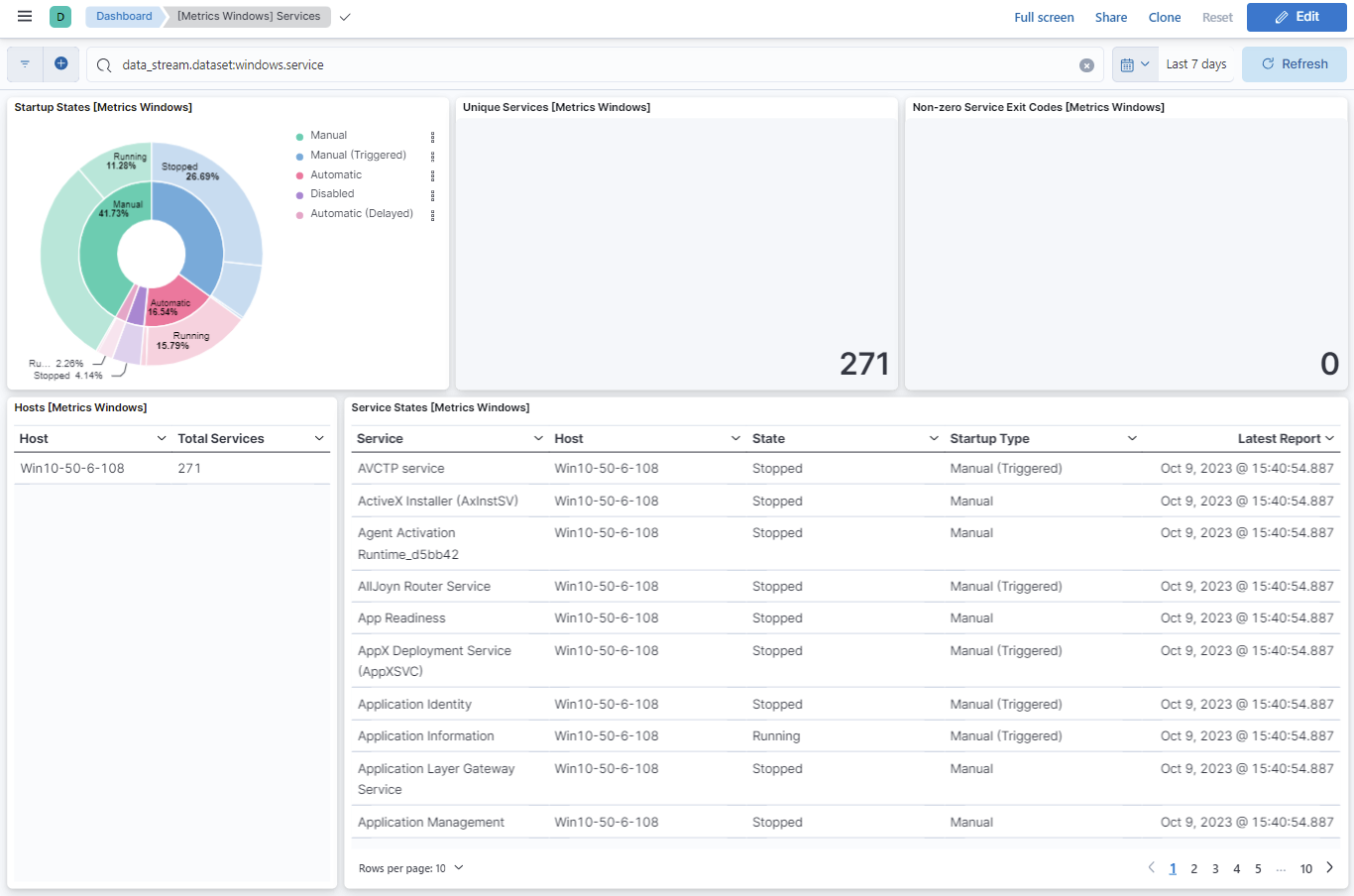
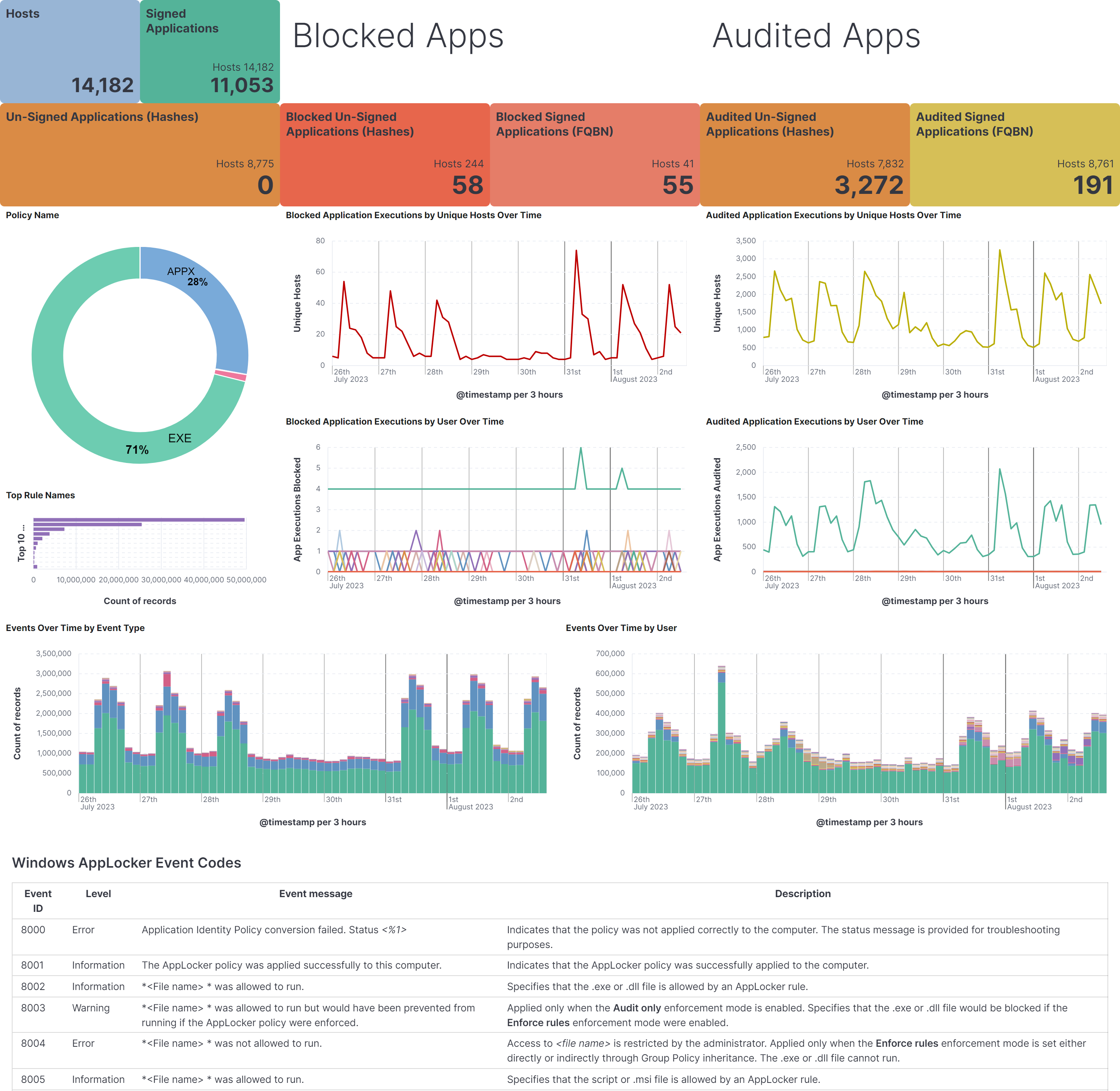
Changelog
| Version | Details | Minimum Kibana version |
|---|---|---|
| 3.13.1 | Bug fix (View pull request) Fix PowerShell 4103 ContextInfo parsing so lines of a multi-line Host Application script are not taken as keys, and localized keys that contain non-ASCII letters, apostrophes or dots, such as Aplicación host, Nom d’hôte and Id. de host, are parsed. |
9.0.0 8.14.0 |
| 3.13.0 | Enhancement (View pull request) Categorize forwarded Windows System channel events 6005 and 7045, and map service installation details from event 7045. |
9.0.0 8.14.0 |
| 3.12.1 | Bug fix (View pull request) Parse the publisher in AppLocker fully qualified binary name (FQBN) values with a kv processor in all four AppLocker data streams, so any subset and order of CN, O, L, S and C populates file.x509.subject.*, and other attributes, including OID.* keys, are ignored. This fixes pipeline failures for publishers that are only a CN= common name.Bug fix (View pull request) Store only the common name in file.x509.subject.common_name for AppLocker EXE and DLL publishers with a CN=..., O=... subject, and remove the surrounding double quotes from quoted publisher values, turning doubled inner quotes into single ones.Bug fix (View pull request) Stop adding empty strings to AppLocker file.x509.subject.* fields, and store file.x509.subject.locality as an array in the EXE and DLL data stream.Bug fix (View pull request) Add an error.message instead of failing the pipeline when an AppLocker FQBN value cannot be parsed, so that @custom pipelines still run. |
9.0.0 8.14.0 |
| 3.12.0 | Enhancement (View pull request) Add a start_position advanced setting to the winlog data streams to skip events that already exist in the channel when no bookmark has been saved. Requires Elastic Agent 9.6.0 or later; earlier agents ignore it. |
9.0.0 8.14.0 |
| 3.11.1 | Bug fix (View pull request) Fix PowerShell 4103/800 pipeline failure ( Index 4 out of bounds for length 4) on ParameterBinding lines that do not match the expected format, and parse localized ParameterBinding name/value labels. |
9.0.0 8.14.0 |
| 3.11.0 | Enhancement (View pull request) Normalize Active Directory Certificate Services (AD CS) audit events with native field mappings, winlog.adcs request fields, ECS user mappings, and event categorization. |
9.0.0 8.14.0 |
| 3.10.0 | Enhancement (View pull request) Deduplicate winlog ingest pipelines, field definitions, and input templates across data streams using shared files referenced via links. Bug fix (View pull request) Map Sysmon event 26 file delete hashes to file.hash instead of process.hash for forwarded events, matching the sysmon_operational data stream.Bug fix (View pull request) Declare file.x509.subject.common_name in the AppLocker MSI and Script data stream field definitions for consistency with the other AppLocker data streams. |
9.0.0 8.14.0 |
| 3.9.5 | Bug fix (View pull request) Include Windows Security event 6272 in subject-field ECS mapping for forwarded events. |
9.0.0 8.14.0 |
| 3.9.4 | Bug fix (View pull request) Parse PowerShell 4103 ContextInfo with a script processor so that indented multi-line values no longer fail the pipeline. |
9.0.0 8.14.0 |
| 3.9.3 | Bug fix (View pull request) Populate winlog.scheduled_task.settings.enabled with Task Scheduler's effective default of true when Settings/Enabled is omitted. |
9.0.0 8.14.0 |
| 3.9.2 | Bug fix (View pull request) Fix process.args and process.args_count in the forwarded Windows Event ID 4688 pipeline by discarding empty tokens produced by trailing or repeated whitespace in the command line. |
9.0.0 8.14.0 |
| 3.9.1 | Bug fix (View pull request) Fix Sysmon Event ID 7 pipeline failure when dll.code_signature is missing. |
9.0.0 8.14.0 |
| 3.9.0 | Enhancement (View pull request) Parse Windows Security scheduled task XML and task names into structured winlog.scheduled_task.* fields for detection and hunting. |
9.0.0 8.14.0 |
| 3.8.3 | Bug fix (View pull request) Map Sysmon event 26 file delete hashes to file.hash instead of process.hash. |
9.0.0 8.14.0 |
| 3.8.2 | Bug fix (View pull request) Fix file.path, file.name, and file.directory population for Windows Security events 5140 and 5145 by normalizing ShareLocalPath before combining with RelativeTargetName. |
9.0.0 8.14.0 |
| 3.8.1 | Bug fix (View pull request) Safely handle malformed UAC values in Windows Security event 4738 to prevent ingest pipeline failures. |
9.0.0 8.14.0 |
| 3.8.0 | Enhancement (View pull request) Add process.args_count to forwarded security process events (event 4688). Enhancement (View pull request) Map OperationType to event.reason and improve ObjectDN parsing for Windows Security event 5136. |
9.0.0 8.14.0 |
| 3.7.0 | Enhancement (View pull request) Populate ECS registry.path from winlog.event_data.ObjectName for Windows Security registry events(4657; and 4656, 4658, 4660, 4661, 4662, 4663 when ObjectType is Key or ObjectName starts with theNT \REGISTRY\ prefix). File and other object types are not mapped. |
9.0.0 8.14.0 |
| 3.6.1 | Bug fix (View pull request) Handle ContextInfo containing multi-line values in PowerShell Event ID 4103. |
9.0.0 8.14.0 |
| 3.6.0 | Enhancement (View pull request) Improve documentation |
9.0.0 8.14.0 |
| 3.5.0 | Enhancement (View pull request) Add support for more event ids 5137 and 5141 in the forwarded data stream. |
9.0.0 8.14.0 |
| 3.4.1 | Bug fix (View pull request) Prevent grok failure when pipeline attempts to parse an fqbn signed by a common name only. |
9.0.0 8.14.0 |
| 3.4.0 | Enhancement (View pull request) Optimize PowerShell script block entropy processing (faster calculation, skip truncated signature fragments) and add powershell.file.script_block_entropy_normalized scaled by script length for a 0-1 range. |
9.0.0 8.14.0 |
| 3.3.0 | Enhancement (View pull request) Makes Sysmon Library Load events compatible with DLL ECS fields. |
9.0.0 8.14.0 |
| 3.2.3 | Bug fix (View pull request) Fixed parsing of SidList field in Windows Security event 4908 (Special Groups Logon table modified) by normalizing whitespace separators. |
9.0.0 8.14.0 |
| 3.2.2 | Bug fix (View pull request) Remove the script_block_signature field to improve pipeline performance. |
9.0.0 8.14.0 |
| 3.2.1 | Bug fix (View pull request) Fix PowerShell pipeline to correctly populate user.domain, user.name, and script_block_signature fields. |
9.0.0 8.14.0 |
| 3.2.0 | Enhancement (View pull request) Expose the "Perfmon Match By Parent Instance" option in Windows Perfmon (default=true). When unchecked, unique instance names are used for processes with the same name. |
9.0.0 8.14.0 |
| 3.1.3 | Enhancement (View pull request) Add powershell.file.script_block_entropy_bits, powershell.file.script_block_surprisal_stdev, powershell.file.script_block_length, and powershell.file.script_block_unique_symbols fields to improve context. |
9.0.0 8.14.0 |
| 3.1.2 | Bug fix (View pull request) Remove unused agent files. |
9.0.0 8.14.0 |
| 3.1.1 | Bug fix (View pull request) Only try to extract extension when there is a dot in the file name in defender data stream. |
9.0.0 8.14.0 |
| 3.1.0 | Enhancement (View pull request) Several pipeline improvements, including: - Promote winlog.process.pid to process.pid in PowerShell and AppLocker data streams.- Improve grok pattern for Windows Defender paths. - Update field descriptions for winlog.process.pid to clarify its meaning. |
9.0.0 8.14.0 |
| 3.0.0 | Enhancement (View pull request) Remove deprecated httpjson input. |
9.0.0 8.14.0 |
| 2.5.2 | Bug fix (View pull request) Remove dynamic template to avoid ECS overrides. |
9.0.0 8.14.0 |
| 2.5.1 | Bug fix (View pull request) Fix boolean key in security pipeline. |
9.0.0 8.14.0 |
| 2.5.0 | Enhancement (View pull request) Port changes from beats pipelines. Enhancement (View pull request) Add constraint for 9.0.0. Enhancement (View pull request) Update to ECS 8.17.0 |
9.0.0 8.14.0 |
| 2.4.2 | Bug fix (View pull request) Updated SSL description to be uniform and to include links to documentation. |
8.14.0 |
| 2.4.1 | Enhancement (View pull request) For Windows security event logs, enrich group membership related events with an audit category and subcategory. |
8.14.0 |
| 2.4.0 | Enhancement (View pull request) Improve pipeline script to parse fully rendered events correctly. |
8.14.0 |
| 2.3.6 | Bug fix (View pull request) Update links to getting started docs |
8.14.0 |
| 2.3.5 | Bug fix (View pull request) Fix mapping of powershell.command.invocation_details field |
8.14.0 |
| 2.3.4 | Bug fix (View pull request) Fix mapping of dns.answers ECS field |
8.14.0 |
| 2.3.3 | Bug fix (View pull request) Defensively copy list parameters in 'Set ECS categorization fields' script. |
8.14.0 |
| 2.3.2 | Bug fix (View pull request) Fix powerhsell context info value split. |
8.14.0 |
| 2.3.1 | Bug fix (View pull request) Fix improper parsing of Path for Windows Defender, add more winlog fields |
8.14.0 |
| 2.3.0 | Enhancement (View pull request) Deprecate third-party REST API import option. |
8.14.0 |
| 2.2.0 | Bug fix (View pull request) Improve Windows Defender ECS mappings and make data stream GA |
8.14.0 |
| 2.1.0 | Enhancement (View pull request) Tighten IPv4 extraction from IPv4-mapped IPv6 addresses. |
8.14.0 |
| 2.0.2 | Bug fix (View pull request) Fix powershell error on events 40961 and 40962 (at minimum) |
8.14.0 |
| 2.0.1 | Bug fix (View pull request) Fix IPv6 cleanup step. |
8.14.0 |
| 2.0.0 | Enhancement (View pull request) Package spec to v3.2.1, which brings updates to dashboards, ingest pipelines and mappings for the following data streams. Ingest pipelines updated per data stream: - Data stream forwarded, pipelines: - powershell - powershell_operational - Data stream powershell, pipelines: - default - Data stream powershell_operational, pipelines: - default - Data stream sysmon_operational, pipelines: - default - Data stream windows_defender, pipelines: - default |
8.14.0 |
| 1.47.0 | Enhancement (View pull request) Add caseless fields to process events. |
8.8.0 |
| 1.46.1 | Bug fix (View pull request) Convert error.code to string |
8.8.0 |
| 1.46.0 | Enhancement (View pull request) Add initial Windows Defender data stream. |
8.8.0 |
| 1.45.1 | Bug fix (View pull request) Add missing preserve_original_event tag when toggled on for AppLocker, Powershell, Forwarded, and Sysmon. |
8.8.0 |
| 1.45.0 | Enhancement (View pull request) Add powershell.file.script_block_hash and powershell.file.script_block_signature fields. |
8.8.0 |
| 1.44.5 | Bug fix (View pull request) Fix splitting of parameters for event 600 where it can hold multiline values in parameters. |
8.8.0 |
| 1.44.4 | Bug fix (View pull request) Map host.os.type explicitly for all data streams. |
8.8.0 |
| 1.44.3 | Bug fix (View pull request) Add filters for visualizations to ensure only AppLocker events are displayed |
8.8.0 |
| 1.44.2 | Bug fix (View pull request) Added error.message and http.request.body.bytes ECS field mapping. |
8.8.0 |
| 1.44.1 | Bug fix (View pull request) Properly parse file hashes for Sysmon event ID 26, file delete detected |
8.8.0 |
| 1.44.0 | Enhancement (View pull request) Add custom configuration option to winlog inputs. |
8.8.0 |
| 1.43.0 | Enhancement (View pull request) Limit request tracer log count to five. |
8.8.0 |
| 1.42.1 | Bug fix (View pull request) Fixed parsing of winlog.event_data.MemberName in forwarded data stream when extra commas are present. |
8.8.0 |
| 1.42.0 | Enhancement (View pull request) Adding EventID 4662 and 5136, to use the winlog.event_data.SubjectUserName as user.name and related.user |
8.8.0 |
| 1.41.1 | Bug fix (View pull request) Fix security UAC attribute bit table in forwarded data stream. |
8.8.0 |
| 1.41.0 | Enhancement (View pull request) Migrate service dashboard visualizations to lens. |
8.8.0 |
| 1.40.0 | Enhancement (View pull request) Make ingest pipeline routing robust to letter case of channel names for forwarded events. |
8.8.0 |
| 1.39.0 | Enhancement (View pull request) Added field winlog.event_data.EnabledPrivilegeList as type keyword to forwarded data stream. |
8.8.0 |
| 1.38.0 | Enhancement (View pull request) Modified the field definitions to reference ECS where possible and remove invalid field attributes. |
8.8.0 |
| 1.37.0 | Enhancement (View pull request) Add refresh_wildcard_counters option to windows perfmon datastream. |
8.8.0 |
| 1.36.0 | Enhancement (View pull request) Enable time series data streams for the service metrics dataset. This dramatically reduces storage for metrics and is expected to progressively improve query performance. For more details, see https://www.elastic.co/guide/en/elasticsearch/reference/current/tsds.html. |
8.8.0 |
| 1.35.0 | Enhancement (View pull request) Reconcile forwarded event pipelines with their non-forwarded equivalents. |
8.7.1 |
| 1.34.1 | Enhancement (View pull request) Add metric_type mapping for the fields of service datastream. |
8.7.1 |
| 1.34.0 | Enhancement (View pull request) Add dimension fields for service datastream to support TSDB. |
8.7.1 |
| 1.33.0 | Enhancement (View pull request) Retain event_data.Details in sysmon_operational datastream. |
8.7.1 |
| 1.32.0 | Enhancement (View pull request) Add Windows AppLocker Packaged app-Execution data stream |
8.7.1 |
| 1.31.0 | Enhancement (View pull request) Add Windows AppLocker Packaged app-Deployment data stream |
8.7.1 |
| 1.30.0 | Enhancement (View pull request) Add Windows AppLocker MSI and Script data stream, update AppLocker Dashboard. |
8.7.1 |
| 1.29.0 | Enhancement (View pull request) Align to more ECS fields, remove [beta] tag, add dashboard |
8.7.1 |
| 1.28.1 | Bug fix (View pull request) Improve regular expression search efficiency to allow parsing large events. |
8.7.1 |
| 1.28.0 | Enhancement (View pull request) Add support for Sysmon event ID 29 file hashes |
8.7.1 |
| 1.27.0 | Enhancement (View pull request) Adding initial Windows AppLocker data stream [beta] |
8.7.1 |
| 1.26.0 | Enhancement (View pull request) Set event.action to sysmon name in sysmon_operational. |
8.7.1 |
| 1.25.0 | Enhancement (View pull request) Add support for sysmon 15.0/event 29. |
8.7.1 |
| 1.24.1 | Bug fix (View pull request) Add ECS error.code mapping. |
8.7.1 |
| 1.24.0 | Enhancement (View pull request) Ensure event.kind is correctly set for pipeline errors. |
8.7.1 |
| 1.23.0 | Enhancement (View pull request) Allow DNS query responses to have no data. |
8.7.1 |
| 1.22.0 | Enhancement (View pull request) Set host.os.type and host.os.family in forwarded events. |
8.7.1 |
| 1.21.1 | Bug fix (View pull request) Improve regular expression search efficiency to allow parsing large events. |
8.7.1 |
| 1.21.0 | Enhancement (View pull request) Add a new flag to enable request tracing |
8.7.1 |
| 1.20.1 | Bug fix (View pull request) Add event.category and event.type to Sysmon events |
8.4.0 |
| 1.20.0 | Enhancement (View pull request) Update test expectations for processor behaviour. |
8.4.0 |
| 1.19.2 | Enhancement (View pull request) Document 21 Event ID clause limit under certain situations. |
8.0.0 7.16.0 |
| 1.19.1 | Bug fix (View pull request) Update event code in powershell_operational ingest pipeline processor description |
8.0.0 7.16.0 |
| 1.19.0 | Enhancement (View pull request) Support Sysmon EventIDs - 8, 9, 19, 20, 27, 28, 255 |
8.0.0 7.16.0 |
| 1.18.0 | Enhancement (View pull request) Fix mapping/pipelines for winlog.time_created |
8.0.0 7.16.0 |
| 1.17.0 | Enhancement (View pull request) Add CallTrace, GrantedAccess, TargetImage, TargetProcessGUID, fields to sysmon_operational fields |
8.0.0 7.16.0 |
| 1.16.0 | Enhancement (View pull request) Add support for custom processors in Windows Perfmon |
8.0.0 7.16.0 |
| 1.15.2 | Bug fix (View pull request) Fix translate_sid processor error in forwarded data stream. |
8.0.0 7.16.0 |
| 1.15.1 | Bug fix (View pull request) Fix support for user-provided processors. |
8.0.0 7.16.0 |
| 1.15.0 | Enhancement (View pull request) Add support for events 4674, 4738 and 4742. |
8.0.0 7.16.0 |
| 1.14.1 | Bug fix (View pull request) Fix translate_sid processor error in powershell operational data stream. |
8.0.0 7.16.0 |
| 1.14.0 | Enhancement (View pull request) Use MemberSid to enrich for user name and domain where possible. |
8.0.0 7.16.0 |
| 1.13.0 | Enhancement (View pull request) Added Processors for service datastream. |
— |
| 1.12.4 | Enhancement (View pull request) Update documentation with additional context for new users. |
8.0.0 7.16.0 |
| 1.12.3 | Enhancement (View pull request) update readme added link to Microsoft documentation and reworded a link |
— |
| 1.12.2 | Bug fix (View pull request) Fix processing of Powershell event 800 parameter details. |
— |
| 1.12.1 | Bug fix (View pull request) Drop unset fields in sysmon_operational data stream. |
8.0.0 7.16.0 |
| 1.12.0 | Enhancement (View pull request) Support for Sysmon Registry non-QWORD/DWORD events |
— |
| 1.11.0 | Enhancement (View pull request) Add parent process ID to security event for new process creation. |
— |
| 1.10.1 | Enhancement (View pull request) Add documentation for multi-fields |
— |
| 1.10.0 | Enhancement (View pull request) Add sysmon event 26 handling Enhancement (View pull request) Normalise field order and remove event.ingested |
— |
| 1.9.0 | Enhancement (View pull request) Expose winlog input ignore_older option. Bug fix (View pull request) Fix preserve original event option Enhancement (View pull request) Make order of options consistent with other winlog based integrations. |
— |
| 1.8.0 | Enhancement (View pull request) Update to ECS 8.0 |
— |
| 1.7.0 | Enhancement (View pull request) Add provider name check to forwarded/security conditional. |
— |
| 1.6.0 | Enhancement (View pull request) Expose winlog input language option. |
— |
| 1.5.1 | Bug fix (View pull request) Change test public IPs to the supported subset |
— |
| 1.5.0 | Enhancement (View pull request) Support Kibana 8.0 |
8.0.0 7.14.0 |
| 1.4.0 | Enhancement (View pull request) Don't split hyphenated tokens for PowerShell scripts |
— |
| 1.3.3 | Enhancement (View pull request) Uniform with guidelines |
— |
| 1.3.2 | Bug fix (View pull request) Fix processors configuration |
— |
| 1.3.1 | Enhancement (View pull request) Update Splunk input description |
— |
| 1.3.0 | Bug fix (View pull request) Consistently map message field in Windows integrations. |
— |
| 1.2.3 | Bug fix (View pull request) Fix ingest pipeline templating for related.ip |
— |
| 1.2.2 | Bug fix (View pull request) Prevent pipeline script error |
7.14.0 |
| 1.2.1 | Bug fix (View pull request) Fix logic that checks for the 'forwarded' tag |
— |
| 1.2.0 | Enhancement (View pull request) Update to ECS 1.12.0 |
— |
| 1.1.3 | Enhancement (View pull request) Convert to generated ECS fields |
— |
| 1.1.2 | Enhancement (View pull request) update to ECS 1.11.0 |
— |
| 1.1.1 | Enhancement (View pull request) Escape special characters in docs |
— |
| 1.1.0 | Enhancement (View pull request) Update integration description |
— |
| 1.0.0 | Enhancement (View pull request) make GA Enhancement (View pull request) Set "event.module" and "event.dataset" |
7.14.0 |
| 0.9.2 | Enhancement (View pull request) Add support for Splunk authorization tokens |
— |
| 0.9.1 | Enhancement (View pull request) Use new wildcard type. |
— |
| 0.9.0 | Enhancement (View pull request) Make event.original optional and upgrade to ECS 1.10.0. |
— |
| 0.8.2 | Enhancement (View pull request) Add system tests for Splunk http inputs and improve README. Bug fix (View pull request) Fix sysmon pipeline when processing dns.resolved_ip. |
— |
| 0.8.1 | Bug fix (View pull request) Fix security pipeline to support string event.code. |
— |
| 0.8.0 | Enhancement (View pull request) Use ingest pipelines for forwarded dataset. |
— |
| 0.7.0 | Enhancement (View pull request) Move Sysmon edge processing to ingest pipeline. |
— |
| 0.6.0 | Enhancement (View pull request) Move PowerShell edge processing to ingest pipeline. |
— |
| 0.5.2 | Enhancement (View pull request) Change Splunk input to use the decode_xml_wineventlog processor. |
— |
| 0.5.1 | Enhancement (View pull request) Add support for Sysmon v13 events. |
— |
| 0.5.0 | Enhancement (View pull request) Add Splunk input for Winlog data streams. |
— |
| 0.4.3 | Enhancement (View pull request) Updating package owner Enhancement (View pull request) update to ECS 1.9.0 |
— |
| 0.4.2 | Bug fix (View pull request) Move security data stream |
— |
| 0.4.1 | Bug fix (View pull request) Fix Guards |
— |
| 0.1.0 | Enhancement (View pull request) initial release |
— |