Thycotic Secret Server
Elastic Cloud Serverless projects are autoscaled environments, fully managed by Elastic and available on Elastic Cloud. Availability This functionality is generally available and ready for production usage. Elastic Cloud Serverless projects are autoscaled environments, fully managed by Elastic and available on Elastic Cloud. Availability This functionality is generally available and ready for production usage. The Elastic Stack includes Elastic's core products such as Elasticsearch, Kibana, Logstash, and Beats. Availability This functionality is generally available and ready for production usage. Unless stated otherwise on the page, this functionality is available when your Elastic Stack is deployed on Elastic Cloud Hosted, Elastic Cloud Enterprise, Elastic Cloud on Kubernetes, and self-managed environments. This documentation corresponds to the latest patch available for each minor version. If you're not using the latest patch, check the release notes for changes.
Serverless Observability
Generally available
Serverless Security
Generally available
Stack
9.0+
Generally available since 9.0
| Version | 1.13.0 (View all) |
| Subscription level What's this? |
Basic |
| Developed by What's this? |
Community |
| Ingestion method(s) | File, Network Protocol |
| Minimum Kibana version(s) | 9.0.0 8.13.0 |
The Thycotic integration allows you to collect logs from Thycotic Secret Server transmitted using syslog.
If you have used an external syslog receive to write the logs to file, you can also use this integration to read the log file.
Thycotic is now known as Delinea. At this point though, no changes have occurred to the Secret Server product to change how logging works, and the product is still referred to as Thycotic Secret Server, so this integration still uses "thycotic" as the reference to the vendor.
The Thycotic integration collects one type of data stream: logs
Log data streams collected by the Thycotic Secret Server integration include admin activity and PAM events, including secret access and modification.
You need Elasticsearch for storing and searching your data and Kibana for visualizing and managing it.
You can use our hosted Elasticsearch Service on Elastic Cloud, which is recommended, or self-manage the Elastic Stack on your own hardware.
The official vendor documentation regarding how to configure Secret Server to send syslog is here Secure Syslog/CEF Logging
This PDF is also useful as a reference for how Thycotic Secret Server generates logs in CEF format.
This integration has been tested against Thycotic Secret Server version 11.2.000002 and 11.3.000001.
Versions above this are expected to work but have not been tested.
If the "Preserve original event" is enabled, this will add the tag preserve_original_event to the event. event.original will be set with the original message contents, which is pre-CEF and pre-syslog parsing. This is useful to see what was originally received from Thycotic in case the decode_cef filebeat processor is failing for some reason.
This is a real concern, as the integration already uses a custom filebeat javascript processor snippet to fix instances of unescaped backslashes which arrive from Secret Server, and which will cause decode_cef to fail.
This,
function process(event) {
  event.Put("message", event.Get("message").replace(/\b\\\b/g,"\\\\"));
}
Fixes this as the raw log message emitted by Thycotic SS,
Nov 10 13:13:32 THYCOTICSS02 CEF:0|Thycotic Software|Secret Server|11.3.000001|10004|SECRET - VIEW|2|msg=[[SecretServer]] Event: [Secret] Action: [View] By User: U.Admin Item Name: Admin User Personal Admin Account - example\adminuser (Item Id: 12) Container Name: Admin User (Container Id: 11) suid=2 suser=U.Admin cs4=Unlimited Administrator cs4Label=suser Display Name src=172.16.1.116 rt=Nov 10 2022 13:13:23 fname=Admin User Personal Admin Account - example\adminuser fileType=Secret fileId=12 cs3Label=Folder cs3=Admin User
Note how the message contains example\adminuser, and fname contains the same example\adminuser.
If the single \ is not replaced with an escaped backslash, e.g. \\ prior to decode_cef being used, decode_cef will do the following,
- Add the following error.message array to the event,
"error": {
    "message": [
      "malformed value for msg at pos 197",
      "malformed value for fname at pos 436"
    ]
  }
- Delete the
messagefield that it original parsed (normal behaviour?) - Fail to add the
cef.extensions.messageandcef.extensions.filenameto the event, because it errored when tring to parse them
So if you're seeing error messages like the above, it may be a similar issue with decode_cef that will require the javascript processor hack to be expanded.
If the "preserve_cef" tag is added to an integration input, the cef object and all fields under it will be preserved.
If the "preserve_log" tag is added to an integration input, the log object and all fields under it will be preserved.
The thycotic_ss.logs data stream provides events from Thycotic Secret Server of the following types: logs
An example event for thycotic_ss.logs looks as following:
Example
{
    "@timestamp": "2025-11-10T13:13:18.000Z",
    "agent": {
        "ephemeral_id": "9b332f1b-3496-4574-ace8-0c4e93681d56",
        "id": "4cad8b8e-68de-45a6-938c-44935eb26c44",
        "name": "elastic-agent-81566",
        "type": "filebeat",
        "version": "8.19.2"
    },
    "data_stream": {
        "dataset": "thycotic_ss.logs",
        "namespace": "62177",
        "type": "logs"
    },
    "ecs": {
        "version": "8.11.0"
    },
    "elastic_agent": {
        "id": "4cad8b8e-68de-45a6-938c-44935eb26c44",
        "snapshot": false,
        "version": "8.19.2"
    },
    "event": {
        "action": "password_displayed",
        "agent_id_status": "verified",
        "category": [
            "iam"
        ],
        "code": "10039",
        "dataset": "thycotic_ss.logs",
        "ingested": "2025-11-10T07:36:05Z",
        "kind": "event",
        "provider": "secret",
        "type": [
            "info"
        ]
    },
    "host": {
        "ip": [
            "172.24.0.3"
        ],
        "name": "THYCOTICSS02"
    },
    "input": {
        "type": "udp"
    },
    "message": "[[SecretServer]] Event: [Secret] Action: [Password displayed] By User: Example.com\\user.ad Item name: File Name (Item Id: 5631) Container name: Sample User(admin) (Container Id: 1493) Details: Fields: (Password)",
    "observer": {
        "hostname": "THYCOTICSS02",
        "ip": [
            "172.24.0.3"
        ],
        "product": "Secret Server",
        "vendor": "Thycotic Software",
        "version": "11.7.000061"
    },
    "related": {
        "hosts": [
            "THYCOTICSS02"
        ],
        "ip": [
            "172.24.0.3",
            "10.10.0.12"
        ]
    },
    "source": {
        "ip": "10.10.0.12"
    },
    "tags": [
        "forwarded"
    ],
    "thycotic_ss": {
        "event": {
            "secret": {
                "folder": "Sample User(admin)",
                "id": "5631",
                "name": "File Name"
            }
        }
    },
    "user": {
        "domain": "Example.com",
        "full_name": "Sample User(admin)",
        "id": "971"
    }
}
The following fields may be used by the package:
Exported fields
| Field | Description | Type |
|---|---|---|
| @timestamp | Date/time when the event originated. This is the date/time extracted from the event, typically representing when the event was generated by the source. If the event source has no original timestamp, this value is typically populated by the first time the event was received by the pipeline. Required field for all events. | date |
| cef.version | keyword | |
| data_stream.dataset | Data stream dataset. | constant_keyword |
| data_stream.namespace | Data stream namespace. | constant_keyword |
| data_stream.type | Data stream type. | constant_keyword |
| input.type | keyword | |
| thycotic_ss.event.folder.folder | keyword | |
| thycotic_ss.event.folder.id | keyword | |
| thycotic_ss.event.folder.name | keyword | |
| thycotic_ss.event.group.folder | keyword | |
| thycotic_ss.event.group.id | keyword | |
| thycotic_ss.event.group.name | keyword | |
| thycotic_ss.event.permission.folder | keyword | |
| thycotic_ss.event.permission.id | keyword | |
| thycotic_ss.event.permission.name | keyword | |
| thycotic_ss.event.role.folder | keyword | |
| thycotic_ss.event.role.id | keyword | |
| thycotic_ss.event.role.name | keyword | |
| thycotic_ss.event.secret.folder | keyword | |
| thycotic_ss.event.secret.id | keyword | |
| thycotic_ss.event.secret.name | keyword | |
| thycotic_ss.event.time | date | |
| thycotic_ss.event.user.domain | keyword | |
| thycotic_ss.event.user.folder | keyword | |
| thycotic_ss.event.user.full_name | keyword | |
| thycotic_ss.event.user.id | keyword | |
| thycotic_ss.event.user.name | keyword |
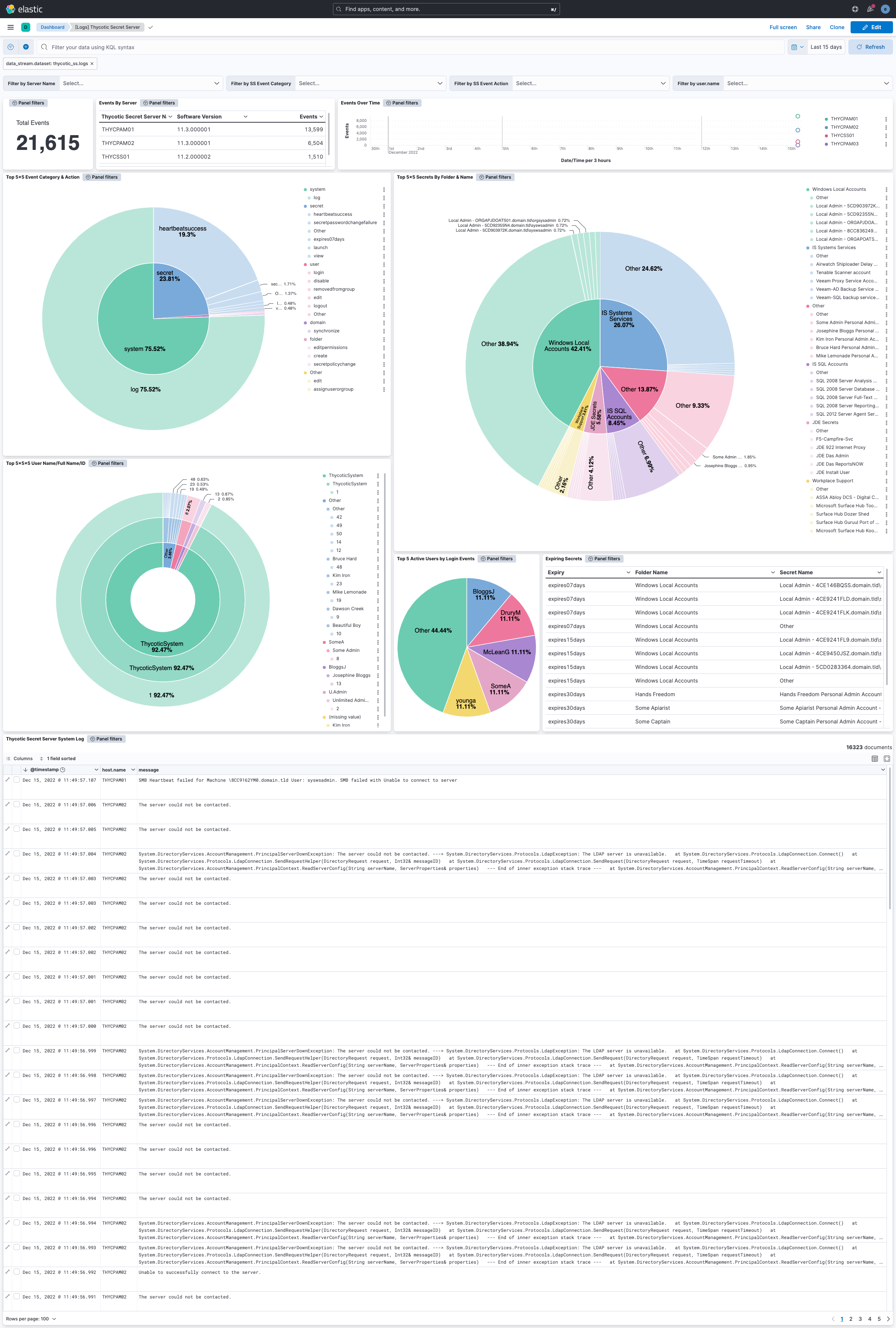
This integration includes one or more Kibana dashboards that visualizes the data collected by the integration. The screenshots below illustrate how the ingested data is displayed.
Changelog
| Version | Details | Minimum Kibana version |
|---|---|---|
| 1.13.0 | Enhancement (View pull request) Add tags to ingest pipeline processors and add preserve_original_event to pipeline-level on_failure handlers. |
9.0.0 8.13.0 |
| 1.12.1 | Bug fix (View pull request) Handle missing cef.extensions.deviceReceiptTime field. |
9.0.0 8.13.0 |
| 1.12.0 | Enhancement (View pull request) Update Kibana constraint to support 9.0.0. |
9.0.0 8.13.0 |
| 1.11.1 | Bug fix (View pull request) Updated SSL description to be uniform and to include links to documentation. |
8.13.0 |
| 1.11.0 | Enhancement (View pull request) Allow the usage of deprecated log input and support for stack 9.0 |
8.13.0 |
| 1.10.0 | Enhancement (View pull request) Do not remove event.original in main ingest pipeline. |
8.13.0 |
| 1.9.1 | Bug fix (View pull request) Fix broken links in Security Service integrations packages. |
8.13.0 |
| 1.9.0 | Enhancement (View pull request) Add "preserve_original_event" tag to documents with event.kind set to "pipeline_error". |
8.13.0 |
| 1.8.1 | Bug fix (View pull request) Use triple-brace Mustache templating when referencing variables in ingest pipelines. |
8.13.0 |
| 1.8.0 | Enhancement (View pull request) Update the kibana constraint to ^8.13.0. Modified the field definitions to remove ECS fields made redundant by the ecs@mappings component template. |
8.13.0 |
| 1.7.0 | Enhancement (View pull request) Update manifest format version to v3.0.3. |
8.5.0 |
| 1.6.2 | Enhancement (View pull request) Changed owners |
8.5.0 |
| 1.6.1 | Bug fix (View pull request) Fix exclude_files pattern. |
8.5.0 |
| 1.6.0 | Enhancement (View pull request) ECS version updated to 8.11.0. |
8.5.0 |
| 1.5.0 | Enhancement (View pull request) Set 'community' owner type. |
8.5.0 |
| 1.4.0 | Enhancement (View pull request) ECS version updated to 8.10.0. |
8.5.0 |
| 1.3.0 | Enhancement (View pull request) The format_version in the package manifest changed from 2.11.0 to 3.0.0. Removed dotted YAML keys from package manifest. Added 'owner.type: elastic' to package manifest. |
8.5.0 |
| 1.2.0 | Enhancement (View pull request) Add tags.yml file so that integration's dashboards and saved searches are tagged with "Security Solution" and displayed in the Security Solution UI. |
8.5.0 |
| 1.1.0 | Enhancement (View pull request) Update package to ECS 8.9.0. |
8.5.0 |
| 1.0.0 | Enhancement (View pull request) Release Thyotic Secret Server as GA. |
8.5.0 |
| 0.4.0 | Enhancement (View pull request) Ensure event.kind is correctly set for pipeline errors. |
8.5.0 |
| 0.3.0 | Enhancement (View pull request) Update package to ECS 8.8.0. |
8.5.0 |
| 0.2.0 | Enhancement (View pull request) Update package-spec version to 2.7.0. |
8.5.0 |
| 0.1.0 | Enhancement (View pull request) Update package to ECS 8.7.0. |
8.5.0 |
| 0.0.1 | Enhancement (View pull request) Initial draft of the package |
8.5.0 |