TYCHON Agentless
Elastic Cloud Serverless projects are autoscaled environments, fully managed by Elastic and available on Elastic Cloud. Availability This functionality is generally available and ready for production usage. The Elastic Stack includes Elastic's core products such as Elasticsearch, Kibana, Logstash, and Beats. Availability This functionality is generally available and ready for production usage. Unless stated otherwise on the page, this functionality is available when your Elastic Stack is deployed on Elastic Cloud Hosted, Elastic Cloud Enterprise, Elastic Cloud on Kubernetes, and self-managed environments. This documentation corresponds to the latest patch available for each minor version. If you're not using the latest patch, check the release notes for changes.
Serverless Security
Generally available
Stack
9.0+
Generally available since 9.0
| Version | 1.2.0 (View all) |
| Subscription level What's this? |
Basic |
| Developed by What's this? |
Partner |
| Ingestion method(s) | File |
| Minimum Kibana version(s) | 9.0.0 8.14.0 |
TYCHON Agentless is an integration that lets you collect TYCHON's gold source Master Endpoint Record data from endpoints, including vulnerability and STIG results, without heavy resource use or software installation. You can then investigate the TYCHON data using Elastic's analytics, visualizations, and dashboards. Contact us to learn more..
- This integration supports Windows and RedHat/CENTOS Endpoint Operating Systems.
- This integration requires a TYCHON Agentless license.
- This integration requires TYCHON Vulnerability Definition files.
- The Linux Endpoint requires RedHat's OpenScap to be installed for STIG and CVE to report data.
TYCHON scans Endpoint ARP Tables and returns the results.
Exported fields
| Field | Description | Type |
|---|---|---|
| @timestamp | Date/time when the event originated. This is the date/time extracted from the event, typically representing when the event was generated by the source. If the event source has no original timestamp, this value is typically populated by the first time the event was received by the pipeline. Required field for all events. | date |
| data_stream.dataset | The field can contain anything that makes sense to signify the source of the data. Examples include nginx.access, prometheus, endpoint etc. For data streams that otherwise fit, but that do not have dataset set we use the value "generic" for the dataset value. event.dataset should have the same value as data_stream.dataset. Beyond the Elasticsearch data stream naming criteria noted above, the dataset value has additional restrictions: * Must not contain - * No longer than 100 characters |
constant_keyword |
| data_stream.namespace | A user defined namespace. Namespaces are useful to allow grouping of data. Many users already organize their indices this way, and the data stream naming scheme now provides this best practice as a default. Many users will populate this field with default. If no value is used, it falls back to default. Beyond the Elasticsearch index naming criteria noted above, namespace value has the additional restrictions: * Must not contain - * No longer than 100 characters |
constant_keyword |
| data_stream.type | An overarching type for the data stream. Currently allowed values are "logs" and "metrics". We expect to also add "traces" and "synthetics" in the near future. | constant_keyword |
| input.type | Input Type. | keyword |
| labels.is_transform_source | Distinguishes between documents that are a source for a transform and documents that are an output of a transform, to facilitate easier filtering. | constant_keyword |
| log.file.device_id | ID of the device containing the filesystem where the file resides. | keyword |
| log.file.fingerprint | The sha256 fingerprint identity of the file when fingerprinting is enabled. | keyword |
| log.file.idxhi | The high-order part of a unique identifier that is associated with a file. (Windows-only) | keyword |
| log.file.idxlo | The low-order part of a unique identifier that is associated with a file. (Windows-only) | keyword |
| log.file.inode | Inode number of the log file. | keyword |
| log.file.vol | The serial number of the volume that contains a file. (Windows-only) | keyword |
| log.offset | Log Offset. | long |
| tychon.destination.hostname | The Translated Hostname of the IP in the ARP Table | keyword |
| tychon.destination.ip | IP address of the destination (IPv4 or IPv6). | ip |
| tychon.destination.mac | MAC address of the destination. The notation format from RFC 7042 is suggested: Each octet (that is, 8-bit byte) is represented by two [uppercase] hexadecimal digits giving the value of the octet as an unsigned integer. Successive octets are separated by a hyphen. | keyword |
| tychon.destination.name | keyword | |
| tychon.host.architecture | Operating system architecture. | keyword |
| tychon.host.biossn | Host BIOS Serial Number. | keyword |
| tychon.host.domain | Name of the domain of which the host is a member. For example, on Windows this could be the host's Active Directory domain or NetBIOS domain name. For Linux this could be the domain of the host's LDAP provider. | keyword |
| tychon.host.hardware.bios.name | Host BIOS Name. | keyword |
| tychon.host.hardware.bios.version | Host BIOS Version. | keyword |
| tychon.host.hardware.cpu.caption | Host CPU Caption. | keyword |
| tychon.host.hardware.manufacturer | Host BIOS Manufacturer. | keyword |
| tychon.host.hardware.owner | Host BIOS Owner. | keyword |
| tychon.host.hardware.serial_number | Host BIOS Serial Number. | keyword |
| tychon.host.hostname | Hostname of the host. It normally contains what the hostname command returns on the host machine. |
keyword |
| tychon.host.id | Unique host id. As hostname is not always unique, use values that are meaningful in your environment. Example: The current usage of beat.name. |
keyword |
| tychon.host.ip | Host ip addresses. | ip |
| tychon.host.ipv4 | Host IPv4 addresses. | ip |
| tychon.host.ipv6 | Host IPv6 addresses. | keyword |
| tychon.host.mac | Host MAC addresses. The notation format from RFC 7042 is suggested: Each octet (that is, 8-bit byte) is represented by two [uppercase] hexadecimal digits giving the value of the octet as an unsigned integer. Successive octets are separated by a hyphen. | keyword |
| tychon.host.name | Name of the host. It can contain what hostname returns on Unix systems, the fully qualified domain name (FQDN), or a name specified by the user. The recommended value is the lowercase FQDN of the host. | keyword |
| tychon.host.oem.manufacturer | Host OEM Manufacturer. | keyword |
| tychon.host.oem.model | Host OEM Model. | keyword |
| tychon.host.os.build | Host OS Build. | keyword |
| tychon.host.os.description | Host OS Description. | text |
| tychon.host.os.family | OS family (such as redhat, debian, freebsd, windows). | keyword |
| tychon.host.os.kernel | Operating system kernel version as a raw string. | keyword |
| tychon.host.os.name | Operating system name, without the version. | keyword |
| tychon.host.os.name.text | Multi-field of tychon.host.os.name. |
match_only_text |
| tychon.host.os.organization | Host OS Organization. | keyword |
| tychon.host.os.platform | Operating system platform (such centos, ubuntu, windows). | keyword |
| tychon.host.os.type | Use the os.type field to categorize the operating system into one of the broad commercial families. If the OS you're dealing with is not listed as an expected value, the field should not be populated. Please let us know by opening an issue with ECS, to propose its addition. |
keyword |
| tychon.host.os.version | Operating system version as a raw string. | keyword |
| tychon.host.type | Type of host. For Cloud providers this can be the machine type like t2.medium. If vm, this could be the container, for example, or other information meaningful in your environment. |
keyword |
| tychon.host.uptime | Seconds the host has been up. | long |
| tychon.host.workgroup | Host Workgroup Network Name. | keyword |
| tychon.id | TYCHON unique document identifier. | keyword |
| tychon.network.direction | Direction of the network traffic. When mapping events from a host-based monitoring context, populate this field from the host's point of view, using the values "ingress" or "egress". When mapping events from a network or perimeter-based monitoring context, populate this field from the point of view of the network perimeter, using the values "inbound", "outbound", "internal" or "external". Note that "internal" is not crossing perimeter boundaries, and is meant to describe communication between two hosts within the perimeter. Note also that "external" is meant to describe traffic between two hosts that are external to the perimeter. This could for example be useful for ISPs or VPN service providers. | keyword |
| tychon.network.interface | The interface the ARP Table has associated the destination. | keyword |
| tychon.network.state | Current state | keyword |
| tychon.network.type | In the OSI Model this would be the Network Layer. ipv4, ipv6, ipsec, pim, etc The field value is normalized to lowercase for querying. | keyword |
| tychon.script.current_duration | Scanner Script Duration. | long |
| tychon.script.current_time | Current datetime. | date |
| tychon.script.name | Scanner Script Name. | keyword |
| tychon.script.start | Scanner Start datetime. | date |
| tychon.script.type | Scanner Script Type. | keyword |
| tychon.script.version | Scanner Script Version. | version |
| tychon.tychon.data.version | Tychon data version | keyword |
| tychon.tychon.id | TYCHON unique host identifier. | keyword |
TYCHON checks local browser configuration settings.
Exported fields
| Field | Description | Type |
|---|---|---|
| @timestamp | Date/time when the event originated. This is the date/time extracted from the event, typically representing when the event was generated by the source. If the event source has no original timestamp, this value is typically populated by the first time the event was received by the pipeline. Required field for all events. | date |
| data_stream.dataset | The field can contain anything that makes sense to signify the source of the data. Examples include nginx.access, prometheus, endpoint etc. For data streams that otherwise fit, but that do not have dataset set we use the value "generic" for the dataset value. event.dataset should have the same value as data_stream.dataset. Beyond the Elasticsearch data stream naming criteria noted above, the dataset value has additional restrictions: * Must not contain - * No longer than 100 characters |
constant_keyword |
| data_stream.namespace | A user defined namespace. Namespaces are useful to allow grouping of data. Many users already organize their indices this way, and the data stream naming scheme now provides this best practice as a default. Many users will populate this field with default. If no value is used, it falls back to default. Beyond the Elasticsearch index naming criteria noted above, namespace value has the additional restrictions: * Must not contain - * No longer than 100 characters |
constant_keyword |
| data_stream.type | An overarching type for the data stream. Currently allowed values are "logs" and "metrics". We expect to also add "traces" and "synthetics" in the near future. | constant_keyword |
| input.type | Input Type. | keyword |
| labels.is_transform_source | Distinguishes between documents that are a source for a transform and documents that are an output of a transform, to facilitate easier filtering. | constant_keyword |
| log.file.device_id | ID of the device containing the filesystem where the file resides. | keyword |
| log.file.fingerprint | The sha256 fingerprint identity of the file when fingerprinting is enabled. | keyword |
| log.file.idxhi | The high-order part of a unique identifier that is associated with a file. (Windows-only) | keyword |
| log.file.idxlo | The low-order part of a unique identifier that is associated with a file. (Windows-only) | keyword |
| log.file.inode | Inode number of the log file. | keyword |
| log.file.vol | The serial number of the volume that contains a file. (Windows-only) | keyword |
| log.offset | Log Offset. | long |
| tychon.data.version | Tychon Data version. | keyword |
| tychon.destination.ip | IP address of the destination (IPv4 or IPv6). | ip |
| tychon.destination.mac | MAC address of the destination. The notation format from RFC 7042 is suggested: Each octet (that is, 8-bit byte) is represented by two [uppercase] hexadecimal digits giving the value of the octet as an unsigned integer. Successive octets are separated by a hyphen. | keyword |
| tychon.edition | The product edition | keyword |
| tychon.event.reason | Event reason. | keyword |
| tychon.host.architecture | Operating system architecture. | keyword |
| tychon.host.biossn | Host BIOS Serial Number. | keyword |
| tychon.host.cloud.compute.location | The location of this cloud asset. | keyword |
| tychon.host.cloud.compute.name | The cloud based name of this asset | keyword |
| tychon.host.cloud.compute.resource_group_name | The resource group name given to this cloud asset | keyword |
| tychon.host.cloud.compute.resource_id | The cloud resource id assignd to this cloud asset. | keyword |
| tychon.host.cloud.compute.subscription_id | The subscription ID of the account for this cloud asset | keyword |
| tychon.host.cloud.compute.tags | Cloud compute tags assigned to this machine. | keyword |
| tychon.host.cloud.compute.vm_id | The Cloud ID of this cloud asset | keyword |
| tychon.host.cloud.hosted | Is this system cloud hosted | boolean |
| tychon.host.cloud.network.mac_address | Public facing MAC address of this cloud asset | keyword |
| tychon.host.cloud.network.public_ipv4 | Public facing IPV4 address for a cloud instance. | keyword |
| tychon.host.cloud.network.public_ipv6 | Public facing IPV6 address for a cloud instance. | keyword |
| tychon.host.domain | Name of the domain of which the host is a member. For example, on Windows this could be the host's Active Directory domain or NetBIOS domain name. For Linux this could be the domain of the host's LDAP provider. | keyword |
| tychon.host.hardware.bios.name | Host BIOS Name. | keyword |
| tychon.host.hardware.bios.version | Host BIOS Version. | keyword |
| tychon.host.hardware.cpu.caption | Host CPU Caption. | keyword |
| tychon.host.hardware.manufacturer | Host BIOS Manufacturer. | keyword |
| tychon.host.hardware.owner | Host BIOS Owner. | keyword |
| tychon.host.hardware.serial_number | Host BIOS Serial Number. | keyword |
| tychon.host.hostname | Hostname of the host. It normally contains what the hostname command returns on the host machine. |
keyword |
| tychon.host.id | Unique host id. As hostname is not always unique, use values that are meaningful in your environment. Example: The current usage of beat.name. |
keyword |
| tychon.host.ip | Host ip addresses. | ip |
| tychon.host.ipv4 | Host IPv4 addresses. | ip |
| tychon.host.ipv6 | Host IPv6 addresses. | keyword |
| tychon.host.mac | Host MAC addresses. The notation format from RFC 7042 is suggested: Each octet (that is, 8-bit byte) is represented by two [uppercase] hexadecimal digits giving the value of the octet as an unsigned integer. Successive octets are separated by a hyphen. | keyword |
| tychon.host.name | Name of the host. It can contain what hostname returns on Unix systems, the fully qualified domain name (FQDN), or a name specified by the user. The recommended value is the lowercase FQDN of the host. | keyword |
| tychon.host.oem.manufacturer | Host OEM Manufacturer. | keyword |
| tychon.host.oem.model | Host OEM Model. | keyword |
| tychon.host.os.build | Host OS Build. | keyword |
| tychon.host.os.description | Host OS Description. | text |
| tychon.host.os.family | OS family (such as redhat, debian, freebsd, windows). | keyword |
| tychon.host.os.kernel | Operating system kernel version as a raw string. | keyword |
| tychon.host.os.name | Operating system name, without the version. | keyword |
| tychon.host.os.name.text | Multi-field of tychon.host.os.name. |
match_only_text |
| tychon.host.os.organization | Host OS Organization. | keyword |
| tychon.host.os.platform | Operating system platform (such centos, ubuntu, windows). | keyword |
| tychon.host.os.type | Use the os.type field to categorize the operating system into one of the broad commercial families. If the OS you're dealing with is not listed as an expected value, the field should not be populated. Please let us know by opening an issue with ECS, to propose its addition. |
keyword |
| tychon.host.os.version | Operating system version as a raw string. | keyword |
| tychon.host.type | Type of host. For Cloud providers this can be the machine type like t2.medium. If vm, this could be the container, for example, or other information meaningful in your environment. |
keyword |
| tychon.host.uptime | Seconds the host has been up. | long |
| tychon.host.workgroup | Host Workgroup Network Name. | keyword |
| tychon.id | TYCHON unique document identifier. | keyword |
| tychon.package.architecture | Package architecture. | keyword |
| tychon.package.cpe | The cpe value for this application | keyword |
| tychon.package.edition | The edition of this application | keyword |
| tychon.package.installed | Time when package was installed. | date |
| tychon.package.name | Package name | keyword |
| tychon.package.path | Path where the package is installed. | keyword |
| tychon.package.publisher | The publisher of this application | keyword |
| tychon.package.size | Package size in bytes. | long |
| tychon.package.type | Type of package. This should contain the package file type, rather than the package manager name. Examples: rpm, dpkg, brew, npm, gem, nupkg, jar. | keyword |
| tychon.package.uninstall | Uninstall command to remove the package. | text |
| tychon.package.version | Package version | keyword |
| tychon.package.version_build | The build version of this application | keyword |
| tychon.package.version_major | The major version of this application | keyword |
| tychon.package.version_minor | The minor version of this application | keyword |
| tychon.package.version_release | The release version of this application | keyword |
| tychon.script.current_duration | Scanner Script Duration. | long |
| tychon.script.current_time | Current datetime. | date |
| tychon.script.name | Scanner Script Name. | keyword |
| tychon.script.start | Scanner Start datetime. | date |
| tychon.script.type | Scanner Script Type. | keyword |
| tychon.script.version | Scanner Script Version. | version |
| tychon.tls.version_protocol | Protocol name and version in the original format. | keyword |
| tychon.tychon.data.version | Data Version. | keyword |
| tychon.tychon.id | TYCHON unique host identifier. | keyword |
TYCHON connects to open ports on the computer and reports back if it is hosting ciphers and the certificate information from those ciphers.
Exported fields
| Field | Description | Type |
|---|---|---|
| @timestamp | Date/time when the event originated. This is the date/time extracted from the event, typically representing when the event was generated by the source. If the event source has no original timestamp, this value is typically populated by the first time the event was received by the pipeline. Required field for all events. | date |
| data_stream.dataset | The field can contain anything that makes sense to signify the source of the data. Examples include nginx.access, prometheus, endpoint etc. For data streams that otherwise fit, but that do not have dataset set we use the value "generic" for the dataset value. event.dataset should have the same value as data_stream.dataset. Beyond the Elasticsearch data stream naming criteria noted above, the dataset value has additional restrictions: * Must not contain - * No longer than 100 characters |
constant_keyword |
| data_stream.namespace | A user defined namespace. Namespaces are useful to allow grouping of data. Many users already organize their indices this way, and the data stream naming scheme now provides this best practice as a default. Many users will populate this field with default. If no value is used, it falls back to default. Beyond the Elasticsearch index naming criteria noted above, namespace value has the additional restrictions: * Must not contain - * No longer than 100 characters |
constant_keyword |
| data_stream.type | An overarching type for the data stream. Currently allowed values are "logs" and "metrics". We expect to also add "traces" and "synthetics" in the near future. | constant_keyword |
| input.type | Input Type. | keyword |
| labels.is_transform_source | Distinguishes between documents that are a source for a transform and documents that are an output of a transform, to facilitate easier filtering. | constant_keyword |
| log.file.device_id | ID of the device containing the filesystem where the file resides. | keyword |
| log.file.fingerprint | The sha256 fingerprint identity of the file when fingerprinting is enabled. | keyword |
| log.file.idxhi | The high-order part of a unique identifier that is associated with a file. (Windows-only) | keyword |
| log.file.idxlo | The low-order part of a unique identifier that is associated with a file. (Windows-only) | keyword |
| log.file.inode | Inode number of the log file. | keyword |
| log.file.vol | The serial number of the volume that contains a file. (Windows-only) | keyword |
| log.offset | Log Offset. | long |
| tychon.connection.state | The current state of the connection tested | keyword |
| tychon.file.accessed | Last time the file was accessed. Note that not all filesystems keep track of access time. | date |
| tychon.file.attributes | Array of file attributes. Attributes names will vary by platform. Here's a non-exhaustive list of values that are expected in this field: archive, compressed, directory, encrypted, execute, hidden, read, readonly, system, write. | keyword |
| tychon.file.code_signature.friendly_name | The friendly name of the certificate or cipher | keyword |
| tychon.file.code_signature.issuer_name | The issuer of this certificate | keyword |
| tychon.file.code_signature.subject_name | The Subject Name of the signing certificate | keyword |
| tychon.file.code_signature.thumbprint | The unique ID thumbprint of this signing cert | keyword |
| tychon.file.created | File creation time. Note that not all filesystems store the creation time. | date |
| tychon.file.extension | File extension, excluding the leading dot. Note that when the file name has multiple extensions (example.tar.gz), only the last one should be captured ("gz", not "tar.gz"). | keyword |
| tychon.file.hash.md5 | MD5 hash. | keyword |
| tychon.file.hash.sha1 | SHA1 hash. | keyword |
| tychon.file.hash.sha256 | SHA256 hash. | keyword |
| tychon.file.mtime | Last time the file content was modified. | date |
| tychon.file.name | Name of the file including the extension, without the directory. | keyword |
| tychon.file.path | Full path to the file, including the file name. It should include the drive letter, when appropriate. | keyword |
| tychon.file.path.text | Multi-field of tychon.file.path. |
match_only_text |
| tychon.file.size | File size in bytes. Only relevant when file.type is "file". |
long |
| tychon.file.version | The version of the file | keyword |
| tychon.file.x509.issuer.distinguished_name | Distinguished name (DN) of issuing certificate authority. | keyword |
| tychon.host.architecture | Operating system architecture. | keyword |
| tychon.host.biossn | Host BIOS Serial Number. | keyword |
| tychon.host.domain | Name of the domain of which the host is a member. For example, on Windows this could be the host's Active Directory domain or NetBIOS domain name. For Linux this could be the domain of the host's LDAP provider. | keyword |
| tychon.host.hardware.bios.name | Host BIOS Name. | keyword |
| tychon.host.hardware.bios.version | Host BIOS Version. | keyword |
| tychon.host.hardware.cpu.caption | Host CPU Caption. | keyword |
| tychon.host.hardware.manufacturer | Host BIOS Manufacturer. | keyword |
| tychon.host.hardware.owner | Host BIOS Owner. | keyword |
| tychon.host.hardware.serial_number | Host BIOS Serial Number. | keyword |
| tychon.host.hostname | Hostname of the host. It normally contains what the hostname command returns on the host machine. |
keyword |
| tychon.host.id | Unique host id. As hostname is not always unique, use values that are meaningful in your environment. Example: The current usage of beat.name. |
keyword |
| tychon.host.ip | Host ip addresses. | ip |
| tychon.host.ipv4 | Host IPv4 addresses. | ip |
| tychon.host.ipv6 | Host IPv6 addresses. | keyword |
| tychon.host.mac | Host MAC addresses. The notation format from RFC 7042 is suggested: Each octet (that is, 8-bit byte) is represented by two [uppercase] hexadecimal digits giving the value of the octet as an unsigned integer. Successive octets are separated by a hyphen. | keyword |
| tychon.host.name | Name of the host. It can contain what hostname returns on Unix systems, the fully qualified domain name (FQDN), or a name specified by the user. The recommended value is the lowercase FQDN of the host. | keyword |
| tychon.host.oem.manufacturer | Host OEM Manufacturer. | keyword |
| tychon.host.oem.model | Host OEM Model. | keyword |
| tychon.host.os.build | Host OS Build. | keyword |
| tychon.host.os.description | Host OS Description. | text |
| tychon.host.os.family | OS family (such as redhat, debian, freebsd, windows). | keyword |
| tychon.host.os.kernel | Operating system kernel version as a raw string. | keyword |
| tychon.host.os.name | Operating system name, without the version. | keyword |
| tychon.host.os.name.text | Multi-field of tychon.host.os.name. |
match_only_text |
| tychon.host.os.organization | Host OS Organization. | keyword |
| tychon.host.os.platform | Operating system platform (such centos, ubuntu, windows). | keyword |
| tychon.host.os.type | Use the os.type field to categorize the operating system into one of the broad commercial families. If the OS you're dealing with is not listed as an expected value, the field should not be populated. Please let us know by opening an issue with ECS, to propose its addition. |
keyword |
| tychon.host.os.version | Operating system version as a raw string. | keyword |
| tychon.host.type | Type of host. For Cloud providers this can be the machine type like t2.medium. If vm, this could be the container, for example, or other information meaningful in your environment. |
keyword |
| tychon.host.uptime | Seconds the host has been up. | long |
| tychon.host.workgroup | Host Workgroup Network Name. | keyword |
| tychon.id | TYCHON unique document identifier. | keyword |
| tychon.process.command_line | Full command line that started the process, including the absolute path to the executable, and all arguments. Some arguments may be filtered to protect sensitive information. | wildcard |
| tychon.process.command_line.text | Multi-field of tychon.process.command_line. |
match_only_text |
| tychon.process.description | The process description | keyword |
| tychon.process.executable | Absolute path to the process executable. | keyword |
| tychon.process.executable.text | Multi-field of tychon.process.executable. |
match_only_text |
| tychon.process.information_source | The process information source | keyword |
| tychon.process.name | Process name. Sometimes called program name or similar. | keyword |
| tychon.process.name.text | Multi-field of tychon.process.name. |
match_only_text |
| tychon.process.parent.pid | Process id. | long |
| tychon.process.pid | Process id. | long |
| tychon.process.user.name | Short name or login of the user. | keyword |
| tychon.process.user.name.text | Multi-field of tychon.process.user.name. |
match_only_text |
| tychon.script.current_duration | Scanner Script Duration. | long |
| tychon.script.current_time | Current datetime. | date |
| tychon.script.name | Scanner Script Name. | keyword |
| tychon.script.start | Scanner Start datetime. | date |
| tychon.script.type | Scanner Script Type. | keyword |
| tychon.script.version | Scanner Script Version. | version |
| tychon.server.address | Some event server addresses are defined ambiguously. The event will sometimes list an IP, a domain or a unix socket. You should always store the raw address in the .address field. Then it should be duplicated to .ip or .domain, depending on which one it is. |
keyword |
| tychon.server.host | The host address of the site hosting the cipher. | keyword |
| tychon.server.ip | The IP of the site hosting the cipher. | ip |
| tychon.server.port | Port of the server. | long |
| tychon.service.description | The description of the service | keyword |
| tychon.service.display_name | The friendly name of the service | keyword |
| tychon.service.name | Name of the service data is collected from. The name of the service is normally user given. This allows for distributed services that run on multiple hosts to correlate the related instances based on the name. In the case of Elasticsearch the service.name could contain the cluster name. For Beats the service.name is by default a copy of the service.type field if no name is specified. |
keyword |
| tychon.service.protocol.name | The protocol used by the listening service | keyword |
| tychon.service.state | Current state of the service. | keyword |
| tychon.tls.client.supported_ciphers | Array of ciphers offered by the client during the client hello. | keyword |
| tychon.tls.server.cipher.is_nist_approved | Cipher is NIST approved for Quantum resistance | boolean |
| tychon.tls.server.cipher.weight | The risk weight of the cipher | integer |
| tychon.tls.server.protocol.weight | The risk weight of the protocol | integer |
| tychon.tls.server.signature_hash.weight | The risk weight of the signature hash | integer |
| tychon.tls.server.supported_cipher_mac | Message Authentication Code Algorithms. | keyword |
| tychon.tls.server.supported_ciphers | Array of ciphers offered by the server during the client hello. | keyword |
| tychon.tls.server.supported_ciphers_mac | Array of cipher macs offered by the server during the client hello. | keyword |
| tychon.tychon.data.version | The Tychon data version | keyword |
| tychon.tychon.id | TYCHON unique host identifier. | keyword |
| tychon.url.full | If full URLs are important to your use case, they should be stored in url.full, whether this field is reconstructed or present in the event source. |
wildcard |
| tychon.url.full.text | Multi-field of tychon.url.full. |
match_only_text |
| tychon.x509.version_number | Version of x509 format. | keyword |
TYCHON Agentless will generate the complete Master Endpoint Record for reporting to CMRS, this dataset is unsearchable and encoded but required to send to DISA.
Exported fields
| Field | Description | Type |
|---|---|---|
| @timestamp | Date/time when the event originated. This is the date/time extracted from the event, typically representing when the event was generated by the source. If the event source has no original timestamp, this value is typically populated by the first time the event was received by the pipeline. Required field for all events. | date |
| data_stream.dataset | The field can contain anything that makes sense to signify the source of the data. Examples include nginx.access, prometheus, endpoint etc. For data streams that otherwise fit, but that do not have dataset set we use the value "generic" for the dataset value. event.dataset should have the same value as data_stream.dataset. Beyond the Elasticsearch data stream naming criteria noted above, the dataset value has additional restrictions: * Must not contain - * No longer than 100 characters |
constant_keyword |
| data_stream.namespace | A user defined namespace. Namespaces are useful to allow grouping of data. Many users already organize their indices this way, and the data stream naming scheme now provides this best practice as a default. Many users will populate this field with default. If no value is used, it falls back to default. Beyond the Elasticsearch index naming criteria noted above, namespace value has the additional restrictions: * Must not contain - * No longer than 100 characters |
constant_keyword |
| data_stream.type | An overarching type for the data stream. Currently allowed values are "logs" and "metrics". We expect to also add "traces" and "synthetics" in the near future. | constant_keyword |
| input.type | Input Type. | keyword |
| labels.is_transform_source | Distinguishes between documents that are a source for a transform and documents that are an output of a transform, to facilitate easier filtering. | constant_keyword |
| log.file.device_id | ID of the device containing the filesystem where the file resides. | keyword |
| log.file.fingerprint | The sha256 fingerprint identity of the file when fingerprinting is enabled. | keyword |
| log.file.idxhi | The high-order part of a unique identifier that is associated with a file. (Windows-only) | keyword |
| log.file.idxlo | The low-order part of a unique identifier that is associated with a file. (Windows-only) | keyword |
| log.file.inode | Inode number of the log file. | keyword |
| log.file.vol | The serial number of the volume that contains a file. (Windows-only) | keyword |
| log.offset | Log Offset. | long |
| tychon.data | The Base64 encoded contents of STIG data to be reported to the DISA server | text |
| tychon.host.architecture | Operating system architecture. | keyword |
| tychon.host.biossn | Host BIOS Serial Number. | keyword |
| tychon.host.domain | Name of the domain of which the host is a member. For example, on Windows this could be the host's Active Directory domain or NetBIOS domain name. For Linux this could be the domain of the host's LDAP provider. | keyword |
| tychon.host.hardware.bios.name | Host BIOS Name. | keyword |
| tychon.host.hardware.bios.version | Host BIOS Version. | keyword |
| tychon.host.hardware.cpu.caption | Host CPU Caption. | keyword |
| tychon.host.hardware.manufacturer | Host BIOS Manufacturer. | keyword |
| tychon.host.hardware.owner | Host BIOS Owner. | keyword |
| tychon.host.hardware.serial_number | Host BIOS Serial Number. | keyword |
| tychon.host.hostname | Hostname of the host. It normally contains what the hostname command returns on the host machine. |
keyword |
| tychon.host.id | Unique host id. As hostname is not always unique, use values that are meaningful in your environment. Example: The current usage of beat.name. |
keyword |
| tychon.host.ip | Host ip addresses. | ip |
| tychon.host.ipv4 | Host IPv4 addresses. | ip |
| tychon.host.ipv6 | Host IPv6 addresses. | keyword |
| tychon.host.mac | Host MAC addresses. The notation format from RFC 7042 is suggested: Each octet (that is, 8-bit byte) is represented by two [uppercase] hexadecimal digits giving the value of the octet as an unsigned integer. Successive octets are separated by a hyphen. | keyword |
| tychon.host.name | Name of the host. It can contain what hostname returns on Unix systems, the fully qualified domain name (FQDN), or a name specified by the user. The recommended value is the lowercase FQDN of the host. | keyword |
| tychon.host.oem.manufacturer | Host OEM Manufacturer. | keyword |
| tychon.host.oem.model | Host OEM Model. | keyword |
| tychon.host.os.build | Host OS Build. | keyword |
| tychon.host.os.description | Host OS Description. | text |
| tychon.host.os.family | OS family (such as redhat, debian, freebsd, windows). | keyword |
| tychon.host.os.kernel | Operating system kernel version as a raw string. | keyword |
| tychon.host.os.name | Operating system name, without the version. | keyword |
| tychon.host.os.name.text | Multi-field of tychon.host.os.name. |
match_only_text |
| tychon.host.os.organization | Host OS Organization. | keyword |
| tychon.host.os.platform | Operating system platform (such centos, ubuntu, windows). | keyword |
| tychon.host.os.type | Use the os.type field to categorize the operating system into one of the broad commercial families. If the OS you're dealing with is not listed as an expected value, the field should not be populated. Please let us know by opening an issue with ECS, to propose its addition. |
keyword |
| tychon.host.os.version | Operating system version as a raw string. | keyword |
| tychon.host.type | Type of host. For Cloud providers this can be the machine type like t2.medium. If vm, this could be the container, for example, or other information meaningful in your environment. |
keyword |
| tychon.host.uptime | Seconds the host has been up. | long |
| tychon.host.workgroup | Host Workgroup Network Name. | keyword |
| tychon.id | TYCHON unique document identifier. | keyword |
| tychon.managed_asset | The Base64 encoded contents of the current asset report on an endpoint reported to the DISA server | text |
| tychon.op_attr | The Base64 encoded contents of assigned operational attributes reported to the DISA server | text |
| tychon.output_type | The source type of the report | keyword |
| tychon.patches | The Base64 encoded contents of the current patches installed on an endpoint reported to the DISA server | text |
| tychon.script.current_duration | Scanner Script Duration. | long |
| tychon.script.current_time | Current datetime. | date |
| tychon.script.name | Scanner Script Name. | keyword |
| tychon.script.start | Scanner Start datetime. | date |
| tychon.script.type | Scanner Script Type. | keyword |
| tychon.script.version | Scanner Script Version. | version |
| tychon.software_inventory | The Base64 encoded contents of the current software inventory report on an endpoint reported to the DISA server | text |
| tychon.tychon.data.version | Tychon data version | keyword |
| tychon.tychon.id | TYCHON unique host identifier. | keyword |
| tychon.vulnerability | The Base64 encoded contents of the current vulnerabilites on an endpoint reported to the DISA server | text |
TYCHON has integtred with DISA DATT and gathering what Operational Attributes have been applied.
Exported fields
| Field | Description | Type |
|---|---|---|
| @timestamp | Date/time when the event originated. This is the date/time extracted from the event, typically representing when the event was generated by the source. If the event source has no original timestamp, this value is typically populated by the first time the event was received by the pipeline. Required field for all events. | date |
| data_stream.dataset | The field can contain anything that makes sense to signify the source of the data. Examples include nginx.access, prometheus, endpoint etc. For data streams that otherwise fit, but that do not have dataset set we use the value "generic" for the dataset value. event.dataset should have the same value as data_stream.dataset. Beyond the Elasticsearch data stream naming criteria noted above, the dataset value has additional restrictions: * Must not contain - * No longer than 100 characters |
constant_keyword |
| data_stream.namespace | A user defined namespace. Namespaces are useful to allow grouping of data. Many users already organize their indices this way, and the data stream naming scheme now provides this best practice as a default. Many users will populate this field with default. If no value is used, it falls back to default. Beyond the Elasticsearch index naming criteria noted above, namespace value has the additional restrictions: * Must not contain - * No longer than 100 characters |
constant_keyword |
| data_stream.type | An overarching type for the data stream. Currently allowed values are "logs" and "metrics". We expect to also add "traces" and "synthetics" in the near future. | constant_keyword |
| input.type | Input Type. | keyword |
| labels.is_transform_source | Distinguishes between documents that are a source for a transform and documents that are an output of a transform, to facilitate easier filtering. | constant_keyword |
| log.file.device_id | ID of the device containing the filesystem where the file resides. | keyword |
| log.file.fingerprint | The sha256 fingerprint identity of the file when fingerprinting is enabled. | keyword |
| log.file.idxhi | The high-order part of a unique identifier that is associated with a file. (Windows-only) | keyword |
| log.file.idxlo | The low-order part of a unique identifier that is associated with a file. (Windows-only) | keyword |
| log.file.inode | Inode number of the log file. | keyword |
| log.file.vol | The serial number of the volume that contains a file. (Windows-only) | keyword |
| log.offset | Log Offset. | long |
| tychon.host.architecture | Operating system architecture. | keyword |
| tychon.host.attribute.cmrs | The CMRS Tag needed for reporting | keyword |
| tychon.host.attribute.id | The Identifer at the end of the Display Name | keyword |
| tychon.host.attribute.name | The name of the operatoinal Attribute | keyword |
| tychon.host.attribute.path | The Display Name up to the ";" | keyword |
| tychon.host.attribute.timestamp | The Display Version in the registry data value | keyword |
| tychon.host.biossn | Host BIOS Serial Number. | keyword |
| tychon.host.domain | Name of the domain of which the host is a member. For example, on Windows this could be the host's Active Directory domain or NetBIOS domain name. For Linux this could be the domain of the host's LDAP provider. | keyword |
| tychon.host.hardware.bios.name | Host BIOS Name. | keyword |
| tychon.host.hardware.bios.version | Host BIOS Version. | keyword |
| tychon.host.hardware.cpu.caption | Host CPU Caption. | keyword |
| tychon.host.hardware.manufacturer | Host BIOS Manufacturer. | keyword |
| tychon.host.hardware.owner | Host BIOS Owner. | keyword |
| tychon.host.hardware.serial_number | Host BIOS Serial Number. | keyword |
| tychon.host.hostname | Hostname of the host. It normally contains what the hostname command returns on the host machine. |
keyword |
| tychon.host.id | Unique host id. As hostname is not always unique, use values that are meaningful in your environment. Example: The current usage of beat.name. |
keyword |
| tychon.host.ip | Host ip addresses. | ip |
| tychon.host.ipv4 | Host IPv4 addresses. | ip |
| tychon.host.ipv6 | Host IPv6 addresses. | keyword |
| tychon.host.mac | Host MAC addresses. The notation format from RFC 7042 is suggested: Each octet (that is, 8-bit byte) is represented by two [uppercase] hexadecimal digits giving the value of the octet as an unsigned integer. Successive octets are separated by a hyphen. | keyword |
| tychon.host.name | Name of the host. It can contain what hostname returns on Unix systems, the fully qualified domain name (FQDN), or a name specified by the user. The recommended value is the lowercase FQDN of the host. | keyword |
| tychon.host.oem.manufacturer | Host OEM Manufacturer. | keyword |
| tychon.host.oem.model | Host OEM Model. | keyword |
| tychon.host.os.build | Host OS Build. | keyword |
| tychon.host.os.description | Host OS Description. | text |
| tychon.host.os.family | OS family (such as redhat, debian, freebsd, windows). | keyword |
| tychon.host.os.kernel | Operating system kernel version as a raw string. | keyword |
| tychon.host.os.name | Operating system name, without the version. | keyword |
| tychon.host.os.name.text | Multi-field of tychon.host.os.name. |
match_only_text |
| tychon.host.os.organization | Host OS Organization. | keyword |
| tychon.host.os.platform | Operating system platform (such centos, ubuntu, windows). | keyword |
| tychon.host.os.type | Use the os.type field to categorize the operating system into one of the broad commercial families. If the OS you're dealing with is not listed as an expected value, the field should not be populated. Please let us know by opening an issue with ECS, to propose its addition. |
keyword |
| tychon.host.os.version | Operating system version as a raw string. | keyword |
| tychon.host.type | Type of host. For Cloud providers this can be the machine type like t2.medium. If vm, this could be the container, for example, or other information meaningful in your environment. |
keyword |
| tychon.host.uptime | Seconds the host has been up. | long |
| tychon.host.workgroup | Host Workgroup Network Name. | keyword |
| tychon.id | TYCHON unique document identifier. | keyword |
| tychon.script.current_duration | Scanner Script Duration. | long |
| tychon.script.current_time | Current datetime. | date |
| tychon.script.name | Scanner Script Name. | keyword |
| tychon.script.start | Scanner Start datetime. | date |
| tychon.script.type | Scanner Script Type. | keyword |
| tychon.script.version | Scanner Script Version. | version |
| tychon.tychon.data.version | Tychon data version | keyword |
| tychon.tychon.id | TYCHON unique host identifier. | keyword |
TYCHON scans for Endpoint CPU's and returns the results.
Exported fields
| Field | Description | Type |
|---|---|---|
| @timestamp | Date/time when the event originated. This is the date/time extracted from the event, typically representing when the event was generated by the source. If the event source has no original timestamp, this value is typically populated by the first time the event was received by the pipeline. Required field for all events. | date |
| data_stream.dataset | The field can contain anything that makes sense to signify the source of the data. Examples include nginx.access, prometheus, endpoint etc. For data streams that otherwise fit, but that do not have dataset set we use the value "generic" for the dataset value. event.dataset should have the same value as data_stream.dataset. Beyond the Elasticsearch data stream naming criteria noted above, the dataset value has additional restrictions: * Must not contain - * No longer than 100 characters |
constant_keyword |
| data_stream.namespace | A user defined namespace. Namespaces are useful to allow grouping of data. Many users already organize their indices this way, and the data stream naming scheme now provides this best practice as a default. Many users will populate this field with default. If no value is used, it falls back to default. Beyond the Elasticsearch index naming criteria noted above, namespace value has the additional restrictions: * Must not contain - * No longer than 100 characters |
constant_keyword |
| data_stream.type | An overarching type for the data stream. Currently allowed values are "logs" and "metrics". We expect to also add "traces" and "synthetics" in the near future. | constant_keyword |
| input.type | Input Type. | keyword |
| labels.is_transform_source | Distinguishes between documents that are a source for a transform and documents that are an output of a transform, to facilitate easier filtering. | constant_keyword |
| log.file.device_id | ID of the device containing the filesystem where the file resides. | keyword |
| log.file.fingerprint | The sha256 fingerprint identity of the file when fingerprinting is enabled. | keyword |
| log.file.idxhi | The high-order part of a unique identifier that is associated with a file. (Windows-only) | keyword |
| log.file.idxlo | The low-order part of a unique identifier that is associated with a file. (Windows-only) | keyword |
| log.file.inode | Inode number of the log file. | keyword |
| log.file.vol | The serial number of the volume that contains a file. (Windows-only) | keyword |
| log.offset | Log Offset. | long |
| tychon.host.architecture | Operating system architecture. | keyword |
| tychon.host.biossn | Host BIOS Serial Number. | keyword |
| tychon.host.cpu.caption | Host Cpu Caption. | text |
| tychon.host.cpu.clockspeed | Host Cpu Clockspeed. | long |
| tychon.host.cpu.family | Host Cpu Family. | keyword |
| tychon.host.cpu.manufacturer | Host Cpu Manufacturer. | keyword |
| tychon.host.cpu.name | Host Cpu Name. | keyword |
| tychon.host.cpu.number_of_cores | Host Cpu Number Of Cores. | integer |
| tychon.host.cpu.number_of_logical_processors | Host Cpu Number Of Logical Processors. | integer |
| tychon.host.cpu.speed | Host Cpu Speed. | long |
| tychon.host.cpu.virtualization_firmware_enabled | Host Cpu Virtualization Firmware Enabled. | boolean |
| tychon.host.domain | Name of the domain of which the host is a member. For example, on Windows this could be the host's Active Directory domain or NetBIOS domain name. For Linux this could be the domain of the host's LDAP provider. | keyword |
| tychon.host.hardware.bios.name | Host BIOS Name. | keyword |
| tychon.host.hardware.bios.version | Host BIOS Version. | keyword |
| tychon.host.hardware.cpu.caption | Host CPU Caption. | keyword |
| tychon.host.hardware.manufacturer | Host BIOS Manufacturer. | keyword |
| tychon.host.hardware.owner | Host BIOS Owner. | keyword |
| tychon.host.hardware.serial_number | Host BIOS Serial Number. | keyword |
| tychon.host.hostname | Hostname of the host. It normally contains what the hostname command returns on the host machine. |
keyword |
| tychon.host.id | Unique host id. As hostname is not always unique, use values that are meaningful in your environment. Example: The current usage of beat.name. |
keyword |
| tychon.host.ip | Host ip addresses. | ip |
| tychon.host.ipv4 | Host IPv4 addresses. | ip |
| tychon.host.ipv6 | Host IPv6 addresses. | keyword |
| tychon.host.mac | Host MAC addresses. The notation format from RFC 7042 is suggested: Each octet (that is, 8-bit byte) is represented by two [uppercase] hexadecimal digits giving the value of the octet as an unsigned integer. Successive octets are separated by a hyphen. | keyword |
| tychon.host.name | Name of the host. It can contain what hostname returns on Unix systems, the fully qualified domain name (FQDN), or a name specified by the user. The recommended value is the lowercase FQDN of the host. | keyword |
| tychon.host.oem.manufacturer | Host OEM Manufacturer. | keyword |
| tychon.host.oem.model | Host OEM Model. | keyword |
| tychon.host.os.build | Host OS Build. | keyword |
| tychon.host.os.description | Host OS Description. | text |
| tychon.host.os.family | OS family (such as redhat, debian, freebsd, windows). | keyword |
| tychon.host.os.kernel | Operating system kernel version as a raw string. | keyword |
| tychon.host.os.name | Operating system name, without the version. | keyword |
| tychon.host.os.name.text | Multi-field of tychon.host.os.name. |
match_only_text |
| tychon.host.os.organization | Host OS Organization. | keyword |
| tychon.host.os.platform | Operating system platform (such centos, ubuntu, windows). | keyword |
| tychon.host.os.type | Use the os.type field to categorize the operating system into one of the broad commercial families. If the OS you're dealing with is not listed as an expected value, the field should not be populated. Please let us know by opening an issue with ECS, to propose its addition. |
keyword |
| tychon.host.os.version | Operating system version as a raw string. | keyword |
| tychon.host.type | Type of host. For Cloud providers this can be the machine type like t2.medium. If vm, this could be the container, for example, or other information meaningful in your environment. |
keyword |
| tychon.host.uptime | Seconds the host has been up. | long |
| tychon.host.workgroup | Host Workgroup Network Name. | keyword |
| tychon.id | TYCHON unique document identifier. | keyword |
| tychon.script.current_duration | Scanner Script Duration. | long |
| tychon.script.current_time | Current datetime. | date |
| tychon.script.name | Scanner Script Name. | keyword |
| tychon.script.start | Scanner Start datetime. | date |
| tychon.script.type | Scanner Script Type. | keyword |
| tychon.script.version | Scanner Script Version. | version |
| tychon.tychon.data.version | Tychon data version | keyword |
| tychon.tychon.id | TYCHON unique host identifier. | keyword |
TYCHON scans for Endpoint vulnerablities and returns the results.
Exported fields
| Field | Description | Type |
|---|---|---|
| @timestamp | Date/time when the event originated. This is the date/time extracted from the event, typically representing when the event was generated by the source. If the event source has no original timestamp, this value is typically populated by the first time the event was received by the pipeline. Required field for all events. | date |
| data_stream.dataset | The field can contain anything that makes sense to signify the source of the data. Examples include nginx.access, prometheus, endpoint etc. For data streams that otherwise fit, but that do not have dataset set we use the value "generic" for the dataset value. event.dataset should have the same value as data_stream.dataset. Beyond the Elasticsearch data stream naming criteria noted above, the dataset value has additional restrictions: * Must not contain - * No longer than 100 characters |
constant_keyword |
| data_stream.namespace | A user defined namespace. Namespaces are useful to allow grouping of data. Many users already organize their indices this way, and the data stream naming scheme now provides this best practice as a default. Many users will populate this field with default. If no value is used, it falls back to default. Beyond the Elasticsearch index naming criteria noted above, namespace value has the additional restrictions: * Must not contain - * No longer than 100 characters |
constant_keyword |
| data_stream.type | An overarching type for the data stream. Currently allowed values are "logs" and "metrics". We expect to also add "traces" and "synthetics" in the near future. | constant_keyword |
| input.type | Input Type. | keyword |
| labels.is_transform_source | Distinguishes between documents that are a source for a transform and documents that are an output of a transform, to facilitate easier filtering. | constant_keyword |
| log.file.device_id | ID of the device containing the filesystem where the file resides. | keyword |
| log.file.fingerprint | The sha256 fingerprint identity of the file when fingerprinting is enabled. | keyword |
| log.file.idxhi | The high-order part of a unique identifier that is associated with a file. (Windows-only) | keyword |
| log.file.idxlo | The low-order part of a unique identifier that is associated with a file. (Windows-only) | keyword |
| log.file.inode | Inode number of the log file. | keyword |
| log.file.vol | The serial number of the volume that contains a file. (Windows-only) | keyword |
| log.offset | Log Offset. | long |
| tychon.host.architecture | Operating system architecture. | keyword |
| tychon.host.biossn | Host BIOS Serial Number. | keyword |
| tychon.host.domain | Name of the domain of which the host is a member. For example, on Windows this could be the host's Active Directory domain or NetBIOS domain name. For Linux this could be the domain of the host's LDAP provider. | keyword |
| tychon.host.hardware.bios.name | Host BIOS Name. | keyword |
| tychon.host.hardware.bios.version | Host BIOS Version. | keyword |
| tychon.host.hardware.cpu.caption | Host CPU Caption. | keyword |
| tychon.host.hardware.manufacturer | Host BIOS Manufacturer. | keyword |
| tychon.host.hardware.owner | Host BIOS Owner. | keyword |
| tychon.host.hardware.serial_number | Host BIOS Serial Number. | keyword |
| tychon.host.hostname | Hostname of the host. It normally contains what the hostname command returns on the host machine. |
keyword |
| tychon.host.id | Unique host id. As hostname is not always unique, use values that are meaningful in your environment. Example: The current usage of beat.name. |
keyword |
| tychon.host.ip | Host ip addresses. | ip |
| tychon.host.ipv4 | Host IPv4 addresses. | ip |
| tychon.host.ipv6 | Host IPv6 addresses. | keyword |
| tychon.host.mac | Host MAC addresses. The notation format from RFC 7042 is suggested: Each octet (that is, 8-bit byte) is represented by two [uppercase] hexadecimal digits giving the value of the octet as an unsigned integer. Successive octets are separated by a hyphen. | keyword |
| tychon.host.name | Name of the host. It can contain what hostname returns on Unix systems, the fully qualified domain name (FQDN), or a name specified by the user. The recommended value is the lowercase FQDN of the host. | keyword |
| tychon.host.oem.manufacturer | Host OEM Manufacturer. | keyword |
| tychon.host.oem.model | Host OEM Model. | keyword |
| tychon.host.os.build | Host OS Build. | keyword |
| tychon.host.os.description | Host OS Description. | text |
| tychon.host.os.family | OS family (such as redhat, debian, freebsd, windows). | keyword |
| tychon.host.os.kernel | Operating system kernel version as a raw string. | keyword |
| tychon.host.os.name | Operating system name, without the version. | keyword |
| tychon.host.os.name.text | Multi-field of tychon.host.os.name. |
match_only_text |
| tychon.host.os.organization | Host OS Organization. | keyword |
| tychon.host.os.platform | Operating system platform (such centos, ubuntu, windows). | keyword |
| tychon.host.os.type | Use the os.type field to categorize the operating system into one of the broad commercial families. If the OS you're dealing with is not listed as an expected value, the field should not be populated. Please let us know by opening an issue with ECS, to propose its addition. |
keyword |
| tychon.host.os.version | Operating system version as a raw string. | keyword |
| tychon.host.type | Type of host. For Cloud providers this can be the machine type like t2.medium. If vm, this could be the container, for example, or other information meaningful in your environment. |
keyword |
| tychon.host.uptime | Seconds the host has been up. | long |
| tychon.host.workgroup | Host Workgroup Network Name. | keyword |
| tychon.id | TYCHON unique document identifier. | keyword |
| tychon.script.current_duration | Scanner Script Duration. | long |
| tychon.script.current_time | Current datetime. | date |
| tychon.script.name | Scanner Script Name. | keyword |
| tychon.script.start | Scanner Start datetime. | date |
| tychon.script.type | Scanner Script Type. | keyword |
| tychon.script.version | Scanner Script Version. | version |
| tychon.tychon.data.version | Tychon data version | keyword |
| tychon.tychon.id | TYCHON unique host identifier. | keyword |
| tychon.vulnerability.category | The type of system or architecture that the vulnerability affects. These may be platform-specific (for example, Debian or SUSE) or general (for example, Database or Firewall). For example (https://qualysguard.qualys.com/qwebhelp/fo_portal/knowledgebase/vulnerability_categories.htm[Qualys vulnerability categories]) This field must be an array. | keyword |
| tychon.vulnerability.classification | The classification of the vulnerability scoring system. For example (https://www.first.org/cvss/) | keyword |
| tychon.vulnerability.description | The description of the vulnerability that provides additional context of the vulnerability. For example (https://cve.mitre.org/about/faqs.html#cve_entry_descriptions_created[Common Vulnerabilities and Exposure CVE description]) | keyword |
| tychon.vulnerability.description.text | Multi-field of tychon.vulnerability.description. |
match_only_text |
| tychon.vulnerability.due_date | Vulnerability Due Date. | date |
| tychon.vulnerability.due_date_reason | Vulnerability Due Date Reason. | keyword |
| tychon.vulnerability.enumeration | The type of identifier used for this vulnerability. For example (https://cve.mitre.org/about/) | keyword |
| tychon.vulnerability.iava | Vulnerability Iava. | keyword |
| tychon.vulnerability.iava_severity | Vulnerability Iava Severity. | keyword |
| tychon.vulnerability.id | The identification (ID) is the number portion of a vulnerability entry. It includes a unique identification number for the vulnerability. For example (https://cve.mitre.org/about/faqs.html#what_is_cve_id)[Common Vulnerabilities and Exposure CVE ID] | keyword |
| tychon.vulnerability.reference | A resource that provides additional information, context, and mitigations for the identified vulnerability. | keyword |
| tychon.vulnerability.result | Vulnerability Result (Pass or Fail). | keyword |
| tychon.vulnerability.scanner.vendor | The name of the vulnerability scanner vendor. | keyword |
| tychon.vulnerability.score.base | Scores can range from 0.0 to 10.0, with 10.0 being the most severe. Base scores cover an assessment for exploitability metrics (attack vector, complexity, privileges, and user interaction), impact metrics (confidentiality, integrity, and availability), and scope. For example (https://www.first.org/cvss/specification-document) | float |
| tychon.vulnerability.score.version | The National Vulnerability Database (NVD) provides qualitative severity rankings of "Low", "Medium", and "High" for CVSS v2.0 base score ranges in addition to the severity ratings for CVSS v3.0 as they are defined in the CVSS v3.0 specification. CVSS is owned and managed by FIRST.Org, Inc. (FIRST), a US-based non-profit organization, whose mission is to help computer security incident response teams across the world. For example (https://nvd.nist.gov/vuln-metrics/cvss) | keyword |
| tychon.vulnerability.severity | The severity of the vulnerability can help with metrics and internal prioritization regarding remediation. For example (https://nvd.nist.gov/vuln-metrics/cvss) | keyword |
| tychon.vulnerability.title | Vulnerability Title. | keyword |
| tychon.vulnerability.version | Vulnerability Version. | keyword |
| tychon.vulnerability.year | Vulnerability Year. | integer |
TYCHON scans the Endpoint's Windows Defender and returns protection status and version details.
Exported fields
| Field | Description | Type |
|---|---|---|
| @timestamp | Date/time when the event originated. This is the date/time extracted from the event, typically representing when the event was generated by the source. If the event source has no original timestamp, this value is typically populated by the first time the event was received by the pipeline. Required field for all events. | date |
| data_stream.dataset | The field can contain anything that makes sense to signify the source of the data. Examples include nginx.access, prometheus, endpoint etc. For data streams that otherwise fit, but that do not have dataset set we use the value "generic" for the dataset value. event.dataset should have the same value as data_stream.dataset. Beyond the Elasticsearch data stream naming criteria noted above, the dataset value has additional restrictions: * Must not contain - * No longer than 100 characters |
constant_keyword |
| data_stream.namespace | A user defined namespace. Namespaces are useful to allow grouping of data. Many users already organize their indices this way, and the data stream naming scheme now provides this best practice as a default. Many users will populate this field with default. If no value is used, it falls back to default. Beyond the Elasticsearch index naming criteria noted above, namespace value has the additional restrictions: * Must not contain - * No longer than 100 characters |
constant_keyword |
| data_stream.type | An overarching type for the data stream. Currently allowed values are "logs" and "metrics". We expect to also add "traces" and "synthetics" in the near future. | constant_keyword |
| input.type | Input Type. | keyword |
| labels.is_transform_source | Distinguishes between documents that are a source for a transform and documents that are an output of a transform, to facilitate easier filtering. | constant_keyword |
| log.file.device_id | ID of the device containing the filesystem where the file resides. | keyword |
| log.file.fingerprint | The sha256 fingerprint identity of the file when fingerprinting is enabled. | keyword |
| log.file.idxhi | The high-order part of a unique identifier that is associated with a file. (Windows-only) | keyword |
| log.file.idxlo | The low-order part of a unique identifier that is associated with a file. (Windows-only) | keyword |
| log.file.inode | Inode number of the log file. | keyword |
| log.file.vol | The serial number of the volume that contains a file. (Windows-only) | keyword |
| log.offset | Log Offset. | long |
| tychon.crowdstrike.service.falcon.signature_version | Crowdstrike Service Falcon Signature Version. | keyword |
| tychon.crowdstrike.service.falcon.status | Crowdstrike Service Falcon Status. | keyword |
| tychon.crowdstrike.service.falcon.version | Crowdstrike Service Falcon Version. | version |
| tychon.elastic.service.agent.status | Elastic Service Agent Status. | keyword |
| tychon.elastic.service.agent.version | Elastic Service Agent Version. | version |
| tychon.elastic.service.endpoint.behavior_protection | Elastic Service Endpoint Behavior Protection. | keyword |
| tychon.elastic.service.endpoint.malware | Elastic Service Endpoint Malware. | keyword |
| tychon.elastic.service.endpoint.memory_protection | Elastic Service Endpoint Memory Protection. | keyword |
| tychon.elastic.service.endpoint.ransomware | Elastic Service Endpoint Ransomware. | keyword |
| tychon.elastic.service.endpoint.status | Elastic Service Endpoint Status. | keyword |
| tychon.elastic.service.endpoint.version | Elastic Service Endpoint Version. | version |
| tychon.host.architecture | Operating system architecture. | keyword |
| tychon.host.biossn | Host BIOS Serial Number. | keyword |
| tychon.host.domain | Name of the domain of which the host is a member. For example, on Windows this could be the host's Active Directory domain or NetBIOS domain name. For Linux this could be the domain of the host's LDAP provider. | keyword |
| tychon.host.hardware.bios.name | Host BIOS Name. | keyword |
| tychon.host.hardware.bios.version | Host BIOS Version. | keyword |
| tychon.host.hardware.cpu.caption | Host CPU Caption. | keyword |
| tychon.host.hardware.manufacturer | Host BIOS Manufacturer. | keyword |
| tychon.host.hardware.owner | Host BIOS Owner. | keyword |
| tychon.host.hardware.serial_number | Host BIOS Serial Number. | keyword |
| tychon.host.hostname | Hostname of the host. It normally contains what the hostname command returns on the host machine. |
keyword |
| tychon.host.id | Unique host id. As hostname is not always unique, use values that are meaningful in your environment. Example: The current usage of beat.name. |
keyword |
| tychon.host.ip | Host ip addresses. | ip |
| tychon.host.ipv4 | Host IPv4 addresses. | ip |
| tychon.host.ipv6 | Host IPv6 addresses. | keyword |
| tychon.host.mac | Host MAC addresses. The notation format from RFC 7042 is suggested: Each octet (that is, 8-bit byte) is represented by two [uppercase] hexadecimal digits giving the value of the octet as an unsigned integer. Successive octets are separated by a hyphen. | keyword |
| tychon.host.name | Name of the host. It can contain what hostname returns on Unix systems, the fully qualified domain name (FQDN), or a name specified by the user. The recommended value is the lowercase FQDN of the host. | keyword |
| tychon.host.oem.manufacturer | Host OEM Manufacturer. | keyword |
| tychon.host.oem.model | Host OEM Model. | keyword |
| tychon.host.os.build | Host OS Build. | keyword |
| tychon.host.os.description | Host OS Description. | text |
| tychon.host.os.family | OS family (such as redhat, debian, freebsd, windows). | keyword |
| tychon.host.os.kernel | Operating system kernel version as a raw string. | keyword |
| tychon.host.os.name | Operating system name, without the version. | keyword |
| tychon.host.os.name.text | Multi-field of tychon.host.os.name. |
match_only_text |
| tychon.host.os.organization | Host OS Organization. | keyword |
| tychon.host.os.platform | Operating system platform (such centos, ubuntu, windows). | keyword |
| tychon.host.os.type | Use the os.type field to categorize the operating system into one of the broad commercial families. If the OS you're dealing with is not listed as an expected value, the field should not be populated. Please let us know by opening an issue with ECS, to propose its addition. |
keyword |
| tychon.host.os.version | Operating system version as a raw string. | keyword |
| tychon.host.type | Type of host. For Cloud providers this can be the machine type like t2.medium. If vm, this could be the container, for example, or other information meaningful in your environment. |
keyword |
| tychon.host.uptime | Seconds the host has been up. | long |
| tychon.host.workgroup | Host Workgroup Network Name. | keyword |
| tychon.id | TYCHON unique document identifier. | keyword |
| tychon.package.build_version | Additional information about the build version of the installed package. For example use the commit SHA of a non-released package. | keyword |
| tychon.package.description | Description of the package. | keyword |
| tychon.package.name | Package name | keyword |
| tychon.package.reference | Home page or reference URL of the software in this package, if available. | keyword |
| tychon.package.type | Type of package. This should contain the package file type, rather than the package manager name. Examples: rpm, dpkg, brew, npm, gem, nupkg, jar. | keyword |
| tychon.script.current_duration | Scanner Script Duration. | long |
| tychon.script.current_time | Current datetime. | date |
| tychon.script.name | Scanner Script Name. | keyword |
| tychon.script.start | Scanner Start datetime. | date |
| tychon.script.type | Scanner Script Type. | keyword |
| tychon.script.version | Scanner Script Version. | version |
| tychon.trellix.service.accm.status | Trellix Service Accm Status. | keyword |
| tychon.trellix.service.accm.version | Trellix Service Accm Version. | version |
| tychon.trellix.service.dlp.status | Trellix Service Dlp Status. | keyword |
| tychon.trellix.service.dlp.version | Trellix Service Dlp Version. | version |
| tychon.trellix.service.ens.cloud_enabled | Trellix Service Ens Cloud Enabled. | boolean |
| tychon.trellix.service.ens.engine_version | Trellix Service Ens Engine Version. | version |
| tychon.trellix.service.ens.oas_enabled | Trellix Service Ens OAS enabled. | boolean |
| tychon.trellix.service.ens.signature_date | Trellix Service Ens Signature Date. | date |
| tychon.trellix.service.ens.signature_version | Trellix Service Ens Signature Version. | keyword |
| tychon.trellix.service.ens.status | Trellix Service Ens Status. | keyword |
| tychon.trellix.service.ens.version | Trellix Service Ens Version. | version |
| tychon.trellix.service.epo.guid | Trellix Service EPO GUID. | keyword |
| tychon.trellix.service.epo.version | Trellix Service EPO Version. | version |
| tychon.trellix.service.ma.guid | Trellix Service Ma GUID. | keyword |
| tychon.trellix.service.ma.last_checkin | Trellix Service Ma Last Check-in. | keyword |
| tychon.trellix.service.ma.status | Trellix Service Ma Status. | keyword |
| tychon.trellix.service.ma.version | Trellix Service Ma Version. | version |
| tychon.trellix.service.pa.status | Trellix Service Pa Status. | keyword |
| tychon.trellix.service.pa.version | Trellix Service Pa Version. | version |
| tychon.trellix.service.rsd.status | Trellix Service Rsd Status. | keyword |
| tychon.trellix.service.rsd.version | Trellix Service Rsd Version. | version |
| tychon.tychon.data.version | Tychon data version | keyword |
| tychon.tychon.id | TYCHON unique host identifier. | keyword |
| tychon.windows_defender.service.antimalware.engine_version | Windows Defender Service Antimalware Engine Version. | keyword |
| tychon.windows_defender.service.antimalware.product_version | Windows Defender Service Antimalware Product Version. | keyword |
| tychon.windows_defender.service.antimalware.signature_version | Windows Defender Service Antimalware Signature Version. | keyword |
| tychon.windows_defender.service.antimalware.status | Windows Defender Service Antimalware Status. | keyword |
| tychon.windows_defender.service.antispyware.signature_age | Windows Defender Service Antispyware Signature Age. | long |
| tychon.windows_defender.service.antispyware.signature_last_updated | Windows Defender Service Antispyware Signature Last Updated. | date |
| tychon.windows_defender.service.antispyware.signature_version | Windows Defender Service Antispyware Signature Version. | keyword |
| tychon.windows_defender.service.antispyware.status | Windows Defender Service Antispyware Status. | keyword |
| tychon.windows_defender.service.antivirus.full_scan.signature_version | Windows Defender Service Antivirus Full Scan Signature Version. | keyword |
| tychon.windows_defender.service.antivirus.quick_scan.signature_version | Windows Defender Service Antivirus Quick Scan Signature Version. | keyword |
| tychon.windows_defender.service.antivirus.signature_age | Windows Defender Service Antivirus Signature Age. | long |
| tychon.windows_defender.service.antivirus.signature_last_updated | Windows Defender Service Antivirus Signature Last Updated. | date |
| tychon.windows_defender.service.antivirus.status | Windows Defender Service Antivirus Status. | keyword |
| tychon.windows_defender.service.behavior_monitor.status | Windows Defender Service Behavior Monitor Status. | keyword |
| tychon.windows_defender.service.firewall.domain.default_inbound_action | Windows Defender Service Firewall Domain Default Inbound Action. | keyword |
| tychon.windows_defender.service.firewall.domain.enabled | Windows Defender Service Firewall Domain Enabled. | boolean |
| tychon.windows_defender.service.firewall.domain.log_blocked | Windows Defender Service Firewall Domain Log Blocked. | boolean |
| tychon.windows_defender.service.firewall.private.default_inbound_action | Windows Defender Service Firewall Private Default Inbound Action. | keyword |
| tychon.windows_defender.service.firewall.private.enabled | Windows Defender Service Firewall Private Enabled. | boolean |
| tychon.windows_defender.service.firewall.private.log_blocked | Windows Defender Service Firewall Private Log Blocked. | boolean |
| tychon.windows_defender.service.firewall.public.default_inbound_action | Windows Defender Service Firewall Public Default Inbound Action. | keyword |
| tychon.windows_defender.service.firewall.public.enabled | Windows Defender Service Firewall Public Enabled. | boolean |
| tychon.windows_defender.service.firewall.public.log_blocked | Windows Defender Service Firewall Public Log Blocked. | boolean |
| tychon.windows_defender.service.firewall.status | Windows Defender Service Firewall Status. | keyword |
| tychon.windows_defender.service.ioav_protection.status | Windows Defender Service Ioav Protection Status. | keyword |
| tychon.windows_defender.service.nis.engine_version | Windows Defender Service Nis Engine Version. | keyword |
| tychon.windows_defender.service.nis.signature_age | Windows Defender Service Nis Signature Age. | long |
| tychon.windows_defender.service.nis.signature_out_of_date | Windows Defender Service Nis Signature Out Of Date. | boolean |
| tychon.windows_defender.service.nis.signature_version | Windows Defender Service Nis Signature Version. | keyword |
| tychon.windows_defender.service.nis.status | Windows Defender Service Nis Status. | keyword |
| tychon.windows_defender.service.on_access_protection.status | Windows Defender Service On Access Protection Status. | keyword |
| tychon.windows_defender.service.real_time_protection.status | Windows Defender Service Real Time Protection Status. | keyword |
| tychon.windows_defender.service.signature_out_of_date | Windows Defender Service Signature Out Of Date. | boolean |
The TYCHON script to scan Endpoint Exposed Services and returns information.
Exported fields
| Field | Description | Type |
|---|---|---|
| @timestamp | Date/time when the event originated. This is the date/time extracted from the event, typically representing when the event was generated by the source. If the event source has no original timestamp, this value is typically populated by the first time the event was received by the pipeline. Required field for all events. | date |
| data_stream.dataset | The field can contain anything that makes sense to signify the source of the data. Examples include nginx.access, prometheus, endpoint etc. For data streams that otherwise fit, but that do not have dataset set we use the value "generic" for the dataset value. event.dataset should have the same value as data_stream.dataset. Beyond the Elasticsearch data stream naming criteria noted above, the dataset value has additional restrictions: * Must not contain - * No longer than 100 characters |
constant_keyword |
| data_stream.namespace | A user defined namespace. Namespaces are useful to allow grouping of data. Many users already organize their indices this way, and the data stream naming scheme now provides this best practice as a default. Many users will populate this field with default. If no value is used, it falls back to default. Beyond the Elasticsearch index naming criteria noted above, namespace value has the additional restrictions: * Must not contain - * No longer than 100 characters |
constant_keyword |
| data_stream.type | An overarching type for the data stream. Currently allowed values are "logs" and "metrics". We expect to also add "traces" and "synthetics" in the near future. | constant_keyword |
| input.type | Input Type. | keyword |
| labels.is_transform_source | Distinguishes between documents that are a source for a transform and documents that are an output of a transform, to facilitate easier filtering. | constant_keyword |
| log.file.device_id | ID of the device containing the filesystem where the file resides. | keyword |
| log.file.fingerprint | The sha256 fingerprint identity of the file when fingerprinting is enabled. | keyword |
| log.file.idxhi | The high-order part of a unique identifier that is associated with a file. (Windows-only) | keyword |
| log.file.idxlo | The low-order part of a unique identifier that is associated with a file. (Windows-only) | keyword |
| log.file.inode | Inode number of the log file. | keyword |
| log.file.vol | The serial number of the volume that contains a file. (Windows-only) | keyword |
| log.offset | Log Offset. | long |
| tychon.device.name | Device Name. | keyword |
| tychon.host.architecture | Operating system architecture. | keyword |
| tychon.host.biossn | Host BIOS Serial Number. | keyword |
| tychon.host.domain | Name of the domain of which the host is a member. For example, on Windows this could be the host's Active Directory domain or NetBIOS domain name. For Linux this could be the domain of the host's LDAP provider. | keyword |
| tychon.host.hardware.bios.name | Host BIOS Name. | keyword |
| tychon.host.hardware.bios.version | Host BIOS Version. | keyword |
| tychon.host.hardware.cpu.caption | Host CPU Caption. | keyword |
| tychon.host.hardware.manufacturer | Host BIOS Manufacturer. | keyword |
| tychon.host.hardware.owner | Host BIOS Owner. | keyword |
| tychon.host.hardware.serial_number | Host BIOS Serial Number. | keyword |
| tychon.host.hostname | Hostname of the host. It normally contains what the hostname command returns on the host machine. |
keyword |
| tychon.host.id | Unique host id. As hostname is not always unique, use values that are meaningful in your environment. Example: The current usage of beat.name. |
keyword |
| tychon.host.ip | Host ip addresses. | ip |
| tychon.host.ipv4 | Host IPv4 addresses. | ip |
| tychon.host.ipv6 | Host IPv6 addresses. | keyword |
| tychon.host.mac | Host MAC addresses. The notation format from RFC 7042 is suggested: Each octet (that is, 8-bit byte) is represented by two [uppercase] hexadecimal digits giving the value of the octet as an unsigned integer. Successive octets are separated by a hyphen. | keyword |
| tychon.host.name | Name of the host. It can contain what hostname returns on Unix systems, the fully qualified domain name (FQDN), or a name specified by the user. The recommended value is the lowercase FQDN of the host. | keyword |
| tychon.host.oem.manufacturer | Host OEM Manufacturer. | keyword |
| tychon.host.oem.model | Host OEM Model. | keyword |
| tychon.host.os.build | Host OS Build. | keyword |
| tychon.host.os.description | Host OS Description. | text |
| tychon.host.os.family | OS family (such as redhat, debian, freebsd, windows). | keyword |
| tychon.host.os.kernel | Operating system kernel version as a raw string. | keyword |
| tychon.host.os.name | Operating system name, without the version. | keyword |
| tychon.host.os.name.text | Multi-field of tychon.host.os.name. |
match_only_text |
| tychon.host.os.organization | Host OS Organization. | keyword |
| tychon.host.os.platform | Operating system platform (such centos, ubuntu, windows). | keyword |
| tychon.host.os.type | Use the os.type field to categorize the operating system into one of the broad commercial families. If the OS you're dealing with is not listed as an expected value, the field should not be populated. Please let us know by opening an issue with ECS, to propose its addition. |
keyword |
| tychon.host.os.version | Operating system version as a raw string. | keyword |
| tychon.host.type | Type of host. For Cloud providers this can be the machine type like t2.medium. If vm, this could be the container, for example, or other information meaningful in your environment. |
keyword |
| tychon.host.uptime | Seconds the host has been up. | long |
| tychon.host.workgroup | Host Workgroup Network Name. | keyword |
| tychon.id | TYCHON unique document identifier. | keyword |
| tychon.network.transport | Same as network.iana_number, but instead using the Keyword name of the transport layer (udp, tcp, ipv6-icmp, etc.) The field value is normalized to lowercase for querying. | keyword |
| tychon.process.command_line | Full command line that started the process, including the absolute path to the executable, and all arguments. Some arguments may be filtered to protect sensitive information. | wildcard |
| tychon.process.command_line.text | Multi-field of tychon.process.command_line. |
match_only_text |
| tychon.process.executable | Absolute path to the process executable. | keyword |
| tychon.process.executable.text | Multi-field of tychon.process.executable. |
match_only_text |
| tychon.process.hash.sha1 | SHA1 hash. | keyword |
| tychon.process.name | Process name. Sometimes called program name or similar. | keyword |
| tychon.process.name.text | Multi-field of tychon.process.name. |
match_only_text |
| tychon.process.pid | Process id. | long |
| tychon.process.start | The time the process started. | date |
| tychon.process.user.name | Short name or login of the user. | keyword |
| tychon.process.user.name.text | Multi-field of tychon.process.user.name. |
match_only_text |
| tychon.script.current_duration | Scanner Script Duration. | long |
| tychon.script.current_time | Current datetime. | date |
| tychon.script.name | Scanner Script Name. | keyword |
| tychon.script.start | Scanner Start datetime. | date |
| tychon.script.type | Scanner Script Type. | keyword |
| tychon.script.version | Scanner Script Version. | version |
| tychon.service.description | The description text on the service. | keyword |
| tychon.service.display_name | The human readable name of the service | keyword |
| tychon.service.name | Name of the service data is collected from. The name of the service is normally user given. This allows for distributed services that run on multiple hosts to correlate the related instances based on the name. In the case of Elasticsearch the service.name could contain the cluster name. For Beats the service.name is by default a copy of the service.type field if no name is specified. |
keyword |
| tychon.service.state | Current state of the service. | keyword |
| tychon.service.status | Service Status. | keyword |
| tychon.source.ip | IP address of the source (IPv4 or IPv6). | ip |
| tychon.source.port | Port of the source. | long |
| tychon.tychon.data.version | Tychon data version | keyword |
| tychon.tychon.id | TYCHON unique host identifier. | keyword |
| tychon.user.name | Short name or login of the user. | keyword |
| tychon.user.name.text | Multi-field of tychon.user.name. |
match_only_text |
TYCHON will ensure external devices like usb hard drives and cdrom drives cannot be used except for the whitelist hardware Identifiers within the policy.
Exported fields
| Field | Description | Type |
|---|---|---|
| @timestamp | Date/time when the event originated. This is the date/time extracted from the event, typically representing when the event was generated by the source. If the event source has no original timestamp, this value is typically populated by the first time the event was received by the pipeline. Required field for all events. | date |
| data_stream.dataset | The field can contain anything that makes sense to signify the source of the data. Examples include nginx.access, prometheus, endpoint etc. For data streams that otherwise fit, but that do not have dataset set we use the value "generic" for the dataset value. event.dataset should have the same value as data_stream.dataset. Beyond the Elasticsearch data stream naming criteria noted above, the dataset value has additional restrictions: * Must not contain - * No longer than 100 characters |
constant_keyword |
| data_stream.namespace | A user defined namespace. Namespaces are useful to allow grouping of data. Many users already organize their indices this way, and the data stream naming scheme now provides this best practice as a default. Many users will populate this field with default. If no value is used, it falls back to default. Beyond the Elasticsearch index naming criteria noted above, namespace value has the additional restrictions: * Must not contain - * No longer than 100 characters |
constant_keyword |
| data_stream.type | An overarching type for the data stream. Currently allowed values are "logs" and "metrics". We expect to also add "traces" and "synthetics" in the near future. | constant_keyword |
| input.type | Input Type. | keyword |
| labels.is_transform_source | Distinguishes between documents that are a source for a transform and documents that are an output of a transform, to facilitate easier filtering. | constant_keyword |
| log.file.device_id | ID of the device containing the filesystem where the file resides. | keyword |
| log.file.fingerprint | The sha256 fingerprint identity of the file when fingerprinting is enabled. | keyword |
| log.file.idxhi | The high-order part of a unique identifier that is associated with a file. (Windows-only) | keyword |
| log.file.idxlo | The low-order part of a unique identifier that is associated with a file. (Windows-only) | keyword |
| log.file.inode | Inode number of the log file. | keyword |
| log.file.vol | The serial number of the volume that contains a file. (Windows-only) | keyword |
| log.offset | Log Offset. | long |
| tychon.event_data.device_description | The description of the device that connected | keyword |
| tychon.event_data.device_id | The device Identifer | keyword |
| tychon.event_data.device_location | The device location of where it was plugged in | keyword |
| tychon.host.architecture | Operating system architecture. | keyword |
| tychon.host.biossn | Host BIOS Serial Number. | keyword |
| tychon.host.domain | Name of the domain of which the host is a member. For example, on Windows this could be the host's Active Directory domain or NetBIOS domain name. For Linux this could be the domain of the host's LDAP provider. | keyword |
| tychon.host.hardware.bios.name | Host BIOS Name. | keyword |
| tychon.host.hardware.bios.version | Host BIOS Version. | keyword |
| tychon.host.hardware.cpu.caption | Host CPU Caption. | keyword |
| tychon.host.hardware.manufacturer | Host BIOS Manufacturer. | keyword |
| tychon.host.hardware.owner | Host BIOS Owner. | keyword |
| tychon.host.hardware.serial_number | Host BIOS Serial Number. | keyword |
| tychon.host.hostname | Hostname of the host. It normally contains what the hostname command returns on the host machine. |
keyword |
| tychon.host.id | Unique host id. As hostname is not always unique, use values that are meaningful in your environment. Example: The current usage of beat.name. |
keyword |
| tychon.host.ip | Host ip addresses. | ip |
| tychon.host.ipv4 | Host IPv4 addresses. | ip |
| tychon.host.ipv6 | Host IPv6 addresses. | keyword |
| tychon.host.mac | Host MAC addresses. The notation format from RFC 7042 is suggested: Each octet (that is, 8-bit byte) is represented by two [uppercase] hexadecimal digits giving the value of the octet as an unsigned integer. Successive octets are separated by a hyphen. | keyword |
| tychon.host.name | Name of the host. It can contain what hostname returns on Unix systems, the fully qualified domain name (FQDN), or a name specified by the user. The recommended value is the lowercase FQDN of the host. | keyword |
| tychon.host.oem.manufacturer | Host OEM Manufacturer. | keyword |
| tychon.host.oem.model | Host OEM Model. | keyword |
| tychon.host.os.build | Host OS Build. | keyword |
| tychon.host.os.description | Host OS Description. | text |
| tychon.host.os.family | OS family (such as redhat, debian, freebsd, windows). | keyword |
| tychon.host.os.kernel | Operating system kernel version as a raw string. | keyword |
| tychon.host.os.name | Operating system name, without the version. | keyword |
| tychon.host.os.name.text | Multi-field of tychon.host.os.name. |
match_only_text |
| tychon.host.os.organization | Host OS Organization. | keyword |
| tychon.host.os.platform | Operating system platform (such centos, ubuntu, windows). | keyword |
| tychon.host.os.type | Use the os.type field to categorize the operating system into one of the broad commercial families. If the OS you're dealing with is not listed as an expected value, the field should not be populated. Please let us know by opening an issue with ECS, to propose its addition. |
keyword |
| tychon.host.os.version | Operating system version as a raw string. | keyword |
| tychon.host.type | Type of host. For Cloud providers this can be the machine type like t2.medium. If vm, this could be the container, for example, or other information meaningful in your environment. |
keyword |
| tychon.host.uptime | Seconds the host has been up. | long |
| tychon.host.workgroup | Host Workgroup Network Name. | keyword |
| tychon.id | TYCHON unique document identifier. | keyword |
| tychon.log.event_data.device_description | The description of the device that connected | keyword |
| tychon.log.event_id | The event log id | long |
| tychon.log.event_summary | A description of the event | keyword |
| tychon.log.record_id | The record id from the event | long |
| tychon.log.time_created | The time this event was created | date |
| tychon.log.user_data.code_name | The device trying to connect code name | keyword |
| tychon.log.user_data.device_id | The device Identifer trying to connnect, used to update whitelists of allowed hardware | keyword |
| tychon.policy.attach.action | Determines if the action was a success or failure | keyword |
| tychon.policy.attach.changed | TYCHON changed the value of the attachment policy | boolean |
| tychon.policy.execution.action | Determines if the action was a success or failure | keyword |
| tychon.policy.execution.changed | TYCHON changed the value of the exeuction policy | boolean |
| tychon.policy.whitelist.action | Determines if the action was a success or failure | keyword |
| tychon.policy.whitelist.changed | TYCHON changed the value of the whitelist policy | boolean |
| tychon.policy.whitelist.current_value | The current value of the whitelist | text |
| tychon.policy.whitelist.previous_value | The previous value of the whitelist | text |
| tychon.script.current_duration | Scanner Script Duration. | long |
| tychon.script.current_time | Current datetime. | date |
| tychon.script.name | Scanner Script Name. | keyword |
| tychon.script.start | Scanner Start datetime. | date |
| tychon.script.type | Scanner Script Type. | keyword |
| tychon.script.version | Scanner Script Version. | version |
| tychon.tychon.data.version | Tychon data version | keyword |
| tychon.tychon.id | TYCHON unique host identifier. | keyword |
| tychon.type | The type of event being sent for device control, policy change type (policy) or device event (device) from the event log | keyword |
TYCHON gathers which Windows features have been enabled on endpoints and returns the results.
Exported fields
| Field | Description | Type |
|---|---|---|
| @timestamp | Date/time when the event originated. This is the date/time extracted from the event, typically representing when the event was generated by the source. If the event source has no original timestamp, this value is typically populated by the first time the event was received by the pipeline. Required field for all events. | date |
| data_stream.dataset | The field can contain anything that makes sense to signify the source of the data. Examples include nginx.access, prometheus, endpoint etc. For data streams that otherwise fit, but that do not have dataset set we use the value "generic" for the dataset value. event.dataset should have the same value as data_stream.dataset. Beyond the Elasticsearch data stream naming criteria noted above, the dataset value has additional restrictions: * Must not contain - * No longer than 100 characters |
constant_keyword |
| data_stream.namespace | A user defined namespace. Namespaces are useful to allow grouping of data. Many users already organize their indices this way, and the data stream naming scheme now provides this best practice as a default. Many users will populate this field with default. If no value is used, it falls back to default. Beyond the Elasticsearch index naming criteria noted above, namespace value has the additional restrictions: * Must not contain - * No longer than 100 characters |
constant_keyword |
| data_stream.type | An overarching type for the data stream. Currently allowed values are "logs" and "metrics". We expect to also add "traces" and "synthetics" in the near future. | constant_keyword |
| input.type | Input Type. | keyword |
| labels.is_transform_source | Distinguishes between documents that are a source for a transform and documents that are an output of a transform, to facilitate easier filtering. | constant_keyword |
| log.file.device_id | ID of the device containing the filesystem where the file resides. | keyword |
| log.file.fingerprint | The sha256 fingerprint identity of the file when fingerprinting is enabled. | keyword |
| log.file.idxhi | The high-order part of a unique identifier that is associated with a file. (Windows-only) | keyword |
| log.file.idxlo | The low-order part of a unique identifier that is associated with a file. (Windows-only) | keyword |
| log.file.inode | Inode number of the log file. | keyword |
| log.file.vol | The serial number of the volume that contains a file. (Windows-only) | keyword |
| log.offset | Log Offset. | long |
| tychon.host.architecture | Operating system architecture. | keyword |
| tychon.host.biossn | Host BIOS Serial Number. | keyword |
| tychon.host.domain | Name of the domain of which the host is a member. For example, on Windows this could be the host's Active Directory domain or NetBIOS domain name. For Linux this could be the domain of the host's LDAP provider. | keyword |
| tychon.host.hardware.bios.name | Host BIOS Name. | keyword |
| tychon.host.hardware.bios.version | Host BIOS Version. | keyword |
| tychon.host.hardware.cpu.caption | Host CPU Caption. | keyword |
| tychon.host.hardware.manufacturer | Host BIOS Manufacturer. | keyword |
| tychon.host.hardware.owner | Host BIOS Owner. | keyword |
| tychon.host.hardware.serial_number | Host BIOS Serial Number. | keyword |
| tychon.host.hostname | Hostname of the host. It normally contains what the hostname command returns on the host machine. |
keyword |
| tychon.host.id | Unique host id. As hostname is not always unique, use values that are meaningful in your environment. Example: The current usage of beat.name. |
keyword |
| tychon.host.ip | Host ip addresses. | ip |
| tychon.host.ipv4 | Host IPv4 addresses. | ip |
| tychon.host.ipv6 | Host IPv6 addresses. | keyword |
| tychon.host.mac | Host MAC addresses. The notation format from RFC 7042 is suggested: Each octet (that is, 8-bit byte) is represented by two [uppercase] hexadecimal digits giving the value of the octet as an unsigned integer. Successive octets are separated by a hyphen. | keyword |
| tychon.host.name | Name of the host. It can contain what hostname returns on Unix systems, the fully qualified domain name (FQDN), or a name specified by the user. The recommended value is the lowercase FQDN of the host. | keyword |
| tychon.host.oem.manufacturer | Host OEM Manufacturer. | keyword |
| tychon.host.oem.model | Host OEM Model. | keyword |
| tychon.host.os.build | Host OS Build. | keyword |
| tychon.host.os.description | Host OS Description. | text |
| tychon.host.os.family | OS family (such as redhat, debian, freebsd, windows). | keyword |
| tychon.host.os.feature.cpe | Host Os Feature Cpe. | keyword |
| tychon.host.os.feature.display_name | Host Os Feature Display Name. | keyword |
| tychon.host.os.feature.major_version | Host Os Feature Major Version. | keyword |
| tychon.host.os.feature.minor_version | Host Os Feature Minor Version. | keyword |
| tychon.host.os.feature.name | Host Os Feature Name. | keyword |
| tychon.host.os.feature.type | Host Os Feature Type. | keyword |
| tychon.host.os.feature.version | Host Os Feature Version. | keyword |
| tychon.host.os.kernel | Operating system kernel version as a raw string. | keyword |
| tychon.host.os.name | Operating system name, without the version. | keyword |
| tychon.host.os.name.text | Multi-field of tychon.host.os.name. |
match_only_text |
| tychon.host.os.organization | Host OS Organization. | keyword |
| tychon.host.os.platform | Operating system platform (such centos, ubuntu, windows). | keyword |
| tychon.host.os.type | Use the os.type field to categorize the operating system into one of the broad commercial families. If the OS you're dealing with is not listed as an expected value, the field should not be populated. Please let us know by opening an issue with ECS, to propose its addition. |
keyword |
| tychon.host.os.version | Operating system version as a raw string. | keyword |
| tychon.host.type | Type of host. For Cloud providers this can be the machine type like t2.medium. If vm, this could be the container, for example, or other information meaningful in your environment. |
keyword |
| tychon.host.uptime | Seconds the host has been up. | long |
| tychon.host.workgroup | Host Workgroup Network Name. | keyword |
| tychon.id | TYCHON unique document identifier. | keyword |
| tychon.package.build_version | Additional information about the build version of the installed package. For example use the commit SHA of a non-released package. | keyword |
| tychon.package.description | Description of the package. | keyword |
| tychon.package.name | Package name | keyword |
| tychon.package.reference | Home page or reference URL of the software in this package, if available. | keyword |
| tychon.package.type | Type of package. This should contain the package file type, rather than the package manager name. Examples: rpm, dpkg, brew, npm, gem, nupkg, jar. | keyword |
| tychon.script.current_duration | Scanner Script Duration. | long |
| tychon.script.current_time | Current datetime. | date |
| tychon.script.name | Scanner Script Name. | keyword |
| tychon.script.start | Scanner Start datetime. | date |
| tychon.script.type | Scanner Script Type. | keyword |
| tychon.script.version | Scanner Script Version. | version |
| tychon.tychon.data.version | Tychon data version | keyword |
| tychon.tychon.id | TYCHON unique host identifier. | keyword |
The TYCHON script scans an endpoint's Hard Drive Configurations and returns information.
Exported fields
| Field | Description | Type |
|---|---|---|
| @timestamp | Date/time when the event originated. This is the date/time extracted from the event, typically representing when the event was generated by the source. If the event source has no original timestamp, this value is typically populated by the first time the event was received by the pipeline. Required field for all events. | date |
| data_stream.dataset | The field can contain anything that makes sense to signify the source of the data. Examples include nginx.access, prometheus, endpoint etc. For data streams that otherwise fit, but that do not have dataset set we use the value "generic" for the dataset value. event.dataset should have the same value as data_stream.dataset. Beyond the Elasticsearch data stream naming criteria noted above, the dataset value has additional restrictions: * Must not contain - * No longer than 100 characters |
constant_keyword |
| data_stream.namespace | A user defined namespace. Namespaces are useful to allow grouping of data. Many users already organize their indices this way, and the data stream naming scheme now provides this best practice as a default. Many users will populate this field with default. If no value is used, it falls back to default. Beyond the Elasticsearch index naming criteria noted above, namespace value has the additional restrictions: * Must not contain - * No longer than 100 characters |
constant_keyword |
| data_stream.type | An overarching type for the data stream. Currently allowed values are "logs" and "metrics". We expect to also add "traces" and "synthetics" in the near future. | constant_keyword |
| input.type | Input Type. | keyword |
| labels.is_transform_source | Distinguishes between documents that are a source for a transform and documents that are an output of a transform, to facilitate easier filtering. | constant_keyword |
| log.file.device_id | ID of the device containing the filesystem where the file resides. | keyword |
| log.file.fingerprint | The sha256 fingerprint identity of the file when fingerprinting is enabled. | keyword |
| log.file.idxhi | The high-order part of a unique identifier that is associated with a file. (Windows-only) | keyword |
| log.file.idxlo | The low-order part of a unique identifier that is associated with a file. (Windows-only) | keyword |
| log.file.inode | Inode number of the log file. | keyword |
| log.file.vol | The serial number of the volume that contains a file. (Windows-only) | keyword |
| log.offset | Log Offset. | long |
| tychon.disk.adapter.serial_number | Disk Adapter Serial Number | keyword |
| tychon.disk.boot_from | OS booted from this disk | boolean |
| tychon.disk.bus_type | The Disk Bus Type | keyword |
| tychon.disk.clustered | Is the Disk Clustered | boolean |
| tychon.disk.firmware.version | Disk Firmware version | keyword |
| tychon.disk.health_status | Health status of the disk | keyword |
| tychon.disk.highly_available | Disk is marked as highly available | boolean |
| tychon.disk.id | Disk ID | keyword |
| tychon.disk.is_boot | Disk is a boot disk | boolean |
| tychon.disk.location.adapter | Zero index adapter location | integer |
| tychon.disk.location.bus | Disk Bus Location | integer |
| tychon.disk.location.device | Disk Device Location | integer |
| tychon.disk.location.function | Disk Function Location | integer |
| tychon.disk.location.pci_slot | PCI Slot location | integer |
| tychon.disk.manufacturer | The manufacturer of the Disk | keyword |
| tychon.disk.model | The model of the disk | keyword |
| tychon.disk.name | The friendly name of the disk | keyword |
| tychon.disk.number | The number assigned to the disk | integer |
| tychon.disk.number_of_partitions | Total number of partitions on the drive | integer |
| tychon.disk.offline | Is the disk offline | boolean |
| tychon.disk.operational_status | Operational Status of the disk | keyword |
| tychon.disk.partition_style | Partition style | keyword |
| tychon.disk.serial_number | The unique serial number of the drive | keyword |
| tychon.disk.size | Total Size of the disk | long |
| tychon.disk.system | Is this a system drive | boolean |
| tychon.host.architecture | Operating system architecture. | keyword |
| tychon.host.biossn | Host BIOS Serial Number. | keyword |
| tychon.host.domain | Name of the domain of which the host is a member. For example, on Windows this could be the host's Active Directory domain or NetBIOS domain name. For Linux this could be the domain of the host's LDAP provider. | keyword |
| tychon.host.hardware.bios.name | Host BIOS Name. | keyword |
| tychon.host.hardware.bios.version | Host BIOS Version. | keyword |
| tychon.host.hardware.cpu.caption | Host CPU Caption. | keyword |
| tychon.host.hardware.manufacturer | Host BIOS Manufacturer. | keyword |
| tychon.host.hardware.owner | Host BIOS Owner. | keyword |
| tychon.host.hardware.serial_number | Host BIOS Serial Number. | keyword |
| tychon.host.hostname | Hostname of the host. It normally contains what the hostname command returns on the host machine. |
keyword |
| tychon.host.id | Unique host id. As hostname is not always unique, use values that are meaningful in your environment. Example: The current usage of beat.name. |
keyword |
| tychon.host.ip | Host ip addresses. | ip |
| tychon.host.ipv4 | Host IPv4 addresses. | ip |
| tychon.host.ipv6 | Host IPv6 addresses. | keyword |
| tychon.host.mac | Host MAC addresses. The notation format from RFC 7042 is suggested: Each octet (that is, 8-bit byte) is represented by two [uppercase] hexadecimal digits giving the value of the octet as an unsigned integer. Successive octets are separated by a hyphen. | keyword |
| tychon.host.name | Name of the host. It can contain what hostname returns on Unix systems, the fully qualified domain name (FQDN), or a name specified by the user. The recommended value is the lowercase FQDN of the host. | keyword |
| tychon.host.oem.manufacturer | Host OEM Manufacturer. | keyword |
| tychon.host.oem.model | Host OEM Model. | keyword |
| tychon.host.os.build | Host OS Build. | keyword |
| tychon.host.os.description | Host OS Description. | text |
| tychon.host.os.family | OS family (such as redhat, debian, freebsd, windows). | keyword |
| tychon.host.os.kernel | Operating system kernel version as a raw string. | keyword |
| tychon.host.os.name | Operating system name, without the version. | keyword |
| tychon.host.os.name.text | Multi-field of tychon.host.os.name. |
match_only_text |
| tychon.host.os.organization | Host OS Organization. | keyword |
| tychon.host.os.platform | Operating system platform (such centos, ubuntu, windows). | keyword |
| tychon.host.os.type | Use the os.type field to categorize the operating system into one of the broad commercial families. If the OS you're dealing with is not listed as an expected value, the field should not be populated. Please let us know by opening an issue with ECS, to propose its addition. |
keyword |
| tychon.host.os.version | Operating system version as a raw string. | keyword |
| tychon.host.type | Type of host. For Cloud providers this can be the machine type like t2.medium. If vm, this could be the container, for example, or other information meaningful in your environment. |
keyword |
| tychon.host.uptime | Seconds the host has been up. | long |
| tychon.host.workgroup | Host Workgroup Network Name. | keyword |
| tychon.id | TYCHON unique document identifier. | keyword |
| tychon.script.current_duration | Scanner Script Duration. | long |
| tychon.script.current_time | Current datetime. | date |
| tychon.script.name | Scanner Script Name. | keyword |
| tychon.script.start | Scanner Start datetime. | date |
| tychon.script.type | Scanner Script Type. | keyword |
| tychon.script.version | Scanner Script Version. | version |
| tychon.tychon.data.version | Tychon data version | keyword |
| tychon.tychon.id | TYCHON unique host identifier. | keyword |
The TYCHON script scans an endpoint's Hardware Configurations and returns information.
Exported fields
| Field | Description | Type |
|---|---|---|
| @timestamp | Date/time when the event originated. This is the date/time extracted from the event, typically representing when the event was generated by the source. If the event source has no original timestamp, this value is typically populated by the first time the event was received by the pipeline. Required field for all events. | date |
| data_stream.dataset | The field can contain anything that makes sense to signify the source of the data. Examples include nginx.access, prometheus, endpoint etc. For data streams that otherwise fit, but that do not have dataset set we use the value "generic" for the dataset value. event.dataset should have the same value as data_stream.dataset. Beyond the Elasticsearch data stream naming criteria noted above, the dataset value has additional restrictions: * Must not contain - * No longer than 100 characters |
constant_keyword |
| data_stream.namespace | A user defined namespace. Namespaces are useful to allow grouping of data. Many users already organize their indices this way, and the data stream naming scheme now provides this best practice as a default. Many users will populate this field with default. If no value is used, it falls back to default. Beyond the Elasticsearch index naming criteria noted above, namespace value has the additional restrictions: * Must not contain - * No longer than 100 characters |
constant_keyword |
| data_stream.type | An overarching type for the data stream. Currently allowed values are "logs" and "metrics". We expect to also add "traces" and "synthetics" in the near future. | constant_keyword |
| input.type | Input Type. | keyword |
| labels.is_transform_source | Distinguishes between documents that are a source for a transform and documents that are an output of a transform, to facilitate easier filtering. | constant_keyword |
| log.file.device_id | ID of the device containing the filesystem where the file resides. | keyword |
| log.file.fingerprint | The sha256 fingerprint identity of the file when fingerprinting is enabled. | keyword |
| log.file.idxhi | The high-order part of a unique identifier that is associated with a file. (Windows-only) | keyword |
| log.file.idxlo | The low-order part of a unique identifier that is associated with a file. (Windows-only) | keyword |
| log.file.inode | Inode number of the log file. | keyword |
| log.file.vol | The serial number of the volume that contains a file. (Windows-only) | keyword |
| log.offset | Log Offset. | long |
| tychon.device.class | Device Class. | keyword |
| tychon.device.description | Device Description. | text |
| tychon.device.friendly_name | Device Friendly Name. | keyword |
| tychon.device.id | The unique identifier of a device. The identifier must not change across application sessions but stay fixed for an instance of a (mobile) device. On iOS, this value must be equal to the vendor identifier (https://developer.apple.com/documentation/uikit/uidevice/1620059-identifierforvendor). On Android, this value must be equal to the Firebase Installation ID or a globally unique UUID which is persisted across sessions in your application. For GDPR and data protection law reasons this identifier should not carry information that would allow to identify a user. | keyword |
| tychon.device.manufacturer | The vendor name of the device manufacturer. | keyword |
| tychon.device.model.name | The human readable marketing name of the device model. | keyword |
| tychon.device.name | Device Name. | keyword |
| tychon.device.present | Device Present. | boolean |
| tychon.device.status | Device Status. | keyword |
| tychon.host.architecture | Operating system architecture. | keyword |
| tychon.host.biossn | Host BIOS Serial Number. | keyword |
| tychon.host.domain | Name of the domain of which the host is a member. For example, on Windows this could be the host's Active Directory domain or NetBIOS domain name. For Linux this could be the domain of the host's LDAP provider. | keyword |
| tychon.host.hardware.bios.name | Host BIOS Name. | keyword |
| tychon.host.hardware.bios.version | Host BIOS Version. | keyword |
| tychon.host.hardware.cpu.caption | Host CPU Caption. | keyword |
| tychon.host.hardware.manufacturer | Host BIOS Manufacturer. | keyword |
| tychon.host.hardware.owner | Host BIOS Owner. | keyword |
| tychon.host.hardware.serial_number | Host BIOS Serial Number. | keyword |
| tychon.host.hostname | Hostname of the host. It normally contains what the hostname command returns on the host machine. |
keyword |
| tychon.host.id | Unique host id. As hostname is not always unique, use values that are meaningful in your environment. Example: The current usage of beat.name. |
keyword |
| tychon.host.ip | Host ip addresses. | ip |
| tychon.host.ipv4 | Host IPv4 addresses. | ip |
| tychon.host.ipv6 | Host IPv6 addresses. | keyword |
| tychon.host.mac | Host MAC addresses. The notation format from RFC 7042 is suggested: Each octet (that is, 8-bit byte) is represented by two [uppercase] hexadecimal digits giving the value of the octet as an unsigned integer. Successive octets are separated by a hyphen. | keyword |
| tychon.host.name | Name of the host. It can contain what hostname returns on Unix systems, the fully qualified domain name (FQDN), or a name specified by the user. The recommended value is the lowercase FQDN of the host. | keyword |
| tychon.host.oem.manufacturer | Host OEM Manufacturer. | keyword |
| tychon.host.oem.model | Host OEM Model. | keyword |
| tychon.host.os.build | Host OS Build. | keyword |
| tychon.host.os.description | Host OS Description. | text |
| tychon.host.os.family | OS family (such as redhat, debian, freebsd, windows). | keyword |
| tychon.host.os.kernel | Operating system kernel version as a raw string. | keyword |
| tychon.host.os.name | Operating system name, without the version. | keyword |
| tychon.host.os.name.text | Multi-field of tychon.host.os.name. |
match_only_text |
| tychon.host.os.organization | Host OS Organization. | keyword |
| tychon.host.os.platform | Operating system platform (such centos, ubuntu, windows). | keyword |
| tychon.host.os.type | Use the os.type field to categorize the operating system into one of the broad commercial families. If the OS you're dealing with is not listed as an expected value, the field should not be populated. Please let us know by opening an issue with ECS, to propose its addition. |
keyword |
| tychon.host.os.version | Operating system version as a raw string. | keyword |
| tychon.host.type | Type of host. For Cloud providers this can be the machine type like t2.medium. If vm, this could be the container, for example, or other information meaningful in your environment. |
keyword |
| tychon.host.uptime | Seconds the host has been up. | long |
| tychon.host.workgroup | Host Workgroup Network Name. | keyword |
| tychon.id | TYCHON unique document identifier. | keyword |
| tychon.script.current_duration | Scanner Script Duration. | long |
| tychon.script.current_time | Current datetime. | date |
| tychon.script.name | Scanner Script Name. | keyword |
| tychon.script.start | Scanner Start datetime. | date |
| tychon.script.type | Scanner Script Type. | keyword |
| tychon.script.version | Scanner Script Version. | version |
| tychon.tychon.data.version | Tychon data version | keyword |
| tychon.tychon.id | TYCHON unique host identifier. | keyword |
The TYCHON script scans an endpoint's OS Configurations and returns information.
Exported fields
| Field | Description | Type |
|---|---|---|
| @timestamp | Date/time when the event originated. This is the date/time extracted from the event, typically representing when the event was generated by the source. If the event source has no original timestamp, this value is typically populated by the first time the event was received by the pipeline. Required field for all events. | date |
| data_stream.dataset | The field can contain anything that makes sense to signify the source of the data. Examples include nginx.access, prometheus, endpoint etc. For data streams that otherwise fit, but that do not have dataset set we use the value "generic" for the dataset value. event.dataset should have the same value as data_stream.dataset. Beyond the Elasticsearch data stream naming criteria noted above, the dataset value has additional restrictions: * Must not contain - * No longer than 100 characters |
constant_keyword |
| data_stream.namespace | A user defined namespace. Namespaces are useful to allow grouping of data. Many users already organize their indices this way, and the data stream naming scheme now provides this best practice as a default. Many users will populate this field with default. If no value is used, it falls back to default. Beyond the Elasticsearch index naming criteria noted above, namespace value has the additional restrictions: * Must not contain - * No longer than 100 characters |
constant_keyword |
| data_stream.type | An overarching type for the data stream. Currently allowed values are "logs" and "metrics". We expect to also add "traces" and "synthetics" in the near future. | constant_keyword |
| input.type | Input Type. | keyword |
| labels.is_transform_source | Distinguishes between documents that are a source for a transform and documents that are an output of a transform, to facilitate easier filtering. | constant_keyword |
| log.file.device_id | ID of the device containing the filesystem where the file resides. | keyword |
| log.file.fingerprint | The sha256 fingerprint identity of the file when fingerprinting is enabled. | keyword |
| log.file.idxhi | The high-order part of a unique identifier that is associated with a file. (Windows-only) | keyword |
| log.file.idxlo | The low-order part of a unique identifier that is associated with a file. (Windows-only) | keyword |
| log.file.inode | Inode number of the log file. | keyword |
| log.file.vol | The serial number of the volume that contains a file. (Windows-only) | keyword |
| log.offset | Log Offset. | long |
| tychon.event.deviceguard.basevirtualizationsupport.available | Event Deviceguard Basevirtualizationsupport Available. | boolean |
| tychon.event.deviceguard.credentialguard.enabled | Event Deviceguard Credentialguard Enabled. | boolean |
| tychon.event.deviceguard.credentialguard.running | Event Deviceguard Credentialguard Running. | boolean |
| tychon.event.deviceguard.dmaprotection.available | Event Deviceguard Dmaprotection Available. | boolean |
| tychon.event.deviceguard.hypervisorenforcedcodeint.enabled | Event Deviceguard Hypervisorenforcedcodeint Enabled. | boolean |
| tychon.event.deviceguard.hypervisorenforcedcodeint.running | Event Deviceguard Hypervisorenforcedcodeint Running. | boolean |
| tychon.event.deviceguard.secureboot.available | Event Deviceguard Secureboot Available. | boolean |
| tychon.event.deviceguard.securememoverwrite.available | Event Deviceguard Securememoverwrite Available. | boolean |
| tychon.event.deviceguard.smmsecuritymigrations.available | Event Deviceguard Smmsecuritymigrations Available. | boolean |
| tychon.event.deviceguard.systemguardsecurelaunch.enabled | Event Deviceguard Systemguardsecurelaunch Enabled. | boolean |
| tychon.event.deviceguard.systemguardsecurelaunch.running | Event Deviceguard Systemguardsecurelaunch Running. | boolean |
| tychon.event.deviceguard.ueficodereadonly.available | Event Deviceguard Ueficodereadonly Available. | boolean |
| tychon.event.deviceguard.usermodecodeintegrity.policyenforcement | Event Deviceguard Usermodecodeintegrity Policyenforcement. | keyword |
| tychon.event.deviceguard.version | Event Deviceguard Version. | keyword |
| tychon.event.deviceguard.virtualizationbasedsecurity.status | Event Deviceguard Virtualizationbasedsecurity Status. | keyword |
| tychon.event.directx.version | Event DirectX Version | keyword |
| tychon.event.ufi.enabled | Event Ufi Enabled. | boolean |
| tychon.event.windows_11_compatible.core | Event Windows 11 Compatible Core | keyword |
| tychon.event.windows_11_compatible.cpu | Event Windows 11 Compatible CPU | keyword |
| tychon.event.windows_11_compatible.disk | Event Windows 11 Compatible Disk | keyword |
| tychon.event.windows_11_compatible.dxv | Event Windows 11 Compatible DXV | keyword |
| tychon.event.windows_11_compatible.memory | Event Windows 11 Compatible Memory | keyword |
| tychon.event.windows_11_compatible.proxy | Event Windows 11 Compatible Proxy | keyword |
| tychon.event.windows_11_compatible.uefi | Event Windows 11 Compatible UEFI | keyword |
| tychon.host.architecture | Operating system architecture. | keyword |
| tychon.host.biossn | Host BIOS Serial Number. | keyword |
| tychon.host.cloud.compute.name | Host Cloud Compute Name. | keyword |
| tychon.host.cloud.compute.resource_group_name | Host Cloud Compute Resource Group Name. | keyword |
| tychon.host.cloud.compute.resource_id | Host Cloud Compute Resource Id. | keyword |
| tychon.host.cloud.compute.subscription_id | Host Cloud Compute Subscription Id. | keyword |
| tychon.host.cloud.compute.tags | Host Cloud Compute Tags. | keyword |
| tychon.host.cloud.compute.vm_id | Host Cloud Compute Vm Id. | keyword |
| tychon.host.cloud.hosted | Host Cloud Hosted. | boolean |
| tychon.host.cloud.network.mac_address | Host Cloud Network Mac Address. | keyword |
| tychon.host.cloud.network.public_ipv4 | Host Cloud Network Public Ipv4. | keyword |
| tychon.host.cloud.network.public_ipv6 | Host Cloud Network Public Ipv6. | keyword |
| tychon.host.compute.location | Host Compute Location. | keyword |
| tychon.host.cpu.caption | Host Cpu Caption. | text |
| tychon.host.cpu.count | Host Cpu Count. | integer |
| tychon.host.domain | Name of the domain of which the host is a member. For example, on Windows this could be the host's Active Directory domain or NetBIOS domain name. For Linux this could be the domain of the host's LDAP provider. | keyword |
| tychon.host.firmware.type | Host Firmware Type. | keyword |
| tychon.host.hardware.bios.name | Host BIOS Name. | keyword |
| tychon.host.hardware.bios.version | Host BIOS Version. | keyword |
| tychon.host.hardware.cpu.caption | Host CPU Caption. | keyword |
| tychon.host.hardware.manufacturer | Host BIOS Manufacturer. | keyword |
| tychon.host.hardware.owner | Host BIOS Owner. | keyword |
| tychon.host.hardware.serial_number | Host BIOS Serial Number. | keyword |
| tychon.host.hostname | Hostname of the host. It normally contains what the hostname command returns on the host machine. |
keyword |
| tychon.host.id | Unique host id. As hostname is not always unique, use values that are meaningful in your environment. Example: The current usage of beat.name. |
keyword |
| tychon.host.ip | Host ip addresses. | ip |
| tychon.host.ipv4 | Host IPv4 addresses. | ip |
| tychon.host.ipv6 | Host IPv6 addresses. | keyword |
| tychon.host.mac | Host MAC addresses. The notation format from RFC 7042 is suggested: Each octet (that is, 8-bit byte) is represented by two [uppercase] hexadecimal digits giving the value of the octet as an unsigned integer. Successive octets are separated by a hyphen. | keyword |
| tychon.host.memory.size | Host Memory Size. | long |
| tychon.host.motherboard.chipset | Host Motherboard Chipset. | keyword |
| tychon.host.motherboard.serial_number | Host Motherboard Serial Number. | keyword |
| tychon.host.name | Name of the host. It can contain what hostname returns on Unix systems, the fully qualified domain name (FQDN), or a name specified by the user. The recommended value is the lowercase FQDN of the host. | keyword |
| tychon.host.oem.manufacturer | Host OEM Manufacturer. | keyword |
| tychon.host.oem.model | Host OEM Model. | keyword |
| tychon.host.os.build | Host OS Build. | keyword |
| tychon.host.os.description | Host OS Description. | text |
| tychon.host.os.edition | Host Os Edition. | keyword |
| tychon.host.os.extended_support_license | Host Os Extended Support License. | keyword |
| tychon.host.os.extended_support_license_expiration | Host Os Extended Support License Expiration. | date |
| tychon.host.os.family | OS family (such as redhat, debian, freebsd, windows). | keyword |
| tychon.host.os.kernel | Operating system kernel version as a raw string. | keyword |
| tychon.host.os.name | Operating system name, without the version. | keyword |
| tychon.host.os.name.text | Multi-field of tychon.host.os.name. |
match_only_text |
| tychon.host.os.organization | Host OS Organization. | keyword |
| tychon.host.os.platform | Operating system platform (such centos, ubuntu, windows). | keyword |
| tychon.host.os.supported_plan | Host Os Supported Plan. | keyword |
| tychon.host.os.type | Use the os.type field to categorize the operating system into one of the broad commercial families. If the OS you're dealing with is not listed as an expected value, the field should not be populated. Please let us know by opening an issue with ECS, to propose its addition. |
keyword |
| tychon.host.os.vendor | Host Os Vendor. | keyword |
| tychon.host.os.version | Operating system version as a raw string. | keyword |
| tychon.host.risk.calculated_score | A risk classification score calculated by an internal system as part of entity analytics and entity risk scoring. | float |
| tychon.host.risk.compliant.nist_standards | Host Risk Compliant NIST Standards. | keyword |
| tychon.host.risk.count.ciphers | Host Risk Count Ciphers. | keyword |
| tychon.host.risk.count.protocol | Host Risk Count Ciphers. | keyword |
| tychon.host.risk.count.signature_hash | Host Risk Count Signature Hash. | keyword |
| tychon.host.risk.noncompliant.nist_standards | Host Risk Non-compliant NIST Standards. | keyword |
| tychon.host.risk.score.ciphers | Host Risk Score Ciphers. | keyword |
| tychon.host.risk.score.nist_standards | Host Risk Score NIST Standards. | keyword |
| tychon.host.risk.score.protocol | Host Risk Score Protocol. | keyword |
| tychon.host.risk.score.signature_hash | Host Risk Score Signature Hash. | keyword |
| tychon.host.risk.weight.ciphers | Host Risk Weight Ciphers. | keyword |
| tychon.host.risk.weight.protocol | Host Risk Weight Protocol. | keyword |
| tychon.host.risk.weight.signature_hash | Host Risk Weight Signature Hash. | keyword |
| tychon.host.security.antivirus.exists | Host Security Antivirus Exists. | boolean |
| tychon.host.security.antivirus.name | Host Security Antivirus Name. | keyword |
| tychon.host.security.antivirus.state | Host Security Antivirus State. | keyword |
| tychon.host.security.antivirus.status | Host Security Antivirus Status. | keyword |
| tychon.host.tpm.compliant | Host Tpm Compliant. | boolean |
| tychon.host.tpm.digest.id | Host Tpm Digest Id. | keyword |
| tychon.host.tpm.enabled | Host TPM Enabled. | boolean |
| tychon.host.tpm.locked_out | Host TPM Locked Out. | boolean |
| tychon.host.tpm.lockout.count | Host TPM Lockout Count. | keyword |
| tychon.host.tpm.present | Host Tpm Present. | boolean |
| tychon.host.tpm.version | Host Tpm Version. | keyword |
| tychon.host.type | Type of host. For Cloud providers this can be the machine type like t2.medium. If vm, this could be the container, for example, or other information meaningful in your environment. |
keyword |
| tychon.host.uptime | Seconds the host has been up. | long |
| tychon.host.virtualization_status | Host Virtualization Status. | keyword |
| tychon.host.virtulization_status | Host Virtulization Status. | keyword |
| tychon.host.workgroup | Host Workgroup Network Name. | keyword |
| tychon.id | TYCHON unique document identifier. | keyword |
| tychon.script.current_duration | Scanner Script Duration. | long |
| tychon.script.current_time | Current datetime. | date |
| tychon.script.name | Scanner Script Name. | keyword |
| tychon.script.start | Scanner Start datetime. | date |
| tychon.script.type | Scanner Script Type. | keyword |
| tychon.script.version | Scanner Script Version. | version |
| tychon.tychon.data.version | Tychon data version | keyword |
| tychon.tychon.definition.oval | Tychon Definition Oval. | date |
| tychon.tychon.definition.stig | Tychon Definition Stig. | date |
| tychon.tychon.id | TYCHON unique host identifier. | keyword |
| tychon.tychon.version.agent | Tychon Version Agent. | version |
| tychon.tychon.version.content | Tychon Version Content. | version |
The TYCHON script scans an endpoint's Network Adapter Configurations and returns information.
Exported fields
| Field | Description | Type |
|---|---|---|
| @timestamp | Date/time when the event originated. This is the date/time extracted from the event, typically representing when the event was generated by the source. If the event source has no original timestamp, this value is typically populated by the first time the event was received by the pipeline. Required field for all events. | date |
| data_stream.dataset | The field can contain anything that makes sense to signify the source of the data. Examples include nginx.access, prometheus, endpoint etc. For data streams that otherwise fit, but that do not have dataset set we use the value "generic" for the dataset value. event.dataset should have the same value as data_stream.dataset. Beyond the Elasticsearch data stream naming criteria noted above, the dataset value has additional restrictions: * Must not contain - * No longer than 100 characters |
constant_keyword |
| data_stream.namespace | A user defined namespace. Namespaces are useful to allow grouping of data. Many users already organize their indices this way, and the data stream naming scheme now provides this best practice as a default. Many users will populate this field with default. If no value is used, it falls back to default. Beyond the Elasticsearch index naming criteria noted above, namespace value has the additional restrictions: * Must not contain - * No longer than 100 characters |
constant_keyword |
| data_stream.type | An overarching type for the data stream. Currently allowed values are "logs" and "metrics". We expect to also add "traces" and "synthetics" in the near future. | constant_keyword |
| input.type | Input Type. | keyword |
| labels.is_transform_source | Distinguishes between documents that are a source for a transform and documents that are an output of a transform, to facilitate easier filtering. | constant_keyword |
| log.file.device_id | ID of the device containing the filesystem where the file resides. | keyword |
| log.file.fingerprint | The sha256 fingerprint identity of the file when fingerprinting is enabled. | keyword |
| log.file.idxhi | The high-order part of a unique identifier that is associated with a file. (Windows-only) | keyword |
| log.file.idxlo | The low-order part of a unique identifier that is associated with a file. (Windows-only) | keyword |
| log.file.inode | Inode number of the log file. | keyword |
| log.file.vol | The serial number of the volume that contains a file. (Windows-only) | keyword |
| log.offset | Log Offset. | long |
| tychon.host.adapter.alias | The Alias given to this adapter | keyword |
| tychon.host.adapter.description | The network adapter description | text |
| tychon.host.adapter.dhcp.enabled | Is DHCP Enabled on this adapter | boolean |
| tychon.host.adapter.dhcp.lease_expires | When does this DHCP lease expire | date |
| tychon.host.adapter.dhcp.lease_obtained | When was the DHCP lease obtained | date |
| tychon.host.adapter.dhcp.server | What IP Address was the DHCP IP obtained from. | ip |
| tychon.host.adapter.domain | What domain was assigned to this adapter | text |
| tychon.host.adapter.driver.date | Date the driver was installed | date |
| tychon.host.adapter.driver.description | Description of the driver | text |
| tychon.host.adapter.driver.file_name | Driver File name | keyword |
| tychon.host.adapter.driver.name | Name of the driver | keyword |
| tychon.host.adapter.driver.provider | Company that provided the driver | keyword |
| tychon.host.adapter.driver.version | Version of the driver | keyword |
| tychon.host.adapter.gateway | Gateway IP Address | ip |
| tychon.host.adapter.id | ID Of the adapter | keyword |
| tychon.host.adapter.ip | IP Addresses assigned to the adapter | ip |
| tychon.host.adapter.ip_filter.enabled | Is IP Filtering Enabled | boolean |
| tychon.host.adapter.link_speed | Link speed of the adapter | long |
| tychon.host.adapter.mac | Hardware MAC Address | keyword |
| tychon.host.adapter.media.connection_state | Current Connection State | keyword |
| tychon.host.adapter.media.type | Current Connection Media Type | keyword |
| tychon.host.adapter.mtu | MTU Size | integer |
| tychon.host.adapter.ndis.version | NDIS Version | keyword |
| tychon.host.adapter.subnet_bit | Subnet BIT | integer |
| tychon.host.adapter.virtual | Is adapter virtual | boolean |
| tychon.host.adapter.vlan.id | The VLAN ID | keyword |
| tychon.host.adapter.wifi.authentication | The Authentication method used to connected to the WIFI Router | keyword |
| tychon.host.adapter.wifi.band | The band used to connected to the WIFI Router | keyword |
| tychon.host.adapter.wifi.bssid | The Connected WIFI Router Hardware Address | keyword |
| tychon.host.adapter.wifi.channel | The channel used to connected to the WIFI Router | keyword |
| tychon.host.adapter.wifi.cipher | The CIPHER used to connected to the WIFI Router | keyword |
| tychon.host.adapter.wifi.enabled | Is WIFI Enabled | boolean |
| tychon.host.adapter.wifi.radio_type | The radio type of the connected WIFI Router | keyword |
| tychon.host.adapter.wifi.signal_percent | Signal strength to connected WIFI Router | integer |
| tychon.host.adapter.wifi.ssid | The Connected WIFI Router SSID | keyword |
| tychon.host.adapter.wins_server | The WINS Server attached to this adapter | ip |
| tychon.host.architecture | Operating system architecture. | keyword |
| tychon.host.biossn | Host BIOS Serial Number. | keyword |
| tychon.host.domain | Name of the domain of which the host is a member. For example, on Windows this could be the host's Active Directory domain or NetBIOS domain name. For Linux this could be the domain of the host's LDAP provider. | keyword |
| tychon.host.hardware.bios.name | Host BIOS Name. | keyword |
| tychon.host.hardware.bios.version | Host BIOS Version. | keyword |
| tychon.host.hardware.cpu.caption | Host CPU Caption. | keyword |
| tychon.host.hardware.manufacturer | Host BIOS Manufacturer. | keyword |
| tychon.host.hardware.owner | Host BIOS Owner. | keyword |
| tychon.host.hardware.serial_number | Host BIOS Serial Number. | keyword |
| tychon.host.hostname | Hostname of the host. It normally contains what the hostname command returns on the host machine. |
keyword |
| tychon.host.id | Unique host id. As hostname is not always unique, use values that are meaningful in your environment. Example: The current usage of beat.name. |
keyword |
| tychon.host.ip | Host ip addresses. | ip |
| tychon.host.ipv4 | Host IPv4 addresses. | ip |
| tychon.host.ipv6 | Host IPv6 addresses. | keyword |
| tychon.host.mac | Host MAC addresses. The notation format from RFC 7042 is suggested: Each octet (that is, 8-bit byte) is represented by two [uppercase] hexadecimal digits giving the value of the octet as an unsigned integer. Successive octets are separated by a hyphen. | keyword |
| tychon.host.name | Name of the host. It can contain what hostname returns on Unix systems, the fully qualified domain name (FQDN), or a name specified by the user. The recommended value is the lowercase FQDN of the host. | keyword |
| tychon.host.oem.manufacturer | Host OEM Manufacturer. | keyword |
| tychon.host.oem.model | Host OEM Model. | keyword |
| tychon.host.os.build | Host OS Build. | keyword |
| tychon.host.os.description | Host OS Description. | text |
| tychon.host.os.family | OS family (such as redhat, debian, freebsd, windows). | keyword |
| tychon.host.os.kernel | Operating system kernel version as a raw string. | keyword |
| tychon.host.os.name | Operating system name, without the version. | keyword |
| tychon.host.os.name.text | Multi-field of tychon.host.os.name. |
match_only_text |
| tychon.host.os.organization | Host OS Organization. | keyword |
| tychon.host.os.platform | Operating system platform (such centos, ubuntu, windows). | keyword |
| tychon.host.os.type | Use the os.type field to categorize the operating system into one of the broad commercial families. If the OS you're dealing with is not listed as an expected value, the field should not be populated. Please let us know by opening an issue with ECS, to propose its addition. |
keyword |
| tychon.host.os.version | Operating system version as a raw string. | keyword |
| tychon.host.type | Type of host. For Cloud providers this can be the machine type like t2.medium. If vm, this could be the container, for example, or other information meaningful in your environment. |
keyword |
| tychon.host.uptime | Seconds the host has been up. | long |
| tychon.host.workgroup | Host Workgroup Network Name. | keyword |
| tychon.id | TYCHON unique document identifier. | keyword |
| tychon.script.current_duration | Scanner Script Duration. | long |
| tychon.script.current_time | Current datetime. | date |
| tychon.script.name | Scanner Script Name. | keyword |
| tychon.script.start | Scanner Start datetime. | date |
| tychon.script.type | Scanner Script Type. | keyword |
| tychon.script.version | Scanner Script Version. | version |
| tychon.tychon.data.version | Tychon data version | keyword |
| tychon.tychon.id | TYCHON unique host identifier. | keyword |
The TYCHON script scans an endpoint's Software Inventory and returns information.
Exported fields
| Field | Description | Type |
|---|---|---|
| @timestamp | Date/time when the event originated. This is the date/time extracted from the event, typically representing when the event was generated by the source. If the event source has no original timestamp, this value is typically populated by the first time the event was received by the pipeline. Required field for all events. | date |
| data_stream.dataset | The field can contain anything that makes sense to signify the source of the data. Examples include nginx.access, prometheus, endpoint etc. For data streams that otherwise fit, but that do not have dataset set we use the value "generic" for the dataset value. event.dataset should have the same value as data_stream.dataset. Beyond the Elasticsearch data stream naming criteria noted above, the dataset value has additional restrictions: * Must not contain - * No longer than 100 characters |
constant_keyword |
| data_stream.namespace | A user defined namespace. Namespaces are useful to allow grouping of data. Many users already organize their indices this way, and the data stream naming scheme now provides this best practice as a default. Many users will populate this field with default. If no value is used, it falls back to default. Beyond the Elasticsearch index naming criteria noted above, namespace value has the additional restrictions: * Must not contain - * No longer than 100 characters |
constant_keyword |
| data_stream.type | An overarching type for the data stream. Currently allowed values are "logs" and "metrics". We expect to also add "traces" and "synthetics" in the near future. | constant_keyword |
| input.type | Input Type. | keyword |
| labels.is_transform_source | Distinguishes between documents that are a source for a transform and documents that are an output of a transform, to facilitate easier filtering. | constant_keyword |
| log.file.device_id | ID of the device containing the filesystem where the file resides. | keyword |
| log.file.fingerprint | The sha256 fingerprint identity of the file when fingerprinting is enabled. | keyword |
| log.file.idxhi | The high-order part of a unique identifier that is associated with a file. (Windows-only) | keyword |
| log.file.idxlo | The low-order part of a unique identifier that is associated with a file. (Windows-only) | keyword |
| log.file.inode | Inode number of the log file. | keyword |
| log.file.vol | The serial number of the volume that contains a file. (Windows-only) | keyword |
| log.offset | Log Offset. | long |
| tychon.host.architecture | Operating system architecture. | keyword |
| tychon.host.biossn | Host BIOS Serial Number. | keyword |
| tychon.host.domain | Name of the domain of which the host is a member. For example, on Windows this could be the host's Active Directory domain or NetBIOS domain name. For Linux this could be the domain of the host's LDAP provider. | keyword |
| tychon.host.hardware.bios.name | Host BIOS Name. | keyword |
| tychon.host.hardware.bios.version | Host BIOS Version. | keyword |
| tychon.host.hardware.cpu.caption | Host CPU Caption. | keyword |
| tychon.host.hardware.manufacturer | Host BIOS Manufacturer. | keyword |
| tychon.host.hardware.owner | Host BIOS Owner. | keyword |
| tychon.host.hardware.serial_number | Host BIOS Serial Number. | keyword |
| tychon.host.hostname | Hostname of the host. It normally contains what the hostname command returns on the host machine. |
keyword |
| tychon.host.id | Unique host id. As hostname is not always unique, use values that are meaningful in your environment. Example: The current usage of beat.name. |
keyword |
| tychon.host.ip | Host ip addresses. | ip |
| tychon.host.ipv4 | Host IPv4 addresses. | ip |
| tychon.host.ipv6 | Host IPv6 addresses. | keyword |
| tychon.host.mac | Host MAC addresses. The notation format from RFC 7042 is suggested: Each octet (that is, 8-bit byte) is represented by two [uppercase] hexadecimal digits giving the value of the octet as an unsigned integer. Successive octets are separated by a hyphen. | keyword |
| tychon.host.name | Name of the host. It can contain what hostname returns on Unix systems, the fully qualified domain name (FQDN), or a name specified by the user. The recommended value is the lowercase FQDN of the host. | keyword |
| tychon.host.oem.manufacturer | Host OEM Manufacturer. | keyword |
| tychon.host.oem.model | Host OEM Model. | keyword |
| tychon.host.os.build | Host OS Build. | keyword |
| tychon.host.os.description | Host OS Description. | text |
| tychon.host.os.family | OS family (such as redhat, debian, freebsd, windows). | keyword |
| tychon.host.os.kernel | Operating system kernel version as a raw string. | keyword |
| tychon.host.os.name | Operating system name, without the version. | keyword |
| tychon.host.os.name.text | Multi-field of tychon.host.os.name. |
match_only_text |
| tychon.host.os.organization | Host OS Organization. | keyword |
| tychon.host.os.platform | Operating system platform (such centos, ubuntu, windows). | keyword |
| tychon.host.os.type | Use the os.type field to categorize the operating system into one of the broad commercial families. If the OS you're dealing with is not listed as an expected value, the field should not be populated. Please let us know by opening an issue with ECS, to propose its addition. |
keyword |
| tychon.host.os.version | Operating system version as a raw string. | keyword |
| tychon.host.type | Type of host. For Cloud providers this can be the machine type like t2.medium. If vm, this could be the container, for example, or other information meaningful in your environment. |
keyword |
| tychon.host.uptime | Seconds the host has been up. | long |
| tychon.host.workgroup | Host Workgroup Network Name. | keyword |
| tychon.id | TYCHON unique document identifier. | keyword |
| tychon.package.architecture | Package architecture. | keyword |
| tychon.package.cpe | Package Cpe. | keyword |
| tychon.package.description | Description of the package. | keyword |
| tychon.package.edition | Package Edition. | keyword |
| tychon.package.id | Package Id. | keyword |
| tychon.package.installed | Time when package was installed. | date |
| tychon.package.name | Package name | keyword |
| tychon.package.path | Path where the package is installed. | keyword |
| tychon.package.publisher | Package Publisher. | keyword |
| tychon.package.size | Package size in bytes. | long |
| tychon.package.type | Type of package. This should contain the package file type, rather than the package manager name. Examples: rpm, dpkg, brew, npm, gem, nupkg, jar. | keyword |
| tychon.package.uninstall | Package Uninstall. | text |
| tychon.package.version | Package version | keyword |
| tychon.package.version_build | Package Version Build. | keyword |
| tychon.package.version_major | Package Version Major. | keyword |
| tychon.package.version_minor | Package Version Minor. | keyword |
| tychon.package.version_release | Package Version Release. | keyword |
| tychon.script.current_duration | Scanner Script Duration. | long |
| tychon.script.current_time | Current datetime. | date |
| tychon.script.name | Scanner Script Name. | keyword |
| tychon.script.start | Scanner Start datetime. | date |
| tychon.script.type | Scanner Script Type. | keyword |
| tychon.script.version | Scanner Script Version. | version |
| tychon.tychon.data.version | Tychon data version | keyword |
| tychon.tychon.id | TYCHON unique host identifier. | keyword |
The TYCHON benchmark script scans an endpoint's Windows configuration for STIG/XCCDF issues and returns information.
Exported fields
| Field | Description | Type |
|---|---|---|
| @timestamp | Date/time when the event originated. This is the date/time extracted from the event, typically representing when the event was generated by the source. If the event source has no original timestamp, this value is typically populated by the first time the event was received by the pipeline. Required field for all events. | date |
| data_stream.dataset | The field can contain anything that makes sense to signify the source of the data. Examples include nginx.access, prometheus, endpoint etc. For data streams that otherwise fit, but that do not have dataset set we use the value "generic" for the dataset value. event.dataset should have the same value as data_stream.dataset. Beyond the Elasticsearch data stream naming criteria noted above, the dataset value has additional restrictions: * Must not contain - * No longer than 100 characters |
constant_keyword |
| data_stream.namespace | A user defined namespace. Namespaces are useful to allow grouping of data. Many users already organize their indices this way, and the data stream naming scheme now provides this best practice as a default. Many users will populate this field with default. If no value is used, it falls back to default. Beyond the Elasticsearch index naming criteria noted above, namespace value has the additional restrictions: * Must not contain - * No longer than 100 characters |
constant_keyword |
| data_stream.type | An overarching type for the data stream. Currently allowed values are "logs" and "metrics". We expect to also add "traces" and "synthetics" in the near future. | constant_keyword |
| input.type | Input Type. | keyword |
| labels.is_transform_source | Distinguishes between documents that are a source for a transform and documents that are an output of a transform, to facilitate easier filtering. | constant_keyword |
| log.file.device_id | ID of the device containing the filesystem where the file resides. | keyword |
| log.file.fingerprint | The sha256 fingerprint identity of the file when fingerprinting is enabled. | keyword |
| log.file.idxhi | The high-order part of a unique identifier that is associated with a file. (Windows-only) | keyword |
| log.file.idxlo | The low-order part of a unique identifier that is associated with a file. (Windows-only) | keyword |
| log.file.inode | Inode number of the log file. | keyword |
| log.file.vol | The serial number of the volume that contains a file. (Windows-only) | keyword |
| log.offset | Log Offset. | long |
| tychon.benchmark.generated_utc | Benchmark UTC. | date |
| tychon.benchmark.hash | Benchmark SHA256 Hash | keyword |
| tychon.benchmark.id | Benchmark ID. | keyword |
| tychon.benchmark.name | Benchmark Name. | keyword |
| tychon.benchmark.title | Benchmark Title. | keyword |
| tychon.benchmark.version | Benchmark Version. | keyword |
| tychon.host.architecture | Operating system architecture. | keyword |
| tychon.host.biossn | Host BIOS Serial Number. | keyword |
| tychon.host.domain | Name of the domain of which the host is a member. For example, on Windows this could be the host's Active Directory domain or NetBIOS domain name. For Linux this could be the domain of the host's LDAP provider. | keyword |
| tychon.host.hardware.bios.name | Host BIOS Name. | keyword |
| tychon.host.hardware.bios.version | Host BIOS Version. | keyword |
| tychon.host.hardware.cpu.caption | Host CPU Caption. | keyword |
| tychon.host.hardware.manufacturer | Host BIOS Manufacturer. | keyword |
| tychon.host.hardware.owner | Host BIOS Owner. | keyword |
| tychon.host.hardware.serial_number | Host BIOS Serial Number. | keyword |
| tychon.host.hostname | Hostname of the host. It normally contains what the hostname command returns on the host machine. |
keyword |
| tychon.host.id | Unique host id. As hostname is not always unique, use values that are meaningful in your environment. Example: The current usage of beat.name. |
keyword |
| tychon.host.ip | Host ip addresses. | ip |
| tychon.host.ipv4 | Host IPv4 addresses. | ip |
| tychon.host.ipv6 | Host IPv6 addresses. | keyword |
| tychon.host.mac | Host MAC addresses. The notation format from RFC 7042 is suggested: Each octet (that is, 8-bit byte) is represented by two [uppercase] hexadecimal digits giving the value of the octet as an unsigned integer. Successive octets are separated by a hyphen. | keyword |
| tychon.host.name | Name of the host. It can contain what hostname returns on Unix systems, the fully qualified domain name (FQDN), or a name specified by the user. The recommended value is the lowercase FQDN of the host. | keyword |
| tychon.host.oem.manufacturer | Host OEM Manufacturer. | keyword |
| tychon.host.oem.model | Host OEM Model. | keyword |
| tychon.host.os.build | Host OS Build. | keyword |
| tychon.host.os.description | Host OS Description. | text |
| tychon.host.os.family | OS family (such as redhat, debian, freebsd, windows). | keyword |
| tychon.host.os.kernel | Operating system kernel version as a raw string. | keyword |
| tychon.host.os.name | Operating system name, without the version. | keyword |
| tychon.host.os.name.text | Multi-field of tychon.host.os.name. |
match_only_text |
| tychon.host.os.organization | Host OS Organization. | keyword |
| tychon.host.os.platform | Operating system platform (such centos, ubuntu, windows). | keyword |
| tychon.host.os.type | Use the os.type field to categorize the operating system into one of the broad commercial families. If the OS you're dealing with is not listed as an expected value, the field should not be populated. Please let us know by opening an issue with ECS, to propose its addition. |
keyword |
| tychon.host.os.version | Operating system version as a raw string. | keyword |
| tychon.host.type | Type of host. For Cloud providers this can be the machine type like t2.medium. If vm, this could be the container, for example, or other information meaningful in your environment. |
keyword |
| tychon.host.uptime | Seconds the host has been up. | long |
| tychon.host.workgroup | Host Workgroup Network Name. | keyword |
| tychon.id | TYCHON unique document identifier. | keyword |
| tychon.oval.class | Open Vulnerabilities and Assessment Language Class. | keyword |
| tychon.oval.id | Open Vulnerabilities and Assessment Language Identifier. | keyword |
| tychon.oval.refid | Open Vulnerabilities and Assessment Language Rule Reference Identifier. | keyword |
| tychon.package.build_version | Additional information about the build version of the installed package. For example use the commit SHA of a non-released package. | keyword |
| tychon.package.description | Description of the package. | keyword |
| tychon.package.name | Package name | keyword |
| tychon.package.reference | Home page or reference URL of the software in this package, if available. | keyword |
| tychon.package.type | Type of package. This should contain the package file type, rather than the package manager name. Examples: rpm, dpkg, brew, npm, gem, nupkg, jar. | keyword |
| tychon.rule.benchmark.profile.id | Benchmark Rule Profile Identifier. | keyword |
| tychon.rule.benchmark.title | Benchmark Rule Title. | keyword |
| tychon.rule.finding_id | Benchmark Rule Finding Identifier. | keyword |
| tychon.rule.id | A rule ID that is unique within the scope of an agent, observer, or other entity using the rule for detection of this event. | keyword |
| tychon.rule.name | The name of the rule or signature generating the event. | keyword |
| tychon.rule.oval.class | Open Vulnerabilities and Assessment Language Class. | keyword |
| tychon.rule.oval.id | Open Vulnerabilities and Assessment Language Identifier. | keyword |
| tychon.rule.oval.refid | Open Vulnerabilities and Assessment Language Reference Identifier. | keyword |
| tychon.rule.result | Benchmark Rule Results. | keyword |
| tychon.rule.result_score | Benchmark Rule Result Score. | long |
| tychon.rule.severity | Benchmark Severity Status. | keyword |
| tychon.rule.stig_id | Stig rule id | keyword |
| tychon.rule.test_result | Rule Test Result. | keyword |
| tychon.rule.title | Benchmark Rule Title. | keyword |
| tychon.rule.vulnerability_id | Rule vulnerability id. | keyword |
| tychon.rule.weight | Benchmark Rule Weight. | float |
| tychon.script.current_duration | Scanner Script Duration. | long |
| tychon.script.current_time | Current datetime. | date |
| tychon.script.name | Scanner Script Name. | keyword |
| tychon.script.start | Scanner Start datetime. | date |
| tychon.script.type | Scanner Script Type. | keyword |
| tychon.script.version | Scanner Script Version. | version |
| tychon.tychon.data.version | Tychon data version | keyword |
| tychon.tychon.id | TYCHON unique host identifier. | keyword |
TYCHON searches the computer and hard drive for certificate files that stored in a keystore and outside of a keystore.
Exported fields
| Field | Description | Type |
|---|---|---|
| @timestamp | Date/time when the event originated. This is the date/time extracted from the event, typically representing when the event was generated by the source. If the event source has no original timestamp, this value is typically populated by the first time the event was received by the pipeline. Required field for all events. | date |
| data_stream.dataset | The field can contain anything that makes sense to signify the source of the data. Examples include nginx.access, prometheus, endpoint etc. For data streams that otherwise fit, but that do not have dataset set we use the value "generic" for the dataset value. event.dataset should have the same value as data_stream.dataset. Beyond the Elasticsearch data stream naming criteria noted above, the dataset value has additional restrictions: * Must not contain - * No longer than 100 characters |
constant_keyword |
| data_stream.namespace | A user defined namespace. Namespaces are useful to allow grouping of data. Many users already organize their indices this way, and the data stream naming scheme now provides this best practice as a default. Many users will populate this field with default. If no value is used, it falls back to default. Beyond the Elasticsearch index naming criteria noted above, namespace value has the additional restrictions: * Must not contain - * No longer than 100 characters |
constant_keyword |
| data_stream.type | An overarching type for the data stream. Currently allowed values are "logs" and "metrics". We expect to also add "traces" and "synthetics" in the near future. | constant_keyword |
| input.type | Input Type. | keyword |
| labels.is_transform_source | Distinguishes between documents that are a source for a transform and documents that are an output of a transform, to facilitate easier filtering. | constant_keyword |
| labels.source | Identifies the certificate as coming from a host or from a listening process. | keyword |
| log.file.device_id | ID of the device containing the filesystem where the file resides. | keyword |
| log.file.fingerprint | The sha256 fingerprint identity of the file when fingerprinting is enabled. | keyword |
| log.file.idxhi | The high-order part of a unique identifier that is associated with a file. (Windows-only) | keyword |
| log.file.idxlo | The low-order part of a unique identifier that is associated with a file. (Windows-only) | keyword |
| log.file.inode | Inode number of the log file. | keyword |
| log.file.vol | The serial number of the volume that contains a file. (Windows-only) | keyword |
| log.offset | Log Offset. | long |
| tychon.certificate.is_expired | Certificate has expired. | boolean |
| tychon.certificate.is_expiring_soon | Certificate will expire within 30 days. | boolean |
| tychon.certificate.is_file | Certificate was found on a file system outside of a certificate store | boolean |
| tychon.certificate.is_long_lived | The certificate is valid for a very long time. | boolean |
| tychon.certificate.is_weak | Certificate is considered weak against Quantum Computing. | boolean |
| tychon.certificate.location.trust_category | NATO country code designation. | keyword |
| tychon.certificate.name | Host Os Feature Name. | keyword |
| tychon.certificate.type | Host Os Feature Type. | keyword |
| tychon.connection.state | The current state of the connection tested | keyword |
| tychon.file.accessed | Last time the file was accessed. Note that not all filesystems keep track of access time. | date |
| tychon.file.attributes | Array of file attributes. Attributes names will vary by platform. Here's a non-exhaustive list of values that are expected in this field: archive, compressed, directory, encrypted, execute, hidden, read, readonly, system, write. | keyword |
| tychon.file.code_signature.friendly_name | The Friendly Name of the signing certificate | keyword |
| tychon.file.code_signature.issuer_name | The issuer of this certificate | keyword |
| tychon.file.code_signature.subject_name | The Subject Name of the signing certificate | keyword |
| tychon.file.code_signature.thumbprint | The unique ID thumbprint of this signing cert | keyword |
| tychon.file.created | File creation time. Note that not all filesystems store the creation time. | date |
| tychon.file.extension | File extension, excluding the leading dot. Note that when the file name has multiple extensions (example.tar.gz), only the last one should be captured ("gz", not "tar.gz"). | keyword |
| tychon.file.hash.md5 | MD5 hash. | keyword |
| tychon.file.hash.sha1 | SHA1 hash. | keyword |
| tychon.file.hash.sha256 | SHA256 hash. | keyword |
| tychon.file.mtime | Last time the file content was modified. | date |
| tychon.file.name | Name of the file including the extension, without the directory. | keyword |
| tychon.file.path | Full path to the file, including the file name. It should include the drive letter, when appropriate. | keyword |
| tychon.file.path.text | Multi-field of tychon.file.path. |
match_only_text |
| tychon.file.size | File size in bytes. Only relevant when file.type is "file". |
long |
| tychon.file.version | The version of the file | keyword |
| tychon.file.x509.issuer.distinguished_name | Distinguished name (DN) of issuing certificate authority. | keyword |
| tychon.host.architecture | Operating system architecture. | keyword |
| tychon.host.biossn | Host BIOS Serial Number. | keyword |
| tychon.host.domain | Name of the domain of which the host is a member. For example, on Windows this could be the host's Active Directory domain or NetBIOS domain name. For Linux this could be the domain of the host's LDAP provider. | keyword |
| tychon.host.hardware.bios.name | Host BIOS Name. | keyword |
| tychon.host.hardware.bios.version | Host BIOS Version. | keyword |
| tychon.host.hardware.cpu.caption | Host CPU Caption. | keyword |
| tychon.host.hardware.manufacturer | Host BIOS Manufacturer. | keyword |
| tychon.host.hardware.owner | Host BIOS Owner. | keyword |
| tychon.host.hardware.serial_number | Host BIOS Serial Number. | keyword |
| tychon.host.hostname | Hostname of the host. It normally contains what the hostname command returns on the host machine. |
keyword |
| tychon.host.id | Unique host id. As hostname is not always unique, use values that are meaningful in your environment. Example: The current usage of beat.name. |
keyword |
| tychon.host.ip | Host ip addresses. | ip |
| tychon.host.ipv4 | Host IPv4 addresses. | ip |
| tychon.host.ipv6 | Host IPv6 addresses. | keyword |
| tychon.host.mac | Host MAC addresses. The notation format from RFC 7042 is suggested: Each octet (that is, 8-bit byte) is represented by two [uppercase] hexadecimal digits giving the value of the octet as an unsigned integer. Successive octets are separated by a hyphen. | keyword |
| tychon.host.name | Name of the host. It can contain what hostname returns on Unix systems, the fully qualified domain name (FQDN), or a name specified by the user. The recommended value is the lowercase FQDN of the host. | keyword |
| tychon.host.oem.manufacturer | Host OEM Manufacturer. | keyword |
| tychon.host.oem.model | Host OEM Model. | keyword |
| tychon.host.os.build | Host OS Build. | keyword |
| tychon.host.os.description | Host OS Description. | text |
| tychon.host.os.family | OS family (such as redhat, debian, freebsd, windows). | keyword |
| tychon.host.os.kernel | Operating system kernel version as a raw string. | keyword |
| tychon.host.os.name | Operating system name, without the version. | keyword |
| tychon.host.os.name.text | Multi-field of tychon.host.os.name. |
match_only_text |
| tychon.host.os.organization | Host OS Organization. | keyword |
| tychon.host.os.platform | Operating system platform (such centos, ubuntu, windows). | keyword |
| tychon.host.os.type | Use the os.type field to categorize the operating system into one of the broad commercial families. If the OS you're dealing with is not listed as an expected value, the field should not be populated. Please let us know by opening an issue with ECS, to propose its addition. |
keyword |
| tychon.host.os.version | Operating system version as a raw string. | keyword |
| tychon.host.type | Type of host. For Cloud providers this can be the machine type like t2.medium. If vm, this could be the container, for example, or other information meaningful in your environment. |
keyword |
| tychon.host.uptime | Seconds the host has been up. | long |
| tychon.host.workgroup | Host Workgroup Network Name. | keyword |
| tychon.id | TYCHON unique document identifier. | keyword |
| tychon.process.command_line | Full command line that started the process, including the absolute path to the executable, and all arguments. Some arguments may be filtered to protect sensitive information. | wildcard |
| tychon.process.command_line.text | Multi-field of tychon.process.command_line. |
match_only_text |
| tychon.process.description | The process description | keyword |
| tychon.process.executable | Absolute path to the process executable. | keyword |
| tychon.process.executable.text | Multi-field of tychon.process.executable. |
match_only_text |
| tychon.process.information_source | The process information source | keyword |
| tychon.process.name | Process name. Sometimes called program name or similar. | keyword |
| tychon.process.name.text | Multi-field of tychon.process.name. |
match_only_text |
| tychon.process.parent.pid | Process id. | long |
| tychon.process.pid | Process id. | long |
| tychon.process.user.name | Short name or login of the user. | keyword |
| tychon.process.user.name.text | Multi-field of tychon.process.user.name. |
match_only_text |
| tychon.script.current_duration | Scanner Script Duration. | long |
| tychon.script.current_time | Current datetime. | date |
| tychon.script.name | Scanner Script Name. | keyword |
| tychon.script.start | Scanner Start datetime. | date |
| tychon.script.type | Scanner Script Type. | keyword |
| tychon.script.version | Scanner Script Version. | version |
| tychon.server.address | Some event server addresses are defined ambiguously. The event will sometimes list an IP, a domain or a unix socket. You should always store the raw address in the .address field. Then it should be duplicated to .ip or .domain, depending on which one it is. |
keyword |
| tychon.server.ip | IP address of the server (IPv4 or IPv6). | ip |
| tychon.server.port | Port of the server. | long |
| tychon.service.description | The description of the service | keyword |
| tychon.service.display_name | The friendly name of the service | keyword |
| tychon.service.name | Name of the service data is collected from. The name of the service is normally user given. This allows for distributed services that run on multiple hosts to correlate the related instances based on the name. In the case of Elasticsearch the service.name could contain the cluster name. For Beats the service.name is by default a copy of the service.type field if no name is specified. |
keyword |
| tychon.service.state | Current state of the service. | keyword |
| tychon.tychon.data.version | Tychon data version | keyword |
| tychon.tychon.id | TYCHON unique host identifier. | keyword |
| tychon.url.full | If full URLs are important to your use case, they should be stored in url.full, whether this field is reconstructed or present in the event source. |
wildcard |
| tychon.url.full.text | Multi-field of tychon.url.full. |
match_only_text |
| tychon.windows_certificate_store_path | The path to the windows certificate store | keyword |
| tychon.x509.certificate_template | The certificate template | keyword |
| tychon.x509.enhanced_key_usage | List of values indicating purposes for which the certificate public key can be use | keyword |
| tychon.x509.extended_error_information | Failures related to Name Constraints handling | keyword |
| tychon.x509.extended_validation | Certificate conforming to X.509 that proves the legal entity of the owner and is signed by a certificate authority key that can issue EV certificate. | boolean |
| tychon.x509.friendly_name | Friendly readable name of the certificate | keyword |
| tychon.x509.hash | The hash of the certificate | keyword |
| tychon.x509.hash_algorithm | The hash alogrithm of the certificate | keyword |
| tychon.x509.is_root | Certificate is a root certificate in the chain | boolean |
| tychon.x509.is_self_signed | Is the certificate generated by a trusted keychain or is it self signed | boolean |
| tychon.x509.is_valid | Was the certificate valid from the endpoint that reported the certificate | boolean |
| tychon.x509.issuer.common_name | List of common names (CN) of issuer. | keyword |
| tychon.x509.issuer.country | List of country (C) code. | keyword |
| tychon.x509.issuer.distinguished_name | Distinguished name (DN) of the certificate issuer entity. | keyword |
| tychon.x509.issuer.locality | List of locality names (L). | keyword |
| tychon.x509.issuer.organization | List of organizations (O) of issuer. | keyword |
| tychon.x509.issuer.organizational_unit | List of organizational units (OU) of issuer. | keyword |
| tychon.x509.issuer.state_or_province | List of state or province names (ST, S, or P). | keyword |
| tychon.x509.key_usage | The designated usage of the certificate | keyword |
| tychon.x509.not_after | Time at which the certificate is no longer considered valid. | date |
| tychon.x509.not_before | Time at which the certificate is first considered valid. | date |
| tychon.x509.private_key_size | The Private Key signature size | keyword |
| tychon.x509.private_signature_algorithm | The Private Signature Hash Algorithm | keyword |
| tychon.x509.public_key_algorithm | Algorithm used to generate the public key. | keyword |
| tychon.x509.public_key_size | The size of the public key space in bits. | long |
| tychon.x509.public_key_thumbprint | The Public Key hash | keyword |
| tychon.x509.public_key_type | The Public Key Type | keyword |
| tychon.x509.public_signature_algorithm | The Public Signature Hash Algorithm | keyword |
| tychon.x509.serial_number | Unique serial number issued by the certificate authority. For consistency, if this value is alphanumeric, it should be formatted without colons and uppercase characters. | keyword |
| tychon.x509.signature_algorithm | Identifier for certificate signature algorithm. | keyword |
| tychon.x509.subject.common_name | List of common names (CN) of subject. | keyword |
| tychon.x509.subject.country | List of country (C) code. | keyword |
| tychon.x509.subject.distinguished_name | Distinguished name (DN) of the certificate subject entity. | keyword |
| tychon.x509.subject.locality | List of locality names (L). | keyword |
| tychon.x509.subject.organization | List of organizations (O) of subject. | keyword |
| tychon.x509.subject.organizational_unit | List of organizational units (OU) of subject. | keyword |
| tychon.x509.subject.state_or_province | List of state or province names (ST, S, or P). | keyword |
| tychon.x509.subject_key_identifier | Subject Key identifer | keyword |
| tychon.x509.version_number | Version of x509 format. | keyword |
The TYCHON script scans an endpoint's Volume Configurations and returns information.
Exported fields
| Field | Description | Type |
|---|---|---|
| @timestamp | Date/time when the event originated. This is the date/time extracted from the event, typically representing when the event was generated by the source. If the event source has no original timestamp, this value is typically populated by the first time the event was received by the pipeline. Required field for all events. | date |
| data_stream.dataset | The field can contain anything that makes sense to signify the source of the data. Examples include nginx.access, prometheus, endpoint etc. For data streams that otherwise fit, but that do not have dataset set we use the value "generic" for the dataset value. event.dataset should have the same value as data_stream.dataset. Beyond the Elasticsearch data stream naming criteria noted above, the dataset value has additional restrictions: * Must not contain - * No longer than 100 characters |
constant_keyword |
| data_stream.namespace | A user defined namespace. Namespaces are useful to allow grouping of data. Many users already organize their indices this way, and the data stream naming scheme now provides this best practice as a default. Many users will populate this field with default. If no value is used, it falls back to default. Beyond the Elasticsearch index naming criteria noted above, namespace value has the additional restrictions: * Must not contain - * No longer than 100 characters |
constant_keyword |
| data_stream.type | An overarching type for the data stream. Currently allowed values are "logs" and "metrics". We expect to also add "traces" and "synthetics" in the near future. | constant_keyword |
| input.type | Input Type. | keyword |
| labels.is_transform_source | Distinguishes between documents that are a source for a transform and documents that are an output of a transform, to facilitate easier filtering. | constant_keyword |
| log.file.device_id | ID of the device containing the filesystem where the file resides. | keyword |
| log.file.fingerprint | The sha256 fingerprint identity of the file when fingerprinting is enabled. | keyword |
| log.file.idxhi | The high-order part of a unique identifier that is associated with a file. (Windows-only) | keyword |
| log.file.idxlo | The low-order part of a unique identifier that is associated with a file. (Windows-only) | keyword |
| log.file.inode | Inode number of the log file. | keyword |
| log.file.vol | The serial number of the volume that contains a file. (Windows-only) | keyword |
| log.offset | Log Offset. | long |
| tychon.host.architecture | Operating system architecture. | keyword |
| tychon.host.biossn | Host BIOS Serial Number. | keyword |
| tychon.host.domain | Name of the domain of which the host is a member. For example, on Windows this could be the host's Active Directory domain or NetBIOS domain name. For Linux this could be the domain of the host's LDAP provider. | keyword |
| tychon.host.hardware.bios.name | Host BIOS Name. | keyword |
| tychon.host.hardware.bios.version | Host BIOS Version. | keyword |
| tychon.host.hardware.cpu.caption | Host CPU Caption. | keyword |
| tychon.host.hardware.manufacturer | Host BIOS Manufacturer. | keyword |
| tychon.host.hardware.owner | Host BIOS Owner. | keyword |
| tychon.host.hardware.serial_number | Host BIOS Serial Number. | keyword |
| tychon.host.hostname | Hostname of the host. It normally contains what the hostname command returns on the host machine. |
keyword |
| tychon.host.id | Unique host id. As hostname is not always unique, use values that are meaningful in your environment. Example: The current usage of beat.name. |
keyword |
| tychon.host.ip | Host ip addresses. | ip |
| tychon.host.ipv4 | Host IPv4 addresses. | ip |
| tychon.host.ipv6 | Host IPv6 addresses. | keyword |
| tychon.host.mac | Host MAC addresses. The notation format from RFC 7042 is suggested: Each octet (that is, 8-bit byte) is represented by two [uppercase] hexadecimal digits giving the value of the octet as an unsigned integer. Successive octets are separated by a hyphen. | keyword |
| tychon.host.name | Name of the host. It can contain what hostname returns on Unix systems, the fully qualified domain name (FQDN), or a name specified by the user. The recommended value is the lowercase FQDN of the host. | keyword |
| tychon.host.oem.manufacturer | Host OEM Manufacturer. | keyword |
| tychon.host.oem.model | Host OEM Model. | keyword |
| tychon.host.os.build | Host OS Build. | keyword |
| tychon.host.os.description | Host OS Description. | text |
| tychon.host.os.family | OS family (such as redhat, debian, freebsd, windows). | keyword |
| tychon.host.os.kernel | Operating system kernel version as a raw string. | keyword |
| tychon.host.os.name | Operating system name, without the version. | keyword |
| tychon.host.os.name.text | Multi-field of tychon.host.os.name. |
match_only_text |
| tychon.host.os.organization | Host OS Organization. | keyword |
| tychon.host.os.platform | Operating system platform (such centos, ubuntu, windows). | keyword |
| tychon.host.os.type | Use the os.type field to categorize the operating system into one of the broad commercial families. If the OS you're dealing with is not listed as an expected value, the field should not be populated. Please let us know by opening an issue with ECS, to propose its addition. |
keyword |
| tychon.host.os.version | Operating system version as a raw string. | keyword |
| tychon.host.type | Type of host. For Cloud providers this can be the machine type like t2.medium. If vm, this could be the container, for example, or other information meaningful in your environment. |
keyword |
| tychon.host.uptime | Seconds the host has been up. | long |
| tychon.host.workgroup | Host Workgroup Network Name. | keyword |
| tychon.id | TYCHON unique document identifier. | keyword |
| tychon.script.current_duration | Scanner Script Duration. | long |
| tychon.script.current_time | Current datetime. | date |
| tychon.script.name | Scanner Script Name. | keyword |
| tychon.script.start | Scanner Start datetime. | date |
| tychon.script.type | Scanner Script Type. | keyword |
| tychon.script.version | Scanner Script Version. | version |
| tychon.tychon.data.version | Tychon data version | keyword |
| tychon.tychon.id | TYCHON unique host identifier. | keyword |
| tychon.volume.automount | Volume Automount. | boolean |
| tychon.volume.block_size | Volume Block Size. | long |
| tychon.volume.dirty_bit_set | Volume Dirty Bit Set. | boolean |
| tychon.volume.dos_device_path | Volume Dos Device Path. | text |
| tychon.volume.drive.letter | Volume Drive Letter. | keyword |
| tychon.volume.drive.type | Volume Drive Type. | keyword |
| tychon.volume.file_system | Volume File System. | keyword |
| tychon.volume.freespace | Volume Freespace. | long |
| tychon.volume.id | Volume Id. | keyword |
| tychon.volume.name | Volume Name. | keyword |
| tychon.volume.page_file_present | Volume Page File Present. | boolean |
| tychon.volume.percent_full | Volume Percent Full. | float |
| tychon.volume.power_management_supported | Volume Power Management Supported. | boolean |
| tychon.volume.purpose | Volume Purpose. | keyword |
| tychon.volume.serial_number | Volume Serial Number. | keyword |
| tychon.volume.size | Volume Size. | long |
| tychon.volume.system_volume | Volume System Volume. | boolean |
This integration includes one or more Kibana dashboards that visualizes the data collected by the integration. The screenshots below illustrate how the ingested data is displayed.
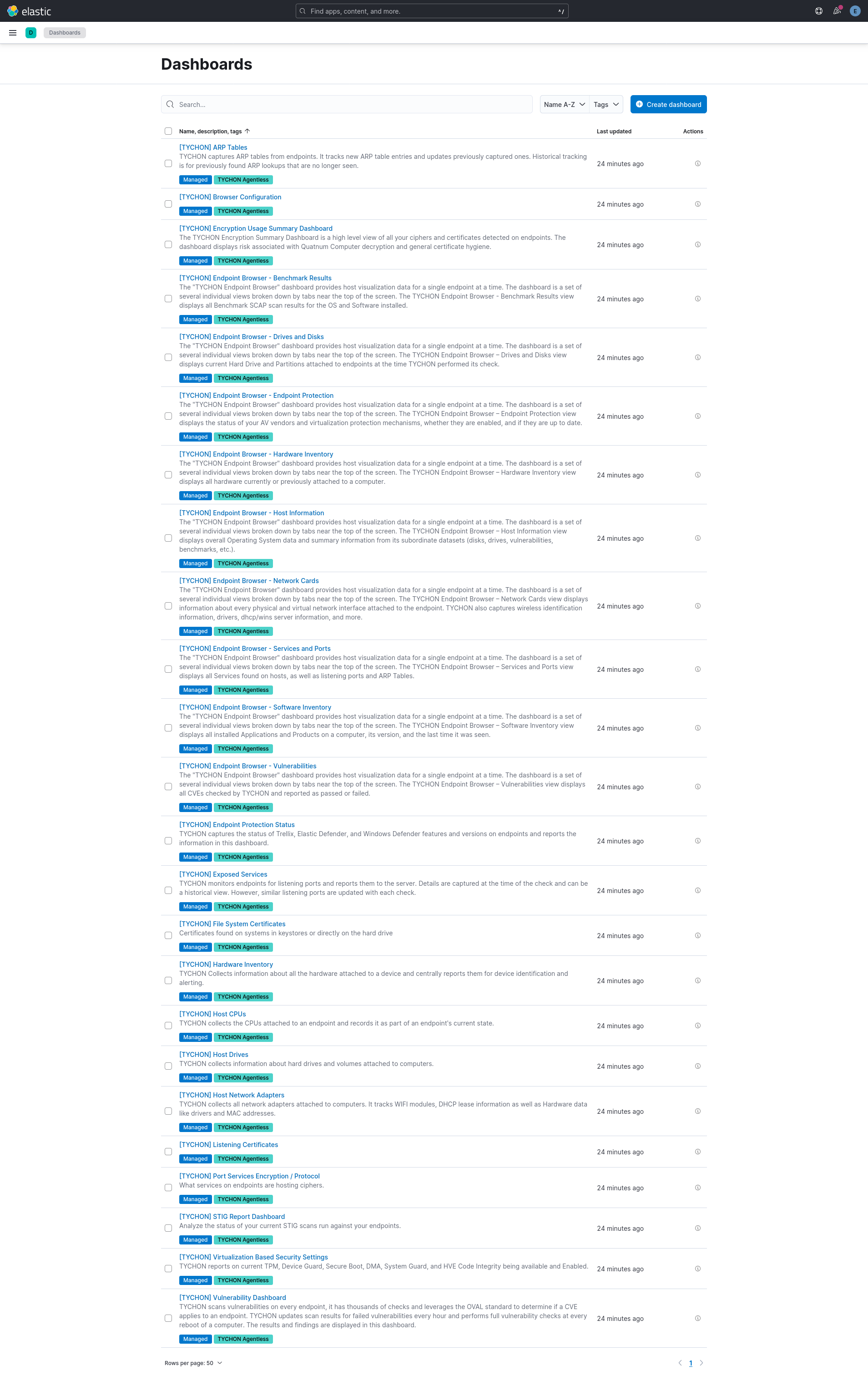
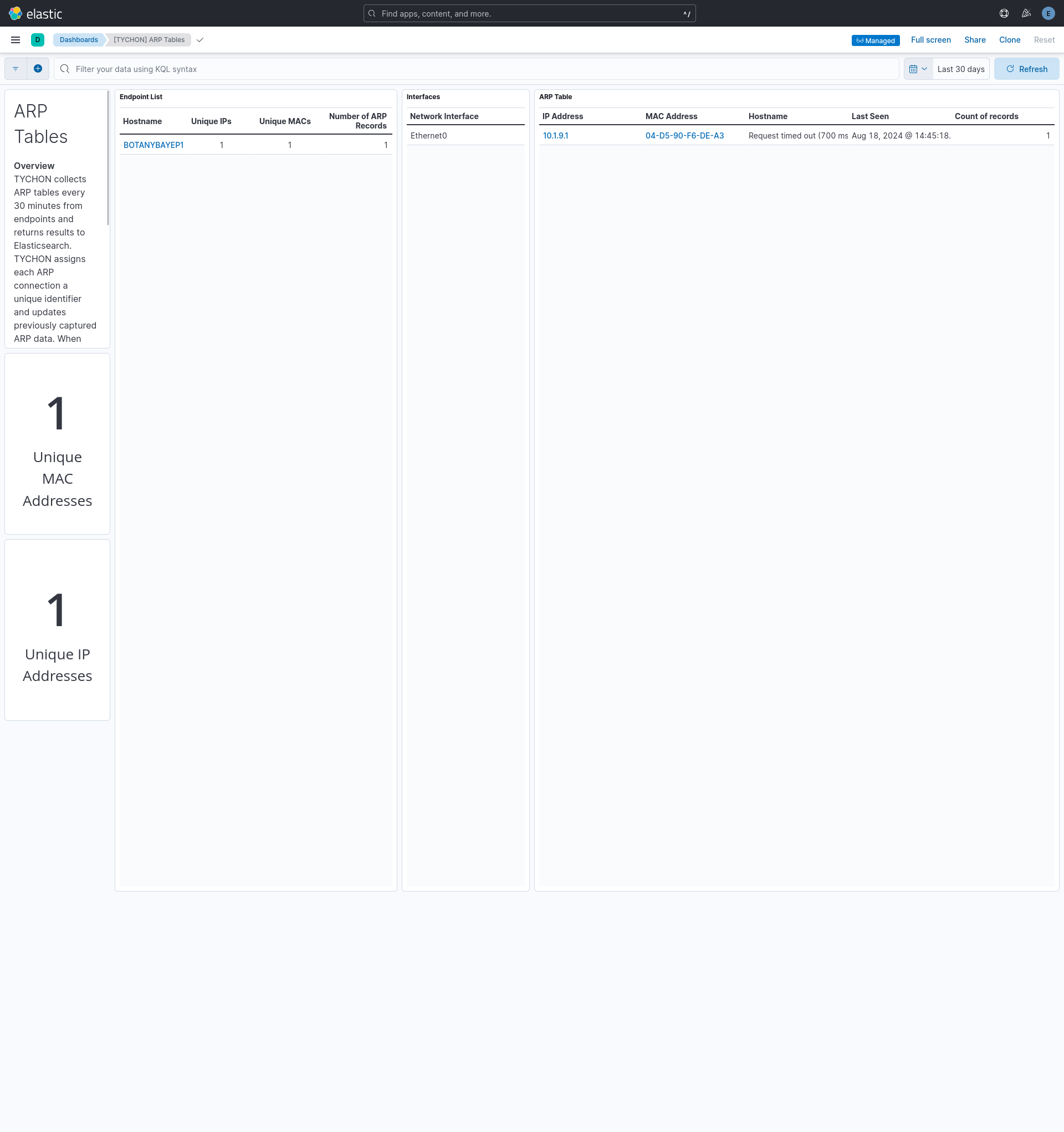
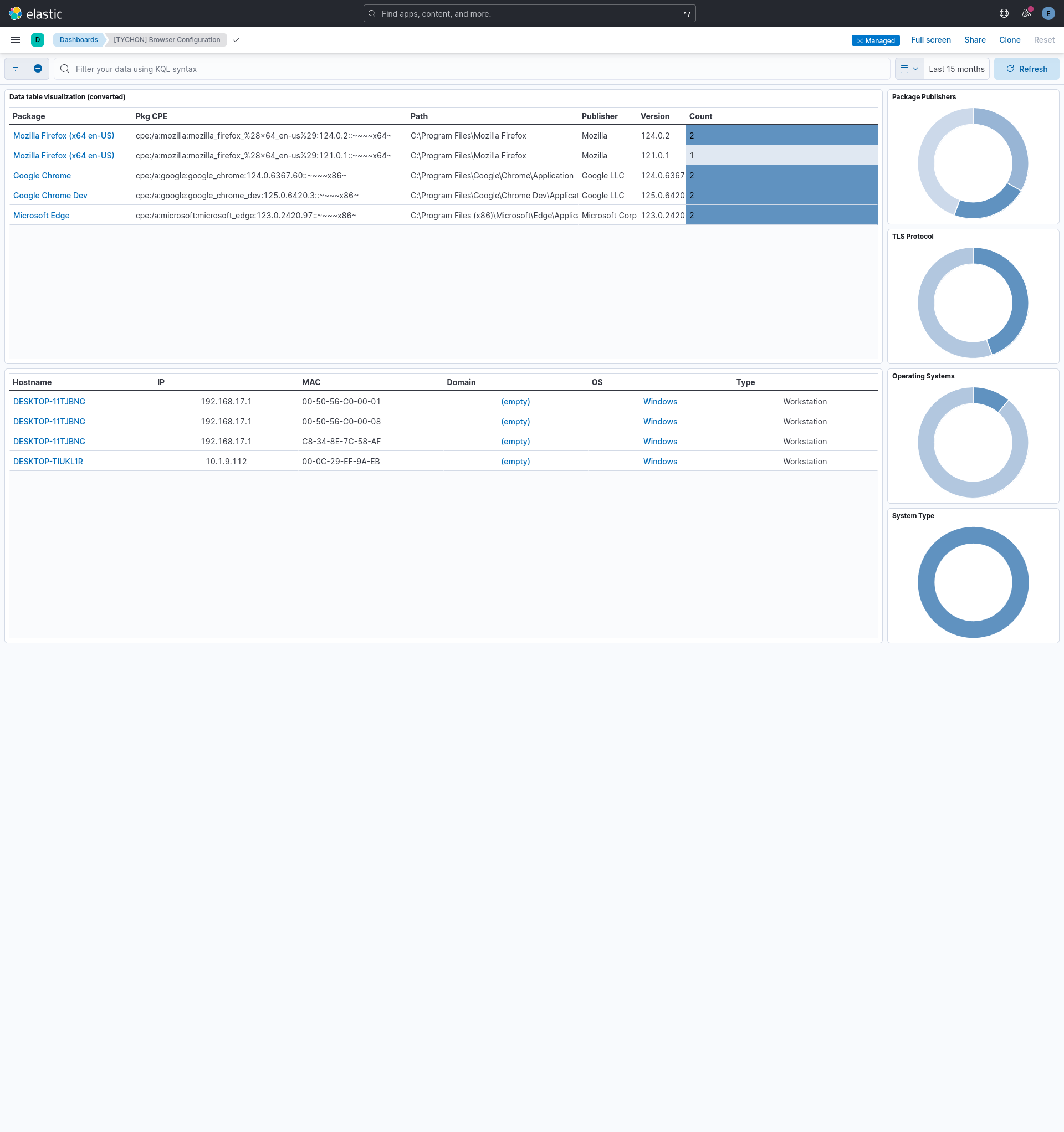
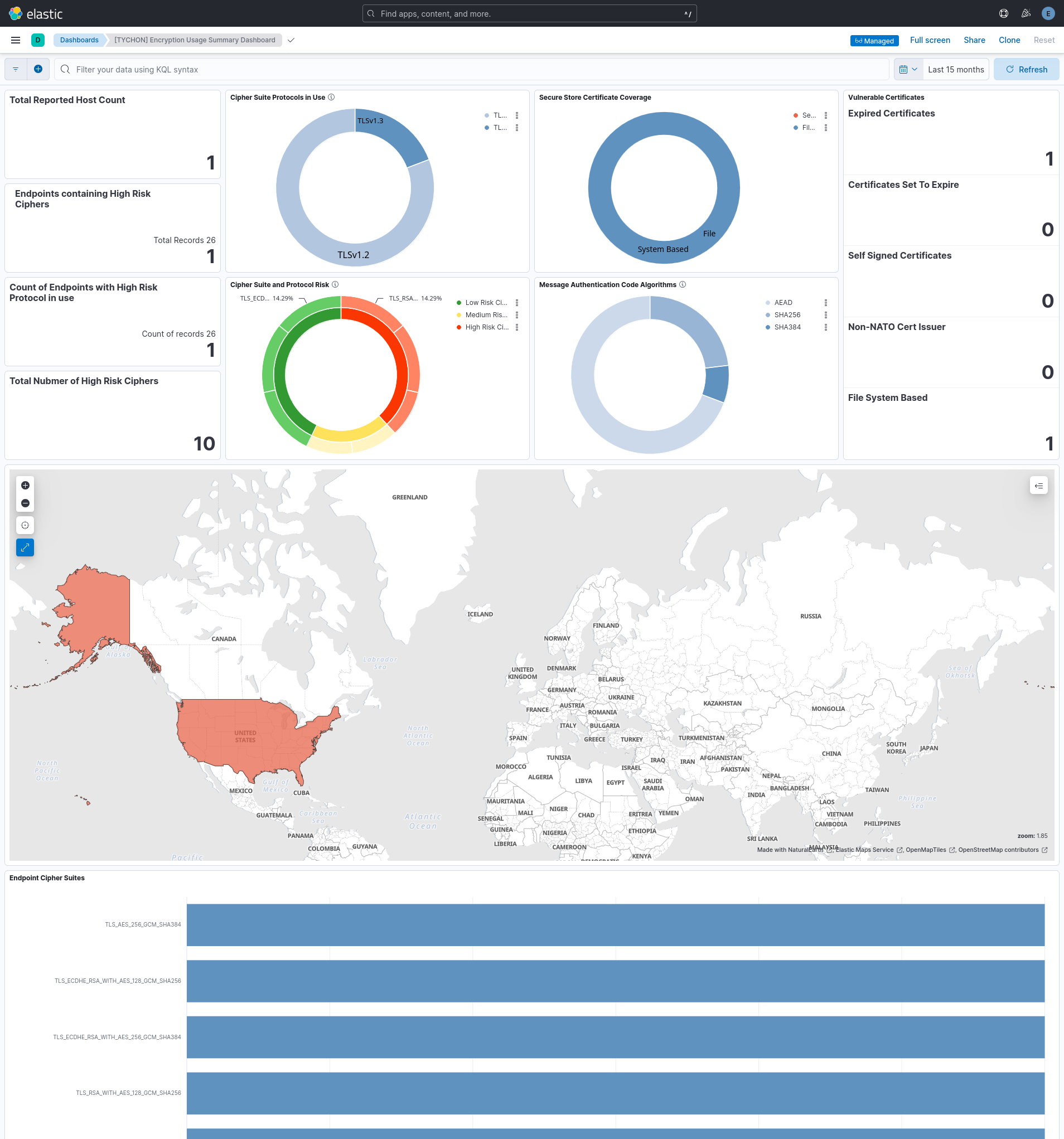
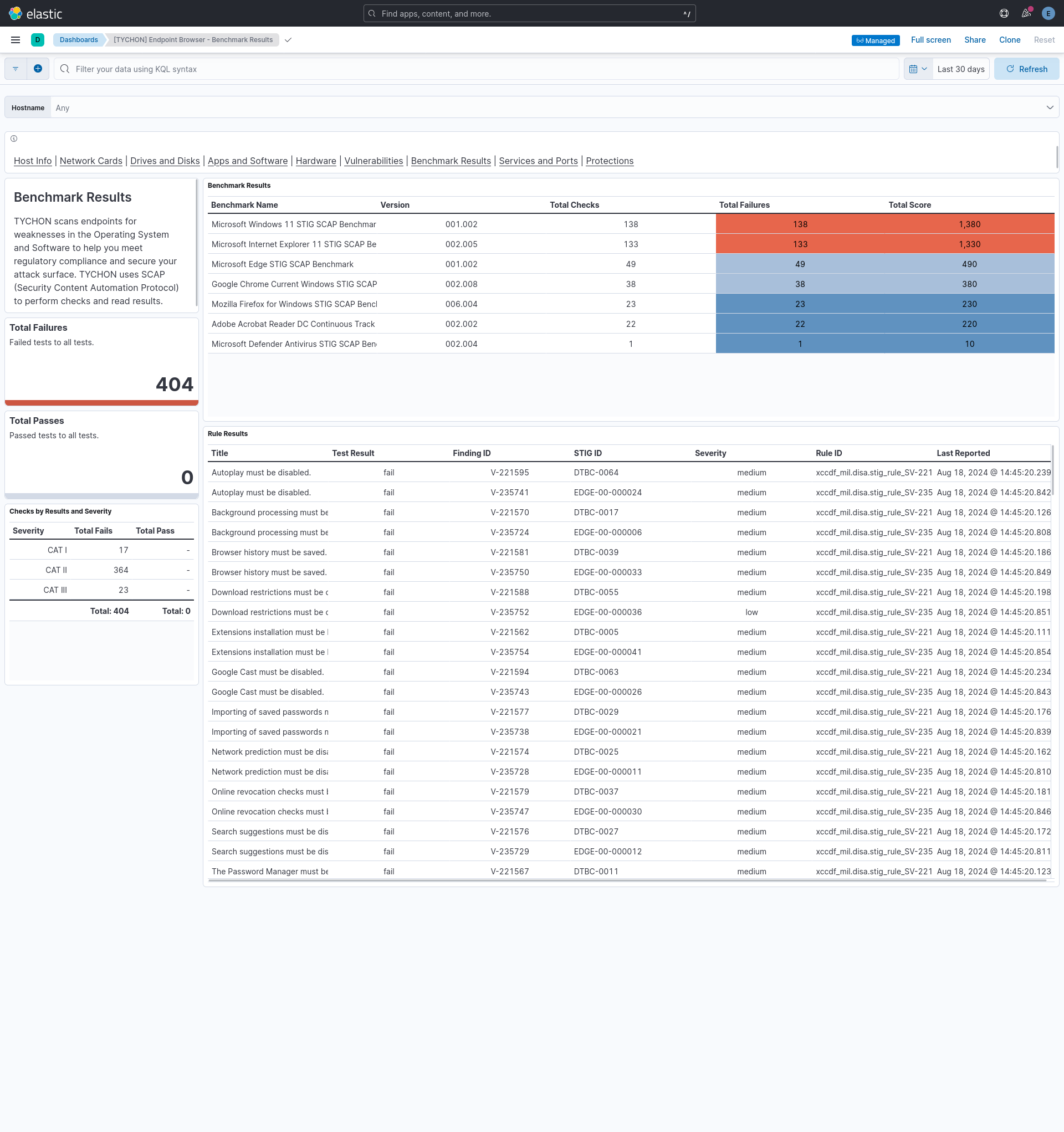
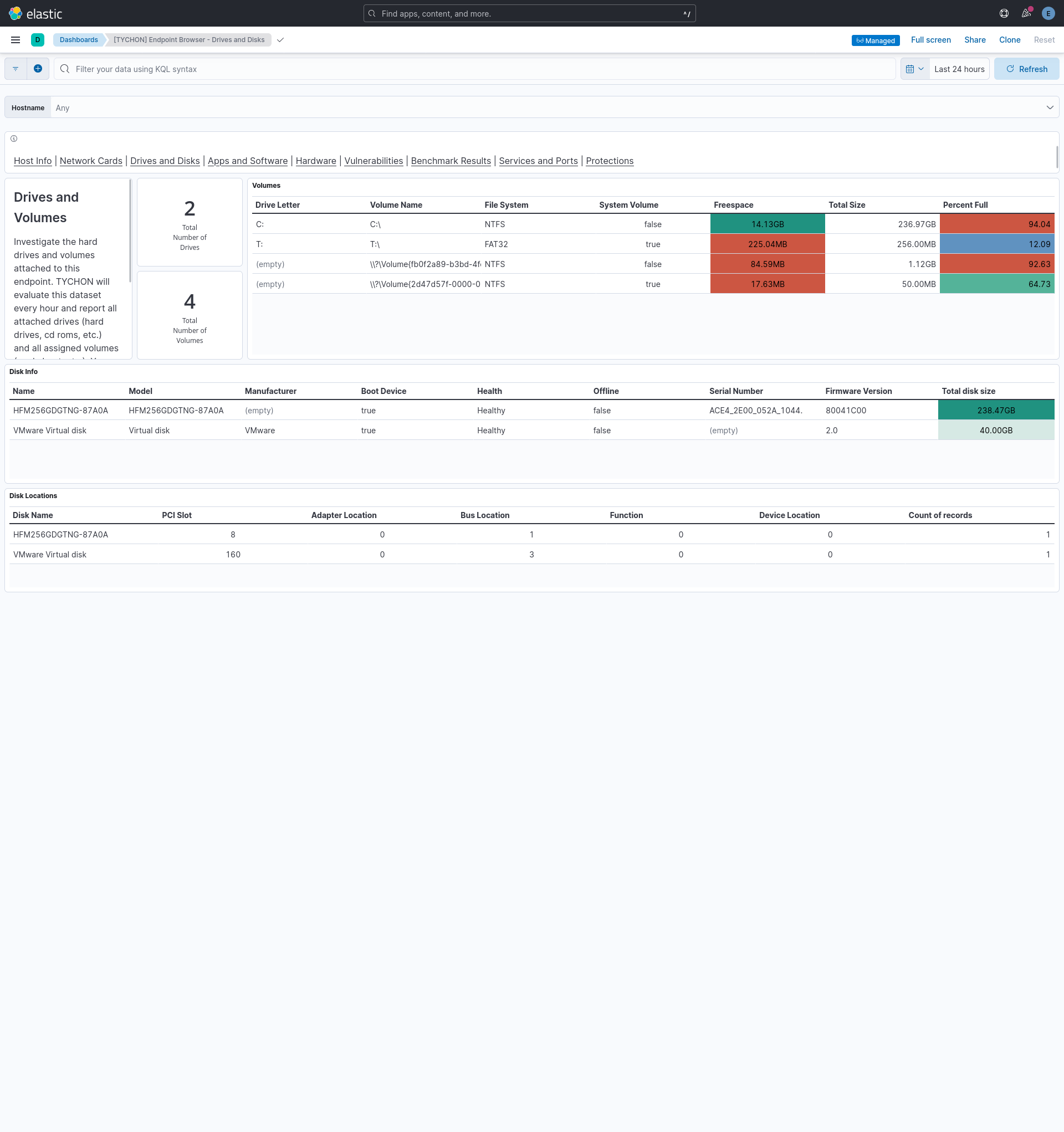
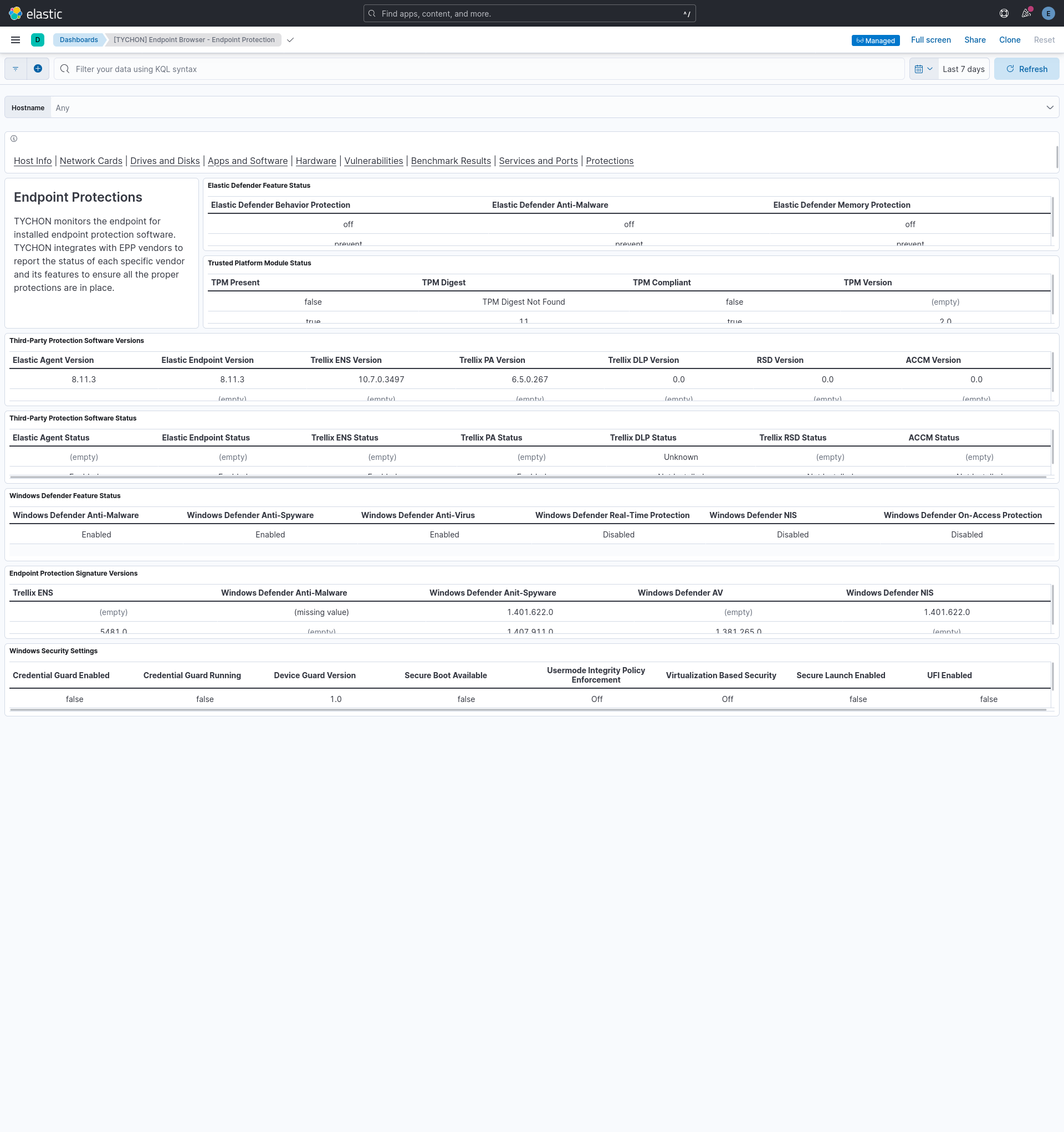
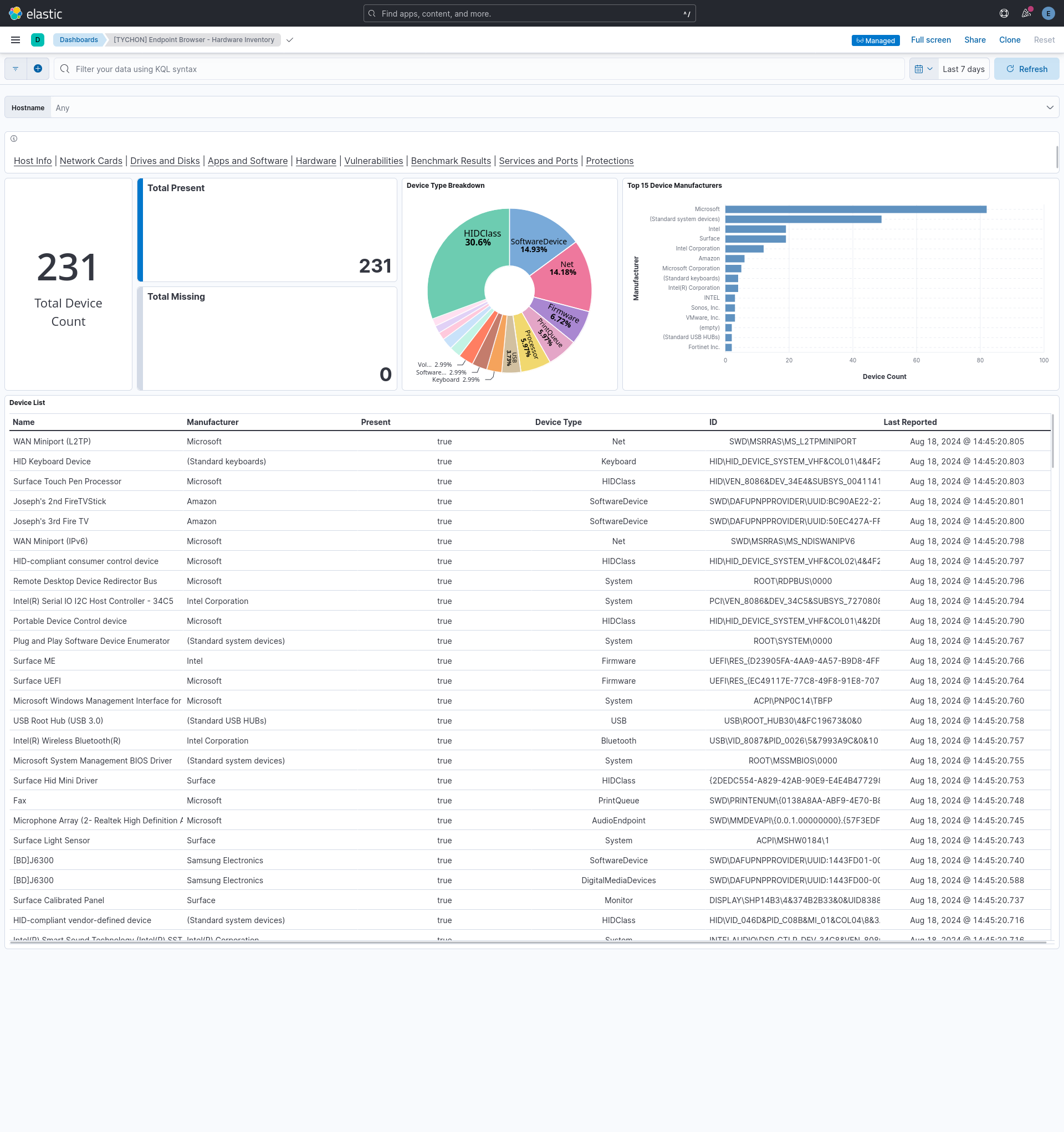
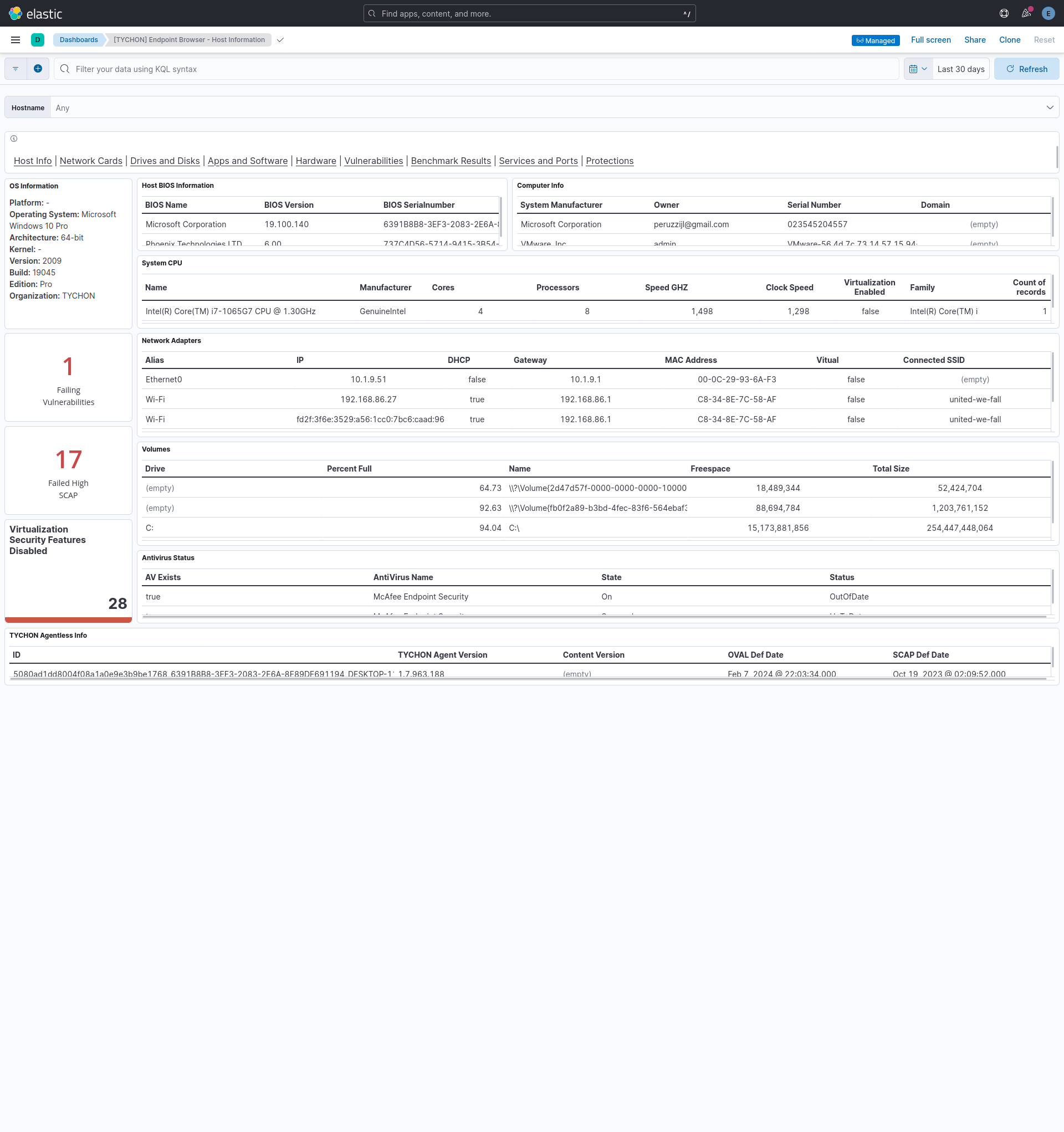
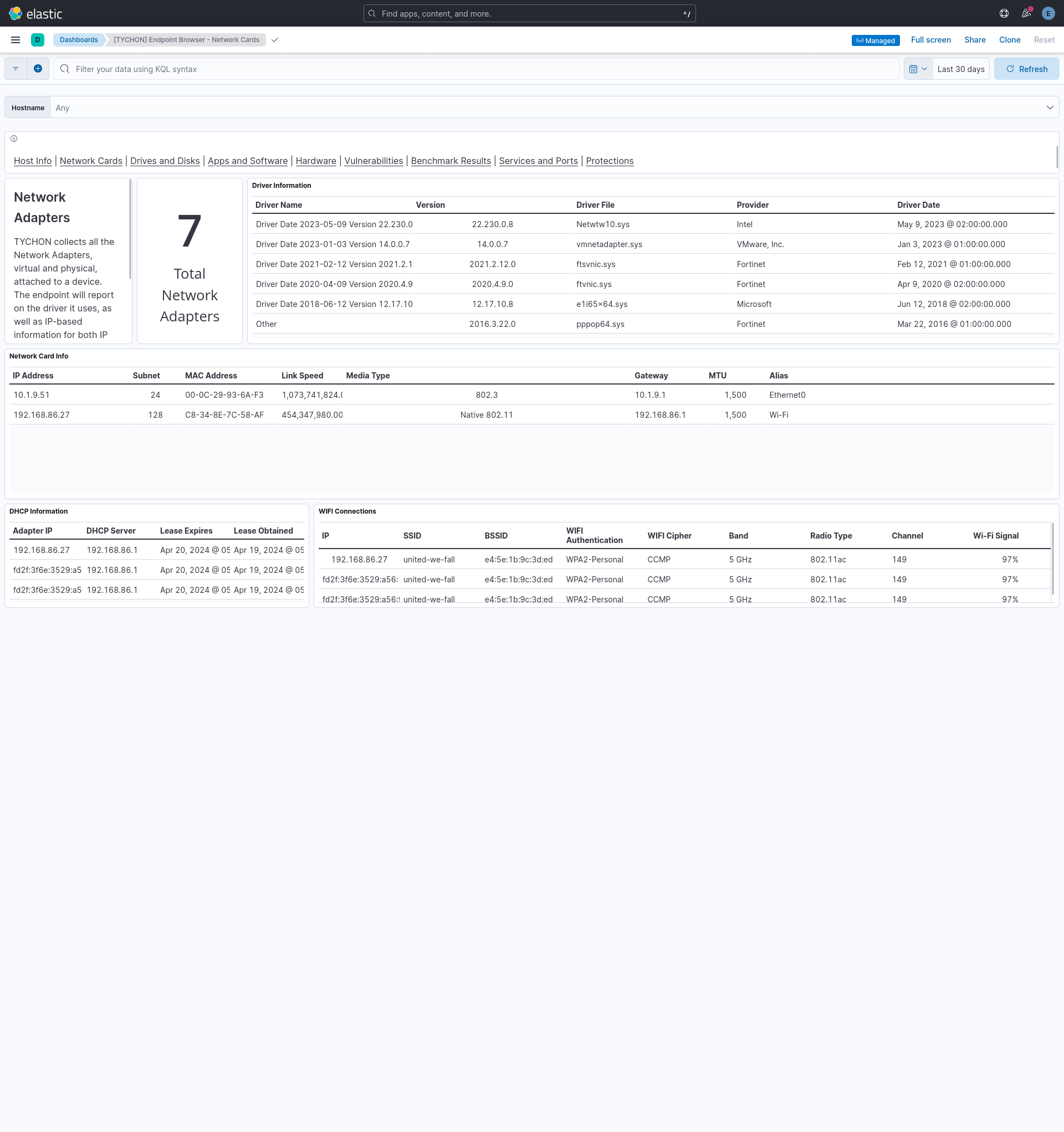
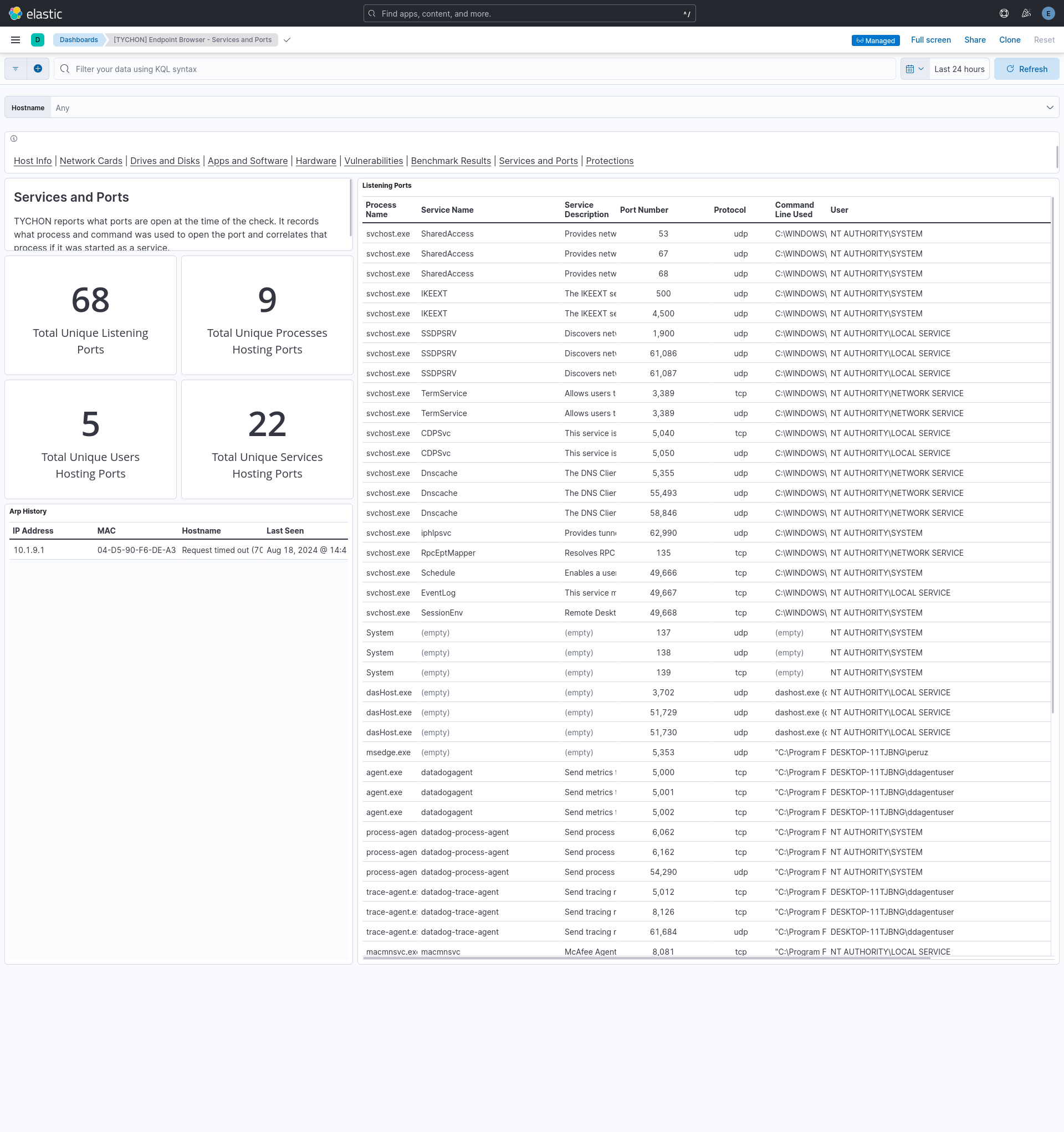
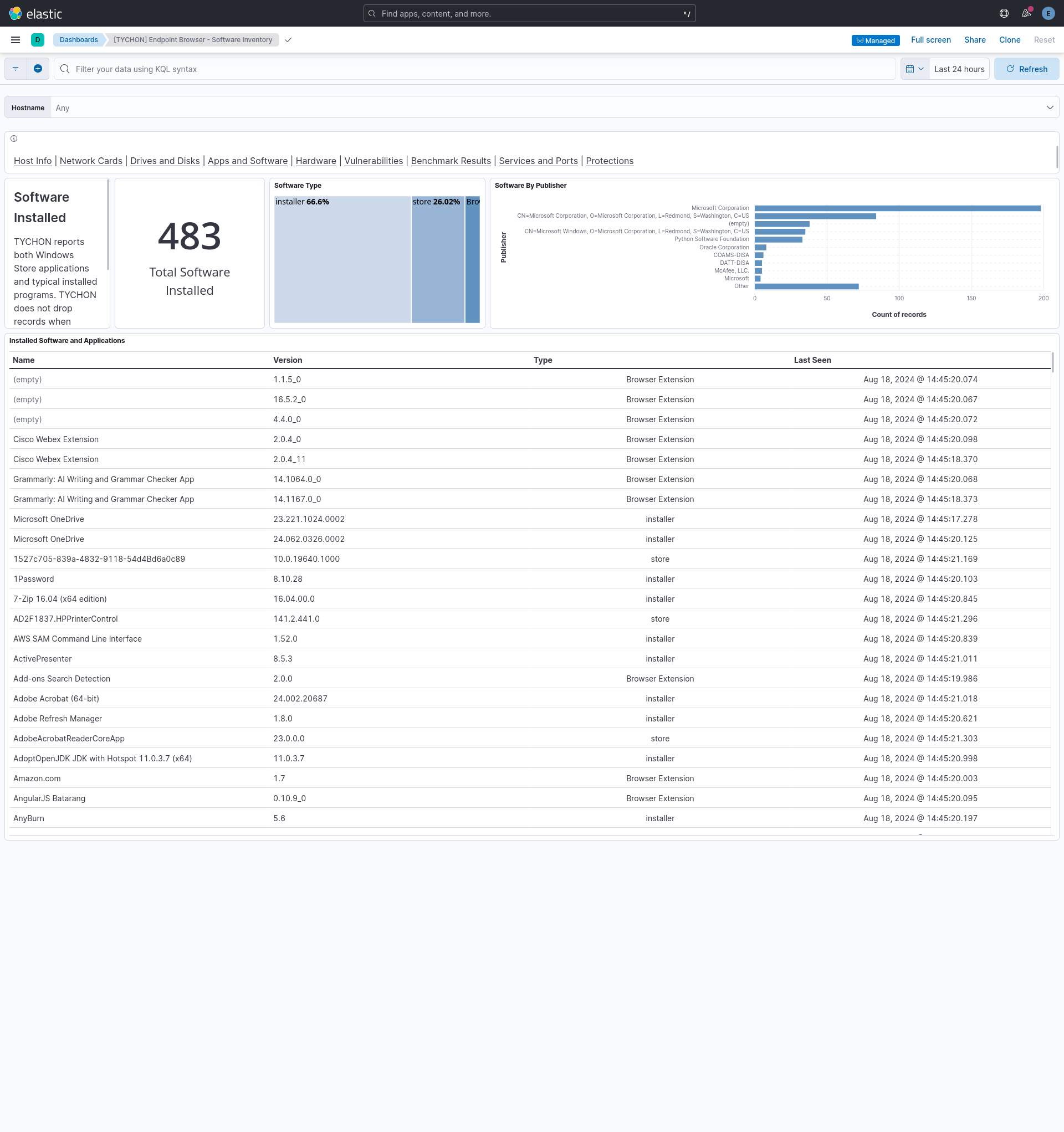
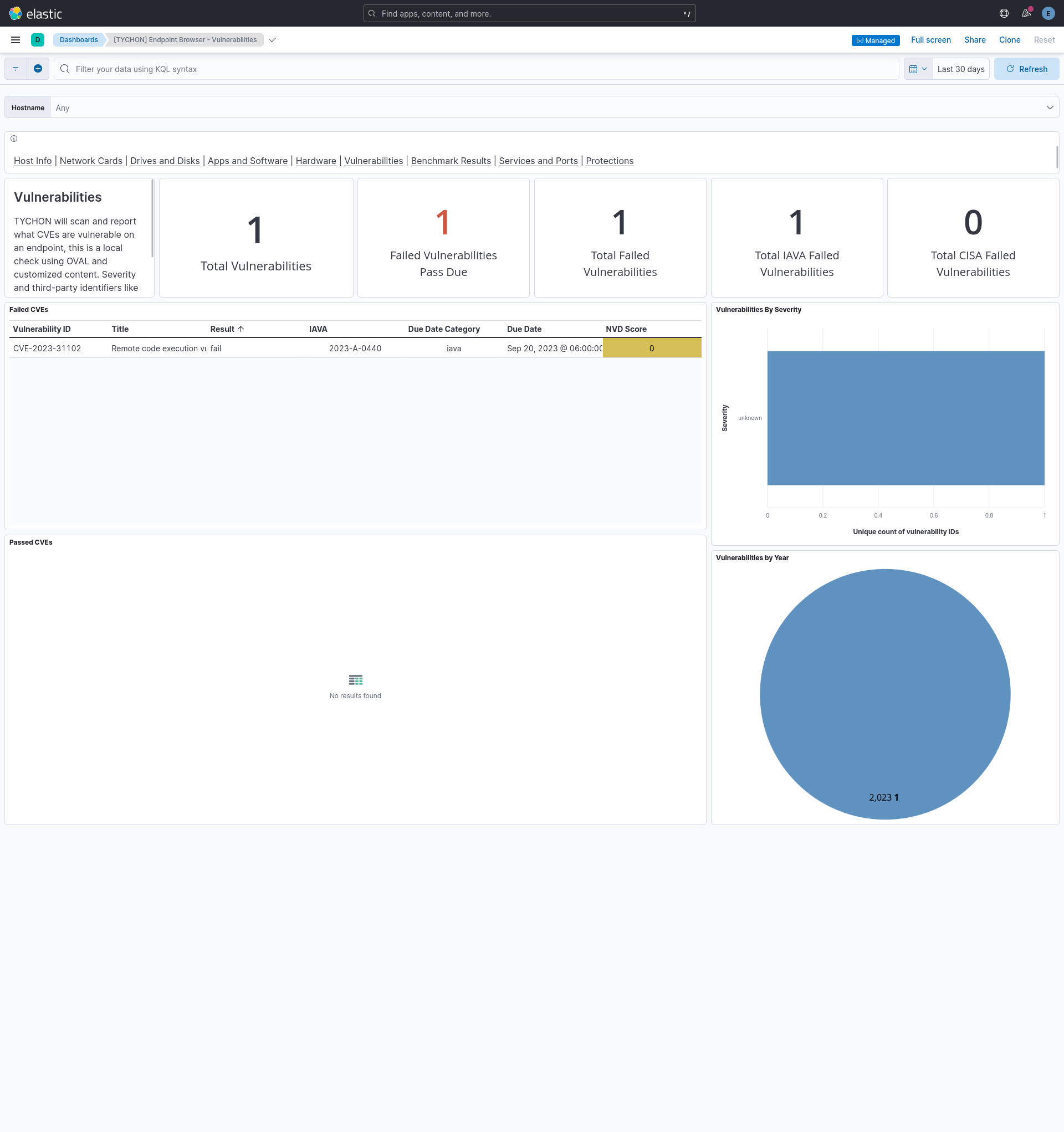
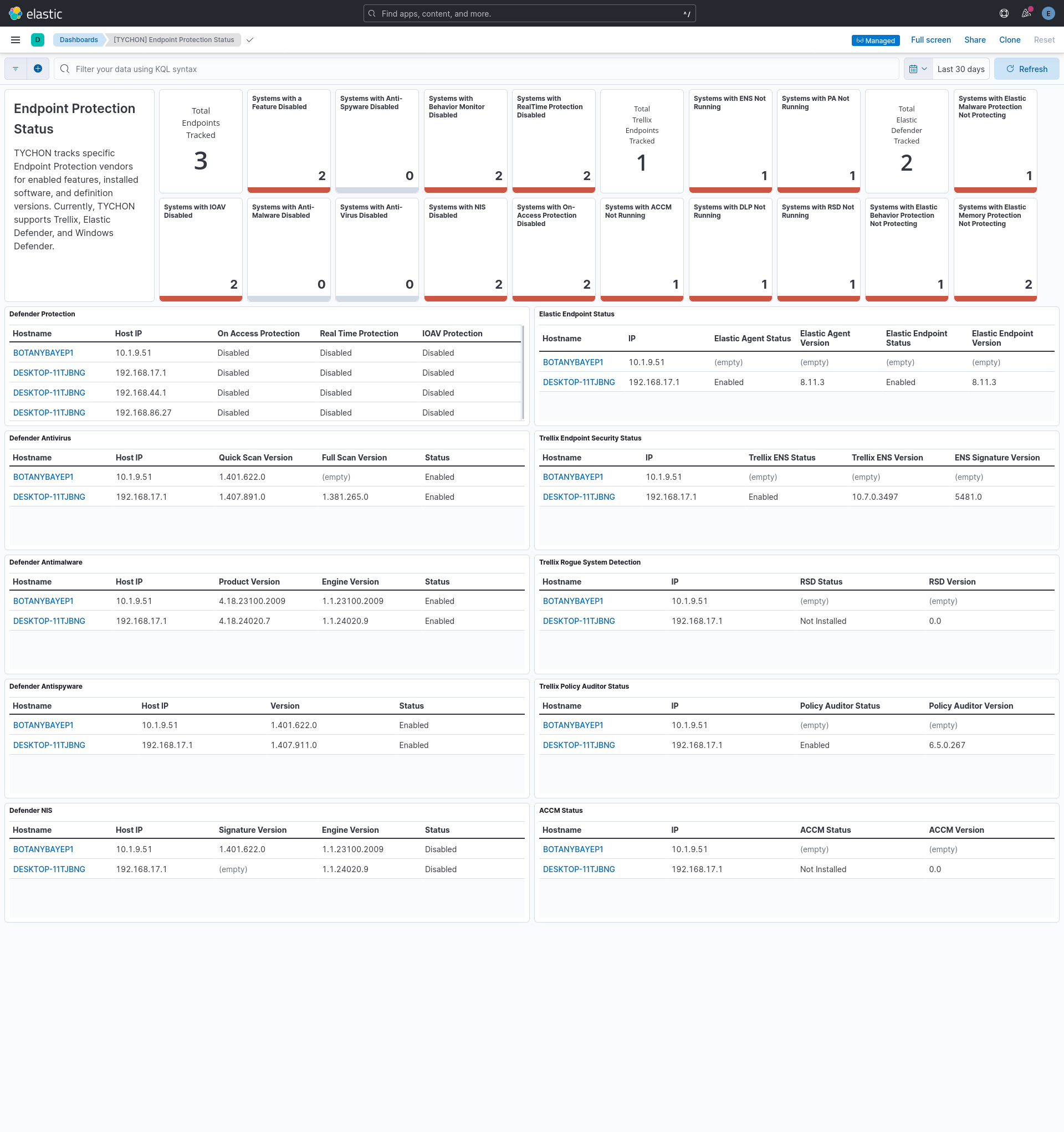
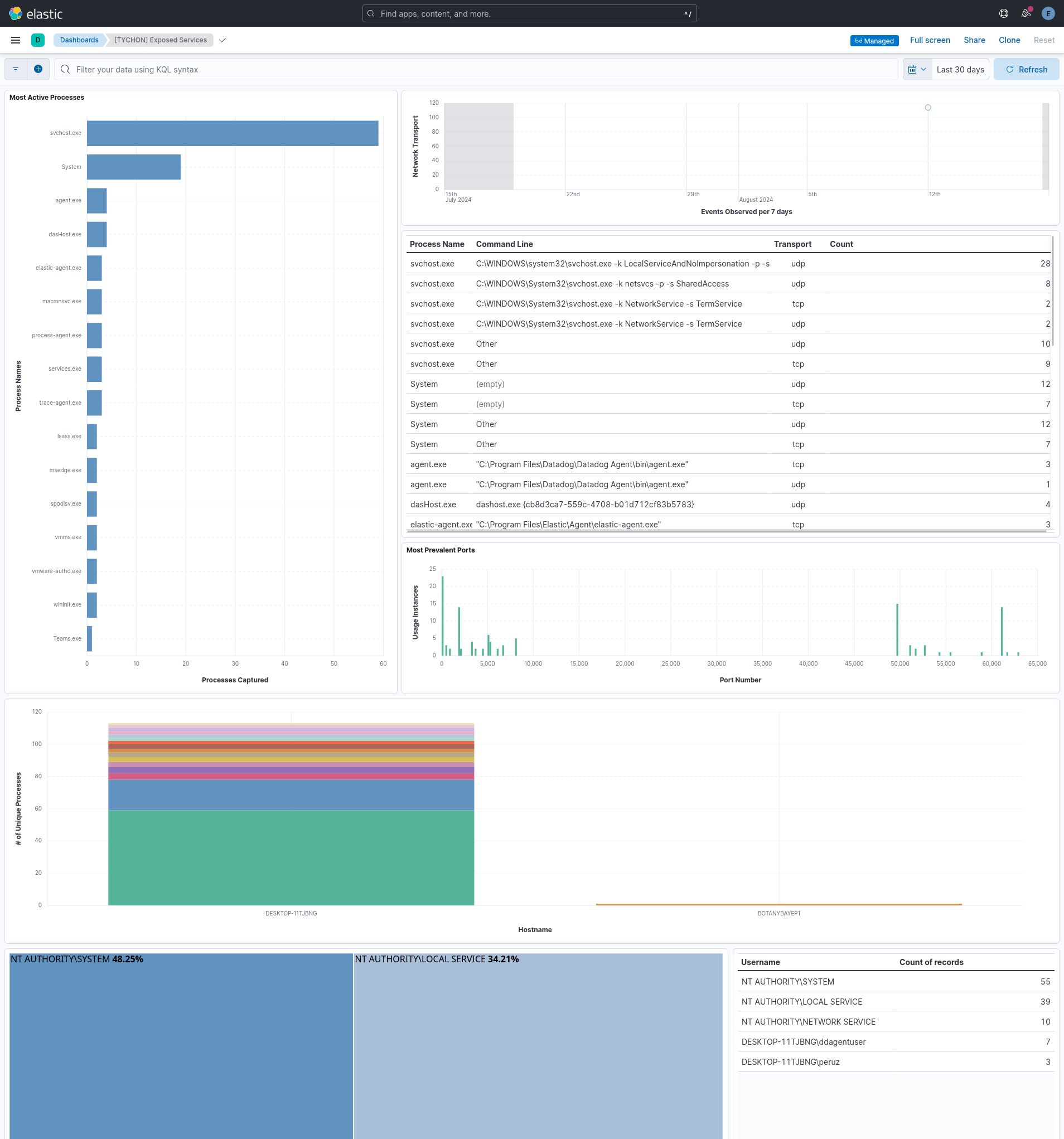
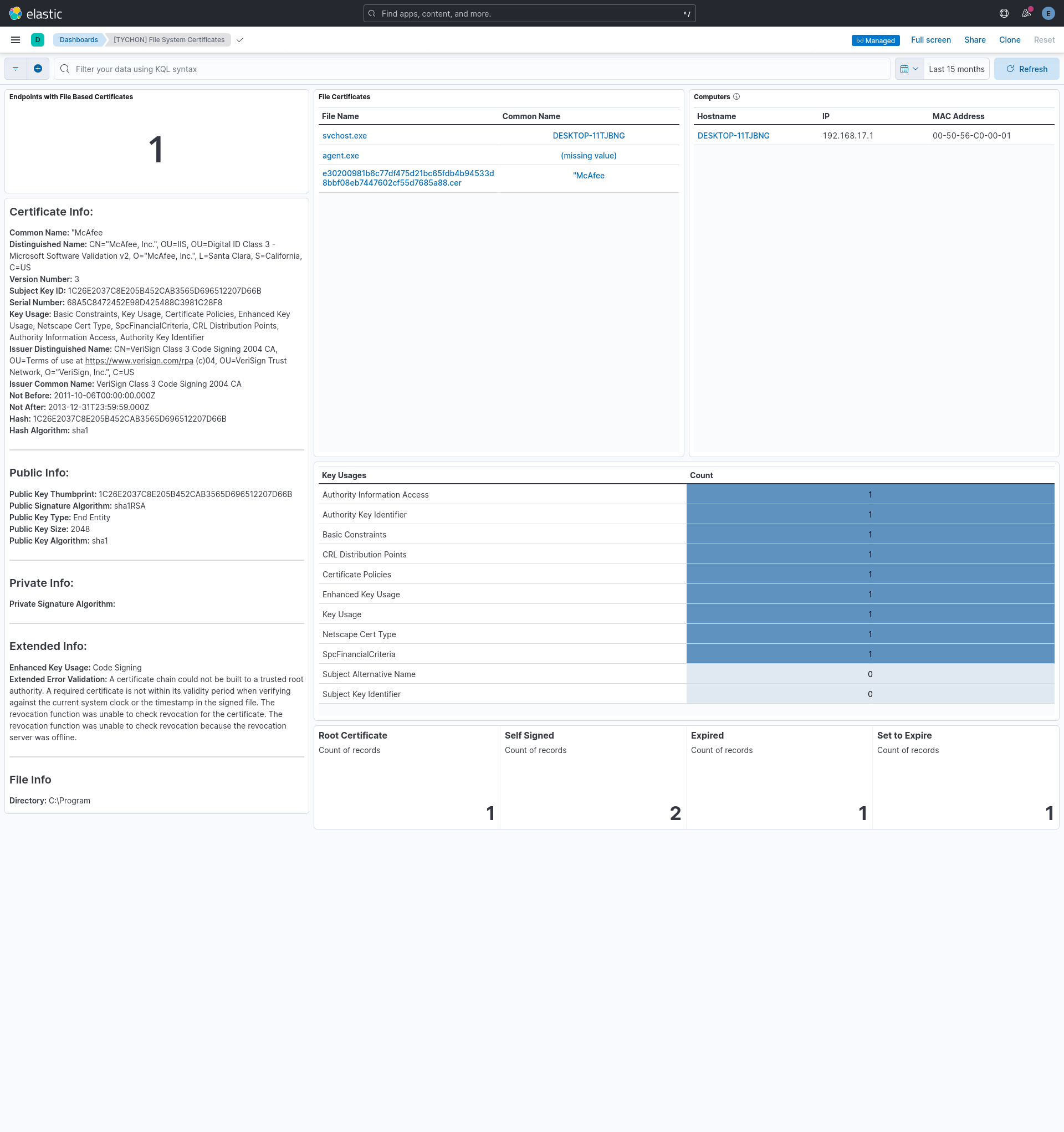
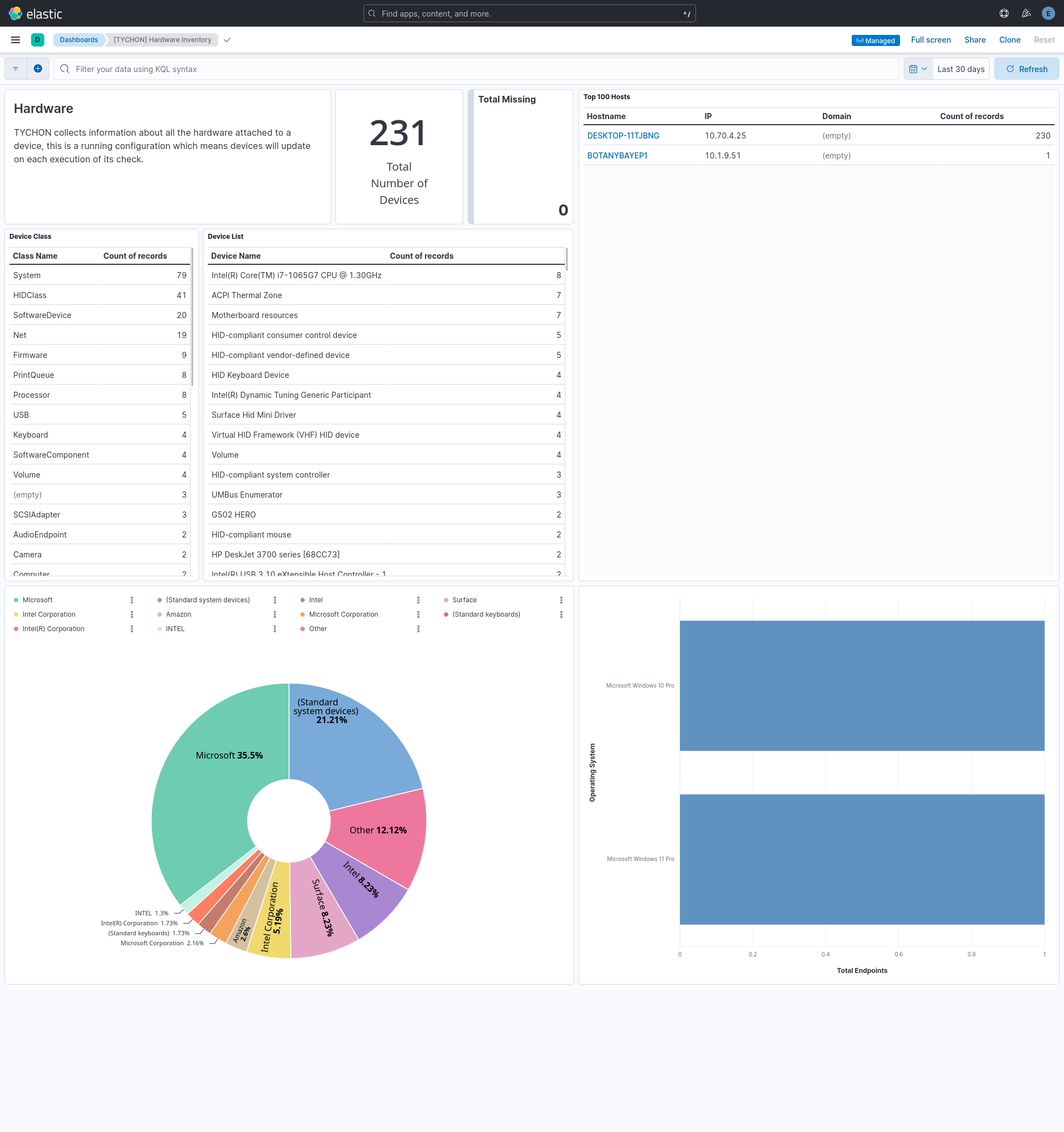
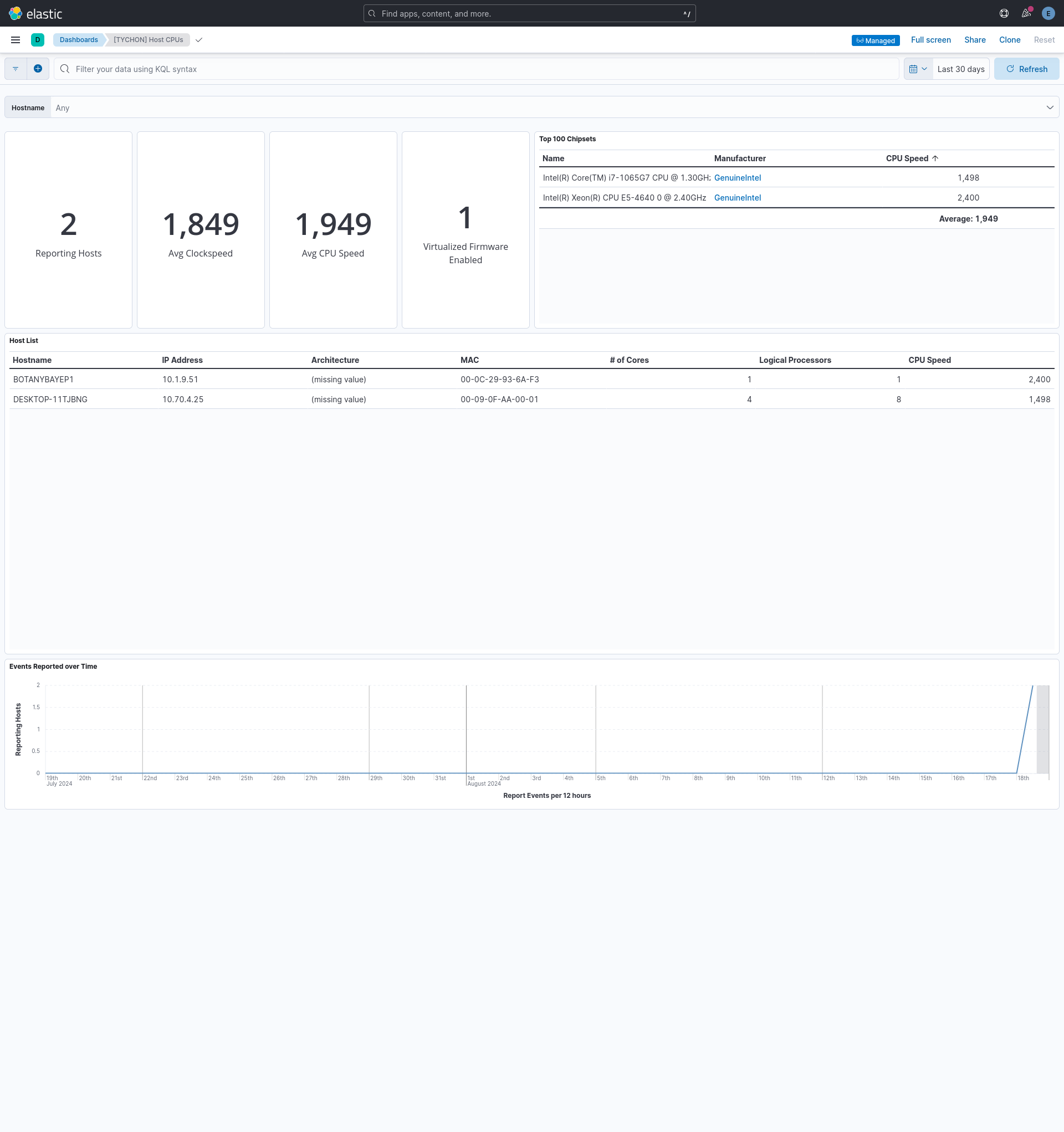
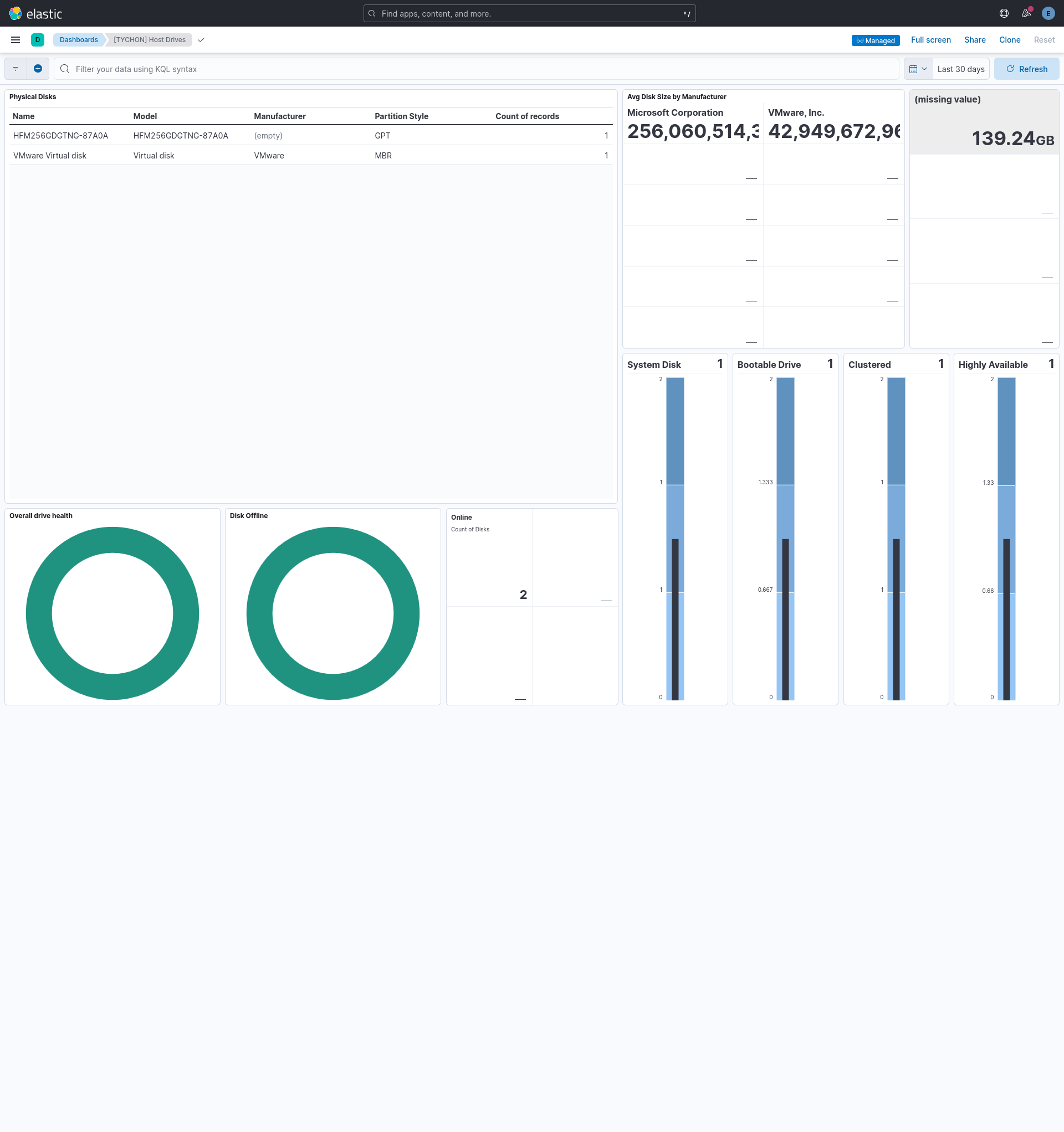
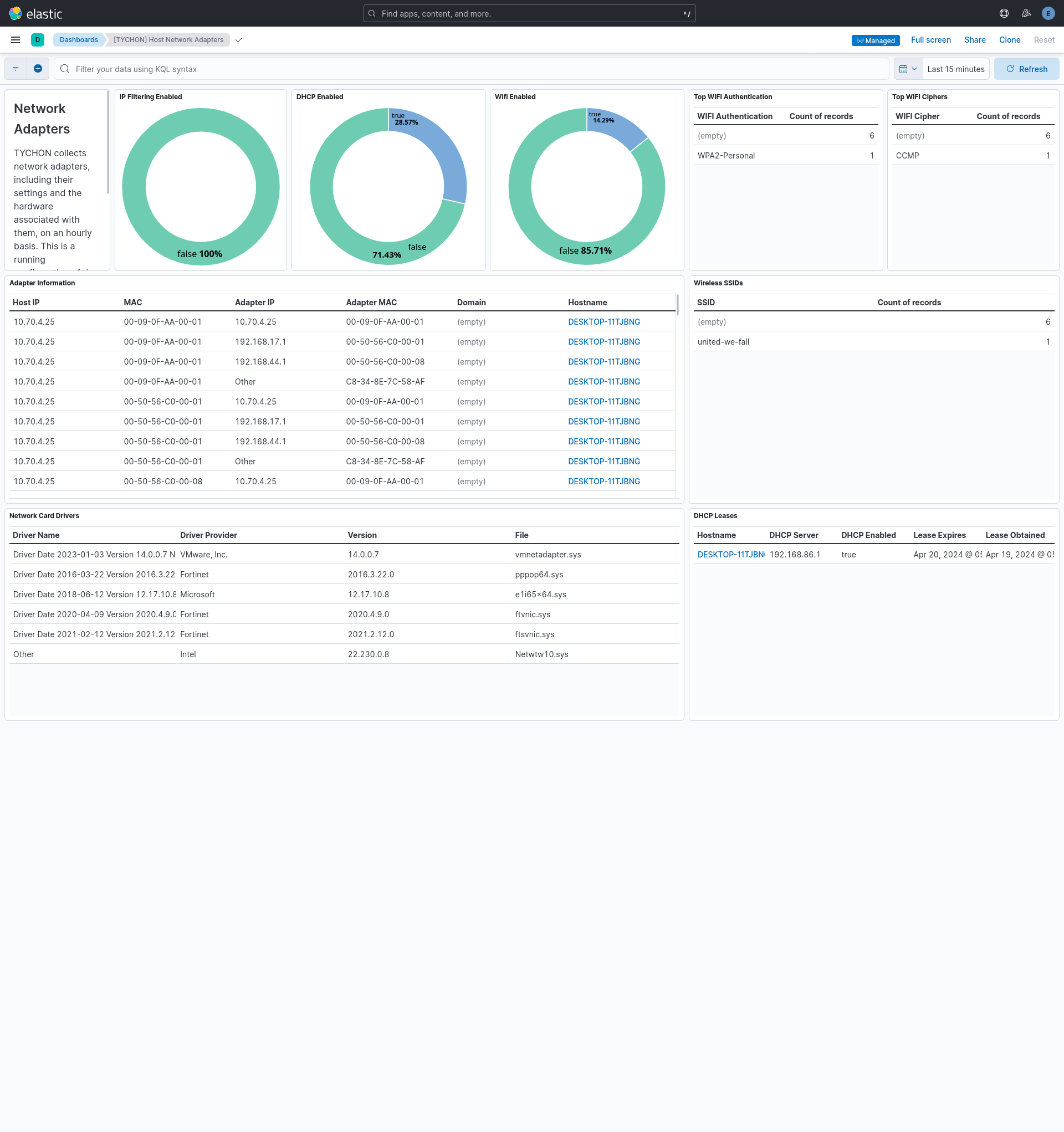
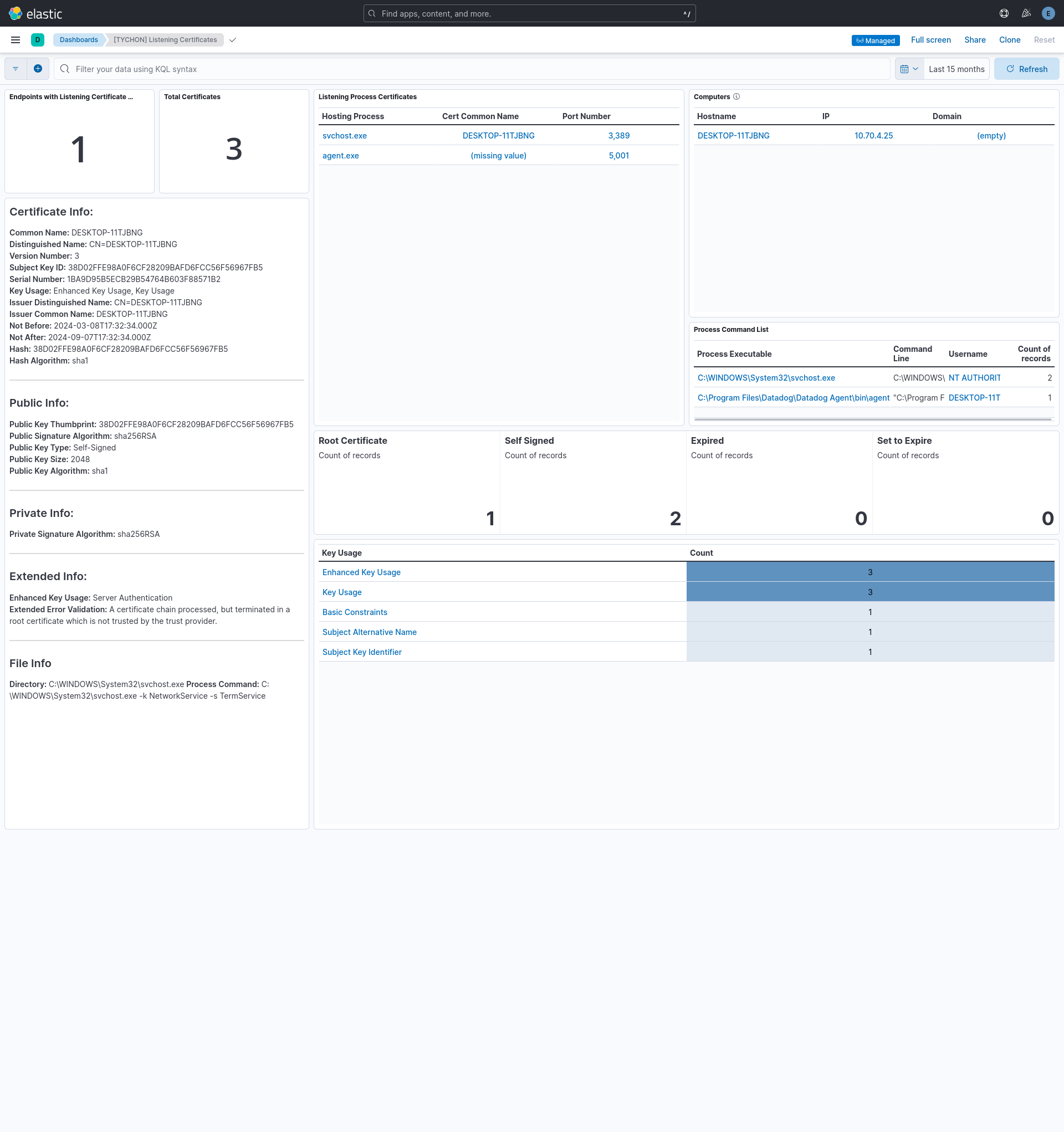
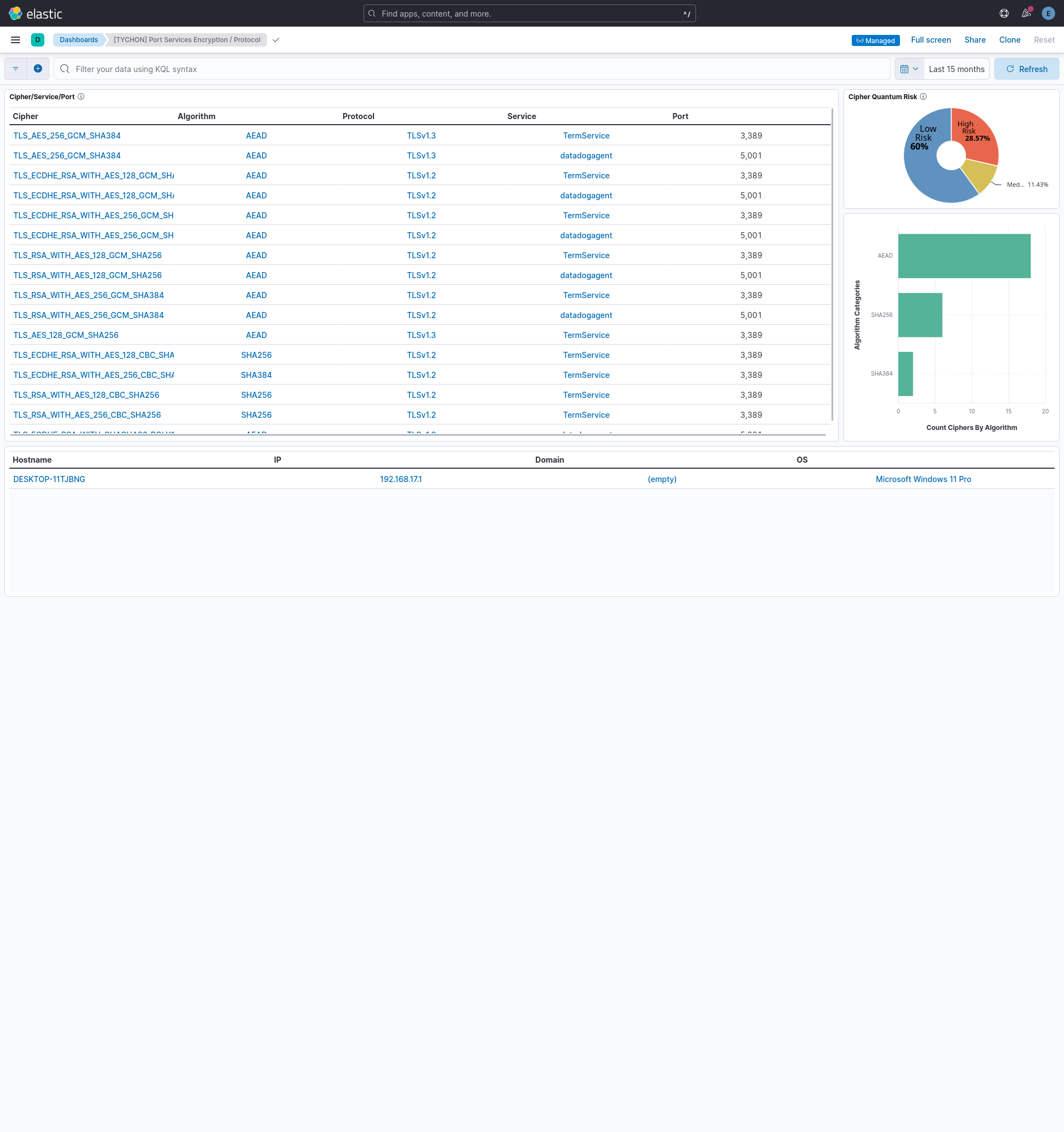
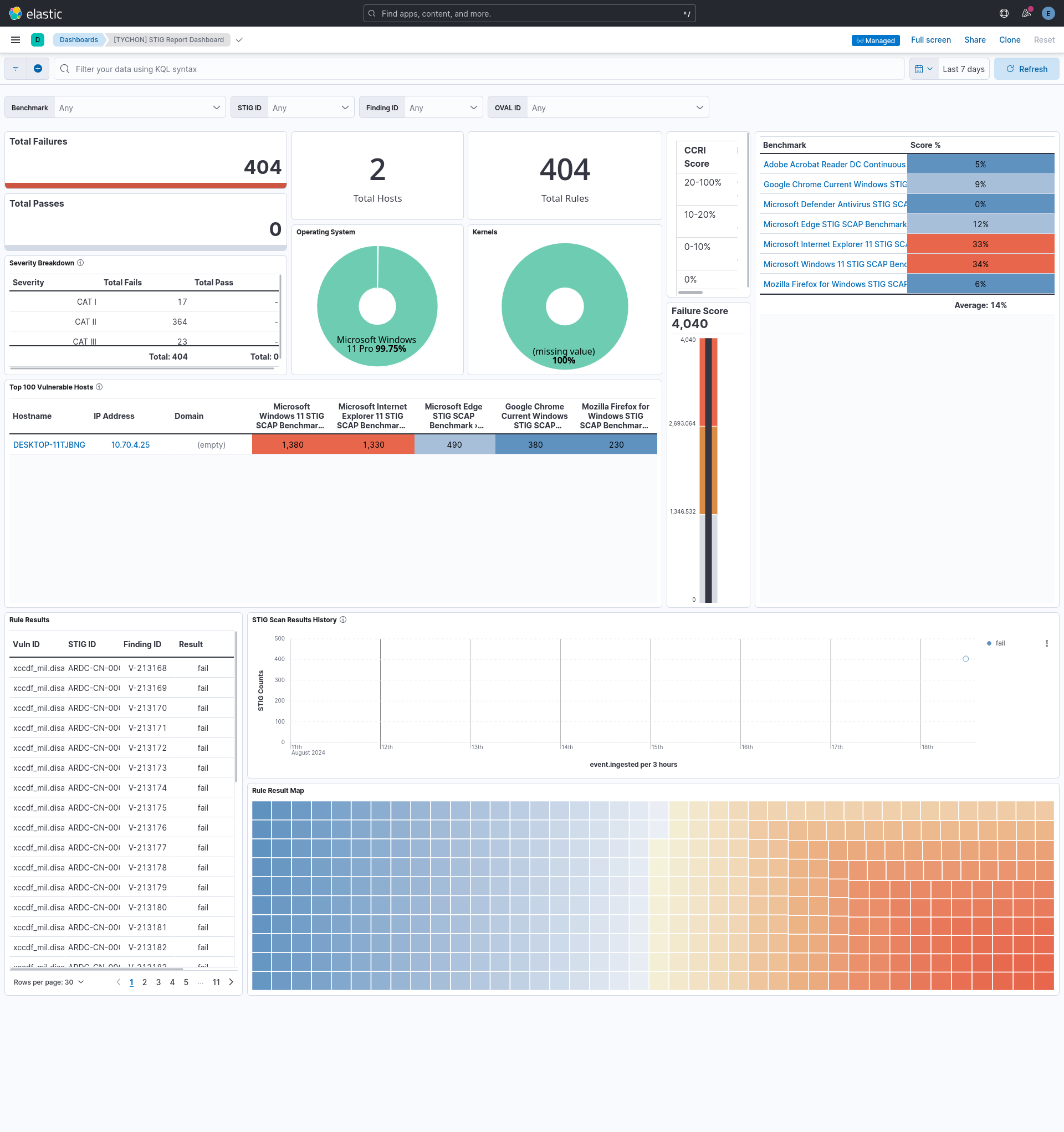
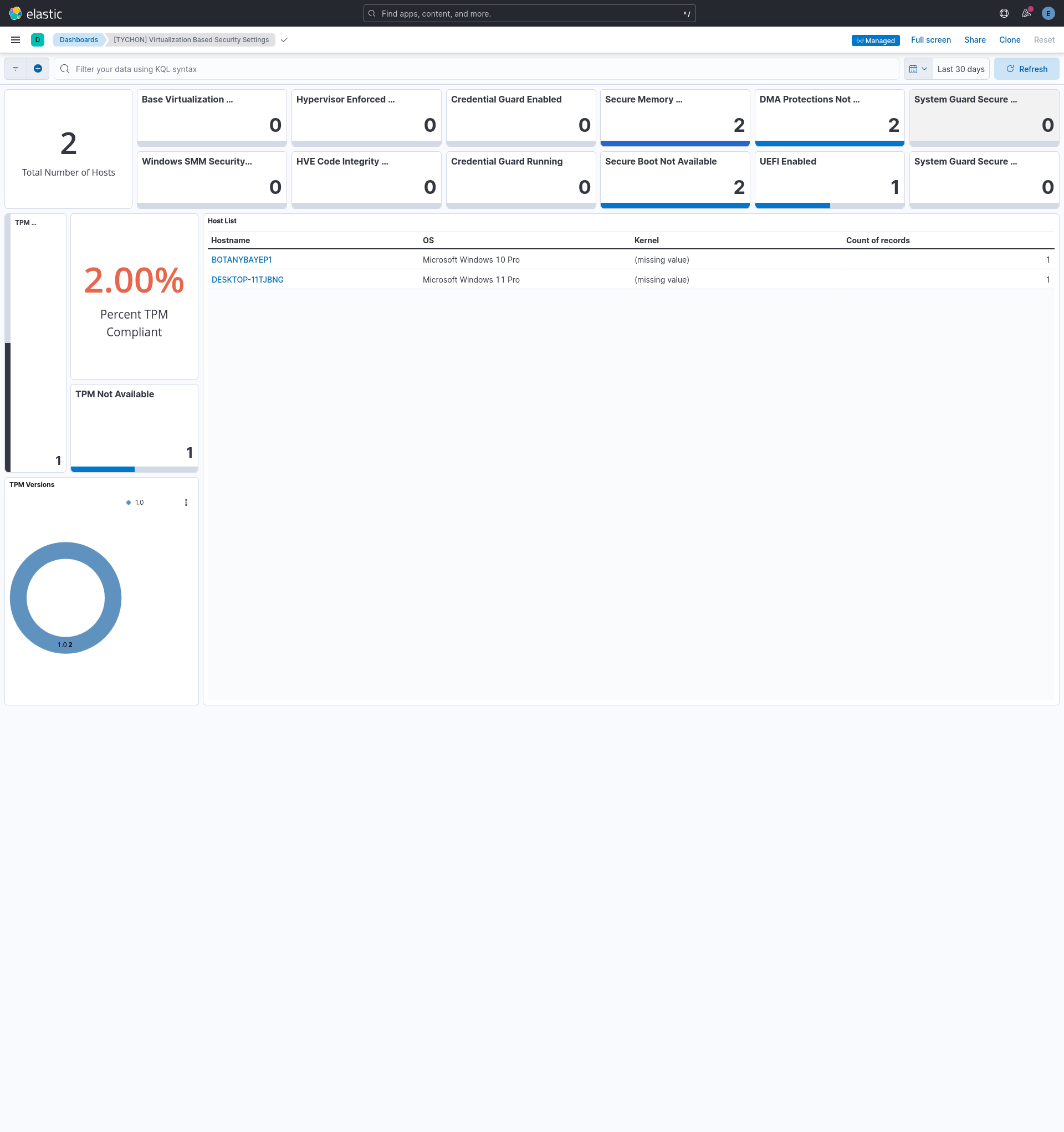
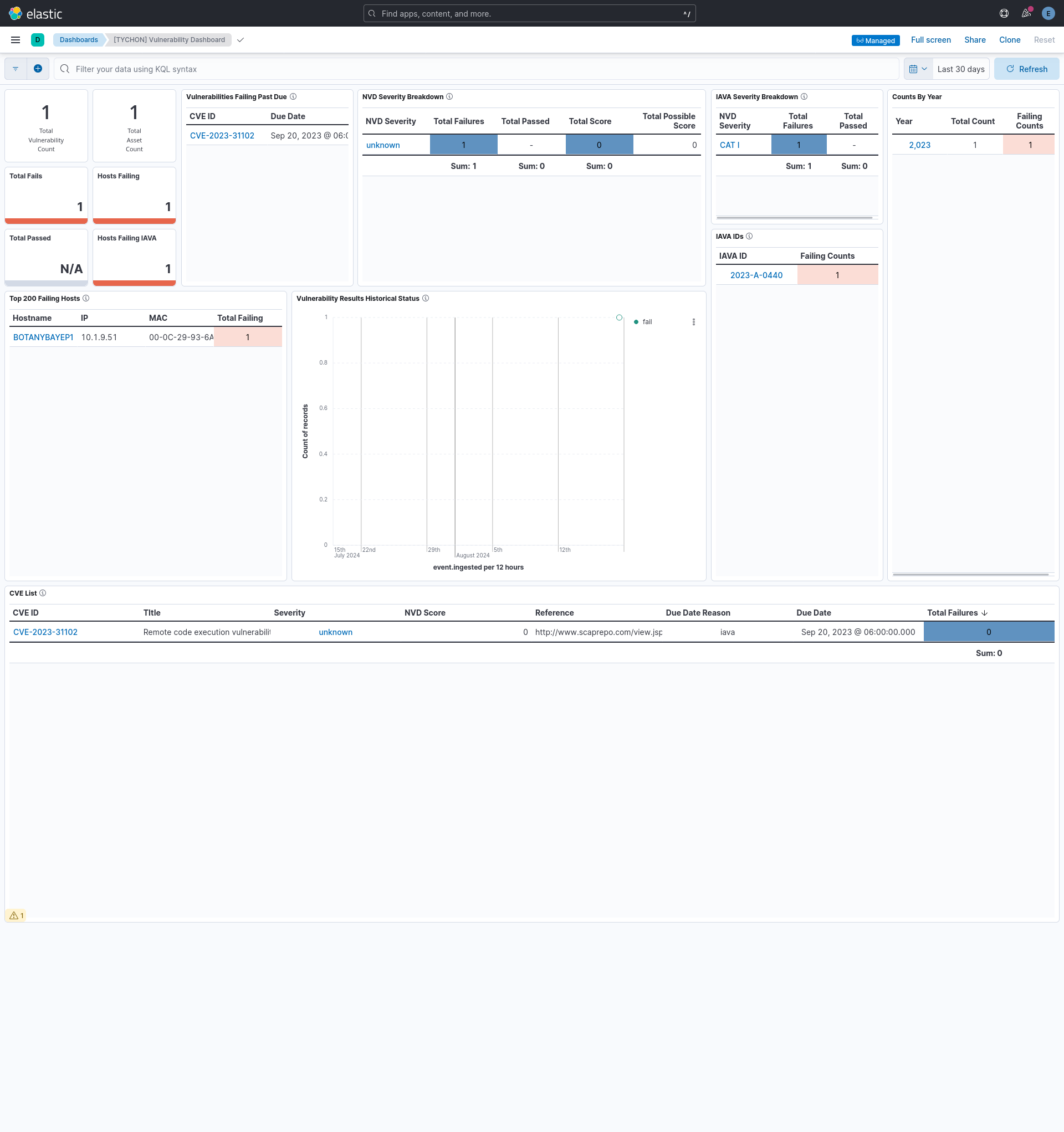
Changelog
| Version | Details | Minimum Kibana version |
|---|---|---|
| 1.2.0 | Enhancement (View pull request) Use one default ingest pipeline file for data streams whose pipelines differed only in their description. Enhancement (View pull request) Define the shared TYCHON fields in one file for all data streams. The host and networkadapter data streams gain the base host field definitions. Enhancement (View pull request) Define the ECS fields of all transform destination indices from one shared file. Add missing agent, event and host fields to the host and networkadapter transforms, event.module to six transforms, and related fields to all. |
9.0.0 8.14.0 |
| 1.1.1 | Bug fix (View pull request) Make security rules discoverable in the Add Elastic rules UI. |
9.0.0 8.14.0 |
| 1.1.0 | Enhancement (View pull request) Use links panel in dashboard. |
9.0.0 8.14.0 |
| 1.0.0 | Enhancement (View pull request) Release package as GA. |
9.0.0 8.14.0 |
| 0.4.0 | Enhancement (View pull request) ECS version updated to 8.17.0. |
9.0.0 8.14.0 |
| 0.3.2 | Bug fix (View pull request) Change the data type of every occurrence of *.server.ip from keyword to ip, tychon.tychon.data.version from version to keyword, and added ECS field server.domain. |
9.0.0 8.14.0 |
| 0.3.1 | Bug fix (View pull request) Add missing field mappings in transforms. |
9.0.0 8.14.0 |
| 0.3.0 | Enhancement (View pull request) Update Kibana constraint to support 9.0.0. |
9.0.0 8.14.0 |
| 0.2.1 | Bug fix (View pull request) Fix broken links in Security Service integrations packages. |
8.14.0 |
| 0.2.0 | Enhancement (View pull request) Add "preserve_original_event" tag to documents with event.kind set to "pipeline_error". |
8.14.0 |
| 0.1.2 | Bug fix (View pull request) Add the security capability, as the package needs security features. |
8.14.0 |
| 0.1.1 | Bug fix (View pull request) Use triple-brace Mustache templating when referencing variables in ingest pipelines. |
8.14.0 |
| 0.1.0 | Enhancement (View pull request) Initial release of the TYCHON Agentless integration |
8.14.0 |