Cisco Secure Email Gateway Integration for Elastic
Elastic Cloud Serverless projects are autoscaled environments, fully managed by Elastic and available on Elastic Cloud. Availability This functionality is generally available and ready for production usage. Elastic Cloud Serverless projects are autoscaled environments, fully managed by Elastic and available on Elastic Cloud. Availability This functionality is generally available and ready for production usage. The Elastic Stack includes Elastic's core products such as Elasticsearch, Kibana, Logstash, and Beats. Availability This functionality is generally available and ready for production usage. Unless stated otherwise on the page, this functionality is available when your Elastic Stack is deployed on Elastic Cloud Hosted, Elastic Cloud Enterprise, Elastic Cloud on Kubernetes, and self-managed environments. This documentation corresponds to the latest patch available for each minor version. If you're not using the latest patch, check the release notes for changes.
Serverless Observability
Generally available
Serverless Security
Generally available
Stack
9.0+
Generally available since 9.0
| Version | 1.30.0 (View all) |
| Subscription level What's this? |
Basic |
| Developed by What's this? |
Elastic |
| Ingestion method(s) | File, Network Protocol |
| Minimum Kibana version(s) | 9.0.0 8.11.0 |
The Cisco Secure Email Gateway (formerly known as Cisco Email Security Appliance or ESA) integration for Elastic enables you to collect and analyze mail flow, security events, and system performance data from your appliances. By centralizing these logs in the Elastic Stack, you'll gain visibility into your messaging environment's security posture and can monitor for email-borne threats in real-time.
This integration is compatible with:
- Cisco Secure Email Gateway Server version 14.0.0
- Virtual Gateway Model C100V
- Logs following standard patterns defined in the Cisco ESA documentation
This integration collects data from Cisco Secure Email Gateway using three primary methods:
- TCP: Streams logs in real-time for reliable delivery from the appliance to the Elastic Agent.
- UDP: Provides high-throughput, low-overhead collection, which is ideal for high-volume mail environments.
- Logfile: Reads logs that you've pushed using FTP to a directory monitored by the Elastic Agent.
Once the logs are received, the Elastic Agent parses the data into the Elastic Common Schema (ECS). This allows you to correlate email security events with other data sources in your environment for comprehensive analysis. The integration covers various log types including security engine results, mail flow envelopes, administrative activity, and operational performance metrics.
The Cisco Secure Email Gateway integration collects various log messages from your appliance and maps them to the Elastic Common Schema (ECS). You can collect this data using the log data stream using log file monitoring, TCP, or UDP.
The integration collects the following functional log types:
- Security logs: Events from security engines including Advanced Malware Protection (AMP) file reputation and analysis, anti-spam, and antivirus results.
- Mail flow logs: Text mail logs (
mail_logs) and Consolidated Event logs (consolidated_event) that contain envelope information, recipient details, and filtering verdicts. - Administrative logs: Authentication events, GUI logs (
gui_logs), and system logs that track administrative logins, session activity, and configuration commits. - Operational logs: Status logs containing performance metrics such as CPU load, disk I/O, RAM utilization, and queue statistics.
- Error and bounce logs: IronPort text mail logs (
error_logs) and bounce logs that track system errors and undeliverable messages.
Integrating your Cisco Secure Email Gateway logs with the Elastic Stack helps you achieve several security and operational goals:
- Security monitoring and threat detection: You'll use security and mail flow logs to identify malicious email campaigns, monitor for malware attachments using AMP, and analyze spam trends.
- Mail flow visibility: You can track the delivery status of emails, investigate delivery failures using bounce logs, and monitor recipient activity.
- Compliance and auditing: You'll maintain a searchable record of administrative actions and configuration changes to help you meet regulatory requirements and conduct security audits.
- Operational health monitoring: You use system and status logs to monitor the performance of your gateway, ensuring resource usage remains within healthy thresholds and identifying potential hardware or software issues.
Before you can use this integration, you'll need the following Cisco Secure Email Gateway prerequisites:
- Administrative access to the gateway to configure log subscriptions.
- Network connectivity so the gateway can reach the Elastic Agent over the configured protocol, such as
TCP/UDP 514or a custom port. - Licenses for features like AMP, Anti-Spam, and Antivirus to generate the corresponding logs.
- An FTP server configured on the Elastic Agent host or a shared storage location if you're using the FTP Push method.
- The IP address of the Elastic Agent and a decision on which transport protocol (TCP, UDP, or Logfile) you'll use.
You also need to meet these Elastic prerequisites:
- Elastic Stack version
8.11.0or later. - An Elastic Agent installed on a host machine and enrolled in a Fleet policy.
- Network connectivity allowing the gateway to reach the Elastic Agent host, typically over port
514. - The Cisco Secure Email Gateway integration added to your Elastic Agent's policy.
You must install Elastic Agent on a host that can receive syslog data or access the log files from your Cisco Secure Email Gateway. For detailed installation steps, refer to the Elastic Agent installation instructions. You can only install one Elastic Agent per host.
The Elastic Agent acts as a receiver for syslog streams or log files and ships the data to Elastic. Once the data reaches Elastic, ingest pipelines process the events into the correct format.
Cisco Secure Email Gateway (formerly ESA) supports multiple methods to retrieve logs. You'll need to configure log subscriptions to push data to your Elastic Agent.
To configure the gateway to push logs using syslog, follow these steps:
- Log in to the Cisco Secure Email Gateway Administrator Portal.
- Navigate to System Administration > Log Subscriptions.
- Click Add Log Subscription.
- In the Log Type dropdown, select a category (for example, Text Mail Logs).
- CRITICAL: Set the Log Name to exactly match the required identifier for that category. Use the mapping table below to find the correct string.
- Set the Log Level to Information.
- For Retrieval Method, select Syslog Push.
- Enter the Hostname (the IP address of your Elastic Agent) and the Port you'll configure in Kibana (for example,
514). - Choose the Protocol (TCP or UDP) and select a Facility (for example,
Local7). - Click Submit. Repeat these steps for all necessary categories, then click Commit Changes.
Some logs, such as Authentication and Bounce logs, require the FTP push method. To set this up, follow these steps:
- Log in to the Cisco Secure Email Gateway Administrator Portal.
- Navigate to System Administration > Log Subscriptions.
- Click Add Log Subscription.
- Select the Log Type.
- CRITICAL: Set the Log Name field based on the mapping table below.
- Set the Log Level to Information.
- For Retrieval Method, select FTP Push.
- Enter the FTP Server IP, credentials, and the destination Directory where the Elastic Agent will monitor files.
- Configure the Rollover Interval to determine how frequently the gateway pushes logs.
- Click Submit and then Commit Changes.
The following table lists the required log names for each log type:
| Log type selection | Required log name (string) |
|---|---|
| AMP Engine Logs | amp |
| Anti-Spam Logs | antispam |
| Anti-Virus Logs | antivirus |
| Authentication Logs | authentication |
| Bounce Logs | bounces |
| Consolidated Event Logs | consolidated_event |
| Content Scanner Logs | content_scanner |
| HTTP Logs | gui_logs |
| IronPort Text Mail Logs (Errors) | error_logs |
| Text Mail Logs | mail_logs |
| Status Logs | status |
| System Logs | system |
You can find more details in the following vendor documentation:
To set up the integration in Kibana, follow these steps:
- In Kibana, navigate to Management > Integrations.
- Search for Cisco Secure Email Gateway and select it.
- Click Add Cisco Secure Email Gateway.
- Choose the appropriate input method (
tcp,udp, orlogfile) based on how you configured your Cisco gateway. - Enter the configuration values as detailed in the subsections below.
- Click Save and continue to add the integration to your Agent policy.
Use this section to configure the Agent to listen for real-time TCP syslog streams:
- Listen Address: The bind address the Agent uses to listen for TCP connections. Use
0.0.0.0to listen on all interfaces. - Listen Port: The TCP port number the Agent listens on (for example,
514). - Preserve original event: If you enable this, the integration adds a raw copy of the original event to the
event.originalfield. - SSL Configuration: Configure SSL options for encrypted transport. You'll need to provide the certificate and key paths in YAML format.
- Tags: Add custom tags to your exported events.
- Processors: Add custom processors to enhance or filter data at the Agent level. See Processors for details.
- Timezone: Set the IANA time zone or time offset for timestamps without zone data.
Use this section to configure the Agent to listen for UDP syslog datagrams:
- Listen Address: The bind address the Agent uses to listen for UDP connections.
- Listen Port: The UDP port number the Agent listens on.
- Preserve original event: If you enable this, the integration adds a raw copy of the original event to the
event.originalfield. - Tags: Add custom tags to your exported events.
- Custom UDP Options: Specify advanced options like
read_buffer,max_message_size, ortimeout. - Processors: Add custom processors to enhance or filter data at the Agent level. See Processors for details.
- Timezone: Set the IANA time zone or time offset for timestamps without zone data.
Use this section if you're collecting logs from local files or files received using FTP:
- Paths: Specify the list of file paths to monitor for new log data (for example,
/var/log/cisco-esa/*.log). - Preserve original event: If you enable this, the integration adds a raw copy of the original event to the
event.originalfield. - Tags: Add custom tags to your exported events. The default is
['forwarded', 'cisco_secure_email_gateway-log']. - Processors: Add custom processors to reduce fields or enhance metadata before the logs are parsed. See Processors for details.
- Timezone: Set the IANA time zone or time offset (for example,
+0200) to interpret syslog timestamps that don't have a time zone.
To verify the integration is working correctly, you'll need to trigger some log activity and then check Kibana.
You can generate logs by performing these actions on your gateway:
- Authentication event: Log out of the Cisco Secure Email Gateway Administrator Portal and log back in.
- Configuration event: Change a minor setting in the portal, click Submit, and then Commit Changes.
- Mail flow event: Send a test email through the gateway.
- System event: Run a CLI command like
statusorversionon the appliance.
Once you've generated some activity, verify the data in Kibana:
- Navigate to Analytics > Discover.
- Select the
logs-*data view. - Enter the KQL filter:
data_stream.dataset : "cisco_secure_email_gateway.log". - Check that logs appear and verify that fields like
event.dataset,source.ip, andmessageare populated. - Navigate to Analytics > Dashboards and search for Cisco Secure Email Gateway to see if the pre-built dashboards show your data.
For help with Elastic ingest tools, check the Common problems documentation.
Use the following tips to resolve common issues you might encounter while using this integration:
- Log name mismatch: The most common issue is entering a custom string in the Log Name field on the Cisco appliance. The integration parser specifically looks for the identifiers such as
mail_logs,amp, orantispam. If these do not match the expected strings exactly, logs will not be parsed into ECS fields. - Missing authentication or bounce logs: If you are using Syslog Push and notice that Authentication and Bounce logs are missing, this is expected behavior. The Cisco appliance does not support streaming these specific categories using Syslog. You must configure an FTP Push subscription for these log types and use the logfile input.
- Incorrect log level: If logs are reaching Elastic but essential details are missing, verify that the Log Level on the gateway is set to
Information. Lower levels like Warning or Error do not provide enough data for the integration to function correctly. Avoid using theDebuglevel unless you are actively troubleshooting, as it can significantly increase ingest volume. - Port conflicts or connectivity issues: Ensure that the port configured in the integration settings (for example,
514) is not being used by another service or another Elastic Agent integration. Verify that the listen address is set to0.0.0.0if the Agent needs to listen on all interfaces, and check that no firewalls are blocking the traffic. - Parsing failures: If logs appear in Kibana but are not parsed into specific fields, check the
error.messagefield in the event. This often happens if the log format has been customized on the Cisco appliance. The integration expects the standard default logging format at theInformationlevel. - Timezone offsets: If logs appear with the wrong timestamp, verify the Timezone (
tz_offset) setting in the integration configuration to ensure it matches the timezone configured on the Cisco Secure Email Gateway appliance.
For more information on architectures that can be used for scaling this integration, check the Ingest Architectures documentation.
To ensure optimal performance in high-volume email environments, consider the following strategies:
- Use TCP instead of UDP for log transmission if you require delivery guarantees for auditing or threat detection. While UDP has lower overhead, TCP ensures you don't lose log messages during network congestion.
- Use the FTP Push (logfile) method for bounce logs if your gateway version doesn't support sending them using syslog.
- Set the log level to
Information. You should avoid using theDebuglevel unless you're actively troubleshooting, as it significantly increases CPU load and ingest volume. - Apply log subscription filters on the gateway to exclude verbose categories like status logs if you're already monitoring those metrics with other tools.
- Scale your deployment by placing multiple Elastic Agents behind a network load balancer to distribute syslog traffic. You should place agents geographically close to your gateway appliances to minimize latency and potential packet loss for UDP traffic.
These inputs can be used with this integration:
logfile
For more details about the logfile input settings, check the Filebeat documentation.
To collect logs via logfile, select Collect logs via the logfile input and configure the following parameter:
- Paths: List of glob-based paths to crawl and fetch log files from. Supports glob patterns like
/var/log/*.logor/var/log/*/*.logfor subfolder matching. Each file found starts a separate harvester.
tcp
For more details about the TCP input settings, check the Filebeat documentation.
To collect logs via TCP, select Collect logs via TCP and configure the following parameters:
Required Settings:
- Host
- Port
Common Optional Settings:
- Max Message Size - Maximum size of incoming messages
- Max Connections - Maximum number of concurrent connections
- Timeout - How long to wait for data before closing idle connections
- Line Delimiter - Character(s) that separate log messages
To enable encrypted connections, configure the following SSL settings:
SSL Settings:
- Enable SSL - Toggle to enable SSL/TLS encryption
- Certificate - Path to the SSL certificate file (
.crtor.pem) - Certificate Key - Path to the private key file (
.key) - Certificate Authorities - Path to CA certificate file for client certificate validation (optional)
- Client Authentication - Require client certificates (
none,optional, orrequired) - Supported Protocols - TLS versions to support (e.g.,
TLSv1.2,TLSv1.3)
Example SSL Configuration:
ssl.enabled: true
ssl.certificate: "/path/to/server.crt"
ssl.key: "/path/to/server.key"
ssl.certificate_authorities: ["/path/to/ca.crt"]
ssl.client_authentication: "optional"
udp
For more details about the UDP input settings, check the Filebeat documentation.
To collect logs via UDP, select Collect logs via UDP and configure the following parameters:
Required Settings:
- Host
- Port
Common Optional Settings:
- Max Message Size - Maximum size of UDP packets to accept (default: 10KB, max: 64KB)
- Read Buffer - UDP socket read buffer size for handling bursts of messages
- Read Timeout - How long to wait for incoming packets before checking for shutdown
The log data stream provides events from Cisco Secure Email Gateway of the following types: mail logs, system logs, authentication logs, anti-spam logs, and anti-virus logs.
Exported fields
| Field | Description | Type |
|---|---|---|
| @timestamp | Event timestamp. | date |
| cisco_secure_email_gateway.log.5xx_hard_bounces | 5XX Hard Bounces. | long |
| cisco_secure_email_gateway.log.act | keyword | |
| cisco_secure_email_gateway.log.action | keyword | |
| cisco_secure_email_gateway.log.active_recipients | Active Recipients. | long |
| cisco_secure_email_gateway.log.address | ip | |
| cisco_secure_email_gateway.log.alert_category | keyword | |
| cisco_secure_email_gateway.log.antivirus_result | keyword | |
| cisco_secure_email_gateway.log.appliance.product | keyword | |
| cisco_secure_email_gateway.log.appliance.vendor | keyword | |
| cisco_secure_email_gateway.log.appliance.version | keyword | |
| cisco_secure_email_gateway.log.attempted_recipients | Attempted Recipients. | long |
| cisco_secure_email_gateway.log.backoff | The number of (x) seconds before the email gateway needs to wait before it makes an attempt to upload the file to the file analysis server. This occurs when the email gateway reaches the daily upload limit. | long |
| cisco_secure_email_gateway.log.bmld | long | |
| cisco_secure_email_gateway.log.bounce_type | Bounced or delayed (for example, hard or soft-bounce). | keyword |
| cisco_secure_email_gateway.log.cache.exceptions | Cache Exceptions. | long |
| cisco_secure_email_gateway.log.cache.expired | Cache Expired. | long |
| cisco_secure_email_gateway.log.cache.hits | Cache Hits. | long |
| cisco_secure_email_gateway.log.cache.misses | Cache Misses. | long |
| cisco_secure_email_gateway.log.case_id | keyword | |
| cisco_secure_email_gateway.log.case_ld | Percent CPU used by CASE scanning. | long |
| cisco_secure_email_gateway.log.category.name | keyword | |
| cisco_secure_email_gateway.log.cef_format_version | keyword | |
| cisco_secure_email_gateway.log.cfp1 | double | |
| cisco_secure_email_gateway.log.cfp1_label | keyword | |
| cisco_secure_email_gateway.log.cmrkld | long | |
| cisco_secure_email_gateway.log.command | text | |
| cisco_secure_email_gateway.log.commit_changes | text | |
| cisco_secure_email_gateway.log.completed_recipients | Completed Recipients. | long |
| cisco_secure_email_gateway.log.connection | keyword | |
| cisco_secure_email_gateway.log.connection_status | keyword | |
| cisco_secure_email_gateway.log.cpu.elapsed_time | Elapsed time since the application started. | long |
| cisco_secure_email_gateway.log.cpu.total_time | Total CPU time used by the application. | long |
| cisco_secure_email_gateway.log.cpu.utilization | CPU Utilization. | long |
| cisco_secure_email_gateway.log.crt.delivery_connection_id | Delivery Connection ID (DCID). | keyword |
| cisco_secure_email_gateway.log.crt.injection_connection_id | Injection Connection ID (ICID). | keyword |
| cisco_secure_email_gateway.log.cs1 | keyword | |
| cisco_secure_email_gateway.log.cs1_label | keyword | |
| cisco_secure_email_gateway.log.cs2 | keyword | |
| cisco_secure_email_gateway.log.cs2_label | keyword | |
| cisco_secure_email_gateway.log.cs3 | keyword | |
| cisco_secure_email_gateway.log.cs3_label | keyword | |
| cisco_secure_email_gateway.log.cs4 | keyword | |
| cisco_secure_email_gateway.log.cs4_label | keyword | |
| cisco_secure_email_gateway.log.cs5 | keyword | |
| cisco_secure_email_gateway.log.cs5_label | keyword | |
| cisco_secure_email_gateway.log.cs6 | keyword | |
| cisco_secure_email_gateway.log.cs6_label | keyword | |
| cisco_secure_email_gateway.log.current.inbound_connections | Current Inbound Connections. | long |
| cisco_secure_email_gateway.log.current.outbound_connections | Current Outbound Connections. | long |
| cisco_secure_email_gateway.log.data.ip | ip | |
| cisco_secure_email_gateway.log.deleted_recipients | Deleted Recipients. | long |
| cisco_secure_email_gateway.log.delivered_recipients | Delivered Recipients. | long |
| cisco_secure_email_gateway.log.delivery_connection_id | Delivery Connection ID. This is a numerical identifier for an individual SMTP connection to another server, for delivery of 1 to thousands of messages, each with some or all of their RIDs being delivered in a single message transmission. | keyword |
| cisco_secure_email_gateway.log.description | text | |
| cisco_secure_email_gateway.log.destination | text | |
| cisco_secure_email_gateway.log.destination_memory | Number of destination objects in memory. | long |
| cisco_secure_email_gateway.log.details | Additional information. | text |
| cisco_secure_email_gateway.log.device_direction | keyword | |
| cisco_secure_email_gateway.log.disk_io | Disk I/O Utilization. | long |
| cisco_secure_email_gateway.log.disposition | The file reputation disposition values are: MALICIOUS CLEAN FILE UNKNOWN - When the reputation score is zero. VERDICT UNKNOWN - When the disposition is FILE UNKNOWN and score is non-zero. LOW RISK - When no dynamic content is found in a file after file analysis, the verdict is Low Risk. The file is not sent for file analysis, and the message continues through the email pipeline. | keyword |
| cisco_secure_email_gateway.log.dkim_aligned | Protocol DKIM aligned is true or false. | boolean |
| cisco_secure_email_gateway.log.dns.hard_bounces | DNS Hard Bounces. | long |
| cisco_secure_email_gateway.log.dns.requests | DNS Requests. | long |
| cisco_secure_email_gateway.log.domain | keyword | |
| cisco_secure_email_gateway.log.dropped_messages | Dropped Messages. | long |
| cisco_secure_email_gateway.log.email | keyword | |
| cisco_secure_email_gateway.log.email_participants | All the participants in the email. | keyword |
| cisco_secure_email_gateway.log.email_tracker_header | Header consisting of (but not typically displaying) critical information for efficient email tracking and delivery. | keyword |
| cisco_secure_email_gateway.log.encrypted_hash | keyword | |
| cisco_secure_email_gateway.log.encryption_queue | Messages in the Encryption Queue. | long |
| cisco_secure_email_gateway.log.engine | Engine used by the interim verdict. | keyword |
| cisco_secure_email_gateway.log.env | keyword | |
| cisco_secure_email_gateway.log.error_code | keyword | |
| cisco_secure_email_gateway.log.esa.amp_verdict | keyword | |
| cisco_secure_email_gateway.log.esa.as_verdict | keyword | |
| cisco_secure_email_gateway.log.esa.attachment_details | text | |
| cisco_secure_email_gateway.log.esa.av_verdict | keyword | |
| cisco_secure_email_gateway.log.esa.content_filter_verdict | keyword | |
| cisco_secure_email_gateway.log.esa.dane.host | keyword | |
| cisco_secure_email_gateway.log.esa.dane.ip | ip | |
| cisco_secure_email_gateway.log.esa.dane.status | keyword | |
| cisco_secure_email_gateway.log.esa.delivery_connection_id | keyword | |
| cisco_secure_email_gateway.log.esa.dha_source | ip | |
| cisco_secure_email_gateway.log.esa.dkim_verdict | keyword | |
| cisco_secure_email_gateway.log.esa.dlp_verdict | keyword | |
| cisco_secure_email_gateway.log.esa.dmarc_verdict | keyword | |
| cisco_secure_email_gateway.log.esa.final_action_details | text | |
| cisco_secure_email_gateway.log.esa.friendly_from | keyword | |
| cisco_secure_email_gateway.log.esa.graymail_verdict | keyword | |
| cisco_secure_email_gateway.log.esa.helo.domain | keyword | |
| cisco_secure_email_gateway.log.esa.helo.ip | ip | |
| cisco_secure_email_gateway.log.esa.injection_connection_id | keyword | |
| cisco_secure_email_gateway.log.esa.mail_auto_remediation_action | text | |
| cisco_secure_email_gateway.log.esa.mail_flow_policy | keyword | |
| cisco_secure_email_gateway.log.esa.mar_action | keyword | |
| cisco_secure_email_gateway.log.esa.mf_verdict | keyword | |
| cisco_secure_email_gateway.log.esa.msg_size | long | |
| cisco_secure_email_gateway.log.esa.msg_too_big | keyword | |
| cisco_secure_email_gateway.log.esa.msg_too_big_from_sender | boolean | |
| cisco_secure_email_gateway.log.esa.outbreak_filter_verdict | keyword | |
| cisco_secure_email_gateway.log.esa.rate_limited_ip | keyword | |
| cisco_secure_email_gateway.log.esa.reply_to | keyword | |
| cisco_secure_email_gateway.log.esa.sdr_consolidated_domain_age | text | |
| cisco_secure_email_gateway.log.esa.sender_group | keyword | |
| cisco_secure_email_gateway.log.esa.spf_verdict | keyword | |
| cisco_secure_email_gateway.log.esa.tls.domain | keyword | |
| cisco_secure_email_gateway.log.esa.tls.in.cipher | keyword | |
| cisco_secure_email_gateway.log.esa.tls.in.connection_status | keyword | |
| cisco_secure_email_gateway.log.esa.tls.in.protocol | keyword | |
| cisco_secure_email_gateway.log.esa.tls.out.cipher | keyword | |
| cisco_secure_email_gateway.log.esa.tls.out.connection_status | keyword | |
| cisco_secure_email_gateway.log.esa.tls.out.protocol | keyword | |
| cisco_secure_email_gateway.log.esa.url_details | text | |
| cisco_secure_email_gateway.log.estimated.quarantine | Estimated number of messages in the Spam quarantine. | long |
| cisco_secure_email_gateway.log.estimated.quarantine_release_queue | Estimated number of messages in the Spam quarantine release queue. | long |
| cisco_secure_email_gateway.log.event.name | keyword | |
| cisco_secure_email_gateway.log.event_class_id | keyword | |
| cisco_secure_email_gateway.log.expired_hard_bounces | Expired Hard Bounces. | long |
| cisco_secure_email_gateway.log.filter_hard_bounces | Filter Hard Bounces. | long |
| cisco_secure_email_gateway.log.generated_bounce_recipients | Generated Bounce Recipients. | long |
| cisco_secure_email_gateway.log.global_unsubscribe_hits | Global Unsubscribe Hits. | long |
| cisco_secure_email_gateway.log.hard_bounce_recipients | Hard Bounced Recipients. | long |
| cisco_secure_email_gateway.log.helo | keyword | |
| cisco_secure_email_gateway.log.host | The hostname or serial of the host sending the log. Configured in the Cisco Secure Email Gateway log subscription dashboard. | keyword |
| cisco_secure_email_gateway.log.injected.bytes | Total Injected Message Size in Bytes. | long |
| cisco_secure_email_gateway.log.injected.messages | Injected Messages. | long |
| cisco_secure_email_gateway.log.injected.recipients | Injected Recipients. | long |
| cisco_secure_email_gateway.log.injection_connection_id | Injection Connection ID. This is a numerical identifier for an individual SMTP connection to the system, over which 1 to thousands of individual messages may be sent. | keyword |
| cisco_secure_email_gateway.log.interface | keyword | |
| cisco_secure_email_gateway.log.listener.name | keyword | |
| cisco_secure_email_gateway.log.log_available | Amount of disk space available for log files. | keyword |
| cisco_secure_email_gateway.log.log_used | Percent of log partition used. | long |
| cisco_secure_email_gateway.log.malware | The name of the malware threat. | keyword |
| cisco_secure_email_gateway.log.maturity | Sender maturity time. | keyword |
| cisco_secure_email_gateway.log.max_io | Maximum disk I/O operations per second for the mail process. | long |
| cisco_secure_email_gateway.log.mcafee_ld | Percent CPU used by McAfee anti-virus scanning. | long |
| cisco_secure_email_gateway.log.message | text | |
| cisco_secure_email_gateway.log.message_filters_verdict | keyword | |
| cisco_secure_email_gateway.log.message_status | keyword | |
| cisco_secure_email_gateway.log.messages_length | Total number of messages in the system. | long |
| cisco_secure_email_gateway.log.name | keyword | |
| cisco_secure_email_gateway.log.network_requests | Network Requests. | long |
| cisco_secure_email_gateway.log.ns_name | keyword | |
| cisco_secure_email_gateway.log.object | keyword | |
| cisco_secure_email_gateway.log.object_attr | keyword | |
| cisco_secure_email_gateway.log.object_category | keyword | |
| cisco_secure_email_gateway.log.other_hard_bounces | Other Hard Bounces. | long |
| cisco_secure_email_gateway.log.outcome | keyword | |
| cisco_secure_email_gateway.log.policy | Per-recipient policy defined in the inbound table. | keyword |
| cisco_secure_email_gateway.log.privilege | keyword | |
| cisco_secure_email_gateway.log.qname | keyword | |
| cisco_secure_email_gateway.log.quarantine.load | CPU load during the Quarantine process. | long |
| cisco_secure_email_gateway.log.quarantine.messages | Number of individual messages in policy, virus, or outbreak quarantine (messages present in multiple quarantines are counted only once). | long |
| cisco_secure_email_gateway.log.quarantine.queue_kilobytes_used | KBytes used by policy, virus, and outbreak quarantine messages. | long |
| cisco_secure_email_gateway.log.queue_kilobytes_free | Queue Kilobytes Free. | long |
| cisco_secure_email_gateway.log.queue_kilobytes_usd | Queue Kilobytes Used. | long |
| cisco_secure_email_gateway.log.ram.used | Allocated memory in bytes. | long |
| cisco_secure_email_gateway.log.ram.utilization | RAM Utilization. | long |
| cisco_secure_email_gateway.log.rank | long | |
| cisco_secure_email_gateway.log.read_bytes | long | |
| cisco_secure_email_gateway.log.recepients | keyword | |
| cisco_secure_email_gateway.log.recipient_id | Recipient ID. | keyword |
| cisco_secure_email_gateway.log.ref_zone | keyword | |
| cisco_secure_email_gateway.log.referrals | text | |
| cisco_secure_email_gateway.log.rejected_recipients | Rejected Recipients. | long |
| cisco_secure_email_gateway.log.reporting_load | CPU load during the Reporting process. | long |
| cisco_secure_email_gateway.log.reputation_score | The reputation score assigned to the file by the file reputation server. | keyword |
| cisco_secure_email_gateway.log.resource_conservation | Resource conservation tarpit value. Acceptance of incoming mail is delayed by this number of seconds due to heavy system load. | long |
| cisco_secure_email_gateway.log.response | SMTP response code and message from recipient host. | text |
| cisco_secure_email_gateway.log.result | text | |
| cisco_secure_email_gateway.log.retries | The number of upload attempts performed on a given file. | long |
| cisco_secure_email_gateway.log.risk_factor | long | |
| cisco_secure_email_gateway.log.run_id | The numeric value (ID) assigned to the file by the file analysis server for a particular file analysis. | keyword |
| cisco_secure_email_gateway.log.score | The analysis score assigned to the file by the file analysis server. | long |
| cisco_secure_email_gateway.log.server_error_details | text | |
| cisco_secure_email_gateway.log.session | keyword | |
| cisco_secure_email_gateway.log.severity | keyword | |
| cisco_secure_email_gateway.log.soft_bounced_events | Soft Bounced Events. | long |
| cisco_secure_email_gateway.log.sophos_ld | Percent CPU used by Sophos anti-virus scanning. | long |
| cisco_secure_email_gateway.log.spf_aligned | Protocol SPF aligned is true or false. | boolean |
| cisco_secure_email_gateway.log.spy_name | The name of the threat, if a malware is found in the file during file analysis. | keyword |
| cisco_secure_email_gateway.log.start_time | keyword | |
| cisco_secure_email_gateway.log.subject | text | |
| cisco_secure_email_gateway.log.submit.timestamp | The date and time at which the file is uploaded to the file analysis server by the email gateway. | date |
| cisco_secure_email_gateway.log.suspected_domains | keyword | |
| cisco_secure_email_gateway.log.swap_usage | keyword | |
| cisco_secure_email_gateway.log.swapped.in | Memory swapped in. | long |
| cisco_secure_email_gateway.log.swapped.out | Memory swapped out. | long |
| cisco_secure_email_gateway.log.swapped.page.in | Memory paged in. | long |
| cisco_secure_email_gateway.log.swapped.page.out | Memory paged out. | long |
| cisco_secure_email_gateway.log.threat_category | Category of the threat. | keyword |
| cisco_secure_email_gateway.log.threat_level | Threat level. | keyword |
| cisco_secure_email_gateway.log.total_ld | Total CPU consumption. | long |
| cisco_secure_email_gateway.log.type | keyword | |
| cisco_secure_email_gateway.log.unattempted_recipients | Unattempted Recipients. | long |
| cisco_secure_email_gateway.log.update.timestamp | The date and time at which the file analysis for the file is complete. | date |
| cisco_secure_email_gateway.log.upload.action | Action recommended by the file reputation server for submitting files to File Analysis. Values: 0 (no action required), 1 (send file for analysis), 2 (do not send file), 3 (send only metadata). | keyword |
| cisco_secure_email_gateway.log.upload.priority | Upload priority values are: High - For all selected file types, except PDF file type. Low - For only PDF file types. | keyword |
| cisco_secure_email_gateway.log.vendor_action | keyword | |
| cisco_secure_email_gateway.log.verdict | The file retrospective verdict value is malicious or clean. | keyword |
| cisco_secure_email_gateway.log.verdict_scale | Verdict is negative or positive. | keyword |
| cisco_secure_email_gateway.log.verdict_source | Verdict source. | keyword |
| cisco_secure_email_gateway.log.verified | keyword | |
| cisco_secure_email_gateway.log.work_queue | This is the number of messages currently in the work queue. | long |
| cisco_secure_email_gateway.log.zone | keyword | |
| client.ip | IP address of the client (IPv4 or IPv6). | ip |
| cloud.account.id | The cloud account or organization id used to identify different entities in a multi-tenant environment. Examples: AWS account id, Google Cloud ORG Id, or other unique identifier. | keyword |
| cloud.availability_zone | Availability zone in which this host is running. | keyword |
| cloud.image.id | Image ID for the cloud instance. | keyword |
| cloud.instance.id | Instance ID of the host machine. | keyword |
| cloud.instance.name | Instance name of the host machine. | keyword |
| cloud.machine.type | Machine type of the host machine. | keyword |
| cloud.project.id | Name of the project in Google Cloud. | keyword |
| cloud.provider | Name of the cloud provider. Example values are aws, azure, gcp, or digitalocean. | keyword |
| cloud.region | Region in which this host is running. | keyword |
| container.id | Unique container id. | keyword |
| container.image.name | Name of the image the container was built on. | keyword |
| container.labels | Image labels. | object |
| container.name | Container name. | keyword |
| data_stream.dataset | Data stream dataset. | constant_keyword |
| data_stream.namespace | Data stream namespace. | constant_keyword |
| data_stream.type | Data stream type. | constant_keyword |
| destination.ip | IP address of the destination (IPv4 or IPv6). | ip |
| destination.port | Port of the destination. | long |
| dns.question.name | The name being queried. If the name field contains non-printable characters (below 32 or above 126), those characters should be represented as escaped base 10 integers (\DDD). Back slashes and quotes should be escaped. Tabs, carriage returns, and line feeds should be converted to \t, \r, and \n respectively. | keyword |
| ecs.version | ECS version this event conforms to. ecs.version is a required field and must exist in all events. When querying across multiple indices -- which may conform to slightly different ECS versions -- this field lets integrations adjust to the schema version of the events. |
keyword |
| email.attachments.file.hash.sha256 | SHA256 hash. | keyword |
| email.attachments.file.mime_type | The MIME media type of the attachment. This value will typically be extracted from the Content-Type MIME header field. |
keyword |
| email.attachments.file.name | Name of the attachment file including the file extension. | keyword |
| email.attachments.file.size | Attachment file size in bytes. | long |
| email.content_type | Information about how the message is to be displayed. Typically a MIME type. | keyword |
| email.direction | The direction of the message based on the sending and receiving domains. | keyword |
| email.from.address | The email address of the sender, typically from the RFC 5322 From: header field. |
keyword |
| email.message_id | Identifier from the RFC 5322 Message-ID: email header that refers to a particular email message. |
wildcard |
| email.subject | A brief summary of the topic of the message. | keyword |
| email.subject.text | Multi-field of email.subject. |
match_only_text |
| email.to.address | The email address of recipient | keyword |
| event.dataset | Event dataset. | constant_keyword |
| event.end | event.end contains the date when the event ended or when the activity was last observed. |
date |
| event.id | Unique ID to describe the event. | keyword |
| event.module | Event module. | constant_keyword |
| event.outcome | This is one of four ECS Categorization Fields, and indicates the lowest level in the ECS category hierarchy. event.outcome simply denotes whether the event represents a success or a failure from the perspective of the entity that produced the event. Note that when a single transaction is described in multiple events, each event may populate different values of event.outcome, according to their perspective. Also note that in the case of a compound event (a single event that contains multiple logical events), this field should be populated with the value that best captures the overall success or failure from the perspective of the event producer. Further note that not all events will have an associated outcome. For example, this field is generally not populated for metric events, events with event.type:info, or any events for which an outcome does not make logical sense. |
keyword |
| event.reason | Reason why this event happened, according to the source. This describes the why of a particular action or outcome captured in the event. Where event.action captures the action from the event, event.reason describes why that action was taken. For example, a web proxy with an event.action which denied the request may also populate event.reason with the reason why (e.g. blocked site). |
keyword |
| event.start | event.start contains the date when the event started or when the activity was first observed. |
date |
| file.extension | File extension, excluding the leading dot. Note that when the file name has multiple extensions (example.tar.gz), only the last one should be captured ("gz", not "tar.gz"). | keyword |
| file.hash.sha256 | SHA256 hash. | keyword |
| file.name | Name of the file including the extension, without the directory. | keyword |
| host.architecture | Operating system architecture. | keyword |
| host.containerized | If the host is a container. | boolean |
| host.domain | Name of the domain of which the host is a member. For example, on Windows this could be the host's Active Directory domain or NetBIOS domain name. For Linux this could be the domain of the host's LDAP provider. | keyword |
| host.hostname | Hostname of the host. It normally contains what the hostname command returns on the host machine. |
keyword |
| host.id | Unique host id. As hostname is not always unique, use values that are meaningful in your environment. Example: The current usage of beat.name. |
keyword |
| host.ip | Host ip addresses. | ip |
| host.mac | Host mac addresses. | keyword |
| host.name | Name of the host. It can contain what hostname returns on Unix systems, the fully qualified domain name, or a name specified by the user. The sender decides which value to use. |
keyword |
| host.os.build | OS build information. | keyword |
| host.os.codename | OS codename, if any. | keyword |
| host.os.family | OS family (such as redhat, debian, freebsd, windows). | keyword |
| host.os.kernel | Operating system kernel version as a raw string. | keyword |
| host.os.name | Operating system name, without the version. | keyword |
| host.os.name.text | Multi-field of host.os.name. |
text |
| host.os.platform | Operating system platform (such centos, ubuntu, windows). | keyword |
| host.os.version | Operating system version as a raw string. | keyword |
| host.type | Type of host. For Cloud providers this can be the machine type like t2.medium. If vm, this could be the container, for example, or other information meaningful in your environment. |
keyword |
| http.request.method | HTTP request method. The value should retain its casing from the original event. For example, GET, get, and GeT are all considered valid values for this field. |
keyword |
| http.response.status_code | HTTP response status code. | long |
| http.version | HTTP version. | keyword |
| input.type | Input type. | keyword |
| log.file.path | File path from which the log event was read / sent from. | keyword |
| log.level | Original log level of the log event. If the source of the event provides a log level or textual severity, this is the one that goes in log.level. If your source doesn't specify one, you may put your event transport's severity here (e.g. Syslog severity). Some examples are warn, err, i, informational. |
keyword |
| log.offset | Log offset. | long |
| log.source.address | Source address from which the log event was read / sent from. | keyword |
| log.syslog.priority | Syslog numeric priority of the event, if available. According to RFCs 5424 and 3164, the priority is 8 * facility + severity. This number is therefore expected to contain a value between 0 and 191. | long |
| network.protocol | In the OSI Model this would be the Application Layer protocol. For example, http, dns, or ssh. The field value must be normalized to lowercase for querying. |
keyword |
| observer.vendor | Vendor name of the observer. | keyword |
| process.pid | Process id. | long |
| related.hash | All the hashes seen on your event. Populating this field, then using it to search for hashes can help in situations where you're unsure what the hash algorithm is (and therefore which key name to search). | keyword |
| related.ip | All of the IPs seen on your event. | ip |
| related.user | All the user names or other user identifiers seen on the event. | keyword |
| source.domain | The domain name of the source system. This value may be a host name, a fully qualified domain name, or another host naming format. The value may derive from the original event or be added from enrichment. | keyword |
| source.ip | IP address of the source (IPv4 or IPv6). | ip |
| source.port | Port of the source. | long |
| tags | List of keywords used to tag each event. | keyword |
| url.path | Path of the request, such as "/search". | wildcard |
| user.name | Short name or login of the user. | keyword |
| user.name.text | Multi-field of user.name. |
match_only_text |
| user_agent.device.name | Name of the device. | keyword |
| user_agent.name | Name of the user agent. | keyword |
| user_agent.original | Unparsed user_agent string. | keyword |
| user_agent.original.text | Multi-field of user_agent.original. |
match_only_text |
| user_agent.os.full | Operating system name, including the version or code name. | keyword |
| user_agent.os.full.text | Multi-field of user_agent.os.full. |
match_only_text |
| user_agent.os.name | Operating system name, without the version. | keyword |
| user_agent.os.name.text | Multi-field of user_agent.os.name. |
match_only_text |
| user_agent.os.version | Operating system version as a raw string. | keyword |
| user_agent.version | Version of the user agent. | keyword |
Example
{
    "@timestamp": "2023-03-17T18:24:37.000Z",
    "agent": {
        "ephemeral_id": "7dbab520-f89c-42fb-93be-e46d1ec05fb8",
        "id": "0949f27e-3199-48ba-af2b-55e717cda399",
        "name": "docker-fleet-agent",
        "type": "filebeat",
        "version": "8.7.1"
    },
    "cisco_secure_email_gateway": {
        "log": {
            "category": {
                "name": "amp"
            },
            "message": "File reputation query initiating. File Name = 'mod-6.exe', MID = 5, File Size = 1673216 bytes, File Type = application/x-dosexec"
        }
    },
    "data_stream": {
        "dataset": "cisco_secure_email_gateway.log",
        "namespace": "ep",
        "type": "logs"
    },
    "ecs": {
        "version": "8.17.0"
    },
    "elastic_agent": {
        "id": "0949f27e-3199-48ba-af2b-55e717cda399",
        "snapshot": false,
        "version": "8.7.1"
    },
    "email": {
        "attachments": {
            "file": {
                "name": "mod-6.exe",
                "size": 1673216
            }
        },
        "content_type": "application/x-dosexec",
        "message_id": "5"
    },
    "event": {
        "agent_id_status": "verified",
        "dataset": "cisco_secure_email_gateway.log",
        "ingested": "2023-10-31T06:24:58Z",
        "kind": "event",
        "timezone": "UTC"
    },
    "input": {
        "type": "udp"
    },
    "log": {
        "level": "info",
        "source": {
            "address": "192.168.254.4:57187"
        },
        "syslog": {
            "priority": 166
        }
    },
    "tags": [
        "forwarded",
        "cisco_secure_email_gateway-log"
    ]
}
You can find more information about Cisco Secure Email Gateway logging in the following resources:
- Cisco Secure Email Product Page
- Cisco ESA User Guide & Log Samples
- User Guide for AsyncOS 14.0.2 for Cisco Secure Email Gateway - Logging
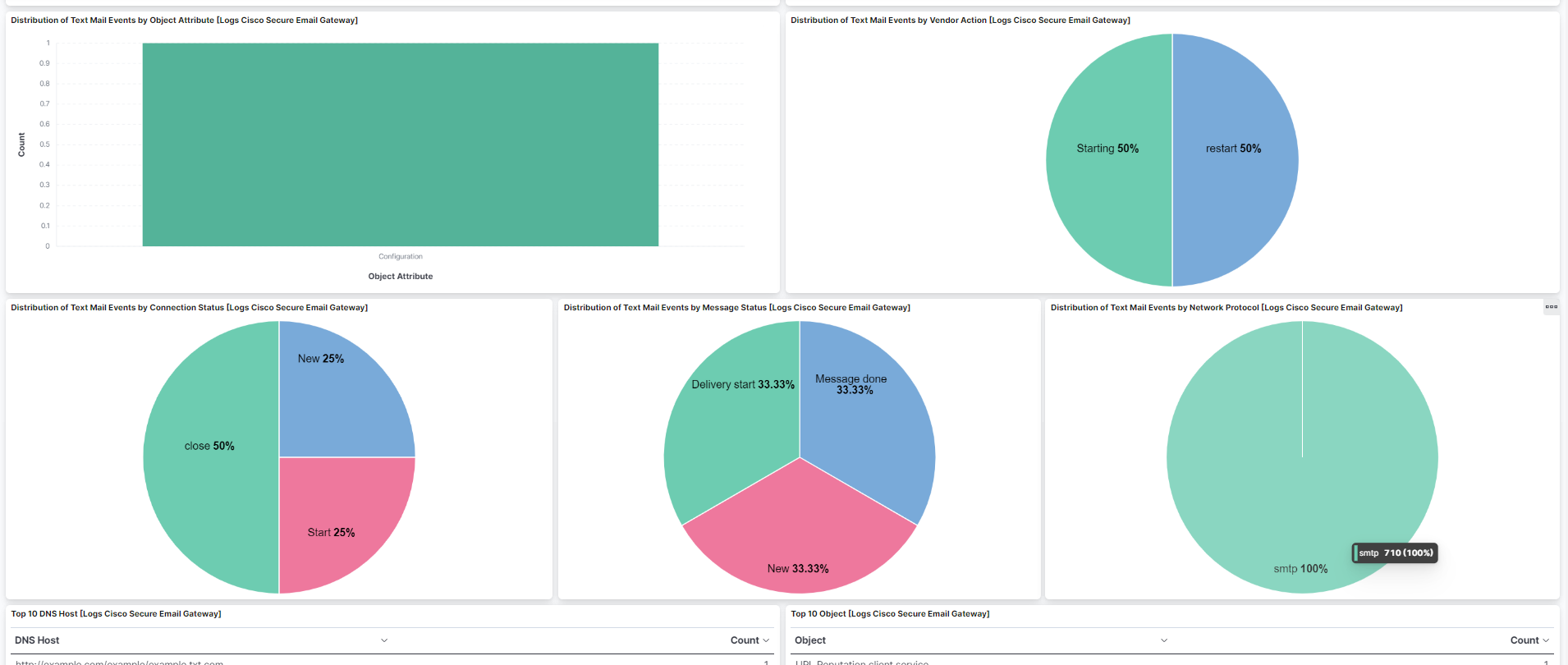
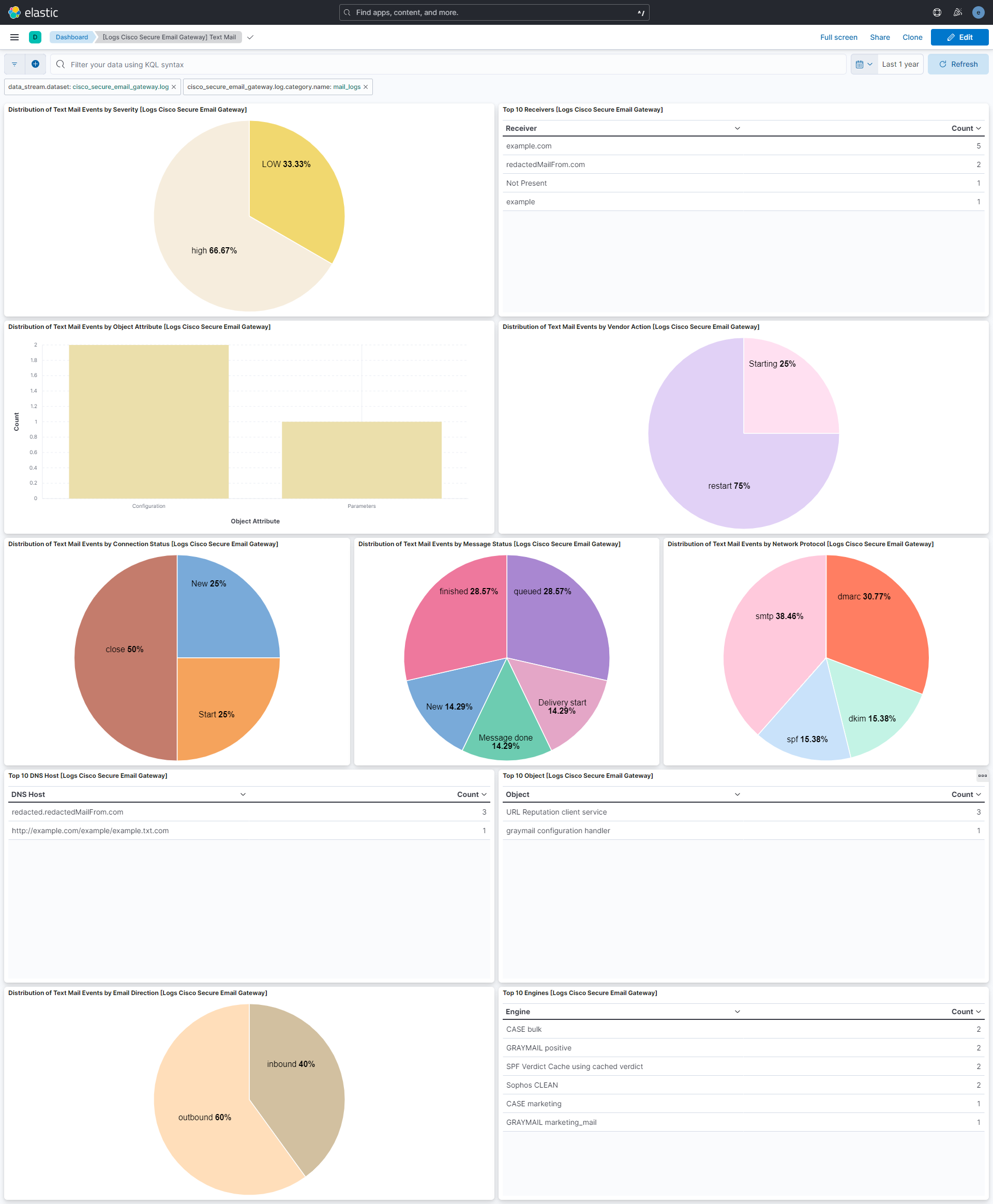
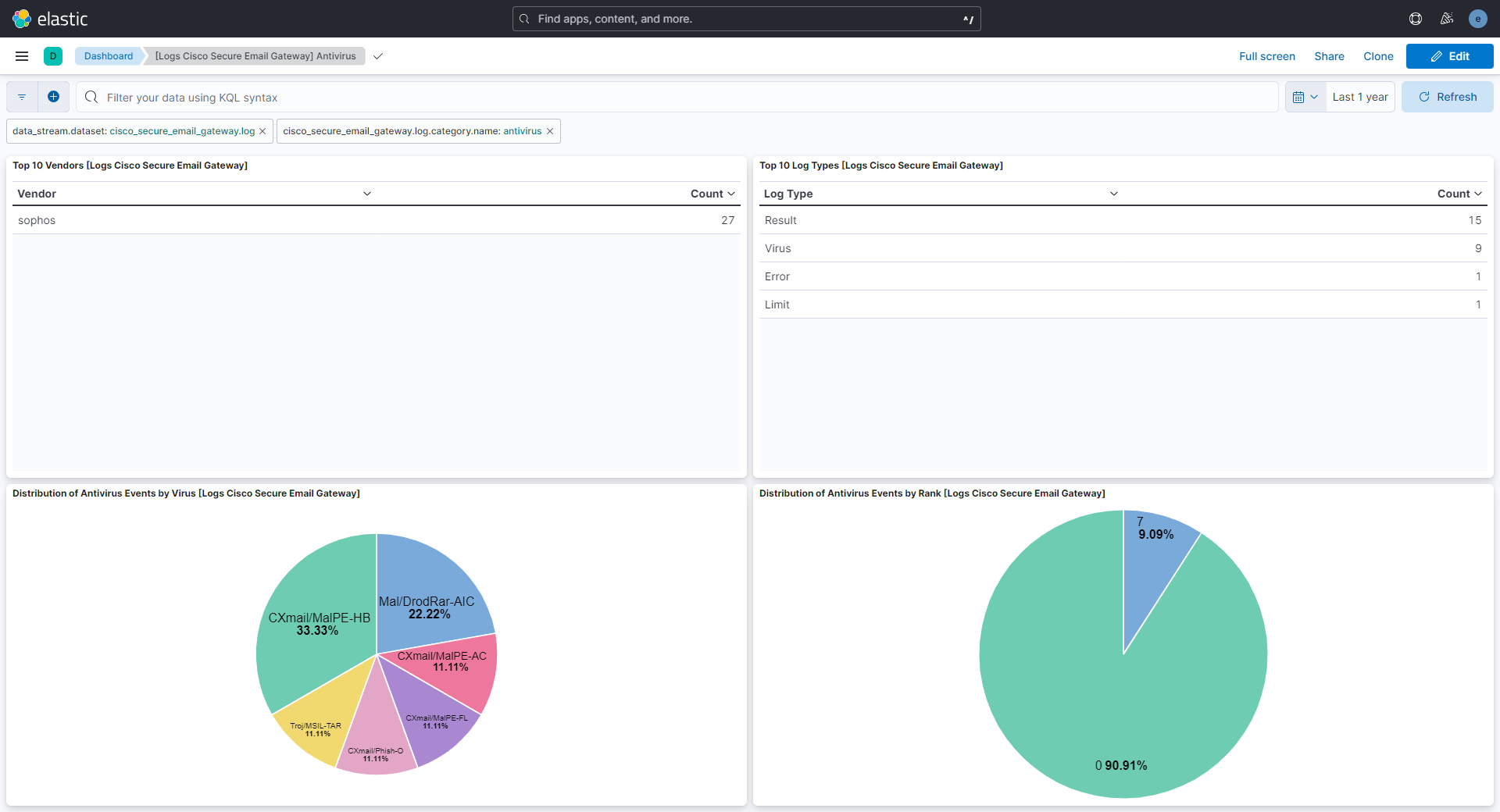
This integration includes one or more Kibana dashboards that visualizes the data collected by the integration. The screenshots below illustrate how the ingested data is displayed.
Changelog
| Version | Details | Minimum Kibana version |
|---|---|---|
| 1.30.0 | Enhancement (View pull request) Changed owners. |
9.0.0 8.11.0 |
| 1.29.3 | Bug fix (View pull request) Correctly parse messages which contain commas within a message field |
9.0.0 8.11.0 |
| 1.29.2 | Bug fix (View pull request) Remove top level note from docs |
9.0.0 8.11.0 |
| 1.29.1 | Bug fix (View pull request) Avoid matching standalone MID grok fallback inside tokens such as CrtMID when parsing mail_logs messages. |
9.0.0 8.11.0 |
| 1.29.0 | Enhancement (View pull request) Update documentation for the integration. |
9.0.0 8.11.0 |
| 1.28.4 | Bug fix (View pull request) Fix pattern for fields with commas in AMP logs. |
9.0.0 8.11.0 |
| 1.28.3 | Bug fix (View pull request) Improved clarity of upload.action field description in documentation. |
9.0.0 8.11.0 |
| 1.28.2 | Bug fix (View pull request) Fix key value split for file names with commas in AMP logs. |
9.0.0 8.11.0 |
| 1.28.1 | Bug fix (View pull request) Fix grok pattern for Email Message ID in text_mail logs. |
9.0.0 8.11.0 |
| 1.28.0 | Enhancement (View pull request) Preserve event.original on pipeline error. |
9.0.0 8.11.0 |
| 1.27.2 | Enhancement (View pull request) Generate processor tags and normalize error handler. |
9.0.0 8.11.0 |
| 1.27.1 | Enhancement (View pull request) Changed owners. |
9.0.0 8.11.0 |
| 1.27.0 | Enhancement (View pull request) Support SplunkGIS events and improve handling of different log file name formats. |
9.0.0 8.11.0 |
| 1.26.0 | Enhancement (View pull request) Support stack version 9.0. |
9.0.0 8.11.0 |
| 1.25.1 | Bug fix (View pull request) Updated SSL description to be uniform and to include links to documentation. |
8.11.0 |
| 1.25.0 | Enhancement (View pull request) ECS version updated to 8.17.0. |
8.11.0 |
| 1.24.3 | Bug fix (View pull request) Fix field name in remove processor. |
8.11.0 |
| 1.24.2 | Bug fix (View pull request) Fix parsing the text_mail log lines for file uploads. |
8.11.0 |
| 1.24.1 | Bug fix (View pull request) Use triple-brace Mustache templating when referencing variables in ingest pipelines. |
8.11.0 |
| 1.24.0 | Enhancement (View pull request) Allow @custom pipeline access to event.original without setting preserve_original_event. |
8.11.0 |
| 1.23.3 | Bug fix (View pull request) Fix parsing bug that was too greedy and fail to parse if too many colons were in log |
8.7.1 |
| 1.23.2 | Bug fix (View pull request) Fix ingest pipeline warnings |
8.7.1 |
| 1.23.1 | Bug fix (View pull request) Improve extraction and parsing of fields for consolidated events. |
8.7.1 |
| 1.23.0 | Enhancement (View pull request) Update package spec to 3.0.3. |
8.7.1 |
| 1.22.2 | Bug fix (View pull request) Fix grok if hostname appears before category.name |
8.7.1 |
| 1.22.1 | Enhancement (View pull request) Changed owners |
8.7.1 |
| 1.22.0 | Bug fix (View pull request) Fix handling of Consolidated Events when end and start time are missing. Bug fix (View pull request) Fix handling of AMP logs when filenames contain a comma. Enhancement (View pull request) Parse fields 'Analysis Source' and 'verdict_source' from AMP logs. |
8.7.1 |
| 1.21.0 | Enhancement (View pull request) Handle and record log host origin filepaths. |
8.7.1 |
| 1.20.1 | Bug fix (View pull request) Fix exclude_files pattern. |
8.7.1 |
| 1.20.0 | Bug fix (View pull request) Fix wrong grok for mail_logs. Enhancement (View pull request) Add new field cisco_secure_email_gateway.log.email_participants. |
8.7.1 |
| 1.19.0 | Enhancement (View pull request) ECS version updated to 8.11.0. |
8.7.1 |
| 1.18.0 | Enhancement (View pull request) Support new format for mail category of logs and add pipeline for antivirus category. |
8.7.1 |
| 1.17.0 | Enhancement (View pull request) Improve 'event.original' check to avoid errors if set. |
8.7.1 |
| 1.16.0 | Enhancement (View pull request) Update ingest pipeline to handle v15. Bug fix (View pull request) Fix handling of logs without a syslog priority. Bug fix (View pull request) Fix handling of event.start and event.end for consolidated events. |
8.7.1 |
| 1.15.0 | Enhancement (View pull request) ECS version updated to 8.10.0. |
8.7.1 |
| 1.14.0 | Enhancement (View pull request) The format_version in the package manifest changed from 2.11.0 to 3.0.0. Removed dotted YAML keys from package manifest. Added 'owner.type: elastic' to package manifest. |
8.7.1 |
| 1.13.1 | Bug fix (View pull request) Remove the unused mappings for 'type' and 'filepath'. |
8.7.1 |
| 1.13.0 | Enhancement (View pull request) Add tags.yml file so that integration's dashboards and saved searches are tagged with "Security Solution" and displayed in the Security Solution UI. |
8.7.1 |
| 1.12.0 | Enhancement (View pull request) Update package-spec to 2.10.0. |
8.7.1 |
| 1.11.2 | Bug fix (View pull request) Match both Unix and Windows-style paths, correctly. |
8.7.1 |
| 1.11.1 | Bug fix (View pull request) Match both Unix and Windows-style paths |
8.7.1 |
| 1.11.0 | Enhancement (View pull request) Update package to ECS 8.9.0. |
8.7.1 |
| 1.10.1 | Bug fix (View pull request) Fix grok timeout on expensive consolidated events logs. |
8.7.1 |
| 1.10.0 | Enhancement (View pull request) Convert dashboard to lens. |
8.7.1 |
| 1.9.0 | Enhancement (View pull request) Ensure event.kind is correctly set for pipeline errors. |
8.0.0 7.17.0 |
| 1.8.2 | Bug fix (View pull request) Fix grok pattern in AMP pipeline. |
8.0.0 7.17.0 |
| 1.8.1 | Bug fix (View pull request) Fix consolidated event pipeline |
8.0.0 7.17.0 |
| 1.8.0 | Enhancement (View pull request) Update package to ECS 8.8.0. |
8.0.0 7.17.0 |
| 1.7.1 | Bug fix (View pull request) Fix grok pattern and timezone in consolidated pipeline. |
8.0.0 7.17.0 |
| 1.7.0 | Enhancement (View pull request) Update package to ECS 8.7.0. |
8.0.0 7.17.0 |
| 1.6.2 | Bug fix (View pull request) Fix grok pattern in AMP pipeline. |
8.0.0 7.17.0 |
| 1.6.1 | Enhancement (View pull request) Added categories and/or subcategories. |
8.0.0 7.17.0 |
| 1.6.0 | Enhancement (View pull request) Allow configuration of time zones. |
8.0.0 7.17.0 |
| 1.5.1 | Enhancement (View pull request) Add trim processor to remove white spaces in message. |
8.0.0 7.17.0 |
| 1.5.0 | Enhancement (View pull request) Update package to ECS 8.6.0. |
8.0.0 7.17.0 |
| 1.4.0 | Enhancement (View pull request) Add udp_options to the UDP input. |
8.0.0 7.17.0 |
| 1.3.1 | Bug fix (View pull request) Fix grok pattern to extract additional fields |
8.0.0 7.17.0 |
| 1.3.0 | Enhancement (View pull request) Add an on_failure processor to the date processor. |
8.0.0 7.17.0 |
| 1.2.0 | Enhancement (View pull request) Update package to ECS 8.5.0. |
8.0.0 7.17.0 |
| 1.1.0 | Enhancement (View pull request) Improve error message for incorrect log filepath configuration. Bug fix (View pull request) Fix grok pattern for extracting log category from filepath. |
8.0.0 7.17.0 |
| 1.0.1 | Bug fix (View pull request) Remove duplicate fields. |
8.0.0 7.17.0 |
| 1.0.0 | Enhancement (View pull request) Make GA |
8.0.0 7.17.0 |
| 0.3.0 | Enhancement (View pull request) Update package to ECS 8.4.0 |
8.0.0 7.17.0 |
| 0.2.1 | Enhancement (View pull request) Improve SSL config description and example. |
8.0.0 7.17.0 |
| 0.2.0 | Enhancement (View pull request) Update package to ECS 8.3.0. |
8.0.0 7.17.0 |
| 0.1.0 | Enhancement (View pull request) Initial draft of the package |
8.0.0 7.17.0 |