WhoisFreaks Integration for Elastic
Elastic Cloud Serverless projects are autoscaled environments, fully managed by Elastic and available on Elastic Cloud. Availability This functionality is in technical preview and is ready for evaluation. Use with caution in production; it is not recommended for mission-critical workloads. Elastic will work to fix any issues, but features in technical preview are not subject to the support SLA of official GA features. Specific Support terms apply. The Elastic Stack includes Elastic's core products such as Elasticsearch, Kibana, Logstash, and Beats. Availability This functionality is in technical preview and is ready for evaluation. Use with caution in production; it is not recommended for mission-critical workloads. Elastic will work to fix any issues, but features in technical preview are not subject to the support SLA of official GA features. Specific Support terms apply. Unless stated otherwise on the page, this functionality is available when your Elastic Stack is deployed on Elastic Cloud Hosted, Elastic Cloud Enterprise, Elastic Cloud on Kubernetes, and self-managed environments. This documentation corresponds to the latest patch available for each minor version. If you're not using the latest patch, check the release notes for changes.
Serverless Security
Preview
Preview
Stack
Preview
9.4+
Preview since 9.4
| Version | 0.1.0 Availability Preview This functionality is in technical preview and is ready for evaluation. Use with caution in production; it is not recommended for mission-critical workloads. Elastic will work to fix any issues, but features in technical preview are not subject to the support SLA of official GA features. Specific Support terms apply. (View all) |
| Subscription level What's this? |
Basic |
| Developed by What's this? |
Partner |
| Ingestion method(s) | API |
| Minimum Kibana version(s) | 9.4.0 |
To use pre-release integrations, go to the Integrations page in Kibana, scroll down, and toggle on the Display beta integrations option.
The WhoisFreaks integration collects data published by WhoisFreaks and indexes it into Elasticsearch:
- The daily gTLD and ccTLD newly registered domain ("domainer") feeds, with and
without WHOIS records. These documents are enrichment data
(
event.kind: enrichment) underwhoisfreaks.*: a newly registered domain is a risk signal, not an indicator of compromise, so these documents are not typed as threat indicators. - The daily malware, phishing, and spam domain threat feeds. These documents
are threat indicators (
event.category: threat,event.type: indicator) with the domain inthreat.indicator.url.domainandthreat.indicator.name, and they are expired with an Elastic latest transform.
This integration requires a WhoisFreaks account and an API key from the WhoisFreaks billing dashboard, with:
- an active Domainer Subscription for the
nrd_with_whoisandnrd_without_whoisdata streams, and - an active Threat Feed subscription for the
threat_feed_malware,threat_feed_phishing, andthreat_feed_spamdata streams.
The integration contains five Elastic Agent CEL inputs. Every WhoisFreaks stream
request requires a date query parameter (yyyy-MM-dd), so all five inputs work the
same way:
- On each poll, call the public WhoisFreaks status endpoint (
/v3.4/status, no API key needed) and read that feed'slast_updateandavailable_fromdates:newly.gtldandnewly.cctldfor the two newly registered domain streams, andthreat_feed.malware,threat_feed.phishing, orthreat_feed.spamfor the threat feeds. - Pick the file date: the feed's
last_updateby default, or the configured File Date if one is set (see File Date). Every stream request carries thisdateparameter; only the status endpoint is called without one. - Compare it with the last file date already ingested for that feed, which is kept
in the input cursor. If it is not newer, the poll ends after the status call, so
the default
1hInterval never re-pages a daily file. - Otherwise, page through the stream endpoint with
date,limit, and a growingoffsetuntil a page comes back short, then record the date as ingested.
Every column of every stream response is kept. CSV rows are mapped by the column names in the response's header row (the header of the first page is reused for later pages that do not repeat it), so a reordered or newly added column is indexed rather than dropped. Only empty cells are left out.
Every document carries the file date it came from in whoisfreaks.file_date. All
inputs emit one document per row or domain.
File Date is optional on every data stream. Leave it empty (recommended) to always fetch the latest file reported by the status endpoint. When it is set, the input:
- Checks that the value is a real calendar date in
yyyy-MM-ddformat. - Checks against the status endpoint that it falls within the feed's
available_from..last_updaterange, inclusive (for the newly registered domain streams, separately for gTLD and ccTLD). - Fetches a valid date once, and then continues with the latest file. Later polls follow the latest file even while the setting stays filled in. Changing the value fetches the new date once.
- If either check fails, indexes one error document that names the configured date and the allowed range, makes no stream request for that date, and continues with the latest file. If the date is valid for only one of gTLD/ccTLD, it is fetched for that feed.
- Tracks the pinned file separately from the latest ingested file, so fetching a historical file never causes the latest file to be fetched again.
Every status and stream request is checked. Failures are indexed as a single error
document with error.code and an error.message that contains the method, the URL
(the API key is always removed), the HTTP status, and the WhoisFreaks error and
message text when the response is JSON.
- Server, timeout, rate-limit, and network errors (5xx, 408, 429, transport failures): the cursor is kept, so the next poll retries the same page.
- Authentication errors (401, 403, and the HTTP 400
Api Access Exceptionthat WhoisFreaks returns for a missing or invalid API key): reported with a hint to check the API key and the Domainer or Threat Feed subscription; the cursor is kept and the next poll retries, so no file is skipped. - Other client errors (for example 400 or 404): the file date is recorded as done for that feed so the input does not retry it forever; the newly registered domain streams move on to the other TLD type's pending file.
- Status endpoint failures (non-2xx, malformed JSON, missing feed, or a
Not Availablevalue): reported as an error document and no stream request is made.
The nrd_with_whois data stream uses the Elastic Agent CEL input to:
- Query the public WhoisFreaks status endpoint (
/v3.4/status) and readnewly.gtld.last_updateandnewly.cctld.last_update. These are the dates of the latest available gTLD and ccTLD WHOIS files. - Compare each date against the last file of that type already ingested, which is tracked in two independent cursors in the input's persistent state.
- For each feed with a newer date, page through the corresponding stream
endpoint (
/gtldor/cctld) withwhois=true,date,limit, and a growingoffsetas query parameters, and the API key sent as theapiKeyquery parameter. Each page is parsed as a CSV with a header. - Emit each CSV row, tagged with
tld_type(gtldorcctld), as a JSONmessageand advance that feed's cursor to the ingested date once paging for that feed completes. If a page request fails with a server, authentication, or rate-limit error, the cursor is kept, so the next poll resumes that page instead of skipping the day's file. Other client errors (for example an invalid File Date) are reported as an error event, that feed's file for the date is marked as done, and the input moves on to the other feed's pending file. - Run the result through an ingest pipeline that preserves the raw record in
event.original, parses it intowhoisfreaks.*, sets@timestamp, parses the WHOIS dates, deriveswhoisfreaks.days_until_expiryandwhoisfreaks.is_newly_registered, and fingerprintstld_type+domain_name+query_timeinto the document_idfor idempotent re-polling.
Each daily file holds only that day's newly registered domains, so no day is skipped
after a gap (for example an agent outage or an error that lasts more than a day). When
the last ingested date is older than the status last_update, the input fetches the
following days one at a time, starting from the day after the last ingested date (or
from available_from when that is later), until it reaches last_update. On the
first run, the input starts from the current last_update. To load an older day, set
File Date to it, wait for it to be ingested, and then clear the setting again.
The nrd_without_whois data stream follows the same daily status-driven pattern,
but it requests the stream with whois=false. This endpoint returns the domain
names as a plain newline-delimited list rather than a WHOIS CSV. The input:
- Calls the public status API to discover the latest gTLD and ccTLD file dates.
- Switches into the
gtldorcctldpaging mode only when that feed's date is newer than the last ingested value. - Splits the response body on
\n, drops blank lines, and emits one event per non-empty domain entry withwhoisfreaks.domain_name, the file date aswhoisfreaks.query_time, and the matchingwhoisfreaks.tld_typetag. - Keeps the same cursor-based idempotency model as the WHOIS feed so it does not re-ingest identical daily snapshots.
Like the WHOIS feed, it uses a 1h default Interval, catches up missed days the
same way, and polls without a new file only call the public status endpoint. Because
this feed has no per-domain timestamp, whoisfreaks.query_time (and @timestamp) is
the file date at 00:00:00 UTC.
The three threat feeds are daily snapshot endpoints under the WhoisFreaks v3.4 threat-feed API. Each input:
- Reads
threat_feed.<type>.last_updatefrom the status endpoint (or uses the validated File Date) and, when that date is new, requests the feed endpoint for the relevant category (malware,phishing, orspam) withdate, paging withlimitand a growingoffsetuntil a page comes back short. - Emit each CSV row as the raw
message, which the ingest pipeline preserves inevent.originaland parses by column name using the feed's header row.domain,first_seen, andlast_seenpopulate the ECS indicator fields, and every other column (including any new one) is kept underwhoisfreaks.threat_feed.<column>. - Emit one event per row with ECS threat fields (for example,
threat.indicator.typeand the feed-specific metadata). - Index upstream non-200 responses as error documents with
error.codeanderror.messageset rather than as threat indicators.
Each row is fingerprinted on threat.indicator.url.domain + threat.indicator.last_seen
whoisfreaks.file_dateinto the document_id, so re-fetching the same file never duplicates documents. The latest transform keeps one document per domain: the copy from the newest daily file (bywhoisfreaks.file_date). Rows of a file fetched once through File Date are flagged withwhoisfreaks.pinned_file: true: they are kept in the source data stream as history but are excluded from the latest (active) indicator index, so a historical file never replaces or expires the indicators of the newest file. Indicators are expired as described in Expiration of Indicators of Compromise (IOCs).
Each threat feed file is a full daily snapshot. The Replace indicators from the previous file setting (enabled by default) controls what happens to indicators that a newer file no longer lists:
- Enabled: an indicator stays active until the next daily file is due (its file
date plus 2 days, at 00:00 UTC), or until IOC Expiration Duration passes after
last_seen, whichever comes first. Indicators repeated in the newest file get a later expiration from that file and stay active. Indicators missing from it are removed from the latest (active) indicator index automatically once the previous file's expiration passes, a few hours after the newest file is ingested. If no newer file is ingested (for example, during a long agent outage), the indicators from the last file also expire at that time. - Disabled: indicators stay active until IOC Expiration Duration passes after
last_seen, even if a newer file no longer lists them.
Elastic Agent cannot delete documents directly, so removal goes through the latest
transform's retention policy. The raw documents in the source data stream are removed
by its ILM policy.
If IOC Expiration Duration cannot be parsed, the default of 90d is used and the
documents are tagged invalid_ioc_expiration_duration.
The WhoisFreaks integration collects log messages of the following types:
- Domain WHOIS records for newly registered gTLDs and ccTLDs (with and without WHOIS enrichment).
- Malware, spam, and phishing domain threat indicators from the WhoisFreaks threat feeds.
- Domain portfolio management (expiration tracking).
- Threat intelligence / brand protection (newly registered domain monitoring, registrar/name-server pivoting).
- Registrar and TLD analytics.
- Elastic Agent.
- A WhoisFreaks account and API key with a Domainer Subscription (newly registered domain streams) and a Threat Feed subscription (threat feed streams).
- This integration installs Elastic latest transforms for the threat feeds. For more details, check the Transform setup and requirements.
Elastic Agent must be installed. For more details, check the Elastic Agent installation instructions. You can install only one Elastic Agent per host.
- Sign in to the WhoisFreaks billing dashboard and confirm an active Domainer Subscription (for the newly registered domain streams) and Threat Feed subscription (for the threat feed streams).
- Copy your API key from the dashboard.
- Add the WhoisFreaks integration to an Agent policy.
- Paste your API key in the integration-level API Key setting.
- For each data stream, confirm the base URL (for the threat feeds this setting
is under Advanced options). The defaults are already filled in:
nrd_with_whoisandnrd_without_whois: the base domainer stream endpointhttps://files.whoisfreaks.com/v3.3/stream/domainer, without thegtld/cctldsuffix or query string.threat_feed_malware,threat_feed_phishing,threat_feed_spam:https://files.whoisfreaks.com/v3.4/stream/threat-feed/{malware,phishing,spam}.
- Leave File Date empty to always fetch the latest published file, or set a
yyyy-MM-ddvalue within the feed's available range to fetch one historical file (see File Date). Keep each stream's Interval at its default, and adjust IOC Expiration Duration (default90d) to control how long threat indicators stay active after they were last seen. Leave Replace indicators from the previous file enabled to keep only the indicators of the newest daily file active (see Replacing indicators from the previous file). - Save the integration and confirm the Agent starts collecting data.
Open Discover and validate each stream independently:
logs-ti_whoisfreaks.nrd_with_whois-*for WHOIS-rich gTLD/ccTLD records.logs-ti_whoisfreaks.nrd_without_whois-*for daily domain-only records.logs-ti_whoisfreaks.threat_feed_malware-*,logs-ti_whoisfreaks.threat_feed_phishing-*, andlogs-ti_whoisfreaks.threat_feed_spam-*for the three threat indicators.
Each stream should show documents with a populated whoisfreaks.domain_name or
threat indicator fields and a valid @timestamp.
Check that the threat feed transforms are healthy:
- In Kibana, navigate to Management > Stack Management.
- Under Data, select Transforms.
- In the search bar, type whoisfreaks.
- All transforms from the search results should indicate Healthy under the Health column.
- No data is being collected: confirm the API key and the Domainer or Threat Feed subscription are valid; check
error.codeanderror.messageon error documents for the upstream HTTP status. Please provide the date parameteroroutside the available rangeerrors: check File Date. It must beyyyy-MM-ddand within the range that the status endpoint reports for that feed; leave it empty to follow the latest file.- An upstream API failure (non-200 response) on any of the five data streams is indexed as a single document with
error.codeanderror.messagepopulated and noevent.category,event.type, orthreat.*fields set, so it is not mistaken for a normal indicator or WHOIS record. Search for them with the KQL querydata_stream.dataset: ti_whoisfreaks.* AND error.message: *. - Records that fail to parse are indexed with
event.kind: pipeline_error, the failure inerror.message, and the raw record inevent.original. - Since this integration expires threat indicators using an Elastic latest transform, the threat indicators are present in both the source and the destination indices. While this may appear to be duplicate ingestion, it is an implementation detail necessary for properly expiring threat indicators. Anticipate storage requirements accordingly.
- Security note: the WhoisFreaks API requires the API key to be sent as an
apiKeyquery parameter. The key is redacted wherever this integration logs its internalstate, but if Elastic Agent's HTTP client logging is raised todebuglevel (for example while troubleshooting), the outgoing request URL, including the API key may appear in agent logs in cleartext. Avoid enabling debug-level logging for this integration unless necessary, and treat agent debug logs as sensitive while doing so.
For more information on architectures that can be used for scaling this integration, check the Ingest Architectures documentation.
These inputs can be used with this integration:
cel
For more details about the CEL input settings, check the Filebeat documentation.
Before configuring the CEL input, make sure you have:
- Network connectivity to the target API endpoint
- Valid authentication credentials (API keys, tokens, or certificates as required)
- Appropriate permissions to read from the target data source
To configure the CEL input, you must specify the request.url value pointing to the API endpoint. The interval parameter controls how frequently requests are made and is the primary way to balance data freshness with API rate limits and costs. Authentication is often configured through the request.headers section using the appropriate method for the service.
To access the API service, make sure you have the necessary API credentials and that the Filebeat instance can reach the endpoint URL. Some services may require IP whitelisting or VPN access.
To collect logs via API endpoint, configure the following parameters:
- API Endpoint URL
- API credentials (tokens, keys, or username/password)
- Request interval (how often to fetch data)
These APIs are used with this integration:
- WhoisFreaks gTLD/ccTLD Newly Registered Domains stream API
- WhoisFreaks threat feed stream API (
/v3.4/stream/threat-feed/malware,/phishing, and/spam)
The nrd_with_whois data stream provides Newly Registered Domains with WHOIS records.
Exported fields
| Field | Description | Type |
|---|---|---|
| @timestamp | Date/time when the event originated. This is the date/time extracted from the event, typically representing when the event was generated by the source. If the event source has no original timestamp, this value is typically populated by the first time the event was received by the pipeline. Required field for all events. | date |
| data_stream.dataset | The field can contain anything that makes sense to signify the source of the data. Examples include nginx.access, prometheus, endpoint etc. For data streams that otherwise fit, but that do not have dataset set we use the value "generic" for the dataset value. event.dataset should have the same value as data_stream.dataset. Beyond the Elasticsearch data stream naming criteria noted above, the dataset value has additional restrictions: * Must not contain - * No longer than 100 characters |
constant_keyword |
| data_stream.namespace | A user defined namespace. Namespaces are useful to allow grouping of data. Many users already organize their indices this way, and the data stream naming scheme now provides this best practice as a default. Many users will populate this field with default. If no value is used, it falls back to default. Beyond the Elasticsearch index naming criteria noted above, namespace value has the additional restrictions: * Must not contain - * No longer than 100 characters |
constant_keyword |
| data_stream.type | An overarching type for the data stream. Currently allowed values are "logs" and "metrics". We expect to also add "traces" and "synthetics" in the near future. | constant_keyword |
| ecs.version | ECS version this event conforms to. ecs.version is a required field and must exist in all events. When querying across multiple indices -- which may conform to slightly different ECS versions -- this field lets integrations adjust to the schema version of the events. |
keyword |
| error.code | Error code describing the error. | keyword |
| error.message | Error message. | match_only_text |
| event.dataset | Name of the dataset. If an event source publishes more than one type of log or events (e.g. access log, error log), the dataset is used to specify which one the event comes from. It's recommended but not required to start the dataset name with the module name, followed by a dot, then the dataset name. | constant_keyword |
| event.kind | This is one of four ECS Categorization Fields, and indicates the highest level in the ECS category hierarchy. event.kind gives high-level information about what type of information the event contains, without being specific to the contents of the event. For example, values of this field distinguish alert events from metric events. The value of this field can be used to inform how these kinds of events should be handled. They may warrant different retention, different access control, it may also help understand whether the data is coming in at a regular interval or not. |
keyword |
| event.module | Name of the module this data is coming from. If your monitoring agent supports the concept of modules or plugins to process events of a given source (e.g. Apache logs), event.module should contain the name of this module. |
constant_keyword |
| event.original | Raw text message of entire event. Used to demonstrate log integrity or where the full log message (before splitting it up in multiple parts) may be required, e.g. for reindex. This field is not indexed and doc_values are disabled. It cannot be searched, but it can be retrieved from _source. If users wish to override this and index this field, please see Field data types in the Elasticsearch Reference. |
keyword |
| input.type | Type of Filebeat input. | keyword |
| related.hosts | All hostnames or other host identifiers seen on your event. Example identifiers include FQDNs, domain names, workstation names, or aliases. | keyword |
| tags | List of keywords used to tag each event. | keyword |
| whoisfreaks.administrative_address | Street address of the administrative contact. | match_only_text |
| whoisfreaks.administrative_city | City of the administrative contact. | keyword |
| whoisfreaks.administrative_company | Company of the administrative contact. | keyword |
| whoisfreaks.administrative_country | Country name of the administrative contact. | keyword |
| whoisfreaks.administrative_country_code | Country code of the administrative contact. | keyword |
| whoisfreaks.administrative_email | Email of the administrative contact. | keyword |
| whoisfreaks.administrative_fax | Fax number of the administrative contact. | keyword |
| whoisfreaks.administrative_handle | Administrative contact handle. | keyword |
| whoisfreaks.administrative_id | Administrative contact identifier. | keyword |
| whoisfreaks.administrative_id_type | Type of the administrative contact identifier. | keyword |
| whoisfreaks.administrative_name | Name of the administrative contact. | keyword |
| whoisfreaks.administrative_name.text | Multi-field of whoisfreaks.administrative_name. |
match_only_text |
| whoisfreaks.administrative_phone | Phone number of the administrative contact. | keyword |
| whoisfreaks.administrative_state | State or province of the administrative contact. | keyword |
| whoisfreaks.administrative_zip | ZIP or postal code of the administrative contact. | keyword |
| whoisfreaks.billing_address | Street address of the billing contact. | match_only_text |
| whoisfreaks.billing_city | City of the billing contact. | keyword |
| whoisfreaks.billing_company | Company of the billing contact. | keyword |
| whoisfreaks.billing_country | Country name of the billing contact. | keyword |
| whoisfreaks.billing_country_code | Country code of the billing contact. | keyword |
| whoisfreaks.billing_email | Email of the billing contact. | keyword |
| whoisfreaks.billing_fax | Fax number of the billing contact. | keyword |
| whoisfreaks.billing_handle | Billing contact handle. | keyword |
| whoisfreaks.billing_id | Billing contact identifier. | keyword |
| whoisfreaks.billing_id_type | Type of the billing contact identifier. | keyword |
| whoisfreaks.billing_name | Name of the billing contact. | keyword |
| whoisfreaks.billing_name.text | Multi-field of whoisfreaks.billing_name. |
match_only_text |
| whoisfreaks.billing_phone | Phone number of the billing contact. | keyword |
| whoisfreaks.billing_state | State or province of the billing contact. | keyword |
| whoisfreaks.billing_zip | ZIP or postal code of the billing contact. | keyword |
| whoisfreaks.create_date | Date when the domain was originally registered. | date |
| whoisfreaks.days_until_expiry | Days between the record's query_time and its expiry_date. Negative once the domain has already expired. Computed once by the ingest pipeline at ingest time. | long |
| whoisfreaks.domain_name | The primary domain name associated with the WHOIS record. | keyword |
| whoisfreaks.domain_registrar_authoritative_registry_name | Name of the authoritative registry for the domain. | keyword |
| whoisfreaks.domain_registrar_email_address | Abuse or contact email address of the registrar. | keyword |
| whoisfreaks.domain_registrar_id | Unique identifier of the registrar. | keyword |
| whoisfreaks.domain_registrar_name | Name of the domain registrar. | keyword |
| whoisfreaks.domain_registrar_phone | Contact phone number of the registrar. | keyword |
| whoisfreaks.domain_registrar_url | Registrar website URL. | keyword |
| whoisfreaks.domain_registrar_whois | Registrar WHOIS server details. | keyword |
| whoisfreaks.domain_status_1 | Primary domain status flag. | keyword |
| whoisfreaks.domain_status_2 | Secondary domain status flag. | keyword |
| whoisfreaks.domain_status_3 | Third domain status flag. | keyword |
| whoisfreaks.domain_status_4 | Fourth domain status flag. | keyword |
| whoisfreaks.eligibility_id | Eligibility identifier for restricted TLDs. | keyword |
| whoisfreaks.eligibility_name | Eligibility name for restricted TLDs. | keyword |
| whoisfreaks.eligibility_type | Eligibility type for restricted TLDs. | keyword |
| whoisfreaks.expiry_date | Date when the domain registration expires. | date |
| whoisfreaks.file_date | The WhoisFreaks daily file date (yyyy-MM-dd) the record was fetched for, sent as the date parameter of the stream request. |
date |
| whoisfreaks.is_newly_registered | True when create_date falls on the same day as query_time, i.e. the domain was registered the day it was captured in this feed. Computed by the ingest pipeline. | boolean |
| whoisfreaks.name_server_1 | Primary name server. | keyword |
| whoisfreaks.name_server_2 | Secondary name server. | keyword |
| whoisfreaks.name_server_3 | Third name server. | keyword |
| whoisfreaks.name_server_4 | Fourth name server. | keyword |
| whoisfreaks.num | Record row number or index. | long |
| whoisfreaks.num_raw | Original num value when it is not a valid integer. |
keyword |
| whoisfreaks.query_time | Original query timestamp string from the feed (yyyy-MM-dd HH:mm:ss). Parsed into @timestamp by the ingest pipeline. | keyword |
| whoisfreaks.registrant_address | Street address of the registrant. | match_only_text |
| whoisfreaks.registrant_city | City of the registrant. | keyword |
| whoisfreaks.registrant_company | Company or organization that registered the domain. | keyword |
| whoisfreaks.registrant_country | Country name of the registrant. | keyword |
| whoisfreaks.registrant_country_code | Two-letter country code of the registrant. | keyword |
| whoisfreaks.registrant_email | Contact email address of the registrant. | keyword |
| whoisfreaks.registrant_fax | Contact fax number of the registrant. | keyword |
| whoisfreaks.registrant_handle | Registrant contact handle. | keyword |
| whoisfreaks.registrant_id | Registrant contact identifier. | keyword |
| whoisfreaks.registrant_id_type | Type of the registrant contact identifier. | keyword |
| whoisfreaks.registrant_name | Name of the domain registrant. | keyword |
| whoisfreaks.registrant_name.text | Multi-field of whoisfreaks.registrant_name. |
match_only_text |
| whoisfreaks.registrant_phone | Contact phone number of the registrant. | keyword |
| whoisfreaks.registrant_state | State or province of the registrant. | keyword |
| whoisfreaks.registrant_zip | Postal code or ZIP of the registrant. | keyword |
| whoisfreaks.reseller_email | Email of the domain reseller. | keyword |
| whoisfreaks.reseller_name | Name of the domain reseller. | keyword |
| whoisfreaks.reseller_phone | Phone number of the domain reseller. | keyword |
| whoisfreaks.technical_address | Street address of the technical contact. | match_only_text |
| whoisfreaks.technical_city | City of the technical contact. | keyword |
| whoisfreaks.technical_company | Company of the technical contact. | keyword |
| whoisfreaks.technical_country | Country name of the technical contact. | keyword |
| whoisfreaks.technical_country_code | Country code of the technical contact. | keyword |
| whoisfreaks.technical_email | Email of the technical contact. | keyword |
| whoisfreaks.technical_fax | Fax number of the technical contact. | keyword |
| whoisfreaks.technical_handle | Technical contact handle. | keyword |
| whoisfreaks.technical_id | Technical contact identifier. | keyword |
| whoisfreaks.technical_id_type | Type of the technical contact identifier. | keyword |
| whoisfreaks.technical_name | Name of the technical contact. | keyword |
| whoisfreaks.technical_name.text | Multi-field of whoisfreaks.technical_name. |
match_only_text |
| whoisfreaks.technical_phone | Phone number of the technical contact. | keyword |
| whoisfreaks.technical_state | State or province of the technical contact. | keyword |
| whoisfreaks.technical_zip | ZIP or postal code of the technical contact. | keyword |
| whoisfreaks.tld_type | Which WhoisFreaks newly-registered feed this record came from: "gtld" or "cctld". | keyword |
| whoisfreaks.update_date | Date when the domain record was last updated. | date |
Example
{
    "@timestamp": "2026-08-03T09:54:02.000Z",
    "agent": {
        "ephemeral_id": "7f5ca59c-9b5a-42fb-809b-3476d1916302",
        "id": "2d6420b8-7d66-45e9-b7df-501c657d5e23",
        "name": "elastic-agent-85239",
        "type": "filebeat",
        "version": "8.19.21"
    },
    "data_stream": {
        "dataset": "ti_whoisfreaks.nrd_with_whois",
        "namespace": "42181",
        "type": "logs"
    },
    "ecs": {
        "version": "9.5.0"
    },
    "elastic_agent": {
        "id": "2d6420b8-7d66-45e9-b7df-501c657d5e23",
        "snapshot": false,
        "version": "8.19.21"
    },
    "event": {
        "agent_id_status": "verified",
        "dataset": "ti_whoisfreaks.nrd_with_whois",
        "ingested": "2026-10-19T07:09:15Z",
        "kind": "enrichment"
    },
    "input": {
        "type": "cel"
    },
    "related": {
        "hosts": [
            "echo-pinned.example",
            "ns1.example.net"
        ]
    },
    "tags": [
        "forwarded",
        "whoisfreaks-nrd-with-whois"
    ],
    "whoisfreaks": {
        "create_date": "2026-08-02T00:00:00.000Z",
        "days_until_expiry": 363,
        "domain_name": "echo-pinned.example",
        "domain_registrar_id": "9999",
        "domain_registrar_name": "Example Registrar Inc",
        "domain_registrar_url": "http://www.registrar.example",
        "domain_registrar_whois": "whois.registrar.example",
        "domain_status_1": "addperiod",
        "expiry_date": "2027-08-02T00:00:00.000Z",
        "file_date": "2026-08-03",
        "is_newly_registered": false,
        "name_server_1": "ns1.example.net",
        "num": 1,
        "query_time": "2026-08-03 09:54:02",
        "tld_type": "gtld",
        "update_date": "2026-08-02T00:00:00.000Z"
    }
}
The nrd_without_whois data stream provides Newly Registered Domains without WHOIS records.
Exported fields
| Field | Description | Type |
|---|---|---|
| @timestamp | Date/time when the event originated. This is the date/time extracted from the event, typically representing when the event was generated by the source. If the event source has no original timestamp, this value is typically populated by the first time the event was received by the pipeline. Required field for all events. | date |
| data_stream.dataset | The field can contain anything that makes sense to signify the source of the data. Examples include nginx.access, prometheus, endpoint etc. For data streams that otherwise fit, but that do not have dataset set we use the value "generic" for the dataset value. event.dataset should have the same value as data_stream.dataset. Beyond the Elasticsearch data stream naming criteria noted above, the dataset value has additional restrictions: * Must not contain - * No longer than 100 characters |
constant_keyword |
| data_stream.namespace | A user defined namespace. Namespaces are useful to allow grouping of data. Many users already organize their indices this way, and the data stream naming scheme now provides this best practice as a default. Many users will populate this field with default. If no value is used, it falls back to default. Beyond the Elasticsearch index naming criteria noted above, namespace value has the additional restrictions: * Must not contain - * No longer than 100 characters |
constant_keyword |
| data_stream.type | An overarching type for the data stream. Currently allowed values are "logs" and "metrics". We expect to also add "traces" and "synthetics" in the near future. | constant_keyword |
| ecs.version | ECS version this event conforms to. ecs.version is a required field and must exist in all events. When querying across multiple indices -- which may conform to slightly different ECS versions -- this field lets integrations adjust to the schema version of the events. |
keyword |
| error.code | Error code describing the error. | keyword |
| error.message | Error message. | match_only_text |
| event.dataset | Name of the dataset. If an event source publishes more than one type of log or events (e.g. access log, error log), the dataset is used to specify which one the event comes from. It's recommended but not required to start the dataset name with the module name, followed by a dot, then the dataset name. | constant_keyword |
| event.kind | This is one of four ECS Categorization Fields, and indicates the highest level in the ECS category hierarchy. event.kind gives high-level information about what type of information the event contains, without being specific to the contents of the event. For example, values of this field distinguish alert events from metric events. The value of this field can be used to inform how these kinds of events should be handled. They may warrant different retention, different access control, it may also help understand whether the data is coming in at a regular interval or not. |
keyword |
| event.module | Name of the module this data is coming from. If your monitoring agent supports the concept of modules or plugins to process events of a given source (e.g. Apache logs), event.module should contain the name of this module. |
constant_keyword |
| event.original | Raw text message of entire event. Used to demonstrate log integrity or where the full log message (before splitting it up in multiple parts) may be required, e.g. for reindex. This field is not indexed and doc_values are disabled. It cannot be searched, but it can be retrieved from _source. If users wish to override this and index this field, please see Field data types in the Elasticsearch Reference. |
keyword |
| input.type | Type of Filebeat input. | keyword |
| related.hosts | All hostnames or other host identifiers seen on your event. Example identifiers include FQDNs, domain names, workstation names, or aliases. | keyword |
| tags | List of keywords used to tag each event. | keyword |
| whoisfreaks.domain_name | Domain name identified in the newly registered domain stream. | keyword |
| whoisfreaks.file_date | The WhoisFreaks daily file date (yyyy-MM-dd) the record was fetched for, sent as the date parameter of the stream request. |
date |
| whoisfreaks.query_time | Synthetic timestamp (the file date at 00:00:00 UTC, yyyy-MM-dd HH:mm:ss) added by the input, because this feed reports no per-domain query time. Parsed into @timestamp by the ingest pipeline. | keyword |
| whoisfreaks.tld_type | Which WhoisFreaks feed this record came from: "gtld" or "cctld". | keyword |
Example
{
    "@timestamp": "2026-08-03T00:00:00.000Z",
    "agent": {
        "ephemeral_id": "0a916111-60a1-4749-8c05-3113b41154ef",
        "id": "2dc2dfd8-f6a5-4972-9a3e-fad39d7bedca",
        "name": "elastic-agent-51208",
        "type": "filebeat",
        "version": "8.19.21"
    },
    "data_stream": {
        "dataset": "ti_whoisfreaks.nrd_without_whois",
        "namespace": "95130",
        "type": "logs"
    },
    "ecs": {
        "version": "9.5.0"
    },
    "elastic_agent": {
        "id": "2dc2dfd8-f6a5-4972-9a3e-fad39d7bedca",
        "snapshot": false,
        "version": "8.19.21"
    },
    "event": {
        "agent_id_status": "verified",
        "dataset": "ti_whoisfreaks.nrd_without_whois",
        "ingested": "2026-10-19T07:14:46Z",
        "kind": "enrichment"
    },
    "input": {
        "type": "cel"
    },
    "related": {
        "hosts": [
            "echo-pinned.example"
        ]
    },
    "tags": [
        "forwarded",
        "whoisfreaks-nrd-without-whois"
    ],
    "whoisfreaks": {
        "domain_name": "echo-pinned.example",
        "file_date": "2026-08-03",
        "query_time": "2026-08-03 00:00:00",
        "tld_type": "gtld"
    }
}
The threat_feed_malware data stream provides WhoisFreaks malware domain indicators.
Exported fields
| Field | Description | Type |
|---|---|---|
| @timestamp | Date/time when the event originated. This is the date/time extracted from the event, typically representing when the event was generated by the source. If the event source has no original timestamp, this value is typically populated by the first time the event was received by the pipeline. Required field for all events. | date |
| data_stream.dataset | The field can contain anything that makes sense to signify the source of the data. Examples include nginx.access, prometheus, endpoint etc. For data streams that otherwise fit, but that do not have dataset set we use the value "generic" for the dataset value. event.dataset should have the same value as data_stream.dataset. Beyond the Elasticsearch data stream naming criteria noted above, the dataset value has additional restrictions: * Must not contain - * No longer than 100 characters |
constant_keyword |
| data_stream.namespace | A user defined namespace. Namespaces are useful to allow grouping of data. Many users already organize their indices this way, and the data stream naming scheme now provides this best practice as a default. Many users will populate this field with default. If no value is used, it falls back to default. Beyond the Elasticsearch index naming criteria noted above, namespace value has the additional restrictions: * Must not contain - * No longer than 100 characters |
constant_keyword |
| data_stream.type | An overarching type for the data stream. Currently allowed values are "logs" and "metrics". We expect to also add "traces" and "synthetics" in the near future. | constant_keyword |
| ecs.version | ECS version this event conforms to. ecs.version is a required field and must exist in all events. When querying across multiple indices -- which may conform to slightly different ECS versions -- this field lets integrations adjust to the schema version of the events. |
keyword |
| error.code | Error code describing the error. | keyword |
| error.message | Error message. | match_only_text |
| event.category | This is one of four ECS Categorization Fields, and indicates the second level in the ECS category hierarchy. event.category represents the "big buckets" of ECS categories. For example, filtering on event.category:process yields all events relating to process activity. This field is closely related to event.type, which is used as a subcategory. This field is an array. This will allow proper categorization of some events that fall in multiple categories. |
keyword |
| event.dataset | Name of the dataset. If an event source publishes more than one type of log or events (e.g. access log, error log), the dataset is used to specify which one the event comes from. It's recommended but not required to start the dataset name with the module name, followed by a dot, then the dataset name. | constant_keyword |
| event.kind | This is one of four ECS Categorization Fields, and indicates the highest level in the ECS category hierarchy. event.kind gives high-level information about what type of information the event contains, without being specific to the contents of the event. For example, values of this field distinguish alert events from metric events. The value of this field can be used to inform how these kinds of events should be handled. They may warrant different retention, different access control, it may also help understand whether the data is coming in at a regular interval or not. |
keyword |
| event.module | Name of the module this data is coming from. If your monitoring agent supports the concept of modules or plugins to process events of a given source (e.g. Apache logs), event.module should contain the name of this module. |
constant_keyword |
| event.original | Raw text message of entire event. Used to demonstrate log integrity or where the full log message (before splitting it up in multiple parts) may be required, e.g. for reindex. This field is not indexed and doc_values are disabled. It cannot be searched, but it can be retrieved from _source. If users wish to override this and index this field, please see Field data types in the Elasticsearch Reference. |
keyword |
| event.type | This is one of four ECS Categorization Fields, and indicates the third level in the ECS category hierarchy. event.type represents a categorization "sub-bucket" that, when used along with the event.category field values, enables filtering events down to a level appropriate for single visualization. This field is an array. This will allow proper categorization of some events that fall in multiple event types. |
keyword |
| input.type | Type of Filebeat input. | keyword |
| labels.is_ioc_transform_source | Indicates whether an IOC is in the raw source data stream, or in the latest destination index. | constant_keyword |
| tags | List of keywords used to tag each event. | keyword |
| threat.feed.dashboard_id | The saved object ID of the dashboard belonging to the threat feed for displaying dashboard links to threat feeds in Kibana. | constant_keyword |
| threat.feed.name | The name of the threat feed in UI friendly format. | constant_keyword |
| threat.indicator.confidence | Identifies the vendor-neutral confidence rating using the None/Low/Medium/High scale defined in Appendix A of the STIX 2.1 framework. Vendor-specific confidence scales may be added as custom fields. | keyword |
| threat.indicator.first_seen | The date and time when intelligence source first reported sighting this indicator. | date |
| threat.indicator.last_seen | The date and time when intelligence source last reported sighting this indicator. | date |
| threat.indicator.name | The display name indicator in an UI friendly format URL, IP address, email address, registry key, port number, hash value, or other relevant name can serve as the display name. | keyword |
| threat.indicator.provider | The name of the indicator's provider. | keyword |
| threat.indicator.reference | Reference URL linking to additional information about this indicator. | keyword |
| threat.indicator.type | Type of indicator as represented by Cyber Observable in STIX 2.0. | keyword |
| threat.indicator.url.domain | Domain of the url, such as "www.elastic.co". In some cases a URL may refer to an IP and/or port directly, without a domain name. In this case, the IP address would go to the domain field. If the URL contains a literal IPv6 address enclosed by [ and ] (IETF RFC 2732), the [ and ] characters should also be captured in the domain field. |
keyword |
| whoisfreaks.file_date | The WhoisFreaks daily file date (yyyy-MM-dd) the indicator was fetched for, sent as the date parameter of the feed request. |
date |
| whoisfreaks.pinned_file | True when the indicator comes from a file fetched once through the File Date setting. Such rows stay in the source data stream but are excluded from the latest (active) indicator index. | boolean |
| whoisfreaks.threat_feed.* | Any other column of the feed, kept by its (lowercased) header name, so that no column is dropped. Values beyond the header are kept as column_\<n\>, a non-numeric confidence or no_of_threat_matched_pivots as \<column\>_raw, columns named like computed fields under a feed_ prefix, and a repeated column name with a _\<position\> suffix. |
object |
| whoisfreaks.threat_feed.confidence | Numeric confidence score reported by the feed for the domain. | float |
| whoisfreaks.threat_feed.deleted_at | The indicator expiration timestamp, computed as threat.indicator.last_seen plus the configured IOC expiration duration, capped at the file date plus 2 days when "Replace indicators from the previous file" is enabled. |
date |
| whoisfreaks.threat_feed.ioc_expiration_duration | The configured IOC expiration duration. | keyword |
| whoisfreaks.threat_feed.no_of_threat_matched_pivots | Number of infrastructure pivots (shared registrant, name server, MX, or CNAME attributes) that matched known threat seed domains. | long |
| whoisfreaks.threat_feed.threat_type | Threat category reported by the feed for the domain (for example malware, phishing, or spam). |
keyword |
Example
{
    "@timestamp": "2026-08-24T22:10:05.500Z",
    "agent": {
        "ephemeral_id": "5fe6614e-b24e-4ec7-8a96-a611b147e83c",
        "id": "587ac4bf-1a68-486e-9959-f17bd0a57d99",
        "name": "elastic-agent-24746",
        "type": "filebeat",
        "version": "8.19.21"
    },
    "data_stream": {
        "dataset": "ti_whoisfreaks.threat_feed_malware",
        "namespace": "33935",
        "type": "logs"
    },
    "ecs": {
        "version": "9.5.0"
    },
    "elastic_agent": {
        "id": "587ac4bf-1a68-486e-9959-f17bd0a57d99",
        "snapshot": false,
        "version": "8.19.21"
    },
    "event": {
        "agent_id_status": "verified",
        "category": [
            "threat"
        ],
        "dataset": "ti_whoisfreaks.threat_feed_malware",
        "ingested": "2026-10-19T07:35:53Z",
        "kind": "enrichment",
        "original": "malware-host-2.example,malware,0.85,2026-07-01 08:00:00+00,2026-08-24 22:10:05.5+00,3",
        "type": [
            "indicator"
        ]
    },
    "input": {
        "type": "cel"
    },
    "tags": [
        "preserve_original_event",
        "forwarded",
        "whoisfreaks-threat-feed-malware"
    ],
    "threat": {
        "indicator": {
            "confidence": "High",
            "first_seen": "2026-07-01T08:00:00.000Z",
            "last_seen": "2026-08-24T22:10:05.500Z",
            "name": "malware-host-2.example",
            "provider": "WhoisFreaks",
            "reference": "https://whoisfreaks.com/",
            "type": "domain-name",
            "url": {
                "domain": "malware-host-2.example"
            }
        }
    },
    "whoisfreaks": {
        "file_date": "2026-08-25",
        "threat_feed": {
            "confidence": 0.85,
            "deleted_at": "2026-08-27T00:00:00.000Z",
            "ioc_expiration_duration": "5d",
            "no_of_threat_matched_pivots": 3,
            "threat_type": "malware"
        }
    }
}
The threat_feed_spam data stream provides WhoisFreaks spam domain indicators.
Exported fields
| Field | Description | Type |
|---|---|---|
| @timestamp | Date/time when the event originated. This is the date/time extracted from the event, typically representing when the event was generated by the source. If the event source has no original timestamp, this value is typically populated by the first time the event was received by the pipeline. Required field for all events. | date |
| data_stream.dataset | The field can contain anything that makes sense to signify the source of the data. Examples include nginx.access, prometheus, endpoint etc. For data streams that otherwise fit, but that do not have dataset set we use the value "generic" for the dataset value. event.dataset should have the same value as data_stream.dataset. Beyond the Elasticsearch data stream naming criteria noted above, the dataset value has additional restrictions: * Must not contain - * No longer than 100 characters |
constant_keyword |
| data_stream.namespace | A user defined namespace. Namespaces are useful to allow grouping of data. Many users already organize their indices this way, and the data stream naming scheme now provides this best practice as a default. Many users will populate this field with default. If no value is used, it falls back to default. Beyond the Elasticsearch index naming criteria noted above, namespace value has the additional restrictions: * Must not contain - * No longer than 100 characters |
constant_keyword |
| data_stream.type | An overarching type for the data stream. Currently allowed values are "logs" and "metrics". We expect to also add "traces" and "synthetics" in the near future. | constant_keyword |
| ecs.version | ECS version this event conforms to. ecs.version is a required field and must exist in all events. When querying across multiple indices -- which may conform to slightly different ECS versions -- this field lets integrations adjust to the schema version of the events. |
keyword |
| error.code | Error code describing the error. | keyword |
| error.message | Error message. | match_only_text |
| event.category | This is one of four ECS Categorization Fields, and indicates the second level in the ECS category hierarchy. event.category represents the "big buckets" of ECS categories. For example, filtering on event.category:process yields all events relating to process activity. This field is closely related to event.type, which is used as a subcategory. This field is an array. This will allow proper categorization of some events that fall in multiple categories. |
keyword |
| event.dataset | Name of the dataset. If an event source publishes more than one type of log or events (e.g. access log, error log), the dataset is used to specify which one the event comes from. It's recommended but not required to start the dataset name with the module name, followed by a dot, then the dataset name. | constant_keyword |
| event.kind | This is one of four ECS Categorization Fields, and indicates the highest level in the ECS category hierarchy. event.kind gives high-level information about what type of information the event contains, without being specific to the contents of the event. For example, values of this field distinguish alert events from metric events. The value of this field can be used to inform how these kinds of events should be handled. They may warrant different retention, different access control, it may also help understand whether the data is coming in at a regular interval or not. |
keyword |
| event.module | Name of the module this data is coming from. If your monitoring agent supports the concept of modules or plugins to process events of a given source (e.g. Apache logs), event.module should contain the name of this module. |
constant_keyword |
| event.original | Raw text message of entire event. Used to demonstrate log integrity or where the full log message (before splitting it up in multiple parts) may be required, e.g. for reindex. This field is not indexed and doc_values are disabled. It cannot be searched, but it can be retrieved from _source. If users wish to override this and index this field, please see Field data types in the Elasticsearch Reference. |
keyword |
| event.type | This is one of four ECS Categorization Fields, and indicates the third level in the ECS category hierarchy. event.type represents a categorization "sub-bucket" that, when used along with the event.category field values, enables filtering events down to a level appropriate for single visualization. This field is an array. This will allow proper categorization of some events that fall in multiple event types. |
keyword |
| input.type | Type of Filebeat input. | keyword |
| labels.is_ioc_transform_source | Indicates whether an IOC is in the raw source data stream, or in the latest destination index. | constant_keyword |
| tags | List of keywords used to tag each event. | keyword |
| threat.feed.dashboard_id | The saved object ID of the dashboard belonging to the threat feed for displaying dashboard links to threat feeds in Kibana. | constant_keyword |
| threat.feed.name | The name of the threat feed in UI friendly format. | constant_keyword |
| threat.indicator.confidence | Identifies the vendor-neutral confidence rating using the None/Low/Medium/High scale defined in Appendix A of the STIX 2.1 framework. Vendor-specific confidence scales may be added as custom fields. | keyword |
| threat.indicator.first_seen | The date and time when intelligence source first reported sighting this indicator. | date |
| threat.indicator.last_seen | The date and time when intelligence source last reported sighting this indicator. | date |
| threat.indicator.name | The display name indicator in an UI friendly format URL, IP address, email address, registry key, port number, hash value, or other relevant name can serve as the display name. | keyword |
| threat.indicator.provider | The name of the indicator's provider. | keyword |
| threat.indicator.reference | Reference URL linking to additional information about this indicator. | keyword |
| threat.indicator.type | Type of indicator as represented by Cyber Observable in STIX 2.0. | keyword |
| threat.indicator.url.domain | Domain of the url, such as "www.elastic.co". In some cases a URL may refer to an IP and/or port directly, without a domain name. In this case, the IP address would go to the domain field. If the URL contains a literal IPv6 address enclosed by [ and ] (IETF RFC 2732), the [ and ] characters should also be captured in the domain field. |
keyword |
| whoisfreaks.file_date | The WhoisFreaks daily file date (yyyy-MM-dd) the indicator was fetched for, sent as the date parameter of the feed request. |
date |
| whoisfreaks.pinned_file | True when the indicator comes from a file fetched once through the File Date setting. Such rows stay in the source data stream but are excluded from the latest (active) indicator index. | boolean |
| whoisfreaks.threat_feed.* | Any other column of the feed, kept by its (lowercased) header name, so that no column is dropped. Values beyond the header are kept as column_\<n\>, a non-numeric confidence or no_of_threat_matched_pivots as \<column\>_raw, columns named like computed fields under a feed_ prefix, and a repeated column name with a _\<position\> suffix. |
object |
| whoisfreaks.threat_feed.confidence | Numeric confidence score reported by the feed for the domain. | float |
| whoisfreaks.threat_feed.deleted_at | The indicator expiration timestamp, computed as threat.indicator.last_seen plus the configured IOC expiration duration, capped at the file date plus 2 days when "Replace indicators from the previous file" is enabled. |
date |
| whoisfreaks.threat_feed.ioc_expiration_duration | The configured IOC expiration duration. | keyword |
| whoisfreaks.threat_feed.no_of_threat_matched_pivots | Number of infrastructure pivots (shared registrant, name server, MX, or CNAME attributes) that matched known threat seed domains. | long |
| whoisfreaks.threat_feed.threat_type | Threat category reported by the feed for the domain (for example malware, phishing, or spam). |
keyword |
Example
{
    "@timestamp": "2026-08-24T22:10:05.500Z",
    "agent": {
        "ephemeral_id": "99169704-9475-40a2-b6c0-64025139d1c0",
        "id": "a037cc3c-9660-489a-a20d-7cf5ee5e4424",
        "name": "elastic-agent-37950",
        "type": "filebeat",
        "version": "8.19.21"
    },
    "data_stream": {
        "dataset": "ti_whoisfreaks.threat_feed_spam",
        "namespace": "77706",
        "type": "logs"
    },
    "ecs": {
        "version": "9.5.0"
    },
    "elastic_agent": {
        "id": "a037cc3c-9660-489a-a20d-7cf5ee5e4424",
        "snapshot": false,
        "version": "8.19.21"
    },
    "event": {
        "agent_id_status": "verified",
        "category": [
            "threat"
        ],
        "dataset": "ti_whoisfreaks.threat_feed_spam",
        "ingested": "2026-10-19T07:32:12Z",
        "kind": "enrichment",
        "original": "spam-sender-2.example,spam,0.85,2026-07-01 08:00:00+00,2026-08-24 22:10:05.5+00,3",
        "type": [
            "indicator"
        ]
    },
    "input": {
        "type": "cel"
    },
    "tags": [
        "preserve_original_event",
        "forwarded",
        "whoisfreaks-threat-feed-spam"
    ],
    "threat": {
        "indicator": {
            "confidence": "High",
            "first_seen": "2026-07-01T08:00:00.000Z",
            "last_seen": "2026-08-24T22:10:05.500Z",
            "name": "spam-sender-2.example",
            "provider": "WhoisFreaks",
            "reference": "https://whoisfreaks.com/",
            "type": "domain-name",
            "url": {
                "domain": "spam-sender-2.example"
            }
        }
    },
    "whoisfreaks": {
        "file_date": "2026-08-25",
        "threat_feed": {
            "confidence": 0.85,
            "deleted_at": "2026-08-27T00:00:00.000Z",
            "ioc_expiration_duration": "5d",
            "no_of_threat_matched_pivots": 3,
            "threat_type": "spam"
        }
    }
}
The threat_feed_phishing data stream provides WhoisFreaks phishing domain indicators.
Exported fields
| Field | Description | Type |
|---|---|---|
| @timestamp | Date/time when the event originated. This is the date/time extracted from the event, typically representing when the event was generated by the source. If the event source has no original timestamp, this value is typically populated by the first time the event was received by the pipeline. Required field for all events. | date |
| data_stream.dataset | The field can contain anything that makes sense to signify the source of the data. Examples include nginx.access, prometheus, endpoint etc. For data streams that otherwise fit, but that do not have dataset set we use the value "generic" for the dataset value. event.dataset should have the same value as data_stream.dataset. Beyond the Elasticsearch data stream naming criteria noted above, the dataset value has additional restrictions: * Must not contain - * No longer than 100 characters |
constant_keyword |
| data_stream.namespace | A user defined namespace. Namespaces are useful to allow grouping of data. Many users already organize their indices this way, and the data stream naming scheme now provides this best practice as a default. Many users will populate this field with default. If no value is used, it falls back to default. Beyond the Elasticsearch index naming criteria noted above, namespace value has the additional restrictions: * Must not contain - * No longer than 100 characters |
constant_keyword |
| data_stream.type | An overarching type for the data stream. Currently allowed values are "logs" and "metrics". We expect to also add "traces" and "synthetics" in the near future. | constant_keyword |
| ecs.version | ECS version this event conforms to. ecs.version is a required field and must exist in all events. When querying across multiple indices -- which may conform to slightly different ECS versions -- this field lets integrations adjust to the schema version of the events. |
keyword |
| error.code | Error code describing the error. | keyword |
| error.message | Error message. | match_only_text |
| event.category | This is one of four ECS Categorization Fields, and indicates the second level in the ECS category hierarchy. event.category represents the "big buckets" of ECS categories. For example, filtering on event.category:process yields all events relating to process activity. This field is closely related to event.type, which is used as a subcategory. This field is an array. This will allow proper categorization of some events that fall in multiple categories. |
keyword |
| event.dataset | Name of the dataset. If an event source publishes more than one type of log or events (e.g. access log, error log), the dataset is used to specify which one the event comes from. It's recommended but not required to start the dataset name with the module name, followed by a dot, then the dataset name. | constant_keyword |
| event.kind | This is one of four ECS Categorization Fields, and indicates the highest level in the ECS category hierarchy. event.kind gives high-level information about what type of information the event contains, without being specific to the contents of the event. For example, values of this field distinguish alert events from metric events. The value of this field can be used to inform how these kinds of events should be handled. They may warrant different retention, different access control, it may also help understand whether the data is coming in at a regular interval or not. |
keyword |
| event.module | Name of the module this data is coming from. If your monitoring agent supports the concept of modules or plugins to process events of a given source (e.g. Apache logs), event.module should contain the name of this module. |
constant_keyword |
| event.original | Raw text message of entire event. Used to demonstrate log integrity or where the full log message (before splitting it up in multiple parts) may be required, e.g. for reindex. This field is not indexed and doc_values are disabled. It cannot be searched, but it can be retrieved from _source. If users wish to override this and index this field, please see Field data types in the Elasticsearch Reference. |
keyword |
| event.type | This is one of four ECS Categorization Fields, and indicates the third level in the ECS category hierarchy. event.type represents a categorization "sub-bucket" that, when used along with the event.category field values, enables filtering events down to a level appropriate for single visualization. This field is an array. This will allow proper categorization of some events that fall in multiple event types. |
keyword |
| input.type | Type of Filebeat input. | keyword |
| labels.is_ioc_transform_source | Indicates whether an IOC is in the raw source data stream, or in the latest destination index. | constant_keyword |
| tags | List of keywords used to tag each event. | keyword |
| threat.feed.dashboard_id | The saved object ID of the dashboard belonging to the threat feed for displaying dashboard links to threat feeds in Kibana. | constant_keyword |
| threat.feed.name | The name of the threat feed in UI friendly format. | constant_keyword |
| threat.indicator.confidence | Identifies the vendor-neutral confidence rating using the None/Low/Medium/High scale defined in Appendix A of the STIX 2.1 framework. Vendor-specific confidence scales may be added as custom fields. | keyword |
| threat.indicator.first_seen | The date and time when intelligence source first reported sighting this indicator. | date |
| threat.indicator.last_seen | The date and time when intelligence source last reported sighting this indicator. | date |
| threat.indicator.name | The display name indicator in an UI friendly format URL, IP address, email address, registry key, port number, hash value, or other relevant name can serve as the display name. | keyword |
| threat.indicator.provider | The name of the indicator's provider. | keyword |
| threat.indicator.reference | Reference URL linking to additional information about this indicator. | keyword |
| threat.indicator.type | Type of indicator as represented by Cyber Observable in STIX 2.0. | keyword |
| threat.indicator.url.domain | Domain of the url, such as "www.elastic.co". In some cases a URL may refer to an IP and/or port directly, without a domain name. In this case, the IP address would go to the domain field. If the URL contains a literal IPv6 address enclosed by [ and ] (IETF RFC 2732), the [ and ] characters should also be captured in the domain field. |
keyword |
| whoisfreaks.file_date | The WhoisFreaks daily file date (yyyy-MM-dd) the indicator was fetched for, sent as the date parameter of the feed request. |
date |
| whoisfreaks.pinned_file | True when the indicator comes from a file fetched once through the File Date setting. Such rows stay in the source data stream but are excluded from the latest (active) indicator index. | boolean |
| whoisfreaks.threat_feed.* | Any other column of the feed, kept by its (lowercased) header name, so that no column is dropped. Values beyond the header are kept as column_\<n\>, a non-numeric confidence or no_of_threat_matched_pivots as \<column\>_raw, columns named like computed fields under a feed_ prefix, and a repeated column name with a _\<position\> suffix. |
object |
| whoisfreaks.threat_feed.confidence | Numeric confidence score reported by the feed for the domain. | float |
| whoisfreaks.threat_feed.deleted_at | The indicator expiration timestamp, computed as threat.indicator.last_seen plus the configured IOC expiration duration, capped at the file date plus 2 days when "Replace indicators from the previous file" is enabled. |
date |
| whoisfreaks.threat_feed.ioc_expiration_duration | The configured IOC expiration duration. | keyword |
| whoisfreaks.threat_feed.no_of_threat_matched_pivots | Number of infrastructure pivots (shared registrant, name server, MX, or CNAME attributes) that matched known threat seed domains. | long |
| whoisfreaks.threat_feed.threat_type | Threat category reported by the feed for the domain (for example malware, phishing, or spam). |
keyword |
Example
{
    "@timestamp": "2026-08-24T22:10:05.500Z",
    "agent": {
        "ephemeral_id": "99dd826c-6bfb-466f-baef-fa0eaa975c2e",
        "id": "5ca6ba45-a3d1-4cac-904f-dc15ff0952ef",
        "name": "elastic-agent-89860",
        "type": "filebeat",
        "version": "8.19.21"
    },
    "data_stream": {
        "dataset": "ti_whoisfreaks.threat_feed_phishing",
        "namespace": "77540",
        "type": "logs"
    },
    "ecs": {
        "version": "9.5.0"
    },
    "elastic_agent": {
        "id": "5ca6ba45-a3d1-4cac-904f-dc15ff0952ef",
        "snapshot": false,
        "version": "8.19.21"
    },
    "event": {
        "agent_id_status": "verified",
        "category": [
            "threat"
        ],
        "dataset": "ti_whoisfreaks.threat_feed_phishing",
        "ingested": "2026-10-19T07:29:05Z",
        "kind": "enrichment",
        "original": "phish-login-2.example,phishing,0.85,2026-07-01 08:00:00+00,2026-08-24 22:10:05.5+00,3",
        "type": [
            "indicator"
        ]
    },
    "input": {
        "type": "cel"
    },
    "tags": [
        "preserve_original_event",
        "forwarded",
        "whoisfreaks-threat-feed-phishing"
    ],
    "threat": {
        "indicator": {
            "confidence": "High",
            "first_seen": "2026-07-01T08:00:00.000Z",
            "last_seen": "2026-08-24T22:10:05.500Z",
            "name": "phish-login-2.example",
            "provider": "WhoisFreaks",
            "reference": "https://whoisfreaks.com/",
            "type": "domain-name",
            "url": {
                "domain": "phish-login-2.example"
            }
        }
    },
    "whoisfreaks": {
        "file_date": "2026-08-25",
        "threat_feed": {
            "confidence": 0.85,
            "deleted_at": "2026-08-27T00:00:00.000Z",
            "ioc_expiration_duration": "5d",
            "no_of_threat_matched_pivots": 3,
            "threat_type": "phishing"
        }
    }
}
The threat_feed_malware, threat_feed_phishing, and threat_feed_spam data streams
expire threat indicators after the duration configured in the IOC Expiration Duration
setting (default 90d), counted from threat.indicator.last_seen, or earlier when
Replace indicators from the previous file is enabled (see
Replacing indicators from the previous file). An
Elastic Transform
is created for every source index to make sure only active threat indicators are available
to the end users. Each transform creates a destination index named
logs-ti_whoisfreaks_latest.dest_* which only contains active and unexpired threat indicators.
Destination indices are aliased to logs-ti_whoisfreaks_latest.<data_stream_name>.
| Source data stream | Destination index pattern | Destination alias |
|---|---|---|
logs-ti_whoisfreaks.threat_feed_malware-* |
logs-ti_whoisfreaks_latest.dest_threat_feed_malware-* |
logs-ti_whoisfreaks_latest.threat_feed_malware |
logs-ti_whoisfreaks.threat_feed_phishing-* |
logs-ti_whoisfreaks_latest.dest_threat_feed_phishing-* |
logs-ti_whoisfreaks_latest.threat_feed_phishing |
logs-ti_whoisfreaks.threat_feed_spam-* |
logs-ti_whoisfreaks_latest.dest_threat_feed_spam-* |
logs-ti_whoisfreaks_latest.threat_feed_spam |
To facilitate IoC expiration, source data stream-backed indices .ds-logs-ti_whoisfreaks.<data_stream_name>-*
are allowed to contain duplicates from each polling interval. ILM policy
logs-ti_whoisfreaks.<data_stream_name>-default_policy is added to these source indices, so it
doesn't lead to unbounded growth. This means that in these source indices data is deleted
about 5 days after it was ingested.
| Key | Value |
|---|---|
| data_retention | 5d |
| Key | Value |
|---|---|
| data_retention | 5d |
| Key | Value |
|---|---|
| data_retention | 5d |
- Description: Latest WhoisFreaks malware domain indicators.
- Source Index: logs-ti_whoisfreaks.threat_feed_malware-*
- Destination Index: logs-ti_whoisfreaks_latest.dest_threat_feed_malware-1
Exported fields
| Field | Description | Type |
|---|---|---|
| @timestamp | Date/time when the event originated. This is the date/time extracted from the event, typically representing when the event was generated by the source. If the event source has no original timestamp, this value is typically populated by the first time the event was received by the pipeline. Required field for all events. | date |
| data_stream.dataset | The field can contain anything that makes sense to signify the source of the data. Examples include nginx.access, prometheus, endpoint etc. For data streams that otherwise fit, but that do not have dataset set we use the value "generic" for the dataset value. event.dataset should have the same value as data_stream.dataset. Beyond the Elasticsearch data stream naming criteria noted above, the dataset value has additional restrictions: * Must not contain - * No longer than 100 characters |
constant_keyword |
| data_stream.namespace | A user defined namespace. Namespaces are useful to allow grouping of data. Many users already organize their indices this way, and the data stream naming scheme now provides this best practice as a default. Many users will populate this field with default. If no value is used, it falls back to default. Beyond the Elasticsearch index naming criteria noted above, namespace value has the additional restrictions: * Must not contain - * No longer than 100 characters |
keyword |
| data_stream.type | An overarching type for the data stream. Currently allowed values are "logs" and "metrics". We expect to also add "traces" and "synthetics" in the near future. | constant_keyword |
| event.dataset | Name of the dataset. If an event source publishes more than one type of log or events (e.g. access log, error log), the dataset is used to specify which one the event comes from. It's recommended but not required to start the dataset name with the module name, followed by a dot, then the dataset name. | constant_keyword |
| event.ingested | Timestamp when an event arrived in the central data store. This is different from @timestamp, which is when the event originally occurred. It's also different from event.created, which is meant to capture the first time an agent saw the event. In normal conditions, assuming no tampering, the timestamps should chronologically look like this: @timestamp < event.created < event.ingested. |
date |
| event.module | Name of the module this data is coming from. If your monitoring agent supports the concept of modules or plugins to process events of a given source (e.g. Apache logs), event.module should contain the name of this module. |
constant_keyword |
| input.type | Type of Filebeat input. | keyword |
| labels.is_ioc_transform_source | Indicates whether an IOC is in the raw source data stream, or in the latest destination index. | constant_keyword |
| threat.feed.dashboard_id | Dashboard ID used for Kibana CTI UI | constant_keyword |
| threat.feed.name | Display friendly feed name | constant_keyword |
| whoisfreaks.file_date | The WhoisFreaks daily file date (yyyy-MM-dd) the indicator was fetched for, sent as the date parameter of the feed request. |
date |
| whoisfreaks.pinned_file | True when the indicator comes from a file fetched once through the File Date setting. Such rows stay in the source data stream but are excluded from the latest (active) indicator index. | boolean |
| whoisfreaks.threat_feed.* | Any other column of the feed, kept by its (lowercased) header name, so that no column is dropped. Values beyond the header are kept as column_\<n\>, a non-numeric confidence or no_of_threat_matched_pivots as \<column\>_raw, columns named like computed fields under a feed_ prefix, and a repeated column name with a _\<position\> suffix. |
object |
| whoisfreaks.threat_feed.confidence | Numeric confidence score reported by the feed for the domain. | float |
| whoisfreaks.threat_feed.deleted_at | The indicator expiration timestamp, computed as threat.indicator.last_seen plus the configured IOC expiration duration, capped at the file date plus 2 days when "Replace indicators from the previous file" is enabled. |
date |
| whoisfreaks.threat_feed.ioc_expiration_duration | The configured IOC expiration duration. | keyword |
| whoisfreaks.threat_feed.no_of_threat_matched_pivots | Number of infrastructure pivots (shared registrant, name server, MX, or CNAME attributes) that matched known threat seed domains. | long |
| whoisfreaks.threat_feed.threat_type | Threat category reported by the feed for the domain (for example malware, phishing, or spam). |
keyword |
- Description: Latest WhoisFreaks phishing domain indicators.
- Source Index: logs-ti_whoisfreaks.threat_feed_phishing-*
- Destination Index: logs-ti_whoisfreaks_latest.dest_threat_feed_phishing-1
Exported fields
| Field | Description | Type |
|---|---|---|
| @timestamp | Date/time when the event originated. This is the date/time extracted from the event, typically representing when the event was generated by the source. If the event source has no original timestamp, this value is typically populated by the first time the event was received by the pipeline. Required field for all events. | date |
| data_stream.dataset | The field can contain anything that makes sense to signify the source of the data. Examples include nginx.access, prometheus, endpoint etc. For data streams that otherwise fit, but that do not have dataset set we use the value "generic" for the dataset value. event.dataset should have the same value as data_stream.dataset. Beyond the Elasticsearch data stream naming criteria noted above, the dataset value has additional restrictions: * Must not contain - * No longer than 100 characters |
constant_keyword |
| data_stream.namespace | A user defined namespace. Namespaces are useful to allow grouping of data. Many users already organize their indices this way, and the data stream naming scheme now provides this best practice as a default. Many users will populate this field with default. If no value is used, it falls back to default. Beyond the Elasticsearch index naming criteria noted above, namespace value has the additional restrictions: * Must not contain - * No longer than 100 characters |
keyword |
| data_stream.type | An overarching type for the data stream. Currently allowed values are "logs" and "metrics". We expect to also add "traces" and "synthetics" in the near future. | constant_keyword |
| event.dataset | Name of the dataset. If an event source publishes more than one type of log or events (e.g. access log, error log), the dataset is used to specify which one the event comes from. It's recommended but not required to start the dataset name with the module name, followed by a dot, then the dataset name. | constant_keyword |
| event.ingested | Timestamp when an event arrived in the central data store. This is different from @timestamp, which is when the event originally occurred. It's also different from event.created, which is meant to capture the first time an agent saw the event. In normal conditions, assuming no tampering, the timestamps should chronologically look like this: @timestamp < event.created < event.ingested. |
date |
| event.module | Name of the module this data is coming from. If your monitoring agent supports the concept of modules or plugins to process events of a given source (e.g. Apache logs), event.module should contain the name of this module. |
constant_keyword |
| input.type | Type of Filebeat input. | keyword |
| labels.is_ioc_transform_source | Indicates whether an IOC is in the raw source data stream, or in the latest destination index. | constant_keyword |
| threat.feed.dashboard_id | Dashboard ID used for Kibana CTI UI | constant_keyword |
| threat.feed.name | Display friendly feed name | constant_keyword |
| whoisfreaks.file_date | The WhoisFreaks daily file date (yyyy-MM-dd) the indicator was fetched for, sent as the date parameter of the feed request. |
date |
| whoisfreaks.pinned_file | True when the indicator comes from a file fetched once through the File Date setting. Such rows stay in the source data stream but are excluded from the latest (active) indicator index. | boolean |
| whoisfreaks.threat_feed.* | Any other column of the feed, kept by its (lowercased) header name, so that no column is dropped. Values beyond the header are kept as column_\<n\>, a non-numeric confidence or no_of_threat_matched_pivots as \<column\>_raw, columns named like computed fields under a feed_ prefix, and a repeated column name with a _\<position\> suffix. |
object |
| whoisfreaks.threat_feed.confidence | Numeric confidence score reported by the feed for the domain. | float |
| whoisfreaks.threat_feed.deleted_at | The indicator expiration timestamp, computed as threat.indicator.last_seen plus the configured IOC expiration duration, capped at the file date plus 2 days when "Replace indicators from the previous file" is enabled. |
date |
| whoisfreaks.threat_feed.ioc_expiration_duration | The configured IOC expiration duration. | keyword |
| whoisfreaks.threat_feed.no_of_threat_matched_pivots | Number of infrastructure pivots (shared registrant, name server, MX, or CNAME attributes) that matched known threat seed domains. | long |
| whoisfreaks.threat_feed.threat_type | Threat category reported by the feed for the domain (for example malware, phishing, or spam). |
keyword |
- Description: Latest WhoisFreaks spam domain indicators.
- Source Index: logs-ti_whoisfreaks.threat_feed_spam-*
- Destination Index: logs-ti_whoisfreaks_latest.dest_threat_feed_spam-1
Exported fields
| Field | Description | Type |
|---|---|---|
| @timestamp | Date/time when the event originated. This is the date/time extracted from the event, typically representing when the event was generated by the source. If the event source has no original timestamp, this value is typically populated by the first time the event was received by the pipeline. Required field for all events. | date |
| data_stream.dataset | The field can contain anything that makes sense to signify the source of the data. Examples include nginx.access, prometheus, endpoint etc. For data streams that otherwise fit, but that do not have dataset set we use the value "generic" for the dataset value. event.dataset should have the same value as data_stream.dataset. Beyond the Elasticsearch data stream naming criteria noted above, the dataset value has additional restrictions: * Must not contain - * No longer than 100 characters |
constant_keyword |
| data_stream.namespace | A user defined namespace. Namespaces are useful to allow grouping of data. Many users already organize their indices this way, and the data stream naming scheme now provides this best practice as a default. Many users will populate this field with default. If no value is used, it falls back to default. Beyond the Elasticsearch index naming criteria noted above, namespace value has the additional restrictions: * Must not contain - * No longer than 100 characters |
keyword |
| data_stream.type | An overarching type for the data stream. Currently allowed values are "logs" and "metrics". We expect to also add "traces" and "synthetics" in the near future. | constant_keyword |
| event.dataset | Name of the dataset. If an event source publishes more than one type of log or events (e.g. access log, error log), the dataset is used to specify which one the event comes from. It's recommended but not required to start the dataset name with the module name, followed by a dot, then the dataset name. | constant_keyword |
| event.ingested | Timestamp when an event arrived in the central data store. This is different from @timestamp, which is when the event originally occurred. It's also different from event.created, which is meant to capture the first time an agent saw the event. In normal conditions, assuming no tampering, the timestamps should chronologically look like this: @timestamp < event.created < event.ingested. |
date |
| event.module | Name of the module this data is coming from. If your monitoring agent supports the concept of modules or plugins to process events of a given source (e.g. Apache logs), event.module should contain the name of this module. |
constant_keyword |
| input.type | Type of Filebeat input. | keyword |
| labels.is_ioc_transform_source | Indicates whether an IOC is in the raw source data stream, or in the latest destination index. | constant_keyword |
| threat.feed.dashboard_id | Dashboard ID used for Kibana CTI UI | constant_keyword |
| threat.feed.name | Display friendly feed name | constant_keyword |
| whoisfreaks.file_date | The WhoisFreaks daily file date (yyyy-MM-dd) the indicator was fetched for, sent as the date parameter of the feed request. |
date |
| whoisfreaks.pinned_file | True when the indicator comes from a file fetched once through the File Date setting. Such rows stay in the source data stream but are excluded from the latest (active) indicator index. | boolean |
| whoisfreaks.threat_feed.* | Any other column of the feed, kept by its (lowercased) header name, so that no column is dropped. Values beyond the header are kept as column_\<n\>, a non-numeric confidence or no_of_threat_matched_pivots as \<column\>_raw, columns named like computed fields under a feed_ prefix, and a repeated column name with a _\<position\> suffix. |
object |
| whoisfreaks.threat_feed.confidence | Numeric confidence score reported by the feed for the domain. | float |
| whoisfreaks.threat_feed.deleted_at | The indicator expiration timestamp, computed as threat.indicator.last_seen plus the configured IOC expiration duration, capped at the file date plus 2 days when "Replace indicators from the previous file" is enabled. |
date |
| whoisfreaks.threat_feed.ioc_expiration_duration | The configured IOC expiration duration. | keyword |
| whoisfreaks.threat_feed.no_of_threat_matched_pivots | Number of infrastructure pivots (shared registrant, name server, MX, or CNAME attributes) that matched known threat seed domains. | long |
| whoisfreaks.threat_feed.threat_type | Threat category reported by the feed for the domain (for example malware, phishing, or spam). |
keyword |
The integration installs two dashboards. Open them from Analytics → Dashboard after install (filter by tag WhoisFreaks).
[Logs WhoisFreaks] Overview (opens on the last 7 days) covers the newly registered domain data streams:
nrd_with_whois: total records, unique domains, and unique registrars; records over time; top registrars and name servers; domains tablenrd_without_whois: domain count and domains over time
[Logs WhoisFreaks] Threat Feeds (opens on the last 90 days) covers the active (latest) indicators from the
threat_feed_malware, threat_feed_phishing, and threat_feed_spam transforms:
- Active indicators, unique domains, and average confidence
- Active indicators by last seen, split by feed
- Indicators by feed, confidence, and threat type
- Most recently seen indicators table
The threat feed indicators set threat.feed.dashboard_id to this dashboard, so the
Security Intelligence page links each WhoisFreaks feed to it.
Note on
whoisfreaks.days_until_expiry: this value is computed once at ingest time as the difference between the record'squery_timeand itsexpiry_date. It is not recomputed as time passes. If you need an up-to-date value, compute days-to-expiry fromwhoisfreaks.expiry_dateagainstnow(for example, a runtime field) rather than relying on the stored value.
This integration includes one or more Kibana dashboards that visualizes the data collected by the integration. The screenshots below illustrate how the ingested data is displayed.
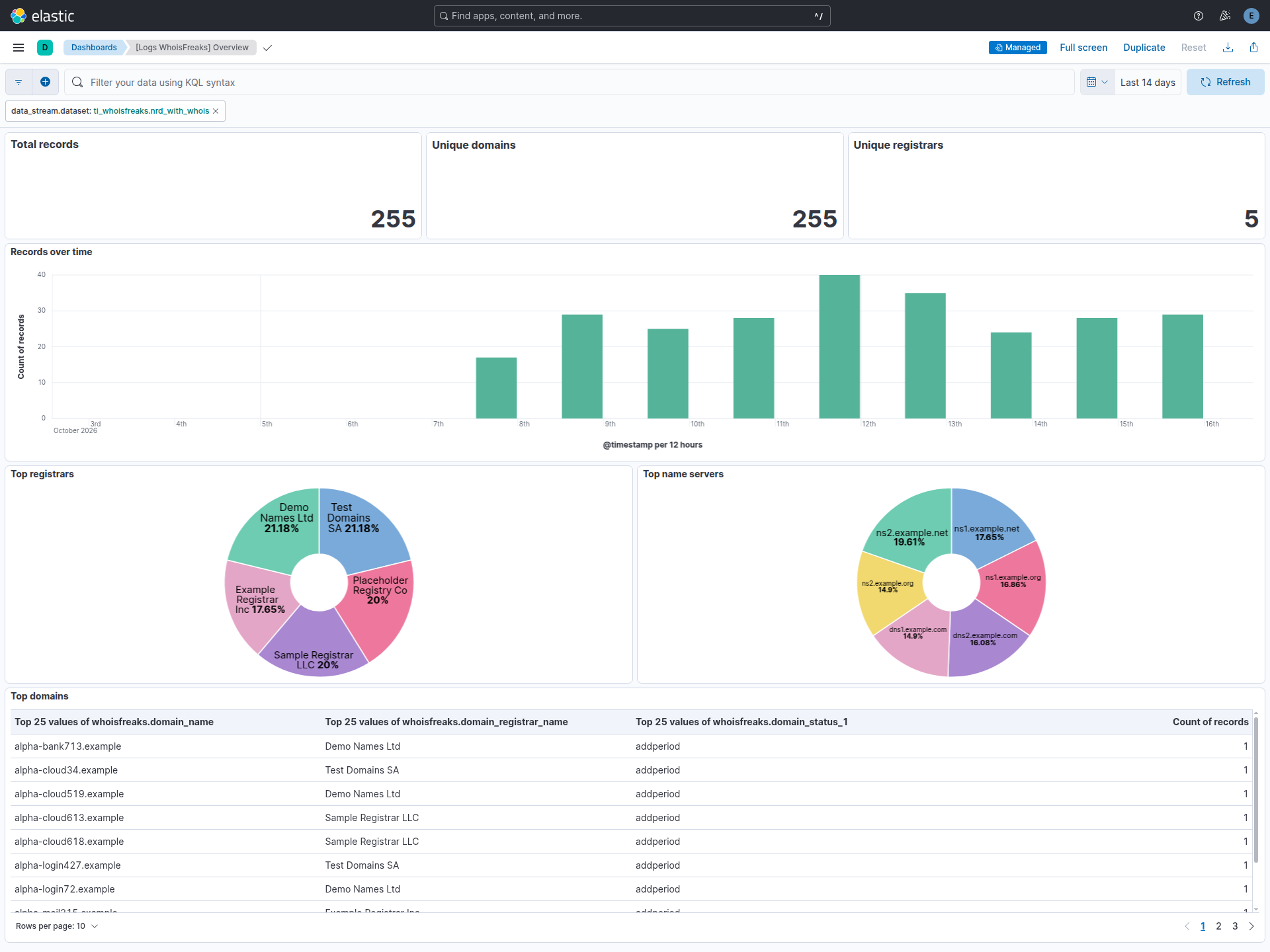
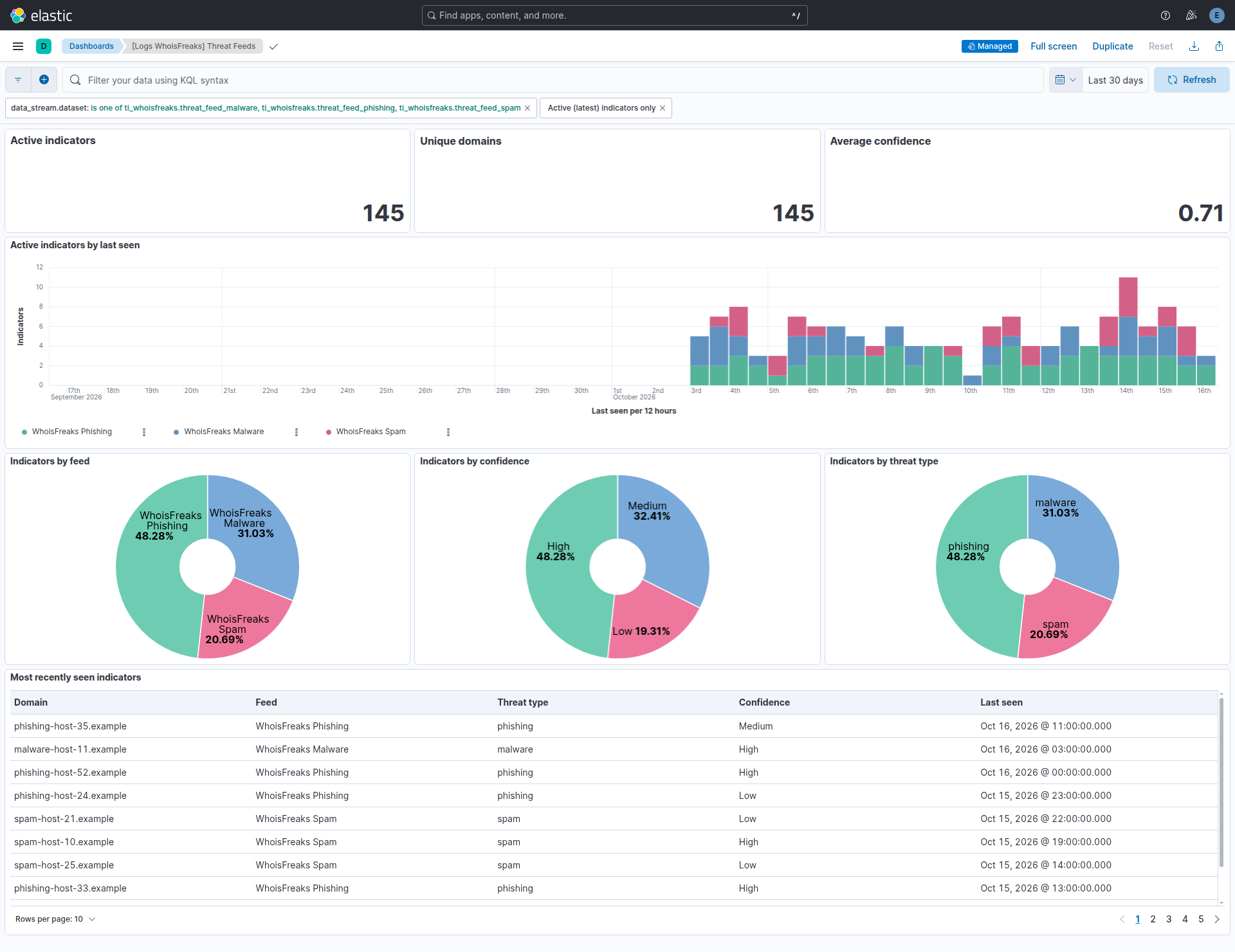
Changelog
| Version | Details | Minimum Kibana version |
|---|---|---|
| 0.1.0 | Enhancement (View pull request) Initial release of the WhoisFreaks threat intelligence integration. |
9.4.0 |