BitDefender Integration
Elastic Cloud Serverless projects are autoscaled environments, fully managed by Elastic and available on Elastic Cloud. Availability This functionality is generally available and ready for production usage. Elastic Cloud Serverless projects are autoscaled environments, fully managed by Elastic and available on Elastic Cloud. Availability This functionality is generally available and ready for production usage. The Elastic Stack includes Elastic's core products such as Elasticsearch, Kibana, Logstash, and Beats. Availability This functionality is generally available and ready for production usage. Unless stated otherwise on the page, this functionality is available when your Elastic Stack is deployed on Elastic Cloud Hosted, Elastic Cloud Enterprise, Elastic Cloud on Kubernetes, and self-managed environments. This documentation corresponds to the latest patch available for each minor version. If you're not using the latest patch, check the release notes for changes.
Serverless Observability
Generally available
Serverless Security
Generally available
Stack
9.0+
Generally available since 9.0
| Version | 2.14.0 (View all) |
| Managed integration release status | GA |
| Subscription level What's this? |
Basic |
| Developed by What's this? |
Elastic |
| Ingestion method(s) | API, Webhook |
| Minimum Kibana version(s) | 9.0.5 8.19.2 |
You can use this integration as an Elastic Managed integration on Elastic Cloud Hosted deployments running this version or later.
BitDefender GravityZone supports SIEM integration using "push notifications", which are JSON messages sent via HTTP POST to a HTTP or HTTPS endpoint, which this integration can consume.
This integration additionally provides:
- Collection of push notification configuration via API polling, which includes the "state" of the push notification service on the BitDefender GravityZone server, e.g. indicating if it is currently enabled or disabled. This is useful as the state may change to disabled (value of 0) for unknown reasons and you may wish to alert on this event.
- Collection of push notification statistics via API polling, which includes the number of events sent, and counters for errors of different types, which you may wish to use to troubleshoot lost push notification events and for alerting purposes.
- Support for multiple instances of the integration, which may be needed for MSP/MSSP scenarios where multiple BitDefender GravityZone tenants exist.
- BitDefender company ID to your own company name/description mapping, in order to determine to which tenant the event relates to in a human friendly way. This is very useful for MSP/MSSP environments or for large organisations with multiple sub-organisations.
This allows you to search, observe and visualize the BitDefender GravityZone events through Elastic, trigger alerts and monitor the BitDefender GravityZone Push Notification service for state and errors.
For more information about BitDefender GravityZone, refer to BitDefender GravityZone and refer to the Public API - Push documentation.
Elastic Managed integrations are only supported on Elastic Cloud Serverless and Elastic Cloud Hosted deployments. An Elastic Managed integration lets you ingest data from a cloud source while avoiding the orchestration, management, and maintenance associated with standard ingest infrastructure. Elastic runs the collector for you, so you can focus on your data instead of the infrastructure that collects it.
When using this integration as an Elastic Managed integration, only the following data streams are available: BitDefender GravityZone Push Notification Configuration and BitDefender GravityZone Push Notification Statistics. These data streams use inputs compatible with the Elastic Managed deployment mode. Other data streams (BitDefender GravityZone Push Notifications) require the HTTP Endpoint input, which is not supported in the Elastic Managed deployment mode. To collect data from these data streams, use Elastic Agent.
For more information, refer to Elastic Managed integrations and the Elastic Managed integrations FAQ.
This integration supports BitDefender GravityZone, which is the business oriented product set sold by BitDefender.
BitDefender products for home users are not supported.
The package collects BitDefender GravityZone push notification transported events sent in jsonrpc, qradar, or splunk format.
The jsonrpc format is recommended default, but the ingest pipeline will attempt to detect if qradar or splunk format events have been received and process them accordingly.
The integration can also collect the push notification configuration and statistics by polling the BitDefender GravityZone API.
- In Kibana go to Management > Integrations.
- In "Search for integrations" search bar type GravityZone.
- Click on "BitDefender GravityZone" integration from the search results.
- Click on Add BitDefender GravityZone button to add BitDefender GravityZone integration.
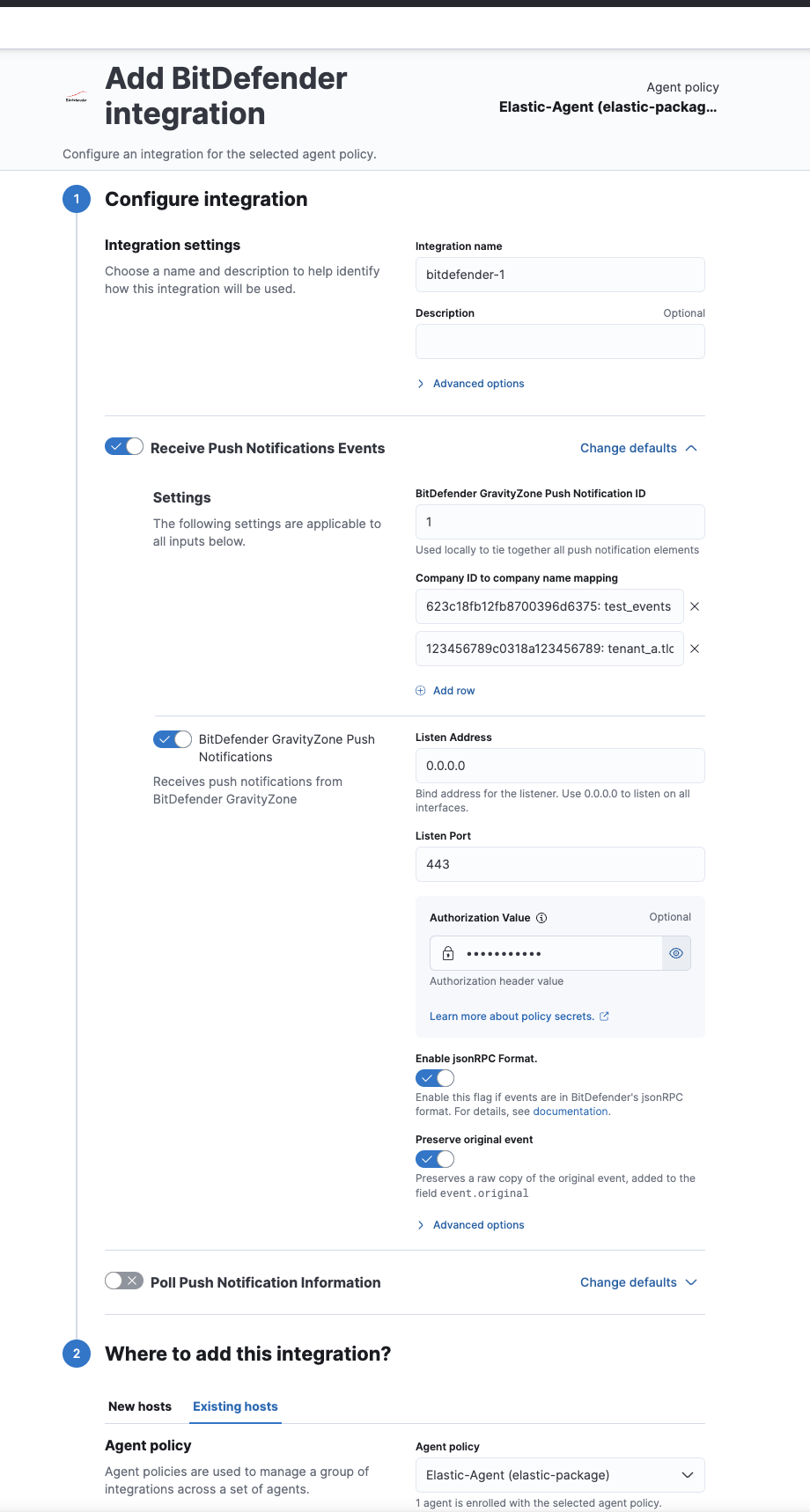
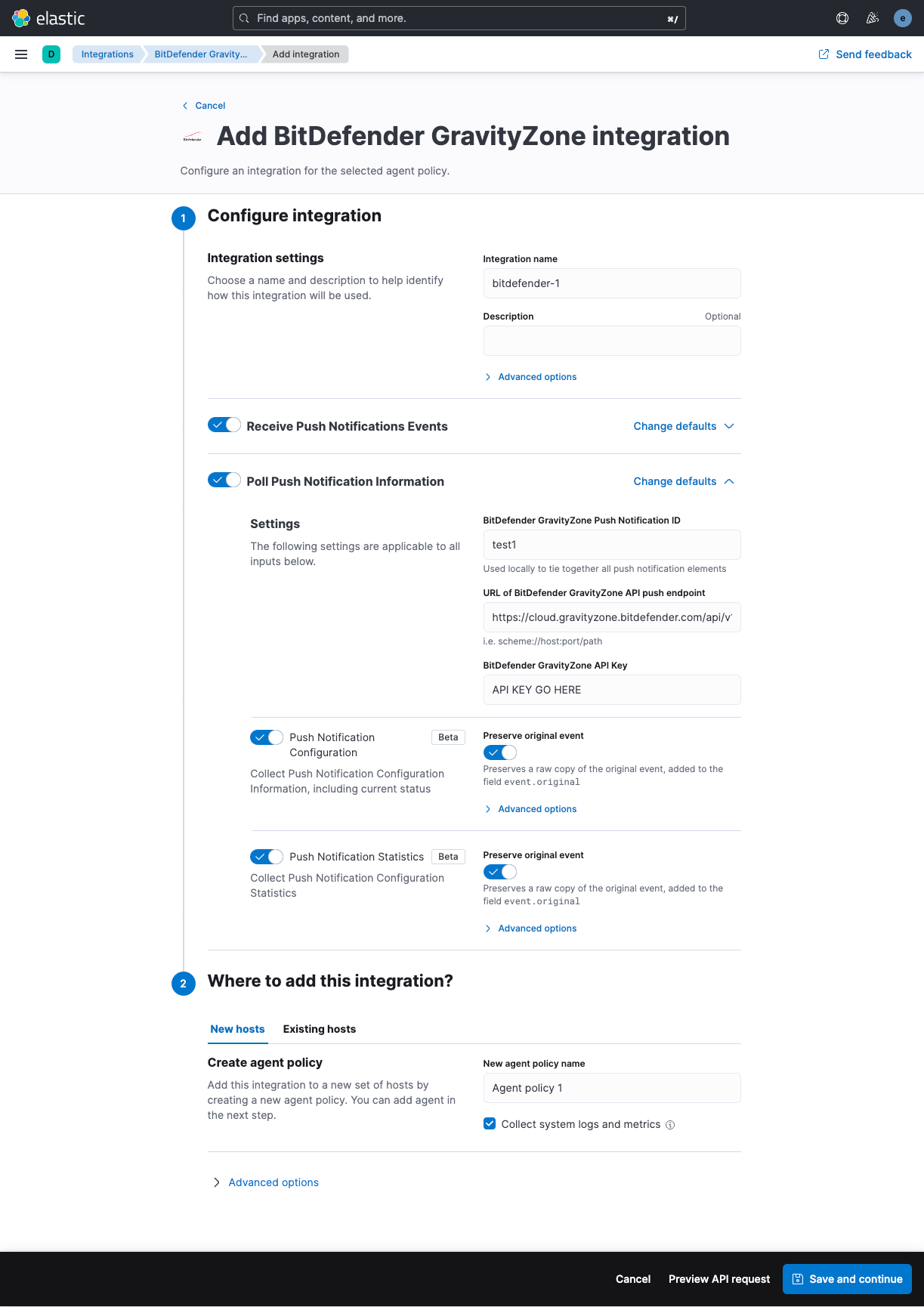
The vendor documentation is available here. However, at the time of writing this is out of date and the screenshots the vendor provides do not accurately describe what you will need to do.
The API key needed to configure push notifications, and collection push notification configuration state and statistics, is typically configured within the BitDefender GravityZone cloud portal here
Bear in mind the API key will be associated to the account you create it from. A named human account may not be desirable, e.g. you may wish to (probably should) create API keys for functions such as push notifications under a non-human/software service account that will never retire or be made redundant.
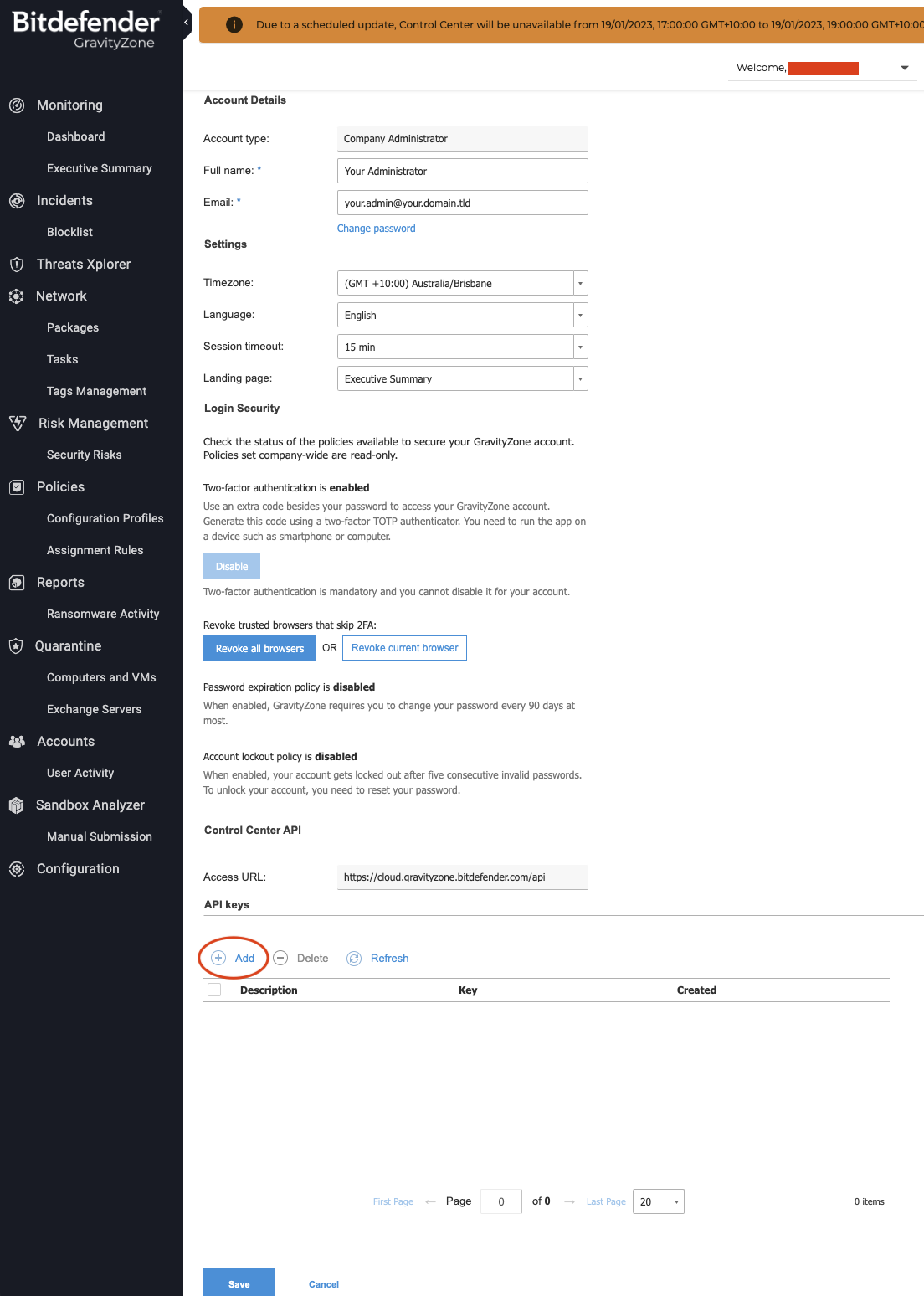
Navigate to your account details within the GravityZone portal. If you have sufficient privileges you will see the "API keys" section near the bottom of the page. Click "Add" here.
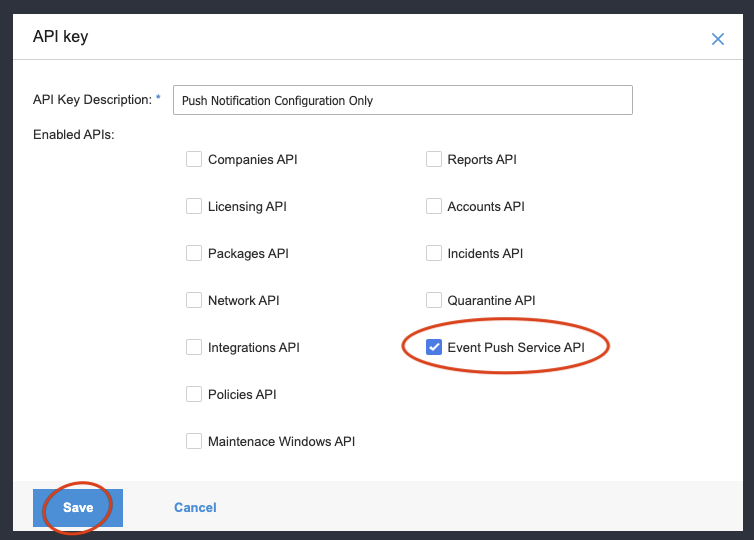
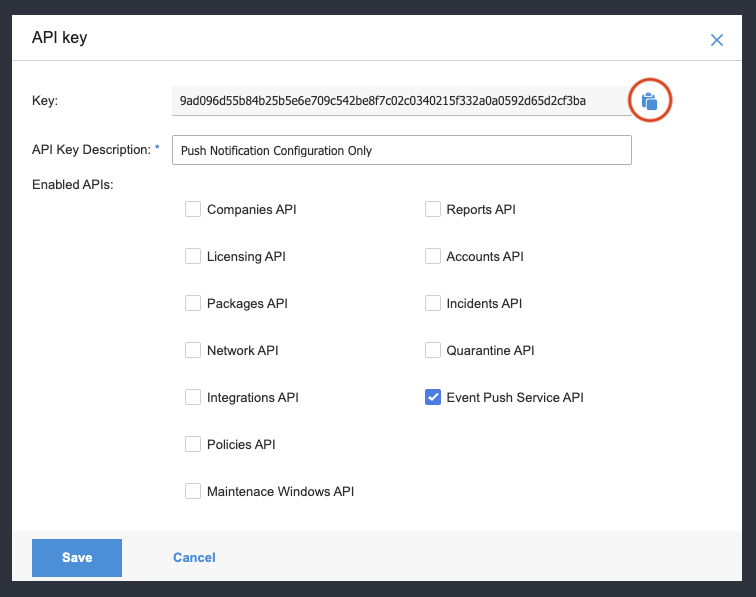
Give the API key a description and tick the "Event Push Service API" box at minimum.
If you intend to use the API key for other API calls you may need to tick other boxes.
Click the Key value that is shown in blue.
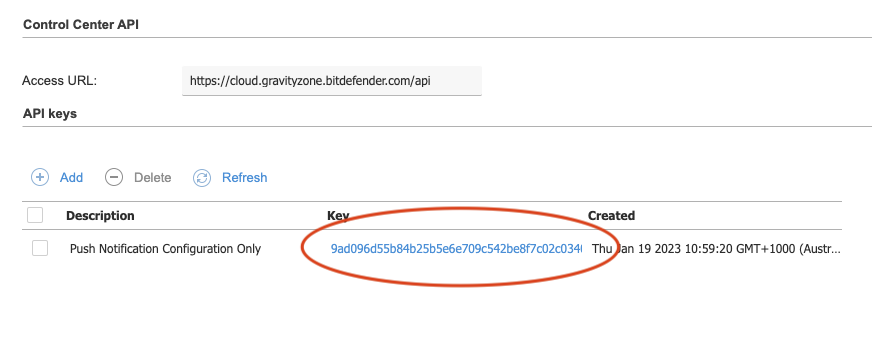
Click the clipboard icon to copy the API key to your PC's clipboard.
The BitDefender documentation for how to do this is here
You should use the jsonrpc format option.
An example using cURL:
curl --location --request POST 'https://cloud.gravityzone.bitdefender.com/api/v1.0/jsonrpc/push' \
--header 'Content-Type: application/json' \
--header 'Accept: application/json' \
--header 'Authorization: Basic TE9MX05JQ0VfVFJZOgo=' \
--data-raw '{
  "id": 1,
  "jsonrpc": "2.0",
  "method": "setPushEventSettings",
  "params": {
    "status": 1,
    "serviceType": "jsonRPC",
    "serviceSettings": {
      "authorization": "secret value",
      "requireValidSslCertificate": true,
      "url": "https://your.webhook.receiver.domain.tld/bitdefender/push/notification"
    },
    "subscribeToCompanies": [
      "COMPANY IDS HERE IF YOU HAVE A MULTI TENANT ENVIRONMENT",
      "AND YOU WANT TO LIMIT THE SUBSCRIPTION TO ONLY SOME COMPANIES",
      "OTHERWISE DELETE THE ENTIRE subscribeToCompanies NODE TO GET EVERYTHING"
    ],
    "subscribeToEventTypes": {
      "adcloud": true,
      "antiexploit": true,
      "aph": true,
      "av": true,
      "avc": true,
      "dp": true,
      "endpoint-moved-in": true,
      "endpoint-moved-out": true,
      "exchange-malware": true,
      "exchange-user-credentials": true,
      "fw": true,
      "hd": true,
      "hwid-change": true,
      "install": true,
      "modules": true,
      "network-monitor": true,
      "network-sandboxing": true,
      "new-incident": true,
      "ransomware-mitigation": true,
      "registration": true,
      "security-container-update-available": true,
      "supa-update-status": true,
      "sva": true,
      "sva-load": true,
      "task-status": true,
      "troubleshooting-activity": true,
      "uc": true,
      "uninstall": true
    }
  }
}'
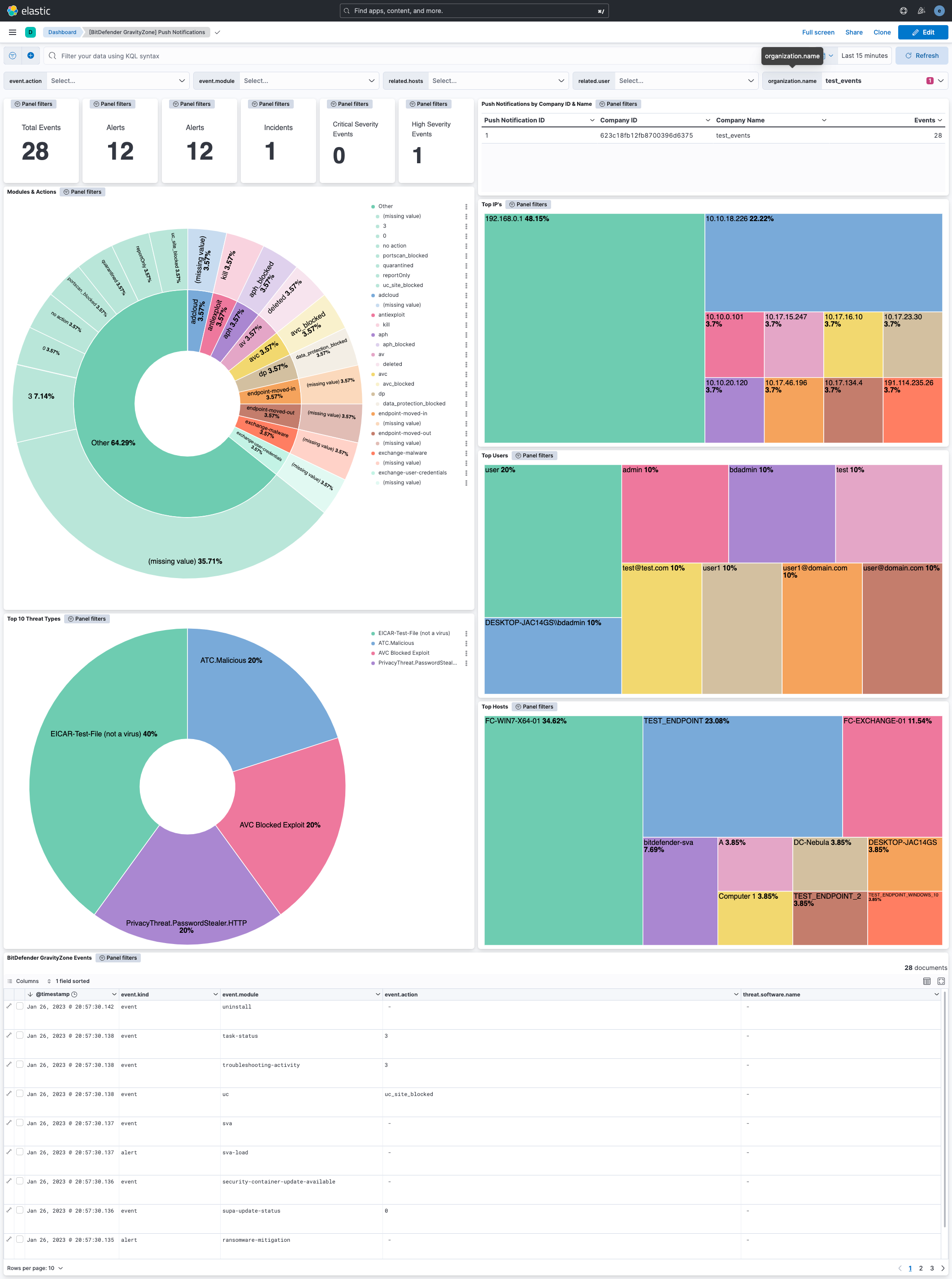
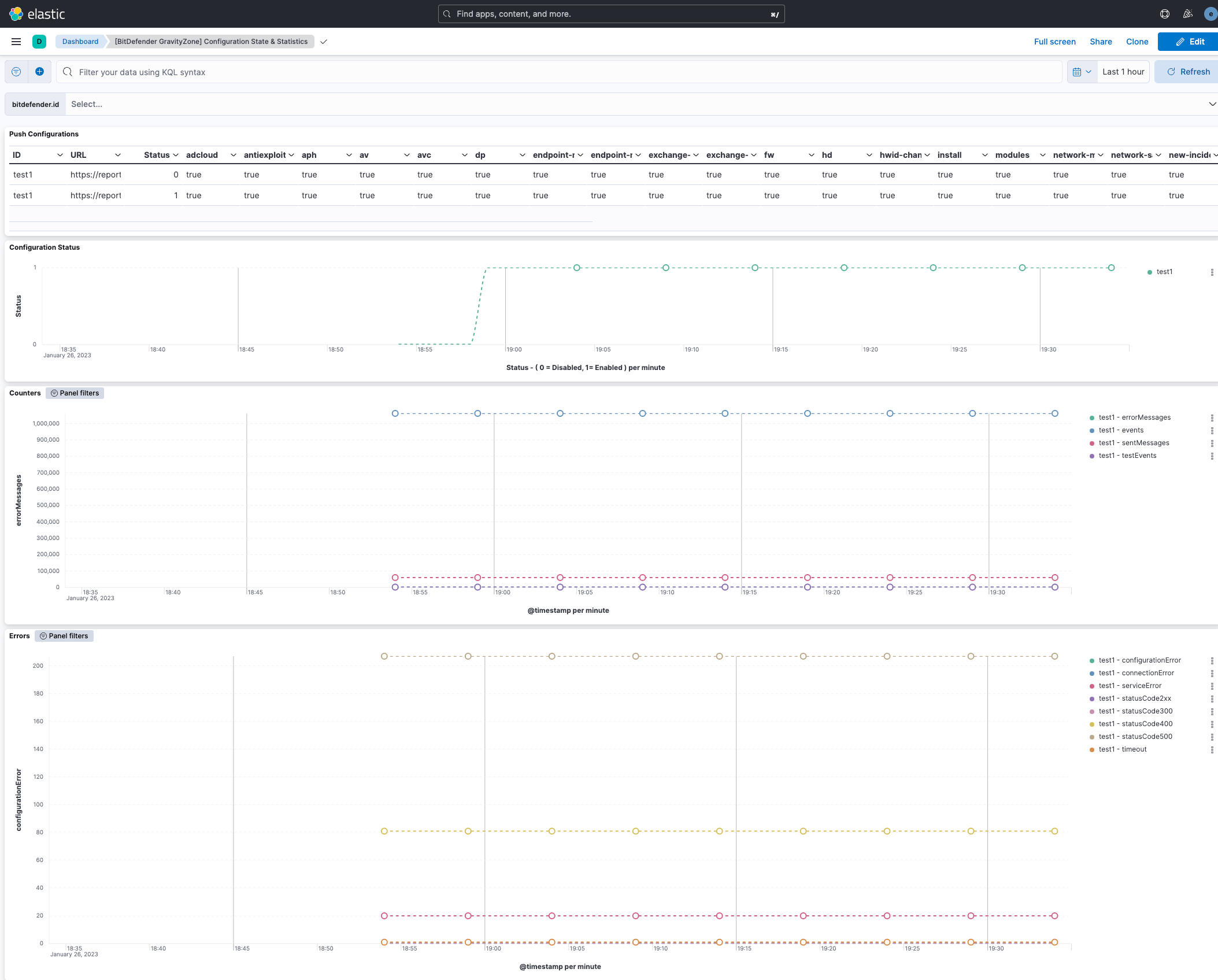
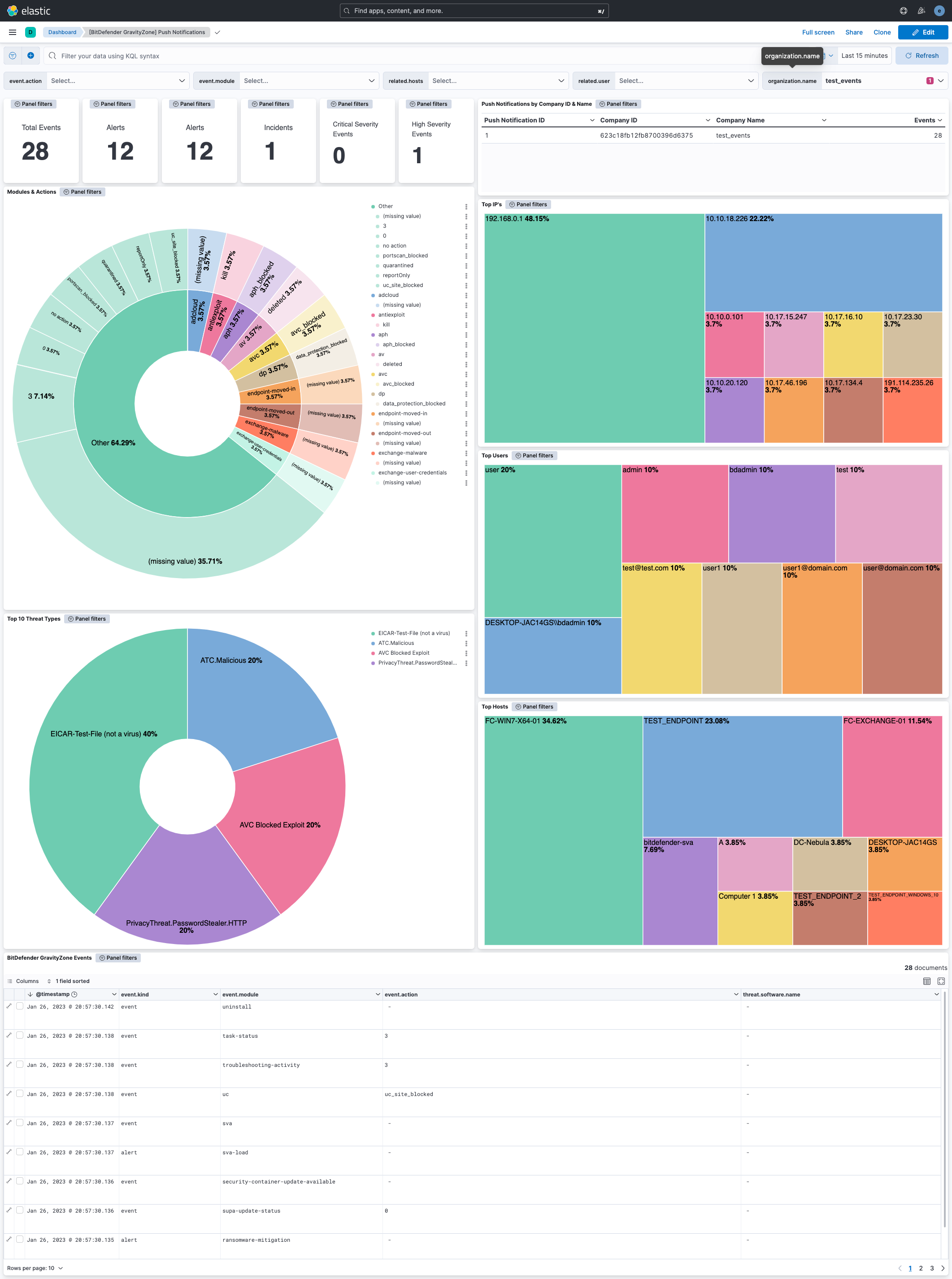
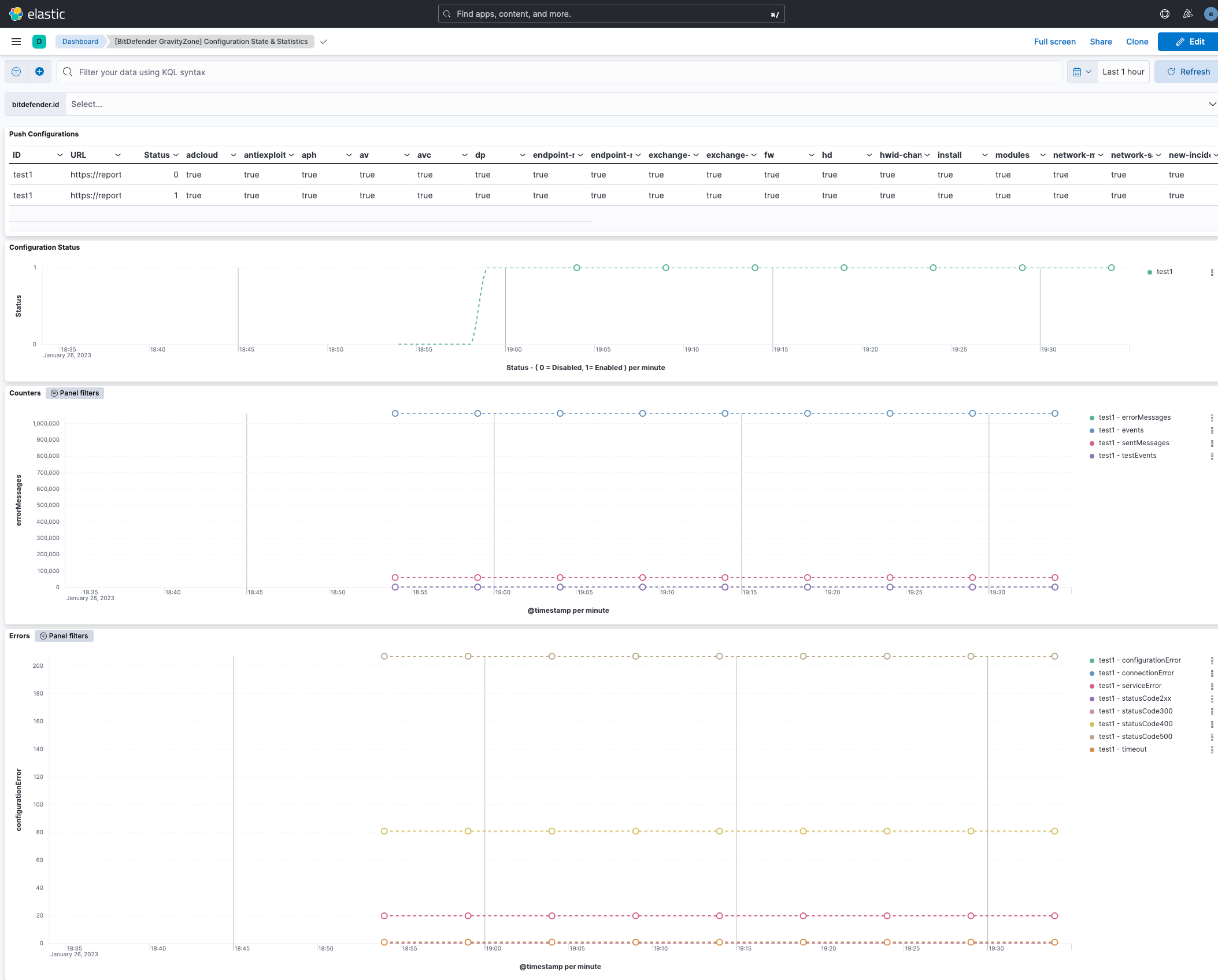
There are two dashboards available as part of the integration,
"[BitDefender GravityZone] Push Notifications", which provides a summary of push notifications received within the search window.
"[BitDefender GravityZone] Configuration State & Statistics", which provides graphs and other visualisations related push notification service state and statistics available within the search window.
The BitDefender GravityZone events dataset provides events from BitDefender GravityZone push notifications that have been received.
All BitDefender GravityZone log events are available in the bitdefender_gravityzone.events field group.
Exported fields
| Field | Description | Type |
|---|---|---|
| @timestamp | Date/time when the event originated. This is the date/time extracted from the event, typically representing when the event was generated by the source. If the event source has no original timestamp, this value is typically populated by the first time the event was received by the pipeline. Required field for all events. | date |
| bitdefender.event.testEvent | boolean | |
| bitdefender.event.action | keyword | |
| bitdefender.event.actionTaken | keyword | |
| bitdefender.event.aph_status | integer | |
| bitdefender.event.aph_type | keyword | |
| bitdefender.event.att_ck_id | keyword | |
| bitdefender.event.attack_entry | keyword | |
| bitdefender.event.attack_source | keyword | |
| bitdefender.event.attack_type | keyword | |
| bitdefender.event.attack_types | keyword | |
| bitdefender.event.auto_renew_period | long | |
| bitdefender.event.avc_status | integer | |
| bitdefender.event.block_type | keyword | |
| bitdefender.event.blocked | long | |
| bitdefender.event.blocking_rule_name | keyword | |
| bitdefender.event.categories | keyword | |
| bitdefender.event.cleaned | long | |
| bitdefender.event.command_line_parameters | keyword | |
| bitdefender.event.companyId | keyword | |
| bitdefender.event.company_name | keyword | |
| bitdefender.event.computerIp | keyword | |
| bitdefender.event.computerName | keyword | |
| bitdefender.event.computer_fqdn | keyword | |
| bitdefender.event.computer_id | keyword | |
| bitdefender.event.computer_ip | keyword | |
| bitdefender.event.computer_name | keyword | |
| bitdefender.event.count | long | |
| bitdefender.event.cpuUsage | float | |
| bitdefender.event.created | date | |
| bitdefender.event.date | keyword | |
| bitdefender.event.deleted | long | |
| bitdefender.event.detected_on | date | |
| bitdefender.event.detectionTime | date | |
| bitdefender.event.detection_action | keyword | |
| bitdefender.event.detection_attackTechnique | keyword | |
| bitdefender.event.detection_cve | keyword | |
| bitdefender.event.detection_exploitTechnique | keyword | |
| bitdefender.event.detection_level | keyword | |
| bitdefender.event.detection_name | keyword | |
| bitdefender.event.detection_parentPath | keyword | |
| bitdefender.event.detection_parentPid | keyword | |
| bitdefender.event.detection_path | keyword | |
| bitdefender.event.detection_pid | keyword | |
| bitdefender.event.detection_threatName | keyword | |
| bitdefender.event.detection_time | date | |
| bitdefender.event.detection_username | keyword | |
| bitdefender.event.deviceClass | integer | |
| bitdefender.event.deviceId | keyword | |
| bitdefender.event.deviceName | keyword | |
| bitdefender.event.dlp_status | integer | |
| bitdefender.event.dp_status | integer | |
| bitdefender.event.enabled_services | keyword | |
| bitdefender.event.endDate | date | |
| bitdefender.event.end_subscription_date | date | |
| bitdefender.event.endpointId | keyword | |
| bitdefender.event.errorCode | integer | |
| bitdefender.event.errorMessage | keyword | |
| bitdefender.event.exploit_path | keyword | |
| bitdefender.event.exploit_type | keyword | |
| bitdefender.event.failedStorageType | integer | |
| bitdefender.event.filePaths | keyword | |
| bitdefender.event.fileSizes | keyword | |
| bitdefender.event.file_hash | keyword | |
| bitdefender.event.file_hash_md5 | keyword | |
| bitdefender.event.file_hash_sha256 | keyword | |
| bitdefender.event.file_name | keyword | |
| bitdefender.event.file_path | keyword | |
| bitdefender.event.final_status | keyword | |
| bitdefender.event.firewall_status | integer | |
| bitdefender.event.fromSupa | integer | |
| bitdefender.event.hash | keyword | |
| bitdefender.event.host_name | keyword | |
| bitdefender.event.hwid | keyword | |
| bitdefender.event.id | long | |
| bitdefender.event.ignored | long | |
| bitdefender.event.incident_id | keyword | |
| bitdefender.event.isSuccessful | integer | |
| bitdefender.event.is_container_host | integer | |
| bitdefender.event.is_fileless_attack | integer | |
| bitdefender.event.issueType | long | |
| bitdefender.event.item_count | keyword | |
| bitdefender.event.jsonrpc.method | keyword | |
| bitdefender.event.jsonrpc.version | keyword | |
| bitdefender.event.lastAdReportDate | keyword | |
| bitdefender.event.last_blocked | keyword | |
| bitdefender.event.lastupdate | keyword | |
| bitdefender.event.license_key | keyword | |
| bitdefender.event.license_limit | long | |
| bitdefender.event.license_type | keyword | |
| bitdefender.event.loadAverage | float | |
| bitdefender.event.localPath | keyword | |
| bitdefender.event.local_port | keyword | |
| bitdefender.event.mailboxes | long | |
| bitdefender.event.main_action | keyword | |
| bitdefender.event.malware.actionTaken | keyword | |
| bitdefender.event.malware.infectedObject | keyword | |
| bitdefender.event.malware.malwareName | keyword | |
| bitdefender.event.malware.malwareType | keyword | |
| bitdefender.event.malware_name | keyword | |
| bitdefender.event.malware_status | integer | |
| bitdefender.event.malware_type | keyword | |
| bitdefender.event.memoryUsage | float | |
| bitdefender.event.minimal_commitment_usage_endpoints | long | |
| bitdefender.event.module | keyword | |
| bitdefender.event.moved_company_id | keyword | |
| bitdefender.event.moved_company_name | keyword | |
| bitdefender.event.networkSharePath | keyword | |
| bitdefender.event.networkUsage | float | |
| bitdefender.event.network_monitor_status | long | |
| bitdefender.event.new_hwid | keyword | |
| bitdefender.event.oldData.features.enabled | boolean | |
| bitdefender.event.oldData.features.id | keyword | |
| bitdefender.event.oldData.features.isFunctioning | boolean | |
| bitdefender.event.oldData.features.registrationStatus | keyword | |
| bitdefender.event.old_hwid | keyword | |
| bitdefender.event.overallUsage | float | |
| bitdefender.event.parent_process_id | long | |
| bitdefender.event.parent_process_path | keyword | |
| bitdefender.event.parent_process_pid | long | |
| bitdefender.event.port | long | |
| bitdefender.event.powered_off | integer | |
| bitdefender.event.present | long | |
| bitdefender.event.process_command_line | keyword | |
| bitdefender.event.process_info_command_line | keyword | |
| bitdefender.event.process_info_path | keyword | |
| bitdefender.event.process_path | keyword | |
| bitdefender.event.process_pid | long | |
| bitdefender.event.productId | long | |
| bitdefender.event.product_installed | keyword | |
| bitdefender.event.product_reboot_required | integer | |
| bitdefender.event.product_registration | keyword | |
| bitdefender.event.product_update_available | integer | |
| bitdefender.event.protocol_id | keyword | |
| bitdefender.event.pu_status | integer | |
| bitdefender.event.quarantined | long | |
| bitdefender.event.reason | integer | |
| bitdefender.event.recipients | keyword | |
| bitdefender.event.remediationActions | keyword | |
| bitdefender.event.saveToBitdefenderCloud | integer | |
| bitdefender.event.scanEngineType | integer | |
| bitdefender.event.sender | keyword | |
| bitdefender.event.serverName | keyword | |
| bitdefender.event.severity | keyword | |
| bitdefender.event.severityScore | integer | |
| bitdefender.event.severity_score | integer | |
| bitdefender.event.signature_update | date | |
| bitdefender.event.signaturesNumber | keyword | |
| bitdefender.event.source_ip | keyword | |
| bitdefender.event.startDate | date | |
| bitdefender.event.status | keyword | |
| bitdefender.event.stopReason | integer | |
| bitdefender.event.storage_ip | ip | |
| bitdefender.event.storage_name | keyword | |
| bitdefender.event.storage_type | keyword | |
| bitdefender.event.subject | keyword | |
| bitdefender.event.svaLoad | keyword | |
| bitdefender.event.syncerId | keyword | |
| bitdefender.event.targetName | keyword | |
| bitdefender.event.target_type | keyword | |
| bitdefender.event.taskId | keyword | |
| bitdefender.event.taskName | keyword | |
| bitdefender.event.taskScanType | integer | |
| bitdefender.event.taskType | keyword | |
| bitdefender.event.threatType | keyword | |
| bitdefender.event.timestamp | keyword | |
| bitdefender.event.uc_application_status | integer | |
| bitdefender.event.uc_categ_filtering | integer | |
| bitdefender.event.uc_type | keyword | |
| bitdefender.event.uc_web_filtering | integer | |
| bitdefender.event.updatesigam | keyword | |
| bitdefender.event.url | keyword | |
| bitdefender.event.user.id | keyword | |
| bitdefender.event.user.name | keyword | |
| bitdefender.event.user.sid | keyword | |
| bitdefender.event.user.userName | keyword | |
| bitdefender.event.user.userSid | keyword | |
| bitdefender.event.userId | keyword | |
| bitdefender.event.user_sid | keyword | |
| bitdefender.event.username | keyword | |
| bitdefender.event.vendorId | long | |
| bitdefender.event.victim_ip | keyword | |
| bitdefender.id | keyword | |
| data_stream.dataset | The field can contain anything that makes sense to signify the source of the data. Examples include nginx.access, prometheus, endpoint etc. For data streams that otherwise fit, but that do not have dataset set we use the value "generic" for the dataset value. event.dataset should have the same value as data_stream.dataset. Beyond the Elasticsearch data stream naming criteria noted above, the dataset value has additional restrictions: * Must not contain - * No longer than 100 characters |
constant_keyword |
| data_stream.namespace | A user defined namespace. Namespaces are useful to allow grouping of data. Many users already organize their indices this way, and the data stream naming scheme now provides this best practice as a default. Many users will populate this field with default. If no value is used, it falls back to default. Beyond the Elasticsearch index naming criteria noted above, namespace value has the additional restrictions: * Must not contain - * No longer than 100 characters |
constant_keyword |
| data_stream.type | An overarching type for the data stream. Currently allowed values are "logs" and "metrics". We expect to also add "traces" and "synthetics" in the near future. | constant_keyword |
| destination.nat.as.number | long | |
| destination.nat.as.organization.name | keyword | |
| destination.nat.geo.city_name | keyword | |
| destination.nat.geo.continent_name | keyword | |
| destination.nat.geo.country_iso_code | keyword | |
| destination.nat.geo.country_name | keyword | |
| destination.nat.geo.location | geo_point | |
| destination.nat.geo.region_iso_code | keyword | |
| destination.nat.geo.region_name | keyword | |
| input.type | keyword |
Example
{
    "@timestamp": "2024-07-25T10:16:53.355Z",
    "agent": {
        "ephemeral_id": "e80bc3a4-2ee1-435a-8ff1-cf18df9f0fe8",
        "id": "0eb83218-5f40-45bd-8fb3-9423008f7b6f",
        "name": "docker-fleet-agent",
        "type": "filebeat",
        "version": "8.14.3"
    },
    "bitdefender": {
        "event": {
            "aph_type": "phishing",
            "companyId": "59a14b271da197c6108b4567",
            "computer_fqdn": "fc-exchange-01.fc.dom",
            "computer_id": "59b7d9bfa849af3a1465b7e4",
            "computer_ip": "192.168.0.1",
            "computer_name": "FC-EXCHANGE-01",
            "count": 1,
            "id": 150537,
            "jsonrpc": {
                "method": "addEvents",
                "version": "2.0"
            },
            "last_blocked": "2023-09-13T08:49:43.000Z",
            "module": "aph",
            "product_installed": "BEST",
            "status": "aph_blocked",
            "url": "http://example.com/account/support/"
        },
        "id": "test"
    },
    "data_stream": {
        "dataset": "bitdefender.push_notifications",
        "namespace": "29298",
        "type": "logs"
    },
    "destination": {
        "ip": "192.168.0.1"
    },
    "ecs": {
        "version": "8.11.0"
    },
    "elastic_agent": {
        "id": "0eb83218-5f40-45bd-8fb3-9423008f7b6f",
        "snapshot": false,
        "version": "8.14.3"
    },
    "event": {
        "action": "aph_blocked",
        "agent_id_status": "verified",
        "category": [
            "threat",
            "network"
        ],
        "dataset": "bitdefender.push_notifications",
        "id": "150537",
        "ingested": "2024-07-25T10:17:03Z",
        "kind": "alert",
        "module": "aph",
        "original": "{\"event\":{\"aph_type\":\"phishing\",\"companyId\":\"59a14b271da197c6108b4567\",\"computer_fqdn\":\"fc-exchange-01.fc.dom\",\"computer_id\":\"59b7d9bfa849af3a1465b7e4\",\"computer_ip\":\"192.168.0.1\",\"computer_name\":\"FC-EXCHANGE-01\",\"count\":1,\"last_blocked\":\"2023-09-13T08:49:43.000Z\",\"module\":\"aph\",\"product_installed\":\"BEST\",\"status\":\"aph_blocked\",\"url\":\"http://example.com/account/support/\"},\"id\":150537,\"jsonrpc\":{\"method\":\"addEvents\",\"version\":\"2.0\"}}",
        "provider": "Antiphishing",
        "severity": 0,
        "timezone": "+00:00",
        "type": [
            "info",
            "access"
        ]
    },
    "host": {
        "hostname": "fc-exchange-01.fc.dom",
        "id": "59b7d9bfa849af3a1465b7e4",
        "ip": [
            "192.168.0.1"
        ],
        "name": "FC-EXCHANGE-01"
    },
    "input": {
        "type": "http_endpoint"
    },
    "message": "aph_blocked, aph type: phishing",
    "organization": {
        "id": "59a14b271da197c6108b4567"
    },
    "related": {
        "hosts": [
            "FC-EXCHANGE-01"
        ],
        "ip": [
            "192.168.0.1"
        ]
    },
    "tags": [
        "preserve_original_event",
        "preserve_duplicate_custom_fields",
        "forwarded"
    ],
    "url": {
        "domain": "example.com",
        "original": "http://example.com/account/support/",
        "path": "/account/support/",
        "registered_domain": "example.com",
        "scheme": "http",
        "top_level_domain": "com"
    }
}
The BitDefender GravityZone push notification configuration dataset provides configuration state collected from the BitDefender GravityZone API.
This includes the status of the push notification configuration, which may be indicative of the push notification service being disabled. Alerting based on this may be desirable.
All BitDefender GravityZone push notification configuration states are available in the bitdefender.push.configuration field group.
Exported fields
| Field | Description | Type |
|---|---|---|
| @timestamp | Date/time when the event originated. This is the date/time extracted from the event, typically representing when the event was generated by the source. If the event source has no original timestamp, this value is typically populated by the first time the event was received by the pipeline. Required field for all events. | date |
| bitdefender.id | keyword | |
| bitdefender.push.configuration.serviceSettings.requireValidSslCertificate | boolean | |
| bitdefender.push.configuration.serviceSettings.url | keyword | |
| bitdefender.push.configuration.serviceType | keyword | |
| bitdefender.push.configuration.status | long | |
| bitdefender.push.configuration.subscribeToCompanies | keyword | |
| bitdefender.push.configuration.subscribeToEventTypes.adcloud | boolean | |
| bitdefender.push.configuration.subscribeToEventTypes.antiexploit | boolean | |
| bitdefender.push.configuration.subscribeToEventTypes.aph | boolean | |
| bitdefender.push.configuration.subscribeToEventTypes.av | boolean | |
| bitdefender.push.configuration.subscribeToEventTypes.avc | boolean | |
| bitdefender.push.configuration.subscribeToEventTypes.dp | boolean | |
| bitdefender.push.configuration.subscribeToEventTypes.endpoint-moved-in | boolean | |
| bitdefender.push.configuration.subscribeToEventTypes.endpoint-moved-out | boolean | |
| bitdefender.push.configuration.subscribeToEventTypes.exchange-malware | boolean | |
| bitdefender.push.configuration.subscribeToEventTypes.exchange-user-credentials | boolean | |
| bitdefender.push.configuration.subscribeToEventTypes.fw | boolean | |
| bitdefender.push.configuration.subscribeToEventTypes.hd | boolean | |
| bitdefender.push.configuration.subscribeToEventTypes.hwid-change | boolean | |
| bitdefender.push.configuration.subscribeToEventTypes.install | boolean | |
| bitdefender.push.configuration.subscribeToEventTypes.modules | boolean | |
| bitdefender.push.configuration.subscribeToEventTypes.network-monitor | boolean | |
| bitdefender.push.configuration.subscribeToEventTypes.network-sandboxing | boolean | |
| bitdefender.push.configuration.subscribeToEventTypes.new-incident | boolean | |
| bitdefender.push.configuration.subscribeToEventTypes.ransomware-mitigation | boolean | |
| bitdefender.push.configuration.subscribeToEventTypes.registration | boolean | |
| bitdefender.push.configuration.subscribeToEventTypes.security-container-update-available | boolean | |
| bitdefender.push.configuration.subscribeToEventTypes.supa-update-status | boolean | |
| bitdefender.push.configuration.subscribeToEventTypes.sva | boolean | |
| bitdefender.push.configuration.subscribeToEventTypes.sva-load | boolean | |
| bitdefender.push.configuration.subscribeToEventTypes.task-status | boolean | |
| bitdefender.push.configuration.subscribeToEventTypes.troubleshooting-activity | boolean | |
| bitdefender.push.configuration.subscribeToEventTypes.uc | boolean | |
| bitdefender.push.configuration.subscribeToEventTypes.uninstall | boolean | |
| data_stream.dataset | The field can contain anything that makes sense to signify the source of the data. Examples include nginx.access, prometheus, endpoint etc. For data streams that otherwise fit, but that do not have dataset set we use the value "generic" for the dataset value. event.dataset should have the same value as data_stream.dataset. Beyond the Elasticsearch data stream naming criteria noted above, the dataset value has additional restrictions: * Must not contain - * No longer than 100 characters |
constant_keyword |
| data_stream.namespace | A user defined namespace. Namespaces are useful to allow grouping of data. Many users already organize their indices this way, and the data stream naming scheme now provides this best practice as a default. Many users will populate this field with default. If no value is used, it falls back to default. Beyond the Elasticsearch index naming criteria noted above, namespace value has the additional restrictions: * Must not contain - * No longer than 100 characters |
constant_keyword |
| data_stream.type | An overarching type for the data stream. Currently allowed values are "logs" and "metrics". We expect to also add "traces" and "synthetics" in the near future. | constant_keyword |
| input.type | keyword |
Example
{
    "@timestamp": "2025-08-04T05:45:30.706Z",
    "agent": {
        "ephemeral_id": "6add488a-b2f6-487a-af12-30506202511b",
        "id": "dc1ce160-e35b-4897-a9cb-680439488735",
        "name": "elastic-agent-51646",
        "type": "filebeat",
        "version": "8.18.0"
    },
    "bitdefender": {
        "id": "1",
        "push": {
            "configuration": {
                "serviceSettings": {
                    "requireValidSslCertificate": true,
                    "url": "https://your.elastic.agent/bitdefender/push/notification"
                },
                "serviceType": "qradar",
                "status": 1,
                "subscribeToEventTypes": {
                    "adcloud": true,
                    "antiexploit": true,
                    "aph": true,
                    "av": true,
                    "avc": true,
                    "dp": true,
                    "endpoint-moved-in": true,
                    "endpoint-moved-out": true,
                    "exchange-malware": true,
                    "exchange-user-credentials": true,
                    "fw": true,
                    "hd": true,
                    "hwid-change": true,
                    "install": true,
                    "modules": true,
                    "network-monitor": true,
                    "network-sandboxing": true,
                    "new-incident": true,
                    "ransomware-mitigation": true,
                    "registration": true,
                    "security-container-update-available": true,
                    "supa-update-status": true,
                    "sva": true,
                    "sva-load": true,
                    "task-status": true,
                    "troubleshooting-activity": true,
                    "uc": true,
                    "uninstall": true
                }
            }
        }
    },
    "data_stream": {
        "dataset": "bitdefender.push_configuration",
        "namespace": "20813",
        "type": "logs"
    },
    "ecs": {
        "version": "8.11.0"
    },
    "elastic_agent": {
        "id": "dc1ce160-e35b-4897-a9cb-680439488735",
        "snapshot": false,
        "version": "8.18.0"
    },
    "event": {
        "agent_id_status": "verified",
        "dataset": "bitdefender.push_configuration",
        "ingested": "2025-08-04T05:45:33Z",
        "original": "{\"id\":\"1\",\"jsonrpc\":\"2.0\",\"result\":{\"serviceSettings\":{\"requireValidSslCertificate\":true,\"url\":\"https://your.elastic.agent/bitdefender/push/notification\"},\"serviceType\":\"qradar\",\"status\":1,\"subscribeToEventTypes\":{\"adcloud\":true,\"antiexploit\":true,\"aph\":true,\"av\":true,\"avc\":true,\"dp\":true,\"endpoint-moved-in\":true,\"endpoint-moved-out\":true,\"exchange-malware\":true,\"exchange-user-credentials\":true,\"fw\":true,\"hd\":true,\"hwid-change\":true,\"install\":true,\"modules\":true,\"network-monitor\":true,\"network-sandboxing\":true,\"new-incident\":true,\"ransomware-mitigation\":true,\"registration\":true,\"security-container-update-available\":true,\"supa-update-status\":true,\"sva\":true,\"sva-load\":true,\"task-status\":true,\"troubleshooting-activity\":true,\"uc\":true,\"uninstall\":true}}}"
    },
    "input": {
        "type": "cel"
    },
    "tags": [
        "preserve_original_event",
        "forwarded"
    ]
}
The BitDefender GravityZone push notification statistics dataset provides statistics collected from the BitDefender GravityZone API.
This includes information about errors and HTTP response codes that the push notification service has received when sending push notifications, which may be indicative of failures to deliver push notifications resulting in missing events. Alerting based on this may be desirable.
All BitDefender GravityZone push notification statistics are available in the bitdefender.push.stats field group.
Exported fields
| Field | Description | Type |
|---|---|---|
| @timestamp | Date/time when the event originated. This is the date/time extracted from the event, typically representing when the event was generated by the source. If the event source has no original timestamp, this value is typically populated by the first time the event was received by the pipeline. Required field for all events. | date |
| bitdefender.id | keyword | |
| bitdefender.push.stats.count.errorMessages | long | |
| bitdefender.push.stats.count.events | long | |
| bitdefender.push.stats.count.sentMessages | long | |
| bitdefender.push.stats.count.testEvents | long | |
| bitdefender.push.stats.error.configurationError | long | |
| bitdefender.push.stats.error.connectionError | long | |
| bitdefender.push.stats.error.serviceError | long | |
| bitdefender.push.stats.error.statusCode2xx | long | |
| bitdefender.push.stats.error.statusCode300 | long | |
| bitdefender.push.stats.error.statusCode400 | long | |
| bitdefender.push.stats.error.statusCode500 | long | |
| bitdefender.push.stats.error.timeout | long | |
| data_stream.dataset | The field can contain anything that makes sense to signify the source of the data. Examples include nginx.access, prometheus, endpoint etc. For data streams that otherwise fit, but that do not have dataset set we use the value "generic" for the dataset value. event.dataset should have the same value as data_stream.dataset. Beyond the Elasticsearch data stream naming criteria noted above, the dataset value has additional restrictions: * Must not contain - * No longer than 100 characters |
constant_keyword |
| data_stream.namespace | A user defined namespace. Namespaces are useful to allow grouping of data. Many users already organize their indices this way, and the data stream naming scheme now provides this best practice as a default. Many users will populate this field with default. If no value is used, it falls back to default. Beyond the Elasticsearch index naming criteria noted above, namespace value has the additional restrictions: * Must not contain - * No longer than 100 characters |
constant_keyword |
| data_stream.type | An overarching type for the data stream. Currently allowed values are "logs" and "metrics". We expect to also add "traces" and "synthetics" in the near future. | constant_keyword |
| input.type | keyword |
Example
{
    "@timestamp": "2025-08-04T05:53:31.451Z",
    "agent": {
        "ephemeral_id": "181a8db2-ef15-4ce1-b78b-fe1d67440dd6",
        "id": "088aadd3-85d3-4553-8e87-2428b1e4e35a",
        "name": "elastic-agent-40833",
        "type": "filebeat",
        "version": "8.18.0"
    },
    "bitdefender": {
        "id": "test",
        "push": {
            "stats": {
                "count": {
                    "errorMessages": 121,
                    "events": 1415824,
                    "sentMessages": 78368,
                    "testEvents": 0
                },
                "error": {
                    "configurationError": 0,
                    "connectionError": 7,
                    "serviceError": 114,
                    "statusCode2xx": 0,
                    "statusCode300": 0,
                    "statusCode400": 0,
                    "statusCode500": 0,
                    "timeout": 0
                }
            }
        }
    },
    "data_stream": {
        "dataset": "bitdefender.push_statistics",
        "namespace": "74028",
        "type": "logs"
    },
    "ecs": {
        "version": "8.11.0"
    },
    "elastic_agent": {
        "id": "088aadd3-85d3-4553-8e87-2428b1e4e35a",
        "snapshot": false,
        "version": "8.18.0"
    },
    "event": {
        "agent_id_status": "verified",
        "dataset": "bitdefender.push_statistics",
        "ingested": "2025-08-04T05:53:34Z",
        "original": "{\"id\":\"test\",\"jsonrpc\":\"2.0\",\"result\":{\"count\":{\"errorMessages\":121,\"events\":1415824,\"sentMessages\":78368,\"testEvents\":0},\"error\":{\"configurationError\":0,\"connectionError\":7,\"serviceError\":114,\"statusCode2xx\":0,\"statusCode300\":0,\"statusCode400\":0,\"statusCode500\":0,\"timeout\":0},\"lastUpdateTime\":\"2023-01-27T09:19:22\"}}"
    },
    "input": {
        "type": "cel"
    },
    "tags": [
        "preserve_original_event",
        "forwarded"
    ]
}
This integration includes one or more Kibana dashboards that visualizes the data collected by the integration. The screenshots below illustrate how the ingested data is displayed.
Changelog
| Version | Details | Minimum Kibana version |
|---|---|---|
| 2.14.0 | Enhancement (View pull request) Update Elastic Managed integration documentation to the current wording and docs links. |
9.0.5 8.19.2 |
| 2.13.0 | Enhancement (View pull request) Add tags to ingest pipeline processors. |
9.0.5 8.19.2 |
| 2.12.1 | Enhancement (View pull request) Set agentless deployment mode release field to ga. |
9.0.5 8.19.2 |
| 2.12.0 | Enhancement (View pull request) Set 'elastic' owner type. |
9.0.5 8.19.2 |
| 2.11.0 | Enhancement (View pull request) Publish Agentless to Elastic Managed integrations name change. |
9.0.5 8.19.2 |
| 2.10.0 | Enhancement (View pull request) Use new release field for agentless deployment mode to establish as beta. |
9.0.5 8.19.2 |
| 2.9.0 | Enhancement (View pull request) Enable agentless deployment mode. |
9.0.5 8.19.2 |
| 2.8.0 | Enhancement (View pull request) Enable request trace log removal. |
9.0.0 8.18.0 |
| 2.7.0 | Enhancement (View pull request) Update the BitDefender Integration documentation. |
9.0.0 8.18.0 |
| 2.6.0 | Enhancement (View pull request) Migrate push_configuration and push_statistics data streams to the CEL input. |
9.0.0 8.18.0 |
| 2.5.0 | Enhancement (View pull request) Standardize user fields processing across integrations. |
9.0.0 8.14.3 |
| 2.4.0 | Enhancement (View pull request) Update Kibana constraint to support 9.0.0. |
9.0.0 8.14.3 |
| 2.3.1 | Bug fix (View pull request) Updated SSL description to be uniform and to include links to documentation. |
8.14.3 |
| 2.3.0 | Enhancement (View pull request) Do not remove event.original in main ingest pipeline. |
8.14.3 |
| 2.2.0 | Enhancement (View pull request) Add "preserve_original_event" tag to documents with event.kind set to "pipeline_error". |
8.14.3 |
| 2.1.3 | Bug fix (View pull request) Use triple-brace Mustache templating when referencing variables in ingest pipelines. |
8.14.3 |
| 2.1.2 | Bug fix (View pull request) Use triple-brace Mustache templating when referencing variables in ingest pipelines. |
8.14.3 |
| 2.1.1 | Bug fix (View pull request) Ensure remediation actions are correlated with their file paths. |
8.14.3 |
| 2.1.0 | Enhancement (View pull request) Allow @custom pipeline access to event.original without setting preserve_original_event. |
8.14.3 |
| 2.0.0 | Enhancement (View pull request) Add jsonRPC format as recommended default. |
8.14.3 |
| 1.14.0 | Enhancement (View pull request) Update the kibana constraint to ^8.13.0. Modified the field definitions to remove ECS fields made redundant by the ecs@mappings component template. |
8.13.0 |
| 1.13.0 | Enhancement (View pull request) Update doc with input limitation collecting jsonRPC format. |
8.12.0 |
| 1.12.0 | Enhancement (View pull request) Set sensitive values as secret. |
8.12.0 |
| 1.11.0 | Enhancement (View pull request) Disable content-type checks |
8.5.1 |
| 1.10.1 | Enhancement (View pull request) Changed owners |
8.5.1 |
| 1.10.0 | Enhancement (View pull request) Limit request tracer log count to five. |
8.5.1 |
| 1.9.0 | Enhancement (View pull request) ECS version updated to 8.11.0. |
8.5.1 |
| 1.8.0 | Enhancement (View pull request) Improve 'event.original' check to avoid errors if set. |
8.5.1 |
| 1.7.1 | Bug fix (View pull request) Fix mapping of group fields |
8.5.1 |
| 1.7.0 | Enhancement (View pull request) Set 'community' owner type. |
8.5.1 |
| 1.6.0 | Enhancement (View pull request) ECS version updated to 8.10.0. |
8.5.1 |
| 1.5.0 | Enhancement (View pull request) The format_version in the package manifest changed from 2.11.0 to 3.0.0. Added 'owner.type: elastic' to package manifest. |
8.5.1 |
| 1.4.0 | Enhancement (View pull request) Add tags.yml file so that integration's dashboards and saved searches are tagged with "Security Solution" and displayed in the Security Solution UI. |
8.5.1 |
| 1.3.1 | Bug fix (View pull request) Remove version attribute from ingest node pipelines. |
8.5.1 |
| 1.3.0 | Enhancement (View pull request) Add support for HTTP request trace logging. |
8.5.1 |
| 1.2.0 | Enhancement (View pull request) Update package to ECS 8.9.0. |
8.5.1 |
| 1.1.0 | Enhancement (View pull request) Document valid duration units. |
8.5.1 |
| 1.0.0 | Enhancement (View pull request) Release BitDefender as GA. |
8.5.1 |
| 0.3.0 | Enhancement (View pull request) Ensure event.kind is correctly set for pipeline errors. |
8.5.1 |
| 0.2.0 | Enhancement (View pull request) Update package to ECS 8.8.0. |
8.5.1 |
| 0.1.0 | Enhancement (View pull request) Update package-spec version to 2.7.0. |
8.5.1 |
| 0.0.1 | Enhancement (View pull request) Initial draft of the package |
8.5.1 |