Imperva Cloud WAF
Elastic Cloud Serverless projects are autoscaled environments, fully managed by Elastic and available on Elastic Cloud. Availability This functionality is generally available and ready for production usage. Elastic Cloud Serverless projects are autoscaled environments, fully managed by Elastic and available on Elastic Cloud. Availability This functionality is generally available and ready for production usage. The Elastic Stack includes Elastic's core products such as Elasticsearch, Kibana, Logstash, and Beats. Availability This functionality is generally available and ready for production usage. Unless stated otherwise on the page, this functionality is available when your Elastic Stack is deployed on Elastic Cloud Hosted, Elastic Cloud Enterprise, Elastic Cloud on Kubernetes, and self-managed environments. This documentation corresponds to the latest patch available for each minor version. If you're not using the latest patch, check the release notes for changes.
Serverless Observability
Generally available
Serverless Security
Generally available
Stack
9.4+
Generally available since 9.4
| Version | 1.17.0 (View all) |
| Managed integration release status | GA |
| Subscription level What's this? |
Basic |
| Developed by What's this? |
Elastic |
| Ingestion method(s) | API, AWS S3 |
| Minimum Kibana version(s) | 9.4.1 9.3.5 8.19.16 |
You can use this integration as an Elastic Managed integration on Elastic Cloud Hosted deployments running this version or later.
Imperva Cloud WAF is a cloud-based application delivery service that includes web security, DDoS protection, CDN, and load balancing.
Elastic Managed integrations are only supported on Elastic Cloud Serverless and Elastic Cloud Hosted deployments. An Elastic Managed integration lets you ingest data from a cloud source while avoiding the orchestration, management, and maintenance associated with standard ingest infrastructure. Elastic runs the collector for you, so you can focus on your data instead of the infrastructure that collects it.
For more information, refer to Elastic Managed integrations and the Elastic Managed integrations FAQ.
This integration supports ingestion of events from Imperva Cloud WAF, via AWS S3 input or via Imperva API.
Event is used to retrieve access and security events. See more details in the documentation here.
Elastic Agent must be installed. For more details, check the Elastic Agent installation instructions. You can install only one Elastic Agent per host.
- Login to your Imperva Cloud WAF console.
- On the sidebar, click Logs > Log Setup.
- Connection. Select Amazon S3.
- Next, fill in your credentials:
Your S3 Access key, Secret key, and Path, where path is the location of the folder where you want to store the logs. Enter the path in the following format: <Amazon S3 bucket name>/<log folder>. For example: MyBucket/MyIncapsulaLogFolder. - Click Test connection to perform a full testing cycle in which a test file will be transferred to your designated folder. The test file does not contain real data, and will be removed by Incapsula when the transfer is complete.
- Configure the additional options:
- Format. Select the format for the log files: CEF
- Compress logs. By default, log files are compressed. Set the option to not compress files.
- Login to your Imperva Cloud WAF console.
- On the sidebar, click Logs > Log Setup.
- Connection. Select Imperva API.
- From this window copy and keep API Key handy, this will be required for further Integration configuration.
- Copy API ID and Log Server URI.
- Configure the additional options:
- Format. Select the format for the log files: CEF
- Compress logs. By default, log files are compressed. Set the option to not compress files.
In Kibana go to Management > Integrations.
In the search bar, type Imperva Cloud WAF.
Select the Imperva Cloud WAF integration and add it.
While adding the integration, if you want to collect logs via AWS S3, keep Collect Imperva Cloud WAF logs via AWS S3 or AWS SQS toggle on and then configure following parameters:
- access key id
- secret access key
- bucket arn
- collect logs via S3 Bucket toggled on
or if you want to collect logs via AWS SQS, keep Collect Imperva Cloud WAF logs via AWS S3 or AWS SQS toggle on and then configure following parameters:
- access key id
- secret access key
- queue url
- collect logs via S3 Bucket toggled off
or if you want to collect logs via API, keep Collect Imperva Cloud WAF logs via API toggle on and and then configure following parameters:
- API ID
- API Key
- URL
Save the integration.
There are other input combination options available for AWS S3 input, please check here.
This is the Event dataset.
Example
{
    "@timestamp": "2025-08-26T09:17:33.442Z",
    "agent": {
        "ephemeral_id": "c2af9640-ea28-4ab7-b766-c5391d82b759",
        "id": "f8329c43-eb4d-4aab-a20e-a39db67260a4",
        "name": "elastic-agent-34907",
        "type": "filebeat",
        "version": "8.18.0"
    },
    "data_stream": {
        "dataset": "imperva_cloud_waf.event",
        "namespace": "44486",
        "type": "logs"
    },
    "ecs": {
        "version": "8.11.0"
    },
    "elastic_agent": {
        "id": "f8329c43-eb4d-4aab-a20e-a39db67260a4",
        "snapshot": false,
        "version": "8.18.0"
    },
    "event": {
        "agent_id_status": "verified",
        "category": [
            "web"
        ],
        "code": "1",
        "dataset": "imperva_cloud_waf.event",
        "end": "2019-08-20T11:31:10.892Z",
        "ingested": "2025-08-26T09:17:36Z",
        "kind": "event",
        "original": "CEF:0|Incapsula|SIEMintegration|1|1|Normal|0| sourceServiceName=site123.abcd.info siteid=1509732 suid=50005477 requestClientApplication=Mozilla/5.0 (Windows NT 6.1; WOW64; rv:40.0) Gecko/20100101 Firefox/40.0 deviceFacility=mia ccode=IL tag=www.elvis.com cicode=Rehovot cs7=31.8969 cs7Label=latitude cs8=34.8186 cs8Label=longitude Customer=CEFcustomer123 siteTag=my-site-tag start=1453290121336 request=site123.abcd.info/main.css ref=www.incapsula.com/lama requestmethod=GET cn1=200 app=HTTP deviceExternalID=33411452762204224 in=54 xff=44.44.44.44 cpt=443 src=12.12.12.12 ver=TLSv1.2 ECDHE-RSA-AES128-GCM-SHA256 end=1566300670892 additionalReqHeaders=[{\"Accept\":\"*/*\"},{\"x-v\":\"1\"},{\"x-fapi-interaction-id\":\"10.10.10.10\"}] additionalResHeaders=[{\"Content-Type\":\"text/html; charset\\=UTF-8\"}]",
        "severity": 0,
        "start": "2016-01-20T11:42:01.336Z",
        "type": [
            "info"
        ]
    },
    "http": {
        "request": {
            "method": "GET"
        },
        "response": {
            "status_code": 200
        }
    },
    "imperva_cloud_waf": {
        "event": {
            "device": {
                "event_class_id": "1",
                "product": "SIEMintegration",
                "vendor": "Incapsula",
                "version": "1"
            },
            "extensions": {
                "additional": {
                    "req_headers": [
                        {
                            "Accept": "*/*"
                        },
                        {
                            "x-v": "1"
                        },
                        {
                            "x-fapi-interaction-id": "10.10.10.10"
                        }
                    ],
                    "res_headers": [
                        {
                            "Content-Type": "text/html; charset=UTF-8"
                        }
                    ]
                },
                "application_protocol": "HTTP",
                "bytes_in": 54,
                "ccode": "IL",
                "cicode": "Rehovot",
                "cpt": 443,
                "cs7": 31.8969,
                "cs7Label": "latitude",
                "cs8": 34.8186,
                "cs8Label": "longitude",
                "customer": "CEFcustomer123",
                "device": {
                    "custom_number1": 200,
                    "externalId": "33411452762204224",
                    "facility": "mia"
                },
                "end_time": "2019-08-20T11:31:10.892Z",
                "ref": "www.incapsula.com/lama",
                "request": {
                    "client_application": "Mozilla/5.0 (Windows NT 6.1; WOW64; rv:40.0) Gecko/20100101 Firefox/40.0",
                    "method": "GET",
                    "url": "site123.abcd.info/main.css"
                },
                "site": {
                    "id": "1509732",
                    "tag": "my-site-tag"
                },
                "source": {
                    "address": "12.12.12.12",
                    "service_name": "site123.abcd.info",
                    "user_id": "50005477"
                },
                "start_time": "2016-01-20T11:42:01.336Z",
                "tag": "www.elvis.com",
                "ver": "TLSv1.2 ECDHE-RSA-AES128-GCM-SHA256",
                "xff": [
                    "44.44.44.44"
                ]
            },
            "name": "Normal",
            "severity": 0,
            "version": "0"
        }
    },
    "input": {
        "type": "cel"
    },
    "message": "Normal",
    "network": {
        "application": "http",
        "forwarded_ip": [
            "44.44.44.44"
        ]
    },
    "observer": {
        "product": "SIEMintegration",
        "vendor": "Incapsula",
        "version": "1"
    },
    "related": {
        "ip": [
            "12.12.12.12",
            "44.44.44.44"
        ],
        "user": [
            "50005477"
        ]
    },
    "source": {
        "bytes": 54,
        "geo": {
            "country_iso_code": "IL",
            "location": {
                "lat": 31.8969,
                "lon": 34.8186
            }
        },
        "ip": "12.12.12.12",
        "port": 443,
        "service": {
            "name": "site123.abcd.info"
        },
        "user": {
            "id": "50005477"
        }
    },
    "tags": [
        "preserve_original_event",
        "preserve_duplicate_custom_fields",
        "forwarded",
        "imperva_cloud_waf-event"
    ],
    "tls": {
        "cipher": "ECDHE-RSA-AES128-GCM-SHA256",
        "version": "1.2"
    },
    "url": {
        "domain": "site123.abcd.info",
        "extension": "css",
        "original": "http://site123.abcd.info/main.css",
        "path": "/main.css",
        "scheme": "http"
    },
    "user_agent": {
        "device": {
            "name": "Other"
        },
        "name": "Firefox",
        "original": "Mozilla/5.0 (Windows NT 6.1; WOW64; rv:40.0) Gecko/20100101 Firefox/40.0",
        "os": {
            "full": "Windows 7",
            "name": "Windows",
            "version": "7"
        },
        "version": "40.0"
    }
}
Exported fields
| Field | Description | Type |
|---|---|---|
| @timestamp | Event timestamp. | date |
| aws.s3.bucket.arn | The AWS S3 bucket ARN. | keyword |
| aws.s3.bucket.name | The AWS S3 bucket name. | keyword |
| aws.s3.object.key | The AWS S3 Object key. | keyword |
| data_stream.dataset | Data stream dataset. | constant_keyword |
| data_stream.namespace | Data stream namespace. | constant_keyword |
| data_stream.type | Data stream type. | constant_keyword |
| destination.process.name | keyword | |
| event.dataset | Event dataset. | constant_keyword |
| event.module | Event module. | constant_keyword |
| imperva_cloud_waf.event.device.event_class_id | Signature Id. | keyword |
| imperva_cloud_waf.event.device.product | The product or service that is generating the logs. | keyword |
| imperva_cloud_waf.event.device.vendor | The vendor that is generating the logs. | keyword |
| imperva_cloud_waf.event.device.version | An integer that identifies the version of the log format. | keyword |
| imperva_cloud_waf.event.extensions.action | The method in which Imperva processed the request. | keyword |
| imperva_cloud_waf.event.extensions.additional.req_headers | Request headers in JSON format, with each field represented as a name-value pair. | object |
| imperva_cloud_waf.event.extensions.additional.res_headers | Response headers in JSON format, with each field represented as a name-value pair. | object |
| imperva_cloud_waf.event.extensions.application_protocol | The request protocol. | keyword |
| imperva_cloud_waf.event.extensions.bytes_in | The content length. | long |
| imperva_cloud_waf.event.extensions.ccode | The country code of the site visitor. | keyword |
| imperva_cloud_waf.event.extensions.cicode | The city code of the site visitor. | keyword |
| imperva_cloud_waf.event.extensions.cpt | The client port used to communicate the request. | long |
| imperva_cloud_waf.event.extensions.cs10 | JSON describing all actions that were applied to a specific request. | object |
| imperva_cloud_waf.event.extensions.cs10Label | keyword | |
| imperva_cloud_waf.event.extensions.cs11 | Additional information on the violation that triggered the rule, in JSON format. | object |
| imperva_cloud_waf.event.extensions.cs11Label | keyword | |
| imperva_cloud_waf.event.extensions.cs7 | The latitude of the event. | double |
| imperva_cloud_waf.event.extensions.cs7Label | keyword | |
| imperva_cloud_waf.event.extensions.cs8 | The longitude of the event. | double |
| imperva_cloud_waf.event.extensions.cs8Label | keyword | |
| imperva_cloud_waf.event.extensions.cs9 | The threat rule name that this request triggered. | keyword |
| imperva_cloud_waf.event.extensions.cs9Label | keyword | |
| imperva_cloud_waf.event.extensions.customer | The account name of the site owner. | keyword |
| imperva_cloud_waf.event.extensions.destination_process_name | The browser type. | keyword |
| imperva_cloud_waf.event.extensions.device.custom_number1 | The HTTP response code returned to the client. | long |
| imperva_cloud_waf.event.extensions.device.custom_string1 | Whether or not the client application supports Captcha. | keyword |
| imperva_cloud_waf.event.extensions.device.custom_string1_label | keyword | |
| imperva_cloud_waf.event.extensions.device.custom_string2 | Whether or not the client application supports JavaScript. | boolean |
| imperva_cloud_waf.event.extensions.device.custom_string2_label | keyword | |
| imperva_cloud_waf.event.extensions.device.custom_string3 | Whether or not the client application supports cookies. | boolean |
| imperva_cloud_waf.event.extensions.device.custom_string3_label | keyword | |
| imperva_cloud_waf.event.extensions.device.custom_string4 | The ID of the visitor. | keyword |
| imperva_cloud_waf.event.extensions.device.custom_string4_label | keyword | |
| imperva_cloud_waf.event.extensions.device.custom_string5 | For internal use. | keyword |
| imperva_cloud_waf.event.extensions.device.custom_string5_label | keyword | |
| imperva_cloud_waf.event.extensions.device.custom_string6 | The client application software. | keyword |
| imperva_cloud_waf.event.extensions.device.custom_string6_label | keyword | |
| imperva_cloud_waf.event.extensions.device.externalId | A unique identifier of the request that can be used to correlate with reports and data from the Imperva Cloud Security Console. | keyword |
| imperva_cloud_waf.event.extensions.device.facility | The Imperva PoP that handled the request. | keyword |
| imperva_cloud_waf.event.extensions.end_time | The end time of the response to the request, in UTC. In UNIX epoch time format. | date |
| imperva_cloud_waf.event.extensions.file.permission | Imperva attack id. | keyword |
| imperva_cloud_waf.event.extensions.file.type | The type of attack. | keyword |
| imperva_cloud_waf.event.extensions.file_id | The unique identification. | keyword |
| imperva_cloud_waf.event.extensions.postbody | The post body data of the request. | keyword |
| imperva_cloud_waf.event.extensions.qstr | The query string of the request. | keyword |
| imperva_cloud_waf.event.extensions.ref | The URL of the previous page that the client visited. | keyword |
| imperva_cloud_waf.event.extensions.request.client_application | The UserAgent header value. | keyword |
| imperva_cloud_waf.event.extensions.request.method | The request method. | keyword |
| imperva_cloud_waf.event.extensions.request.url | The URL of the request. | keyword |
| imperva_cloud_waf.event.extensions.sip | The IP address of the server. | ip |
| imperva_cloud_waf.event.extensions.site.id | The numeric identifier of the site. | keyword |
| imperva_cloud_waf.event.extensions.site.tag | Site level reference ID. | keyword |
| imperva_cloud_waf.event.extensions.source.address | The client IP that made the request. | ip |
| imperva_cloud_waf.event.extensions.source.port | The port of the server. | long |
| imperva_cloud_waf.event.extensions.source.service_name | The name of the site. | keyword |
| imperva_cloud_waf.event.extensions.source.user_id | The numeric identifier of the account of the site owner. | keyword |
| imperva_cloud_waf.event.extensions.start_time | The time in which this visit started, in UTC. In UNIX epoch time format. | date |
| imperva_cloud_waf.event.extensions.tag | Account level reference ID. | keyword |
| imperva_cloud_waf.event.extensions.ver | The TLS version and encryption algorithms used in the request. | keyword |
| imperva_cloud_waf.event.extensions.xff | The X-Forwarded-For request header. | ip |
| imperva_cloud_waf.event.name | The rule type that was triggered. | keyword |
| imperva_cloud_waf.event.severity | Imperva internal rule ID number. | long |
| imperva_cloud_waf.event.version | An integer that identifies the version of the log format. | keyword |
| input.type | Type of filebeat input. | keyword |
| log.offset | Log offset. | long |
| source.service.name | keyword |
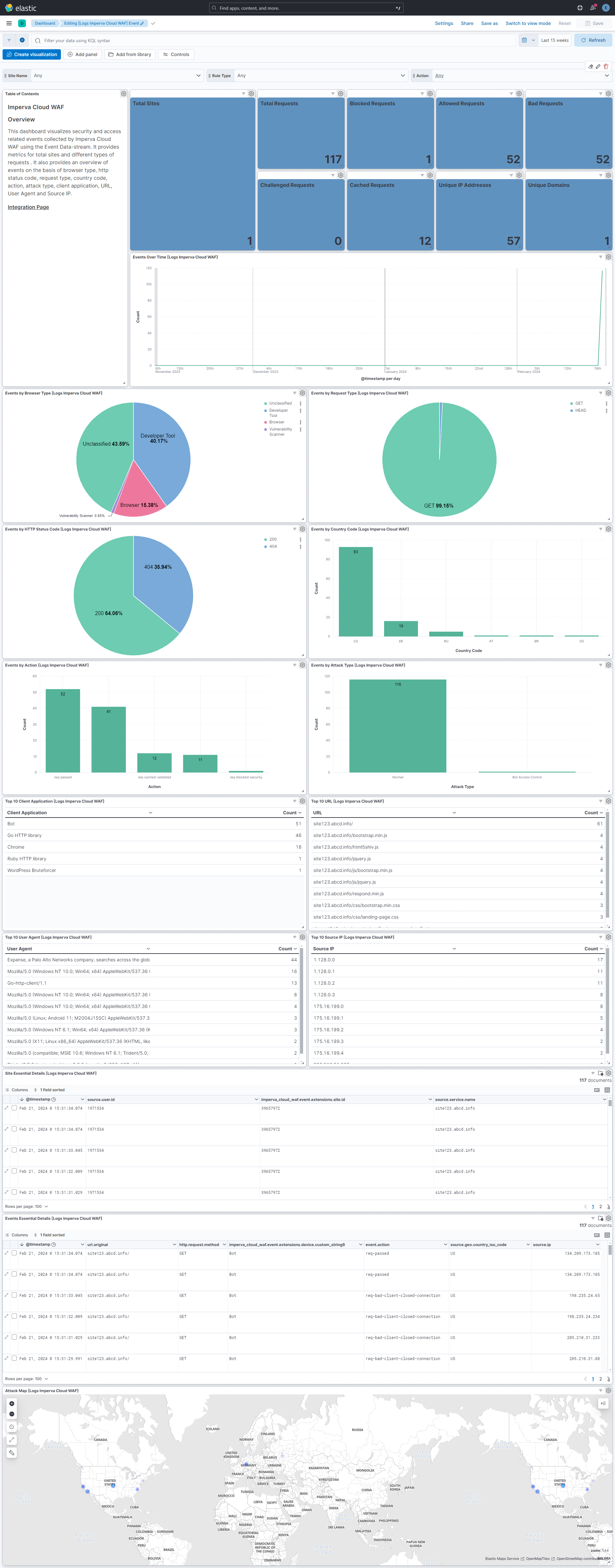
This integration includes one or more Kibana dashboards that visualizes the data collected by the integration. The screenshots below illustrate how the ingested data is displayed.
Changelog
| Version | Details | Minimum Kibana version |
|---|---|---|
| 1.17.0 | Enhancement (View pull request) Update Elastic Managed integration documentation to the current wording and docs links. |
9.4.1 9.3.5 8.19.16 |
| 1.16.0 | Enhancement (View pull request) Add tags to ingest pipeline processors. |
9.4.1 9.3.5 8.19.16 |
| 1.15.1 | Enhancement (View pull request) Set agentless deployment mode release field to ga. |
9.4.1 9.3.5 8.19.16 |
| 1.15.0 | Enhancement (View pull request) Use new release field for agentless deployment mode to establish as beta. |
9.4.1 9.3.5 8.19.16 |
| 1.14.0 | Enhancement (View pull request) Enable Agentless deployment. |
9.4.1 9.3.5 8.19.16 |
| 1.13.2 | Bug fix (View pull request) Fix CEL type guard to handle events as a list type. |
9.0.0 8.19.0 |
| 1.13.1 | Bug fix (View pull request) Downgrade the format_version to the minimum version that supports all the necessary features for the package. |
9.0.0 8.16.5 |
| 1.13.0 | Enhancement (View pull request) Use terminate processor instead of fail processor to handle agent errors. |
9.0.0 8.16.5 |
| 1.12.2 | Bug fix (View pull request) Fix handling of API requests when the cursor state cannot be found in the log file index returned by Imperva. |
9.0.0 8.16.5 |
| 1.12.1 | Bug fix (View pull request) Fix ingest pipeline to handle whitespace in request URL. |
9.0.0 8.16.5 |
| 1.12.0 | Enhancement (View pull request) Remove redundant installation instructions. |
9.0.0 8.16.5 |
| 1.11.4 | Bug fix (View pull request) Fix default request trace enabled behavior. |
9.0.0 8.16.5 |
| 1.11.3 | Bug fix (View pull request) Fix handling of SQS worker count configuration. |
9.0.0 8.16.5 |
| 1.11.2 | Bug fix (View pull request) Handle multiple IPs in extensions.xff. |
9.0.0 8.16.5 |
| 1.11.1 | Bug fix (View pull request) Fix type issue in CEL program. |
9.0.0 8.16.5 |
| 1.11.0 | Enhancement (View pull request) Prevent stale compressed data wedging log collection. |
9.0.0 8.16.5 |
| 1.10.2 | Bug fix (View pull request) Clarify documentation regarding Imperva file compression configuration. |
9.0.0 8.16.5 |
| 1.10.1 | Bug fix (View pull request) Re-add trailing slash in second stage log file collection in API input. |
9.0.0 8.16.5 |
| 1.10.0 | Enhancement (View pull request) Enable request trace log removal. |
9.0.0 8.16.5 |
| 1.9.0 | Enhancement (View pull request) Add support to configure start_timestamp and ignore_older configurations for AWS S3 backed inputs. |
9.0.0 8.16.5 |
| 1.8.0 | Enhancement (View pull request) Update Kibana constraint to support 9.0.0. |
9.0.0 8.16.2 |
| 1.7.0 | Enhancement (View pull request) Prevent absence of trailing slash in base URL from causing data collection failure. Enhancement (View pull request) Improve error reporting in collection failure case. |
8.16.2 |
| 1.6.2 | Bug fix (View pull request) Fix error message formatting syntax in agent configuration. |
8.16.2 |
| 1.6.1 | Bug fix (View pull request) Updated SSL description to be uniform and to include links to documentation. |
8.16.2 |
| 1.6.0 | Enhancement (View pull request) Improve error reporting for API requests. |
8.16.2 |
| 1.5.1 | Bug fix (View pull request) Tolerate no separator in log files. |
8.16.2 |
| 1.5.0 | Enhancement (View pull request) Add support for Access Point ARN when collecting logs via the AWS S3 Bucket. |
8.16.2 |
| 1.4.0 | Enhancement (View pull request) Add "preserve_original_event" tag to documents with event.kind manually set to "pipeline_error". |
8.13.0 |
| 1.3.0 | Enhancement (View pull request) Do not remove event.original in main ingest pipeline. |
8.13.0 |
| 1.2.0 | Enhancement (View pull request) Add "preserve_original_event" tag to documents with event.kind set to "pipeline_error". |
8.13.0 |
| 1.1.1 | Bug fix (View pull request) Remove reference to a Kibana version from the README. |
8.13.0 |
| 1.1.0 | Enhancement (View pull request) Modified the field definitions to remove ECS fields made redundant by the ecs@mappings component template. |
8.13.0 |
| 1.0.0 | Enhancement (View pull request) Release package as GA. |
8.13.0 |
| 0.3.1 | Enhancement (View pull request) Use modern ecs@mappings. |
8.13.0 |
| 0.3.0 | Enhancement (View pull request) Set sensitive values as secret, upgrade to package spec 3.0.3. |
8.12.0 |
| 0.2.0 | Enhancement (View pull request) Added Attack Map, Events Over Time, Unique IP and domain visualizations. |
8.10.1 |
| 0.1.0 | Enhancement (View pull request) Initial release. |
8.10.1 |