Qualys Web Application Scanning (WAS)
Elastic Cloud Serverless projects are autoscaled environments, fully managed by Elastic and available on Elastic Cloud. Availability This functionality is in technical preview and is ready for evaluation. Use with caution in production; it is not recommended for mission-critical workloads. Elastic will work to fix any issues, but features in technical preview are not subject to the support SLA of official GA features. Specific Support terms apply. Elastic Cloud Serverless projects are autoscaled environments, fully managed by Elastic and available on Elastic Cloud. Availability This functionality is in technical preview and is ready for evaluation. Use with caution in production; it is not recommended for mission-critical workloads. Elastic will work to fix any issues, but features in technical preview are not subject to the support SLA of official GA features. Specific Support terms apply. The Elastic Stack includes Elastic's core products such as Elasticsearch, Kibana, Logstash, and Beats. Availability This functionality is in technical preview and is ready for evaluation. Use with caution in production; it is not recommended for mission-critical workloads. Elastic will work to fix any issues, but features in technical preview are not subject to the support SLA of official GA features. Specific Support terms apply. Unless stated otherwise on the page, this functionality is available when your Elastic Stack is deployed on Elastic Cloud Hosted, Elastic Cloud Enterprise, Elastic Cloud on Kubernetes, and self-managed environments. This documentation corresponds to the latest patch available for each minor version. If you're not using the latest patch, check the release notes for changes.
Serverless Observability
Preview
Preview
Serverless Security
Preview
Preview
Stack
Preview
9.0+
Preview since 9.0
| Version | 0.7.1 Availability Preview This functionality is in technical preview and is ready for evaluation. Use with caution in production; it is not recommended for mission-critical workloads. Elastic will work to fix any issues, but features in technical preview are not subject to the support SLA of official GA features. Specific Support terms apply. (View all) |
| Managed integration release status | GA |
| Subscription level What's this? |
Basic |
| Developed by What's this? |
Elastic |
| Ingestion method(s) | API |
| Minimum Kibana version(s) | 9.0.0 8.18.0 |
You can use this integration as an Elastic Managed integration on Elastic Cloud Hosted deployments running this version or later.
To use pre-release integrations, go to the Integrations page in Kibana, scroll down, and toggle on the Display beta integrations option.
Qualys WAS integration ingests vulnerability detection data from scans performed by the Qualys Web Application Scan product. The Qualys Web Application Scanning product is a security product that continuously discovers, detects, and catalogs web applications and APIs (Application Programming Interface), and uncovers runtime vulnerabilities, misconfigurations, Personal Identifying Information (PII) exposures, and web malware across modern web applications or APIs.
The Qualys WAS integration uses the Qualys REST API mode to collect vulnerability detection data. Elastic Agent fetches data via API endpoints. Detection data is augmented by XML based queries to the Qualys Knowledge Base about each detection.
This module has been tested against the latest Qualys WAS version 4.5 , the 3.0 version REST API, and the 3.0 version of the detection Knowledge Base API.
The Qualys WAS integration collects data vulnerability reports called findings (detections) that are produced from scans. Scans are performed on a schedule and/or manually. Vulnerability reports are produced from the scans. Vulnerabilities have historical context such as the first time the vulnerability was seen, the last time the vulnerability was detected and status updates.
The Rest API reference for vulnerability reports: Rest API guide. The XML knowledge base api has been updated to 3.0 since this reference was published due to changes in the DTD. The changes are minimal.
Elastic Agent must be installed. For more details, check the Elastic Agent installation instructions.
Elastic Managed integrations are only supported on Elastic Cloud Serverless and Elastic Cloud Hosted deployments. An Elastic Managed integration lets you ingest data from a cloud source while avoiding the orchestration, management, and maintenance associated with standard ingest infrastructure. Elastic runs the collector for you, so you can focus on your data instead of the infrastructure that collects it.
For more information, refer to Elastic Managed integrations and the Elastic Managed integrations FAQ.
| Role | Module | API access |
|---|---|---|
| Reader | Web Application Scanning Module | Yes |
- Considering you already have a Qualys user account, to identify your Qualys platform and get the API URL, refer this link.
- Alternative way to get the API URL is to log in to your Qualys account and go to Help > About. You’ll find your URL under Security Operations Center (SOC). Look for a url that starts with "qualysapi"
- In Kibana go to Management > Integrations
- In "Search for integrations" search bar, type Qualys WAS
- Click on the "Qualys WAS" integration from the search results.
- Click on the Add Qualys WAS Integration button to add the integration.
- Add Required Parameters
- username
- password
- url (Example: https://qualysapi.qg2.apps.qualys.com)
- initial_interval (how far back to look for initial data)
- interval (how often call API to get latest results)
- batch size (how many vulnerabilities per page)
- Select Optional Parameters to filter out data. See https://docs.qualys.com/en/vm/latest/knowledgebase/severity_levels.htm
for descriptions of type of detection data returned and severity levels.
- disable Information Gathered.
- disable Senstive Content
- disable Verbose
The integration uses verbose mode by default. The size of scan result details that is returned in verbose is unpredictable. Should the agent run into memory issues, one or more of the following should solve the problem:
- Reduce batch_size in the integration configuration.
- Disable verbose mode if the extra data returned is not valuable to the user.
- Increase memory on the agent.
- Move the integration to its own agent.
- If your system is using the 3.20 API or before, purge scan history. Scan history is the list of all scans have been
run for each vulnerability finding. This list is returned in 3.20 and earlier APIs. This list can be quite large if
it is not purged by the customer. Due to its size, this list can effect the amount of memory required to process the
Qualys API results. The CEL script that queries the Qualys APIs removes history results before sending the data to
Elasticsearch.
The additional data available with verbose mode are:
- Web application tags
- OWASP name, code and URL for the detection
- WASC name, code and URL for the detection
- CWE code (becomes ECS value vulnerability.id)
- updatedDateTime
- param value for the test
- results of the most recent scan including the requests made, the response and details what about the response resulted in a vulnerability report. This data is stored as unindexed text data due to its unpredictable size.
Cel scripts are used to fetch the data from Qualys endpoints and processed into events that are consumed by the pipelines. The cell script requests Findings (detection) data through the REST API using a filter for the "lastTestedDate", which is the scan datetime. The qid (qualys id) is the id the vulnerability found that maps to a knowledge base article in the qualys knowledge base. This id is used to request knowledge base data from an endpoint which augments each Finding with the knowledge base data. Findings are paginated by the qualys_was.vulnerability.id, a unique id for the finding. Knowledge base data is cached between pages to reduce the volume of data transported during a single run of the cel script. The cel script removes history data that is included in verbose mode.
An example response from the Qualys WAS API
{
   "ServiceResponse": {
      "count": 1,
      "data": [
         {
            "Finding": {
               "owasp": {
                  "list": [
                     {
                        "OWASP": {
                           "name": "Injection",
                           "code": 3,
                           "url": "https://owasp.org/Top10/A03_2021-Injection/"
                        }
                     }
                  ],
                  "count": 1
               },
               "ignoredComment": "A comment",
               "cwe": {
                  "list": [
                     79
                  ],
                  "count": 1
               },
               "detectionScore": 50,
               "type": "VULNERABILITY",
               "updatedDate": "2025-06-01T08:56:29Z",
               "name": "Unencoded characters",
               "severity": "1",
               "timesDetected": 448,
               "ignoredReason": "FALSE_POSITIVE",
               "ignoredDate": "2020-06-23T11:38:44Z",
               "param": "show_unusable",
               "status": "ACTIVE",
               "cvssV3": {
                  "attackVector": "Network",
                  "base": 3.1,
                  "temporal": 2.6
               },
               "isIgnored": "true",
               "firstDetectedDate": "2020-06-13T08:01:21Z",
               "lastTestedDate": "2025-06-01T06:02:26Z",
               "wasc": {
                  "list": [
                     {
                        "WASC": {
                           "url": "http://projects.webappsec.org/w/page/13246934/WASC",
                           "name": "IMPROPER OUTPUT HANDLING",
                           "code": 22
                        }
                     }
                  ],
                  "count": 1
               },
               "uniqueId": "12345678-abcd-1234-1234-123456789012",
               "id": 12345678,
               "lastDetectedDate": "2025-06-01T06:02:26Z",
               "ignoredBy": {
                  "lastName": "Last",
                  "username": "username",
                  "firstName": "First",
                  "id": 987654321
               },
               "qid": 150084,
               "webApp": {
                  "tags": {
                     "list": [
                        {
                           "Tag": {
                              "id": 1,
                              "name": "Tag:1"
                           }
                        },
                        {
                           "Tag": {
                              "id": 2,
                              "name": "Tag:2"
                           }
                        }
                     ],
                     "count": 2
                  },
                  "url": "https://example.com/base",
                  "id": 123,
                  "name": "Descriptive Name"
               },
               "resultList": {
                  "list": [
                     {
                        "Result": {
                           "payloads": {
                              "list": [
                                 {
                                    "PayloadInstance": {
                                       "payloadResponce": {
                                          "offset": 272,
                                          "length": 25
                                       },
                                       "response": "response",
                                       "payload": "payload",
                                       "request": {
                                          "link": "https://example.com/base/testurl",
                                          "method": "GET",
                                          "headers": "headers"
                                       }
                                    }
                                 }
                              ],
                              "count": 1
                           },
                           "ajax": "false",
                           "authentication": "true",
                           "accessPath": {
                              "list": [
                                 {
                                    "Url": {
                                       "value": "https://example.com/base"
                                    }
                                 },
                                 {
                                    "Url": {
                                       "value": "https://example.com/base/testurl"
                                    }
                                 }
                              ],
                              "count": 2
                           }
                        }
                     }
                  ],
                  "count": 1
               },
               "findingType": "QUALYS",
               "url": "https://example.com/base/testurl",
               "potential": "true"
            }
         }
      ],
      "hasMoreRecords": "true",
      "responseCode": "SUCCESS",
      "lastId": 12345678
   }
}
An example of a Knowledge Base object after decoding from XML to JSON
{
 "id": 150004,
 "qid": 150004,
 "name": "Predictable Resource Location Via Forced Browsing",
 "type": "CONFIRMED_VULNERABILITY",
 "severity": 2,
 "originalSeverity": 2,
 "updatedSeverityComment": null,
 "severityUpdatedBy": null,
 "severityUpdatedDate": null,
 "ignored": false,
 "ignoredReason": null,
 "ignoredComment": null,
 "ignoredBy": null,
 "ignoredDate": null,
 "category": "Web Application",
 "updated": "2024-04-06T05:00:01Z",
 "discoveryType": "REMOTE",
 "authenticationType": null,
 "patchAvailable": false,
 "exploitAvailable": false,
 "malwareAvailable": false,
 "supportedBy": [
   "API Security",
   "WAS"
 ],
 "updateStatus": null,
 "complianceTypes": [
   "PCI"
 ],
 "custom": false,
 "cveIds": [],
 "bugtraqIds": [],
 "cweIds": [
   "22"
 ],
 "wascCategories": [
   {
     "id": 114,
     "code": 15,
     "name": "APPLICATION MISCONFIGURATION",
     "url": "http://projects.webappsec.org/w/page/13246914/WASC",
     "fullName": "WASC-15 APPLICATION MISCONFIGURATION"
   },
   {
     "id": 115,
     "code": 16,
     "name": "DIRECTORY INDEXING",
     "url": "http://projects.webappsec.org/w/page/13246922/WASC",
     "fullName": "WASC-16 DIRECTORY INDEXING"
   },
   {
     "id": 116,
     "code": 17,
     "name": "IMPROPER FILESYSTEM PERMISSIONS",
     "url": "http://projects.webappsec.org/w/page/13246932/WASC",
     "fullName": "WASC-17 IMPROPER FILESYSTEM PERMISSIONS"
   }
 ],
 "owaspCategories": [
   {
     "id": 153,
     "year": 2021,
     "code": "A01",
     "name": "Broken Access Control",
     "url": "https://owasp.org/Top10/A01_2021-Broken_Access_Control/"
   }
 ],
 "apiOwaspCategories": [
   {
     "id": 10001,
     "year": 2023,
     "code": "API01",
     "name": "Broken Object Level Authorization",
     "url": "https://owasp.org/API-Security/editions/2023/en/0xa1-broken-object-level-authorization"
   }
 ],
 "softwares": [],
 "vendorRefs": [],
 "exploits": [],
 "malware": [],
 "complianceInfos": [
   {
     "cid": 77,
     "qid": 150004,
     "lang": "EN",
     "complianceType": "PCI",
     "section": "DSS",
     "description": "Help organizations to ensure the safe handling of cardholder information at every step."
   }
 ],
 "cvss3BaseScore": 5.3,
 "cvss3TemporalScore": 4.7,
 "cvss3VectorString": "CVSS:3.1/AV:N/AC:L/PR:N/UI:N/S:U/C:L/I:N/A:N",
 "threat": "A file, directory, or directory listing was discovered on the Web server. These resources are confirmed to be present based on our logic. Some of the content on these files might have sensitive information. \n<P>NOTE: Links found in 150004 are found by forced crawling so will not automatically be added to 150009 Links Crawled or the application site map. If links found in 150004 need to be tested they must be added as Explicit URI so they are included in scope and then will be reported in 150009. Once the link is added to be in scope (i.e. Explicit URI)  this same link will no longer be reported for 150004.",
 "impact": "The contents of this file or directory may disclose sensitive information.",
 "solution": "It is advised to review the contents of the disclosed files. If the contents contain sensitive information, please verify that access to this file or directory is permitted. If necessary, remove it or apply access controls to it.",
 "signature": null
}
Example
{
"@timestamp": "2025-03-21T06:01:54.000Z",
"ecs": {
"version": "8.16.0"
},
"event": {
"category": [
"vulnerability"
],
"kind": "event",
"original": "{\"Finding\":{\"detection\":{\"cvssV3\":{\"attackVector\":\"Network\",\"base\":3.1,\"temporal\":2.6},\"cwe\":{\"count\":1,\"list\":[79]},\"detectionScore\":50,\"findingType\":\"QUALYS\",\"firstDetectedDate\":\"2020-06-13T08:01:21Z\",\"id\":12345670,\"ignoredBy\":{\"firstName\":\"Some\",\"id\":142870916,\"lastName\":\"Person\",\"username\":\"someperson123\"},\"ignoredComment\":\" comment\",\"ignoredDate\":\"2020-06-23T11:39:09Z\",\"ignoredReason\":\"FALSE_POSITIVE\",\"isIgnored\":\"true\",\"lastDetectedDate\":\"2025-03-21T06:01:54Z\",\"lastTestedDate\":\"2025-03-21T06:01:54Z\",\"name\":\"Unencoded characters\",\"owasp\":{\"count\":1,\"list\":[{\"OWASP\":{\"code\":3,\"name\":\"Injection\",\"url\":\"https://owasp.org/Top10/A03_2021-Injection/\"}}]},\"param\":\"show_deleted\",\"potential\":\"true\",\"qid\":150084,\"resultList\":{\"count\":1,\"list\":[{\"Result\":{\"accessPath\":{\"count\":1,\"list\":[{\"Url\":{\"value\":\"https://web.example.com/\"}}]},\"ajax\":\"false\",\"authentication\":\"false\",\"payloads\":{\"count\":4,\"list\":[{\"PayloadInstance\":{\"payload\":\"show_deleted=%22'%3E%3CqssbVr8SJHx%20%60%3b!--%3D%26%7b()%7d%3E&show_unusable=false\",\"payloadResponse\":{\"length\":25,\"offset\":271},\"request\":{\"headers\":\"123header456\",\"link\":\"https://web.example.com/api/v1/more/address/stack/versions?show_deleted=%22'%3E%3CqssbVr8SJHx%20%60%3b!--%3D%26%7b()%7d%3E&show_unusable=false\",\"method\":\"GET\"},\"response\":\"comment: A significant portion of the XSS test payload appeared in the web page, but the response content type is non-HTML.\\nResponse content-type: application/json\\n\\n{\\\"errors\\\":[{\\\"code\\\":\\\"root.malformed_query_param\\\",\\\"message\\\":\\\"The value for show_deleted was malformed. '\\\\\\\"'><qssbvr8sjhx `;!--=&{()}>' is not a valid Boolean value\\\"}]}\"}},{\"PayloadInstance\":{\"payload\":\"show_deleted=%22&show_unusable=false\",\"payloadResponse\":{\"length\":28,\"offset\":271},\"request\":{\"headers\":\"123header456\",\"link\":\"https://web.example.com/api/v1/more/address/stack/versions?show_deleted=%22&show_unusable=false\",\"method\":\"GET\"},\"response\":\"comment: A significant portion of the XSS test payload appeared in the web page, but the response content type is non-HTML.\\nResponse content-type: application/json\\n\\n{\\\"errors\\\":[{\\\"code\\\":\\\"root.malformed_query_param\\\",\\\"message\\\":\\\"The value for show_deleted was malformed. '\\\\\\\"'><qss a=x93884460340384y1_1z>' is not a valid Boolean value\\\"}]}\"}},{\"PayloadInstance\":{\"payload\":\"show_deleted=false%22'%3E%3CqssUbPt9tNM%3E&show_unusable=false\",\"payloadResponse\":{\"length\":13,\"offset\":276},\"request\":{\"headers\":\"123header456\",\"link\":\"https://web.example.com/api/v1/more/address/stack/versions?show_deleted=false%22'%3E%3CqssUbPt9tNM%3E&show_unusable=false\",\"method\":\"GET\"},\"response\":\"comment: A significant portion of the XSS test payload appeared in the web page, but the response content type is non-HTML.\\nResponse content-type: application/json\\n\\n{\\\"errors\\\":[{\\\"code\\\":\\\"root.malformed_query_param\\\",\\\"message\\\":\\\"The value for show_deleted was malformed. 'false\\\\\\\"'><qssubpt9tnm>' is not a valid Boolean value\\\"}]}\"}},{\"PayloadInstance\":{\"payload\":\"show_deleted=%22%3E%3CqssOzIA5enZ%3E&show_unusable=false\",\"payloadResponse\":{\"length\":13,\"offset\":270},\"request\":{\"headers\":\"123header456\",\"link\":\"https://web.example.com/api/v1/more/address/stack/versions?show_deleted=%22%3E%3CqssOzIA5enZ%3E&show_unusable=false\",\"method\":\"GET\"},\"response\":\"comment: A significant portion of the XSS test payload appeared in the web page, but the response content type is non-HTML.\\nResponse content-type: application/json\\n\\n{\\\"errors\\\":[{\\\"code\\\":\\\"root.malformed_query_param\\\",\\\"message\\\":\\\"The value for show_deleted was malformed. '\\\\\\\"><qssozia5enz>' is not a valid Boolean value\\\"}]}\"}}]}}}]},\"severity\":\"1\",\"status\":\"ACTIVE\",\"timesDetected\":416,\"type\":\"VULNERABILITY\",\"uniqueId\":\"12345678-1234-1234-1234-421234567890\",\"updatedDate\":\"2025-03-21T08:45:25Z\",\"url\":\"https://web.example.com/apiE&show_unusable=false\",\"wasc\":{\"count\":1,\"list\":[{\"WASC\":{\"code\":22,\"name\":\"IMPROPER OUTPUT HANDLING\",\"url\":\"http://projects.webappsec.org/w/page/13246934/WASC\"}}]},\"webApp\":{\"id\":987654321,\"name\":\"Description Name\",\"tags\":{\"count\":2,\"list\":[{\"Tag\":{\"id\":12348765,\"name\":\"Tag:1\"}},{\"Tag\":{\"id\":23459876,\"name\":\"Tag:2\"}}]},\"url\":\"https://web.example.com\"}},\"knowledge_base\":{\"CATEGORY\":\"Web Application\",\"CODE_MODIFIED_DATETIME\":\"2022-08-10T00:00:00Z\",\"CONSEQUENCE\":\"No exploit was determined for these reflected characters. The input parameter should be manually analyzed to verify that no other characters can be injected that would lead to an HTML injection (XSS) vulnerability.\",\"CVSS\":{\"BASE\":{\"#text\":\"5.0\",\"source\":\"service\"},\"TEMPORAL\":\"3.8\",\"VECTOR_STRING\":\"CVSS:2.0/AV:N/AC:L/Au:N/C:P/I:N/A:N/E:U/RL:U/RC:UC\"},\"CVSS_V3\":{\"BASE\":\"3.1\",\"CVSS3_VERSION\":\"3.1\",\"TEMPORAL\":\"2.6\",\"VECTOR_STRING\":\"CVSS:3.1/AV:N/AC:H/PR:N/UI:R/S:U/C:L/I:N/A:N/E:U/RL:U/RC:U\"},\"DIAGNOSIS\":\"The web application reflects potentially dangerous characters such as single quotes, double quotes, and angle brackets. These characters are commonly used for HTML injection attacks such as cross-site scripting (XSS).\",\"DISCOVERY\":{\"REMOTE\":\"1\"},\"LAST_SERVICE_MODIFICATION_DATETIME\":\"2024-02-12T23:24:03Z\",\"PATCHABLE\":\"0\",\"PCI_FLAG\":\"0\",\"PUBLISHED_DATETIME\":\"2011-03-08T18:40:29Z\",\"QID\":\"150084\",\"SEVERITY_LEVEL\":\"1\",\"SOLUTION\":\"Review the reflected characters to ensure that they are properly handled as defined by the web application's coding practice. Typical solutions are to apply HTML encoding or percent encoding to the characters depending on where they are placed in the HTML. For example, a double quote might be encoded as " when displayed in a text node, but as %22 when placed in the value of an href attribute.\",\"THREAT_INTELLIGENCE\":{\"THREAT_INTEL\":[{\"#text\":\"Easy_Exploit\",\"id\":\"5\"},{\"#text\":\"No_Patch\",\"id\":\"8\"}]},\"TITLE\":\"Unencoded characters\",\"VULN_TYPE\":\"Potential Vulnerability\"}}}",
"type": [
"info"
]
},
"qualys_was": {
"vulnerability": {
"detection_score": 50,
"first_found_datetime": "2020-06-13T08:01:21.000Z",
"id": 12345670,
"ignoredBy": {
"comment": " comment",
"date": "2020-06-23T11:39:09.000Z",
"id": 142870916,
"reason": "FALSE_POSITIVE",
"username": "someperson123"
},
"is_ignored": "true",
"knowledge_base": {
"category": "Web Application",
"consequence": {
"value": "No exploit was determined for these reflected characters. The input parameter should be manually analyzed to verify that no other characters can be injected that would lead to an HTML injection (XSS) vulnerability."
},
"cvss": {
"base_obj": {
"#text": "5.0",
"source": "service"
},
"temporal": "3.8",
"vector_string": "CVSS:2.0/AV:N/AC:L/Au:N/C:P/I:N/A:N/E:U/RL:U/RC:UC"
},
"cvss_v3": {
"base": "3.1",
"temporal": "2.6",
"vector_string": "CVSS:3.1/AV:N/AC:H/PR:N/UI:R/S:U/C:L/I:N/A:N/E:U/RL:U/RC:U",
"version": "3.1"
},
"diagnosis": {
"value": "The web application reflects potentially dangerous characters such as single quotes, double quotes, and angle brackets. These characters are commonly used for HTML injection attacks such as cross-site scripting (XSS)."
},
"discovery": {
"remote": 1
},
"last": {
"service_modification_datetime": "2024-02-12T23:24:03.000Z"
},
"patchable": false,
"pci_flag": false,
"published_datetime": "2011-03-08T18:40:29.000Z",
"qid": "150084",
"severity_level": "1",
"solution": {
"value": "Review the reflected characters to ensure that they are properly handled as defined by the web application's coding practice. Typical solutions are to apply HTML encoding or percent encoding to the characters depending on where they are placed in the HTML. For example, a double quote might be encoded as " when displayed in a text node, but as %22 when placed in the value of an href attribute."
},
"threat_intelligence": {
"intel": [
{
"id": "5",
"text": "Easy_Exploit"
},
{
"id": "8",
"text": "No_Patch"
}
]
},
"title": "Unencoded characters",
"vuln_type": "Potential Vulnerability"
},
"last_found_datetime": "2025-03-21T06:01:54.000Z",
"last_test_datetime": "2025-03-21T06:01:54.000Z",
"name": "Unencoded characters",
"owasp_references": [
{
"code": 3,
"name": "Injection",
"url": "https://owasp.org/Top10/A03_2021-Injection/"
}
],
"param": "show_deleted",
"potential": "true",
"qid": 150084,
"result_list_text": [
"{Result={accessPath={count=1, list=[{Url={value=https://web.example.com/}}]}, payloads={count=4, list=[{PayloadInstance={request={headers=123header456, method=GET, link=https://web.example.com/api/v1/more/address/stack/versions?show_deleted=%22'%3E%3CqssbVr8SJHx%20%60%3b!--%3D%26%7b()%7d%3E&show_unusable=false}, payload=show_deleted=%22'%3E%3CqssbVr8SJHx%20%60%3b!--%3D%26%7b()%7d%3E&show_unusable=false, response=comment: A significant portion of the XSS test payload appeared in the web page, but the response content type is non-HTML.\nResponse content-type: application/json\n\n{\"errors\":[{\"code\":\"root.malformed_query_param\",\"message\":\"The value for show_deleted was malformed. '\\\"'><qssbvr8sjhx `;!--=&{()}>' is not a valid Boolean value\"}]}, payloadResponse={offset=271, length=25}}}, {PayloadInstance={request={headers=123header456, method=GET, link=https://web.example.com/api/v1/more/address/stack/versions?show_deleted=%22&show_unusable=false}, payload=show_deleted=%22&show_unusable=false, response=comment: A significant portion of the XSS test payload appeared in the web page, but the response content type is non-HTML.\nResponse content-type: application/json\n\n{\"errors\":[{\"code\":\"root.malformed_query_param\",\"message\":\"The value for show_deleted was malformed. '\\\"'><qss a=x93884460340384y1_1z>' is not a valid Boolean value\"}]}, payloadResponse={offset=271, length=28}}}, {PayloadInstance={request={headers=123header456, method=GET, link=https://web.example.com/api/v1/more/address/stack/versions?show_deleted=false%22'%3E%3CqssUbPt9tNM%3E&show_unusable=false}, payload=show_deleted=false%22'%3E%3CqssUbPt9tNM%3E&show_unusable=false, response=comment: A significant portion of the XSS test payload appeared in the web page, but the response content type is non-HTML.\nResponse content-type: application/json\n\n{\"errors\":[{\"code\":\"root.malformed_query_param\",\"message\":\"The value for show_deleted was malformed. 'false\\\"'><qssubpt9tnm>' is not a valid Boolean value\"}]}, payloadResponse={offset=276, length=13}}}, {PayloadInstance={request={headers=123header456, method=GET, link=https://web.example.com/api/v1/more/address/stack/versions?show_deleted=%22%3E%3CqssOzIA5enZ%3E&show_unusable=false}, payload=show_deleted=%22%3E%3CqssOzIA5enZ%3E&show_unusable=false, response=comment: A significant portion of the XSS test payload appeared in the web page, but the response content type is non-HTML.\nResponse content-type: application/json\n\n{\"errors\":[{\"code\":\"root.malformed_query_param\",\"message\":\"The value for show_deleted was malformed. '\\\"><qssozia5enz>' is not a valid Boolean value\"}]}, payloadResponse={offset=270, length=13}}}]}, ajax=false, authentication=false}}"
],
"status": "ACTIVE",
"times_detected": 416,
"type": "VULNERABILITY",
"unique_vuln_id": "12345678-1234-1234-1234-421234567890",
"updated_datetime": "2025-03-21T08:45:25.000Z",
"wasc_references": [
{
"code": 22,
"name": "IMPROPER OUTPUT HANDLING",
"url": "http://projects.webappsec.org/w/page/13246934/WASC"
}
],
"web_app": {
"id": 987654321,
"name": "Description Name",
"tags": [
{
"id": 12348765,
"name": "Tag:1"
},
{
"id": 23459876,
"name": "Tag:2"
}
],
"url": "https://web.example.com"
}
}
},
"tags": [
"preserve_original_event"
],
"url": {
"full": "https://web.example.com/apiE&show_unusable=false"
},
"vulnerability": {
"category": [
"Web Application"
],
"classification": "CVSS",
"description": "The web application reflects potentially dangerous characters such as single quotes, double quotes, and angle brackets. These characters are commonly used for HTML injection attacks such as cross-site scripting (XSS).",
"enumeration": "CWE",
"id": [
"79"
],
"reference": [
"https://cwe.mitre.org/data/definitions/79.html"
],
"scanner": {
"vendor": "Qualys"
},
"severity": "Minimal"
}
}
ECS fields
| Field | Description | Type |
|---|---|---|
| vulnerability.id | The identification (ID) is the number portion of a vulnerability entry | keyword |
| vulnerability.classification | The classification of the vulnerability scoring system | constant_keyword |
| vulnerability.enumeration | The type of identifier used for this vulnerability | constant_keyword |
| vulnerability.category | The type of system or architecture that the vulnerability affects. | constant_keyword |
| vulnerability.scanner.vendor | The name of the vulnerability scanner vendor. | constant_keyword |
| vulnerability.severity | The severity of the vulnerability | keyword |
| vulnerability.score.base | Available in verbose mode. Scores can range from 0.0 to 10.0, with 10.0 being the most severe. Base scores cover an assessment for exploitability metrics (attack vector, complexity, privileges, and user interaction), impact metrics (confidentiality, integrity, and availability), and scope. | float |
| vulnerability.score.temporal | Available in verbose mode. Scores can range from 0.0 to 10.0, with 10.0 being the most severe. Temporal scores cover an assessment for code maturity, remediation level, and confidence. | float |
Exported fields
| Field | Description | Type |
|---|---|---|
| @timestamp | Date/time when the event originated. This is the date/time extracted from the event, typically representing when the event was generated by the source. If the event source has no original timestamp, this value is typically populated by the first time the event was received by the pipeline. Required field for all events. | date |
| data_stream.dataset | The field can contain anything that makes sense to signify the source of the data. Examples include nginx.access, prometheus, endpoint etc. For data streams that otherwise fit, but that do not have dataset set we use the value "generic" for the dataset value. event.dataset should have the same value as data_stream.dataset. Beyond the Elasticsearch data stream naming criteria noted above, the dataset value has additional restrictions: * Must not contain - * No longer than 100 characters |
constant_keyword |
| data_stream.namespace | A user defined namespace. Namespaces are useful to allow grouping of data. Many users already organize their indices this way, and the data stream naming scheme now provides this best practice as a default. Many users will populate this field with default. If no value is used, it falls back to default. Beyond the Elasticsearch index naming criteria noted above, namespace value has the additional restrictions: * Must not contain - * No longer than 100 characters |
constant_keyword |
| data_stream.type | An overarching type for the data stream. Currently allowed values are "logs" and "metrics". We expect to also add "traces" and "synthetics" in the near future. | constant_keyword |
| event.dataset | Name of the dataset. If an event source publishes more than one type of log or events (e.g. access log, error log), the dataset is used to specify which one the event comes from. It's recommended but not required to start the dataset name with the module name, followed by a dot, then the dataset name. | constant_keyword |
| event.module | Name of the module this data is coming from. If your monitoring agent supports the concept of modules or plugins to process events of a given source (e.g. Apache logs), event.module should contain the name of this module. |
constant_keyword |
| input.type | Type of filebeat input. | keyword |
| log.offset | Offset of the entry in the log file. | long |
| qualys_was.vulnerability.detection_score | The detection score. | long |
| qualys_was.vulnerability.first_found_datetime | The first scan date on which the vulnerability was found. | date |
| qualys_was.vulnerability.fixed_datetime | Datetime that this detection was fixed. Available in verbose mode. | date |
| qualys_was.vulnerability.id | ID for the vulnerability report. | long |
| qualys_was.vulnerability.ignoredBy.comment | Comment by the person who set this detection to ignored. | keyword |
| qualys_was.vulnerability.ignoredBy.date | Date this detection was set to ignored. | date |
| qualys_was.vulnerability.ignoredBy.id | ID of person who set this detection to ignored. | long |
| qualys_was.vulnerability.ignoredBy.name | Name of person who set this detection to ignored. | keyword |
| qualys_was.vulnerability.ignoredBy.reason | Reason why this detection was set to ignored. | keyword |
| qualys_was.vulnerability.ignoredBy.username | Username of person who set this detection to ignored. | keyword |
| qualys_was.vulnerability.is_ignored | If true, the vulnerability will not be rescanned. | boolean |
| qualys_was.vulnerability.knowledge_base.automatic_pci_fail | keyword | |
| qualys_was.vulnerability.knowledge_base.bugtraq_list.id | keyword | |
| qualys_was.vulnerability.knowledge_base.bugtraq_list.url | keyword | |
| qualys_was.vulnerability.knowledge_base.category | keyword | |
| qualys_was.vulnerability.knowledge_base.changelog_list.info.change_date | date | |
| qualys_was.vulnerability.knowledge_base.changelog_list.info.comments | keyword | |
| qualys_was.vulnerability.knowledge_base.compliance_list.description | keyword | |
| qualys_was.vulnerability.knowledge_base.compliance_list.section | keyword | |
| qualys_was.vulnerability.knowledge_base.compliance_list.type | keyword | |
| qualys_was.vulnerability.knowledge_base.consequence.comment | keyword | |
| qualys_was.vulnerability.knowledge_base.consequence.value | match_only_text | |
| qualys_was.vulnerability.knowledge_base.correlation.exploits.explt_src.list.explt.desc | keyword | |
| qualys_was.vulnerability.knowledge_base.correlation.exploits.explt_src.list.explt.link | keyword | |
| qualys_was.vulnerability.knowledge_base.correlation.exploits.explt_src.list.explt.ref | keyword | |
| qualys_was.vulnerability.knowledge_base.correlation.exploits.explt_src.name | keyword | |
| qualys_was.vulnerability.knowledge_base.correlation.malware.src.list.info.alias | keyword | |
| qualys_was.vulnerability.knowledge_base.correlation.malware.src.list.info.id | keyword | |
| qualys_was.vulnerability.knowledge_base.correlation.malware.src.list.info.link | keyword | |
| qualys_was.vulnerability.knowledge_base.correlation.malware.src.list.info.platform | keyword | |
| qualys_was.vulnerability.knowledge_base.correlation.malware.src.list.info.rating | keyword | |
| qualys_was.vulnerability.knowledge_base.correlation.malware.src.list.info.type | keyword | |
| qualys_was.vulnerability.knowledge_base.correlation.malware.src.name | keyword | |
| qualys_was.vulnerability.knowledge_base.cve_list | keyword | |
| qualys_was.vulnerability.knowledge_base.cvss.access.complexity | keyword | |
| qualys_was.vulnerability.knowledge_base.cvss.access.vector | keyword | |
| qualys_was.vulnerability.knowledge_base.cvss.authentication | keyword | |
| qualys_was.vulnerability.knowledge_base.cvss.base | keyword | |
| qualys_was.vulnerability.knowledge_base.cvss.base_obj | flattened | |
| qualys_was.vulnerability.knowledge_base.cvss.exploitability | keyword | |
| qualys_was.vulnerability.knowledge_base.cvss.impact.availability | keyword | |
| qualys_was.vulnerability.knowledge_base.cvss.impact.confidentiality | keyword | |
| qualys_was.vulnerability.knowledge_base.cvss.impact.integrity | keyword | |
| qualys_was.vulnerability.knowledge_base.cvss.remediation_level | keyword | |
| qualys_was.vulnerability.knowledge_base.cvss.report_confidence | keyword | |
| qualys_was.vulnerability.knowledge_base.cvss.temporal | keyword | |
| qualys_was.vulnerability.knowledge_base.cvss.vector_string | keyword | |
| qualys_was.vulnerability.knowledge_base.cvss_v3.attack.complexity | keyword | |
| qualys_was.vulnerability.knowledge_base.cvss_v3.attack.vector | keyword | |
| qualys_was.vulnerability.knowledge_base.cvss_v3.base | keyword | |
| qualys_was.vulnerability.knowledge_base.cvss_v3.exploit_code_maturity | keyword | |
| qualys_was.vulnerability.knowledge_base.cvss_v3.impact.availability | keyword | |
| qualys_was.vulnerability.knowledge_base.cvss_v3.impact.confidentiality | keyword | |
| qualys_was.vulnerability.knowledge_base.cvss_v3.impact.integrity | keyword | |
| qualys_was.vulnerability.knowledge_base.cvss_v3.privileges_required | keyword | |
| qualys_was.vulnerability.knowledge_base.cvss_v3.remediation_level | keyword | |
| qualys_was.vulnerability.knowledge_base.cvss_v3.report_confidence | keyword | |
| qualys_was.vulnerability.knowledge_base.cvss_v3.scope | keyword | |
| qualys_was.vulnerability.knowledge_base.cvss_v3.temporal | keyword | |
| qualys_was.vulnerability.knowledge_base.cvss_v3.user_interaction | keyword | |
| qualys_was.vulnerability.knowledge_base.cvss_v3.vector_string | keyword | |
| qualys_was.vulnerability.knowledge_base.cvss_v3.version | keyword | |
| qualys_was.vulnerability.knowledge_base.detection_info | keyword | |
| qualys_was.vulnerability.knowledge_base.diagnosis.comment | match_only_text | |
| qualys_was.vulnerability.knowledge_base.diagnosis.value | match_only_text | |
| qualys_was.vulnerability.knowledge_base.discovery.additional_info | keyword | |
| qualys_was.vulnerability.knowledge_base.discovery.auth_type_list.value | keyword | |
| qualys_was.vulnerability.knowledge_base.discovery.remote | long | |
| qualys_was.vulnerability.knowledge_base.error | keyword | |
| qualys_was.vulnerability.knowledge_base.id_range | keyword | |
| qualys_was.vulnerability.knowledge_base.ids | keyword | |
| qualys_was.vulnerability.knowledge_base.is_disabled | boolean | |
| qualys_was.vulnerability.knowledge_base.last.customization.datetime | date | |
| qualys_was.vulnerability.knowledge_base.last.customization.user_login | keyword | |
| qualys_was.vulnerability.knowledge_base.last.service_modification_datetime | date | |
| qualys_was.vulnerability.knowledge_base.patchable | boolean | |
| qualys_was.vulnerability.knowledge_base.pci_flag | boolean | |
| qualys_was.vulnerability.knowledge_base.pci_reasons.value | keyword | |
| qualys_was.vulnerability.knowledge_base.published_datetime | date | |
| qualys_was.vulnerability.knowledge_base.qid | keyword | |
| qualys_was.vulnerability.knowledge_base.severity_level | keyword | |
| qualys_was.vulnerability.knowledge_base.software_list.product | keyword | |
| qualys_was.vulnerability.knowledge_base.software_list.vendor | keyword | |
| qualys_was.vulnerability.knowledge_base.solution.comment | match_only_text | |
| qualys_was.vulnerability.knowledge_base.solution.value | match_only_text | |
| qualys_was.vulnerability.knowledge_base.supported_modules | keyword | |
| qualys_was.vulnerability.knowledge_base.threat_intelligence.intel.id | keyword | |
| qualys_was.vulnerability.knowledge_base.threat_intelligence.intel.text | keyword | |
| qualys_was.vulnerability.knowledge_base.title | keyword | |
| qualys_was.vulnerability.knowledge_base.vendor_reference_list.id | keyword | |
| qualys_was.vulnerability.knowledge_base.vendor_reference_list.url | keyword | |
| qualys_was.vulnerability.knowledge_base.vuln_type | keyword | |
| qualys_was.vulnerability.last_found_datetime | The last scan date on which the vulnerability was found. | date |
| qualys_was.vulnerability.last_test_datetime | The last date on which the vulnerability was scanned for. | date |
| qualys_was.vulnerability.name | A descriptive name for vulnerability. | keyword |
| qualys_was.vulnerability.owasp_references.code | OWASP reference code. Available in verbose mode. | long |
| qualys_was.vulnerability.owasp_references.name | OWASP reference name. Available in verbose mode. | keyword |
| qualys_was.vulnerability.owasp_references.url | OWASP reference URL. Available in verbose mode. | keyword |
| qualys_was.vulnerability.param | Parameter set used in scan request. Available in verbose mode. | keyword |
| qualys_was.vulnerability.potential | Potential vulnerability but not verified. | boolean |
| qualys_was.vulnerability.qid | Qualys ID for the vulnerability. | long |
| qualys_was.vulnerability.result_list_text | Unindexed text of actual scan result with details on request, response and details of finding. Available in verbose mode. | text |
| qualys_was.vulnerability.status | The status of the detection (New, Active, Fixed, Reopened). | keyword |
| qualys_was.vulnerability.times_detected | The number of times the vulnerability has been detected. | long |
| qualys_was.vulnerability.type | The type of vulnerability detected (VULNERABILITY, POTENTIAL_VULNERABILITY, SENSITIVE_CONTENT,INFORMATION_GATHERED). | keyword |
| qualys_was.vulnerability.unique_vuln_id | Unique id for the vulnerability report in UUID format. | keyword |
| qualys_was.vulnerability.updated_datetime | Datetime that this detection record was updated. Available in verbose mode. | date |
| qualys_was.vulnerability.url | The URL that was scanned for a specific test of vulnerabilities. | keyword |
| qualys_was.vulnerability.wasc_references.code | WASC reference code. Available in verbose mode. | long |
| qualys_was.vulnerability.wasc_references.name | WASC reference name. Available in verbose mode. | keyword |
| qualys_was.vulnerability.wasc_references.url | WASC reference URL. Available in verbose mode. | keyword |
| qualys_was.vulnerability.web_app.id | Web Application ID. | long |
| qualys_was.vulnerability.web_app.name | Web Application name. | keyword |
| qualys_was.vulnerability.web_app.tags.id | ID of tag. | long |
| qualys_was.vulnerability.web_app.tags.name | Name of tag | keyword |
| qualys_was.vulnerability.web_app.url | Web Application base URL. | keyword |
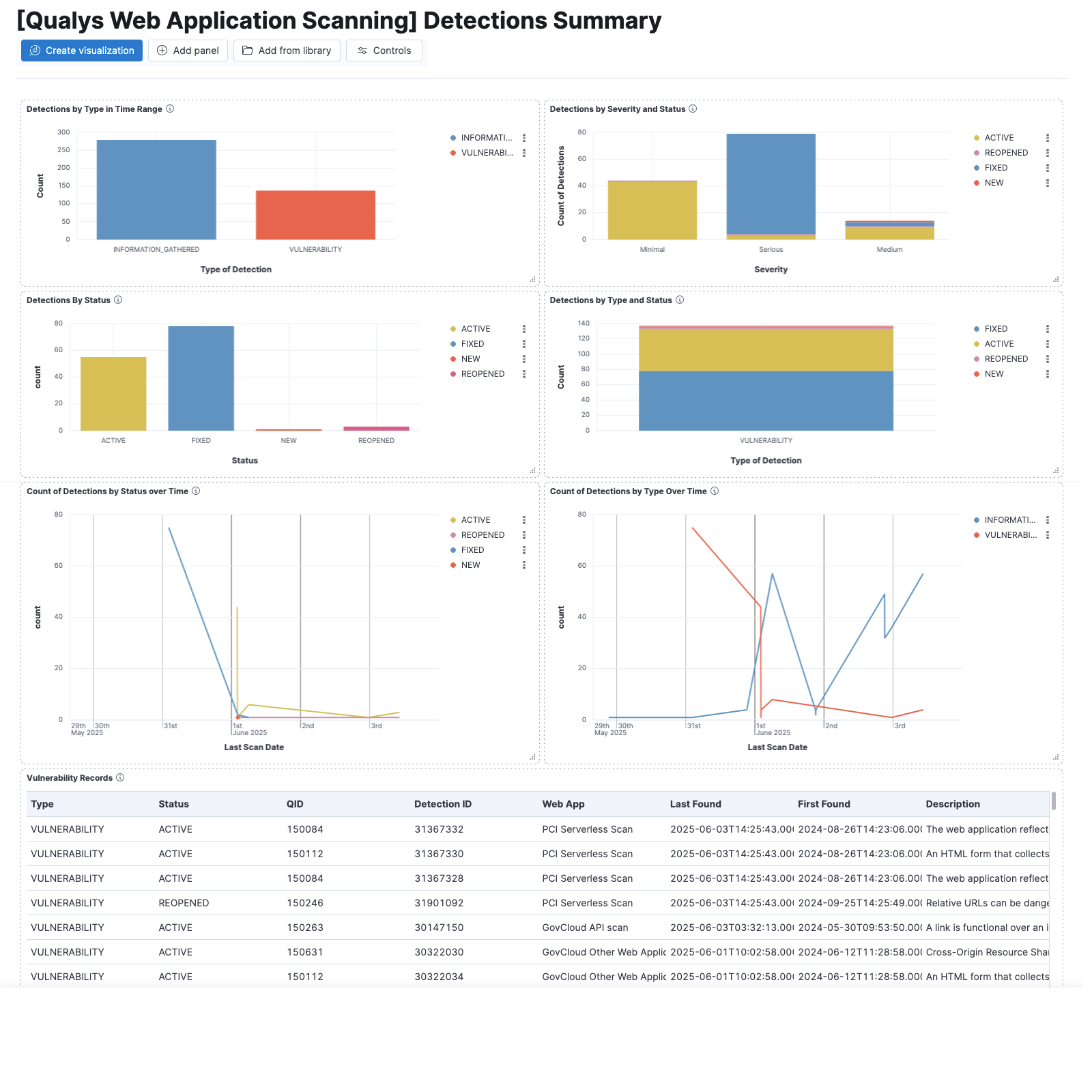
This integration includes one or more Kibana dashboards that visualizes the data collected by the integration. The screenshots below illustrate how the ingested data is displayed.
Changelog
| Version | Details | Minimum Kibana version |
|---|---|---|
| 0.7.1 | Bug fix (View pull request) Fix the vulnerability CEL program failing with unexpected missing events array when a findings page contains only QIDs already in the knowledge base cache.Bug fix (View pull request) Start a new query window on each interval in the vulnerability CEL program instead of reusing the first one.Bug fix (View pull request) Only advance the vulnerability cursor once all pages of a query window have been collected, so a failure while paging does not skip the remaining pages. |
9.0.0 8.18.0 |
| 0.7.0 | Enhancement (View pull request) Update Elastic Managed integration documentation to the current wording and docs links. |
9.0.0 8.18.0 |
| 0.6.0 | Enhancement (View pull request) Add tags to ingest pipeline processors and add preserve_original_event to pipeline-level on_failure handlers. |
9.0.0 8.18.0 |
| 0.5.1 | Enhancement (View pull request) Set agentless deployment mode release field to ga. |
9.0.0 8.18.0 |
| 0.5.0 | Enhancement (View pull request) Publish Agentless to Elastic Managed integrations name change. |
9.0.0 8.18.0 |
| 0.4.0 | Enhancement (View pull request) Use new release field for agentless deployment mode to establish as beta. |
9.0.0 8.18.0 |
| 0.3.1 | Bug fix (View pull request) Remove duplicate security-solution-default tag references |
9.0.0 8.18.0 |
| 0.3.0 | Enhancement (View pull request) Use terminate processor instead of fail processor to handle agent errors. |
9.0.0 8.18.0 |
| 0.2.0 | Breaking change (View pull request) Explicitly cast all long fields to long in case the agent sends them as doubles. Terminate ingest pipeline early if agent sends an error message. Change web app tags from list of names to list of tag objects with name and id. |
9.0.0 8.18.0 |
| 0.1.0 | Enhancement (View pull request) Initial Release. |
9.0.0 8.18.0 |