Azure OpenAI Integration
Elastic Cloud Serverless projects are autoscaled environments, fully managed by Elastic and available on Elastic Cloud. Availability This functionality is generally available and ready for production usage. Elastic Cloud Serverless projects are autoscaled environments, fully managed by Elastic and available on Elastic Cloud. Availability This functionality is generally available and ready for production usage. The Elastic Stack includes Elastic's core products such as Elasticsearch, Kibana, Logstash, and Beats. Availability This functionality is generally available and ready for production usage. Unless stated otherwise on the page, this functionality is available when your Elastic Stack is deployed on Elastic Cloud Hosted, Elastic Cloud Enterprise, Elastic Cloud on Kubernetes, and self-managed environments. This documentation corresponds to the latest patch available for each minor version. If you're not using the latest patch, check the release notes for changes.
Serverless Observability
Generally available
Serverless Security
Generally available
Stack
9.3+
Generally available since 9.3
| Version | 1.16.0 (View all) |
| Managed integration release status | Availability Beta This functionality is in beta and is not ready for production usage. For beta features, the design and code is less mature than official GA features and is being provided as-is with no warranties. Beta features are not subject to the support SLA of official GA features. Specific Support terms apply. |
| Subscription level What's this? |
Basic |
| Developed by What's this? |
Elastic |
| Ingestion method(s) | API, Azure Event Hub |
| Minimum Kibana version(s) | 9.3.0 9.2.4 8.19.10 |
You can use this integration as an Elastic Managed integration on Elastic Cloud Hosted deployments running this version or later.
The Azure OpenAI service provides flexibility to build your own copilot and AI applications. The Azure OpenAI integration collects metrics and logs through azure-monitor and the Azure event hub respectively.
To fully populate the Azure OpenAI dashboard lenses, you have to enable both logs and metrics data streams and set up the Azure Billing integration in advance.
Elastic Agent must be installed. For more details, check the Elastic Agent installation instructions. You can install only one Elastic Agent per host.
Elastic Agent is required to collect data from Azure and ship the data to Elastic, where the events will then be processed via the integration's ingest pipelines.
Elastic Managed integrations are only supported on Elastic Cloud Serverless and Elastic Cloud Hosted deployments. An Elastic Managed integration lets you ingest data from a cloud source while avoiding the orchestration, management, and maintenance associated with standard ingest infrastructure. Elastic runs the collector for you, so you can focus on your data instead of the infrastructure that collects it. This functionality is in beta and is subject to change. Beta features are not subject to the support SLA of official GA features.
When using this integration as an Elastic Managed integration, only the Collect OpenAI metrics data stream is available. This data stream uses inputs compatible with the Elastic Managed deployment mode. Other data streams (Collect Azure OpenAI logs) require the Azure Event Hubs input, which is not supported in the Elastic Managed deployment mode. To collect data from these data streams, use Elastic Agent.
For more information, refer to Elastic Managed integrations and the Elastic Managed integrations FAQ.
Elastic Managed integration is currently supported for Azure OpenAI metrics only. Log collection is not available via Elastic Managed Integration and requires a traditional Elastic Agent deployment.
The Azure OpenAI logs data stream captures the audit events and the request-response events.
These are the supported Azure log categories:
| Data Stream | Log Category |
|---|---|
| logs | Audit |
| logs | RequestResponse |
| logs | ApiManagementGatewayLogs |
Refer to the Azure Logs page for more information on how to set up and use this integration.
Authentication (Event Hub): The Event Hub input supports two authentication methods: connection string (default) and client secret (Microsoft Entra ID). For setup steps, required RBAC roles (Azure Event Hubs Data Receiver, Storage Blob Data Contributor), and configuration options, see the Azure Logs integration or Filebeat azure-eventhub input documentation.
By default, the integration uses AMQP ports 5671 and 5672 to communicate with Event Hubs. If these ports are blocked, set Event Hubs transport protocol to AMQP-over-WebSockets in the advanced options. This tunnels AMQP over HTTPS on port 443.
This option requires the Event Hub processor v2 (Processor version set to v2, which is the default) and Elastic Agent 8.19.10, 9.2.4, or later.
Proxy support is optional and requires Event Hubs transport protocol set to AMQP-over-WebSockets.
To enable it:
- In the advanced options, set Event Hubs transport protocol to AMQP-over-WebSockets.
- Define the
HTTPS_PROXYenvironment variable for the Elastic Agent process, for exampleHTTPS_PROXY=http://proxy.example.com:8080. Elastic Agent routes both Event Hubs and Storage Account traffic through the proxy.
This requires processor v2 and Elastic Agent 8.19.10, 9.2.4, or later.
The Azure OpenAI provides native logging and monitoring to track the telemetry of the service. The Audit and RequestResponse log categories come under the native logging. However, the default logging doesn't log the inputs and outputs of the service. This is useful to ensure that the services operates as expected.
The logs collected using the default cognitive services are listed on the Monitor OpenAI models page.
The API Management services provide the advanced logging capabilities. The ApiManagementGatewayLogs category comes under the advanced logging. This is not directly available in the Azure OpenAI service itself. You have to set up the API Management services in Azure to access the Azure OpenAI. When the setup is complete, add the diagnostic setting for the API Management service.
For more information on how to implement the comprehensive solution using API Management services to monitor the Azure OpenAI services, check the Monitor OpenAI models page.
Diagnostic settings
- Enable the category
Logs related to ApiManagement Gatewayto stream the logs to the event hub.
┌──────────────────┐      ┌──────────────┐     ┌─────────────────┐
│   APIM service   │      │  Diagnostic  │     │    Event Hub    │
│    <<source>>    │─────▶│   settings   │────▶│ <<destination>> │
└──────────────────┘      └──────────────┘     └─────────────────┘
The logs collected using the API Management services for the enterprise customer of the Azure OpenAI services are listed on the Monitor OpenAI models page. This records the inputs and outputs of the request, like prompts, tokens, and model usage.
Azure OpenAI Content Filter's sophisticated algorithms analyze text and multimedia content to identify potential issues related to violence, explicit language, or other sensitive topics. This process includes monitoring key metrics such as false positives, false negatives, precision, recall, and overall model performance. By continuously monitoring the content filtering data, organizations can identify any potential biases, errors, or gaps in the AI model's decision-making process and make necessary adjustments to improve the overall content filtering accuracy and compliance with regulatory requirements.
In Azure OpenAI content filtering, users can create a custom blocklist to specify specific words, phrases, or content that they want the AI model to filter out. Users can now monitor the custom blocklists by blocklist id.
It provides a robust system for filtering content based on predefined categories and severity levels such as safe, low, medium, and high.
Check Azure OpenAI Content Filter's for more details.
Refer to Azure Logs Integration settings for more details on the configuration.
Example
{
    "@timestamp": "2024-04-08T12:23:02.435Z",
    "azure": {
        "open_ai": {
            "caller_ip_address": "81.2.69.***",
            "category": "RequestResponse",
            "correlation_id": "9d3a6e98-fc11-48d0-82cf-4de065c1a1f8",
            "event": "ShoeboxCallResult",
            "location": "eastus",
            "operation_name": "Create_Thread",
            "properties": {
                "api_name": "Azure OpenAI API version 2024-02-15-preview",
                "object_id": "",
                "request_length": 2,
                "request_time": 638481757794854611,
                "response_length": 113,
                "response_time": 638481757795877942
            },
            "result_signature": "200",
            "tenant": "eastus"
        },
        "resource": {
            "group": "obs-openai-service-rs",
            "id": "/subscriptions/12cabcb4-86e8-404f-a3d2-1dc9982f45ca/resourcegroups/obs-openai-service-rs/providers/microsoft.cognitiveservices/accounts/obs-openai-test-01",
            "name": "obs-openai-test-01",
            "provider": "microsoft.cognitiveservices/accounts"
        }
    },
    "cloud": {
        "provider": "azure"
    },
    "event": {
        "duration": 102000000,
        "original": "{\"Tenant\":\"eastus\",\"callerIpAddress\":\"81.2.69.***\",\"category\":\"RequestResponse\",\"correlationId\":\"9d3a6e98-fc11-48d0-82cf-4de065c1a1f8\",\"durationMs\":102,\"event\":\"ShoeboxCallResult\",\"location\":\"eastus\",\"operationName\":\"Create_Thread\",\"properties\":\"{\\\"apiName\\\":\\\"Azure OpenAI API version 2024-02-15-preview\\\",\\\"requestTime\\\":638481757794854611,\\\"requestLength\\\":2,\\\"responseTime\\\":638481757795877942,\\\"responseLength\\\":113,\\\"objectId\\\":\\\"\\\"}\",\"resourceId\":\"/SUBSCRIPTIONS/12CABCB4-86E8-404F-A3D2-1DC9982F45CA/RESOURCEGROUPS/OBS-OPENAI-SERVICE-RS/PROVIDERS/MICROSOFT.COGNITIVESERVICES/ACCOUNTS/OBS-OPENAI-TEST-01\",\"resultSignature\":\"200\",\"time\":\"2024-04-08T12:23:02.4350000Z\"}"
    },
    "tags": [
        "preserve_original_event"
    ]
}
ECS Field Reference
For more details on ECS fields, check the ECS Field Reference documentation.
Exported fields
| Field | Description | Type |
|---|---|---|
| @timestamp | Event timestamp. | date |
| azure.open_ai.asset_identity | The asset identity key. | keyword |
| azure.open_ai.caller_ip_address | The client IP address. (x - last octet masked). | keyword |
| azure.open_ai.category | The log category name. | keyword |
| azure.open_ai.correlation_id | The correlation id as key. | keyword |
| azure.open_ai.deployment_version | The deployment version. | keyword |
| azure.open_ai.event | The event type of the service request. | keyword |
| azure.open_ai.is_request_success | True if the request is success else return false. | boolean |
| azure.open_ai.location | The location. | keyword |
| azure.open_ai.operation_name | The log action performed. | keyword |
| azure.open_ai.properties.api_id | The request API Id. | keyword |
| azure.open_ai.properties.api_name | The API name of the request. | keyword |
| azure.open_ai.properties.api_revision | The request API revision. | keyword |
| azure.open_ai.properties.backend_method | The backend request method. | keyword |
| azure.open_ai.properties.backend_protocol | The backend protocol. | keyword |
| azure.open_ai.properties.backend_request_body.messages.content | The prompt input. | keyword |
| azure.open_ai.properties.backend_request_body.messages.role | The API access role. | keyword |
| azure.open_ai.properties.backend_request_body.model | The model name. | keyword |
| azure.open_ai.properties.backend_response_body.choices.content_filter_results.custom_blocklists.filtered | Request filtered by custom blocklist. | boolean |
| azure.open_ai.properties.backend_response_body.choices.content_filter_results.custom_blocklists.id | The custom blocklist id. | keyword |
| azure.open_ai.properties.backend_response_body.choices.content_filter_results.hate.filtered | True if the content filtered based on severity level. | boolean |
| azure.open_ai.properties.backend_response_body.choices.content_filter_results.hate.severity | The severity levels (safe, low, medium, and high) for hate category. | keyword |
| azure.open_ai.properties.backend_response_body.choices.content_filter_results.jailbreak.detected | True if the jailbreak risk detected. | boolean |
| azure.open_ai.properties.backend_response_body.choices.content_filter_results.jailbreak.filtered | True if the content filtered for jailbreak category. | boolean |
| azure.open_ai.properties.backend_response_body.choices.content_filter_results.profanity.detected | The profanity detected. | boolean |
| azure.open_ai.properties.backend_response_body.choices.content_filter_results.profanity.filtered | Filtered by profanity. | boolean |
| azure.open_ai.properties.backend_response_body.choices.content_filter_results.protected_material_code.citation.license | The license of the repository | keyword |
| azure.open_ai.properties.backend_response_body.choices.content_filter_results.protected_material_code.citation.url | Example citation of public GitHub repository where code snippet was found. | keyword |
| azure.open_ai.properties.backend_response_body.choices.content_filter_results.protected_material_code.detected | The protected material code detected. | boolean |
| azure.open_ai.properties.backend_response_body.choices.content_filter_results.protected_material_code.filtered | Filtered by protected material code. | boolean |
| azure.open_ai.properties.backend_response_body.choices.content_filter_results.protected_material_text.detected | The protected material text detected. | boolean |
| azure.open_ai.properties.backend_response_body.choices.content_filter_results.protected_material_text.filtered | Filtered by protected material text. | boolean |
| azure.open_ai.properties.backend_response_body.choices.content_filter_results.self_harm.filtered | True if the content filtered based on severity level. | boolean |
| azure.open_ai.properties.backend_response_body.choices.content_filter_results.self_harm.severity | The severity levels (safe, low, medium, and high) for self-harm category. | keyword |
| azure.open_ai.properties.backend_response_body.choices.content_filter_results.sexual.filtered | True if the content filtered based on severity level. | boolean |
| azure.open_ai.properties.backend_response_body.choices.content_filter_results.sexual.severity | The severity levels (safe, low, medium, and high) for sexual category. | keyword |
| azure.open_ai.properties.backend_response_body.choices.content_filter_results.ungrounded_material.details.completion_end_offset | End offset of the ungrounded completion content. | long |
| azure.open_ai.properties.backend_response_body.choices.content_filter_results.ungrounded_material.details.completion_start_offset | Start offset of the ungrounded completion content. | long |
| azure.open_ai.properties.backend_response_body.choices.content_filter_results.ungrounded_material.detected | Ungrounded completion content was detected. | boolean |
| azure.open_ai.properties.backend_response_body.choices.content_filter_results.ungrounded_material.filtered | Filtered by ungrounded completion content. | boolean |
| azure.open_ai.properties.backend_response_body.choices.content_filter_results.violence.filtered | True if the content filtered based on severity level. | boolean |
| azure.open_ai.properties.backend_response_body.choices.content_filter_results.violence.severity | The severity levels (safe, low, medium, and high) for violence category. | keyword |
| azure.open_ai.properties.backend_response_body.choices.finish_reason | A string indicating the reason why the response was generated (e.g., "max_tokens"). | keyword |
| azure.open_ai.properties.backend_response_body.choices.index | The index of the response in the array. | long |
| azure.open_ai.properties.backend_response_body.choices.logprobs | An object containing information about the probability distribution over possible responses. | flattened |
| azure.open_ai.properties.backend_response_body.choices.message.content | The response text content. | keyword |
| azure.open_ai.properties.backend_response_body.choices.message.role | The API access role. | keyword |
| azure.open_ai.properties.backend_response_body.content_filtered_categories.category_name | The categories (self-harm, hate, sexual, violence). | keyword |
| azure.open_ai.properties.backend_response_body.content_filtered_categories.severity | The severity levels (safe, low, medium, and high). | keyword |
| azure.open_ai.properties.backend_response_body.created | The timestamp when the request was created. | long |
| azure.open_ai.properties.backend_response_body.error.code | The error code. | keyword |
| azure.open_ai.properties.backend_response_body.error.innererror.code | The error code. | keyword |
| azure.open_ai.properties.backend_response_body.error.innererror.content_filter_result.custom_blocklists.filtered | Request filtered by custom blocklist. | boolean |
| azure.open_ai.properties.backend_response_body.error.innererror.content_filter_result.custom_blocklists.id | The custom blocklist id. | keyword |
| azure.open_ai.properties.backend_response_body.error.innererror.content_filter_result.hate.filtered | True if the content filtered based on severity level. | boolean |
| azure.open_ai.properties.backend_response_body.error.innererror.content_filter_result.hate.severity | The severity levels (safe, low, medium, and high) for hate category. | keyword |
| azure.open_ai.properties.backend_response_body.error.innererror.content_filter_result.jailbreak.detected | True if jailbreak risk is detected. | boolean |
| azure.open_ai.properties.backend_response_body.error.innererror.content_filter_result.jailbreak.filtered | True if the content filtered for jailbreak category. | boolean |
| azure.open_ai.properties.backend_response_body.error.innererror.content_filter_result.profanity.detected | The profanity detected. | boolean |
| azure.open_ai.properties.backend_response_body.error.innererror.content_filter_result.profanity.filtered | Filtered by profanity. | boolean |
| azure.open_ai.properties.backend_response_body.error.innererror.content_filter_result.self_harm.filtered | True if the content filtered based on severity level. | boolean |
| azure.open_ai.properties.backend_response_body.error.innererror.content_filter_result.self_harm.severity | The severity levels (safe, low, medium, and high) for self-harm category. | keyword |
| azure.open_ai.properties.backend_response_body.error.innererror.content_filter_result.sexual.filtered | True if the content filtered based on severity level. | boolean |
| azure.open_ai.properties.backend_response_body.error.innererror.content_filter_result.sexual.severity | The severity levels (safe, low, medium, and high) for sexual category. | keyword |
| azure.open_ai.properties.backend_response_body.error.innererror.content_filter_result.violence.filtered | True if the content filtered based on severity level. | boolean |
| azure.open_ai.properties.backend_response_body.error.innererror.content_filter_result.violence.severity | The severity levels (safe, low, medium, and high) for violence category. | keyword |
| azure.open_ai.properties.backend_response_body.error.innererror.content_filtered_categories.category_name | The categories (self-harm, hate, sexual, violence). | keyword |
| azure.open_ai.properties.backend_response_body.error.innererror.content_filtered_categories.severity | The severity levels (safe, low, medium, and high). | keyword |
| azure.open_ai.properties.backend_response_body.error.message | The error message. | text |
| azure.open_ai.properties.backend_response_body.error.param | Parameter passed to the API. | keyword |
| azure.open_ai.properties.backend_response_body.error.status | The response status code. | long |
| azure.open_ai.properties.backend_response_body.id | A unique identifier for the request. | keyword |
| azure.open_ai.properties.backend_response_body.model | The ID of the OpenAI model used to generate the response. | keyword |
| azure.open_ai.properties.backend_response_body.object | The operation type. | keyword |
| azure.open_ai.properties.backend_response_body.prompt_filter_results.content_filter_results.hate.filtered | True if the content filtered based on severity level. | boolean |
| azure.open_ai.properties.backend_response_body.prompt_filter_results.content_filter_results.hate.severity | The severity levels (safe, low, medium, and high) for hate category. | keyword |
| azure.open_ai.properties.backend_response_body.prompt_filter_results.content_filter_results.jailbreak.detected | True if the jailbreak risk detected. | boolean |
| azure.open_ai.properties.backend_response_body.prompt_filter_results.content_filter_results.jailbreak.filtered | True if the content filtered for jailbreak category. | boolean |
| azure.open_ai.properties.backend_response_body.prompt_filter_results.content_filter_results.profanity.detected | The profanity detected. | boolean |
| azure.open_ai.properties.backend_response_body.prompt_filter_results.content_filter_results.profanity.filtered | Filtered by profanity. | boolean |
| azure.open_ai.properties.backend_response_body.prompt_filter_results.content_filter_results.self_harm.filtered | True if the content filtered based on severity level. | boolean |
| azure.open_ai.properties.backend_response_body.prompt_filter_results.content_filter_results.self_harm.severity | The severity levels (safe, low, medium, and high) for self-harm category. | keyword |
| azure.open_ai.properties.backend_response_body.prompt_filter_results.content_filter_results.sexual.filtered | True if the content filtered based on severity level. | boolean |
| azure.open_ai.properties.backend_response_body.prompt_filter_results.content_filter_results.sexual.severity | The severity levels (safe, low, medium, and high) for sexual category. | keyword |
| azure.open_ai.properties.backend_response_body.prompt_filter_results.content_filter_results.violence.filtered | True if the content filtered based on severity level. | boolean |
| azure.open_ai.properties.backend_response_body.prompt_filter_results.content_filter_results.violence.severity | The severity levels (safe, low, medium, and high) for violence category. | keyword |
| azure.open_ai.properties.backend_response_body.prompt_filter_results.prompt_index | Index of the prompt used to generate response. | long |
| azure.open_ai.properties.backend_response_body.system_fingerprint | The fingerprint is generated by Azure API Management and is used to track the performance and usage of the backend service. | keyword |
| azure.open_ai.properties.backend_response_body.usage.input_tokens | the total input tokens. | long |
| azure.open_ai.properties.backend_response_body.usage.output_tokens | The total output tokens. | long |
| azure.open_ai.properties.backend_response_body.usage.total_tokens | The sum of input and output tokens. | long |
| azure.open_ai.properties.backend_response_code | The backend HTTP response code. | long |
| azure.open_ai.properties.backend_time | The backend response time. | long |
| azure.open_ai.properties.backend_url | The backend URL connects to the Azure OpenAI model. | keyword |
| azure.open_ai.properties.cache | The request cache. | keyword |
| azure.open_ai.properties.client_protocol | The client HTTP protocol. | keyword |
| azure.open_ai.properties.client_tls_cipher_suite | The client TLS Cipher Suite. | keyword |
| azure.open_ai.properties.client_tls_version | The client TLS version. | keyword |
| azure.open_ai.properties.model_deployment_name | The deployed model name. | keyword |
| azure.open_ai.properties.model_name | The OpenAI model. | keyword |
| azure.open_ai.properties.model_version | The OpenAI model version. | keyword |
| azure.open_ai.properties.object_id | The object id of the request. | keyword |
| azure.open_ai.properties.operation_id | The operation performed. | keyword |
| azure.open_ai.properties.request_length | Length of the request. | double |
| azure.open_ai.properties.request_time | Request time taken. | long |
| azure.open_ai.properties.response_length | Length of the response. | double |
| azure.open_ai.properties.response_time | Response time taken. | long |
| azure.open_ai.properties.stream_type | The stream type of the request. | keyword |
| azure.open_ai.result_signature | The response status. | keyword |
| azure.open_ai.sku | Stock Keeping Unit that is associated with a particular API Management instance. | keyword |
| azure.open_ai.tenant | The tenant location. | keyword |
| azure.open_ai.truncated | Condition where the response message is too large to fit in a single packet, so it is truncated or cut off. | long |
| azure.resource.authorization_rule | Authorization rule | keyword |
| azure.resource.group | The resource group | keyword |
| azure.resource.id | Resource ID | keyword |
| azure.resource.name | The name of the resource | keyword |
| azure.resource.namespace | Resource type/namespace | keyword |
| azure.resource.provider | The resource group | keyword |
| azure.resource.type | The type of the resource | keyword |
| azure.subscription_id | The subscription ID | keyword |
| data_stream.dataset | Data stream dataset. | constant_keyword |
| data_stream.namespace | Data stream namespace. | constant_keyword |
| data_stream.type | Data stream type. | constant_keyword |
The metrics data stream collects the cognitive service metrics that is specific to the Azure OpenAI service. The metrics that are specific to PTUs will only be available with the provisioned deployments.
For more details on the metrics applicable to PTU only deployment, check the Monitor Azure OpenAI documentaiton.
Before you start, check the Authentication and costs section.
Follow these step-by-step instructions on how to set up an Azure metrics integration.
Period:: (string) Reporting interval. Metrics will have a timegrain of 5 minutes, so the Period configuration option for azure_openai should have a value of 300s or multiple of 300sfor relevant results.
Resource IDs:: ([]string) The fully qualified ID's of the resource, including the resource name and resource type. Has the format /subscriptions/{guid}/resourceGroups/{resource-group-name}/providers/{resource-provider-namespace}/{resource-type}/{resource-name}.
Should return a list of resources.
Resource Groups:: ([]string) This option will return all Azure OpenAI services inside the resource group.
If no resource filter is specified, then all Azure OpenAI services inside the entire subscription will be considered.
The primary aggregation value will be retrieved for all the metrics contained in the namespaces. The aggregation options are avg, sum, min, max, total, count.
Example
{
    "@timestamp": "2024-04-11T01:46:00.000Z",
    "agent": {
        "ephemeral_id": "dcff0e53-fadb-4e97-86a2-1e611f12fc34",
        "id": "0c09f097-dc30-44c5-b3e7-083f1a14873c",
        "name": "docker-fleet-agent",
        "type": "metricbeat",
        "version": "8.13.0"
    },
    "azure": {
        "dimensions": {
            "api_name": "Azure OpenAI API version 2024-04-01-preview",
            "model_deployment_name": "gpt-chat-pilot",
            "model_name": "gpt-35-turbo",
            "model_version": "0301",
            "operation_name": "ChatCompletions_Create",
            "region": "East US",
            "status_code": "200",
            "stream_type": "Streaming"
        },
        "namespace": "Microsoft.CognitiveServices/accounts",
        "open_ai": {
            "requests": {
                "total": 1
            }
        },
        "resource": {
            "group": "obs-openai-service-rs",
            "id": "/subscriptions/12cabcb4-86e8-404f-a3d2-1dc9982f45ca/resourceGroups/obs-openai-service-rs/providers/Microsoft.CognitiveServices/accounts/obs-openai-test-01",
            "name": "obs-openai-test-01",
            "type": "Microsoft.CognitiveServices/accounts"
        },
        "subscription_id": "12cabcb4-86e8-404f-a3d2-1dc9982f45ca",
        "timegrain": "PT1M"
    },
    "cloud": {
        "provider": "azure",
        "region": "eastus"
    },
    "data_stream": {
        "dataset": "azure.open_ai",
        "namespace": "default",
        "type": "metrics"
    },
    "ecs": {
        "version": "8.11.0"
    },
    "elastic_agent": {
        "id": "0c09f097-dc30-44c5-b3e7-083f1a14873c",
        "snapshot": false,
        "version": "8.13.0"
    },
    "event": {
        "agent_id_status": "verified",
        "dataset": "azure.open_ai",
        "duration": 2216811793,
        "ingested": "2024-04-11T01:52:30Z",
        "module": "azure"
    },
    "metricset": {
        "name": "monitor",
        "period": 300000
    },
    "service": {
        "type": "azure"
    }
}
ECS Field Reference
For more details on ECS fields, check the ECS Field Reference documentation.
Exported fields
| Field | Description | Type | Unit | Metric Type |
|---|---|---|---|---|
| @timestamp | Event timestamp. | date | ||
| azure.application_id | The application ID | keyword | ||
| azure.dimensions.* | Azure metric dimensions. | object | ||
| azure.dimensions.fingerprint | Autogenerated ID representing the fingerprint of the azure.dimensions object | keyword | ||
| azure.namespace | The namespace selected | keyword | ||
| azure.open_ai.active_tokens.total | Total tokens minus cached tokens over a period of time. | long | gauge | |
| azure.open_ai.context_tokens_cache_match_rate.avg | Percentage of the prompt tokens hit the cache (Avaiable for PTU-managed). | float | gauge | |
| azure.open_ai.fine_tuned_training_hours.total | Number of Training Hours Processed on an OpenAI FineTuned Model. | float | gauge | |
| azure.open_ai.generated_tokens.total | Number of tokens generated (output) from an OpenAI model. | long | gauge | |
| azure.open_ai.processed_prompt_tokens.total | Number of prompt tokens processed (input) on an OpenAI model. | long | gauge | |
| azure.open_ai.provisioned_managed_utilization_v2.avg | Utilization % for a provisoned-managed deployment, calculated as (PTUs consumed / PTUs deployed) x 100. When utilization is greater than or equal to 100%, calls are throttled and error code 429 returned. | float | percent | gauge |
| azure.open_ai.requests.total | Number of calls made to the Azure OpenAI API over a period of time. | long | gauge | |
| azure.open_ai.time_to_response.avg | Recommended latency (responsiveness) measure for streaming requests. Applies to PTU and PTU-managed deployments. Calculated as time taken for the first response to appear after a user sends a prompt, as measured by the API gateway. This number increases as the prompt size increases and/or cache hit size reduces. | float | gauge | |
| azure.open_ai.token_transaction.total | Number of inference tokens processed on an OpenAI model. | long | gauge | |
| azure.resource.group | The resource group | keyword | ||
| azure.resource.id | The id of the resource | keyword | ||
| azure.resource.name | The name of the resource | keyword | ||
| azure.resource.tags.* | Azure resource tags. | object | ||
| azure.resource.type | The type of the resource | keyword | ||
| azure.subscription_id | The subscription ID | keyword | ||
| azure.timegrain | The Azure metric timegrain | keyword | ||
| data_stream.dataset | Data stream dataset name. | constant_keyword | ||
| data_stream.namespace | Data stream namespace. | constant_keyword | ||
| data_stream.type | Data stream type. | constant_keyword | ||
| dataset.name | Dataset name. | constant_keyword | ||
| dataset.namespace | Dataset namespace. | constant_keyword | ||
| dataset.type | Dataset type. | constant_keyword |
Alert rule templates provide pre-defined configurations for creating alert rules in Kibana.
For more information, refer to the Elastic documentation.
Alert rule templates require Elastic Stack version 9.2.0 or later.
The following alert rule templates are available:
[Azure OpenAI] Latency high
[Azure OpenAI] Provisioned Utilization above threshold
[Azure OpenAI] Quota Error Rates above threshold
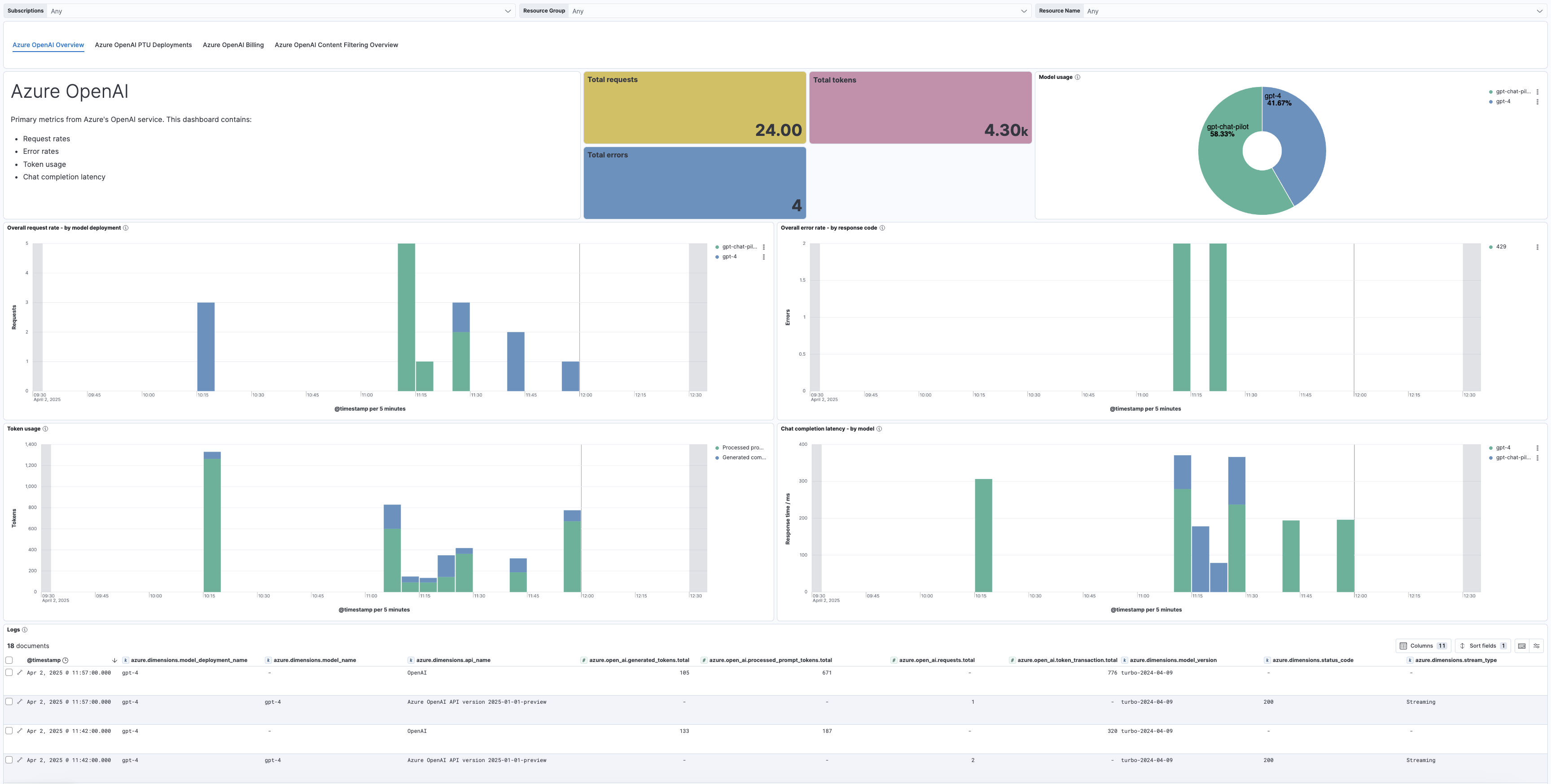
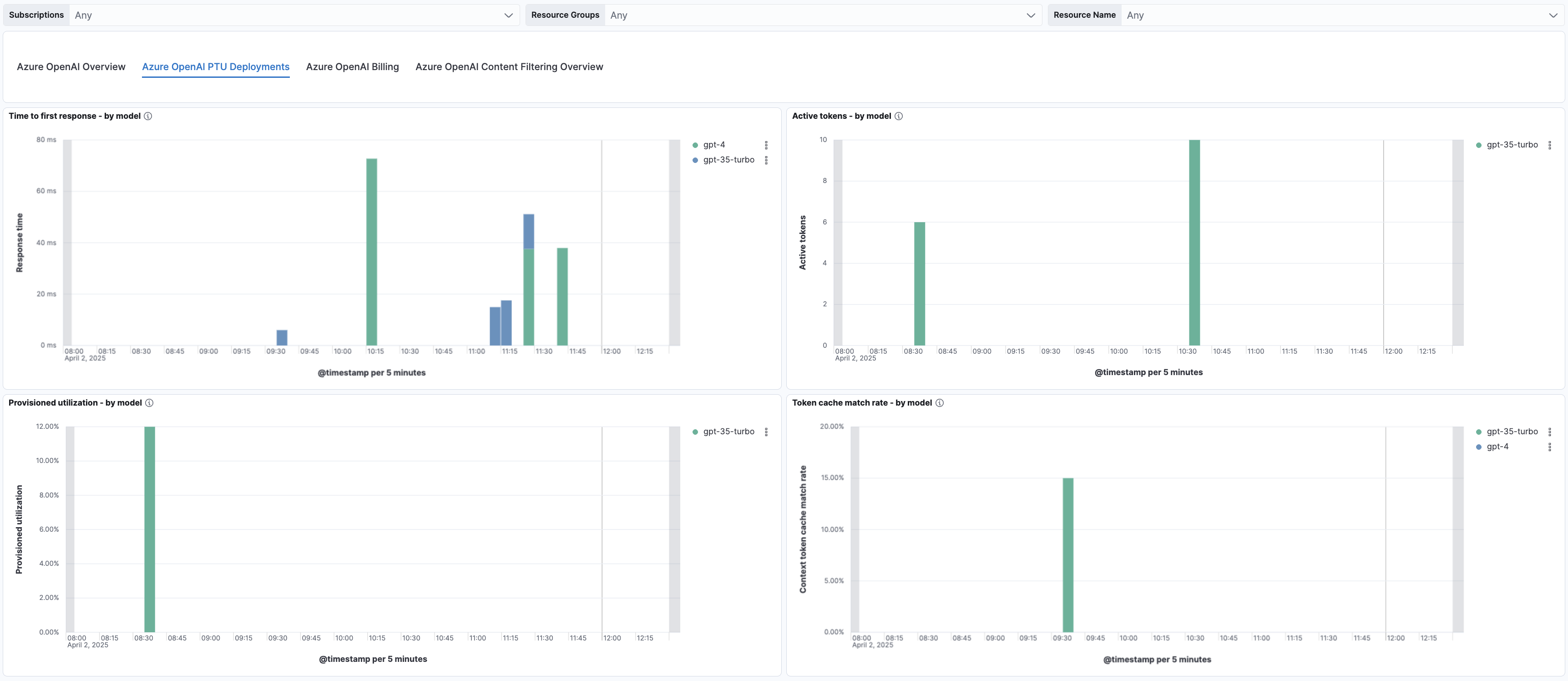
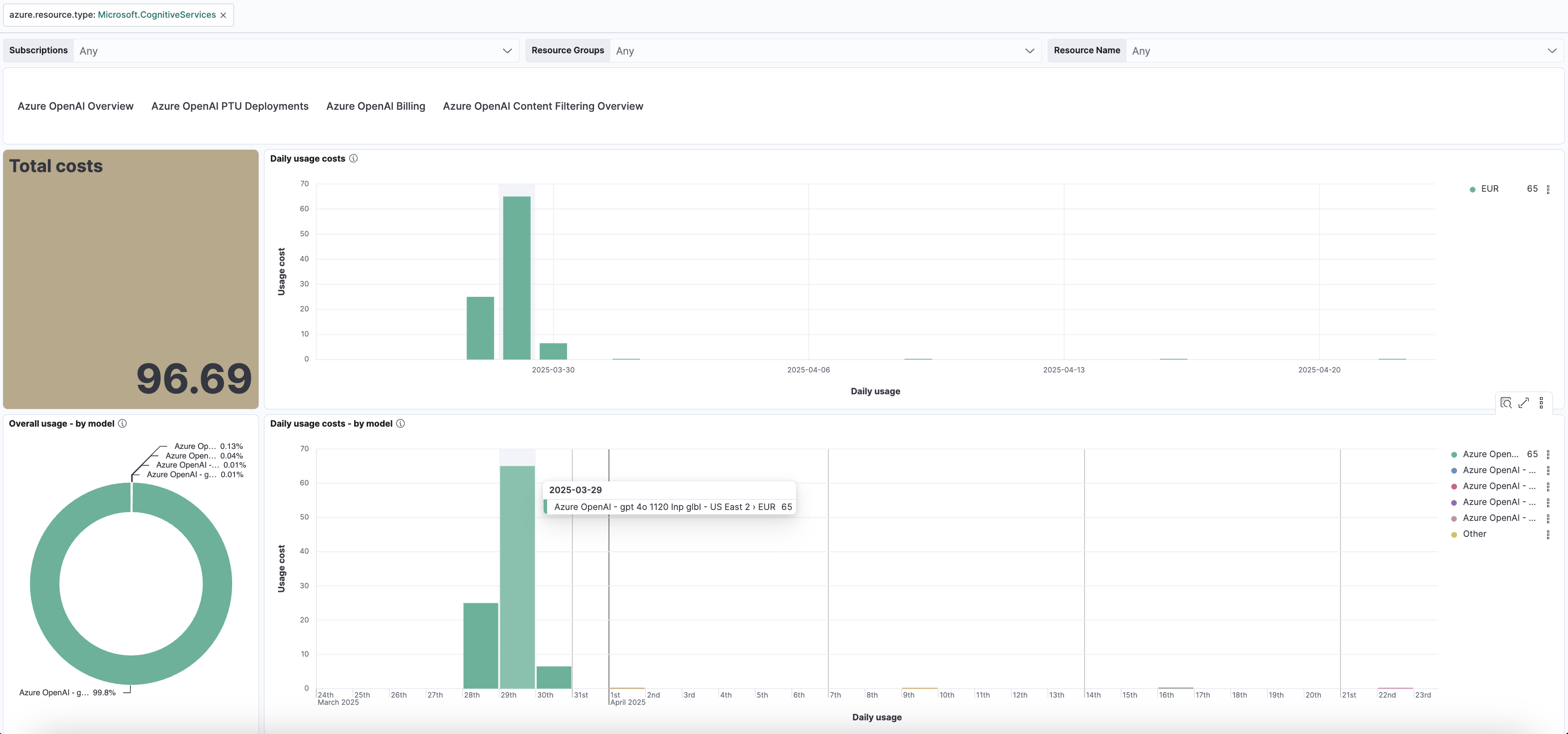
This integration includes one or more Kibana dashboards that visualizes the data collected by the integration. The screenshots below illustrate how the ingested data is displayed.


Changelog
| Version | Details | Minimum Kibana version |
|---|---|---|
| 1.16.0 | Enhancement (View pull request) Update Elastic Managed integration documentation to the current wording and docs links. |
9.3.0 9.2.4 8.19.10 |
| 1.15.0 | Enhancement (View pull request) Add AMQP-over-WebSockets transport, proxy support, and Event Hub processor v2 configuration options. |
9.3.0 9.2.4 8.19.10 |
| 1.14.0 | Enhancement (View pull request) Publish Agentless to Elastic Managed integrations name change. |
9.3.0 9.2.4 8.19.10 |
| 1.13.0 | Enhancement (View pull request) Use new release field for agentless deployment mode to establish as beta. |
9.3.0 9.2.4 8.19.10 |
| 1.12.0 | Enhancement (View pull request) Add support for agentless deployment. |
9.3.0 9.2.4 8.19.10 |
| 1.11.0 | Enhancement (View pull request) Add client secret authentication support for Azure Event Hub with RBAC. |
9.3.0 9.2.4 8.19.10 |
| 1.10.1 | Enhancement (View pull request) Update README with Alerting Rule Templates. |
9.2.1 8.19.0 |
| 1.10.0 | Enhancement (View pull request) Add Alerting Rule Templates. |
9.2.1 8.19.0 |
| 1.9.0 | Enhancement (View pull request) Add a flag fips_compatible to control whether the package is allowed in the ECH FedRAMP High environment. |
9.0.0 8.17.1 |
| 1.8.0 | Enhancement (View pull request) Add support for dynamic loading of content filter categories. |
9.0.0 8.17.1 |
| 1.7.2 | Enhancement (View pull request) Add overall usage metrics & improve daily usage costs visualization to the billing dashboard. |
9.0.0 8.17.1 |
| 1.7.1 | Enhancement (View pull request) Update dashboard image with content filtering link. |
9.0.0 8.17.1 |
| 1.7.0 | Enhancement (View pull request) Add support for Content Filtering. |
9.0.0 8.17.1 |
| 1.6.0 | Enhancement (View pull request) Enhance Azure OpenAI dashboard. |
9.0.0 8.17.1 |
| 1.5.0 | Enhancement (View pull request) Add support for Kibana 9.0.0. |
9.0.0 8.13.0 |
| 1.4.2 | Enhancement (View pull request) Edit Azure Open AI integration page |
8.13.0 |
| 1.4.1 | Enhancement (View pull request) Add observability category |
8.13.0 |
| 1.4.0 | Enhancement (View pull request) Allow @custom pipeline access to event.original without setting preserve_original_event. |
8.13.0 |
| 1.3.0 | Enhancement (View pull request) Add processor support for metrics data stream. |
8.13.0 |
| 1.2.1 | Bug fix (View pull request) Map source.as.* fields to ECS schema. |
8.13.0 |
| 1.2.0 | Enhancement (View pull request) Add API Management Gateway logs. |
8.13.0 |
| 1.1.2 | Enhancement (View pull request) Add PTU deployment metrics dashboard. |
8.13.0 |
| 1.1.1 | Enhancement (View pull request) Add Azure Billing lens to overview dashboard. |
8.13.0 |
| 1.1.0 | Enhancement (View pull request) ECS version updated to 8.11.0. |
8.13.0 |
| 1.0.0 | Enhancement (View pull request) Make Azure OpenAI GA. |
8.13.0 |
| 0.7.3 | Bug fix (View pull request) Revert metric types to gauges. |
8.13.0 |
| 0.7.2 | Bug fix (View pull request) Disable TSDB on OpenAI metrics. |
8.13.0 |
| 0.7.1 | Enhancement (View pull request) Enable sanitization by default. |
8.13.0 |
| 0.7.0 | Enhancement (View pull request) Add PTU metrics. |
8.13.0 |
| 0.6.3 | Bug fix (View pull request) Update documentation to fix navigations. |
8.13.0 |
| 0.6.2 | Enhancement (View pull request) Add overall request latency to the overview dashboard. |
8.13.0 |
| 0.6.1 | Enhancement (View pull request) Update overview dashboard. |
8.13.0 |
| 0.6.0 | Enhancement (View pull request) Add saved search to logs dashboard. |
8.13.0 |
| 0.5.1 | Enhancement (View pull request) Update overview dashboard and navigation panel. |
8.13.0 |
| 0.5.0 | Enhancement (View pull request) Add Overview Dashboard. |
8.13.0 |
| 0.4.1 | Bug fix (View pull request) Remove requests.total filter from metrics dashboard. |
8.13.0 |
| 0.4.0 | Enhancement (View pull request) Update documentation and add resource_manager_endpoint. |
8.13.0 |
| 0.3.0 | Enhancement (View pull request) Enhance Metrics Dashboard. |
8.13.0 |
| 0.2.0 | Enhancement (View pull request) Enhance Logs Dashboard. |
8.13.0 |
| 0.1.0 | Enhancement (View pull request) Add response log samples with model deployment properties. |
8.13.0 |
| 0.0.2 | Bug fix (View pull request) Update fields metric type to counter. |
8.13.0 |
| 0.0.1 | Enhancement (View pull request) Initial release of Azure OpenAI Integration. |
8.13.0 |