Beelzebub Integration
Elastic Cloud Serverless projects are autoscaled environments, fully managed by Elastic and available on Elastic Cloud. Availability This functionality is in technical preview and is ready for evaluation. Use with caution in production; it is not recommended for mission-critical workloads. Elastic will work to fix any issues, but features in technical preview are not subject to the support SLA of official GA features. Specific Support terms apply. Elastic Cloud Serverless projects are autoscaled environments, fully managed by Elastic and available on Elastic Cloud. Availability This functionality is in technical preview and is ready for evaluation. Use with caution in production; it is not recommended for mission-critical workloads. Elastic will work to fix any issues, but features in technical preview are not subject to the support SLA of official GA features. Specific Support terms apply. The Elastic Stack includes Elastic's core products such as Elasticsearch, Kibana, Logstash, and Beats. Availability This functionality is in technical preview and is ready for evaluation. Use with caution in production; it is not recommended for mission-critical workloads. Elastic will work to fix any issues, but features in technical preview are not subject to the support SLA of official GA features. Specific Support terms apply. Unless stated otherwise on the page, this functionality is available when your Elastic Stack is deployed on Elastic Cloud Hosted, Elastic Cloud Enterprise, Elastic Cloud on Kubernetes, and self-managed environments. This documentation corresponds to the latest patch available for each minor version. If you're not using the latest patch, check the release notes for changes.
Serverless Observability
Preview
Preview
Serverless Security
Preview
Preview
Stack
Preview
9.0+
Preview since 9.0
| Version | 0.5.0 Availability Preview This functionality is in technical preview and is ready for evaluation. Use with caution in production; it is not recommended for mission-critical workloads. Elastic will work to fix any issues, but features in technical preview are not subject to the support SLA of official GA features. Specific Support terms apply. (View all) |
| Subscription level What's this? |
Basic |
| Developed by What's this? |
Community |
| Ingestion method(s) | File, Webhook |
| Minimum Kibana version(s) | 9.0.0 8.17.1 |
To use pre-release integrations, go to the Integrations page in Kibana, scroll down, and toggle on the Display beta integrations option.
Beelzebub is an advanced honeypot framework designed to provide a highly secure environment for detecting and analysing cyber attacks. It offers a low code approach for easy implementation and uses AI LLM's to mimic the behaviour of a high-interaction honeypot.
Beelzebub is available on GitHub via https://github.com/mariocandela/beelzebub or via https://beelzebub-honeypot.com
This integration provides multiple ingest source options including log files and via HTTP POST.
This allows you to search, observe and visualize the Beelzebub logs through Elasticsearch and Kibana.
This integration was last tested with Beelzebub v3.3.6.
Please note that Beelzebub only produces NDJSON log files at this time, to ship logs to this integration via any other method you will require another component, such as Logstash, which can perform this by reading the Beelzebub produced log files and transporting the content as it changes to an appropriately configured Elastic Agent input, an ingest location that can be utilised by an appropriately configured Elastic Agent, or directly into Elasticsearch.
For more information, refer to:
The package collects log events from file or by receiving HTTP POST requests.
- In Kibana go to Management > Integrations
- Ensure "Display beta integrations" is enabled beneath the category list to the left
- In "Search for integrations" search bar type Beelzebub
- Click on "Beelzebub" integration from the search results.
- Click on Add Beelzebub button to add the Beelzebub integration.
- Configure the integration as appropriate
- Choose your ingest method, e.g. file or HTTP. If using HTTP you can enable HTTPS transport by providing an SSL certificate and private key.
- Choose to store the original event content in
event.original, or not. - Choose to redact passwords, or not.
- Configure advanced options if desired.
Example beelzebub.yaml configuration.
core:
  logging:
    debug: false
    debugReportCaller: false
    logDisableTimestamp: false
    logsPath: ./logs/beelzebub.log
  tracings:
    rabbit-mq:
      enabled: false
      uri: ""
  prometheus:
    path: "/metrics"
    port: ":2112"
  beelzebub-cloud:
    enabled: false
    uri: ""
    auth-token: ""
The Beelzebub logs dataset provides logs from Beelzebub instances.
All Beelzebub logs are available in the beelzebub.logs field group.
Exported fields
| Field | Description | Type |
|---|---|---|
| @timestamp | Event timestamp. | date |
| beelzebub.banner | keyword | |
| beelzebub.commands | unsigned_long | |
| beelzebub.event.Body | HTTP request body | text |
| beelzebub.event.Client | Client identifier, e.g. SSH client ID and version | keyword |
| beelzebub.event.Command | Command issued by client | keyword |
| beelzebub.event.CommandOutput | Command response returned to client | text |
| beelzebub.event.Cookies | Cookies sent by the client | text |
| beelzebub.event.DateTime | Date log message created | date |
| beelzebub.event.Description | Description of event | keyword |
| beelzebub.event.Environ | Environment variables | keyword |
| beelzebub.event.HTTPMethod | HTTP request method | keyword |
| beelzebub.event.Headers.* | HTTP request headers | keyword |
| beelzebub.event.HeadersMap.* | HTTP request headers | keyword |
| beelzebub.event.HeadersText | HTTP request headers as a string | keyword |
| beelzebub.event.HostHTTPRequest | HTTP host name | keyword |
| beelzebub.event.ID | Unique ID for event | keyword |
| beelzebub.event.Msg | Beelzebub described message | keyword |
| beelzebub.event.Password | Password sent by client | keyword |
| beelzebub.event.Protocol | Protocol used to connect to honeypot | keyword |
| beelzebub.event.RemoteAddr | Remote IP:port pair that the client connection originates from | keyword |
| beelzebub.event.RequestURI | HTTP request URI | keyword |
| beelzebub.event.SourceIp | Remote IP that the client connection originates from | keyword |
| beelzebub.event.SourcePort | Remote port the client connection originates from | keyword |
| beelzebub.event.Status | Beelzebub described status | keyword |
| beelzebub.event.User | Username sent by client | keyword |
| beelzebub.event.UserAgent | HTTP User-Agent header sent by the client | keyword |
| beelzebub.level | keyword | |
| beelzebub.msg | keyword | |
| beelzebub.port | keyword | |
| beelzebub.status | keyword | |
| beelzebub.time | The time the log event occurred | date |
| cloud.image.id | Image ID for the cloud instance. | keyword |
| data_stream.dataset | Data stream dataset. | constant_keyword |
| data_stream.namespace | Data stream namespace. | constant_keyword |
| data_stream.type | Data stream type. | constant_keyword |
| host.containerized | If the host is a container. | boolean |
| host.os.build | OS build information. | keyword |
| host.os.codename | OS codename, if any. | keyword |
| input.type | Input type | keyword |
| log.file.device_id | ID of the device containing the filesystem where the file resides. | keyword |
| log.file.fingerprint | The sha256 fingerprint identity of the file when fingerprinting is enabled. | keyword |
| log.file.inode | Inode number of the log file. | keyword |
| log.offset | Log offset | long |
| log.source.address | Source for network originated events | keyword |
| user_agent.device.type | keyword |
Example
{
    "@timestamp": "2025-02-13T01:08:26.000Z",
    "agent": {
        "ephemeral_id": "e447d8df-5e9d-4975-96dc-6da3eee714b8",
        "id": "1379f18f-0f34-4dff-813f-11c94cce1ce2",
        "name": "elastic-agent-59859",
        "type": "filebeat",
        "version": "8.17.1"
    },
    "beelzebub": {
        "event": {
            "Client": "SSH-2.0-dropbear",
            "DateTime": "2025-02-13T01:08:26Z",
            "Description": "SSH interactive ChatGPT",
            "ID": "1974e109-d6f8-4bb1-934c-180a163e1cb8",
            "Msg": "New SSH attempt",
            "Password": "<REDACTED>",
            "Protocol": "SSH",
            "RemoteAddr": "1.128.0.133:60748",
            "SourceIp": "1.128.0.133",
            "SourcePort": "60748",
            "Status": "Stateless",
            "User": "root"
        },
        "level": "info",
        "msg": "New Event",
        "status": "Stateless",
        "time": "2025-02-13T01:08:26Z"
    },
    "data_stream": {
        "dataset": "beelzebub.logs",
        "namespace": "91668",
        "type": "logs"
    },
    "ecs": {
        "version": "8.17.0"
    },
    "elastic_agent": {
        "id": "1379f18f-0f34-4dff-813f-11c94cce1ce2",
        "snapshot": false,
        "version": "8.17.1"
    },
    "event": {
        "agent_id_status": "verified",
        "category": [
            "network"
        ],
        "dataset": "beelzebub.logs",
        "id": "1974e109-d6f8-4bb1-934c-180a163e1cb8",
        "ingested": "2025-02-27T01:20:55Z",
        "kind": "event",
        "original": "{\"event\":{\"Body\":\"\",\"Client\":\"SSH-2.0-dropbear\",\"Command\":\"\",\"CommandOutput\":\"\",\"Cookies\":\"\",\"DateTime\":\"2025-02-13T01:08:26Z\",\"Description\":\"SSH interactive ChatGPT\",\"Environ\":\"\",\"HTTPMethod\":\"\",\"Headers\":\"\",\"HostHTTPRequest\":\"\",\"ID\":\"1974e109-d6f8-4bb1-934c-180a163e1cb8\",\"Msg\":\"New SSH attempt\",\"Password\": \"<REDACTED>\",\"Protocol\":\"SSH\",\"RemoteAddr\":\"1.128.0.133:60748\",\"RequestURI\":\"\",\"SourceIp\":\"1.128.0.133\",\"SourcePort\":\"60748\",\"Status\":\"Stateless\",\"User\":\"root\",\"UserAgent\":\"\"},\"level\":\"info\",\"msg\":\"New Event\",\"status\":\"Stateless\",\"time\":\"2025-02-13T01:08:26Z\"}",
        "reason": "New Event",
        "type": [
            "info"
        ]
    },
    "input": {
        "type": "http_endpoint"
    },
    "source": {
        "as": {
            "number": 1221,
            "organization": {
                "name": "Telstra Pty Ltd"
            }
        },
        "ip": "1.128.0.133",
        "port": 60748
    },
    "tags": [
        "preserve_original_event",
        "redact_passwords",
        "preserve_duplicate_custom_fields",
        "forwarded"
    ],
    "user": {
        "name": "root"
    }
}
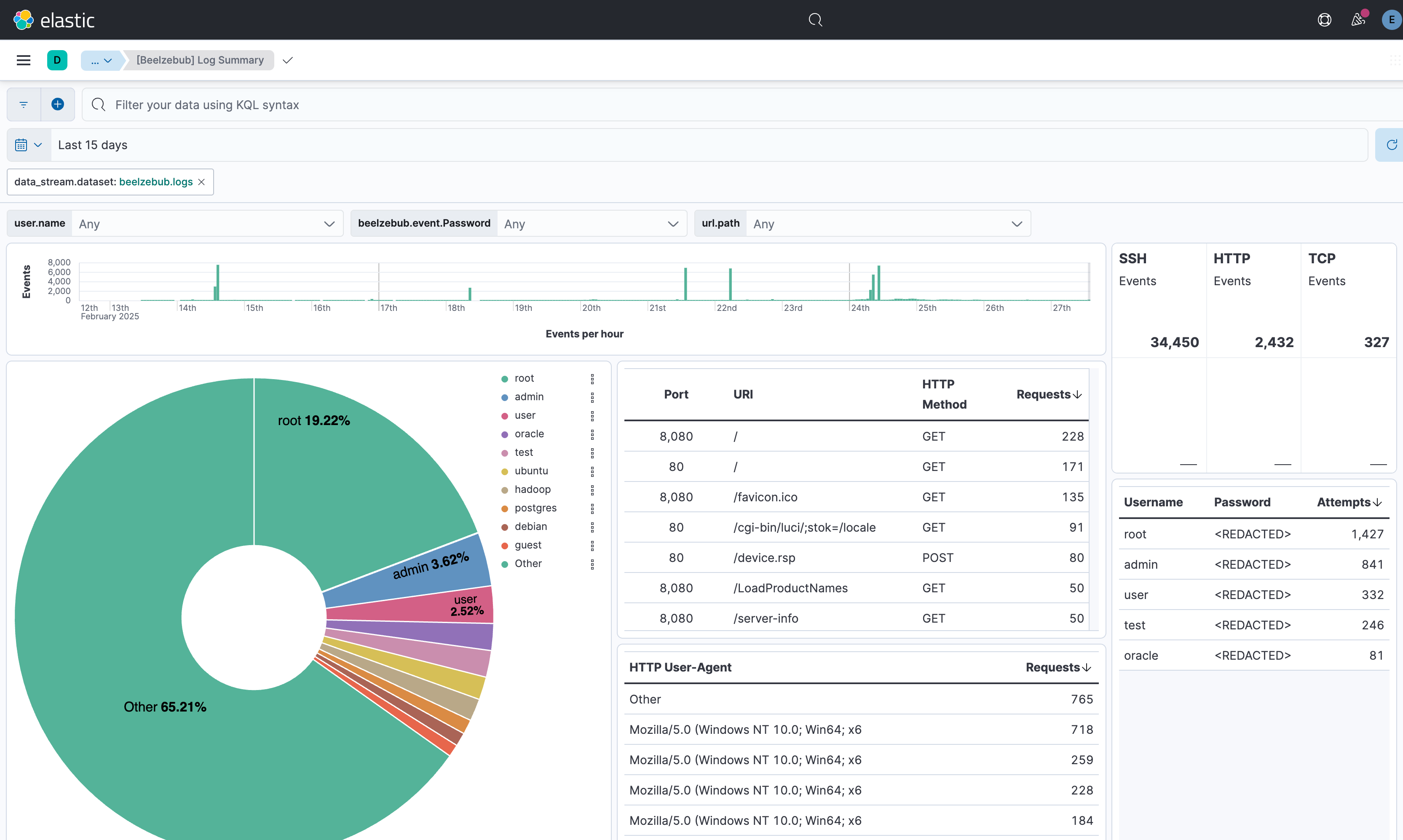
This integration includes one or more Kibana dashboards that visualizes the data collected by the integration. The screenshots below illustrate how the ingested data is displayed.
Changelog
| Version | Details | Minimum Kibana version |
|---|---|---|
| 0.5.0 | Enhancement (View pull request) Add tags to ingest pipeline processors. |
9.0.0 8.17.1 |
| 0.4.0 | Enhancement (View pull request) Support additional event fields, improve HTTP header handling. |
9.0.0 8.17.1 |
| 0.3.0 | Enhancement (View pull request) Update Kibana constraint to support 9.0.0. |
9.0.0 8.17.1 |
| 0.2.0 | Enhancement (View pull request) Make password redaction available for basic subscription. |
8.17.1 |
| 0.1.0 | Enhancement (View pull request) Initial release of the package post review. |
8.17.1 |
| 0.0.4 | Enhancement (View pull request) Initial draft of the package. |
— |