Symantec Endpoint Protection Integration
Elastic Cloud Serverless projects are autoscaled environments, fully managed by Elastic and available on Elastic Cloud. Availability This functionality is generally available and ready for production usage. Elastic Cloud Serverless projects are autoscaled environments, fully managed by Elastic and available on Elastic Cloud. Availability This functionality is generally available and ready for production usage. The Elastic Stack includes Elastic's core products such as Elasticsearch, Kibana, Logstash, and Beats. Availability This functionality is generally available and ready for production usage. Unless stated otherwise on the page, this functionality is available when your Elastic Stack is deployed on Elastic Cloud Hosted, Elastic Cloud Enterprise, Elastic Cloud on Kubernetes, and self-managed environments. This documentation corresponds to the latest patch available for each minor version. If you're not using the latest patch, check the release notes for changes.
Serverless Observability
Generally available
Serverless Security
Generally available
Stack
9.0+
Generally available since 9.0
| Version | 2.20.0 (View all) |
| Subscription level What's this? |
Basic |
| Developed by What's this? |
Elastic |
| Ingestion method(s) | File, Network Protocol |
| Minimum Kibana version(s) | 9.0.0 8.13.0 |
This integration is for Symantec Endpoint Protection (SEP) logs. It can be used to receive logs sent by SEP over syslog or read logs exported to a text file.
The log message is expected to be in CSV format. Syslog RFC3164 and RCF5424
headers are allowed and will be parsed if present. The data is mapped to
ECS fields where applicable and the remaining fields are written under
symantec_endpoint.log.*.
If a specific SEP log type is detected then event.provider is set (e.g.
Agent Traffic Log).
- Enable this integration with the UDP input.
- If the Symantec management server and Elastic Agent are running on different hosts then configure the integration to listen on 0.0.0.0 so that it will accept UDP packets on all interfaces. This makes the listening port reachable by the Symantec server.
- Configure the Symantec management server to send syslog to the Elastic Agent that is running this integration. See Exporting data to a Syslog server in the SEP guide. Use the IP address or hostname of the Elastic Agent as the syslog server address. And use the listen port as the destination port (default is 9008).
- Configure the Symantec management server to export log data to a text file. See Exporting log data to a text file.
- Enable this integration with the log file input. Configure the input to
read from the location where the log files are being written. The default is
C:\Program Files (x86)\Symantec\Symantec Endpoint Protection Manager\data\dump\*.log.
Logs exported to text file always begin with the event time and severity
columns (e.g. 2020-01-16 08:00:31,Critical,...).
Below are samples of some different SEP log types. These examples have had their
syslog header removed, but when sent over syslog these lines typically
begin with an RFC3164 header like
<51>Oct 3 10:38:14 symantec.endpointprotection.test SymantecServer:
See vendor documentation: External Logging settings and log event severity levels for Endpoint Protection Manager
Site: SEPSite,Server: SEPServer,Domain: _domainOrigin,Admin: _originUser,Administrator log on succeeded
See vendor documentation: External Logging settings and log event severity levels for Endpoint Protection Manager
Site: SEPSite,Server Name: exampleserver,Domain Name: Default,The management server received the client log successfully,TESTHOST01,sampleuser01,sample.example.com
See vendor documentation: External Logging settings and log event severity levels for Endpoint Protection Manager
exampleserver,216.160.83.57,Blocked,[AC7-2.1] Block scripts - Caller MD5=d73b04b0e696b0945283defa3eee4538,File Write,Begin: 2019-09-06 15:18:56,End: 2019-09-06 15:18:56,Rule: Rule Name,9552,C:/ProgramData/bomgar-scc-0x5d4162a4/bomgar-scc.exe,0,No Module Name,C:/ProgramData/bomgar-scc-0x5d4162a4/start-cb-hook.bat,User: _originUser,Domain: _domainOrigin,Action Type: ,File size (bytes): 1403,Device ID: SCSI\Disk&Ven_WDC&Prod_WD10SPCX-75KHST0\4&1d8ead7a&0&000200
See vendor documentation: External Logging settings and log event severity levels for Endpoint Protection Manager
exampleserver,Local Host: 81.2.69.143,Local Port: 138,Remote Host IP: 81.2.69.144.,Remote Host Name: ,Remote Port: 138,Outbound,Application: C:/windows/system32/NTOSKRNL.EXE,Action: Blocked
See vendor documentation:External Logging settings and log event severity levels for Endpoint Protection Manager
Potential risk found,Computer name: exampleComputer,Detection type: Heuristic,First Seen: Symantec has known about this file approximately 2 days.,Application name: Propsim,Application type: 127,"Application version: ""3",0,6,"0""",Hash type: SHA-256,Application hash: SHA#1234567890,Company name: Dummy Technologies,File size (bytes): 343040,Sensitivity: 2,Detection score: 3,COH Engine Version: 8.1.1.1,Detection Submissions No,Permitted application reason: MDS,Disposition: Bad,Download site: ,Web domain: ,Downloaded by: c:/programdata/oracle/java/javapath_target_2151967445/Host126,Prevalence: Unknown,Confidence: There is not enough information about this file to recommend it.,URL Tracking Status: Off,Risk Level: High,Detection Source: N/A,Source: Heuristic Scan,Risk name: ,Occurrences: 1,f:\user\workspace\baseline package creator\release\Host214,'',Actual action: Left alone,Requested action: Left alone,Secondary action: Left alone,Event time: 2018-02-16 08:01:33,Inserted: 2018-02-16 08:02:52,End: 2018-02-16 08:01:33,Domain: Default,Group: My Company\SEPM Group Name,Server: SEPMServer,User: exampleUser,Source computer: ,Source IP:
See vendor documentation: External Logging settings and log event severity levels for Endpoint Protection Manager
Security risk found,IP Address: 1.128.3.4,Computer name: exampleComputer,Source: Auto-Protect scan,Risk name: WS.Reputation.1,Occurrences: 1,e:\removablemediaaccessutility.exe,,Actual action: All actions failed,Requested action: Process terminate pending restart,Secondary action: Left alone,Event time: 2019-09-03 08:12:25,Inserted: 2019-09-03 08:14:03,End: 2019-09-03 08:12:25,Last update time: 2019-09-03 08:14:03,Domain: SEPMServerDoman,Group: My Company\GroupName,Server: SEPMServerName,User: exampleUser,Source computer: ,Source IP: ,Disposition: Bad,Download site: ,Web domain: ,Downloaded by: e:/removablemediaaccessutility.exe,Prevalence: This file has been seen by fewer than 5 Symantec users.,Confidence: There is some evidence that this file is untrustworthy.,URL Tracking Status: On,First Seen: Symantec has known about this file approximately 2 days.,Sensitivity: ,Permitted application reason: Not on the permitted application list,Application hash: SHA#1234567890,Hash type: SHA2,Company name: Company Name,Application name: Client for Symantec Endpoint Encryption,Application version: 11.1.2 (Build 1248),Application type: 127,File size (bytes): 4193981,Category set: Malware,Category type: Insight Network Threat,Location: GD-OTS Unmanaged Client - Online,Intensive Protection Level: 0,Certificate issuer: Symantec Corporation,Certificate signer: VeriSign Class 3 Code Signing 2010 CA,Certificate thumbprint: AB6EF1497C6E1C8CCC12F06E945A4954FB41AD45,Signing timestamp: 1482491555,Certificate serial number: AB2D17E62E571F288ACB5666FD3C5230
See vendor documentation: External Logging settings and log event severity levels for Endpoint Protection Manager
Scan ID: 123456789,Begin: 2020-01-31 11:35:28,End: 2020-01-31 11:45:28,Started,Duration (seconds): 600,User1: exampleUser,User2: SYSTEM,Scan started on selected drives and folders and all extensions.,Scan Complete: Risks: 0 Scanned: 916 Files/Folders/Drives Omitted: 0 Trusted Files Skipped: 0,Command: Not a command scan (),Threats: 0,Infected: 0,Total files: 916,Omitted: 0,Computer: _destinationHostname,IP Address: 1.128.3.4,Domain: exampleDomain,Group: Company\US\UserWS\Main Office,Server: SEPServer
See vendor documentation: External Logging settings and log event severity levels for Endpoint Protection Manager
server03,Event Description: ARP Cache Poison,Local Host IP: 0.0.0.0,Local Host MAC: 2DFF88AABBDC,Remote Host Name: ,Remote Host IP: 0.0.0.0,Remote Host MAC: AABBCCDDEEFF,Inbound,Unknown,Intrusion ID: 0,Begin: 2020-11-23 13:56:35,End Time: 2020-11-23 13:56:35,Occurrences: 1,Application: ,Location: Remote,User Name: bobby,Domain Name: local,Local Port: 0,Remote Port: 0,CIDS Signature ID: 99990,CIDS Signature string: ARP Cache Poison,CIDS Signature SubID: 0,Intrusion URL: ,Intrusion Payload URL: ,SHA-256: ,MD-5:
See vendor documentation: External Logging settings and log event severity levels for Endpoint Protection Manager
exampleHostname,Category: 0,CVE,New content update failed to download from the management server. Remote file path: https://server:443/content/{02335EF8-ADE1-4DD8-9F0F-2A9662352E65}/190815061/xdelta190815061_To_190816061.dax,Event time: 2019-08-19 07:14:38
See vendor documentation: External Logging settings and log event severity levels for Endpoint Protection Manager
host-plaintext,Local Host IP: 216.160.83.61,Local Port: 80,Local Host MAC: CCF9E4A91226,Remote Host IP: 216.160.83.61,Remote Host Name: ,Remote Port: 33424,Remote Host MAC: 2C3AFDA79E71,TCP,Inbound,Begin: 2020-11-11 19:25:21,End Time: 2020-11-11 19:25:28,Occurrences: 4,Application: C:/WINDOWS/system32/NTOSKRNL.EXE,Rule: Block Unapproved Incoming Ports,Location: Default,User Name: sampleuser4,Domain Name: SMPL,Action: Blocked,SHA-256: 5379732000000000000000000000000000000000000000000000000000000000,MD-5: 53797320000000000000000000000000
See vendor documentation: External Logging settings and log event severity levels for Endpoint Protection Manager
Site: SEPSite,Server: exampleHostname,Domain: exampleDomain,Admin: exampleAdmin,Event Description: Policy has been edited: Edited shared Intrusion Prevention policy: SEPPolicyName,SEPPolicyName
See vendor documentation: External Logging settings and log event severity levels for Endpoint Protection Manager
Site: SEPSite,Server: exampleHostname,Symantec Endpoint Protection Manager could not update Intrusion Prevention Signatures 14.0.
Exported fields
| Field | Description | Type |
|---|---|---|
| @timestamp | Event timestamp. | date |
| cloud.image.id | Image ID for the cloud instance. | keyword |
| data_stream.dataset | Data stream dataset. | constant_keyword |
| data_stream.namespace | Data stream namespace. | constant_keyword |
| data_stream.type | Data stream type. | constant_keyword |
| event.dataset | Name of the dataset. | constant_keyword |
| event.duration | Duration of the event in nanoseconds. If event.start and event.end are known this value should be the difference between the end and start time. |
long |
| event.module | Name of the module this data is coming from. | constant_keyword |
| host.containerized | If the host is a container. | boolean |
| host.os.build | OS build information. | keyword |
| host.os.codename | OS codename, if any. | keyword |
| input.type | Input type. | keyword |
| log.offset | Offset of the entry in the log file. | long |
| log.source.address | Source address from which the log event was read / sent from. | keyword |
| log.syslog.process.name | Deprecated. Use the ECS log.syslog.appname field. | alias |
| log.syslog.process.pid | Deprecated. Use the ECS log.syslog.procid field. | long |
| observer.product | The product name of the observer. | constant_keyword |
| observer.type | The type of the observer the data is coming from. | constant_keyword |
| observer.vendor | Vendor name of the observer. | constant_keyword |
| symantec_endpoint.log.action | The action taken on the traffic, e.g. "Blocked". | keyword |
| symantec_endpoint.log.actual_action | Actual action from risk logs and proactive detection (SONAR) logs. | keyword |
| symantec_endpoint.log.admin | Name of the SEPM admin. | keyword |
| symantec_endpoint.log.api_name | API name that was blocked (agent behavior log). | keyword |
| symantec_endpoint.log.application | The full path name of the application involved. | keyword |
| symantec_endpoint.log.application_hash | The hash for this application. | keyword |
| symantec_endpoint.log.application_name | The application name. | keyword |
| symantec_endpoint.log.application_type | Application type (Trojan, key logger etc). | keyword |
| symantec_endpoint.log.application_version | The application version. | keyword |
| symantec_endpoint.log.begin | Start time of the event (also see event.start). | keyword |
| symantec_endpoint.log.caller_process_id | The ID of the process that triggers the logging. | keyword |
| symantec_endpoint.log.caller_process_name | The full path name of the application involved. It may be empty if the application is unknown, or if OS itself is involved, or if no application is involved. Also, it may be empty if profile says, "don't log application name in raw traffic log". | keyword |
| symantec_endpoint.log.caller_return_address | The return address of the caller. This field allows the detection of the calling module that makes the API call. This is historically not used. You can expect Return Address to always be 0. | keyword |
| symantec_endpoint.log.caller_return_module_name | The module name of the caller. See CallerReturnAddress for more information. Return Module name is historically unused. You can expect Return Module name to always be "No Module Name" except where you see Sysplant when sysplant has started. | keyword |
| symantec_endpoint.log.category | Agent system log category (generally not populated by SEPM). | keyword |
| symantec_endpoint.log.category_set | Agent risk log category. | keyword |
| symantec_endpoint.log.category_type | Agent risk log category type. | keyword |
| symantec_endpoint.log.certificate_issuer | The certificate's issuer. | keyword |
| symantec_endpoint.log.certificate_serial_number | The certificate's serial number. | keyword |
| symantec_endpoint.log.certificate_signer | The certificate's signer. | keyword |
| symantec_endpoint.log.certificate_thumbprint | The certificate's thumbprint. | keyword |
| symantec_endpoint.log.cids_signature_id | The signature ID. | keyword |
| symantec_endpoint.log.cids_signature_string | The signature name. | keyword |
| symantec_endpoint.log.cids_signature_subid | The signature sub ID. | keyword |
| symantec_endpoint.log.coh_engine_version | TruScan engine version. | keyword |
| symantec_endpoint.log.command | Command sent from the SEPM. | keyword |
| symantec_endpoint.log.company_name | The company name from the application (used in agent risk logs). | keyword |
| symantec_endpoint.log.computer_name | Name of the host machine (used in agent risk/scan logs). | keyword |
| symantec_endpoint.log.confidence | The Confidence level that produced the conviction. Examples: High, low, bad, trustworthy etc. "Confidence: There is strong evidence that this file is untrustworthy." | keyword |
| symantec_endpoint.log.description | Description of the virus file. | keyword |
| symantec_endpoint.log.detection_score | Score of detection. | keyword |
| symantec_endpoint.log.detection_source | Source of the detection. | keyword |
| symantec_endpoint.log.detection_type | Type of detection (e.g. heuristic). | keyword |
| symantec_endpoint.log.device_id | The GUID of an external device (floppy disk, DVD, USB device, etc.). | keyword |
| symantec_endpoint.log.disposition | Good / Bad / Unknown / Not available. | keyword |
| symantec_endpoint.log.domain_name | SEPM domain name. | keyword |
| symantec_endpoint.log.download_site | The URL determined from where the image was downloaded. | keyword |
| symantec_endpoint.log.downloaded_by | The creator process of the dropper threat. | keyword |
| symantec_endpoint.log.duration_seconds | The length of the scan, in seconds. | keyword |
| symantec_endpoint.log.end | Start time of the event (also see event.end). | keyword |
| symantec_endpoint.log.event_description | Description of the event. Usually, the first line of the description is treated as the summary. | keyword |
| symantec_endpoint.log.event_source | The data source. NETPORT, NATSRV, Network Intrusion Protection System, LiveUpdate Manager etc. | keyword |
| symantec_endpoint.log.event_time | Time of event occurrence. | date |
| symantec_endpoint.log.file_path | The file path of the attacked file. | keyword |
| symantec_endpoint.log.file_size_bytes | File size of application. | keyword |
| symantec_endpoint.log.first_seen | The first seen date for the convicted application. | keyword |
| symantec_endpoint.log.group | SEPM client group name. | keyword |
| symantec_endpoint.log.hash_type | Application hash type (MD5, SHA1, SHA256 etc). | keyword |
| symantec_endpoint.log.infected | The number of files that the scan found that were infected. | long |
| symantec_endpoint.log.inserted | The time that the event was inserted into the database. | date |
| symantec_endpoint.log.intensive_protection_level | The High Intensity Detection Level. | keyword |
| symantec_endpoint.log.intrusion_id | Intrusion ID. | keyword |
| symantec_endpoint.log.intrusion_payload_url | The URL that hosted the payload. | keyword |
| symantec_endpoint.log.intrusion_url | The URL from the detection. | keyword |
| symantec_endpoint.log.ip_address | IP Address of the machine. | keyword |
| symantec_endpoint.log.last_update_time | The time on the server when the event is logged into the system or updated in the system (GMT). | date |
| symantec_endpoint.log.local_host | The host name of the client computer. | keyword |
| symantec_endpoint.log.local_host_ip | The IP address of the local computer. | keyword |
| symantec_endpoint.log.local_host_mac | The MAC address of the local computer. | keyword |
| symantec_endpoint.log.local_host_name | The host name of the client computer. | keyword |
| symantec_endpoint.log.local_port | The TCP/UDP port of the local computer. | keyword |
| symantec_endpoint.log.location | The location used when the event occurred. | keyword |
| symantec_endpoint.log.md-5 | The MD5 hash value. | keyword |
| symantec_endpoint.log.network_protocol | Localized string for Others/ TCP/ UDP/ ICMP. | keyword |
| symantec_endpoint.log.occurrences | The number of attacks. Sometime, when a hacker launches a mass attack, it may be reduced to one event by the log system, depending on the damper period. | keyword |
| symantec_endpoint.log.omitted | The number of files that were omitted. | long |
| symantec_endpoint.log.parameters | Parameters is the name of the module, process, registry location or file that was used in the API call. Each parameter was converted to string format and separated by one space character. Double quotation mark characters within the string are escaped with a \ character. As an example, in the SEPM ADC policy you may have a rule with a condition which monitors for Load DLL Attempts with the rule being applied to mscoree.dll. In this case, in the parameters field you'd expect to see C:\Windows\SysWOW64\mscoree.dll. | keyword |
| symantec_endpoint.log.permitted_application_reason | Reason for allow listing (e.g. Symantec permitted application list, Administrator permitted application list). | keyword |
| symantec_endpoint.log.policy_name | Name of the policy. | keyword |
| symantec_endpoint.log.prevalence | Number of users that have seen this. | keyword |
| symantec_endpoint.log.remote_host_ip | The IP address of the remote computer. | keyword |
| symantec_endpoint.log.remote_host_mac | The MAC address of the remote computer. | keyword |
| symantec_endpoint.log.remote_port | The TCP/UDP port of the remote computer. | keyword |
| symantec_endpoint.log.requested_action | Requested action by policy. | keyword |
| symantec_endpoint.log.risk_level | The risk level (high, med, low) for the convicted threat. | keyword |
| symantec_endpoint.log.risk_name | keyword | |
| symantec_endpoint.log.risk_type | Localized strings for Heuristic / Cookie / Admin Black List / BPE / System Change / N/A. | keyword |
| symantec_endpoint.log.rule | The name of the rule that was triggered by the event. If the rule name is not specified in the security rule, then this field is empty. Having the rule name can be useful for troubleshooting. You may recognize a rule by the rule ID, but rule name can help you recognize it more quickly. | keyword |
| symantec_endpoint.log.scan_complete | Scan message when scan ended. | keyword |
| symantec_endpoint.log.scan_id | The scan ID provided by the agent. | keyword |
| symantec_endpoint.log.secondary_action | Secondary action requested by policy | keyword |
| symantec_endpoint.log.sensitivity | Engine sensitivity that produced this detection | long |
| symantec_endpoint.log.server | Name of the server. | keyword |
| symantec_endpoint.log.server_name | Name of the server. | keyword |
| symantec_endpoint.log.sha-256 | The SHA-256 hash value. | keyword |
| symantec_endpoint.log.signing_timestamp | The certificate's signature timestamp. | date |
| symantec_endpoint.log.site | SEPM site name. | keyword |
| symantec_endpoint.log.source | Scan source (e.g. scheduled). | keyword |
| symantec_endpoint.log.source_computer | Computer name where this event occurred. | keyword |
| symantec_endpoint.log.source_ip | IP address of the machine on which the event occurred. | keyword |
| symantec_endpoint.log.submission_recommended | Recommendation on whether to submit this detection to Symantec. | boolean |
| symantec_endpoint.log.threats | The number of threats that the scan found. | long |
| symantec_endpoint.log.total_files | The number of files scanned. | long |
| symantec_endpoint.log.traffic_direction | Unknown / Inbound / Outbound | keyword |
| symantec_endpoint.log.url_tracking_status | Network intrusion prevention status | keyword |
| symantec_endpoint.log.user1 | User when scan started. | keyword |
| symantec_endpoint.log.user2 | User when scan ended. | keyword |
| symantec_endpoint.log.user_name | keyword | |
| symantec_endpoint.log.web_domain | The web domain. | keyword |
Example
{
    "@timestamp": "2018-02-16T08:01:33.000Z",
    "agent": {
        "ephemeral_id": "88645c33-21f7-47a1-a1e6-b4a53f32ec43",
        "id": "94011a8e-8b26-4bce-a627-d54316798b52",
        "name": "docker-fleet-agent",
        "type": "filebeat",
        "version": "8.6.0"
    },
    "data_stream": {
        "dataset": "symantec_endpoint.log",
        "namespace": "ep",
        "type": "logs"
    },
    "ecs": {
        "version": "8.11.0"
    },
    "elastic_agent": {
        "id": "94011a8e-8b26-4bce-a627-d54316798b52",
        "snapshot": true,
        "version": "8.6.0"
    },
    "event": {
        "action": "Left alone",
        "agent_id_status": "verified",
        "count": 1,
        "dataset": "symantec_endpoint.log",
        "end": "2018-02-16T08:01:33.000Z",
        "ingested": "2023-01-13T12:37:44Z",
        "kind": "event",
        "original": "Potential risk found,Computer name: exampleComputer,Detection type: Heuristic,First Seen: Symantec has known about this file approximately 2 days.,Application name: Propsim,Application type: 127,\"Application version: \"\"3\",0,6,\"0\"\"\",Hash type: SHA-256,Application hash: SHA#1234567890,Company name: Dummy Technologies,File size (bytes): 343040,Sensitivity: 2,Detection score: 3,COH Engine Version: 8.1.1.1,Detection Submissions No,Permitted application reason: MDS,Disposition: Bad,Download site: ,Web domain: ,Downloaded by: c:/programdata/oracle/java/javapath_target_2151967445/Host126,Prevalence: Unknown,Confidence: There is not enough information about this file to recommend it.,URL Tracking Status: Off,Risk Level: High,Detection Source: N/A,Source: Heuristic Scan,Risk name: ,Occurrences: 1,f:\\user\\workspace\\baseline package creator\\release\\Host214,'',Actual action: Left alone,Requested action: Left alone,Secondary action: Left alone,Event time: 2018-02-16 08:01:33,Inserted: 2018-02-16 08:02:52,End: 2018-02-16 08:01:33,Domain: Default,Group: My Company\\SEPM Group Name,Server: SEPMServer,User: exampleUser,Source computer: ,Source IP:"
    },
    "file": {
        "pe": {
            "company": "Dummy Technologies",
            "file_version": "\"3",
            "product": "Propsim"
        },
        "size": 343040
    },
    "host": {
        "hostname": "exampleComputer",
        "name": "exampleComputer"
    },
    "input": {
        "type": "udp"
    },
    "log": {
        "source": {
            "address": "172.27.0.4:34299"
        }
    },
    "process": {
        "executable": "c:/programdata/oracle/java/javapath_target_2151967445/Host126"
    },
    "symantec_endpoint": {
        "log": {
            "actual_action": "Left alone",
            "application_hash": "SHA#1234567890",
            "application_name": "Propsim",
            "application_type": "127",
            "application_version": "\"3",
            "coh_engine_version": "8.1.1.1",
            "company_name": "Dummy Technologies",
            "computer_name": "exampleComputer",
            "confidence": "There is not enough information about this file to recommend it.",
            "detection_score": "3",
            "detection_source": "N/A",
            "detection_type": "Heuristic",
            "disposition": "Bad",
            "domain_name": "Default",
            "downloaded_by": "c:/programdata/oracle/java/javapath_target_2151967445/Host126",
            "end": "2018-02-16 08:01:33",
            "event_time": "2018-02-16T08:01:33.000Z",
            "file_size_bytes": "343040",
            "first_seen": "Symantec has known about this file approximately 2 days.",
            "group": "My Company\\SEPM Group Name",
            "hash_type": "SHA-256",
            "inserted": "2018-02-16T08:02:52.000Z",
            "occurrences": "1",
            "permitted_application_reason": "MDS",
            "prevalence": "Unknown",
            "requested_action": "Left alone",
            "risk_level": "High",
            "secondary_action": "Left alone",
            "sensitivity": 2,
            "server": "SEPMServer",
            "source": "Heuristic Scan",
            "url_tracking_status": "Off",
            "user_name": "exampleUser"
        }
    },
    "tags": [
        "preserve_original_event",
        "symantec-endpoint-log",
        "forwarded"
    ],
    "user": {
        "domain": "Default",
        "name": "exampleUser"
    }
}
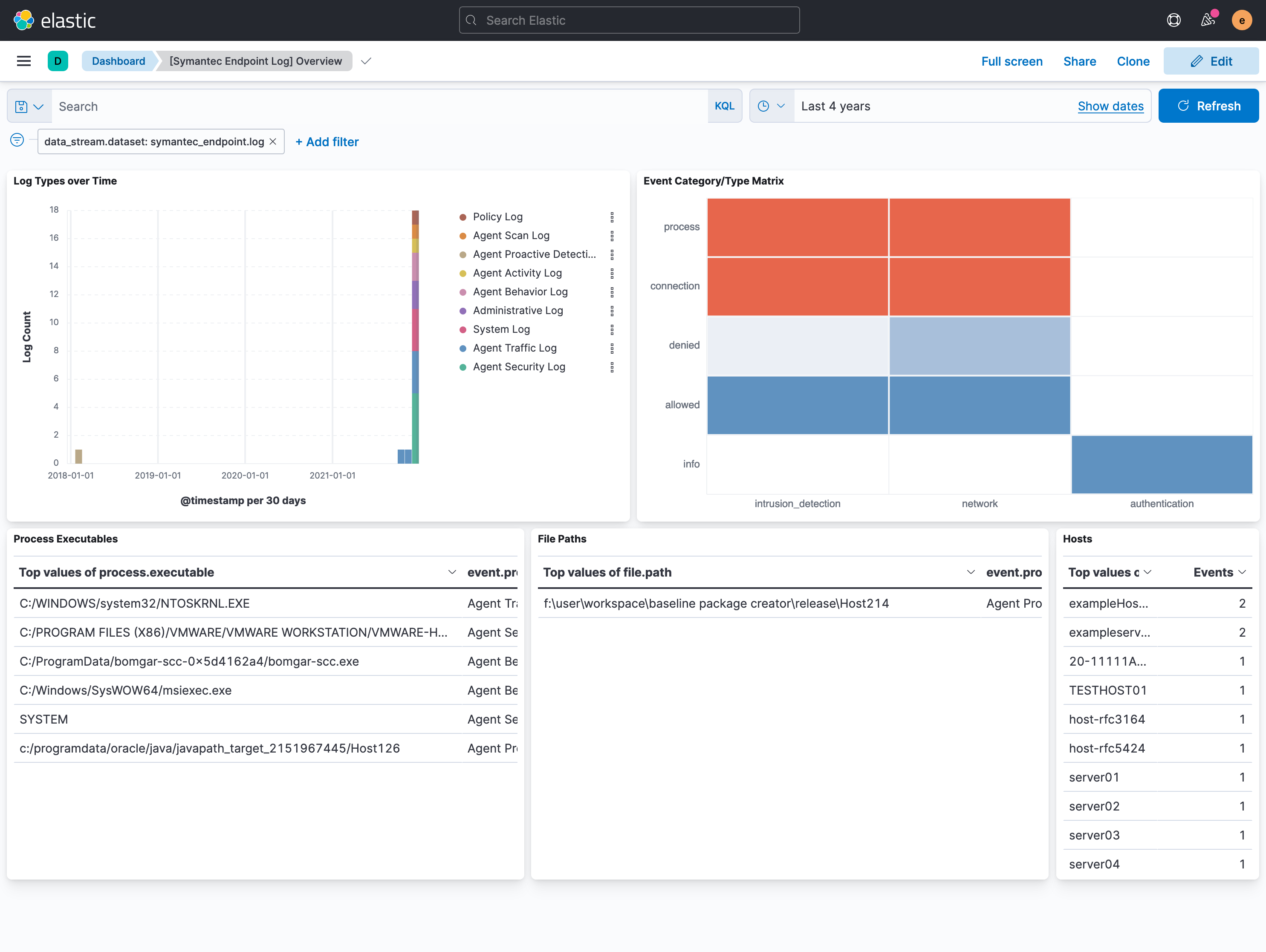
This integration includes one or more Kibana dashboards that visualizes the data collected by the integration. The screenshots below illustrate how the ingested data is displayed.
Changelog
| Version | Details | Minimum Kibana version |
|---|---|---|
| 2.20.0 | Enhancement (View pull request) Add TCP configuration options. |
9.0.0 8.13.0 |
| 2.19.0 | Enhancement (View pull request) Update Kibana constraint to support 9.0.0. |
9.0.0 8.13.0 |
| 2.18.1 | Bug fix (View pull request) Updated SSL description to be uniform and to include links to documentation. |
8.13.0 |
| 2.18.0 | Enhancement (View pull request) Do not remove event.original in main ingest pipeline. |
8.13.0 |
| 2.17.0 | Enhancement (View pull request) Add "preserve_original_event" tag to documents with event.kind set to "pipeline_error". |
8.13.0 |
| 2.16.3 | Bug fix (View pull request) Fix string literals in painless scripts. |
8.13.0 |
| 2.16.2 | Bug fix (View pull request) Ensure that event.duration is mapped as a long. |
8.13.0 |
| 2.16.1 | Bug fix (View pull request) Use triple-brace Mustache templating when referencing variables in ingest pipelines. |
8.13.0 |
| 2.16.0 | Enhancement (View pull request) Update the kibana constraint to ^8.13.0. Modified the field definitions to remove ECS fields made redundant by the ecs@mappings component template. |
8.13.0 |
| 2.15.0 | Enhancement (View pull request) Update manifest format version to v3.0.3. |
8.0.0 7.16.0 |
| 2.14.2 | Enhancement (View pull request) Changed owners |
8.0.0 7.16.0 |
| 2.14.1 | Bug fix (View pull request) Fix exclude_files pattern. |
8.0.0 7.16.0 |
| 2.14.0 | Enhancement (View pull request) ECS version updated to 8.11.0. |
8.0.0 7.16.0 |
| 2.13.0 | Enhancement (View pull request) ECS version updated to 8.10.0. |
8.0.0 7.16.0 |
| 2.12.0 | Enhancement (View pull request) The format_version in the package manifest changed from 2.11.0 to 3.0.0. Removed dotted YAML keys from package manifest. Added 'owner.type: elastic' to package manifest. |
8.0.0 7.16.0 |
| 2.11.0 | Enhancement (View pull request) Use the ECS syslog fields. Added log.syslog.appname and log.syslog.procid. Documented log.syslog.process.{name,pid} as deprecated.Bug fix (View pull request) Change log.syslog.version field type from long to keyword to align with ECS. |
8.0.0 7.16.0 |
| 2.10.0 | Enhancement (View pull request) Add tags.yml file so that integration's dashboards and saved searches are tagged with "Security Solution" and displayed in the Security Solution UI. |
8.0.0 7.16.0 |
| 2.9.0 | Enhancement (View pull request) Update package to ECS 8.9.0. |
8.0.0 7.16.0 |
| 2.8.0 | Enhancement (View pull request) Ensure event.kind is correctly set for pipeline errors. |
8.0.0 7.16.0 |
| 2.7.0 | Enhancement (View pull request) Use ip_address field to populate related.ip. |
8.0.0 7.16.0 |
| 2.6.1 | Bug fix (View pull request) Parse all times relative to the configured timezone offset. Bug fix (View pull request) Rename group_name in policy logs to group for consistency across log types. |
8.0.0 7.16.0 |
| 2.6.0 | Enhancement (View pull request) Update package to ECS 8.8.0. |
8.0.0 7.16.0 |
| 2.5.0 | Enhancement (View pull request) Update package-spec version to 2.7.0. |
8.0.0 7.16.0 |
| 2.4.0 | Enhancement (View pull request) Update package to ECS 8.7.0. |
8.0.0 7.16.0 |
| 2.3.1 | Enhancement (View pull request) Added categories and/or subcategories. |
8.0.0 7.16.0 |
| 2.3.0 | Enhancement (View pull request) Update package to ECS 8.6.0. |
8.0.0 7.16.0 |
| 2.2.0 | Enhancement (View pull request) Add udp_options to the UDP input. |
8.0.0 7.16.0 |
| 2.1.1 | Bug fix (View pull request) Remove duplicate fields. |
8.0.0 7.16.0 |
| 2.1.0 | Enhancement (View pull request) Update package to ECS 8.5.0. |
8.0.0 7.16.0 |
| 2.0.1 | Bug fix (View pull request) Remove duplicate field. |
8.0.0 7.16.0 |
| 2.0.0 | Enhancement (View pull request) Make GA |
8.0.0 7.16.0 |
| 1.2.0 | Enhancement (View pull request) Update package to ECS 8.4.0 |
8.0.0 7.16.0 |
| 1.1.0 | Enhancement (View pull request) Update package to ECS 8.3.0. |
8.0.0 7.16.0 |
| 1.0.1 | Enhancement (View pull request) Readme - added link to Vendor documentation and improved the wording |
8.0.0 7.16.0 |
| 1.0.0 | Enhancement (View pull request) Make GA |
8.0.0 7.16.0 |
| 0.0.4 | Bug fix (View pull request) Make field values conform to ECS |
8.0.0 7.16.0 |
| 0.0.3 | Bug fix (View pull request) Make field values conform to ECS |
8.0.0 7.16.0 |
| 0.0.2 | Enhancement (View pull request) Add documentation for multi-fields |
8.0.0 7.16.0 |
| 0.0.1 | Enhancement (View pull request) Initial Release |
8.0.0 7.16.0 |