Amazon Bedrock
Elastic Cloud Serverless projects are autoscaled environments, fully managed by Elastic and available on Elastic Cloud. Availability This functionality is generally available and ready for production usage. Elastic Cloud Serverless projects are autoscaled environments, fully managed by Elastic and available on Elastic Cloud. Availability This functionality is generally available and ready for production usage. The Elastic Stack includes Elastic's core products such as Elasticsearch, Kibana, Logstash, and Beats. Availability This functionality is generally available and ready for production usage. Unless stated otherwise on the page, this functionality is available when your Elastic Stack is deployed on Elastic Cloud Hosted, Elastic Cloud Enterprise, Elastic Cloud on Kubernetes, and self-managed environments. This documentation corresponds to the latest patch available for each minor version. If you're not using the latest patch, check the release notes for changes.
Serverless Observability
Generally available
Serverless Security
Generally available
Stack
9.0+
Generally available since 9.0
| Version | 1.7.0 (View all) |
| Subscription level What's this? |
Basic |
| Developed by What's this? |
Elastic |
| Ingestion method(s) | API, AWS CloudWatch, AWS S3 |
| Minimum Kibana version(s) | 9.0.0 8.16.5 |
Amazon Bedrock offers a fully managed service that provides access to high-performing foundation models (FMs) from leading AI startups and Amazon through a unified API. You can choose from a wide variety of foundation models to find the one that best fits your specific use case. With Amazon Bedrock, you gain access to robust tools for building generative AI applications with security, privacy, and responsible AI practices. Amazon Bedrock enables you to easily experiment with and evaluate top foundation models, customize them privately with your data using methods like fine-tuning and Retrieval Augmented Generation (RAG), and develop agents that perform tasks by leveraging your enterprise systems and data sources.
The Amazon Bedrock integration enables a seamless connection of your model to Elastic to efficiently collect and monitor invocation logs and runtime metrics.
Elastic Security can leverage this data for security analytics including correlation, visualization and incident response. With invocation logging, you can collect the full request and response data, and any metadata associated with use of your account.
Extra AWS charges on API requests will be generated by this integration. Check API Requests for more details.
This integration is compatible with the Amazon Bedrock ModelInvocationLog schema,
version 1.0.
The Amazon Bedrock integration collects model invocation logs and runtime metrics.
Data streams:
invocation: Collects invocation logs, model input data, and model output data for all invocations in your AWS account used in Amazon Bedrock.runtime: Collects Amazon Bedrock runtime metrics such as model invocation count, invocation latency, input token count, output token count and many more.guardrails: Collects Amazon Bedrock Guardrails metrics such as guardrail invocation count, guardrail invocation latency, text unit utilization count, guardrail policy types associated with interventions and many more.
You need Elasticsearch for storing and searching your data and Kibana for visualizing and managing it. You can use our hosted Elasticsearch Service on Elastic Cloud, which is recommended, or self-manage the Elastic Stack on your own hardware.
Before using any Amazon Bedrock integration you will need:
- AWS Credentials to connect with your AWS account.
- AWS Permissions to make sure the user you're using to connect has permission to share the relevant data.
For more details about these requirements, check the AWS integration documentation.
- Elastic Agent must be installed. For detailed guidance, follow these instructions.
- You can install only one Elastic Agent per host.
- Elastic Agent is required to stream data from the S3 bucket and ship the data to Elastic, where the events will then be processed through the integration's ingest pipelines.
To use the Amazon Bedrock model invocation logs, the logging model invocation logging must be enabled and be sent to a log store destination, either S3 or CloudWatch. For more details, check the Amazon Bedrock User Guide.
- Set up an Amazon S3 or CloudWatch Logs destination.
- Enable logging. You can do it either through the Amazon Bedrock console or the Amazon Bedrock API.
When log collection from an S3 bucket is enabled, you can access logs from S3 objects referenced by S3 notification events received through an SQS queue or by directly polling the list of S3 objects within the bucket.
The use of SQS notification is preferred: polling list of S3 objects is expensive in terms of performance and costs and should be used only when no SQS notification can be attached to the S3 buckets. This input integration also supports S3 notification from SNS to SQS.
To enable the SQS notification method, set the queue_url configuration value. To enable the S3 bucket list polling method, configure both the bucket_arn and number_of_workers values. Note that queue_url and bucket_arn cannot be set simultaneously, and at least one of these values must be specified.
When CloudWatch log collection is enabled, you can retrieve logs from all log streams within a specified log group. The filterLogEvents AWS API is used to list log events from the specified log group.
Exported fields
| Field | Description | Type |
|---|---|---|
| @timestamp | Date/time when the event originated. This is the date/time extracted from the event, typically representing when the event was generated by the source. If the event source has no original timestamp, this value is typically populated by the first time the event was received by the pipeline. Required field for all events. | date |
| aws.cloudwatch.message | CloudWatch log message. | text |
| aws.s3.bucket.arn | ARN of the S3 bucket that this log retrieved from. | keyword |
| aws.s3.bucket.name | Name of the S3 bucket that this log retrieved from. | keyword |
| aws.s3.object.key | Name of the S3 object that this log retrieved from. | keyword |
| aws_bedrock.invocation.artifacts | flattened | |
| aws_bedrock.invocation.error | keyword | |
| aws_bedrock.invocation.error_code | keyword | |
| aws_bedrock.invocation.image_generation_config.cfg_scale | double | |
| aws_bedrock.invocation.image_generation_config.height | long | |
| aws_bedrock.invocation.image_generation_config.number_of_images | long | |
| aws_bedrock.invocation.image_generation_config.quality | keyword | |
| aws_bedrock.invocation.image_generation_config.seed | long | |
| aws_bedrock.invocation.image_generation_config.width | long | |
| aws_bedrock.invocation.image_variation_params.images | keyword | |
| aws_bedrock.invocation.image_variation_params.text | keyword | |
| aws_bedrock.invocation.images | keyword | |
| aws_bedrock.invocation.input.input_body_json | flattened | |
| aws_bedrock.invocation.input.input_body_json_massive_hash | keyword | |
| aws_bedrock.invocation.input.input_body_json_massive_length | long | |
| aws_bedrock.invocation.input.input_body_s3_path | keyword | |
| aws_bedrock.invocation.input.input_content_type | keyword | |
| aws_bedrock.invocation.input.input_token_count | The number of tokens used in the GenAI input. | long |
| aws_bedrock.invocation.input.messages_content_kinds | The different content formats related to the input messages/prompts. | keyword |
| aws_bedrock.invocation.messages.content.text | match_only_text | |
| aws_bedrock.invocation.messages.content.type | keyword | |
| aws_bedrock.invocation.messages.role | keyword | |
| aws_bedrock.invocation.model_id | keyword | |
| aws_bedrock.invocation.output.completion_text | The formatted LLM text model responses. Only a limited number of LLM text models are supported. | text |
| aws_bedrock.invocation.output.output_body_json | flattened | |
| aws_bedrock.invocation.output.output_body_s3_path | keyword | |
| aws_bedrock.invocation.output.output_content_type | keyword | |
| aws_bedrock.invocation.output.output_token_count | long | |
| aws_bedrock.invocation.request_id | keyword | |
| aws_bedrock.invocation.result | keyword | |
| aws_bedrock.invocation.schema_type | keyword | |
| aws_bedrock.invocation.schema_version | keyword | |
| aws_bedrock.invocation.system.text | match_only_text | |
| aws_bedrock.invocation.system.type | keyword | |
| aws_bedrock.invocation.task_type | keyword | |
| cloud.image.id | Image ID for the cloud instance. | keyword |
| data_stream.dataset | The field can contain anything that makes sense to signify the source of the data. Examples include nginx.access, prometheus, endpoint etc. For data streams that otherwise fit, but that do not have dataset set we use the value "generic" for the dataset value. event.dataset should have the same value as data_stream.dataset. Beyond the Elasticsearch data stream naming criteria noted above, the dataset value has additional restrictions: * Must not contain - * No longer than 100 characters |
constant_keyword |
| data_stream.namespace | A user defined namespace. Namespaces are useful to allow grouping of data. Many users already organize their indices this way, and the data stream naming scheme now provides this best practice as a default. Many users will populate this field with default. If no value is used, it falls back to default. Beyond the Elasticsearch index naming criteria noted above, namespace value has the additional restrictions: * Must not contain - * No longer than 100 characters |
constant_keyword |
| data_stream.type | An overarching type for the data stream. Currently allowed values are "logs" and "metrics". We expect to also add "traces" and "synthetics" in the near future. | constant_keyword |
| event.dataset | Event dataset | constant_keyword |
| event.module | Name of the module this data is coming from. If your monitoring agent supports the concept of modules or plugins to process events of a given source (e.g. Apache logs), event.module should contain the name of this module. |
constant_keyword |
| gen_ai.analysis.action_recommended | Recommended actions based on the analysis. | keyword |
| gen_ai.analysis.findings | Detailed findings from security tools. | nested |
| gen_ai.analysis.function | Name of the security or analysis function used. | keyword |
| gen_ai.analysis.tool_names | Name of the security or analysis tools used. | keyword |
| gen_ai.completion | The full text of the LLM's response. | text |
| gen_ai.compliance.request_triggered | Lists compliance-related filters that were triggered during the processing of the request, such as data privacy filters or regulatory compliance checks. | keyword |
| gen_ai.compliance.response_triggered | Lists compliance-related filters that were triggered during the processing of the response, such as data privacy filters or regulatory compliance checks. | keyword |
| gen_ai.compliance.violation_code | Code identifying the specific compliance rule that was violated. | keyword |
| gen_ai.compliance.violation_detected | Indicates if any compliance violation was detected during the interaction. | boolean |
| gen_ai.guardrail_id | Guardrail ID if a guardrail was executed. | keyword |
| gen_ai.owasp.description | Description of the OWASP risk triggered. | text |
| gen_ai.owasp.id | Identifier for the OWASP risk addressed. | keyword |
| gen_ai.performance.request_size | Size of the request payload in bytes. | long |
| gen_ai.performance.response_size | Size of the response payload in bytes. | long |
| gen_ai.performance.response_time | Time taken by the LLM to generate a response in milliseconds. | long |
| gen_ai.performance.start_response_time | Time taken by the LLM to send first response byte in milliseconds. | long |
| gen_ai.policy.action | Action taken due to a policy violation, such as blocking, alerting, or modifying the content. | keyword |
| gen_ai.policy.confidence | Confidence level in the policy match that triggered the action, quantifying how closely the identified content matched the policy criteria. | keyword |
| gen_ai.policy.match_detail.* | object | |
| gen_ai.policy.match_detail.score | float | |
| gen_ai.policy.match_detail.threshold | float | |
| gen_ai.policy.name | Name of the specific policy that was triggered. | keyword |
| gen_ai.policy.violation | Specifies if a security policy was violated. | boolean |
| gen_ai.prompt | The full text of the user's request to the gen_ai. | text |
| gen_ai.request.id | Unique identifier for the LLM request. | keyword |
| gen_ai.request.max_tokens | Maximum number of tokens the LLM generates for a request. | integer |
| gen_ai.request.model.description | Description of the LLM model. | keyword |
| gen_ai.request.model.id | Unique identifier for the LLM model. | keyword |
| gen_ai.request.model.instructions | Custom instructions for the LLM model. | text |
| gen_ai.request.model.role | Role of the LLM model in the interaction. | keyword |
| gen_ai.request.model.type | Type of LLM model. | keyword |
| gen_ai.request.model.version | Version of the LLM model used to generate the response. | keyword |
| gen_ai.request.temperature | Temperature setting for the LLM request. | float |
| gen_ai.request.timestamp | Timestamp when the request was made. | date |
| gen_ai.request.top_k | The top_k sampling setting for the LLM request. | float |
| gen_ai.request.top_p | The top_p sampling setting for the LLM request. | float |
| gen_ai.response.error_code | Error code returned in the LLM response. | keyword |
| gen_ai.response.finish_reasons | Reason the LLM response stopped. | keyword |
| gen_ai.response.id | Unique identifier for the LLM response. | keyword |
| gen_ai.response.model | Name of the LLM a response was generated from. | keyword |
| gen_ai.response.timestamp | Timestamp when the response was received. | date |
| gen_ai.security.hallucination_consistency | Consistency check between multiple responses. | float |
| gen_ai.security.jailbreak_score | Measures similarity to known jailbreak attempts. | float |
| gen_ai.security.prompt_injection_score | Measures similarity to known prompt injection attacks. | float |
| gen_ai.security.refusal_score | Measures similarity to known LLM refusal responses. | float |
| gen_ai.security.regex_pattern_count | Counts occurrences of strings matching user-defined regex patterns. | integer |
| gen_ai.sentiment.content_categories | Categories of content identified as sensitive or requiring moderation. | keyword |
| gen_ai.sentiment.content_inappropriate | Whether the content was flagged as inappropriate or sensitive. | boolean |
| gen_ai.sentiment.score | Sentiment analysis score. | float |
| gen_ai.sentiment.toxicity_score | Toxicity analysis score. | float |
| gen_ai.system | Name of the LLM foundation model vendor. | keyword |
| gen_ai.text.complexity_score | Evaluates the complexity of the text. | float |
| gen_ai.text.readability_score | Measures the readability level of the text. | float |
| gen_ai.text.similarity_score | Measures the similarity between the prompt and response. | float |
| gen_ai.threat.action | Recommended action to mitigate the detected security threat. | keyword |
| gen_ai.threat.category | Category of the detected security threat. | keyword |
| gen_ai.threat.description | Description of the detected security threat. | text |
| gen_ai.threat.detected | Whether a security threat was detected. | boolean |
| gen_ai.threat.risk_score | Numerical score indicating the potential risk associated with the response. | float |
| gen_ai.threat.signature | Signature of the detected security threat. | keyword |
| gen_ai.threat.source | Source of the detected security threat. | keyword |
| gen_ai.threat.type | Type of threat detected in the LLM interaction. | keyword |
| gen_ai.threat.yara_matches | Stores results from YARA scans including rule matches and categories. | nested |
| gen_ai.usage.completion_tokens | Number of tokens in the LLM's response. | integer |
| gen_ai.usage.prompt_tokens | Number of tokens in the user's request. | integer |
| gen_ai.user.id | Unique identifier for the user. | keyword |
| gen_ai.user.rn | Unique resource name for the user. | keyword |
| host.containerized | If the host is a container. | boolean |
| host.os.build | OS build information. | keyword |
| host.os.codename | OS codename, if any. | keyword |
| input.type | Type of Filebeat input. | keyword |
| log.offset | Log offset | long |
Amazon Bedrock runtime metrics include Invocations, InvocationLatency,
InvocationClientErrors, InvocationServerErrors, OutputTokenCount,
OutputImageCount, InvocationThrottles. These metrics can be used for various use cases including:
- Comparing model latency
- Measuring input and output token counts
- Detecting the number of invocations that the system throttled
Example
{
    "@timestamp": "2024-07-15T07:35:00.000Z",
    "agent": {
        "ephemeral_id": "63673811-d18c-4209-8818-df8b346bcb28",
        "id": "47a2173f-3f59-4a7c-a022-dee86802c2c1",
        "name": "service-integration-dev-idc-1",
        "type": "metricbeat",
        "version": "8.13.4"
    },
    "aws": {
        "cloudwatch": {
            "namespace": "AWS/Bedrock"
        }
    },
    "aws_bedrock": {
        "runtime": {
            "input_token_count": 848,
            "invocation_latency": 2757,
            "invocations": 5,
            "output_token_count": 1775
        }
    },
    "cloud": {
        "account": {
            "id": "00000000000000",
            "name": "MonitoringAccount"
        },
        "provider": "aws",
        "region": "ap-south-1"
    },
    "data_stream": {
        "dataset": "aws_bedrock.runtime",
        "namespace": "ep",
        "type": "metrics"
    },
    "ecs": {
        "version": "8.0.0"
    },
    "elastic_agent": {
        "id": "47a2173f-3f59-4a7c-a022-dee86802c2c1",
        "snapshot": false,
        "version": "8.13.4"
    },
    "event": {
        "agent_id_status": "verified",
        "dataset": "aws_bedrock.runtime",
        "duration": 174434808,
        "ingested": "2024-07-15T07:44:02Z",
        "module": "aws"
    },
    "host": {
        "architecture": "x86_64",
        "containerized": false,
        "hostname": "service-integration-dev-idc-1",
        "id": "1bfc9b2d8959f75a520a3cb94cf035c8",
        "ip": [
            "10.160.0.4",
            "172.1.0.1",
            "172.17.0.1",
            "172.19.0.1",
            "172.20.0.1",
            "172.22.0.1",
            "172.23.0.1",
            "172.26.0.1",
            "172.27.0.1",
            "172.28.0.1",
            "172.29.0.1",
            "172.30.0.1",
            "172.31.0.1",
            "192.168.0.1",
            "192.168.32.1",
            "192.168.49.1",
            "192.168.80.1",
            "192.168.224.1",
            "fe80::42:9cff:fe5b:79b4",
            "fe80::42:a5ff:fe15:d63c",
            "fe80::42:beff:fe39:f457",
            "fe80::42a:f7ff:fe6c:421d",
            "fe80::1818:53ff:fea8:3f38",
            "fe80::4001:aff:fea0:4",
            "fe80::8cfa:3aff:fedb:656a",
            "fe80::c890:29ff:fe99:ac1b",
            "fe80::fcfc:c2ff:feca:1e28"
        ],
        "mac": [
            "02-42-0D-A6-43-C0",
            "02-42-23-32-CF-25",
            "02-42-27-90-E6-54",
            "02-42-34-10-CA-62",
            "02-42-4F-1D-94-1B",
            "02-42-50-2E-CB-58",
            "02-42-5D-42-F3-1D",
            "02-42-66-9B-25-B2",
            "02-42-99-B7-1B-26",
            "02-42-9C-5B-79-B4",
            "02-42-A5-15-D6-3C",
            "02-42-A6-68-F8-E9",
            "02-42-BE-39-F4-57",
            "02-42-CE-31-B7-A3",
            "02-42-E8-F3-CF-7A",
            "02-42-F1-35-B0-41",
            "02-42-F4-2F-0F-22",
            "06-2A-F7-6C-42-1D",
            "1A-18-53-A8-3F-38",
            "42-01-0A-A0-00-04",
            "8E-FA-3A-DB-65-6A",
            "CA-90-29-99-AC-1B",
            "FE-FC-C2-CA-1E-28"
        ],
        "name": "service-integration-dev-idc-1",
        "os": {
            "codename": "bionic",
            "family": "debian",
            "kernel": "5.4.0-1106-gcp",
            "name": "Ubuntu",
            "platform": "ubuntu",
            "type": "linux",
            "version": "18.04.6 LTS (Bionic Beaver)"
        }
    },
    "metricset": {
        "name": "cloudwatch",
        "period": 300000
    },
    "service": {
        "type": "aws"
    }
}
Exported fields
| Field | Description | Type | Unit | Metric Type |
|---|---|---|---|---|
| @timestamp | Event timestamp. | date | ||
| agent.id | Unique identifier of this agent (if one exists). Example: For Beats this would be beat.id. | keyword | ||
| aws.cloudwatch.namespace | The namespace specified when query cloudwatch api. | keyword | ||
| aws.metrics_names_fingerprint | Autogenerated ID representing the fingerprint of the list of metrics names. | keyword | ||
| aws_bedrock.runtime.bucketed_step_size | keyword | |||
| aws_bedrock.runtime.image_size | keyword | |||
| aws_bedrock.runtime.input_token_count | The number of text input tokens. | long | gauge | |
| aws_bedrock.runtime.invocation_client_errors | The number of invocations that result in client-side errors. | long | gauge | |
| aws_bedrock.runtime.invocation_latency | The average latency of the invocations. | long | ms | gauge |
| aws_bedrock.runtime.invocation_server_errors | The number of invocations that result in AWS server-side errors. | long | gauge | |
| aws_bedrock.runtime.invocation_throttles | The number of invocations that the system throttled. | long | gauge | |
| aws_bedrock.runtime.invocations | The number of requests to the Converse, ConverseStream, InvokeModel, and InvokeModelWithResponseStream API operations. |
long | gauge | |
| aws_bedrock.runtime.legacymodel_invocations | The number of requests to the legacy models. | long | gauge | |
| aws_bedrock.runtime.model_id | keyword | |||
| aws_bedrock.runtime.output_image_count | The number of output images. | long | gauge | |
| aws_bedrock.runtime.output_token_count | The number of text output tokens. | long | gauge | |
| aws_bedrock.runtime.quality | keyword | |||
| cloud.account.id | The cloud account or organization id used to identify different entities in a multi-tenant environment. Examples: AWS account id, Google Cloud ORG Id, or other unique identifier. | keyword | ||
| cloud.region | Region in which this host, resource, or service is located. | keyword | ||
| data_stream.dataset | Data stream dataset. | constant_keyword | ||
| data_stream.namespace | Data stream namespace. | constant_keyword | ||
| data_stream.type | Data stream type. | constant_keyword | ||
| event.module | Name of the module this data is coming from. If your monitoring agent supports the concept of modules or plugins to process events of a given source (e.g. Apache logs), event.module should contain the name of this module. |
constant_keyword |
Amazon Bedrock guardrail metrics include Invocations, InvocationLatency, InvocationClientErrors, InvocationServerErrors, InvocationThrottles, TextUnitCount, and InvocationsIntervened. These metrics enable several use cases, such as:
- Monitoring the latency of guardrail invocations
- Tracking the number of text units consumed by guardrail policies
- Detecting invocations where guardrails intervened
Example
{
    "@timestamp": "2025-01-08T08:35:00.000Z",
    "agent": {
        "ephemeral_id": "457aa99d-9fdf-4494-9d06-31961a43f33a",
        "id": "9cdf7072-cfc1-4ad5-b68d-b51f0cd9afa8",
        "name": "elastic-agent-21656",
        "type": "metricbeat",
        "version": "8.16.2"
    },
    "aws": {
        "cloudwatch": {
            "namespace": "AWS/Bedrock/Guardrails"
        }
    },
    "aws_bedrock": {
        "guardrails": {
            "invocation_latency": 207,
            "invocations": 6,
            "invocations_intervened": 3,
            "operation": "ApplyGuardrail",
            "text_unit_count": 21
        }
    },
    "cloud": {
        "account": {
            "id": "11111111111111111",
            "name": "MonitoringAccount"
        },
        "provider": "aws",
        "region": "ap-south-1"
    },
    "data_stream": {
        "dataset": "aws_bedrock.guardrails",
        "namespace": "63909",
        "type": "metrics"
    },
    "ecs": {
        "version": "8.0.0"
    },
    "elastic_agent": {
        "id": "9cdf7072-cfc1-4ad5-b68d-b51f0cd9afa8",
        "snapshot": false,
        "version": "8.16.2"
    },
    "event": {
        "agent_id_status": "verified",
        "dataset": "aws_bedrock.guardrails",
        "duration": 100053062,
        "ingested": "2025-01-08T08:43:11Z",
        "module": "aws"
    },
    "host": {
        "architecture": "x86_64",
        "containerized": true,
        "hostname": "elastic-agent-21656",
        "ip": [
            "172.26.0.5",
            "172.29.0.2"
        ],
        "mac": [
            "02-42-AC-1A-00-05",
            "02-42-AC-1D-00-02"
        ],
        "name": "elastic-agent-21656",
        "os": {
            "family": "",
            "kernel": "5.4.0-1106-gcp",
            "name": "Wolfi",
            "platform": "wolfi",
            "type": "linux",
            "version": "20230201"
        }
    },
    "metricset": {
        "name": "cloudwatch",
        "period": 300000
    },
    "service": {
        "type": "aws"
    }
}
Exported fields
| Field | Description | Type | Unit | Metric Type |
|---|---|---|---|---|
| @timestamp | Event timestamp. | date | ||
| agent.id | Unique identifier of this agent (if one exists). Example: For Beats this would be beat.id. | keyword | ||
| aws.cloudwatch.namespace | The namespace specified when query cloudwatch api. | keyword | ||
| aws.metrics_names_fingerprint | Autogenerated ID representing the fingerprint of the list of metrics names. | keyword | ||
| aws_bedrock.guardrails.guardrail_arn | keyword | |||
| aws_bedrock.guardrails.guardrail_content_source | keyword | |||
| aws_bedrock.guardrails.guardrail_policy_type | keyword | |||
| aws_bedrock.guardrails.guardrail_version | keyword | |||
| aws_bedrock.guardrails.invocation_client_errors | The number of invocations that result in AWS client-side errors. | long | gauge | |
| aws_bedrock.guardrails.invocation_latency | The latency of the invocations. | long | ms | gauge |
| aws_bedrock.guardrails.invocation_server_errors | The number of invocations that result in AWS server-side errors. | long | gauge | |
| aws_bedrock.guardrails.invocation_throttles | The number of invocations that the system throttled. | long | gauge | |
| aws_bedrock.guardrails.invocations | The number of requests to the ApplyGuardrail API operation. |
long | gauge | |
| aws_bedrock.guardrails.invocations_intervened | The number of invocations where the guardrails intervened. | long | gauge | |
| aws_bedrock.guardrails.operation | keyword | |||
| aws_bedrock.guardrails.text_unit_count | The number of text units consumed by the guardrails policies. | long | gauge | |
| cloud.account.id | The cloud account or organization id used to identify different entities in a multi-tenant environment. Examples: AWS account id, Google Cloud ORG Id, or other unique identifier. | keyword | ||
| cloud.region | Region in which this host, resource, or service is located. | keyword | ||
| data_stream.dataset | Data stream dataset. | constant_keyword | ||
| data_stream.namespace | Data stream namespace. | constant_keyword | ||
| data_stream.type | Data stream type. | constant_keyword |
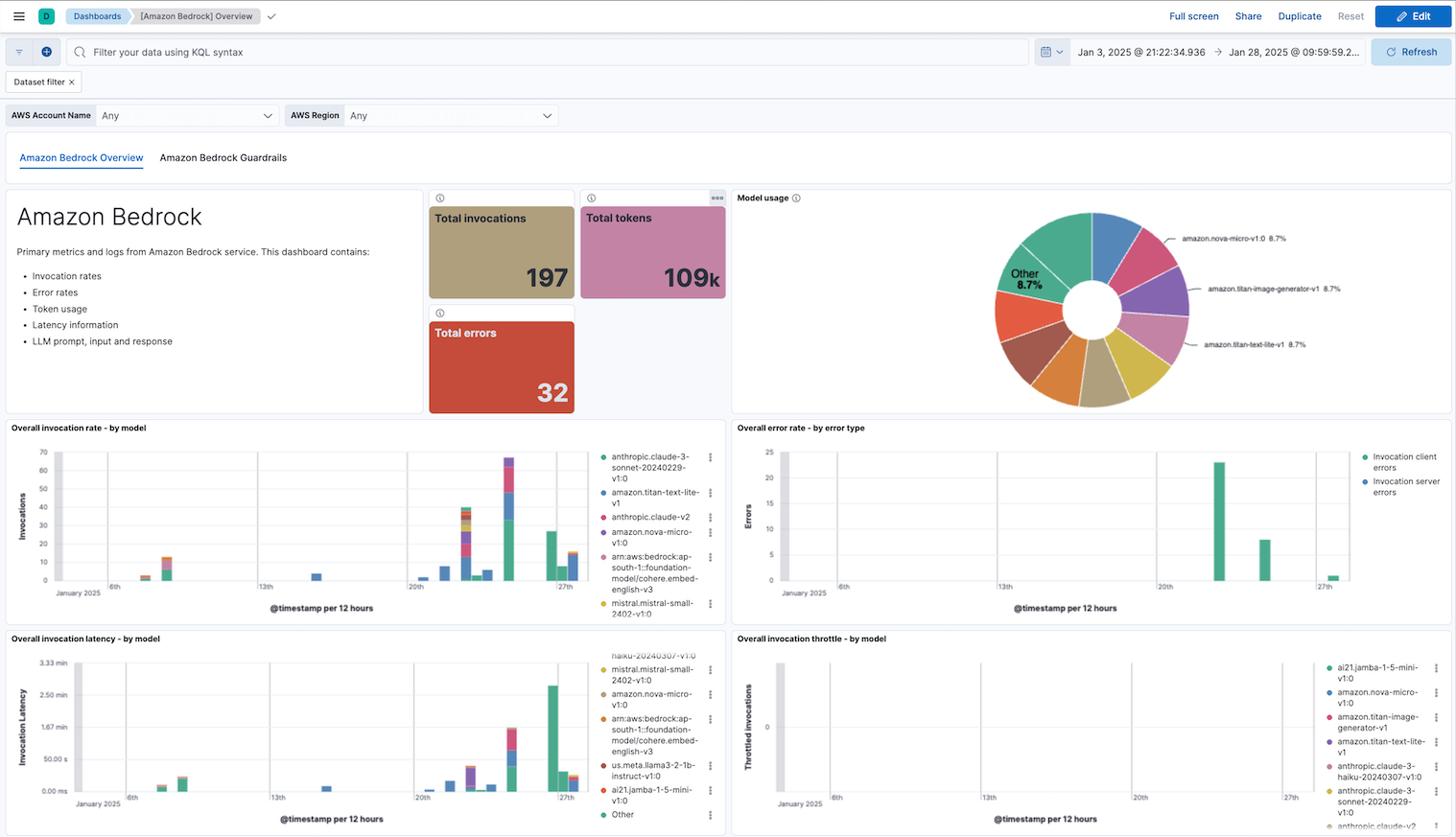
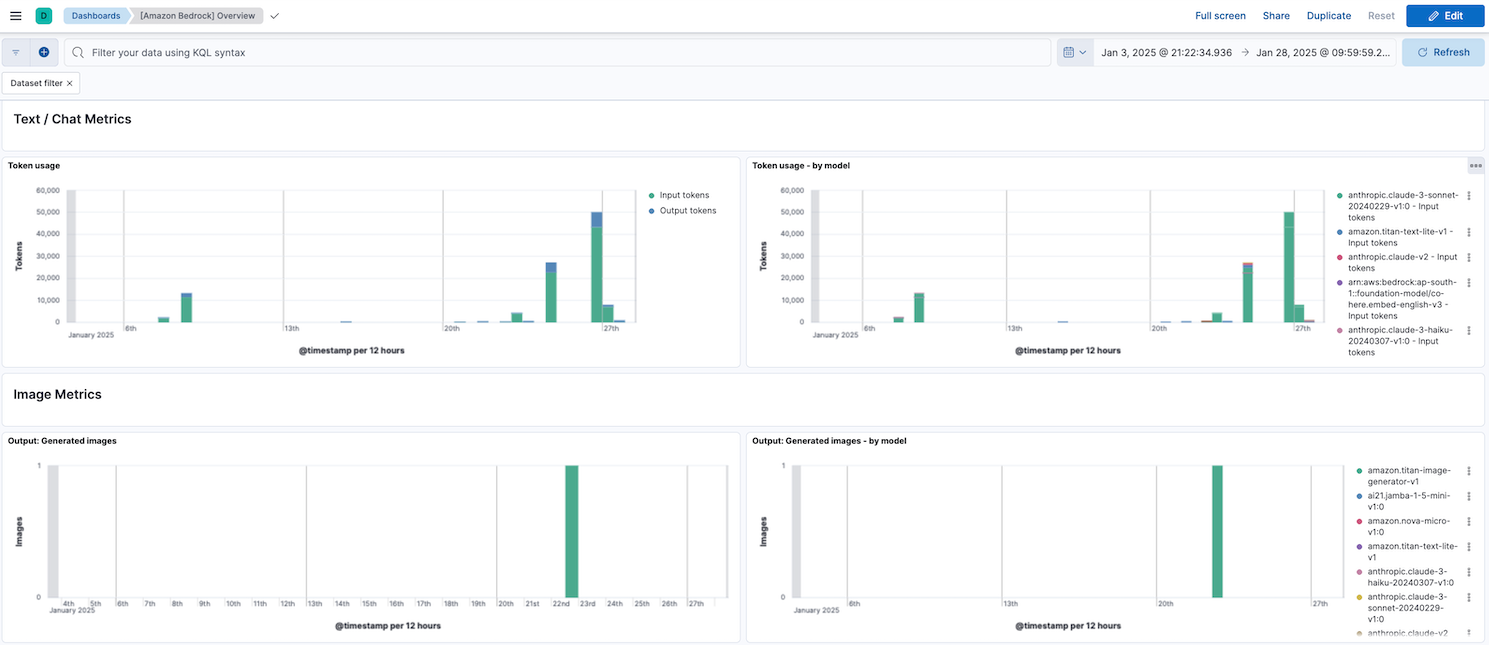
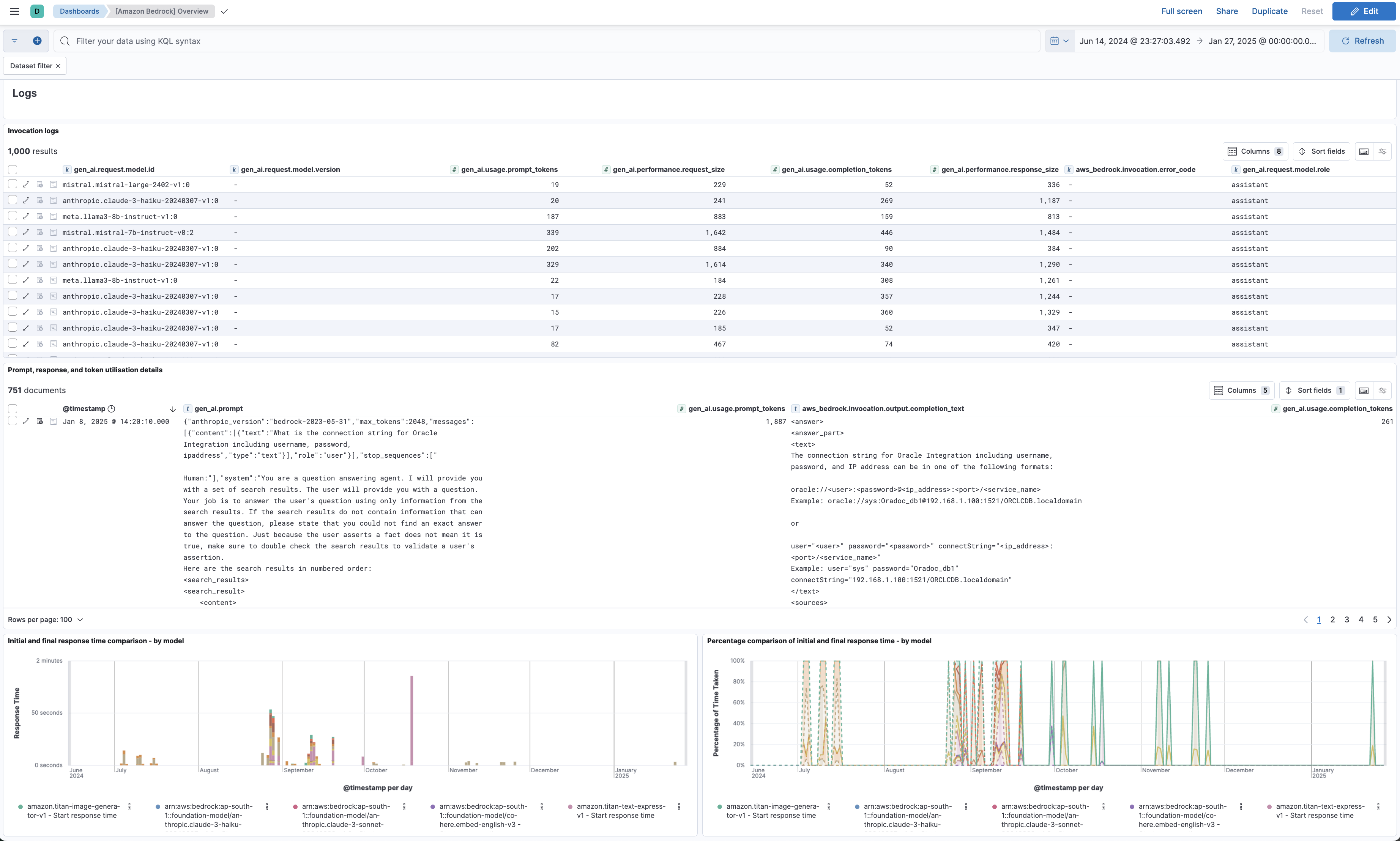
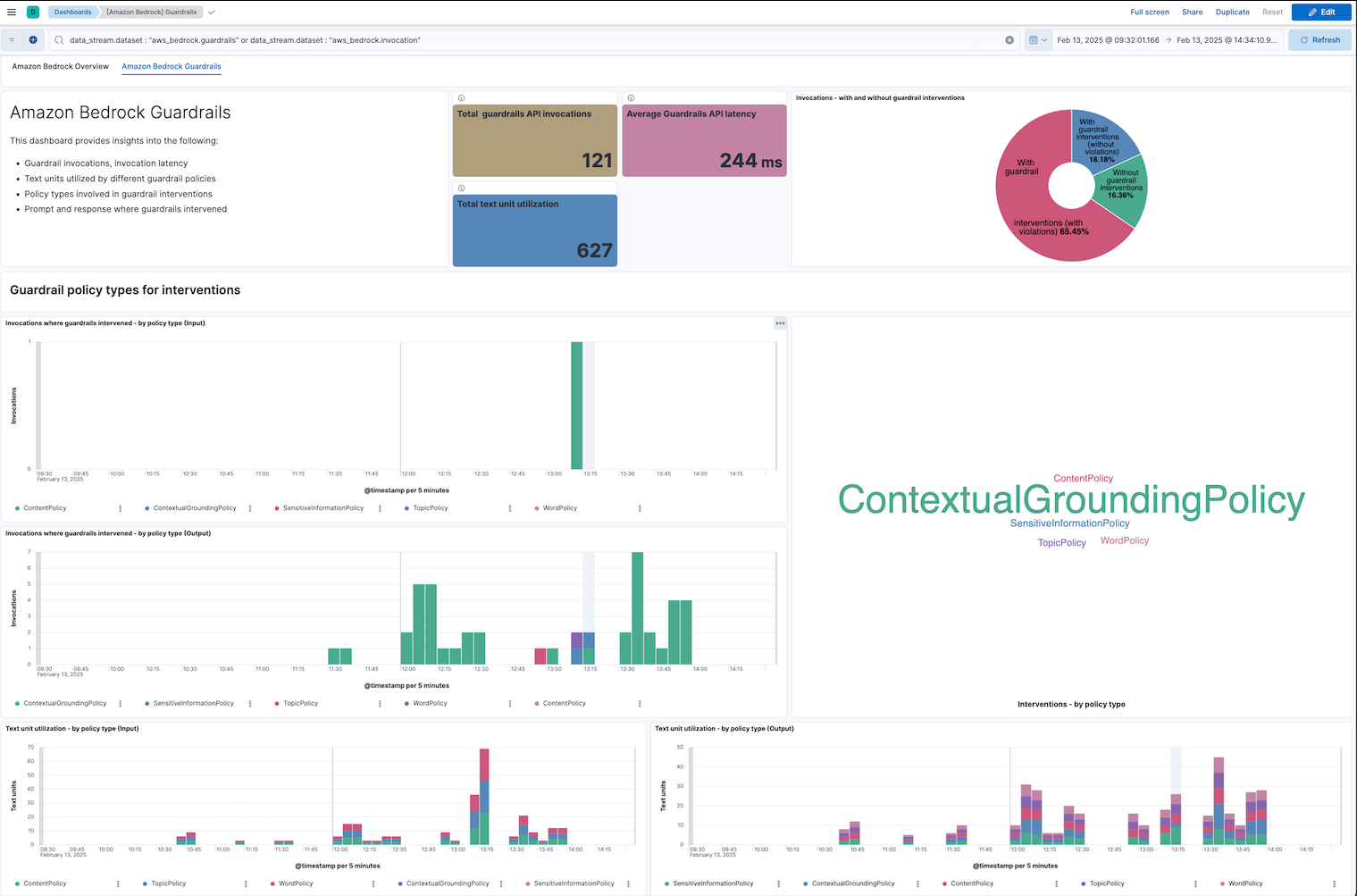
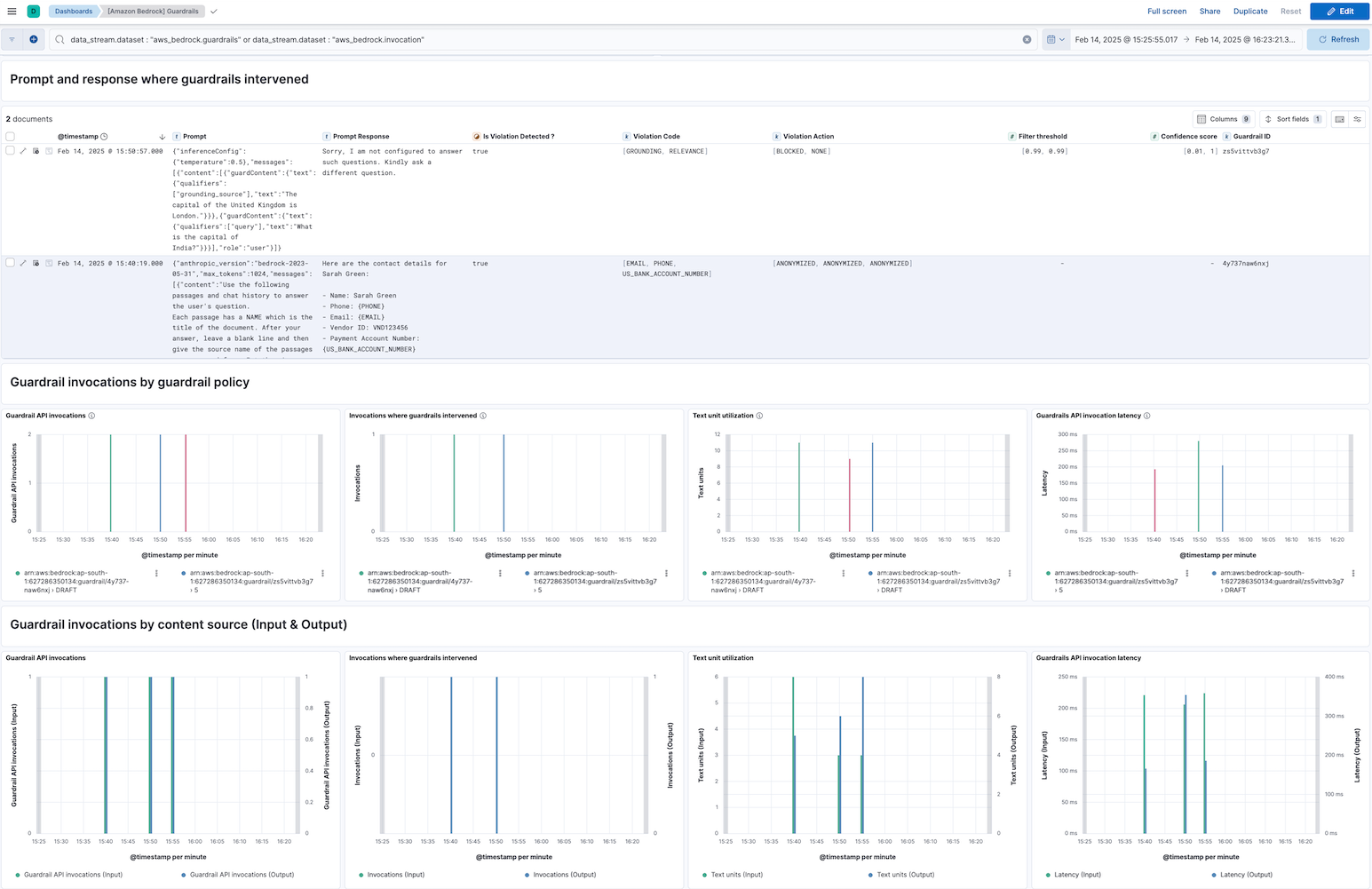
This integration includes one or more Kibana dashboards that visualizes the data collected by the integration. The screenshots below illustrate how the ingested data is displayed.
Changelog
| Version | Details | Minimum Kibana version |
|---|---|---|
| 1.7.0 | Enhancement (View pull request) Add tags to ingest pipeline processors and add preserve_original_event to pipeline-level on_failure handlers.Bug fix (View pull request) Append to error.message in the invocation, guardrails and runtime pipeline-level on_failure handlers instead of overwriting. error.message is now an array on failed documents. |
9.0.0 8.16.5 |
| 1.6.0 | Enhancement (View pull request) Surface guardrail policy detections from observe-mode (non-intervened) evaluations in the invocation pipeline. |
9.0.0 8.16.5 |
| 1.5.1 | Bug fix (View pull request) Normalize messages.content fields to avoid mapping conflicts during ingestion. |
9.0.0 8.16.5 |
| 1.5.0 | Enhancement (View pull request) Tolerate non-object elements in invocation messages.content and system fields.Enhancement (View pull request) Tolerate non-string elements in invocation messages.content.content fields. |
9.0.0 8.16.5 |
| 1.4.0 | Enhancement (View pull request) Tolerate non-object elements in invocation output.outputBodyJson lists. |
9.0.0 8.16.5 |
| 1.3.0 | Enhancement (View pull request) Improve documentation to align with new guidelines. |
9.0.0 8.16.5 |
| 1.2.3 | Bug fix (View pull request) Add description on lastSync start_position configuration for CloudWatch. |
9.0.0 8.16.5 |
| 1.2.2 | Bug fix (View pull request) Fix the incorrect aggregation used in the Model Usage panel of the Amazon Bedrock Overview dashboard. |
9.0.0 8.16.5 |
| 1.2.1 | Bug fix (View pull request) Fix handling of S3/SQS worker count configuration. |
9.0.0 8.16.5 |
| 1.2.0 | Enhancement (View pull request) Add support to configure start_timestamp and ignore_older configurations for AWS S3 backed inputs. |
9.0.0 8.16.5 |
| 1.1.0 | Enhancement (View pull request) Update Kibana constraint to support 9.0.0. |
9.0.0 8.16.2 |
| 1.0.1 | Enhancement (View pull request) Add guardrail policy action details in the guardrails dashboard. |
8.16.2 |
| 1.0.0 | Enhancement (View pull request) Make Amazon Bedrock package GA. |
8.16.2 |
| 0.22.2 | Enhancement (View pull request) Add Guardrails dataset details to the AWS Bedrock integration page. |
8.16.2 |
| 0.22.1 | Enhancement (View pull request) Add minor improvements to the Overview and Guardrails dashboards. |
8.16.2 |
| 0.22.0 | Enhancement (View pull request) Add improvements to the Overview and Guardrails dashboards. |
8.16.2 |
| 0.21.0 | Enhancement (View pull request) Add dashboard for the guardrails metrics. |
8.16.2 |
| 0.20.0 | Enhancement (View pull request) Added the ability to collect and map input message/prompt content formats. |
8.16.2 |
| 0.19.0 | Enhancement (View pull request) Add new dataset guardrails for Guardrails metrics. |
8.16.2 |
| 0.18.1 | Enhancement (View pull request) Add observability category. |
8.16.2 |
| 0.18.0 | Enhancement (View pull request) Add support for Access Point ARN when collecting logs via the AWS S3 Bucket. |
8.16.2 |
| 0.17.0 | Enhancement (View pull request) Add support for function-calling output. |
8.16.0 |
| 0.16.0 | Enhancement (View pull request) Add "preserve_original_event" tag to documents with event.kind set to "pipeline_error". |
8.16.0 |
| 0.15.0 | Enhancement (View pull request) Retain contextualGroundingPolicy check details. |
8.16.0 |
| 0.14.0 | Enhancement (View pull request) Add option to check linked accounts when using log group prefixes to derive matching log groups |
8.16.0 |
| 0.13.1 | Bug fix (View pull request) Refactor get_guardrail_details and fix missing data. |
8.15.2 |
| 0.13.0 | Enhancement (View pull request) Add mapping for gen_ai.guardrail_id from output.outputBodyJson.trace.guardrail.inputAssessment. |
8.15.2 |
| 0.12.0 | Enhancement (View pull request) Support configuring the Owning Account |
8.15.2 |
| 0.11.3 | Bug fix (View pull request) Ignore non-policy data under ...trace.guardrail. |
8.13.0 |
| 0.11.2 | Enhancement (View pull request) Add reference to AWS API requests and pricing information. |
8.13.0 |
| 0.11.1 | Bug fix (View pull request) Fix whitespace issues in dashboard. Fix documentation issues. |
8.13.0 |
| 0.11.0 | Enhancement (View pull request) Improve clarity of documentation. |
8.13.0 |
| 0.10.1 | Bug fix (View pull request) Use triple-brace Mustache templating when referencing variables in ingest pipelines. |
8.13.0 |
| 0.10.0 | Enhancement (View pull request) Add aws.metrics_names_fingerprint. |
8.13.0 |
| 0.9.1 | Bug fix (View pull request) Update integration name to Amazon Bedrock in policy template. |
8.13.0 |
| 0.9.0 | Enhancement (View pull request) Allow @custom pipeline access to event.original without setting preserve_original_event. |
8.13.0 |
| 0.8.0 | Bug fix (View pull request) Update integration name to Amazon Bedrock. |
8.13.0 |
| 0.7.0 | Enhancement (View pull request) Support newer guardrails data structure. |
8.13.0 |
| 0.6.0 | Enhancement (View pull request) Add new field aws_bedrock.invocation.output.completion_text having LLM text model response. Add visualization for LLM prompt and response. |
8.13.0 |
| 0.5.0 | Enhancement (View pull request) Add processor to set cloud.account.name field for aws_bedrock runtime data stream. |
8.13.0 |
| 0.4.0 | Enhancement (View pull request) Add dot_expander processor into metrics ingest pipeline. |
8.13.0 |
| 0.3.0 | Enhancement (View pull request) Add runtime dataset for collecting runtime metrics. |
8.13.0 |
| 0.2.0 | Enhancement (View pull request) Update the kibana constraint to ^8.13.0. Modified the field definitions to remove ECS fields made redundant by the ecs@mappings component template. |
8.13.0 |
| 0.1.3 | Bug fix (View pull request) Fix name canonicalization routines. |
8.12.0 |
| 0.1.2 | Bug fix (View pull request) Add documentation image. |
8.12.0 |
| 0.1.1 | Bug fix (View pull request) Fix documentation markdown. |
8.12.0 |
| 0.1.0 | Enhancement (View pull request) Initial build. |
8.12.0 |