LastPass
Elastic Cloud Serverless projects are autoscaled environments, fully managed by Elastic and available on Elastic Cloud. Availability This functionality is generally available and ready for production usage. Elastic Cloud Serverless projects are autoscaled environments, fully managed by Elastic and available on Elastic Cloud. Availability This functionality is generally available and ready for production usage. The Elastic Stack includes Elastic's core products such as Elasticsearch, Kibana, Logstash, and Beats. Availability This functionality is generally available and ready for production usage. Unless stated otherwise on the page, this functionality is available when your Elastic Stack is deployed on Elastic Cloud Hosted, Elastic Cloud Enterprise, Elastic Cloud on Kubernetes, and self-managed environments. This documentation corresponds to the latest patch available for each minor version. If you're not using the latest patch, check the release notes for changes.
Serverless Observability
Generally available
Serverless Security
Generally available
Stack
9.1+
Generally available since 9.1
| Version | 1.26.0 (View all) |
| Managed integration release status | GA |
| Subscription level What's this? |
Basic |
| Developed by What's this? |
Elastic |
| Ingestion method(s) | API |
| Minimum Kibana version(s) | 9.1.4 9.0.7 8.19.4 |
You can use this integration as an Elastic Managed integration on Elastic Cloud Hosted deployments running this version or later.
The LastPass integration allows users to monitor Detailed Shared Folder Data, User Data, and Event Report Logs. LastPass is a cloud-based password manager that stores users' login information online in a secure database and allows users to generate unique passwords for each site they visit. In addition, LastPass stores all users' passwords and enables them to log into their accounts with ease. It’s available on all major platforms, including mobile devices, computers, and browser extensions.
Elastic Managed integrations are only supported on Elastic Cloud Serverless and Elastic Cloud Hosted deployments. An Elastic Managed integration lets you ingest data from a cloud source while avoiding the orchestration, management, and maintenance associated with standard ingest infrastructure. Elastic runs the collector for you, so you can focus on your data instead of the infrastructure that collects it.
For more information, refer to Elastic Managed integrations and the Elastic Managed integrations FAQ.
The LastPass integration collects logs for three types of events: Detailed Shared Folder Data, User Data, and Event Report.
Detailed Shared Folder Data is used to get a detailed list of all shared folders, the sites within them, and the permissions granted to them. See more details in the doc here.
User Data is used to get account details about the user. See more details in the doc here.
Event Report is used to gather information about events that have taken place in the user's LastPass Business account. See more details in the doc here.
Elasticsearch is needed to store and search data, and Kibana is needed for visualizing and managing it. You can use our hosted Elasticsearch Service on Elastic Cloud, which is recommended, or self-manage the Elastic Stack on your hardware.
- NOTE
- A business account is required to use the LastPass integration.
- The LastPass Provisioning API does not support managing groups for pre-configured SSO (Cloud) apps for LastPass Business accounts.
- Log in with the user's email address and master password to access the Admin Console.
- If prompted, complete the steps for multifactor authentication (if it is enabled for the user account).
- To get an Account Number(CID), follow the below steps:
- On the Dashboard tab, the Account Number(CID) is located at the top of the page. it is preceded by the words Account number.

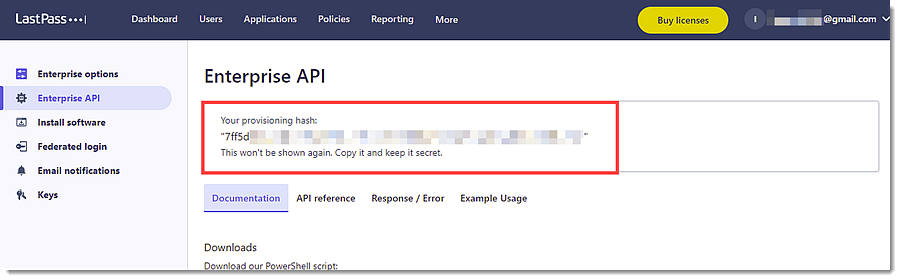
- To create a Provisioning Hash, follow the below steps:
- Go to Advanced -> Enterprise API.
- Choose from the following options:
- If the user has not previously created a provisioning hash, click Create provisioning hash -> OK, then the provisioning hash is shown at the top of the page.
- If the user previously created a provisioning hash but has since forgotten it, the user can generate a new one.
- NOTE: If the user has already created a provisioning hash, then generating a new one will invalidate the previous hash, and will require updating all integrations with the newly generated hash.
- To proceed with creating a new provisioning hash, click Reset your provisioning hash -> OK, then a new provisioning hash is shown at the top of the page.
This is the detailed_shared_folder dataset.
Example
{
    "@timestamp": "2025-12-12T08:59:20.423Z",
    "agent": {
        "ephemeral_id": "d34469d9-73df-4f90-bc77-b13f8741e23d",
        "id": "6d931462-347a-49af-922d-b3918041d003",
        "name": "elastic-agent-53629",
        "type": "filebeat",
        "version": "8.19.4"
    },
    "data_stream": {
        "dataset": "lastpass.detailed_shared_folder",
        "namespace": "88569",
        "type": "logs"
    },
    "ecs": {
        "version": "8.11.0"
    },
    "elastic_agent": {
        "id": "6d931462-347a-49af-922d-b3918041d003",
        "snapshot": false,
        "version": "8.19.4"
    },
    "event": {
        "agent_id_status": "verified",
        "created": "2025-12-12T08:59:20.423Z",
        "dataset": "lastpass.detailed_shared_folder",
        "ingested": "2025-12-12T08:59:23Z",
        "kind": "state",
        "original": "{\"id\":\"101\",\"score\":99,\"sharedfoldername\":\"ThisSFName\",\"users\":{\"can_administer\":true,\"give\":false,\"readonly\":true,\"sites\":[\"example.com\",\"example.com\"],\"username\":\"joe.user@lastpass.com\"}}",
        "type": [
            "info"
        ]
    },
    "input": {
        "type": "httpjson"
    },
    "lastpass": {
        "detailed_shared_folder": {
            "name": "ThisSFName",
            "score": 99,
            "shared_folder": {
                "id": "101"
            },
            "user": {
                "can_administer": true,
                "give": false,
                "name": "joe.user@lastpass.com",
                "read_only": true,
                "site": [
                    "example.com",
                    "example.com"
                ]
            }
        }
    },
    "related": {
        "user": [
            "joe.user@lastpass.com"
        ]
    },
    "tags": [
        "preserve_original_event",
        "preserve_duplicate_custom_fields",
        "forwarded",
        "lastpass-detailed_shared_folder"
    ],
    "user": {
        "email": "joe.user@lastpass.com"
    }
}
Exported fields
| Field | Description | Type |
|---|---|---|
| @timestamp | Event timestamp. | date |
| cloud.image.id | Image ID for the cloud instance. | keyword |
| data_stream.dataset | Data stream dataset. | constant_keyword |
| data_stream.namespace | Data stream namespace. | constant_keyword |
| data_stream.type | Data stream type. | constant_keyword |
| event.dataset | Event dataset. | constant_keyword |
| event.module | Event module. | constant_keyword |
| host.containerized | If the host is a container. | boolean |
| host.os.build | OS build information. | keyword |
| host.os.codename | OS codename, if any. | keyword |
| input.type | Input type | keyword |
| lastpass.detailed_shared_folder.deleted | boolean | |
| lastpass.detailed_shared_folder.name | keyword | |
| lastpass.detailed_shared_folder.score | double | |
| lastpass.detailed_shared_folder.shared_folder.id | keyword | |
| lastpass.detailed_shared_folder.user.can_administer | boolean | |
| lastpass.detailed_shared_folder.user.give | boolean | |
| lastpass.detailed_shared_folder.user.name | keyword | |
| lastpass.detailed_shared_folder.user.read_only | boolean | |
| lastpass.detailed_shared_folder.user.site | keyword | |
| lastpass.detailed_shared_folder.user.super_admin | boolean | |
| log.offset | Log offset | long |
This is the event_report dataset.
Example
{
    "@timestamp": "2015-07-17T09:51:51.000Z",
    "agent": {
        "ephemeral_id": "cf014d99-eaa3-47af-b77d-5414873cbe35",
        "id": "d0222733-fe19-4c03-8713-959506dfed5b",
        "name": "elastic-agent-52217",
        "type": "filebeat",
        "version": "8.19.4"
    },
    "data_stream": {
        "dataset": "lastpass.event_report",
        "namespace": "96245",
        "type": "logs"
    },
    "ecs": {
        "version": "8.11.0"
    },
    "elastic_agent": {
        "id": "d0222733-fe19-4c03-8713-959506dfed5b",
        "snapshot": false,
        "version": "8.19.4"
    },
    "event": {
        "action": "failed login attempt",
        "agent_id_status": "verified",
        "category": [
            "authentication"
        ],
        "created": "2025-12-12T09:00:10.654Z",
        "dataset": "lastpass.event_report",
        "ingested": "2025-12-12T09:00:13Z",
        "kind": "event",
        "original": "{\"Action\":\"Failed Login Attempt\",\"Data\":\"\",\"IP_Address\":\"10.16.21.21\",\"Time\":\"2015-07-17 09:51:51\",\"Username\":\"j.user@example.com\",\"id\":\"Event1\"}",
        "outcome": "failure",
        "timezone": "UTC",
        "type": [
            "start"
        ]
    },
    "input": {
        "type": "httpjson"
    },
    "lastpass": {
        "event_report": {
            "action": "Failed Login Attempt",
            "ip": "10.16.21.21",
            "time": "2015-07-17T09:51:51.000Z",
            "user_name": "j.user@example.com"
        }
    },
    "related": {
        "ip": [
            "10.16.21.21"
        ],
        "user": [
            "j.user@example.com"
        ]
    },
    "source": {
        "ip": "10.16.21.21"
    },
    "tags": [
        "preserve_original_event",
        "preserve_duplicate_custom_fields",
        "forwarded",
        "lastpass-event_report"
    ],
    "user": {
        "email": [
            "j.user@example.com"
        ]
    }
}
Exported fields
| Field | Description | Type |
|---|---|---|
| @timestamp | Event timestamp. | date |
| cloud.image.id | Image ID for the cloud instance. | keyword |
| data_stream.dataset | Data stream dataset. | constant_keyword |
| data_stream.namespace | Data stream namespace. | constant_keyword |
| data_stream.type | Data stream type. | constant_keyword |
| event.dataset | Event dataset. | constant_keyword |
| event.module | Event module. | constant_keyword |
| host.containerized | If the host is a container. | boolean |
| host.os.build | OS build information. | keyword |
| host.os.codename | OS codename, if any. | keyword |
| input.type | Input type | keyword |
| lastpass.event_report.action | keyword | |
| lastpass.event_report.data.added_site | keyword | |
| lastpass.event_report.data.deleted_site | keyword | |
| lastpass.event_report.data.failed_login | keyword | |
| lastpass.event_report.data.group_name | keyword | |
| lastpass.event_report.data.login_site | keyword | |
| lastpass.event_report.data.original | text | |
| lastpass.event_report.data.renamed_shared_folder_name | keyword | |
| lastpass.event_report.data.saml_login | keyword | |
| lastpass.event_report.data.secure_note | keyword | |
| lastpass.event_report.data.shared_folder_name | keyword | |
| lastpass.event_report.data.shared_folder_user_permissions.admin | keyword | |
| lastpass.event_report.data.shared_folder_user_permissions.hide_password | keyword | |
| lastpass.event_report.data.shared_folder_user_permissions.read_only | keyword | |
| lastpass.event_report.data.site | keyword | |
| lastpass.event_report.data.user_email | keyword | |
| lastpass.event_report.ip | ip | |
| lastpass.event_report.time | date | |
| lastpass.event_report.user_name | keyword | |
| log.offset | Log offset | long |
This is the user dataset.
Example
{
    "@timestamp": "2025-12-12T09:01:00.598Z",
    "agent": {
        "ephemeral_id": "6352087b-6e4f-4918-9d95-5cc347bcfc31",
        "id": "ddf3533d-dabe-4e5e-b4f5-6dbcb12e6959",
        "name": "elastic-agent-91592",
        "type": "filebeat",
        "version": "8.19.4"
    },
    "data_stream": {
        "dataset": "lastpass.user",
        "namespace": "64234",
        "type": "logs"
    },
    "ecs": {
        "version": "8.11.0"
    },
    "elastic_agent": {
        "id": "ddf3533d-dabe-4e5e-b4f5-6dbcb12e6959",
        "snapshot": false,
        "version": "8.19.4"
    },
    "event": {
        "agent_id_status": "verified",
        "category": [
            "iam"
        ],
        "created": "2025-12-12T09:01:00.598Z",
        "dataset": "lastpass.user",
        "ingested": "2025-12-12T09:01:03Z",
        "kind": "state",
        "original": "{\"admin\":false,\"applications\":0,\"attachments\":1,\"created\":\"2014-03-12 10:02:56\",\"disabled\":false,\"formfills\":2,\"fullname\":\"Ned Flanders\",\"groups\":[\"Domain Admins\",\"Dev Team\",\"Support Team\"],\"id\":\"101\",\"last_login\":\"2015-05-29 11:45:05\",\"last_pw_change\":\"2015-05-19 10:58:33\",\"linked\":\"personal.account@example.com\",\"mpstrength\":\"100\",\"neverloggedin\":false,\"notes\":19,\"password_reset_required\":false,\"sites\":72,\"username\":\"user1@lastpass.com\"}",
        "type": [
            "user"
        ]
    },
    "input": {
        "type": "httpjson"
    },
    "lastpass": {
        "user": {
            "application": 0,
            "attachment": 1,
            "created": "2014-03-12T10:02:56.000Z",
            "disabled": false,
            "form_fill": 2,
            "full_name": "Ned Flanders",
            "group": [
                "Domain Admins",
                "Dev Team",
                "Support Team"
            ],
            "id": "101",
            "last_login": "2015-05-29T11:45:05.000Z",
            "last_password_change": "2015-05-19T10:58:33.000Z",
            "linked": "personal.account@example.com",
            "master_password_strength": 100,
            "never_logged_in": false,
            "note": 19,
            "password_reset_required": false,
            "sites": 72,
            "user_name": "user1@lastpass.com"
        }
    },
    "related": {
        "user": [
            "user1@lastpass.com",
            "Ned Flanders"
        ]
    },
    "tags": [
        "preserve_original_event",
        "preserve_duplicate_custom_fields",
        "forwarded",
        "lastpass-user"
    ],
    "user": {
        "email": "user1@lastpass.com",
        "full_name": "Ned Flanders",
        "group": {
            "name": [
                "Domain Admins",
                "Dev Team",
                "Support Team"
            ]
        },
        "id": "101"
    }
}
Exported fields
| Field | Description | Type |
|---|---|---|
| @timestamp | Event timestamp. | date |
| cloud.image.id | Image ID for the cloud instance. | keyword |
| data_stream.dataset | Data stream dataset. | constant_keyword |
| data_stream.namespace | Data stream namespace. | constant_keyword |
| data_stream.type | Data stream type. | constant_keyword |
| event.dataset | Event dataset. | constant_keyword |
| event.module | Event module. | constant_keyword |
| host.containerized | If the host is a container. | boolean |
| host.os.build | OS build information. | keyword |
| host.os.codename | OS codename, if any. | keyword |
| input.type | Input type | keyword |
| lastpass.user.application | long | |
| lastpass.user.attachment | long | |
| lastpass.user.created | date | |
| lastpass.user.disabled | boolean | |
| lastpass.user.duo.user_name | keyword | |
| lastpass.user.form_fill | long | |
| lastpass.user.full_name | keyword | |
| lastpass.user.group | keyword | |
| lastpass.user.id | keyword | |
| lastpass.user.last_login | date | |
| lastpass.user.last_password_change | date | |
| lastpass.user.linked | keyword | |
| lastpass.user.master_password_strength | long | |
| lastpass.user.never_logged_in | boolean | |
| lastpass.user.note | long | |
| lastpass.user.password_reset_required | boolean | |
| lastpass.user.sites | long | |
| lastpass.user.total_score | double | |
| lastpass.user.user_name | keyword | |
| log.offset | Log offset | long |
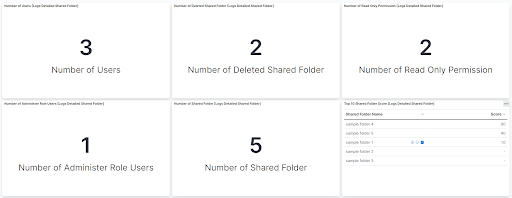
This integration includes one or more Kibana dashboards that visualizes the data collected by the integration. The screenshots below illustrate how the ingested data is displayed.
Changelog
| Version | Details | Minimum Kibana version |
|---|---|---|
| 1.26.0 | Enhancement (View pull request) Update Elastic Managed integration documentation to the current wording and docs links. |
9.1.4 9.0.7 8.19.4 |
| 1.25.0 | Enhancement (View pull request) Enable request trace log removal. |
9.1.4 9.0.7 8.19.4 |
| 1.24.0 | Enhancement (View pull request) Add tags to ingest pipeline processors. |
9.1.4 9.0.7 8.19.4 |
| 1.23.2 | Enhancement (View pull request) Set agentless deployment mode release field to ga. |
9.1.4 9.0.7 8.19.4 |
| 1.23.1 | Bug fix (View pull request) Fix serialisation of detailed_shared_folder data stream response. |
9.1.4 9.0.7 8.19.4 |
| 1.23.0 | Enhancement (View pull request) Use new release field for agentless deployment mode to establish as beta. |
9.1.4 9.0.7 8.19.4 |
| 1.22.0 | Enhancement (View pull request) Enable Agentless deployment. |
9.1.4 9.0.7 8.19.4 |
| 1.21.0 | Enhancement (View pull request) Prevent updating fleet health status to degraded when pagination completes. |
9.1.4 9.0.7 8.19.4 |
| 1.20.0 | Enhancement (View pull request) Update Kibana constraint to support 9.0.0. |
9.0.0 8.13.0 |
| 1.19.1 | Bug fix (View pull request) Updated SSL description in package manifest.yml to be uniform and to include links to documentation. |
8.13.0 |
| 1.19.0 | Enhancement (View pull request) Do not remove event.original in main ingest pipeline. |
8.13.0 |
| 1.18.0 | Enhancement (View pull request) Add "preserve_original_event" tag to documents with event.kind set to "pipeline_error". |
8.13.0 |
| 1.17.0 | Enhancement (View pull request) Update the kibana constraint to ^8.13.0. Modified the field definitions to remove ECS fields made redundant by the ecs@mappings component template. |
8.13.0 |
| 1.16.0 | Enhancement (View pull request) Add pagesize and pageindex to request. |
8.12.0 |
| 1.15.1 | Bug fix (View pull request) Fix page index for event reports. |
8.12.0 |
| 1.15.0 | Enhancement (View pull request) Set sensitive values as secret. |
8.12.0 |
| 1.14.2 | Bug fix (View pull request) Fix ingest pipeline conditional field handling. Bug fix (View pull request) Reduce complexity of grok expressions. |
8.7.1 |
| 1.14.1 | Enhancement (View pull request) Changed owners |
8.7.1 |
| 1.14.0 | Enhancement (View pull request) Limit request tracer log count to five. |
8.7.1 |
| 1.13.0 | Enhancement (View pull request) ECS version updated to 8.11.0. |
8.7.1 |
| 1.12.0 | Enhancement (View pull request) Improve 'event.original' check to avoid errors if set. |
8.7.1 |
| 1.11.0 | Enhancement (View pull request) ECS version updated to 8.10.0. |
8.7.1 |
| 1.10.0 | Enhancement (View pull request) The format_version in the package manifest changed from 2.11.0 to 3.0.0. Removed dotted YAML keys from package manifest. Added 'owner.type: elastic' to package manifest. |
8.7.1 |
| 1.9.0 | Enhancement (View pull request) Add tags.yml file so that integration's dashboards and saved searches are tagged with "Security Solution" and displayed in the Security Solution UI. |
8.7.1 |
| 1.8.0 | Enhancement (View pull request) Allow user to specify timezone for event report events. Bug fix (View pull request) Fix event.type for authorization events. |
8.7.1 |
| 1.7.0 | Enhancement (View pull request) Update package to ECS 8.9.0. |
8.7.1 |
| 1.6.0 | Enhancement (View pull request) Document duration units. |
8.7.1 |
| 1.5.0 | Enhancement (View pull request) Update package-spec to 2.9.0. |
8.7.1 |
| 1.4.0 | Enhancement (View pull request) Ensure event.kind is correctly set for pipeline errors. |
8.7.1 |
| 1.3.0 | Enhancement (View pull request) Update package to ECS 8.8.0. |
8.7.1 |
| 1.2.0 | Enhancement (View pull request) Add a new flag to enable request tracing |
8.7.1 |
| 1.1.1 | Enhancement (View pull request) Use Eastern Time as default timezone for Lastpass API |
8.0.0 7.17.0 |
| 1.1.0 | Enhancement (View pull request) Update package to ECS 8.7.0. |
8.0.0 7.17.0 |
| 1.0.0 | Enhancement (View pull request) Release LastPass as GA. |
8.0.0 7.17.0 |
| 0.3.1 | Enhancement (View pull request) Added categories and/or subcategories. |
8.0.0 7.17.0 |
| 0.3.0 | Enhancement (View pull request) Update package to ECS 8.6.0. |
8.0.0 7.17.0 |
| 0.2.4 | Enhancement (View pull request) Add event.outcome field and Add support for new type of event.action. |
8.0.0 7.17.0 |
| 0.2.3 | Bug fix (View pull request) Update ECS source.geo.location field. |
8.0.0 7.17.0 |
| 0.2.2 | Enhancement (View pull request) Update the pagination termination condition. |
8.0.0 7.17.0 |
| 0.2.1 | Bug fix (View pull request) Fix grammar errors in dashboards. |
8.0.0 7.17.0 |
| 0.2.0 | Enhancement (View pull request) Update package to ECS 8.5.0. |
8.0.0 7.17.0 |
| 0.1.0 | Enhancement (View pull request) Initial Release. |
8.0.0 7.17.0 |