RabbitMQ Integration
Elastic Cloud Serverless projects are autoscaled environments, fully managed by Elastic and available on Elastic Cloud. Availability This functionality is generally available and ready for production usage. Elastic Cloud Serverless projects are autoscaled environments, fully managed by Elastic and available on Elastic Cloud. Availability This functionality is generally available and ready for production usage. The Elastic Stack includes Elastic's core products such as Elasticsearch, Kibana, Logstash, and Beats. Availability This functionality is generally available and ready for production usage. Unless stated otherwise on the page, this functionality is available when your Elastic Stack is deployed on Elastic Cloud Hosted, Elastic Cloud Enterprise, Elastic Cloud on Kubernetes, and self-managed environments. This documentation corresponds to the latest patch available for each minor version. If you're not using the latest patch, check the release notes for changes.
Serverless Observability
Generally available
Serverless Security
Generally available
Stack
9.0+
Generally available since 9.0
| Version | 1.22.0 (View all) |
| Subscription level What's this? |
Basic |
| Developed by What's this? |
Elastic |
| Ingestion method(s) | API, File |
| Minimum Kibana version(s) | 9.0.0 8.13.0 |
This integration uses HTTP API created by the management plugin to collect metrics.
The default data streams are connection, node, queue, exchange and standard logs.
If management.path_prefix is set in RabbitMQ configuration, management_path_prefix has to be set to the same value
in this integration configuration.
The RabbitMQ integration is fully tested with RabbitMQ versions 3.7.4 and 4.1.3, and it should be compatible with any version supporting the management plugin, which must be installed and enabled. It has also been tested with 3.6.0, 3.6.5, and 3.7.14.
The application logs dataset parses single file format introduced in 3.7.0.
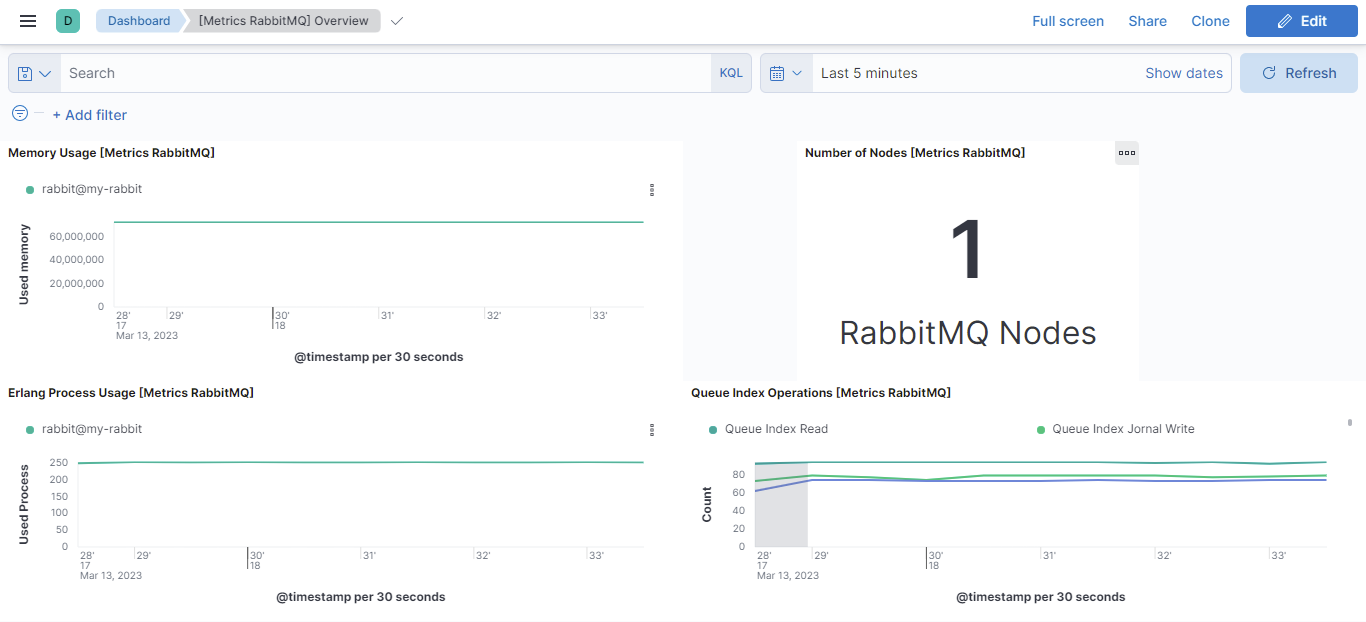
When upgrading RabbitMQ to version 4.1.3 or higher, the /api/nodes endpoint (from RabbitMQ's management API) no longer returns the rabbitmq.node.queue.index.journal_write metric in its response. This metric is used in the Kibana dashboard "Queue Index Operations [Metrics RabbitMQ]". As a result, after upgrading to 4.1.3 or higher, this metric and related visualizations in the dashboard will be missing or incomplete.
Application logs collects standard RabbitMQ logs. It will only support RabbitMQ default i.e RFC 3339 timestamp format.
ECS Field Reference
Please refer to the following document for detailed information on ECS fields.
Exported fields
| Field | Description | Type |
|---|---|---|
| @timestamp | Event timestamp. | date |
| cloud.image.id | Image ID for the cloud instance. | keyword |
| data_stream.dataset | Data stream dataset. | constant_keyword |
| data_stream.namespace | Data stream namespace. | constant_keyword |
| data_stream.type | Data stream type. | constant_keyword |
| event.dataset | Event dataset | constant_keyword |
| event.module | Event module | constant_keyword |
| host.containerized | If the host is a container. | boolean |
| host.os.build | OS build information. | keyword |
| host.os.codename | OS codename, if any. | keyword |
| rabbitmq.log.pid | The Erlang process id | keyword |
Example
{
    "@timestamp": "2025-08-26T18:09:07.931Z",
    "agent": {
        "ephemeral_id": "09ad22ab-b4f6-49fe-8ee0-2c19f96230d9",
        "id": "ee7703ca-8eaf-4de7-b78f-4dc497599136",
        "name": "elastic-agent-86958",
        "type": "metricbeat",
        "version": "8.19.0"
    },
    "data_stream": {
        "dataset": "rabbitmq.connection",
        "namespace": "22631",
        "type": "metrics"
    },
    "ecs": {
        "version": "8.0.0"
    },
    "elastic_agent": {
        "id": "ee7703ca-8eaf-4de7-b78f-4dc497599136",
        "snapshot": true,
        "version": "8.19.0"
    },
    "event": {
        "agent_id_status": "verified",
        "dataset": "rabbitmq.connection",
        "duration": 33026646,
        "ingested": "2025-08-26T18:09:10Z",
        "module": "rabbitmq"
    },
    "host": {
        "architecture": "aarch64",
        "containerized": false,
        "hostname": "elastic-agent-86958",
        "ip": [
            "172.18.0.4",
            "172.19.0.2"
        ],
        "mac": [
            "02-42-AC-12-00-04",
            "02-42-AC-13-00-02"
        ],
        "name": "elastic-agent-86958",
        "os": {
            "family": "",
            "kernel": "6.8.0-50-generic",
            "name": "Wolfi",
            "platform": "wolfi",
            "type": "linux",
            "version": "20230201"
        }
    },
    "metricset": {
        "name": "connection",
        "period": 10000
    },
    "rabbitmq": {
        "connection": {
            "channel_max": 2047,
            "channels": 1,
            "frame_max": 131072,
            "host": "::1",
            "name": "[::1]:48014 -> [::1]:5672",
            "octet_count": {
                "received": 1096,
                "sent": 610
            },
            "packet_count": {
                "pending": 0,
                "received": 17,
                "sent": 5
            },
            "peer": {
                "host": "::1",
                "port": 48014
            },
            "port": 5672,
            "state": "running",
            "type": "network"
        },
        "node": {
            "name": "rabbit@30ce181d6f8c"
        },
        "vhost": "/"
    },
    "service": {
        "address": "http://svc-rabbitmq:15672",
        "type": "rabbitmq"
    },
    "user": {
        "name": "guest"
    }
}
ECS Field Reference
Please refer to the following document for detailed information on ECS fields.
Exported fields
| Field | Description | Type | Metric Type |
|---|---|---|---|
| @timestamp | Event timestamp. | date | |
| agent.id | keyword | ||
| cloud.account.id | The cloud account or organization id used to identify different entities in a multi-tenant environment. Examples: AWS account id, Google Cloud ORG Id, or other unique identifier. | keyword | |
| cloud.availability_zone | Availability zone in which this host is running. | keyword | |
| cloud.image.id | Image ID for the cloud instance. | keyword | |
| cloud.instance.id | Instance ID of the host machine. | keyword | |
| cloud.provider | Name of the cloud provider. Example values are aws, azure, gcp, or digitalocean. | keyword | |
| cloud.region | Region in which this host is running. | keyword | |
| container.id | Unique container id. | keyword | |
| data_stream.dataset | Data stream dataset. | constant_keyword | |
| data_stream.namespace | Data stream namespace. | constant_keyword | |
| data_stream.type | Data stream type. | constant_keyword | |
| event.dataset | Event dataset | constant_keyword | |
| event.module | Event module | constant_keyword | |
| host.containerized | If the host is a container. | boolean | |
| host.name | Name of the host. It can contain what hostname returns on Unix systems, the fully qualified domain name, or a name specified by the user. The sender decides which value to use. |
keyword | |
| host.os.build | OS build information. | keyword | |
| host.os.codename | OS codename, if any. | keyword | |
| rabbitmq.connection.channel_max | The maximum number of channels allowed on the connection. | long | counter |
| rabbitmq.connection.channels | The number of channels on the connection. | long | gauge |
| rabbitmq.connection.client_provided.name | User specified connection name. | keyword | |
| rabbitmq.connection.frame_max | Maximum permissible size of a frame (in bytes) to negotiate with clients. | long | gauge |
| rabbitmq.connection.host | Server hostname obtained via reverse DNS, or its IP address if reverse DNS failed or was disabled. | keyword | |
| rabbitmq.connection.name | The name of the connection with non-ASCII characters escaped as in C. | keyword | |
| rabbitmq.connection.octet_count.received | Number of octets received on the connection. | long | gauge |
| rabbitmq.connection.octet_count.sent | Number of octets sent on the connection. | long | gauge |
| rabbitmq.connection.packet_count.pending | Number of packets pending on the connection. | long | gauge |
| rabbitmq.connection.packet_count.received | Number of packets received on the connection. | long | counter |
| rabbitmq.connection.packet_count.sent | Number of packets sent on the connection. | long | counter |
| rabbitmq.connection.peer.host | Peer hostname obtained via reverse DNS, or its IP address if reverse DNS failed or was not enabled. | keyword | |
| rabbitmq.connection.peer.port | Peer port. | long | |
| rabbitmq.connection.port | Server port. | long | |
| rabbitmq.connection.state | Connection state. | keyword | |
| rabbitmq.connection.type | Type of the connection. | keyword | |
| rabbitmq.node.name.text | Full text of node name. | text | |
| rabbitmq.vhost | Virtual host name with non-ASCII characters escaped as in C. | keyword | |
| service.address | Address where data about this service was collected from. This should be a URI, network address (ipv4:port or [ipv6]:port) or a resource path (sockets). | keyword |
Example
{
    "@timestamp": "2025-08-26T18:10:58.049Z",
    "agent": {
        "ephemeral_id": "b08e8909-719d-4db5-ba5f-bd1e6c86a791",
        "id": "9771e1e3-16b7-4c46-9b28-534ec0e73eb8",
        "name": "elastic-agent-77686",
        "type": "metricbeat",
        "version": "8.19.0"
    },
    "data_stream": {
        "dataset": "rabbitmq.exchange",
        "namespace": "70493",
        "type": "metrics"
    },
    "ecs": {
        "version": "8.0.0"
    },
    "elastic_agent": {
        "id": "9771e1e3-16b7-4c46-9b28-534ec0e73eb8",
        "snapshot": true,
        "version": "8.19.0"
    },
    "event": {
        "agent_id_status": "verified",
        "dataset": "rabbitmq.exchange",
        "duration": 51754708,
        "ingested": "2025-08-26T18:11:01Z",
        "module": "rabbitmq"
    },
    "host": {
        "architecture": "aarch64",
        "containerized": false,
        "hostname": "elastic-agent-77686",
        "ip": [
            "172.18.0.4",
            "172.19.0.2"
        ],
        "mac": [
            "02-42-AC-12-00-04",
            "02-42-AC-13-00-02"
        ],
        "name": "elastic-agent-77686",
        "os": {
            "family": "",
            "kernel": "6.8.0-50-generic",
            "name": "Wolfi",
            "platform": "wolfi",
            "type": "linux",
            "version": "20230201"
        }
    },
    "metricset": {
        "name": "exchange",
        "period": 10000
    },
    "rabbitmq": {
        "exchange": {
            "auto_delete": false,
            "durable": true,
            "internal": false,
            "name": "amq.direct",
            "type": "direct"
        },
        "vhost": "/"
    },
    "service": {
        "address": "http://svc-rabbitmq:15672",
        "type": "rabbitmq"
    },
    "user": {
        "name": "rmq-internal"
    }
}
ECS Field Reference
Please refer to the following document for detailed information on ECS fields.
Exported fields
| Field | Description | Type | Metric Type |
|---|---|---|---|
| @timestamp | Event timestamp. | date | |
| agent.id | keyword | ||
| cloud.account.id | The cloud account or organization id used to identify different entities in a multi-tenant environment. Examples: AWS account id, Google Cloud ORG Id, or other unique identifier. | keyword | |
| cloud.availability_zone | Availability zone in which this host is running. | keyword | |
| cloud.image.id | Image ID for the cloud instance. | keyword | |
| cloud.instance.id | Instance ID of the host machine. | keyword | |
| cloud.provider | Name of the cloud provider. Example values are aws, azure, gcp, or digitalocean. | keyword | |
| cloud.region | Region in which this host is running. | keyword | |
| container.id | Unique container id. | keyword | |
| data_stream.dataset | Data stream dataset. | constant_keyword | |
| data_stream.namespace | Data stream namespace. | constant_keyword | |
| data_stream.type | Data stream type. | constant_keyword | |
| event.dataset | Event dataset | constant_keyword | |
| event.module | Event module | constant_keyword | |
| host.containerized | If the host is a container. | boolean | |
| host.name | Name of the host. It can contain what hostname returns on Unix systems, the fully qualified domain name, or a name specified by the user. The sender decides which value to use. |
keyword | |
| host.os.build | OS build information. | keyword | |
| host.os.codename | OS codename, if any. | keyword | |
| rabbitmq.exchange.auto_delete | Whether the queue will be deleted automatically when no longer used. | boolean | |
| rabbitmq.exchange.durable | Whether or not the queue survives server restarts. | boolean | |
| rabbitmq.exchange.internal | Whether the exchange is internal, i.e. cannot be directly published to by a client. | boolean | |
| rabbitmq.exchange.messages.publish_in.count | Count of messages published "in" to an exchange, i.e. not taking account of routing. | long | gauge |
| rabbitmq.exchange.messages.publish_in.details.rate | How much the exchange publish-in count has changed per second in the most recent sampling interval. | float | gauge |
| rabbitmq.exchange.messages.publish_out.count | Count of messages published "out" of an exchange, i.e. taking account of routing. | long | gauge |
| rabbitmq.exchange.messages.publish_out.details.rate | How much the exchange publish-out count has changed per second in the most recent sampling interval. | float | gauge |
| rabbitmq.exchange.name | The name of the queue with non-ASCII characters escaped as in C. | keyword | |
| rabbitmq.exchange.type | Exchange type | keyword | |
| rabbitmq.vhost | Virtual host name with non-ASCII characters escaped as in C. | keyword | |
| service.address | Address where data about this service was collected from. This should be a URI, network address (ipv4:port or [ipv6]:port) or a resource path (sockets). | keyword |
The "node" dataset collects metrics about RabbitMQ nodes.
It supports two modes to collect data which can be selected with the "Collection mode" setting:
node- collects metrics only from the node the agent connects to.cluster- collects metrics from all the nodes in the cluster. This is recommended when collecting metrics of an only endpoint for the whole cluster.
Example
{
    "@timestamp": "2025-08-26T18:12:57.452Z",
    "agent": {
        "ephemeral_id": "46a61744-d3d2-422d-95a9-73933bb8f12f",
        "id": "4a9c0c10-0aa9-436a-b9b8-6d3514ad9641",
        "name": "elastic-agent-11360",
        "type": "metricbeat",
        "version": "8.19.0"
    },
    "data_stream": {
        "dataset": "rabbitmq.node",
        "namespace": "52382",
        "type": "metrics"
    },
    "ecs": {
        "version": "8.0.0"
    },
    "elastic_agent": {
        "id": "4a9c0c10-0aa9-436a-b9b8-6d3514ad9641",
        "snapshot": true,
        "version": "8.19.0"
    },
    "event": {
        "agent_id_status": "verified",
        "dataset": "rabbitmq.node",
        "duration": 33323315,
        "ingested": "2025-08-26T18:13:00Z",
        "module": "rabbitmq"
    },
    "host": {
        "architecture": "aarch64",
        "containerized": false,
        "hostname": "elastic-agent-11360",
        "ip": [
            "172.18.0.4",
            "172.19.0.2"
        ],
        "mac": [
            "02-42-AC-12-00-04",
            "02-42-AC-13-00-02"
        ],
        "name": "elastic-agent-11360",
        "os": {
            "family": "",
            "kernel": "6.8.0-50-generic",
            "name": "Wolfi",
            "platform": "wolfi",
            "type": "linux",
            "version": "20230201"
        }
    },
    "metricset": {
        "name": "node",
        "period": 10000
    },
    "rabbitmq": {
        "node": {
            "disk": {
                "free": {
                    "bytes": 93638361088,
                    "limit": {
                        "bytes": 50000000
                    }
                }
            },
            "fd": {
                "total": 1048576,
                "used": 39
            },
            "gc": {
                "num": {
                    "count": 4940
                },
                "reclaimed": {
                    "bytes": 309189656
                }
            },
            "io": {
                "read": {
                    "avg": {
                        "ms": 0
                    },
                    "bytes": 0,
                    "count": 0
                },
                "reopen": {
                    "count": 0
                },
                "seek": {
                    "avg": {
                        "ms": 0
                    },
                    "count": 0
                },
                "sync": {
                    "avg": {
                        "ms": 0
                    },
                    "count": 0
                },
                "write": {
                    "avg": {
                        "ms": 0
                    },
                    "bytes": 0,
                    "count": 0
                }
            },
            "mem": {
                "limit": {
                    "bytes": 10038944563
                },
                "used": {
                    "bytes": 114167808
                }
            },
            "mnesia": {
                "disk": {
                    "tx": {
                        "count": 0
                    }
                },
                "ram": {
                    "tx": {
                        "count": 0
                    }
                }
            },
            "msg": {
                "store_read": {
                    "count": 0
                },
                "store_write": {
                    "count": 0
                }
            },
            "name": "rabbit@a87cd3ee0de5",
            "proc": {
                "total": 1048576,
                "used": 425
            },
            "processors": 2,
            "queue": {
                "index": {
                    "read": {
                        "count": 0
                    },
                    "write": {
                        "count": 0
                    }
                }
            },
            "run": {
                "queue": 1
            },
            "socket": {
                "total": 0,
                "used": 0
            },
            "type": "disc",
            "uptime": 16604
        }
    },
    "service": {
        "address": "http://svc-rabbitmq:15672",
        "type": "rabbitmq"
    }
}
ECS Field Reference
Please refer to the following document for detailed information on ECS fields.
Exported fields
| Field | Description | Type | Metric Type |
|---|---|---|---|
| @timestamp | Event timestamp. | date | |
| agent.id | keyword | ||
| cloud.account.id | The cloud account or organization id used to identify different entities in a multi-tenant environment. Examples: AWS account id, Google Cloud ORG Id, or other unique identifier. | keyword | |
| cloud.availability_zone | Availability zone in which this host is running. | keyword | |
| cloud.image.id | Image ID for the cloud instance. | keyword | |
| cloud.instance.id | Instance ID of the host machine. | keyword | |
| cloud.provider | Name of the cloud provider. Example values are aws, azure, gcp, or digitalocean. | keyword | |
| cloud.region | Region in which this host is running. | keyword | |
| container.id | Unique container id. | keyword | |
| data_stream.dataset | Data stream dataset. | constant_keyword | |
| data_stream.namespace | Data stream namespace. | constant_keyword | |
| data_stream.type | Data stream type. | constant_keyword | |
| event.dataset | Event dataset | constant_keyword | |
| event.module | Event module | constant_keyword | |
| host.containerized | If the host is a container. | boolean | |
| host.name | Name of the host. It can contain what hostname returns on Unix systems, the fully qualified domain name, or a name specified by the user. The sender decides which value to use. |
keyword | |
| host.os.build | OS build information. | keyword | |
| host.os.codename | OS codename, if any. | keyword | |
| rabbitmq.node.disk.free.bytes | Disk free space in bytes. | long | gauge |
| rabbitmq.node.disk.free.limit.bytes | Point at which the disk alarm will go off. | long | gauge |
| rabbitmq.node.fd.total | File descriptors available. | long | gauge |
| rabbitmq.node.fd.used | Used file descriptors. | long | gauge |
| rabbitmq.node.gc.num.count | Number of GC operations. | long | counter |
| rabbitmq.node.gc.reclaimed.bytes | GC bytes reclaimed. | long | counter |
| rabbitmq.node.io.file_handle.open_attempt.avg.ms | File handle open avg time | long | gauge |
| rabbitmq.node.io.file_handle.open_attempt.count | File handle open attempts | long | counter |
| rabbitmq.node.io.read.avg.ms | File handle read avg time | long | gauge |
| rabbitmq.node.io.read.bytes | Data read in bytes | long | counter |
| rabbitmq.node.io.read.count | Data read operations | long | counter |
| rabbitmq.node.io.reopen.count | Data reopen operations | long | counter |
| rabbitmq.node.io.seek.avg.ms | Data seek avg time | long | gauge |
| rabbitmq.node.io.seek.count | Data seek operations | long | counter |
| rabbitmq.node.io.sync.avg.ms | Data sync avg time | long | gauge |
| rabbitmq.node.io.sync.count | Data sync operations | long | counter |
| rabbitmq.node.io.write.avg.ms | Data write avg time | long | gauge |
| rabbitmq.node.io.write.bytes | Data write in bytes | long | counter |
| rabbitmq.node.io.write.count | Data write operations | long | counter |
| rabbitmq.node.mem.limit.bytes | Point at which the memory alarm will go off. | long | gauge |
| rabbitmq.node.mem.used.bytes | Memory used in bytes. | long | gauge |
| rabbitmq.node.mnesia.disk.tx.count | Number of Mnesia transactions which have been performed that required writes to disk. | long | counter |
| rabbitmq.node.mnesia.ram.tx.count | Number of Mnesia transactions which have been performed that did not require writes to disk. | long | counter |
| rabbitmq.node.msg.store_read.count | Number of messages which have been read from the message store. | long | counter |
| rabbitmq.node.msg.store_write.count | Number of messages which have been written to the message store. | long | counter |
| rabbitmq.node.name | Node name | keyword | |
| rabbitmq.node.proc.total | Maximum number of Erlang processes. | long | gauge |
| rabbitmq.node.proc.used | Number of Erlang processes in use. | long | gauge |
| rabbitmq.node.processors | Number of cores detected and usable by Erlang. | long | gauge |
| rabbitmq.node.queue.index.journal_write.count | Number of records written to the queue index journal. | long | counter |
| rabbitmq.node.queue.index.read.count | Number of records read from the queue index. | long | counter |
| rabbitmq.node.queue.index.write.count | Number of records written to the queue index. | long | counter |
| rabbitmq.node.run.queue | Average number of Erlang processes waiting to run. | long | gauge |
| rabbitmq.node.socket.total | File descriptors available for use as sockets. | long | gauge |
| rabbitmq.node.socket.used | File descriptors used as sockets. | long | gauge |
| rabbitmq.node.type | Node type. | keyword | |
| rabbitmq.node.uptime | Node uptime. | long | gauge |
| rabbitmq.vhost | Virtual host name with non-ASCII characters escaped as in C. | keyword | |
| service.address | Address where data about this service was collected from. This should be a URI, network address (ipv4:port or [ipv6]:port) or a resource path (sockets). | keyword |
Example
{
    "@timestamp": "2025-08-26T18:14:49.823Z",
    "agent": {
        "ephemeral_id": "d0178958-586b-45be-94b5-ca8ca6deb52e",
        "id": "ac6fe429-8182-4af1-ba7a-d67efbba9d64",
        "name": "elastic-agent-17784",
        "type": "metricbeat",
        "version": "8.19.0"
    },
    "data_stream": {
        "dataset": "rabbitmq.queue",
        "namespace": "34902",
        "type": "metrics"
    },
    "ecs": {
        "version": "8.0.0"
    },
    "elastic_agent": {
        "id": "ac6fe429-8182-4af1-ba7a-d67efbba9d64",
        "snapshot": true,
        "version": "8.19.0"
    },
    "event": {
        "agent_id_status": "verified",
        "dataset": "rabbitmq.queue",
        "duration": 48359382,
        "ingested": "2025-08-26T18:14:52Z",
        "module": "rabbitmq"
    },
    "host": {
        "architecture": "aarch64",
        "containerized": false,
        "hostname": "elastic-agent-17784",
        "ip": [
            "172.18.0.4",
            "172.19.0.2"
        ],
        "mac": [
            "02-42-AC-12-00-04",
            "02-42-AC-13-00-02"
        ],
        "name": "elastic-agent-17784",
        "os": {
            "family": "",
            "kernel": "6.8.0-50-generic",
            "name": "Wolfi",
            "platform": "wolfi",
            "type": "linux",
            "version": "20230201"
        }
    },
    "metricset": {
        "name": "queue",
        "period": 10000
    },
    "rabbitmq": {
        "node": {
            "name": "rabbit@d3c2a8612fdf"
        },
        "queue": {
            "auto_delete": false,
            "consumers": {
                "count": 0,
                "utilisation": {
                    "pct": 0
                }
            },
            "durable": true,
            "exclusive": false,
            "memory": {
                "bytes": 68392
            },
            "messages": {
                "persistent": {
                    "count": 0
                },
                "ready": {
                    "count": 16,
                    "details": {
                        "rate": 1
                    }
                },
                "total": {
                    "count": 16,
                    "details": {
                        "rate": 1
                    }
                },
                "unacknowledged": {
                    "count": 0,
                    "details": {
                        "rate": 0
                    }
                }
            },
            "name": "test-queue",
            "state": "running"
        },
        "vhost": "/"
    },
    "service": {
        "address": "http://svc-rabbitmq:15672",
        "type": "rabbitmq"
    }
}
ECS Field Reference
Please refer to the following document for detailed information on ECS fields.
Exported fields
| Field | Description | Type | Metric Type |
|---|---|---|---|
| @timestamp | Event timestamp. | date | |
| agent.id | keyword | ||
| cloud.account.id | The cloud account or organization id used to identify different entities in a multi-tenant environment. Examples: AWS account id, Google Cloud ORG Id, or other unique identifier. | keyword | |
| cloud.availability_zone | Availability zone in which this host is running. | keyword | |
| cloud.image.id | Image ID for the cloud instance. | keyword | |
| cloud.instance.id | Instance ID of the host machine. | keyword | |
| cloud.provider | Name of the cloud provider. Example values are aws, azure, gcp, or digitalocean. | keyword | |
| cloud.region | Region in which this host is running. | keyword | |
| container.id | Unique container id. | keyword | |
| data_stream.dataset | Data stream dataset. | constant_keyword | |
| data_stream.namespace | Data stream namespace. | constant_keyword | |
| data_stream.type | Data stream type. | constant_keyword | |
| event.dataset | Event dataset | constant_keyword | |
| event.module | Event module | constant_keyword | |
| host.containerized | If the host is a container. | boolean | |
| host.name | Name of the host. It can contain what hostname returns on Unix systems, the fully qualified domain name, or a name specified by the user. The sender decides which value to use. |
keyword | |
| host.os.build | OS build information. | keyword | |
| host.os.codename | OS codename, if any. | keyword | |
| rabbitmq.node.name.text | Full text of node name. | text | |
| rabbitmq.queue.arguments.max_priority | Maximum number of priority levels for the queue to support. | long | gauge |
| rabbitmq.queue.auto_delete | Whether the queue will be deleted automatically when no longer used. | boolean | |
| rabbitmq.queue.consumers.count | Number of consumers. | long | gauge |
| rabbitmq.queue.consumers.utilisation.pct | Fraction of the time (between 0.0 and 1.0) that the queue is able to immediately deliver messages to consumers. This can be less than 1.0 if consumers are limited by network congestion or prefetch count. | long | gauge |
| rabbitmq.queue.disk.reads.count | Total number of times messages have been read from disk by this queue since it started. | long | counter |
| rabbitmq.queue.disk.writes.count | Total number of times messages have been written to disk by this queue since it started. | long | counter |
| rabbitmq.queue.durable | Whether or not the queue survives server restarts. | boolean | |
| rabbitmq.queue.exclusive | Whether the queue is exclusive (i.e. has owner_pid). | boolean | |
| rabbitmq.queue.memory.bytes | Bytes of memory consumed by the Erlang process associated with the queue, including stack, heap and internal structures. | long | gauge |
| rabbitmq.queue.messages.persistent.count | Total number of persistent messages in the queue (will always be 0 for transient queues). | long | gauge |
| rabbitmq.queue.messages.ready.count | Number of messages ready to be delivered to clients. | long | gauge |
| rabbitmq.queue.messages.ready.details.rate | How much the count of messages ready has changed per second in the most recent sampling interval. | float | gauge |
| rabbitmq.queue.messages.total.count | Sum of ready and unacknowledged messages (queue depth). | long | gauge |
| rabbitmq.queue.messages.total.details.rate | How much the queue depth has changed per second in the most recent sampling interval. | float | gauge |
| rabbitmq.queue.messages.unacknowledged.count | Number of messages delivered to clients but not yet acknowledged. | long | gauge |
| rabbitmq.queue.messages.unacknowledged.details.rate | How much the count of unacknowledged messages has changed per second in the most recent sampling interval. | float | gauge |
| rabbitmq.queue.name | The name of the queue with non-ASCII characters escaped as in C. | keyword | |
| rabbitmq.queue.state | The state of the queue. Normally 'running', but may be "\{syncing, MsgCount\}" if the queue is synchronising. Queues which are located on cluster nodes that are currently down will be shown with a status of 'down'. |
keyword | |
| rabbitmq.vhost | Virtual host name with non-ASCII characters escaped as in C. | keyword | |
| service.address | Address where data about this service was collected from. This should be a URI, network address (ipv4:port or [ipv6]:port) or a resource path (sockets). | keyword |
This integration includes one or more Kibana dashboards that visualizes the data collected by the integration. The screenshots below illustrate how the ingested data is displayed.
Changelog
| Version | Details | Minimum Kibana version |
|---|---|---|
| 1.22.0 | Enhancement (View pull request) Add information in readme about upgrading RabbitMQ to recent version. |
9.0.0 8.13.0 |
| 1.21.0 | Enhancement (View pull request) Write system tests for RabbitMQ integration. |
9.0.0 8.13.0 |
| 1.20.0 | Enhancement (View pull request) Allow @custom pipeline access to event.original without setting preserve_original_event. |
9.0.0 8.13.0 |
| 1.19.0 | Enhancement (View pull request) Add SSL support for metrics data streams. |
9.0.0 8.13.0 |
| 1.18.0 | Enhancement (View pull request) Add support for Kibana 9.0.0. |
9.0.0 8.13.0 |
| 1.17.0 | Enhancement (View pull request) Allow the usage of deprecated log input and support for stack 9.0 |
8.13.0 |
| 1.16.0 | Enhancement (View pull request) Add processor support for connection, exchange, node and queue data streams. |
8.13.0 |
| 1.15.0 | Enhancement (View pull request) ECS version updated to 8.11.0. Update the kibana constraint to ^8.13.0. Modified the field definitions to remove ECS fields made redundant by the ecs@mappings component template. |
8.13.0 |
| 1.14.0 | Enhancement (View pull request) Add global filter on data_stream.dataset to improve performance. |
8.12.0 |
| 1.13.0 | Enhancement (View pull request) Enable secrets for sensitive fields. For more details, refer https://www.elastic.co/guide/en/fleet/current/agent-policy.html#agent-policy-secret-values |
8.12.0 |
| 1.12.1 | Bug fix (View pull request) Disable secrets for older stack versions due to errors. |
8.8.0 |
| 1.12.0 | Enhancement (View pull request) Enable 'secret' for the sensitive fields, supported from 8.12. |
8.8.0 |
| 1.11.0 | Enhancement (View pull request) Update the package format_version to 3.0.0. |
8.8.0 |
| 1.10.1 | Bug fix (View pull request) Add null check and ignore_missing check to the rename processor |
8.8.0 |
| 1.10.0 | Enhancement (View pull request) Enable time series data streams for the metrics datasets. This dramatically reduces storage for metrics and is expected to progressively improve query performance. For more details, see https://www.elastic.co/guide/en/elasticsearch/reference/current/tsds.html. |
8.8.0 |
| 1.9.0 | Enhancement (View pull request) Rename ownership from obs-service-integrations to obs-infraobs-integrations |
8.0.0 |
| 1.8.8 | Bug fix (View pull request) Modifed the dimension field mapping to support public cloud deployment. |
8.0.0 |
| 1.8.7 | Enhancement (View pull request) Added metrictype for the fields of queue datastream. |
8.0.0 |
| 1.8.6 | Enhancement (View pull request) Add metric_type for the fields of node datastream. |
8.0.0 |
| 1.8.5 | Enhancement (View pull request) Add metrictype for the fields of exchange datastream. |
8.0.0 |
| 1.8.4 | Enhancement (View pull request) Add metric_type for the fields of connection datastream |
8.0.0 |
| 1.8.3 | Enhancement (View pull request) Added dimension fields for queue datastream to support TSDB. |
8.0.0 |
| 1.8.2 | Enhancement (View pull request) Added dimension fields for node datastream to enable TSDB. |
8.0.0 |
| 1.8.1 | Enhancement (View pull request) Add dimension fields to support TSDB enablement for exchange datastream. |
8.0.0 |
| 1.8.0 | Enhancement (View pull request) Added dimension fields for connection datastream to enable TSDB. |
8.0.0 |
| 1.7.0 | Enhancement (View pull request) Migrate visualizations to lens. |
8.0.0 |
| 1.6.1 | Enhancement (View pull request) Added categories and/or subcategories. |
8.0.0 7.14.0 |
| 1.6.0 | Enhancement (View pull request) Update ECS version to 8.5.1 |
8.0.0 7.14.0 |
| 1.5.0 | Enhancement (View pull request) Add support of a new RabbitMQ timestamp format. |
8.0.0 7.14.0 |
| 1.4.0 | Enhancement (View pull request) Added infrastructure category. |
8.0.0 7.14.0 |
| 1.3.1 | Enhancement (View pull request) Add documentation for multi-fields |
8.0.0 7.14.0 |
| 1.3.0 | Enhancement (View pull request) Update to ECS 8.0 |
— |
| 1.2.0 | Enhancement (View pull request) Support Kibana 8.0 |
8.0.0 7.14.0 |
| 1.1.2 | Enhancement (View pull request) Uniform with guidelines |
— |
| 1.1.1 | Bug fix (View pull request) Fix logic that checks for the 'forwarded' tag |
— |
| 1.1.0 | Enhancement (View pull request) Update to ECS 1.12.0 |
— |
| 1.0.0 | Enhancement (View pull request) Release RabbitMQ as GA |
7.14.0 |
| 0.6.3 | Enhancement (View pull request) Convert to generated ECS fields |
— |
| 0.6.2 | Enhancement (View pull request) update to ECS 1.11.0 |
— |
| 0.6.1 | Enhancement (View pull request) Escape special characters in docs |
— |
| 0.6.0 | Enhancement (View pull request) Update documentation to fit mdx spec |
— |
| 0.5.0 | Enhancement (View pull request) Update integration description |
— |
| 0.4.1 | Bug fix (View pull request) Fix sample event for "node" |
— |
| 0.4.0 | Enhancement (View pull request) Set "event.module" and "event.dataset" |
— |
| 0.3.0 | Enhancement (View pull request) update to ECS 1.10.0 and adding event.original options |
— |
| 0.2.8 | Enhancement (View pull request) Updating package owner Enhancement (View pull request) update to ECS 1.9.0 |
— |
| 0.2.7 | Bug fix (View pull request) Correct sample event file. |
— |
| 0.1.0 | Enhancement (View pull request) initial release |
— |